Login
Login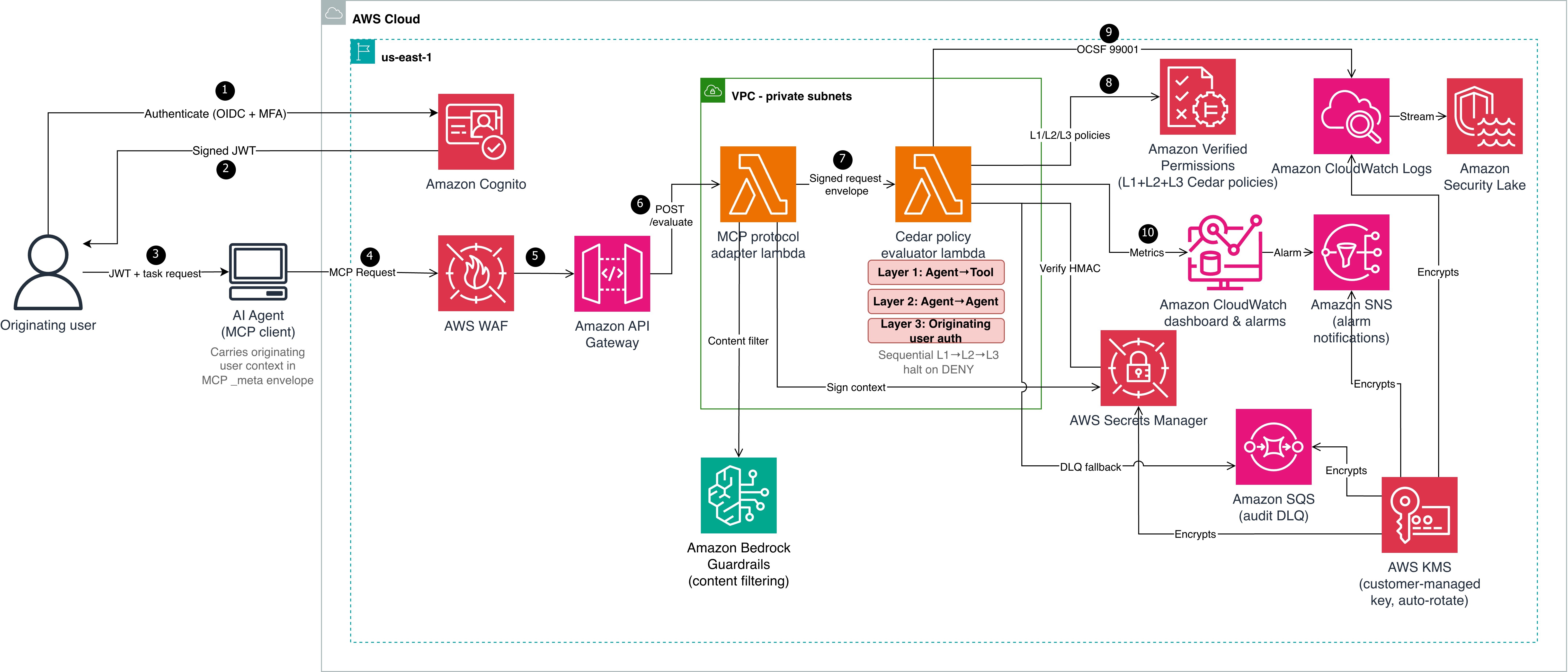


Enforce least-privilege authorization in multi-agent AI chains using Cedar
If you’re building multi-agent AI systems, you need to prevent authorization scope from silently expanding as agents delegate tasks through multi-hop chains. Without proper controls, an agent can potentially act beyond what the originating user authorized, even when role-based access control (RBAC) policies are in place. The OWASP Top 10 for Agentic Applications classifies this risk as ASI03: Identity & Privilege Abuse.
This post shows you how to address the potential risk using a three-layer policy model built with Cedar, an open source authorization policy language, deployed on Amazon Web Services (AWS). The reference implementation uses OAuth 2.0 for authentication and Cedar for authorization. A trusted identity provider authenticates the originating user, then Cedar policies enforce authorization across three layers using verified token claims.
Reference implementation overview
To enforce authorization at each hop in a multi-agent delegation chain, the reference implementation uses two AWS Lambda functions in sequence. A Model Context Protocol (MCP) adapter Lambda function normalizes inbound requests and cryptographically signs the originating user context. This prevents downstream tampering. A Cedar evaluator Lambda function evaluates three independent policy layers sequentially, halting on the first deny.
Table 1: Three-layer Cedar policy evaluation model
| Layer | What it checks | Principal to resource |
| L1 – Agent-to-tool | Whether the invoking agent has a sufficient trust score (1–5), belongs to the correct namespace (for example, payments), and is in the production lifecycle stage |
Agent to tool |
| L2 – Agent-to-agent delegation | Whether the delegation hop count is within the hard limit of five, and whether requested tasks are a subset of the target agent’s registered capabilities | Agent to agent |
| L3 – Originating user authorization | Whether the human who initiated the chain has the required role (for example, admin), has completed MFA, and is within the allowed delegation depth |
Agent to tool (user in context) |
Architecture

Cedar evaluates authorization but doesn’t establish identity. Before Cedar can evaluate context.originating_user.role or context.originating_user.mfa_verified, a trusted authentication layer must establish the user’s identity and produce verifiable claims. Steps 1–3 handle authentication; steps 4–10 handle authorization. The architecture shown in Figure 1 is described in the following lists:
Authentication (steps 1–3)
- The originating user authenticates with an OIDC-compliant identity provider (in this reference implementation, Amazon Cognito with TOTP multi-factor authentication (MFA)). The identity provider (IdP) issues a signed JSON Web Token (JWT) containing claims such as
sub,role,amr(authentication methods), andsession_id. - Amazon Cognito returns the signed JWT to the user.
- The user passes the JWT and task request to the AI agent (MCP client). The agent carries the originating user context in the MCP
_metaenvelope.
Authorization pipeline (steps 4–10)
- The AI agent sends a Model Context Protocol (MCP) request to AWS WAF, which filters using
CommonRuleSet,SQLiRuleSet, rate limiting, and body size constraints. - Amazon API Gateway (with Amazon Cognito authorizer) verifies the JWT signature against the user pool’s public keys and rejects invalid or expired tokens. Valid requests are forwarded to the MCP protocol adapter Lambda function, which applies Amazon Bedrock Guardrails content filtering.
- The adapter extracts verified claims from the token and maps them to Cedar context attributes:
- JWT
role claim:context.originating_user.role - JWT
amrincludes MFA method:context.originating_user.mfa_verified = true - JWT
sub:context.originating_user.user_id - JWT
sid:context.originating_user.session_id - JWT
amr claim:context.originating_user.authentication_method
The adapter then computes an HMAC-SHA256 signature over the user context (
user_id,role,mfa_verified,authentication_method, andsession_idin canonical order) using a key from AWS Secrets Manager. - JWT
- The adapter constructs a signed request envelope and invokes the Cedar evaluator Lambda function.
- The evaluator verifies the HMAC-SHA256 signature, retrieves L2 and L3 Cedar policies from Amazon Verified Permissions, and evaluates all three layers (L1, L2, and L3), halting on the first deny.
- The evaluator emits an Open Cybersecurity Schema Framework (OCSF) 99001 audit event to Amazon CloudWatch Logs. Failed emissions fall back to an Amazon Simple Queue Service (Amazon SQS) dead-letter queue (DLQ).
- Amazon CloudWatch dashboards and alarms monitor evaluation latency, deny rates, and DLQ depth. Alarm notifications route through Amazon Simple Notification Service (Amazon SNS).
Context integrity through delegation hops
Two mechanisms work together to protect identity across hops:
- Hash-based Message Authentication Code (HMAC-SHA256) ensures integrity and authenticity. Every downstream evaluator verifies this signature before trusting the context.
- OAuth 2.0 Token Exchange (RFC 8693) sets delegation scope using the on-behalf-of (OBO) pattern. When the
orchestratordelegates to a downstream agent (data-bot), it exchanges the original token for a scoped OBO token that records who’s acting on behalf of whom and with what authority. The Cedar policies (detailed in Step 2: Three-layer policies) then check whether that scoped delegation is permitted and verify the originating user claims carried in the OBO token. Token exchange limits each downstream agent to only the delegated task’s scope instead of passing through the full original token. For enterprise deployments, use token exchange alongside HMAC. OAuth tracks who is acting on behalf of whom and with what scope. HMAC verifies that the context hasn’t been tampered with and came from a trusted source.
Prerequisites
The following prerequisites are needed to deploy the reference implementation. Before you begin, clone the repository:
git clone https://github.com/aws-samples/sample-cedar-agentic-ai-authorization.git
cd sample-cedar-agentic-ai-authorization
Verify that you have the following:
- An AWS account with AWS Cloud Development Kit (AWS CDK) bootstrapped in the target AWS Region
- Python 3.12 or later, and Node.js 20 or later (for CDK command line interface (CLI))
- AWS CDK CLI (
npm install -g aws-cdk) - AWS credentials with scoped AWS Identity and Access Management (IAM) policy permissions for Lambda, API Gateway, Verified Permissions, Secrets Manager, Amazon Virtual Private Cloud (Amazon VPC), and CloudWatch
Walkthrough
In this walkthrough, you define the Cedar entity schema and policies, deploy the infrastructure with AWS CDK, and integrate your identity provider.
To define the Cedar entity schema
In this step, you define a schema with two entity types (Agent and Tool) and two actions (invoke_tool and delegate_task) in the AgentAuthz namespace. Notice that there is no User entity. Instead, you carry the originating user’s identity in the evaluation context record, which is a structured data object passed alongside each authorization request.
{
  "AgentAuthz": {
    "entityTypes": {
      "Agent": {
        "shape": {
          "type": "Record",
          "attributes": {
            "trust_level": { "type": "Long", "required": true },
            "namespace": { "type": "String", "required": true },
            "registered_capabilities": {
              "type": "Set", "element": { "type": "String" }, "required": true
            },
            "lifecycle_stage": { "type": "String", "required": true }
          }
        }
      },
      "Tool": {
        "shape": {
          "type": "Record",
          "attributes": {
            "namespace": { "type": "String", "required": true },
            "risk_level": { "type": "String", "required": true }
          }
        }
      }
    },
    "actions": {
      "invoke_tool": {
        "appliesTo": { "principalTypes": ["Agent"], "resourceTypes": ["Tool"] }
      },
      "delegate_task": {
        "appliesTo": { "principalTypes": ["Agent"], "resourceTypes": ["Agent"] }
      }
    }
  }
}
This schema is deployed to an Amazon Verified Permissions policy store by the VerifiedPermissionsStack CDK stack. In the reference implementation, the schema file is located at cedar-entity-schema.json.
Agent topology and attributes
The following tables show the agents and tools registered in this reference implementation, along with the attributes the Cedar evaluator function retrieves from the entity store. The test scenarios that follow trace requests through this topology.
Table 2: Agent attributes
| Entity | Type | trust_level | namespace | lifecycle_stage | registered_capabilities |
| orchestrator | Agent | 5 | orchestration | production | delegate_task route_request |
| finance-agent | Agent | 3 | payments | production | process_payment refund |
| data-bot | Agent | 4 | data | production | query_records delete_records |
Table 3: Tool attributes
| Tool | namespace | risk_level |
| process_payment | payments | medium |
| delete_records | data | high |
| query_records | data | low |
The orchestrator can delegate to both data-bot and finance-agent. Each agent can only invoke tools within its registered capabilities. The test scenarios below trace requests through these delegation paths.
To create three-layer Cedar policies
The following policies are deployed to the same Verified Permissions policy store. In the reference implementation, policy files are located under cedar/policies/ organized by layer: layer1-agent-to-tool/, layer2-agent-to-agent/, and layer3-originating-user-auth/.
Layer 1 (agent-to-tool): This policy permits the finance-agent to invoke the process_payment tool only when three conditions are met: the agent’s trust score is at least 3, it belongs to the payments namespace, and it’s deployed in the production lifecycle stage. If any condition fails, the request is denied. The agent’s trust_level, namespace, and lifecycle_stage aren’t self-reported in a production deployment. Instead, the evaluator retrieves these attributes from the Verified Permissions entity store using the agent_id as a lookup key.
Important: The reference implementation accepts these values from the request payload for simplicity. Production deployments must validate agent attributes against an authoritative source to prevent a compromised agent from escalating its own trust.
The trust_level attribute uses a 1–5 integer scale that represents an agent’s verified maturity: 1 for newly registered and untested agents, 3 for agents that have passed integration testing and security review, and 5 for agents with a proven production track record. Organizations assign trust levels through their agent promotion pipeline, not through self-declaration. The lifecycle_stage attribute (development, staging, production) prevents pre-production agents from invoking production tools, even if they have the correct namespace and trust score.
// L1-001: Finance agent can invoke payment tools
permit(
  principal == AgentAuthz::Agent::"finance-agent",
  action == AgentAuthz::Action::"invoke_tool",
  resource == AgentAuthz::Tool::"process_payment"
) when {
  principal.trust_level >= 3 &&
  principal.namespace == "payments" &&
  principal.lifecycle_stage == "production"
};
Layer 2 (agent-to-agent delegation) enforces depth limits and capability constraints. The orchestrator agent delegates tasks to data-bot only when the delegation chain is three hops or fewer and the requested capabilities are a subset of data-bot’s registered capabilities. A separate forbid policy (L2-004) enforces a hard system-wide limit of five hops regardless of which agents are involved.
// L2-002: Orchestrator can delegate to data agent
permit(
  principal == AgentAuthz::Agent::"orchestrator",
  action == AgentAuthz::Action::"delegate_task",
  resource == AgentAuthz::Agent::"data-bot"
) when {
  context.delegation_depth <= 3 &&
  context.target_capabilities.containsAll(context.requested_capabilities)
};
Layer 3 (originating user authorization) keeps the agent as the principal, but the policy evaluates context.originating_user to validate the human who initiated the request. data-bot invokes the delete_records tool only when the originating user has the admin role, has verified MFA, and the delegation chain is at most two hops deep. Without this layer, an agent with the right capabilities could invoke destructive tools regardless of who initiated the request.
// L3-001: High-risk tool (delete_records) requires admin + MFA
permit(
  principal == AgentAuthz::Agent::"data-bot",
  action == AgentAuthz::Action::"invoke_tool",
  resource == AgentAuthz::Tool::"delete_records"
) when {
  context.originating_user.role == "admin" &&
  context.originating_user.mfa_verified == true &&
  context.delegation_depth <= 2
};
Key design point: The principal remains the agent, not a user entity. The user’s role and MFA status are checked through context attributes, keeping the schema to two entity types and two actions.
Integrate your IdP
The reference implementation uses Amazon Cognito with TOTP MFA, but most OIDC-compliant providers (Okta, Microsoft Entra ID, Auth0, or AWS IAM Identity Center) work with this pattern. The authentication-to-signing flow is described in the preceding Authentication before authorization section. To use a different IdP, replace the Cognito authorizer on API Gateway with a Lambda or JWT authorizer for your IdP’s issuer URL. Cedar policies remain unchanged.
Deploy the infrastructure with AWS CDK
The reference implementation deploys five CloudFormation stacks: KmsStack, VerifiedPermissionsStack, LambdaStack, SecurityLakeStack, and MonitoringStack. The following commands deploy the stacks in dependency order:
cdk deploy KmsStack -c account_id=YOUR_ACCOUNT_ID -c guardrail_id=YOUR_GUARDRAIL_ID
cdk deploy VerifiedPermissionsStack -c account_id=YOUR_ACCOUNT_ID -c guardrail_id=YOUR_GUARDRAIL_ID
cdk deploy LambdaStack -c account_id=YOUR_ACCOUNT_ID -c guardrail_id=YOUR_GUARDRAIL_ID
cdk deploy SecurityLakeStack -c account_id=YOUR_ACCOUNT_ID -c guardrail_id=YOUR_GUARDRAIL_ID
cdk deploy MonitoringStack -c account_id=YOUR_ACCOUNT_ID -c guardrail_id=YOUR_GUARDRAIL_ID
Test the solution
Three end-to-end scenarios validate the evaluation model across different user roles, MFA states, and delegation depths. To run the tests:
- Set the API endpoint from the deployment output:
export API_ENDPOINT=$(aws cloudformation describe-stacks --stack-name LambdaStack \
--query "Stacks[0].Outputs[?OutputKey=='ApiEndpoint'].OutputValue" --output text)- Run the end-to-end tests:
.venv/bin/python -m pytest tests/e2e/ -v -sThe end-to-end tests cover the three scenarios described in the following sections. Each test sends a request through the deployed API and validates the per-layer authorization decisions.
Scenario A: Layer 3 enforcement
A support-role user (no MFA) requests record deletion through orchestrator and data-bot.
| Layer | Decision | Reason |
| L1: Agent-to-tool | PERMIT | data-bot has trust level 4, namespace data, and lifecycle production |
| L2: Agent-to-agent | PERMIT | orchestrator is authorized to delegate to data-bot, depth within limits |
| L3: Originating user | DENY | User role is support, not admin; MFA not verified |
| Overall | DENY | Denying layer: L3 |
Without Layer 3, this request would have been permitted based on agent capabilities alone, demonstrating why originating user authorization is essential.
Scenario B: Authorized admin request
An admin user with MFA requests the same operation through the same chain.
| Layer | Decision | Reason |
| L1 | PERMIT | Agent attributes match |
| L2 | PERMIT | Delegation path authorized |
| L3 | PERMIT | Role is admin, MFA verified, depth is less than or equal to 2 |
| Overall | PERMIT | All three layers permit |
Scenario C: Delegation depth limit
An admin with MFA requests the same operation, but the delegation chain has six hops. This scenario tests the Layer 2 depth constraint independently of user authorization.
| Layer | Decision | Reason |
| L1 | PERMIT | Agent attributes match |
| L2 | DENY | Depth of six exceeds the hard limit of five |
| Overall | DENY | Denying layer: L2 (L3 not evaluated – halt) |
Even an authorized admin can’t bypass the delegation depth constraint.
Alignment with the security principles for agentic AI
The AWS Office of the CISO published Four security principles for agentic AI systems. The following table shows how this solution maps to each principle.
| Principle | How the solution implements it |
| Secure development lifecycle across components | Property-based testing (Hypothesis) for adversarial input fuzzing, Cedar policy formal verification with strict schema validation, end-to-end scenarios testing policy bypass and privilege escalation paths, and infrastructure-as-code (IaC) with AWS CDK. |
| Traditional security controls remain applicable | AWS WAF, Amazon VPC isolation, AWS Key Management Service (AWS KMS) encryption, Amazon Cognito MFA, and Secrets Manager; NIST SP 800-53 control mapping. |
| Deterministic external controls (security box) | Three-layer Cedar evaluation runs outside the agent’s reasoning loop in a separate Lambda function. HMAC-signed context prevents tampering. Verified Permissions (the managed Cedar evaluation service) enforces L2 and L3 at the infrastructure level. |
| Greater autonomy earned through evaluation | trust_level and lifecycle_stage policy attributes calibrate agent capabilities; OCSF 99001 audit events and Amazon CloudWatch dashboards provide the evidence base for expanding autonomy. |
Monitoring and audit compliance
Each evaluation produces an OCSF 99001 audit event with request ID, user identity, delegation chain, per-layer decisions, and latency.
The following table maps this implementation to NIST SP 800-53 Rev. 5 controls. Customers are responsible for evaluating whether it meets their compliance requirements.
| NIST control | Control name | How the reference implementation addresses it |
| AC-4 | Information Flow Enforcement | User context flows immutably through HMAC-signed envelopes |
| AC-6 | Least Privilege | Three-layer evaluation requires both agent capability and user role |
| AC-6(1) | Authorize Access to Security Functions | MFA required for high-risk tools in Layer 3 |
| AC-6(5) | Privileged Accounts | Destructive operations restricted to admin with MFA verified |
| AU-2 | Event Logging | Each evaluation is logged as OCSF 99001 |
| AU-3 | Content of Audit Records | Events include identity, chain, action, resource, decisions, and latency |
| SI-10 | Information Input Validation | HMAC verified before evaluation; Amazon Bedrock Guardrails on inbound |
| IA-2(1) | Multi-factor Authentication | Layer 3 enforces MFA for high-risk operations |
| SC-12 | Cryptographic Key Management | Signing key in Secrets Manager with rotation |
| SC-28 | Protection of Information at Rest | Policies in Verified Permissions with STRICT validation |
Scaling to multi-account environments
Deploy the Cedar policy store in a central security account and use cross-account IAM roles for workload accounts to call verifiedpermissions:IsAuthorized. Use AWS Organizations service control policies (SCPs) to prevent workload accounts from creating their own policy stores. For standardizing user identity attributes across the organization, consider IAM Identity Center or a centralized OIDC provider that issues consistent claims to your workload accounts. This helps ensure that the context.originating_user attributes are uniform across accounts and agents.
For production deployments, consider extending this pattern with human-in-the-loop escalation for borderline denials, multi-tenant Cedar policy isolation, and Amazon Simple Storage Service (Amazon S3)-backed dynamic policy hot-reload for emergency tool shutdowns.
Clean up
To avoid ongoing charges, delete the deployed resources:
cdk destroy MonitoringStack SecurityLakeStack
cdk destroy LambdaStack
cdk destroy VerifiedPermissionsStack
cdk destroy KmsStack
aws logs delete-log-group --log-group-name /cedar-evaluator/audit  # if RETAIN policy
Conclusion
Multi-agent AI systems need authorization boundaries at every delegation hop. The three-layer Cedar policy model with OAuth 2.0 authentication provides that protection while maintaining least-privilege access. Combining a trusted IdP (AuthN) with Cedar policy evaluation (AuthZ) creates an authorization boundary around each tool invocation, verifying agent capability (L1), delegation path (L2), and originating user authority (L3). The pattern works with an OIDC-compliant IdP and a compute platform that can call Amazon Verified Permissions. Clone the reference implementation and adapt the Cedar policies to your organization’s requirements. For more information, see the Cedar policy language documentation and the Amazon Verified Permissions User Guide.
References
- Cedar policy language documentation
- Amazon Verified Permissions User Guide
- OWASP Top 10 for Agentic Applications
- Four security principles for agentic AI systems
- OAuth 2.0 Token Exchange (RFC 8693)
- NIST AI Agent Standards Initiative
- NIST SP 800-53 Rev. 5
- OCSF schema documentation
If you have feedback about this post, submit comments in the Comments section below.