Normal view

Websites with an undefined trust level: avoiding the trap

6 May 2026 at 11:30

Executive summary

  • A suspicious website is a web resource that cannot be definitively classified as phishing, but whose activities are unsafe. Such sites manipulate users, tricking them into voluntarily transferring money for non-existent services, signing up for hidden subscriptions, or disclosing personal data through carefully crafted terms of service. These include fake online stores, dubious crypto exchanges, investment platforms, and services with paid subscriptions.
  • Kaspersky has introduced a new web filtering category, “Sites with an undefined trust level,” into its security products (Kaspersky Premium, Android and iOS apps, etc.). The system analyzes the domain name and age, IP address reputation, DNS configuration, HTTP security headers, and SSL certificate to automatically detect suspicious resources.
  • According to Kaspersky data for January 2026, the most widespread global threat is fake browser extensions that mimic security products — they were detected in 9 out of 10 regions analyzed worldwide. Such extensions intercept browser data, track user activity, hijack search queries, and inject ads.
  • Kaspersky’s regional statistics reveal the specific nature of these threats: in Africa, over 90% of the top 10 suspicious websites are online trading scam platforms; in Latin America, fake betting services predominate; in Russia, fake binary options brokers and “educational platforms” with fraudulent subscriptions lead the way; in CIS countries — crypto scams and bots for inflating engagement.
  • Key indicators of a suspicious website to check: a strange domain name with numbers or random characters, cheap top-level domains (.xyz, .top, .shop), a recently registered domain (less than 6 months old according to WHOIS data), unrealistic promises (“100% guaranteed income,” “up to 300% profit”), lack of company contact information, and payments only via cryptocurrency or irreversible bank transfers.

Introduction

The online landscape is filled with various traps lying in wait for users. One such threat involves websites that can’t be strictly classified as phishing, yet whose activities are inherently unsafe. These sites often operate on the fringes of the law, even if they aren’t directly violating it. Sometimes they use a cleverly crafted Terms of Service document as a loophole. These agreements might include clauses such as no-refund policies or forced automatic subscription renewals.

Fake online stores, dubious financial platforms, and various online services that mimic legitimate business operations are all categorized as suspicious. Unlike actual phishing sites, which aim to steal sensitive data like banking credentials or passwords, these suspicious sites represent a far more cunning trap. Their goal is manipulation: tricking the victim into willingly paying for non-existent goods and services or signing them up for a subscription that’s nearly impossible to cancel. Beyond financial gain, these sketchy websites may also hunt for personal data to sell later on the dark web.

Our solutions categorize them as having an “undefined trust level”. This article explains what these sites look like, how to identify them, and what you can do to stay safe.

The dangers of shady websites

One of the biggest risks associated with making a purchase from an untrusted website that seems to be an online store is the financial loss and falling victim to fraud. Fake shops will entice you with attractive deals to get you hooked. After you pay, you may never receive what you paid for, or you may receive some cheap piece of unusable junk instead of the item you ordered. Investment or “guaranteed income” programs are another type of classic scam — they promise rapid returns, and once they take your deposits, they disappear without a trace.

Visiting or buying from untrusted suspicious websites can expose you to various risks that go beyond a single bad purchase. Fraudulent websites often collect your personal information even if you do not end up making a purchase. By completing a form or signing up for a “free offer”, you may be providing the scammer with access to your information.

Personal data collection can happen in a fairly straightforward and obvious way — for instance, through a standard order delivery form. In this scenario, attackers end up with sensitive information like the user’s full name, shipping and billing addresses, phone number, email address, and, of course, payment details. As we’ve previously discussed, fraudsters sell this kind of information, and there’re countless ways it can be used down the line. For example, this data might be leveraged for spam campaigns or more serious threats like stalking or targeted attacks.

Common types of suspicious sites

Let’s take a closer look at the different types of shady sites out there and how interacting with them can lead to financial loss, data leaks, the unauthorized use of personal information, and other consequences.

It’s worth noting that rogue websites can masquerade as legitimate ones in almost any industry. The first type of fraudulent site we’ll look at is fake online stores. These can appear as clones of real brand websites or as standalone stores. Usually, the scam follows one of two paths: the buyer either receives a counterfeit or poor-quality product, or they receive nothing at all. These sites lure victims in with suspiciously low prices and “exclusive” deals. Often, users are subjected to psychological pressure: the time to make a purchase decision is purposefully limited, provoking the victim, as with any other scam, into making an impulse purchase.
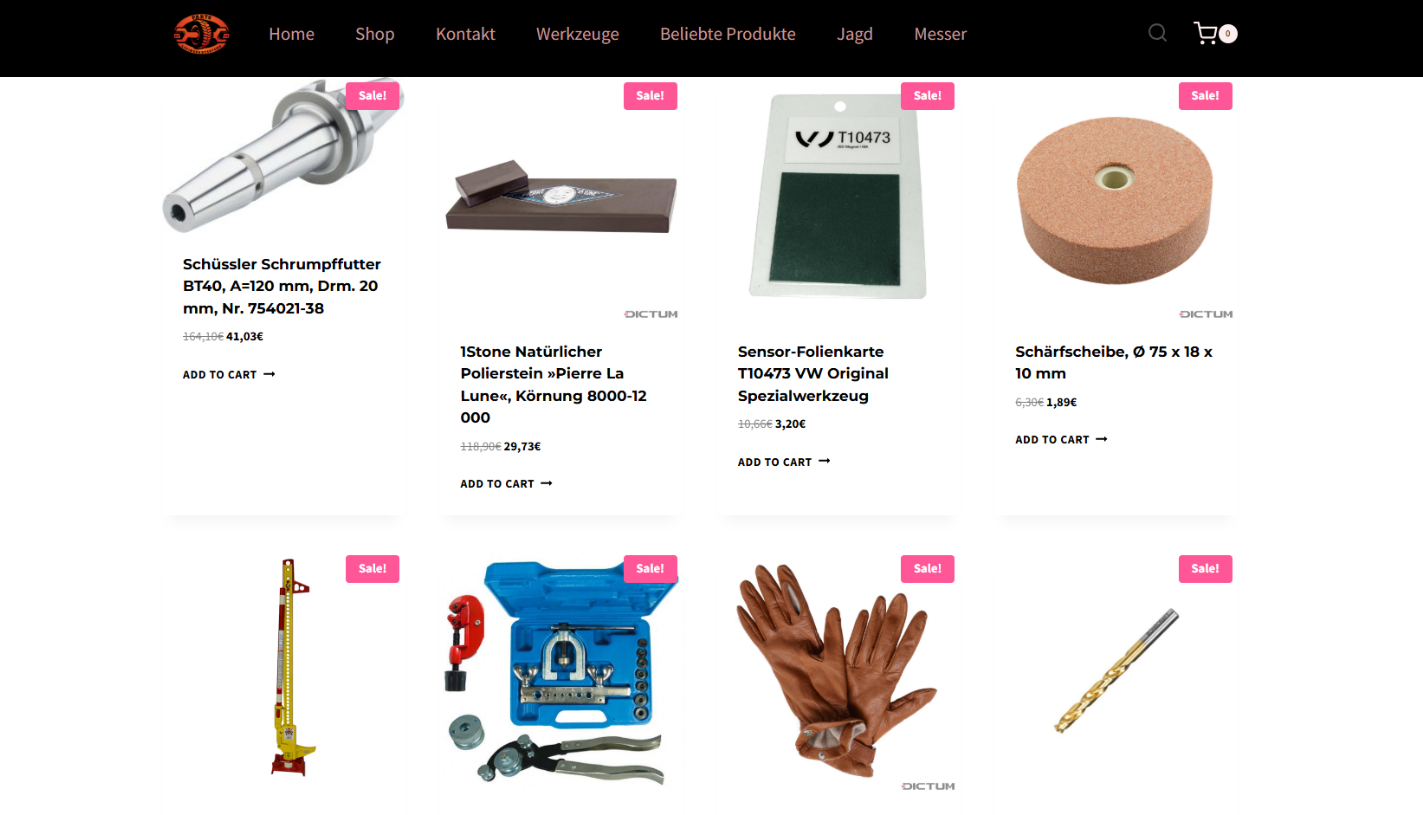
Another common type of shady site includes online exchanges and trading platforms. These primarily target cryptocurrency, as the lack of legislative regulation for digital currency in certain countries makes them a magnet for fraudsters. These suspicious sites often lure victims with supposedly favorable exchange rates or other enticing gimmicks. If the user attempts to exchange cryptocurrency, their tokens are gone for good. Beyond simple exchanges, rogue sites offer investment services and even display a fake balance growth to appear credible. However, withdrawing funds is impossible; when the victim tries to cash out, they’re prompted to pay some fee or fictional tax.
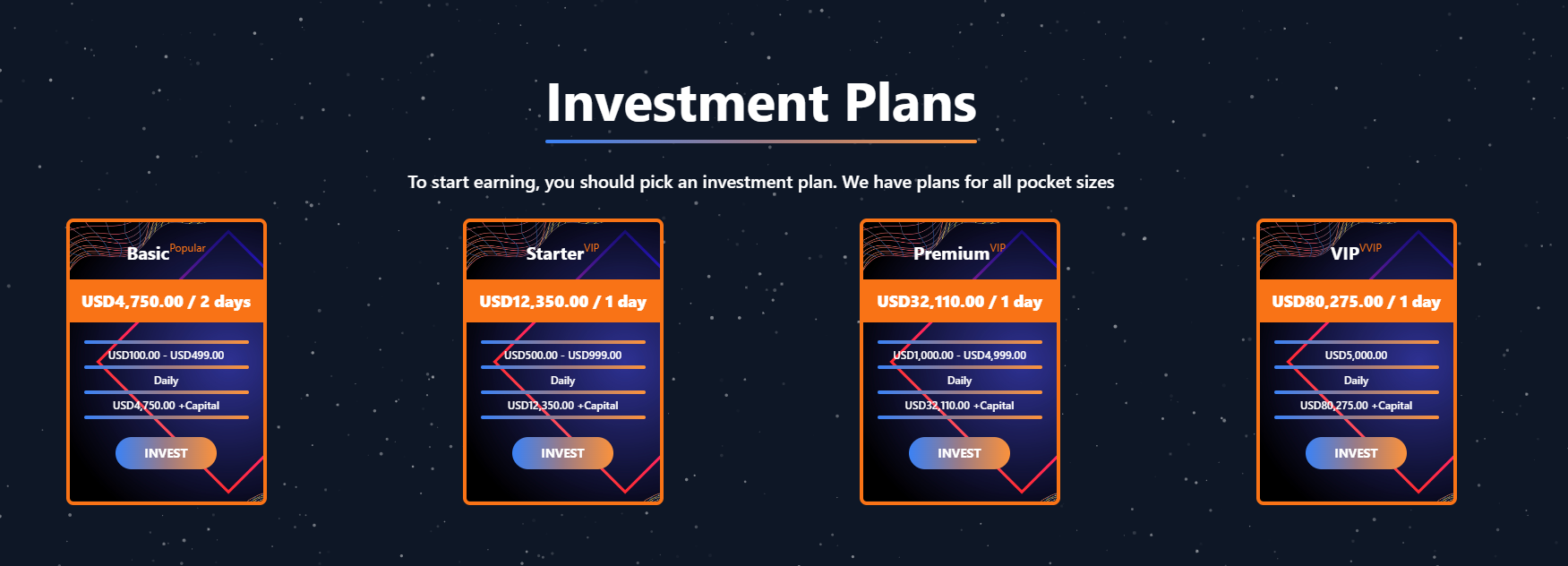
Subscription traps are also worth noting, offering everything from psychological tests to online video streaming platforms. The hallmark of these sites is that they deliberately withhold critical information, such as recurring charges, or hide the fact it even exists. Typically, the scheme works like this: a user is offered a subscription for a nominal fee, like $1. While that seems attractive, the next charge – perhaps only a week later – might be as much as $50. This information is intentionally obscured, buried in fine print or tucked away in the Terms of Service where it’s harder to find. Legitimate services always clearly disclose subscription terms and provide an easy way to cancel before a trial period ends. Scam services, on the other hand, do everything possible to distract the user from the actual terms of use and subscription.

Shady sites can also masquerade as providers of mediation services, such as legal or real estate assistance. In reality, the service is either never delivered or provided in a stripped-down, incomplete form. For example, a user might be prompted to pay for a service that’s normally provided for free. The danger here lies not only in losing money for non-existent services but also in the significant risk of exposing personal data, such as ID details, taxpayer identification numbers, social security numbers, or driver’s license information. Once in the hands of attackers, this data can become a tool for executing further scams or targeted attacks.

On the whole, suspicious sites are fairly difficult to distinguish from legitimate, trustworthy services. Masquerading as a legitimate business is the primary goal of these sites, and the fraudulent schemes they employ are not always obvious. Nevertheless, there are protective measures as well as certain indicators that can help you suspect a site is unsafe for purchases or financial transactions.

How to identify suspicious or fraudulent websites

Despite the increasingly convincing attempts to create fake shops, the majority of them still lack the quality of real online stores, and there are many signs that may give them away. Some of these signs can be caught by the eye while others require a bit of technical investigation. By combining visual inspection, technical checks, and trusted online tools, you can protect yourself from financial loss or data theft.

Visual and manual clues

You don’t need to be a cybersecurity expert to catch many red flags just by observing the site’s domain, visuals, language and behavior. For instance, scam sites often have strange or randomly generated names, filled with numbers, underscores, hyphens, or meaningless words, like best-shop43.com. In addition, such vague top-level domains as .xyz, .top, or .shop are also frequently used in scams because they’re cheap and easy to register.

Furthermore, most fake stores sites look unprofessional, with poor visuals, pixelated images, mismatched fonts, or copied templates. Many fraudulent websites borrow layouts or logos from other brands or free templates, which makes them appear generic and sketchy.

Another major giveaway lies in the content itself. Be aware of persuasive language, unrealistic promises, or emotional triggers such as No KYC, Risk-free returns, 100% guaranteed income, Up to 300% profit, or Passive income with zero effort. Unrealistic deals are another red flag. If the products are listed at extremely low prices, continuous countdown timers, and “limited time only” messages that are often used to pressure you into making a quick purchase, it’s a clear tell of a fraudulent website.

Legitimate businesses always provide verifiable contact details, such as a physical address, company name, and customer support. On the contrary, scam sites hide this information. You may also notice the non-functioning pages, broken or suspicious links leading to unrelated external sites which indicate poor maintenance or malicious intent.

Another important signal is the website’s social media presence. Legitimate online businesses usually maintain at least one active social media account to promote their products and communicate with customers. In most cases, these businesses have long-established social media accounts with harmonized posting history and engagement from real users, consistency between the brand website and social media profiles (same name, logo, and links). The links to social media profiles from the website are usually direct. In contrast, fraudulent or deceptive websites often lack any meaningful social media presence or display signs of superficial or artificial activity. This may include missing social media accounts altogether, social media icons that lead to non-existent, inactive, or unrelated pages, or recently created profiles with very few posts and minimal user engagement. In some cases, comment sections are disabled or dominated by spam and automated content, suggesting an attempt to avoid public interaction rather than engage with customers.

Lastly, the payment options offered by the site can also tell a lot about its legitimacy. Be extremely cautious if a website only accepts cryptocurrency, wire transfers, or third-party P2P payments. These payment methods are irreversible and are preferred by scammers. Legitimate e-commerce platforms typically offer secure and reversible payment options, such as credit cards or trusted payment gateways that include buyer protection policies.

However, the absence or existence of any of these factors alone does not necessarily indicate malicious intent. It should be evaluated in combination with technical, linguistic, and behavioral indicators, rather than treated as a standalone signal of legitimacy.

Technical indicators to check

Looking into technical signs can reveal whether a website is trustworthy or potentially fraudulent.

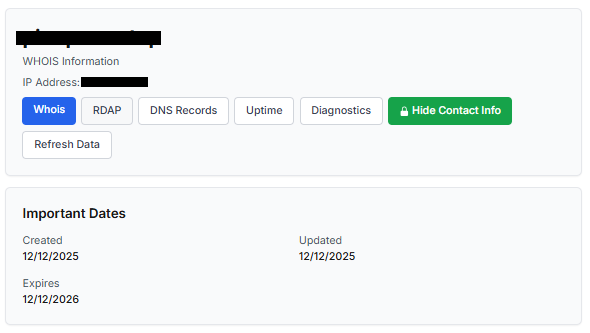
One of the first things to check is the domain age. Scam websites are often short-lived, appearing only for a few weeks or months before disappearing once users start reporting them. To check when the domain was created, use a WHOIS lookup. If it’s less than six months old, be cautious — especially for e-commerce or investment sites, where legitimacy and trust take time to build.

Let’s take a look at the registration details for the popular online marketplace Amazon. As we can see from the WHOIS information, it was registered in 1994.
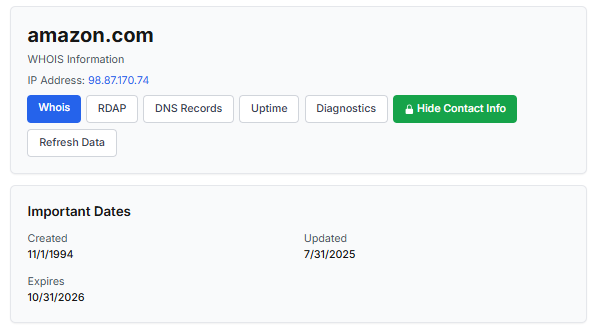
Meanwhile, a reported suspicious online store was created a couple of months ago.
Legitimate websites usually operate on stable hosting platforms and remain on the same IP addresses or networks for long periods. In contrast, fraudulent websites often move between servers (in most cases using a cheap shared hosting service) or reuse infrastructure already associated with abuse. Checking the IP address reputation can reveal if the website or the hosting server has previously been linked to suspicious activities. Even if the website looks legitimate, a poor IP reputation can expose it.

In addition to that, looking at the infrastructure behavior over time can reveal patterns about its legitimacy. Websites associated with fraudulent activity often show short lifespans, sudden spikes in activity, or rapid appearance and disappearance, which indicates a coordinated campaign rather than a legitimate business.

Another important clue is hidden ownership. When the WHOIS details show “Redacted for Privacy” or leaves the organization name blank, it may indicate that the website owner is deliberately hiding their identity.
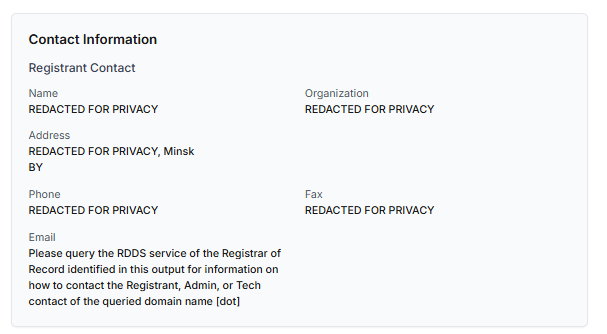
We should point out that while this can raise suspicion during investigations, hidden WHOIS data is not inherently malicious. Many legitimate businesses use privacy protection services for valid reasons. These may include protection from spam and phishing after public email addresses are taken from WHOIS databases, personal safety for small business owners, and brand protection to prevent competitors or malicious actors from targeting the registrant. This means that some businesses can use services like WHOIS Privacy Protection, Domains By Proxy, or PrivacyGuardian.org to remove the WHOIS data while still operating transparently on their websites through clear contact details, customer support channels, and legal pages (e.g. terms of use).

Therefore, hidden ownership should be treated as a contextual risk indicator, not a standalone proof of fraud. It becomes more suspicious when combined with other signals such as newly registered domains, and lack of legal information.

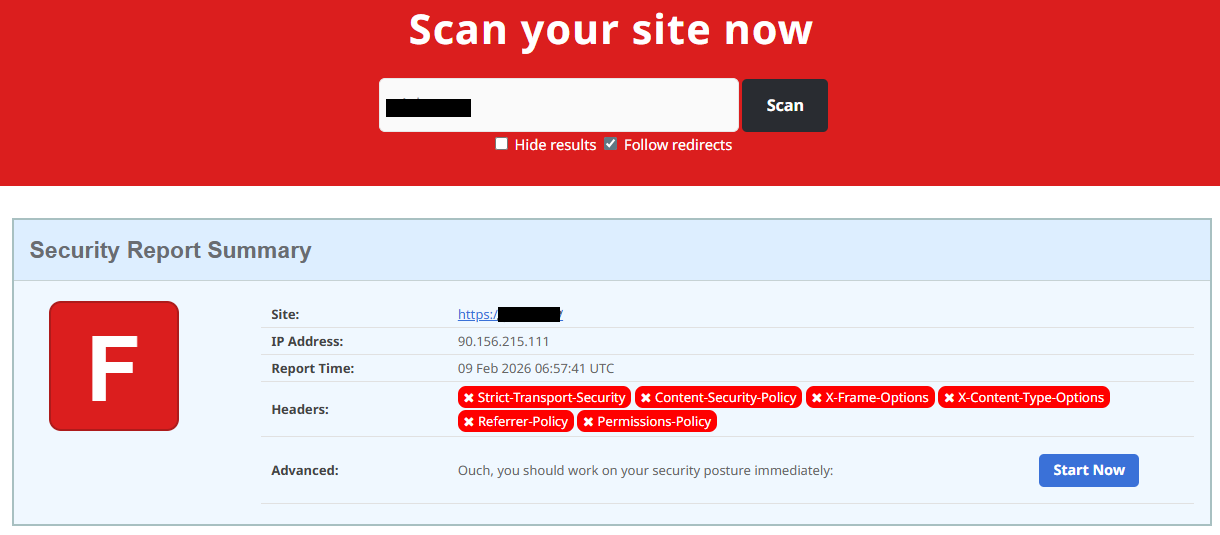
Next, you can check the security headers of the website. Legitimate websites are usually well maintained and include several key HTTP headers for protection. Some examples include:

  • Content-Security-Policy (CSP) provides strong defense against cross-site scripting (XSS) attacks by defining which scripts are allowed to run on the site and blocking any malicious JavaScript that could steal login data or inject fake forms.
  • HTTP Strict-Transport-Security (HSTS) forces browsers to connect to the site only over HTTPS. It ensures all communication is encrypted and prevents redirecting users to an insecure (HTTP) version of the site.
  • X-Frame-Options prevents clickjacking, which is a type of attack where a legitimate-looking button or link on a malicious page secretly performs another action in the background.
  • X-Content-Type-Options blocks MIME-type attacks by preventing browsers from misinterpreting file types.
  • Referrer-Policy controls how much information about your previous browsing (referrer URLs) is shared with other sites.

These headers form the “digital hygiene” of a website. Their absence doesn’t always mean a site is malicious, but it does suggest a lack of security awareness or professional maintenance — both strong reasons to be cautious.

You should also check the SSL certificate. Scam sites may use self-signed or short-lived SSL certificates. You can inspect this by clicking the padlock icon in your browser’s address bar — if it says “not secure” or the certificate authority seems unfamiliar, that’s a red flag.

You can check the security headers and the SSL certificate by sending an HTTP request programmatically or by using some online service.
Another indicator that provides insight into how well a website is done and managed is DNS configurations. Legitimate businesses typically use reliable DNS providers and maintain consistent DNS records. Missing the name server NS or mail exchange MX records may indicate poor DNS configuration. In addition to NS and MX, reputable sites also configure SPF and DMARC records to protect their brand from email spoofing and phishing. Something scam website developers won’t bother with because they don’t intend to build a long-standing reputation.

You can check the configurations of DNS records either programmatically or by using an online service.

Another recommendation is to pay attention to website behavior. If there are frequent redirects, pop-up ads, or background requests to unknown domains, this may indicate unsafe scripting or tracking.

How to protect yourself

Tools and databases for detecting suspicious websites

We at Kaspersky have built an intelligent system for detecting suspicious web resources and added this new type of protection into many of our products, including Kaspersky Premium, Kaspersky for Android and iOS, and others. Our detection model is based on many factors, including but not limited to the following:

  • domain name and age,
  • IP reputation,
  • stability of the infrastructure used,
  • DNS configurations,
  • HTTP security headers,
  • digital identity and popularity of the web resource.

Kaspersky has been certified as a provider of effective protective technology for fake shop detection.

When a user tries to visit a site flagged as having an undefined trust level, our solutions show a warning to stop the visitor from becoming a victim of personal data leaks, financial losses or a bad purchase:
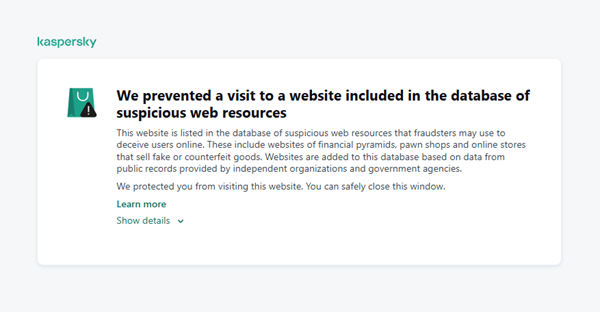
This component is on by default.

Moreover, there are several online tools and databases that can help assess a website’s legitimacy:

  • ScamAdviser analyzes trust based on WHOIS, server location, and web reputation.
  • APIVoid provides risk scoring using DNS, IP, and domain reputation databases.
  • National government databases often maintain official lists of fraudulent or blacklisted domains.

Preventive measures

To protect yourself from such threats, it might a good idea to take some additional preventive measures. Always double-check the URL and domain name, especially when you are about to click a link or make a payment. Make sure the site uses HTTPS and has a trusted certificate.

You can use standard browser tools to verify site security. For example, in Google Chrome, clicking the site information button (the lock or settings icon in the address bar) displays details about the connection security and the site’s certificate.
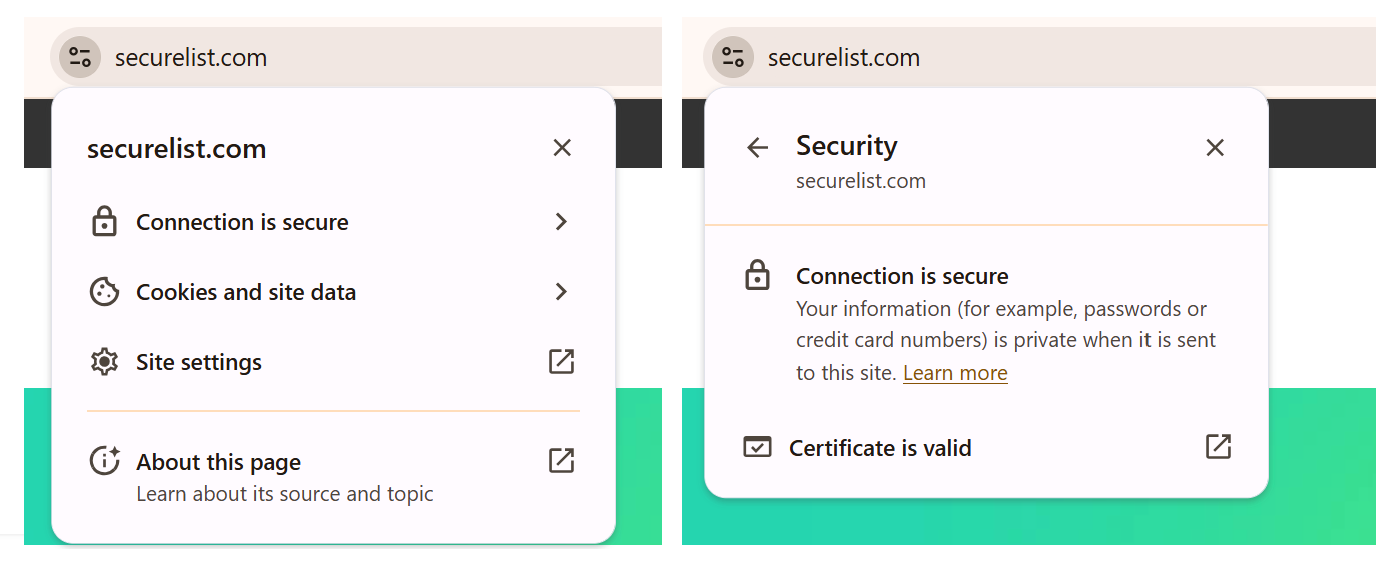
In the Security section, you can check whether the site supports HTTPS – it should say “Connection is secure” – and view the site’s digital certificate.
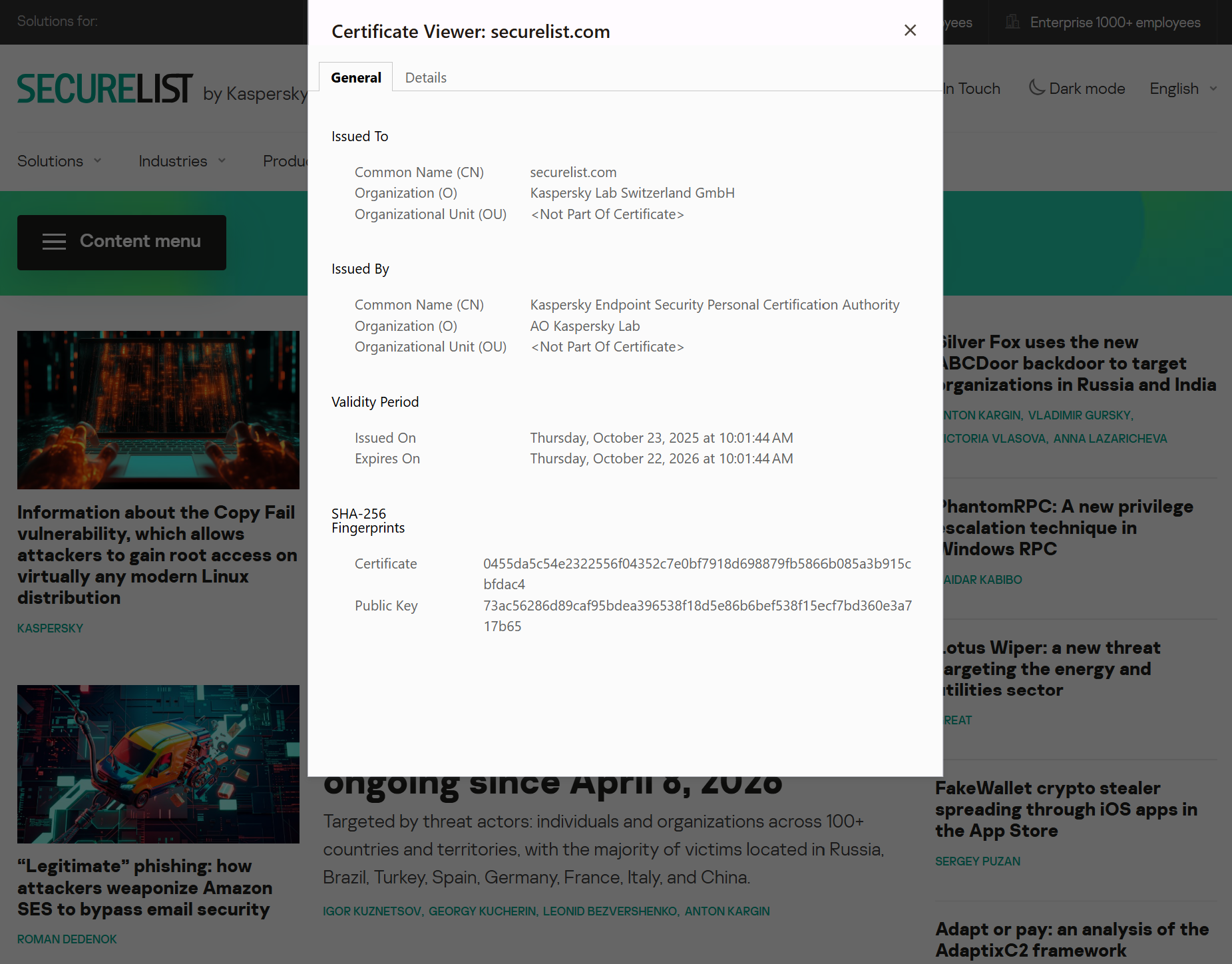
Additionally, keep reliable security software with real-time protection running on your device to stop you from accessing dangerous websites. Do not download any files or enter your personal information on websites that look unprofessional or suspicious. And finally, remember the golden rule: if a deal seems too good to be true, it often is.

If you realize that you’re on a scam website, it’s important to perform certain post-incident actions immediately. First, contact your bank or payment provider as soon as possible to block the transaction or card. Then, change your passwords for the services which might have been compromised, and run a full antivirus scan on your device to detect and remove any potential threats. Lastly, consider reporting the website to the cybercrime agency in your country or to the consumer protection agency. Sharing your experience online by leaving a review or warning will give notice to potential customers alike.

By staying careful and taking quick actions, you can significantly reduce the chances of being a target and help make the internet a safer place for everyone.

An overview of detection statistics for sites with an undefined trust level

To illustrate the types of suspicious sites prevalent in various regions around the world, we analyzed anonymized detection data from Kaspersky solutions for the “websites with an undefined trust level” category in January 2026. For each region, we identified the 10 most frequently encountered sites and calculated the share of each within that list. To maintain privacy, specific domains are not listed directly; instead, they’re described based on their functionality and characteristics.

Most visited suspicious sites

First, let’s examine the sites that appear across multiple regions, indicating a high prevalence.

In 9 out of the 10 regions analyzed, we encountered a suspicious image processing platform (*a*o*.com). This site positions itself as a photo editing tool, but in reality, it serves as an intermediary server for uploading images used in phishing and other campaigns. By interacting with such a site, users risk exposing personal data under the guise of uploading images or falling victim to a phishing attack.

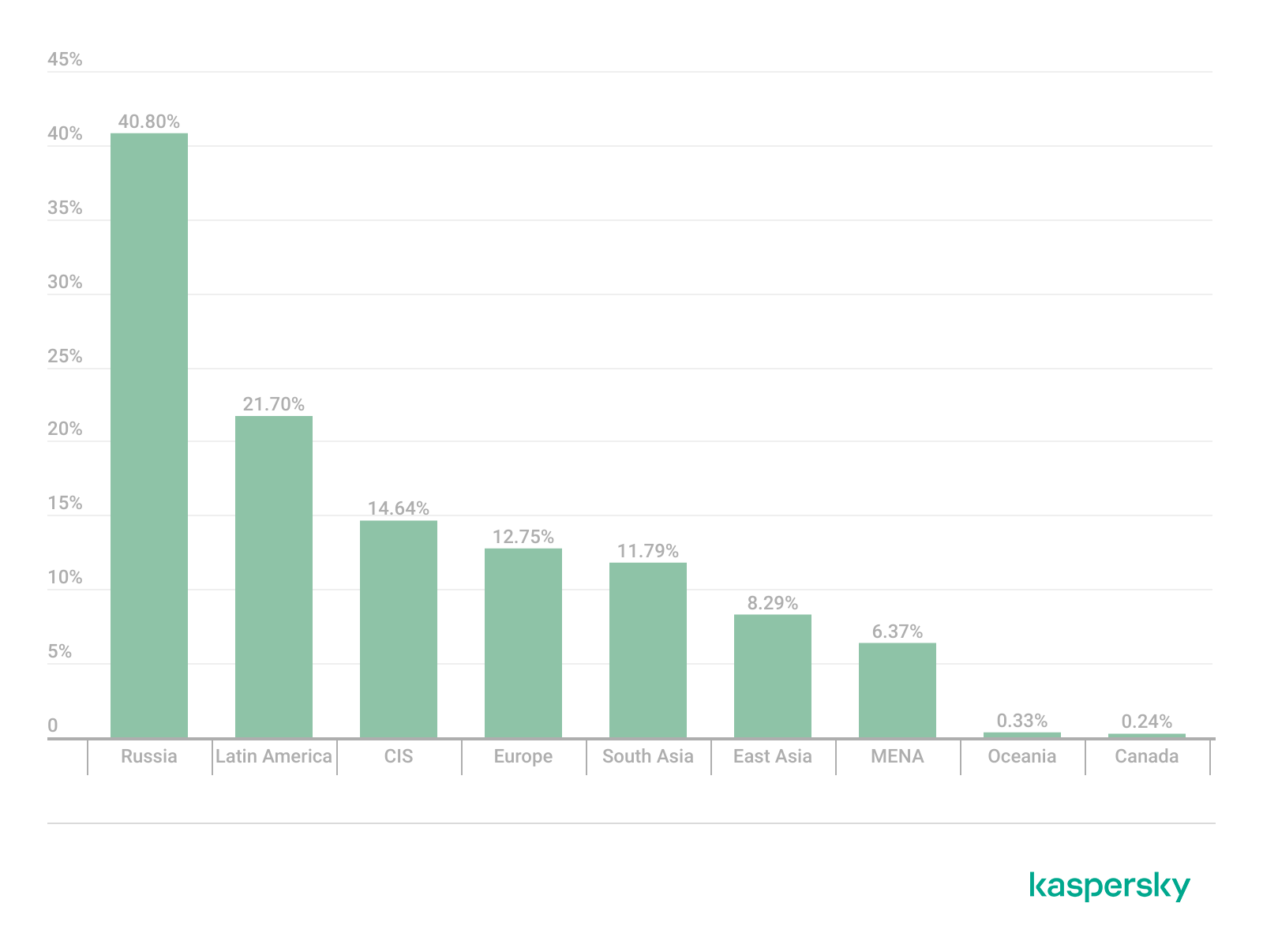
Percentage of the *a*o*.com domain detections by region, January 2026 (download)

This site has the largest share of detections in the Russian Federation, where it ranks first in the TOP 10 with a 40.80% share. It is also prevalent in Latin American countries (21.70%) and the CIS (14.64%), while it’s least common in Canada at 0.24%.

The next site appeared in 7 regions. It consists of a landing page for a fake antivirus solution presented as a browser extension (*n*s*.com). This extension redirects the user to a fake search engine page allowing it to collect data and track user activity, specifically search queries.

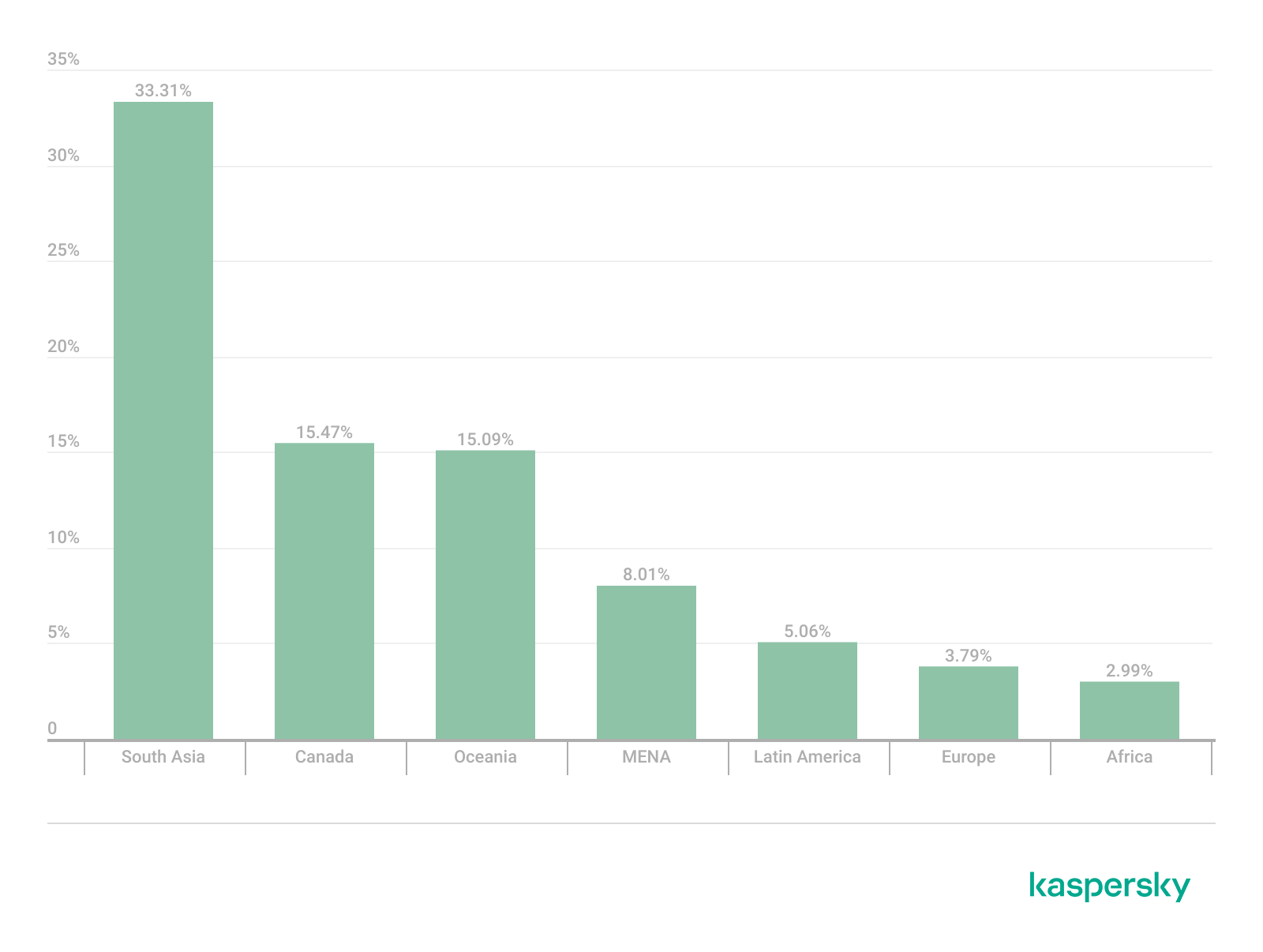
Percentage of the *n*s*.com domain detections by region, January 2026 (download)

This site is most frequently detected in South Asia, with a share of 33.31%. Its presence in Canada and Oceania is roughly equal (15.47% and 15.09%, respectively). We recorded the lowest number of detections in Africa, at 2.99%.

Another suspicious browser extension appeared in the TOP 10 in 6 out of the 10 regions. It’s a fake privacy-enhancing tool hosted at *w*a*.com. Instead of providing the advertised privacy features, this extension carries a high risk of intercepting browser data. It can modify browser settings, harvest user data, and swap the default search engine for a fake one. Furthermore, it maintains full control over all browser traffic.

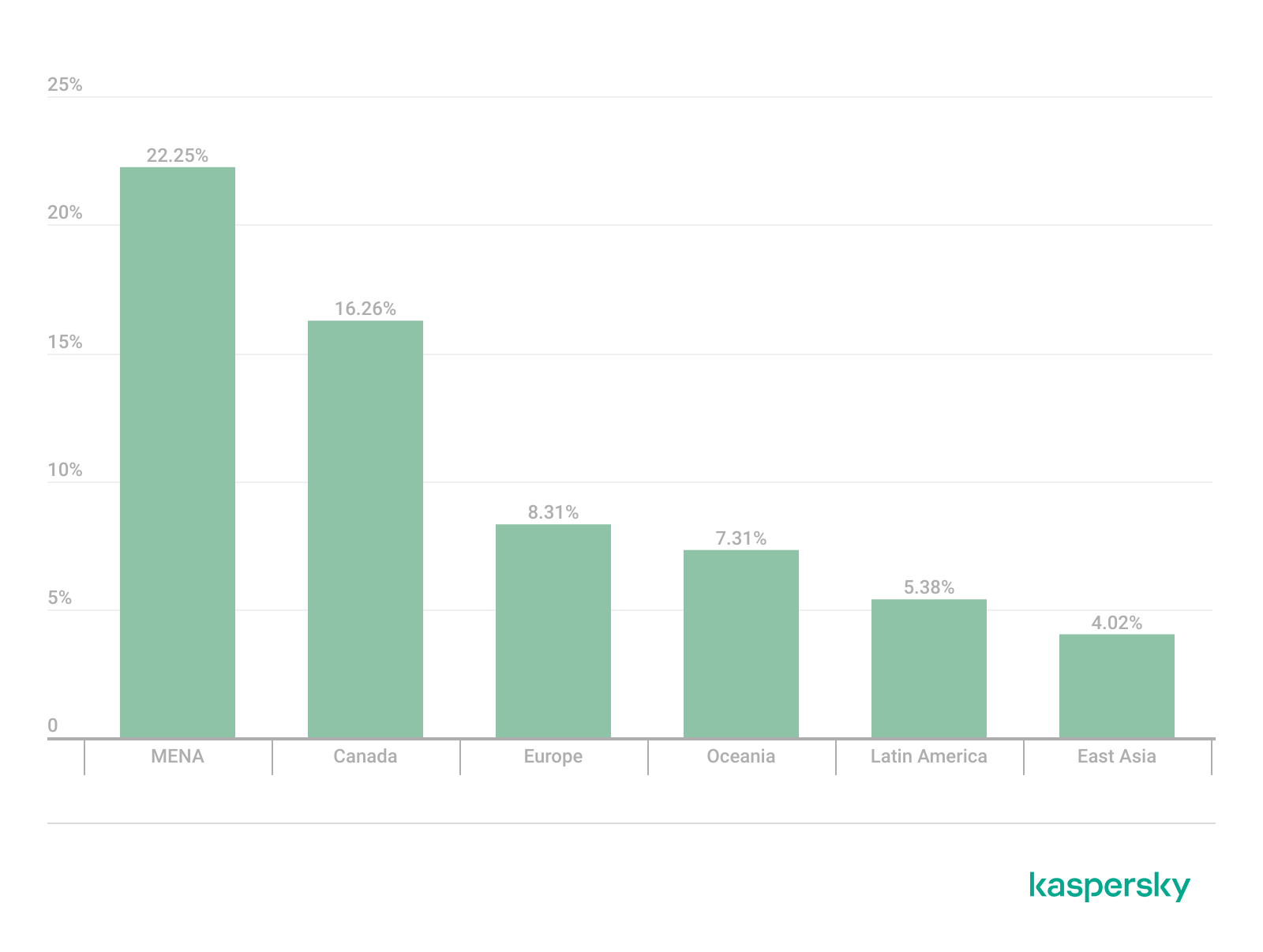
Percentage of the *w*a*.com domain detections by region, January 2026 (download)

This “service” has its largest share, 22.25%, in the Middle East and North Africa, and is also quite common in Canada (16.26%). It’s least frequently encountered in Latin America (5.38%) and East Asia (4.02%).

The site *o*r*.com appeared in five regional rankings. It’s a fake security service promising to provide online safety by warning users about malicious sites and dangerous search queries. This extension has the potential to steal cookies (including session cookies), inject advertisements, spoof login forms, and harvest browser history and search queries. We noted that this site made the TOP 10 in Africa (0.59%), the MENA (Middle East and North Africa) region (4.57%), Europe (5.61%), Canada (7.21%), and Oceania (1.93%).

In 4 out of the 10 regions, we identified several other recurring sites. One of them (*n*p*.xyz) mimics a repository for creative AI image generation prompts while capturing browser data. The domain hosting this site exhibits several red flags: it was recently registered, and the owner’s information is hidden. This site reached the TOP 10 in Africa (0.51%), the MENA region (7.04%), Latin America (22.54%, ranking first in that region), and South Asia (5.91%).

The second service (*i*s*.com) positions itself as a tool for safe searching, protecting the browser from threats, and verifying extensions. However, this is a typical browser hijacker, much like the others mentioned above. It made the TOP 10 in South Asia (8.03%), Oceania (17.97%), Europe (3.90%), and Canada (14.35%).

The third site (*h*t*.com) poses as a private browsing extension. In reality, it’s another potentially unwanted application designed for browser hijacking: it modifies settings, steals sensitive data (cookies, browser history, and queries), and can redirect the user to phishing pages. Users have specifically noted the difficulty involved in removing the extension. This site appears in the TOP 10 for the MENA region (10.17%), Canada (7.06%), Europe (3.81%), and Oceania (2.81%).

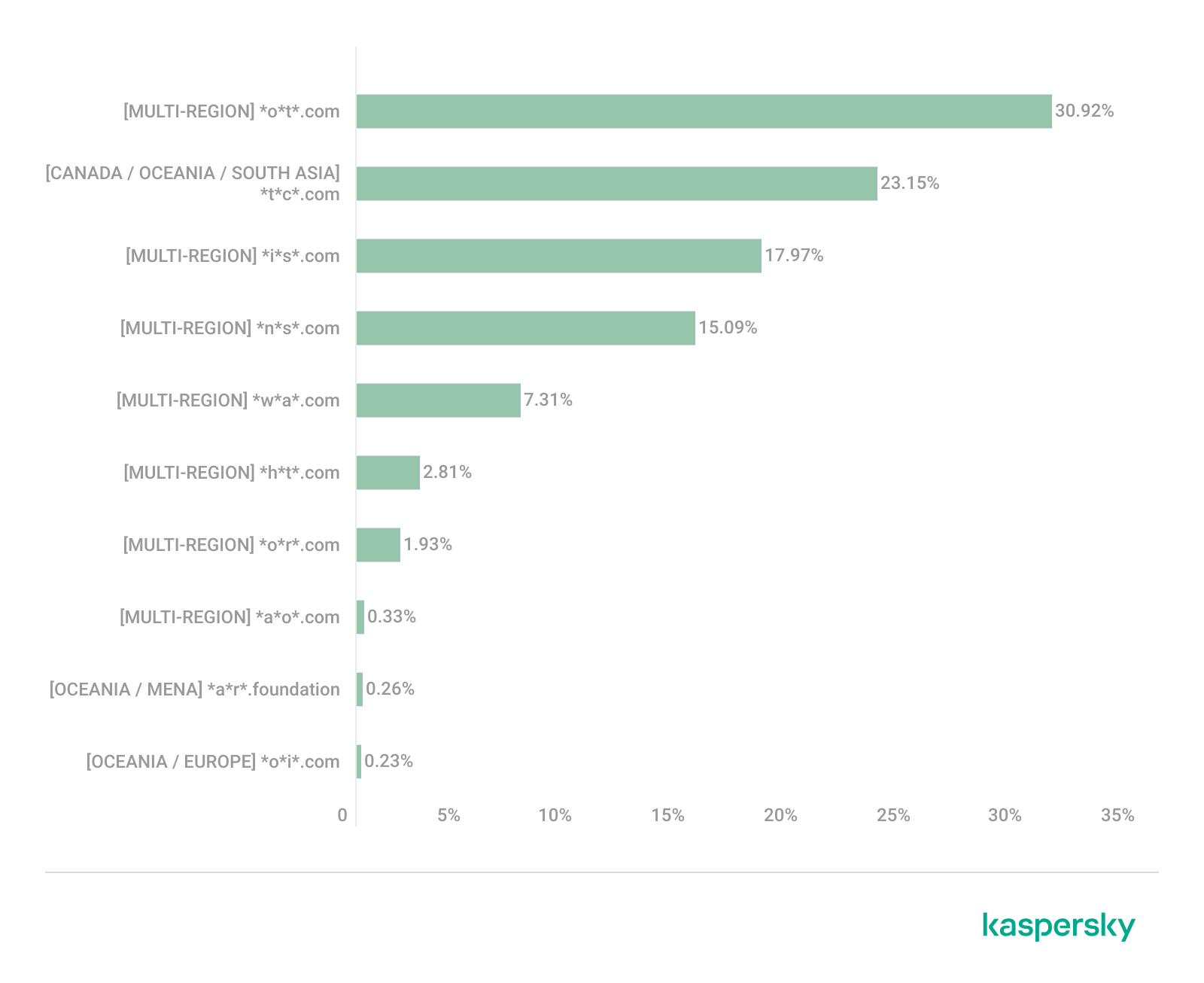
Another domain (*o*t*.com) that reached the TOP 10 in four regions is a service mimicking a browser extension for safe searching and web browsing. It’s dangerous because it injects ads and steals user data. It’s important to note that such extensions can be installed without explicit user consent – for example, via links embedded in other software. This service holds the number one spot in two regions: Canada (25.72%) and Oceania (30.92%), while also appearing in the TOP 10 for East Asia (8.01%) and Africa (0.88%).

Consequently, we can see that the majority of suspicious sites detected by our solutions worldwide are browser hijackers masquerading as security products. Nevertheless, other categories of sites also appear in the TOP 10.

Next, we’ll examine each region individually, focusing on descriptions of domains not previously covered. For clarity, the sites mentioned above will be marked as [MULTI-REGION], while those appearing in only two or three regions will include the names of those specific areas. We’ll observe several regional overlaps and similarities, allowing us to determine which types of suspicious sites are popular both within specific regions and globally.

Africa

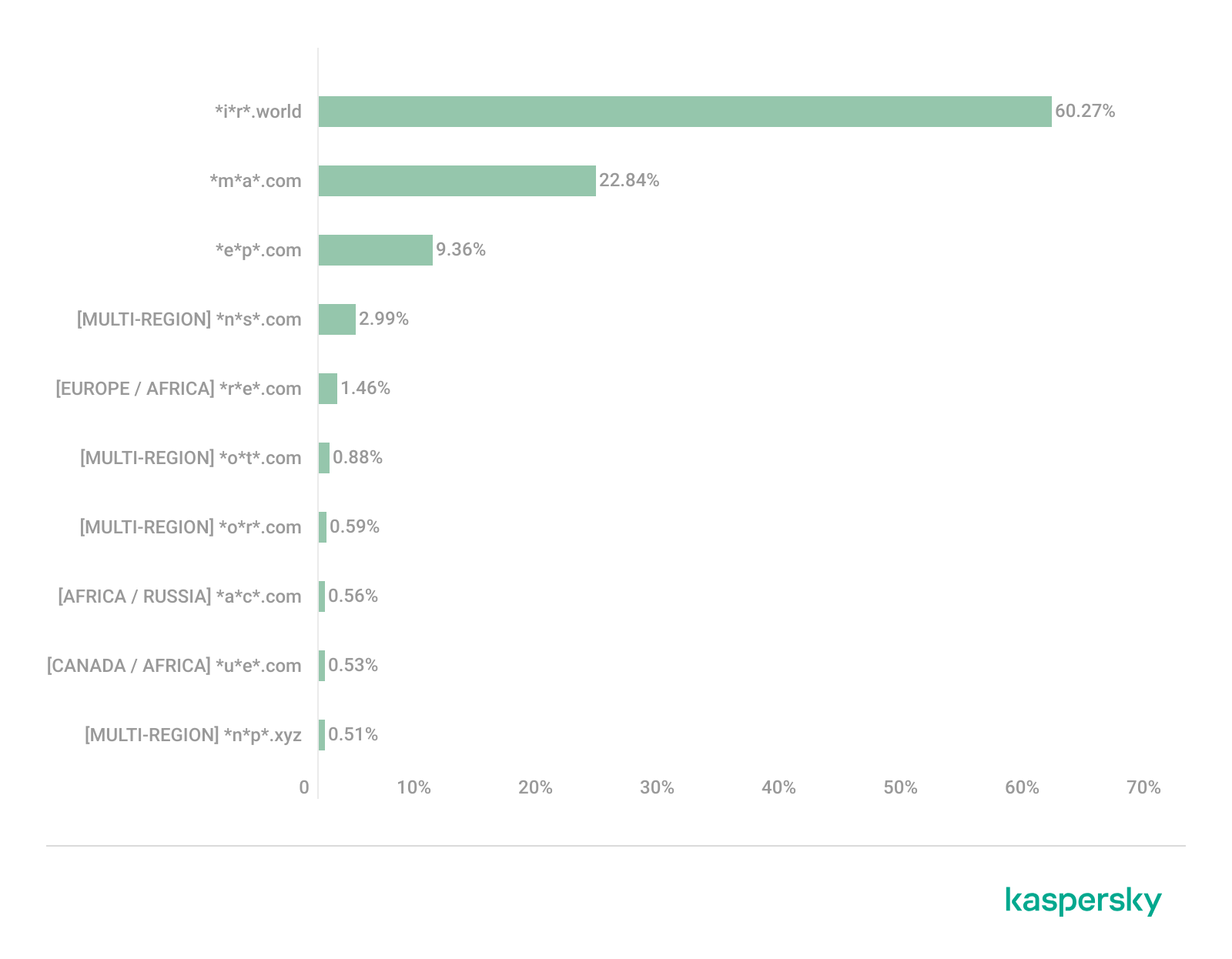
Distribution of the TOP 10 suspicious websites in Africa, January 2026 (download)

The three most prevalent domains in African countries are found exclusively in this region. All of them – *i*r*.world (60.27%), *m*a*.com (22.84%), and *e*p*.com (9.36%) – are potentially fraudulent online trading platforms suspected of using forged licenses. These sites employ classic scam schemes where it’s impossible to withdraw any alleged earnings. In fifth place is a domain we’ll also see in the European TOP 10, *r*e*.com (1.46%): a platform marketed as a tool for retail and semi-professional traders. It charges for services available elsewhere for free. Eighth place is held by a site that also appears in the Russian TOP 10: *a*c*.com (0.56%). This is a dubious AI tool that claims to offer free subscriptions to a premium graphics editor. In ninth place is a domain that also surfaces in the Canadian TOP 10: *u*e*.com (0.53%), a browser extension of the “web protection” variety that we’ve encountered previously.

In summary, the African region is dominated by financial scams within the online trading and brokerage sectors. These include fake platforms that make it impossible to withdraw funds and use fake licenses and classic schemes to steal users’ money. Additionally, Africa sees paid tools that duplicate free services and questionable AI-based subscriptions. The primary threat in this region is financial loss through fraudulent investment-themed sites.

MENA

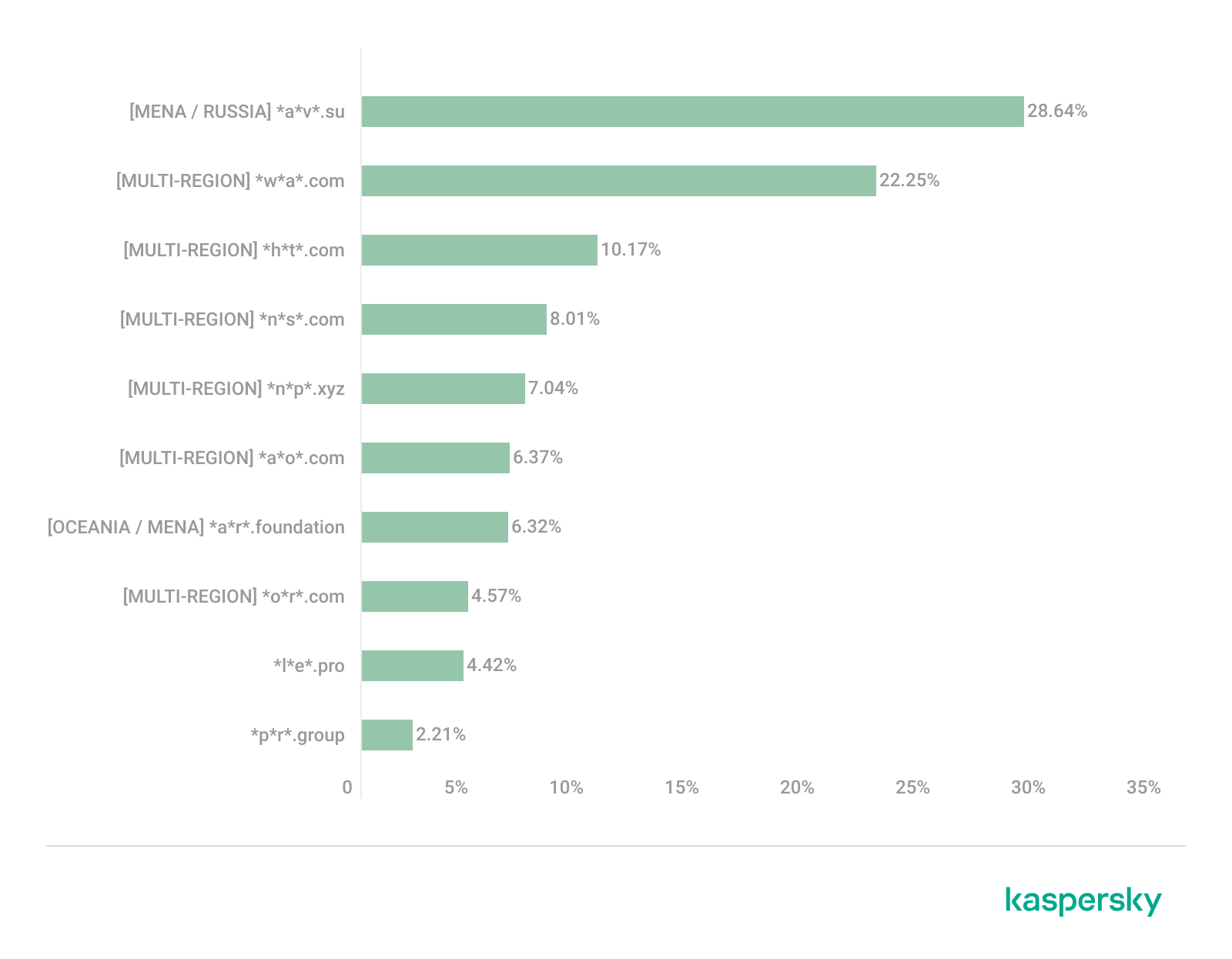
Distribution of the TOP 10 suspicious websites in the Middle East and North Africa, January 2026 (download)

In the MENA region, the site *a*v*.su holds the top spot with a 28.64% share; notably, this site also appears in the TOP 10 for Russia. It markets itself as a tool for building custom VoIP-PBX systems. However, it has an extremely low trust rating and is frequently associated with phishing, and hidden redirects. Using this service carries significant risks, including data leaks, and financial loss.

Ranked seventh is *a*r*.foundation (6.32%), an AI bot allegedly designed for trading, which we also identified in the TOP 10 for Oceania. This service has been flagged as an investment scam operating as a pyramid scheme with the hallmarks of a Ponzi scheme.

The ranking is rounded out by two domains not found in any other region. The first one, *l*e*.pro (4.42%), is a spoof of a popular betting service. The second, *p*r*.group (2.21%), is a clone of a well-known broker. Both sites are scams.

In the MENA region, the landscape is dominated by fake VoIP services as well as counterfeits of financial and betting platforms, which attackers use to conduct phishing attacks, and perform hidden redirects. A significant portion of suspicious sites consists of fake online privacy tools and browser hijackers masquerading as security extensions. Ponzi schemes and cryptocurrency scams are also prominent. The primary risks for the region are data theft, and financial loss.

Latin America

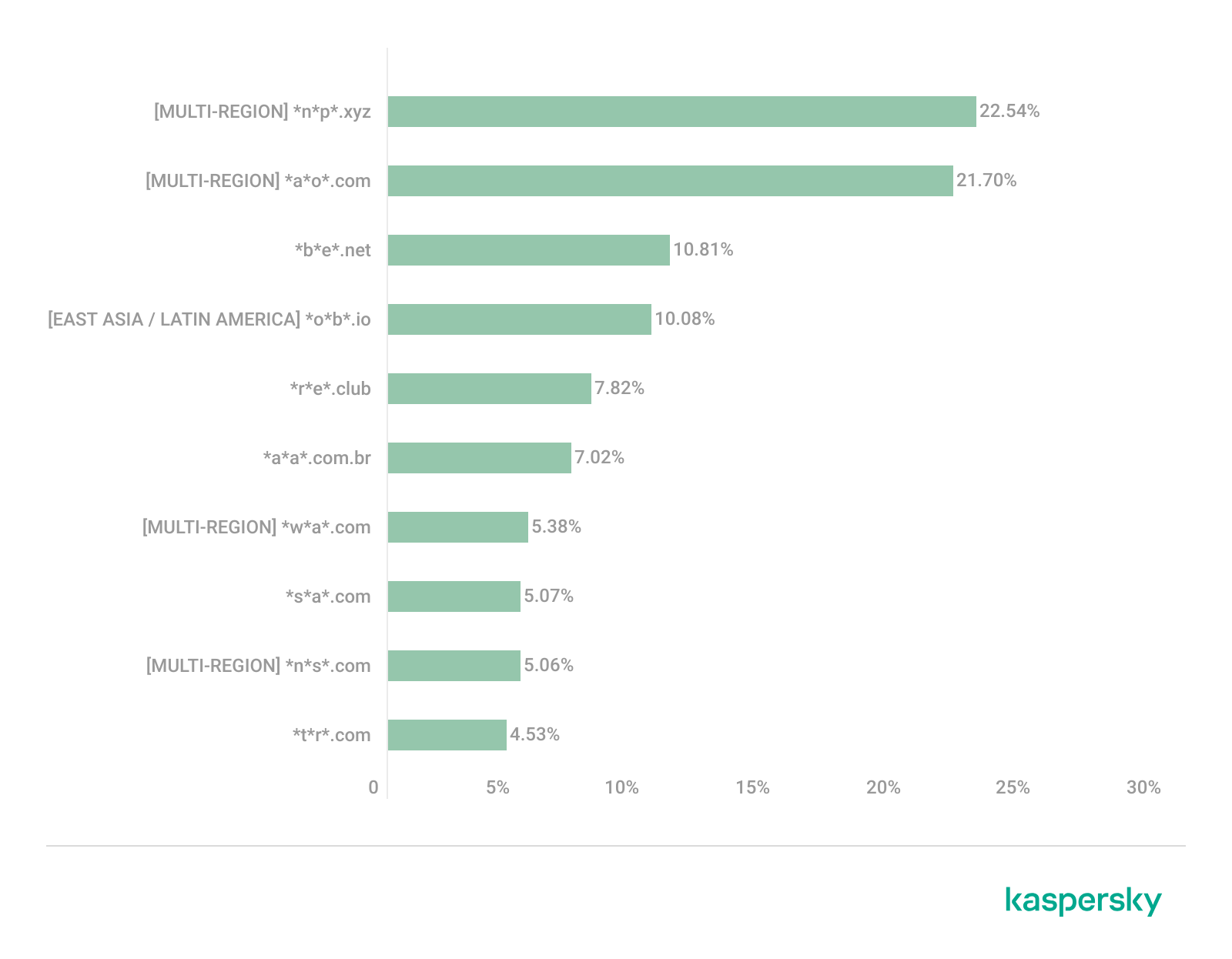
Distribution of the TOP 10 suspicious websites in Latin America, January 2026 (download)

In Latin America, we identified five popular suspicious sites specific to this region, which is unusual compared to other areas where more overlaps are typically observed. Ranking third with a share of 10.81% is the fake betting platform *b*e*.net. In fifth place is *r*e*.club, an illegitimate clone of a well-known bookmaker, with a share of 7.82%.

Further down the list of local threats are *a*a*.com.br (7.02%), a Brazilian Ponzi scam; *s*a*.com (5.07%), which offers dubious investment programs; and *t*r*.com (4.53%), a potentially dangerous trading platform.

In Latin America, the most-visited suspicious sites are betting-themed scams, including both clones of legitimate sites and those built from scratch. Also prevalent are Ponzi schemes, fake investment programs, and dubious online brokers. A significant portion of these sites consists of browser hijackers posing as crypto platforms and AI bots. The primary threats in Latin American countries include financial loss through gambling and Ponzi schemes, as well as the theft of NFTs and other tokens.

East Asia

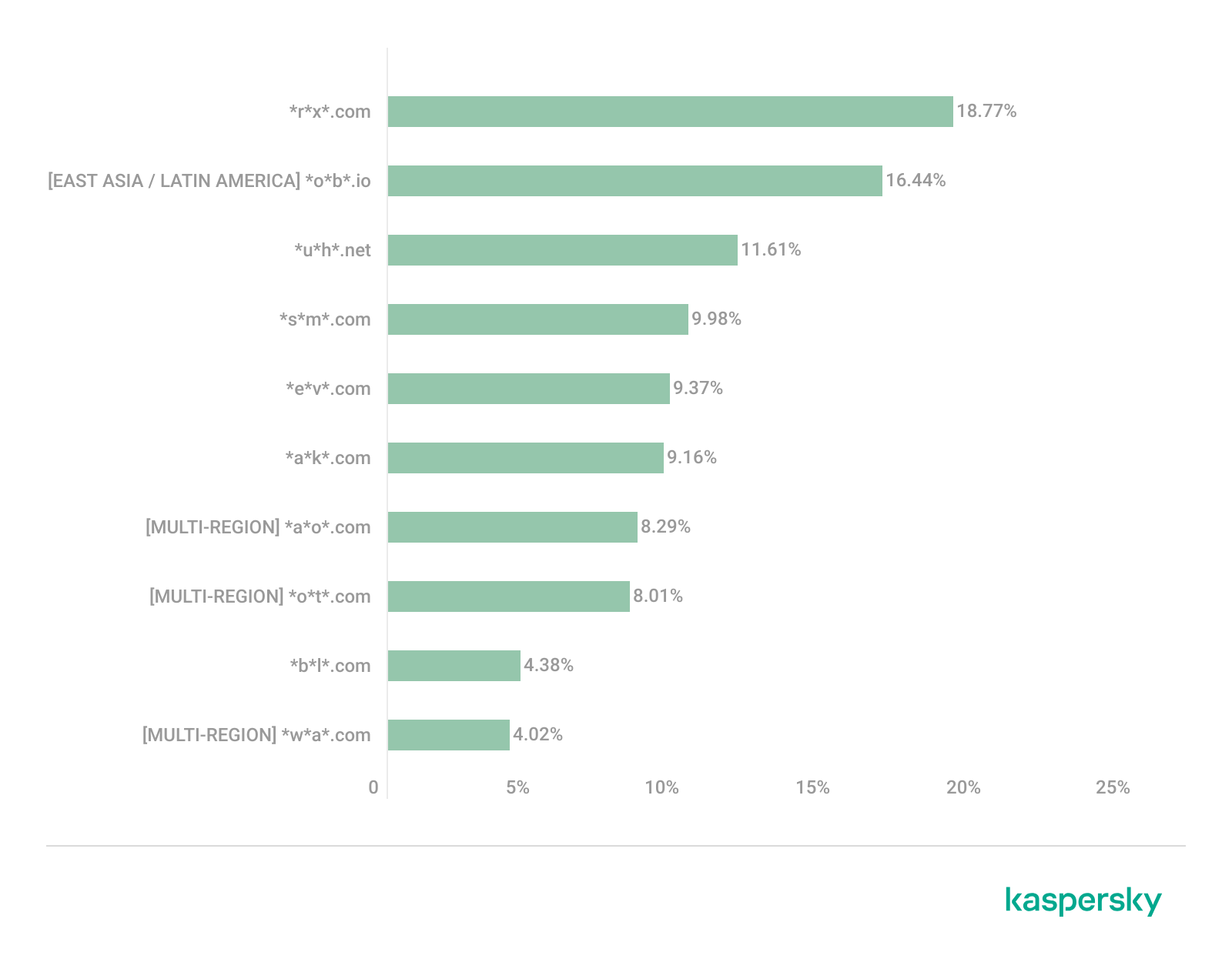
Distribution of the TOP 10 suspicious websites in East Asia, January 2026 (download)

In the East Asian TOP 10, we see the highest concentration of domains that are absent from other regional rankings.

In first place, with an 18.77% share, is the fake broker *r*x*.com, which can be used to steal personal data or funds. Second place is held by a crypto-gaming site (16.44%) that we previously encountered in the Latin American TOP 10. Visitors to this site risk losing NFTs and other tokens. In third place is the domain *u*h*.net (11.61%), used for redirects, which can hijack sessions. Following this is *s*m*.com (9.98%), a domain typically used as a browser-hijacking server and for phishing attacks, serving as a link in an infection chain.

Rounding out the local threats in East Asia are the following domains: *e*v*.com (9.37%), utilized in drive-by attacks; *a*k*.com (9.16%), an API-like domain associated with suspicious scripts and extensions; and *b*l*.com (4.38%), a domain potentially used for redirects.

East Asia has a high concentration of region-specific fake brokers, crypto gaming platforms, and NFT marketplaces. The primary threats for this region include the loss of financial data, NFTs, and other tokens, as well as session hijacking.

South Asia

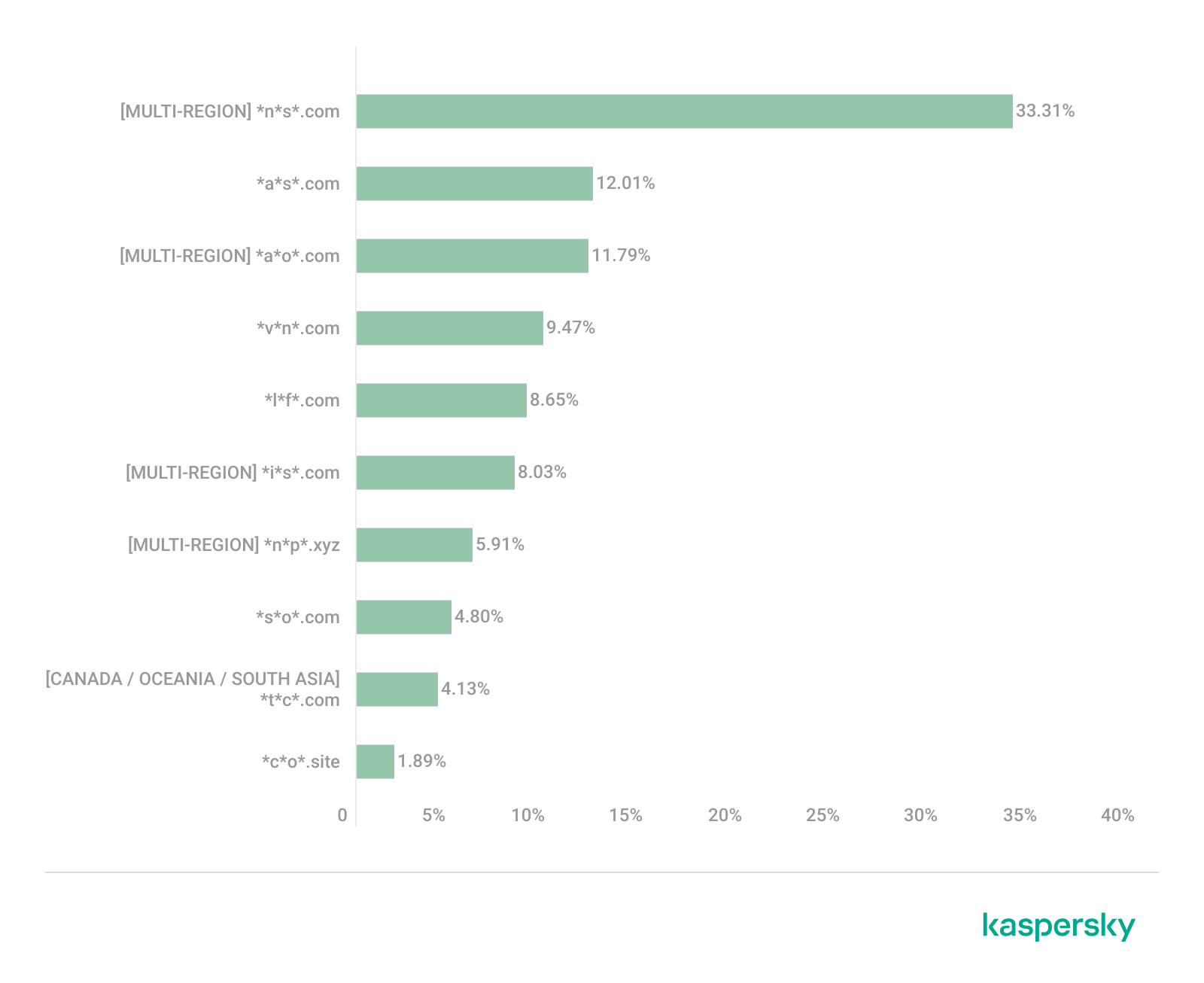
Distribution of the TOP 10 suspicious websites in South Asia, January 2026 (download)

In South Asian countries, we also observe a concentration of local suspicious sites specific to the region.

The second most popular site in the region is *a*s*.com (12.01%), a poor-reputation, high-risk microloan service typical of South Asia. By interacting with these sites, users risk not only losing significant funds but also compromising their overall security. Following this are *v*n*.com with a 9.47% share and *l*f*.com with 8.65%. These domains are employed in various fraudulent schemes, ranging from phishing to spam.

The TOP 10 also includes *s*o*.com (4.80%), a free video downloading service associated with a high risk of infection. The final site we analyzed in the South Asia region is *c*o*.site (1.89%), a pseudo-tool for local SEO optimization that carries the danger of data loss and a high risk of financial fraud through subscription sign-ups.

In summary, the region is dominated by fake antivirus extensions, microloan services, dubious video downloaders, and counterfeit SEO tools. The primary risks for South Asia include financial fraud, phishing and spam distribution, and data theft.

CIS

When analyzing statistics for suspicious sites in CIS countries, we treat Russia as a separate region due to the unique characteristics of its online space which are not found in any other CIS member states. However, we’ve placed these two regions in the same section, as we’ve observed overlaps between them that are not seen in other parts of the world.

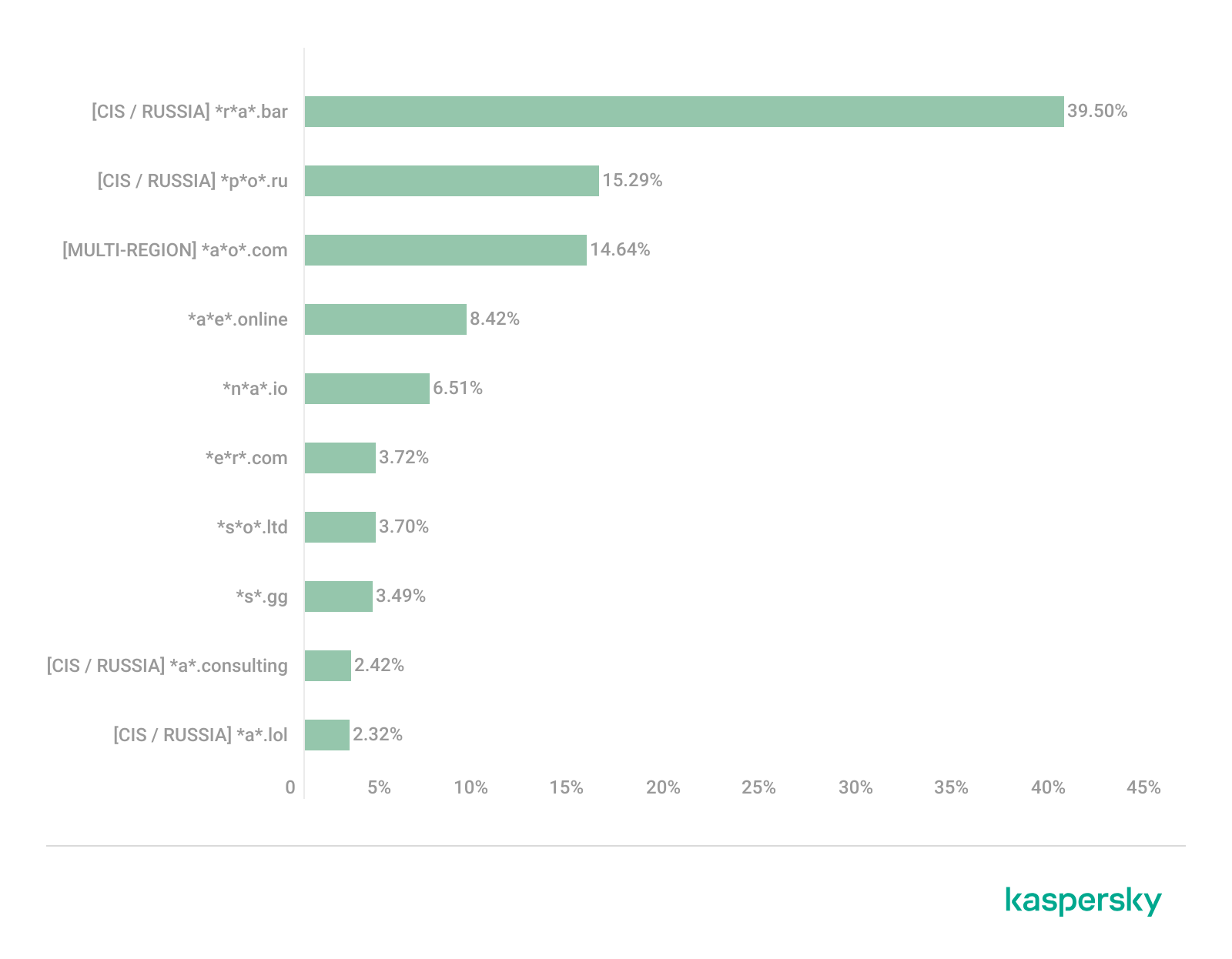
Distribution of the TOP 10 suspicious websites in the CIS, January 2026 (download)

The top two sites in the CIS TOP 10 also appear in the Russian TOP 10. The domain *r*a*.bar, which ranks first in the CIS (39.50%), holds the second spot in Russia (15.93%) and is a fake trading site. It’s worth noting that sites in the .bar domain zone are frequently used for scams. In second place in the CIS (15.29%) and sixth in Russia (3.75%) is the domain *p*o*.ru, which is often associated with bots for inflating follower counts and automating community management.

Domains from fourth to eighth place are specific only to the CIS region and don’t appear in the Russian TOP 10. These sites include:

  • *a*e*.online (8.42%): an online image editor that carries risks of data harvesting
  • *n*a*.io (6.51%): a high-risk cryptocurrency trading platform
  • *e*r*.com (3.72%): a site promising free cryptocurrency and posing the risk of compromising visitors’ private keys and digital wallets
  • *s*o*.ltd (3.70%): a domain with an extremely low trust rating
  • *s*.gg (3.49%): a scam site masquerading as a play-to-earn blockchain game

The ranking concludes with sites that overlap with the Russian region. *a*.consulting (2.42%) is a fake clone of a binary options site, and *a*.lol (2.32%) is a domain suspected of dubious activity.

The CIS landscape is dominated by fake trading platforms (particularly crypto exchanges), promises of easy profits, play-to-earn scams, and dubious investment projects. We also observe many bots for inflating social metrics and automation. The primary threat in the CIS is the theft of private keys, digital wallets, and funds through investment schemes and lures involving online promotion.

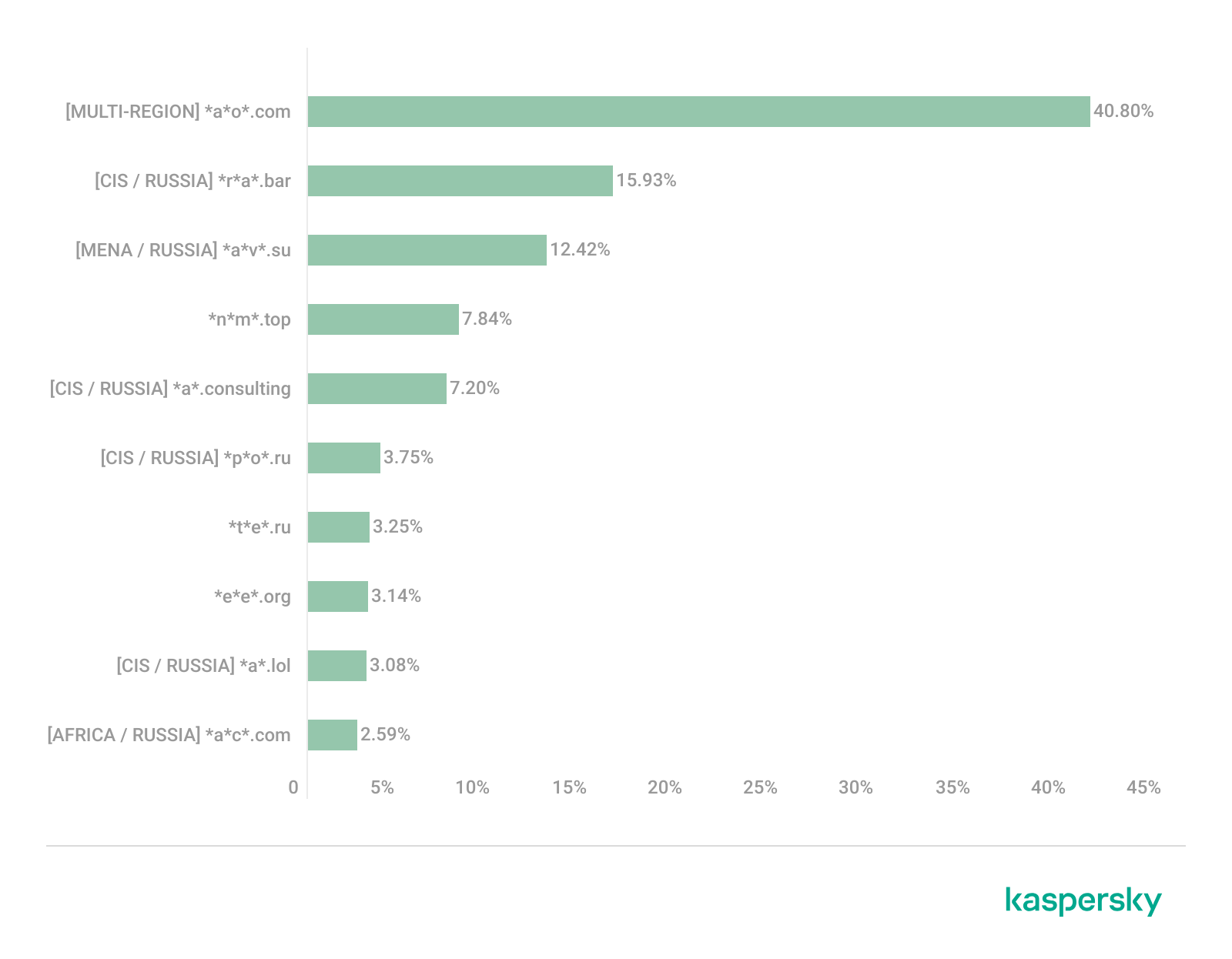
Distribution of the TOP 10 suspicious websites in Russia, January 2026 (download)

The Russian TOP 10 includes three unique domains not found in the rankings of other regions. The first, *n*m*.top (7.84%), is an imitator of a well-known binary options broker. This suspicious site was recently registered and has a tellingly low rating on domain verification services. The second, *t*e*.ru (3.25%), claims to be an educational platform and has a dubious subscription system with a high probability of fraud involving difficulties in canceling subscriptions. The third site, *e*e*.org (3.14%), positions itself as a tool for a popular media platform, but it’s actually a scam that fails to provide its stated services.

Overall, the Russian landscape is characterized by fake binary options brokers and sketchy sites with fraudulent subscriptions posing as e-learning platforms. There are also frequent instances of sites spoofing well-known legitimate services. The primary risks in Russia are scams related to the knowledge business sector, as well as the theft of money and personal data.

Europe

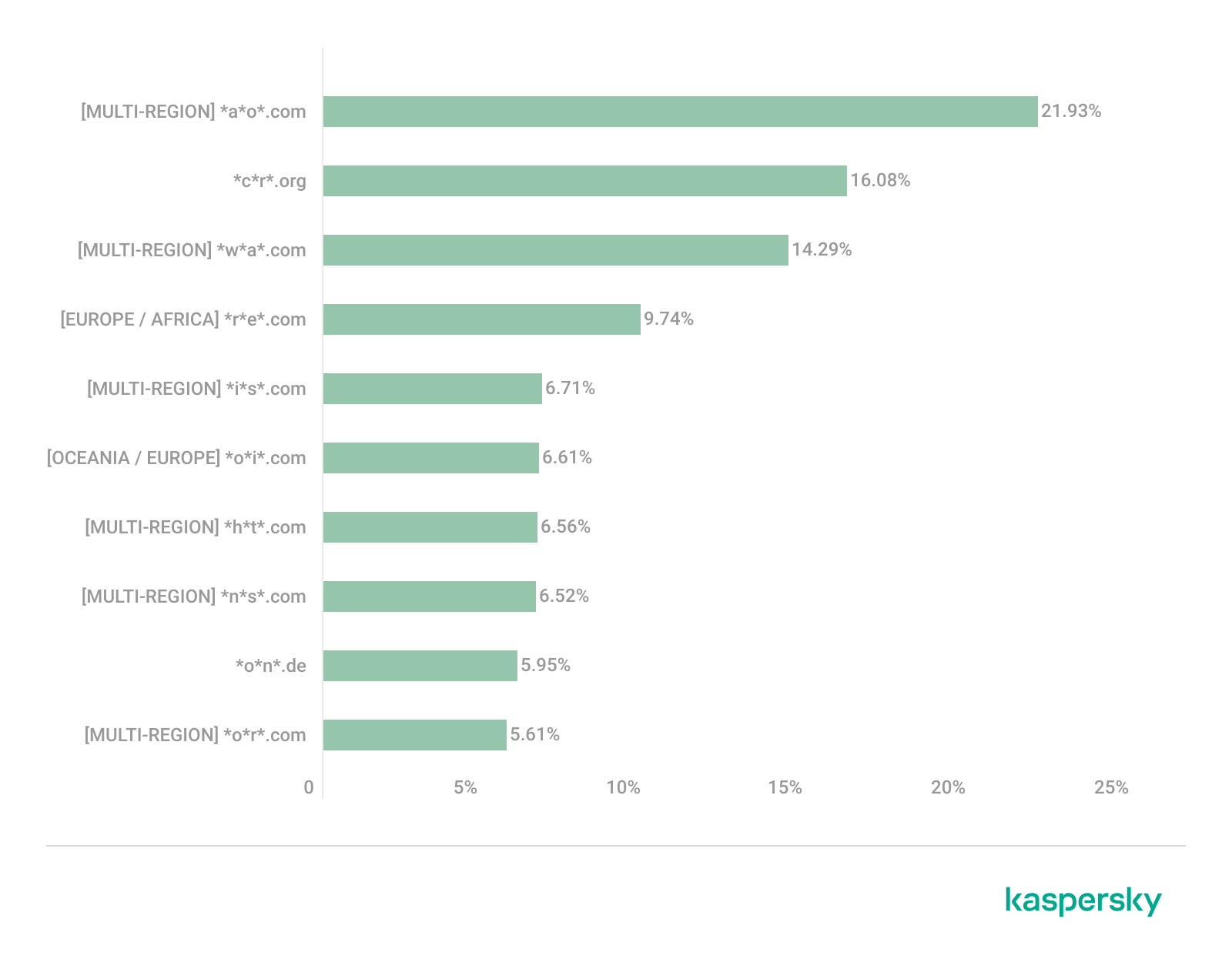
Distribution of the TOP 10 suspicious websites in Europe, January 2026 (download)

In the European region, we’ve found two unique domains. The first of these, *c*r*.org, has been identified as part of a chain for massive phishing and spam attacks. It accounts for a 16.08% share of the TOP 10. The second site, *o*n*.de, is an unofficial reseller with a poor reputation and a high likelihood of fraud. This domain ranks second to last in our statistics with a 5.95% share.

Among the sites not previously covered, the European TOP 10 includes one site that also appears in the Oceania TOP 10: *o*i*.com (6.61%). This is a classic cryptocurrency scam promising passive income.

A significant portion of suspicious sites in Europe consists of intermediary sites for phishing and spam, fake security extensions, and crypto scams. Unofficial sales services and paid trading tools are also on the list. The primary threats in the European region include session hijacking, data theft, spam, and investment fraud.

Canada

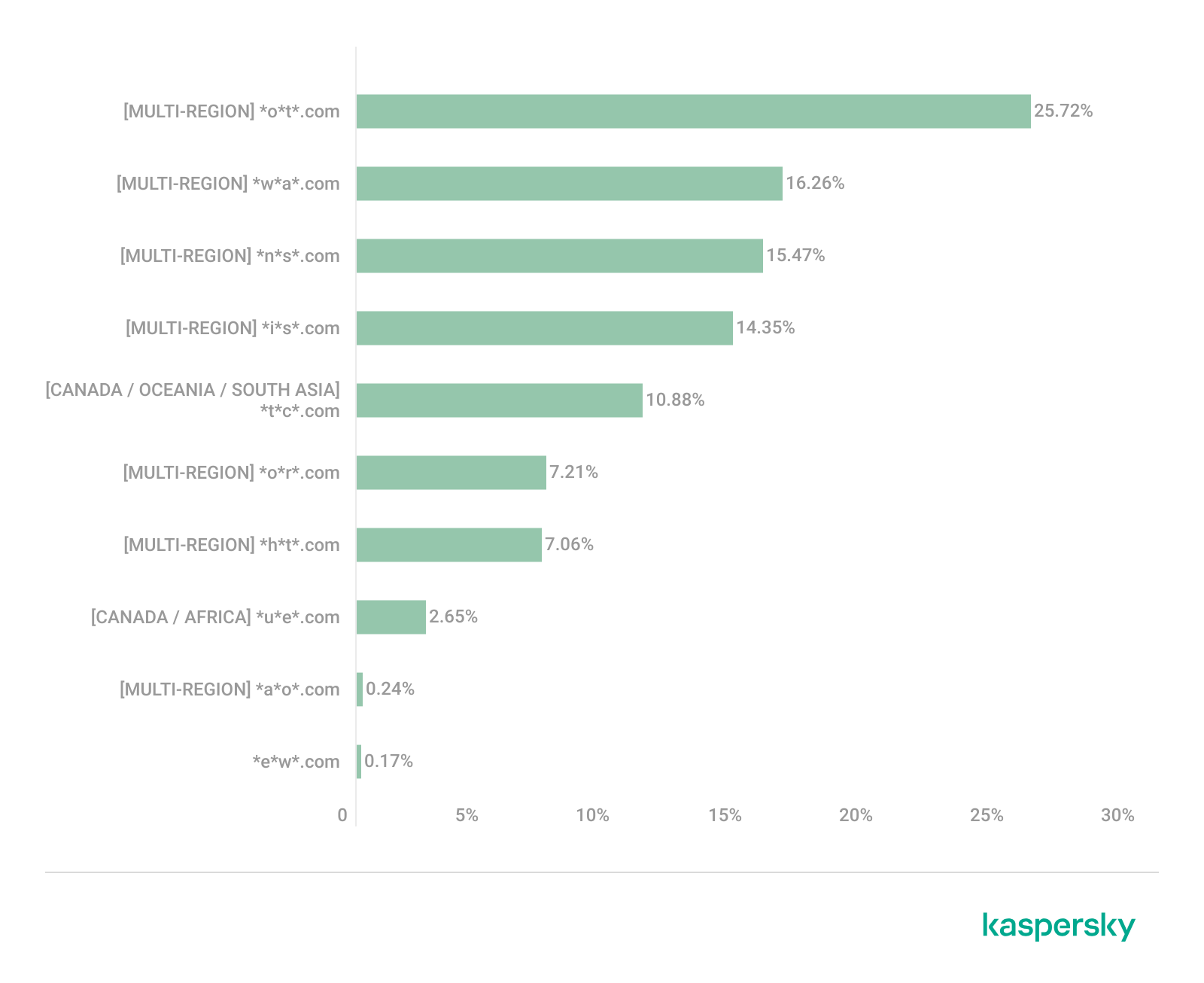
Distribution of the TOP 10 suspicious websites in Canada, January 2026 (download)

Canada has been designated as a separate region to illustrate prevailing trends within North America. The first four positions in the Canadian TOP 10 are held by multiregional domains discussed previously. In fifth place is *t*c*.com (10.88%), which also appears in the TOP 10 rankings for Oceania and South Asia. This is yet another browser extension masquerading as a security solution. Occupying the final spot is the domain *e*w*.com (0.17%), which is unique to the Canadian market. This site operates a dropshipping scam, offering products at prices significantly below market value. Customers typically either never receive their orders or get low-quality counterfeits.

The landscape of dubious websites in Canada is largely defined by fraudulent extensions capable of hijacking browser data, tracking user activity, spoofing search queries, harvesting cookies, and injecting ads. This is further compounded by dropshipping schemes involving counterfeit goods. The primary risks for users in Canada include data theft and financial loss from purchasing substandard products.

Oceania

Distribution of the TOP 10 suspicious websites in Oceania, January 2026 (download)

The final region under consideration is Oceania. Notably, we didn’t identify a single domain unique to this region. Every site appearing in the TOP 10 represents a global threat that’s already been detailed in previous sections. To summarize the findings for this region: the primary threats consist of fake security extensions and privacy products designed for browser hijacking, tracking user activity, displaying advertisements, and stealing data. There’s a minimal presence of crypto Ponzi schemes in this area. The main risk for users in Oceania is the loss of privacy and confidentiality through unwanted apps.

Conclusion

Suspicious websites are particularly dangerous because they often masquerade as legitimate sites with high levels of persuasiveness. They mimic online stores, subscription-based streaming platforms, repair firms, and various other services. Unlike standard phishing sites, they employ more sophisticated manipulations to deceive users, tricking them into voluntarily handing over their personal data and transferring funds.

By examining the TOP 10 suspicious sites across the world’s major regions, we can draw several conclusions. On average, the most prevalent threats globally are fraudulent extensions masquerading as security solutions and privacy services. Their true purpose is to hijack browser data, track user activity, and display ads. We also frequently encounter phishing platforms for image processing and financial scams involving trading, cryptocurrency, betting, and microloans. Our statistics demonstrate that these sites not only employ classic fraudulent schemes centered on easy money but also adapt to contemporary trends targeting younger audiences and specific regional characteristics. The primary risks for users interacting with these sites are a combination of privacy threats and financial loss.

To help protect users from these shady sites, we’ve introduced the category of “websites with an undefined trust level” as part of the web filtering features in our solutions. However, it’s important to note that user awareness and individual responsibility play a significant role in ensuring safe web browsing. It’s essential for users to be able to recognize suspicious sites and remain vigilant toward any that appear untrustworthy.

Websites with an undefined trust level: avoiding the trap

6 May 2026 at 11:30

Executive summary

  • A suspicious website is a web resource that cannot be definitively classified as phishing, but whose activities are unsafe. Such sites manipulate users, tricking them into voluntarily transferring money for non-existent services, signing up for hidden subscriptions, or disclosing personal data through carefully crafted terms of service. These include fake online stores, dubious crypto exchanges, investment platforms, and services with paid subscriptions.
  • Kaspersky has introduced a new web filtering category, “Sites with an undefined trust level,” into its security products (Kaspersky Premium, Android and iOS apps, etc.). The system analyzes the domain name and age, IP address reputation, DNS configuration, HTTP security headers, and SSL certificate to automatically detect suspicious resources.
  • According to Kaspersky data for January 2026, the most widespread global threat is fake browser extensions that mimic security products — they were detected in 9 out of 10 regions analyzed worldwide. Such extensions intercept browser data, track user activity, hijack search queries, and inject ads.
  • Kaspersky’s regional statistics reveal the specific nature of these threats: in Africa, over 90% of the top 10 suspicious websites are online trading scam platforms; in Latin America, fake betting services predominate; in Russia, fake binary options brokers and “educational platforms” with fraudulent subscriptions lead the way; in CIS countries — crypto scams and bots for inflating engagement.
  • Key indicators of a suspicious website to check: a strange domain name with numbers or random characters, cheap top-level domains (.xyz, .top, .shop), a recently registered domain (less than 6 months old according to WHOIS data), unrealistic promises (“100% guaranteed income,” “up to 300% profit”), lack of company contact information, and payments only via cryptocurrency or irreversible bank transfers.

Introduction

The online landscape is filled with various traps lying in wait for users. One such threat involves websites that can’t be strictly classified as phishing, yet whose activities are inherently unsafe. These sites often operate on the fringes of the law, even if they aren’t directly violating it. Sometimes they use a cleverly crafted Terms of Service document as a loophole. These agreements might include clauses such as no-refund policies or forced automatic subscription renewals.

Fake online stores, dubious financial platforms, and various online services that mimic legitimate business operations are all categorized as suspicious. Unlike actual phishing sites, which aim to steal sensitive data like banking credentials or passwords, these suspicious sites represent a far more cunning trap. Their goal is manipulation: tricking the victim into willingly paying for non-existent goods and services or signing them up for a subscription that’s nearly impossible to cancel. Beyond financial gain, these sketchy websites may also hunt for personal data to sell later on the dark web.

Our solutions categorize them as having an “undefined trust level”. This article explains what these sites look like, how to identify them, and what you can do to stay safe.

The dangers of shady websites

One of the biggest risks associated with making a purchase from an untrusted website that seems to be an online store is the financial loss and falling victim to fraud. Fake shops will entice you with attractive deals to get you hooked. After you pay, you may never receive what you paid for, or you may receive some cheap piece of unusable junk instead of the item you ordered. Investment or “guaranteed income” programs are another type of classic scam — they promise rapid returns, and once they take your deposits, they disappear without a trace.

Visiting or buying from untrusted suspicious websites can expose you to various risks that go beyond a single bad purchase. Fraudulent websites often collect your personal information even if you do not end up making a purchase. By completing a form or signing up for a “free offer”, you may be providing the scammer with access to your information.

Personal data collection can happen in a fairly straightforward and obvious way — for instance, through a standard order delivery form. In this scenario, attackers end up with sensitive information like the user’s full name, shipping and billing addresses, phone number, email address, and, of course, payment details. As we’ve previously discussed, fraudsters sell this kind of information, and there’re countless ways it can be used down the line. For example, this data might be leveraged for spam campaigns or more serious threats like stalking or targeted attacks.

Common types of suspicious sites

Let’s take a closer look at the different types of shady sites out there and how interacting with them can lead to financial loss, data leaks, the unauthorized use of personal information, and other consequences.

It’s worth noting that rogue websites can masquerade as legitimate ones in almost any industry. The first type of fraudulent site we’ll look at is fake online stores. These can appear as clones of real brand websites or as standalone stores. Usually, the scam follows one of two paths: the buyer either receives a counterfeit or poor-quality product, or they receive nothing at all. These sites lure victims in with suspiciously low prices and “exclusive” deals. Often, users are subjected to psychological pressure: the time to make a purchase decision is purposefully limited, provoking the victim, as with any other scam, into making an impulse purchase.

Another common type of shady site includes online exchanges and trading platforms. These primarily target cryptocurrency, as the lack of legislative regulation for digital currency in certain countries makes them a magnet for fraudsters. These suspicious sites often lure victims with supposedly favorable exchange rates or other enticing gimmicks. If the user attempts to exchange cryptocurrency, their tokens are gone for good. Beyond simple exchanges, rogue sites offer investment services and even display a fake balance growth to appear credible. However, withdrawing funds is impossible; when the victim tries to cash out, they’re prompted to pay some fee or fictional tax.

Subscription traps are also worth noting, offering everything from psychological tests to online video streaming platforms. The hallmark of these sites is that they deliberately withhold critical information, such as recurring charges, or hide the fact it even exists. Typically, the scheme works like this: a user is offered a subscription for a nominal fee, like $1. While that seems attractive, the next charge – perhaps only a week later – might be as much as $50. This information is intentionally obscured, buried in fine print or tucked away in the Terms of Service where it’s harder to find. Legitimate services always clearly disclose subscription terms and provide an easy way to cancel before a trial period ends. Scam services, on the other hand, do everything possible to distract the user from the actual terms of use and subscription.

Shady sites can also masquerade as providers of mediation services, such as legal or real estate assistance. In reality, the service is either never delivered or provided in a stripped-down, incomplete form. For example, a user might be prompted to pay for a service that’s normally provided for free. The danger here lies not only in losing money for non-existent services but also in the significant risk of exposing personal data, such as ID details, taxpayer identification numbers, social security numbers, or driver’s license information. Once in the hands of attackers, this data can become a tool for executing further scams or targeted attacks.

On the whole, suspicious sites are fairly difficult to distinguish from legitimate, trustworthy services. Masquerading as a legitimate business is the primary goal of these sites, and the fraudulent schemes they employ are not always obvious. Nevertheless, there are protective measures as well as certain indicators that can help you suspect a site is unsafe for purchases or financial transactions.

How to identify suspicious or fraudulent websites

Despite the increasingly convincing attempts to create fake shops, the majority of them still lack the quality of real online stores, and there are many signs that may give them away. Some of these signs can be caught by the eye while others require a bit of technical investigation. By combining visual inspection, technical checks, and trusted online tools, you can protect yourself from financial loss or data theft.

Visual and manual clues

You don’t need to be a cybersecurity expert to catch many red flags just by observing the site’s domain, visuals, language and behavior. For instance, scam sites often have strange or randomly generated names, filled with numbers, underscores, hyphens, or meaningless words, like best-shop43.com. In addition, such vague top-level domains as .xyz, .top, or .shop are also frequently used in scams because they’re cheap and easy to register.

Furthermore, most fake stores sites look unprofessional, with poor visuals, pixelated images, mismatched fonts, or copied templates. Many fraudulent websites borrow layouts or logos from other brands or free templates, which makes them appear generic and sketchy.

Another major giveaway lies in the content itself. Be aware of persuasive language, unrealistic promises, or emotional triggers such as No KYC, Risk-free returns, 100% guaranteed income, Up to 300% profit, or Passive income with zero effort. Unrealistic deals are another red flag. If the products are listed at extremely low prices, continuous countdown timers, and “limited time only” messages that are often used to pressure you into making a quick purchase, it’s a clear tell of a fraudulent website.

Legitimate businesses always provide verifiable contact details, such as a physical address, company name, and customer support. On the contrary, scam sites hide this information. You may also notice the non-functioning pages, broken or suspicious links leading to unrelated external sites which indicate poor maintenance or malicious intent.

Another important signal is the website’s social media presence. Legitimate online businesses usually maintain at least one active social media account to promote their products and communicate with customers. In most cases, these businesses have long-established social media accounts with harmonized posting history and engagement from real users, consistency between the brand website and social media profiles (same name, logo, and links). The links to social media profiles from the website are usually direct. In contrast, fraudulent or deceptive websites often lack any meaningful social media presence or display signs of superficial or artificial activity. This may include missing social media accounts altogether, social media icons that lead to non-existent, inactive, or unrelated pages, or recently created profiles with very few posts and minimal user engagement. In some cases, comment sections are disabled or dominated by spam and automated content, suggesting an attempt to avoid public interaction rather than engage with customers.

Lastly, the payment options offered by the site can also tell a lot about its legitimacy. Be extremely cautious if a website only accepts cryptocurrency, wire transfers, or third-party P2P payments. These payment methods are irreversible and are preferred by scammers. Legitimate e-commerce platforms typically offer secure and reversible payment options, such as credit cards or trusted payment gateways that include buyer protection policies.

However, the absence or existence of any of these factors alone does not necessarily indicate malicious intent. It should be evaluated in combination with technical, linguistic, and behavioral indicators, rather than treated as a standalone signal of legitimacy.

Technical indicators to check

Looking into technical signs can reveal whether a website is trustworthy or potentially fraudulent.

One of the first things to check is the domain age. Scam websites are often short-lived, appearing only for a few weeks or months before disappearing once users start reporting them. To check when the domain was created, use a WHOIS lookup. If it’s less than six months old, be cautious — especially for e-commerce or investment sites, where legitimacy and trust take time to build.

Let’s take a look at the registration details for the popular online marketplace Amazon. As we can see from the WHOIS information, it was registered in 1994.

Meanwhile, a reported suspicious online store was created a couple of months ago.

Legitimate websites usually operate on stable hosting platforms and remain on the same IP addresses or networks for long periods. In contrast, fraudulent websites often move between servers (in most cases using a cheap shared hosting service) or reuse infrastructure already associated with abuse. Checking the IP address reputation can reveal if the website or the hosting server has previously been linked to suspicious activities. Even if the website looks legitimate, a poor IP reputation can expose it.

In addition to that, looking at the infrastructure behavior over time can reveal patterns about its legitimacy. Websites associated with fraudulent activity often show short lifespans, sudden spikes in activity, or rapid appearance and disappearance, which indicates a coordinated campaign rather than a legitimate business.

Another important clue is hidden ownership. When the WHOIS details show “Redacted for Privacy” or leaves the organization name blank, it may indicate that the website owner is deliberately hiding their identity.

We should point out that while this can raise suspicion during investigations, hidden WHOIS data is not inherently malicious. Many legitimate businesses use privacy protection services for valid reasons. These may include protection from spam and phishing after public email addresses are taken from WHOIS databases, personal safety for small business owners, and brand protection to prevent competitors or malicious actors from targeting the registrant. This means that some businesses can use services like WHOIS Privacy Protection, Domains By Proxy, or PrivacyGuardian.org to remove the WHOIS data while still operating transparently on their websites through clear contact details, customer support channels, and legal pages (e.g. terms of use).

Therefore, hidden ownership should be treated as a contextual risk indicator, not a standalone proof of fraud. It becomes more suspicious when combined with other signals such as newly registered domains, and lack of legal information.

Next, you can check the security headers of the website. Legitimate websites are usually well maintained and include several key HTTP headers for protection. Some examples include:

  • Content-Security-Policy (CSP) provides strong defense against cross-site scripting (XSS) attacks by defining which scripts are allowed to run on the site and blocking any malicious JavaScript that could steal login data or inject fake forms.
  • HTTP Strict-Transport-Security (HSTS) forces browsers to connect to the site only over HTTPS. It ensures all communication is encrypted and prevents redirecting users to an insecure (HTTP) version of the site.
  • X-Frame-Options prevents clickjacking, which is a type of attack where a legitimate-looking button or link on a malicious page secretly performs another action in the background.
  • X-Content-Type-Options blocks MIME-type attacks by preventing browsers from misinterpreting file types.
  • Referrer-Policy controls how much information about your previous browsing (referrer URLs) is shared with other sites.

These headers form the “digital hygiene” of a website. Their absence doesn’t always mean a site is malicious, but it does suggest a lack of security awareness or professional maintenance — both strong reasons to be cautious.

You should also check the SSL certificate. Scam sites may use self-signed or short-lived SSL certificates. You can inspect this by clicking the padlock icon in your browser’s address bar — if it says “not secure” or the certificate authority seems unfamiliar, that’s a red flag.

You can check the security headers and the SSL certificate by sending an HTTP request programmatically or by using some online service.

Another indicator that provides insight into how well a website is done and managed is DNS configurations. Legitimate businesses typically use reliable DNS providers and maintain consistent DNS records. Missing the name server NS or mail exchange MX records may indicate poor DNS configuration. In addition to NS and MX, reputable sites also configure SPF and DMARC records to protect their brand from email spoofing and phishing. Something scam website developers won’t bother with because they don’t intend to build a long-standing reputation.

You can check the configurations of DNS records either programmatically or by using an online service.

Another recommendation is to pay attention to website behavior. If there are frequent redirects, pop-up ads, or background requests to unknown domains, this may indicate unsafe scripting or tracking.

How to protect yourself

Tools and databases for detecting suspicious websites

We at Kaspersky have built an intelligent system for detecting suspicious web resources and added this new type of protection into many of our products, including Kaspersky Premium, Kaspersky for Android and iOS, and others. Our detection model is based on many factors, including but not limited to the following:

  • domain name and age,
  • IP reputation,
  • stability of the infrastructure used,
  • DNS configurations,
  • HTTP security headers,
  • digital identity and popularity of the web resource.

Kaspersky has been certified as a provider of effective protective technology for fake shop detection.

When a user tries to visit a site flagged as having an undefined trust level, our solutions show a warning to stop the visitor from becoming a victim of personal data leaks, financial losses or a bad purchase:

This component is on by default.

Moreover, there are several online tools and databases that can help assess a website’s legitimacy:

  • ScamAdviser analyzes trust based on WHOIS, server location, and web reputation.
  • APIVoid provides risk scoring using DNS, IP, and domain reputation databases.
  • National government databases often maintain official lists of fraudulent or blacklisted domains.

Preventive measures

To protect yourself from such threats, it might a good idea to take some additional preventive measures. Always double-check the URL and domain name, especially when you are about to click a link or make a payment. Make sure the site uses HTTPS and has a trusted certificate.

You can use standard browser tools to verify site security. For example, in Google Chrome, clicking the site information button (the lock or settings icon in the address bar) displays details about the connection security and the site’s certificate.

In the Security section, you can check whether the site supports HTTPS – it should say “Connection is secure” – and view the site’s digital certificate.

Additionally, keep reliable security software with real-time protection running on your device to stop you from accessing dangerous websites. Do not download any files or enter your personal information on websites that look unprofessional or suspicious. And finally, remember the golden rule: if a deal seems too good to be true, it often is.

If you realize that you’re on a scam website, it’s important to perform certain post-incident actions immediately. First, contact your bank or payment provider as soon as possible to block the transaction or card. Then, change your passwords for the services which might have been compromised, and run a full antivirus scan on your device to detect and remove any potential threats. Lastly, consider reporting the website to the cybercrime agency in your country or to the consumer protection agency. Sharing your experience online by leaving a review or warning will give notice to potential customers alike.

By staying careful and taking quick actions, you can significantly reduce the chances of being a target and help make the internet a safer place for everyone.

An overview of detection statistics for sites with an undefined trust level

To illustrate the types of suspicious sites prevalent in various regions around the world, we analyzed anonymized detection data from Kaspersky solutions for the “websites with an undefined trust level” category in January 2026. For each region, we identified the 10 most frequently encountered sites and calculated the share of each within that list. To maintain privacy, specific domains are not listed directly; instead, they’re described based on their functionality and characteristics.

Most visited suspicious sites

First, let’s examine the sites that appear across multiple regions, indicating a high prevalence.

In 9 out of the 10 regions analyzed, we encountered a suspicious image processing platform (*a*o*.com). This site positions itself as a photo editing tool, but in reality, it serves as an intermediary server for uploading images used in phishing and other campaigns. By interacting with such a site, users risk exposing personal data under the guise of uploading images or falling victim to a phishing attack.

Percentage of the *a*o*.com domain detections by region, January 2026 (download)

This site has the largest share of detections in the Russian Federation, where it ranks first in the TOP 10 with a 40.80% share. It is also prevalent in Latin American countries (21.70%) and the CIS (14.64%), while it’s least common in Canada at 0.24%.

The next site appeared in 7 regions. It consists of a landing page for a fake antivirus solution presented as a browser extension (*n*s*.com). This extension redirects the user to a fake search engine page allowing it to collect data and track user activity, specifically search queries.

Percentage of the *n*s*.com domain detections by region, January 2026 (download)

This site is most frequently detected in South Asia, with a share of 33.31%. Its presence in Canada and Oceania is roughly equal (15.47% and 15.09%, respectively). We recorded the lowest number of detections in Africa, at 2.99%.

Another suspicious browser extension appeared in the TOP 10 in 6 out of the 10 regions. It’s a fake privacy-enhancing tool hosted at *w*a*.com. Instead of providing the advertised privacy features, this extension carries a high risk of intercepting browser data. It can modify browser settings, harvest user data, and swap the default search engine for a fake one. Furthermore, it maintains full control over all browser traffic.

Percentage of the *w*a*.com domain detections by region, January 2026 (download)

This “service” has its largest share, 22.25%, in the Middle East and North Africa, and is also quite common in Canada (16.26%). It’s least frequently encountered in Latin America (5.38%) and East Asia (4.02%).

The site *o*r*.com appeared in five regional rankings. It’s a fake security service promising to provide online safety by warning users about malicious sites and dangerous search queries. This extension has the potential to steal cookies (including session cookies), inject advertisements, spoof login forms, and harvest browser history and search queries. We noted that this site made the TOP 10 in Africa (0.59%), the MENA (Middle East and North Africa) region (4.57%), Europe (5.61%), Canada (7.21%), and Oceania (1.93%).

In 4 out of the 10 regions, we identified several other recurring sites. One of them (*n*p*.xyz) mimics a repository for creative AI image generation prompts while capturing browser data. The domain hosting this site exhibits several red flags: it was recently registered, and the owner’s information is hidden. This site reached the TOP 10 in Africa (0.51%), the MENA region (7.04%), Latin America (22.54%, ranking first in that region), and South Asia (5.91%).

The second service (*i*s*.com) positions itself as a tool for safe searching, protecting the browser from threats, and verifying extensions. However, this is a typical browser hijacker, much like the others mentioned above. It made the TOP 10 in South Asia (8.03%), Oceania (17.97%), Europe (3.90%), and Canada (14.35%).

The third site (*h*t*.com) poses as a private browsing extension. In reality, it’s another potentially unwanted application designed for browser hijacking: it modifies settings, steals sensitive data (cookies, browser history, and queries), and can redirect the user to phishing pages. Users have specifically noted the difficulty involved in removing the extension. This site appears in the TOP 10 for the MENA region (10.17%), Canada (7.06%), Europe (3.81%), and Oceania (2.81%).

Another domain (*o*t*.com) that reached the TOP 10 in four regions is a service mimicking a browser extension for safe searching and web browsing. It’s dangerous because it injects ads and steals user data. It’s important to note that such extensions can be installed without explicit user consent – for example, via links embedded in other software. This service holds the number one spot in two regions: Canada (25.72%) and Oceania (30.92%), while also appearing in the TOP 10 for East Asia (8.01%) and Africa (0.88%).

Consequently, we can see that the majority of suspicious sites detected by our solutions worldwide are browser hijackers masquerading as security products. Nevertheless, other categories of sites also appear in the TOP 10.

Next, we’ll examine each region individually, focusing on descriptions of domains not previously covered. For clarity, the sites mentioned above will be marked as [MULTI-REGION], while those appearing in only two or three regions will include the names of those specific areas. We’ll observe several regional overlaps and similarities, allowing us to determine which types of suspicious sites are popular both within specific regions and globally.

Africa

Distribution of the TOP 10 suspicious websites in Africa, January 2026 (download)

The three most prevalent domains in African countries are found exclusively in this region. All of them – *i*r*.world (60.27%), *m*a*.com (22.84%), and *e*p*.com (9.36%) – are potentially fraudulent online trading platforms suspected of using forged licenses. These sites employ classic scam schemes where it’s impossible to withdraw any alleged earnings. In fifth place is a domain we’ll also see in the European TOP 10, *r*e*.com (1.46%): a platform marketed as a tool for retail and semi-professional traders. It charges for services available elsewhere for free. Eighth place is held by a site that also appears in the Russian TOP 10: *a*c*.com (0.56%). This is a dubious AI tool that claims to offer free subscriptions to a premium graphics editor. In ninth place is a domain that also surfaces in the Canadian TOP 10: *u*e*.com (0.53%), a browser extension of the “web protection” variety that we’ve encountered previously.

In summary, the African region is dominated by financial scams within the online trading and brokerage sectors. These include fake platforms that make it impossible to withdraw funds and use fake licenses and classic schemes to steal users’ money. Additionally, Africa sees paid tools that duplicate free services and questionable AI-based subscriptions. The primary threat in this region is financial loss through fraudulent investment-themed sites.

MENA

Distribution of the TOP 10 suspicious websites in the Middle East and North Africa, January 2026 (download)

In the MENA region, the site *a*v*.su holds the top spot with a 28.64% share; notably, this site also appears in the TOP 10 for Russia. It markets itself as a tool for building custom VoIP-PBX systems. However, it has an extremely low trust rating and is frequently associated with phishing, and hidden redirects. Using this service carries significant risks, including data leaks, and financial loss.

Ranked seventh is *a*r*.foundation (6.32%), an AI bot allegedly designed for trading, which we also identified in the TOP 10 for Oceania. This service has been flagged as an investment scam operating as a pyramid scheme with the hallmarks of a Ponzi scheme.

The ranking is rounded out by two domains not found in any other region. The first one, *l*e*.pro (4.42%), is a spoof of a popular betting service. The second, *p*r*.group (2.21%), is a clone of a well-known broker. Both sites are scams.

In the MENA region, the landscape is dominated by fake VoIP services as well as counterfeits of financial and betting platforms, which attackers use to conduct phishing attacks, and perform hidden redirects. A significant portion of suspicious sites consists of fake online privacy tools and browser hijackers masquerading as security extensions. Ponzi schemes and cryptocurrency scams are also prominent. The primary risks for the region are data theft, and financial loss.

Latin America

Distribution of the TOP 10 suspicious websites in Latin America, January 2026 (download)

In Latin America, we identified five popular suspicious sites specific to this region, which is unusual compared to other areas where more overlaps are typically observed. Ranking third with a share of 10.81% is the fake betting platform *b*e*.net. In fifth place is *r*e*.club, an illegitimate clone of a well-known bookmaker, with a share of 7.82%.

Further down the list of local threats are *a*a*.com.br (7.02%), a Brazilian Ponzi scam; *s*a*.com (5.07%), which offers dubious investment programs; and *t*r*.com (4.53%), a potentially dangerous trading platform.

In Latin America, the most-visited suspicious sites are betting-themed scams, including both clones of legitimate sites and those built from scratch. Also prevalent are Ponzi schemes, fake investment programs, and dubious online brokers. A significant portion of these sites consists of browser hijackers posing as crypto platforms and AI bots. The primary threats in Latin American countries include financial loss through gambling and Ponzi schemes, as well as the theft of NFTs and other tokens.

East Asia

Distribution of the TOP 10 suspicious websites in East Asia, January 2026 (download)

In the East Asian TOP 10, we see the highest concentration of domains that are absent from other regional rankings.

In first place, with an 18.77% share, is the fake broker *r*x*.com, which can be used to steal personal data or funds. Second place is held by a crypto-gaming site (16.44%) that we previously encountered in the Latin American TOP 10. Visitors to this site risk losing NFTs and other tokens. In third place is the domain *u*h*.net (11.61%), used for redirects, which can hijack sessions. Following this is *s*m*.com (9.98%), a domain typically used as a browser-hijacking server and for phishing attacks, serving as a link in an infection chain.

Rounding out the local threats in East Asia are the following domains: *e*v*.com (9.37%), utilized in drive-by attacks; *a*k*.com (9.16%), an API-like domain associated with suspicious scripts and extensions; and *b*l*.com (4.38%), a domain potentially used for redirects.

East Asia has a high concentration of region-specific fake brokers, crypto gaming platforms, and NFT marketplaces. The primary threats for this region include the loss of financial data, NFTs, and other tokens, as well as session hijacking.

South Asia

Distribution of the TOP 10 suspicious websites in South Asia, January 2026 (download)

In South Asian countries, we also observe a concentration of local suspicious sites specific to the region.

The second most popular site in the region is *a*s*.com (12.01%), a poor-reputation, high-risk microloan service typical of South Asia. By interacting with these sites, users risk not only losing significant funds but also compromising their overall security. Following this are *v*n*.com with a 9.47% share and *l*f*.com with 8.65%. These domains are employed in various fraudulent schemes, ranging from phishing to spam.

The TOP 10 also includes *s*o*.com (4.80%), a free video downloading service associated with a high risk of infection. The final site we analyzed in the South Asia region is *c*o*.site (1.89%), a pseudo-tool for local SEO optimization that carries the danger of data loss and a high risk of financial fraud through subscription sign-ups.

In summary, the region is dominated by fake antivirus extensions, microloan services, dubious video downloaders, and counterfeit SEO tools. The primary risks for South Asia include financial fraud, phishing and spam distribution, and data theft.

CIS

When analyzing statistics for suspicious sites in CIS countries, we treat Russia as a separate region due to the unique characteristics of its online space which are not found in any other CIS member states. However, we’ve placed these two regions in the same section, as we’ve observed overlaps between them that are not seen in other parts of the world.

Distribution of the TOP 10 suspicious websites in the CIS, January 2026 (download)

The top two sites in the CIS TOP 10 also appear in the Russian TOP 10. The domain *r*a*.bar, which ranks first in the CIS (39.50%), holds the second spot in Russia (15.93%) and is a fake trading site. It’s worth noting that sites in the .bar domain zone are frequently used for scams. In second place in the CIS (15.29%) and sixth in Russia (3.75%) is the domain *p*o*.ru, which is often associated with bots for inflating follower counts and automating community management.

Domains from fourth to eighth place are specific only to the CIS region and don’t appear in the Russian TOP 10. These sites include:

  • *a*e*.online (8.42%): an online image editor that carries risks of data harvesting
  • *n*a*.io (6.51%): a high-risk cryptocurrency trading platform
  • *e*r*.com (3.72%): a site promising free cryptocurrency and posing the risk of compromising visitors’ private keys and digital wallets
  • *s*o*.ltd (3.70%): a domain with an extremely low trust rating
  • *s*.gg (3.49%): a scam site masquerading as a play-to-earn blockchain game

The ranking concludes with sites that overlap with the Russian region. *a*.consulting (2.42%) is a fake clone of a binary options site, and *a*.lol (2.32%) is a domain suspected of dubious activity.

The CIS landscape is dominated by fake trading platforms (particularly crypto exchanges), promises of easy profits, play-to-earn scams, and dubious investment projects. We also observe many bots for inflating social metrics and automation. The primary threat in the CIS is the theft of private keys, digital wallets, and funds through investment schemes and lures involving online promotion.

Distribution of the TOP 10 suspicious websites in Russia, January 2026 (download)

The Russian TOP 10 includes three unique domains not found in the rankings of other regions. The first, *n*m*.top (7.84%), is an imitator of a well-known binary options broker. This suspicious site was recently registered and has a tellingly low rating on domain verification services. The second, *t*e*.ru (3.25%), claims to be an educational platform and has a dubious subscription system with a high probability of fraud involving difficulties in canceling subscriptions. The third site, *e*e*.org (3.14%), positions itself as a tool for a popular media platform, but it’s actually a scam that fails to provide its stated services.

Overall, the Russian landscape is characterized by fake binary options brokers and sketchy sites with fraudulent subscriptions posing as e-learning platforms. There are also frequent instances of sites spoofing well-known legitimate services. The primary risks in Russia are scams related to the knowledge business sector, as well as the theft of money and personal data.

Europe

Distribution of the TOP 10 suspicious websites in Europe, January 2026 (download)

In the European region, we’ve found two unique domains. The first of these, *c*r*.org, has been identified as part of a chain for massive phishing and spam attacks. It accounts for a 16.08% share of the TOP 10. The second site, *o*n*.de, is an unofficial reseller with a poor reputation and a high likelihood of fraud. This domain ranks second to last in our statistics with a 5.95% share.

Among the sites not previously covered, the European TOP 10 includes one site that also appears in the Oceania TOP 10: *o*i*.com (6.61%). This is a classic cryptocurrency scam promising passive income.

A significant portion of suspicious sites in Europe consists of intermediary sites for phishing and spam, fake security extensions, and crypto scams. Unofficial sales services and paid trading tools are also on the list. The primary threats in the European region include session hijacking, data theft, spam, and investment fraud.

Canada

Distribution of the TOP 10 suspicious websites in Canada, January 2026 (download)

Canada has been designated as a separate region to illustrate prevailing trends within North America. The first four positions in the Canadian TOP 10 are held by multiregional domains discussed previously. In fifth place is *t*c*.com (10.88%), which also appears in the TOP 10 rankings for Oceania and South Asia. This is yet another browser extension masquerading as a security solution. Occupying the final spot is the domain *e*w*.com (0.17%), which is unique to the Canadian market. This site operates a dropshipping scam, offering products at prices significantly below market value. Customers typically either never receive their orders or get low-quality counterfeits.

The landscape of dubious websites in Canada is largely defined by fraudulent extensions capable of hijacking browser data, tracking user activity, spoofing search queries, harvesting cookies, and injecting ads. This is further compounded by dropshipping schemes involving counterfeit goods. The primary risks for users in Canada include data theft and financial loss from purchasing substandard products.

Oceania

Distribution of the TOP 10 suspicious websites in Oceania, January 2026 (download)

The final region under consideration is Oceania. Notably, we didn’t identify a single domain unique to this region. Every site appearing in the TOP 10 represents a global threat that’s already been detailed in previous sections. To summarize the findings for this region: the primary threats consist of fake security extensions and privacy products designed for browser hijacking, tracking user activity, displaying advertisements, and stealing data. There’s a minimal presence of crypto Ponzi schemes in this area. The main risk for users in Oceania is the loss of privacy and confidentiality through unwanted apps.

Conclusion

Suspicious websites are particularly dangerous because they often masquerade as legitimate sites with high levels of persuasiveness. They mimic online stores, subscription-based streaming platforms, repair firms, and various other services. Unlike standard phishing sites, they employ more sophisticated manipulations to deceive users, tricking them into voluntarily handing over their personal data and transferring funds.

By examining the TOP 10 suspicious sites across the world’s major regions, we can draw several conclusions. On average, the most prevalent threats globally are fraudulent extensions masquerading as security solutions and privacy services. Their true purpose is to hijack browser data, track user activity, and display ads. We also frequently encounter phishing platforms for image processing and financial scams involving trading, cryptocurrency, betting, and microloans. Our statistics demonstrate that these sites not only employ classic fraudulent schemes centered on easy money but also adapt to contemporary trends targeting younger audiences and specific regional characteristics. The primary risks for users interacting with these sites are a combination of privacy threats and financial loss.

To help protect users from these shady sites, we’ve introduced the category of “websites with an undefined trust level” as part of the web filtering features in our solutions. However, it’s important to note that user awareness and individual responsibility play a significant role in ensuring safe web browsing. It’s essential for users to be able to recognize suspicious sites and remain vigilant toward any that appear untrustworthy.
Hiding Bluetooth Trackers in Mail

24 April 2026 at 13:01

It was used to track a Dutch naval ship:

Dutch journalist Just Vervaart, working for regional media network Omroep Gelderland, followed the directions posted on the Dutch government website and mailed a postcard with a hidden tracker inside. Because of this, they were able to track the ship for about a day, watching it sail from Heraklion, Crete, before it turned towards Cyprus. While it only showed the location of that one vessel, knowing that it was part of a carrier strike group sailing in the Mediterranean could potentially put the entire fleet at risk.

[…]

Navy officials reported that the tracker was discovered within 24 hours of the ship’s arrival, during mail sorting, and was eventually disabled. Because of this incident, the Dutch authorities now ban electronic greeting cards, which, unlike packages, weren’t x-rayed before being brought on the ship.

The dangers of telehealth: data breaches, phishing, and spam | Kaspersky official blog

7 April 2026 at 15:48

April 7 marks World Health Day. The theme for 2026 is “Together for health. Stand with science” — a call to join forces in the fight for evidence-based medicine and scientific progress. Many people view telehealth as one of the crowning achievements of this progress: you can basically get a doctor’s consultation in five minutes without ever leaving your couch. But there’s a catch…

Medical data sells on the black or gray markets for dozens of times more than credit card info or social media logins. Unlike a credit card, which you can just block and replace, you can’t exactly reset your medical history. Your name, birthday, address, phone number, insurance ID, diagnoses, test results, prescriptions, and treatment plans stay relevant for years. This is a goldmine for everything from targeted marketing to blackmail, fraud, or identity theft.

And with the rise of AI, the internet is now flooded with fake websites that claim to offer medical services but are actually designed to strip-mine confidential info from unsuspecting victims. Today, we’re diving into which medical details are at risk, why hackers want them, and how you can stop them in their tracks.

More valuable than credit cards

Scammers monetize stolen medical data both in bulk and through individual sales. Their first move is usually to extort a ransom from the companies they’ve successfully hacked. (In fact, back in 2024, 91% of malware-related healthcare data leaks in the U.S. were the result of ransomware attacks.) But later, the leaked data is then used for pinpointed, personal attacks. It allows hackers to build a medical profile of a victim — what meds they buy, how often, and what they take long-term — to then sell that info to big pharma or marketers, or to use it for targeted phishing scams like pitching a fake innovative treatment. They can even blackmail a patient over a sensitive diagnosis or use the info to fraudulently score prescriptions for controlled substances. On top of that, insurance companies are also hungry for this kind of data. They analyze these details to hike up insurance premiums for patients or, in some cases, refuse to provide coverage altogether. In short, there are plenty of ways they can use it against you.

How bad is it really?

The biggest medical data breach in history went down in February 2024, when the BlackCat hacking group broke into the systems of Change Healthcare. This is a division of UnitedHealth Group, which processes around 15 billion insurance transactions a year and acts as the financial middleman between patients, healthcare providers, and insurance companies.

For nine days, the attackers roamed freely through Change Healthcare’s internal systems, siphoning off six terabytes of confidential data before finally launching their ransomware. UnitedHealth was forced to completely yank Change Healthcare datacenters offline to stop the encryptor from spreading, and they ended up paying a 22-million-dollar ransom to the extortionists. The attack effectively paralyzed the U.S. healthcare system. The number of victims was revised three times: first 100 million, then 190 million, and the final tally hit a staggering 192.7 million people, with total damages estimated at 2.9 billion dollars. And the reason (on the Change Healthcare’s side) for this massive incident — which we broke down in detail in a separate post — was simply… a lack of two-factor authentication on a remote desktop access portal.

Before that, the mental health telehealth startup Cerebral embedded third-party tracking tools directly into its website and apps. As a result, the data of 3.2 million patients — including names, medical and prescription histories, and insurance info — leaked out to LinkedIn, Snapchat, and TikTok. The U.S. Federal Trade Commission slapped the company with a 7.1-million-dollar fine, and issued an unprecedented ban on using medical data for advertising purposes. By the way, that same startup also made the headlines for sending its clients promotional postcards without envelopes, displaying patient names and phrasing that made it easy for anyone to figure out their diagnosis.

Why telehealth is so vulnerable

Let’s take a look at the main weak spots in telehealth services.

  • Ad trackers in medical apps. Trackers from Facebook, TikTok, Snapchat, and other tech giants are often baked right into telehealth platforms, leaking patient data to advertisers without users ever knowing.
  • Unsecured communication channels. Sometimes doctors chat with patients through regular messaging apps instead of certified medical platforms. It’s convenient, sure, but it’s illegal for the clinic and totally unsafe for the patient.
  • Platform vulnerabilities. Telemedicine platforms are prone to classic web attacks, such as SQL injections that let hackers dump entire patient databases, session hijacking, and data interception when connection encryption is weak or nonexistent.
  • Poor staff training. Our research showed that 30% of doctors have dealt with compromised patient data specifically during telehealth sessions, and 42% of medical staff don’t actually understand how their patients’ data is being protected.
  • Outdated medical devices. Many wearable medical gadgets (like heart monitors or blood pressure cuffs) use an old data transfer protocol called MQTT. It’s full of holes that could potentially allow hackers to steal sensitive info or even mess with how the device functions.

Spam and phishing in telehealth

Hackers aren’t the only ones interested in the medical field — spammers and scammers are all over it, too. They pitch “medical services” with deals that look way too good to be true, send out emails about supposed changes to your health insurance, or talk up “ancient Himalayan healing traditions”. Of course, all the links they send lead to suspicious websites offering dubious goods or services.

Spam email appearing to be from Medicare, the U.S. national health insurance program
Spam posing as Medicare, the U.S. national health insurance program. The user is informed falsely that their insurance terms have changed in an attempt to lure them to a fake website
Scammers advertising miraculous Himalayan traditions for treating diabetes
CURING DIABETES IS EASY: All you have to do is… Scammers are promoting some kind of miraculous Himalayan tradition for treating diabetes. But losing your money is the only thing guaranteed here!
Dubious ad for a remedy for a fungal infection with a 70% discount
And of course, we can't forget the classic "miracle cure" for a fungal infection — now with a 70% discount, naturally.

Should you land on such a phishing site, scammers will try to squeeze every bit of private info they can out of you: photos of your ID, insurance policy, prescriptions, and sometimes even… photos of body parts that supposedly need medical attention. From there, this data can be dumped and sold on the dark web — or used for blackmail, extortion, and follow-up phishing attacks. To learn more about how the underground data assembly line works, check out our post, What happens to data stolen using phishing?

Fake clinic website with a convincing design
A fake clinic website with a pretty convincing look. Scammers even created pages for "medical staff", "departments", and "research". However, for some reason, you won't find a privacy policy or terms of use anywhere on this site
An AI diagnostic tool collects a wealth of personal data
Another suspicious website offers AI diagnostics, asking for a ton of personal info: full name, phone number, email, requested medical services, medical history, and current medications
Scam site offering visual health screening by analyzing uploaded photos of the tongue and eyes
This scam site offers users "visual health screening using AI" — all you have to do is upload photos of your tongue and eyes! Just a reminder: retinal scans are sometimes used for biometric authentication

As a rule of thumb, fake clinic sites usually skip the privacy policy section, and bombard you with “today only” deals that seem too good to be true. That said, with the help of AI, creating a professional-looking site that’s indistinguishable from the real thing is now a total breeze: you don’t even need design skills or fluency in the victim’s language. That’s exactly why we recommend using our comprehensive security suite — it’s designed to sniff out spam, scams and phishing, and warn you about fake websites before you land on them.

Safety tips for telehealth patients

  • Set up a dedicated email address for medical services. If this address leaks because a clinic gets hacked, it makes it much harder for scammers to track the rest of your digital life.
  • Avoid using Google, Apple, or social media sign-in for telehealth sites. Keeping things separate makes it way tougher to link your medical data to your personal accounts.
  • Double-check which platform is being used for your consultation. If the clinic suggests a call or chat through a standard messaging app, that’s a red flag. A secure, encrypted patient portal provided by the clinic is significantly safer.
  • Never send medical documents via chat apps or social media. Always upload lab results, scans, and records through the clinic’s official patient portal.
  • Use a unique, complex password for every account. Your government portal, clinic login, and doctor-booking app should each have a separate password. Kaspersky Password Manager can generate and store all of them for you; it also regularly scans leak databases, and alerts you if any of your accounts are compromised.
  • Turn on two-factor authentication. Do this first of all for government services and medical organizations. We recommend using an authenticator app rather than SMS codes: it’s more secure and totally anonymous. Kaspersky Password Manager can help you out here, too.
  • Share only what’s necessary. Don’t feel obligated to fill out every optional field in medical apps or on websites. The less data a service stores, the less there is to leak.
  • Be careful about sharing health info on social media or in chat apps. Scammers love to exploit people when they’re vulnerable. For instance, in 2024, hackers gained the trust of the XZ Utils developer who had publicly posted about burnout and depression. They convinced him to hand over control of his tool, which they then loaded with malicious code. Since XZ Utils is used in tons of Linux systems and affects OpenSSH (a protocol for remote server connections), the attack could have wrecked a huge chunk of the internet if it hadn’t been caught in time.
  • Don’t install telehealth apps from unknown developers. Check the reviews and take a minute to skim the privacy policy — even major platforms might be sharing your data with third parties.
  • Keep an eye on your medical records. Strange prescriptions, doctor visits you never made, or meds you’ve never heard of can all be signs that your account has been compromised.
  • Configure and regularly update your health gadgets. Fitness trackers, blood pressure monitors, smart scales, and activity trackers all send data to the web. Improper settings or unpatched vulnerabilities are an open door for data breaches.

What else you need to know about protecting your health online:

Predator spyware disables iOS camera and microphone indicators | Kaspersky official blog

20 March 2026 at 12:17

Cybersecurity researchers have taken a close look at the inner workings of the Predator spyware, developed by the Cyprus-based company Intellexa. Rather than focusing on how the spyware initially infects a device, this latest research zooms in on how the malware behaves once a device has already been compromised.

The most fascinating discovery involves the mechanisms the Trojan uses to hide iOS camera and microphone indicators. By doing so, it can covertly spy on the infected user. In today’s post, we break down what Predator spyware actually is, how the iOS indicator system is designed to work, and how this malware manages to disable these indicators.

What Predator is, how it works, and what… Alien has to do with it

We previously took a deep dive into the most notorious commercial spyware out there in a dedicated feature — where we discussed the star of today’s post, Predator, among the others. You can check out that earlier post for a detailed review of this spyware, but for now, here’s a quick refresher on the essentials.

Predator was originally developed by a North Macedonian company named Cytrox. It was later acquired by the aforementioned Intellexa, a Cyprus-registered firm owned by a former Israeli intelligence officer — a truly international spy games collaboration.

Strictly speaking, Predator is the second half of a spyware duo designed to monitor iOS and Android users. The first component is named Alien; it’s responsible for compromising a device and installing Predator. As you might’ve guessed, these pieces of malware are named after the famous Alien vs. Predator franchise.

An attack using Intellexa’s software typically begins with a message containing a malicious link. When the victim clicks it, they’re directed to a site that leverages a chain of browser and OS vulnerabilities to infect the device. To keep things looking normal and avoid raising suspicion, the user is then redirected to a legitimate website.

Besides Alien, Intellexa offers several other delivery vehicles for landing Predator on a target’s device. These include the Mars and Jupiter systems, which are installed on the service provider’s side to infect devices through a man-in-the-middle attack.

Predator spyware for iOS comes packed with a wide array of surveillance tools. Most notably, it can record and transmit data from the device’s camera and microphone. Naturally, to keep the user from catching on to this suspicious activity, the system’s built-in recording indicators — the green and orange dots at the top of the screen — must be disabled. While it’s been known for some time that Predator could somehow hide these alerts, it’s only thanks to this research that we know how exactly it pulls it off.

How the iOS camera and microphone indicator system works

To understand how Predator disables these indicators, we first need to look at how iOS handles them. Since the release of iOS 14 in 2020, Apple devices have alerted users whenever the microphone or camera is active by displaying an orange or green dot at the top of the screen. If both are running simultaneously, only the green dot is shown.

Microphone usage indicator in iOS

In iOS 14 and later, an orange dot appears at the top of the screen when the microphone is in use. Source

Just like other iOS user interface elements, recording indicators are managed by a process called SpringBoard, which is responsible for the device’s system-wide UI. When an app starts using the camera or microphone, the system registers the change in that specific module’s state. This activity data is then gathered by an internal system component, which passes the information to SpringBoard for processing. Once SpringBoard receives word that the camera or microphone is active, it toggles the green or orange dot on or off based on that data.

Camera usage indicator in iOS

If the camera is in use (or both the camera and microphone are), a green dot appears. Source

From an app’s perspective, the process works like this: first, the app requests permission to access the camera or microphone through the standard iOS permission mechanism. When the app actually needs to use one or both of these modules, it calls the iOS system API. If the user has granted permission, iOS activates the requested module and automatically updates the status indicator. These indicators are strictly controlled by the operating system; third-party apps have no direct access to them.

How Predator interferes with the iOS camera and microphone indicators

Cybersecurity researchers analyzed a captured version of Predator and uncovered traces of multiple techniques used by the spyware’s creators to bypass built-in iOS mechanisms and disable recording indicators.

In the first approach — which appears to have been used during early development — the malware attempted to interfere with the indicators at the display stage right after SpringBoard received word that the camera or microphone was active. However, this method was likely deemed too complex and unreliable by the developers. As a result, this specific function remains in the Trojan as dead code — it’s never actually executed.

Ultimately, Predator settled on a simpler, more effective method that operates at the very level where the system receives data about the camera or microphone being turned on. To do this, Predator intercepts the communication between SpringBoard and the specific component responsible for collecting activity data from these modules.

By exploiting the specific characteristics of Objective-C — the programming language used to write the SpringBoard application — the malware completely blocks the signals indicating that the camera or microphone has been activated. As a result, SpringBoard never receives the signal that the module’s status has changed, so it never triggers the recording indicators.

How to lower your risk of spyware infection

Predator-grade spyware is quite expensive, and typically reserved for high-stakes industrial or state-sponsored espionage. On one hand, this means defending against such a high-tier threat is difficult — and achieving 100% protection is likely impossible. On the other hand, for these same reasons, the average user is statistically unlikely to be targeted.

However, if you’ve reason to believe you’re at risk from Predator or Pegasus-class spyware, here are a few steps you can take to make an attacker’s job much harder:

  • Don’t click suspicious links from unknown senders.
  • Regularly update your operating system, browsers, and messaging apps.
  • Reboot your device occasionally. A simple restart can often help “lose the tail”, forcing attackers to reinfect the device from scratch.
  • Install a reliable security solution on all the devices you use.

For a deeper dive into staying safe, check out security expert Costin Raiu’s post: Staying safe from Pegasus, Chrysaor and other APT mobile malware.

Curious about other ways your smartphone might be used to spy on you? Check out our related posts:

The Government Uses Targeted Advertising to Track Your Location. Here's What We Need to Do.

5 March 2026 at 15:00

We've all had the unsettling experience of seeing an ad online that reveals just how much advertisers know about our lives. You're right to be disturbed. Those very same online ad systems have been used by the government to warrantlessly track peoples' locations, new reporting has confirmed.

For years, the internet advertising industry has been sucking up our data, including our location data, to serve us "more relevant ads." At the same time, we know that federal law enforcement agencies have been buying up our location data from shady data brokers that most people have never heard of.

Now, a new report gives us direct evidence that Customs and Border Protection (CBP) has used location data taken from the internet advertising ecosystem to track phones. In a document uncovered by 404 Media, CBP admits what we’ve been saying for years: The technical systems powering creepy targeted ads also allow federal agencies to track your location.

The document acknowledges that a program by the agency to use "commercially available marketing location data" for surveillance drew from the process used to select the targeted ads shown to you on nearly every website and app you visit. In this blog post, we'll tell you what this process is, how it can and is being used for state surveillance, and what can be done about it—by individuals, by lawmakers, and by the tech companies that enable these abuses.

Advertising Surveillance Enables Government Surveillance

The online advertising industry has built a massive surveillance machine, and the government can co-opt it to spy on us. 

In the absence of strong privacy laws, surveillance-based advertising has become the norm online. Companies track our online and offline activity, then share it with ad tech companies and data brokers to help target ads. Law enforcement agencies take advantage of this advertising system to buy information about us that they would normally need a warrant for, like location data. They rely on the multi-billion-dollar data broker industry to buy location data harvested from people’s smartphones.

We’ve known for years that location data brokers are one part of federal law enforcement's massive surveillance arsenal, including immigration enforcement agencies like CBP and Immigration and Customs Enforcement (ICE). ICE, CBP and the FBI have purchased location data from the data broker Venntell and used it to identify immigrants who were later arrested. Last year, ICE purchased a spy tool called Webloc that gathers the locations of millions of phones and makes it easy to search for phones within specific geographic areas over a period of time. Webloc also allows them to filter location data by the unique advertising IDs that Apple and Google assign to our phones.

But a document recently obtained by 404 Media is the first time CBP has acknowledged the location data it buys is partially sourced from the system powering nearly every ad you see online: real-time bidding (RTB). As CBP puts it, “RTB-sourced location data is recorded when an advertisement is served.” 

Even though this document is about a 2019-2021 pilot use of this data, CBP and other federal agencies have continued to purchase and use commercially obtained location data. ICE has purchased location tracking tools since then and recently requested information on “Ad Tech” tools it could use for investigations. 

The CBP document acknowledges two sources of location data that it relies on: software development kits (SDKs) and RTB, both methods of location-tracking that EFF has written about before. Apps for weather, navigation, dating, fitness, and “family safety” often request location permissions to enable key features. But once an app has access to your location, it could share it with data brokers directly through SDKs or indirectly (and often without the app developers' knowledge) through RTB. Data brokers can collect location data from SDKs that they pay developers to put in their apps. When relying on RTB, data brokers don’t need any direct relationship with the apps and websites they’re collecting location data from. RTB is facilitated by ad companies that are already plugged into most websites and apps. 

Donate to Support EFF's Work

Your donations empower EFF to do even more.

How Real-Time Bidding Works

RTB is the process by which most websites and apps auction off their ad space. Unfortunately, the milliseconds-long auctions that determine which ads you see also expose your information, including location data, to thousands of companies a day. At a high-level, here’s how RTB works:

  1. The moment you visit a website or app with ad space, it asks an ad tech company to determine which ads to display for you. 
  2. This ad tech company packages all the information they can gather about you into a “bid request” and broadcasts it to thousands of potential advertisers. 
  3. The bid request may contain information like your unique advertising ID, your GPS coordinates, IP address, device details, inferred interests, demographic information, and the app or website you’re visiting. The information in bid requests is called “bidstream data” and typically includes identifiers that can be linked to real people. 
  4. Advertisers use the personal information in each bid request, along with data profiles they’ve built about you over time, to decide whether to bid on the ad space. 
  5. The highest bidder gets to display an ad for you, but advertisers (or the adtech companies that represent them) can collect your bidstream data regardless of whether or not they bid on the ad space.   

A key vulnerability of real-time bidding is that while only one advertiser wins the auction, all participants receive data about the person who would see their ad. As a result, anyone posing as an ad buyer can access a stream of sensitive data about billions of individuals a day. Data brokers have taken advantage of this vulnerability to harvest data at a staggering scale. For example, the FTC found that location data broker Mobilewalla collected data on over a billion people, with an estimated 60% sourced from RTB auctions. Leaked data from another location data broker, Gravy Analytics, referenced thousands of apps, including Microsoft apps, Candy Crush, Tinder, Grindr, MyFitnessPal, pregnancy trackers and religious-focused apps. When confronted, several of these apps’ developers said they had never heard of Gravy Analytics. 

As Venntel, one of the location data brokers that has sold to ICE, puts it, “Commercially available bidstream data from the advertising ecosystem has long been one of the most comprehensive sources of real-time location and device data available.” But the privacy harms of RTB are not just a matter of misuse by individual data brokers. RTB auctions broadcast the average person’s data to thousands of companies, hundreds of times per day, with no oversight of how this information is ultimately exploited. Once your information is broadcast through RTB, it’s almost impossible to know who receives it or control how it’s used. 

What You Can Do To Protect Yourself

Revelations about the government's exploitation of this location data shows how dangerous online tracking has become, but we’re not powerless. Here are two basic steps you can take to better protect your location data:

  1. Disable your mobile advertising ID (see instructions for iPhone/Android). Apple and Google assign unique advertising IDs to each of their phones. Location data brokers use these advertising IDs to stitch together the information they collect about you from different apps. 
  2. Review apps you’ve granted location permissions to. Apps that have access to your location could share it with other companies, so make sure you’re only granting location permission to apps that really need it in order to function. If you can’t disable location access completely for an app, limit it to only when you have the app open or only approximate location instead of precise location. 

For more tips, check out EFF’s guide to protecting yourself from mobile-device based location tracking. Keep in mind that the security plan that’s best for you will vary in different situations. For example, you may want to take stronger steps to protect your location data when traveling to a sensitive location, like a protest. 

What Tech Companies and Lawmakers Must Do

Legislators and tech companies must act so that individuals don’t bear the burden of defending their data every time they use the internet.

Ad tech companies must reckon with their role in warrantless government surveillance, among other privacy harms. The systems they built for targeted advertising are actively used to track people’s location. The best way to prevent online ads from fueling surveillance is to stop targeting ads based on detailed behavioral profiles. Ads can still be targeted contextually—based on the content people are viewing—without collecting or exposing their sensitive personal information. Short of moving to contextual advertising, tech companies can limit the use of their systems for government location tracking by:

  • Stopping the use of precise location data for targeted advertising. Ad tech companies facilitating ad auctions can and should remove precise location data from bid requests. Ads can be targeted based on people’s coarse location, like the city they’re in, without giving data brokers people’s exact GPS coordinates. Precise location data can reveal where we work, where we live, who we meet, where we protest, where we worship, and more. Broadcasting it to thousands of companies a day through RTB is dangerous.
  • Removing advertising IDs from devices, or at minimum, disabling them by default. Advertising IDs have become a linchpin of the data broker economy and are actively used by law enforcement to track people’s location. Advertising IDs were added to phones in 2012 to let companies track you, and removing them is not a far-fetched idea. When Apple forced apps to request access to people’s advertising IDs starting in 2021 (if you have an iPhone you’ve probably seen the "Ask App Not to Track" pop-ups), 96% of U.S. users opted out, essentially disabling advertising IDs on most iOS devices. One study found that iPhone users were less likely to be victims of financial fraud after Apple implemented this change. Google should follow Apple’s lead and disable advertising IDs by default.

Lawmakers also need to step up to protect their constituents' privacy. We need strong, federal privacy laws to stop companies from spying on us and selling our personal information. EFF advocates for data privacy legislation with teeth and a ban on ad targeting based on online behavioral profiles, as it creates a financial incentive for companies to track our every move.

Legislators can and must also close the "data broker loophole" on the Fourth Amendment. Instead of obtaining a warrant signed by a judge, law enforcement agencies can just buy location data from private brokers to find out where you've been. Last year, Montana became the first state in the U.S. to pass a law blocking the government from buying sensitive data it would otherwise need a warrant to obtain. And in 2024, Senator Ron Wyden's EFF-endorsed Fourth Amendment is Not for Sale Act passed the House before dying in the Senate. Others should follow suit to stop this end-run around constitutional protections.

Online behavioral advertising isn’t just creepy–it’s dangerous. It's wrong that our personal information is being silently harvested, bought by shadow-y data brokers, and sold to anyone who wants to invade our privacy. This latest revelation of warrantless government surveillance should serve as a frightening wakeup call of how dangerous online behavioral advertising  has become.

Donate to Support EFF's Work

Your donations empower EFF to do even more.

Google Settlement May Bring New Privacy Controls for Real-Time Bidding

29 January 2026 at 18:11

EFF has long warned about the dangers of the “real-time bidding” (RTB) system powering nearly every ad you see online. A proposed class-action settlement with Google over their RTB system is a step in the right direction towards giving people more control over their data. Truly curbing the harms of RTB, however, will require stronger legislative protections.

What Is Real-Time Bidding?

RTB is the process by which most websites and apps auction off their ad space. Unfortunately, the milliseconds-long auctions that determine which ads you see also expose your personal information to thousands of companies a day. At a high-level, here’s how RTB works:

  1. The moment you visit a website or app with ad space, it asks an ad tech company to determine which ads to display for you. This involves sending information about you and the content you’re viewing to the ad tech company.
  2. This ad tech company packages all the information they can gather about you into a “bid request” and broadcasts it to thousands of potential advertisers. 
  3. The bid request may contain information like your unique advertising ID, your GPS coordinates, IP address, device details, inferred interests, demographic information, and the app or website you’re visiting. The information in bid requests is called “bidstream data” and typically includes identifiers that can be linked to real people. 
  4. Advertisers use the personal information in each bid request, along with data profiles they’ve built about you over time, to decide whether to bid on the ad space. 
  5. The highest bidder gets to display an ad for you, but advertisers (and the adtech companies they use to buy ads) can collect your bidstream data regardless of whether or not they bid on the ad space.   

Why Is Real-Time Bidding Harmful?

A key vulnerability of real-time bidding is that while only one advertiser wins the auction, all participants receive data about the person who would see their ad. As a result, anyone posing as an ad buyer can access a stream of sensitive data about billions of individuals a day. Data brokers have taken advantage of this vulnerability to harvest data at a staggering scale. Since bid requests contain individual identifiers, they can be tied together to create detailed profiles of people’s behavior over time.

Data brokers have sold bidstream data for a range of invasive purposes, including tracking union organizers and political protesters, outing gay priests, and conducting warrantless government surveillance. Several federal agencies, including ICE, CBP and the FBI, have purchased location data from a data broker whose sources likely include RTB. ICE recently requested information on “Ad Tech” tools it could use in investigations, further demonstrating RTB’s potential to facilitate surveillance. RTB also poses national security risks, as researchers have warned that it could allow foreign states to obtain compromising personal data about American defense personnel and political leaders.

The privacy harms of RTB are not just a matter of misuse by individual data brokers. RTB auctions broadcast torrents of personal data to thousands of companies, hundreds of times per day, with no oversight of how this information is ultimately used. Once your information is broadcast through RTB, it’s almost impossible to know who receives it or control how it’s used. 

Proposed Settlement with Google Is a Step in the Right Direction

As the dominant player in the online advertising industry, Google facilitates the majority of RTB auctions. Google has faced several class-action lawsuits for sharing users’ personal information with thousands of advertisers through RTB auctions without proper notice and consent. A recently proposed settlement to these lawsuits aims to give people more knowledge and control over how their information is shared in RTB auctions.

Under the proposed settlement, Google must create a new privacy setting (the “RTB Control”) that allows people to limit the data shared about them in RTB auctions. When the RTB Control is enabled, bid requests will not include identifying information like pseudonymous IDs (including mobile advertising IDs), IP addresses, and user agent details. The RTB Control should also prevent cookie matching, a method companies use to link their data profiles about a person to a corresponding bid request. Removing identifying information from bid requests makes it harder for data brokers and advertisers to create consumer profiles based on bidstream data. If the proposed settlement is approved, Google will have to inform all users about the new RTB Control via email. 

While this settlement would be a step in the right direction, it would still require users to actively opt out of their identifying information being shared through RTB. Those who do not change their default settings—research shows this is most people—will remain vulnerable to RTB’s massive daily data breach. Google broadcasting your personal data to thousands of companies each time you see an ad is an unacceptable and dangerous default. 

The impact of RTB Control is further limited by technical constraints on who can enable it. RTB Control will only work for devices and browsers where Google can verify users are signed in to their Google account, or for signed-out users on browsers that allow third-party cookies. People who don't sign in to a Google account or don't enable privacy-invasive third-party cookies cannot benefit from this protection. These limitations could easily be avoided by making RTB Control the default for everyone. If the settlement is approved, regulators and lawmakers should push Google to enable RTB Control by default.

The Real Solution: Ban Online Behavioral Advertising

Limiting the data exposed through RTB is important, but we also need legislative change to protect people from the online surveillance enabled and incentivized by targeted advertising. The lack of strong, comprehensive privacy law in the U.S. makes it difficult for individuals to know and control how companies use their personal information. Strong privacy legislation can make privacy the default, not something that individuals must fight for through hidden settings or additional privacy tools. EFF advocates for data privacy legislation with teeth and a ban on ad targeting based on online behavioral profiles, as it creates a financial incentive for companies to track our every move. Until then, you can limit the harms of RTB by using EFF’s Privacy Badger to block ads that track you, disabling your mobile advertising ID (see instructions for iPhone/Android), and keeping an eye out for Google’s RTB Control.

How to protect yourself from Bluetooth-headset tracking and the WhisperPair attack | Kaspersky official blog

21 January 2026 at 12:41

A newly discovered vulnerability named WhisperPair can turn Bluetooth headphones and headsets from many well-known brands into personal tracking beacons — regardless of whether the accessories are currently connected to an iPhone, Android smartphone, or even a laptop. Even though the technology behind this flaw was originally developed by Google for Android devices, the tracking risks are actually much higher for those using vulnerable headsets with other operating systems — like iOS, macOS, Windows, or Linux. For iPhone owners, this is especially concerning.

Connecting Bluetooth headphones to Android smartphones became a whole lot faster when Google rolled out Fast Pair, a technology now used by dozens of accessory manufacturers. To pair a new headset, you just turn it on and hold it near your phone. If your device is relatively modern (produced after 2019), a pop-up appears inviting you to connect and download the accompanying app, if it exists. One tap, and you’re good to go.

Unfortunately, it seems quite a few manufacturers didn’t pay attention to the particulars of this tech when implementing it, and now their accessories can be hijacked by a stranger’s smartphone in seconds — even if the headset isn’t actually in pairing mode. This is the core of the WhisperPair vulnerability, recently discovered by researchers at KU Leuven and recorded as CVE-2025-36911.

The attacking device — which can be a standard smartphone, tablet or laptop — broadcasts Google Fast Pair requests to any Bluetooth devices within a 14-meter radius. As it turns out, a long list of headphones from Sony, JBL, Redmi, Anker, Marshall, Jabra, OnePlus, and even Google itself (the Pixel Buds 2) will respond to these pings even when they aren’t looking to pair. On average, the attack takes just 10 seconds.

Once the headphones are paired, the attacker can do pretty much anything the owner can: listen in through the microphone, blast music, or — in some cases — locate the headset on a map if it supports Google Find Hub. That latter feature, designed strictly for finding lost headphones, creates a perfect opening for stealthy remote tracking. And here’s the twist: it’s actually most dangerous for Apple users and anyone else rocking non-Android hardware.

Remote tracking and the risks for iPhones

When headphones or a headset first shake hands with an Android device via the Fast Pair protocol, an owner key tied to that smartphone’s Google account is tucked away in the accessory’s memory. This info allows the headphones to be found later by leveraging data collected from millions of Android devices. If any random smartphone spots the target device nearby via Bluetooth, it reports its location to the Google servers. This feature — Google Find Hub — is essentially the Android version of Apple’s Find My, and it introduces the same unauthorized tracking risks as a rogue AirTag.

When an attacker hijacks the pairing, their key can be saved as the headset owner’s key — but only if the headset targeted via WhisperPair hasn’t previously been linked to an Android device and has only been used with an iPhone, or other hardware like a laptop with a different OS. Once the headphones are paired, the attacker can stalk their location on a map at their leisure — crucially, anywhere at all (not just within the 14-meter range).

Android users who’ve already used Fast Pair to link their vulnerable headsets are safe from this specific move, since they’re already logged in as the official owners. Everyone else, however, should probably double-check their manufacturer’s documentation to see if they’re in the clear — thankfully, not every device vulnerable to the exploit actually supports Google Find Hub.

How to neutralize the WhisperPair threat

The only truly effective way to fix this bug is to update your headphones’ firmware, provided an update is actually available. You can typically check for and install updates through the headset’s official companion app. The researchers have compiled a list of vulnerable devices on their site, but it’s almost certainly not exhaustive.

After updating the firmware, you absolutely must perform a factory reset to wipe the list of paired devices — including any unwanted guests.

If no firmware update is available and you’re using your headset with iOS, macOS, Windows, or Linux, your only remaining option is to track down an Android smartphone (or find a trusted friend who has one) and use it to reserve the role of the original owner. This will prevent anyone else from adding your headphones to Google Find Hub behind your back.

The update from Google

In January 2026, Google pushed an Android update to patch the vulnerability on the OS side. Unfortunately, the specifics haven’t been made public, so we’re left guessing exactly what they tweaked under the hood. Most likely, updated smartphones will no longer report the location of accessories hijacked via WhisperPair to the Google Find Hub network. But given that not everyone is exactly speedy when it comes to installing Android updates, it’s a safe bet that this type of headset tracking will remain viable for at least another couple of years.

Want to find out how else your gadgets might be spying on you? Check out these posts:

Flock Exposes Its AI-Enabled Surveillance Cameras

2 January 2026 at 13:05

404 Media has the story:

Unlike many of Flock’s cameras, which are designed to capture license plates as people drive by, Flock’s Condor cameras are pan-tilt-zoom (PTZ) cameras designed to record and track people, not vehicles. Condor cameras can be set to automatically zoom in on people’s faces as they walk through a parking lot, down a public street, or play on a playground, or they can be controlled manually, according to marketing material on Flock’s website. We watched Condor cameras zoom in on a woman walking her dog on a bike path in suburban Atlanta; a camera followed a man walking through a Macy’s parking lot in Bakersfield; surveil children swinging on a swingset at a playground; and film high-res video of people sitting at a stoplight in traffic. In one case, we were able to watch a man rollerblade down Brookhaven, Georgia’s Peachtree Creek Greenway bike path. The Flock camera zoomed in on him and tracked him as he rolled past. Minutes later, he showed up on another exposed camera livestream further down the bike path. The camera’s resolution was good enough that we were able to see that, when he stopped beneath one of the cameras, he was watching rollerblading videos on his phone.

❌