Normal view

Cisco to fire 4,000 staff and generously give them free training – on Cisco

14 May 2026 at 05:32
Cisco will make around five percent of staff redundant and has generously offered them free Cisco training for a year once they’re gone. CEO Chuck Robbins broke the news in a Wednesday blog post titled “Our Path Forward” that opens “Today we announced our Q3 FY26 earnings with record revenue of $15.8 billion, up 12 percent year over year, and double-digit top and bottom-line growth. The ELT [executive leadership team] and I could not be prouder of the growth you have all delivered for Cisco.” That growth included net income growing 35 percent to $3.4 billion. Yet Robbins’ pride was not sufficient for all Cisco staff to keep their jobs. The CEO said the layoffs are necessary because “The companies that will win in the AI era will be those with focus, urgency, and the discipline to continuously shift investment toward the areas where demand and long-term value creation are strongest.” For Cisco that means “reducing roles in some areas” and also “making clear, strategic investments – particularly in silicon, optics, security, and in our employees’ use of AI across the company.” On Thursday, US time, close to 4,000 unlucky Cisco staff will be shown the door. Robbins said Cisco will help its soon-to-be-former workers find their next gig, and that the company’s efforts to do so have a 75 percent success rate. “We are also committed to continued personalized learning and will provide one year of access to all Cisco U courses and certifications, covering AI, Security, Networking, and more,” he added. Cisco made two big rounds of layoffs in 2024, one of which ejected seven percent of staff and the other resulted in Cisco firing five percent of employees. The restructures appear not to have slowed the company down: Robbins said product orders in Q3 rose 35 percent year over year – a figure that encapsulates a 105 percent year-over-year surge in revenue from hyperscalers and more modest 18 percent growth from other buyers. Robbins said Cisco has already scored $5.3 billion of AI infrastructure sales this year, and forecast full-year sales of $9 billion – 4.5 times its haul from last year. More prosaic products, like Wi-Fi kit, also grew fast as sales rose 40 percent. The company hopes to keep that cash flowing by building wireless kit that uses less memory. “You’ll see products that’ll become orderable in Q4 that’ll actually require 50 percent less memory,” Robbins said, with the design work to make that possible an example of the “20-plus programs that we’ve put into place that are active to reduce the memory utilization across the portfolio.” Cisco’s doing that despite the rising price of memory and storage not putting a dent in its margins, an outcome that execs attributed to supply chain management efforts. Glasswing to lift security sales Later in the earnings call, Robbins revealed that Cisco is participating in Anthropic’s Project Glasswing and using the Mythos model to test its code. The CEO said another impact of Anthropic’s bug-finding AI will be to accelerate plans to replace security appliances once other vendor’s use of Mythos finds flaw that are hard to fix. “I actually think while there will be a security opportunity, there’s going to most likely be a lot of focus from our customers on modernizing their infrastructure so that they don’t have this risk from technology that just can’t be patched,” Robbins said. Robbins said Cisco may have won an order or two from customers who were already close to replacing old security kit “and Mythos pushed them over the edge.” But he said Cisco didn’t receive “any meaningful orders in Q3 as a result of Mythos, but that could change in the future as we continue to work with customers.” ®

A Bridge to Somewhere: How to Link Your Mastodon, Bluesky, or Other Federated Accounts

1 May 2026 at 16:52

One of the central promises of open social media services is interoperability—the idea that wherever you personally decide to post doesn’t require others to be there just to follow what you have to say. Think of it like a radio broadcast: you want to reach people and don't care where they are or what device they're using. For example, in theory, a Bluesky user can follow someone on Mastodon or Threads without having to create a Mastodon or Threads account. But these systems are still a work in progress, and you might need to tweak a few things to get it working correctly.

Right now, broadcasting your message across social platforms can be a funky experience at best, deliberately broken up by oligopolists. The idea of the open web was baked into the internet via protocols like HTML and RSS that made it easy for anyone to visit a website or follow most blogs. The fact social media isn’t similarly open reflects an intentional choice to privatize the internet. 

Bridging and managing your posts so they’re viewable outside a singular source is part of the broader philosophy of POSSE, short for Post Own Site Syndicate Elsewhere (sometimes its Post Own Site, Share Everywhere). Instead of managing several accounts across different services, you post once to one primary site (which might be your personal website, or just one social media account), then set it up so it automatically publishes everywhere else. This way, it doesn’t matter where you or your audience is, and they're not walled off by account registration requirements. 

We’ll come back around to POSSE at the end of this post, but for now, let’s assume you just want your current main open social media account to actually have a chance to reach the most people it can. 

Why Post to the Open Social Web

Because the Fediverse and ATmosphere use different protocols, we need to use a third-party tool so accounts can communicate with each other. For that, we’ll need a bridge. As the name suggests, a bridge can connect one social media account to another, so you can post once and spread your message across several places. This isn’t just some niche concept: major blogging platforms like Wordpress and Ghost integrate posting to the Fediverse.

Bridging is an important facet of POSSE, but also something more people should consider, even if they don’t run their own websites. For example, if you don’t want to create a Threads account just to interact with your one friend who uses that platform, you shouldn’t have to. The good news is, you don’t. There are several bridging services, like Fedisky, RSS Parrot, and pinhole, but Bridgy Fed is currently the simplest to use, so we’ll focus on that. 

How to Post to Bluesky from Mastodon

From your Mastodon account (or other Fediverse account, for simplicity’s sake we’ll stick to Mastodon throughout), search for the username @bsky.brid.gy@bsky.brid.gy and follow that account. Once you do, the account will follow you back and you’ll be bridged and people can find you from their Bluesky account. You should also get a DM with your bridged username. If you don’t see the @bsky.brid.gy@bsky.brid.gy user when you search, your Mastodon instance may be blocking the bridging tool. 

Threads users who have enabled Fediverse sharing will be able to find you with your standard Mastodon username (ie, @your_user_name@mastodon.social), but if they haven’t enabled sharing, they will not be able to see your account. While this search is still a beta feature, you might find it easier to share the full URL, which would look like this: https://www.threads.net/fediverse_profile/@your_user_name@mastodon.social

People on Bluesky can find you by: Either searching for your Mastodon username, or if that doesn’t work, @your_user_name.instance.ap.brid.gy. For example, if your username is @eff@mastodon.social, it would appear as @eff.mastodon.social.ap.brid.gy.

an example of a mastodon user profile viewed from threads

An example of a Mastodon username from the Bluesky web client.

How to Post to Mastodon and Bluesky from Threads

Yes, Threads is technically on the Fediverse, and you can bridge your Threads account to Mastodon or Bluesky (unless you’re in Europe, where the feature is disabled), but it’s a different process than on Bluesky and Mastodon.

  • Open Settings > Account > Fediverse Sharing and set the option to “On.” This will make your posts visible to Mastodon (or other Fediverse) users, and vice versa. 
  • Once the Fediverse sharing is enabled, you’ll likely need to wait a week, then you can bridge to Bluesky. Search for and follow the @bsky.brid.gy@bsky.brid.gy account (it may take some digging to find it, but if that doesn’t work you can try visiting the profile page directly

People on Mastodon (or other Fediverse accounts) and Bluesky can find you by: Mastodon users can find you at, @your_threads_username@threads.net while Bluesky users will find you at, @your_threads_username.threads.net.ap.brid.gy (seriously, that will be the username). Note that some Mastodon instances may block Threads users entirely.

an example of a threads post viewed from mastodon

An example of a Threads username from the Mastodon web client.

an example of a threads user profile viewed from bluesky

An example of a Threads username from the Bluesky web client.

How to Post to Mastodon and Threads from Bluesky

From your Bluesky (or other ATProto) account, search for the username, “@ap.brid.gy” and follow that account. Once you do, the account will follow you back and you’ll be bridged, so people can follow you from Mastodon or other Fediverse accounts. You should also get a DM with your bridged username.

People on Mastodon (or other Fediverse account) and Threads can find you by: Your username will appear as @your_bluesky_username@bsky.brid.gy. For example, if your Bluesky username is @eff@bsky.social, it would appear as @eff.bksy.social@bsky.brid.gy.

an example of a bluesky user profile viewed from mastofon

An example of a Bluesky username from the Mastodon web client.

How to Post Everywhere from Your Own Website

You can bridge more than social media accounts. If you have your own website, you can bridge that too (as long as it supports microformats and webmention, or an Atom or RSS feed. If you have a blog, there’s a good chance you’re already good to go). When you do so, the bridged account will either post the full text (or image) of whatever you post to your personal site, or a link to that content,  depending on how your website is set up. You’ll also probably want to log into your Bridgy user page so you can manage the account. 

Where people can find your bridged account: Usually, a user can just search for your website’s URL on their decentralized social network of choice, or enter it on the Bridgy Fed page. But if that doesn’t work, they can try @yourdomain.com@web.brid.gy from Mastodon or @yourdomain.com.web.brid.gy from Bluesky.

an example of a website profile viewed from mastodon

An example of a bridged website username in the Mastodon web client.

How Your Account Username Looks on Each Platform

   Examples of how each social media username looks on other platforms

You’re Bound to Run Into Some Quirks

  • Sometimes messages take a little while to crossover between networks, and sometimes they don't crossover at all.
  • You can’t log into a bridged account like a regular account, but Bridgy Fed does provide some tools to see incoming notifications and recent activity in case they’re not coming through properly.
  • ActivityPub and ATProto don’t have the same feature set, so you will have certain capabilities for one account you might not have in another. For example, you can edit posts on Mastodon, but not on Bluesky. If you edit a post that’s bridged from Mastodon to Bluesky, the Bluesky post will not be updated. 
  • Replies can sometimes get lost, especially if the person (or people) replying to you doesn’t have sharing turned on.
  • Ownership of accounts can get weird. For example, if you post to your own website and use a tool like Wordpress or Ghost for federation (more info below), you don’t necessarily get access to a “normal” social media account, with a standard login and password.
  • And more! This is still a work in progress that has some technical quirks, but it’s improving all the time, and it’s best to keep telling yourself that troubleshooting is part of the fun.

Other Cool Stuff You Can Do

As mentioned up top, there’s a lot more you can do, and an increasing number of tools are making this process simpler. Bridgy Fed is one way to post to more places from a single account, but it’s far from the only way to do so. Here are just a few examples.

  • Micro.blog is a paid service where you can blog from your own domain name, then post automatically to Mastodon, Bluesky, Threads, Tumblr, Nostr, LinkedIn, Medium, Pixelfed, and Flickr.
  • Ghost is a blogging and newsletter platform that offers direct integration with the Fediverse, as well as support for Bluesky. Wordpress offers the option to join the Fediverse through a community plugin. Other newsletter platforms, like Buttondown, also have plans for federation. 
  • Surf.social is a landing page and social media utility where you can show off all your various accounts (Federated or not). From the reader point of view, you can follow one publications numerous types of posts in one place. For example, 404 Media’s Surf.social feed includes its YouTube feed, podcast feed, and its journalist’s social media posts.
  • If you think these new handles are a bit ugly, you can use a custom domain for Bluesky or fediverse account from your website. 

Of course, there are plenty of other tools, blogging platforms, and other utilities out there to help facilitate posting and bridging accounts, with new ones coming along every day. 

With proper support, time, and effort, eventually we will all be able to seamlessly interact across platforms, take our follows and followers to other services when a platform no longer suits our needs, and interact with a variety of web content regardless of what platform hosts it. Until then, we still need to do some DIY work, support the services we want to succeed, and push for more platforms and services to support federated protocols.

Correction: an earlier version of this blog was missing the full Bluesky username in the account username chart.

Anti-DDoS Firm Heaped Attacks on Brazilian ISPs

30 April 2026 at 16:04

A Brazilian tech firm that specializes in protecting networks from distributed denial-of-service (DDoS) attacks has been enabling a botnet responsible for an extended campaign of massive DDoS attacks against other network operators in Brazil, KrebsOnSecurity has learned. The firm’s chief executive says the malicious activity resulted from a security breach and was likely the work of a competitor trying to tarnish his company’s public image.

An Archer AX21 router from TP-Link. Image: tp-link.com.

For the past several years, security experts have tracked a series of massive DDoS attacks originating from Brazil and solely targeting Brazilian ISPs. Until recently, it was less than clear who or what was behind these digital sieges. That changed earlier this month when a trusted source who asked to remain anonymous shared a curious file archive that was exposed in an open directory online.

The exposed archive contained several Portuguese-language malicious programs written in Python. It also included the private SSH authentication keys belonging to the CEO of Huge Networks, a Brazilian ISP that primarily offers DDoS protection to other Brazilian network operators.

Founded in Miami, Fla. in 2014, Huge Networks’s operations are centered in Brazil. The company originated from protecting game servers against DDoS attacks and evolved into an ISP-focused DDoS mitigation provider. It does not appear in any public abuse complaints and is not associated with any known DDoS-for-hire services.

Nevertheless, the exposed archive shows that a Brazil-based threat actor maintained root access to Huge Networks infrastructure and built a powerful DDoS botnet by routinely mass-scanning the Internet for insecure Internet routers and unmanaged domain name system (DNS) servers on the Web that could be enlisted in attacks.

DNS is what allows Internet users to reach websites by typing familiar domain names instead of the associated IP addresses. Ideally, DNS servers only provide answers to machines within a trusted domain. But so-called “DNS reflection” attacks rely on DNS servers that are (mis)configured to accept queries from anywhere on the Web. Attackers can send spoofed DNS queries to these servers so that the request appears to come from the target’s network. That way, when the DNS servers respond, they reply to the spoofed (targeted) address.

By taking advantage of an extension to the DNS protocol that enables large DNS messages, botmasters can dramatically boost the size and impact of a reflection attack — crafting DNS queries so that the responses are much bigger than the requests. For example, an attacker could compose a DNS request of less than 100 bytes, prompting a response that is 60-70 times as large. This amplification effect is especially pronounced when the perpetrators can query many DNS servers with these spoofed requests from tens of thousands of compromised devices simultaneously.

A DNS amplification attack, illustrated. It shows an attacker on the left, sending malicious commands to a number of bots to the immediate right, which then make spoofed DNS queries with the source address as the target's IP address.

A DNS amplification and reflection attack, illustrated. Image: veracara.digicert.com.

The exposed file archive includes a command-line history showing exactly how this attacker built and maintained a powerful botnet by scouring the Internet for TP-Link Archer AX21 routers. Specifically, the botnet seeks out TP-Link devices that remain vulnerable to CVE-2023-1389, an unauthenticated command injection vulnerability that was patched back in April 2023.

Malicious domains in the exposed Python attack scripts included DNS lookups for hikylover[.]st, and c.loyaltyservices[.]lol, both domains that have been flagged in the past year as control servers for an Internet of Things (IoT) botnet powered by a Mirai malware variant.

The leaked archive shows the botmaster coordinated their scanning from a Digital Ocean server that has been flagged for abusive activity hundreds of times in the past year. The Python scripts invoke multiple Internet addresses assigned to Huge Networks that were used to identify targets and execute DDoS campaigns. The attacks were strictly limited to Brazilian IP address ranges, and the scripts show that each selected IP address prefix was attacked for 10-60 seconds with four parallel processes per host before the botnet moved on to the next target.

The archive also shows these malicious Python scripts relied on private SSH keys belonging to Huge Networks’s CEO, Erick Nascimento. Reached for comment about the files, Mr. Nascimento said he did not write the attack programs and that he didn’t realize the extent of the DDoS campaigns until contacted by KrebsOnSecurity.

“We received and notified many Tier 1 upstreams regarding very very large DDoS attacks against small ISPs,” Nascimento said. “We didn’t dig deep enough at the time, and what you sent makes that clear.”

Nascimento said the unauthorized activity is likely related to a digital intrusion first detected in January 2026 that compromised two of the company’s development servers, as well as his personal SSH keys. But he said there’s no evidence those keys were used after January.

“We notified the team in writing the same day, wiped the boxes, and rotated keys,” Nascimento said, sharing a screenshot of a January 11 notification from Digital Ocean. “All documented internally.”

Mr. Nascimento said Huge Networks has since engaged a third-party network forensics firm to investigate further.

“Our working assessment so far is that this all started with a single internal compromise — one pivot point that gave the attacker downstream access to some resources, including a legacy personal droplet of mine,” he wrote.

“The compromise happened through a bastion/jump server that several people had access to,” Nascimento continued. “Digital Ocean flagged the droplet on January 11 — compromised due to a leaked SSH key, in their wording — I was traveling at the time and addressed it on return. That droplet was deprecated and destroyed, and it was never part of Huge Networks infrastructure.”

The malicious software that powers the botnet of TP-Link devices used in the DDoS attacks on Brazilian ISPs is based on Mirai, a malware strain that made its public debut in September 2016 by launching a then record-smashing DDoS attack that kept this website offline for four days. In January 2017, KrebsOnSecurity identified the Mirai authors as the co-owners of a DDoS mitigation firm that was using the botnet to attack gaming servers and scare up new clients.

In May 2025, KrebsOnSecurity was hit by another Mirai-based DDoS that Google called the largest attack it had ever mitigated. That report implicated a 20-something Brazilian man who was running a DDoS mitigation company as well as several DDoS-for-hire services that have since been seized by the FBI.

Nascimento flatly denied being involved in DDoS attacks against Brazilian operators to generate business for his company’s services.

“We don’t run DDoS attacks against Brazilian operators to sell protection,” Nascimento wrote in response to questions. “Our sales model is mostly inbound and through channel integrator, distributors, partners — not active prospecting based on market incidents. The targets in the scripts you received are small regional providers, the vast majority of which are neither in our customer base nor in our commercial pipeline — a fact verifiable through public sources like QRator.”

Nascimento maintains he has “strong evidence stored on the blockchain” that this was all done by a competitor. As for who that competitor might be, the CEO wouldn’t say.

“I would love to share this with you, but it could not be published as it would lose the surprise factor against my dishonest competitor,” he explained. “Coincidentally or not, your contact happened a week before an important event – ​​one that this competitor has NEVER participated in (and it’s a traditional event in the sector). And this year, they will be participating. Strange, isn’t it?”

Strange indeed.

Spotting cyberthreats: a guide for blind and low-vision users | Kaspersky official blog

15 April 2026 at 19:34

In 2023, Tim Utzig, a blind student from Baltimore, lost a thousand dollars to a laptop scam on X. Tim had been a long-time follower of a well-known sports journalist. When that journalist’s account started posting about a “charity sale” of brand-new MacBook Pros, Tim jumped at the chance to get a deal on a laptop he needed for his studies. After a few quick messages, he sent over the money.

Unfortunately, the journalist’s account had been hacked, and Tim’s cash went straight to scammers. The red flags were strictly visual: the page had been flagged as “temporarily restricted”, and both the bio and the Following list had changed. However, Tim’s screen reader — the software that converts on-screen text and graphics into speech — didn’t announce any of those warnings.

Screen readers allow blind users to navigate the digital world like everyone else. However, this community remains uniquely vulnerable. Even for sighted users, spotting a fake website is a challenge; for someone with a visual impairment, it’s an even steeper uphill battle.

Beyond screen readers, there are specialized mobile apps and services designed to assist the blind and low-vision community, with Be My Eyes being one of the most popular. The app connects users with sighted volunteers via a live video call to tackle everyday tasks — like setting an oven dial or locating an object on a desk. Be My Eyes also features integrated AI that can scan and narrate text or identify objects in the user’s environment.

But can these tools go beyond daily chores? Can they actually flag a phishing attempt or catch the hidden fine print when someone is opening a bank account?

Today we explore the specific online hurdles visually impaired users face, when it makes sense to lean on human or virtual assistants, and how to stay secure when using these types of services.

Common cyberthreats facing the blind and low-vision community

To start, let’s clarify the difference between these two groups. Low-vision users still rely on their remaining sight, even though their visual function is significantly reduced. To navigate digital interfaces, they often use screen magnifiers, extra-large fonts, and high-contrast settings. For them, phishing sites and emails are particularly dangerous. It’s easy to miss intentional typos — known as typosquatting — in a domain name or email address, such as the recent example of rnicrosoft{.}com.

Blind users navigate primarily by sound, using screen readers and specific touch gestures. Interestingly, though, unlike those with low vision, blind users are more likely to spot a phishing site using a screen reader: as the software reads the URL aloud, the user will hear that something is off. However, if a service — whether legitimate or malicious — isn’t fully compatible with screen readers, the risk of falling victim to a scam increases. This is exactly what happened to Tim Utzig.

It’s important to remember that screen magnifiers and readers are basic accessibility tools. They’re designed to enlarge or narrate an interface — not act as a security suite. They can’t warn the user of a threat on their own. That’s where more advanced software — tools that can analyze images and files, flag suspicious language, and describe the broader context of what’s happening on-screen — comes into play.

When to lean on an assistant

Be My Eyes is a major player in the accessibility space, boasting around 900 000 users and over nine million volunteers. Available on Windows, Android, and iOS, it bridges the gap by connecting blind and low-vision users with sighted volunteers via video calls for help with everyday tasks. For example, if someone wants to run a Synthetics cycle on their washing machine but can’t find the right button, they can hop into the app. It connects them with the first available volunteer speaking their language, who then uses the smartphone’s camera to guide them. The service is currently available in 32 languages.

In 2023, the app expanded its capabilities with the release of Be My AI — a virtual assistant powered by OpenAI’s GPT-4. Users take a photo, and the AI analyzes the image to provide a detailed text description, which it also reads aloud. Users can even open a chat window to ask follow-up questions. This got us thinking: could this AI actually spot a phishing site?

As an experiment, we uploaded a screenshot of a fake social media sign-in page to Be My Eyes. On a phone, you can do this by selecting a photo in your gallery or files, hitting Share, and choosing Describe with Be My Eyes. In Windows, you can upload a screenshot directly.

Fake social media sign-in page

An example of a phishing page that mimics the Facebook sign-in form. Note the incorrect domain in the address bar

At first, the AI gave us a detailed description of the page. We then followed up in the chat: “Can I trust this page?” The AI flagged the domain name error immediately, advised us to close the fake login page, and suggested typing the official URL directly into the browser, or to use the official Facebook app.

Be My AI response when checking a suspicious site

Be My AI explains why the page looks sketchy: the domain doesn’t match the official site. The app suggests typing the official URL directly into the browser, or using the official Facebook app

We saw the same positive results when testing a phishing email. In fact, the AI flagged the scam during its initial description of the message. It wrapped up with a warning: “This looks like a suspicious email. It’s best not to open any attachments or click any links. Instead, navigate to the official website or app manually, or call the number listed on their official site”.

Beyond just spotting cyberthreats, Be My AI is a solid sidekick for navigating online stores, banking apps, and digital services. For instance, the AI can help you to:

  • Read descriptions, names, and prices when a store’s website or app doesn’t support screen readers or large fonts
  • Scan those tricky terms and conditions — often buried in tiny text or otherwise inaccessible to a screen reader — when you’re signing up for a subscription or opening a bank account
  • Pull key info directly from product cards or instruction manuals

The risks of relying on Be My AI

The most common hiccup with AI is hallucinations, where the language model distorts text, skips crucial details, or invents words out of thin air. When it comes to cyberthreats, an AI’s misplaced confidence in a malicious site or email can be dangerous. Furthermore, AI isn’t immune to prompt injection attacks, which scammers use to trick AI agents beyond just Be My AI.

Even though the AI passed our test, you shouldn’t rely on it unquestioningly. There’s no guarantee it’ll get it right every time. This is a vital point for the blind and low-vision community, as a neural network can often feel like the only eyes available.

At the end of every response, Be My AI suggests checking in with a volunteer if you’re still unsure. However, when you’re trying to spot a fake webpage, we advise against this. You have no way of knowing how tech-savvy or trustworthy a random volunteer might be. Besides, you risk accidentally exposing sensitive data like your email address or password. Before connecting with a stranger, make sure they won’t see anything confidential on your screen. Better yet, use the app’s dedicated feature to create a private group of family, friends, or trusted contacts. This ensures your video call goes to people you actually know, rather than a random volunteer.

To stay safe, we recommend installing a trusted security tool on all your devices. These programs are designed to block phishing attempts and prevent you from landing on malicious sites. Another practical recommendation for visually impaired users is to use a password manager. These apps will only auto-fill credentials on the legitimate, saved website; they won’t be fooled by a clever domain spoof.

How Be My AI handles and stores your data

According to the Be My Eyes privacy policy, video calls with volunteers may be recorded and stored to provide the service, ensure safety, enforce the terms of service, and improve the products. When you use Be My AI, your images and text prompts are sent to OpenAI to generate a response. This data is processed on servers located in the U.S., and OpenAI uses it only to fulfill your specific request. The policy explicitly states that user images and queries aren’t used to train AI models.

Photos and videos are encrypted both in transit and at rest, and the company takes steps to strip away sensitive information. It’s worth noting that video call recordings can be retained indefinitely unless you request their deletion — in which case they’re typically wiped within 30 days. Data from Be My AI interactions is stored for up to 30 days unless you delete it manually within the app. If you decide to close your account, your personal data may be held for up to 90 days. At any time, you can opt out of data sharing, or request the deletion of your existing data by contacting the Be My Eyes support team.

How to use Be My Eyes safely

Despite Be My Eyes’ claims regarding privacy, you should still follow a few ground rules when using the service:

  • Use Be My AI for a first-pass on suspicious emails or pages, but don’t treat it as the only source of truth. Specialized security software is better at identifying and neutralizing threats.
  • If a site, email, or message feels off, don’t touch any links or attachments. Instead, manually type the official website address into your browser, or open the official app to verify the info.
  • Remember: a volunteer sees exactly what your camera sees. Make sure it isn’t capturing things it shouldn’t, like a safe code or an open passport. Avoid sharing your name, showing your face, or revealing too much of your surroundings. Be extra careful about reflections that might show you or your personal details. Only show what is absolutely necessary for the task at hand.
  • Stick to your inner circle. Create a group in the app and add your friends and family. This ensures your video calls go to people you know — not a random volunteer.
  • Don’t use Be My AI to read documents that contain confidential info. Remember, your images and text prompts are sent to OpenAI for processing and generating a response.
  • Remember to delete chats you no longer need. Otherwise, they’ll hang around for 30 days.
  • If you need to read something personal or confidential, consider apps with real-time reading features like Envision, Seeing AI, or Lookout. These apps process data locally on your device rather than sending it to the cloud.

Iran-Backed Hackers Claim Wiper Attack on Medtech Firm Stryker

11 March 2026 at 17:20

A hacktivist group with links to Iran’s intelligence agencies is claiming responsibility for a data-wiping attack against Stryker, a global medical technology company based in Michigan. News reports out of Ireland, Stryker’s largest hub outside of the United States, said the company sent home more than 5,000 workers there today. Meanwhile, a voicemail message at Stryker’s main U.S. headquarters says the company is currently experiencing a building emergency.

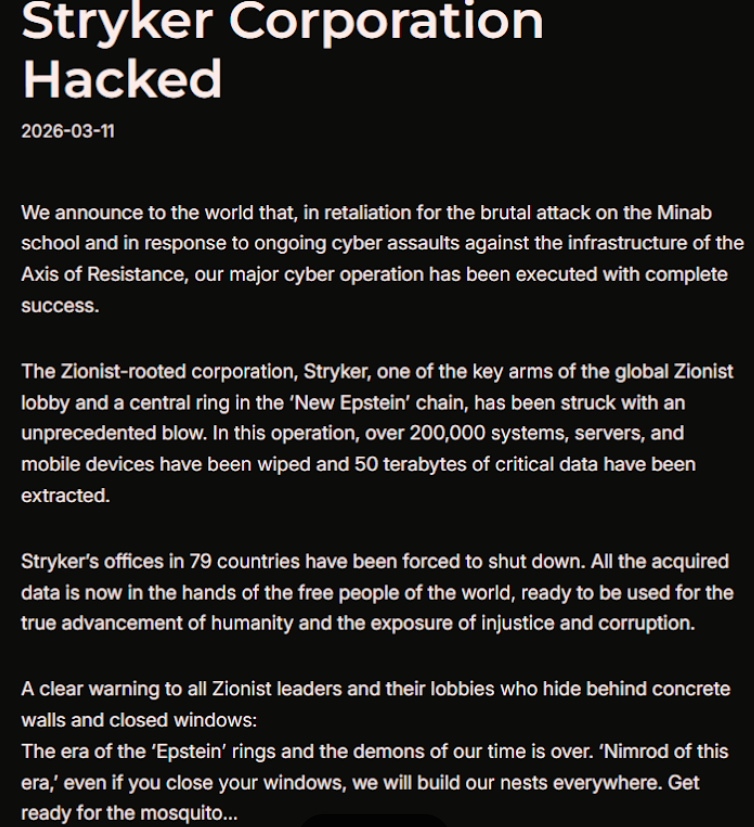
Based in Kalamazoo, Michigan, Stryker [NYSE:SYK] is a medical and surgical equipment maker that reported $25 billion in global sales last year. In a lengthy statement posted to Telegram, a hacktivist group known as Handala (a.k.a. Handala Hack Team) claimed that Stryker’s offices in 79 countries have been forced to shut down after the group erased data from more than 200,000 systems, servers and mobile devices.

A manifesto posted by the Iran-backed hacktivist group Handala, claiming a mass data-wiping attack against medical technology maker Stryker.

A manifesto posted by the Iran-backed hacktivist group Handala, claiming a mass data-wiping attack against medical technology maker Stryker.

“All the acquired data is now in the hands of the free people of the world, ready to be used for the true advancement of humanity and the exposure of injustice and corruption,” a portion of the Handala statement reads.

The group said the wiper attack was in retaliation for a Feb. 28 missile strike that hit an Iranian school and killed at least 175 people, most of them children. The New York Times reports today that an ongoing military investigation has determined the United States is responsible for the deadly Tomahawk missile strike.

Handala was one of several hacker groups recently profiled by Palo Alto Networks, which links it to Iran’s Ministry of Intelligence and Security (MOIS). Palo Alto says Handala surfaced in late 2023 and is assessed as one of several online personas maintained by Void Manticore, a MOIS-affiliated actor.

Stryker’s website says the company has 56,000 employees in 61 countries. A phone call placed Wednesday morning to the media line at Stryker’s Michigan headquarters sent this author to a voicemail message that stated, “We are currently experiencing a building emergency. Please try your call again later.”

A report Wednesday morning from the Irish Examiner said Stryker staff are now communicating via WhatsApp for any updates on when they can return to work. The story quoted an unnamed employee saying anything connected to the network is down, and that “anyone with Microsoft Outlook on their personal phones had their devices wiped.”

“Multiple sources have said that systems in the Cork headquarters have been ‘shut down’ and that Stryker devices held by employees have been wiped out,” the Examiner reported. “The login pages coming up on these devices have been defaced with the Handala logo.”

Wiper attacks usually involve malicious software designed to overwrite any existing data on infected devices. But a trusted source with knowledge of the attack who spoke on condition of anonymity told KrebsOnSecurity the perpetrators in this case appear to have used a Microsoft service called Microsoft Intune to issue a ‘remote wipe’ command against all connected devices.

Intune is a cloud-based solution built for IT teams to enforce security and data compliance policies, and it provides a single, web-based administrative console to monitor and control devices regardless of location. The Intune connection is supported by this Reddit discussion on the Stryker outage, where several users who claimed to be Stryker employees said they were told to uninstall Intune urgently.

Palo Alto says Handala’s hack-and-leak activity is primarily focused on Israel, with occasional targeting outside that scope when it serves a specific agenda. The security firm said Handala also has taken credit for recent attacks against fuel systems in Jordan and an Israeli energy exploration company.

“Recent observed activities are opportunistic and ‘quick and dirty,’ with a noticeable focus on supply-chain footholds (e.g., IT/service providers) to reach downstream victims, followed by ‘proof’ posts to amplify credibility and intimidate targets,” Palo Alto researchers wrote.

The Handala manifesto posted to Telegram referred to Stryker as a “Zionist-rooted corporation,” which may be a reference to the company’s 2019 acquisition of the Israeli company OrthoSpace.

Stryker is a major supplier of medical devices, and the ongoing attack is already affecting healthcare providers. One healthcare professional at a major university medical system in the United States told KrebsOnSecurity they are currently unable to order surgical supplies that they normally source through Stryker.

“This is a real-world supply chain attack,” the expert said, who asked to remain anonymous because they were not authorized to speak to the press. “Pretty much every hospital in the U.S. that performs surgeries uses their supplies.”

John Riggi, national advisor for the American Hospital Association (AHA), said the AHA is not aware of any supply-chain disruptions as of yet.

“We are aware of reports of the cyber attack against Stryker and are actively exchanging information with the hospital field and the federal government to understand the nature of the threat and assess any impact to hospital operations,” Riggi said in an email. “As of this time, we are not aware of any direct impacts or disruptions to U.S. hospitals as a result of this attack. That may change as hospitals evaluate services, technology and supply chain related to Stryker and if the duration of the attack extends.”

According to a March 11 memo from the state of Maryland’s Institute for Emergency Medical Services Systems, Stryker indicated that some of their computer systems have been impacted by a “global network disruption.” The memo indicates that in response to the attack, a number of hospitals have opted to disconnect from Stryker’s various online services, including LifeNet, which allows paramedics to transmit EKGs to emergency physicians so that heart attack patients can expedite their treatment when they arrive at the hospital.

“As a precaution, some hospitals have temporarily suspended their connection to Stryker systems, including LIFENET, while others have maintained the connection,” wrote Timothy Chizmar, the state’s EMS medical director. “The Maryland Medical Protocols for EMS requires ECG transmission for patients with acute coronary syndrome (or STEMI). However, if you are unable to transmit a 12 Lead ECG to a receiving hospital, you should initiate radio consultation and describe the findings on the ECG.”

This is a developing story. Updates will be noted with a timestamp.

Update, 2:54 p.m. ET: Added comment from Riggi and perspectives on this attack’s potential to turn into a supply-chain problem for the healthcare system.

Update, Mar. 12, 7:59 a.m. ET: Added information about the outage affecting Stryker’s online services.

When Security Becomes an Afterthought

12 February 2026 at 14:00

Why AI's Biggest Risk Isn't Technical

This article is based on a conversation with Nikesh Arora on the 100th episode of the Threat Vector podcast.

David Moulton interviews Nikesh Arora
David Moulton interviews Nikesh Arora on the Threat Vector podcast.

"Most technologists think about technology, not about cybersecurity," Nikesh Arora says. "Cybersecurity is kind of like insurance. Let's go make great things happen, and let's make sure on the way we purchase insurance."

Coming from the CEO of the world's largest cybersecurity company, it's the quiet part said out loud, and it explains why AI deployment is racing ahead while security scrambles to keep up.

Earlier this year, Arora spoke with a CIO entirely focused on AI deployment challenges: building viable products, training models, measuring customer impact. Security never came up once. "If you're still going through the motion, trying to understand, ‘Can I actually make this thing work?’ You're not worried about security," Arora notes. The logic is brutal but consistent: Why secure something that might not even function?

In the Threat Vector podcast’s 100th episode milestone, Arora speaks with host David Moulton:

  • Why the gap between innovation and security keeps widening.
  • How to read inflection points before they're obvious.
  • What separates organizations that prepare from those that scramble.

The Gap That Keeps Growing

The disconnect isn't new. It's the same psychology that makes airport security feel like overhead – necessary friction that slows down what should be seamless. But with AI, the gap is widening at an unprecedented pace.

Consider the infrastructure buildup happening right now. Nvidia has become a $4 trillion company selling chips that can't stay in stock. Hundreds of billions of dollars are flowing into AI-computer infrastructure. Cloud providers are buying out entire methane gas companies to power their data centers.

Yet organizations are treating AI security as something to bolt on later. That same CIO told Arora: "We worked on some stuff ourselves, and we're just jerry-rigging some things to make sure this happens securely."

Arora's response:

Jerry rig, production, and security don't work together as three terms.

Reading Signals Before They're Obvious

Arora has watched enough technology cycles to recognize the pattern. "You start seeing signs early, and then you look around, you don't see enough impact. You say, okay, maybe this is going to be just a passing shower. But you don't realize that over time this thing's getting more and more momentum."

The signs around AI are adding up:

  • Individual behavior has shifted.
    Arora went from never talking to ChatGPT or Gemini to conducting 10-15 conversations daily. During a recent Tokyo trip, he used Gemini as his primary navigation tool, asking it to rank sumo wrestling shows for his kids rather than "trying to go read 14 websites and figure out what makes sense."
  • The spend is massive and accelerating.
    Not just chips, entire energy infrastructures are being rebuilt to support AI compute needs.
  • Consumer and enterprise adoption are both surging.
    From coding assistants to business analysis, use cases are expanding faster than security models can adapt.

"This thing's going to change our life fundamentally," Arora tells Moulton. "We're not seeing it at scale in our customers just yet. That doesn't mean we can sit back and wait."

Arora understands the risks involved in being late to new technology.

You have to not just anticipate where the trend is going. You have to prepare your organization and the resources to get there. Otherwise, the risk is that Silicon Valley will go fund those people who are thinking purely about the new world... and one of them's going to hit. Then you'll be two years behind with no organization, no resources deployed against it.

The Bets That Paid Off

When Arora joined Palo Alto Networks seven and a half years ago, he wrote two words on a piece of paper: cloud and AI. The company was a firewall business. Those two inflection points would require fundamental transformation, and, just as with AI now, being late was not an option.

If you don't get the network transformation right, 80% of our business will falter.

That insight drove a strategic bet on moving from point products to platform thinking, consolidating security tools rather than adding to the sprawl.

The platform approach wasn't about vendor consolidation for its own sake. It was about correlation. Unit 42® data shows that 70% of incidents now span three or more attack surfaces. When attacks move across endpoints, networks, cloud services and applications simultaneously, fragmented security creates gaps that attackers exploit ruthlessly.

Today we have coverage for 80 plus percent of the industry, which means our customers can come talk to us about a myriad of problems, and we can actually cross-correlate across all the different things we do.

With AI deployments touching every part of the technology stack, that cross-correlation becomes essential. Data flows between training environments and production systems. Models access APIs across cloud and on premises infrastructure. Applications consume AI services from multiple providers. Security that can't see and correlate across that entire landscape will miss the threats that matter most.

First Principles Over Tradition

What drives Arora's ability to spot inflection points isn't just pattern recognition, it's his refusal to accept how things have always been done.

His pet peeve: "Somebody said, well, this is how we've traditionally done it." The response reveals his approach: "You use the word traditional. I use the historical context saying, yeah, sure, they used to dig fields with picks and shovels, and now they use tractors."

This thinking drove Palo Alto Networks to reimagine SOC performance. The industry accepted four days as the normal time to detect and remediate security incidents. Arora called that unacceptable. "We need to get it to be real time."

The result was a fundamentally different architecture that analyzes data as it arrives rather than waiting for problems to appear, enabling 1-minute detection and response instead of four days.

Traditionally, SOCs would analyze the problem when the problem appeared. We said forget it. We're going to analyze everything to see if there's a problem. That architecture fundamentally transformed what we do compared to everybody else in the market.

The same first-principles approach needs to apply to AI security. Organizations can't simply extend existing security models and hope they work.

What Comes Next

With ransomware attacks now completing in as little as 25 minutes (100 times faster than just three years ago, according to Unit 42 research) reactive security simply can't keep pace. Organizations need security that thinks and responds at machine speed, built into AI deployments from day one.

"AI has become the biggest inflection point in current technology," Arora observes. Organizations are too busy deploying to worry about security. That's human nature. But it's also the moment when security teams need to stay in lockstep.

The question isn't whether to secure AI, it's whether security will be designed in or bolted on. The former takes strategic thinking now. The latter takes crisis management later.

Our job at Palo Alto and our industry is to make sure as they go build these experimental ideas into real production capability that we're staying in lockstep with them and saying, ‘Oh, by the way, here's something that can secure what you just built in a way that is not gonna get you into trouble.’

Listen to the full conversation between Nikesh Arora and David Moulton, senior director of thought leadership for Cortex® and Unit 42, on the 100th episode of Threat Vector.

The post When Security Becomes an Afterthought appeared first on Palo Alto Networks Blog.

How to protect yourself from deepfake scammers and save your money | Kaspersky official blog

6 February 2026 at 12:41

Technologies for creating fake video and voice messages are accessible to anyone these days, and scammers are busy mastering the art of deepfakes. No one is immune to the threat — modern neural networks can clone a person’s voice from just three to five seconds of audio, and create highly convincing videos from a couple of photos. We’ve previously discussed how to distinguish a real photo or video from a fake and trace its origin to when it was taken or generated. Now let’s take a look at how attackers create and use deepfakes in real time, how to spot a fake without forensic tools, and how to protect yourself and loved ones from “clone attacks”.

How deepfakes are made

Scammers gather source material for deepfakes from open sources: webinars, public videos on social networks and channels, and online speeches. Sometimes they simply call identity theft targets and keep them on the line for as long as possible to collect data for maximum-quality voice cloning. And hacking the messaging account of someone who loves voice and video messages is the ultimate jackpot for scammers. With access to video recordings and voice messages, they can generate realistic fakes that 95% of folks are unable to tell apart from real messages from friends or colleagues.

The tools for creating deepfakes vary widely, from simple Telegram bots to professional generators like HeyGen and ElevenLabs. Scammers use deepfakes together with social engineering: for example, they might first simulate a messenger app call that appears to drop out constantly, then send a pre-generated video message of fairly low quality, blaming it on the supposedly poor connection.

In most cases, the message is about some kind of emergency in which the deepfake victim requires immediate help. Naturally the “friend in need” is desperate for money, but, as luck would have it, they’ve no access to an ATM, or have lost their wallet, and the bad connection rules out an online transfer. The solution is, of course, to send the money not directly to the “friend”, but to a fake account, phone number, or cryptowallet.

Such scams often involve pre-generated videos, but of late real-time deepfake streaming services have come into play. Among other things, these allow users to substitute their own face in a chat-roulette or video call.

How to recognize a deepfake

If you see a familiar face on the screen together with a recognizable voice but are asked unusual questions, chances are it’s a deepfake scam. Fortunately, there are certain visual, auditory, and behavioral signs that can help even non-techies to spot a fake.

Visual signs of a deepfake

Lighting and shadow issues. Deepfakes often ignore the physics of light: the direction of shadows on the face and in the background may not match, and glares on the skin may look unnatural or not be there at all. Or the person in the video may be half-turned toward the window, but their face is lit by studio lighting. This example will be familiar to participants in video conferences, where substituted background images can appear extremely unnatural.

Blurred or floating facial features. Pay attention to the hairline: deepfakes often show blurring, flickering, or unnatural color transitions along this area. These artifacts are caused by flaws in the algorithm for superimposing the cloned face onto the original.

Unnaturally blinking or “dead” eyes. A person blinks on average 10 to 20 times per minute. Some deepfakes blink too rarely, others too often. Eyelid movements can be too abrupt, and sometimes blinking is out of sync, with one eye not matching the other. “Glassy” or “dead-eye” stares are also characteristic of deepfakes. And sometimes a pupil (usually just the one) may twitch randomly due to a neural network hallucination.

When analyzing a static image such as a photograph, it’s also a good idea to zoom in on the eyes and compare the reflections on the irises — in real photos they’ll be identical; in deepfakes — often not.

How to recognize a deepfake: different specular highlights in the eyes in the image on the right reveal a fake

Look at the reflections and glares in the eyes in the real photo (left) and the generated image (right) — although similar, specular highlights in the eyes in the deepfake are different. Source

Lip-syncing issues. Even top-quality deepfakes trip up when it comes to synchronizing speech with lip movements. A delay of just a hundred milliseconds is noticeable to the naked eye. It’s often possible to observe an irregular lip shape when pronouncing the sounds m, f, or t. All of these are telltale signs of an AI-modeled face.

Static or blurred background. In generated videos, the background often looks unrealistic: it might be too blurry; its elements may not interact with the on-screen face; or sometimes the image behind the person remains motionless even when the camera moves.

Odd facial expressions. Deepfakes do a poor job of imitating emotion: facial expressions may not change in line with the conversation; smiles look frozen, and the fine wrinkles and folds that appear in real faces when expressing emotion are absent — the fake looks botoxed.

Auditory signs of a deepfake

Early AI generators modeled speech from small, monotonous phonemes, and when the intonation changed, there was an audible shift in pitch, making it easy to recognize a synthesized voice. Although today’s technology has advanced far beyond this, there are other signs that still give away generated voices.

Wooden or electronic tone. If the voice sounds unusually flat, without natural intonation variations, or there’s a vaguely electronic quality to it, there’s a high probability you’re talking to a deepfake. Real speech contains many variations in tone and natural imperfections.

No breathing sounds. Humans take micropauses and breathe in between phrases — especially in long sentences, not to mention small coughs and sniffs. Synthetic voices often lack these nuances, or place them unnaturally.

Robotic speech or sudden breaks. The voice may abruptly cut off, words may sound “glued” together, and the stress and intonation may not be what you’re used to hearing from your friend or colleague.

Lack of… shibboleths in speech. Pay attention to speech patterns (such as accent or phrases) that are typical of the person in real life but are poorly imitated (if at all) by the deepfake.

To mask visual and auditory artifacts, scammers often simulate poor connectivity by sending a noisy video or audio message. A low-quality video stream or media file is the first red flag indicating that checks are needed of the person at the other end.

Behavioral signs of a deepfake

Analyzing the movements and behavioral nuances of the caller is perhaps still the most reliable way to spot a deepfake in real time.

Can’t turn their head. During the video call, ask the person to turn their head so they’re looking completely to the side. Most deepfakes are created using portrait photos and videos, so a sideways turn will cause the image to float, distort, or even break up. AI startup Metaphysic.ai — creators of viral Tom Cruise deepfakes — confirm that head rotation is the most reliable deepfake test at present.

Unnatural gestures. Ask the on-screen person to perform a spontaneous action: wave their hand in front of their face; scratch their nose; take a sip from a cup; cover their eyes with their hands; or point to something in the room. Deepfakes have trouble handling impromptu gestures — hands may pass ghostlike through objects or the face, or fingers may appear distorted, or move unnaturally.

How to spot a deepfake: when a deepfake hand is waved in front of a deepfake face, they merge together

Ask a deepfake to wave a hand in front of its face, and the hand may appear to dissolve. Source

Screen sharing. If the conversation is work-related, ask your chat partner to share their screen and show an on-topic file or document. Without access to your real-life colleague’s device, this will be virtually impossible to fake.

Can’t answer tricky questions. Ask something that only the genuine article could know, for example: “What meeting do we have at work tomorrow?”, “Where did I get this scar?”, “Where did we go on vacation two years ago?” A scammer won’t be able to answer questions if the answers aren’t present in the hacked chats or publicly available sources.

Don’t know the codeword. Agree with friends and family on a secret word or phrase for emergency use to confirm identity. If a panicked relative asks you to urgently transfer money, ask them for the family codeword. A flesh-and-blood relation will reel it off; a deepfake-armed fraudster won’t.

What to do if you encounter a deepfake

If you’ve even the slightest suspicion that what you’re talking to isn’t a real human but a deepfake, follow our tips below.

  • End the chat and call back. The surest check is to end the video call and connect with the person through another channel: call or text their regular phone, or message them in another app. If your opposite number is unhappy about this, pretend the connection dropped out.
  • Don’t be pressured into sending money. A favorite trick is to create a false sense of urgency. “Mom, I need money right now, I’ve had an accident”; “I don’t have time to explain”; “If you don’t send it in ten minutes, I’m done for!” A real person usually won’t mind waiting a few extra minutes while you double-check the information.
  • Tell your friend or colleague they’ve been hacked. If a call or message from someone in your contacts comes from a new number or an unfamiliar account, it’s not unusual — attackers often create fake profiles or use temporary numbers, and this is yet another red flag. But if you get a deepfake call from a contact in a messenger app or your address book, inform them immediately that their account has been hacked — and do it via another communication channel. This will help them take steps to regain access to their account (see our detailed instructions for Telegram and WhatsApp), and to minimize potential damage to other contacts, for example, by posting about the hack.

How to stop your own face getting deepfaked

  • Restrict public access to your photos and videos. Hide your social media profiles from strangers, limit your friends list to real people, and delete videos with your voice and face from public access.
  • Don’t give suspicious apps access to your smartphone camera or microphone. Scammers can collect biometric data through fake apps disguised as games or utilities. To stop such programs from getting on your devices, use a proven all-in-one security solution.
  • Use passkeys, unique passwords, and two-factor authentication (2FA) where possible. Even if scammers do create a deepfake with your face, 2FA will make it much harder to access your accounts and use them to send deepfakes. A cross-platform password manager with support for passkeys and 2FA codes can help out here.
  • Teach friends and family how to spot deepfakes. Elderly relatives, young children, and anyone new to technology are the most vulnerable targets. Educate them about scams, show them examples of deepfakes, and practice using a family codeword.
  • Use content analyzers. While there’s no silver bullet against deepfakes, there are services that can identify AI-generated content with high accuracy. For graphics, these include Undetectable AI and Illuminarty; for video — Deepware; and for all types of deepfakes — Sensity AI and Hive Moderation.
  • Keep a cool head. Scammers apply psychological pressure to hurry victims into acting rashly. Remember the golden rule: if a call, video, or voice message from anyone you know rouses even the slightest suspicion, end the conversation and make contact through another channel.

To protect yourself and loved ones from being scammed, learn more about how scammers deploy deepfakes:

PODCAST: Attack Tactics Part 2

John talked about how we’d attack, here’s how you can defend against those attacks. Grab the slides here: https://blackhillsinformationsecurity.shootproof.com/gallery/6843799/

The post PODCAST: Attack Tactics Part 2 appeared first on Black Hills Information Security, Inc..

💾

Mining Mary’s Social Media Antics for Social Engineering

By: BHIS
16 September 2016 at 17:15

Christine Sorensen // Let’s talk about Mary. Mary Watson is a girl in her twenties and just graduated from Midtown University with her bachelors in Fashion Merchandising. Mary is now […]

The post Mining Mary’s Social Media Antics for Social Engineering appeared first on Black Hills Information Security, Inc..

The New Security Fundamentals – Kill Your AV

By: BHIS
3 November 2015 at 22:35

John Strand // AV is Dead Long Live Whitelisting. We have been discovering more and more of our tests bypass AV controls with ease.  We have yet to see any iteration or […]

The post The New Security Fundamentals – Kill Your AV appeared first on Black Hills Information Security, Inc..

❌