
 Login
Login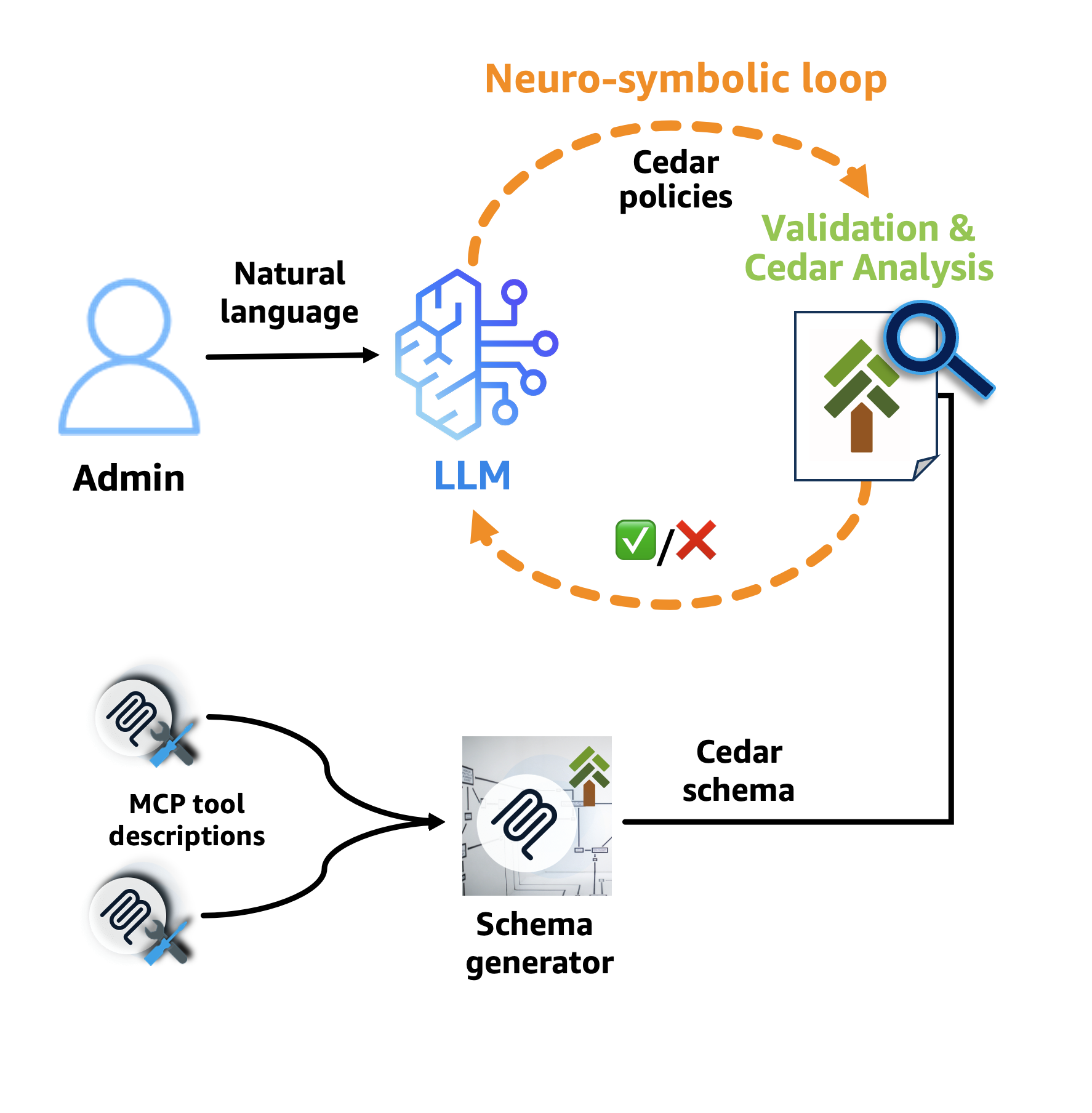


Why Policy in Amazon Bedrock AgentCore chose Cedar for securing agentic workflows
Agents have agency: they adapt and find multiple ways to solve problems. This autonomy creates a fundamental security challenge: the large language model (LLM) at the heart of the agent is non-deterministic, and its decisions can’t be predicted or guaranteed in advance. It can hallucinate harmful actions with complete confidence. It’s vulnerable to prompt injection attacks, where adversaries inject malicious commands through tool responses or user inputs. LLMs don’t robustly differentiate between commands and data, everything is only tokens. For these reasons, if you want defense in depth, you must treat the LLM as an untrusted actor from a security point of view.
The insight is that the LLM can’t affect the external world directly: it has to go through an orchestrator that invokes tools based on the LLM’s output. This is precisely where the controls must be applied. What you need at this boundary is authorization: a decision about whether each tool invocation should be allowed and under what conditions. Consider a customer service agent for an online retailer. Without proper controls, it could process refunds that exceed authorized limits, apply discounts to product categories that should be excluded, or look up one customer’s data while handling another customer’s session.
If you control agents’ access to tools, you can establish a safety envelope within which the agent can operate freely. This differs from two common but unsatisfactory approaches:
- Creating hard-coded workflows eliminates uncertainty, but by itself defeats the purpose of using an LLM as the brain of the agent, because you’ve built a traditional application with an LLM interface. And even with this restriction, using LLM outputs at any step can open up the same risks. While it’s a useful technique for well-understood workflows, it’s not sufficient for agents that need to adapt.
- Human-in-the-loop provides a safety net for critical operations, and it will always have a role. But relying on it as the main control mechanism sacrifices autonomy and can lead to approval fatigue.
You need agents that are safe and autonomous. This requires an auditable, deterministic enforcement layer that sits outside the agent and tools. Why outside? Because the LLM’s plan is the thing you can’t trust—it can’t be responsible for enforcing its own constraints. Controls at the LLM layer—such as system prompts and training-time alignment—can be bypassed by prompt injection or hallucination. Hard-coded checks in agent or tool code are more robust, but become difficult to audit and manage at scale, especially when security logic is scattered across many tools and services. Centralizing authorization outside both gives you a single checkpoint the LLM can’t circumvent; one that’s auditable and can be verified independently of the application code.
This is where AgentCore Policies come in. Amazon Bedrock AgentCore Gateway sits between the agent and the remote tools it calls. When you associate a Policy with a Gateway, it blocks everything by default. Policies selectively open this boundary by specifying which tool invocations are allowed and under what conditions. This enforcement applies to all tool traffic routed through the Gateway. For this approach to scale, it must be more straightforward to reason about the policies than about the agent’s behavior.
AgentCore policies are expressed in Cedar. Cedar is an open source authorization policy language developed by AWS that has recently joined the Cloud Native Computing Foundation (CNCF). Cedar was designed with exactly these properties: it’s purpose-built for authorization, readable by humans, and analyzable by machines using automated reasoning. This gives enterprises the ability to scale policy definition and enforcement to their AI agents.
How Cedar is used by Amazon Bedrock AgentCore
Amazon Bedrock AgentCore provides the infrastructure to deploy and manage agents at scale. It includes AgentCore Runtime for hosting agents, AgentCore Gateway for managing how agents connect to tools using Model Context Protocol (MCP), and Policy in AgentCore. Policy intercepts all agent traffic through AgentCore gateways and evaluates each request against defined policies in the policy engine before allowing tool access. Cedar powers the policy layer.
AgentCore Policy uses Cedar and its mathematical analysis capabilities at several points in the AgentCore Gateway workflow: the Cedar authorization engine is used at policy evaluation and Cedar Analysis is used during policy authoring, and in the control plane.
Policy authoring: Developers can write Cedar policies directly or use natural language that gets translated to Cedar through a neuro-symbolic AI feedback loop. Neuro-symbolic AI combines machine learning’s flexibility with automated reasoning’s provable correctness. An LLM generates policies from natural language, while Cedar Analysis validates them using symbolic, mathematical reasoning. The following diagram illustrates this workflow:

Figure 1: Cedar policy generation workflow
An administrator specifies—in natural language—which MCP tools the agent can call and under what conditions. The neuro-symbolic feedback loop then formalizes this description into Cedar policies. Here’s how it works: first, the LLM translates the natural language into Cedar policies. These policies are then run through two stages of verification. In the first stage, AgentCore Policy uses a Cedar schema generator that takes the MCP tool descriptions and produces a Cedar schema. Cedar validates the policies against this schema, helping to ensure that they reference valid tools and parameters and ruling out whole classes of runtime errors. If validation passes, the second stage runs Cedar Analysis, which encodes each policy as a mathematical formula and detects issues like policies that grant or deny everything, or that contain impossible conditions. These mathematical proofs identify errors in the process of translating from the natural language description to Cedar policies, and guide corrections.
The neuro-symbolic feedback loop significantly improves the accuracy of the generated policies. This demonstrates the power of combining neural and symbolic approaches—the LLM provides creative translation from natural language, while automated reasoning provides rigorous validation.
Control plane: When attaching policies to an AgentCore Gateway, Cedar Analysis performs holistic analysis of the entire policy set. Instead of analyzing policies in isolation, it examines how they interact and their combined effect. This analysis identifies potential logical errors—such as conflicting or redundant policies—and detects whether the policy set produces unintended authorization outcomes. When Cedar Analysis detects these errors, the operation fails and returns a description of the issue, so the policy author can fix and retry. See the Formal analysis for policy verification section for examples of the checks.
MCP tool invocation enforcement: Each agent tool request made to the AgentCore gateway is evaluated against Cedar policies which determine whether the MCP tool invocation with the given arguments should be allowed. This creates the safety envelope while allowing the necessary bridges to enable the agent to perform its job.
MCP tool filtering: Cedar enables an additional layer of protection that operates before any tool invocation occurs. When an agent issues a list tools command, AgentCore Gateway uses Cedar’s partial evaluation capability to determine which actions would always be denied under the current policy set. Those actions are omitted from the list tool response. The agent and the underlying LLM never see those tool actions, eliminating an entire class of risk: the agent and LLM can’t attempt to invoke a tool it doesn’t know exists. This is a direct benefit of Cedar’s partial evaluation: the system can determine that certain tool actions are unreachable without needing to wait for an actual tool invocation attempt.
Why Cedar: Analyzability enables safety at scale
Natural language is too ambiguous for security-critical infrastructure, and general-purpose programming languages, like Python, are very expressive but too difficult to analyze. They can have unintended side effects, termination issues, and can be difficult to understand.
Cedar avoids these issues by excluding loops and stateful operations, so policy evaluation terminates in O(n) time in common cases. This bounded execution time means agents can make authorization decisions without disrupting user experience or workflow efficiency.
Cedar is straightforward to read. Regulatory compliance and security audits require policies that humans can understand and verify. Cedar policies read like structured natural language, making them accessible to security teams, compliance officers, and business stakeholders:
// Only allow bulk discounts for premium customers with sufficient quantity
permit (
  principal is AgentCore::OAuthUser,
  action == AgentCore::Action::"ApplyBulkDiscount",
  resource
)
when
{
  principal.hasTag("customer_tier") &&
  principal.getTag("customer_tier") == "Platinum" &&
  context.input.orderQuantity >= 50
}
unless
{
  context.input
    .productTypes
    .containsAny
    (
      ["limited_edition", "seasonal_specials"]
    )
};
Auditors without a technical background can understand this policy: “Allow bulk discounts for platinum customers who order at least 50 items, except for limited edition or seasonal special products.” The unless clause makes the exception clear, which is how business rules are typically expressed in natural language. Notice that this single policy constrains two different sources of data. The customer tier comes from a JSON Web Token (JWT) claim—it can’t be hallucinated or manipulated by the LLM. The tool inputs like order quantity and product types, however, originate from the LLM’s tool call. Cedar policies constrain these inputs to only allowed values, ensuring that even if the LLM produces unexpected arguments, the policy enforcement layer rejects them deterministically.
Cedar is the right choice because it’s fast, straightforward to read, and analyzable through automated reasoning. This analyzability is why you can reason about the safety envelope around agents that’s expressed as Cedar policies. As agentic systems grow the number of tools grows. Without proper tooling, policy management becomes intractable; policies can conflict, create security gaps, or produce unintended authorization outcomes.
In the rest of this section, we examine how Cedar’s analyzability directly addresses this challenge through its deterministic, mathematically sound analysis. Because Cedar analysis can reliably detect conflicts and logical errors across large policy sets it enables scalable policy management through neuro-symbolic AI.
Formal analysis for policy verification
Cedar policies can be encoded as mathematical formulas and analyzed using automated reasoning techniques through a symbolic encoder. This enables AgentCore Policy to provide sophisticated policy verification capabilities during policy authoring and beyond. AgentCore Policy uses this analysis when authoring or attaching policies to detect possible logical errors, such as conflicting or redundant policies. Policy analysis, including policy comparison is available as an open source CLI tool. Next, we will take a look at some concrete examples of these checks.
Detecting logical errors in policies: Cedar Analysis can detect when policies contain logical errors. For example, the following policy has contradictory constraints that mean it can’t allow any request: the customer tier can’t be both gold and platinum at the same time. The intention was to use an || instead of &&, a mistake that can be made by both humans and AI systems that author policies.
// This policy cannot allow any requests due to logical errors
permit (
  principal is AgentCore::OAuthUser,
  action == AgentCore::Action::"ProcessRefund",
  resource
)
when
{
  principal.hasTag("customer_tier") &&
  principal.getTag("customer_tier") == "Gold" &&
  principal.getTag("customer_tier") == "Platinum"
}
unless { context.input.refundAmount > 1000 };
Similarly, Cedar Analysis can detect policies that always allow a given action, usually an indication of an overly permissive policy. For example, the following policy will allow all ApplyBulkDiscount requests because any order quantity will either be greater than or equal to 100 or less than 100.
// This policy allows all ApplyBulkDiscount requests
permit (
  principal is AgentCore::OAuthUser,
  action == AgentCore::Action::"ApplyBulkDiscount",
  resource
)
when
{
  context.input.orderQuantity >= 100 ||
  context.input.orderQuantity < 100 ||
  (principal.hasTag("customer_tier") &&
   principal.getTag("customer_tier") == "Platinum")
};
Detecting such logical errors isn’t easy for humans, and can’t be done by pattern matching: you need the formal rigor of mathematical analysis, which is exactly what Cedar Analysis does.
Detecting policy conflicts: Cedar Analysis can also analyze the entire policy set to detect inconsistencies between different individual policies:
// These policies conflict - Analysis will detect the subtle issue
permit (
  principal is AgentCore::OAuthUser,
  action == AgentCore::Action::"ProcessRefund",
  resource
)
when
{
  principal.hasTag("customer_tier") &&
  principal.getTag("customer_tier") == "Gold" &&
  context.input.refundAmount < 100
};

forbid (
  principal is AgentCore::OAuthUser,
  action == AgentCore::Action::"ProcessRefund",
  resource
)
when
{
  principal.hasTag("customer_tier") &&
  ["Gold", "Platinum"].contains(principal.getTag("customer_tier")) &&
  context.input.refundAmount < 500
};
The permit policy allows gold customers to process refunds less than $100, while the forbid policy blocks gold customers (and platinum customers) from processing refunds less than $500. Because forbid overrides permit in Cedar, the forbid policy would block all gold customer refunds despite the permit policy.
Comparing policy changes: When updating policies, Cedar Analysis can also determine the exact impact of a change. Consider the following update to the unless clause (the policy lines with + have been added and those with - have been removed): we now block ApplyBulkDiscount only when the product type is limited_edition and the quantity exceeds 200.
 permit (
   principal is AgentCore::OAuthUser,
   action == AgentCore::Action::"ProcessRefund",
   resource
 )
 when
 {
   context.input.refundAmount < 500
 };

 permit (
   principal is AgentCore::OAuthUser,
   action == AgentCore::Action::"ApplyBulkDiscount",
   resource
 )
 when
 {
   context.input.orderQuantity >= 50
 }
 unless
 {
-  context.input.productTypes.containsAny(["limited_edition"])
+  context.input.productTypes.containsAny(["limited_edition"]) &&
+  context.input.orderQuantity > 200
 };
At first glance, adding a condition to the unless clause might seem more restrictive. In fact, it’s the opposite: narrowing when the unless applies means the permit now covers more requests. For example, an order of 73 units of a limited_edition product would have been blocked before but is now allowed. Cedar Analysis can automatically detect this and generates the following table showing the difference in permissiveness between the original policy set and the updated one:
| Principal type |
Action |
Resource type |
Status |
| OAuthUser |
ProcessRefund |
Gateway |
Equivalent |
| OAuthUser |
ApplyBulkDiscount |
Gateway |
More permissive |
In the preceding example, the analysis tells us that the updated policy allows allows exactly the same ProcessRefund requests, but allows more ApplyBulkDiscount requests.
This formal verification capability is essential when agents operate autonomously and can affect the real world. Organizations need mathematical certainty that their policies will behave as intended.
Deterministic behavior for reliable governance
Unlike probabilistic AI models, enterprise security requires deterministic guarantees. Cedar policies always produce the same authorization decision for identical requests, regardless of evaluation order or system state. Cedar’s default deny, forbid wins, no ordering semantics help ensure predictable behavior.
// Policy evaluation order does not affect the authorization decision
permit(
    principal,
    action == AgentCore::Action::"ProcessRefund",
    resource
) when {
    context.input.refundAmount < 500
};

forbid(
    principal,
    action == AgentCore::Action::"ProcessRefund",
    resource
) when {
    context.input.orderDate.offset(duration("90d")) < context.system.now
};
Whether the permit or forbid policy is evaluated first, a refund request over $500 will always be denied, and any refund issued more than 90 days after the order date will also be denied. This predictability gives enterprises confidence in their agent governance.
From policies to production
By choosing AgentCore Policy and Cedar, organizations can deploy autonomous agents with policies they can reason about mathematically, not only hope the agents work correctly. Cedar’s combination of expressiveness, readability, and formal verification means that you can design agents with the flexibility needed to function and the certainty security teams demand.
Automated reasoning has already proven its value across AWS, from AWS IAM Access Analyzer verifying access policies to provable security for network configurations. Applying these same techniques to agentic AI is a natural extension: as agents take on more responsibility, the need for mathematically grounded guarantees only grows. The neuro-symbolic approach we’ve described in this post—combining LLM flexibility with the rigor of automated reasoning—points toward a future where agents can be both more autonomous and more trustworthy, because the verification keeps pace with the autonomy.
Learn more
Policy is now available as part of Amazon Bedrock AgentCore Gateway. To learn more about Cedar and its capabilities, visit the Cedar website, try the Cedar playground, or join the Cedar community on Slack.
For more information about Policy in Amazon Bedrock AgentCore Gateway, visit the AWS documentation or explore the AgentCore Gateway console.
If you have feedback about this post, submit comments in the Comments section below.

