Phishing campaign tries to reel in master passwords
updated Password managers make great targets for attackers because they can hold many of the keys to your kingdom. Now, LastPass has warned customers about phishing emails claiming that action is required ahead of scheduled maintenance and told them not to fall for the scam. …
Fractal heeft een nieuwe versie van zijn op airflow ingerichte Pop Air-behuizing beschikbaar gemaakt. Deze biedt onder andere ruimte voor langere gpu's en grotere radiators. De ATX-kast kost zo'n negentig euro.
Fortinet customers are seeing attackers exploiting a patch bypass for a previously fixed critical FortiGate authentication vulnerability (CVE-2025-59718) to hack patched firewalls. [...]
As many as 3,136 individual IP addresses linked to likely targets of the Contagious Interview activity have been identified, with the campaign claiming 20 potential victim organizations spanning artificial intelligence (AI), cryptocurrency, financial services, IT services, marketing, and software development sectors in Europe, South Asia, the Middle East, and Central America.
The new findings
Recently, our team came across an infection attempt that stood out—not for its sophistication, but for how determined the attacker was to take a “living off the land” approach to the extreme.
The end goal was to deploy Remcos, a Remote Access Trojan (RAT), and NetSupport Manager, a legitimate remote administration tool that’s frequently abused as a RAT. The route the attacker took was a veritable tour of Windows’ built-in utilities—known as LOLBins (Living Off the Land Binaries).
Both Remcos and NetSupport are widely abused remote access tools that give attackers extensive control over infected systems and are often delivered through multi-stage phishing or infection chains.
Remcos (short for Remote Control & Surveillance) is sold as a legitimate Windows remote administration and monitoring tool but is widely used by cybercriminals. Once installed, it gives attackers full remote desktop access, file system control, command execution, keylogging, clipboard monitoring, persistence options, and tunneling or proxying features for lateral movement.
NetSupport Manager is a legitimate remote support product that becomes “NetSupport RAT” when attackers silently install and configure it for unauthorized access.
Let’s walk through how this attack unfolded, one native command at a time.
Stage 1: The subtle initial access
The attack kicked off with a seemingly odd command:
At first glance, you might wonder: why not just run mshta.exe directly? The answer lies in defense evasion.
By roping in forfiles.exe, a legitimate tool for running commands over batches of files, the attacker muddied the waters. This makes the execution path a bit harder for security tools to spot. In essence, one trusted program quietly launches another, forming a chain that’s less likely to trip alarms.
Stage 2: Fileless download and staging
The mshta command fetched a remote HTA file that immediately spawned cmd.exe, which rolled out an elaborate PowerShell one-liner:
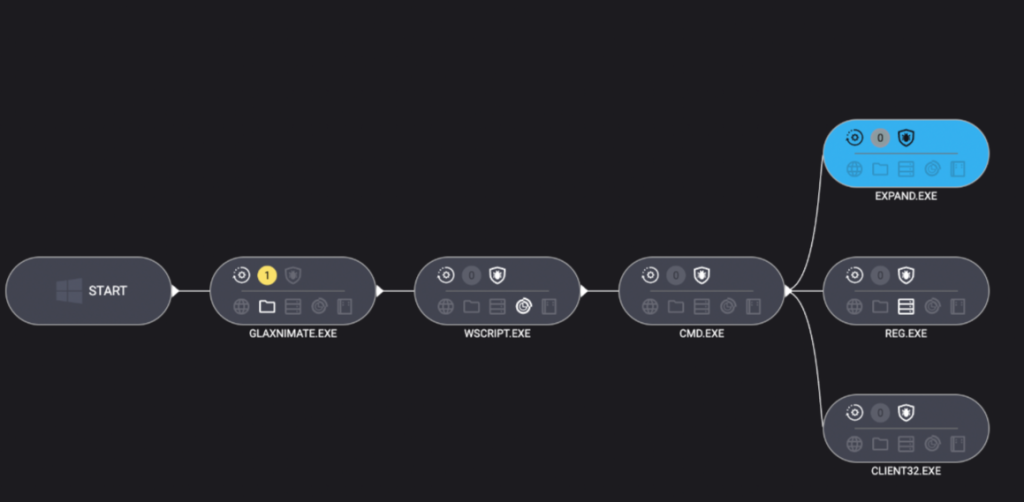
PowerShell’s built-in curl downloaded a payload disguised as a PDF, which in reality was a TAR archive. Then, tar.exe (another trusted Windows add-on) unpacked it into a randomly named folder. The star of this show, however, was glaxnimate.exe—a trojanized version of real animation software, primed to further the infection on execution. Even here, the attacker relies entirely on Windows’ own tools—no EXE droppers or macros in sight.
Stage 3: Staging in plain sight
What happened next? The malicious Glaxnimate copy began writing partial files to C:\ProgramData:
SETUP.CAB.PART
PROCESSOR.VBS.PART
PATCHER.BAT.PART
Why .PART files? It’s classic malware staging. Drop files in a half-finished state until the time is right—or perhaps until the download is complete. Once the coast is clear, rename or complete the files, then use them to push the next payloads forward.
Scripting the core elements of infection
Stage 4: Scripting the launch
Malware loves a good script—especially one that no one sees. Once fully written, Windows Script Host was invoked to execute the VBScript component:
Use the expand utility to extract all the contents of the previously dropped setup.cab archive into ProgramData—effectively unpacking the NetSupport RAT and its helpers.
Stage 5: Hidden persistence
To make sure their tool survived a restart, the attackers opted for the stealthy registry route:
Unlike old-school Run keys, UserInitMprLogonScript isn’t a usual suspect and doesn’t open visible windows. Every time the user logged in, the RAT came quietly along for the ride.
Final thoughts
This infection chain is a masterclass in LOLBin abuse and proof that attackers love turning Windows’ own tools against its users. Every step of the way relies on built-in Windows tools: forfiles, mshta, curl, tar, scripting engines, reg, and expand.
So, can you use too many LOLBins to drop a RAT? As this attacker shows, the answer is “not yet.” But each additional step adds noise, and leaves more breadcrumbs for defenders to follow. The more tools a threat actor abuses, the more unique their fingerprints become.
Stay vigilant. Monitor potential LOLBin abuse. And never trust a .pdf that needs tar.exe to open.
Despite the heavy use of LOLBins, Malwarebytes still detects and blocks this attack. It blocked the attacker’s IP address and detected both the Remcos RAT and the NetSupport client once dropped on the system.
We don’t just report on threats—we remove them
Cybersecurity risks should never spread beyond a headline. Keep threats off your devices by downloading Malwarebytes today.
Recently, our team came across an infection attempt that stood out—not for its sophistication, but for how determined the attacker was to take a “living off the land” approach to the extreme.
The end goal was to deploy Remcos, a Remote Access Trojan (RAT), and NetSupport Manager, a legitimate remote administration tool that’s frequently abused as a RAT. The route the attacker took was a veritable tour of Windows’ built-in utilities—known as LOLBins (Living Off the Land Binaries).
Both Remcos and NetSupport are widely abused remote access tools that give attackers extensive control over infected systems and are often delivered through multi-stage phishing or infection chains.
Remcos (short for Remote Control & Surveillance) is sold as a legitimate Windows remote administration and monitoring tool but is widely used by cybercriminals. Once installed, it gives attackers full remote desktop access, file system control, command execution, keylogging, clipboard monitoring, persistence options, and tunneling or proxying features for lateral movement.
NetSupport Manager is a legitimate remote support product that becomes “NetSupport RAT” when attackers silently install and configure it for unauthorized access.
Let’s walk through how this attack unfolded, one native command at a time.
Stage 1: The subtle initial access
The attack kicked off with a seemingly odd command:
At first glance, you might wonder: why not just run mshta.exe directly? The answer lies in defense evasion.
By roping in forfiles.exe, a legitimate tool for running commands over batches of files, the attacker muddied the waters. This makes the execution path a bit harder for security tools to spot. In essence, one trusted program quietly launches another, forming a chain that’s less likely to trip alarms.
Stage 2: Fileless download and staging
The mshta command fetched a remote HTA file that immediately spawned cmd.exe, which rolled out an elaborate PowerShell one-liner:
PowerShell’s built-in curl downloaded a payload disguised as a PDF, which in reality was a TAR archive. Then, tar.exe (another trusted Windows add-on) unpacked it into a randomly named folder. The star of this show, however, was glaxnimate.exe—a trojanized version of real animation software, primed to further the infection on execution. Even here, the attacker relies entirely on Windows’ own tools—no EXE droppers or macros in sight.
Stage 3: Staging in plain sight
What happened next? The malicious Glaxnimate copy began writing partial files to C:\ProgramData:
SETUP.CAB.PART
PROCESSOR.VBS.PART
PATCHER.BAT.PART
Why .PART files? It’s classic malware staging. Drop files in a half-finished state until the time is right—or perhaps until the download is complete. Once the coast is clear, rename or complete the files, then use them to push the next payloads forward.
Scripting the core elements of infection
Stage 4: Scripting the launch
Malware loves a good script—especially one that no one sees. Once fully written, Windows Script Host was invoked to execute the VBScript component:
Use the expand utility to extract all the contents of the previously dropped setup.cab archive into ProgramData—effectively unpacking the NetSupport RAT and its helpers.
Stage 5: Hidden persistence
To make sure their tool survived a restart, the attackers opted for the stealthy registry route:
Unlike old-school Run keys, UserInitMprLogonScript isn’t a usual suspect and doesn’t open visible windows. Every time the user logged in, the RAT came quietly along for the ride.
Final thoughts
This infection chain is a masterclass in LOLBin abuse and proof that attackers love turning Windows’ own tools against its users. Every step of the way relies on built-in Windows tools: forfiles, mshta, curl, tar, scripting engines, reg, and expand.
So, can you use too many LOLBins to drop a RAT? As this attacker shows, the answer is “not yet.” But each additional step adds noise, and leaves more breadcrumbs for defenders to follow. The more tools a threat actor abuses, the more unique their fingerprints become.
Stay vigilant. Monitor potential LOLBin abuse. And never trust a .pdf that needs tar.exe to open.
Despite the heavy use of LOLBins, Malwarebytes still detects and blocks this attack. It blocked the attacker’s IP address and detected both the Remcos RAT and the NetSupport client once dropped on the system.
We don’t just report on threats—we remove them
Cybersecurity risks should never spread beyond a headline. Keep threats off your devices by downloading Malwarebytes today.
LastPass is warning of a new phishing campaign disguised as a maintenance notification from the service, asking users to back up their vaults in the next 24 hours. [...]
Eigenaren van een Arm-pc kunnen voortaan lokaal gamen via de Xbox-app voor Windows. Volgens Microsoft wordt meer dan 85 procent van de Game Pass-titels ondersteund. Voorheen was het alleen mogelijk om Xbox-games via de cloud te streamen op Arm-pc's.
Sony heeft de LinkBuds Clip-oortjes aangekondigd. Deze open-earoordopjes bestaan uit twee delen die met de C-vormige brug om het oor gevouwen moeten worden. Ze komen beschikbaar voor een adviesprijs van 200 euro.
Honda en General Motors stoppen voor het einde van het jaar met de productie van waterstofbrandstofcellen in de VS. De Japanse autofabrikant gaat verder met zelfontwikkelde brandstofcellen. GM noemt het pad naar geld verdienen met waterstof 'lang en onzeker'.
Zoom and GitLab have released security updates to resolve a number of security vulnerabilities that could result in denial-of-service (DoS) and remote code execution.
The most severe of the lot is a critical security flaw impacting Zoom Node Multimedia Routers (MMRs) that could permit a meeting participant to conduct remote code execution attacks. The vulnerability, tracked as CVE-2026-22844
Bij een datalek van kledingmerk Under Armour zijn gegevens van 72 miljoen klanten gestolen, meldt database Have i Been Pwned. Daaronder vallen namen, woonadressen en bestelgegevens. Under Armour heeft zelf nog niet gereageerd op het lek.
Platenlabels en Spotify hebben Anna's Archive aangeklaagd voor het scrapen van 300TB aan data van de muziekstreamingdienst. De rechter heeft domeinregistrars en hostingproviders inmiddels bevolen om de toegang tot de domeinen van Anna's Archive te blokkeren.
When I look back on my years as a SOC lead in MDR, the thing I remember most clearly is the tension between wanting to do things the “right way” and simply trying to survive the day.
The alert queue never stopped growing. The attack surface kept expanding into cloud, identity, SaaS, and whatever new platform the business adopted. And every shift ended with the same uneasy feeling: What did we miss because there wasn’t enough time to investigate everything fully?
While different sources emphasize different challenges, recent statistics from late 2024 and 2025 reports reflect exactly what so many SOC analysts and leads feel:
The majority of alerts are never touched. Recent surveys indicate that 62% of alerts are ignored largely because the sheer volume makes them impossible to address. Furthermore, many analysts report being unable to deal with up to 67% of the daily alerts they receive.
The volume is unmanageable for humans. A typical SOC now processes an average of 3,832 alerts per day. For analysts trying to manually triage this flood, the math simply doesn’t add up.
Burnout is the new normal. The pressure is unsustainable, with 71% of SOC analysts reporting burnout due to alert fatigue. This has accelerated turnover, with some SOCs seeing analyst retention cycles shrink to less than 18 months, eroding institutional knowledge.
When people outside the SOC see these numbers, they assume analysts aren’t doing their jobs. The truth is the opposite. Most analysts are doing the best work they can inside a system that was never built for volume. Traditional triage is reactive and heavily dependent on intuition. On a good day, that might work. On a bad day, it leads to inconsistent decisions, coverage gaps, and immense pressure on analysts who care deeply about getting it right.
This is where the OSCAR methodology becomes valuable again.
Why the OSCAR methodology still matters
As a SOC lead, I always wanted the team to approach alerts with organizational structure. OSCAR provides that structure by creating a clear, repeatable sequence:
Obtain Information
Strategize
Collect Evidence
Analyze
Report
It removes guesswork and helps analysts who are still developing their skills stay grounded during chaotic shifts. But here is the reality I learned firsthand – You can only scale OSCAR so far with humans alone.
Evidence collection takes time. Deep analysis takes more time. No matter how motivated an analyst is, there are simply not enough hours in a shift to apply OSCAR to every alert manually. Most teams end up applying the methodology selectively; critical and high-severity alerts get the full OSCAR treatment, while everything else gets whatever time is left.
That gap between process and reality is exactly where Intezer enters the picture.
How Intezer operationalizes OSCAR at scale
Intezer takes the proven structure of OSCAR and executes it automatically and consistently across every alert. Instead of relying on how much energy an analyst has left 45 minutes before there shift ends, Intezer performs evidence collection, deep forensic analysis, and reporting at a speed and depth no human team could sustain.
Here is how the platform automates the methodology step-by-step:
O: Information obtained
In my SOC days, gathering context meant jumping between consoles and browser tabs, hoping nothing crashed. Intezer collects all of this instantly from endpoints, cloud platforms, identity systems, and threat intel sources. Analysts start every case with the full picture rather than a partial one.
S: Strategy suggested
Instead of relying on an analyst’s instinct about what might be happening, the Intezer platform generates verdicts and risk-based priorities immediately (with 98% accuracy). This provides critical consistency, especially for junior analysts who are still finding their confidence. Additionally, all AI reasoning is fully backed by deterministic, evidence based analysis.
C: Evidence collected
This was always the slowest part of manual investigation. Intezer collects memory artifacts, files, process information, and cloud activity in seconds. No hunting, no guessing, and no hoping you pulled the right logs before they rolled over.
A: Analysis (forensic-grade)
Intezer performs genetic code analysis, behavioral analysis, static/dynamic analysis, and threat intelligence correlation on every single alert. This is the level of scrutiny senior analysts wish they had time to do manually, but usually can only afford for the most critical incidents.
The platform creates clear, structured, audit trails. This removes the burden of manual documentation from analysts and ensures that the “why” behind every decision is transparent and explainable.
The result: Moving beyond “speed vs. depth”
When OSCAR is coupled with Intezer’s AI Forensic SOC, the operation transforms. We see this in actual customer environments:
100% alert coverage: Even low-severity and “noisy” alerts are fully triaged.
Sub-minute triage: Drastically improved MTTR/MTTD and minimized backlogs.
98% accurate decisioning: Verdicts are supported by deterministic evidence, reducing escalations for human review to less than 4%.
The shift in operations:
Capability
Traditional MDR SOC
Intezer Forensic AI SOC
Coverage
Critical and High-severity
100% of alerts
Triage time
20+ mins per alert
<2 mins (automated)
Analyst mode
Data collector
Investigator
From the perspective of a former SOC lead, the most important benefit is this:
”Analysts finally get to think again. Automation handles the busy work. Humans get to use judgment, creativity, and experience.”
Final thoughts
For years, triage has been treated like a speed exercise. But the threats we face today require depth, context, and clarity. OSCAR gives SOCs the investigative structure they need, and Intezer provides the scale required to actually use that structure across every alert.
For the first time, teams don’t have to choose between speed and depth. They get both.

 Login
Login