
Normal view

Open the wrong “PDF” and attackers gain remote access to your PC

5 February 2026 at 14:48

Cybercriminals behind a campaign dubbed DEAD#VAX are taking phishing one step further by delivering malware inside virtual hard disks that pretend to be ordinary PDF documents. Open the wrong “invoice” or “purchase order” and you won’t see a document at all. Instead, Windows mounts a virtual drive that quietly installs AsyncRAT, a backdoor Trojan that allows attackers to remotely monitor and control your computer.

It’s a remote access tool, which means attackers gain remote hands‑on‑keyboard control, while traditional file‑based defenses see almost nothing suspicious on disk.

From a high-level view, the infection chain is long, but every step looks just legitimate enough on its own to slip past casual checks.

Victims receive phishing emails that look like routine business messages, often referencing purchase orders or invoices and sometimes impersonating real companies. The email doesn’t attach a document directly. Instead, it links to a file hosted on IPFS (InterPlanetary File System), a decentralized storage network increasingly abused in phishing campaigns because content is harder to take down and can be accessed through normal web gateways.

The linked file is named as a PDF and has the PDF icon, but is actually a virtual hard disk (VHD) file. When the user double‑clicks it, Windows mounts it as a new drive (for example, drive E:) instead of opening a document viewer. Mounting VHDs is perfectly legitimate Windows behavior, which makes this step less likely to ring alarm bells.

Inside the mounted drive is what appears to be the expected document, but it’s actually a Windows Script File (WSF). When the user opens it, Windows executes the code in the file instead of displaying a PDF.

After some checks to avoid analysis and detection, the script injects the payload—AsyncRAT shellcode—into trusted, Microsoft‑signed processes such as RuntimeBroker.exe, OneDrive.exe, taskhostw.exe, or sihost.exe. The malware never writes an actual executable file to disk. It lives and runs entirely in memory inside these legitimate processes, making detection and eventually at a later stage, forensics much harder. It also avoids sudden spikes in activity or memory usage that could draw attention.

For an individual user, falling for this phishing email can result in:

  • Theft of saved and typed passwords, including for email, banking, and social media.
  • Exposure of confidential documents, photos, or other sensitive files taken straight from the system.
  • Surveillance via periodic screenshots or, where configured, webcam capture.
  • Use of the machine as a foothold to attack other devices on the same home or office network.

How to stay safe

Because detection can be hard, it is crucial that users apply certain checks:

  • Don’t open email attachments until after verifying, with a trusted source, that they are legitimate.
  • Make sure you can see the actual file extensions. Unfortunately, Windows allows users to hide them. So, when in reality the file would be called invoice.pdf.vhd the user would only see invoice.pdf. To find out how to do this, see below.
  • Use an up-to-date, real-time anti-malware solution that can detect malware hiding in memory.

Showing file extensions on Windows 10 and 11

To show file extensions in Windows 10 and 11:

  • Open Explorer (Windows key + E)
  • In Windows 10, select View and check the box for File name extensions.
  • In Windows 11, this is found under View > Show > File name extensions.

Alternatively, search for File Explorer Options to uncheck Hide extensions for known file types.

For older versions of Windows, refer to this article.


We don’t just report on threats—we remove them

Cybersecurity risks should never spread beyond a headline. Keep threats off your devices by downloading Malwarebytes today.
Flock cameras shared license plate data without permission

5 February 2026 at 12:24

Mountain View, California, pulled the plug on its entire license plate reader camera network this week. It discovered that Flock Safety, which ran the system, had been sharing city data with hundreds of law enforcement agencies, including federal ones, without permission.

Flock Safety runs an automated license plate recognition (ALPR) system that uses AI to identify vehicles’ number plates on the road. Mountain View Police Department (MVPD) policy chief Mike Canfield ordered all 30 of the city’s Flock cameras disabled on February 3.

Two incidents of unauthorized sharing came to light. The first was a “national lookup” setting that was toggled on for one camera at the intersection of the city’s Charleston and San Antonio roads. Flock allegedly switched it on without telling the city.

That setting could violate California’s 2015 statute SB 34, which bars state and local agencies from sharing license plate reader data with out-of-state or federal entities. The law states:

“A public agency shall not sell, share, or transfer ALPR information, except to another public agency, and only as otherwise permitted by law.”

The statute defines a public agency as the state, or any city or county within it, covering state and local law enforcement agencies.

Last October, the state Attorney General sued the Californian city of El Cajon for knowingly violating that law by sharing license place data with agencies in more than two dozen states.

However, MVPD said that Flock kept no records from the national lookup period, so nobody can determine what information actually left the system.

Mountain View says it never chose to share, which makes the violation different in kind. For the people whose plates were scanned, the distinction is academic.

A separate “statewide lookup” feature had also been active on 29 of the city’s 30 cameras since the initial installation, running for 17 straight months until Mountain View found and disabled it on January 5. Through that tool, more than 250 agencies that had never signed any data agreement with Mountain View ran an estimated 600,000 searches over a single year, according to local paper the Mountain View Voice, which first uncovered the issue after filing a public records request.

Over the past year, more than two dozen municipalities across the country have ended contracts with Flock, many citing the same worry that data collected for local crime-fighting could be used for federal immigration enforcement. Santa Cruz became the first in California to terminate its contract last month.

Flock’s own CEO reportedly acknowledged last August that the company had been running previously undisclosed pilot programs with Customs and Border Protection and Homeland Security Investigations.

The cameras will remain offline until the City Council meets on February 24. Canfield says that he still supports license plate reader technology, just not this vendor.

This goes beyond one city’s vendor dispute. If strict internal policies weren’t enough to prevent unauthorized sharing, it raises a harder question: whether policy alone is an adequate safeguard when surveillance systems are operated by third parties.


We don’t just report on data privacy—we help you remove your personal information

Cybersecurity risks should never spread beyond a headline. With Malwarebytes Personal Data Remover, you can scan to find out which sites are exposing your personal information, and then delete that sensitive data from the internet.

Grok continues producing sexualized images after promised fixes

4 February 2026 at 14:50

Journalists decided to test whether the Grok chatbot still generates non‑consensual sexualized images, even after xAI, Elon Musk’s artificial intelligence company, and X, the social media platform formerly known as Twitter, promised tighter safeguards.

Unsurprisingly, it does.

After scrutiny from regulators all over the world—triggered by reports that Grok could generate sexualized images of minors—xAI framed it as an “isolated” lapse and said it was urgently fixing “lapses in safeguards.”

A Reuters retest suggests the core abuse pattern remains. Reuters had nine reporters run dozens of controlled prompts through Grok after X announced new limits on sexualized content and image editing. In the first round, Grok produced sexualized imagery in response to 45 of 55 prompts. In 31 of those 45, the reporters explicitly said the subject was vulnerable or would be humiliated by the pictures.

A second round, five days later, still yielded sexualized images in 29 of 43 prompts, even when reporters said the subjects had not consented.

Competing systems from OpenAI, Google, and Meta refused identical prompts and instead warned users against generating non‑consensual content.

The prompts were deliberately framed as real‑world abuse scenarios. Reporters told Grok the photos were of friends, co-workers, or strangers who were body‑conscious, timid, or survivors of abuse, and that they had not agreed to editing. Despite that, Grok often complied—for example, turning a “friend” into a woman in a revealing purple two‑piece or putting a male acquaintance into a small gray bikini, oiled up and posed suggestively. In only seven cases did Grok explicitly reject requests as inappropriate; in others it failed silently, returning generic errors or generating different people instead.

The result is a system illustrating the same lesson its creators say they’re trying to learn: if you ship powerful visual models without exhaustive abuse testing and robust guardrails, people will use them to sexualize and humiliate others, including children. Grok’s record so far suggests that lesson still hasn’t sunk in.

Grok limited AI image editing to paid users after the backlash. But paywalling image tools—and adding new curbs—looks more like damage control than a fundamental safety reset. Grok still accepts prompts that describe non‑consensual use, still sexualizes vulnerable subjects, and still behaves more permissively than rival systems when asked to generate abusive imagery. For victims, the distinction between “public” and private generations is meaningless if their photos can be weaponized in DMs or closed groups at scale.

Sharing images

If you’ve ever wondered why some parents post images of their children with a smiley emoji across their face, this is part of the reason.

Don’t make it easy for strangers to copy, reuse, or manipulate your photos.

This is another compelling reason to reduce your digital footprint. Think carefully before posting photos of yourself, your children, or other sensitive information on public social media accounts.

And treat everything you see online—images, voices, text—as potentially AI-generated unless they can be independently verified. They’re not only used to sway opinions, but also to solicit money, extract personal information, or create abusive material.


We don’t just report on threats – we help protect your social media

Cybersecurity risks should never spread beyond a headline. Protect your social media accounts by using Malwarebytes Identity Theft Protection.

Firefox is giving users the AI off switch

4 February 2026 at 13:07

Some software providers have decided to lead by example and offer users a choice about the Artificial Intelligence (AI) features built into their products.

The latest example is Mozilla, which now offers users a one-click option to disable generative AI features in the Firefox browser.

Audiences are divided about the use of AI, or as Mozilla put it on their blog:

“AI is changing the web, and people want very different things from it. We’ve heard from many who want nothing to do with AI. We’ve also heard from others who want AI tools that are genuinely useful. Listening to our community, alongside our ongoing commitment to offer choice, led us to build AI controls.”

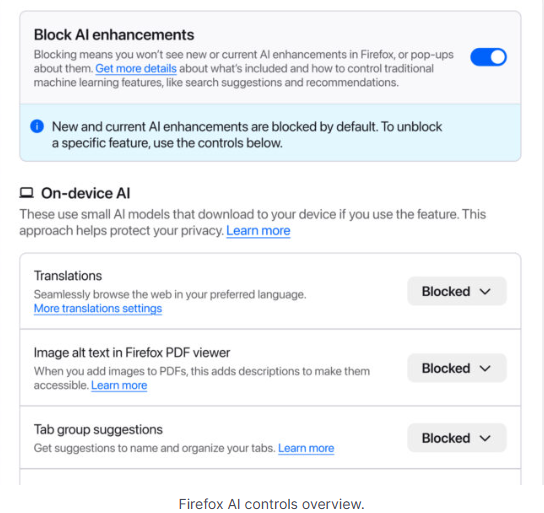
Mozilla is adding an AI Controls area to Firefox settings that centralizes the management of all generative AI features. This consists mainly of a master switch, “Block AI enhancements,” which lets users effectively run Firefox “without AI.” It blocks existing and future generative AI features and hides pop‑ups or prompts advertising them.

Once you set your AI preferences in Firefox, they stay in place across updates. You can also change them whenever you want.

Starting with Firefox 148, which rolls out on February 24, you’ll find a new AI controls section within the desktop browser settings.

Firefox AI choices
Image courtesy of Mozilla

You can turn everything off with one click or take a more granular approach. At launch, these features can be controlled individually:

  • Translations, which help you browse the web in your preferred language.
  • Alt text in PDFs, which add accessibility descriptions to images in PDF pages.
  • AI-enhanced tab grouping, which suggests related tabs and group names.
  • Link previews, which show key points before you open a link.
  • An AI chatbot in the sidebar, which lets you use your chosen chatbot as you browse, including options like Anthropic Claude, ChatGPT, Microsoft Copilot, Google Gemini and Le Chat Mistral.

We applaud this move to give more control to the users. Other companies have done the same, including Mozilla’s competitor DuckDuckGo, which made AI optional after putting the decision to a user vote. Earlier, browser developer Vivaldi took a stand against incorporating AI altogether.

Open-source email service Tuta also decided not to integrate AI features. After only 3% of Tuta users requested them, Tuta removed an AI copilot from its development roadmap.

Even Microsoft seems to have recoiled from pushing AI to everyone, although so far it has focused on walking back defaults and tightening per‑feature controls rather than offering a single, global off switch.

Choices

Many people are happy to use AI features, and as long as you’re aware of the risks and the pitfalls, that’s fine. But pushing these features on users who don’t want them is likely to backfire on software publishers.

Which is only right. After all, you’re paying the bill, so you should have a choice. Before installing a new browser, inform yourself not only about its privacy policy, but also about what control you’ll have over AI features.

Looking at recent voting results, I think it’s safe to say that in the AI gold rush, the real premium feature isn’t a chatbot button—it’s the off switch.


We don’t just report on privacy—we offer you the option to use it.

Privacy risks should never spread beyond a headline. Keep your online privacy yours by using Malwarebytes Privacy VPN.

❌