
Normal view

WhisperPair exposes Bluetooth earbuds and headphones to tracking and eavesdropping

16 January 2026 at 14:08

WhisperPair is a set of attacks that lets an attacker hijack many popular Bluetooth audio accessories that use Google Fast Pair and, in some cases, even track their location via Google’s Find Hub network—all without requiring any user interaction.

Researchers at the Belgian University of Leuven revealed a collection of vulnerabilities they found in audio accessories that use Google’s Fast Pair protocol. The affected accessories are sold by 10 different companies: Sony, Jabra, JBL, Marshall, Xiaomi, Nothing, OnePlus, Soundcore, Logitech, and Google itself.

Google Fast Pair is a feature that makes pairing Bluetooth earbuds, headphones and similar accessories with Android devices quick and seamless, and syncs them across a user’s Google account.

The Google Fast Pair Service (GFPS) utilizes Bluetooth Low Energy (BLE) to discover nearby Bluetooth devices. Many big-name audio brands use Fast Pair in their flagship products, so the potential attack surface consists of hundreds of millions of devices.

The weakness lies in the fact that Fast Pair skips checking whether a device is in pairing mode. As a result, a device controlled by an attacker, such as a laptop, can trigger Fast Pair even when the earbuds are sitting in a user’s ear or pocket, then quickly complete a normal Bluetooth pairing and take full control.

What that control enables depends on the capabilities of the hijacked device. This can range from playing disturbing noises to recording audio via built-in microphones.

It gets worse if the attacker is the first to pair the accessory with an Android device. In that case, the attacker’s Owner Account Key–designating their Google account as the legitimate owner’s—to the accessory. If the Fast Pair accessory also supports Google’s Find Hub network, which many people use to locate lost items, the attacker may then be able to track the accessory’s location.

Google classified this vulnerability, tracked under CVE‑2025‑36911, as critical. However, the only real fix is a firmware or software update from the accessory manufacturer, so users need to check with their specific brand and install accessory updates, as updating the phone alone does not fix the issue.

How to stay safe

To find out whether your device is vulnerable, the researchers published a list and recommend keeping all accessories updated. The research team tested 25 commercial devices from 16 manufacturers using 17 different Bluetooth chipsets. They were able to take over the connection and eavesdrop on the microphone on 68% of the tested devices.​

These are the devices the researchers found to be vulnerable, but it’s possible that others are affected as well:

  • Anker soundcore Liberty 4 NC
  • Google Pixel Buds Pro 2​
  • JBL TUNE BEAM​
  • Jabra Elite 8 Active​
  • Marshall MOTIF II A.N.C.​
  • Nothing Ear (a)​
  • OnePlus Nord Buds 3 Pro​
  • Sony WF-1000XM5​
  • Sony WH-1000XM4​
  • Sony WH-1000XM5​
  • Sony WH-1000XM6​
  • Sony WH-CH720N​
  • Xiaomi Redmi Buds 5 Pro​

We don’t just report on phone security—we provide it

Cybersecurity risks should never spread beyond a headline. Keep threats off your mobile devices by downloading Malwarebytes for iOS, and Malwarebytes for Android today.
“Reprompt” attack lets attackers steal data from Microsoft Copilot

15 January 2026 at 14:16

Researchers found a method to steal data which bypasses Microsoft Copilot’s built-in safety mechanisms.  

The attack flow, called Reprompt, abuses how Microsoft Copilot handled URL parameters in order to hijack a user’s existing Copilot Personal session.

Copilot is an AI assistant which connects to a personal account and is integrated into Windows, the Edge browser, and various consumer applications.

The issue was fixed in Microsoft’s January Patch Tuesday update, and there is no evidence of in‑the‑wild exploitation so far. Still, it once again shows how risky it can be to trust AI assistants at this point in time.

Reprompt hides a malicious prompt in the q parameter of an otherwise legitimate Copilot URL. When the page loads, Copilot auto‑executes that prompt, allowing an attacker to run actions in the victim’s authenticated session after just a single click on a phishing link.

In other words, attackers can hide secret instructions inside the web address of a Copilot link, in a place most users never look. Copilot then runs those hidden instructions as if the users had typed them themselves.

Because Copilot accepts prompts via a q URL parameter and executes them automatically, a phishing email can lure a user into clicking a legitimate-looking Copilot link while silently injecting attacker-controlled instructions into a live Copilot session.

What makes Reprompt stand out from other, similar prompt injection attacks is that it requires no user-entered prompts, no installed plugins, and no enabled connectors.

The basis of the Reprompt attack is amazingly simple. Although Copilot enforces safeguards to prevent direct data leaks, these protections only apply to the initial request. The attackers were able to bypass these guardrails by simply instructing Copilot to repeat each action twice.

Working from there, the researchers noted:

“Once the first prompt is executed, the attacker’s server issues follow‑up instructions based on prior responses and forms an ongoing chain of requests. This approach hides the real intent from both the user and client-side monitoring tools, making detection extremely difficult.”

How to stay safe

You can stay safe from the Reprompt attack specifically by installing the January 2026 Patch Tuesday updates.

If available, use Microsoft 365 Copilot for work data, as it benefits from Purview auditing, tenant‑level data loss prevention (DLP), and admin restrictions that were not available to Copilot Personal in the research case. DLP rules look for sensitive data such as credit card numbers, ID numbers, health data, and can block, warn, or log when someone tries to send or store it in risky ways (email, OneDrive, Teams, Power Platform connectors, and more).

Don’t click on unsolicited links before verifying with the (trusted) source whether they are safe.

Reportedly, Microsoft is testing a new policy that allows IT administrators to uninstall the AI-powered Copilot digital assistant on managed devices.

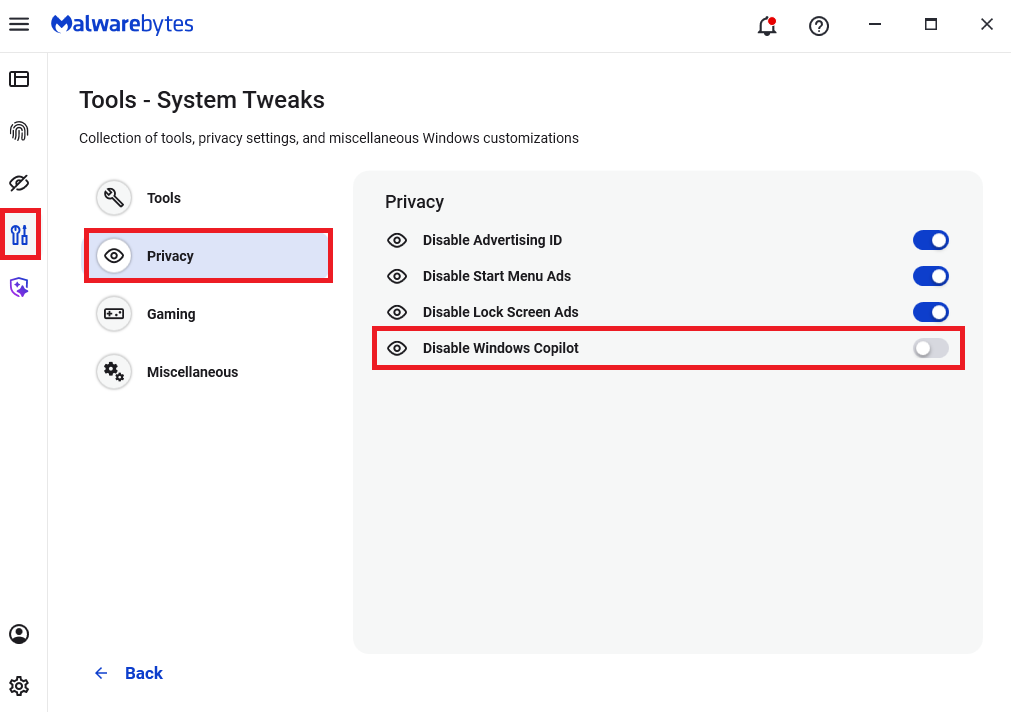
Malwarebytes users can disable Copilot for their personal machines under Tools > Privacy, where you can toggle Disable Windows Copilot to on (blue).

How to use Malwarebytes to disable Windows Copilot

In general, be aware that using AI assistants still pose privacy risks. As long as there are ways for assistants to automatically ingest untrusted input—such as URL parameters, page text, metadata, and comments—and merge it into hidden system prompts or instructions without strong separation or filtering, users remain at risk of leaking private information.

So when using any AI assistant that can be driven via links, browser automation, or external content, it is reasonable to assume “Reprompt‑style” issues are at least possible and should be taken into consideration.


We don’t just report on threats—we remove them

Cybersecurity risks should never spread beyond a headline. Keep threats off your devices by downloading Malwarebytes today.

❌