❌

Normal view

Chrome and Firefox updates fix serious security flaws. Install them now

28 October 2026 at 12:13

On October 27, Google issued a new Stable channel update for Chrome.

Most users are on Chrome’s Stable channel. The desktop update brings Chrome to versions 156.0.8078.73/.74 for Windows and Mac and 156.0.8078.73 for Linux. The update includes 52 security fixes, including four rated Critical.

On the same day, Mozilla issued Security Advisory 2026-118, which fixes 167 vulnerabilities. Firefox 159 also introduces several new features.

Both updates will roll out over the coming days and weeks.

How to update Chrome

The easiest option is to allow Chrome to update automatically. But you can end up lagging behind on updates if you never close your browser or if something goes wrong, such as an extension preventing the update.

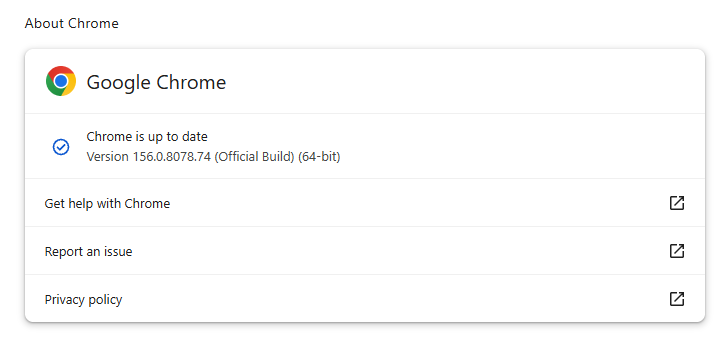
If you don’t want to wait for the rollout to reach you, manually updating is easy. Open About Google Chrome from Chrome’s settings or Help menu. Chrome will check for updates. If one is available, click Relaunch to apply it.

Chrome version 156.0.8078.74 is up to date

You can find an explanation of the version numbering system and step-by-step instructions in our guide: How to update Chrome on every operating system.

How to update Firefox

To update Firefox, open the browser and click the menu button at the right side of the Firefox toolbar, then go to Help and select About Firefox. The About Mozilla Firefox window will open.

Firefox will automatically check for updates. If one is available, it will be downloaded. Once done, you’ll be prompted to click Relaunch. After Firefox restarts, it will be up to date.

After the update, the version should be 159.0 or later

Technical details

These Chrome and Firefox updates address a familiar problem: browser code mishandling memory while processing web content. Both releases fix use-after-free vulnerabilities, including flaws in page layout, JavaScript processing, and SVG graphics.

A use-after-free vulnerability occurs when a program attempts to access a memory location after it has been freed. That can cause crashes or, in some cases, allow an attacker to run their own code.

There’s another connection between these updates: both Google and Mozilla credit OpenAI Codex Security with finding bugs fixed in these releases. AI can help security teams examine browser code for weaknesses, alongside human code reviews and automated tests that check how software handles unexpected inputs.

Mozilla’s collaboration with Anthropic shows how AI-discovered findings can lead to fixes: researchers validated vulnerabilities before reporting them, giving Mozilla’s team reproducible bugs to investigate, repair, and deliver to users.


Browse like no one’s watching. 

Malwarebytes Privacy VPN encrypts your connection and never logs what you do, so the next story you read doesn’t have to feel personal. Try it free → 

BlueMoon exploit kit turns Chrome and Windows flaws into attacks

10 September 2026 at 17:49

BlueMoon, a shared Chrome and Windows exploit kit, shows why “patch later” is becoming a dangerous gamble.

Security updates are easy to put off. The browser still opens, Windows still works, and choosing to relaunch your browser or restart your computer later can feel harmless.

But a newly documented exploit kit called “BlueMoon” shows how quickly patching delays can become dangerous. Proofpoint Researchers found four espionage groups using the same exploit chain against Chrome browsers running on Windows within days of one another.

The campaign is a timely reminder that once a security flaw, or even its fix, becomes public, attackers may move faster than many users expect.

The attacks began with phishing emails. A victim who clicked a malicious link could be sent to a web page designed to exploit two vulnerabilities in Chrome’s V8 JavaScript engine, followed by a Windows vulnerability to break out of the browser’s protections and gain higher privileges on the computer.

The Chrome vulnerabilities used by BlueMoon were patched in the Stable channel on September 3 and September 8, 2026. The first was already actively exploited when Google released its update. Microsoft addressed the Windows vulnerability in its September Patch Tuesday updates, by which point it was also being exploited.

CISA has since added all three flaws to its Known Exploited Vulnerabilities (KEV) catalog, which lists vulnerabilities known to have been exploited in real-world attacks.

The notable part is not just that BlueMoon exploited the flaws, but how quickly the capability appears to have spread. Publicly visible upstream fixes can give attackers clues before downstream browser updates reach users, allowing a weaponized chain to be developed and adopted by multiple groups very quickly.

Does that mean that patches can no longer be tested before they are released to the public? No, but we may need to rethink how they are tested and deployed, because it appears some cybercriminals are effectively beta-testing the patches themselves.

The researchers also found clues, but no conclusive evidence, that the exploit kit was developed with AI assistance. The broader concern is credible: AI tools can help attackers interpret source-code changes, write and modify code, document test results, and learn from failed attempts.

In practical terms, the gap between “a flaw is fixed upstream” and “most people are protected” may be increasingly valuable to attackers. We should try to minimize that gap.

How to stay safe

Not every security update needs to be installed the moment it appears. In organizations especially, updates may need testing, staged deployment, and contingency plans. But vulnerabilities known to be actively exploited deserve greater priority. That is precisely why CISA’s KEV catalog is so important: It helps organizations identify the vulnerabilities they should address first.

For home users:

  • Install browser and operating-system updates promptly. Use the few minutes they take to grab a drink rather than repeatedly postponing them.
  • Don’t click links in unsolicited emails.
  • Use up-to-date, real-time anti-malware protection to help catch the malware that exploit kits attempt to deliver.

Stop threats before they can do any harm.

Malwarebytes Browser Guard blocks phishing pages and malicious sites automatically. Free, one click to install. Add it to your browser →

❌