❌

Normal view

Chrome and Firefox updates fix serious security flaws. Install them now

28 October 2026 at 12:13

On October 27, Google issued a new Stable channel update for Chrome.

Most users are on Chrome’s Stable channel. The desktop update brings Chrome to versions 156.0.8078.73/.74 for Windows and Mac and 156.0.8078.73 for Linux. The update includes 52 security fixes, including four rated Critical.

On the same day, Mozilla issued Security Advisory 2026-118, which fixes 167 vulnerabilities. Firefox 159 also introduces several new features.

Both updates will roll out over the coming days and weeks.

How to update Chrome

The easiest option is to allow Chrome to update automatically. But you can end up lagging behind on updates if you never close your browser or if something goes wrong, such as an extension preventing the update.

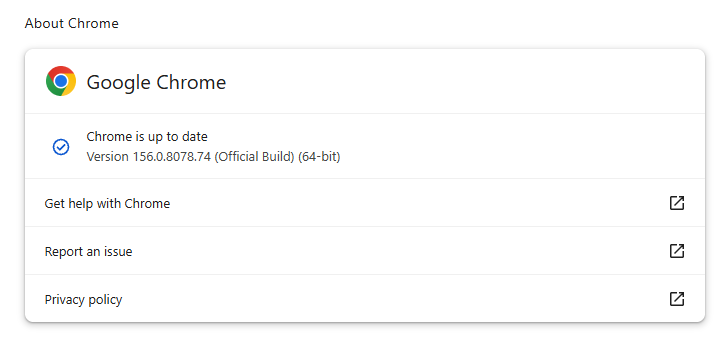
If you don’t want to wait for the rollout to reach you, manually updating is easy. Open About Google Chrome from Chrome’s settings or Help menu. Chrome will check for updates. If one is available, click Relaunch to apply it.

Chrome version 156.0.8078.74 is up to date

You can find an explanation of the version numbering system and step-by-step instructions in our guide: How to update Chrome on every operating system.

How to update Firefox

To update Firefox, open the browser and click the menu button at the right side of the Firefox toolbar, then go to Help and select About Firefox. The About Mozilla Firefox window will open.

Firefox will automatically check for updates. If one is available, it will be downloaded. Once done, you’ll be prompted to click Relaunch. After Firefox restarts, it will be up to date.

After the update, the version should be 159.0 or later

Technical details

These Chrome and Firefox updates address a familiar problem: browser code mishandling memory while processing web content. Both releases fix use-after-free vulnerabilities, including flaws in page layout, JavaScript processing, and SVG graphics.

A use-after-free vulnerability occurs when a program attempts to access a memory location after it has been freed. That can cause crashes or, in some cases, allow an attacker to run their own code.

There’s another connection between these updates: both Google and Mozilla credit OpenAI Codex Security with finding bugs fixed in these releases. AI can help security teams examine browser code for weaknesses, alongside human code reviews and automated tests that check how software handles unexpected inputs.

Mozilla’s collaboration with Anthropic shows how AI-discovered findings can lead to fixes: researchers validated vulnerabilities before reporting them, giving Mozilla’s team reproducible bugs to investigate, repair, and deliver to users.


Browse like no one’s watching. 

Malwarebytes Privacy VPN encrypts your connection and never logs what you do, so the next story you read doesn’t have to feel personal. Try it free → 

The AI plot to scan and destroy books (Lock and Code S07E19)

21 September 2026 at 18:30

This week on the Lock and Code podcast…

If you want AI to tell you a story, it will. If you want that story to sound like one of your favorite authors, it can. And if you’re one of the authors that AI can imitate, you might be a little upset at what feels like theft.

In 2024, the authors Andrea Bartz, Charles Graeber, and Kirk Wallace Johnson sued Anthropic, the creator of Claude, alleging that the company had wrongfully digested millions of copyrighted works—including some of their very own—to train its AI models. The lawsuit grew to include more than 300,000 writers, and in September 2025, Anthropic agreed to pay $1.5 billion to settle the claims.

That headline-worthy payout, however, would eventually be paired with more startling news.

In January 2026, a district court judge unsealed thousands of documents related to the litigation. When The Washington Post investigated the documents, reporters found references to a secret project inside Anthropic called “Project Panama,” which Anthropic itself described as the company’s effort “to destructively scan all the books in the world.”

Anthropic is not alone in this.

On August 17, 404 Media co-founder and reporter Emanuel Maiberg revealed that Amazon is doing something similar inside a department it calls VGT3. By hiding an Apple AirTag in one book from a 1,000-book order, and then tracking the shipment across the country, 404 Media identified the book’s final destination to be a facility outside Las Vegas, where, according to employees, books are cut apart and scanned.

Today, on the Lock and Code podcast with host David Ruiz, we speak with Maiberg about Amazon’s VGT3 operation and the likely commonplace practice of AI companies purchasing, scanning, and destroying books in an effort to build “frontier” models.

“They’re buying a book, they’re scanning it, they’re mulching the book, and then the digital version of the book exists behind this wall where we don’t even know if they plan to sell it, right? It’s like they might keep it behind a wall, and the only way we see it come out again from behind that wall is in the form of an answer from a chatbot.”

Tune in today to listen to the full conversation.

Show notes and credits:

Intro Music: “Spellbound” by Kevin MacLeod (incompetech.com)
Licensed under Creative Commons: By Attribution 4.0 License
http://creativecommons.org/licenses/by/4.0/
Outro Music: “Good God” by Wowa (unminus.com)


Listen up—Malwarebytes doesn’t just talk cybersecurity, we provide it.

Protect yourself from online attacks that threaten your identity, your files, your system, and your financial well-being with our exclusive offer for Malwarebytes Premium for Lock and Code listeners.

How to opt out of AI chatbot training

15 September 2026 at 17:41

The tech journalists at 404 Media learned that OpenAI is hiring hundreds of contractors to read and review a massive stream of real users’ ChatGPT prompts and responses.

“Project Lily” is reportedly a program that asks contractors to score or critique ChatGPT’s answers to improve the chatbot’s quality and behavior.

The fact that prompts may sometimes be reviewed by humans should not come as a complete surprise. AI companies also monitor conversations for safety reasons. Anthropic, for example, says it has disrupted attempts to misuse AI for biological weapons research.

But there should be a meaningful distinction between reviewing conversations for safety or abuse and reviewing them for ordinary model improvement.

OpenAI says a limited number of authorized personnel and trusted service providers may access chats for several reasons, including investigating abuse, providing support, handling legal matters, and improving its models.

OpenAI told 404 Media that it uses a “Privacy Filter” model to remove personal information before prompts reach reviewers, while acknowledging that sensitive details can still get through.

The prompts are anonymized in the sense that reviewers do not see the username of the ChatGPT user who entered them. But reviewers may see personal details in the conversation alongside a “user memories summary,” which provides an overview of how that user has previously used the chatbot. Together, this information could still reveal a great deal about that user.

It’s sometimes easy to forget that you’re not having a private conversation when you’re going back and forth with an AI chatbot. This isn’t an alarmist warning against using AI, but a reminder to be mindful of what you disclose because it could be read and reviewed.

How to opt out of AI chatbot training

ChatGPT

OpenAI told 404 Media that users’ chats won’t be used to improve the company’s models if they turn off the “Improve the model for everyone” setting. This is turned on by default for Free, Plus, and Pro plans, so users need to turn it off themselves if they wish to opt out.

However, opting out does not prevent all human access. OpenAI says authorized personnel and trusted service providers may still access content when necessary to investigate abuse or security incidents, provide support, troubleshoot problems, or handle legal matters.

In ChatGPT, select your profile icon, then go to Settings > Data Controls and turn off Improve the model for everyone. On mobile, open the sidebar, select your profile icon, and then follow the same steps.

Perplexity

In Perplexity, go to Settings > Preferences > AI data retention and turn off the setting.

Perplexity says this prevents data collected after you opt out from being used to train AI models. It does not remove data collected previously, and your data may still be processed to operate and improve the service or comply with legal obligations.

Claude

In Claude, select your name and go to Settings > Privacy. Under Help Improve our AI Models, turn off the setting.

Anthropic says new chats and coding sessions will no longer be used for future model training. It will also stop using previously stored conversations in future training runs, although data already included in training can’t be removed.

Anthropic also notes one important exception:

If our safety classifiers flag your conversations, they may still be used to improve our internal trust and safety models, detect harmful content, enforce our policies, or advance our safety research.

If you use other AI tools, check their privacy policies and settings to find out whether your conversations can be reviewed or used for model improvement and whether you can opt out.


Browse like no one’s watching. 

Malwarebytes Privacy VPN encrypts your connection and never logs what you do, so the next story you read doesn’t have to feel personal. Try it free → 

❌