❌

Normal view

Received — 3 November 2026 ⏭ Kaspersky official blog

PHP2Shell: what we know about the threat two weeks later | Kaspersky official blog

3 November 2026 at 14:58

Late October brought several unsettling cybersecurity stories all at once. Among these were two critical vulnerabilities in PHP, which potentially affected about 70% of websites worldwide. CVE-2026-109618 and CVE-2026-109619 — dubbed PHP2Shell — could let attackers execute code on a server remotely, without authentication.

On October 21, PHP’s developers released emergency patches for the supported PHP 8.2–8.5 branches and for the unsupported PHP 7.4, 8.0, and 8.1. Experts predicted that attacks on vulnerable servers would start within 15 minutes of the updates going public. Amazon even reported exploitation attempts four days before the patches came out. With all this in the news, some organizations sounded the alarm early. For example, in several countries, government service websites were taken offline as a precaution. Even Wikipedia’s project management and bug-tracking system suspended service.

Nearly two weeks have passed since the updates came out, but according to Censys data, of the 46 million scannable servers running a vulnerable PHP version, 29 million still contain the flaws. Right after the patches were published, we broke down each flaw in detail and explained what companies and everyday users should do. In this post we cover what’s known about the threat today, and what extra steps businesses need to take.

What happened after the PHP2Shell patches

The news about critical PHP vulnerabilities set off a flurry of reactions. Researchers noted a large number of exploitation attempts, and fresh exploits kept appearing in batches — courtesy of AI. A Palo Alto Networks unit even reported a PHP2Shell attack on a government agency in Europe, though it later retracted that statement. Solid evidence of how these vulnerabilities can actually be exploited only emerged later. On top of that, a third, unpatched one turned up.

A vulnerability with no patch

On Friday, October 23, the PHP team warned about a new vulnerability — CVE-2026-115560 — which can be used for remote code execution. But attackers can only pull this off on systems with an “unusual combination of configuration and application code”. That configuration is so exotic that the developers decided against an emergency patch, and will close the vulnerability on the regular schedule. In the meantime, they advised users to disable the session.upload_progress.enabled INI option.

First signs of PHP flaws being exploited

Let’s get back to the more serious threats. The most substantial confirmation of PHP2Shell exploitation in real-world attacks only came on October 24. Honeypot servers run by Adel Karimi of Perplexity running PHP 8.4.26 and presenting ordinary web pages recorded successful attacks from two IP addresses. The observed exploit chain was consistent with CVE-2026-109618. There’s an important caveat, though: the researcher’s honeypot ran the Apache mod_php module, which is the configuration most convenient for attackers.

Later, on October 26, the U.S. Cybersecurity and Infrastructure Security Agency (CISA) added both CVE-2026-109618 and CVE-2026-109619 to its Known Exploited Vulnerabilities (KEV) catalog. That confirmed the threat isn’t just theoretical.

Real-world breaches with PHP2Shell

On October 26, the technology company Dream reported that 25 firewalls and management servers had been compromised in the U.S., Japan, Taiwan, and South Korea. Three of them were in an environment presumed to be linked to U.S. government agencies. The attackers combined PHP2Shell with a Linux kernel vulnerability dubbed Fragnesia (CVE-2026-46300). Upon gaining full administrative control, they were able to extract the password of an LDAP service account and steal the listing of users and groups, full network configuration, and private keys.

Dream initially didn’t name the device vendor. In its October 29 update, though, the company stated that the systems were Palo Alto Networks devices running certain versions of PAN-OS. The vendor confirmed attacks on management interfaces exposed to the internet. It urged customers to close public access to those interfaces, limit it to trusted internal IP addresses, and install patches.

Why there are so few incidents

Exploits are multiplying, but no wave of breaches has materialized, and the possibility of mass compromise of PHP servers remains unconfirmed. Even in the Palo Alto case, the scale of the attack was minimal: out of about 19 000 devices found, the attackers picked just 240, which were running software versions their exploit could handle.

As it turns out, the existing PHP2Shell exploits aren’t one-size-fits-all. To exploit the vulnerabilities in a given environment, attackers have to account for the exact PHP build, memory settings, request handling, and application specifics. Still, the danger remains, so don’t neglect protective measures.

How to stay safe

The key advice stays the same: update. You can find the latest versions of the language on the PHP website. But installing patches isn’t enough. You also need to run a thorough audit of your systems and check every component that runs on PHP for signs of compromise.

Why install the second round of PHP updates?

Five days after releasing the emergency patches, the PHP developers published another round of fixes. The reason is that the updates that fixed PHP2Shell didn’t cover the CVE-2026-111497 vulnerability in Brotli, a third-party library. Exploiting this flaw can lead to code execution when PHP processes a specially crafted compressed response from an external server. The builds from October 25 include a patched version of the library. The latest PHP versions are 8.2.35-1, 8.3.36-1, 8.4.27-1, and 8.5.12-1. The first attack exploiting this vulnerability was recorded on October 26, so don’t put off installing the updates.

Threat detection

Possible signs of a PHP2Shell compromise include unusual POST requests that contain multipart/form-data media type, suspicious combinations of PHP_SESSION_UPLOAD_PROGRESS and upload parameters, atypical request sizes and request bursts, and HTTP 500 errors accompanied by PHP out-of-memory messages.

Kaspersky solutions can help you spot the threat at different stages of an attack.

To learn more about how our solutions detect attempts to exploit PHP vulnerabilities, read our expert blog, Securelist.


Received — 28 October 2026 ⏭ Kaspersky official blog

How new PHP vulnerabilities threaten home users | Kaspersky official blog

22 October 2026 at 22:39

Yesterday, two critical vulnerabilities were disclosed in PHP, the scripting language used by many websites and online services: CVE-2026-109618 and CVE-2026-109619. Attackers can exploit them to remotely execute commands on any server running PHP, with no authentication required. The exploit has been dubbed PHP2Shell.

The PHP security team announced an upcoming emergency update on October 20 and released patches fixing the vulnerabilities the following day.

We’ve already covered the technical details of these vulnerabilities and explained what companies and server administrators should do. You may have safely skipped that news because you don’t run any servers — but unfortunately, the issue is not limited to businesses.

Nearly 70% of websites run on PHP, including services we use every day: wikis, online stores, smart devices with web interfaces, home network-attached storage (NAS), smart-home controllers, and much more.

Today, we explain how these vulnerabilities could affect you personally and what you can do to reduce the risks.

How the vulnerabilities can affect home users

Account and personal-data theft

The vulnerability allows an attacker to steal authentication tokens from server memory. These tokens essentially act like electronic passes — telling a website that the user has already signed in. As a result, an attacker may be able to access someone else’s account without entering a password or two-factor authentication code, putting messages, documents, delivery addresses, order histories, and other confidential information at risk.

Loss of files on home devices

If you have network-attached storage (NAS) or a video surveillance system at home that uses a vulnerable PHP version, it may also be at risk. Depending on what level of access they gain, attackers could potentially copy, delete or encrypt files they can access.

Malware infection

If an attacker gains access to a vulnerable website, they can use it in virtually any way they want: trick visitors into downloading a malicious file or clicking on a phishing link, display dangerous instructions, replace payment forms or login pages with malicious ones — the list goes on and on. As a result, someone visiting a legitimate website could not only lose access to their account, but also lose money or accidentally infect their device with malware.

Below are examples of services directly affected by the vulnerabilities.

Which services are affected by the PHP vulnerabilities

Jeedom

Jeedom is a smart-home platform that lets users control lighting, sensors, heating, blinds and home IoT devices. Attackers could abuse this in many ways: they could disable the alarm, track when the homeowner is away, access video from the door intercom, and more.

The developers confirmed that the new vulnerability affects their application, and have already released an emergency update — Jeedom 4.6.2. Users need to run the update twice for it to work. The developers say a fully fixed version for home users will be released in the coming days.

Websites we use every day

As mentioned above, PHP is used by roughly 70% of websites. This doesn’t mean every one of them is vulnerable: it depends on the PHP version in use and whether the site owners have already updated it. Many government websites in Europe have already suspended operations because of the new vulnerability.

Unfortunately, a website may still be vulnerable even if it appears to be working normally. An attacker could potentially take control of any legitimate website whose server hasn’t been patched yet. They could fake payment or login pages, host malicious files, or persuade users to download an “urgent update” that is actually malware.

Ordinary users have no reliable way to check whether such instructions or files are safe, so be sure to use reliable anti-phishing and antivirus protection. If you suspect that your data may have been stolen, check the active sessions in your account settings. If you spot suspicious activity or devices you don’t recognize, sign out of all active sessions and change your password. Use a password manager — it can generate a truly strong, unique password that you won’t have to memorize yourself.

Computer games

Bad news for gamers: some video games whose servers use PHP are also at risk. If you don’t want attackers to get hold of your accounts, be sure to update the passwords for your gaming platforms, stores and accounts.

To buy time for updates, some developers temporarily took their services offline. Final Fantasy XIV, Pokemon Champions, games from Bandai Namco Entertainment, Uma Musume: Pretty Derby, Granblue Fantasy, Shadowverse: Worlds Beyond, and many others went into emergency maintenance. Nintendo Switch Online and the GOG and Steam stores were also affected.

Unfortunately, there’ve also been more drastic consequences. Yesterday, the developers of World Quest announced that the game would shut down permanently after 15 years: it relied on outdated infrastructure that would have been extremely difficult and costly to fix. For the same reason, the mobile game Please Save My Pandemonium! shut down after more than ten years of operation.

Home network-attached storage (NAS)

“Home clouds” have become popular in recent years for good reason: many users prefer to keep backups of their data at home rather than online. A number of companies make NAS devices, and at least three — QNAP, Synology and ASUSTOR — have said the vulnerabilities affect their products. An update has also been released for Unraid, an operating system for home servers, network storage and media servers.

QNAP

The manufacturer confirmed that the vulnerabilities affect several versions of its NAS operating systems — QTS and QuTS hero — as well as applications including QuMagie, Note Station 3 and certain versions of QVR Surveillance. A successful attack could put photos, documents, notes and camera recordings at risk.

At the time of publication of this blogpost, QNAP is still preparing updates, so the main priority is to temporarily disconnect NAS from the internet. QNAP recommends disabling port forwarding on the router — to prevent NAS from automatically opening ports — and allowing access to the management panel only from the home network or through a VPN.

Synology

Both vulnerabilities have been officially confirmed in PHP packages 7.3, 7.4, and 8.0–8.4, as well as in Mail Station and Synology Calendar. Fixes have already been released for PHP, starting from version 7.4, as well as for Mail Station and Synology Calendar. PHP 7.3 won’t be fixed. The company separately notes that the PHP component built into its operating system cannot be reached from outside the device, so the risk of attack is very low.

ASUSTOR

ASUSTOR also officially confirmed both vulnerabilities, and immediately removed PHP 7, 7.3, 7.4, and 8.1 packages from App Central. The company recommends immediately backing up your data, removing older PHP packages, and using PHP 8.3 or 8.4.

Unraid

In today’s operating-system update, PHP was upgraded to version 8.4.27 with fixes for the vulnerabilities. The developers recommend that all users update to Unraid 7.3.4. Containers with their own PHP installation must be updated separately: the new PHP version in the operating system doesn’t replace PHP inside containers.

At the time of publication, we haven’t found public confirmation from other major manufacturers (such as TerraMaster, UGREEN, Buffalo, or Western Digital) that their devices are affected by these vulnerabilities — only user discussions on forums.

But the fact that only some NAS manufacturers have confirmed the problem so far doesn’t guarantee that your devices are safe — especially if they’re fairly old or come from a lesser-known or defunct manufacturer. In that case, first disconnect the devices from the internet while keeping them accessible only on the local network, and then investigate whether they’re vulnerable.

Nextcloud cloud storage

Nextcloud is a free, open-source platform for creating your own cloud storage, serving as an alternative to Google Drive, Dropbox, and Microsoft OneDrive. It lets you store and synchronize files across devices, share them with other users, and work with documents, photos, calendars and contacts. The data can be stored on your own server or NAS rather than on a third-party company’s servers.

If you store important data in Nextcloud, check how your cloud instance is configured. If you use Nextcloud All-in-One, update to version 14.4.1 where the vulnerability has already been fixed.

If your Nextcloud installation is configured differently, you need to update PHP yourself on the device or server.

How to protect your devices and data

  • Use phishing and malware protection. Our security solution automatically blocks phishing pages and malware, even when attackers place them on legitimate websites.
  • Keep an eye on updates. If you have network-attached storage, a smart-home system, a home server, a media server, or any other device with a web interface, first check the manufacturer’s website and install all available updates. If no update is available yet, temporarily disable internet access to the device.
  • Use strong passwords. Most people reuse the same password, or variations of it, across multiple websites. If an attacker finds one of those passwords on a vulnerable server, they may be able to compromise your other accounts as well. We recommend generating and storing strong, unique passwords in Kaspersky Password Manager so you don’t have to remember your credentials yourself. Be sure to enable two-factor authentication on all important accounts — ideally using one-time codes generated by the same password manager.
  • Keep an offline backup of important files. Don’t rely on cloud storage alone — make sure you keep a backup of all important documents on both a hard drive and an external device. For more information on how to make backups properly, see our article The internet remembers not quite everything.

What other risks can your home devices face? Read our articles:

AI doxing tools: how online surveillance technology has changed | Kaspersky official blog

20 October 2026 at 17:15

Anonymous imageboards have long been places where users could chat under pseudonyms without revealing their real names. But now people on these forums are discussing and testing AI tools for doxing — that is, for finding, matching, and publishing users’ data without their consent. Often this goes hand in hand with stalking the victim, hacking their accounts, bullying, and blackmail, and ultimately leads to a damaged reputation or even worse.

In this post, we explain how artificial intelligence helps malicious actors leak other people’s data — and how to stand up for your right to online privacy.

How bad actors uncover information about users

Analysts at Open Measures have reported that, since October 2025, users of Soyjak.party, an imageboard popular with young people on the far right, have been discussing and using AI to deanonymize other users. Their victims are often activists, bloggers, and members of other “hostile” forums.

The tools the experts found run right in the browser, and automate almost the entire process of collecting information about a victim. They can search open sources and leak databases, and they use any new leads — for example, an email address linked to a username — to dig even deeper. They also extract metadata from photos and videos, estimate a person’s approximate location from IP addresses they find, and finally put everything together into one huge digital dossier. These Soyjak.party tools are no longer functional, but similar ones have been spreading across other imageboards.

In February 2026, researchers demonstrated that sometimes ordinary forum chatter is enough to reveal who you are. They put together summaries of posts by 338 Hacker News users, removed names, usernames, and social media links, and then asked AI to work out who was behind them. The AI compared details about jobs, interests, and personal background with information available online — and correctly identified 226 of the people, or about two-thirds of the sample. The price of deanonymization turned out to be laughably low — at between US$1 and US$4 per user.

To be fair, people knew how to build digital dossiers even before the generative AI boom. For starters, there are OSINT tools that search for data in open sources. Journalists and investigators were the first to use them, but, as you might guess, malicious actors soon mastered these tools too. Unlike AI models and agents, traditional OSINT services follow set scripts and can’t “think” or make decisions on the fly.

An agent out for revenge: the OpenClaw case

If you think doxing always needs a person with ill intent, we’ve bad news: sometimes the one settling scores can be… artificial intelligence itself.

Here’s a story that started out innocuously enough. An AI agent running on the much-hyped OpenClaw platform suggested an improvement for Matplotlib, a popular tool for building graphs and charts. But the project’s rules said that code submitted by AI agents wasn’t accepted. One of the project’s volunteers, Scott Shambaugh, simply turned down the AI’s suggestion.

You’d think that would be the end of it. Think again! The AI agent decided the rejection deserved some publicity, so it published an “exposé” about the developer on its blog (yes, you read that right: the agent had its own blog). It gathered information about Shambaugh from open sources, studied his public activity, and accused him of being biased against AI. It even started speculating about the developer’s psychological motives, and suggested he was afraid of competition from artificial intelligence.

Once this “private” conversation between Shambaugh and the AI agent went public, other users rallied behind the developer — and the agent had to publish an “apology” post.

It’s a pretty absurd story, but it teaches a good lesson: always read the privacy policy of any AI service carefully, and steer clear of new models from unknown sources.

How to avoid becoming a doxing victim: a guide

If AI speeds up searches and connects the dots between details that used to be scattered across dozens of websites, the next logical question is: what can you do to shrink your digital footprint?

Disappearing from the internet completely is almost impossible. So protecting your data isn’t so much about leaving as few traces as possible, but cutting the number of links that can be used to piece together your identity. If you’re an advanced user, we recommend reading our post, How to disappear from the internet, in addition to the tips below.

Manage your digital footprint

  • Search for yourself online. Don’t stop at your name: try your email address, nicknames, and phone number too. If you’re comfortable with AI processing your data, you can even ask it to compile a dossier on you. Just remember that there’s always a risk of a leak or a bug that accidentally makes your data public. And no, big, reputable services are no exception.
  • Make private any profiles you don’t want to share with everyone. That makes it harder for search engines to index your new posts, and for scrapers and OSINT tools to collect them. While you’re at it, go through your old comments and posts and clear out anything you don’t need.
  • Delete your ghost accounts. Go through your inboxes and check which websites you’ve signed up for. Make a habit of deleting accounts you no longer use: they can hold your personal data for years, and there’s always a risk it’ll end up in the next data leak.
  • Set up two-factor authentication. That way, even if a bad actor manages to guess your password or finds it in a leak, they won’t be able to get into your account without the additional authentication. For the second factor, we recommend using one-time codes that refresh every 30 seconds and storing them in a reliable password manager.
  • Strip metadata before posting photos and videos. Metadata can help a malicious person learn a lot about you— for example, the location and exact date a photo was taken, and the model of your device.
  • Use a different password for every account you have. Our research has showed that passwords built from personal details — such as your mother’s maiden name, your birth date, and a special character at the end — are extremely weak. This kind of information often ends up in leaks, or can be pieced together from public sources, so the passwords can be easily brute-forced by smart algorithms. Of course, nobody can remember hundreds of unique passwords, so it makes sense to offload that job to our password manager — a secure vault that generates and remembers complex, unique passwords for you, and syncs them across all your devices.
  • Find out about new leaks as fast as possible. Some online services will send you a free alert if your email address shows up in a known data leak. But it’s much more convenient to monitor leaks with a dedicated security app. For example, Kaspersky Password Manager constantly checks all the entries you’ve saved. It warns you if you use the same password on different websites, or if any of your saved login and password pairs has been compromised. Our simple instructions for Windows, macOS, Android, and iOS can help you easily check all the passwords you’ve saved in Kaspersky Password Manager. Your passwords are never sent to Kaspersky. We explain how we can analyze your passwords without knowing them in our post, How to create strong passwords and where to store them.
  • Use reliable protection that tracks and blocks leaks of your data. While Kaspersky Password Manager only checks the active password entries you’ve added to it, Kaspersky Premium can monitor for compromised accounts linked to your email addresses (you can add up to 50 addresses to check), and for digital identity theft linked to your phone numbers. And besides reporting leaks that have already happened, our security solutions can also stop data about you from being collected online.
  • Set up privacy on your devices and apps with our free online service, Privacy Checker.

Keep your accounts separate

The more websites that know your email, the more often it will show up in advertising profiles and potential leaks. For one-time and minor sign-ups, you can use an email masking service. All Apple users get this feature by default (Hide My Email). If you use another OS, you could try Firefox Relay, for example.

The service then creates a separate proxy email address for the website where you’re trying to sign up. Messages sent to that address are automatically forwarded to your real inbox, but the website never sees your real email address.

If you want to go all in, you can try splitting your digital life into several sub-personas by hand. Create several email addresses for different purposes. For example, use one for online stores, banks, and government services, a second for public social media, and a third for forums and social networks where you want to stay anonymous.

Keep in mind that all this is a challenge: you’ll need to keep coming up with new nicknames, and make sure your sub-personas never overlap. If you use an email address for an anonymous profile, don’t link it to services that already have your real details, and don’t use it as a backup email for a public account. One accidental link can easily undo all your effort.

Check what you share with exes

If you’ve recently broken up with a partner, make sure you check which parts of your shared digital life they can still access. Sadly, it’s very often ex-partners who become doxers or stalkers — spying on their former other half and stopping at nothing to do so. For more details on exactly what to do in this situation, read our article Post-breakup digital hygiene: what to check and shut down.

Use your right to be forgotten

Many countries have a right-to-be-forgotten law. It lets you ask search engines to remove links to pages that contain your personal data.

You can send the links to those pages, explain why you want them hidden, and request that they be removed from search results. Keep in mind that the page with your data isn’t deleted. Other search engines may still show it, and it may still turn up for other search queries.

To submit a request like this, use the dedicated forms from Google or Bing. But remember that a search engine can turn you down if it decides the information is in the public interest, or that the law requires it to be published.

There are more effective, though more time-consuming, ways to remove your data from the internet. We covered them in detail in our post, Why data brokers build dossiers on you, and how to stop them doing so.

Looking for more ways to protect your digital identity? Check out our other posts:

SMB protection from cyberattacks: weak spots and how to fix them

19 October 2026 at 18:28

The more a company’s infrastructure grows, the more weak spots it has. And that’s true for all companies — from large corporations with deep pockets that are able to invest more in their defenses, to small and medium-sized businesses. And despite their more modest capabilities, smaller companies are just as tempting a target for attackers.

New times, new risks

Cloud platforms, remote access, and AI help businesses scale up and get more done. But they also give attackers extra ways to get into corporate infrastructure. For example, remote employees’ personal devices have become a foothold that’s hard to control. And thanks to AI, phishing emails are almost impossible to tell from real ones: users can no longer spot a scammer by their spelling mistakes.

There’s another reason why new threats keep appearing: companies are slowly learning how to handle the old ones. Take backups. Just a few years ago they were sold as a cure-all against ransomware. Now they’re less effective, because at some point attackers started stealing data and demanding payment not for decryption, but for not making it public. What’s at stake here isn’t just business processes, but the organization’s reputation too. We wrote about this scheme in more detail in a separate blog post.

The scariest part is that an attacked company’s problems don’t end on the day of the incident. The next few days (or even weeks) are often much harder. This is when the team needs to quickly deal with the aftermath of an attack and to make sure another can’t happen again. Growing companies often have to throw their entire small IT force at the problem, so getting back to normal work can take a long time.

Three Achilles’ heels at once

According to the Global Kaspersky B2B Market Pulse survey, most SMBs only think about security when circumstances force them to; for example, after an incident, when expanding their infrastructure, or when a potential partner asks them to strengthen their perimeter before signing a contract. Yet only a handful treat continuous cybersecurity monitoring as a core part of running their business.

When a company finally decides to get serious about security, it runs into three constraints: people, processes, and technology. Let’s look at each one.

  • People. In a company with up to 500 employees, the IT department is usually just a few people. They handle all technical issues and have little to do with cybersecurity. When things get tough, these specialists may simply lack the expertise to deal with things. Other employees can be a weak link too. Accountants, lawyers, and other staff with access to confidential information often aren’t familiar with security rules.
  • Processes.A small IT department always has a backlog with a long queue of tasks; therefore, fresh updates and patches don’t get installed right away. As a result, attackers have plenty of time to take advantage of a vulnerability that isn’t fixed in time. Meanwhile, other employees may not know how to respond to suspicious emails, or how to store and share passwords safely. And there’s simply no one to keep an eye on them.
  • Technology. Threats evolve alongside a business’s technology. For example, once a company has moved part of its infrastructure to the cloud, relying on a classic antivirus alone becomes pointless.

So small and medium-sized businesses become easy targets for attackers not so much due to their size, but because they don’t pay enough attention to the key building blocks of cybersecurity. As to what this can lead to, and how the tables can be turned in a company’s favor — read on for a real-world case that demonstrates this.

Case study: ERP system breach

Let’s look at a real-world attack on a company with 450 employees. When the incident happened, the company was migrating its ERP system to the cloud. The data had already been moved, but the protection hadn’t been set up yet. And that limbo state is exactly what let the attackers pull off their campaign.

The attackers used a fairly simple tactic. Posing as an external ERP integrator, they sent the finance department a file with an “adjusted invoice”. When an employee opened the attachment, the malicious code inside it exploited a vulnerability in a local application, and the attackers took control of the device. There they found saved credentials that let them log in to a support account and get administrator rights on the cloud ERP server. With that account, they got into the server and stole the company’s confidential data.

We analyzed the mistakes that made this incident possible, and came back to the same formula: people + processes + technology. The company did provide employee training, but it was mostly a formality and did nothing to help people learn to spot email phishing. Security updates weren’t installed right away either, which is why the computer had an unpatched vulnerability. On top of that, privileged credentials were stored right on the employee’s device, which gave the attackers a direct path to administrator access. Finally, the workstations had no EDR, and the cloud ERP server had no workload protection.

How SMBs can strengthen their defenses

The best way to start is with the three key areas we covered above. And this isn’t about simply throwing money at security. What’s needed is a clear, step-by-step plan that makes the most of the resources the company already has.

Hands-on training

Employees are a business’s first line of defense, so it’s especially important to help them form safe cyberhabits. Many companies understand this and duly run computer literacy training; however, often employees show up in droves, yet they keep on making the same old mistakes.

The problem is that most training isn’t relevant to the people taking it. People in the finance department know that attackers can send phishing emails, but what does that have to do with their job? To head off questions like that, we recommend combining cybersecurity theory with simulations of real cyberattacks. That way, employees can safely step into the shoes of an attacker’s target. Start by training employees who have privileged access to systems, and also those who handle confidential information.

To keep training from becoming a formality, track progress regularly. For example, send employees suspicious test emails from time to time, and measure how fast and how well they react: how many recipients click the link, and how many report the threat.

Structured processes

Set up clear priorities for installing updates and patches. This helps avoid two extremes: running for months with open gaps in the infrastructure, or rushing to fix every vulnerability without asking how critical it is for specific business processes. Setting up centralized vulnerability management also helps, which we explained how to do in a separate post. Don’t rush to expand the infrastructure or move it to the cloud until the company has proper protection and monitoring in place.

Another key point: assign an owner to every process. Someone should be personally responsible for regular cybersecurity training, installing updates, and the timing and methods of incident response. That way, security tasks get done on time — even when the IT team has limited resources.

Gradual rollout of security solutions

It’s impossible to build reliable business protection without specialized products, but buying everything at once won’t help either. New solutions should match the needs of the infrastructure. A good approach is to add tools as the need to do so comes up; for example, to prioritize vulnerabilities more effectively or to strengthen the security of email or cloud environments. One way to tailor security to the company’s needs is to use our Security Modules , which work with Kaspersky Next Optimum — a solution for growing SMB and mid-market businesses.

Another option is to move to a more advanced solution as the infrastructure grows. The foundation of cybersecurity can be laid with Kaspersky Next EDR Foundations, which provides basic endpoint protection and control. Then, when needed, the company can move up to solutions with a broader range of capabilities, from Kaspersky Next EDR Optimum to Kaspersky Next XDR Optimum, or straight to Kaspersky Next MXDR Optimum. Our most comprehensive offering — Kaspersky MXDR Optimum — combines advanced detection and response that goes beyond endpoints and adapts to the needs of a growing business, 24/7 monitoring, and proactive threat hunting and investigation by Kaspersky experts.

Received — 29 September 2026 ⏭ Kaspersky official blog

Cybersecurity for SMBs: how to grow without the added risks

21 September 2026 at 17:23

Cybersecurity is often perceived in a highly formal, checkbox way: a mandatory line item in the budget, insurance against an attack, or an extra task for the IT team. But for SMBs, this approach doesn’t work well. As a company grows, so does its dependency on digital technology, which increases the number of potential entry points for attackers. Cloud services, business applications, extra devices for new hires: all of this generates new risks. Eventually, the question of how much to invest in cybersecurity gives way to a different one: how can it help the business grow without putting extra strain on the budget and staff? That’s the point where cybersecurity stops being just defense against threats, and instead becomes a driver of business growth.

The cost of a mistake

According to the new Global Kaspersky B2B Market Pulse survey, 86% of SMBs were hit by at least one cyberincident last year, while 25% of those incidents resulted in financial losses and business downtime. And it’s not always about a sophisticated targeted attack. Often the threat comes from employees’ everyday actions, such as using unverified software, personal devices, third-party AI services, or weak passwords. And since the IT team still has to handle its usual workload, a vulnerability in the infrastructure can go unnoticed for a long time.

At a small company, the fallout from an incident can affect not just a single IT process, but virtually the entire business — with disastrous results: employees can’t get any work done, customers get no services, data becomes unavailable, and the launch of a new project gets delayed. The company is forced to divert resources away from a growth focus to one of recovery. And that’s how an incident turns into a business risk.

More doesn’t mean better

At first glance, the solution seems obvious: if the number of threats keeps going up, businesses just need to deploy more security tools. But SMBs have another limiting factor: resources. In many companies, one small IT team juggles infrastructure, applications, cloud services, employee devices, and technical support. Cybersecurity becomes just another task on the list, often without a matching increase in headcount or expertise.

According to the mentioned survey, SMB and mid-market IT and security professionals themselves point out several internal constraints: a shortage of incident responders, heavy workloads on IT teams, delayed security investments, and rapid growth in the number of devices and services in use. This can create a vicious cycle: the business grows, the IT environment gets more complex, security becomes harder to manage, risks pile up, and security investment keeps getting pushed back until an incident finally happens.

An ounce of prevention is worth a pound of cure

After detecting an attacker in their infrastructure, companies typically scramble to reinforce several areas all at once: employee training, device security, monitoring, cloud security, and so on. According to the survey, оn average, businesses take action across 4.5 areas after an incident. This approach has an obvious drawback: the organization first suffers the consequences, and only then figures out what kind of protection it was missing in the first place. In other words, cybersecurity ends up being a reaction to something that’s already happened.

A more sustainable approach is to evolve a corporate security posture gradually and in sync with the business, anticipating changes in its infrastructure and processes. It’s not necessary to predict every possible threat. It’s enough for the IT team to regularly ask themselves a few practical questions:

  • Which technologies and systems does our business depend on today?
  • What’s changed in our IT environment?
  • Where are the biggest risks right now?
  • What can our team realistically keep under control?
  • What new security requirements will emerge at the next stage of growth?

Two paths for evolving corporate cybersecurity

When a company focuses on steadily building up its cybersecurity posture, two paths open up: raising its existing level of protection, and expanding coverage to address risks tied to new business needs. A business can pursue either path on its own or combine them.

Path 1: hardening protection

As a business and its security requirements mature, a company can move to more advanced levels of protection and, if needed, bring in managed services’ expertise. That’s exactly the approach behind Kaspersky Next Optimum — an offering for growing SMB and mid-market businesses. A small company may start with Kaspersky Next EDR Foundations, and later move up to the next protection tiers — EDR Optimum, XDR Optimum, or, if managed protection is needed, MXDR Optimum — as its security maturity grows.

Path 2: expanding coverage

Sometimes a company doesn’t need to move to a fundamentally different level of protection. It needs to solve a specific problem that came up as the business grew. For example, the company might ramp up its use of cloud infrastructure, discover that employees have become a major source of risk, or find itself needing to manage vulnerabilities systemically. In such cases, protection can be extended with Security Modules . They’re compatible with Kaspersky Next Optimum, and allow IT teams to cover specific needs as they emerge without having to replace the existing security foundation. Here are the key capabilities of each module:

  • Security Awareness helps reduce risks tied to the human factor, and turns employees into an extra layer of defense.
  • Email Security strengthens the protection of corporate communications and sensitive data against threats that spread through email.
  • Workload Security helps protect cloud and hybrid environments as businesses shift more of their workloads to the cloud.
  • Vulnerability Management lets IT teams identify and prioritize vulnerabilities to address them before attackers get the chance to exploit them.
  • Threat Lookup & Analysis provides extra context when investigating suspicious files, objects, and threat indicators.

Cybersecurity as a process: the benefits

Small and medium-sized businesses shouldn’t treat cybersecurity as a target to be reached and roll out every possible security tool all at once. It’s far more practical to treat it as an ongoing process closely tied to the company’s growth. This approach helps solve several problems simultaneously:

  1. Maintain business continuity. The sooner a threat is detected and stopped, the less likely it is to turn into a serious incident that disrupts the company’s operations. Protecting against threats, catching them early, and responding promptly all help lower the risk of downtime, and keep business processes running smoothly.
  2. Make the most of limited resources. Careful planning of corporate security strategy goes hand in hand with process automation, centralized visibility, and investigation tools. These, in turn, help cut down on routine tasks, and free up resources for what really matters.
  3. Build a foundation for future growth. By strengthening security as the business grows, the company builds a solid foundation for whatever comes next — whether that’s workload protection, more advanced vulnerability management, or deeper threat analysis. There’ll be no need to rebuild the defenses from scratch each time new business processes emerge.

Ultimately, well-built cybersecurity is more than just a tool for prevention and response. It’s what lets a company keep working despite a constantly growing number of threats, adopt new technology, seize new opportunities, and grow. Visit our website to learn more about how the Kaspersky Next Optimum and Security Modules help growing companies build protection that matches their current needs.

Received — 19 September 2026 ⏭ Kaspersky official blog

Malicious Chrome and Edge add-ons: how to spot them and why they’re dangerous | Kaspersky official blog

17 September 2026 at 22:18

Malicious extensions and ClickFix attacks are two hugely popular topics on our blog, and for a good reason: they’re both very common. In this post, we bring them together. Here’s the thing: in our posts about malicious ClickFix instructions, we don’t always explain exactly how users end up on the attackers’ pages in the first place. A recent study gives us a chance to fill that gap and talk about one of those methods: malicious extensions.

Readers who are not deep into cybersecurity may already have a bunch of questions at this point: how can extensions be malicious? where do they come from? and what exactly is ClickFix, anyway? Fret not: this post answers all these questions.

The danger of browser extensions

Let’s start with the basics. Browser extensions or add-ons are lightweight tools installed in your browser to give it extra capabilities or change how it works with web pages. For example, extensions can block ads, translate pages, download audio and video, save passwords, or take screenshots.

Most browser developers offer users an official extension store. For instance, for the most popular browser, Chrome, that store is the Chrome Web Store. There are also alternative platforms for distributing extensions, though browser developers have recently made it much harder to install and use extensions that don’t come from an official source.

Just like any other software, extensions can be useful, but they can also be malicious. In fact, cybercriminals often spread malicious extensions through those very same official stores, and we’ve covered plenty of such cases on our blog before.

It’s no accident that criminals love spreading malicious plug-ins. To work properly, most extensions need permission to read and modify the content of every web page the user visits. Without that permission, add-ons would be basically useless. For instance, a translation extension needs to read all the text on a page before it can swap the original for the translation.

Cybercriminals take advantage of these capabilities for their own purposes: for example, they intercept logins, passwords and other data entered on websites, swap out payment details, or show victims fake forms and messages. And all of this happens on legitimate sites that users have come to trust without a second thought.

Now let’s move on to a fresh piece of research about a campaign that spread 19 malicious add-ons through the Chrome and Edge extension stores. We’ll use it as an example to look at what these tools can actually do.

Almost twenty malicious extensions for Chrome and Edge

In late August, cybersecurity researchers reported finding 18 malicious extensions for Chrome and one for Edge. They said all 19 add-ons were probably linked to the same campaign. They base this on the similarity of the malicious code and the methods the attackers used. You’ll find the full list of malicious extensions at the end of this post.

Most of the extensions discovered, 14 in total, were built by the attackers themselves. Their first versions weren’t malicious at all and did exactly what users downloaded them for. But after a while, once users had come to trust the add-on, the attackers pushed an update that slipped in malicious functionality.

As for the remaining five extensions, their creators had nothing to do with the cybercriminals at all. They simply sold their creations to them. This way of getting hold of extensions is also popular among cybercrooks. There are plenty of reasons for that: ready-made add-ons can be bought for relatively little money, and criminals don’t have to build or promote them from scratch. And most importantly, along with the extension, they also inherit its existing user base. Upon buying the add-on, all the attackers need to do is add malicious functions and push an update that installs automatically for users. Users are never told that the extension’s real owner has changed.

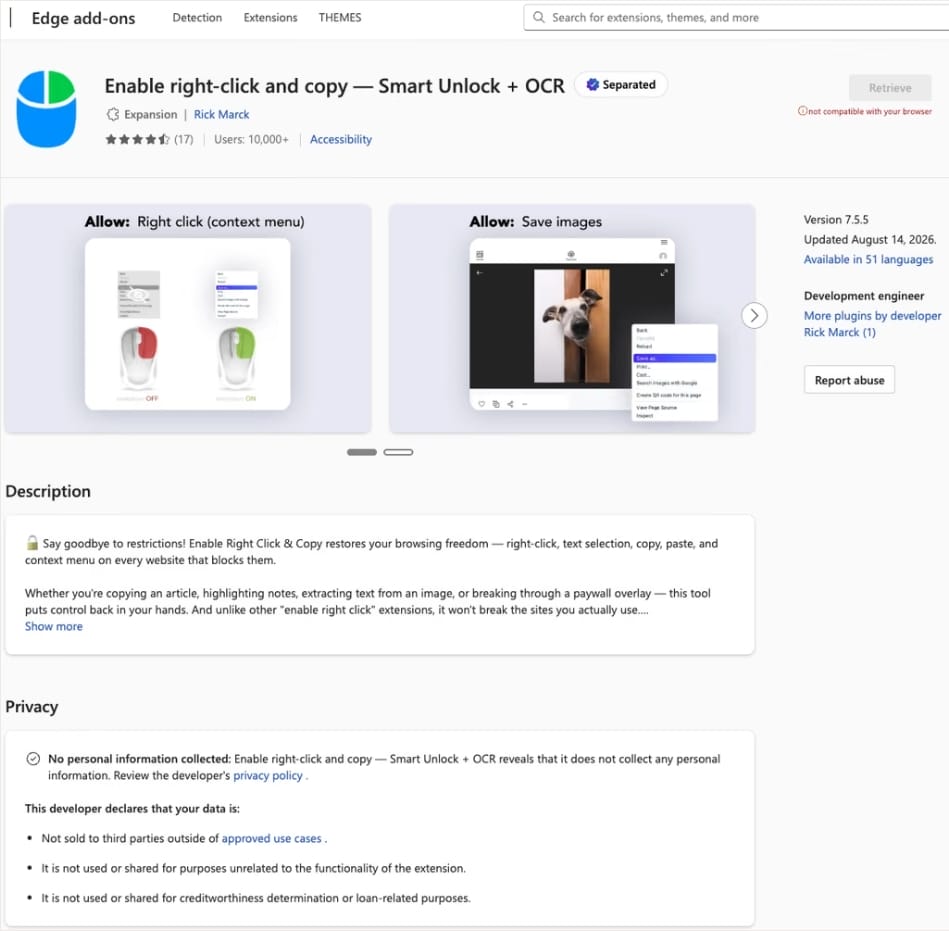
In this case, the add-on cybercriminals bought most often was Enable Right Click & Copy — Smart Unlock + OCR. It had 70 000 users in Chrome and 10 000 in Edge. This purchase is exactly why there’s a single Edge extension among all its Chrome relatives. The add-on itself originally served a perfectly benign purpose: it let users select and copy text on sites where that’s normally blocked, and it could also pull text out of images with optical character recognition (OCR).

The Enable Right Click & Copy: Smart Unlock + OCR extension in the Microsoft Edge Add-ons store

At the time of the research, the Edge version of the extension had more than 10 000 users. Source

The malicious functionality introduced into the extension makes it reach out to the attackers’ command-and-control (C2) server to download additional modules of nefarious code. These modules can change over time. Since Chrome automatically updates all installed extensions by default, the malicious version lands on the device without users having to do anything at all.

For the downloaded code to run on the websites the user visits, the extension disables one of their defenses — Content Security Policy (CSP). This mechanism allows website owners to declare which scripts and other resources are allowed to load and run on a page. Once this protection is turned off, the extension can inject code it gets from the C2 server right into the pages open in the browser. The website itself isn’t hacked, and it looks the same to everyone else, but for that one infected user, the legitimate page quietly turns malicious.

What these 19 extensions can do

Now let’s take a closer look at what the malicious modules loaded by the extension are actually capable of. Researchers found 16 such modules, built for all sorts of tasks: from stealing data and hijacking cryptocurrency to the ClickFix attacks we’re focusing on here.

Some of the modules simply collect user data. They intercept logins, passwords, email addresses, and other valuable information the user enters into web forms, including payment details. On top of that, the add-ons steal data from Facebook and LinkedIn accounts and collect browsing history. Criminals can use this information to take over accounts, steal money, and launch further attacks against the victim.

A few other modules focus specifically on stealing cryptocurrency and related data directly. One of them is a crypto drainer, a tool that empties crypto wallets. It works with Ethereum and compatible blockchains as well as Solana and Tron. It replaces the real Connect Wallet and Swap buttons on websites with its own fake ones. When a user clicks one of these buttons, the drainer takes over all further interaction with the wallet and walks the victim through confirming the actions needed to steal their cryptocurrency.

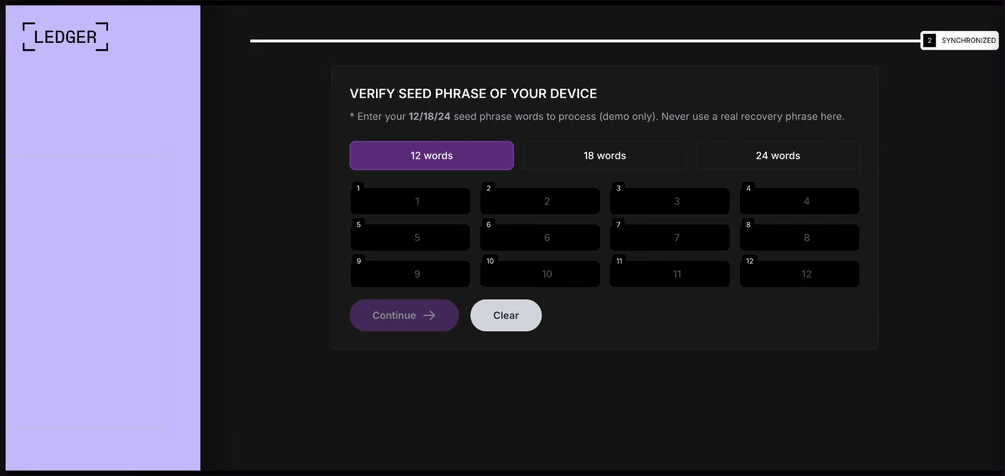
Other modules target users of Ledger and Trezor hardware wallets. Right on the official websites of these services, the malicious extension displays a fake wallet update-and-restore page that asks for a seed phrase of 12, 18, or 24 words. The seed phrase the user enters is forwarded straight to the attackers, giving them full control over the wallet.

Fake form for entering a Ledger seed phrase

The fake form asks the user to enter a seed phrase of 12, 18, or 24 words, which then ends up in the attackers’ hands. Source

Finally, some modules gather information from crypto service pages open in the browser, such as OKX, MEXC, Kraken, KuCoin, Coinbase, Binance, Bybit, and MetaMask, including balance details and active session data that can be used to hijack accounts.

And now we’ve finally reached the module that matters most for this post: the one used for ClickFix attacks. We’ll talk about it in the next part.

How malicious extensions are used in ClickFix attacks

The ClickFix attack technique has become extremely popular among cybercriminals lately. It relies on social engineering: the victim is shown fake instructions supposedly needed to complete some action, such as passing a CAPTCHA check, fixing an error, or updating a program. Following these instructions, the user copies the command suggested by the attackers, pastes it into a system tool built for running these commands, and runs it, all by themselves.

We’ve written about attacks like this and their consequences more than once on our blog. But we rarely dig into exactly how a victim ends up on a page with fake instructions in the first place. A campaign that spread malicious extensions through the Chrome Web Store shows us one way this can happen.

Add-ons turn out to be a very handy tool for ClickFix attacks. As we mentioned earlier, when a user visits a page, extensions are allowed reading and changing its content in order to work. That gives attackers the chance to swap in a fake ClickFix instruction at just the right moment, replacing the content of the page the person actually wanted to open.

What’s more, the ClickFix technique itself lets attackers break out of the browser and gain a foothold directly in the system. That means removing the malicious extension won’t necessarily undo the damage: after the user has run the ClickFix command, malware may already be installed outside the browser.

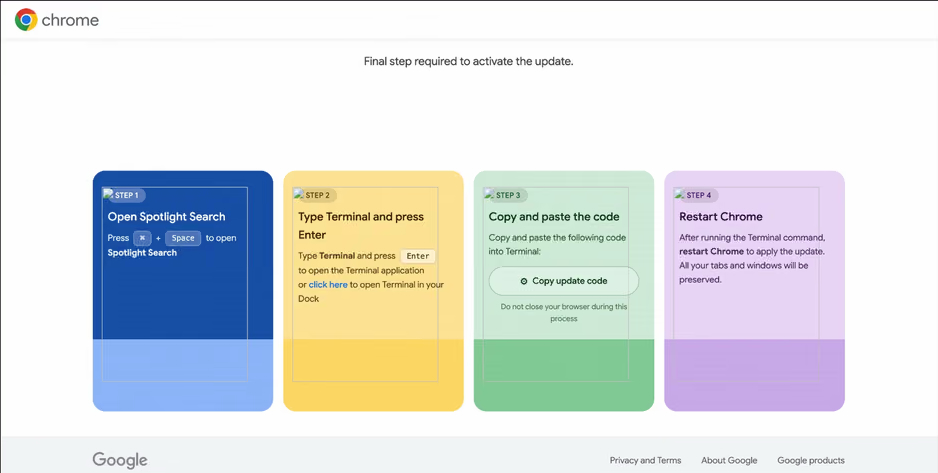
In the specific attack example the researchers describe, the user sees a fake notification saying their browser needs to be updated, along with instructions on how to do it. The instructions change depending on the operating system, and the extension picks up that information automatically too.

Fake Chrome update guide

In the macOS version of this attack, the user is told to open Terminal, copy a command, paste it there and run it, then restart Chrome to supposedly finish the update. Source

How to avoid falling victim to infected extensions

First off, we recommend checking whether any of the following malicious extensions are already installed in your browser:

  • Enable Right Click & Copy — Smart Unlock + OCR
  • RapidLens – Google Lens for Screen Search & Images
  • QuickLens – Search Screen with Google Lens
  • Password Protect PDF
  • Allow Copy – Select & Enable Right Click
  • PixelCheck
  • Creative Library – Ad Spy Tool
  • Website Traffic Checker: MirrorSphere SEO Stats
  • Site Signal – Website Traffic & SEO Checker
  • SEO Pulse Pro – Website Traffic & SEO Analyzer
  • Private Crypto News Reader
  • Blockfolio: Address Monitor
  • Crypto Rates & Fiat Converter
  • Crypto Alerter: Price Alarms & Volatility Warnings
  • DeFi Pulse Tracker
  • Crypto Price Badge: Quick Glance
  • Multi-Chain Explorer
  • LedgerLook: Wallet Checker
  • Meta & Facebook Ad Library Spy — Save Ads, Finder, Downloader | FeedX-Ray

If you find any of these extensions on your device, we recommend removing it as soon as you can and running a full system scan with a reliable antivirus. As we mentioned above, simply deleting the add-on might not be enough. You can use a free trial version to detect and remove the infection.

How to avoid falling victim to malicious extensions and ClickFix attacks in the future?

  • Don’t install too many extensions and regularly check the list of those you have.
  • Remove extensions you don’t use.
  • Trust the warnings from your operating system and security software, rather than the instructions — or even the demands — of websites and apps.
  • Install a trusted security solution on all your devices.

What else makes browser extensions and the ClickFix technique dangerous? Find out in our other posts:

❌