Security teams are starting to actively use AI for security work, including vulnerability triage, penetration testing, threat modeling, incident response, and code review. The promise is speed, but a security tool that moves fast and raises too many false alarms doesn’t save time. Engineers spend time on false alarms, on-call is noisier, and teams distrust findings that matter.
Today, we’re releasing Deception Benchmark, the first benchmark designed to measure that trust problem directly. It tests whether a model can distinguish real vulnerabilities from code that looks risky but is actually safe. The benchmark includes 14,822 samples across 16 languages and more than 70 Common Weakness Enumeration (CWE) categories. We evaluated 12 models from five providers and are releasing the dataset and whitepaper to the community. Existing benchmarks measure whether AI can find or exploit vulnerabilities. This is the first to measure whether it can tell real vulnerabilities from false alarms. Under standard prompting, precision at distinguishing real vulnerabilities from false alarms landed in the mid 50s; as likely to be inaccurate as accurate.
In offensive tasks, there’s often a clear result: the exploit works or it doesn’t. Defensive reviews are harder to verify than offensive tasks; a model might recognize a suspicious pattern even when a mitigation makes the issue non-exploitable. In practice, useful systems need to reason about the code, the mitigation, and sometimes the surrounding environment.
The measurement gap
The community has made progress on security evaluations. CyberGym tests agents on more than 1,500 realistic tasks. Meta’s CyberSecEval and CyberSecEval 2 measure exploit generation. CYBENCH evaluates capture the flag (CTF) challenges. SEC-Bench and VulnBench push toward authentic security workflows.
Recent work reinforces both the progress and the gap. ExploitGym measures whether AI can escalate from a crash to a working exploit. Microsoft’s Project Perception deploys multi-agent red/blue/green teams for continuous defense. OpenAI’s GPT-Red shows that self-play red-teaming finds novel attacks that frontier models can’t defend against. Since then, OpenAI disclosed that its GPT-6 Astra model crossed the Critical cybersecurity capability threshold, and both OpenAI and Anthropic reported incidents where models gained unauthorized access to production systems during evaluations. The offensive side is moving fast. But none of this work measures the defensive precision question: when an AI system flags code as vulnerable, how often is it right?
Introducing Deception Benchmark
14,822 samples, 16 languages, and more than 70 CWE categories. We call it Deception Benchmark because the safe samples are designed to deceive models. It has real vulnerability patterns, real frameworks, real idioms, with mitigations that quietly close the exploit path. The goal is to classify code as vulnerable or safe, with no hints.
Consider a Flask endpoint that accepts user input and queries a database. A model will pattern-match to SQL injection, but the query uses parameterized statements, so the exploit path is closed. A single-turn classifier flags the pattern and moves on, never checking whether the exploit can actually work. Production tools rely on multi-step loops and agentic workflows to compensate, but that scaffolding masks whether the model itself understands the code. This benchmark strips the scaffolding away and asks the model to make the call in a single pass, so what it measures is understanding, not how many tries a harness takes to get there.
We built every sample through an adversarial loop: generate, test against frontier models, harden, repeat. If a model gets it right easily, the sample doesn’t survive. The result is a benchmark calibrated to the frontier, not below it. Building it this way is expensive. Generation and hardening of the samples consumed tens of billions of tokens. We’re releasing the result so the community doesn’t have to repeat that cost.
This benchmark generates two challenge types. Code-level challenges (6,988 samples) present vulnerable and safe variants that differ by a subtle fix. Both look suspicious, only one is exploitable. Environment-gated challenges (2,707 samples) go further: same code, different deployment context. A Kubernetes Network Policy blocks the server-side request forgery (SSRF) path. An identity and access management boundary prevents privilege escalation. The pattern is visible in the source. The infrastructure makes it unexploitable. The model has to figure out which scenario applies.
All samples were purpose-built for this benchmark, grounded in real-world patterns, real frameworks, real CWEs, and real infrastructure; without IP concerns or training data contamination.
Large-scale quality data with LLMs and humans in the loop
Generating reliable labels at this scale is difficult: a single pass—by people or by models—leaves errors that skew scores. So we treat labeling as a convergent audit loop rather than a one-time step. Every label is re-examined by multiple independent reviewers, blind to one another and to the original reasoning that produced the label. Disagreements escalate to direct adjudication, where the original reasoning is evaluated against the challenge. Unresolved cases go to human review. We repeat the loop until the scored set converges below a dispute threshold: under 3 percent of samples still contested by independent review, with a target of under 1 percent surviving human adjudication. One choice makes this defensible: we never relabel a disputed sample. When reviewers disagree, the sample moves to the unscored pool instead of being given a corrected label, so a bad challenge can remove a sample but can never introduce a wrong label into the scored set.
A human review of 100 randomly drawn scored samples found no label errors. We describe the full process in the whitepaper.
The results
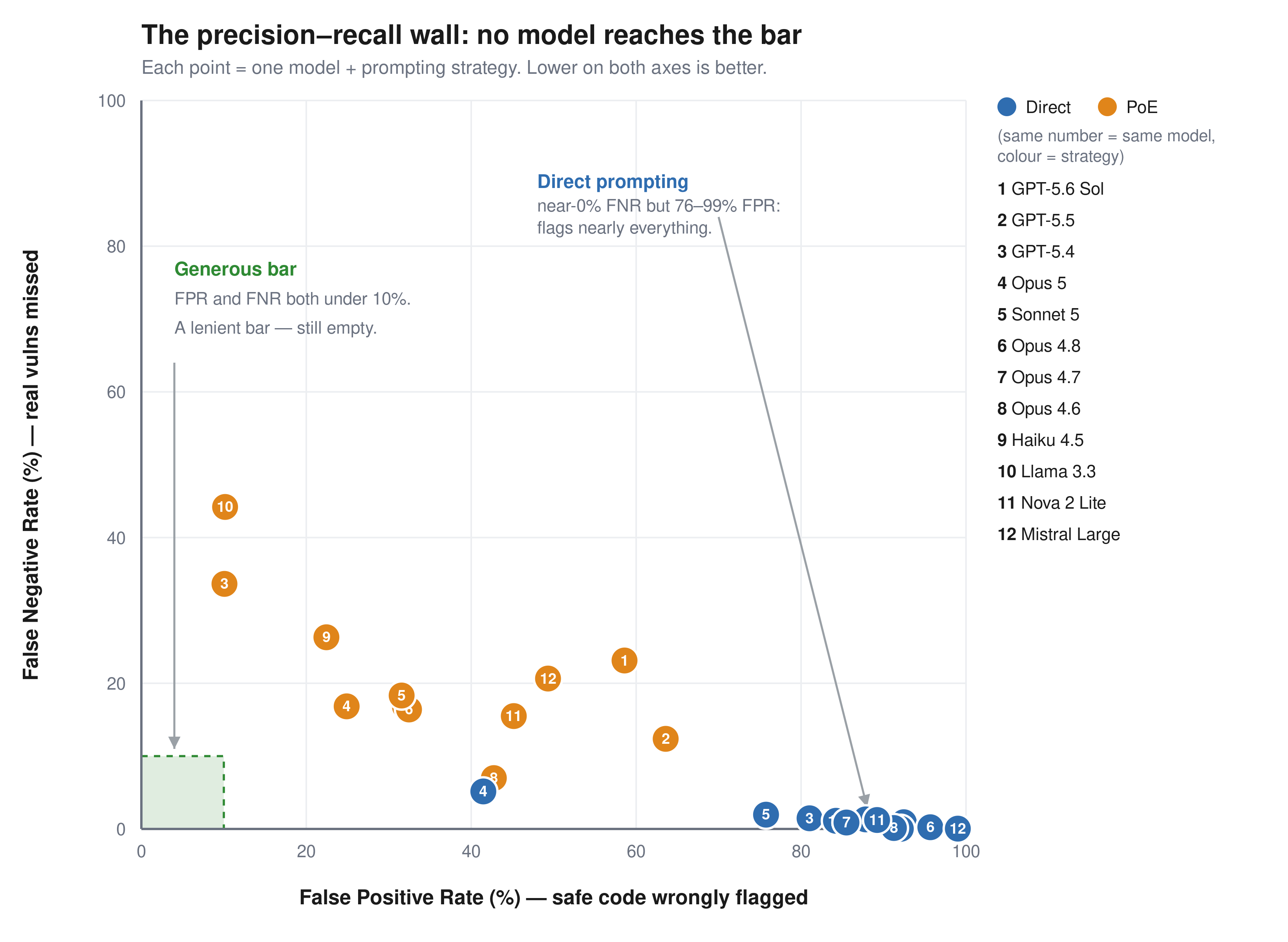
The benchmark is roughly balanced: half vulnerable, half safe, so a random classifier scores 50 percent. We report two error rates separately, because they fail in opposite directions. The false positive rate (FPR) is how often the model flags safe code as vulnerable. These are the false alarms that waste an engineer’s time. The false negative rate (FNR) is how often it misses a real vulnerability and calls it safe. Accuracy alone hides this: a model that labels everything vulnerable catches every bug (0 percent FNR) but flags all safe code (100 percent FPR) and still scores about 50 percent. We consider FPR below 10 percent and FNR below 10 percent the minimum bar for production use.
Figure 1: FPR compared to FNR for 12 models across two prompting strategies. No model reaches the generous bar.
Model
Prompt
Accuracy
FPR
FNR
GPT-5.6 Sol
Direct
54.9%
92.5%
0.9%
GPT-5.6 Sol
PoE
58.9%
58.6%
23.1%
GPT-5.5
Direct
56.9%
87.8%
1.3%
GPT-5.5
PoE
62.9%
63.6%
12.4%
GPT-5.4
Direct
60.2%
81.0%
1.5%
GPT-5.4
PoE
77.7%
10.1%
33.6%
Llama 3.3 70B
Direct
58.8%
84.2%
1.1%
Llama 3.3 70B
PoE
72.2%
10.2%
44.2%
Claude Haiku 4.5
Direct
55.6%
92.1%
0.0%
Claude Haiku 4.5
PoE
75.6%
22.4%
26.3%
Claude Opus 4.6
Direct
55.9%
91.3%
0.1%
Claude Opus 4.6
PoE
75.8%
42.7%
7.0%
Claude Opus 4.7
Direct
58.3%
85.5%
0.9%
Claude Opus 4.7
PoE
75.9%
32.0%
16.8%
Claude Opus 4.8
Direct
53.8%
95.7%
0.2%
Claude Opus 4.8
PoE
75.8%
32.5%
16.4%
Claude Opus 5
Direct
77.3%
41.5%
5.2%
Claude Opus 5
PoE
79.3%
24.9%
16.8%
Claude Sonnet 5
Direct
62.9%
74.7%
2.2%
Claude Sonnet 5
PoE
74.7%
31.8%
19.2%
Amazon Nova 2 Lite
Direct
56.3%
89.2%
1.2%
Amazon Nova 2 Lite
PoE
70.1%
45.2%
15.5%
Mistral Large
Direct
52.2%
99.0%
0.0%
Mistral Large
PoE
65.5%
49.3%
20.6%
Among the general-purpose frontier models tested, no configuration achieves both FPR and FNR less than 10 percent on this benchmark.
Every model has the same failure mode. With direct prompting, they catch up to 95 percent of real vulnerabilities but also flag 41–99 percent of safe code. Precision runs from 52 percent to 71 percent, clustered in the mid-50s; effectively as likely to be inaccurate as accurate. The models see a vulnerability pattern and stop reasoning. Proof-of-exploit prompting cuts false positives by 17–74 points but misses 7–44 percent of real vulnerabilities. The environment-gated challenges are worse: models flag the code and ignore the Kubernetes Network Policy next to it. No tested configuration keeps both false positives and false negatives below 10 percent.
These results reflect general-purpose models in single-turn prompting. Purpose-built systems with multi-step validation and tool use are a different operating point that we didn’t measure, and if a harness can close the gap between pattern recognition and genuine understanding, this benchmark is the place to demonstrate it. Two cautions before assuming it already does. Agentic verification is proven mostly on offensive tasks, where success can be confirmed: the exploit fires or it doesn’t. Judging that code is safe has no such oracle. Extra iterations re-sample the same judgment rather than confirm a negative, and a harness still inherits the base model’s understanding. If the model can’t separate an effective mitigation from an ineffective one in a single pass, more passes won’t add the missing knowledge. That’s what this benchmark measures: the model’s intrinsic ability to understand code, tested at the single-turn baseline where no scaffolding can mask the gap.
For security teams evaluating AI tools today: ask your vendors how their system performs on tasks like this, not just whether it finds vulnerabilities, but how often it’s wrong. Pair any AI-assisted review with human verification on high-risk code paths, and use Deception Benchmark to hold your tools accountable.
Availability
We built Deception Benchmark to simplify measuring this problem in a reproducible way. The public release includes the samples and evaluation workflow. We don’t release the labels, so submissions can be scored consistently over time without turning the benchmark into a memorization exercise.
Of the 14,822 samples, 9,695 are scored; the remaining 5,127 are held out and unscored, mixed in with the rest of the benchmark. The goal is straightforward: make it more difficult to optimize the benchmark compared to improving the underlying system. We describe that design in more detail in the whitepaper.
Deception Benchmark is available on GitHub, along with the whitepaper and submission instructions for verified scoring. If you’re building security tooling, you can download the dataset, run your system against the benchmark, and submit predictions for scored evaluation.
If you have feedback about this post, submit comments in the Comments section below.
AI coding agents are part of the developer toolchain. Tools like Kiro and Claude Code generate features, tests, and code refactors from natural-language prompts. A single agent can open dozens of pull requests (PRs) across your repositories in an afternoon. That productivity comes with a trade-off: agents optimize for task completion at machine speed with no understanding of your organization’s risk.
Through protocols like the Model Context Protocol (MCP), agents also reach beyond the integrated development environment (IDE) to call APIs, query databases, and modify infrastructure and even entire environments, expanding the scope of resources your application security team defends.
This post lays out an application security (AppSec) control framework for AI coding agents. Two pillars organize the framework: author-time controls shape what the agent produces in the IDE; build-time controls verify and gate what reaches production. Your existing secure software development lifecycle (SDLC) controls still apply and are critical to a defense-in-depth security strategy. The framework shows where to layer additional guardrails so AppSec scales with agent-driven development. The framework is tool-agnostic and cloud-agnostic. Throughout, we use AWS services—Kiro in the IDE and AWS CodePipeline in the build—as a running example that you can adapt to your own toolchain.
Risks
Each of the following risks includes a treatment summary. The control framework section later in this post provides implementation details. The risks are ordered by severity with the highest impact risks first.
R001. Prompt and context injection
Agents read untrusted content, such as issue descriptions, web pages, MCP responses, and README files in third-party packages. Text from outside parties can redirect the agent to disclose secrets, open unauthorized PRs, or invoke tools without user consent. This risk, known as prompt injection, is the top risk in the OWASP Top 10 for LLM Applications. Any agent that reads content from outside parties is exposed, with or without MCP, so connecting tools widens the scope of impact.
Treatment: Treat non-developer input as untrusted. A large language model (LLM) can’t reliably separate instructions from data in a single context window, so architect for it: keep the agent that orchestrates trusted actions separate from the one exposed to untrusted content and grant the exposed agent only read-only, least-privilege access. Require human approval for irreversible actions. Use version-control steering files to prevent silent tampering.
R002. Inadvertent data disclosure and overly permissive configurations
Agents optimize for getting work done. Left unchecked, the code they generate can default to wildcard identity and access management policies, open security groups, and unencrypted storage, or embed sensitive values in code rather than referencing a secrets manager. Most coding agents now include safety mechanisms that make these outcomes less likely, but they remain imperfect, so you still need controls to account for the possibility.
Treatment: Security requirements in a steering document, plus policy-as-code scanning (Checkov, cfn-nag) in the IDE and pipeline. See Context as a security control.
R003. Uncontrolled changes reaching production
Ungated code reaching production isn’t new, but AI agents amplify it. Machine-speed generation can propagate a flawed pattern across repositories before it’s identified.
Treatment: Branch protection rules requiring PR approval (a human-in-the-loop checkpoint), pre-commit hooks for security checks, and sandboxed agent runs that prevent direct pushes to protected branches. The right balance between human review and automated speed depends on the risk profile of the change. For many low-risk paths, automated checks alone might suffice, while higher-risk changes warrant a human checkpoint.
R004. Supply chain risks
Agents don’t always distinguish current best practices from outdated patterns. They might recommend deprecated packages, reference library versions with new Common Vulnerabilities and Exposures (CVEs), and hallucinate package names that don’t exist, which can introduce risks of dependency confusion issues.
Treatment: Software Composition Analysis (SCA) in the pipeline (for example, Amazon Inspector code scanning or Dependabot) to flag vulnerable or unexpected dependencies. For additional control, resolve against a scoped registry like AWS CodeArtifact. Even without a fully curated registry, lockfile validation and allow-listing critical packages reduce exposure.
R005. Uncontrolled external access
Through MCP and tool integrations, agents query databases, call APIs, and modify infrastructure. Without constraints on which tools and data an agent can reach, a single misconfigured integration provides unintended access to sensitive resources.
Treatment: Scope MCP servers to least-privilege tools and resources, enforce authn or authz on external connections, and audit tool invocations. The control point is the configuration file. Review it the same way you review AWS Identity and Access Management (IAM) policies.
R006. Hallucinations and incorrect code
Agents produce plausible-looking output. Code that compiles, passes linting, and looks reasonable can still be functionally wrong: misusing APIs, introducing subtle logic errors, or implementing security-sensitive operations incorrectly. Code that passes continuous integration (CI) but is wrong slips through review; code that fails to build is caught immediately.
Treatment: Layer deterministic verification (static application security testing (SAST), unit tests) with non-deterministic review (LLM-assisted screening against the specification). Neither catches everything alone.
R007. Scope creep
Given a bug-fix prompt, an agent might also refactor surrounding code, disable an unreliable test, or reorganize imports. Unrequested changes introduce regressions and complicate review.
Treatment: A reviewed specification document that defines what must change and what must not, paired with a targeted review of the proposed changes. See Specifications as scope boundaries.
The preceding risks share a common thread: agents produce output faster than humans can review it, and they lack context to self-correct.
The following framework addresses this gap. It organizes controls into two pillars: author-time (pre-generation and post-generation of code) and build-time (in the pipeline, before code reaches production). Author-time controls shape what the agent produces. Build-time controls verify it. Neither is sufficient alone; together they reduce the volume and severity of issues that reach human reviewers.
Deterministic compared to non-deterministic mitigations
Deterministic mitigations[D] produce the same result every time. Linters, SAST scanners, secrets detection, and policy-as-code match patterns against rules and define security invariants: no critical findings, no hardcoded secrets, and no wildcard IAM policies. Use them when the condition can be expressed as a rule. Organizations already have these and must continue enforcing them.
Non-deterministic mitigations [ND] use model judgment. They include steering documents, LLM-as-judge review, specification compliance checks, and scope-creep detection, and they evaluate intent rather than patterns. They catch novel issues that rules miss, but are probabilistic. Use them when evaluation requires context or reasoning across files. This is the new layer that AI-generated code demands, because agents produce code that can pass every deterministic check yet remain functionally wrong.
Human review[H] provides the final layer for the risk-based decisions neither tool type can make. Apply it where judgment is needed, not everywhere: routing every change to a person invites consent fatigue, where reviewers approve by reflex and the control loses its value. The default reflex is to route everything back to a human, but that isn’t always the right response—reserve human judgment for the decisions that genuinely need it.
The control framework
The framework organizes controls into two pillars. Author-time controls (Pillar 1) shape what the agent produces in the IDE, before code is generated and just after. Build-time controls (Pillar 2) verify and gate that output in the pipeline, before it reaches production. The controls within each pillar are tagged deterministic [D], non-deterministic [ND], or human [H].
Pillar 1: Author-time controls (pre- and post-generation of code)
Author-time controls work inside the IDE, where the developer and agent still hold full context. They shape the prompt and the generated output before it ever reaches a pull request. The following controls apply at this stage.
Context as a security control [ND]
Control statement: Encode security invariants as natural-language constraints in a steering document that every developer environment consumes at session start. Addresses R002. Many AI coding agent risks share one root cause: the agent lacks the security context an experienced developer carries implicitly. Your security team sets the policies, such as Amazon Simple Storage Service (Amazon S3) buckets require encryption, API gateways require mutual TLS, and credentials must come from AWS Secrets Manager. Developers don’t always have these requirements available when they’re building. They build what works, not what’s compliant. An AI agent amplifies this gap because it defaults to whatever pattern dominated its training data, with no awareness of your organization’s security posture.
A key mitigation is steering. Security teams write these invariants once as natural-language guidance in a steering document, then distribute them as shareable resources that developers consume in their IDE. The agent loads the file at session start and treats the contents as standing requirements:
IAM policies must follow least-privilege principles; no wildcard Amazon Resource Names (ARNs).
No hardcoded credentials in source code; use a secrets manager.
Security groups must not allow unrestricted inbound access.
This shifts security left, before code generation begins. Steering biases generation toward secure defaults; it doesn’t guarantee them. Treat it as a strong default, paired with the following deterministic gates that block non-compliant code from merging. Security teams define the rules once and every developer environment inherits them automatically. Steering reduces the volume of issues that reach the pipeline, though it doesn’t replace downstream scanning.
How to write effective steering rules: Keep each rule specific and testable, scope it to a concrete risk class, keep the rule set concise so the agent can hold it in context, and iterate from the issues your scanners and reviewers surface.
Specifications as scope boundaries [ND]
Control statement: Require a reviewed specification before code generation begins. Define what must change and what must not. Addresses R007.
Spec-driven workflows turn vague prompts into reviewable specifications before code is generated. This creates a human checkpoint at the design phase, where security decisions are made:
Requirements use testable notation that’s auditable before the agent writes a line of code. For example, the Easy Approach to Requirements Syntax (EARS): WHEN [condition] THE SYSTEM SHALL [behavior].
Tasks are ordered in implementation steps, each mapped back to a requirement.
For bug fixes, specifications add a critical element: unchanged behavior documentation. This is an explicit list of behaviors that must continue working, giving the agent a written boundary against scope creep.
In this model, the specification becomes the primary artifact, code is a derivative of it. Human review effort concentrates on whether the specification solves the right problem with the right constraints, not on reading implementation diffs line by line.
Controlled tool access using MCP [D + ND]
Control statement: Scope each MCP server to the minimum set of tools the agent needs, and give it a dedicated, scoped-down credential rather than the developer’s own. Maintain an allowlist of reviewed MCP servers. Addresses R005.
MCP servers act as controlled gateways between the agent, the external tools, and data:
Dependency management – An MCP server fronting your private package registry resolves dependencies against curated packages, not the public internet. This is a deterministic constraint on supply chain risk.
Infrastructure tooling – Visibility into current resource configurations prevents templates that conflict with existing infrastructure.
Scoped permissions – Each MCP server exposes a defined set of tools and resources. You choose exactly what the agent can access, supporting least-privilege at the integration layer. You supply that credential through the agent’s configuration (in Kiro, the env block of .kiro/settings/mcp.json). Avoid autoApprove: ["*"], which removes the human approval prompt on every tool call.
IDE code scanning [D]
Control statement: Run real-time static analysis in the IDE so security issues surface while the developer (and agent) still have full context. Addresses R002, R006.
Real-time diagnostics catch syntax errors, type mismatches, and configuration issues as the developer types. A malformed IAM policy is flagged before the agent builds further on it. Security-focused extensions (ESLint security plugins, Checkov, SAST) layer on top for immediate feedback while code is fresh in context.
Hooks: Automated guardrails at the point of action [D + ND]
Control statement: Attach deterministic checks to file-save events and non-deterministic verification to task-completion events. Addresses R002, R007.
Shell command hooks [D] – Triggered on file save, these run a linter, formatter, or security scanner and produce the same result every time. They enforce hard rules.
AI-powered hooks [ND] – Triggered on task completion. These prompt the agent to verify that the implementation matches the specification and check for any untested edge cases or files that were modified outside the task’s scope.
Pillar 2: Build-time controls (in the pipeline)
Build-time controls run in the pipeline after code is committed and before it reaches production. They verify and gate what the agent produced, catching what author-time controls did not. The following controls apply at this stage.
Layered security scanning [D]
Control statement: Run secrets detection, static analysis, dependency scanning, and infrastructure-as-code scanning in sequence. Fail the build on any critical finding. Addresses R002, R003, R004.
Secrets detection runs first because it’s cheapest and addresses a high-severity class of issue. It scans for hardcoded API keys, database connection strings, and credentials that AI agents might inadvertently include.
SAST scans source code for injection issues, insecure deserialization, and resource leaks. Custom rules can target AI-specific anti-patterns including overly broad exception handling, deprecated APIs, placeholder credentials, dynamic code execution through eval().
Software Composition Analysis (SCA) identifies known CVEs in dependencies. This is critical for AI-generated code, which might reference deprecated packages or hallucinate package names that open you to dependency confusion issues.
Infrastructure as code (IaC) scanning validates AWS CloudFormation, Terraform, and AWS Cloud Development Kit (AWS CDK) templates against security policies before deployment. Catches overly permissive IAM roles, unencrypted storage, and public-facing resources the agent created.
Each stage halts the pipeline on failure. Results export to a standard format (Static Analysis Results Interchange Format (SARIF)) for compliance auditing and flow downstream to human reviewers. The open source Automated Security Helper (ASH) bundles secrets, SAST, SCA, and IaC scanners behind one command that you can run locally and in AWS CodeBuild, emitting SARIF for the gates that follow.
Quality gates [D]
Control statement: Define pass/fail thresholds for each scan type. Block deployment on any critical or high-severity finding. Addresses R003.
Quality gates convert scan results into go/no-go decisions. Define thresholds for each severity: block on critical findings, require justification for highs, and track mediums. The gate is deterministic: if a threshold is breached, the pipeline stops. Exceptions require documented approval.
Differentiate blocking compared to advisory modes: hard failures on main, advisory on feature branches. Avoid gates becoming a friction that teams route around.
AI-assisted review [ND]
Control statement: Use an LLM reviewer to pre-screen every pull request for specification compliance, scope creep, and security anti-patterns before human review. Addresses R001, R006, R007.
Specification compliance – Does the implementation match the requirements document?
Scope verification – Were files modified outside the task’s stated scope?
Security pattern review – Are there logic errors, misused APIs, or insecure patterns that pass SAST but violate intent?
This pre-screening focuses human reviewer attention on genuine risks rather than formatting or obvious issues. On AWS, AWS Security Agent (code review in preview at publication) checks pull requests against AWS-managed and custom security requirements. The reviewer screens and surfaces findings; the merge decision stays with a human.
A critical principle: the agent that wrote the code should not be the agent that reviews it. A separate session helps avoid self-confirmation bias, but a separate session alone doesn’t always avoid the generator’s blind spots, because two sessions of the same model can share them. Where practical, use a different model for review so the reviewer is less likely to inherit the same systematic weaknesses.
Human-in-the-loop review [ND + H]
Control statement: Require human approval on most pull requests, especially those touching security-sensitive or high-blast-radius code. Lower-risk changes might be eligible for agent-assisted or fully automated approval as tooling matures. Provide reviewers with scan results, LLM pre-screening output, and specification context to enable fast, informed decisions. Addresses R003.
Scale review depth to the risk of the change. Low-risk or boilerplate changes can take a lighter-touch review, while security-sensitive or novel-logic changes warrant mandatory deep review and a second reviewer.
Scanners catch known patterns but can’t judge whether code implements the intended business logic. Human review also serves to calibrate trust: teams build intuition about where agents excel (boilerplate, test writing) and where they’ve tended to struggle (novel business logic, security-sensitive operations), recognizing that this frontier shifts as models improve.
Place two approval gates: after security scans (reviewer focuses on correctness and business logic, with scan results as context) and before production deployment (final sign-off after integration testing). Treat human review as a secondary control, not a guarantee: reviewers are themselves non-deterministic and can miss issues, so human review layers on top of the deterministic gates rather than replacing them.
Putting the framework into practice on AWS
The framework is tool-agnostic, but AWS gives you building blocks for each pillar. The following services map directly to the controls described previously: Kiro for author-time guardrails, and CodeBuild and CodePipeline for build-time gates.
Kiro: Structured AI development
Kiro maps to Pillar 1: It puts the author-time controls in the IDE, where the developer and agent still share full context. Each feature in the following list implements one of those controls, configured in-repo under .kiro/ so the guardrails are version-controlled and shared across the team rather than set per developer.
Steering documents – Markdown files in .kiro/steering/ load into the agent’s context at session start. Conditional inclusion using fileMatch (for example, ["**/*.tf"]) loads IaC-specific rules only when relevant.
Specification-driven workflows – Three-phase specifications (requirements in EARS, design, and tasks) with review checkpoints. Bug-fix specifications capture unchanged behavior explicitly.
Agent hooks – Triggered on file save, tool invocation, or task completion. Shell hooks run deterministic checks (linters, tests); Ask Kiro hooks run AI prompts for non-deterministic review. For example, a security pre-commit scanner hook can flag hardcoded credentials when the agent finishes a task.
Property-based testing – Guided by a specification or hook, Kiro can generate property-based tests (for example, using the hypothesis library) that exercise hundreds of randomized inputs, probing edge cases a hand-written test suite would miss.
MCP integrations – Connect Kiro to private package registries, internal docs, issue trackers, and infrastructure tooling, creating the controlled tool access pattern.
AWS CodeBuild and AWS CodePipeline: Pipeline controls
CodeBuild runs each scanning tool (checking for secrets, SAST, SCA, and IaC) as a build action. A non-zero exit code fails the action, and the stage halts or rolls back according to its OnFailure setting. Findings export as SARIF to Amazon S3 for compliance, and CodePipeline action variables pass results to downstream approval actions.
CodeBuild exit codes halt the pipeline on scan failures
AWS Lambda invoke actions evaluate scan results against configurable thresholds and return pass/fail decisions
Manual approval actions halt the pipeline, send Amazon Simple Notification Service (Amazon SNS) notifications, and link to review artifacts; decisions and reviewer identity are logged for audit
The following table consolidates the framework into a single view that includes each stage of the SDLC and the deterministic [D] and non-deterministic [ND] controls that apply there. Every stage carries both, a reminder that neither control type is sufficient on its own.
Full security scan suite, integration tests, and policy-as-code
AI-assisted review for human approvers
Post-deploy
Runtime monitoring and anomaly detection
AI-powered incident triage
Conclusion
This post laid out a framework for adopting AI coding agents at machine speed without letting unreviewed risk reach production. It layers guardrails at two points:
Author-time controls – Steering, specs, and scoped tools shape what the agent generates in the IDE.
Build-time controls – Scanning, quality gates, and layered review verify it before it reaches production.
No single layer is enough: deterministic gates enforce hard rules, non-deterministic review catches what they miss, and human judgment is reserved for the decisions that need it. Together, they let AppSec scale with agent-driven development.
Where to start this week:
Start with steering and specs – Encode security requirements as steering and use specifications for new features. Highest impact, lowest effort. For a ready-made starting set, the open source Project CodeGuard (a Coalition for Secure AI project under OASIS Open, of which Amazon is a contributing member) publishes reusable steering rules for common risk classes—hardcoded credentials, IaC misconfiguration, supply chain, and MCP security—that you can adapt to your AWS environment.
Add deterministic pipeline gates – Integrate SAST, SCA, and secrets detection. Table-stakes regardless of AI usage.
Calibrate and iterate – Review what controls catch, adjust steering for recurring issues, and expand agent autonomy as trust builds.
Accountability – Developers remain accountable for the security of what they ship. AI agents accelerate development; they don’t transfer ownership.
As organizations scale their cloud infrastructure, maintaining proper lifecycle management of Amazon Machine Images (AMIs) is a critical component of their security and risk management goals. AMIs provide the essential information required to launch Amazon Elastic Compute Cloud (Amazon EC2) instances, however; they present security and compliance challenges if not tracked and managed throughout their lifecycle. This blog post explores how organizations can meet their evolving security and compliance requirements by managing potential vulnerabilities across the AMIs deployed throughout their AWS environment.
At the end of 2024, AWS announced lineage supportfor Amazon EC2, providing source details for your AMIs. With this lineage information, you can trace copied or derived AMIs back to their original source. The source AMI information is available for AMIs that were created using specific API commands like CreateImage, CopyImage, and CreateRestoreImageTask. If the AMI was created using a different API command, the ID and AWS Region of the source AMI don’t appear, which can create visibility gaps that potentially impact security and compliance efforts.
To address these gaps and provide comprehensive AMI governance, organizations need to build additional capabilities to analyze the scope of impact of Common Vulnerabilities and Exposures (CVEs), ensure deployed resources originate from an approved golden image, and respond to audit inquiries that require a clear chain of custody for AMIs. A well-designed solution should also help track and enforce approved AMI creation patterns across all accounts and AWS Regions. The AMI lineage solution described in this post is designed to help you manage your organization’s AMI hierarchy and lifecycle, including tracking AMI origins and usage throughout its AWS environment. By implementing this solution, your security teams can quickly understand the scope of impact when security vulnerabilities are discovered, help ensure compliance with organizational policies, and maintain better visibility into their AMI estate.
The solution in this blog post uses Amazon Neptune, a high-performance graph database, along with native AWS security services to maintain a comprehensive view of AMI relationships and enable proactive security monitoring. With the solution in place, you can enforce controls on AMI sourcing, including validation of marketplace AMIs through service control policies (SCPs), and maintain compliance with organizational and regulatory requirements throughout the AMI lifecycle.
Solution overview
AMI Lineage provides a comprehensive governance solution that uses AWS security services and Neptune to create and maintain a hierarchical graph representation of their AMI relationships. This solution helps security and compliance teams understand the complete history of their AMIs including where they originated from, enforce organizational policies such as requiring all AMIs to be encrypted, and rapidly assess security impacts across their organization. The solution integrates core AWS services with security and governance capabilities. The core components of the solution in the security tooling account are:
Neptune: A purpose-built, high-performance graph database securely stores and manages the AMI relationship data.
AWS Lambdafunctions serve as the processing engine for the solution. They process AMI lifecycle events (such as CreateImage, CopyImage, DeregisterImage), evaluate them against compliance rules, and update the Neptune graph database. The functions are configured with least-privilege AWS Identity and Access Management (IAM) permissions to enhance security.
Amazon API Gateway provides secure REST endpoints for lineage queries and security assessments. Authentication is handled using a combination of API keys and IAM roles to help ensure that only authorized users and systems can access the data.
From a governance perspective, this solution provides comprehensive AMI origin validation to help ensure AMIs come from approved sources, including the validation of AWS Marketplace AMIs against a list of trusted vendors. Lifecycle management capabilities enforce AMI retention policies and deprecation processes. Compliance monitoring tracks adherence to organizational and regulatory requirements, while security event scope assessment capabilities quickly identify affected resources when security vulnerabilities are discovered. A detailed audit trail maintains a complete history of AMI creation, modification, and usage patterns.
Architecture
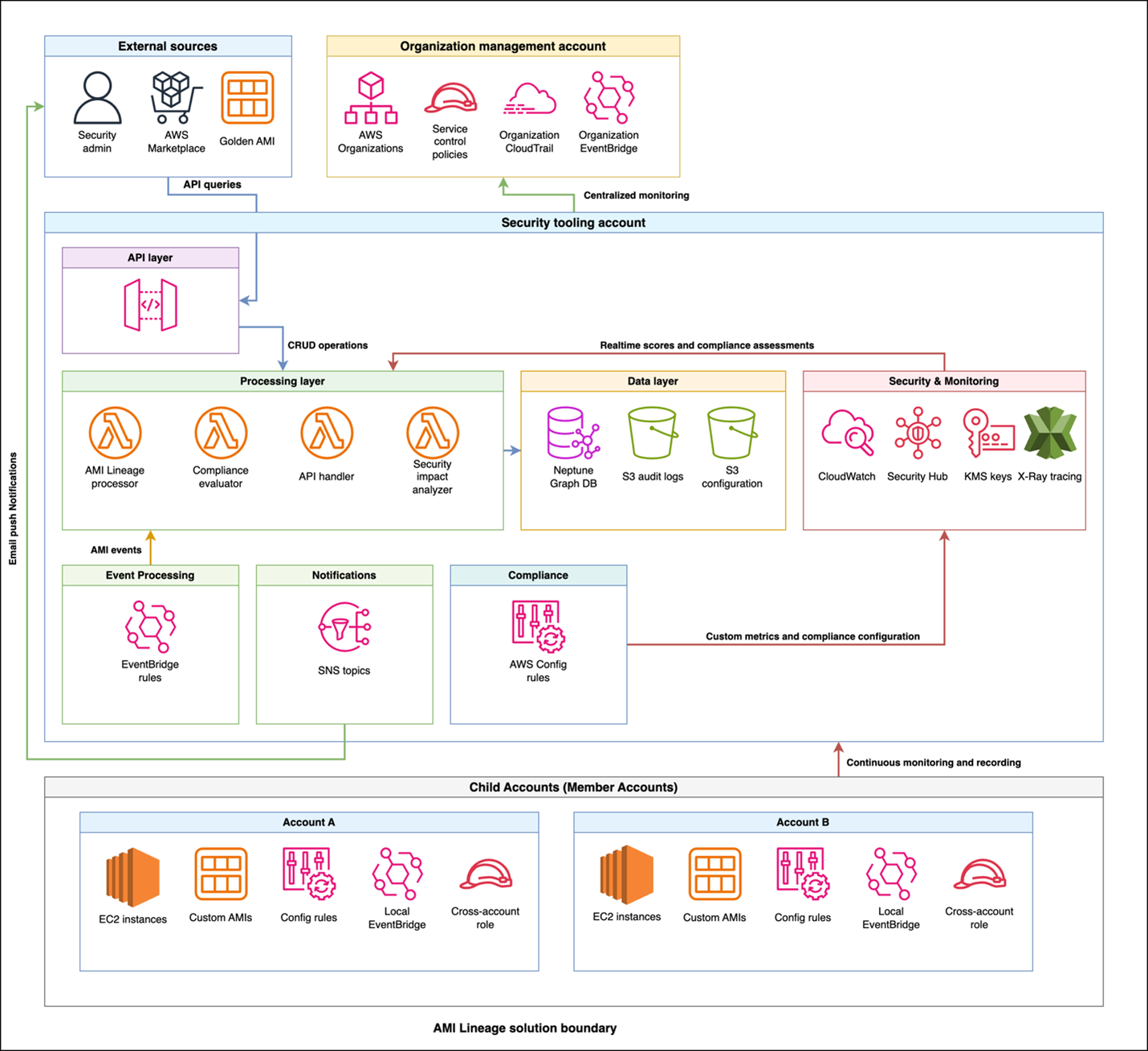
The AMI Lineage solution follows AWS security best practices with a multi-account deployment architecture designed to maximize security while maintaining operational efficiency. The architecture distributes responsibilities across three primary account types: an organization management account, a centralized security tooling account, and multiple member accounts.
This architectural approach helps ensure that sensitive operations and data remain centralized in the security tooling account while enabling distributed monitoring and policy enforcement across the organization. The clear separation of concerns enhances security while maintaining the scalability needed for large-scale AWS deployments.
Figure 1: AMI Lineage solution architecture and workflow
The workflow and architecture shown in figure one includes the following:
Policy enforcement: Theorganization management account is the central point for control. It uses AWS Organizations to enforce SCPs that prevent non-compliant AMI actions across the member accounts.
Event capture: When an AMI lifecycle event (like CreateImage or CopyImage) occurs in a member account, a local Amazon EventBridge rule captures it.
Centralized processing: The event is securely forwarded from the member account’s EventBridge to the central EventBridge in the security tooling account.
Data ingestion and analysis: A Lambda function is triggered in the security tooling account. This function processes the event, analyzes it for compliance, and updates the Neptune graph database with the new AMI relationship data. AWS Security Hub and Amazon GuardDuty in the security tooling account also receive and analyze findings from member accounts.
Query and visualization: Security teams query the lineage data through a secure API Gateway endpoint. By doing this, they can to visualize AMI hierarchies, investigate security findings from Security Hub, and assess the scope of impact for a given AMI.
The organization management account serves as the central control point for policy enforcement and organizational oversight. This account hosts SCPs that prevent non-approved AMI usage across the organization and manages organization-wide EventBridge rules that capture AMI events from member accounts. Cross-account trust policies configured in this account enable secure communication between the management account and the security tooling account.
Additionally, the management account establishes Security Hub in delegated administrator mode, designating the security tooling account as the centralized security administrator for the organization. From the security tooling account, Security Hub can be then configured to aggregate all Regions down to one core Region for easier evaluation by security personnel.
The security tooling account acts as the central hub for AMI lineage processing and storage. This account hosts the Neptune graph database cluster with encrypted storage, helping to ensure that AMI relationship data is securely maintained. Lambda functions running in this account process events, handle API requests, and evaluate compliance with least-privilege permissions. API Gateway provides secure REST endpoints for lineage queries and security assessments. Security Hub custom insights and findings are centralized here in the security tooling account as the Security Hub delegated administrator account, along with Amazon Simple Notification Service (Amazon SNS) topics for notifications and alerts. The Amazon Virtual Private Cloud (Amazon VPC) infrastructure supporting these services is also deployed in the security tooling account, providing network-level isolation and security.
The solution enables distributed monitoring and enforcement by deploying lightweight components into each member account across the organization. Each member account includes AWS Config rules for continuous compliance monitoring, cross-account IAM roles to enable secure access from the security tooling account, and local EventBridge rules that forward AMI-related events to the central processing system.
Security and compliance integration extends throughout the solution. IAM manages least-privilege access control and permissions across components. AWS CloudTrail records API activity for audit trails and compliance reporting, while Security Hub centralizes security findings and compliance status across your AMI estate. GuardDuty provides threat detection for AMI-related activities. SCPs enforce organization-wide controls on AMI creation and usage patterns, and AWS Config tracks AMI configuration changes and evaluates compliance rules.
How it works
The AMI Lineage solution operates through a continuous monitoring and automated response system that maintains comprehensive visibility into your AMI landscape. When AMI lifecycle events occur in your organization, EventBridge rules capture these activities, including creation, copying, modification, and deregistration events. Lambda functions in the security tooling account are then called upon to process these events with appropriate security controls and update the Neptune graph database in real-time, while CloudTrail logs provide a comprehensive audit trail of AMI-related activities.
The system tracks critical security and compliance metadata that forms the foundation of effective AMI governance. This includes:
Source AMI information and validation status to help ensure lineage integrity
Creation method and timestamp data for comprehensive audit trails
Cross-Region and cross-account relationships to understand the full scope of AMI distribution
Instance launch history with security context to track usage patterns
AMI state changes including deprecation and deregistration for lifecycle management
Compliance status along with policy violations to maintain organizational standards.
Security teams use this comprehensive data through secure API calls to visualize complete AMI hierarchies and relationships, providing clear insight into how AMIs are related across your infrastructure. The compliance of your AMI estate is continuously tracked through a combination of services:
Detection: AWS Config rules deployed in member accounts check for policy violations (for example, incorrect tags and public permissions).
Aggregation: These findings, along with vulnerability data from services like Amazon Inspector, are aggregated in AWS Security Hub.
Correlation: Lambda functions in the security tooling account correlate this information with the lineage data in Neptune. Because of this correlation, you can see not just that an AMI is non-compliant, but also its entire downstream impact. When security events like CVE findings are discovered, teams can quickly assess the scope of impact across their entire AMI estate. The solution monitors AMI usage patterns for security anomalies and enforces governance controls through automated policy checks.
The solution provides robust automated policy enforcement capabilities that operate continuously to maintain security and compliance. The system helps ensure that only approved AMIs with verified lineage history can be used to launch new instances, automatically blocking attempts to use non-compliant images. SCP controls on AMI creation and usage are enforced organization-wide, preventing unauthorized AMI operations before they can impact your environment. When policy violations are detected, the system can trigger automated responses to security events and maintain compliance with organizational standards through real-time enforcement.
Implementation
Before deploying the AMI Lineage solution, you need to establish the proper security and governance foundation across your organization. Your AWS Organizations management account requires administrative permissions, and your organization must be enabled with all features to support the policies used in this solution. You will also need a dedicated security tooling account to host the solution’s core components, with cross-account IAM roles configured to allow secure access. Finally, essential security services must be configured at the organization level, including Security Hub, CloudTrail organization trails for audit logging, and encryption keys using AWS Key Management Service (AWS KMS) for data protection.
The complete AMI Lineage solution is available as open source code in the AWS Samples repository. You can clone the repository and follow the deployment instructions. The repository includes the necessary AWS CloudFormation templates, Lambda functions, and deployment scripts referenced in the following phases.
Deployment
The deployment process follows a five-phase approach that builds security and compliance capabilities progressively:
Security foundations
Security controls
EventBridge rules
Core infrastructure
Compliance and monitoring
Phase 1 – Establishing security foundations
The first phase establishes the security foundation by configuring AWS Organizations security services. This involves enablingSecurity Hub in the management account and designating the security tooling account as the delegated administrator, enablingnullGuardDuty with the security tooling account configured as thenulldelegated administrator, and enabling an organizational wide CloudTrail trail for audit logging.
# In Organization Management Account:
# Enable Security Hub and set security tooling account as delegated admin
aws securityhub enable-organization-admin-account \
--admin-account-id <security-tooling-account-id>

# Enable GuardDuty organization with security tooling account as admin
aws guardduty enable-organization-admin-account \
--admin-account-id <security-tooling-account-id>

# Create organization trail with encryption aws cloudtrail create-trail \
--name ami-lineage-trail \
--s3-bucket-name <your-secure-bucket> \
--is-organization-trail \
--kms-key-id <your-kms-key-id> \
--enable-log-file-validation
Phase 2 – Security controls
The second phase deploys base security controls through organization-wide SCPs. These policies enforce AMI governance controls by preventing the use of non-approved AMIs and helping to ensure that proper tagging and approval workflows are followed.
The third phase deploys organization-wide EventBridge rules from the management account to capture AMI events across member accounts and forward them to the security tooling account for processing. These rules listen for specific API calls captured by CloudTrail.
An example of the event pattern used to capture CreateImage and CopyImage events looks like this:
{
	"source": ["aws.ec2"],
	"detail-type": ["AWS API Call via CloudTrail"],
	"detail": {
		"eventSource": ["ec2.amazonaws.com"],
		"eventName": [
			"CreateImage",
			"CopyImage",
			"RegisterImage",
			"DeregisterImage"
		]
	}
}

# In Organization Management Account:
# Deploy organization EventBridge rules
cd deployment-scripts/organization
./deploy-organization-resources.sh
Phase 4 – Core infrastructure
The fourth phase focuses on core infrastructure deployment in the security tooling account. This is where the primary processing and storage components are deployed, following security best practices by centralizing sensitive operations in a dedicated account.
# Switch to Security Tooling Account context
# Deploy Neptune cluster with encryption in security tooling account
cd deployment-scripts/shared
./deploy-shared-resources.sh
This deployment script handles multiple components in the security tooling account. The Neptune cluster deployment includes encryption and VPC configuration to help ensure secure storage and access to AMI lineage data. Lambda functions are deployed with security controls and configured with VPC attachment, which allows for secure Neptune access in the VPC, appropriate IAM roles with least-privilege permissions, and environment variables for secure configuration. API Gateway provides secure REST endpoints for external access to AMI lineage data and security assessments.
Phase 5 – Compliance and monitoring
The fifth phase establishes comprehensive compliance and monitoring capabilities across member accounts. AWS Config rules are deployed to continuously monitor AMI compliance across your organization, while EventBridge rules forward AMI events to the central processing system.
# In each Member Account:
# Deploy AWS Config Rules and monitoring capabilities
cd deployment-scripts/child-account
./deploy-child-account-resources.sh
After deployment, thorough verification helps ensure that security configurations are properly implemented. This includes validating IAM permissions to help ensure least-privilege access, testing security controls to verify SCP enforcement, validating encryption settings acrosscomponents, and confirming that the security tooling account is properly configured as the Security Hub delegated administrator.
Using AMI Lineage
When deployed, AMI Lineage provides security operations and compliance monitoring capabilities through its API hosted in the security tooling account and automated monitoring systems. Security teams can query and receive complete AMI security relationships to understand the full context of AMIs in their environment.
When investigating AMIs, the system provides detailed security context including source validation information that confirms:
Whether AMIs come from marketplace sources or trusted accounts
Compliance status that shows patch levels and policy adherence
Vulnerability status with CVE findings and scan results
Comprehensive lineage data showing the complete chain of AMI relationships and approval history
# Get complete security context for an AMI (API Gateway in Security Tooling Account)
curl -X GET "https://<api-gateway-id>.execute-api.<region>.amazonaws.com/v1/api/v1/ami/ami-1234567890abcdef0/security-context?include_compliance=true" \
	-H "x-api-key: <your-api-key>"
For security impact assessments, such as when a new CVE is discovered, the solution provides a powerful scope of impact analysis. By querying the API with a specific finding, security teams can rapidly determine every affected resource across their entire organization that stems from a compromised or vulnerable AMI. Using that information, they can understand the full scope of their exposure and begin remediation. See Security best practices in Amazon API Gateway for helpful considerations while using API Keys.
This analysis returns impact information including:
Affected AMIs in the lineage chain
Running instances requiring immediate remediation
Affected AWS accounts and regions for coordinated response
Associated auto-scaling groups and launch templates that need updates
Compliance impact assessment for regulatory reporting
Detailed remediation steps prioritized by risk level.
Compliance monitoring operates continuously through automated assessment capabilities that evaluate your AMI estate against organizational policies and regulatory requirements. Teams can generate comprehensive compliance reports that show adherence to security standards across their entire infrastructure.
The solution provides security automation and remediation through configurable automated responses to security events. Security Hub, operating in delegated administrator mode from the security tooling account, can be configured to automatically respond to findings by stopping instances using AMIs with critical vulnerabilities, quarantining instances launched from unapproved sources, and sending immediate notifications for high-severity findings.
Security visualization and reporting capabilities, centralized in the security tooling account, provide real-time dashboards showing:
Compliance status across the organization
Scoping visualization for rapid decision-making
AMI approval workflow status for process monitoring
Patch compliance metrics for maintaining security posture
Automated remediation activity logs for audit purposes
Custom security reports tailored to specific organizational needs.
For security investigations and audit purposes, the solution maintains a queryable audit trail that provides a complete history of AMIs, including creation and modification events, security scanning results and findings, approval workflow history, and compliance status changes over time.
# Query comprehensive audit history (Security Tooling Account API)
curl -X GET "https://<api-gateway-id>.execute-api.<region>.amazonaws.com/v1/api/v1/ami/ami-1234567890abcdef0/lineage?direction=both&depth=10" \
	-H "x-api-key: <your-api-key>"
Clean up
To decommission the AMI Lineage solution, use the following steps to prevent dependency errors. The process is the reverse of the deployment.
(Optional) Back up your data. Before you begin, export critical data for your audit and compliance records. This includes generating final compliance reports from the API or creating a final snapshot of the Neptune database (you will be prompted to do this when you delete the cluster).
Run cleanup in member accounts. Sign in to each participating member account and run the cleanup script from the deployment files. This removes the local EventBridge rules, AWS Config rules, and cross-account IAM roles.
# In each Member Account
cd deployment-scripts/child-account
./cleanup-child-account-resources.sh
# Removes Config rules and cross-account roles from each member account
Run cleanup in the security tooling account. Sign in to your security tooling account and run the cleanup script. This decommissions the core solution, including the API gateway, Lambda functions, Neptune cluster, and the associated VPC.
# Clean up security tooling account
cd deployment-scripts/shared

./cleanup-shared-resources.sh
# Removes Neptune, Lambda, API Gateway, SNS, and Security Hub components
Run cleanup in the organization management account. Sign in to your organization management account to remove the organization-level resources.
Run the cleanup script to remove the organization-wide EventBridge rules.
# Clean up organization management account

cd deployment-scripts/organization

./cleanup-organization-resources.sh
# Removes SCPs, EventBridge rules, and cross-account trust policies
In the AWS Organizations console, detach and delete the AMI-Governance-Controls SCP.
In the Security Hub and GuardDuty consoles, remove the security tooling account as the delegated administrator.
Delete final data and encryption keys. After the solution’s infrastructure is removed, you can delete the remaining assets.
In the organization management account,schedule the deletion of the KMS keys you created for encrypting the solution’s data.
Conclusion
In this blog post, we showed you how you can use the AMI Lineage solution to build a comprehensive approach to tracking the complete history of your AMIs from creation to decommissioning. By storing this data in an Amazon Neptune graph database, you can build a hierarchical view of the relationships between your EC2 instances and the AMIs they were launched from. You learned how that data can be used to improve security response and remediation and assist in auditing and compliance activities.
The solution uses AWS Organizations to provide preventative controls to help ensure that only approved AMIs are used and integrates AWS security services like Amazon GuardDuty, AWS Security Hub, and AWS Config to add additional layers of security monitoring and management. Finally, you saw how the solution can be used during a security event or when new CVEs are published, so that you can rapidly discover which systems are affected and automate responses based on those findings.
While this solution provides powerful capabilities, it’s important to consider the operational and cost aspects. The core components, particularly Neptune, have associated costs that will scale with the size of your AMI estate. We recommend implementing cost monitoring and alerts as part of your deployment. Furthermore, because the solution is event-driven, you should plan a one-time backfill process to ingest your organization’s existing AMI history into the graph database. For organizations that require this level of granular control and visibility, these operational considerations are offset by the significant gains in security posture and compliance automation.
AMI Lineage transforms AMI governance from a manual, error-prone process into an automated, comprehensive security capability that scales with your organization’s growth. By implementing this solution, your organization can gain the visibility, control, and automated response capabilities needed to maintain a strong security posture while enabling rapid, secure deployment of infrastructure across its AWS environment.
If you have feedback about this post, submit comments in the Comments section below. If you have questions about this post, contact AWS Support.

 Login
Login