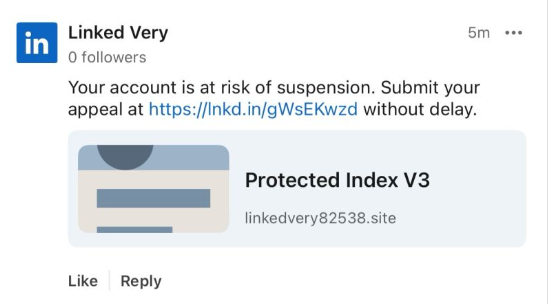
Recently, fake LinkedIn profiles have started posting comment replies claiming that a user has “engaged in activities that are not in compliance” with LinkedIn’s policies and that their account has been “temporarily restricted” until they submit an appeal through a specified link in the comment.
The comments come in different shapes and sizes, but here’s one example we found.
The accounts posting the comments all try to look like official LinkedIn bots and use various names. It’s likely they create new accounts when LinkedIn removes them. Either way, multiple accounts similar to the “Linked Very” one above were reported in a short period, suggesting automated creation and posting at scale.
The same pattern is true for the links. The shortened link used in the example above has already been disabled, while others point directly to phishing sites. Scammers often use shortened LinkedIn links to build trust, making targets believe the messages are legitimate. Because LinkedIn can quickly disable these links, attackers likely test different approaches to see which last the longest.
Here’s another example:
Malwarebytes blocks this last link based on the IP address:
If users follow these links, they are taken to a phishing page designed to steal their LinkedIn login details:
Image courtesy of BleepingComputer
A LinkedIn spokesperson confirmed to BleepingComputer they are aware of the situation:
“I can confirm that we are aware of this activity and our teams are working to take action.”
Stay safe
In situations like this awareness is key—and now you know what to watch for. Some additional tips:
Don’t click on unsolicited links in private messages and comments without verifying with the trusted sender that they’re legitimate.
Always log in directly on the platform that you are trying to access, rather than through a link.
Use a password manager, which won’t auto-fill in credentials on fake websites.
Use a real-time, up-to-date anti-malware solution with a web protection module to block malicious sites.
Cybersecurity risks should never spread beyond a headline. If something looks dodgy to you, check if it’s a scam using Malwarebytes Scam Guard, a feature of our mobile protection products. Submit a screenshot, paste suspicious content, or share a text or phone number, and we’ll tell you if it’s a scam or legit. Download Malwarebytes Mobile Security for iOS or Android and try it today!
Researchers have been tracking a Magecart campaign that targets several major payment providers, including American Express, Diners Club, Discover, and Mastercard.
Magecart is an umbrella term for criminal groups that specialize in stealing payment data from online checkout pages using malicious JavaScript, a technique known as web skimming.
In the early days, Magecart started as a loose coalition of threat actors targeting Magento‑based web stores. Today, the name is used more broadly to describe web-skimming operations against many e‑commerce platforms. In these attacks, criminals inject JavaScript into legitimate checkout pages to capture card data and personal details as shoppers enter them.
The campaign described by the researchers has been active since early 2022. They found a vast network of domains related to a long-running credit card skimming operation with a wide reach.
“This campaign utilizes scripts targeting at least six major payment network providers: American Express, Diners Club, Discover (a subsidiary of Capital One), JCB Co., Ltd., Mastercard, and UnionPay. Enterprise organizations that are clients of these payment providers are the most likely to be impacted.”
Web skimmers usually hook into the checkout flow using JavaScript. They are designed to read form fields containing card numbers, expiry dates, card verification codes (CVC), and billing or shipping details, then send that data to the attackers.
To avoid detection, the JavaScript is heavily obfuscated to and may even trigger a self‑destruct routine to remove the skimmer from the page. This can cause investigations performed through an admin session to appear unsuspicious.
Besides other methods to stay hidden, the campaign uses bulletproof hosting for a stable environment. Bulletproof hosting refers to web hosting services designed to shield cybercriminals by deliberately ignoring abuse complaints, takedown requests, and law enforcement actions.
How to stay safe
Magecart campaigns affect three groups: customers, merchants, and payment providers. Because web skimmers operate inside the browser, they can bypass many traditional server‑side fraud controls.
While shoppers cannot fix compromised checkout pages themselves, they can reduce their exposure and improve their chances of spotting fraud early.
A few things you can protect against the risk of web skimmers:
Use virtual or single‑use cards for online purchases so any skimmed card number has a limited lifetime and spending scope.
Where possible, turn on transaction alerts (SMS, email, or app push) for card activity and review statements regularly to spot unsolicited charges quickly.
Use strong, unique passwords on bank and card portals so attackers cannot easily pivot from stolen card data to full account takeover.
Use a web protection solution to avoid connecting to malicious domains.
You need to set up remote access to a colleague’s computer. You do a Google search for “RustDesk download,” click one of the top results, and land on a polished website with documentation, downloads, and familiar branding.
You install the software, launch it, and everything works exactly as expected.
What you don’t see is the second program that installs alongside it—one that quietly gives attackers persistent access to your computer.
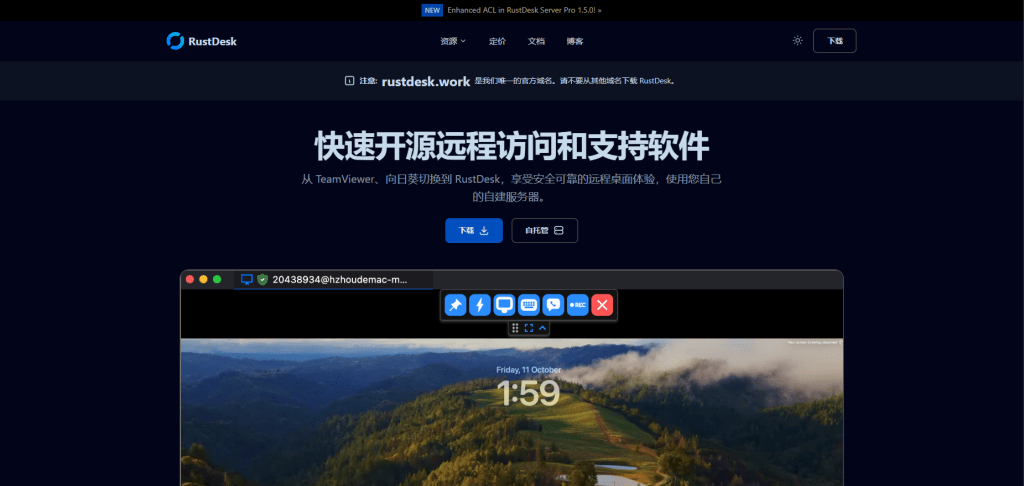
That’s exactly what we observed in a campaign using the fake domain rustdesk[.]work.
The bait: a near-perfect impersonation
We identified a malicious website at rustdesk[.]work impersonating the legitimate RustDesk project, which is hosted at rustdesk.com. The fake site closely mirrors the real one, complete with multilingual content and prominent warnings claiming (ironically) that rustdesk[.]work is the onlyofficial domain.
This campaign doesn’t exploit software vulnerabilities or rely on advanced hacking techniques. It succeeds entirely through deception. When a website looks legitimate and the software behaves normally, most users never suspect anything is wrong.
What happens when you run the installer
The installer performs a deliberate bait-and-switch:
It installs real RustDesk, fully functional and unmodified
It quietly installs a hidden backdoor, a malware framework known as Winos4.0
The user sees RustDesk launch normally. Everything appears to work. Meanwhile, the backdoor quietly establishes a connection to the attacker’s server.
By bundling malware with working software, attackers remove the most obvious red flag: broken or missing functionality. From the user’s point of view, nothing feels wrong.
Inside the infection chain
The malware executes through a staged process, with each step designed to evade detection and establish persistence:
Stage 1: The trojanized installer
The downloaded file (rustdesk-1.4.4-x86_64.exe) acts as both dropper and decoy. It writes two files to disk:
The legitimate RustDesk installer, which is executed to maintain cover
logger.exe, the Winos4.0 payload
The malware hides in plain sight. While the user watches RustDesk install normally, the malicious payload is quietly staged in the background.
Stage 2: Loader execution
The logger.exe file is a loader — its job is to set up the environment for the main implant. During execution, it:
Creates a new process
Allocates executable memory
Transitions execution to a new runtime identity: Libserver.exe
This loader-to-implant handoff is a common technique in sophisticated malware to separate the initial dropper from the persistent backdoor.
By changing its process name, the malware makes forensic analysis harder. Defenders looking for “logger.exe” won’t find a running process with that name.
Stage 3: In-memory module deployment
The Libserver.exe process unpacks the actual Winos4.0 framework entirely in memory. Several WinosStager DLL modules—and a large ~128 MB payload—are loaded without being written to disk as standalone files.
Traditional antivirus tools focus on scanning files on disk (file-based detection). By keeping its functional components in memory only, the malware significantly reduces the effectiveness of file-based detection. This is why behavioral analysis and memory scanning are critical for detecting threats like Winos4.0.
The hidden payload: Winos4.0
The secondary payload is identified as Winos4.0 (WinosStager): a sophisticated remote access framework that has been observed in multiple campaigns, particularly targeting users in Asia.
Once active, it allows attackers to:
Monitor victim activity and capture screenshots
Log keystrokes and steal credentials
Download and execute additional malware
Maintain persistent access even after system reboots
This isn’t simple malware—it’s a full-featured attack framework. Once installed, attackers have a foothold they can use to conduct espionage, steal data, or deploy ransomware at a time of their choosing.
Technical detail: How the malware hides
The malware employs several techniques to avoid detection:
What it does
How it achieves this
Why it matters
Runs entirely in memory
Loads executable code without writing files
Evades file-based detection
Detects analysis environments
Checks available system memory and looks for debugging tools
Prevents security researchers from analyzing its behavior
Checks system language
Queries locale settings via the Windows registry
May be used to target (or avoid) specific geographic regions
Clears browser history
Invokes system APIs to delete browsing data
Removes evidence of how the victim found the malicious site
Hides configuration in the registry
Stores encrypted data in unusual registry paths
Hides configuration from casual inspection
Command-and-control activity
Shortly after installation, the malware connects to an attacker-controlled server:
IP: 207.56.13[.]76
Port: 5666/TCP
This connection allows attackers to send commands to the infected machine and receive stolen data in return. Network analysis confirmed sustained two-way communication consistent with an established command-and-control session.
How the malware blends into normal traffic
The malware is particularly clever in how it disguises its network activity:
Destination
Purpose
207.56.13[.]76:5666
Malicious: Command-and-control server
209.250.254.15:21115-21116
Legitimate: RustDesk relay traffic
api.rustdesk.com:443
Legitimate: RustDesk API
Because the victim installed real RustDesk, the malware’s network traffic is mixed with legitimate remote desktop traffic. This makes it much harder for network security tools to identify the malicious connections: the infected computer looks like it’s just running RustDesk.
What this campaign reveals
This attack demonstrates a troubling trend: legitimate software used as camouflage for malware.
The attackers didn’t need to find a zero-day vulnerability or craft a sophisticated exploit. They simply:
Registered a convincing domain name
Cloned a legitimate website
Bundled real software with their malware
Let the victim do the rest
This approach works because it exploits human trust rather than technical weaknesses. When software behaves exactly as expected, users have no reason to suspect compromise.
The rustdesk[.]work campaign shows how attackers can gain access without exploits, warnings, or broken software. By hiding behind trusted open-source tools, this attack achieved persistence and cover while giving victims no reason to suspect compromise.
The takeaway is simple: software behaving normally does not mean it’s safe. Modern threats are designed to blend in, making layered defenses and behavioral detection essential.
For individuals:
Always verify download sources. Before downloading software, check that the domain matches the official project. For RustDesk, the legitimate site is rustdesk.com—not rustdesk.work or similar variants.
Be suspicious of search results. Attackers use SEO poisoning to push malicious sites to the top of search results. When possible, navigate directly to official websites rather than clicking search links.
Use security software.Malwarebytes Premium Security detects malware families like Winos4.0, even when bundled with legitimate software.
For businesses:
Monitor for unusual network connections. Outbound traffic on port 5666/TCP, or connections to unfamiliar IP addresses from systems running remote desktop software, should be investigated.
Implement application allowlisting. Restrict which applications can run in your environment to prevent unauthorized software execution.
Educate users about typosquatting. Training programs should include examples of fake websites and how to verify legitimate download sources.
Block known malicious infrastructure. Add the IOCs listed above to your security tools.
We don’t just report on threats—we remove them
Cybersecurity risks should never spread beyond a headline. Keep threats off your devices by downloading Malwarebytes today.
California’s privacy regulator has fined a Texas data broker $45,000 and banned it from selling Californians’ personal information after it sold Alzheimer patients’ data. Texan company Rickenbacher Data LLC, which does business as Datamasters, bought and resold the names, addresses, phone numbers, and email addresses of people that suffered from serious health conditions, according to the California Privacy Protection Agency (CPPA).
The CPPA’s final order against Datamasters says that the company maintained a database containing 435,245 postal addresses for Alzheimer’s patients. But it didn’t stop there. Also up for grabs were records for 2,317,141 blind or visually impaired people, and 133,142 addiction sufferers. It also sold records for 857,449 people with bladder control issues.
Health-related data wasn’t the only category Datamasters trafficked in. The company also sold information tied to ethnicity, including so-called “Hispanic lists” containing more than 20 million names, as well as age-based “senior lists” and indicators of financial vulnerability. For example, it sold records of people holding high-interest mortgages.
And if buyers wanted data on other likely customer characteristics and actions, such as who was likely a liberal vs a right-winger, it could give you that, too, thanks to 3,370 “Consumer Predictor Models” spanning automotive preferences, financial activity, media use, political affiliation, and nonprofit activity.
Datamasters offers outright purchase of records from its national consumer database, which it claims covers 114 million households and 231 million individuals. Customers can also buy subscription-based updates too.
California regulators began investigating Datamasters after discovering the company had failed to register as a data broker in the state, as required under California’s Delete Act. The law has required data brokers to register since January 31, 2025.
The company originally denied that it did business in California or had data on Californians. However, that claim collapsed when regulators found an Excel spreadsheet on the website listing 204,218 California student records.
Datamasters first said it had not screened its national database to remove Californians’ data. After getting a lawyer, it changed its story, asserting that it did in fact filter Californians out of the data set. That didn’t convince the CPPA though.
The regulator acknowledged that Datamasters did try to comply with Californian privacy laws, but that it
“lacked sufficient written policies and procedures to ensure compliance with the Delete Act.”
The fine imposed on Datamasters also takes into account that it hadn’t registered on the state’s data broker registry. Data brokers that don’t register are liable for $200 per day in fines, and failing to delete consumer data will incur $200 per consumer per day in fines.
Starting January 1, 2028, data brokers registered in California will also be required to undergo independent third-party compliance audits every three years.
Why selling extra-sensitive customer data is so dangerous
“History teaches us that certain types of lists can be dangerous,”
Michael Macko, the CPPA’s head of enforcement, pointed out.
Research has told us that Alzheimer’s patients are especially vulnerable to financial exploitation. If you think that scammers don’t seek out such lists, think again; criminals were found to have accessed data from at least three data brokers in the past. While there’s no suggestion that Datamasters knowingly sold data to scammers, it seems easy for people to buy data broker lists.
It also doesn’t take a PhD to see why many of these records (which, remember, the company holds about people nationwide) could be especially sensitive in the current US political climate.
There’s a broader privacy issue here, too. While many Americans might assume that the federal Health Insurance Portability and Accountability Act (HIPAA) protects their health data, it only applies to healthcare providers. Amazingly, data brokers sit outside its purview.
So what can you do to protect yourself?
Your first port of call should be your state’s data protection law. California introduced the Data Request and Opt-out Platform (DROP) system this year under the Delete Act. It’s an opt-out system for California residents to make all data brokers on the registry delete data held about them.
If you don’t live in a state that takes sensitive data seriously, your options are more limited. You could move—maybe to Europe, where privacy protections are considerably stronger.
We don’t just report on data privacy—we help you remove your personal information
Cybersecurity risks should never spread beyond a headline. With Malwarebytes Personal Data Remover, you can scan to find out which sites are exposing your personal information, and then delete that sensitive data from the internet.

 Login
Login