Normal view

How Push Notifications Can Betray Your Privacy (and What to Do About It)

16 April 2026 at 18:41

Update April 22, 2026. Apple has reportedly addressed part of the issue with the notification database in iOS 26.4.2 and 18.7.8, released today. With this update, notifications marked for deletion should no longer be stored in the notification database.

A phone’s push notifications can contain a significant amount of information about you, your communications, and what you do throughout the day. They’re important enough to government investigations that Apple and Google now both require a judge’s order to hand details about push notifications over to law enforcement, and even with that requirement Apple shares data on hundreds of users. More recently, we also learned from a 404 Media report that law enforcement forensic extraction tools can unearth the text from deleted notifications, including those from secure messaging tools, like Signal. The good news is that you can mitigate some of this risk. 

There are two points where notifications may betray your privacy: when they’re transmitted over cloud servers and once they land on the device. Let’s start with the cloud. It might seem like push notifications come directly from an app, but they are typically routed through either Apple or Google’s servers first (depending on if you use iOS or Android). According to a letter sent to the Department of Justice by Senator Wyden, the content of those notifications may be visible to Apple and Google, and at the very least the companies collect some metadata about what apps send a notification and when. App providers have to make the decision to hide the content from Apple and Google and implement that functionality; Signal is one app that does this. 

Then, once the notifications land on your phone, depending on your settings, the notification content may be visible on your lock screen without needing to unlock the device. This can be dangerous if you lose your device, someone steals it, or it’s confiscated by law enforcement. 

You may clear notifications after looking at them. But it turns out the content notifications get recorded in your device’s internal storage, which then makes them susceptible to recovery with certain types of forensic tools. Notification content may even persist after the app is deleted, if the OS doesn’t fully purge the app’s notification data. 

We still have a lot of unanswered questions about how the notification databases work on devices. We do not know how long notifications are stored, or whether they’re backed up to the cloud, in which case the cloud provider could get backdoor access to the content of messages if the backups are enabled and not end-to-end encrypted. This may also make backups vulnerable to law enforcement demands for data. 

Which is all to say that there are myriad ways that law enforcement can access the content or metadata of push notifications. Let’s fix that.

Consider the Strongest Notification Protections for Your Secure Messaging Apps

Secure chat tools are designed to keep the content of the messages safe inside the app. So, for secure chat apps like WhatsApp and Signal, that means the company that makes those apps cannot see the content of your messages, and they’re only accessible on your and your recipients’ devices. Once messages land on a device, it’s still important to consider some privacy precautions, particularly with notifications. 

Signal
Signal offers three levels of information to include in notifications, all which are pretty self explanatory:

  • Name, Content, and Actions (Name and message on Android) shows the entirety of a message as well as who sent it (on iPhone you can also slide to reply, mark as read, or call back). 
  • Name only only shows the name of the sender. 
  • No Name or Content (No name or message on Android) will only show that you have a message from Signal, not who sent it or what it’s about. 

To change your settings:

  • On iPhone: Tap your profile picture, then Settings > Notifications > Show.
  • On Android: Tap your profile picture, then Notifications > Show

WhatsApp
WhatsApp only has one option for this, and it’s currently limited to iPhone, but you can at least tell the app not to include the content of a message in the notification:

  • Open WhatsApp for iPhone, tap the “You” bar, then Notifications, and disable the Show preview option.

Check your other apps to see if they offer similar settings.

Limit Your Notifications Device-Wide

Since Apple and Google manage push notifications for their respective devices, they also have some visibility into certain data. Push notification data can include certain types of metadata, like which app sent a notification and when, as well as the account ID associated with the phone. In some cases, Apple and Google may have access to unencrypted content, including the content of the text in a notification or other information from the app itself. 

For most app notifications, there’s no simple way to easily figure out what metadata might be gleaned from a notification, or if the notification is unencrypted or not. But some app developers have described details along these lines. For example, Signal president Meredith Whittaker explained on social media how the Signal app handles notifications entirely on-device. Searching online for an app name along with “notification privacy,” “notification encryption” or “notification metadata” may help answer your questions, or you may need to dig around in support forums for the app.

 push notifications for Signal NEVER contain sensitive unencrypted data & do not reveal the contents of any Signal messages or calls-not to Apple, not to Google, not to anyone but you & the people you're talking to. 1/ In Signal, push notifications simply act as a ping that tells the app to wake up. They don't reveal who sent the message or who is calling (not to Apple, Google, or anyone). Notifications are processed entirely on your device. This

It’s also good to reconsider whether any app should be sending you notifications to begin with. Aside from a potential decrease in the number of distractions you endure throughout the day, or the level of chaos on display on your lockscreen, limiting the apps that can send notifications and what content is visible in them can improve your privacy with respect to the sorts of metadata that may be gathered by the companies, as well as any content that may be viewable if someone has physically accessed your device.

To check and change your settings on iPhone

  • Open Settings > Notifications.
  • On the Show Previews option, you can choose whether to show the content of notifications on the lock screen, “Always,” which doesn’t require unlocking the device, “When Unlocked,” which does, and “Never,” which means notifications won’t have any details, just that you have a notification in an app. 
  • Alternatively, you can scroll down and change these settings per app. Just tap the app name, then the Show Previews menu, and choose how you’d like them to appear. Or, if you’ve decided you don’t want notifications from that app at all, uncheck the Allow Notifications option.

To check and change your settings on Android
The core version of Android relies on app developers to develop specific settings more than controlling them on a platform-wide level.

  • Open Settings > Notifications > App notifications to disable notifications from any app completely. Some apps may also offer internal notification options for specific types of notices, like new messages, that you can control in the app itself. Tap an app name, then tap the Addition settings in the app option to potentially customize it more.
  • You can also experiment with the sensitive content setting. This is up to the developer to set properly, but when done so, most notifications will require at least unlocking the device to see them. Open Settings > Notifications > Notifications on lock screen and disable “Show sensitive content.”

Control What Notifications AI Tools Can Access

In an attempt to make notifications easier to skim, both Android and iOS offer optional ways to get notification summaries using their AI tools that summarize the content of notifications. On an individual app level, WhatsApp offers this as well. Some of these summarization tools, like Apple’s, run on the device, while others, like WhatsApp’s, do not. This can all be a lot to keep track of, and sending data off device may create some level of risk for some messages.

Since this is a bit more complicated, we have another blog post that walks through the steps to take to protect messaging from accidentally ending up in AI tools built into Apple and Google's devices. For WhatsApp specifically, we have a blog detailing when you might want to turn on the app’s “Advanced Chat Privacy” feature, which can disable summaries for both yourself and others in the chat.

Balancing security, privacy, and usability with something like push notifications is a complicated task. At the very least, Apple and Google should better ensure that the content of these notifications isn’t transmitted over their servers in plain text. The companies need to also make sure that device operating systems don’t back up the notification database to the cloud, and when an app is deleted, that all notification data is purged.

We appreciate that apps like Signal allow you to control what’s visible with notifications on a per-app basis, and we’d like to see this level of granularity of choices in other secure messaging tools, like WhatsApp. Likewise, more apps should handle push notifications similarly to the way Signal does, where a ping is sent to wake up the app to check for messages, and the content of that message is never sent across servers.

JanelaRAT: a financial threat targeting users in Latin America

By: GReAT
13 April 2026 at 11:00

Background

JanelaRAT is a malware family that takes its name from the Portuguese word “janela” which means “window”. JanelaRAT looks for financial and cryptocurrency data from specific banks and financial institutions in the Latin America region.

JanelaRAT is a modified variant of BX RAT that has targeted users since June 2023. One of the key differences between these Trojans is that JanelaRAT uses a custom title bar detection mechanism to identify desired websites in victims’ browsers and perform malicious actions.

The threat actors behind JanelaRAT campaigns continuously update the infection chain and malware versions by adding new features.

Kaspersky solutions detect this threat as Trojan.Script.Generic and Backdoor.MSIL.Agent.gen.

Initial infection

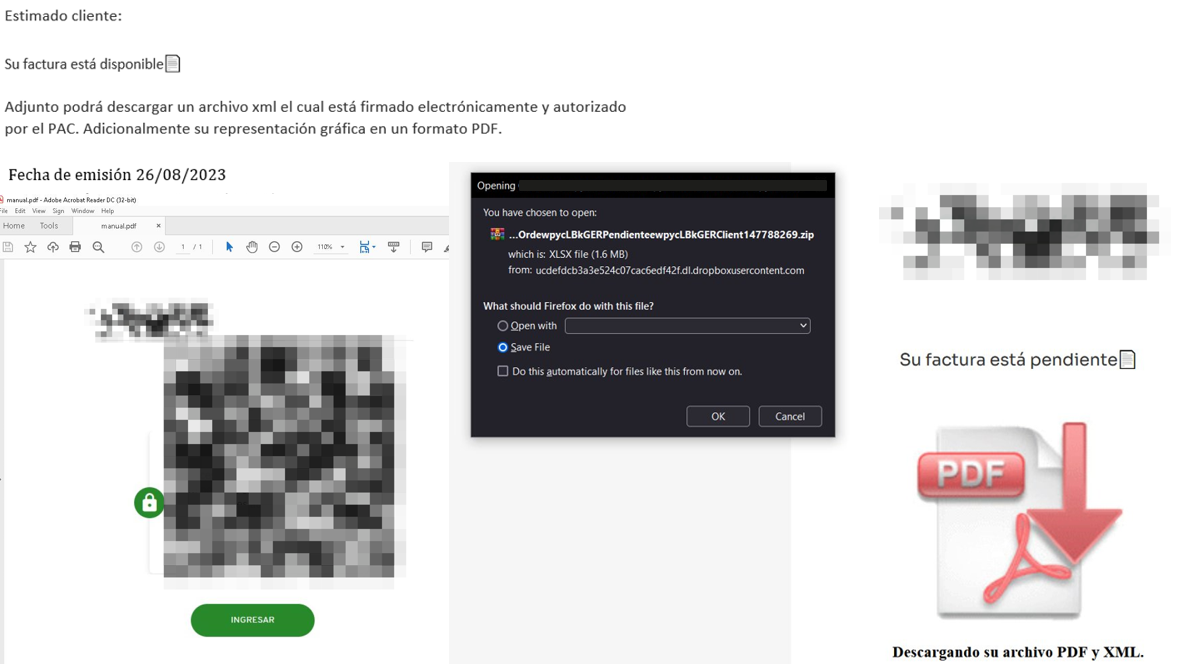
JanelaRAT campaigns involve a multi-stage infection chain. It starts with emails mimicking the delivery of pending invoices to trick victims into downloading a PDF file by clicking a malicious link. Then the victims are redirected to a malicious website from which a compressed file is downloaded.

Malicious email used in JanelaRAT campaigns

Malicious email used in JanelaRAT campaigns

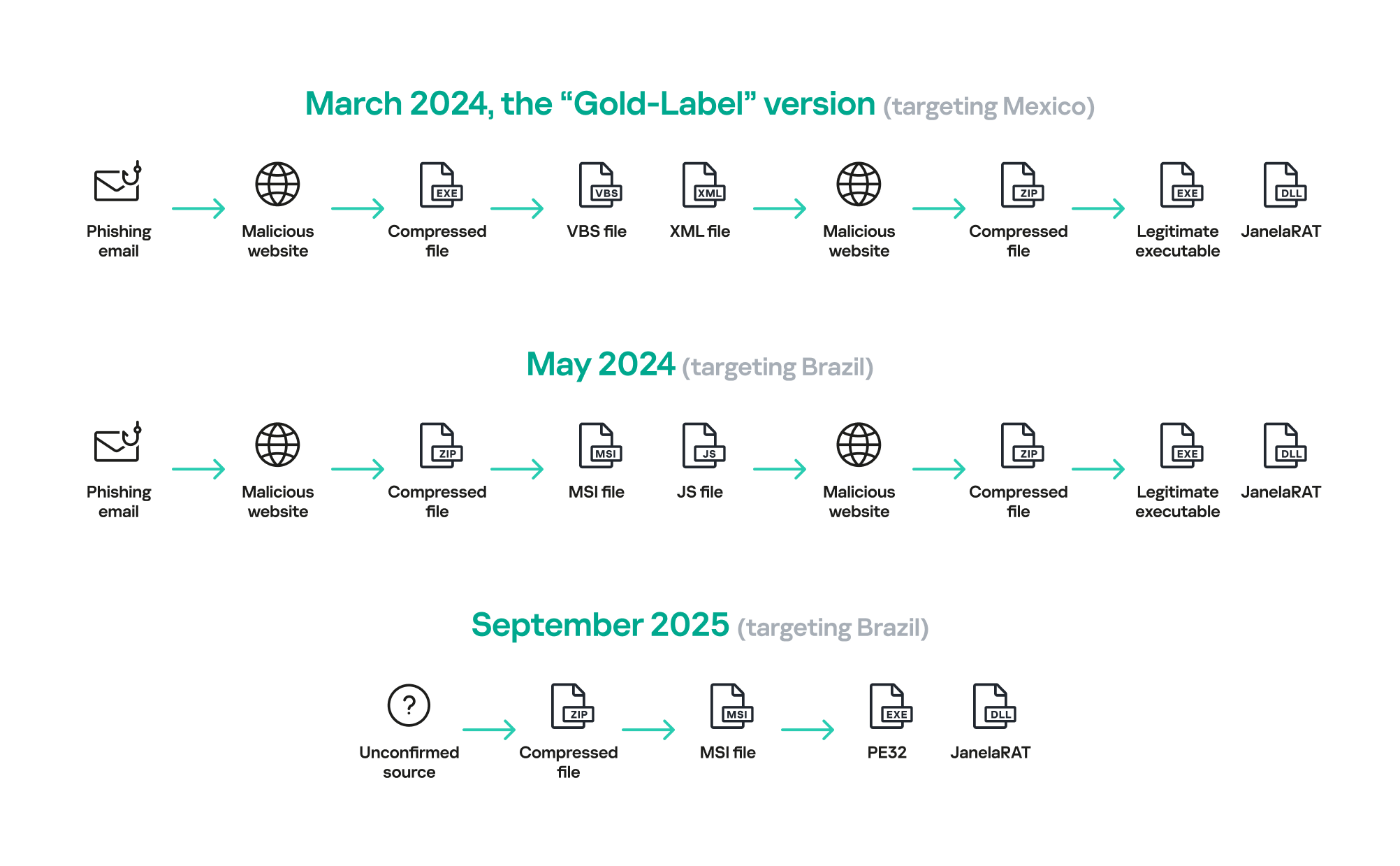
Throughout our monitoring of these malware campaigns, the compressed files have typically contained VBScripts, XML files, other ZIP archives, and BAT files. They ultimately lead to downloading a ZIP archive that contains components for DLL sideloading and executing JanelaRAT as the final payload.

However, we have observed variations in the infection chains depending on the delivered version of the malware. The latest observed campaign evolved by integrating MSI files to deliver a legitimate PE32 executable and a DLL, which is then sideloaded by the executable. This DLL is actually JanelaRAT, delivered as the final payload.

Based on our analysis of previous JanelaRAT intrusions, the updates in the infection chain represent threat actors’ attempts to streamline the process, with a reduced number of malware installation steps. We’ve observed a logical sequence in how components, such as MSI files, have been incorporated and adapted over time. Moreover, we have observed the use of auxiliary files — additional components that aid in the infection — such as configuration files that have been changing over time, showing how the threat actors have adapted these infections in an effort to avoid detection.

JanelaRAT infection flow evolution

JanelaRAT infection flow evolution

Initial dropper

The MSI file acts as an initial dropper designed to install the final implant and establish persistence on the system. It obfuscates file paths and names with the objective to hinder analysis. This code is designed to create several ActiveX objects to manipulate the file system and execute malicious commands.

Among the actions taken, the MSI defines paths based on environment variables for hosting binaries, creating a startup shortcut, and storing a first-run indicator file. The dropper file checks for the existence of the latter and for a specific path, and if either is missing, it creates them. If the file exists, the MSI file redirects the user to an external website as a decoy, showing that everything is “normal”.

The MSI dropper places two files at a specified path: the legitimate executable nevasca.exe and the PixelPaint.dll library, renaming them with obfuscated combinations of random strings before relocating. An LNK shortcut is created in the user’s Startup folder, pointing to the renamed nevasca.exe executable, ensuring persistence. Finally, the nevasca.exe file is executed, which in turn loads the PixelPaint.dll file that is JanelaRAT.

Malicious implant

In this case, we analyzed JanelaRAT version 33, which was masqueraded as a legitimate pixel art app. Similar to other malware versions, it was protected with Eazfuscator, a common .NET obfuscation tool. We have also seen previous JanelaRAT samples that used the ConfuserEx obfuscator or its custom builds. The malware uses Control Flow Flattening method and renames classes and variables to make the code unreadable without deobfuscation.

JanelaRAT monitors the victim’s activity, intercepts sensitive banking interactions, and establishes an interactive C2 channel to report changes to the threat actor. While screen monitoring is also present, the core functionality focuses on financial fraud and real-time manipulation of the victim’s machine. The malware collects system information, including OS version, processor architecture (32-bit, 64-bit, or unknown), username, and machine name. The Trojan evaluates the current user’s privilege level and assigns different nicknames for administrators, users, guests, and an additional one for any other role.

The malware then retrieves the current date and constructs a beacon to register the victim on the C2 server, along with the malware version. To prevent multiple instances, the malware creates the mutex and exits if it already exists.

String encryption

All JanelaRAT samples utilize encrypted strings for sending information to the C2 and obfuscating embedded data. The encryption algorithm remains consistent across campaigns, combining base64 encoding with Rijndael (AES). The encryption key is derived from the MD5 hash of a 4-digit number and the IV is composed of the first 16 bytes of the decoded base64 data.

C2 communication and command handling

After initialization, JanelaRAT establishes a TCP socket, configuring callbacks for connection events and message handling. It registers all known message types, executing specific system tasks based on the received message.

Following socket initialization, the malware launches two background routines:

  1. User inactivity and session tracking
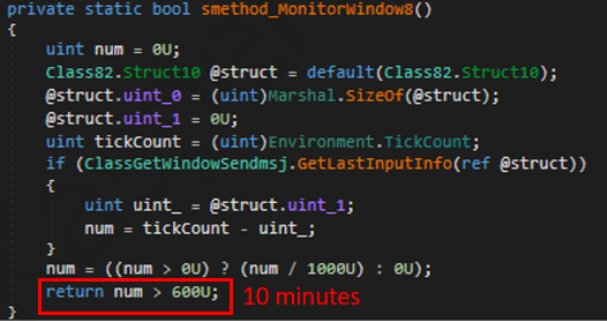
    This routine activates timers and launches secondary threads, including an internal timer and a user inactivity monitor. The malware determines if the victim’s machine has been inactive for more than 10 minutes by calculating the elapsed time since the last user input. If the inactivity period exceeds 10 minutes, the malware notifies the C2 by sending the corresponding message. Upon user activity, it notifies the threat actor again. This makes it possible to track the user’s presence and routine to time possible remote operations.

    Timer that looks for 10 minutes of inactivity

    Timer that looks for 10 minutes of inactivity

  2. Victim registration and further malicious activity
    This routine is launched immediately after the socket setup. It triggers two subroutines responsible for periodic HTTP beaconing and downloading additional payloads.
    1. The first subroutine executes a PowerShell downloaded from a staging server during post-exploitation. Its main objective is to establish persistence by downloading the PixelPaint.dll file once again. The routine then builds and executes periodic HTTP requests to the C2, reporting the malware’s version and the victim machine’s security environment. It loops continuously as long as a specific local file does not exist, ensuring repeated telemetry transmission. The file was not observed being extracted or created by the malware itself; rather, it appears to be placed on the system by the threat actor during other post-exploitation activities. Based on previous incidents, this file likely contains instructions for establishing persistence.

      This JanelaRAT version constructs a second C2 URL for beaconing, using several decrypted strings and following a pattern that uses different parameters to report information about new victims:

      <C2Domain>?VS=<malwareversion>&PL=<profilelevel>&AN=<presenceofbankingsoftware>

      We have observed constant changes in the parameters across campaigns. A new parameter “AN” was introduced in this version. It is used to detect the presence of a specific process associated with banking security software. If such software is found on the victim’s device, the malware notifies the threat actor.

      Parameter Description
      VS JanelaRAT version
      PL OFF by default
      AN Yes or No depending on whether banking security software process exists
    2. The second subroutine is responsible for monitoring the user’s visits to banking websites and reporting any activity of interest to the threat actor. JanelaRAT 33v is specifically engineered to target Brazilian financial institutions. However, we have also observed other versions of the malware targeting other specific countries in the region, such as the “Gold-Label” version targeting banking users in Mexico that we described earlier.

      This subroutine creates a timer to enable an active system monitoring cycle. During this cycle, the malware obtains the title of the active window and checks if it matches entries of interest using a hardcoded but obfuscated list of financial institutions. Although the threat actors behind JanelaRAT primarily focus on one country as a target, the list of financial institutions is constantly updated.

      If a title bar matches one of the listed targets, the malware waits 12 seconds before establishing a dedicated communication channel to the C2. This channel is used to execute malicious tasks, including taking screenshots, monitoring keyboard and mouse input, displaying messages to the user, injecting keystrokes or simulating mouse input, and forcing system shutdown.

      To perform these actions, the malware uses a dedicated C2 handler that interprets incoming commands from the C2. Notably, 33v supports live banking session hijacking, not just credential theft.

      Action Performed Description
      Capture desktop image Send compressed screenshots to the C2
      Specific screenshots Crop specific screen regions and exfiltrate images
      Overlay windows Display images in full-screen mode, limit user interactions, and mimic bank dialogs to harvest credentials
      Keylogging Keystroke capture
      Simulate keyboard Inject keys such as DOWN, UP, and TAB to navigate or trigger new elements
      Track mouse input Move the cursor, simulate clicks, and report the cursor position
      Display message Show message boxes (custom title, text, buttons, or icons)
      System shutdown Execute a forced shutdown sequence
      Command execution Run CMD or PowerShell scripts/commands
      Task Manager
      manipulation
      Launch Task Manager, find its window, and hide it to prevent discovery by the user
      Check for banking security software process Detect the presence of anti-fraud systems
      Beaconing Send host information (malware version, profile, presence of banking software)
      Toggle internal modes Enable and disable modes such as screenshot flow, key injection, or overlay visibility
      Anti-analysis Detect sandbox or automation tools

C2 infrastructure

Unlike other versions, this variant rotates its C2 server daily. Once a title bar matches the one in the list, the software dynamically constructs the C2 channel domain by concatenating an obfuscated string, the current date, and a suffix domain related to a legitimate dynamic DNS (DDNS) service. This communication is established using port 443, but not TLS.

Decoy overlay system

This version of JanelaRAT implements a decoy overlay system designed to capture banking credentials and bypass multi-factor authentication. When a target banking window is detected, the malware requests further instructions from the C2 server. The C2 responds with a command identifier and a Base64-encoded image, which is then displayed as a full-screen overlay window mimicking legitimate banking or system interfaces. The malware ensures the fake window completely covers the screen and limits the victim’s interaction with the system.

The malware blocks the victim’s interaction by displaying modal dialogs. Each modal dialog corresponds to a specific operation, such as password capture, token/MFA capture, fake loading screen, fake Windows update full-screen modal and more. The malware resizes the overlay, scans multiple screens, and loads deceptive elements to distract the user or temporarily hide legitimate application windows.

Among other fake elements, the malware displays fake Windows update notifications, often accompanied by messages in Brazilian Portuguese, such as:

  • “Configuring Windows updates, please wait.”
  • “Do not turn off your computer; this could take some time.”

When a message command is received from the operator, the malware constructs a custom message box based on parameters sent from the server. These parameters include the message title, text content, button type (e.g., OK, Yes/No), and icon type (e.g., Warning, Error). The malware then creates a maximized message box positioned at the top of the screen, ensuring it captures user focus and blocks the visibility of other windows, mimicking a system or security alert.

An obfuscated acknowledgement string is sent back to the C2 to confirm successful execution of this task.

Anti-analysis techniques

In addition to the conditional behavior based on whether the process of banking security software is detected, the malware includes anti-analysis routines and computer environment checks, such as sandbox detection through the Magnifier and MagnifierWindow components. These components are used to determine if accessibility tools are active on the infected computer indicating a possible malware analysis environment.

Persistence

The malware establishes persistence by writing a command script into the Windows Startup directory. This script forces the execution chain to run at each user logon enabling malicious activity without triggering privilege escalation prompts. The script is executed silently to evade user awareness.

This method is either an alternative or a supplement to the persistence method previously described in the subroutines responsible for periodic HTTP beaconing section.

Victimology

Consistent with previous intrusions and campaigns, the primary targets of the threat actors distributing JanelaRAT are banking users in Latin America, with specific focus on users of financial institutions in Brazil and Mexico.

According to our telemetry, in 2025 we detected 14,739 attacks in Brazil and 11,695 in Mexico related to JanelaRAT.

Conclusions

JanelaRAT remains an active and evolving threat, with intrusions exhibiting consistent characteristics despite ongoing modifications. We have tracked the evolution of JanelaRAT infections for some time, observing variations in both the malware itself and its infection chain, including targeted variants for specific countries.

This variant represents a significant advancement in the actor’s capabilities, combining multiple communication channels, comprehensive victim monitoring, interactive overlays, input injection, and robust remote control features. The malware is specifically designed to minimize user visibility and adapt its behavior upon detection of anti-fraud software.

To mitigate the risk of communication with the C2 infrastructure utilizing similar evasive techniques, we recommend that defenders block dynamic DNS services at the corporate perimeter or internal DNS resolvers. This will disrupt the communication channels used by JanelaRAT and similar threats.

Indicators of compromise

808c87015194c51d74356854dfb10d9e         MSI Dropper
d7a68749635604d6d7297e4fa2530eb6        JanelaRAT
ciderurginsx[.]com         Primary C2

Yikes, Encryption’s Y2K Moment is Coming Years Early

9 April 2026 at 23:32

Google moved up its estimated deadline for quantum preparedness in cryptography to 2029—only 33 months from now. That’s earlier than previous deadlines, and they proposed the new post-quantum migration deadline because of two new papers that comprise a big jump in the state of the technology. It’s ahead of schedule, but not altogether unexpected. Cryptographers and engineers have been working on this for years, and as the deadline gets closer, it’s not surprising to see more precise timeline estimates come up.

The preparation for the Y2K bug is not a perfect analogy. Like Y2K, if systems are not updated in time, anyone with a powerful enough quantum computer will be able to more easily insert malware into the core systems of a computer and fake authentication to allow impersonation merely by observing network traffic. These are the threats whose mitigation timelines have been moved up.

But unlike Y2K, there’s a second sort of attack that we already need to be prepared for: quantum computers will be able to decrypt years of captured messages sent over encrypted messaging platforms shared any time before those platforms updated to quantum-proof encryption. That type of attack has been the main focus of engineering efforts so far and mitigation is well on its way, since anything before the upgrade might eventually be compromised.

Fortunately, not all cryptography is broken by quantum computers. Notably, symmetric encryption is quantum resistant. That means that if you have disk encryption turned on, you shouldn’t have to worry about quantum computers breaking into your phone, as long as your system’s keys are long enough. The problem is how you get the keys to do that encryption, and how you authenticate software on your device and in the cloud.

Engineers: Time to Lock In

For those whose work touches on any sort of cryptographic deployment, you’re hopefully already working on the post-quantum transition. If not, you really should be; there are quite a few relevant posts and updates with more information about what this news means for you. Your key agreement systems should be upgraded soon if they’re not already because of store-now-decrypt-later attacks. Now it’s time to prepare for authentication attacks on forged signatures as well.

In some cases, you may need to wait on others to finish their work first. If you’re using NGINX to host websites on Ubuntu, for example, the security settings you need to upgrade key agreement were just released in version 26.04. Updates are rolling out, so keep checking in and upgrade your systems as soon as you’re able to.

Users: Stay Updated, Check on Your Chats

But if you’re not in any position to be updating software or hardware, there may be some additional steps you can take to make sure you're as protected as possible. You’ll want to get the latest post-quantum protections as soon as they're available, so if you don't already have a habit of applying software updates in a timely manner, now’s a good time to start.

If you want to know if the website you’re using or the encrypted messaging app you’re chatting over will leak its data in a few years to anyone storing traffic now, you can search for its name with the word "quantum." The engineers are usually pretty proud of their work and have announced their post-quantum support (like what we’ve seen from Signal and iMessage). If you can’t find that information, you may want to have extra consideration for what you say over the internet, or switch the tools you're using. Those are the big areas to worry about now, before quantum computers are actually here, because they could result in the mass leakage of old messages.

The new deadline means that some technologies are simply not going to make it in time and will have to be left by the wayside, like trusted execution environments (TEEs), due to the slower speed of hardware deployments. TEEs are how companies do private processing on user data in the cloud, and they’re particularly relevant to AI offerings. 

Even now, though they offer more protection than processing data in the clear, TEEs are not as secure as homomorphic encryption or doing the processing on device. Post-quantum, the security level gets much closer to computation on cleartext, and even with strong user controls, that makes it way too easy to accidentally backdoor your own encrypted chats. If you’re worried about the contents of messages in an encrypted chat being exposed, you’ll probably want to completely avoid using AI features that might leak that content, such as summarization of recent chat history and notifications, and reply composition assistance. 

How’s the Transition Going So Far?

The work to update the world to post-quantum is well on its way. NIST finalized the standards for post-quantum cryptographic algorithms back in 2024. The larger platforms, websites, and hosting providers have already updated their algorithms, so even now, you’re probably already using post-quantum algorithms to access some of the internet. Measurements vary pretty widely, but up to about 4 in 10 websites currently support a post-quantum key exchange.

There’s still some work to be done in figuring out how to make the needed changes—for example, the way you find out a website’s private key to make HTTPS possible is being reworked to make room for larger signatures. Some technologies are just coming to market, like the post-quantum root of trust available now in some Chromebooks. In practice, this means that as you think about replacing your current devices in the next few years, you may want to check if you’re picking up hardware that has post-quantum support, if those specific protections are required for your threat model.

For the areas that still need updating, how much can we expect to actually get ready by the new deadline? It’s likely that not every cryptographically-capable device and deployment will be ready in time, and hardware with hard-coded certificates will probably be the last to update. We saw that happen when SHA-1 was deprecated; Point of Sale systems in particular were late adopters. While governments and large companies with quantum computers may not be interested in stealing money from cash registers, they will be interested in accessing secrets about people’s private lives. That’s why it’s so important that everyone does their part to upgrade, to protect the details of private communications and browsing. 

And there’s a good chance that older devices that won’t receive quantum-resistant updates were probably vulnerable to some other attack already. Quantum computation is just one type of attack on cryptography that’s notable for the scale of migration required, and how every public-key cryptosystem and authentication scheme has to do the work to prepare. That’s not a difference in kind, it’s a difference in scale, and some systems will inevitably be left behind.

Quantum preparedness hits different industries and services in different ways, but services that handle communications and financial information are particularly susceptible to risk, and need to act quickly to protect the privacy and security of billions of people.

EU Parliament Blocks Mass-Scanning of Our Chats—What's Next?

7 April 2026 at 21:24

The EU’s so-called Chat Control plan, which would mandate mass scanning and other encryption breaking measures, has had some good news lately. The most controversial idea, the forced requirement to scan encrypted messages, was given up by EU member states. And now, another win for privacy: the EU Parliament has dealt a real blow to voluntary mass-scanning of chats by voting to not prolong an interim derogation from e-Privacy rules in the EU. These rules allowed service providers, temporarily, to scan private communication.  

But no one should celebrate just yet. We said there is more to it, and voluntary scanning is a key part. Unlike in the U.S., where there is no comprehensive federal privacy law, the general and indiscriminate scanning of people’s messages is not legal in the EU without a specific legal basis. The e-Privacy derogation law, which gave (limited) cover for such activities, has now expired. Does that mean mass scanning will stop overnight?  

Not really. 

Companies have continued similar scanning practices during past gaps. Google, Meta, Microsoft, and Snap have already signaled in a joint statement to “continue to take voluntary action on our relevant Interpersonal Communication Services.” Whether this indicates continued scanning of our private communication is not entirely clear, but what is clear is that such activity would now risk breaching EU law. Then again, lack of compliance with EU data protection and privacy rules is nothing new for big tech in Europe. 

Most importantly, the “Chat Control” proposal for mandatory detection of child abuse material (CSAM) is still alive and being negotiated. It has shifted the focus toward so-called risk mitigation measures, such as problematic age verification and voluntary activities. If platforms are expected to adopt these as part of their compliance, they risk no longer being truly voluntary. While mass scanning may be gone on paper, some broader concerns remain.  

So, where does this leave us? The immediate priority is to make sure the expired exception for mass scanning is not revived. At the same time, lawmakers need to pull the teeth from the currently negotiated Chat Control proposal by narrowing risk mitigation measures. This means ensuring that age verification does not become a default requirement and “voluntary activities” are not turned into an expectation to scan our communications.   

As we said before, this is a zombie proposal. It keeps coming back and must not be allowed to return through the back door. 

Coruna: the framework used in Operation Triangulation

26 March 2026 at 09:00

Introduction

On March 4, 2026, Google and iVerify published reports about a highly sophisticated exploit kit targeting Apple iPhone devices. According to Google, the exploit kit was first discovered in targeted attacks conducted by a customer of an unnamed surveillance vendor. It was later used by other attackers in watering-hole attacks in Ukraine and in financially motivated attacks in China. Additionally, researchers discovered an instance with the debug version of the exploit kit, which revealed the internal names of the exploits and the framework name used by its developers — Coruna. Analysis of the kit showed that it relies on the exploitation of many previously patched vulnerabilities and also includes exploits for CVE-2023-32434 and CVE-2023-38606. These two vulnerabilities particularly caught our attention because they had been first discovered as zero-days used in Operation Triangulation.

Operation Triangulation is a complex mobile APT campaign targeting iOS devices. We discovered it while monitoring the network traffic of our own corporate Wi-Fi network. We noticed suspicious activity that originated from several iOS-based phones. Following the investigation, we learned that this campaign employed a sophisticated spyware implant and multiple zero-day exploits. The investigation lasted for over six months, during which we disclosed our findings in connection to the attack. Kaspersky GReAT experts also presented these findings at the 37th Chaos Communication Congress (37C3).

Although all the details of both CVE-2023-32434 and CVE-2023-38606 have long been publicly available, and other researchers have developed their own exploits without ever seeing the Triangulation code, we decided to closely investigate the exploits used in Coruna. Some of the exploit kit distribution links provided by Google remained active at the time the report was published, which allowed us to collect, decrypt, and analyze all components of Coruna.

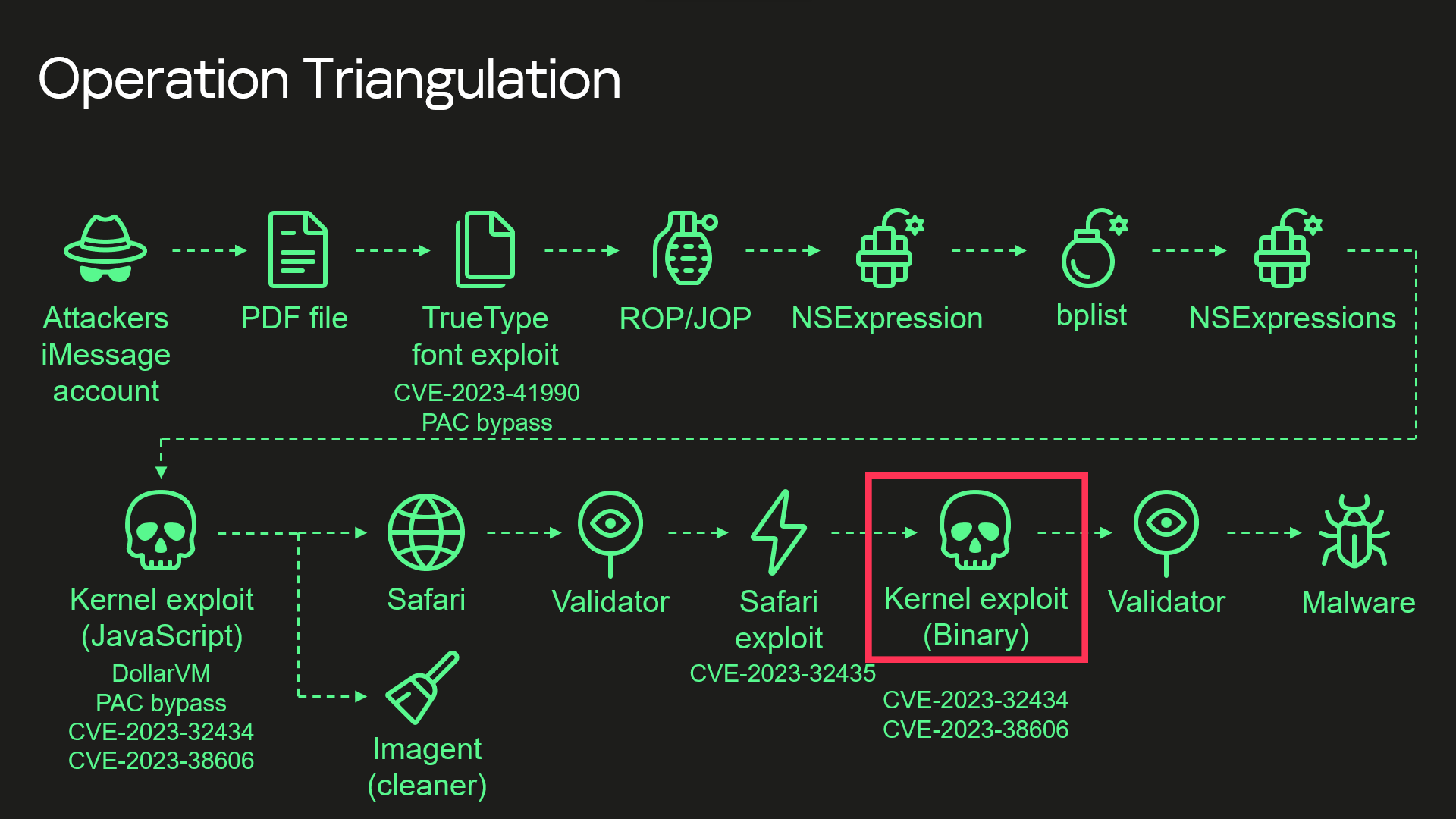
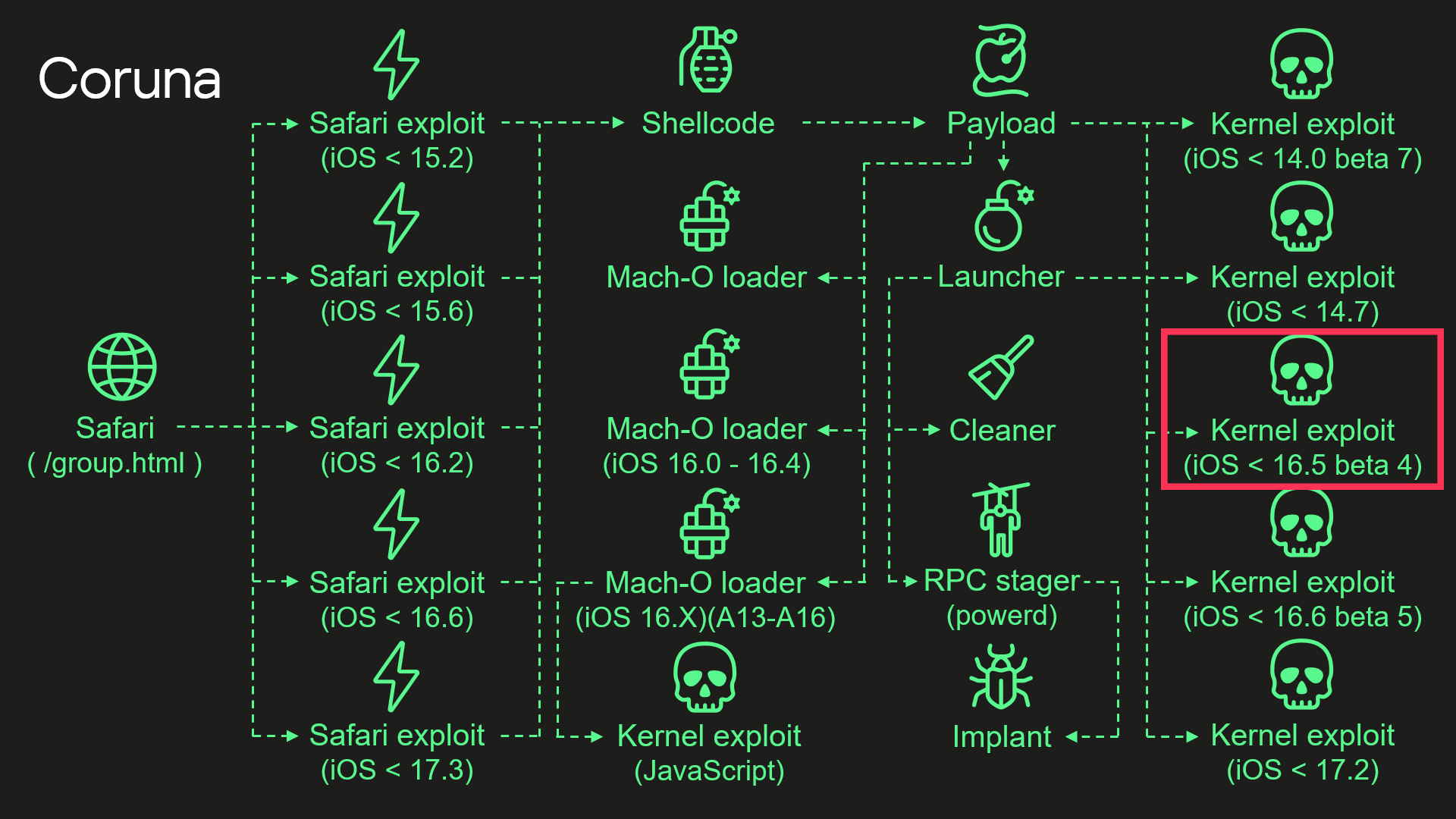
During our analysis, we discovered that the kernel exploit for CVE-2023-32434 and CVE-2023-38606 vulnerabilities used in Coruna, in fact, is an updated version of the same exploit that had been used in Operation Triangulation. The images below illustrate a high-level overview of the two attack chains. The exploit in question is highlighted with a red rectangle.

Attack chain of Operation Triangulation (simplified)

Attack chain of Operation Triangulation (simplified)

Attack chain of Coruna (simplified)

Attack chain of Coruna (simplified)

Moreover, we discovered that Coruna includes four additional kernel exploits that we had not seen used in Operation Triangulation, two of which were developed after the discovery of Operation Triangulation. All of these exploits are built on the same kernel exploitation framework and share common code. Code similarities from kernel exploits can also be found in other components of Coruna. These findings led us to conclude that this exploit kit was not patchworked but rather designed with a unified approach. We assume that it’s an updated version of the same exploitation framework that was used — at least to some extent — in Operation Triangulation.

Technical details

While we continue to investigate all exploits and vulnerabilities used by Coruna, this post provides a high-level overview of the exploit kit and attack chain.

Safari

Exploitation begins with a stager that fingerprints the browser and selects and executes appropriate remote code execution (RCE) and pointer authentication code (PAC) exploits depending on the browser version. It also contains a URL to an encrypted file with information about all available packages containing exploits and other components. The stager also includes a 256-bit key used to decrypt it. The URL and decryption key are passed to a payload embedded in PAC exploits.

Payload

The payload is responsible for initiating the exploitation of the kernel. After initialization, the payload first downloads a file with information about other available components. To extract it, the payload performs several steps processing multiple file formats.

First, the downloaded file is decrypted using the ChaCha20 stream cipher. Decryption yields a container with the magic number 0xBEDF00D, which stores LZMA-compressed data.

The file format used by the exploit kit to store compressed data

Offset Field
0x00 Magic number (0xBEDF00D)
0x04 Decompressed data size
0x08 LZMA-compressed data

The decompressed data presents another container with the magic number 0xF00DBEEF. This file format is used in the exploit kit to store and retrieve files by their IDs.

The file format used by the exploit kit to store files

Offset Field
0x00 Magic number (0xF00DBEEF)
0x04 Number of entries
0x08 Entry[0].File ID
0x0C Entry[0].Status
0x10 Entry[0].File offset
0x14 Entry[0].File size

We provide a description of all possible File ID values below. At this stage, when the payload gathers information about all available file packages, this container holds only one file, and its File ID is 0x70000.

Finally, we get to the file with information about all available file packages. It starts with the magic value 0x12345678. The exploit kit uses this file format to obtain URLs and decryption keys for additional components that need to be downloaded.

The file format used by the exploit kit to store information about file packages

Offset Field
0x00 Magic number (0x12345678)
0x04 Flags
0x08 Directory path
0x108 Number of entries
0x10C Entry[0].Package ID
0x110 Entry[0].ChaCha20 key
0x130 Entry[0].File name

The components required for exploiting a targeted device are selected using the Package ID. Its high byte specifies the package type and required hardware. We’ve seen the following package types:

  • 0xF2 – exploit for ARM64,
  • 0xF3 – exploit for ARM64E,
  • 0xA2 – Mach-O loader for ARM64,
  • 0xA3 – Mach-O loader for ARM64E,
  • 2 – implant for ARM64,
  • 0xE2 – implant for ARM64E.

The payload code also supports additional package types, such as 0xF1, an exploit for older ARM devices that do not support 64-bit architecture. Interestingly, however, the files for such exploits are missing.

Other bytes of the Package ID define the supported firmware version and CPU generation.

Some of the observed Package IDs (those with unique content)

Package ID Description
0xF3300000 Kernel exploit (iOS < 14.0 beta 7) and other components
0xF3400000 Kernel exploit (iOS < 14.7) and other components
0xF3700000 Kernel exploit (iOS < 16.5 beta 4) and other components
0xF3800000 Kernel exploit (iOS < 16.6 beta 5) and other components
0xF3900000 Kernel exploit (iOS < 17.2) and other components
0xA3030000 Mach-O loader (iOS 16.X) (A13 – A16)
0xA3050000 Mach-O loader (iOS 16.0 – 16.4)

The files inside these packages are also stored in encrypted and compressed 0xF00DBEEF containers, but this time compression is optional and is determined by the second bit in the Flags field. Different packages contain different sets of files. A description of all possible File IDs is given in the table below.

Observed File IDs

File ID Description
0x10000 Implant
0x50000 Mach-O loader (default)
0x70000 List of additional components
0x70005 Launcher config
0x80000 Launcher in 0xF2/0xF3 packages, or Mach-O loader in 0xA2/0xA3
0x90000 Kernel exploit
0x90001 Kernel exploit (for Mach-O loader)
0xA0000 Logs cleaner
0xA0001 Mach-O loader component
0xA0002 Mach-O loader component
0xF0000 RPC stager

After downloading the necessary components, the payload begins executing kernel exploits, Mach-O loaders, and the malware launcher. The payload selects an appropriate Mach-O loader based on the firmware version, CPU, and presence of the iokit-open-service permission.

Kernel exploits

We analyzed all five kernel exploits from the kit and discovered that one of them is an updated version of the same exploit we discovered in Operation Triangulation. There are many small changes, but the most noticeable are as follows:

  • The code takes into account more values ​​from XNU version strings, allowing for more accurate version checking.
  • Added a check for iOS 17.2. We assume that this was the latest version of iOS at the time of development (released in December 2023).
  • Added checks for newer Apple processors: A17, M3, M3 Pro, M3 Max (released in fall 2023).
  • Added a check for iOS version 16.5 beta 4. This version patched the exploit after our report to Apple.

Why does the exploit need to check for iOS 17.2 and newer CPUs if the targeted vulnerabilities were fixed in iOS 16.5 beta 4? The answer can be found by examining other exploits: they are all based on the same source code. The only difference is in the vulnerabilities they exploit, so these checks were added to support the newer exploits and appeared in the older version after recompilation.

Launcher

The launcher is responsible for orchestrating the post-exploitation activities. It also uses the kernel exploit and the interface it provides. However, since the exploit creates special kernel objects during its execution that provide the ability to read and write to kernel memory, the launcher simply reuses these objects without the need to trigger vulnerabilities and go through the entire exploitation path again. The launcher cleans up exploitation artifacts, retrieves the process name for injection from a config with the 0xDEADD00F magic number, injects a stager into the target process, uses it to execute itself, and launches the implant.

Conclusions

This case demonstrates once again the dangers associated with such malicious tools that lie in their potential wide usage. Originally developed for cyber-espionage purposes, this framework is now being used by cybercriminals of a broader kind, placing millions of users with unpatched devices at risk. Given its modular design and ease of reuse, we expect that other threat actors will begin incorporating it into their attacks. We strongly recommend that users install the latest security updates as soon as possible, if they have not already done so.

❌