Normal view

Android 17 ends all-or-nothing access to your contacts

21 April 2026 at 12:12

Some of the apps on your phone want your contacts. Most don’t need them all, but have been happily slurping up the lot for years. Google has decided to do something about that with the next version of Android.

Android 17 (currently in preview) is introducing a new Contact Picker that lets users grant apps access to specific contacts rather than the entire list.

Previously, any app that needed a single phone number had to request READ_CONTACTS. That’s a permission that handed over every name, email, and number. It’s the digital equivalent of handing someone your entire Rolodex because they asked for one business card.

An app that can harvest your entire contact list can map your social network, identify your family members, and potentially hand that data to whoever’s buying. So whenever you click “yes” to “show us all your contacts” it isn’t just your privacy you’re playing with.

From Android 17 onward, apps will need to be more specific about what contact data they access. Phone number? Fine. Email address? Sure. Your cousin’s mailing address? Not unless the app has a reason.

Google’s updated Play policy will require apps to use the Contact Picker or the Android Sharesheet as the main way to access contacts. READ_CONTACTS will be reserved for apps that genuinely can’t function without it. 

Location sharing gets the privacy treatment

Location permissions are also set to become more granular and privacy-friendly in Android 17.

Previously, apps could ask for your precise or general location, and you could allow it just once, any time you’re using the app, or not at all. The new button adds nuance by letting app developers ask for your location in the moment, tied to a specific action, like finding a local cafe.

There will also be a persistent indicator to let you know when an app is using your location, similar to the alerts for camera or microphone access. And you’ll be able to find out which apps are tracking you as well.

Google blocked 8.3 billion bad ads in 2025

The tighter permissions management in Android 17 is a big deal for privacy advocates, because overly broad access is how data brokers build detailed profiles about you.

Those profiles can then be used for aggressive or invasive advertising, including scams.


Mobile protection, anywhere, anytime.


Google timed these privacy announcements alongside its latest Ad Safety report, which says it blocked 8.3 billion policy-violating ads and suspended 24.9 million advertiser accounts in the last year. 

The 8.3 billion figure is up from 2024, when Google blocked 5.1 billion ads. The increase suggests that the problem is getting worse, or that Google is getting better at catching it. Scam ads are a big part of that. In 2024, Google blocked 415 million scam-related ads. In 2025, that number grew to 602 million. 

Lest we forget

We’ll give Google credit for trying to tackle this problem from both ends—limiting data collection and cracking down on the kinds of ads that use that data maliciously. But there’s still a sense that it’s not doing quite enough.

Yes, the Android 17 permission changes are good for users, but granular contact access should have been the default years ago. Apple has been doing it for 18 months in iOS 18, and even that was years too late, in our opinion.

And while Google says it caught over 99% of violations before users ever saw them, 1% of an insanely large number is still insanely large.

The ads that still get through are damaging. In December, we reported on sponsored search results pointing to malicious AI chats that instructed people to install infostealer malware. Why does Google run ads that look like search results? Because its business model is driven by advertising revenue. At least it’s making it easier to hide them now.

So we’ll give a cautious hand clap to Google. It’s moving in the right direction. But stories about how it knowingly giving kids’ data inappropriately to advertisers or misusing health data still give us pause.


Scammers know more about you than you think. 

Malwarebytes Mobile Security protects you from phishing, scam texts, malicious sites, and more. With real-time AI-powered Scam Guard built right in. 
Download for iOS → Download for Android → 

This Android vulnerability can break your lock screen in under 60 seconds

12 March 2026 at 14:13

A vulnerability in Android devices can allow attackers to gain access to a phone in less than a minute.

The vulnerability, tracked as CVE-2026-20435, affects certain MediaTek SoCs (System-on-a-Chip) using Trustonic’s TEE (Trusted Execution Environment). That may sound rare, but reportedly that’s about one in four Android phones, mostly cheaper models.

Researchers demonstrated the vulnerability by connecting a vulnerable phone to a laptop over USB, showing how their exploit recovered the handset PIN, decrypted storage, and extracted seed phrases from several software wallets.

You may argue that if an attacker has your phone, you’re already in trouble. Which is true. But the protection you rely on to keep your data safe if your phone is lost or stolen doesn’t help one bit here.

The exploit was able to extract the root keys protecting full‑disk encryption before Android fully boots and then decrypt storage. While full‑disk encryption and lock screen are supposed to be your safety net if the phone is stolen or lost, those layers fail on affected devices.

Is my phone affected?

If you’re not sure whether this vulnerability affects your mobile device, you can look up your phone on a platform like GSMArena  or your vendor’s website to see which SoC it uses, then cross‑check with MediaTek’s March Security bulletin under CVE-2026-20435.

MediaTek released a firmware patch that device manufacturers can include in security updates for their phones. So all you can do is make sure you’re fully patched with the latest security update from your manufacturer. Which, depending on the patch gaps and how far along your device is in the EOL cycle, can take anywhere from days to forever.

EOL (End-of-Life) refers to the point in a product’s lifecycle when the manufacturer stops selling, marketing, or providing full support for it.

But obviously the best advice we can give you is to keep a close eye on your phone, so it doesn’t get lost or stolen.


We don’t just report on phone security—we provide it

Cybersecurity risks should never spread beyond a headline. Keep threats off your mobile devices by downloading Malwarebytes for iOS, and Malwarebytes for Android today.

Microsoft Authenticator could leak login codes—update your app now

12 March 2026 at 11:24

A vulnerability in Microsoft Authenticator for both iOS and Android (CVE-2026-26123) could leak your one-time sign-in codes or authentication deep links to a malicious app on the same device. 

Deep links are predefined URIs (Uniform Resource Identifiers) that allow direct access to an activity in a web or mobile application when clicked. In simple terms, they are specifically constructed links used to open an app and complete actions like signing in.

Microsoft Authenticator is a mobile app that generates time-based one-time codes and handles sign-in links and QR-based logins for Microsoft and other accounts. It is widely used for multi-factor authentication (MFA) on personal phones, including BYOD (Bring Your Own Device) devices that protect access to corporate and production services.

This vulnerability affects users who have Microsoft Authenticator installed on an iOS or Android device. For the vulnerability to be exploited, the user would first need to install a malicious app on their device and then accidentally choose that app to handle a sign‑in deep link.

If that happens, the malicious app receives the one-time code or sign-in information and can potentially use it to authenticate as the victim.​

If successful, an attacker could:

  • Complete login flows to services that trust your Microsoft Authenticator codes.
  • Access the information and services available to the compromised account (email, files, cloud apps, or production systems in a BYOD context).​
  • Potentially pivot to additional accounts if those are also protected by codes delivered via Authenticator on the same device.

How to stay safe

The fix for CVE-2026-26123 is already included in current releases, so installing updates is the most effective mitigation.

  • On iOS: Open the App Store. Tap the My Account button or your photo at the top of the screen. Scroll down to see pending updates and release notes. Tap Update next to an app to update only that app, or tap Update All.
  • On Android: Open the Google Play Store app. At the top right, tap the profile icon. Tap Manage apps & device. Under “Updates available,” tap See details. Next to the app you want to update, tap Update. To update all your apps at the same time, tap Update all.

Note: If your device manufacturer has implemented a different method to apply app updates, the steps may vary slightly.

If you are temporarily unable to update the app, avoid installing new apps that request to handle authentication links, QR-based sign-ins, or web-to-app sign-in flows.

When scanning QR codes or tapping sign-in links, verify that the handler is Microsoft Authenticator or another trusted app, and not an unknown, recently installed, or otherwise suspicious app.​

Where possible, use alternative MFA options you already trust (such as built-in authentication in your password manager or platform-specific solutions like Apple’s password features) until you can apply the update.

Use anti-malware protection for your mobile devices that can help detect malicious apps.


We don’t just report on phone security—we provide it

Cybersecurity risks should never spread beyond a headline. Keep threats off your mobile devices by downloading Malwarebytes for iOS, and Malwarebytes for Android today.

High-severity Qualcomm bug hits Android devices in targeted attacks

4 March 2026 at 13:33

Google has patched 129 vulnerabilities in Android in its March 2026 Android Security Bulletin, including a Qualcomm display flaw that is known to be actively exploited.

You can check your device’s Android version, security update level, and Google Play system update in Settings. You should get a notification when updates are available, but you can also check for them yourself.

On most phones, go to Settings > About phone (or About device), then tap Software updates to see if anything new is available. The exact steps may vary slightly depending on the brand and Android version you’re on.

If your Android phone shows a patch level of 2026-03-05 or later, these issues are fixed.

Keeping your device up to date protects you from known vulnerabilities and helps you stay safe. We know that because of patch gaps and end-of-support cycles, some users may not receive these updates. That’s why additional protection for your Android device is important.

Technical details

The Android zero-day, tracked as CVE-2026-21385, is a high‑severity bug in a Qualcomm graphics/display component that attackers are already exploiting in limited, targeted attacks.

The vulnerability lives in an open‑source Qualcomm graphics/display component used by a large number of Android chipsets, with Qualcomm listing that well over 230 different chipset models are affected. Based on recently published Android and chipset market‑share percentages, it is reasonable to assume the issue affects hundreds of millions of devices worldwide, even if the exact number is hard to pin down.

On most Android phones, you can view the processor model in Settings > About phone (or About device) > Detailed info and specs, and look for entries such as “Processor,” “Chipset,” or “SoC.” Names like “Snapdragon 8 Gen 2,” “Snapdragon 778G,” or “Qualcomm SM8xxx/SM7xxx,” indicate a Qualcomm chipset and that the device may be in the affected family.

Google says there are signs that CVE‑2026‑21385 is already being used in “limited, targeted exploitation,” which usually means a small number of high‑value targets rather than broad, drive‑by attacks on the general public. Current descriptions point to a memory corruption scenario in the graphics component. The official description says:

“Memory corruption while using alignments for memory allocation.”

This means that if an attacker can get a malicious app or local code onto the device, they can feed specially crafted data into the graphics component’s driver and corrupt memory in a controlled way. In practice, a bug like this is a good candidate for turning a normal app’s limited access into something much more powerful, like using it as a building block in a chain of exploits to escalate privileges or to escape a sandbox.

As you can see, the attacker needs some kind of local foothold first, such as getting you to install a malicious app, exploiting another vulnerability, or abusing a compromised app already on the device. 

How to stay safe

From the available information, attackers would need to trick a user into installing a malicious app that could then compromise the device. That’s why it’s a good idea to follow these safety precautions:

  • Only install apps from official app stores whenever possible and avoid installing apps promoted in links in SMS, email, or messaging apps.
  • Before installing finance‑related or retailer apps, verify the developer’s name, number of downloads, and user reviews rather than trusting a single promotional link.
  • Protect your devices. Use an up-to-date, real-time anti-malware solution like Malwarebytes for Android.
  • Scrutinize permissions. Does an app really need the permissions it’s requesting to do the job you want it to do? Especially if it asks for accessibility, SMS, or camera access.
  • Keep Android, Google Play services, and all other important apps up to date so you get the latest security fixes.

We don’t just report on phone security—we provide it

Cybersecurity risks should never spread beyond a headline. Keep threats off your mobile devices by downloading Malwarebytes for iOS, and Malwarebytes for Android today.

Apple’s new iOS setting addresses a hidden layer of location tracking

3 February 2026 at 12:20

Most iPhone owners have hopefully learned to manage app permissions by now, including allowing location access. But there’s another layer of location tracking that operates outside these controls. Your cellular carrier has been collecting your location data all along, and until now, there was nothing you could do about it.

Apple just changed this in iOS 26.3 with a new setting called “limit precise location.”

How Apple’s anti-carrier tracking system works

Cellular networks track your phone’s location based on the cell towers it connects to, in a process known as triangulation. In cities where towers are densely packed, triangulation is precise enough to track you down to a street address.

This tracking is different from app-based location monitoring, because your phone’s privacy settings have historically been powerless to stop it. Toggle Location Services off entirely, and your carrier still knows where you are.

The new setting reduces the precision of location data shared with carriers. Rather than a street address, carriers would see only the neighborhood where a device is located. It doesn’t affect emergency calls, though, which still transmit precise coordinates to first responders. Apps like Apple’s “Find My” service, which locates your devices, or its navigation services, aren’t affected because they work using the phone’s location sharing feature.

Why is Apple doing this? Apple hasn’t said, but the move comes after years of carriers mishandling location data.

Unfortunately, cellular network operators have played fast and free with this data. In April 2024, the FCC fined Sprint and T-Mobile (which have since merged), along with AT&T and Verizon nearly $200 million combined for illegally sharing this location data. They sold access to customers’ location information to third party aggregators, who then sold it on to third parties without customer consent.

This turned into a privacy horror story for customers. One aggregator, LocationSmart, had a free demo on its website that reportedly allowed anyone to pinpoint the location of most mobile phones in North America.

Limited rollout

The feature only works with devices equipped with Apple’s custom C1 or C1X modems. That means just three devices: the iPhone Air, iPhone 16e, and the cellular iPad Pro with M5 chip. The iPhone 17, which uses Qualcomm silicon, is excluded. Apple can only control what its own modems transmit.

Carrier support is equally narrow. In the US, only Boost Mobile is participating in the feature at launch, while Verizon, AT&T, and T-Mobile are notable absences from the list given their past record. In Germany, Telekom is on the participant list, while both EE and BT are involved in the UK. In Thailand, AIS and True are on the list. There are no other carriers taking part as of today though.

Android also offers some support

Google also introduced a similar capability with Android 15’s Location Privacy hardware abstraction layer (HAL) last year. It faces the same constraint, though: modem vendors must cooperate, and most have not. Apple and Google don’t get to control the modems in most phones. This kind of privacy protection requires vertical integration that few manufacturers possess and few carriers seem eager to enable.

Most people think controlling app permissions means they’re in control of their location. This feature highlights something many users didn’t know existed: a separate layer of tracking handled by cellular networks, and one that still offers users very limited control.


We don’t just report on phone security—we provide it

Cybersecurity risks should never spread beyond a headline. Keep threats off your mobile devices by downloading Malwarebytes for iOS, and Malwarebytes for Android today.

WhatsApp rolls out new protections against advanced exploits and spyware

28 January 2026 at 13:57

WhatsApp is quietly rolling out a new safety layer for photos, videos, and documents, and it lives entirely under the hood. It won’t change how you chat, but it will change what happens to the files that move through your chats—especially the kind that can hide malware.

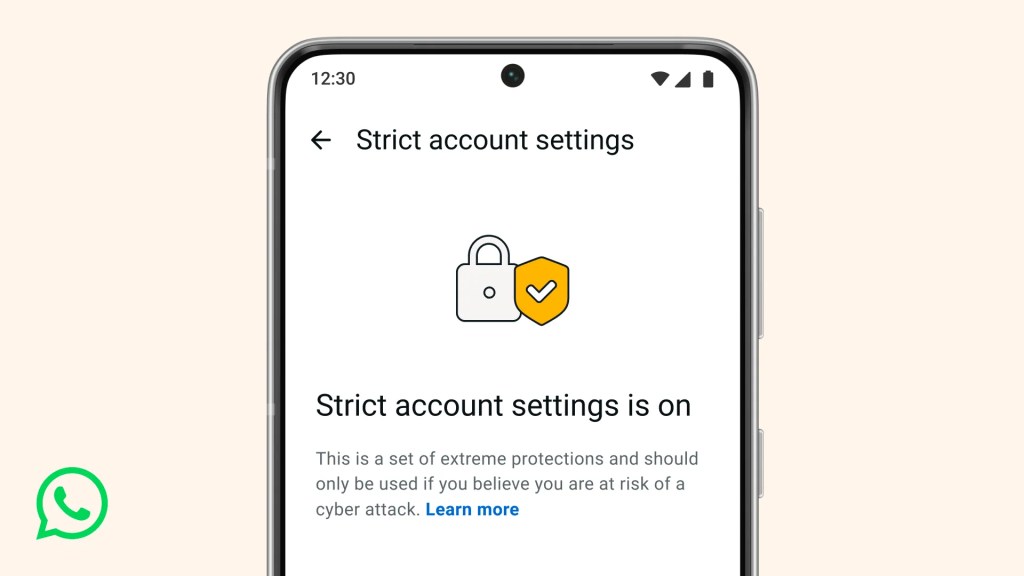
The new feature, called Strict Account Settings, is rolling out gradually over the coming weeks. To see whether you have the option—and to enable it—go to Settings > Privacy > Advanced.

Strict account settings
Image courtesy of WhatsApp

Yesterday, we wrote about a WhatsApp bug on Android that made headlines because a malicious media file in a group chat could be downloaded and used as an attack vector without you tapping anything. You only had to be added to a new group to be exposed to the booby-trapped file. That issue highlighted something security folks have worried about for years: media files are a great vehicle for attacks, and they do not always exploit WhatsApp itself, but bugs in the operating system or its media libraries.

In Meta’s explanation of the new technology, it points back to the 2015 Stagefright Android vulnerability, where simply processing a malicious video could compromise a device. Back then, WhatsApp worked around the issue by teaching its media library to spot broken MP4 files that could trigger those OS bugs, buying users protection even if their phones were not fully patched.

What’s new is that WhatsApp has now rebuilt its core media-handling library in Rust, a memory-safe programming language. This helps eliminate several types of memory bugs that often lead to serious security problems. In the process, it replaced about 160,000 lines of older C++ code with roughly 90,000 lines of Rust, and rolled the new library out to billions of devices across Android, iOS, desktop apps, wearables, and the web.

On top of that, WhatsApp has bundled a series of checks into an internal system it calls “Kaleidoscope.” This system inspects incoming files for structural oddities, flags higher‑risk formats like PDFs with embedded content or scripts, detects when a file pretends to be something it’s not (for example, a renamed executable), and marks known dangerous file types for special handling in the app. It won’t catch every attack, but it should prevent malicious files from poking at more fragile parts of your device.

For everyday users, the Rust rebuilt and Kaleidoscope checks are good news. They add a strong, invisible safety net around photos, videos and other files you receive, including in group chats where the recent bug could be abused. They also line up neatly with our earlier advice to turn off automatic media downloads or use Advanced Privacy Mode, which limits how far a malicious file can travel on your device even if it lands in WhatsApp.

WhatsApp is the latest platform to roll out enhanced protections for users: Apple introduced Lockdown Mode in 2022, and Android followed with Advanced Protection Mode last year. WhatsApp’s new Strict Account Settings takes a similar high-level approach, applying more restrictive defaults within the app, including blocking attachments and media from unknown senders.

However, this is no reason to rush back to WhatsApp, or to treat these changes as a guarantee of safety. At the very least, Meta is showing that it is willing to invest in making WhatsApp more secure.


We don’t just report on phone security—we provide it

Cybersecurity risks should never spread beyond a headline. Keep threats off your mobile devices by downloading Malwarebytes for iOS, and Malwarebytes for Android today.

A WhatsApp bug lets malicious media files spread through group chats

27 January 2026 at 12:55

WhatsApp is going through a rough patch. Some users would argue it has been ever since Meta acquired the once widely trusted messaging platform. User sentiment has shifted from “trusted default messenger” to a grudgingly necessary Meta product.

Privacy-aware users still see WhatsApp as one of the more secure mass-market messaging platforms if you lock down its settings. Even then, many remain uneasy about Meta’s broader ecosystem, and wish all their contacts would switch to a more secure platform.

Back to current affairs, which will only reinforce that sentiment.

Google’s Project Zero has just disclosed a WhatsApp vulnerability where a malicious media file, sent into a newly created group chat, can be automatically downloaded and used as an attack vector.

The bug affects WhatsApp on Android and involves zero‑click media downloads in group chats. You can be attacked simply by being added to a group and having a malicious file sent to you.

According to Project Zero, the attack is most likely to be used in targeted campaigns, since the attacker needs to know or guess at least one contact. While focused, it is relatively easy to repeat once an attacker has a likely target list.

And to put a cherry on top for WhatsApp’s competitors, a potentially even more serious concern for the popular messaging platform, an international group of plaintiffs sued Meta Platforms, alleging the WhatsApp owner can store, analyze, and access virtually all of users’ private communications, despite WhatsApp’s end-to-end encryption claims.

How to secure WhatsApp

Reportedly, Meta pushed a server change on November 11, 2025, but Google says that only partially resolved the issue. So, Meta is working on a comprehensive fix.

Google’s advice is to disable Automatic Download or enable WhatsApp’s Advanced Privacy Mode so that media is not automatically downloaded to your phone.

And you’ll need to keep WhatsApp updated to get the latest patches, which is true for any app and for Android itself.

Turn off auto-download of media

Goal: ensure that no photos, videos, audio, or documents are pulled to the device without an explicit decision.

  • Open WhatsApp on your Android device.
  • Tap the three‑dot menu in the top‑right corner, then tap Settings.
  • Go to Storage and data (sometimes labeled Data and storage usage).
  • Under Media auto-download, you will see When using mobile data, when connected on Wi‑Fi. and when roaming.
  • For each of these three entries, tap it and uncheck all media types: Photos, Audio, Videos, Documents. Then tap OK.
  • Confirm that each category now shows something like “No media” under it.

Doing this directly implements Project Zero’s guidance to “disable Automatic Download” so that malicious media can’t silently land on your storage as soon as you are dropped into a hostile group.

Stop WhatsApp from saving media to your Android gallery

Even if WhatsApp still downloads some content, you can stop it from leaking into shared storage where other apps and system components see it.

  • In Settings, go to Chats.
  • Turn off Media visibility (or similar option such as Show media in gallery). For particularly sensitive chats, open the chat, tap the contact or group name, find Media visibility, and set it to No for that thread.

WhatsApp is a sandbox, and should contain the threat. Which means, keeping media inside WhatsApp makes it harder for a malicious file to be processed by other, possibly more vulnerable components.

Lock down who can add you to groups

The attack chain requires the attacker to add you and one of your contacts to a new group. Reducing who can do that lowers risk.

  • ​In Settings, tap Privacy.
  • Tap Groups.
  • Change from Everyone to My contacts or ideally My contacts except… and exclude any numbers you do not fully trust.
  • If you use WhatsApp for work, consider keeping group membership strictly to known contacts and approved admins.

Set up two-step verification on your WhatsApp account

Read this guide for Android and iOS to learn how to do that.


We don’t just report on phone security—we provide it

Cybersecurity risks should never spread beyond a headline. Keep threats off your mobile devices by downloading Malwarebytes for iOS, and Malwarebytes for Android today.

WhisperPair exposes Bluetooth earbuds and headphones to tracking and eavesdropping

16 January 2026 at 14:08

WhisperPair is a set of attacks that lets an attacker hijack many popular Bluetooth audio accessories that use Google Fast Pair and, in some cases, even track their location via Google’s Find Hub network—all without requiring any user interaction.

Researchers at the Belgian University of Leuven revealed a collection of vulnerabilities they found in audio accessories that use Google’s Fast Pair protocol. The affected accessories are sold by 10 different companies: Sony, Jabra, JBL, Marshall, Xiaomi, Nothing, OnePlus, Soundcore, Logitech, and Google itself.

Google Fast Pair is a feature that makes pairing Bluetooth earbuds, headphones and similar accessories with Android devices quick and seamless, and syncs them across a user’s Google account.

The Google Fast Pair Service (GFPS) utilizes Bluetooth Low Energy (BLE) to discover nearby Bluetooth devices. Many big-name audio brands use Fast Pair in their flagship products, so the potential attack surface consists of hundreds of millions of devices.

The weakness lies in the fact that Fast Pair skips checking whether a device is in pairing mode. As a result, a device controlled by an attacker, such as a laptop, can trigger Fast Pair even when the earbuds are sitting in a user’s ear or pocket, then quickly complete a normal Bluetooth pairing and take full control.

What that control enables depends on the capabilities of the hijacked device. This can range from playing disturbing noises to recording audio via built-in microphones.

It gets worse if the attacker is the first to pair the accessory with an Android device. In that case, the attacker’s Owner Account Key–designating their Google account as the legitimate owner’s—to the accessory. If the Fast Pair accessory also supports Google’s Find Hub network, which many people use to locate lost items, the attacker may then be able to track the accessory’s location.

Google classified this vulnerability, tracked under CVE‑2025‑36911, as critical. However, the only real fix is a firmware or software update from the accessory manufacturer, so users need to check with their specific brand and install accessory updates, as updating the phone alone does not fix the issue.

How to stay safe

To find out whether your device is vulnerable, the researchers published a list and recommend keeping all accessories updated. The research team tested 25 commercial devices from 16 manufacturers using 17 different Bluetooth chipsets. They were able to take over the connection and eavesdrop on the microphone on 68% of the tested devices.​

These are the devices the researchers found to be vulnerable, but it’s possible that others are affected as well:

  • Anker soundcore Liberty 4 NC
  • Google Pixel Buds Pro 2​
  • JBL TUNE BEAM​
  • Jabra Elite 8 Active​
  • Marshall MOTIF II A.N.C.​
  • Nothing Ear (a)​
  • OnePlus Nord Buds 3 Pro​
  • Sony WF-1000XM5​
  • Sony WH-1000XM4​
  • Sony WH-1000XM5​
  • Sony WH-1000XM6​
  • Sony WH-CH720N​
  • Xiaomi Redmi Buds 5 Pro​

We don’t just report on phone security—we provide it

Cybersecurity risks should never spread beyond a headline. Keep threats off your mobile devices by downloading Malwarebytes for iOS, and Malwarebytes for Android today.

SMS Phishers Pivot to Points, Taxes, Fake Retailers

5 December 2025 at 00:02

China-based phishing groups blamed for non-stop scam SMS messages about a supposed wayward package or unpaid toll fee are promoting a new offering, just in time for the holiday shopping season: Phishing kits for mass-creating fake but convincing e-commerce websites that convert customer payment card data into mobile wallets from Apple and Google. Experts say these same phishing groups also are now using SMS lures that promise unclaimed tax refunds and mobile rewards points.

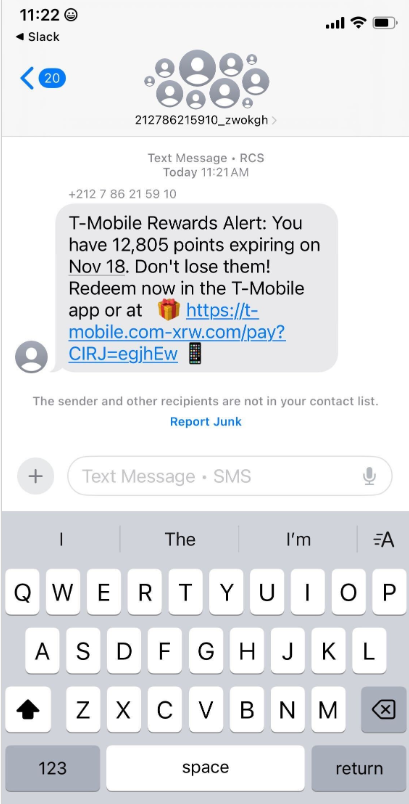
Over the past week, thousands of domain names were registered for scam websites that purport to offer T-Mobile customers the opportunity to claim a large number of rewards points. The phishing domains are being promoted by scam messages sent via Apple’s iMessage service or the functionally equivalent RCS messaging service built into Google phones.

An instant message spoofing T-Mobile says the recipient is eligible to claim thousands of rewards points.

The website scanning service urlscan.io shows thousands of these phishing domains have been deployed in just the past few days alone. The phishing websites will only load if the recipient visits with a mobile device, and they ask for the visitor’s name, address, phone number and payment card data to claim the points.

A phishing website registered this week that spoofs T-Mobile.

If card data is submitted, the site will then prompt the user to share a one-time code sent via SMS by their financial institution. In reality, the bank is sending the code because the fraudsters have just attempted to enroll the victim’s phished card details in a mobile wallet from Apple or Google. If the victim also provides that one-time code, the phishers can then link the victim’s card to a mobile device that they physically control.

Pivoting off these T-Mobile phishing domains in urlscan.io reveals a similar scam targeting AT&T customers:

An SMS phishing or “smishing” website targeting AT&T users.

Ford Merrill works in security research at SecAlliance, a CSIS Security Group company. Merrill said multiple China-based cybercriminal groups that sell phishing-as-a-service platforms have been using the mobile points lure for some time, but the scam has only recently been pointed at consumers in the United States.

“These points redemption schemes have not been very popular in the U.S., but have been in other geographies like EU and Asia for a while now,” Merrill said.

A review of other domains flagged by urlscan.io as tied to this Chinese SMS phishing syndicate shows they are also spoofing U.S. state tax authorities, telling recipients they have an unclaimed tax refund. Again, the goal is to phish the user’s payment card information and one-time code.

A text message that spoofs the District of Columbia’s Office of Tax and Revenue.

CAVEAT EMPTOR

Many SMS phishing or “smishing” domains are quickly flagged by browser makers as malicious. But Merrill said one burgeoning area of growth for these phishing kits — fake e-commerce shops — can be far harder to spot because they do not call attention to themselves by spamming the entire world.

Merrill said the same Chinese phishing kits used to blast out package redelivery message scams are equipped with modules that make it simple to quickly deploy a fleet of fake but convincing e-commerce storefronts. Those phony stores are typically advertised on Google and Facebook, and consumers usually end up at them by searching online for deals on specific products.

A machine-translated screenshot of an ad from a China-based phishing group promoting their fake e-commerce shop templates.

With these fake e-commerce stores, the customer is supplying their payment card and personal information as part of the normal check-out process, which is then punctuated by a request for a one-time code sent by your financial institution. The fake shopping site claims the code is required by the user’s bank to verify the transaction, but it is sent to the user because the scammers immediately attempt to enroll the supplied card data in a mobile wallet.

According to Merrill, it is only during the check-out process that these fake shops will fetch the malicious code that gives them away as fraudulent, which tends to make it difficult to locate these stores simply by mass-scanning the web. Also, most customers who pay for products through these sites don’t realize they’ve been snookered until weeks later when the purchased item fails to arrive.

“The fake e-commerce sites are tough because a lot of them can fly under the radar,” Merrill said. “They can go months without being shut down, they’re hard to discover, and they generally don’t get flagged by safe browsing tools.”

Happily, reporting these SMS phishing lures and websites is one of the fastest ways to get them properly identified and shut down. Raymond Dijkxhoorn is the CEO and a founding member of SURBL, a widely-used blocklist that flags domains and IP addresses known to be used in unsolicited messages, phishing and malware distribution. SURBL has created a website called smishreport.com that asks users to forward a screenshot of any smishing message(s) received.

“If [a domain is] unlisted, we can find and add the new pattern and kill the rest” of the matching domains, Dijkxhoorn said. “Just make a screenshot and upload. The tool does the rest.”

The SMS phishing reporting site smishreport.com.

Merrill said the last few weeks of the calendar year typically see a big uptick in smishing — particularly package redelivery schemes that spoof the U.S. Postal Service or commercial shipping companies.

“Every holiday season there is an explosion in smishing activity,” he said. “Everyone is in a bigger hurry, frantically shopping online, paying less attention than they should, and they’re just in a better mindset to get phished.”

SHOP ONLINE LIKE A SECURITY PRO

As we can see, adopting a shopping strategy of simply buying from the online merchant with the lowest advertised prices can be a bit like playing Russian Roulette with your wallet. Even people who shop mainly at big-name online stores can get scammed if they’re not wary of too-good-to-be-true offers (think third-party sellers on these platforms).

If you don’t know much about the online merchant that has the item you wish to buy, take a few minutes to investigate its reputation. If you’re buying from an online store that is brand new, the risk that you will get scammed increases significantly. How do you know the lifespan of a site selling that must-have gadget at the lowest price? One easy way to get a quick idea is to run a basic WHOIS search on the site’s domain name. The more recent the site’s “created” date, the more likely it is a phantom store.

If you receive a message warning about a problem with an order or shipment, visit the e-commerce or shipping site directly, and avoid clicking on links or attachments — particularly missives that warn of some dire consequences unless you act quickly. Phishers and malware purveyors typically seize upon some kind of emergency to create a false alarm that often causes recipients to temporarily let their guard down.

But it’s not just outright scammers who can trip up your holiday shopping: Often times, items that are advertised at steeper discounts than other online stores make up for it by charging way more than normal for shipping and handling.

So be careful what you agree to: Check to make sure you know how long the item will take to be shipped, and that you understand the store’s return policies. Also, keep an eye out for hidden surcharges, and be wary of blithely clicking “ok” during the checkout process.

Most importantly, keep a close eye on your monthly statements. If I were a fraudster, I’d most definitely wait until the holidays to cram through a bunch of unauthorized charges on stolen cards, so that the bogus purchases would get buried amid a flurry of other legitimate transactions. That’s why it’s key to closely review your credit card bill and to quickly dispute any charges you didn’t authorize.

❌