Scammers have found a way to abuse legitimate Apple account notification emails to trick targets into calling fake tech support numbers.
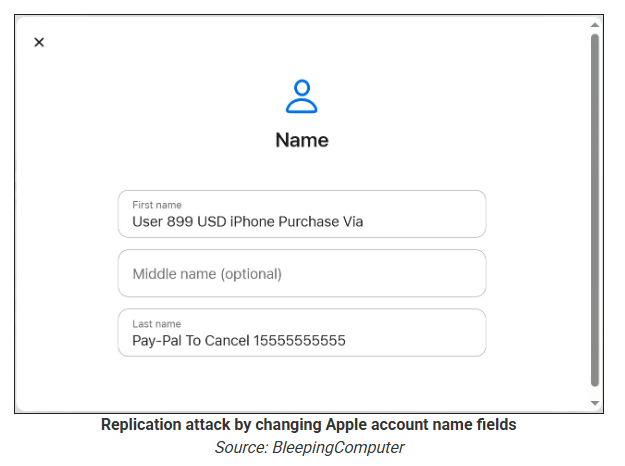
According to a report from BleepingComputer, scammers create an Apple account and insert a phishing message into the personal information fields, then modify the account so that Apple sends a genuine security alert about the change to the target.
BleepingComputer was able to replicate the attack.
The attacker creates an Apple ID they control, then stuffs the phishing message into the personal information fields (first name, last name, possibly address), splitting it across fields because they will not fit into just one.
To launch the phish, the attacker changes something benign on their specially created Apple account, such as shipping information, which causes Apple’s systems to send a “Your Apple account was updated” security email.
While the original alert is addressed to the attacker’s iCloud email, they are then able to redistribute it to a wider victim list, for example through a mailing list.
In the copy the targets receive, the email headers still show a legitimate Apple sender, and the presence of the attacker’s iCloud address can even make it look like “someone else” has gained access to the account.
Because Apple includes those user-supplied fields in the security email, the phishing text is delivered inside a legitimate message sent from Apple’s own infrastructure.
This method, called call-back phishing, filters out suspicious users, so the scammers can focus on the people who fell for the first part.
The emails come from a legitimate source, sail through every security filter because of that, and look convincing enough to scare the receiver into thinking someone spent $899 from their PayPal account.
But the structure of the email does not make sense.
“Dear User” is immediately followed by the scam message where your name should have been. The header says it’s about account information rather than a purchase. And the iCloud account does not belong to the recipient. So, once you know how it’s done, they’re not impossible to spot. Which is why we wrote this blog.
And when in doubt, you can always ask Malwarebytes Scam Guard.
Scam Guard identified the screenshot as a scam and guides users through the next steps.
Scams like these work, because many users still view phone calls as more trustworthy than email, especially if the email itself passed all the usual technical authenticity checks and they initiated the call themselves.
How to stay safe
Tech support scammers will try to convince callers to install some kind of remote desktop application to steal data from your computer, or ask for financial details so they can steal your money.
To stay safe from these scammers:
Be wary of unexpected alerts about high‑value purchases you do not recognize. They are suspicious even if they come from a real domain.
Never call a number sent to you by unsolicited means or even found in sponsored search results.
Carefully read emails and text messages, even if they come form trustworthy addresses. Does the email make sense from a structural and linguistic point of view?
If someone claiming to be support for a legitimate company asks for remote access or payment details during a call, hang up and contact the company through official channels.
Use Malwarebytes Scam Guard to analyze any kind of message that alarms you or urges you to take immediate action.
Something feel off? Check it before you click.
Malwarebytes Scam Guard helps you analyze suspicious links, texts, and screenshots instantly.
In 2025, the financial cyberthreat landscape continued to evolve. While traditional PC banking malware declined in relative prevalence, this shift was offset by the rapid growth of credential theft by infostealers. Attackers increasingly relied on aggregation and reuse of stolen data, rather than developing entirely new malware capabilities.
To describe the financial threat landscape in 2025, we analyzed anonymized data on malicious activities detected on the devices of Kaspersky security product users and consensually provided to us through the Kaspersky Security Network (KSN), along with publicly available data and data on the dark web.
We analyzed the data for
financial phishing,
banking malware,
infostealers and the dark web.
Key findings
Phishing
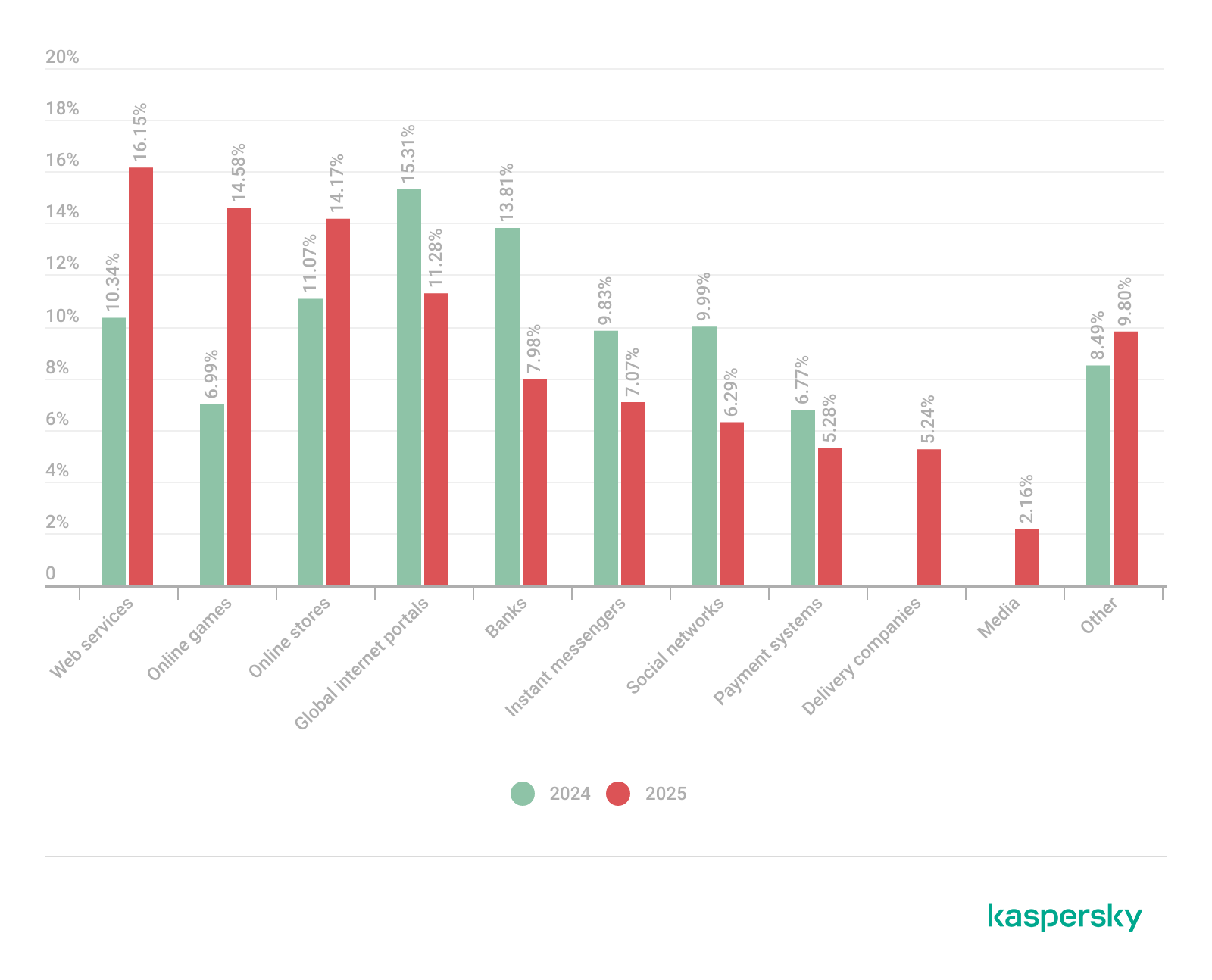
Phishing activity in 2025 shifted toward e-commerce (14.17%) and digital services (16.15%), with attackers increasingly tailoring campaigns to regional trends and user behavior, making social engineering more targeted despite reduced focus on traditional banking lures.
Banking malware
Financial PC malware declined in prevalence but remained a persistent threat, with established families continuing to operate, while attackers increasingly prioritize credential access and indirect fraud over deploying complex banking Trojans. To the contrary, mobile banking malware continues growing, as we wrote in detail in our mobile malware report.
Infostealers and the dark web
Infostealers became a central driver of financial cybercrime, fueling a growing dark web economy where stolen credentials, payment data, and full identity profiles are traded at scale, enabling widespread and destructive fraud operations.
Financial phishing
In 2025, online fraudsters continued to lure users to phishing and scam pages that mimicked the websites of popular brands and financial organizations. Attackers leveraged increasingly convincing social engineering techniques and brand impersonation to exploit user trust. Rather than relying solely on volume, campaigns showed greater targeting and contextual adaptation, reflecting a maturation of phishing operations.
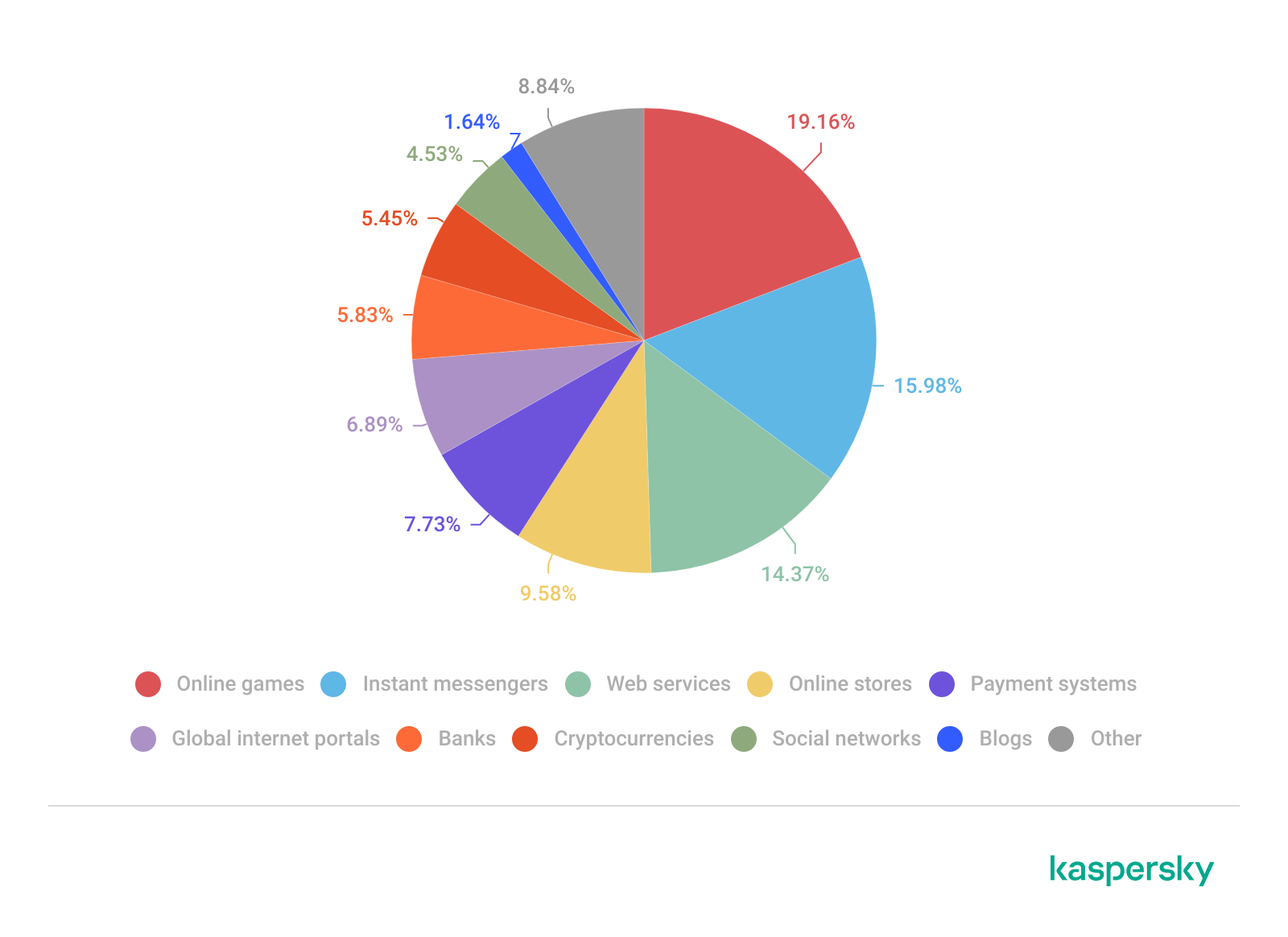
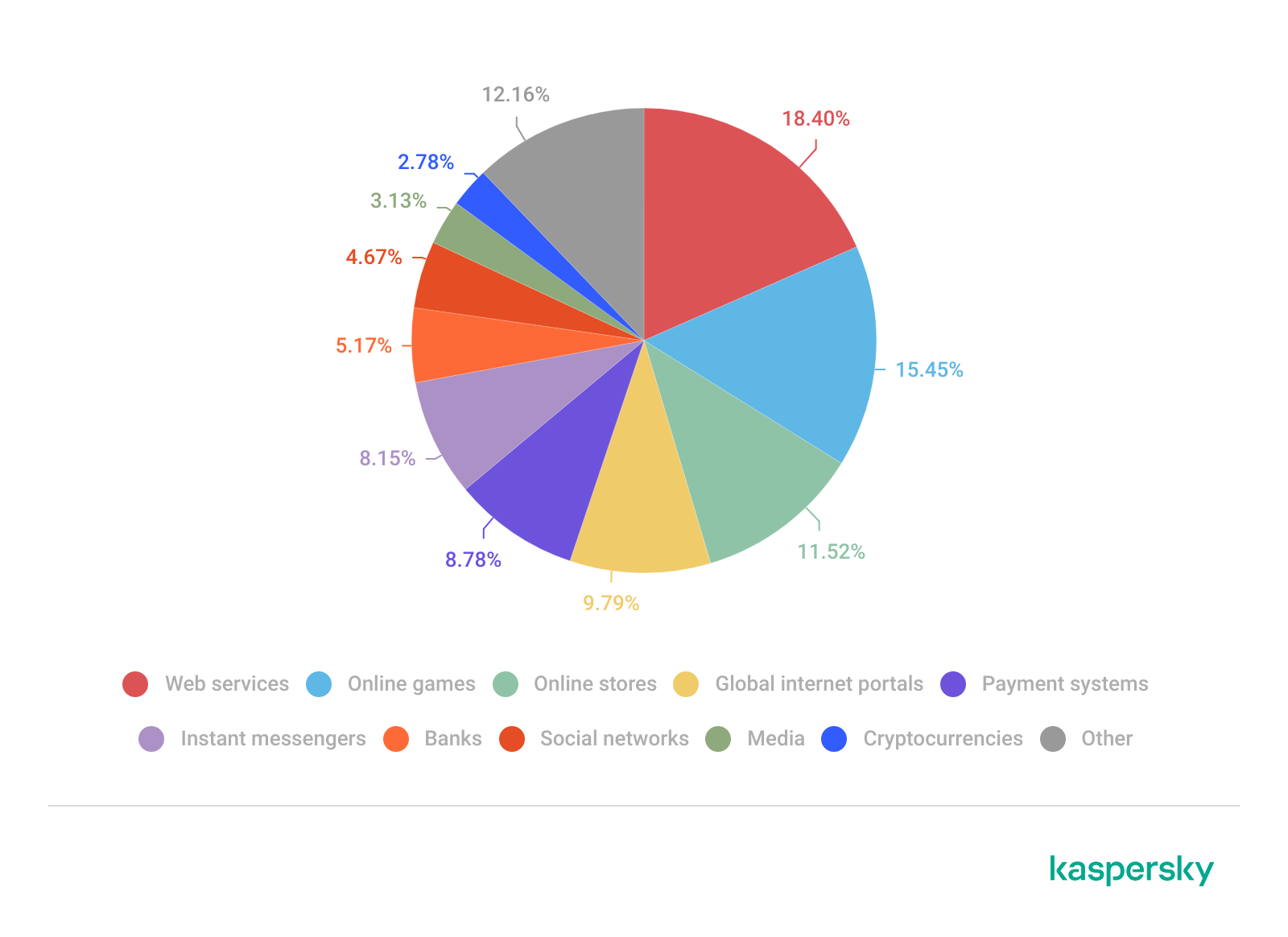
The distribution of top phishing categories in 2025 shows a clear shift toward digital platforms that aggregate multiple user activities, with web services (16.15%), online games (14.58%), and online stores (14.17%) leading globally. Compared to 2024, the rise of online games and the decline of social networks and banks indicate that attackers are increasingly targeting environments where users are more likely to take a risk or engage impulsively. Categories such as instant messaging apps and global internet portals remain significant phishing targets, reflecting their role as communication and access hubs that can be exploited for credential harvesting.
TOP 10 categories of organizations mimicked by phishing and scam pages that were blocked on home users’ devices, 2025 (download)
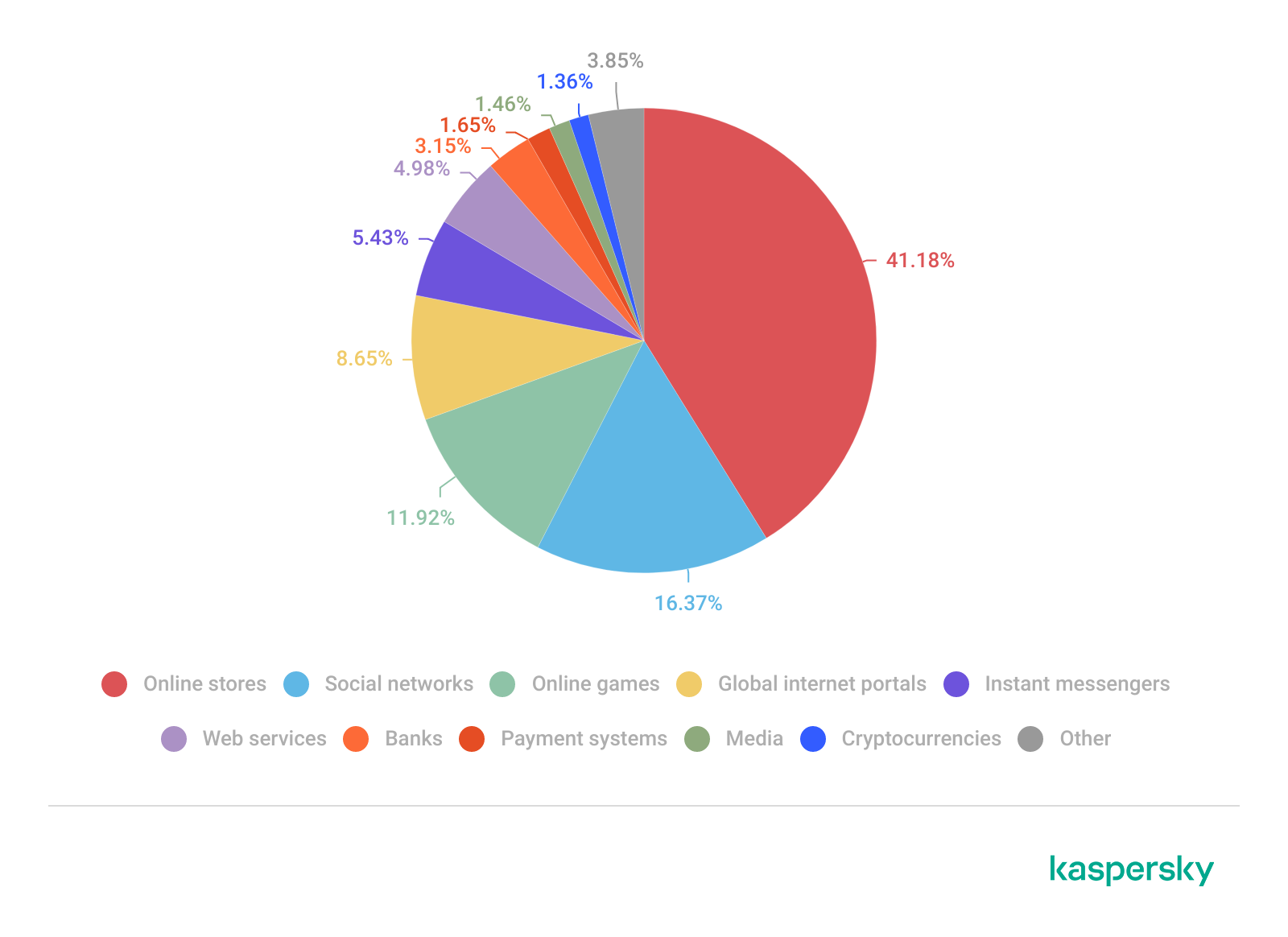
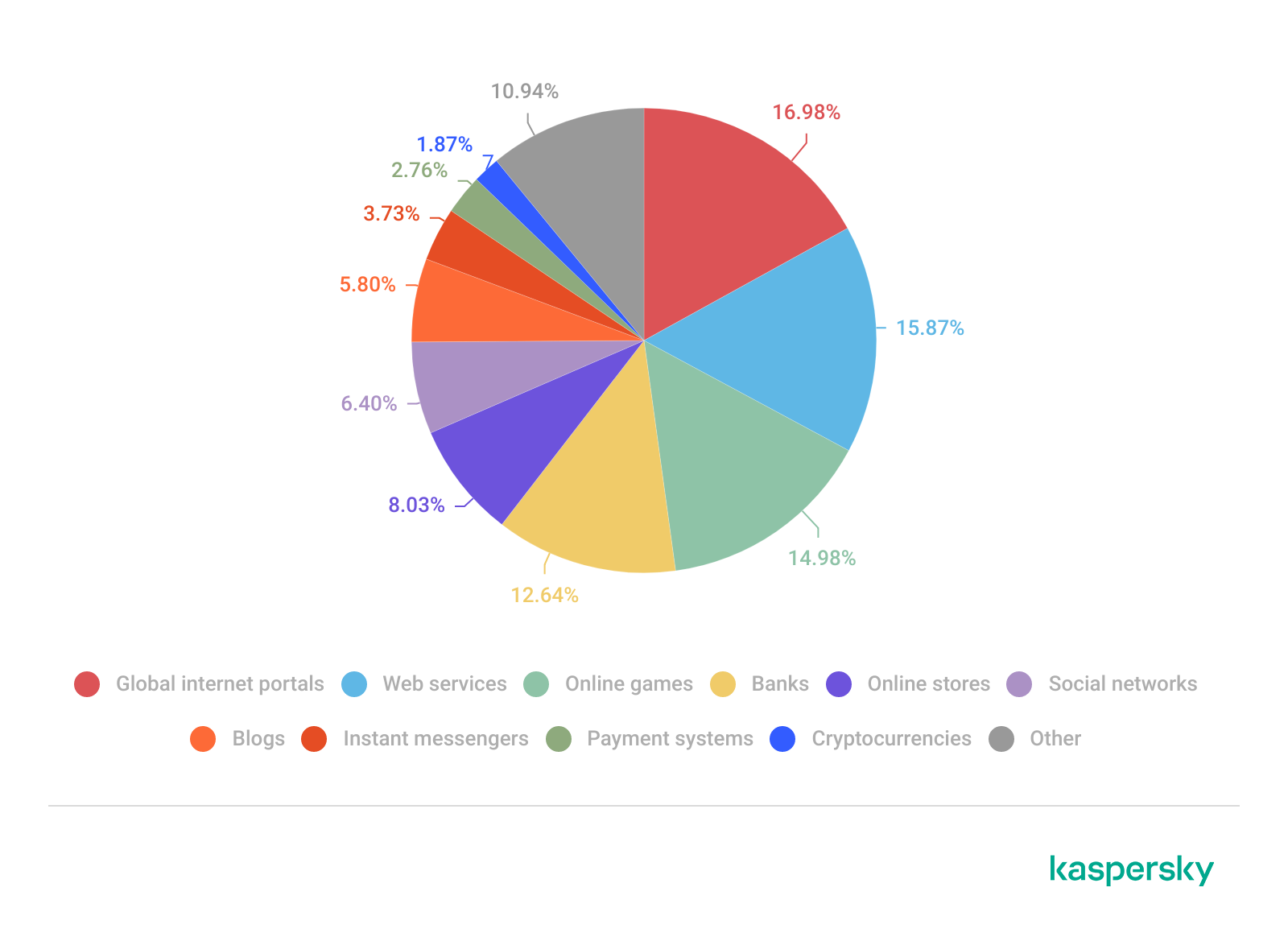
Regional patterns further reinforce the adaptive nature of phishing campaigns, showing that attackers closely align category targeting with local digital habits. For example, online stores dominate heavily in the Middle East.
TOP 10 categories of organizations mimicked by phishing and scam pages that were blocked on home users’ devices in the Middle East, 2025 (download)
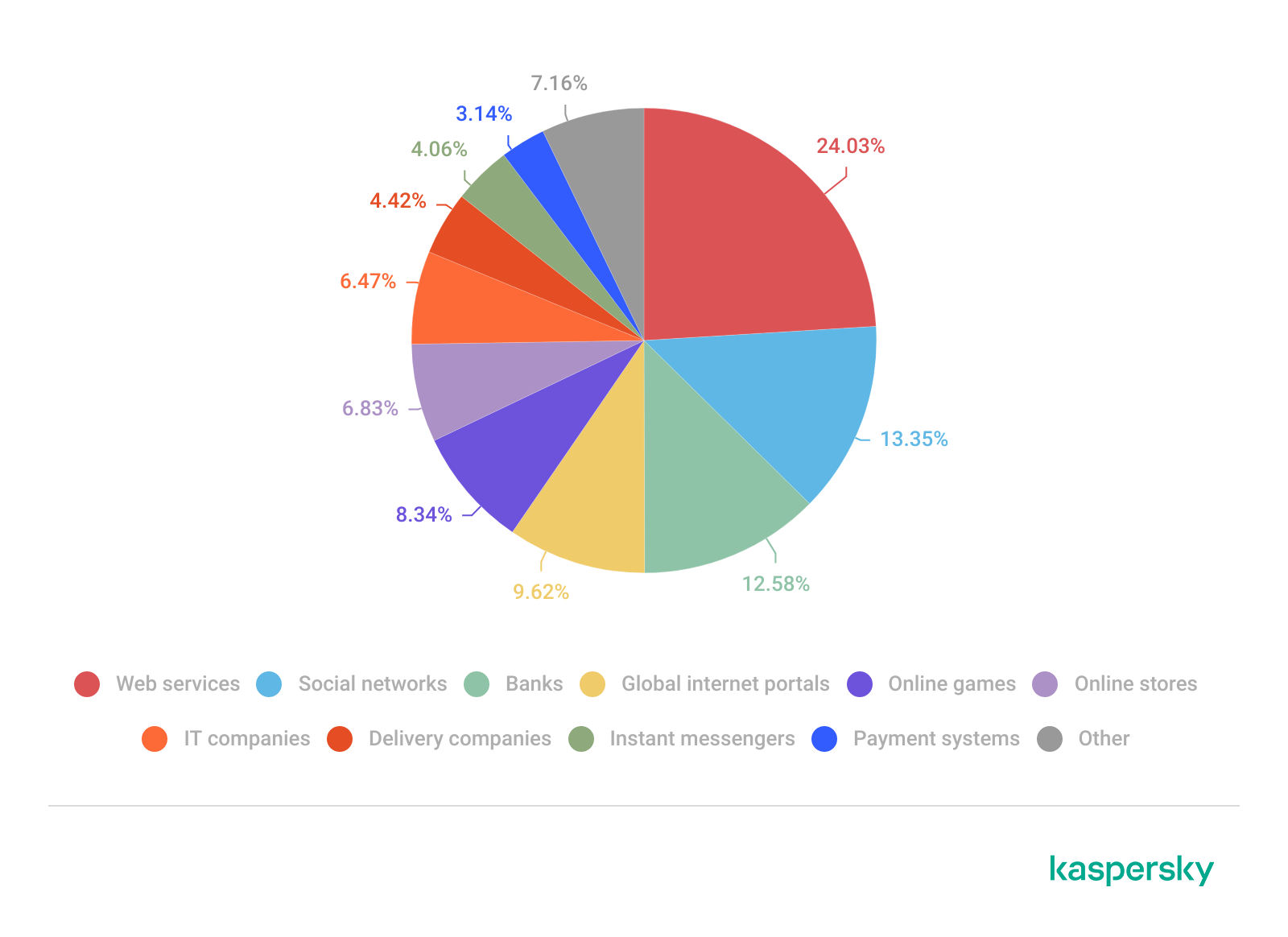
Online games and instant messaging platforms feature more prominently in the CIS, suggesting a focus on younger or highly connected user bases.
TOP 10 categories of organizations mimicked by phishing and scam pages that were blocked on home users’ devices in the CIS, 2025 (download)
APAC demonstrates almost equal shares of online games and banks which signifies a combined approach targeting different users.
TOP 10 categories of organizations mimicked by phishing and scam pages that were blocked on home users’ devices in APAC, 2025 (download)
In Africa, a stronger emphasis on banks reflects the continued importance of traditional financial services. Most likely, this is due to the lower security level of the financial institutions in the region.
TOP 10 categories of organizations mimicked by phishing and scam pages that were blocked on home users’ devices in Africa, 2025 (download)
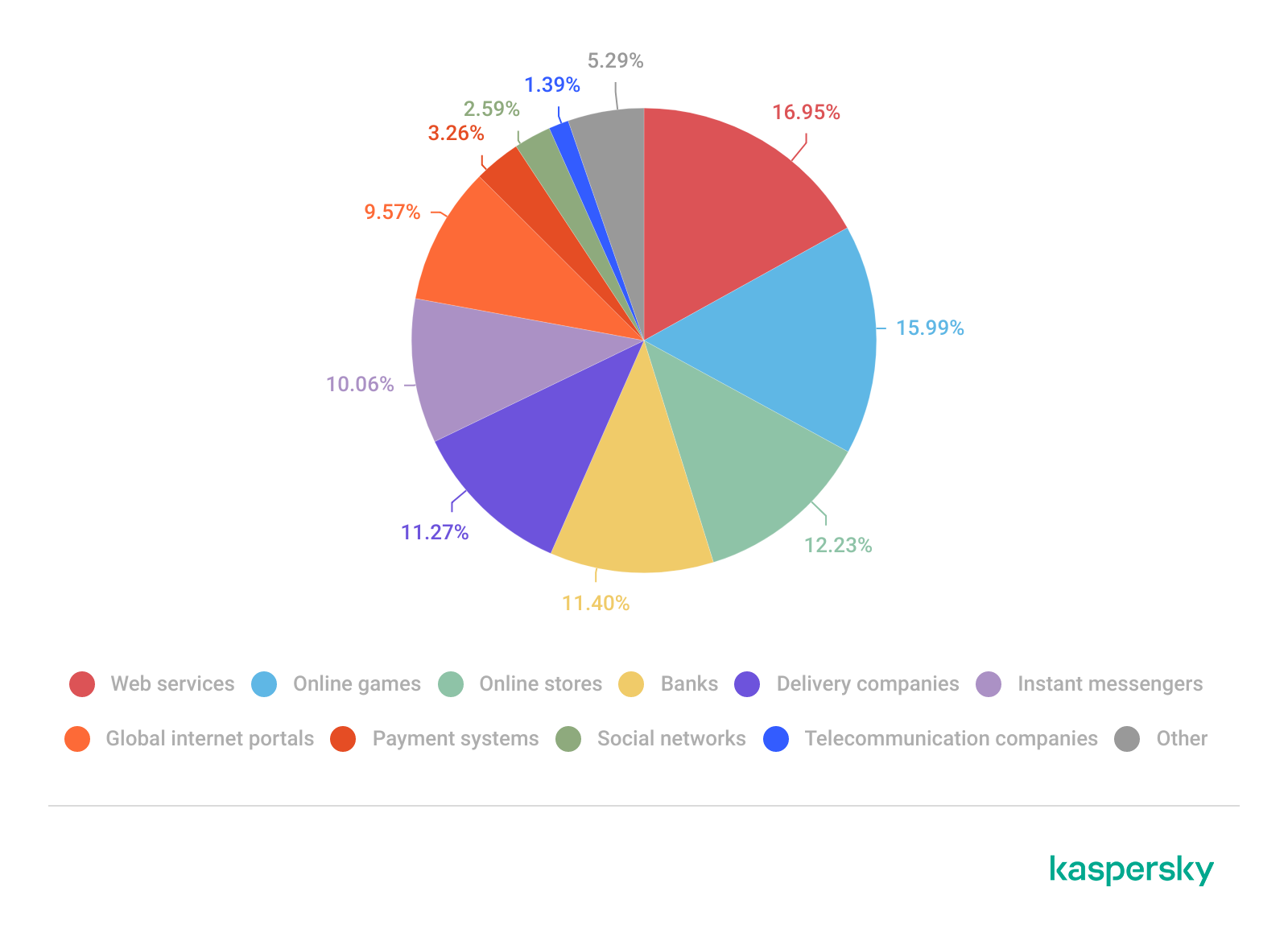
Whereas in LATAM, delivery companies appearing in the top categories indicate attackers exploiting the growth of e-commerce logistics.
TOP 10 categories of organizations mimicked by phishing and scam pages that were blocked on home users’ devices in Latin America, 2025 (download)
Europe presents a more balanced distribution across categories, pointing to diversified attack strategies.
TOP 10 categories of organizations mimicked by phishing and scam pages that were blocked on home users’ devices in Europe, 2025 (download)
Attackers actively localize their tactics to maximize relevance and effectiveness.
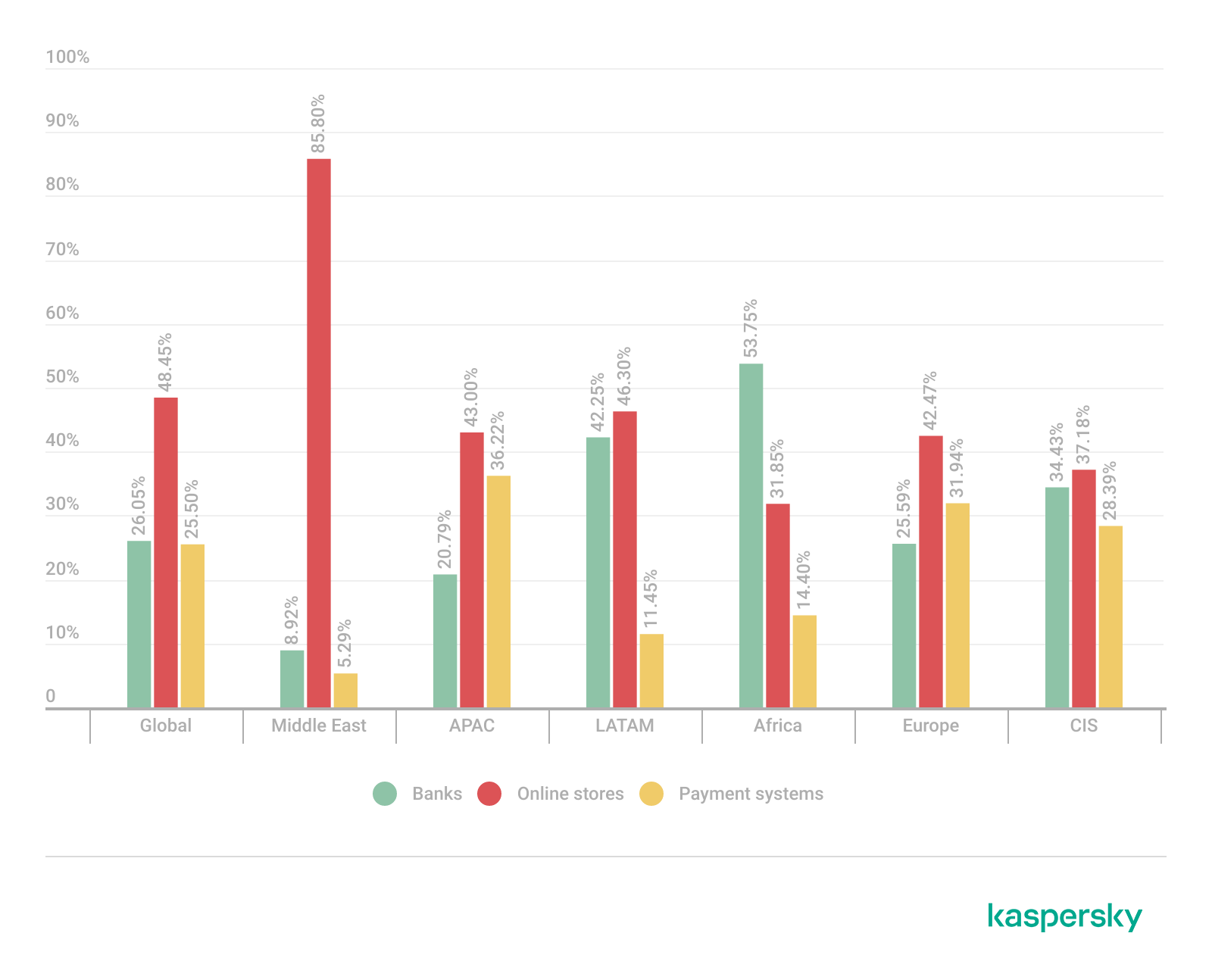
The distribution of financial phishing pages by category in 2025 reveals strong regional asymmetries that reflect both user behavior and attacker prioritization.
Globally, online stores dominated (48.45%), followed by banks (26.05%) and payment systems (25.50%). The decline in bank phishing may suggest that these services are becoming increasingly difficult to successfully impersonate, so fraudsters are turning to easier ways to access users’ finances.
However, this balance shifts significantly at the regional level.
In the Middle East, phishing is overwhelmingly concentrated on e-commerce (85.8%), indicating a heavy reliance on online retail lures, whereas in Africa, bank-related phishing leads (53.75%), which may indicate that user account security there is still insufficient. LATAM shows a more balanced distribution but with a higher share of online store targeting (46.30%), while APAC and Europe display a more even spread across all three categories, pointing to diversified attack strategies. These variations suggest that attackers are not operating uniformly but are instead adapting campaigns to regional digital habits, payment ecosystems, and trust patterns – maximizing effectiveness by aligning phishing content with the most commonly used financial services in each market.
Distribution of financial phishing pages by category and region, 2025 (download)
Online shopping scams
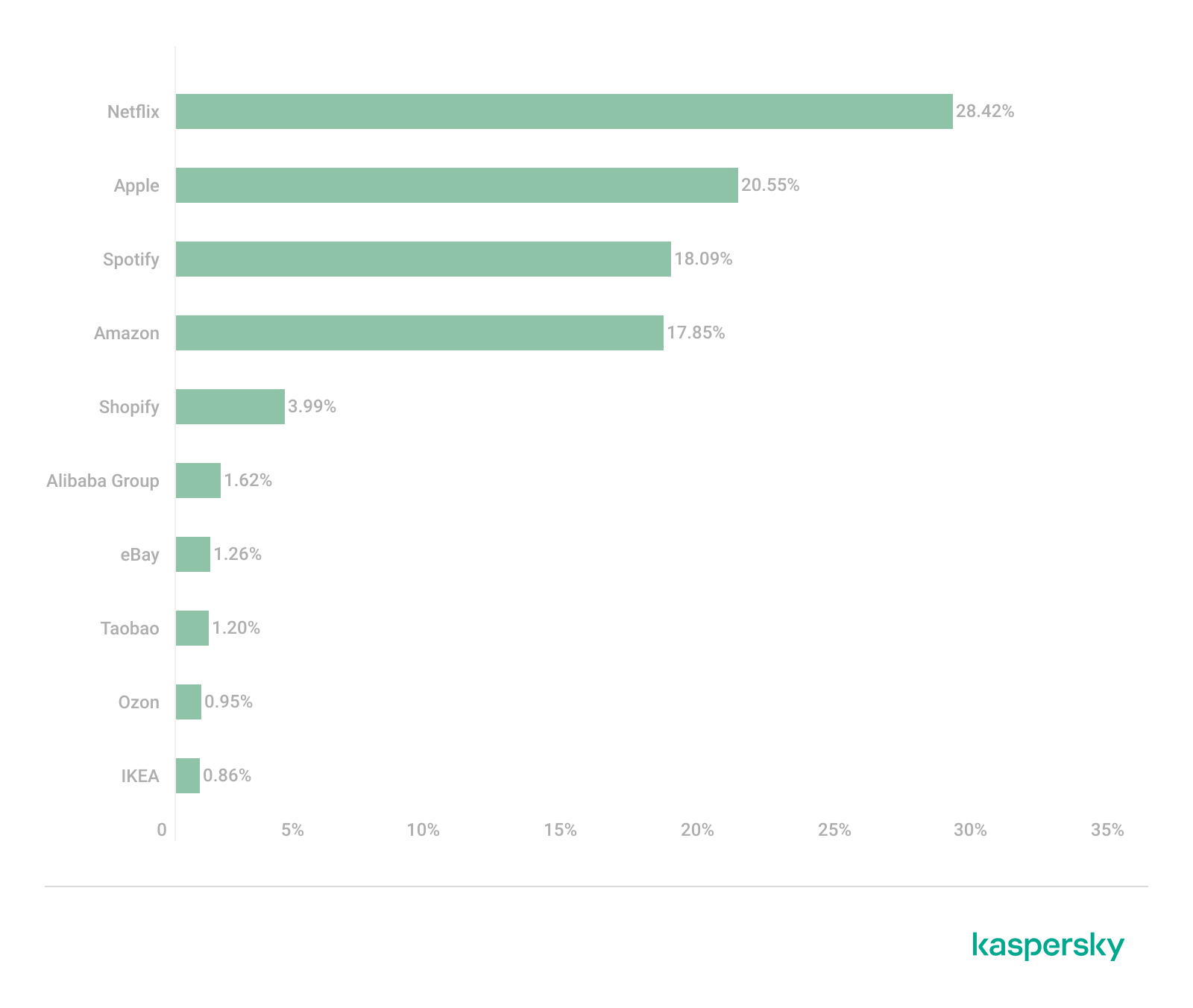
The distribution of organizations mimicked by phishing and scam pages in 2025 highlights a clear shift toward globally recognized digital service and e-commerce brands, with attackers prioritizing platforms that have large, active user bases and frequent payment interactions.
Netflix (28.42%) solidified its ranking as the most impersonated brand, followed by Apple (20.55%), Spotify (18.09%), and Amazon (17.85%). This reflects a move away from traditional retail-only targets toward subscription-based and ecosystem-driven services.
TOP 10 online shopping brands mimicked by phishing and scam pages, 2025 (download)
Regionally, this trend varies: Netflix dominates heavily in the Middle East, Apple leads in APAC, while Spotify ranks first across Europe, LATAM, and Africa. Although most of the top platforms are highly popular across different regions, we may suggest that the attackers tailor brand impersonation to regional popularity and user engagement.
Payment system phishing
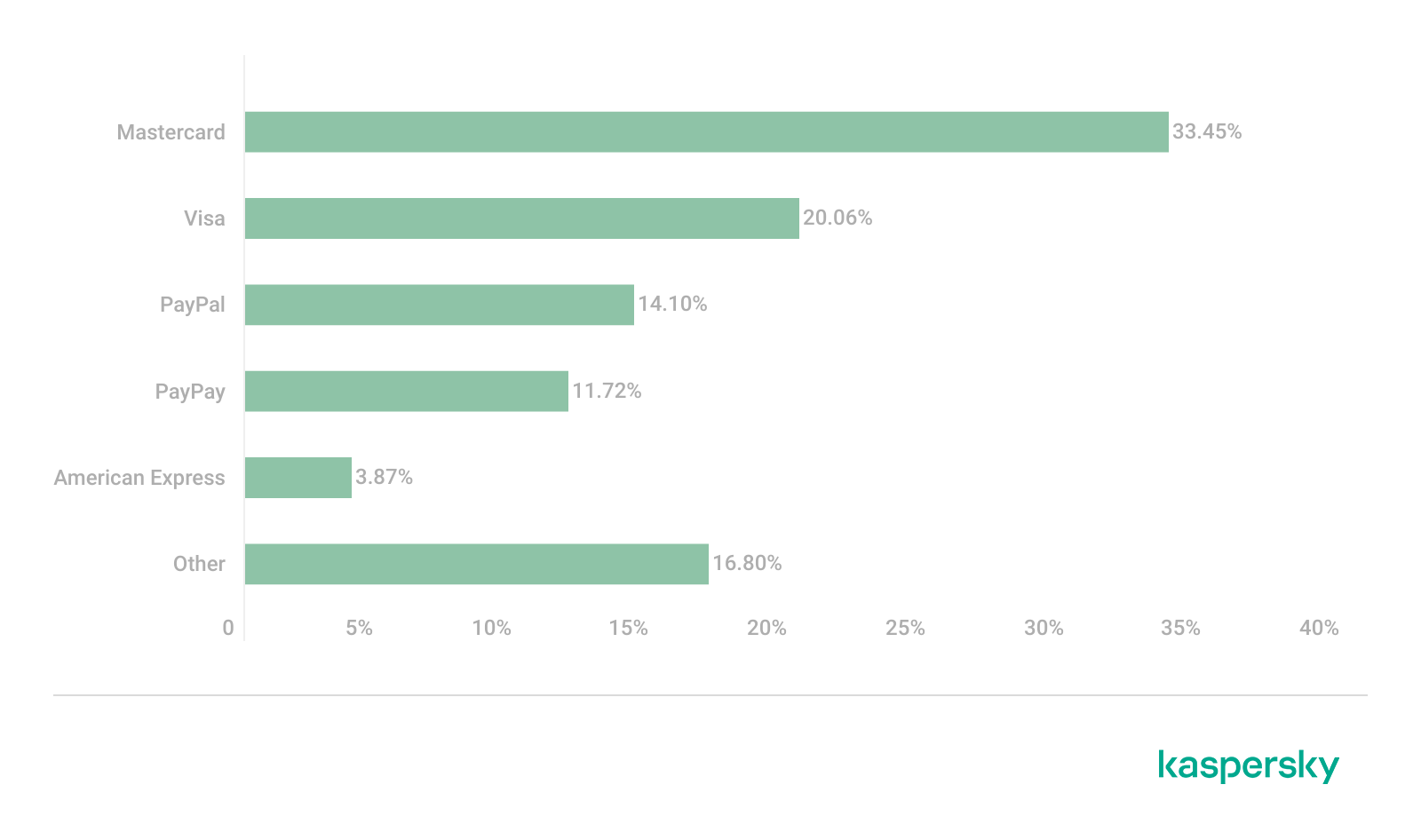
Phishing campaigns are impersonating multiple payment ecosystems to maximize coverage. While PayPal was the most mimicked in 2024 with 37.53%, its share dropped to 14.10% in 2025. Mastercard, on the contrary, attracted cybercriminals’ attention, its share increasing from 30.54% to 33.45%, while Visa accounted for a significant 20.06% (last year, it wasn’t in the TOP 5), reinforcing the growing focus on widely used banking card networks. The continued presence of American Express (3.87%) and the increasing number of pages mimicking PayPay (11.72%) further highlight attacker experimentation and regional adaptation.
TOP 5 payment systems mimicked by phishing and scam pages, 2025 (download)
Financial malware
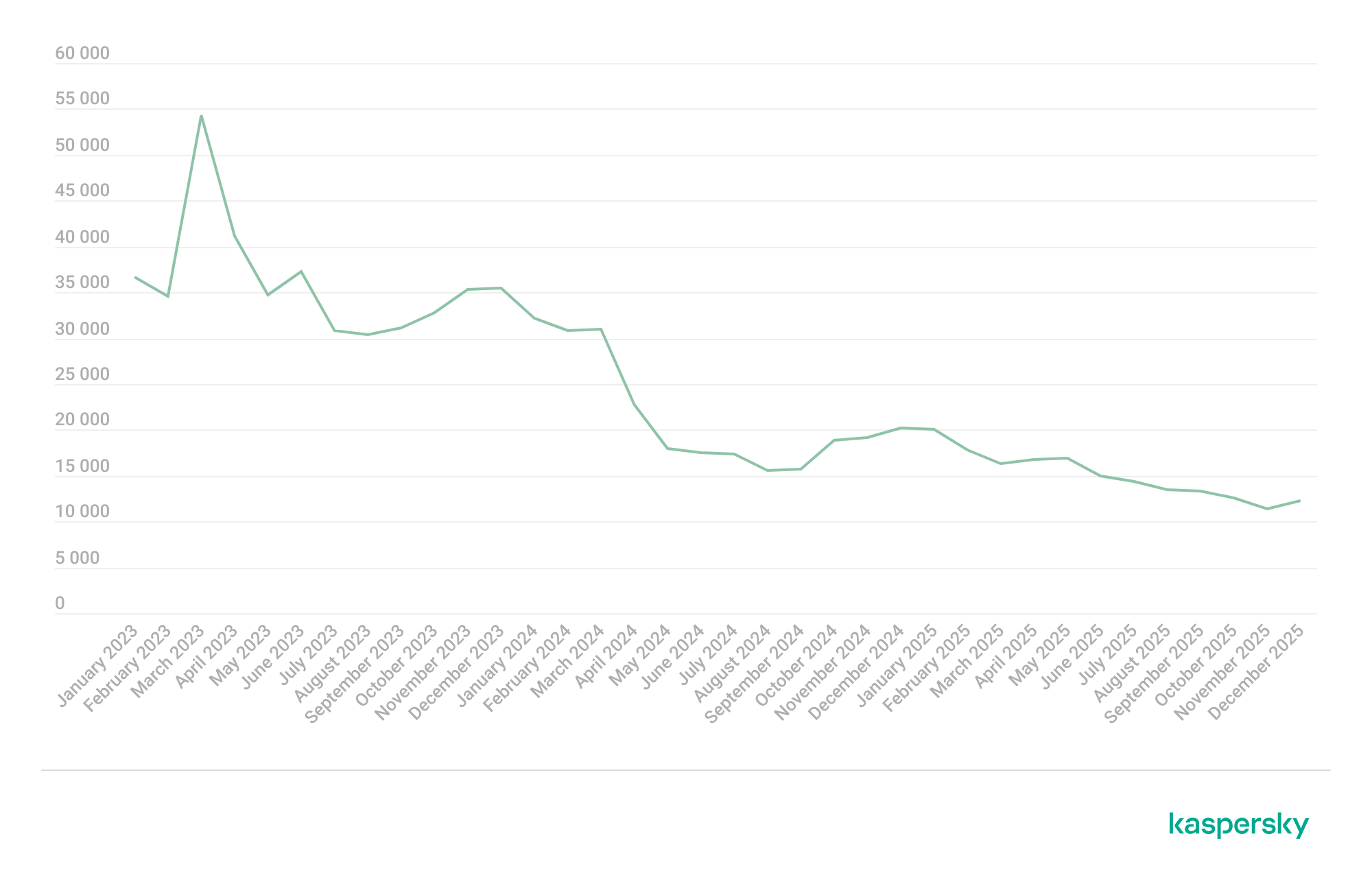
In 2025, the decline in users affected by financial PC malware continued. On the one hand, people continue to rely on mobile devices to manage their finances. On the other hand, some of the most prominent malware families that were initially designed as bankers had not used this functionality for years, so we excluded them from these statistics.
Changes in the number of unique users attacked by banking malware, by month, 2023–2025 (download)
Windows systems remained the primary platform targeted by attackers with financial malware. According to Kaspersky Security Bulletin, overall detections included 1,338,357 banking Trojan attacks globally from November 2024 to October 2025, though this number is also declining due to increasing focus on mobile vectors. Desktop threats continued to be distributed via traditional delivery methods like malicious emails, compromised websites, and droppers.
In 2025, Brazilian-origin families such as Grandoreiro (part of the Tetrade group) stood out for their constant activity and global reach. Despite a major law enforcement disruption in early 2024, Grandoreiro remained active in 2025, re-emerging with updated variants and continuing to operate. Other notable actors included Coyote and emerging families like Maverick, which abused WhatsApp for distribution while maintaining fileless techniques and overlaps with established Brazilian banking malware to steal credentials and enable fraudulent transactions on desktop banking platforms. Besides traditional bankers, other Brazilian malware families are worth mentioning, which specifically target relatively new and highly popular regional payment systems. One of the most prominent threats among these is GoPix Trojan focusing on the users of Brazilian Pix payment system. It is also capable of targeting local Boleto payment method, as well as stealing cryptocurrency.
There was also a surge in incidents in 2025 in which fraudsters targeted organizations through electronic document management (EDM) systems, for example, by substituting invoice details to trick victims into transferring funds. The Pure Trojan was most frequently encountered in such attacks. Attackers typically distribute it through targeted emails, using abbreviations of document names, software titles, or other accounting-related keywords in the headers of attached files. Globally in the corporate segment, Pure was detected 896 633 times over 2025, with over 64 thousand users attacked.
Contrary to PC banking malware, mobile banker attacks grew by 1.5 times in 2025 compared to the previous reporting period, which is consistent with their growth in 2024. They also saw a sharp surge in the number of unique installation packages. More statistics and trends on mobile banking malware can be found in our yearly mobile threat report.
Complementing traditional financial malware, infostealers played a significant role in enabling financial crime both on PCs and mobile devices by harvesting credentials, cookies, and autofill data from browsers and applications, which attackers then used for account takeovers or direct banking fraud. Kaspersky analyses pointed to a surge in infostealer detections (up by 59% globally on PCs), fueling credential-based attacks.
Financial cyberthreats on the dark web
The Kaspersky Digital Footprint Intelligence (DFI) team closely monitors infostealer activity on both PC and mobile devices to analyze emerging trends and assess the evolving tactics of cybercriminals.
Fraudsters especially target financial data such as payment cards, cryptocurrency wallets, login credentials and cookies for banking services, as well as documents stored on the victim’s device. The stolen data is collected in log files and shared on dark web resources, where they are bought, sold, or distributed freely and then used for financial fraud.
With access to financial data, fraudsters can gain control of users’ bank accounts and payment cards, and withdraw funds. Compromised accounts and cards are also frequently used in subsequent activities, turning the victims into intermediaries in a fraud scheme.
Compromised accounts
Kaspersky DFI found that in 2025, over one million online banking accounts (these are not Kaspersky product users) served by the world’s 100 largest banks fell victim to infostealers: their credentials were being freely shared on the dark web.
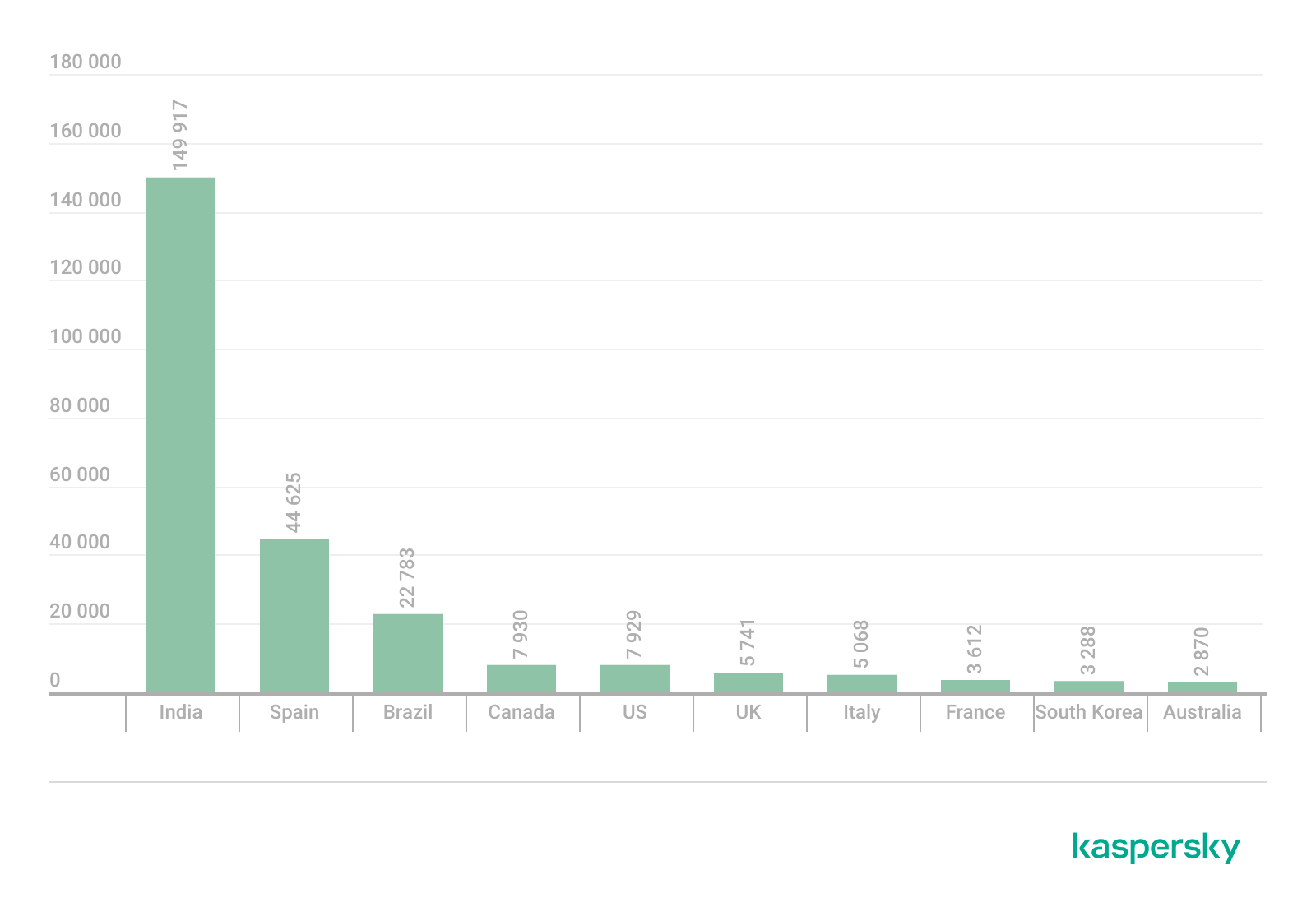
The countries with the highest median number of compromised accounts per bank were India, Spain, and Brazil.
The chart below shows the median number of compromised accounts per bank for the TOP 10 countries.
TOP 10 countries with the highest compromised account median (download)
Compromised payment cards
Seventy-four percent of payment cards that were compromised by infostealer malware, published on dark web resources and identified by the Digital Footprint Intelligence team in 2025, remained valid as of March 2026. This means that attackers could still use the cards that had been stolen months or even years prior.
It should be noted that the number of bank accounts and payment cards known to have been compromised by infostealers in 2025 will continue to rise, because fraudsters do not publish the log files immediately after the compromise but only after a delay of months or even years.
Data breaches
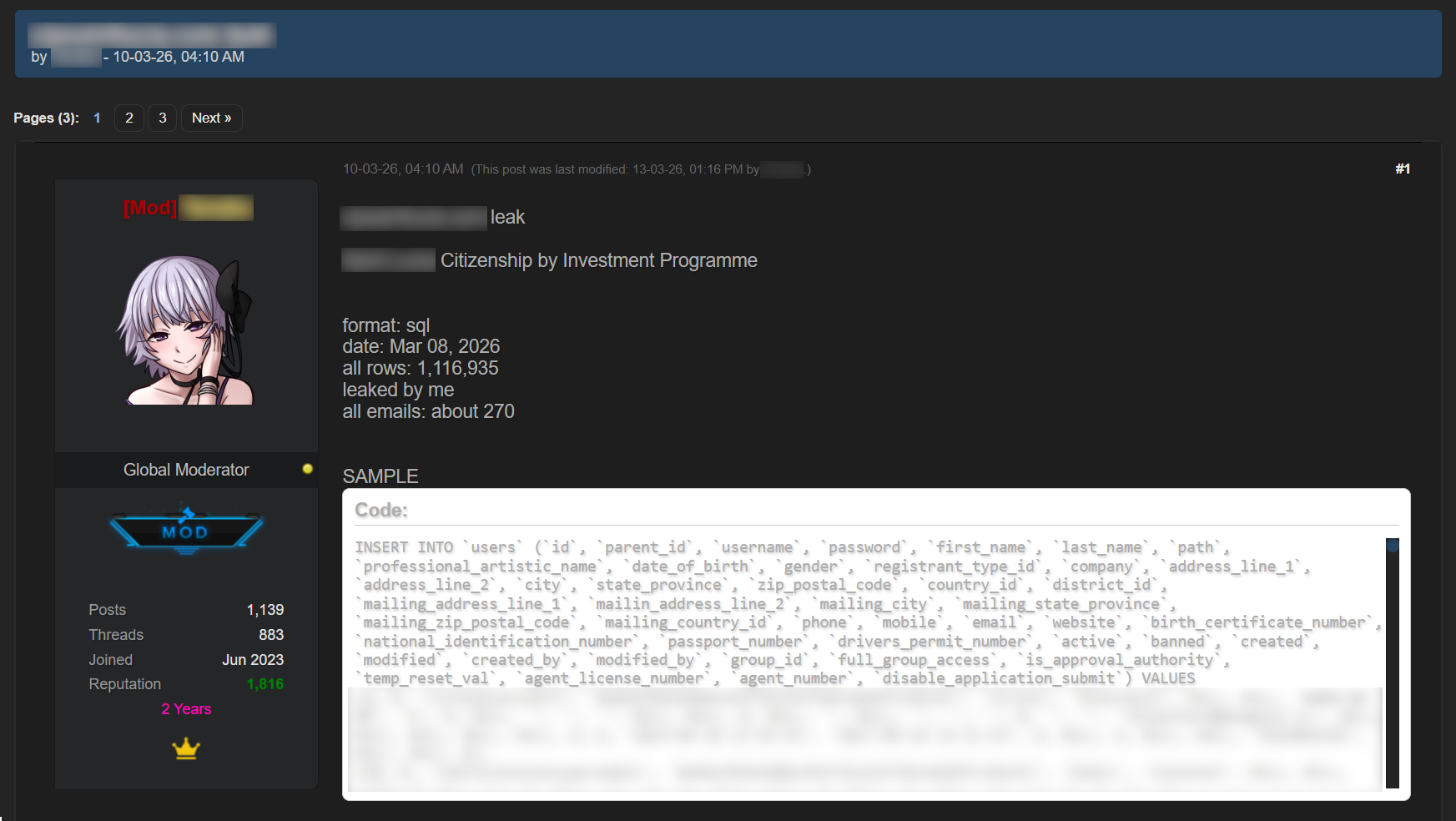
Regardless of the industry in which the target company operates, data breaches often expose users’ financial data, including payment card information, bank account details, transaction histories and other financial information. As a consequence, the compromised databases are sold and distributed on underground resources.
It should be noted that the threat is not limited to the exposure of financial information alone. Various identity documents and even seemingly public data, such as names, phone numbers and email addresses, can become a risk when they are published on the dark web. Such data attracts fraudsters’ attention and can be used in social engineering attacks to gain access to the user’s financial assets.
An example of a post offering a database
Sale of bank accounts and payment cards
The dark web often features services provided by stores that specialize in selling bank accounts and payment cards. Fraudsters typically obtain data for sale from a variety of sources, including infostealer logs and leaked databases, which are first repackaged and then combined.
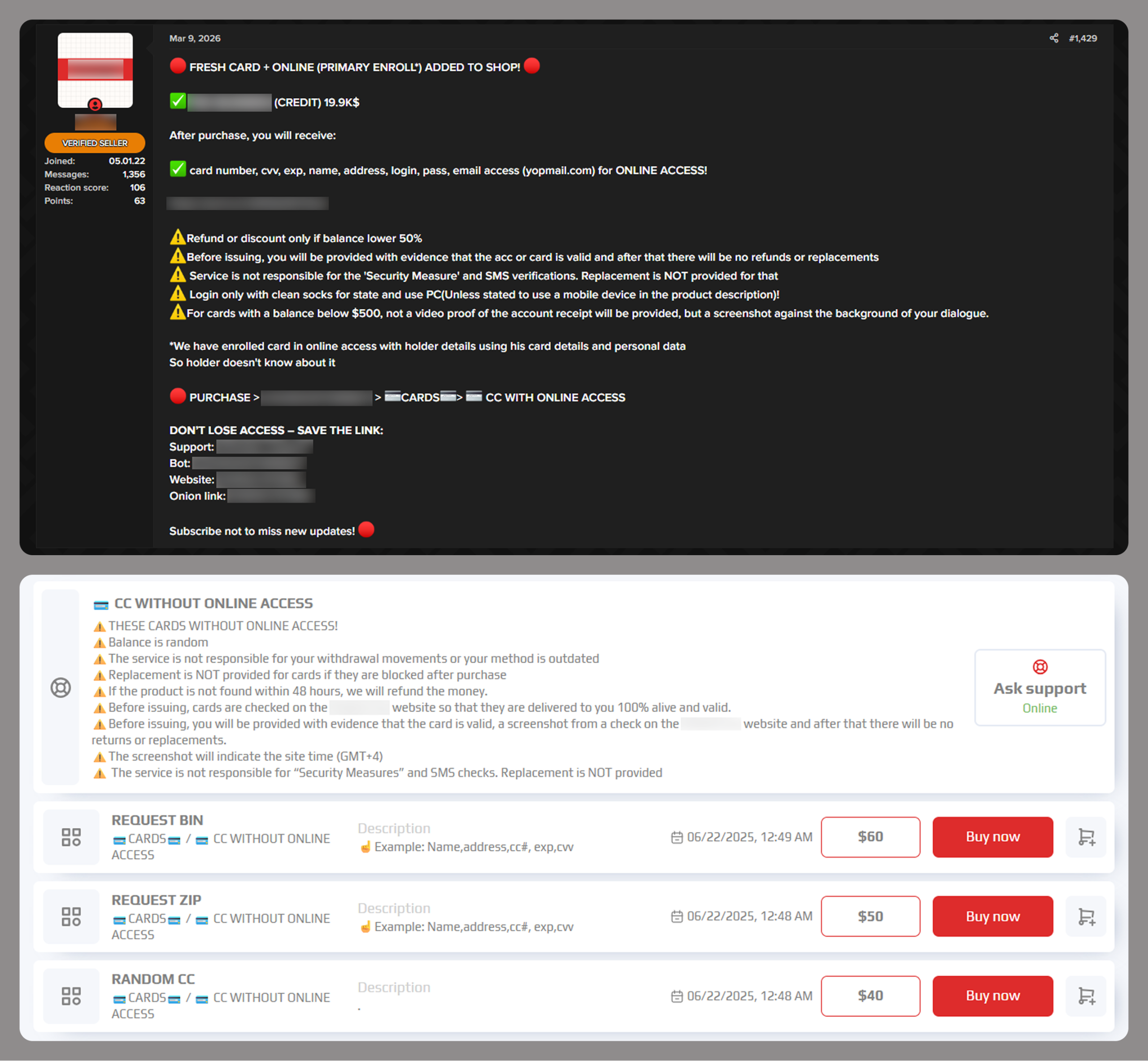
Examples of a post (top) and a site (bottom) offering payment cards
Often, sellers offer complete victim profiles, referred to by fraudsters as “fullz”. These include not only bank accounts or payment cards but also identification documents, dates of birth, residential addresses, and other personal details. A full‑information package is usually more expensive than a payment card or a bank account alone.
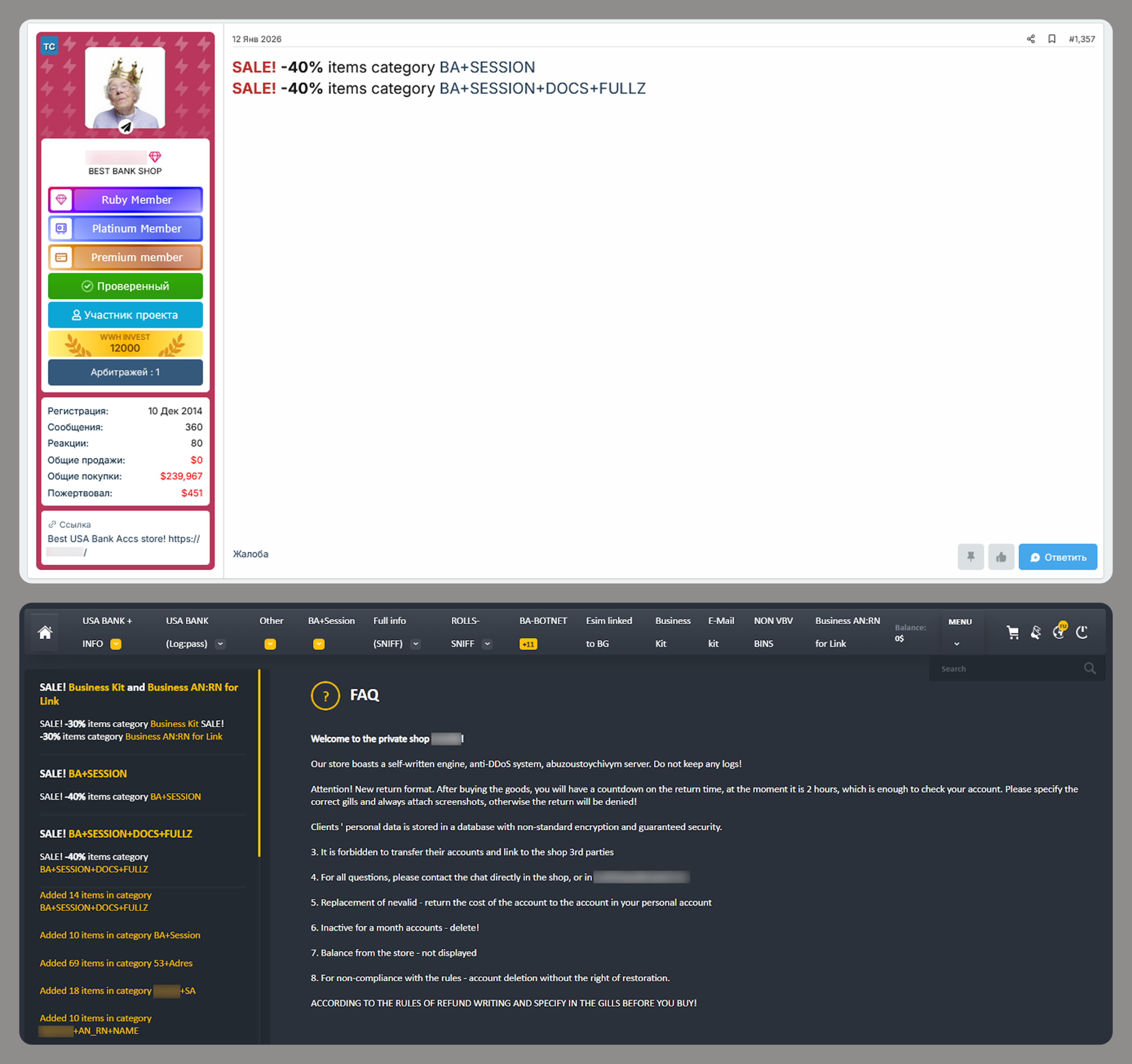
Examples of a post (top) and a site (bottom) offering bank accounts
Compiled databases
Fraudsters exploit various sources, including previously leaked databases, to compile new, thematic ones. Finance- and, in particular, cryptocurrency-related databases, are among the most popular. Compilations aimed at specific user groups, such as the elderly or wealthy people, are also of interest to cybercriminals.
Usually, thematic databases contain personal information about users, such as names, phone numbers, and email addresses. Fraudsters can use this data to launch social engineering attacks.
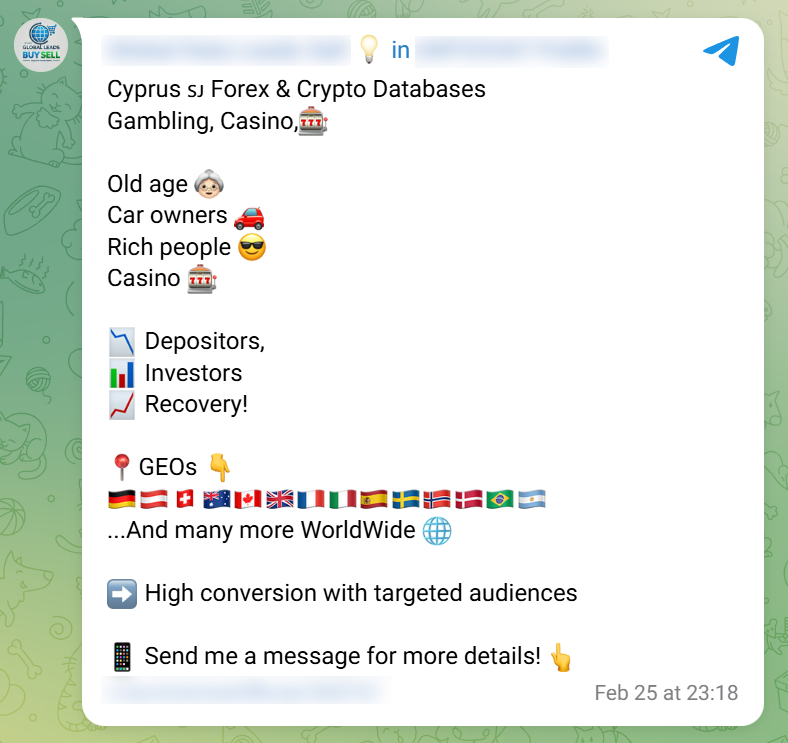
An example of a message offering compiled databases
Creation of phishing websites
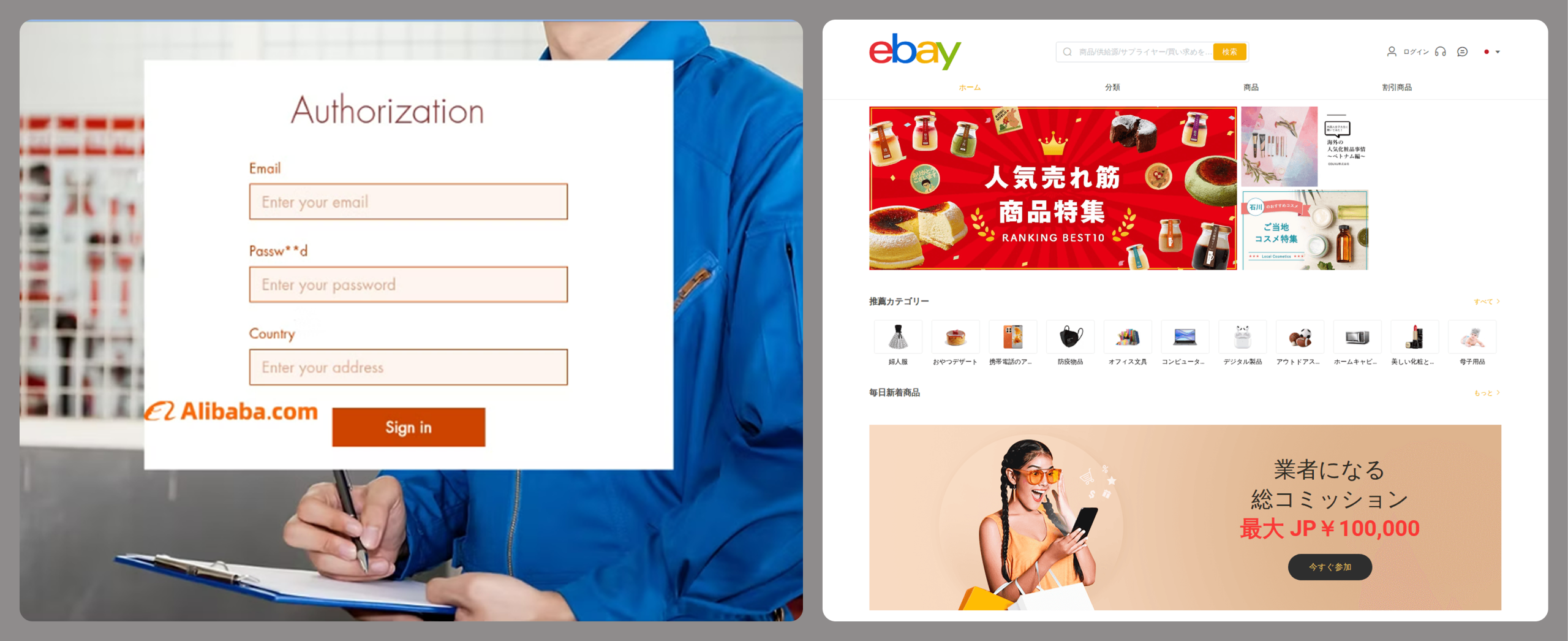
Phishing websites have become a powerful tool for the financial enrichment of fraudsters. Cybercriminals create fraudulent sites that masquerade as legitimate resources of companies operating in various industries. Gambling and retail sites remain among the most popular targets.
In order to obtain personal and financial information from unsuspecting users, adversaries seek out ways to create such phishing websites. Ready-made layouts and website copies are sold on the dark web and advertised as profitable tools. Moreover, fraudsters offer phishing website creation services.
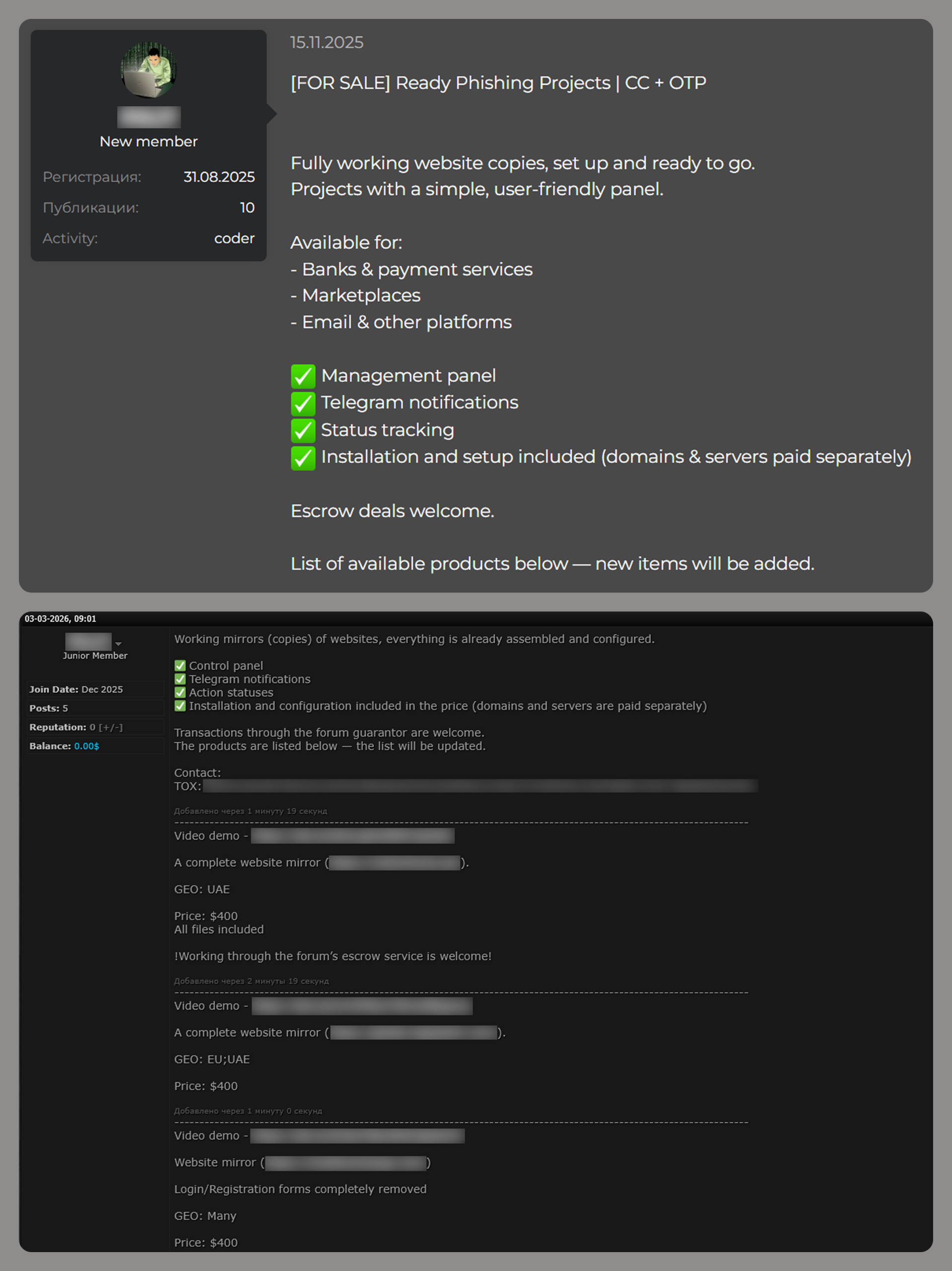
Examples of posts offering creation of phishing websites
Conclusion
The decline of traditional PC banking malware is not an indicator of reduced risk; rather, it highlights a redistribution of attacker effort toward more efficient methods targeting mobile devices, credential theft, and social engineering. Infostealers, in particular, are a force multiplier, enabling widespread compromise at scale.
Looking ahead to 2026, the financial threat landscape is expected to become even more data-driven and automated. Organizations must adapt by focusing on identity protection, real-time monitoring, and cross-channel threat intelligence, while users must remain vigilant against increasingly sophisticated and personalized attack techniques.
Criminals are using AI to clone professional websites at an industrial scale. A new report shows how one AI-powered network grew to 150+ domains by hiding behind Cloudflare and rotating IP ranges.
Americans aged 60 and older lost $4.8 billion in 2024 to scammers, according to a report released by the FBI. These figures represent real people, real families, and life-changing financial devastation.
Cybercriminals specifically target older adults for several reasons. Many seniors have accumulated substantial savings over their lifetimes, own their homes outright, and maintain good credit scores. Additionally, some may be less familiar with modern technology and digital security practices, making them more vulnerable to online deception.
The 5 scams draining senior bank accounts
1. Tech support fraud
Tech support scams happen when scammers pose as representatives of legitimate businesses like banks and utility companies. They reach out in various ways, including phone calls, texts and pop-up windows. They claim there’s an issue with a device or account and ask to send a fee to fix it. These fake alerts provide phone numbers that connect victims to scammers who then request remote access to computers and payment for unnecessary “repairs.”
2. Romance scams
Lonely seniors looking for love and companionship can easily fall victim to romance fraud. Criminals create fake profiles on dating sites and social media. These scammers build emotional relationships over weeks or months before requesting money to be wired or transferred to them for emergencies or travel expenses. Romance scams cost seniors $277 million (up 16% from 2022) according to the FTC’s latest report.
3. Grandparent scams
One of the most disturbing trends is the grandparent emergency scam. Fraudsters use AI to clone the voice of a grandchild in distress. Grandma or Grandpa gets a fake call from someone who sounds just like their grandchild saying need of money for bail, medical emergencies, or another crisis. They often request that the victim keep the call secret and send money immediately through wire transfers or gift cards. These scams work because they create emotional urgency.
4. Investment fraud
Older adults report losing more money, $538 million—a 34% increase over 2022, to investment scams than any other type of fraud. These scams often originate from phone calls, emails, social media, or events where fraudsters promise “guaranteed” high returns with little to no risk. Many schemes use urgency (“act now before it’s too late”), pose as financial advisors, or an affinity group related to their community or church. Seniors may fall for them because they sound safe and tailored to their situation, making it difficult to distinguish between legitimate opportunities and fraudulent ones until it’s too late.
5. Government impersonation scams
Scammers pose as representatives from Medicare, Social Security, or the IRS, claiming there are problems with benefits or threatening legal action unless immediate payment is made. For example, a call, text or social media message from someone who says they work at the Social Security Administration. They threaten to suspend the senior’s Social Security number or stop their Social Security payments unless they send them money owed. This type of claim is a scheme to steal both identity and money. Social Security numbers can’t be suspended, and government agencies will never ask to be paid via wire transfer, cryptocurrency or payment apps.
Signs that it might be a scam
Unexpected phone calls or pop-ups claiming a computer is infected
Requests for immediate payment via wire transfer, gift cards, or cryptocurrency
High-pressure tactics demanding quick decisions
Unsolicited romantic interest from strangers online
Claims of emergency situations involving family members
Promises of unrealistic investment returns
How Webroot can help protect seniors
Modern cybersecurity solutions are essential for protecting seniors online. Webroot’s Total Protection offers multiple layers of protection specifically designed to combat the threats seniors face most.
Antivirus protection: Webroot’s advanced threat detection identifies and blocks malicious websites, phishing attempts, and dangerous downloads before they can cause harm.
Identity protection: Identity, credit, and financial accounts monitoring for fraud, with up $1M in fraud expense and stolen funds reimbursement.
Dark Web monitoring: This feature monitors personal information and alerts users if their data appears on the dark web or in data breaches.
Secure browsing: Webroot automatically warns users about suspicious websites and blocks access to known scam sites.
Password management: Strong, unique passwords are crucial for online safety, and Webroot’s password manager makes it easy to maintain secure accounts across all devices.
The importance of community awareness
The epidemic of attacks on seniors requires community-wide awareness and action.
Family members should regularly discuss online safety with senior relatives, helping them understand current scam tactics without creating fear or limiting their digital independence. Community organizations, libraries, and senior centers host educational workshops about cybersecurity and scam prevention. Seniors should check local events to learn more.
Moving forward safely
The digital world offers tremendous benefits for seniors, from staying connected with family to accessing healthcare and financial services online. The goal The goal for seniors isn’t to avoid technology but to use it safely and confidently.
By combining awareness, education, and robust cybersecurity tools like Webroot, seniors can enjoy the advantages of modern technology while staying protected from those who would exploit their trust and generosity. When something seems too good to be true or creates a sense of urgency, seniors should take time to verify information and consult with trusted family members or friends.
The fight against elder fraud requires vigilance from entire communities, but with the right tools and knowledge, families and communities can help protect their most vulnerable members from these devastating crimes.
It all starts so innocently. You get a text saying “Your package couldn’t be delivered. Click here to reschedule.” Little do you know, clicking that link could open the door for scammers to steal your identity, empty your bank account, or even plant malicious software (malware) on your device. Unless you know what to look out for, one little tap on the wrong text could cost you money and peace of mind.
Text scams, also known as smishing (SMS + phishing), are on the rise. These fraudulent messages are sent by cybercriminals and are showing up more often and getting harder to spot. The goal is to get you to give up sensitive personal details that can be used to hack into your accounts, and they are alarmingly successful. The Federal Trade Commission reports that in 2024, consumers lost $470 million to scams that started with text messages.
Watch out for these common scams
Package delivery alerts
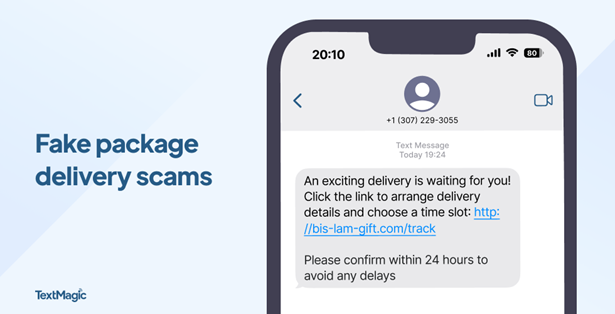
Package delivery alerts are the most common text scam. They often impersonate trusted delivery services like UPS, FedEx, and USPS. They claim there’s a delivery problem, then try to trick you into acting quickly by creating a sense of urgency. Because so many of us shop online and have packages delivered regularly, this is a scam that’s easy to fall for. Instead of clicking a link in a suspicious text, go directly to the delivery service’s website and enter your tracking number manually.
Tip: Messages like “Click now to avoid fees” are a red flag that you should make you think twice.
Photo credit: TextMagic
Unpaid toll alerts
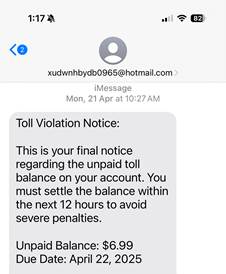
These scams claim you have an overdue toll charge and demand that you click a link to make a payment or you’ll be hit with late charges. Don’t do it! These scammers are trying to gather personal data like your driver’s license number and credit card information so they can steal from you. Remember, fake texts are often sent from phone numbers or email addresses you do not recognize, so never click on a link sent from an unknown number.
Bank account alerts
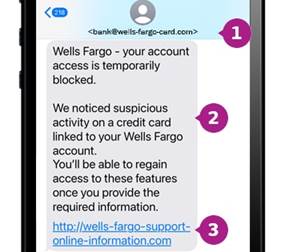
These scams look like they’re from your bank and claim there’s an issue with your funds. You’re asked for sensitive information like bank logins and passwords, which can be used to drain your bank account. They direct you to click a fake link or call a phony number to resolve it.
Tip:Most major banks, including Chase, Wells Fargo and Bank of America, will never ask for personal or account information via text.
Photo credit: Wells Fargo
Wrong number texts
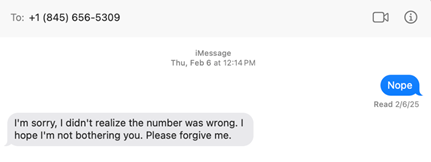
Wrong number texts are designed to seem like a legitimate accident. They start with a simple text like “Hi Mary, are we still on for Thursday?” and you respond “Sorry, wrong number.” The unknown person then tries to start up a friendly conversation, with the goal of establishing a connection and sometimes even cultivating a romantic relationship. It’s common for these cybercriminals to try and con you into a fraudulent investment like a cryptocurrency scam.
Task scams
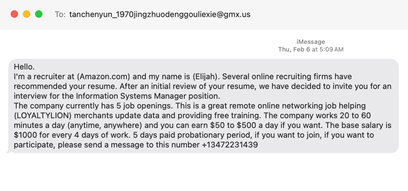
Task scams are fake job opportunities. You get a text promising online work with lucrative pay and flexibility. The offer may entail fun tasks like getting paid to shop, but the purpose is to lure you into sharing personal information like your social security number, which can be used to steal your identity. As always, if something sounds too good to be true, it probably is.
Prize or gift card scams
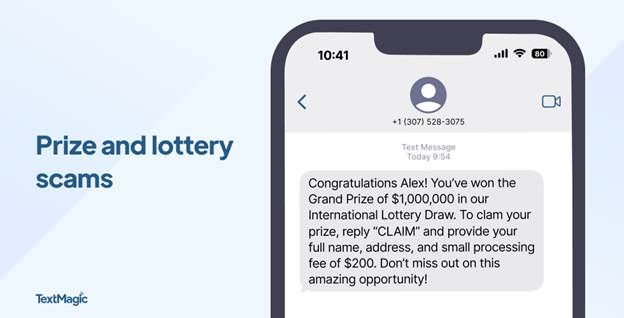
It’s easy to feel lucky if you get a text claiming you’ve won a prize, a gift card or other type of reward. Sadly, many people fall for this type of fraud. These messages appear to be from legitimate retailers like Amazon, Walmart or Target. They say things like “You’ve been selected for a $100 gift card!” and tell you to click a link to claim your prize. These scams often work because they generate a sense of excitement and urgency, but they’re just another way to trick you into clicking and entering personal or payment information. In reality, there’s no prize – just a phishing site or malware ready to steal your data.
Photo credit: TextMagic
Mobile security checklist
Most of us use our phones for everything – banking, shopping, messaging, and storing personal information. That makes them a treasure trove of sensitive data and a high-value target for cyberthieves. Here are some tips to help you strengthen your mobile security against text scams and other types of fraud.
Don’t click: If you get a text from an unknown sender, do not click on any links. Reach out to the company using a confirmed phone number or website to check if it’s a legitimate message.
Don’t share: Never share any of your personal or financial information via text. Remember that if someone is asking you to do this, they’re most likely a scammer.
Fight the fear: Be wary about responding to a text that sounds urgent or threatening. Scammers love to take advantage by creating a sense of fear.
Stay updated: By keeping your phone’s software up to date, you’ll always have the latest security patches. This is an important tool for protecting against viruses and other malware.
Stay vigilant: If something seems too good to be true, it likely is. You probably haven’t won that latest iPhone, especially if you don’t remember entering a contest. Always take a moment to think critically before acting.
Use strong passwords: Long, complex and unique passwords are a cornerstone of mobile security. Webroot solutions include password managers that help you stay safe while simplifying your life.
Enable two-factor authentication (2FA): Use two-factor authentication on your accounts, especially for banking and email.
Scan regularly: Scan your device on a regular basis with trusted security software. Whether you’re using Android or iOS, Webroot Mobile Security offers automatic scanning of apps and updates, as well as real-time protection against phishing and malicious websites.
Use a VPN: Consider usinga VPN (Virtual Private Network) to protect your personal information when you’re on public Wi-Fi. Webroot Secure VPN provides safe browsing and online transactions for enhanced privacy and data security.
Text scams are a sneaky way for hackers to get access on your private data, but you don’t have to fall prey to them. By staying alert to the subtle signs of text scams and arming yourself with the security of Webroot, you can stay safe from the latest mobile threats. Browse, shop, and bank with confidence, knowing that your phone — and everything on it — is protected.
Introducing Text Scams Detection on Webroot Mobile Security for Android!
Stay one step ahead of scammers with Webroot’s latest feature: Text Scams Detection. Our advanced technology scans incoming text messages for suspicious links and fraudulent content, protecting you from phishing attempts and malicious schemes like fake delivery tracking links or fraudulent bank notifications. With real-time alerts and flagging, you can confidently navigate your digital world without the fear of falling victim to text scams. Download Webroot Mobile Security for Android today and experience peace of mind like never before!
Explore Webroot plans or Download Mobile Security for Android now from My Account.

 Login
Login