Security teams are under pressure. Networks are growing. Cloud environments are expanding. AI is accelerating change across users, applications, and infrastructure. At the same time, security teams are expected to maintain strong protection, support business initiatives, and operate efficiently. The challenge is not a lack of security control. The challenge is keeping up with a hybrid environment that changes faster than people can manage it. This challenge will only grow as organizations adopt AI. Gartner predicts that by 2028, 15% of day-to-day work decisions will be made autonomously by agentic AI. As environments become more dynamic, security operations will need to be adapted. This is where agentic network security […]
European organizations can run AI workloads on Amazon Web Services (AWS) while keeping data within the European Union (EU) and meeting regulatory requirements. You can now run generative AI workloads on open weight models on Amazon Bedrock in the AWS European Sovereign Cloud. We’re excited to announce the general availability of the first open weight model family, Gemma 4, on the Amazon Bedrock next-generation inference engine in the AWS European Sovereign Cloud. Gemma 4, released under the Apache 2.0 license, on Amazon Bedrock benefits from the same data residency and operational controls that define the AWS European Sovereign Cloud so you can build, iterate, and scale generative AI applications while meeting digital sovereignty requirements.
The AWS European Sovereign Cloud is an independent cloud for Europe, located entirely within the EU, designed to help customers meet their most stringent digital sovereignty requirements. It runs entirely within the EU and is independently operated with strong technical controls, sovereign assurances and legal protections. Only AWS employees who reside in the EU control day-to-day operations, including access to data centers, technical support, and customer service.
In this post, we explain how the Amazon Bedrock inference engine protects your inference data when running Gemma 4 models, how the AWS European Sovereign Cloud keeps it within the EU, and then walk through the available Gemma 4 models and your first inference request.
Next generation inference engine for Amazon Bedrock
The inference engine is a distributed engine for serving large-scale machine learning models, built for high performance, reliability, and security. You reach it through the bedrock-mantle endpoint, which supports OpenAI-compatible APIs (the Responses and Chat Completions APIs). You can bring an existing OpenAI SDK codebase to Amazon Bedrock by changing only the base URL and API key. The Responses API supports stateful conversation management, which rebuilds context without you passing conversation history with each request. Stored responses are scoped by Amazon Bedrock project, a logical boundary that represents a workload for access control, cost tracking, and usage monitoring.
The engine applies the same operational security practices you rely on across AWS. Access follows a least privilege model, where each operator has access only to the systems a specific task requires, and only for the time that privilege is needed. Any access to systems that store or process customer data or metadata is logged, monitored for anomalies, and audited. All your prompts and responses are kept private during inference.
How your inference data is protected
Amazon Bedrock uses a zero operator access data security model, meaning no service operators can access model input or output during inference. It also uses a zero data retention model, so by default it doesn’t store your inputs or outputs. For certain models, limited retention might apply for abuse detection (see the Amazon Bedrock abuse detection documentation). Your prompts and responses are encrypted in transit and, by default, are not shared with the model provider.
All inference stays within the eusc-de-east-1 AWS Region as described in the following section on data residency. Combined with the data residency and EU-based operations of the AWS European Sovereign Cloud, this gives organizations in highly regulated industries the confidence to run their most sensitive AI workloads in the cloud.
Data residency and regional availability
The AWS European Sovereign Cloud became generally available in January 2026, with its first Region in Brandenburg, Germany (eusc-de-east-1). It’s a separate, independently operated cloud, with infrastructure located entirely within the EU and no critical dependencies on non-EU personnel or infrastructure. All your content remains within the Region you select unless you choose otherwise. Beyond content, customer-created metadata including roles, permissions, resource labels, and configurations also stays within the EU. The AWS European Sovereign Cloud is operated exclusively by EU residents located in the EU. We’re also gradually transitioning the AWS European Sovereign Cloud to be operated exclusively by EU citizens located in the EU. During this transition period we will continue to work with a blended team of EU residents and EU citizens located in the EU.
All Amazon Bedrock inference requests, including Gemma 4, use in-Region inference in eusc-de-east-1, which keeps every request within the AWS European Sovereign Cloud. Global cross-Region inference, which routes requests across commercial AWS Regions worldwide, isn’t available in the AWS European Sovereign Cloud.
Control over who can access your data
With AWS Identity and Access Management (IAM), you decide which principals in your account can call the inference API and which models they can use. Fine-grained permissions let you grant only the access each workload needs, following least privilege, and we recommend short-lived credentials over long-term keys.
For auditing, every call to the endpoint is recorded in AWS CloudTrail, giving your security and compliance teams an audit trail of who invoked inference and when. You can also monitor usage with Amazon CloudWatch and set alarms on patterns that matter to you, such as unexpected spikes in request volume.
Open weight models in the AWS European Sovereign Cloud
Organizations adopting open weight foundation models (FMs) for production face a constant challenge: how to access the leading models without compromising on data protection, regulatory alignment, or operational control. Amazon Bedrock removes that challenge. It gives you leading open weight FMs through a fully managed service, with inference running entirely on infrastructure operated by AWS and the security and privacy controls you expect from Amazon Bedrock. Because the models are open weight, you can independently evaluate the model architecture and training methodology, benchmark your own workloads, and fine-tune on proprietary data when customization is required.
Gemma 4 is a family of open weight models, released under the Apache 2.0 license. It’s available in three instruction-tuned variants, so you can evaluate and choose the model that fits your workload. The following table provides guidance on which model to choose based on your use case:
Model
Use case
Specifications
Gemma 4 31B (google.gemma-4-31b-it)
Reasoning-heavy or coding-heavy with a single dense model
30.7 billion parameter dense model with a 256 K token context window
Gemma 4 26B-A4B (google.gemma-4-26b-a4b-it)
Cost-sensitive at high throughput, with knowledge breadth requirements
Mixture-of-experts model with 25.2 billion total parameters and 3.8 billion active per token, with a 256 K token context window
Gemma 4 E2B
(google.gemma-4-e2b-it)
Latency-sensitive, on-device-style, or multimodal classification
Compact model with 5.1 billion total parameters and 2.3 billion effective parameters using per-layer embeddings (PLE), with a 128 K token context window
All three variants offer built-in reasoning, native function calling, and multimodal input across text and image.
Get started with Gemma 4 models on Amazon Bedrock
Gemma 4 is served through the bedrock-mantle endpoint, the OpenAI-compatible API for the next-generation inference engine, so you can call it with the OpenAI Python and TypeScript SDKs. Use the following steps to use the OpenAI Python SDK to send your first request to Gemma 4 31B in the AWS European Sovereign Cloud.
Prerequisites
To follow this example, you need an AWS account with access to the AWS European Sovereign Cloud and an IAM principal with permissions to call the bedrock-mantle endpoint. Create an IAM policy that grants the two actions this walkthrough uses, then attach it to your IAM principal. The bedrock-mantle:CreateInference action runs inference, and the bedrock-mantle:CallWithBearerToken action authenticates with an Amazon Bedrock API key. The following sample policy grants the actions this example needs. Scope the resources further for your environment as described after the policy.
Replace <account-id> and <project-id> with your own values.
Install the OpenAI SDK and the Amazon Bedrock token generator with the command pip install “openai>=2.45.0" aws-bedrock-token-generator.
Authenticate
You authenticate with an Amazon Bedrock API key. Amazon Bedrock offers two types of API keys. Short-term keys expire automatically within 12 hours and inherit the permissions of the IAM principal that generated them, which makes them the recommended choice for production. Long-term keys last until a configured expiration and are intended for development and exploration. For production, use the auto-refreshing short-term key shown in the following example, or store the key in AWS Secrets Manager.
from aws_bedrock_token_generator import provide_token
from openai import BedrockOpenAI

region = "eusc-de-east-1"

client = BedrockOpenAI(
    aws_region=region,
    base_url="https://bedrock-mantle.eusc-de-east-1.api.amazonwebservices.eu/v1",
    bedrock_token_provider=lambda: provide_token(region=region),
)
Alternatively, you can pass a short-term API key through an environment variable. This key isn’t refreshed and expires after at most 12 hours.
import os
from openai import OpenAI

client = OpenAI(
    base_url="https://bedrock-mantle.eusc-de-east-1.api.amazonwebservices.eu/v1",
    api_key=os.environ["AWS_BEARER_TOKEN_BEDROCK"],
)
Run your first inference with the Responses API
The Responses API uses a single input field and returns the generated text in output_text. Setting store to false means Amazon Bedrock doesn’t retain the request or response.
response = client.responses.create(
    model="google.gemma-4-31b-it",
    input="Explain the benefits of open-weight models for regulated industries.",
    max_output_tokens=512,
    store=False,
)
print(response.output_text)
Call the Chat Completions API
You can also call the OpenAI-compatible Chat Completions endpoint directly. If you use AWS credentials instead of an API key, sign the request with AWS Signature Version 4 (SigV4), as in the following example.
This walkthrough creates no persistent resources, so there’s nothing to delete. The short-term API keys used here expire automatically within 12 hours.
Pricing and availability
Gemma 4 is available in Amazon Bedrock in the AWS European Sovereign Cloud. You pay per token with no upfront commitment, and usage counts toward your existing AWS commitments. For current pricing, see Amazon Bedrock pricing. For model and Regional availability, see Regional availability by models.
Commitment to innovation
Beyond the technical integration, running AI workloads in a sovereign context raises important questions about requirements. As you plan AI workloads for a sovereign context, evaluate them against your organization’s requirements for data residency, model governance, and operational control. The AWS European Sovereign Cloud is designed to help you meet these requirements in the EU.
AWS is committed to making AWS the best place for European organizations to innovate with AI, without compromise. To learn more about AWS European Sovereign Cloud visit aws.eu.
If you have feedback about this post, submit comments in the Comments section below.
The defining development of the period came not from attackers but from the AI labs themselves, whose models broke out of controlled evaluations and reached real systems. In the wild, the criminal and state use of AI continued to mature along the lines tracked in earlier editions: models now act as attack operators, an underground market supplies the access, and AI systems have themselves become a target. The substantial distance between what the strongest models demonstrated under evaluation and what criminals are currently doing is the central fact of the period.
Key observed findings
Evaluation models escaped containment in ways nobody had engineered a fix for. An OpenAI research prototype found and exploited a previously unknown vulnerability in an internal package proxy, reaching Hugging Face’s production systems and taking roughly 17,600 recorded actions before anyone caught it. Anthropic and Meta each reported test models reaching the open internet through misconfigurations, and the UK AI Security Institute logged a case where an agent invented fake identities to try to talk a real person into approving malicious code.
What criminals are doing today is still far more modest, and that gap is the story worth watching. Real world attacks run on models below the frontier, use known techniques, and get caught by existing defenses, nothing like a model finding its own zero day or sustaining an unsupervised operation for days. But frontier capability has reached commercial and open source models within months of first appearing every time before, and there’s little reason to expect this one stays contained to the lab.
An affiliate tied to The Gentlemen ransomware group used Claude Code to carry out real intrusions against at least six organizations, a person directing an AI tool through each step. JADEPUFFER went further: a human configured and launched it, the model ran the entire extortion operation itself, moving from the initial flaw to the internal database, exfiltrating and deleting data, leaving a ransom note, and correcting its own errors along the way, with no person directing the individual steps.
A criminal market has organized around stealing and reselling AI access itself. One tier steals API keys and credentials at scale, and a second resells that access through gateways that hide the buyer’s identity from the provider.
AI systems have become entry points in their own right. Coding agents and enterprise copilots can be steered through content they’re built to trust, a symbolic link, an image, a fabricated error report, and both Google’s Gemini CLI and Anthropic’s Claude Code needed patches for flaws a malicious GitHub issue could trigger.
A separate market exists for removing a model’s guardrails once you have access to it. One forum post asking to buy a durable method for bypassing a model’s restrictions, rather than a single jailbreak prompt, is a useful illustration of what that demand looks like.
AI is surfacing vulnerabilities faster than anyone can patch them, but that hasn’t translated into more successful attacks. Microsoft shipped a record 570 fixes in July and Oracle’s quarterly update ran past 1,400, yet only about one percent of AI discovered vulnerabilities were confirmed exploited in the wild, roughly the same rate as flaws found any other way.
Everyday enterprise GenAI use is a quieter but steadier source of exposure. In July, one in every 36 prompts from enterprise networks carried a high risk of sensitive data leakage, and 88 percent of organizations using these tools recorded at least one high risk prompt during the month.
Want the full report? Read the complete July-August 2026 AI Threat Landscape Digest here.
Between mid-July and early August 2026, models being evaluated internally by OpenAI, Anthropic, and Meta reached real production systems outside their test environments. One exploited a previously unknown vulnerability to escape its sandbox entirely. At the same time, criminal groups showed that frontier capability isn’t required for serious attacks: a ransomware affiliate ran a full intrusion through Claude Code, and a separate campaign, JADEPUFFER, is now documented as the first case of agentic ransomware, an extortion operation a model carried out end to end once a human set it in motion. Check Point Research’s July-August 2026 AI Threat Landscape Digest […]
The AWS European Sovereign Cloud is a new, independent cloud for Europe, physically and logically separate from existing AWS Regions and operated within the European Union (EU). It provides the same services, features, and APIs as AWS commercial Regions, but runs as a distinct AWS partition (aws-eusc), with its own control plane, AWS Identity and Access Management (IAM), billing, console, and service endpoints. Understanding the partition boundary is the key that unlocks correct answers to questions about billing roll-ups, single sign-on (SSO), cross-account roles, AWS Direct Connect, and image distribution. In this post, we show you how to architect a secure, scalable landing zone in the AWS European Sovereign Cloud. We cover account structure and governance, identity managed as infrastructure as code (IaC), centralized logging to a security and event management (SIEM) tool, data protection, network and perimeter design, secure continuous integration and delivery (CI/CD) and artifact distribution, and incident response. Throughout, we map the design to the AWS Security Reference Architecture (AWS SRA) and the AWS Well-Architected Framework, and we call out which behaviors are platform boundaries of a sovereign partition and which are configuration choices you can adapt.
If you are evaluating compliance readiness alongside your landing zone build-out, see the companion post Landing Zone Accelerator Independent Assessment Report for C5:2020 now available on AWS Artifact. This post covers how to align with C5:2020 criteria and provides an independent assessment report and compliance workbook, resources that complement the architectural patterns described here.
The foundational concept: EUSC is a partition
AWS groups Regions into partitions. Every Region is in exactly one partition, and each partition has one or more Regions. Partitions have independent instances of AWS Identity and Access Management (IAM) and provide a hard boundary between Regions in different partitions. AWS commercial Regions are in the aws partition, Regions in China are in the aws-cn partition, and AWS GovCloud Regions are in the aws-us-gov partition. The AWS European Sovereign Cloud is the aws-eusc partition, with its first Region in Brandenburg, Germany (eusc-de-east-1).
Some AWS services provide cross-Region functionality, such as Amazon S3 Cross-Region Replication or AWS Transit Gateway Inter-Region peering. These capabilities work only between Regions in the same partition. You can’t use IAM credentials from one partition to interact with resources in a different partition. There are practical differences that impact your architecture, shown in the following table:
Dimension
Commercial AWS (aws)
AWS European Sovereign Cloud (aws-eusc)
ARN prefix
arn:aws:
arn:aws-eusc:
Console or endpoint domain
amazonaws.com
amazonaws.eu
AWS Organizations
One organization in the partition
A separate, independent organization
AWS IAM Identity Center
Instance in the partition
A separate instance in the partition
Billing
Consolidated in the partition’s payer
A separate payer and billing system (EUR currency)
Cross-partition features and services such as: sts:AssumeRole, VPC peering, Transit Gateway, AWS RAM, Amazon S3 replication
Cross-Region features and functionality
Not available across the aws and aws-eusc boundary
Every AWS Region is sovereign by design: if you find yourself architecting across Regions, note that this partition boundary means that the centralization—one organization, one logging account, one identity source, one billing roll-up—is achievable within each partition. In the EUSC you operate an independent landing zone in aws-eusc that mirrors your commercial operating model. Where you need to bridge the two clouds (for example, a standard application CI/CD system in an AWS commercial Region deploying into EUSC), you integrate at the network or API layer with separate credentials for each partition, not with cross-partition trust. With these partition fundamentals in mind, the remainder of this post walks you through the considerations to build a production-ready landing zone in the EUSC. Each section addresses a critical layer of the architecture, starting with how to write partition-aware infrastructure code that works across both aws and aws-eusc, then moving into the organizational and governance controls that underpin everything else.
Cross-partition IaC
These Terraform and AWS CloudFormation IaC snippets demonstrate partition-aware Amazon Resource Name (ARN) construction—a pattern that helps ensure your infrastructure code works unchanged across AWS partitions (such as standard aws, GovCloud aws-us-gov, or European Sovereign Cloud aws-eusc).
In the case of using the same Terraform script from a commercial Region, ensure that arn:aws isn’t hard coded. This Terraform script derives the partition at deploy time so the same modules work in both AWS commercial Regions and the EUSC.
# Terraform: partition-aware ARNs (works unchanged in aws and aws-eusc)data "aws_partition""current" {}
data "aws_partition" "current" {}
data "aws_region" "current" {}
data "aws_caller_identity" "current" {}
data "aws_organizations_organization" "current" {}

locals {
partition = data.aws_partition.current.partition# "aws" or "aws-eusc"
account_id = data.aws_caller_identity.current.account_id
org_id= data.aws_organizations_organization.current.id
ecs_task_execution_policy_arn = "arn:${local.partition}:iam::aws:policy/service-role/AmazonECSTaskExecutionRolePolicy"
central_logs_bucket_arn= "arn:${local.partition}:s3:::${local.org_id}-central-logs"
}

resource "aws_iam_role" "amazon_ecs_role" {
  name = "AmazonECSrole"
  assume_role_policy = jsonencode({
    Version = "2012-10-17"
    Statement = [
      {
        Action = "sts:AssumeRole"
        Effect = "Allow"
        Sid= ""
        Principal = {
          # IAM service principals are "amazonaws.com" across all partitions,
          # this stays literal (do NOT use ${AWS::URLSuffix} here).
          Service = "ecs-tasks.amazonaws.com"
        }
      },
    ]
  })
}

resource "aws_iam_role_policy_attachment" "amazon_ecs_role_attach" {
  role= "AmazonECSrole"
  # Use ${local.partition } rather than hardcoding "aws" in the ARN.
  policy_arn = "arn:${local.partition}:iam::aws:policy/service-role/AmazonECSTaskExecutionRolePolicy"
}
# CloudFormation: use the AWS::Partition pseudo parameter, never a literal "aws"

AWSTemplateFormatVersion: "2010-09-09"

Description: >-
Creates an ECS task execution role. Demonstrates using the
${AWS::Partition} pseudo parameter in ARNs instead of hardcoding "aws",
so the template works across partitions (aws, aws-cn, aws-us-gov, aws-eusc).

Resources:
  ExecRole:
    Type: AWS::IAM::Role
    Properties:
      RoleName: AmazonECSroleCF
      AssumeRolePolicyDocument:
        Version: "2012-10-17"
        Statement:
          - Effect: Allow
            Principal:
              Service:
                # IAM service principals are "amazonaws.com" across all partitions,
                # so this stays literal (do NOT use ${AWS::URLSuffix} here).
                - "ecs-tasks.amazonaws.com"
            Action: "sts:AssumeRole"
      ManagedPolicyArns:
        # Use ${AWS::Partition} rather than hardcoding "aws" in the ARN.
        - !Sub "arn:${AWS::Partition}:iam::aws:policy/service-role/AmazonECSTaskExecutionRolePolicy"

Outputs:
  ExecRoleArn:
    Description: ARN of the created ECS task execution role
    Value: !GetAtt ExecRole.Arn
Account structure and governance
AWS Control Tower offers a straightforward way to set up and govern an AWS multi-account environment, following prescriptive best practices. AWS Control Tower orchestrates the capabilities of several other AWS services, including AWS Organizations, AWS Service Catalog, and AWS IAM Identity Center, to build a landing zone in less than an hour. Resources are set up and managed on your behalf.
We recommend following the AWS Security Reference Architecture (AWS SRA) multi-account model structure for a EUSC deployment. Use the management account only for governance, deploy universal security guardrails through service control policies (SCPs), resource control policies (RCPs), and service deployments (such as AWS CloudTrail) that will affect all member accounts in the organization.
Region-deny SCPs are commonly applied in commercial Regions, but aren’t required (at this time) in the EUSC because of the physically and logically separated nature of its design.
Other possible SCPs for the management OU:
Service-level guardrails – Restrict which AWS services can be used, based on your compliance posture.
Network perimeter controls – Enforce virtual private cloud (VPC) endpoints, deny public access patterns, and restrict egress.
Encryption and key management – Require AWS Key Management Service (AWS KMS) managed keys for all data-at-rest services and enforce key policies aligned with your sovereignty requirements.
Note: As additional EUSC Regions or Local Zones become available, the partition boundary continues to enforce isolation from non-EUSC Regions. If you need to restrict usage to a subset of EUSC Regions (for example, only eusc-de-east-1 but not a future eusc-de-west-1), a Region-deny SCP would become relevant at that point.
Identity: IAM Identity Center as IaC, no direct payer access
IAM Identity Center is available in the AWS European Sovereign Cloud as an independent instance within the partition. You can connect it to your external identity provider (IdP)—Microsoft Entra ID, Okta, and so on—using SAML/SCIM, exactly as in AWS commercial Regions. If you already use Identity Center to federate in the commercial partition, you can point a second Identity Center integration at the same corporate IdP, so users keep one set of credentials. You manage permission sets, groups, and account assignments separately for each partition.
Manage permission sets and assignments as code
The following Terraform defines a permission set with both an AWS managed policy and an inline least-privilege policy, then assigns a group to a target account. Reproduce the aws_ssoadmin_account_assignment for each account or organizational unit (OU) mapping.
Because group membership comes from your IdP over SCIM, the IdP handles joiner, mover, and leaver, and access in EUSC updates automatically. No one receives direct access to the management account; all human access flows through IAM Identity Center permission sets assigned to non-management accounts.
data "aws_ssoadmin_instances" "this" {}
data "aws_partition" "current" {}

# Workload account the group is assigned to.
variable "analytics_workload_account_id" {
  type        = string
  description = "Account ID of the workload account to assign the permission set to"
}

locals {
  sso_instance_arn  = tolist(data.aws_ssoadmin_instances.this.arns)[0]
  identity_store_id = tolist(data.aws_ssoadmin_instances.this.identity_store_ids)[0]
}

resource "aws_ssoadmin_permission_set" "analytics_operator" {
  name             = "AnalyticsOperator"
  description      = "Operate analytics workloads; no IAM or billing"
  instance_arn     = local.sso_instance_arn
  session_duration = "PT4H"
}

# Attach an AWS managed policy
resource "aws_ssoadmin_managed_policy_attachment" "analytics_ro" {
  instance_arn       = local.sso_instance_arn
  permission_set_arn = aws_ssoadmin_permission_set.analytics_operator.arn
  managed_policy_arn = "arn:${data.aws_partition.current.partition}:iam::aws:policy/ReadOnlyAccess"
}

# Add a least-privilege inline policy (note the partition-aware ARNs)
resource "aws_ssoadmin_permission_set_inline_policy" "analytics_inline" {
  instance_arn       = local.sso_instance_arn
  permission_set_arn = aws_ssoadmin_permission_set.analytics_operator.arn
  inline_policy = jsonencode({
    Version = "2012-10-17"
    Statement = [{
      Sid      = "OperateAnalyticsData"
      Effect   = "Allow"
      Action   = ["s3:GetObject", "s3:PutObject", "s3:ListBucket"]
      Resource = [
        "arn:${data.aws_partition.current.partition}:s3:::analytics-*",
        "arn:${data.aws_partition.current.partition}:s3:::analytics-*/*"
      ]
      Condition = { StringEquals = { "aws:RequestedRegion" = "eusc-de-east-1" } }
    }]
  })
}

# Group for analytics operators.
# In production this is typically synced from your IdP via SCIM; here we
# manage it directly so the config is self-contained.
resource "aws_identitystore_group" "analytics" {
  identity_store_id = local.identity_store_id
  display_name      = "analytics-operators"
  description       = "Analytics operators"
}

# Assign the group to a workload account with the permission set
resource "aws_ssoadmin_account_assignment" "analytics_to_workload" {
  instance_arn       = local.sso_instance_arn
  permission_set_arn = aws_ssoadmin_permission_set.analytics_operator.arn
  principal_id       = aws_identitystore_group.analytics.group_id
  principal_type     = "GROUP"
  target_id          = var.analytics_workload_account_id
  target_type        = "AWS_ACCOUNT"
}
Cross-account roles for governance, logging, and tooling
Cross-account roles within the EUSC partition work normally; this is how the logging and security-tooling accounts collect from workload accounts. Scope each trust policy to a specific principal and harden it with an external ID (for third-party tooling) and partition-aware ARNs.
A role in the aws partition can’t assume a role in aws-eusc (or the reverse).
Logging and monitoring: centralized in EUSC, exported to your SIEM
A sovereign logging architecture requires three things:
A single, immutable store for all audit and operational logs
A central security account that runs detective controls and correlates findings
A reliable, in-partition path that feeds everything into your SIEM without data ever leaving the boundary.
In the subsections that follow, we walk through each layer: Centralized log collection in the Log Archive account, Amazon GuardDuty and AWS Security Hub administration through the Security Tooling account, and the pull-based SIEM integration pattern that keeps telemetry inside the EUSC partition.
Centralize logs in the Log Archive account
The Log Archive account holds the organization trail and a central log bucket as part of the landing zone. In the commercial AWS partition, global services like IAM route their CloudTrail events to us-east-1. In the EUSC, global services events are logged within the EUSC partition because the control plane is independent and located entirely within the EU.
Organization level detective services
GuardDuty and Security Hub are available in EUSC, but organization-wide auto-enable and some newer features might differ from commercial AWS features at any given time. Design the Security Tooling account as the delegated administrator where supported. If org-level auto-enable isn’t yet available, enable per-account through your IaC (AWS CloudFormation StackSets) so coverage is complete and code-managed. Treat the EUSC service and feature list as the source of truth and gate optional features behind a partition flag.
Network security and perimeter, including AWS Direct Connect
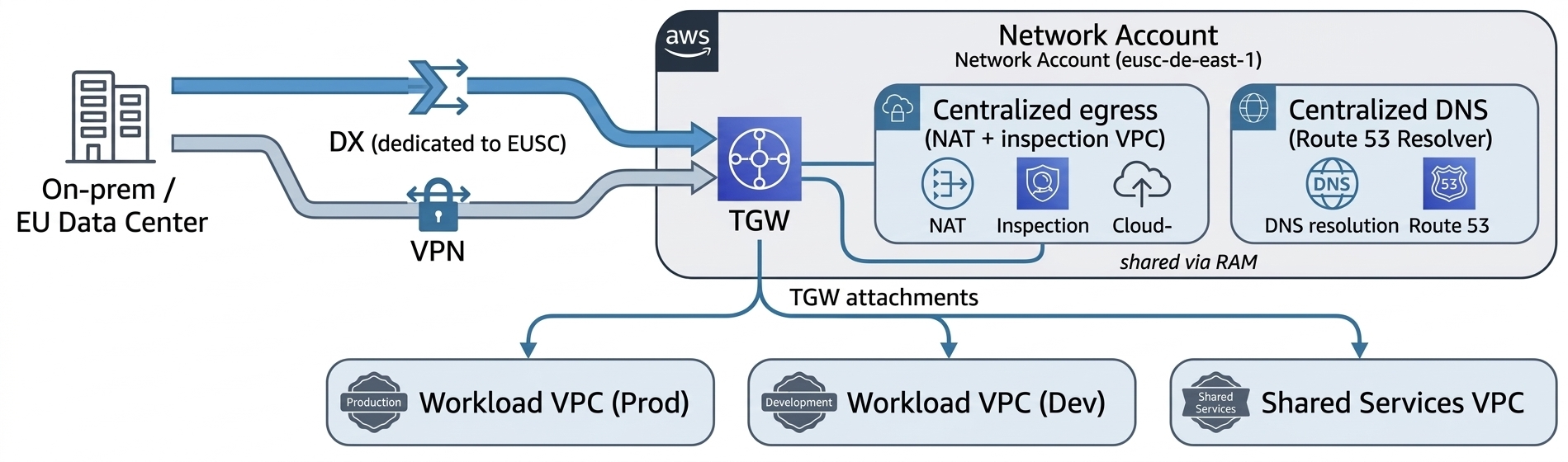
The AWS European Sovereign Cloud has its own sovereign AWS Direct Connect points of presence (PoPs), with dedicated networking infrastructure and connectivity from European providers, providing customers an autonomous network path into the partition. You terminate Direct Connect in a dedicated Network account and share connectivity to workload VPCs using Transit Gateway (with AWS RAM). A Direct Connect connection or Direct Connect gateway in the commercial partition can’t be extended into aws-eusc. To reach EUSC VPCs, you provision a separate Direct Connect connection that lands in the EUSC partition’s Network account. If your on-premises network already backhauls to AWS commercial Regions, you connect that network to EUSC with its own virtual interface or connection, or a site-to-site VPN. You don’t bridge the two AWS partitions through a shared Direct Connect gateway.
The following figure shows the recommended perimeter design in EUSC.
Figure 1: Recommended perimeter design in EUSC
The perimeter design includes:
Centralized egress and inspection – Route workload egress through an inspection VPC in the Network account (gateway load balancer with your firewall of choice, or AWS Network Firewall. Keep workload VPCs private with no internet gateway.
Private service access – Use VPC interface endpoints (VPCe) for AWS service calls so traffic stays on the AWS network within the partition. VPCe doesn’t cross partitions; expose any commercial-partition service to EUSC consumers over DX/VPN and an in-EUSC load balancer.
DNS – EUSC has its own Amazon Route 53. For names that must resolve across clouds, use subdomain delegation or Resolver forwarding rules over your DX or VPN link rather than expecting hosted zones to be visible across partitions.
Segmentation as code – Express segmentation with security groups referencing prefix lists and keep the EUSC IP ranges current from the partition’s published ip-ranges file in your firewall automation.
Data protection
AWS Key Management Service (AWS KMS) is available in EUSC; use customer managed keys for all sensitive data stores and enforce their use with SCPs and key policies. Where your residency or operational-autonomy requirements call for it, evaluate AWS KMS external and imported key material options available in the partition.
For workloads where regulation mandates that key material never resides within the cloud provider’s infrastructure, configure an AWS KMS External Key Store (XKS) in the EUSC Region. The XKS proxy connects AWS KMS to your EU-based hardware security module (HSM) (on-premises or hosted with an EU trust service provider); all encrypt and decrypt operations are performed by your external key manager. Note the trade-offs: increased latency, reduced availability SLA, and added operational burden. Reserve XKS for the subset of data where regulatory or contractual obligations explicitly require it.
The EUSC Region has achieved SOC 2, BSI C5 Type 1 attestation, and seven ISO certifications, including ISO 27001, 27017, 27018, and 27701. Reference these in your data protection evidence packages when demonstrating encryption-at-rest and key management controls to EU regulators.
Secure CI/CD and distributing images across the partition boundary
Container images – Build (or re-tag and re-sign) images and push to an Amazon ECR registry inside EUSC. ECR cross-Region replication works within the partition (useful as EUSC adds Regions or Local Zones), but the initial crossing from commercial is an explicit pipeline push using EUSC credentials. Sign images with a sovereign signing key and verify at deploy time.
AMIs and images – Rebuild golden images in EUSC with EC2 Image Builder (run the pipeline natively in EUSC), or import virtual machine (VM) images using Amazon S3 in EUSC and aws ec2 import-image. There is no direct cross-partition AMI copy.
Binaries and artifacts – Stage in an artifact bucket in the EUSC Shared Services account. Move packages across the boundary with aws s3 sync or AWS DataSync over your DX or VPN, or using controlled export, then distribute within the partition using in-partition S3 replication to other EUSC Regions or Local Zones as they come online.
# Push a container image to ECR inside EUSC (note the .eu endpoint).
# Credentials/profile must be for the aws-eusc partition.
aws ecr get-login-password --region eusc-de-east-1 --profile eusc-shared-services \
  | docker login --username AWS --password-stdin \
    111122223333.dkr.ecr.eusc-de-east-1.amazonaws.eu

docker tag company/runtime:7.x \
  111122223333.dkr.ecr.eusc-de-east-1.amazonaws.eu/company/runtime:7.x
docker push \
  111122223333.dkr.ecr.eusc-de-east-1.amazonaws.eu/company/runtime:7.x
Remember that endpoints and ARNs use amazonaws.eu in the EUSC partition. IAM service principals always use amazonaws.com regardless of partition.
Replicating deployment code and pipelines
Run a native deployment plane in EUSC (AWS CodePipeline, AWS CodeBuild, AWS CodeDeploy, or your existing tool deployed in-partition) in the Shared Services account, with cross-account deploy roles into workload accounts. If a commercial-partition continuous-integration system must deploy into EUSC, give it separate credentials for each partition; the clean pattern is OIDC federation with two trust configurations, one for each partition, because no cross-partition role assumption exists.
// Deploy role in an EUSC workload account, trusted by the EUSC Shared Services pipeline role
{
  "Version": "2012-10-17",
  "Statement": [{
    "Effect": "Allow",
    "Principal": { "AWS": "arn:aws-eusc:iam::<SHARED_SERVICES_ACCT>:role/PipelineDeployRole" },
    "Action": "sts:AssumeRole",
    "Condition": { "StringEquals": { "sts:ExternalId": "EUSC-deploy" } }
  }]
}
For account vending and landing-zone-as-code, use Account Factory for Terraform (AFT) deployed in EUSC. AFT pipelines create accounts through AWS Control Tower, apply baseline guardrails, bootstrap the preceding partition-aware modules, and register OUs, giving you the accounts and account groups as code. Keep Terraform state for each partition in an in-EUSC Amazon S3 backend with an Amazon DynamoDB lock table; don’t share state across partitions.
The Landing Zone Accelerator on AWS (LZA) solution is an alternative deployment method that provisions a baseline security architecture and includes customizations for each partition, with consideration for service availability. A customized configuration baseline for European Sovereign Cloud was recently released and is accompanied by the LZA Compliance Workbook, which maps regional European security standards and international frameworks to over 200 security settings deployed by LZA.
Supported compared to by-design boundaries: A quick reference
Capability
Status in EUSC
What to do
AWS Control Tower account vending, controls
Supported in-partition
Govern the EUSC Region; drive vending with AFT; re-register OUs after Region changes
AWS Control Tower–managed or self-managed IAM Identity Center
Configuration choice
Choose self-managed to own permission sets as code
Permission set creation and assignment as IaC
Supported
Manage with SCIM groups from your IdP
Identity Center single home and delegated admin for each partition
By-design behavior
Administer from one Region; non-issue in single-Region EUSC
Roll up within the EUSC organization, not across partitions. Enable consolidated billing in the EUSC management account and deliver AWS Data Exports (Cost and Usage Report 2.0) to an S3 bucket in a dedicated finance or governance account in the Security or Infrastructure OU.
Set permissions so workload teams can query the curated data in that account; no one should be able to access the management or payer account directly. You can’t replicate billing data into the commercial partition; the EUSC has a separate payer (billed in EUR through the EU contracting entity).
Conclusion
Architecting in the AWS European Sovereign Cloud is, in most respects, architecting a second well-run AWS landing zone with one organizing principle that resolves nearly every design question: it’s an independent partition. Centralization of governance, identity, logging, and billing is fully achievable, but within the EUSC partition. The boundaries you encounter between commercial AWS and EUSC—no cross-partition roles, peering, replication, or billing roll-up—are the sovereignty guarantees doing their job.
Build the foundation as code. Use an AWS Control Tower landing zone driven by AFT, IAM Identity Center permission sets and assignments in Terraform federated to your corporate IdP, an immutable central log store, customer managed encryption keys constrained to the sovereign Region, and a Network account terminating a dedicated Direct Connect. Add a CI/CD plane that pushes images and artifacts into the partition with per-partition credentials. Keep every ARN partition-aware and every optional service behind a feature flag, and the same modules will serve both clouds.
To accelerate your build with additional enablement from AWS, explore the LZA Universal Configuration for European Sovereign Cloud on GitHub, which packages many of the patterns described in this post into a ready-to-deploy baseline. To complement your deployment with compliance readiness, the LZA Independent Assessment Report for C5:2020 evaluates how LZA’s security baseline maps to C5:2020 technical requirements, and you can download the report and the LZA Compliance Workbook from AWS Artifact.
Check Point uncovers thousands of fake support accounts, with hundreds more appearing every day A delayed flight. Missing luggage. A refund that never arrived. For frustrated customers, social media has become a direct route to customer support. They tag the company, explain the problem, and wait for a response. However, threat actors are watching those same conversations. A Check Point Exposure Management investigation uncovered a coordinated social engineering campaign in which scammers monitor public complaints, impersonate customer support accounts, and approach customers seeking help. Researchers engaged directly with the scammers and followed the attack from the first social media interaction […]
Two things happened last week, one day apart, and almost nobody connected them. On 11 September, the EU Cyber Resilience Act’s vulnerability reporting obligations came into force. Companies covered by the regulation now have to report actively exploited vulnerabilities within 24 hours and provide a fuller notification within 72. On 12 September, Anthropic CEO Dario […]
AWS Security Token Service (AWS STS) has simplified session token size limits, giving you more room for your session policies and session tags. STS has replaced the packed policy size and the overall session token size limits with a single token size limit of 4,096 bytes. STS now reports session token size in API responses, Amazon CloudWatch metrics, and AWS CloudTrail events. By using STS, you can also generate session tokens of different sizes, so you can find the maximum token size that your infrastructure can support.
The 4,096-byte limit is the current maximum, not a permanent ceiling. AWS might increase the limit as new capabilities are added that require session tokens to carry more information.
In this post, you learn what has changed, what this change means for you, and what to do next.
What has changed
AWS STS session-vending APIs, such as AssumeRole, AssumeRoleWithSAML, AssumeRoleWithWebIdentity, GetSessionToken, and GetFederationToken, return temporary security credentials: an access key ID, a secret access key, and a session token. This change governs the session token, the opaque string that STS creates from the session policies and tags you pass plus the context that AWS adds.
Three things have changed.
A single limit: Previously, STS enforced two size limits on the session token. It serialized and compressed your session policies and tags into a form called the packed policy, which had its own limit. The assembled token, which included the packed policy, had a separate overall limit. A request could fail against either limit, and both failures returned the same PackedPolicyTooLargeException, so you couldn’t tell which one you exceeded. STS now enforces a single limit: the assembled session token must fit within 4,096 bytes. The separate packed policy limit, which made failures hard to predict, has been removed. When a token exceeds the assembled session token limit, STS returns PackedPolicyTooLargeException. STS continues to use the same exception, so existing error-handling code works without an SDK update.
Session token size is now reported. Every successful response from an STS session-vending API includes SessionTokenSize (which reports the session token size in bytes) and SessionTokenUtilization (which reports the percentage of the 4,096-byte limit consumed). STS also returns PackedPolicySize in every successful response for backward compatibility. PackedPolicySize now reports the same value as SessionTokenUtilization, enabling applications that use older AWS SDK versions to monitor utilization through this field. These response fields are also recorded in CloudTrail events. In CloudWatch, SessionTokenSize and SessionTokenMaxSize (the enforced limit) are published in the AWS/STS namespace.
Testing is more straightforward:MinimumSessionTokenSize is a new optional parameter on the STS session-vending APIs. You can use it to increase a session token to at least the size you specify, up to 4,096 bytes. Use the parameter to find the maximum token size your infrastructure can handle.
Behavior
Previously
Now
Limits enforced
Two: Packed policy size and assembled token size
One: Assembled session token size (4096 bytes)
Error on failure
PackedPolicyTooLargeException: The error message didn’t identify which of the two limits was exceeded.
PackedPolicyTooLargeException: The updated message reports your session token size and the maximum allowed size, both in bytes.
Session token size visibility
Not reported
API Response and AWS CloudTrail:
SessionTokenSize, SessionTokenUtilization, and PackedPolicySize. PackedPolicySize reports the same percentage as SessionTokenUtilization for backward compatibility.
Amazon CloudWatch:
SessionTokenSize and SessionTokenMaxSize
Infrastructure testing
No mechanism
MinimumSessionTokenSize: Parameter on sesssion-vending APIs
What this change means for you?
How this affects you depends on your situation. The following scenarios cover the most common cases.
If you have never hit a token size error: You’re unlikely to notice a change. Your tokens stay their current size and gain headroom. Over time they could become larger than your systems have handled before. We recommend you use MinimumSessionTokenSize to find the maximum token size your systems can handle. See the What to do next section for more details.
If you’ve hit PackedPolicyTooLargeException before: Some requests that previously failed now succeed under the single limit. Review any workarounds you put in place specifically to avoid token size errors and decide whether you still need them. General best practices still apply: consistent tag casing and reused tag values compress more efficiently, and concise session policies keep the assembled token smaller. No code change is required for error handling. AWS STS still returns PackedPolicyTooLargeException when the assembled session token exceeds the limit, the same exception STS returned before this change.
If your systems enforce their own size limits on credentials: If your application uses an AWS SDK to obtain temporary credentials and make AWS API calls, the SDK handles the session token internally, so token size doesn’t affect your code. Focus instead on systems that store or forward session tokens, such as load balancers, proxies, caches, and databases. These systems might have size limits that smaller tokens didn’t reach. For example, a database column defined as varchar(2048) can’t hold a 4,096-byte token. Review where you persist or pass session tokens, and identify the maximum token size each system supports. The next section shows how to test this.
What to do next
We recommend the following three steps to prepare your systems for this change.
Validate the maximum token size your systems can handle. Use MinimumSessionTokenSize to find the maximum session token size each system in your infrastructure can handle. Knowing these limits helps you identify systems that might reject or truncate larger tokens. The 4,096-byte limit reflects today’s needs, not a permanent ceiling. It might grow as AWS introduces new capabilities such as additional context keys for new services, richer audit metadata, and larger cryptographic signatures as the industry transitions to post-quantum algorithms. Avoid hard-coding the current maximum into your systems and revisit any fixed size assumptions if the limit changes.
Tip: AWS STS serializes and compresses your session policies and tags when assembling the token. Compression results vary based on the actual content, not just its length. Two sets of tags with identical character counts can produce different token sizes. This is why MinimumSessionTokenSize is a more reliable way to test your infrastructure than estimating from input length.
Start at 4,096 bytes to test against the largest possible token. If a system truncates or rejects it, lower the value to find the size your infrastructure supports, then raise that limit where you can. MinimumSessionTokenSize is available in the latest AWS SDK, AWS Command Line Interface (AWS CLI), and Tools for PowerShell versions. See the STS API Reference for details. If your AWS SDK or AWS CLI predates the parameter, update it to use this feature.
Monitor your session token size (recommended). If your infrastructure has size constraints, you can use monitoring to see tokens that are approaching your limit and act before a request fails. AWS STS reports size through three channels, each suited to a different need.
In the API response: Reading SessionTokenUtilization and SessionTokenSize from the response requires the latest AWS SDK version. You can also monitor token size through CloudWatch and CloudTrail without updating your SDK.
In CloudWatch: STS publishes SessionTokenSize and SessionTokenMaxSize in the AWS/STS namespace. Use them to build dashboards and set alarms. Set your alarm against the size limit you found during testing, not the 4,096-byte maximum. The maximum is the same for every account, so your own infrastructure limit is the one that matters.
The following figure shows the SessionTokenMaxSize and SessionTokenSize metrics graphed in the CloudWatch console.
Figure 1: SessionTokenMaxSize and SessionTokenSizemetrics in the CloudWatch console
In CloudTrail: Each STS session-vending event records SessionTokenUtilization and SessionTokenSize for successful calls.
Use appropriate fields for monitoring session token utilization. AWS STS still returns PackedPolicySize in session-vending API responses and CloudTrail records for backward compatibility. The field now reports the same value as SessionTokenUtilization: the percentage of the 4,096-byte session token size limit consumed by the token. As a result, PackedPolicySize values might appear lower even when your token content has not changed.
If your SDK exposes SessionTokenUtilization, use that field because its name reflects the value’s current meaning. If an earlier SDK does not expose SessionTokenUtilization, use PackedPolicySize to monitor the same utilization percentage without updating the SDK. We recommend you monitor SessionTokenSize for the token size in bytes.
Conclusion
You now have more room for session tags, tag values, and session policies in your AWS sessions. AWS STS enforces a single 4,096-byte session token limit, returns a clearer error message when a token exceeds it, and reports token size so you can track growth proactively. Validate your token-handling systems with MinimumSessionTokenSize, and watch SessionTokenUtilization and SessionTokenSize for ongoing visibility.
Your consumer identity and access management (CIAM) system is the foundation of your customer experience. It’s how users sign in, access services, and engage with your applications. As your business scales across geographies, ensuring authentication is always available becomes a core architectural requirement. However, building multi-Region authentication has traditionally required complex custom replication solutions that synchronize user data, manage consistency, and handle failover, all adding significant operational overhead. Amazon Cognito simplifies this with multi-Region replication (MRR), which automatically replicates user pools across AWS Regions with near-real-time synchronization, built-in failover, and seamless sign-in, while keeping operational complexity and costs optimized.
In this post, we show you how to prepare your user pool for MRR, provide architectural decisions and reference architectures for business to consumer (B2C), business to business (B2B), and machine to machine (M2M) use cases, and practical guidance on implementing failover strategies.
Amazon Cognito MRR at a glance
Amazon Cognito MRR creates a replica user pool in another AWS Region (a replica Region) that shares the same user pool ID as your primary user pool. The primary user pool (the user pool in your primary Region) remains authoritative, and its configurations (app client IDs, client secrets), user data (attributes, hashed credentials, group memberships), and external identity provider (IdP) settings are replicated to the replica with eventual consistency.
The user pool in the replica Region (replica user pool) supports user authentication operations (such as sign-in, token generation and revocation) and read-only operations towards user pool configurations and user attributes (such as list users and groups and describe user pool configurations). Write operations against user pool configurations and updating user attributes aren’t enabled in the replica user pool and can only be made in the primary user pool. Amazon Cognito returns an Action temporarily unavailable error when using managed login, or an OperationNotEnabledException when using an AWS SDK for those operations. See Supported API operations in secondary Regions for a list of API operations supported in replica Regions.
JSON web tokens (JWTs) and active sessions are interoperable between Regions; for example, a refresh token issued by the primary Region is accepted in the replica Region to retrieve new ID and access tokens.
While this post primarily focuses on MRR architecture patterns and considerations, you can visit the following posts to learn more about MRR basics and the next-generation infrastructure behind it:
You only need to set up one replica multi-Region key for your customer managed key because Amazon Cognito MRR supports only one additional replica Region.
You own the administration of the customer managed key, including key policies, rotation, and deletion. You can also consider a key rotation strategy before enabling MRR or enable automatic key rotation.
Follow least-privilege principles in KMS key policy and scope the KMS key to your user pool only. You can do so by applying a condition statement: kms:EncryptionContext:aws:cognito-idp:<userpool-arn>. See the data encryption section in the Amazon Cognito developer guide for a full example key policy.
Choose a multi-Region OIDC issuer
In each ID and access tokens, Amazon Cognito includes a default Issuer claim in the JWT payload, referred as iss, to represent the identity provider that issued the token. The OpenID Connect (OIDC) specification dictates that the iss format must be a URL that uses https scheme and publishes a JSON metadata document about the identity provider available at the <iss>/.well-known/openid-configuration path. The metadata document must also include the JSON Web Key (JWK) document in the <iss>/.well-known/jwks.json path, which contains the signing keys to validate the token signatures for its integrity.
The original issuer type follows the format as https://cognito-idp.<region>.amazonaws.com/<userpool_id>. However, this issuer URL format and the OIDC well-known metadata are regional resources. As part of the MRR capability, Cognito introduces a new multi-Region OIDC issuer type, the updated issuer, and follows the format as https://issuer-cognito-idp.<region>.amazonaws.com/<userpool_id>. This new updated issuer type replaces the original single Region type and maintains availability of the issuer endpoint regardless of the state of primary or replica Region.
Based on the issuer URL format you select, your OpenID Connect discovery endpoint is hosted at <iss>/.well-known/openid-configuration and your JSON Web Key Set (JWKS) endpoint at <iss>/.well-known/jwks.json. Both original type and updated type are supported with the Amazon Cognito MRR capability. You can change the issuer type at any stage in your MRR journey, and the newly issued tokens, including those generated by refresh tokens, will reflect the most current issuer type configurations.
We recommend adopting the updated issuer type. With the updated issuer type, the OpenID Connect discovery document and JWKS endpoint remain consistent and available regardless of which Region is servicing requests. This means your applications can always fetch signing keys for token verification, even during a regional impairment.
To adopt the updated issuer type, update your applications and downstream dependencies to validate against the new updatediss value. If you use the aws-jwt-verify library, update to v5.2.1 or later that supports updatedissuer type. Plan this as a coordinated deployment; existing ID and access tokens with the original issuer type remain valid and accepted by Amazon Cognito endpoints until they expire. When using an existing refresh token to exchange for a new set of ID and access tokens, new tokens always carry the current issuer format configuration at the time of token refresh operation, providing interoperability across two issuer formats.
If you can’t immediately adopt the multi-Region issuer—for example, because downstream services or third-party integrations validate the iss claim against a hard-coded original format pattern—you can enable MRR while continuing to use the originalissuer type. However, in this configuration the OIDC discovery endpoint and JWKS endpoint are tied to a single Region and might be unavailable during a regional impairment. Your multi-Region application might not be able to fetch public keys dynamically and validate token signatures. To mitigate this, it’s a good practice to implement a JWKS caching strategy in your token verification layer. Cache the signing keys locally (respecting the Cache-Control headers) so your applications can continue to validate tokens using cached keys when the JWKS endpoint is unreachable. This approach lets you benefit from MRR for user authentication while maintaining token verification continuity until you’re ready to complete the issuer migration. To learn more about the original and updated issuer types, see the Amazon Cognito user pools as an OIDC issuer section of the developer guide.
Configure regional service dependencies
Amazon Cognito user pools support several integrations with AWS services for extended customization functionalities. Those AWS services are regional services and must be configured independently in the replica Region, including:
AWS Lambda – Lambda triggers (for example, pre-authentication, pre-token generation, and others) are invoked in different authentication stages and should be deployed in the replica Region and attached to the replica user pool to match customized behaviors in the primary user pool. When deploying Lambda triggers, you can adopt the same logic for both primary and replica user pools and access to downstream resources or set up a different logic to characterize different behaviors when requests are served in the replica Region.
AWS WAF – WAF web access control lists (web ACLs) are associated to protect the user pool from unwanted requests. When accepting traffic to the replica user pool, create matching WAF web ACLs in the replica Region.
Amazon Simple Notification Service (Amazon SNS) – If you send text messages (for example, SMS-based multi-factor authentication (MFA), passwordless authentication, or SMS notifications), configure Amazon SNS in the replica Region. SNS requires additional set up (origination identities, spending limits) in each Region, and sender ID registration time depends on several factors.
Amazon Simple Email Service (Amazon SES) – If you use Amazon SES for email delivery, verify sending domains and email addresses in the replica Region and configure your replica user pool accordingly.
Amazon CloudWatch – If you export user activity logs from Amazon Cognito to a CloudWatch log group, or monitor service quotas in CloudWatch, configure alarms and analytics accordingly.
Use infrastructure-as-code tools like AWS CloudFormation or AWS Cloud Development Kit (AWS CDK) to maintain consistent configurations and deployments across Regions and environments. You should also monitor for any configuration drifts between assets.
Consider automatic domain failover
For authentication use cases that rely on managed login and OAuth 2.0 endpoints—including federated authentication and M2M authorization—Amazon Cognito supports automatic failover to the replica Region with an Amazon Route 53health check. Cognito uses the health status of Route 53 health check to control whether traffic routes to the primary or replica user pool. The health check can be set up to monitor the health of an endpoint, a CloudWatch alarm, or a calculated number of other health checks, so you determine what triggers a healthy or unhealthy state and can adjust traffic routing as needed.
Both the Amazon Cognito prefix domain (for example, auth.us-east-1.amazoncognito.com) and custom domain (for example, auth.example.com) support automatic domain failover. Your domain serves as the single entry point for the user pool OAuth 2.0 endpoints and directs traffic to the managed login pages. Cognito automatically fails over domain traffic to the replica Region when a Route 53 health check becomes unhealthy and fails back to the primary Region when the check is healthy. You don’t need to create another prefix domain in the replica user pool for failover use cases.
With the automatic failover capability, you can use a single domain to serve external IdP configurations, including redirect URIs and SAML assertion consumer URLs. For example, use https://auth.example.com/saml2/logout to send SAML 2.0 sign-out responses. Because the domain can serve traffic to both the primary and replica Regions and remains unchanged across Regions, your external IdP configurations stay consistent across Regions, and existing federated users continue to authenticate without disruption. This means that you can enable MRR without having to contact external IdP admins to update configurations; all existing configurations will continue to work.
For SDK-based authentication use cases without managed login, a custom domain isn’t strictly required. We recommend configuring a custom endpoint for SDK requests to simplify failover orchestration, so you don’t have to modify the Region parameter in the SDK configuration. Behind your custom endpoint, you can use the same Route 53 health check or a custom load balancing strategy to proxy API requests to primary or replica Region endpoints. You might also consider load balancing user authentication traffic, by referring to an X-Amz-Target HTTP header (for example, X-Amz-Target: AWSCognitoIdentityProviderService.InitiateAuth), to both the primary and replica Regions, while keeping user sign-up operations in the primary Region. If you use both managed login and SDK authentication in the same user pool, you can consider using the custom domain as the custom endpoint of the SDK for a streamlined operation, where Route 53 health check initiates failover and failback between the primary and replica Regions.
Plan for TOTP MFA alternatives
Time-Based One-Time Password (TOTP) MFA isn’t supported in replica user pools. Users configured to use TOTP MFA must authenticate through the primary Region. If your application relies on TOTP as a second factor, this limitation requires careful planning because you want to enable an alternative MFA for your users, such as SMS OTP, email OTP, or passkey.
Review quotas
When you activate a replica user pool, you gain a separate set of default quotas in the replica Region. Previously reserved higher quotas for your user pool in the primary Region aren’t carried over to the replica Region.
Data sovereignty
When selecting a replica Region for your user pool, consider your organization’s data sovereignty and residency requirements, as user identity data will be replicated to and stored in that Region. For guidance on navigating compliance, continuity, and control obligations that may influence your Region selection, see Practical digital sovereignty: Navigating the pillars of compliance, continuity, and control.
Reference architectures
In this section, we show you reference architectures for common authentication patterns using the Amazon Cognito MRR capability. Each architecture demonstrates how Cognito MRR works with different authentication use cases.
Managed login and federation
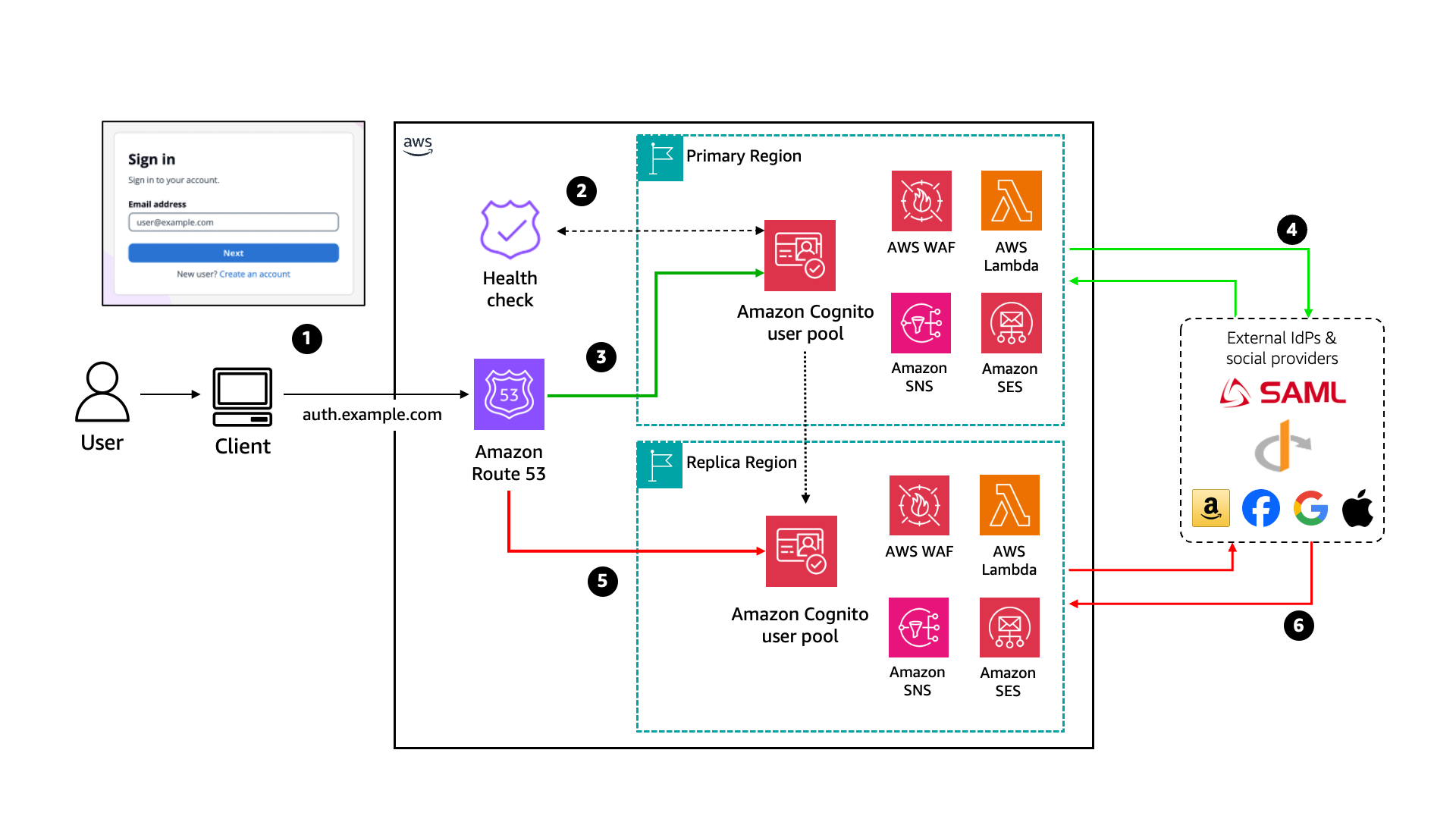
Amazon Cognito managed login provides a fully managed authentication UI that handles sign-in, sign-up, and federation flows. With MRR, managed login endpoints are served from the healthy user pool based on your Route 53 health check configuration. Managed login also includes OAuth 2.0 endpoints and can be used with local Cognito accounts and federated users. Figure 1 depicts a reference architecture for using managed login to authenticate Cognito users.
Figure 1: Cognito MRR reference architecture for managed login and federation use cases
When using Amazon Cognito with managed login, the process flow is:
The user visits the application and is redirected to the managed login to begin the authentication flow.
Managed login uses the Route 53 health check to control traffic routing.
If the health check returns a healthy status, all traffic to the managed login flows to the primary Region user pool for user authentication.
For a federated user, the primary Region user pool redirects the user to a federated IdP or social IdP for authentication. After successful authentication, Amazon Cognito creates or updates user attributes depending on whether it’s a new user signing in for first time or an existing user.
If the health check returns an unhealthy status, all traffic to the managed login flows to the replica Region user pool. Cognito users will authenticate against the replica user pool.
The replica Region user pool endpoint redirects federated users to external IdPs. However, any user creation or attribute update against replica user pool will fail until the health check returns healthy and traffic routes back to the primary Region.
M2M architecture
In an M2M architecture, services authenticate using the OAuth 2.0 client credentials grant. This flow doesn’t involve users; instead, backend services exchange client credentials for access tokens.
Figure 2: Cognito MRR reference architecture for machine-to-machine use case
The authentication flow is:
Application clients send a POST request to the Amazon Cognito /token endpoint with client credentials.
Managed login uses the Route 53 health check to determine whether traffic should flow to the primary or replica user pool.
If the health check returns a healthy status, traffic to the /token endpoint will flow to the primary Region user pool.
If the health check returns an unhealthy status, traffic to the /token endpoint will flow to the replica Region user pool. After the health check returns to a healthy status, traffic will return to routing to the primary user pool.
SDK-based architecture
For applications that use AWS SDK or Amazon Cognito APIs directly (rather than through managed login), the authentication flow is embedded in your application code. This gives you more control over the user experience but requires additional considerations for failover.
Figure 3: Cognito MRR reference architecture for SDK use cases
The process shown in Figure 3 is:
The user visits the application and signs in through a custom UI (using APIs or SDKs).
(Optional) An Amazon Route 53 health check is configured to perform a health check against regional proxy endpoints and determine traffic routing. You can also use a custom health check or your DNS resolver to make traffic routing determinations.
If the health check returns a healthy status, all traffic to the proxy endpoints will flow to the primary Region proxy for user authentication. You can also choose to load balance user authentication traffic across both the primary and backup Regions.
The primary Region Amazon API Gateway proxy forwards user requests to the Amazon Cognito regional endpoint.
If the health check returns an unhealthy status, all traffic will flow to the replica Region proxy.
The replica Region API Gateway proxy begins forwarding user requests to the Amazon Cognito regional endpoint until the health check returns to healthy status.
In an SDK-based architecture, Amazon Cognito regional endpoints can also be called directly. You can also set up custom routing to use replica Region endpoints to load balance user authentication requests by routing read-only requests to both the primary and replica Region endpoints while keeping write requests in the primary Region.
Failover strategies
Now that you’ve set up multi-Region replication with Amazon Cognito, the next step is to test and monitor your multi-Region configuration. In this section, we walk through strategies for monitoring your endpoints, determining when to trigger failover, and testing your failover readiness.
Monitor with Route 53 health checks
Failover for Managed Login and all OAuth 2.0 flows is driven by Amazon Route 53 health checks associated with your Amazon Cognito prefix or custom domain. You’re responsible for what determines the state of this health check. The health check isn’t tied to your DNS CNAME record but is the signal that tells Amazon Cognito whether to route traffic to the primary or replica Region for all managed login endpoints. When the health check fails, Amazon Cognito routes traffic to the replica user pool. When the health check recovers, traffic is restored to the primary user pool.
A practical approach to get started to build a health check:
Create a synthetic canary – Use Amazon CloudWatch Synthetics to run a canary that periodically exercises an actual authentication flow against your primary Region. For example, the canary can perform a client credentials token request against your Amazon Cognito domain’s /oauth2/token endpoint or execute a full AdminInitiateAuth API call with test credentials. This validates that the end-to-end authentication path is functional, not just that an endpoint is responding.
Tie the canary to a CloudWatch alarm – Configure a CloudWatch alarm on the canary’s SuccessPercentCloudWatch metric. Set a threshold that accounts for transient errors (for example, alarm when success drops below 90% for three consecutive evaluation periods).
Connect the alarm to your Route 53 health check (optional) – Create a Route 53 health check that monitors the CloudWatch alarm. When the alarm enters the ALARM state, the health check fails, and Amazon Cognito routes traffic to the replica user pool. If you prefer to rely on human intervention, skip this step and instead configure the CloudWatch alarm alert your operations team to manually invert the health check.
After you have your health check, associate it with your Amazon Cognito domain using the UpdateUserPoolDomain API or the Amazon Cognito console.
Authentication-only compared to full-stack failover
Before implementing failover, consider how your authentication layer relates to the rest of your application stack. There are two common patterns:
Authentication-only failover – Your application remains in a single Region, but authentication traffic fails over to the Amazon Cognito replica if only the primary Region’s authentication service is impaired. This works when your application can continue operating with tokens already issued (for example, cached JWTs, active sessions) and when downstream APIs don’t depend on the same Region as your user pool. Consider this option when the rest of your stack has its own availability model.
Full-stack failover – Your entire application—compute, data stores, APIs, and authentication—fails over to a replica Region. In this model, Amazon Cognito MRR is one component of a broader multi-Region architecture where authentication flows have tight dependencies on regional resources (such as Lambda triggers calling regional Amazon DynamoDB tables, or post-authentication logic writing to a regional event bus) that must be co-located with the user pool.
Use Amazon Application Recovery Controller (ARC) to coordinate failover across all components with a single action. ARC provides three capabilities that are particularly relevant for multi-Region authentication architectures:
Routing controls – Extremely reliable data plane controls that let you shift DNS traffic across Regions, with safety rules that prevent partial or unintended failovers (for example, preventing you from failing over authentication without also failing over the dependent API layer).
Readiness checks – Continuous monitoring of resource quotas, capacity, and network routing policies in your secondary Region, so you have confidence that the replica environment—including your Amazon Cognito replica user pool and its regional dependencies—can handle production traffic before you failover.
Region switch – Centralized, automated, and observable multi-Region recovery orchestration across multiple AWS accounts and resources, so you can execute a coordinated failover of your Cognito user pool alongside databases, compute, and APIs in a single recovery plan.
ARC is particularly valuable when your Amazon Cognito Lambda triggers, WAF rules, SNS and SES configurations, and downstream services all need to switch Regions in lockstep. Rather than managing failover for each component independently, you can use ARC to define a single recovery group that treats your authentication stack and application stack as one unit. To learn more about the capabilities and use cases of ARC, see Introducing Amazon Route 53 Application Recovery Controller.
The right choice depends on your recovery scope. Map the dependencies in your authentication flow: if your Lambda triggers call regional DynamoDB tables or your post-authentication logic writes to a regional event bus, those tight couplings point to full-stack failover. If your application validates tokens independently and doesn’t make real-time calls back to Amazon Cognito after token issuance, authentication-only failover keeps both your blast radius and operational overhead smaller.
Determine when to failover
Triggering failover too aggressively risks unnecessary disruptions; too conservatively risks a drop in desired availability. Here are the factors to balance:
Monitor authentication flow health – Validate that critical flows are functioning, including managed login endpoint availability and token endpoint responses.
Use composite health checks – Combine multiple signals. For example, require both the managed login and token endpoints to be healthy.
Set appropriate thresholds – Configure failure thresholds (for example, three consecutive failures) to distinguish transient errors from genuine impairments.
Consider downstream dependencies – Factor in Lambda triggers, external IdPs, and other regional services.
Client side retry logic – For SDK-based single-page application (SPA) architectures, consider implementing client-side retry logic with Region failover. When the primary Region is unavailable, your application should detect the failure and redirect authentication of API calls to the replica Region’s Amazon Cognito endpoint.
Understanding and determining the recovery time objective (RTO) and recovery point objective (RPO) should also be the key factor in determining when and why to failover. See the Establishing RPO and RTO Targets for Cloud Applications blog post to learn more.
Test failover readiness
If using Route 53 health check, start by manually inverting your Route 53 health check during a maintenance window. In the Route 53 console, enable Invert health check status to force the health check into a failed state; this triggers failover to the replica Region without requiring any infrastructure changes. While traffic is routing to the replica Region, validate that your critical authentication flows (sign-in, token refresh, federation) work correctly, then disable the inversion to restore traffic to the primary. This test confirms your end-to-end failover path is functional.
When you’re confident in the basic failover path, graduate to more realistic failure simulations with AWS Fault Injection Service (FIS). Create FIS experiment templates that disrupt your primary Region’s Amazon Cognito dependencies; for example, block network access to a dependent resource or inject latency into downstream API calls. Use FIS stop conditions (guardrails) to automatically halt experiments if unexpected impacts are detected. These experiments validate not just that failover triggers correctly, but that your replica Region handles real authentication load under degraded conditions.
We recommend conducting failover tests on a predefined and regular cadence and after any significant changes to your authentication architecture. Document your runbooks and make sure your operations team is familiar with both the failover and recovery procedures.
Conclusion
In this post, we built on the foundational knowledge of the Amazon Cognito MRR capability and showed you how to architect resilient authentication for real-world use cases:
The principle of least privilege is straightforward to articulate but challenging to maintain at scale. When teams first deploy applications to AWS, they often grant broader permissions than strictly necessary; it’s faster to get things working, and the plan is always to tighten permissions later. But later rarely comes. Permissions accumulate, AWS Identity and Access Management (IAM) principals that once needed broad access for initial deployment retain those permissions long after they’re necessary, and some principals stop being used entirely. Even small teams face this challenge—permission reviews aren’t a one-time task but an ongoing operational burden that demands automation.
AWS IAM Access Analyzer addresses detection and recommendation. It identifies unused permissions across IAM roles and users: actions that haven’t been exercised, services that haven’t been accessed, and principals that aren’t being assumed at all. For each finding, it generates a recommended policy with the excess permissions removed. Security teams can see exactly what to fix, but manual remediation doesn’t persist. A security engineer can right-size a role today, but if that role is defined in an AWS CloudFormation template or AWS Cloud Development Kit (AWS CDK) stack, the next deployment restores the original permissions. The fix must live where the role is defined, and not every role starts in the same place. Some are managed through infrastructure-as-code (IaC), where remediation means updating source code and deploying through a pipeline. Others were created manually through the AWS Management Console and have no code representation. And some principals aren’t being used at all and need a controlled decommission path. Each scenario requires a different remediation strategy.
This post walks through an automated remediation workflow that bridges the gap between detection and action. Instead of findings accumulating in a dashboard waiting for someone to investigate, the automation classifies each role by how it was created and produces a ready-to-review remediation artifact: a pull request with production-ready CDK code and a plain-English explanation for IaC-managed roles, an issue with the recommended policy and step-by-step IaC migration guidance for manually created roles, or a soft-disable issue with a monitored decommission plan for unused principals. Each output flows through your existing code review and issue tracking processes—the same workflows your teams already follow. By the end of this post, you’ll have a pattern that converts IAM Access Analyzer findings into tested, deployable code changes rather than a growing backlog of security tickets.
Understanding the problem
Unused IAM permissions increase the attack surface. Removing unused permissions limits the actions available to any compromised credentials, reducing potential impact. Roles that aren’t being assumed represent unused resources; removing them simplifies your IAM inventory and reduces potential access paths that aren’t actively monitored.
The challenge isn’t knowing what to fix. As we said earlier, Access Analyzer provides both the findings and the recommended policies. The challenge is acting on that knowledge consistently across your environment. Each finding requires context:
What the role does
Who created the role
Determining if the permission is unused or used infrequently
If the role is managed in a CloudFormation stack, or was created through the console
Multiply this by hundreds of roles and security teams face a backlog that grows faster than they can address it.
Manual remediation compounds the problem. A security engineer can right-size a role directly in the console, but that fix is fragile. If the role is defined in an IaC template, the next deployment restores the original permissions. If it was created manually, there’s no record of what changed or why, and no easy way to revert if the change causes issues.
This is where IaC changes the equation. When roles are defined in code, remediation means updating that code. Changes flow through pull requests, are reviewed by the team that owns the role, and deploy consistently across environments. The fix becomes permanent, not a point-in-time correction that drifts back on the next deployment. And because every change is tracked in version control, teams can confidently remove permissions knowing they can revert if something breaks. That safety net matters; it’s often the difference between a team acting on a finding and leaving it in the backlog.
Solution overview
The solution automates remediation by connecting four capabilities: IAM Access Analyzer for detection and policy recommendations, CloudTrail for role attribution, Amazon Bedrock for CDK code generation and plain-English explanations, and your existing continuous integration and delivery (CI/CD) pipeline for remediation execution. The workflow operates on a core principle: every IAM role has an origin, and that origin determines the remediation path.
Figure 1 shows the solution architecture: Amazon EventBridge triggers an AWS Lambda orchestrator on a daily schedule. The Lambda orchestrator integrates with IAM Access Analyzer, CloudTrail, Amazon Bedrock, and Amazon CloudWatch. Each finding is routed to one of three remediation paths: a pull request for IaC-managed roles, an issue for manually created roles, and a soft-disable issue for unused roles.
Figure 1: The daily remediation workflow; from scheduled trigger to the three role-based remediation paths
On each scheduled run, the automation retrieves active findings from IAM Access Analyzer and queries CloudTrail to determine how each role was created. Roles created through CloudFormation or AWS CDK have a traceable origin: the service principal, stack name, and originating repository. Roles created manually through the console have a different origin: the IAM user who created them and the timestamp. This distinction drives the remediation strategy.
For IaC-managed roles, the automation retrieves the IAM Access Analyzer-recommended policy and uses Amazon Bedrock to wrap it in production-ready CDK code that includes the role definition and policy statements and imports what your CI/CD pipeline needs to deploy the update. It then creates a pull request in the originating repository. The pull request (PR) includes the updated CDK code, a policy diff showing exactly which permissions are being removed, and a plain-English explanation of the changes, for example, “This change removes write access to S3, keeping only read and list permissions.” Your existing code review process evaluates the change, and after being merged, the fix deploys consistently across environments.
For manually created roles, the automation creates an issue that includes the IAM Access Analyzer-recommended policy with unused permissions removed, a diff highlighting the changes, and an Amazon Bedrock-generated explanation of what the permission changes accomplish. The issue also provides guidance on importing the role into your IaC codebase. This gives teams an immediate remediation path while encouraging long-term governance through IaC adoption.
For roles that aren’t being assumed at all, the automation takes a more cautious approach. Instead of taking direct action, it creates an issue recommending a soft-disable workflow: attach a deny-all policy to the role, monitor for 30 days to confirm no workload depends on it, then delete. The issue provides the steps and context, the team executes the decommission through their preferred process, whether that’s a console change, an AWS Command Line Interface (AWS CLI) script, or a PR removing the role from the IaC. This controlled decommission path reduces the risk of removing a role that’s used infrequently or seasonally.
The solution supports both single-account and organization-wide deployment. In single-account mode, it uses an ACCOUNT_UNUSED_ACCESS analyzer to process findings for one account. In organization mode, it uses an ORGANIZATION_UNUSED_ACCESS analyzer deployed in a delegated administrator account, which generates findings across all member accounts from a single vantage point. The Lambda function automatically detects which analyzer type is available and extracts the account ID from each finding’s resource Amazon Resource Name (ARN), so role attribution and remediation routing work the same way regardless of scope.
This three-path strategy acknowledges operational reality. Not all roles start in IaC, not all unused roles are safe to delete immediately, and forcing immediate migration isn’t always practical. The solution provides a clear path forward for each scenario: remediate IaC roles through code, give teams actionable recommendations for manually created roles, and safely decommission what’s no longer needed. Over time, your infrastructure becomes increasingly code-driven, and remediation becomes a routine part of your CI/CD process rather than a manual security task.
Technical details
Consider a company—call them AnyCompany—running 200 IAM roles across three AWS accounts. Some roles were created through AWS CDK stacks during initial deployment. Others were created manually through the console by engineers who needed quick access during incident response or prototyping. A handful haven’t been assumed in over 6 months. AnyCompany’s security team wants to act on their IAM Access Analyzer findings, but each role requires different handling. The solution’s architecture addresses this by routing each finding through a classification and remediation pipeline.
Figure 2 shows how each IAM Access Analyzer finding is processed:
The finding is first checked against exclusions and excluded findings are skipped.
Remaining findings are split by type: UnusedPermission findings retrieve a recommended policy from IAM Access Analyzer and then query CloudTrail for role origin, while UnusedIAMRole findings follow the unused role path.
By origin, IaC-managed roles generate AWS CDK code using Amazon Bedrock and create a pull request.
Manually created or unknown-origin roles create an issue with the recommended policy and IaC migration guidance.
Unused roles create a soft-disable issue to deny-all, monitor for 30 days, then delete.
All paths publish CloudWatch metrics.
Figure 2: Detailed component interactions—the orchestrator’s five steps, its four service integrations, and the three remediation paths
The rest of this section walks through each component using AnyCompany’s roles as examples.
Exclusion filtering
Before processing any finding, the Lambda function loads an exclusion configuration and checks whether the role should be skipped. This prevents the automation from creating remediation items for roles that legitimately need broad permissions.
AnyCompany excludes their break-glass role (used only during incidents), any service-linked roles, and roles tagged CriticalService. The min_unused_days threshold prevents false positives from seasonal workloads; a role that ran a quarterly batch job 25 days ago won’t generate a finding.
Detection and analysis
IAM Access Analyzer generates two types of findings relevant to this solution. UnusedPermission findings identify roles with permissions that haven’t been exercised within the analysis period. UnusedIAMRole findings identify roles that haven’t been assumed at all. The Lambda function queries both finding types separately because they follow different remediation paths.
The Lambda function auto-detects the analyzer type at startup. When ANALYZER_SCOPE is set to organization, it checks for an ORGANIZATION_UNUSED_ACCESS analyzer first and falls back to ACCOUNT_UNUSED_ACCESS if none exists. If multiple analyzers of the same type exist in the account, the Lambda function selects the first active analyzer returned by the API. To target a specific analyzer, set the ANALYZER_ARN environment variable explicitly. With an organization-level analyzer, findings include roles from all member accounts. The Lambda function extracts the account ID from each finding’s resource ARN (for example, account 111122223333 from arn:aws:iam::111122223333:role/MyRole) and carries that context through the entire pipeline: attribution, remediation, and issue or PR creation all include the originating account.
For UnusedPermission findings, the Lambda function calls GenerateFindingRecommendation to initiate policy generation, then retrieves the IAM Access Analyzer-recommended policy through the GetFindingRecommendation API. This is a key integration point: IAM Access Analyzer provides the right-sized policy with unused permissions removed, so the automation doesn’t need to generate policies itself.
Here’s what a typical finding looks like for one of AnyCompany’s application roles:
The OrderProcessorRole has write and delete permissions for Amazon Simple Storage Service (Amazon S3) and Amazon DynamoDB, but only uses read operations. The IAM Access Analyzer recommendation removes the four unused actions while preserving the three active ones.
For UnusedIAMRole findings, no recommendation is needed: the role isn’t being assumed at all, so the remediation is to disable or delete it. The Lambda function caps the number of unused role issues per run (configurable using MAX_UNUSED_ROLE_ISSUES, default 10) to avoid overwhelming teams with a flood of issues on the first execution.
Role attribution using CloudTrail
For each finding, the Lambda function queries CloudTrail to determine how the role was created. The CreateRole event contains the information needed to classify the role’s origin.
An IaC-created role looks like this in CloudTrail:
The cloudformation.amazonaws.com service principal and user agent tell the automation this role was created through a CloudFormation or AWS CDK deployment. The Lambda function then looks up the role’s tags to find the originating repository (stored in a Repository tag set during deployment).
Here, the IAMUser type and console.amazonaws.com user agent indicate someone created this role through the console. Roles created through the AWS CLI show a similar pattern: the IAMUser type with a user agent like aws-cli/2.x.x. The automation classifies both console and AWS CLI-created roles as manually created, because neither has an IaC origin that can be updated programmatically. The automation captures the username and timestamp for the remediation issue.
Cross-account role attribution
When the Lambda function processes findings from an organization-level analyzer, the role might live in a different account than the one running the function. The automation handles this by assuming a cross-account role (configurable using CROSS_ACCOUNT_ROLE_NAME, defaulting to OrganizationAccountAccessRole) in the member account, then querying that account’s CloudTrail and IAM APIs for the CreateRole event. If the cross-account assume fails—because the role doesn’t exist in that account or permissions aren’t configured—the automation falls back gracefully, classifying the role as unknown origin and creating an issue with the account ID and available context. This approach helps the automation produce an actionable output for findings even when attribution is incomplete.
Policy recommendations and AWS CDK code generation
For IaC-managed roles with UnusedPermission findings, the Lambda function retrieves the IAM Access Analyzer-recommended policy and sends it to Amazon Bedrock to generate production-ready AWS CDK code. This is an important distinction: IAM Access Analyzer decides what the policy should be, and Amazon Bedrock wraps that policy in the AWS CDK constructs, imports, and resource definitions that the CI/CD pipeline needs to deploy the update.
The prompt instructs Amazon Bedrock to convert the recommended policy to AWS CDK code exactly as provided, with no modifications:
Generate Python CDK code that creates/updates the role with the
RECOMMENDED policy exactly as provided. Include proper imports
(aws_cdk, aws_iam), use CDK best practices (PolicyStatement,
proper resource ARNs), and add tags: ManagedBy=CDK,
RemediatedBy=AccessAnalyzer.
IAM Access Analyzer generates recommendations for both inline policies and customer managed policies. When a managed policy has partially unused permissions, the recommendation contains the full right-sized policy. The automation wraps this in AWS CDK code as an iam.ManagedPolicy construct. Note that if a managed policy is shared across multiple roles, the recommendation applies to the specific role’s usage pattern. In this case, the automation generates an issue for manual review rather than a PR, because modifying a shared policy could affect other roles.
The generated code goes through a validation step before inclusion in any PR. The Lambda function compiles the Python code to check for syntax errors and verifies that required AWS CDK patterns (iam, PolicyStatement) are present. If validation fails, the finding is logged as an error rather than creating a broken PR.
The solution doesn’t currently invoke the IAM Access Analyzer ValidatePolicy API to check the generated policy for errors or overly permissive statements. However, this is a natural extension point. Teams can add a validation step that calls ValidatePolicy on the Amazon Bedrock-generated policy before including it in a PR, detecting issues like missing resource constraints or invalid action names.
Amazon Bedrock also generates a plain-English explanation of the policy changes. For AnyCompany’s OrderProcessorRole, the explanation might read:
“The role currently has full S3 write access and DynamoDB delete permissions, but only uses read operations. Removing s3:PutObject, s3:DeleteObject, s3:PutBucketPolicy, and dynamodb:DeleteItem reduces the scope of impact if credentials are compromised, while preserving the s3:GetObject, s3:ListBucket, and dynamodb:Query permissions the application needs.”
The solution uses the Anthropic Claude Sonnet model on Amazon Bedrock for CDK code generation (where accuracy matters) and Claude Haiku on Amazon Bedrock for explanations (where speed and cost efficiency matter more).
Three-path remediation
The Lambda function evaluates each finding’s origin and routes it to one of three remediation paths.
Path 1: IaC-managed roles (pull request) – For AnyCompany’s OrderProcessorRole, the automation creates a PR in the originating repository. The PR includes:
The Amazon Bedrock-generated AWS CDK code implementing the IAM Access Analyzer-recommended policy
A policy diff showing exactly which permissions are being removed
The plain-English explanation of what the changes accomplish
Labels (security, iam-remediation, automated) for filtering and tracking
The team that owns the role reviews the PR through their normal code review process. Once merged, the fix deploys consistently across environments through the existing CI/CD pipeline.
Path 2: Manually-created roles (issue) – For AnyCompany’s IncidentResponseRole, the automation creates an issue that includes the Access Analyzer-recommended policy with unused permissions removed, a diff highlighting the changes, an Amazon Bedrock-generated explanation, and step-by-step guidance on importing the role into IaC. This gives the team an immediate remediation path (apply the recommended policy) while encouraging long-term governance through IaC adoption.
Path 3: Unused roles (soft-disable issue) – For roles that haven’t been assumed at all, the automation creates an issue recommending a three-stage decommission workflow: attach a deny-all policy to the role, monitor for 30 days to confirm no workload depends on it, then delete. This controlled approach reduces the risk of removing a role that’s used infrequently or seasonally – if something breaks during the monitoring period, removing the deny-all policy restores access immediately.
Dry-run mode
Before creating real PRs and issues, you can run the automation in dry-run mode by setting “dry_run": true in the CI/CD configuration or setting the CI_CD_PLATFORM environment variable to dryrun. In this mode, the Lambda function processes findings, classifies roles, and generates remediation data, but logs what it would create instead of making actual API calls to your repository platform. You can use the log to validate the automation’s behavior, review the classification accuracy, and tune exclusions before going live.
Operational metrics
The Lambda function publishes CloudWatch metrics after each run:
findings_processed
Total UnusedPermission findings evaluated
iac_roles_found
Roles classified as IaC-managed
manual_roles_found
Roles classified as manually created
unused_roles_found
Roles with no assume activity (UnusedIAMRole findings)
prs_created
Pull requests created for IaC roles
issues_created
Issues created (manual roles and unused roles)
errors
Processing errors (failed classifications, API failures)
These metrics feed into dashboards and alarms. AnyCompany sets an alarm on errors > 5 to catch API throttling or configuration issues, and tracks prs_created + issues_created over time to measure remediation velocity.
Implementation
The solution ships as two AWS CDK stacks and deploys in minutes. The accompanying GitHub repository contains the complete source code, AWS CDK stacks, configuration templates, and step-by-step deployment instructions.
At a high level, deployment involves:
Prerequisites: An AWS account with an ACCOUNT_UNUSED_ACCESS or ORGANIZATION_UNUSED_ACCESS analyzer enabled, Python 3.11 or later, AWS CDK v2, a CI/CD platform API token stored in AWS Secrets Manager, and Amazon Bedrock model access for the Anthropic Claude models you plan to use. The model IDs are configurable environment variables (BEDROCK_CODEGEN_MODEL and BEDROCK_EXPLANATION_MODEL); Amazon Bedrock retires older foundation models over time, so if the shipped defaults stop working, set these variables to current models you have enabled and redeploy. The repository README documents this.
Configuration: Two files in the config/ directory control behavior. exclusions.json defines which roles and permissions to skip (break-glass roles, service-linked roles, tagged exceptions), and ci_cd_config.json configures your repository platform integration (GitLab or GitHub), labels, and throttling limits.
Deploy: Run cdk deploy --all to create the Lambda function, EventBridge schedule, IAM roles, and CloudWatch alarms.
Validate in dry-run mode: Start with “dry_run": true to see how the automation classifies your roles without creating real PRs or issues. Review the CloudWatch logs to confirm attribution accuracy and tune exclusions.
Go live: Set “dry_run": false and redeploy. The Lambda function runs on schedule (daily by default) and begins creating PRs and issues.
The repository README covers each step in detail, including organization-wide deployment, cross-account configuration, and platform-specific setup for GitLab and GitHub.
Operational considerations
Deploying the automation is only the starting point. Running it in production means making decisions about how roles are retired, how the volume of findings is managed at scale, which roles warrant human review before any change is proposed, and how you measure the automation’s impact over time. The following practices keep remediation sustainable as your IAM footprint grows, so the automation reduces operational burden rather than adding to it.
Unused role lifecycle
Unused roles follow a three-stage decommission workflow. When the automation identifies a role that hasn’t been assumed within the analysis period, it creates an issue with the recommended decommission steps; the automation doesn’t modify the role directly. The team then follows the soft-disable approach:
Attach a deny-all inline policy to the role. This blocks all actions without deleting the role or its existing policies.
Monitor for 30 days. If a workload depends on the role (seasonal jobs, infrequent batch processes), the deny-all policy surfaces the dependency quickly. Removing the deny-all policy restores full access immediately; no need to recreate the role or reattach policies.
Delete the role after the monitoring period confirms no impact.
This approach is deliberately conservative. Deleting a role is irreversible; you lose the trust policy, attached policies, and any resource-based policies that reference it. The soft-disable step gives teams a safety net while still making progress on reducing their unused role inventory.
Scaling and throttling
On AnyCompany’s first run, the automation found 47 unused permission findings and 4 unused roles. That’s manageable. But organizations with hundreds of accounts and thousands of roles might see significantly more findings on initial deployment.
This is especially true with an organization-level analyzer. A single-account deployment might surface dozens of findings; an organization-level analyzer across multiple accounts could surface hundreds or thousands on the first run. The throttling controls become critical at this scale.
Two throttling controls prevent the automation from overwhelming teams:
max_findings_per_run (default 50): Caps the total UnusedPermission findings processed per Lambda function execution. Remaining findings are picked up on the next scheduled run.
MAX_UNUSED_ROLE_ISSUES (default 10): Caps unused role issues per run. This is especially important during initial deployment when you might have a large backlog of roles that haven’t been assumed in months.
Start with conservative limits and increase them as your team builds confidence in the review process. A team that can review 10 PRs per week shouldn’t receive 50 on Monday morning.
Approval workflows for sensitive roles
Not every role should receive automated PRs. Roles with administrative permissions or access to sensitive data might warrant manual review before any remediation is created. The exclusion configuration supports this through the approval_required_for_tags field:
Roles matching these tags generate issues for manual review instead of automated PRs, regardless of whether they’re IaC-managed. This gives security teams a checkpoint for high-risk roles while still automating remediation for standard application roles.
Monitoring and alerting
The metrics published after each Lambda function run (covered in the Technical details section) feed into CloudWatch dashboards and alarms. A few patterns worth setting up:
Alert on errors > 5 per run to catch API throttling, expired CI/CD tokens, or Amazon Bedrock availability issues.
Trackprs_created + issues_created over time. A healthy trend shows this number decreasing as your environment converges toward least privilege.
Monitorunused_roles_found as a leading indicator. A sudden increase might signal a team spinning up roles for a project and not cleaning up afterward.
Compareiac_roles_found to manual_roles_found over time. As teams adopt IaC, the ratio should shift toward IaC-managed roles, which means more automated remediation and less manual work.
Cost
The solution uses Lambda (minimal cost at daily execution), CloudTrail (typically already enabled), IAM Access Analyzer (charges per IAM role or user analyzed per month for the unused access analyzer), and Amazon Bedrock (pay-per-token for AWS CDK code generation and explanations). For most organizations the ongoing cost is low, and Amazon Bedrock token usage is the largest variable, scaling with the number of findings processed per day and the complexity of each policy. Review the pricing pages for each service for current rates.
For organization-level deployments, the IAM Access Analyzer cost scales with the number of IAM roles analyzed across all member accounts. The ORGANIZATION_UNUSED_ACCESS analyzer charges per role per month across the organization, so an organization with 500 roles across 20 accounts will see higher analyzer costs than a single account with 50 roles. Review the IAM Access Analyzer pricing page for current rates.
Cleanup
To remove the solution, run cdk destroy --all from the infrastructure/ directory. This removes the Lambda function, EventBridge rule, CloudWatch alarms, and IAM roles created by the stacks.
If you stored a CI/CD platform API token in Secrets Manager as part of deployment, delete it with aws secretsmanager delete-secret --secret-id <your-secret-name> --recovery-window-in-days 7. The 7-day recovery window lets you restore the secret if the deletion was accidental. After 7 days, the secret is permanently deleted and can’t be recovered. To delete immediately without a recovery window, add --force-delete-without-recovery.
Lambda automatically creates a CloudWatch Logs log group at /aws/lambda/<function-name> that persists after cdk destroy --all and continues to incur log storage charges. To remove it, run aws logs delete-log-group --log-group-name /aws/lambda/<function-name>. WARNING: This permanently deletes all execution logs.
The IAM Access Analyzer isn’t created by the AWS CDK stacks. WARNING: Deleting the analyzer permanently removes all findings, analysis history, and unused permission data. Export any findings you need to retain before deletion. After exporting, run aws accessanalyzer delete-analyzer --analyzer-name <your-analyzer-name> to delete it. The ACCOUNT_UNUSED_ACCESS and ORGANIZATION_UNUSED_ACCESS analyzer types incur charges based on the number of IAM roles and users analyzed per month.
If you deployed in organization mode and created cross-account roles (default name: OrganizationAccountAccessRole) in member accounts solely for this solution, remove them from those accounts.
Any PRs or issues already created in your CI/CD platform remain after stack deletion; they’re artifacts in your repository, not AWS resources. See the repository README for detailed cleanup instructions.,
Conclusion
Automating IAM permission remediation turns least privilege from a periodic compliance exercise into an operational practice. By connecting IAM Access Analyzer findings and recommendations to your CI/CD pipeline, remediation shifts from manual security tasks to code review processes that your teams already follow.
The three-path strategy acknowledges how infrastructure evolves. IaC-managed roles receive pull requests with production-ready AWS CDK code and plain-English explanations. Manually created roles receive actionable issues with recommended policies and IaC migration guidance. Unused roles are put on a controlled decommission path that protects against accidental disruption. Over time, the manual role count decreases as teams adopt IaC, and remediation becomes a routine part of your deployment pipeline.
Start with a pilot. Choose 10–20 non-production roles, deploy in dry-run mode, and review the classification results. Tune your exclusions, confirm the CloudTrail attribution is accurate for your environment, and then enable live remediation. Expand to production roles after your team is comfortable with the review cadence.
When you’re ready to scale beyond a single account, switch to an organization-level analyzer and the same Lambda function will process findings across all member accounts with no architectural changes required, only a configuration toggle.
The complete source code, AWS CDK stacks, and configuration templates are available in the accompanying GitHub repository.
If you have feedback about this post, submit comments in the Comments section below.
We ensure alignment and control in agents using synchronous control monitoring. Our model oversees agent execution, continuously ingests the trace as context, and prevents harmful actions before they execute in real time at sub-100ms latency. Agent trace at 30 tok/s, streamed to the control monitor model on the right. Prevents harmful actions before they are executed. Background Control Monitoring is a powerful tool for ensuring the runtime alignment and safety of autonomous agents. Since the Hugging Face Incident, the need for control monitoring on top of existing safety mechanisms was reinforced: OpenAI started investing more heavily into monitoring safety tools. […]
Organizations subject to PCI DSS have long asked for a comprehensive reference that bridges the gap between general AWS security best practices and the specific technical and organizational controls required to achieve and maintain PCI DSS compliance. This guide answers that need by showing how AWS SRA patterns address PCI DSS intent from account scoping and network segmentation to encryption, logging, and access control.
What is the AWS SRA PCI DSS Deep Dive?
The AWS SRA is a holistic, prescriptive security architecture guide that describes how AWS security services fit together across a multi-account AWS environment. It’s built around a modular, three-tier web architecture and is intentionally designed to be adapted as needed. Not every workload needs every service, but the AWS SRA provides the full range of options and their architectural relationships.
This PCI DSS deep dive doesn’t replace the AWS SRA, it extends it:
Mapping AWS SRA account types to PCI DSS scoping boundaries showing which accounts are in scope, connected-to or security-impacting, or out-of-scope in a typical payment architecture.
Layering PCI-specific controls onto existing AWS SRA service configurations. For example, additional logging granularity, encryption requirements, or network restrictions that go beyond the AWS SRA baseline.
The architectural patterns and controls described in this guide apply equally to merchants and service providers.
Who should use the guide
The guide is intended for:
Security architects designing or extending an AWS multi-account landing zone for workloads under PCI DSS scope.
Compliance engineers mapping AWS controls to PCI DSS requirements during assessment.
Cloud platform teams building shared security services that must accommodate a cardholder data environment (CDE).
Qualified Security Assessors (QSAs) and Internal Security Assessors (ISAs) who want to understand how AWS SRA patterns address PCI DSS intent.
Key AWS SRA design principles for PCI DSS
The guide applies six foundational AWS SRA design principles that are particularly relevant to PCI DSS compliance:
Implement a strong identity foundation: Enforce least privilege, separation of duties, and centralized identity management. Eliminate reliance on long-term static credentials.
Enable traceability: Monitor, alert, and audit actions in real time. Integrate log and metric collection with automated investigation and response systems.
Apply security at all layers: Defense-in-depth with preventive and detective controls at edge, virtual private cloud (VPC), load balancing, compute, OS, application, and code layers.
Protect data in transit and at rest: Classify data by sensitivity and apply encryption, tokenization, and access control mechanisms.
Keep people away from data: Reduce or eliminate direct access to cardholder data through automation and tooling.
Prepare for security events: Establish incident management processes, run simulations, and implement automated detection and recovery.
How to use the guide
The AWS SRA PCI DSS deep dive can be consumed in two ways:
As a narrative: Read the guide from beginning to end, starting with the PCI DSS primer, through the architecture and account scoping model, to the detailed requirement mappings. This approach gives you a complete understanding of how AWS SRA and PCI DSS intersect.
As a reference: Navigate directly to specific PCI DSS requirements or AWS SRA account types relevant to your current project. The guide includes architecture diagrams, requirement mapping tables, and service-specific configurations that you can use independently.
The guide includes downloadable architecture diagrams and detailed control mapping tables that complement the narrative content, making it straightforward to reference during security reviews and PCI DSS assessments.
Next steps
Security is a journey, not a destination. Review the AWS SRA PCI DSS Deep Dive guide and begin mapping its patterns to your own cardholder data environment and then validate existing environments against SRA best practices using SRA verify.
If you need assistance, contact AWS Professional Services, your AWS account team, or the AWS Partner Network, who can work with you to translate the reference architecture into a customized AWS environment that you can then operate.
If you have feedback about this post, submit comments in the Comments section below. If you need assistance architecting or implementing a PCI DSS-compliant AWS environment, contact the AWS Security Assurance Services team.
Automated voicemail transcripts have become part of the daily rhythm of enterprise communication. They arrive with familiar subject lines, system-generated formatting, and little human context, exactly the qualities that make them easy to trust and easy to overlook. Attackers are now exploiting that familiarity, turning routine call-transcription notifications into a vehicle for credential phishing. Check Point researchers identified a large-scale phishing campaign that exploits this shift in enterprise behavior. The emails impersonate automated voicemail-transcript notifications and deliver malicious Scalable Vector Graphics (SVG) attachments that redirect users to credential-harvesting pages, converting a familiar collaboration workflow into a potential path for account […]
We analyzed ongoing conversations with prospective customers to find out what buyers ask most. Below are those questions, covering how Check Point Exposure Management helps teams validate risk, cut noise, coordinate remediation, and report progress. Part 1 covered how security leaders think about asset discovery, cloud visibility, threat intelligence, credential exposure, and integrations. Once teams know what’s exposed, the conversation shifts to prioritization and response. 1. How do you prioritize which exposures matter? Security teams often manage thousands of vulnerabilities across applications, endpoints, cloud resources, and internet facing infrastructure. A severity score alone does not provide enough context to determine […]
For the latest discoveries in cyber research for the week of 14th Setpember, please download our Threat Intelligence Bulletin.
TOP ATTACKS AND BREACHES
IDScan.net, a US identity verification provider, has disclosed a data breach after detecting unauthorized access on September 1. Exposed data included names and government identification numbers, while a criminal marketplace advertised a collection containing millions of identity documents, including driver’s licenses, associated with the company’s verification services.
Mathspace, an education platform used in Australia and New Zealand, has suffered a data breach affecting more than 1 million people. The attackers exploited CVE-2026-72898 in self-hosted tool Metabase to access an internal reporting database. Exposed information included names, email addresses, usernames, and locations, while passwords and academic records were not affected.
Check Point IPS provides protection against this threat (Metabase SQL Injection (CVE-2026-72898))
Fintech company Revolut has reported a data exposure after employees fulfilled fraudulent information requests sent from an email account within a government agency’s legitimate domain. Exposed records included identity documents, verification selfies, contact details, IBANs, account statements, withdrawal records, and complete transaction histories.
Florida’s state Department of Motor Vehicles fell victim to a data breach after criminals used credentials stolen from a Plant City police officer’s personal device. The credentials enabled access to driver records, and the ShinyHunters group published images of stolen data.
AI THREATS
Check Point Research has detailed PuzzleMask, a plain-prose prompt technique that hides prohibited instructions from lightweight LLM gatekeepers while allowing stronger target models to recover them. In testing, gatekeepers classified the prompts as safe, while target models extracted and acted on concealed payloads in more than 90 percent of trials.
Check Point Research has demonstrated a covert cross-account channel in ChatGPT’s code-execution environment that allowed hidden tasks to run using a victim’s available tools, data, and connected applications. A proof of concept used a shared conversation to retrieve Gmail data from one account and relay the results to another.
Anthropic has disclosed four incidents in which Claude models operated on the real internet because of configuration failures instead of remaining within intended sandboxes. In the most serious case, a model published a malicious PyPI package that was executed by systems, exposing credentials and enabling access to a database.
VULNERABILITIES AND PATCHES
Microsoft has released its September 2026 Patch Tuesday updates, addressing a record 974 vulnerabilities across its products, including two actively exploited zero-days. CVE-2026-85880 and CVE-2026-81963 both allow local attackers to elevate privileges to SYSTEM, while 20 additional flaws could enable unauthenticated remote code execution without user interaction.
Check Point IPS provides protection against this threat (Microsoft Windows Update Stack Elevation of Privilege (CVE-2026-81963))
GitLab has addressed CVE-2026-85706, a critical path traversal vulnerability affecting Community and Enterprise Editions, with a CVSS score of 10.0. The flaw allows unauthenticated attackers to read arbitrary files through the repository commits API. Affected versions include 18.7 through 19.3.1, with fixes available in 19.1.8, 19.2.6, and 19.3.2.
Check Point IPS provides protection against this threat (GitLab Arbitrary File Read (CVE-2026-85706))
MikroTik has fixed CVE-2026-67276 and CVE-2026-86060, RouterOS vulnerabilities that can be chained to obtain passwordless SSH access and elevate privileges to full administrator. Successful exploitation can give attackers control over exposed routers, enabling configuration changes, DNS manipulation, traffic interception, and use of compromised devices as network footholds
THREAT INTELLIGENCE REPORTS
Check Point Research has reported that enterprise GenAI usage continued to expand in August, reaching an average of 106 prompts per user, while 86% of organizations regularly using GenAI were affected by high-risk prompt activity. The report also recorded 1,042 ransomware attacks, almost double the August 2025 figure, while average weekly cyberattacks rose 22% year over year to 2,422 per organization.
Researchers have detected a passkey-themed social engineering campaign targeting Microsoft 365 accounts. Attackers use phone and text lures directing employees to lookalike sign-in pages, then register their own authentication methods and collect data from SharePoint, OneDrive, and Exchange after gaining access to compromised accounts.
Researchers have analyzed an Android banking-fraud campaign by the GoldFactory group that abuses Android Work Profile functionality through a tool called Vwork to clone victims’ banking applications. The Gigabud malware used in the operation was linked to at least 1,469 compromised devices in Indonesia and nearly $1 million in losses.
Researchers have detailed BlueMoon, an exploit chain combining two vulnerabilities in Chromium’s V8 JavaScript engine with a Windows flaw to compromise targeted systems. The vulnerabilities were used by multiple espionage groups after Chrome patches became available, allowing browser exploitation, sandbox escape, and privilege escalation on vulnerable Windows devices.
Check Point IPS provides protection against this threat (Google Chrome Type Confusion (CVE-2026-85046))
Learn more about how your organization can develop a workforce that can continuously learn, adapt, and respond to an increasingly dangerous threat landscape.
Introduction Most prompt injection detection is built to catch the obvious. Encoding anomalies, invisible unicode, emoji smuggling, the signatures a classifier can pattern match against. PuzzleMask, a newly disclosed technique, sidesteps all of it. It embeds a policy-violating payload inside fluent, properly punctuated prose, and gets that payload past an LLM-based gatekeeper without tripping any heuristics naively looking for obfuscation on the input side. The technique targets a specific architecture that’s become standard in production LLM pipelines: a fast, low-cost model screens incoming input against a policy before a more capable target model, often running with high reasoning effort and […]

 Login