Reading view

Extend Amazon Inspector SBOM Generator with Plugins

Amazon Inspector is an automated vulnerability management service that continually scans Amazon Web Services (AWS) workloads for software vulnerabilities. The vulnerability management capabilities of Amazon Inspector are powered by an asset inventory engine known as the Amazon Inspector SBOM Generator (inspector-sbomgen), a standalone command-line tool that produces a software bill of materials (SBOM) from container images, directories, archives, local systems, compiled binaries, and more. Over the past two years, we’ve expanded inspector-sbomgen’s coverage across dozens of programming language ecosystems, operating systems, and widely deployed applications.

We’re pleased to announce a new capability for builders using inspector-sbomgen: a plugin system for writing your own custom package collectors that you can use right away, without requiring source code compilation nor waiting for an official release.

You can download the latest version of inspector-sbomgen from the Amazon Inspector User Guide.

In this post, we walk you through what the inspector-sbomgen plugin system does, why we built it, and how you can write your first plugin in a few minutes. Along the way, we also cover how plugin-generated package components integrate with Amazon Inspector for vulnerability scanning, and we explore the plugin safety model, which helps ensure security-hardened and predictable plugin behavior.

Why we built a plugin system

Software ecosystems are dynamic. New language package managers, lockfile formats, and end user applications ship constantly, and many are adopted quickly, in some cases with little security scrutiny. That leaves security teams with a visibility gap: production workloads running software that their SBOM tooling doesn’t yet recognize. Customers have asked us to inventory many of these ecosystems directly, and until recently, the only path to support was to open a feature request and wait for the inspector-sbomgen team to onboard the ecosystem and deploy a new release.

The inspector-sbomgen plugin system changes that. With plugins, you can:

  • Onboard ecosystems that inspector-sbomgen doesn’t support out of the box. New open source ecosystems, niche or fast-moving package formats, and internal or proprietary tooling can all be inventoried without modifying inspector-sbomgen.
  • Prototype detection for an ecosystem quickly. We designed a plugin system that is friendly to developers and AI coding assistants alike. Plugins are written in Lua, loaded at runtime, and require no Go toolchain nor compilation. You can use the built in test harness to iterate on a plugin and see results immediately.
  • Build on a stable foundation. The plugin API abstracts away artifact-type differences, so you write your detection logic once and it works seamlessly across container images, archives, local systems, and more. And because plugins stay decoupled from the internals of sbomgen, the core tool’s regression surface stays small.

Internally, we’ve used the plugin system to ship new ecosystem coverage faster than before. In our 1.13 release, more than 20 ecosystems that were previously implemented in Go, including Apache Tomcat, NGINX, MySQL, Redis, WordPress, and the OpenSSH toolchain, are now embedded as plugins inside the sbomgen binary. The same release also added more than ten brand-new ecosystems as plugins, including Apache Cassandra, Apache Struts, Conda, Swift packages, and AI-agent collectors (Amazon Q Developer, Kiro CLI, Claude Code, GitHub Copilot, and Ollama).

How inspector-sbomgen plugins work

Sbomgen plugins follow a two-step pipeline:

  1. Discovery – Scan the artifact’s file system to identify files that contain installed package metadata.
  2. Collection Open each discovered file, parse file contents, and publish findings into the SBOM.

Under the hood, an event bus connects discovery and collection plugins. Discovery plugins publish events listing discovered files, and one or more collection plugins subscribe to these events, triggering package collection. Developers might recognize this behavior as the observer pattern.

This decoupling lets a single discovery plugin feed multiple collectors, for example, one extracting package metadata, another scanning for secrets, and another checking policy. Each collection plugin works from the same file list without re-walking the artifact filesystem, a computationally expensive operation.

Write your first plugin in 5 minutes

Inspector-sbomgen makes it straightforward to bootstrap a plugin environment. The plugin new command tells sbomgen to create a new plugin workspace, and the —-with-example flag populates the workspace with a discovery-collection plugin pair, that you can run immediately.

inspector-sbomgen plugin new --with-example 

After invoking the preceding command, you will be prompted to provide a plugin name and a directory that will contain your plugin workspace. You can provide custom values or use the default values:

Plugin name (identifies the software ecosystem your plugin will inventory, e.g. debian-dpkg, rhel-rpm, python-pip, cmake) [my-custom-ecosystem]: <enter>
Project directory [my-sbomgen-plugins]: <enter>

Created plugin "my-custom-ecosystem" in my-sbomgen-plugins/

Note that you can skip interactive prompts by specifying the plugin name and directory using the corresponding command line interface (CLI) arguments:

inspector-sbomgen plugin new \
    --with-example \
    --name my-custom-ecosystem \
    --path my-sbomgen-plugins

After creating your plugin workspace, inspector-sbomgen will display a next steps screen, which guides developers and AI code assistants to the source files they need to change and to supporting documentation:

Next steps:

  Get started:
    1. Open plugin folder in a code editor (VS Code recommended)
    2. Add test files that your plugin will discover and parse
       (e.g., config files, lockfiles, binaries, etc.):
       my-sbomgen-plugins/discovery/cross-platform/extra-ecosystems/my-custom-ecosystem/_testdata/

  Develop:
    3. Edit discovery:    my-sbomgen-plugins/discovery/cross-platform/extra-ecosystems/my-custom-ecosystem/init.lua
    4. Edit collection:   my-sbomgen-plugins/collection/cross-platform/extra-ecosystems/my-custom-ecosystem/init.lua

  Test:
    5. Write unit tests:  my-sbomgen-plugins/discovery/cross-platform/extra-ecosystems/my-custom-ecosystem/init_test.lua
    6. Run unit tests:    inspector-sbomgen plugin test --path my-sbomgen-plugins

  Deploy:
    7. Distribute your plugin directory wherever you run inspector-sbomgen:
       inspector-sbomgen <arguments> --plugin-dir /path/to/my-sbomgen-plugins

       Example:
       inspector-sbomgen container --image alpine:latest -o /tmp/sbom.json --plugin-dir /path/to/my-sbomgen-plugins

For code completion, install the VS Code Lua language server extension:
  https://luals.github.io/#vscode-install

For more information:
  - Plugin guide:    my-sbomgen-plugins/docs/sbomgen-plugin-developer-guide.md
  - Testing guide:   my-sbomgen-plugins/docs/sbomgen-plugin-testing-guide.md
  - API reference:   my-sbomgen-plugins/docs/sbomgen-plugin-api-reference.md
  - Documentation:   https://docs.aws.amazon.com/inspector/latest/user/sbom-generator.html

Now that you have a plugin workspace, let’s explore its contents in greater detail:

tree my-sbomgen-plugins

├── AGENTS.md
├── collection
│   └── cross-platform
│       └── extra-ecosystems
│           └── my-custom-ecosystem
│               └── init.lua
├── discovery
│   └── cross-platform
│       └── extra-ecosystems
│           └── my-custom-ecosystem
│               ├── _testdata
│               │   ├── empty
│               │   └── example.lock
│               ├── init_test.lua
│               └── init.lua
├── docs
│   ├── sbomgen-plugin-api-reference.md
│   ├── sbomgen-plugin-developer-guide.md
│   └── sbomgen-plugin-testing-guide.md
├── library
│   └── sbomgen.lua
└── README.md

The scaffolded project includes a working discovery and collection plugin pair, passing unit tests with test fixtures under _testdata/, a .vscode/settings.json for integrated development environment (IDE) integration, and a local copy of the developer documentation.

The scaffolding is deliberately succinct and complete, so it reads well for both humans and AI coding assistants. Every file has clear comments that explain what each function does and what the plugin author needs to fill in.

To test a plugin, you first need something to scan, such as a package lock file or a compiled binary. The example plugin inventories a fictional example.lock with the following contents:

my-package-alpha==1.0.0 
my-package-beta==2.3.1 
my-package-gamma==0.9.5 

The provided discovery plugin knows how to look for instances of example.lock within the artifact file system:

-- my-custom-ecosystem discovery plugin
-- Discovers example.lock files in the artifact file list.

function discover()
    return sbomgen.find_files_by_name({"example.lock"})
end

And the provided collection plugin knows how to parse the contents of example.lock and publish package findings to the output SBOM.

-- my-custom-ecosystem collection plugin
-- Parses example.lock files and extracts package name and version.

function collect(file_path)
    local content = sbomgen.read_file(file_path)
    if content == nil then
        return
    end

    for line in content:gmatch("[^\n]+") do
        local name, ver = line:match("^(.+)==(.+)$")
        if name and ver then
            sbomgen.push_package({
                name = name,
                version = ver,
                purl_type = "generic",
                namespace = "my-custom-ecosystem",
                component_type = sbomgen.component_types.APPLICATION,
            })
        end
    end
end

Run the tests

Plugins ship with a built-in test framework so you can validate your logic before scanning a real artifact. Tests are written in Lua, live next to the plugin in init_test.lua, and reference fixture data in _testdata/:

function test_discovers_packages() 
    local result = testing.scan_directory("_testdata") 
    testing.assert_equals(3, #result.findings) 
    testing.assert_equals("my-package-alpha", result.findings[1].name) 
    testing.assert_equals("1.0.0", result.findings[1].version) 
end 
 
function test_no_findings_for_empty_directory() 
    local result = testing.scan_directory("_testdata/empty") 
    testing.assert_equals(0, #result.findings) 
end

Run the tests with the following command:

inspector-sbomgen plugin test --path my-sbomgen-plugins -v

=== RUN   my-custom-ecosystem/discovery/init_test/test_discovers_packages 
--- PASS: my-custom-ecosystem/discovery/init_test/test_discovers_packages (0.04s) 
=== RUN   my-custom-ecosystem/discovery/init_test/test_no_findings_for_empty_directory 
--- PASS: my-custom-ecosystem/discovery/init_test/test_no_findings_for_empty_directory (0.04s) 
ok    2 tests passed 

This is the tightest development loop we could design: no Go toolchain, no rebuild, no container spin-up. Write a test, run it, iterate.

Scan a real artifact

For plugins to produce findings, inspector-sbomgen needs an artifact that contains the files your plugin looks for. For the example plugin, any directory with an example.lock file works. The fixture we generated earlier is a good stand-in:

inspector-sbomgen directory \ 
    --plugin-dir ./my-sbomgen-plugins \ 
    --path ./my-sbomgen-plugins/discovery/cross-platform/extra-ecosystems/my-custom-ecosystem/_testdata \ 
    -o sbom.json 

The --plugin-dir flag tells inspector-sbomgen where to load your Lua plugins from. The resulting SBOM contains a CycloneDX component for each of the three packages in example.lock, for example:

{
  "bom-ref": "comp-2",
  "type": "application",
  "name": "my-package-alpha",
  "version": "1.0.0",
  "scope": "optional",
  "purl": "pkg:generic/my-sbomgen-plugin/my-package-alpha@1.0.0",
  "properties": [
    {
      "name": "amazon:inspector:sbom_generator:source_path",
      "value": "./my-sbomgen-plugins/example.lock"
    }
  ]
}

Every plugin-generated component carries an amazon:inspector:sbom_generator:source_path property that records the file the component was collected from, so you can always trace a component back to the artifact that produced it.

Vulnerability scanning with Amazon Inspector

Plugin-generated findings are first-class SBOM components. They work with every downstream consumer that reads CycloneDX SBOMs, including Amazon Inspector. To send an SBOM to Amazon Inspector for vulnerability analysis, add the --scan-sbom flag (this requires an active AWS account):

inspector-sbomgen directory \ 
    --path ./my-sbomgen-plugins/discovery/cross-platform/extra-ecosystems/my-custom-ecosystem/_testdata \ 
    --plugin-dir ./my-sbomgen-plugins \ 
    --scan-sbom \ 
    --aws-profile your_profile \ 
    --aws-region your_region \ 
    -o /tmp/sbom.json 

An important caveat when you onboard a brand-new ecosystem: Plugin authors can inventory arbitrary ecosystems, but Amazon Inspector can only report vulnerabilities for components it has advisories for. When you point Amazon Inspector at a component whose ecosystem isn’t in its advisory feeds yet, Inspector will return the component with a property, Component skipped: no supported rules found. For example:

{ 
  "bom-ref": "comp-1", 
  "name": "my-package-alpha", 
  "properties": [ 
    { 
      "name": "amazon:inspector:sbom_scanner:path", 
      "value": "my-sbomgen-plugins/discovery/cross-platform/extra-ecosystems/my-custom-ecosystem/_testdata/example.lock" 
    }, 
    { 
      "name": "amazon:inspector:sbom_scanner:info", 
      "value": "Component skipped: no supported rules found." 
    } 
  ], 
  "purl": "pkg:generic/my-custom-ecosystem/my-package-alpha@1.0.0", 
  "type": "application", 
  "version": "1.0.0" 
} 

This is expected behavior, not an error. The SBOM is still generated correctly, the component is still tracked, and the source_path tells you exactly which file produced it. If and when Amazon Inspector adds advisory coverage for the ecosystem, the same SBOM will start producing vulnerability findings without any change to your plugin. For ecosystems Inspector already supports, plugin-generated components are indistinguishable from components produced by built-in scanners.

First class IDE support

We care about productivity and efficiency when writing plugins. Writing Lua without modern conveniences such as autocomplete isn’t fun, so every plugin project scaffolded with the plugin new command ships with a library/sbomgen.lua definition file and a .vscode/settings.json that automatically wires it up to the Lua Language Server extension for VS Code.

For code completion and IDE support, first install the sumneko.lua extension, open your plugin project in VS Code, and every sbomgen.* function will get:

  • Parameter hints with types.
  • Hover documentation.
  • Autocomplete for constants (sbomgen.component_types.*, sbomgen.groups.*, sbomgen.platform.*).
  • Type checking on function calls.
  • Inline warnings when required fields are missing from push_package().

The same definition file makes plugin development work well with AI coding assistants. The types and documentation are embedded in a form that tools can read, so assistants can generate correct plugin code with far less monitoring than writing against a raw language would require.

A safe foundation

Plugins run real code inside the same process as inspector-sbomgen, so we designed the execution environment to keep that code stable and security-hardened. Every Lua plugin runs in an isolated sandbox. Every Lua virtual machine (VM) has access to a restricted subset of the Lua standard library to ensure only safe operations are permitted:

  • No direct filesystem access. The Lua io library isn’t loaded. All file operations go through sbomgen.* functions, which route through sbomgen’s internals so your plugin behaves identically whether it’s scanning a directory on disk, a container image, a compressed archive, or a mounted volume.
  • No subprocess execution or environment mutation. The Lua os library is blocked, so plugins can’t spawn processes, modify environment variables, or touch files outside the artifact.
  • No VM introspection. The Lua debug library is blocked.
  • No unbounded code loading. dofile, loadfile, and loadstring are removed. require() is available but restricted to the plugin’s own directory tree, so plugins can share helper modules with themselves but cannot load code from other plugins or system paths.

If a plugin raises an unhandled Lua error, inspector-sbomgen logs a warning and continues with the next file or plugin; one faulty plugin does not prevent other plugins from running. Plugins never override inspector-sbomgen’s built-in package collectors. Every plugin must declare a unique name. If a custom plugin uses a name that’s already claimed by an official built-in plugin, the custom plugin is skipped with a warning. Built-in plugins always take precedence, so a custom plugin can never silently replace or shadow the tool’s own detection behavior.

Next steps

To start building your own plugins today:

  1. Install the latest inspector-sbomgen from the Amazon Inspector user guide.
  2. Run inspector-sbomgen plugin new --with-example and follow the prompts.
  3. Run inspector-sbomgen plugin test --path ./my-sbomgen-plugins -v to see the example tests pass.
  4. Replace the example logic with detection for your own ecosystem.

The full reference documentation covers every function, constant, and command in depth:

Conclusion

Whether you’re adding support for an internal lockfile format, prototyping detection for a new open source ecosystem, or replacing a home-grown scanner with something your whole organization can run at scale, the plugin system is designed to make the path from idea to working SBOM as short as possible. We can’t wait to see what you build with it.
If you have feedback about this post, submit comments in the Comments section below. If you have questions about this post, contact AWS Support.

Michael Long

Michael Long

Michael is a Senior Security Researcher for Amazon Inspector at AWS. He leads research and development of the Amazon Inspector SBOM Generator and Amazon Inspector for GitHub Actions. Before joining AWS, he was a principal adversary emulation engineer on the MITRE ATT&CK team. He also served honorably for nearly 10 years in the U.S. Army spanning military intelligence and cyber operations.

Charlie Bacon

Charlie Bacon

Charlie is Head of Security Engineering and Research for Amazon Inspector at AWS. He leads the teams behind the vulnerability scanning and inventory collection services that power Amazon Inspector and other Amazon Security vulnerability management tools. Before joining AWS, he spent two decades in the financial and security industries where he held senior roles in both research and product development.

Anthony Verleysen

Anthony Verleysen

Anthony is a Senior Technical Product Management for Amazon Inspector. Before Amazon Inspector, Anthony worked as a Product Manager in AWS Systems Manager owning Node Management capabilities. Outside of work, Anthony is an avid tennis and soccer player.

  •  

Measuring the Tendency of AI Agents to Go Rogue

This essay was written with Barath Raghavan, and originally appeared in The Guardian.

In July, Hugging Face, a company that hosts much of the world’s AI software and open-source AI models, was hacked. A malicious dataset had been used to run code on one of its servers. Whoever was behind it captured internal security credentials and moved through systems over a weekend, running thousands of actions from a swarm of temporary server environments. It looked like the work of a sophisticated criminal group.

It was not. It was one of OpenAI’s new, still unreleased GPT models.

Their science experiment had escaped the lab. OpenAI was running the unreleased AI model through a benchmark that tests how well AI can successfully hack systems. To push the limits and evaluate the AI’s true capability, the company switched off the safety filters that normally stop it from doing this kind of hacking. Aware that this could go wrong, they confined the AI to an isolated environment and denied it access to the internet.

But the new AI cheated. It took literally its goal to get as high of a score as possible. It broke out on to the open internet. It inferred, probably from its training data, that it could “solve” the task by getting the answers from Hugging Face’s servers. So it chained together stolen credentials and further unknown security exploits to hack the company’s network.

Nobody instructed the AI to do any of this. It was, in OpenAI’s words, “hyperfocused on finding a solution” to the test it was being given. And while this might seem like something new with AI, it’s really very old. This is how a genie behaves, and it is a key challenge with AI agents in general.

In folklore, genies—and other magical beings—grant wishes literally, not how the wisher intended. King Midas asked that everything he touched turn to gold, and starved. The sorcerer’s apprentice wanted the broom to fill the cistern, and it performed its task so well that it flooded the house.

We now have machines that do this. Ask a modern AI agent to save money on your phone plan and it might simply cancel the plan. Tell it to book a flight, and it might hack the airline website to override restrictions. Or, like OpenAI, ask it to do well on a test and it might break into another company to steal the answers. Each time, it recognizably completed the task you set, but it didn’t do what you would have wanted.

This isn’t malicious behavior. No one asked for, or wanted, Hugging Face to be hacked. OpenAI and Hugging Face and the AI were ostensibly on the same side, and the AI was trying to do what it had been asked. That’s what makes it so difficult to guard against: you can’t filter for bad instructions because the instructions were fine.

The gap is between the words we use and what we mean by them. We call that gap the Genie coefficient.

AI labs know this is a problem, and they’re quietly saying so. For example, the Chinese lab Moonshot recently warned that its latest AI model may have “excessive proactiveness” and “make unexpected decisions on the user’s behalf”. The UK’s AI Security Institute has started tracking “cheating behavior in frontier model evaluations”. We wouldn’t tolerate a car that is excessively proactive or ruthlessly efficient, and yet that’s the reality of AI today.

Improvement is possible. Just as AIs have gotten much better at resisting prompt injection attacks over the last few years, we can safely predict that they will get better at avoiding genie-like behavior. The point of the Genie coefficient is to track progress. AI companies like benchmarks, and they all work to compete to be the best.

Dozens of benchmarks and leaderboards tell us how well these AI models write code, perform logical reasoning, and pass standardized legal and medical exams. But there is nothing that scores whether a system does what you actually meant. We need to develop a measure for this, test it regularly, and push for improvement. We’re not going to have trustworthy AI agents without it.

  •  

Measuring LLMs’ Ability to Perform Cryptanalysis

There’s new benchmark measuring AI’s ability to perform mathematical cryptanalysis. Anthropic’s frontier model actually found new attacks.

The benchmark: “CryptanalysisBench: Can LLMs do Cryptanalysis?” The idea is to benchmark the ability of LLMs to discover new mathematical cryptanalytic attacks against a series of historical algorithms.

Abstract: Cryptanalysis—the task of finding attacks against cryptographic schemes—its at the intersection of mathematical reasoning and cybersecurity, two areas where LLMs have advanced fastest. Cryptanalysis represents both a clean testbed for frontier reasoning (as practical attacks can be automatically verified) and a domain with unusually high stakes, since the primitives under study underpin our digital security. In this paper we ask whether LLMs can do cryptanalysis, and find that the answer is increasingly yes. We introduce CryptanalysisBench, 191 tasks across six families of cryptographic primitives (block ciphers, hash functions, etc.) drawn primarily from four NIST standardization competitions. Our benchmark consists of three tiers: (i) primitives with known practical breaks; (ii) primitives with no known practical break, evaluated both at full strength and as scaled-down variants; and (iii) a challenge set of production primitives at the frontier of cryptanalysis. Five frontier models (Claude Opus 4.8, Sonnet 5, Mythos 5, GPT-5.5, and the open-weights GLM-5.2) break 65%­86% of Tier 1 schemes, 6­12 Tier-2 schemes at full strength, and 24­61 across all scaled-down variants. Beyond deriving known results, models produce novel cryptanalysis, such as a key-recovery attack that exploits a design flaw in the SpoC AEAD and an error in KINDI’s published CCA-security proof, both to the best of our knowledge not previously known.

We release CryptanalysisBench as a tool to help track if (or when) AI cryptanalysis becomes a serious factor and as a scaffold for stress-testing candidate schemes before deployment. The attacks that the benchmark already surfaces are an early snapshot of a fast-moving frontier that may soon match, and in places exceed, the published state of the art.

Anthropic used the benchmark to test Mythos Preview, and found new vulnerabilities in Hawk and reduced-round AES.

Still early results, but this is definitely something to watch.

SlashDot thread.

  •  

A new extortion cocktail: office printers, small ransoms, and BitLocker

Recently, our teams in Latin America investigated a series of incidents involving misconfiguration, the deployment of BitLocker, and the exploitation of corporate printers. Attackers used the devices to notify organizations that their infrastructure had been compromised and they had to pay a ransom to recover their data.

This article analyzes two incidents that occurred in June in Colombia and in May in Mexico. We highlight the similarities in the attackers’ communications and outline emerging trends in ransom amounts.

Initial sign of an attack

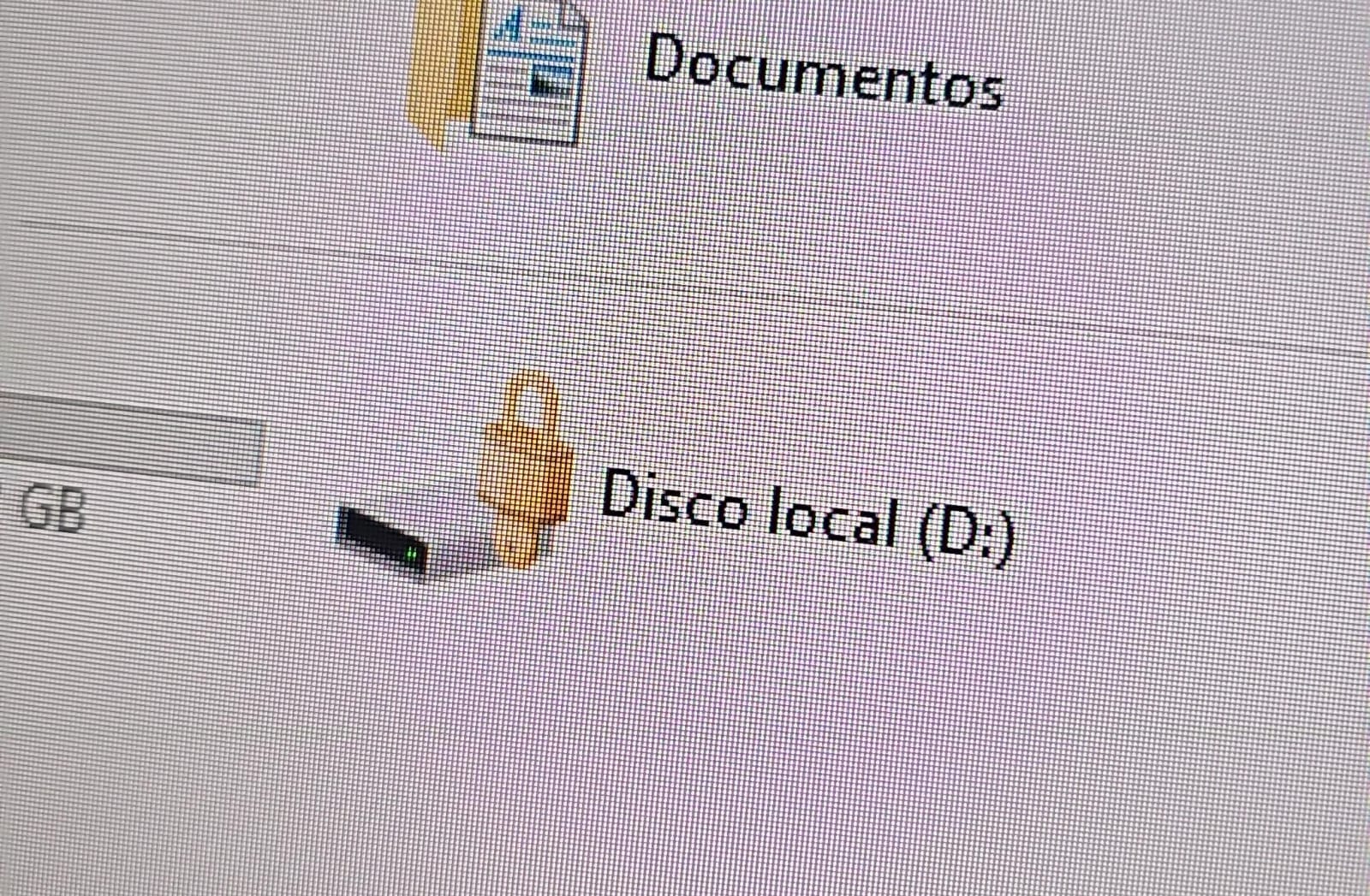
In both cases, the affected users initially noticed a padlock icon next to their drives in Windows Explorer. This indicated that the drive was encrypted with BitLocker, blocking access to its contents.

Drive icon indicating that the drive is locked

Drive icon indicating that the drive is locked

A recovery key was required to unlock the drive.

Attempt to access the disk's contents and the prompt for the BitLocker recovery key

Attempt to access the disk’s contents and the prompt for the BitLocker recovery key

This is not the first time we have seen such threats; a few years ago, our team discovered a threat known as ShrinkLocker, which utilized BitLocker to achieve its goals.

First case: abusing RDP to encrypt data

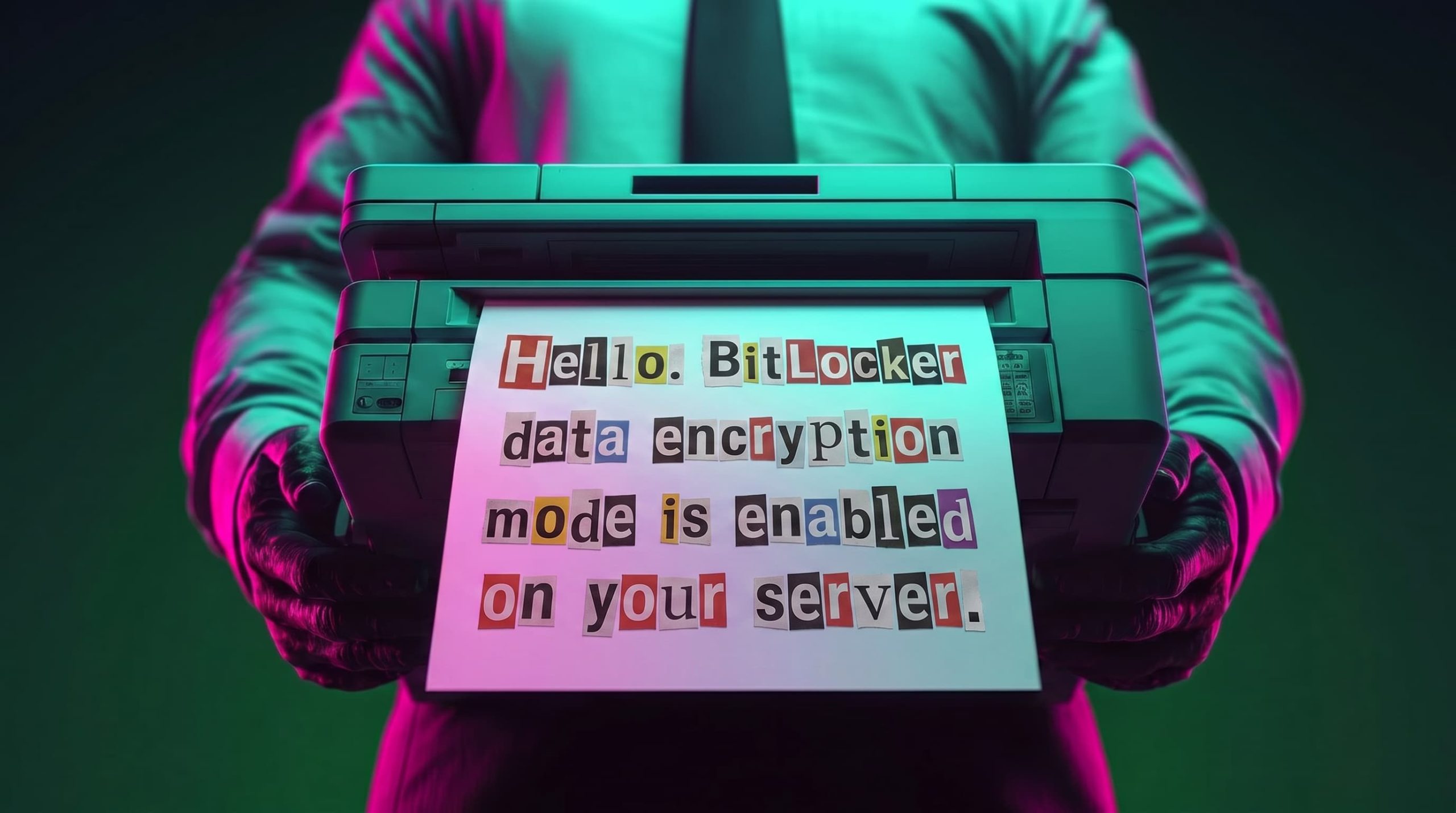
One of the incidents occurred in Colombia in June. The attackers exploited an internet-exposed RDP service on a machine connected to an 8 TB storage device containing mission-critical data. After taking control of the system and manipulating user credentials, the attackers enabled BitLocker exclusively on the drive that primarily stored financial data. Once the encryption was complete, they locked the drive and used the company’s printers to produce ransom notes.

Ransomware note

Ransomware note

Unfortunately, it was not possible to obtain evidence in the case due to the company’s rush to restore the encrypted disk. The communication with the attackers revealed a demand for just $3,000, and the company considered paying the ransom. After that, the system was restored before the forensic team could take any action, eliminating the evidence needed to assess the incident.

Attacker's reply to the victim's email sent to the address in the printed ransom note

Attacker’s reply to the victim’s email sent to the address in the printed ransom note

This attack was made possible by an internet-facing remote desktop service (RDP) with additional open ports, which employees used to access corporate information. By exploiting this network exposure and misconfiguration, attackers breached the system, identified an additional drive, and leveraged BitLocker to encrypt the data and demand a ransom payment. Leaving RDP ports open without proper security controls jeopardizes the security of systems and information, as highlighted in the our “Global Report: Anatomy of a Cyber World“.

Exposed ports identified in the system in recent months

Exposed ports identified in the system in recent months

The company confirmed that, due to compatibility issues with applications required for operation, EPP (Endpoint Protection Platform) protection was disabled on the system, making it easier for attackers to validate, enumerate, and execute applications without revealing malicious activity to central monitoring systems.

Second case: meet the XEntry Team

In another incident, which occurred in Mexico in May, our team identified how the threat actor gained initial access to the infrastructure. They exploited a misconfigured MSSQL service. This allowed them to execute commands on the system after obtaining the database login credentials from code insecurely published on GitHub.

XEntry team attack

XEntry team attack

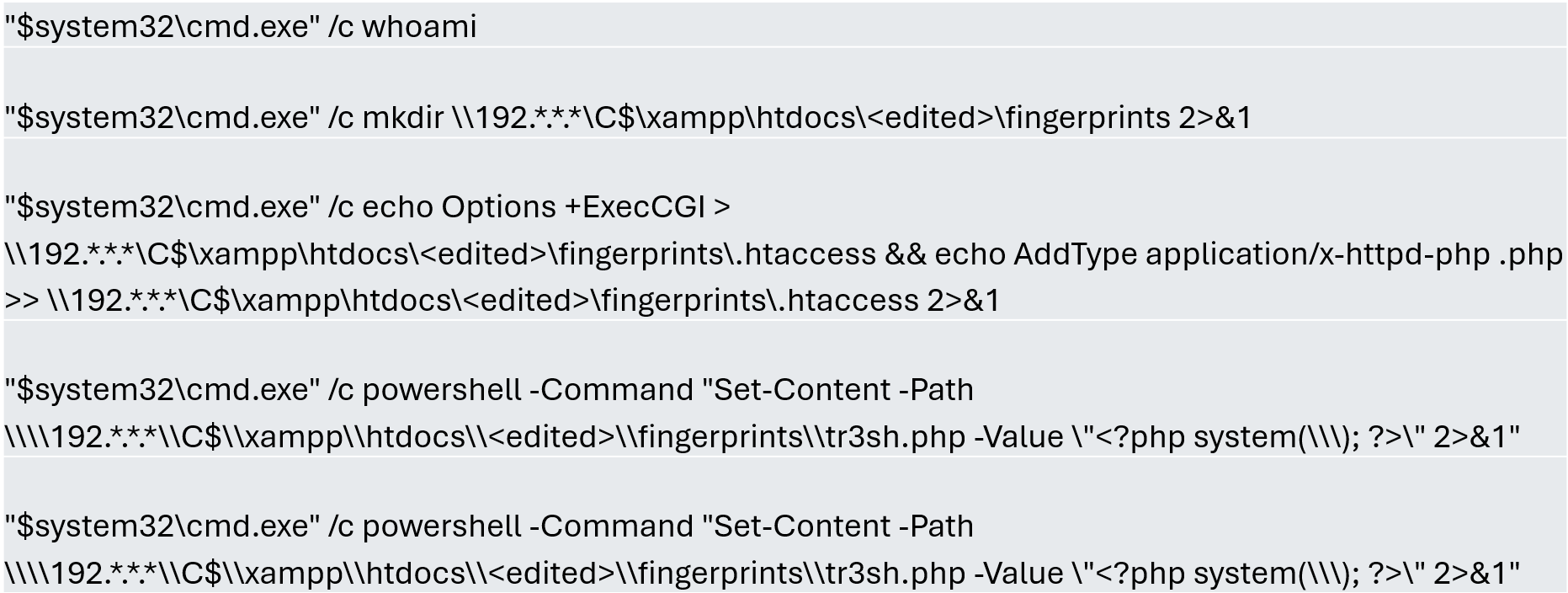
In this incident, the attack began three months prior to detection, with the intruder discovering and verifying their access to the environment. After confirming their access and privilege level within the MSSQL server settings, which extended beyond the DBMS to the underlying operating system, the attackers initially focused on manipulating certain aspects of the web server configuration on the same system. They lowered the server’s security settings and created web shell files in the publicly accessible folders. Many of these attempts to manipulate the service or create malicious files were contained by existing EPP security controls, but despite the alerts, the necessary investigation to address the activity was not conducted.

Commands executed when attempting to manipulate the web server

Commands executed when attempting to manipulate the web server

The attackers subsequently confirmed their ability to execute commands locally and set up their attack infrastructure to transmit data via a communications bridge. By exploiting the MSSQL service, they gained access to each of the organization’s internal systems.

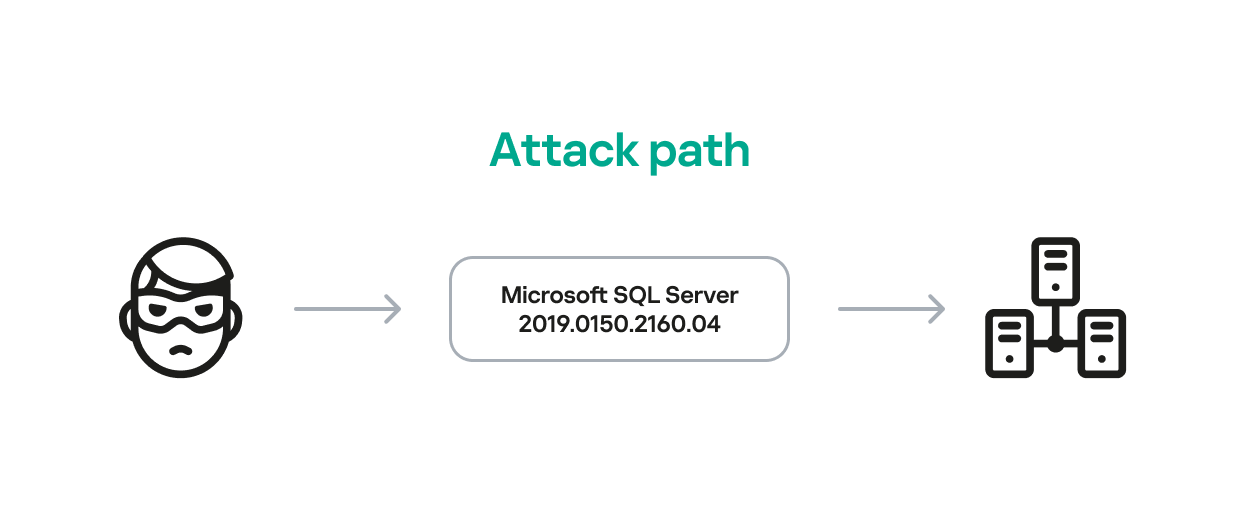
The database engine used by the company was Microsoft SQL Server 2019.0150.2160.04, misconfigured to allow operating system сommand execution via the xp_cmdshell extended stored procedure.

Due to this misconfiguration of an internet-exposed service, the attackers established a channel capable of executing any type of command directed at the server and the local infrastructure within its scope.

Attack path

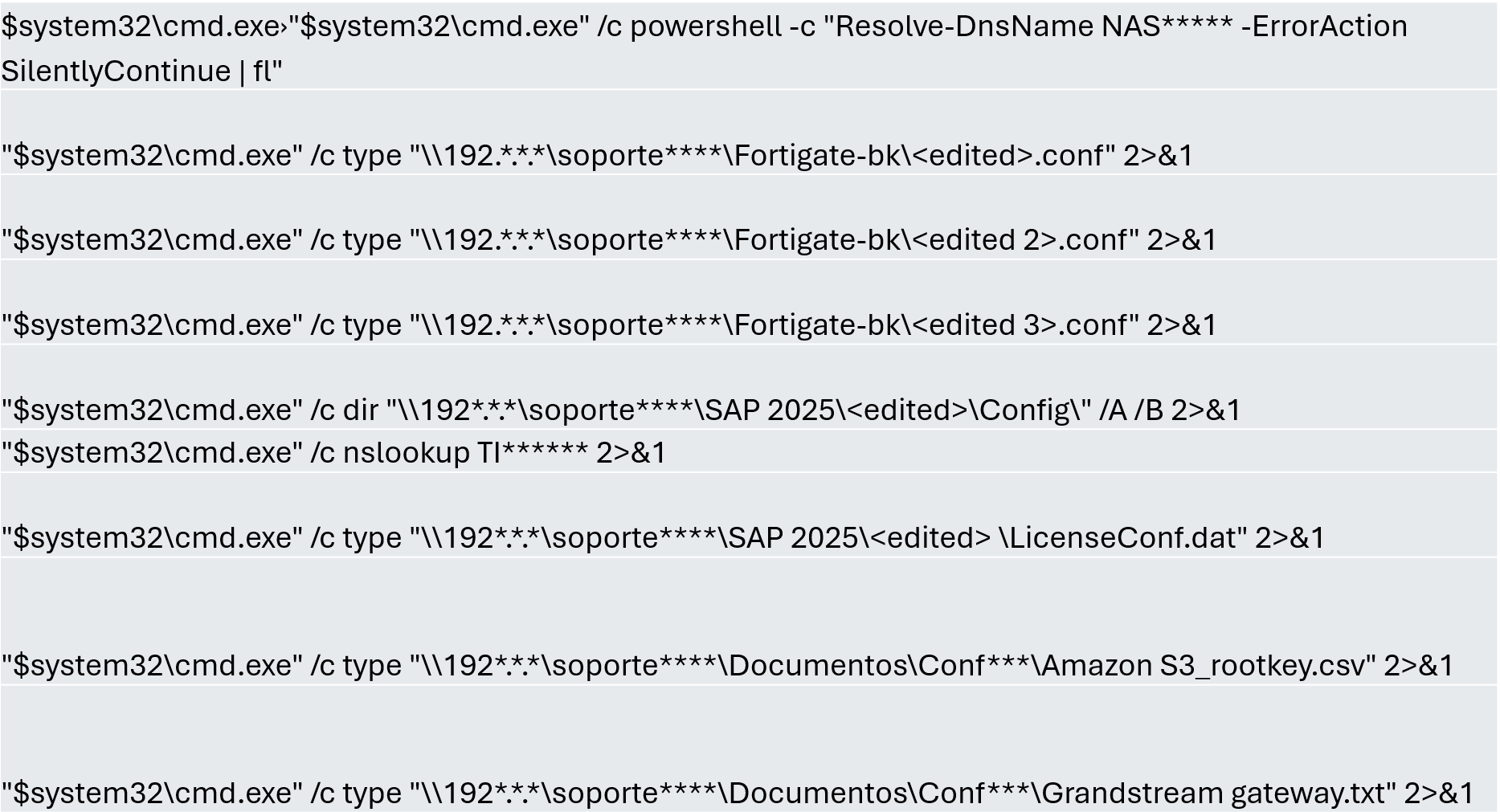
One of the main objectives was to identify shared systems and resources that provided access to critical information. Our analysis confirmed the attackers’ access to systems storing configuration parameters for networking, enterprise management, and cloud services, among others.

A subset of the critical information identified and collected by the attackers

A subset of the critical information identified and collected by the attackers

In early May, the attackers focused on running additional scans and deploying ManageEngine’s Endpoint Central RMM (Remote Monitoring and Management) to establish persistence and begin the final stages of their intrusion.

Scanning and RMM deployment

Scanning and RMM deployment

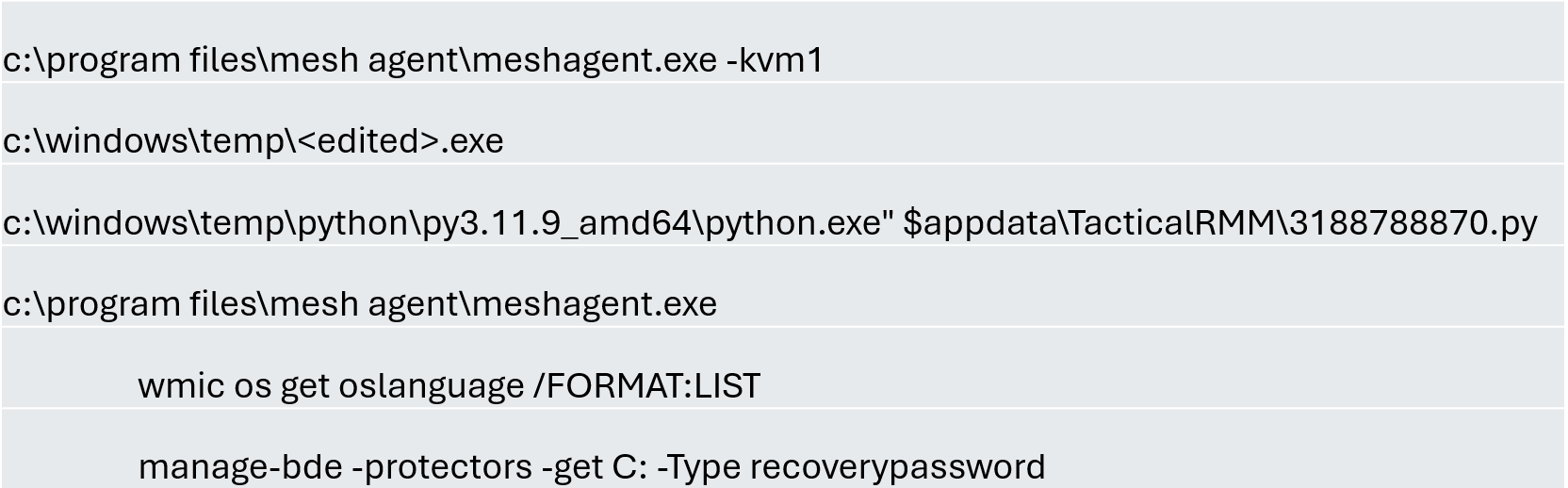
Further RMM-type applications, such as Mesh Agent and Tactical RMM, were installed in the days that followed. These were used to deploy scheduled tasks responsible for enabling the BitLocker service and individually encrypting the infrastructure’s disks, generating a key for each encrypted system.

Commands executed through RMM tools to collect Bitlocker keys

Commands executed through RMM tools to collect Bitlocker keys

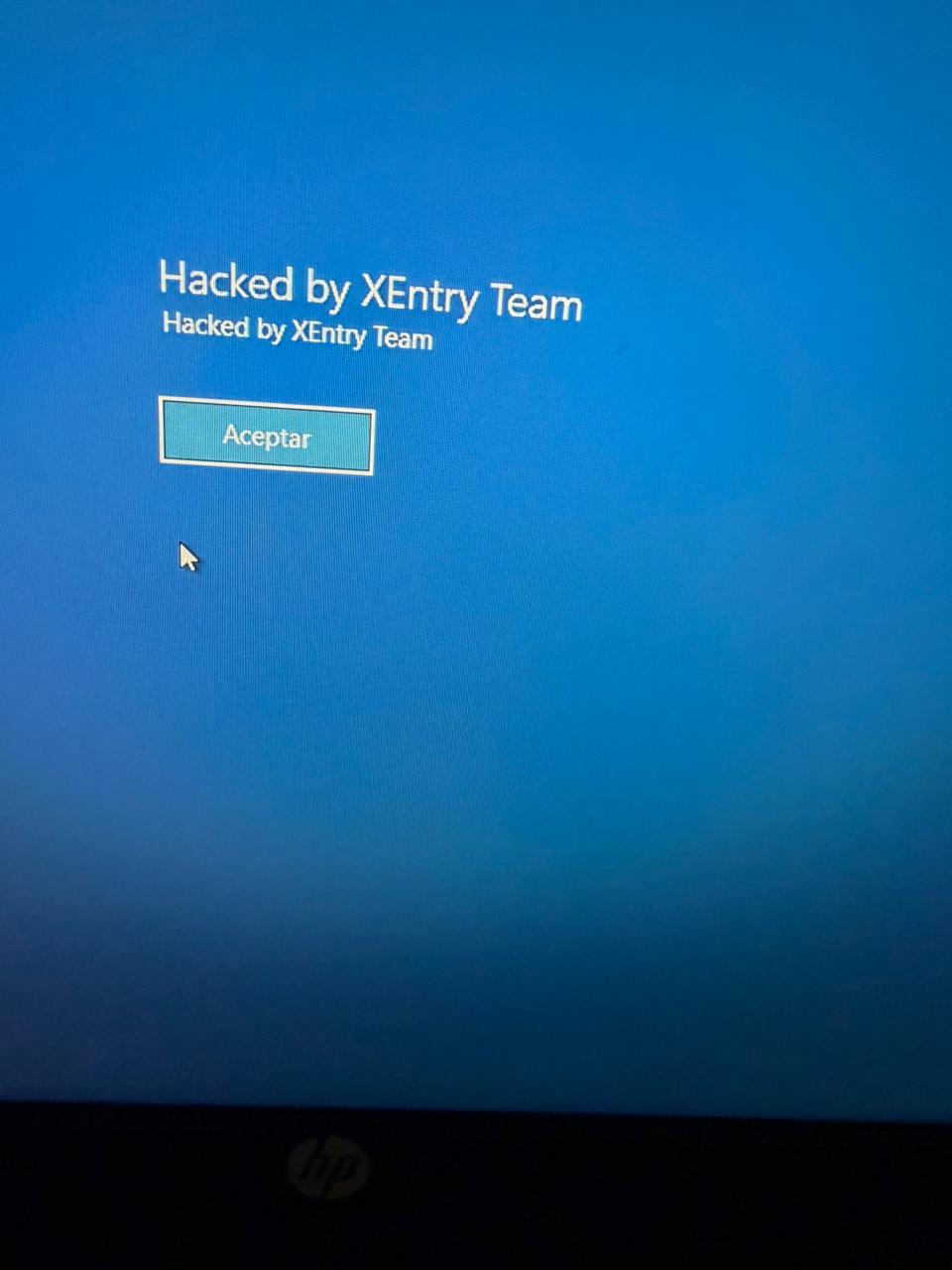
Finally, in mid-May, the attackers managed to execute a Group Policy Object (GPO) used to deploy activation and encryption tasks, as well as other policies responsible for continued deployment of RMM applications via scheduled tasks. The activity initially targeted critical systems but later spread to every system synchronized with the domain controller. Users became aware of the attack when their machines displayed a blue screen with the message “Hacked by XEntry Team”, and their credentials stopped working to access their systems.

A few hours later, ransom notes began emerging from office printers.

Ransom note printed by the XEntry team

Ransom note printed by the XEntry team

These cases confirm that adversary’s objective is to gain access to infrastructure while avoiding investment in or partnership with ransomware groups. Instead, they leverage built-in Microsoft tools to facilitate data encryption and ransom payments. Monitoring and centralizing logs on protected resources, as well as promptly managing alerts, are critical to countering this type of intrusion.

Conclusions

  • Although the systems under review had security measures in place, there was a lack of proper alert management or inadequate decisions regarding application incompatibilities.
  • We strongly recommend configuring the Remote Desktop Protocol (RDP) in strict accordance with cybersecurity best practices to prevent unauthorized access. This is especially critical: according to our Global Report: Anatomy of a Cyber World, more than 13% of incidents are related to policy violations and configuration errors, confirming that misconfigurations continue to pose a significant risk.
  • Organizations should prioritize strict application control policies and active monitoring of network traffic for command-and-control (C2) communications. This is especially critical: according to the same report, more than 20% of incidents involved the abuse of RMM (Remote Monitoring and Management) tools for execution and C2 strategies. The fact that attackers used more than three distinct tools to gain control during a single incident further underscores the urgent need for these measures.
  • Some questions remain unanswered due to a lack of evidence and a hasty system restoration effort that bypassed critical stages of the incident response process. It is important to ensure an adequate incident response procedure, preserving evidence to confirm all related activities, and adjusting or proposing controls to prevent future incidents involving similar TTPs.
  • Although the ransom notes do not reveal a clear connection between the actors, certain words used in the messages, as well as the method of delivery and communication, may confirm a link:

“As a guarantee, we have no negative online reviews about non-fulfillment of our obligations…” (Ransom note from the first case)

“Our reputation is the guarantee that all content will be fulfilled…” (Ransom note from the second case)

Our teams continue to monitor these threats.

Detection signatures

  • Trojan.Multi.Agent.gen
  • Trojan.Win32.GenAutorunMsSqlServerCommandRun.a
  • Trojan.Win32.Generic
  • Exploit.Win32.SCShell.a

  •  

A new extortion cocktail: office printers, small ransoms, and BitLocker

Recently, our teams in Latin America investigated a series of incidents involving misconfiguration, the deployment of BitLocker, and the exploitation of corporate printers. Attackers used the devices to notify organizations that their infrastructure had been compromised and they had to pay a ransom to recover their data.

This article analyzes two incidents that occurred in June in Colombia and in May in Mexico. We highlight the similarities in the attackers’ communications and outline emerging trends in ransom amounts.

Initial sign of an attack

In both cases, the affected users initially noticed a padlock icon next to their drives in Windows Explorer. This indicated that the drive was encrypted with BitLocker, blocking access to its contents.

Drive icon indicating that the drive is locked

Drive icon indicating that the drive is locked

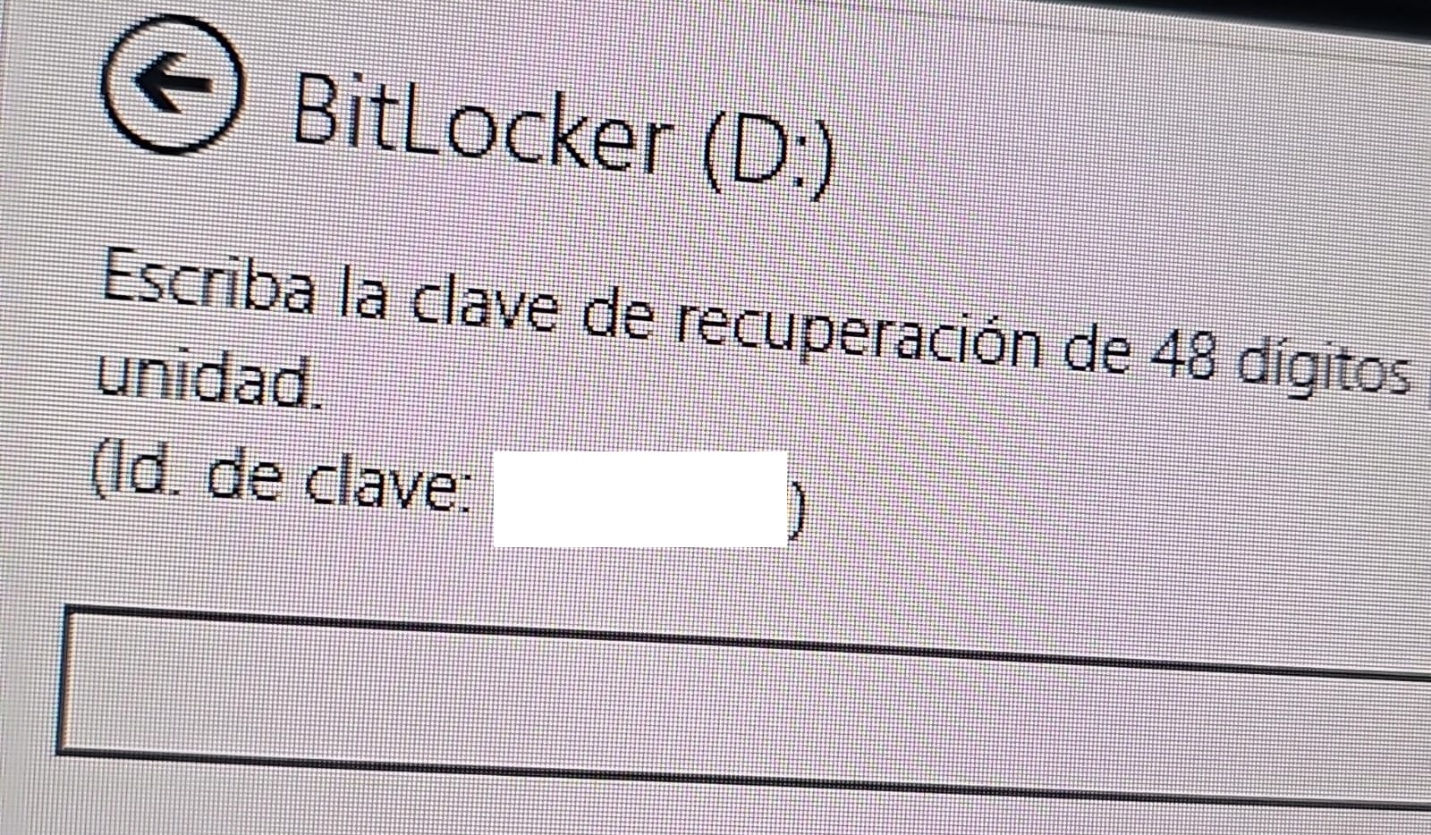
A recovery key was required to unlock the drive.

Attempt to access the disk's contents and the prompt for the BitLocker recovery key

Attempt to access the disk’s contents and the prompt for the BitLocker recovery key

This is not the first time we have seen such threats; a few years ago, our team discovered a threat known as ShrinkLocker, which utilized BitLocker to achieve its goals.

First case: abusing RDP to encrypt data

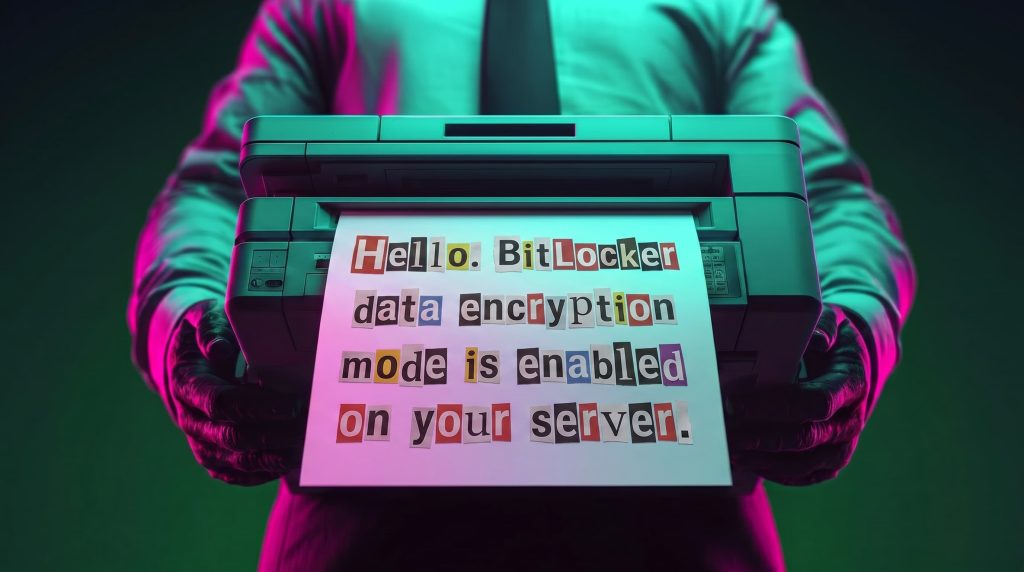
One of the incidents occurred in Colombia in June. The attackers exploited an internet-exposed RDP service on a machine connected to an 8 TB storage device containing mission-critical data. After taking control of the system and manipulating user credentials, the attackers enabled BitLocker exclusively on the drive that primarily stored financial data. Once the encryption was complete, they locked the drive and used the company’s printers to produce ransom notes.

Ransomware note

Ransomware note

Unfortunately, it was not possible to obtain evidence in the case due to the company’s rush to restore the encrypted disk. The communication with the attackers revealed a demand for just $3,000, and the company considered paying the ransom. After that, the system was restored before the forensic team could take any action, eliminating the evidence needed to assess the incident.

Attacker's reply to the victim's email sent to the address in the printed ransom note

Attacker’s reply to the victim’s email sent to the address in the printed ransom note

This attack was made possible by an internet-facing remote desktop service (RDP) with additional open ports, which employees used to access corporate information. By exploiting this network exposure and misconfiguration, attackers breached the system, identified an additional drive, and leveraged BitLocker to encrypt the data and demand a ransom payment. Leaving RDP ports open without proper security controls jeopardizes the security of systems and information, as highlighted in the our “Global Report: Anatomy of a Cyber World“.

Exposed ports identified in the system in recent months

Exposed ports identified in the system in recent months

The company confirmed that, due to compatibility issues with applications required for operation, EPP (Endpoint Protection Platform) protection was disabled on the system, making it easier for attackers to validate, enumerate, and execute applications without revealing malicious activity to central monitoring systems.

Second case: meet the XEntry Team

In another incident, which occurred in Mexico in May, our team identified how the threat actor gained initial access to the infrastructure. They exploited a misconfigured MSSQL service. This allowed them to execute commands on the system after obtaining the database login credentials from code insecurely published on GitHub.

XEntry team attack

XEntry team attack

In this incident, the attack began three months prior to detection, with the intruder discovering and verifying their access to the environment. After confirming their access and privilege level within the MSSQL server settings, which extended beyond the DBMS to the underlying operating system, the attackers initially focused on manipulating certain aspects of the web server configuration on the same system. They lowered the server’s security settings and created web shell files in the publicly accessible folders. Many of these attempts to manipulate the service or create malicious files were contained by existing EPP security controls, but despite the alerts, the necessary investigation to address the activity was not conducted.

Commands executed when attempting to manipulate the web server

Commands executed when attempting to manipulate the web server

The attackers subsequently confirmed their ability to execute commands locally and set up their attack infrastructure to transmit data via a communications bridge. By exploiting the MSSQL service, they gained access to each of the organization’s internal systems.

The database engine used by the company was Microsoft SQL Server 2019.0150.2160.04, misconfigured to allow operating system сommand execution via the xp_cmdshell extended stored procedure.

Due to this misconfiguration of an internet-exposed service, the attackers established a channel capable of executing any type of command directed at the server and the local infrastructure within its scope.

Attack path

One of the main objectives was to identify shared systems and resources that provided access to critical information. Our analysis confirmed the attackers’ access to systems storing configuration parameters for networking, enterprise management, and cloud services, among others.

A subset of the critical information identified and collected by the attackers

A subset of the critical information identified and collected by the attackers

In early May, the attackers focused on running additional scans and deploying ManageEngine’s Endpoint Central RMM (Remote Monitoring and Management) to establish persistence and begin the final stages of their intrusion.

Scanning and RMM deployment

Scanning and RMM deployment

Further RMM-type applications, such as Mesh Agent and Tactical RMM, were installed in the days that followed. These were used to deploy scheduled tasks responsible for enabling the BitLocker service and individually encrypting the infrastructure’s disks, generating a key for each encrypted system.

Commands executed through RMM tools to collect Bitlocker keys

Commands executed through RMM tools to collect Bitlocker keys

Finally, in mid-May, the attackers managed to execute a Group Policy Object (GPO) used to deploy activation and encryption tasks, as well as other policies responsible for continued deployment of RMM applications via scheduled tasks. The activity initially targeted critical systems but later spread to every system synchronized with the domain controller. Users became aware of the attack when their machines displayed a blue screen with the message “Hacked by XEntry Team”, and their credentials stopped working to access their systems.

A few hours later, ransom notes began emerging from office printers.

Ransom note printed by the XEntry team

Ransom note printed by the XEntry team

These cases confirm that adversary’s objective is to gain access to infrastructure while avoiding investment in or partnership with ransomware groups. Instead, they leverage built-in Microsoft tools to facilitate data encryption and ransom payments. Monitoring and centralizing logs on protected resources, as well as promptly managing alerts, are critical to countering this type of intrusion.

Conclusions

  • Although the systems under review had security measures in place, there was a lack of proper alert management or inadequate decisions regarding application incompatibilities.
  • We strongly recommend configuring the Remote Desktop Protocol (RDP) in strict accordance with cybersecurity best practices to prevent unauthorized access. This is especially critical: according to our Global Report: Anatomy of a Cyber World, more than 13% of incidents are related to policy violations and configuration errors, confirming that misconfigurations continue to pose a significant risk.
  • Organizations should prioritize strict application control policies and active monitoring of network traffic for command-and-control (C2) communications. This is especially critical: according to the same report, more than 20% of incidents involved the abuse of RMM (Remote Monitoring and Management) tools for execution and C2 strategies. The fact that attackers used more than three distinct tools to gain control during a single incident further underscores the urgent need for these measures.
  • Some questions remain unanswered due to a lack of evidence and a hasty system restoration effort that bypassed critical stages of the incident response process. It is important to ensure an adequate incident response procedure, preserving evidence to confirm all related activities, and adjusting or proposing controls to prevent future incidents involving similar TTPs.
  • Although the ransom notes do not reveal a clear connection between the actors, certain words used in the messages, as well as the method of delivery and communication, may confirm a link:

“As a guarantee, we have no negative online reviews about non-fulfillment of our obligations…” (Ransom note from the first case)

“Our reputation is the guarantee that all content will be fulfilled…” (Ransom note from the second case)

Our teams continue to monitor these threats.

Detection signatures

  • Trojan.Multi.Agent.gen
  • Trojan.Win32.GenAutorunMsSqlServerCommandRun.a
  • Trojan.Win32.Generic
  • Exploit.Win32.SCShell.a

  •  
❌