
Reading view

Rokarolla Android malware can take over your phone and steal banking logins

Researchers have analyzed a new Android banking Trojan called Rokarolla. It can effectively take over a device, steal banking and crypto login details from more than 200 apps, and quietly monitor much of what you do on your phone.

On an infected device, Rokarolla steals banking and crypto login details. It also uses fake lock-screen overlays to capture your PIN, pattern, or password.

When you open one of the banking or crypto apps on Rokarolla’s target list, the malware downloads and displays a matching fake login page over the real app. Anything you type into the fake page, including usernames, passwords, and card numbers, is sent to the attackers.

Separately, Rokarolla abuses Android’s Accessibility features to monitor activity across the device. It can recognize WhatsApp screens by looking for familiar labels such as “Chats” and “Calls,” extract contact information, read SMS messages, and send new ones. These capabilities can help it intercept one-time passwords (OTPs) and two-factor authentication (2FA) codes.

Rokarolla can take control of text messages and phone calls, helping it block security alerts and hide signs of fraud.

It can also record everything you type and see on the screen. If you copy and paste a cryptocurrency wallet address, the malware can secretly replace it with one belonging to the attackers.

Other features help the malware stay hidden, including the ability to hide its icon, silence the device, turn off Google Play Protect, and prevent the screen from going to sleep.

How it spreads

Rokarolla is distributed through rogue websites, where it is offered as fake versions of popular apps like TikTok or Chrome.
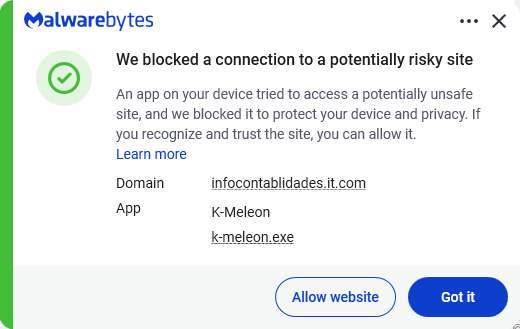
Malwarebytes blocks the download site

Instead of sending you to the official Google Play Store, these malicious sites push you to download the app directly, a process known as sideloading. After you install it, the fake app poses as Google Play Protect and quietly downloads and installs the malware that carries out the attack.

To gain the access it needs, the fake app asks for powerful permissions, including Accessibility access, the permission to read SMS messages, and access to notifications. Because these requests can look legitimate, many users may approve them without realizing the risks.

How to stay safe

To avoid banking Trojans like Rokarolla, there are a few guidelines you should follow:

  • Don’t trust apps that claim to be Google Play Protect or another system component. You should never need to install these manually.
  • Use up-to-date, real-time anti-malware protection with web protection on your devices.
  • Don’t sideload apps that are available on the Google Play Store. While malware can sometimes slip into official stores, the risk is much greater elsewhere.
  • Deny powerful permissions to apps downloaded from links or websites, especially if they ask for Accessibility access, SMS permissions, or the ability to handle calls, even though that doesn’t match their stated purpose.
  • In fact, any request for Accessibility access should be treated with caution. If an app that is not clearly an accessibility tool asks for it, deny the request and reconsider whether you trust the source.
  • Scrutinize banking and crypto login screens. If something looks off, or you see multiple login prompts, close the app and relaunch it from its official icon.

Scammers know more about you than you think. 

Malwarebytes Mobile Security protects you from phishing, scam texts, malicious sites, and more. With real-time AI-powered Scam Guard built right in. 

Download for iOS → Download for Android → 

  •  

Rokarolla Android malware can take over your phone and steal banking logins

Researchers have analyzed a new Android banking Trojan called Rokarolla. It can effectively take over a device, steal banking and crypto login details from more than 200 apps, and quietly monitor much of what you do on your phone.

On an infected device, Rokarolla steals banking and crypto login details. It also uses fake lock-screen overlays to capture your PIN, pattern, or password.

When you open one of the banking or crypto apps on Rokarolla’s target list, the malware downloads and displays a matching fake login page over the real app. Anything you type into the fake page, including usernames, passwords, and card numbers, is sent to the attackers.

Separately, Rokarolla abuses Android’s Accessibility features to monitor activity across the device. It can recognize WhatsApp screens by looking for familiar labels such as “Chats” and “Calls,” extract contact information, read SMS messages, and send new ones. These capabilities can help it intercept one-time passwords (OTPs) and two-factor authentication (2FA) codes.

Rokarolla can take control of text messages and phone calls, helping it block security alerts and hide signs of fraud.

It can also record everything you type and see on the screen. If you copy and paste a cryptocurrency wallet address, the malware can secretly replace it with one belonging to the attackers.

Other features help the malware stay hidden, including the ability to hide its icon, silence the device, turn off Google Play Protect, and prevent the screen from going to sleep.

How it spreads

Rokarolla is distributed through rogue websites, where it is offered as fake versions of popular apps like TikTok or Chrome.

Malwarebytes blocks the download site

Instead of sending you to the official Google Play Store, these malicious sites push you to download the app directly, a process known as sideloading. After you install it, the fake app poses as Google Play Protect and quietly downloads and installs the malware that carries out the attack.

To gain the access it needs, the fake app asks for powerful permissions, including Accessibility access, the permission to read SMS messages, and access to notifications. Because these requests can look legitimate, many users may approve them without realizing the risks.

How to stay safe

To avoid banking Trojans like Rokarolla, there are a few guidelines you should follow:

  • Don’t trust apps that claim to be Google Play Protect or another system component. You should never need to install these manually.
  • Use up-to-date, real-time anti-malware protection with web protection on your devices.
  • Don’t sideload apps that are available on the Google Play Store. While malware can sometimes slip into official stores, the risk is much greater elsewhere.
  • Deny powerful permissions to apps downloaded from links or websites, especially if they ask for Accessibility access, SMS permissions, or the ability to handle calls, even though that doesn’t match their stated purpose.
  • In fact, any request for Accessibility access should be treated with caution. If an app that is not clearly an accessibility tool asks for it, deny the request and reconsider whether you trust the source.
  • Scrutinize banking and crypto login screens. If something looks off, or you see multiple login prompts, close the app and relaunch it from its official icon.

Scammers know more about you than you think. 

Malwarebytes Mobile Security protects you from phishing, scam texts, malicious sites, and more. With real-time AI-powered Scam Guard built right in. 

Download for iOS → Download for Android → 

  •  

Stolen iPhones could soon be worth a lot less to thieves

The UK’s Metropolitan Police has reached an agreement with Apple designed to make stolen iPhones harder to resell and less attractive to thieves. The approach combines stronger technical protections with direct data sharing between Apple and law enforcement.

In 2023, about 1.4 million mobile phones were stolen in the US alone. London is reportedly one of the worst cities for phone theft, with around 200 devices stolen every day. 

As part of this effort, Apple has strengthened its Stolen Device Protection feature in iOS 26.4, making it harder for thieves to change security settings, factory‑reset a stolen iPhone, or set it up as new.

Previously, thieves with your passcode (or who snatched your iPhone while it was still unlocked) could factory reset it, wiping your account and making the device look new for resale. Stolen Device Protection blocks this, requiring biometric authentication, not just a passcode, to make critical changes.

The Met has started sharing identifiers for reported stolen devices with Apple. In return, Apple can provide data on whether those devices later attempt to reconnect to a network or attempt to be reactivated.

Police say this gives them a better picture of what happens to stolen devices: Are they being switched back on locally? Shipped abroad? Broken down for parts?

Met Police Commissioner Sir Mark Rowley said Apple believes it has “cracked” the engineering problem. Phone thefts in London have since fallen 18% year-on-year, with Westminster (the capital’s worst-affected borough) down 45.8%.

Given the early signs of success, the Met is pressing for broader changes.

The Commissioner has written to the Home Secretary asking for laws that would require all phone manufacturers and mobile operators to share information about stolen devices and implement measures that make stolen handsets unusable. 

As part of that effort, the Met has explicitly said that Samsung and Google are also improving device security to address phone theft, suggesting this will become an industry‑wide expectation rather than an Apple‑only initiative.

Possible pitfalls

From a privacy perspective, it’s important to keep an eye on what data is shared, and who can see it.

Reports so far suggest that Apple and the Met are exchanging device identifiers and high‑level information about whether a stolen phone has attempted to reconnect or be reactivated. In theory, that sounds narrow and purpose‑bound: device X was reported stolen, later tried to come online in country Y, at time Z. There is no public indication that content, contacts, or location histories are being handed over wholesale.

There’s also a risk of someone reporting your phone as stolen. If a device is incorrectly marked as stolen, the protections designed to stop thieves could lock an innocent user out, turning a valuable asset into a brick. Without transparent appeal mechanisms, this is a notable concern.

The measures could also create challenges for recycling initiatives, legitimate repair shops, and refurbishers. They may face additional hurdles when diagnosing, restoring, or reselling devices if anti-theft protections become more restrictive.

Stay safe

Make sure your phone is protected with a strong passcode and biometric security, such as Face ID or a fingerprint.

Enable Apple’s Find My feature, or the Android equivalent, and make sure it is linked to a strong account password.

Keep lock screen notifications to a minimum so thieves cannot quickly access your sensitive information if they get hold of your device.

When buying a used phone, use a reputable seller and make sure the device has been reset by its owner. Complete the initial setup process with the seller present to confirm the phone isn’t locked to someone else’s account or reported stolen.


Scammers know more about you than you think. 

Malwarebytes Mobile Security protects you from phishing, scam texts, malicious sites, and more. With real-time AI-powered Scam Guard built right in. 

Download for iOS → Download for Android → 

  •  

Stolen iPhones could soon be worth a lot less to thieves

The UK’s Metropolitan Police has reached an agreement with Apple designed to make stolen iPhones harder to resell and less attractive to thieves. The approach combines stronger technical protections with direct data sharing between Apple and law enforcement.

In 2023, about 1.4 million mobile phones were stolen in the US alone. London is reportedly one of the worst cities for phone theft, with around 200 devices stolen every day. 

As part of this effort, Apple has strengthened its Stolen Device Protection feature in iOS 26.4, making it harder for thieves to change security settings, factory‑reset a stolen iPhone, or set it up as new.

Previously, thieves with your passcode (or who snatched your iPhone while it was still unlocked) could factory reset it, wiping your account and making the device look new for resale. Stolen Device Protection blocks this, requiring biometric authentication, not just a passcode, to make critical changes.

The Met has started sharing identifiers for reported stolen devices with Apple. In return, Apple can provide data on whether those devices later attempt to reconnect to a network or attempt to be reactivated.

Police say this gives them a better picture of what happens to stolen devices: Are they being switched back on locally? Shipped abroad? Broken down for parts?

Met Police Commissioner Sir Mark Rowley said Apple believes it has “cracked” the engineering problem. Phone thefts in London have since fallen 18% year-on-year, with Westminster (the capital’s worst-affected borough) down 45.8%.

Given the early signs of success, the Met is pressing for broader changes.

The Commissioner has written to the Home Secretary asking for laws that would require all phone manufacturers and mobile operators to share information about stolen devices and implement measures that make stolen handsets unusable. 

As part of that effort, the Met has explicitly said that Samsung and Google are also improving device security to address phone theft, suggesting this will become an industry‑wide expectation rather than an Apple‑only initiative.

Possible pitfalls

From a privacy perspective, it’s important to keep an eye on what data is shared, and who can see it.

Reports so far suggest that Apple and the Met are exchanging device identifiers and high‑level information about whether a stolen phone has attempted to reconnect or be reactivated. In theory, that sounds narrow and purpose‑bound: device X was reported stolen, later tried to come online in country Y, at time Z. There is no public indication that content, contacts, or location histories are being handed over wholesale.

There’s also a risk of someone reporting your phone as stolen. If a device is incorrectly marked as stolen, the protections designed to stop thieves could lock an innocent user out, turning a valuable asset into a brick. Without transparent appeal mechanisms, this is a notable concern.

The measures could also create challenges for recycling initiatives, legitimate repair shops, and refurbishers. They may face additional hurdles when diagnosing, restoring, or reselling devices if anti-theft protections become more restrictive.

Stay safe

Make sure your phone is protected with a strong passcode and biometric security, such as Face ID or a fingerprint.

Enable Apple’s Find My feature, or the Android equivalent, and make sure it is linked to a strong account password.

Keep lock screen notifications to a minimum so thieves cannot quickly access your sensitive information if they get hold of your device.

When buying a used phone, use a reputable seller and make sure the device has been reset by its owner. Complete the initial setup process with the seller present to confirm the phone isn’t locked to someone else’s account or reported stolen.


Scammers know more about you than you think. 

Malwarebytes Mobile Security protects you from phishing, scam texts, malicious sites, and more. With real-time AI-powered Scam Guard built right in. 

Download for iOS → Download for Android → 

  •  

Children’s phones must block nude images by September, UK says

Build something that doesn’t exist. Don’t collect any data while you do it. Get it wrong and the CEO could face criminal charges. That’s close to the ultimatum the UK government handed Apple and Google on June 8. The two companies have three months to introduce device-level protections blocking nudity across every smartphone and tablet sold in the UK. If they don’t, the government will legislate—including fines and, as a last resort, criminal liability for tech bosses.

Prime Minister Keir Starmer announced the move at London Tech Week, telling the firms:

“If they choose not to, then we will act and change the law.”

The policy reads cleanly. The execution doesn’t.

What’s already on your child’s phone, and what isn’t

Both companies already do something to prevent children interacting with nudes. Apple’s Communication Safety feature warns children with a Child Account when they send or receive images and videos containing nudity across Messages, AirDrop, FaceTime, and other apps. It updated the feature with new functionality at its Worldwide Developer Conference (WWDC) this week.

Google’s Sensitive Content Warnings blur sensitive imagery in Google Messages for supervised users and signed-in unsupervised teens—though the feature covers images only, not video.

Apple will soon require people to confirm that they are over 18 in the UK and some other countries to access certain features on their phones. That will involve age assurance through government ID, payment information, or other verification methods depending on region.

These measures aren’t enough, according to the UK government. It complains that existing nudity detection isn’t applied to the camera or other apps, third-party messaging services, or search functions. So in other words, the protections miss most of the phone. The camera, WhatsApp, Signal, Safari, and the photo library all sit outside the protective bubble parents may assume already exists.

Is privacy-respecting scanning possible?

The announcement also contains a line that’s hard to reconcile with the rest of it:

“Companies must introduce these measures without threatening privacy or collecting any data.”

Adults can opt out, but only by completing age verification.

That’s a tall order. Privacy advocates argue that age verification inevitably creates new data collection risks, even when companies try to minimize the information they store. Whatever Apple and Google build, some form of record-keeping seems likely. If executives can face personal liability for non-compliance, someone has to be able to demonstrate what the system did and when.

The government’s proof that any of this is achievable rests on a single product: SafeToNet’s HarmBlock, which the Home Office calls “a proven example” of safe-by-default device protection. HarmBlock’s source code (which isn’t public) analyzes images and live streams entirely on-device.

Digital privacy groups were not happy with the announcement. Big Brother Watch pointed out that children could easily access adult-registered devices, and warned that mandatory ID checks for adults would mean “the death of anonymity and internet privacy.”

Private messaging app Signal said promises the scanning would run only on-device were “cold comfort” because wherever the system runs, its reach would ultimately be determined by government, not technology:

“Its scope will be defined by the whims and proscriptions of the government to detect nudity today and political speech tomorrow.”

Apple has been here before. In 2021, it announced a separate plan to detect known child sexual abuse imagery on devices by matching image hashes against a database of known material, and quietly shelved it after sustained backlash from privacy advocates.

What families can do today

September will end in voluntary compliance or hurried legislation. Either way, none of that changes what’s on your child’s phone right now. Today, the messaging channels most heavily used by teenagers aren’t protected. Many grooming and sextortion cases begin on apps that operate outside the operating system’s built-in safety features. Parents and kids can take extra steps for protection:

  • Turn on Communication Safety on iPhones with a Child Account, and Sensitive Content Warnings on supervised Android Messages. They might only blunt the problem at one narrow point, but it’s better than nothing.
  • Talk to your kids about coerced sharing. The Internet Watch Foundation reported that 91% of reports it assessed in 2024 contained self-generated content submitted by children themselves. Children are often coerced into sending explicit material to abusers online. The Internet Watch Foundation has a list of resources for people who are being coerced into sending intimate images online.
  • Cover the basics that outlive any policy: put unique passwords on all accounts, and add multi-factor authentication.
  • Be careful when sharing images of children you know online. Increasingly, criminals can use non-explicit images to create sexual content using AI that can in turn be used for extortion.

CNET Editors' Choice Award 2026

“One of the best cybersecurity suites on the planet.” 

According to CNET. Read their review


  •  

Children’s phones must block nude images by September, UK says

Build something that doesn’t exist. Don’t collect any data while you do it. Get it wrong and the CEO could face criminal charges. That’s close to the ultimatum the UK government handed Apple and Google on June 8. The two companies have three months to introduce device-level protections blocking nudity across every smartphone and tablet sold in the UK. If they don’t, the government will legislate—including fines and, as a last resort, criminal liability for tech bosses.

Prime Minister Keir Starmer announced the move at London Tech Week, telling the firms:

“If they choose not to, then we will act and change the law.”

The policy reads cleanly. The execution doesn’t.

What’s already on your child’s phone, and what isn’t

Both companies already do something to prevent children interacting with nudes. Apple’s Communication Safety feature warns children with a Child Account when they send or receive images and videos containing nudity across Messages, AirDrop, FaceTime, and other apps. It updated the feature with new functionality at its Worldwide Developer Conference (WWDC) this week.

Google’s Sensitive Content Warnings blur sensitive imagery in Google Messages for supervised users and signed-in unsupervised teens—though the feature covers images only, not video.

Apple will soon require people to confirm that they are over 18 in the UK and some other countries to access certain features on their phones. That will involve age assurance through government ID, payment information, or other verification methods depending on region.

These measures aren’t enough, according to the UK government. It complains that existing nudity detection isn’t applied to the camera or other apps, third-party messaging services, or search functions. So in other words, the protections miss most of the phone. The camera, WhatsApp, Signal, Safari, and the photo library all sit outside the protective bubble parents may assume already exists.

Is privacy-respecting scanning possible?

The announcement also contains a line that’s hard to reconcile with the rest of it:

“Companies must introduce these measures without threatening privacy or collecting any data.”

Adults can opt out, but only by completing age verification.

That’s a tall order. Privacy advocates argue that age verification inevitably creates new data collection risks, even when companies try to minimize the information they store. Whatever Apple and Google build, some form of record-keeping seems likely. If executives can face personal liability for non-compliance, someone has to be able to demonstrate what the system did and when.

The government’s proof that any of this is achievable rests on a single product: SafeToNet’s HarmBlock, which the Home Office calls “a proven example” of safe-by-default device protection. HarmBlock’s source code (which isn’t public) analyzes images and live streams entirely on-device.

Digital privacy groups were not happy with the announcement. Big Brother Watch pointed out that children could easily access adult-registered devices, and warned that mandatory ID checks for adults would mean “the death of anonymity and internet privacy.”

Private messaging app Signal said promises the scanning would run only on-device were “cold comfort” because wherever the system runs, its reach would ultimately be determined by government, not technology:

“Its scope will be defined by the whims and proscriptions of the government to detect nudity today and political speech tomorrow.”

Apple has been here before. In 2021, it announced a separate plan to detect known child sexual abuse imagery on devices by matching image hashes against a database of known material, and quietly shelved it after sustained backlash from privacy advocates.

What families can do today

September will end in voluntary compliance or hurried legislation. Either way, none of that changes what’s on your child’s phone right now. Today, the messaging channels most heavily used by teenagers aren’t protected. Many grooming and sextortion cases begin on apps that operate outside the operating system’s built-in safety features. Parents and kids can take extra steps for protection:

  • Turn on Communication Safety on iPhones with a Child Account, and Sensitive Content Warnings on supervised Android Messages. They might only blunt the problem at one narrow point, but it’s better than nothing.
  • Talk to your kids about coerced sharing. The Internet Watch Foundation reported that 91% of reports it assessed in 2024 contained self-generated content submitted by children themselves. Children are often coerced into sending explicit material to abusers online. The Internet Watch Foundation has a list of resources for people who are being coerced into sending intimate images online.
  • Cover the basics that outlive any policy: put unique passwords on all accounts, and add multi-factor authentication.
  • Be careful when sharing images of children you know online. Increasingly, criminals can use non-explicit images to create sexual content using AI that can in turn be used for extortion.

CNET Editors' Choice Award 2026

“One of the best cybersecurity suites on the planet.” 

According to CNET. Read their review


  •  
❌