Reading view

Wardriving assessment across Mexico: Preparing for the 2026 World Cup

Introduction

Mexico is one of the host countries for the 2026 FIFA World Cup, with matches to be played in three major cities: Mexico City, Monterrey, and Guadalajara. These locations are expected to see a large influx of international visitors, increasing the potential security risks. Many of those risks arise from users connecting to public wireless networks.

To better understand the wireless environments that visitors may encounter, we at Kaspersky GReAT conducted a wardriving assessment in the three host cities. The aim of the study was to analyze characteristics, deployment patterns, security configurations and potential exposure risks of public Wi-Fi infrastructure in urban wireless environments.

The information collected during the assessment was used exclusively for passive observation and infrastructure analysis. No attempts were made to authenticate, intercept communications, exploit systems or interact with the detected wireless networks beyond the publicly broadcast management information.

During processing of the collected data, one step involved filtering out networks belonging to cars or cell phones categorized as mobile hotspots because they do not represent networks that can be considered part of the assessment.

Research scope

The cities included in the study have high population density and extensive wireless infrastructure deployments. We chose areas with the most prominent wireless network activity and highly concentrated public access points. We carried out wardriving research in Monterrey back in 2008, but the city’s hotspot landscape has changed since then.

We chose the following analysis areas for each of the cities:

  1. Mexico City: México City Stadium, Mexico City International Airport, Zócalo, Paseo de la Reforma, Colonia Roma, La Condesa, Polanco, and Coyoacán.
  2. Guadalajara: Guadalajara Stadium, Guadalajara International Airport, the city center, Zapopan, Providencia, Avenida Chapultepec, Colonia Americana, Tlaquepaque, and the area around Andares.
  3. Monterrey: Monterrey Stadium, Monterrey International Airport, Fundidora Park, Cintermex Monterrey, the downtown area, Barrio Antiguo, MacroPlaza, and the San Pedro financial district.

The wireless information was collected using passive wireless reconnaissance techniques. The collected information included:

  • SSID analysis and information exposure, including BSSID-derived SSIDs
  • Default router configurations and ISP deployments
  • Frequency and signal characteristics
  • Channel congestion and spectrum usage
  • Wireless security configurations, including:
    • Open and insecure wireless networks
    • WPS-enabled networks
    • Secure networks (WPA2/WPA3) with WPS enabled

We performed a wireless infrastructure analysis in Mexico City, Guadalajara, and Monterrey. We drove through the areas surrounding the World Cup stadiums, tourist zones, and other places where fan concentrations are likely to be largest. Our goal was to evaluate the security status, deployment characteristics and operational exposure of detected wireless networks.

In total, we recorded 84,588 signals with 69,473 unique Service Set Identifiers (SSIDs) in busy locations and World Cup zones across the three cities. Mexico City accounted for 61.4% of the signals, Guadalajara for 23.6%, and Monterrey for 14.8%. Approximately 82% of the signals had a single SSID (81.9%, 81.34%, and 84% respectively). Notably, they all operate under the IEEE 802.11 standard protocol.

Particular attention was given to identifying standard deployment patterns, legacy configurations, default vendor settings and information disclosure through publicly broadcast wireless identifiers.

The following sections present the results that were obtained by analyzing wireless infrastructure across the three locations.

Our findings

SSID analysis and information exposure

SSID analysis was conducted to evaluate naming conventions, deployment standardization and potential information exposure.

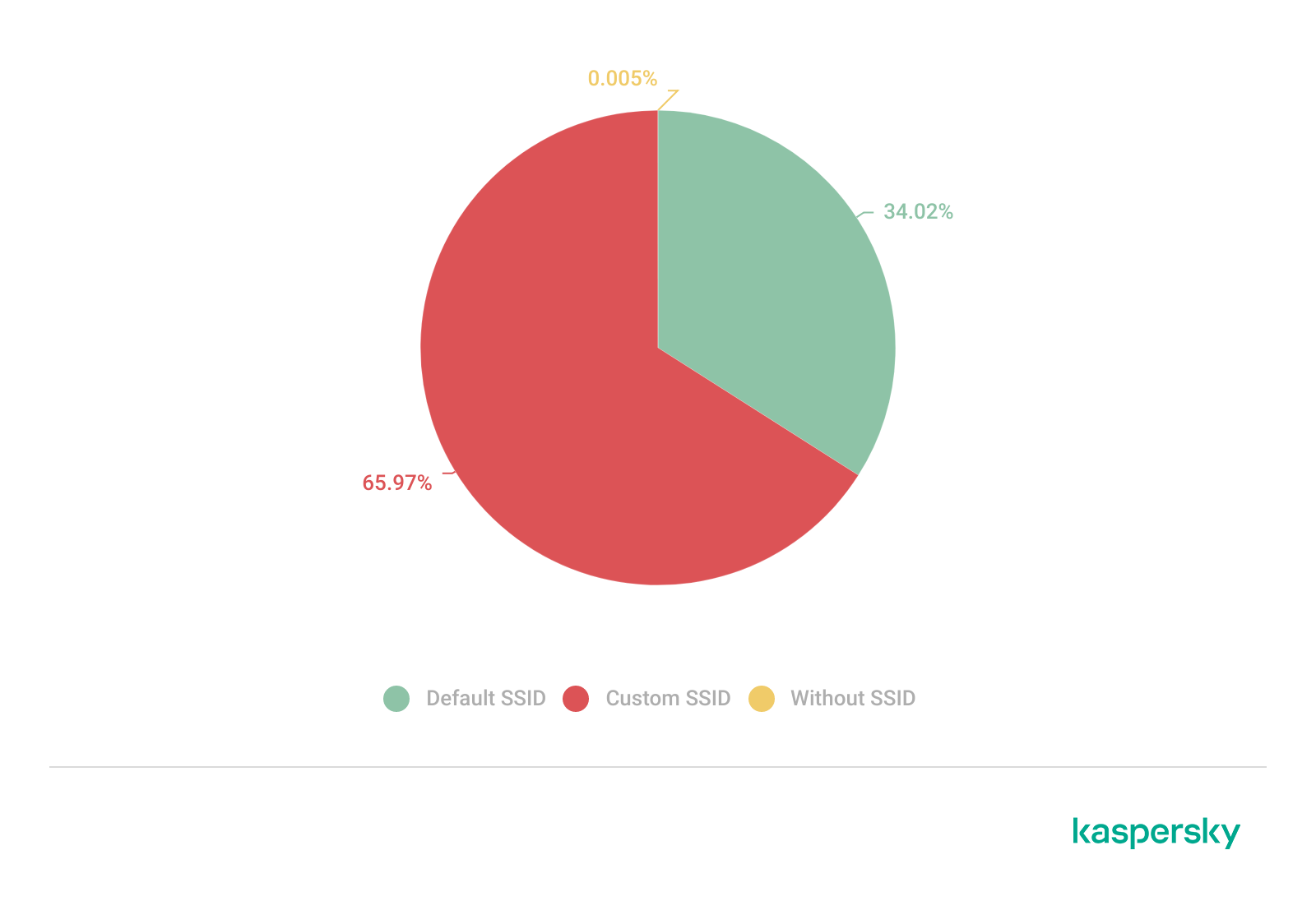
Only a few networks (0.0047%) have an invisible SSID, meaning the names of these networks are not broadcast. Some users prefer to hide the SSID for various reasons, such as the network’s purpose, the profile of its users, internal policies, etc. In contrast, the rest of the networks maintained active SSID broadcasting.

SSID structures may unintentionally disclose operational details about internet service providers (ISPs), device manufacturers, deployment practices, organizational ownership or user identity. The repeated presence of default SSID naming patterns across the analyzed locations indicates a significant degree of infrastructure homogeneity and reuse of default wireless configurations. It may also facilitate passive infrastructure profiling by revealing standard characteristics in use.

Approximately 34% of the detected networks retained the default SSID naming conventions provided by the manufacturer or ISP, while 66% used customized identifiers.

Distribution of SSID naming conventions (download)

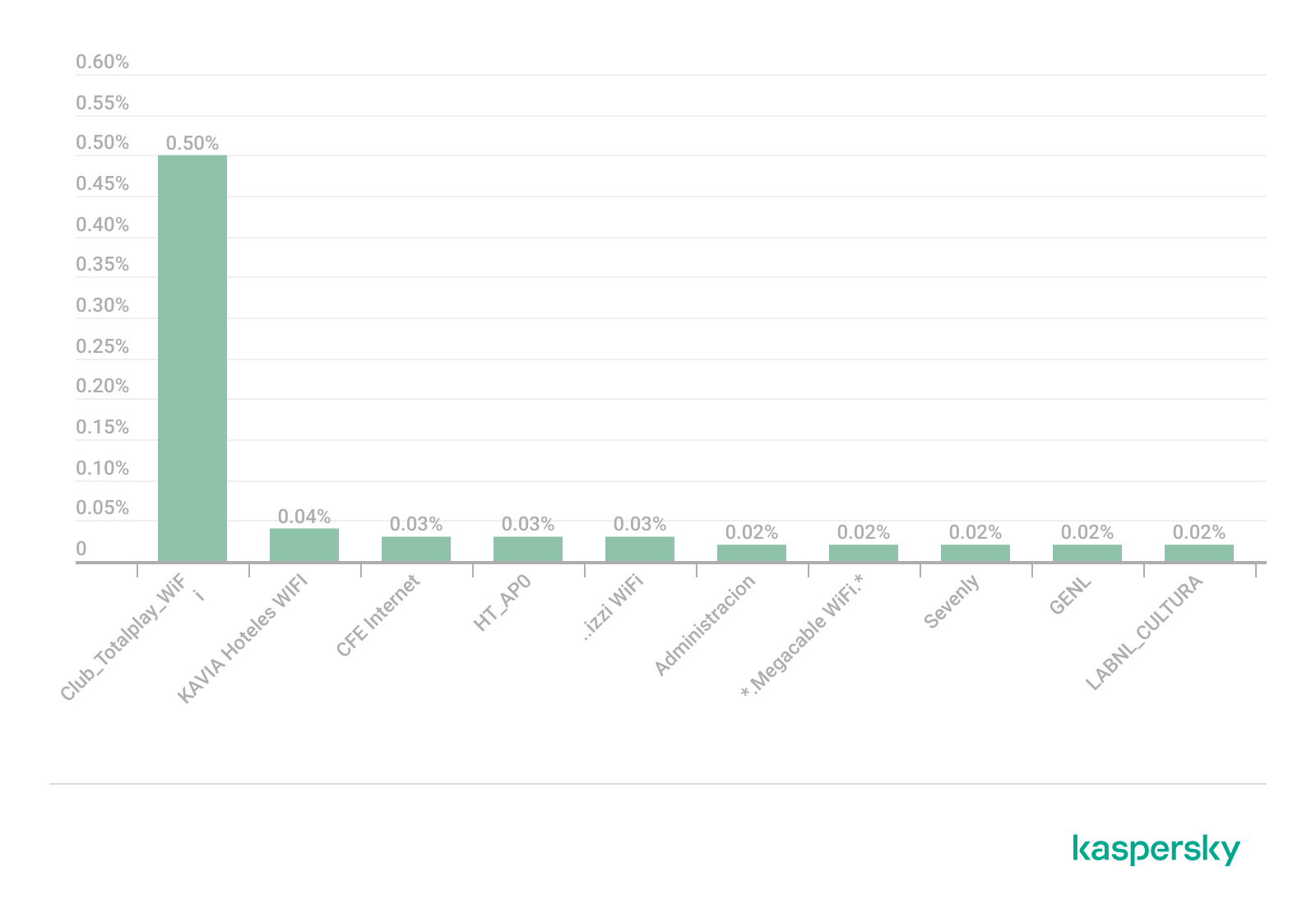
Several recurring SSID naming conventions associated with ISP-provided deployments were identified in the three cities. The most frequently observed patterns include identifiers such as “Club_Totalplay_WiFi”, “izzi WiFi”, and “Megacable WiFi”, which suggests extensive standardization of wireless infrastructure deployment. Additionally, we observed distinctive location-specific SSIDs in each area of analysis, such as “XXXX-Internet para Todos-CDMX” or “RED JALISCO”.

Most frequently observed SSID patterns (download)

Sequential SSID naming structures were also identified during the analysis. Patterns such as “INFINITUMXX” and “IZZI-XX” suggest automated ISP deployment and large-scale deployment strategies.

We identified 33 unique sequential naming structures among the 137 sequential SSIDs in total, representing approximately 0.16% of the detected wireless networks.

The following graph shows the top five sequential SSID patterns found in the largest number of networks:

Five most frequently observed sequential patterns (download)

Several customized SSIDs contained personal or organizational identifiers, including family names, professions, addresses or internal department references. Although personalized SSIDs may simplify local network identification for users, they may also expose sensitive information that could be useful for social engineering, physical targeting, or organizational profiling.

BSSID-derived SSID

During the analysis, multiple networks were identified that used the physical MAC address of a Wi-Fi access point (BSSID) as the visible SSID. This practice exposes hardware-level information that could facilitate vendor fingerprinting and targeted reconnaissance activities.

The organizationally unique identifier (OUI) contained in the first bytes of the BSSID identifies the equipment manufacturer. Threat actors can correlate exposed manufacturers with device-specific vulnerabilities.

BSSID-derived SSID by city (download)

Notably, we found that more than 30% of networks in all three cities reuse the MAC address as the SSID.

Default router configurations and ISP deployments

We performed wireless infrastructure profiling to identify the most common wireless equipment manufacturers and ISP deployments across the three locations.

Large-scale ISP deployments frequently use standardized wireless configurations and vendor-specific hardware platforms. Identifying dominant manufacturers and ISP naming conventions can provide insight into infrastructure and deployment practices facilitating the mapping of standardized attack surfaces.

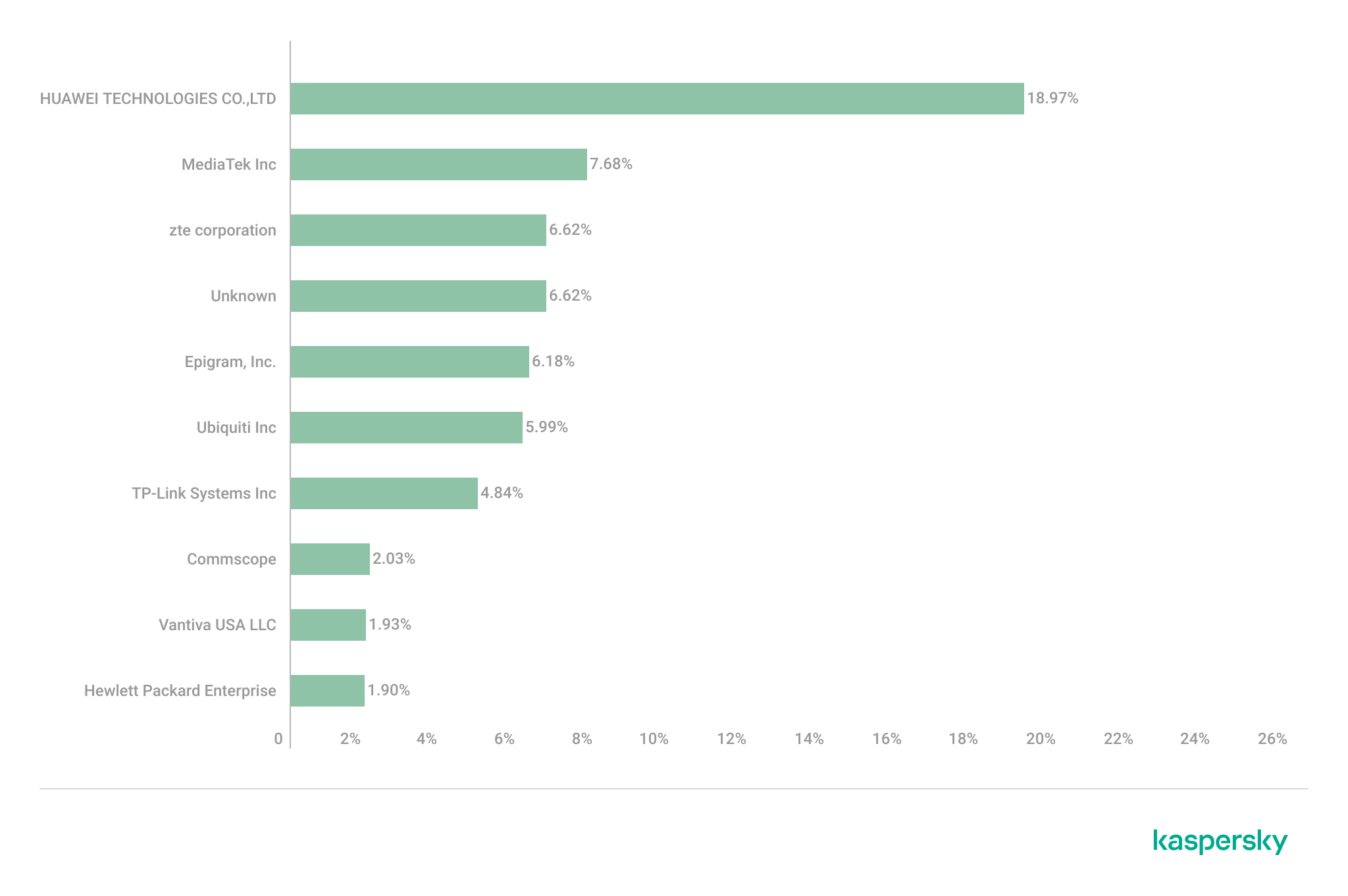
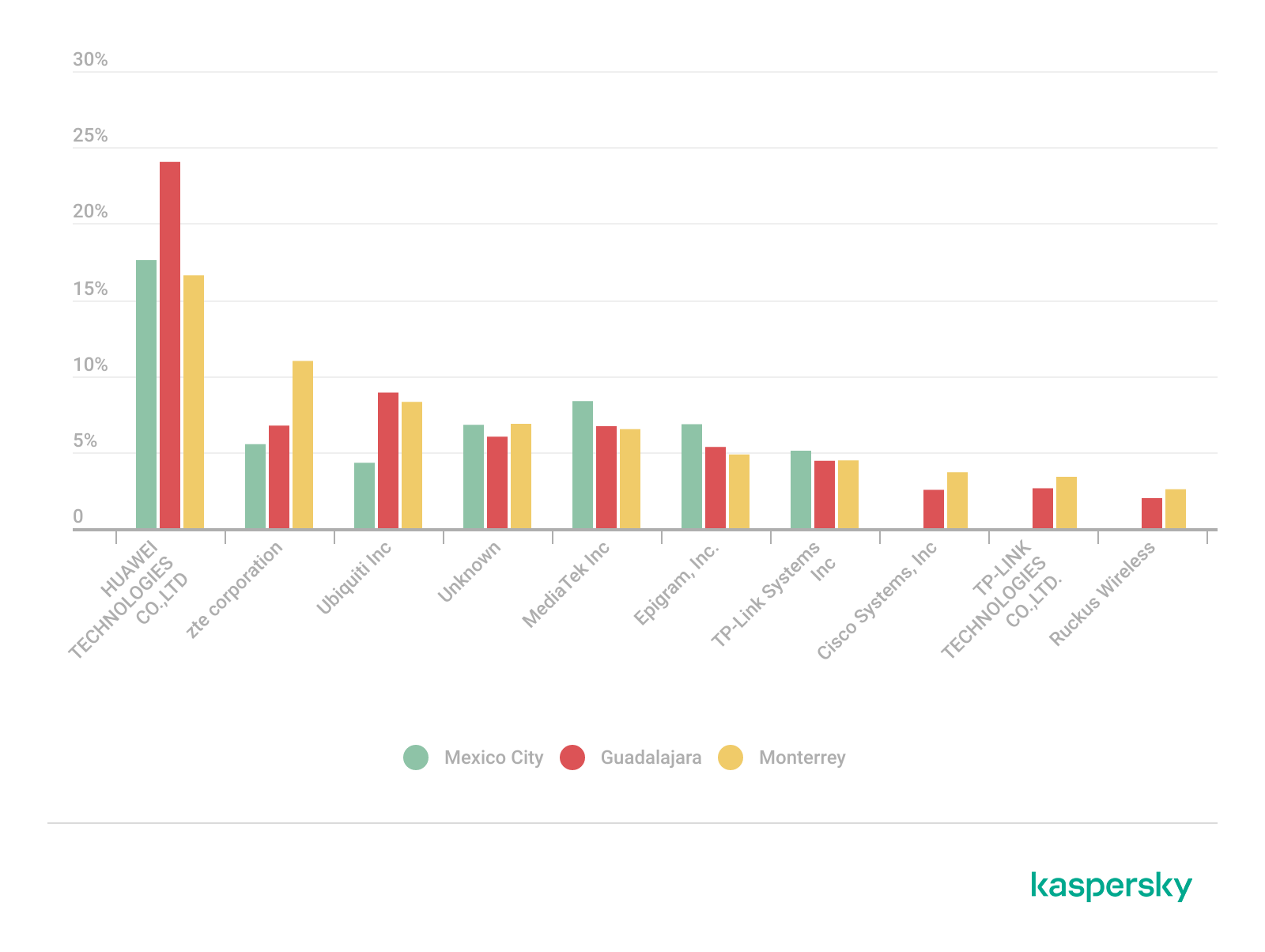
The following figure shows the distribution of the most commonly used manufacturers.

Most frequently observed wireless equipment manufacturers (download)

The manufacturer analysis revealed a strong concentration of wireless infrastructure among a limited number of vendors. Across the three locations, Huawei Technologies, MediaTek-based devices, and other manufacturers’ equipment that is distributed through ISP channels represented a significant portion of the detected deployments. Mexico City had the most diverse infrastructure, while Monterrey and Guadalajara had a greater concentration of wireless equipment known as SOHO (small office/home office) or residential-grade hardware. The widespread presence of standard vendor platforms may facilitate infrastructure fingerprinting and large-scale targeting of known device-specific vulnerabilities.

Most frequently observed wireless equipment manufacturers across the three cities (download)

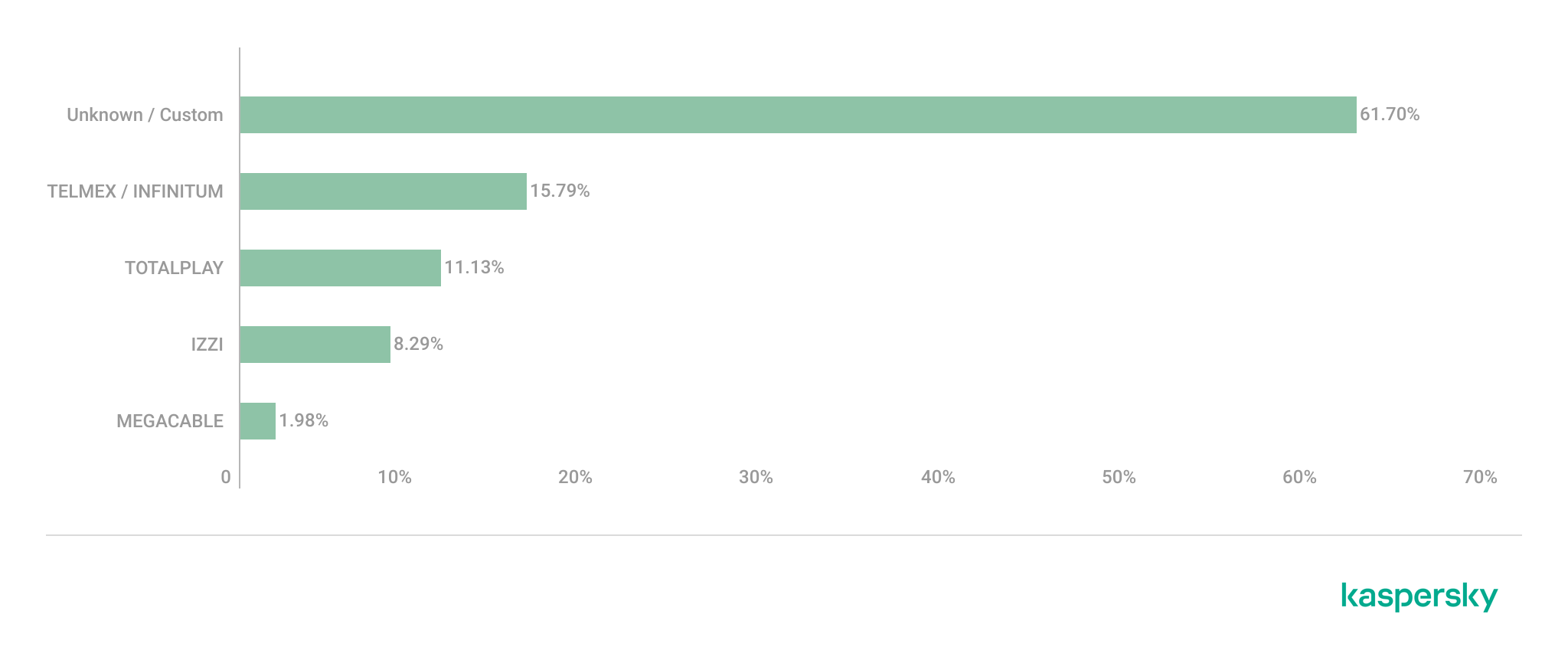
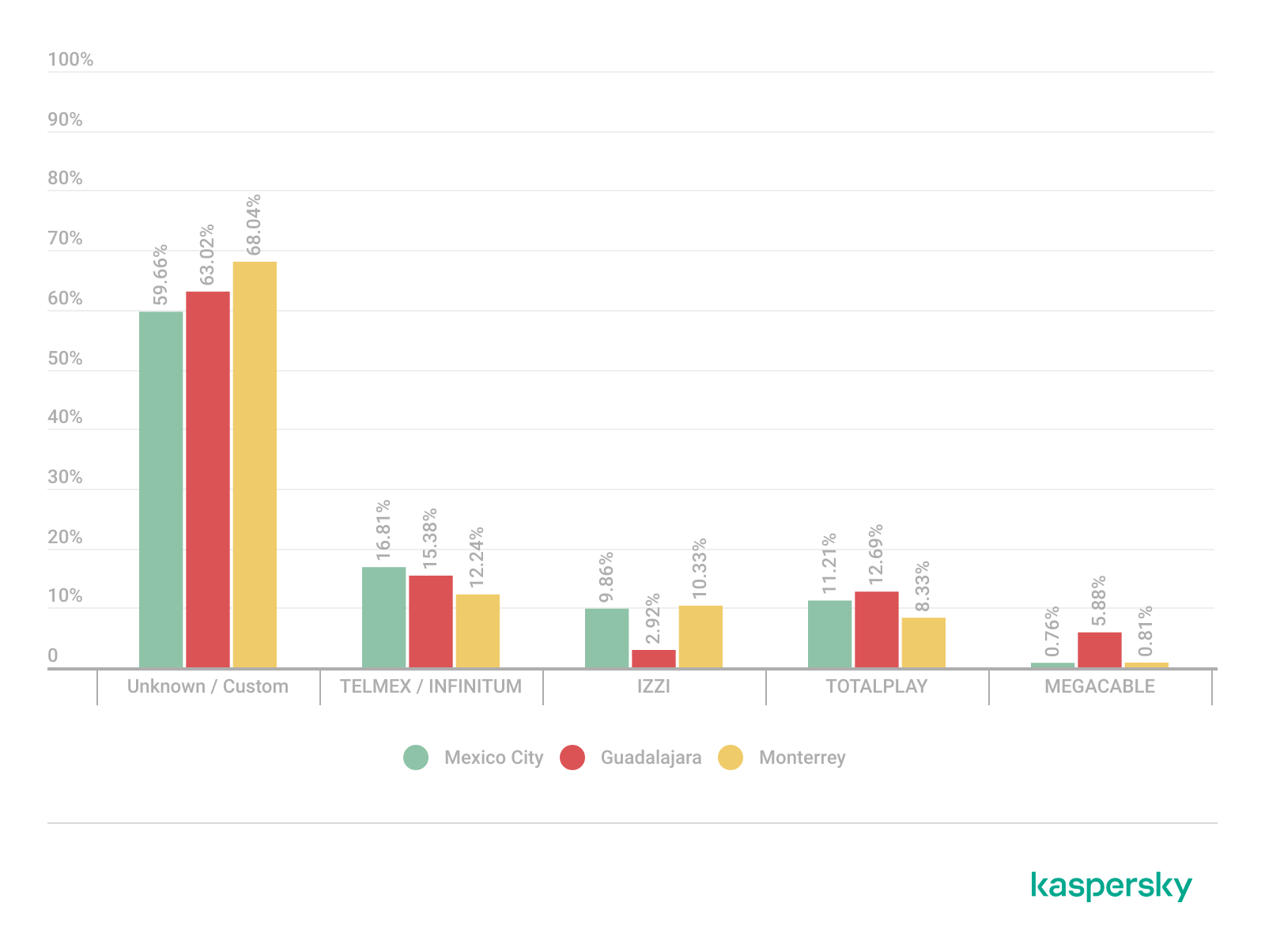
ISP deployments frequently exhibited standardized configuration patterns and recurring manufacturer identifiers. Our ISP deployment analysis revealed a high concentration of access points associated with major residential internet providers. Deployments associated with Infinitum, Totalplay and Izzi represented a substantial portion of the detected wireless infrastructure across all locations. These findings suggest a high degree of deployment standardization across networks associated with major residential internet providers. This observation was supported by the repeated presence of ISP-associated SSIDs such as “Infinitum”, “Totalplay”, and “Izzi”, combined with manufacturer identifiers frequently associated with consumer equipment, including Huawei, ZTE and other residential wireless equipment vendors.

It is important to note that, for this analysis, ISPs were primarily inferred from SSID naming conventions and manufacturer fingerprint data. A significant portion of the detected wireless networks fell into the “UNKNOWN/CUSTOM” category. This classification includes custom hotspots and networks whose naming conventions did not expose identifiable ISP-associated patterns. The findings suggest that many users and organizations (as we saw previously, approximately 66%) use custom network names, limiting direct provider attribution.

The following figure illustrates the distribution of ISP-associated wireless deployments in general.

Most frequently observed ISPs (download)

To better understand this distribution, we took the most frequently observed ISPs by city.

Most frequently observed ISPs across the three cities (download)

Frequency and signal characteristics

We also analyzed wireless signal characteristics to evaluate coverage quality, signal strength, and frequency band utilization in the three cities. In dense urban environments, signal quality and frequency spectrum distribution can affect wireless reliability, client connectivity, roaming performance, and overall network efficiency.

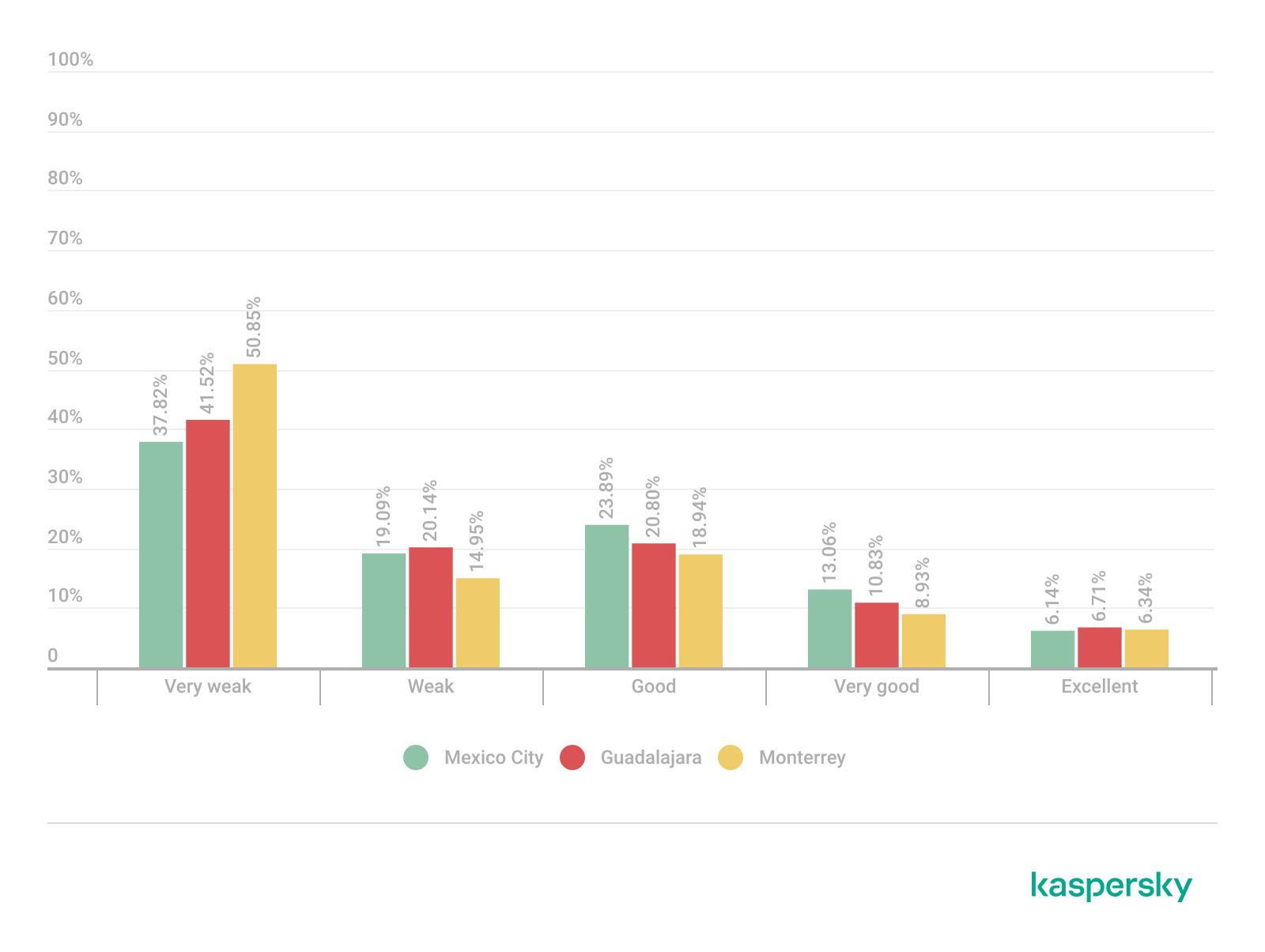
Signal quality analysis revealed that a substantial portion of the detected access points operated under weak or very weak signal conditions. Monterrey had the highest percentage of very weak signals, with approximately 50% of detected deployments. Similar patterns were observed in Guadalajara and Mexico City, suggesting high-density wireless environments with overlapping coverage areas. Only a limited percentage of networks were classified within the very good or excellent signal categories across the three locations.

Signal quality distribution by city (download)

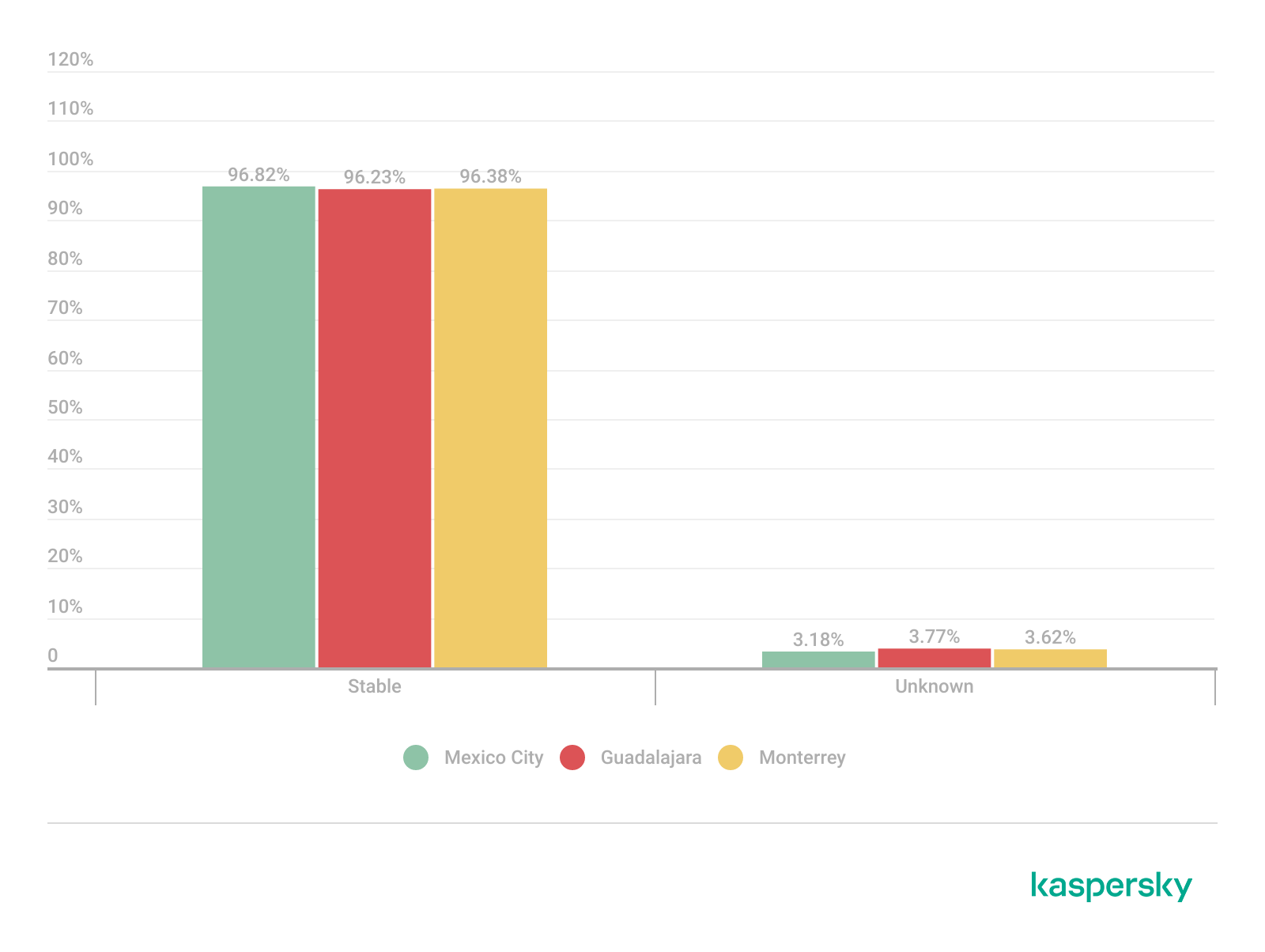
Signal stability analysis revealed that most detected wireless deployments exhibited stable beacon transmission behavior. More than 96% of the detected access points across all locations were classified as stable, while only a small percentage exhibited unstable or indeterminate signal behavior.

These findings imply that the majority of the wireless infrastructure observed during the assessment corresponded to permanently deployed access points rather than transient or intermittent wireless devices.

Signal stability status (download)

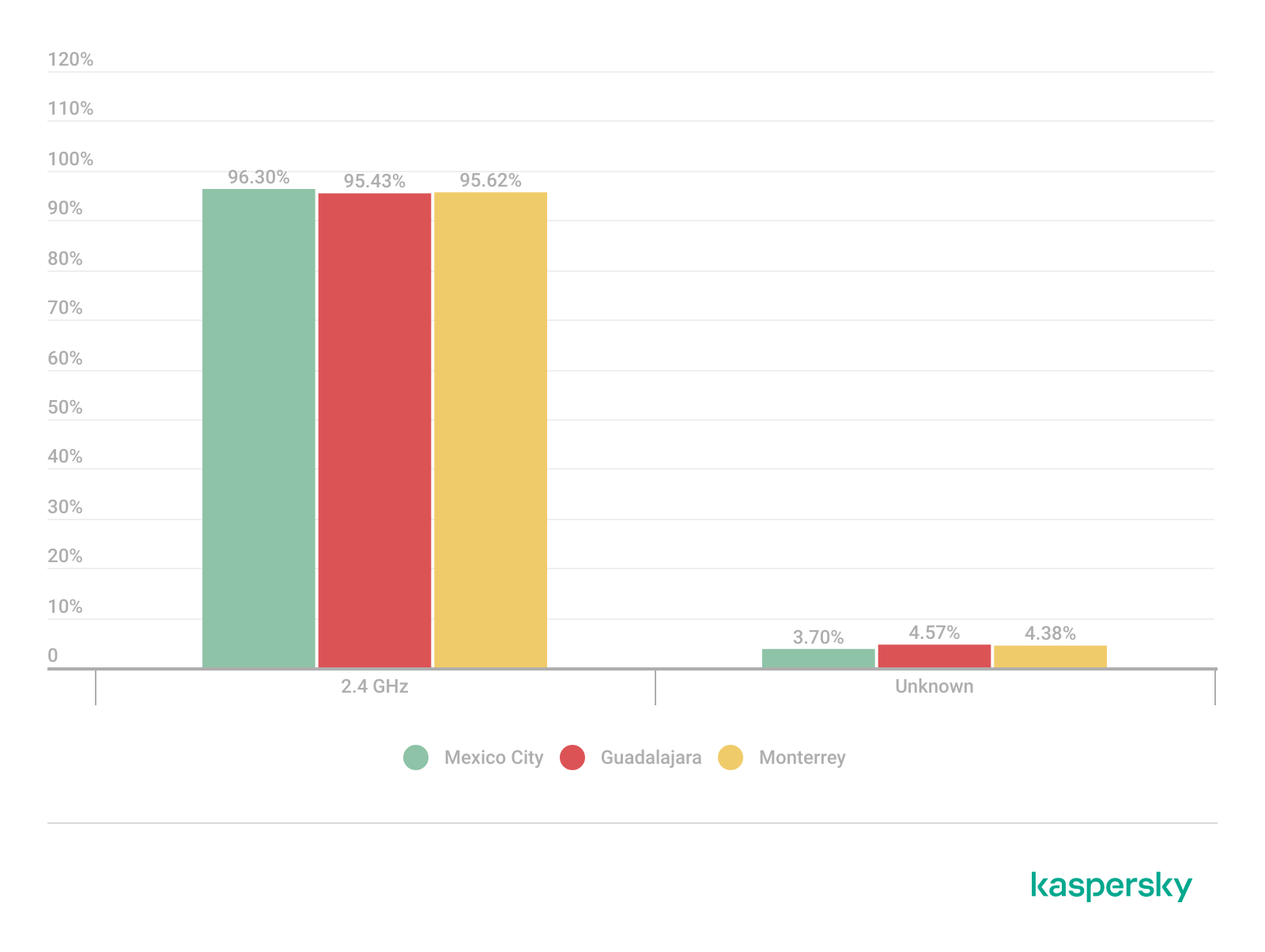
Frequency band analysis revealed the strong prevalence of 2.4 GHz wireless deployments across the three locations. More than 95% of the detected wireless networks operated within the 2.4 GHz spectrum, while only a small percentage of deployments were classified under the unknown or non-standard frequency categories. This uneven distribution reflects the continued prevalence of legacy-compatible wireless infrastructure and SOHO deployments.

Frequency band utilization (download)

These findings are consistent with dense urban wireless environments with large numbers of access points in restricted spectrum allocations.

Channel congestion and spectrum usage

Next, we analyzed wireless channel utilization to evaluate frequency spectrum congestion and channel allocation patterns across the three cities. Our analysis focused on the 2.4 GHz spectrum, where channel overlap and high access point density commonly produce interference and degraded wireless performance. In densely populated wireless environments, an excessive concentration of access points on a limited number of channels can lead to co-channel interference, packet collisions, reduced throughput, and degraded network stability.

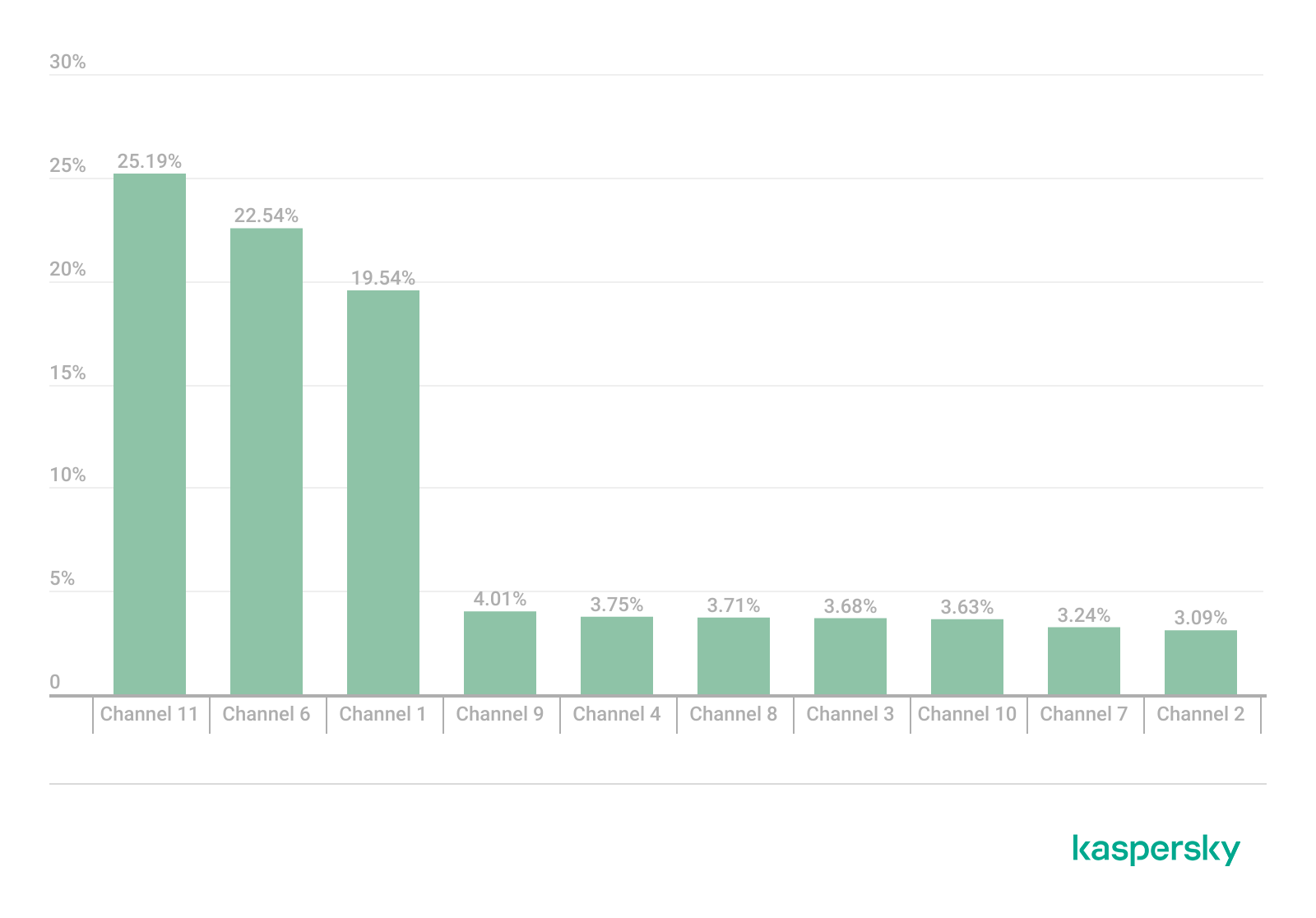
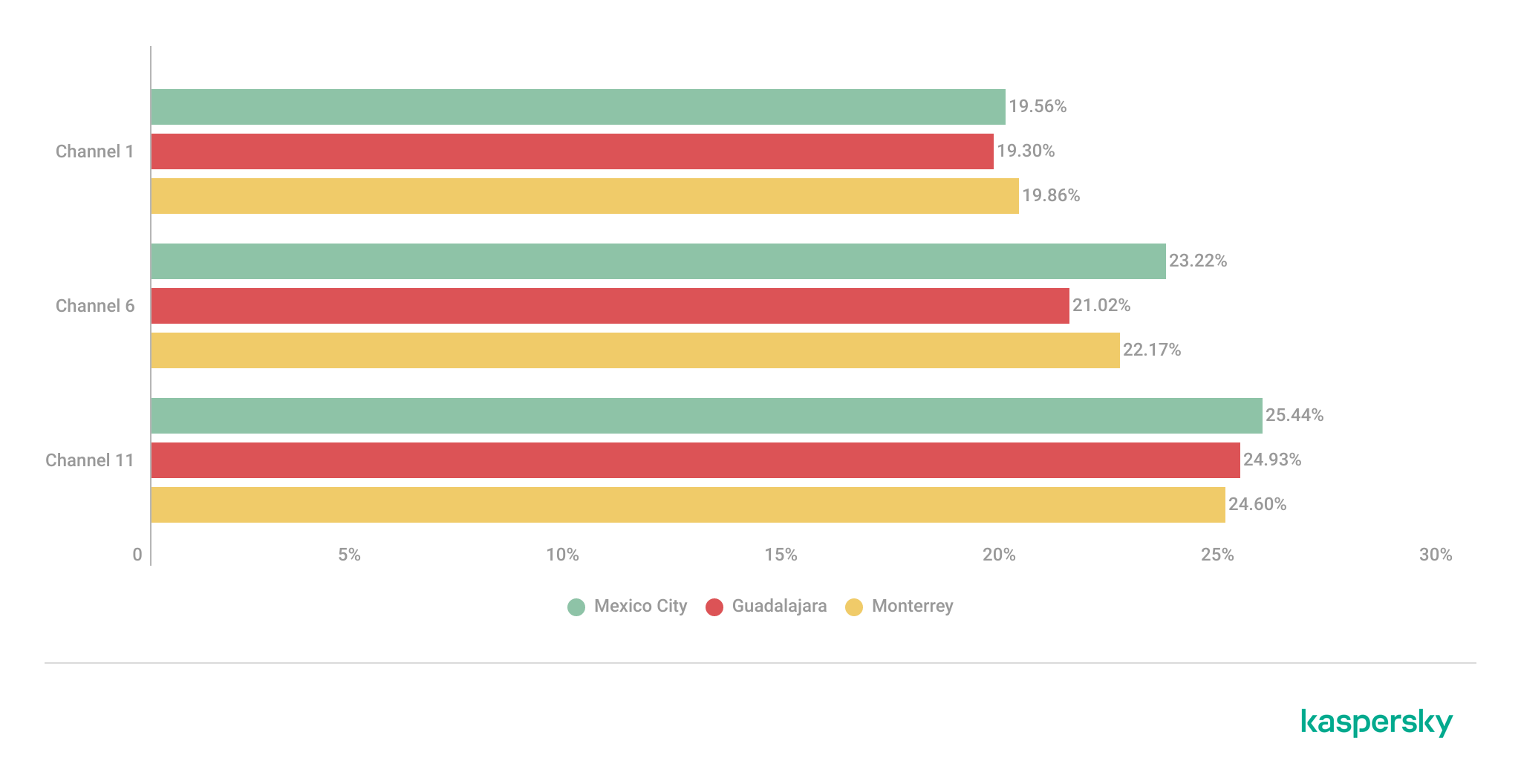
Spectrum congestion analysis revealed that the 2.4 GHz band consistently experienced elevated congestion levels across the three cities. The detailed results showed a strong concentration of deployments on channels 11, 6 and 1, which are traditionally recommended as non-overlapping channels within the 2.4 GHz spectrum. Channel 11 was the most utilized channel, accounting for 25.2% of the detected access points, followed by channel 6 with 22.5% and channel 1 with 19.5%. This distribution indicates that most wireless deployments adhere to standard channel allocation practices for 2.4 GHz Wi-Fi environments.

The following figure illustrates the overall distribution of the most frequently utilized wireless channels.

Most utilized wireless channels (download)

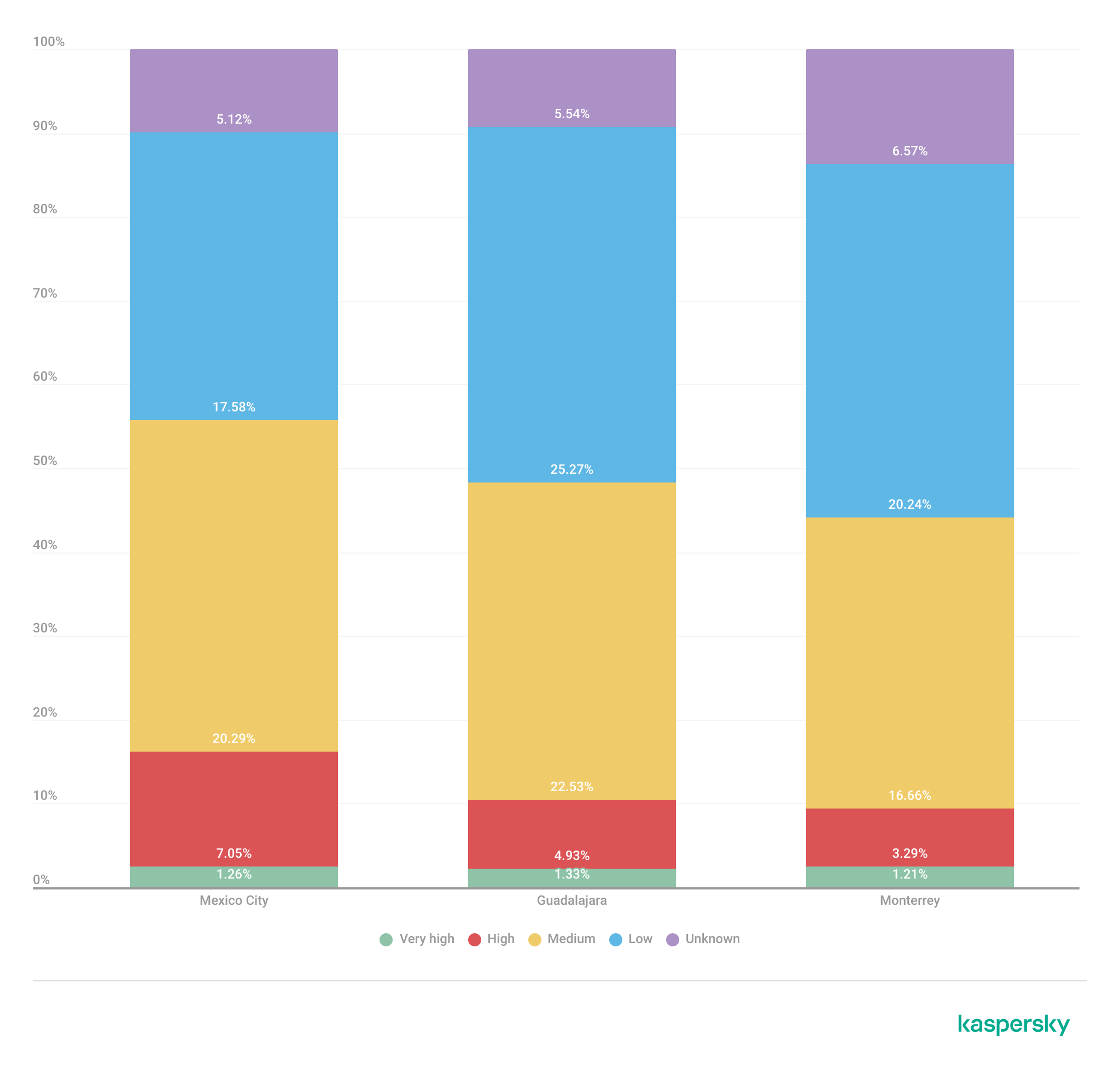
To further assess wireless spectrum saturation, the detected access points were grouped according to channel congestion levels: VERY_HIGH, HIGH, UNKNOWN, MEDIUM, LOW and NONE.

Mexico City had the highest proportion of heavily congested wireless channels, with approximately 7% of detected access points operating under HIGH congestion conditions. Guadalajara followed with nearly 5% of deployments categorized as HIGH congestion, while Monterrey had the lowest percentage at approximately 3.29%.

These findings suggest that wireless spectrum saturation increases proportionally with urban infrastructure density and access point concentration. Despite the presence of congested deployments, most detected access points were categorized as LOW or MEDIUM congestion, suggesting severe spectrum saturation was localized rather than uniformly distributed.

Channel congestion by city (download)

A thorough analysis of individual channel utilization revealed that channels 11, 6 and 1 consistently experienced the highest congestion levels across the three cities, which correlates with our previous findings. These channels accounted for the majority of VERY_HIGH congestion classifications, particularly within the 2.4 GHz band.

In Mexico City, channel 11 alone accounted for more than 25% of detected deployments and consistently exhibited VERY_HIGH congestion levels.

This behavior reflects the limited availability of non-overlapping channels within the 2.4 GHz spectrum and the widespread reliance on default wireless configurations.

Most congested channels by city (download)

Overall, the channel utilization analysis showed that wireless deployments are concentrated heavily within the traditional, non-overlapping 2.4 GHz channels. While this strategy reduces adjacent-channel interference, excessive access point density on the same channels can still produce significant co-channel contention and poor wireless performance in high-density urban environments.

Wireless security configurations

The next thing we evaluated was the security posture of the detected wireless networks. We analyzed the wireless security configurations advertised by access points in each of the locations.

Overall security configuration distribution

The analysis revealed that WPA2 was the dominant wireless authentication mechanism across the three cities. Mexico City had the highest WPA2 adoption rate at 81.19%, followed by Monterrey at 79.19% and Guadalajara at 77.59%.

The study found that every 6th open access point (17%) was unsafe, namely 16.5% in Mexico City, 18.5% in Guadalajara, and 17.2% in Monterrey. Open wireless deployments were consistently present across all locations, ranging between 10% and 12% of detected access points. These findings show that despite the widespread deployment of modern wireless security standards, encryption adoption remains incomplete.

Distribution of wireless authentication mechanisms across the three locations (download)

To simplify the interpretation of wireless security posture, we grouped detected networks into four categories:

  • Secure (WPA2/WPA3)
  • Insecure (Open/WEP)
  • Weak (WPA)
  • Unknown

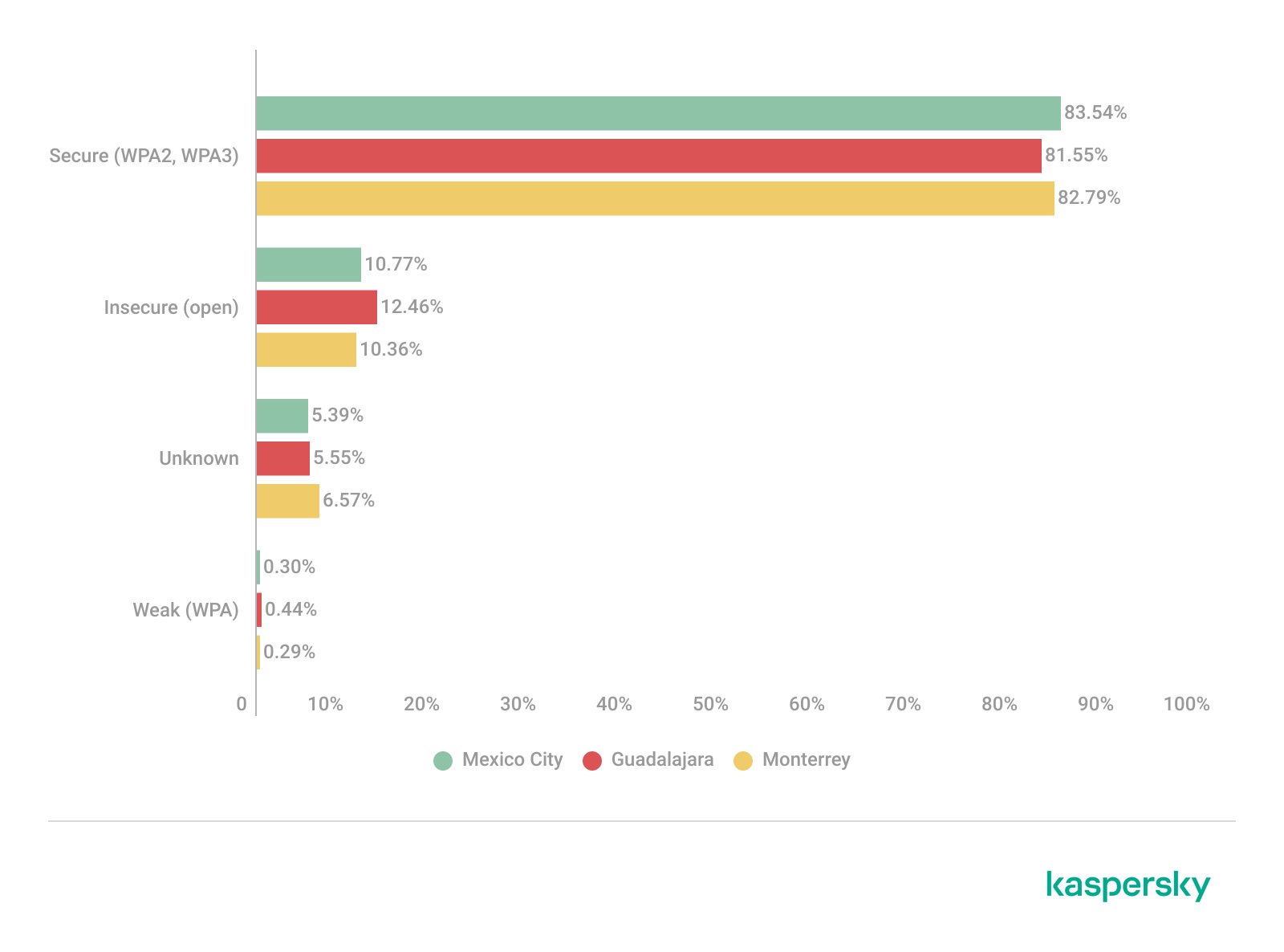
Across the three locations, secure networks comprised most of detected deployments, accounting for approximately 82% of all access points. However, insecure open networks still account for between 10% and 12% of detected wireless infrastructure, consistent with our previous findings. It is important to mention that networks within the unknown category are not considered secure.

Mexico City had the highest percentage of secure deployments at 83.54%, while Guadalajara had the highest percentage of insecure open networks at 12.46%. Although Monterrey had the lowest percentage of insecure networks, open deployments still accounted for more than 10% of the detected access points.

Wireless security posture grouping across the three locations (download)

Although modern WPA2/WPA3 encryption standards dominate current wireless deployments, the continued presence of open and legacy WPA deployments indicates that insecure wireless configurations remain relevant from an operational standpoint. These networks may expose users to passive traffic interception, unauthorized monitoring, rogue access point attacks, and credential harvesting techniques.

WPS-enabled networks

We also analyzed Wi-Fi Protected Setup (WPS) in all the locations to evaluate additional attack surfaces. WPS is a standard feature on wireless routers that enables devices such as printers, repeaters or mobile phones to connect to a secure Wi-Fi network without manually entering a long password, typically through a PIN-based enrolled mechanism. Although WPA2 and WPA3 provide strong encryption mechanisms, the presence of WPS can introduce security weaknesses due to inherently vulnerable PIN-based enrollment methods.

By combining detections from the three locations, we found that 55% of all detected access points did not advertise WPS capabilities, leaving 45% of deployments vulnerable to WPS-based abuse. These results suggest that, despite the adoption of modern encryption standards, a significant portion of wireless infrastructure continues to expose legacy convenience features.

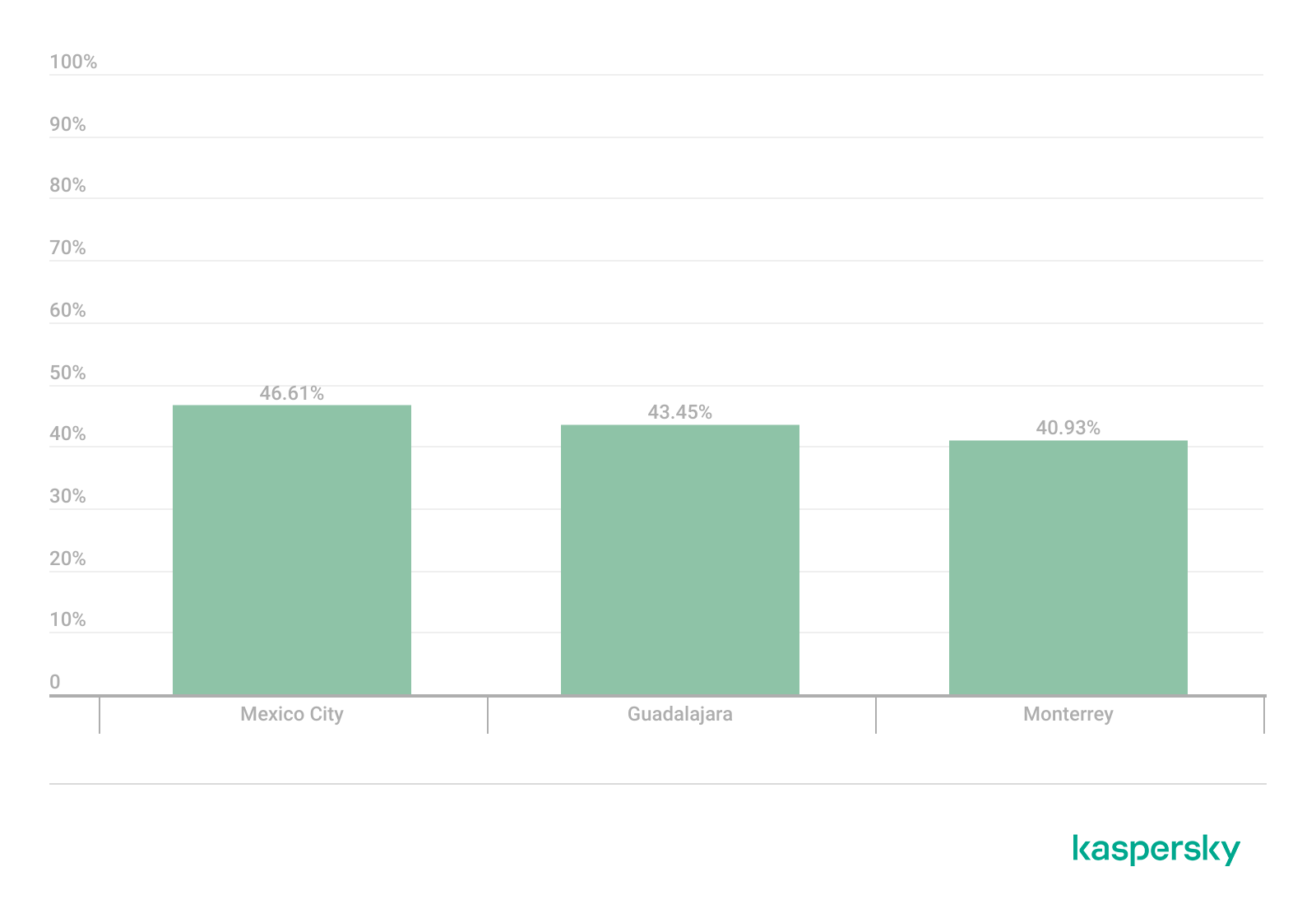
During the analysis, we found that Mexico City had the highest proportion of WPS-enabled networks, with 46.61% of the detected access points advertising WPS capabilities. Guadalajara was second with 43.45%, while Monterrey had the lowest proportion at 40.93%.

The percentage of detected access points advertising WPS capabilities across the three locations (download)

Almost half of the detected wireless networks in each city continued to advertise WPS, indicating that WPS prevalence is consistently high across the three cities.

Secure networks with WPS enabled

In many cases, networks classified as secure because of WPA2/WPA3 encryption still had WPS functionality enabled, which effectively increased the available attack surface.

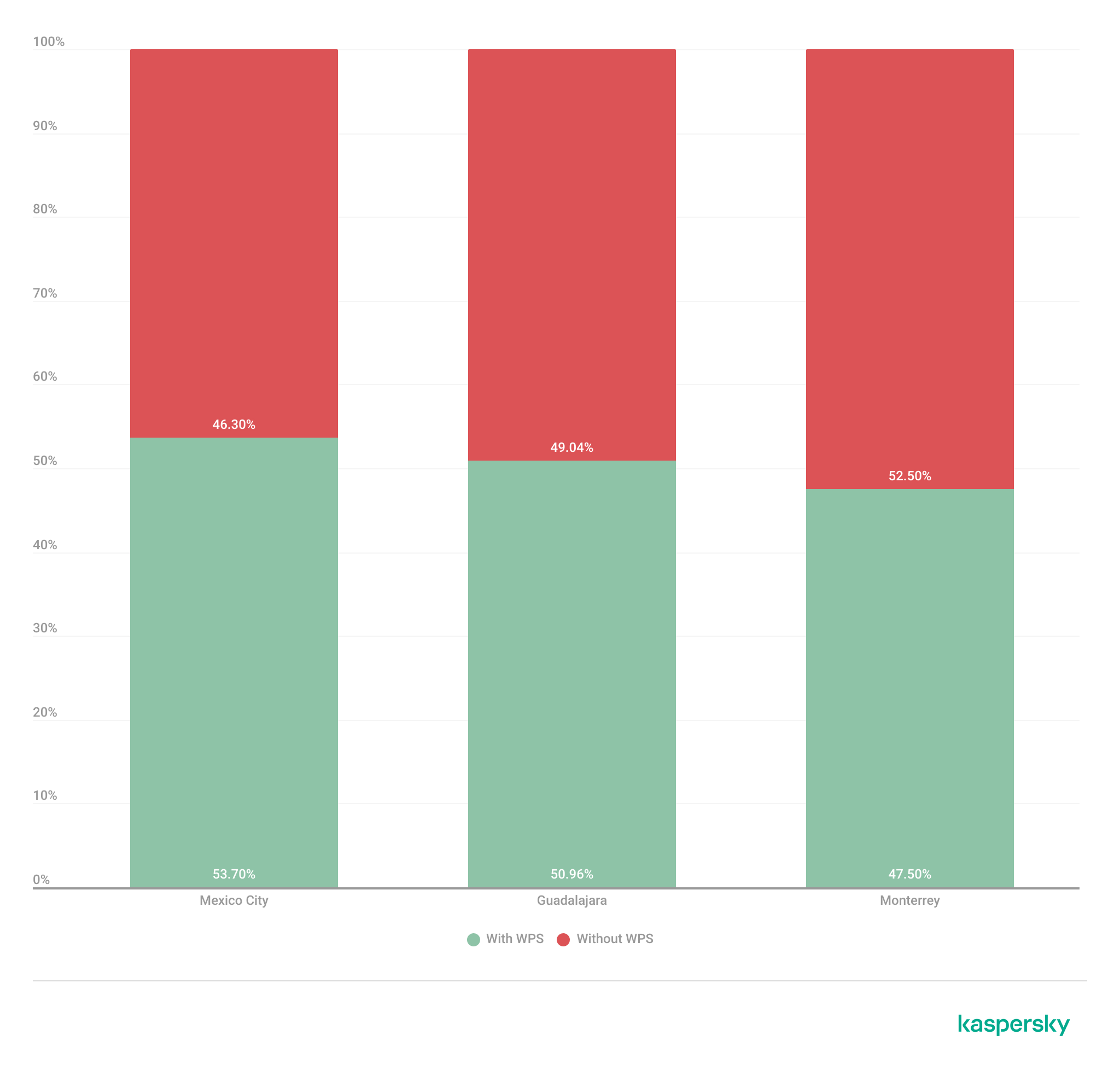
To further assess the relationship between encryption strength and WPS exposure, we conducted a secondary analysis of secure networks (WPA2/WPA3) only. The results showed that around half of all secure deployments still exposed WPS, with the following breakdown for each city:

  • Mexico City: 53.7%
  • Guadalajara: 50.9%
  • Monterrey: 47.5%

The proportion of secure networks with WPS enabled across the three locations (download)

These findings indicate that encryption strength alone is not enough to evaluate wireless security posture because additional protocol features, such as WPS, may still expose exploitable attack vectors.

Additional security considerations

Overall, travelers operating within dense public environments are exposed not only to insecure wireless infrastructure but also to various risks associated with digital interactions. These risks include many threats, from public USB charging systems and phishing QR codes to proximity-based protocols and exposure to shared public devices, such as interactive totems or kiosks. One particular point that should be taken into account in light of our research is the issue of rogue wireless deployments.

Rogue access points are not necessarily malicious; they may be set up accidentally by misconfiguring router settings. An entry point for potential compromise might be caused by various misconfigurations, from a weak password to an insecure protocol. However, attackers deploy such unauthorized hotspots with malicious intent to infiltrate a network. Threat actors may deploy rogue access points posing as legitimate public wireless networks in airports, hotels, cafés and tourist areas. These deployments are called “evil twins” and can trick users into connecting to attacker-controlled infrastructure capable of intercepting traffic, harvesting credentials, or performing man-in-the-middle attacks. Further risk lies in the potential compromise of local network devices or even malware distribution. Such threats complement our findings, underscoring the importance of implementing traffic encryption, using a security solution and exercising extreme caution while browsing via public networks.

Conclusion

The wardriving assessment conducted in Mexico City, Guadalajara, and Monterrey revealed that modern wireless infrastructure continues to present multiple forms of operational exposure despite the widespread adoption of WPA2 and WPA3 security standards. The analysis demonstrated that wireless environments are highly standardized in all the locations, with recurring ISP deployments, default SSID naming conventions, homogeneous manufacturer distribution, and predictable channel allocation practices observed in all three cities.

Although most of the detected networks were classified as secure under WPA2/WPA3 authentication mechanisms, a significant proportion were exposing additional attack surfaces through enabled WPS functionality, default configurations, sequential SSID structures, and infrastructure metadata disclosure. This demonstrates that encryption strength alone is insufficient for evaluating the overall security posture of wireless infrastructure. Additionally, the prevalence of open networks and legacy wireless configurations indicates that insecure deployments are still operationally relevant in all the locations.

The results also showed that wireless infrastructure is heavily concentrated within the 2.4 GHz spectrum, particularly around channels 11, 6, and 1. This leads to elevated congestion and increased co-channel interference in densely populated urban environments.

SSID analysis further revealed that publicly broadcast wireless identifiers frequently expose valuable operational information about ISPs, equipment manufacturers, deployment templates, organizational ownership, and user-defined naming practices. The identification of default ISP naming conventions, sequential SSID structures, and BSSID-derived SSIDs demonstrated that many deployments prioritize operational convenience and simplicity over exposure minimization and privacy.

The scope of the threats stemming from vulnerable wireless configurations poses serious digital exposure risks for users. The widespread presence of standard deployments, predictable SSID naming and publicly exposed infrastructure identifiers can facilitate passive reconnaissance, infrastructure fingerprinting and opportunistic targeting.

Recommendations

To minimize the risks of wireless-based exposure and the attack surface related to hotspot infrastructure, we recommend taking the following measures:

  • Disable WPS functionality on wireless routers whenever possible, particularly within WPA2/WPA3 deployments.
  • Avoid using default SSID naming conventions that disclose ISP providers, router manufacturers, or deployment templates.
  • Refrain from using personal, organizational, or location-based identifiers in wireless network names.
  • Avoid configuring SSID using BSSID or naming conventions derived from MAC addresses, as these may expose hardware fingerprinting information.
  • Promote migration toward modern WPA3-capable infrastructure while removing legacy wireless protocols when operationally feasible.
  • Reduce wireless congestion by optimizing channel allocation strategies and minimizing excessive dependence on the 2.4 GHz spectrum.
  • Encourage adoption of 5 GHz and newer wireless technologies to reduce interference and improve spectrum efficiency.

The findings presented in this assessment emphasize the importance of combining strong wireless encryption standards, secure deployment practices, exposure minimization strategies, and user awareness to enhance the overall security posture of wireless environments.


  •  

Wardriving assessment across Mexico: Preparing for the 2026 World Cup

Introduction

Mexico is one of the host countries for the 2026 FIFA World Cup, with matches to be played in three major cities: Mexico City, Monterrey, and Guadalajara. These locations are expected to see a large influx of international visitors, increasing the potential security risks. Many of those risks arise from users connecting to public wireless networks.

To better understand the wireless environments that visitors may encounter, we at Kaspersky GReAT conducted a wardriving assessment in the three host cities. The aim of the study was to analyze characteristics, deployment patterns, security configurations and potential exposure risks of public Wi-Fi infrastructure in urban wireless environments.

The information collected during the assessment was used exclusively for passive observation and infrastructure analysis. No attempts were made to authenticate, intercept communications, exploit systems or interact with the detected wireless networks beyond the publicly broadcast management information.

During processing of the collected data, one step involved filtering out networks belonging to cars or cell phones categorized as mobile hotspots because they do not represent networks that can be considered part of the assessment.

Research scope

The cities included in the study have high population density and extensive wireless infrastructure deployments. We chose areas with the most prominent wireless network activity and highly concentrated public access points. We carried out wardriving research in Monterrey back in 2008, but the city’s hotspot landscape has changed since then.

We chose the following analysis areas for each of the cities:

  1. Mexico City: México City Stadium, Mexico City International Airport, Zócalo, Paseo de la Reforma, Colonia Roma, La Condesa, Polanco, and Coyoacán.
  2. Guadalajara: Guadalajara Stadium, Guadalajara International Airport, the city center, Zapopan, Providencia, Avenida Chapultepec, Colonia Americana, Tlaquepaque, and the area around Andares.
  3. Monterrey: Monterrey Stadium, Monterrey International Airport, Fundidora Park, Cintermex Monterrey, the downtown area, Barrio Antiguo, MacroPlaza, and the San Pedro financial district.

The wireless information was collected using passive wireless reconnaissance techniques. The collected information included:

  • SSID analysis and information exposure, including BSSID-derived SSIDs
  • Default router configurations and ISP deployments
  • Frequency and signal characteristics
  • Channel congestion and spectrum usage
  • Wireless security configurations, including:
    • Open and insecure wireless networks
    • WPS-enabled networks
    • Secure networks (WPA2/WPA3) with WPS enabled

We performed a wireless infrastructure analysis in Mexico City, Guadalajara, and Monterrey. We drove through the areas surrounding the World Cup stadiums, tourist zones, and other places where fan concentrations are likely to be largest. Our goal was to evaluate the security status, deployment characteristics and operational exposure of detected wireless networks.

In total, we recorded 84,588 signals with 69,473 unique Service Set Identifiers (SSIDs) in busy locations and World Cup zones across the three cities. Mexico City accounted for 61.4% of the signals, Guadalajara for 23.6%, and Monterrey for 14.8%. Approximately 82% of the signals had a single SSID (81.9%, 81.34%, and 84% respectively). Notably, they all operate under the IEEE 802.11 standard protocol.

Particular attention was given to identifying standard deployment patterns, legacy configurations, default vendor settings and information disclosure through publicly broadcast wireless identifiers.

The following sections present the results that were obtained by analyzing wireless infrastructure across the three locations.

Our findings

SSID analysis and information exposure

SSID analysis was conducted to evaluate naming conventions, deployment standardization and potential information exposure.

Only a few networks (0.0047%) have an invisible SSID, meaning the names of these networks are not broadcast. Some users prefer to hide the SSID for various reasons, such as the network’s purpose, the profile of its users, internal policies, etc. In contrast, the rest of the networks maintained active SSID broadcasting.

SSID structures may unintentionally disclose operational details about internet service providers (ISPs), device manufacturers, deployment practices, organizational ownership or user identity. The repeated presence of default SSID naming patterns across the analyzed locations indicates a significant degree of infrastructure homogeneity and reuse of default wireless configurations. It may also facilitate passive infrastructure profiling by revealing standard characteristics in use.

Approximately 34% of the detected networks retained the default SSID naming conventions provided by the manufacturer or ISP, while 66% used customized identifiers.

Distribution of SSID naming conventions (download)

Several recurring SSID naming conventions associated with ISP-provided deployments were identified in the three cities. The most frequently observed patterns include identifiers such as “Club_Totalplay_WiFi”, “izzi WiFi”, and “Megacable WiFi”, which suggests extensive standardization of wireless infrastructure deployment. Additionally, we observed distinctive location-specific SSIDs in each area of analysis, such as “XXXX-Internet para Todos-CDMX” or “RED JALISCO”.

Most frequently observed SSID patterns (download)

Sequential SSID naming structures were also identified during the analysis. Patterns such as “INFINITUMXX” and “IZZI-XX” suggest automated ISP deployment and large-scale deployment strategies.

We identified 33 unique sequential naming structures among the 137 sequential SSIDs in total, representing approximately 0.16% of the detected wireless networks.

The following graph shows the top five sequential SSID patterns found in the largest number of networks:

Five most frequently observed sequential patterns (download)

Several customized SSIDs contained personal or organizational identifiers, including family names, professions, addresses or internal department references. Although personalized SSIDs may simplify local network identification for users, they may also expose sensitive information that could be useful for social engineering, physical targeting, or organizational profiling.

BSSID-derived SSID

During the analysis, multiple networks were identified that used the physical MAC address of a Wi-Fi access point (BSSID) as the visible SSID. This practice exposes hardware-level information that could facilitate vendor fingerprinting and targeted reconnaissance activities.

The organizationally unique identifier (OUI) contained in the first bytes of the BSSID identifies the equipment manufacturer. Threat actors can correlate exposed manufacturers with device-specific vulnerabilities.

BSSID-derived SSID by city (download)

Notably, we found that more than 30% of networks in all three cities reuse the MAC address as the SSID.

Default router configurations and ISP deployments

We performed wireless infrastructure profiling to identify the most common wireless equipment manufacturers and ISP deployments across the three locations.

Large-scale ISP deployments frequently use standardized wireless configurations and vendor-specific hardware platforms. Identifying dominant manufacturers and ISP naming conventions can provide insight into infrastructure and deployment practices facilitating the mapping of standardized attack surfaces.

The following figure shows the distribution of the most commonly used manufacturers.

Most frequently observed wireless equipment manufacturers (download)

The manufacturer analysis revealed a strong concentration of wireless infrastructure among a limited number of vendors. Across the three locations, Huawei Technologies, MediaTek-based devices, and other manufacturers’ equipment that is distributed through ISP channels represented a significant portion of the detected deployments. Mexico City had the most diverse infrastructure, while Monterrey and Guadalajara had a greater concentration of wireless equipment known as SOHO (small office/home office) or residential-grade hardware. The widespread presence of standard vendor platforms may facilitate infrastructure fingerprinting and large-scale targeting of known device-specific vulnerabilities.

Most frequently observed wireless equipment manufacturers across the three cities (download)

ISP deployments frequently exhibited standardized configuration patterns and recurring manufacturer identifiers. Our ISP deployment analysis revealed a high concentration of access points associated with major residential internet providers. Deployments associated with Infinitum, Totalplay and Izzi represented a substantial portion of the detected wireless infrastructure across all locations. These findings suggest a high degree of deployment standardization across networks associated with major residential internet providers. This observation was supported by the repeated presence of ISP-associated SSIDs such as “Infinitum”, “Totalplay”, and “Izzi”, combined with manufacturer identifiers frequently associated with consumer equipment, including Huawei, ZTE and other residential wireless equipment vendors.

It is important to note that, for this analysis, ISPs were primarily inferred from SSID naming conventions and manufacturer fingerprint data. A significant portion of the detected wireless networks fell into the “UNKNOWN/CUSTOM” category. This classification includes custom hotspots and networks whose naming conventions did not expose identifiable ISP-associated patterns. The findings suggest that many users and organizations (as we saw previously, approximately 66%) use custom network names, limiting direct provider attribution.

The following figure illustrates the distribution of ISP-associated wireless deployments in general.

Most frequently observed ISPs (download)

To better understand this distribution, we took the most frequently observed ISPs by city.

Most frequently observed ISPs across the three cities (download)

Frequency and signal characteristics

We also analyzed wireless signal characteristics to evaluate coverage quality, signal strength, and frequency band utilization in the three cities. In dense urban environments, signal quality and frequency spectrum distribution can affect wireless reliability, client connectivity, roaming performance, and overall network efficiency.

Signal quality analysis revealed that a substantial portion of the detected access points operated under weak or very weak signal conditions. Monterrey had the highest percentage of very weak signals, with approximately 50% of detected deployments. Similar patterns were observed in Guadalajara and Mexico City, suggesting high-density wireless environments with overlapping coverage areas. Only a limited percentage of networks were classified within the very good or excellent signal categories across the three locations.

Signal quality distribution by city (download)

Signal stability analysis revealed that most detected wireless deployments exhibited stable beacon transmission behavior. More than 96% of the detected access points across all locations were classified as stable, while only a small percentage exhibited unstable or indeterminate signal behavior.

These findings imply that the majority of the wireless infrastructure observed during the assessment corresponded to permanently deployed access points rather than transient or intermittent wireless devices.

Signal stability status (download)

Frequency band analysis revealed the strong prevalence of 2.4 GHz wireless deployments across the three locations. More than 95% of the detected wireless networks operated within the 2.4 GHz spectrum, while only a small percentage of deployments were classified under the unknown or non-standard frequency categories. This uneven distribution reflects the continued prevalence of legacy-compatible wireless infrastructure and SOHO deployments.

Frequency band utilization (download)

These findings are consistent with dense urban wireless environments with large numbers of access points in restricted spectrum allocations.

Channel congestion and spectrum usage

Next, we analyzed wireless channel utilization to evaluate frequency spectrum congestion and channel allocation patterns across the three cities. Our analysis focused on the 2.4 GHz spectrum, where channel overlap and high access point density commonly produce interference and degraded wireless performance. In densely populated wireless environments, an excessive concentration of access points on a limited number of channels can lead to co-channel interference, packet collisions, reduced throughput, and degraded network stability.

Spectrum congestion analysis revealed that the 2.4 GHz band consistently experienced elevated congestion levels across the three cities. The detailed results showed a strong concentration of deployments on channels 11, 6 and 1, which are traditionally recommended as non-overlapping channels within the 2.4 GHz spectrum. Channel 11 was the most utilized channel, accounting for 25.2% of the detected access points, followed by channel 6 with 22.5% and channel 1 with 19.5%. This distribution indicates that most wireless deployments adhere to standard channel allocation practices for 2.4 GHz Wi-Fi environments.

The following figure illustrates the overall distribution of the most frequently utilized wireless channels.

Most utilized wireless channels (download)

To further assess wireless spectrum saturation, the detected access points were grouped according to channel congestion levels: VERY_HIGH, HIGH, UNKNOWN, MEDIUM, LOW and NONE.

Mexico City had the highest proportion of heavily congested wireless channels, with approximately 7% of detected access points operating under HIGH congestion conditions. Guadalajara followed with nearly 5% of deployments categorized as HIGH congestion, while Monterrey had the lowest percentage at approximately 3.29%.

These findings suggest that wireless spectrum saturation increases proportionally with urban infrastructure density and access point concentration. Despite the presence of congested deployments, most detected access points were categorized as LOW or MEDIUM congestion, suggesting severe spectrum saturation was localized rather than uniformly distributed.

Channel congestion by city (download)

A thorough analysis of individual channel utilization revealed that channels 11, 6 and 1 consistently experienced the highest congestion levels across the three cities, which correlates with our previous findings. These channels accounted for the majority of VERY_HIGH congestion classifications, particularly within the 2.4 GHz band.

In Mexico City, channel 11 alone accounted for more than 25% of detected deployments and consistently exhibited VERY_HIGH congestion levels.

This behavior reflects the limited availability of non-overlapping channels within the 2.4 GHz spectrum and the widespread reliance on default wireless configurations.

Most congested channels by city (download)

Overall, the channel utilization analysis showed that wireless deployments are concentrated heavily within the traditional, non-overlapping 2.4 GHz channels. While this strategy reduces adjacent-channel interference, excessive access point density on the same channels can still produce significant co-channel contention and poor wireless performance in high-density urban environments.

Wireless security configurations

The next thing we evaluated was the security posture of the detected wireless networks. We analyzed the wireless security configurations advertised by access points in each of the locations.

Overall security configuration distribution

The analysis revealed that WPA2 was the dominant wireless authentication mechanism across the three cities. Mexico City had the highest WPA2 adoption rate at 81.19%, followed by Monterrey at 79.19% and Guadalajara at 77.59%.

The study found that every 6th open access point (17%) was unsafe, namely 16.5% in Mexico City, 18.5% in Guadalajara, and 17.2% in Monterrey. Open wireless deployments were consistently present across all locations, ranging between 10% and 12% of detected access points. These findings show that despite the widespread deployment of modern wireless security standards, encryption adoption remains incomplete.

Distribution of wireless authentication mechanisms across the three locations (download)

To simplify the interpretation of wireless security posture, we grouped detected networks into four categories:

  • Secure (WPA2/WPA3)
  • Insecure (Open/WEP)
  • Weak (WPA)
  • Unknown

Across the three locations, secure networks comprised most of detected deployments, accounting for approximately 82% of all access points. However, insecure open networks still account for between 10% and 12% of detected wireless infrastructure, consistent with our previous findings. It is important to mention that networks within the unknown category are not considered secure.

Mexico City had the highest percentage of secure deployments at 83.54%, while Guadalajara had the highest percentage of insecure open networks at 12.46%. Although Monterrey had the lowest percentage of insecure networks, open deployments still accounted for more than 10% of the detected access points.

Wireless security posture grouping across the three locations (download)

Although modern WPA2/WPA3 encryption standards dominate current wireless deployments, the continued presence of open and legacy WPA deployments indicates that insecure wireless configurations remain relevant from an operational standpoint. These networks may expose users to passive traffic interception, unauthorized monitoring, rogue access point attacks, and credential harvesting techniques.

WPS-enabled networks

We also analyzed Wi-Fi Protected Setup (WPS) in all the locations to evaluate additional attack surfaces. WPS is a standard feature on wireless routers that enables devices such as printers, repeaters or mobile phones to connect to a secure Wi-Fi network without manually entering a long password, typically through a PIN-based enrolled mechanism. Although WPA2 and WPA3 provide strong encryption mechanisms, the presence of WPS can introduce security weaknesses due to inherently vulnerable PIN-based enrollment methods.

By combining detections from the three locations, we found that 55% of all detected access points did not advertise WPS capabilities, leaving 45% of deployments vulnerable to WPS-based abuse. These results suggest that, despite the adoption of modern encryption standards, a significant portion of wireless infrastructure continues to expose legacy convenience features.

During the analysis, we found that Mexico City had the highest proportion of WPS-enabled networks, with 46.61% of the detected access points advertising WPS capabilities. Guadalajara was second with 43.45%, while Monterrey had the lowest proportion at 40.93%.

The percentage of detected access points advertising WPS capabilities across the three locations (download)

Almost half of the detected wireless networks in each city continued to advertise WPS, indicating that WPS prevalence is consistently high across the three cities.

Secure networks with WPS enabled

In many cases, networks classified as secure because of WPA2/WPA3 encryption still had WPS functionality enabled, which effectively increased the available attack surface.

To further assess the relationship between encryption strength and WPS exposure, we conducted a secondary analysis of secure networks (WPA2/WPA3) only. The results showed that around half of all secure deployments still exposed WPS, with the following breakdown for each city:

  • Mexico City: 53.7%
  • Guadalajara: 50.9%
  • Monterrey: 47.5%

The proportion of secure networks with WPS enabled across the three locations (download)

These findings indicate that encryption strength alone is not enough to evaluate wireless security posture because additional protocol features, such as WPS, may still expose exploitable attack vectors.

Additional security considerations

Overall, travelers operating within dense public environments are exposed not only to insecure wireless infrastructure but also to various risks associated with digital interactions. These risks include many threats, from public USB charging systems and phishing QR codes to proximity-based protocols and exposure to shared public devices, such as interactive totems or kiosks. One particular point that should be taken into account in light of our research is the issue of rogue wireless deployments.

Rogue access points are not necessarily malicious; they may be set up accidentally by misconfiguring router settings. An entry point for potential compromise might be caused by various misconfigurations, from a weak password to an insecure protocol. However, attackers deploy such unauthorized hotspots with malicious intent to infiltrate a network. Threat actors may deploy rogue access points posing as legitimate public wireless networks in airports, hotels, cafés and tourist areas. These deployments are called “evil twins” and can trick users into connecting to attacker-controlled infrastructure capable of intercepting traffic, harvesting credentials, or performing man-in-the-middle attacks. Further risk lies in the potential compromise of local network devices or even malware distribution. Such threats complement our findings, underscoring the importance of implementing traffic encryption, using a security solution and exercising extreme caution while browsing via public networks.

Conclusion

The wardriving assessment conducted in Mexico City, Guadalajara, and Monterrey revealed that modern wireless infrastructure continues to present multiple forms of operational exposure despite the widespread adoption of WPA2 and WPA3 security standards. The analysis demonstrated that wireless environments are highly standardized in all the locations, with recurring ISP deployments, default SSID naming conventions, homogeneous manufacturer distribution, and predictable channel allocation practices observed in all three cities.

Although most of the detected networks were classified as secure under WPA2/WPA3 authentication mechanisms, a significant proportion were exposing additional attack surfaces through enabled WPS functionality, default configurations, sequential SSID structures, and infrastructure metadata disclosure. This demonstrates that encryption strength alone is insufficient for evaluating the overall security posture of wireless infrastructure. Additionally, the prevalence of open networks and legacy wireless configurations indicates that insecure deployments are still operationally relevant in all the locations.

The results also showed that wireless infrastructure is heavily concentrated within the 2.4 GHz spectrum, particularly around channels 11, 6, and 1. This leads to elevated congestion and increased co-channel interference in densely populated urban environments.

SSID analysis further revealed that publicly broadcast wireless identifiers frequently expose valuable operational information about ISPs, equipment manufacturers, deployment templates, organizational ownership, and user-defined naming practices. The identification of default ISP naming conventions, sequential SSID structures, and BSSID-derived SSIDs demonstrated that many deployments prioritize operational convenience and simplicity over exposure minimization and privacy.

The scope of the threats stemming from vulnerable wireless configurations poses serious digital exposure risks for users. The widespread presence of standard deployments, predictable SSID naming and publicly exposed infrastructure identifiers can facilitate passive reconnaissance, infrastructure fingerprinting and opportunistic targeting.

Recommendations

To minimize the risks of wireless-based exposure and the attack surface related to hotspot infrastructure, we recommend taking the following measures:

  • Disable WPS functionality on wireless routers whenever possible, particularly within WPA2/WPA3 deployments.
  • Avoid using default SSID naming conventions that disclose ISP providers, router manufacturers, or deployment templates.
  • Refrain from using personal, organizational, or location-based identifiers in wireless network names.
  • Avoid configuring SSID using BSSID or naming conventions derived from MAC addresses, as these may expose hardware fingerprinting information.
  • Promote migration toward modern WPA3-capable infrastructure while removing legacy wireless protocols when operationally feasible.
  • Reduce wireless congestion by optimizing channel allocation strategies and minimizing excessive dependence on the 2.4 GHz spectrum.
  • Encourage adoption of 5 GHz and newer wireless technologies to reduce interference and improve spectrum efficiency.

The findings presented in this assessment emphasize the importance of combining strong wireless encryption standards, secure deployment practices, exposure minimization strategies, and user awareness to enhance the overall security posture of wireless environments.

  •  

Study on the Wi-Fi security situation in Mexico | Kaspersky official blog

One of the biggest football (soccer) events of this summer is the World Cup 2026. The tournament is co-hosted by three countries: the U.S., Canada, and Mexico. Unfortunately, events of this scale attract not just fans, but also scammers from all over the globe. We’ve already covered how cybercriminals are prepping for the World Cup online, and today we’re talking about digital security for fans on the ground in Mexico.

The country will host 13 matches and welcome millions of tourists. They’ll be staying in hotels, heading to games, checking out restaurants, navigating airports, and visiting popular tourist spots — and everywhere they go, the temptation to connect to public Wi-Fi will be high.

We’ve surveyed more than 84 500 (!) public Wi-Fi access points in Mexico City, Guadalajara, and Monterrey — and we have a lot to share about their security. Spoiler alert: many networks are still using outdated security standards, so you really shouldn’t go on vacation without reliable protection and an eSIM.

What and how we tested

Walking across Mexico looking for public Wi-Fi access points would have been a bit tough, though that’s exactly what we did for a similar Wi-Fi security survey in Paris. You can check out the results of that in our post, How safe is Wi-Fi in Paris?

This time the mission was far more demanding: mapping the wireless landscape of three major metropolises. That’s why we went wardriving — scanning for and logging wireless networks from a moving vehicle while equipped with a smartphone or laptop. It’s similar to searching for Wi-Fi on your phone, where the device constantly listens for nearby networks. Except instead of connecting to them, we just collect data about them.

All information was used strictly for passive observation and infrastructure analysis. Beyond receiving publicly broadcast service information, the experts of Kaspersky’s Global Research and Analysis Team (GReAT) didn’t attempt to authenticate, intercept traffic, exploit systems, or otherwise interact with the wireless networks they discovered. Mobile access points deployed in cars and on mobile devices were excluded from the sample.

Our main target was Mexico City — the capital and one of the most densely populated cities in Latin America. We took a drive through popular tourist spots: Mexico City Stadium, Mexico City International Airport, Zócalo, Paseo de la Reforma, Colonia Roma, La Condesa, Polanco, Coyoacán.

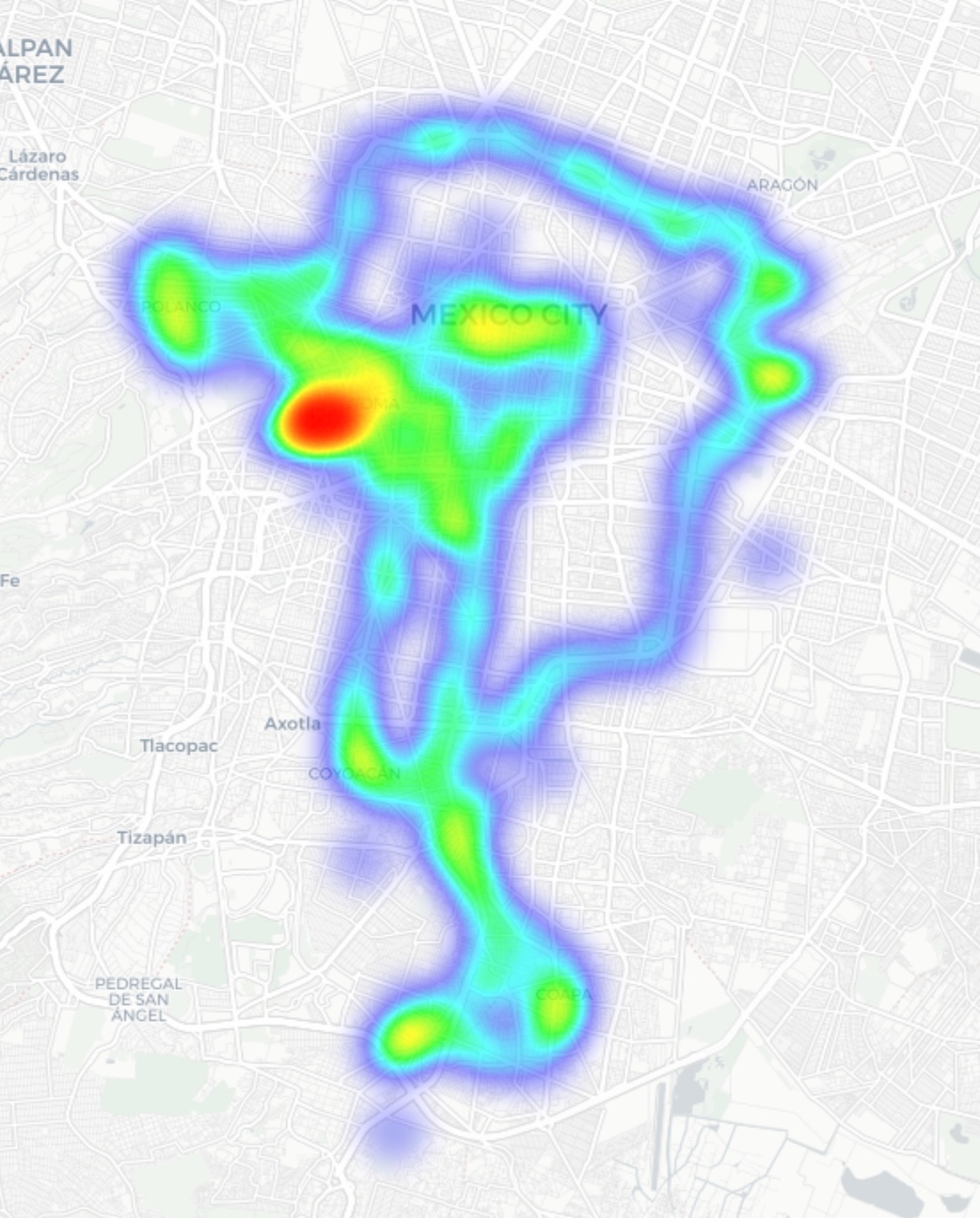
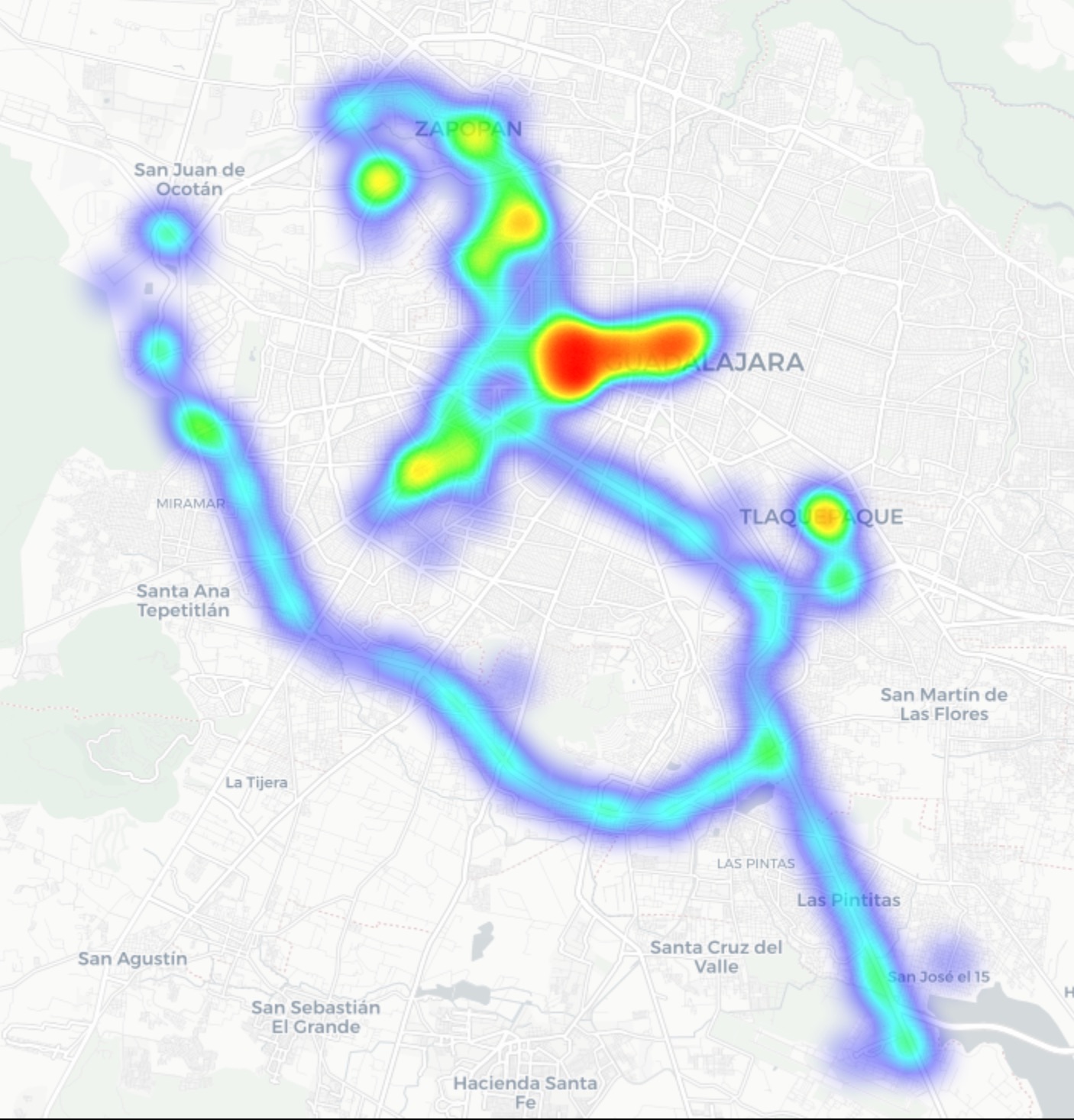
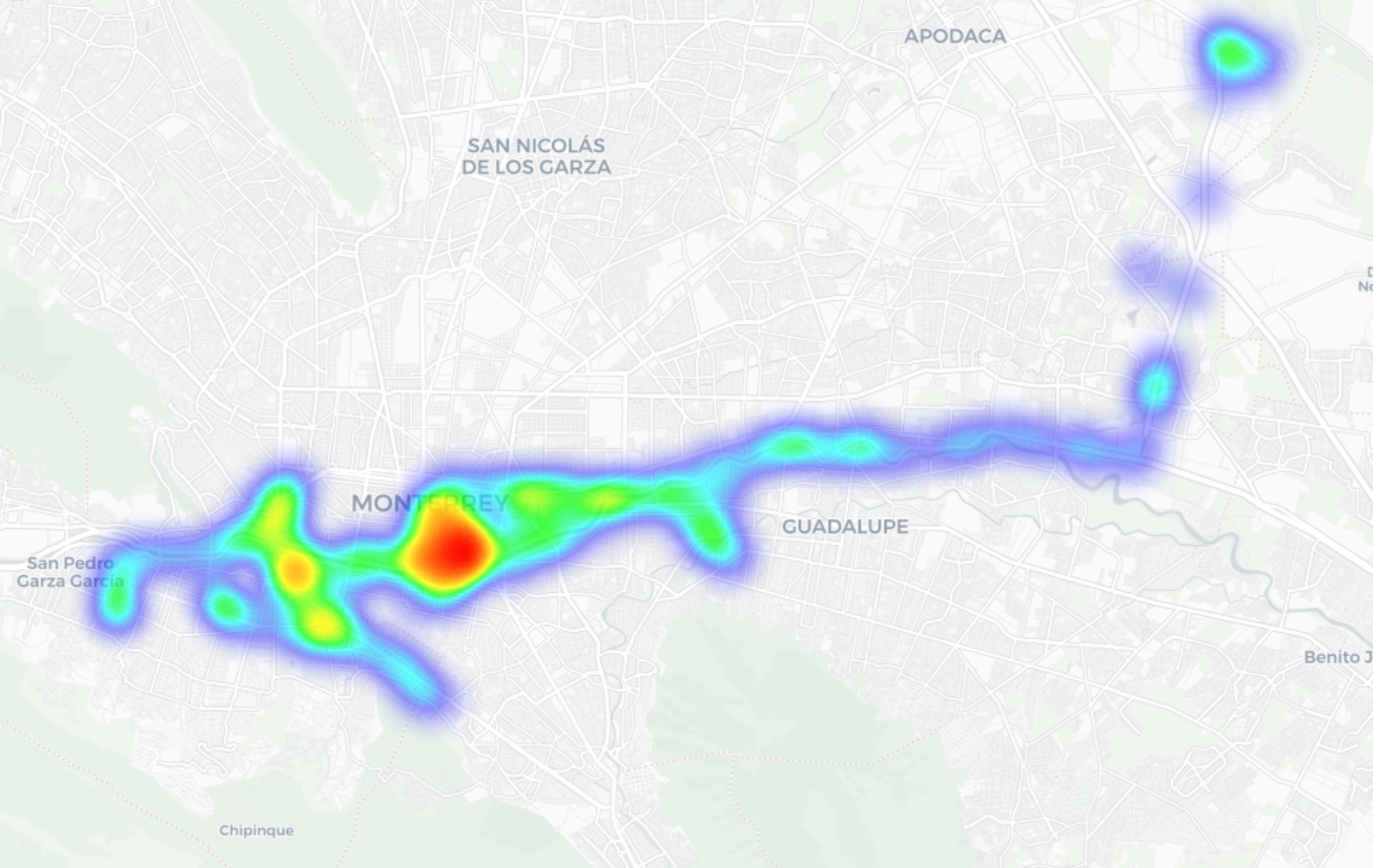
In Guadalajara and Monterrey, we drove similar routes: stadiums, main avenues, airports, and popular neighborhoods. Below you can see a heatmap of the areas we covered, ranging from red for areas with the highest density of public access points, through yellow and green, to blue for the lowest concentration.

Heatmap showing the locations of all Wi-Fi access points we covered in Mexico City
Heatmap showing the locations of all Wi-Fi access points we covered in Guadalajara
Heatmap showing the locations of all Wi-Fi access points we covered in Monterrey

We used passive radio reconnaissance to log 84 500 signals and 69 500 unique network identifiers across these three cities. The majority of the signals were caught in Mexico City (61.4%), followed by Guadalajara (23.6%) and Monterrey (14.8%).

What we analyzed:

  • Wireless network identifiers (SSIDs): the names that show up in your list of available Wi-Fi networks
  • Information that can be gleaned from these identifiers
  • Default router configurations and how ISPs deploy their networks
  • Frequencies used and signal characteristics
  • Channel load and radio frequency spectrum usage
  • Wireless network security configurations:
    • Open and insecure networks
    • Networks with WPS enabled
    • Secure networks (WPA2/WPA3) with WPS activated

You can find the full version of the study on the Securelist blog.

Telltale public Wi-Fi access point names

Network names (SSIDs) can tell you a lot by unintentionally revealing information about hardware manufacturers, ISPs, deployment methods, and whether an access point belongs to a business or a private user.

About 34% of the public Wi-Fi networks we logged didn’t bother changing their names at all, either sticking with the factory SSIDs from the router manufacturers or using standard naming conventions from their ISPs. For attackers, this can be a pretty solid hint, since this kind of network name lets them know which provider owns a given access point, what hardware is being used, and how it’s likely configured by default.

Another troubling nuance is the large number of Wi-Fi networks (over 30%) that use the access point’s MAC address (BSSID) as the visible network name. The first few bytes of a BSSID contain an Organizationally Unique Identifier (OUI), which gives away the router’s manufacturer. This is a useful lead for bad actors: they can find out who made the hardware and test for vulnerabilities specific to that brand’s models.

Is Mexican Wi-Fi well-protected?

An access point secured with WPA2/WPA3 can be considered more or less safe. All other authentication mechanisms yield much weaker results. We grouped the public Wi-Fi networks into four categories:

  • Secure (WPA2/WPA3)
  • Unsecured (open/WEP)
  • Weak (WPA)
  • Undetermined

The results are roughly the same across all three cities: about 82% of all analyzed access points are protected by secure standards. The outdated and insecure WPA protocol was practically nonexistent. However, more than 10% of the access points turned out to be completely unsecured. Connecting to these networks carries the risk of traffic interception and hidden surveillance.

But security isn’t evaluated by WPA protocols alone. We also checked for the presence of WPS, the infamous feature for quickly connecting to a network without entering a password, which is highly vulnerable to attacks. It turned out that WPS is enabled on nearly half (47%) of the access points in Mexico City, 43% in Guadalajara, and 41% in Monterrey. On average, 45% of the access points are potentially vulnerable to WPS-related attacks — sacrificing security for the sake of convenience.

What’s more, this feature frequently remained active even on seemingly secure WPA2/WPA3 networks — about half of them utilized WPS. This shows that having WPA2/WPA3 is still not enough to consider a Wi-Fi access point safe, as additional features like WPS can still leave the door open to attacks.

What else every tourist needs to know

Digital risks on a trip aren’t limited to public Wi-Fi alone, especially now that many are shifting away from public Wi-Fi to an eSIM. There are still plenty of threats in crowded places: public USB chargers, QR codes with swapped links, NFC and Bluetooth attacks, and, of course, social engineering tactics. Let’s break it all down.

Charging stations. Public USB chargers can also be dangerous: bad actors could potentially gain access to the data on your device or try to install malware. We covered these attacks in detail in our post, Data theft during smartphone charging.

Dangerous QR codes. Criminals can plant phishing QR codes in popular tourist spots. The pretexts can vary wildly; for instance, ads for team-specific fan “events”, or links supposedly offering discounts or restaurant menus. In reality, any QR code posted on the street can be considered insecure by default, and you shouldn’t scan them with your smartphone unless you have a QR code threat analyzer installed.

Fake broadcasts, tickets, and betting pools. Earlier, we described cases where bad actors were distributing malware via fake IPTV apps to capitalize on the WC26 hype. Remember, even if you plan to watch the tournament from home, you still need to stay alert and not trust the first sites that pop up advertising free broadcasts, offering betting pools, or promising unbelievably generous payouts.

NFC and Bluetooth attacks. Leaving Bluetooth enabled in crowded places can also cause problems: someone might try to discover your device, track you, or initiate an unwanted pairing request. NFC services with contactless payments create additional risks too — especially when paying in sketchy spots.

How to protect yourself and your devices

Despite the prevalence of secure WPA2/WPA3 public Wi-Fi access points in Mexico City, Guadalajara, and Monterrey, our study shows that public Wi-Fi networks remain vulnerable. It’s also important to remember that attackers can create fake networks — so-called evil twins — disguised as legitimate public Wi-Fi in airports, hotels, cafés, and tourist spots.

For the average user, it’s practically impossible to tell how safe a specific access point is when trying to connect. That’s why the safest option is to use cellular data to access the internet — completely eliminating the need for Wi-Fi. Besides, there’s no need to research the nuances of local laws, rates, and other cellular details for every country you plan to visit; you can just buy a global eSIM online in two clicks. We explained how to make the entire process hassle-free in our post, Internet on the go with Kaspersky eSIM Store.

If you still plan on connecting to public Wi-Fi, always use a VPN to secure your device and data when connecting to unfamiliar — especially unsecured — Wi-Fi networks. This creates an encrypted tunnel between your device and the VPN server, making it impossible to intercept your data along the way. Haven’t picked a VPN yet? Try Kaspersky VPN Secure Connection, which is included with both Kaspersky Premium and Kaspersky Plus subscriptions.

Now, if you still plan to attend the World Cup without any cybersecurity solution, at least follow these basic rules of digital hygiene:

  • Don’t use public USB chargers
  • Don’t send sensitive information over connections that aren’t secure
  • Don’t log in to banking, email, or social media accounts over unsecured Wi-Fi
  • Turn off Bluetooth and NFC while walking around in crowded places
  • Don’t trust QR codes posted on the street
  • Connect to public Wi-Fi only when absolutely necessary

What else to read to make sure cheering for your favorite team isn’t only exciting, but also safe:

  •  

What’s in the container? Analyzing vulnerabilities, risks and protection with Kaspersky Container Security and the KIRA AI assistant

Introduction

Containerization using Docker has become firmly established in modern development standards, significantly increasing the speed and convenience of deploying various services. Developers often use ready-made Docker images, making only minimal changes. The largest repository of container images is the Docker Hub service.

Container-hosted infrastructure is an attractive target for attackers. At a minimum, a compromised container can be used for DDoS attacks, cryptocurrency mining, or traffic proxying. The list of threats does not end there: once an attacker gains control of a container, they can steal or destroy data directly from it, access neighboring containers, or even attempt to escape the container, compromising the entire enterprise network.

At the same time, the infrastructure inside containers is typically updated less frequently and may contain outdated and vulnerable software versions. When deploying third-party images or modifying them for a specific environment, it is easy to make configuration errors that attackers can later exploit. And due to the architectural characteristics of containers, developers often face constraints when preparing images; to overcome these, they may resort to insecure solutions they find online.

In other words, containerized infrastructure can be both the simplest and the most lucrative target to exploit. Therefore, its security requires heightened attention. To minimize the risk of successful attacks on container infrastructure, it is essential to check the final Docker images, including all underlying layers, for vulnerabilities and misconfigurations. The easiest way to do this is by analyzing the Dockerfile; however, it is not always available for inspection. Moreover, it typically defines how to build layers on top of a base image from an external repository whose reliability cannot be guaranteed.

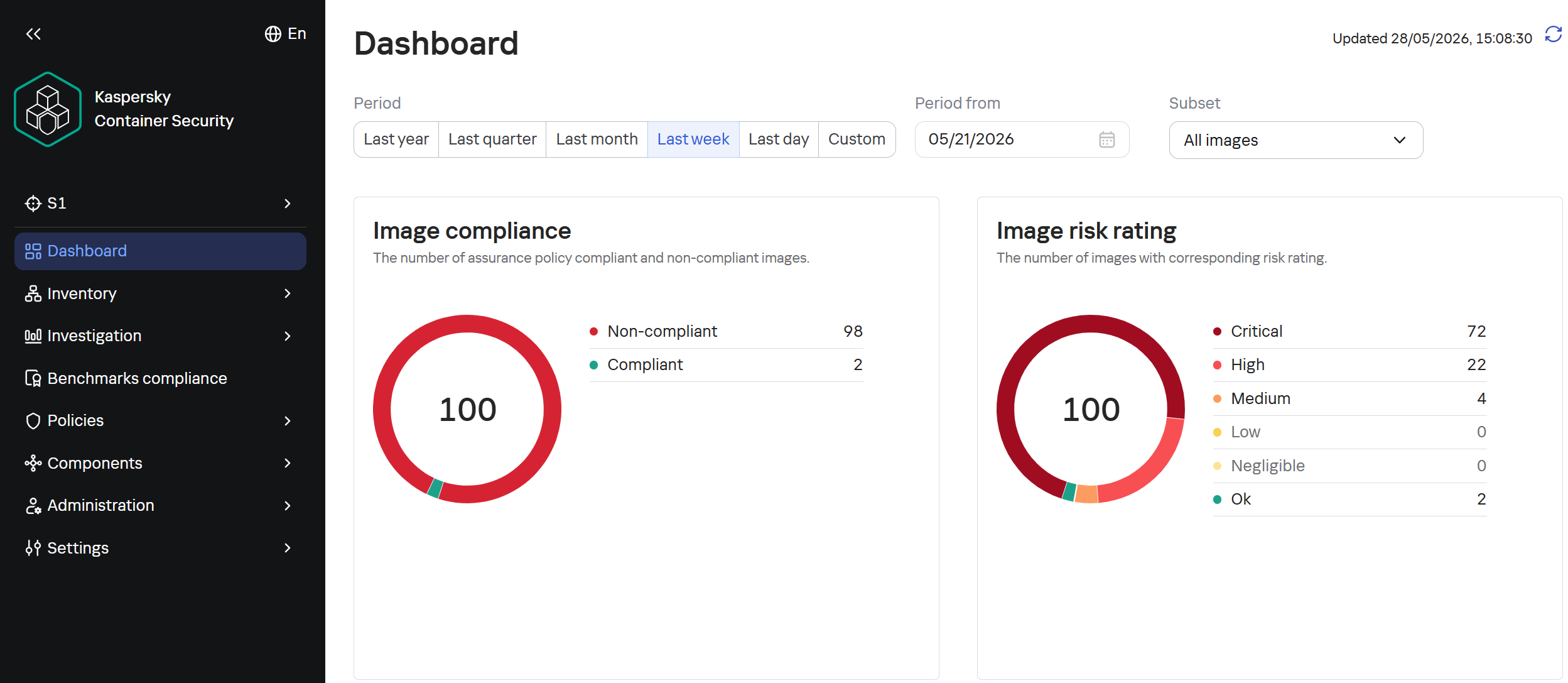
Image analysis results in Kaspersky Container Security

Image analysis results in Kaspersky Container Security

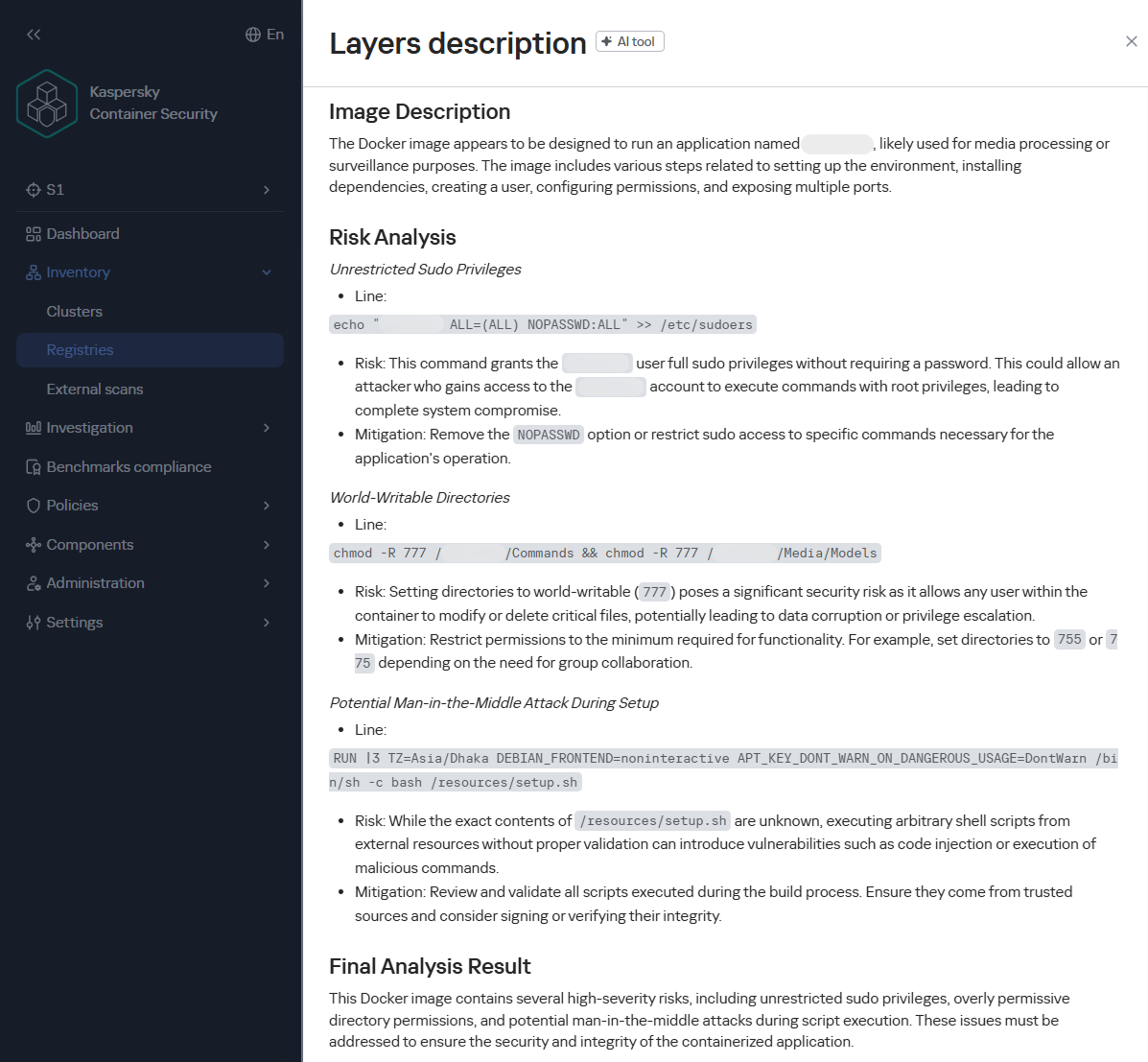
To help users identify insecure configurations and potential vulnerabilities within them, we have added our AI assistant to Kaspersky Container Security.KIRA (the assistant’s name) uses artificial intelligence to analyze the image and identify potential issues within, along with recommendations on how to fix them.

As part of this study, we asked KIRA to analyze a number of popular community images, and later in this article, we’ll show you the results.

Software vulnerabilities and compromise of update sources

One of the key security issues with using pre-built images is that developers do not update them in a timely manner. A Docker image is, by its very nature, a snapshot of a specific Linux distribution after packages have been installed on it. However, in most cases, it does not receive security updates on its own, unlike traditional Linux servers, where these updates are automatically installed by specialized services, such as unattended-upgrades in Debian-based distributions and dnf-automatic in RedHat-based distributions.

To apply updates to a Docker image, it must be rebuilt and redeployed. Often, this process is not automated, and some updates require additional effort to verify their correct operation, modify configurations when upgrading to new software versions, and so on. As a result, many popular images do not receive timely updates, which significantly increases the risks associated with their use.

An image that was secure at build time accumulates vulnerabilities as they are discovered in the packages installed within it, which over time significantly increases the opportunities for a successful attack on the container.

Vulnerable versions of web applications and network services accessible from the internet immediately become targets of various malicious campaigns. For example, just one day after the discovery of the CVE-2025-55182 vulnerability in React Server Components, our honeypots recorded numerous attack attempts related to this vulnerability. It was adopted by operators of many malicious campaigns, ranging from classic cryptocurrency miners to variants of Mirai and Gafgyt. Attackers are constantly adding new distribution methods and can use dozens of exploits targeting various vulnerabilities and configuration errors in popular services. Often, the same vulnerabilities are used in self-propagation mechanisms from already compromised hosts. For example, in a malicious campaign to spread the Dero miner, attackers use infected containers to automatically search for and infect new targets.

In addition to vulnerabilities that can be exploited remotely, attackers are rapidly adding local vulnerabilities to their arsenal, used to gain root privileges and escape the container: in the Kinsing malware campaign, attackers used CVE-2023-4911 (Looney Tunables) to elevate privileges, and in the perfctl campaign, the CVE-2021-4034 (PwnKit) vulnerability was used for the same purpose. The access gained was used to install a rootkit that hides the presence of perfctl on the system.

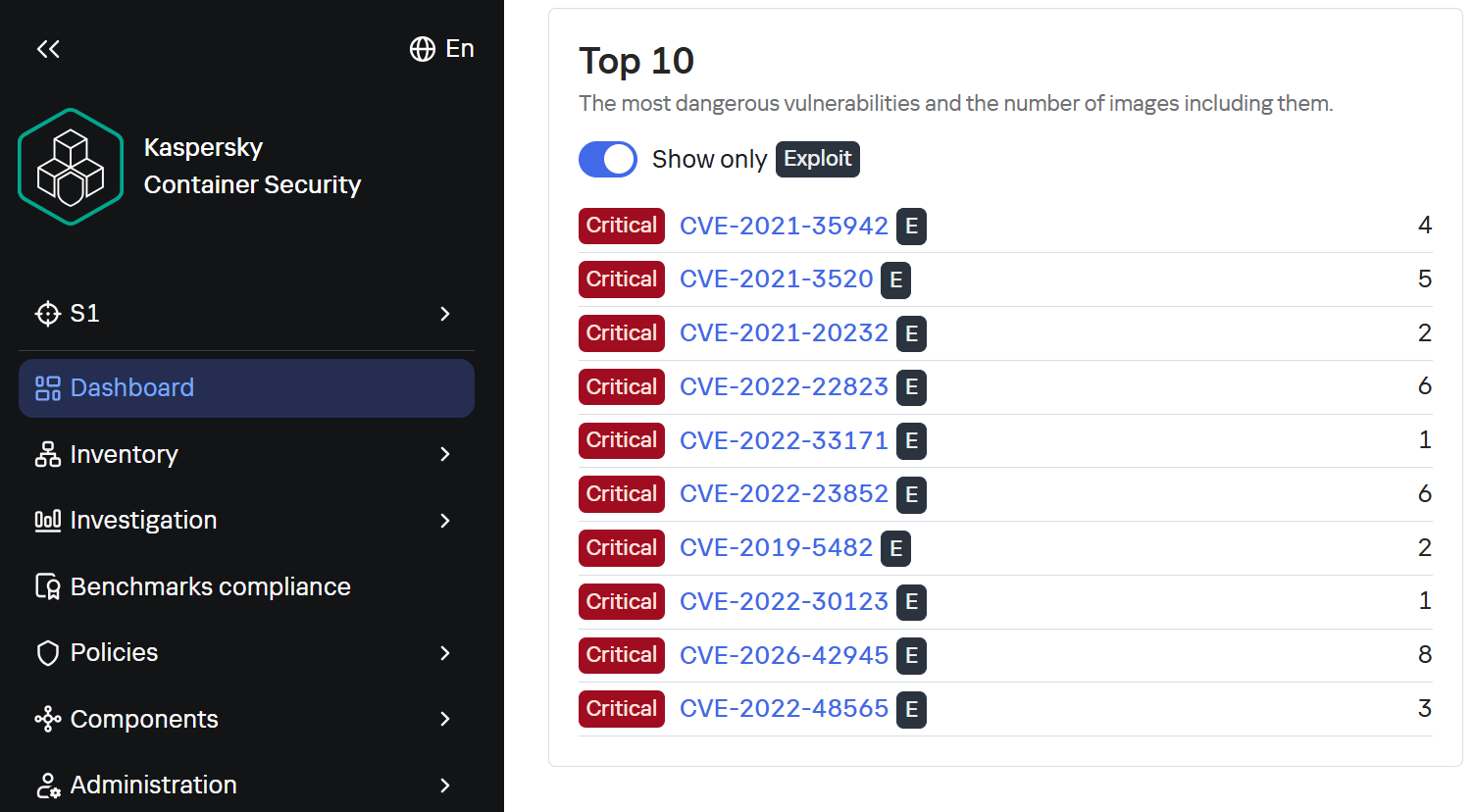
To assess the situation with unpatched vulnerabilities in containers, we took a random sample of 100 images, which included various popular solutions with 10,000 to 1 million downloads on DockerHub. In the 64 images we scanned, we found outdated software versions with critical vulnerabilities. For example, some images contained the CVE-2025-49844 vulnerability in the Redis server, leading to RCE by leveraging a vulnerability in the Lua parser; the current CVE-2026-24061 vulnerability in nginx, which in some configurations leads to a server process crash, and with ASLR disabled, again, to RCE; vulnerabilities CVE-2025-32463 in sudo and CVE-2023-4911 in glibc, allowing an attacker to gain root privileges with local access. At the same time, only one in ten Docker images from the analyzed sample is fully up to date.

TOP 10 Critical Vulnerabilities with PoC/Exploits available as shown in the Kaspersky Container Security Dashboard

TOP 10 Critical Vulnerabilities with PoC/Exploits available as shown in the Kaspersky Container Security Dashboard

It is worth noting that, of course, not every discovered vulnerability can be directly exploited by attackers. A practical risk arises when the vulnerable application or library is actually in use, and the conditions necessary for exploitation – which vary significantly from vulnerability to vulnerability – are met. Nevertheless, updates must not be ignored, as the risk of vulnerabilities being exploited – both individually and in various combinations – cannot be predicted in each specific case, and even vulnerabilities that seem harmless at first glance can ultimately pose a serious risk of compromise.

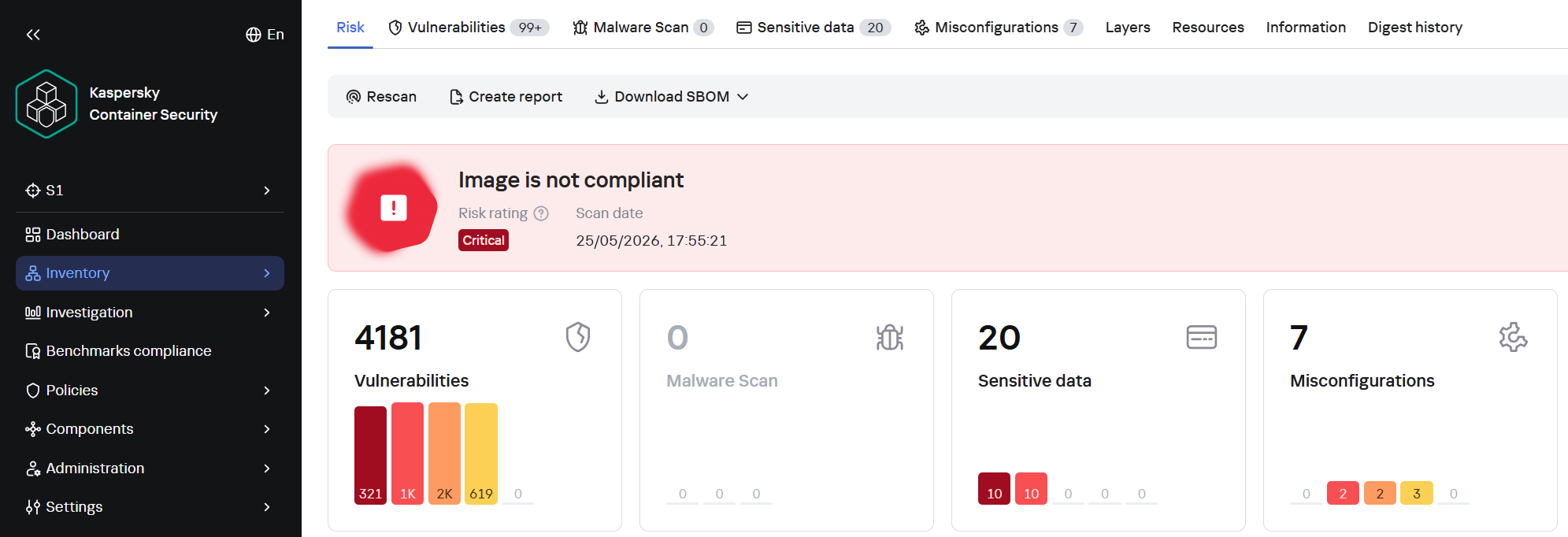
A record number of vulnerabilities in a single image

A record number of vulnerabilities in a single image

However, frequent updates have a downside. Every rebuild that downloads new packages from source repositories introduces an additional risk of a supply chain attack – a compromised dependency or a modified base image could silently inject malicious code into your environment precisely through an update. During our analysis of images from the sample, we did not find any signs of supply chain attacks. However, in March 2026, a supply chain incident occurred in the Trivy and LiteLLM projects. In the case of Trivy, the infected file was injected directly into the container image in the official repositories.

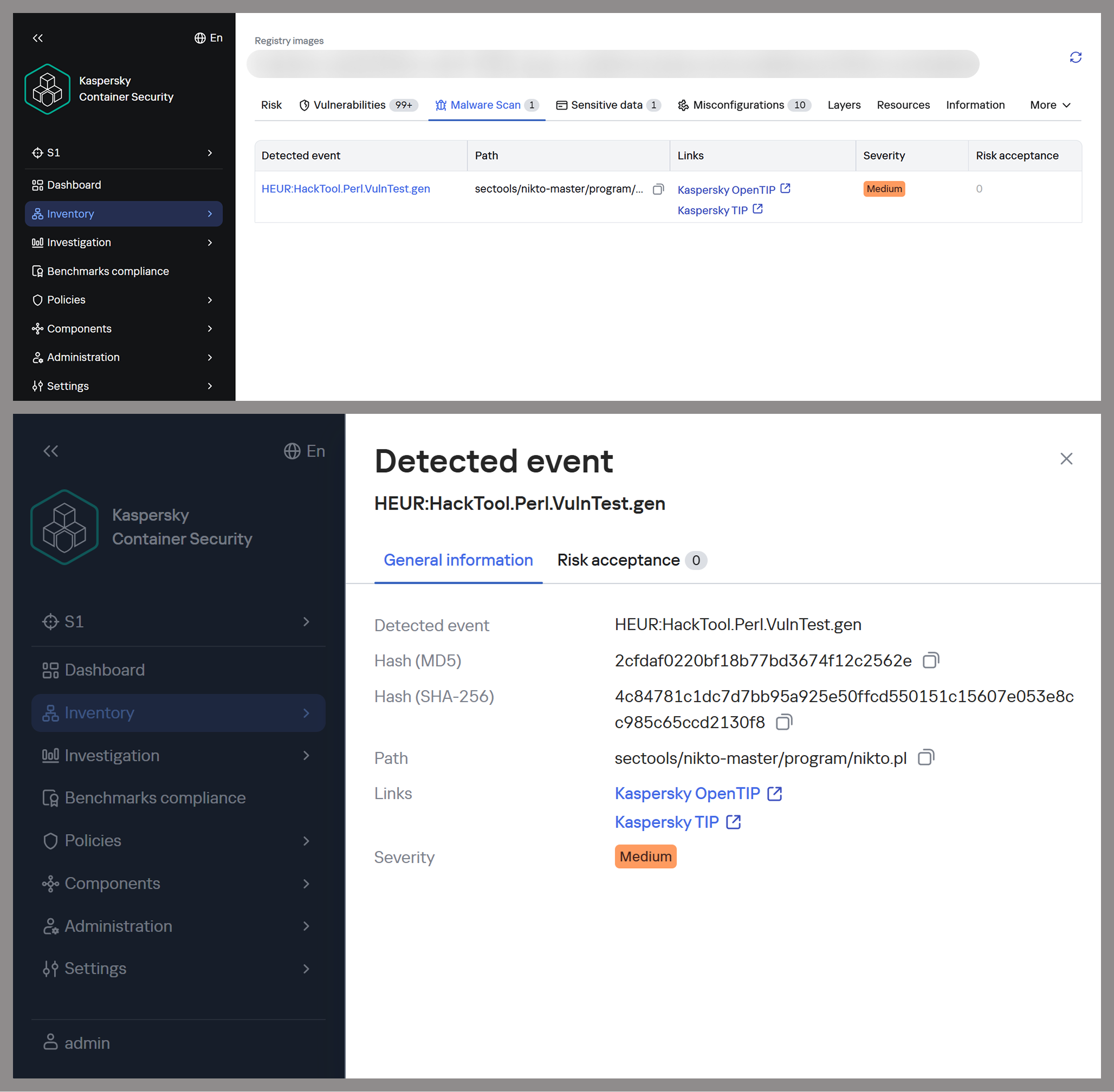
Detecting potentially malicious software using one of the images as an example

Detecting potentially malicious software using one of the images as an example

This leads to a difficult choice: infrequent updates leave known vulnerabilities unpatched within the image, while frequent updates increase the risk of supply chain compromise. Therefore, to protect your infrastructure, you need not only to regularly update base images but also to take a more comprehensive approach, specifically by pinning dependencies to known-good versions and scanning the resulting images for malware upon update.

Configuration vulnerabilities

Even a container with a fully updated image can be compromised if it is configured incorrectly. Embedding keys and secrets in the image, disabling authentication in network services, default passwords, and insecure file access permissions – all of these can be exploited by attackers in one way or another to achieve their goals.

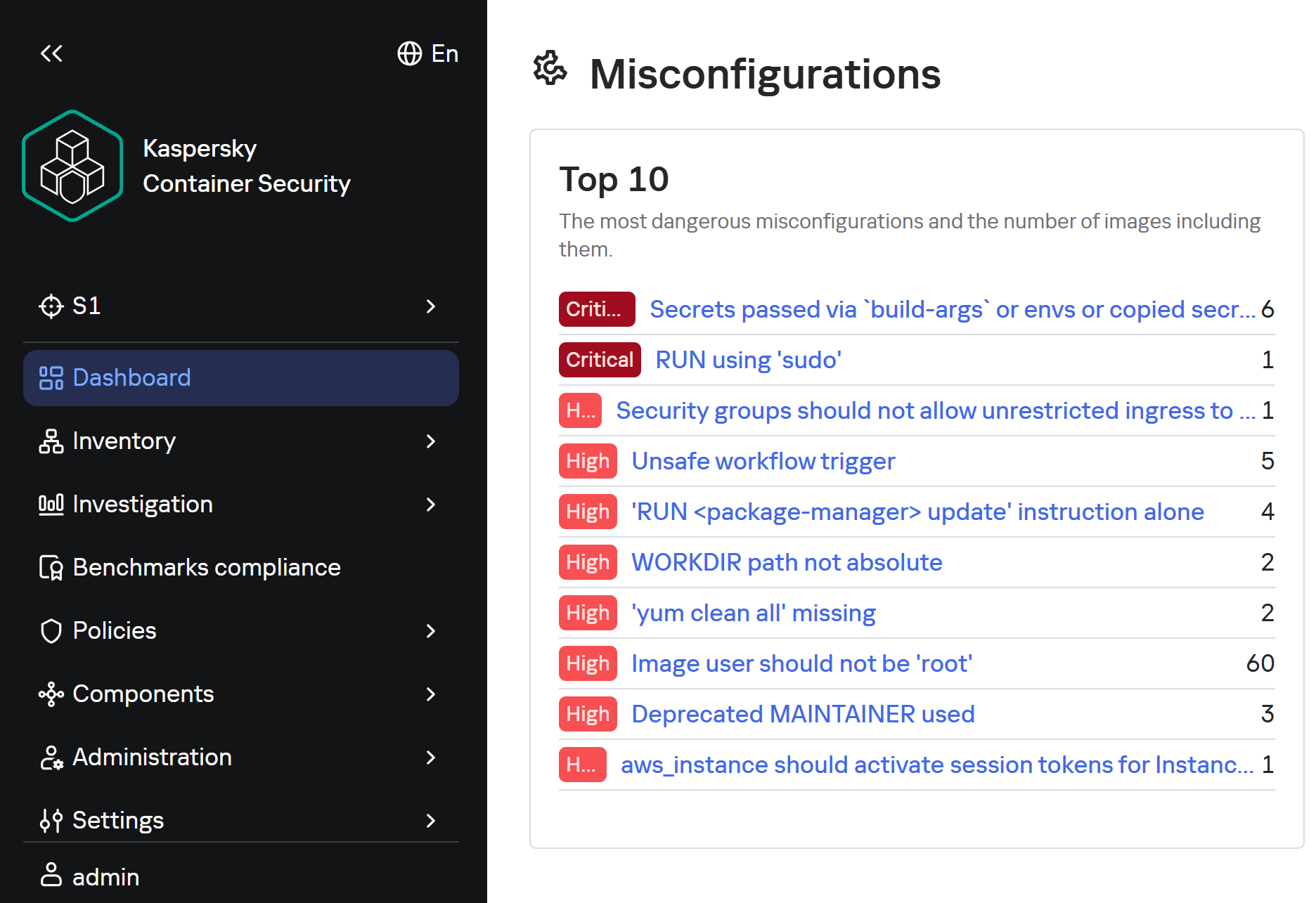
Insecure image configurations detected by KCS based on rules

Insecure image configurations detected by KCS based on rules

The situation is exacerbated by the fact that errors may be introduced by the authors of the original image, which complicates their detection, as this requires analyzing every layer and the command that generated it. As with vulnerabilities, not every configuration error leads to compromise: it all depends on the container’s role, its network accessibility, and many other factors. But the very use of insecure settings will sooner or later lead to errors appearing in images where their consequences will be significantly more dangerous.

Standard rules are often insufficient for analyzing problematic configurations. To gain a deeper understanding of the context and assess potential risks, AI tools can be used. Later in this section, we will examine examples of typical insecure configurations we discovered while scanning public images from Docker Hub, along with the descriptions of issues and risk mitigation methods provided by the KIRA AI assistant.

Example of container analysis using KIRA

Example of container analysis using KIRA

Insecure handling of credentials

Use of default passwords

In some cases, containers may use default passwords set via environment variables or directly in Dockerfile. If these passwords are not overridden, attackers will be able to access the application by using the default password.

RUN |1 DEBIAN_FRONTEND=noninteractive /bin/sh -c echo [removed]:[removed] | chpasswd

According to KIRA’s analysis, the user’s password is stored in plain text in the image layer history. Anyone who gains access to the image – whether through a public registry, a compromised build environment, or other means – will be able to extract the password. If SSH or another form of interactive access is enabled in the container, this could lead to its complete compromise and allow attackers to move laterally within the infrastructure.

Passwords may be present in environment variables. Consider the following Dockerfile snippet:

ENV SERVERNAME=localhost WWW_PATH_CONF=/etc/apache2/apache2.conf WWW_PATH_ROOT=/var/www HTTPS=on PKP_CLI_INSTALL=0 PKP_DB_HOST=db PKP_DB_NAME=pkp PKP_DB_USER=pkp PKP_DB_PASSWORD=changeMePlease PKP_WEB_CONF=/etc/apache2/conf-enabled/pkp.conf PKP_CONF=config.inc.php PKP_CMD=/usr/local/bin/pkp-start

In this example, the environment variable PKP_DB_PASSWORD is set to changeMePlease. If the user forgets to override it, the application will use the password that can be obtained from Dockerfile.

Let’s look at another image:

/bin/sh -c #(nop)  ENV MOODLE_URL=<a href="http://0.0.0.0/">http://0.0.0.0</a> MOODLE_ADMIN admin       MOODLE_ADMIN_PASSWORD [removed]      MOODLE_ADMIN_EMAIL admin@example.com MOODLE_DB_HOST     MOODLE_DB_PASSWORD       MOODLE_DB_USER     MOODLE_DB_NAME    MOODLE_DB_PORT 3306

For this image, Dockerfile specifies that the administrator password is hardcoded in the ENV directive and remains in the image metadata (layer history, docker inspect). Anyone who gains access to the image (registry, build cache) will be able to extract this secret and compromise the account.

To eliminate these risks, ensure that no passwords are specified in Dockerfile. If authentication is required, you can use orchestrator mechanisms (secrets) or generate a temporary password when starting the container via the entrypoint script, without saving it in the layers. We also recommend using mechanisms for securely passing secrets at runtime (Docker secrets, Kubernetes Secrets) or, as a last resort, passing them via --secret during the build with BuildKit, but under no circumstances should they be left in the final image.

Passing passwords via command arguments

In some cases, passwords may be exposed when passed via command-line arguments, as these arguments are visible to all users on the system:

/bin/sh -c #(nop)  HEALTHCHECK &amp;{[""CMD-SHELL"" ""mysql --protocol TCP -u\""root\"" -p\""$MYSQL_ROOT_PASSWORD\"" -e \""SELECT 1;\""""] ""15s"" ""30s"" ""0s"" '\x05'}

In the example provided, the MySQL superuser password is passed into the healthcheck command in plaintext, making it visible when viewing the process list (ps aux), in audit logs, and in monitoring systems. If the attacker gains read access to the container’s processes or logs, they can extract the password and gain full control of the database.

To fix this issue, the healthcheck should use a local connection via a Unix socket with default authentication (if the auth_socket plugin is configured for root), or create a dedicated user with minimal privileges (e.g., only USAGE), without a password or with a password passed via a secure file (--defaults-file with restricted permissions). You can also use the MYSQL_PWD environment variable for healthcheck authentication, but it remains visible in /proc.

Privilege escalation in the container

One of the most common vectors for initial compromise of Linux systems is RCE in web applications and network services. Typically, these services have minimal privileges, which complicates attackers’ subsequent actions: dumping credentials, covering their tracks, attempting to escape the container, and much more.

The situation worsens significantly if the attacker gains root privileges, as this allows them to fully control all processes within the container, conceal their activity, and use methods to escape the container. For example, they can compromise the host if the container is privileged, a Docker socket is mounted inside it, or other insecure configurations and vulnerabilities exist that cannot be exploited with standard user privileges.

Similarly, this simplifies network attacks on neighboring containers, the orchestrator, and various internal services, making this configuration error a potential link in the chain for compromising the entire network.

Attacks on sudo

One of the simplest privilege escalation methods is executing arbitrary commands as root using sudo without entering a password. Consider the following example:

/bin/sh -c set -xe;     apt-get update &amp;&amp;       apt-get -y install sudo;       echo ""solr ALL=(ALL) NOPASSWD: ALL"" &gt;/etc/sudoers.d/solr;

Analyzing this configuration using KIRA immediately highlights the main issue: by installing the sudo package and setting NOPASSWD: ALL for the solr, the user severely violates the principle of least privilege. The Solr platform does not require such broad privileges to run within a container; instead, they create an easy path for escalating to root.

echo 'postgres ALL=(ALL:ALL) NOPASSWD:ALL' &gt;&gt; /etc/sudoers

In another example of an insecure configuration, NOPASSWD:ALL privileges are granted to a PostgreSQL database user, which is a direct and severe weakening of the access control policy. If an attacker gains the ability to execute code on behalf of the postgres user – through a vulnerability in a network service, an SQL injection, or by compromising of one of the processes – they will immediately and unconditionally be able to execute any commands on behalf of the root user. This is equivalent to the entire container running as root.

As a risk mitigation measure, we recommend completely removing this directive. The minimum necessary commands requiring privileges should be delegated on a case-by-case basis via sudoers with explicit specification of allowed executables and parameters, using NOPASSWD only as a last resort and for specific utilities.

Our AI assistant KIRA can identify even more complex insecure configurations, such as allowing passwordless sudo for the entire sudo group — by modifying existing rules.

perl -i -pe 's/\bALL$/NOPASSWD:ALL/g' /etc/sudoers

The risk in this example is that the command replaces standard declarations requiring authentication with passwordless execution of all commands for any user within the sudo group – potentially including postgres, should it be assigned to that group. This expands the attack surface to all group members, turning each of them into a potential point for instant privilege escalation.

To mitigate the risks, we recommend not modifying the global sudoers policy, keeping the standard password requirement, or using a more secure escalation mechanism – such as gosu to run a specific process on behalf of another user without permanent privileges.

Insecure file permissions

Another common vector for privilege escalation is insecurely configured file and directory permissions. Most often, for convenience, container image authors use 777 permissions, which allow anyone – including unprivileged users – to freely create and delete files, as well as modify their contents. This can lead to both privilege escalation and the ability for an unprivileged attacker to delete or modify logs, among other undesirable consequences.

Consider the following command:

chmod 0777 /usr/share/cargo /usr/share/cargo/bin

The risk is that directories containing binary files and scripts will become writable by any container user. This allows a low-privileged attacker to replace utilities included in cargo or add new malicious executables. When these tools are subsequently invoked, especially as the root user or via sudo, the attacker’s code will execute with the inherited privileges of the calling process, leading directly to a local privilege escalation.

To mitigate the risks, you can set the minimum necessary permissions: chmod 0755 for directories and chmod 0755/0644 for the corresponding files. The owner should be root, and only the owner should be allowed to write. Do not use chmod 777 on any system paths.

Lack of integrity checks

Downloading software without verifying its integrity can make the infrastructure vulnerable to software tampering.

For example, this risk may arise when downloading a distribution via HTTP:

RUN /bin/sh -c wget -qO- ""<a href="http://acestream.org/downloads/linux/acestream_3.1.49_debian_9.9_x86_64.tar.gz">http://acestream.org/downloads/linux/acestream_3.1.49_debian_9.9_x86_64.tar.gz</a>"" | tar --extract --gzip -C /opt/acestream

Using HTTP without verifying the archive’s integrity creates conditions for a man-in-the-middle attack during the image build phase. An attacker controlling the communication channel or DNS can replace the archive with malicious content, which will compromise the container and the entire environment in which it runs.

To mitigate the risks, you can configure connections to web resources to use HTTPS only — if the resource supports this protocol. You can also download the archive without extracting it, compare its checksum (SHA256) with the checksum from a trusted source, and only then extract it. It is advisable to store the verified archive in an internal artifact repository to avoid direct downloads from the network.

There will still be a MitM risk even if certificate verification is disabled:

wget --no-check-certificate<a href="https://github.com/phpvirtualbox/phpvirtualbox/archive/refs/heads/7.2-dev.zip"> https://github.com/phpvirtualbox/phpvirtualbox/archive/refs/heads/7.2-dev.zip</a> -O phpvirtualbox.zip

The absence of TLS certificate verification allows an attacker controlling the network segment to replace the downloaded ZIP archive with malicious content. Since the archive contains PHP code that will be executed by the web server, compromise during the build phase will result in the deployment of a backdoor or data leakage.

To mitigate the risks, remove the --no-check-certificate flag; after downloading, calculate the SHA256 hash of the archive and verify it against a known reference value (the release page or a local repository of trusted hashes). Additionally, consider using a fixed release (tag) rather than the floating 7.2-dev branch.

Conclusion

Docker containers have become a very popular means of deploying software, and attackers are by no means oblivious to this trend. They are rapidly adding software vulnerabilities and configuration errors to their arsenal and carrying out attacks on supply chains. They can compromise container infrastructure for a wide variety of purposes, from cryptocurrency mining to encrypting data for ransom or stealing information critical to the company.

Our research found that 64 out of 100 container images for popular applications contain critically vulnerable software, and only 10% are fully up to date. We also identified numerous insecure configurations, including passwords stored in plaintext in Dockerfiles and excessive privileges granted to users and processes.

To detect and prevent these threats, it is essential to strictly adhere to security measures: audit image configurations, securely manage secrets used in images, apply security updates in a timely manner, scan their contents for malware with every update, and follow industry-standard best practices for enhancing security.

This approach requires specialized solutions built to accommodate the unique characteristics of container environments. Kaspersky Container Security ensures the security of containerized applications at every stage of their lifecycle, from development to operation. The product protects an organization’s business processes, helps ensure compliance with industry standards and security regulations, and enables the implementation of secure software development practices.
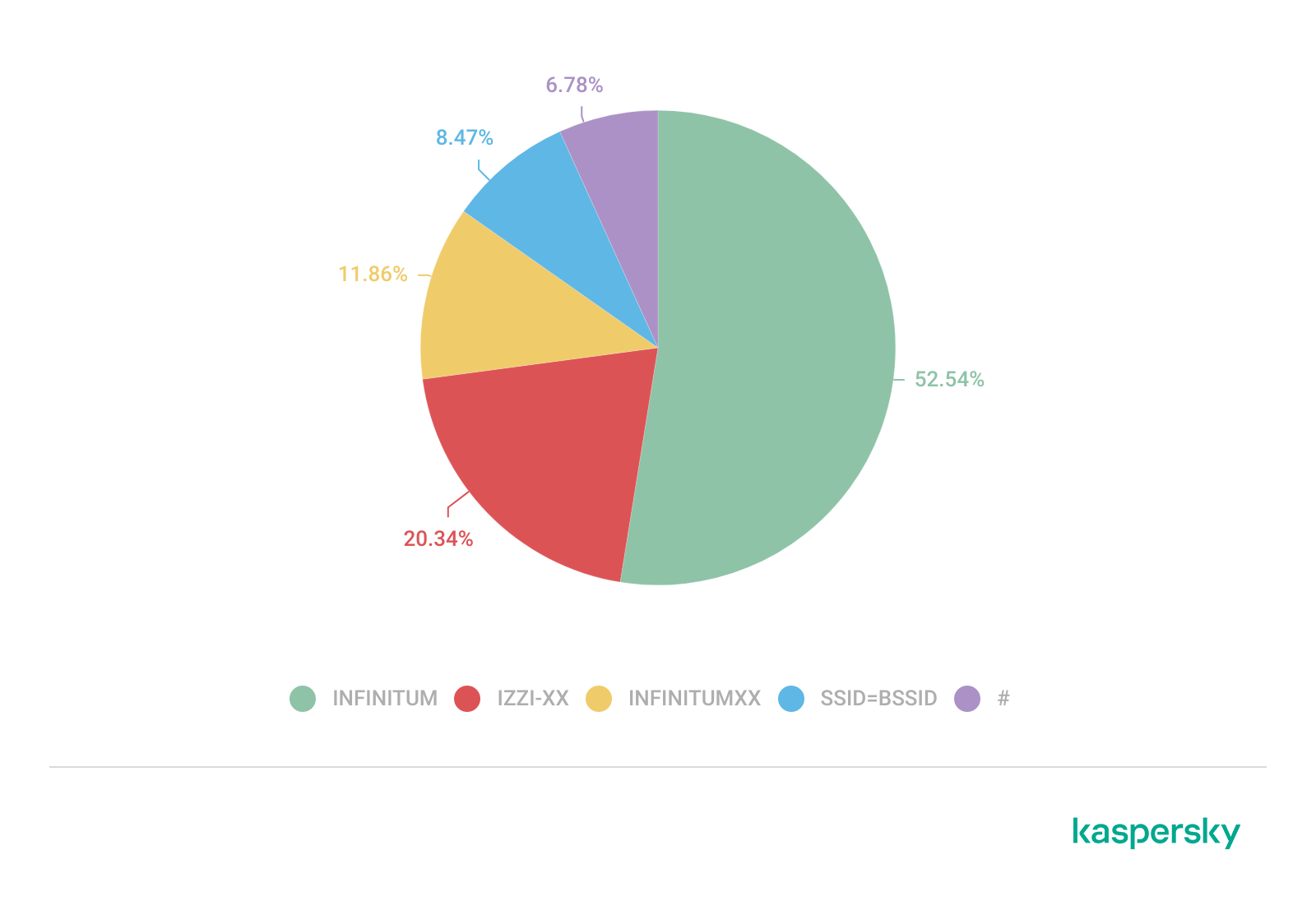
  •  

What’s in the container? Analyzing vulnerabilities, risks and protection with Kaspersky Container Security and the KIRA AI assistant

Introduction

Containerization using Docker has become firmly established in modern development standards, significantly increasing the speed and convenience of deploying various services. Developers often use ready-made Docker images, making only minimal changes. The largest repository of container images is the Docker Hub service.

Container-hosted infrastructure is an attractive target for attackers. At a minimum, a compromised container can be used for DDoS attacks, cryptocurrency mining, or traffic proxying. The list of threats does not end there: once an attacker gains control of a container, they can steal or destroy data directly from it, access neighboring containers, or even attempt to escape the container, compromising the entire enterprise network.

At the same time, the infrastructure inside containers is typically updated less frequently and may contain outdated and vulnerable software versions. When deploying third-party images or modifying them for a specific environment, it is easy to make configuration errors that attackers can later exploit. And due to the architectural characteristics of containers, developers often face constraints when preparing images; to overcome these, they may resort to insecure solutions they find online.

In other words, containerized infrastructure can be both the simplest and the most lucrative target to exploit. Therefore, its security requires heightened attention. To minimize the risk of successful attacks on container infrastructure, it is essential to check the final Docker images, including all underlying layers, for vulnerabilities and misconfigurations. The easiest way to do this is by analyzing the Dockerfile; however, it is not always available for inspection. Moreover, it typically defines how to build layers on top of a base image from an external repository whose reliability cannot be guaranteed.

Image analysis results in Kaspersky Container Security

Image analysis results in Kaspersky Container Security

To help users identify insecure configurations and potential vulnerabilities within them, we have added our AI assistant to Kaspersky Container Security.KIRA (the assistant’s name) uses artificial intelligence to analyze the image and identify potential issues within, along with recommendations on how to fix them.

As part of this study, we asked KIRA to analyze a number of popular community images, and later in this article, we’ll show you the results.

Software vulnerabilities and compromise of update sources

One of the key security issues with using pre-built images is that developers do not update them in a timely manner. A Docker image is, by its very nature, a snapshot of a specific Linux distribution after packages have been installed on it. However, in most cases, it does not receive security updates on its own, unlike traditional Linux servers, where these updates are automatically installed by specialized services, such as unattended-upgrades in Debian-based distributions and dnf-automatic in RedHat-based distributions.

To apply updates to a Docker image, it must be rebuilt and redeployed. Often, this process is not automated, and some updates require additional effort to verify their correct operation, modify configurations when upgrading to new software versions, and so on. As a result, many popular images do not receive timely updates, which significantly increases the risks associated with their use.

An image that was secure at build time accumulates vulnerabilities as they are discovered in the packages installed within it, which over time significantly increases the opportunities for a successful attack on the container.

Vulnerable versions of web applications and network services accessible from the internet immediately become targets of various malicious campaigns. For example, just one day after the discovery of the CVE-2025-55182 vulnerability in React Server Components, our honeypots recorded numerous attack attempts related to this vulnerability. It was adopted by operators of many malicious campaigns, ranging from classic cryptocurrency miners to variants of Mirai and Gafgyt. Attackers are constantly adding new distribution methods and can use dozens of exploits targeting various vulnerabilities and configuration errors in popular services. Often, the same vulnerabilities are used in self-propagation mechanisms from already compromised hosts. For example, in a malicious campaign to spread the Dero miner, attackers use infected containers to automatically search for and infect new targets.

In addition to vulnerabilities that can be exploited remotely, attackers are rapidly adding local vulnerabilities to their arsenal, used to gain root privileges and escape the container: in the Kinsing malware campaign, attackers used CVE-2023-4911 (Looney Tunables) to elevate privileges, and in the perfctl campaign, the CVE-2021-4034 (PwnKit) vulnerability was used for the same purpose. The access gained was used to install a rootkit that hides the presence of perfctl on the system.

To assess the situation with unpatched vulnerabilities in containers, we took a random sample of 100 images, which included various popular solutions with 10,000 to 1 million downloads on DockerHub. In the 64 images we scanned, we found outdated software versions with critical vulnerabilities. For example, some images contained the CVE-2025-49844 vulnerability in the Redis server, leading to RCE by leveraging a vulnerability in the Lua parser; the current CVE-2026-24061 vulnerability in nginx, which in some configurations leads to a server process crash, and with ASLR disabled, again, to RCE; vulnerabilities CVE-2025-32463 in sudo and CVE-2023-4911 in glibc, allowing an attacker to gain root privileges with local access. At the same time, only one in ten Docker images from the analyzed sample is fully up to date.

TOP 10 Critical Vulnerabilities with PoC/Exploits available as shown in the Kaspersky Container Security Dashboard

TOP 10 Critical Vulnerabilities with PoC/Exploits available as shown in the Kaspersky Container Security Dashboard

It is worth noting that, of course, not every discovered vulnerability can be directly exploited by attackers. A practical risk arises when the vulnerable application or library is actually in use, and the conditions necessary for exploitation – which vary significantly from vulnerability to vulnerability – are met. Nevertheless, updates must not be ignored, as the risk of vulnerabilities being exploited – both individually and in various combinations – cannot be predicted in each specific case, and even vulnerabilities that seem harmless at first glance can ultimately pose a serious risk of compromise.

A record number of vulnerabilities in a single image

A record number of vulnerabilities in a single image

However, frequent updates have a downside. Every rebuild that downloads new packages from source repositories introduces an additional risk of a supply chain attack – a compromised dependency or a modified base image could silently inject malicious code into your environment precisely through an update. During our analysis of images from the sample, we did not find any signs of supply chain attacks. However, in March 2026, a supply chain incident occurred in the Trivy and LiteLLM projects. In the case of Trivy, the infected file was injected directly into the container image in the official repositories.

Detecting potentially malicious software using one of the images as an example

Detecting potentially malicious software using one of the images as an example

This leads to a difficult choice: infrequent updates leave known vulnerabilities unpatched within the image, while frequent updates increase the risk of supply chain compromise. Therefore, to protect your infrastructure, you need not only to regularly update base images but also to take a more comprehensive approach, specifically by pinning dependencies to known-good versions and scanning the resulting images for malware upon update.

Configuration vulnerabilities

Even a container with a fully updated image can be compromised if it is configured incorrectly. Embedding keys and secrets in the image, disabling authentication in network services, default passwords, and insecure file access permissions – all of these can be exploited by attackers in one way or another to achieve their goals.

Insecure image configurations detected by KCS based on rules

Insecure image configurations detected by KCS based on rules

The situation is exacerbated by the fact that errors may be introduced by the authors of the original image, which complicates their detection, as this requires analyzing every layer and the command that generated it. As with vulnerabilities, not every configuration error leads to compromise: it all depends on the container’s role, its network accessibility, and many other factors. But the very use of insecure settings will sooner or later lead to errors appearing in images where their consequences will be significantly more dangerous.

Standard rules are often insufficient for analyzing problematic configurations. To gain a deeper understanding of the context and assess potential risks, AI tools can be used. Later in this section, we will examine examples of typical insecure configurations we discovered while scanning public images from Docker Hub, along with the descriptions of issues and risk mitigation methods provided by the KIRA AI assistant.

Example of container analysis using KIRA

Example of container analysis using KIRA

Insecure handling of credentials

Use of default passwords

In some cases, containers may use default passwords set via environment variables or directly in Dockerfile. If these passwords are not overridden, attackers will be able to access the application by using the default password.

RUN |1 DEBIAN_FRONTEND=noninteractive /bin/sh -c echo [removed]:[removed] | chpasswd

According to KIRA’s analysis, the user’s password is stored in plain text in the image layer history. Anyone who gains access to the image – whether through a public registry, a compromised build environment, or other means – will be able to extract the password. If SSH or another form of interactive access is enabled in the container, this could lead to its complete compromise and allow attackers to move laterally within the infrastructure.

Passwords may be present in environment variables. Consider the following Dockerfile snippet:

ENV SERVERNAME=localhost WWW_PATH_CONF=/etc/apache2/apache2.conf WWW_PATH_ROOT=/var/www HTTPS=on PKP_CLI_INSTALL=0 PKP_DB_HOST=db PKP_DB_NAME=pkp PKP_DB_USER=pkp PKP_DB_PASSWORD=changeMePlease PKP_WEB_CONF=/etc/apache2/conf-enabled/pkp.conf PKP_CONF=config.inc.php PKP_CMD=/usr/local/bin/pkp-start

In this example, the environment variable PKP_DB_PASSWORD is set to changeMePlease. If the user forgets to override it, the application will use the password that can be obtained from Dockerfile.

Let’s look at another image:

/bin/sh -c #(nop)  ENV MOODLE_URL=<a href="http://0.0.0.0/">http://0.0.0.0</a> MOODLE_ADMIN admin       MOODLE_ADMIN_PASSWORD [removed]      MOODLE_ADMIN_EMAIL admin@example.com MOODLE_DB_HOST     MOODLE_DB_PASSWORD       MOODLE_DB_USER     MOODLE_DB_NAME    MOODLE_DB_PORT 3306

For this image, Dockerfile specifies that the administrator password is hardcoded in the ENV directive and remains in the image metadata (layer history, docker inspect). Anyone who gains access to the image (registry, build cache) will be able to extract this secret and compromise the account.

To eliminate these risks, ensure that no passwords are specified in Dockerfile. If authentication is required, you can use orchestrator mechanisms (secrets) or generate a temporary password when starting the container via the entrypoint script, without saving it in the layers. We also recommend using mechanisms for securely passing secrets at runtime (Docker secrets, Kubernetes Secrets) or, as a last resort, passing them via --secret during the build with BuildKit, but under no circumstances should they be left in the final image.

Passing passwords via command arguments

In some cases, passwords may be exposed when passed via command-line arguments, as these arguments are visible to all users on the system:

/bin/sh -c #(nop)  HEALTHCHECK &amp;{[""CMD-SHELL"" ""mysql --protocol TCP -u\""root\"" -p\""$MYSQL_ROOT_PASSWORD\"" -e \""SELECT 1;\""""] ""15s"" ""30s"" ""0s"" '\x05'}

In the example provided, the MySQL superuser password is passed into the healthcheck command in plaintext, making it visible when viewing the process list (ps aux), in audit logs, and in monitoring systems. If the attacker gains read access to the container’s processes or logs, they can extract the password and gain full control of the database.

To fix this issue, the healthcheck should use a local connection via a Unix socket with default authentication (if the auth_socket plugin is configured for root), or create a dedicated user with minimal privileges (e.g., only USAGE), without a password or with a password passed via a secure file (--defaults-file with restricted permissions). You can also use the MYSQL_PWD environment variable for healthcheck authentication, but it remains visible in /proc.

Privilege escalation in the container

One of the most common vectors for initial compromise of Linux systems is RCE in web applications and network services. Typically, these services have minimal privileges, which complicates attackers’ subsequent actions: dumping credentials, covering their tracks, attempting to escape the container, and much more.

The situation worsens significantly if the attacker gains root privileges, as this allows them to fully control all processes within the container, conceal their activity, and use methods to escape the container. For example, they can compromise the host if the container is privileged, a Docker socket is mounted inside it, or other insecure configurations and vulnerabilities exist that cannot be exploited with standard user privileges.

Similarly, this simplifies network attacks on neighboring containers, the orchestrator, and various internal services, making this configuration error a potential link in the chain for compromising the entire network.

Attacks on sudo

One of the simplest privilege escalation methods is executing arbitrary commands as root using sudo without entering a password. Consider the following example:

/bin/sh -c set -xe;     apt-get update &amp;&amp;       apt-get -y install sudo;       echo ""solr ALL=(ALL) NOPASSWD: ALL"" &gt;/etc/sudoers.d/solr;

Analyzing this configuration using KIRA immediately highlights the main issue: by installing the sudo package and setting NOPASSWD: ALL for the solr, the user severely violates the principle of least privilege. The Solr platform does not require such broad privileges to run within a container; instead, they create an easy path for escalating to root.

echo 'postgres ALL=(ALL:ALL) NOPASSWD:ALL' &gt;&gt; /etc/sudoers

In another example of an insecure configuration, NOPASSWD:ALL privileges are granted to a PostgreSQL database user, which is a direct and severe weakening of the access control policy. If an attacker gains the ability to execute code on behalf of the postgres user – through a vulnerability in a network service, an SQL injection, or by compromising of one of the processes – they will immediately and unconditionally be able to execute any commands on behalf of the root user. This is equivalent to the entire container running as root.

As a risk mitigation measure, we recommend completely removing this directive. The minimum necessary commands requiring privileges should be delegated on a case-by-case basis via sudoers with explicit specification of allowed executables and parameters, using NOPASSWD only as a last resort and for specific utilities.

Our AI assistant KIRA can identify even more complex insecure configurations, such as allowing passwordless sudo for the entire sudo group — by modifying existing rules.

perl -i -pe 's/\bALL$/NOPASSWD:ALL/g' /etc/sudoers

The risk in this example is that the command replaces standard declarations requiring authentication with passwordless execution of all commands for any user within the sudo group – potentially including postgres, should it be assigned to that group. This expands the attack surface to all group members, turning each of them into a potential point for instant privilege escalation.

To mitigate the risks, we recommend not modifying the global sudoers policy, keeping the standard password requirement, or using a more secure escalation mechanism – such as gosu to run a specific process on behalf of another user without permanent privileges.

Insecure file permissions

Another common vector for privilege escalation is insecurely configured file and directory permissions. Most often, for convenience, container image authors use 777 permissions, which allow anyone – including unprivileged users – to freely create and delete files, as well as modify their contents. This can lead to both privilege escalation and the ability for an unprivileged attacker to delete or modify logs, among other undesirable consequences.

Consider the following command:

chmod 0777 /usr/share/cargo /usr/share/cargo/bin

The risk is that directories containing binary files and scripts will become writable by any container user. This allows a low-privileged attacker to replace utilities included in cargo or add new malicious executables. When these tools are subsequently invoked, especially as the root user or via sudo, the attacker’s code will execute with the inherited privileges of the calling process, leading directly to a local privilege escalation.

To mitigate the risks, you can set the minimum necessary permissions: chmod 0755 for directories and chmod 0755/0644 for the corresponding files. The owner should be root, and only the owner should be allowed to write. Do not use chmod 777 on any system paths.

Lack of integrity checks

Downloading software without verifying its integrity can make the infrastructure vulnerable to software tampering.

For example, this risk may arise when downloading a distribution via HTTP:

RUN /bin/sh -c wget -qO- ""<a href="http://acestream.org/downloads/linux/acestream_3.1.49_debian_9.9_x86_64.tar.gz">http://acestream.org/downloads/linux/acestream_3.1.49_debian_9.9_x86_64.tar.gz</a>"" | tar --extract --gzip -C /opt/acestream

Using HTTP without verifying the archive’s integrity creates conditions for a man-in-the-middle attack during the image build phase. An attacker controlling the communication channel or DNS can replace the archive with malicious content, which will compromise the container and the entire environment in which it runs.

To mitigate the risks, you can configure connections to web resources to use HTTPS only — if the resource supports this protocol. You can also download the archive without extracting it, compare its checksum (SHA256) with the checksum from a trusted source, and only then extract it. It is advisable to store the verified archive in an internal artifact repository to avoid direct downloads from the network.

There will still be a MitM risk even if certificate verification is disabled:

wget --no-check-certificate<a href="https://github.com/phpvirtualbox/phpvirtualbox/archive/refs/heads/7.2-dev.zip"> https://github.com/phpvirtualbox/phpvirtualbox/archive/refs/heads/7.2-dev.zip</a> -O phpvirtualbox.zip

The absence of TLS certificate verification allows an attacker controlling the network segment to replace the downloaded ZIP archive with malicious content. Since the archive contains PHP code that will be executed by the web server, compromise during the build phase will result in the deployment of a backdoor or data leakage.

To mitigate the risks, remove the --no-check-certificate flag; after downloading, calculate the SHA256 hash of the archive and verify it against a known reference value (the release page or a local repository of trusted hashes). Additionally, consider using a fixed release (tag) rather than the floating 7.2-dev branch.

Conclusion

Docker containers have become a very popular means of deploying software, and attackers are by no means oblivious to this trend. They are rapidly adding software vulnerabilities and configuration errors to their arsenal and carrying out attacks on supply chains. They can compromise container infrastructure for a wide variety of purposes, from cryptocurrency mining to encrypting data for ransom or stealing information critical to the company.

Our research found that 64 out of 100 container images for popular applications contain critically vulnerable software, and only 10% are fully up to date. We also identified numerous insecure configurations, including passwords stored in plaintext in Dockerfiles and excessive privileges granted to users and processes.

To detect and prevent these threats, it is essential to strictly adhere to security measures: audit image configurations, securely manage secrets used in images, apply security updates in a timely manner, scan their contents for malware with every update, and follow industry-standard best practices for enhancing security.

This approach requires specialized solutions built to accommodate the unique characteristics of container environments. Kaspersky Container Security ensures the security of containerized applications at every stage of their lifecycle, from development to operation. The product protects an organization’s business processes, helps ensure compliance with industry standards and security regulations, and enables the implementation of secure software development practices.
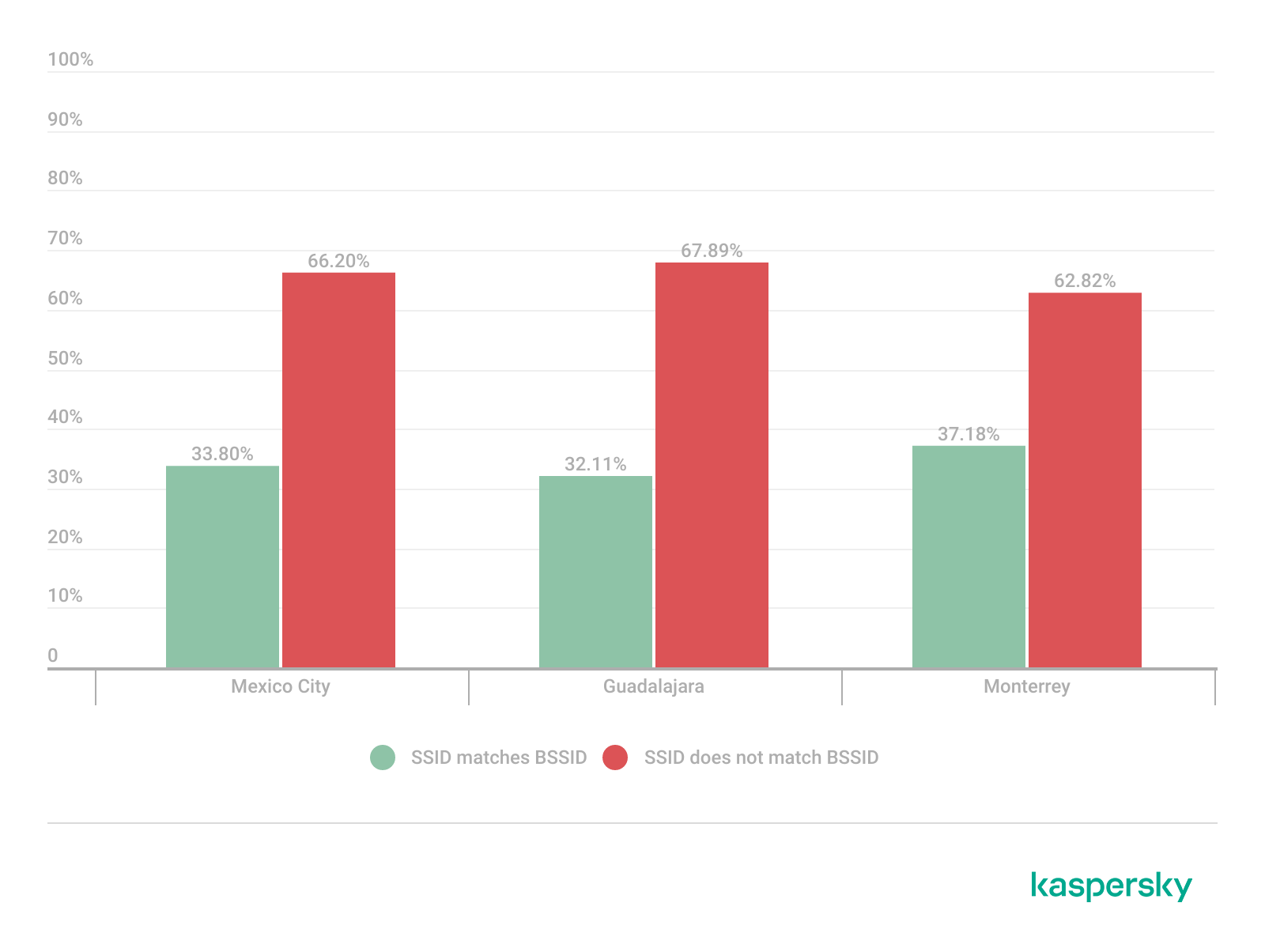
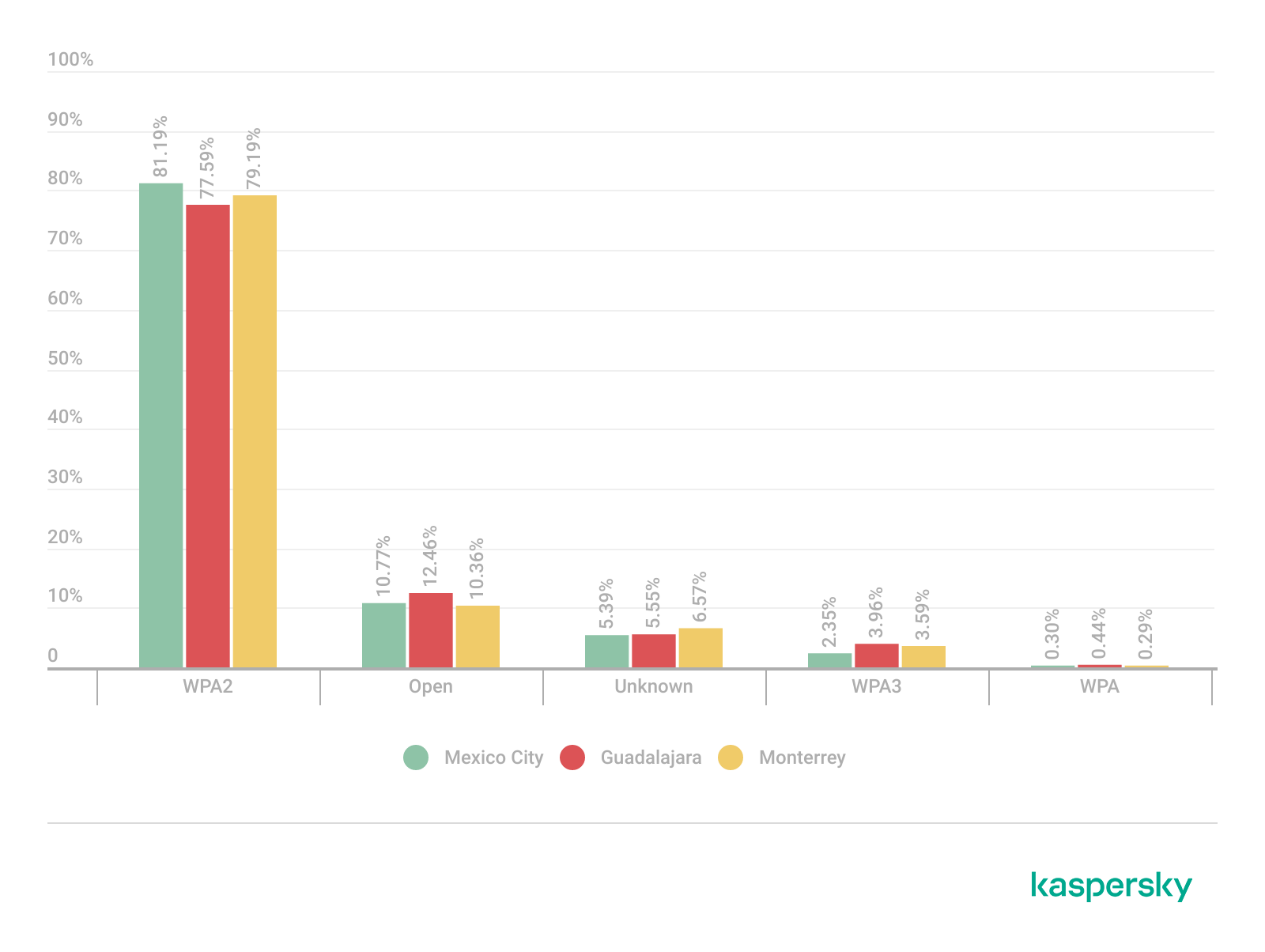
  •  
❌