
Reading view

If a fake moustache can fool age checks, is the Online Safety Act working?

A report based on a survey by the UK’s Internet Matters shows that much of the responsibility for managing the online safety of children still falls on families.

The Online Safety Act came into effect in July, 2025, and the report explores what has changed in the online lives of UK families since then.

We discussed in December 2025 whether the privacy risks of age verification outweighed the enhanced child protection. While the report shows some progress, it mostly provides “an early view of how the online landscape is changing, and crucially, where it is not.”

Around half of children say they now see more age-appropriate content, and roughly four in ten parents and children feel the online world has become somewhat safer.

The online world is as much a part of a child’s environment as the physical world is. And blocking the view to parts of that world is not taken lightly. Almost half of children think age checks are easy to bypass. About a third admit to doing so recently, using tactics from fake birthdates and borrowed logins to spoofed faces and, less commonly, VPNs.

“I did catch my son [12] using an eyebrow pencil to draw a moustache on his face, and it verified him as 15 years old.”

Yet 90% of children who noticed improved blocking and reporting saw this as a good thing. Their support for these safety features is pragmatic. They point to:

  • clearer rules
  • restricted contact with strangers
  • limits on high-risk functions

 They also rate these features as helpful in reducing exposure to harmful content and interactions.

But the system is not perfect. In the month after the child protection codes came into force, almost half of children reported some online harm, including violent, hateful, and body image-related content that should be covered by the Act’s protections.

The survey also revealed that age checks are now commonplace. Over half of children said they were asked to verify their age within a recent two-month window, often on major platforms like TikTok, YouTube/Google, and Roblox, on both new and existing accounts.

The technology is improving. Platforms use facial age estimation, government ID, and third-party age assurance apps, and these are usually easy for children to complete.

However, gains in protection come with unresolved and, in some cases, growing concerns around privacy and data use, especially around age verification and AI.

Parents are worried not just about what data is collected for age checks, but whether it will be stored or reused by government or industry. This has fueled calls for central, privacy-protective solutions rather than fragmented data collection across platforms.

Because age assurance systems are both intrusive (in terms of data) and often ineffective (easy workarounds, weak enforcement), the report suggests they may not yet provide a good safety-to-privacy trade-off from a family perspective.

Obviously, the survey also didn’t capture input from adults pretending to be children to gain access to child-only spaces, a risk that parents link directly to predatory behavior.

The authors conclude that the Online Safety Act has started to reshape children’s online environments, making safety features more visible and enabling more age‑appropriate experiences in some areas.

However, the Act has not yet produced a “step change.” Harmful content remains widespread, age‑assurance is patchy and easy to circumvent, and key concerns such as time spent online, AI risks, and persuasive design remain under‑regulated.


Browse like no one’s watching. 

Malwarebytes Privacy VPN encrypts your connection and never logs what you do, so the next story you read doesn’t have to feel personal. Try it free → 
  •  

If a fake moustache can fool age checks, is the Online Safety Act working?

A report based on a survey by the UK’s Internet Matters shows that much of the responsibility for managing the online safety of children still falls on families.

The Online Safety Act came into effect in July, 2025, and the report explores what has changed in the online lives of UK families since then.

We discussed in December 2025 whether the privacy risks of age verification outweighed the enhanced child protection. While the report shows some progress, it mostly provides “an early view of how the online landscape is changing, and crucially, where it is not.”

Around half of children say they now see more age-appropriate content, and roughly four in ten parents and children feel the online world has become somewhat safer.

The online world is as much a part of a child’s environment as the physical world is. And blocking the view to parts of that world is not taken lightly. Almost half of children think age checks are easy to bypass. About a third admit to doing so recently, using tactics from fake birthdates and borrowed logins to spoofed faces and, less commonly, VPNs.

“I did catch my son [12] using an eyebrow pencil to draw a moustache on his face, and it verified him as 15 years old.”

Yet 90% of children who noticed improved blocking and reporting saw this as a good thing. Their support for these safety features is pragmatic. They point to:

  • clearer rules
  • restricted contact with strangers
  • limits on high-risk functions

 They also rate these features as helpful in reducing exposure to harmful content and interactions.

But the system is not perfect. In the month after the child protection codes came into force, almost half of children reported some online harm, including violent, hateful, and body image-related content that should be covered by the Act’s protections.

The survey also revealed that age checks are now commonplace. Over half of children said they were asked to verify their age within a recent two-month window, often on major platforms like TikTok, YouTube/Google, and Roblox, on both new and existing accounts.

The technology is improving. Platforms use facial age estimation, government ID, and third-party age assurance apps, and these are usually easy for children to complete.

However, gains in protection come with unresolved and, in some cases, growing concerns around privacy and data use, especially around age verification and AI.

Parents are worried not just about what data is collected for age checks, but whether it will be stored or reused by government or industry. This has fueled calls for central, privacy-protective solutions rather than fragmented data collection across platforms.

Because age assurance systems are both intrusive (in terms of data) and often ineffective (easy workarounds, weak enforcement), the report suggests they may not yet provide a good safety-to-privacy trade-off from a family perspective.

Obviously, the survey also didn’t capture input from adults pretending to be children to gain access to child-only spaces, a risk that parents link directly to predatory behavior.

The authors conclude that the Online Safety Act has started to reshape children’s online environments, making safety features more visible and enabling more age‑appropriate experiences in some areas.

However, the Act has not yet produced a “step change.” Harmful content remains widespread, age‑assurance is patchy and easy to circumvent, and key concerns such as time spent online, AI risks, and persuasive design remain under‑regulated.


Browse like no one’s watching. 

Malwarebytes Privacy VPN encrypts your connection and never logs what you do, so the next story you read doesn’t have to feel personal. Try it free → 

  •  

Millions of students’ personal data stolen in major education breach

Instructure, the company behind the Canvas learning management system (LMS), confirmed a cyber incident and subsequent data breach affecting its cloud‑hosted environment.

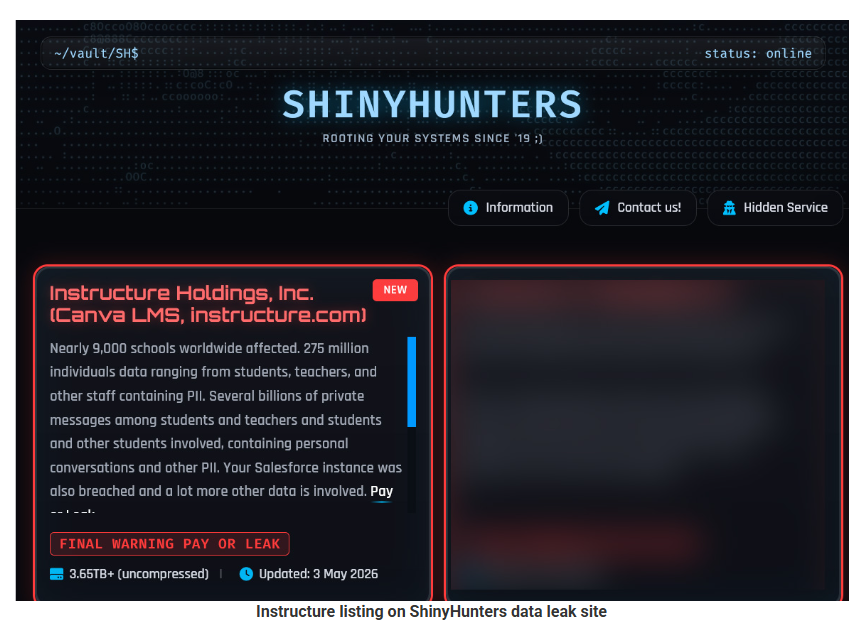
The ShinyHunters ransomware group claims it is behind the attack and says it stole roughly 275 million records tied to students, teachers, and staff.

ShinyHunters leak site
Image courtesy of BleepingComputer

The criminals shared a list of 8,809 school districts, universities, and online education platforms with BleepingComputer whose Canvas instances they claim were impacted, with per‑institution record counts ranging from tens of thousands to several million.


Digital Footprint Scan

See if your personal data has been exposed.


What to do if your child’s Instructure/Canvas data was exposed

If you’ve been told that your child was affected by the Instructure breach, you may be wondering what you can do to protect them. Here are some practical steps you can take right away.

1. Check what the school and Instructure are saying

Start with the notification from the school or district and Instructure’s own updates to understand what data about your child was involved (for example: name, email address, student ID, or course information). Follow any specific steps they recommend for student accounts and keep an eye on follow‑up messages in case new information comes to light.

Make sure the notification is real before anything else. If anything in the message looks suspicious, such as odd links, pressure to act immediately, or requests for extra data, check this first. Go to the district’s or Instructure’s site directly and use the contact details listed there to verify.

2. Lock down your child’s school and learning accounts

If your child has a Canvas or related account, change that password immediately, especially if your school lets students or parents log in with a username and password instead of single sign‑on. If your child tends to reuse passwords (for example, using the same one for Canvas, email, and gaming accounts), change those other passwords as well.

Give every account its own strong, unique password and consider using a family password manager so you can create and store these without relying on memory. For younger children, you may want to manage these credentials yourself and keep a list of which education platforms they use.

3. Turn on multi‑factor authentication where possible

Multi‑factor authentication (MFA) makes it much harder for someone to log into an account with just a password. If your school or district allows it on parent or student accounts (for example, a code sent by SMS, email, or generated in an authenticator app), turn it on and, ideally, have the codes go to a device or app you control.

Remind your child that security codes are like short‑term passwords. They should never share them with friends, teachers, or anyone claiming to be “IT support,” even if a message looks urgent or uses school branding.

4. Consider extra identity protection for minors

If the breach included very sensitive identifiers (such as national ID or Social Security numbers in some regions), ask both the school and the breached provider what protection is being offered for minors, such as credit monitoring or identity restoration services. In some countries, you can also place a credit freeze or similar block on a minor’s file to prevent new accounts being opened in their name.

Even if your child is too young to have a credit file today, it’s worth keeping a note of this incident so you remember to check their records once they are old enough.

5. Stay alert for follow‑on scams

Attackers like to reuse stolen data from education platforms to make phishing and scam messages more convincing, mentioning real school names, teachers, or courses. Be especially wary of emails and texts that claim to be from the school, district, or Instructure and that ask you to “confirm” login details, open unexpected attachments (like “new assignments”), or pay fees via unusual methods.

As a rule of thumb, avoid clicking links in unsolicited messages about the breach. Instead, open a new browser window and go to the official site or app as you normally would, then log in from there to check for messages.


What do cybercriminals know about you?

Use Malwarebytes’ free Digital Footprint scan to see whether your personal information has been exposed online.

  •  

Millions of students’ personal data stolen in major education breach

Instructure, the company behind the Canvas learning management system (LMS), confirmed a cyber incident and subsequent data breach affecting its cloud‑hosted environment.

The ShinyHunters ransomware group claims it is behind the attack and says it stole roughly 275 million records tied to students, teachers, and staff.

ShinyHunters leak site
Image courtesy of BleepingComputer

The criminals shared a list of 8,809 school districts, universities, and online education platforms with BleepingComputer whose Canvas instances they claim were impacted, with per‑institution record counts ranging from tens of thousands to several million.


Digital Footprint Scan

See if your personal data has been exposed.


What to do if your child’s Instructure/Canvas data was exposed

If you’ve been told that your child was affected by the Instructure breach, you may be wondering what you can do to protect them. Here are some practical steps you can take right away.

1. Check what the school and Instructure are saying

Start with the notification from the school or district and Instructure’s own updates to understand what data about your child was involved (for example: name, email address, student ID, or course information). Follow any specific steps they recommend for student accounts and keep an eye on follow‑up messages in case new information comes to light.

Make sure the notification is real before anything else. If anything in the message looks suspicious, such as odd links, pressure to act immediately, or requests for extra data, check this first. Go to the district’s or Instructure’s site directly and use the contact details listed there to verify.

2. Lock down your child’s school and learning accounts

If your child has a Canvas or related account, change that password immediately, especially if your school lets students or parents log in with a username and password instead of single sign‑on. If your child tends to reuse passwords (for example, using the same one for Canvas, email, and gaming accounts), change those other passwords as well.

Give every account its own strong, unique password and consider using a family password manager so you can create and store these without relying on memory. For younger children, you may want to manage these credentials yourself and keep a list of which education platforms they use.

3. Turn on multi‑factor authentication where possible

Multi‑factor authentication (MFA) makes it much harder for someone to log into an account with just a password. If your school or district allows it on parent or student accounts (for example, a code sent by SMS, email, or generated in an authenticator app), turn it on and, ideally, have the codes go to a device or app you control.

Remind your child that security codes are like short‑term passwords. They should never share them with friends, teachers, or anyone claiming to be “IT support,” even if a message looks urgent or uses school branding.

4. Consider extra identity protection for minors

If the breach included very sensitive identifiers (such as national ID or Social Security numbers in some regions), ask both the school and the breached provider what protection is being offered for minors, such as credit monitoring or identity restoration services. In some countries, you can also place a credit freeze or similar block on a minor’s file to prevent new accounts being opened in their name.

Even if your child is too young to have a credit file today, it’s worth keeping a note of this incident so you remember to check their records once they are old enough.

5. Stay alert for follow‑on scams

Attackers like to reuse stolen data from education platforms to make phishing and scam messages more convincing, mentioning real school names, teachers, or courses. Be especially wary of emails and texts that claim to be from the school, district, or Instructure and that ask you to “confirm” login details, open unexpected attachments (like “new assignments”), or pay fees via unusual methods.

As a rule of thumb, avoid clicking links in unsolicited messages about the breach. Instead, open a new browser window and go to the official site or app as you normally would, then log in from there to check for messages.


What do cybercriminals know about you?

Use Malwarebytes’ free Digital Footprint scan to see whether your personal information has been exposed online.

  •  
❌