
Reading view

Advanced Flow will make Android sideloading safer

Google has announced the introduction of Advanced Flow, designed to let Android users install apps from unverified developers more safely than before.

This process is known as sideloading. It means installing an app on your device from somewhere other than the Google Play store, usually by downloading and opening its installation file yourself.​

Right now, that typically involves:

  • Downloading an app file (an APK on Android) from a website, email, or another source instead of Google Play.​
  • Manually installing it, often after turning on a setting that allows apps from “unknown” or “unverified” developers.

From Google’s point of view, this has been a security weak spot. Scammers regularly abuse sideloading to trick victims into installing malware while bypassing built‑in protections.

They often pressure victims into installing apps that turn out to be infostealers or other malware. According to research by the Global Anti-Scam Alliance (GASA), scams caused an estimated $442 billion in losses last year.

So anything that helps reduce that risk is welcome.

What Google is changing isn’t dramatic, but it does make the process of installing an app from outside the official Play Store more secure. In simple terms, Advanced Flow adds extra steps and delays so scammers can’t rush people into disabling protections and installing their malware.

How Advanced Flow works

To sideload apps using Advanced Flow, users will need to go through a series of steps:

  • Enable developer mode in system settings. This is easy enough, and helps prevent accidental or one-tap bypasses often used in high-pressure scams.
  • Complete a quick safety check to make sure that no one is talking you into turning off your security. Scammers often pressure victims into disabling protections.
  • Restart your device, which cuts off any remote access or active phone calls a scammer might be using to guide you.
  • Wait one day, then you can confirm the change using biometrics (like fingerprint or face unlock) or your device PIN. This one-time, one-day delay breaks the urgency scammers rely on, giving you time to think.

Once you’ve confirmed you understand the risks, you’re all set to install apps from unverified developers. You can allow this for seven days or indefinitely. For safety, you’ll still see a warning that the app is from an unverified developer, but you can just tap “Install Anyway.”

In addition to the Advanced Flow, Google is introducing free, limited distribution accounts for students and hobbyists. These let developers share apps with a small group (up to 20 devices) without needing ID verification or a registration fee. 

What this means for users

So after these changes, these will be the options for users that have “developer mode” enabled on their Android device.

  • Sideloading directly from verified developers
  • Sideloading from developers with limited distribution accounts
  • Sideloading from unverified developers with Advanced Flow
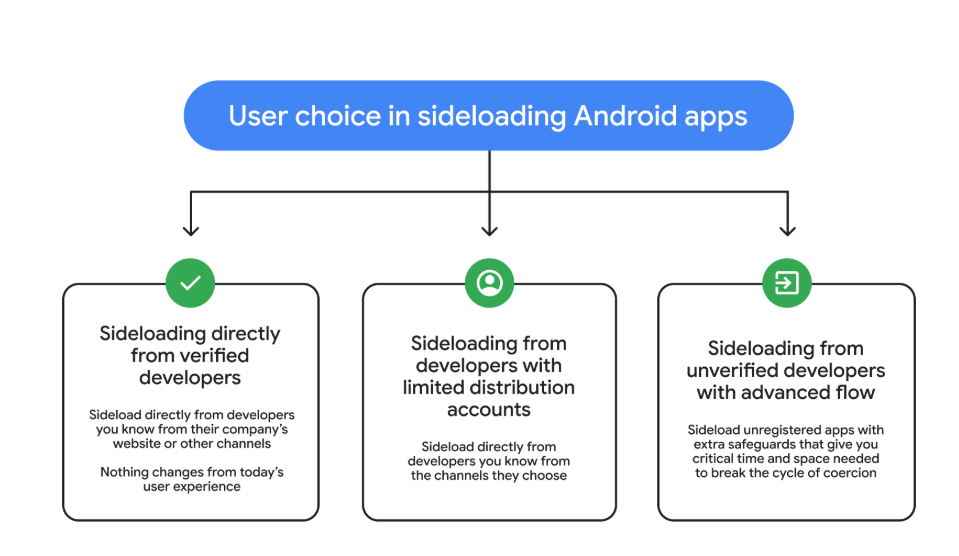
3 sideloading options
Image courtesy of Google

Advanced Flow is expected to roll out in August 2026.

Overall, it seems a reasonable compromise. Sideloading isn’t going away, so this keeps that ability but adds meaningful barriers against scam‑driven installs, thwarting social‑engineering campaigns without outright killing power‑user workflows. The one-day delay could turn out to be frustrating though, even if it’s only a one-time event.


We don’t just report on phone security—we provide it

Cybersecurity risks should never spread beyond a headline. Keep threats off your mobile devices by downloading Malwarebytes for iOS, and Malwarebytes for Android today.

  •  

Google cracks down on Android apps abusing accessibility

Google just dropped a bombshell for app developers with the latest version of its Android mobile operating system. The company can now prevent apps from installing if they try to use the system’s accessibility features.

The new development, live in version 17.2 of Android, is all about security, explains the company. It stops certain kinds of apps from using the accessibility service if Advanced Protection Mode (APM) is enabled.

The accessibility API lets app developers support users living with disabilities who need extra help using their phones. Apps can use this API to access the screen in unique ways, control input for the user, and use voice services, for example.

Sadly, as with most useful tools, someone will always find a way to misuse it and ruin it for everyone else. Malware developers have been using this API for years as a way into your bank account. The accessibility service has a lot of power: Any app with permissions to use it can read what’s on your screen.

Many Android banking Trojans are little more than accessibility API wrappers with criminal intent. They steal 2FA codes, impersonate victims, and drain accounts while victims sleep.

Two tricks dominate. The first is fake overlays. The accessibility API lets you put overlays on top of another app’s screen. Banking and cryptocurrency Trojan developers can use this to capture your keystrokes (you think you’re just logging into your banking app, but malware is collecting everything you type).

The second is permission abuse. Once the Trojan has your passwords, it can authorize its own transactions.

The number of malware frameworks taking advantage of the accessibility API has grown. DroidLock uses it to steal your personal data before demanding a ransom. Albiriox uses it to install itself and give remote control to attackers halfway around the world.

We saw both in December, and just last month Malwarebytes researcher Stefan Dasic noticed an accessibility service-abusing malware program posing as a fake Google Security page.

Google’s nuclear option

Google has tried before to curb misuse of the API. In 2017, it warned developers to justify their use of accessibility features or risk removal from the Play Store. Developers revolted, and Google relented. But then, in November 2021, it began demanding permission forms for accessibility API usage for Android 12+ apps.

Now the company is getting tougher still, enforcing stricter accessibility API rules. Apps can no longer freely enable accessibility services using a simple software flag. Instead, only apps whose core purpose is accessibility will be allowed to use it.

Google’s examples include screen readers, switch inputs, voice controls, and Braille displays. With these new rules, password managers or automation apps aren’t getting to the accessibility API anymore.

At least, not if the user has APM turned on.

Launched in May last year, APM is Google’s version of Apple’s Lockdown Mode. It introduces far tighter security controls for people who switch it on, making it harder for malware to exploit them.

The trade-off for that extra security is more limited functionality. For example, only apps from trusted sources will install, and data transfer via USB is restricted. Accessibility API access is now restricted too.

So now, you can be a password manager or an accessibility tool, but not both. Developers relying on accessibility for convenience features will need to find another way.

This is Google acknowledging that some APIs are too dangerous to leave open, even if some legitimate apps suffer. The company is betting that most users care more about not getting robbed than having their password manager use the accessibility API for convenience.

Malware authors will adapt, as always. But for now, Google just made phones with APM turned on a lot harder to mess with.


We don’t just report on phone security—we provide it

Cybersecurity risks should never spread beyond a headline. Keep threats off your mobile devices by downloading Malwarebytes for iOS, and Malwarebytes for Android today.

  •  
❌