❌

Reading view

JanelaRAT: a financial threat targeting users in Latin America
Background

JanelaRAT is a malware family that takes its name from the Portuguese word β€œjanela” which means β€œwindow”. JanelaRAT looks for financial and cryptocurrency data from specific banks and financial institutions in the Latin America region.

JanelaRAT is a modified variant of BX RAT that has targeted users since June 2023. One of the key differences between these Trojans is that JanelaRAT uses a custom title bar detection mechanism to identify desired websites in victims’ browsers and perform malicious actions.

The threat actors behind JanelaRAT campaigns continuously update the infection chain and malware versions by adding new features.

Kaspersky solutions detect this threat as Trojan.Script.Generic and Backdoor.MSIL.Agent.gen.

Initial infection

JanelaRAT campaigns involve a multi-stage infection chain. It starts with emails mimicking the delivery of pending invoices to trick victims into downloading a PDF file by clicking a malicious link. Then the victims are redirected to a malicious website from which a compressed file is downloaded.
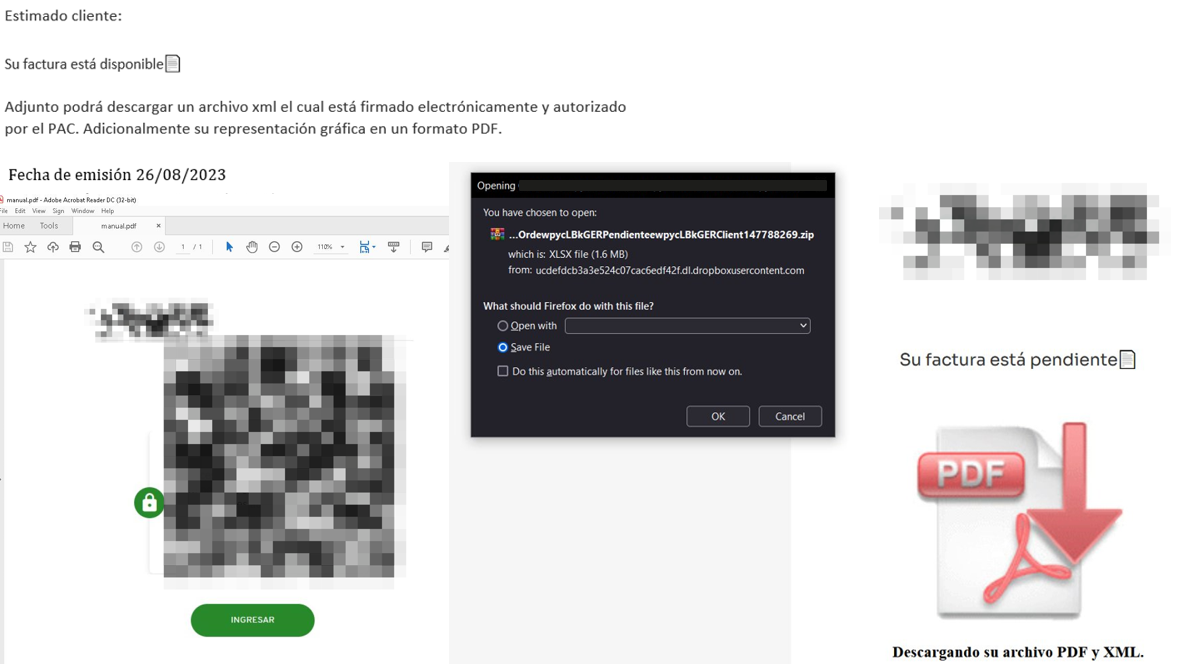
Malicious email used in JanelaRAT campaigns

Malicious email used in JanelaRAT campaigns

Throughout our monitoring of these malware campaigns, the compressed files have typically contained VBScripts, XML files, other ZIP archives, and BAT files. They ultimately lead to downloading a ZIP archive that contains components for DLL sideloading and executing JanelaRAT as the final payload.

However, we have observed variations in the infection chains depending on the delivered version of the malware. The latest observed campaign evolved by integrating MSI files to deliver a legitimate PE32 executable and a DLL, which is then sideloaded by the executable. This DLL is actually JanelaRAT, delivered as the final payload.

Based on our analysis of previous JanelaRAT intrusions, the updates in the infection chain represent threat actors’ attempts to streamline the process, with a reduced number of malware installation steps. We’ve observed a logical sequence in how components, such as MSI files, have been incorporated and adapted over time. Moreover, we have observed the use of auxiliary files β€” additional components that aid in the infection β€” such as configuration files that have been changing over time, showing how the threat actors have adapted these infections in an effort to avoid detection.
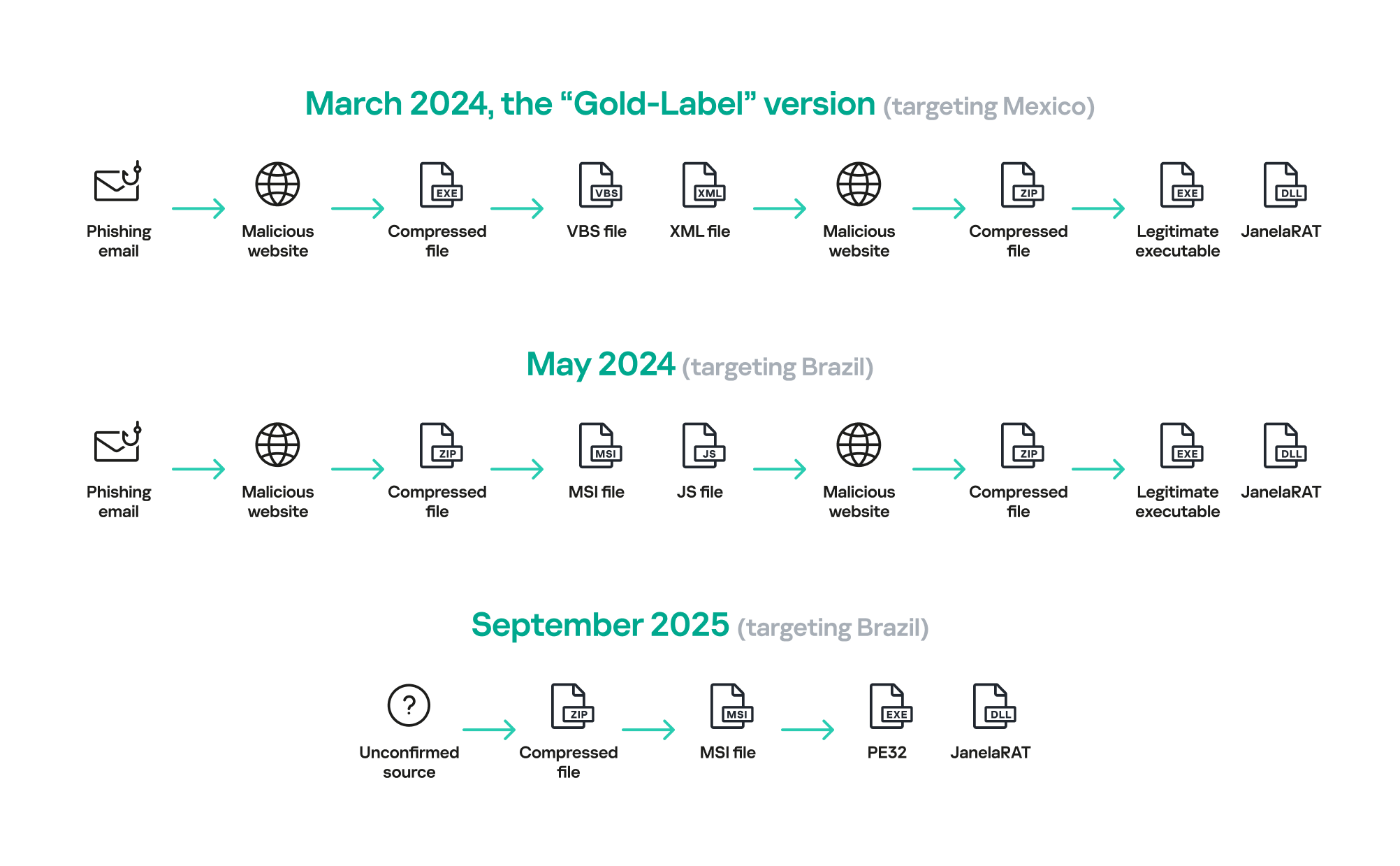
JanelaRAT infection flow evolution

JanelaRAT infection flow evolution

Initial dropper

The MSI file acts as an initial dropper designed to install the final implant and establish persistence on the system. It obfuscates file paths and names with the objective to hinder analysis. This code is designed to create several ActiveX objects to manipulate the file system and execute malicious commands.

Among the actions taken, the MSI defines paths based on environment variables for hosting binaries, creating a startup shortcut, and storing a first-run indicator file. The dropper file checks for the existence of the latter and for a specific path, and if either is missing, it creates them. If the file exists, the MSI file redirects the user to an external website as a decoy, showing that everything is β€œnormal”.

The MSI dropper places two files at a specified path: the legitimate executable nevasca.exe and the PixelPaint.dll library, renaming them with obfuscated combinations of random strings before relocating. An LNK shortcut is created in the user’s Startup folder, pointing to the renamed nevasca.exe executable, ensuring persistence. Finally, the nevasca.exe file is executed, which in turn loads the PixelPaint.dll file that is JanelaRAT.

Malicious implant

In this case, we analyzed JanelaRAT version 33, which was masqueraded as a legitimate pixel art app. Similar to other malware versions, it was protected with Eazfuscator, a common .NET obfuscation tool. We have also seen previous JanelaRAT samples that used the ConfuserEx obfuscator or its custom builds. The malware uses Control Flow Flattening method and renames classes and variables to make the code unreadable without deobfuscation.

JanelaRAT monitors the victim’s activity, intercepts sensitive banking interactions, and establishes an interactive C2 channel to report changes to the threat actor. While screen monitoring is also present, the core functionality focuses on financial fraud and real-time manipulation of the victim’s machine. The malware collects system information, including OS version, processor architecture (32-bit, 64-bit, or unknown), username, and machine name. The Trojan evaluates the current user’s privilege level and assigns different nicknames for administrators, users, guests, and an additional one for any other role.

The malware then retrieves the current date and constructs a beacon to register the victim on the C2 server, along with the malware version. To prevent multiple instances, the malware creates the mutex and exits if it already exists.

String encryption

All JanelaRAT samples utilize encrypted strings for sending information to the C2 and obfuscating embedded data. The encryption algorithm remains consistent across campaigns, combining base64 encoding with Rijndael (AES). The encryption key is derived from the MD5 hash of a 4-digit number and the IV is composed of the first 16 bytes of the decoded base64 data.

C2 communication and command handling

After initialization, JanelaRAT establishes a TCP socket, configuring callbacks for connection events and message handling. It registers all known message types, executing specific system tasks based on the received message.

Following socket initialization, the malware launches two background routines:

  1. User inactivity and session tracking
    This routine activates timers and launches secondary threads, including an internal timer and a user inactivity monitor. The malware determines if the victim’s machine has been inactive for more than 10 minutes by calculating the elapsed time since the last user input. If the inactivity period exceeds 10 minutes, the malware notifies the C2 by sending the corresponding message. Upon user activity, it notifies the threat actor again. This makes it possible to track the user’s presence and routine to time possible remote operations.
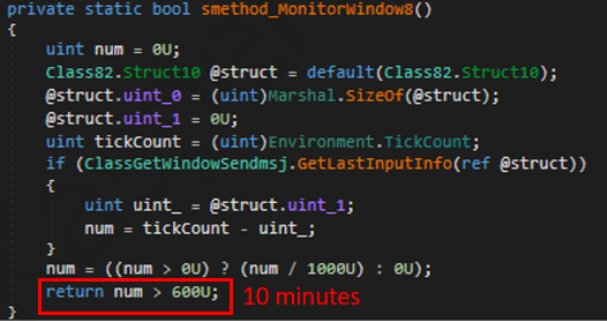
    Timer that looks for 10 minutes of inactivity

    Timer that looks for 10 minutes of inactivity

  2. Victim registration and further malicious activity
    This routine is launched immediately after the socket setup. It triggers two subroutines responsible for periodic HTTP beaconing and downloading additional payloads.
    1. The first subroutine executes a PowerShell downloaded from a staging server during post-exploitation. Its main objective is to establish persistence by downloading the PixelPaint.dll file once again. The routine then builds and executes periodic HTTP requests to the C2, reporting the malware’s version and the victim machine’s security environment. It loops continuously as long as a specific local file does not exist, ensuring repeated telemetry transmission. The file was not observed being extracted or created by the malware itself; rather, it appears to be placed on the system by the threat actor during other post-exploitation activities. Based on previous incidents, this file likely contains instructions for establishing persistence.

      This JanelaRAT version constructs a second C2 URL for beaconing, using several decrypted strings and following a pattern that uses different parameters to report information about new victims:

      <C2Domain>?VS=<malwareversion>&PL=<profilelevel>&AN=<presenceofbankingsoftware>

      We have observed constant changes in the parameters across campaigns. A new parameter β€œAN” was introduced in this version. It is used to detect the presence of a specific process associated with banking security software. If such software is found on the victim’s device, the malware notifies the threat actor.

      Parameter Description
      VS JanelaRAT version
      PL OFF by default
      AN Yes or No depending on whether banking security software process exists
    2. The second subroutine is responsible for monitoring the user’s visits to banking websites and reporting any activity of interest to the threat actor. JanelaRAT 33v is specifically engineered to target Brazilian financial institutions. However, we have also observed other versions of the malware targeting other specific countries in the region, such as the β€œGold-Label” version targeting banking users in Mexico that we described earlier.

      This subroutine creates a timer to enable an active system monitoring cycle. During this cycle, the malware obtains the title of the active window and checks if it matches entries of interest using a hardcoded but obfuscated list of financial institutions. Although the threat actors behind JanelaRAT primarily focus on one country as a target, the list of financial institutions is constantly updated.

      If a title bar matches one of the listed targets, the malware waits 12 seconds before establishing a dedicated communication channel to the C2. This channel is used to execute malicious tasks, including taking screenshots, monitoring keyboard and mouse input, displaying messages to the user, injecting keystrokes or simulating mouse input, and forcing system shutdown.

      To perform these actions, the malware uses a dedicated C2 handler that interprets incoming commands from the C2. Notably, 33v supports live banking session hijacking, not just credential theft.

      Action Performed Description
      Capture desktop image Send compressed screenshots to the C2
      Specific screenshots Crop specific screen regions and exfiltrate images
      Overlay windows Display images in full-screen mode, limit user interactions, and mimic bank dialogs to harvest credentials
      Keylogging Keystroke capture
      Simulate keyboard Inject keys such as DOWN, UP, and TAB to navigate or trigger new elements
      Track mouse input Move the cursor, simulate clicks, and report the cursor position
      Display message Show message boxes (custom title, text, buttons, or icons)
      System shutdown Execute a forced shutdown sequence
      Command execution Run CMD or PowerShell scripts/commands
      Task Manager
      manipulation
      Launch Task Manager, find its window, and hide it to prevent discovery by the user
      Check for banking security software process Detect the presence of anti-fraud systems
      Beaconing Send host information (malware version, profile, presence of banking software)
      Toggle internal modes Enable and disable modes such as screenshot flow, key injection, or overlay visibility
      Anti-analysis Detect sandbox or automation tools

C2 infrastructure

Unlike other versions, this variant rotates its C2 server daily. Once a title bar matches the one in the list, the software dynamically constructs the C2 channel domain by concatenating an obfuscated string, the current date, and a suffix domain related to a legitimate dynamic DNS (DDNS) service. This communication is established using port 443, but not TLS.

Decoy overlay system

This version of JanelaRAT implements a decoy overlay system designed to capture banking credentials and bypass multi-factor authentication. When a target banking window is detected, the malware requests further instructions from the C2 server. The C2 responds with a command identifier and a Base64-encoded image, which is then displayed as a full-screen overlay window mimicking legitimate banking or system interfaces. The malware ensures the fake window completely covers the screen and limits the victim’s interaction with the system.

The malware blocks the victim’s interaction by displaying modal dialogs. Each modal dialog corresponds to a specific operation, such as password capture, token/MFA capture, fake loading screen, fake Windows update full-screen modal and more. The malware resizes the overlay, scans multiple screens, and loads deceptive elements to distract the user or temporarily hide legitimate application windows.

Among other fake elements, the malware displays fake Windows update notifications, often accompanied by messages in Brazilian Portuguese, such as:

  • β€œConfiguring Windows updates, please wait.”
  • β€œDo not turn off your computer; this could take some time.”

When a message command is received from the operator, the malware constructs a custom message box based on parameters sent from the server. These parameters include the message title, text content, button type (e.g., OK, Yes/No), and icon type (e.g., Warning, Error). The malware then creates a maximized message box positioned at the top of the screen, ensuring it captures user focus and blocks the visibility of other windows, mimicking a system or security alert.

An obfuscated acknowledgement string is sent back to the C2 to confirm successful execution of this task.

Anti-analysis techniques

In addition to the conditional behavior based on whether the process of banking security software is detected, the malware includes anti-analysis routines and computer environment checks, such as sandbox detection through the Magnifier and MagnifierWindow components. These components are used to determine if accessibility tools are active on the infected computer indicating a possible malware analysis environment.

Persistence

The malware establishes persistence by writing a command script into the Windows Startup directory. This script forces the execution chain to run at each user logon enabling malicious activity without triggering privilege escalation prompts. The script is executed silently to evade user awareness.

This method is either an alternative or a supplement to the persistence method previously described in the subroutines responsible for periodic HTTP beaconing section.

Victimology

Consistent with previous intrusions and campaigns, the primary targets of the threat actors distributing JanelaRAT are banking users in Latin America, with specific focus on users of financial institutions in Brazil and Mexico.

According to our telemetry, in 2025 we detected 14,739 attacks in Brazil and 11,695 in Mexico related to JanelaRAT.

Conclusions

JanelaRAT remains an active and evolving threat, with intrusions exhibiting consistent characteristics despite ongoing modifications. We have tracked the evolution of JanelaRAT infections for some time, observing variations in both the malware itself and its infection chain, including targeted variants for specific countries.

This variant represents a significant advancement in the actor’s capabilities, combining multiple communication channels, comprehensive victim monitoring, interactive overlays, input injection, and robust remote control features. The malware is specifically designed to minimize user visibility and adapt its behavior upon detection of anti-fraud software.

To mitigate the risk of communication with the C2 infrastructure utilizing similar evasive techniques, we recommend that defenders block dynamic DNS services at the corporate perimeter or internal DNS resolvers. This will disrupt the communication channels used by JanelaRAT and similar threats.

Indicators of compromise

808c87015194c51d74356854dfb10d9eΒ Β Β Β Β Β Β Β  MSI Dropper
d7a68749635604d6d7297e4fa2530eb6Β Β Β Β Β Β Β  JanelaRAT
ciderurginsx[.]comΒ Β Β Β Β Β Β Β  Primary C2
  •  

JanelaRAT: a financial threat targeting users in Latin America

Background

JanelaRAT is a malware family that takes its name from the Portuguese word β€œjanela” which means β€œwindow”. JanelaRAT looks for financial and cryptocurrency data from specific banks and financial institutions in the Latin America region.

JanelaRAT is a modified variant of BX RAT that has targeted users since June 2023. One of the key differences between these Trojans is that JanelaRAT uses a custom title bar detection mechanism to identify desired websites in victims’ browsers and perform malicious actions.

The threat actors behind JanelaRAT campaigns continuously update the infection chain and malware versions by adding new features.

Kaspersky solutions detect this threat as Trojan.Script.Generic and Backdoor.MSIL.Agent.gen.

Initial infection

JanelaRAT campaigns involve a multi-stage infection chain. It starts with emails mimicking the delivery of pending invoices to trick victims into downloading a PDF file by clicking a malicious link. Then the victims are redirected to a malicious website from which a compressed file is downloaded.

Malicious email used in JanelaRAT campaigns

Malicious email used in JanelaRAT campaigns

Throughout our monitoring of these malware campaigns, the compressed files have typically contained VBScripts, XML files, other ZIP archives, and BAT files. They ultimately lead to downloading a ZIP archive that contains components for DLL sideloading and executing JanelaRAT as the final payload.

However, we have observed variations in the infection chains depending on the delivered version of the malware. The latest observed campaign evolved by integrating MSI files to deliver a legitimate PE32 executable and a DLL, which is then sideloaded by the executable. This DLL is actually JanelaRAT, delivered as the final payload.

Based on our analysis of previous JanelaRAT intrusions, the updates in the infection chain represent threat actors’ attempts to streamline the process, with a reduced number of malware installation steps. We’ve observed a logical sequence in how components, such as MSI files, have been incorporated and adapted over time. Moreover, we have observed the use of auxiliary files β€” additional components that aid in the infection β€” such as configuration files that have been changing over time, showing how the threat actors have adapted these infections in an effort to avoid detection.

JanelaRAT infection flow evolution

JanelaRAT infection flow evolution

Initial dropper

The MSI file acts as an initial dropper designed to install the final implant and establish persistence on the system. It obfuscates file paths and names with the objective to hinder analysis. This code is designed to create several ActiveX objects to manipulate the file system and execute malicious commands.

Among the actions taken, the MSI defines paths based on environment variables for hosting binaries, creating a startup shortcut, and storing a first-run indicator file. The dropper file checks for the existence of the latter and for a specific path, and if either is missing, it creates them. If the file exists, the MSI file redirects the user to an external website as a decoy, showing that everything is β€œnormal”.

The MSI dropper places two files at a specified path: the legitimate executable nevasca.exe and the PixelPaint.dll library, renaming them with obfuscated combinations of random strings before relocating. An LNK shortcut is created in the user’s Startup folder, pointing to the renamed nevasca.exe executable, ensuring persistence. Finally, the nevasca.exe file is executed, which in turn loads the PixelPaint.dll file that is JanelaRAT.

Malicious implant

In this case, we analyzed JanelaRAT version 33, which was masqueraded as a legitimate pixel art app. Similar to other malware versions, it was protected with Eazfuscator, a common .NET obfuscation tool. We have also seen previous JanelaRAT samples that used the ConfuserEx obfuscator or its custom builds. The malware uses Control Flow Flattening method and renames classes and variables to make the code unreadable without deobfuscation.

JanelaRAT monitors the victim’s activity, intercepts sensitive banking interactions, and establishes an interactive C2 channel to report changes to the threat actor. While screen monitoring is also present, the core functionality focuses on financial fraud and real-time manipulation of the victim’s machine. The malware collects system information, including OS version, processor architecture (32-bit, 64-bit, or unknown), username, and machine name. The Trojan evaluates the current user’s privilege level and assigns different nicknames for administrators, users, guests, and an additional one for any other role.

The malware then retrieves the current date and constructs a beacon to register the victim on the C2 server, along with the malware version. To prevent multiple instances, the malware creates the mutex and exits if it already exists.

String encryption

All JanelaRAT samples utilize encrypted strings for sending information to the C2 and obfuscating embedded data. The encryption algorithm remains consistent across campaigns, combining base64 encoding with Rijndael (AES). The encryption key is derived from the MD5 hash of a 4-digit number and the IV is composed of the first 16 bytes of the decoded base64 data.

C2 communication and command handling

After initialization, JanelaRAT establishes a TCP socket, configuring callbacks for connection events and message handling. It registers all known message types, executing specific system tasks based on the received message.

Following socket initialization, the malware launches two background routines:

  1. User inactivity and session tracking
    This routine activates timers and launches secondary threads, including an internal timer and a user inactivity monitor. The malware determines if the victim’s machine has been inactive for more than 10 minutes by calculating the elapsed time since the last user input. If the inactivity period exceeds 10 minutes, the malware notifies the C2 by sending the corresponding message. Upon user activity, it notifies the threat actor again. This makes it possible to track the user’s presence and routine to time possible remote operations.

    Timer that looks for 10 minutes of inactivity

    Timer that looks for 10 minutes of inactivity

  2. Victim registration and further malicious activity
    This routine is launched immediately after the socket setup. It triggers two subroutines responsible for periodic HTTP beaconing and downloading additional payloads.
    1. The first subroutine executes a PowerShell downloaded from a staging server during post-exploitation. Its main objective is to establish persistence by downloading the PixelPaint.dll file once again. The routine then builds and executes periodic HTTP requests to the C2, reporting the malware’s version and the victim machine’s security environment. It loops continuously as long as a specific local file does not exist, ensuring repeated telemetry transmission. The file was not observed being extracted or created by the malware itself; rather, it appears to be placed on the system by the threat actor during other post-exploitation activities. Based on previous incidents, this file likely contains instructions for establishing persistence.

      This JanelaRAT version constructs a second C2 URL for beaconing, using several decrypted strings and following a pattern that uses different parameters to report information about new victims:

      <C2Domain>?VS=<malwareversion>&PL=<profilelevel>&AN=<presenceofbankingsoftware>

      We have observed constant changes in the parameters across campaigns. A new parameter β€œAN” was introduced in this version. It is used to detect the presence of a specific process associated with banking security software. If such software is found on the victim’s device, the malware notifies the threat actor.

      Parameter Description
      VS JanelaRAT version
      PL OFF by default
      AN Yes or No depending on whether banking security software process exists
    2. The second subroutine is responsible for monitoring the user’s visits to banking websites and reporting any activity of interest to the threat actor. JanelaRAT 33v is specifically engineered to target Brazilian financial institutions. However, we have also observed other versions of the malware targeting other specific countries in the region, such as the β€œGold-Label” version targeting banking users in Mexico that we described earlier.

      This subroutine creates a timer to enable an active system monitoring cycle. During this cycle, the malware obtains the title of the active window and checks if it matches entries of interest using a hardcoded but obfuscated list of financial institutions. Although the threat actors behind JanelaRAT primarily focus on one country as a target, the list of financial institutions is constantly updated.

      If a title bar matches one of the listed targets, the malware waits 12 seconds before establishing a dedicated communication channel to the C2. This channel is used to execute malicious tasks, including taking screenshots, monitoring keyboard and mouse input, displaying messages to the user, injecting keystrokes or simulating mouse input, and forcing system shutdown.

      To perform these actions, the malware uses a dedicated C2 handler that interprets incoming commands from the C2. Notably, 33v supports live banking session hijacking, not just credential theft.

      Action Performed Description
      Capture desktop image Send compressed screenshots to the C2
      Specific screenshots Crop specific screen regions and exfiltrate images
      Overlay windows Display images in full-screen mode, limit user interactions, and mimic bank dialogs to harvest credentials
      Keylogging Keystroke capture
      Simulate keyboard Inject keys such as DOWN, UP, and TAB to navigate or trigger new elements
      Track mouse input Move the cursor, simulate clicks, and report the cursor position
      Display message Show message boxes (custom title, text, buttons, or icons)
      System shutdown Execute a forced shutdown sequence
      Command execution Run CMD or PowerShell scripts/commands
      Task Manager
      manipulation
      Launch Task Manager, find its window, and hide it to prevent discovery by the user
      Check for banking security software process Detect the presence of anti-fraud systems
      Beaconing Send host information (malware version, profile, presence of banking software)
      Toggle internal modes Enable and disable modes such as screenshot flow, key injection, or overlay visibility
      Anti-analysis Detect sandbox or automation tools

C2 infrastructure

Unlike other versions, this variant rotates its C2 server daily. Once a title bar matches the one in the list, the software dynamically constructs the C2 channel domain by concatenating an obfuscated string, the current date, and a suffix domain related to a legitimate dynamic DNS (DDNS) service. This communication is established using port 443, but not TLS.

Decoy overlay system

This version of JanelaRAT implements a decoy overlay system designed to capture banking credentials and bypass multi-factor authentication. When a target banking window is detected, the malware requests further instructions from the C2 server. The C2 responds with a command identifier and a Base64-encoded image, which is then displayed as a full-screen overlay window mimicking legitimate banking or system interfaces. The malware ensures the fake window completely covers the screen and limits the victim’s interaction with the system.

The malware blocks the victim’s interaction by displaying modal dialogs. Each modal dialog corresponds to a specific operation, such as password capture, token/MFA capture, fake loading screen, fake Windows update full-screen modal and more. The malware resizes the overlay, scans multiple screens, and loads deceptive elements to distract the user or temporarily hide legitimate application windows.

Among other fake elements, the malware displays fake Windows update notifications, often accompanied by messages in Brazilian Portuguese, such as:

  • β€œConfiguring Windows updates, please wait.”
  • β€œDo not turn off your computer; this could take some time.”

When a message command is received from the operator, the malware constructs a custom message box based on parameters sent from the server. These parameters include the message title, text content, button type (e.g., OK, Yes/No), and icon type (e.g., Warning, Error). The malware then creates a maximized message box positioned at the top of the screen, ensuring it captures user focus and blocks the visibility of other windows, mimicking a system or security alert.

An obfuscated acknowledgement string is sent back to the C2 to confirm successful execution of this task.

Anti-analysis techniques

In addition to the conditional behavior based on whether the process of banking security software is detected, the malware includes anti-analysis routines and computer environment checks, such as sandbox detection through the Magnifier and MagnifierWindow components. These components are used to determine if accessibility tools are active on the infected computer indicating a possible malware analysis environment.

Persistence

The malware establishes persistence by writing a command script into the Windows Startup directory. This script forces the execution chain to run at each user logon enabling malicious activity without triggering privilege escalation prompts. The script is executed silently to evade user awareness.

This method is either an alternative or a supplement to the persistence method previously described in the subroutines responsible for periodic HTTP beaconing section.

Victimology

Consistent with previous intrusions and campaigns, the primary targets of the threat actors distributing JanelaRAT are banking users in Latin America, with specific focus on users of financial institutions in Brazil and Mexico.

According to our telemetry, in 2025 we detected 14,739 attacks in Brazil and 11,695 in Mexico related to JanelaRAT.

Conclusions

JanelaRAT remains an active and evolving threat, with intrusions exhibiting consistent characteristics despite ongoing modifications. We have tracked the evolution of JanelaRAT infections for some time, observing variations in both the malware itself and its infection chain, including targeted variants for specific countries.

This variant represents a significant advancement in the actor’s capabilities, combining multiple communication channels, comprehensive victim monitoring, interactive overlays, input injection, and robust remote control features. The malware is specifically designed to minimize user visibility and adapt its behavior upon detection of anti-fraud software.

To mitigate the risk of communication with the C2 infrastructure utilizing similar evasive techniques, we recommend that defenders block dynamic DNS services at the corporate perimeter or internal DNS resolvers. This will disrupt the communication channels used by JanelaRAT and similar threats.

Indicators of compromise

808c87015194c51d74356854dfb10d9eΒ Β Β Β Β Β Β Β  MSI Dropper
d7a68749635604d6d7297e4fa2530eb6Β Β Β Β Β Β Β  JanelaRAT
ciderurginsx[.]comΒ Β Β Β Β Β Β Β  Primary C2
  •  

A laughing RAT: CrystalX combines spyware, stealer, and prankware features

Introduction

In Marchβ€―2026, we discovered an active campaign promoting previously unknown malware in private Telegram chats. The Trojan was offered as a MaaS (malware‑as‑a‑service) with three subscription tiers. It caught our attention because of its extensive arsenal of capabilities. On the panel provided to third‑party actors, in addition to the standard features of RAT‑like malware, a stealer, keylogger, clipper, and spyware are also available. Most surprisingly, it also includes prankware capabilities: a large set of features designed to trick, annoy, and troll the user. Such a combination of capabilities makes it a rather unique Trojan in its category.

Kaspersky’s products detect this threat as Backdoor.Win64.CrystalX.*, Trojan.Win64.Agent.*, Trojan.Win32.Agentb.gen.

Technical details

Background

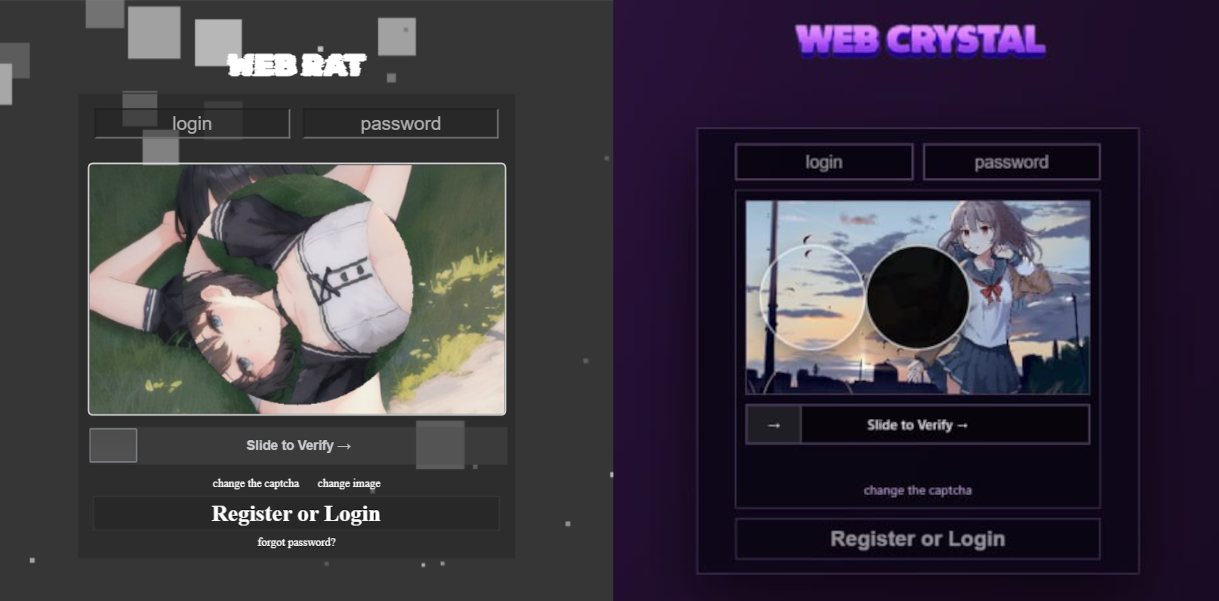
The new malware was first mentioned in Januaryβ€―2026 in a private Telegram chat for developers of RAT malware. The author actively promoted their creation, called Webcrystal RAT, by attaching screenshots of the web panel. Many users observed that the panel layout was identical to that of the previously known WebRAT (also called Salatβ€―Stealer), leading them to label this malware as a copy. Additional similarities included the fact that the RAT was written in Go, and the messages from the bot selling access keys to the control panel closely matched those of the WebRAT bots.

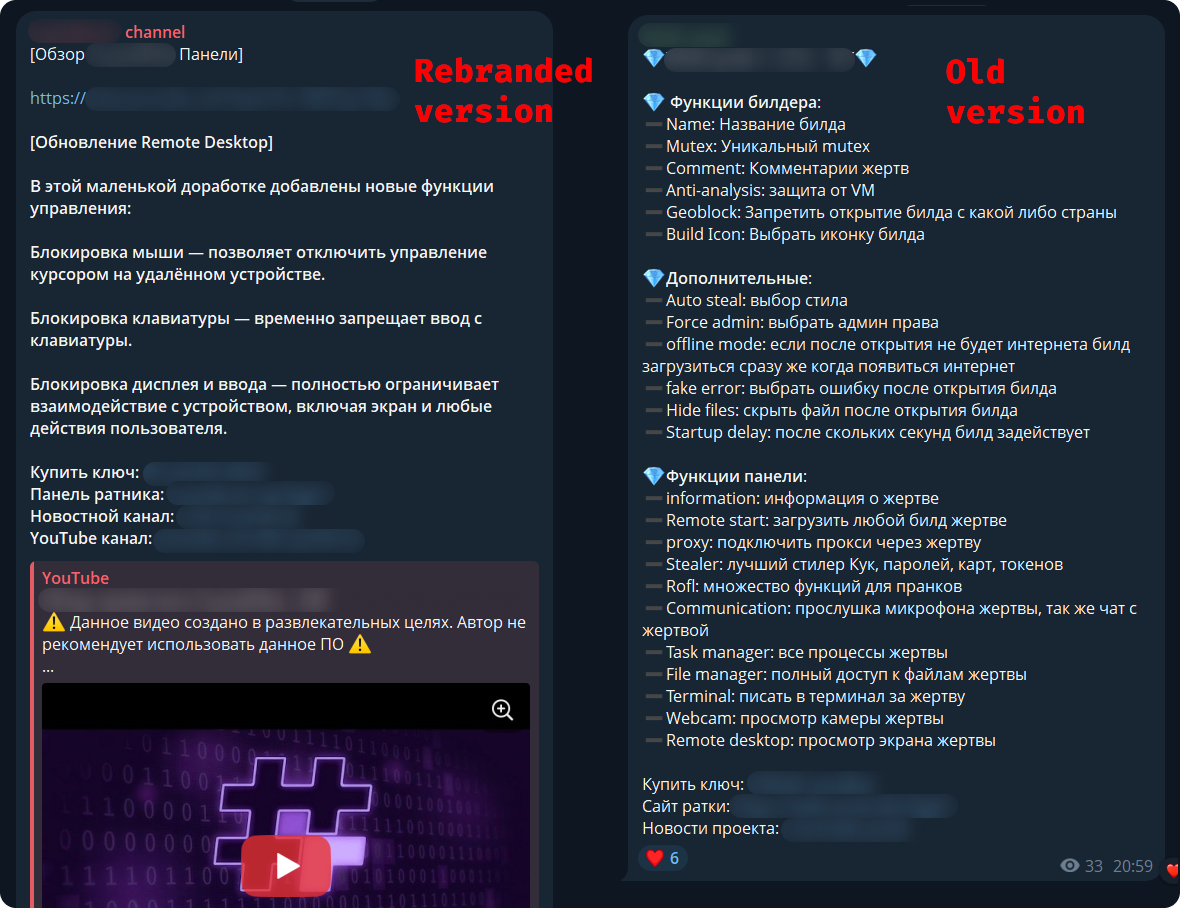
After some time, this malware was rebranded and received a new name, CrystalX RAT. Its promotion moved to a corresponding new channel, which is quite busy and features marketing tricks, such as access key draws and polls. Moreover, it expanded beyond Telegram: a special YouTube channel was created, aimed at marketing promotion and already containing a video review of the capabilities of this malware.

The builder and anti-debug features

By default, the malware control panel provides third parties with an auto‑builder featuring a wide range of configurations, such as selective geoblocking by country, anti‑analysis functions, an executable icon, and others. Each implant is compressed usingβ€―zlib and then encrypted with ChaCha20 and a hard‑coded 32‑byte key with a 12‑byte nonce. The malware has basic anti‑debugging functionality combined with additional optional capabilities:

  • MITM Check: checking if a proxy is enabled by reading the registry value HKCU\Software\Microsoft\Windows\CurrentVersion\Internet Settings, blacklisting names of certain processes (Fiddler, Burp Suite, mitmproxy, etc.), and verifying the presence of installed certificates for the corresponding programs
  • VM detect: checking running processes, presence of guest tools, and hardware characteristics
  • Anti-attach loop: an infinite loop checking the debug flag, debug port, hardware breakpoints, and program execution timings
  • Stealth patches: patches for functions such as AmsiScanBuffer, EtwEventWrite, MiniDumpWriteDump

Stealer capabilities

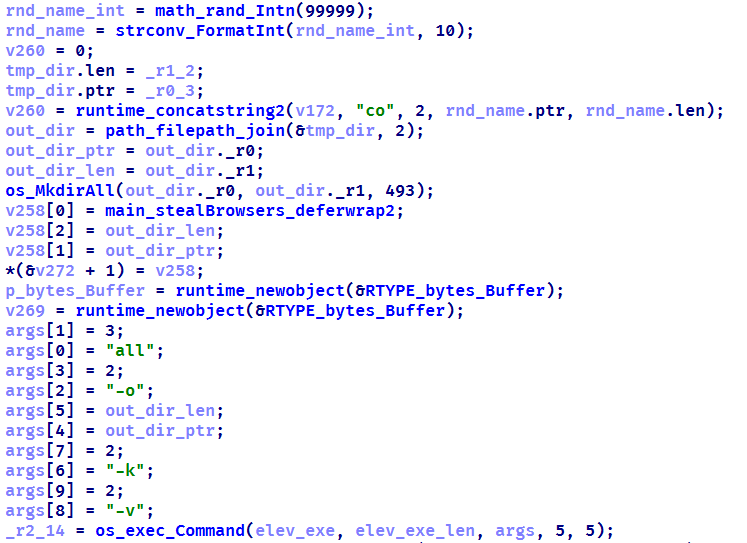
When launched, the malware establishes a connection to its C2 using a hard‑coded URL over the WebSocket protocol. It performs an initial collection of system information, after which all data is sent in JSON format as plain text. Then the malware executes the stealer function, doing so either once or at predefined intervals depending on the build options. The stealer extracts the victim’s credentials for Steam, Discord, and Telegram from the system. It also gathers data from Chromium‑based browsers using the popular ChromeElevator utility. To do this, it decodes and decompresses the utility using base64β€―andβ€―gunzip and saves it to %TEMP%\svc[rndInt].exe, then creates a directory %TEMP%\co[rndInt], where the collected data is stored, and finally runs ChromeElevator with all available options.

The collected data is exfiltrated to the C2. For Yandex and Opera browsers, the stealer has a separate proprietary implementation with base decryption directly on the victim’s system. Notably, the builds created at the time the article was written lack the stealer functionality. OSINT results show that the author intentionally removed it with the aim to update the stealer arsenal before enabling it again.

Keylogger & clipper

Another option of the RAT is the keylogger. All user input is instantly transmitted via WebSocket to the C2, where it is assembled into a coherent text suitable for analysis. Additionally, the malware allows the attacker to read and modify the victim’s clipboard by issuing appropriate commands from the control panel. Moreover, it can inject a malicious clipper into the Chrome or Edge browser. This happens according to the following algorithm:

  1. The special malware command clipper:set:[ADDR1,...] with the attackers’ crypto‑wallets addresses passed as arguments launches the clipper injection thread.
  2. A %LOCALAPPDATA%\Microsoft\Edge\ExtSvc directory is created (regardless whether Edge or Chrome is the target of the injection), in which a malicious extension is stored, consisting of a manifest and a single JS script named content.js.
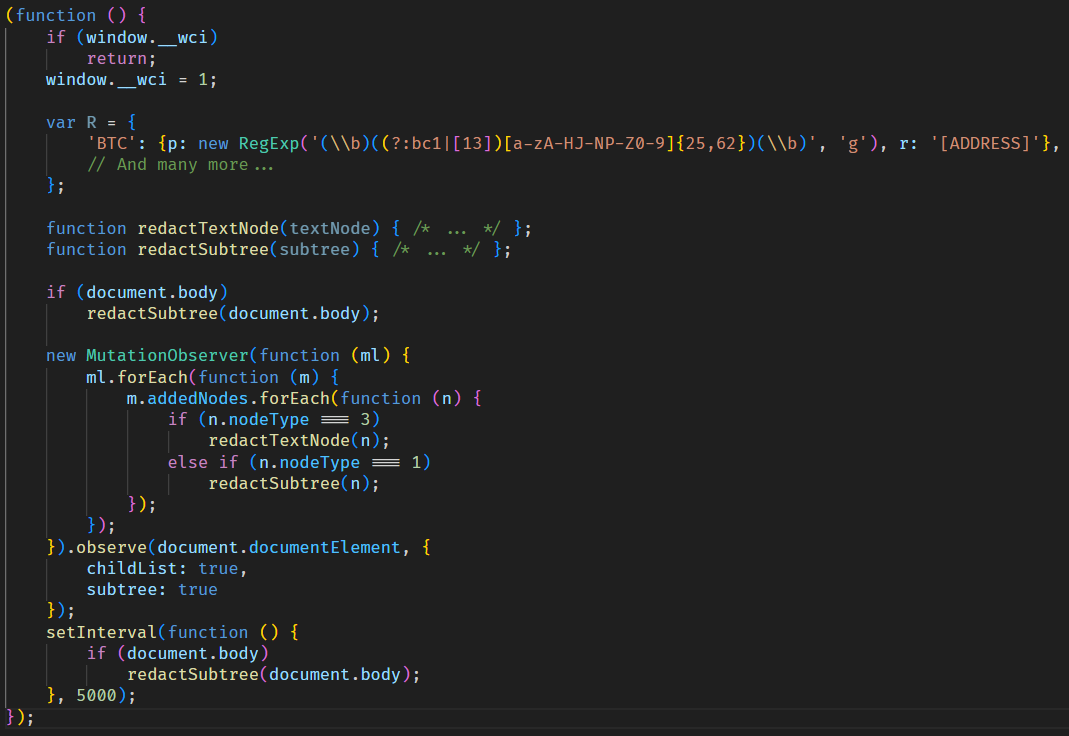
  3. The content.js script is dynamically generated, containing regular expressions for crypto wallet addresses (such as Bitcoin, Litecoin, Monero, Avalanche, Doge, and others) and substitution values.
  4. The generated script is activated via the Chrome DevTools (CDP) protocol using the command Page.addScriptToEvaluateOnNewDocument.

The final script looks as follows:

Remote access

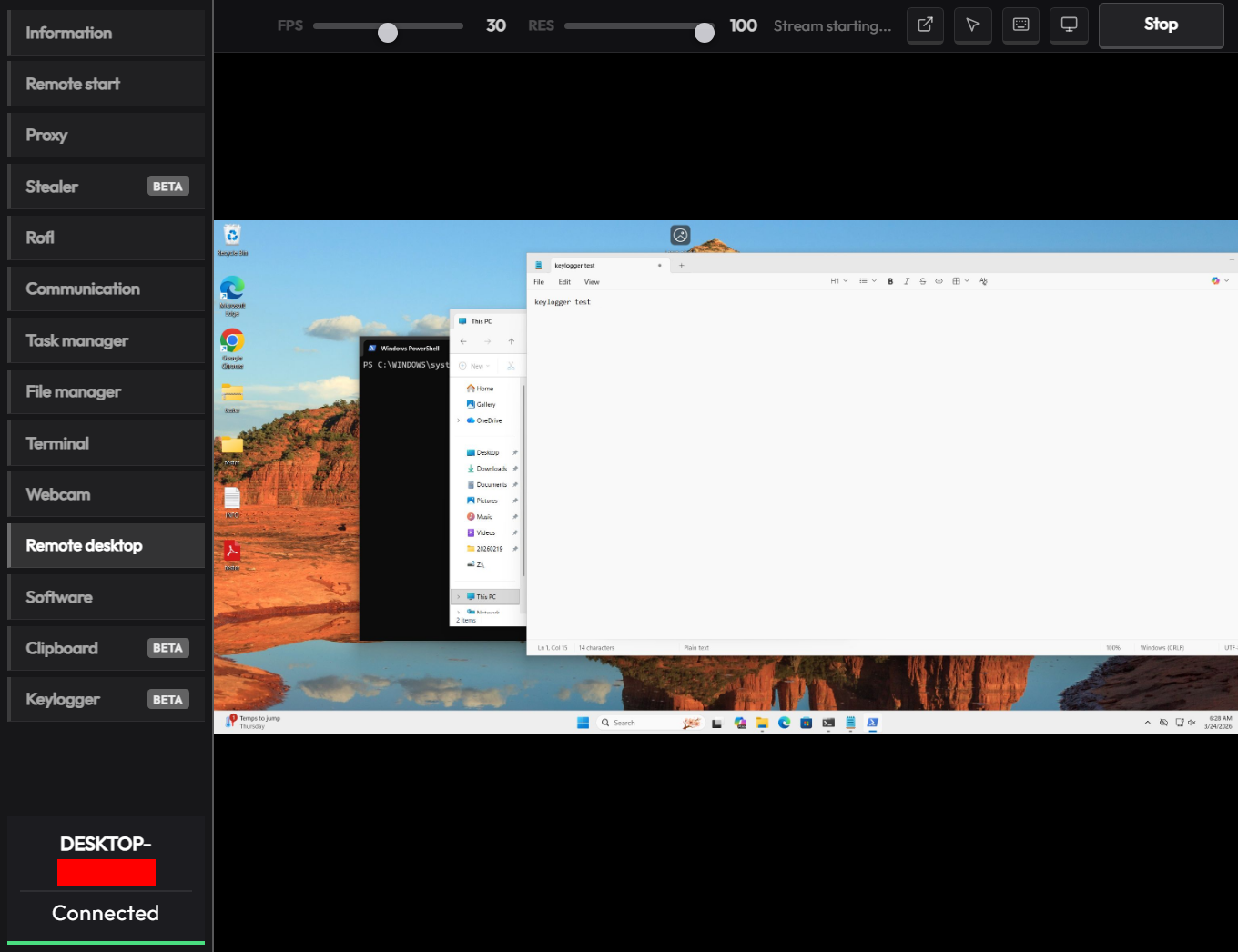
The malware has a large set of commands for remote access to the victim’s system. The attacker can upload arbitrary files, execute any commands using cmd.exe, and also browse the file system, including all available drives. Moreover, the RAT includes its own VNC that allows the attacker to view the victim’s screen and control it remotely. Since both the attacker and the victim use the same session, the panel provides a number of buttons to block user input so that the attacker can perform necessary actions unhindered. The malware can also capture the audio stream from the microphone and the video stream from the camera in the background.

Prank commands

The finishing touch is a separate section of the panel named β€œRofl” with commands whose functions consist of various pranks on the victim.

  • Setting a background: downloading an image from a specified URL and using it as the desktop background.
  • Display orientation: rotating the screen 90Β°,β€―180Β°, orβ€―270Β°.
  • System shutdown: the panel has two different buttons β€œVoltage Drop” and β€œBSoD”, but malware analysis shows that both commands perform a regular shutdown using the appropriate utility.
  • Remapping mouse buttons: swapping left click with right click and the other way round.
  • Peripherals disruption: disconnecting the monitor and blocking the input from the mouse and keyboard.
  • Notifications: displaying a window with a custom title and message.
  • Cursor shake: a special command starts a loop in which the cursor position changes chaotically at short intervals.
  • Disabling components: hiding all file icons on the desktop, disabling the taskbar, task manager, and cmd.exe.

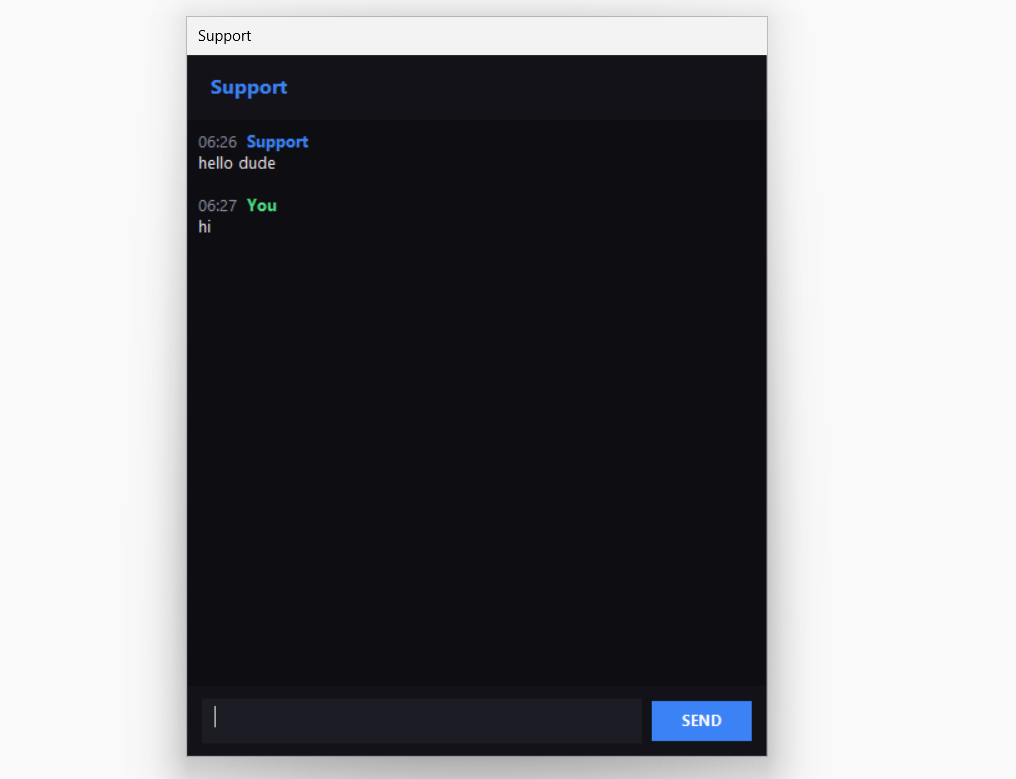
Moreover, the attacker can send a message to the victim, after which a dialog window will open in the system, allowing a bidirectional chat.

Conclusions

The sheer variety of available RATs has perpetuated demand, as actors prioritize flexibility of existing malware and its infrastructure. Thus, CrystalX RAT represents a highly functional MaaS platform that is not limited to espionage capabilities – spyware, keylogging and remote control – but includes unique stealer and prankware features. At the moment, the vector of the initial infection is not precisely known, but it affects dozens of victims. Although to date, we have only seen infection attempts in Russia, the MaaS itself has no regional restrictions meaning it may attack anywhere around the globe. Moreover, our telemetry has recorded new implant versions, which indicates that this malware is still being actively developed and maintained. Combined with the growing PR campaign for CrystalX RAT, it can be concluded that the number of victims can increase significantly in the near future.

Indicators of Compromise

# C2 infrastructure

webcrystal[.]lol
webcrystal[.]sbs
crystalxrat[.]top

# CrystalX RAT implants
47ACCB0ECFE8CCD466752DDE1864F3B0
2DBE6DE177241C144D06355C381B868C
49C74B302BFA32E45B7C1C5780DD0976
88C60DF2A1414CBF24430A74AE9836E0
E540E9797E3B814BFE0A82155DFE135D
1A68AE614FB2D8875CB0573E6A721B46

  •  

A laughing RAT: CrystalX combines spyware, stealer, and prankware features

Introduction

In Marchβ€―2026, we discovered an active campaign promoting previously unknown malware in private Telegram chats. The Trojan was offered as a MaaS (malware‑as‑a‑service) with three subscription tiers. It caught our attention because of its extensive arsenal of capabilities. On the panel provided to third‑party actors, in addition to the standard features of RAT‑like malware, a stealer, keylogger, clipper, and spyware are also available. Most surprisingly, it also includes prankware capabilities: a large set of features designed to trick, annoy, and troll the user. Such a combination of capabilities makes it a rather unique Trojan in its category.

Kaspersky’s products detect this threat as Backdoor.Win64.CrystalX.*, Trojan.Win64.Agent.*, Trojan.Win32.Agentb.gen.

Technical details

Background

The new malware was first mentioned in Januaryβ€―2026 in a private Telegram chat for developers of RAT malware. The author actively promoted their creation, called Webcrystal RAT, by attaching screenshots of the web panel. Many users observed that the panel layout was identical to that of the previously known WebRAT (also called Salatβ€―Stealer), leading them to label this malware as a copy. Additional similarities included the fact that the RAT was written in Go, and the messages from the bot selling access keys to the control panel closely matched those of the WebRAT bots.

After some time, this malware was rebranded and received a new name, CrystalX RAT. Its promotion moved to a corresponding new channel, which is quite busy and features marketing tricks, such as access key draws and polls. Moreover, it expanded beyond Telegram: a special YouTube channel was created, aimed at marketing promotion and already containing a video review of the capabilities of this malware.

The builder and anti-debug features

By default, the malware control panel provides third parties with an auto‑builder featuring a wide range of configurations, such as selective geoblocking by country, anti‑analysis functions, an executable icon, and others. Each implant is compressed usingβ€―zlib and then encrypted with ChaCha20 and a hard‑coded 32‑byte key with a 12‑byte nonce. The malware has basic anti‑debugging functionality combined with additional optional capabilities:

  • MITM Check: checking if a proxy is enabled by reading the registry value HKCU\Software\Microsoft\Windows\CurrentVersion\Internet Settings, blacklisting names of certain processes (Fiddler, Burp Suite, mitmproxy, etc.), and verifying the presence of installed certificates for the corresponding programs
  • VM detect: checking running processes, presence of guest tools, and hardware characteristics
  • Anti-attach loop: an infinite loop checking the debug flag, debug port, hardware breakpoints, and program execution timings
  • Stealth patches: patches for functions such as AmsiScanBuffer, EtwEventWrite, MiniDumpWriteDump

Stealer capabilities

When launched, the malware establishes a connection to its C2 using a hard‑coded URL over the WebSocket protocol. It performs an initial collection of system information, after which all data is sent in JSON format as plain text. Then the malware executes the stealer function, doing so either once or at predefined intervals depending on the build options. The stealer extracts the victim’s credentials for Steam, Discord, and Telegram from the system. It also gathers data from Chromium‑based browsers using the popular ChromeElevator utility. To do this, it decodes and decompresses the utility using base64β€―andβ€―gunzip and saves it to %TEMP%\svc[rndInt].exe, then creates a directory %TEMP%\co[rndInt], where the collected data is stored, and finally runs ChromeElevator with all available options.

The collected data is exfiltrated to the C2. For Yandex and Opera browsers, the stealer has a separate proprietary implementation with base decryption directly on the victim’s system. Notably, the builds created at the time the article was written lack the stealer functionality. OSINT results show that the author intentionally removed it with the aim to update the stealer arsenal before enabling it again.

Keylogger & clipper

Another option of the RAT is the keylogger. All user input is instantly transmitted via WebSocket to the C2, where it is assembled into a coherent text suitable for analysis. Additionally, the malware allows the attacker to read and modify the victim’s clipboard by issuing appropriate commands from the control panel. Moreover, it can inject a malicious clipper into the Chrome or Edge browser. This happens according to the following algorithm:

  1. The special malware command clipper:set:[ADDR1,...] with the attackers’ crypto‑wallets addresses passed as arguments launches the clipper injection thread.
  2. A %LOCALAPPDATA%\Microsoft\Edge\ExtSvc directory is created (regardless whether Edge or Chrome is the target of the injection), in which a malicious extension is stored, consisting of a manifest and a single JS script named content.js.
  3. The content.js script is dynamically generated, containing regular expressions for crypto wallet addresses (such as Bitcoin, Litecoin, Monero, Avalanche, Doge, and others) and substitution values.
  4. The generated script is activated via the Chrome DevTools (CDP) protocol using the command Page.addScriptToEvaluateOnNewDocument.

The final script looks as follows:

Remote access

The malware has a large set of commands for remote access to the victim’s system. The attacker can upload arbitrary files, execute any commands using cmd.exe, and also browse the file system, including all available drives. Moreover, the RAT includes its own VNC that allows the attacker to view the victim’s screen and control it remotely. Since both the attacker and the victim use the same session, the panel provides a number of buttons to block user input so that the attacker can perform necessary actions unhindered. The malware can also capture the audio stream from the microphone and the video stream from the camera in the background.

Prank commands

The finishing touch is a separate section of the panel named β€œRofl” with commands whose functions consist of various pranks on the victim.

  • Setting a background: downloading an image from a specified URL and using it as the desktop background.
  • Display orientation: rotating the screen 90Β°,β€―180Β°, orβ€―270Β°.
  • System shutdown: the panel has two different buttons β€œVoltage Drop” and β€œBSoD”, but malware analysis shows that both commands perform a regular shutdown using the appropriate utility.
  • Remapping mouse buttons: swapping left click with right click and the other way round.
  • Peripherals disruption: disconnecting the monitor and blocking the input from the mouse and keyboard.
  • Notifications: displaying a window with a custom title and message.
  • Cursor shake: a special command starts a loop in which the cursor position changes chaotically at short intervals.
  • Disabling components: hiding all file icons on the desktop, disabling the taskbar, task manager, and cmd.exe.

Moreover, the attacker can send a message to the victim, after which a dialog window will open in the system, allowing a bidirectional chat.

Conclusions

The sheer variety of available RATs has perpetuated demand, as actors prioritize flexibility of existing malware and its infrastructure. Thus, CrystalX RAT represents a highly functional MaaS platform that is not limited to espionage capabilities – spyware, keylogging and remote control – but includes unique stealer and prankware features. At the moment, the vector of the initial infection is not precisely known, but it affects dozens of victims. Although to date, we have only seen infection attempts in Russia, the MaaS itself has no regional restrictions meaning it may attack anywhere around the globe. Moreover, our telemetry has recorded new implant versions, which indicates that this malware is still being actively developed and maintained. Combined with the growing PR campaign for CrystalX RAT, it can be concluded that the number of victims can increase significantly in the near future.

Indicators of Compromise

# C2 infrastructure
webcrystal[.]lol
webcrystal[.]sbs
crystalxrat[.]top

# CrystalX RAT implants
47ACCB0ECFE8CCD466752DDE1864F3B0
2DBE6DE177241C144D06355C381B868C
49C74B302BFA32E45B7C1C5780DD0976
88C60DF2A1414CBF24430A74AE9836E0
E540E9797E3B814BFE0A82155DFE135D
1A68AE614FB2D8875CB0573E6A721B46

  •  
  •  

BeatBanker: A dual‑mode Android Trojan

Recently, we uncovered BeatBanker, an Android‑based malware campaign targeting Brazil. It spreads primarily through phishing attacks via a website disguised as the Google Play Store. To achieve their goals, the malicious APKs carry multiple components, including a cryptocurrency miner and a banking Trojan capable of completely hijacking the device and spoofing screens, among other things. In a more recent campaign, the attackers switched from the banker to a known RAT.

This blog post outlines each phase of the malware’s activity on the victim’s handset, explains how it ensures long‑term persistence, and describes its communication with mining pools.

Key findings:

  • To maintain persistence, the Trojan employs a creative mechanism: it plays an almost inaudible audio file on a loop so it cannot be terminated. This inspired us to name it BeatBanker.
  • It monitors battery temperature and percentage, and checks whether the user is using the device.
  • At various stages of the attack, BeatBanker disguises itself as a legitimate application on the Google Play Store and as the Play Store itself.
  • It deploys a banker in addition to a cryptocurrency miner.
  • When the user tries to make a USDT transaction, BeatBanker creates overlay pages for Binance and Trust Wallet, covertly replacing the destination address with the threat actor’s transfer address.
  • New samples now drop BTMOB RAT instead of the banking module.

Initial infection vector

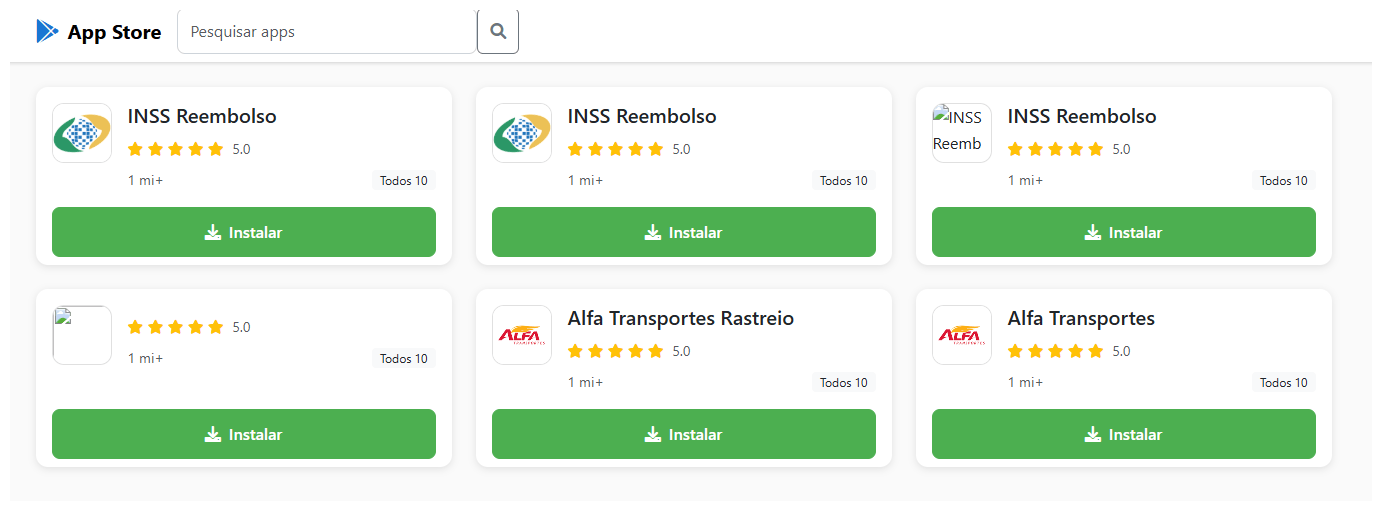
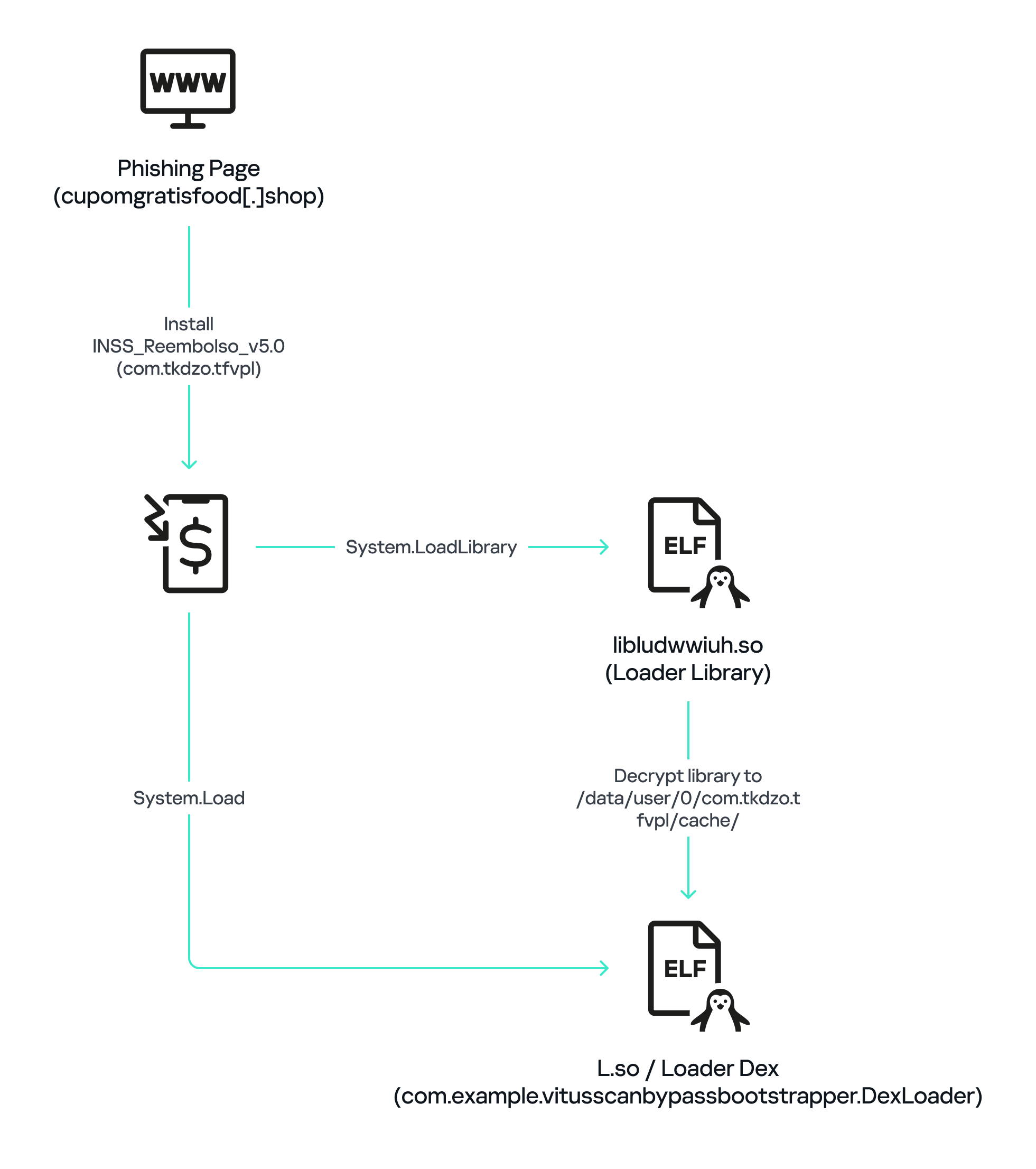
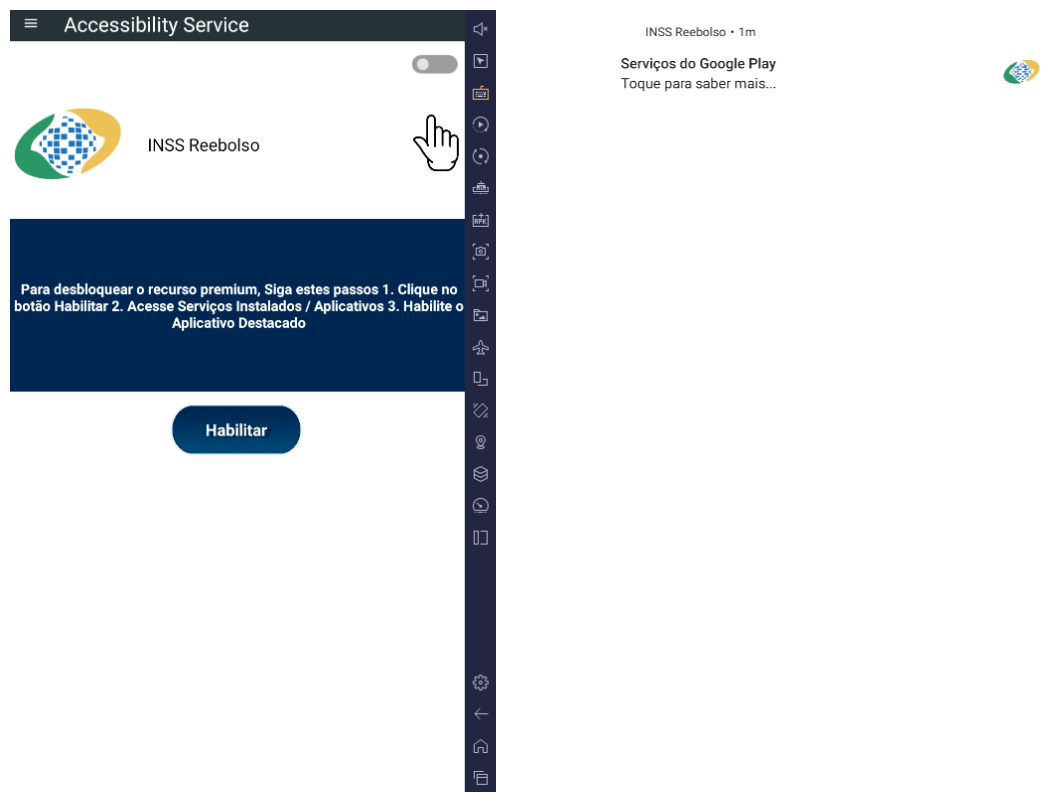
The campaign begins with a counterfeit website, cupomgratisfood[.]shop, that looks exactly like the Google Play Store. This fake app store contains the β€œINSS Reembolso” app, which is in fact a Trojan. There are also other apps that are most likely Trojans too, but we haven’t obtained them.

The INSS Reembolso app poses as the official mobile portal of Brazil’s Instituto Nacional do Seguro Social (INSS), a government service that citizens can use to perform more than 90 social security tasks, from retirement applications and medical exam scheduling to viewing CNIS (National Registry of Social Information), tax, and payment statements, as well as tracking request statuses. By masquerading as this trusted platform, the fake page tricks users into downloading the malicious APK.

Packing

The initial APK file is packed and makes use of a native shared library (ELF) namedΒ  libludwwiuh.so that is included in the application. Its main task is to decrypt another ELF file that will ultimately load the original DEX file.

First, libludwwiuh.so decrypts an embedded encrypted ELF file and drops it to a temporary location on the device under the name l.so. The same code that loaded the libludwwiuh.so library then loads this file, which uses the Java Native Interface (JNI) to continue execution.

l.so – the DEX loader

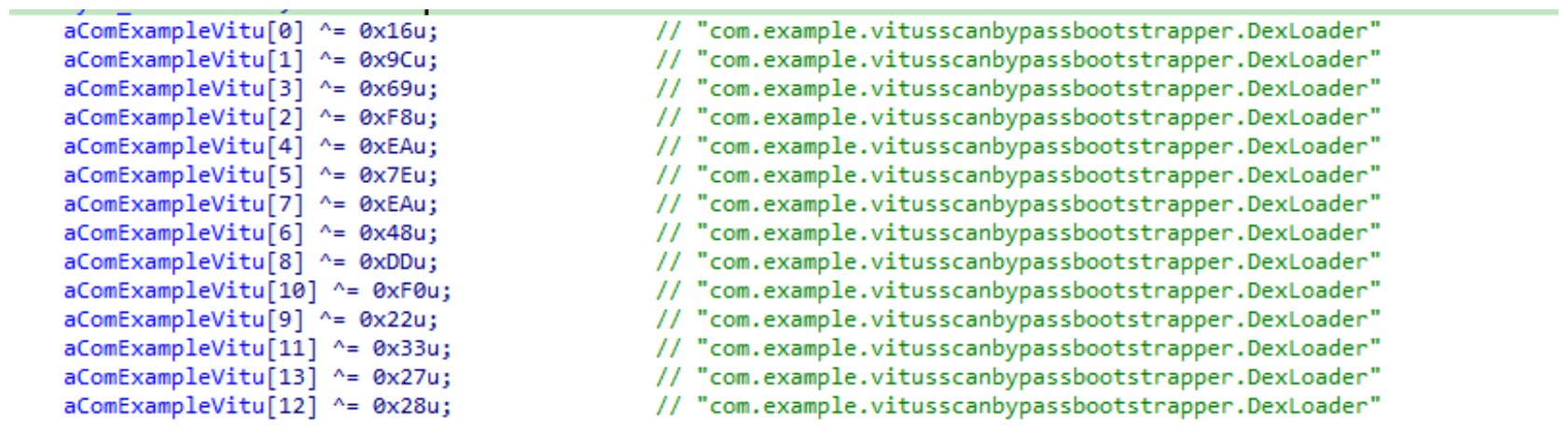
The library does not have calls to its functions; instead, it directly calls the Java methods whose names are encrypted in the stack using XOR (stack strings technique) and restored at runtime:

Initially, the loader makes a request to collect some network information using https://ipapi.is to determine whether the infected device is a mobile device, if a VPN is being used, and to obtain the IP address and other details.

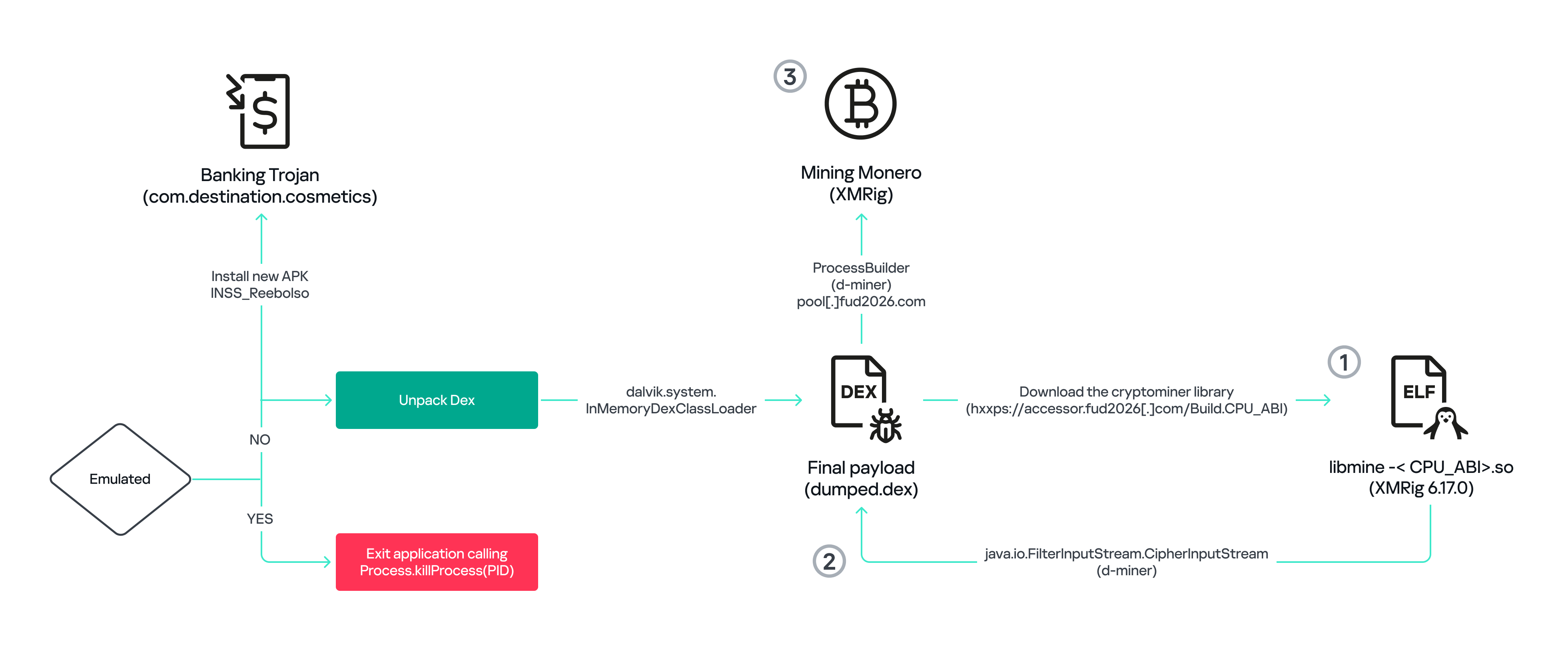
This loader is engineered to bypass mobile antivirus products by utilizing dalvik.system.InMemoryDexClassLoader. It loads malicious DEX code directly into memory, avoiding the creation of any files on the device’s file system. The necessary DEX files can be extracted using dynamic analysis tools like Frida.

Furthermore, the sample incorporates anti-analysis techniques, including runtime checks for emulated or analysis environments. When such an environment is detected (or when specific checks fail, such as verification of the supported CPU_ABI), the malware can immediately terminate its own process by invoking android.os.Process.killProcess(android.os.Process.myPid()), effectively self-destructing to hinder dynamic analysis.

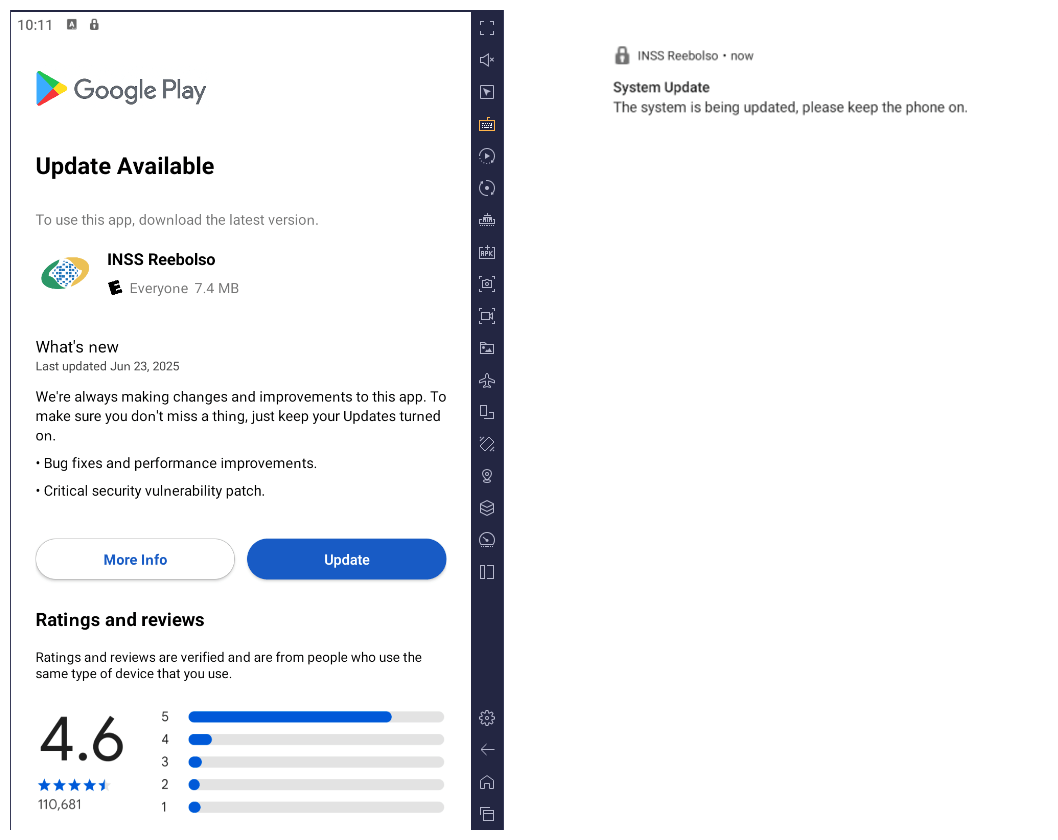
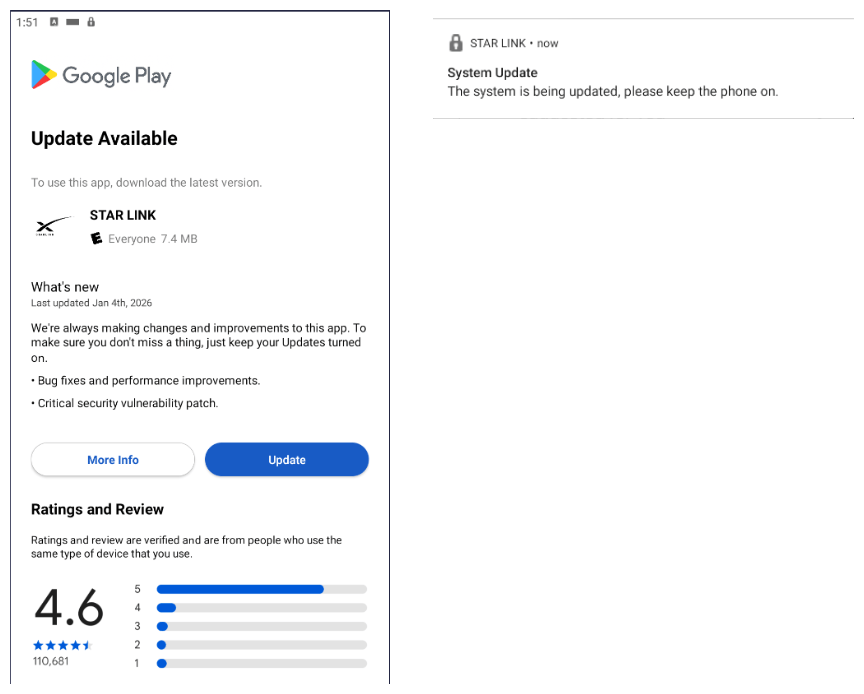
After execution, the malware displays a user interface that mimics the Google Play Store page, showing an update available for the INSS Reembolso app. This is intended to trick victims into granting installation permissions by tapping the β€œUpdate” button, which allows the download of additional hidden malicious payloads.

The payload delivery process mimics the application update. The malware uses the REQUEST_INSTALL_PACKAGES permission to install APK files directly into its memory, bypassing Google Play. To ensure persistence, the malware keeps a notification about a system update pinned to the foreground and activates a foreground service with silent media playback, a tactic designed to prevent the operating system from terminating the malicious process.

Crypto mining

When UPDATE is clicked on a fake Play Store screen, the malicious application downloads and executes an ELF file containing a cryptomining payload. It starts by issuing a GET request to the C2 server at either hxxps://accessor.fud2026.com/libmine-<arch>.so or hxxps://fud2026.com/libmine-<arch>.so. The downloaded file is then decrypted using CipherInputStream(), with the decryption key being derived from the SHA-1 hash of the downloaded file’s name, ensuring that each version of the file is encrypted with a unique key. The resulting file is renamed d-miner.

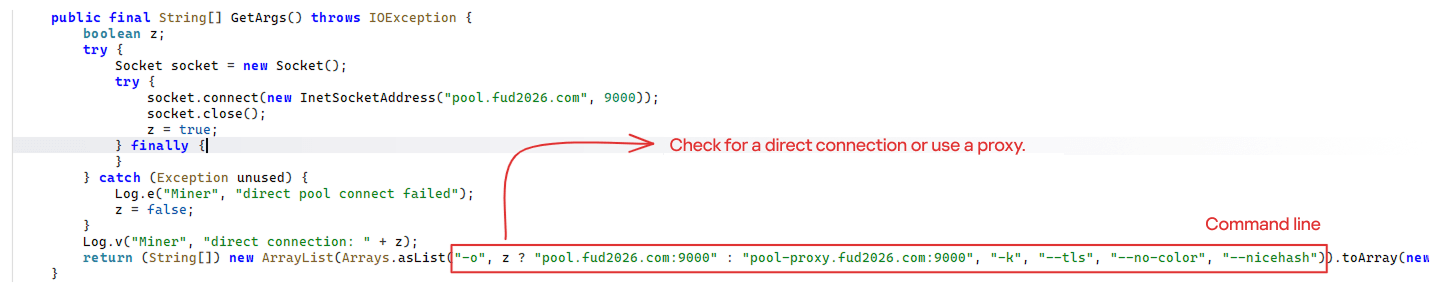
The decrypted payload is an ARM-compiled XMRig 6.17.0 binary. At runtime, it attempts to create a direct TCP connection to pool.fud2026[.]com:9000. If successful, it uses this endpoint; otherwise, it automatically switches to the proxy endpoint pool-proxy.fud2026[.]com:9000. The final command-line arguments passed to XMRig are as follows:

  • -o pool.fud2026[.]com:9000 or pool-proxy.fud2026[.]com:9000 (selected dynamically)
  • -k (keepalive)
  • --tls (encrypted connection)
  • --no-color (disable colored output)
  • --nicehash (NiceHash protocol support)

C2 telemetry

The malware uses Google’s legitimate Firebase Cloud Messaging (FCM) as its primary command‑and‑control (C2) channel. In the analyzed sample, each FCM message received triggers a check of the battery status, temperature, installation date, and user presence. A hidden cryptocurrency miner is then started or stopped as needed. These mechanisms ensure that infected devices remain permanently accessible and responsive to the attacker’s instructions, which are sent through the FCM infrastructure. The attacker monitors the following information:

  • isCharging: indicates whether the phone is charging;
  • batteryLevel: the exact battery percentage;
  • isRecentInstallation: indicates whether the application was recently installed (if so, the implant delays malicious actions);
  • isUserAway: indicates whether the user is away from the device (screen off and inactive);
  • overheat: indicates whether the device is overheating;
  • temp: the current battery temperature.

Persistence

The KeepAliveServiceMediaPlayback component ensures continuous operation by initiating uninterrupted playback via MediaPlayer. It keeps the service active in the foreground using a notification and loads a small, continuous audio file. This constant activity prevents the system from suspending or terminating the process due to inactivity.

The identified audio output8.mp3 is five seconds long and plays on a loop. It contains some Chinese words.

Banking module

BeatBanker compromises the machine with a cryptocurrency miner and introduces another malicious APK that acts as a banking Trojan. This Trojan uses previously obtained permission to install an additional APK called INSS Reebolso, which is associated with the package com.destination.cosmetics.

Similar to the initial malicious APK, it establishes persistence by creating and displaying a fixed notification in the foreground to hinder removal. Furthermore, BeatBanker attempts to trick the user into granting accessibility permissions to the package.

Leveraging the acquired accessibility permissions, the malware establishes comprehensive control over the device’s user interface.

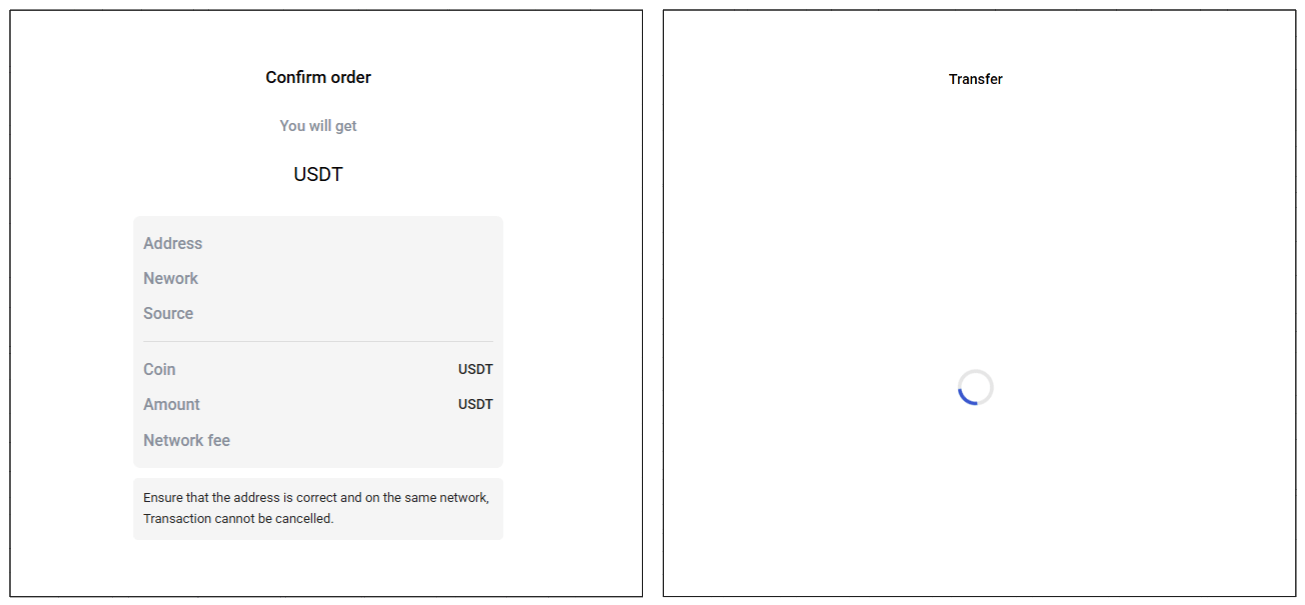
The Trojan constantly monitors the foreground application. It targets the official Binance application (com.binance.dev) and the Trust Wallet application (com.wallet.crypto.trustapp), focusing on USDT transactions. When a user tries to withdraw USDT, the Trojan instantly overlays the target app’s transaction confirmation screen with a highly realistic page sourced from Base64-encoded HTML stored in the banking module.

The module captures the original withdrawal address and amount, then surreptitiously substitutes the destination address with an attacker-controlled one using AccessibilityNodeInfo.ACTION_SET_TEXT. The overlay page shows the victim the address they copied (for Binance) or just shows a loading icon (for Trust Wallet), leading them to believe they are remitting funds to the intended wallet when, in fact, the cryptocurrency is transferred to the attacker’s designated address.

Fake overlay pages: Binance (left) and Trust Wallet (right)

Fake overlay pages: Binance (left) and Trust Wallet (right)

Target browsers

BeatBanker’s banking module monitors the following browsers installed on the victim’s device:

  • Chrome
  • Firefox
  • sBrowser
  • Brave
  • Opera
  • DuckDuckGo
  • Dolphin Browser
  • Edge

Its aim is to collect the URLs accessed by the victim using the regular expression ^(?:https?://)?(?:[^:/\\\\]+\\\\.)?([^:/\\\\]+\\\\.[^:/\\\\]+). It also offers management functionalities (add, edit, delete, list) for links saved in the device’s default browser, as well as the ability to open links provided by the attacker.

C2 communication

BeatBanker is also designed to receive commands from the C2. These commands aim to collect the victim’s personal information and gain complete control of the device.

Command Description
0 Starts dynamic loading of the DEX class
Update Simulates software update and locks the screen
msg: Displays a Toast message with the provided text
goauth<*> Opens Google Authenticator (if installed) and enables the AccessService.SendGoogleAuth flag used to monitor and retrieve authentication codes
kill<*> Sets the protection bypass flag AccessService.bypass to β€œTrue”
and sets the initializeService.uninstall flag to β€œOff”
srec<*> Starts or stops audio recording (microphone), storing the recorded data in a file with an automatically generated filename. The following path format is used to store the recording: /Config/sys/apps/rc/<timestamp>_0REC<last5digits>.wav
pst<*> Pastes text from the clipboard (via Accessibility Services)
GRC<*> Lists all existing audio recording files
gtrc<*> Sends a specific audio recording file to the C2
lcm<*> Lists supported front camera resolutions
usdtress<*> Sets a USDT cryptocurrency address when a transaction is detected
lnk<*> Opens a link in the browser
EHP<*> Updates login credentials (host, port, name) and restarts the application
ssms<*> Sends an SMS message (individually or to all contacts)
CRD<*> Adds (E>) or removes (D>) packages from the list of blocked/disabled applications
SFD<*> Deletes files (logs, recordings, tones) or uninstalls itself
adm<>lck<> Immediately locks the screen using Device Administrator permissions
adm<>wip<> Performs a complete device data wipe (factory reset)
Aclk<*> Executes a sequence of automatic taps (auto-clicker) or lists existing macros
KBO<*>lod Checks the status of the keylogger and virtual keyboard
KBO<*>AKP/AKA Requests permission to activate a custom virtual keyboard or activates one
KBO<*>ENB: Enables (1) or disables (0) the keylogger
RPM<*>lod Checks the status of all critical permissions
RPM<*>ACC Requests Accessibility Services permission
RPM<*>DOZ Requests Doze/App Standby permission (battery optimization)
RPM<*>DRW Requests Draw Over Other Apps permission (overlay)
RPM<*>INST Requests permission to install apps from unknown sources (Android 8+)
ussd<*> Executes a USSD code (e.g., *#06# for IMEI)
Blkt<*> Sets the text for the lock overlay
BLKV<*> Enables or disables full-screen lock using WindowManager.LayoutParams.TYPE_APPLICATION_OVERLAY to display a black FrameLayout element over the entire screen
SCRD<> / SCRD2<> Enables/disables real-time screen text submission to the C2 (screen reading)
rdall<*> Clears or sends all keylogger logs
rdd<*> Deletes a specific log file
rd<*> Sends the content of a specific keylogger file
MO<*> Manages application monitoring (add, remove, list, screenshot, etc.)
FW<*> Controls VPN and firewall (status, block/allow apps, enable/disable)
noti<*> Creates persistent and custom notifications
sp<*> Executes a sequence of swipes/taps (gesture macro)
lodp<*> Manages saved links in the internal browser (add, edit, delete, list)
scc: Starts screen capture/streaming

New BeatBanker samples dropping BTMOB

Our recent detection efforts uncovered a campaign leveraging a fraudulent StarLink application that we assess as being a new BeatBanker variant. The infection chain mirrored previous instances, employing identical persistence methods – specifically, looped audio and fixed notifications. Furthermore, this variant included a crypto miner similar to those seen previously. However, rather than deploying the banking module, it was observed distributing the BTMOB remote administration tool.

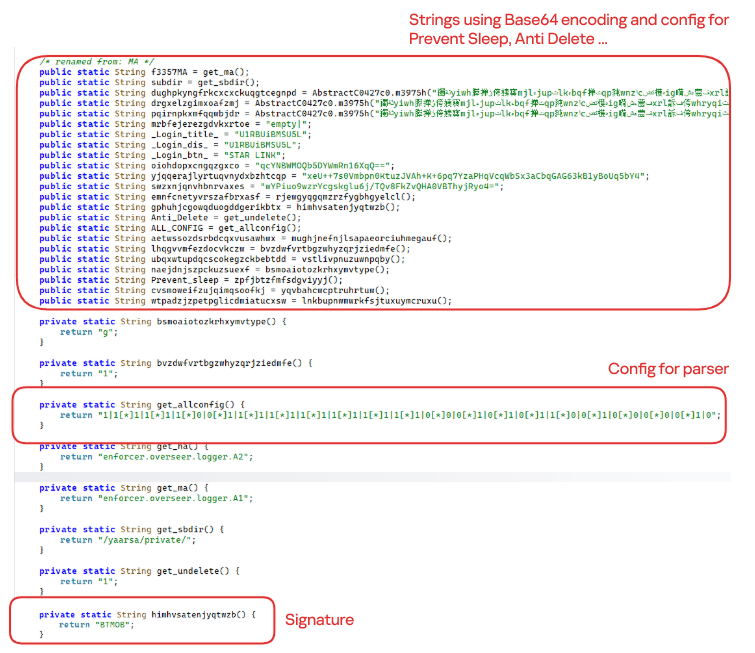
The BTMOB APK is highly obfuscated and contains a class responsible for configuration. Despite this, it’s possible to identify a parser used to define the application’s behavior on the device, as well as persistence features, such as protection against restart, deletion, lock reset, and the ability to perform real-time screen recording.

String decryption

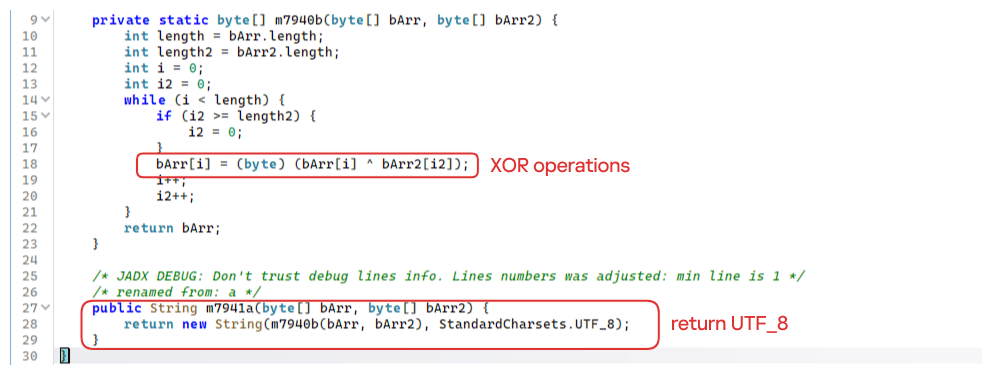
The simple decryption routine uses repetitive XOR between the encrypted data and a short key. It iterates through the encrypted text byte by byte, repeating the key from the beginning whenever it reaches the end. At each position, the sample XORs the encrypted byte with the corresponding byte of the key, overwriting the original. Ultimately, the modified byte array contains the original text, which is then converted to UTF-8 and returned as a string.

Malware-as-a-Service

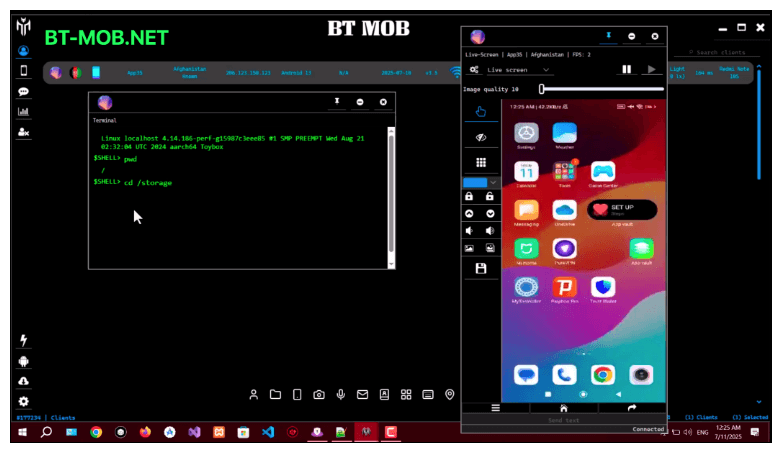
BTMOB is an Android remote administration tool that evolved from the CraxsRAT, CypherRAT, and SpySolr families. It provides full remote control of the victim’s device and is sold in a Malware-as-a-Service (MaaS) model. On July 26, 2025, a threat actor posted a screenshot of the BTMOB RAT in action on GitHub under the username β€œbrmobrats”, along with a link to the website btmob[.]xyz. The website contains information about the BTMOB RAT, including its version history, features, and other relevant details. It also redirects to a Telegram contact. Cyfirma has already linked this account to CraxsRAT and CypherRAT.

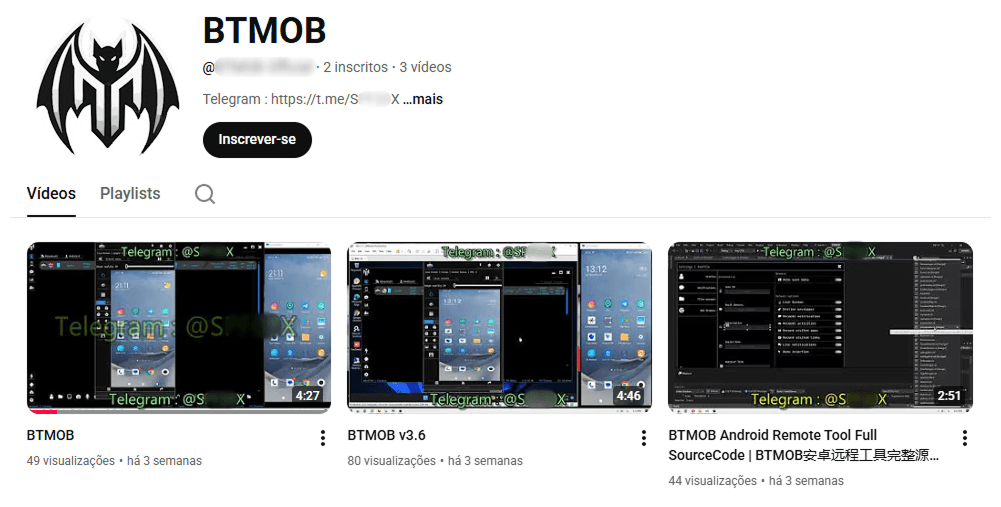
Recently, a YouTube channel was created by a different threat actor that features videos demonstrating how to use the malware and facilitate its sale via Telegram.

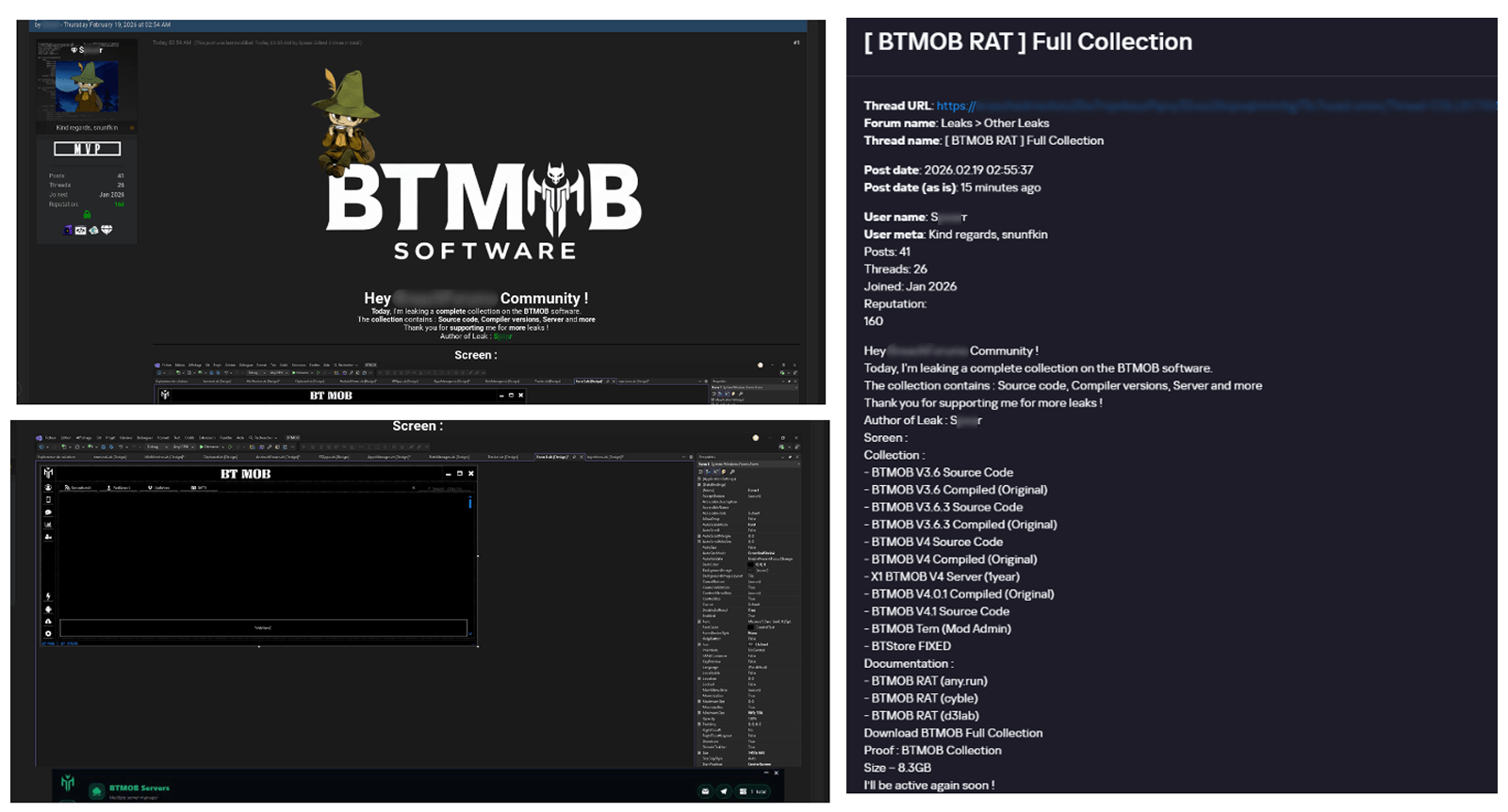
We also saw the distribution and sale of leaked BTMOB source code on some dark web forums. This may suggest that the creator of BeatBanker acquired BTMOB from its original author or the source of the leak and is utilizing it as the final payload, replacing the banking module observed in the INSS Reebolso incident.

In terms of functionality, BTMOB maintains a set of intrusive capabilities, including: automatic granting of permissions, especially on Android 13–15 devices; use of a black FrameLayout overlay to hide system notifications similar to the one observed in the banking module; silent installation; persistent background execution; and mechanisms designed to capture screen lock credentials, including PINs, patterns, and passwords. The malware also provides access to front and rear cameras, captures keystrokes in real time, monitors GPS location, and constantly collects sensitive data. Together, these functionalities provide the operator with comprehensive remote control, persistent access, and extensive surveillance capabilities over compromised devices.

Victims

All variants of BeatBanker – those with the banking module and those with the BTMOB RAT – were detected on victims in Brazil. Some of the samples that deliver BTMOB appear to use WhatsApp to spread, as well as phishing pages.

Conclusion

BeatBanker is an excellent example of how mobile threats are becoming more sophisticated and multi-layered. Initially focused in Brazil, this Trojan operates a dual campaign, acting as a Monero cryptocurrency miner, discreetly draining your device’s battery life while also stealing banking credentials and tampering with cryptocurrency transactions. Moreover, the most recent version goes even further, substituting the banking module with a full-fledged BTMOB RAT.

The attackers have devised inventive tricks to maintain persistence. They keep the process alive by looping an almost inaudible audio track, which prevents the operating system from terminating it and allows BeatBanker to remain active for extended periods.

Furthermore, the threat demonstrates an obsession with staying hidden. It monitors device usage, battery level and temperature. It even uses Google’s legitimate system (FCM) to receive commands. The threat’s banking module is capable of overlaying Binance and Trust Wallet screens and diverting USDT funds to the criminals’ wallets before the victim even notices.

The lesson here is clear: distrust is your best defense. BeatBanker spreads through fake websites that mimic Google Play, disguising itself as trustworthy government applications. To protect yourself against threats like this, it is essential to:

  1. Download apps only from official sources. Always use the Google Play Store or the device vendor’s official app store. Make sure you use the correct app store app, and verify the developer.
  2. Check permissions. Pay attention to the permissions that applications request, especially those related to accessibility and installation of third-party packages.
  3. Keep the system updated. Security updates for Android and your mobile antivirus are essential.

Our solutions detect this threat as HEUR:Trojan-Dropper.AndroidOS.BeatBanker and HEUR:Trojan-Dropper.AndroidOS.Banker.*

Indicators of compromise

Additional IoCs, TTPs and detection rules are available to customers of our Threat Intelligence Reporting service. For more details, contact us at crimewareintel@kaspersky.com.

Host-based (MD5 hashes)
F6C979198809E13859196B135D21E79B – INSS Reebolso
D3005BF1D52B40B0B72B3C3B1773336B – StarLink

Domains
cupomgratisfood[.]shop
fud2026[.]com
accessor.fud2026[.]com
pool.fud2026[.]com
pool-proxy.fud2026[.]com
aptabase.fud2026[.]com
aptabase.khwdji319[.]xyz
btmob[.]xyz
bt-mob[.]net

  •  

BeatBanker: A dual‑mode Android Trojan

Recently, we uncovered BeatBanker, an Android‑based malware campaign targeting Brazil. It spreads primarily through phishing attacks via a website disguised as the Google Play Store. To achieve their goals, the malicious APKs carry multiple components, including a cryptocurrency miner and a banking Trojan capable of completely hijacking the device and spoofing screens, among other things. In a more recent campaign, the attackers switched from the banker to a known RAT.

This blog post outlines each phase of the malware’s activity on the victim’s handset, explains how it ensures long‑term persistence, and describes its communication with mining pools.

Key findings:

  • To maintain persistence, the Trojan employs a creative mechanism: it plays an almost inaudible audio file on a loop so it cannot be terminated. This inspired us to name it BeatBanker.
  • It monitors battery temperature and percentage, and checks whether the user is using the device.
  • At various stages of the attack, BeatBanker disguises itself as a legitimate application on the Google Play Store and as the Play Store itself.
  • It deploys a banker in addition to a cryptocurrency miner.
  • When the user tries to make a USDT transaction, BeatBanker creates overlay pages for Binance and Trust Wallet, covertly replacing the destination address with the threat actor’s transfer address.
  • New samples now drop BTMOB RAT instead of the banking module.

Initial infection vector

The campaign begins with a counterfeit website, cupomgratisfood[.]shop, that looks exactly like the Google Play Store. This fake app store contains the β€œINSS Reembolso” app, which is in fact a Trojan. There are also other apps that are most likely Trojans too, but we haven’t obtained them.

The INSS Reembolso app poses as the official mobile portal of Brazil’s Instituto Nacional do Seguro Social (INSS), a government service that citizens can use to perform more than 90 social security tasks, from retirement applications and medical exam scheduling to viewing CNIS (National Registry of Social Information), tax, and payment statements, as well as tracking request statuses. By masquerading as this trusted platform, the fake page tricks users into downloading the malicious APK.

Packing

The initial APK file is packed and makes use of a native shared library (ELF) namedΒ  libludwwiuh.so that is included in the application. Its main task is to decrypt another ELF file that will ultimately load the original DEX file.

First, libludwwiuh.so decrypts an embedded encrypted ELF file and drops it to a temporary location on the device under the name l.so. The same code that loaded the libludwwiuh.so library then loads this file, which uses the Java Native Interface (JNI) to continue execution.

l.so – the DEX loader

The library does not have calls to its functions; instead, it directly calls the Java methods whose names are encrypted in the stack using XOR (stack strings technique) and restored at runtime:

Initially, the loader makes a request to collect some network information using https://ipapi.is to determine whether the infected device is a mobile device, if a VPN is being used, and to obtain the IP address and other details.

This loader is engineered to bypass mobile antivirus products by utilizing dalvik.system.InMemoryDexClassLoader. It loads malicious DEX code directly into memory, avoiding the creation of any files on the device’s file system. The necessary DEX files can be extracted using dynamic analysis tools like Frida.

Furthermore, the sample incorporates anti-analysis techniques, including runtime checks for emulated or analysis environments. When such an environment is detected (or when specific checks fail, such as verification of the supported CPU_ABI), the malware can immediately terminate its own process by invoking android.os.Process.killProcess(android.os.Process.myPid()), effectively self-destructing to hinder dynamic analysis.

After execution, the malware displays a user interface that mimics the Google Play Store page, showing an update available for the INSS Reembolso app. This is intended to trick victims into granting installation permissions by tapping the β€œUpdate” button, which allows the download of additional hidden malicious payloads.

The payload delivery process mimics the application update. The malware uses the REQUEST_INSTALL_PACKAGES permission to install APK files directly into its memory, bypassing Google Play. To ensure persistence, the malware keeps a notification about a system update pinned to the foreground and activates a foreground service with silent media playback, a tactic designed to prevent the operating system from terminating the malicious process.

Crypto mining

When UPDATE is clicked on a fake Play Store screen, the malicious application downloads and executes an ELF file containing a cryptomining payload. It starts by issuing a GET request to the C2 server at either hxxps://accessor.fud2026.com/libmine-<arch>.so or hxxps://fud2026.com/libmine-<arch>.so. The downloaded file is then decrypted using CipherInputStream(), with the decryption key being derived from the SHA-1 hash of the downloaded file’s name, ensuring that each version of the file is encrypted with a unique key. The resulting file is renamed d-miner.

The decrypted payload is an ARM-compiled XMRig 6.17.0 binary. At runtime, it attempts to create a direct TCP connection to pool.fud2026[.]com:9000. If successful, it uses this endpoint; otherwise, it automatically switches to the proxy endpoint pool-proxy.fud2026[.]com:9000. The final command-line arguments passed to XMRig are as follows:

  • -o pool.fud2026[.]com:9000 or pool-proxy.fud2026[.]com:9000 (selected dynamically)
  • -k (keepalive)
  • --tls (encrypted connection)
  • --no-color (disable colored output)
  • --nicehash (NiceHash protocol support)

C2 telemetry

The malware uses Google’s legitimate Firebase Cloud Messaging (FCM) as its primary command‑and‑control (C2) channel. In the analyzed sample, each FCM message received triggers a check of the battery status, temperature, installation date, and user presence. A hidden cryptocurrency miner is then started or stopped as needed. These mechanisms ensure that infected devices remain permanently accessible and responsive to the attacker’s instructions, which are sent through the FCM infrastructure. The attacker monitors the following information:

  • isCharging: indicates whether the phone is charging;
  • batteryLevel: the exact battery percentage;
  • isRecentInstallation: indicates whether the application was recently installed (if so, the implant delays malicious actions);
  • isUserAway: indicates whether the user is away from the device (screen off and inactive);
  • overheat: indicates whether the device is overheating;
  • temp: the current battery temperature.

Persistence

The KeepAliveServiceMediaPlayback component ensures continuous operation by initiating uninterrupted playback via MediaPlayer. It keeps the service active in the foreground using a notification and loads a small, continuous audio file. This constant activity prevents the system from suspending or terminating the process due to inactivity.

The identified audio output8.mp3 is five seconds long and plays on a loop. It contains some Chinese words.

Banking module

BeatBanker compromises the machine with a cryptocurrency miner and introduces another malicious APK that acts as a banking Trojan. This Trojan uses previously obtained permission to install an additional APK called INSS Reebolso, which is associated with the package com.destination.cosmetics.

Similar to the initial malicious APK, it establishes persistence by creating and displaying a fixed notification in the foreground to hinder removal. Furthermore, BeatBanker attempts to trick the user into granting accessibility permissions to the package.

Leveraging the acquired accessibility permissions, the malware establishes comprehensive control over the device’s user interface.

The Trojan constantly monitors the foreground application. It targets the official Binance application (com.binance.dev) and the Trust Wallet application (com.wallet.crypto.trustapp), focusing on USDT transactions. When a user tries to withdraw USDT, the Trojan instantly overlays the target app’s transaction confirmation screen with a highly realistic page sourced from Base64-encoded HTML stored in the banking module.

The module captures the original withdrawal address and amount, then surreptitiously substitutes the destination address with an attacker-controlled one using AccessibilityNodeInfo.ACTION_SET_TEXT. The overlay page shows the victim the address they copied (for Binance) or just shows a loading icon (for Trust Wallet), leading them to believe they are remitting funds to the intended wallet when, in fact, the cryptocurrency is transferred to the attacker’s designated address.

Fake overlay pages: Binance (left) and Trust Wallet (right)

Fake overlay pages: Binance (left) and Trust Wallet (right)

Target browsers

BeatBanker’s banking module monitors the following browsers installed on the victim’s device:

  • Chrome
  • Firefox
  • sBrowser
  • Brave
  • Opera
  • DuckDuckGo
  • Dolphin Browser
  • Edge

Its aim is to collect the URLs accessed by the victim using the regular expression ^(?:https?://)?(?:[^:/\\\\]+\\\\.)?([^:/\\\\]+\\\\.[^:/\\\\]+). It also offers management functionalities (add, edit, delete, list) for links saved in the device’s default browser, as well as the ability to open links provided by the attacker.

C2 communication

BeatBanker is also designed to receive commands from the C2. These commands aim to collect the victim’s personal information and gain complete control of the device.

Command Description
0 Starts dynamic loading of the DEX class
Update Simulates software update and locks the screen
msg: Displays a Toast message with the provided text
goauth<*> Opens Google Authenticator (if installed) and enables the AccessService.SendGoogleAuth flag used to monitor and retrieve authentication codes
kill<*> Sets the protection bypass flag AccessService.bypass to β€œTrue”
and sets the initializeService.uninstall flag to β€œOff”
srec<*> Starts or stops audio recording (microphone), storing the recorded data in a file with an automatically generated filename. The following path format is used to store the recording: /Config/sys/apps/rc/<timestamp>_0REC<last5digits>.wav
pst<*> Pastes text from the clipboard (via Accessibility Services)
GRC<*> Lists all existing audio recording files
gtrc<*> Sends a specific audio recording file to the C2
lcm<*> Lists supported front camera resolutions
usdtress<*> Sets a USDT cryptocurrency address when a transaction is detected
lnk<*> Opens a link in the browser
EHP<*> Updates login credentials (host, port, name) and restarts the application
ssms<*> Sends an SMS message (individually or to all contacts)
CRD<*> Adds (E>) or removes (D>) packages from the list of blocked/disabled applications
SFD<*> Deletes files (logs, recordings, tones) or uninstalls itself
adm<>lck<> Immediately locks the screen using Device Administrator permissions
adm<>wip<> Performs a complete device data wipe (factory reset)
Aclk<*> Executes a sequence of automatic taps (auto-clicker) or lists existing macros
KBO<*>lod Checks the status of the keylogger and virtual keyboard
KBO<*>AKP/AKA Requests permission to activate a custom virtual keyboard or activates one
KBO<*>ENB: Enables (1) or disables (0) the keylogger
RPM<*>lod Checks the status of all critical permissions
RPM<*>ACC Requests Accessibility Services permission
RPM<*>DOZ Requests Doze/App Standby permission (battery optimization)
RPM<*>DRW Requests Draw Over Other Apps permission (overlay)
RPM<*>INST Requests permission to install apps from unknown sources (Android 8+)
ussd<*> Executes a USSD code (e.g., *#06# for IMEI)
Blkt<*> Sets the text for the lock overlay
BLKV<*> Enables or disables full-screen lock using WindowManager.LayoutParams.TYPE_APPLICATION_OVERLAY to display a black FrameLayout element over the entire screen
SCRD<> / SCRD2<> Enables/disables real-time screen text submission to the C2 (screen reading)
rdall<*> Clears or sends all keylogger logs
rdd<*> Deletes a specific log file
rd<*> Sends the content of a specific keylogger file
MO<*> Manages application monitoring (add, remove, list, screenshot, etc.)
FW<*> Controls VPN and firewall (status, block/allow apps, enable/disable)
noti<*> Creates persistent and custom notifications
sp<*> Executes a sequence of swipes/taps (gesture macro)
lodp<*> Manages saved links in the internal browser (add, edit, delete, list)
scc: Starts screen capture/streaming

New BeatBanker samples dropping BTMOB

Our recent detection efforts uncovered a campaign leveraging a fraudulent StarLink application that we assess as being a new BeatBanker variant. The infection chain mirrored previous instances, employing identical persistence methods – specifically, looped audio and fixed notifications. Furthermore, this variant included a crypto miner similar to those seen previously. However, rather than deploying the banking module, it was observed distributing the BTMOB remote administration tool.

The BTMOB APK is highly obfuscated and contains a class responsible for configuration. Despite this, it’s possible to identify a parser used to define the application’s behavior on the device, as well as persistence features, such as protection against restart, deletion, lock reset, and the ability to perform real-time screen recording.

String decryption

The simple decryption routine uses repetitive XOR between the encrypted data and a short key. It iterates through the encrypted text byte by byte, repeating the key from the beginning whenever it reaches the end. At each position, the sample XORs the encrypted byte with the corresponding byte of the key, overwriting the original. Ultimately, the modified byte array contains the original text, which is then converted to UTF-8 and returned as a string.

Malware-as-a-Service

BTMOB is an Android remote administration tool that evolved from the CraxsRAT, CypherRAT, and SpySolr families. It provides full remote control of the victim’s device and is sold in a Malware-as-a-Service (MaaS) model. On July 26, 2025, a threat actor posted a screenshot of the BTMOB RAT in action on GitHub under the username β€œbrmobrats”, along with a link to the website btmob[.]xyz. The website contains information about the BTMOB RAT, including its version history, features, and other relevant details. It also redirects to a Telegram contact. Cyfirma has already linked this account to CraxsRAT and CypherRAT.

Recently, a YouTube channel was created by a different threat actor that features videos demonstrating how to use the malware and facilitate its sale via Telegram.

We also saw the distribution and sale of leaked BTMOB source code on some dark web forums. This may suggest that the creator of BeatBanker acquired BTMOB from its original author or the source of the leak and is utilizing it as the final payload, replacing the banking module observed in the INSS Reebolso incident.

In terms of functionality, BTMOB maintains a set of intrusive capabilities, including: automatic granting of permissions, especially on Android 13–15 devices; use of a black FrameLayout overlay to hide system notifications similar to the one observed in the banking module; silent installation; persistent background execution; and mechanisms designed to capture screen lock credentials, including PINs, patterns, and passwords. The malware also provides access to front and rear cameras, captures keystrokes in real time, monitors GPS location, and constantly collects sensitive data. Together, these functionalities provide the operator with comprehensive remote control, persistent access, and extensive surveillance capabilities over compromised devices.

Victims

All variants of BeatBanker – those with the banking module and those with the BTMOB RAT – were detected on victims in Brazil. Some of the samples that deliver BTMOB appear to use WhatsApp to spread, as well as phishing pages.

Conclusion

BeatBanker is an excellent example of how mobile threats are becoming more sophisticated and multi-layered. Initially focused in Brazil, this Trojan operates a dual campaign, acting as a Monero cryptocurrency miner, discreetly draining your device’s battery life while also stealing banking credentials and tampering with cryptocurrency transactions. Moreover, the most recent version goes even further, substituting the banking module with a full-fledged BTMOB RAT.

The attackers have devised inventive tricks to maintain persistence. They keep the process alive by looping an almost inaudible audio track, which prevents the operating system from terminating it and allows BeatBanker to remain active for extended periods.

Furthermore, the threat demonstrates an obsession with staying hidden. It monitors device usage, battery level and temperature. It even uses Google’s legitimate system (FCM) to receive commands. The threat’s banking module is capable of overlaying Binance and Trust Wallet screens and diverting USDT funds to the criminals’ wallets before the victim even notices.

The lesson here is clear: distrust is your best defense. BeatBanker spreads through fake websites that mimic Google Play, disguising itself as trustworthy government applications. To protect yourself against threats like this, it is essential to:

  1. Download apps only from official sources. Always use the Google Play Store or the device vendor’s official app store. Make sure you use the correct app store app, and verify the developer.
  2. Check permissions. Pay attention to the permissions that applications request, especially those related to accessibility and installation of third-party packages.
  3. Keep the system updated. Security updates for Android and your mobile antivirus are essential.

Our solutions detect this threat as HEUR:Trojan-Dropper.AndroidOS.BeatBanker and HEUR:Trojan-Dropper.AndroidOS.Banker.*

Indicators of compromise

Additional IoCs, TTPs and detection rules are available to customers of our Threat Intelligence Reporting service. For more details, contact us at crimewareintel@kaspersky.com.

Host-based (MD5 hashes)
F6C979198809E13859196B135D21E79B – INSS Reebolso
D3005BF1D52B40B0B72B3C3B1773336B – StarLink

Domains
cupomgratisfood[.]shop
fud2026[.]com
accessor.fud2026[.]com
pool.fud2026[.]com
pool-proxy.fud2026[.]com
aptabase.fud2026[.]com
aptabase.khwdji319[.]xyz
btmob[.]xyz
bt-mob[.]net

  •  

Open the wrong β€œPDF” and attackers gain remote access to your PC

Cybercriminals behind a campaign dubbed DEAD#VAX are taking phishing one step further by delivering malware inside virtual hard disks that pretend to be ordinary PDF documents. Open the wrong β€œinvoice” or β€œpurchase order” and you won’t see a document at all. Instead, Windows mounts a virtual drive that quietly installs AsyncRAT, a backdoor Trojan that allows attackers to remotely monitor and control your computer.

It’s a remote access tool, which means attackers gain remote hands‑on‑keyboard control, while traditional file‑based defenses see almost nothing suspicious on disk.

From a high-level view, the infection chain is long, but every step looks just legitimate enough on its own to slip past casual checks.

Victims receive phishing emails that look like routine business messages, often referencingΒ purchase ordersΒ or invoices and sometimes impersonating real companies. The email doesn’t attach a document directly. Instead, it links to a file hosted onΒ IPFS (InterPlanetary File System), a decentralized storage network increasingly abused in phishing campaigns because content is harder to take down and can be accessed through normal web gateways.

The linked file is named as a PDF and has the PDF icon, but is actually a virtual hard disk (VHD)Β file. When the user double‑clicks it, WindowsΒ mounts it as a new driveΒ (for example, drive E:) instead of opening a document viewer. Mounting VHDs is perfectly legitimate Windows behavior, which makes this step less likely to ring alarm bells.

Inside the mounted drive is what appears to be the expected document, but it’s actually aΒ Windows Script File (WSF). When the user opens it, Windows executes the code in the file instead of displaying a PDF.

After some checks to avoid analysis and detection, the script injects the payloadβ€”AsyncRAT shellcodeβ€”into trusted, Microsoft‑signed processes such as RuntimeBroker.exe, OneDrive.exe, taskhostw.exe, or sihost.exe. The malware never writes an actual executable file to disk. It lives and runs entirely in memory inside these legitimate processes, making detection and eventually at a later stage, forensics much harder. It also avoids sudden spikes in activity or memory usage that could draw attention.

For an individual user, falling for this phishing email can result in:

  • Theft of saved and typed passwords, including for email, banking, and social media.
  • Exposure of confidential documents, photos, or other sensitive files taken straight from the system.
  • Surveillance via periodic screenshots or, where configured, webcam capture.
  • Use of the machine as a foothold to attack other devices on the same home or office network.

How to stay safe

Because detection can be hard, it is crucial that users apply certain checks:

  • Don’t open email attachments until after verifying, with a trusted source, that they are legitimate.
  • Make sure you can see the actual file extensions. Unfortunately, Windows allows users to hide them. So, when in reality the file would be called invoice.pdf.vhd the user would only see invoice.pdf. To find out how to do this, see below.
  • Use an up-to-date, real-time anti-malware solution that can detect malware hiding in memory.

Showing file extensions on Windows 10 and 11

To show file extensions in Windows 10 and 11:

  • OpenΒ ExplorerΒ (Windows key + E)
  • In Windows 10, selectΒ ViewΒ and check the box forΒ File name extensions.
  • In Windows 11, this is found underΒ View > Show > File name extensions.

Alternatively, search for File Explorer Options to uncheck Hide extensions for known file types.

For older versions of Windows, refer to this article.


We don’t just report on threatsβ€”we remove them

Cybersecurity risks should never spread beyond a headline. Keep threats off your devices byΒ downloading Malwarebytes today.

  •  

Open the wrong β€œPDF” and attackers gain remote access to your PC

Cybercriminals behind a campaign dubbed DEAD#VAX are taking phishing one step further by delivering malware inside virtual hard disks that pretend to be ordinary PDF documents. Open the wrong β€œinvoice” or β€œpurchase order” and you won’t see a document at all. Instead, Windows mounts a virtual drive that quietly installs AsyncRAT, a backdoor Trojan that allows attackers to remotely monitor and control your computer.

It’s a remote access tool, which means attackers gain remote hands‑on‑keyboard control, while traditional file‑based defenses see almost nothing suspicious on disk.

From a high-level view, the infection chain is long, but every step looks just legitimate enough on its own to slip past casual checks.

Victims receive phishing emails that look like routine business messages, often referencingΒ purchase ordersΒ or invoices and sometimes impersonating real companies. The email doesn’t attach a document directly. Instead, it links to a file hosted onΒ IPFS (InterPlanetary File System), a decentralized storage network increasingly abused in phishing campaigns because content is harder to take down and can be accessed through normal web gateways.

The linked file is named as a PDF and has the PDF icon, but is actually a virtual hard disk (VHD)Β file. When the user double‑clicks it, WindowsΒ mounts it as a new driveΒ (for example, drive E:) instead of opening a document viewer. Mounting VHDs is perfectly legitimate Windows behavior, which makes this step less likely to ring alarm bells.

Inside the mounted drive is what appears to be the expected document, but it’s actually aΒ Windows Script File (WSF). When the user opens it, Windows executes the code in the file instead of displaying a PDF.

After some checks to avoid analysis and detection, the script injects the payloadβ€”AsyncRAT shellcodeβ€”into trusted, Microsoft‑signed processes such as RuntimeBroker.exe, OneDrive.exe, taskhostw.exe, or sihost.exe. The malware never writes an actual executable file to disk. It lives and runs entirely in memory inside these legitimate processes, making detection and eventually at a later stage, forensics much harder. It also avoids sudden spikes in activity or memory usage that could draw attention.

For an individual user, falling for this phishing email can result in:

  • Theft of saved and typed passwords, including for email, banking, and social media.
  • Exposure of confidential documents, photos, or other sensitive files taken straight from the system.
  • Surveillance via periodic screenshots or, where configured, webcam capture.
  • Use of the machine as a foothold to attack other devices on the same home or office network.

How to stay safe

Because detection can be hard, it is crucial that users apply certain checks:

  • Don’t open email attachments until after verifying, with a trusted source, that they are legitimate.
  • Make sure you can see the actual file extensions. Unfortunately, Windows allows users to hide them. So, when in reality the file would be called invoice.pdf.vhd the user would only see invoice.pdf. To find out how to do this, see below.
  • Use an up-to-date, real-time anti-malware solution that can detect malware hiding in memory.

Showing file extensions on Windows 10 and 11

To show file extensions in Windows 10 and 11:

  • OpenΒ ExplorerΒ (Windows key + E)
  • In Windows 10, selectΒ ViewΒ and check the box forΒ File name extensions.
  • In Windows 11, this is found underΒ View > Show > File name extensions.

Alternatively, search for File Explorer Options to uncheck Hide extensions for known file types.

For older versions of Windows, refer to this article.


We don’t just report on threatsβ€”we remove them

Cybersecurity risks should never spread beyond a headline. Keep threats off your devices byΒ downloading Malwarebytes today.

  •  

Stan Ghouls targeting Russia and Uzbekistan with NetSupport RAT

Introduction

Stan Ghouls (also known as Bloody Wolf) is an cybercriminal group that has been launching targeted attacks against organizations in Russia, Kyrgyzstan, Kazakhstan, and Uzbekistan since at least 2023. These attackers primarily have their sights set on the manufacturing, finance, and IT sectors. Their campaigns are meticulously prepared and tailored to specific victims, featuring a signature toolkit of custom Java-based malware loaders and a sprawling infrastructure with resources dedicated to specific campaigns.

We continuously track Stan Ghouls’ activity, providing our clients with intel on their tactics, techniques, procedures, and latest campaigns. In this post, we share the results of our most recent deep dive into a campaign targeting Uzbekistan, where we identified roughly 50 victims. About 10Β devices in Russia were also hit, with a handful of others scattered across Kazakhstan, Turkey, Serbia, and Belarus (though those last three were likely just collateral damage).

During our investigation, we spotted shifts in the attackers’ infrastructure – specifically, a batch of new domains. We also uncovered evidence suggesting that Stan Ghouls may have added IoT-focused malware to their arsenal.

Technical details

Threat evolution

Stan Ghouls relies on phishing emails packed with malicious PDF attachments as their initial entry point. Historically, the group’s weapon of choice was the remote access Trojan (RAT) STRRAT, also known as Strigoi Master. Last year, however, they switched strategies, opting to misuse legitimate software, NetSupport, to maintain control over infected machines.

Given Stan Ghouls’ targeting of financial institutions, we believe their primary motive is financial gain. That said, their heavy use of RATs may also hint at cyberespionage.

Like any other organized cybercrime groups, Stan Ghouls frequently refreshes its infrastructure. To track their campaigns effectively, you have to continuously analyze their activity.

Initial infection vector

As we’ve mentioned, Stan Ghouls’ primary – and currently only – delivery method is spear phishing. Specifically, they favor emails loaded with malicious PDF attachments. This has been backed up by research from several of our industry peers (1, 2, 3). Interestingly, the attackers prefer to use local languages rather than opting for international mainstays like Russian or English. Below is an example of an email spotted in a previous campaign targeting users in Kyrgyzstan.

Example of a phishing email from a previous Stan Ghouls campaign

Example of a phishing email from a previous Stan Ghouls campaign

The email is written in Kyrgyz and translates to: β€œThe service has contacted you. Materials for review are attached. Sincerely”.

The attachment was a malicious PDF file titled β€œΠŸΠΎΡΡ‚Π°Π½ΠΎΠ²Π»Π΅Π½ΠΈΠ΅_Π Π°ΠΉΠΎΠ½Π½Ρ‹ΠΉ_суд_ΠšΡ‡Ρ€ΠΌ_3566_28-01-25_OL4_scan.pdf” (the title, written in Russian, posed it as an order of district court).

During the most recent campaign, which primarily targeted victims in Uzbekistan, the attackers deployed spear-phishing emails written in Uzbek:

Example of a spear-phishing email from the latest campaign

Example of a spear-phishing email from the latest campaign

The email text can be translated as follows:

[redacted] AKMALZHON IBROHIMOVICH

You will receive a court notice. Application for retrial. The case is under review by the district court. Judicial Service.

Mustaqillik Street, 147 Uraboshi Village, Quva District.

The attachment, named E-SUD_705306256_ljro_varaqasi.pdf (MD5: 7556e2f5a8f7d7531f28508f718cb83d), is a standard one-page decoy PDF:

The embedded decoy document

The embedded decoy document

Notice that the attackers claim that the β€œcase materials” (which are actually the malicious loader) can only be opened using the Java Runtime Environment.

They even helpfully provide a link for the victim to download and install it from the official website.

The malicious loader

The decoy document contains identical text in both Russian and Uzbek, featuring two links that point to the malicious loader:

  • Uzbek link (β€œ- Ish materiallari 09.12.2025 y”): hxxps://mysoliq-uz[.]com/api/v2/documents/financial/Q4-2025/audited/consolidated/with-notes/financials/reports/annual/2025/tashkent/statistical-statements/
  • Russian link (β€œ- ΠœΠ°Ρ‚Π΅Ρ€ΠΈΠ°Π»Ρ‹ Π΄Π΅Π»Π° 09.12.2025 Π³.”): hxxps://my-xb[.]com/api/v2/documents/financial/Q4-2025/audited/consolidated/with-notes/financials/reports/annual/2025/tashkent/statistical-statements/

Both links lead to the exact same JAR file (MD5: 95db93454ec1d581311c832122d21b20).

It’s worth noting that these attackers are constantly updating their infrastructure, registering new domains for every new campaign. In the relatively short history of this threat, we’ve already mapped out over 35 domains tied to Stan Ghouls.

The malicious loader handles three main tasks:

  1. Displaying a fake error message to trick the user into thinking the application can’t run. The message in the screenshot translates to: β€œThis application cannot be run in your OS. Please use another device.”

    Fake error message

    Fake error message

  2. Checking that the number of previous RAT installation attempts is less than three. If the limit is reached, the loader terminates and throws the following error: β€œUrinishlar chegarasidan oshildi. Boshqa kompyuterni tekshiring.” This translates to: β€œAttempt limit reached. Try another computer.”

    The limitCheck procedure for verifying the number of RAT download attempts

    The limitCheck procedure for verifying the number of RAT download attempts

  3. Downloading a remote management utility from a malicious domain and saving it to the victim’s machine. Stan Ghouls loaders typically contain a list of several domains and will iterate through them until they find one that’s live.

    The performanceResourceUpdate procedure for downloading the remote management utility

    The performanceResourceUpdate procedure for downloading the remote management utility

The loader fetches the following files, which make up the components of the NetSupport RAT: PCICHEK.DLL, client32.exe, advpack.dll, msvcr100.dll, remcmdstub.exe, ir50_qcx.dll, client32.ini, AudioCapture.dll, kbdlk41a.dll, KBDSF.DLL, tcctl32.dll, HTCTL32.DLL, kbdibm02.DLL, kbd101c.DLL, kbd106n.dll, ir50_32.dll, nskbfltr.inf, NSM.lic, pcicapi.dll, PCICL32.dll, qwave.dll. This list is hardcoded in the malicious loader’s body. To ensure the download was successful, it checks for the presence of the client32.exe executable. If the file is found, the loader generates a NetSupport launch script (run.bat), drops it into the folder with the other files, and executes it:

The createBatAndRun procedure for creating and executing the run.bat file, which then launches the NetSupport RAT

The createBatAndRun procedure for creating and executing the run.bat file, which then launches the NetSupport RAT

The loader also ensures NetSupport persistence by adding it to startup using the following three methods:

  1. It creates an autorun script named SoliqUZ_Run.bat and drops it into the Startup folder (%APPDATA%\Microsoft\Windows\Start Menu\Programs\Startup):

    The generateAutorunScript procedure for creating the batch file and placing it in the Startup folder

    The generateAutorunScript procedure for creating the batch file and placing it in the Startup folder

  2. It adds the run.bat file to the registry’s autorun key (HKCU\Software\Microsoft\Windows\CurrentVersion\Run\malicious_key_name).

    The registryStartupAdd procedure for adding the RAT launch script to the registry autorun key

    The registryStartupAdd procedure for adding the RAT launch script to the registry autorun key

  3. It creates a scheduled task to trigger run.bat using the following command:
    schtasks Create /TN "[malicious_task_name]" /TR "[path_to_run.bat]" /SC ONLOGON /RL LIMITED /F /RU "[%USERNAME%]"

    The installStartupTask procedure for creating a scheduled task to launch the NetSupport RAT (via run.bat)

    The installStartupTask procedure for creating a scheduled task to launch the NetSupport RAT (via run.bat)

Once the NetSupport RAT is downloaded, installed, and executed, the attackers gain total control over the victim’s machine. While we don’t have enough telemetry to say with 100% certainty what they do once they’re in, the heavy focus on finance-related organizations suggests that the group is primarily after its victims’ money. That said, we can’t rule out cyberespionage either.

Malicious utilities for targeting IoT infrastructure

Previous Stan Ghouls attacks targeting organizations in Kyrgyzstan, as documented by Group-IB researchers, featured a NetSupport RAT configuration file client32.ini with the MD5 hash cb9c28a4c6657ae5ea810020cb214ff0. While reports mention the Kyrgyzstan campaign kicked off in June 2025, Kaspersky solutions first flagged this exact config file on May 16, 2025. At that time, it contained the following NetSupport RAT command-and-control server info:

...
[HTTP]
CMPI=60
GatewayAddress=hgame33[.]com:443
GSK=FN:L?ADAFI:F?BCPGD;N>IAO9J>J@N
Port=443
SecondaryGateway=ravinads[.]com:443
SecondaryPort=443

At the time of our January 2026 investigation, our telemetry showed that the domain specified in that config, hgame33[.]com, was also hosting the following files:

  • hxxp://www.hgame33[.]com/00101010101001/morte.spc
  • hxxp://hgame33[.]com/00101010101001/debug
  • hxxp://www.hgame33[.]com/00101010101001/morte.x86
  • hxxp://www.hgame33[.]com/00101010101001/morte.mpsl
  • hxxp://www.hgame33[.]com/00101010101001/morte.arm7
  • hxxp://www.hgame33[.]com/00101010101001/morte.sh4
  • hxxp://hgame33[.]com/00101010101001/morte.arm
  • hxxp://hgame33[.]com/00101010101001/morte.i686
  • hxxp://hgame33[.]com/00101010101001/morte.arc
  • hxxp://hgame33[.]com/00101010101001/morte.arm5
  • hxxp://hgame33[.]com/00101010101001/morte.arm6
  • hxxp://www.hgame33[.]com/00101010101001/morte.m68k
  • hxxp://www.hgame33[.]com/00101010101001/morte.ppc
  • hxxp://www.hgame33[.]com/00101010101001/morte.x86_64
  • hxxp://hgame33[.]com/00101010101001/morte.mips

All of these files belong to the infamous IoT malware named Mirai. Since they are sitting on a server tied to the Stan Ghouls’ campaign targeting Kyrgyzstan, we can hypothesize – with a low degree of confidence – that the group has expanded its toolkit to include IoT-based threats. However, it’s also possible it simply shared its infrastructure with other threat actors who were the ones actually wielding Mirai. This theory is backed up by the fact that the domain’s registration info was last updated on July 4, 2025, at 11:46:11 – well after Stan Ghouls’ activity in May and June.

Attribution

We attribute this campaign to the Stan Ghouls (Bloody Wolf) group with a high degree of confidence, based on the following similarities to the attackers’ previous campaigns:

  1. Substantial code overlaps were found within the malicious loaders. For example:
    Code snippet from sample 1acd4592a4eb0c66642cc7b07213e9c9584c6140210779fbc9ebb76a90738d5e, the loader from the Group-IB report

    Code snippet from sample 1acd4592a4eb0c66642cc7b07213e9c9584c6140210779fbc9ebb76a90738d5e, the loader from the Group-IB report

    Code snippet from sample 95db93454ec1d581311c832122d21b20, the NetSupport loader described here

    Code snippet from sample 95db93454ec1d581311c832122d21b20, the NetSupport loader described here

  2. Decoy documents in both campaigns look identical.
    Decoy document 5d840b741d1061d51d9786f8009c37038c395c129bee608616740141f3b202bb from the campaign reported by Group-IB

    Decoy document 5d840b741d1061d51d9786f8009c37038c395c129bee608616740141f3b202bb from the campaign reported by Group-IB

    Decoy document 106911ba54f7e5e609c702504e69c89a used in the campaign described here

    Decoy document 106911ba54f7e5e609c702504e69c89a used in the campaign described here

  3. In both current and past campaigns, the attackers utilized loaders written in Java. Given that Java has fallen out of fashion with malicious loader authors in recent years, it serves as a distinct fingerprint for Stan Ghouls.

Victims

We identified approximately 50Β victims of this campaign in Uzbekistan, alongside 10 in Russia and a handful of others in Kazakhstan, Turkey, Serbia, and Belarus (we suspect the infections in these last three countries were accidental). Nearly all phishing emails and decoy files in this campaign were written in Uzbek, which aligns with the group’s track record of leveraging the native languages of their target countries.

Most of the victims are tied to industrial manufacturing, finance, and IT. Furthermore, we observed infection attempts on devices within government organizations, logistics companies, medical facilities, and educational institutions.

It is worth noting that over 60Β victims is quite a high headcount for a sophisticated campaign. This suggests the attackers have enough resources to maintain manual remote control over dozens of infected devices simultaneously.

Takeaways

In this post, we’ve broken down the recent campaign by the Stan Ghouls group. The attackers set their sights on organizations in industrial manufacturing, IT, and finance, primarily located in Uzbekistan. However, the ripple effect also reached Russia, Kazakhstan, and a few, likely accidental, victims elsewhere.

With over 60Β targets hit, this is a remarkably high volume for a sophisticated targeted campaign. It points to the significant resources these actors are willing to pour into their operations. Interestingly, despite this, the group sticks to a familiar toolkit including the legitimate NetSupport remote management utility and their signature custom Java-based loader. The only thing they seem to keep updating is their infrastructure. For this specific campaign, they employed two new domains to house their malicious loader and one new domain dedicated to hosting NetSupport RAT files.

One curious discovery was the presence of Mirai files on a domain linked to the group’s previous campaigns. This might suggest Stan Ghouls are branching out into IoT malware, though it’s still too early to call it with total certainty.

We’re keeping a close watch on Stan Ghouls and will continue to keep our customers in the loop regarding the group’s latest moves. Kaspersky products provide robust protection against this threat at every stage of the attack lifecycle.

Indicators of compromise

* Additional IoCs and a YARA rule for detecting Stan Ghouls activity are available to customers of our Threat Intelligence Reporting service. For more details, contact us at crimewareintel@kaspersky.com.

PDF decoys

B4FF4AA3EBA9409F9F1A5210C95DC5C3
AF9321DDB4BEF0C3CD1FF3C7C786F0E2
056B75FE0D230E6FF53AC508E0F93CCB
DB84FEBFD85F1469C28B4ED70AC6A638
649C7CACDD545E30D015EDB9FCAB3A0C
BE0C87A83267F1CE13B3F75C78EAC295
78CB3ABD00A1975BEBEDA852B2450873
51703911DC437D4E3910CE7F866C970E
FA53B0FCEF08F8FF3FFDDFEE7F1F4F1A
79D0EEAFB30AA2BD4C261A51104F6ACC
8DA8F0339D17E2466B3D73236D18B835
299A7E3D6118AD91A9B6D37F94AC685B
62AFACC37B71D564D75A58FC161900C3
047A600E3AFBF4286175BADD4D88F131
ED0CCADA1FE1E13EF78553A48260D932
C363CD87178FD660C25CDD8D978685F6
61FF22BA4C3DF7AE4A936FCFDEB020EA
B51D9EDC1DC8B6200F260589A4300009
923557554730247D37E782DB3BEA365D
60C34AD7E1F183A973FB8EE29DC454E8
0CC80A24841401529EC9C6A845609775
0CE06C962E07E63D780E5C2777A661FC

Malicious loaders

1b740b17e53c4daeed45148bfbee4f14
3f99fed688c51977b122789a094fec2e
8b0bbe7dc960f7185c330baa3d9b214c
95db93454ec1d581311c832122d21b20
646a680856f837254e6e361857458e17
8064f7ac9a5aa845ded6a1100a1d5752
d0cf8946acd3d12df1e8ae4bb34f1a6e
db796d87acb7d980264fdcf5e94757f0
e3cb4dafa1fb596e1e34e4b139be1b05
e0023eb058b0c82585a7340b6ed4cc06
0bf01810201004dcc484b3396607a483
4C4FA06BD840405FBEC34FE49D759E8D
A539A07891A339479C596BABE3060EA6
b13f7ccbedfb71b0211c14afe0815b36
f14275f8f420afd0f9a62f3992860d68
3f41091afd6256701dd70ac20c1c79fe
5c4a57e2e40049f8e8a6a74aa8085c80
7e8feb501885eff246d4cb43c468b411
8aa104e64b00b049264dc1b01412e6d9
8c63818261735ddff2fe98b3ae23bf7d

Malicious domains

mysoliq-uz[.]com
my-xb[.]com
xarid-uz[.]com
ach-uz[.]com
soliq-uz[.]com
minjust-kg[.]com
esf-kg[.]com
taxnotice-kg[.]com
notice-kg[.]com
proauditkg[.]com
kgauditcheck[.]com
servicedoc-kg[.]com
auditnotice-kg[.]com
tax-kg[.]com
rouming-uz[.]com
audit-kg[.]com
kyrgyzstanreview[.]com
salyk-notofocations[.]com

  •  

Stan Ghouls targeting Russia and Uzbekistan with NetSupport RAT

Introduction

Stan Ghouls (also known as Bloody Wolf) is an cybercriminal group that has been launching targeted attacks against organizations in Russia, Kyrgyzstan, Kazakhstan, and Uzbekistan since at least 2023. These attackers primarily have their sights set on the manufacturing, finance, and IT sectors. Their campaigns are meticulously prepared and tailored to specific victims, featuring a signature toolkit of custom Java-based malware loaders and a sprawling infrastructure with resources dedicated to specific campaigns.

We continuously track Stan Ghouls’ activity, providing our clients with intel on their tactics, techniques, procedures, and latest campaigns. In this post, we share the results of our most recent deep dive into a campaign targeting Uzbekistan, where we identified roughly 50 victims. About 10Β devices in Russia were also hit, with a handful of others scattered across Kazakhstan, Turkey, Serbia, and Belarus (though those last three were likely just collateral damage).

During our investigation, we spotted shifts in the attackers’ infrastructure – specifically, a batch of new domains. We also uncovered evidence suggesting that Stan Ghouls may have added IoT-focused malware to their arsenal.

Technical details

Threat evolution

Stan Ghouls relies on phishing emails packed with malicious PDF attachments as their initial entry point. Historically, the group’s weapon of choice was the remote access Trojan (RAT) STRRAT, also known as Strigoi Master. Last year, however, they switched strategies, opting to misuse legitimate software, NetSupport, to maintain control over infected machines.

Given Stan Ghouls’ targeting of financial institutions, we believe their primary motive is financial gain. That said, their heavy use of RATs may also hint at cyberespionage.

Like any other organized cybercrime groups, Stan Ghouls frequently refreshes its infrastructure. To track their campaigns effectively, you have to continuously analyze their activity.

Initial infection vector

As we’ve mentioned, Stan Ghouls’ primary – and currently only – delivery method is spear phishing. Specifically, they favor emails loaded with malicious PDF attachments. This has been backed up by research from several of our industry peers (1, 2, 3). Interestingly, the attackers prefer to use local languages rather than opting for international mainstays like Russian or English. Below is an example of an email spotted in a previous campaign targeting users in Kyrgyzstan.

Example of a phishing email from a previous Stan Ghouls campaign

Example of a phishing email from a previous Stan Ghouls campaign

The email is written in Kyrgyz and translates to: β€œThe service has contacted you. Materials for review are attached. Sincerely”.

The attachment was a malicious PDF file titled β€œΠŸΠΎΡΡ‚Π°Π½ΠΎΠ²Π»Π΅Π½ΠΈΠ΅_Π Π°ΠΉΠΎΠ½Π½Ρ‹ΠΉ_суд_ΠšΡ‡Ρ€ΠΌ_3566_28-01-25_OL4_scan.pdf” (the title, written in Russian, posed it as an order of district court).

During the most recent campaign, which primarily targeted victims in Uzbekistan, the attackers deployed spear-phishing emails written in Uzbek:

Example of a spear-phishing email from the latest campaign

Example of a spear-phishing email from the latest campaign

The email text can be translated as follows:

[redacted] AKMALZHON IBROHIMOVICH

You will receive a court notice. Application for retrial. The case is under review by the district court. Judicial Service.

Mustaqillik Street, 147 Uraboshi Village, Quva District.

The attachment, named E-SUD_705306256_ljro_varaqasi.pdf (MD5: 7556e2f5a8f7d7531f28508f718cb83d), is a standard one-page decoy PDF:

The embedded decoy document

The embedded decoy document

Notice that the attackers claim that the β€œcase materials” (which are actually the malicious loader) can only be opened using the Java Runtime Environment.

They even helpfully provide a link for the victim to download and install it from the official website.

The malicious loader

The decoy document contains identical text in both Russian and Uzbek, featuring two links that point to the malicious loader:

  • Uzbek link (β€œ- Ish materiallari 09.12.2025 y”): hxxps://mysoliq-uz[.]com/api/v2/documents/financial/Q4-2025/audited/consolidated/with-notes/financials/reports/annual/2025/tashkent/statistical-statements/
  • Russian link (β€œ- ΠœΠ°Ρ‚Π΅Ρ€ΠΈΠ°Π»Ρ‹ Π΄Π΅Π»Π° 09.12.2025 Π³.”): hxxps://my-xb[.]com/api/v2/documents/financial/Q4-2025/audited/consolidated/with-notes/financials/reports/annual/2025/tashkent/statistical-statements/

Both links lead to the exact same JAR file (MD5: 95db93454ec1d581311c832122d21b20).

It’s worth noting that these attackers are constantly updating their infrastructure, registering new domains for every new campaign. In the relatively short history of this threat, we’ve already mapped out over 35 domains tied to Stan Ghouls.

The malicious loader handles three main tasks:

  1. Displaying a fake error message to trick the user into thinking the application can’t run. The message in the screenshot translates to: β€œThis application cannot be run in your OS. Please use another device.”

    Fake error message

    Fake error message

  2. Checking that the number of previous RAT installation attempts is less than three. If the limit is reached, the loader terminates and throws the following error: β€œUrinishlar chegarasidan oshildi. Boshqa kompyuterni tekshiring.” This translates to: β€œAttempt limit reached. Try another computer.”

    The limitCheck procedure for verifying the number of RAT download attempts

    The limitCheck procedure for verifying the number of RAT download attempts

  3. Downloading a remote management utility from a malicious domain and saving it to the victim’s machine. Stan Ghouls loaders typically contain a list of several domains and will iterate through them until they find one that’s live.

    The performanceResourceUpdate procedure for downloading the remote management utility

    The performanceResourceUpdate procedure for downloading the remote management utility

The loader fetches the following files, which make up the components of the NetSupport RAT: PCICHEK.DLL, client32.exe, advpack.dll, msvcr100.dll, remcmdstub.exe, ir50_qcx.dll, client32.ini, AudioCapture.dll, kbdlk41a.dll, KBDSF.DLL, tcctl32.dll, HTCTL32.DLL, kbdibm02.DLL, kbd101c.DLL, kbd106n.dll, ir50_32.dll, nskbfltr.inf, NSM.lic, pcicapi.dll, PCICL32.dll, qwave.dll. This list is hardcoded in the malicious loader’s body. To ensure the download was successful, it checks for the presence of the client32.exe executable. If the file is found, the loader generates a NetSupport launch script (run.bat), drops it into the folder with the other files, and executes it:

The createBatAndRun procedure for creating and executing the run.bat file, which then launches the NetSupport RAT

The createBatAndRun procedure for creating and executing the run.bat file, which then launches the NetSupport RAT

The loader also ensures NetSupport persistence by adding it to startup using the following three methods:

  1. It creates an autorun script named SoliqUZ_Run.bat and drops it into the Startup folder (%APPDATA%\Microsoft\Windows\Start Menu\Programs\Startup):

    The generateAutorunScript procedure for creating the batch file and placing it in the Startup folder

    The generateAutorunScript procedure for creating the batch file and placing it in the Startup folder

  2. It adds the run.bat file to the registry’s autorun key (HKCU\Software\Microsoft\Windows\CurrentVersion\Run\malicious_key_name).

    The registryStartupAdd procedure for adding the RAT launch script to the registry autorun key

    The registryStartupAdd procedure for adding the RAT launch script to the registry autorun key

  3. It creates a scheduled task to trigger run.bat using the following command:
    schtasks Create /TN "[malicious_task_name]" /TR "[path_to_run.bat]" /SC ONLOGON /RL LIMITED /F /RU "[%USERNAME%]"

    The installStartupTask procedure for creating a scheduled task to launch the NetSupport RAT (via run.bat)

    The installStartupTask procedure for creating a scheduled task to launch the NetSupport RAT (via run.bat)

Once the NetSupport RAT is downloaded, installed, and executed, the attackers gain total control over the victim’s machine. While we don’t have enough telemetry to say with 100% certainty what they do once they’re in, the heavy focus on finance-related organizations suggests that the group is primarily after its victims’ money. That said, we can’t rule out cyberespionage either.

Malicious utilities for targeting IoT infrastructure

Previous Stan Ghouls attacks targeting organizations in Kyrgyzstan, as documented by Group-IB researchers, featured a NetSupport RAT configuration file client32.ini with the MD5 hash cb9c28a4c6657ae5ea810020cb214ff0. While reports mention the Kyrgyzstan campaign kicked off in June 2025, Kaspersky solutions first flagged this exact config file on May 16, 2025. At that time, it contained the following NetSupport RAT command-and-control server info:

...
[HTTP]
CMPI=60
GatewayAddress=hgame33[.]com:443
GSK=FN:L?ADAFI:F?BCPGD;N>IAO9J>J@N
Port=443
SecondaryGateway=ravinads[.]com:443
SecondaryPort=443

At the time of our January 2026 investigation, our telemetry showed that the domain specified in that config, hgame33[.]com, was also hosting the following files:

  • hxxp://www.hgame33[.]com/00101010101001/morte.spc
  • hxxp://hgame33[.]com/00101010101001/debug
  • hxxp://www.hgame33[.]com/00101010101001/morte.x86
  • hxxp://www.hgame33[.]com/00101010101001/morte.mpsl
  • hxxp://www.hgame33[.]com/00101010101001/morte.arm7
  • hxxp://www.hgame33[.]com/00101010101001/morte.sh4
  • hxxp://hgame33[.]com/00101010101001/morte.arm
  • hxxp://hgame33[.]com/00101010101001/morte.i686
  • hxxp://hgame33[.]com/00101010101001/morte.arc
  • hxxp://hgame33[.]com/00101010101001/morte.arm5
  • hxxp://hgame33[.]com/00101010101001/morte.arm6
  • hxxp://www.hgame33[.]com/00101010101001/morte.m68k
  • hxxp://www.hgame33[.]com/00101010101001/morte.ppc
  • hxxp://www.hgame33[.]com/00101010101001/morte.x86_64
  • hxxp://hgame33[.]com/00101010101001/morte.mips

All of these files belong to the infamous IoT malware named Mirai. Since they are sitting on a server tied to the Stan Ghouls’ campaign targeting Kyrgyzstan, we can hypothesize – with a low degree of confidence – that the group has expanded its toolkit to include IoT-based threats. However, it’s also possible it simply shared its infrastructure with other threat actors who were the ones actually wielding Mirai. This theory is backed up by the fact that the domain’s registration info was last updated on July 4, 2025, at 11:46:11 – well after Stan Ghouls’ activity in May and June.

Attribution

We attribute this campaign to the Stan Ghouls (Bloody Wolf) group with a high degree of confidence, based on the following similarities to the attackers’ previous campaigns:

  1. Substantial code overlaps were found within the malicious loaders. For example:
    Code snippet from sample 1acd4592a4eb0c66642cc7b07213e9c9584c6140210779fbc9ebb76a90738d5e, the loader from the Group-IB report

    Code snippet from sample 1acd4592a4eb0c66642cc7b07213e9c9584c6140210779fbc9ebb76a90738d5e, the loader from the Group-IB report

    Code snippet from sample 95db93454ec1d581311c832122d21b20, the NetSupport loader described here

    Code snippet from sample 95db93454ec1d581311c832122d21b20, the NetSupport loader described here

  2. Decoy documents in both campaigns look identical.
    Decoy document 5d840b741d1061d51d9786f8009c37038c395c129bee608616740141f3b202bb from the campaign reported by Group-IB

    Decoy document 5d840b741d1061d51d9786f8009c37038c395c129bee608616740141f3b202bb from the campaign reported by Group-IB

    Decoy document 106911ba54f7e5e609c702504e69c89a used in the campaign described here

    Decoy document 106911ba54f7e5e609c702504e69c89a used in the campaign described here

  3. In both current and past campaigns, the attackers utilized loaders written in Java. Given that Java has fallen out of fashion with malicious loader authors in recent years, it serves as a distinct fingerprint for Stan Ghouls.

Victims

We identified approximately 50Β victims of this campaign in Uzbekistan, alongside 10 in Russia and a handful of others in Kazakhstan, Turkey, Serbia, and Belarus (we suspect the infections in these last three countries were accidental). Nearly all phishing emails and decoy files in this campaign were written in Uzbek, which aligns with the group’s track record of leveraging the native languages of their target countries.

Most of the victims are tied to industrial manufacturing, finance, and IT. Furthermore, we observed infection attempts on devices within government organizations, logistics companies, medical facilities, and educational institutions.

It is worth noting that over 60Β victims is quite a high headcount for a sophisticated campaign. This suggests the attackers have enough resources to maintain manual remote control over dozens of infected devices simultaneously.

Takeaways

In this post, we’ve broken down the recent campaign by the Stan Ghouls group. The attackers set their sights on organizations in industrial manufacturing, IT, and finance, primarily located in Uzbekistan. However, the ripple effect also reached Russia, Kazakhstan, and a few, likely accidental, victims elsewhere.

With over 60Β targets hit, this is a remarkably high volume for a sophisticated targeted campaign. It points to the significant resources these actors are willing to pour into their operations. Interestingly, despite this, the group sticks to a familiar toolkit including the legitimate NetSupport remote management utility and their signature custom Java-based loader. The only thing they seem to keep updating is their infrastructure. For this specific campaign, they employed two new domains to house their malicious loader and one new domain dedicated to hosting NetSupport RAT files.

One curious discovery was the presence of Mirai files on a domain linked to the group’s previous campaigns. This might suggest Stan Ghouls are branching out into IoT malware, though it’s still too early to call it with total certainty.

We’re keeping a close watch on Stan Ghouls and will continue to keep our customers in the loop regarding the group’s latest moves. Kaspersky products provide robust protection against this threat at every stage of the attack lifecycle.

Indicators of compromise

* Additional IoCs and a YARA rule for detecting Stan Ghouls activity are available to customers of our Threat Intelligence Reporting service. For more details, contact us at crimewareintel@kaspersky.com.

PDF decoys

B4FF4AA3EBA9409F9F1A5210C95DC5C3
AF9321DDB4BEF0C3CD1FF3C7C786F0E2
056B75FE0D230E6FF53AC508E0F93CCB
DB84FEBFD85F1469C28B4ED70AC6A638
649C7CACDD545E30D015EDB9FCAB3A0C
BE0C87A83267F1CE13B3F75C78EAC295
78CB3ABD00A1975BEBEDA852B2450873
51703911DC437D4E3910CE7F866C970E
FA53B0FCEF08F8FF3FFDDFEE7F1F4F1A
79D0EEAFB30AA2BD4C261A51104F6ACC
8DA8F0339D17E2466B3D73236D18B835
299A7E3D6118AD91A9B6D37F94AC685B
62AFACC37B71D564D75A58FC161900C3
047A600E3AFBF4286175BADD4D88F131
ED0CCADA1FE1E13EF78553A48260D932
C363CD87178FD660C25CDD8D978685F6
61FF22BA4C3DF7AE4A936FCFDEB020EA
B51D9EDC1DC8B6200F260589A4300009
923557554730247D37E782DB3BEA365D
60C34AD7E1F183A973FB8EE29DC454E8
0CC80A24841401529EC9C6A845609775
0CE06C962E07E63D780E5C2777A661FC

Malicious loaders

1b740b17e53c4daeed45148bfbee4f14
3f99fed688c51977b122789a094fec2e
8b0bbe7dc960f7185c330baa3d9b214c
95db93454ec1d581311c832122d21b20
646a680856f837254e6e361857458e17
8064f7ac9a5aa845ded6a1100a1d5752
d0cf8946acd3d12df1e8ae4bb34f1a6e
db796d87acb7d980264fdcf5e94757f0
e3cb4dafa1fb596e1e34e4b139be1b05
e0023eb058b0c82585a7340b6ed4cc06
0bf01810201004dcc484b3396607a483
4C4FA06BD840405FBEC34FE49D759E8D
A539A07891A339479C596BABE3060EA6
b13f7ccbedfb71b0211c14afe0815b36
f14275f8f420afd0f9a62f3992860d68
3f41091afd6256701dd70ac20c1c79fe
5c4a57e2e40049f8e8a6a74aa8085c80
7e8feb501885eff246d4cb43c468b411
8aa104e64b00b049264dc1b01412e6d9
8c63818261735ddff2fe98b3ae23bf7d

Malicious domains

mysoliq-uz[.]com
my-xb[.]com
xarid-uz[.]com
ach-uz[.]com
soliq-uz[.]com
minjust-kg[.]com
esf-kg[.]com
taxnotice-kg[.]com
notice-kg[.]com
proauditkg[.]com
kgauditcheck[.]com
servicedoc-kg[.]com
auditnotice-kg[.]com
tax-kg[.]com
rouming-uz[.]com
audit-kg[.]com
kyrgyzstanreview[.]com
salyk-notofocations[.]com

  •  

From cheats to exploits: Webrat spreading via GitHub

In early 2025, security researchers uncovered a new malware family named Webrat. Initially, the Trojan targeted regular users by disguising itself as cheats for popular games like Rust, Counter-Strike, and Roblox, or as cracked software. In September, the attackers decided to widen their net: alongside gamers and users of pirated software, they are now targeting inexperienced professionals and students in the information security field.

Distribution and the malicious sample

In October, we uncovered a campaign that had been distributing Webrat via GitHub repositories since at least September. To lure in victims, the attackers leveraged vulnerabilities frequently mentioned in security advisories and industry news. Specifically, they disguised their malware as exploits for the following vulnerabilities with high CVSSv3 scores:

CVE CVSSv3
CVE-2025-59295 8.8
CVE-2025-10294 9.8
CVE-2025-59230 7.8

This is not the first time threat actors have tried to lure security researchers with exploits. Last year, they similarly took advantage of the high-profile RegreSSHion vulnerability, which lacked a working PoC at the time.

In the Webrat campaign, the attackers bait their traps with both vulnerabilities lacking a working exploit and those which already have one. To build trust, they carefully prepared the repositories, incorporating detailed vulnerability information into the descriptions. The information is presented in the form of structured sections, which include:

  • Overview with general information about the vulnerability and its potential consequences
  • Specifications of systems susceptible to the exploit
  • Guide for downloading and installing the exploit
  • Guide for using the exploit
  • Steps to mitigate the risks associated with the vulnerability
Contents of the repository

Contents of the repository

In all the repositories we investigated, the descriptions share a similar structure, characteristic of AI-generated vulnerability reports, and offer nearly identical risk mitigation advice, with only minor variations in wording. This strongly suggests that the text was machine-generated.

The Download Exploit ZIP link in the Download & Install section leads to a password-protected archive hosted in the same repository. The password is hidden within the name of a file inside the archive.

The archive downloaded from the repository includes four files:

  1. pass – 8511: an empty file, whose name contains the password for the archive.
  2. payload.dll: a decoy, which is a corrupted PE file. It contains no useful information and performs no actions, serving only to divert attention from the primary malicious file.
  3. rasmanesc.exe (note: file names may vary): the primary malicious file (MD5Β 61b1fc6ab327e6d3ff5fd3e82b430315), which performs the following actions:
    • Escalate its privileges to the administrator level (T1134.002).
    • Disable Windows Defender (T1562.001) to avoid detection.
    • Fetch from a hardcoded URL (ezc5510min.temp[.]swtest[.]ru in our example) a sample of the Webrat family and execute it (T1608.001).
  4. start_exp.bat: a file containing a single command: start rasmanesc.exe, which further increases the likelihood of the user executing the primary malicious file.
The execution flow and capabilities of rasmanesc.exe

The execution flow and capabilities of rasmanesc.exe

Webrat is a backdoor that allows the attackers to control the infected system. Furthermore, it can steal data from cryptocurrency wallets, Telegram, Discord and Steam accounts, while also performing spyware functions such as screen recording, surveillance via a webcam and microphone, and keylogging. The version of Webrat discovered in this campaign is no different from those documented previously.

Campaign objectives

Previously, Webrat spread alongside game cheats, software cracks, and patches for legitimate applications. In this campaign, however, the Trojan disguises itself as exploits and PoCs. This suggests that the threat actor is attempting to infect information security specialists and other users interested in this topic. It bears mentioning that any competent security professional analyzes exploits and other malware within a controlled, isolated environment, which has no access to sensitive data, physical webcams, or microphones. Furthermore, an experienced researcher would easily recognize Webrat, as it’s well-documented and the current version is no different from previous ones. Therefore, we believe the bait is aimed at students and inexperienced security professionals.

Conclusion

The threat actor behind Webrat is now disguising the backdoor not only as game cheats and cracked software, but also as exploits and PoCs. This indicates they are targeting researchers who frequently rely on open sources to find and analyze code related to new vulnerabilities.

However, Webrat itself has not changed significantly from past campaigns. These attacks clearly target users who would run the β€œexploit” directly on their machines β€” bypassing basic safety protocols. This serves as a reminder that cybersecurity professionals, especially inexperienced researchers and students, must remain vigilant when handling exploits and any potentially malicious files. To prevent potential damage to work and personal devices containing sensitive information, we recommend analyzing these exploits and files within isolated environments like virtual machines or sandboxes.

We also recommend exercising general caution when working with code from open sources, always using reliable security solutions, and never adding software to exclusions without a justified reason.

Kaspersky solutions effectively detect this threat with the following verdicts:

  • HEUR:Trojan.Python.Agent.gen
  • HEUR:Trojan-PSW.Win64.Agent.gen
  • HEUR:Trojan-Banker.Win32.Agent.gen
  • HEUR:Trojan-PSW.Win32.Coins.gen
  • HEUR:Trojan-Downloader.Win32.Agent.gen
  • PDM:Trojan.Win32.Generic

Indicators of compromise

Malicious GitHub repositories
https://github[.]com/RedFoxNxploits/CVE-2025-10294-Poc
https://github[.]com/FixingPhantom/CVE-2025-10294
https://github[.]com/h4xnz/CVE-2025-10294-POC
https://github[.]com/usjnx72726w/CVE-2025-59295/tree/main
https://github[.]com/stalker110119/CVE-2025-59230/tree/main
https://github[.]com/moegameka/CVE-2025-59230
https://github[.]com/DebugFrag/CVE-2025-12596-Exploit
https://github[.]com/themaxlpalfaboy/CVE-2025-54897-LAB
https://github[.]com/DExplo1ted/CVE-2025-54106-POC
https://github[.]com/h4xnz/CVE-2025-55234-POC
https://github[.]com/Hazelooks/CVE-2025-11499-Exploit
https://github[.]com/usjnx72726w/CVE-2025-11499-LAB
https://github[.]com/modhopmarrow1973/CVE-2025-11833-LAB
https://github[.]com/rootreapers/CVE-2025-11499
https://github[.]com/lagerhaker539/CVE-2025-12595-POC

Webrat C2
http://ezc5510min[.]temp[.]swtest[.]ru
http://shopsleta[.]ru

MD5
28a741e9fcd57bd607255d3a4690c82f
a13c3d863e8e2bd7596bac5d41581f6a
61b1fc6ab327e6d3ff5fd3e82b430315

  •  

From cheats to exploits: Webrat spreading via GitHub

In early 2025, security researchers uncovered a new malware family named Webrat. Initially, the Trojan targeted regular users by disguising itself as cheats for popular games like Rust, Counter-Strike, and Roblox, or as cracked software. In September, the attackers decided to widen their net: alongside gamers and users of pirated software, they are now targeting inexperienced professionals and students in the information security field.

Distribution and the malicious sample

In October, we uncovered a campaign that had been distributing Webrat via GitHub repositories since at least September. To lure in victims, the attackers leveraged vulnerabilities frequently mentioned in security advisories and industry news. Specifically, they disguised their malware as exploits for the following vulnerabilities with high CVSSv3 scores:

CVE CVSSv3
CVE-2025-59295 8.8
CVE-2025-10294 9.8
CVE-2025-59230 7.8

This is not the first time threat actors have tried to lure security researchers with exploits. Last year, they similarly took advantage of the high-profile RegreSSHion vulnerability, which lacked a working PoC at the time.

In the Webrat campaign, the attackers bait their traps with both vulnerabilities lacking a working exploit and those which already have one. To build trust, they carefully prepared the repositories, incorporating detailed vulnerability information into the descriptions. The information is presented in the form of structured sections, which include:

  • Overview with general information about the vulnerability and its potential consequences
  • Specifications of systems susceptible to the exploit
  • Guide for downloading and installing the exploit
  • Guide for using the exploit
  • Steps to mitigate the risks associated with the vulnerability
Contents of the repository

Contents of the repository

In all the repositories we investigated, the descriptions share a similar structure, characteristic of AI-generated vulnerability reports, and offer nearly identical risk mitigation advice, with only minor variations in wording. This strongly suggests that the text was machine-generated.

The Download Exploit ZIP link in the Download & Install section leads to a password-protected archive hosted in the same repository. The password is hidden within the name of a file inside the archive.

The archive downloaded from the repository includes four files:

  1. pass – 8511: an empty file, whose name contains the password for the archive.
  2. payload.dll: a decoy, which is a corrupted PE file. It contains no useful information and performs no actions, serving only to divert attention from the primary malicious file.
  3. rasmanesc.exe (note: file names may vary): the primary malicious file (MD5Β 61b1fc6ab327e6d3ff5fd3e82b430315), which performs the following actions:
    • Escalate its privileges to the administrator level (T1134.002).
    • Disable Windows Defender (T1562.001) to avoid detection.
    • Fetch from a hardcoded URL (ezc5510min.temp[.]swtest[.]ru in our example) a sample of the Webrat family and execute it (T1608.001).
  4. start_exp.bat: a file containing a single command: start rasmanesc.exe, which further increases the likelihood of the user executing the primary malicious file.
The execution flow and capabilities of rasmanesc.exe

The execution flow and capabilities of rasmanesc.exe

Webrat is a backdoor that allows the attackers to control the infected system. Furthermore, it can steal data from cryptocurrency wallets, Telegram, Discord and Steam accounts, while also performing spyware functions such as screen recording, surveillance via a webcam and microphone, and keylogging. The version of Webrat discovered in this campaign is no different from those documented previously.

Campaign objectives

Previously, Webrat spread alongside game cheats, software cracks, and patches for legitimate applications. In this campaign, however, the Trojan disguises itself as exploits and PoCs. This suggests that the threat actor is attempting to infect information security specialists and other users interested in this topic. It bears mentioning that any competent security professional analyzes exploits and other malware within a controlled, isolated environment, which has no access to sensitive data, physical webcams, or microphones. Furthermore, an experienced researcher would easily recognize Webrat, as it’s well-documented and the current version is no different from previous ones. Therefore, we believe the bait is aimed at students and inexperienced security professionals.

Conclusion

The threat actor behind Webrat is now disguising the backdoor not only as game cheats and cracked software, but also as exploits and PoCs. This indicates they are targeting researchers who frequently rely on open sources to find and analyze code related to new vulnerabilities.

However, Webrat itself has not changed significantly from past campaigns. These attacks clearly target users who would run the β€œexploit” directly on their machines β€” bypassing basic safety protocols. This serves as a reminder that cybersecurity professionals, especially inexperienced researchers and students, must remain vigilant when handling exploits and any potentially malicious files. To prevent potential damage to work and personal devices containing sensitive information, we recommend analyzing these exploits and files within isolated environments like virtual machines or sandboxes.

We also recommend exercising general caution when working with code from open sources, always using reliable security solutions, and never adding software to exclusions without a justified reason.

Kaspersky solutions effectively detect this threat with the following verdicts:

  • HEUR:Trojan.Python.Agent.gen
  • HEUR:Trojan-PSW.Win64.Agent.gen
  • HEUR:Trojan-Banker.Win32.Agent.gen
  • HEUR:Trojan-PSW.Win32.Coins.gen
  • HEUR:Trojan-Downloader.Win32.Agent.gen
  • PDM:Trojan.Win32.Generic

Indicators of compromise

Malicious GitHub repositories
https://github[.]com/RedFoxNxploits/CVE-2025-10294-Poc
https://github[.]com/FixingPhantom/CVE-2025-10294
https://github[.]com/h4xnz/CVE-2025-10294-POC
https://github[.]com/usjnx72726w/CVE-2025-59295/tree/main
https://github[.]com/stalker110119/CVE-2025-59230/tree/main
https://github[.]com/moegameka/CVE-2025-59230
https://github[.]com/DebugFrag/CVE-2025-12596-Exploit
https://github[.]com/themaxlpalfaboy/CVE-2025-54897-LAB
https://github[.]com/DExplo1ted/CVE-2025-54106-POC
https://github[.]com/h4xnz/CVE-2025-55234-POC
https://github[.]com/Hazelooks/CVE-2025-11499-Exploit
https://github[.]com/usjnx72726w/CVE-2025-11499-LAB
https://github[.]com/modhopmarrow1973/CVE-2025-11833-LAB
https://github[.]com/rootreapers/CVE-2025-11499
https://github[.]com/lagerhaker539/CVE-2025-12595-POC

Webrat C2
http://ezc5510min[.]temp[.]swtest[.]ru
http://shopsleta[.]ru

MD5
28a741e9fcd57bd607255d3a4690c82f
a13c3d863e8e2bd7596bac5d41581f6a
61b1fc6ab327e6d3ff5fd3e82b430315

  •  
  •  

Threat Roundup for March 5 to March 12

Today, Talos is publishing a glimpse into the most prevalent threats we've observed between March 5 and March 12. As with previous roundups, this post isn't meant to be an in-depth analysis. Instead, this post will summarize the threats we've observed by highlighting key behavioral characteristics, indicators of compromise, and discussing how our customers are automatically protected from these threats.
  •  

Threat Roundup for February 19 to February 26

Today, Talos is publishing a glimpse into the most prevalent threats we’ve observed between February 19 and February 26. As with previous roundups, this post isn’t meant to be an in-depth analysis. Instead, this post will summarize the threats we’ve observed by highlighting key behavioral characteristics, indicators of compromise, and discussing how our customers are […]
  •  

Threat Roundup for February 12 to February 19

Today, Talos is publishing a glimpse into the most prevalent threats we’ve observed between February 12 and February 19. As with previous roundups, this post isn’t meant to be an in-depth analysis. Instead, this post will summarize the threats we’ve observed by highlighting key behavioral characteristics, indicators of compromise, and discussing how our customers are […]
  •  
❌