Reading view

A practical guide to secure vibe-coding for small businesses | Kaspersky official blog

The entry barriers for app development have plummeted in recent times — with nearly anyone now able to build a professional website, personal news bot, or dashboard simply by giving a chatbot or AI agent a few instructions in natural English. Unfortunately, a massive gap exists between a slick prototype and a reliable, production-ready, secure application. To avoid becoming the subject of another AI fail story, or losing money and sensitive data, follow these straightforward tips. These are intended specifically for non-technical creators and very small teams. Larger enterprises should follow more sophisticated recommendations.

The primary risks of AI-generated code

While vibe coding can deliver a seemingly functional app in just a few hours, it will likely contain dangerous flaws. AI models are trained on code samples from across the internet, which often include suboptimal tutorials, buggy snippets, and outright junk. Sometimes this code simply fails to run, but more often the situation is subtler and more hazardous: the app appears to work, yet under the hood, it might rely on a crude imitation of the required logic or contain critical vulnerabilities. According to a study by the Cloud Security Alliance AI Safety Initiative, the following facts should be considered when using AI for coding:

  • At least 45% of AI-generated code contains dangerous vulnerabilities, such as failing to verify the user before granting access to sensitive data.
  • A professional developer using AI can write code three to four times faster, but may introduce 10 times as many vulnerabilities.
  • Twenty percent of AI-generated code attempts to use external libraries and modules that don’t actually exist.
  • Even when an application handles confidential data — such as payments, private messages, or documents — AI-generated code sometimes skips credential verification entirely. This can leave the app’s data open for anyone on the internet to read.
  • In other instances, the app might correctly prompt for a username and password but fail to enforce access controls, allowing any registered user to view everyone else’s data.
  • Access keys (tokens) for databases and AI services may be embedded directly into the source code, easy to steal, and difficult to rotate after a data breach or cyberattack.
  • Project code or critical build outputs are often deployed to servers without proper access restrictions, leaving both the application logic and sensitive access keys vulnerable to theft.
  • AI may implement insecure database access patterns, which can allow attackers to bypass the application to steal data or execute arbitrary code on the database server.
  • Apps that include API functionality often suffer from insecure API implementations, lacking both user permission checks and rate limiting.

Core principles of securing vibe code

Always verify. Treat AI-generated code as a rough draft. It should always be reviewed and rigorously tested. Ideally, professional developers should handle this; however, if none are available, the vibe-coder should at least test the application themselves, have friends or colleagues poke around the live app, and ask them to review key code snippets. It’s also possible to evaluate code integrity by submitting a separate prompt to the AI: “Review this code for secure development best practices and check for OWASP Top 10 vulnerabilities”.

Protect secrets. Never include passwords, API keys, or any other sensitive data in AI prompts. Instead, instruct the AI to write code that securely stores all secrets in environment variables (special hidden settings).

Prioritize efforts. The main risks emerge when an application is network-accessible to outsiders, processes valuable data, or runs on infrastructure that would be useful to attackers. The components of an app or system that meet these criteria are precisely what’s needed to be protected first. A static website composed of three HTML pages faces significantly lower risk than a loyalty program integrated into an online store.

Make security an explicit requirement. Even a simple, straightforward line in the prompt, like “Follow industry standards and security best practices when generating this code”, improves the output. Providing more specific requirements for critical code snippets makes the results even better.

Don’t trust default settings. Often, the danger in vibe coding lies in the configuration rather than the code itself. For example, an app processing sensitive company data might be deployed on a public vibe-coding platform (Lovable or the like), and remain accessible to the entire internet by default. Even if the code is flawless, making that information public is a critical security failure. Because of this, every component — from hosting and database settings to the deployment pipeline — must be manually reviewed and properly configured. If the purpose of a setting is unclear, consult a chatbot for the optimal values, specifying that its goal is to enhance security, and describing who the app is intended for.

Security is a continuous process. Securing the app should not be treated as a one-off task. Every time an application is updated, hosting providers are changed, or a project undergoes any other major shift, all steps in making it secure should be revisited, and the risks reassessed.

Tips for securing vibe code

It’s natural to want an app built from broad prompts like “Make me a beautiful, user-friendly, fast, reliable, and secure app for [use case].” However, for the results to actually be effective, each of those requirements needs to be fleshed out. Below, we’ve outlined recommendations for building standard components that will make vibe code more secure. It’s important to emphasize that “more secure” doesn’t mean “perfectly secure” — these approaches lower the risk, but that risk remains well above zero.

Demand security from the AI. When assigning a task to a neural network, be explicit: “write secure code, validate data, encrypt passwords”. Each type of task requires its own security prompt. For instance, don’t just ask to “build a login form”. Instead, ask for a “secure login form with credential validation, authentication and authorization (user permissions) controls, brute-force protection, password hashing according to modern standards, transmission strictly over HTTPS, and no hardcoded secrets”. It makes sense to use these secure requirement templates every time. It’s also helpful to keep a short cheat sheet of standard requirements for AI prompts: “validate all external data and user input before processing”, “no secrets in code”, “protect APIs from abuse”, “restrict user permissions”, and “secure default settings”.

Use off-the-shelf solutions. If an app needs a user management system, insist on using a popular, reputable library, such as NextAuth, Auth0, and so on, rather than inventing a new and vulnerable solution. This is the most common cause of data breaches. This applies to more than just login and registration; for other high-risk actions like file uploads and API call processing, it’s better to use established frameworks and libraries with built-in protections rather than building everything from scratch.

Don’t trust the AI blindly; verify open-source components. Neural networks often try to inject non-existent components and libraries into a project or suggest outdated versions. Always search for the suggested names online to ensure they are real, widely used, and secure — and make sure the latest versions are used.

Demand robust encryption. Explicitly state that modern industry standards must be used for both data transmission and storage: TLS 1.3 based on OpenSSL for network traffic; argon2 or bcrypt for hashing credentials; and so on.

Never trust user input. Always instruct the AI to include validation for any data entered by users, whether in forms or search bars. Use terms like “parameterization” and “sanitization” to emphasize that the app needs protection against malicious actors, not just users’ typos.

Set limits on user actions. Require the AI to implement rate limiting for login attempts or general requests. This will protect a project from automated attacks like DoS and brute-force password guessing.

Hide the system’s inner workings. If the site crashes, users should see a simple apology page rather than a detailed error report containing snippets of the code. That kind of information is a goldmine for hackers.

Remember that you’re a developer, and you need to protect development-related digital assets. All related accounts — such as access to GitHub, project hosting, and other resources — are prime targets for attackers. Be sure to enable two-factor authentication (2FA) on all work accounts.

Make backups. Regularly back up a project both locally and to the cloud to protect it against critical AI errors as well as cyberattacks. These backups should include both the application’s source code and its databases.

Set up a sandbox. Test new features and app versions in a secure environment using a clone of an active site or app and a copy of a database. Always run thorough tests before pushing an update live. This allows catching issues without putting users or their data at risk.

Update dependencies and scan them for vulnerabilities. A vibe-coded app will almost certainly rely on third-party libraries and components, known as dependencies. It’s wise to update these regularly by rebuilding an app with the latest versions, even if app’s code itself has not been changed. This process helps patch known security flaws in the used packages.

Check for secrets leaking into the repository. Use secrets scanners like TruffleHog to audit resulting code. Even with instructions, AI might slip up and include an API key or password in the source code. A scanner ensures that files containing keys and passwords don’t end up in Git or get published alongside the project.


  •  

Phishing crypto-wallet clones in the App Store and other attacks on iOS and macOS crypto owners | Kaspersky official blog

Even if you keep your crypto assets in a cold wallet and use Apple devices — which enjoy a strong reputation for security — cybercriminals may still find a way to swipe your funds. These bad actors are combining well-known tricks into new attack chains — including baiting victims right inside the App Store.

Crypto-wallet clones

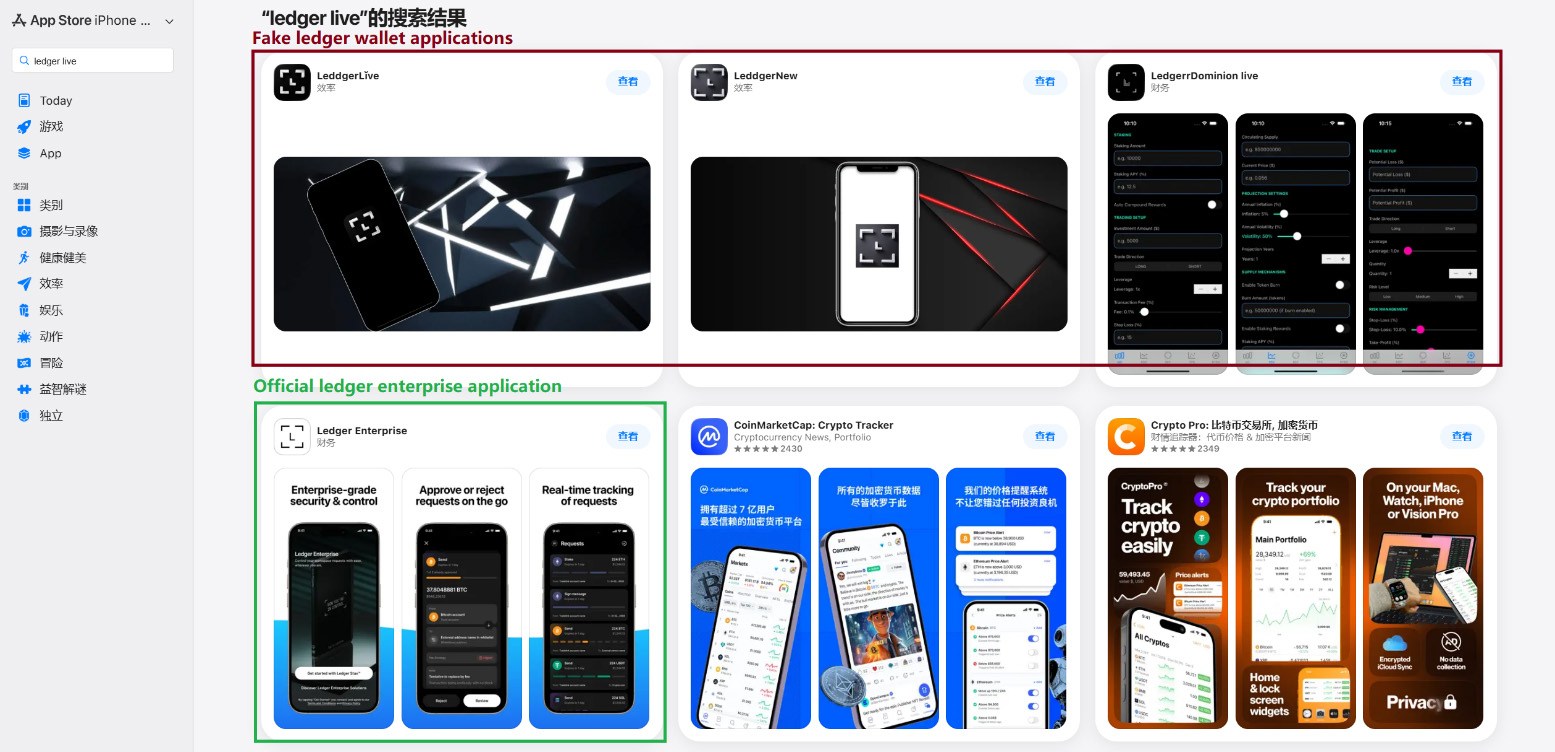
This past March, we discovered phishing apps at the top of the Chinese App Store charts with icons and names mimicking popular crypto-wallet management tools. Because regional restrictions block several official wallet apps from the Chinese App Store, attackers have stepped in to fill the void. They created fake apps using icons similar to the originals and names with intentional typos — likely to bypass App Store moderation and deceive users.

Phishing apps in the App Store appearing in search results for Ledger Wallet (formerly Ledger Live)

Phishing apps in the App Store appearing in search results for Ledger Wallet (formerly Ledger Live)

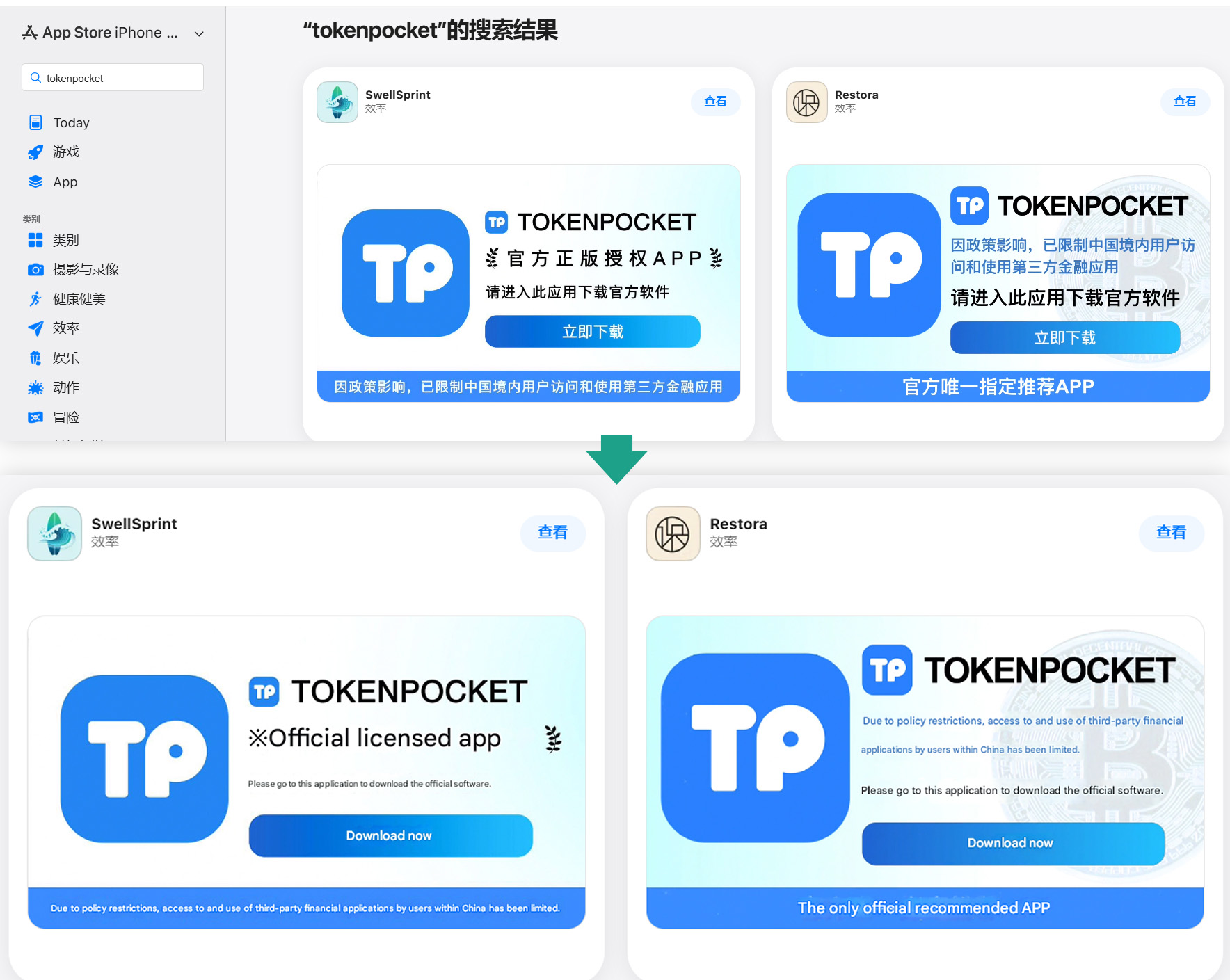
Beyond these, we found a number of apps with names and icons that had nothing to do with cryptocurrency. However, their promotional banners claimed they could be used to download and install official wallet apps that are otherwise unavailable in the regional App Store.

Banners on app pages claiming they can be used to download the official TokenPocket app, which is missing from the local App Store

Banners on app pages claiming they can be used to download the official TokenPocket app, which is missing from the local App Store

In total, we identified 26 phishing apps mimicking the following popular wallets:

  • MetaMask
  • Ledger
  • Trust Wallet
  • Coinbase
  • TokenPocket
  • imToken
  • Bitpie

A few other very similar apps didn’t contain phishing functionality yet, but all signs point to them being linked to the same attackers. It’s likely they plan to add malicious features in future updates.

To get these apps cleared for the App Store, the developers added basic functionality, such as a game, a calculator, or a task planner.

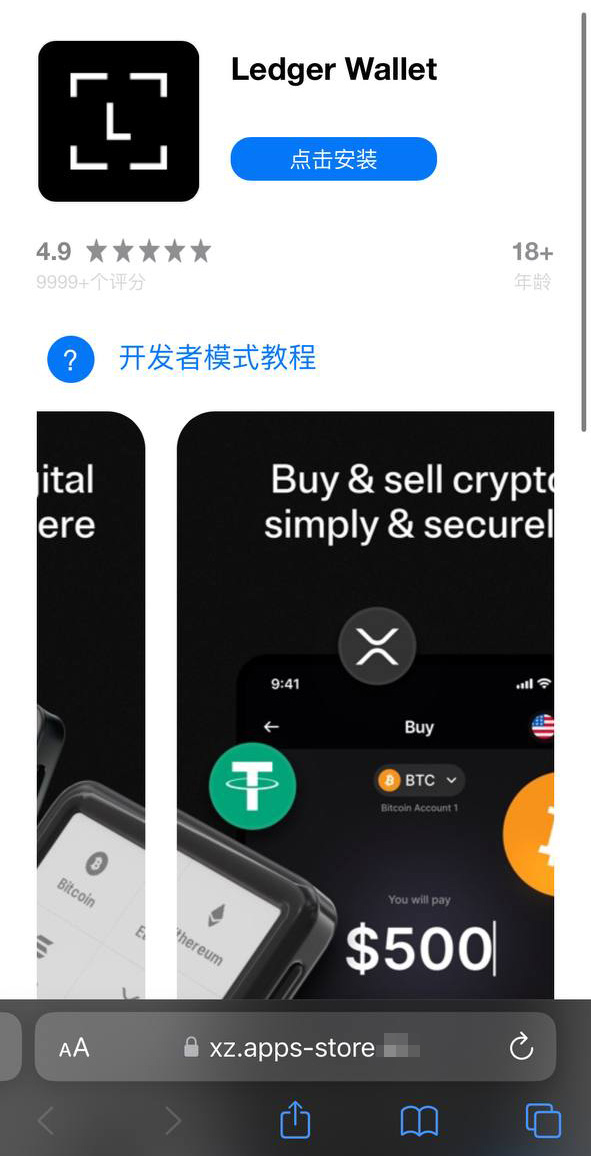
Installing any of these clones is the first step toward losing your crypto assets. While the apps themselves don’t steal cryptocurrency, seed phrases, or passwords, they serve as bait that builds user trust by virtue of being listed on the official App Store. Once installed and launched, however, the app opens a phishing site in the victim’s browser, designed to look like the App Store, which then prompts the user to install a compromised version of the relevant crypto wallet. The attackers have created multiple versions of these malicious modules, each tailored to a specific wallet. You can find a detailed technical breakdown of this attack in our Securelist post.

A victim who falls for the ruse is first prompted to install a provisioning profile, which allows apps to be sideloaded onto an iPhone outside the App Store. The profile is then used to install the malicious app itself.

A fake App Store site prompting the user to install an app masquerading as Ledger Wallet

A fake App Store site prompting the user to install an app masquerading as Ledger Wallet

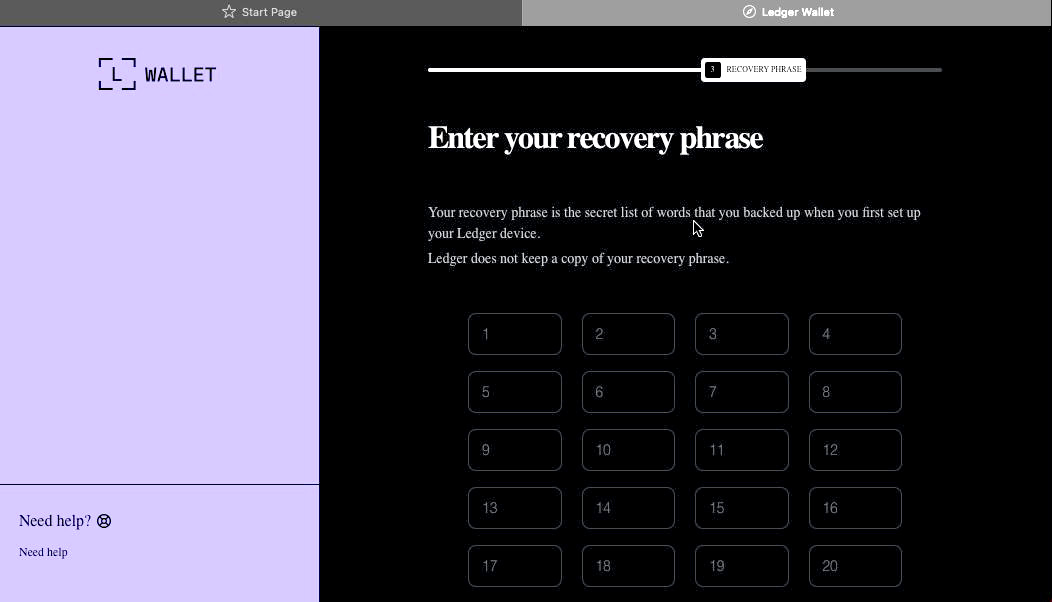
In the example above, the malware is built on the original Ledger app with integrated Trojan functionality. The app looks identical to the original, but when connected to a hardware wallet, it displays a window requiring a seed phrase, supposedly to restore access. This is not standard procedure: typically, you only need to enter a PIN — never a recovery phrase. If a victim is deceived by the app’s apparent legitimacy and enters their seed phrase, it’s immediately sent to the attackers’ server — granting them full access to the victim’s crypto assets.

Sideloading outside the App Store

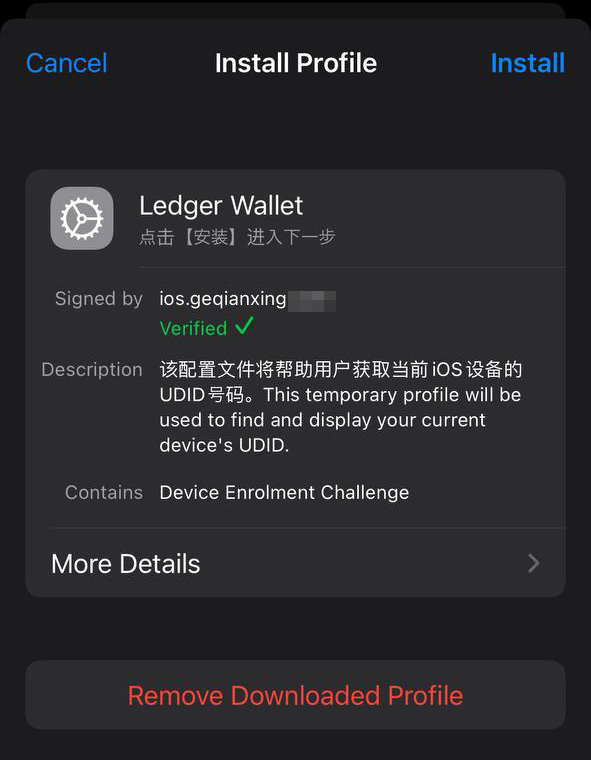
A critical component of this scheme involves installing malware on the victim’s iPhone by bypassing the App Store and its verification process. This is executed much like the SparkKitty iOS infostealer we discovered previously. The attackers managed to gain access to the Apple Developer Enterprise Program. For just US$299 a year — and following an interview and corporate verification — this program allows entities to issue their own configuration profiles and apps for direct download to user devices without ever publishing them in the App Store.

To install the app, the victim must first install a configuration profile that enables the malware to be downloaded directly, bypassing the App Store. Note the green verification checkmark

To install the app, the victim must first install a configuration profile that enables the malware to be downloaded directly, bypassing the App Store. Note the green verification checkmark


In general, enterprise profiles are designed to allow organizations to deploy internal apps to employees’ devices. These apps don’t require App Store publication and can be installed on an unlimited number of devices. Unfortunately, this feature is often abused. These profiles are frequently used for software that fails to meet Apple’s policies, such as online casinos, pirated mods, and, of course, malware.

This is precisely why the fake site mimicking the Apple Store prompts the user to install a configuration profile before delivering the app signed by that profile.

Stealing cryptocurrency via macOS apps and extensions

Many crypto owners prefer managing their wallets on a computer rather than a smartphone — often choosing Macs for the task. It’s no surprise, then, that most popular macOS infostealers target crypto-wallet data in one way or another. Recently, however, a new malicious tactic has been gaining traction: in addition to stealing saved data, attackers are embedding phishing dialogs directly into legitimate wallet applications already installed on users’ computers. Earlier this year, the MacSync infostealer adopted this functionality. It infiltrates systems via ClickFix attacks: users searching for software are lured to fake sites with fraudulent instructions to install the app by running commands in Terminal. This executes the infostealer, which scrapes passwords and cookies saved in Chrome, chats from popular messengers, and data from browser-based crypto-wallet extensions.

But the most interesting part is what happens next. If the victim already has a legitimate Trezor or Ledger app installed, the infostealer downloads additional modules and… swaps out fragments of the app with its own trojanized code. The malware then re-signs the modified file so that after these “fixes” are made, Gatekeeper (a built-in protection mechanism in macOS) allows the application to run without an additional permission request from the user. While this trick doesn’t always work, it’s effective for simpler apps built on the popular Electron framework.

The trojanized app prompts the user for the seed phrase of their wallet

The trojanized app prompts the user for the seed phrase of their wallet

When the trojanized app is opened, it fakes an error and initiates a “recovery process”, prompting the user for their wallet seed phrase.

Besides MacSync, the developers behind other popular macOS infostealers have adopted this same trojanization approach. We previously detailed a similar mechanism used to compromise Exodus and Bitcoin-Qt wallets.

How to keep your crypto assets safe

Time and again, attackers have proved that no gadget is truly invincible. With so many developers and cryptocurrency users preferring macOS and iOS, threat actors have designed and deployed industrial-scale attacks for both platforms. Staying safe requires in-depth defense backed by skepticism and vigilance.

  • Download apps only from trusted sources: either the developer’s official website or their App Store page. Since malware can slip even into official stores, always verify the app’s publisher.
  • Check the app’s rating, publication date, and download counter.
  • Read the reviews — especially the negative ones. Sort reviews by date to evaluate the latest version. Attackers often start with a perfectly innocent app that earns high ratings before introducing malicious functionality in a later update.
  • Never copy and paste commands into your Terminal unless you’re 100% certain what they do. These attacks have become very popular lately, often disguised as installation steps for AI apps like Claude Code or OpenClaw.
  • Use a comprehensive security system on all your computers and smartphones. We recommend Kaspersky Premium. This goes a long way to mitigate the risk of visiting phishing sites or installing malicious apps.
  • Never enter your seed phrase into a hardware wallet app, on a website, or in a chat. In every scenario, whether migrating to a new wallet, reinstalling apps, or recovering a wallet, the seed phrase should be entered exclusively on the hardware device itself — never in a mobile or desktop app.
  • Always verify the recipient’s address on the hardware wallet’s screen to prevent attacks involving address swapping.
  • Store your seed phrases in the most secure way possible, such as on a metal plate or in a sealed envelope in a safe deposit box. It’s best not to store them on a computer at all, but if that’s your only option, use a secure, encrypted vault like Kaspersky Password Manager.

Still believe that Apple devices are bulletproof? Think again as you read the following:

  •  

Insecure Permissions vulnerability in Nagios Network Analyzer v.2024R1.02-64 and before allows a local attacker to escalate pri

Topic: Insecure Permissions vulnerability in Nagios Network Analyzer v.2024R1.02-64 and before allows a local attacker to escalate pri Risk: Medium Text:Insecure Permissions vulnerability in Nagios Network Analyzer v.2024R1.02-64 and before allows a local attacker to escalate pri...
  •  

Multiple Vulnerabilities in Mozilla Products Could Allow for Arbitrary Code Execution

Multiple vulnerabilities have been discovered in Mozilla products, the most severe of which could allow for arbitrary code execution. 

  • Mozilla Firefox is a web browser used to access the Internet.
  • Mozilla Firefox ESR is a version of the web browser intended to be deployed in large organizations.
  • Mozilla Thunderbird is an email client.
  • Mozilla Thunderbird ESR is a version of the email client intended to be deployed in large organizations.

Successful exploitation of the most severe of these vulnerabilities could allow for arbitrary code execution. Depending on the privileges associated with the user an attacker could then install programs; view, change, or delete data; or create new accounts with full user rights. Users whose accounts are configured to have fewer user rights on the system could be less impacted than those who operate with administrative user rights.

  •  

6th Annual 100 CISO Summit & Awards 2026

Name : 6th Annual 100 CISO Summit & Awards 2026

The 6th Annual 100 CISO Summit & Awards 2026 unites Malaysia’s foremost cybersecurity leaders, regulators, and technology experts to address the next wave of challenges. Through real-world case studies, forward-looking strategies, and practical discussions, this summit equips security leaders with the insights to anticipate AI-driven threats, prepare for post-quantum disruption, and embed resilience across the enterprise. Join us to explore the future of cybersecurity leadership, gain actionable intelligence from regional experts, and connect with peers shaping the next frontier of Malaysia’s cyber defense.

The post 6th Annual 100 CISO Summit & Awards 2026 appeared first on CISO MAG | Cyber Security Magazine.

  •  

Multiple Vulnerabilities in Google Chrome Could Allow for Arbitrary Code Execution

Multiple vulnerabilities have been discovered in Google Chrome, the most severe of which could allow for arbitrary code execution. Successful exploitation of the most severe of these vulnerabilities could allow for arbitrary code execution in the context of the logged on user. Depending on the privileges associated with the user an attacker could then install programs; view, change, or delete data; or create new accounts with full user rights. Users whose accounts are configured to have fewer user rights on the system could be less impacted than those who operate with administrative user rights.

  •  

CyberSec India Expo 2026

Name : CyberSec India Expo 2026

CyberSec India Expo 2026 l Where Cybersecurity Strategy Meets Real-World Impact

Date: April 23-24, 2026 Venue: Bombay Exhibition Centre, Mumba

The CyberSec India Expo 2026, now in its 2nd edition, offers the entire cybersecurity ecosystem a comprehensive platform to showcase cutting-edge solutions driving India’s cybersecurity vision.

Following a highly successful inaugural edition in 2025—welcoming 3,400+ attendees, 45+ expert speakers, and enabling meaningful business interactions with 65+ exhibitors and leading brands—the 2026 edition promises to be bigger, broader, and more impactful.

This year’s Expo will feature an expanded showcase of next-generation cybersecurity technologies alongside a power-packed conference centered on the theme: “Advancing India’s National Cyber Resilience in a Digital-First Economy – Securing Digital India with AI-enabled defense, Zero Trust, and future-ready quantum security.”

Website : https://www.cybersecindiaexpo.com/

Free Exhibition Registration : https://bit.ly/4uSPIEz

Conference Registration : https://bit.ly/4rRvxE7

Coupon code for discount : Ec3

The post CyberSec India Expo 2026 appeared first on CISO MAG | Cyber Security Magazine.

  •  
❌