Today, in most countries around the world, virtually every reasonably large city is packed with video cameras. On the one hand, the idea, of course, is to “keep us safe”: to monitor security in the streets, improve road safety and enforce traffic rules, and so on. But there’s the other side of the coin — ubiquitous video surveillance creates both privacy risks and opportunities for unauthorized surveillance We’ve repeatedly posted on our blog about how to protect yourself from surveillance involving IP cameras.
There’s another problem, too: relying too heavily on video surveillance systems can also be dangerous. If your cameras aren’t adequately cyber-secure, attackers may be able to disable them remotely to be able to then enter physical areas supposedly protected by video surveillance without being detected. This issue is especially relevant to home and privately managed surveillance systems — large companies generally do a better job of securing their devices (although there are exceptions there as well).
Disabling or replacing a camera feed is an almost obligatory plot device in heist movies. But unfortunately, this isn’t just a screenwriter’s invention: our recent research uncovered a vulnerability that makes it possible to remotely disable IP cameras made by Intelbras — a popular camera manufacturer. Read on to learn what the problem is, and how to protect your surveillance systems; a detailed technical analysis of the vulnerability is available on our expert blog, Securelist.
When an update does more harm than good
A surveillance camera is essentially a fully-fledged mini-computer, and its firmware needs to be updated regularly. In this case, however, the vulnerability was hidden in the firmware update procedure itself.
Intelbras provides firmware update files on its official website. The firmware can be updated manually from an SD card, or over the local network via the web interface or mobile app. However, during a firmware update, the camera neither required (past tense; a patch has since been issued – see below) authentication nor validated the firmware file before starting the update. As a result, anyone connected to the same Wi-Fi network as the camera could send it an update request. When an update is initiated, the camera reboots, taking it offline for about a minute before it becomes available again. But if the requests are sent repeatedly in a loop, the camera can be kept offline indefinitely.
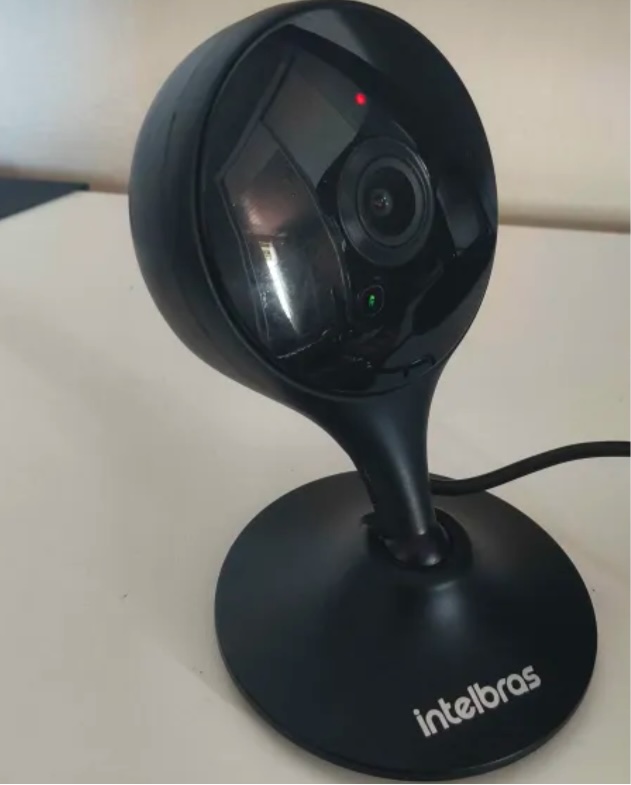
We investigated this vulnerability on an Intelbras iM3 C (iM3B-C) camera running firmware version v240927 — the latest available at the time of our research. The iM3 C is a smart Full-HD Wi-Fi camera designed for both home surveillance and as a baby monitor. According to Intelbras, the firmware for the iM3 C is also compatible with the iMX C, iM4 C, iM5 SC, iME 360 C, and iM7+ FC models.
Intelbras iM3 C smart Wi-Fi camera used for the investigation. Its firmware is also compatible with the iMX C, iM4 C, iM5 SC, iME 360 C, and iM7+ FC models. Source
This vulnerability has a medium severity rating. However, because of the large number of potentially affected users, the impact of successful exploitation could be significant. Intelbras Mibo Smart — Intelbras’s app for setting up and managing these camera models — has been downloaded more than four million times, with most of its users based in Brazil and elsewhere in Latin America.
How to secure your cameras and other smart devices
First and foremost, all Intelbras owners should update their camera firmware as soon as possible — and continue to do so regularly. More generally, it’s a good idea to secure your smart-home infrastructure in advance to reduce the risk posed by other potential vulnerabilities.
One of the simplest yet most important steps is to change the default settings on both your smart devices and your home network. Be sure to replace the factory-default passwords on all smart devices and on your router — default username/password combinations such as admin/admin or root/admin provide no meaningful protection.
Protect your home Wi-Fi with a strong password; otherwise, attackers could easily gain access to your local network.
Disable WPS on your router. WPS is designed to simplify network setup and authentication: you can connect by pressing dedicated buttons on the router and respective device, or by entering an eight-digit PIN. The problem is that this PIN can be brute-forced relatively easily, allowing an attacker to recover the key to your Wi-Fi network fairly quickly.
Use a strong, unique password for every account that can be used to manage your smart devices through official apps or websites. Where possible, enable two-factor authentication (2FA); the most secure option is generally to use one-time codes generated by authenticator apps. For generating and storing passwords, as well as creating one-time codes, it’s most convenient to use a password manager.
Put your IP cameras and other smart devices on a separate Wi-Fi network — isolating them from phones, laptops, tablets, NAS devices, and so on. Most modern routers can create at least two Wi-Fi networks (a primary and a guest network). Use the guest network for smart-home devices, but make sure it’s protected with a strong password. If your router supports multiple Wi-Fi networks, consider putting the cameras on a dedicated network of their own. That way, even if the cameras are compromised, attackers won’t be able to reach your other devices.
Use Smart Home Monitor, available in Kaspersky Plus and Kaspersky Premium. This feature shows all devices connected to your home network, lets you check their security status, and alerts you if an unknown device joins your home Wi-Fi.
More camera-security and smart-device tips and stories:
No one should have to choose between speaking freely and protecting their immigration status. Yet that’s precisely the choice the Trump administration’s mass surveillance of online speech forces on noncitizens living in the U.S.
Last fall, we sued on behalf of three major labor unions to stop this surveillance program. And just this month, we won our first major ruling: A federal district court denied the government’s motion to dismiss our lawsuit. This means the case can move forward—a win for free speech and a critical step in protecting our First Amendment rights online. We’ve already explained why this is a big deal for our clients, so let's take a closer look at the court’s reasoning.
It has paired that surveillance with a public intimidation campaign. High-ranking officials have explicitly threatened to punish noncitizens for their online speech, then followed through with a series of terrifying viewpoint-driven enforcement actions. This has led to a significant chilling effect on speech, not just for noncitizens, but also for their families, coworkers, and friends.
In response, three major labor unions—the United Auto Workers (UAW), the Communications Workers of America (CWA), and the American Federation of Teachers (AFT)—sued the Departments of State and Homeland Security alleging that this viewpoint-based surveillance program violates the First Amendment and the Administrative Procedure Act (APA). The unions are represented by EFF, Muslim Advocates (MA), and the Media Freedom & Information Access Clinic (MFIA).
The government moved to dismiss our lawsuit, arguing first that federal immigration law prevents federal district courts from hearing the case, and second, that the unions don’t have “standing” to sue. Judge Alvin K. Hellerstein of the Southern District of New York rejected both arguments and allowed the case to proceed. At this stage in the litigation, the court accepted all of the facts in our complaint as true and analyzed the law based on those facts. We will now prove these facts as the case proceeds.
Federal Immigration Law Doesn’t Block Our Lawsuit
The government first argued that the court had no power to hear our case at all. It pointed to three provisions of the Immigration and Nationality Act (INA) that restrict when federal courts can review immigration matters. The district court disagreed and rejected each provision in turn.
The first provision, 8 U.S.C. § 1252(b)(9), is often called the “zipper clause.” It bars federal courts from hearing challenges that arise from efforts to deport someone, except through review of an individual’s final removal order. The government claimed the zipper clause applies here because our lawsuit is really an effort to stop it from initiating adverse immigration actions.
The district court wholly rejected this argument. Relying on the Second Circuit’s decision in Ozturk v. Hyde, it held that the zipper clause bars only challenges to a particular individual’s removal proceedings, not a lawsuit like ours that challenges the constitutionality of the surveillance program itself. That the surveillance program might affect someone’s immigration proceeding down the line doesn’t turn our lawsuit into a removal challenge.
The court similarly rejected the government’s argument that § 1252(g) and § 1252(f)(1) prevent federal courts from hearing this case. Our suit, the court explained, “challenges the constitutionality of a government policy that is collateral to any active removal proceedings,” so § 1252(g) doesn’t apply. And § 1252(f)(1) only limits what kind of relief a court can give. So while the court may not be able to stop a particular person’s removal proceedings, it can still block “an unlawful surveillance program that suppresses free speech.”
The Unions Have Standing to Sue
To sue in federal court, a plaintiff must show that it has “standing” to bring its claims. This requires a plaintiff to show an “injury in fact” that is, among other things, “concrete.” That’s often a high bar in surveillance cases, where plaintiffs can’t easily see what the government is doing behind the scenes. And the Supreme Court hasheld that a person’s mere subjective fear of surveillance is too speculative to confer standing.
Even so, our plaintiffs cleared the bar. The court held that the unions alleged concrete injuries, including a chill on members’ speech that is objectively reasonable, not just subjectively felt. It found that the unions had established standing in two ways: “organizational standing,” based on the unions’ own injuries, and “associational standing,” based on injuries the unions’ members have suffered.
Organizational Standing
The court first held that our plaintiffs had successfully alleged an injury to the unions themselves (injury was the only aspect of organizational standing the government disputed). The surveillance program has harmed the unions’ ability to carry out their core responsibilities, including “organizing their members and advocating for the unions’ goals.” The court made two key points:
1. Unions Are Injured When Members Go Silent
As we explained in our complaint, the surveillance program has caused members to step back from union leadership roles; stop participating in union activities online and in person; remove their names from union webpages; and avoid filling out bargaining surveys. Members who might otherwise spread the unions’ message and raise awareness of union issues are staying quiet, hampering the unions’ ability to organize. The court said this amounts to a concrete injury for purposes of standing.
2. Surveillance Doesn’t Need to Target Pro-Union Speech
The court also rejected the government’s claim that members’ retreat from union activities was “essentially an overreaction,” because the surveillance doesn't target pro-union views. The court said this misunderstands the issue: “the question is whether the Government’s conduct would deter a person of ordinary firmness from engaging in protected activity, not whether the specific expression a member forgoes is itself among the viewpoints the Government disfavors.”
Here, the surveillance program monitors noncitizens’ online activity indiscriminately, and members “cannot reliably predict which of their activities will be captured” and attributed to a disfavored viewpoint. What’s more, the court noted, the unions’ organizing often happens alongside the very advocacy the government is alleged to target, “including pro-Palestine and anti-ICE activism on college campuses.” That makes members’ retreat from union activity a foreseeable consequence of the program.
Associational Standing
The court also held that the unions established associational standing to sue on behalf of their members. Of the three requirements for associational standing, the government challenged only two. It argued that members lacked sufficiently concrete injuries to sue in their own right, and that the claims aren’t “germane” to the unions’ purpose.
The court disagreed and found associational standing for every claim but one: members’ right to receive information. That claim survives anyway, because the unions’ organizational standing covers it. Along the way, the court made several important rulings.
1. The Ongoing Surveillance Is a Present Injury
As a threshold matter, the government argued that our case is a “pre-enforcement challenge,” meaning we sued before the government actually punished anyone. That would trigger a different test, and the government argued we failed it because we hadn’t alleged a sufficiently imminent threat of prosecution.
The court disagreed, explaining that “Plaintiffs’ allegations are of an ongoing surveillance program that is actively chilling the speech of their members and otherwise causing harm.” That chilling effect is a First Amendment injury even if there isn’t a direct prohibition on speech. And when government conduct is actively chilling speech right now, a challenge to it isn’t pre-enforcement.
2. Surveillance + Public Threats Reasonably Chills Speech
The court rejected the government’s argument that we alleged only a generalized, subjective, speculative fear of surveillance, explaining that “the chilling effect” of the program can “itself be an injury when the plaintiffs are surveilled.” Here, plaintiffs have alleged that their members are under active surveillance, which has had objective chilling effects on their speech. And the government is targeting certain disfavored viewpoints, making it “viewpoint discrimination” that is “presumptively unconstitutional.”
The chill is also objectively reasonable, the court held, because the government has extensively publicized the surveillance program through public statements and social media posts, making clear that noncitizens who post disfavored views will be targeted for removal. Notably, the court agreed with us that the “threat of adverse immigration consequences, under a government whose harsh immigration crackdowns has been heavily publicized and reported on, is certainly enough to deter a person of ordinary firmness from the exercise of First Amendment rights.” This is a concrete injury sufficient for standing.
3. Demanding Social Media Handles Also Causes Harm
Under the surveillance program, applicants for certain immigration benefits must disclose all social media handles they have used during the preceding five years and, in some instances, maintain public social media accounts. The district court held that this too amounts to a First Amendment injury, undermining the rights to anonymity and freedom of association.
The judge pointed to one CWA member we identified, a lawful permanent resident with a pending naturalization application who is subject to the five-year disclosure requirement. The member has deleted one social media account, set another to private, and removed past posts expressing disfavored views. These allegations, the court said, show an actual and objectively reasonable injury due to the government’s surveillance program.
4. General, Public Threats Can Still Be Coercive
We also argued that the Trump administration is waging a campaign of coercive threats to suppress disfavored speech, which the First Amendment prohibits. The court agreed that this campaign can be an actionable injury of its own.
Notably, the court held that it didn’t matter that the government’s statements were not specifically targeted at certain individuals, and were instead made on social media or to the public. In this case, the court explained, “the number, severity, and high-profile examples of action upon those threats are such that a reasonable person would perceive the communication as coercive.”
That means it’s reasonable that the unions’ members “would, and did, limit their public speech on disfavored viewpoints” in response. That the threats were made to the general public “does not diminish this injury,” as the very purpose of the challenged surveillance program is to intimidate noncitizens into silence.
5. Free Speech is Central to Union Functioning
The court also found that the unions met the second prong of associational standing. It held that the unions’ interests in protecting their members’ rights to speak freely, organize, and advocate, are “germane” to the unions’ missions. The court put it plainly:
The freedom of Plaintiffs’ members to speak, associate, and appear publicly is not incidental to union work, but rather is the mechanism through which unions recruit, organize, communicate, and bargain. A program alleged to silence members and drive them from the unions’ rolls therefore strikes at the unions’ representational function itself.
Next Steps
When the government surveils what people post online and threatens to punish them for their viewpoints, the result is exactly what our clients have experienced. Members have deleted their accounts, scrubbed posts, and withdrawn from union activities.
The government must now answer our complaint and we will move forward with the discovery process, in which we anticipate getting more information from the government about its surveillance program. We look forward to continuing to prove our case.
EFF legal intern Gabrielle Ladun was the principal author of this post.
The Department of Homeland Security Office of Inspector General (DHS OIG) has published a summary of findings from its audit of the Transportation Security Administration’s (TSA) facial recognition technology. While the detailed findings are classified, the summary states that the OIG’s audit uncovered a “significant weakness” in the technology’s ability to protect the privacy of passenger data. This has massive privacy implications for the millions of passengers who travel and don’t opt out of the TSA’s biometric surveillance technology verification process.
TSA uses facial comparison technology for identity verification of airline passengers. A camera takes a photo of passengers to verify that their provided identification matches their live photo. Although TSA states that it is “committed to protecting traveler privacy,”the audit highlights that this has not been the case.
The OIG found that TSA’s Credential Authentication Technology 2’s (CAT-2) vendor “was able to access and extract sensitive passenger information, including driver’s license and passport images, during system troubleshooting and enhancements, without TSA’s knowledge.”
The OIG further admonished the agency:
TSA lacked clear policies, did not track when this data was extracted, could not verify that extracted information was properly deleted, and did not notify passengers when their biometric and biographic information may have been stored. As a result, although passenger information was generally protected during routine operations, weaknesses in vendor oversight created a risk that sensitive personal information could be retained or exposed.
We hope the TSA will fix these issues. The OIG summary states:
We issued one finding and three recommendations to strengthen controls, improve oversight, and ensure transparency and the proper handling of passenger data. TSA concurred with all three recommendations. Two recommendations are open and resolved, and one remains open and unresolved.
Why EFF Opposes the Government’s Use of Facial Recognition Technology
EFF has a long history of opposing governmental use of facial recognition technology. As the OIG’s audit underscores, this technology presents privacy risks associated with unsecured data, unauthorized access, and data breaches. The government’s use of this technology also creates a mass surveillance system and facilitates the creation of warrantless biometric records for unconsenting parties.
The biometric data captured by this technology is not without errors. There have been multiple instances of law enforcement agencies using facial recognition technology to misidentify and arrest innocent individuals.
Reminder: Opting Out of TSA Photos Is Possible
Given that facial recognition technology is prone to mistakes, combined with the OIG’s audit revealing significant privacy weaknesses, it is imperative that travelers remember that opting out is possible. TSA’s own website emphasizes that travelers who wish to decline to have their photo taken for facial comparison can do so without any delay, disruption, or recourse.
Considering the data protection weaknesses exposed by the OIG’s audit, EFF will continue to oppose this governmental system of mass surveillance and spread awareness to ensure that no one is forced to relinquish their biometric data without consent.
In an extremely disappointing ruling, a California trial court dismissed SIREN v. San Jose, our case challenging the city of San Jose’s warrantless searches of its vast stores of automated license plate reader (ALPR) data. EFF and the ACLU of Northern California represent SIREN and CAIR California, two non-profits that serve San Jose residents, in this case.
Make no mistake: We believe this ruling is wrong on the law, and we will appeal. The ruling ignores the importance of landmark rulings from the U.S. Supreme Court regarding the invasiveness of aggregating collected data on an individual over time, including one issued just months ago. It also severely underestimates the harm that ALPRs cause, in San Jose and around the country.
San Jose’s ALPR surveillance system is inescapable. It blankets the city’s streets in nearly five hundred cameras that continuously photograph every car that passes by and retains the collected data for a month or longer. In our briefs, we argued that law enforcement officers who warrantlessly search the resulting ALPR database are violating the California Constitution’s ban on unreasonable searches and its guarantee of privacy. The court disagreed, explaining that based on one California appeals court case involving individual streetlight cameras, people do not have a reasonable expectation of privacy when driving on a public road. This is wrong. Networked ALPRs are not individual streetlight cameras. Their net effect of tracking and mapping cars as they travel reveals patterns of life, intimate relationships, and much more.
Fortunately, there are signs that the tide is turning against ALPRs in the courts. Just a day before the ruling in our case, a federal district court in Oklahoma called ALPRs “a type of indiscriminate mass surveillance” and decided that a law enforcement officer’s warrantless search of ALPR data violated the Fourth Amendment. The officer was observing traffic on an Oklahoma highway when he saw a woman driving a car with California plates. According to the court order, the officer began following the woman “for no apparent reason” other than her out of state plates. While following her, the officer decided to run the woman’s license plate number through Flock’s ALPR system – again, with no apparent reason other than her California plates. The Flock search returned at least 30 days of data, allowing the officer to track the car across at least three states, over the span of a month, from a single search.
The facts of this case demonstrate how ALPRs allow law enforcement to grab a breathtakingly vast sweep of information about a car (and the driver within) with no more effort than a Google search. It’s true that when a person drives on public roads, they can be observed, including by police. But as the Supreme Court hasexplained, we don’t expect law enforcement to be able to secretly track and store every movement our cars while we’re driving. The federal court in the Oklahoma case aptly illustrated this difference in societal expectations:
We might reasonably expect our friends and family to tell us something like: “Hey, I saw you out driving by the store last week.” But we do not expect people we know—let alone strangers, and especially not law enforcement—to randomly approach us to say: “Hey, I have been following your car for the last 30 days, and here is a detailed log of every place your vehicle has been with supporting photographic evidence. I am also going to share this information with law enforcement throughout the country so they know your whereabouts, too.
This decision is the first of its kind, and EFF will continue working to ensure that it is the first of many. Outside the courts, we’ve seen people across the country step up to reject ALPRs at the state and local level. EFF will continue challenging this technology on every front as well.
St. Lucie County in Florida discovered (alt link) a dozen Flock cameras whose ownership it can’t identify, and that the county government had not permitted.
I am reminded of the decade-old story of StingRay cell phone surveillance devices in Washington, DC, whose operators were also unknown.
My guess is that in the StingRay case, the devices were operated by foreign actors. This Flock case is more likely some local government entity that didn’t bother getting approval. Were I a foreign actor, I would rather hack the existing Flock network—like Israel did with Tehran’s surveillance cameras—than risk installing my own.
Regardless, once we normalize a surveillance infrastructure, both friends and foes will take advantage of it.
Researchers at Northeastern University, in collaboration with Consumer Reports, evaluated how much modern cars spy in their drivers:
The new Northeastern study shows, for the first time, data flowing among the vehicles, the vehicle apps you download when you buy your car, and third-party companies, documenting exactly what kind of data gets siphoned from our vehicles and which companies are receiving that information.
Basically, your car’s manufacturer has you under constant surveillance, and they use that data against you.
The companies on the receiving end of your data, our investigation has found, include car insurers and lenders that are partners in “telematics data exchanges,” which compile driving data on millions of drivers, thousands of data brokers that create personalized risk scores, companies selling infotainment and WiFi hotspot products, and even local and state government agencies working on planning, traffic, and safety initiatives.
Nearly every automaker sent data to outside companies.
Even more troubling, almost a quarter of the vehicle apps were found to be sending out personally identifiable information, including vehicle owners’ names, vehicle identification numbers (VINs), and precise geographic locations. That information can make it easy for companies to link driving behavior to personal data profiles created by data brokers and marketers. Such profiles are routinely sold to banks, insurers, pharmaceutical companies, lenders, and retailers, who can use it for personalized loan terms and filtered bank and insurance offers, a CR and CalMatters investigation found.
Remember the adage “If you’re not the customer, then you’re the product”? (The sentiment is older than you think.) Turns out that with modern internet-connected everything, you’re the product even if you are the customer.
The San Francisco Police Department (SFPD) began regularly deploying drones two years ago and has since expanded their use in a way that has outpaced its documented policy and evaded existing local and state oversight of these devices.
The department has a new proposed policy, which continues to be grossly inadequate in protecting privacy and civil liberties. At best, the draft policy continues the SFPD’s pattern of putting vague guardrails on a powerful surveillance tool, but at worst, if implemented, the policy could effectively usher in sweeping, non-targeted, and unspecified general surveillance over the city with few guardrails.
EFF has repeatedly opposed the unaccountable development of the SFPD’s drone program and recently sent a commentto the Police Commission, the local civilian oversight body, about the SFPD’s new proposed policy.
The SFPD has been sidestepping oversight of its drones since 2024. In March 2024, San Francisco voters approved a heavily-funded, billionaire-backed measure, Proposition E, which sought to expand police access to surveillance technology. Among its impacts, Prop E removed drones from oversight required by the 2019 Surveillance Technology Ordinance. Nonetheless, in its haste to purchase drones after Prop E passed, the SFPD knowingly violated California’s AB 481, a state statute requiring law enforcement agencies to get approval from their local elected governing body before purchasing military equipment, including drones. Eventually the SFPD sought retroactive approval from the Board of Supervisors and, soon after, announced that it would be launching a drone-as-first-responder (DFR) program.
Now, San Francisco finally has an opportunity to update the SFPD’s guidance in a way that won’t quickly become stale, as has happened while the SFPD steadily increases the purposes for drone use. Though drones were initially identified as tools to use for specific actions such as vehicle pursuits and active criminal investigations, within a year, the SFPD expanded use cases to include patrol, i.e. unrelated to a specific incident. Along with this mission creep, the SFPD has also steadily and exponentially increased the number of drone flights, from roughly 350 deployments in 2024, to over 1,100 from January to August 2025, to over 3,500 in just the first five months of 2026.
The original draft of an updated policy brought by the SFPD to the local Police Commission, a civilian oversight body, earlier this month provided limited details and proposed allowing police to treat drone flights as an extension of their patrol abilities, paving the way for general surveillance, including of First Amendment-protected activity. The proposal received significant community pushback, and the San Francisco Public Defender’s Office authored a letter describing the policy’s shortcomings. That letter was signed by over a dozen local, state, and national groups, including EFF.
Based on these concerns, the Police Commission deferred taking action until the SFPD addressed them. The SFPD then revised its proposed policy, but this, too, falls short of providing practical guidance to officers and protecting civil liberties, as the Public Defender’s Office identified in a follow-up letter signed by over 40 organizations, including EFF.
EFF’s additional comment to the Police Commission, in part, calls out the incredible gap in oversight of these ballooning drone flights and the immense data collection they facilitate:
The revised policy states that “[unmanned aerial vehicles] may be used as an asset in any situation in which a member may be deployed for a public safety response or when a member onviews criminal activity” but fails to define what is meant by a “public safety response.” The revised policy also provides a definition of “Drone as First Responders,” but it fails to provide any more detail about appropriate DFR deployment. Without appropriate safeguards around deployment and use, drones could be deployed to every call for service, even in situations that are ultimately deemed nonincidents, collecting data along the way that is then stored for 30 days. This type of general patrol could effectively become general surveillance, which SFPD acknowledges is an inappropriate use of their drones and yet is still possible under the vague terms of the current DGO.
Picture your computer keeping a diary — the kind kids used to keep logging their daily activities, or the kind travelers, merchants, and nobles kept centuries before that. Here’s what it might look like.
Thursday, September 10.
8:00 AM. User read the news on cnn.com and bbc.co.uk (Safari).
8:10 AM. User replied to John Kaufman’s email about delivery dates, then sent the same question to the logistics team (Gmail).
8:20 AM. User checked his to-do list, reviewed recent updates, and planned out the day’s priorities (Todo).
We’re not exaggerating. This is exactly what your Mac’s new diary looks like. It’s a set of text files that any app on your computer can read — as can anyone sitting at the keyboard. The feature responsible is called Computer History, and it was released by OpenAI in mid-August. At the moment, it only works in the ChatGPT app for Mac, requires a Pro subscription or higher, and is disabled by default. According to its developers, the idea behind History is to let the AI assistant quickly get up to speed on your work context, so it can answer even vague requests, like “send a reminder to whoever I was emailing about last week’s deliveries”. Of course, that convenience comes at a price, ranging from your data being processed on OpenAI’s servers, to the risk of it leaking off your Mac — whether to a nosy family member or straight into the hands of cybercriminals.
How ChatGPT Computer History works
If this sounds a lot like Microsoft’s similar Recall feature, or Chronicle, which OpenAI itself announced earlier, that’s no coincidence. Both were built with the same goal in mind, just using different methods. Having watched Recall turn into the PR disaster it was, the team behind Computer History decided against constantly taking and analyzing screenshots. Instead, ChatGPT relies on macOS’s Accessibility features to read the text on your screen and track your actions: mouse clicks, text typed into fields, switching between apps, and the like. All of this gets stored as a stream of raw activity data inside the ChatGPT container (app group), which only the ChatGPT app itself, or other apps you’ve specifically given permission, can access. In tests run by digital forensics researchers, just two hours of normal computer use generated around 3500 of these logged events.
That raw data remains on your computer for up to 48 hours. During this time, the ChatGPT app periodically runs hidden chat sessions behind the scenes, where it asks the AI to summarize related events into a single recap. Essentially diary entries, these summaries get saved as plain text files in a folder that any app on your Mac can open: ~/.codex/memories/extensions/skysight/.
When you chat with the assistant, or when certain automated features kick in, these notes can be pulled into the conversation for more context-aware responses. OpenAI is especially keen on pointing out that the assistant can spot patterns in your workflows and offer to automate them, creating what it calls “skills” that replicate your actions for you.
Once a summary is ready, the raw activity data behind it is deleted. OpenAI says it won’t keep those hidden background chats or use them to train its AI, except where required by law. The diary-style summaries that get pulled into your conversations, though, are stored on OpenAI’s servers under the exact same rules as your regular chats and the assistant’s memory, so your preexisting privacy settings will apply to them too.
What Computer History can see, and what you can turn off
Since the whole feature runs on accessibility tools, ChatGPT only picks up what your operating system is already willing to share with those tools. That includes window titles, blocks of text, image captions in your browser, text you’re typing into a field as you type it, and the names of interface elements you click on. Watching a video? The AI can’t see the video itself, but it can read the window title, the site name, and the video description. Browsing photos? It sees file and folder names, not the actual images. Audio is never recorded or saved in any situation. All that gets logged from a video call is the meeting window title, unless the call itself has live captions turned on. Password fields that are masked (shown as dots) aren’t read at all and, according to OpenAI, private browsing windows are never scanned.
One thing that sets this apart from Microsoft Recall is the clearly spelled out step-by-step procedure the user needs to go through to turn it on. Computer History never activates itself. You have to navigate to the settings menu, then Integrations → Computer History and turn it on manually after reading through the warnings and explanations. You’ll also need access to the agent’s memory enabled for the feature to work. From there, you choose which apps and websites you want it to track, and confirm a series of macOS permission prompts.
For companies using a business subscription, this requires approval at two levels: an administrator first has to enable Computer History for the whole organization, and then each employee has to turn it on individually.
At any point, you can go to Computer History → Permissions and either list specific apps and sites to exclude from tracking, or, conversely, set ChatGPT to only watch a limited list you choose (Include only these apps, Include only these websites).
To see what your own computer’s diary looks like, check Computer History → History. From there, you can delete individual entries or disable the tracking of specific apps directly from the list.
The risks of using ChatGPT Computer History
We covered the risks of centralized storage of someone’s entire activity in our earlier piece on Microsoft Recall, and most of what we said there applies to ChatGPT Computer History.
You might assume your chats and emails are private, protected by passwords and encryption. But a copy of the most important parts of those conversations is sitting in plain text files that anyone with access to your computer, and plenty of other apps, can open.
The people you’re messaging have no idea this extra copy exists. If they’ve turned on, say, a self-destructing chat feature, but the messaging app’s window itself isn’t marked as private, that precaution does nothing to protect them.
Even if you trust OpenAI completely and take its privacy promises at face value, your data can still be stolen directly off your computer by an infostealer. Mac-targeting infostealers have exploded over the past two years, so this isn’t a hypothetical risk. And the people who write this type of malware move fast, quickly updating it to grab whatever new type of data looks promising. OpenAI’s files are a boon for them: everything you’ve done, already summarized by AI into something easy to read. While there are no passwords or credit card numbers in there, the available details are likely enough to craft a convincing targeted urgent email from the boss.
And if a nosy coworker or family member gets their hands on your computer, reading through the diary of your work and life would take them all of five minutes.
Computer History: turn it off, or just configure it?
We’d recommend limiting or fully disabling Computer History if your work involves sensitive information. This especially applies to doctors, lawyers, and anyone else bound by professional confidentiality, or handling personal or medical data. The same goes for anyone living with an overly controlling family member, or working in an office with nosy coworkers.
If none of that applies to you and you’d like to try out how useful the AI’s search and auto-generated skills actually are, here’s how to set things up safely.
Lock down your Mac’s login. Turn off auto-login, and set your Mac to require a password immediately after the screensaver kicks in or it wakes from sleep. Use a strong password along with Touch ID, and make sure FileVault disk encryption is turned on.
Set up your exclusions. Manually add every messaging app you use for private conversations, along with any finance apps or sites, and anywhere else you keep sensitive information, to Computer History’s exclusion list.
Check in regularly. At least a couple of times a week, visit Computer History settings to see which apps and sites it’s been tracking. This helps you catch and remove any sources of private information you forgot to exclude earlier.
No matter how you configure Computer History, the two most common ways your data could end up in the wrong hands — on any Mac — are a macOS infostealer snatching it directly from your computer, and typing your information into a fake website. To guard against both, make sure you’re running full-featured security software on your Mac, such as Kaspersky Premium for macOS.
AI can create privacy risks you might never think to look for. You can read about more of them in our other posts:
Flock Safety’s cameras are automated license plate readers (ALPRs) designed to help police find stolen cars or wanted suspects.
A joint investigation by 404 Media and WIRED, based on data recovered from a physically removed Flock camera, found that its on-device software explicitly detects people as well as vehicles, bicycles, and license plates.
Separately, Washington DC’s police union says the Metropolitan Police Department used Flock data to track officers under Internal Affairs investigation without their knowledge.
Together, these reports illustrate a privacy problem: A network built to record the movements of vehicles can readily be used to follow almost anyone.
The latest reporting adds an important technical detail to that debate.
What Flock cameras collect
A group of hackers reportedly removed a Flock camera from a roadway, copied its storage, and recovered an encryption key stored on the device. That allowed them to unlock videos of thousands of vehicle detections despite Flock’s claim that its devices are protected by on-device encryption. Flock said it could not assess the claims without more detail.
The recovered camera files reportedly contained software models that detect people, even though public discussion of Flock has usually focused on cars and license plates. The researchers found no evidence that face-recognition features were actively used. Reassuring, but it should not be mistaken for a clean privacy bill of health.
Even without facial recognition, a system that records repeated sightings can potentially reveal sensitive patterns of movement, including where someone lives, works, worships, seeks healthcare, attends protests, visits family, or spends time with other people. When a person is matched to a vehicle, vehicle-based tracking can become person-based tracking in practice.
As an example of how widely the data can be shared, WIRED found that records from the city of Alpharetta, Georgia:
“were accessible to more than 2,000 agencies, including police departments, colleges, airports, and, inexplicably, the Office of Inspector General for the federal General Services Administration.”
Targeted tracking of people
The Washington DC dispute shows what happens when the power to follow people is turned inward.
The DC Police Union says it learned in July that MPD’s Internal Affairs investigators had used Flock license-plate-reader data to track sworn officers under investigation without their knowledge. The union filed a complaint and asked the department to stop, arguing that MPD lacked adequate controls for a system with such extensive surveillance capabilities.
MPD defended the use, saying its position is that the use of license-plate-reader data in the misconduct investigation was appropriate. It said the labor dispute is headed to arbitration.
If police officers themselves are concerned that the system can be used to monitor them without transparent rules, the public should ask an obvious follow-up question: What prevents the same tools from being used to follow residents, employees, journalists, activists, former partners, or other people with no meaningful ability to challenge the search?
The recovered camera software and the DC dispute make the same point from different directions. Flock’s network is not merely a collection of roadside plate readers. It is a distributed system for recording movement, identifying patterns, and making those records available for search.
Meaningful safeguards should include:
Public approval before cameras are deployed, with clear maps showing their locations and stated purposes.
Strict limits on collection, retention, searches, and cross-jurisdictional sharing.
A requirement for documented investigative justification before a search, with elevated approval for sensitive investigations.
Independently reviewable audit logs, regular public transparency reports, and meaningful penalties for misuse.
Clear bans on searches related to protected activity, immigration enforcement where local law forbids cooperation, abortion-related investigations, political surveillance, and personal purposes.
Independent security assessments covering the cameras, cloud services, identity controls, key management, and third-party integrations.
Automatic deletion that cannot be overridden merely because data could someday be useful.
Privacy cannot depend on authorized users always following rules, vendors configuring every setting correctly, or abuses being discovered the hard way. The first safeguard should be limiting the system’s ability to build a searchable record of ordinary people’s lives at all.
Browse like no one’s watching.
Malwarebytes Privacy VPN encrypts your connection and never logs what you do, so the next story you read doesn’t have to feel personal. Try it free →
Flock Safety’s cameras are automated license plate readers (ALPRs) designed to help police find stolen cars or wanted suspects.
A joint investigation by 404 Media and WIRED, based on data recovered from a physically removed Flock camera, found that its on-device software explicitly detects people as well as vehicles, bicycles, and license plates.
Separately, Washington DC’s police union says the Metropolitan Police Department used Flock data to track officers under Internal Affairs investigation without their knowledge.
Together, these reports illustrate a privacy problem: A network built to record the movements of vehicles can readily be used to follow almost anyone.
The latest reporting adds an important technical detail to that debate.
What Flock cameras collect
A group of hackers reportedly removed a Flock camera from a roadway, copied its storage, and recovered an encryption key stored on the device. That allowed them to unlock videos of thousands of vehicle detections despite Flock’s claim that its devices are protected by on-device encryption. Flock said it could not assess the claims without more detail.
The recovered camera files reportedly contained software models that detect people, even though public discussion of Flock has usually focused on cars and license plates. The researchers found no evidence that face-recognition features were actively used. Reassuring, but it should not be mistaken for a clean privacy bill of health.
Even without facial recognition, a system that records repeated sightings can potentially reveal sensitive patterns of movement, including where someone lives, works, worships, seeks healthcare, attends protests, visits family, or spends time with other people. When a person is matched to a vehicle, vehicle-based tracking can become person-based tracking in practice.
As an example of how widely the data can be shared, WIRED found that records from the city of Alpharetta, Georgia:
“were accessible to more than 2,000 agencies, including police departments, colleges, airports, and, inexplicably, the Office of Inspector General for the federal General Services Administration.”
Targeted tracking of people
The Washington DC dispute shows what happens when the power to follow people is turned inward.
The DC Police Union says it learned in July that MPD’s Internal Affairs investigators had used Flock license-plate-reader data to track sworn officers under investigation without their knowledge. The union filed a complaint and asked the department to stop, arguing that MPD lacked adequate controls for a system with such extensive surveillance capabilities.
MPD defended the use, saying its position is that the use of license-plate-reader data in the misconduct investigation was appropriate. It said the labor dispute is headed to arbitration.
If police officers themselves are concerned that the system can be used to monitor them without transparent rules, the public should ask an obvious follow-up question: What prevents the same tools from being used to follow residents, employees, journalists, activists, former partners, or other people with no meaningful ability to challenge the search?
The recovered camera software and the DC dispute make the same point from different directions. Flock’s network is not merely a collection of roadside plate readers. It is a distributed system for recording movement, identifying patterns, and making those records available for search.
Meaningful safeguards should include:
Public approval before cameras are deployed, with clear maps showing their locations and stated purposes.
Strict limits on collection, retention, searches, and cross-jurisdictional sharing.
A requirement for documented investigative justification before a search, with elevated approval for sensitive investigations.
Independently reviewable audit logs, regular public transparency reports, and meaningful penalties for misuse.
Clear bans on searches related to protected activity, immigration enforcement where local law forbids cooperation, abortion-related investigations, political surveillance, and personal purposes.
Independent security assessments covering the cameras, cloud services, identity controls, key management, and third-party integrations.
Automatic deletion that cannot be overridden merely because data could someday be useful.
Privacy cannot depend on authorized users always following rules, vendors configuring every setting correctly, or abuses being discovered the hard way. The first safeguard should be limiting the system’s ability to build a searchable record of ordinary people’s lives at all.
Browse like no one’s watching.
Malwarebytes Privacy VPN encrypts your connection and never logs what you do, so the next story you read doesn’t have to feel personal. Try it free →
Under this settlement, young users will now have less access to Meta products, and a lesser ability to exercise their rights to speak, access information and art and culture, associate and form communities, and play. The settlement also embeds age assurance into every product, mandating the collection of even more personal information from users of all ages; this enshrines Meta's harmful surveillance into law, and it will compromise users' privacy and anonymity while increasing their exposure to data breaches and government data requests. And the data minimization and security measures don’t keep states from using data collected under the agreement for other law enforcement purposes – which could include things like criminal investigations of abortions or gender-affirming care.
This week, EFF, along with Big Brother Watch, Defend Digital Me, Liberty, Open Rights Group, Race Equality First, Statewatch, and Stopwatch, wrote to Nottinghamshire Police Force in the UK raising concern about the proposed roll-out of live facial recognition technology (LFR), and called for its immediate halt.
In particular, the letter highlights six concerns:
LFR Is Not "Just Another Tool"
Nottinghamshire Police has stated that “facial recognition is just another tool to fight crime.” But LFR used in public spaces is an incredibly intrusive biometric mass surveillance technology that scans the faces of everyone who walks past the camera and takes biometric face prints. This is not just another tool, but a major escalation of surveillance that treats everyone as a suspect by default.
People Having "Nothing to Worry About" Does Not Hold to Scrutiny
According to Nottinghamshire Police, “if you aren’t entering the city or county to commit crime then you have nothing to worry about.” However, many people have legitimate concerns about the normalisation of invasive technologies. So a public that cannot move around their towns and cities without being subjected to a biometric identity check may be less willing to seek medical care or legal advice, speak with journalists, act in a union, vote, protest, or express their gender, sexual or religious identity.
Disproportionate Targeting With LFR
We are particularly concerned to learn that Nottinghamshire Police could deploy LFR to tackle low level crimes, such as youth behavior deemed anti-social, as part of Operation View. Reporting suggests that the force already possesses “a watchlist of young people believed to be causing the most problems,” including children as young as 11 years old. It would be highly disproportionate to deploy live facial recognition to tackle this behaviour. Many of these children are reportedly known to the police, and it is highly likely that there are more proportionate means for locating them.
LFR Could Increase Social Problems
We are also concerned that Nottinghamshire Police has not adequately examined the distinct risks of using LFR to target children, including negative impacts on their behaviour and outcomes, risk of recidivism, and relationship with the police. Use of LFR could exacerbate behavioural problems in children and create an adversarial, rather than trusting, relationship with the police from a young age.
Lack of Public Support
Recent polling commissioned by Liberty indicated that 48% of people oppose scanning the faces of those walking on high streets when there is no suspected imminent threat. Furthermore, Opinium found that the majority of people oppose the use of facial recognition in schools. Likewise, a report by the London Policing Ethics Panel found that Londoners aged 16-24 were most likely to find the Metropolitan Police Service’s use of LFR unacceptable and most likely to stay away from events where LFR was in use.
On these grounds, Nottinghamshire Police must immediately halt their plans to use live facial recognition surveillance any further.
In May 2026, we discovered a new cyber-espionage campaign by the Armored Likho group, also known as Eagle Werewolf, that targets private individuals and organizations across various industries in Russia, including major corporations, the public sector, IT, and education. The attackers used a fake app as bait that mimics a service for donations. However, the most interesting part of this campaign isn’t the initial infection method – it’s the malicious implants the attackers use for cyber-espionage.
We’ve written previously about recent Armored Likho attacks, but our analysis shows that the campaign discussed below has more in common with the group’s activity from February. That said, the attackers have significantly expanded their arsenal.
During our research, we found a new cyber-espionage toolkit written in Rust: the Still Toolkit. One of its components, Still Sync, steals Telegram session data to gain ongoing access to the victim’s account. With this stolen data, attackers can leverage the Telegram API to automatically pull chat logs, media files, and other information from the account.
The second component, Still Audio, is an implant for covert audio surveillance. It analyzes the incoming audio stream, automatically detects speech, records conversations, and sends the recordings to a command-and-control server.
In this article, we’ll look at the initial infection method, how the new Still Toolkit components are built, and the technical details of how they operate.
Kaspersky products detect this threat as Trojan.Win64.Agent.* and HEUR:Backdoor.Win32.Generic.
Background
Armored Likho’s malicious activity has been documented several times before: in November 2024, and in February and July 2026. The current campaign shows significant overlap with the November and February campaigns, which used malicious droppers disguised as documents and applications related to Starlink activation or fundraising efforts as the initial infection vector. This campaign also uses fundraising as its lure. At the same time, our research uncovered a number of new tools that point to the attackers expanding their capabilities.
Initial infection
The infection chain starts with an app that mimics a donation service. As of this writing, the app distribution method remains unknown. During our research, however, we obtained several samples posing as apps from different Russian foundations.
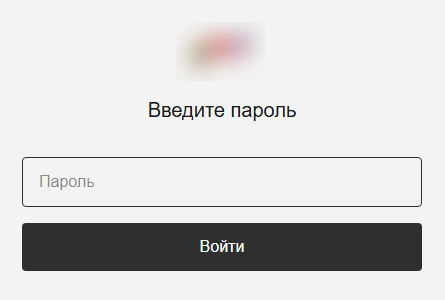
In reality, the app is a dropper. Its developers wrote it in Rust on top of the popular Tauri framework, and it has a graphical interface designed to deceive the user. After launch, it displays a login form that asks for a password, presumably one the attackers supplied.
The login form
After the user enters a valid password, they see a catalog of donatable items. The app pulls item and category information from orderapiserver[.]info through the public/categories and public/products endpoints. A clickable catalog makes the app look legitimate. While the user browses the items, the dropper quietly decrypts and launches the payload for the next stage in the background.
Our analysis shows that the mechanism for decrypting the payload and launching subsequent stages hasn’t changed since the February campaign. However, we found a new cyber-espionage toolkit – the Still Toolkit – made up of two components: Still Sync and Still Audio.
Still Sync
Still Sync is a stealer written in Rust that steals Telegram session data. However, its capabilities don’t stop there. With this stolen data, Sync can log in to the victim’s account and pull messages and media files through the Telegram API.
Architecturally, Sync is an asynchronous application based on the Tokio library. It talks to the server over gRPC and serializes messages with FlatBuffers. It supports both HTTP and HTTPS as transport protocols; the URL of the command-and-control server determines which one it uses.
How it works
When Sync launches, the attackers set several environment variables. Before starting any malicious activity, the implant pulls configuration parameters from these:
STILL_SYNC_ADDR: the address of the command-and-control server. By default, this is https://tg4service[.]com:443.
STILL_SEND_PATH: the path to the tdata
STILL_TELEGRAM_PASSCODE: the password for decrypting the tdata folder, if Telegram data encryption is enabled on the victim’s device.
Sync also supports several command-line arguments:
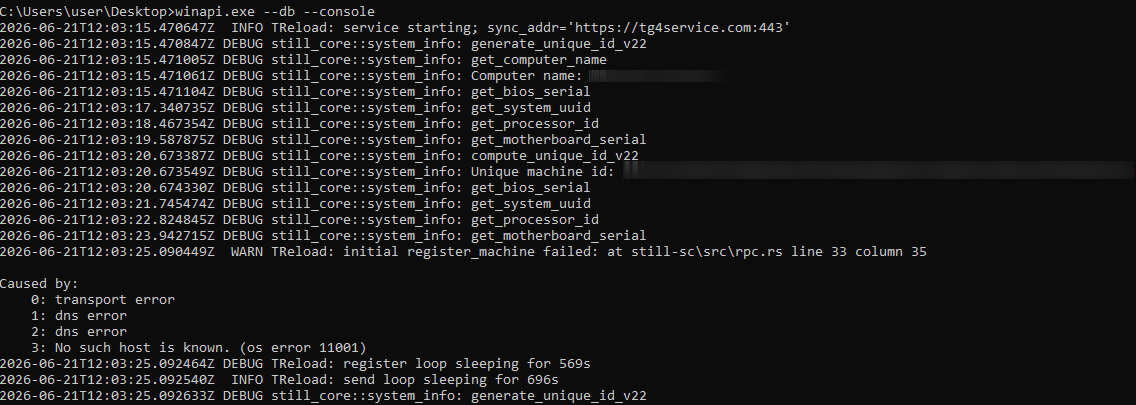
--console: runs as a console application. If this parameter is absent, the implant creates a TReload service to keep running in the background.
--version: prints version information and exits.
--firefly: launches a trace thread that monitors the program’s operation. It writes error messages to a hidden file, bin, located in the same folder as the main executable.
--db: turns on debug mode with detailed logging.
Example Still Sync logs
Once it launches, the malware begins registering the device with the C2 server. To do this, Sync collects the following information about the victim’s system:
Motherboard serial number
CPU ID
System UUID
BIOS serial number
Computer domain name
The malware combines the collected data into a single string with a colon as the separator. It then hashes that string with SHA-256 and stores the resulting hash under the key sysmarker. Worth noting: other Armored Likho tools, AquilaRAT included, use this same hashing algorithm.
Sync then serializes a package containing all the collected information and the agent version, and sends it in a POST request to /still.rpc.Sync/RegisterMachine. The response contains a machine_id value, which Sync uses to identify itself in subsequent requests.
Once registration succeeds, Sync sends a POST request with the machine_id parameter to /still.rpc.Sync/GetMachineSettings. The server responds with the following settings:
enabled: triggers malicious activity on the infected device.
scan_portable: turns on extended scanning when searching for the tdata We’ll cover this feature in more detail below.
fetch_telegram: if this parameter is on, Sync attempts to log in to Telegram and extract data. We’ll cover this feature in more detail below.
download_channels: if this parameter is off, Sync skips channel dialogs when exfiltrating Telegram data.
These parameters have no default values, so Sync doesn’t perform any malicious actions until the registration and settings-retrieval processes both complete successfully.
Telegram data collection
Before stealing a Telegram session, Sync searches for the tdata folder, unless the STILL_SEND_PATH variable is already set. The list of search paths includes both standard and nonstandard directories, if the scan_portable option is turned on:
C:\Users\<username>\AppData\Roaming\Telegram Desktop\: the standard Telegram Desktop installation directory.
C:\Users\<username>\AppData\Local\Packages\<package_folder>\LocalCache\Roaming\: the installation directory for the Microsoft Store version. Sync identifies the package folder by a name that contains the string TelegramMessenge.
C:\: used for the extended search (if the scan_portable option is on).
Sync then sends a POST request with a list of files from the tdata folder to the /still.rpc.Sync/CheckFiles endpoint. The server responds with the following values:
snapshot_id: an identifier the server assigns to the current data snapshot.
present: a list of file paths that are already present on the server.
This lets the C2 server avoid re-receiving files it already has. In addition, if Sync can’t access files on disk through standard methods, it falls back on three mechanisms that abuse the SeBackupPrivilege privilege:
Opening files with the CreateFileW function using the FILE_FLAG_BACKUP_SEMANTICS parameter
Creating a backup copy through the Shadow Copy service and reading files from there
If the previous methods all fail, attempting to copy the file using the Robocopy utility in backup mode
Beyond stealing Telegram session data, Sync can carry out full-scale collection of user information from the messaging app. When the fetch_telegram option is on, it launches a separate thread that authenticates to the chat app using the previously obtained tdata. Once authentication succeeds, Sync gains access to the account data and sends the following collected information to the server:
User details, such as username, phone number, first and last name
Information about private chats, groups, or channels, such as chat name and ID, the member list, and so on
Dialogs from private chats, groups, and channels (if the download_channels option is on)
Media files under 250MB: photos, documents, stickers, and contacts
Still Audio
Still Audio is an audio surveillance implant written in Rust. Its main job is to analyze the incoming audio stream and start recording voice when certain conditions are met – we’ll cover those in the next section. Architecturally, Still Audio largely mirrors Sync and uses the same mechanisms for communicating with the C2 server.
On launch, Still Audio performs a sequence of actions:
It extracts libmp3lame.dll, a file stored inside the executable. This is a library used to encode audio data.
If the --console command-line argument is absent, the implant creates a service named auxhost, connects to it, and continues running in the background.
While running in the background, it creates a file, logfile.log, to write logs to.
Next, Still Audio retrieves the C2 server address. As with Sync, it stores the URL in an environment variable – in this case, STILL_AUDIO_SYNC_ADDR. If that variable isn’t set, it falls back to STILL_SYNC_ADDR, which shows the two modules are compatible with each other. If neither variable is set, it uses the default URL, https://srwinservice[.]com.
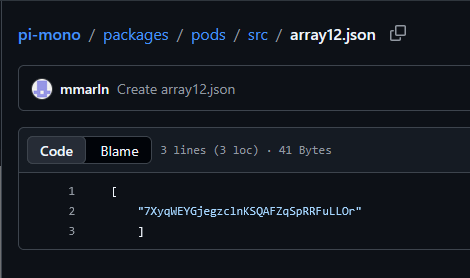
Still Audio also uses the Dead Drop Resolver technique as a fallback mechanism for obtaining the C2 address. If the current server stays unreachable for three days, the tool tries to pull the current C2 URL from a GitHub repository. In the sample under analysis, we found the following URL for the page containing C2 information: hxxps://raw.githubusercontent[.]com/mmarln/pi-mono/refs/heads/main/packages/pods/src/array12.json
Encrypted C2 address inside the GitHub repository
The repository, a fork of a popular project, contains the server URL Base64-encoded and encrypted with the Blowfish algorithm in ECB mode, using the key 5c8e153228edd3c6cbf75684 (lowercase string). Older AquilaRAT samples use this exact same algorithm and key.
Once it obtains the current C2 address, the Audio module starts a registration process similar to Sync’s, but through a different endpoint:
/still.rpc.Audio/RegisterAudioMachine. Also, unlike Sync, Audio sends a list of available audio input devices along with the system information.
The server responds with settings for the implant:
machine_id: a unique identifier for the current device.
vad_threshold: the threshold value for the VAD (Voice Activity Detection) algorithm. Expressed as a decimal fraction, it represents a proportion of the maximum sound level the input device can pick up. Sound above this threshold counts as voice activity. The default vad_threshold is 02.
max_silence_duration: the number of audio samples with a VAD value below the set threshold after which the implant considers the recording finished.
max_buffer_size: the maximum buffer size for recorded audio data.
active_device: the name of the input device selected for recording, from the list of available devices.
The eavesdropping process
Still Audio works with raw audio samples it captures directly from the input device. To detect voice activity, it implements an algorithm based on Root Mean Square (RMS), a lightweight signal-processing method that distinguishes speech from silence by measuring the audio signal’s average power over time. The implant doesn’t rely on any third-party libraries here; it implements all the calculations itself.
The implant compares the calculated RMS value against the vad_threshold parameter. If RMS meets or exceeds this threshold, recording starts. To avoid losing the beginning of the recording, Still Audio uses a pre-buffer, a size-limited buffer that stores samples from just before the current recording moment. A sequence of max_silence_duration samples (320 by default) with RMS values below the threshold signals the end of the recording. For example, with a standard headset running at a 44.1kHz sampling rate, recording stops after roughly 7ms of silence.
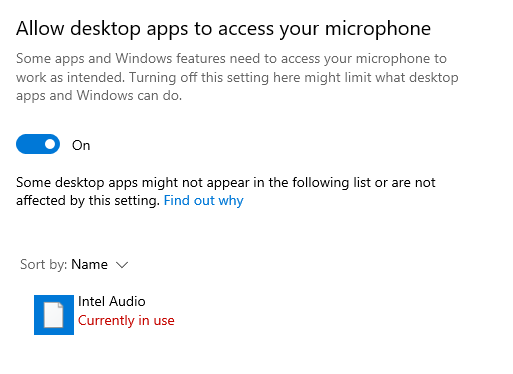
Interestingly, the Audio module makes no attempt to hide its use of the microphone: its name shows up in Windows settings. In the sample we examined, the file was saved to disk as IntAudio.exe, and it appeared in the list of apps using the microphone as “Intel Audio”:
The malicious module in the list of apps using the microphone
Before sending recordings to the server, the implant uses the libmp3lame library to encode the raw audio samples. It sends the recording files via a POST request to /tgfrg, adding a Client-Id header containing the machine_id obtained during registration to identify the device.
Infrastructure
This campaign draws on a broad set of hosting providers and domains registered at different points in time, which suggests the attackers are trying to make their infrastructure harder to detect. We found no direct overlap in domains or IP addresses with the February campaign. Even so, the two infrastructures share some similarities:
They use the same hosting providers, with the ASNs 149440, 202448, and 215311.
Their domain names follow similar naming patterns that mimic Windows system services and update mechanisms.
Domain
IP address
Registration date
ASN
orderapiserver[.]info
187.127.153[.]38
April 18, 2026
47583
tg4service[.]com
159.198.37[.]74
October 4, 2025
22612
srwinservice[.]com
213.252.244[.]123
March 19, 2026
61272
screenserv[.]com
23.26.237[.]250
February 13, 2026
149440
windowserv[.]net
23.27.24[.]30
February 10, 2026
149440
managementapiservice[.]com
188.212.124[.]178
May 1, 2026
202448
service8date[.]com
145.223.69[.]143
January 13, 2026
215311
updateservs[.]com
145.223.68[.]66
December 23, 2025
215311
Victims
In this campaign, we’ve determined that the attackers’ primary targets are users in Russia. Most victims are private individuals, though the corporate sector, government organizations, IT companies, and educational institutions are also affected.
Attribution
This campaign has been using both new tools and malware families documented in BI.ZONE’s February report. While some components turned up for the first time, they show significant code-level overlap with malicious tools seen in earlier Armored Likho campaigns. Based on these overlaps, along with additional technical artifacts, we’re highly confident the Armored Likho group is behind the campaign. The overlaps we identified include:
Identical dropper architecture in the February and current campaigns, which includes the use of the Tauri library to build the graphical interface, a similar user-input handler, a payload with the ICRYPTMP header, and the same multi-part encryption format.
The same encryption algorithm and key used in AquilaRAT from the previous campaign and in the Still Audio module from the current campaign, both implementing the Dead Drop Resolver technique.
Identical logic for generating the sysmarker value in older AquilaRAT samples and in the Still toolkit from the current campaign. The algorithms match down to the PowerShell commands used to collect system information.
Substantial infrastructure overlap, which includes the hosting providers and domain-naming patterns described in the Infrastructure section.
Takeaways
The campaign described in this post shows Armored Likho’s toolkit evolving, with the group steadily expanding its cyber-espionage capabilities. Beyond the components we already knew about, the attackers rolled out new modules that let them not only access Telegram data but also conduct audio surveillance on victims. Together, these capabilities significantly widen the range of information attackers can collect in a single compromise.
One point deserves particular attention: the new tools form a cohesive set, sharing similar architecture, C2 communication mechanisms, and common implementation elements. This points to the group building out its own tool ecosystem, designed for long-term use and further expansion.
The emergence of new, specialized modules shows the attackers aren’t just trying to preserve their existing capabilities – they’re working to make intelligence-gathering more effective by controlling multiple communication channels at once.
In May 2026, we discovered a new cyber-espionage campaign by the Armored Likho group, also known as Eagle Werewolf, that targets private individuals and organizations across various industries in Russia, including major corporations, the public sector, IT, and education. The attackers used a fake app as bait that mimics a service for donations. However, the most interesting part of this campaign isn’t the initial infection method – it’s the malicious implants the attackers use for cyber-espionage.
We’ve written previously about recent Armored Likho attacks, but our analysis shows that the campaign discussed below has more in common with the group’s activity from February. That said, the attackers have significantly expanded their arsenal.
During our research, we found a new cyber-espionage toolkit written in Rust: the Still Toolkit. One of its components, Still Sync, steals Telegram session data to gain ongoing access to the victim’s account. With this stolen data, attackers can leverage the Telegram API to automatically pull chat logs, media files, and other information from the account.
The second component, Still Audio, is an implant for covert audio surveillance. It analyzes the incoming audio stream, automatically detects speech, records conversations, and sends the recordings to a command-and-control server.
In this article, we’ll look at the initial infection method, how the new Still Toolkit components are built, and the technical details of how they operate.
Kaspersky products detect this threat as Trojan.Win64.Agent.* and HEUR:Backdoor.Win32.Generic.
Background
Armored Likho’s malicious activity has been documented several times before: in November 2024, and in February and July 2026. The current campaign shows significant overlap with the November and February campaigns, which used malicious droppers disguised as documents and applications related to Starlink activation or fundraising efforts as the initial infection vector. This campaign also uses fundraising as its lure. At the same time, our research uncovered a number of new tools that point to the attackers expanding their capabilities.
Initial infection
The infection chain starts with an app that mimics a donation service. As of this writing, the app distribution method remains unknown. During our research, however, we obtained several samples posing as apps from different Russian foundations.
In reality, the app is a dropper. Its developers wrote it in Rust on top of the popular Tauri framework, and it has a graphical interface designed to deceive the user. After launch, it displays a login form that asks for a password, presumably one the attackers supplied.
The login form
After the user enters a valid password, they see a catalog of donatable items. The app pulls item and category information from orderapiserver[.]info through the public/categories and public/products endpoints. A clickable catalog makes the app look legitimate. While the user browses the items, the dropper quietly decrypts and launches the payload for the next stage in the background.
Our analysis shows that the mechanism for decrypting the payload and launching subsequent stages hasn’t changed since the February campaign. However, we found a new cyber-espionage toolkit – the Still Toolkit – made up of two components: Still Sync and Still Audio.
Still Sync
Still Sync is a stealer written in Rust that steals Telegram session data. However, its capabilities don’t stop there. With this stolen data, Sync can log in to the victim’s account and pull messages and media files through the Telegram API.
Architecturally, Sync is an asynchronous application based on the Tokio library. It talks to the server over gRPC and serializes messages with FlatBuffers. It supports both HTTP and HTTPS as transport protocols; the URL of the command-and-control server determines which one it uses.
How it works
When Sync launches, the attackers set several environment variables. Before starting any malicious activity, the implant pulls configuration parameters from these:
STILL_SYNC_ADDR: the address of the command-and-control server. By default, this is https://tg4service[.]com:443.
STILL_SEND_PATH: the path to the tdata
STILL_TELEGRAM_PASSCODE: the password for decrypting the tdata folder, if Telegram data encryption is enabled on the victim’s device.
Sync also supports several command-line arguments:
--console: runs as a console application. If this parameter is absent, the implant creates a TReload service to keep running in the background.
--version: prints version information and exits.
--firefly: launches a trace thread that monitors the program’s operation. It writes error messages to a hidden file, bin, located in the same folder as the main executable.
--db: turns on debug mode with detailed logging.
Example Still Sync logs
Once it launches, the malware begins registering the device with the C2 server. To do this, Sync collects the following information about the victim’s system:
Motherboard serial number
CPU ID
System UUID
BIOS serial number
Computer domain name
The malware combines the collected data into a single string with a colon as the separator. It then hashes that string with SHA-256 and stores the resulting hash under the key sysmarker. Worth noting: other Armored Likho tools, AquilaRAT included, use this same hashing algorithm.
Sync then serializes a package containing all the collected information and the agent version, and sends it in a POST request to /still.rpc.Sync/RegisterMachine. The response contains a machine_id value, which Sync uses to identify itself in subsequent requests.
Once registration succeeds, Sync sends a POST request with the machine_id parameter to /still.rpc.Sync/GetMachineSettings. The server responds with the following settings:
enabled: triggers malicious activity on the infected device.
scan_portable: turns on extended scanning when searching for the tdata We’ll cover this feature in more detail below.
fetch_telegram: if this parameter is on, Sync attempts to log in to Telegram and extract data. We’ll cover this feature in more detail below.
download_channels: if this parameter is off, Sync skips channel dialogs when exfiltrating Telegram data.
These parameters have no default values, so Sync doesn’t perform any malicious actions until the registration and settings-retrieval processes both complete successfully.
Telegram data collection
Before stealing a Telegram session, Sync searches for the tdata folder, unless the STILL_SEND_PATH variable is already set. The list of search paths includes both standard and nonstandard directories, if the scan_portable option is turned on:
C:\Users\<username>\AppData\Roaming\Telegram Desktop\: the standard Telegram Desktop installation directory.
C:\Users\<username>\AppData\Local\Packages\<package_folder>\LocalCache\Roaming\: the installation directory for the Microsoft Store version. Sync identifies the package folder by a name that contains the string TelegramMessenge.
C:\: used for the extended search (if the scan_portable option is on).
Sync then sends a POST request with a list of files from the tdata folder to the /still.rpc.Sync/CheckFiles endpoint. The server responds with the following values:
snapshot_id: an identifier the server assigns to the current data snapshot.
present: a list of file paths that are already present on the server.
This lets the C2 server avoid re-receiving files it already has. In addition, if Sync can’t access files on disk through standard methods, it falls back on three mechanisms that abuse the SeBackupPrivilege privilege:
Opening files with the CreateFileW function using the FILE_FLAG_BACKUP_SEMANTICS parameter
Creating a backup copy through the Shadow Copy service and reading files from there
If the previous methods all fail, attempting to copy the file using the Robocopy utility in backup mode
Beyond stealing Telegram session data, Sync can carry out full-scale collection of user information from the messaging app. When the fetch_telegram option is on, it launches a separate thread that authenticates to the chat app using the previously obtained tdata. Once authentication succeeds, Sync gains access to the account data and sends the following collected information to the server:
User details, such as username, phone number, first and last name
Information about private chats, groups, or channels, such as chat name and ID, the member list, and so on
Dialogs from private chats, groups, and channels (if the download_channels option is on)
Media files under 250MB: photos, documents, stickers, and contacts
Still Audio
Still Audio is an audio surveillance implant written in Rust. Its main job is to analyze the incoming audio stream and start recording voice when certain conditions are met – we’ll cover those in the next section. Architecturally, Still Audio largely mirrors Sync and uses the same mechanisms for communicating with the C2 server.
On launch, Still Audio performs a sequence of actions:
It extracts libmp3lame.dll, a file stored inside the executable. This is a library used to encode audio data.
If the --console command-line argument is absent, the implant creates a service named auxhost, connects to it, and continues running in the background.
While running in the background, it creates a file, logfile.log, to write logs to.
Next, Still Audio retrieves the C2 server address. As with Sync, it stores the URL in an environment variable – in this case, STILL_AUDIO_SYNC_ADDR. If that variable isn’t set, it falls back to STILL_SYNC_ADDR, which shows the two modules are compatible with each other. If neither variable is set, it uses the default URL, https://srwinservice[.]com.
Still Audio also uses the Dead Drop Resolver technique as a fallback mechanism for obtaining the C2 address. If the current server stays unreachable for three days, the tool tries to pull the current C2 URL from a GitHub repository. In the sample under analysis, we found the following URL for the page containing C2 information: hxxps://raw.githubusercontent[.]com/mmarln/pi-mono/refs/heads/main/packages/pods/src/array12.json
Encrypted C2 address inside the GitHub repository
The repository, a fork of a popular project, contains the server URL Base64-encoded and encrypted with the Blowfish algorithm in ECB mode, using the key 5c8e153228edd3c6cbf75684 (lowercase string). Older AquilaRAT samples use this exact same algorithm and key.
Once it obtains the current C2 address, the Audio module starts a registration process similar to Sync’s, but through a different endpoint:
/still.rpc.Audio/RegisterAudioMachine. Also, unlike Sync, Audio sends a list of available audio input devices along with the system information.
The server responds with settings for the implant:
machine_id: a unique identifier for the current device.
vad_threshold: the threshold value for the VAD (Voice Activity Detection) algorithm. Expressed as a decimal fraction, it represents a proportion of the maximum sound level the input device can pick up. Sound above this threshold counts as voice activity. The default vad_threshold is 02.
max_silence_duration: the number of audio samples with a VAD value below the set threshold after which the implant considers the recording finished.
max_buffer_size: the maximum buffer size for recorded audio data.
active_device: the name of the input device selected for recording, from the list of available devices.
The eavesdropping process
Still Audio works with raw audio samples it captures directly from the input device. To detect voice activity, it implements an algorithm based on Root Mean Square (RMS), a lightweight signal-processing method that distinguishes speech from silence by measuring the audio signal’s average power over time. The implant doesn’t rely on any third-party libraries here; it implements all the calculations itself.
The implant compares the calculated RMS value against the vad_threshold parameter. If RMS meets or exceeds this threshold, recording starts. To avoid losing the beginning of the recording, Still Audio uses a pre-buffer, a size-limited buffer that stores samples from just before the current recording moment. A sequence of max_silence_duration samples (320 by default) with RMS values below the threshold signals the end of the recording. For example, with a standard headset running at a 44.1kHz sampling rate, recording stops after roughly 7ms of silence.
Interestingly, the Audio module makes no attempt to hide its use of the microphone: its name shows up in Windows settings. In the sample we examined, the file was saved to disk as IntAudio.exe, and it appeared in the list of apps using the microphone as “Intel Audio”:
The malicious module in the list of apps using the microphone
Before sending recordings to the server, the implant uses the libmp3lame library to encode the raw audio samples. It sends the recording files via a POST request to /tgfrg, adding a Client-Id header containing the machine_id obtained during registration to identify the device.
Infrastructure
This campaign draws on a broad set of hosting providers and domains registered at different points in time, which suggests the attackers are trying to make their infrastructure harder to detect. We found no direct overlap in domains or IP addresses with the February campaign. Even so, the two infrastructures share some similarities:
They use the same hosting providers, with the ASNs 149440, 202448, and 215311.
Their domain names follow similar naming patterns that mimic Windows system services and update mechanisms.
Domain
IP address
Registration date
ASN
orderapiserver[.]info
187.127.153[.]38
April 18, 2026
47583
tg4service[.]com
159.198.37[.]74
October 4, 2025
22612
srwinservice[.]com
213.252.244[.]123
March 19, 2026
61272
screenserv[.]com
23.26.237[.]250
February 13, 2026
149440
windowserv[.]net
23.27.24[.]30
February 10, 2026
149440
managementapiservice[.]com
188.212.124[.]178
May 1, 2026
202448
service8date[.]com
145.223.69[.]143
January 13, 2026
215311
updateservs[.]com
145.223.68[.]66
December 23, 2025
215311
Victims
In this campaign, we’ve determined that the attackers’ primary targets are users in Russia. Most victims are private individuals, though the corporate sector, government organizations, IT companies, and educational institutions are also affected.
Attribution
This campaign has been using both new tools and malware families documented in BI.ZONE’s February report. While some components turned up for the first time, they show significant code-level overlap with malicious tools seen in earlier Armored Likho campaigns. Based on these overlaps, along with additional technical artifacts, we’re highly confident the Armored Likho group is behind the campaign. The overlaps we identified include:
Identical dropper architecture in the February and current campaigns, which includes the use of the Tauri library to build the graphical interface, a similar user-input handler, a payload with the ICRYPTMP header, and the same multi-part encryption format.
The same encryption algorithm and key used in AquilaRAT from the previous campaign and in the Still Audio module from the current campaign, both implementing the Dead Drop Resolver technique.
Identical logic for generating the sysmarker value in older AquilaRAT samples and in the Still toolkit from the current campaign. The algorithms match down to the PowerShell commands used to collect system information.
Substantial infrastructure overlap, which includes the hosting providers and domain-naming patterns described in the Infrastructure section.
Takeaways
The campaign described in this post shows Armored Likho’s toolkit evolving, with the group steadily expanding its cyber-espionage capabilities. Beyond the components we already knew about, the attackers rolled out new modules that let them not only access Telegram data but also conduct audio surveillance on victims. Together, these capabilities significantly widen the range of information attackers can collect in a single compromise.
One point deserves particular attention: the new tools form a cohesive set, sharing similar architecture, C2 communication mechanisms, and common implementation elements. This points to the group building out its own tool ecosystem, designed for long-term use and further expansion.
The emergence of new, specialized modules shows the attackers aren’t just trying to preserve their existing capabilities – they’re working to make intelligence-gathering more effective by controlling multiple communication channels at once.
Comcast has added motion detection as a feature to its wireless routers:
The feature sends push notifications to users when motion is detected near a connected device, such as a TV or printer. It has different settings for when people are home, asleep, or away. The Xfinity app also lets users see live motion activity and a feed of recent activity.
Comcast acknowledges that the system has some limitations. Home size, layout, building materials, and the placement of the router and connected devices can all affect its ability to detect motion. Comcast says it does not guarantee its performance.
Sounds like a great surveillance tool. And also:
But the biggest privacy concern comes directly from Comcast’s own support page, which says information generated by WiFi Motion may be shared with third parties.
“Comcast may disclose information generated by your WiFi Motion to third parties without further notice to you in connection with any law enforcement investigation or proceeding, any dispute to which Comcast is a party, or pursuant to a court order or subpoena,” the page reads.
Last month, the story broke (alternate link) that Madison Square Garden uses facial recognition software on everyone entering the facility, and—among other groups—flags activists that oppose using facial recognition.
Turns out that the system was shut off for Taylor Swift’s wedding.
Evan Greer—one of the people that MSG alerts on—comments:
Ironically, Swift herself has reportedly used facial recognition at her own concerts to identify stalkers. This “privacy for me, surveillance for thee” attitude feels like a perfect encapsulation of the future we’re already living in: one where wealthy elites can afford privacy, while the rest of us are forced to live in a corporate surveillance panopticon.
Whatever privacy measures Swift had in place for the wedding seems to have worked. No photos have leaked online.
…some municipalities, including Denver, Colorado, are ditching their Flock arrays. But keep in mind that if they’re only switching from Flock to another brand of license-plate readers, like Axon, it’s like a gambling addict trying to kick the habit by switching from FanDuel to DraftKings.
[…]
Despite what you may read on the Flock website, Axon cameras are pretty effective when it comes to hoovering up personal details that can go far beyond your license plate numbers. That means a municipality that opts for Axon cameras instead of Flock units won’t necessarily reduce the amount privacy its citizens lose through their use.
Made by Israeli surveillance company Cognyte, the tech simulates a mobile phone tower, which forces nearby phones to connect to it. That enables cops to keep tabs on any phones in the vicinity whether they’re owned by a suspect in a case or not. Cognyte’s contract with the state of Texas reveals that the simulator, called FalcoNet, can be concealed within the vehicles, hidden in a backpack for on-foot missions or attached to a helicopter. It’s the same technology as the infamous Stingray, one of the original cell-site simulators made by defense giant L3Harris.
Virtually every website selling products or services features a live chat widget. It usually appears as a small window in the corner of your screen, complete with an agent’s name and picture.
Sometimes these chats simply collect tickets for tech support or sales to process. But often there’s a real person on the other end of the screen. And here’s where many users get an unwelcome surprise: agents can see absolutely everything you type into the chat box, even if you have no intention of sending it. In this article, we break down why this happens and what you can do about it.
All in the name of customer experience
It’s all thanks to a feature known as live typing preview, or real-time typing view, which exists under one name or another in almost every popular customer chat platform. Here’s how the developer of LiveAgent, a customer support system used by more than 40 000 companies, describes it in its blog: “This live chat typing preview allows agents to anticipate questions and deliver faster responses. Additionally, real-time chat monitoring enables supervisors to oversee chat interactions, ensuring quality and timeliness.”
While that might sound helpful and harmless to some, having their unsent messages watched without their permission can trigger outright panic for others. To make matters worse, it’s almost impossible to tell whether the website uses the feature. That is, unless the chat agent admits it to you directly… or replies to a message you decided not to send.
As an alternative, you can run a quick test: type out a message in the chat box, wait 15 seconds, and see if the agent starts typing a response. If they do, you’re almost certainly dealing with real-time typing view. Whether to continue that conversation is up to you. Most importantly, never type personal information into a chat box — even if you are doing so from a Kaspersky Premium device.
Real-time typing view is just the tip of the iceberg. In reality, websites collect far more information than you might think. You’re likely already familiar with cookies, and have probably asked yourself at least once, “Should I accept these or not?” We answer that and other questions in our post Taking the biscuit: why hackers like cookies so much.
Tracking techniques that use web beacons and tracking pixels are not as widely known. To learn why they’re a concern and how to turn them off, check out our post Who is tracking you on the web and how.
Another technology that remains largely unknown to the general public is session replay scripts. These tools allow website owners to watch a recording of your visit: how fast you moved your cursor, where you clicked, which pages you browsed, and what you added to your shopping cart.
Of course, the primary goal of session replay is the same as real-time typing view: improving customer and user experience. It helps companies analyze your behavior, identify friction points, and make improvements. If a customer fails to complete a checkout or encounters a technical issue, developers can review the recording of their session to pinpoint what went wrong.
In theory, it sounds helpful enough: “We will collect a small amount of data about you to make the site better for you.” In practice, however, this approach comes with significant risks for users.
What’s the catch?
The primary risk here lies in whether websites collect this data legally, how they store it, and whether they share it with anyone. While you can usually gauge legality by reading their privacy policy, the terms of data storage and sharing are often described vaguely.
On top of that, users rarely realize an agent can read their message before it’s actually sent. If you change your mind about asking a question, edit a sentence, or delete your text entirely, that doesn’t mean no one saw the draft. Unlike cookies, opting out of this technology is practically impossible. Most chat widgets simply don’t offer a setting to disable typing previews.
As for tracking pixels, web beacons, and session replays, they’re essentially a form of digital surveillance. Beyond collecting vast amounts of data, they can also slow down your device’s performance. Even worse, if attackers compromise a website’s analytics system, they can gain access to this data, reconstruct your path through the site, and uncover details that can be leveraged in future attacks. To learn more about how scammers pull off these tricks and how social engineering works, check out our post They’re reading you like a book: scammers’ favorite tricks.
While you can’t prevent a potential breach on a third-party website, you can — and should — take steps to secure your own browsing session.
What you can do about it
First and foremost, pay close attention to what you type in a chat box. It’s critical never to share personal data, credit card numbers, logins, passwords, or any other sensitive information with live chat agents.
Beyond that, there’s always a risk of landing on a phishing site and entering your account credentials there. To prevent this, we recommend using our security solutions, which block visits to malicious and suspicious websites. We also suggest storing your credentials in Kaspersky Password Manager — our password manager won’t let you auto-fill saved logins and passwords on a fake site.
Users of Kaspersky Standard, Kaspersky Plus, and Kaspersky Premium have access to our Private Browsing feature (on Windows and macOS). It prevents third-party services from tracking your online activity and collecting real-time information about what you do on websites.
To minimize the risk of data leaks, keep these tips in mind:
Never type anything into a chat box that you aren’t prepared to send. On almost every website, the agent can see your text while you type, so deleting a message is no guarantee it stays private.
Keep in mind that your activity on a website may be recorded. These recordings can capture your clicks, page navigation, and form inputs. Treat every website as if your actions are being watched.
Pay attention to privacy policies. Reputable companies typically state whether they use analytics tools, session recording, or third-party support services.
Approach chat interactions with caution. Real-life rules apply here as well: never share verification codes, passwords, phone numbers, or other sensitive details in a chat.
Be smart about accepting cookies. Taking a moment to check what information a website collects is well worth the effort — it helps you make an informed choice about whether you’re comfortable sharing that data.
Tired of endless digital tracking? Here’s how you can protect yourself and your data:

 Login