❌

Reading view

Group Policy hijacked: PAYLOAD ransomware weaponizes Active Directory GPO

Executive summary

In April 2026, we at Kaspersky’s Global Emergency Response Team (GERT) responded to a security incident at a manufacturing organization in the Middle East. The threat actor obtained domain admin-equivalent control of the organization’s Active Directory environment and authored a malicious Group Policy Object (GPO) named PAYLOAD, linking it at the domain root. Through that single object, the actor delivered ransom notes, hijacked the desktop wallpaper and lock screen, enforced a logon banner, and disabled the local administrator account across every domain-joined Windows workstation — all without dropping a ransomware binary or encrypting any data. The only ransomware we found in this incident was PAYLOAD sample targeting ESXi on Linux servers. Besides that, data exfiltration was observed originating from the file servers and several additional systems, and was later published on the dark web.

This case is an example of two converging trends that define the 2026 ransomware landscape:

  1. Living-off-the-land abuse of trusted AD infrastructure. Group Policy is a signed, allowlisted, SYSTEM-privileged distribution channel that the majority of endpoint detection and response tools is designed not to inspect. By delivering impact through GPO rather than through malware, the actor sidestepped the entire file- and process-based detection stack.
  2. Encryptionless extortion. Industry telemetry shows extortion-only incidents grow significantly year-on-year. PAYLOAD fits this model; the leverage is operational disruption and the threat of escalation rather than cryptographic denial of data.

We confirmed that no files were encrypted on Windows machines, no malicious binaries were resident on disk, no endpoint persistence was established, and no malicious processes were running at the time of analysis. The entire attack lived inside Active Directory itself. The defensive implication is stark: an organization whose detection strategy depends on catching a ransomware executable would have seen nothing until the first endpoint rebooted and the ransom wallpaper appeared.

In this article, we will describe the GPO attack chain and provide operational advice on how to detect such threats, including detailed remediation recommendations.

Group Policy as an attack surface

Attacks through group policies are nothing new. They can inflict significant, domain-wide damage with multiple malicious capabilities. A Group Policy Object (GPO) is essentially a combination of a Group Policy Container (GPC) in Active Directory and a Group Policy Template (GPT) in SYSVOL. The Group Policy scope depends on whether the GPC is linked to the directory tree at the domain, site, or organization unit (OU) level. A link at the domain root means the policy applies to every computer and user object beneath it. Thus, a GPO compromised at the domain root can affect all in-scope domain users and computers, potentially granting an attacker complete control over the corporate network. What makes GPO abuse even more dangerous is that group policies are processed in a trusted, high-privilege environment, ensuring persistence because endpoint cleanup is not enough to remove them.

We have already discussed GPO architecture and ways it can be compromised in greater detail in an earlier blog post. Other public threat intelligence has also repeatedly documented this technique in ransomware operations. Microsoft observed Ryuk operators distributing ransomware through Group Policy, SYSVOL startup items, and PsExec. LockBit affiliates have been documented modifying SYSVOL Group Policy files, including ScheduledTasks.xml, to support ransomware execution and propagation. BlackCat/ALPHV operators have also abused GPOs to create scheduled tasks and deploy ransomware.

Another notable example of GPO abuse is PAYLOAD ransomware, which weaponizes GPO Preferences and policy settings for pure impact rather than as a launcher for an encryptor. Let’s take a closer look at this attack, which is detailed further below.

Attack timeline

During the April 2026 investigation, we managed to reconstruct the attack timeline as outlined below:

Date Event
11 April Initial access. Threat actor authenticates to the FortiGate SSL VPN using a valid but compromised domain credential.
13 April GPO authored. Malicious GPO, PAYLOAD ({C897F2C7-C2AC-4E6F-BF48-58036FF29E79}) created and linked at the domain root, configuring ransom notes, wallpaper, lock screen, logon banner, and administrator account disablement.
13 April SYSVOL staging. The payload.jpg and hello.txt files written to \\DC.THECOMPANY.local\sysvol\THECOMPANY.local\.
13 April Second GPO. GPO named win Firewall Off ({22099AD2-E062-4F56-B574-5099BBA4E7A6}) linked at the domain root, disabling Windows Firewall on all profiles.
13 April Dormancy. GPO cached on endpoints but computer configuration not yet applied — no endpoint had rebooted since the policy update.
13 April Data exfiltration. Data exfiltration was observed originating from the file servers and several additional systems.
14 April Detonation. Most of the endpoints begin rebooting; computer configuration policies apply. Ransom wallpaper, logon banner, and notes appear. Operational disruption begins.
15 April Response. Kaspersky GERT engaged. Forensic triage of affected workstations and the domain controller initiated.
16 April Assessment. GERT confirms no file encryption, no resident malware, no endpoint persistence.

Next, we will discuss each of these stages in more detail and share the findings from our incident response activities.

Incident overview

Initial access

The entry vector was a compromised valid account (MITRE ATT&CK T1078) used to authenticate through the organization’s FortiGate SSL VPN — an external remote service (T1133). Insufficient logging on the FortiGate appliance prevented us from reconstructing how the credential was originally compromised.

Three hypotheses were considered plausible in the context of the attack, in no particular order:

  • Password spraying or credential stuffing against the SSL VPN portal.
  • Phishing-led credential harvesting.
  • Purchase of pre-compromised credentials from an initial access broker (IAB).

Once on the internal network, the actor operated with the compromised security principal’s privileges. Because the account was able to create and link a GPO at the domain root, it held either domain admin privileges or a delegated equivalent (e.g., membership of Group Policy Creator Owners combined with link rights on the domain object).

FortiGate SSL VPN authentication logs and ESXi/virtualization privilege escalation logs were insufficient to reconstruct the lateral movement and privilege escalation chain between initial VPN access and the GPO write privilege level. The most common real-world routes to GPO control — DCSync, Kerberoasting of privileged service accounts, and Pass-the-Hash/Pass-the-Ticket — could not be confirmed or ruled out.

Execution

Rather than deploying an encryptor, the actor abused the victim’s Active Directory policy infrastructure, resulting in malicious GPOs being configured and linked at the domain root to deliver the observed impact across domain-joined systems. The two GPOs below constitute the entire offensive toolkit observed.

The PAYLOAD GPO

We performed a Resultant Set of Policy (RSOP) analysis, which helped us list all policy settings on the affected workstations. From these results, we reconstructed the following changes delivered by PAYLOAD:

GPO extension/CSE Setting/path Configured value/resulting action
Files (Group Policy Preference) Source SYSVOL\hello.txt → Desktop, C:\, D:\ Dropped as README-payload.txt (ReadOnly)
Registry (Computer) HKLM\SOFTWARE\Microsoft\Windows\CurrentVersion\Policies\System\legalnoticecaption Welcome to Payload!
Registry (Computer) HKLM\…\Policies\System\legalnoticetext (ransom demand text)
Personalization Policy Lock Screen Image \\DC.THECOMPANY.local\sysvol…\payload.jpg
Desktop Policy (User) Wallpaper path \\DC.THECOMPANY.local\sysvol…\payload.jpg
Security Settings (GptTmpl.inf) Accounts: Administrator account status Disabled

The PAYLOAD GPO enabled the following actions:

  1. Drop SYSVOL\hello.txt to the desktop and root directories C:\ and D:\ as a read-only README-payload.txt by tampering with the “Group Policy Files” client-side extension (CSE).
  2. Modify the HKLM\SOFTWARE\Microsoft\Windows\CurrentVersion\Policies\System\ registry key, changing the legalnoticecaption value to "Welcome to Payload!" and the legalnoticetext to the ransom note text through the “Group Policy Registry” CSE.
  3. Set payload.jpg located in the targeted domain controller’s SYSVOL as the lock screen image by altering the personalization policy, and as the wallpaper by altering the desktop policy at the user level.
  4. Revoke administrator rights for the administrator account (locking the account) by editing the Security Settings CSE in the GptTmpl.inf file.
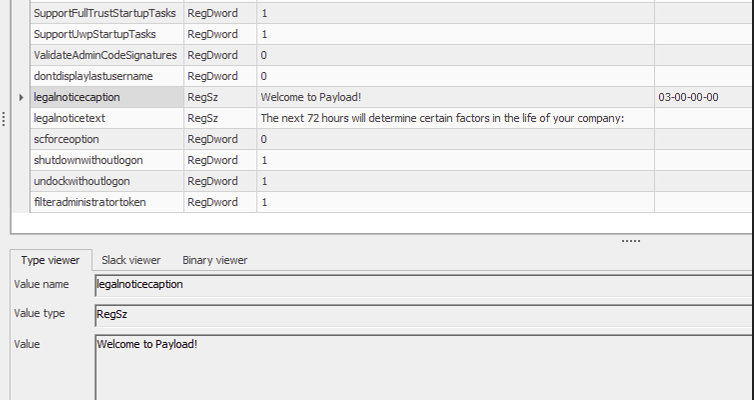
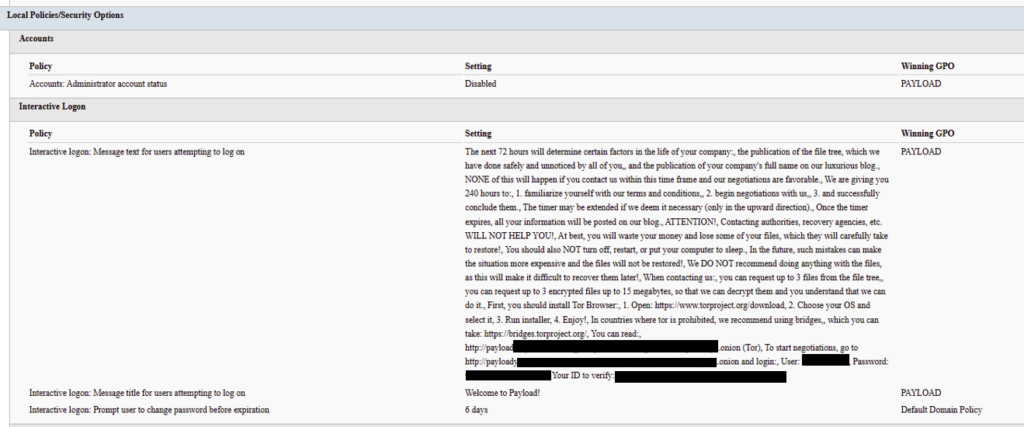
Settings changed by PAYLOAD GPO

Settings changed by PAYLOAD GPO

This activity was enabled entirely through a legitimate group policy mechanism, meaning there is no malware code for security solutions to look for because the malicious logic is contained within the policy configuration.

The win Firewall Off GPO

A second domain-root-linked GPO, named “win Firewall Off”, disabled Windows Firewall across the domain, private and public profiles on all endpoints (T1562.004). Deployed independently of PAYLOAD, this object degraded host defenses and ensured the actor retained unimpeded network reach to endpoints for any follow-on activity.

Settings changed by win Firewall Off GPO

Settings changed by win Firewall Off GPO

The one-day delay detonation

The most forensically instructive detail is the one-day gap between GPO creation (13 April) and visible impact (14 April). Analysis of Master File Table (MFT) timestamps and the Group Policy History registry key confirmed the policy was written to SYSVOL and cached on endpoints on 13 April. However, computer configuration settings (wallpaper and lock screen machine policy, security settings, firewall disabling) only apply upon reboot or policy refresh — and no endpoint had rebooted in the interim. The attack therefore remained dormant in the GPO cache for one day before detonating en masse when machines were restarted in accordance with standard procedures.

We have to point out here that this delayed policy application is characteristic of GPO-based operations and has two potential consequences for defenders. Firstly, it may grant the actor a quiet window for exfiltration, persistence, or further staging between weaponization and impact. Secondly, it can be used to sever the temporal link between the cause (a GPO-creation event in the directory log) and the effect (mass user-visible disruption occurring at a later time), complicating timeline reconstruction unless directory service auditing is in place.

Forensic findings

Initial incident response engagement revealed a number of findings associated with the attack that we share below.

  1. No file encryption
    A full review of the MFT on affected workstations found no files bearing a .payload extension characteristic to PAYLOAD ransomware and no evidence of bulk renaming or encryption I/O patterns. The attackers’ objectives were operational disruption and extortion via visual impact and access denial.
  2. No endpoint persistence
    All standard persistence locations were clean:
    • Scheduled tasks — no malicious tasks
    • Run/RunOnce keys — clean
    • Startup folders (user and system) — clean
    • Services — no malicious service installed
    • WMI event subscriptions — none
    • Boot sector/MBR — unmodified

    The attack’s persistence mechanism is the GPO link itself on the domain controller, with no endpoint-resident component.

  3. No active malicious processes
    Live process and memory analysis revealed no injected threads, process hollowing or anomalous outbound connections.
  4. Registry timeline analysis
    Group Policy History, Shadow and State registry keys on the workstation recorded the application of PAYLOAD on 13 April:
    HKLM\…\Group Policy\History\{35378EAC-683F-11D2-A89A-00C04FBBCFA2}\1
    HKLM\…\Group Policy\Shadow\{827D319E-6EAC-11D2-A4EA-00C04F79F83A}\0
    HKLM\…\Group Policy\State\Machine\GPO-List\7
    HKCU\…\Group Policy\History\{7150F9BF-48AD-4da4-A49C-29EF4A8369BA}\1
    HKCU\…\Group Policy\State\S-1-5-21-…\Loopback-GPO-List\5
    The presence of the “Loopback-GPO-List” entry indicates the GPO was processed in loopback mode, ensuring the user configuration (wallpaper) applied regardless of which user logged on to the machine.
  5. SYSVOL artifacts
    Two files were staged on the domain controller’s SYSVOL share and served to endpoints through the Files Group Policy Preference CSE:
    • payload.jpg — the ransom image used for both wallpaper and lock screen.
    • hello.txt — the ransom note, distributed to desktops and drive roots as README-payload.txt.

Detection engineering

Because no malicious binary or process exists, the detection logic should focus on the directory service and SYSVOL indicators. Below are the highest-value telemetry sources for identifying the described malicious activity.

  • Directory service change auditing (DS Access)
    Enable Advanced Audit Policy → DS Access → Audit Directory Service Changes on all domain controllers and set up alerts for the following events:
    Event ID Meaning Hunt focus
    5137 A directory service object was created The account that created new groupPolicyContainer objects must be an authorized GPO administrator
    5136 A directory service object was modified Changes to gPLink on the domain root or sensitive organizational units; changes to gPCMachineExtensionNames/gPCUserExtensionNames/gPCFileSysPath/versionNumber for all GPOs
    5141 A directory service object was deleted GPO deletions (relevant for tamper detection and remediation assessment)

    A gPLink modification at the domain root by a non-standard account is one of the most telling indicators of this attack class.

  • SYSVOL file integrity monitoring
    Monitor \\DC.THECOMPANY.local\sysvol\THECOMPANY.local\Policies\ for unexpected files, particularly image files, text files, scripts, ScheduledTasks.xml, and modified registry.pol/GptTmpl.inf files that were created by sources other than legitimate replication.
  • Endpoint policy application telemetry
    On endpoints, GPO application is logged in the Group Policy Operational log (Microsoft-Windows-GroupPolicy/Operational) and reflected in the History and Shadow registry keys shown above. A sudden domain-wide change to the applied policy set is a strong post-detonation signal.
  • Missing 5136 events
    If the contents of a GPO’s SYSVOL change without a corresponding 5136 event, this can indicate direct SYSVOL/template editing (e.g., via open-source tools such as PowerView or SharpGPOAbuse) that bypasses the normal Group Policy Management Console (GPMC) modification path. While we recommend treating the absence of expected audit events as suspicious, it should be noted that this can be caused by misconfigured auditing.

Anti-forensics and recovery-inhibition capabilities

Confirmed PAYLOAD family capabilities

The Windows endpoint attack described in this report was implemented through malicious Group Policy Objects and did not involve a recovered ransomware executable, resident endpoint malware, confirmed file encryption or active malicious processes at the time of the forensic examination. However, PAYLOAD cryptomalware for Windows does exist, and other sources, including public analysis of its samples, reveal further malicious capabilities of this ransomware that could be used by security teams to enrich detection logic and security policies.

The behaviors documented in this section must therefore be interpreted as family-level capabilities identified through the public reverse engineering of PAYLOAD ransomware samples. They were not confirmed as having executed during the GPO-based incident unless corresponding evidence was identified in the host, memory, process, event-log, or hypervisor.

Windows Event Log clearing

Public reverse engineering of the PAYLOAD Windows variant reveals an optional event log clearing capability (T1685.005, formerly T1070.001). The ransomware dynamically resolves Windows Event Log APIs, enumerates available event log channels, and clears individual channels.

Implementation artifacts include:

  • Runtime loading of wevtapi.dll
  • EvtOpenChannelEnum
  • EvtNextChannelPath
  • EvtClearLog
  • Enumeration of Security, System, Application, and PowerShell logs, and operational channels
  • A command-line option controlling whether log clearing is performed

Clearing event logs reduces the availability of records related to process execution, authentication, PowerShell, service control, and system changes. However, it does not necessarily remove events that were already forwarded to a SIEM, Windows Event Collector, EDR backend, or protected log archive.

Forensic indicators
  • Windows Security Event ID 1102
  • Event logging shutdown or failure events
  • Sudden reductions in event record identifiers
  • Multiple event channels restarting from low record numbers
  • Gaps between endpoint and centrally forwarded telemetry
  • Execution of utilities or APIs associated with log management
  • Direct access to EVTX files (Windows Event Log files) under the Windows event log directory

We should note that these indicators can’t be interpreted on their own. For instance, Event ID 1102 should be correlated with a number of aggravating factors, such as:

  • Event ID 4688 or Sysmon Event ID 1 for process creation
  • Event ID 4624 for the associated administrative logon
  • EDR process trees
  • PowerShell operational logging
  • Windows Event Forwarding records
  • Privileged access management activity

At the same time, the absence of Event ID 1102 does not prove that log clearing did not occur. Direct deletion, truncation, service impairment, or an incomplete audit configuration may produce different evidence.

Security process and service termination

PAYLOAD analysis reveals that the Windows ransomware variant contains logic that targets security processes and services (T1685 and T1489). This capability is intended to stop security products, backup software, database services, and applications that may lock files targeted for encryption.
Process and service termination serves several objectives:

  1. Reduce endpoint detection and response visibility.
  2. Release file handles so data can be modified.
  3. Interrupt backup and recovery services.
  4. Prevent databases and enterprise applications from protecting active data.
  5. Reduce interference with encryption operations.
Forensic indicators
  • Security agent services changing from running to stopped
  • Event ID 7036 service state changes
  • Event ID 7040 service start type changes
  • Event ID 4688 or Sysmon Event ID 1 for service control utilities
  • Sysmon Event ID 5 for terminated processes
  • EDR health degradation affecting many endpoints
  • Repeated termination attempts against security or backup processes
  • Execution of dedicated process killing utilities

VSS deletion, backup and recovery suppression

Public PAYLOAD sample analysis reports the deletion of Windows Volume Shadow Copies before encryption (T1490). This behavior removes local restore points and reduces the victim’s ability to recover files without external backups.

Recovery inhibition is broader than VSS deletion and may include multiple other malicious techniques, including the following:

  • Deleting shadow copies, backup catalogs, and hypervisor snapshots
  • Disabling recovery services
  • Modifying boot recovery settings
  • Compromising backup management platforms
  • Deleting or encrypting backup repositories

In the PAYLOAD Windows sample that is proven to perform encryption, VSS deletion is confirmed to have taken place before encryption. A broader compromise of the backup platform was not established in the investigated incident.

Forensic indicators
  • Execution of shadow copy management utilities
  • Backup catalog deletion attempts
  • Recovery configuration changes
  • Backup service termination
  • Mass snapshot deletions
  • Backup administrator logons outside normal maintenance windows
  • Backup retention or immutability changes
  • Backup jobs failing immediately before disruptive activity

Ecosystem-relevant ransomware techniques

Above, we discussed the techniques specific to PAYLOAD ransomware. In this section, we’ll review other common ransomware techniques, such as BYOVD abuse and ESXi policy weakening, that remain relevant risks in the ransomware ecosystem. However, these techniques should not be attributed to this incident without supporting driver load, process, memory, ESXi, vCenter, or backup platform telemetry. We describe these techniques below as they may prove useful in other ransomware-related forensic investigations.

The examples used in this section are therefore ecosystem-relevant: they are commonly observed in ransomware operations but not conclusively attributed to the analyzed PAYLOAD samples.

ETW suppression and in-memory patching

Event Tracing for Windows (ETW) is a kernel-supported tracing architecture used by Windows components, diagnostic utilities, security products, and endpoint monitoring systems.

Although we didn’t encounter this technique in our case, some ransomware families can patch ETW-related functions inside the ransomware process (T1685, formerly T1562.001). The reported routine changes the memory protection of code pages, overwrites the beginning of selected ETW functions so they return without producing events, restores the original protection, and refreshes the instruction cache.

Reported target functions include EtwEventWrite, EtwEventWriteFull, EtwEventWriteTransfer, and EtwRegister.

This modification applies to the process-local mapping of ntdll.dll. It does not disable ETW globally across Windows, but it can reduce the telemetry generated by the modified process.

Forensic indicators
  • Writable or recently modified executable pages within ntdll.dll
  • Memory protection changes affecting ETW function addresses
  • In-memory code differing from the corresponding clean DLL on disk
  • EDR memory tampering alerts
  • Unexpected calls to memory protection APIs followed by telemetry silence
  • Process execution visible in network or filesystem telemetry but absent from expected ETW-derived sources
  • Inconsistent telemetry between EDR, Sysmon, Windows Event Logs, and network monitoring

It should be noted that telemetry gaps are not conclusive evidence of ETW patching. Other factors include agent upgrades, network outages, endpoint shutdowns, SIEM ingestion failures, collector backpressure, and filtering or licensing changes.

Memory acquisition is the strongest validation source when process-local ETW patching is suspected.

Vulnerable signed driver abuse, BYOVD

Bring Your Own Vulnerable Driver (BYOVD) involves introducing or abusing a legitimately signed but vulnerable kernel driver (T1068 and T1685). The attacker exploits the driver’s exposed functionality to gain kernel-level capabilities, modify protected memory, terminate security processes, remove security callbacks, or bypass operating system security controls.

BYOVD is highly relevant to contemporary ransomware operations. However, the reviewed public PAYLOAD analyses do not provide sufficient evidence to conclude that BYOVD is an intrinsic PAYLOAD capability.

It should therefore be presented as an ecosystem-relevant technique rather than a confirmed PAYLOAD feature.

Forensic indicators
  • Unexpected .sys files written to user-writable or temporary directories
  • New kernel driver services
  • Sysmon Event ID 6
  • Driver hashes matching Microsoft or community vulnerable driver blocklists
  • Invalid, revoked, expired, or unusual driver signatures
  • Driver load followed by EDR termination
  • New privileged processes immediately following driver loading
  • Code Integrity or Defender alerts
  • Service creation events referencing driver files

ESXi security policy weakening

Ransomware operators are increasingly targeting ESXi and vCenter because compromising the virtualization layer provides access to many business-critical virtual machines.

Public research typically describes operators performing the following activities (T1685, T1490 and T1489):

  • Enabling SSH on ESXi hosts
  • Changing root passwords
  • Disabling execInstalledOnly
  • Modifying lockdown mode exceptions
  • Stopping virtual machines
  • Deleting snapshots and backups
  • Changing host firewall policies
  • Copying custom ransomware binaries to hypervisors

On the target organization’s Linux servers we saw an ESXi PAYLOAD variant, which makes this behavior operationally relevant. Nevertheless, the reviewed evidence does not indicate that PAYLOAD operators used any of these policy-weakening actions in the investigated incident.

Forensic indicators
  • Unexpected ESXi SSH enablement
  • Changes to execInstalledOnly
  • Secure Boot enforcement changes
  • Lockdown mode configuration changes
  • Root password changes
  • New or unusual administrator accounts
  • Bulk VM shutdown activity
  • Bulk snapshot deletion
  • New binaries in datastore or temporary paths
  • vCenter tasks originating from unexpected accounts or systems
  • Missing or disabled remote syslog forwarding

Remediation

To contain the described threat and limit possible damage, several remediation steps should be taken. Below, we recommend a four-phase remediation approach for containing this threat and restoring the affected environment.

Phase 1 — domain controller actions (to be performed first)

When dealing with PAYLOAD GPO, the first priority of the remediation plan should be to remove the source GPOs. Until this is done, endpoint cleanup is ineffective because the next policy refresh re-infects cleaned machines.

The immediate domain controller actions to be taken are:

  1. Delete PAYLOAD GPO. Remove {C897F2C7-C2AC-4E6F-BF48-58036FF29E79} via GPMC.
  2. Delete or revert win Firewall Off GPO. Remove {22099AD2-E062-4F56-B574-5099BBA4E7A6}.
  3. Clean SYSVOL. Delete jpg and hello.txt from \\DC.THECOMPANY.local\sysvol\THECOMPANY.local\.
  4. Rotate credentials. Reset the compromised account; audit all privileged accounts and group memberships for unauthorized changes; rotate krbtgt twice if domain admin compromise is confirmed.
  5. Force refresh. Perform gpupdate /force across endpoints after deletion; re-enable local administrator and firewall via clean policy.

Phase 2 — Active Directory and GPO hardening

  • Adopt the AD tiered administration model and confine domain admins to Tier 0 with no interactive logon to workstations and member servers.
  • Separate GPO creation from GPO linking rights, and grant both only to a dedicated, audited administrator role.
  • Enable GPO change auditing (Event IDs 5136, 5137, 5141) and forward to a SIEM.
  • Monitor SYSVOL with file integrity tooling.

Phase 3 — credential and access hardening

  • Enforce phishing-resistant MFA on all VPN and remote access entry points.
  • Deploy Windows LAPS to generate unique, rotated local administrator passwords.
  • Enable Credential Guard to protect LSASS-resident secrets.
  • Adopt Privileged Access Workstations (PAW) for all administration.
  • Implement just-in-time elevation through Privileged Identity Management (PIM) for domain admin.

Phase 4 — detection and monitoring

  • SIEM rule: GPO creation or domain-root gPLink change by a non-standard account.
  • SIEM rule: file creation events under SYSVOL from non-replication sources.
  • Implement enhanced, centrally collected FortiGate SSL VPN logging (auth events, session detail, source IP geolocation, impossible travel check) and detailed perimeter monitoring.
  • Deploy a canary GPO whose application anywhere signals attacker GPO write access.

Conclusion

PAYLOAD demonstrates a maturing tactic of turning the victim’s own trusted infrastructure into a weapon. By weaponizing Group Policy, the actor achieved a domain-wide impact without a single malicious binary on any endpoint, evaded file- and process-based detection entirely, and caused organization-wide disruption within seconds of the first reboot.

The absence of encryption is the most strategically significant finding and is consistent with the 2026 trend toward encryptionless extortion. At Kaspersky GERT, we assess with moderate confidence that the missing encryption reflects one of two scenarios: (1) a deliberate decision to stay below the irreversible data destruction threshold while preserving the option of a follow-on encryption phase, or (2) an operation interrupted before full execution.

The absence of encrypted files must not be mistaken for the absence of a serious compromise — the most critical impact lies in the actor gaining domain admin-level control. This incident proves that a threat actor with domain admin access and a working knowledge of group policy internals can inflict domain-wide disruption equivalent to a ransomware attack without writing a single malicious file to any endpoint.

Detection strategies anchored solely in file- or process-based indicators are blind to this attack class. Effective controls include directory service change auditing, SYSVOL integrity monitoring, and privileged access governance, which allow for GPO protection.

Detection by Kaspersky solutions

Kaspersky security solutions effectively detect the described malicious activity at various stages of the attack. Possible detection scenarios are listed below.
To protect organizations that use our Kaspersky SIEM system, we have prepared a package of correlation rules designed to help detect this type of malicious activity. The rules are now available for customers to download from the SIEM repository; the package name is: [OOTB] Group policy hijacked: PAYLOAD ransomware – ENG.

The “Group policy hijacked: PAYLOAD ransomware” package contains rules that detect suspicious file creation or modification in the SYSVOL shared folder on a domain controller, as well as changes to critical attributes and settings of domain group policies. Some rules may require adjustment if they trigger in response to legitimate activity, such as synchronization between domain controllers or the configuration of a new group policy.

To ensure the detection rules function correctly, verify that events from Windows systems are being received in full, including events with the following identifiers: Sysmon: 11, Security — 4663, 5136, 4657.

We also recommend applying the following rules available in the repository to detect all attack stages.

  • Detection of Windows Event Log clearing to cover up traces of an attack: R050_03_Windows Event Log was cleared
  • Detection of suspicious access to the LSASS process, which may indicate attempts to dump credentials: R262_Suspicious access to the LSASS process
  • Detection of the Volume Shadow Copy service being started, which is used to create shadow copies before deleting them: R231_20_Running the Volume Shadow Copy service
  • Detection of shadow copy deletion: R321_Shadow copy deletion
  • Detection of Windows Defender disablement: R076_01_Windows Defender Antivirus was disabled
  • Detection of attempts to disable or modify the system firewall: R240_03_Disabling system firewall via the registry
  • Detection of a service installation from a non-system folder, which may indicate malware persistence techniques: R281_01_Installation of a service from a non-system folder

For the rules in this list to function correctly, it is necessary to configure Security event auditing for event IDs 4663, 5136, 4657, 7036, and 1102.

In addition to the SIEM system, when audit settings are configured correctly, the process of creating, modifying, and deleting GPOs generates a large number of characteristic artifacts on the domain controller, enabling Kaspersky Endpoint Detection and Response Expert to promptly alert the user to anomalies in the infrastructure.

The creation of a new GPO is covered by the gpo_creation rule, which triggers in response to the corresponding event in the infrastructure. Changes to existing policies are detected by the following rules:

GPO deletion is covered by the gpo_deletion rule.

In the next major version update of Kaspersky EDR Expert, a new event type, GPO, will be introduced, allowing users to track changes to Group Policy Objects.

For information security officers, GPO events will serve as an additional source of context when investigating activity in Active Directory and will help detect changes that could affect the configuration, access rights, and security of endpoints before a potentially malicious policy is deployed.

MITRE ATT&CK mapping

Tactic Technique Observed behavior
Initial Access T1078 — Valid Accounts Compromised domain credential used for VPN authentication
Initial Access T1133 — External Remote Services FortiGate SSL VPN used as entry point
Privilege Escalation T1078.002 — Domain Accounts Account held domain-level GPO create/link rights
Privilege Escalation/Defense Impairment T1484.001 — Group Policy Modification Malicious PAYLOAD GPO created and linked at domain root; re-applies on every refresh/reboot; uses trusted channel to evade EDR
Defense Impairment T1686 — Disable or Modify System Firewall win Firewall Off GPO disables Windows Firewall on all profiles
Impact T1491.001 — Internal Defacement Wallpaper and lock screen replaced with ransom image
Impact T1531 — Account Access Removal Local Administrator account disabled via GPO Security Settings
Collection T1005 — Data from Local System Data exfiltration was observed originating from the file servers
Command and Control T1071 — Application Layer Protocol No live C2 confirmed; delivery achieved entirely via GPO

Indicators of compromise

GPOs
PAYLOAD ransomware GPO: {C897F2C7-C2AC-4E6F-BF48-58036FF29E79}
win Firewall Off GPO: {22099AD2-E062-4F56-B574-5099BBA4E7A6}

File names and MD5 hashes
payload.jpg: Ransom wallpaper and lock screen image (SYSVOL)
hello.txt: Ransom note source (SYSVOL)
README-payload.txt: Ransom note dropped to desktops and drive roots
killer.exe (0108656A3E1ADE6CA4F21B084F5E1208): process killer tool
kill.exe (BEA5E267F24D7DA59F6821BFFDBFF293): process killer tool

IP addresses
37.19.210[.]12
146.70.117[.]239
149.102.229[.]154
104.164.55[.]46
104.28.162[.]228
104.28.163[.]162
64.190.76[.]14
192.42.116[.]50
192.42.116[.]12
192.42.116[.]56
192.42.116[.]97
192.42.116[.]52

Registry keys
HKLM\...\Policies\System\legalnoticecaption = Welcome to Payload!

SYSVOL path
\\DC.THECOMPANY.local\sysvol\THECOMPANY.local\payload.jpg

Event IDs
5137: GPO object creation on DC — review creator account
5136: GPO attribute modification — watch gPLink at domain root

  •  

Group Policy hijacked: PAYLOAD ransomware weaponizes Active Directory GPO

Executive summary

In April 2026, we at Kaspersky’s Global Emergency Response Team (GERT) responded to a security incident at a manufacturing organization in the Middle East. The threat actor obtained domain admin-equivalent control of the organization’s Active Directory environment and authored a malicious Group Policy Object (GPO) named PAYLOAD, linking it at the domain root. Through that single object, the actor delivered ransom notes, hijacked the desktop wallpaper and lock screen, enforced a logon banner, and disabled the local administrator account across every domain-joined Windows workstation — all without dropping a ransomware binary or encrypting any data. The only ransomware we found in this incident was PAYLOAD sample targeting ESXi on Linux servers. Besides that, data exfiltration was observed originating from the file servers and several additional systems, and was later published on the dark web.

This case is an example of two converging trends that define the 2026 ransomware landscape:

  1. Living-off-the-land abuse of trusted AD infrastructure. Group Policy is a signed, allowlisted, SYSTEM-privileged distribution channel that the majority of endpoint detection and response tools is designed not to inspect. By delivering impact through GPO rather than through malware, the actor sidestepped the entire file- and process-based detection stack.
  2. Encryptionless extortion. Industry telemetry shows extortion-only incidents grow significantly year-on-year. PAYLOAD fits this model; the leverage is operational disruption and the threat of escalation rather than cryptographic denial of data.

We confirmed that no files were encrypted on Windows machines, no malicious binaries were resident on disk, no endpoint persistence was established, and no malicious processes were running at the time of analysis. The entire attack lived inside Active Directory itself. The defensive implication is stark: an organization whose detection strategy depends on catching a ransomware executable would have seen nothing until the first endpoint rebooted and the ransom wallpaper appeared.

In this article, we will describe the GPO attack chain and provide operational advice on how to detect such threats, including detailed remediation recommendations.

Group Policy as an attack surface

Attacks through group policies are nothing new. They can inflict significant, domain-wide damage with multiple malicious capabilities. A Group Policy Object (GPO) is essentially a combination of a Group Policy Container (GPC) in Active Directory and a Group Policy Template (GPT) in SYSVOL. The Group Policy scope depends on whether the GPC is linked to the directory tree at the domain, site, or organization unit (OU) level. A link at the domain root means the policy applies to every computer and user object beneath it. Thus, a GPO compromised at the domain root can affect all in-scope domain users and computers, potentially granting an attacker complete control over the corporate network. What makes GPO abuse even more dangerous is that group policies are processed in a trusted, high-privilege environment, ensuring persistence because endpoint cleanup is not enough to remove them.

We have already discussed GPO architecture and ways it can be compromised in greater detail in an earlier blog post. Other public threat intelligence has also repeatedly documented this technique in ransomware operations. Microsoft observed Ryuk operators distributing ransomware through Group Policy, SYSVOL startup items, and PsExec. LockBit affiliates have been documented modifying SYSVOL Group Policy files, including ScheduledTasks.xml, to support ransomware execution and propagation. BlackCat/ALPHV operators have also abused GPOs to create scheduled tasks and deploy ransomware.

Another notable example of GPO abuse is PAYLOAD ransomware, which weaponizes GPO Preferences and policy settings for pure impact rather than as a launcher for an encryptor. Let’s take a closer look at this attack, which is detailed further below.

Attack timeline

During the April 2026 investigation, we managed to reconstruct the attack timeline as outlined below:

Date Event
11 April Initial access. Threat actor authenticates to the FortiGate SSL VPN using a valid but compromised domain credential.
13 April GPO authored. Malicious GPO, PAYLOAD ({C897F2C7-C2AC-4E6F-BF48-58036FF29E79}) created and linked at the domain root, configuring ransom notes, wallpaper, lock screen, logon banner, and administrator account disablement.
13 April SYSVOL staging. The payload.jpg and hello.txt files written to \\DC.THECOMPANY.local\sysvol\THECOMPANY.local\.
13 April Second GPO. GPO named win Firewall Off ({22099AD2-E062-4F56-B574-5099BBA4E7A6}) linked at the domain root, disabling Windows Firewall on all profiles.
13 April Dormancy. GPO cached on endpoints but computer configuration not yet applied — no endpoint had rebooted since the policy update.
13 April Data exfiltration. Data exfiltration was observed originating from the file servers and several additional systems.
14 April Detonation. Most of the endpoints begin rebooting; computer configuration policies apply. Ransom wallpaper, logon banner, and notes appear. Operational disruption begins.
15 April Response. Kaspersky GERT engaged. Forensic triage of affected workstations and the domain controller initiated.
16 April Assessment. GERT confirms no file encryption, no resident malware, no endpoint persistence.

Next, we will discuss each of these stages in more detail and share the findings from our incident response activities.

Incident overview

Initial access

The entry vector was a compromised valid account (MITRE ATT&CK T1078) used to authenticate through the organization’s FortiGate SSL VPN — an external remote service (T1133). Insufficient logging on the FortiGate appliance prevented us from reconstructing how the credential was originally compromised.

Three hypotheses were considered plausible in the context of the attack, in no particular order:

  • Password spraying or credential stuffing against the SSL VPN portal.
  • Phishing-led credential harvesting.
  • Purchase of pre-compromised credentials from an initial access broker (IAB).

Once on the internal network, the actor operated with the compromised security principal’s privileges. Because the account was able to create and link a GPO at the domain root, it held either domain admin privileges or a delegated equivalent (e.g., membership of Group Policy Creator Owners combined with link rights on the domain object).

FortiGate SSL VPN authentication logs and ESXi/virtualization privilege escalation logs were insufficient to reconstruct the lateral movement and privilege escalation chain between initial VPN access and the GPO write privilege level. The most common real-world routes to GPO control — DCSync, Kerberoasting of privileged service accounts, and Pass-the-Hash/Pass-the-Ticket — could not be confirmed or ruled out.

Execution

Rather than deploying an encryptor, the actor abused the victim’s Active Directory policy infrastructure, resulting in malicious GPOs being configured and linked at the domain root to deliver the observed impact across domain-joined systems. The two GPOs below constitute the entire offensive toolkit observed.

The PAYLOAD GPO

We performed a Resultant Set of Policy (RSOP) analysis, which helped us list all policy settings on the affected workstations. From these results, we reconstructed the following changes delivered by PAYLOAD:

GPO extension/CSE Setting/path Configured value/resulting action
Files (Group Policy Preference) Source SYSVOL\hello.txt → Desktop, C:\, D:\ Dropped as README-payload.txt (ReadOnly)
Registry (Computer) HKLM\SOFTWARE\Microsoft\Windows\CurrentVersion\Policies\System\legalnoticecaption Welcome to Payload!
Registry (Computer) HKLM\…\Policies\System\legalnoticetext (ransom demand text)
Personalization Policy Lock Screen Image \\DC.THECOMPANY.local\sysvol…\payload.jpg
Desktop Policy (User) Wallpaper path \\DC.THECOMPANY.local\sysvol…\payload.jpg
Security Settings (GptTmpl.inf) Accounts: Administrator account status Disabled

The PAYLOAD GPO enabled the following actions:

  1. Drop SYSVOL\hello.txt to the desktop and root directories C:\ and D:\ as a read-only README-payload.txt by tampering with the “Group Policy Files” client-side extension (CSE).
  2. Modify the HKLM\SOFTWARE\Microsoft\Windows\CurrentVersion\Policies\System\ registry key, changing the legalnoticecaption value to "Welcome to Payload!" and the legalnoticetext to the ransom note text through the “Group Policy Registry” CSE.
  3. Set payload.jpg located in the targeted domain controller’s SYSVOL as the lock screen image by altering the personalization policy, and as the wallpaper by altering the desktop policy at the user level.
  4. Revoke administrator rights for the administrator account (locking the account) by editing the Security Settings CSE in the GptTmpl.inf file.
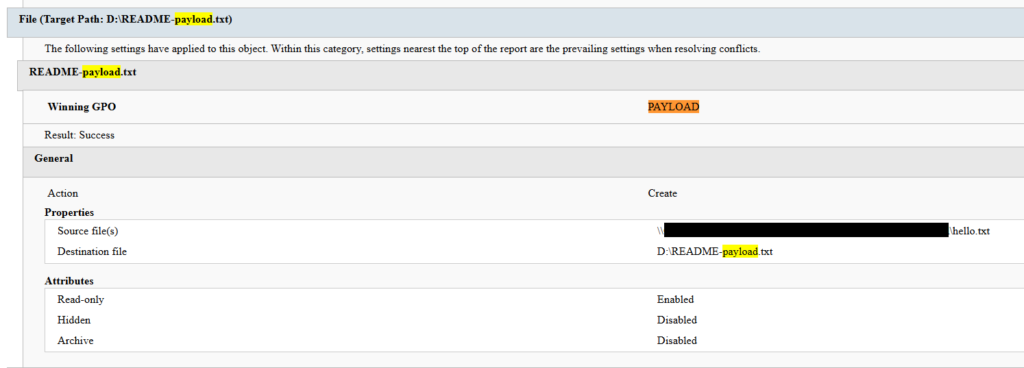
Settings changed by PAYLOAD GPO

Settings changed by PAYLOAD GPO

This activity was enabled entirely through a legitimate group policy mechanism, meaning there is no malware code for security solutions to look for because the malicious logic is contained within the policy configuration.

The win Firewall Off GPO

A second domain-root-linked GPO, named “win Firewall Off”, disabled Windows Firewall across the domain, private and public profiles on all endpoints (T1562.004). Deployed independently of PAYLOAD, this object degraded host defenses and ensured the actor retained unimpeded network reach to endpoints for any follow-on activity.
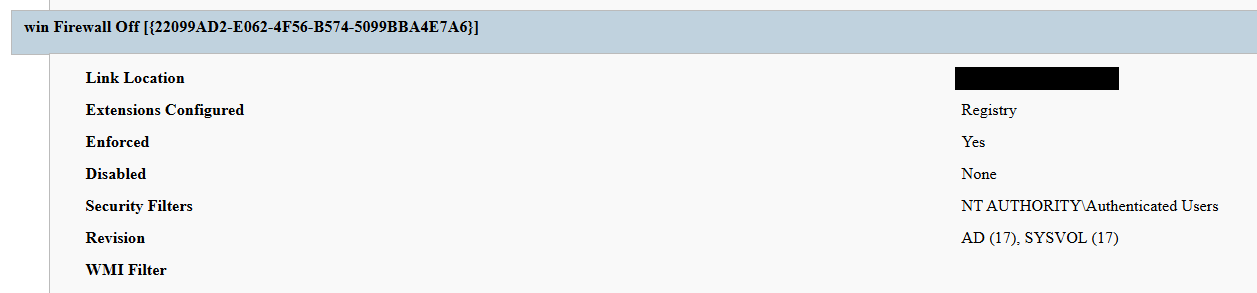
Settings changed by win Firewall Off GPO

Settings changed by win Firewall Off GPO

The one-day delay detonation

The most forensically instructive detail is the one-day gap between GPO creation (13 April) and visible impact (14 April). Analysis of Master File Table (MFT) timestamps and the Group Policy History registry key confirmed the policy was written to SYSVOL and cached on endpoints on 13 April. However, computer configuration settings (wallpaper and lock screen machine policy, security settings, firewall disabling) only apply upon reboot or policy refresh — and no endpoint had rebooted in the interim. The attack therefore remained dormant in the GPO cache for one day before detonating en masse when machines were restarted in accordance with standard procedures.

We have to point out here that this delayed policy application is characteristic of GPO-based operations and has two potential consequences for defenders. Firstly, it may grant the actor a quiet window for exfiltration, persistence, or further staging between weaponization and impact. Secondly, it can be used to sever the temporal link between the cause (a GPO-creation event in the directory log) and the effect (mass user-visible disruption occurring at a later time), complicating timeline reconstruction unless directory service auditing is in place.

Forensic findings

Initial incident response engagement revealed a number of findings associated with the attack that we share below.

  1. No file encryption
    A full review of the MFT on affected workstations found no files bearing a .payload extension characteristic to PAYLOAD ransomware and no evidence of bulk renaming or encryption I/O patterns. The attackers’ objectives were operational disruption and extortion via visual impact and access denial.
  2. No endpoint persistence
    All standard persistence locations were clean:
    • Scheduled tasks — no malicious tasks
    • Run/RunOnce keys — clean
    • Startup folders (user and system) — clean
    • Services — no malicious service installed
    • WMI event subscriptions — none
    • Boot sector/MBR — unmodified

    The attack’s persistence mechanism is the GPO link itself on the domain controller, with no endpoint-resident component.

  3. No active malicious processes
    Live process and memory analysis revealed no injected threads, process hollowing or anomalous outbound connections.
  4. Registry timeline analysis
    Group Policy History, Shadow and State registry keys on the workstation recorded the application of PAYLOAD on 13 April:
    HKLM\…\Group Policy\History\{35378EAC-683F-11D2-A89A-00C04FBBCFA2}\1
    HKLM\…\Group Policy\Shadow\{827D319E-6EAC-11D2-A4EA-00C04F79F83A}\0
    HKLM\…\Group Policy\State\Machine\GPO-List\7
    HKCU\…\Group Policy\History\{7150F9BF-48AD-4da4-A49C-29EF4A8369BA}\1
    HKCU\…\Group Policy\State\S-1-5-21-…\Loopback-GPO-List\5
    The presence of the “Loopback-GPO-List” entry indicates the GPO was processed in loopback mode, ensuring the user configuration (wallpaper) applied regardless of which user logged on to the machine.
  5. SYSVOL artifacts
    Two files were staged on the domain controller’s SYSVOL share and served to endpoints through the Files Group Policy Preference CSE:
    • payload.jpg — the ransom image used for both wallpaper and lock screen.
    • hello.txt — the ransom note, distributed to desktops and drive roots as README-payload.txt.

Detection engineering

Because no malicious binary or process exists, the detection logic should focus on the directory service and SYSVOL indicators. Below are the highest-value telemetry sources for identifying the described malicious activity.

  • Directory service change auditing (DS Access)
    Enable Advanced Audit Policy → DS Access → Audit Directory Service Changes on all domain controllers and set up alerts for the following events:
    Event ID Meaning Hunt focus
    5137 A directory service object was created The account that created new groupPolicyContainer objects must be an authorized GPO administrator
    5136 A directory service object was modified Changes to gPLink on the domain root or sensitive organizational units; changes to gPCMachineExtensionNames/gPCUserExtensionNames/gPCFileSysPath/versionNumber for all GPOs
    5141 A directory service object was deleted GPO deletions (relevant for tamper detection and remediation assessment)

    A gPLink modification at the domain root by a non-standard account is one of the most telling indicators of this attack class.

  • SYSVOL file integrity monitoring
    Monitor \\DC.THECOMPANY.local\sysvol\THECOMPANY.local\Policies\ for unexpected files, particularly image files, text files, scripts, ScheduledTasks.xml, and modified registry.pol/GptTmpl.inf files that were created by sources other than legitimate replication.
  • Endpoint policy application telemetry
    On endpoints, GPO application is logged in the Group Policy Operational log (Microsoft-Windows-GroupPolicy/Operational) and reflected in the History and Shadow registry keys shown above. A sudden domain-wide change to the applied policy set is a strong post-detonation signal.
  • Missing 5136 events
    If the contents of a GPO’s SYSVOL change without a corresponding 5136 event, this can indicate direct SYSVOL/template editing (e.g., via open-source tools such as PowerView or SharpGPOAbuse) that bypasses the normal Group Policy Management Console (GPMC) modification path. While we recommend treating the absence of expected audit events as suspicious, it should be noted that this can be caused by misconfigured auditing.

Anti-forensics and recovery-inhibition capabilities

Confirmed PAYLOAD family capabilities

The Windows endpoint attack described in this report was implemented through malicious Group Policy Objects and did not involve a recovered ransomware executable, resident endpoint malware, confirmed file encryption or active malicious processes at the time of the forensic examination. However, PAYLOAD cryptomalware for Windows does exist, and other sources, including public analysis of its samples, reveal further malicious capabilities of this ransomware that could be used by security teams to enrich detection logic and security policies.

The behaviors documented in this section must therefore be interpreted as family-level capabilities identified through the public reverse engineering of PAYLOAD ransomware samples. They were not confirmed as having executed during the GPO-based incident unless corresponding evidence was identified in the host, memory, process, event-log, or hypervisor.

Windows Event Log clearing

Public reverse engineering of the PAYLOAD Windows variant reveals an optional event log clearing capability (T1685.005, formerly T1070.001). The ransomware dynamically resolves Windows Event Log APIs, enumerates available event log channels, and clears individual channels.

Implementation artifacts include:

  • Runtime loading of wevtapi.dll
  • EvtOpenChannelEnum
  • EvtNextChannelPath
  • EvtClearLog
  • Enumeration of Security, System, Application, and PowerShell logs, and operational channels
  • A command-line option controlling whether log clearing is performed

Clearing event logs reduces the availability of records related to process execution, authentication, PowerShell, service control, and system changes. However, it does not necessarily remove events that were already forwarded to a SIEM, Windows Event Collector, EDR backend, or protected log archive.

Forensic indicators
  • Windows Security Event ID 1102
  • Event logging shutdown or failure events
  • Sudden reductions in event record identifiers
  • Multiple event channels restarting from low record numbers
  • Gaps between endpoint and centrally forwarded telemetry
  • Execution of utilities or APIs associated with log management
  • Direct access to EVTX files (Windows Event Log files) under the Windows event log directory

We should note that these indicators can’t be interpreted on their own. For instance, Event ID 1102 should be correlated with a number of aggravating factors, such as:

  • Event ID 4688 or Sysmon Event ID 1 for process creation
  • Event ID 4624 for the associated administrative logon
  • EDR process trees
  • PowerShell operational logging
  • Windows Event Forwarding records
  • Privileged access management activity

At the same time, the absence of Event ID 1102 does not prove that log clearing did not occur. Direct deletion, truncation, service impairment, or an incomplete audit configuration may produce different evidence.

Security process and service termination

PAYLOAD analysis reveals that the Windows ransomware variant contains logic that targets security processes and services (T1685 and T1489). This capability is intended to stop security products, backup software, database services, and applications that may lock files targeted for encryption.
Process and service termination serves several objectives:

  1. Reduce endpoint detection and response visibility.
  2. Release file handles so data can be modified.
  3. Interrupt backup and recovery services.
  4. Prevent databases and enterprise applications from protecting active data.
  5. Reduce interference with encryption operations.
Forensic indicators
  • Security agent services changing from running to stopped
  • Event ID 7036 service state changes
  • Event ID 7040 service start type changes
  • Event ID 4688 or Sysmon Event ID 1 for service control utilities
  • Sysmon Event ID 5 for terminated processes
  • EDR health degradation affecting many endpoints
  • Repeated termination attempts against security or backup processes
  • Execution of dedicated process killing utilities

VSS deletion, backup and recovery suppression

Public PAYLOAD sample analysis reports the deletion of Windows Volume Shadow Copies before encryption (T1490). This behavior removes local restore points and reduces the victim’s ability to recover files without external backups.

Recovery inhibition is broader than VSS deletion and may include multiple other malicious techniques, including the following:

  • Deleting shadow copies, backup catalogs, and hypervisor snapshots
  • Disabling recovery services
  • Modifying boot recovery settings
  • Compromising backup management platforms
  • Deleting or encrypting backup repositories

In the PAYLOAD Windows sample that is proven to perform encryption, VSS deletion is confirmed to have taken place before encryption. A broader compromise of the backup platform was not established in the investigated incident.

Forensic indicators
  • Execution of shadow copy management utilities
  • Backup catalog deletion attempts
  • Recovery configuration changes
  • Backup service termination
  • Mass snapshot deletions
  • Backup administrator logons outside normal maintenance windows
  • Backup retention or immutability changes
  • Backup jobs failing immediately before disruptive activity

Ecosystem-relevant ransomware techniques

Above, we discussed the techniques specific to PAYLOAD ransomware. In this section, we’ll review other common ransomware techniques, such as BYOVD abuse and ESXi policy weakening, that remain relevant risks in the ransomware ecosystem. However, these techniques should not be attributed to this incident without supporting driver load, process, memory, ESXi, vCenter, or backup platform telemetry. We describe these techniques below as they may prove useful in other ransomware-related forensic investigations.

The examples used in this section are therefore ecosystem-relevant: they are commonly observed in ransomware operations but not conclusively attributed to the analyzed PAYLOAD samples.

ETW suppression and in-memory patching

Event Tracing for Windows (ETW) is a kernel-supported tracing architecture used by Windows components, diagnostic utilities, security products, and endpoint monitoring systems.

Although we didn’t encounter this technique in our case, some ransomware families can patch ETW-related functions inside the ransomware process (T1685, formerly T1562.001). The reported routine changes the memory protection of code pages, overwrites the beginning of selected ETW functions so they return without producing events, restores the original protection, and refreshes the instruction cache.

Reported target functions include EtwEventWrite, EtwEventWriteFull, EtwEventWriteTransfer, and EtwRegister.

This modification applies to the process-local mapping of ntdll.dll. It does not disable ETW globally across Windows, but it can reduce the telemetry generated by the modified process.

Forensic indicators
  • Writable or recently modified executable pages within ntdll.dll
  • Memory protection changes affecting ETW function addresses
  • In-memory code differing from the corresponding clean DLL on disk
  • EDR memory tampering alerts
  • Unexpected calls to memory protection APIs followed by telemetry silence
  • Process execution visible in network or filesystem telemetry but absent from expected ETW-derived sources
  • Inconsistent telemetry between EDR, Sysmon, Windows Event Logs, and network monitoring

It should be noted that telemetry gaps are not conclusive evidence of ETW patching. Other factors include agent upgrades, network outages, endpoint shutdowns, SIEM ingestion failures, collector backpressure, and filtering or licensing changes.

Memory acquisition is the strongest validation source when process-local ETW patching is suspected.

Vulnerable signed driver abuse, BYOVD

Bring Your Own Vulnerable Driver (BYOVD) involves introducing or abusing a legitimately signed but vulnerable kernel driver (T1068 and T1685). The attacker exploits the driver’s exposed functionality to gain kernel-level capabilities, modify protected memory, terminate security processes, remove security callbacks, or bypass operating system security controls.

BYOVD is highly relevant to contemporary ransomware operations. However, the reviewed public PAYLOAD analyses do not provide sufficient evidence to conclude that BYOVD is an intrinsic PAYLOAD capability.

It should therefore be presented as an ecosystem-relevant technique rather than a confirmed PAYLOAD feature.

Forensic indicators
  • Unexpected .sys files written to user-writable or temporary directories
  • New kernel driver services
  • Sysmon Event ID 6
  • Driver hashes matching Microsoft or community vulnerable driver blocklists
  • Invalid, revoked, expired, or unusual driver signatures
  • Driver load followed by EDR termination
  • New privileged processes immediately following driver loading
  • Code Integrity or Defender alerts
  • Service creation events referencing driver files

ESXi security policy weakening

Ransomware operators are increasingly targeting ESXi and vCenter because compromising the virtualization layer provides access to many business-critical virtual machines.

Public research typically describes operators performing the following activities (T1685, T1490 and T1489):

  • Enabling SSH on ESXi hosts
  • Changing root passwords
  • Disabling execInstalledOnly
  • Modifying lockdown mode exceptions
  • Stopping virtual machines
  • Deleting snapshots and backups
  • Changing host firewall policies
  • Copying custom ransomware binaries to hypervisors

On the target organization’s Linux servers we saw an ESXi PAYLOAD variant, which makes this behavior operationally relevant. Nevertheless, the reviewed evidence does not indicate that PAYLOAD operators used any of these policy-weakening actions in the investigated incident.

Forensic indicators
  • Unexpected ESXi SSH enablement
  • Changes to execInstalledOnly
  • Secure Boot enforcement changes
  • Lockdown mode configuration changes
  • Root password changes
  • New or unusual administrator accounts
  • Bulk VM shutdown activity
  • Bulk snapshot deletion
  • New binaries in datastore or temporary paths
  • vCenter tasks originating from unexpected accounts or systems
  • Missing or disabled remote syslog forwarding

Remediation

To contain the described threat and limit possible damage, several remediation steps should be taken. Below, we recommend a four-phase remediation approach for containing this threat and restoring the affected environment.

Phase 1 — domain controller actions (to be performed first)

When dealing with PAYLOAD GPO, the first priority of the remediation plan should be to remove the source GPOs. Until this is done, endpoint cleanup is ineffective because the next policy refresh re-infects cleaned machines.

The immediate domain controller actions to be taken are:

  1. Delete PAYLOAD GPO. Remove {C897F2C7-C2AC-4E6F-BF48-58036FF29E79} via GPMC.
  2. Delete or revert win Firewall Off GPO. Remove {22099AD2-E062-4F56-B574-5099BBA4E7A6}.
  3. Clean SYSVOL. Delete jpg and hello.txt from \\DC.THECOMPANY.local\sysvol\THECOMPANY.local\.
  4. Rotate credentials. Reset the compromised account; audit all privileged accounts and group memberships for unauthorized changes; rotate krbtgt twice if domain admin compromise is confirmed.
  5. Force refresh. Perform gpupdate /force across endpoints after deletion; re-enable local administrator and firewall via clean policy.

Phase 2 — Active Directory and GPO hardening

  • Adopt the AD tiered administration model and confine domain admins to Tier 0 with no interactive logon to workstations and member servers.
  • Separate GPO creation from GPO linking rights, and grant both only to a dedicated, audited administrator role.
  • Enable GPO change auditing (Event IDs 5136, 5137, 5141) and forward to a SIEM.
  • Monitor SYSVOL with file integrity tooling.

Phase 3 — credential and access hardening

  • Enforce phishing-resistant MFA on all VPN and remote access entry points.
  • Deploy Windows LAPS to generate unique, rotated local administrator passwords.
  • Enable Credential Guard to protect LSASS-resident secrets.
  • Adopt Privileged Access Workstations (PAW) for all administration.
  • Implement just-in-time elevation through Privileged Identity Management (PIM) for domain admin.

Phase 4 — detection and monitoring

  • SIEM rule: GPO creation or domain-root gPLink change by a non-standard account.
  • SIEM rule: file creation events under SYSVOL from non-replication sources.
  • Implement enhanced, centrally collected FortiGate SSL VPN logging (auth events, session detail, source IP geolocation, impossible travel check) and detailed perimeter monitoring.
  • Deploy a canary GPO whose application anywhere signals attacker GPO write access.

Conclusion

PAYLOAD demonstrates a maturing tactic of turning the victim’s own trusted infrastructure into a weapon. By weaponizing Group Policy, the actor achieved a domain-wide impact without a single malicious binary on any endpoint, evaded file- and process-based detection entirely, and caused organization-wide disruption within seconds of the first reboot.

The absence of encryption is the most strategically significant finding and is consistent with the 2026 trend toward encryptionless extortion. At Kaspersky GERT, we assess with moderate confidence that the missing encryption reflects one of two scenarios: (1) a deliberate decision to stay below the irreversible data destruction threshold while preserving the option of a follow-on encryption phase, or (2) an operation interrupted before full execution.

The absence of encrypted files must not be mistaken for the absence of a serious compromise — the most critical impact lies in the actor gaining domain admin-level control. This incident proves that a threat actor with domain admin access and a working knowledge of group policy internals can inflict domain-wide disruption equivalent to a ransomware attack without writing a single malicious file to any endpoint.

Detection strategies anchored solely in file- or process-based indicators are blind to this attack class. Effective controls include directory service change auditing, SYSVOL integrity monitoring, and privileged access governance, which allow for GPO protection.

Detection by Kaspersky solutions

Kaspersky security solutions effectively detect the described malicious activity at various stages of the attack. Possible detection scenarios are listed below.
To protect organizations that use our Kaspersky SIEM system, we have prepared a package of correlation rules designed to help detect this type of malicious activity. The rules are now available for customers to download from the SIEM repository; the package name is: [OOTB] Group policy hijacked: PAYLOAD ransomware – ENG.

The “Group policy hijacked: PAYLOAD ransomware” package contains rules that detect suspicious file creation or modification in the SYSVOL shared folder on a domain controller, as well as changes to critical attributes and settings of domain group policies. Some rules may require adjustment if they trigger in response to legitimate activity, such as synchronization between domain controllers or the configuration of a new group policy.

To ensure the detection rules function correctly, verify that events from Windows systems are being received in full, including events with the following identifiers: Sysmon: 11, Security — 4663, 5136, 4657.

We also recommend applying the following rules available in the repository to detect all attack stages.

  • Detection of Windows Event Log clearing to cover up traces of an attack: R050_03_Windows Event Log was cleared
  • Detection of suspicious access to the LSASS process, which may indicate attempts to dump credentials: R262_Suspicious access to the LSASS process
  • Detection of the Volume Shadow Copy service being started, which is used to create shadow copies before deleting them: R231_20_Running the Volume Shadow Copy service
  • Detection of shadow copy deletion: R321_Shadow copy deletion
  • Detection of Windows Defender disablement: R076_01_Windows Defender Antivirus was disabled
  • Detection of attempts to disable or modify the system firewall: R240_03_Disabling system firewall via the registry
  • Detection of a service installation from a non-system folder, which may indicate malware persistence techniques: R281_01_Installation of a service from a non-system folder

For the rules in this list to function correctly, it is necessary to configure Security event auditing for event IDs 4663, 5136, 4657, 7036, and 1102.

In addition to the SIEM system, when audit settings are configured correctly, the process of creating, modifying, and deleting GPOs generates a large number of characteristic artifacts on the domain controller, enabling Kaspersky Endpoint Detection and Response Expert to promptly alert the user to anomalies in the infrastructure.

The creation of a new GPO is covered by the gpo_creation rule, which triggers in response to the corresponding event in the infrastructure. Changes to existing policies are detected by the following rules:

GPO deletion is covered by the gpo_deletion rule.

In the next major version update of Kaspersky EDR Expert, a new event type, GPO, will be introduced, allowing users to track changes to Group Policy Objects.

For information security officers, GPO events will serve as an additional source of context when investigating activity in Active Directory and will help detect changes that could affect the configuration, access rights, and security of endpoints before a potentially malicious policy is deployed.

MITRE ATT&CK mapping

Tactic Technique Observed behavior
Initial Access T1078 — Valid Accounts Compromised domain credential used for VPN authentication
Initial Access T1133 — External Remote Services FortiGate SSL VPN used as entry point
Privilege Escalation T1078.002 — Domain Accounts Account held domain-level GPO create/link rights
Privilege Escalation/Defense Impairment T1484.001 — Group Policy Modification Malicious PAYLOAD GPO created and linked at domain root; re-applies on every refresh/reboot; uses trusted channel to evade EDR
Defense Impairment T1686 — Disable or Modify System Firewall win Firewall Off GPO disables Windows Firewall on all profiles
Impact T1491.001 — Internal Defacement Wallpaper and lock screen replaced with ransom image
Impact T1531 — Account Access Removal Local Administrator account disabled via GPO Security Settings
Collection T1005 — Data from Local System Data exfiltration was observed originating from the file servers
Command and Control T1071 — Application Layer Protocol No live C2 confirmed; delivery achieved entirely via GPO

Indicators of compromise

GPOs
PAYLOAD ransomware GPO: {C897F2C7-C2AC-4E6F-BF48-58036FF29E79}
win Firewall Off GPO: {22099AD2-E062-4F56-B574-5099BBA4E7A6}

File names and MD5 hashes
payload.jpg: Ransom wallpaper and lock screen image (SYSVOL)
hello.txt: Ransom note source (SYSVOL)
README-payload.txt: Ransom note dropped to desktops and drive roots
killer.exe (0108656A3E1ADE6CA4F21B084F5E1208): process killer tool
kill.exe (BEA5E267F24D7DA59F6821BFFDBFF293): process killer tool

IP addresses
37.19.210[.]12
146.70.117[.]239
149.102.229[.]154
104.164.55[.]46
104.28.162[.]228
104.28.163[.]162
64.190.76[.]14
192.42.116[.]50
192.42.116[.]12
192.42.116[.]56
192.42.116[.]97
192.42.116[.]52

Registry keys
HKLM\...\Policies\System\legalnoticecaption = Welcome to Payload!

SYSVOL path
\\DC.THECOMPANY.local\sysvol\THECOMPANY.local\payload.jpg

Event IDs
5137: GPO object creation on DC — review creator account
5136: GPO attribute modification — watch gPLink at domain root

  •  

A 4X Gartner Magic Quadrant for EPP Leader. Built for the Agentic Era.

I am incredibly proud to share that Palo Alto Networks has been named a Leader in the 2026 Gartner® Magic Quadrant™ for Endpoint Protection Platforms for the fourth consecutive year. For us, this recognition is a testament to our team's relentless vision as we continue to define endpoint defense—from the pioneer days of XDR to the new frontier of agentic AI.
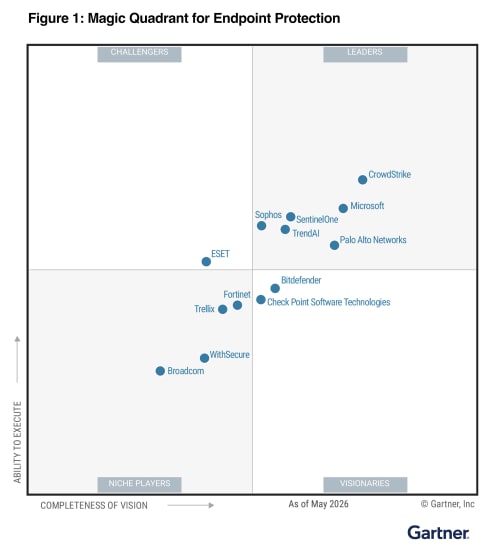

We believe our repeated recognition as a Leader is built on a single, uncompromising commitment to our customers and partners: empowering organizations with reduced overhead, rapid threat response, a strengthened security posture, and the resilient protection required to close the most critical security gaps. We are now leading the shift into the agentic era. While AI agents significantly boost enterprise productivity, they also introduce novel attack surfaces that legacy EDR tools are unable to protect. As the pioneer of XDR, we are committed to defining the next generation of cybersecurity by securing this new frontier.

Cortex® XDR is helping customers:

  • Secure Agentic AI with Koi: Gain unprecedented visibility, guardrails, and control over AI agents and agentic tools before they become a liability.
  • Stop the Unseen: Leverage battle-tested prevention powered by behavioral analytics, and industry-leading automation and response.
  • Unify Your Defense: Consolidate your endpoint and workspace security with a proven, four-time industry Leader.

We are incredibly proud to be recognized as a Leader once again, an acknowledgement that belongs just as much to our customers and partners as it does to us. Your trust, feedback, and real-world challenges keep us sharp and dictate our roadmap. At the end of the day, our continued leadership is built on one core promise: make each day more secure than the day before.

To get the full story and a comprehensive analysis of the endpoint security market, I invite you to read the 2026 Gartner Magic Quadrant report.

Get Your Complimentary Copy of the Report

Gartner, Magic Quadrant for Endpoint Protection Platforms, By Deepak Mishra, Evgeny Mirolyubov, Nikul Patel, May 29, 2026

Gartner and Magic Quadrant are trademarks of Gartner, Inc. and/or its affiliates. Gartner does not endorse any company, vendor, product or service depicted in its publications, and does not advise technology users to select only those vendors with the highest ratings or other designation. Gartner publications consist of the opinions of Gartner’s business and technology insights organization and should not be construed as statements of fact. Gartner disclaims all warranties, expressed or implied, with respect to this publication, including any warranties of merchantability or fitness for a particular purpose.

The post A 4X Gartner Magic Quadrant for EPP Leader. Built for the Agentic Era. appeared first on Palo Alto Networks Blog.

  •  

A framework for securely collecting forensic artifacts into S3 buckets

When customers experience a security incident, they need to acquire forensic artifacts to identify root cause, extract indicators of compromise (IoCs), and validate remediation efforts. NIST 800-86, Guide to Integrating Forensic Techniques into Incident Response, defines digital forensics as a process comprised of four basic phases: collection, examination, analysis, and reporting. This blog post focuses on the first phase—collection—and provides best practices for implementing least privilege during the forensic evidence collection processes that collect evidence and store the artifacts in Amazon Simple Storage Service (Amazon S3) buckets. The architecture presented in this post can be used to collect forensic evidence from both Amazon Web Services (AWS) and non-AWS compute resources.

It’s important to consider the security of the forensic artifact collection process because it involves communicating with potentially compromised resources. The collection methodology itself should be designed to avoid adding additional risks to infrastructure or other forensic investigation processes. At the same time, the collection of forensic artifacts requires the use of specialized tools that are difficult to change or adapt to new security requirements.

This post outlines factors that you should consider when creating an evidence collection capability and introduces an architecture that implements the best practices for least privilege and integrating with (instead of changing or adapting) existing forensic tools that support uploading artifacts to S3 buckets by using AWS security credentials.

Solution architecture

The architecture presented in this post demonstrates the following AWS best practices:

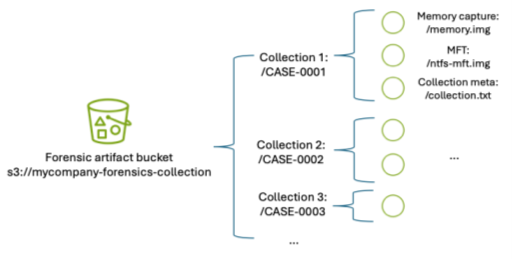
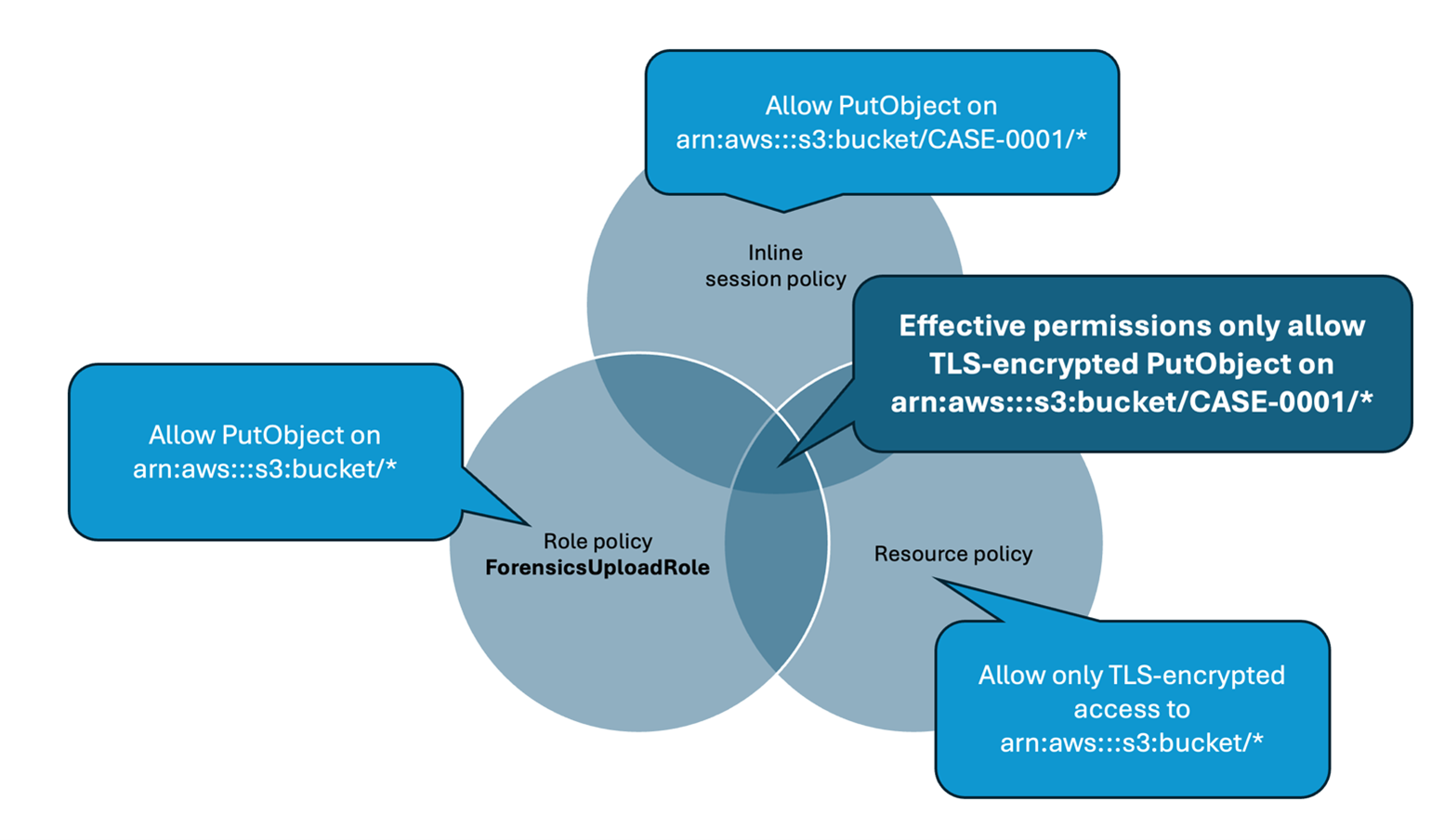
  1. Least privilege – Use AWS Identity and Access Management (IAM) policies to provide least privilege access to upload forensic artifacts to an S3 location dedicated to a specific forensic collection task. The locked down credentials cannot be used to view or modify any other forensic collections.
  2. Time-limited credentials – Use AWS Security Token Service (AWS STS) to provide time limited credentials, reducing the potential for an unauthorized user to abuse credentials while they’re visible on the target machine during the artifact collection process.
  3. Compatibility with third-party tools – Forensic tools are specialized and changing a forensic collection process to adapt to different collection methods might not be possible. To avoid the risk of needing to change tools, maximize compatibility with any third-party tools that support uploading to S3 buckets. The method introduced in this post to generate time-limited, scoped down credentials can be used with most third-party forensic tools that support uploading to S3 buckets.
  4. Credential vending – Use time-limited tokens, which can be vended on demand through an automated process, eliminating the need for forensic investigators to use the AWS Management Console, understand least privilege, or have any access to the AWS control plane. Forensic investigators can focus on the process of collecting and analyzing evidence.
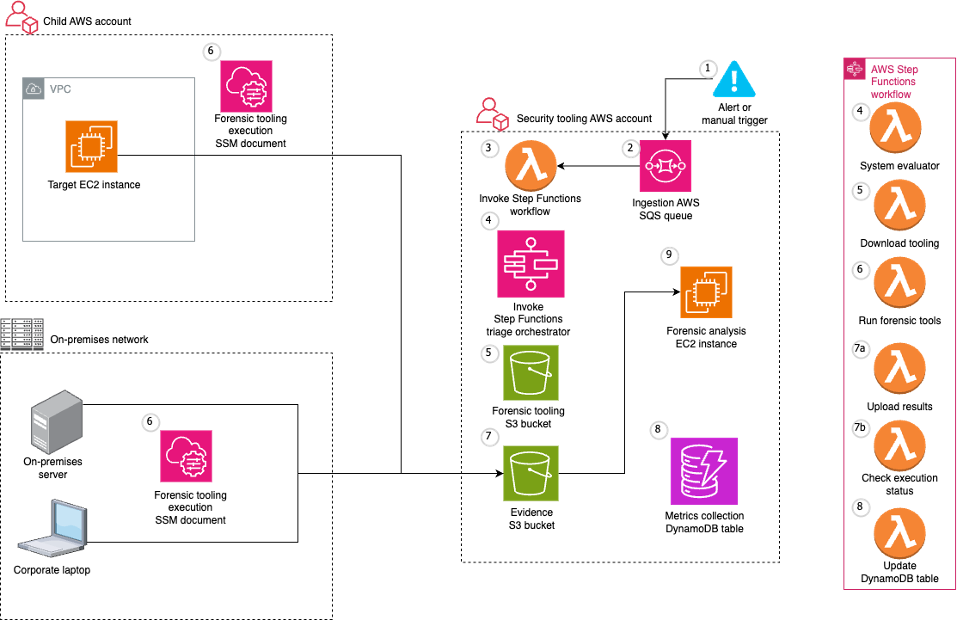
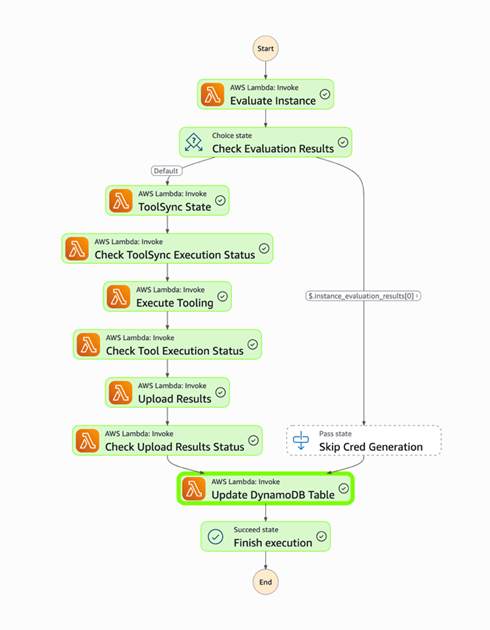
  5. Process automation – Deploy the process as infrastructure as code (IaC) and automate it through AWS services, reducing the burden on security teams to manually perform runbook steps during an active security incident.

This post starts with an overview of the digital forensic process, provides best practices for using Amazon S3 to store forensic artifacts, details how you can create time-limited, least privilege tokens to provide secure access to upload forensic artifacts to S3 buckets, and introduces a sample architecture that automates the end-to-end process.

The digital forensic process

Organizations need to have practices and resources in place to support a digital forensic investigation environment before an incident occurs. AWS has published several resources, including Forensic investigation environment strategies in the AWS Cloud and AWS prescriptive guidance: Security Reference Architecture, Cyber forensics, to provide best practices for organizing your AWS accounts using AWS Organizations to support forensic clean-room environments. Creating segregated AWS accounts and resources for your security teams is critical to provide your incident responders a location to store and analyze any digital forensic evidence collected during an investigation.

After you’ve established a landing zone for performing digital forensics, you’re ready to collect and process digital forensic evidence. AWS supports the collection of digital forensics through extensive logging of control plane events in AWS CloudTrail, and metrics and application logs that can be stored in Amazon CloudWatch. In addition, AWS core compute services, such as Amazon Elastic Compute Cloud (Amazon EC2), support forensics operations through snapshots of the underlying Amazon Elastic Block Storage (Amazon EBS) volume. An example architecture to demonstrate how to automate the collection of EBS volume snapshots for forensic investigations can be found in How to automate forensic disk collection in AWS.

You might want to use the same AWS infrastructure to collect, examine, analyze, and report on forensic incidents that occur on other resources, such as corporate laptops. You can use existing forensic tooling to perform live response, collecting specific artifacts such as Windows NT File System (NTFS) Master File Table (MFT), logs from Linux machines, volatile memory images, or other artifacts that are specified as part of your organization’s incident response plan. These tools can be provided by third parties or built in-house, and many support uploading to S3 buckets using AWS security credentials.

Using Amazon S3 for forensic artifact collection

Amazon S3 provides the foundational requirements for collecting and storing forensic artifacts. Digital forensics requires highly available, durable, and secure storage of artifacts collected from potentially compromised systems. Amazon S3 is designed for 11 nines of durability and can be configured to provide protection against modification, deletion, and unauthorized access to sensitive forensic artifacts. You can also use S3 to store forensic artifacts of almost any size—from one byte to 5 TB—in an S3 object.

S3 buckets used to store forensic artifacts require custom configuration to provide additional security. You should configure the S3 bucket that you use to store forensic artifacts to enable the following security and governance features:

  1. Encryption in transit. You can require the use of encryption in transit and specify acceptable TLS versions using the aws:SecureTransport and s3:TlsVersion condition keys on the S3 bucket policy.
  2. Encryption at rest using a customer managed key. You can automatically encrypt all objects uploaded to the bucket using a specified customer managed key by specifying a default server-side encryption key in the bucket’s configuration. For this post, we encourage you to use a customer managed key rather than relying upon an AWS managed key, so you can control the associated key policy.
    1. Encryption at rest provides an additional layer of protection, because only entities that have both the permission to read from the bucket and permission to use the AWS Key Management Service (AWS KMS) key for decryption can download the forensic artifact from the S3 bucket.
    2. You need to adjust the example KMS policies in this post if the evidence collection S3 bucket uses the S3 Bucket Key feature.
  3. Audit logs of all S3 data event activity. You can turn on CloudTrail data events for any S3 buckets that contain forensic artifacts to provide a comprehensive audit trail of S3 object-level API activity. This helps provide a chain of custody of any artifacts stored in your forensic buckets.
  4. Fine-grained access control using IAM permissions. You can define the set of entities (both human and machine) that have access to the artifacts in the S3 bucket. This post includes how to create time-limited, least privilege access using IAM permissions for uploading files into an S3 bucket. The permissions are fine-grained enough to scope down access to specific object names or object prefixes in an S3 bucket. Additionally, access to read the artifacts can be controlled through IAM permissions and access to the encryption-at-rest KMS key.
  5. Protections against data modification and deletion. S3 provides features, such as S3 object versioning, to provide assurances that data hasn’t been modified or removed after it’s been collected. This is an additional layer of protection beyond the fine-grained access permissions, so even if an authorized entity attempts to overwrite or delete an object in the S3 bucket, the previous version of the object is still available.
  6. There are additional options that you can configure on the S3 bucket to protect your data against modification and deletion, including S3 Object Lock and multi-factor authentication (MFA) delete.

In addition to the preceding configuration, consider how to organize forensic artifacts in the S3 bucket. This post introduces a folder structure using S3 object prefixes to segregate each forensic artifact collection task into its own S3 object namespace. An example S3 namespace structure for an S3 bucket is shown in Figure 1.

Figure 1 – S3 namespace structure for an S3 forensics artifact bucket using object prefixes

Figure 1: S3 namespace structure for an S3 forensics artifact bucket using object prefixes

By separating each forensic collection task by its own prefix, you can use fine-grained IAM permissions to permit object uploads only into the active collection task. For example, scoped down credentials can be generated to only allow uploads into buckets with the CASE-0001 prefix using an IAM permission as shown in the following code example. Temporary security credentials can be generated using these limited permissions and the key is then used by the forensic acquisition tool to upload the artifacts into the S3 bucket.

{
	"Sid": "UploadToCase0001",
	"Effect": "Allow",
	"Action": [
		"s3:PutObject",
		"s3:AbortMultipartUpload"
	],
"	Resource": "arn:aws:s3:::mycompany-forensics-collection/CASE-0001/*"
}

Manually creating temporary IAM credentials for each forensic collection activity can be error-prone and time-consuming. Therefore, this post demonstrates how to use AWS tooling to automate the process of generating time-limited, scoped-down credentials.

Adapt existing forensic tools for AWS best security practices

Existing forensic tools typically use IAM access keys to perform S3 operations. Using a static IAM user secret access key isn’t a best practice. Even if the static key is associated with an IAM user that has been scoped down to only have access to the forensic collection S3 bucket as described previously, that means anyone with access to that key can potentially upload objects into that bucket. Therefore, the best practice is to create a time-limited temporary security credential unique to each collection activity, scoped down to only allow uploading files to a specific prefix in the target S3 bucket.

The examples in this post use the following resource names. Because these names will change based on your deployment, substitute your resource names in place of the names in the example code.

  1. The evidence S3 bucket is named mycompany-forensics-collection
  2. The forensics AWS account number is 112233445566. For the purposes of this example, all resources will live within this account.
  3. The customer managed key used to encrypt the forensic artifacts at rest is ForensicsEvidenceKey
  4. The IAM role that incident responders will assume when signing in to their AWS account is ForensicsUserRole
  5. The IAM role that incident responders will use for generating S3 file upload temporary credentials is ForensicsUploadRole
  6. The example uses the us-east-1 AWS Region

The following steps show you how to configure the IAM policies associated with the customer managed key ForensicsEvidenceKey and the IAM role ForensicsUploadRole.
Before you begin, create the evidence S3 bucket configured as described in Using S3 for artifact collection and a customer managed key to encrypt the forensic artifacts at rest. Configure the evidence S3 bucket to use the KMS key by opening the S3 bucket’s properties tab in the Amazon S3 console and setting the new KMS key as the default encryption key for the bucket.

Next, create an IAM role that incident responders will assume through the AWS STS AssumeRole API to generate the temporary credentials. This role will define the maximum set of permissions allowed to upload artifacts to your evidence S3 bucket. This role, ForensicsUploadRole, created using the following example code, defines the maximum allowable permissions: the ability to upload objects into the evidence S3 bucket and to use the KMS key to encrypt those uploads. The effective permissions available to the forensic tool will be scoped down even further to the specific object prefix when the AWS STS temporary security credential is generated.

Note that the policy allows the forensics upload role Decrypt permission in addition to Encrypt; this is required when uploading files larger than 5 GB using the multi-part S3 file upload feature.

{
	"Version": "2012-10-17",
	"Statement": [
			{
				"Sid": "BasePermissionsForS3Upload",
				"Effect": "Allow",
				"Action": [
					"s3:PutObject",
					"s3:AbortMultipartUpload"
				],
				"Resource": "arn:aws:s3:::mycompany-forensics-collection/*"
		},
		{
			"Sid": "KeyAccessToS3Upload",
			"Effect": "Allow",
			"Action": [
				"kms:GenerateDataKey",
				"kms:Encrypt",
				"kms:Decrypt"
			],
			"Resource": "arn:aws:kms:us-east-1:112233445566:alias/ForensicsEvidenceKey",
			"Condition": {
				"StringLike": {
					"kms:EncryptionContext:aws:s3:arn": "arn:aws:s3:::mycompany-forensics-collection/*"
				}
			}
		}
	]
}

Next, you need to provide an ability to assume this role and generate AWS STS tokens using the role’s permissions. This is accomplished by creating a trust relationship associated with the IAM role you just created. The trust relationship shown in the following code sample describes which AWS principals are allowed to assume the role—in this case, you will allow any user who has federated into the ForensicsUserRole IAM role to be able to generate AWS STS tokens for forensic artifact collection.

{
	"Version": "2012-10-17",
	"Statement": [
		{
			"Sid": "Statement1",
			"Effect": "Allow",
			"Principal": {
				"AWS": "arn:aws:iam::112233445566:role/ForensicsUserRole"
			},
			"Action": "sts:AssumeRole"
		}
	]
}

After the role is established and access to the encryption key is granted, you can use the AWS STS AssumeRole API to create temporary credentials using this role. You can call this API using the AWS Command Line Interface (AWS CLI) or programmatically from a script. To scope down the token’s access to only provide permission to upload to the specific evidence object prefix, you must include a session policy as part of your AssumeRole API request to AWS STS. The following is an example session policy to restrict access to only upload objects into the CASE-0001 prefix.

[
	{
		"Effect": "Allow",
		"Action": [
			"s3:PutObject", 
			"s3:AbortMultipartUpload"
		],
		"Resource": "arn:aws:s3:::mycompany-forensics-collection/CASE-0001/*"
	},
	{
		"Effect": "Allow",
		"Action": [
			"kms:GenerateDataKey", 
			"kms:Encrypt", 
			"kms:Decrypt"
		],
		"Resource": "*",
		"Condition": {
			"StringLike": {
				"kms:EncryptionContext:aws:s3:arn": "arn:aws:s3:::mycompany-forensics-collection/CASE-0001/*"
			}
		}
	}
]

The effective permissions available to the session role will be the intersection of permissions available in the role policy (ForensicsUploadRole), the resource policy (in this case, mandating TLS-encrypted connections to the bucket), and the session policy that’s created on demand for every forensic collection (only allowing access to upload objects into the CASE-0001 prefix, as shown in the preceding example). Pictorially, this looks like the Venn diagram shown in Figure 2.

Figure 2 – Intersection of IAM policies determine the effective permissions for the restricted forensic session role.

Figure 2: Intersection of IAM policies determine the effective permissions for the restricted forensic session role.

Test the temporary credentials

Now that the bucket has been created and the AWS KMS key and roles configured, you can use AWS STS to create a temporary security credential for a collection on CASE-0001. You can use the AWS CLI to do this manually or you can write a script to automate this process using the AWS API. The IAM access key, secret access key, and session token returned by this call can then be used by any tool that can use AWS access keys to upload files into the specified S3 bucket.

The following example shows an AWS CLI call to AssumeRole using the example ForensicsUploadRole and a case named CASE-0001. The --duration-seconds parameter defines the period, in seconds, that the temporary credentials are valid; the default of 3600 seconds will provide temporary credentials that are valid for one hour.

$ aws sts assume-role \
	--role-arn arn:aws:iam::112233445566:role/ForensicsUploadRole \
	--role-session-name CASE-0001 \
	--duration-seconds 3600 \
	--policy '{"Version": "2012-10-17", "Statement": [{"Effect": "Allow", "Action": ["s3:PutObject", "s3:AbortMultipartUpload"], "Resource": "arn:aws:s3:::mycompany-forensics-collection/CASE-0001/*"}, {"Sid": "BasePermissionsForS3Upload", "Effect": "Allow", "Action": ["kms:GenerateDataKey", "kms:Encrypt", "kms:Decrypt"], "Resource": "*"}]}'

{
	"Credentials": {
		"AccessKeyId": "ASIAXXXX",
		"SecretAccessKey": "XXXX",
		"SessionToken": "XXXX",
		"Expiration": "2025-04-10T17:16:13+00:00"
	},
	"AssumedRoleUser": {
		"AssumedRoleId": "AROXXXX:CASE-0001",
		"Arn": "arn:aws:sts::112233445566:assumed-role/ForensicsUploadRole/CASE-0001"
	},
	"PackedPolicySize": 39
}

Now that you have obtained temporary credentials from AWS STS, you can use those credentials to upload a file into Amazon S3:

$ AWS_ACCESS_KEY_ID=ASIAXXXX \
	AWS_SECRET_ACCESS_KEY=XXXX \
	AWS_SESSION_TOKEN=XXXX \
	aws s3 cp evidence.zip s3://mycompany-forensics-collection/CASE-0001/evidence.zip

upload: evidence.zip to s3://mycompany-forensics-collection/CASE-0001/evidence.zip

You can also verify that you can’t use those credentials to upload a file into any other object prefixes or S3 buckets. For example, if you change CASE-0001 to CASE-0004 in the Amazon S3 upload command, you will receive an AccessDenied error because you’re trying to upload an object outside of the allowed key prefix.

$ AWS_ACCESS_KEY_ID=ASIAXXXX \
	AWS_SECRET_ACCESS_KEY=XXXX \
	AWS_SESSION_TOKEN=XXXX \
	aws s3 cp evidence.zip s3://mycompany-forensics-collection/CASE-0004/evidence.zip

upload failed: evidence.zip to s3://mycompany-forensics-collection/cases/CASE-0004/evidence.zip
An error occurred (AccessDenied) when calling the PutObject operation: User: arn:aws:sts::112233445566:assumed-role/ForensicsUploadRole/CASE-0001 is not authorized to perform: s3:PutObject on resource: "arn:aws:s3:::mycompany-forensics-collection/CASE-0004/evidence.zip" because no session policy allows the s3:PutObject action

Additionally, if you wait more than the lifetime of the token (1 hour in this case), attempting to upload a file into the bucket will fail, because the token will no longer be valid:

$ AWS_ACCESS_KEY_ID=ASIAXXXX \
	AWS_SECRET_ACCESS_KEY=XXXX \
	AWS_SESSION_TOKEN=XXXX \
	aws s3 cp evidence.zip s3://mycompany-forensics-collection/CASE-0001/evidence.zip

upload failed: evidence.zip to s3://mycompany-forensics-collection/CASE-0001/evidence.zip

An error occurred (ExpiredToken) when calling the PutObject operation: The provided token has expired.

Create an automated process to vend temporary credentials on demand

After you’ve verified the security benefits of creating temporary credentials for S3 uploads and validated that the credentials work with your forensic software of choice, you can now use them as part of an automated process.

A sample automated architecture is shown in Figure 3.

Figure 3: Architecture to automate S3 credential vending and forensic artifact collection.

Figure 3: Architecture to automate S3 credential vending and forensic artifact collection.

The workflow depicted in Figure 3 includes the following steps:

  1. The workflow is triggered by an alert from a detection source or a manual trigger from an incident responder.
  2. The workflow input is added to an Amazon Simple Queue Service (Amazon SQS) queue.
  3. The Amazon SQS queue invokes an AWS Lambda function which in turn executes a Step Functions state machine to orchestrate the workflow.
  4. First, the Step Functions workflow determines whether the target system is managed by AWS Systems Manager.
    1. If the target system isn’t managed by Systems Manager, an error is noted, and the execution is abandoned.
    2. If the target system is managed by Systems Manager, the Step Functions workflow determines the operating system (OS) of the target system and proceeds with the flow of execution.
  5. The workflow then continues by executing the Systems Manager documents that implement the forensic collection process:
    1. Downloads tooling:
      1. Generates dynamically scoped IAM temporary credentials that provide access to download the OS-specific tooling to be executed on the target system from the tooling S3 bucket. These credentials are tightly scoped to only allow downloads from the S3 prefix that corresponds to the tooling for the target system’s OS.
      2. Executes a Systems Manager command on the target system that uses the credentials generated from the previous step to download the OS tooling on the target system.
    2. Runs forensic tools:
  • Executes a Systems Manager command on the target system to execute the OS tooling on the target system.
  • The Systems Manager commands run on the target system, which in this case is an EC2 instance.
  • Results are uploaded to the evidence S3 bucket:
    1. Generates dynamically scoped IAM temporary credentials (as described previously) that provide access to upload the output of the previously executed tooling to the evidence S3 bucket. These credentials are tightly scoped to only allow uploads to a particular S3 prefix corresponding to the alert prefix.
    2. Executes a Systems Manager command on the target system to upload the output of the previously executed tooling to the evidence S3 bucket. After the upload is complete, it cleans up both the output and the evidence tooling from the target system.
    3. The evidence S3 bucket is tightly locked down to a subset of identities within the AWS security account. Access attempts from identities that aren’t allow listed trigger an Amazon EventBridge rule to alert the security team through an Amazon Simple Notification Service (Amazon SNS) topic.
  • When the workflow is complete, related details and metrics are recorded in an Amazon DynamoDB table.
  • The forensic analysis can be performed on a separate EC2 instance that has access to read from the evidence S3 bucket.
  • Deploying the example solution

    You can use the AWS Cloud Development Kit (AWS CDK) repository to implement the architecture shown in Figure 3.

    The AWS CDK solution is split into three stacks:

    1. SecurityStack: This stack contains the basic forensic artifact workflow orchestration infrastructure described in this post, including the Step Functions workflow, Lambda functions, AWS SQS queues, IAM roles, and S3 buckets.
    2. AlertStack: This stack contains the EventBridge workflow to notify administrators of anomalous activity in the evidence S3 bucket.
    3. CustomerStack: This stack contains the SSM documents that are executed for the forensic artifact workflow and an IAM role assumed by the SecurityStack when the workflow is invoked. It’s deployed into each child AWS account containing EC2 instances from which the security account is authorized to collect forensic artifacts.

    Configuration

    Before deploying the solution, there are several variables in the config.ts file that must be modified for the environment:

    1. SECURITY_ACCOUNT: Security Tooling AWS account ID.
    2. CUSTOMER_ACCOUNTS: Target AWS account IDs (the Child AWS account in the architecture diagram).
    3. ALERT_EMAIL_RECIPIENTS: List of email addresses that receive alerts when there is unexpected access to the evidence S3 bucket.
    4. ALLOW_LISTED_ROLE_NAMES: Roles allowed to access the evidence S3 bucket. Any other identities accessing the evidence S3 bucket will result in an alarm.

    Deployment

    After you’ve updated the config.ts file to reflect the account numbers, email recipients, and role names, the stacks can be deployed into your AWS infrastructure.

    1. Set Up AWS credentials using the AWS CLI:
      aws configure
    2. Install dependencies and configure constants:
      1. Clone the repository.
      2. Navigate to the project directory.
      3. Install project dependencies:
        npm install
      4. Configure constants in constants/config.ts with the required information:
        export const SECURITY_ACCOUNT = "123456789012"; // Your security tooling account ID 
        export const CUSTOMER_ACCOUNTS = ["234567890123", "345678901234"]; // Target account IDs 
        export const ALLOW_LISTED_ROLE_NAMES = ["SecurityAnalystRole"];// Roles allowed to access evidence S3 bucket 
        export const ALERT_EMAIL_RECIPIENTS = ["soc_team@company.com"];// Email addresses for alerts

    3. Bootstrap AWS CDK in your accounts (if it hasn’t been done already):
      1. Example: cdk bootstrap aws://456789012345/us-east-1 (example security AWS account).
      2. Then bootstrap if necessary in any target AWS accounts.
    4. Deploy the AWS CDK Stacks:
      1. Synthesize the CloudFormation template:
        cdk synth
      2. Deploy the security and alert stacks in your security account:
        cdk deploy SecurityStack AlertStack
      3. Deploy the customer stacks in your workload accounts:
        cdk deploy CustomerStack-ACCOUNT_ID
    5. Set up your email alerts:
      1. After the AlertStack is deployed, it will email all addresses listed in ALERT_EMAIL_RECIPIENTS. Choose the embedded link to accept the AWS SNS topic in each of those accounts.

    Testing

    With deployment complete, it’s time to test the solution.

    1. Trigger an analysis
      1. Make sure you have a Linux EC2 instance running in one of your customer accounts and in the AWS Region where you deployed the preceding customer stack.
      2. Because this example uses Systems Manager to orchestrate the collection script, make sure that the EC2 instance is visible in Systems Manager either by checking the Systems Manager console, or by using the AWS CLI:
        1. Console: In the AWS Systems Manager console, choose Managed instances in the left navigation pane and verify your instance appears in the list. For more information, see Managed Instances in the AWS Systems Manager User Guide.
        2. AWS CLI: Run the following command to verify the instance is managed:
          aws ssm describe-instance-information --filters “Key=InstanceIds,Values=<instance-id>
          If the command returns instance information with PingStatus: Online, the instance is properly connected to Systems Manager.
      3. Post a message in your security account to the Amazon SQS queue to start the Step Functions workflow. Note that the values in angle brackets (for example <accountID>) are placeholders that you must update with relevant AWS account ID, tracking ticket ID, AWS Region, and EC2 instance ID values:
        aws sqs send-message --queue-url --message-body ‘{ “account”: “”, “ticket_id”: “”, “region”: “>”, “instance_id”: “” }’
    2. Go to the Step Functions console to view the successful execution of the workflow:
      Figure 4 – Workflow as shown in the Step Functions console

      Figure 4: Workflow as shown in the Step Functions console

    3. View the DynamoDB table to see the metadata for the results.
    4. Check the evidence S3 bucket to see the uploaded files from the forensic collection.

    Conclusion

    Collecting forensic artifacts securely is a critical component of any digital forensics investigation. This post demonstrated how to implement least privilege access controls and time-limited credentials for forensic evidence collection workflows that use Amazon S3 for artifact storage. By combining IAM session policies with AWS STS temporary credentials, you can provide forensic tools with secure, scoped-down access to upload artifacts without exposing long-lived credentials or granting overly permissive access.

    The architecture presented in this post automates the process of generating temporary credentials, collecting forensic artifacts from both AWS and non-AWS resources, and securely storing them in S3 buckets with appropriate encryption, access controls, and audit logging. With this approach, your security teams can focus on analyzing evidence instead of managing credentials and permissions during active security incidents.To get started with this solution, deploy the example AWS CDK stacks provided in the collect forensic artifacts repository and customize them for your organization’s forensic investigation requirements. For more information about related AWS forensic investigation architectures, review the Automated Forensics Orchestrator for EC2 and How to build forensic kernel modules for Linux EC2 instances resources.

    If you have feedback about this post, submit comments in the Comments section below. If you have questions about this post, contact AWS Support.

    Jason Garman

    Jason Garman

    Jason is a principal security specialist solutions architect at AWS. He has 30 years of cybersecurity experience including incident response, reverse engineering, identity, and data protection. At AWS, he helps large organizations adopt the latest cloud and AI technologies while maintaining a high bar for data governance, security, and safety.

    Vaishnav Murthy

    Vaishnav Murthy

    Vaishnav is a Senior Security Engineer with AWS CloudResponse. He has an extensive background in incident response and security automation and enjoys building automated solutions that help AWS customers investigate and respond to security incidents at scale.

    •  

    Financial cyberthreats in 2025 and the outlook for 2026

    In 2025, the financial cyberthreat landscape continued to evolve. While traditional PC banking malware declined in relative prevalence, this shift was offset by the rapid growth of credential theft by infostealers. Attackers increasingly relied on aggregation and reuse of stolen data, rather than developing entirely new malware capabilities.

    To describe the financial threat landscape in 2025, we analyzed anonymized data on malicious activities detected on the devices of Kaspersky security product users and consensually provided to us through the Kaspersky Security Network (KSN), along with publicly available data and data on the dark web.

    We analyzed the data for

    • financial phishing,
    • banking malware,
    • infostealers and the dark web.

    Key findings

    Phishing

    Phishing activity in 2025 shifted toward e-commerce (14.17%) and digital services (16.15%), with attackers increasingly tailoring campaigns to regional trends and user behavior, making social engineering more targeted despite reduced focus on traditional banking lures.

    Banking malware

    Financial PC malware declined in prevalence but remained a persistent threat, with established families continuing to operate, while attackers increasingly prioritize credential access and indirect fraud over deploying complex banking Trojans. To the contrary, mobile banking malware continues growing, as we wrote in detail in our mobile malware report.

    Infostealers and the dark web

    Infostealers became a central driver of financial cybercrime, fueling a growing dark web economy where stolen credentials, payment data, and full identity profiles are traded at scale, enabling widespread and destructive fraud operations.

    Financial phishing

    In 2025, online fraudsters continued to lure users to phishing and scam pages that mimicked the websites of popular brands and financial organizations. Attackers leveraged increasingly convincing social engineering techniques and brand impersonation to exploit user trust. Rather than relying solely on volume, campaigns showed greater targeting and contextual adaptation, reflecting a maturation of phishing operations.

    The distribution of top phishing categories in 2025 shows a clear shift toward digital platforms that aggregate multiple user activities, with web services (16.15%), online games (14.58%), and online stores (14.17%) leading globally. Compared to 2024, the rise of online games and the decline of social networks and banks indicate that attackers are increasingly targeting environments where users are more likely to take a risk or engage impulsively. Categories such as instant messaging apps and global internet portals remain significant phishing targets, reflecting their role as communication and access hubs that can be exploited for credential harvesting.

    TOP 10 categories of organizations mimicked by phishing and scam pages that were blocked on home users’ devices, 2025 (download)

    Regional patterns further reinforce the adaptive nature of phishing campaigns, showing that attackers closely align category targeting with local digital habits. For example, online stores dominate heavily in the Middle East.

    TOP 10 categories of organizations mimicked by phishing and scam pages that were blocked on home users’ devices in the Middle East, 2025 (download)

    Online games and instant messaging platforms feature more prominently in the CIS, suggesting a focus on younger or highly connected user bases.

    TOP 10 categories of organizations mimicked by phishing and scam pages that were blocked on home users’ devices in the CIS, 2025 (download)

    APAC demonstrates almost equal shares of online games and banks which signifies a combined approach targeting different users.

    TOP 10 categories of organizations mimicked by phishing and scam pages that were blocked on home users’ devices in APAC, 2025 (download)

    In Africa, a stronger emphasis on banks reflects the continued importance of traditional financial services. Most likely, this is due to the lower security level of the financial institutions in the region.

    TOP 10 categories of organizations mimicked by phishing and scam pages that were blocked on home users’ devices in Africa, 2025 (download)

    Whereas in LATAM, delivery companies appearing in the top categories indicate attackers exploiting the growth of e-commerce logistics.

    TOP 10 categories of organizations mimicked by phishing and scam pages that were blocked on home users’ devices in Latin America, 2025 (download)

    Europe presents a more balanced distribution across categories, pointing to diversified attack strategies.

    TOP 10 categories of organizations mimicked by phishing and scam pages that were blocked on home users’ devices in Europe, 2025 (download)

    Attackers actively localize their tactics to maximize relevance and effectiveness.

    The distribution of financial phishing pages by category in 2025 reveals strong regional asymmetries that reflect both user behavior and attacker prioritization.

    Globally, online stores dominated (48.45%), followed by banks (26.05%) and payment systems (25.50%). The decline in bank phishing may suggest that these services are becoming increasingly difficult to successfully impersonate, so fraudsters are turning to easier ways to access users’ finances.

    However, this balance shifts significantly at the regional level.

    In the Middle East, phishing is overwhelmingly concentrated on e-commerce (85.8%), indicating a heavy reliance on online retail lures, whereas in Africa, bank-related phishing leads (53.75%), which may indicate that user account security there is still insufficient. LATAM shows a more balanced distribution but with a higher share of online store targeting (46.30%), while APAC and Europe display a more even spread across all three categories, pointing to diversified attack strategies. These variations suggest that attackers are not operating uniformly but are instead adapting campaigns to regional digital habits, payment ecosystems, and trust patterns – maximizing effectiveness by aligning phishing content with the most commonly used financial services in each market.

    Distribution of financial phishing pages by category and region, 2025 (download)

    Online shopping scams

    The distribution of organizations mimicked by phishing and scam pages in 2025 highlights a clear shift toward globally recognized digital service and e-commerce brands, with attackers prioritizing platforms that have large, active user bases and frequent payment interactions.

    Netflix (28.42%) solidified its ranking as the most impersonated brand, followed by Apple (20.55%), Spotify (18.09%), and Amazon (17.85%). This reflects a move away from traditional retail-only targets toward subscription-based and ecosystem-driven services.

    TOP 10 online shopping brands mimicked by phishing and scam pages, 2025 (download)

    Regionally, this trend varies: Netflix dominates heavily in the Middle East, Apple leads in APAC, while Spotify ranks first across Europe, LATAM, and Africa. Although most of the top platforms are highly popular across different regions, we may suggest that the attackers tailor brand impersonation to regional popularity and user engagement.

    Payment system phishing

    Phishing campaigns are impersonating multiple payment ecosystems to maximize coverage. While PayPal was the most mimicked in 2024 with 37.53%, its share dropped to 14.10% in 2025. Mastercard, on the contrary, attracted cybercriminals’ attention, its share increasing from 30.54% to 33.45%, while Visa accounted for a significant 20.06% (last year, it wasn’t in the TOP 5), reinforcing the growing focus on widely used banking card networks. The continued presence of American Express (3.87%) and the increasing number of pages mimicking PayPay (11.72%) further highlight attacker experimentation and regional adaptation.

    TOP 5 payment systems mimicked by phishing and scam pages, 2025 (download)

    Financial malware

    In 2025, the decline in users affected by financial PC malware continued. On the one hand, people continue to rely on mobile devices to manage their finances. On the other hand, some of the most prominent malware families that were initially designed as bankers had not used this functionality for years, so we excluded them from these statistics.

    Changes in the number of unique users attacked by banking malware, by month, 2023–2025 (download)

    Windows systems remained the primary platform targeted by attackers with financial malware. According to Kaspersky Security Bulletin, overall detections included 1,338,357 banking Trojan attacks globally from November 2024 to October 2025, though this number is also declining due to increasing focus on mobile vectors. Desktop threats continued to be distributed via traditional delivery methods like malicious emails, compromised websites, and droppers.

    In 2025, Brazilian-origin families such as Grandoreiro (part of the Tetrade group) stood out for their constant activity and global reach. Despite a major law enforcement disruption in early 2024, Grandoreiro remained active in 2025, re-emerging with updated variants and continuing to operate. Other notable actors included Coyote and emerging families like Maverick, which abused WhatsApp for distribution while maintaining fileless techniques and overlaps with established Brazilian banking malware to steal credentials and enable fraudulent transactions on desktop banking platforms. Besides traditional bankers, other Brazilian malware families are worth mentioning, which specifically target relatively new and highly popular regional payment systems. One of the most prominent threats among these is GoPix Trojan focusing on the users of Brazilian Pix payment system. It is also capable of targeting local Boleto payment method, as well as stealing cryptocurrency.

    There was also a surge in incidents in 2025 in which fraudsters targeted organizations through electronic document management (EDM) systems, for example, by substituting invoice details to trick victims into transferring funds. The Pure Trojan was most frequently encountered in such attacks. Attackers typically distribute it through targeted emails, using abbreviations of document names, software titles, or other accounting-related keywords in the headers of attached files. Globally in the corporate segment, Pure was detected 896 633 times over 2025, with over 64 thousand users attacked.

    Contrary to PC banking malware, mobile banker attacks grew by 1.5 times in 2025 compared to the previous reporting period, which is consistent with their growth in 2024. They also saw a sharp surge in the number of unique installation packages. More statistics and trends on mobile banking malware can be found in our yearly mobile threat report.

    Complementing traditional financial malware, infostealers played a significant role in enabling financial crime both on PCs and mobile devices by harvesting credentials, cookies, and autofill data from browsers and applications, which attackers then used for account takeovers or direct banking fraud. Kaspersky analyses pointed to a surge in infostealer detections (up by 59% globally on PCs), fueling credential-based attacks.

    Financial cyberthreats on the dark web

    The Kaspersky Digital Footprint Intelligence (DFI) team closely monitors infostealer activity on both PC and mobile devices to analyze emerging trends and assess the evolving tactics of cybercriminals.

    Fraudsters especially target financial data such as payment cards, cryptocurrency wallets, login credentials and cookies for banking services, as well as documents stored on the victim’s device. The stolen data is collected in log files and shared on dark web resources, where they are bought, sold, or distributed freely and then used for financial fraud.

    With access to financial data, fraudsters can gain control of users’ bank accounts and payment cards, and withdraw funds. Compromised accounts and cards are also frequently used in subsequent activities, turning the victims into intermediaries in a fraud scheme.

    Compromised accounts

    Kaspersky DFI found that in 2025, over one million online banking accounts (these are not Kaspersky product users) served by the world’s 100 largest banks fell victim to infostealers: their credentials were being freely shared on the dark web.

    The countries with the highest median number of compromised accounts per bank were India, Spain, and Brazil.

    The chart below shows the median number of compromised accounts per bank for the TOP 10 countries.

    TOP 10 countries with the highest compromised account median (download)

    Compromised payment cards

    Seventy-four percent of payment cards that were compromised by infostealer malware, published on dark web resources and identified by the Digital Footprint Intelligence team in 2025, remained valid as of March 2026. This means that attackers could still use the cards that had been stolen months or even years prior.

    It should be noted that the number of bank accounts and payment cards known to have been compromised by infostealers in 2025 will continue to rise, because fraudsters do not publish the log files immediately after the compromise but only after a delay of months or even years.

    Data breaches

    Regardless of the industry in which the target company operates, data breaches often expose users’ financial data, including payment card information, bank account details, transaction histories and other financial information. As a consequence, the compromised databases are sold and distributed on underground resources.

    It should be noted that the threat is not limited to the exposure of financial information alone. Various identity documents and even seemingly public data, such as names, phone numbers and email addresses, can become a risk when they are published on the dark web. Such data attracts fraudsters’ attention and can be used in social engineering attacks to gain access to the user’s financial assets.

    An example of a post offering a database

    An example of a post offering a database

    Sale of bank accounts and payment cards

    The dark web often features services provided by stores that specialize in selling bank accounts and payment cards. Fraudsters typically obtain data for sale from a variety of sources, including infostealer logs and leaked databases, which are first repackaged and then combined.

    Examples of a post (top) and a site (bottom) offering payment cards

    Examples of a post (top) and a site (bottom) offering payment cards

    Often, sellers offer complete victim profiles, referred to by fraudsters as “fullz”. These include not only bank accounts or payment cards but also identification documents, dates of birth, residential addresses, and other personal details. A full‑information package is usually more expensive than a payment card or a bank account alone.

    Examples of a post (top) and a site (bottom) offering bank accounts

    Examples of a post (top) and a site (bottom) offering bank accounts

    Compiled databases

    Fraudsters exploit various sources, including previously leaked databases, to compile new, thematic ones. Finance- and, in particular, cryptocurrency-related databases, are among the most popular. Compilations aimed at specific user groups, such as the elderly or wealthy people, are also of interest to cybercriminals.

    Usually, thematic databases contain personal information about users, such as names, phone numbers, and email addresses. Fraudsters can use this data to launch social engineering attacks.

    An example of a message offering compiled databases

    An example of a message offering compiled databases

    Creation of phishing websites

    Phishing websites have become a powerful tool for the financial enrichment of fraudsters. Cybercriminals create fraudulent sites that masquerade as legitimate resources of companies operating in various industries. Gambling and retail sites remain among the most popular targets.

    In order to obtain personal and financial information from unsuspecting users, adversaries seek out ways to create such phishing websites. Ready-made layouts and website copies are sold on the dark web and advertised as profitable tools. Moreover, fraudsters offer phishing website creation services.

    Examples of posts offering creation of phishing websites

    Examples of posts offering creation of phishing websites

    Conclusion

    The decline of traditional PC banking malware is not an indicator of reduced risk; rather, it highlights a redistribution of attacker effort toward more efficient methods targeting mobile devices, credential theft, and social engineering. Infostealers, in particular, are a force multiplier, enabling widespread compromise at scale.

    Looking ahead to 2026, the financial threat landscape is expected to become even more data-driven and automated. Organizations must adapt by focusing on identity protection, real-time monitoring, and cross-channel threat intelligence, while users must remain vigilant against increasingly sophisticated and personalized attack techniques.

    •  

    Financial cyberthreats in 2025 and the outlook for 2026

    In 2025, the financial cyberthreat landscape continued to evolve. While traditional PC banking malware declined in relative prevalence, this shift was offset by the rapid growth of credential theft by infostealers. Attackers increasingly relied on aggregation and reuse of stolen data, rather than developing entirely new malware capabilities.

    To describe the financial threat landscape in 2025, we analyzed anonymized data on malicious activities detected on the devices of Kaspersky security product users and consensually provided to us through the Kaspersky Security Network (KSN), along with publicly available data and data on the dark web.

    We analyzed the data for

    • financial phishing,
    • banking malware,
    • infostealers and the dark web.

    Key findings

    Phishing

    Phishing activity in 2025 shifted toward e-commerce (14.17%) and digital services (16.15%), with attackers increasingly tailoring campaigns to regional trends and user behavior, making social engineering more targeted despite reduced focus on traditional banking lures.

    Banking malware

    Financial PC malware declined in prevalence but remained a persistent threat, with established families continuing to operate, while attackers increasingly prioritize credential access and indirect fraud over deploying complex banking Trojans. To the contrary, mobile banking malware continues growing, as we wrote in detail in our mobile malware report.

    Infostealers and the dark web

    Infostealers became a central driver of financial cybercrime, fueling a growing dark web economy where stolen credentials, payment data, and full identity profiles are traded at scale, enabling widespread and destructive fraud operations.

    Financial phishing

    In 2025, online fraudsters continued to lure users to phishing and scam pages that mimicked the websites of popular brands and financial organizations. Attackers leveraged increasingly convincing social engineering techniques and brand impersonation to exploit user trust. Rather than relying solely on volume, campaigns showed greater targeting and contextual adaptation, reflecting a maturation of phishing operations.

    The distribution of top phishing categories in 2025 shows a clear shift toward digital platforms that aggregate multiple user activities, with web services (16.15%), online games (14.58%), and online stores (14.17%) leading globally. Compared to 2024, the rise of online games and the decline of social networks and banks indicate that attackers are increasingly targeting environments where users are more likely to take a risk or engage impulsively. Categories such as instant messaging apps and global internet portals remain significant phishing targets, reflecting their role as communication and access hubs that can be exploited for credential harvesting.

    TOP 10 categories of organizations mimicked by phishing and scam pages that were blocked on home users’ devices, 2025 (download)

    Regional patterns further reinforce the adaptive nature of phishing campaigns, showing that attackers closely align category targeting with local digital habits. For example, online stores dominate heavily in the Middle East.

    TOP 10 categories of organizations mimicked by phishing and scam pages that were blocked on home users’ devices in the Middle East, 2025 (download)

    Online games and instant messaging platforms feature more prominently in the CIS, suggesting a focus on younger or highly connected user bases.

    TOP 10 categories of organizations mimicked by phishing and scam pages that were blocked on home users’ devices in the CIS, 2025 (download)

    APAC demonstrates almost equal shares of online games and banks which signifies a combined approach targeting different users.

    TOP 10 categories of organizations mimicked by phishing and scam pages that were blocked on home users’ devices in APAC, 2025 (download)

    In Africa, a stronger emphasis on banks reflects the continued importance of traditional financial services. Most likely, this is due to the lower security level of the financial institutions in the region.

    TOP 10 categories of organizations mimicked by phishing and scam pages that were blocked on home users’ devices in Africa, 2025 (download)

    Whereas in LATAM, delivery companies appearing in the top categories indicate attackers exploiting the growth of e-commerce logistics.

    TOP 10 categories of organizations mimicked by phishing and scam pages that were blocked on home users’ devices in Latin America, 2025 (download)

    Europe presents a more balanced distribution across categories, pointing to diversified attack strategies.

    TOP 10 categories of organizations mimicked by phishing and scam pages that were blocked on home users’ devices in Europe, 2025 (download)

    Attackers actively localize their tactics to maximize relevance and effectiveness.

    The distribution of financial phishing pages by category in 2025 reveals strong regional asymmetries that reflect both user behavior and attacker prioritization.

    Globally, online stores dominated (48.45%), followed by banks (26.05%) and payment systems (25.50%). The decline in bank phishing may suggest that these services are becoming increasingly difficult to successfully impersonate, so fraudsters are turning to easier ways to access users’ finances.

    However, this balance shifts significantly at the regional level.

    In the Middle East, phishing is overwhelmingly concentrated on e-commerce (85.8%), indicating a heavy reliance on online retail lures, whereas in Africa, bank-related phishing leads (53.75%), which may indicate that user account security there is still insufficient. LATAM shows a more balanced distribution but with a higher share of online store targeting (46.30%), while APAC and Europe display a more even spread across all three categories, pointing to diversified attack strategies. These variations suggest that attackers are not operating uniformly but are instead adapting campaigns to regional digital habits, payment ecosystems, and trust patterns – maximizing effectiveness by aligning phishing content with the most commonly used financial services in each market.

    Distribution of financial phishing pages by category and region, 2025 (download)

    Online shopping scams

    The distribution of organizations mimicked by phishing and scam pages in 2025 highlights a clear shift toward globally recognized digital service and e-commerce brands, with attackers prioritizing platforms that have large, active user bases and frequent payment interactions.

    Netflix (28.42%) solidified its ranking as the most impersonated brand, followed by Apple (20.55%), Spotify (18.09%), and Amazon (17.85%). This reflects a move away from traditional retail-only targets toward subscription-based and ecosystem-driven services.

    TOP 10 online shopping brands mimicked by phishing and scam pages, 2025 (download)

    Regionally, this trend varies: Netflix dominates heavily in the Middle East, Apple leads in APAC, while Spotify ranks first across Europe, LATAM, and Africa. Although most of the top platforms are highly popular across different regions, we may suggest that the attackers tailor brand impersonation to regional popularity and user engagement.

    Payment system phishing

    Phishing campaigns are impersonating multiple payment ecosystems to maximize coverage. While PayPal was the most mimicked in 2024 with 37.53%, its share dropped to 14.10% in 2025. Mastercard, on the contrary, attracted cybercriminals’ attention, its share increasing from 30.54% to 33.45%, while Visa accounted for a significant 20.06% (last year, it wasn’t in the TOP 5), reinforcing the growing focus on widely used banking card networks. The continued presence of American Express (3.87%) and the increasing number of pages mimicking PayPay (11.72%) further highlight attacker experimentation and regional adaptation.

    TOP 5 payment systems mimicked by phishing and scam pages, 2025 (download)

    Financial malware

    In 2025, the decline in users affected by financial PC malware continued. On the one hand, people continue to rely on mobile devices to manage their finances. On the other hand, some of the most prominent malware families that were initially designed as bankers had not used this functionality for years, so we excluded them from these statistics.

    Changes in the number of unique users attacked by banking malware, by month, 2023–2025 (download)

    Windows systems remained the primary platform targeted by attackers with financial malware. According to Kaspersky Security Bulletin, overall detections included 1,338,357 banking Trojan attacks globally from November 2024 to October 2025, though this number is also declining due to increasing focus on mobile vectors. Desktop threats continued to be distributed via traditional delivery methods like malicious emails, compromised websites, and droppers.

    In 2025, Brazilian-origin families such as Grandoreiro (part of the Tetrade group) stood out for their constant activity and global reach. Despite a major law enforcement disruption in early 2024, Grandoreiro remained active in 2025, re-emerging with updated variants and continuing to operate. Other notable actors included Coyote and emerging families like Maverick, which abused WhatsApp for distribution while maintaining fileless techniques and overlaps with established Brazilian banking malware to steal credentials and enable fraudulent transactions on desktop banking platforms. Besides traditional bankers, other Brazilian malware families are worth mentioning, which specifically target relatively new and highly popular regional payment systems. One of the most prominent threats among these is GoPix Trojan focusing on the users of Brazilian Pix payment system. It is also capable of targeting local Boleto payment method, as well as stealing cryptocurrency.

    There was also a surge in incidents in 2025 in which fraudsters targeted organizations through electronic document management (EDM) systems, for example, by substituting invoice details to trick victims into transferring funds. The Pure Trojan was most frequently encountered in such attacks. Attackers typically distribute it through targeted emails, using abbreviations of document names, software titles, or other accounting-related keywords in the headers of attached files. Globally in the corporate segment, Pure was detected 896 633 times over 2025, with over 64 thousand users attacked.

    Contrary to PC banking malware, mobile banker attacks grew by 1.5 times in 2025 compared to the previous reporting period, which is consistent with their growth in 2024. They also saw a sharp surge in the number of unique installation packages. More statistics and trends on mobile banking malware can be found in our yearly mobile threat report.

    Complementing traditional financial malware, infostealers played a significant role in enabling financial crime both on PCs and mobile devices by harvesting credentials, cookies, and autofill data from browsers and applications, which attackers then used for account takeovers or direct banking fraud. Kaspersky analyses pointed to a surge in infostealer detections (up by 59% globally on PCs), fueling credential-based attacks.

    Financial cyberthreats on the dark web

    The Kaspersky Digital Footprint Intelligence (DFI) team closely monitors infostealer activity on both PC and mobile devices to analyze emerging trends and assess the evolving tactics of cybercriminals.

    Fraudsters especially target financial data such as payment cards, cryptocurrency wallets, login credentials and cookies for banking services, as well as documents stored on the victim’s device. The stolen data is collected in log files and shared on dark web resources, where they are bought, sold, or distributed freely and then used for financial fraud.

    With access to financial data, fraudsters can gain control of users’ bank accounts and payment cards, and withdraw funds. Compromised accounts and cards are also frequently used in subsequent activities, turning the victims into intermediaries in a fraud scheme.

    Compromised accounts

    Kaspersky DFI found that in 2025, over one million online banking accounts (these are not Kaspersky product users) served by the world’s 100 largest banks fell victim to infostealers: their credentials were being freely shared on the dark web.

    The countries with the highest median number of compromised accounts per bank were India, Spain, and Brazil.

    The chart below shows the median number of compromised accounts per bank for the TOP 10 countries.

    TOP 10 countries with the highest compromised account median (download)

    Compromised payment cards

    Seventy-four percent of payment cards that were compromised by infostealer malware, published on dark web resources and identified by the Digital Footprint Intelligence team in 2025, remained valid as of March 2026. This means that attackers could still use the cards that had been stolen months or even years prior.

    It should be noted that the number of bank accounts and payment cards known to have been compromised by infostealers in 2025 will continue to rise, because fraudsters do not publish the log files immediately after the compromise but only after a delay of months or even years.

    Data breaches

    Regardless of the industry in which the target company operates, data breaches often expose users’ financial data, including payment card information, bank account details, transaction histories and other financial information. As a consequence, the compromised databases are sold and distributed on underground resources.

    It should be noted that the threat is not limited to the exposure of financial information alone. Various identity documents and even seemingly public data, such as names, phone numbers and email addresses, can become a risk when they are published on the dark web. Such data attracts fraudsters’ attention and can be used in social engineering attacks to gain access to the user’s financial assets.

    An example of a post offering a database

    An example of a post offering a database

    Sale of bank accounts and payment cards

    The dark web often features services provided by stores that specialize in selling bank accounts and payment cards. Fraudsters typically obtain data for sale from a variety of sources, including infostealer logs and leaked databases, which are first repackaged and then combined.

    Examples of a post (top) and a site (bottom) offering payment cards

    Examples of a post (top) and a site (bottom) offering payment cards

    Often, sellers offer complete victim profiles, referred to by fraudsters as “fullz”. These include not only bank accounts or payment cards but also identification documents, dates of birth, residential addresses, and other personal details. A full‑information package is usually more expensive than a payment card or a bank account alone.

    Examples of a post (top) and a site (bottom) offering bank accounts

    Examples of a post (top) and a site (bottom) offering bank accounts

    Compiled databases

    Fraudsters exploit various sources, including previously leaked databases, to compile new, thematic ones. Finance- and, in particular, cryptocurrency-related databases, are among the most popular. Compilations aimed at specific user groups, such as the elderly or wealthy people, are also of interest to cybercriminals.

    Usually, thematic databases contain personal information about users, such as names, phone numbers, and email addresses. Fraudsters can use this data to launch social engineering attacks.

    An example of a message offering compiled databases

    An example of a message offering compiled databases

    Creation of phishing websites

    Phishing websites have become a powerful tool for the financial enrichment of fraudsters. Cybercriminals create fraudulent sites that masquerade as legitimate resources of companies operating in various industries. Gambling and retail sites remain among the most popular targets.

    In order to obtain personal and financial information from unsuspecting users, adversaries seek out ways to create such phishing websites. Ready-made layouts and website copies are sold on the dark web and advertised as profitable tools. Moreover, fraudsters offer phishing website creation services.

    Examples of posts offering creation of phishing websites

    Examples of posts offering creation of phishing websites

    Conclusion

    The decline of traditional PC banking malware is not an indicator of reduced risk; rather, it highlights a redistribution of attacker effort toward more efficient methods targeting mobile devices, credential theft, and social engineering. Infostealers, in particular, are a force multiplier, enabling widespread compromise at scale.

    Looking ahead to 2026, the financial threat landscape is expected to become even more data-driven and automated. Organizations must adapt by focusing on identity protection, real-time monitoring, and cross-channel threat intelligence, while users must remain vigilant against increasingly sophisticated and personalized attack techniques.

    •  
    ❌