❌

Reading view

APT group HoneyMyte upgrades CoolClient: the backdoor gets a kernel-level Windows rootkit

Introduction

CoolClient is a backdoor family attributed to the HoneyMyte APT group (also known as Mustang Panda) that has been used in their cyber-espionage campaigns targeting organizations across Asia and Russia. It supports such capabilities as keylogging, clipboard theft, credential harvesting, file management, system reconnaissance, and plugin-based extensions.

Since its first public disclosure by Sophos in 2022 and subsequent analysis by Trend Micro in 2023, CoolClient has continued to evolve. In 2025, we analyzed a newer variant that introduced clipboard theft and HTTP traffic interception for credential harvesting.

In late 2025 and 2026, our latest investigation reveal another major evolution. The newest CoolClient variant can deploy a signed kernel-mode driver as a Windows service and communicate with it through IOCTL requests. The driver enhances the malware’s stealth by hiding the CoolClient process, protecting related files and registry entries, and preventing them from being inspected or modified. The overall design is comparable to the kernel-mode enhancements previously observed in ToneShell, but the CoolClient driver exposes dedicated IOCTL handlers that allow the user-mode backdoor to communicate directly with the driver.

We have observed this updated CoolClient variant and its accompanying driver in intrusions across multiple countries in Asia, including Pakistan, Mongolia, and Myanmar.

Technical analysis

In the observed campaign targeting Myanmar, HoneyMyte used PlugX as the initial post-compromise implant to deploy the CoolClient components. Before deploying the malware, the actor added both a folder exclusion and a file exclusion to Microsoft Defender for the fake Windows Defender installation directory and the renamed sideloader executable (defender.exe).

wmic /Node:localhost /Namespace:\\Root\Microsoft\Windows\Defender Path MSFT_MpPreference call Add ExclusionPath="$programfiles\Microsoft\Windows Defender"
wmic /Node:localhost /Namespace:\\Root\Microsoft\Windows\Defender Path MSFT_MpPreference call Add ExclusionPath="$programfiles\Microsoft\Windows Defender\defender.exe"

The actor then created a fake Windows Defender installation directory, copied the CoolClient components into it, and renamed a legitimate Sangfor executable, usually named Sang.exe, to defender.exe to serve as the DLL sideloader.

xcopy "$programfiles\Windows Defender\*" "$programfiles\Microsoft\Windows Defender" /a /s /v /e /f

Persistence was established through a scheduled task that launched defender.exe with SYSTEM privileges during system startup.

schtasks /create /sc onstart /tn "\Microsoft\Windows\Windows Defender Advanced Threat Protection Service" /tr "\"$programfiles\Microsoft\Windows Defender\defender.exe\"" /ru "system" /F

When executed, defender.exe sideloads the malicious libngs.dll, initiating the CoolClient execution chain described in the following sections.

CoolClient components

Similar to previous variants, the latest CoolClient user-mode component follows a multi-stage execution chain, with each component performing a distinct role during execution.

Component Description
defender.exe / Sang.exe Legitimate Sangfor application abused for DLL sideloading
libsrapc.dll Benign dependency required for the Sangfor application to execute normally
libngs.dll First-stage loader that decrypts and loads the next stage into memory (First stage)
loadcert.ini Encrypted DLL implementing the core CoolClient functionality, including command handling, process injection, driver deployment, and persistence (Second stage)
cert.ini Final-stage implant responsible for C2 communication and backdoor functionality (Final stage)
time.ini CoolCleint configuration file

Our previous CoolClient analysis focused primarily on the final-stage implant (main.dat), including its backdoor commands and plugin framework, while the first-stage loader (libngs.dll) and second-stage component (loader.dat) received only a brief overview. In the latest variant CoolClient, loader.dat and main.dat have been renamed to loadcert.ini and cert.ini, respectively. This article revisits those earlier stages, focusing on the second-stage component and the newly introduced kernel-mode driver that extends CoolClient with rootkit capabilities.
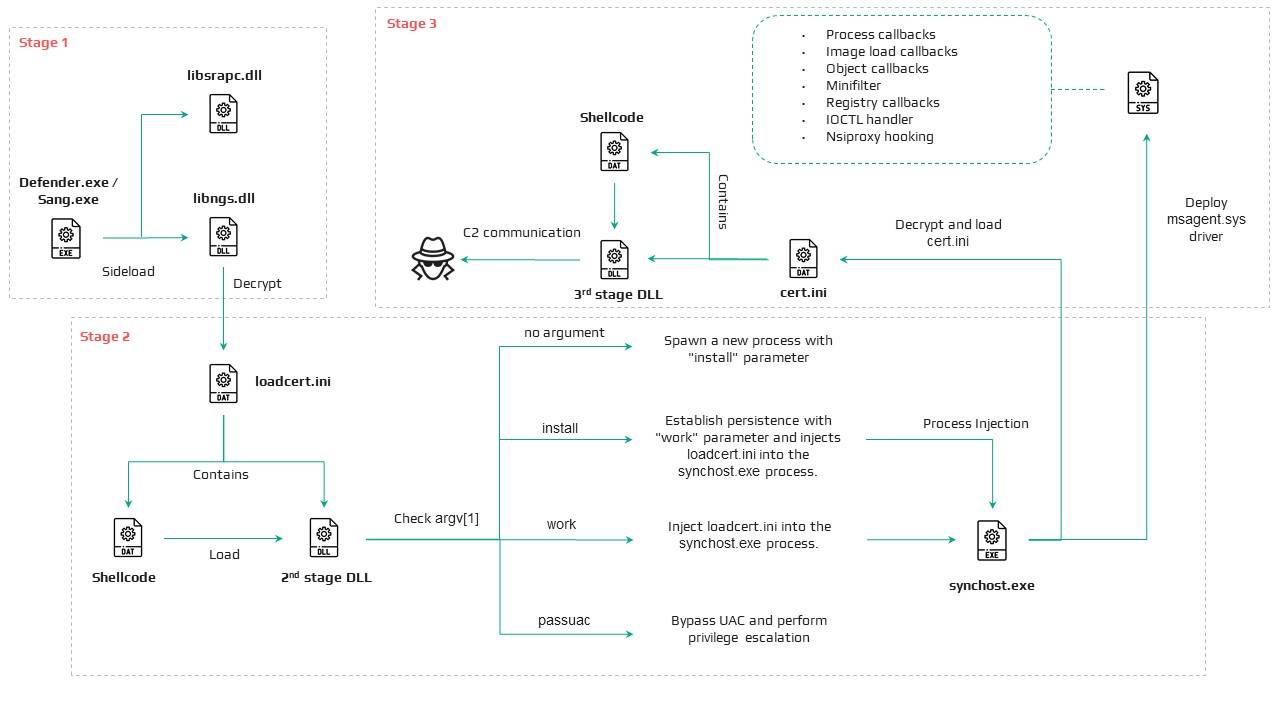
 

Overview of the new variant of CoolClient

First stage: libngs.dll

Execution begins when the legitimate Sangfor application (defender.exe or Sang.exe) loads the malicious libngs.dll through DLL sideloading. As in previous CoolClient variants, the malware continues to abuse the same Sangfor application to execute its first-stage loader.

To make the DLL appear legitimate, libngs.dll exports numerous dummy functions. Each export simply calls OutputDebugStringA with its corresponding function name before immediately invoking ExitProcess, serving no functional purpose other than mimicking the expected export table of the legitimate DLL.
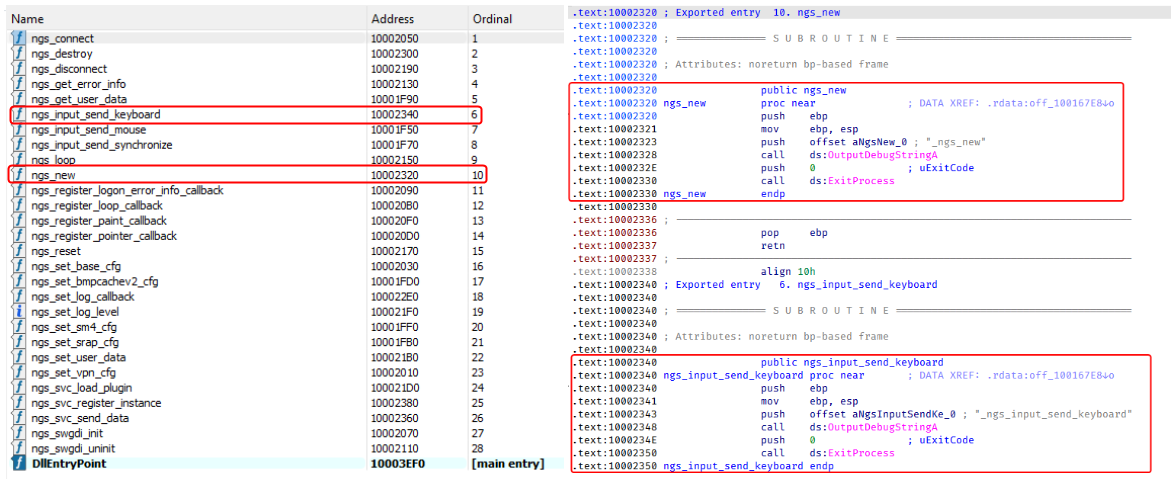
Dummy export functions in libngs.dll invoking OutputDebugStringA and ExitProcess

Dummy export functions in libngs.dll invoking OutputDebugStringA and ExitProcess

The actual malicious logic is executed from DllMain (DllEntryPoint). Although heavily obfuscated through control flow flattening and numerous unconditional jumps, the routine ultimately performs a straightforward task: loading, decrypting, and executing the encrypted second-stage DLL, loadcert.ini.

The loader resolves the required Windows APIs, reads loadcert.ini into memory, and decrypts it using a 0x32-byte repeating XOR keystream derived from a transformed seed value of 0xA4. After decryption, the DLL is loaded directly into memory, and execution is transferred to loadcert.ini.

Second stage: loadcert.ini (before synchost.exe injection)

The second-stage DLL, loadcert.ini, is responsible for preparing the execution environment before the malware transitions into its injected process. It first determines its execution context by checking whether the current module is synchost.exe.

If the DLL is running under the original sideloaded process (for example, Sang.exe), it performs the initial setup, including persistence, UAC bypass, registry modifications, and process injection.

If the DLL is already executing inside synchost.exe, it follows a different execution path that decrypts time.ini, deploys the kernel-mode driver, and loads the final-stage implant (cert.ini).

Command handler

The command handler remains largely unchanged from previous CoolClient variants, with one notable difference: the malware now injects into synchost.exe instead of write.exe.

Execution is controlled through three command-line parameters:

Parameter Purpose
install Performs the initial setup, including persistence, privilege checks, and preparation for the injected execution path.
work Executes the primary second-stage functionality from the injected synchost.exe process, including driver deployment and third-stage loading.
passuac Continues execution after privilege elevation.

If no parameter is supplied, the malware creates a new Sang.exe process with the install parameter using CreateProcessW.

Establishing AutoRun persistence

When executed with the install parameter, CoolClient creates an AutoRun entry under:

HKCU\Software\Microsoft\Windows\CurrentVersion\Run

The registry value, named goopdate, launches Sang.exe (or defender.exe, depending on the deployment) with the work parameter whenever the user logs on.

Process injection into synchost.exe

Upon establishing the AutoRun registry entry, CoolClient decrypts loadcert.ini using a 0x32-byte repeating XOR keystream derived from the hardcoded base key 0x4D.

The decrypted DLL is then injected into a newly created suspended instance of synchost.exe. The malware allocates memory in the target process, writes the decrypted payload, redirects the thread context to the injected code, resumes execution, and finally terminates the original process with ExitProcess.

From this point onward, execution continues entirely within synchost.exe, where the malware proceeds with kernel-mode driver deployment before loading the final-stage implant (cert.ini).

Service installation

When executed with the install parameter, CoolClient establishes an additional persistence mechanism by installing itself as a Windows service. Before doing so, it verifies that it has sufficient access to the Service Control Manager and that no 360 Total Security software processes (360sd.exe, zhudongfangyu.exe, or 360desktopservice64.exe) are running.
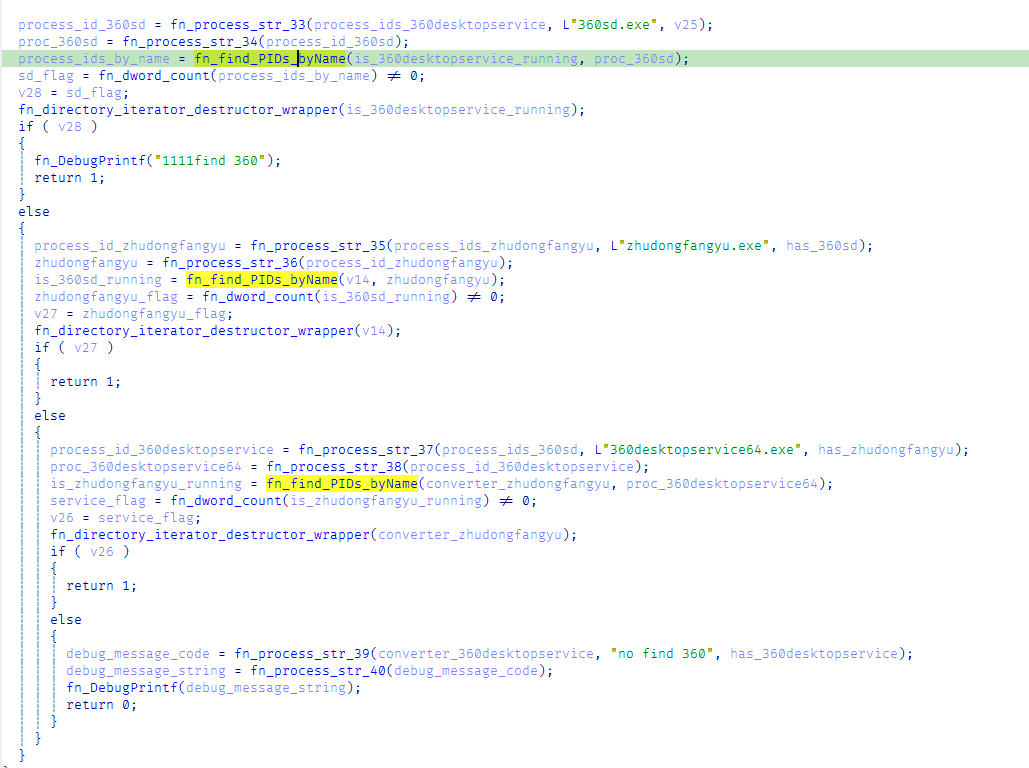
Function to check for running 360 security software processes

Function to check for running 360 Total Security software processes

If both checks succeed, the malware decrypts time.ini to retrieve the service configuration, including the service name and description. It then checks whether the service media_updaten already exists. If found, the existing service is stopped and deleted before a new one is created.

The new service is configured to execute Sang.exe<.code> with the work parameter using CreateServiceA. The malware then starts the service by executing "sc start media_updaten" via WinExec.

Administrator privilege check

If the service installation path is not taken, CoolClient checks whether the current process is running with administrator privileges by verifying membership in the local Administrators group.

When administrative privileges are available, the malware relaunches itself with the passuac parameter before continuing with the remaining execution flow.

Elevated relaunch and UAC bypass

To continue execution with elevated privileges while concealing its true parent process, CoolClient implements an RPC-based process creation technique similar to the method described by Google Project Zero. The technique combines RPC process creation with parent process ID (PPID) spoofing to launch a new elevated instance of itself.

The malware first checks for the presence of escanmon.exe. If the process is running, it constructs the path to C:\Windows\System32\winver.exe and establishes a connection to the local ncalrpc endpoint (201ef99a-7fa0-444c-9399-19ba84f12a1a). It then invokes NdrAsyncClientCall to launch winver.exe through the RPC interface.
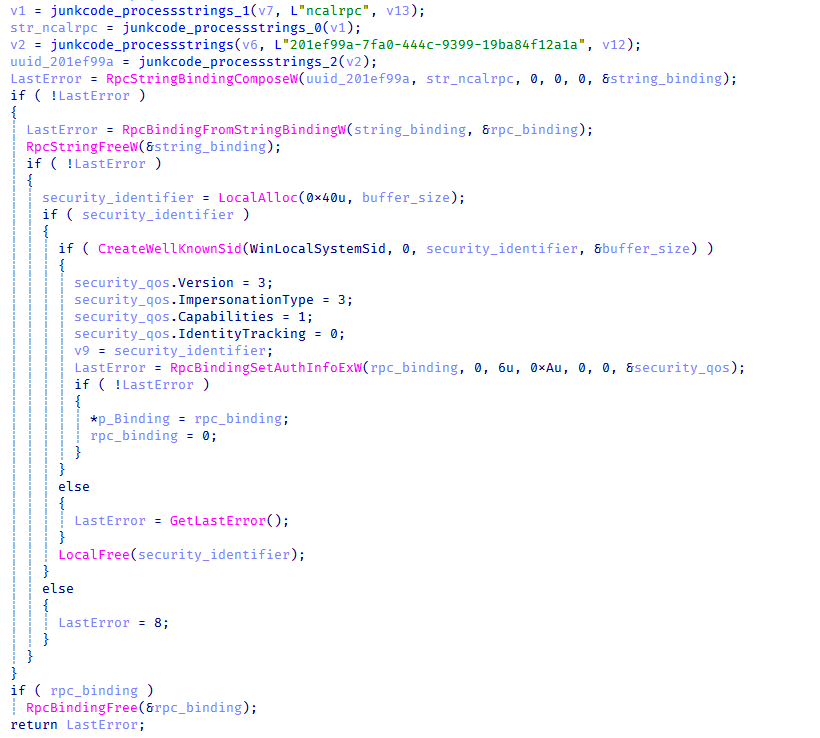
Authenticated RPC binding used during the RPC-based UAC bypass

Authenticated RPC binding used during the RPC-based UAC bypass

After winver.exe is created, CoolClient retrieves its debug object using NtQueryInformationProcess, detaches the debugger through NtRemoveProcessDebug, and terminates the process. The obtained debug object is later reused during the remainder of the UAC bypass routine.

Next, the malware repeats the same RPC-based process creation technique to launch computerdefaults.exe. It associates the previously obtained debug object with the current thread using DbgUiSetThreadDebugObject, waits for the resulting process creation event through WaitForDebugEvent, and duplicates the process handle using NtDuplicateObject, obtaining a handle with full access rights.

Finally, CoolClient relaunches itself as Sang.exe passuac using CreateProcessW with an extended startup attribute list. By configuring PROC_THREAD_ATTRIBUTE_PARENT_PROCESS through UpdateProcThreadAttribute, the duplicated process handle is assigned as the parent of the new process. As a result, the new Sang.exe passuac instance executes with an elevated context while appearing to have been spawned by the trusted Windows process instead of the original CoolClient process.

Second stage: loadcert.ini (Injected Execution)

After being injected into synchost.exe, loadcert.ini follows its injected execution path, where it deploys the kernel-mode driver and launches the final-stage implant (cert.ini). If administrative privileges are unavailable, the malware skips driver deployment and proceeds directly to the third-stage injection.

Kernel-Mode driver deployment

The deployment routine begins by decrypting time.ini. CoolClient then verifies that it has sufficient privileges to install a kernel-mode driver by checking for full access to the Service Control Manager (SCM) and the presence of SeTcbPrivilege.

If both conditions are met, CoolClient extracts an embedded LZMA-compressed driver from loadcert.ini, decompresses it, and writes it to disk as msagent.sys in the same directory as cert.ini, for example:

C:\Program Files\Microsoft\Windows Defender\msagent.sys

Next, the malware checks whether a service named msagent already exists. If present, the existing service is stopped and deleted before a new driver service is created and started, loading the kernel-mode component into the operating system.

Driver initialization

After the driver is loaded, CoolClient establishes communication with it by opening the device \\.\msagent using CreateFileW. The user-mode component then initializes the driver by issuing three DeviceIoControl requests.

IOCTL Purpose
0x222120 Registers the current CoolClient process with the driver.
0x2221E0 Sends the configured C2 IPv4 address to the driver.
0x2220F0 Registers filesystem and registry paths that should be protected or hidden.

The first request (0x222120) registers the current CoolClient process as a trusted process within the driver. The request includes the process ID, an operation code, and a flag that marks the process as trusted, allowing it to interact with protected files, registry keys, and processes.

The second request (0x2221E0) passes the configured C2 IPv4 address extracted from time.ini.

Finally, 0x2220F0 registers the CoolClient installation directory (for example, C:\Program Files\Microsoft\Windows Defender\) together with the service registry path (\Registry\Machine\SYSTEM\CurrentControlSet\Services\media_updaten). These entries allow the driver to protect the malware’s files and registry objects from inspection, modification, and deletion.

As part of the initialization, CoolClient updates the HKLM\SYSTEM\RNG\Wid_H1deF5Dirs registry value by appending its installation directory if it is not already present. This registry value is later used by the driver when applying its hiding and protection mechanisms.

The implementation of these IOCTL handlers and the corresponding driver functionality are discussed in the msagent.sys section.

Cert.ini process injection

Once the driver has been initialized, CoolClient proceeds to launch the final-stage implant (cert.ini). Before creating the target process, the malware enumerates active WinStation sessions to identify a suitable interactive user session.

After selecting a session, CoolClient duplicates its access token, updates the session identifier, and creates a new synchost.exe process using CreateProcessAsUserA. The decrypted cert.ini DLL is then injected into the suspended process using the same memory allocation, thread context modification, and ResumeThread technique described earlier.

This marks the final transition in the execution chain, where the third-stage implant takes over C2 communication and the remaining backdoor functionality.

Msagent.sys driver

Analysis of the deployed kernel-mode driver reveals an embedded PDB path:
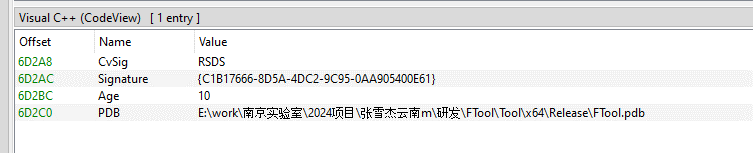
PDB Path

PDB Path


E:\work\南京实验室\2024项目\张雪杰云南m\研发\FTool\Tool\x64\Release\FTool.pdb

The path contains several notable strings, including “Nanjing Laboratory” (南京实验室) and “Zhang Xuejie Yunnan m” (张雪杰云南m), which likely refer to the driver’s development environment. However, our OSINT analysis did not identify any information linking these strings to a known organization, developer, or threat actor.

The driver is digitally signed with a certificate issued to "Nanjing Ranyi Technology Co., Ltd.", with serial number 3E 62 DC 5D 8D 61 2A 26 33 E7 6B DF D6 07 19 DD. The certificate was valid from August 2013 to September 2014.

We identified several older malicious drivers signed with the same certificate that were compiled around 2013. However, we found no evidence directly linking those samples to the CoolClient activity described in this article.

Driver configuration

During initialization, the driver loads its stealth configuration from the registry key \REGISTRY\MACHINE\SYSTEM\RNG. The configuration defines which system objects should be hidden or protected and controls the driver’s operating mode.
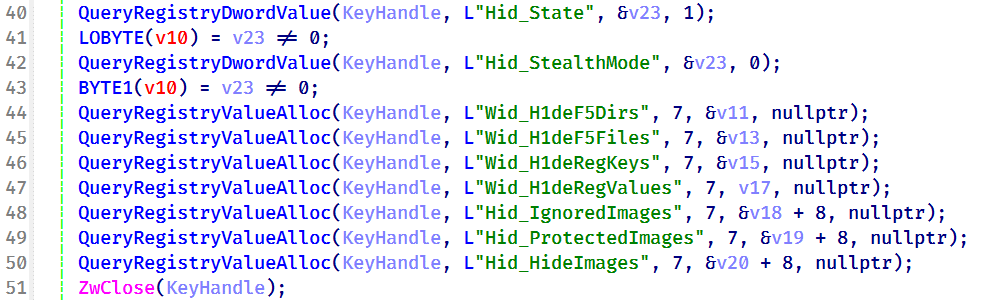
Registry configuration loaded by the driver during initialization

Registry configuration loaded by the driver during initialization

Two REG_DWORD values control the driver’s operating mode:

Registry Value Default Description
Hid_State 1 Enables the driver’s rootkit functionality.
Hid_StealthMode 0 Controls additional stealth features used by selected driver routines.

In addition, the driver loads several REG_MULTI_SZ values that define the objects to be hidden or protected.

Registry Value Purpose
Wid_H1deF5Dirs Directories to hide
Wid_H1deF5Files Files to hide
Wid_H1deRegKeys Registry keys to hide
Wid_H1deRegValues Registry values to hide
Hid_IgnoredImages Processes to ignore
Hid_ProtectedImages Processes to protect

Together, these registry values determine which filesystem paths, registry objects, and processes are managed by the driver’s protection mechanisms.
After loading the configuration, the driver converts the registry entries into internal lookup structures that are shared across its various protection components.

These structures are later referenced by the filesystem minifilter, registry callback, process callback, object callback, image load callback, and IOCTL handlers to determine whether a file, registry object, or process should be hidden, protected, or ignored.

Preparation for process hiding

Next, the driver dynamically locates the ActiveProcessLinks (LIST_ENTRY) field within the EPROCESS structure instead of relying on hardcoded offsets. It first validates several predefined offsets and, if none match, performs a linear scan of the EPROCESS structure to identify the correct location. This approach allows the driver to remain compatible across different Windows versions, where the layout of EPROCESS may differ.
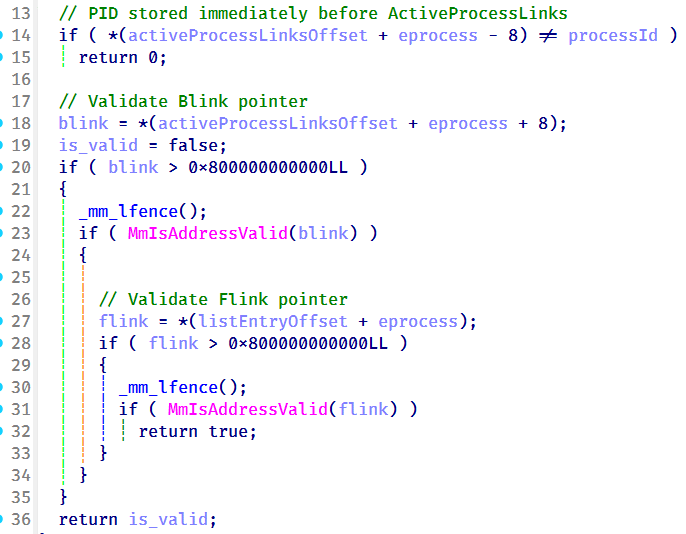
The driver validates candidate ActiveProcessLinks layouts before enabling process hiding

The driver validates candidate ActiveProcessLinks layouts before enabling process hiding

Once the correct offset has been identified, it is stored for later use by the process hiding routines. During process hiding and restoration, the driver uses IOCTLs 0x22219C and 0x2221A0 to unlink and relink entries in the Windows active process list, effectively hiding or restoring processes on demand.

Process, object, and image load callbacks

After preparing its process tracking structures, the driver initializes several AVL trees and populates them with configuration entries loaded from the registry, including Wid_H1deF5Dirs, Wid_H1deF5Files, Wid_H1deRegKeys, Wid_H1deRegValues, Hid_IgnoredImages, Hid_ProtectedImages, and Hid_HideImages.

These AVL trees provide efficient lookups for protected files, registry objects, and tracked processes, and are shared by the callback routines and IOCTL handlers.
The driver then registers three types of kernel callbacks that form the foundation of its protection and monitoring mechanisms:

  • Object callbacks using ObRegisterCallbacks
  • Process creation and termination callbacks using PsSetCreateProcessNotifyRoutineEx
  • Image load callbacks using PsSetLoadImageNotifyRoutine

Registration of object, process, and image load callbacks during driver initialization

Registration of object, process, and image load callbacks during driver initialization

After registration, these callbacks maintain the driver’s internal tracking structures as processes, threads, and images are created or loaded.

Object callbacks

To protect selected processes, the driver registers object callbacks for process (PsProcessType) and thread (PsThreadType) objects using ObRegisterCallbacks with an altitude of 1203. These callbacks intercept requests to open process and thread handles. If the target process is protected, the driver reduces the access rights granted to the requesting process, preventing operations such as process termination, code injection, and other forms of process manipulation. In this sample, the protected process is the injected CoolClient code running inside synchost.exe.

Process and image load callbacks

The driver registers process creation and termination callbacks using PsSetCreateProcessNotifyRoutineEx, together with an image load callback via PsSetLoadImageNotifyRoutine.

When a process is created, its image name is compared against the configuration lists Hid_IgnoredImages, Hid_ProtectedImages, and Hid_HideImages. Matching processes are added to the driver’s internal tracking structures, allowing them to be protected, hidden, or managed through subsequent IOCTL requests. When a tracked process terminates, its entry is removed from the tracking structures.

The image load callback monitors modules loaded into tracked processes and updates the driver’s internal state to support subsequent protection and hiding operations.

To ensure that processes already running before the driver is initialized are also tracked, the driver performs a one-time enumeration of all active processes after registering the callbacks and adds any matching processes to the tracking structures.

MiniFilter registration

To protect files and directories, the driver registers a filesystem minifilter. During initialization, it creates internal path filter lists, loads the configured directory and file entries (Wid_H1deF5Dirs and Wid_H1deF5Files), and creates the required minifilter registry entries under HKLM\SYSTEM\CurrentControlSet\Services\msagent\Instances. To avoid altitude conflicts, the driver dynamically assigns a filter altitude and retries registration until a unique value is obtained.
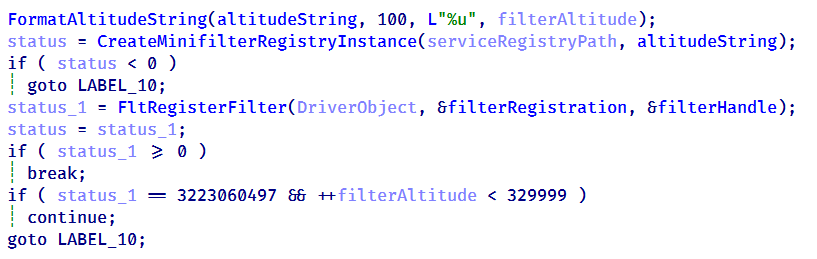
Retrying minifilter registration with incrementing filter altitude values until FltRegisterFilter succeeds

Retrying minifilter registration with incrementing filter altitude values until FltRegisterFilter succeeds

The driver then activates the minifilter using FltRegisterFilter. The filter works together with the IOCTL interface, which dynamically adds, removes, or clears protected path entries (0x2220F0, 0x2220F4, and 0x2220F8). During filesystem operations, the minifilter compares accessed paths against its internal path lists and denies access to matching entries, effectively hiding protected files and directories from users and applications.

Registry callback registration

To protect registry keys and values, the driver registers a registry callback using CmRegisterCallbackEx with an altitude of 320000. During initialization, it creates separate lookup structures for protected registry keys and values, then populates them using the configured entries from Wid_H1deRegKeys and Wid_H1deRegValues.
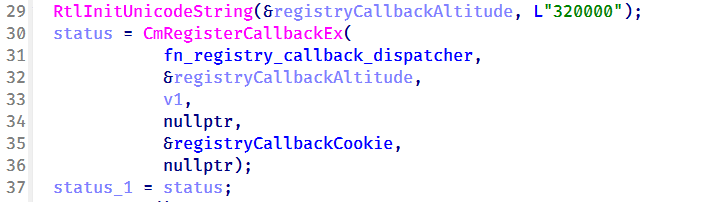
Registration of the registry callback using CmRegisterCallbackEx with an altitude of 320000

Registration of the registry callback using CmRegisterCallbackEx with an altitude of 320000

Once registered, the callback intercepts registry operations and compares the target key or value against the protected entries. For enumeration requests, matching keys and values are removed from the results before they are returned to user mode, effectively hiding them from registry viewers. For direct access requests, such as opening, modifying, or deleting protected registry objects, the callback returns STATUS_ACCESS_DENIED, preventing the operation.

Before applying these restrictions, the driver verifies whether the requesting process is trusted. Processes registered through IOCTL 0x222120, including the CoolClient user-mode component, bypass the filtering logic and retain unrestricted access, while all other processes remain subject to the driver’s registry protection rules.

IOCTL command dispatcher

To communicate with the user-mode component, the driver creates a device object named \Device\ToolTool together with the symbolic link \DosDevices\ToolTool to allow the user-mode CoolClient component to communicate with the driver through DeviceIoControl requests.

The driver implements 33 IOCTL handlers, although the analyzed CoolClient sample uses only three during normal execution:

  • 0x222120: registers the current CoolClient process with the driver.
  • 0x2221E0: passes the configured C2 IPv4 address.
  • 0x2220F0: registers filesystem and registry paths for protection.

The remaining IOCTL handlers were not invoked by the analyzed sample.

IOCTL Handler Functionality
0x222000 0x140001E04 Enable or disable the rootkit.
0x222004 0x1400020B0 Query the current rootkit state.
0x2220F0 0x140002320 ●       Register protected filesystem or registry paths
●       Used by CoolClient to register its installation directory and service registry key.
0x2220F4 0x1400034DC Remove a protected filesystem or registry path.
0x2220F8 0x140003464 Clear all protected filesystem and registry path entries.
0x222118 0x1400024B0 Register process or path protection entries.
0x22211C 0x140002A20 Query registered protection entries.
0x222120 0x140003794 Update process protection entries. Used by CoolClient to register itself as a trusted process.
0x222124 0x14000362C Remove a protection entry.
0x222128 0x14000349C Clear all process protection entries.
0x222130 0x14000265C Register a protected process by PID.
0x222134 0x140010E88 Inject shellcode into a target process using NtCreateThreadEx.
0x222138 0x14000F498 Hide a kernel module by unlinking it from PsLoadedModuleList.
0x222144 0x14000270C Delete a file.
0x222148 0x14000286C Decrypt an embedded buffer and write it to disk.
0x22214C 0x1400027F4 Read and decrypt an encrypted file.
0x222168 0x140002780 Unmap the image section of a target process.
0x22216C 0x140013984 Terminate a process by PID.
0x222194 0x140011F50 Remove Protected Process Light (PPL) protection.
0x222198 0x140002940 Create or modify a registry value.
0x22219C 0x140010630 Hide a process by unlinking it from the active process list.
0x2221A0 0x140010670 Restore a previously hidden process.
0x2221A4 0x14000F8A0 Hide a module within a process.
0x2221A8 0x14000F954 Restore a hidden module.
0x2221AC 0x140016368 Enumerate and restore kernel notification callbacks.
0x2221B0 0x140016458 Disable or restore kernel notification callbacks.
0x2221B4 0x140012408 Manually load a secondary kernel driver.
0x2221B8 0x14001262C Debug/test handler.
0x2221BC 0x1400165F6 Write to an arbitrary kernel address.
0x2221C0 0x14000BB00,  0x14000BB78 Enables deny-rootkit mode by registering image-load monitoring and enabling the patching logic.
0x2221C4 0x14000BB6C,  0x14000BB10 Disables deny-rootkit mode by clearing state and unregistering/removing the monitoring logic.
0x2221E0 0x1400126C0 Register a C2 IPv4 address.
0x2221E4 0x140012E50 Delete a C2 IPv4 address.

After initializing the IOCTL dispatcher, the driver releases the temporary configuration buffer that was previously loaded from \REGISTRY\MACHINE\SYSTEM\RNG.

Kernel module enumeration and hiding

To support kernel module hiding, the driver resolves the address of the non-exported kernel variable PsLoadedModuleList at runtime using MmGetSystemRoutineAddress. This global linked list maintains information about all loaded kernel modules and drivers, allowing the rootkit to enumerate and manipulate module entries.
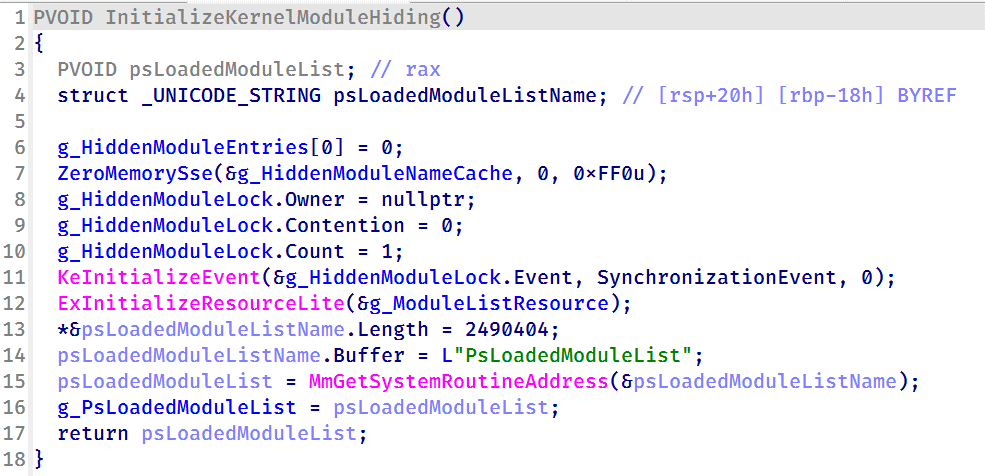
Driver initialization routine resolving the address of PsLoadedModuleList for subsequent kernel module hiding

Driver initialization routine resolving the address of PsLoadedModuleList for subsequent kernel module hiding

This functionality is exposed through IOCTL 0x222138, which accepts a module name or path from the user-mode component. When a matching module is found, the driver locates the corresponding entry in PsLoadedModuleList and unlinks it by updating its Flink and Blink pointers. As a result, the hidden module no longer appears in standard kernel module enumeration routines.

Nsiproxy hooking and data filtering

The driver also hooks the Nsiproxy driver to filter network-related data returned to user mode. This functionality is connected to IOCTL 0x2221E0, which allows the user-mode component to register C2 IPv4 addresses with the driver.

To install the hook, the driver obtains a reference to \Driver\Nsiproxy using ObReferenceObjectByName and replaces one of the Nsiproxy handler pointers with its own filtering routine. The hook preserves the original handler and forwards execution after processing the returned data.
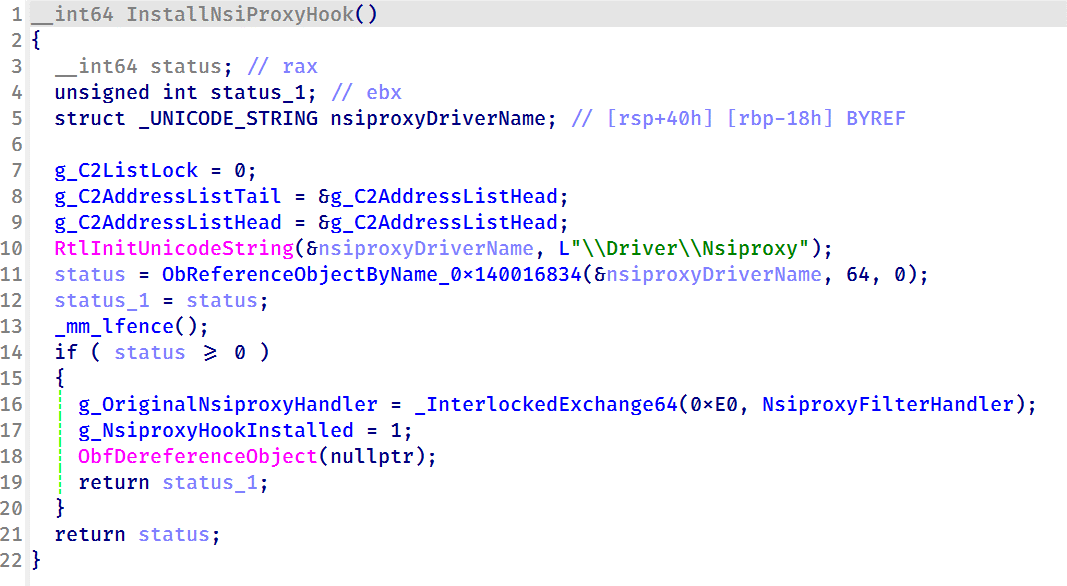
Installing the Nsiproxy hook by resolving \Driver\Nsiproxy and replacing the original handler with the driver's filtering routine

Installing the Nsiproxy hook by resolving \Driver\Nsiproxy and replacing the original handler with the driver’s filtering routine

When the hooked routine processes network information, the driver compares the returned entries against its registered C2 address list. Matching IP addresses are removed before the data is returned to user mode, preventing applications that rely on Nsiproxy-provided network information from seeing the malware’s C2 addresses.

Finally, the driver registers a DriverUnload routine to release allocated resources when the driver is unloaded.

Victimology

The latest CoolClient variant continues to target organizations consistent with previously observed HoneyMyte activity. Based on our investigations, we identified victims in Myanmar, Mongolia, Pakistan, and Russia, including confirmed government entities.

Across the observed intrusions, CoolClient was consistently deployed as a secondary backdoor following a PlugX infection, indicating that HoneyMyte continues to use PlugX as its initial post-compromise implant before transitioning to CoolClient.

Attribution

Our analysis confirms that the investigated malware is a new CoolClient variant associated with the HoneyMyte threat group. While the overall execution flow remains consistent with previously documented CoolClient variants, this sample introduces a previously undocumented kernel-mode driver that significantly expands the malware’s stealth capabilities.

The deployment chain observed in this investigation is also consistent with previous HoneyMyte campaigns, in which PlugX serves as the initial foothold before CoolClient is deployed as a secondary backdoor, further reinforcing the attribution.

Conclusion

The latest CoolClient variant represents a significant evolution of the malware. Rather than operating solely as a user-mode backdoor with plugin support, it now deploys and communicates with a kernel-mode driver that extends its capabilities beyond earlier versions. Through this driver, CoolClient can hide and protect processes, files, and registry objects, as well as filter selected network information, making detection and analysis considerably more difficult.

HoneyMyte has previously introduced kernel-mode functionality in ToneShell. The addition of a kernel-mode driver to CoolClient suggests that the group continues to expand its use of rootkit capabilities to improve stealth, persistence, and defense evasion during post-compromise operations.

IOCs

2d7c8780e97409770a9d4f31c66c9d63 msagent.sys
9460E150E1981D5C165043520C5C12FE msagent.sys
9717F005C5FB98E08D2AD983D88F94EE libngs.dll
F518D8E5FE70D9090F6280C68A95998F libngs.dll
EB79558B037669792652A816E2C669DE ctxmui.dll

C:\Program Files\microsoft\windows defender\
C:\Program Files\windows media player\mediares\
C:\ProgramData\symantecdir\
C:\ProgramData\virtualstore\
C:\Windows\identitycrl\production\
C:\Windows\serviceprofiles\networkservice\
C:\Users\<user>\AppData\Local\viber24.8\
C:\Users\<user>\AppData\Roaming\dsassistant\
C:\Program Files\common files\microsoft shared\office14\
C:\programdata\msdn\

cloudtroe.giize[.]com
employers.theworkpc[.]com
freeread.casacam[.]net
us.lenovoappstore[.]com
sundanish.freeddns[.]org
torinarlabs.webredirect[.]org
news.dursamjbataar[.]org
video.dursamjbataar[.]org
black-popular[.]com
whatismybestthing[.]com


  •  

APT group HoneyMyte upgrades CoolClient: the backdoor gets a kernel-level Windows rootkit

Introduction

CoolClient is a backdoor family attributed to the HoneyMyte APT group (also known as Mustang Panda) that has been used in their cyber-espionage campaigns targeting organizations across Asia and Russia. It supports such capabilities as keylogging, clipboard theft, credential harvesting, file management, system reconnaissance, and plugin-based extensions.

Since its first public disclosure by Sophos in 2022 and subsequent analysis by Trend Micro in 2023, CoolClient has continued to evolve. In 2025, we analyzed a newer variant that introduced clipboard theft and HTTP traffic interception for credential harvesting.

In late 2025 and 2026, our latest investigation reveal another major evolution. The newest CoolClient variant can deploy a signed kernel-mode driver as a Windows service and communicate with it through IOCTL requests. The driver enhances the malware’s stealth by hiding the CoolClient process, protecting related files and registry entries, and preventing them from being inspected or modified. The overall design is comparable to the kernel-mode enhancements previously observed in ToneShell, but the CoolClient driver exposes dedicated IOCTL handlers that allow the user-mode backdoor to communicate directly with the driver.

We have observed this updated CoolClient variant and its accompanying driver in intrusions across multiple countries in Asia, including Pakistan, Mongolia, and Myanmar.

Technical analysis

In the observed campaign targeting Myanmar, HoneyMyte used PlugX as the initial post-compromise implant to deploy the CoolClient components. Before deploying the malware, the actor added both a folder exclusion and a file exclusion to Microsoft Defender for the fake Windows Defender installation directory and the renamed sideloader executable (defender.exe).

wmic /Node:localhost /Namespace:\\Root\Microsoft\Windows\Defender Path MSFT_MpPreference call Add ExclusionPath="$programfiles\Microsoft\Windows Defender"
wmic /Node:localhost /Namespace:\\Root\Microsoft\Windows\Defender Path MSFT_MpPreference call Add ExclusionPath="$programfiles\Microsoft\Windows Defender\defender.exe"

The actor then created a fake Windows Defender installation directory, copied the CoolClient components into it, and renamed a legitimate Sangfor executable, usually named Sang.exe, to defender.exe to serve as the DLL sideloader.

xcopy "$programfiles\Windows Defender\*" "$programfiles\Microsoft\Windows Defender" /a /s /v /e /f

Persistence was established through a scheduled task that launched defender.exe with SYSTEM privileges during system startup.

schtasks /create /sc onstart /tn "\Microsoft\Windows\Windows Defender Advanced Threat Protection Service" /tr "\"$programfiles\Microsoft\Windows Defender\defender.exe\"" /ru "system" /F

When executed, defender.exe sideloads the malicious libngs.dll, initiating the CoolClient execution chain described in the following sections.

CoolClient components

Similar to previous variants, the latest CoolClient user-mode component follows a multi-stage execution chain, with each component performing a distinct role during execution.

Component Description
defender.exe / Sang.exe Legitimate Sangfor application abused for DLL sideloading
libsrapc.dll Benign dependency required for the Sangfor application to execute normally
libngs.dll First-stage loader that decrypts and loads the next stage into memory (First stage)
loadcert.ini Encrypted DLL implementing the core CoolClient functionality, including command handling, process injection, driver deployment, and persistence (Second stage)
cert.ini Final-stage implant responsible for C2 communication and backdoor functionality (Final stage)
time.ini CoolCleint configuration file

Our previous CoolClient analysis focused primarily on the final-stage implant (main.dat), including its backdoor commands and plugin framework, while the first-stage loader (libngs.dll) and second-stage component (loader.dat) received only a brief overview. In the latest variant CoolClient, loader.dat and main.dat have been renamed to loadcert.ini and cert.ini, respectively. This article revisits those earlier stages, focusing on the second-stage component and the newly introduced kernel-mode driver that extends CoolClient with rootkit capabilities.


Overview of the new variant of CoolClient

First stage: libngs.dll

Execution begins when the legitimate Sangfor application (defender.exe or Sang.exe) loads the malicious libngs.dll through DLL sideloading. As in previous CoolClient variants, the malware continues to abuse the same Sangfor application to execute its first-stage loader.

To make the DLL appear legitimate, libngs.dll exports numerous dummy functions. Each export simply calls OutputDebugStringA with its corresponding function name before immediately invoking ExitProcess, serving no functional purpose other than mimicking the expected export table of the legitimate DLL.

Dummy export functions in libngs.dll invoking OutputDebugStringA and ExitProcess

Dummy export functions in libngs.dll invoking OutputDebugStringA and ExitProcess

The actual malicious logic is executed from DllMain (DllEntryPoint). Although heavily obfuscated through control flow flattening and numerous unconditional jumps, the routine ultimately performs a straightforward task: loading, decrypting, and executing the encrypted second-stage DLL, loadcert.ini.

The loader resolves the required Windows APIs, reads loadcert.ini into memory, and decrypts it using a 0x32-byte repeating XOR keystream derived from a transformed seed value of 0xA4. After decryption, the DLL is loaded directly into memory, and execution is transferred to loadcert.ini.

Second stage: loadcert.ini (before synchost.exe injection)

The second-stage DLL, loadcert.ini, is responsible for preparing the execution environment before the malware transitions into its injected process. It first determines its execution context by checking whether the current module is synchost.exe.

If the DLL is running under the original sideloaded process (for example, Sang.exe), it performs the initial setup, including persistence, UAC bypass, registry modifications, and process injection.

If the DLL is already executing inside synchost.exe, it follows a different execution path that decrypts time.ini, deploys the kernel-mode driver, and loads the final-stage implant (cert.ini).

Command handler

The command handler remains largely unchanged from previous CoolClient variants, with one notable difference: the malware now injects into synchost.exe instead of write.exe.

Execution is controlled through three command-line parameters:

Parameter Purpose
install Performs the initial setup, including persistence, privilege checks, and preparation for the injected execution path.
work Executes the primary second-stage functionality from the injected synchost.exe process, including driver deployment and third-stage loading.
passuac Continues execution after privilege elevation.

If no parameter is supplied, the malware creates a new Sang.exe process with the install parameter using CreateProcessW.

Establishing AutoRun persistence

When executed with the install parameter, CoolClient creates an AutoRun entry under:

HKCU\Software\Microsoft\Windows\CurrentVersion\Run

The registry value, named goopdate, launches Sang.exe (or defender.exe, depending on the deployment) with the work parameter whenever the user logs on.

Process injection into synchost.exe

Upon establishing the AutoRun registry entry, CoolClient decrypts loadcert.ini using a 0x32-byte repeating XOR keystream derived from the hardcoded base key 0x4D.

The decrypted DLL is then injected into a newly created suspended instance of synchost.exe. The malware allocates memory in the target process, writes the decrypted payload, redirects the thread context to the injected code, resumes execution, and finally terminates the original process with ExitProcess.

From this point onward, execution continues entirely within synchost.exe, where the malware proceeds with kernel-mode driver deployment before loading the final-stage implant (cert.ini).

Service installation

When executed with the install parameter, CoolClient establishes an additional persistence mechanism by installing itself as a Windows service. Before doing so, it verifies that it has sufficient access to the Service Control Manager and that no 360 Total Security software processes (360sd.exe, zhudongfangyu.exe, or 360desktopservice64.exe) are running.

Function to check for running 360 security software processes

Function to check for running 360 Total Security software processes

If both checks succeed, the malware decrypts time.ini to retrieve the service configuration, including the service name and description. It then checks whether the service media_updaten already exists. If found, the existing service is stopped and deleted before a new one is created.

The new service is configured to execute Sang.exe<.code> with the work parameter using CreateServiceA. The malware then starts the service by executing "sc start media_updaten" via WinExec.

Administrator privilege check

If the service installation path is not taken, CoolClient checks whether the current process is running with administrator privileges by verifying membership in the local Administrators group.

When administrative privileges are available, the malware relaunches itself with the passuac parameter before continuing with the remaining execution flow.

Elevated relaunch and UAC bypass

To continue execution with elevated privileges while concealing its true parent process, CoolClient implements an RPC-based process creation technique similar to the method described by Google Project Zero. The technique combines RPC process creation with parent process ID (PPID) spoofing to launch a new elevated instance of itself.

The malware first checks for the presence of escanmon.exe. If the process is running, it constructs the path to C:\Windows\System32\winver.exe and establishes a connection to the local ncalrpc endpoint (201ef99a-7fa0-444c-9399-19ba84f12a1a). It then invokes NdrAsyncClientCall to launch winver.exe through the RPC interface.

Authenticated RPC binding used during the RPC-based UAC bypass

Authenticated RPC binding used during the RPC-based UAC bypass

After winver.exe is created, CoolClient retrieves its debug object using NtQueryInformationProcess, detaches the debugger through NtRemoveProcessDebug, and terminates the process. The obtained debug object is later reused during the remainder of the UAC bypass routine.

Next, the malware repeats the same RPC-based process creation technique to launch computerdefaults.exe. It associates the previously obtained debug object with the current thread using DbgUiSetThreadDebugObject, waits for the resulting process creation event through WaitForDebugEvent, and duplicates the process handle using NtDuplicateObject, obtaining a handle with full access rights.

Finally, CoolClient relaunches itself as Sang.exe passuac using CreateProcessW with an extended startup attribute list. By configuring PROC_THREAD_ATTRIBUTE_PARENT_PROCESS through UpdateProcThreadAttribute, the duplicated process handle is assigned as the parent of the new process. As a result, the new Sang.exe passuac instance executes with an elevated context while appearing to have been spawned by the trusted Windows process instead of the original CoolClient process.

Second stage: loadcert.ini (Injected Execution)

After being injected into synchost.exe, loadcert.ini follows its injected execution path, where it deploys the kernel-mode driver and launches the final-stage implant (cert.ini). If administrative privileges are unavailable, the malware skips driver deployment and proceeds directly to the third-stage injection.

Kernel-Mode driver deployment

The deployment routine begins by decrypting time.ini. CoolClient then verifies that it has sufficient privileges to install a kernel-mode driver by checking for full access to the Service Control Manager (SCM) and the presence of SeTcbPrivilege.

If both conditions are met, CoolClient extracts an embedded LZMA-compressed driver from loadcert.ini, decompresses it, and writes it to disk as msagent.sys in the same directory as cert.ini, for example:

C:\Program Files\Microsoft\Windows Defender\msagent.sys

Next, the malware checks whether a service named msagent already exists. If present, the existing service is stopped and deleted before a new driver service is created and started, loading the kernel-mode component into the operating system.

Driver initialization

After the driver is loaded, CoolClient establishes communication with it by opening the device \\.\msagent using CreateFileW. The user-mode component then initializes the driver by issuing three DeviceIoControl requests.

IOCTL Purpose
0x222120 Registers the current CoolClient process with the driver.
0x2221E0 Sends the configured C2 IPv4 address to the driver.
0x2220F0 Registers filesystem and registry paths that should be protected or hidden.

The first request (0x222120) registers the current CoolClient process as a trusted process within the driver. The request includes the process ID, an operation code, and a flag that marks the process as trusted, allowing it to interact with protected files, registry keys, and processes.

The second request (0x2221E0) passes the configured C2 IPv4 address extracted from time.ini.

Finally, 0x2220F0 registers the CoolClient installation directory (for example, C:\Program Files\Microsoft\Windows Defender\) together with the service registry path (\Registry\Machine\SYSTEM\CurrentControlSet\Services\media_updaten). These entries allow the driver to protect the malware’s files and registry objects from inspection, modification, and deletion.

As part of the initialization, CoolClient updates the HKLM\SYSTEM\RNG\Wid_H1deF5Dirs registry value by appending its installation directory if it is not already present. This registry value is later used by the driver when applying its hiding and protection mechanisms.

The implementation of these IOCTL handlers and the corresponding driver functionality are discussed in the msagent.sys section.

Cert.ini process injection

Once the driver has been initialized, CoolClient proceeds to launch the final-stage implant (cert.ini). Before creating the target process, the malware enumerates active WinStation sessions to identify a suitable interactive user session.

After selecting a session, CoolClient duplicates its access token, updates the session identifier, and creates a new synchost.exe process using CreateProcessAsUserA. The decrypted cert.ini DLL is then injected into the suspended process using the same memory allocation, thread context modification, and ResumeThread technique described earlier.

This marks the final transition in the execution chain, where the third-stage implant takes over C2 communication and the remaining backdoor functionality.

Msagent.sys driver

Analysis of the deployed kernel-mode driver reveals an embedded PDB path:

PDB Path

PDB Path


E:\work\南京实验室\2024项目\张雪杰云南m\研发\FTool\Tool\x64\Release\FTool.pdb

The path contains several notable strings, including “Nanjing Laboratory” (南京实验室) and “Zhang Xuejie Yunnan m” (张雪杰云南m), which likely refer to the driver’s development environment. However, our OSINT analysis did not identify any information linking these strings to a known organization, developer, or threat actor.

The driver is digitally signed with a certificate issued to "Nanjing Ranyi Technology Co., Ltd.", with serial number 3E 62 DC 5D 8D 61 2A 26 33 E7 6B DF D6 07 19 DD. The certificate was valid from August 2013 to September 2014.

We identified several older malicious drivers signed with the same certificate that were compiled around 2013. However, we found no evidence directly linking those samples to the CoolClient activity described in this article.

Driver configuration

During initialization, the driver loads its stealth configuration from the registry key \REGISTRY\MACHINE\SYSTEM\RNG. The configuration defines which system objects should be hidden or protected and controls the driver’s operating mode.

Registry configuration loaded by the driver during initialization

Registry configuration loaded by the driver during initialization

Two REG_DWORD values control the driver’s operating mode:

Registry Value Default Description
Hid_State 1 Enables the driver’s rootkit functionality.
Hid_StealthMode 0 Controls additional stealth features used by selected driver routines.

In addition, the driver loads several REG_MULTI_SZ values that define the objects to be hidden or protected.

Registry Value Purpose
Wid_H1deF5Dirs Directories to hide
Wid_H1deF5Files Files to hide
Wid_H1deRegKeys Registry keys to hide
Wid_H1deRegValues Registry values to hide
Hid_IgnoredImages Processes to ignore
Hid_ProtectedImages Processes to protect

Together, these registry values determine which filesystem paths, registry objects, and processes are managed by the driver’s protection mechanisms.
After loading the configuration, the driver converts the registry entries into internal lookup structures that are shared across its various protection components.

These structures are later referenced by the filesystem minifilter, registry callback, process callback, object callback, image load callback, and IOCTL handlers to determine whether a file, registry object, or process should be hidden, protected, or ignored.

Preparation for process hiding

Next, the driver dynamically locates the ActiveProcessLinks (LIST_ENTRY) field within the EPROCESS structure instead of relying on hardcoded offsets. It first validates several predefined offsets and, if none match, performs a linear scan of the EPROCESS structure to identify the correct location. This approach allows the driver to remain compatible across different Windows versions, where the layout of EPROCESS may differ.

The driver validates candidate ActiveProcessLinks layouts before enabling process hiding

The driver validates candidate ActiveProcessLinks layouts before enabling process hiding

Once the correct offset has been identified, it is stored for later use by the process hiding routines. During process hiding and restoration, the driver uses IOCTLs 0x22219C and 0x2221A0 to unlink and relink entries in the Windows active process list, effectively hiding or restoring processes on demand.

Process, object, and image load callbacks

After preparing its process tracking structures, the driver initializes several AVL trees and populates them with configuration entries loaded from the registry, including Wid_H1deF5Dirs, Wid_H1deF5Files, Wid_H1deRegKeys, Wid_H1deRegValues, Hid_IgnoredImages, Hid_ProtectedImages, and Hid_HideImages.

These AVL trees provide efficient lookups for protected files, registry objects, and tracked processes, and are shared by the callback routines and IOCTL handlers.
The driver then registers three types of kernel callbacks that form the foundation of its protection and monitoring mechanisms:

  • Object callbacks using ObRegisterCallbacks
  • Process creation and termination callbacks using PsSetCreateProcessNotifyRoutineEx
  • Image load callbacks using PsSetLoadImageNotifyRoutine
Registration of object, process, and image load callbacks during driver initialization

Registration of object, process, and image load callbacks during driver initialization

After registration, these callbacks maintain the driver’s internal tracking structures as processes, threads, and images are created or loaded.

Object callbacks

To protect selected processes, the driver registers object callbacks for process (PsProcessType) and thread (PsThreadType) objects using ObRegisterCallbacks with an altitude of 1203. These callbacks intercept requests to open process and thread handles. If the target process is protected, the driver reduces the access rights granted to the requesting process, preventing operations such as process termination, code injection, and other forms of process manipulation. In this sample, the protected process is the injected CoolClient code running inside synchost.exe.

Process and image load callbacks

The driver registers process creation and termination callbacks using PsSetCreateProcessNotifyRoutineEx, together with an image load callback via PsSetLoadImageNotifyRoutine.

When a process is created, its image name is compared against the configuration lists Hid_IgnoredImages, Hid_ProtectedImages, and Hid_HideImages. Matching processes are added to the driver’s internal tracking structures, allowing them to be protected, hidden, or managed through subsequent IOCTL requests. When a tracked process terminates, its entry is removed from the tracking structures.

The image load callback monitors modules loaded into tracked processes and updates the driver’s internal state to support subsequent protection and hiding operations.

To ensure that processes already running before the driver is initialized are also tracked, the driver performs a one-time enumeration of all active processes after registering the callbacks and adds any matching processes to the tracking structures.

MiniFilter registration

To protect files and directories, the driver registers a filesystem minifilter. During initialization, it creates internal path filter lists, loads the configured directory and file entries (Wid_H1deF5Dirs and Wid_H1deF5Files), and creates the required minifilter registry entries under HKLM\SYSTEM\CurrentControlSet\Services\msagent\Instances. To avoid altitude conflicts, the driver dynamically assigns a filter altitude and retries registration until a unique value is obtained.

Retrying minifilter registration with incrementing filter altitude values until FltRegisterFilter succeeds

Retrying minifilter registration with incrementing filter altitude values until FltRegisterFilter succeeds

The driver then activates the minifilter using FltRegisterFilter. The filter works together with the IOCTL interface, which dynamically adds, removes, or clears protected path entries (0x2220F0, 0x2220F4, and 0x2220F8). During filesystem operations, the minifilter compares accessed paths against its internal path lists and denies access to matching entries, effectively hiding protected files and directories from users and applications.

Registry callback registration

To protect registry keys and values, the driver registers a registry callback using CmRegisterCallbackEx with an altitude of 320000. During initialization, it creates separate lookup structures for protected registry keys and values, then populates them using the configured entries from Wid_H1deRegKeys and Wid_H1deRegValues.

Registration of the registry callback using CmRegisterCallbackEx with an altitude of 320000

Registration of the registry callback using CmRegisterCallbackEx with an altitude of 320000

Once registered, the callback intercepts registry operations and compares the target key or value against the protected entries. For enumeration requests, matching keys and values are removed from the results before they are returned to user mode, effectively hiding them from registry viewers. For direct access requests, such as opening, modifying, or deleting protected registry objects, the callback returns STATUS_ACCESS_DENIED, preventing the operation.

Before applying these restrictions, the driver verifies whether the requesting process is trusted. Processes registered through IOCTL 0x222120, including the CoolClient user-mode component, bypass the filtering logic and retain unrestricted access, while all other processes remain subject to the driver’s registry protection rules.

IOCTL command dispatcher

To communicate with the user-mode component, the driver creates a device object named \Device\ToolTool together with the symbolic link \DosDevices\ToolTool to allow the user-mode CoolClient component to communicate with the driver through DeviceIoControl requests.

The driver implements 33 IOCTL handlers, although the analyzed CoolClient sample uses only three during normal execution:

  • 0x222120: registers the current CoolClient process with the driver.
  • 0x2221E0: passes the configured C2 IPv4 address.
  • 0x2220F0: registers filesystem and registry paths for protection.

The remaining IOCTL handlers were not invoked by the analyzed sample.

IOCTL Handler Functionality
0x222000 0x140001E04 Enable or disable the rootkit.
0x222004 0x1400020B0 Query the current rootkit state.
0x2220F0 0x140002320 ●       Register protected filesystem or registry paths
●       Used by CoolClient to register its installation directory and service registry key.
0x2220F4 0x1400034DC Remove a protected filesystem or registry path.
0x2220F8 0x140003464 Clear all protected filesystem and registry path entries.
0x222118 0x1400024B0 Register process or path protection entries.
0x22211C 0x140002A20 Query registered protection entries.
0x222120 0x140003794 Update process protection entries. Used by CoolClient to register itself as a trusted process.
0x222124 0x14000362C Remove a protection entry.
0x222128 0x14000349C Clear all process protection entries.
0x222130 0x14000265C Register a protected process by PID.
0x222134 0x140010E88 Inject shellcode into a target process using NtCreateThreadEx.
0x222138 0x14000F498 Hide a kernel module by unlinking it from PsLoadedModuleList.
0x222144 0x14000270C Delete a file.
0x222148 0x14000286C Decrypt an embedded buffer and write it to disk.
0x22214C 0x1400027F4 Read and decrypt an encrypted file.
0x222168 0x140002780 Unmap the image section of a target process.
0x22216C 0x140013984 Terminate a process by PID.
0x222194 0x140011F50 Remove Protected Process Light (PPL) protection.
0x222198 0x140002940 Create or modify a registry value.
0x22219C 0x140010630 Hide a process by unlinking it from the active process list.
0x2221A0 0x140010670 Restore a previously hidden process.
0x2221A4 0x14000F8A0 Hide a module within a process.
0x2221A8 0x14000F954 Restore a hidden module.
0x2221AC 0x140016368 Enumerate and restore kernel notification callbacks.
0x2221B0 0x140016458 Disable or restore kernel notification callbacks.
0x2221B4 0x140012408 Manually load a secondary kernel driver.
0x2221B8 0x14001262C Debug/test handler.
0x2221BC 0x1400165F6 Write to an arbitrary kernel address.
0x2221C0 0x14000BB00,  0x14000BB78 Enables deny-rootkit mode by registering image-load monitoring and enabling the patching logic.
0x2221C4 0x14000BB6C,  0x14000BB10 Disables deny-rootkit mode by clearing state and unregistering/removing the monitoring logic.
0x2221E0 0x1400126C0 Register a C2 IPv4 address.
0x2221E4 0x140012E50 Delete a C2 IPv4 address.

After initializing the IOCTL dispatcher, the driver releases the temporary configuration buffer that was previously loaded from \REGISTRY\MACHINE\SYSTEM\RNG.

Kernel module enumeration and hiding

To support kernel module hiding, the driver resolves the address of the non-exported kernel variable PsLoadedModuleList at runtime using MmGetSystemRoutineAddress. This global linked list maintains information about all loaded kernel modules and drivers, allowing the rootkit to enumerate and manipulate module entries.

Driver initialization routine resolving the address of PsLoadedModuleList for subsequent kernel module hiding

Driver initialization routine resolving the address of PsLoadedModuleList for subsequent kernel module hiding

This functionality is exposed through IOCTL 0x222138, which accepts a module name or path from the user-mode component. When a matching module is found, the driver locates the corresponding entry in PsLoadedModuleList and unlinks it by updating its Flink and Blink pointers. As a result, the hidden module no longer appears in standard kernel module enumeration routines.

Nsiproxy hooking and data filtering

The driver also hooks the Nsiproxy driver to filter network-related data returned to user mode. This functionality is connected to IOCTL 0x2221E0, which allows the user-mode component to register C2 IPv4 addresses with the driver.

To install the hook, the driver obtains a reference to \Driver\Nsiproxy using ObReferenceObjectByName and replaces one of the Nsiproxy handler pointers with its own filtering routine. The hook preserves the original handler and forwards execution after processing the returned data.

Installing the Nsiproxy hook by resolving \Driver\Nsiproxy and replacing the original handler with the driver's filtering routine

Installing the Nsiproxy hook by resolving \Driver\Nsiproxy and replacing the original handler with the driver’s filtering routine

When the hooked routine processes network information, the driver compares the returned entries against its registered C2 address list. Matching IP addresses are removed before the data is returned to user mode, preventing applications that rely on Nsiproxy-provided network information from seeing the malware’s C2 addresses.

Finally, the driver registers a DriverUnload routine to release allocated resources when the driver is unloaded.

Victimology

The latest CoolClient variant continues to target organizations consistent with previously observed HoneyMyte activity. Based on our investigations, we identified victims in Myanmar, Mongolia, Pakistan, and Russia, including confirmed government entities.

Across the observed intrusions, CoolClient was consistently deployed as a secondary backdoor following a PlugX infection, indicating that HoneyMyte continues to use PlugX as its initial post-compromise implant before transitioning to CoolClient.

Attribution

Our analysis confirms that the investigated malware is a new CoolClient variant associated with the HoneyMyte threat group. While the overall execution flow remains consistent with previously documented CoolClient variants, this sample introduces a previously undocumented kernel-mode driver that significantly expands the malware’s stealth capabilities.

The deployment chain observed in this investigation is also consistent with previous HoneyMyte campaigns, in which PlugX serves as the initial foothold before CoolClient is deployed as a secondary backdoor, further reinforcing the attribution.

Conclusion

The latest CoolClient variant represents a significant evolution of the malware. Rather than operating solely as a user-mode backdoor with plugin support, it now deploys and communicates with a kernel-mode driver that extends its capabilities beyond earlier versions. Through this driver, CoolClient can hide and protect processes, files, and registry objects, as well as filter selected network information, making detection and analysis considerably more difficult.

HoneyMyte has previously introduced kernel-mode functionality in ToneShell. The addition of a kernel-mode driver to CoolClient suggests that the group continues to expand its use of rootkit capabilities to improve stealth, persistence, and defense evasion during post-compromise operations.

IOCs

2d7c8780e97409770a9d4f31c66c9d63 msagent.sys
9460E150E1981D5C165043520C5C12FE msagent.sys
9717F005C5FB98E08D2AD983D88F94EE libngs.dll
F518D8E5FE70D9090F6280C68A95998F libngs.dll
EB79558B037669792652A816E2C669DE ctxmui.dll

C:\Program Files\microsoft\windows defender\
C:\Program Files\windows media player\mediares\
C:\ProgramData\symantecdir\
C:\ProgramData\virtualstore\
C:\Windows\identitycrl\production\
C:\Windows\serviceprofiles\networkservice\
C:\Users\<user>\AppData\Local\viber24.8\
C:\Users\<user>\AppData\Roaming\dsassistant\
C:\Program Files\common files\microsoft shared\office14\
C:\programdata\msdn\

cloudtroe.giize[.]com
employers.theworkpc[.]com
freeread.casacam[.]net
us.lenovoappstore[.]com
sundanish.freeddns[.]org
torinarlabs.webredirect[.]org
news.dursamjbataar[.]org
video.dursamjbataar[.]org
black-popular[.]com
whatismybestthing[.]com

  •  

The HoneyMyte APT evolves with a kernel-mode rootkit and a ToneShell backdoor

Overview of the attacks

In mid-2025, we identified a malicious driver file on computer systems in Asia. The driver file is signed with an old, stolen, or leaked digital certificate and registers as a mini-filter driver on infected machines. Its end-goal is to inject a backdoor Trojan into the system processes and provide protection for malicious files, user-mode processes, and registry keys.

Our analysis indicates that the final payload injected by the driver is a new sample of the ToneShell backdoor, which connects to the attacker’s servers and provides a reverse shell, along with other capabilities. The ToneShell backdoor is a tool known to be used exclusively by the HoneyMyte (aka Mustang Panda or Bronze President) APT actor and is often used in cyberespionage campaigns targeting government organizations, particularly in Southeast and East Asia.

The command-and-control servers for the ToneShell backdoor used in this campaign were registered in September 2024 via NameCheap services, and we suspect the attacks themselves to have begun in February 2025. We’ve observed through our telemetry that the new ToneShell backdoor is frequently employed in cyberespionage campaigns against government organizations in Southeast and East Asia, with Myanmar and Thailand being the most heavily targeted.

Notably, nearly all affected victims had previously been infected with other HoneyMyte tools, including the ToneDisk USB worm, PlugX, and older variants of ToneShell. Although the initial access vector remains unclear, it’s suspected that the threat actor leveraged previously compromised machines to deploy the malicious driver.

Compromised digital certificate

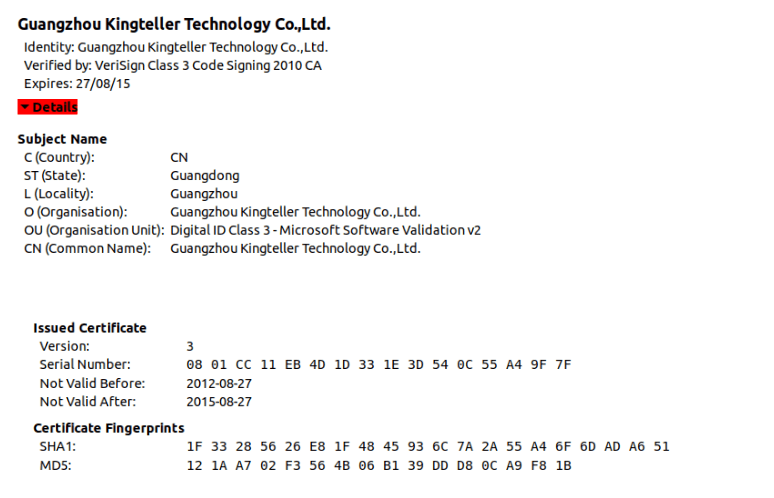
The driver file is signed with a digital certificate from Guangzhou Kingteller Technology Co., Ltd., with a serial number of 08 01 CC 11 EB 4D 1D 33 1E 3D 54 0C 55 A4 9F 7F. The certificate was valid from August 2012 until 2015.

We found multiple other malicious files signed with the same certificate which didn’t show any connections to the attacks described in this article. Therefore, we believe that other threat actors have been using it to sign their malicious tools as well. The following image shows the details of the certificate.

Technical details of the malicious driver

The filename used for the driver on the victim’s machine is ProjectConfiguration.sys. The registry key created for the driver’s service uses the same name, ProjectConfiguration.

The malicious driver contains two user-mode shellcodes, which are embedded into the .data section of the driver’s binary file. The shellcodes are executed as separate user-mode threads. The rootkit functionality protects both the driver’s own module and the user-mode processes into which the backdoor code is injected, preventing access by any process on the system.

API resolution

To obfuscate the actual behavior of the driver module, the attackers used dynamic resolution of the required API addresses from hash values.

The malicious driver first retrieves the base address of the ntoskrnl.exe and fltmgr.sys by calling ZwQuerySystemInformation with the SystemInformationClass set to SYSTEM_MODULE_INFORMATION. It then iterates through this system information and searches for the desired DLLs by name, noting the ImageBaseAddress of each.

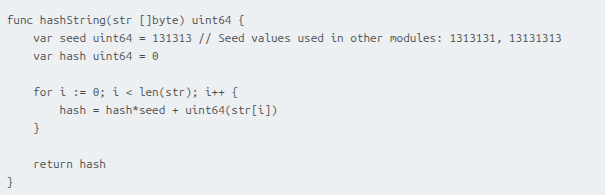
Once the base addresses of the libraries are obtained, the driver uses a simple hashing algorithm to dynamically resolve the required API addresses from ntoskrnl.exe and fltmgr.sys.

The hashing algorithm is shown below. The two variants of the seed value provided in the comment are used in the shellcodes and the final payload of the attack.

Protection of the driver file

The malicious driver registers itself with the Filter Manager using FltRegisterFilter and sets up a pre-operation callback. This callback inspects I/O requests for IRP_MJ_SET_INFORMATION and triggers a malicious handler when certain FileInformationClass values are detected. The handler then checks whether the targeted file object is associated with the driver; if it is, it forces the operation to fail by setting IOStatus to STATUS_ACCESS_DENIED. The relevant FileInformationClass values include:

  • FileRenameInformation
  • FileDispositionInformation
  • FileRenameInformationBypassAccessCheck
  • FileDispositionInformationEx
  • FileRenameInformationEx
  • FileRenameInformationExBypassAccessCheck

These classes correspond to file-delete and file-rename operations. By monitoring them, the driver prevents itself from being removed or renamed – actions that security tools might attempt when trying to quarantine it.

Protection of registry keys

The driver also builds a global list of registry paths and parameter names that it intends to protect. This list contains the following entries:

  • ProjectConfiguration
  • ProjectConfiguration\Instances
  • ProjectConfiguration Instance

To guard these keys, the malware sets up a RegistryCallback routine, registering it through CmRegisterCallbackEx. To do so, it must assign itself an altitude value. Microsoft governs altitude assignments for mini-filters, grouping them into Load Order categories with predefined altitude ranges. A filter driver with a low numerical altitude is loaded into the I/O stack below filters with higher altitudes. The malware uses a hardcoded starting point of 330024 and creates altitude strings in the format 330024.%l, where %l ranges from 0 to 10,000.

The malware then begins attempting to register the callback using the first generated altitude. If the registration fails with STATUS_FLT_INSTANCE_ALTITUDE_COLLISION, meaning the altitude is already taken, it increments the value and retries. It repeats this process until it successfully finds an unused altitude.

The callback monitors four specific registry operations. Whenever one of these operations targets a key from its protected list, it responds with 0xC0000022 (STATUS_ACCESS_DENIED), blocking the action. The monitored operations are:

  • RegNtPreCreateKey
  • RegNtPreOpenKey
  • RegNtPreCreateKeyEx
  • RegNtPreOpenKeyEx

Microsoft designates the 320000–329999 altitude range for the FSFilter Anti-Virus Load Order Group. The malware’s chosen altitude exceeds this range. Since filters with lower altitudes sit deeper in the I/O stack, the malicious driver intercepts file operations before legitimate low-altitude filters like antivirus components, allowing it to circumvent security checks.

Finally, the malware tampers with the altitude assigned to WdFilter, a key Microsoft Defender driver. It locates the registry entry containing the driver’s altitude and changes it to 0, effectively preventing WdFilter from being loaded into the I/O stack.

Protection of user-mode processes

The malware sets up a list intended to hold protected process IDs (PIDs). It begins with 32 empty slots, which are filled as needed during execution. A status flag is also initialized and set to 1 to indicate that the list starts out empty.

Next, the malware uses ObRegisterCallbacks to register two callbacks that intercept process-related operations. These callbacks apply to both OB_OPERATION_HANDLE_CREATE and OB_OPERATION_HANDLE_DUPLICATE, and both use a malicious pre-operation routine.

This routine checks whether the process involved in the operation has a PID that appears in the protected list. If so, it sets the DesiredAccess field in the OperationInformation structure to 0, effectively denying any access to the process.

The malware also registers a callback routine by calling PsSetCreateProcessNotifyRoutine. These callbacks are triggered during every process creation and deletion on the system. This malware’s callback routine checks whether the parent process ID (PPID) of a process being deleted exists in the protected list; if it does, the malware removes that PPID from the list. This eventually removes the rootkit protection from a process with an injected backdoor, once the backdoor has fulfilled its responsibilities.

Payload injection

The driver delivers two user-mode payloads.

The first payload spawns an svchost process and injects a small delay-inducing shellcode.  The PID of this new svchost instance is written to a file for later use.

The second payload is the final component – the ToneShell backdoor – and is later injected into that same svchost process.

Injection workflow:

The malicious driver searches for a high-privilege target process by iterating through PIDs and checking whether each process exists and runs under SeLocalSystemSid. Once it finds one, it customizes the first payload using random event names, file names, and padding bytes, then creates a named event and injects the payload by attaching its current thread to the process, allocating memory, and launching a new thread.

After injection, it waits for the payload to signal the event, reads the PID of the newly created svchost process from the generated file, and adds it to its protected process list. It then similarly customizes the second payload (ToneShell) using random event name and random padding bytes, then creates a named event and injects the payload by attaching to the process, allocating memory, and launching a new thread.

Once the ToneShell backdoor finishes execution, it signals the event. The malware then removes the svchost PID from the protected list, waits 10 seconds, and attempts to terminate the process.

ToneShell backdoor

The final stage of the attack deploys ToneShell, a backdoor previously linked to operations by the HoneyMyte APT group and discussed in earlier reporting (see Malpedia and MITRE). Notably, this is the first time we’ve seen ToneShell delivered through a kernel-mode loader, giving it protection from user-mode monitoring and benefiting from the rootkit capabilities of the driver that hides its activity from security tools.

Earlier ToneShell variants generated a 16-byte GUID using CoCreateGuid and stored it as a host identifier. In contrast, this version checks for a file named C:\ProgramData\MicrosoftOneDrive.tlb, validating a 4-byte marker inside it. If the file is absent or the marker is invalid, the backdoor derives a new pseudo-random 4-byte identifier using system-specific values (computer name, tick count, and PRNG), then creates the file and writes the marker. This becomes the unique ID for the infected host.

The samples we have analyzed contact two command-and-control servers:

  • avocadomechanism[.]com
  • potherbreference[.]com

ToneShell communicates with its C2 over raw TCP on port 443 while disguising traffic using fake TLS headers. This version imitates the first bytes of a TLS 1.3 record (0x17 0x03 0x04) instead of the TLS 1.2 pattern used previously. After this three-byte marker, each packet contains a size field and an encrypted payload.

Packet layout:

  • Header (3 bytes): Fake TLS marker
  • Size (2 bytes): Payload length
  • Payload: Encrypted with a rolling XOR key

The backdoor supports a set of remote operations, including file upload/download, remote shell functionality, and session control. The command set includes:

Command ID Description
0x1 Create temporary file for incoming data
0x2 / 0x3 Download file
0x4 Cancel download
0x7 Establish remote shell via pipe
0x8 Receive operator command
0x9 Terminate shell
0xA / 0xB Upload file
0xC Cancel upload
0xD Close connection

Conclusion

We assess with high confidence that the activity described in this report is linked to the HoneyMyte threat actor. This conclusion is supported by the use of the ToneShell backdoor as the final-stage payload, as well as the presence of additional tools long associated with HoneyMyte – such as PlugX, and the ToneDisk USB worm – on the impacted systems.

HoneyMyte’s 2025 operations show a noticeable evolution toward using kernel-mode injectors to deploy ToneShell, improving both stealth and resilience. In this campaign, we observed a new ToneShell variant delivered through a kernel-mode driver that carries and injects the backdoor directly from its embedded payload. To further conceal its activity, the driver first deploys a small user-mode component that handles the final injection step. It also uses multiple obfuscation techniques, callback routines, and notification mechanisms to hide its API usage and track process and registry activity, ultimately strengthening the backdoor’s defenses.

Because the shellcode executes entirely in memory, memory forensics becomes essential for uncovering and analyzing this intrusion. Detecting the injected shellcode is a key indicator of ToneShell’s presence on compromised hosts.

Recommendations

To protect themselves against this threat, organizations should:

By following these recommendations, organizations can reduce their risk of being compromised by the HoneyMyte APT group and other similar threats.

Indicators of Compromise

More indicators of compromise, as well as any updates to these, are available to the customers of our APT intelligence reporting service. If you are interested, please contact intelreports@kaspersky.com.

36f121046192b7cac3e4bec491e8f1b5        AppvVStram_.sys
fe091e41ba6450bcf6a61a2023fe6c83         AppvVStram_.sys
abe44ad128f765c14d895ee1c8bad777       ProjectConfiguration.sys
avocadomechanism[.]com                            ToneShell C2
potherbreference[.]com                                 ToneShell C2

  •  

The HoneyMyte APT evolves with a kernel-mode rootkit and a ToneShell backdoor

Overview of the attacks

In mid-2025, we identified a malicious driver file on computer systems in Asia. The driver file is signed with an old, stolen, or leaked digital certificate and registers as a mini-filter driver on infected machines. Its end-goal is to inject a backdoor Trojan into the system processes and provide protection for malicious files, user-mode processes, and registry keys.

Our analysis indicates that the final payload injected by the driver is a new sample of the ToneShell backdoor, which connects to the attacker’s servers and provides a reverse shell, along with other capabilities. The ToneShell backdoor is a tool known to be used exclusively by the HoneyMyte (aka Mustang Panda or Bronze President) APT actor and is often used in cyberespionage campaigns targeting government organizations, particularly in Southeast and East Asia.

The command-and-control servers for the ToneShell backdoor used in this campaign were registered in September 2024 via NameCheap services, and we suspect the attacks themselves to have begun in February 2025. We’ve observed through our telemetry that the new ToneShell backdoor is frequently employed in cyberespionage campaigns against government organizations in Southeast and East Asia, with Myanmar and Thailand being the most heavily targeted.

Notably, nearly all affected victims had previously been infected with other HoneyMyte tools, including the ToneDisk USB worm, PlugX, and older variants of ToneShell. Although the initial access vector remains unclear, it’s suspected that the threat actor leveraged previously compromised machines to deploy the malicious driver.

Compromised digital certificate

The driver file is signed with a digital certificate from Guangzhou Kingteller Technology Co., Ltd., with a serial number of 08 01 CC 11 EB 4D 1D 33 1E 3D 54 0C 55 A4 9F 7F. The certificate was valid from August 2012 until 2015.

We found multiple other malicious files signed with the same certificate which didn’t show any connections to the attacks described in this article. Therefore, we believe that other threat actors have been using it to sign their malicious tools as well. The following image shows the details of the certificate.

Technical details of the malicious driver

The filename used for the driver on the victim’s machine is ProjectConfiguration.sys. The registry key created for the driver’s service uses the same name, ProjectConfiguration.

The malicious driver contains two user-mode shellcodes, which are embedded into the .data section of the driver’s binary file. The shellcodes are executed as separate user-mode threads. The rootkit functionality protects both the driver’s own module and the user-mode processes into which the backdoor code is injected, preventing access by any process on the system.

API resolution

To obfuscate the actual behavior of the driver module, the attackers used dynamic resolution of the required API addresses from hash values.

The malicious driver first retrieves the base address of the ntoskrnl.exe and fltmgr.sys by calling ZwQuerySystemInformation with the SystemInformationClass set to SYSTEM_MODULE_INFORMATION. It then iterates through this system information and searches for the desired DLLs by name, noting the ImageBaseAddress of each.

Once the base addresses of the libraries are obtained, the driver uses a simple hashing algorithm to dynamically resolve the required API addresses from ntoskrnl.exe and fltmgr.sys.

The hashing algorithm is shown below. The two variants of the seed value provided in the comment are used in the shellcodes and the final payload of the attack.

Protection of the driver file

The malicious driver registers itself with the Filter Manager using FltRegisterFilter and sets up a pre-operation callback. This callback inspects I/O requests for IRP_MJ_SET_INFORMATION and triggers a malicious handler when certain FileInformationClass values are detected. The handler then checks whether the targeted file object is associated with the driver; if it is, it forces the operation to fail by setting IOStatus to STATUS_ACCESS_DENIED. The relevant FileInformationClass values include:

  • FileRenameInformation
  • FileDispositionInformation
  • FileRenameInformationBypassAccessCheck
  • FileDispositionInformationEx
  • FileRenameInformationEx
  • FileRenameInformationExBypassAccessCheck

These classes correspond to file-delete and file-rename operations. By monitoring them, the driver prevents itself from being removed or renamed – actions that security tools might attempt when trying to quarantine it.

Protection of registry keys

The driver also builds a global list of registry paths and parameter names that it intends to protect. This list contains the following entries:

  • ProjectConfiguration
  • ProjectConfiguration\Instances
  • ProjectConfiguration Instance

To guard these keys, the malware sets up a RegistryCallback routine, registering it through CmRegisterCallbackEx. To do so, it must assign itself an altitude value. Microsoft governs altitude assignments for mini-filters, grouping them into Load Order categories with predefined altitude ranges. A filter driver with a low numerical altitude is loaded into the I/O stack below filters with higher altitudes. The malware uses a hardcoded starting point of 330024 and creates altitude strings in the format 330024.%l, where %l ranges from 0 to 10,000.

The malware then begins attempting to register the callback using the first generated altitude. If the registration fails with STATUS_FLT_INSTANCE_ALTITUDE_COLLISION, meaning the altitude is already taken, it increments the value and retries. It repeats this process until it successfully finds an unused altitude.

The callback monitors four specific registry operations. Whenever one of these operations targets a key from its protected list, it responds with 0xC0000022 (STATUS_ACCESS_DENIED), blocking the action. The monitored operations are:

  • RegNtPreCreateKey
  • RegNtPreOpenKey
  • RegNtPreCreateKeyEx
  • RegNtPreOpenKeyEx

Microsoft designates the 320000–329999 altitude range for the FSFilter Anti-Virus Load Order Group. The malware’s chosen altitude exceeds this range. Since filters with lower altitudes sit deeper in the I/O stack, the malicious driver intercepts file operations before legitimate low-altitude filters like antivirus components, allowing it to circumvent security checks.

Finally, the malware tampers with the altitude assigned to WdFilter, a key Microsoft Defender driver. It locates the registry entry containing the driver’s altitude and changes it to 0, effectively preventing WdFilter from being loaded into the I/O stack.

Protection of user-mode processes

The malware sets up a list intended to hold protected process IDs (PIDs). It begins with 32 empty slots, which are filled as needed during execution. A status flag is also initialized and set to 1 to indicate that the list starts out empty.

Next, the malware uses ObRegisterCallbacks to register two callbacks that intercept process-related operations. These callbacks apply to both OB_OPERATION_HANDLE_CREATE and OB_OPERATION_HANDLE_DUPLICATE, and both use a malicious pre-operation routine.

This routine checks whether the process involved in the operation has a PID that appears in the protected list. If so, it sets the DesiredAccess field in the OperationInformation structure to 0, effectively denying any access to the process.

The malware also registers a callback routine by calling PsSetCreateProcessNotifyRoutine. These callbacks are triggered during every process creation and deletion on the system. This malware’s callback routine checks whether the parent process ID (PPID) of a process being deleted exists in the protected list; if it does, the malware removes that PPID from the list. This eventually removes the rootkit protection from a process with an injected backdoor, once the backdoor has fulfilled its responsibilities.

Payload injection

The driver delivers two user-mode payloads.

The first payload spawns an svchost process and injects a small delay-inducing shellcode.  The PID of this new svchost instance is written to a file for later use.

The second payload is the final component – the ToneShell backdoor – and is later injected into that same svchost process.

Injection workflow:

The malicious driver searches for a high-privilege target process by iterating through PIDs and checking whether each process exists and runs under SeLocalSystemSid. Once it finds one, it customizes the first payload using random event names, file names, and padding bytes, then creates a named event and injects the payload by attaching its current thread to the process, allocating memory, and launching a new thread.

After injection, it waits for the payload to signal the event, reads the PID of the newly created svchost process from the generated file, and adds it to its protected process list. It then similarly customizes the second payload (ToneShell) using random event name and random padding bytes, then creates a named event and injects the payload by attaching to the process, allocating memory, and launching a new thread.

Once the ToneShell backdoor finishes execution, it signals the event. The malware then removes the svchost PID from the protected list, waits 10 seconds, and attempts to terminate the process.

ToneShell backdoor

The final stage of the attack deploys ToneShell, a backdoor previously linked to operations by the HoneyMyte APT group and discussed in earlier reporting (see Malpedia and MITRE). Notably, this is the first time we’ve seen ToneShell delivered through a kernel-mode loader, giving it protection from user-mode monitoring and benefiting from the rootkit capabilities of the driver that hides its activity from security tools.

Earlier ToneShell variants generated a 16-byte GUID using CoCreateGuid and stored it as a host identifier. In contrast, this version checks for a file named C:\ProgramData\MicrosoftOneDrive.tlb, validating a 4-byte marker inside it. If the file is absent or the marker is invalid, the backdoor derives a new pseudo-random 4-byte identifier using system-specific values (computer name, tick count, and PRNG), then creates the file and writes the marker. This becomes the unique ID for the infected host.

The samples we have analyzed contact two command-and-control servers:

  • avocadomechanism[.]com
  • potherbreference[.]com

ToneShell communicates with its C2 over raw TCP on port 443 while disguising traffic using fake TLS headers. This version imitates the first bytes of a TLS 1.3 record (0x17 0x03 0x04) instead of the TLS 1.2 pattern used previously. After this three-byte marker, each packet contains a size field and an encrypted payload.

Packet layout:

  • Header (3 bytes): Fake TLS marker
  • Size (2 bytes): Payload length
  • Payload: Encrypted with a rolling XOR key

The backdoor supports a set of remote operations, including file upload/download, remote shell functionality, and session control. The command set includes:

Command ID Description
0x1 Create temporary file for incoming data
0x2 / 0x3 Download file
0x4 Cancel download
0x7 Establish remote shell via pipe
0x8 Receive operator command
0x9 Terminate shell
0xA / 0xB Upload file
0xC Cancel upload
0xD Close connection

Conclusion

We assess with high confidence that the activity described in this report is linked to the HoneyMyte threat actor. This conclusion is supported by the use of the ToneShell backdoor as the final-stage payload, as well as the presence of additional tools long associated with HoneyMyte – such as PlugX, and the ToneDisk USB worm – on the impacted systems.

HoneyMyte’s 2025 operations show a noticeable evolution toward using kernel-mode injectors to deploy ToneShell, improving both stealth and resilience. In this campaign, we observed a new ToneShell variant delivered through a kernel-mode driver that carries and injects the backdoor directly from its embedded payload. To further conceal its activity, the driver first deploys a small user-mode component that handles the final injection step. It also uses multiple obfuscation techniques, callback routines, and notification mechanisms to hide its API usage and track process and registry activity, ultimately strengthening the backdoor’s defenses.

Because the shellcode executes entirely in memory, memory forensics becomes essential for uncovering and analyzing this intrusion. Detecting the injected shellcode is a key indicator of ToneShell’s presence on compromised hosts.

Recommendations

To protect themselves against this threat, organizations should:

By following these recommendations, organizations can reduce their risk of being compromised by the HoneyMyte APT group and other similar threats.

Indicators of Compromise

More indicators of compromise, as well as any updates to these, are available to the customers of our APT intelligence reporting service. If you are interested, please contact intelreports@kaspersky.com.

36f121046192b7cac3e4bec491e8f1b5        AppvVStram_.sys
fe091e41ba6450bcf6a61a2023fe6c83         AppvVStram_.sys
abe44ad128f765c14d895ee1c8bad777       ProjectConfiguration.sys
avocadomechanism[.]com                            ToneShell C2
potherbreference[.]com                                 ToneShell C2

  •  
❌