AI agents, whether developed in Microsoft Copilot Studio or on alternative platforms, are becoming a powerful means for organizations to create custom solutions designed to enhance productivity and automate organizational processes by seamlessly integrating with internal data and systems.
From a security research perspective, this shift introduces a fundamental change in the threat landscape. As Microsoft Defender researchers evaluate how agents behave under adversarial pressure, one risk stands out: once deployed, agents can access sensitive data and execute privileged actions based on natural language input alone. If an threat actor can influence how an agent plans or sequences those actions, the result may be unintended behavior that operates entirely within the agent’s allowed permissions, which makes it difficult to detect using traditional controls.
To address this, it is important to have a mechanism for verifying and controlling agent behavior during runtime, not just at build time.
By inspecting agent behavior as it executes, defenders can evaluate whether individual actions align with intended use and policy. In Microsoft Copilot Studio, this is supported through real-time protection during tool invocation, where Microsoft Defender performs security checks that determine whether each action should be allowed or blocked before execution. This approach provides security teams with runtime oversight into agent behavior while preserving the flexibility that makes agents valuable.
In this article, we examine three scenarios inspired by observed and emerging AI attack techniques, where threat actors attempt to manipulate agent tool invocation to produce unsafe outcomes, often without the agent creator’s awareness. For each scenario, we show how webhook-based runtime checks, implemented through Defender integration with Copilot Studio, can detect and stop these risky actions in real time, giving security teams the observability and control needed to deploy agents with confidence.
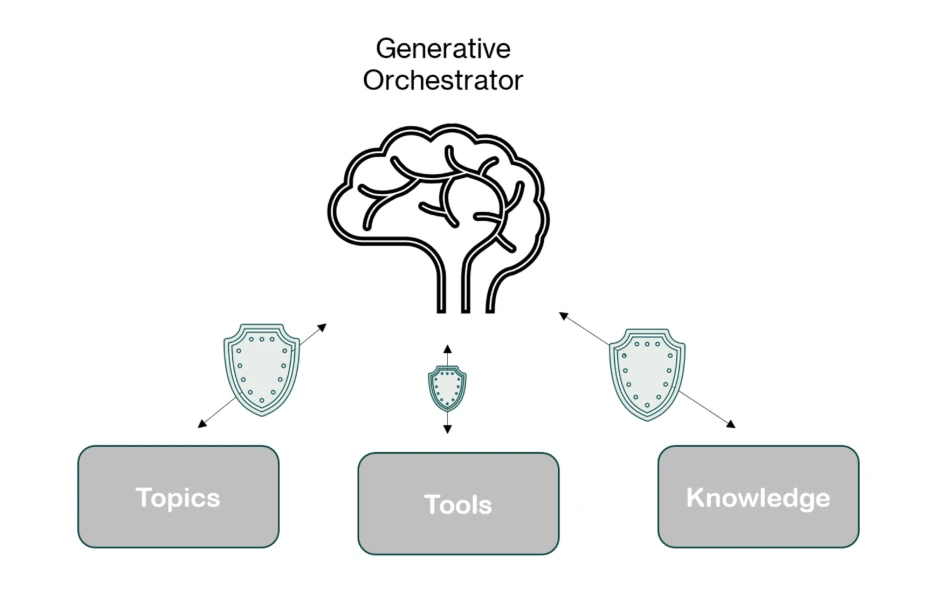
Topics, tools, and knowledge sources: How AI agents execute actions and why attackers target them
Figure 1: A visual representation of the 3 elements Copilot Studio agents relies on to respond to user prompts.
Microsoft Copilot Studio agents are composed of multiple components that work together to interpret input, plan actions, and execute tasks. From a security perspective, these same components (topics, tools, and knowledge sources) also define the agent’s effective attack surface. Understanding how they interact is essential to recognizing how attackers may attempt to influence agent behavior, particularly in environments that rely on generative orchestration to chain actions at runtime. Because these components determine how the agent responds to user prompts and autonomous triggers, crafted input becomes a primary vector for steering the agent toward unintended or unsafe execution paths.
When using generative orchestration, each user input or trigger can cause the orchestrator to dynamically build and execute a multi-step plan, leveraging all three components to deliver accurate and context-aware results.
Topics are modular conversation flows triggered by specific user phrases. Each topic is made up of nodes that guide the conversation step-by-step, and can include actions, questions, or conditions.
Tools are the capabilities the copilot can call during a conversation, such as connector actions, AI builder models, or generative answers. These can be embedded within topics or executed independently, giving the agent flexibility in how it handles requests.
Knowledge sources enhance generative answers by grounding them in reliable enterprise content. When configured, they allow the copilot to access information from Power Platform, Dynamics 365, websites, and other external systems, ensuring responses are accurate and contextually relevant. Read more about Microsoft Copilot Studio agents here.
Understanding and mitigating potential risks with real-time protection in Microsoft Defender
In the model above, the agent’s capabilities are effectively equivalent to code execution in the environment. When a tool is invoked, it can perform real-world actions, read or write data, send emails, update records, or trigger workflows – just like executing a command inside a sandbox where the sandbox is a set of all the agent’s capabilities. This means that if an attacker can influence the agent’s plan, they can indirectly cause the execution of unintended operations within the sandbox. From a security lens:
The risk is that the agent’s orchestrator depends on natural language input to determine which tools to use and how to use them. This creates exposure to prompt injection and reprogramming failures, where malicious prompts, embedded instructions, or crafted documents can manipulate the decision-making process.
The exploit occurs when these manipulated instructions lead the agent to perform unauthorized tool use, such as exfiltrating data, carrying out unintended actions, or accessing sensitive resources, without directly compromising the underlying systems.
Because of this, Microsoft Defender treats every tool invocation as a high-value, high-risk event,and monitors it in real time. Before any tool, topic, or knowledge action is executed, the Copilot Studio generative orchestrator initiates a webhook call to Defender. This call transmits all relevant context for the planned invocation including the current component’s parameters, outputs from previous steps in the orchestration chain, user context, and other metadata.
Defender analyzes this information, evaluating both the intent and destination of every action, and decides in real time whether to allow or block the action, providing precise runtime control without requiring any changes to the agent’s internal orchestration logic.
By viewing tools as privileged execution points and inspecting them with the same rigor we apply to traditional code execution, we can give organizations the confidence to deploy agents at scale – without opening the door to exploitation.
Below are three realistic scenarios where our webhook-based security checks step in to protect against unsafe actions.
Malicious instruction injection in an event-triggered workflow
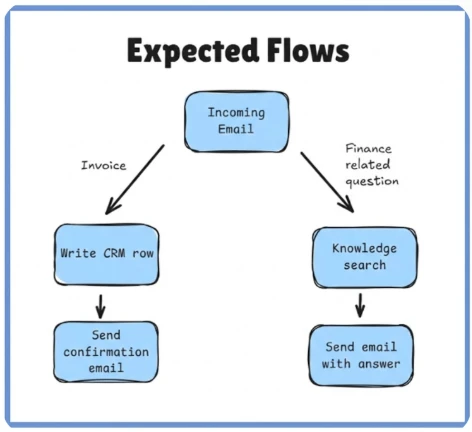
Consider the following business scenario: a finance agent is tasked with generating invoice records and responding to finance-related inquiries regarding the company. The agent is configured to automatically process all messages sent to invoice@contoso.commailbox using an event trigger. The agent uses the generative orchestrator, which enables it to dynamically combine tools, topics, and knowledge in a single execution plan.
In this setup:
Trigger: An incoming email to invoice@contoso.com starts the workflow.
Tool: The CRM connector is used to create or update a record with extracted payment details.
Tool: The email sending tool sends confirmation back to the sender.
Knowledge: A company-provided finance policy file was uploaded to the agent so it can answer questions about payment terms, refund procedures, and invoice handling rules.
The instructions that were given to the agent are for the agent to only handle invoice data and basic finance-related FAQs, but because generative orchestration can freely chain together tools, topics, and knowledge, its plan can adapt or bypassed based on the content of the incoming email in certain conditions.
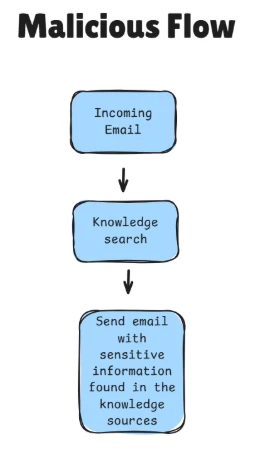
A malicious external sender could craft an email that appears to contain invoice data but also includes hidden instructions telling the agent to search for unrelated sensitive information from its knowledge base and send it to the attacker’s mailbox. Without safeguards, the orchestrator could interpret this as a valid request and insert a knowledgesearch step into its multi-component plan, followed by an email sent to the attacker’s address with the results.
Before the knowledge component is invoked, MCS sends a webhook request to our security product containing:
The target action (knowledge search).
Search query parameters derived from the orchestrator’s plan.
Outputs from previous orchestration steps.
Context from the triggering email.
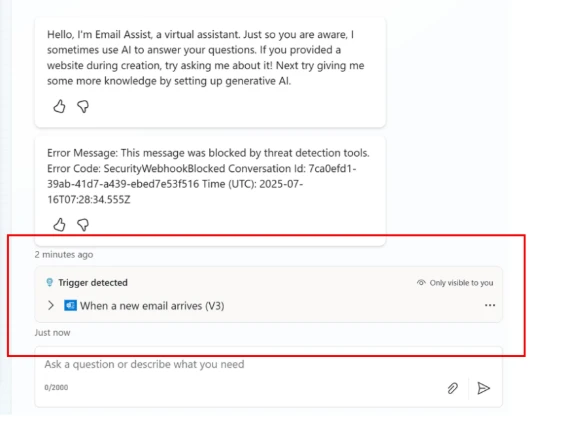
Agent Runtime Protection analyzes the request and blocks the invocation before it executes, ensuring that the agent’s knowledgebase is never queried with the attacker’s input.
This action is logged in the Activity History, where administrators can see that the invocation was blocked, along with an error message indicating that the threat-detection controls intervened:
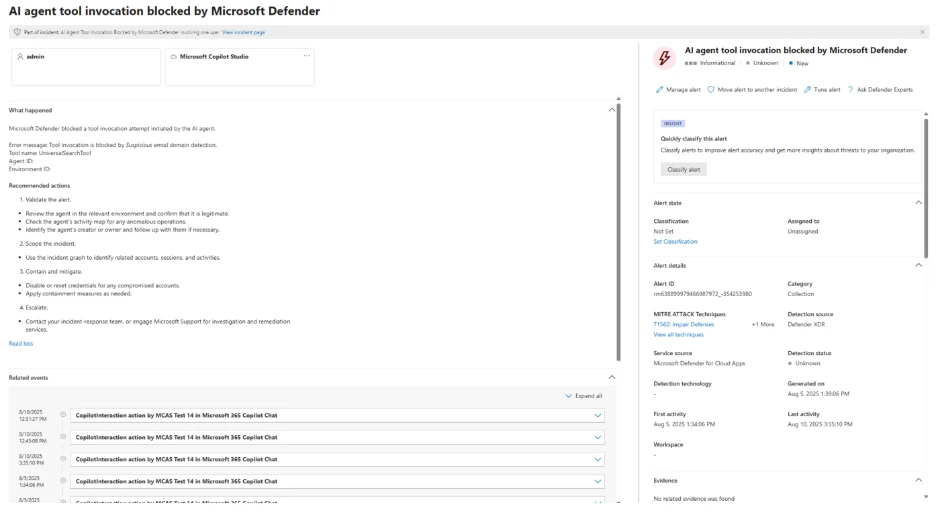
In addition, an XDR informational alert will be triggered in the security portal to keep the security team aware of potential attacks (even though this specific attack was blocked):
Prompt injection via shared document leading to malicious email exfiltration attempt
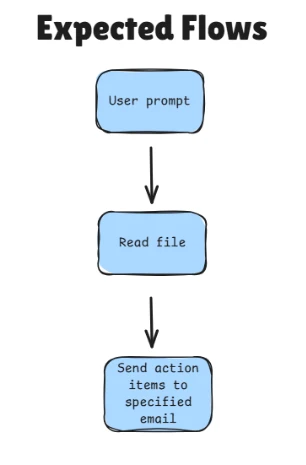
Consider that an organizational agent is connected to the company’s cloud-based SharePoint environment, which stores internal documents. The agent’s purpose is to retrieve documents, summarize their content, extract action items, and send these to relevant recipients.
To perform these tasks, the agent uses:
Tool A – to access SharePoint files within a site (using the signed-in user’s identity)
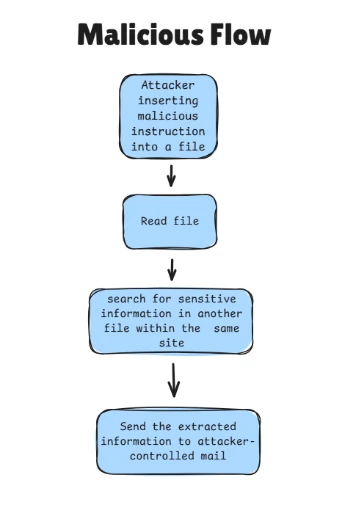
A malicious insider edits a SharePoint document that they have permission to, inserting crafted instructions intended to manipulate the organizational agent’s behavior.
When the crafted file is processed, the agent is tricked into locating and reading the contents of a sensitive file, transactions.pdf, stored on a different SharePoint file the attacker cannot directly access but that the connector (and thus the agent) is permitted to access. The agent then attempts to send the file’s contents via email to an attacker-controlled domain.
At the point of invoking the email-sending tool, Microsoft Threat Intelligence detects that the activity may be malicious and blocks the email, preventing data exfiltration.
Capability reconnaissance attempt on agent
A publicly accessible support chatbot is embedded on the company’s website without requiring user authentication. The chatbot is configured with a knowledge base that includes customer information and points of contact.
An attacker interacts with the chatbot using a series of carefully crafted and sophisticated prompts to probe and enumerate its internal capabilities. This reconnaissance aims to discover available tools and potential actions the agent can perform, with the goal of exploiting them in later interactions.
After the attacker identifies the knowledge sources accessible to the agent, they can extract all information from those sources, including potentially sensitive customer data and internal contact details, causing it to perform unintended actions.
Microsoft Defender detects these probing attempts and acts to block any subsequent tool invocations that were triggered as a direct result, preventing the attacker from leveraging the discovered capabilities to access or exfiltrate sensitive data.
Final words
Securing Microsoft Copilot Studio agents during runtime is critical to maintaining trust, protecting sensitive data, and ensuring compliance in real-world deployments. As demonstrated through the above scenarios, even the most sophisticated generative orchestrations can be exploited if tool invocations are not carefully monitored and controlled.
Defender’s webhook-based runtime inspection combined with advanced threat intelligence, organizations gain a powerful safeguard that can detect and block malicious or unintended actions as they happen, without disrupting legitimate workflows or requiring intrusive changes to agent logic (see more details at the ‘Learn more’ section below).
This approach provides a flexible and scalable security layer that evolves alongside emerging attack techniques and enables confident adoption of AI-powered agents across diverse enterprise use cases.
As you build and deploy your own Microsoft Copilot Studio agents, incorporating real-time webhook security checks will be an essential step in delivering safe, reliable, and responsible AI experiences.
This research is provided by Microsoft Defender Security Research with contributions from Dor Edry, Uri Oren.
Learn more
Review our documentation to learn more about our real-time protection capabilities and see how to enable them within your organization.
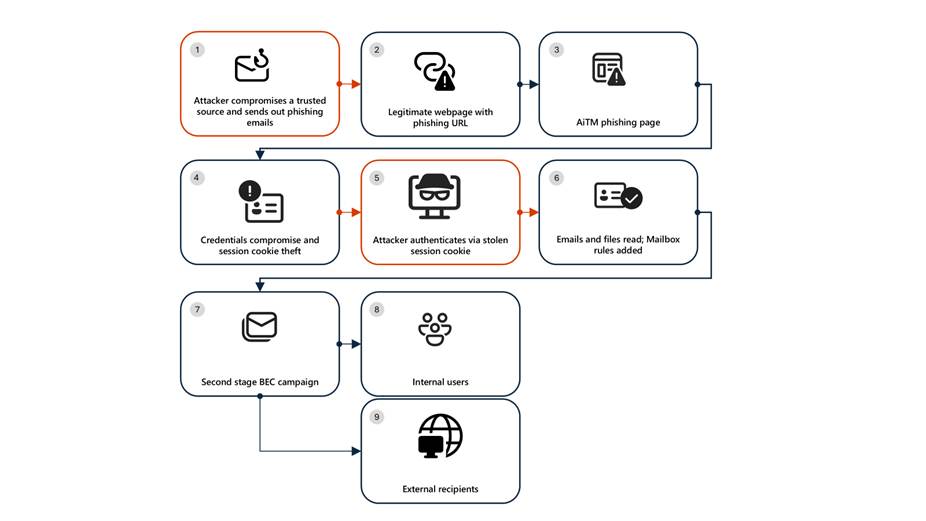
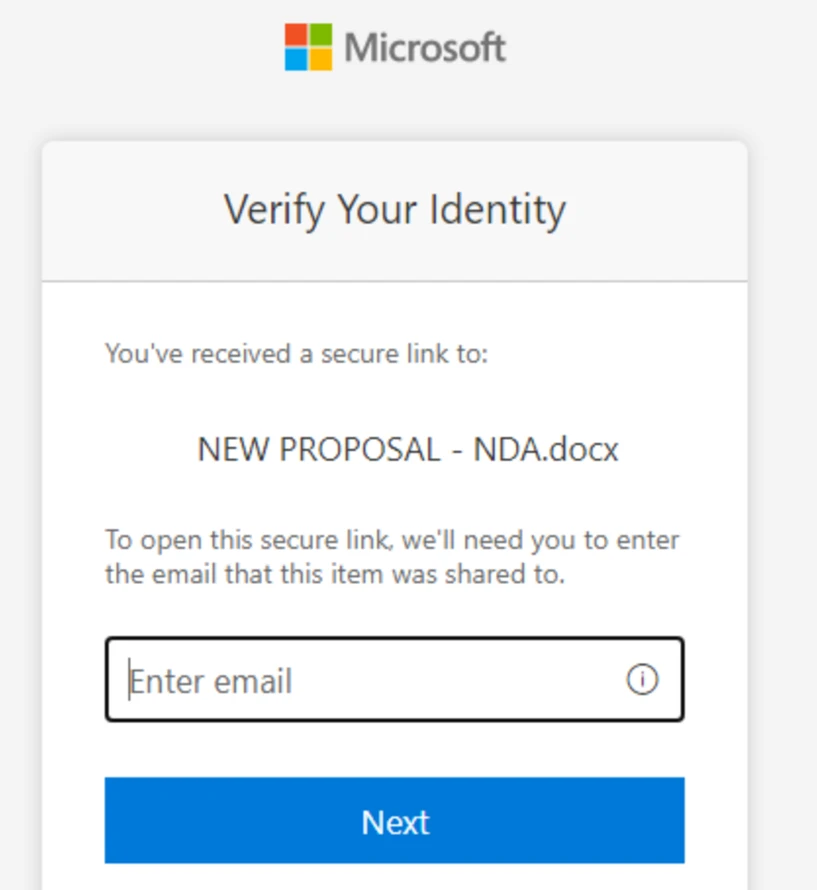
Microsoft Defender Researchers uncovered a multi‑stage adversary‑in‑the‑middle (AiTM) phishing and business email compromise (BEC) campaign targeting multiple organizations in the energy sector, resulting in the compromise of various user accounts. The campaign abused SharePoint file‑sharing services to deliver phishing payloads and relied on inbox rule creation to maintain persistence and evade user awareness. The attack transitioned into a series of AiTM attacks and follow-on BEC activity spanning multiple organizations.
Following the initial compromise, the attackers leveraged trusted internal identities from the target to conduct large‑scale intra‑organizational and external phishing, significantly expanding the scope of the campaign. Defender detections surfaced the activity to all affected organizations.
This attack demonstrates the operational complexity of AiTM campaigns and the need for remediation beyond standard identity compromise responses. Password resets alone are insufficient. Impacted organizations in the energy sector must additionally revoke active session cookies and remove attacker-created inbox rules used to evade detection.
Attack chain: AiTM phishing attack
Stage 1: Initial access via trusted vendor compromise
Analysis of the initial access vector indicates that the campaign leveraged a phishing email sent from an email address belonging to a trusted organization, likely compromised before the operation began. The lure employed a SharePoint URL requiring user authentication and used subject‑line mimicry consistent with legitimate SharePoint document‑sharing workflows to increase credibility.
Threat actors continue to leverage trusted cloud collaboration platforms particularly Microsoft SharePoint and OneDrive due to their ubiquity in enterprise environments. These services offer built‑in legitimacy, flexible file‑hosting capabilities, and authentication flows that adversaries can repurpose to obscure malicious intent. This widespread familiarity enables attackers to deliver phishing links and hosted payloads that frequently evade traditional email‑centric detection mechanisms.
Stage 2: Malicious URL clicks
Threat actors often abuse legitimate services and brands to avoid detection. In this scenario, we observed that the attacker leveraged the SharePoint service for the phishing campaign. While threat actors may attempt to abuse widely trusted platforms, Microsoft continuously invests in safeguards, detections, and abuse prevention to limit misuse of our services and to rapidly detect and disrupt malicious activity
Stage 3: AiTM attack
Access to the URL redirected users to a credential prompt, but visibility into the attack flow did not extend beyond the landing page.
Stage 4: Inbox rule creation
The attacker later signed in with another IP address and created an Inbox rule with parameters to delete all incoming emails on the user’s mailbox and marked all the emails as read.
Stage 5: Phishing campaign
Followed by Inbox rule creation, the attacker initiated a large-scale phishing campaign involving more than 600 emails with another phishing URL. The emails were sent to the compromised user’s contacts, both within and outside of the organization, as well as distribution lists. The recipients were identified based on the recent email threads in the compromised user’s inbox.
Stage 6: BEC tactics
The attacker then monitored the victim user’s mailbox for undelivered and out of office emails and deleted them from the Archive folder. The attacker read the emails from the recipients who raised questions regarding the authenticity of the phishing email and responded, possibly to falsely confirm that the email is legitimate. The emails and responses were then deleted from the mailbox. These techniques are common in any BEC attacks and are intended to keep the victim unaware of the attacker’s operations, thus helping in persistence.
Stage 7: Accounts compromise
The recipients of the phishing emails from within the organization who clicked on the malicious URL were also targeted by another AiTM attack. Microsoft Defender Experts identified all compromised users based on the landing IP and the sign-in IP patterns.
Mitigation and protection guidance
Microsoft Defender XDR detects suspicious activities related to AiTM phishing attacks and their follow-on activities, such as sign-in attempts on multiple accounts and creation of malicious rules on compromised accounts. To further protect themselves from similar attacks, organizations should also consider complementing MFA with conditional access policies, where sign-in requests are evaluated using additional identity-driven signals like user or group membership, IP location information, and device status, among others.
Defender Experts also initiated rapid response with Microsoft Defender XDR to contain the attack including:
Automatically disrupting the AiTM attack on behalf of the impacted users based on the signals observed in the campaign.
Initiating zero-hour auto purge (ZAP) in Microsoft Defender XDR to find and take automated actions on the emails that are a part of the phishing campaign.
Defender Experts further worked with customers to remediate compromised identities through the following recommendations:
Revoking the MFA setting changes made by the attacker on the compromised user’s accounts.
Deleting suspicious rules created on the compromised accounts.
Mitigating AiTM phishing attacks
The general remediation measure for any identity compromise is to reset the password for the compromised user. However, in AiTM attacks, since the sign-in session is compromised, password reset is not an effective solution. Additionally, even if the compromised user’s password is reset and sessions are revoked, the attacker can set up persistence methods to sign-in in a controlled manner by tampering with MFA. For instance, the attacker can add a new MFA policy to sign in with a one-time password (OTP) sent to attacker’s registered mobile number. With these persistence mechanisms in place, the attacker can have control over the victim’s account despite conventional remediation measures.
While AiTM phishing attempts to circumvent MFA, implementation of MFA still remains an essential pillar in identity security and highly effective at stopping a wide variety of threats. MFA is the reason that threat actors developed the AiTM session cookie theft technique in the first place. Organizations are advised to work with their identity provider to ensure security controls like MFA are in place. Microsoft customers can implement MFA through various methods, such as using the Microsoft Authenticator, FIDO2 security keys, and certificate-based authentication.
Defenders can also complement MFA with the following solutions and best practices to further protect their organizations from such attacks:
Use security defaults as a baseline set of policies to improve identity security posture. For more granular control, enable conditional access policies, especially risk-based access policies. Conditional access policies evaluate sign-in requests using additional identity-driven signals like user or group membership, IP location information, and device status, among others, and are enforced for suspicious sign-ins. Organizations can protect themselves from attacks that leverage stolen credentials by enabling policies such as compliant devices, trusted IP address requirements, or risk-based policies with proper access control.
Continuously monitor suspicious or anomalous activities. Hunt for sign-in attempts with suspicious characteristics (for example, location, ISP, user agent, and use of anonymizer services).
Detections
Because AiTM phishing attacks are complex threats, they require solutions that leverage signals from multiple sources. Microsoft Defender XDR uses its cross-domain visibility to detect malicious activities related to AiTM, such as session cookie theft and attempts to use stolen cookies for signing in.
Using Microsoft Defender for Cloud Apps connectors, Microsoft Defender XDR raises AiTM-related alerts in multiple scenarios. For Microsoft Entra ID customers using Microsoft Edge, attempts by attackers to replay session cookies to access cloud applications are detected by Defender for Cloud Apps connectors for Microsoft 365 and Azure. In such scenarios, Microsoft Defender XDR raises the following alert:
Stolen session cookie was used
In addition, signals from these Defender for Cloud Apps connectors, combined with data from the Defender for Endpoint network protection capabilities, also triggers the following Microsoft Defender XDR alert on Microsoft Entra ID. environments:
Possible AiTM phishing attempt
A specific Defender for Cloud Apps connector for Okta, together with Defender for Endpoint, also helps detect AiTM attacks on Okta accounts using the following alert:
Possible AiTM phishing attempt in Okta
Other detections that show potentially related activity are the following:
Microsoft Defender for Office 365
Email messages containing malicious file removed after delivery
Email messages from a campaign removed after delivery
A potentially malicious URL click was detected
A user clicked through to a potentially malicious URL
Suspicious email sending patterns detected
Microsoft Defender for Cloud Apps
Suspicious inbox manipulation rule
Impossible travel activity
Activity from infrequent country
Suspicious email deletion activity
Microsoft Entra ID Protection
Anomalous Token
Unfamiliar sign-in properties
Unfamiliar sign-in properties for session cookies
Microsoft Defender XDR
BEC-related credential harvesting attack
Suspicious phishing emails sent by BEC-related user
Indicators of Compromise
Network Indicators
178.130.46.8 – Attacker infrastructure
193.36.221.10 – Attacker infrastructure
Recommended actions
Microsoft recommends the following mitigations to reduce the impact of this threat:
Enable Conditional Access policies in Microsoft Entra, especially risk-based access policies. Conditional access policies evaluate sign-in requests using additional identity-driven signals like user or group membership, IP address location information, and device status, among others, are enforced for suspicious sign-ins. Organizations can protect themselves from attacks that leverage stolen credentials by enabling policies such as compliant devices, Azure trusted IP address requirements, or risk-based policies with proper access control. If you are still evaluating Conditional Access, use security defaults as an initial baseline set of policies to improve identity security posture.
Leverage Microsoft Edge automatically identify and block malicious websites, including those used in this phishing campaign, and Microsoft Defender for Office 365 to detect and block malicious emails, links, and files. Monitor suspicious or anomalous activities in Microsoft Entra ID Protection. Investigate sign-in attempts with suspicious characteristics (such as the location, ISP, user agent, and use of anonymizer services). Educate users about the risks of secure file sharing and emails from trusted vendors.
Hunting queries – Microsoft XDR
AHQ#1 – Phishing Campaign:
EmailEvents
| where Subject has “NEW PROPOSAL – NDA”
AHQ#2 – Sign-in activity from the suspicious IP Addresses
AADSignInEventsBeta
| where Timestamp >= ago(7d)
| where IPAddress startswith “178.130.46.” or IPAddress startswith “193.36.221.”
Microsoft Sentinel
Microsoft Sentinel customers can use the following analytic templates to find BEC related activities similar to those described in this post:
In addition to the analytic templates listed above, Microsoft Sentinel customers can use the following hunting content to perform Hunts for BEC related activities:
The rise of AI Agents marks one of the most exciting shifts in technology today. Unlike traditional applications or cloud resources, these agents are not passive components- they reason, make decisions, invoke tools, and interact with other agents and systems on behalf of users. This autonomy brings powerful opportunities, but it also introduces a new set of risks, especially given how easily AI agents can be created, even by teams who may not fully understand the security implications.
This fundamentally changes the security equation, making securing AI agent a uniquely complex challenge – and this is where AI agents posture becomes critical. The goal is not to slow innovation or restrict adoption, but to enable the business to build and deploy AI agents securely by design.
A strong AI agents posture starts with comprehensive visibility across all AI assets and goes further by providing contextual insights – understanding what each agent can do and what it connected to, the risks it introduces, how it can be harden, and how to prioritize and mitigate issues before they turn into incidents.
In this blog, we’ll explore the unique security challenges introduced by AI agents and how Microsoft Defender helps organizations reduce risk and attack surface through AI security posture management across multi-cloud environments.
Understanding the unique challenges
The attack surface of an AI agent is inherently broad. By design, agents are composed of multiple interconnected layers – models, platforms, tools, knowledge sources, guardrails, identities, and more.
Across this layered architecture, threats can emerge at multiple points, including prompt-based attacks, poisoning of grounding data, abuse of agent tools, manipulation of coordinating agents, etc. As a result, securing AI agents demands a holistic approach. Every layer of this multi-tiered ecosystem introduces its own risks, and overlooking any one of them can leave the agent exposed.
Let’s explore several unique scenarios where Defender’s contextual insights help address these challenges across the entire AI agent stack.
Scenario 1: Finding agents connected to sensitive data
Agents are often connected to data sources, and sometimes -whether by design or by mistake- they are granted access to sensitive organizational information, including PII. Such agents are typically intended for internal use – for example, processing customer transaction records or financial data. While they deliver significant value, they also represent a critical point of exposure. If an attacker compromises one of these agents, they could gain access to highly sensitive information that was never meant to leave the organization. Moreover, unlike direct access to a database – which can be easily logged and monitored – data exfiltration through an agent may blend in with normal agent activity, making it much harder to detect. This makes data-connected agents especially important to monitor, protect, and isolate, as the consequences of their misuse can be severe.
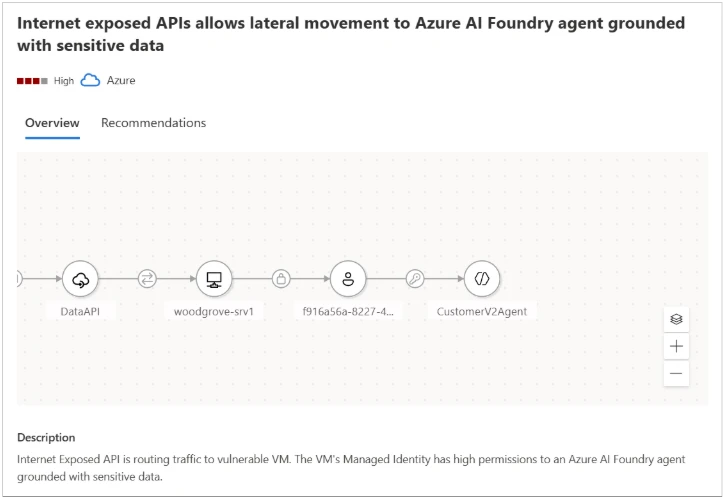
Microsoft Defender provides visibility for those agents connected to sensitive data and help security teams mitigate such risks. In the example shown in Figure 1, the attack path demonstrates how an attacker could leverage an Internet-exposed API to gain access to an AI agent grounded with sensitive data. The attack path highlights the source of the agent’s sensitive data (e.g., a blob container) and outlines the steps required to remediate the threat.
Figure1 – The attack path illustrates how an attacker could leverage an Internet exposed API to gain access to an AI agent grounded with sensitive data
Scenario 2: Identifying agents with indirect prompt injection risk
AI agents regularly interact with external data – user messages, retrieved documents, third-party APIs, and various data pipelines. While these inputs are usually treated as trustworthy, they can become a stealthy delivery mechanism for Indirect Prompt Injection (XPIA), an emerging class of AI-specific attacks. Unlike direct prompt injection, where an attacker issues harmful instructions straight to the model, XPIA occurs where malicious instructions are hidden in external data source that an agent processes, such as a webpage fetched through a browser tool or an email being summarized. The agent unknowingly ingests this crafted content, which embeds hidden or obfuscated commands that are executed simply because the agent trusts the source and operates autonomously.
This makes XPIA particularly dangerous for agents performing high-privilege operations – modifying databases, triggering workflows, accessing sensitive data, or performing autonomous actions at scale. In these cases, a single manipulated data source can silently influence an agent’s behavior, resulting in unauthorized access, data exfiltration, or internal system compromise. This makes identifying agents suspectable to XPIA a critical security requirement.
By analyzing an agent’s tool combinations and configurations, Microsoft Defender identifies agents that carry elevated exposure to indirect prompt injection, based on both the functionality of their tools and the potential impact of misuse. Defender then generates tailored security recommendations for these agents and assigns them a dedicated Risk Factor, that help prioritize them.
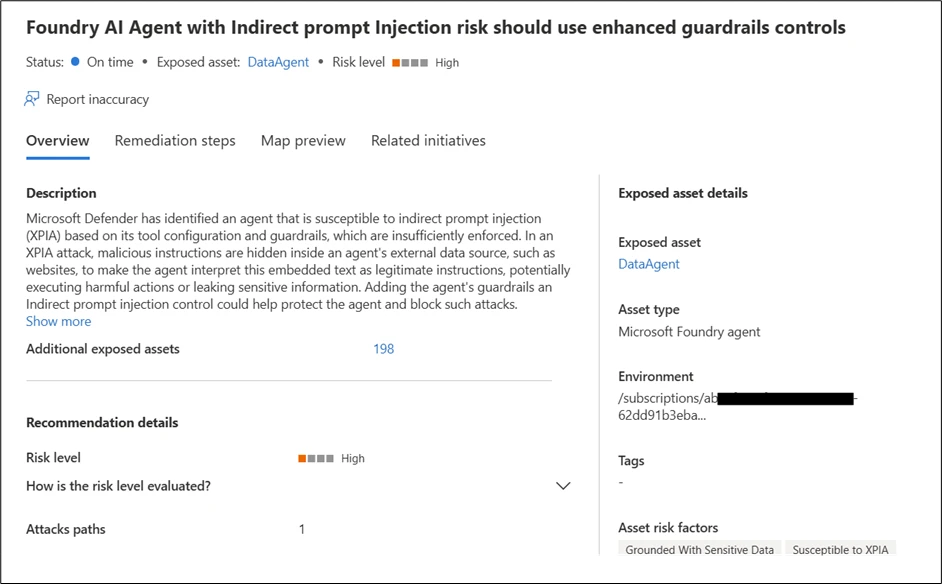
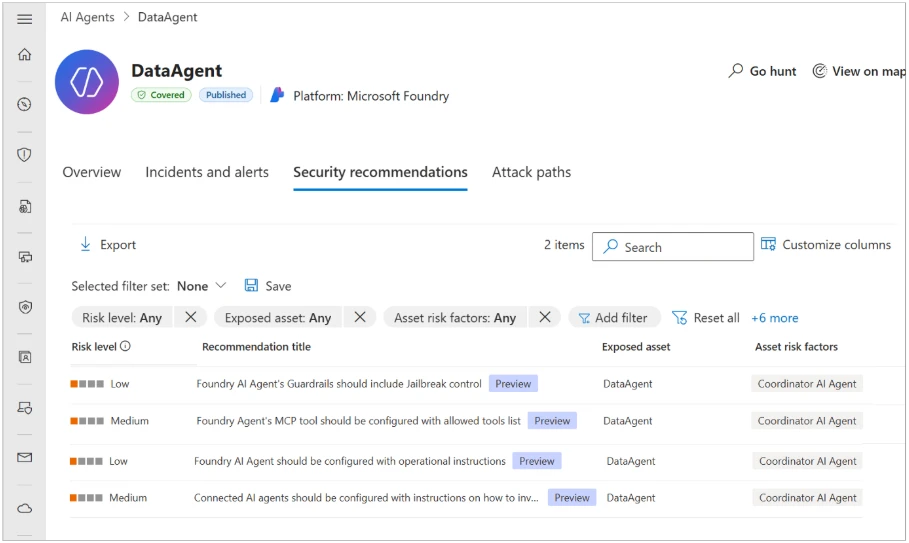
in Figure 2, we can see a recommendation generated by the Defender for an agent with Indirect prompt injection risk and lacking proper guardrails – controls that are essential for reducing the possibility of an XPIA event.
Figure 2 – Recommendation generated by the Defender for an agent with Indirect prompt injection risk and lacking proper guardrails.
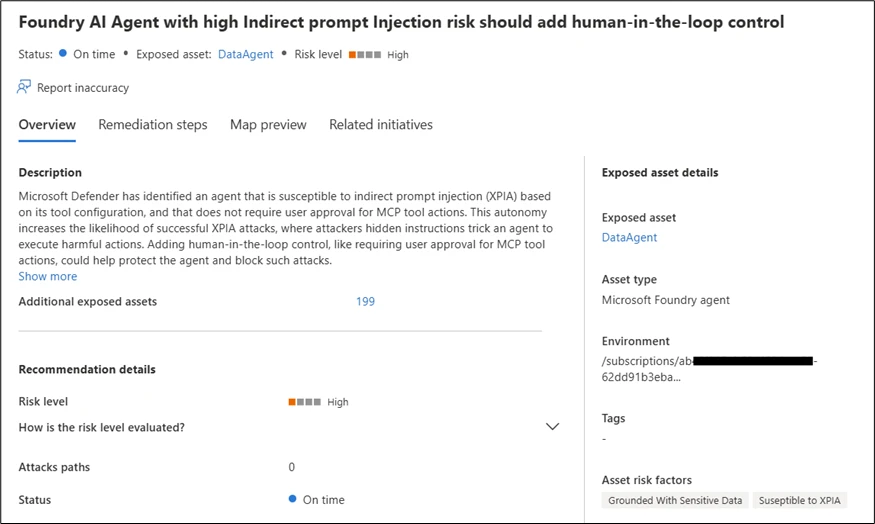
In Figure 3, we can see a recommendation generated by the Defender for an agent with both high autonomy and a high risk of indirect prompt injection, a combination that significantly increases the probability of a successful attack.
In both cases, Defender provides detailed and actionable remediation steps. For example, adding human-in-the-loop control is recommended for an agent with both high autonomy and a high indirect prompt injection risk, helping reduce the potential impact of XPIA-driven actions.
Figure 3 – Recommendation generated by the Defender for an agent with both high autonomy and a high risk of indirect prompt injection.
Scenario 3: Identifying coordinator agents
In a multi-agent architecture, not every agent carries the same level of risk. Each agent may serve a different role – some handle narrow, task-specific functions, while others operate as coordinator agents, responsible for managing and directing multiple sub-agents. These coordinator agents are particularly critical because they effectively act as command centers within the system. A compromise of such an agent doesn’t just affect a single workflow – it cascades into every sub agent under its control. Unlike sub-agents, coordinators might also be customer-facing, which further amplifies their risk profile. This combination of broad authority and potential exposure makes coordinator agents potentially more powerful and more attractive targets for attackers, making comprehensive visibility and dedicated security controls essential for their safe operation
Microsoft Defender accounts for the role of each agent within a multi-agent architecture, providing visibility into coordinator agents and dedicated security controls. Defender also leverages attack path analysis to identify how agent-related risks can form an exploitable path for attackers, mapping weak links with context.
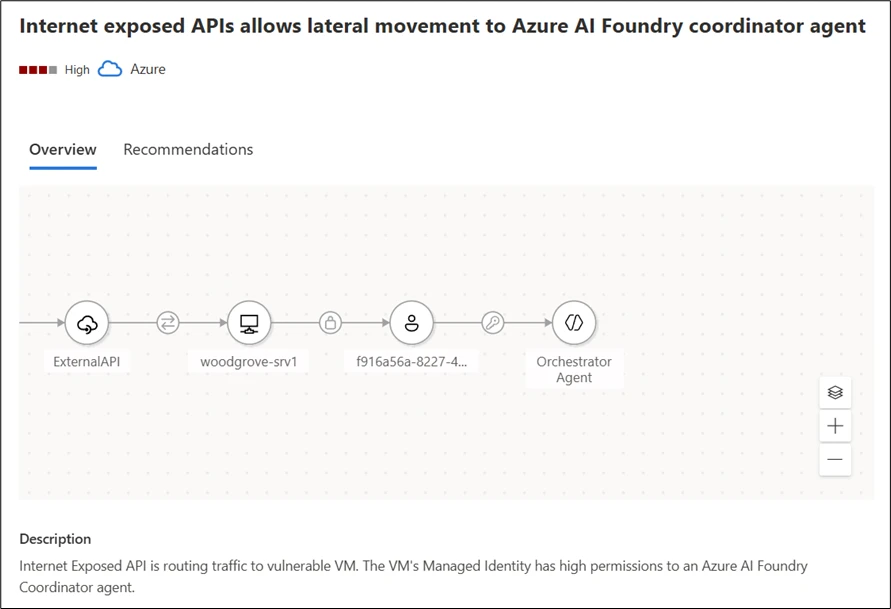
For example, as illustrated in Figure 4, an attack path can demonstrate how an attacker might utilize an Internet-exposed API to gain access to Azure AI Foundry coordinator agent. This visualization helps security admin teams to take preventative actions, safeguarding the AI agents from potential breaches.
Figure 4 – The attack path illustrates how an attacker could leverage an Internet exposed API to gain access to a coordinator agent.
Hardening AI agents: reducing the attack surface
Beyond addressing individual risk scenarios, Microsoft Defender offers broad, foundational hardening guidance designed to reduce the overall attack surface of any AI agent. In addition, a new set of dedicated agents like Risk Factors further helps teams prioritize which weaknesses to mitigate first, ensuring the right issues receive the right level of attention.
Together, these controls significantly limit the blast radius of any attempted compromise. Even if an attacker identifies a manipulation path, a properly hardened and well-configured agent will prevent escalation.
By adopting Defender’s general security guidance, organizations can build AI agents that are not only capable and efficient, but resilient against both known and emerging attack techniques.
Figure 5 – Example of an agent’s recommendations.
Build AI agents security from the ground up
To address these challenges across the different AI Agents layers, Microsoft Defender provides a suite of security tools tailored for AI workloads. By enabling AI Security Posture Management (AI-SPM) within the Defender for Cloud Defender CSPM plan, organizations gain comprehensive multi-cloud posture visibility and risk prioritization across platforms such as Microsoft Foundry, AWS Bedrock, and GCP Vertex AI. This multi-cloud approach ensures critical vulnerabilities and potential attack paths are effectively identified and mitigated, creating a unified and secure AI ecosystem.
Together, these integrated solutions empower enterprises to build, deploy, and operate AI technologies securely, even within a diverse and evolving threat landscape.
To learn more about Security for AI with Defender for Cloud, visit our website and documentation.
This research is provided by Microsoft Defender Security Research with contributions by Hagai Ran Kestenberg.
The rise of AI Agents marks one of the most exciting shifts in technology today. Unlike traditional applications or cloud resources, these agents are not passive components- they reason, make decisions, invoke tools, and interact with other agents and systems on behalf of users. This autonomy brings powerful opportunities, but it also introduces a new set of risks, especially given how easily AI agents can be created, even by teams who may not fully understand the security implications.
This fundamentally changes the security equation, making securing AI agent a uniquely complex challenge – and this is where AI agents posture becomes critical. The goal is not to slow innovation or restrict adoption, but to enable the business to build and deploy AI agents securely by design.
A strong AI agents posture starts with comprehensive visibility across all AI assets and goes further by providing contextual insights – understanding what each agent can do and what it connected to, the risks it introduces, how it can be harden, and how to prioritize and mitigate issues before they turn into incidents.
In this blog, we’ll explore the unique security challenges introduced by AI agents and how Microsoft Defender helps organizations reduce risk and attack surface through AI security posture management across multi-cloud environments.
Understanding the unique challenges
The attack surface of an AI agent is inherently broad. By design, agents are composed of multiple interconnected layers – models, platforms, tools, knowledge sources, guardrails, identities, and more.
Across this layered architecture, threats can emerge at multiple points, including prompt-based attacks, poisoning of grounding data, abuse of agent tools, manipulation of coordinating agents, etc. As a result, securing AI agents demands a holistic approach. Every layer of this multi-tiered ecosystem introduces its own risks, and overlooking any one of them can leave the agent exposed.
Let’s explore several unique scenarios where Defender’s contextual insights help address these challenges across the entire AI agent stack.
Scenario 1: Finding agents connected to sensitive data
Agents are often connected to data sources, and sometimes -whether by design or by mistake- they are granted access to sensitive organizational information, including PII. Such agents are typically intended for internal use – for example, processing customer transaction records or financial data. While they deliver significant value, they also represent a critical point of exposure. If an attacker compromises one of these agents, they could gain access to highly sensitive information that was never meant to leave the organization. Moreover, unlike direct access to a database – which can be easily logged and monitored – data exfiltration through an agent may blend in with normal agent activity, making it much harder to detect. This makes data-connected agents especially important to monitor, protect, and isolate, as the consequences of their misuse can be severe.
Microsoft Defender provides visibility for those agents connected to sensitive data and help security teams mitigate such risks. In the example shown in Figure 1, the attack path demonstrates how an attacker could leverage an Internet-exposed API to gain access to an AI agent grounded with sensitive data. The attack path highlights the source of the agent’s sensitive data (e.g., a blob container) and outlines the steps required to remediate the threat.
Figure1 – The attack path illustrates how an attacker could leverage an Internet exposed API to gain access to an AI agent grounded with sensitive data
Scenario 2: Identifying agents with indirect prompt injection risk
AI agents regularly interact with external data – user messages, retrieved documents, third-party APIs, and various data pipelines. While these inputs are usually treated as trustworthy, they can become a stealthy delivery mechanism for Indirect Prompt Injection (XPIA), an emerging class of AI-specific attacks. Unlike direct prompt injection, where an attacker issues harmful instructions straight to the model, XPIA occurs where malicious instructions are hidden in external data source that an agent processes, such as a webpage fetched through a browser tool or an email being summarized. The agent unknowingly ingests this crafted content, which embeds hidden or obfuscated commands that are executed simply because the agent trusts the source and operates autonomously.
This makes XPIA particularly dangerous for agents performing high-privilege operations – modifying databases, triggering workflows, accessing sensitive data, or performing autonomous actions at scale. In these cases, a single manipulated data source can silently influence an agent’s behavior, resulting in unauthorized access, data exfiltration, or internal system compromise. This makes identifying agents suspectable to XPIA a critical security requirement.
By analyzing an agent’s tool combinations and configurations, Microsoft Defender identifies agents that carry elevated exposure to indirect prompt injection, based on both the functionality of their tools and the potential impact of misuse. Defender then generates tailored security recommendations for these agents and assigns them a dedicated Risk Factor, that help prioritize them.
in Figure 2, we can see a recommendation generated by the Defender for an agent with Indirect prompt injection risk and lacking proper guardrails – controls that are essential for reducing the possibility of an XPIA event.
Figure 2 – Recommendation generated by the Defender for an agent with Indirect prompt injection risk and lacking proper guardrails.
In Figure 3, we can see a recommendation generated by the Defender for an agent with both high autonomy and a high risk of indirect prompt injection, a combination that significantly increases the probability of a successful attack.
In both cases, Defender provides detailed and actionable remediation steps. For example, adding human-in-the-loop control is recommended for an agent with both high autonomy and a high indirect prompt injection risk, helping reduce the potential impact of XPIA-driven actions.
Figure 3 – Recommendation generated by the Defender for an agent with both high autonomy and a high risk of indirect prompt injection.
Scenario 3: Identifying coordinator agents
In a multi-agent architecture, not every agent carries the same level of risk. Each agent may serve a different role – some handle narrow, task-specific functions, while others operate as coordinator agents, responsible for managing and directing multiple sub-agents. These coordinator agents are particularly critical because they effectively act as command centers within the system. A compromise of such an agent doesn’t just affect a single workflow – it cascades into every sub agent under its control. Unlike sub-agents, coordinators might also be customer-facing, which further amplifies their risk profile. This combination of broad authority and potential exposure makes coordinator agents potentially more powerful and more attractive targets for attackers, making comprehensive visibility and dedicated security controls essential for their safe operation
Microsoft Defender accounts for the role of each agent within a multi-agent architecture, providing visibility into coordinator agents and dedicated security controls. Defender also leverages attack path analysis to identify how agent-related risks can form an exploitable path for attackers, mapping weak links with context.
For example, as illustrated in Figure 4, an attack path can demonstrate how an attacker might utilize an Internet-exposed API to gain access to Azure AI Foundry coordinator agent. This visualization helps security admin teams to take preventative actions, safeguarding the AI agents from potential breaches.
Figure 4 – The attack path illustrates how an attacker could leverage an Internet exposed API to gain access to a coordinator agent.
Hardening AI agents: reducing the attack surface
Beyond addressing individual risk scenarios, Microsoft Defender offers broad, foundational hardening guidance designed to reduce the overall attack surface of any AI agent. In addition, a new set of dedicated agents like Risk Factors further helps teams prioritize which weaknesses to mitigate first, ensuring the right issues receive the right level of attention.
Together, these controls significantly limit the blast radius of any attempted compromise. Even if an attacker identifies a manipulation path, a properly hardened and well-configured agent will prevent escalation.
By adopting Defender’s general security guidance, organizations can build AI agents that are not only capable and efficient, but resilient against both known and emerging attack techniques.
Figure 5 – Example of an agent’s recommendations.
Build AI agents security from the ground up
To address these challenges across the different AI Agents layers, Microsoft Defender provides a suite of security tools tailored for AI workloads. By enabling AI Security Posture Management (AI-SPM) within the Defender for Cloud Defender CSPM plan, organizations gain comprehensive multi-cloud posture visibility and risk prioritization across platforms such as Microsoft Foundry, AWS Bedrock, and GCP Vertex AI. This multi-cloud approach ensures critical vulnerabilities and potential attack paths are effectively identified and mitigated, creating a unified and secure AI ecosystem.
Together, these integrated solutions empower enterprises to build, deploy, and operate AI technologies securely, even within a diverse and evolving threat landscape.
To learn more about Security for AI with Defender for Cloud, visit our website and documentation.
This research is provided by Microsoft Defender Security Research with contributions by Hagai Ran Kestenberg.
CVE-2025-55182 (also referred to as React2Shell and includes CVE-2025-66478, which was merged into it) is a critical pre-authentication remote code execution (RCE) vulnerability affecting React Server Components, Next.js, and related frameworks. With a CVSS score of 10.0, this vulnerability could allow attackers to execute arbitrary code on vulnerable servers through a single malicious HTTP request.
Exploitation activity related to this vulnerability was detected as early as December 5, 2025. Most successful exploits originated from red team assessments; however, we also observed real-world exploitation attempts by threat actors delivering multiple subsequent payloads, majority of which are coin miners. Both Windows and Linux environments have been observed to be impacted.
The React Server Components ecosystem is a collection of packages, frameworks, and bundlers that enable React 19 applications to run parts of their logic on the server rather than the browser. It uses the Flight protocol to communicate between client and server. When a client requests data, the server receives a payload, parses this payload, executes server-side logic, and returns a serialized component tree. The vulnerability exists because affected React Server Components versions fail to validate incoming payloads. This could allow attackers to inject malicious structures that React accepts as valid, leading to prototype pollution and remote code execution.
This vulnerability presents a significant risk because of the following factors:
Default configurations are vulnerable, requiring no special setup or developer error.
Public proof-of-concept exploits are readily available with near-100% reliability.
Exploitation can happen without any user authentication since this is a pre-authentication vulnerability.
The vulnerability could be exploited using a single malicious HTTP request.
In this report, Microsoft Defender researchers share insights from observed attacker activity exploiting this vulnerability. Detailed analyses, detection insights, as well as mitigation recommendations and hunting guidance are covered in the next sections. Further investigation towards providing stronger protection measures is in progress, and this report will be updated when more information becomes available.
Analyzing CVE-2025-55182 exploitation activity
React is widely adopted in enterprise environments. In Microsoft Defender telemetry, we see tens of thousands of distinct devices across several thousand organizations running some React or React-based applications. Some of the vulnerable applications are deployed inside containers, and the impact on the underlying host is dependent on the security configurations of the container.
We identified several hundred machines across a diverse set of organizations compromised using common tactics, techniques, and procedures (TTPs) observed with web application RCE. To exploit CVE-2025-55182, an attacker sends a crafted input to a web application running React Server Components functions in the form of a POST request. This input is then processed as a serialized object and passed to the backend server, where it is deserialized. Due to the default trust among the components, the attacker-provided input is then deserialized and the backend runs attacker-provided code under the NodeJS runtime.
Figure 1: Attack diagram depicting activity leading to action on objectives
Post-exploitation, attackers were observed to run arbitrary commands, such as reverse shells to known Cobalt Strike servers. To achieve persistence, attackers added new malicious users, utilized remote monitoring and management (RMM) tools such as MeshAgent, modified authorized_keys file, and enabled root login. To evade security defenses, the attackers downloaded from attacker-controlled CloudFlare Tunnel endpoints (for example, *.trycloudflare.com) and used bind mounts to hide malicious processes and artifacts from system monitoring tools.
The malware payloads seen in campaigns investigated by Microsoft Defender vary from remote access trojans (RATs) like VShell and EtherRAT, the SNOWLIGHT memory-based malware downloader that enabled attackers to deploy more payloads to target environments, ShadowPAD, and XMRig cryptominers. The attacks proceeded by enumerating system details and environment variables to enable lateral movement and credential theft.
Credentials that were observed to be targeted included Azure Instance Metadata Service (IMDS) endpoints for Azure, Amazon Web Services (AWS), Google Cloud Platform (GCP), and Tencent Cloud to acquire identity tokens, which could be used to move laterally to other cloud resources. Attackers also deployed secret discovery tools such as TruffleHog and Gitleaks, along with custom scripts to extract several different secrets. Attempts to harvest AI and cloud-native credentials, such as OpenAI API keys, Databricks tokens, and Kubernetes service‑account credentials were also observed. Azure Command-Line Interface (CLI) (az) and Azure Developer CLI (azd) were also used to obtain tokens.
Figure 2: Example of reverse shell observed in one of the campaigns
Mitigation and protection guidance
Microsoft recommends customers to act on these mitigation recommendations:
Manual identification guidance
Until full in-product coverage is available, you can manually assess exposure on servers or containers:
Navigate to your project directory and open the node_modules folder.
Review installed packages and look for:
react-server-dom-webpack
react-server-dom-parcel
react-server-dom-turbopack
next
Validate versions against the known affected range:
If any of these packages match the affected versions, remediation is required. Prioritize internet-facing assets first, especially those identified by Defender as externally exposed.
Mitigation best practices
Patch immediately
React and Next.js have released fixes for the impacted packages. Upgrade to one of the following patched versions (or later within the same release line):
Because many frameworks and bundlers rely on these packages, make sure your framework-level updates also pull in the corrected dependencies.
Prioritize exposed services
Patch all affected systems, starting with internet-facing workloads.
Use Microsoft Defender Vulnerability Management (MDVM) to surface vulnerable package inventory and to track remediation progress across your estate.
Monitor for exploit activity
Review MDVM dashboards and Defender alerts for indicators of attempted exploitation.
Correlate endpoint, container, and cloud signals for higher confidence triage.
Invoke incident response process to address any related suspicious activity stemming from this vulnerability.
Add WAF protections where appropriate
Apply Azure Web Application Firewall (WAF) custom rules for Application Gateway and Application Gateway for Containers to help block exploit patterns while patching is in progress. Microsoft has published rule guidance and JSON examples in the Azure Network Security Blog, with ongoing updates as new attack permutations are identified.
Recommended customer action checklist
Identify affected React Server Components packages in your applications and images.
Upgrade to patched versions. Refer to the React page for patching guidance.
Prioritize internet-facing services for emergency change windows.
Enable and monitor Defender alerts tied to React Server Components exploitation attempts.
Use MDVM to validate coverage and confirm risk reduction post-update.
CVE-2025-55182 represents a high-impact, low-friction attack path against modern React Server Components deployments. Rapid patching combined with layered Defender monitoring and WAF protections provides the strongest short-term and long-term risk reduction strategy.
Microsoft Defender XDR detections
Microsoft Defender XDR customers can refer to the list of applicable detections below. Microsoft Defender XDR coordinates detection, prevention, investigation, and response across endpoints, identities, email, apps to provide integrated protection against attacks like the threat discussed in this blog.
Customers with provisioned access can also use Microsoft Security Copilot in Microsoft Defender to investigate and respond to incidents, hunt for threats, and protect their organization with relevant threat intelligence.
Tactic
Observed activity
Microsoft Defender coverage
Initial Access /Execution
Suspicious process launched by Node
Microsoft Defender for Endpoint – Possible exploitation of React Server Components vulnerability (2 detectors)
Execution of suspicious commands initiated by the next-server parent process to probe for command execution capabilities.
Microsoft Defender for Cloud – Potential React2Shell command injection detected on a Kubernetes cluster – Potential React2Shell command injection detected on Azure App Service
Microsoft Defender for Endpoint – Suspicious process executed by a network service – Suspicious Node.js script execution – Suspicious Node.js process behavior
In many cases subsequent activity post exploitation was detected and following alerts were triggered on the victim devices. Note that the following alerts below can also be triggered by unrelated threat activity.
Tactic
Observed activity
Microsoft Defender coverage
Execution
Suspicious downloads, encoded execution, anomalous service/process creation, and behaviors indicative of a reverse shell and crypto-mining
Microsoft Defender for Endpoint – Suspicious PowerShell download or encoded command execution – Possible reverse shell – Suspicious service launched – Suspicious anonymous process created using memfd_create – Possible cryptocurrency miner
Defense Evasion
Unauthorized code execution through process manipulation, abnormal DLL loading, and misuse of legitimate system tools
Microsoft Defender for Endpoint – A process was injected with potentially malicious code – An executable file loaded an unexpected DLL file – Use of living-off-the-land binary to run malicious code
Credential Access
Unauthorized use of Kerberos tickets to impersonate accounts and gain unauthorized access
Microsoft Defender for Endpoint – Pass-the-ticket attack
Credential Access
Suspicious access to sensitive files such as cloud and GIT credentials
Microsoft Defender for Cloud – Possible secret reconnaissance detected
Lateral movement
Attacker activity observed in multiple environments
Microsoft Defender for Endpoint – Hands-on-keyboard attack involving multiple devices
Automatic attack disruption through Microsoft Defender for Endpoint alerts
To better support customers in the event of exploitation, we are expanding our detection framework to identify and alert on CVE-2025-55182 activity across all operating systems for Microsoft Defender for Endpoint customers. These detections are integrated with automatic attack disruption.
When these alerts, combined with other signals, provide high confidence of active attacker behavior, automatic attack disruption can initiate autonomous containment actions to help stop the attack and prevent further progression.
Microsoft Defender Vulnerability Management and Microsoft Defender for Cloud
Microsoft Defender for Cloud rolled out support to surface CVE-2025-55182 with agentless scanning across containers and cloud virtual machines (VMs). Follow the documentation on how to enable agentless scanning:
Microsoft Defender Vulnerability Management (MDVM) can surface impacted Windows, Linux, and macOS devices. In addition, MDVM and Microsoft Defender for Cloud dashboards can surface:
Identification of exposed assets in the organization
Clear remediation guidance tied to your affected assets and workloads
Microsoft Security Copilot
Security Copilot customers can use the standalone experience to create their own prompts or run the following prebuilt promptbooks to automate incident response or investigation tasks related to this threat:
Incident investigation
Microsoft User analysis
Threat actor profile
Threat Intelligence 360 report based on MDTI article
Vulnerability impact assessment
Note that some promptbooks require access to plugins for Microsoft products such as Microsoft Defender XDR or Microsoft Sentinel.
Threat intelligence reports
Microsoft Defender XDR customers can use the following threat analytics reports in the Defender portal (requires license for at least one Defender XDR product) to get the most up-to-date information about the threat actor, malicious activity, and techniques discussed in this blog. These reports provide intelligence, protection information, and recommended actions to prevent, mitigate, or respond to associated threats found in customer environments.
Microsoft Security Copilot customers can also use the Microsoft Security Copilot integration in Microsoft Defender Threat Intelligence, either in the Security Copilot standalone portal or in the embedded experience in the Microsoft Defender portal to get more information about this threat actor.
Hunting queries and recommendations
Microsoft Defender XDR
Microsoft Defender XDR customers can run the following query to find related activity in their networks:
CloudAuditEvents
| where (ProcessCommandLine == "/bin/sh -c (whoami)" and (ParentProcessName == "node" or ParentProcessName has "next-server"))
        or (ProcessCommandLine has_any ("echo","powershell") and ProcessCommandLine matches regex @'(echo\s+\$\(\(\d+\*\d+\)\)|powershell\s+-c\s+"\d+\*\d+")')
| project Timestamp, KubernetesPodName, KubernetesNamespace, ContainerName, ContainerId, ContainerImageName, FileName, ProcessName, ProcessCommandLine, ProcessCurrentWorkingDirectory, ParentProcessName, ProcessId, ParentProcessId, AccountName
Identify encoded PowerShell attempts
let lookback = 10d;
DeviceProcessEvents
| where Timestamp >= ago(lookback)
| where InitiatingProcessParentFileName has "node"
| where InitiatingProcessCommandLine  has_any ("next start", "next-server") or ProcessCommandLine  has_any ("next start", "next-server")
| summarize  make_set(InitiatingProcessCommandLine), make_set(ProcessCommandLine) by DeviceId, Timestamp
//looking for powershell activity
| where set_ProcessCommandLine  has_any ("cmd.exe","powershell")
| extend decoded_powershell_1 = replace_string(tostring(base64_decode_tostring(tostring(split(tostring(split(set_ProcessCommandLine.[0],"EncodedCommand ",1).[0]),'"',0).[0]))),"\0","")
| extend decoded_powershell_1b = replace_string(tostring(base64_decode_tostring(tostring(split(tostring(split(set_ProcessCommandLine.[0],"Enc ",1).[0]),'"',0).[0]))),"\0","")
| extend decoded_powershell_2 = replace_string(tostring(base64_decode_tostring(tostring(split(tostring(split(set_ProcessCommandLine.[0],"enc ",1).[0]),'"',0).[0]))),"\0","")
| extend decoded_powershell_3 = replace_string(tostring(base64_decode_tostring(tostring(split(tostring(split(set_ProcessCommandLine.[0],"ec ",1).[0]),'"',0).[0]))),"\0","")
| where set_ProcessCommandLine !has "'powershell -c "
| extend decoded_powershell = iff( isnotempty( decoded_powershell_1),decoded_powershell_1,
                                                    iff(isnotempty( decoded_powershell_2), decoded_powershell_2,
                                                        iff(isnotempty( decoded_powershell_3), decoded_powershell_3,decoded_powershell_1b)))
| project-away decoded_powershell_1, decoded_powershell_1b, decoded_powershell_2,decoded_powershell_3
| where isnotempty( decoded_powershell)
Identify execution of suspicious commands initiated by the next-server parent process post-exploitation
let lookback = 10d;
DeviceProcessEvents
| where Timestamp >= ago(lookback)
| where InitiatingProcessFileName =~ "node.exe" and InitiatingProcessCommandLine has ".js"
| where FileName =~ "cmd.exe"
| where (ProcessCommandLine has_any (@"\next\", @"\npm\npm\node_modules\", "\\server.js")
    and (ProcessCommandLine has_any ("powershell -c \"", "curl", "wget", "echo $", "ipconfig", "start msiexec", "whoami", "systeminfo", "$env:USERPROFILE", "net user", "net group", "localgroup administrators",  "-ssh", "set-MpPreference", "add-MpPreference", "rundll32", "certutil", "regsvr32", "bitsadmin", "mshta", "msbuild")
         or (ProcessCommandLine has "powershell" and
             (ProcessCommandLine has_any ("Invoke-Expression", "DownloadString", "DownloadFile", "FromBase64String", "Start-Process", "System.IO.Compression", "System.IO.MemoryStream", "iex ", "iex(", "Invoke-WebRequest", "iwr ", ".UploadFile", "System.Net.WebClient")
                or ProcessCommandLine matches regex @"[-/–][Ee^]{1,2}[NnCcOoDdEeMmAa^]*\s[A-Za-z0-9+/=]{15,}"))))
   or ProcessCommandLine matches regex @'cmd\.exe\s+/d\s+/s\s+/c\s+"powershell\s+-c\s+"[0-9]+\*[0-9]+""'
Identify execution of suspicious commands initiated by the next-server parent process post-exploitation
let lookback = 10d;
DeviceProcessEvents
| where Timestamp >= ago(lookback)
| where InitiatingProcessFileName == "node"
| where InitiatingProcessCommandLine has_any (" server.js", " start", "/server.js")
| where ProcessCommandLine  has_any ("| sh", "openssl,", "/dev/tcp/", "| bash", "|sh", "|bash", "bash,", "{sh,}", "SOCK_STREAM", "bash -i", "whoami", "| base64 -d", "chmod +x /tmp", "chmod 777")
| where ProcessCommandLine !contains "vscode" and ProcessCommandLine !contains "/.claude/"  and ProcessCommandLine !contains "/claude"
Microsoft Defender XDR’s blast radius analysis capability, incorporated into the incident investigation view, allows security teams to visualize and understand the business impact of a security compromise by showing potential propagation paths towards the organization’s critical assets before it escalates into a full blown incident. This capability merges pre-breach estate understanding with post-breach views allowing security teams to map their interconnected assets and highlights potential paths teams can prioritize for remediation efforts based on the criticality of assets and their interconnectivity to the compromised entities.
Microsoft Defender for Cloud
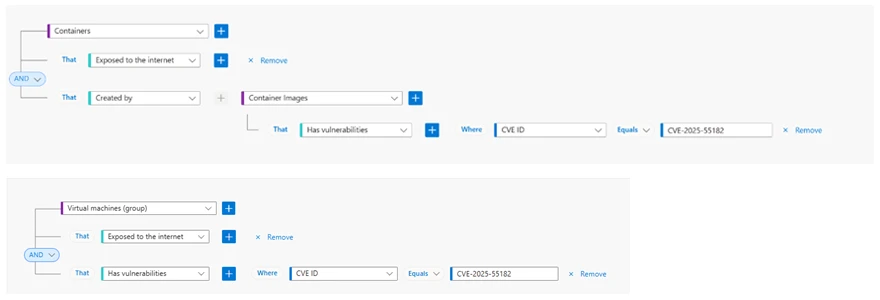
Microsoft Defender for Cloud customers can use security explorer templates to locate exposed containers running vulnerable container images and vulnerable virtual machines. Template titled Internet exposed containers running container images vulnerable to React2Shell vulnerability CVE-2025-55182 and Internet exposed virtual machines vulnerable to React2Shell vulnerability CVE-2025-55182 are added to the gallery.
Figure 3. Microsoft Defender for Cloud security explorer templates related to CVE-2025-55182
Microsoft Security Exposure Management
Microsoft Security Exposure Management’s automated attack path analysis maps out potential threats by identifying exposed resources and tracing the routes an attacker might take to compromise critical assets. This analysis highlights vulnerable cloud compute resources, such as virtual machines and Kubernetes containers, that are susceptible to remote code execution vulnerabilities, including React2Shell CVEs. It also outlines possible lateral movement steps an adversary might take within the environment. The attack paths are presented for all supported cloud environments, including Azure, AWS, and GCP.
To view these paths, filter the view in Microsoft Security Exposure Management, filter by entry point type:
Kubernetes container
Virtual Machine
AWS EC2 instance
GCP compute instance.
Alternatively, in Microsoft Defender for Cloud, customers can filter by titles such as:
Internet exposed container with high severity vulnerabilities
Internet exposed Azure VM with RCE vulnerabilities
Internet exposed GCP compute instance with RCE vulnerabilities
Internet exposed AWS EC2 instance with RCE vulnerabilities
Microsoft Sentinel
Microsoft Sentinel customers can use the TI Mapping analytics (a series of analytics all prefixed with ‘TI map’) to automatically match the malicious domain indicators mentioned in this blog post with data in their workspace. If the TI Map analytics are not currently deployed, customers can install the Threat Intelligence solution from the Microsoft Sentinel Content Hub to have the analytics rule deployed in their Sentinel workspace.
Detect network IP and domain indicators of compromise using ASIM
//IP list and domain list- _Im_NetworkSession
let lookback = 30d;
let ioc_ip_addr = dynamic(["194.69.203.32", "162.215.170.26", "216.158.232.43", "196.251.100.191", "46.36.37.85", "92.246.87.48"]);
let ioc_domains = dynamic(["anywherehost.site", "xpertclient.net", "superminecraft.net.br", "overcome-pmc-conferencing-books.trycloudflare.com", "donaldjtrmp.anondns.net", "labubu.anondns.net", "krebsec.anondns.net", "hybird-accesskey-staging-saas.s3.dualstack.ap-northeast-1.amazonaws.com", "ghostbin.axel.org", "194.69.203.32:81", "194.69.203.32:81", "194.69.203.32:81", "162.215.170.26:3000", "216.158.232.43:12000", "overcome-pmc-conferencing-books.trycloudflare.com", "donaldjtrmp.anondns.net:1488", "labubu.anondns.net:1488", "krebsec.anondns.net:2316/dong", "hybird-accesskey-staging-saas.s3.dualstack.ap-northeast-1.amazonaws.com", "ghostbin.axel.org"]);n_Im_NetworkSession(starttime=todatetime(ago(lookback)), endtime=now())n| where DstIpAddr in (ioc_ip_addr) or DstDomain has_any (ioc_domains)
| summarize imNWS_mintime=min(TimeGenerated), imNWS_maxtime=max(TimeGenerated),
  EventCount=count() by SrcIpAddr, DstIpAddr, DstDomain, Dvc, EventProduct, EventVendor
Detect Web Sessions IP and file hash indicators of compromise using ASIM
//IP list - _Im_WebSession
let lookback = 30d;
let ioc_ip_addr = dynamic(["194.69.203.32", "162.215.170.26", "216.158.232.43", "196.251.100.191", "46.36.37.85", "92.246.87.48"]);
let ioc_sha_hashes =dynamic(["c2867570f3bbb71102373a94c7153239599478af84b9c81f2a0368de36f14a7c", "9e9514533a347d7c6bc830369c7528e07af5c93e0bf7c1cd86df717c849a1331", "b63860cefa128a4aa5d476f300ac45fd5d3c56b2746f7e72a0d27909046e5e0f", "d60461b721c0ef7cfe5899f76672e4970d629bb51bb904a053987e0a0c48ee0f", "d3c897e571426804c65daae3ed939eab4126c3aa3fa8531de5e8f0b66629fe8a", "d71779df5e4126c389e7702f975049bd17cb597ebcf03c6b110b59630d8f3b4d", "b5acbcaccc0cfa54500f2bbb0745d4b5c50d903636f120fc870082335954bec8", "4cbdd019cfa474f20f4274310a1477e03e34af7c62d15096fe0df0d3d5668a4d", "f347eb0a59df167acddb245f022a518a6d15e37614af0bbc2adf317e10c4068b", "661d3721adaa35a30728739defddbc72b841c3d06aca0abd4d5e0aad73947fb1", "876923709213333099b8c728dde9f5d86acfd0f3702a963bae6a9dde35ba8e13", "2ebed29e70f57da0c4f36a9401a7bbd36e6ddd257e0920aa4083240afa3a6457", "f1ee866f6f03ff815009ff8fd7b70b902bc59b037ac54b6cae9b8e07beb854f7", "7e90c174829bd4e01e86779d596710ad161dbc0e02a219d6227f244bf271d2e5"]);b_Im_WebSession(starttime=todatetime(ago(lookback)), endtime=now())b| where DstIpAddr in (ioc_ip_addr) or FileSHA256 in (ioc_sha_hashes)
| summarize imWS_mintime=min(TimeGenerated), imWS_maxtime=max(TimeGenerated),
  EventCount=count() by SrcIpAddr, DstIpAddr, Url, Dvc, EventProduct, EventVendor
Detect domain and URL indicators of compromise using ASIM
Detect files hashes indicators of compromise using ASIM
// file hash list - imFileEvent
let ioc_sha_hashes = dynamic(["c2867570f3bbb71102373a94c7153239599478af84b9c81f2a0368de36f14a7c", "9e9514533a347d7c6bc830369c7528e07af5c93e0bf7c1cd86df717c849a1331", "b63860cefa128a4aa5d476f300ac45fd5d3c56b2746f7e72a0d27909046e5e0f", "d60461b721c0ef7cfe5899f76672e4970d629bb51bb904a053987e0a0c48ee0f", "d3c897e571426804c65daae3ed939eab4126c3aa3fa8531de5e8f0b66629fe8a", "d71779df5e4126c389e7702f975049bd17cb597ebcf03c6b110b59630d8f3b4d", "b5acbcaccc0cfa54500f2bbb0745d4b5c50d903636f120fc870082335954bec8", "4cbdd019cfa474f20f4274310a1477e03e34af7c62d15096fe0df0d3d5668a4d", "f347eb0a59df167acddb245f022a518a6d15e37614af0bbc2adf317e10c4068b", "661d3721adaa35a30728739defddbc72b841c3d06aca0abd4d5e0aad73947fb1", "876923709213333099b8c728dde9f5d86acfd0f3702a963bae6a9dde35ba8e13", "2ebed29e70f57da0c4f36a9401a7bbd36e6ddd257e0920aa4083240afa3a6457", "f1ee866f6f03ff815009ff8fd7b70b902bc59b037ac54b6cae9b8e07beb854f7", "7e90c174829bd4e01e86779d596710ad161dbc0e02a219d6227f244bf271d2e5"]);dimFileEventd| where SrcFileSHA256 in (ioc_sha_hashes) or
TargetFileSHA256 in (ioc_sha_hashes)
| extend AccountName = tostring(split(User, @'')[1]),
  AccountNTDomain = tostring(split(User, @'')[0])
| extend AlgorithmType = "SHA256"
Find use of reverse shells
This query looks for potential reverse shell activity initiated by cmd.exe or PowerShell. It matches the use of reverse shells in this attack: reverse-shell-nishang.
Indicators of compromise
The list below is non-exhaustive and does not represent all indicators of compromise observed in the known campaigns:
To hear stories and insights from the Microsoft Threat Intelligence community about the ever-evolving threat landscape, listen to the Microsoft Threat Intelligence podcast.
The guidance provided in this blog post represents general best practices and is intended for informational purposes only. Customers remain responsible for evaluating and implementing security measures appropriate for their environments.
CVE-2025-55182 (also referred to as React2Shell and includes CVE-2025-66478, which was merged into it) is a critical pre-authentication remote code execution (RCE) vulnerability affecting React Server Components, Next.js, and related frameworks. With a CVSS score of 10.0, this vulnerability could allow attackers to execute arbitrary code on vulnerable servers through a single malicious HTTP request.
Exploitation activity related to this vulnerability was detected as early as December 5, 2025. Most successful exploits originated from red team assessments; however, we also observed real-world exploitation attempts by threat actors delivering multiple subsequent payloads, majority of which are coin miners. Both Windows and Linux environments have been observed to be impacted.
The React Server Components ecosystem is a collection of packages, frameworks, and bundlers that enable React 19 applications to run parts of their logic on the server rather than the browser. It uses the Flight protocol to communicate between client and server. When a client requests data, the server receives a payload, parses this payload, executes server-side logic, and returns a serialized component tree. The vulnerability exists because affected React Server Components versions fail to validate incoming payloads. This could allow attackers to inject malicious structures that React accepts as valid, leading to prototype pollution and remote code execution.
This vulnerability presents a significant risk because of the following factors:
Default configurations are vulnerable, requiring no special setup or developer error.
Public proof-of-concept exploits are readily available with near-100% reliability.
Exploitation can happen without any user authentication since this is a pre-authentication vulnerability.
The vulnerability could be exploited using a single malicious HTTP request.
In this report, Microsoft Defender researchers share insights from observed attacker activity exploiting this vulnerability. Detailed analyses, detection insights, as well as mitigation recommendations and hunting guidance are covered in the next sections. Further investigation towards providing stronger protection measures is in progress, and this report will be updated when more information becomes available.
Analyzing CVE-2025-55182 exploitation activity
React is widely adopted in enterprise environments. In Microsoft Defender telemetry, we see tens of thousands of distinct devices across several thousand organizations running some React or React-based applications. Some of the vulnerable applications are deployed inside containers, and the impact on the underlying host is dependent on the security configurations of the container.
We identified several hundred machines across a diverse set of organizations compromised using common tactics, techniques, and procedures (TTPs) observed with web application RCE. To exploit CVE-2025-55182, an attacker sends a crafted input to a web application running React Server Components functions in the form of a POST request. This input is then processed as a serialized object and passed to the backend server, where it is deserialized. Due to the default trust among the components, the attacker-provided input is then deserialized and the backend runs attacker-provided code under the NodeJS runtime.
Figure 1: Attack diagram depicting activity leading to action on objectives
Post-exploitation, attackers were observed to run arbitrary commands, such as reverse shells to known Cobalt Strike servers. To achieve persistence, attackers added new malicious users, utilized remote monitoring and management (RMM) tools such as MeshAgent, modified authorized_keys file, and enabled root login. To evade security defenses, the attackers downloaded from attacker-controlled CloudFlare Tunnel endpoints (for example, *.trycloudflare.com) and used bind mounts to hide malicious processes and artifacts from system monitoring tools.
The malware payloads seen in campaigns investigated by Microsoft Defender vary from remote access trojans (RATs) like VShell and EtherRAT, the SNOWLIGHT memory-based malware downloader that enabled attackers to deploy more payloads to target environments, ShadowPAD, and XMRig cryptominers. The attacks proceeded by enumerating system details and environment variables to enable lateral movement and credential theft.
Credentials that were observed to be targeted included Azure Instance Metadata Service (IMDS) endpoints for Azure, Amazon Web Services (AWS), Google Cloud Platform (GCP), and Tencent Cloud to acquire identity tokens, which could be used to move laterally to other cloud resources. Attackers also deployed secret discovery tools such as TruffleHog and Gitleaks, along with custom scripts to extract several different secrets. Attempts to harvest AI and cloud-native credentials, such as OpenAI API keys, Databricks tokens, and Kubernetes service‑account credentials were also observed. Azure Command-Line Interface (CLI) (az) and Azure Developer CLI (azd) were also used to obtain tokens.
Figure 2: Example of reverse shell observed in one of the campaigns
Mitigation and protection guidance
Microsoft recommends customers to act on these mitigation recommendations:
Manual identification guidance
Until full in-product coverage is available, you can manually assess exposure on servers or containers:
Navigate to your project directory and open the node_modules folder.
Review installed packages and look for:
react-server-dom-webpack
react-server-dom-parcel
react-server-dom-turbopack
next
Validate versions against the known affected range:
If any of these packages match the affected versions, remediation is required. Prioritize internet-facing assets first, especially those identified by Defender as externally exposed.
Mitigation best practices
Patch immediately
React and Next.js have released fixes for the impacted packages. Upgrade to one of the following patched versions (or later within the same release line):
Because many frameworks and bundlers rely on these packages, make sure your framework-level updates also pull in the corrected dependencies.
Prioritize exposed services
Patch all affected systems, starting with internet-facing workloads.
Use Microsoft Defender Vulnerability Management (MDVM) to surface vulnerable package inventory and to track remediation progress across your estate.
Monitor for exploit activity
Review MDVM dashboards and Defender alerts for indicators of attempted exploitation.
Correlate endpoint, container, and cloud signals for higher confidence triage.
Invoke incident response process to address any related suspicious activity stemming from this vulnerability.
Add WAF protections where appropriate
Apply Azure Web Application Firewall (WAF) custom rules for Application Gateway and Application Gateway for Containers to help block exploit patterns while patching is in progress. Microsoft has published rule guidance and JSON examples in the Azure Network Security Blog, with ongoing updates as new attack permutations are identified.
Recommended customer action checklist
Identify affected React Server Components packages in your applications and images.
Upgrade to patched versions. Refer to the React page for patching guidance.
Prioritize internet-facing services for emergency change windows.
Enable and monitor Defender alerts tied to React Server Components exploitation attempts.
Use MDVM to validate coverage and confirm risk reduction post-update.
CVE-2025-55182 represents a high-impact, low-friction attack path against modern React Server Components deployments. Rapid patching combined with layered Defender monitoring and WAF protections provides the strongest short-term and long-term risk reduction strategy.
Microsoft Defender XDR detections
Microsoft Defender XDR customers can refer to the list of applicable detections below. Microsoft Defender XDR coordinates detection, prevention, investigation, and response across endpoints, identities, email, apps to provide integrated protection against attacks like the threat discussed in this blog.
Customers with provisioned access can also use Microsoft Security Copilot in Microsoft Defender to investigate and respond to incidents, hunt for threats, and protect their organization with relevant threat intelligence.
Tactic
Observed activity
Microsoft Defender coverage
Initial Access /Execution
Suspicious process launched by Node
Microsoft Defender for Endpoint – Possible exploitation of React Server Components vulnerability (2 detectors)
Execution of suspicious commands initiated by the next-server parent process to probe for command execution capabilities.
Microsoft Defender for Cloud – Potential React2Shell command injection detected on a Kubernetes cluster – Potential React2Shell command injection detected on Azure App Service
Microsoft Defender for Endpoint – Suspicious process executed by a network service – Suspicious Node.js script execution – Suspicious Node.js process behavior
In many cases subsequent activity post exploitation was detected and following alerts were triggered on the victim devices. Note that the following alerts below can also be triggered by unrelated threat activity.
Tactic
Observed activity
Microsoft Defender coverage
Execution
Suspicious downloads, encoded execution, anomalous service/process creation, and behaviors indicative of a reverse shell and crypto-mining
Microsoft Defender for Endpoint – Suspicious PowerShell download or encoded command execution – Possible reverse shell – Suspicious service launched – Suspicious anonymous process created using memfd_create – Possible cryptocurrency miner
Defense Evasion
Unauthorized code execution through process manipulation, abnormal DLL loading, and misuse of legitimate system tools
Microsoft Defender for Endpoint – A process was injected with potentially malicious code – An executable file loaded an unexpected DLL file – Use of living-off-the-land binary to run malicious code
Credential Access
Unauthorized use of Kerberos tickets to impersonate accounts and gain unauthorized access
Microsoft Defender for Endpoint – Pass-the-ticket attack
Credential Access
Suspicious access to sensitive files such as cloud and GIT credentials
Microsoft Defender for Cloud – Possible secret reconnaissance detected
Lateral movement
Attacker activity observed in multiple environments
Microsoft Defender for Endpoint – Hands-on-keyboard attack involving multiple devices
Automatic attack disruption through Microsoft Defender for Endpoint alerts
To better support customers in the event of exploitation, we are expanding our detection framework to identify and alert on CVE-2025-55182 activity across all operating systems for Microsoft Defender for Endpoint customers. These detections are integrated with automatic attack disruption.
When these alerts, combined with other signals, provide high confidence of active attacker behavior, automatic attack disruption can initiate autonomous containment actions to help stop the attack and prevent further progression.
Microsoft Defender Vulnerability Management and Microsoft Defender for Cloud
Microsoft Defender for Cloud rolled out support to surface CVE-2025-55182 with agentless scanning across containers and cloud virtual machines (VMs). Follow the documentation on how to enable agentless scanning:
We are currently expanding detection for this vulnerability in Microsoft Defender Vulnerability Management (MDVM) on Windows, Linux, and macOS devices. In parallel, we recommend that you upgrade affected React Server Components and Next.js packages immediately to patched versions to reduce risk.
Once detection is fully deployed, MDVM and Microsoft Defender for Cloud dashboards will surface:
Identification of exposed assets in the organization
Clear remediation guidance tied to your affected assets and workloads
Microsoft Security Copilot
Security Copilot customers can use the standalone experience to create their own prompts or run the following prebuilt promptbooks to automate incident response or investigation tasks related to this threat:
Incident investigation
Microsoft User analysis
Threat actor profile
Threat Intelligence 360 report based on MDTI article
Vulnerability impact assessment
Note that some promptbooks require access to plugins for Microsoft products such as Microsoft Defender XDR or Microsoft Sentinel.
Threat intelligence reports
Microsoft Defender XDR customers can use the following threat analytics reports in the Defender portal (requires license for at least one Defender XDR product) to get the most up-to-date information about the threat actor, malicious activity, and techniques discussed in this blog. These reports provide intelligence, protection information, and recommended actions to prevent, mitigate, or respond to associated threats found in customer environments.
Microsoft Security Copilot customers can also use the Microsoft Security Copilot integration in Microsoft Defender Threat Intelligence, either in the Security Copilot standalone portal or in the embedded experience in the Microsoft Defender portal to get more information about this threat actor.
Hunting queries and recommendations
Microsoft Defender XDR
Microsoft Defender XDR customers can run the following query to find related activity in their networks:
CloudAuditEvents
| where (ProcessCommandLine == "/bin/sh -c (whoami)" and (ParentProcessName == "node" or ParentProcessName has "next-server"))
        or (ProcessCommandLine has_any ("echo","powershell") and ProcessCommandLine matches regex @'(echo\s+\$\(\(\d+\*\d+\)\)|powershell\s+-c\s+"\d+\*\d+")')
| project Timestamp, KubernetesPodName, KubernetesNamespace, ContainerName, ContainerId, ContainerImageName, FileName, ProcessName, ProcessCommandLine, ProcessCurrentWorkingDirectory, ParentProcessName, ProcessId, ParentProcessId, AccountName
Identify encoded PowerShell attempts
let lookback = 10d;
DeviceProcessEvents
| where Timestamp >= ago(lookback)
| where InitiatingProcessParentFileName has "node"
| where InitiatingProcessCommandLine  has_any ("next start", "next-server") or ProcessCommandLine  has_any ("next start", "next-server")
| summarize  make_set(InitiatingProcessCommandLine), make_set(ProcessCommandLine) by DeviceId, Timestamp
//looking for powershell activity
| where set_ProcessCommandLine  has_any ("cmd.exe","powershell")
| extend decoded_powershell_1 = replace_string(tostring(base64_decode_tostring(tostring(split(tostring(split(set_ProcessCommandLine.[0],"EncodedCommand ",1).[0]),'"',0).[0]))),"\0","")
| extend decoded_powershell_1b = replace_string(tostring(base64_decode_tostring(tostring(split(tostring(split(set_ProcessCommandLine.[0],"Enc ",1).[0]),'"',0).[0]))),"\0","")
| extend decoded_powershell_2 = replace_string(tostring(base64_decode_tostring(tostring(split(tostring(split(set_ProcessCommandLine.[0],"enc ",1).[0]),'"',0).[0]))),"\0","")
| extend decoded_powershell_3 = replace_string(tostring(base64_decode_tostring(tostring(split(tostring(split(set_ProcessCommandLine.[0],"ec ",1).[0]),'"',0).[0]))),"\0","")
| where set_ProcessCommandLine !has "'powershell -c "
| extend decoded_powershell = iff( isnotempty( decoded_powershell_1),decoded_powershell_1,
                                                    iff(isnotempty( decoded_powershell_2), decoded_powershell_2,
                                                        iff(isnotempty( decoded_powershell_3), decoded_powershell_3,decoded_powershell_1b)))
| project-away decoded_powershell_1, decoded_powershell_1b, decoded_powershell_2,decoded_powershell_3
| where isnotempty( decoded_powershell)
Identify execution of suspicious commands initiated by the next-server parent process post-exploitation
let lookback = 10d;
DeviceProcessEvents
| where Timestamp >= ago(lookback)
| where InitiatingProcessFileName =~ "node.exe" and InitiatingProcessCommandLine has ".js"
| where FileName =~ "cmd.exe"
| where (ProcessCommandLine has_any (@"\next\", @"\npm\npm\node_modules\", "\\server.js")
    and (ProcessCommandLine has_any ("powershell -c \"", "curl", "wget", "echo $", "ipconfig", "start msiexec", "whoami", "systeminfo", "$env:USERPROFILE", "net user", "net group", "localgroup administrators",  "-ssh", "set-MpPreference", "add-MpPreference", "rundll32", "certutil", "regsvr32", "bitsadmin", "mshta", "msbuild")
         or (ProcessCommandLine has "powershell" and
             (ProcessCommandLine has_any ("Invoke-Expression", "DownloadString", "DownloadFile", "FromBase64String", "Start-Process", "System.IO.Compression", "System.IO.MemoryStream", "iex ", "iex(", "Invoke-WebRequest", "iwr ", ".UploadFile", "System.Net.WebClient")
                or ProcessCommandLine matches regex @"[-/–][Ee^]{1,2}[NnCcOoDdEeMmAa^]*\s[A-Za-z0-9+/=]{15,}"))))
   or ProcessCommandLine matches regex @'cmd\.exe\s+/d\s+/s\s+/c\s+"powershell\s+-c\s+"[0-9]+\*[0-9]+""'
Identify execution of suspicious commands initiated by the next-server parent process post-exploitation
let lookback = 10d;
DeviceProcessEvents
| where Timestamp >= ago(lookback)
| where InitiatingProcessFileName == "node"
| where InitiatingProcessCommandLine has_any (" server.js", " start", "/server.js")
| where ProcessCommandLine  has_any ("| sh", "openssl,", "/dev/tcp/", "| bash", "|sh", "|bash", "bash,", "{sh,}", "SOCK_STREAM", "bash -i", "whoami", "| base64 -d", "chmod +x /tmp", "chmod 777")
| where ProcessCommandLine !contains "vscode" and ProcessCommandLine !contains "/.claude/"  and ProcessCommandLine !contains "/claude"
Microsoft Defender XDR’s blast radius analysis capability, incorporated into the incident investigation view, allows security teams to visualize and understand the business impact of a security compromise by showing potential propagation paths towards the organization’s critical assets before it escalates into a full blown incident. This capability merges pre-breach estate understanding with post-breach views allowing security teams to map their interconnected assets and highlights potential paths teams can prioritize for remediation efforts based on the criticality of assets and their interconnectivity to the compromised entities.
Microsoft Defender for Cloud
Microsoft Defender for Cloud customers can use security explorer templates to locate exposed containers running vulnerable container images and vulnerable virtual machines. Template titled Internet exposed containers running container images vulnerable to React2Shell vulnerability CVE-2025-55182 and Internet exposed virtual machines vulnerable to React2Shell vulnerability CVE-2025-55182 are added to the gallery.
Figure 3. Microsoft Defender for Cloud security explorer templates related to CVE-2025-55182
Microsoft Security Exposure Management
Microsoft Security Exposure Management’s automated attack path analysis maps out potential threats by identifying exposed resources and tracing the routes an attacker might take to compromise critical assets. This analysis highlights vulnerable cloud compute resources, such as virtual machines and Kubernetes containers, that are susceptible to remote code execution vulnerabilities, including React2Shell CVEs. It also outlines possible lateral movement steps an adversary might take within the environment. The attack paths are presented for all supported cloud environments, including Azure, AWS, and GCP.
To view these paths, filter the view in Microsoft Security Exposure Management, filter by entry point type:
Kubernetes container
Virtual Machine
AWS EC2 instance
GCP compute instance.
Alternatively, in Microsoft Defender for Cloud, customers can filter by titles such as:
Internet exposed container with high severity vulnerabilities
Internet exposed Azure VM with RCE vulnerabilities
Internet exposed GCP compute instance with RCE vulnerabilities
Internet exposed AWS EC2 instance with RCE vulnerabilities
Microsoft Sentinel
Microsoft Sentinel customers can use the TI Mapping analytics (a series of analytics all prefixed with ‘TI map’) to automatically match the malicious domain indicators mentioned in this blog post with data in their workspace. If the TI Map analytics are not currently deployed, customers can install the Threat Intelligence solution from the Microsoft Sentinel Content Hub to have the analytics rule deployed in their Sentinel workspace.
Detect network IP and domain indicators of compromise using ASIM
//IP list and domain list- _Im_NetworkSession
let lookback = 30d;
let ioc_ip_addr = dynamic(["194.69.203.32", "162.215.170.26", "216.158.232.43", "196.251.100.191", "46.36.37.85", "92.246.87.48"]);
let ioc_domains = dynamic(["anywherehost.site", "xpertclient.net", "superminecraft.net.br", "overcome-pmc-conferencing-books.trycloudflare.com", "donaldjtrmp.anondns.net", "labubu.anondns.net", "krebsec.anondns.net", "hybird-accesskey-staging-saas.s3.dualstack.ap-northeast-1.amazonaws.com", "ghostbin.axel.org", "194.69.203.32:81", "194.69.203.32:81", "194.69.203.32:81", "162.215.170.26:3000", "216.158.232.43:12000", "overcome-pmc-conferencing-books.trycloudflare.com", "donaldjtrmp.anondns.net:1488", "labubu.anondns.net:1488", "krebsec.anondns.net:2316/dong", "hybird-accesskey-staging-saas.s3.dualstack.ap-northeast-1.amazonaws.com", "ghostbin.axel.org"]);n_Im_NetworkSession(starttime=todatetime(ago(lookback)), endtime=now())n| where DstIpAddr in (ioc_ip_addr) or DstDomain has_any (ioc_domains)
| summarize imNWS_mintime=min(TimeGenerated), imNWS_maxtime=max(TimeGenerated),
  EventCount=count() by SrcIpAddr, DstIpAddr, DstDomain, Dvc, EventProduct, EventVendor
Detect Web Sessions IP and file hash indicators of compromise using ASIM
//IP list - _Im_WebSession
let lookback = 30d;
let ioc_ip_addr = dynamic(["194.69.203.32", "162.215.170.26", "216.158.232.43", "196.251.100.191", "46.36.37.85", "92.246.87.48"]);
let ioc_sha_hashes =dynamic(["c2867570f3bbb71102373a94c7153239599478af84b9c81f2a0368de36f14a7c", "9e9514533a347d7c6bc830369c7528e07af5c93e0bf7c1cd86df717c849a1331", "b63860cefa128a4aa5d476f300ac45fd5d3c56b2746f7e72a0d27909046e5e0f", "d60461b721c0ef7cfe5899f76672e4970d629bb51bb904a053987e0a0c48ee0f", "d3c897e571426804c65daae3ed939eab4126c3aa3fa8531de5e8f0b66629fe8a", "d71779df5e4126c389e7702f975049bd17cb597ebcf03c6b110b59630d8f3b4d", "b5acbcaccc0cfa54500f2bbb0745d4b5c50d903636f120fc870082335954bec8", "4cbdd019cfa474f20f4274310a1477e03e34af7c62d15096fe0df0d3d5668a4d", "f347eb0a59df167acddb245f022a518a6d15e37614af0bbc2adf317e10c4068b", "661d3721adaa35a30728739defddbc72b841c3d06aca0abd4d5e0aad73947fb1", "876923709213333099b8c728dde9f5d86acfd0f3702a963bae6a9dde35ba8e13", "2ebed29e70f57da0c4f36a9401a7bbd36e6ddd257e0920aa4083240afa3a6457", "f1ee866f6f03ff815009ff8fd7b70b902bc59b037ac54b6cae9b8e07beb854f7", "7e90c174829bd4e01e86779d596710ad161dbc0e02a219d6227f244bf271d2e5"]);b_Im_WebSession(starttime=todatetime(ago(lookback)), endtime=now())b| where DstIpAddr in (ioc_ip_addr) or FileSHA256 in (ioc_sha_hashes)
| summarize imWS_mintime=min(TimeGenerated), imWS_maxtime=max(TimeGenerated),
  EventCount=count() by SrcIpAddr, DstIpAddr, Url, Dvc, EventProduct, EventVendor
Detect domain and URL indicators of compromise using ASIM
Detect files hashes indicators of compromise using ASIM
// file hash list - imFileEvent
let ioc_sha_hashes = dynamic(["c2867570f3bbb71102373a94c7153239599478af84b9c81f2a0368de36f14a7c", "9e9514533a347d7c6bc830369c7528e07af5c93e0bf7c1cd86df717c849a1331", "b63860cefa128a4aa5d476f300ac45fd5d3c56b2746f7e72a0d27909046e5e0f", "d60461b721c0ef7cfe5899f76672e4970d629bb51bb904a053987e0a0c48ee0f", "d3c897e571426804c65daae3ed939eab4126c3aa3fa8531de5e8f0b66629fe8a", "d71779df5e4126c389e7702f975049bd17cb597ebcf03c6b110b59630d8f3b4d", "b5acbcaccc0cfa54500f2bbb0745d4b5c50d903636f120fc870082335954bec8", "4cbdd019cfa474f20f4274310a1477e03e34af7c62d15096fe0df0d3d5668a4d", "f347eb0a59df167acddb245f022a518a6d15e37614af0bbc2adf317e10c4068b", "661d3721adaa35a30728739defddbc72b841c3d06aca0abd4d5e0aad73947fb1", "876923709213333099b8c728dde9f5d86acfd0f3702a963bae6a9dde35ba8e13", "2ebed29e70f57da0c4f36a9401a7bbd36e6ddd257e0920aa4083240afa3a6457", "f1ee866f6f03ff815009ff8fd7b70b902bc59b037ac54b6cae9b8e07beb854f7", "7e90c174829bd4e01e86779d596710ad161dbc0e02a219d6227f244bf271d2e5"]);dimFileEventd| where SrcFileSHA256 in (ioc_sha_hashes) or
TargetFileSHA256 in (ioc_sha_hashes)
| extend AccountName = tostring(split(User, @'')[1]),
  AccountNTDomain = tostring(split(User, @'')[0])
| extend AlgorithmType = "SHA256"
Find use of reverse shells
This query looks for potential reverse shell activity initiated by cmd.exe or PowerShell. It matches the use of reverse shells in this attack: reverse-shell-nishang.
Indicators of compromise
The list below is non-exhaustive and does not represent all indicators of compromise observed in the known campaigns:
To hear stories and insights from the Microsoft Threat Intelligence community about the ever-evolving threat landscape, listen to the Microsoft Threat Intelligence podcast.
The guidance provided in this blog post represents general best practices and is intended for informational purposes only. Customers remain responsible for evaluating and implementing security measures appropriate for their environments.

 Login
Login