
 Login
Login
Reading view
Torq Raises $140 Million at $1.2 Billion Valuation
The company will use the investment to accelerate platform adoption and expansion into the federal market.
The post Torq Raises $140 Million at $1.2 Billion Valuation appeared first on SecurityWeek.
Beyond “Is Your SOC AI Ready?” Plan the Journey!
You read the “AI-ready SOC pillars” blog, but you still see a lot of this:

How do we do better?
Let’s go through all 5 pillars aka readiness dimensions and see what we can actually do to make your SOC AI-ready.
#1 SOC Data Foundations
As I said before, this one is my absolute favorite and is at the center of most “AI in SOC” (as you recall, I want AI in my SOC, but I dislike the “AI SOC” concept) successes (if done well) and failures (if not done at all).
Reminder: pillar #1 is “security context and data are available and can be queried by machines (API, Model Context Protocol (MCP), etc) in a scalable and reliable manner.” Put simply, for the AI to work for you, it needs your data. As our friends say here, “Context engineering focuses on what information the AI has available. […] For security operations, this distinction is critical. Get the context wrong, and even the most sophisticated model will arrive at inaccurate conclusions.”
Readiness check: Security context and data are available and can be queried by machines in a scalable and reliable manner. This is very easy to check, yet not easy to achieve for many types of data.
For example, “give AI access to past incidents” is very easy in theory (“ah, just give it old tickets”) yet often very hard in reality (“what tickets?” “aren’t some too sensitive?”, “wait…this ticket didn’t record what happened afterwards and it totally changed the outcome”, “well, these tickets are in another system”, etc, etc)
Steps to get ready:
- Conduct an “API or Die” data access audit to inventory critical data sources (telemetry and context) and stress-test their APIs (or other access methods) under load to ensure they can handle frequent queries from an AI agent. This is important enough to be a Part 3 blog after this one…
- Establish or refine unified, intentional data pipelines for the data you need. This may be your SIEM, this may be a separate security pipeline tool, this may be magick for all I care … but it needs to exist. I met people who use AI to parse human analyst screen videos to understand how humans access legacy data sources, and this is very cool, but perhaps not what you want in prod.
- Revamp case management to force structured data entry (e.g., categorized root causes, tagged MITRE ATT&CK techniques) instead of relying on garbled unstructured text descriptions, which provides clean training data for future AI learning. And, yes, if you have to ask: modern gen AI can understand your garbled stream of consciousness ticket description…. but what it makes of it, you will never know…
Where you arrive: your AI component, AI-powered tool or AI agent can get the data it needs nearly every time. The cases where it cannot become visible, and obvious immediately.
#2 SOC Process Framework and Maturity
Reminder: pillar #2 is “Common SOC workflows do NOT rely on human-to-human communication are essential for AI success.” As somebody called it, you need “machine-intelligible processes.”
Readiness check: SOC workflows are defined as machine-intelligible processes that can be queried programmatically, and explicit, structured handoff criteria are established for all Human-in-the-Loop (HITL) processes, clearly delineating what is handled by the agent versus the person. Examples for handoff to human may include high decision uncertainty, lack of context to make a call (see pillar #1), extra-sensitive systems, etc.
Common investigation and response workflows do not rely on ad-hoc, human-to-human communication or “tribal knowledge,” such knowledge is discovered and brought to surface.
Steps to get ready:
- Codify the “Tribal Knowledge” into APIs: Stop burying your detection logic in dusty PDFs or inside the heads of your senior analysts. You must document workflows in a structured, machine-readable format that an AI can actually query. If your context — like CMDB or asset inventory — isn’t accessible via API (BTW MCP is not magic!), your AI is essentially flying blind.
- Draw a Hard Line Between Agent and Human: Don’t let the AI “guess” its level of authority. Explicitly delegate the high-volume drudgery (log summarization, initial enrichment, IP correlation) to the agent, while keeping high-stakes “kill switches” (like shutting down production servers) firmly in human hands.
- Implement a “Grading” System for Continuous Learning: AI shouldn’t just execute tasks; it needs to go to school. Establish a feedback loop where humans actively “grade” the AI’s triage logic based on historical resolution data. This transforms the system from a static script into a living “recipe” that refines itself over time.
- Target Processes for AI-Driven Automation: Stop trying to “AI all the things.” Identify specific investigation workflows that are candidates for automation and use your historical alert triage data as a training ground to ensure the agent actually learns what “good” looks like.
Where you arrive: The “tribal knowledge” that previously drove your SOC is recorded for machine-readable workflows. Explicit, structured handoff points are established for all Human-in-the-Loop processes, and the system uses human grading to continuously refine its logic and improve its ‘recipe’ over time. This does not mean that everything is rigid; “Visio diagram or death” SOC should stay in the 1990s. Recorded and explicit beats rigid and unchanging.
#3 SOC Human Element and Skills
Reminder: pillar #3 is “Cultivating a culture of augmentation, redefining analyst roles, providing training for human-AI collaboration, and embracing a leadership mindset that accepts probabilistic outcomes.” You say “fluffy management crap”? Well, I say “ignore this and your SOC is dead.”
Readiness check: Leaders have secured formal CISO sign-off on a quantified “AI Error Budget,” defining an acceptable, measured, probabilistic error rate for autonomously closed alerts (that is definitely not zero, BTW). The team is evolving to actively review, grade, and edit AI-generated logic and detection output.
Steps to get ready:
- Implement the “AI Error Budget”: Stop pretending AI will be 100% accurate. You must secure formal CISO sign-off on a quantified “AI Error Budget” — a predefined threshold for acceptable mistakes. If an agent automates 1,000 hours of labor but has a 5% error rate, the leadership needs to acknowledge that trade-off upfront. It’s better to define “allowable failure” now than to explain a hallucination during an incident post-mortem.
- Pivot from “Robot Work” to Agent Shepherding: The traditional L1/L2 analyst role is effectively dead; long live the “Agent Supervisor.” Instead of manually sifting through logs — work that is essentially “robot work” anyway — your team must be trained to review, grade, and edit AI-generated logic. They are no longer just consumers of alerts; they are the “Editors-in-Chief” of the SOC’s intelligence.
- Rebuild the SOC Org Chart and RACI: Adding AI isn’t a “plug and play” software update; it’s an organizational redesign. You need to redefine roles: Detection Engineers become AI Logic Editors, and analysts become Supervisors. Most importantly, your RACI must clearly answer the uncomfortable question: If the AI misses a breach, is the accountability with the person who trained the model or the person who supervised the output?
Where you arrive: well, you arrive at a practical realization that you have “AI in SOC” (and not AI SOC). The tools augment people (and in some cases, do the work end to end too). No pro- (“AI SOC means all humans can go home”) or contra-AI (“it makes mistakes and this means we cannot use it”) crazies nearby.
#4 Modern SOC Technology Stack
Reminder: pillar #4 is “Modern SOC Technology Stack.” If your tools lack APIs, take them and go back to the 1990s from whence you came! Destroy your time machine when you arrive, don’t come back to 2026!
Readiness check: The security stack is modern, fast (“no multi-hour data queries”) interoperable and supports new AI capabilities to integrate seamlessly, tools can communicate without a human acting as a manual bridge and can handle agentic AI request volumes.
Steps to get ready:
- Mandate “Detection-as-Code” (DaC): This is no longer optional. To make your stack machine-readable, you must implement version control (Git), CI/CD pipelines, and automated testing for all detections. If your detection logic isn’t codified, your AI agent has nothing to interact with except a brittle GUI — and that is a recipe for failure.
- Find Your “Interoperability Ceiling” via Stress Testing: Before you go live, simulate reality. Have an agent attempt to enrich 50 alerts simultaneously to see where the pipes burst. Does your SOAR tool hit a rate limit? Does your threat intel provider cut you off? You need to find the breaking point of your tech stack’s interoperability before an actual incident does it for you.
- Decouple “Native” from “Custom” Agents: Don’t reinvent the wheel, but don’t expect a vendor’s “native” agent to understand your weird, proprietary legacy systems. Define a clear strategy: use native agents for standard tool-specific tasks, and reserve your engineering resources for custom agents designed to navigate your unique compliance requirements and internal “secret sauce.”
Where you arrive: this sounds like a perfect quote from Captain Obvious but you arrive at the SOC powered by tools that work with automation, and not with “human bridge” or “swivel chair.”
#5 SOC Metrics and Feedback Loop
Reminder: pillar #5 is “You are ready for AI if you can, after adding AI, answer the “what got better?” question. You need metrics and a feedback loop to get better.”
Readiness check: Hard baseline metrics (MTTR, MTTD, false positive rates) are established before AI deployment, and the team has a way to quantify the value and improvements resulting from AI. When things get better, you will know it.
Steps to get ready:
- Establish the “Before” Baseline and Fix the Data Slop: You cannot claim victory if you don’t know where the goalposts were to begin with. Measure your current MTTR and MTTD rigorously before the first agent is deployed. Simultaneously, force your analysts to stop treating case notes like a private diary. Standardize on structured data entry — categorized root causes and MITRE tags — so the machine has “clean fuel” to learn from rather than a collection of “fixed it” or “closed” comments.
- Build an “AI Gym” Using Your “Golden Set”: Do not throw your agents into the deep end of live production traffic on day one. Curate a “Golden Set” of your 50–100 most exemplary past incidents — the ones with flawless notes, clean data, and correct conclusions. This serves as your benchmark; if the AI can’t solve these “solved” problems correctly, it has no business touching your live environment.
- Adopt Agent-Specific KPIs for Performance Management: Traditional SOC metrics like “number of alerts closed” are insufficient for an AI-augmented team. You need to track Agent Accuracy Rate, Agent Time Savings, and Agent Uptime as religiously as you track patch latency. If your agent is hallucinating 5% of its summaries, that needs to be a visible red flag on your dashboard, not a surprise you discover during an incident post-mortem.
- Close the Loop with Continuous Tuning: Ensure triage results aren’t just filed away to die in an archive. Establish a feedback loop where the results of both human and AI investigations are automatically routed back to tune the underlying detection rules. This transforms your SOC from a static “filter” into a learning system that evolves with every alert.
Where you arrive: you have a fact-based visual that shows your SOC becoming better in ways important to your mission after you add AI (in fact, you SOC will get better even before AI but after you do the prep-work from this document)
As a result, we can hopefully get to this instead:

The path to an AI-ready SOC isn’t paved with new tools; it’s paved with better data, cleaner processes, and a fundamental shift in how we think about human-machine collaboration. If you ignore these pillars, your AI journey will be a series of expensive lessons in why “magic” isn’t a strategy.
But if you get these right? You move from a SOC that is constantly drowning in alerts to a SOC that operates truly 10X effectiveness.

P.S. Anton, you said “10X”, so how does this relate to ASO and “engineering-led” D&R? I am glad you asked. The five pillars we outlined are not just steps for AI; they are the also steps on the road to ASO (see original 2021 paper which is still “the future” for many).
ASO is the vision for a 10X transformation of the SOC, driven by an adaptive, agile, and highly automated approach to threats. The focus on codified, machine-intelligible workflows, a modern stack supporting Detection-as-Code, and reskilling analysts as “Agent Supervisors” directly supports the core of engineering-led D&R. So focusing on these five readiness dimensions, you move from a traditional operations room (lots of “O” for operations) to a scalable, engineering-centric D&R function (where “E” for engineering dominates).
So, which pillar is your SOC’s current ‘weakest link’? Let’s discuss in the comments and on socials!
Related blogs and podcasts:
- “Simple to Ask: Is Your SOC AI Ready? Not Simple to Answer!” (Part 1 to this blog)
- “Modern SecOps: What an AI-ready SOC actually means with Anton Chuvakin” video
- “A Brief Guide for Dealing with ‘Humanless SOC’ Idiots” (the classic!)
- “SOC is Not Dead Yet It May Be Reborn As Security Operations Center of Excellence” (oddly related!)
- EP236 Accelerated SIEM Journey: A SOC Leader’s Playbook for Modernization and AI
- EP242 The AI SOC: Is This The Automation We’ve Been Waiting For?
- EP252 The Agentic SOC Reality: Governing AI Agents, Data Fidelity, and Measuring Success
- EP249 Data First: What Really Makes Your SOC ‘AI Ready’?
Beyond “Is Your SOC AI Ready?” Plan the Journey! was originally published in Anton on Security on Medium, where people are continuing the conversation by highlighting and responding to this story.
Assessing SIEM effectiveness

A SIEM is a complex system offering broad and flexible threat detection capabilities. Due to its complexity, its effectiveness heavily depends on how it is configured and what data sources are connected to it. A one-time SIEM setup during implementation is not enough: both the organization’s infrastructure and attackers’ techniques evolve over time. To operate effectively, the SIEM system must reflect the current state of affairs.
We provide customers with services to assess SIEM effectiveness, helping to identify issues and offering options for system optimization. In this article, we examine typical SIEM operational pitfalls and how to address them. For each case, we also include methods for independent verification.
This material is based on an assessment of Kaspersky SIEM effectiveness; therefore, all specific examples, commands, and field names are taken from that solution. However, the assessment methodology, issues we identified, and ways to enhance system effectiveness can easily be extrapolated to any other SIEM.
Methodology for assessing SIEM effectiveness
The primary audience for the effectiveness assessment report comprises the SIEM support and operation teams within an organization. The main goal is to analyze how well the usage of SIEM aligns with its objectives. Consequently, the scope of checks can vary depending on the stated goals. A standard assessment is conducted across the following areas:
- Composition and scope of connected data sources
- Coverage of data sources
- Data flows from existing sources
- Correctness of data normalization
- Detection logic operability
- Detection logic accuracy
- Detection logic coverage
- Use of contextual data
- SIEM technical integration into SOC processes
- SOC analysts’ handling of alerts in the SIEM
- Forwarding of alerts, security event data, and incident information to other systems
- Deployment architecture and documentation
At the same time, these areas are examined not only in isolation but also in terms of their potential influence on one another. Here are a couple of examples illustrating this interdependence:
- Issues with detection logic due to incorrect data normalization. A correlation rule with the condition
deviceCustomString1 not contains <string>triggers a large number of alerts. The detection logic itself is correct: the specific event and the specific field it targets should not generate a large volume of data matching the condition. Our review revealed the issue was in the data ingested by the SIEM, where incorrect encoding caused the string targeted by the rule to be transformed into a different one. Consequently, all events matched the condition and generated alerts. - When analyzing coverage for a specific source type, we discovered that the SIEM was only monitoring 5% of all such sources deployed in the infrastructure. However, extending that coverage would increase system load and storage requirements. Therefore, besides connecting additional sources, it would be necessary to scale resources for specific modules (storage, collectors, or the correlator).
The effectiveness assessment consists of several stages:
- Collect and analyze documentation, if available. This allows assessing SIEM objectives, implementation settings (ideally, the deployment settings at the time of the assessment), associated processes, and so on.
- Interview system engineers, analysts, and administrators. This allows assessing current tasks and the most pressing issues, as well as determining exactly how the SIEM is being operated. Interviews are typically broken down into two phases: an introductory interview, conducted at project start to gather general information, and a follow-up interview, conducted mid-project to discuss questions arising from the analysis of previously collected data.
- Gather information within the SIEM and then analyze it. This is the most extensive part of the assessment, during which Kaspersky experts are granted read-only access to the system or a part of it to collect factual data on its configuration, detection logic, data flows, and so on.
The assessment produces a list of recommendations. Some of these can be implemented almost immediately, while others require more comprehensive changes driven by process optimization or a transition to a more structured approach to system use.
Issues arising from SIEM operations
The problems we identify during a SIEM effectiveness assessment can be divided into three groups:
- Performance issues, meaning operational errors in various system components. These problems are typically resolved by technical support, but to prevent them, it is worth periodically checking system health status.
- Efficiency issues – when the system functions normally but seemingly adds little value or is not used to its full potential. This is usually due to the customer using the system capabilities in a limited way, incorrectly, or not as intended by the developer.
- Detection issues – when the SIEM is operational and continuously evolving according to defined processes and approaches, but alerts are mostly false positives, and the system misses incidents. For the most part, these problems are related to the approach taken in developing detection logic.
Key observations from the assessment
Event source inventory
When building the inventory of event sources for a SIEM, we follow the principle of layered monitoring: the system should have information about all detectable stages of an attack. This principle enables the detection of attacks even if individual malicious actions have gone unnoticed, and allows for retrospective reconstruction of the full attack chain, starting from the attackers’ point of entry.
Problem: During effectiveness assessments, we frequently find that the inventory of connected source types is not updated when the infrastructure changes. In some cases, it has not been updated since the initial SIEM deployment, which limits incident detection capabilities. Consequently, certain types of sources remain completely invisible to the system.
We have also encountered non-standard cases of incomplete source inventory. For example, an infrastructure contains hosts running both Windows and Linux, but monitoring is configured for only one family of operating systems.
How to detect: To identify the problems described above, determine the list of source types connected to the SIEM and compare it against what actually exists in the infrastructure. Identifying the presence of specific systems in the infrastructure requires an audit. However, this task is one of the most critical for many areas of cybersecurity, and we recommend running it on a periodic basis.
We have compiled a reference sheet of system types commonly found in most organizations. Depending on the organization type, infrastructure, and threat model, we may rearrange priorities. However, a good starting point is as follows:
- High Priority – sources associated with:
- Remote access provision
- External services accessible from the internet
- External perimeter
- Endpoint operating systems
- Information security tools
- Medium Priority – sources associated with:
- Remote access management within the perimeter
- Internal network communication
- Infrastructure availability
- Virtualization and cloud solutions
- Low Priority – sources associated with:
- Business applications
- Internal IT services
- Applications used by various specialized teams (HR, Development, PR, IT, and so on)
Monitoring data flow from sources
Regardless of how good the detection logic is, it cannot function without telemetry from the data sources.
Problem: The SIEM core is not receiving events from specific sources or collectors. Based on all assessments conducted, the average proportion of collectors that are configured with sources but are not transmitting events is 38%. Correlation rules may exist for these sources, but they will, of course, never trigger. It is also important to remember that a single collector can serve hundreds of sources (such as workstations), so the loss of data flow from even one collector can mean losing monitoring visibility for a significant portion of the infrastructure.
How to detect: The process of locating sources that are not transmitting data can be broken down into two components.
- Checking collector health. Find the status of collectors (see the support website for the steps to do this in Kaspersky SIEM) and identify those with a status of
Offline,Stopped,Disabled, and so on. - Checking the event flow. In Kaspersky SIEM, this can be done by gathering statistics using the following query (counting the number of events received from each collector over a specific time period):
SELECT count(ID), CollectorID, CollectorName FROM `events` GROUP BY CollectorID, CollectorName ORDER BY count(ID)It is essential to specify an optimal time range for collecting these statistics. Too large a range can increase the load on the SIEM, while too small a range may provide inaccurate information for a one-time check – especially for sources that transmit telemetry relatively infrequently, say, once a week. Therefore, it is advisable to choose a smaller time window, such as 2–4 days, but run several queries for different periods in the past.
Additionally, for a more comprehensive approach, it is recommended to use built-in functionality or custom logic implemented via correlation rules and lists to monitor event flow. This will help automate the process of detecting problems with sources.
Event source coverage
Problem: The system is not receiving events from all sources of a particular type that exist in the infrastructure. For example, the company uses workstations and servers running Windows. During SIEM deployment, workstations are immediately connected for monitoring, while the server segment is postponed for one reason or another. As a result, the SIEM receives events from Windows systems, the flow is normalized, and correlation rules work, but an incident in the unmonitored server segment would go unnoticed.
How to detect: Below are query variations that can be used to search for unconnected sources.
SELECT count(distinct, DeviceAddress), DeviceVendor, DeviceProduct FROMeventsGROUP BY DeviceVendor, DeviceProduct ORDER BY count(ID)SELECT count(distinct, DeviceHostName), DeviceVendor, DeviceProduct FROMeventsGROUP BY DeviceVendor, DeviceProduct ORDER BY count(ID)
We have split the query into two variations because, depending on the source and the DNS integration settings, some events may contain either a DeviceAddress or DeviceHostName field.
These queries will help determine the number of unique data sources sending logs of a specific type. This count must be compared against the actual number of sources of that type, obtained from the system owners.
Retaining raw data
Raw data can be useful for developing custom normalizers or for storing events not used in correlation that might be needed during incident investigation. However, careless use of this setting can cause significantly more harm than good.
Problem: Enabling the Keep raw event option effectively doubles the event size in the database, as it stores two copies: the original and the normalized version. This is particularly critical for high-volume collectors receiving events from sources like NetFlow, DNS, firewalls, and others. It is worth noting that this option is typically used for testing a normalizer but is often forgotten and left enabled after its configuration is complete.
How to detect: This option is applied at the normalizer level. Therefore, it is necessary to review all active normalizers and determine whether retaining raw data is required for their operation.
Normalization
As with the absence of events from sources, normalization issues lead to detection logic failing, as this logic relies on finding specific information in a specific event field.
Problem: Several issues related to normalization can be identified:
- The event flow is not being normalized at all.
- Events are only partially normalized – this is particularly relevant for custom, non-out-of-the-box normalizers.
- The normalizer being used only parses headers, such as
syslog_headers, placing the entire event body into a single field, this field most often beingMessage. - An outdated default normalizer is being used.
How to detect: Identifying normalization issues is more challenging than spotting source problems due to the high volume of telemetry and variety of parsers. Here are several approaches to narrowing the search:
- First, check which normalizers supplied with the SIEM the organization uses and whether their versions are up to date. In our assessments, we frequently encounter auditd events being normalized by the outdated normalizer,
Linux audit and iptables syslog v2for Kaspersky SIEM. The new normalizer completely reworks and optimizes the normalization schema for events from this source. - Execute the query:
SELECT count(ID), DeviceProduct, DeviceVendor, CollectorName FROM `events` GROUP BY DeviceProduct, DeviceVendor, CollectorName ORDER BY count(ID)This query gathers statistics on events from each collector, broken down by the DeviceVendor and DeviceProduct fields. While these fields are not mandatory, they are present in almost any normalization schema. Therefore, their complete absence or empty values may indicate normalization issues. We recommend including these fields when developing custom normalizers.
To simplify the identification of normalization problems when developing custom normalizers, you can implement the following mechanism. For each successfully normalized event, add a Name field, populated from a constant or the event itself. For a final catch-all normalizer that processes all unparsed events, set the constant value: Name = unparsed event. This will later allow you to identify non-normalized events through a simple search on this field.
Detection logic coverage
Collected events alone are, in most cases, only useful for investigating an incident that has already been identified. For a SIEM to operate to its full potential, it requires detection logic to be developed to uncover probable security incidents.
Problem: The mean correlation rule coverage of sources, determined across all our assessments, is 43%. While this figure is only a ballpark figure – as different source types provide different information – to calculate it, we defined “coverage” as the presence of at least one correlation rule for a source. This means that for more than half of the connected sources, the SIEM is not actively detecting. Meanwhile, effort and SIEM resources are spent on connecting, maintaining, and configuring these sources. In some cases, this is formally justified, for instance, if logs are only needed for regulatory compliance. However, this is an exception rather than the rule.
We do not recommend solving this problem by simply not connecting sources to the SIEM. On the contrary, sources should be connected, but this should be done concurrently with the development of corresponding detection logic. Otherwise, it can be forgotten or postponed indefinitely, while the source pointlessly consumes system resources.
How to detect: This brings us back to auditing, a process that can be greatly aided by creating and maintaining a register of developed detection logic. Given that not every detection logic rule explicitly states the source type from which it expects telemetry, its description should be added to this register during the development phase.
If descriptions of the correlation rules are not available, you can refer to the following:
- The name of the detection logic. With a standardized approach to naming correlation rules, the name can indicate the associated source or at least provide a brief description of what it detects.
- The use of fields within the rules, such as
DeviceVendor,DeviceProduct(another argument for including these fields in the normalizer),Name,DeviceAction,DeviceEventCategory,DeviceEventClassID, and others. These can help identify the actual source.
Excessive alerts generated by the detection logic
One criterion for correlation rules effectiveness is a low false positive rate.
Problem: Detection logic generates an abnormally high number of alerts that are physically impossible to process, regardless of the size of the SOC team.
How to detect: First and foremost, detection logic should be tested during development and refined to achieve an acceptable false positive rate. However, even a well-tuned correlation rule can start producing excessive alerts due to changes in the event flow or connected infrastructure. To identify these rules, we recommend periodically running the following query:
SELECT count(ID), Name FROM `events` WHERE Type = 3 GROUP BY Name ORDER BY count(ID)
In Kaspersky SIEM, a value of 3 in the Type field indicates a correlation event.
Subsequently, for each identified rule with an anomalous alert count, verify the correctness of the logic it uses and the integrity of the event stream on which it triggered.
Depending on the issue you identify, the solution may involve modifying the detection logic, adding exceptions (for example, it is often the case that 99% of the spam originates from just 1–5 specific objects, such as an IP address, a command parameter, or a URL), or adjusting event collection and normalization.
Lack of integration with indicators of compromise
SIEM integrations with other systems are generally a critical part of both event processing and alert enrichment. In at least one specific case, their presence directly impacts detection performance: integration with technical Threat Intelligence data or IoCs (indicators of compromise).
A SIEM allows conveniently checking objects against various reputation databases or blocklists. Furthermore, there are numerous sources of this data that are ready to integrate natively with a SIEM or require minimal effort to incorporate.
Problem: There is no integration with TI data.
How to detect: Generally, IoCs are integrated into a SIEM at the system configuration level during deployment or subsequent optimization. The use of TI within a SIEM can be implemented at various levels:
- At the data source level. Some sources, such as NGFWs, add this information to events involving relevant objects.
- At the SIEM native functionality level. For example, Kaspersky SIEM integrates with CyberTrace indicators, which add object reputation information at the moment of processing an event from a source.
- At the detection logic level. Information about IoCs is stored in various active lists, and correlation rules match objects against these to enrich the event.
Furthermore, TI data does not appear in a SIEM out of thin air. It is either provided by external suppliers (commercially or in an open format) or is part of the built-in functionality of the security tools in use. For instance, various NGFW systems can additionally check the reputation of external IP addresses or domains that users are accessing. Therefore, the first step is to determine whether you are receiving information about indicators of compromise and in what form (whether external providers’ feeds have been integrated and/or the deployed security tools have this capability). It is worth noting that receiving TI data only at the security tool level does not always cover all types of IoCs.
If data is being received in some form, the next step is to verify that the SIEM is utilizing it. For TI-related events coming from security tools, the SIEM needs a correlation rule developed to generate alerts. Thus, checking integration in this case involves determining the capabilities of the security tools, searching for the corresponding events in the SIEM, and identifying whether there is detection logic associated with these events. If events from the security tools are absent, the source audit configuration should be assessed to see if the telemetry type in question is being forwarded to the SIEM at all. If normalization is the issue, you should assess parsing accuracy and reconfigure the normalizer.
If TI data comes from external providers, determine how it is processed within the organization. Is there a centralized system for aggregating and managing threat data (such as CyberTrace), or is the information stored in, say, CSV files?
In the former case (there is a threat data aggregation and management system) you must check if it is integrated with the SIEM. For Kaspersky SIEM and CyberTrace, this integration is handled through the SIEM interface. Following this, SIEM event flows are directed to the threat data aggregation and management system, where matches are identified and alerts are generated, and then both are sent back to the SIEM. Therefore, checking the integration involves ensuring that all collectors receiving events that may contain IoCs are forwarding those events to the threat data aggregation and management system. We also recommend checking if the SIEM has a correlation rule that generates an alert based on matching detected objects with IoCs.
In the latter case (threat information is stored in files), you must confirm that the SIEM has a collector and normalizer configured to load this data into the system as events. Also, verify that logic is configured for storing this data within the SIEM for use in correlation. This is typically done with the help of lists that contain the obtained IoCs. Finally, check if a correlation rule exists that compares the event flow against these IoC lists.
As the examples illustrate, integration with TI in standard scenarios ultimately boils down to developing a final correlation rule that triggers an alert upon detecting a match with known IoCs. Given the variety of integration methods, creating and providing a universal out-of-the-box rule is difficult. Therefore, in most cases, to ensure IoCs are connected to the SIEM, you need to determine if the company has developed that rule (the existence of the rule) and if it has been correctly configured. If no correlation rule exists in the system, we recommend creating one based on the TI integration methods implemented in your infrastructure. If a rule does exist, its functionality must be verified: if there are no alerts from it, analyze its trigger conditions against the event data visible in the SIEM and adjust it accordingly.
The SIEM is not kept up to date
For a SIEM to run effectively, it must contain current data about the infrastructure it monitors and the threats it’s meant to detect. Both elements change over time: new systems and software, users, security policies, and processes are introduced into the infrastructure, while attackers develop new techniques and tools. It is safe to assume that a perfectly configured and deployed SIEM system will no longer be able to fully see the altered infrastructure or the new threats after five years of running without additional configuration. Therefore, practically all components – event collection, detection, additional integrations for contextual information, and exclusions – must be maintained and kept up to date.
Furthermore, it is important to acknowledge that it is impossible to cover 100% of all threats. Continuous research into attacks, development of detection methods, and configuration of corresponding rules are a necessity. The SOC itself also evolves. As it reaches certain maturity levels, new growth opportunities open up for the team, requiring the utilization of new capabilities.
Problem: The SIEM has not evolved since its initial deployment.
How to detect: Compare the original statement of work or other deployment documentation against the current state of the system. If there have been no changes, or only minimal ones, it is highly likely that your SIEM has areas for growth and optimization. Any infrastructure is dynamic and requires continuous adaptation.
Other issues with SIEM implementation and operation
In this article, we have outlined the primary problems we identify during SIEM effectiveness assessments, but this list is not exhaustive. We also frequently encounter:
- Mismatch between license capacity and actual SIEM load. The problem is almost always the absence of events from sources, rather than an incorrect initial assessment of the organization’s needs.
- Lack of user rights management within the system (for example, every user is assigned the administrator role).
- Poor organization of customizable SIEM resources (rules, normalizers, filters, and so on). Examples include chaotic naming conventions, non-optimal grouping, and obsolete or test content intermixed with active content. We have encountered confusing resource names like
[dev] test_Add user to admin group_final2. - Use of out-of-the-box resources without adaptation to the organization’s infrastructure. To maximize a SIEM’s value, it is essential at a minimum to populate exception lists and specify infrastructure parameters: lists of administrators and critical services and hosts.
- Disabled native integrations with external systems, such as LDAP, DNS, and GeoIP.
Generally, most issues with SIEM effectiveness stem from the natural degradation (accumulation of errors) of the processes implemented within the system. Therefore, in most cases, maintaining effectiveness involves structuring these processes, monitoring the quality of SIEM engagement at all stages (source onboarding, correlation rule development, normalization, and so on), and conducting regular reviews of all system components and resources.
Conclusion
A SIEM is a powerful tool for monitoring and detecting threats, capable of identifying attacks at various stages across nearly any point in an organization’s infrastructure. However, if improperly configured and operated, it can become ineffective or even useless while still consuming significant resources. Therefore, it is crucial to periodically audit the SIEM’s components, settings, detection rules, and data sources.
If a SOC is overloaded or otherwise unable to independently identify operational issues with its SIEM, we offer Kaspersky SIEM platform users a service to assess its operation. Following the assessment, we provide a list of recommendations to address the issues we identify. That being said, it is important to clarify that these are not strict, prescriptive instructions, but rather highlight areas that warrant attention and analysis to improve the product’s performance, enhance threat detection accuracy, and enable more efficient SIEM utilization.




Assessing SIEM effectiveness
A SIEM is a complex system offering broad and flexible threat detection capabilities. Due to its complexity, its effectiveness heavily depends on how it is configured and what data sources are connected to it. A one-time SIEM setup during implementation is not enough: both the organization’s infrastructure and attackers’ techniques evolve over time. To operate effectively, the SIEM system must reflect the current state of affairs.
We provide customers with services to assess SIEM effectiveness, helping to identify issues and offering options for system optimization. In this article, we examine typical SIEM operational pitfalls and how to address them. For each case, we also include methods for independent verification.
This material is based on an assessment of Kaspersky SIEM effectiveness; therefore, all specific examples, commands, and field names are taken from that solution. However, the assessment methodology, issues we identified, and ways to enhance system effectiveness can easily be extrapolated to any other SIEM.
Methodology for assessing SIEM effectiveness
The primary audience for the effectiveness assessment report comprises the SIEM support and operation teams within an organization. The main goal is to analyze how well the usage of SIEM aligns with its objectives. Consequently, the scope of checks can vary depending on the stated goals. A standard assessment is conducted across the following areas:
- Composition and scope of connected data sources
- Coverage of data sources
- Data flows from existing sources
- Correctness of data normalization
- Detection logic operability
- Detection logic accuracy
- Detection logic coverage
- Use of contextual data
- SIEM technical integration into SOC processes
- SOC analysts’ handling of alerts in the SIEM
- Forwarding of alerts, security event data, and incident information to other systems
- Deployment architecture and documentation
At the same time, these areas are examined not only in isolation but also in terms of their potential influence on one another. Here are a couple of examples illustrating this interdependence:
- Issues with detection logic due to incorrect data normalization. A correlation rule with the condition
deviceCustomString1 not contains <string>triggers a large number of alerts. The detection logic itself is correct: the specific event and the specific field it targets should not generate a large volume of data matching the condition. Our review revealed the issue was in the data ingested by the SIEM, where incorrect encoding caused the string targeted by the rule to be transformed into a different one. Consequently, all events matched the condition and generated alerts. - When analyzing coverage for a specific source type, we discovered that the SIEM was only monitoring 5% of all such sources deployed in the infrastructure. However, extending that coverage would increase system load and storage requirements. Therefore, besides connecting additional sources, it would be necessary to scale resources for specific modules (storage, collectors, or the correlator).
The effectiveness assessment consists of several stages:
- Collect and analyze documentation, if available. This allows assessing SIEM objectives, implementation settings (ideally, the deployment settings at the time of the assessment), associated processes, and so on.
- Interview system engineers, analysts, and administrators. This allows assessing current tasks and the most pressing issues, as well as determining exactly how the SIEM is being operated. Interviews are typically broken down into two phases: an introductory interview, conducted at project start to gather general information, and a follow-up interview, conducted mid-project to discuss questions arising from the analysis of previously collected data.
- Gather information within the SIEM and then analyze it. This is the most extensive part of the assessment, during which Kaspersky experts are granted read-only access to the system or a part of it to collect factual data on its configuration, detection logic, data flows, and so on.
The assessment produces a list of recommendations. Some of these can be implemented almost immediately, while others require more comprehensive changes driven by process optimization or a transition to a more structured approach to system use.
Issues arising from SIEM operations
The problems we identify during a SIEM effectiveness assessment can be divided into three groups:
- Performance issues, meaning operational errors in various system components. These problems are typically resolved by technical support, but to prevent them, it is worth periodically checking system health status.
- Efficiency issues – when the system functions normally but seemingly adds little value or is not used to its full potential. This is usually due to the customer using the system capabilities in a limited way, incorrectly, or not as intended by the developer.
- Detection issues – when the SIEM is operational and continuously evolving according to defined processes and approaches, but alerts are mostly false positives, and the system misses incidents. For the most part, these problems are related to the approach taken in developing detection logic.
Key observations from the assessment
Event source inventory
When building the inventory of event sources for a SIEM, we follow the principle of layered monitoring: the system should have information about all detectable stages of an attack. This principle enables the detection of attacks even if individual malicious actions have gone unnoticed, and allows for retrospective reconstruction of the full attack chain, starting from the attackers’ point of entry.
Problem: During effectiveness assessments, we frequently find that the inventory of connected source types is not updated when the infrastructure changes. In some cases, it has not been updated since the initial SIEM deployment, which limits incident detection capabilities. Consequently, certain types of sources remain completely invisible to the system.
We have also encountered non-standard cases of incomplete source inventory. For example, an infrastructure contains hosts running both Windows and Linux, but monitoring is configured for only one family of operating systems.
How to detect: To identify the problems described above, determine the list of source types connected to the SIEM and compare it against what actually exists in the infrastructure. Identifying the presence of specific systems in the infrastructure requires an audit. However, this task is one of the most critical for many areas of cybersecurity, and we recommend running it on a periodic basis.
We have compiled a reference sheet of system types commonly found in most organizations. Depending on the organization type, infrastructure, and threat model, we may rearrange priorities. However, a good starting point is as follows:
- High Priority – sources associated with:
- Remote access provision
- External services accessible from the internet
- External perimeter
- Endpoint operating systems
- Information security tools
- Medium Priority – sources associated with:
- Remote access management within the perimeter
- Internal network communication
- Infrastructure availability
- Virtualization and cloud solutions
- Low Priority – sources associated with:
- Business applications
- Internal IT services
- Applications used by various specialized teams (HR, Development, PR, IT, and so on)
Monitoring data flow from sources
Regardless of how good the detection logic is, it cannot function without telemetry from the data sources.
Problem: The SIEM core is not receiving events from specific sources or collectors. Based on all assessments conducted, the average proportion of collectors that are configured with sources but are not transmitting events is 38%. Correlation rules may exist for these sources, but they will, of course, never trigger. It is also important to remember that a single collector can serve hundreds of sources (such as workstations), so the loss of data flow from even one collector can mean losing monitoring visibility for a significant portion of the infrastructure.
How to detect: The process of locating sources that are not transmitting data can be broken down into two components.
- Checking collector health. Find the status of collectors (see the support website for the steps to do this in Kaspersky SIEM) and identify those with a status of
Offline,Stopped,Disabled, and so on. - Checking the event flow. In Kaspersky SIEM, this can be done by gathering statistics using the following query (counting the number of events received from each collector over a specific time period):
SELECT count(ID), CollectorID, CollectorName FROM `events` GROUP BY CollectorID, CollectorName ORDER BY count(ID)It is essential to specify an optimal time range for collecting these statistics. Too large a range can increase the load on the SIEM, while too small a range may provide inaccurate information for a one-time check – especially for sources that transmit telemetry relatively infrequently, say, once a week. Therefore, it is advisable to choose a smaller time window, such as 2–4 days, but run several queries for different periods in the past.
Additionally, for a more comprehensive approach, it is recommended to use built-in functionality or custom logic implemented via correlation rules and lists to monitor event flow. This will help automate the process of detecting problems with sources.
Event source coverage
Problem: The system is not receiving events from all sources of a particular type that exist in the infrastructure. For example, the company uses workstations and servers running Windows. During SIEM deployment, workstations are immediately connected for monitoring, while the server segment is postponed for one reason or another. As a result, the SIEM receives events from Windows systems, the flow is normalized, and correlation rules work, but an incident in the unmonitored server segment would go unnoticed.
How to detect: Below are query variations that can be used to search for unconnected sources.
SELECT count(distinct, DeviceAddress), DeviceVendor, DeviceProduct FROMeventsGROUP BY DeviceVendor, DeviceProduct ORDER BY count(ID)SELECT count(distinct, DeviceHostName), DeviceVendor, DeviceProduct FROMeventsGROUP BY DeviceVendor, DeviceProduct ORDER BY count(ID)
We have split the query into two variations because, depending on the source and the DNS integration settings, some events may contain either a DeviceAddress or DeviceHostName field.
These queries will help determine the number of unique data sources sending logs of a specific type. This count must be compared against the actual number of sources of that type, obtained from the system owners.
Retaining raw data
Raw data can be useful for developing custom normalizers or for storing events not used in correlation that might be needed during incident investigation. However, careless use of this setting can cause significantly more harm than good.
Problem: Enabling the Keep raw event option effectively doubles the event size in the database, as it stores two copies: the original and the normalized version. This is particularly critical for high-volume collectors receiving events from sources like NetFlow, DNS, firewalls, and others. It is worth noting that this option is typically used for testing a normalizer but is often forgotten and left enabled after its configuration is complete.
How to detect: This option is applied at the normalizer level. Therefore, it is necessary to review all active normalizers and determine whether retaining raw data is required for their operation.
Normalization
As with the absence of events from sources, normalization issues lead to detection logic failing, as this logic relies on finding specific information in a specific event field.
Problem: Several issues related to normalization can be identified:
- The event flow is not being normalized at all.
- Events are only partially normalized – this is particularly relevant for custom, non-out-of-the-box normalizers.
- The normalizer being used only parses headers, such as
syslog_headers, placing the entire event body into a single field, this field most often beingMessage. - An outdated default normalizer is being used.
How to detect: Identifying normalization issues is more challenging than spotting source problems due to the high volume of telemetry and variety of parsers. Here are several approaches to narrowing the search:
- First, check which normalizers supplied with the SIEM the organization uses and whether their versions are up to date. In our assessments, we frequently encounter auditd events being normalized by the outdated normalizer,
Linux audit and iptables syslog v2for Kaspersky SIEM. The new normalizer completely reworks and optimizes the normalization schema for events from this source. - Execute the query:
SELECT count(ID), DeviceProduct, DeviceVendor, CollectorName FROM `events` GROUP BY DeviceProduct, DeviceVendor, CollectorName ORDER BY count(ID)This query gathers statistics on events from each collector, broken down by the DeviceVendor and DeviceProduct fields. While these fields are not mandatory, they are present in almost any normalization schema. Therefore, their complete absence or empty values may indicate normalization issues. We recommend including these fields when developing custom normalizers.
To simplify the identification of normalization problems when developing custom normalizers, you can implement the following mechanism. For each successfully normalized event, add a Name field, populated from a constant or the event itself. For a final catch-all normalizer that processes all unparsed events, set the constant value: Name = unparsed event. This will later allow you to identify non-normalized events through a simple search on this field.
Detection logic coverage
Collected events alone are, in most cases, only useful for investigating an incident that has already been identified. For a SIEM to operate to its full potential, it requires detection logic to be developed to uncover probable security incidents.
Problem: The mean correlation rule coverage of sources, determined across all our assessments, is 43%. While this figure is only a ballpark figure – as different source types provide different information – to calculate it, we defined “coverage” as the presence of at least one correlation rule for a source. This means that for more than half of the connected sources, the SIEM is not actively detecting. Meanwhile, effort and SIEM resources are spent on connecting, maintaining, and configuring these sources. In some cases, this is formally justified, for instance, if logs are only needed for regulatory compliance. However, this is an exception rather than the rule.
We do not recommend solving this problem by simply not connecting sources to the SIEM. On the contrary, sources should be connected, but this should be done concurrently with the development of corresponding detection logic. Otherwise, it can be forgotten or postponed indefinitely, while the source pointlessly consumes system resources.
How to detect: This brings us back to auditing, a process that can be greatly aided by creating and maintaining a register of developed detection logic. Given that not every detection logic rule explicitly states the source type from which it expects telemetry, its description should be added to this register during the development phase.
If descriptions of the correlation rules are not available, you can refer to the following:
- The name of the detection logic. With a standardized approach to naming correlation rules, the name can indicate the associated source or at least provide a brief description of what it detects.
- The use of fields within the rules, such as
DeviceVendor,DeviceProduct(another argument for including these fields in the normalizer),Name,DeviceAction,DeviceEventCategory,DeviceEventClassID, and others. These can help identify the actual source.
Excessive alerts generated by the detection logic
One criterion for correlation rules effectiveness is a low false positive rate.
Problem: Detection logic generates an abnormally high number of alerts that are physically impossible to process, regardless of the size of the SOC team.
How to detect: First and foremost, detection logic should be tested during development and refined to achieve an acceptable false positive rate. However, even a well-tuned correlation rule can start producing excessive alerts due to changes in the event flow or connected infrastructure. To identify these rules, we recommend periodically running the following query:
SELECT count(ID), Name FROM `events` WHERE Type = 3 GROUP BY Name ORDER BY count(ID)
In Kaspersky SIEM, a value of 3 in the Type field indicates a correlation event.
Subsequently, for each identified rule with an anomalous alert count, verify the correctness of the logic it uses and the integrity of the event stream on which it triggered.
Depending on the issue you identify, the solution may involve modifying the detection logic, adding exceptions (for example, it is often the case that 99% of the spam originates from just 1–5 specific objects, such as an IP address, a command parameter, or a URL), or adjusting event collection and normalization.
Lack of integration with indicators of compromise
SIEM integrations with other systems are generally a critical part of both event processing and alert enrichment. In at least one specific case, their presence directly impacts detection performance: integration with technical Threat Intelligence data or IoCs (indicators of compromise).
A SIEM allows conveniently checking objects against various reputation databases or blocklists. Furthermore, there are numerous sources of this data that are ready to integrate natively with a SIEM or require minimal effort to incorporate.
Problem: There is no integration with TI data.
How to detect: Generally, IoCs are integrated into a SIEM at the system configuration level during deployment or subsequent optimization. The use of TI within a SIEM can be implemented at various levels:
- At the data source level. Some sources, such as NGFWs, add this information to events involving relevant objects.
- At the SIEM native functionality level. For example, Kaspersky SIEM integrates with CyberTrace indicators, which add object reputation information at the moment of processing an event from a source.
- At the detection logic level. Information about IoCs is stored in various active lists, and correlation rules match objects against these to enrich the event.
Furthermore, TI data does not appear in a SIEM out of thin air. It is either provided by external suppliers (commercially or in an open format) or is part of the built-in functionality of the security tools in use. For instance, various NGFW systems can additionally check the reputation of external IP addresses or domains that users are accessing. Therefore, the first step is to determine whether you are receiving information about indicators of compromise and in what form (whether external providers’ feeds have been integrated and/or the deployed security tools have this capability). It is worth noting that receiving TI data only at the security tool level does not always cover all types of IoCs.
If data is being received in some form, the next step is to verify that the SIEM is utilizing it. For TI-related events coming from security tools, the SIEM needs a correlation rule developed to generate alerts. Thus, checking integration in this case involves determining the capabilities of the security tools, searching for the corresponding events in the SIEM, and identifying whether there is detection logic associated with these events. If events from the security tools are absent, the source audit configuration should be assessed to see if the telemetry type in question is being forwarded to the SIEM at all. If normalization is the issue, you should assess parsing accuracy and reconfigure the normalizer.
If TI data comes from external providers, determine how it is processed within the organization. Is there a centralized system for aggregating and managing threat data (such as CyberTrace), or is the information stored in, say, CSV files?
In the former case (there is a threat data aggregation and management system) you must check if it is integrated with the SIEM. For Kaspersky SIEM and CyberTrace, this integration is handled through the SIEM interface. Following this, SIEM event flows are directed to the threat data aggregation and management system, where matches are identified and alerts are generated, and then both are sent back to the SIEM. Therefore, checking the integration involves ensuring that all collectors receiving events that may contain IoCs are forwarding those events to the threat data aggregation and management system. We also recommend checking if the SIEM has a correlation rule that generates an alert based on matching detected objects with IoCs.
In the latter case (threat information is stored in files), you must confirm that the SIEM has a collector and normalizer configured to load this data into the system as events. Also, verify that logic is configured for storing this data within the SIEM for use in correlation. This is typically done with the help of lists that contain the obtained IoCs. Finally, check if a correlation rule exists that compares the event flow against these IoC lists.
As the examples illustrate, integration with TI in standard scenarios ultimately boils down to developing a final correlation rule that triggers an alert upon detecting a match with known IoCs. Given the variety of integration methods, creating and providing a universal out-of-the-box rule is difficult. Therefore, in most cases, to ensure IoCs are connected to the SIEM, you need to determine if the company has developed that rule (the existence of the rule) and if it has been correctly configured. If no correlation rule exists in the system, we recommend creating one based on the TI integration methods implemented in your infrastructure. If a rule does exist, its functionality must be verified: if there are no alerts from it, analyze its trigger conditions against the event data visible in the SIEM and adjust it accordingly.
The SIEM is not kept up to date
For a SIEM to run effectively, it must contain current data about the infrastructure it monitors and the threats it’s meant to detect. Both elements change over time: new systems and software, users, security policies, and processes are introduced into the infrastructure, while attackers develop new techniques and tools. It is safe to assume that a perfectly configured and deployed SIEM system will no longer be able to fully see the altered infrastructure or the new threats after five years of running without additional configuration. Therefore, practically all components – event collection, detection, additional integrations for contextual information, and exclusions – must be maintained and kept up to date.
Furthermore, it is important to acknowledge that it is impossible to cover 100% of all threats. Continuous research into attacks, development of detection methods, and configuration of corresponding rules are a necessity. The SOC itself also evolves. As it reaches certain maturity levels, new growth opportunities open up for the team, requiring the utilization of new capabilities.
Problem: The SIEM has not evolved since its initial deployment.
How to detect: Compare the original statement of work or other deployment documentation against the current state of the system. If there have been no changes, or only minimal ones, it is highly likely that your SIEM has areas for growth and optimization. Any infrastructure is dynamic and requires continuous adaptation.
Other issues with SIEM implementation and operation
In this article, we have outlined the primary problems we identify during SIEM effectiveness assessments, but this list is not exhaustive. We also frequently encounter:
- Mismatch between license capacity and actual SIEM load. The problem is almost always the absence of events from sources, rather than an incorrect initial assessment of the organization’s needs.
- Lack of user rights management within the system (for example, every user is assigned the administrator role).
- Poor organization of customizable SIEM resources (rules, normalizers, filters, and so on). Examples include chaotic naming conventions, non-optimal grouping, and obsolete or test content intermixed with active content. We have encountered confusing resource names like
[dev] test_Add user to admin group_final2. - Use of out-of-the-box resources without adaptation to the organization’s infrastructure. To maximize a SIEM’s value, it is essential at a minimum to populate exception lists and specify infrastructure parameters: lists of administrators and critical services and hosts.
- Disabled native integrations with external systems, such as LDAP, DNS, and GeoIP.
Generally, most issues with SIEM effectiveness stem from the natural degradation (accumulation of errors) of the processes implemented within the system. Therefore, in most cases, maintaining effectiveness involves structuring these processes, monitoring the quality of SIEM engagement at all stages (source onboarding, correlation rule development, normalization, and so on), and conducting regular reviews of all system components and resources.
Conclusion
A SIEM is a powerful tool for monitoring and detecting threats, capable of identifying attacks at various stages across nearly any point in an organization’s infrastructure. However, if improperly configured and operated, it can become ineffective or even useless while still consuming significant resources. Therefore, it is crucial to periodically audit the SIEM’s components, settings, detection rules, and data sources.
If a SOC is overloaded or otherwise unable to independently identify operational issues with its SIEM, we offer Kaspersky SIEM platform users a service to assess its operation. Following the assessment, we provide a list of recommendations to address the issues we identify. That being said, it is important to clarify that these are not strict, prescriptive instructions, but rather highlight areas that warrant attention and analysis to improve the product’s performance, enhance threat detection accuracy, and enable more efficient SIEM utilization.
The 7 CISO requirements for AI SOC in 2026
I recently participated in a security leader roundtable hosted by Cybersecurity Tribe. During this session, I got to hear firsthand from security leaders at major organizations including BNP Paribas, the NFL, ION Group, and half a dozen other global enterprises.
Across industries and maturity levels, their priorities were remarkably consistent. When it comes to AI-powered SOC platforms, these are the seven capabilities every CISO is asking for.
1. Trust and traceability
If there was one theme that came up more than anything else, it was trust. Security leaders don’t want “mysterious” AI. They want transparency.
They repeatedly insisted that AI outputs must be auditable, explainable, and reproducible.
They need to show the work, for compliance auditors, for internal governance boards, and increasingly to address emerging legal and regulatory risk.
Black-box decisions won’t cut it. AI must generate evidence, not just conclusions.
2. Reduction of alert fatigue (operational efficiency)
Every leader I spoke with is wrestling with alert overload. Even mature SOCs are drowning in low-value notifications and pseudo-incidents.
A measurable reduction in alerts escalated to humans is now a top KPI for evaluating AI platforms. Leaders want an environment where analysts spend their time on exploitable, high-impact threats, not noise.
If AI can remove repetitive triage work, that’s not just helpful, it’s transformational.
3. Contextual, risk-based prioritization (beyond CVSS)
No one wants yet another dashboard that nags them about high CVSS scores on systems nobody actually cares about.
CISOs want AI that can fuse:
- Telemetry
- Vulnerability data
- Identity information
- Business context (asset criticality, job role, data sensitivity, process impact)
The goal is prioritization that reflects real organizational risk, not arbitrary severity scores.
They want AI to tell them: “This is the one alert that actually matters today and here’s why.”
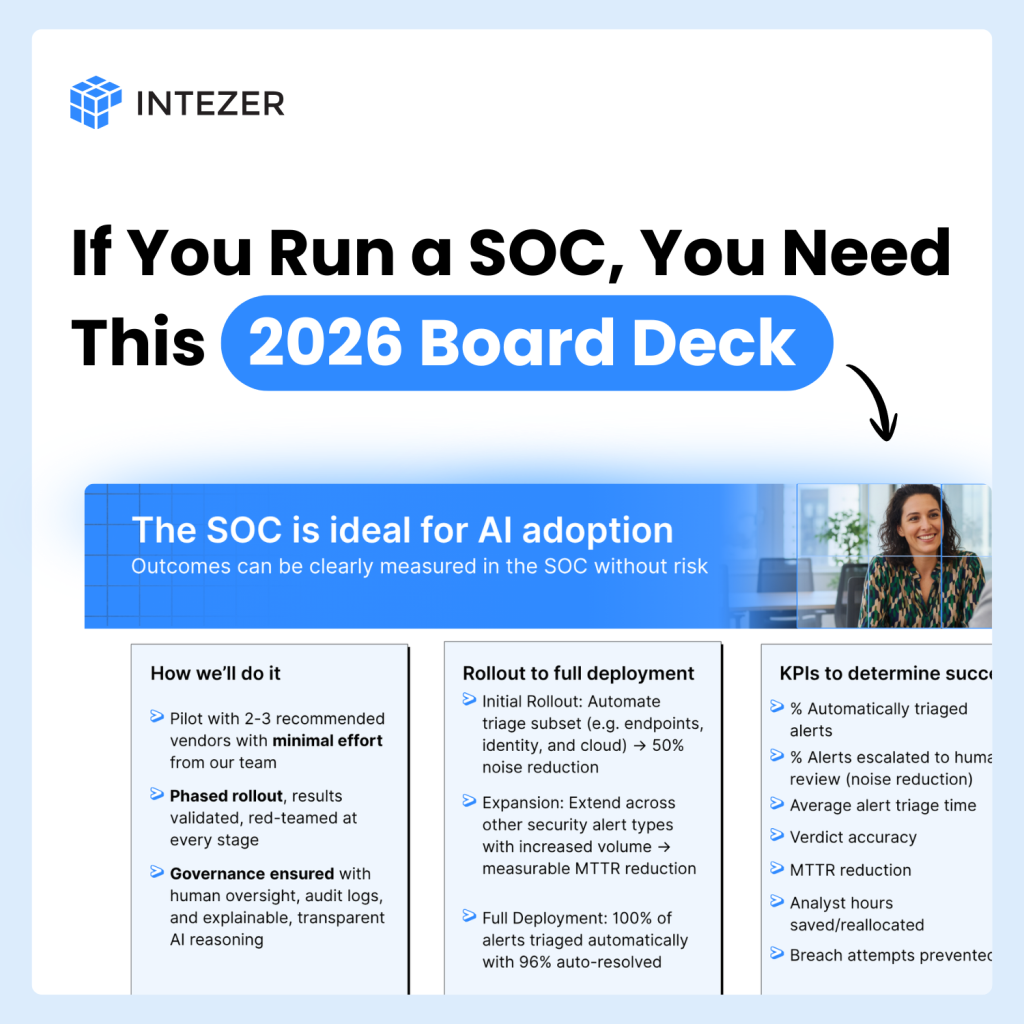
Get your editable copy of the one deck you need to pitch your board for 2026 AI SOC budget.
4. Safe automation with human-in-the-loop for high-impact actions
Most leaders are open to selective autonomous remediation, but only in narrow, well-defined, high-confidence scenarios.
For example:
- Rapid ransomware containment
- Isolation of clearly compromised endpoints
- Automatic execution of repeatable hygiene tasks
But for broader or higher-impact actions, CISOs still want human review. The tone was clear:
AI should move fast where appropriate, but never at the expense of control.
5. Integration and practical telemetry coverage
Every leader emphasized that an AI platform is only as good as the data it can consume.
The must-have list included:
- Cloud telemetry (AWS, Azure, GCP)
- Identity providers (Okta, Entra ID, Ping)
- EDR/XDR
- SIEM logs
- Ticketing/ITSM
- Custom threat intelligence feeds
They don’t want a magical AI that promises answers without good data.
They want a connected system that can see across the entire environment.
6. Executive & board alignment with demonstrable ROI
CISOs aren’t implementing AI in a vacuum. Their boards and executive leadership teams are pressuring them from two very different angles:
- Some are mandating AI adoption as a strategic priority.
- Others are slowing everything down with extensive governance, risk, and compliance processes.
To navigate this dynamic, CISOs need clear, defensible ROI:
- Reduced operating costs
- Faster mean-time-to-respond
- Fewer escalations
- More predictable outcomes
AI without measurable value is no longer acceptable.
They need something they can put in front of the board and say, “Here’s the impact.”
7. Accountability and legal clarity
Before enterprises allow AI to autonomously take security actions, CISOs need a fundamental question answered:
“Who is accountable when the AI acts?”
This isn’t just a theoretical concern. It’s a gating requirement for adoption.
Until there is clear guidance on liability, responsibility, and governance, many organizations will keep AI on a tight leash.
Closing thoughts
Across all of these conversations, the message was consistent:
AI in the SOC is inevitable, but it must be safe, transparent, integrated, and measurable.
CISOs aren’t looking for science fiction. They’re looking for credible, operational AI that enhances their teams, strengthens their defenses, and aligns with business realities.
Read about why the best LLMs are not enough for the AI SOC.
The post The 7 CISO requirements for AI SOC in 2026 appeared first on Intezer.
