Ukraine's Computer Emergency Response Team (CERT) says that Russian hackers are exploiting CVE-2026-21509, a recently patched vulnerability in multiple versions of Microsoft Office. [...]
The fastest-growing personal AI agent ecosystem just became a new delivery channel for malware. Over the last few days, VirusTotal has detected hundreds of OpenClaw skills that are actively malicious. What started as an ecosystem for extending AI agents is rapidly becoming a new supply-chain attack surface, where attackers distribute droppers, backdoors, infostealers and remote access tools disguised as helpful automation.
What is OpenClaw (formerly Clawdbot / Moltbot)?
Unless you’ve been completely disconnected from the internet lately, you’ve probably heard about the viral success of OpenClaw and its small naming soap opera. What started as Clawdbot, briefly became Moltbot, and finally settled on OpenClaw, after a trademark request made the original name off-limits.
At its core, OpenClaw is a self-hosted AI agent that runs on your own machine and can execute real actions on your behalf: shell commands, file operations, network requests. Which is exactly why it’s powerful, and also why, unless you actively sandbox it, the security blast radius is basically your entire system.
Skills: powerful by design, dangerous by default
OpenClaw skills are essentially small packages that extend what the agent can do. Each skill is built around a SKILL.md file (with some metadata and instructions) and may include scripts or extra resources. Skills can be loaded locally, but most users discover and install them from ClawHub, the public marketplace for OpenClaw extensions.
This is what makes the ecosystem so powerful: instead of hardcoding everything into the agent, you just add skills and suddenly it can use new tools, APIs, and workflows. The agent reads the skill documentation on demand and follows its instructions.
The problem is that skills are also third-party code, running in an environment with real system access. And many of them come with “setup” steps users are trained to trust: paste this into your terminal, download this binary and run it, export these environment variables. From an attacker’s perspective, it’s a perfect social-engineering layer.
So yes, skills are a gift for productivity and, unsurprisingly, a gift for malware authors too. Same mechanism, very different intentions.
What we added: OpenClaw Skill support in VirusTotal Code Insight
To help detect this emerging abuse pattern, we’ve added native support in VirusTotal Code Insight for OpenClaw skill packages, including skills distributed as ZIP files. Under the hood, we use Gemini 3 Flash to perform a fast security-focused analysis of the entire skill, starting from SKILL.md and including any referenced scripts or resources.
The goal is not to understand what the skill claims to do, but to summarize what it actually does from a security perspective: whether it downloads and executes external code, accesses sensitive data, performs network operations, or embeds instructions that could coerce the agent into unsafe behavior. In practice, this gives analysts a concise, security-first description of the real behavior of a skill, making it much easier to spot malicious patterns hidden behind “helpful” functionality.
What we’re seeing in the wild
At the time of writing, VirusTotal Code Insight has already analyzed more than 3,016 OpenClaw skills, and hundreds of them show malicious characteristics.
Not all of these cases are the same. On one side, we are seeing many skills flagged as dangerous because they contain poor security practices or outright vulnerabilities: insecure use of APIs, unsafe command execution, hardcoded secrets, excessive permissions, or sloppy handling of user input. This is increasingly common in the era of vibe coding, where code is generated quickly, often without a real security model, and published straight into production.
But more worrying is the second group: skills that are clearly and intentionally malicious. These are presented as legitimate tools, but their real purpose is to perform actions such as sensitive data exfiltration, remote control via backdoors, or direct malware installation on the host system.
Case study: hightower6eu, a malware publisher in plain sight
One of the most illustrative cases we’ve observed is the ClawHub user "hightower6eu", who is highly active publishing skills that appear legitimate but are consistently used to deliver malware
At the time of writing, VirusTotal Code Insight has already analyzed 314 skills associated with this single user, and the number is still growing, all of them identified as malicious. The skills cover a wide range of apparently harmless use cases (crypto analytics, finance tracking, social media analysis, auto-updaters, etc) but they all follow a similar pattern: users are instructed to download and execute external code from untrusted sources as part of the "setup" process.
To make this more tangible, the screenshot below shows how VirusTotal Code Insight analyzes one of the skills published by hightower6eu, in this case a seemingly harmless skill called "Yahoo Finance".
On the surface, the file looks clean: no antivirus engines flag it as malicious, and the ZIP itself contains almost no real code. This is exactly why traditional detection fails.
VT Code Insight, however, looks at the actual behavior described in the skill. In this case, it identifies that the skill instructs users to download and execute external code from untrusted sources as a mandatory prerequisite, both on Windows and macOS. From a security perspective, that’s a textbook malware delivery pattern: the skill acts as a social engineering wrapper whose only real purpose is to push remote execution. In other words, nothing in the file is technically "malware" by itself. The malware is the workflow. And that’s precisely the kind of abuse pattern Code Insight is designed to surface.
If you actually read the SKILL.md, the real behavior becomes obvious. For Windows users, the skill instructs them to download a ZIP file from an external GitHub account, protected with the password 'openclaw', extract it, and run the contained executable: openclaw-agent.exe.
When submitted to VirusTotal, this executable is detected as malicious by multiple security vendors, with classifications consistent with packed trojans.
When the system is macOS, the skill doesn't provide a binary directly. Instead, it points the user to a shell script hosted on glot.io, which is obfuscated using Base64:
Once the Base64 payload is decoded, the real behavior becomes visible: the script simply downloads and executes another file from a remote server over plain HTTP:
The final stage is the file x5ki60w1ih838sp7, a Mach-O executable. When submitted to VirusTotal, this binary is detected as malicious by 16 security engines, with classifications consistent with stealer trojans and generic malware families:
When the file is analyzed by multiple automated reversing tools and Gemini 3 Pro, the results are consistent: the binary is identified as a trojan infostealer, and more specifically as a variant of Atomic Stealer (AMOS).
This family of malware is well known in the macOS ecosystem. It is designed to run stealthily in the background and systematically harvest sensitive user data, including system and application passwords, browser cookies and stored credentials, and cryptocurrency wallets and related artifacts.
What OpenClaw users (and platforms) should do right now
OpenClaw itself provides reasonable security building blocks, but they only help if people actually use them:
Treat skill folders as trusted-code boundaries and strictly control who can modify them.
Prefer sandboxed executions and keep agents away from sensitive credentials and personal data.
Be extremely skeptical of any skill that requires pasting commands into a shell or running downloaded binaries.
If you operate a registry or marketplace, add publish-time scanning and flag skills that include remote execution, obfuscated scripts, or instructions designed to bypass user oversight.
And if you’re installing community skills: scan them first. For personal AI agents, the supply chain is not a detail, it’s the whole product.
Finally, we want to give full credit to Peter Steinberger, the creator of OpenClaw, for the success, traction, and energy around the project. From our side, we’d love to collaborate and explore ways to integrate VirusTotal directly into the OpenClaw publishing and review workflow, so that developers and users can benefit from security analysis without getting in the way of innovation.
Moltbook, een sociaal platform voor AI-agents, bevatte een lek waarmee 35.000 e-mailadressen zichtbaar waren voor derden. Daarnaast lekte het platform 1,5 miljoen api-authenticatietokens en privéberichten tussen AI-agents. Het probleem is inmiddels opgelost.
Elon Musk is meermaals gewaarschuwd door het veiligheidsteam van X dat de AI-tools van het platform gebruikers in staat zouden stellen seksuele afbeeldingen te maken van kinderen of beroemdheden, meldt The Washington Post. De ceo negeerde die waarschuwingen.
The ICE-tracking service says it doesn't store usernames or addresses
ICE-reporting service StopICE has blamed a US Customs and Border Protection (CBP) agent for attacking its app and website and sending users text messages warning them that their information had been "sent to the authorities."…
More than 230 malicious packages for the personal AI assistant OpenClaw (formerly known as Moltbot and ClawdBot) have been published in less than a week on the tool's official registry and on GitHub. [...]
ASUS heeft zijn ROG Kithara-koptelefoon uitgebracht. De headset werd al onthuld op CES en is ontwikkeld in samenwerking met Hifiman. In de Verenigde Staten kost de koptelefoon 300 dollar. De fabrikant heeft nog geen officiële europrijs bekendgemaakt.
Ukraine’s CERT says the bug went from disclosure to active exploitation in days
Russia-linked attackers are already exploiting Microsoft's latest Office zero-day, with Ukraine's national cyber defense team warning that the same bug is being used to target government agencies inside the country and organizations across the EU.…
As a Browser Guard user, you might not have noticed much difference lately. Browser Guard still blocks scams and phishing attempts just like always, and, in many cases, even better.
But behind the scenes, almost everything changed. The rules that govern how browser extensions work went through a major overhaul, and we had to completely rebuild how Browser Guard protects you.
First, what is Manifest v3 (and v2)?
Browser extensions include a configuration file called a “manifest”. Think of it as an instruction manual that tells your browser what an extension can do and how it’s allowed to do it.
Manifest v3 is the latest version of that system, and it’s now the only option allowed in major browsers like Chrome and Edge.
In Manifest v2, Browser Guard could use highly customized logic to analyze and block suspicious activity as it happened, protecting you as you browsed the web.
With Manifest v3, that flexibility is mostly gone. Extensions can no longer run deeply complex, custom logic in the same way. Instead, we can only pass static rule lists to the browser, called Declarative Net Request (DNR) rules.
But those DNR rules come with strict constraints.
Rule sets are size-limited by the browser to save space. Because rules are stored as raw JSON files, developers can’t use other data types to make them smaller. And updating those DNR rules can only be done by updating the extension entirely.
This is less of a problem on Chrome, which allows developers to push updates quickly, but other browsers don’t currently support this fast-track process. Dynamic rule updates exist, but they’re limited, and nowhere near large enough to hold the full set of rules.
In short, we couldn’t simply port Browser Guard from Manifest v2 to v3. The old approach wouldn’t keep our users protected.
A note about Firefox and Brave
Firefox and Brave chose a different path and continue to support the more flexible Manifest v2 method of blocking requests.
However, since Brave doesn’t have its own extension store, users can only install extensions they already had before Google removed Manifest v2 extensions from the Chrome Web Store. Though Brave also has strong out-of-the-box ad protection.
For Browser Guard users on Firefox, rest assured the same great blocking techniques will continue to work.
How Browser Guard still protects you
Given all of this, we had to get creative.
Many ad blockers already support pattern-based matching to stop ads and trackers. We asked a different question: what if we could use similar techniques to catch scam and phishing attempts before we know the specific URL is malicious?
Better yet, what if we did it without relying on the new DNR APIs?
So, we built a new pattern-matching system focused specifically on scam and phishing behavior, supporting:
Full regex-based URL matching
Full XPath and querySelector support
Matching against any content on the page
Favicon spoof detection
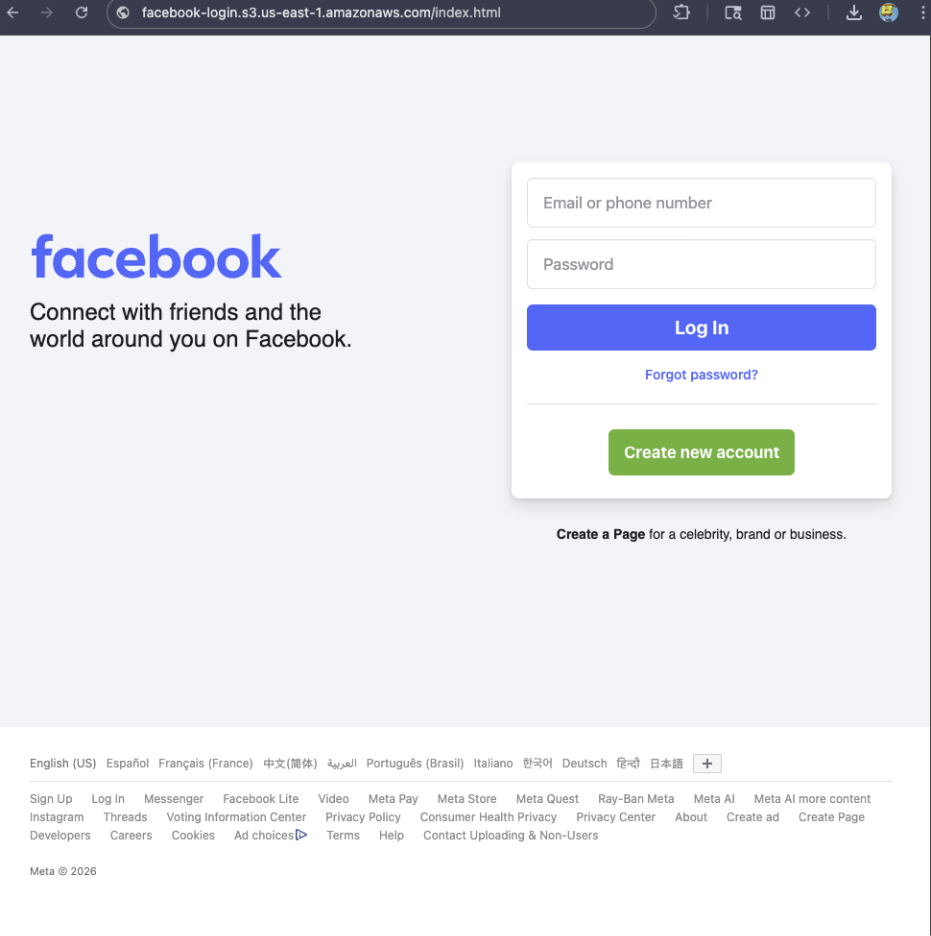
For example, if a site is hosted on Amazon S3, contains a password-input field, and uses a homoglyph in the URL to trick users into thinking they were logging into Facebook, Browser Guard can detect that combination—even if we’ve never seen the URL before.
Why this matters more now
With AI, attackers can create near-perfect duplicates of websites easier than ever. And did you spot the homoglyph in the URL? Nope, neither did I!
That’s why we designed this system so we can update its rules every 30 minutes, instead of waiting for full extension updates.
But I still see static blocking rules in Browser Guard
That’s true—for now.
We’ve found a temporary workaround that lets us support all the rules that we had before. However, we had to remove some of the more advanced logic that used to sit on top of them.
For example, we can’t use these large datasets to block subframe requests, only main frame requests. Nor can we stack multiple logic layers together; blocking is limited to simple matches (regex, domains and URLs).
Those limits are a big reason we’re investing more heavily in pattern-based and heuristic protection.
Pure heuristics
From day one, Browser Guard has used heuristics (behavior) to detect scams and phishing, monitoring behavior on the page to match suspicious activity.
For example, some scam pages deliberately break your browser’s back button by abusing window.replaceState, then trick you into calling that scammer’s “computer helpline.” Others try to convince you to run malicious commands on your computer.
Browser Guard can detect these behaviors and warn you before you fall for them.
What’s next?
Did someone say AI?
You’ve probably seen Scam Guard in other Malwarebytes products. We’re currently working on a version tailored specifically for Browser Guard. More soon!
Final thoughts
While Manifest v3 introduced meaningful improvements to browser security, it also created real challenges for security tools like Browser Guard.
Rather than scaling back, the Browser Guard team rebuilt our approach from the ground up, focusing on behavior, patterns, and faster response times. The result is protection that’s different under the hood, but just as committed to keeping you safe online.
We don’t just report on scams—we help detect them
Cybersecurity risks should never spread beyond a headline. If something looks dodgy to you, check if it’s a scam using Malwarebytes Scam Guard, a feature of our mobile protection products. Submit a screenshot, paste suspicious content, or share a text or phone number, and we’ll tell you if it’s a scam or legit. Download Malwarebytes Mobile Security for iOS or Android and try it today!
As a Browser Guard user, you might not have noticed much difference lately. Browser Guard still blocks scams and phishing attempts just like always, and, in many cases, even better.
But behind the scenes, almost everything changed. The rules that govern how browser extensions work went through a major overhaul, and we had to completely rebuild how Browser Guard protects you.
First, what is Manifest v3 (and v2)?
Browser extensions include a configuration file called a “manifest”. Think of it as an instruction manual that tells your browser what an extension can do and how it’s allowed to do it.
Manifest v3 is the latest version of that system, and it’s now the only option allowed in major browsers like Chrome and Edge.
In Manifest v2, Browser Guard could use highly customized logic to analyze and block suspicious activity as it happened, protecting you as you browsed the web.
With Manifest v3, that flexibility is mostly gone. Extensions can no longer run deeply complex, custom logic in the same way. Instead, we can only pass static rule lists to the browser, called Declarative Net Request (DNR) rules.
But those DNR rules come with strict constraints.
Rule sets are size-limited by the browser to save space. Because rules are stored as raw JSON files, developers can’t use other data types to make them smaller. And updating those DNR rules can only be done by updating the extension entirely.
This is less of a problem on Chrome, which allows developers to push updates quickly, but other browsers don’t currently support this fast-track process. Dynamic rule updates exist, but they’re limited, and nowhere near large enough to hold the full set of rules.
In short, we couldn’t simply port Browser Guard from Manifest v2 to v3. The old approach wouldn’t keep our users protected.
A note about Firefox and Brave
Firefox and Brave chose a different path and continue to support the more flexible Manifest v2 method of blocking requests.
However, since Brave doesn’t have its own extension store, users can only install extensions they already had before Google removed Manifest v2 extensions from the Chrome Web Store. Though Brave also has strong out-of-the-box ad protection.
For Browser Guard users on Firefox, rest assured the same great blocking techniques will continue to work.
How Browser Guard still protects you
Given all of this, we had to get creative.
Many ad blockers already support pattern-based matching to stop ads and trackers. We asked a different question: what if we could use similar techniques to catch scam and phishing attempts before we know the specific URL is malicious?
Better yet, what if we did it without relying on the new DNR APIs?
So, we built a new pattern-matching system focused specifically on scam and phishing behavior, supporting:
Full regex-based URL matching
Full XPath and querySelector support
Matching against any content on the page
Favicon spoof detection
For example, if a site is hosted on Amazon S3, contains a password-input field, and uses a homoglyph in the URL to trick users into thinking they were logging into Facebook, Browser Guard can detect that combination—even if we’ve never seen the URL before.
Why this matters more now
With AI, attackers can create near-perfect duplicates of websites easier than ever. And did you spot the homoglyph in the URL? Nope, neither did I!
That’s why we designed this system so we can update its rules every 30 minutes, instead of waiting for full extension updates.
But I still see static blocking rules in Browser Guard
That’s true—for now.
We’ve found a temporary workaround that lets us support all the rules that we had before. However, we had to remove some of the more advanced logic that used to sit on top of them.
For example, we can’t use these large datasets to block subframe requests, only main frame requests. Nor can we stack multiple logic layers together; blocking is limited to simple matches (regex, domains and URLs).
Those limits are a big reason we’re investing more heavily in pattern-based and heuristic protection.
Pure heuristics
From day one, Browser Guard has used heuristics (behavior) to detect scams and phishing, monitoring behavior on the page to match suspicious activity.
For example, some scam pages deliberately break your browser’s back button by abusing window.replaceState, then trick you into calling that scammer’s “computer helpline.” Others try to convince you to run malicious commands on your computer.
Browser Guard can detect these behaviors and warn you before you fall for them.
What’s next?
Did someone say AI?
You’ve probably seen Scam Guard in other Malwarebytes products. We’re currently working on a version tailored specifically for Browser Guard. More soon!
Final thoughts
While Manifest v3 introduced meaningful improvements to browser security, it also created real challenges for security tools like Browser Guard.
Rather than scaling back, the Browser Guard team rebuilt our approach from the ground up, focusing on behavior, patterns, and faster response times. The result is protection that’s different under the hood, but just as committed to keeping you safe online.
We don’t just report on scams—we help detect them
Cybersecurity risks should never spread beyond a headline. If something looks dodgy to you, check if it’s a scam using Malwarebytes Scam Guard, a feature of our mobile protection products. Submit a screenshot, paste suspicious content, or share a text or phone number, and we’ll tell you if it’s a scam or legit. Download Malwarebytes Mobile Security for iOS or Android and try it today!
In response to user feedback on AI integration, Mozilla announced today that the next Firefox release will let users disable AI features entirely or manage them individually. [...]
Raspberry Pi maakt zijn singleboardcomputers opnieuw duurder door het geheugentekort. Het gaat om alle Raspberry Pi 4- en 5 en Compute Module 4- en 5-modellen met meer dan 1GB geheugen. Ook de Raspberry Pi 500- en 500+-toetsenbordcomputers worden duurder.
A security audit of 2,857 skills on ClawHub has found 341 malicious skills across multiple campaigns, according to new findings from Koi Security, exposing users to new supply chain risks.
ClawHub is a marketplace designed to make it easy for OpenClaw users to find and install third-party skills. It's an extension to the OpenClaw project, a self-hosted artificial intelligence (AI) assistant
Microsoft has confirmed that a known issue preventing some Windows 11 devices from shutting down also affects Windows 10 systems with Virtual Secure Mode (VSM) enabled. [...]
Your favorite menu item might be easy to remember but it will not secure your account
Change Your Password Day took place over the weekend, and in case you doubt the need to improve this most basic element of cybersecurity hygiene, even McDonald's – yes, the fast food chain – is urging people to get more creative when it comes to passwords. …
A high-severity security flaw has been disclosed in OpenClaw (formerly referred to as Clawdbot and Moltbot) that could allow remote code execution (RCE) through a crafted malicious link.
The issue, which is tracked as CVE-2026-25253 (CVSS score: 8.8), has been addressed in version 2026.1.29 released on January 30, 2026. It has been described as a token exfiltration vulnerability that leads to
Firefox 148 krijgt een toggle om alle AI-functies uit te schakelen, zo blijkt uit de bètaversie van de browser. De ontwikkelaars hebben in het instellingenmenu een nieuw tabblad met AI-instellingen toegevoegd. Daar kunnen gebruikers ook alle AI-functies uitschakelen.

 Login
Login